[EXP] Behavioral Detection for Windows Recovery Path Abuse

Report Type: EXP
Threat Category: Windows recovery-path abuse / endpoint protection assurance
Assessment Date: May 14, 2026
Primary Impact Domain: Endpoint data protection and BitLocker assurance
Secondary Impact Domains: Recovery-key governance; endpoint posture assurance; device custody and physical-access risk; local data and credential exposure; executive and privileged endpoint protection; compliance and legal exposure; incident response and forensic scoping
Affected Asset Class: BitLocker-protected Windows endpoints, especially executive laptops, privileged workstations, field devices, traveling-user systems, shared systems, kiosks, loaner devices, repair-handled systems, and endpoints containing sensitive local data.
Threat Objective Classification: Unauthorized local data access, recovery-control abuse, endpoint trust degradation, credential exposure, and post-recovery operational expansion.

BLUF
Windows Recovery Path Abuse creates enterprise risk by weakening confidence in the practical protection value of BitLocker-protected Windows endpoints. The risk is driven by misuse of recovery-key access, recovery configuration, boot controls, EFI/system partition handling, removable media, endpoint posture, and device-custody workflows that can make unauthorized local access more plausible. The threat posture is elevated because these workflows are legitimate support functions and may resemble helpdesk recovery, repair, imaging, firmware servicing, patch remediation, or endpoint maintenance. Executive action is required to validate recovery-key governance, confirm BitLocker and Secure Boot posture, enforce TPM and WinRE baselines, prioritize high-risk devices, preserve relevant evidence, and determine whether suspicious recovery-path activity created local data-access, credential, compliance, or endpoint-trust risk.
Executive Risk Translation
Windows Recovery Path Abuse shifts business risk from a narrow endpoint-support concern to an endpoint data-protection assurance issue. The primary concern is not simply whether BitLocker is enabled, but whether recovery-key access, recovery configuration, boot posture, external boot controls, EFI/system partition handling, and device-custody practices preserve the intended protection of encrypted Windows endpoints. If suspicious activity occurred, response may expand into endpoint assurance review, recovery-key access investigation, high-risk device scoping, helpdesk and asset-record reconciliation, local data-access assessment, credential review, device rebuild decisions, privileged-workstation validation, and executive reporting. This creates financial, operational, data-protection, legal, compliance, and security-governance exposure beyond the affected endpoint.
S3 — Why This Matters Now
· BitLocker can appear deployed and compliant while weak recovery, boot, recovery-key, or device-custody controls reduce its practical protection value.
· Recovery-key access is a high-value control-plane event because misuse can support unauthorized local access when paired with physical access, posture drift, or abnormal boot behavior.
· High-risk endpoint populations create the most meaningful exposure, including executive laptops, privileged workstations, traveling-user devices, field devices, shared systems, loaner devices, and repair-handled systems.
· Legitimate helpdesk recovery, repair, imaging, firmware servicing, patching, and endpoint maintenance can resemble suspicious recovery-path activity without strong context.
· Relevant activity may occur during recovery, pre-boot, offline, or physical-access conditions where normal endpoint telemetry may be incomplete.
· Weak recovery-key governance, incomplete device-custody records, inconsistent endpoint posture data, or poor helpdesk linkage can materially delay scoping and assurance.
S4 — Key Judgments
· Windows Recovery Path Abuse creates a high-priority endpoint protection and local data-access risk when recovery, boot, BitLocker, EFI/system partition, removable-media, or device-management workflows can be misused.
· The primary business risk is loss of confidence that BitLocker-protected endpoints remain protected against unauthorized local access, recovery misuse, or support-process abuse.
· The strongest enterprise risk signal is abnormal recovery-key access correlated with posture drift, recovery or boot anomalies, suspicious administrative activity, removable-media activity, helpdesk mismatch, or custody concern.
· Recovery-key access alone should not be treated as confirmed compromise, but it requires urgent review when the requestor, device, role, location, timing, support queue, source device, application, or ticket context deviates from baseline.
· EFI/system partition access, boot-configuration manipulation, and WinRE configuration changes are high-value indicators when they occur outside approved repair, imaging, firmware, deployment, patching, or endpoint-management workflows.
· Network-only visibility is insufficient because the core risk is local, endpoint-control-plane, recovery-environment, boot-path, or physical-access oriented.
· Executive risk reduction depends on recovery-key governance, endpoint posture assurance, high-risk device prioritization, helpdesk validation, custody-context review, and telemetry readiness.
S5 — Executive Risk Summary
Business Risk
Windows Recovery Path Abuse can create material data-protection, operational, legal, compliance, and security-governance risk when BitLocker-protected Windows endpoints are exposed to unauthorized recovery-key access, recovery-environment manipulation, boot-path tampering, removable-media staging, EFI/system partition changes, or weakened endpoint posture. Risk increases when affected devices belong to executives, privileged administrators, traveling users, field personnel, shared labs, kiosks, loaner pools, repair workflows, or business functions that store sensitive data locally.
Technical Cause
The risk is driven by misuse of legitimate Windows recovery, boot, BitLocker, EFI/system partition, removable-media, and endpoint-management workflows. Suspicious activity may include recovery-key retrieval outside expected support boundaries, recovery or boot-configuration changes, EFI/system partition access, removable-media staging, abnormal boot behavior, telemetry gaps, or posture drift affecting BitLocker, Secure Boot, TPM, WinRE, external boot, firmware, or compliance controls.
Threat Posture
The threat posture is elevated because recovery-path abuse may occur partly outside normal runtime telemetry and may not resemble conventional malware execution. The risk is amplified when recovery-key access is broadly available, helpdesk workflows are weakly tied to tickets, endpoint posture baselines are inconsistent, removable-media use is permitted, high-risk devices travel or change custody, or sensitive local data remains present on managed endpoints. Successful abuse may create local data-access, credential-access, compliance, or endpoint-trust concerns without a clear remote-exploitation pattern.
Executive Decision Requirement
Executives must require validation of BitLocker recovery-key access controls, Secure Boot and TPM posture, WinRE and external-boot policy enforcement, high-risk endpoint exposure, recovery-key audit quality, helpdesk-ticket linkage, endpoint posture baselines, device-custody records, removable-media controls, and investigation readiness. Response leadership should also confirm that suspicious recovery, boot, EFI/system partition, removable-media, or posture events are reviewed historically rather than closed solely because the endpoint is currently encrypted or compliant.
S6 — Executive Cost Summary
Windows Recovery Path Abuse creates financial exposure based on affected endpoint count, device criticality, sensitive local data scope, recovery-key access breadth, BitLocker and Secure Boot posture, TPM and WinRE enforcement, removable-media exposure, endpoint custody concerns, telemetry completeness, helpdesk process maturity, and the degree to which suspicious recovery-path activity may have enabled unauthorized local data access, credential access, or downstream misuse.
Low Impact Scenario
Rapid assessment confirms strong BitLocker, Secure Boot, TPM, WinRE, external-boot, and MDM posture; recovery-key access is limited to approved roles; no suspicious recovery-key retrieval, EFI/system partition activity, removable-media staging, recovery prompts, boot anomalies, telemetry gaps, or posture drift are identified; and helpdesk, asset, and custody records align with endpoint telemetry. Response remains limited to posture validation, recovery-key audit review, high-risk device sampling, targeted hunting, and executive tracking; estimated impact $150K to $750K.
Moderate Impact Scenario
One or more managed endpoints show suspicious recovery-key access, weak helpdesk linkage, abnormal recovery or boot behavior, removable-media staging, EFI/system partition activity, posture drift, telemetry gaps, or device-custody uncertainty without confirmed broad local data exposure, credential misuse, regulated-data impact, or sustained adversary activity. Response requires endpoint preservation, forensic review, recovery-key investigation, posture validation, helpdesk and asset reconciliation, local data-access assessment, limited credential-risk review, legal assessment, and executive coordination; estimated impact $750K to $5M.
High Impact Scenario
Confirmed or strongly suspected recovery-path abuse affects executive laptops, privileged workstations, regulated-data endpoints, field devices, repair-handled systems, loaner devices, shared systems, or endpoints containing sensitive local data. Evidence may include suspicious recovery-key access, boot-path manipulation, EFI/system partition changes, removable-media staging, endpoint posture degradation, unexplained offline intervals, post-recovery file access, credential access, or downstream identity activity. Response may require expanded forensics, device rebuilds, recovery-key governance remediation, privileged credential review, sensitive-data scoping, executive-device validation, legal and regulatory review, insurance coordination where applicable, customer or business-unit communications readiness, and board-level incident governance; estimated impact $5M to $25M or higher.
S6A — Key Cost Drivers
· Number and criticality of affected endpoints, especially executive laptops, privileged workstations, field devices, loaner devices, repair-handled systems, shared systems, and endpoints with sensitive local data.
· Presence of sensitive local files, cached credentials, browser sessions, certificates, VPN material, source code, customer information, regulated data, or privileged administrative context.
· Breadth and governance quality of BitLocker recovery-key access across helpdesk, endpoint administration, device-management, service-account, and delegated support roles.
· Evidence of suspicious recovery-key retrieval, boot-path changes, EFI/system partition activity, removable-media staging, posture drift, recovery prompts, telemetry gaps, or custody concern.
· Whether affected devices involve executives, privileged users, regulated-data handling, travel exposure, repair handling, loaner assignment, loss, theft, shipping, or asset transfer.
· Completeness of recovery-key audit logs, endpoint telemetry, MDM posture data, helpdesk tickets, asset records, and device-custody history.
· Scope of required forensic review, endpoint preservation, device rebuild, credential review, recovery-key governance remediation, and post-recovery activity hunting.
· Ability to distinguish approved recovery, repair, imaging, firmware, patching, baseline enforcement, and helpdesk workflows from suspicious recovery-path activity.
· Degree to which telemetry gaps force broader assumptions about offline access, recovery-environment activity, physical access, or local data exposure.
· Need for legal review, regulatory assessment, executive-device assurance, cyber insurance coordination, business-unit notification, customer assurance, or board reporting.
Most Likely Scenario Justification
Moderate scenario is most likely when suspicious recovery-path activity requires historical review, recovery-key governance validation, endpoint posture assessment, and high-risk device scoping, but available evidence does not confirm broad sensitive-data exposure, credential misuse, regulated-data impact, sustained adversary control, or enterprise-wide endpoint compromise. The estimate moves toward the lower end when telemetry confirms narrow exposure, approved support context, strong BitLocker and Secure Boot posture, no suspicious recovery-key access, no EFI/system partition changes, no removable-media staging, no posture drift, and no post-recovery data-access behavior. The estimate moves toward the upper end when affected devices include executives or privileged users, recovery-key access is weakly governed, endpoint custody is unclear, posture drift is present, telemetry is incomplete, removable-media activity is observed, or local data and credential exposure cannot be confidently ruled out.
S6B — Compliance and Risk Context
Compliance Exposure Indicator
Moderate to High depending on whether suspicious recovery-path activity, recovery-key misuse, local data exposure, device-custody uncertainty, credential access, endpoint telemetry gaps, or incomplete forensic scoping affected devices containing regulated data, customer information, privileged access material, executive communications, intellectual property, contractual records, or business-critical operational data.
Risk Register Entry
Risk Title
Windows Recovery Path Abuse and BitLocker Protection Assurance Risk
Risk Description
Adversaries, insiders, or unauthorized physical-access actors may abuse Windows recovery, boot, BitLocker, EFI/system partition, removable-media, recovery-key, or endpoint-management workflows to weaken the practical protection value of encrypted Windows endpoints, enable unauthorized local data access, create endpoint posture drift, bypass expected support boundaries, or generate downstream credential, data-protection, operational, compliance, and governance exposure.
Likelihood
Medium to High.
Impact
Severe.
Risk Rating
Critical.
Annualized Risk Exposure
Estimated $1.5M to $12M or higher based on high-risk endpoint count, sensitive local data scope, recovery-key access breadth, physical-access exposure, helpdesk workflow maturity, BitLocker and Secure Boot posture, TPM and WinRE enforcement, removable-media exposure, endpoint telemetry completeness, recovery-key audit quality, custody-record reliability, containment burden, credential-risk scope, and legal or regulatory obligations.
S7 — Risk Drivers
· Legitimate Windows recovery and BitLocker workflows can be abused or misused while still resembling approved support activity.
· Recovery-key access is a sensitive control-plane function that requires strong role, ticket, device-owner, timing, and support-boundary governance.
· High-risk endpoints increase business impact when they contain sensitive local data, privileged credentials, executive communications, customer information, regulated records, or source code.
· Physical access, travel, repair handling, loaner assignment, shared use, shipping, asset transfer, loss, or theft increase recovery-path abuse plausibility.
· EFI/system partition access and boot-configuration changes can weaken confidence in endpoint integrity when they occur outside approved servicing workflows.
· Removable-media staging increases exposure where external storage, external boot, repair media, or device-custody controls are weak.
· Endpoint posture drift affecting BitLocker, Secure Boot, TPM, WinRE, external boot, firmware, or compliance state can undermine encryption assurance.
· Recovery, pre-boot, offline, or physical-access activity may leave limited telemetry, creating uncertainty during investigation and assurance review.
· Static exploit indicators and network-only visibility are insufficient because the relevant behavior is primarily local, control-plane, recovery-environment, boot-path, or physical-access oriented.
S8 — Bottom Line for Executives
Windows Recovery Path Abuse should be treated as a high-priority endpoint data-protection and recovery-control risk. The key executive concern is not only whether BitLocker is deployed, but whether recovery-key access, boot posture, Secure Boot, TPM, WinRE, external boot, device custody, and helpdesk workflows can be trusted during suspicious recovery events. Risk reduction depends on recovery-key governance, high-risk endpoint prioritization, posture-baseline enforcement, removable-media control, helpdesk-ticket validation, asset and custody reconciliation, and evidence preservation. Organizations should prioritize this report as an endpoint trust and data-protection assurance issue because recovery-path abuse can create local data-access uncertainty, credential-risk exposure, executive-device concern, compliance pressure, and board-level governance requirements.
S9 — Board-Level Takeaway
Windows Recovery Path Abuse can turn trusted recovery and support workflows into an endpoint protection failure point. The board-level concern is that encrypted Windows devices may appear compliant while recovery-key access, boot-path changes, EFI/system partition activity, removable-media staging, or weak custody controls reduce confidence in local data protection. Leadership should require evidence that recovery-key access is governed, high-risk endpoints are prioritized, Secure Boot and TPM posture is enforced, WinRE and external-boot policy are controlled, helpdesk recovery is ticket-bound, device custody is traceable, and suspicious recovery-path activity can be investigated with sufficient evidence. This report supports governance decisions around endpoint encryption assurance, executive-device protection, recovery-key control, physical-access risk, telemetry readiness, incident escalation, and enterprise trust in Windows endpoint protection.
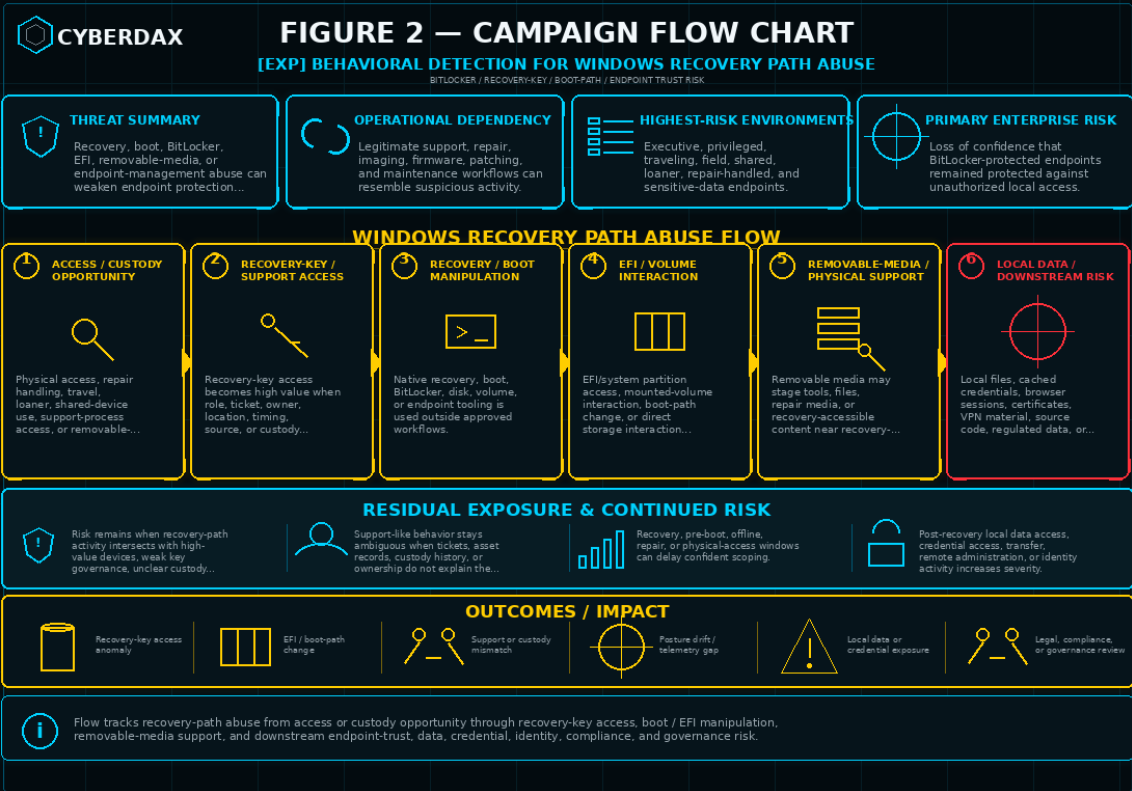
Figure 2
S10 — Threat Overview
Windows Recovery Path Abuse refers to misuse of Windows recovery, boot, BitLocker, EFI/system partition, removable-media, or endpoint-management workflows in a way that can weaken confidence in the protection normally provided by BitLocker-protected Windows endpoints. The activity is not best understood as a conventional remote exploit, malware family, or network intrusion pattern. It is an endpoint protection assurance issue centered on recovery paths, control-plane access, local access plausibility, and the trustworthiness of support workflows.
The core risk is that an attacker, insider, or unauthorized physical-access actor may attempt to use legitimate recovery or boot-adjacent mechanisms to access protected endpoint data, change recovery or boot behavior, stage activity through removable media, manipulate EFI/system partition content, or exploit weak governance around BitLocker recovery-key access. The most important business question is whether the organization can prove that encrypted endpoints remained protected during suspicious recovery, custody, or boot-state events.
This activity is difficult to assess through single-event evidence because legitimate helpdesk recovery, device repair, imaging, firmware servicing, patch remediation, endpoint maintenance, and baseline enforcement can produce similar artifacts. High-confidence assessment depends on correlation across recovery-key access, endpoint posture, identity context, helpdesk records, asset ownership, custody history, removable-media activity, boot-state behavior, and post-recovery endpoint activity.
Windows Recovery Path Abuse should therefore be treated as a recovery-control and endpoint-trust risk. The response objective is not only to identify suspicious activity, but to determine whether the organization can validate recovery-key governance, endpoint posture integrity, device custody, and local data protection for high-risk Windows devices.
S11 — Threat Classification and Type
Threat Type
Endpoint recovery-path abuse and data-protection assurance risk.
Threat Sub-Type
Windows recovery, boot-path, BitLocker recovery-key, EFI/system partition, removable-media, and endpoint posture abuse.
Operational Classification
Local, physical-access-adjacent, insider-adjacent, support-process-adjacent, and control-plane-adjacent activity.
Primary Function
The primary function is to weaken the practical protection value of encrypted Windows endpoints by abusing recovery, boot, recovery-key, EFI/system partition, removable-media, or device-management workflows. The activity may support unauthorized local data access, endpoint posture weakening, support-process misuse, recovery-key misuse, or downstream credential and data-risk exposure.
S12 — Campaign or Activity Overview
Windows Recovery Path Abuse does not require a single fixed campaign pattern. The activity can appear as an opportunistic physical-access event, an insider misuse scenario, a support-process abuse case, a recovery-key governance failure, or a targeted attempt to access sensitive local data on a high-value endpoint. The most important activity pattern is not a specific exploit name or file artifact, but the relationship between recovery-path behavior and surrounding business context.
Relevant activity may begin with access to a device, access to a recovery key, removable-media staging, administrative use of recovery or boot tooling, EFI/system partition interaction, or manipulation of endpoint posture. In some cases, the activity may happen while the full Windows operating system is running. In other cases, the most important actions may occur during recovery, pre-boot, offline, or physical-access conditions where normal endpoint telemetry is limited.
The strongest enterprise concern arises when recovery-key access, recovery configuration changes, boot-path manipulation, EFI/system partition activity, removable-media use, endpoint posture drift, or abnormal recovery events appear together. The concern increases further when the affected device belongs to an executive, privileged administrator, traveling user, field worker, shared-device population, repair workflow, loaner pool, or business function with sensitive local data.
This activity should be assessed through a behavior-led model. Static indicators, public proof-of-concept artifacts, exploit names, USB labels, single command strings, or file names should not drive the primary risk judgment. The more durable question is whether recovery and support mechanisms were used in a way that falls outside approved identity, device, helpdesk, custody, posture, or maintenance context.
S13 — Targets and Exposure Surface
Windows Recovery Path Abuse is most relevant to Windows endpoints where BitLocker, Secure Boot, TPM, WinRE, external boot controls, recovery-key handling, and device-custody practices determine whether local data remains protected. The exposure surface is not limited to one software component. It spans endpoint configuration, recovery workflows, administrative access, helpdesk process maturity, device management, physical custody, and local data sensitivity.
High-priority targets include devices where unauthorized local access would create disproportionate business impact. This includes executive laptops, privileged administrator workstations, traveling-user laptops, field devices, shared lab systems, kiosks, loaner devices, repair-handled systems, and endpoints containing sensitive local data. These devices create elevated risk because misuse may lead to exposure of credentials, cached sessions, business records, customer information, source code, regulated data, or privileged administrative context.
The exposure surface also includes recovery-key stores, helpdesk consoles, endpoint-management platforms, MDM and Intune workflows, asset-management systems, repair and custody processes, removable-media controls, and device posture baselines. Weakness in any of these areas can reduce confidence that BitLocker protection remained effective during a suspicious recovery or custody event.
S14 — Sectors / Countries Affected
Sectors Affected
· Financial services, banking, insurance, and payment-processing organizations.
· Healthcare, life sciences, hospitals, clinics, and regulated medical environments.
· Government, defense, public-sector, and municipal organizations.
· Legal, consulting, accounting, and professional-services firms.
· Technology, software development, cloud operations, and engineering organizations.
· Energy, utilities, manufacturing, transportation, logistics, and critical infrastructure.
· Education, research institutions, shared lab environments, and university endpoint fleets.
· Retail, ecommerce, customer-support, and distributed workforce environments.
· Telecommunications, managed service providers, and enterprise IT service organizations.
· Organizations with executive laptops, privileged workstations, traveling-user devices, field systems, loaner devices, kiosks, shared systems, repair-handled endpoints, or endpoints containing sensitive local data.
· Organizations relying on BitLocker, Windows Recovery Environment, Secure Boot, TPM, MDM / Intune, helpdesk recovery, device-custody processes, or recovery-key workflows to protect Windows endpoint data.
Countries Affected
· Global.
· Exposure is not limited to a single country or region because BitLocker-protected Windows endpoints, recovery-key workflows, repair processes, mobile devices, field systems, executive laptops, and privileged workstations are used globally.
· Countries with large enterprise Windows deployments, regulated industries, government agencies, technology sectors, mobile workforces, managed service ecosystems, or high-value endpoint data may face elevated operational exposure.
· Country-specific impact should be assessed by Windows endpoint population, BitLocker deployment, recovery-key governance, Secure Boot and TPM posture, device-custody practices, high-risk endpoint concentration, telemetry quality, physical-access exposure, and incident-response readiness rather than geography alone.
S15 — Adversary Capability Profiling
Capability Level
Moderate.
The activity does not necessarily require advanced malware development, custom infrastructure, or remote exploitation capability. It does require knowledge of Windows recovery, BitLocker, boot behavior, recovery-key workflows, EFI/system partition handling, endpoint posture controls, or enterprise support processes. Capability increases when the actor can combine physical access, recovery-key access, support-process knowledge, or administrative tooling with weak device-custody and endpoint-governance controls.
Technical Sophistication
Moderate.
Technical sophistication is centered on understanding how recovery, boot, encryption, removable-media, and endpoint-management workflows interact. The activity can remain effective when it uses legitimate administrative tools or approved support pathways. More sophisticated execution may involve careful timing, reduced telemetry, EFI/system partition manipulation, posture drift, or activity that occurs during recovery, pre-boot, offline, or physical-access windows.
Infrastructure Maturity
Low to Moderate.
This activity does not require mature command-and-control infrastructure to create risk. The most important infrastructure may be local access, removable media, recovery-key access, helpdesk tooling, endpoint-management platforms, or device-custody processes. Infrastructure maturity becomes more relevant only if recovery-path abuse is followed by data movement, credential use, remote administration, lateral movement, or downstream identity activity.
Operational Scale
Targeted to Moderate.
The most likely operational pattern is targeted activity against specific high-value devices or opportunistic misuse where recovery-key access, physical access, repair handling, or device custody creates an opening. Enterprise-wide scale is less likely as a primary pattern, but broader risk may emerge if recovery-key governance is weak, support roles are over-permissioned, device posture baselines are inconsistent, or multiple high-risk endpoints share the same process weakness.
Escalation Likelihood
Moderate.
Escalation likelihood increases when suspicious recovery-path behavior affects executive devices, privileged workstations, regulated-data endpoints, repair-handled devices, traveling-user systems, or endpoints with sensitive local data. Escalation is also more likely when telemetry is incomplete, custody is unclear, recovery-key access is poorly governed, or evidence suggests post-recovery file access, credential access, or downstream identity activity.
S16 — Targeting Probability Assessment
Overall Targeting Probability
Medium.
Windows Recovery Path Abuse is not likely to be the dominant enterprise attack path for every organization, but it becomes materially more plausible where high-value Windows endpoints combine sensitive local data, physical-access exposure, weak recovery-key governance, incomplete helpdesk linkage, removable-media permissiveness, inconsistent posture enforcement, or poor custody tracking. The risk is strongest for organizations that rely heavily on BitLocker assurance but cannot quickly prove that recovery and support workflows are tightly controlled.
Targeting Drivers
· High-value endpoints containing sensitive local data, cached credentials, browser sessions, certificates, VPN material, customer information, regulated data, source code, or privileged administrative context.
· Executive laptops, privileged workstations, traveling-user devices, field devices, shared systems, loaner devices, kiosks, and repair-handled endpoints.
· Broad or poorly governed BitLocker recovery-key access across helpdesk, endpoint administration, device-management, or delegated support roles.
· Weak linkage between recovery-key retrieval, helpdesk tickets, asset ownership, device custody, support queue responsibility, and business justification.
· Inconsistent enforcement of BitLocker, Secure Boot, TPM, WinRE, external boot, firmware, and endpoint-compliance baselines.
· Permissive removable-media use, unclear external-boot controls, or unmanaged repair-media workflows.
· Devices with recent travel, loss, theft, repair, shipping, loaner assignment, asset transfer, or chain-of-custody uncertainty.
· Limited ability to correlate endpoint telemetry, MDM posture, recovery-key audit logs, helpdesk records, asset records, and custody history.
· Environments where local endpoint data remains sensitive even when cloud and identity controls are otherwise mature.
Most Likely Targets
· Executive laptops.
· Privileged administrator workstations.
· Traveling-user laptops.
· Field devices.
· Shared lab systems.
· Kiosks and semi-managed endpoint populations.
· Loaner devices.
· Repair-handled devices.
· Devices with recent loss, theft, shipping, transfer, or custody concerns.
· Endpoints containing sensitive local files, regulated data, customer information, source code, cached credentials, certificates, VPN material, browser sessions, or privileged administrative context.
S17 — MITRE ATT&CK Chain Flow Mapping
Stage 1 — Access Precondition and Device Exposure
Windows Recovery Path Abuse begins with a condition that makes recovery-path interaction plausible. This may include physical access to a Windows endpoint, access during repair or custody handling, unauthorized use during travel or loaner assignment, support-process exposure, or removable-device adjacency. The report does not require a single assumed initial-access method because the primary risk is abuse of recovery and endpoint-control workflows after access or custody opportunity exists.
· Confidence: Conditional. Physical access, custody exposure, support-process exposure, or removable-device adjacency are relevant preconditions, but the specific access condition must be validated per environment.
Stage 2 — Recovery-Key or Support-Workflow Access
The next relevant stage is access to BitLocker recovery material or support workflows that can affect endpoint recovery state. Recovery-key retrieval is not inherently malicious, but it becomes a high-value control-plane signal when it occurs outside expected role, ticket, device-owner, support queue, location, timing, source device, application, or custody context.
· ATT&CK mapping: Valid Accounts T1078.
· Confidence: Conditional to likely. Recovery-key or support-workflow access is a central risk path for this report, but it should not be treated as compromise without supporting endpoint, posture, helpdesk, asset, or custody evidence.
Stage 3 — Recovery, Boot, or Endpoint-Control Manipulation
Once access exists, the actor may use legitimate Windows recovery, boot, BitLocker, disk, volume, or endpoint-management tooling to inspect or change recovery behavior, boot configuration, encryption state, mounted volumes, or device posture. The operational concern is not the specific utility name by itself, but whether the action occurs outside approved recovery, repair, imaging, firmware, deployment, patching, or endpoint-management workflows.
· ATT&CK mapping: Command and Scripting Interpreter T1059.
· ATT&CK mapping: Inhibit System Recovery T1490.
· Confidence: Conditional. Native administrative tooling is a realistic pathway, but execution must be interpreted through user, device, helpdesk, posture, maintenance, and custody context.
Stage 4 — EFI/System Partition or Direct Volume Interaction
Windows Recovery Path Abuse becomes more concerning when recovery-path activity includes EFI/system partition access, mounted-volume interaction, boot-path changes, or direct interaction with protected storage paths. These actions can weaken confidence in endpoint integrity when they occur outside approved firmware, repair, deployment, or endpoint-servicing workflows.
· ATT&CK mapping: Direct Volume Access T1006.
· ATT&CK mapping: Pre-OS Boot T1542.
· Confidence: Conditional to likely. EFI/system partition and direct volume activity are strong recovery-path indicators when paired with posture drift, boot anomalies, recovery-key access, removable-media activity, or custody concern.
Stage 5 — Removable-Media Staging or Physical-Access Support
Removable media may be used to stage tools, files, repair media, or recovery-accessible content. Removable media is not required for every recovery-path abuse scenario, but its presence materially increases concern when followed by recovery, boot, BitLocker, partition, volume, or EFI-related activity.
· ATT&CK mapping: Hardware Additions T1200.
· ATT&CK mapping: Data from Removable Media T1025.
· ATT&CK mapping: Peripheral Device Discovery T1120.
· Confidence: Conditional. Removable-media activity is relevant where insertion, mounting, file activity, or execution aligns with recovery-path behavior, but it should not be treated as a universal prerequisite.
Stage 6 — Local Data or Credential Exposure
If recovery-path abuse succeeds or creates practical access to protected endpoint contents, the next concern is exposure of local files, cached credentials, browser sessions, certificates, VPN material, source code, customer information, regulated data, or privileged administrative context. This stage is most important for executive laptops, privileged workstations, traveling-user devices, field devices, repair-handled systems, and endpoints with sensitive local data.
· ATT&CK mapping: File and Directory Discovery T1083.
· ATT&CK mapping: Unsecured Credentials T1552.
· Confidence: Conditional. Local data and credential exposure should be assessed when recovery-path anomalies are followed by file access, credential access, unusual authentication, or downstream identity activity.
Stage 7 — Defense, Posture, or Visibility Degradation
Recovery-path abuse may be accompanied by endpoint posture drift, weakened Secure Boot or TPM posture, altered WinRE or external-boot controls, endpoint telemetry gaps, or degraded device compliance. These conditions do not prove compromise by themselves, but they materially reduce confidence in endpoint protection assurance.
· ATT&CK mapping: Impair Defenses T1562.
· Confidence: Conditional. Posture or visibility degradation is a high-priority risk amplifier when correlated with recovery-key access, boot-path changes, EFI/system partition activity, removable-media staging, abnormal recovery behavior, or custody concern.
Stage 8 — Downstream Data Movement
If local access enables file staging, removable-media transfer, outbound upload, or transfer to external services, the event moves from endpoint assurance concern into downstream data-risk exposure. This stage should not be assumed without supporting telemetry.
· ATT&CK mapping: Exfiltration Over Web Service T1567.
· Confidence: Conditional. Downstream data movement should be treated as an escalation signal when supported by file, identity, network, endpoint, or cloud evidence.
Stage 9 — Endpoint Trust and Business Assurance Impact
The final operational outcome is uncertainty over whether encrypted Windows endpoints remained protected during suspicious recovery, custody, boot, or posture events. This stage is most severe when affected devices belong to executives, privileged users, regulated-data functions, field operations, repair workflows, or sensitive local-data populations, especially when telemetry gaps prevent confident scoping.
· Confidence: High where recovery-path anomalies overlap with high-risk devices, weak recovery-key governance, posture drift, custody uncertainty, or incomplete telemetry.
S18 — Attack Path Narrative (Signal-Aligned Execution Flow)
Access Condition and Endpoint Exposure
Windows Recovery Path Abuse begins when an actor has a plausible path to interact with a protected Windows endpoint, recovery workflow, or support process. The access condition may involve physical access, repair handling, travel exposure, loaner assignment, shared-device use, support-process access, or weak recovery-key governance.
Relevant Signals
· Device associated with travel, repair, loaner assignment, shared use, asset transfer, loss, theft, shipping, or custody uncertainty.
· Endpoint assigned to an executive, privileged user, field worker, shared system, kiosk, or sensitive local-data population.
· Weak linkage between recovery-key access, ticketing, device owner, support queue, custody state, and business justification.
Recovery-Key or Support-Workflow Interaction
The actor may attempt to obtain or misuse BitLocker recovery material or use a support workflow that can affect endpoint recovery state. Recovery-key access becomes a central signal when it deviates from expected support behavior or aligns with custody, posture, boot, or post-recovery concerns.
Relevant Signals
· Recovery-key retrieval by an unusual user, role, application, source device, source IP, location, or time window.
· Recovery-key retrieval without a matching ticket, repair record, user request, approved recovery workflow, asset record, or maintenance window.
· Recovery-key access followed by endpoint noncompliance, abnormal recovery behavior, telemetry gap, posture drift, or suspicious post-recovery activity.
Recovery, Boot, or Endpoint-Control Activity
After access or support-workflow interaction, the actor may use legitimate recovery, boot, BitLocker, disk, volume, or endpoint-management tooling to inspect or alter device state. The concern is whether the action occurs outside approved recovery, repair, imaging, firmware, deployment, patching, baseline enforcement, or helpdesk workflows.
Relevant Signals
· Execution of recovery, boot, BitLocker, disk, volume, partition, or EFI-adjacent tooling by unusual users, parent processes, scripts, remote sessions, or nonstandard management paths.
· Recovery, boot, BitLocker, WinRE, external-boot, or compliance state changes outside approved administrative context.
· Administrative activity shortly before reboot, recovery prompt, endpoint telemetry loss, device-health downgrade, or compliance drift.
EFI/System Partition or Volume Interaction
Recovery-path abuse becomes higher concern when activity touches EFI/system partition content, mounted volumes, boot-adjacent paths, or direct storage access. These behaviors reduce confidence in endpoint integrity when they align with recovery-key access, removable-media activity, abnormal boot events, posture drift, or custody uncertainty.
Relevant Signals
· EFI/system partition mount, access, file creation, file modification, deletion, rename, or replacement outside approved servicing workflows.
· Volume-mount activity followed by recovery, boot, BitLocker, partition, or EFI-related administrative actions.
· EFI/system partition activity followed by reboot, recovery prompt, endpoint telemetry gap, posture drift, or return-to-network behavior.
Removable-Media or Physical-Access Support
Removable media may support staging, repair-media use, file transfer, or recovery-accessible content placement. It is not required for every scenario, but it materially increases concern when it appears near recovery, boot, BitLocker, EFI/system partition, volume, or posture activity.
Relevant Signals
· Removable-media insertion or volume mount followed by recovery, boot, BitLocker, disk, partition, volume, or EFI-related tooling.
· File creation, modification, or execution from removable-media paths, mounted volumes, temporary directories, or repair-adjacent locations.
· Removable-media activity near reboot, recovery prompt, endpoint telemetry gap, posture drift, or device return-to-network behavior.
Recovery, Boot, or Telemetry Anomaly
Suspicious recovery-path activity may produce indirect evidence rather than direct runtime telemetry. Abnormal recovery prompts, boot instability, endpoint offline intervals, EDR heartbeat loss, MDM check-in gaps, or return-to-network events become important when they align with recovery-key access, boot-path changes, EFI/system partition activity, removable-media staging, or custody concern.
Relevant Signals
· Unexpected recovery prompts, boot failures, restart loops, abnormal startup sequences, or recovery-mode transitions.
· Endpoint telemetry gaps or extended offline intervals following recovery-key access, boot changes, EFI/system partition activity, removable-media insertion, or posture changes.
· Device return-to-network behavior after recovery, repair, offline state, or abnormal boot sequence.
Local Data or Credential Exposure
If recovery-path abuse creates practical access to endpoint contents, the next concern is exposure of local files, cached credentials, browser sessions, certificates, VPN material, source code, customer information, regulated data, or privileged administrative context. This stage is most important on executive laptops, privileged workstations, field devices, repair-handled systems, and endpoints containing sensitive local data.
Relevant Signals
· Sensitive-file access, local data discovery, archive creation, staging directory creation, or unusual file-copy behavior after recovery or offline intervals.
· Access to browser data, credential material, certificates, tokens, VPN artifacts, administrative tools, source repositories, or local secrets.
· Unusual authentication, privileged access, remote administration, or access to sensitive systems from a recently recovered or posture-drifted device.
Downstream Identity, Data, or Operational Risk
Recovery-path abuse becomes a broader incident when local access enables credential use, data movement, remote administration, lateral activity, or access to sensitive business systems. This stage should be treated as conditional and evidence-driven, not assumed by default.
Relevant Signals
· New or unusual authentication from the affected endpoint after recovery, offline interval, or posture drift.
· Access to administrative consoles, file shares, source repositories, cloud services, identity systems, endpoint-management platforms, or privileged-access systems.
· Outbound transfer, cloud upload, remote-access activity, VPN activity, or file-sharing behavior after suspicious recovery-path events.
S19 — Attack Chain Risk Amplification Summary
Windows Recovery Path Abuse becomes materially more severe when recovery-path activity intersects with high-value devices, weak recovery-key governance, unclear custody, endpoint posture drift, or incomplete telemetry. The core risk is not simply that recovery or BitLocker workflows exist. The risk is that those workflows may be used in a way that reduces the organization’s confidence that encrypted endpoint data remained protected.
Primary Risk Amplifiers
· Recovery-key access occurs outside expected role, ticket, source device, support queue, location, timing, application, or administrative boundary.
· Affected endpoints belong to executives, privileged administrators, field users, traveling users, shared systems, loaner pools, repair workflows, or sensitive local-data populations.
· Device custody is unclear because of travel, repair handling, shipping, asset transfer, shared use, loaner assignment, loss, theft, or physical-access concern.
· Endpoint posture changes affect BitLocker, Secure Boot, TPM, WinRE, external boot, firmware, management state, or compliance state.
· EFI/system partition activity, boot-path changes, mounted-volume interaction, or recovery configuration changes occur outside approved workflows.
· Removable-media activity appears near recovery, boot, BitLocker, partition, volume, EFI, posture, reboot, or telemetry-gap events.
· Endpoint telemetry is missing during the most important window because activity occurred during recovery, pre-boot, offline, repair, or physical-access conditions.
· Helpdesk records, asset records, support queues, device ownership, and custody history do not explain the recovery activity.
· Post-recovery behavior indicates sensitive-file access, credential access, removable-media transfer, outbound upload, remote administration, or downstream identity activity.
Risk Interpretation
The risk should be escalated when recovery-path activity moves from isolated support-like behavior into correlated control-plane, posture, custody, and post-recovery signals. Single events may justify review, but high-confidence risk emerges when multiple independent sources point to recovery misuse, weakened endpoint posture, suspicious device handling, or potential local data exposure.
Operational Impact
The operational impact is highest when the organization cannot prove that BitLocker protection remained effective for high-risk endpoints. In those cases, response may require endpoint preservation, recovery-key access review, posture validation, helpdesk and asset reconciliation, custody review, local data-access assessment, credential-risk review, device rebuild decisions, and executive assurance reporting.
S20 — Tactics, Techniques, and Procedures

Figure 3
Recovery-Key and Support-Workflow Abuse
· Retrieve BitLocker recovery material outside expected role, ticket, support queue, source device, or timing context.
· Use helpdesk, MDM / Intune, endpoint-management, identity, or delegated support access to influence endpoint recovery state.
· Access recovery material for devices outside the operator’s assigned support boundary.
· Repeat recovery-key retrieval across related devices, support queues, administrators, or endpoint groups.
Recovery and Boot Control Manipulation
· Execute recovery, boot, BitLocker, disk, partition, volume, or endpoint-management tooling from unusual user, parent process, script, or management context.
· Modify WinRE configuration, recovery options, boot entries, boot policy, BitLocker state, protector settings, or recovery behavior.
· Perform recovery or boot changes shortly before reboot, recovery prompt, endpoint offline interval, telemetry loss, or posture drift.
· Use native Windows tooling to blend suspicious activity into legitimate administrative patterns.
EFI/System Partition and Volume Activity
· Mount or access EFI/system partitions outside approved firmware, repair, deployment, or servicing workflows.
· Create, modify, rename, replace, or delete files in EFI, boot, recovery, mounted-volume, or system-partition paths.
· Interact with mounted volumes or boot-adjacent paths before recovery, boot, BitLocker, or posture changes.
· Use temporary, user-writable, removable-media, or nonstandard administrative paths for staging.
Removable-Media Staging
· Insert or mount removable media near recovery, boot, BitLocker, partition, volume, or EFI activity.
· Stage files, tools, repair media, scripts, or recovery-accessible content on removable or mounted volumes.
· Execute commands or scripts from removable-media paths or repair-adjacent locations.
· Use removable media on endpoints where external storage is restricted, uncommon, or inconsistent with user role.
Endpoint Posture and Visibility Degradation
· Change BitLocker state, recovery policy, recovery-key escrow, protector configuration, or encryption compliance.
· Weaken or alter Secure Boot, TPM, WinRE, external boot, firmware, management enrollment, or endpoint-compliance posture.
· Create or exploit endpoint telemetry gaps, EDR heartbeat loss, MDM check-in gaps, or device-health downgrade.
· Time activity around recovery, pre-boot, offline, repair, or physical-access windows.
Local Data and Credential Access
· Browse, collect, stage, copy, or archive sensitive local files after recovery-path anomalies.
· Access cached credentials, browser sessions, certificates, VPN material, local secrets, tokens, or privileged artifacts.
· Use recovered endpoint access to reach administrative tools, source repositories, file shares, or sensitive business systems.
· Enable or use remote administration after recovery or offline intervals.
Downstream Activity
· Transfer files to removable media, cloud storage, file-sharing services, or uncommon external destinations.
· Authenticate from a recently recovered, posture-drifted, or custody-concerning endpoint.
· Access cloud consoles, identity systems, endpoint-management platforms, repositories, privileged systems, or file shares.
· Repeat related recovery, boot, posture, recovery-key, or custody anomalies across multiple endpoints.
S20A — Adversary Tradecraft Summary
Core Tradecraft Characteristics
· Abuse of legitimate recovery, boot, BitLocker, EFI/system partition, removable-media, and endpoint-management workflows.
· Use of recovery-key access or support-process access as a control-plane opportunity.
· Blending of suspicious activity with helpdesk recovery, repair, imaging, firmware, patching, or endpoint-servicing operations.
· Reliance on physical access, custody uncertainty, travel exposure, shared-device use, repair handling, or loaner workflows.
· Use of native administrative tooling rather than static malware artifacts.
· Activity during recovery, pre-boot, offline, repair, or physical-access windows where telemetry may be incomplete.
· Escalation through endpoint posture drift, EFI/system partition interaction, removable-media staging, boot anomalies, or telemetry gaps.
· Downstream risk through local data access, credential exposure, outbound transfer, remote administration, or identity activity.
Tradecraft Assessment
Windows Recovery Path Abuse should be assessed as endpoint trust and data-protection assurance risk. The strongest cases are those where recovery-path behavior aligns with high-risk devices, weak support justification, custody uncertainty, endpoint posture weakening, and post-recovery signs of local data or credential exposure. Static indicators, exploit names, USB labels, hashes, or single commands should not drive the primary judgment without corroborating context.
S21 — Detection Strategy Overview
Detection Philosophy
Behavioral detection for Windows Recovery Path Abuse should focus on recovery-environment exposure, boot-path manipulation, BitLocker control-plane anomalies, removable-media staging, EFI/system partition activity, and recovery-key access patterns.
The detection objective is not to identify a single exploit name or proof-of-concept artifact. The objective is to identify activity that suggests an attacker, insider, or unauthorized physical-access actor may be attempting to weaken the practical protection value of BitLocker by abusing Windows recovery, boot, or device-management workflows.
Detection content should be correlation-led, context-aware, and resistant to minor implementation changes. Static indicators, exploit-specific filenames, hashes, repository artifacts, USB labels, or proof-of-concept strings should not be treated as durable primary detection anchors.
Primary Detection Anchors
· Unexpected modification of Windows Recovery Environment configuration, recovery boot settings, or BitLocker-adjacent recovery behavior.
· Suspicious use of native Windows utilities associated with boot configuration, recovery configuration, disk management, partition mounting, or encryption-state management.
· Unauthorized or unusual EFI/system partition mount, write, or staging activity.
· Removable-media insertion followed by recovery, boot, BitLocker, partition, or EFI-related administrative activity.
· BitLocker recovery-key access that deviates from normal user, device, helpdesk, location, role, or timing patterns.
· Managed endpoint posture drift involving BitLocker, Secure Boot, TPM, PCR validation, WinRE, external boot controls, or recovery-policy enforcement.
· Repeated or abnormal device recovery events, recovery prompts, boot instability, or recovery-mode transitions.
· Post-recovery behavior suggesting local data access, file staging, removable-media transfer, credential access, or follow-on compromise.
Detection Prioritization Model
Detection priority should be based on the relationship between recovery-path behavior, identity context, endpoint posture, and physical-access plausibility.
Single-event alerts should be treated as low confidence unless they involve clearly unauthorized activity or are correlated with supporting signals.
· Highest priority should be assigned to BitLocker recovery-key access anomalies correlated with device risk, abnormal boot behavior, policy drift, suspicious administrative activity, or recent location deviation.
· High priority should be assigned to EFI/system partition writes, WinRE configuration changes, or boot-configuration manipulation by unusual users, processes, parent processes, devices, or management paths.
· Medium priority should be assigned to removable-media activity followed by BitLocker, recovery, partition, or boot-configuration commands.
· Medium priority should be assigned to repeated recovery events or recovery prompts on managed endpoints with no approved maintenance, servicing, or helpdesk activity.
· Lower priority should be assigned to isolated administrative use of recovery, boot, encryption, or partition-management utilities unless paired with suspicious context.
Correlation Strategy
Strict correlation is required.
Recovery-path abuse is difficult to identify reliably from a single event because legitimate endpoint servicing, operating-system repair, helpdesk recovery, firmware updates, imaging workflows, and baseline remediation may create similar artifacts.
Detection logic should prioritize combinations of the following:
· Recovery-key access from unusual users, roles, locations, devices, or time windows.
· Recovery-key retrieval followed by endpoint noncompliance, abnormal boot behavior, or suspicious administrative activity.
· Removable-media insertion followed by boot, recovery, encryption, partition, or EFI manipulation.
· WinRE or boot-configuration changes outside approved deployment, patching, imaging, or recovery workflows.
· EFI/system partition mount or file modification followed by reboot, recovery prompt, encryption-state change, or endpoint telemetry loss.
· Secure Boot, TPM, BitLocker, WinRE, or external-boot policy drift on devices subject to managed security baseline enforcement.
· Recovery events involving high-risk users, executive devices, field devices, kiosks, loaner systems, shared lab systems, privileged workstations, or devices with recent loss, theft, or chain-of-custody concerns.
Telemetry Prioritization
Primary telemetry should come from endpoint, identity, device-management, and recovery-key access sources. Network telemetry should be used only as supporting context.
Highest-Value Telemetry
· EDR process execution and command-line telemetry.
· Windows security, system, BitLocker, recovery, and device-management event logs.
· Microsoft Intune, MDM, or endpoint compliance telemetry.
· Entra ID or identity-provider audit logs for recovery-key access and administrative activity.
· BitLocker recovery-key retrieval logs.
· Secure Boot, TPM, BitLocker, WinRE, and device-health posture data.
· Removable-media insertion and volume-mount telemetry.
· EFI/system partition access and modification telemetry where available.
· Helpdesk, ticketing, asset-management, and lost-device reporting context.
Supporting Telemetry
· Reboot, boot-failure, recovery-mode, crash, and endpoint-availability signals.
· File creation, file modification, and partition-mount activity.
· Administrative tool execution involving recovery, boot, encryption, and disk management.
· Device travel, location, sign-in risk, and impossible-travel context.
· Data movement telemetry after recovery or endpoint return to normal operating mode.
Detection Design Constraints
Detection content must remain behavior-led and should not overfit to public exploit branding, proof-of-concept structure, static file artifacts, or single-command signatures.
Rules should avoid treating normal recovery, imaging, device repair, operating-system servicing, firmware updates, helpdesk recovery, or security-baseline remediation as compromise by default.
Rules should require context from at least one of the following:
· Abnormal identity context.
· Abnormal device context.
· Abnormal administrative path.
· Abnormal timing.
· Abnormal physical-access exposure.
· Abnormal removable-media sequence.
· Abnormal endpoint posture drift.
· Abnormal recovery-key access pattern.
· Abnormal EFI/system partition activity.
· Abnormal boot or recovery-state transition.
Baseline and Deployment Requirements
Organizations should establish baseline behavior before promoting recovery-path detections into high-severity production alerts.
Required baselines include:
· Normal BitLocker recovery-key access volume by helpdesk role, administrator group, geography, business unit, and time window.
· Normal WinRE, boot-configuration, and recovery-setting changes during patching, imaging, repair, and endpoint servicing.
· Normal removable-media usage by device class, user role, location, and business function.
· Normal EFI/system partition access patterns by management tool, endpoint agent, administrator, and deployment workflow.
· Normal Secure Boot, TPM, BitLocker, PCR validation, WinRE, and external-boot policy posture across managed Windows endpoints.
· Normal recovery-mode, boot-failure, and BitLocker recovery-prompt frequency by device model, operating-system version, firmware version, and patch cohort.
· Normal endpoint telemetry gaps caused by reboot, servicing, recovery, imaging, or offline repair workflows.
Deployment should prioritize endpoints where physical access, device theft, travel exposure, shared use, or sensitive local data meaningfully increases risk.
· Executive laptops.
· Traveling-user laptops.
· Field devices.
· Shared lab systems.
· Kiosks.
· Loaner devices.
· Privileged administrator workstations.
· Devices with sensitive data at rest.
· Devices with recent loss, theft, chain-of-custody, or physical-access concerns.
Variant Resilience Requirements
Detection content must remain useful if the exploit implementation changes.
Variant-resilient detection should focus on:
· Recovery-path manipulation.
· EFI/system partition access.
· Boot-configuration tampering.
· WinRE configuration changes.
· BitLocker recovery-key access anomalies.
· Removable-media staging sequences.
· Device posture drift.
· Abnormal recovery events.
· Abnormal post-recovery data-access behavior.
Detection content should not rely on:
· A specific exploit name.
· A specific proof-of-concept filename.
· A specific USB label.
· A specific crafted-file hash.
· A specific public repository artifact.
· A single command-line string without surrounding context.
· Assumptions that exploitation occurs only through removable media.
· Assumptions that all suspicious behavior will occur while the full Windows operating system is running.
Operational Detection Model
The operational model should use a staged approach.
Stage One — Exposure and Posture Identification
· Identify endpoints with BitLocker enabled but weak or inconsistent Secure Boot, TPM, PCR validation, WinRE, external boot, or recovery-policy posture.
· Identify endpoint populations where physical access, theft, shared use, travel, or sensitive local data increases recovery-path abuse risk.
· Identify devices with unmanaged, weakly monitored, or overly permissive recovery-key access workflows.
Stage Two — Precursor and Staging Detection
· Detect suspicious removable-media introduction followed by recovery, boot, BitLocker, disk, partition, or EFI activity.
· Detect abnormal use of native Windows utilities associated with recovery configuration, boot configuration, partition mounting, encryption state, or EFI access.
· Detect unauthorized changes to recovery settings, boot paths, or endpoint encryption posture.
Stage Three — Recovery and Control-Plane Anomaly Detection
· Detect abnormal BitLocker recovery-key retrieval.
· Detect repeated recovery prompts, recovery-mode transitions, abnormal boot events, or endpoint telemetry loss that aligns with recovery-path manipulation.
· Detect device posture drift after recovery, repair, reboot, firmware change, or administrative intervention.
Stage Four — Post-Recovery Impact Detection
· Detect unusual local file access, archive creation, removable-media copy behavior, credential access, or data movement after a device returns from recovery or offline state.
· Detect suspicious sign-in, lateral movement, or administrative access that follows a recovery-path anomaly.
· Detect return-to-network activity from devices that recently produced abnormal recovery, boot, BitLocker, or posture-drift signals.
Signal Usage Constraints
· Do not treat normal BitLocker, WinRE, Secure Boot, TPM, recovery partition, or recovery-tool presence as suspicious by itself.
· Do not treat all helpdesk recovery-key access as suspicious without role, ticket, device, and timing context.
· Do not rely on public exploit names, proof-of-concept artifacts, or static strings as primary detection logic.
· Do not frame this activity as remote exploitation without supporting evidence.
· Do not classify normal operating-system repair, endpoint imaging, firmware update, patch remediation, or sanctioned recovery operations as compromise by default.
· Do not treat a single recovery event as confirmed compromise unless it is correlated with suspicious identity, device, physical-access, removable-media, EFI, boot, or data-access behavior.
S22 — Primary Detection Signals
Primary Detection Signals
Primary detection signals should focus on recovery-path manipulation, BitLocker control-plane anomalies, EFI/system partition activity, removable-media staging, abnormal boot-state behavior, endpoint posture drift, and recovery-key access deviations.
These signals should not be treated as standalone proof of compromise. Recovery, repair, imaging, firmware update, endpoint servicing, and helpdesk workflows can generate overlapping artifacts. High-confidence detection requires correlation across identity, endpoint, device-management, recovery-key, physical-access, removable-media, boot, and post-recovery behavior.
Detection content should remain resilient if the exploit implementation changes, if removable media is not used, or if the activity occurs partly outside normal operating-system telemetry.
BitLocker Recovery-Key Access Anomalies
· Recovery-key retrieval by a user, administrator, service account, helpdesk role, or management path that deviates from established baseline behavior.
· Recovery-key retrieval from an unusual geography, source IP, device, ASN, identity context, role, application, or time window.
· Recovery-key retrieval without an associated helpdesk ticket, maintenance record, lost-device report, repair workflow, reimage record, or approved recovery event.
· Recovery-key retrieval for high-risk endpoint populations, including executive laptops, privileged workstations, field devices, shared lab systems, kiosks, loaner systems, or devices containing sensitive local data.
· Multiple recovery-key retrievals for the same device, user, endpoint group, business unit, helpdesk queue, or administrator within a compressed timeframe.
· Recovery-key access followed by endpoint noncompliance, abnormal boot behavior, recovery-mode transition, telemetry loss, suspicious local activity, or device-health posture drift.
· Recovery-key access involving recently elevated accounts, newly assigned roles, dormant accounts, unusual helpdesk assignments, or administrative identities outside normal device-support scope.
Windows Recovery Environment and Recovery-Configuration Changes
· Unexpected execution of recovery-configuration tooling outside approved servicing, imaging, repair, or patch-remediation workflows.
· WinRE enablement, disablement, relocation, path modification, or configuration change on managed endpoints without approved administrative context.
· Recovery configuration changes by unusual users, processes, parent processes, devices, management agents, scripts, or administrative paths.
· Recovery-setting changes followed by reboot, recovery prompt, BitLocker recovery event, endpoint telemetry gap, device-health downgrade, or compliance posture drift.
· Repeated or unusual recovery-mode transitions on endpoints with no approved repair, maintenance, firmware, imaging, or device-servicing activity.
· Recovery-path changes affecting high-risk device populations or endpoints recently associated with travel, repair, loss, theft, asset transfer, or physical-access concern.
Boot-Configuration and Boot-Path Manipulation
· Suspicious use of native boot-configuration utilities outside normal endpoint-management, repair, deployment, or recovery workflows.
· Boot-entry creation, modification, deletion, path redirection, recovery-option modification, or boot-policy change on BitLocker-protected endpoints.
· Boot-path activity that weakens expected Secure Boot, TPM, PCR validation, recovery, or external-boot enforcement.
· Boot-configuration manipulation followed by reboot, recovery prompt, BitLocker recovery event, endpoint telemetry loss, device noncompliance, or security-control drift.
· Boot-path activity involving devices recently reported lost, stolen, physically handled, repaired, reimaged, shipped, or transferred.
· Boot-related changes performed by unusual parent processes, scripting hosts, interactive users, temporary execution paths, remote sessions, or nonstandard management channels.
EFI/System Partition Access and Modification
· EFI/system partition mount activity by unusual users, processes, parent processes, administrative tools, scripts, or management paths.
· File creation, deletion, replacement, renaming, or modification within EFI/system partition locations outside approved servicing, firmware, deployment, or repair workflows.
· EFI/system partition writes followed by reboot, recovery prompt, endpoint telemetry gap, BitLocker recovery event, recovery-mode transition, or Secure Boot / device-health posture change.
· EFI/system partition access on endpoints where such activity is not expected based on baseline administrative workflows.
· EFI/system partition activity correlated with removable-media insertion, suspicious command execution, recovery-key access, boot-configuration change, or endpoint compliance degradation.
· EFI/system partition activity involving unsigned, unknown, unexpected, or user-staged files where file metadata, path, process lineage, or administrative context is inconsistent with normal firmware or servicing operations.
Removable-Media Staging Sequences
· Removable-media insertion followed by execution of recovery, boot, BitLocker, disk-management, partition-management, or EFI-related tooling.
· Removable-media insertion followed by creation or modification of recovery-accessible files, boot files, EFI files, staging directories, archive files, or suspicious scripts.
· Removable-media use on endpoints where removable storage is prohibited, uncommon, restricted, or inconsistent with the user’s role or device class.
· Removable-media activity followed by reboot, recovery prompt, BitLocker recovery event, endpoint telemetry loss, posture drift, or post-recovery file access.
· Repeated removable-media use across multiple managed endpoints, high-risk systems, privileged workstations, loaner systems, kiosks, or physically exposed device classes.
· Removable-media activity occurring near recovery-key access, boot-configuration modification, EFI/system partition access, or abnormal device return-to-network behavior.
Endpoint Posture Drift
· Unexpected change in BitLocker state, encryption posture, protector configuration, recovery setting, recovery-key escrow status, or device encryption compliance.
· Deviation from expected Secure Boot, TPM, PCR validation, WinRE, external-boot, firmware, or endpoint-compliance baseline.
· Endpoint compliance degradation after recovery-key retrieval, boot-configuration modification, EFI/system partition access, removable-media activity, repair workflow, or firmware change.
· Security-control drift affecting devices with sensitive local data, privileged users, executive users, travel exposure, shared use, or recent physical-access concerns.
· Device posture changes that coincide with helpdesk recovery events but lack complete ticket, maintenance, administrative, or asset-management justification.
· Repeated posture drift across related device models, firmware versions, patch cohorts, business units, helpdesk queues, or endpoint-management groups.
Abnormal Recovery and Boot-State Events
· Repeated BitLocker recovery prompts, recovery-mode transitions, boot failures, restart loops, abnormal shutdown / startup sequences, or unexplained device recovery behavior.
· Endpoint telemetry loss or extended offline interval followed by recovery-related events, posture drift, configuration change, suspicious local activity, or device-health downgrade.
· Abnormal boot or recovery behavior on devices with recent travel, theft report, repair activity, asset transfer, shipping event, loaner assignment, or chain-of-custody concern.
· Recovery-state events occurring outside approved maintenance windows, expected servicing workflows, endpoint repair activity, or user-reported device issues.
· Device return-to-network activity after recovery, boot failure, or offline interval with signs of local file access, removable-media transfer, administrative misuse, or security-control tampering.
· Recovery or boot instability following recovery-configuration changes, boot-path changes, EFI/system partition access, or suspicious removable-media activity.
Supporting Detection Signals
Supporting detection signals should provide context for prioritization, triage, and correlation. They should not be used as the sole basis for high-severity alerting unless the activity is clearly unauthorized and linked to recovery-path, BitLocker, EFI, boot, or post-recovery impact behavior.
Administrative Tool Execution
· Execution of native Windows utilities associated with BitLocker management, recovery configuration, boot configuration, partition mounting, disk management, volume management, or EFI access.
· Administrative tool execution by unusual users, parent processes, interactive sessions, remote sessions, scripts, temporary directories, removable-media paths, or unapproved management hosts.
· Administrative tool activity followed by configuration drift, reboot, recovery prompt, endpoint telemetry loss, BitLocker recovery event, or post-recovery data access.
· Repeated use of recovery, boot, encryption, volume, or partition-management tools across multiple endpoints by the same identity, host, script, management path, or administrative session.
· Administrative tooling executed outside approved endpoint-management agents, deployment systems, repair workflows, patch-remediation processes, or firmware-servicing windows.
Identity and Access Context
· Administrative access from unusual source IPs, devices, geographies, ASNs, access paths, applications, or time windows.
· Privileged activity involving endpoint-management systems, recovery-key stores, MDM consoles, device-compliance platforms, helpdesk tooling, or identity-administration workflows.
· Authentication anomalies near recovery-key access, device posture changes, boot-configuration updates, EFI/system partition access, or endpoint recovery events.
· Privileged access by accounts not normally associated with BitLocker recovery, endpoint repair, imaging, firmware servicing, or device-management workflows.
· Recovery-key access associated with recently modified roles, elevated permissions, dormant accounts, newly created accounts, risky sign-ins, suspicious consent grants, or unusual application access.
· Administrative activity involving devices outside the user’s expected support queue, geographic scope, business unit, role, asset assignment, or management boundary.
Helpdesk, Ticketing, and Asset Context
· Recovery-key retrieval without a matching ticket, user request, endpoint repair note, maintenance window, lost-device report, service-desk approval, or asset-management record.
· Tickets referencing BitLocker recovery, boot failure, device repair, lost device, stolen device, firmware update, endpoint reimage, or asset transfer near suspicious telemetry.
· Device asset-state changes, ownership transfers, shipping records, repair events, loaner assignments, or chain-of-custody changes near recovery or boot anomalies.
· Multiple recovery-related tickets tied to the same user, endpoint model, firmware version, location, business unit, helpdesk queue, administrator, or endpoint group.
· Helpdesk or asset records that conflict with endpoint telemetry, device location, user activity, recovery-key access timing, or device return-to-network behavior.
Exploit Attempt and Instability Signals
Exploit attempt and instability signals should be handled conservatively. Many recovery and boot artifacts can occur during legitimate repair, firmware servicing, reimaging, or security-baseline remediation. These signals become meaningful when they align with suspicious identity context, unauthorized administrative activity, physical-access exposure, removable-media staging, endpoint posture drift, or post-recovery data access.
Potential Attempt Signals
· Recovery-path, boot-path, or EFI/system partition manipulation followed by abnormal reboot, recovery prompt, BitLocker recovery event, or telemetry loss.
· Removable-media staging followed by recovery-related administrative activity, boot-configuration modification, EFI/system partition access, or BitLocker control-plane activity.
· Recovery-key access followed by endpoint posture drift, abnormal local file access, archive creation, removable-media transfer, or data movement.
· Unexpected recovery-mode transition following administrative tool execution, boot-configuration change, recovery-configuration change, or EFI/system partition modification.
· Repeated recovery or boot instability on devices with no approved maintenance, patching, firmware, repair, imaging, or endpoint-servicing workflow.
· Recovery-path anomaly involving a device with recent travel, reported loss, theft concern, repair handling, asset transfer, executive ownership, privileged-user assignment, or sensitive local data.
Instability and Failure Signals
· Unexpected boot failure, restart loop, repeated recovery prompt, or recovery-mode transition after boot-path, recovery-configuration, or EFI/system partition modification.
· Endpoint offline interval followed by changed BitLocker, Secure Boot, TPM, WinRE, firmware, or compliance posture.
· Recovery-state transition followed by loss of EDR visibility, altered endpoint-management state, changed device-health status, or unexplained security-control downgrade.
· Device return-to-network behavior that indicates manual recovery, repair bypass, policy drift, unauthorized administrative action, or post-recovery data access.
· Recurring instability across devices with the same firmware version, model, patch cohort, endpoint-management profile, or support workflow.
Outbound Communication Signals
Outbound communication signals are secondary for this activity class. Windows Recovery Path Abuse is primarily local, endpoint-control-plane, recovery-environment, boot-path, or physical-access oriented. Network signals should be used to identify post-recovery impact, data movement, follow-on compromise, or suspicious return-to-network behavior rather than the recovery-path abuse itself.
Relevant Outbound Signals
· Unusual outbound transfer after a recovery event, endpoint telemetry gap, abnormal boot sequence, recovery-key access event, or suspicious return-to-network sequence.
· Large file transfer, archive upload, removable-media copy, cloud-storage synchronization, external data movement, or unusual file-sharing activity following recovery-path anomalies.
· New or unusual remote administration activity after a device returns from recovery, repair, offline state, or abnormal boot behavior.
· Authentication, lateral movement, or administrative access from a device that recently produced recovery-path, BitLocker, EFI/system partition, endpoint posture, or recovery-key anomalies.
· Outbound traffic from an endpoint that was recently reported lost, stolen, repaired, reimaged, physically accessed, shipped, transferred, or out of normal custody.
· Use of uncommon destinations, new cloud-storage services, personal file-transfer platforms, remote-access infrastructure, or unusual VPN paths following recovery or posture-drift events.
Persistence and Post-Exploitation Signals
Persistence and post-exploitation signals are conditional. They should be evaluated when recovery-path anomalies are followed by suspicious operating-system activity after the endpoint returns to normal runtime telemetry.
Conditional Persistence Signals
· New or modified services, scheduled tasks, startup items, local administrators, remote access tools, endpoint-management agents, security-control exclusions, or persistence mechanisms after recovery or offline interval.
· Unexpected credential-access tooling, local account changes, registry modifications, authentication material access, or security-control tampering after abnormal recovery behavior.
· Suspicious file creation, archive staging, local data discovery, removable-media transfer, or sensitive-directory access after recovery-key access, recovery-mode transition, or abnormal boot behavior.
· Changes to EDR, logging, firewall, BitLocker, Secure Boot, TPM, WinRE, device-compliance, or endpoint-management configuration after recovery, repair, or offline interval.
· Suspicious process execution, script activity, administrative shell use, or remote-access enablement after a device returns from recovery or unexplained offline state.
Lateral Movement and Expansion Signals
Lateral movement and expansion signals should be treated as downstream impact indicators, not primary evidence of recovery-path abuse.
Conditional Expansion Signals
· Authentication from a recently recovered or posture-drifted endpoint to sensitive systems, administrative consoles, file shares, identity systems, source repositories, endpoint-management platforms, or privileged-access systems.
· Remote administration from a device that recently produced recovery-key, boot, EFI/system partition, recovery-mode, or posture-drift anomalies.
· Use of credentials, tokens, certificates, VPN sessions, device trust relationships, browser sessions, or cached authentication material after abnormal recovery behavior.
· New access to file shares, collaboration platforms, source repositories, cloud consoles, administrative infrastructure, or sensitive business applications from a device with recent recovery-path anomalies.
· Multiple endpoints showing related recovery, BitLocker, EFI/system partition, boot-state, recovery-key, or device-posture anomalies within a compressed timeframe.
· Expansion activity from devices with recent loss, theft, travel, repair, shipping, asset transfer, or physical-custody concerns.
Signal Usage Constraints
· Do not treat isolated use of BitLocker, WinRE, Secure Boot, TPM, boot, disk, volume, partition, or recovery tooling as compromise by default.
· Do not escalate recovery-key access without role, ticket, device, timing, location, support queue, business justification, and administrative-path context.
· Do not treat endpoint repair, reimaging, firmware update, patch remediation, baseline enforcement, or sanctioned helpdesk recovery as malicious without contradictory evidence.
· Do not rely on exploit-specific filenames, hashes, proof-of-concept artifacts, static strings, public repository artifacts, USB labels, or exploit branding as primary detection signals.
· Do not use network traffic as the primary signal for recovery-path abuse unless the case includes clear post-recovery data movement, suspicious return-to-network behavior, or follow-on compromise.
· Do not treat a single recovery event as confirmed compromise without correlated identity, device, physical-access, removable-media, EFI, boot, posture, recovery-key, or data-access anomalies.
· Do not assume all suspicious behavior occurs while the full Windows operating system is running.
· Do not assume all recovery-path abuse requires removable media.
· Do not assume telemetry absence is benign when the absence follows suspicious recovery, boot, EFI/system partition, or device-posture activity.
· Do not assign high severity to recovery-path signals until legitimate servicing, repair, imaging, firmware, helpdesk, and endpoint-management workflows have been considered.
S23 — Telemetry Requirements
Endpoint and Process Execution Telemetry
Endpoint telemetry is required to identify precursor activity, recovery-path manipulation, boot-configuration changes, EFI/system partition access, removable-media staging, endpoint posture drift, and post-recovery behavior.
This telemetry should be treated as strongest before and after the recovery-path event. It should not be assumed to provide complete visibility into activity performed inside WinRE, during pre-boot execution, or while the device is offline.
Required Endpoint Telemetry
· Process creation events with full command-line arguments.
· Parent-child process relationships for administrative tooling, scripting hosts, endpoint-management agents, repair utilities, and interactive shells.
· User context, integrity level, logon session, device name, endpoint group, administrative role, and management path associated with process execution.
· Execution of native Windows utilities associated with BitLocker, WinRE, boot configuration, disk management, volume mounting, partition access, and EFI/system partition interaction.
· Execution from removable-media paths, temporary directories, user-writable directories, repair directories, staging locations, mounted volumes, or nonstandard administrative paths.
· Script execution involving PowerShell, command shell, batch files, Windows Script Host, management frameworks, endpoint-management scripts, repair automation, or deployment tooling.
· Remote administration sessions involving endpoint repair, recovery, disk management, boot configuration, encryption-state changes, or device-compliance remediation.
· Endpoint agent status before and after recovery, boot, repair, firmware update, endpoint servicing, suspicious offline intervals, or abnormal return-to-network events.
· Process execution occurring shortly before reboot, recovery prompt, endpoint telemetry loss, posture drift, or recovery-key access.
Telemetry Value
Endpoint and process execution telemetry provides strong visibility into precursor behavior, staging behavior, configuration manipulation, and post-recovery impact. It is not sufficient by itself to prove recovery-path abuse because the most relevant activity may occur outside normal runtime telemetry.
Memory and Execution Telemetry
Memory telemetry is conditional. It is useful when recovery-path anomalies are followed by runtime compromise, credential access, suspicious process injection, security-control tampering, or post-recovery execution.
It should not be treated as a primary requirement for identifying the recovery-path abuse itself.
Required Memory and Execution Telemetry
· EDR runtime behavior involving suspicious shell execution, script execution, credential-access behavior, unsigned process activity, or unauthorized administrative execution after recovery or offline intervals.
· Abnormal execution from temporary locations, removable-media paths, recovery-adjacent directories, mounted volumes, user-writable paths, or suspicious staging paths.
· Process injection, credential dumping, local security authority access, browser credential access, token access, certificate access, or authentication material access after abnormal recovery or boot-state events.
· Security-control tampering, logging disruption, EDR disablement, firewall modification, device-management tampering, or policy modification after a device returns from recovery or unexplained offline state.
· Execution behavior associated with archive creation, sensitive-file discovery, local data staging, removable-media transfer, cloud-upload preparation, or suspicious remote administration.
Telemetry Value
Memory and execution telemetry is valuable for determining whether recovery-path anomalies produced post-recovery compromise. It should be used to assess impact, not as the only evidence that recovery-path abuse occurred.
Crash and Fault Telemetry
Crash, fault, boot, and availability telemetry is required because recovery-path abuse may produce indirect evidence rather than direct exploit telemetry. Relevant indicators may include abnormal boot behavior, repeated recovery prompts, telemetry gaps, endpoint instability, device-health downgrade, or unexpected return-to-network patterns.
Required Crash and Fault Telemetry
· Boot failure events.
· Unexpected shutdown and restart events.
· Repeated recovery prompts.
· Recovery-mode transition indicators.
· Endpoint telemetry gaps before or after recovery, repair, firmware update, boot-state change, or suspicious administrative activity.
· Device-health downgrades after boot, recovery, repair, firmware events, or endpoint servicing.
· EDR heartbeat loss and restoration events.
· MDM check-in gaps, delayed compliance reporting, or sudden compliance-state changes.
· Restart loops or repeated abnormal startup events.
· Device return-to-network events following recovery, repair, offline state, abnormal boot behavior, or endpoint telemetry loss.
· Event sequence gaps that occur after recovery-key access, boot-configuration manipulation, EFI/system partition activity, removable-media insertion, or recovery-setting changes.
Telemetry Value
Crash and fault telemetry helps identify instability patterns that may occur during failed exploitation, recovery manipulation, repair bypass, physical-access tampering, or unauthorized boot-path changes. These signals require strict correlation because legitimate updates, firmware changes, repair workflows, and endpoint servicing can produce similar artifacts.
File and Persistence Telemetry
File telemetry is required to detect EFI/system partition manipulation, recovery-accessible staging, removable-media file activity, local data staging, archive creation, and post-recovery persistence. Persistence telemetry is conditional and should be prioritized when recovery-path anomalies are followed by suspicious runtime behavior.
Required File Telemetry
· EFI/system partition mount, access, file creation, file modification, file deletion, file replacement, file renaming, and file metadata changes where available.
· File activity in boot, recovery, EFI, system partition, removable-media, repair, temporary, user-writable, mounted-volume, and staging paths.
· File creation or modification after removable-media insertion and before reboot, recovery, boot-state change, endpoint telemetry loss, or posture drift.
· Creation of archive files, compressed collections, staging directories, unusual file bundles, or sensitive-data collections after recovery-key access, abnormal boot behavior, or endpoint return-to-network activity.
· Modification of recovery configuration files, boot files, system partition contents, device-management scripts, repair workflow artifacts, or endpoint-servicing files.
· Post-recovery modification of services, scheduled tasks, startup items, local administrator membership, remote-access tools, endpoint-management agents, logging settings, or security-control settings.
· File operations involving sensitive local data after abnormal recovery, offline interval, device-health downgrade, or endpoint return-to-network sequence.
· File activity involving unsigned, unknown, unexpected, or user-staged content in boot-adjacent, recovery-adjacent, EFI, or removable-media locations.
Required Persistence Telemetry
· New or modified services.
· New or modified scheduled tasks.
· Startup folder and registry run-key changes.
· Local administrator group changes.
· Remote access enablement or remote-access tool installation.
· Security-control exclusions.
· Logging, firewall, EDR, BitLocker, Secure Boot, TPM, WinRE, or endpoint-management configuration changes.
· Suspicious script or binary placement after recovery, repair, offline interval, or endpoint telemetry gap.
· Endpoint-management agent modification, re-enrollment, removal, or unexpected policy change after recovery or abnormal boot behavior.
Telemetry Value
File and persistence telemetry supports detection of staging, tampering, and post-recovery impact. EFI/system partition visibility may be inconsistent across tools and environments. Detection logic should allow alternative supporting evidence from process, posture, recovery-key, endpoint-availability, and device-management telemetry.
Network and Outbound Communication Telemetry
Network telemetry is supporting telemetry for this report. Recovery-path abuse is primarily local, endpoint-control-plane, physical-access, boot-path, or recovery-environment oriented.
Network telemetry should be used to identify post-recovery data movement, return-to-network behavior, remote administration, lateral movement, or follow-on compromise.
Required Network Telemetry
· Device return-to-network events after recovery, offline interval, abnormal boot behavior, repair workflow, endpoint telemetry gap, or device-health downgrade.
· Outbound file transfer, archive upload, cloud-storage synchronization, unusual file-sharing activity, or large data movement after recovery-path anomalies.
· Remote administration sessions involving devices with recent recovery, BitLocker, EFI/system partition, posture, recovery-key, or boot-state anomalies.
· VPN, proxy, DNS, firewall, and web-gateway telemetry for endpoints returning from suspicious offline or recovery states.
· Authentication and lateral movement telemetry from devices that recently showed recovery-path, posture, recovery-key, or boot-state anomalies.
· Connections to uncommon destinations, personal cloud-storage services, remote-access infrastructure, external file-transfer platforms, or unusual VPN paths after recovery events.
· Network activity from devices recently associated with loss, theft, repair handling, travel, shipping, loaner assignment, asset transfer, or physical-custody concern.
Telemetry Value
Network telemetry is not sufficient for primary detection of recovery-path abuse. Its value is strongest when identifying post-recovery impact, unauthorized data movement, suspicious device reactivation, or follow-on compromise.
Web and Application Telemetry
Web and application telemetry is required when recovery-key access, endpoint-management activity, helpdesk actions, device-compliance workflows, asset tracking, or administrative activity occur through web consoles, SaaS platforms, ticketing systems, or administrative portals.
Required Web and Application Telemetry
· Entra ID, identity-provider, or administrative-portal audit logs for recovery-key access and endpoint-management activity.
· Intune, MDM, device-compliance, and endpoint-security portal logs.
· Helpdesk and ticketing activity related to BitLocker recovery, boot failure, endpoint repair, lost devices, stolen devices, firmware updates, reimaging, device servicing, or asset transfer.
· Asset-management and inventory changes for device owner, assignment, location, shipping, repair, loaner status, custody state, or disposal state.
· Administrative console access from unusual users, source IPs, devices, locations, applications, roles, support queues, or time windows.
· Role changes, privilege elevation, service-account activity, delegated support actions, unusual application access, or suspicious consent activity near recovery-key retrieval or endpoint posture changes.
· Cloud-storage, collaboration, source repository, file-sharing, or business-application access from devices that recently produced recovery-path anomalies.
· Administrative actions against devices outside the operator’s expected support queue, geographic scope, business unit, assigned device group, or management boundary.
Telemetry Value
Web and application telemetry provides critical context for distinguishing authorized recovery from suspicious recovery-path activity. It is especially important for recovery-key retrieval, helpdesk justification, device ownership, physical custody, administrative authorization, and role-based access validation.
Telemetry Availability Requirements
The detection model requires telemetry from multiple control layers. Organizations should not deploy high-severity detections unless at least two independent context sources are available for correlation.
Minimum Required Sources
· EDR process and endpoint behavior telemetry.
· Windows event telemetry for security, system, BitLocker, recovery, and device-management activity.
· Identity-provider or administrative audit logs for recovery-key access and privileged activity.
· MDM, Intune, or endpoint-compliance telemetry for device posture and policy state.
· Asset, helpdesk, or ticketing context for recovery justification and physical-custody validation.
Recommended Supporting Sources
· Removable-media insertion and volume-mount telemetry.
· EFI/system partition access telemetry where available.
· Secure Boot, TPM, PCR validation, BitLocker, WinRE, and external-boot posture data.
· EDR heartbeat and endpoint availability telemetry.
· VPN, proxy, DNS, firewall, and web-gateway telemetry for post-recovery activity.
· Cloud-storage and file-transfer telemetry.
· Lost-device, repair, loaner, shipping, and asset-transfer records.
· Firmware, device model, patch cohort, and endpoint-management profile data.
· Administrative role, support queue, and delegated-permission audit data.
High-Value Correlation Requirements
· Recovery-key access correlated with device posture, helpdesk records, identity context, administrative role, endpoint behavior, and device custody.
· Removable-media insertion correlated with recovery, boot, partition, BitLocker, EFI/system partition, endpoint posture, or reboot activity.
· Boot or recovery-configuration changes correlated with reboot, recovery prompts, telemetry loss, device-health downgrade, or compliance drift.
· EFI/system partition activity correlated with process lineage, administrative context, removable-media activity, boot-state changes, and endpoint state changes.
· Device return-to-network behavior correlated with prior recovery, boot, posture, recovery-key, offline, helpdesk, or asset-custody events.
· Post-recovery file access, archive creation, data movement, persistence, credential-access behavior, or remote administration correlated with earlier recovery-path anomalies.
· Identity-risk events correlated with recovery-key access, privileged endpoint-management actions, or unusual helpdesk workflows.
· Endpoint telemetry absence correlated with preceding recovery-key access, boot manipulation, EFI/system partition activity, removable-media staging, or physical-custody concern.
Telemetry Limitations and Gaps
This activity class has important visibility limitations. Recovery-path abuse may occur before the full operating system loads, inside a recovery environment, during an offline interval, or under physical-access conditions where normal endpoint telemetry is incomplete.
Primary Visibility Gaps
· Actions performed entirely inside WinRE may not be visible to normal EDR or Windows runtime telemetry.
· Offline disk access may leave limited or no endpoint telemetry.
· EFI/system partition access telemetry may be inconsistent across endpoint tools, sensor configurations, and operating-system versions.
· Removable-media telemetry may not reliably capture all file activity, boot use, offline staging, or device-to-device transfer activity.
· Boot-state manipulation may produce indirect signals rather than direct evidence of malicious activity.
· Recovery-key retrieval logs may be incomplete, noisy, delayed, or difficult to correlate without ticketing, identity, and device-management context.
· Endpoint telemetry gaps may reflect legitimate reboot, repair, imaging, firmware update, operating-system servicing, or network availability issues.
· Cloud and network telemetry may only show post-recovery activity, not the recovery-path manipulation itself.
· NDR visibility is low for direct detection because the relevant behavior is local, physical, boot-path, recovery-environment, or endpoint-control-plane oriented.
· YARA visibility is low unless a stable malicious file artifact or reusable tool family emerges.
· High-fidelity recovery detection may not be possible on unmanaged devices, poorly inventoried assets, devices with weak logging, or endpoints outside standard MDM / EDR coverage.
· Lack of telemetry should not be interpreted as lack of activity when the suspicious window includes offline, pre-boot, recovery-environment, or physical-access conditions.
Compensating Controls for Telemetry Gaps
· Correlate endpoint, identity, MDM, recovery-key, helpdesk, asset, and physical-custody context.
· Prioritize posture-drift and recovery-key anomalies where direct recovery-environment telemetry is unavailable.
· Use endpoint availability and return-to-network patterns to identify suspicious offline intervals.
· Monitor high-risk endpoint populations more aggressively than standard user devices.
· Require helpdesk and ticketing correlation for recovery-key retrieval and recovery-related support actions.
· Treat missing telemetry as suspicious only when it follows recovery-key access, boot-path changes, EFI/system partition activity, removable-media staging, abnormal recovery behavior, physical-custody concern, or endpoint posture drift.
· Validate detections against approved repair, imaging, firmware, patching, baseline enforcement, endpoint servicing, and helpdesk workflows before assigning high severity.
· Use device inventory, firmware version, device model, endpoint-management profile, and patch cohort data to separate systemic maintenance issues from suspicious endpoint-specific behavior.
· Prioritize detection on devices with sensitive local data, privileged users, executive ownership, travel exposure, shared use, recent custody changes, or known physical-access risk.
· Preserve and correlate recovery-key access logs, device-compliance history, endpoint heartbeat history, helpdesk records, and asset-custody records for post-incident review.
S24 — Detection Opportunities and Gaps

Figure 4
Detection Opportunity Overview
Windows Recovery Path Abuse creates detection opportunities across endpoint telemetry, identity audit logs, recovery-key access records, MDM / Intune posture data, helpdesk workflows, asset-management records, removable-media telemetry, EFI/system partition activity, boot-state behavior, and post-recovery endpoint behavior.
The strongest opportunities are correlation-based. This activity may occur partly outside normal operating-system telemetry, inside a recovery environment, during an offline interval, or under physical-access conditions. Detection should therefore prioritize precursor behavior, control-plane anomalies, posture drift, recovery-key access, device custody context, and post-recovery impact rather than direct exploit visibility.
High-confidence detection should not depend on a single event unless the activity is clearly unauthorized and directly linked to suspicious recovery, boot, BitLocker, EFI, physical-access, or post-recovery behavior.
Highest-Value Detection Opportunities
· Recovery-key access anomalies correlated with device posture drift, endpoint risk, helpdesk context, identity risk, administrative role mismatch, or physical-custody concern.
· WinRE, boot, or recovery-configuration changes occurring outside approved repair, imaging, servicing, firmware, patching, endpoint-management, or baseline-enforcement workflows.
· EFI/system partition access or modification correlated with suspicious process lineage, removable-media activity, reboot, endpoint telemetry loss, device-health downgrade, or recovery prompt.
· Removable-media insertion followed by BitLocker, recovery, boot, disk-management, partition-management, volume-mount, or EFI-related activity.
· Abnormal recovery prompts, recovery-mode transitions, boot failures, endpoint telemetry gaps, or return-to-network sequences correlated with recovery-key access, boot-path manipulation, or endpoint posture drift.
· Post-recovery local data access, archive creation, removable-media transfer, credential access, remote administration, outbound transfer, or lateral movement.
· Endpoint posture changes affecting BitLocker, Secure Boot, TPM, PCR validation, WinRE, external boot, firmware, endpoint-management state, or endpoint-compliance state.
· Recovery-path anomalies on executive laptops, privileged workstations, field devices, shared lab systems, kiosks, loaner devices, traveling-user laptops, repair-handled systems, or devices containing sensitive local data.
Detection Opportunities by Activity Phase
Exposure and Posture Identification
· Identify BitLocker-protected devices with weak or inconsistent Secure Boot, TPM, PCR validation, WinRE, external boot, recovery-policy, firmware, or endpoint-compliance posture.
· Identify devices where recovery-key access controls are overly broad, weakly audited, poorly tied to ticketing, inconsistent with support responsibilities, or exposed to excessive administrative roles.
· Identify unmanaged, partially managed, stale, noncompliant, or poorly inventoried Windows endpoints with sensitive local data.
· Identify endpoint populations with heightened physical-access exposure, including travel systems, field systems, kiosks, shared devices, loaners, repair devices, executive devices, and privileged workstations.
· Identify device models, firmware versions, patch cohorts, support workflows, or endpoint-management profiles that show abnormal recovery, boot, or compliance instability.
· Identify endpoints with repeated recovery events, recurring BitLocker prompts, or recurring posture drift without a clear servicing or hardware explanation.
Precursor and Staging Activity
· Detect removable-media insertion followed by recovery, boot, disk, partition, volume, EFI, or BitLocker-related administrative activity.
· Detect abnormal execution of recovery, boot, encryption, volume, partition, or disk-management utilities by unusual users, processes, parent processes, scripts, remote sessions, or management paths.
· Detect EFI/system partition mounting or file modification outside approved firmware, repair, imaging, deployment, or endpoint-servicing activity.
· Detect WinRE, boot, or recovery-configuration changes outside approved endpoint-management, repair, patching, deployment, and servicing workflows.
· Detect recovery-path activity occurring shortly before reboot, endpoint telemetry loss, BitLocker recovery prompt, device-health downgrade, or compliance-state change.
· Detect staging behavior involving mounted volumes, removable-media paths, temporary directories, user-writable paths, repair locations, or boot-adjacent paths.
Recovery and Control-Plane Activity
· Detect recovery-key retrieval that deviates from baseline by role, device group, geography, support queue, source device, application, administrative path, or time window.
· Detect recovery-key retrieval without matching helpdesk, asset, repair, maintenance, lost-device, stolen-device, user-support, or approved servicing context.
· Detect recovery-key retrieval followed by endpoint noncompliance, abnormal boot behavior, recovery-mode transition, telemetry gap, device-health downgrade, or suspicious local activity.
· Detect repeated recovery prompts, boot failures, recovery-mode transitions, or endpoint return-to-network events with no approved servicing explanation.
· Detect device posture drift after recovery, repair, firmware update, boot-state change, endpoint-management intervention, or recovery-key retrieval.
· Detect recovery-related activity involving devices outside the responsible support queue, assigned region, device owner, asset state, or normal administrative boundary.
Post-Recovery Impact Activity
· Detect local file discovery, sensitive-directory access, archive creation, staging directory creation, or removable-media transfer after recovery-path anomalies.
· Detect credential-access behavior, authentication-material access, browser credential access, local account changes, or privileged session creation after abnormal recovery behavior.
· Detect new or modified services, scheduled tasks, startup entries, local administrator membership, remote-access tooling, endpoint-management changes, logging changes, or security-control exclusions after recovery or offline intervals.
· Detect outbound file transfer, cloud-storage upload, unusual file-sharing activity, remote administration, VPN activity, or lateral movement after device return-to-network.
· Detect authentication from recently recovered, posture-drifted, or custody-concerning devices into sensitive systems, administrative consoles, identity platforms, source repositories, or file shares.
· Detect multiple endpoints showing related recovery, boot, BitLocker, EFI/system partition, posture, or recovery-key anomalies within a compressed timeframe.
Strongest Rule Engineering Candidates
SentinelOne
· Suspicious WinRE, boot, BitLocker, partition, volume, or EFI-related administrative activity from unusual users, parent processes, scripts, remote sessions, temporary paths, or removable-media paths.
· EFI/system partition access or modification followed by reboot, recovery prompt, endpoint telemetry gap, device-health downgrade, or device posture drift.
· Removable-media staging followed by recovery, boot, BitLocker, disk, partition, volume, or EFI-related command activity.
Splunk
· BitLocker recovery-key access anomaly correlated with identity risk, endpoint posture drift, helpdesk context, support-role mismatch, and device custody.
· Abnormal recovery, boot, or endpoint telemetry-gap sequence correlated with recovery-key retrieval, removable-media activity, EFI/system partition modification, or boot-configuration changes.
· Secure Boot, TPM, BitLocker, WinRE, external-boot, firmware, endpoint-management, or endpoint-compliance drift across managed Windows endpoints.
Elastic
· Suspicious execution of BitLocker, WinRE, boot, disk, partition, volume, or EFI-related tools with abnormal process lineage, user context, administrative path, or execution location.
· Removable-media insertion followed by recovery, boot, BitLocker, partition, volume, or EFI-related activity.
· Endpoint posture drift or abnormal boot-state behavior correlated with recovery-key access, suspicious administrative execution, or removable-media staging.
QRadar
· Recovery-key retrieval outside expected role, support queue, device ownership, location, timing, ticketing context, application, or administrative boundary.
· Endpoint recovery or boot-state anomaly correlated with removable-media, identity, helpdesk, asset, or device-management events.
· Unauthorized or abnormal changes to BitLocker, Secure Boot, TPM, WinRE, external boot, firmware, endpoint-management state, or endpoint compliance posture.
SIGMA
· Suspicious BitLocker, WinRE, boot-configuration, disk-management, volume-mount, or EFI-related command execution.
· EFI/system partition mounting or modification from unusual process, user, parent-process, script, or execution-path context.
· Recovery or boot-configuration tampering using Windows-native tooling outside approved administrative workflows.
Azure
· Recovery-key retrieval anomaly through Microsoft identity, Intune, Entra, MDM, endpoint-security, or device-management workflows.
· Managed endpoint posture drift involving BitLocker, Secure Boot, TPM, WinRE, external boot, recovery-policy, firmware, or endpoint-compliance controls.
· Recovery-key access correlated with risky sign-in, unusual administrative role, device noncompliance, support-queue mismatch, physical-custody concern, or abnormal endpoint-management activity.
Limited or Non-Primary Detection Opportunities
NDR / Network Behavioral Analytics
· NDR is not a primary detection source for Windows Recovery Path Abuse because the relevant behavior is primarily local, physical-access, boot-path, recovery-environment, or endpoint-control-plane oriented.
· NDR may support post-recovery triage if the device later performs unusual outbound transfer, remote administration, lateral movement, command-and-control activity, or suspicious return-to-network behavior.
· NDR should not be used as the primary rule system for this report.
YARA
· YARA is not a primary detection source unless a stable malicious artifact, payload, or reusable tool family emerges.
· YARA rules based on public proof-of-concept files, exploit names, hashes, USB labels, or static strings would likely be brittle and easy to evade.
· YARA should not be used as a deployed primary detection system for this activity at this stage.
AWS
· AWS is not a primary detection source unless Windows endpoint, identity, MDM, recovery-key, helpdesk, or asset telemetry is intentionally forwarded into AWS-hosted analytics infrastructure.
· AWS-native telemetry does not normally provide direct visibility into BitLocker, WinRE, EFI/system partition activity, recovery-key retrieval, removable boot behavior, or Windows recovery workflows.
· AWS should not receive primary rules for this report.
GCP
· GCP is not a primary detection source unless Windows endpoint, identity, MDM, recovery-key, helpdesk, or asset telemetry is intentionally forwarded into GCP-hosted analytics infrastructure.
· GCP-native telemetry does not normally provide direct visibility into BitLocker, WinRE, EFI/system partition activity, recovery-key retrieval, removable boot behavior, or Windows recovery workflows.
· GCP should not receive primary rules for this report.
Detection Gaps
WinRE and Pre-Boot Visibility Gap
· Activity performed inside WinRE, before the full operating system loads, or during pre-boot execution may not be visible to standard EDR, Windows runtime logs, or network sensors.
· Successful recovery-path abuse may produce indirect evidence rather than direct exploit telemetry.
· Detection should prioritize precursor, control-plane, posture-drift, recovery-key, offline-interval, device-custody, and post-recovery signals.
· Absence of runtime telemetry during a recovery window should not be treated as benign when preceded by suspicious recovery-key, boot, EFI/system partition, removable-media, or posture-drift signals.
Offline and Physical-Access Gap
· Offline disk access, hands-on device tampering, and physical-access manipulation may leave limited endpoint telemetry.
· Device custody, travel, loss, theft, repair, shipping, loaner, asset-transfer, and chain-of-custody records are important compensating context.
· Telemetry absence should be treated as meaningful only when aligned with suspicious recovery-key access, boot-path change, EFI/system partition activity, removable-media staging, posture drift, or physical-custody concern.
· Detection quality will be materially weaker for devices outside normal EDR, MDM, inventory, ticketing, or asset-custody coverage.
EFI/System Partition Telemetry Gap
· EFI/system partition activity may not be captured consistently across endpoint tools, Windows logging configurations, operating-system versions, or EDR products.
· Detection logic should avoid depending exclusively on direct EFI file telemetry.
· Alternative correlation should include process execution, volume mount activity, boot-configuration changes, posture drift, reboot behavior, recovery prompts, device-health downgrade, and endpoint telemetry gaps.
· EFI/system partition alerts should include false-positive controls for approved firmware updates, OS servicing, endpoint repair, deployment workflows, and known vendor update paths.
Recovery-Key Audit Gap
· Recovery-key access logs may be incomplete, noisy, delayed, or difficult to interpret without helpdesk, identity, device-management, and asset context.
· Recovery-key retrieval is not inherently malicious because it is common during legitimate support and repair workflows.
· High-confidence alerting requires correlation with abnormal role, source, timing, ticket, device, posture, custody, application, support queue, or endpoint behavior.
· Recovery-key monitoring should include role and support-boundary validation to identify access to devices outside an administrator’s expected scope.
Removable-Media Visibility Gap
· Removable-media telemetry may show insertion or mount activity without capturing all file activity, offline staging, boot usage, or physical transfer.
· Recovery-path abuse may occur without removable media.
· Rules should not assume USB-based staging is required.
· Removable-media detections should be stronger when paired with recovery tooling, boot tooling, EFI/system partition access, posture drift, reboot behavior, or recovery-key activity.
Maintenance and Servicing Noise Gap
· Legitimate endpoint repair, imaging, firmware updates, operating-system servicing, patch remediation, baseline enforcement, device replacement, and helpdesk recovery can produce similar artifacts.
· Detections should include approved maintenance windows, approved management tools, known support queues, deployment systems, firmware servicing workflows, asset records, and ticket context.
· High-severity detections should require suspicious context beyond the presence of recovery or boot-management activity.
· Fleet-wide changes aligned to approved servicing should be separated from device-specific anomalies, especially on sensitive or physically exposed endpoints.
Endpoint Management Coverage Gap
· Unmanaged, stale, partially enrolled, offline, poorly inventoried, or weakly logged devices may lack the telemetry needed for strong detection.
· Devices outside normal MDM / EDR coverage should be treated as higher exposure, especially when they contain sensitive local data or belong to high-risk user groups.
· Coverage gaps should be tracked as exposure findings even when detection rules cannot directly monitor the endpoint.
· Detection engineering should not silently exclude unmanaged or partially managed devices from risk reporting.
Cloud and Network Visibility Gap
· Network, cloud, and SaaS logs usually show post-recovery behavior rather than recovery-path manipulation.
· NDR, proxy, DNS, firewall, VPN, cloud-storage, and SaaS telemetry should be used for impact assessment and follow-on activity detection.
· These sources should not be treated as primary evidence of recovery-path abuse without endpoint, identity, posture, recovery-key, or custody context.
· Post-recovery network activity should be prioritized when it follows a suspicious offline interval, recovery-key access event, posture drift, or abnormal boot-state sequence.
Primary Detection Gaps by System
NDR / Network Behavioral Analytics
· Cannot reliably observe local recovery-path manipulation, WinRE activity, EFI/system partition access, BitLocker unlock state, or recovery-key retrieval.
· Useful mainly for downstream data movement, remote administration, lateral movement, command-and-control, or suspicious return-to-network behavior.
SentinelOne
· Strong for Windows runtime precursor and post-recovery behavior.
· Limited for actions occurring entirely inside WinRE, pre-boot, offline, or during periods where the agent is not active.
· Rule confidence should increase when runtime activity is paired with recovery-key, posture, removable-media, boot, or device-custody context.
Splunk
· Strong for multi-source correlation.
· Dependent on the quality, completeness, normalization, mapping, and timeliness of ingested endpoint, identity, MDM, helpdesk, recovery-key, and asset telemetry.
· Requires reliable device identity resolution across telemetry sources.
Elastic
· Strong where endpoint, Windows, Sysmon, Elastic Defend, MDM, identity, and device-posture telemetry are available.
· Limited where EFI/system partition telemetry, recovery-key audit logs, ticketing context, or asset-custody data are missing.
· Rule quality depends on normalization of Windows administrative tooling, device identifiers, and posture events.
QRadar
· Strong for SIEM correlation across identity, endpoint, MDM, helpdesk, recovery-key, and asset sources.
· Dependent on parser quality, event normalization, device identity mapping, and recovery-key audit ingestion.
· High-confidence rules require consistent event taxonomy across security, identity, device-management, and ticketing sources.
SIGMA
· Strong for portable Windows behavioral logic.
· Limited for recovery-key, ticketing, asset, posture, and custody context unless those sources are mapped into compatible event structures.
· Best used for process, command-line, boot, recovery, partition, and EFI-adjacent behavioral logic.
YARA
· Low value unless a stable malicious file artifact or reusable tool family emerges.
· High risk of brittle, proof-of-concept-specific, or easily bypassed rules.
· Should not be used to imply broad coverage of recovery-path abuse.
Azure
· Strong for Microsoft identity, Intune, MDM, recovery-key, endpoint-security, and device-compliance telemetry.
· Limited for local EFI/system partition activity, offline manipulation, and pre-boot activity unless endpoint telemetry is integrated.
· Strongest when recovery-key access is correlated with risky sign-in, device posture, helpdesk context, support-role scope, and physical-custody records.
AWS
· Not a primary system unless relevant Windows endpoint, identity, MDM, recovery-key, helpdesk, and asset telemetry is forwarded into AWS-hosted analytics.
· Native AWS logs do not directly cover this activity class.
GCP
· Not a primary system unless relevant Windows endpoint, identity, MDM, recovery-key, helpdesk, and asset telemetry is forwarded into GCP-hosted analytics.
· Native GCP logs do not directly cover this activity class.
Detection Engineering Implications
· Rules should prioritize recovery-key anomalies, endpoint posture drift, WinRE / boot manipulation, EFI/system partition activity, removable-media staging, and post-recovery impact behavior.
· Rules should require correlation across at least two independent context sources whenever high severity is assigned.
· Rules should avoid exploit-specific strings, public proof-of-concept artifacts, static hashes, USB labels, repository artifacts, or exploit branding.
· Rules should include false-positive controls for endpoint servicing, repair, imaging, patching, firmware updates, helpdesk recovery, baseline enforcement, device replacement, and approved endpoint-management workflows.
· Rules should treat telemetry absence as suspicious only when aligned with recovery-key access, boot-path changes, EFI/system partition activity, removable-media staging, endpoint posture drift, physical-custody concern, or post-recovery impact.
· Rules should prioritize high-risk endpoint populations before broad deployment.
· Rules should separate fleet-wide approved servicing activity from device-specific recovery-path anomalies.
· Rules should escalate post-recovery data access, credential access, persistence, remote administration, outbound transfer, or lateral movement when preceded by recovery-path anomalies.
· Rules should not claim direct exploit detection when the available evidence only supports suspicious recovery-path behavior.
· Rules should produce exposure findings when telemetry coverage is insufficient for confident detection.
S25 Ultra-Tuned Detection Engineering Rules
NDR / Network Behavioral Analytics
Detection Viability Assessment
NDR / Network Behavioral Analytics has zero rules for this EXP report.
· NDR is not viable as a primary detection-rule system for this report because the core detection problem is local, endpoint-control-plane, recovery-environment, boot-path, and physical-access oriented.
· The strongest detection logic depends on BitLocker recovery-key access, WinRE configuration changes, boot-configuration manipulation, EFI/system partition access, removable-media staging, endpoint posture drift, recovery-mode transitions, device-custody context, and post-recovery endpoint behavior.
· NDR cannot reliably observe WinRE activity, pre-boot execution, BitLocker unlock state, EFI/system partition manipulation, recovery-key retrieval, removable boot behavior, local disk access, or offline recovery-path abuse.
· NDR may detect downstream network behavior after a device returns to the network, but this would be impact, escalation, or follow-on activity detection rather than direct detection of recovery-path abuse.
· NDR-only rules would risk misrepresenting coverage because network traffic does not provide reliable visibility into the recovery-path activity that defines the exposure.
· NDR should not be used to claim detection of YellowKey-like activity, BitLocker bypass behavior, WinRE shell access, EFI staging, recovery-key misuse, or physical-access recovery manipulation.
· NDR detections based only on unusual outbound traffic, remote administration, or lateral movement would be too far downstream to qualify as primary S25 recovery-path abuse rules.
Limited Operational Use
· NDR may support investigation if a device with prior recovery-key, boot, posture, telemetry-gap, or custody anomalies later performs unusual outbound transfer.
· NDR may help identify post-recovery data movement, remote administration, lateral movement, command-and-control, suspicious VPN behavior, or suspicious return-to-network behavior.
· NDR may provide supporting evidence when endpoint, identity, MDM, helpdesk, asset, or recovery-key telemetry already indicates suspicious recovery-path behavior.
· NDR may help prioritize triage when a device recently returned from an offline or recovery state and then communicates with rare, newly observed, external, unapproved, or suspicious destinations.
· NDR may help identify data movement or lateral activity from high-risk devices, including executive laptops, privileged workstations, field devices, loaner systems, kiosks, repair-handled systems, or devices with recent physical-custody concerns.
· NDR should be treated as downstream impact and enrichment telemetry, not as the primary S25 detection method for this report.
Final Outcome
No NDR / Network Behavioral Analytics rules survive.
SentinelOne
Detection Viability Assessment
SentinelOne has three rules for this EXP report.
· SentinelOne is viable for detecting endpoint-level precursor activity, recovery-path manipulation, boot-configuration changes, EFI/system partition access, removable-media staging, and post-recovery behavior on managed Windows endpoints where agent telemetry is available.
· SentinelOne is strongest where process ancestry, command-line capture, file activity, volume activity, removable-media telemetry, user context, endpoint role tagging, endpoint availability events, and device posture enrichment are available.
· SentinelOne is not a standalone source for confirming WinRE execution, pre-boot behavior, offline disk access, BitLocker unlock state, recovery-key retrieval, or physical-access manipulation when those actions occur outside the running Windows operating system.
· SentinelOne is most valuable for identifying suspicious Windows-native administrative tooling, unusual EFI/system partition interaction, removable-media staging sequences, endpoint telemetry gaps, and post-recovery impact behavior that may follow recovery-path abuse.
· SentinelOne rules should be correlated with identity, MDM / Intune, BitLocker recovery-key, helpdesk, asset, and device-custody context before classifying activity as confirmed compromise.
· SentinelOne detection content should be treated as high-value behavioral coverage, not direct exploit confirmation.
Rule 1
Suspicious Recovery, Boot, BitLocker, Partition, or EFI-Related Administrative Activity
Rule Format
SentinelOne Deep Visibility query pattern suitable for STAR-style alerting after tenant syntax validation, field validation, Windows administrative-tool baselining, endpoint-role tagging, recovery-workflow validation, approved-management-channel validation, and environment-specific tuning.
Detection Purpose
· Detect suspicious use of Windows-native utilities associated with recovery configuration, boot configuration, BitLocker management, disk management, volume mounting, partition access, and EFI/system partition interaction.
· Identify precursor behavior that may indicate attempted recovery-path manipulation on BitLocker-protected Windows endpoints.
· Prioritize activity involving unusual users, parent processes, scripts, remote sessions, removable-media paths, temporary paths, user-writable paths, or nonstandard administrative paths.
· Support investigation of recovery-path abuse without relying on exploit-specific filenames, hashes, public proof-of-concept artifacts, static strings, USB labels, or exploit branding.
· This rule does not prove successful recovery-path abuse, BitLocker bypass, WinRE shell access, or offline access without supporting recovery-key, posture, boot-state, helpdesk, asset, custody, or post-recovery evidence.
Detection Logic
· Identify process execution involving Windows-native tooling associated with BitLocker management, recovery configuration, boot configuration, disk management, partition management, volume mounting, or EFI/system partition access.
· Prioritize activity on BitLocker-protected Windows endpoints, privileged workstations, executive laptops, field devices, kiosks, loaner systems, shared lab systems, repair-handled systems, and endpoints with sensitive local data.
· Increase confidence when execution originates from unusual parent processes, scripting hosts, interactive shells, remote administration sessions, temporary directories, user-writable paths, removable-media paths, or unapproved management channels.
· Increase confidence when the activity occurs shortly before reboot, endpoint telemetry loss, recovery prompt, device-health downgrade, compliance-state change, endpoint posture drift, or suspicious return-to-network behavior.
· Increase confidence when the same endpoint also shows recovery-key access, helpdesk mismatch, physical-custody concern, removable-media insertion, EFI/system partition activity, abnormal boot-state behavior, or post-recovery file access.
· Reduce severity for approved endpoint-management agents, sanctioned repair workflows, deployment tooling, firmware servicing, patch remediation, imaging workflows, and documented helpdesk recovery.
· Do not classify administrative utility execution as compromise without corroborating endpoint, identity, MDM, recovery-key, helpdesk, asset, custody, or post-recovery evidence.
Required Telemetry
· SentinelOne process creation telemetry.
· Full command-line capture.
· Process ancestry.
· Source process name.
· Source process path.
· Parent process name.
· Parent process path.
· User and administrative context.
· Logon session context where available.
· Endpoint identity.
· Endpoint operating system.
· Endpoint role or asset tag.
· Removable-media path context where available.
· Volume mount context where available.
· File activity near the process event where available.
· Endpoint agent status and heartbeat where available.
· Reboot, shutdown, offline, and return-to-online telemetry where available.
· Device posture enrichment where available.
· Timestamp.
Engineering Implementation Instructions
· Validate SentinelOne tenant syntax and tenant field names for process event type, source process, target process, command line, user, parent process, endpoint identity, endpoint role, removable-media path, volume context, endpoint availability, and timestamp before deployment.
· Scope the rule to managed Windows endpoints where BitLocker, Secure Boot, TPM, WinRE, external-boot, or endpoint-compliance posture can be enriched.
· Prioritize high-risk endpoint groups, including executive laptops, privileged workstations, field devices, shared lab systems, kiosks, loaner devices, repair-handled systems, and devices with sensitive local data.
· Tune process-name and command-line logic to the organization’s approved recovery, repair, imaging, patching, firmware, endpoint-management, and helpdesk workflows.
· Add allowlists for approved endpoint-management agents, deployment tools, repair utilities, imaging workflows, firmware servicing, patch remediation, helpdesk recovery, baseline-enforcement scripts, and approved administrative runbooks.
· Avoid allowlisting broad command substrings that would suppress suspicious use of the same native utilities outside approved workflows.
· Treat activity as higher priority when paired with recovery-key access anomalies, removable-media insertion, EFI/system partition activity, abnormal reboot behavior, telemetry gaps, endpoint posture drift, or device-custody concern.
· Use identity, MDM / Intune, recovery-key, helpdesk, asset, and device-custody telemetry as triage evidence before classifying the case as confirmed recovery-path abuse.
DRI Assessment
DRI
8.0 / 10
· The rule is behaviorally anchored to durable Windows recovery, boot, BitLocker, disk, partition, and EFI-adjacent administrative activity rather than static exploit indicators.
· The rule remains useful if the abuse path changes from removable media to EFI placement, recovery-key misuse, boot-path manipulation, or support-process abuse.
· The score is supported by the durability of Windows-native administrative tooling as an observable precursor on managed endpoints.
· The score is constrained by legitimate repair, imaging, firmware updates, patching, endpoint servicing, baseline enforcement, and helpdesk recovery workflows that may overlap with the same tooling.
TCR Assessment
Operational TCR
7.0 / 10
Full-Telemetry TCR
8.5 / 10
· Operational confidence depends on process-lineage fidelity, command-line capture, endpoint role tagging, approved workflow baselines, removable-media visibility, endpoint availability telemetry, and endpoint posture enrichment.
· Operational confidence is reduced where administrative tooling is heavily used, command-line capture is incomplete, endpoint role tagging is weak, or approved repair workflows are poorly documented.
· Full-telemetry confidence improves when SentinelOne telemetry is enriched with MDM / Intune posture, BitLocker recovery-key logs, identity audit logs, helpdesk records, asset custody, and boot-state telemetry.
· Even under full telemetry conditions, this rule should support escalation and investigation rather than standalone confirmation of recovery-path abuse.
Limitations
· This rule detects suspicious administrative activity related to recovery, boot, BitLocker, disk, partition, and EFI workflows, not successful exploitation.
· Legitimate endpoint repair, firmware updates, OS servicing, imaging, patching, baseline enforcement, and helpdesk recovery may overlap with this behavior.
· SentinelOne may not observe actions performed entirely inside WinRE, pre-boot, offline, or while the agent is inactive.
· The rule requires process lineage, command-line capture, endpoint scoping, and approved workflow baselining to remain reliable.
· Confirmation requires correlation with recovery-key access, endpoint posture drift, boot-state anomalies, removable-media activity, helpdesk context, asset custody, or post-recovery impact evidence.
Detection Query Pattern
SentinelOne Deep Visibility query pattern requiring tenant syntax, field validation, Windows administrative-tool validation, endpoint-role tagging, workflow allowlisting, timing-window validation, and environment-specific tuning before production deployment.
EndpointOS = "windows"
AND EventType IN ANY (
"Process Creation",
"Process Execution"
)
AND AgentComputerName IN ASSET_GROUP (
"BitLocker Protected Windows Endpoints",
"Executive Laptops",
"Privileged Workstations",
"Field Devices",
"Shared Lab Systems",
"Kiosks",
"Loaner Devices",
"Repair Handled Systems",
"Sensitive Local Data Endpoints"
)
AND SrcProcName IN ANY (
"reagentc.exe",
"bcdedit.exe",
"manage-bde.exe",
"mountvol.exe",
"diskpart.exe",
"powershell.exe",
"pwsh.exe",
"cmd.exe",
"wmic.exe",
"fsutil.exe"
)
AND (
SrcProcCmdLine CONTAINS ANY (
"reagentc",
"bcdedit",
"manage-bde",
"BitLocker",
"recovery",
"winre",
"WinRE",
"bootstatuspolicy",
"recoveryenabled",
"protectors",
"mountvol",
"diskpart",
"assign",
"list volume",
"select volume",
"EFI",
"ESP",
"System Volume"
)
OR SrcProcParentName IN ANY (
"powershell.exe",
"pwsh.exe",
"cmd.exe",
"wscript.exe",
"cscript.exe",
"mshta.exe",
"psexesvc.exe",
"wmiprvse.exe"
)
OR SrcProcCmdLine CONTAINS ANY (
"\\Users\\",
"\\Temp\\",
"\\Downloads\\",
"\\AppData\\Local\\Temp\\",
":\\"
)
)
AND EVENT_NEAR WITHIN ENV_RECOVERY_PATH_WINDOW (
EndpointEvent.EventType IN ANY (
"Reboot",
"Shutdown",
"Agent Heartbeat Lost",
"Agent Heartbeat Restored",
"Endpoint Offline",
"Endpoint Online",
"Device Health Downgrade",
"Compliance State Changed",
"Recovery Prompt Observed"
)
OR FileEvent.TgtFilePath CONTAINS ANY (
"\\EFI\\",
"\\EFI\\Microsoft\\Boot\\",
"\\Recovery\\",
"\\WinRE\\",
"\\Boot\\"
)
)
AND NOT ApprovedWorkflowContext IN ANY (
"approved_endpoint_management_workflow",
"approved_repair_workflow",
"approved_imaging_workflow",
"approved_patch_remediation",
"approved_firmware_servicing",
"approved_helpdesk_recovery",
"approved_baseline_enforcement"
)
Rule 2
EFI/System Partition Access Followed by Recovery, Boot, Telemetry, or Posture Anomaly
Rule Format
SentinelOne Deep Visibility query pattern suitable for file, volume, process, and endpoint-state correlation after tenant syntax validation, EFI path validation, Windows volume telemetry validation, endpoint-role tagging, workflow allowlisting, and environment-specific tuning.
Detection Purpose
· Detect unusual EFI/system partition access or modification that may indicate boot-path staging, recovery-path manipulation, or unauthorized system partition interaction.
· Identify EFI/system partition activity followed by reboot, recovery prompt, endpoint telemetry gap, device-health downgrade, BitLocker recovery behavior, or endpoint posture drift.
· Prioritize activity involving unusual users, parent processes, scripts, removable-media context, temporary paths, user-writable paths, or unapproved administrative channels.
· Support recovery-path abuse investigation without relying on exploit-specific files, hashes, proof-of-concept artifacts, USB labels, or exploit branding.
· This rule does not prove successful boot compromise or BitLocker bypass without supporting boot-state, recovery-key, MDM, identity, helpdesk, asset, custody, or post-recovery evidence.
Detection Logic
· Identify EFI/system partition mount, access, file creation, file modification, deletion, rename, or replacement activity where SentinelOne telemetry provides path, volume, or file-event visibility.
· Prioritize EFI/system partition activity by unusual processes, scripting hosts, interactive users, remote sessions, temporary paths, user-writable paths, removable-media paths, or nonstandard management tooling.
· Increase confidence when EFI/system partition activity is followed by reboot, recovery prompt, endpoint telemetry loss, endpoint return-to-network event, device-health downgrade, compliance-state change, or posture drift.
· Increase confidence when EFI/system partition activity occurs near recovery-key retrieval, removable-media insertion, recovery-configuration changes, boot-configuration changes, helpdesk mismatch, or asset-custody concern.
· Reduce severity for approved firmware updates, OS servicing, endpoint repair, imaging, deployment, vendor update paths, and authorized endpoint-management workflows.
· Do not classify EFI/system partition activity as compromise without corroborating endpoint, posture, boot-state, recovery-key, identity, helpdesk, asset, custody, or post-recovery evidence.
Required Telemetry
· SentinelOne file creation telemetry.
· SentinelOne file modification telemetry.
· File rename and file deletion telemetry where available.
· Volume mount telemetry where available.
· Process creation telemetry.
· Process ancestry.
· Source process name.
· Source process path.
· Source process command line.
· Parent process name.
· Parent process path.
· Target file path.
· Target volume or mounted path where available.
· User and administrative context.
· Endpoint identity.
· Endpoint operating system.
· Endpoint role or asset tag.
· Reboot, shutdown, offline, and endpoint availability telemetry where available.
· Endpoint posture enrichment where available.
· Timestamp.
Engineering Implementation Instructions
· Validate SentinelOne tenant syntax and tenant field names for file events, volume events, source process, parent process, command line, target file path, user, endpoint identity, endpoint role, endpoint availability, and timestamp before deployment.
· Validate how the environment exposes EFI/system partition paths, mounted volumes, drive-letter assignment, file activity, and administrative mount behavior.
· Scope the rule to managed Windows endpoints where BitLocker, Secure Boot, TPM, WinRE, external-boot, or endpoint-compliance posture can be enriched.
· Add allowlists for approved firmware updates, OS servicing, endpoint repair, imaging, deployment tooling, vendor update mechanisms, and authorized endpoint-management workflows.
· Avoid suppressing all EFI/system partition activity from broad process names because the same native utilities can be abused outside approved workflows.
· Tune correlation windows around EFI/system partition access, reboot, recovery prompt, telemetry gap, recovery-key access, posture drift, and return-to-network events.
· Treat activity as higher priority when paired with removable-media insertion, suspicious command execution, recovery-key access anomalies, abnormal boot behavior, or physical-custody concern.
· Use MDM / Intune, identity, recovery-key, helpdesk, asset, and device-custody telemetry as triage evidence before classifying the case as confirmed recovery-path abuse.
DRI Assessment
DRI
8.5 / 10
· The rule is behaviorally anchored to EFI/system partition interaction and follow-on endpoint-state anomalies rather than exploit-specific artifacts.
· The rule remains useful if attackers change file names, staging paths, delivery media, timing, or public proof-of-concept structure.
· The score is supported by the durability of unusual EFI/system partition access as a high-signal precursor when correlated with reboot, posture, recovery, or telemetry anomalies.
· The score is constrained by inconsistent EFI visibility and legitimate firmware, vendor, repair, servicing, and deployment workflows.
TCR Assessment
Operational TCR
6.5 / 10
Full-Telemetry TCR
8.5 / 10
· Operational confidence depends on EFI/system partition visibility, file-event fidelity, volume mount telemetry, process ancestry, endpoint-role scoping, endpoint availability telemetry, and approved vendor workflow baselines.
· Operational confidence is reduced where SentinelOne does not consistently capture EFI/system partition file activity or volume context.
· Full-telemetry confidence improves when SentinelOne telemetry is enriched with MDM posture, recovery-key access logs, boot-state events, helpdesk records, asset custody, and endpoint availability telemetry.
· Even under full telemetry conditions, EFI/system partition activity should be treated as suspicious behavior requiring correlation rather than standalone confirmation of compromise.
Limitations
· This rule detects suspicious EFI/system partition access and correlated endpoint-state anomalies, not successful exploitation or BitLocker bypass.
· Legitimate firmware updates, OS servicing, endpoint repair, imaging, deployment, and vendor update mechanisms may overlap with this behavior.
· SentinelOne may not observe EFI manipulation performed entirely offline, inside WinRE, pre-boot, or while the agent is inactive.
· EFI/system partition visibility may vary by operating-system configuration, agent configuration, and mounted-volume behavior.
· Confirmation requires correlation with recovery-key access, boot-state anomalies, posture drift, removable-media activity, identity context, helpdesk records, asset custody, or post-recovery impact evidence.
Detection Query Pattern
SentinelOne Deep Visibility query pattern requiring tenant syntax, field validation, EFI path validation, volume-event validation, endpoint-role tagging, workflow allowlisting, and timing-window validation before production deployment.
EndpointOS = "windows"
AND EventType IN ANY (
"File Creation",
"File Modification",
"File Rename",
"File Deletion",
"Process Creation",
"Volume Mount"
)
AND AgentComputerName IN ASSET_GROUP (
"BitLocker Protected Windows Endpoints",
"Executive Laptops",
"Privileged Workstations",
"Field Devices",
"Shared Lab Systems",
"Kiosks",
"Loaner Devices",
"Repair Handled Systems",
"Sensitive Local Data Endpoints"
)
AND (
TgtFilePath CONTAINS ANY (
"\\EFI\\",
"\\EFI\\Microsoft\\Boot\\",
"\\Boot\\",
"\\System Volume Information\\",
"\\Recovery\\",
"\\WinRE\\"
)
OR SrcProcCmdLine CONTAINS ANY (
"mountvol",
"diskpart",
"assign",
"select volume",
"list volume",
"EFI",
"ESP",
"System Volume",
"bcdedit",
"reagentc"
)
)
AND (
SrcProcName IN ANY (
"mountvol.exe",
"diskpart.exe",
"bcdedit.exe",
"reagentc.exe",
"powershell.exe",
"pwsh.exe",
"cmd.exe",
"fsutil.exe"
)
OR SrcProcParentName IN ANY (
"powershell.exe",
"pwsh.exe",
"cmd.exe",
"wscript.exe",
"cscript.exe",
"psexesvc.exe",
"wmiprvse.exe"
)
)
AND EVENT_NEAR WITHIN ENV_RECOVERY_PATH_WINDOW (
EndpointEvent.EventType IN ANY (
"Reboot",
"Shutdown",
"Agent Heartbeat Lost",
"Agent Heartbeat Restored",
"Endpoint Offline",
"Endpoint Online",
"Device Health Downgrade",
"Compliance State Changed",
"Recovery Prompt Observed"
)
OR ProcessEvent.SrcProcName IN ANY (
"manage-bde.exe",
"reagentc.exe",
"bcdedit.exe"
)
)
AND NOT ApprovedWorkflowContext IN ANY (
"approved_firmware_update",
"approved_vendor_update",
"approved_os_servicing",
"approved_endpoint_repair",
"approved_imaging_workflow",
"approved_deployment_workflow",
"approved_endpoint_management_workflow"
)
Rule 3
Removable-Media Staging Followed by Recovery, Boot, BitLocker, Partition, or EFI Activity
Rule Format
SentinelOne Deep Visibility query pattern suitable for removable-media, process, file, and endpoint-state correlation after tenant syntax validation, removable-media field validation, drive-path validation, endpoint-role tagging, workflow allowlisting, and environment-specific tuning.
Detection Purpose
· Detect removable-media activity followed by recovery, boot, BitLocker, disk, partition, volume, or EFI-related administrative behavior.
· Identify potential staging activity for recovery-path manipulation on BitLocker-protected Windows endpoints.
· Prioritize removable-media sequences involving unusual users, high-risk devices, temporary paths, user-writable paths, scripts, administrative tools, reboot events, telemetry gaps, endpoint posture drift, or physical-custody concern.
· Preserve detection value if an attacker changes file names, file structures, media labels, drive letters, or staging approach.
· This rule does not prove successful exploitation or recovery-path abuse without supporting boot-state, recovery-key, endpoint posture, identity, helpdesk, asset, custody, or post-recovery evidence.
Detection Logic
· Identify removable-media insertion, mounted removable volume activity, file creation, file modification, or execution from removable-media paths.
· Correlate removable-media activity with recovery, boot, BitLocker, disk-management, partition-management, volume-mount, or EFI-related administrative command execution.
· Increase confidence when activity is followed by reboot, recovery prompt, endpoint telemetry loss, device-health downgrade, endpoint posture drift, compliance-state change, or device return-to-network behavior.
· Increase confidence when the endpoint is high risk, contains sensitive local data, has recent travel or custody concern, or has related recovery-key access, helpdesk mismatch, EFI/system partition activity, or boot-state anomaly.
· Reduce severity for approved removable-media use, authorized repair tools, imaging media, firmware servicing, deployment media, and sanctioned helpdesk recovery.
· Do not classify removable-media activity as compromise without corroborating endpoint, identity, recovery-key, MDM, helpdesk, asset, custody, or post-recovery impact evidence.
Required Telemetry
· SentinelOne removable-media insertion telemetry where available.
· Volume mount telemetry.
· File creation and modification telemetry.
· Process creation telemetry.
· Process ancestry.
· Source process name.
· Source process path.
· Source process command line.
· Parent process name.
· Parent process path.
· Target file path.
· Drive letter or mounted volume path where available.
· User and administrative context.
· Endpoint identity.
· Endpoint operating system.
· Endpoint role or asset tag.
· Endpoint availability telemetry where available.
· Device posture enrichment where available.
· Timestamp.
Engineering Implementation Instructions
· Validate SentinelOne tenant syntax and tenant field names for removable-media events, volume events, file events, process events, command line, drive path, user, endpoint identity, endpoint role, endpoint availability, and timestamp before deployment.
· Validate how the tenant represents removable-media insertion, mounted removable volumes, drive letters, USB storage, file writes, and execution from external media.
· Scope the rule to BitLocker-protected Windows endpoints, with priority on executive laptops, privileged workstations, field devices, shared lab systems, kiosks, loaner devices, repair-handled systems, and devices with sensitive local data.
· Add allowlists for approved imaging media, repair media, firmware servicing tools, deployment workflows, authorized removable-storage users, endpoint-management media, and sanctioned helpdesk recovery workflows.
· Avoid hard-coding only a small set of removable drive letters because enterprise environments may assign removable volumes differently.
· Tune correlation windows around removable-media insertion, recovery or boot tooling execution, EFI/system partition activity, reboot, telemetry loss, recovery prompt, posture drift, and return-to-network behavior.
· Treat activity as higher priority when paired with recovery-key access anomalies, physical-custody concern, device noncompliance, abnormal boot behavior, EFI/system partition activity, or post-recovery data access.
· Use identity, MDM / Intune, recovery-key, helpdesk, asset, and device-custody telemetry as triage evidence before classifying the case as confirmed recovery-path abuse.
DRI Assessment
DRI
7.5 / 10
· The rule is behaviorally anchored to removable-media staging followed by recovery, boot, BitLocker, partition, volume, or EFI-related activity rather than static media labels or exploit-specific artifacts.
· The rule remains useful if attackers rename files, change USB labels, modify staging directories, vary timing, change drive letters, or use different Windows-native tools.
· The score is supported by the durable relationship between removable-media use and recovery-adjacent administrative behavior on BitLocker-protected endpoints.
· The score is constrained by legitimate imaging, repair, firmware servicing, deployment media, authorized removable-storage workflows, and incomplete removable-media telemetry.
TCR Assessment
Operational TCR
6.5 / 10
Full-Telemetry TCR
8.0 / 10
· Operational confidence depends on removable-media telemetry, volume mount visibility, process lineage, command-line capture, endpoint role tagging, endpoint availability telemetry, and approved workflow baselines.
· Operational confidence is reduced where removable-media use is common, drive-letter telemetry is inconsistent, USB storage monitoring is incomplete, or approved repair workflows are poorly documented.
· Full-telemetry confidence improves when SentinelOne telemetry is enriched with recovery-key logs, MDM posture, identity audit logs, helpdesk records, asset custody, and endpoint availability telemetry.
· Even under full telemetry conditions, removable-media staging should be treated as suspicious behavior requiring correlation rather than standalone confirmation of exploitation.
Limitations
· This rule detects removable-media staging sequences, not successful recovery-path abuse or BitLocker bypass.
· Legitimate repair media, imaging media, deployment media, firmware tools, authorized removable-storage use, and helpdesk recovery workflows may overlap with this behavior.
· Recovery-path abuse may occur without removable media, so this rule does not provide comprehensive coverage.
· SentinelOne may not observe file activity performed offline, inside WinRE, pre-boot, or while the agent is inactive.
· Confirmation requires correlation with recovery-key access, endpoint posture drift, boot-state anomalies, EFI/system partition activity, helpdesk records, asset custody, or post-recovery impact evidence.
Detection Query Pattern
SentinelOne Deep Visibility query pattern requiring tenant syntax, field validation, removable-media validation, drive-path validation, endpoint-role tagging, approved workflow allowlisting, and timing-window tuning before production deployment.
EndpointOS = "windows"
AND EventType IN ANY (
"USB Device Connected",
"Removable Media Mounted",
"Volume Mount",
"File Creation",
"File Modification",
"Process Creation"
)
AND AgentComputerName IN ASSET_GROUP (
"BitLocker Protected Windows Endpoints",
"Executive Laptops",
"Privileged Workstations",
"Field Devices",
"Shared Lab Systems",
"Kiosks",
"Loaner Devices",
"Repair Handled Systems",
"Sensitive Local Data Endpoints"
)
AND (
DeviceType IN ANY (
"USB Storage",
"Removable Media",
"External Drive"
)
OR VolumeType IN ANY (
"Removable",
"External"
)
OR TgtFilePath MATCHES ENV_REMOVABLE_MEDIA_PATH_PATTERN
OR SrcProcCmdLine MATCHES ENV_REMOVABLE_MEDIA_PATH_PATTERN
)
AND EVENT_NEAR WITHIN ENV_RECOVERY_PATH_WINDOW (
ProcessEvent.SrcProcName IN ANY (
"reagentc.exe",
"bcdedit.exe",
"manage-bde.exe",
"mountvol.exe",
"diskpart.exe",
"powershell.exe",
"pwsh.exe",
"cmd.exe",
"fsutil.exe"
)
OR ProcessEvent.SrcProcCmdLine CONTAINS ANY (
"recovery",
"winre",
"BitLocker",
"manage-bde",
"bcdedit",
"reagentc",
"mountvol",
"diskpart",
"EFI",
"ESP",
"System Volume",
"assign",
"select volume"
)
OR EndpointEvent.EventType IN ANY (
"Reboot",
"Shutdown",
"Agent Heartbeat Lost",
"Agent Heartbeat Restored",
"Endpoint Offline",
"Endpoint Online",
"Device Health Downgrade",
"Compliance State Changed",
"Recovery Prompt Observed"
)
)
AND NOT ApprovedWorkflowContext IN ANY (
"approved_imaging_media",
"approved_repair_media",
"approved_firmware_servicing",
"approved_deployment_workflow",
"approved_endpoint_management_media",
"approved_helpdesk_recovery",
"approved_removable_storage_user"
)
Splunk
Detection Viability Assessment
Splunk has three rules for this EXP report.
· Splunk is viable for detecting correlation-led recovery-path abuse patterns across endpoint, identity, MDM / Intune, recovery-key, helpdesk, asset-management, device-custody, and device-posture telemetry.
· Splunk is strongest where Windows event logs, EDR telemetry, BitLocker recovery-key access logs, Entra ID / identity-provider audit logs, MDM compliance data, helpdesk tickets, asset records, endpoint availability events, and network return-to-online events are normalized to a consistent device and user identity model.
· Splunk is not a standalone source for directly confirming WinRE execution, pre-boot manipulation, offline disk access, BitLocker unlock state, EFI staging, or physical-access compromise unless supporting endpoint and device-management telemetry is available.
· Splunk is most valuable for identifying suspicious recovery-key access, abnormal recovery / boot-state sequences, endpoint posture drift, and post-recovery impact behavior that only becomes high confidence when multiple telemetry sources are correlated.
· Splunk detections should not claim direct exploit detection when the available evidence only supports suspicious recovery-path behavior.
· Splunk rules should assign severity based on correlation strength, not on the presence of a single recovery, boot, endpoint availability, or recovery-key event.
Rule 1
BitLocker Recovery-Key Access Anomaly Correlated With Device Risk, Helpdesk Context, and Posture Drift
Rule Format
Splunk SPL correlation rule suitable for Enterprise Security notable-event generation after index validation, sourcetype validation, identity normalization, device-identity mapping, recovery-key audit validation, helpdesk enrichment, MDM posture enrichment, role / support-boundary validation, and environment-specific tuning.
Detection Purpose
· Detect suspicious BitLocker recovery-key retrieval that deviates from expected role, support queue, device ownership, geography, source device, application, administrative path, or time-window baselines.
· Identify recovery-key access that lacks matching helpdesk, asset, maintenance, repair, lost-device, stolen-device, reimage, device replacement, or approved recovery context.
· Prioritize recovery-key retrieval associated with high-risk devices, device posture drift, abnormal boot behavior, risky sign-in, support-boundary mismatch, unusual administrative role, or physical-custody concern.
· Support investigation of recovery-path abuse without treating recovery-key access alone as proof of compromise.
· This rule does not prove successful recovery-path abuse, BitLocker bypass, WinRE access, or offline disk access without supporting endpoint, posture, boot-state, helpdesk, asset, custody, or post-recovery evidence.
Detection Logic
· Identify BitLocker recovery-key retrieval from identity, MDM, Intune, Entra, helpdesk, or recovery-key audit sources.
· Correlate recovery-key access with the requesting user, source IP, source device, role, administrative path, application, support queue, target device, target device owner, target device risk, and timestamp.
· Increase confidence when recovery-key access lacks a matching ticket, maintenance record, repair workflow, device-loss report, device-theft report, asset transfer, device replacement, or approved recovery event.
· Increase confidence when recovery-key access is followed by endpoint noncompliance, BitLocker posture drift, Secure Boot / TPM / WinRE drift, abnormal boot behavior, endpoint telemetry gap, device-health downgrade, or suspicious return-to-network behavior.
· Increase confidence when the requestor is outside the expected support boundary for the device owner, business unit, region, device group, endpoint role, or assigned support queue.
· Increase confidence when recovery-key access involves executive laptops, privileged workstations, field devices, shared lab systems, kiosks, loaner systems, repair-handled systems, or devices with sensitive local data.
· Increase confidence when recovery-key access occurs near risky sign-in, newly elevated role assignment, dormant account use, unusual service-account activity, or administrative access from a new source.
· Reduce severity for approved helpdesk recovery, documented repair, device replacement, imaging, firmware servicing, user-supported recovery, and verified maintenance windows.
· Do not classify recovery-key access as compromise without corroborating endpoint, identity, posture, helpdesk, asset, custody, or post-recovery evidence.
Required Telemetry
· BitLocker recovery-key access logs.
· Entra ID or identity-provider audit logs.
· Intune, MDM, or endpoint-management audit logs.
· User identity and role context.
· Administrative group and support-queue membership.
· Role assignment and privilege-elevation events.
· Source IP address.
· Source device identity where available.
· Target endpoint identity.
· Target endpoint owner.
· Target endpoint role or asset tag.
· Device compliance and posture data.
· BitLocker, Secure Boot, TPM, WinRE, external-boot, and recovery-policy state where available.
· Helpdesk ticket data.
· Asset-management and custody data.
· Lost-device, stolen-device, repair, loaner, shipping, device replacement, or asset-transfer records where available.
· Endpoint availability, boot-state, and telemetry-gap data where available.
· Timestamp.
Engineering Implementation Instructions
· Validate Splunk indexes, sourcetypes, field names, accelerated data models, and identity mappings before deployment.
· Normalize user identity across identity-provider logs, recovery-key access logs, helpdesk systems, MDM platforms, and endpoint telemetry.
· Normalize device identity across Intune / MDM, EDR, Windows logs, asset records, helpdesk tickets, and recovery-key audit sources.
· Establish baselines for normal recovery-key retrieval by role, support queue, business unit, geography, device group, application, administrative path, and time window.
· Validate support-boundary logic so that an administrator is compared against the correct device owner, business unit, geography, support queue, endpoint group, and device class.
· Add enrichment for high-risk device classes, including executive laptops, privileged workstations, field devices, shared lab systems, kiosks, loaner systems, repair-handled systems, and sensitive local data endpoints.
· Add false-positive controls for approved helpdesk recovery, documented repair, imaging, firmware servicing, endpoint replacement, patch remediation, baseline enforcement, and verified user-support workflows.
· Avoid broad suppression for all helpdesk roles because approved support personnel can still access devices outside expected support scope.
· Treat this rule as higher priority when recovery-key access is paired with posture drift, telemetry gaps, abnormal boot behavior, suspicious administrative activity, risky sign-in, or physical-custody concern.
· Use endpoint, MDM, helpdesk, asset, identity, recovery-key, and post-recovery telemetry as triage evidence before classifying the case as confirmed recovery-path abuse.
DRI Assessment
DRI
8.5 / 10
· The rule is behaviorally anchored to recovery-key access abuse and contextual deviation rather than exploit-specific indicators.
· The rule remains useful if the abuse path changes from removable media to support-process misuse, insider recovery-key access, EFI placement, or boot-path manipulation.
· The score is supported by the durability of recovery-key retrieval as a meaningful control-plane event for BitLocker-protected endpoints.
· The score is constrained by legitimate helpdesk recovery, repair, imaging, device replacement, incomplete support-workflow documentation, and inconsistent recovery-key audit ingestion.
TCR Assessment
Operational TCR
7.5 / 10
Full-Telemetry TCR
9.0 / 10
· Operational confidence depends on recovery-key audit completeness, identity normalization, device mapping, helpdesk integration, MDM posture enrichment, support-boundary baselining, and role-change visibility.
· Operational confidence is reduced where recovery-key logs are incomplete, ticketing context is weak, support queues are poorly modeled, or device identity resolution is inconsistent.
· Full-telemetry confidence improves when Splunk correlates recovery-key access with endpoint availability, posture drift, asset custody, identity risk, helpdesk approval, administrative role scope, and post-recovery behavior.
· Even under full telemetry conditions, recovery-key access should be treated as suspicious control-plane behavior requiring investigation rather than standalone confirmation of compromise.
Limitations
· This rule detects suspicious recovery-key access and contextual deviation, not successful exploitation or BitLocker bypass.
· Legitimate helpdesk recovery, endpoint repair, imaging, firmware servicing, device replacement, and user support may overlap with this behavior.
· Splunk cannot directly observe WinRE activity, offline disk access, pre-boot manipulation, or physical-access compromise unless supporting telemetry is ingested.
· The rule requires reliable user and device identity normalization to remain accurate.
· Recovery-key access may be delayed, renamed, or inconsistently represented across Microsoft, MDM, and identity audit sources.
· Confirmation requires correlation with endpoint posture drift, abnormal boot behavior, suspicious administrative activity, helpdesk mismatch, asset-custody concern, or post-recovery impact evidence.
Detection Query Pattern
Splunk SPL correlation pattern requiring index validation, sourcetype validation, recovery-key audit validation, helpdesk enrichment, identity normalization, device identity mapping, role / support-boundary validation, and environment-specific tuning before production deployment.
(index=identity OR index=intune OR index=mdm OR index=recovery_key OR index=o365 OR index=audit)
(
action IN ("BitLocker recovery key read","Recovery key retrieved","Get BitLocker Key","Read BitLocker Recovery Key")
OR operation IN ("Read BitLocker recovery key","GetBitLockerKey","Get deviceLocalCredentials","Read recoveryKeys")
OR activity IN ("BitLocker recovery key read","Recovery key retrieved","Read recoveryKeys")
)
| eval user_norm=lower(coalesce(user, actor, initiated_by, src_user, UserPrincipalName, userPrincipalName))
| eval device_norm=lower(coalesce(device_id, target_device_id, managed_device_id, host, ComputerName, TargetDeviceName, targetResources{}.displayName))
| eval src_ip_norm=coalesce(src_ip, client_ip, ipAddress, SourceIpAddress)
| eval app_norm=coalesce(app, application, AppDisplayName, clientAppUsed)
| lookup identity_roles user as user_norm OUTPUT role, admin_group, support_queue, user_region, privileged_status
| lookup asset_inventory device as device_norm OUTPUT device_owner, device_group, device_region, device_risk, device_class, sensitive_data_flag, custody_state
| lookup helpdesk_recovery device as device_norm OUTPUT ticket_id, ticket_status, ticket_type, approved_recovery, maintenance_window, support_queue as ticket_support_queue
| lookup device_posture device as device_norm OUTPUT bitlocker_state, secure_boot_state, tpm_state, winre_state, compliance_state, posture_drift
| lookup support_boundaries user as user_norm OUTPUT allowed_device_groups, allowed_regions, allowed_support_queues
| eval support_scope_mismatch=if(
like(allowed_device_groups,"%".device_group."%")
OR like(allowed_regions,"%".device_region."%")
OR like(allowed_support_queues,"%".support_queue."%"),
"false","true"
)
| eval ticket_mismatch=if(isnull(ticket_id) OR approved_recovery!="true" OR ticket_status IN ("missing","closed","unapproved","unknown"),"true","false")
| eval high_risk_device=if(device_risk IN ("high","critical") OR device_class IN ("executive_laptop","privileged_workstation","field_device","kiosk","loaner","repair_handled","sensitive_local_data"),"true","false")
| where (
ticket_mismatch="true"
OR support_scope_mismatch="true"
OR user_region!=device_region
OR role NOT IN ("approved_helpdesk_role","approved_endpoint_admin_role","approved_device_recovery_role")
OR privileged_status IN ("newly_elevated","unusual","unknown")
OR high_risk_device="true"
OR posture_drift="true"
OR compliance_state IN ("noncompliant","unknown","degraded")
OR custody_state IN ("lost","stolen","repair","shipping","loaner","transferred","unknown")
)
| stats count min(_time) as first_seen max(_time) as last_seen values(operation) as operations values(action) as actions values(role) as roles values(admin_group) as admin_groups values(app_norm) as apps values(ticket_id) as tickets values(device_class) as device_classes values(custody_state) as custody_states values(posture_drift) as posture_drift by user_norm src_ip_norm device_norm device_owner
| where count >= 1
Rule 2
Abnormal Recovery, Boot, Telemetry-Gap, or Return-to-Network Sequence Correlated With Recovery-Path Signals
Rule Format
Splunk SPL correlation rule suitable for Enterprise Security notable-event generation after endpoint telemetry validation, Windows event mapping, EDR heartbeat validation, recovery event validation, device posture enrichment, device-custody enrichment, and environment-specific timing-window tuning.
Detection Purpose
· Detect abnormal recovery, boot, telemetry-gap, or return-to-network sequences that align with suspicious recovery-path behavior.
· Identify endpoints that show recovery prompts, boot failures, unexpected shutdown / startup activity, endpoint telemetry loss, MDM check-in gaps, device-health downgrade, or suspicious return-to-network behavior near recovery-key, removable-media, EFI, boot-configuration, or posture-drift signals.
· Prioritize devices with sensitive local data, physical-custody concern, privileged ownership, unexplained support activity, or recent high-risk administrative context.
· Support investigation of recovery-path abuse where direct WinRE, pre-boot, or offline telemetry may be unavailable.
· This rule does not prove successful recovery-path abuse without supporting recovery-key, endpoint, identity, MDM, helpdesk, asset, custody, or post-recovery impact evidence.
Detection Logic
· Identify endpoint boot anomalies, repeated recovery prompts, unexpected shutdown / startup behavior, EDR heartbeat loss, MDM check-in gaps, endpoint offline intervals, or return-to-network events.
· Correlate these events with recent recovery-key access, WinRE configuration changes, boot-configuration manipulation, EFI/system partition access, removable-media activity, endpoint posture drift, or suspicious administrative tooling.
· Increase confidence when the activity occurs outside approved maintenance, firmware servicing, repair, imaging, deployment, baseline enforcement, or helpdesk recovery workflows.
· Increase confidence when the endpoint has recent travel, loss, theft, repair, loaner, shipping, asset transfer, executive ownership, privileged-user assignment, or chain-of-custody concern.
· Increase confidence when endpoint return-to-network behavior is followed by suspicious local file access, archive creation, remote administration, outbound transfer, authentication to sensitive systems, or lateral movement.
· Reduce severity for known maintenance windows, recurring network availability issues, approved firmware updates, approved repair workflows, and expected endpoint offline behavior.
· Do not classify boot instability or telemetry gaps as compromise without corroborating recovery-path, control-plane, device-custody, or post-recovery impact evidence.
Required Telemetry
· Windows system event logs.
· Windows security event logs.
· EDR heartbeat and endpoint availability telemetry.
· MDM / Intune check-in and device-compliance telemetry.
· Boot failure, shutdown, restart, and recovery-mode indicators where available.
· BitLocker and recovery event telemetry where available.
· Recovery-key access logs.
· Removable-media and volume-mount telemetry where available.
· EFI/system partition file or volume activity where available.
· Process execution telemetry for recovery, boot, BitLocker, disk, partition, volume, and EFI tooling.
· Helpdesk ticket data.
· Asset-management and custody records.
· Network return-to-online events.
· Post-recovery process, file, authentication, and outbound activity.
· Timestamp.
Engineering Implementation Instructions
· Validate Splunk indexes and sourcetypes for Windows events, EDR heartbeat, MDM check-ins, recovery events, process execution, removable-media activity, network return-to-online events, and helpdesk records.
· Define timing windows for precursor events, recovery / boot anomalies, telemetry gaps, return-to-network activity, and post-recovery behavior.
· Normalize device identity across Windows logs, EDR, MDM, asset records, helpdesk tickets, recovery-key audit sources, and network telemetry.
· Add allowlists for approved maintenance windows, firmware updates, OS servicing, endpoint repair, imaging, deployment workflows, baseline enforcement, device replacement, and sanctioned helpdesk recovery.
· Tune expected EDR heartbeat gaps and MDM check-in gaps by device type, geography, network availability, VPN behavior, maintenance pattern, and travel profile.
· Treat telemetry absence as suspicious only when aligned with recovery-key access, boot-path changes, EFI/system partition activity, removable-media staging, posture drift, suspicious administrative tooling, or physical-custody concern.
· Require at least one recovery-path signal and one endpoint-state anomaly before escalating to high severity.
· Use endpoint, recovery-key, MDM, helpdesk, asset, identity, network, and post-recovery telemetry as triage evidence before classifying activity as confirmed recovery-path abuse.
DRI Assessment
DRI
8.0 / 10
· The rule is behaviorally anchored to abnormal recovery, boot, telemetry-gap, and return-to-network sequences rather than exploit-specific artifacts.
· The rule remains useful if activity occurs partly outside Windows runtime telemetry and leaves only indirect evidence.
· The score is supported by the durability of correlated endpoint availability, recovery, posture, and return-to-network patterns.
· The score is constrained by legitimate maintenance, travel, poor connectivity, firmware updates, repair workflows, and normal endpoint offline behavior.
TCR Assessment
Operational TCR
7.0 / 10
Full-Telemetry TCR
8.5 / 10
· Operational confidence depends on EDR heartbeat fidelity, Windows event coverage, MDM check-in data, device identity mapping, timing-window accuracy, maintenance baselines, and device-custody enrichment.
· Operational confidence is reduced where devices frequently go offline, EDR heartbeat data is noisy, MDM check-ins are delayed, or maintenance windows are poorly documented.
· Full-telemetry confidence improves when Splunk correlates boot-state anomalies with recovery-key access, EFI/system partition activity, removable-media events, asset custody, posture drift, and post-recovery behavior.
· Even under full telemetry conditions, telemetry gaps and boot anomalies should be treated as suspicious sequences requiring investigation rather than standalone confirmation of compromise.
Limitations
· This rule detects suspicious recovery, boot, telemetry-gap, or return-to-network sequences, not direct exploitation.
· Legitimate device restarts, travel, connectivity loss, firmware updates, patching, repair, imaging, and endpoint servicing may overlap with this behavior.
· Splunk cannot see activity performed entirely inside WinRE, pre-boot, offline, or outside ingested telemetry sources.
· The rule requires reliable timing, device identity mapping, and endpoint availability baselines.
· High-noise environments with frequent offline laptops, unreliable VPN telemetry, or delayed MDM check-ins require more conservative severity thresholds.
· Confirmation requires correlation with recovery-key access, posture drift, EFI/system partition activity, removable-media staging, helpdesk mismatch, custody concern, or post-recovery impact evidence.
Detection Query Pattern
Splunk SPL correlation pattern requiring endpoint telemetry validation, recovery event validation, heartbeat validation, device identity mapping, approved-workflow enrichment, post-recovery signal validation, and timing-window tuning before production deployment.
(
index=windows OR index=edr OR index=mdm OR index=intune OR index=network OR index=recovery_key OR index=endpoint
)
(
EventCode IN (41, 1074, 6005, 6006, 6008)
OR event_type IN ("Agent Heartbeat Lost","Agent Heartbeat Restored","Endpoint Offline","Endpoint Online","MDM Checkin Missed","Compliance State Changed","Device Health Downgrade","Recovery Prompt Observed","Boot Failure","Return To Network")
OR action IN ("BitLocker recovery key read","Recovery key retrieved","Removable Media Mounted","Volume Mount")
OR process_name IN ("reagentc.exe","bcdedit.exe","manage-bde.exe","mountvol.exe","diskpart.exe")
)
| eval device_norm=lower(coalesce(host, ComputerName, device_id, managed_device_id, endpoint_name))
| eval user_norm=lower(coalesce(user, src_user, actor, UserPrincipalName))
| eval signal=case(
EventCode=41 OR event_type="Boot Failure","boot_or_power_anomaly",
event_type IN ("Agent Heartbeat Lost","Endpoint Offline","MDM Checkin Missed"),"telemetry_gap",
event_type IN ("Agent Heartbeat Restored","Endpoint Online","Return To Network"),"return_to_network",
event_type IN ("Compliance State Changed","Device Health Downgrade"),"posture_drift",
event_type="Recovery Prompt Observed","recovery_prompt",
action IN ("BitLocker recovery key read","Recovery key retrieved"),"recovery_key_access",
action IN ("Removable Media Mounted","Volume Mount"),"removable_or_volume_activity",
process_name IN ("reagentc.exe","bcdedit.exe","manage-bde.exe","mountvol.exe","diskpart.exe"),"recovery_boot_tooling",
true(),"other"
)
| lookup asset_inventory device as device_norm OUTPUT device_owner, device_class, custody_state, sensitive_data_flag, device_region
| lookup helpdesk_recovery device as device_norm OUTPUT ticket_id, approved_recovery, maintenance_window, ticket_status
| lookup device_posture device as device_norm OUTPUT compliance_state, posture_drift, bitlocker_state, secure_boot_state, tpm_state, winre_state
| bin _time span=ENV_RECOVERY_PATH_WINDOW
| stats values(signal) as signals values(user_norm) as users values(ticket_id) as tickets values(approved_recovery) as approved_recovery values(maintenance_window) as maintenance_windows values(ticket_status) as ticket_statuses values(device_class) as device_classes values(custody_state) as custody_states values(posture_drift) as posture_drift count by device_norm _time
| eval has_endpoint_state_anomaly=if(
mvfind(signals,"telemetry_gap")>=0
OR mvfind(signals,"boot_or_power_anomaly")>=0
OR mvfind(signals,"recovery_prompt")>=0
OR mvfind(signals,"return_to_network")>=0,
"true","false"
)
| eval has_recovery_path_signal=if(
mvfind(signals,"recovery_key_access")>=0
OR mvfind(signals,"removable_or_volume_activity")>=0
OR mvfind(signals,"recovery_boot_tooling")>=0
OR mvfind(signals,"posture_drift")>=0
OR custody_states IN ("lost","stolen","repair","shipping","loaner","transferred","unknown"),
"true","false"
)
| where has_endpoint_state_anomaly="true"
AND has_recovery_path_signal="true"
AND NOT (
approved_recovery="true"
OR maintenance_windows="approved"
OR ticket_statuses IN ("approved","active_maintenance","verified_user_support")
)
Rule 3
Managed Endpoint Posture Drift Affecting BitLocker, Secure Boot, TPM, WinRE, External Boot, or Compliance State
Rule Format
Splunk SPL correlation rule suitable for posture-drift and exposure-driven notable-event generation after MDM / Intune ingestion validation, device-compliance mapping, endpoint identity normalization, asset enrichment, approved-remediation validation, posture-baseline validation, and environment-specific baselining.
Detection Purpose
· Detect managed endpoint posture drift affecting BitLocker, Secure Boot, TPM, PCR validation, WinRE, external boot, firmware, endpoint-management state, or endpoint-compliance state.
· Identify devices whose recovery and boot protections weaken unexpectedly or without an approved remediation, repair, firmware, imaging, device replacement, or endpoint-management workflow.
· Prioritize posture drift on high-risk endpoint populations and devices with recovery-key access, abnormal boot behavior, removable-media staging, telemetry gaps, suspicious administrative activity, or physical-custody concerns.
· Support exposure management and detection engineering for recovery-path abuse risk.
· This rule does not prove exploitation by itself; it identifies weakened or abnormal endpoint posture that can enable or accompany recovery-path abuse.
Detection Logic
· Identify changes in BitLocker, Secure Boot, TPM, PCR validation, WinRE, external boot, firmware, device-health, management enrollment, or endpoint-compliance state.
· Compare current posture against expected managed baseline by device group, endpoint role, operating-system version, firmware version, patch cohort, business unit, and management profile.
· Increase confidence when posture drift occurs after recovery-key access, boot-configuration changes, removable-media activity, EFI/system partition access, abnormal recovery behavior, suspicious administrative tooling, or endpoint telemetry gaps.
· Increase confidence when posture drift affects devices with sensitive local data, privileged users, executive users, field use, shared access, loaner status, repair handling, travel exposure, or custody concern.
· Reduce severity for approved baseline enforcement, firmware updates, OS servicing, repair, device replacement, imaging, deployment, compliance remediation, or documented policy rollout.
· Do not classify posture drift as compromise without corroborating recovery-path, endpoint, identity, helpdesk, asset, custody, or post-recovery evidence.
Required Telemetry
· Intune, MDM, or endpoint-compliance telemetry.
· Device configuration profile state.
· BitLocker state and recovery-policy state.
· Secure Boot state.
· TPM state.
· PCR validation state where available.
· WinRE state where available.
· External boot or firmware posture where available.
· Firmware version and device model.
· Operating-system version and patch cohort.
· Endpoint-management enrollment state.
· Device compliance state.
· Recovery-key access logs.
· Endpoint process and boot-state telemetry where available.
· Helpdesk ticket data.
· Asset-management and custody records.
· Timestamp.
Engineering Implementation Instructions
· Validate Splunk indexes, sourcetypes, and field mappings for Intune, MDM, device-compliance, endpoint posture, recovery-key, helpdesk, and asset telemetry.
· Define expected posture baselines by device class, endpoint role, business unit, firmware version, operating-system version, patch cohort, and endpoint-management profile.
· Normalize device identity across MDM, EDR, Windows logs, recovery-key audit sources, helpdesk systems, and asset inventory.
· Add allowlists for approved firmware updates, OS servicing, patch remediation, compliance remediation, endpoint repair, imaging, baseline enforcement, deployment workflows, device replacement, and approved policy rollout.
· Treat posture drift as higher priority when paired with recovery-key access, suspicious administrative tooling, removable-media activity, EFI/system partition activity, abnormal boot-state behavior, telemetry gap, or custody concern.
· Separate broad policy rollouts and fleet-wide remediation from device-specific posture drift, especially on high-risk or physically exposed endpoints.
· Track persistent posture drift as both a detection signal and exposure-management finding.
· Use endpoint, identity, recovery-key, helpdesk, asset, and post-recovery telemetry as triage evidence before classifying activity as confirmed recovery-path abuse.
DRI Assessment
DRI
8.0 / 10
· The rule is behaviorally anchored to durable endpoint posture drift across BitLocker, Secure Boot, TPM, WinRE, external boot, firmware, and compliance controls.
· The rule remains useful if the specific exploit path changes because it detects weakened recovery and boot-control posture rather than exploit artifacts.
· The score is supported by the importance of posture drift as a recurring exposure and control-plane signal for BitLocker-protected endpoints.
· The score is constrained by normal compliance remediation, firmware updates, policy rollout, device replacement, repair, and baseline changes.
TCR Assessment
Operational TCR
7.5 / 10
Full-Telemetry TCR
8.5 / 10
· Operational confidence depends on MDM telemetry quality, posture baselining, device identity normalization, asset enrichment, approved-remediation tracking, and policy-rollout awareness.
· Operational confidence is reduced where posture fields are incomplete, compliance policies are inconsistent, device groups are poorly maintained, or approved remediation workflows are not documented.
· Full-telemetry confidence improves when posture drift is correlated with recovery-key access, endpoint process behavior, EFI/system partition activity, boot-state anomalies, helpdesk context, and asset custody.
· Even under full telemetry conditions, posture drift should be treated as exposure or suspicious control-plane change unless correlated with stronger recovery-path or post-recovery behavior.
Limitations
· This rule detects posture drift and weakened recovery / boot-control state, not successful exploitation.
· Legitimate firmware updates, OS servicing, endpoint repair, patch remediation, device replacement, baseline enforcement, deployment, compliance workflows, and policy rollouts may overlap with this behavior.
· Splunk visibility depends on timely and normalized ingestion from MDM / Intune and endpoint-compliance sources.
· Posture telemetry may be delayed, incomplete, or inconsistent across device types and management profiles.
· Large-scale policy changes can resemble posture drift unless deployment, baseline, and remediation context is available.
· Confirmation requires correlation with recovery-key access, suspicious administrative activity, abnormal boot behavior, removable-media staging, EFI/system partition activity, helpdesk mismatch, custody concern, or post-recovery impact evidence.
Detection Query Pattern
Splunk SPL correlation pattern requiring MDM / Intune ingestion validation, posture baseline validation, device identity mapping, asset enrichment, approved-remediation allowlisting, policy-rollout suppression, and environment-specific tuning before production deployment.
(index=mdm OR index=intune OR index=device_compliance OR index=endpoint_posture)
(
posture_field IN ("bitlocker_state","secure_boot_state","tpm_state","pcr_validation_state","winre_state","external_boot_state","firmware_state","compliance_state","management_state")
OR event_type IN ("Device Compliance Changed","Configuration Profile Changed","Device Health Downgrade","Security Baseline Drift","BitLocker State Changed","Secure Boot State Changed","TPM State Changed","WinRE State Changed","Management Enrollment Changed")
)
| eval device_norm=lower(coalesce(device_id, managed_device_id, host, ComputerName, endpoint_name))
| eval user_norm=lower(coalesce(user, actor, last_logged_on_user, device_owner))
| lookup posture_baseline device as device_norm OUTPUT expected_bitlocker_state, expected_secure_boot_state, expected_tpm_state, expected_winre_state, expected_external_boot_state, expected_compliance_state, expected_management_state, baseline_version
| lookup asset_inventory device as device_norm OUTPUT device_owner, device_class, device_group, firmware_version, os_version, patch_cohort, custody_state, sensitive_data_flag
| lookup approved_remediation device as device_norm OUTPUT remediation_id, remediation_type, remediation_status, maintenance_window, policy_rollout_id
| lookup recovery_key_access device as device_norm OUTPUT last_recovery_key_access_time, recovery_key_actor, recovery_key_source
| eval posture_drift=if(
bitlocker_state!=expected_bitlocker_state
OR secure_boot_state!=expected_secure_boot_state
OR tpm_state!=expected_tpm_state
OR winre_state!=expected_winre_state
OR external_boot_state!=expected_external_boot_state
OR compliance_state!=expected_compliance_state
OR management_state!=expected_management_state,
"true","false"
)
| where posture_drift="true"
| where (
device_class IN ("executive_laptop","privileged_workstation","field_device","shared_lab_system","kiosk","loaner","repair_handled","sensitive_local_data")
OR custody_state IN ("lost","stolen","repair","shipping","loaner","transferred","unknown")
OR isnotnull(last_recovery_key_access_time)
OR compliance_state IN ("noncompliant","unknown","degraded")
)
AND NOT (
remediation_status="approved"
OR maintenance_window="approved"
OR remediation_type IN ("approved_firmware_update","approved_os_servicing","approved_patch_remediation","approved_baseline_enforcement","approved_device_replacement","approved_endpoint_repair","approved_policy_rollout")
OR isnotnull(policy_rollout_id)
)
| stats count min(_time) as first_seen max(_time) as last_seen values(posture_field) as posture_fields values(device_class) as device_classes values(custody_state) as custody_states values(remediation_type) as remediation_types values(policy_rollout_id) as policy_rollouts values(recovery_key_actor) as recovery_key_actors by device_norm device_owner device_group baseline_version
Elastic
Detection Viability Assessment
Elastic has three rules for this EXP report.
· Elastic is viable for detecting endpoint-level and correlation-led recovery-path abuse patterns where Elastic Defend, Windows event logs, Sysmon, MDM / Intune exports, identity logs, recovery-key audit records, and endpoint posture data are available.
· Elastic is strongest where process ancestry, command-line capture, file activity, volume activity, removable-media telemetry, endpoint role tagging, device posture enrichment, user context, endpoint availability events, and enrichment labels are normalized into ECS-compatible fields.
· Elastic is not a standalone source for confirming WinRE execution, pre-boot manipulation, offline disk access, BitLocker unlock state, physical-access compromise, or recovery-key retrieval unless those data sources are ingested and mapped into the detection environment.
· Elastic is most valuable for identifying suspicious Windows-native administrative tooling, removable-media staging, EFI/system partition activity, endpoint posture drift, abnormal boot-state behavior, endpoint telemetry gaps, and post-recovery endpoint impact.
· Elastic rules should be treated as behavioral detections that require correlation before confirmed compromise classification.
· Elastic detection content should avoid exploit-specific filenames, hashes, proof-of-concept strings, USB labels, public repository artifacts, or exploit branding.
· Elastic detections should assign severity based on correlation strength and endpoint context, not on isolated command execution, isolated removable-media insertion, or isolated posture change.
Rule 1
Suspicious BitLocker, WinRE, Boot, Disk, Partition, Volume, or EFI-Related Command Execution
Rule Format
Elastic EQL / KQL query pattern suitable for Elastic Security detection rules after ECS field validation, Elastic Defend telemetry validation, Windows event mapping, endpoint-role tagging, approved-workflow exception validation, enrichment validation, and environment-specific tuning.
Detection Purpose
· Detect suspicious execution of Windows-native utilities associated with BitLocker management, WinRE configuration, boot configuration, disk management, partition management, volume mounting, and EFI/system partition interaction.
· Identify precursor behavior that may indicate attempted recovery-path manipulation on BitLocker-protected Windows endpoints.
· Prioritize execution involving unusual users, parent processes, scripting hosts, remote sessions, temporary paths, user-writable paths, removable-media paths, mounted volumes, or unapproved management channels.
· Preserve detection value without relying on exploit-specific file names, public proof-of-concept artifacts, hashes, USB labels, static strings, or exploit branding.
· This rule does not prove successful recovery-path abuse, BitLocker bypass, WinRE shell access, or offline disk access without supporting recovery-key, posture, boot-state, helpdesk, asset, custody, or post-recovery evidence.
Detection Logic
· Identify process execution involving Windows-native tooling associated with BitLocker, WinRE, boot configuration, disk management, partition management, volume mounting, or EFI/system partition access.
· Prioritize activity on BitLocker-protected Windows endpoints, executive laptops, privileged workstations, field devices, shared lab systems, kiosks, loaner systems, repair-handled systems, and devices with sensitive local data.
· Increase confidence when execution originates from unusual parent processes, scripting hosts, interactive shells, remote administration sessions, user-writable paths, temporary locations, removable-media paths, mounted volumes, or unapproved administrative channels.
· Increase confidence when command execution occurs near recovery-key access, removable-media insertion, EFI/system partition activity, reboot, endpoint telemetry loss, recovery prompt, device-health downgrade, endpoint posture drift, or suspicious return-to-network behavior.
· Increase confidence when the command sequence includes administrative tooling followed by endpoint-state change, file activity in boot-adjacent paths, volume-mount activity, or device-compliance change.
· Reduce severity for approved endpoint-management agents, repair workflows, deployment tools, firmware servicing, patch remediation, imaging workflows, baseline enforcement, policy rollout, and documented helpdesk recovery.
· Do not classify command execution as compromise without corroborating endpoint, identity, recovery-key, MDM, helpdesk, asset, custody, or post-recovery evidence.
Required Telemetry
· Elastic Defend process events.
· Windows process creation events.
· Sysmon process creation events where available.
· Full command-line capture.
· Process ancestry.
· Process executable name.
· Process executable path.
· Parent process name.
· Parent process path.
· User context.
· Logon session context where available.
· Host identity.
· Host role or asset tag.
· Removable-media path context where available.
· Volume mount context where available.
· File activity near the process event where available.
· Endpoint availability telemetry where available.
· Device posture enrichment where available.
· Recovery-key access enrichment where available.
· Approved-workflow enrichment where available.
· Timestamp.
Engineering Implementation Instructions
· Validate Elastic ECS field mappings for process name, process path, process command line, parent process, user, host identity, host role, file path, event action, event category, approved-workflow context, and timestamp before deployment.
· Validate whether the environment uses Elastic Defend, Windows event ingestion, Sysmon, MDM exports, identity logs, recovery-key logs, or custom posture indexes for supporting context.
· Scope the rule to managed Windows endpoints where BitLocker, Secure Boot, TPM, WinRE, external boot, and endpoint-compliance posture can be enriched.
· Prioritize high-risk endpoint groups, including executive laptops, privileged workstations, field devices, shared lab systems, kiosks, loaner devices, repair-handled systems, and devices with sensitive local data.
· Add exceptions for approved endpoint-management agents, repair utilities, imaging workflows, firmware servicing, patch remediation, helpdesk recovery, baseline enforcement, policy rollout, and approved administrative runbooks.
· Avoid broad exceptions for native utilities because the same tools can be abused outside approved workflows.
· Avoid broad exceptions for all PowerShell, command shell, or remote-administration activity because these parent processes are useful only when paired with command-line context, endpoint role, and workflow context.
· Treat activity as higher priority when paired with recovery-key access anomalies, removable-media insertion, EFI/system partition activity, abnormal boot behavior, telemetry gaps, posture drift, or physical-custody concern.
· Use identity, MDM / Intune, recovery-key, helpdesk, asset, and device-custody telemetry as triage evidence before classifying the case as confirmed recovery-path abuse.
DRI Assessment
DRI
8.0 / 10
· The rule is behaviorally anchored to durable recovery, boot, BitLocker, disk, partition, volume, and EFI-adjacent command execution rather than static exploit indicators.
· The rule remains useful if the abuse path changes from removable media to EFI placement, recovery-key misuse, boot-path manipulation, or support-process abuse.
· The score is supported by the durability of Windows-native administrative tooling as an observable precursor on managed endpoints.
· The score is constrained by legitimate endpoint repair, imaging, firmware updates, patching, baseline enforcement, endpoint servicing, policy rollout, and helpdesk recovery workflows.
TCR Assessment
Operational TCR
7.0 / 10
Full-Telemetry TCR
8.5 / 10
· Operational confidence depends on process-lineage fidelity, command-line capture, endpoint role tagging, approved workflow baselines, removable-media visibility, endpoint availability telemetry, and endpoint posture enrichment.
· Operational confidence is reduced where administrative tooling is common, command-line capture is incomplete, endpoint role tagging is weak, or approved support workflows are poorly documented.
· Full-telemetry confidence improves when Elastic telemetry is enriched with MDM / Intune posture, BitLocker recovery-key logs, identity audit logs, helpdesk records, asset custody, and boot-state telemetry.
· Even under full telemetry conditions, this rule should support escalation and investigation rather than standalone confirmation of recovery-path abuse.
Limitations
· This rule detects suspicious command execution related to recovery, boot, BitLocker, disk, partition, volume, and EFI workflows, not successful exploitation.
· Legitimate repair, firmware updates, OS servicing, imaging, patching, baseline enforcement, endpoint-management actions, policy rollout, and helpdesk recovery may overlap with this behavior.
· Elastic may not observe actions performed entirely inside WinRE, pre-boot, offline, or while the endpoint agent is inactive.
· The rule requires process lineage, command-line capture, endpoint scoping, approved workflow baselining, and enrichment consistency to remain reliable.
· Confirmation requires correlation with recovery-key access, endpoint posture drift, boot-state anomalies, removable-media activity, helpdesk context, asset custody, or post-recovery impact evidence.
Detection Query Pattern
Elastic EQL / KQL query pattern requiring ECS field validation, process-event validation, endpoint-role tagging, exception tuning, posture enrichment, approved-workflow validation, and environment-specific validation before production deployment.
process where host.os.type == "windows"
and event.category == "process"
and process.name in (
"reagentc.exe",
"bcdedit.exe",
"manage-bde.exe",
"mountvol.exe",
"diskpart.exe",
"powershell.exe",
"pwsh.exe",
"cmd.exe",
"wmic.exe",
"fsutil.exe"
)
and (
process.command_line : (
"*reagentc*",
"*bcdedit*",
"*manage-bde*",
"*BitLocker*",
"*recovery*",
"*winre*",
"*WinRE*",
"*bootstatuspolicy*",
"*recoveryenabled*",
"*protectors*",
"*mountvol*",
"*diskpart*",
"*assign*",
"*list volume*",
"*select volume*",
"*EFI*",
"*ESP*",
"*System Volume*"
)
or process.parent.name in (
"powershell.exe",
"pwsh.exe",
"cmd.exe",
"wscript.exe",
"cscript.exe",
"mshta.exe",
"psexesvc.exe",
"wmiprvse.exe"
)
or process.command_line : (
"*\\Users\\*",
"*\\Temp\\*",
"*\\Downloads\\*",
"*\\AppData\\Local\\Temp\\*",
"*:\\*"
)
)
and not labels.approved_workflow in (
"approved_endpoint_management_workflow",
"approved_repair_workflow",
"approved_imaging_workflow",
"approved_patch_remediation",
"approved_firmware_servicing",
"approved_helpdesk_recovery",
"approved_baseline_enforcement",
"approved_policy_rollout"
)
Rule 2
Removable-Media Insertion Followed by Recovery, Boot, BitLocker, Partition, Volume, or EFI Activity
Rule Format
Elastic EQL sequence / KQL correlation pattern suitable for Elastic Security detection rules after removable-media telemetry validation, ECS field validation, event-sequence tuning, endpoint-role tagging, approved-workflow allowlisting, volume mapping validation, and environment-specific tuning.
Detection Purpose
· Detect removable-media activity followed by recovery, boot, BitLocker, disk, partition, volume, or EFI-related administrative behavior.
· Identify potential staging activity for recovery-path manipulation on BitLocker-protected Windows endpoints.
· Prioritize sequences involving unusual users, high-risk devices, temporary paths, user-writable paths, scripts, administrative tooling, reboot events, telemetry gaps, posture drift, or physical-custody concern.
· Preserve detection value if file names, USB labels, drive letters, staging paths, volume identifiers, or delivery timing change.
· This rule does not prove successful exploitation or recovery-path abuse without supporting boot-state, recovery-key, endpoint posture, identity, helpdesk, asset, custody, or post-recovery evidence.
Detection Logic
· Identify removable-media insertion, mounted removable volume activity, file creation, file modification, or execution from removable-media paths.
· Correlate removable-media activity with recovery, boot, BitLocker, disk-management, partition-management, volume-mount, or EFI-related administrative command execution.
· Increase confidence when activity is followed by reboot, recovery prompt, endpoint telemetry loss, device-health downgrade, endpoint posture drift, compliance-state change, or suspicious return-to-network behavior.
· Increase confidence when removable-media activity aligns with file activity in recovery-adjacent, boot-adjacent, mounted-volume, temporary, or user-writable paths.
· Increase confidence when the endpoint is high risk, contains sensitive local data, has recent travel or custody concern, or has related recovery-key access, helpdesk mismatch, EFI/system partition activity, or boot-state anomaly.
· Reduce severity for approved removable-media use, authorized repair tools, imaging media, firmware servicing, deployment media, endpoint-management media, and sanctioned helpdesk recovery.
· Do not classify removable-media activity as compromise without corroborating endpoint, identity, recovery-key, MDM, helpdesk, asset, custody, or post-recovery impact evidence.
Required Telemetry
· Elastic Defend removable-media events where available.
· Windows device connection events where available.
· Volume mount telemetry.
· File creation and modification telemetry.
· Process creation telemetry.
· Process ancestry.
· Process command line.
· Parent process context.
· Target file path.
· Drive letter, mounted volume path, or volume identifier where available.
· User context.
· Host identity.
· Host role or asset tag.
· Endpoint availability telemetry where available.
· Device posture enrichment where available.
· Recovery-key access enrichment where available.
· Approved-workflow enrichment where available.
· Timestamp.
Engineering Implementation Instructions
· Validate ECS field mappings for removable-media events, volume mount events, file events, process events, command line, file path, user, host identity, host role, endpoint availability, approved-workflow context, and timestamp before deployment.
· Validate how the environment represents removable-media insertion, mounted removable volumes, USB storage, drive letters, volume identifiers, file writes, and execution from external media.
· Scope the rule to BitLocker-protected Windows endpoints, with priority on executive laptops, privileged workstations, field devices, shared lab systems, kiosks, loaner devices, repair-handled systems, and devices with sensitive local data.
· Add exceptions for approved imaging media, repair media, firmware servicing tools, deployment workflows, authorized removable-storage users, endpoint-management media, and sanctioned helpdesk recovery workflows.
· Avoid fixed drive-letter dependence because enterprise environments may assign removable volumes differently.
· Do not require removable media as a universal condition for recovery-path abuse because some variants may use EFI placement, recovery-key misuse, or support-process abuse without USB staging.
· Tune timing windows around removable-media insertion, recovery or boot tooling execution, EFI/system partition activity, reboot, telemetry loss, recovery prompt, posture drift, and return-to-network behavior.
· Treat activity as higher priority when paired with recovery-key access anomalies, physical-custody concern, device noncompliance, abnormal boot behavior, EFI/system partition activity, or post-recovery data access.
· Use identity, MDM / Intune, recovery-key, helpdesk, asset, and device-custody telemetry as triage evidence before classifying the case as confirmed recovery-path abuse.
DRI Assessment
DRI
7.5 / 10
· The rule is behaviorally anchored to removable-media staging followed by recovery, boot, BitLocker, partition, volume, or EFI-related activity rather than static media labels or exploit-specific artifacts.
· The rule remains useful if attackers rename files, change USB labels, modify staging directories, vary timing, change drive letters, use alternate volume identifiers, or use different Windows-native tools.
· The score is supported by the durable relationship between removable-media use and recovery-adjacent administrative behavior on BitLocker-protected endpoints.
· The score is constrained by legitimate imaging, repair, firmware servicing, deployment media, authorized removable-storage workflows, and incomplete removable-media telemetry.
TCR Assessment
Operational TCR
6.5 / 10
Full-Telemetry TCR
8.0 / 10
· Operational confidence depends on removable-media telemetry, volume mount visibility, process lineage, command-line capture, endpoint role tagging, endpoint availability telemetry, and approved workflow baselines.
· Operational confidence is reduced where removable-media use is common, removable-media telemetry is incomplete, volume mapping is inconsistent, or approved repair workflows are poorly documented.
· Full-telemetry confidence improves when Elastic telemetry is enriched with recovery-key logs, MDM posture, identity audit logs, helpdesk records, asset custody, and endpoint availability telemetry.
· Even under full telemetry conditions, removable-media staging should be treated as suspicious behavior requiring correlation rather than standalone confirmation of exploitation.
Limitations
· This rule detects removable-media staging sequences, not successful recovery-path abuse or BitLocker bypass.
· Legitimate repair media, imaging media, deployment media, firmware tools, authorized removable-storage use, and helpdesk recovery workflows may overlap with this behavior.
· Recovery-path abuse may occur without removable media, so this rule does not provide comprehensive coverage.
· Elastic may not observe file activity performed offline, inside WinRE, pre-boot, or while the endpoint agent is inactive.
· Removable-media telemetry may show device insertion or mount behavior without proving boot use, file content, or offline staging.
· Confirmation requires correlation with recovery-key access, endpoint posture drift, boot-state anomalies, EFI/system partition activity, helpdesk records, asset custody, or post-recovery impact evidence.
Detection Query Pattern
Elastic EQL sequence / KQL correlation pattern requiring ECS validation, removable-media event validation, timing-window tuning, endpoint-role tagging, volume-mapping validation, exception handling, and environment-specific tuning before production deployment.
sequence by host.id with maxspan=ENV_RECOVERY_PATH_WINDOW
[any where host.os.type == "windows"
and (
event.action in ("usb_device_connected", "removable_media_mounted", "volume_mounted")
or device.type in ("usb_storage", "removable_media", "external_drive")
or volume.type in ("removable", "external")
or file.path : ENV_REMOVABLE_MEDIA_PATH_PATTERN
)
]
[process where host.os.type == "windows"
and process.name in (
"reagentc.exe",
"bcdedit.exe",
"manage-bde.exe",
"mountvol.exe",
"diskpart.exe",
"powershell.exe",
"pwsh.exe",
"cmd.exe",
"fsutil.exe"
)
and process.command_line : (
"*recovery*",
"*winre*",
"*BitLocker*",
"*manage-bde*",
"*bcdedit*",
"*reagentc*",
"*mountvol*",
"*diskpart*",
"*EFI*",
"*ESP*",
"*System Volume*",
"*assign*",
"*select volume*"
)
]
until [any where labels.approved_workflow in (
"approved_imaging_media",
"approved_repair_media",
"approved_firmware_servicing",
"approved_deployment_workflow",
"approved_endpoint_management_media",
"approved_helpdesk_recovery",
"approved_removable_storage_user"
)]
Rule 3
Endpoint Posture Drift or Abnormal Boot-State Behavior Correlated With Recovery-Key Access or Suspicious Administrative Execution
Rule Format
Elastic KQL / EQL correlation pattern suitable for Elastic Security detection rules after posture-data ingestion validation, identity and device mapping, recovery-key enrichment, endpoint availability validation, approved-remediation allowlisting, policy-rollout suppression, and environment-specific tuning.
Detection Purpose
· Detect endpoint posture drift or abnormal boot-state behavior correlated with recovery-key access, suspicious administrative tooling, removable-media activity, EFI/system partition access, or device-custody concern.
· Identify devices whose recovery, boot, or endpoint-security posture weakens unexpectedly or aligns with suspicious recovery-path behavior.
· Prioritize devices with sensitive local data, privileged users, executive ownership, travel exposure, shared use, loaner state, repair handling, or custody concern.
· Support recovery-path abuse investigation where direct WinRE, pre-boot, or offline telemetry may be unavailable.
· This rule does not prove exploitation by itself; it identifies suspicious posture and boot-state changes that can enable or accompany recovery-path abuse.
Detection Logic
· Identify changes in BitLocker state, Secure Boot state, TPM state, PCR validation, WinRE state, external boot state, firmware posture, device-health state, endpoint-management state, or endpoint-compliance state.
· Identify abnormal boot-state behavior, recovery prompts, endpoint telemetry gaps, endpoint return-to-network activity, or device-health downgrade.
· Correlate posture or boot-state changes with recovery-key access, suspicious recovery / boot / BitLocker / disk / partition / EFI command execution, removable-media activity, or EFI/system partition access.
· Increase confidence when the endpoint is high risk, contains sensitive local data, has recent travel exposure, has asset-custody concern, or recently received support outside expected administrative scope.
· Increase confidence when posture drift is device-specific rather than part of a known fleet-wide policy rollout, firmware wave, baseline change, or compliance-remediation campaign.
· Reduce severity for approved baseline enforcement, firmware updates, OS servicing, endpoint repair, patch remediation, device replacement, imaging, deployment, compliance remediation, or policy rollout.
· Do not classify posture drift or abnormal boot-state behavior as compromise without corroborating recovery-path, endpoint, identity, helpdesk, asset, custody, or post-recovery evidence.
Required Telemetry
· Intune, MDM, or endpoint-compliance telemetry ingested into Elastic.
· Device configuration profile state.
· BitLocker state and recovery-policy state.
· Secure Boot state.
· TPM state.
· PCR validation state where available.
· WinRE state where available.
· External boot or firmware posture where available.
· Endpoint-management enrollment state.
· Device compliance state.
· Endpoint availability and heartbeat telemetry.
· Windows boot, shutdown, and recovery events where available.
· Recovery-key access logs where available.
· Elastic Defend process and file telemetry.
· Helpdesk and asset enrichment where available.
· Device-custody records where available.
· Approved-remediation and policy-rollout enrichment where available.
· Timestamp.
Engineering Implementation Instructions
· Validate Elastic indexes and ECS field mappings for endpoint posture, MDM / Intune exports, device compliance, recovery-key access, endpoint availability, Windows events, process execution, helpdesk records, asset data, approved-remediation context, and policy-rollout context.
· Define expected posture baselines by device class, endpoint role, business unit, firmware version, operating-system version, patch cohort, and endpoint-management profile.
· Normalize device identity across Elastic Defend, Windows logs, MDM / Intune exports, recovery-key audit sources, helpdesk systems, and asset inventory.
· Add exceptions for approved firmware updates, OS servicing, patch remediation, compliance remediation, endpoint repair, imaging, baseline enforcement, deployment workflows, device replacement, and approved policy rollout.
· Separate broad policy rollouts and fleet-wide remediation from device-specific posture drift, especially on high-risk or physically exposed endpoints.
· Treat posture drift as higher priority when paired with recovery-key access, suspicious administrative tooling, removable-media activity, EFI/system partition activity, abnormal boot-state behavior, telemetry gap, or custody concern.
· Do not promote posture-only detections to confirmed compromise without stronger recovery-path or post-recovery impact evidence.
· Use endpoint, identity, recovery-key, helpdesk, asset, and post-recovery telemetry as triage evidence before classifying activity as confirmed recovery-path abuse.
DRI Assessment
DRI
8.0 / 10
· The rule is behaviorally anchored to endpoint posture drift and abnormal boot-state behavior rather than exploit-specific indicators.
· The rule remains useful if the specific exploit path changes because it detects weakened recovery and boot-control posture, suspicious administrative context, and indirect recovery-path evidence.
· The score is supported by the durability of posture drift, recovery-state events, and endpoint availability anomalies as meaningful signals for BitLocker-protected endpoints.
· The score is constrained by legitimate compliance remediation, firmware updates, policy rollout, repair, device replacement, network availability issues, delayed MDM reporting, and device-specific hardware instability.
TCR Assessment
Operational TCR
7.0 / 10
Full-Telemetry TCR
8.5 / 10
· Operational confidence depends on MDM telemetry quality, posture baselining, device identity normalization, endpoint availability telemetry, recovery-key enrichment, asset enrichment, approved-remediation tracking, and policy-rollout awareness.
· Operational confidence is reduced where posture fields are incomplete, compliance policies are inconsistent, endpoint offline behavior is noisy, or approved remediation workflows are not documented.
· Full-telemetry confidence improves when posture drift and boot-state anomalies are correlated with recovery-key access, endpoint process behavior, EFI/system partition activity, helpdesk context, asset custody, and post-recovery behavior.
· Even under full telemetry conditions, posture drift and boot-state anomalies should be treated as suspicious control-plane changes unless correlated with stronger recovery-path or post-recovery behavior.
Limitations
· This rule detects posture drift and abnormal boot-state behavior, not successful exploitation.
· Legitimate firmware updates, OS servicing, endpoint repair, patch remediation, device replacement, baseline enforcement, deployment, compliance workflows, connectivity loss, hardware instability, and policy rollouts may overlap with this behavior.
· Elastic visibility depends on timely and normalized ingestion from MDM / Intune, endpoint-compliance, Elastic Defend, and Windows event sources.
· Posture telemetry may be delayed, incomplete, or inconsistent across device types and management profiles.
· Large-scale baseline or policy changes can resemble posture drift unless rollout context is available.
· Confirmation requires correlation with recovery-key access, suspicious administrative activity, removable-media staging, EFI/system partition activity, helpdesk mismatch, custody concern, or post-recovery impact evidence.
Detection Query Pattern
Elastic KQL / EQL correlation pattern requiring posture-data validation, endpoint availability validation, identity and device mapping, approved-remediation allowlisting, policy-rollout suppression, enrichment validation, and environment-specific tuning before production deployment.
any where host.os.type == "windows"
and (
event.action in (
"device_compliance_changed",
"configuration_profile_changed",
"device_health_downgrade",
"security_baseline_drift",
"bitlocker_state_changed",
"secure_boot_state_changed",
"tpm_state_changed",
"winre_state_changed",
"management_enrollment_changed",
"endpoint_offline",
"endpoint_online",
"agent_heartbeat_lost",
"agent_heartbeat_restored",
"recovery_prompt_observed",
"boot_failure"
)
or labels.posture_drift == "true"
)
and (
labels.device_class in (
"executive_laptop",
"privileged_workstation",
"field_device",
"shared_lab_system",
"kiosk",
"loaner",
"repair_handled",
"sensitive_local_data"
)
or labels.custody_state in (
"lost",
"stolen",
"repair",
"shipping",
"loaner",
"transferred",
"unknown"
)
or labels.recovery_key_access_recent == "true"
or labels.recovery_path_tooling_recent == "true"
or labels.removable_media_recent == "true"
or labels.efi_system_partition_activity_recent == "true"
)
and not labels.approved_workflow in (
"approved_firmware_update",
"approved_os_servicing",
"approved_patch_remediation",
"approved_baseline_enforcement",
"approved_device_replacement",
"approved_endpoint_repair",
"approved_policy_rollout",
"approved_compliance_remediation"
)
QRadar
Detection Viability Assessment
QRadar has three rules for this EXP report.
· QRadar is viable for detecting correlation-led recovery-path abuse patterns where identity, endpoint, MDM / Intune, recovery-key, helpdesk, asset-management, device-custody, and device-posture telemetry are ingested and normalized.
· QRadar is strongest where recovery-key access events, Windows endpoint events, EDR alerts, MDM compliance events, identity-provider audit logs, helpdesk records, asset records, endpoint availability events, and device-posture changes can be mapped to consistent users, devices, support queues, and approved workflows.
· QRadar is not a standalone source for directly confirming WinRE execution, pre-boot manipulation, offline disk access, BitLocker unlock state, EFI staging, removable boot behavior, or physical-access compromise unless supporting telemetry is ingested.
· QRadar is most valuable for correlating recovery-key access, abnormal boot / recovery behavior, removable-media activity, suspicious administrative execution, endpoint posture drift, helpdesk mismatch, identity risk, and physical-custody concern.
· QRadar rules should not claim direct exploit detection when the available evidence only supports suspicious recovery-path behavior.
· QRadar detection confidence depends heavily on parser quality, DSM mapping, custom property extraction, reference set accuracy, offense tuning, event coalescing behavior, and device identity normalization.
· QRadar offenses should be severity-weighted by correlation strength rather than triggered at high severity from isolated recovery-key, posture, boot, or endpoint availability events.
Rule 1
BitLocker Recovery-Key Retrieval Outside Expected Role, Support Queue, Device Ownership, Timing, Location, or Ticketing Context
Rule Format
QRadar correlation rule suitable for offense generation after DSM validation, custom property validation, reference set configuration, identity normalization, device-identity mapping, recovery-key audit ingestion validation, helpdesk enrichment, MDM posture enrichment, role / support-boundary validation, and environment-specific offense tuning.
Detection Purpose
· Detect BitLocker recovery-key retrieval that deviates from expected role, support queue, device ownership, geography, timing, application, administrative path, or ticketing context.
· Identify recovery-key access without matching helpdesk, asset, maintenance, repair, lost-device, stolen-device, device replacement, reimage, or approved recovery context.
· Prioritize recovery-key retrieval involving high-risk devices, device posture drift, abnormal boot behavior, risky sign-in, support-boundary mismatch, unusual administrative role, or physical-custody concern.
· Support investigation of recovery-path abuse without treating recovery-key access alone as proof of compromise.
· This rule does not prove successful recovery-path abuse, BitLocker bypass, WinRE access, or offline disk access without supporting endpoint, posture, boot-state, helpdesk, asset, custody, or post-recovery evidence.
Detection Logic
· Identify BitLocker recovery-key retrieval from Entra ID, Intune, MDM, identity-provider, recovery-key audit, endpoint-management, or device-management telemetry.
· Correlate recovery-key access with the requesting user, source IP, source device, role, support queue, administrative path, application, target device, device owner, device group, device risk, and timestamp.
· Increase confidence when the requestor is outside the expected support boundary for the target device owner, business unit, region, device group, endpoint role, or assigned support queue.
· Increase confidence when recovery-key access lacks a matching ticket, maintenance record, repair workflow, device-loss report, device-theft report, device replacement record, asset transfer, or approved recovery event.
· Increase confidence when recovery-key access is followed by endpoint noncompliance, BitLocker posture drift, Secure Boot / TPM / WinRE drift, abnormal boot behavior, endpoint telemetry gap, device-health downgrade, suspicious return-to-network behavior, or post-recovery data-access behavior.
· Increase confidence when recovery-key access involves executive laptops, privileged workstations, field devices, shared lab systems, kiosks, loaner systems, repair-handled systems, or devices with sensitive local data.
· Increase confidence when recovery-key access occurs near risky sign-in, newly elevated role assignment, dormant account use, unusual service-account activity, unusual administrative application use, or administrative access from a new source.
· Reduce severity for approved helpdesk recovery, documented repair, device replacement, imaging, firmware servicing, user-supported recovery, and verified maintenance windows.
· Do not classify recovery-key retrieval as compromise without corroborating endpoint, identity, posture, helpdesk, asset, custody, or post-recovery evidence.
Required Telemetry
· BitLocker recovery-key access logs.
· Entra ID or identity-provider audit logs.
· Intune, MDM, endpoint-management, or device-management audit logs.
· User identity and role context.
· Administrative group and support-queue membership.
· Role assignment and privilege-elevation events.
· Source IP address.
· Source device identity where available.
· Target endpoint identity.
· Target endpoint owner.
· Target endpoint role or asset tag.
· Device compliance and posture data.
· BitLocker, Secure Boot, TPM, WinRE, external-boot, and recovery-policy state where available.
· Helpdesk ticket data.
· Asset-management and custody data.
· Lost-device, stolen-device, repair, loaner, shipping, device replacement, or asset-transfer records where available.
· Endpoint availability, boot-state, and telemetry-gap data where available.
· Timestamp.
Engineering Implementation Instructions
· Validate QRadar DSM support for identity-provider, Entra ID, Intune, MDM, recovery-key, endpoint-management, device-management, helpdesk, and asset-management telemetry before deployment.
· Validate custom properties for recovery-key operation, requesting user, source IP, source device, target device, device owner, support queue, role, ticket state, posture state, custody state, administrative application, and maintenance-window state.
· Normalize user identity across identity-provider logs, recovery-key access logs, helpdesk systems, MDM platforms, endpoint telemetry, and administrative audit sources.
· Normalize device identity across MDM, EDR, Windows logs, asset records, helpdesk tickets, recovery-key audit sources, and endpoint-management records.
· Create or validate reference sets for approved recovery-key roles, approved endpoint administrators, support queues, device groups, high-risk devices, approved maintenance windows, approved recovery workflows, device-custody states, and support-boundary mappings.
· Establish baselines for normal recovery-key retrieval by role, support queue, business unit, geography, device group, application, administrative path, source device, and time window.
· Avoid broad suppression for all helpdesk roles because approved support personnel can still access devices outside expected support scope.
· Avoid broad suppression for all Microsoft or MDM administrative applications because legitimate portals can still be abused by compromised or mis-scoped identities.
· Tune offense severity based on correlation strength, including recovery-key access plus posture drift, boot anomaly, telemetry gap, risky sign-in, helpdesk mismatch, support-boundary mismatch, or custody concern.
· Use endpoint, MDM, helpdesk, asset, identity, recovery-key, and post-recovery telemetry as triage evidence before classifying the case as confirmed recovery-path abuse.
DRI Assessment
DRI
8.5 / 10
· The rule is behaviorally anchored to recovery-key access abuse and contextual deviation rather than exploit-specific indicators.
· The rule remains useful if the abuse path changes from removable media to support-process misuse, insider recovery-key access, EFI placement, or boot-path manipulation.
· The score is supported by the durability of recovery-key retrieval as a meaningful control-plane event for BitLocker-protected endpoints.
· The score is constrained by legitimate helpdesk recovery, repair, imaging, device replacement, incomplete support-workflow documentation, inconsistent recovery-key audit ingestion, and imperfect support-boundary modeling.
TCR Assessment
Operational TCR
7.0 / 10
Full-Telemetry TCR
8.5 / 10
· Operational confidence depends on QRadar DSM quality, custom property extraction, recovery-key audit completeness, identity normalization, device mapping, helpdesk integration, MDM posture enrichment, support-boundary baselining, and role-change visibility.
· Operational confidence is reduced where recovery-key logs are incomplete, parser mappings are weak, ticketing context is missing, support queues are poorly modeled, or device identity resolution is inconsistent.
· Full-telemetry confidence improves when QRadar correlates recovery-key access with endpoint availability, posture drift, asset custody, identity risk, helpdesk approval, administrative role scope, and post-recovery behavior.
· Even under full telemetry conditions, recovery-key retrieval should be treated as suspicious control-plane behavior requiring investigation rather than standalone confirmation of compromise.
Limitations
· This rule detects suspicious recovery-key retrieval and contextual deviation, not successful exploitation or BitLocker bypass.
· Legitimate helpdesk recovery, endpoint repair, imaging, firmware servicing, device replacement, and user support may overlap with this behavior.
· QRadar cannot directly observe WinRE activity, offline disk access, pre-boot manipulation, or physical-access compromise unless supporting telemetry is ingested.
· The rule requires reliable user and device identity normalization to remain accurate.
· Recovery-key events may be delayed, renamed, or inconsistently represented across Microsoft, MDM, and identity audit sources.
· Support-boundary mismatches require accurate ownership, queue, region, business-unit, and device-group reference data.
· Confirmation requires correlation with endpoint posture drift, abnormal boot behavior, suspicious administrative activity, helpdesk mismatch, asset-custody concern, or post-recovery impact evidence.
Detection Query Pattern
QRadar CRE correlation pattern requiring DSM validation, custom property validation, reference set configuration, identity normalization, device mapping, helpdesk enrichment, posture enrichment, support-boundary validation, and environment-specific offense tuning before production deployment.
WHEN an event is detected by one or more of:
- Entra ID audit source
- Intune or MDM audit source
- Recovery-key audit source
- Endpoint-management audit source
- Device-management audit source
AND when the event category, event name, operation, or custom property indicates:
- BitLocker recovery key read
- Recovery key retrieved
- Read recoveryKeys
- Get BitLocker recovery key
- Device local credential read
AND at least one contextual risk condition is true:
- Requesting user is not contained in the approved recovery-key role reference set
- Requesting user is outside the expected support-boundary reference set for the target device
- Target device is contained in the high-risk BitLocker endpoint reference set
- Target device has custody state of lost, stolen, repair, shipping, loaner, transferred, or unknown
- No approved helpdesk ticket is found for the target device within ENV_RECOVERY_TICKET_WINDOW
- Target device posture indicates BitLocker, Secure Boot, TPM, WinRE, external boot, or compliance drift
- Recovery-key access occurs outside the expected time, location, application, role, source-device, or support-queue baseline
- Recovery-key access occurs near risky sign-in, newly elevated role, dormant account use, or unusual administrative application use
THEN create an offense with severity based on:
- Support-boundary mismatch
- Missing or unapproved ticket
- High-risk device class
- Posture drift
- Device-custody concern
- Risky sign-in or unusual source context
- Follow-on boot, recovery, endpoint telemetry, or post-recovery impact signals
AND exclude or lower severity when:
- Approved recovery workflow is present
- Approved maintenance window is active
- Verified user support ticket is active
- Approved repair, imaging, firmware, baseline, policy rollout, or device replacement workflow is active
Rule 2
Endpoint Recovery or Boot-State Anomaly Correlated With Removable-Media, Identity, Helpdesk, Asset, or Device-Management Events
Rule Format
QRadar correlation rule suitable for offense generation after endpoint-event ingestion validation, Windows / EDR DSM mapping, MDM check-in validation, asset enrichment, helpdesk integration, reference set tuning, event coalescing validation, and environment-specific timing-window validation.
Detection Purpose
· Detect abnormal endpoint recovery, boot, telemetry-gap, or return-to-network sequences correlated with suspicious recovery-path context.
· Identify endpoints that show repeated recovery prompts, boot failures, unexpected shutdown / startup activity, EDR heartbeat loss, MDM check-in gaps, device-health downgrade, or suspicious return-to-network behavior near recovery-key, removable-media, EFI, boot-configuration, identity, helpdesk, asset, or device-management signals.
· Prioritize devices with sensitive local data, physical-custody concern, privileged ownership, unexplained support activity, or recent high-risk administrative context.
· Support investigation where direct WinRE, pre-boot, or offline telemetry may be unavailable.
· This rule does not prove successful recovery-path abuse without supporting recovery-key, endpoint, identity, MDM, helpdesk, asset, custody, or post-recovery impact evidence.
Detection Logic
· Identify endpoint boot anomalies, repeated recovery prompts, unexpected shutdown / startup behavior, EDR heartbeat loss, MDM check-in gaps, endpoint offline intervals, or return-to-network events.
· Correlate these events with recent recovery-key access, WinRE configuration changes, boot-configuration manipulation, EFI/system partition access, removable-media activity, endpoint posture drift, suspicious administrative tooling, risky sign-in, helpdesk mismatch, or device-custody concern.
· Increase confidence when the activity occurs outside approved maintenance, firmware servicing, repair, imaging, deployment, baseline enforcement, policy rollout, device replacement, or helpdesk recovery workflows.
· Increase confidence when the endpoint has recent travel, loss, theft, repair, loaner, shipping, asset transfer, executive ownership, privileged-user assignment, or chain-of-custody concern.
· Increase confidence when endpoint return-to-network behavior is followed by suspicious local file access, archive creation, remote administration, outbound transfer, authentication to sensitive systems, or lateral movement.
· Reduce severity for known maintenance windows, recurring network availability issues, approved firmware updates, approved repair workflows, validated policy rollouts, and expected endpoint offline behavior.
· Do not classify boot instability or telemetry gaps as compromise without corroborating recovery-path, control-plane, device-custody, or post-recovery impact evidence.
Required Telemetry
· Windows system event logs.
· Windows security event logs.
· EDR heartbeat and endpoint availability telemetry.
· MDM / Intune check-in and device-compliance telemetry.
· Boot failure, shutdown, restart, and recovery-mode indicators where available.
· BitLocker and recovery event telemetry where available.
· Recovery-key access logs.
· Removable-media and volume-mount telemetry where available.
· EFI/system partition file or volume activity where available.
· Process execution telemetry for recovery, boot, BitLocker, disk, partition, volume, and EFI tooling.
· Identity and risky sign-in telemetry.
· Helpdesk ticket data.
· Asset-management and custody records.
· Network return-to-online events.
· Post-recovery process, file, authentication, and outbound activity.
· Timestamp.
Engineering Implementation Instructions
· Validate QRadar DSM mappings for Windows events, EDR heartbeat, MDM check-ins, recovery events, process execution, removable-media activity, network return-to-online events, identity audit logs, and helpdesk records.
· Validate custom properties for endpoint identity, user identity, event category, boot-state event type, recovery event type, posture state, custody state, ticket status, maintenance-window state, and approved-workflow state.
· Define timing windows for precursor events, recovery / boot anomalies, telemetry gaps, return-to-network activity, and post-recovery behavior.
· Normalize device identity across Windows logs, EDR, MDM, asset records, helpdesk tickets, recovery-key audit sources, identity logs, and network telemetry.
· Create or validate reference sets for high-risk devices, approved maintenance windows, approved repair workflows, approved firmware servicing, approved imaging workflows, approved helpdesk recovery, approved policy rollouts, device-custody concern, and known noisy offline device classes.
· Tune expected EDR heartbeat gaps and MDM check-in gaps by device type, geography, network availability, VPN behavior, maintenance pattern, and travel profile.
· Require at least one recovery-path signal and one endpoint-state anomaly before escalating to high severity.
· Avoid high-severity offenses from isolated heartbeat loss, isolated recovery prompt, isolated reboot, or isolated return-to-network activity without supporting recovery-path context.
· Use endpoint, recovery-key, MDM, helpdesk, asset, identity, network, and post-recovery telemetry as triage evidence before classifying activity as confirmed recovery-path abuse.
DRI Assessment
DRI
8.0 / 10
· The rule is behaviorally anchored to abnormal recovery, boot, telemetry-gap, and return-to-network sequences rather than exploit-specific artifacts.
· The rule remains useful if activity occurs partly outside Windows runtime telemetry and leaves only indirect evidence.
· The score is supported by the durability of correlated endpoint availability, recovery, posture, and return-to-network patterns.
· The score is constrained by legitimate maintenance, travel, poor connectivity, firmware updates, repair workflows, policy rollouts, and normal endpoint offline behavior.
TCR Assessment
Operational TCR
6.5 / 10
Full-Telemetry TCR
8.0 / 10
· Operational confidence depends on QRadar DSM quality, Windows event coverage, EDR heartbeat fidelity, MDM check-in data, device identity mapping, timing-window accuracy, maintenance baselines, and device-custody enrichment.
· Operational confidence is reduced where devices frequently go offline, endpoint telemetry is noisy, MDM check-ins are delayed, event coalescing hides sequence detail, or maintenance windows are poorly documented.
· Full-telemetry confidence improves when QRadar correlates boot-state anomalies with recovery-key access, EFI/system partition activity, removable-media events, asset custody, posture drift, identity risk, and post-recovery behavior.
· Even under full telemetry conditions, telemetry gaps and boot anomalies should be treated as suspicious sequences requiring investigation rather than standalone confirmation of compromise.
Limitations
· This rule detects suspicious recovery, boot, telemetry-gap, or return-to-network sequences, not direct exploitation.
· Legitimate device restarts, travel, connectivity loss, firmware updates, patching, repair, imaging, policy rollout, and endpoint servicing may overlap with this behavior.
· QRadar cannot see activity performed entirely inside WinRE, pre-boot, offline, or outside ingested telemetry sources.
· The rule requires reliable timing, custom property extraction, device identity mapping, event ordering, and endpoint availability baselines.
· High-noise environments with frequent offline laptops, unreliable VPN telemetry, delayed MDM check-ins, or coalesced endpoint events require conservative severity thresholds.
· Confirmation requires correlation with recovery-key access, posture drift, EFI/system partition activity, removable-media staging, helpdesk mismatch, custody concern, or post-recovery impact evidence.
Detection Query Pattern
QRadar CRE correlation pattern requiring endpoint-event validation, Windows / EDR DSM mapping, MDM check-in validation, identity mapping, device mapping, reference set tuning, approved-workflow enrichment, event coalescing validation, and timing-window validation before production deployment.
WHEN events are observed for the same target device within ENV_RECOVERY_PATH_WINDOW
AND at least one endpoint-state anomaly is present:
- Boot failure
- Repeated recovery prompt
- Unexpected shutdown or startup
- EDR heartbeat lost
- Endpoint offline
- MDM check-in missed
- Device health downgrade
- Endpoint return to network
AND at least one recovery-path or control-plane signal is present:
- BitLocker recovery-key retrieval
- Recovery, WinRE, boot, BitLocker, disk, partition, volume, or EFI-related administrative tooling
- Removable-media insertion or volume mount
- EFI/system partition access or modification
- BitLocker, Secure Boot, TPM, WinRE, external boot, or compliance posture drift
- Device-custody concern
- Risky sign-in or unusual administrative access
- Helpdesk mismatch
AND the device is not in an approved maintenance, firmware, imaging, repair, baseline, policy rollout, device replacement, or helpdesk recovery workflow
THEN create an offense with severity based on:
- High-risk device class
- Recovery-key access presence
- Device-custody concern
- Posture drift
- Helpdesk mismatch
- Suspicious administrative tooling
- Post-recovery outbound, authentication, remote administration, or file-access behavior
AND suppress or lower severity when:
- Approved maintenance window is active
- Known repair or imaging workflow is active
- Approved firmware servicing is active
- Verified helpdesk recovery ticket is active
- Approved policy rollout is active
- Device class has known noisy offline behavior and no additional recovery-path signal is present
Rule 3
Unauthorized or Abnormal Changes to BitLocker, Secure Boot, TPM, WinRE, External Boot, Firmware, or Endpoint Compliance Posture
Rule Format
QRadar correlation rule suitable for posture-drift and exposure-driven offense generation after MDM / Intune DSM validation, endpoint-compliance mapping, device identity normalization, asset enrichment, approved-remediation validation, posture-baseline reference set validation, policy-rollout suppression, and environment-specific baselining.
Detection Purpose
· Detect managed endpoint posture drift affecting BitLocker, Secure Boot, TPM, PCR validation, WinRE, external boot, firmware, endpoint-management state, or endpoint-compliance state.
· Identify devices whose recovery and boot protections weaken unexpectedly or without an approved remediation, repair, firmware, imaging, device replacement, policy rollout, or endpoint-management workflow.
· Prioritize posture drift on high-risk endpoint populations and devices with recovery-key access, abnormal boot behavior, removable-media staging, telemetry gaps, suspicious administrative activity, or physical-custody concerns.
· Support exposure management and detection engineering for recovery-path abuse risk.
· This rule does not prove exploitation by itself; it identifies weakened or abnormal endpoint posture that can enable or accompany recovery-path abuse.
Detection Logic
· Identify changes in BitLocker, Secure Boot, TPM, PCR validation, WinRE, external boot, firmware, device-health, management enrollment, or endpoint-compliance state.
· Compare current posture against expected managed baseline by device group, endpoint role, operating-system version, firmware version, patch cohort, business unit, and management profile.
· Increase confidence when posture drift occurs after recovery-key access, boot-configuration changes, removable-media activity, EFI/system partition access, abnormal recovery behavior, suspicious administrative tooling, or endpoint telemetry gaps.
· Increase confidence when posture drift affects devices with sensitive local data, privileged users, executive users, field use, shared access, loaner status, repair handling, travel exposure, or custody concern.
· Increase confidence when posture drift is device-specific rather than part of a known fleet-wide policy rollout, firmware wave, baseline change, or compliance-remediation campaign.
· Reduce severity for approved baseline enforcement, firmware updates, OS servicing, repair, device replacement, imaging, deployment, compliance remediation, and documented policy rollout.
· Do not classify posture drift as compromise without corroborating recovery-path, endpoint, identity, helpdesk, asset, custody, or post-recovery evidence.
Required Telemetry
· Intune, MDM, or endpoint-compliance telemetry.
· Device configuration profile state.
· BitLocker state and recovery-policy state.
· Secure Boot state.
· TPM state.
· PCR validation state where available.
· WinRE state where available.
· External boot or firmware posture where available.
· Firmware version and device model.
· Operating-system version and patch cohort.
· Endpoint-management enrollment state.
· Device compliance state.
· Recovery-key access logs.
· Endpoint process and boot-state telemetry where available.
· Helpdesk ticket data.
· Asset-management and custody records.
· Approved remediation and policy-rollout records where available.
· Timestamp.
Engineering Implementation Instructions
· Validate QRadar DSM mappings and custom properties for Intune, MDM, device-compliance, endpoint posture, recovery-key, helpdesk, asset, approved-remediation, and policy-rollout telemetry.
· Define expected posture baselines by device class, endpoint role, business unit, firmware version, operating-system version, patch cohort, and endpoint-management profile.
· Normalize device identity across MDM, EDR, Windows logs, recovery-key audit sources, helpdesk systems, and asset inventory.
· Create or validate reference sets for expected posture baselines, approved remediation workflows, firmware update campaigns, OS servicing windows, policy rollouts, high-risk devices, custody-concern devices, and devices with known hardware / firmware instability.
· Add suppression or severity reduction for approved firmware updates, OS servicing, patch remediation, compliance remediation, endpoint repair, imaging, baseline enforcement, deployment workflows, device replacement, and approved policy rollout.
· Separate broad policy rollouts and fleet-wide remediation from device-specific posture drift, especially on high-risk or physically exposed endpoints.
· Treat posture drift as higher priority when paired with recovery-key access, suspicious administrative tooling, removable-media activity, EFI/system partition activity, abnormal boot-state behavior, telemetry gap, or custody concern.
· Avoid high-severity offenses from posture drift alone unless the device is high risk and no approved workflow explains the change.
· Track persistent posture drift as both a detection signal and exposure-management finding.
· Use endpoint, identity, recovery-key, helpdesk, asset, and post-recovery telemetry as triage evidence before classifying activity as confirmed recovery-path abuse.
DRI Assessment
DRI
8.0 / 10
· The rule is behaviorally anchored to durable endpoint posture drift across BitLocker, Secure Boot, TPM, WinRE, external boot, firmware, and compliance controls.
· The rule remains useful if the specific exploit path changes because it detects weakened recovery and boot-control posture rather than exploit artifacts.
· The score is supported by the importance of posture drift as a recurring exposure and control-plane signal for BitLocker-protected endpoints.
· The score is constrained by normal compliance remediation, firmware updates, policy rollout, device replacement, repair, baseline changes, delayed posture reporting, and hardware / firmware instability.
TCR Assessment
Operational TCR
7.0 / 10
Full-Telemetry TCR
8.5 / 10
· Operational confidence depends on QRadar DSM quality, MDM telemetry quality, posture baselining, device identity normalization, asset enrichment, approved-remediation tracking, policy-rollout awareness, and custom property accuracy.
· Operational confidence is reduced where posture fields are incomplete, compliance policies are inconsistent, custom properties are weak, device groups are poorly maintained, or approved remediation workflows are not documented.
· Full-telemetry confidence improves when posture drift is correlated with recovery-key access, endpoint process behavior, EFI/system partition activity, boot-state anomalies, helpdesk context, and asset custody.
· Even under full telemetry conditions, posture drift should be treated as exposure or suspicious control-plane change unless correlated with stronger recovery-path or post-recovery behavior.
Limitations
· This rule detects posture drift and weakened recovery / boot-control state, not successful exploitation.
· Legitimate firmware updates, OS servicing, endpoint repair, patch remediation, device replacement, baseline enforcement, deployment, compliance workflows, and policy rollouts may overlap with this behavior.
· QRadar visibility depends on timely and normalized ingestion from MDM / Intune and endpoint-compliance sources.
· Posture telemetry may be delayed, incomplete, or inconsistent across device types and management profiles.
· Large-scale policy changes can resemble posture drift unless rollout context is available.
· Device-specific hardware or firmware instability can create posture and boot-state changes unrelated to malicious activity.
· Confirmation requires correlation with recovery-key access, suspicious administrative activity, abnormal boot behavior, removable-media staging, EFI/system partition activity, helpdesk mismatch, custody concern, or post-recovery impact evidence.
Detection Query Pattern
QRadar CRE correlation pattern requiring MDM / Intune DSM validation, posture custom property validation, posture baseline reference sets, device identity mapping, asset enrichment, approved-remediation reference sets, policy-rollout suppression, and environment-specific tuning before production deployment.
WHEN an endpoint posture, MDM, Intune, or device-compliance event is observed
AND the event indicates one or more of:
- BitLocker state changed
- Secure Boot state changed
- TPM state changed
- PCR validation state changed
- WinRE state changed
- External boot setting changed
- Firmware posture changed
- Device compliance state changed
- Endpoint-management enrollment changed
- Security baseline drift detected
AND the new posture state deviates from the expected posture baseline reference set for the device class, device group, operating-system version, firmware version, patch cohort, or endpoint-management profile
AND the device is not currently associated with:
- Approved firmware update
- Approved OS servicing
- Approved patch remediation
- Approved baseline enforcement
- Approved compliance remediation
- Approved endpoint repair
- Approved imaging workflow
- Approved deployment workflow
- Approved device replacement
- Approved policy rollout
THEN create an offense with severity based on:
- High-risk device class
- Sensitive local data
- Recovery-key access near the posture drift
- Suspicious recovery, boot, BitLocker, disk, partition, volume, or EFI tooling
- Removable-media activity
- EFI/system partition activity
- Abnormal boot-state behavior
- Endpoint telemetry gap
- Device-custody concern
- Helpdesk mismatch
AND lower severity when:
- The change is part of a validated fleet-wide policy rollout
- The change is part of a documented firmware or servicing wave
- The device has an active approved remediation record
- The device has known hardware or firmware instability
- No recovery-path, custody, identity, or post-recovery context is present
SIGMA
Detection Viability Assessment
SIGMA has three rules for this EXP report.
· SIGMA is viable for portable Windows behavioral detection focused on suspicious recovery, boot, BitLocker, disk, partition, volume, and EFI-adjacent activity.
· SIGMA is strongest where Windows process creation telemetry, command-line capture, Sysmon events, PowerShell logs, file events, removable-media events, volume-mount telemetry, and endpoint role context are available.
· SIGMA is not a standalone source for confirming WinRE execution, pre-boot manipulation, offline disk access, BitLocker unlock state, physical-access compromise, recovery-key retrieval, helpdesk mismatch, asset custody, or MDM posture drift unless those sources are separately mapped into compatible fields.
· SIGMA is most valuable for durable Windows-native behavior patterns that can be translated into SIEM or EDR logic across Splunk, Elastic, QRadar, Microsoft Sentinel, and other platforms.
· SIGMA rules should be treated as portable behavioral detections, not direct exploit-confirmation logic.
· SIGMA content should avoid exploit-specific filenames, hashes, public proof-of-concept strings, USB labels, repository artifacts, or exploit branding.
· SIGMA rules should not be promoted to high-confidence detections unless the destination platform enriches them with recovery-key, endpoint posture, helpdesk, asset, custody, boot-state, or post-recovery context.
Rule 1
Suspicious BitLocker, WinRE, Boot Configuration, Disk Management, Volume Mount, or EFI-Related Command Execution
Rule Format
SIGMA rule pattern suitable for Windows process creation telemetry after log-source validation, field mapping validation, command-line capture validation, approved-workflow tuning, endpoint-role scoping, backend translation testing, and environment-specific false-positive review.
Detection Purpose
· Detect suspicious execution of Windows-native utilities associated with BitLocker management, WinRE configuration, boot configuration, disk management, partition management, volume mounting, and EFI/system partition access.
· Identify precursor behavior that may indicate recovery-path manipulation on BitLocker-protected Windows endpoints.
· Prioritize command execution involving unusual users, parent processes, scripting hosts, remote sessions, temporary paths, user-writable paths, removable-media paths, mounted volumes, or unapproved administrative workflows.
· Provide portable detection logic that can be adapted into SIEM, EDR, and log analytics platforms.
· This rule does not prove successful recovery-path abuse, BitLocker bypass, WinRE shell access, or offline disk access without supporting endpoint, identity, recovery-key, posture, helpdesk, asset, custody, or post-recovery evidence.
Detection Logic
· Identify process creation involving native Windows utilities associated with recovery configuration, boot configuration, BitLocker management, disk management, volume mounting, partition access, or EFI/system partition interaction.
· Increase confidence when command-line arguments reference recovery configuration, WinRE, BitLocker protectors, boot recovery behavior, volume assignment, EFI, ESP, or system volume activity.
· Increase confidence when execution occurs from or references temporary directories, user-writable paths, downloads directories, removable-media paths, or mounted volumes.
· Increase confidence when the parent process is a scripting host, command shell, remote administration process, WMI provider, or another process not normally used for approved endpoint servicing.
· Reduce severity for approved repair, imaging, firmware servicing, patch remediation, baseline enforcement, endpoint-management, policy rollout, and helpdesk recovery workflows.
· Do not classify command execution as compromise without corroborating recovery-key, posture, boot-state, removable-media, helpdesk, asset, custody, or post-recovery evidence.
Required Telemetry
· Windows process creation events.
· Sysmon Event ID 1 where available.
· Windows Security Event ID 4688 where available.
· Full command-line capture.
· Process image name.
· Process image path.
· Parent process image name.
· Parent process image path.
· User context.
· Host identity.
· Endpoint role or asset tag where available.
· Process integrity level where available.
· Logon session context where available.
· Timestamp.
· File or volume context where available.
· Approved-workflow enrichment where available.
Engineering Implementation Instructions
· Validate the target platform’s SIGMA backend mapping for process image, command line, parent image, parent command line, user, host, event category, and timestamp.
· Confirm that Windows process command-line logging is enabled before deploying the rule.
· Scope the translated rule to managed Windows endpoints where BitLocker and endpoint posture context can be enriched.
· Prioritize high-risk endpoint classes, including executive laptops, privileged workstations, field devices, shared lab systems, kiosks, loaner devices, repair-handled systems, and devices with sensitive local data.
· Add environment-specific filters for approved endpoint-management agents, deployment tools, repair utilities, imaging workflows, firmware servicing, patch remediation, helpdesk recovery, policy rollout, and baseline enforcement.
· Avoid broad allowlisting of native utilities because the same tools can be abused outside approved workflows.
· Avoid broad allowlisting of administrator accounts, helpdesk accounts, or endpoint-management hosts without workflow, ticket, and timing context.
· Treat the rule as higher priority when paired with recovery-key access anomalies, removable-media insertion, EFI/system partition activity, abnormal boot behavior, telemetry gaps, endpoint posture drift, or physical-custody concern.
· Validate translated query behavior in the destination platform before production deployment because SIGMA backend conversion may alter wildcard handling, path matching, case sensitivity, and field names.
DRI Assessment
DRI
8.0 / 10
· The rule is behaviorally anchored to durable Windows-native recovery, boot, BitLocker, disk, partition, volume, and EFI-adjacent command execution rather than static exploit indicators.
· The rule remains useful if the abuse path changes from removable media to EFI placement, recovery-key misuse, boot-path manipulation, or support-process abuse.
· The score is supported by the durability of administrative tooling as a precursor signal on managed Windows endpoints.
· The score is constrained by legitimate repair, imaging, firmware updates, patching, endpoint servicing, policy rollout, baseline enforcement, and helpdesk recovery workflows.
TCR Assessment
Operational TCR
7.0 / 10
Full-Telemetry TCR
8.0 / 10
· Operational confidence depends on command-line capture, process lineage, host-role scoping, approved workflow baselines, backend field mapping quality, and translated-query fidelity.
· Operational confidence is reduced where process command lines are missing, endpoint role tagging is unavailable, administrative tooling is common, or approved support workflows are poorly documented.
· Full-telemetry confidence improves when translated SIGMA detections are enriched with recovery-key access logs, MDM posture, helpdesk records, asset custody, endpoint availability, and boot-state telemetry.
· Even under full telemetry conditions, this rule should support escalation and investigation rather than standalone confirmation of recovery-path abuse.
Limitations
· This rule detects suspicious Windows-native command execution related to recovery, boot, BitLocker, disk, partition, volume, and EFI workflows, not successful exploitation.
· Legitimate repair, firmware updates, OS servicing, imaging, patching, policy rollout, endpoint-management actions, and helpdesk recovery may overlap with this behavior.
· SIGMA does not provide direct visibility into WinRE, pre-boot activity, offline disk access, or physical-access manipulation.
· SIGMA translation quality depends on the destination platform’s backend mappings, wildcard handling, case sensitivity, and available fields.
· Confirmation requires correlation with recovery-key access, endpoint posture drift, boot-state anomalies, removable-media activity, helpdesk context, asset custody, or post-recovery impact evidence.
Detection Query Pattern
SIGMA rule pattern requiring backend translation, field validation, command-line logging validation, approved-workflow tuning, endpoint-role scoping, and environment-specific testing before production deployment.
title: Suspicious Recovery Boot BitLocker Partition Or EFI Related Command Execution
id: ENV-SIGMA-WIN-RECOVERY-PATH-ABUSE-001
status: test
description: Detects suspicious Windows-native recovery, boot, BitLocker, disk, partition, volume, or EFI-related command execution that may support recovery-path abuse investigation.
logsource:
product: windows
category: process_creation
detection:
selection_tools:
Image|endswith:
- '\reagentc.exe'
- '\bcdedit.exe'
- '\manage-bde.exe'
- '\mountvol.exe'
- '\diskpart.exe'
- '\powershell.exe'
- '\pwsh.exe'
- '\cmd.exe'
- '\wmic.exe'
- '\fsutil.exe'
selection_command:
CommandLine|contains:
- 'reagentc'
- 'bcdedit'
- 'manage-bde'
- 'BitLocker'
- 'recovery'
- 'winre'
- 'WinRE'
- 'bootstatuspolicy'
- 'recoveryenabled'
- 'protectors'
- 'mountvol'
- 'diskpart'
- 'assign'
- 'list volume'
- 'select volume'
- 'EFI'
- 'ESP'
- 'System Volume'
selection_parent:
ParentImage|endswith:
- '\powershell.exe'
- '\pwsh.exe'
- '\cmd.exe'
- '\wscript.exe'
- '\cscript.exe'
- '\mshta.exe'
- '\psexesvc.exe'
- '\wmiprvse.exe'
selection_path_context:
CommandLine|contains:
- '\Users\'
- '\Temp\'
- '\Downloads\'
- '\AppData\Local\Temp\'
- ':\'
filter_approved_workflow:
CommandLine|contains:
- 'approved_endpoint_management_workflow'
- 'approved_repair_workflow'
- 'approved_imaging_workflow'
- 'approved_patch_remediation'
- 'approved_firmware_servicing'
- 'approved_helpdesk_recovery'
- 'approved_baseline_enforcement'
- 'approved_policy_rollout'
condition: selection_tools and (selection_command or selection_parent or selection_path_context) and not filter_approved_workflow
fields:
- UtcTime
- Image
- CommandLine
- ParentImage
- ParentCommandLine
- User
- Computer
falsepositives:
- Approved endpoint repair
- Approved imaging workflow
- Firmware servicing
- Operating-system servicing
- Patch remediation
- Endpoint-management automation
- Helpdesk recovery
- Security baseline enforcement
- Approved policy rollout
level: medium
Rule 2
EFI/System Partition Mounting or Modification From Unusual Process, User, Parent Process, Script, or Execution Path Context
Rule Format
SIGMA rule pattern suitable for Windows process creation and file-event telemetry after backend mapping validation, EFI path validation, volume-mount telemetry validation, file-event availability validation, approved-workflow tuning, destination-platform testing, and environment-specific translation review.
Detection Purpose
· Detect EFI/system partition mounting, access, or modification from unusual process, user, parent process, script, or execution-path context.
· Identify possible boot-path staging, recovery-path manipulation, or unauthorized system partition interaction.
· Prioritize EFI/system partition activity involving scripting hosts, administrative shells, remote administration paths, temporary paths, user-writable paths, removable-media paths, mounted volumes, or unapproved administrative workflows.
· Provide portable detection logic for platforms that can ingest process, file, and volume-mount telemetry.
· This rule does not prove successful boot compromise, BitLocker bypass, or offline manipulation without supporting boot-state, recovery-key, MDM, identity, helpdesk, asset, custody, or post-recovery evidence.
Detection Logic
· Identify process execution involving utilities commonly used to mount, assign, inspect, or modify volumes and boot-related paths.
· Identify suspicious command context referencing EFI, ESP, system volume, WinRE, recovery paths, or volume assignment.
· Identify file creation, file modification, file deletion, or file rename activity in EFI, boot, recovery, WinRE, or system-volume paths where telemetry is available.
· Increase confidence when EFI/system partition activity occurs from scripting hosts, command shells, remote administration paths, removable-media paths, temporary paths, or nonstandard management channels.
· Increase confidence when activity is near reboot, recovery prompt, endpoint telemetry loss, posture drift, removable-media insertion, or recovery-key access.
· Reduce severity for approved firmware updates, OS servicing, endpoint repair, imaging, deployment, vendor update mechanisms, endpoint-management workflows, and policy rollout.
· Do not classify EFI/system partition activity as compromise without corroborating endpoint, posture, boot-state, recovery-key, identity, helpdesk, asset, custody, or post-recovery evidence.
Required Telemetry
· Windows process creation events.
· Sysmon Event ID 1 where available.
· Sysmon file creation, deletion, and rename events where available.
· File modification telemetry where available.
· Volume mount telemetry where available.
· Full command-line capture.
· Process image name.
· Parent process image name.
· Target file path.
· User context.
· Host identity.
· Endpoint role or asset tag where available.
· Timestamp.
· Approved-workflow enrichment where available.
Engineering Implementation Instructions
· Validate backend field support for process events, file events, target file paths, parent process fields, command-line fields, and volume-mount events.
· Validate how the target environment represents EFI/system partition paths, mounted volumes, drive-letter assignment, boot paths, recovery paths, WinRE paths, and system-volume locations.
· Deploy file-event portions only where the destination platform reliably captures EFI/system partition or mounted-volume file activity.
· Add exceptions for approved firmware updates, OS servicing, endpoint repair, imaging, deployment tooling, vendor update mechanisms, endpoint-management workflows, baseline enforcement, and approved policy rollout.
· Avoid suppressing all EFI/system partition activity from broad process names because the same native utilities can be abused outside approved workflows.
· Avoid relying only on literal EFI path strings because attackers may interact with assigned drive letters or mounted volumes instead of obvious path names.
· Treat the rule as higher priority when paired with removable-media insertion, suspicious command execution, recovery-key access anomalies, abnormal boot behavior, endpoint posture drift, or physical-custody concern.
· Validate the translated SIGMA rule against known firmware, repair, imaging, deployment, servicing, and vendor update workflows before production deployment.
DRI Assessment
DRI
8.0 / 10
· The rule is behaviorally anchored to EFI/system partition access and modification rather than exploit-specific artifacts.
· The rule remains useful if attackers change file names, staging paths, delivery media, timing, drive-letter assignment, volume identifiers, or public proof-of-concept structure.
· The score is supported by the durability of unusual EFI/system partition activity as a high-signal precursor when correlated with recovery or boot-state context.
· The score is constrained by inconsistent EFI visibility and legitimate firmware, vendor, repair, servicing, deployment, baseline enforcement, and policy rollout workflows.
TCR Assessment
Operational TCR
6.5 / 10
Full-Telemetry TCR
8.0 / 10
· Operational confidence depends on file-event fidelity, volume-mount telemetry, process ancestry, command-line capture, EFI path visibility, endpoint role scoping, and backend field mapping quality.
· Operational confidence is reduced where EFI/system partition paths are not visible, file telemetry is incomplete, mounted-volume activity is not captured, or translated SIGMA logic cannot support event sequencing.
· Full-telemetry confidence improves when translated SIGMA detections are enriched with MDM posture, recovery-key access logs, boot-state events, helpdesk records, asset custody, and endpoint availability telemetry.
· Even under full telemetry conditions, EFI/system partition activity should be treated as suspicious behavior requiring correlation rather than standalone confirmation of compromise.
Limitations
· This rule detects suspicious EFI/system partition access or modification, not successful exploitation or BitLocker bypass.
· Legitimate firmware updates, OS servicing, endpoint repair, imaging, deployment, vendor update mechanisms, baseline enforcement, and policy rollout may overlap with this behavior.
· SIGMA may not reliably express multi-source correlation unless the destination platform supports sequence logic or enrichment fields.
· File-event visibility into EFI/system partition activity may vary significantly by tool and platform.
· Activity performed offline, inside WinRE, or before the agent / logging stack is active may not be visible.
· Confirmation requires correlation with recovery-key access, boot-state anomalies, posture drift, removable-media activity, identity context, helpdesk records, asset custody, or post-recovery impact evidence.
Detection Query Pattern
SIGMA rule pattern requiring backend translation, file-event validation, EFI path validation, volume-event validation, approved-workflow tuning, and environment-specific testing before production deployment.
title: Suspicious EFI System Partition Mount Or Modification Activity
id: ENV-SIGMA-WIN-RECOVERY-PATH-ABUSE-002
status: test
description: Detects suspicious EFI, boot, recovery, WinRE, or system partition access or modification that may support recovery-path abuse investigation.
logsource:
product: windows
category: process_creation
detection:
selection_volume_tools:
Image|endswith:
- '\mountvol.exe'
- '\diskpart.exe'
- '\bcdedit.exe'
- '\reagentc.exe'
- '\powershell.exe'
- '\pwsh.exe'
- '\cmd.exe'
- '\fsutil.exe'
selection_volume_command:
CommandLine|contains:
- 'mountvol'
- 'diskpart'
- 'assign'
- 'select volume'
- 'list volume'
- 'EFI'
- 'ESP'
- 'System Volume'
- 'bcdedit'
- 'reagentc'
- 'WinRE'
- 'recovery'
selection_parent:
ParentImage|endswith:
- '\powershell.exe'
- '\pwsh.exe'
- '\cmd.exe'
- '\wscript.exe'
- '\cscript.exe'
- '\psexesvc.exe'
- '\wmiprvse.exe'
selection_suspicious_paths:
CommandLine|contains:
- '\Users\'
- '\Temp\'
- '\Downloads\'
- '\AppData\Local\Temp\'
- ':\'
filter_approved_workflow:
CommandLine|contains:
- 'approved_firmware_update'
- 'approved_vendor_update'
- 'approved_os_servicing'
- 'approved_endpoint_repair'
- 'approved_imaging_workflow'
- 'approved_deployment_workflow'
- 'approved_endpoint_management_workflow'
- 'approved_baseline_enforcement'
- 'approved_policy_rollout'
condition: selection_volume_tools and selection_volume_command and (selection_parent or selection_suspicious_paths) and not filter_approved_workflow
fields:
- UtcTime
- Image
- CommandLine
- ParentImage
- ParentCommandLine
- User
- Computer
falsepositives:
- Firmware update
- Vendor update
- Operating-system servicing
- Endpoint repair
- Imaging workflow
- Deployment workflow
- Endpoint-management activity
- Security baseline enforcement
- Approved policy rollout
level: medium
Rule 3
Recovery or Boot-Configuration Tampering Using Windows-Native Tooling Outside Approved Administrative Workflows
Rule Format
SIGMA rule pattern suitable for Windows process creation telemetry after command-line logging validation, backend translation validation, approved-administrative-workflow tuning, endpoint-role scoping, parent-process validation, and environment-specific testing.
Detection Purpose
· Detect possible recovery or boot-configuration tampering using Windows-native tooling outside approved administrative workflows.
· Identify suspicious changes to recovery behavior, boot entries, boot policy, BitLocker protectors, or recovery configuration that may support recovery-path abuse.
· Prioritize activity involving unusual parent processes, administrative shells, remote execution, scripting hosts, user-writable paths, removable-media context, mounted volumes, or high-risk endpoints.
· Provide portable detection logic for recovery and boot-control tampering across Windows telemetry platforms.
· This rule does not prove successful exploitation, recovery bypass, BitLocker bypass, or WinRE shell access without supporting recovery-key, posture, boot-state, helpdesk, asset, custody, or post-recovery evidence.
Detection Logic
· Identify command execution using tools associated with recovery configuration, boot configuration, and BitLocker protector or recovery settings.
· Increase confidence when command-line arguments modify recovery settings, boot entries, recovery status, boot policy, protectors, or recovery paths.
· Increase confidence when execution is launched from unusual parent processes, remote administration contexts, scripts, temporary directories, user-writable paths, removable-media paths, or mounted volumes.
· Increase confidence when activity occurs near recovery-key access, endpoint telemetry gap, abnormal boot behavior, recovery prompt, posture drift, or device-custody concern.
· Reduce severity for approved repair, imaging, firmware servicing, patch remediation, baseline enforcement, endpoint-management, policy rollout, and helpdesk recovery workflows.
· Do not classify recovery or boot-configuration changes as compromise without corroborating recovery-key, posture, boot-state, removable-media, helpdesk, asset, custody, or post-recovery evidence.
Required Telemetry
· Windows process creation events.
· Sysmon Event ID 1 where available.
· Windows Security Event ID 4688 where available.
· Full command-line capture.
· Process image name.
· Process image path.
· Parent process image name.
· Parent process image path.
· User context.
· Host identity.
· Endpoint role or asset tag where available.
· Timestamp.
· Approved-workflow enrichment where available.
· Endpoint availability or boot-state enrichment where available.
Engineering Implementation Instructions
· Validate the destination platform’s SIGMA backend mapping for process image, command line, parent image, parent command line, user, host, event category, and timestamp.
· Confirm that Windows process command-line logging is available and sufficiently complete.
· Tune command-line selections to match environment-specific recovery and boot-management workflows.
· Add exceptions for approved endpoint repair, imaging, deployment, firmware servicing, patch remediation, baseline enforcement, policy rollout, and documented helpdesk recovery.
· Avoid relying on a single command-line fragment where possible; require both tool identity and modification-oriented command context.
· Avoid broad exceptions for all administrator accounts, helpdesk users, or endpoint-management tooling because approved identities and tools can still be abused outside approved workflows.
· Treat translated alerts as higher priority when paired with recovery-key access, removable-media activity, EFI/system partition activity, endpoint posture drift, abnormal boot-state behavior, or physical-custody concern.
· Validate translated query behavior against known administrative runbooks before production deployment.
DRI Assessment
DRI
8.0 / 10
· The rule is behaviorally anchored to recovery and boot-configuration tampering using durable Windows-native tooling rather than exploit-specific artifacts.
· The rule remains useful if attackers change staging method, execution timing, delivery media, drive-letter assignment, volume identifiers, or public proof-of-concept structure.
· The score is supported by the durability of recovery and boot-configuration manipulation as a control-plane behavior.
· The score is constrained by legitimate endpoint repair, imaging, deployment, firmware updates, patching, policy rollout, baseline enforcement, and helpdesk recovery workflows.
TCR Assessment
Operational TCR
7.0 / 10
Full-Telemetry TCR
8.0 / 10
· Operational confidence depends on command-line capture, process lineage, backend field mapping, endpoint role context, approved workflow baselines, and translated-query accuracy.
· Operational confidence is reduced where boot-management tooling is common, command-line capture is missing, parent-process telemetry is incomplete, or administrative runbooks are poorly documented.
· Full-telemetry confidence improves when translated SIGMA detections are enriched with recovery-key logs, posture data, endpoint availability, helpdesk records, asset custody, and post-recovery behavior.
· Even under full telemetry conditions, recovery or boot-configuration tampering should be treated as suspicious control-plane behavior requiring investigation rather than standalone confirmation of compromise.
Limitations
· This rule detects suspicious recovery or boot-configuration tampering, not successful exploitation or BitLocker bypass.
· Legitimate recovery repair, boot repair, imaging, deployment, firmware servicing, patch remediation, endpoint-management, policy rollout, and helpdesk recovery may overlap with this behavior.
· SIGMA does not directly observe WinRE execution, offline disk access, pre-boot activity, or physical-access compromise.
· Detection quality depends on backend field mappings, command-line logging quality, parent-process visibility, and environment-specific allowlisting.
· Confirmation requires correlation with recovery-key access, endpoint posture drift, abnormal boot behavior, removable-media staging, EFI/system partition activity, helpdesk mismatch, custody concern, or post-recovery impact evidence.
Detection Query Pattern
SIGMA rule pattern requiring backend translation, command-line logging validation, approved-workflow tuning, endpoint-role scoping, and environment-specific testing before production deployment.
title: Recovery Or Boot Configuration Tampering With Windows Native Tooling
id: ENV-SIGMA-WIN-RECOVERY-PATH-ABUSE-003
status: test
description: Detects suspicious recovery or boot-configuration changes using Windows-native tooling outside approved administrative workflows.
logsource:
product: windows
category: process_creation
detection:
selection_tools:
Image|endswith:
- '\reagentc.exe'
- '\bcdedit.exe'
- '\manage-bde.exe'
selection_modification_context:
CommandLine|contains:
- '/set'
- '/deletevalue'
- '/create'
- '/copy'
- '/displayorder'
- '/bootsequence'
- 'bootstatuspolicy'
- 'recoveryenabled'
- 'recoverysequence'
- 'reagentc /enable'
- 'reagentc /disable'
- 'reagentc /setreimage'
- 'protectors'
- '-protectors'
- '-recoverypassword'
- '-forcerecovery'
- '-disable'
- '-enable'
selection_parent:
ParentImage|endswith:
- '\powershell.exe'
- '\pwsh.exe'
- '\cmd.exe'
- '\wscript.exe'
- '\cscript.exe'
- '\mshta.exe'
- '\psexesvc.exe'
- '\wmiprvse.exe'
selection_path_context:
CommandLine|contains:
- '\Users\'
- '\Temp\'
- '\Downloads\'
- '\AppData\Local\Temp\'
- ':\'
filter_approved_workflow:
CommandLine|contains:
- 'approved_endpoint_management_workflow'
- 'approved_repair_workflow'
- 'approved_imaging_workflow'
- 'approved_deployment_workflow'
- 'approved_patch_remediation'
- 'approved_firmware_servicing'
- 'approved_helpdesk_recovery'
- 'approved_baseline_enforcement'
- 'approved_policy_rollout'
condition: selection_tools and selection_modification_context and (selection_parent or selection_path_context) and not filter_approved_workflow
fields:
- UtcTime
- Image
- CommandLine
- ParentImage
- ParentCommandLine
- User
- Computer
falsepositives:
- Approved repair workflow
- Approved imaging workflow
- Deployment workflow
- Firmware servicing
- Patch remediation
- Endpoint-management automation
- Helpdesk recovery
- Security baseline enforcement
- Approved policy rollout
level: medium
YARA
Detection Viability Assessment
YARA has zero rules for this EXP report.
· YARA is not viable as a primary detection-rule system for this report because the core detection problem is behavioral, control-plane, recovery-environment, boot-path, physical-access, and endpoint-posture based rather than static-file or malware-signature based.
· The strongest detection logic depends on BitLocker recovery-key access, WinRE configuration changes, boot-configuration manipulation, EFI/system partition access, removable-media staging, endpoint posture drift, recovery-mode transitions, device-custody context, and post-recovery endpoint behavior.
· YARA is not suitable for confirming WinRE execution, pre-boot manipulation, offline disk access, BitLocker unlock state, recovery-key retrieval, removable boot behavior, physical-access compromise, endpoint posture drift, helpdesk recovery misuse, or device-custody anomalies.
· YARA rules against generic boot files, recovery files, EFI files, removable-media contents, or Windows recovery artifacts would create high false-positive risk because legitimate firmware servicing, Windows repair, endpoint imaging, OS deployment, recovery media, and vendor update workflows may share similar file characteristics.
· YARA rules based on public proof-of-concept artifacts, static strings, file names, USB labels, crafted-file structures, repository content, or exploit branding would be brittle and easy to evade through minor artifact changes.
· YARA would not provide reliable visibility into the activity sequence that matters most for this report, including recovery-key access, suspicious administrative context, posture drift, abnormal boot behavior, or post-recovery impact.
· YARA should not be used to claim detection of YellowKey-like activity, BitLocker bypass behavior, WinRE shell access, EFI staging, recovery-key misuse, or physical-access recovery manipulation.
Limited Operational Use
· YARA may be useful for controlled internal research if an incident produces a confirmed malicious artifact, recovery-path tool, staged payload, or reusable file sample.
· YARA may support retrospective lab analysis of a specific artifact after endpoint, identity, recovery-key, MDM, helpdesk, asset, custody, or forensic evidence has already validated the artifact as suspicious.
· YARA may assist malware or tool-family classification if a stable malicious file family emerges around recovery-path abuse.
· YARA may support targeted incident scoping across collected forensic images or quarantined files when the rule is built from a validated internal sample rather than public proof-of-concept content.
· YARA should not be used for broad production detection against generic Windows recovery, boot, EFI, firmware, deployment, or removable-media artifacts.
· YARA should not be used as the primary S25 detection method for this report.
Final Outcome
No YARA rules survive.
AWS
Detection Viability Assessment
AWS has zero rules for this EXP report.
· AWS is not viable as a primary detection-rule system for this report because the core detection problem is Windows endpoint, recovery-environment, boot-path, BitLocker, MDM / Intune, identity, helpdesk, asset, and device-posture based.
· AWS-native telemetry does not normally provide direct visibility into WinRE execution, pre-boot manipulation, offline disk access, BitLocker unlock state, EFI/system partition access, removable boot behavior, recovery-key retrieval, endpoint posture drift, or physical-access recovery manipulation.
· The strongest detection logic depends on telemetry from Windows endpoints, EDR, Microsoft identity, Intune / MDM, BitLocker recovery-key audit logs, helpdesk systems, asset records, and device-custody context.
· AWS could only support this report if relevant Windows endpoint, EDR, identity, MDM, recovery-key, helpdesk, asset, or device-posture telemetry is intentionally forwarded into AWS-hosted analytics infrastructure.
· In that scenario, AWS would function as a storage, analytics, enrichment, or correlation environment rather than the native detection source for recovery-path abuse.
· AWS-native sources such as CloudTrail, GuardDuty, VPC Flow Logs, Route 53 Resolver logs, Security Hub, CloudWatch, and IAM Access Analyzer do not directly observe Windows recovery-path manipulation, BitLocker control-plane activity, WinRE behavior, or offline physical-access activity.
· AWS-native detections for unusual cloud access, S3 activity, IAM activity, or network behavior would be downstream cloud-impact detections, not primary recovery-path abuse detections.
· AWS rules would risk misrepresenting coverage if they imply detection of YellowKey-like activity, BitLocker bypass behavior, WinRE shell access, EFI staging, recovery-key misuse, removable boot behavior, or physical-access recovery manipulation.
Limited Operational Use
· AWS may support investigation if an organization centralizes Windows endpoint, EDR, identity, MDM, recovery-key, helpdesk, asset, or device-posture logs into Amazon S3, Amazon Security Lake, OpenSearch, Athena, CloudWatch, Security Hub, or another AWS-hosted analytics environment.
· AWS may support downstream post-recovery investigation if a suspicious device later interacts with AWS-hosted resources, cloud storage, cloud workloads, identity systems, secrets, administrative consoles, or data repositories.
· AWS may provide supporting context for cloud-side access patterns after a device with prior recovery-key, posture, boot, custody, or endpoint telemetry anomalies returns to service.
· AWS may help identify unusual access to AWS workloads, S3 buckets, Secrets Manager, Systems Manager, IAM roles, administrative consoles, or cloud-hosted business systems from a device already flagged by endpoint, identity, MDM, recovery-key, or helpdesk telemetry.
· AWS may support exposure reporting if endpoint and recovery-path telemetry is stored in AWS-hosted analytics infrastructure, but that is an implementation architecture rather than AWS-native detection coverage.
· AWS should be treated as a possible log aggregation, enrichment, cloud-impact, or investigation-support layer, not as the primary S25 detection method for this report.
Final Outcome
No AWS rules survive.
Azure
Detection Viability Assessment
Azure has three rules for this EXP report.
· Azure is viable for detecting Microsoft-control-plane and device-management signals associated with Windows Recovery Path Abuse when Entra ID, Intune, MDM, endpoint-security, device-compliance, recovery-key, and audit telemetry are available.
· Azure is strongest where BitLocker recovery-key access, Entra ID audit logs, Intune device-compliance state, endpoint-security policy state, managed-device inventory, administrative role assignments, risky sign-ins, Privileged Identity Management activity, and helpdesk / asset enrichment can be correlated.
· Azure is not a standalone source for confirming WinRE execution, pre-boot manipulation, offline disk access, BitLocker unlock state, EFI/system partition manipulation, removable boot behavior, or physical-access compromise unless endpoint telemetry is integrated.
· Azure is most valuable for identifying suspicious recovery-key retrieval, managed endpoint posture drift, unusual administrative access, support-scope mismatch, and recovery-key access correlated with risky sign-in, device noncompliance, or physical-custody concern.
· Azure rules should not claim direct exploit detection when the available evidence only supports suspicious Microsoft-control-plane, recovery-key, posture, identity, or endpoint-management behavior.
· Azure detection confidence depends on audit-log retention, Intune / MDM telemetry quality, role and support-scope modeling, device identity mapping, recovery-key audit availability, identity-risk visibility, and enrichment from helpdesk or asset systems.
· Azure rules should assign severity based on correlation strength, not on isolated recovery-key access, isolated role activity, isolated posture drift, or isolated device noncompliance.
Rule 1
BitLocker Recovery-Key Retrieval Anomaly Through Microsoft Identity, Intune, Entra, MDM, or Device-Management Workflows
Rule Format
Azure detection rule pattern suitable for Microsoft Sentinel, Entra ID audit, Intune audit, and device-management telemetry after table validation, field validation, recovery-key audit validation, device identity mapping, role / support-boundary validation, helpdesk enrichment, asset enrichment, and environment-specific tuning.
Detection Purpose
· Detect suspicious BitLocker recovery-key retrieval through Microsoft identity, Intune, Entra, MDM, endpoint-security, or device-management workflows.
· Identify recovery-key access that deviates from expected role, support queue, device ownership, location, timing, source application, administrative path, or ticketing context.
· Prioritize recovery-key access involving high-risk devices, device posture drift, risky sign-in, unusual administrative role, support-scope mismatch, missing ticket context, or physical-custody concern.
· Support investigation of recovery-path abuse without treating recovery-key access alone as proof of compromise.
· This rule does not prove successful recovery-path abuse, BitLocker bypass, WinRE access, or offline disk access without supporting endpoint, posture, boot-state, helpdesk, asset, custody, or post-recovery evidence.
Detection Logic
· Identify BitLocker recovery-key retrieval or device local credential access from Entra ID, Intune, Microsoft Graph, device-management, endpoint-security, or MDM audit telemetry.
· Correlate recovery-key access with the requesting user, role, administrative unit, source IP, source device, application, target managed device, device owner, device group, device risk, and timestamp.
· Increase confidence when recovery-key access lacks a matching helpdesk ticket, maintenance record, repair workflow, lost-device report, stolen-device report, asset transfer, device replacement record, or approved recovery event.
· Increase confidence when the requestor is outside the expected support boundary for the target device owner, business unit, region, device group, endpoint role, administrative unit, or assigned support queue.
· Increase confidence when recovery-key access occurs near risky sign-in, new role assignment, privileged role activation, dormant account use, unfamiliar administrative application, or unusual source location.
· Increase confidence when recovery-key access is followed by device noncompliance, BitLocker posture drift, Secure Boot / TPM / WinRE drift, endpoint telemetry gap, device-health downgrade, abnormal boot-state behavior, or suspicious return-to-network behavior.
· Reduce severity for approved helpdesk recovery, documented repair, device replacement, imaging, firmware servicing, verified user-supported recovery, and approved maintenance windows.
· Do not classify recovery-key retrieval as compromise without corroborating endpoint, identity, posture, helpdesk, asset, custody, or post-recovery evidence.
Required Telemetry
· Entra ID audit logs.
· Entra ID sign-in logs.
· Entra ID risky sign-in or identity-risk telemetry where available.
· Intune audit logs.
· Intune managed-device inventory.
· Intune device-compliance telemetry.
· Endpoint-security policy telemetry.
· BitLocker recovery-key or device local credential access logs.
· Microsoft Graph audit data where available.
· User identity and administrative role context.
· Privileged role activation or role assignment events where available.
· Administrative unit and support-scope context where available.
· Source IP address.
· Source device identity where available.
· Target managed-device identity.
· Target device owner.
· Target device group or asset tag.
· Device compliance and posture state.
· Helpdesk ticket data where integrated.
· Asset-management and custody data where integrated.
· Endpoint availability and boot-state telemetry where integrated.
· Timestamp.
Engineering Implementation Instructions
· Validate available Azure / Sentinel tables for Entra ID audit logs, sign-in logs, Intune audit logs, device-management events, device-compliance state, recovery-key access, endpoint-security policy state, and managed-device inventory.
· Validate field names for operation, activity, actor, target device, device owner, source IP, source application, administrative role, role assignment, device compliance, posture state, ticket state, and timestamp.
· Normalize user identity across Entra ID audit logs, sign-in logs, Intune audit logs, recovery-key access logs, helpdesk records, and asset sources.
· Normalize device identity across Intune managed-device IDs, Entra device IDs, endpoint names, asset records, helpdesk records, and recovery-key audit sources.
· Establish normal recovery-key retrieval baselines by role, support queue, business unit, geography, device group, administrative unit, application, and time window.
· Validate support-boundary logic so recovery-key access is compared against the correct device owner, region, business unit, endpoint group, administrative unit, and support queue.
· Add false-positive controls for approved helpdesk recovery, documented repair, imaging, firmware servicing, endpoint replacement, patch remediation, compliance remediation, and verified user-support workflows.
· Avoid broad suppression for all Intune administrators, helpdesk users, Global Administrators, Privileged Role Administrators, or Microsoft management applications because legitimate roles and portals can still be abused outside expected support scope.
· Treat the rule as higher priority when recovery-key access is paired with risky sign-in, newly elevated role, posture drift, endpoint telemetry gap, abnormal boot behavior, helpdesk mismatch, support-scope mismatch, or physical-custody concern.
· Use endpoint, Intune, Entra, recovery-key, helpdesk, asset, and post-recovery telemetry as triage evidence before classifying the case as confirmed recovery-path abuse.
· Validate audit retention and licensing before production deployment because recovery-key, risk, PIM, and device-management visibility may vary across environments.
DRI Assessment
DRI
8.5 / 10
· The rule is behaviorally anchored to recovery-key access abuse and Microsoft-control-plane deviation rather than exploit-specific indicators.
· The rule remains useful if the abuse path changes from removable media to support-process misuse, insider recovery-key access, role abuse, device-management abuse, or boot-path manipulation.
· The score is supported by the durability of BitLocker recovery-key retrieval as a high-value control-plane event for managed Windows endpoints.
· The score is constrained by legitimate helpdesk recovery, repair workflows, incomplete ticket integration, inconsistent support-boundary modeling, recovery-key audit availability, and licensing-dependent identity-risk visibility.
TCR Assessment
Operational TCR
7.5 / 10
Full-Telemetry TCR
9.0 / 10
· Operational confidence depends on recovery-key audit completeness, Intune audit quality, Entra identity normalization, managed-device mapping, role-change visibility, helpdesk integration, support-boundary baselining, and audit retention.
· Operational confidence is reduced where ticketing context is missing, support queues are poorly modeled, recovery-key retrieval events are inconsistently represented, device identity resolution is weak, or identity-risk telemetry is unavailable.
· Full-telemetry confidence improves when Azure telemetry is enriched with endpoint availability, posture drift, asset custody, identity risk, helpdesk approval, administrative role scope, and post-recovery behavior.
· Even under full telemetry conditions, recovery-key retrieval should be treated as suspicious control-plane behavior requiring investigation rather than standalone confirmation of compromise.
Limitations
· This rule detects suspicious recovery-key retrieval and contextual deviation, not successful exploitation or BitLocker bypass.
· Legitimate helpdesk recovery, endpoint repair, imaging, firmware servicing, device replacement, and user support may overlap with this behavior.
· Azure cannot directly observe WinRE activity, offline disk access, pre-boot manipulation, EFI/system partition manipulation, or physical-access compromise unless endpoint telemetry is integrated.
· The rule requires reliable user identity, device identity, support-boundary, and helpdesk-context normalization to remain accurate.
· Recovery-key events may be delayed, renamed, retained for limited periods, or inconsistently represented depending on logging configuration, licensing, and audit source.
· Confirmation requires correlation with endpoint posture drift, abnormal boot behavior, suspicious administrative activity, helpdesk mismatch, asset-custody concern, or post-recovery impact evidence.
Detection Query Pattern
Azure / Microsoft Sentinel KQL pattern requiring table validation, recovery-key audit validation, device identity mapping, role / support-boundary validation, helpdesk enrichment, posture enrichment, and environment-specific tuning before production deployment.
let RecoveryWindow = ENV_RECOVERY_TICKET_WINDOW;
let RecoveryKeyEvents =
AuditLogs
| where OperationName has_any (
"BitLocker",
"recovery key",
"Read recoveryKeys",
"Get BitLocker",
"deviceLocalCredentials"
)
or ActivityDisplayName has_any (
"BitLocker",
"Recovery key retrieved",
"Read recoveryKeys",
"Get deviceLocalCredentials"
)
| extend UserPrincipalName = tostring(InitiatedBy.user.userPrincipalName)
| extend SourceIP = tostring(InitiatedBy.user.ipAddress)
| extend TargetDevice = tostring(TargetResources[0].displayName)
| extend TargetDeviceId = tostring(TargetResources[0].id)
| extend AppName = tostring(InitiatedBy.app.displayName)
| project TimeGenerated, UserPrincipalName, SourceIP, TargetDevice, TargetDeviceId, AppName, OperationName, ActivityDisplayName;
RecoveryKeyEvents
| lookup kind=leftouter IdentityRoles on UserPrincipalName
| lookup kind=leftouter ManagedDeviceInventory on TargetDeviceId
| lookup kind=leftouter HelpdeskRecoveryTickets on TargetDeviceId
| lookup kind=leftouter DevicePosture on TargetDeviceId
| lookup kind=leftouter SupportBoundaries on UserPrincipalName
| extend TicketMismatch = iff(isempty(TicketId) or ApprovedRecovery != "true" or TicketStatus in ("closed","unapproved","unknown"), "true", "false")
| extend SupportScopeMismatch = iff(DeviceGroup !in (AllowedDeviceGroups) or DeviceRegion !in (AllowedRegions) or SupportQueue !in (AllowedSupportQueues), "true", "false")
| extend HighRiskDevice = iff(DeviceClass in ("executive_laptop","privileged_workstation","field_device","kiosk","loaner","repair_handled","sensitive_local_data") or DeviceRisk in ("high","critical"), "true", "false")
| where TicketMismatch == "true"
or SupportScopeMismatch == "true"
or HighRiskDevice == "true"
or PostureDrift == "true"
or ComplianceState in ("noncompliant","unknown","degraded")
or CustodyState in ("lost","stolen","repair","shipping","loaner","transferred","unknown")
or RoleStatus in ("newly_elevated","unusual","unknown")
| summarize
FirstSeen=min(TimeGenerated),
LastSeen=max(TimeGenerated),
Operations=make_set(OperationName),
Apps=make_set(AppName),
Roles=make_set(Role),
Tickets=make_set(TicketId),
DeviceClasses=make_set(DeviceClass),
CustodyStates=make_set(CustodyState),
PostureStates=make_set(PostureDrift)
by UserPrincipalName, SourceIP, TargetDevice, TargetDeviceId
Rule 2
Managed Endpoint Posture Drift Involving BitLocker, Secure Boot, TPM, WinRE, External Boot, Firmware, or Recovery-Policy Controls
Rule Format
Azure / Microsoft Sentinel KQL pattern suitable for Intune, device-compliance, endpoint-security, and device-management telemetry after table validation, posture-field validation, baseline validation, device identity mapping, approved-remediation validation, policy-rollout suppression, and environment-specific tuning.
Detection Purpose
· Detect managed endpoint posture drift affecting BitLocker, Secure Boot, TPM, PCR validation, WinRE, external boot, firmware, recovery policy, endpoint-security policy, or device-compliance state.
· Identify devices whose recovery and boot protections weaken unexpectedly or without approved remediation, repair, firmware, imaging, device replacement, policy rollout, or endpoint-management workflow.
· Prioritize posture drift on high-risk endpoint populations and devices with recovery-key access, risky sign-in, suspicious administrative activity, abnormal boot behavior, removable-media activity, telemetry gaps, or physical-custody concerns.
· Support exposure management and recovery-path abuse detection engineering.
· This rule does not prove exploitation by itself; it identifies weakened or abnormal endpoint posture that can enable or accompany recovery-path abuse.
Detection Logic
· Identify changes in BitLocker state, Secure Boot state, TPM state, PCR validation, WinRE state, external boot state, firmware posture, recovery-policy state, endpoint-security policy state, management enrollment state, or device-compliance state.
· Compare current posture against expected managed baseline by device group, endpoint role, operating-system version, firmware version, patch cohort, business unit, administrative unit, and management profile.
· Increase confidence when posture drift occurs after recovery-key access, role activation, suspicious administrative activity, boot-configuration changes, removable-media activity, abnormal recovery behavior, or endpoint telemetry gaps.
· Increase confidence when posture drift affects devices with sensitive local data, privileged users, executive users, field use, shared access, loaner status, repair handling, travel exposure, or custody concern.
· Increase confidence when posture drift is device-specific rather than part of a known fleet-wide policy rollout, firmware wave, baseline change, compliance-remediation campaign, or approved endpoint-management action.
· Reduce severity for approved baseline enforcement, firmware updates, OS servicing, repair, device replacement, imaging, deployment, compliance remediation, and documented policy rollout.
· Do not classify posture drift as compromise without corroborating recovery-path, endpoint, identity, helpdesk, asset, custody, or post-recovery evidence.
Required Telemetry
· Intune device-compliance telemetry.
· Intune managed-device inventory.
· Intune audit logs.
· Device configuration profile state.
· Endpoint-security policy state.
· BitLocker state and recovery-policy state.
· Secure Boot state.
· TPM state.
· PCR validation state where available.
· WinRE state where available.
· External boot or firmware posture where available.
· Firmware version and device model.
· Operating-system version and patch cohort.
· Endpoint-management enrollment state.
· Recovery-key access logs.
· Entra ID audit and sign-in logs.
· Helpdesk ticket data where integrated.
· Asset-management and custody records where integrated.
· Approved remediation and policy-rollout records where available.
· Timestamp.
Engineering Implementation Instructions
· Validate available Azure / Sentinel tables for Intune audit events, device-compliance state, managed-device inventory, endpoint-security policy state, device posture, recovery-key access, helpdesk enrichment, and asset enrichment.
· Validate field names for device ID, device name, compliance state, BitLocker state, Secure Boot state, TPM state, recovery-policy state, endpoint-security policy state, management enrollment state, policy assignment, remediation state, and timestamp.
· Define expected posture baselines by device class, endpoint role, administrative unit, business unit, firmware version, operating-system version, patch cohort, and management profile.
· Normalize device identity across Intune managed-device IDs, Entra device IDs, endpoint names, recovery-key audit sources, helpdesk systems, and asset inventory.
· Add exceptions for approved firmware updates, OS servicing, patch remediation, compliance remediation, endpoint repair, imaging, baseline enforcement, deployment workflows, device replacement, and approved policy rollout.
· Separate broad policy rollouts and fleet-wide remediation from device-specific posture drift, especially on high-risk or physically exposed endpoints.
· Treat posture drift as higher priority when paired with recovery-key access, risky sign-in, suspicious administrative tooling, abnormal boot-state behavior, telemetry gap, or custody concern.
· Avoid promoting posture-only detections to confirmed compromise without stronger recovery-path or post-recovery impact evidence.
· Account for delayed Intune and device-compliance reporting before assigning high severity.
· Track persistent posture drift as both a detection signal and exposure-management finding.
DRI Assessment
DRI
8.0 / 10
· The rule is behaviorally anchored to durable endpoint posture drift across BitLocker, Secure Boot, TPM, WinRE, external boot, firmware, recovery-policy, and compliance controls.
· The rule remains useful if the specific exploit path changes because it detects weakened recovery and boot-control posture rather than exploit artifacts.
· The score is supported by the importance of posture drift as a recurring exposure and control-plane signal for BitLocker-protected managed endpoints.
· The score is constrained by normal compliance remediation, firmware updates, policy rollout, device replacement, repair, baseline changes, delayed posture reporting, and incomplete posture fields.
TCR Assessment
Operational TCR
7.5 / 10
Full-Telemetry TCR
8.5 / 10
· Operational confidence depends on Intune telemetry quality, posture baselining, managed-device mapping, asset enrichment, approved-remediation tracking, policy-rollout awareness, and device-compliance reporting timeliness.
· Operational confidence is reduced where posture fields are incomplete, compliance policies are inconsistent, device groups are poorly maintained, Intune reporting is delayed, or approved remediation workflows are not documented.
· Full-telemetry confidence improves when posture drift is correlated with recovery-key access, identity risk, suspicious administrative activity, endpoint process behavior, boot-state anomalies, helpdesk context, and asset custody.
· Even under full telemetry conditions, posture drift should be treated as exposure or suspicious control-plane change unless correlated with stronger recovery-path or post-recovery behavior.
Limitations
· This rule detects posture drift and weakened recovery / boot-control state, not successful exploitation.
· Legitimate firmware updates, OS servicing, endpoint repair, patch remediation, device replacement, baseline enforcement, deployment, compliance workflows, and policy rollouts may overlap with this behavior.
· Azure posture visibility depends on timely and normalized ingestion from Intune, endpoint-security, and device-compliance sources.
· Posture telemetry may be delayed, incomplete, license-dependent, or inconsistent across device types and management profiles.
· Large-scale policy changes can resemble posture drift unless rollout context is available.
· Hardware or firmware instability can also produce posture and compliance drift unrelated to malicious activity.
· Confirmation requires correlation with recovery-key access, suspicious administrative activity, abnormal boot behavior, helpdesk mismatch, custody concern, or post-recovery impact evidence.
Detection Query Pattern
Azure / Microsoft Sentinel KQL pattern requiring Intune / MDM table validation, posture baseline validation, device identity mapping, approved-remediation allowlisting, policy-rollout suppression, and environment-specific tuning before production deployment.
let PostureEvents =
DevicePosture
| where PostureField in (
"bitlocker_state",
"secure_boot_state",
"tpm_state",
"pcr_validation_state",
"winre_state",
"external_boot_state",
"firmware_state",
"recovery_policy_state",
"endpoint_security_policy_state",
"compliance_state",
"management_state"
)
or EventType in (
"Device Compliance Changed",
"Configuration Profile Changed",
"Device Health Downgrade",
"Security Baseline Drift",
"BitLocker State Changed",
"Secure Boot State Changed",
"TPM State Changed",
"WinRE State Changed",
"Recovery Policy Changed",
"Management Enrollment Changed"
)
| project TimeGenerated, TargetDeviceId, TargetDevice, PostureField, CurrentState, PreviousState, EventType;
PostureEvents
| lookup kind=leftouter PostureBaseline on TargetDeviceId
| lookup kind=leftouter ManagedDeviceInventory on TargetDeviceId
| lookup kind=leftouter ApprovedRemediation on TargetDeviceId
| lookup kind=leftouter RecoveryKeyAccessRecent on TargetDeviceId
| extend PostureDrift = iff(CurrentState != ExpectedState or EventType has_any ("Device Health Downgrade","Security Baseline Drift"), "true", "false")
| where PostureDrift == "true"
| where DeviceClass in ("executive_laptop","privileged_workstation","field_device","shared_lab_system","kiosk","loaner","repair_handled","sensitive_local_data")
or CustodyState in ("lost","stolen","repair","shipping","loaner","transferred","unknown")
or RecoveryKeyAccessRecent == "true"
or ComplianceState in ("noncompliant","unknown","degraded")
| where not(
RemediationStatus == "approved"
or MaintenanceWindow == "approved"
or RemediationType in (
"approved_firmware_update",
"approved_os_servicing",
"approved_patch_remediation",
"approved_baseline_enforcement",
"approved_device_replacement",
"approved_endpoint_repair",
"approved_policy_rollout",
"approved_compliance_remediation"
)
or isnotempty(PolicyRolloutId)
)
| summarize
FirstSeen=min(TimeGenerated),
LastSeen=max(TimeGenerated),
PostureFields=make_set(PostureField),
EventTypes=make_set(EventType),
DeviceClasses=make_set(DeviceClass),
CustodyStates=make_set(CustodyState),
RemediationTypes=make_set(RemediationType),
PolicyRollouts=make_set(PolicyRolloutId)
by TargetDeviceId, TargetDevice, DeviceOwner, DeviceGroup
Rule 3
Recovery-Key Access Correlated With Risky Sign-In, Unusual Administrative Role, Support-Scope Mismatch, Device Noncompliance, or Physical-Custody Concern
Rule Format
Azure / Microsoft Sentinel KQL correlation pattern suitable for Entra ID, Intune, recovery-key, identity-risk, device-compliance, helpdesk, and asset telemetry after table validation, identity normalization, support-boundary validation, risk-event mapping, PIM event validation, and environment-specific tuning.
Detection Purpose
· Detect recovery-key access that aligns with identity risk, unusual administrative role activity, support-scope mismatch, device noncompliance, or physical-custody concern.
· Identify cases where recovery-key retrieval may be part of support-process abuse, compromised administrative access, insider misuse, or unauthorized recovery workflow.
· Prioritize recovery-key access involving risky sign-ins, newly elevated privileges, privileged role activation, dormant account use, unusual administrative applications, high-risk devices, or missing ticket context.
· Support investigation of Windows recovery-path abuse without claiming direct observation of WinRE, pre-boot, offline, or physical-access activity.
· This rule does not prove successful exploitation or BitLocker bypass without supporting endpoint, posture, boot-state, helpdesk, asset, custody, or post-recovery evidence.
Detection Logic
· Identify BitLocker recovery-key retrieval or device local credential access in Microsoft identity, Intune, MDM, endpoint-security, or device-management telemetry.
· Correlate recovery-key access with risky sign-in, impossible travel, unfamiliar source, newly elevated role, privileged role activation, dormant account use, unusual application, or administrative activity from a new source.
· Correlate recovery-key access with support-scope mismatch, including access to devices outside the requestor’s assigned support queue, region, business unit, administrative unit, or device group.
· Correlate recovery-key access with target device noncompliance, posture drift, high-risk device class, sensitive local data, custody concern, or missing / unapproved helpdesk record.
· Increase confidence when the target device later shows endpoint telemetry gap, abnormal boot behavior, device-health downgrade, suspicious return-to-network behavior, or post-recovery access to sensitive systems.
· Reduce severity for verified user-supported recovery, approved helpdesk recovery, documented repair, approved maintenance, firmware servicing, imaging, and device replacement workflows.
· Do not classify recovery-key access as compromise without corroborating endpoint, posture, helpdesk, asset, custody, or post-recovery evidence.
Required Telemetry
· Entra ID sign-in logs.
· Entra ID audit logs.
· Entra ID risk events where available.
· Privileged Identity Management role activation events where available.
· Intune audit logs.
· Intune managed-device inventory.
· BitLocker recovery-key or device local credential access logs.
· Device-compliance telemetry.
· Device posture state.
· User role and administrative group context.
· Support-boundary mappings.
· Helpdesk ticket data where integrated.
· Asset-management and custody data where integrated.
· Endpoint availability and boot-state telemetry where integrated.
· Timestamp.
Engineering Implementation Instructions
· Validate available Azure / Sentinel tables for sign-in logs, audit logs, risk events, PIM role activations, Intune audit events, recovery-key access, device-compliance state, helpdesk records, and asset data.
· Normalize user identity across sign-in logs, audit logs, role activation events, recovery-key audit events, helpdesk systems, and asset records.
· Normalize device identity across Intune managed-device IDs, Entra device IDs, endpoint names, recovery-key audit sources, helpdesk records, and asset inventory.
· Validate support-boundary mappings for user, support queue, region, administrative unit, business unit, and device group.
· Add false-positive controls for approved helpdesk recovery, verified user support, documented repair, firmware servicing, device replacement, imaging, maintenance windows, and approved recovery workflows.
· Avoid broad allowlisting of privileged roles, Intune administrators, helpdesk accounts, Global Administrators, or Microsoft administrative applications.
· Treat this rule as high priority only when recovery-key access is paired with identity risk, role anomaly, support-scope mismatch, device noncompliance, posture drift, custody concern, missing ticket, or post-recovery impact behavior.
· Account for environments where Entra risk, PIM, or identity-protection telemetry is unavailable because the rule may need lower severity or alternate enrichment.
· Use endpoint, Intune, Entra, recovery-key, helpdesk, asset, and post-recovery telemetry as triage evidence before classifying the case as confirmed recovery-path abuse.
DRI Assessment
DRI
8.5 / 10
· The rule is behaviorally anchored to recovery-key access correlated with identity, role, support-scope, device-compliance, and custody anomalies.
· The rule remains useful if the abuse path changes from removable media to recovery-key misuse, insider activity, support-process abuse, role abuse, or device-management abuse.
· The score is supported by the durability of Microsoft-control-plane audit activity and identity-risk context around BitLocker recovery-key access.
· The score is constrained by legitimate support activity, incomplete helpdesk enrichment, limited identity-risk telemetry, inconsistent PIM ingestion, and imperfect support-boundary modeling.
TCR Assessment
Operational TCR
7.5 / 10
Full-Telemetry TCR
9.0 / 10
· Operational confidence depends on recovery-key audit completeness, Entra sign-in and audit quality, identity-risk visibility, role-change visibility, support-boundary baselining, helpdesk enrichment, and device mapping.
· Operational confidence is reduced where identity-risk data is unavailable, PIM events are not ingested, ticketing context is missing, support queues are poorly modeled, or device identity resolution is inconsistent.
· Full-telemetry confidence improves when recovery-key access is correlated with endpoint availability, posture drift, asset custody, helpdesk approval, administrative role scope, and post-recovery behavior.
· Even under full telemetry conditions, recovery-key access with identity risk should be treated as high-priority suspicious control-plane behavior requiring investigation rather than standalone confirmation of compromise.
Limitations
· This rule detects recovery-key access correlated with identity, support, device, and custody risk, not successful exploitation.
· Legitimate helpdesk recovery, emergency support, executive support, endpoint repair, imaging, firmware servicing, and device replacement may overlap with this behavior.
· Azure cannot directly observe WinRE execution, offline disk access, pre-boot manipulation, EFI/system partition manipulation, or physical-access compromise unless endpoint telemetry is integrated.
· Identity-risk, role-activation, and support-boundary telemetry may be incomplete or unavailable depending on licensing, retention, and integration maturity.
· The rule may miss insider misuse that occurs within normal support scope unless paired with device risk, missing ticket context, suspicious timing, posture drift, or post-recovery impact.
· Confirmation requires correlation with endpoint posture drift, abnormal boot behavior, suspicious administrative activity, helpdesk mismatch, asset-custody concern, or post-recovery impact evidence.
Detection Query Pattern
Azure / Microsoft Sentinel KQL correlation pattern requiring Entra, Intune, recovery-key, identity-risk, PIM, support-boundary, helpdesk, and device-compliance validation before production deployment.
let RecoveryKeyAccess =
AuditLogs
| where OperationName has_any ("BitLocker", "recovery key", "Read recoveryKeys", "Get deviceLocalCredentials")
or ActivityDisplayName has_any ("BitLocker", "Recovery key retrieved", "Read recoveryKeys", "Get deviceLocalCredentials")
| extend UserPrincipalName = tostring(InitiatedBy.user.userPrincipalName)
| extend SourceIP = tostring(InitiatedBy.user.ipAddress)
| extend TargetDevice = tostring(TargetResources[0].displayName)
| extend TargetDeviceId = tostring(TargetResources[0].id)
| project TimeGenerated, UserPrincipalName, SourceIP, TargetDevice, TargetDeviceId, OperationName, ActivityDisplayName;
let RiskyIdentity =
SigninLogs
| where RiskLevelAggregated in ("medium","high")
or RiskState in ("atRisk","confirmedCompromised")
or ResultType != 0
| project RiskTime=TimeGenerated, UserPrincipalName, IPAddress, RiskLevelAggregated, RiskState, ResultType, AppDisplayName;
RecoveryKeyAccess
| join kind=leftouter RiskyIdentity on UserPrincipalName
| lookup kind=leftouter IdentityRoles on UserPrincipalName
| lookup kind=leftouter SupportBoundaries on UserPrincipalName
| lookup kind=leftouter ManagedDeviceInventory on TargetDeviceId
| lookup kind=leftouter DevicePosture on TargetDeviceId
| lookup kind=leftouter HelpdeskRecoveryTickets on TargetDeviceId
| extend RiskNearAccess = iff(isnotempty(RiskTime) and RiskTime between ((TimeGenerated - ENV_IDENTITY_RISK_WINDOW) .. (TimeGenerated + ENV_IDENTITY_RISK_WINDOW)), "true", "false")
| extend TicketMismatch = iff(isempty(TicketId) or ApprovedRecovery != "true" or TicketStatus in ("closed","unapproved","unknown"), "true", "false")
| extend SupportScopeMismatch = iff(DeviceGroup !in (AllowedDeviceGroups) or DeviceRegion !in (AllowedRegions) or SupportQueue !in (AllowedSupportQueues), "true", "false")
| where RiskNearAccess == "true"
or RoleStatus in ("newly_elevated","unusual","unknown")
or SupportScopeMismatch == "true"
or TicketMismatch == "true"
or ComplianceState in ("noncompliant","unknown","degraded")
or PostureDrift == "true"
or CustodyState in ("lost","stolen","repair","shipping","loaner","transferred","unknown")
or DeviceClass in ("executive_laptop","privileged_workstation","field_device","kiosk","loaner","repair_handled","sensitive_local_data")
| summarize
FirstSeen=min(TimeGenerated),
LastSeen=max(TimeGenerated),
Operations=make_set(OperationName),
RiskLevels=make_set(RiskLevelAggregated),
RiskStates=make_set(RiskState),
Roles=make_set(Role),
DeviceClasses=make_set(DeviceClass),
CustodyStates=make_set(CustodyState),
Tickets=make_set(TicketId)
by UserPrincipalName, SourceIP, TargetDevice, TargetDeviceId
GCP
Detection Viability Assessment
GCP has zero rules for this EXP report.
· GCP is not viable as a primary detection-rule system for this report because the core detection problem is Windows endpoint, recovery-environment, boot-path, BitLocker, MDM / Intune, Microsoft identity, helpdesk, asset, and device-posture based.
· GCP-native telemetry does not normally provide direct visibility into WinRE execution, pre-boot manipulation, offline disk access, BitLocker unlock state, EFI/system partition access, removable boot behavior, recovery-key retrieval, endpoint posture drift, or physical-access recovery manipulation.
· The strongest detection logic depends on telemetry from Windows endpoints, EDR, Microsoft identity, Intune / MDM, BitLocker recovery-key audit logs, helpdesk systems, asset records, and device-custody context.
· GCP could support this report only if relevant Windows endpoint, EDR, identity, MDM, recovery-key, helpdesk, asset, or device-posture telemetry is intentionally forwarded into GCP-hosted analytics infrastructure.
· In that scenario, GCP would function as a storage, analytics, enrichment, or correlation environment rather than the native detection source for recovery-path abuse.
· GCP-native sources such as Cloud Audit Logs, VPC Flow Logs, Cloud DNS logs, Security Command Center findings, Cloud Logging, IAM audit events, Cloud Asset Inventory, and Access Transparency logs do not directly observe Windows recovery-path manipulation, BitLocker control-plane activity, WinRE behavior, or offline physical-access activity.
· GCP-native detections for unusual cloud access, Cloud Storage activity, IAM activity, service-account activity, BigQuery access, or network behavior would be downstream cloud-impact detections, not primary recovery-path abuse detections.
· GCP detections would risk misrepresenting coverage if they imply detection of YellowKey-like activity, BitLocker bypass behavior, WinRE shell access, EFI staging, recovery-key misuse, removable boot behavior, or physical-access recovery manipulation.
· GCP should not receive primary S25 rules unless the organization explicitly implements a GCP-hosted analytics architecture for non-GCP Windows endpoint and Microsoft control-plane telemetry.
Limited Operational Use
· GCP may support investigation if an organization centralizes Windows endpoint, EDR, identity, MDM, recovery-key, helpdesk, asset, or device-posture logs into Cloud Logging, BigQuery, Chronicle / Google SecOps, Cloud Storage, Looker, or another GCP-hosted analytics environment.
· GCP may support downstream post-recovery investigation if a suspicious device later interacts with GCP-hosted resources, Cloud Storage buckets, cloud workloads, identity systems, Secret Manager, administrative consoles, BigQuery datasets, or data repositories.
· GCP may provide supporting context for cloud-side access patterns after a device with prior recovery-key, posture, boot, custody, or endpoint telemetry anomalies returns to service.
· GCP may help identify unusual access to GCP workloads, Cloud Storage buckets, Secret Manager, IAM roles, administrative consoles, BigQuery datasets, service accounts, or cloud-hosted business systems from a device already flagged by endpoint, identity, MDM, recovery-key, or helpdesk telemetry.
· GCP may support exposure reporting if endpoint and recovery-path telemetry is stored in GCP-hosted analytics infrastructure, but that is an implementation architecture rather than GCP-native detection coverage.
· GCP may help validate post-recovery impact if the suspected device later performs unusual data access, administrative activity, service-account use, token use, or cloud-resource access inside GCP.
· GCP should be treated as a possible log aggregation, enrichment, cloud-impact, or investigation-support layer, not as the primary S25 detection method for this report.
Final Outcome
No GCP rules survive.
S26 — Threat-to-Rule Traceability Matrix
Traceability Overview
The S25 rule set maps Windows Recovery Path Abuse to behavior-led detection coverage across endpoint telemetry, SIEM correlation, Microsoft control-plane activity, recovery-key access, endpoint posture drift, removable-media staging, EFI/system partition activity, recovery / boot-state anomalies, and post-recovery impact behavior.
This traceability section does not treat any rule as direct exploit confirmation. The rules are designed to identify suspicious recovery-path behavior, exposure conditions, and correlated control-plane anomalies that may indicate attempted, preparatory, or downstream activity associated with abuse of Windows recovery workflows.
Coverage should be interpreted as detection of observable behaviors and risk conditions, not as confirmation of successful BitLocker bypass, WinRE shell access, offline disk access, or physical-access compromise.
Primary Threat Behaviors Covered
· BitLocker recovery-key access outside expected role, support, ticketing, identity, administrative, or device-context boundaries.
· Suspicious use of Windows-native recovery, boot, BitLocker, disk, partition, volume, or EFI-related tooling.
· EFI/system partition access or modification from unusual process, user, parent-process, path, or administrative context.
· Removable-media staging followed by recovery, boot, BitLocker, partition, volume, or EFI activity.
· Endpoint posture drift involving BitLocker, Secure Boot, TPM, WinRE, external boot, firmware, recovery policy, endpoint-management state, or compliance state.
· Abnormal recovery prompts, boot-state anomalies, endpoint telemetry gaps, and suspicious return-to-network sequences.
· Post-recovery impact behavior, including suspicious file access, archive creation, outbound transfer, remote administration, authentication, credential access, or lateral movement.
Traceability by Rule
NDR / Network Behavioral Analytics
Rule Coverage
No deployed rules.
Mapped Threat Behaviors
· Downstream post-recovery data movement.
· Return-to-network anomalies.
· Remote administration after suspicious recovery-path context.
· Lateral movement after endpoint recovery or posture drift.
· Command-and-control or unusual outbound communication after device return to service.
Traceability Assessment
· NDR does not provide primary coverage for recovery-path abuse activity.
· NDR can support investigation only after endpoint, identity, MDM, recovery-key, helpdesk, asset, or custody telemetry identifies suspicious recovery-path context.
· No S25 primary rule maps to NDR because network telemetry cannot reliably observe WinRE activity, pre-boot behavior, offline manipulation, EFI/system partition access, BitLocker unlock state, recovery-key retrieval, or physical-access behavior.
· NDR should not be used to claim direct detection of recovery-path abuse, BitLocker bypass, or YellowKey-like exploitation.
Coverage Outcome
No primary detection-rule coverage.
SentinelOne Rule 1
Suspicious Recovery, Boot, BitLocker, Partition, or EFI-Related Administrative Activity
Mapped Threat Behaviors
· Suspicious use of recovery, boot, BitLocker, disk, partition, volume, or EFI-related administrative tooling.
· Recovery-path manipulation from a live Windows session.
· Boot-configuration or recovery-configuration modification.
· Suspicious command execution from temporary, user-writable, removable-media, mounted-volume, or nonstandard administrative paths.
· Recovery-adjacent activity followed by reboot, endpoint telemetry gap, posture drift, recovery prompt, or suspicious return-to-network behavior.
Detection Role
· Endpoint precursor detection.
· Suspicious administrative execution detection.
· Behavioral support for recovery-path abuse investigation.
Coverage Strength
High for live Windows precursor activity where SentinelOne process lineage, command-line, endpoint availability, and endpoint-role telemetry are available.
Coverage Limits
· Does not confirm WinRE execution.
· Does not confirm pre-boot or offline manipulation.
· Does not confirm BitLocker bypass.
· Does not observe recovery-key access unless enriched from external telemetry.
· Requires correlation with recovery-key, posture, helpdesk, asset, custody, boot-state, or post-recovery evidence.
SentinelOne Rule 2
EFI/System Partition Access Followed by Recovery, Boot, Telemetry, or Posture Anomaly
Mapped Threat Behaviors
· EFI/system partition access or modification.
· Boot-path staging.
· Recovery-adjacent file or volume activity.
· EFI/system partition activity followed by reboot, recovery prompt, endpoint telemetry gap, device-health downgrade, or posture drift.
· Suspicious EFI activity near removable-media use, recovery-key access, recovery-tool execution, or abnormal boot behavior.
Detection Role
· Endpoint boot-path manipulation detection.
· EFI/system partition staging detection.
· Correlated endpoint-state anomaly detection.
Coverage Strength
High where EFI/system partition telemetry, volume activity, process lineage, and endpoint-state signals are available.
Coverage Limits
· Limited where EFI/system partition telemetry is unavailable or inconsistent.
· Does not observe offline EFI manipulation.
· Does not confirm successful boot compromise.
· Requires correlation with boot-state, posture, recovery-key, helpdesk, asset, custody, or post-recovery evidence.
SentinelOne Rule 3
Removable-Media Staging Followed by Recovery, Boot, BitLocker, Partition, or EFI Activity
Mapped Threat Behaviors
· Removable-media insertion or mounted removable-volume activity.
· Recovery, boot, BitLocker, disk, partition, volume, or EFI tooling after removable-media activity.
· Potential staging for recovery-path manipulation.
· Removable-media activity followed by reboot, endpoint telemetry loss, posture drift, recovery prompt, or suspicious return-to-network behavior.
Detection Role
· Endpoint removable-media staging detection.
· Recovery-adjacent sequence detection.
· Precursor behavior detection.
Coverage Strength
Medium to High where removable-media, volume, process, and endpoint-state telemetry are available.
Coverage Limits
· Does not cover recovery-path abuse that does not use removable media.
· Does not confirm boot from removable media.
· Does not observe offline or WinRE-only file activity.
· Requires correlation with posture, recovery-key, boot-state, custody, helpdesk, asset, or post-recovery evidence.
Splunk Rule 1
BitLocker Recovery-Key Access Anomaly Correlated With Device Risk, Helpdesk Context, and Posture Drift
Mapped Threat Behaviors
· Recovery-key access outside expected role, support queue, device ownership, geography, source, application, administrative path, or timing.
· Recovery-key access without approved helpdesk, repair, maintenance, replacement, or recovery context.
· Recovery-key access involving high-risk devices.
· Recovery-key access followed by device posture drift, endpoint noncompliance, boot anomaly, telemetry gap, or suspicious return-to-network behavior.
Detection Role
· SIEM control-plane correlation.
· Recovery-key misuse detection.
· Support-process abuse detection.
· Identity, ticketing, posture, and custody correlation.
Coverage Strength
Very High where recovery-key, identity, MDM, helpdesk, asset, and posture telemetry are normalized and mapped to consistent user and device identities.
Coverage Limits
· Does not prove successful recovery-path abuse.
· Requires accurate device identity mapping.
· Requires helpdesk, support-boundary, and asset context for high-confidence alerting.
· Can miss misuse that appears fully aligned with normal support scope unless additional device, posture, timing, identity, or post-recovery signals exist.
Splunk Rule 2
Abnormal Recovery, Boot, Telemetry-Gap, or Return-to-Network Sequence Correlated With Recovery-Path Signals
Mapped Threat Behaviors
· Recovery prompt.
· Boot failure.
· Endpoint telemetry gap.
· Endpoint return-to-network after suspicious offline interval.
· Recovery-key, removable-media, EFI/system partition, posture, or recovery-tooling signal near endpoint-state anomaly.
· Post-recovery file access, authentication, remote administration, outbound transfer, or lateral movement.
Detection Role
· SIEM sequence correlation.
· Indirect recovery-path abuse detection.
· Recovery and boot-state anomaly detection.
Coverage Strength
High for correlated indirect evidence when timing windows, endpoint identity mapping, and maintenance suppressions are reliable.
Coverage Limits
· Does not directly observe WinRE or pre-boot activity.
· Noisy in environments with frequent offline laptops, delayed MDM check-ins, unstable VPN behavior, or weak endpoint availability baselines.
· Requires strong timing windows and suppression for maintenance, repair, imaging, firmware, policy rollout, and baseline-remediation activity.
Splunk Rule 3
Managed Endpoint Posture Drift Affecting BitLocker, Secure Boot, TPM, WinRE, External Boot, or Compliance State
Mapped Threat Behaviors
· BitLocker posture drift.
· Secure Boot, TPM, WinRE, external boot, firmware, endpoint-management, or compliance drift.
· Recovery and boot-control weakening.
· Device-specific drift following recovery-key access, administrative tooling, removable media, EFI activity, or telemetry gap.
Detection Role
· Exposure detection.
· Control-plane drift detection.
· Managed endpoint posture monitoring.
Coverage Strength
High for MDM / Intune-integrated environments with reliable posture baselines and approved-remediation context.
Coverage Limits
· Does not prove exploitation.
· Large policy rollouts, firmware updates, device replacement, and baseline remediation can create overlap.
· Requires posture baselines, device identity mapping, and approved-remediation context.
Elastic Rule 1
Suspicious BitLocker, WinRE, Boot, Disk, Partition, Volume, or EFI-Related Command Execution
Mapped Threat Behaviors
· Suspicious Windows-native recovery and boot tooling.
· BitLocker, disk, partition, volume, and EFI-related command execution.
· Unusual parent process, user-writable path, removable-media path, mounted-volume path, or administrative context.
· Command execution near posture drift, recovery-key access, telemetry gap, recovery prompt, or endpoint-state anomaly.
Detection Role
· Endpoint process detection.
· Portable behavioral detection in ECS-compatible environments.
· Precursor activity detection.
Coverage Strength
High where Elastic Defend, Windows logs, Sysmon telemetry, ECS mapping, and endpoint enrichment are available.
Coverage Limits
· Does not confirm successful recovery-path abuse.
· Requires ECS field validation and enrichment.
· Does not observe WinRE-only, pre-boot, offline, or physical-access-only activity.
· Can over-alert without approved workflow, endpoint role, and administrative context.
Elastic Rule 2
Removable-Media Insertion Followed by Recovery, Boot, BitLocker, Partition, Volume, or EFI Activity
Mapped Threat Behaviors
· Removable-media insertion or mounted removable-volume activity.
· Recovery, boot, BitLocker, disk, partition, volume, or EFI tooling after removable-media activity.
· Staging sequence involving removable media and recovery-adjacent administrative behavior.
· Removable-media activity followed by endpoint-state anomaly, recovery prompt, telemetry gap, or posture drift.
Detection Role
· Endpoint sequence detection.
· Removable-media staging detection.
· Recovery-path precursor detection.
Coverage Strength
Medium to High where removable-media, volume-mount, process, endpoint-state, and ECS-normalized telemetry exists.
Coverage Limits
· Does not cover non-removable-media abuse paths.
· Does not confirm boot from removable media.
· Removable-media telemetry may show insertion without proving file content, boot usage, or offline staging.
· Requires volume mapping and endpoint-state enrichment for high confidence.
Elastic Rule 3
Endpoint Posture Drift or Abnormal Boot-State Behavior Correlated With Recovery-Key Access or Suspicious Administrative Execution
Mapped Threat Behaviors
· Endpoint posture drift.
· Abnormal boot-state behavior.
· Recovery prompts.
· Endpoint telemetry gaps.
· Recovery-key access or suspicious administrative tooling near posture / boot anomalies.
· Device-specific drift outside approved remediation or policy rollout.
Detection Role
· Endpoint posture and boot-state correlation.
· Exposure and suspicious control-plane change detection.
· Indirect recovery-path abuse detection.
Coverage Strength
High where MDM / Intune, posture, endpoint availability, recovery-key enrichment, and Elastic endpoint telemetry are integrated.
Coverage Limits
· Does not prove exploitation.
· Requires timely posture telemetry.
· Requires suppression for policy rollouts, firmware updates, baseline remediation, compliance remediation, and device replacement workflows.
· Posture-only findings should remain exposure or suspicious-control-plane findings unless stronger recovery-path context exists.
QRadar Rule 1
BitLocker Recovery-Key Retrieval Outside Expected Role, Support Queue, Device Ownership, Timing, Location, or Ticketing Context
Mapped Threat Behaviors
· Recovery-key retrieval outside expected administrative, role, device, geography, timing, application, or support boundaries.
· Recovery-key retrieval without approved ticket, repair, maintenance, replacement, or recovery workflow.
· Recovery-key retrieval near risky sign-in, new privilege assignment, dormant account use, or unusual administrative application use.
· Recovery-key retrieval involving high-risk or custody-concerning devices.
Detection Role
· SIEM recovery-key misuse correlation.
· Support-boundary validation.
· Identity, helpdesk, asset, and posture correlation.
Coverage Strength
Very High where DSM mapping, custom properties, reference sets, recovery-key audit ingestion, and device identity normalization are mature.
Coverage Limits
· Does not prove recovery-path abuse.
· Requires accurate support-boundary data.
· Requires reliable recovery-key audit ingestion and device identity normalization.
· Event coalescing, custom property gaps, and incomplete reference sets can reduce confidence.
QRadar Rule 2
Endpoint Recovery or Boot-State Anomaly Correlated With Removable-Media, Identity, Helpdesk, Asset, or Device-Management Events
Mapped Threat Behaviors
· Boot failure.
· Recovery prompt.
· EDR heartbeat loss.
· MDM check-in gap.
· Endpoint offline / return-to-network sequence.
· Recovery-path signal near endpoint-state anomaly.
· Device-custody concern, identity risk, or helpdesk mismatch near recovery behavior.
Detection Role
· SIEM sequence correlation.
· Indirect recovery-path abuse detection.
· Endpoint-state anomaly correlation.
Coverage Strength
High where Windows, EDR, MDM, identity, helpdesk, asset, and recovery-key telemetry are normalized.
Coverage Limits
· No direct visibility into WinRE, pre-boot, or offline manipulation.
· Event coalescing and parser limitations can reduce sequence fidelity.
· Requires conservative severity thresholds in noisy endpoint environments.
· Requires at least one recovery-path signal and one endpoint-state anomaly for high-severity escalation.
QRadar Rule 3
Unauthorized or Abnormal Changes to BitLocker, Secure Boot, TPM, WinRE, External Boot, Firmware, or Endpoint Compliance Posture
Mapped Threat Behaviors
· BitLocker, Secure Boot, TPM, WinRE, external boot, firmware, or compliance posture drift.
· Recovery and boot-control weakening.
· Device-specific posture drift outside approved policy rollout, firmware wave, or remediation workflow.
· Posture drift correlated with recovery-key access, suspicious tooling, removable media, EFI activity, telemetry gap, or custody concern.
Detection Role
· SIEM posture-drift correlation.
· Exposure detection.
· Control-plane change detection.
Coverage Strength
High where MDM / Intune telemetry, posture baselines, custom properties, and reference sets are reliable.
Coverage Limits
· Does not prove exploitation.
· Requires posture reference sets and custom properties.
· Policy rollouts, firmware updates, hardware instability, and approved remediation can create overlap.
· Posture-only findings should be treated as exposure unless enriched by stronger recovery-path or post-recovery evidence.
SIGMA Rule 1
Suspicious BitLocker, WinRE, Boot Configuration, Disk Management, Volume Mount, or EFI-Related Command Execution
Mapped Threat Behaviors
· Suspicious Windows-native recovery, boot, BitLocker, disk, partition, volume, or EFI-related command execution.
· Unusual parent process, command shell, scripting host, user-writable path, temporary path, removable-media path, or mounted-volume context.
· Recovery-path precursor behavior on managed Windows endpoints.
Detection Role
· Portable Windows process detection.
· Precursor behavior detection.
· Cross-platform rule translation candidate.
Coverage Strength
Medium to High after backend validation, command-line logging validation, endpoint scoping, and destination-platform enrichment.
Coverage Limits
· Does not include recovery-key, helpdesk, MDM posture, or asset-custody context unless added by the destination platform.
· Does not observe WinRE, pre-boot, offline, or physical-access-only activity.
· Requires command-line logging, parent-process visibility, and backend translation validation.
SIGMA Rule 2
EFI/System Partition Mounting or Modification From Unusual Process, User, Parent Process, Script, or Execution Path Context
Mapped Threat Behaviors
· EFI/system partition mounting.
· EFI, boot, recovery, WinRE, or system-volume access.
· Suspicious volume assignment or boot-adjacent path activity.
· Potential EFI/system partition staging.
Detection Role
· Portable EFI/system partition behavior detection.
· Boot-path staging detection.
· Endpoint precursor detection.
Coverage Strength
Medium where process, file, volume, and command-line telemetry are available.
Coverage Limits
· File-event visibility may vary significantly.
· SIGMA may not express full event sequencing without destination-platform support.
· Requires enrichment for high-confidence classification.
· Does not observe offline, WinRE-only, or pre-boot EFI manipulation.
SIGMA Rule 3
Recovery or Boot-Configuration Tampering Using Windows-Native Tooling Outside Approved Administrative Workflows
Mapped Threat Behaviors
· Recovery configuration tampering.
· Boot-configuration tampering.
· BitLocker protector or recovery-setting modification.
· Modification-oriented command execution using Windows-native tooling.
· Suspicious parent process, remote execution, script, temporary path, user-writable path, removable-media path, or mounted-volume context.
Detection Role
· Portable recovery / boot-control tampering detection.
· Control-plane precursor detection.
· Cross-platform detection logic.
Coverage Strength
Medium to High where process command-line telemetry is complete and translated query behavior is validated.
Coverage Limits
· Does not confirm exploitation.
· Requires approved workflow tuning.
· Requires correlation with recovery-key, posture, boot-state, helpdesk, asset, custody, or post-recovery context.
· Translation quality depends on destination-platform field mapping, wildcard handling, and case sensitivity.
YARA
Rule Coverage
No deployed rules.
Mapped Threat Behaviors
None as primary detection coverage.
Traceability Assessment
· YARA does not map to the primary behavior model because this report is not static-file or malware-signature centered.
· YARA may support controlled lab analysis or incident-specific artifact classification only after a confirmed malicious sample exists.
· YARA should not be used to represent production coverage for recovery-path abuse, BitLocker bypass, WinRE behavior, EFI staging, recovery-key misuse, or physical-access manipulation.
Coverage Outcome
No primary detection-rule coverage.
AWS
Rule Coverage
No deployed rules.
Mapped Threat Behaviors
· Downstream cloud access after device return to service.
· Cloud-side access from a device already flagged by endpoint, identity, MDM, recovery-key, helpdesk, or asset telemetry.
· Post-recovery access to AWS-hosted workloads, S3 buckets, secrets, IAM roles, Systems Manager, or administrative consoles.
Traceability Assessment
· AWS does not provide primary coverage for Windows recovery-path abuse.
· AWS may support investigation if endpoint and Microsoft control-plane telemetry is forwarded into AWS-hosted analytics infrastructure.
· AWS-native telemetry should not be represented as direct coverage for WinRE, BitLocker, EFI/system partition, recovery-key, removable boot, or physical-access behavior.
· AWS cloud-impact detections should be treated as downstream impact evidence only when tied to prior recovery-path context from endpoint, identity, MDM, helpdesk, asset, or recovery-key telemetry.
Coverage Outcome
No primary detection-rule coverage.
Azure Rule 1
BitLocker Recovery-Key Retrieval Anomaly Through Microsoft Identity, Intune, Entra, MDM, or Device-Management Workflows
Mapped Threat Behaviors
· Recovery-key retrieval through Microsoft control-plane workflows.
· Recovery-key access outside expected role, support, device, application, timing, or administrative context.
· Recovery-key access involving high-risk devices, missing tickets, posture drift, risky sign-in, or custody concern.
· Device-management or support-process abuse.
Detection Role
· Microsoft-control-plane detection.
· Recovery-key misuse detection.
· Identity and device-management correlation.
Coverage Strength
Very High where Entra, Intune, recovery-key, helpdesk, asset, posture, identity-risk, and support-boundary telemetry are available.
Coverage Limits
· Does not confirm WinRE execution, pre-boot manipulation, offline access, EFI manipulation, removable boot behavior, or physical compromise.
· Requires support-boundary modeling and retention-aware audit coverage.
· Recovery-key events may be delayed, renamed, retention-limited, or license-dependent.
Azure Rule 2
Managed Endpoint Posture Drift Involving BitLocker, Secure Boot, TPM, WinRE, External Boot, Firmware, or Recovery-Policy Controls
Mapped Threat Behaviors
· BitLocker posture drift.
· Secure Boot, TPM, WinRE, external boot, firmware, recovery-policy, endpoint-security, or compliance drift.
· Device-specific weakening of recovery and boot-control posture.
· Posture drift associated with recovery-key access, role activation, suspicious administrative activity, telemetry gap, or custody concern.
Detection Role
· Microsoft device-management posture detection.
· Exposure detection.
· Control-plane drift detection.
Coverage Strength
High where Intune, endpoint-security, device-compliance, posture baselines, asset enrichment, and approved-remediation context are available.
Coverage Limits
· Does not prove exploitation.
· Posture telemetry may be delayed, incomplete, inconsistent, or license-dependent.
· Requires suppression for policy rollouts, compliance remediation, firmware updates, baseline enforcement, and device replacement.
Azure Rule 3
Recovery-Key Access Correlated With Risky Sign-In, Unusual Administrative Role, Support-Scope Mismatch, Device Noncompliance, or Physical-Custody Concern
Mapped Threat Behaviors
· Recovery-key access near identity risk.
· Recovery-key access by newly elevated, unusual, dormant, or mis-scoped administrative identity.
· Recovery-key access outside expected support scope.
· Recovery-key access involving noncompliant, high-risk, or custody-concerning devices.
· Possible support-process abuse, insider misuse, or compromised administrative access.
Detection Role
· Identity-risk correlation.
· Microsoft-control-plane recovery-key misuse detection.
· Support-boundary and device-risk correlation.
Coverage Strength
Very High where Entra ID, Intune, identity risk, PIM, helpdesk, asset, support-boundary, and recovery-key telemetry are available.
Coverage Limits
· Does not directly observe endpoint recovery-path manipulation.
· May miss insider misuse within normal support scope unless additional device, ticketing, posture, timing, or impact signals exist.
· Requires identity-risk, PIM, support-boundary, and helpdesk telemetry that may be license- or integration-dependent.
GCP
Rule Coverage
No deployed rules.
Mapped Threat Behaviors
· Downstream cloud access after device return to service.
· Cloud-side access from a device already flagged by endpoint, identity, MDM, recovery-key, helpdesk, or asset telemetry.
· Post-recovery access to GCP workloads, Cloud Storage buckets, Secret Manager, service accounts, IAM roles, administrative consoles, or BigQuery datasets.
Traceability Assessment
· GCP does not provide primary coverage for Windows recovery-path abuse.
· GCP may support investigation if endpoint and Microsoft control-plane telemetry is forwarded into GCP-hosted analytics infrastructure.
· GCP-native telemetry should not be represented as direct coverage for WinRE, BitLocker, EFI/system partition, recovery-key, removable boot, or physical-access behavior.
· GCP cloud-impact detections should be treated as downstream impact evidence only when tied to prior recovery-path context from endpoint, identity, MDM, helpdesk, asset, or recovery-key telemetry.
Coverage Outcome
No primary detection-rule coverage.
Threat Coverage Summary
Strongly Covered Behaviors
· Recovery-key access anomalies.
· Microsoft control-plane recovery-key misuse.
· Support-boundary mismatch.
· Device posture drift involving BitLocker, Secure Boot, TPM, WinRE, external boot, firmware, recovery-policy, endpoint-management, or compliance state.
· Suspicious Windows-native recovery, boot, BitLocker, partition, volume, and EFI-related command execution.
· Removable-media staging followed by recovery-adjacent administrative activity.
· EFI/system partition activity where endpoint telemetry is available.
· Abnormal boot, recovery, telemetry-gap, and return-to-network sequences when correlated with recovery-path signals.
Partially Covered Behaviors
· EFI/system partition manipulation when direct file or volume telemetry is inconsistent.
· Offline manipulation that leaves indirect endpoint-state, posture, recovery-key, custody, or return-to-network evidence.
· Physical-access recovery-path abuse when device-custody, recovery-key, endpoint, identity, or post-recovery signals exist.
· Post-recovery data access, remote administration, outbound transfer, credential access, or lateral movement when downstream telemetry is available.
· Insider or support-process misuse where recovery-key access appears superficially authorized but conflicts with timing, ticket, device, custody, or downstream behavior.
Weakly Covered or Not Directly Covered Behaviors
· Activity performed entirely inside WinRE without runtime telemetry.
· Pre-boot manipulation without subsequent endpoint, posture, recovery-key, or custody signals.
· Offline disk access that leaves no endpoint, identity, asset, recovery-key, or post-recovery evidence.
· BitLocker unlock state during recovery-environment activity.
· Physical-access activity where device custody, recovery-key access, endpoint telemetry, and asset records are incomplete.
· Direct confirmation of YellowKey-like exploitation.
Rule-to-System Coverage Summary
Systems With Primary Rule Coverage
· SentinelOne.
· Splunk.
· Elastic.
· QRadar.
· SIGMA.
· Azure.
Systems Without Primary Rule Coverage
· NDR / Network Behavioral Analytics.
· YARA.
· AWS.
· GCP.
Traceability Confidence Requirements
High-confidence alerting requires at least two independent context sources.
· Recovery-key access plus posture drift, helpdesk mismatch, support-boundary mismatch, risky sign-in, custody concern, or abnormal boot behavior.
· EFI/system partition activity plus reboot, telemetry gap, recovery prompt, removable-media activity, posture drift, or suspicious administrative execution.
· Removable-media activity plus recovery, boot, BitLocker, partition, volume, or EFI-related tooling.
· Endpoint telemetry gap plus recovery-key access, posture drift, device-custody concern, suspicious administrative execution, or post-recovery impact behavior.
· Posture drift plus recovery-key access, suspicious tooling, abnormal boot behavior, removable-media activity, custody concern, or post-recovery impact.
Single-signal findings should remain low or medium confidence unless the behavior is clearly unauthorized and tied to recovery-path context.
Final Traceability Assessment
The S25 rule set provides strong behavior-led coverage for Windows Recovery Path Abuse as an exposure and detection-engineering problem. The rules cover control-plane misuse, recovery-key access anomalies, endpoint posture drift, suspicious administrative tooling, removable-media staging, EFI/system partition activity, and indirect recovery / boot-state evidence.
The rule set does not provide direct confirmation of exploitation, direct WinRE visibility, direct offline-disk visibility, direct BitLocker unlock-state visibility, or direct physical-access observation. Confirmed compromise requires correlation across endpoint, identity, MDM, recovery-key, helpdesk, asset, custody, boot-state, and post-recovery impact telemetry.
S27 — Behavior & Log Artifacts
Behavior and Artifact Overview
Windows Recovery Path Abuse should be investigated through correlated behavioral and log artifacts rather than exploit names, static indicators, or single-event assumptions. The most useful artifacts are those that show recovery-key access anomalies, recovery or boot configuration changes, EFI/system partition activity, removable-media staging, managed endpoint posture drift, abnormal recovery or boot-state behavior, and suspicious post-recovery activity.
These artifacts should not be treated as standalone proof of compromise. Legitimate repair, imaging, firmware servicing, endpoint-management, helpdesk recovery, operating-system servicing, device replacement, baseline enforcement, and policy rollout workflows can produce overlapping activity.
Primary Behavioral Artifacts
· Recovery-key retrieval outside expected role, support queue, device ownership, source location, administrative path, application, or time window.
· Recovery-key retrieval without a matching helpdesk ticket, repair record, maintenance window, user-support record, device replacement record, lost-device report, stolen-device report, or approved recovery workflow.
· Suspicious execution of Windows-native recovery, boot, BitLocker, disk, partition, volume, or EFI-related tooling.
· WinRE configuration enablement, disablement, relocation, path modification, or recovery-setting change outside approved servicing or recovery workflows.
· Boot-configuration changes involving recovery behavior, boot entries, boot policy, boot sequence, recovery status, or boot-path redirection.
· EFI/system partition mounting, access, file creation, file modification, file deletion, file replacement, or file rename outside approved firmware, repair, imaging, deployment, vendor update, or endpoint-management workflows.
· Removable-media insertion followed by recovery, boot, BitLocker, disk-management, partition-management, volume-mount, or EFI-related activity.
· Endpoint posture drift involving BitLocker, Secure Boot, TPM, PCR validation, WinRE, external boot, firmware, recovery policy, endpoint-security policy, endpoint-management state, or device-compliance state.
· Repeated recovery prompts, recovery-mode transitions, boot failures, abnormal shutdown / startup sequences, endpoint telemetry gaps, or suspicious return-to-network behavior.
· Post-recovery file access, archive creation, removable-media transfer, credential-access behavior, remote administration, outbound transfer, authentication to sensitive systems, or lateral movement.
Endpoint and Process Artifacts
· Process creation for recovery, boot, encryption, disk, partition, volume, and EFI-related Windows-native tooling.
· Full command-line arguments showing recovery, boot, BitLocker, WinRE, EFI, ESP, system-volume, partition, protector, or volume-mount context.
· Parent-child process relationships involving scripting hosts, command shells, remote administration processes, endpoint-management tools, repair utilities, deployment tools, vendor update utilities, or interactive administrative sessions.
· Execution from temporary directories, user-writable paths, downloads directories, removable-media paths, mounted volumes, repair directories, or nonstandard administrative paths.
· Administrative activity shortly before reboot, recovery prompt, endpoint telemetry loss, device-health downgrade, compliance-state change, or suspicious return-to-network behavior.
· Endpoint agent heartbeat loss and restoration near recovery, boot, EFI/system partition, removable-media, posture-drift, or recovery-key activity.
· Endpoint activity involving high-risk systems, including executive laptops, privileged workstations, field devices, shared lab systems, kiosks, loaner systems, repair-handled systems, traveling-user laptops, or devices with sensitive local data.
· Process activity should be interpreted as suspicious context, not proof of recovery-path abuse, unless supported by recovery-key, posture, boot-state, helpdesk, asset, custody, or post-recovery evidence.
Windows and Boot-State Artifacts
· Windows system events showing unexpected shutdown, abnormal startup, restart loop, boot failure, or recovery-related transition.
· Windows security events showing unusual administrative logon, remote session creation, privileged process execution, or administrative tool use near recovery-path activity.
· BitLocker-related events showing recovery prompt, recovery-state change, protector activity, recovery-key use, encryption-state change, or policy-related change.
· Recovery-related events showing WinRE configuration change, recovery-mode transition, repair workflow, or recovery prompt.
· Device-management events showing compliance-state change, device-health downgrade, enrollment change, configuration-profile change, endpoint-security policy change, or security-baseline drift.
· Endpoint availability events showing offline interval, telemetry gap, delayed check-in, heartbeat loss, heartbeat restoration, or return-to-network sequence.
· Boot or recovery instability after recovery-key access, boot-configuration change, EFI/system partition activity, removable-media insertion, suspicious administrative tooling, or posture drift.
· Boot-state artifacts should be treated conservatively because legitimate servicing, firmware, repair, imaging, and hardware instability can generate similar patterns.
Recovery-Key and Identity Artifacts
· Entra ID, identity-provider, Intune, MDM, endpoint-management, or device-management audit entries showing recovery-key retrieval.
· Recovery-key access by unusual administrator, helpdesk role, service account, newly elevated account, dormant account, or user outside expected support scope.
· Recovery-key retrieval from unusual source IP, source device, geography, ASN, application, administrative path, or time window.
· Recovery-key access near risky sign-in, impossible travel, unfamiliar source, privileged role activation, role assignment, unusual consent activity, or administrative access from a new source.
· Recovery-key access involving devices outside the requestor’s expected support queue, region, business unit, administrative unit, device group, or device ownership boundary.
· Recovery-key access without matching helpdesk, asset, custody, user-support, repair, replacement, or maintenance context.
· Multiple recovery-key retrievals involving the same device, user, support queue, device group, endpoint model, business unit, or administrator in a compressed timeframe.
· Recovery-key artifacts should be treated as high-value control-plane signals, not standalone proof of BitLocker bypass or device compromise.
MDM, Intune, and Device-Posture Artifacts
· BitLocker state change, recovery-policy change, protector configuration change, recovery-key escrow change, or device encryption compliance change.
· Secure Boot state change, TPM state change, PCR validation drift, WinRE state change, external-boot setting change, firmware posture change, or endpoint-security policy change.
· Device compliance downgrade, configuration-profile drift, management enrollment change, endpoint-security baseline drift, or device-health degradation.
· Posture drift shortly after recovery-key access, boot-configuration change, EFI/system partition activity, removable-media activity, repair workflow, firmware change, suspicious administrative tooling, or endpoint telemetry gap.
· Device-specific posture drift outside known policy rollout, firmware wave, baseline-remediation campaign, device replacement, or approved compliance-remediation workflow.
· Persistent posture drift across sensitive endpoint populations, privileged devices, executive devices, field devices, loaner systems, shared systems, or repair-handled devices.
· Delayed or missing MDM check-ins following suspicious recovery-key, boot, EFI/system partition, removable-media, recovery-state, or posture-drift activity.
· Posture artifacts should be treated as exposure or suspicious control-plane change unless correlated with stronger recovery-path or post-recovery behavior.
EFI/System Partition and File Artifacts
· EFI/system partition mount activity by unusual user, process, parent process, administrative tool, script, or management path.
· File creation, modification, deletion, replacement, or rename in EFI, boot, recovery, WinRE, system-volume, mounted-volume, removable-media, or recovery-adjacent paths.
· EFI/system partition activity followed by reboot, recovery prompt, endpoint telemetry loss, BitLocker recovery event, device-health downgrade, or posture drift.
· EFI/system partition activity near removable-media insertion, suspicious command execution, recovery-key access, boot-configuration change, or device noncompliance.
· File metadata, path, process lineage, or administrative context inconsistent with normal firmware update, OS servicing, vendor update, repair, imaging, deployment, or endpoint-management workflows.
· Archive creation, staging-directory creation, sensitive-file collection, or removable-media transfer after recovery-key access, endpoint offline interval, recovery prompt, abnormal boot behavior, or posture drift.
· Post-recovery changes to services, scheduled tasks, startup items, local administrators, remote-access tools, logging configuration, endpoint-management agents, or security-control exclusions.
· EFI/system partition artifacts are high-value where visible, but lack of direct EFI telemetry should not be interpreted as absence of activity.
Removable-Media Artifacts
· USB storage, removable-media, or external-drive insertion on BitLocker-protected endpoints.
· Mounted removable volume activity followed by recovery, boot, BitLocker, disk, partition, volume, or EFI-related command execution.
· File creation, modification, or execution from removable-media paths, mounted volumes, temporary directories, user-writable paths, or staging directories.
· Removable-media use on endpoints where removable storage is prohibited, uncommon, restricted, or inconsistent with user role, device class, or business function.
· Removable-media activity followed by reboot, recovery prompt, BitLocker recovery event, endpoint telemetry loss, posture drift, or post-recovery file access.
· Repeated removable-media activity across high-risk devices, privileged workstations, loaner systems, kiosks, field devices, or repair-handled systems.
· Removable-media activity near recovery-key access, boot-configuration modification, EFI/system partition access, helpdesk mismatch, or abnormal return-to-network behavior.
· Removable-media artifacts should not be treated as required for recovery-path abuse because abuse may occur through recovery-key misuse, support-process abuse, EFI placement, or boot-path manipulation without removable media.
Helpdesk, Asset, and Custody Artifacts
· Helpdesk ticket referencing BitLocker recovery, boot failure, endpoint repair, firmware update, reimage, lost device, stolen device, device replacement, loaner assignment, or asset transfer.
· Recovery-key retrieval without ticket, user request, service-desk approval, endpoint repair note, maintenance record, or approved recovery workflow.
· Ticket timing that conflicts with recovery-key access, endpoint telemetry, device location, device owner, support queue, or device return-to-network behavior.
· Asset-state change involving owner, assigned user, location, repair state, shipping status, loaner status, custody state, disposal state, or transfer record near recovery-path anomalies.
· Device recently associated with travel, loss, theft, repair handling, shipping, asset transfer, chain-of-custody concern, executive ownership, privileged-user assignment, or sensitive local data.
· Helpdesk or asset records that conflict with endpoint posture, recovery-key access, location, user activity, telemetry gap, or post-recovery behavior.
· Multiple related recovery, repair, boot, BitLocker, or device-compliance tickets tied to the same endpoint group, device model, firmware version, patch cohort, business unit, helpdesk queue, or administrator.
· Helpdesk and custody artifacts are essential for separating legitimate recovery from suspicious support-process abuse.
Network, Cloud, and Post-Recovery Artifacts
· Device return-to-network after recovery prompt, abnormal boot event, endpoint telemetry gap, offline interval, recovery-key access, posture drift, or repair workflow.
· Outbound file transfer, archive upload, cloud-storage synchronization, unusual file-sharing activity, or large data movement after recovery-path anomalies.
· Remote administration, VPN activity, proxy activity, DNS activity, firewall activity, or web-gateway activity from devices recently associated with recovery-path signals.
· Authentication to sensitive systems, administrative consoles, file shares, source repositories, cloud consoles, identity systems, endpoint-management systems, or privileged-access systems after recovery-path anomalies.
· Credential access, token use, certificate access, browser session use, cached authentication use, or privileged session creation after abnormal recovery behavior.
· Lateral movement, remote access, command-and-control, or suspicious outbound communication after device return-to-network.
· Cloud-side access from a device already flagged by endpoint, identity, MDM, recovery-key, helpdesk, asset, or custody telemetry.
· Network and cloud artifacts should be treated as downstream impact context, not primary evidence of recovery-path abuse.
Artifact Interpretation Constraints
· Do not treat isolated recovery-key access as compromise without role, ticket, timing, device, support-boundary, and administrative-context validation.
· Do not treat isolated execution of recovery, boot, BitLocker, disk, partition, volume, or EFI tooling as compromise without suspicious context.
· Do not treat isolated removable-media insertion as recovery-path abuse without recovery, boot, BitLocker, EFI, posture, custody, or post-recovery correlation.
· Do not treat posture drift as exploitation without recovery-key, administrative, boot-state, custody, or impact evidence.
· Do not treat endpoint telemetry absence as suspicious unless it follows recovery-key access, boot-path change, EFI/system partition activity, removable-media staging, abnormal recovery behavior, physical-custody concern, or posture drift.
· Do not use network, cloud, or SaaS activity as primary evidence of recovery-path abuse unless it follows credible endpoint, recovery-key, posture, boot, EFI, helpdesk, asset, or custody signals.
· Do not rely on exploit-specific filenames, hashes, proof-of-concept artifacts, repository content, USB labels, static strings, or exploit branding as primary artifacts.
· Do not classify activity as confirmed compromise unless independent telemetry supports recovery-path manipulation, unauthorized access, or post-recovery impact.
S28 — Detection Strategy and SOC Implementation Guidance

Figure 5
SOC Implementation Overview
SOC implementation should treat Windows Recovery Path Abuse as a correlation-led detection problem. The strongest alerting model combines endpoint telemetry, recovery-key access records, identity context, MDM / Intune posture data, helpdesk records, asset-custody context, boot-state behavior, removable-media activity, EFI/system partition activity, and post-recovery endpoint behavior.
SOC teams should not operationalize this report as a single exploit-signature hunt. The detection strategy should identify suspicious recovery-path behavior, weakened protection posture, unusual recovery-key access, suspicious administrative tooling, and downstream impact indicators.
Operational Detection Goals
· Identify attempts to weaken the practical protection value of BitLocker through recovery, boot, device-management, or support-process abuse.
· Detect recovery-key access that does not align with expected role, ticket, support boundary, device owner, timing, source, application, administrative path, or custody context.
· Detect suspicious recovery, boot, BitLocker, disk, partition, volume, or EFI-related administrative activity on managed Windows endpoints.
· Detect EFI/system partition activity that occurs outside approved firmware, repair, servicing, imaging, deployment, vendor update, or endpoint-management workflows.
· Detect removable-media staging sequences that align with recovery, boot, BitLocker, partition, volume, or EFI activity.
· Detect endpoint posture drift involving BitLocker, Secure Boot, TPM, PCR validation, WinRE, external boot, firmware, recovery policy, endpoint-security policy, management enrollment, or compliance state.
· Detect abnormal recovery, boot, telemetry-gap, or return-to-network sequences when correlated with recovery-path signals.
· Detect post-recovery local data access, archive creation, removable-media transfer, credential access, remote administration, outbound transfer, authentication, or lateral movement.
SOC Triage Priorities
· Prioritize recovery-key access anomalies when paired with device posture drift, risky sign-in, support-boundary mismatch, missing ticket context, custody concern, abnormal boot behavior, or suspicious administrative activity.
· Prioritize EFI/system partition activity when paired with suspicious process lineage, removable-media activity, reboot, recovery prompt, telemetry gap, device-health downgrade, or posture drift.
· Prioritize removable-media activity when followed by recovery, boot, BitLocker, disk, partition, volume, or EFI-related tooling.
· Prioritize posture drift when it affects high-risk devices or occurs near recovery-key access, suspicious administrative activity, telemetry gap, abnormal boot behavior, or custody concern.
· Prioritize recovery prompts, boot failures, telemetry gaps, and return-to-network events when they align with recovery-key access, EFI activity, removable media, posture drift, suspicious tooling, or helpdesk mismatch.
· Prioritize post-recovery impact behavior when it follows credible recovery-path, recovery-key, posture, boot, or custody signals.
· Deprioritize isolated administrative tool usage unless it occurs outside approved workflows or aligns with suspicious device, identity, posture, custody, or post-recovery context.
Initial SOC Triage Workflow
· Confirm the affected device identity across EDR, MDM / Intune, recovery-key logs, helpdesk records, asset inventory, and identity logs.
· Confirm whether BitLocker, Secure Boot, TPM, PCR validation, WinRE, external boot, and endpoint-compliance posture are expected for the device class.
· Review recovery-key access for user, role, support queue, source IP, source device, application, administrative path, location, timing, and target device.
· Determine whether a valid helpdesk ticket, user request, maintenance window, repair record, firmware update, imaging workflow, device replacement, policy rollout, or approved recovery workflow exists.
· Review recent endpoint activity for recovery, boot, BitLocker, disk, partition, volume, EFI, removable-media, scripting, remote administration, or abnormal command execution.
· Review endpoint availability for heartbeat loss, telemetry gap, offline interval, recovery prompt, boot failure, restart loop, recovery-mode transition, or return-to-network behavior.
· Review device posture for recent drift involving BitLocker, Secure Boot, TPM, WinRE, external boot, firmware, recovery policy, endpoint-security policy, management enrollment, or compliance state.
· Review asset and custody records for travel, repair, loss, theft, shipping, loaner assignment, asset transfer, device replacement, or physical-access concern.
· Review post-recovery behavior for sensitive file access, archive creation, removable-media transfer, cloud upload, credential access, remote access, administrative login, outbound transfer, or lateral movement.
· Preserve relevant endpoint, identity, MDM, recovery-key, helpdesk, asset, and custody artifacts before disruptive containment actions.
Severity Assignment Guidance
Low Severity
· Isolated administrative use of recovery, boot, BitLocker, disk, partition, volume, or EFI-related tooling with no suspicious identity, device, posture, custody, or timing context.
· Isolated recovery prompt or boot failure on a device with expected repair, servicing, firmware, patching, user-support, or known hardware context.
· Isolated removable-media insertion with no recovery, boot, BitLocker, EFI, posture, or post-recovery correlation.
· Isolated posture drift that aligns with approved policy rollout, compliance remediation, firmware wave, baseline enforcement, device-management activity, or device replacement.
· Single signal with no support-boundary mismatch, recovery-key anomaly, custody concern, endpoint-state anomaly, or post-recovery impact.
Medium Severity
· Recovery, boot, BitLocker, disk, partition, volume, or EFI tooling executed outside normal administrative patterns but without confirmed impact.
· Removable-media activity followed by recovery, boot, BitLocker, partition, volume, or EFI tooling.
· EFI/system partition activity without approved workflow but without confirmed post-recovery impact.
· Recovery-key access with partial ticket, role, support-boundary, source, timing, or device-context mismatch.
· Device-specific posture drift on a high-risk endpoint without an approved remediation workflow.
· Telemetry gap, recovery prompt, or boot anomaly near suspicious administrative activity or posture drift.
· Recovery-path behavior that requires enrichment before escalation to high severity.
High Severity
· Recovery-key access anomaly paired with posture drift, risky sign-in, support-boundary mismatch, missing ticket, high-risk device class, custody concern, or abnormal boot behavior.
· EFI/system partition activity paired with suspicious process lineage, removable-media staging, reboot, telemetry gap, recovery prompt, or device-health downgrade.
· Removable-media staging followed by recovery-path tooling and endpoint-state anomaly.
· Device posture drift paired with recovery-key access, suspicious administrative tooling, boot anomaly, custody concern, or post-recovery behavior.
· Endpoint return-to-network followed by suspicious file access, archive creation, credential access, remote administration, outbound transfer, or lateral movement after recovery-path context.
· Multiple related devices showing recovery-key, boot, BitLocker, EFI/system partition, posture, removable-media, or recovery-state anomalies within a compressed timeframe.
Critical Severity
· Recovery-key access anomaly, suspicious recovery-path activity, and post-recovery impact behavior on a high-risk endpoint.
· Recovery-path signals involving executive laptops, privileged workstations, sensitive local data, field systems, or devices with loss, theft, repair, travel, shipping, or custody concern.
· Recovery-key access by a risky, newly elevated, dormant, mis-scoped, or compromised administrative identity followed by endpoint posture drift, abnormal boot behavior, or post-recovery impact.
· Suspicious EFI/system partition activity followed by telemetry loss and post-recovery data access, credential activity, remote administration, outbound transfer, or lateral movement.
· Evidence that multiple endpoints were affected through shared support process, recovery-key access pattern, endpoint-management workflow, administrator account, device model, firmware cohort, or physical-custody exposure.
· Post-recovery impact involving privileged credentials, sensitive local data, endpoint-management systems, identity systems, or administrative infrastructure.
Investigation Questions
· Was the recovery-key access authorized, ticketed, scoped, and expected for the target device?
· Did the requesting identity have a legitimate role, support boundary, administrative unit, business reason, and source context for the recovery-key retrieval?
· Did the device show posture drift involving BitLocker, Secure Boot, TPM, WinRE, external boot, firmware, recovery policy, or compliance state?
· Did recovery, boot, BitLocker, disk, partition, volume, or EFI-related tooling run outside approved workflows?
· Was removable media inserted before recovery, boot, partition, volume, BitLocker, or EFI activity?
· Was the EFI/system partition mounted, written, modified, or accessed from unusual process, user, parent-process, or path context?
· Did the device go offline, lose endpoint telemetry, enter recovery, show boot instability, or return to network after suspicious recovery-path activity?
· Did helpdesk, asset, repair, custody, travel, loss, theft, shipping, or loaner records explain the recovery behavior?
· Did the device show post-recovery sensitive file access, archive creation, credential access, outbound transfer, remote administration, or lateral movement?
· Were similar events observed across related endpoints, support queues, firmware versions, device models, business units, administrator accounts, or endpoint-management profiles?
· Is there enough evidence to classify the activity as confirmed compromise, or should it remain suspicious recovery-path behavior pending additional evidence?
Recommended SOC Enrichment
· Device owner.
· Device group.
· Endpoint role.
· Managed-device ID.
· Entra device ID.
· Asset tag.
· BitLocker state.
· Secure Boot state.
· TPM state.
· PCR validation state.
· WinRE state.
· External-boot posture.
· Firmware version.
· Operating-system version.
· Patch cohort.
· Endpoint-compliance state.
· Recovery-key access history.
· Helpdesk ticket status.
· Support queue.
· Administrative role.
· Administrative unit.
· Source IP.
· Source device.
· Sign-in risk.
· PIM activation context.
· Device custody state.
· Loss, theft, repair, shipping, loaner, or asset-transfer status.
· Endpoint availability history.
· Removable-media history.
· EFI/system partition activity.
· Approved maintenance, repair, imaging, firmware, policy rollout, baseline, and device-replacement context.
· Post-recovery file, process, authentication, network, cloud, and SaaS behavior.
Containment Guidance
· Preserve endpoint, identity, recovery-key, MDM, helpdesk, asset, and custody evidence before making disruptive changes.
· Confirm whether recovery-key access was authorized and whether the requesting account should retain recovery-key access privileges.
· Temporarily restrict recovery-key access for suspicious identities, mis-scoped roles, or support queues if misuse is suspected.
· Isolate the endpoint if post-recovery impact behavior, credential access, sensitive file access, outbound transfer, remote administration, or lateral movement is observed.
· Preserve forensic evidence for devices with suspected offline, physical-access, EFI/system partition, or recovery-path manipulation.
· Review and revalidate BitLocker, Secure Boot, TPM, WinRE, external boot, recovery policy, endpoint-security policy, and compliance posture.
· Reissue or rotate credentials, tokens, certificates, VPN sessions, cached credentials, or device trust relationships if post-recovery credential exposure is suspected.
· Reimage or perform trusted rebuild for endpoints where EFI/system partition manipulation, boot-path tampering, offline access, or untrusted recovery activity cannot be confidently ruled out.
· Review related devices for similar recovery-key, posture, EFI/system partition, removable-media, boot, helpdesk, asset, or custody patterns.
· Treat containment decisions as evidence-driven because aggressive response to legitimate recovery, repair, firmware, or helpdesk activity can create avoidable operational disruption.
False-Positive Reduction Guidance
· Suppress or lower severity for approved repair, imaging, firmware servicing, OS servicing, patch remediation, baseline enforcement, device replacement, policy rollout, deployment, endpoint-management, and helpdesk recovery workflows.
· Validate helpdesk ticket status, requester identity, target device, support queue, recovery reason, and timing before escalation.
· Validate whether posture drift is part of a fleet-wide policy rollout, firmware wave, baseline change, or compliance-remediation campaign.
· Validate whether EFI/system partition activity aligns with known vendor updates, firmware changes, deployment tooling, imaging workflows, endpoint repair, or OS servicing.
· Validate whether telemetry gaps align with expected reboot, maintenance, VPN availability, endpoint servicing, travel, network loss, repair workflow, or hardware instability.
· Validate whether removable-media activity is expected for imaging, repair, deployment, firmware update, authorized user workflow, or endpoint-management media.
· Avoid broad allowlisting of administrator roles, helpdesk accounts, native utilities, Microsoft portals, endpoint-management tools, or repair workflows without ticket, timing, source, and device context.
· Separate fleet-wide approved activity from device-specific anomalies, especially on high-risk or physically exposed endpoints.
Escalation Criteria
· Escalate when recovery-key access is suspicious and the target device shows posture drift, boot anomaly, telemetry gap, support-boundary mismatch, custody concern, or post-recovery impact.
· Escalate when EFI/system partition activity occurs outside approved workflow and is followed by reboot, recovery prompt, endpoint telemetry loss, or posture drift.
· Escalate when removable-media staging is followed by recovery-path tooling and endpoint-state anomaly.
· Escalate when endpoint posture drift affects high-risk devices and no approved remediation or policy rollout explains the change.
· Escalate when post-recovery behavior indicates sensitive data access, credential access, archive staging, outbound transfer, remote administration, or lateral movement.
· Escalate when multiple related devices show similar recovery-key, boot, BitLocker, EFI/system partition, removable-media, or posture anomalies.
· Escalate when the device has recent loss, theft, travel, repair handling, shipping, loaner assignment, asset transfer, or physical-custody concern.
· Escalate when recovery-key access involves a risky, newly elevated, dormant, unfamiliar, or mis-scoped administrative identity.
Deployment Guidance
· Begin deployment in alert-only mode for high-risk endpoint populations.
· Build baselines for recovery-key access, endpoint posture, recovery prompts, removable-media use, EFI/system partition access, endpoint telemetry gaps, and approved maintenance workflows.
· Validate query behavior against known repair, imaging, firmware, patching, endpoint-management, baseline, policy rollout, device replacement, and helpdesk recovery scenarios.
· Add enrichment before raising alert severity.
· Use rule severity tiers based on correlation strength.
· Review false positives weekly during initial deployment.
· Convert persistent telemetry gaps into exposure findings if detection confidence is limited.
· Prioritize integration between EDR, MDM / Intune, identity, recovery-key logs, helpdesk, asset inventory, and custody records.
· Avoid production high-severity alerts until at least two independent context sources are available for correlation.
· Document known visibility gaps so SOC analysts do not interpret missing telemetry as proof that recovery-path abuse did not occur.
S29 — Detection Coverage Summary
Coverage Summary Overview
The detection model provides strong behavior-led coverage for Windows Recovery Path Abuse as an exposure, control-plane, endpoint posture, and recovery-workflow problem. It does not provide direct confirmation of successful exploitation, direct WinRE visibility, direct pre-boot visibility, direct offline-disk visibility, direct BitLocker unlock-state visibility, or direct physical-access observation.
Coverage is strongest when endpoint, identity, MDM / Intune, recovery-key, helpdesk, asset, custody, device-posture, and post-recovery behavior telemetry are correlated.
Overall Coverage Assessment
Coverage Level
Moderate to High
Coverage Rationale
· Strong coverage exists for recovery-key access anomalies, Microsoft control-plane misuse, endpoint posture drift, suspicious administrative tooling, removable-media staging, EFI/system partition activity where telemetry exists, and abnormal recovery / boot-state sequences.
· Moderate coverage exists for offline and physical-access activity when the activity leaves indirect evidence through recovery-key access, posture drift, endpoint telemetry gaps, device custody, boot-state anomalies, helpdesk mismatch, or post-recovery impact.
· Weak direct coverage exists for activity performed entirely inside WinRE, before the full operating system loads, during offline disk access, or under physical-access conditions with no recovery-key, endpoint, identity, posture, custody, or post-recovery evidence.
· Coverage should be interpreted as behavior-led detection of suspicious recovery-path activity, not exploit-confirmation coverage.
Strong Coverage Areas
Recovery-Key Access Anomalies
· Recovery-key retrieval outside expected role, support queue, device ownership, location, timing, source application, administrative path, or support boundary.
· Recovery-key retrieval without approved helpdesk, repair, maintenance, replacement, user-support, lost-device, stolen-device, or recovery context.
· Recovery-key access near risky sign-in, privileged role activation, dormant account use, unusual administrative application, device noncompliance, posture drift, or custody concern.
· Strongest systems are Splunk, QRadar, and Azure.
· Supporting systems include Elastic where recovery-key enrichment is ingested.
Endpoint Posture Drift
· BitLocker, Secure Boot, TPM, PCR validation, WinRE, external boot, firmware, recovery-policy, endpoint-security policy, management enrollment, or compliance drift.
· Device-specific posture drift outside approved policy rollout, baseline enforcement, firmware wave, device replacement, or compliance-remediation workflow.
· Posture drift correlated with recovery-key access, suspicious administrative tooling, removable-media activity, boot anomaly, telemetry gap, or custody concern.
· Strongest systems are Splunk, Elastic, QRadar, and Azure.
· Supporting systems include SentinelOne where posture enrichment is available.
Suspicious Recovery, Boot, BitLocker, Partition, Volume, or EFI Tooling
· Windows-native administrative tooling used for recovery configuration, boot configuration, BitLocker management, disk management, partition management, volume mounting, or EFI/system partition interaction.
· Tooling executed by unusual parent process, remote session, scripting host, temporary path, user-writable path, removable-media path, mounted volume, or unapproved administrative context.
· Strongest systems are SentinelOne, Elastic, and SIGMA.
· Supporting systems include Splunk and QRadar when process telemetry is ingested.
EFI/System Partition Activity
· EFI/system partition mounting, access, file creation, modification, deletion, rename, or replacement.
· EFI/system partition activity followed by reboot, recovery prompt, telemetry gap, device-health downgrade, posture drift, or suspicious return-to-network behavior.
· Strongest systems are SentinelOne, Elastic, and SIGMA where file, volume, and process telemetry are available.
· Supporting systems include Splunk and QRadar when EFI/system partition telemetry is ingested and normalized.
Removable-Media Staging
· Removable-media insertion or mounted removable-volume activity followed by recovery, boot, BitLocker, disk, partition, volume, or EFI-related activity.
· Removable-media use on high-risk devices or devices with recent travel, repair, loaner, custody, or sensitive-data exposure.
· Strongest systems are SentinelOne and Elastic.
· Supporting systems include Splunk, QRadar, and SIGMA when removable-media telemetry is available.
Recovery, Boot-State, Telemetry-Gap, and Return-to-Network Sequences
· Repeated recovery prompts, boot failures, recovery-mode transitions, unexpected shutdown / startup behavior, endpoint telemetry gaps, or suspicious return-to-network activity.
· Endpoint-state anomaly correlated with recovery-key access, posture drift, EFI/system partition activity, removable-media staging, suspicious tooling, helpdesk mismatch, or custody concern.
· Strongest systems are Splunk, QRadar, and Elastic.
· Supporting systems include SentinelOne where endpoint availability and endpoint-state telemetry are available.
Post-Recovery Impact Behavior
· Sensitive file access, archive creation, removable-media transfer, credential access, authentication to sensitive systems, remote administration, outbound transfer, cloud upload, or lateral movement after recovery-path context.
· Strongest systems are Splunk, QRadar, Elastic, and SentinelOne.
· Supporting systems include NDR, AWS, and GCP as downstream investigative context only.
Partial Coverage Areas
Offline Recovery-Path Activity
· Coverage depends on indirect evidence, including recovery-key access, endpoint telemetry gap, posture drift, abnormal boot behavior, custody concern, or post-recovery impact.
· Detection is weaker when activity occurs entirely offline and leaves no recoverable endpoint, identity, MDM, asset, custody, or post-recovery signal.
· Primary compensating sources include recovery-key logs, endpoint availability, MDM / Intune posture, helpdesk records, asset custody, and post-recovery endpoint behavior.
WinRE and Pre-Boot Activity
· Direct coverage is limited because standard EDR and Windows runtime telemetry may not observe activity inside WinRE or before the full operating system loads.
· Detection relies on precursor and follow-on signals, including recovery-key access, boot-configuration changes, EFI/system partition activity, posture drift, recovery prompts, telemetry loss, and return-to-network behavior.
· Coverage should not be framed as direct WinRE detection unless specialized telemetry exists.
Physical-Access Manipulation
· Direct detection is limited unless physical custody records, helpdesk workflows, recovery-key access logs, endpoint posture drift, boot anomalies, or post-recovery behavior provide supporting evidence.
· Coverage is strongest for devices with good asset tracking, travel records, repair workflows, loaner tracking, shipping records, and loss / theft reporting.
· Devices outside asset and custody workflows remain materially harder to assess.
EFI/System Partition Manipulation
· Coverage is strong where endpoint file, volume, and process telemetry is available.
· Coverage is weaker where EFI/system partition activity is not captured, mounted-volume context is unavailable, or activity occurs offline.
· Alternative correlation should include boot-state changes, recovery prompts, telemetry gaps, posture drift, recovery-key access, removable-media activity, and device-health downgrade.
Insider or Authorized-Scope Misuse
· Recovery-key access performed by an authorized user within normal support scope may be difficult to detect unless other context is suspicious.
· Stronger detection requires timing, device class, ticket validity, support scope, asset custody, identity risk, posture drift, or post-recovery impact.
· Support-boundary modeling is essential for higher-confidence detection.
Weak or Unsupported Coverage Areas
· Direct confirmation of successful YellowKey-like exploitation.
· Direct confirmation of BitLocker bypass.
· Direct observation of BitLocker unlock state during recovery-environment activity.
· Direct observation of offline disk access with no subsequent telemetry.
· Direct observation of physical-access manipulation without custody or endpoint evidence.
· Direct observation of activity fully contained inside WinRE without follow-on endpoint or control-plane signals.
· Reliable detection using static filenames, proof-of-concept artifacts, hashes, USB labels, repository content, or exploit branding.
· Primary detection through NDR, YARA, AWS-native telemetry, or GCP-native telemetry.
Coverage by System
NDR / Network Behavioral Analytics
Coverage Level
None as primary coverage
Coverage Summary
· NDR does not provide primary detection for recovery-path abuse.
· NDR may support downstream investigation for data movement, remote administration, lateral movement, command-and-control, suspicious VPN behavior, or return-to-network behavior after recovery-path context is established.
· NDR should not be used to claim direct detection of WinRE, pre-boot, offline, EFI/system partition, BitLocker unlock, recovery-key, or physical-access behavior.
SentinelOne
Coverage Level
High for endpoint runtime behavior
Coverage Summary
· Strong for suspicious administrative tooling, EFI/system partition activity where visible, removable-media staging, endpoint telemetry gaps, and post-recovery behavior.
· Limited for WinRE-only, pre-boot, offline, and physical-access-only activity.
· Best used with recovery-key, MDM / Intune, identity, helpdesk, asset, custody, and posture enrichment.
· SentinelOne alerts should remain behavioral leads unless enriched with independent recovery-path or impact evidence.
Splunk
Coverage Level
Very High for multi-source correlation
Coverage Summary
· Strong for recovery-key anomalies, endpoint-state sequences, posture drift, identity risk, helpdesk mismatch, asset custody, and post-recovery impact.
· Dependent on ingestion quality, normalization, device identity mapping, helpdesk integration, recovery-key audit completeness, and support-boundary modeling.
· Best suited for high-confidence correlation and case prioritization.
· Splunk coverage is strongest when at least two independent context sources support the alert.
Elastic
Coverage Level
High where endpoint and enrichment telemetry are available
Coverage Summary
· Strong for process behavior, removable-media sequences, posture drift, abnormal boot-state behavior, and endpoint enrichment through ECS-compatible data.
· Limited where recovery-key, helpdesk, asset, custody, or MDM posture data is not ingested.
· Best used for endpoint behavior with enrichment-driven escalation.
· Elastic coverage depends on ECS field mapping, endpoint telemetry fidelity, removable-media visibility, and enrichment consistency.
QRadar
Coverage Level
High to Very High for SIEM correlation
Coverage Summary
· Strong for recovery-key retrieval anomalies, endpoint recovery / boot-state correlation, posture drift, identity risk, helpdesk mismatch, asset custody, and reference-set-driven offense generation.
· Dependent on DSM quality, custom property extraction, reference set accuracy, event coalescing behavior, and device identity normalization.
· Best suited for environments with mature SIEM normalization and reference sets.
· QRadar offenses should not be high severity when generated from isolated recovery-key, posture, boot, or endpoint availability events.
SIGMA
Coverage Level
Medium to High for portable Windows behavior
Coverage Summary
· Strong for portable process, command-line, recovery, boot, BitLocker, partition, volume, and EFI-adjacent behavioral logic.
· Limited for recovery-key, helpdesk, MDM posture, asset, and custody context unless those sources are mapped into the destination platform.
· Best used as portable Windows detection logic that requires backend validation and enrichment.
· SIGMA coverage should not be represented as full detection coverage until destination-platform translation, field mapping, and tuning are validated.
YARA
Coverage Level
None as primary coverage
Coverage Summary
· YARA is not a primary detection system for this report.
· It may support controlled lab analysis, confirmed malicious artifact classification, or incident-specific retrospective scanning if a stable sample exists.
· It should not be used to imply production coverage for recovery-path abuse.
AWS
Coverage Level
None as primary coverage
Coverage Summary
· AWS-native telemetry does not directly observe Windows recovery-path abuse.
· AWS may support log aggregation, enrichment, cloud-impact investigation, or downstream cloud-side access analysis if relevant telemetry is forwarded.
· AWS should not receive primary S25 rules for this report.
· AWS findings should be treated as downstream cloud-impact context only when tied to prior endpoint, identity, recovery-key, MDM, helpdesk, asset, or custody evidence.
Azure
Coverage Level
Very High for Microsoft control-plane and device-management behavior
Coverage Summary
· Strong for recovery-key access anomalies, Entra ID audit context, Intune / MDM posture drift, device-compliance state, identity risk, role activity, support-scope mismatch, and Microsoft-control-plane correlation.
· Limited for local EFI/system partition activity, WinRE execution, pre-boot manipulation, offline disk access, removable boot behavior, and physical-access manipulation unless endpoint telemetry is integrated.
· Best suited for recovery-key, Intune, Entra, device-compliance, and support-boundary correlation.
· Azure coverage depends on licensing, audit retention, recovery-key event availability, PIM ingestion, identity-risk telemetry, and device identity mapping.
GCP
Coverage Level
None as primary coverage
Coverage Summary
· GCP-native telemetry does not directly observe Windows recovery-path abuse.
· GCP may support log aggregation, enrichment, cloud-impact investigation, or downstream cloud-side access analysis if relevant telemetry is forwarded.
· GCP should not receive primary S25 rules for this report.
· GCP findings should be treated as downstream cloud-impact context only when tied to prior endpoint, identity, recovery-key, MDM, helpdesk, asset, or custody evidence.
Coverage Dependencies
· Full command-line process telemetry.
· Endpoint process ancestry.
· Removable-media and volume-mount visibility.
· EFI/system partition file and volume telemetry where available.
· Endpoint availability, heartbeat, and return-to-network telemetry.
· Windows system, security, BitLocker, recovery, and device-management logs.
· Entra ID or identity-provider audit logs.
· Intune, MDM, device-compliance, and endpoint-security posture data.
· BitLocker recovery-key access logs.
· Helpdesk and ticketing data.
· Asset-management and device-custody records.
· Device owner, device class, support queue, administrative unit, and business-unit mappings.
· Recovery-key access baselines.
· Device posture baselines.
· Approved workflow and maintenance context.
· Post-recovery file, process, authentication, network, cloud, and SaaS telemetry.
Coverage Gaps That Should Become Exposure Findings
· Devices without EDR coverage.
· Devices without MDM / Intune management.
· Devices without reliable BitLocker posture reporting.
· Devices without recovery-key audit visibility.
· Devices without helpdesk or ticketing correlation.
· Devices without asset-custody tracking.
· Devices with weak support-boundary modeling.
· Devices with inconsistent Secure Boot, TPM, PCR validation, WinRE, or external-boot posture.
· Devices with unknown or inconsistent firmware posture.
· Devices with missing endpoint availability history.
· Devices with sensitive local data but weak recovery and boot-control monitoring.
· Devices frequently offline without sufficient custody, travel, or repair context.
· Devices where endpoint identity cannot be reliably mapped across EDR, MDM, identity, helpdesk, asset, and recovery-key sources.
Final Coverage Assessment
Detection coverage is strongest for observable recovery-key anomalies, endpoint posture drift, suspicious recovery and boot tooling, removable-media staging, EFI/system partition behavior, recovery / boot-state anomalies, and post-recovery impact.
Detection coverage is weakest for fully offline, pre-boot, WinRE-only, and physical-access-only activity that leaves no recovery-key, endpoint, identity, MDM, helpdesk, asset, custody, or post-recovery evidence.
This report should present coverage as behavioral detection opportunity and exposure monitoring, not as direct exploit-confirmation coverage.
S30 — Intelligence Maturity Assessment
Intelligence Maturity Overview
The intelligence maturity for Windows Recovery Path Abuse is moderate. The activity is valuable from a detection-engineering perspective because it highlights durable recovery-path, BitLocker control-plane, endpoint posture, support-process, and device-custody risks. However, the intelligence should be handled conservatively because direct exploit confirmation, direct WinRE visibility, offline disk visibility, pre-boot visibility, and physical-access visibility are limited.
This report is best treated as an EXP report focused on behavioral detection opportunities, recovery-path exposure, and SOC implementation guidance rather than a campaign-specific intrusion report.
Overall Intelligence Maturity
Maturity Level
Moderate
Assessment
· The behavioral detection model is mature enough for defensive engineering because the relevant enterprise signals are durable and operationally meaningful.
· The intelligence is not mature enough to support broad claims of direct exploit detection, remote exploitation, universal BitLocker bypass, or complete coverage across unmanaged devices.
· The most reliable intelligence value comes from identifying weak recovery-key workflows, endpoint posture drift, suspicious recovery-path administrative activity, and post-recovery impact.
· Confidence improves substantially when endpoint, identity, MDM / Intune, recovery-key, helpdesk, asset, custody, and post-recovery telemetry are correlated.
· Confidence decreases when activity is fully offline, occurs inside WinRE, occurs before the full operating system loads, or involves physical access without supporting custody or endpoint evidence.
· Intelligence maturity should be reassessed if new forensic evidence, exploit implementation details, stable malicious artifacts, or confirmed incident clusters become available.
Maturity Drivers
High-Maturity Elements
· Recovery-key access is a durable control-plane signal.
· Device posture drift is a durable exposure and detection signal.
· Suspicious recovery, boot, BitLocker, partition, volume, and EFI-related tooling is observable in many managed endpoint environments.
· Removable-media staging is observable where device-control, volume-mount, and endpoint process telemetry are available.
· Helpdesk, asset, and custody records provide strong context for distinguishing legitimate recovery from suspicious activity.
· Post-recovery behavior provides meaningful impact evidence when local data access, credential access, outbound transfer, remote administration, authentication, or lateral movement follows recovery-path anomalies.
Moderate-Maturity Elements
· EFI/system partition activity is valuable but inconsistently visible across endpoint tools and configurations.
· Recovery and boot-state anomalies are useful but can overlap with benign repair, servicing, firmware, hardware instability, or endpoint-management activity.
· Support-boundary modeling is powerful but depends on accurate role, support queue, device ownership, region, business unit, and administrative-unit data.
· Removable-media telemetry is useful but may not prove boot use, file content, offline staging, or physical transfer.
· MDM / Intune posture telemetry is useful but may be delayed, incomplete, license-dependent, or inconsistent across device types and management profiles.
· Recovery-key audit telemetry is high value but may be retention-limited, inconsistently named, or difficult to correlate without helpdesk and device identity enrichment.
Low-Maturity Elements
· Direct WinRE activity visibility is limited in most environments.
· Pre-boot manipulation visibility is limited.
· Offline disk access visibility is limited.
· Physical-access manipulation visibility is limited without asset-custody records or follow-on telemetry.
· Direct confirmation of successful exploitation is limited unless forensic evidence, endpoint evidence, recovery-key evidence, or clear post-recovery impact exists.
· Static indicators tied to exploit names, proof-of-concept files, USB labels, hashes, repository artifacts, or specific file structures are low maturity and should not anchor detection.
Intelligence Confidence
Confidence Level
Moderate
Confidence Rationale
· Confidence is high that recovery-key misuse, posture drift, suspicious administrative tooling, removable-media staging, EFI/system partition activity, and post-recovery impact are meaningful detection opportunities.
· Confidence is moderate that these signals can identify suspicious recovery-path behavior in mature enterprise environments.
· Confidence is lower for direct exploit attribution, direct exploitation confirmation, or detection of fully offline / pre-boot / WinRE-only activity.
· Confidence depends heavily on telemetry coverage, device identity normalization, recovery-key audit quality, helpdesk integration, MDM posture quality, asset-custody maturity, and SOC correlation discipline.
· Confidence should remain conservative when the only evidence is a single recovery event, isolated posture drift, isolated removable-media insertion, isolated native-tool execution, or isolated recovery-key access.
Analytic Confidence Constraints
· The report should not claim universal detection coverage.
· The report should not claim direct observation of recovery-environment activity unless specialized telemetry exists.
· The report should not claim that recovery-key access alone proves compromise.
· The report should not claim that posture drift alone proves compromise.
· The report should not claim that removable media is required for recovery-path abuse.
· The report should not claim that network telemetry can identify recovery-path abuse directly.
· The report should not claim that cloud telemetry can identify recovery-path abuse directly unless endpoint and Microsoft control-plane telemetry are forwarded into the cloud analytics environment.
· The report should not claim that static artifacts are durable detection anchors.
· The report should not over-attribute behavior to a specific named exploit when the observable activity only supports suspicious recovery-path behavior.
Collection Maturity
Collection Maturity Level
Moderate
Collection Strengths
· EDR and Windows process telemetry can observe precursor and post-recovery behavior.
· Entra ID, Intune, MDM, and recovery-key logs can observe Microsoft control-plane activity.
· Helpdesk and ticketing systems can validate or challenge recovery-key and repair workflows.
· Asset systems can provide ownership, custody, repair, travel, loaner, shipping, loss, and transfer context.
· MDM / Intune can provide posture state for BitLocker, Secure Boot, TPM, WinRE, external boot, endpoint security, and compliance.
· Network, cloud, and SaaS telemetry can provide post-recovery impact context.
Collection Gaps
· WinRE activity may not be visible to normal runtime telemetry.
· Pre-boot and offline manipulation may leave limited endpoint evidence.
· EFI/system partition telemetry may be inconsistent.
· Removable-media telemetry may be incomplete.
· Recovery-key audit logs may be delayed, noisy, retention-limited, license-dependent, or inconsistently represented.
· Helpdesk and asset records may be incomplete or poorly linked to device identity.
· Device identity may not normalize cleanly across EDR, MDM, identity, helpdesk, asset, and recovery-key sources.
· Unmanaged, stale, offline, or partially enrolled devices may lack required telemetry.
· Physical-custody context may be incomplete or unavailable.
· Cloud and network telemetry may only show downstream impact, not recovery-path manipulation itself.
Detection Engineering Maturity
Detection Engineering Maturity Level
Moderate to High
Assessment
· The report supports mature behavior-led detection engineering when multiple telemetry sources are available.
· S25 rule logic is viable for SentinelOne, Splunk, Elastic, QRadar, SIGMA, and Azure.
· NDR, YARA, AWS, and GCP should not receive primary rules because they do not directly observe the core recovery-path behavior.
· Detection maturity is strongest when rule severity is based on correlation strength rather than isolated events.
· Detection maturity is weakest where organizations lack recovery-key audit logs, endpoint posture baselines, support-boundary mappings, helpdesk integration, asset-custody records, or endpoint identity normalization.
· Detection maturity should include exposure reporting when telemetry gaps prevent reliable high-confidence alerting.
Maturity Improvements
· Integrate BitLocker recovery-key logs into SIEM correlation.
· Normalize device identity across EDR, MDM, identity, helpdesk, asset, and recovery-key sources.
· Build recovery-key access baselines by role, support queue, region, business unit, device group, administrative unit, application, and time window.
· Build posture baselines for BitLocker, Secure Boot, TPM, PCR validation, WinRE, external boot, firmware, endpoint-security policy, and compliance state.
· Improve helpdesk linkage for recovery-key access, boot failures, device repair, firmware updates, imaging workflows, and device replacement.
· Improve asset-custody records for travel, loss, theft, repair, shipping, loaner assignment, transfer, and disposal.
· Improve removable-media, volume-mount, EFI/system partition, endpoint availability, and post-recovery telemetry.
· Establish approved workflow allowlists that include ticket, timing, source, device, user, and administrative context rather than broad role-based suppression.
· Convert unmanaged or weakly monitored endpoint populations into exposure findings instead of excluding them from risk discussion.
Operational Maturity
Operational Maturity Level
Moderate
Assessment
· SOC teams can operationalize this report effectively if they treat recovery-path abuse as a correlation-led investigation problem.
· Mature operations require coordination between SOC, endpoint engineering, IAM, helpdesk, desktop support, asset management, device-management administrators, and incident response.
· Operational maturity is reduced if recovery-key access is treated as routine support noise without audit review.
· Operational maturity is reduced if device posture drift is treated only as compliance noise rather than a potential recovery-path exposure signal.
· Operational maturity is reduced if physical custody, travel, repair, loaner, and loss / theft workflows are disconnected from SOC triage.
· Operational maturity is reduced if SOC procedures treat telemetry absence as benign during windows involving recovery, offline activity, device custody concerns, or suspicious recovery-key access.
Operational Improvements
· Create a SOC runbook for suspicious recovery-key access.
· Create a SOC runbook for endpoint posture drift involving BitLocker, Secure Boot, TPM, WinRE, external boot, firmware, and endpoint compliance.
· Create triage guidance for recovery prompts, boot failures, endpoint telemetry gaps, and suspicious return-to-network behavior.
· Create escalation criteria for EFI/system partition activity and removable-media staging.
· Require ticket linkage for recovery-key retrieval and recovery-related helpdesk workflows.
· Require support-boundary review for administrators accessing recovery keys.
· Require asset-custody review for high-risk devices with recovery-path anomalies.
· Require post-recovery impact review for devices showing suspicious file, credential, network, cloud, or authentication behavior.
· Require endpoint engineering review when posture drift affects high-risk device classes or repeatedly affects the same model, firmware cohort, support workflow, or endpoint-management profile.
Strategic Intelligence Value
Strategic Value
High
Assessment
· The report provides high strategic value because it highlights a class of endpoint protection risk that can survive beyond a single exploit name or proof-of-concept.
· The behavioral model improves resilience against variant changes, renamed files, changed media labels, modified proof-of-concept structure, alternate staging paths, and non-removable-media execution paths.
· The report helps organizations identify where BitLocker protection may be weakened by support processes, recovery-key workflows, endpoint posture drift, physical-custody gaps, unmanaged devices, or incomplete telemetry.
· The report supports board-level risk translation because recovery-path abuse affects the practical protection value of encrypted endpoint fleets.
· The report supports SOC improvement because it connects endpoint telemetry, Microsoft control-plane logs, helpdesk workflows, asset custody, and post-recovery behavior into a single detection model.
Strategic Limitations
· The intelligence should not be used to imply that all BitLocker-protected endpoints are vulnerable to a single confirmed exploit path.
· The intelligence should not be used to imply that every recovery prompt, helpdesk recovery event, EFI update, removable-media insertion, or posture drift event is malicious.
· The intelligence should not be used to imply direct detection coverage where only indirect behavior or downstream impact is visible.
· The intelligence should not be used to assign attribution without independent evidence.
· The intelligence should not be used to justify brittle static detection based on public proof-of-concept artifacts.
· The intelligence should not be used to replace endpoint hardening, recovery-key governance, support-process controls, and custody discipline.
Maturity by Function
SOC Detection
Moderate to High
· Strong where SIEM and EDR correlation is mature.
· Weaker where recovery-key logs, MDM posture, helpdesk context, asset-custody records, or device identity normalization are missing.
Endpoint Engineering
High
· Strong value for improving BitLocker, Secure Boot, TPM, WinRE, external boot, firmware, endpoint-security, and compliance baselines.
· Strong value for identifying weakly managed endpoint populations.
Identity and Access Management
High
· Strong value for tightening recovery-key access, role scope, PIM controls, support-boundary validation, risky sign-in correlation, and administrative audit workflows.
Helpdesk and Desktop Support
High
· Strong value for improving ticket linkage, recovery justification, device repair workflows, recovery-key request validation, and support-boundary enforcement.
Asset and Device Custody
Moderate to High
· Strong value where travel, repair, shipping, loaner, loss, theft, transfer, and chain-of-custody records are reliable.
· Weaker where custody records are incomplete or disconnected from SOC telemetry.
Network Detection
Low as primary detection
· Useful for post-recovery impact and return-to-network context.
· Not useful as a primary detector of recovery-path abuse.
Cloud Detection
Low as primary detection
· Useful for downstream cloud-impact investigation.
· Not useful as native primary detection unless endpoint and Microsoft control-plane telemetry is forwarded into cloud-hosted analytics.
Static File Detection
Low as primary detection
· YARA and static artifact detection are not mature for this report unless a confirmed malicious artifact or reusable tool family emerges.
Final Intelligence Maturity Assessment
Windows Recovery Path Abuse has sufficient intelligence maturity for a behavior-led EXP report and for practical SOC detection engineering. The detection model is strongest when organizations can correlate endpoint telemetry, recovery-key access, identity context, MDM / Intune posture, helpdesk justification, asset custody, and post-recovery behavior.
The intelligence should remain conservatively framed. The report supports detection opportunities, exposure management, and operational hardening. It does not support universal claims of direct exploit detection, direct WinRE visibility, direct offline-disk visibility, direct physical-access visibility, or confirmed BitLocker bypass without additional evidence.
S31 — Telemetry Dependencies
Windows Recovery Path Abuse depends on correlation across endpoint, identity, recovery-key, device-management, helpdesk, asset, custody, and post-recovery activity sources. The activity may occur during recovery, pre-boot, offline, repair, physical-access, or support-process conditions, so no single telemetry source should be treated as sufficient for high-confidence assessment.
Primary Telemetry Dependencies
· Endpoint telemetry for recovery, boot, BitLocker, disk, partition, volume, EFI/system partition, removable-media, administrative-tool, and post-recovery activity.
· Identity and administrative audit telemetry for recovery-key access, delegated support access, role changes, privilege elevation, administrative portal use, and risky sign-in context.
· MDM / Intune telemetry for BitLocker posture, Secure Boot posture, TPM state, WinRE state, external-boot policy, compliance state, endpoint health, and management enrollment.
· Recovery-key audit telemetry for user, role, source, application, target device, timestamp, and administrative path context.
· Helpdesk and ticketing telemetry for approved recovery requests, repair workflows, reimaging, lost-device reports, stolen-device reports, device replacement, maintenance windows, and approval records.
· Asset and custody telemetry for device owner, device class, assigned user, location, repair state, loaner state, shipping status, asset transfer, loss, theft, and chain-of-custody history.
· Removable-media and volume telemetry for insertion, mounting, execution path, file activity, media type, drive path, and timing relative to recovery or boot behavior.
· Post-recovery network, VPN, proxy, DNS, firewall, cloud-storage, SaaS, and identity telemetry for data movement, return-to-network activity, remote administration, and downstream access.
Minimum Correlation Requirements
· Recovery-key access should be correlated with identity context, support queue, device owner, ticket record, endpoint posture, and custody state.
· Recovery or boot configuration changes should be correlated with process lineage, approved workflow context, reboot behavior, recovery prompts, endpoint availability, and posture drift.
· EFI/system partition or mounted-volume activity should be correlated with administrative context, removable-media activity, boot-state changes, endpoint posture, and device custody.
· Removable-media activity should be correlated with recovery, boot, BitLocker, partition, volume, EFI/system partition, reboot, posture, or telemetry-gap events.
· Endpoint posture drift should be correlated with recovery-key access, support activity, device custody, firmware activity, endpoint-management changes, and post-recovery behavior.
· Post-recovery data access should be correlated with prior recovery-path anomalies, sensitive local data exposure, credential access, outbound transfer, remote administration, or downstream identity activity.
Telemetry Dependency Assessment
Organizations with reliable endpoint, identity, MDM / Intune, recovery-key, helpdesk, asset, and custody telemetry can support high-confidence recovery-path investigation. Organizations with weak device identity mapping, incomplete recovery-key logs, missing posture history, limited removable-media visibility, poor ticket linkage, or unreliable custody records should treat detection confidence as materially constrained.
S32 — Detection Limitations
Windows Recovery Path Abuse has important visibility limitations because relevant behavior may occur before the full operating system loads, inside the Windows Recovery Environment, during offline access, under physical-access conditions, or through legitimate support workflows. Detection should therefore be framed as recovery-path abuse detection and endpoint assurance validation, not guaranteed direct observation of every recovery or pre-boot action.
Primary Detection Limitations
· Activity performed entirely inside WinRE may not be visible to standard EDR, Windows runtime logs, or network sensors.
· Pre-boot activity may produce indirect signals rather than direct process or file telemetry.
· Offline disk access may leave limited endpoint evidence, especially if the device is inactive, unenrolled, or disconnected during the activity window.
· EFI/system partition telemetry may be inconsistent across endpoint tools, Windows configurations, operating-system versions, and sensor settings.
· Removable-media telemetry may show insertion or mount activity without capturing all file access, offline staging, boot usage, or physical transfer behavior.
· Recovery-key retrieval may be legitimate and common during approved helpdesk, repair, reimage, device replacement, or user-support workflows.
· Endpoint telemetry gaps may reflect legitimate reboot, repair, imaging, patching, firmware update, operating-system servicing, travel connectivity loss, or endpoint-management activity.
· Network telemetry generally shows post-recovery behavior, not the recovery-path manipulation itself.
· Cloud and SaaS telemetry may support impact assessment but usually cannot directly observe local recovery, boot, EFI/system partition, or offline disk activity.
· Detection confidence depends heavily on helpdesk, ticketing, asset, device-owner, support-queue, and custody context.
False-Positive Drivers
· Approved helpdesk recovery-key retrieval.
· Endpoint repair and reimaging.
· Firmware servicing and vendor update workflows.
· Operating-system repair and recovery operations.
· Patch remediation and baseline enforcement.
· Authorized BitLocker management.
· Approved WinRE configuration changes.
· Approved boot-configuration changes.
· Authorized removable-media use.
· Deployment, imaging, and device replacement workflows.
· Legitimate travel, offline use, or temporary device connectivity loss.
False-Negative Drivers
· Recovery-path activity occurring fully offline.
· WinRE activity not captured by runtime telemetry.
· Missing or delayed recovery-key audit logs.
· Incomplete MDM / Intune posture history.
· Weak endpoint identity normalization across telemetry sources.
· Missing asset ownership or custody history.
· Incomplete helpdesk or ticketing linkage.
· Poor removable-media visibility.
· EFI/system partition activity not captured by endpoint tools.
· Overbroad allowlisting of helpdesk users, endpoint-management tooling, repair workflows, or native Windows utilities.
· Lack of monitoring on loaner, shared, kiosk, repair-handled, stale, or partially managed endpoints.
Detection Limitation Assessment
Detection should not rely on a single recovery, boot, BitLocker, EFI/system partition, removable-media, posture, or recovery-key event. High-confidence detection requires correlation across independent sources. Where correlation is not possible, the correct output should be an exposure or assurance finding rather than a confirmed compromise claim.
S33 — Defensive Control & Hardening Improvements
Defensive improvements should reduce recovery-key misuse, preserve BitLocker protection value, harden recovery and boot pathways, strengthen device-custody assurance, and improve confidence after suspicious recovery events.
Recovery-Key Control Improvements
· Restrict BitLocker recovery-key access to narrowly scoped roles.
· Require ticket, device owner, user request, support queue, and business justification before recovery-key retrieval.
· Review delegated support roles, endpoint-administration groups, service accounts, and MDM / Intune permissions for excessive recovery-key access.
· Alert on recovery-key access outside expected role, region, business unit, source device, application, device group, support queue, or time window.
· Require periodic access review for all users and groups with recovery-key retrieval privileges.
· Retain recovery-key access logs long enough to support retrospective investigation and executive assurance.
Endpoint Posture Hardening
· Enforce BitLocker on managed Windows endpoints.
· Enforce Secure Boot and TPM for protected endpoint populations.
· Validate WinRE configuration, external-boot policy, firmware posture, and endpoint-compliance state.
· Monitor drift in BitLocker state, protector configuration, recovery policy, Secure Boot, TPM, WinRE, external boot, firmware, management enrollment, and compliance status.
· Prioritize posture enforcement for executive laptops, privileged workstations, field devices, loaner devices, shared systems, kiosks, repair-handled systems, and endpoints with sensitive local data.
· Treat unmanaged, stale, partially enrolled, or poorly inventoried Windows endpoints as elevated exposure.
Recovery and Boot-Path Hardening
· Standardize approved recovery, repair, imaging, firmware, patching, deployment, and baseline-enforcement workflows.
· Monitor WinRE configuration changes, boot-configuration changes, BitLocker state changes, EFI/system partition access, and mounted-volume activity.
· Require approval for recovery or boot-path changes involving high-risk devices.
· Restrict external boot where operationally feasible.
· Validate endpoint posture before and after approved recovery, repair, imaging, firmware, or deployment workflows.
· Separate sanctioned endpoint servicing from ad hoc recovery activity.
Removable-Media and Physical-Access Hardening
· Restrict removable-media use on high-risk endpoints where business operations allow.
· Track approved repair media, imaging media, firmware media, and endpoint-servicing media.
· Monitor removable-media insertion, volume mounting, file activity, execution paths, and correlation with recovery or boot behavior.
· Strengthen custody controls for travel, repair, loaner assignment, shared use, shipping, asset transfer, loss, theft, and disposal workflows.
· Require rapid custody review for devices that produce recovery prompts, posture drift, telemetry gaps, abnormal boot behavior, or suspicious return-to-network events.
· Require post-custody posture validation before returning sensitive devices to normal use.
Post-Recovery Assurance Improvements
· Require endpoint assurance review after suspicious recovery-key access, recovery prompt, boot anomaly, posture drift, offline interval, or custody concern.
· Review local data access, credential access, archive creation, removable-media transfer, outbound upload, remote administration, and downstream identity activity after recovery-path anomalies.
· Validate BitLocker, Secure Boot, TPM, WinRE, external boot, firmware, MDM enrollment, and compliance posture before returning high-risk endpoints to service.
· Preserve endpoint, identity, recovery-key, MDM, helpdesk, asset, custody, and post-recovery evidence during investigation.
· Rebuild, reimage, retire, or preserve devices when recovery-path abuse cannot be confidently ruled out.
· Rotate credentials when local credential exposure, cached session access, certificate access, VPN artifact exposure, or privileged-context exposure is plausible.
S34 — Defensive Control & Hardening Architecture

Figure 6
The defensive architecture for Windows Recovery Path Abuse should combine preventive controls, governance controls, detection controls, and assurance workflows. The architecture should prioritize high-risk endpoint protection because the most consequential outcomes involve executive devices, privileged workstations, field systems, loaner devices, repair-handled systems, shared systems, and endpoints containing sensitive local data.
Architecture Layer 1 — Endpoint Protection Baseline
· Enforce BitLocker on managed Windows endpoints.
· Enforce Secure Boot and TPM requirements.
· Validate WinRE configuration and recovery-policy enforcement.
· Restrict external boot where operationally feasible.
· Maintain firmware and device-health baselines.
· Require MDM / Intune enrollment and compliance reporting.
· Flag unmanaged, stale, partially enrolled, or noncompliant devices as elevated exposure.
Architecture Layer 2 — Recovery-Key Control Plane
· Centralize recovery-key access through governed identity and device-management workflows.
· Restrict recovery-key retrieval to approved roles and support queues.
· Require ticket and device-owner context for recovery-key access.
· Monitor recovery-key access by user, role, source device, application, target device, support queue, geography, and time window.
· Review privileged roles and delegated permissions that can retrieve recovery material.
· Preserve recovery-key audit logs for investigation and assurance.
Architecture Layer 3 — Support and Custody Governance
· Bind helpdesk recovery workflows to ticket, user, device, asset, and custody records.
· Track device state across travel, repair, shipping, loaner assignment, shared use, asset transfer, loss, theft, and disposal.
· Require enhanced approval for recovery activity involving high-risk endpoints.
· Reconcile helpdesk activity with MDM posture, endpoint telemetry, asset records, and recovery-key logs.
· Require exception review for support activity outside normal queue, region, business unit, device class, or timing.
Architecture Layer 4 — Recovery-Path Monitoring
· Monitor recovery, boot, BitLocker, disk, partition, volume, EFI/system partition, and endpoint-management tooling.
· Monitor EFI/system partition access and mounted-volume activity where telemetry is available.
· Monitor removable-media insertion, mounted-volume behavior, file activity, and execution from removable paths.
· Monitor endpoint posture drift affecting BitLocker, Secure Boot, TPM, WinRE, external boot, firmware, and compliance state.
· Monitor recovery prompts, boot failures, telemetry gaps, endpoint offline intervals, and return-to-network behavior.
· Correlate recovery-path activity with identity, helpdesk, asset, custody, and post-recovery signals.
Architecture Layer 5 — Post-Recovery Assurance
· Review suspicious recovery-path events before returning high-risk endpoints to normal use.
· Validate BitLocker, Secure Boot, TPM, WinRE, external boot, firmware, management enrollment, and compliance posture.
· Review sensitive-file access, local credential exposure, browser data, certificates, VPN material, source code, and privileged artifacts where exposure is plausible.
· Review outbound transfer, removable-media copy, cloud upload, remote administration, and downstream identity activity.
· Preserve evidence for executive-device assurance, compliance review, legal review, and incident-response escalation.
· Rebuild, reimage, rotate credentials, or retire devices when assurance cannot be established.
S35 — Defensive Control Mapping Matrix
Control Area
Recovery-key governance.
Mapped Abuse Condition
Recovery-key retrieval outside approved role, ticket, device owner, support queue, source, timing, application, or business justification.
Mapped Defensive Controls
· Role-based access control for BitLocker recovery-key retrieval.
· Ticket-bound recovery-key access.
· Support-queue and device-owner validation.
· Recovery-key retrieval logging and alerting.
· Periodic access review for helpdesk, endpoint-administration, service-account, and delegated support roles.
Risk Reduction Value
Reduces misuse of BitLocker recovery material and improves assurance that recovery-key retrieval aligns with legitimate business need.
Control Area
Endpoint encryption and posture assurance.
Mapped Abuse Condition
BitLocker, Secure Boot, TPM, WinRE, external boot, firmware, or endpoint-compliance drift that weakens confidence in endpoint protection.
Mapped Defensive Controls
· BitLocker enforcement.
· Secure Boot enforcement.
· TPM enforcement.
· WinRE configuration validation.
· External-boot policy control.
· Firmware and endpoint-compliance monitoring.
· MDM / Intune enrollment enforcement.
Risk Reduction Value
Preserves the intended protection value of encrypted Windows endpoints and reduces exposure from posture drift.
Control Area
Recovery and boot-path monitoring.
Mapped Abuse Condition
Unauthorized recovery configuration changes, boot-path changes, WinRE changes, EFI/system partition interaction, mounted-volume activity, or recovery-adjacent administrative tooling.
Mapped Defensive Controls
· Monitoring for recovery, boot, BitLocker, disk, partition, volume, and endpoint-management tooling.
· Monitoring for WinRE changes and boot-configuration changes.
· Monitoring for EFI/system partition access.
· Monitoring for mounted-volume activity.
· Monitoring for recovery prompts, boot anomalies, telemetry gaps, and return-to-network behavior.
Risk Reduction Value
Improves detection of recovery-path manipulation, boot-path changes, EFI/system partition interaction, and suspicious recovery-adjacent behavior.
Control Area
Removable-media and physical-access control.
Mapped Abuse Condition
Removable-media staging, repair-media misuse, external-boot exposure, unclear custody, or physical-access opportunity near recovery-path activity.
Mapped Defensive Controls
· Removable-media restrictions.
· External-boot restrictions.
· Approved repair-media tracking.
· Device custody tracking.
· Lost-device, stolen-device, repair, loaner, shipping, and asset-transfer workflows.
· Monitoring for removable-media insertion, mounted-volume activity, and execution from removable paths.
Risk Reduction Value
Reduces recovery-path abuse opportunities involving physical access, removable media, repair workflows, and unclear custody.
Control Area
Helpdesk and support-process governance.
Mapped Abuse Condition
Use of legitimate helpdesk or endpoint-support workflows to access recovery material, change endpoint state, or bypass expected support boundaries.
Mapped Defensive Controls
· Ticket-bound recovery workflows.
· Device-owner validation.
· Support-queue validation.
· Approval requirements for high-risk endpoints.
· Helpdesk and asset-record reconciliation.
· Exception review for unusual recovery requests.
Risk Reduction Value
Reduces abuse of legitimate support workflows and strengthens investigation confidence when recovery activity occurs.
Control Area
Post-recovery investigation and assurance.
Mapped Abuse Condition
Possible local data exposure, credential exposure, endpoint posture weakening, or downstream activity after suspicious recovery-path behavior.
Mapped Defensive Controls
· Endpoint preservation.
· Post-recovery posture validation.
· Local data-access review.
· Credential exposure assessment.
· Sensitive-file and archive review.
· Outbound transfer and remote-administration review.
· Device rebuild or reimage when assurance cannot be established.
Risk Reduction Value
Improves confidence that suspicious recovery-path activity did not create local data exposure, credential exposure, or downstream operational risk.
Control Area
Telemetry and evidence preservation.
Mapped Abuse Condition
Inability to prove whether recovery-path activity was authorized, whether endpoint posture remained intact, or whether local data exposure occurred.
Mapped Defensive Controls
· Endpoint telemetry retention.
· Identity audit retention.
· Recovery-key audit retention.
· MDM / Intune posture history.
· Helpdesk and ticket retention.
· Asset and custody record retention.
· Post-recovery network, SaaS, and cloud-storage telemetry retention.
Risk Reduction Value
Improves retrospective scoping, executive assurance, compliance review, and incident-response decision quality.
S36 — CyberDax Intelligence Maturity Assessment
Current Intelligence Maturity
Moderate.
Windows Recovery Path Abuse can be assessed with moderate intelligence maturity when organizations have strong endpoint, identity, MDM / Intune, recovery-key, helpdesk, asset, and custody telemetry. The activity does not rely on a single malware family, campaign infrastructure, or remote-exploitation pattern. Intelligence maturity therefore depends on the organization’s ability to correlate recovery-path behavior with device posture, support context, custody context, and post-recovery activity.
Strengths
· The core behavior is durable because recovery, boot, BitLocker, EFI/system partition, removable-media, and endpoint-management workflows are stable enterprise surfaces.
· Recovery-key access provides a strong control-plane signal when correlated with role, ticket, support queue, device owner, source, timing, and custody context.
· Endpoint posture drift provides useful exposure and investigation context.
· High-risk endpoint populations can be prioritized using asset, identity, user-role, and data-sensitivity context.
· Post-recovery behavior can provide escalation evidence when local data access, credential access, outbound transfer, remote administration, or downstream identity activity follows recovery-path anomalies.
Limitations
· Direct visibility may be limited for activity inside WinRE, pre-boot conditions, offline disk access, and physical-access windows.
· EFI/system partition telemetry may be inconsistent across tools and environments.
· Recovery-key retrieval can be legitimate and noisy without helpdesk, ticketing, asset, and support-boundary context.
· Removable-media visibility may be incomplete and should not be treated as required for all abuse scenarios.
· Network telemetry is mostly useful for downstream impact, not primary recovery-path detection.
· Static indicators, exploit names, USB labels, proof-of-concept artifacts, hashes, and single command strings are not reliable primary intelligence anchors.
Maturity Gaps
· Incomplete recovery-key audit logging.
· Weak role and support-boundary governance for recovery-key access.
· Inconsistent device identity mapping across endpoint, MDM, helpdesk, and asset systems.
· Limited custody tracking for travel, repair, shipping, loaner, shared, lost, stolen, or transferred devices.
· Inconsistent Secure Boot, TPM, WinRE, external boot, firmware, and BitLocker posture baselines.
· Limited EFI/system partition and mounted-volume visibility.
· Incomplete removable-media monitoring.
· Weak post-recovery assurance workflows for high-risk endpoints.
Maturity Improvement Path
· Move from single-event recovery alerts to correlation-led recovery-path assurance.
· Normalize device identity across endpoint, MDM / Intune, identity, recovery-key, helpdesk, asset, and custody systems.
· Establish baselines for recovery-key access, recovery events, boot-state changes, posture drift, removable-media use, and approved servicing workflows.
· Prioritize high-risk endpoint populations for stricter monitoring and evidence retention.
· Integrate recovery-path findings into endpoint rebuild, credential-review, legal, compliance, and executive-assurance workflows.
· Treat telemetry gaps as exposure findings when they affect high-risk devices or suspicious recovery windows.
Target Intelligence Maturity
High.
The target maturity state is a correlation-led model that can distinguish approved recovery and support workflows from suspicious recovery-path activity. High maturity requires reliable recovery-key governance, complete endpoint posture history, strong helpdesk linkage, custody traceability, removable-media visibility, post-recovery assurance, and clear escalation criteria for high-risk devices.
S37 — Strategic Defensive Improvements
Strategic improvements should focus on ownership, governance, lifecycle integration, executive assurance, and long-term reduction of Windows recovery-path exposure. The goal is to make BitLocker protection verifiable, recovery-key access accountable, endpoint posture enforceable, and recovery-path assurance repeatable across high-risk device populations.
Strategic Priority 1 — Establish Recovery-Path Risk Ownership
· Assign executive ownership for recovery-key governance, endpoint posture assurance, and device-custody risk.
· Define accountable owners across security operations, endpoint engineering, identity, helpdesk, IT asset management, legal, compliance, and executive support.
· Require regular reporting on recovery-key access risk, high-risk endpoint posture, custody exceptions, and unresolved assurance gaps.
· Track recovery-path exposure as an endpoint protection and data-assurance risk, not only as an IT support issue.
Strategic Priority 2 — Integrate Recovery Assurance Into Endpoint Lifecycle
· Embed recovery-path controls into device provisioning, deployment, repair, loaner assignment, travel preparation, asset transfer, and disposal workflows.
· Require posture validation before devices enter service and after devices return from repair, travel, loaner use, or custody uncertainty.
· Define rebuild, reimage, retirement, and credential-review triggers for devices that cannot be confidently assured.
· Treat unmanaged, stale, partially enrolled, or noncompliant endpoints as lifecycle risk exceptions.
Strategic Priority 3 — Mature Helpdesk and Support Governance
· Standardize recovery, repair, imaging, firmware, patching, and baseline-enforcement workflows.
· Require recoveries involving executive devices, privileged workstations, regulated-data endpoints, field systems, or sensitive local-data devices to follow enhanced approval.
· Measure helpdesk compliance with ticket-bound recovery, device-owner validation, support-queue validation, and custody checks.
· Review exceptions for excessive scope, excessive duration, weak approval, or poor documentation.
Strategic Priority 4 — Build Executive and High-Risk Device Assurance
· Maintain a high-risk endpoint inventory covering executives, privileged users, field workers, repair-handled systems, shared systems, loaner devices, kiosks, and sensitive local-data endpoints.
· Apply stronger retention, posture validation, recovery-key monitoring, and custody review to high-risk device groups.
· Require executive-device assurance review after recovery prompts, unexplained offline intervals, posture drift, repair handling, travel exposure, loss, theft, or suspicious recovery-key access.
· Provide leadership with evidence-based assurance that encrypted high-risk endpoints remained protected.
Strategic Priority 5 — Improve Program-Level Detection and Evidence Readiness
· Move from isolated recovery alerts to correlation-led recovery-path assurance.
· Maintain baselines for recovery-key access, recovery prompts, boot changes, posture drift, removable-media use, and approved servicing activity.
· Require evidence preservation across endpoint, identity, MDM / Intune, recovery-key, helpdesk, asset, custody, and post-recovery sources.
· Ensure detection outputs can distinguish confirmed compromise, suspicious recovery-path behavior, exposure findings, and assurance gaps.
Strategic Priority 6 — Reduce Long-Term Endpoint Data Exposure
· Minimize sensitive local data where business operations allow.
· Reduce cached credential, token, certificate, VPN, and browser-session exposure on high-risk endpoints.
· Limit local administrative rights and unnecessary privileged workstation access.
· Restrict removable media and external boot where feasible.
· Review loaner, repair, kiosk, shared-device, and field-device configurations for long-term exposure reduction.
· Integrate recovery-path risk into endpoint lifecycle management, travel security, executive protection, privileged-access governance, and data-protection programs.
S38 — Attack Economics & Organizational Impact Model

Figure 7
Adversary Cost Advantage
Windows Recovery Path Abuse creates favorable attacker economics because the activity can exploit legitimate recovery, boot, BitLocker, removable-media, EFI/system partition, endpoint-management, and support workflows rather than requiring a noisy enterprise intrusion path. An attacker does not need to defeat every endpoint control if recovery-key access, device custody, boot posture, removable-media handling, or endpoint posture governance creates a practical path to local data access.
The attacker advantage comes from the relationship between local access plausibility, recovery-key availability, high-value endpoint data, and incomplete telemetry during recovery, pre-boot, offline, repair, or physical-access conditions. A single high-risk endpoint may contain cached credentials, browser sessions, certificates, VPN material, source code, customer information, regulated records, privileged administrative context, executive communications, or business-sensitive documents. This can create high leverage from limited access.
Defender Cost Disadvantage
Defenders face elevated cost because remediation is not limited to confirming that BitLocker is enabled. Affected organizations must validate recovery-key access, review endpoint posture, reconcile helpdesk and asset records, assess custody history, inspect recovery and boot-state anomalies, review EFI/system partition or removable-media activity, evaluate local data and credential exposure, and determine whether downstream identity or data movement occurred.
The defender burden increases when endpoint ownership is unclear, recovery-key access is broadly delegated, helpdesk workflows are weakly tied to tickets, device custody is poorly documented, high-risk endpoints retain sensitive local data, or telemetry is incomplete during the relevant window. In those cases, the organization may need to preserve or rebuild devices, rotate credentials, review privileged access, validate endpoint posture, and provide executive assurance even when direct compromise evidence is incomplete.
Operational Leverage for Attackers
Successful or strongly suspected recovery-path abuse can create outsized organizational impact because high-value endpoints often sit at the intersection of identity access, local data, privileged workflows, executive communications, customer information, source code, VPN access, certificates, and administrative tooling.
The highest leverage does not come from recovery-path manipulation alone. It comes from what the endpoint contained, who used the endpoint, what credentials or sessions were available, whether recovery-key access was improperly governed, whether the device had custody uncertainty, and whether post-recovery behavior indicates local data access, credential access, outbound transfer, or downstream identity activity.
Organizational Impact Model
Low impact occurs when recovery-key access is governed, endpoint posture remains intact, helpdesk records align with recovery activity, custody is clear, no suspicious EFI/system partition or removable-media activity is observed, no abnormal recovery or boot events occur, telemetry is sufficient, and review finds no local data access, credential exposure, or downstream activity.
Moderate impact occurs when one or more managed endpoints show suspicious recovery-key access, weak helpdesk linkage, abnormal recovery or boot behavior, removable-media staging, EFI/system partition activity, posture drift, telemetry gaps, or custody uncertainty without confirmed broad local data exposure, credential misuse, regulated-data impact, or sustained adversary activity.
High impact occurs when confirmed or strongly suspected recovery-path abuse affects executive laptops, privileged workstations, regulated-data endpoints, field devices, repair-handled systems, loaner devices, shared systems, or endpoints containing sensitive local data, especially where evidence indicates suspicious recovery-key access, boot-path manipulation, EFI/system partition changes, removable-media staging, endpoint posture degradation, unexplained offline intervals, post-recovery file access, credential access, downstream identity activity, or incomplete historical telemetry.
Economic Pressure Points
· Number and criticality of affected endpoints, especially executive laptops, privileged workstations, field devices, loaner devices, repair-handled systems, shared systems, and endpoints with sensitive local data.
· Presence of sensitive local files, cached credentials, browser sessions, certificates, VPN material, source code, customer information, regulated data, privileged administrative context, or executive communications.
· Breadth and governance quality of BitLocker recovery-key access across helpdesk, endpoint administration, device-management, service-account, and delegated support roles.
· Whether recovery-key retrieval occurred outside expected role, ticket, device owner, support queue, source device, application, location, or time window.
· Whether affected devices had travel exposure, repair handling, loaner assignment, shared use, shipping, asset transfer, loss, theft, or chain-of-custody uncertainty.
· Whether suspicious activity involved recovery configuration, boot-path changes, EFI/system partition access, removable-media staging, endpoint posture drift, abnormal recovery prompts, or telemetry gaps.
· Completeness of endpoint telemetry, MDM / Intune posture data, recovery-key audit logs, identity logs, helpdesk records, asset records, and custody history.
· Need for endpoint preservation, forensic review, device rebuild, reimage, credential review, recovery-key governance remediation, or executive-device assurance.
· Whether local data access, archive creation, credential access, outbound transfer, remote administration, or downstream identity activity occurred after recovery-path anomalies.
· Need for legal review, regulatory assessment, customer assurance, cyber insurance coordination, business-unit notification, workforce communication, or board-level oversight.
S39 — Economic Impact & Organizational Exposure
Estimated Economic Exposure
Estimated economic exposure should be modeled through three scenario bands.
Low Impact Scenario
Estimated impact $150K to $750K.
Low impact applies when recovery-path concern is limited, BitLocker and Secure Boot posture remain strong, TPM and WinRE baselines are intact, recovery-key access is limited to approved roles, helpdesk and asset records align, custody is clear, and review finds no suspicious recovery-key retrieval, EFI/system partition activity, removable-media staging, recovery prompts, boot anomalies, telemetry gaps, posture drift, local data access, credential exposure, or downstream activity.
Moderate Impact Scenario
Estimated impact $750K to $5M.
Moderate impact applies when one or more managed endpoints show suspicious recovery-key access, weak helpdesk linkage, abnormal recovery or boot behavior, removable-media staging, EFI/system partition activity, posture drift, telemetry gaps, or device-custody uncertainty without confirmed broad local data exposure, credential misuse, regulated-data impact, or sustained adversary activity.
High Impact Scenario
Estimated impact $5M to $25M or higher.
High impact applies when confirmed or strongly suspected recovery-path abuse affects executive laptops, privileged workstations, regulated-data endpoints, field devices, repair-handled systems, loaner devices, shared systems, or endpoints containing sensitive local data. High impact is most likely when recovery-path anomalies align with suspicious recovery-key access, boot-path manipulation, EFI/system partition changes, removable-media staging, endpoint posture degradation, unexplained offline intervals, post-recovery file access, credential access, downstream identity activity, or incomplete historical telemetry.
Annualized Risk Exposure
Estimated annualized risk exposure is $1.5M to $12M or higher.
Annualized risk exposure is driven by high-risk endpoint count, sensitive local data scope, recovery-key access breadth, physical-access exposure, helpdesk workflow maturity, BitLocker and Secure Boot posture, TPM and WinRE enforcement, removable-media exposure, endpoint telemetry completeness, recovery-key audit quality, custody-record reliability, containment burden, credential-risk scope, and legal or regulatory obligations.
Operational Dependency
Economic exposure increases when affected endpoints support executive work, privileged administration, field operations, regulated-data handling, customer-support activity, source-code access, VPN access, certificate-based access, cloud administration, endpoint management, or sensitive local workflows.
Control Trust
Control trust is reduced when recovery-key access is broadly delegated, BitLocker posture is inconsistently enforced, Secure Boot or TPM enforcement is weak, WinRE or external-boot controls are inconsistent, helpdesk recovery is not ticket-bound, device custody is unclear, or high-risk endpoints retain sensitive local data without strong assurance controls.
Visibility Confidence
Visibility confidence depends on endpoint telemetry, recovery-key audit logs, MDM / Intune posture history, identity logs, helpdesk records, asset records, custody history, removable-media visibility, EFI/system partition telemetry, endpoint availability records, and post-recovery network or SaaS telemetry.
Change-Control Confidence
Change-control confidence decreases when recovery, repair, imaging, firmware, patching, deployment, baseline-enforcement, removable-media, or helpdesk workflows are poorly documented, inconsistently approved, weakly logged, or difficult to separate from suspicious recovery-path activity.
Downstream Dependency
Downstream exposure increases when affected endpoints provide access to identity systems, privileged workstations, administrative consoles, VPNs, source repositories, file shares, cloud services, endpoint-management platforms, customer data, regulated records, or business-critical applications.
Customer and Regulatory Exposure
Customer and regulatory exposure increases when suspicious recovery-path activity involves endpoints containing regulated data, customer information, contractual records, privileged access material, executive communications, intellectual property, source code, certificates, cached sessions, VPN artifacts, or other sensitive local data. Exposure also increases when incomplete telemetry prevents confident scoping.
Residual Economic Risk
BitLocker validation, recovery-key review, device rebuild, reimage, or posture remediation can reduce future exposure, but these actions do not automatically prove that prior recovery-path abuse did not occur. Historical review remains required when high-risk endpoints show suspicious recovery-key access, custody uncertainty, posture drift, recovery or boot anomalies, EFI/system partition activity, removable-media staging, telemetry gaps, or post-recovery signs of local data or credential exposure.
Proof-of-Concept Behavioral Coverage Assessment
YellowKey is the proof-of-concept behavior example used to validate this report’s Windows Recovery Path Abuse model. This report remains behavior-led and should not be interpreted as YellowKey-only. YellowKey is relevant because it reflects the same activity class addressed by the report: BitLocker protection assurance failure, Windows recovery-path interaction, removable-media or physical-access relevance, boot and recovery-state exposure, endpoint custody uncertainty, telemetry gaps, and post-recovery local data or credential exposure.
Detection Engineering Coverage Interpretation
The S25 detection content would provide coverage for YellowKey-style activity where observable behavior includes recovery-path interaction, removable-media staging, BitLocker-adjacent administrative activity, EFI/system partition or mounted-volume interaction, abnormal recovery or boot-state behavior, endpoint posture drift, telemetry gaps, or post-recovery data-access evidence.
Coverage is strongest where YellowKey-style activity produces observable artifacts already aligned to S25 logic, including suspicious recovery-path behavior, removable-media activity linked to recovery or boot behavior, EFI/system partition interaction, BitLocker or WinRE posture changes, unexplained offline intervals, return-to-network events, or post-recovery local data or credential access.
Direct Coverage
Direct behavioral coverage applies where YellowKey-style activity produces telemetry matching existing S25 rule logic without material changes. This includes recovery, boot, BitLocker, partition, volume, EFI/system partition, removable-media, posture, telemetry-gap, and post-recovery activity already represented in the report’s S25 detection model.
Relevant S25 coverage areas include:
· Recovery-key anomaly correlation.
· Recovery, boot, BitLocker, partition, volume, or EFI-adjacent administrative activity.
· EFI/system partition access or mounted-volume interaction outside approved workflows.
· Removable-media staging linked to recovery, boot, BitLocker, partition, volume, or EFI activity.
· Endpoint posture drift involving BitLocker, Secure Boot, TPM, WinRE, external boot, firmware, or compliance state.
· Recovery prompt, boot anomaly, endpoint offline interval, telemetry gap, or return-to-network sequence.
· Post-recovery local data access, credential exposure, removable-media transfer, outbound transfer, or downstream identity activity.
Coverage With Adaptation
Coverage with adaptation applies where the YellowKey-style behavior is aligned with the S25 model but requires local tuning for device class, endpoint role, removable-media policy, WinRE posture, EFI/system partition telemetry, MDM / Intune fields, recovery-key audit sources, approved support workflows, repair media, endpoint custody records, or platform-specific logging.
Adaptation should focus on:
· Scoping detections to BitLocker-protected Windows endpoints.
· Prioritizing executive laptops, privileged workstations, field devices, repair-handled systems, loaner devices, shared systems, and endpoints with sensitive local data.
· Mapping local telemetry for BitLocker, WinRE, Secure Boot, TPM, external boot, EFI/system partition access, mounted volumes, removable media, and endpoint posture drift.
· Integrating recovery-key logs, MDM / Intune posture, helpdesk tickets, asset records, and custody records into the correlation model.
· Tuning approved recovery, repair, imaging, firmware, patching, endpoint-management, helpdesk, and servicing-media workflows.
Non-Coverage Conditions
Non-coverage applies where activity occurs entirely offline, entirely pre-boot, or entirely inside recovery conditions without observable recovery-key, removable-media, EFI/system partition, endpoint posture, telemetry-gap, return-to-network, or post-recovery artifacts. In those cases, the correct report output is an exposure or assurance finding rather than a confirmed detection claim.
Current Coverage Count
Directly covered CVEs / proof-of-concept behavior patterns: 1 — YellowKey-style Windows recovery-path abuse against BitLocker-protected endpoints.
Covered with adaptation: 0.
Not currently counted as separately covered: 0.
Total CVE / proof-of-concept behavior patterns directly or largely covered by this report’s behavioral detection model: 1.
Coverage Qualification
This count should be treated as a living analytical note, not a universal-coverage claim. A related CVE or proof-of-concept should only be added when it shares enough observable behavior with the report’s detection model to support credible detection or detection-readiness coverage. A related CVE or proof-of-concept should not be counted when it depends on an unrelated exploitation mechanism, lacks sufficient technical detail, produces no aligned telemetry, or requires a separate detection model.
S40 — References
Vendor / Platform Documentation
Microsoft Learn — BitLocker recovery overview.
hxxps://learn[.]microsoft[.]com/en-us/windows/security/operating-system-security/data-protection/bitlocker/recovery-overview
Microsoft Learn — BitLocker countermeasures.
hxxps://learn[.]microsoft[.]com/en-us/windows/security/operating-system-security/data-protection/bitlocker/countermeasures
Microsoft Learn — REAgentC command-line options.
hxxps://learn[.]microsoft[.]com/en-us/windows-hardware/manufacture/desktop/reagentc-command-line-options
Microsoft Learn — Encrypt Windows devices with BitLocker using Intune.
hxxps://learn[.]microsoft[.]com/en-us/intune/device-configuration/endpoint-security/encrypt-bitlocker-windows
Threat Technique Framework
MITRE ATT&CK Framework — Enterprise Matrix.
hxxps://attack[.]mitre[.]org/matrices/enterprise/
Threat Tradecraft and Intrusion Patterns
BleepingComputer — YellowKey / GreenPlasma BitLocker bypass reporting: Windows BitLocker zero-day gives access to protected drives, PoC released.
hxxps://www.bleepingcomputer[.]com/news/security/windows-bitlocker-zero-day-gives-access-to-protected-drives-poc-released/
Reference Usage Note
This reference set supports the report’s focus on BitLocker recovery behavior, BitLocker protection assurance, Windows Recovery Environment tooling, recovery-key governance, Intune-managed device encryption, YellowKey proof-of-concept tradecraft context, and ATT&CK-aligned behavioral interpretation. The YellowKey reference is included as proof-of-concept context for the behavior class covered by this report. It should not be interpreted as evidence that the report is scoped only to YellowKey, a single named exploit, a confirmed exploitation campaign, or a CVE-specific exploitation path.
