[EXP] Microsoft 365 OAuth Device Code Phishing and Token Hijacking for Enterprise Cloud Account Takeover

Report Type: EXP
Threat Category: Microsoft 365 OAuth Abuse, Device Code Phishing, Token Hijacking, and Cloud Account Takeover
Assessment Date: June 15, 2026
Amendment Date: July 01, 2026
Primary Impact Domain: Cloud Identity and Microsoft 365 Account Takeover
Secondary Impact Domains: Microsoft 365 Data Exposure, Mailbox Compromise, Microsoft Graph Abuse, Teams / SharePoint / OneDrive Access, OAuth Consent Abuse, Delegated Permission Abuse, External Sharing, Post-Remediation Access, Legal / Regulatory Exposure, and Cloud Trust Restoration
Affected Asset Class: Microsoft Entra ID identities, Microsoft 365 users, OAuth grants, delegated permissions, application consent records, active sessions, refresh tokens, Exchange Online mailboxes, Teams collaboration spaces, SharePoint sites, OneDrive libraries, Microsoft Graph resources, administrative portals, sensitive cloud-hosted business data, and downstream Microsoft identity-connected services
Threat Objective Classification: Cloud account takeover, token/session persistence, Microsoft 365 data access, mailbox and collaboration-content collection, delegated permission abuse, external sharing or cloud data movement, and post-remediation access preservation
Published by: CyberDax LLC
Author: Edward “Tony” Dolley
Role: Founder / Principal Threat Researcher, CyberDax LLC
Publication Date: June 15, 2026
Publication Type: Cybersecurity Research Report / White Paper
BLUF
Microsoft 365 OAuth device code phishing and token hijacking creates material business risk because adversaries can obtain valid Microsoft cloud access through legitimate authentication workflows and use that access to reach enterprise mailboxes, Teams content, SharePoint sites, OneDrive files, Microsoft Graph resources, privileged collaboration spaces, and downstream identity-connected services. The core risk is whether suspicious device code or OAuth authorization can move into cloud account takeover, token or session persistence, mailbox access, file discovery, delegated permission abuse, sensitive data download, external sharing, or continued access after remediation before the organization can validate authentication lineage, revoke sessions, review OAuth grants, scope Microsoft 365 activity, and prove that sensitive cloud data was not accessed or transferred. Immediate executive action is required to validate Microsoft Entra ID visibility, approved device code workflows, Conditional Access enforcement, OAuth consent governance, token and session revocation procedures, Microsoft 365 audit retention, Graph visibility, sensitive-data access review, and the organization’s ability to distinguish routine Microsoft 365 operations from account-takeover behavior.
Executive Risk Translation
Microsoft 365 OAuth device code phishing shifts the business risk from a conventional phishing incident to uncertainty over whether trusted cloud identity, valid sessions, delegated permissions, Microsoft 365 collaboration data, and downstream cloud workflows can still be trusted. If Entra ID sign-ins, OAuth authorization, client application behavior, Graph activity, mailbox access, SharePoint and OneDrive activity, Teams traversal, external sharing, application consent, and post-remediation access cannot be tied to reliable time-sequenced evidence, leadership may need to assume that cloud-hosted communications, business files, regulated records, privileged collaboration spaces, or identity-connected workflows were exposed until proven otherwise. That response can expand into tenant-wide investigation, session and refresh-token revocation, OAuth grant review, mailbox and forwarding review, Microsoft 365 data-access scoping, DLP and CASB review, legal and regulatory assessment, cyber-insurance coordination, executive reporting, affected-population analysis, and business-continuity planning for cloud-dependent operations.
S3 — Why This Matters Now
· Microsoft 365 is a core enterprise operating layer for identity, email, Teams collaboration, SharePoint, OneDrive, Microsoft Graph, administrative access, legal discovery, security operations, customer communication, and business file storage.
· Device code phishing and OAuth abuse create urgency because adversaries may obtain valid Microsoft access without exploiting an endpoint, stealing a password directly, or triggering traditional malware-based controls.
· Successful MFA should not be treated as proof that the session is safe because the user may have completed a legitimate Microsoft authentication flow under attacker direction.
· Password reset alone is not sufficient containment when refresh tokens, active sessions, OAuth grants, delegated permissions, application consent, mailbox rules, forwarding settings, and external sharing have not been validated.
· The highest-risk condition occurs when suspicious device code or OAuth authentication is followed by mailbox search, message read bursts, inbox rule creation, forwarding changes, Teams traversal, SharePoint or OneDrive enumeration, Graph access, sensitive file download, external sharing, administrative portal access, or continued activity after remediation.
· Microsoft 365 environments can make malicious activity difficult to classify because normal remote work, travel, Teams device provisioning, shared-device workflows, Azure CLI use, PowerShell administration, Visual Studio Code authentication, eDiscovery, legal review, file migration, OneDrive synchronization, and Graph automation may resemble suspicious behavior when viewed in isolation.
· Missing Entra ID sign-in detail, short Microsoft 365 audit retention, incomplete Graph visibility, weak application-consent governance, poor device code workflow documentation, unstructured help desk records, or limited DLP / CASB visibility can force broader investigation because the organization cannot quickly prove whether sensitive data was accessed or transferred.
· Response requires coordination across executive leadership, identity teams, Microsoft 365 administrators, SOC, incident response, legal, compliance, cyber insurance, communications, data owners, business application owners, help desk, and cloud administrators because compromise can affect communications, sensitive files, privileged workflows, customer trust, regulatory exposure, and board-level reporting.
S4 — Key Judgments
· Microsoft 365 OAuth device code phishing and token hijacking should be treated as a cloud identity trust, data-exposure, and containment-validation risk, not only as a phishing alert, risky sign-in, user mistake, or Microsoft 365 security event.
· The primary enterprise risk is reduced ability to determine whether valid Microsoft authentication led to unauthorized mailbox access, Microsoft Graph activity, Teams traversal, SharePoint or OneDrive data access, application-consent abuse, sensitive file download, external sharing, or continued cloud activity after remediation.
· Suspicious device code or OAuth authentication followed by Microsoft 365 access expansion, mailbox behavior, Graph usage, sensitive file activity, application consent, delegated permission activity, or post-remediation access is the strongest executive risk signal.
· A single device code sign-in, successful MFA event, risky sign-in flag, unfamiliar source IP, mailbox access event, Graph request, file download, or phishing report should not be treated as confirmed Microsoft 365 account takeover without supporting authentication-to-impact evidence.
· Business exposure increases sharply when affected accounts belong to executives, finance users, legal users, HR users, help desk users, developers, cloud administrators, security administrators, privileged users, or users with access to sensitive Microsoft 365 repositories.
· Incomplete telemetry increases cost because the organization may need to reconstruct Entra ID sign-ins, OAuth behavior, Conditional Access outcomes, Graph usage, mailbox activity, Teams access, SharePoint and OneDrive activity, external sharing, sensitive file access, application-consent history, and post-remediation activity across multiple systems.
· The most damaging outcome occurs when OAuth or device code abuse results in confirmed or suspected sensitive Microsoft 365 data theft, executive mailbox exposure, legal or finance repository access, customer-record exposure, broad sharing-link creation, delegated permission abuse, cloud administrative activity, incomplete containment, legal and regulatory review, cyber-insurance scrutiny, customer notification analysis, or board-level concern about cloud identity resilience.
S5 — Executive Risk Summary
Business Risk
Microsoft 365 OAuth device code phishing and token hijacking can weaken the organization’s ability to trust cloud identity, valid sessions, Microsoft 365 collaboration content, delegated permissions, mailbox integrity, file-sharing controls, and administrative workflows. Risk increases when affected accounts support executive communications, finance operations, legal matters, HR records, customer data, source-code access, help desk functions, cloud administration, security administration, or broad SharePoint and OneDrive access. The business impact is not limited to a phishing event or a single sign-in anomaly; it can expand into uncertainty about whether adversaries accessed sensitive mail, searched business communications, traversed collaboration content, downloaded files, abused Microsoft Graph, created forwarding or inbox rules, granted permissions, shared content externally, or retained access after apparent remediation.
Technical Cause
The risk is driven by adversary use of legitimate Microsoft authentication and OAuth workflows to obtain valid cloud access through device code flow, authentication transfer, suspicious OAuth authorization, delegated permission abuse, token reuse, refresh-token persistence, or abnormal client application behavior. This may include user-directed device code entry, successful Microsoft authentication from unfamiliar source context, unusual client application use, risky sign-in properties, Conditional Access anomalies, application consent, Graph activity, mailbox access, SharePoint traversal, OneDrive enumeration, Teams access, file download, external sharing, mailbox rule creation, forwarding changes, or Microsoft 365 access that continues after password reset, MFA reset, account recovery, or help desk intervention. Technical exposure becomes material when these activities align with privileged users, sensitive repositories, approved-device-code gaps, incomplete session revocation, weak OAuth grant review, limited audit retention, or unclear Microsoft 365 data-access scope.
Threat Posture
The threat posture is elevated because Microsoft 365 concentrates identity, communications, collaboration, file storage, administrative access, business records, and downstream SaaS dependencies in a trusted cloud environment. Device code phishing and OAuth abuse may avoid traditional malware, password-failure, endpoint-exploit, or phishing-domain detection because the user may complete a legitimate Microsoft workflow and the adversary may operate with valid tokens or sessions. The posture becomes critical when suspicious authentication affects executives, finance, legal, HR, help desk, developers, cloud administrators, security administrators, privileged users, sensitive SharePoint sites, high-value OneDrive locations, executive mailboxes, customer records, or Microsoft cloud-control-plane services.
Executive Decision Requirement
Executives must require measurable assurance that device code use is governed, Entra ID sign-in telemetry is retained, OAuth and application-consent activity is reviewable, Conditional Access enforcement is validated, Microsoft 365 unified audit coverage is sufficient, Graph activity is visible, sensitive repositories are mapped, token and session revocation procedures are operational, mailbox rules and forwarding settings are reviewed during response, and SOC teams can rapidly distinguish approved Microsoft 365 workflows from account-takeover behavior. Leadership should also require evidence that legal, compliance, privacy, communications, business-data owners, Microsoft 365 administrators, identity teams, and incident responders can support rapid data-scope validation, regulatory assessment, cyber-insurance engagement, and business-continuity decisions if OAuth abuse or cloud account takeover is suspected.
S6 — Executive Cost Summary
Microsoft 365 OAuth device code phishing and token hijacking creates financial exposure because the organization must determine whether trusted Microsoft cloud authentication was used to access, collect, share, export, or retain sensitive enterprise data. The cost profile is different from a routine phishing event because the intrusion may occur through valid Microsoft authentication, successful MFA, delegated permissions, active sessions, refresh tokens, Microsoft Graph, Exchange Online, Teams, SharePoint, OneDrive, and administrative portals. Response cost is driven by the work required to validate device code and OAuth activity, reconstruct Entra ID sign-in history, review Conditional Access outcomes, identify unusual client applications, revoke sessions and refresh tokens, review OAuth grants and application consent, inspect mailbox rules and forwarding settings, scope mailbox and Graph activity, validate SharePoint and OneDrive access, investigate Teams traversal, review external sharing, determine whether sensitive data was downloaded or synchronized, and prove that post-remediation access has stopped.
Cost increases materially when Entra ID sign-in retention is short, Microsoft 365 unified audit logging is incomplete, Graph activity is unavailable, DLP and CASB context is limited, data-sensitivity mappings are immature, application ownership is unclear, approved device code workflows are undocumented, or help desk and remediation events are not structured enough to correlate with post-remediation access. In those conditions, leadership may need to fund broader assurance work across identity engineering, Microsoft 365 administration, SOC operations, incident response, legal, privacy, compliance, cyber insurance, communications, data governance, help desk, cloud administration, and business continuity. The highest-cost cases occur when suspected or confirmed access affects executive mailboxes, legal repositories, finance records, HR records, customer records, source-code locations, privileged collaboration spaces, regulated files, sensitive SharePoint sites, or broad OneDrive libraries, especially when data download, external sharing, delegated permission abuse, persistence after remediation, or notification analysis is required.
Low Impact Scenario
Rapid investigation confirms suspicious device code or OAuth activity without evidence of mailbox compromise, Graph access, sensitive SharePoint or OneDrive access, Teams traversal, application-consent abuse, forwarding changes, inbox rule creation, file download, external sharing, administrative portal access, or continued activity after remediation. Activity may involve a user report, suspicious Microsoft verification-page guidance, risky sign-in context, blocked Conditional Access event, unfamiliar source infrastructure, or isolated device code authentication, but Entra ID logs, Microsoft 365 audit records, Exchange Online telemetry, SharePoint and OneDrive audit logs, Graph context, DLP / CASB telemetry, and help desk records support a failed, contained, or non-impacting event. Response is limited to targeted user validation, session revocation, password and MFA reset, OAuth grant review, mailbox rule and forwarding review, limited Microsoft 365 activity scoping, Conditional Access validation, user coaching, short-term monitoring, and executive assurance that sensitive Microsoft 365 data was not materially accessed. Estimated impact $450K - $2.8M.
Moderate Impact Scenario
Confirmed or strongly suspected Microsoft 365 account takeover affects one or more users with access to business-sensitive mailboxes, Teams content, SharePoint sites, OneDrive files, Graph resources, or delegated application workflows. The organization cannot immediately determine whether suspicious device code or OAuth authentication led to mailbox search, message access, inbox rule creation, forwarding configuration, Teams traversal, SharePoint enumeration, OneDrive download, Graph access, external sharing, application consent, delegated permission activity, or continued access after password reset or MFA reset. Response requires tenant-focused investigation, Entra ID and Conditional Access review, Microsoft 365 audit reconstruction, Exchange Online mailbox review, Teams / SharePoint / OneDrive data-access scoping, Graph activity analysis, OAuth grant and application-consent review, session and refresh-token revocation, DLP / CASB / proxy review, sensitive-data-owner validation, legal and compliance review, cyber-insurance coordination, executive reporting, and strengthened monitoring for post-remediation access. Estimated impact $3.5M - $18M.
High Impact Scenario
Microsoft 365 OAuth abuse becomes an enterprise-impact event when suspected or confirmed compromise results in sensitive mailbox exposure, executive communications access, finance or legal repository access, HR or customer-record exposure, broad SharePoint or OneDrive download, Microsoft Graph enumeration, external sharing, delegated permission abuse, cloud administrative activity, post-remediation access, or uncertainty over multiple cloud-dependent business workflows. The organization may need to assume that Microsoft 365-hosted data was accessed or transferred until audit evidence proves otherwise. Response may require extended tenant forensics, broad token and session revocation, emergency Conditional Access changes, OAuth consent lockdown, privileged-account review, mailbox and forwarding remediation, external sharing review, legal and privacy notification analysis, DLP and CASB investigation, cyber-insurance engagement, communications planning, customer or employee notification assessment, executive and board reporting, and formal validation that Microsoft 365 identity, data access, sharing controls, and administrative trust paths can safely resume. Estimated impact $22M - $95M+.
S6A — Key Cost Drivers
· Number and sensitivity of affected Microsoft 365 users, including executives, finance users, legal users, HR users, help desk users, developers, cloud administrators, security administrators, privileged users, and users with broad collaboration or data-access rights.
· Scope of Microsoft 365 services requiring review, including Entra ID, Exchange Online, Outlook, Teams, SharePoint, OneDrive, Microsoft Graph, Azure portal, Entra admin center, Purview, eDiscovery, Defender XDR, Defender for Cloud Apps, DLP, CASB, and downstream SaaS integrations.
· Whether response must reconstruct device code authentication, authentication transfer, OAuth authorization, client application use, Conditional Access outcomes, risky sign-in properties, session behavior, refresh-token use, delegated permissions, and application consent across separate telemetry sources.
· Availability and retention of Entra ID sign-in logs, Entra ID audit logs, Microsoft 365 unified audit logs, Exchange Online audit logs, Teams audit logs, SharePoint and OneDrive audit logs, Graph activity, Defender XDR records, DLP alerts, CASB events, proxy logs, help desk tickets, and incident-response records.
· Whether session revocation, refresh-token invalidation, OAuth grant review, application-consent review, mailbox rule review, forwarding review, and external sharing review can be validated quickly and consistently.
· Scope of sensitive data potentially exposed, including executive communications, finance records, legal records, HR records, customer records, regulated data, source-code locations, support records, contracts, incident records, board materials, strategic planning files, and privileged collaboration content.
· Size and complexity of the affected Microsoft 365 data population, including mailbox volume, Teams membership, SharePoint site access, OneDrive library size, Graph resource scope, sharing-link history, sensitivity labels, DLP classifications, and business-owner mapping.
· Ability to distinguish legitimate remote work, travel, Teams device provisioning, shared-device workflows, Azure CLI use, PowerShell authentication, Visual Studio Code authentication, eDiscovery, compliance review, legal export, OneDrive synchronization, file migration, and approved Graph automation from attacker-driven access.
· Need to rotate or review privileged accounts, cloud administrator sessions, service accounts, delegated application permissions, OAuth grants, mailbox delegates, shared mailbox permissions, forwarding settings, inbox rules, external sharing links, and downstream identity-connected application access.
· Whether data-access review requires correlation across Microsoft 365 audit logs, Graph activity, Exchange Online, Teams, SharePoint, OneDrive, DLP, CASB, Defender for Cloud Apps, proxy telemetry, endpoint telemetry, browser activity, and storage events.
· Business disruption caused by emergency Conditional Access changes, tenant-wide session revocation, OAuth consent restrictions, administrator workflow interruption, help desk surge, user lockouts, delayed collaboration, restricted external sharing, eDiscovery holds, or sensitive repository access review.
· Legal, privacy, regulatory, cyber-insurance, communications, customer, employee, partner, executive, or board-level obligations triggered by suspected data access, external sharing, mailbox exposure, regulated-record exposure, incomplete containment, or inability to prove non-exposure.
S6B — Compliance and Risk Context

Figure 1
Microsoft 365 OAuth device code phishing and token hijacking executive risk model showing the progression from legitimate authentication abuse to token or session persistence, Microsoft 365 data access, external sharing or Graph-enabled collection, incomplete containment, and business exposure.
Compliance Exposure Indicator
High
Risk Register Entry
Risk Title
Microsoft 365 OAuth Abuse, Token Persistence, and Cloud Account Takeover Exposure
Risk Description
Adversaries may use Microsoft 365 OAuth device code phishing, authentication transfer, token hijacking, delegated permission abuse, or suspicious application-consent behavior to move from legitimate Microsoft authentication into mailbox access, Microsoft Graph usage, Teams traversal, SharePoint and OneDrive data access, external sharing, administrative portal access, or continued activity after remediation. This may increase business interruption, executive communications exposure, finance-record exposure, legal-record exposure, HR-record exposure, customer-record exposure, regulated-data risk, privileged collaboration exposure, legal and compliance review, cyber-insurance scrutiny, customer or employee notification analysis, public trust loss, and board-level concern around cloud identity resilience. Compliance exposure should be driven by local evidence of sensitive Microsoft 365 access, regulated-record exposure, external sharing, data download, delegated permission misuse, application-consent abuse, or post-remediation access, not by device code activity or risky sign-in status alone.
Likelihood
High
Impact
Severe
Risk Rating
Critical
Annualized Risk Exposure
Estimated $3.5M - $20M+ for materially exposed enterprise environments with broad Microsoft 365 dependency, privileged or executive users, sensitive mailboxes, high-value SharePoint sites, sensitive OneDrive locations, extensive Teams collaboration, Microsoft Graph access, incomplete Entra ID or Microsoft 365 audit retention, weak OAuth consent governance, undocumented approved device code workflows, limited DLP / CASB visibility, unclear application ownership, or inconsistent session and token revocation procedures. Exposure may exceed $22M - $95M+ where Microsoft 365 OAuth abuse results in confirmed or suspected sensitive data theft, executive mailbox exposure, regulated-record access, external sharing, delegated permission abuse, privileged cloud activity, persistent post-remediation access, customer or employee notification analysis, cyber-insurance review, legal escalation, communications response, or board-level reporting.
S7 — Risk Drivers
· Microsoft 365 environments concentrate identity, email, Teams collaboration, SharePoint content, OneDrive files, Microsoft Graph resources, administrative access, security tooling, legal discovery, and downstream SaaS dependencies in a shared cloud trust model.
· Device code phishing and OAuth abuse can succeed through legitimate Microsoft authentication workflows, reducing the value of password-failure, malware, exploit, and phishing-domain-only detection strategies.
· Successful MFA can create false assurance when the user was socially engineered into completing a valid Microsoft authentication flow.
· Token and session persistence can allow continued access after password reset or MFA reset if session revocation, refresh-token invalidation, OAuth grant review, and application-consent review are incomplete.
· Microsoft Graph activity, mailbox access, SharePoint traversal, OneDrive downloads, Teams activity, and external sharing can resemble normal collaboration without user, role, client application, source, timing, data-sensitivity, and volume baselines.
· Business exposure increases when suspicious authentication affects executives, finance users, legal users, HR users, help desk users, developers, cloud administrators, security administrators, privileged users, or users with broad Microsoft 365 access.
· Missing or inconsistent Entra ID logs, Microsoft 365 audit records, Graph activity, DLP events, CASB telemetry, proxy logs, endpoint context, help desk records, application ownership data, sensitive-resource mappings, or exception lists can increase investigation scope and cost.
· Legitimate workflows such as travel, remote work, Teams device provisioning, shared-device authentication, developer tooling, Azure CLI use, PowerShell administration, Visual Studio Code authentication, eDiscovery, legal review, file migration, OneDrive synchronization, and approved Graph automation can increase false positives when not baselined.
· Limited ability to rapidly revoke sessions, invalidate refresh tokens, restrict device code flow, review OAuth grants, inspect application consent, audit mailbox rules, review external sharing, and scope Microsoft 365 data access can extend operational disruption.
· External sharing, mailbox exposure, Graph enumeration, sensitive file download, delegated permission abuse, and post-remediation access can transform a phishing incident into legal, regulatory, communications, cyber-insurance, customer, employee, executive, and board-level exposure.
S8 — Bottom Line for Executives
Microsoft 365 OAuth device code phishing and token hijacking should be treated as a high-priority cloud identity, data-exposure, and containment-validation risk because it can turn legitimate Microsoft authentication into a pathway for account takeover, sensitive data access, and persistent cloud access. The executive question is not only whether a user entered a code, whether MFA succeeded, whether a risky sign-in occurred, or whether a phishing message was reported; it is whether the organization can prove that suspicious Microsoft authentication did not lead to mailbox access, Graph usage, collaboration-content traversal, external sharing, delegated permission abuse, administrative activity, or continued access after remediation. Response must focus on validating Entra ID visibility, governing device code and OAuth workflows, enforcing Conditional Access, reviewing application consent, revoking sessions and tokens, auditing Microsoft 365 data access, protecting sensitive repositories, and containing suspicious cloud behavior before it creates broad uncertainty over identity trust, data confidentiality, and business continuity.
S9 — Board-Level Takeaway
Microsoft 365 OAuth device code phishing and token hijacking turns cloud identity security into a board-level data-trust, operational-resilience, and governance issue. The risk is not simply that a phishing lure was delivered, a user completed authentication, MFA succeeded, or a Microsoft sign-in looked unusual; it is the possibility that adversaries used trusted Microsoft workflows to access sensitive communications, business files, collaboration spaces, delegated permissions, and cloud administrative paths while appearing to operate as a valid user. Leadership should require evidence that device code governance, OAuth consent controls, Conditional Access, Entra ID telemetry, Microsoft 365 audit retention, Graph visibility, session and token revocation, sensitive-data review, incident response, legal readiness, and business-continuity planning can support rapid, defensible decisions when Microsoft 365 OAuth abuse or account takeover is suspected.
S10 — Threat Overview
Microsoft 365 OAuth device code phishing and token hijacking describes adversary behavior in which legitimate Microsoft authentication workflows, device code flow, authentication transfer, OAuth authorization, delegated permissions, application consent, valid sessions, refresh-token persistence, resource owner password credential grant activity, also known as ROPC, or command-line client authentication are abused to obtain or retain access to enterprise Microsoft 365 resources. The behavior is most relevant when suspicious device code, OAuth, ROPC, Azure CLI, or client-application activity aligns with abnormal Microsoft Entra ID sign-in context, unusual client application use, risky sign-in properties, mailbox access, Microsoft Graph activity, Teams traversal, SharePoint or OneDrive enumeration, sensitive file download, external sharing, application-consent activity, or continued Microsoft 365 access after remediation.
· This is not only a phishing-email, risky-sign-in, single-device-code-event, single-MFA-event, single-client-application, single-source-IP, single-Graph-request, single-mailbox-event, single-file-download, single-actor, or single-phishing-kit model.
· The core threat behavior is movement from legitimate Microsoft authentication abuse into cloud account takeover, token or session persistence, Microsoft 365 access expansion, mailbox activity, Graph usage, collaboration-content access, data movement, delegated permission abuse, or containment failure.
· Azure CLI, command-line authentication, and ROPC-style OAuth password-grant activity should be treated as variant authentication pathways when they appear outside approved developer, administrative, automation, support, or service-account workflows and align with suspicious source context, unusual client application behavior, Conditional Access anomalies, risky sign-in properties, Microsoft 365 workload access, Graph usage, mailbox activity, delegated permission activity, or post-remediation access.
· The primary risk is reduced ability to determine whether Microsoft 365 activity remained routine user behavior or crossed into unauthorized mailbox access, Teams traversal, SharePoint or OneDrive data access, sensitive file download, external sharing, application-consent abuse, administrative access, or persistent cloud access after remediation.
· Microsoft Entra ID sign-in logs, Entra ID audit logs, Conditional Access records, Identity Protection risk events, Microsoft 365 unified audit logs, Exchange Online audit logs, Teams audit logs, SharePoint and OneDrive audit logs, Graph activity, Defender XDR, Defender for Cloud Apps, CASB, DLP, proxy, DNS, endpoint, help desk, and incident-response records may be incomplete or difficult to reconcile during active investigation.
· The behavior can create uncertainty around cloud identity trust, mailbox integrity, data confidentiality, delegated permission governance, external sharing, administrative control, legal discovery, customer communications, executive communications, finance workflows, HR records, security operations, and business continuity.
Public reporting on device code phishing, OAuth abuse, token hijacking, phishing kits, and intrusion clusters should support the relevance and urgency of the behavior class but should not narrow the report into a kit-only, actor-only, IOC-only, client-ID-only, lure-only, password-grant-only, Azure CLI-only, or campaign-only report.
S11 — Threat Classification and Type
Threat Type
Microsoft 365 OAuth abuse and cloud account takeover exposure.
Threat Sub-Type
Device code phishing, authentication transfer abuse, suspicious OAuth authorization, resource owner password credential grant activity, also known as ROPC, Azure CLI or command-line client authentication misuse, delegated permission abuse, application-consent abuse, valid-session misuse, refresh-token persistence, abnormal Microsoft Entra ID sign-in behavior, suspicious client application use, mailbox access, Microsoft Graph activity, Teams traversal, SharePoint and OneDrive enumeration, sensitive file download, external sharing, administrative portal access, mailbox rule or forwarding manipulation, and post-remediation Microsoft 365 access.
Operational Classification
Cloud identity compromise, Microsoft 365 account takeover, and cloud data-access pathway.
Primary Function
Abuse legitimate Microsoft authentication, OAuth, token, session, command-line client, or password-grant workflows to move from user-assisted authorization or client-based authentication into Microsoft 365 access expansion, mailbox and collaboration-content access, Graph-enabled resource use, delegated permission activity, sensitive data access, external sharing, or continued cloud access after password reset, MFA reset, account recovery, user-risk remediation, or help desk intervention, creating uncertainty around identity integrity, data confidentiality, containment completeness, and cloud-service trust.
S12 — Campaign or Activity Overview

Figure 2
Microsoft 365 OAuth device code phishing and token hijacking activity model showing lure delivery, legitimate Microsoft authentication, OAuth or token/session abuse, Microsoft 365 access expansion, mailbox / Graph / SharePoint / OneDrive activity, external sharing or data access, and post-remediation containment validation.
This report assesses Microsoft 365 OAuth device code phishing and token hijacking as a durable behavior class rather than a single campaign, phishing kit, or actor activity cluster. The activity pattern involves adversaries attempting to use device code flow, authentication transfer, OAuth authorization, valid sessions, refresh tokens, delegated permissions, or application consent as a starting point for cloud account takeover, Microsoft 365 access expansion, sensitive data access, and persistence after apparent remediation.
· The activity is best understood as a cloud identity and Microsoft 365 account-takeover threat rather than a simple phishing message, user-error event, risky-sign-in finding, MFA success, or Microsoft 365 alert.
· Adversaries may target users with access to executive mailboxes, finance records, legal repositories, HR records, customer data, source-code locations, help desk workflows, cloud administration, security administration, privileged collaboration spaces, or broad SharePoint and OneDrive content.
· The behavior may involve suspicious Microsoft verification-page guidance, unexpected device code entry, abnormal OAuth authorization, unusual client applications, unfamiliar source infrastructure, rare geographies, high-risk ASNs, unmanaged or noncompliant devices, risky sign-in properties, Conditional Access anomalies, or unexpected authentication timing.
· The activity may remain limited to failed phishing, blocked Conditional Access, isolated device code authentication, or suspicious user interaction, or it may progress into mailbox search, message access, inbox rule creation, forwarding changes, Teams traversal, SharePoint enumeration, OneDrive download, Graph enumeration, external sharing, application consent, delegated permission activity, administrative portal access, or continued access after remediation.
· The activity becomes highest risk when suspicious authentication affects executives, finance users, legal users, HR users, help desk users, developers, cloud administrators, security administrators, privileged users, sensitive SharePoint sites, high-value OneDrive libraries, executive mailboxes, customer records, regulated files, or Microsoft cloud-control-plane services.
· Actor names, phishing-kit labels, infrastructure references, public client identifiers, lure wording, or campaign reporting may increase urgency, but they should enrich the report rather than replace local behavior-led evidence of suspicious authentication, OAuth abuse, token/session persistence, Microsoft 365 access expansion, sensitive data access, or containment failure.
S13 — Targets and Exposure Surface
The exposure surface includes Microsoft Entra ID, device code authentication workflows, OAuth authorization paths, client applications, Conditional Access, application consent, delegated permissions, active sessions, refresh tokens, Microsoft 365 workloads, Microsoft Graph resources, mailbox content, Teams collaboration, SharePoint sites, OneDrive libraries, external sharing controls, administrative portals, help desk workflows, and downstream SaaS or cloud applications that rely on Microsoft identity.
· Microsoft Entra ID sign-in paths, device code flow, authentication transfer workflows, OAuth authorization prompts, client application behavior, application display names, Conditional Access outcomes, Identity Protection risk states, device posture, session context, and authentication requirements.
· Exchange Online, Outlook, shared mailboxes, executive mailboxes, group mailboxes, mailbox search, message access, inbox rules, forwarding configuration, external forwarding, send-as behavior, send-on-behalf behavior, and delegate access.
· Teams chats, channels, meetings, files, external communication, collaboration spaces, privileged Teams, sensitive project channels, and Teams-linked SharePoint content.
· SharePoint sites, OneDrive locations, sensitive file libraries, high-value collaboration repositories, customer records, finance repositories, legal repositories, HR records, support records, board materials, source-code locations, and regulated files.
· Microsoft Graph activity involving mailbox access, file access, directory access, user enumeration, Teams access, SharePoint and OneDrive access, application activity, delegated resource usage, and unusual client behavior.
· OAuth grants, delegated permissions, application-consent events, service principal activity, application ownership, approved enterprise applications, sanctioned automation, approved Graph integrations, and exception groups.
· Azure portal, Entra admin center, Purview, eDiscovery, Exchange admin center, SharePoint admin center, security portals, compliance workflows, privileged role activity, Conditional Access changes, and administrative review paths.
· Endpoint, browser, secure email gateway, Teams-message, proxy, DNS, CASB, DLP, Defender XDR, Defender for Cloud Apps, help desk, incident-response, and user-report telemetry that can support lure context, source context, data-access review, containment validation, and business impact scoping.
· Environments with undocumented approved device code workflows, weak OAuth consent governance, incomplete Microsoft 365 audit coverage, limited Graph visibility, short Entra ID retention, unmanaged devices, unclear application ownership, weak sensitive-data mapping, inconsistent token/session revocation, or unstructured help desk records.
S14 — Sectors / Countries Affected
Sectors Affected
· Financial services and insurance organizations.
· Healthcare and life sciences organizations.
· Government and public-sector organizations.
· Higher education and research institutions.
· Technology, software, and cloud-dependent enterprises.
· Legal, professional services, consulting, and business-services organizations.
· Manufacturing, industrial, energy, utilities, and critical infrastructure operators.
· Retail, logistics, supplier-dependent, and distributed enterprises.
· Telecommunications, media, and large collaboration-heavy organizations.
· Organizations using Microsoft 365 for identity, email, Teams collaboration, SharePoint, OneDrive, Microsoft Graph, customer records, regulated records, executive communications, finance workflows, HR workflows, legal review, security operations, or cloud administration.
Countries Affected
· Global.
· Exposure is not limited to a single country or region because Microsoft 365 is globally deployed across enterprise, public-sector, education, healthcare, financial, technology, legal, industrial, and critical infrastructure environments.
· Countries with large Microsoft 365 enterprise adoption, regulated industries, distributed workforces, cloud-first collaboration models, or high reliance on Microsoft identity may face elevated operational exposure.
· Country-specific impact should be assessed by Microsoft 365 dependency, affected user roles, device code governance, OAuth consent posture, Entra ID visibility, Microsoft 365 audit retention, sensitive-data mapping, regulatory obligations, and incident-response maturity rather than geography alone.
S15 — Adversary Capability Profiling
Capability Level
Moderate to High
Technical Sophistication
Adversaries require enough technical capability to design convincing Microsoft authentication lures, guide users through device code entry or OAuth authorization, operate with valid sessions or tokens, understand Microsoft 365 access patterns, and translate access into meaningful cloud impact. Lower-complexity activity may involve broad phishing, device code prompts, simple account access, mailbox review, file download, or basic external sharing. Higher-capability activity may involve targeted executive or privileged-user selection, careful source-infrastructure rotation, unusual client application use, delegated permission abuse, Graph-enabled enumeration, mailbox and collaboration-content discovery, application-consent manipulation, stealthy data access, and post-remediation session persistence.
Infrastructure Maturity
Moderate
Infrastructure maturity varies by activity pattern. Lower-maturity activity may rely on direct user lures, basic phishing infrastructure, common redirect paths, generic verification instructions, commodity hosting, or simple cloud data-transfer methods. Higher-maturity activity may use rotating source infrastructure, anonymization services, residential proxy infrastructure, cloud-hosted infrastructure, compromised accounts, legitimate Microsoft verification pages, trusted communication channels, file-sharing platforms, and operational timing designed to blend with remote work, travel, collaboration, help desk, or administrative patterns.
Operational Scale
Single user to multi-user Microsoft 365 tenant exposure
Operational scale ranges from suspicious authentication involving one user to broader tenant exposure when adversaries target multiple users, common business groups, executives, finance teams, legal teams, HR users, help desk staff, developers, cloud administrators, or privileged users. Within one organization, scale can expand from one mailbox or OneDrive library to Teams spaces, SharePoint sites, Graph resources, external sharing paths, delegated permissions, administrative portals, downstream SaaS dependencies, and post-remediation containment validation.
Escalation Likelihood
Moderate to High
Escalation likelihood is moderate to high when suspicious device code or OAuth activity is followed by mailbox access, Graph activity, Teams traversal, SharePoint enumeration, OneDrive download, sensitive file access, external sharing, application consent, delegated permission activity, administrative portal access, or continued Microsoft 365 activity after password reset, MFA reset, account recovery, user-risk remediation, or help desk intervention. Escalation likelihood increases when affected accounts belong to executives, finance, legal, HR, help desk, developers, cloud administrators, security administrators, privileged users, or users with access to regulated records, customer data, sensitive collaboration spaces, or Microsoft cloud-control-plane services.
S16 — Targeting Probability Assessment
Overall Targeting Probability
High
Targeting Drivers
· Microsoft 365 commonly supports identity, email, Teams collaboration, SharePoint, OneDrive, Microsoft Graph, legal discovery, security operations, customer communication, finance workflows, HR workflows, and cloud administration.
· Device code and OAuth abuse can provide adversaries with valid Microsoft access while avoiding many traditional malware, password-failure, endpoint-exploit, and phishing-domain controls.
· Successful MFA may not prevent compromise when the user is socially engineered into completing a legitimate Microsoft authentication workflow.
· Valid sessions, refresh tokens, delegated permissions, and application consent can increase persistence and response complexity when token/session revocation and OAuth grant review are incomplete.
· Microsoft 365 data has high pressure value because executive communications, customer records, legal records, finance records, HR data, regulated files, contracts, incident records, board materials, and privileged collaboration spaces can trigger legal, regulatory, operational, and reputational consequences.
· Adversaries benefit from environments where Entra ID sign-in retention, Microsoft 365 audit coverage, Graph visibility, application ownership, OAuth consent governance, DLP / CASB visibility, sensitive-data mapping, and help desk records are incomplete.
· Normal cloud workflows, including remote work, travel, Teams device provisioning, shared-device authentication, developer tooling, Azure CLI use, PowerShell administration, eDiscovery, legal review, OneDrive synchronization, file migration, and approved Graph automation can make attacker-driven activity harder to classify quickly.
· Targeting probability should be assessed through Microsoft 365 dependency, exposed identity workflows, sensitive user populations, OAuth consent posture, token/session control maturity, audit visibility, and local evidence of authentication-to-impact behavior rather than actor names or phishing-kit labels alone.
Most Likely Targets
· Executives, finance users, legal users, HR users, help desk users, developers, cloud administrators, security administrators, privileged users, and users with broad Microsoft 365 access.
· Exchange Online mailboxes, shared mailboxes, executive mailboxes, group mailboxes, mailbox search capability, forwarding configuration, inbox rules, and delegate access.
· Teams chats, channels, files, meetings, privileged collaboration spaces, sensitive project teams, and externally shared collaboration content.
· SharePoint sites, OneDrive libraries, sensitive file repositories, customer records, finance records, legal records, HR records, support records, contracts, source-code locations, board materials, and regulated files.
· Microsoft Graph resources, delegated permissions, OAuth grants, application-consent workflows, service principals, approved enterprise applications, Graph integrations, and automation workflows.
· Azure portal, Entra admin center, Purview, eDiscovery, Exchange admin center, SharePoint admin center, security portals, Conditional Access policies, privileged roles, and administrative review paths.
· Organizations with broad Microsoft 365 dependency, undocumented device code use, weak OAuth consent governance, incomplete Microsoft 365 audit retention, limited Graph visibility, unmanaged devices, inconsistent token/session revocation, unclear application ownership, weak DLP / CASB coverage, or short identity log retention.
S17 — MITRE ATT&CK Chain Flow Mapping
Stage 1: User-Directed Microsoft Authentication Lure
The adversary delivers or presents instructions that cause a user to complete a legitimate Microsoft authentication workflow, such as entering a device code or approving an OAuth authorization flow. This stage should be tied to phishing delivery, Teams-message lures, browser prompts, collaboration lures, help desk reports, or user-reported Microsoft verification-page guidance.
· T1566.002 Phishing: Spearphishing Link.
Stage 2: Valid Microsoft Cloud Account Access
The adversary obtains usable access through a valid Microsoft cloud account, active session, OAuth authorization, or user-completed device code flow. This stage should be mapped only when telemetry shows successful use of a legitimate Microsoft cloud account or session, not merely a phishing attempt.
· T1078.004 Valid Accounts: Cloud Accounts.
Stage 3: Application Access Token or Session Material Use
The adversary uses OAuth tokens, application access tokens, delegated permissions, refresh tokens, or session material to access Microsoft 365 resources or maintain access without relying on repeated password entry. This stage is strongest when Entra ID, OAuth, Graph, application-consent, or session telemetry supports token, delegated-access, or session-continuation behavior.
· T1550.001 Use Alternate Authentication Material: Application Access Token.
Stage 4: Microsoft 365 Cloud Account Discovery
The adversary uses Microsoft 365 access, Microsoft Graph, directory visibility, mailbox context, Teams, SharePoint, or OneDrive to identify users, groups, resources, collaboration spaces, repositories, or other cloud account relationships. This stage should be tied to observed Graph activity, directory lookup, mailbox search, workload traversal, or unusual enumeration behavior.
· T1087.004 Account Discovery: Cloud Account.
Stage 5: Mailbox, Collaboration, and Cloud Data Collection
The adversary accesses or collects Microsoft 365-hosted data through Exchange Online, Outlook, Teams, SharePoint, OneDrive, Microsoft Graph, or related cloud resources. Relevant evidence may include message access, mailbox search, Teams traversal, SharePoint enumeration, OneDrive download, file preview bursts, sensitive file access, or Graph resource access.
· T1114 Email Collection.
· T1213 Data from Information Repositories.
· T1530 Data from Cloud Storage Object.
Stage 6: External Sharing or Cloud Data Movement
The adversary attempts to move, share, download, synchronize, or transfer Microsoft 365 data through external sharing, cloud storage, Graph-enabled access, file download, synchronization, or other web-service-based movement paths. This stage should be tied to evidence of data movement, external sharing, cloud transfer, high-volume download, or access patterns inconsistent with approved Microsoft 365 business workflows.
· T1567.002 Exfiltration Over Web Service: Exfiltration to Cloud Storage.
S18 — Attack Path Narrative (Signal-Aligned Execution Flow)
Microsoft 365 OAuth device code phishing and token hijacking begins when an adversary causes a user to complete a legitimate Microsoft authentication or OAuth authorization workflow, such as entering a device code, approving an OAuth prompt, or completing an authentication transfer flow. The attacker’s objective is to move from user-assisted Microsoft authentication into valid cloud access, token or session use, Microsoft 365 access expansion, mailbox or collaboration-content access, Graph-enabled activity, sensitive data access, external sharing, or continued access after remediation. The attack path is defined by user-directed authentication, valid Microsoft cloud account access, token or session material use, Microsoft 365 discovery, mailbox and cloud data collection, and external sharing or cloud data movement. Downstream SaaS, privileged cloud administration, internal phishing, or broader enterprise impact should be treated as conditional amplification unless supporting telemetry confirms those behaviors.
Stage 1: User-Directed Microsoft Authentication Lure
The adversary delivers or presents instructions that cause a user to complete a legitimate Microsoft authentication workflow, such as entering a device code, following Microsoft verification-page guidance, approving an OAuth authorization, or responding to a collaboration-themed prompt. The lure may arrive through email, Teams, browser prompts, file-sharing instructions, fake account-verification language, help desk impersonation, or other user-facing communication. This stage is not sufficient by itself to establish compromise because users may receive suspicious messages without completing authentication, and Microsoft verification-page access may occur during legitimate workflows. This stage becomes material when lure evidence aligns with device code authentication, unusual OAuth authorization, abnormal source context, risky sign-in properties, unfamiliar client application use, or follow-on Microsoft 365 activity.
Stage 2: Valid Microsoft Cloud Account Access
The adversary obtains usable access through a valid Microsoft cloud account, active session, OAuth authorization, or user-completed device code flow. Observable evidence may include successful Entra ID sign-ins, device code flow, authentication transfer behavior, unusual client application use, unfamiliar source IPs, rare ASNs, unusual geographies, unmanaged or noncompliant devices, risky sign-in properties, Conditional Access anomalies, or authentication activity outside the user’s normal baseline. This stage changes the event from phishing exposure into possible cloud account takeover. The key signal is not successful authentication by itself; it is successful Microsoft cloud access that aligns with suspicious authentication flow, abnormal source context, unusual client application behavior, or downstream Microsoft 365 access expansion.
Stage 3: Token, Session, OAuth, or Delegated Access Use
The adversary uses OAuth tokens, delegated permissions, application access tokens, refresh tokens, active sessions, or suspicious client application behavior to access Microsoft 365 resources or maintain access without repeated password entry. This stage is operationally important because password reset or MFA reset may not end the intrusion if sessions, refresh tokens, OAuth grants, delegated permissions, application consent, or client application access remain active. Token or session behavior should not be treated as confirmed compromise without context. It becomes materially significant when token, session, OAuth, or delegated-access activity aligns with suspicious device code authentication, unfamiliar source context, risky sign-in properties, Graph usage, mailbox access, external sharing, or continued access after remediation.
Stage 4: Microsoft 365 Discovery and Resource Enumeration
The adversary uses Microsoft 365 access to identify users, groups, mailboxes, Teams, SharePoint sites, OneDrive libraries, files, directories, collaboration spaces, application resources, or sensitive repositories. This may occur through Microsoft Graph, mailbox search, directory lookup, Teams traversal, SharePoint enumeration, OneDrive browsing, or workload access outside the user’s normal role and baseline. This stage increases business risk because it may reveal where sensitive communications, customer records, legal materials, finance records, HR data, privileged collaboration spaces, regulated files, source code, or administrative information are stored. The strongest signal is Microsoft 365 discovery that exceeds expected role, workload, client application, source, time-window, or business-cycle baselines and occurs near suspicious authentication or OAuth activity.
Stage 5: Mailbox, Collaboration, and Cloud Data Access
The adversary accesses or collects Microsoft 365-hosted data through Exchange Online, Outlook, Teams, SharePoint, OneDrive, Microsoft Graph, or related cloud resources. Relevant evidence may include mailbox search, message access, message read bursts, inbox rule creation, forwarding changes, Teams traversal, SharePoint enumeration, OneDrive download, file preview bursts, sensitive file access, Graph resource access, external sharing preparation, or access to high-value repositories. This stage is the primary business-impact pivot because it moves the incident from authentication concern into potential data exposure, legal review, regulatory assessment, affected-population scoping, executive reporting, and customer or employee trust risk. The strongest signal is sensitive Microsoft 365 access that exceeds expected user, role, workload, application, source, timing, data-sensitivity, volume, or sharing baselines and occurs near suspicious authentication, OAuth, token, or session behavior.
Stage 6: External Sharing, Cloud Data Movement, or Post-Remediation Access
The adversary attempts to share, download, synchronize, transfer, or retain access to Microsoft 365 data through external sharing, Graph-enabled access, file download, cloud-storage movement, mailbox forwarding, persistent sharing links, or continued session and token use after remediation. This stage provides the clearest connection between cloud account takeover and business impact when it follows suspicious authentication, token or session activity, mailbox access, Teams traversal, SharePoint or OneDrive access, Graph activity, sensitive file access, or application-consent behavior. External sharing or download activity should not be treated as confirmed data theft by itself because Microsoft 365 environments support legitimate collaboration, file migration, legal export, eDiscovery, OneDrive synchronization, approved sharing, and administrative workflows. It becomes materially significant when movement behavior aligns with sensitive data access, unusual source context, high-volume activity, external recipients, rare destinations, DLP / CASB alerts, post-remediation access, or inability to prove non-exposure.
S19 — Attack Chain Risk Amplification Summary
Microsoft 365 OAuth device code phishing and token hijacking amplifies risk because it targets a platform that often concentrates cloud identity, email, Teams collaboration, SharePoint and OneDrive content, Microsoft Graph resources, delegated permissions, administrative access, sensitive business data, legal discovery, and downstream SaaS dependencies. The chain becomes materially more dangerous when suspicious device code or OAuth activity is followed by valid Microsoft cloud account access, token or session use, mailbox access, Graph activity, collaboration-content traversal, sensitive file access, external sharing, application-consent activity, or continued access after remediation.
· Broad Microsoft 365 dependency increases exposure because the platform often supports identity, email, Teams collaboration, SharePoint content, OneDrive files, customer communication, finance workflows, HR workflows, legal review, security operations, executive communications, and cloud administration.
· User-directed Microsoft authentication increases risk when suspicious device code instructions, OAuth prompts, Microsoft verification-page guidance, Teams-message lures, file-sharing lures, or help desk impersonation align with successful Entra ID sign-in activity.
· Successful MFA can amplify false assurance because the user may complete a legitimate Microsoft authentication workflow while the adversary receives usable cloud access.
· Valid Microsoft cloud account access becomes materially significant when the account source, device posture, geography, ASN, client application, session context, time window, role, or workload access deviates from approved baselines.
· Token, session, OAuth grant, delegated permission, refresh-token, or application-consent behavior increases risk because access may continue after password reset, MFA reset, account recovery, user-risk remediation, or help desk intervention.
· Microsoft Graph activity increases concern when it involves resource enumeration, mailbox access, file access, directory lookup, Teams access, SharePoint or OneDrive access, delegated resource use, or application behavior outside approved workflows.
· Mailbox access amplifies business impact when it involves executive communications, customer communications, legal matters, finance records, HR records, support cases, incident records, board materials, sensitive attachments, mailbox search, inbox rules, forwarding, or delegate access.
· Teams, SharePoint, and OneDrive activity increases exposure when it involves sensitive project spaces, customer records, regulated files, legal repositories, HR records, finance repositories, source-code locations, support records, contracts, board materials, or privileged collaboration content.
· External sharing, anonymous link creation, file download, synchronization, Graph-enabled collection, mailbox forwarding, or cloud-storage movement increases risk when it follows suspicious authentication, OAuth activity, token/session behavior, or sensitive data access.
· Post-remediation Microsoft 365 activity becomes a high-priority containment signal when access continues after password reset, MFA reset, account recovery, session revocation attempt, token revocation attempt, OAuth grant review, application-consent review, mailbox rule review, or forwarding review.
· Business exposure increases when affected accounts belong to executives, finance users, legal users, HR users, help desk users, developers, cloud administrators, security administrators, privileged users, or users with broad Microsoft 365 access.
· Incomplete Entra ID telemetry, Microsoft 365 audit retention, Graph visibility, DLP / CASB context, application ownership, device code workflow documentation, sensitive-resource mapping, token/session revocation records, or help desk evidence can force broader validation because the organization cannot quickly prove whether cloud data was accessed or transferred.
· Response burden increases because teams must validate Microsoft authentication history, OAuth activity, Conditional Access outcomes, application consent, delegated permissions, session and token revocation, mailbox rules, forwarding, external sharing, Graph activity, sensitive data access, legal obligations, business impact, and executive assurance.
S20 — Tactics, Techniques, and Procedures
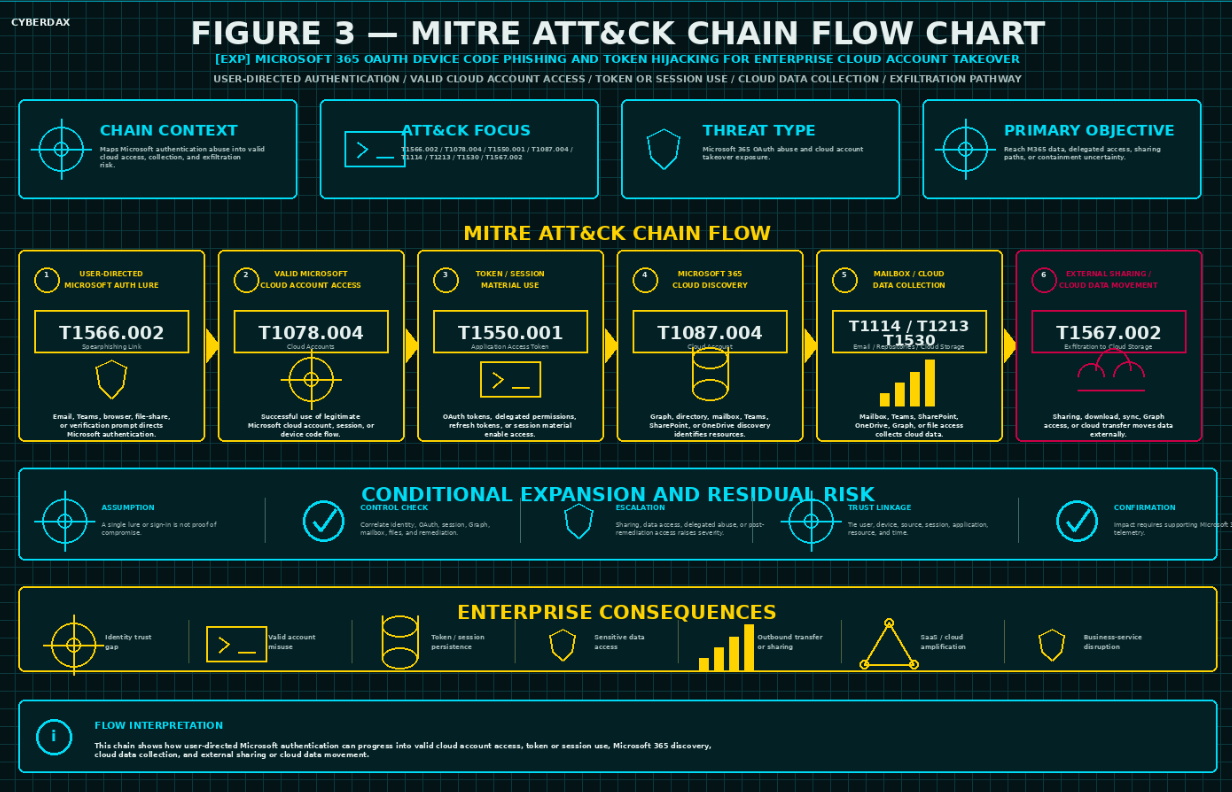
Figure 3
Microsoft 365 OAuth device code phishing and token hijacking attack-chain model showing user-directed authentication, valid Microsoft cloud account access, token or session use, Microsoft 365 discovery, mailbox / Teams / SharePoint / OneDrive / Graph data access, external sharing or cloud data movement, and post-remediation containment validation.
User-Directed Microsoft Authentication Abuse
Adversaries may use email, Teams messages, browser prompts, file-sharing lures, fake collaboration requests, help desk impersonation, account-verification language, or credential-themed prompts to direct users toward legitimate Microsoft authentication workflows or attacker-controlled collection paths. The behavior may involve device code entry, OAuth approval, authentication transfer, Microsoft verification-page guidance, or credential collection that enables later client-based OAuth authentication. This activity becomes risk-relevant when user interaction aligns with successful device code authentication, unusual OAuth authorization, resource owner password credential grant activity, unfamiliar source context, risky sign-in properties, suspicious client application behavior, or follow-on Microsoft 365 access.
Valid Microsoft Cloud Account Access
Adversaries may obtain access through a valid Microsoft cloud account, active session, successful OAuth authorization, device code flow, authentication transfer, command-line client authentication, or resource owner password credential grant activity after user interaction or credential capture. This behavior may appear as successful Entra ID sign-ins, device code flow, authentication transfer, unusual client application use, Azure CLI or command-line client activity outside approved workflows, unfamiliar source IPs, rare ASNs, unusual geographies, unmanaged or noncompliant device posture, Conditional Access anomalies, or risky sign-in properties. This behavior becomes high risk when successful authentication is followed by Microsoft 365 access expansion, Graph activity, mailbox access, SharePoint or OneDrive traversal, Teams activity, sensitive file access, delegated permission activity, administrative portal access, or post-remediation access.
Token, Session, OAuth Grant, or Delegated Permission Abuse
Adversaries may use active sessions, refresh tokens, OAuth grants, application access tokens, delegated permissions, suspicious client applications, command-line client authentication, password-grant activity, or application-consent paths to access Microsoft 365 resources or maintain access. This behavior becomes high risk when token, session, OAuth, client-application, or delegated-access activity persists after password reset, MFA reset, account recovery, user-risk remediation, or help desk intervention, or when the activity is inconsistent with approved enterprise applications, developer workflows, administrative workflows, automation, service-account behavior, user role, source context, or normal Microsoft client behavior.
Microsoft Graph and Cloud Resource Enumeration
Adversaries may use Microsoft Graph, directory access, mailbox search, Teams traversal, SharePoint browsing, OneDrive enumeration, workload access, or command-line Microsoft cloud tooling to identify users, groups, mailboxes, files, repositories, collaboration spaces, application resources, or sensitive content. This behavior becomes materially significant when enumeration occurs from unfamiliar source context, unusual client applications, suspicious OAuth behavior, password-grant activity, risky sign-in activity, Azure CLI or command-line client activity outside approved workflows, or accounts with access to executive, finance, legal, HR, customer, regulated, source-code, or privileged collaboration content.
Mailbox Access and Messaging Control
Adversaries may access Exchange Online or Outlook content, search mailboxes, read messages, review attachments, create inbox rules, modify forwarding, use delegate access, or attempt send-as or send-on-behalf behavior. This activity becomes high risk when it follows suspicious authentication, OAuth behavior, password-grant activity, suspicious client application use, affects executive or business-sensitive mailboxes, involves unusual source context, creates forwarding or rule changes, or supports internal phishing, data discovery, extortion preparation, or post-remediation access.
Teams, SharePoint, OneDrive, and Collaboration Content Access
Adversaries may traverse Teams chats, channels, files, meetings, SharePoint sites, OneDrive libraries, sensitive file repositories, externally shared content, or privileged collaboration spaces. This behavior is operationally significant because Microsoft 365 collaboration stores may contain customer records, legal materials, finance data, HR files, contracts, source code, support records, board materials, regulated data, and incident records. It becomes high risk when access deviates from user role, workload baseline, device posture, source context, time window, client application, data-sensitivity profile, or approved collaboration patterns.
Sensitive File Download, Synchronization, and External Sharing
Adversaries may download files, preview large volumes of content, synchronize OneDrive libraries, create external sharing links, use anonymous links, share content with external recipients, access files through Graph, or move data through web-service-based paths. This behavior should be evaluated against approved collaboration, file migration, legal export, eDiscovery, OneDrive synchronization, backup, developer, automation, and business-cycle workflows before being treated as malicious. It becomes data-theft-relevant when it follows suspicious authentication, OAuth activity, password-grant activity, Graph enumeration, sensitive repository access, unusual volume, rare source infrastructure, DLP / CASB alerts, or external recipient anomalies.
Application Consent and Delegated Access Manipulation
Adversaries may attempt to use application consent, delegated permissions, service principal behavior, suspicious client applications, OAuth grants, or command-line client authentication to expand access or preserve access to Microsoft 365 resources. This behavior becomes high risk when consent, grant, client-application, or delegated-access activity is unusual for the user or tenant, involves sensitive Microsoft Graph permissions, follows suspicious authentication, follows password-grant activity, affects privileged users, lacks a known application owner, or persists after account recovery actions.
Post-Remediation Access and Containment Failure
Adversaries may continue Microsoft 365 activity after password reset, MFA reset, account recovery, user-risk remediation, session revocation attempt, token revocation attempt, OAuth grant review, application-consent review, mailbox rule review, or forwarding review. This behavior becomes high priority when post-remediation access originates from suspicious source context, uses unusual client applications, involves Azure CLI or command-line client activity outside approved workflows, involves Graph activity, mailbox access, file download, external sharing, administrative portals, or sensitive repositories, or when responders cannot confirm session revocation, refresh-token invalidation, OAuth grant review, application-consent cleanup, and client-application review.
Operational Blending With Microsoft 365 Workflows
Adversaries may blend malicious behavior into normal Microsoft 365 activity such as remote work, travel, Teams device provisioning, shared-device sign-in, Azure CLI use, PowerShell administration, Visual Studio Code authentication, help desk support, eDiscovery, legal review, OneDrive synchronization, file migration, external collaboration, approved Graph automation, command-line authentication, developer workflows, service-account workflows, or administrative maintenance. This blending is effective because legitimate Microsoft 365 operations often involve valid accounts, MFA, cloud sessions, file access, sharing, Graph activity, delegated permissions, OAuth flows, command-line clients, and administrative workflows. Azure CLI, command-line authentication, and password-grant activity should therefore be treated as suspicious only when they fall outside approved workflows and align with abnormal source context, unusual client application behavior, risky sign-in properties, Conditional Access anomalies, Microsoft 365 workload expansion, Graph usage, mailbox activity, delegated permission activity, or post-remediation access.
Conditional Downstream SaaS or Cloud-Control-Plane Expansion
Adversaries may attempt to use Microsoft identity, valid sessions, delegated permissions, administrative access, suspicious client applications, or compromised accounts to reach downstream SaaS applications, Azure resources, cloud control planes, VPNs, business applications, security portals, or privileged workflows. This behavior should remain conditional unless it follows suspicious Microsoft authentication, OAuth activity, password-grant activity, token or session behavior, Microsoft 365 access expansion, delegated permission activity, or sensitive data access within a bounded time window.
S20A — Adversary Tradecraft Summary
Microsoft 365 OAuth device code phishing and token hijacking targets the trust relationship between user-assisted Microsoft authentication, valid cloud sessions, OAuth authorization, delegated permissions, Microsoft 365 collaboration data, Graph-enabled resource access, external sharing, and incident-response containment. The adversary objective is to convert legitimate Microsoft authentication into cloud account takeover, sensitive data access, delegated access, external sharing, or persistent post-remediation access while blending into normal Microsoft 365 workflows.
· The core tradecraft pattern is suspicious device code or OAuth activity followed by valid Microsoft cloud account access, token or session use, Microsoft 365 access expansion, mailbox activity, Graph activity, collaboration-content access, sensitive file access, external sharing, application-consent activity, or post-remediation access.
· The behavior is not dependent on a single phishing kit, actor name, lure phrase, domain, source IP, client ID, user agent, Microsoft 365 workload, Graph request, mailbox event, file download, or static IOC.
· Adversaries may use legitimate Microsoft verification pages, device code flow, OAuth authorization, valid sessions, refresh tokens, delegated permissions, suspicious client applications, Teams or email lures, mailbox access, Graph-enabled enumeration, SharePoint traversal, OneDrive download, external sharing, and post-remediation session persistence.
· The strongest operational risk occurs when suspicious authentication affects executives, finance users, legal users, HR users, help desk users, developers, cloud administrators, security administrators, privileged users, sensitive SharePoint sites, high-value OneDrive libraries, executive mailboxes, customer records, regulated files, or Microsoft cloud-control-plane services.
· Detection requires visibility into the identity and OAuth behavior that initiates the chain and the Microsoft 365, Graph, mailbox, Teams, SharePoint, OneDrive, DLP, CASB, proxy, help desk, remediation, and business-context evidence that confirms or disproves impact.
· Response requires treating suspected Microsoft 365 OAuth abuse as a cloud identity trust, data-exposure, delegated-permission, and containment-validation incident, not a routine phishing alert, isolated risky sign-in, single device code event, successful MFA event, or user-support issue.
· The behavior remains durable because the adversary objective is to convert trusted Microsoft authentication into cloud data and identity-control uncertainty regardless of the specific phishing lure, actor branding, source infrastructure, client application, OAuth workflow, or campaign label used.
S21 — Detection Strategy Overview
Detection Philosophy
Detection for Microsoft 365 OAuth device code phishing and token hijacking must be behavior-led, identity-aware, and correlation-driven. The detection model should not treat a single device code authentication event, successful Microsoft sign-in, unusual source IP, Graph API request, mailbox access event, or file download as sufficient proof of compromise. The strongest posture comes from linking suspicious device code or OAuth authorization behavior, abnormal Microsoft Entra ID sign-in context, token or session persistence, Microsoft 365 access expansion, mailbox or collaboration activity, Graph API usage, and sensitive data access within a bounded investigation window.
The detection strategy should assume the adversary may obtain valid Microsoft 365 access through a legitimate Microsoft authentication workflow after a user enters a device code and completes authentication. Business impact is realized through access to cloud mailboxes, Teams content, OneDrive files, SharePoint sites, Microsoft Graph resources, administrative portals, and downstream SaaS or identity dependencies. Detection should prioritize authentication-to-impact continuity over phishing-domain matching, kit-name matching, password-failure detection, or static IOC coverage.
Compromise confirmation should require correlation between suspicious OAuth or device code flow behavior and one or more downstream behaviors, including unusual client application use, unfamiliar device or source context, risky sign-in properties, mailbox access bursts, inbox rule creation, forwarding changes, Teams or SharePoint traversal, OneDrive enumeration, Graph API activity, sensitive file download, application consent activity, or continued access after account remediation.
Attribution must remain conditional. Activity should not be attributed to Kali365, Storm-2372, or any named phishing platform or intrusion cluster unless telemetry aligns with the reported tradecraft, infrastructure, victimology, timing, lure pattern, OAuth behavior, session behavior, or other validated intelligence. The default detection posture should identify Microsoft 365 OAuth abuse and account takeover risk without over-attributing all device code activity to a single campaign or tool.
Primary Detection Anchors
· Microsoft Entra ID sign-in events involving device code flow, authentication transfer, suspicious OAuth authorization, unusual client application use, or abnormal authentication protocol behavior outside approved device, developer, command-line, shared-device, or Teams device workflows.
· Device code or OAuth-based authentication from unusual source IPs, geographies, ASNs, devices, user agents, browsers, client applications, session contexts, or time windows that deviate from the user’s baseline.
· Successful Microsoft 365 access following device code authentication where the account accesses Outlook, Exchange Online, Teams, SharePoint, OneDrive, Microsoft Graph, Azure portal, Entra admin center, Purview, eDiscovery, or other cloud-control-plane services inconsistent with normal role behavior.
· OAuth, token, delegated permission, application consent, service principal, refresh-token, or session behavior that is inconsistent with approved enterprise applications and expected Microsoft client usage.
· Mailbox access, message read bursts, mailbox search, inbox rule creation, forwarding configuration, send-as behavior, Teams access, SharePoint traversal, OneDrive enumeration, sensitive file download, or Microsoft Graph activity after suspicious authentication.
· Continued Microsoft 365 activity after password reset, MFA reset, user report, help desk intervention, account recovery, risk remediation, or initial containment where token revocation, session revocation, and OAuth grant review have not been confirmed.
· Multiple users showing device code or OAuth authentication patterns tied to common source infrastructure, client applications, user agents, geographies, ASNs, timing, lure themes, or follow-on Microsoft 365 access behavior.
· Microsoft 365 activity that appears legitimate as a single event but becomes suspicious when correlated with abnormal authentication context, OAuth behavior, session persistence, role mismatch, sensitive data access, or unusual service usage.
Detection Prioritization Model
Highest-priority detections should focus on correlated authentication-to-impact behavior rather than isolated identity anomalies. The first priority is suspicious device code or OAuth authorization followed by Microsoft 365 access expansion, especially when the user has privileged, executive, finance, legal, HR, help desk, developer, cloud administration, or broad data-access responsibilities.
The second priority is cloud data access and collection behavior. Mailbox access bursts, mailbox search, forwarding configuration, Teams traversal, SharePoint access, OneDrive enumeration, Graph API usage, sensitive file download, and unusual data export should be treated as high risk when they occur near suspicious device code or OAuth authentication.
The third priority is token and session persistence. Continued access after password reset, MFA reset, user risk remediation, or help desk response should be treated as a containment failure indicator when session revocation, refresh-token invalidation, OAuth grant review, and application-consent review have not been completed.
The fourth priority is tenant-scale or campaign-scale behavior. Repeated device code authentication across multiple users, common suspicious source infrastructure, shared client application behavior, repeated Microsoft verification-page authorization timing, or clustered Microsoft 365 access from unfamiliar environments should increase urgency.
The fifth priority is enrichment from phishing delivery, user reports, secure email gateway alerts, Teams messages, browser telemetry, proxy telemetry, or external reporting. These signals can support triage but should not replace identity, OAuth, session, and Microsoft 365 activity correlation.
Correlation Strategy (Strict Enforcement)
Correlation must enforce authentication-to-impact proximity. A device code event should be correlated with downstream Microsoft 365, OAuth, Graph, mailbox, Teams, SharePoint, OneDrive, administrative, or data-access behavior only when the activity involves the same user, same session lineage, related client application, related source infrastructure, related OAuth grant, related device context, or related Microsoft cloud resource within a bounded time window.
Correlation windows should be narrow enough to reduce false positives while allowing for delayed operator staging and token reuse. Short-window activity should be used for sign-in context, OAuth authorization, client application behavior, session creation, and immediate Microsoft 365 access. Medium-window activity should be used for mailbox access, file access, Graph API activity, Teams traversal, SharePoint enumeration, OneDrive download, inbox rule creation, forwarding configuration, and application consent review. Longer-window activity should be reserved for containment validation, token persistence, refresh-token use, repeated access after remediation, and multi-user campaign clustering.
Detection logic should require at least one suspicious identity or OAuth signal and one downstream Microsoft 365 impact or control signal before producing high-confidence account takeover alerts. Examples include:
· Suspicious device code authentication followed by mailbox search, message read bursts, inbox rule creation, or forwarding configuration.
· Suspicious OAuth authorization followed by Microsoft Graph access, SharePoint traversal, OneDrive enumeration, or sensitive file download.
· Device code authentication from unfamiliar source context followed by Teams access, administrative portal access, Purview activity, eDiscovery activity, or privileged Microsoft cloud activity.
· Successful authentication from rare source infrastructure followed by application consent, delegated permission activity, unusual client application use, or service principal behavior.
· Microsoft 365 access continuing after password reset, MFA reset, account recovery, or user-risk remediation where token and session revocation have not been confirmed.
Cloud-only, identity-only, mailbox-only, Graph-only, or file-access-only anomalies must not be treated as confirmed Microsoft 365 OAuth device code compromise unless they correlate back to suspicious authentication flow, OAuth authorization behavior, token/session behavior, abnormal client application use, or known Microsoft 365 account takeover pathways.
Telemetry Prioritization
The highest-value telemetry sources are Microsoft Entra ID sign-in logs, Microsoft Entra ID audit logs, Conditional Access logs, Identity Protection risk events, Microsoft 365 unified audit logs, Exchange Online audit logs, Teams audit logs, SharePoint and OneDrive audit logs, Microsoft Graph activity, Defender XDR, Defender for Cloud Apps, Sentinel, CASB, DLP, proxy, DNS, secure email gateway, browser, endpoint, and help desk telemetry.
Where available, telemetry should preserve authentication protocol, original transfer method, client application, application display name, resource, Conditional Access result, device details, compliance state, user agent, source IP, location, ASN, risk state, session identifier, authentication requirement, OAuth grant details, delegated permission details, service principal activity, mailbox operation, file operation, Teams activity, Graph resource, data sensitivity, byte count, and remediation action.
Organizations with limited Microsoft 365 audit depth should prioritize compensating telemetry from Entra ID sign-in logs, Conditional Access, Defender XDR, Defender for Cloud Apps, Exchange Online audit logs, SharePoint and OneDrive audit logs, Graph activity, secure email gateway, proxy, DNS, CASB, DLP, and help desk records. Microsoft 365 telemetry gaps reduce confidence but do not eliminate detection value when identity, cloud-service, data-access, and containment evidence can be correlated.
Detection Design Constraints
Microsoft 365 environments include legitimate device code use, Teams device provisioning, shared-device sign-in, command-line authentication, developer tooling, remote support, device registration, administrative workflows, and sanctioned Microsoft client behavior. Detection content must account for approved device code workflows, known service owners, expected device populations, developer groups, administrator workflows, break-glass procedures, and business-approved exception groups.
Detection logic must avoid relying solely on public phishing domains, kit names, actor names, lure text, source IPs, user-agent strings, client IDs, redirect patterns, or static indicators. The attack path should be modeled around suspicious OAuth authorization, device code authentication, abnormal sign-in context, token/session persistence, Microsoft 365 access expansion, sensitive data access, and containment failure.
Detection logic must also account for tenants where Microsoft 365 telemetry is distributed across Entra ID, Defender XDR, Microsoft Purview, Exchange Online, Teams, SharePoint, OneDrive, Graph, Sentinel, CASB, proxy, and DLP platforms. Correlation should use user identity, session context, application identity, device posture, source infrastructure, resource accessed, data sensitivity, and remediation timeline to connect related events across services.
Because public reporting may evolve, detection should remain resilient to changes in phishing kit, lure wording, hosting provider, AI-generated message content, source infrastructure, client application, OAuth workflow, and campaign branding. A detection model that only identifies a known kit or lure will age poorly. A detection model that identifies Microsoft 365 OAuth abuse to cloud-account-takeover behavior will retain value across future device code phishing and token hijacking campaigns.
Baseline and Deployment Requirements
Before production alerting, organizations should define the authoritative Microsoft 365 identity and cloud asset scope, including privileged users, executives, finance users, legal users, HR users, help desk users, developers, cloud administrators, service accounts, break-glass accounts, approved device code populations, approved shared devices, Teams devices, developer tooling, sanctioned applications, high-value SharePoint sites, sensitive OneDrive locations, key mailboxes, and administrative portals.
Organizations should baseline normal Microsoft Entra ID sign-in behavior, device code flow usage, OAuth client application usage, Conditional Access outcomes, MFA patterns, device compliance posture, source geography, ASN, user agent, Graph API usage, mailbox activity, Teams activity, SharePoint activity, OneDrive activity, file download volume, application consent behavior, and administrative activity. The baseline should include business travel, remote work, device replacement, approved support workflows, developer workflows, Teams device setup, shared-device use, and change-control periods.
Detection engineering should validate:
· Entra ID sign-in logs preserve authentication protocol, client application, application display name, resource, Conditional Access result, source IP, location, user agent, device details, risk state, session context, and authentication requirement.
· Entra ID audit logs preserve authentication method changes, MFA changes, Conditional Access changes, device registration, application consent, service principal activity, delegated permission grants, group membership changes, role assignments, and administrative actions.
· Microsoft 365 unified audit logs preserve Exchange Online, Outlook, Teams, SharePoint, OneDrive, Graph, Purview, eDiscovery, mailbox, file, collaboration, and administrative activity.
· Exchange Online telemetry can identify mailbox login, message access, mailbox search, inbox rule creation, forwarding configuration, send-as activity, send-on-behalf activity, and external forwarding.
· SharePoint and OneDrive telemetry can identify site traversal, file preview, file open, file download, synchronization, sharing-link creation, external sharing, sensitive library access, and abnormal file-volume behavior.
· Graph activity, Defender XDR, Defender for Cloud Apps, CASB, DLP, proxy, DNS, browser, secure email gateway, and help desk telemetry can support phishing delivery context, source context, data sensitivity, and containment validation.
· Asset, user, role, device, application, data-sensitivity, and exception mappings accurately distinguish approved device code activity from suspicious OAuth abuse.
Initial deployment should begin in hunt mode. Alert mode should be enabled only after local field mappings, tenant-specific baselines, approved device code workflows, application allowlists, Conditional Access outcomes, exception groups, false-positive patterns, remediation workflows, and SOC triage procedures are validated.
Variant Resilience Requirements
Detection must remain effective if attackers modify lure themes, rotate phishing infrastructure, use AI-generated content, change sender addresses, change domains, use different user agents, abuse different OAuth clients, shift between device code flow and authentication transfer patterns, use legitimate Microsoft verification pages, or rely on valid sessions rather than password reuse.
Variant-resilient detection should focus on:
· Suspicious device code or OAuth authentication followed by abnormal Microsoft 365 access.
· Valid Microsoft authentication followed by access from unfamiliar source, device, geography, ASN, client application, or session context.
· OAuth or token behavior that deviates from approved application and user baselines.
· Mailbox, Teams, SharePoint, OneDrive, Graph, or administrative activity that exceeds normal user, role, department, time-window, or data-sensitivity baselines.
· Sensitive Microsoft 365 data access followed by download, synchronization, sharing, export, forwarding, or unusual Graph activity.
· Continued access after password reset, MFA reset, risk remediation, user report, or help desk intervention.
· Multi-user authentication and access patterns linked by common source infrastructure, client application, timing, campaign theme, or Microsoft 365 service access.
The detection model should also support future OAuth abuse, token hijacking, and Microsoft 365 account takeover techniques by abstracting from any specific campaign into a broader Microsoft cloud authentication-to-impact framework. Kit-specific, actor-specific, or infrastructure-specific logic can enrich the model, but the core detection strategy should remain behavior-led.
Operational Detection Model
The operational model should organize detections into a progressive triage chain.
· Suspicious authentication identification should flag device code flow, authentication transfer, unusual OAuth authorization, abnormal client application use, risky sign-in properties, unfamiliar source context, or device posture anomalies outside approved workflows.
· OAuth and session-risk identification should flag suspicious delegated permission use, application consent activity, service principal behavior, token persistence, refresh-token use, unusual client behavior, or continued access after remediation.
· Microsoft 365 access-expansion identification should flag abnormal access to Outlook, Exchange Online, Teams, SharePoint, OneDrive, Microsoft Graph, Purview, eDiscovery, Azure portal, Entra admin center, or other Microsoft cloud-control-plane services.
· Data-access identification should flag mailbox search, message read bursts, inbox rule creation, forwarding configuration, Teams traversal, SharePoint enumeration, OneDrive download, sensitive file access, Graph enumeration, export behavior, or external sharing.
· Campaign-scale identification should flag repeated device code or OAuth activity across multiple users, shared source infrastructure, common user agents, common client application behavior, common timing, or repeated access to similar Microsoft 365 resources.
· Containment-validation identification should flag continued activity after password reset, MFA reset, session revocation attempt, account recovery, risk remediation, user report, or help desk action.
SOC triage should begin by confirming whether the user or group is expected to use device code authentication, whether the source context matches normal behavior, whether the client application and OAuth activity are approved, whether Microsoft 365 access changed materially from baseline, and whether token/session revocation and OAuth grant review were completed. Analysts should then determine whether activity represents approved device code use, suspicious authentication, probable OAuth abuse, confirmed account takeover, data access, data theft, persistence through token/session abuse, or containment failure.
Explicit Non-Deployment Guardrails
Do not deploy high-severity compromise alerts based only on a single device code sign-in, single successful authentication event, single risky sign-in flag, single unfamiliar source IP, single Graph API request, single mailbox access event, single file download, or isolated impossible travel event.
Do not treat successful MFA as proof that the session is safe. Device code phishing and OAuth abuse can succeed through legitimate Microsoft authentication workflows.
Do not treat password reset alone as sufficient containment. Validate session revocation, refresh-token invalidation, OAuth grant review, application-consent review, mailbox rule review, forwarding review, and Microsoft 365 activity scoping.
Do not rely on phishing-domain indicators, kit names, actor names, sender addresses, lure text, public IOCs, client IDs, or user-agent strings as the primary detection basis.
Do not attribute activity to Kali365, Storm-2372, or any named actor or phishing platform unless telemetry or validated intelligence supports that attribution.
Do not treat mailbox, Teams, SharePoint, OneDrive, Graph, SaaS, identity, VPN, or cloud-control-plane anomalies as Microsoft 365 OAuth device code compromise unless they correlate to suspicious authentication flow, OAuth behavior, token/session behavior, abnormal client application use, or account takeover pathways.
Do not suppress suspicious activity solely because it used a legitimate Microsoft verification page, valid account, approved Microsoft service, common Microsoft client, successful MFA event, or normal-looking OAuth workflow.
Do not enable alert mode until device code use cases, approved exception groups, field mappings, indexes, sourcetypes, application allowlists, Conditional Access outcomes, service-account mappings, business baselines, and SOC triage workflows are validated.
Do not promote detections from hunt mode to alert mode until false-positive behavior from Teams device provisioning, shared-device workflows, developer tooling, command-line authentication, remote support, device registration, travel, help desk workflows, and approved administration has been reviewed.
Do not treat absence of phishing email telemetry as absence of compromise. Use Entra ID, OAuth, Microsoft 365 audit, Graph, Exchange, Teams, SharePoint, OneDrive, CASB, DLP, proxy, DNS, endpoint, and help desk telemetry as compensating evidence while documenting visibility limitations.
S22 — Primary Detection Signals
Primary Detection Signals
The primary detection signals for Microsoft 365 OAuth device code phishing and token hijacking should focus on activity that links suspicious authentication flow behavior to Microsoft 365 access expansion, token or session persistence, cloud data access, and account takeover impact. These signals are highest value when they appear together within a bounded investigation window and map to the same user, session lineage, OAuth grant, client application, source infrastructure, device context, or Microsoft cloud resource.
· Microsoft Entra ID sign-in events showing device code flow, authentication transfer, unusual OAuth authorization, abnormal client application use, suspicious authentication protocol behavior, or sign-in properties inconsistent with the user’s baseline.
· Successful Microsoft 365 authentication from unfamiliar source IPs, geographies, ASNs, devices, user agents, client applications, browsers, session contexts, or time windows after device code or OAuth authorization activity.
· Conditional Access results, Identity Protection risk events, or sign-in risk indicators showing unfamiliar sign-in properties, impossible travel, risky user state, risky sign-in state, unmanaged device posture, noncompliant device posture, or unexpected MFA / authentication requirement outcomes.
· OAuth grant, delegated permission, application consent, service principal, refresh-token, or session behavior inconsistent with approved enterprise applications, expected Microsoft clients, or documented user workflows.
· Mailbox access, message read bursts, mailbox search, inbox rule creation, forwarding configuration, send-as behavior, send-on-behalf behavior, or external forwarding after suspicious authentication.
· Teams access, chat or channel traversal, meeting access, file access, SharePoint traversal, OneDrive enumeration, file preview bursts, file open activity, file download bursts, synchronization, sharing-link creation, or external sharing after suspicious authentication.
· Microsoft Graph activity involving mailbox access, file access, user enumeration, directory access, SharePoint / OneDrive access, Teams access, application activity, or unusual delegated resource access after suspicious OAuth or device code behavior.
· Continued Microsoft 365 activity after password reset, MFA reset, account recovery, help desk intervention, user report, risk remediation, Conditional Access update, or initial containment where session revocation, refresh-token invalidation, and OAuth grant review have not been confirmed.
Supporting Detection Signals
Supporting signals increase confidence, establish authentication-to-impact continuity, and help distinguish approved device code workflows from suspicious OAuth abuse. These signals should not normally be treated as standalone confirmation, but they are valuable when correlated with primary identity, OAuth, Microsoft 365, Graph, mailbox, file, or containment signals.
· Secure email gateway, phishing-reporting, Teams-message, browser, proxy, or help desk events showing lure delivery, suspicious instructions to enter a Microsoft device code, urgent account-verification language, fake collaboration prompts, or unexpected Microsoft verification-page guidance.
· Microsoft Entra ID audit logs showing authentication method changes, MFA changes, device registration, Conditional Access changes, application consent, delegated permission grants, service principal activity, group membership changes, role assignments, or administrative changes near suspicious sign-in activity.
· Defender XDR, Defender for Cloud Apps, CASB, DLP, proxy, DNS, or browser telemetry showing unfamiliar source infrastructure, cloud-storage access, unusual Microsoft 365 session behavior, data movement, external sharing, or risky SaaS access after suspicious authentication.
· Exchange Online telemetry showing mailbox login, message access, mailbox search, inbox rule creation, forwarding configuration, external forwarding, delegate access, or unusual mailbox activity inconsistent with the user’s role and baseline.
· SharePoint and OneDrive telemetry showing access to sensitive sites, sensitive file libraries, high-value folders, file preview bursts, file download bursts, file synchronization, external sharing, or unusual sharing-link creation after suspicious authentication.
· Teams telemetry showing abnormal channel traversal, chat access, file access, external communication, meeting access, or collaboration activity inconsistent with the user’s normal pattern.
· Graph activity showing unusual delegated API access, broad resource access, repeated enumeration, access to user, mail, file, directory, group, or collaboration resources, or API activity inconsistent with the user’s normal application behavior.
· User reports, help desk tickets, security operations notes, or incident-response records showing the user entered a code, saw unexpected Microsoft verification prompts, received suspicious Teams or email instructions, or reported account activity that does not match their actions.
Exploit Attempt and Instability Signals
Exploit attempt and instability signals are useful for identifying suspicious device code lure activity, failed OAuth abuse, repeated authentication attempts, or account takeover preparation. These signals should be triaged carefully because some device code usage may be legitimate in Teams device provisioning, shared-device workflows, command-line authentication, developer tooling, remote support, and device registration. They become more meaningful when they precede unusual Microsoft 365 access, Graph activity, mailbox behavior, data access, or token persistence.
· Repeated device code or authentication transfer events involving users or groups that do not normally use device code flow.
· Device code authentication attempts from unfamiliar source IPs, rare ASNs, unusual geographies, anonymization providers, hosting providers, residential proxy infrastructure, or source contexts not associated with the user’s normal access.
· Authentication attempts involving unusual client applications, unexpected application display names, uncommon resources, abnormal authentication protocols, or applications not present in the user’s baseline.
· Multiple failed or interrupted authentication attempts followed by successful Microsoft 365 access from a new source, device, browser, client application, or session context.
· Risky sign-in events, unfamiliar sign-in properties, impossible travel, or Conditional Access anomalies occurring near device code or OAuth authorization activity.
· Multiple users receiving similar lure delivery, help desk reports, Teams messages, email prompts, or authentication requests tied to device code entry.
· Repeated sign-in or OAuth events clustered by common infrastructure, user agent, client application, timing, geography, ASN, or target Microsoft 365 service.
· Suspicious device code or OAuth events followed by immediate mailbox access, Graph activity, Teams access, SharePoint traversal, OneDrive enumeration, or administrative portal access.
Outbound Communication Signals
Outbound communication signals are relevant because device code phishing and OAuth token hijacking may not produce traditional malware command-and-control from an endpoint. The most important outbound indicators are cloud-service access patterns, proxy-visible Microsoft 365 activity, Graph API access, external sharing, data transfer, and SaaS activity that follows suspicious authentication.
· Microsoft 365 access from unfamiliar source infrastructure to Outlook, Exchange Online, Teams, SharePoint, OneDrive, Microsoft Graph, Azure portal, Entra admin center, Purview, eDiscovery, or other Microsoft cloud services.
· Proxy, DNS, CASB, or Defender for Cloud Apps telemetry showing Microsoft 365 activity from unfamiliar networks, unmanaged devices, rare geographies, high-risk ASNs, anonymization services, or source contexts inconsistent with the user’s baseline.
· Graph API activity involving mailbox, file, directory, Teams, SharePoint, OneDrive, group, or user resources after suspicious authentication or OAuth authorization.
· External sharing, sharing-link creation, cloud upload, file synchronization, high-volume download, repeated preview / open activity, or unusual byte volume associated with SharePoint, OneDrive, Teams, or Graph access.
· Outbound activity to Microsoft 365 services continuing after password reset, MFA reset, account recovery, user report, risk remediation, or initial incident response.
· CASB, DLP, proxy, storage, or Microsoft 365 audit events showing data access, file download, external sharing, or export activity inconsistent with the user’s role or business pattern.
· Access to sensitive data repositories, executive mailboxes, finance sites, legal repositories, HR records, customer records, source-code locations, support records, or privileged collaboration spaces after suspicious authentication.
· Repeated Microsoft 365 access from common suspicious source infrastructure across multiple users or accounts.
Persistence and Post-Exploitation Signals (Conditional)
Persistence and post-exploitation signals should be treated as conditional because device code phishing may not require endpoint persistence. These signals are valuable when they appear after suspicious authentication, OAuth authorization, Microsoft 365 access expansion, Graph activity, mailbox access, file access, or containment actions.
· Continued Microsoft 365 access after password reset, MFA reset, user risk remediation, help desk action, or account recovery where token revocation and session revocation have not been confirmed.
· Refresh-token use, session continuation, repeated sign-in success, or Microsoft 365 activity from unfamiliar source context after initial containment.
· New or unusual application consent, delegated permission grant, service principal activity, OAuth grant activity, or client application behavior associated with the affected account.
· Inbox rule creation, forwarding configuration, external forwarding, delegate access changes, send-as behavior, send-on-behalf behavior, mailbox search, or message access patterns that support continued mailbox control.
· New device registration, altered authentication methods, MFA changes, Conditional Access changes, group membership changes, role assignments, or administrative activity after suspicious authentication.
· External sharing, persistent sharing links, synchronized libraries, unusual OneDrive / SharePoint access patterns, or repeated Graph access that continues after account remediation.
· Help desk, SOC, or user-report records indicating the user regained access but suspicious Microsoft 365 activity continued.
· Administrative or privileged cloud activity after suspicious authentication involving Entra ID, Azure portal, Purview, eDiscovery, Exchange administration, SharePoint administration, or security tooling.
Lateral Movement and Expansion Signals (Conditional)
Lateral movement and expansion signals should be treated as conditional because not every Microsoft 365 OAuth device code compromise will expand beyond the initially affected account. These signals become high value when they follow suspicious device code authentication, OAuth authorization, token/session behavior, Graph access, mailbox access, or data-access activity.
· Access to additional Microsoft 365 services beyond the user’s normal pattern, including Teams, SharePoint, OneDrive, Graph, Purview, eDiscovery, Azure portal, Entra admin center, Exchange admin center, or security portals.
· Use of compromised mailbox access to send internal phishing, reply-chain lures, Teams messages, meeting invites, file-sharing links, or device-code instructions to other users.
· Access to shared mailboxes, executive mailboxes, group mailboxes, distribution lists, Teams channels, SharePoint sites, or OneDrive locations beyond normal role expectations.
· Privileged access activity involving role assignments, group membership changes, application consent, service principal changes, Conditional Access changes, mailbox permissions, or administrative portal access.
· Downstream SaaS, cloud, VPN, identity-provider, or business-application access using Microsoft identity after suspicious OAuth or device code activity.
· Repeated device code or OAuth activity across multiple users tied to common source infrastructure, client application, lure timing, ASN, geography, user agent, or Microsoft 365 service access.
· Internal phishing or account-to-account propagation using legitimate Microsoft 365 communication channels.
· Data staging or transfer activity moving from mailbox, Teams, SharePoint, OneDrive, Graph, or cloud repositories into external sharing, synchronization, download, export, or third-party storage workflows.
Signal Usage Constraints
Detection signals must be interpreted as part of a correlated Microsoft 365 OAuth abuse and account takeover model. A single device code event, risky sign-in, mailbox event, Graph request, file download, external share, or unusual source IP should not be treated as confirmed compromise without supporting context.
· Treat device code events as suspicious but not automatically malicious unless they involve unapproved users, unapproved workflows, suspicious source context, abnormal client application behavior, or downstream Microsoft 365 activity.
· Treat successful MFA as insufficient proof of session legitimacy when the authentication flow itself may have been socially engineered.
· Treat valid-account activity as potentially suspicious when the source, device, geography, client application, session context, timing, resource, role, or data-access behavior deviates from baseline.
· Treat mailbox, Teams, SharePoint, OneDrive, Graph, and administrative activity as higher confidence when it follows suspicious authentication or OAuth behavior.
· Treat continued access after password reset, MFA reset, account recovery, or user-risk remediation as a high-priority containment-validation signal.
· Treat phishing delivery telemetry as supporting context, not as the primary detection basis, because the user may authenticate through legitimate Microsoft infrastructure.
· Treat actor names, phishing kit names, infrastructure references, and public reporting labels as enrichment, not as the primary detection basis.
· Treat absence of endpoint malware, phishing-domain telemetry, or password failure as expected for this intrusion path and not as evidence that compromise did not occur.
· Treat alerts as production-ready only after local Microsoft 365 baselines, field mappings, source telemetry, application allowlists, approved device code workflows, Conditional Access outcomes, exception groups, and SOC triage criteria are validated.
S23 — Telemetry Requirements
Endpoint and Process Execution Telemetry
Endpoint and process execution telemetry is useful but not primary for Microsoft 365 OAuth device code phishing and token hijacking. This intrusion path may succeed without malware execution on the user endpoint because the adversary abuses a legitimate Microsoft authentication workflow. Endpoint telemetry should be used to identify phishing delivery, browser activity, suspicious command-line authentication, token-tool usage, unusual developer tooling, and host context around the user action, but it should not be required as the sole basis for detection.
· Browser process activity associated with unexpected Microsoft verification-page visits, unusual authentication prompts, suspicious redirect chains, or device-code entry after email, Teams, or browser-based lure delivery.
· Command-line or developer tooling activity involving Microsoft authentication, device code flow, Azure CLI, PowerShell, Graph tools, Visual Studio Code, developer environments, or OAuth-related sign-in flows outside approved workflows.
· Endpoint network activity showing access to Microsoft verification endpoints, Microsoft login services, Graph endpoints, Outlook, Teams, SharePoint, OneDrive, or unusual cloud services near suspicious user activity.
· Email client, browser, Teams, collaboration, or productivity application activity associated with unexpected device-code instructions, account-verification prompts, file-sharing lures, or fake collaboration workflows.
· User endpoint telemetry showing unmanaged device posture, noncompliant state, unexpected browser profile, unusual process lineage, remote support context, or suspicious extension / script activity around authentication.
· EDR, browser, or secure web telemetry that links user interaction, lure delivery, Microsoft authentication, and follow-on Microsoft 365 access.
· Host context needed to determine whether authentication originated from an expected managed device, expected browser, expected network, and expected user workflow.
Endpoint telemetry should preserve enough context to support identity-led correlation. The minimum useful telemetry includes host name, device ID, user, browser, process, command line where available, URL/domain where available, timestamp, device compliance state, network context, and relationship to the Microsoft 365 sign-in event.
Memory and Execution Telemetry
Memory and execution telemetry is conditional for this report. OAuth device code phishing and token hijacking do not require memory-resident malware or exploit payloads, but this telemetry can increase confidence when phishing delivery, token tooling, browser manipulation, credential harvesting, or unauthorized automation occurs on an endpoint.
· Browser credential or token access behavior, suspicious extension activity, injected scripts, automation frameworks, or browser process anomalies near Microsoft authentication activity.
· Unauthorized tools, scripts, or command-line activity interacting with Microsoft Graph, Azure, OAuth, device code flow, browser sessions, or local token caches.
· Suspicious PowerShell, Python, Node.js, browser automation, developer tooling, or command-line clients used to request tokens, access Graph, enumerate Microsoft 365 resources, or automate account activity.
· Endpoint behavior indicating credential access, token access, session cookie access, browser profile access, or automation around Microsoft login flows.
· Runtime or behavioral detections associated with phishing kit interaction, local token collection, unauthorized Graph tooling, or suspicious authentication automation.
· Memory telemetry from high-risk endpoints used by administrators, developers, executives, help desk users, or privileged Microsoft 365 users.
Memory telemetry should not be required for high-confidence detection because the core intrusion path is cloud-authentication abuse. It should be used as a confidence enhancer when endpoint-based token theft, browser abuse, automation, or unauthorized tooling appears near suspicious Microsoft 365 authentication.
Crash and Fault Telemetry
Crash and fault telemetry is not a primary detection source for Microsoft 365 OAuth device code phishing, but it can identify user-side instability, browser anomalies, automation errors, phishing kit interaction, or failed authentication workflows. These signals are generally lower value than Entra ID, OAuth, Graph, and Microsoft 365 audit telemetry.
· Browser crashes, authentication loop errors, repeated login failures, interrupted sign-in flows, or repeated Microsoft verification-page activity near suspicious device code events.
· Application errors involving Teams, Outlook, browser sessions, developer tools, Azure CLI, PowerShell, or other Microsoft authentication clients used outside expected workflows.
· Endpoint or browser telemetry showing repeated failed redirects, unusual sign-in loops, blocked scripts, suspicious extension failures, or abnormal authentication-page behavior.
· Proxy, browser-isolation, secure web gateway, or CASB events showing blocked or interrupted lure delivery before Microsoft authentication activity.
· Help desk records showing user confusion, repeated login prompts, failed sign-ins, unexpected device-code prompts, or inability to explain Microsoft 365 activity.
Crash and fault telemetry should not be treated as proof of compromise by itself. It is most valuable when it aligns with suspicious device code authentication, abnormal sign-in context, phishing delivery, or follow-on Microsoft 365 activity.
File and Persistence Telemetry
File and persistence telemetry is conditional because device code phishing may not create local files or host persistence. It becomes valuable when the attack includes phishing attachments, malicious scripts, token tooling, browser artifacts, downloaded data, mailbox exports, OneDrive synchronization, or staged Microsoft 365 content.
· Phishing attachments, downloaded lure files, shortcut files, scripts, HTML files, calendar attachments, Teams-downloaded files, or documents that instruct users to enter device codes or authenticate through Microsoft verification workflows.
· Local files, scripts, tools, or browser artifacts associated with Microsoft Graph access, OAuth automation, Azure tooling, device code authentication, or unauthorized Microsoft 365 enumeration.
· Downloaded mailbox exports, OneDrive synchronization artifacts, SharePoint downloads, Teams files, compressed archives, or staged data from Microsoft 365 services on managed endpoints.
· Browser cache, profile, extension, or session artifacts showing suspicious Microsoft authentication, token access, or Graph-related activity.
· File activity involving unusual storage locations, bulk synchronization paths, temporary directories, archive creation, or export artifacts after suspicious Microsoft 365 access.
· Persistence-like endpoint changes only when the campaign includes local tooling, browser manipulation, unauthorized extensions, scheduled tasks, scripts, or automation tied to Microsoft 365 access.
File telemetry should include file path, file name, extension, size, hash, owner, creating process, modifying process, user, host, timestamp, and relationship to Microsoft 365 cloud activity. It should be used as supporting evidence, not as a required signal for cloud-only account takeover.
Network and Outbound Communication Telemetry
Network and outbound communication telemetry is required to understand source context, cloud-service access, data movement, and suspicious Microsoft 365 usage. The most important network signals are not traditional malware command-and-control indicators, but rather Microsoft authentication, Graph, Exchange Online, Teams, SharePoint, OneDrive, external sharing, proxy-visible access, and unusual cloud data movement.
· DNS, proxy, secure web gateway, CASB, DLP, firewall, browser, and network telemetry for Microsoft login endpoints, device verification endpoints, Graph endpoints, Outlook, Exchange Online, Teams, SharePoint, OneDrive, Azure portal, Entra admin center, Purview, and eDiscovery.
· Source IP, destination domain, URL path where available, user, device, browser, user agent, ASN, geography, proxy action, category, byte count, session duration, and timestamp for Microsoft cloud-service access.
· Outbound access to Microsoft 365 services from unfamiliar networks, unmanaged devices, rare geographies, anomalous ASNs, hosting providers, anonymization infrastructure, or source contexts not associated with the user’s baseline.
· High-volume download, repeated file preview, file synchronization, external sharing, cloud upload, Graph activity, or unusual Microsoft 365 data movement visible through proxy, CASB, DLP, Defender for Cloud Apps, or storage telemetry.
· Blocked or alerted access involving Microsoft verification pages, suspicious lure destinations, cloud storage, external sharing, or data exfiltration workflows.
· Network and cloud telemetry showing Microsoft 365 activity continuing after password reset, MFA reset, user report, account recovery, or initial containment.
· Correlation between proxy / DNS source context and Entra ID sign-in context to determine whether the same user, device, IP, ASN, or session pattern appears across authentication and Microsoft 365 activity.
Network telemetry should be correlated with Entra ID and Microsoft 365 audit logs. Unusual Microsoft cloud access is higher confidence when it follows suspicious device code authentication, OAuth authorization, token/session behavior, Graph access, or data-access anomalies.
Web and Application Telemetry (Conditional Availability)
Web and application telemetry is critical where available because the compromise path occurs through Microsoft authentication, Microsoft 365 applications, OAuth flows, and cloud service APIs. Availability varies by license level, retention settings, audit configuration, and integrated security tooling.
· Microsoft Entra ID sign-in logs, including authentication protocol, client application, application display name, resource, Conditional Access result, source IP, location, user agent, device details, risk state, session context, authentication requirement, and sign-in status.
· Microsoft Entra ID audit logs, including application consent, delegated permission grants, service principal activity, authentication method changes, MFA changes, device registration, Conditional Access changes, group membership changes, role assignments, and administrative actions.
· Microsoft 365 unified audit logs covering Exchange Online, Outlook, Teams, SharePoint, OneDrive, Graph, Purview, eDiscovery, mailbox, file, collaboration, sharing, and administrative activity.
· Exchange Online audit logs for mailbox login, message access, mailbox search, inbox rule creation, forwarding configuration, external forwarding, send-as behavior, send-on-behalf behavior, and delegate access.
· SharePoint and OneDrive audit logs for file preview, file open, file download, site traversal, sharing-link creation, external sharing, synchronization, sensitive library access, and abnormal file-volume behavior.
· Teams audit logs for chat, channel, meeting, file, external communication, and collaboration activity.
· Graph activity logs or service telemetry showing API access, delegated resource usage, mailbox access, file access, directory access, user enumeration, and unusual client behavior.
· Defender XDR, Defender for Cloud Apps, Sentinel, CASB, DLP, secure email gateway, browser, and help desk telemetry that adds source, data sensitivity, user-reported, phishing-delivery, and containment context.
Where Microsoft 365 audit coverage is limited, Entra ID sign-in logs, Conditional Access events, Exchange audit logs, SharePoint / OneDrive audit logs, Defender for Cloud Apps, proxy, CASB, DLP, and help desk records should be used as compensating sources. The absence of complete Microsoft 365 application telemetry should be recorded as a visibility limitation and should reduce confidence in data-access scoping.
Telemetry Availability Requirements
Minimum viable detection requires enough telemetry to correlate suspicious authentication or OAuth behavior with downstream Microsoft 365 access, data access, session persistence, or containment failure. A detection program should not rely on a single telemetry source for high-confidence account takeover findings.
· Entra ID sign-in telemetry covering authentication protocol, client application, source IP, user agent, Conditional Access outcome, device details, risk state, resource, and timestamp.
· Entra ID audit telemetry covering application consent, delegated permission grants, service principal changes, authentication method changes, device registration, Conditional Access changes, role assignments, group membership changes, and administrative actions.
· Microsoft 365 unified audit telemetry covering Exchange Online, Teams, SharePoint, OneDrive, Graph, Purview, eDiscovery, mailbox, file, sharing, collaboration, and administrative events.
· Exchange Online telemetry for mailbox access, mailbox search, inbox rules, forwarding, external forwarding, send-as behavior, send-on-behalf behavior, and delegate activity.
· SharePoint and OneDrive telemetry for site traversal, file access, file download, synchronization, sharing-link creation, external sharing, and sensitive library access.
· Teams telemetry for chat, channel, meeting, file, collaboration, and external communication activity.
· Graph activity telemetry for API use, delegated resource access, mailbox access, file access, directory access, user enumeration, and application behavior.
· Conditional Access, Identity Protection, Defender XDR, Defender for Cloud Apps, CASB, DLP, proxy, DNS, secure email gateway, browser, endpoint, and help desk telemetry for enrichment and containment validation.
· Authoritative mappings for users, privileged roles, approved device code populations, approved client applications, service accounts, high-value mailboxes, sensitive SharePoint sites, OneDrive locations, Teams, administrative portals, data sensitivity, and exception groups.
· Time synchronization and retention across identity, Microsoft 365, Graph, cloud app, endpoint, proxy, DLP, CASB, and help desk telemetry sources.
High-confidence detection requires at least one suspicious authentication or OAuth signal and one downstream Microsoft 365 impact or control signal. Downstream signals may include mailbox activity, Graph access, SharePoint / OneDrive access, Teams activity, application consent, delegated permission activity, sensitive file access, external sharing, continued session activity, or containment failure.
Telemetry Limitations and Gaps
Telemetry limitations should be explicitly documented because Microsoft 365 visibility varies by licensing, audit configuration, retention period, security-tool integration, and tenant maturity. These gaps can materially affect confidence, triage speed, data-theft scoping, and containment validation.
· Entra ID sign-in logs may not retain enough history to reconstruct the full authentication, token, and session timeline.
· Microsoft 365 unified audit logging may be incomplete, disabled for certain workloads, delayed, or insufficiently retained for retrospective data-access review.
· Graph activity may be difficult to interpret without application context, delegated permission context, client application mapping, and user baseline.
· Exchange Online, Teams, SharePoint, and OneDrive logs may not provide enough detail to determine data sensitivity or user intent without Purview, DLP, CASB, or business-context enrichment.
· Conditional Access and Identity Protection signals may identify risk but may not prove token hijacking or account takeover without Microsoft 365 activity correlation.
· Proxy, DNS, CASB, and DLP telemetry may show Microsoft cloud access but may not preserve user, device, session, file name, or source process context.
· Endpoint telemetry may be absent, unmanaged, or irrelevant when the attack succeeds through cloud-only authentication abuse.
· Help desk and user-report data may not be consistently structured, timestamped, or linked to sign-in and Microsoft 365 audit events.
· Approved device code workflows, Teams devices, developer tooling, shared devices, service accounts, and break-glass procedures may be poorly documented, increasing false-positive risk.
· Token revocation, session revocation, OAuth grant review, and application-consent review may not be logged or validated consistently across response workflows.
· Short retention windows may prevent reconstruction once suspicious access is discovered days or weeks after the initial device code authorization.
· Lack of actor-specific indicators should not prevent behavior-led detection, but it should limit campaign attribution.
Where telemetry gaps exist, detections should remain in hunt or investigation mode until compensating data sources, user and application baselines, exception mappings, and containment-validation evidence support higher-confidence alerting.
S24 — Detection Opportunities and Gaps
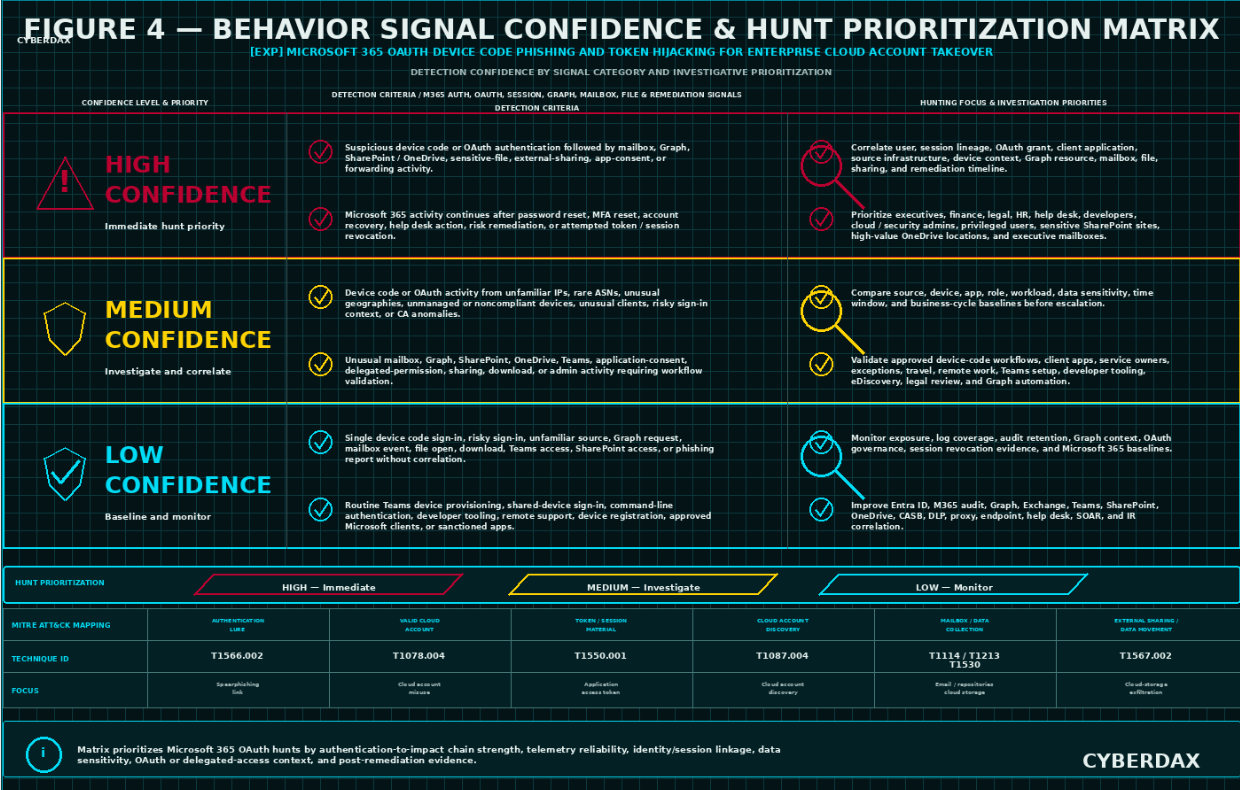
Figure 4
Detection Opportunities
Microsoft 365 OAuth device code phishing and token hijacking creates strong detection opportunities when defenders can correlate suspicious authentication flow behavior with OAuth activity, Microsoft 365 access expansion, Graph usage, mailbox behavior, file access, application consent, token/session persistence, and containment failure. The highest-value opportunities are not single indicators. They are behavior chains that show a plausible movement from legitimate Microsoft authentication abuse to cloud-account-takeover impact.
· Correlate device code flow, authentication transfer, or unusual OAuth authorization with unfamiliar source IPs, rare ASNs, unusual geographies, unmanaged devices, noncompliant device posture, unfamiliar user agents, or abnormal client applications.
· Correlate suspicious authentication with Outlook, Exchange Online, Teams, SharePoint, OneDrive, Graph, Azure portal, Entra admin center, Purview, eDiscovery, or other Microsoft cloud-service access that deviates from user and role baselines.
· Correlate device code or OAuth activity with mailbox search, message read bursts, inbox rule creation, forwarding configuration, external forwarding, send-as behavior, or delegate access.
· Correlate suspicious authentication with SharePoint traversal, OneDrive enumeration, file preview bursts, file downloads, synchronization, external sharing, sharing-link creation, or sensitive site access.
· Correlate OAuth or application activity with delegated permission grants, service principal activity, application consent, unusual client behavior, Graph API access, or resource access outside approved workflows.
· Correlate Microsoft 365 data access with CASB, DLP, proxy, Defender for Cloud Apps, Graph, storage, or audit events showing external sharing, download, synchronization, export, or unusual data movement.
· Correlate continued Microsoft 365 activity after password reset, MFA reset, user report, help desk action, risk remediation, or account recovery with session, token, OAuth grant, and application-consent review status.
· Correlate repeated device code or OAuth activity across multiple users with common source infrastructure, client application, user agent, timing, lure theme, ASN, geography, or Microsoft 365 resource access.
· Correlate phishing delivery, Teams messages, user reports, help desk records, secure email gateway alerts, browser telemetry, or proxy activity with Microsoft Entra ID sign-in and Microsoft 365 audit logs.
· Correlate administrative activity involving Entra ID, Azure portal, Exchange administration, SharePoint administration, Purview, eDiscovery, Conditional Access, or role changes with suspicious authentication and OAuth behavior.
These opportunities are strongest when organizations maintain accurate mappings for approved device code use, approved client applications, privileged users, sensitive mailboxes, high-value SharePoint sites, OneDrive locations, Teams, Graph usage, service accounts, exception groups, Conditional Access outcomes, and business workflows. Detection value drops when device code use is not baselined, Microsoft 365 audit retention is short, application consent is not reviewed, or session revocation is not validated.
High-Confidence Detection Conditions
High-confidence detection should require authentication-to-impact continuity. A single device code sign-in, risky sign-in flag, mailbox access event, Graph request, file download, or unusual IP should not be treated as confirmed compromise without supporting evidence. High-confidence conditions should combine suspicious authentication, OAuth behavior, Microsoft 365 activity, data access, persistence, or containment failure within a bounded window.
· Suspicious device code authentication followed by mailbox search, message read bursts, inbox rule creation, forwarding configuration, external forwarding, or send-as activity.
· Suspicious OAuth authorization followed by Graph API access, SharePoint traversal, OneDrive enumeration, sensitive file download, Teams access, or administrative portal access.
· Device code authentication from unfamiliar source infrastructure followed by access to high-value mailboxes, executive communications, finance repositories, legal sites, HR records, customer records, or privileged collaboration spaces.
· Successful Microsoft 365 authentication from rare geography, ASN, device, browser, or client application followed by application consent, delegated permission activity, service principal activity, or unusual client use.
· Microsoft 365 access continuing after password reset, MFA reset, account recovery, user risk remediation, or help desk action where token revocation, session revocation, and OAuth grant review have not been confirmed.
· Multiple users showing device code or OAuth authentication tied to common source infrastructure, common client application, common timing, common lure theme, or similar Microsoft 365 follow-on activity.
· Suspicious authentication followed by external sharing, file synchronization, high-volume download, Graph enumeration, DLP alerting, CASB alerting, or Defender for Cloud Apps anomaly.
· Suspicious OAuth or device code behavior followed by administrative activity involving Entra ID, Azure portal, Exchange administration, SharePoint administration, Purview, eDiscovery, Conditional Access, or privileged role changes.
High-confidence alerts should remain behavior-led and should not depend on phishing kit names, actor names, public infrastructure, lure wording, static client IDs, or exact IOC matches. Campaign-specific intelligence may raise urgency, but it should not replace authentication-to-impact evidence.
Moderate-Confidence Detection Conditions
Moderate-confidence detections identify suspicious activity that may represent device code phishing, OAuth abuse, token hijacking, account takeover preparation, or data access but lacks full attack-chain continuity. These conditions are useful for hunt workflows, investigation queues, exposure review, and prioritized triage.
· Device code authentication by users, groups, roles, or departments that rarely or never use device code flow.
· Device code or OAuth authentication from unfamiliar source IPs, unusual geographies, rare ASNs, hosting providers, anonymization services, unmanaged devices, or noncompliant devices without confirmed data access.
· Unusual client application or application display name observed during Microsoft 365 authentication without confirmed downstream impact.
· Risky sign-in, impossible travel, unfamiliar sign-in property, or Conditional Access anomaly near device code or OAuth activity without confirmed Microsoft 365 access expansion.
· Mailbox access, message read bursts, Teams access, SharePoint traversal, OneDrive enumeration, Graph API activity, or file download that deviates from baseline but does not yet correlate to suspicious authentication.
· Application consent, delegated permission activity, service principal behavior, or OAuth grant change that is unusual but not yet linked to sensitive data access or suspicious sign-in context.
· External sharing, file synchronization, high-volume download, or Graph activity involving a user with suspicious but incomplete authentication context.
· User report, help desk ticket, phishing alert, Teams lure, or email lure involving device code instructions without confirmed successful authentication or Microsoft 365 impact.
Moderate-confidence detections should remain in hunt or investigation mode until additional evidence establishes suspicious authentication-to-impact continuity. They should help analysts determine whether activity is approved device code use, user confusion, failed phishing, probable OAuth abuse, confirmed account takeover, data access, or containment failure.
Low-Confidence Detection Conditions
Low-confidence detections are useful for environmental awareness, exposure management, and retrospective review, but they should not generate high-severity compromise alerts without supporting signals. These conditions are common in Microsoft 365 environments and can produce false-positive volume if not correlated.
· Single device code sign-in events without unusual source context or follow-on activity.
· Single risky sign-in flags without Microsoft 365 activity correlation.
· Single unfamiliar source IPs, geographies, ASNs, devices, or browsers without OAuth or cloud-service impact.
· Single mailbox access events, Graph API requests, file opens, file downloads, Teams access events, or SharePoint access events without abnormal authentication context.
· Routine Teams device provisioning, shared-device sign-in, command-line authentication, developer tooling, remote support, or device registration activity.
· Approved Microsoft client behavior, sanctioned enterprise applications, administrative activity, or known support workflows.
· Phishing emails, Teams messages, or browser alerts that instruct device code entry but do not show successful authentication or Microsoft 365 account activity.
· Actor-name, kit-name, infrastructure, or public-report matching without local telemetry supporting OAuth abuse or account takeover behavior.
Low-confidence signals should be retained for enrichment, baselining, and historical review. They become operationally useful when correlated with identity, OAuth, Microsoft 365, Graph, mailbox, file, data-access, or containment evidence.
Detection Gaps
Detection gaps are most likely where Microsoft 365 audit logging is incomplete, Entra ID sign-in retention is short, Graph activity is not monitored, application consent is not reviewed, approved device code workflows are undocumented, or token and session revocation are not validated. These gaps reduce confidence and can delay identification of data theft, persistent account access, and post-remediation activity.
· Lack of complete Entra ID sign-in telemetry for authentication protocol, client application, source IP, user agent, device posture, Conditional Access result, risk state, session context, and resource accessed.
· Limited Entra ID audit visibility into application consent, delegated permission grants, service principal changes, authentication method changes, device registration, Conditional Access changes, group membership changes, role assignments, and administrative actions.
· Missing or short-retention Microsoft 365 unified audit logs for Exchange Online, Outlook, Teams, SharePoint, OneDrive, Graph, Purview, eDiscovery, mailbox, file, collaboration, and administrative events.
· Limited Graph visibility, delegated permission mapping, application ownership, client application baselining, or resource-access interpretation.
· Weak mapping of approved device code workflows, Teams devices, shared devices, developer tooling, command-line authentication, remote support, and break-glass procedures.
· Incomplete mappings for privileged users, executives, finance users, legal users, HR users, help desk users, developers, service accounts, high-value mailboxes, sensitive SharePoint sites, OneDrive locations, and administrative portals.
· CASB, DLP, proxy, Defender for Cloud Apps, storage, or endpoint telemetry that cannot preserve user, device, session, file, data sensitivity, or source context.
· Inconsistent session revocation, refresh-token invalidation, OAuth grant review, mailbox rule review, forwarding review, and application-consent review during incident response.
· Inability to distinguish approved Microsoft client behavior from suspicious OAuth abuse without application baselines and exception groups.
· Lack of time synchronization across Entra ID, Microsoft 365, Graph, Exchange, Teams, SharePoint, OneDrive, CASB, DLP, proxy, endpoint, and help desk telemetry.
· Short retention windows that do not cover the period between device code authorization, account takeover, data access, user report, containment, and post-remediation validation.
· Lack of confirmed actor-specific indicators, which should limit attribution claims but should not prevent behavior-led detection.
Where these gaps exist, detections should be treated as investigation-ready but not fully production-confirmatory. Compensating telemetry should be documented, and alert confidence should reflect the visibility available in the local environment.
False-Positive Drivers
False positives are likely because Microsoft 365 environments support legitimate device code flow, shared-device workflows, Teams device provisioning, command-line authentication, developer tooling, application consent, administrative workflows, remote support, travel, and normal cloud collaboration. Detection logic must account for approved business operations before alert promotion.
· Teams device provisioning, meeting-room device setup, shared-device workflows, kiosk workflows, and device registration.
· Azure CLI, PowerShell, Visual Studio Code, developer tooling, command-line authentication, automation workflows, and sanctioned Microsoft Graph tooling.
· Remote support, help desk-assisted sign-in, device replacement, MFA re-enrollment, user travel, VPN changes, browser changes, and managed-device transitions.
· Approved enterprise applications, sanctioned OAuth grants, expected delegated permissions, known service principals, and documented application consent workflows.
· Normal mailbox search, eDiscovery, Purview, legal hold, compliance review, administrative investigation, or security operations activity.
· Finance close, legal review, HR processing, customer-support workflows, incident response, audit periods, and other business cycles that increase Microsoft 365 data access.
· SharePoint, OneDrive, Teams, and Graph activity associated with approved collaboration, file migration, synchronization, reporting, or business operations.
· Conditional Access policy changes, identity migrations, tenant changes, device compliance changes, or security control rollouts.
· Approved administrative activity by identity administrators, Exchange administrators, SharePoint administrators, security administrators, compliance administrators, and cloud operators.
False-positive control should rely on approved device code workflows, application allowlists, role baselines, service owners, data sensitivity, business-cycle calendars, Conditional Access outcomes, known administrative sources, approved support workflows, and documented exception groups.
Detection Engineering Opportunities
Detection engineering should prioritize behavior chains that remain useful across phishing kits, actor changes, infrastructure changes, lure changes, and future Microsoft 365 OAuth abuse patterns. The best opportunities combine Entra ID sign-in context, OAuth behavior, Microsoft 365 audit activity, Graph usage, data access, session persistence, and containment validation into staged detections that begin in hunt mode and later promote to alert mode after validation.
· Build suspicious device code authentication detections that identify users or groups authenticating with device code flow outside approved workflows.
· Build authentication-to-mailbox detections that correlate suspicious device code or OAuth behavior with mailbox search, message read bursts, inbox rules, forwarding, external forwarding, send-as activity, or delegate access.
· Build authentication-to-file-access detections that correlate suspicious OAuth behavior with SharePoint traversal, OneDrive enumeration, sensitive file access, download bursts, synchronization, or external sharing.
· Build authentication-to-Graph detections that correlate suspicious sign-ins with Graph API access, delegated resource use, user enumeration, mailbox access, file access, directory access, or unusual client behavior.
· Build token-persistence detections that identify continued Microsoft 365 access after password reset, MFA reset, account recovery, user risk remediation, or help desk intervention.
· Build OAuth grant and application-consent detections that identify unusual delegated permissions, service principal activity, client application behavior, or consent activity after suspicious authentication.
· Build campaign-scale detections that correlate multiple users with common source infrastructure, client applications, user agents, geographies, ASNs, timing, lure themes, or Microsoft 365 access patterns.
· Build data-theft impact detections that correlate sensitive Microsoft 365 access with external sharing, file synchronization, high-volume download, Graph enumeration, CASB alerts, DLP alerts, or unusual storage activity.
· Build containment-validation detections that require confirmation of session revocation, refresh-token invalidation, OAuth grant review, mailbox rule review, forwarding review, and Microsoft 365 data-access scoping.
These opportunities should be implemented with local field mappings, tenant-specific baselines, approved device code workflows, application allowlists, Conditional Access outcomes, exception groups, service-owner mappings, sensitive data mappings, and SOC triage criteria. Alert mode should follow hunt validation, not precede it.
Residual Detection Risk
Residual detection risk remains even with strong telemetry because attackers may use legitimate Microsoft authentication, valid OAuth tokens, approved Microsoft services, expected cloud APIs, and normal-looking user sessions. They may avoid malware, avoid phishing-domain reuse, rotate infrastructure, use AI-generated lures, abuse legitimate Microsoft verification pages, and continue access until sessions, tokens, or grants are revoked.
· Valid-account activity may obscure the difference between approved user behavior and attacker-controlled access.
· Successful MFA may create false assurance when the user was socially engineered into completing the authentication flow.
· Legitimate Microsoft verification pages and Microsoft cloud services may reduce the value of phishing-domain and web-blocking detections.
· OAuth and session persistence may allow continued access after password reset or MFA reset if token and session revocation are incomplete.
· Microsoft Graph activity may resemble normal application behavior without client application, permission, resource, and user-baseline context.
· SharePoint, OneDrive, Teams, and mailbox activity may resemble normal collaboration without role, data sensitivity, volume, and timing baselines.
· Short audit retention may prevent reconstruction of initial authorization, data access, or post-remediation activity.
· Incomplete application-consent review may miss delegated permission abuse or suspicious OAuth grant behavior.
· Weak documentation of approved device code workflows may increase both false positives and missed detections.
· Actor-specific indicators may be absent, misleading, or stale, requiring behavior-led detection rather than campaign-led confirmation.
Residual risk should be communicated as a visibility and confidence issue, not as proof of non-compromise. Where gaps remain, organizations should prioritize device code restriction, Conditional Access enforcement, application-consent governance, token and session revocation procedures, Microsoft 365 audit retention, data-access review, and retrospective hunting before relying on alerting alone.
S25 Ultra-Tuned Detection Engineering Rules
NDR / Network Behavioral Analytics
Detection Viability Assessment
NDR / Network Behavioral Analytics is viable for this report as a supporting detection and correlation layer because Microsoft 365 OAuth device code phishing and token hijacking can produce observable source-infrastructure, cloud-access, proxy, DNS, CASB, DLP, Graph, SaaS, and data-movement patterns even when no malware runs on an endpoint. NDR should not attempt to prove device code phishing, OAuth token hijacking, or account takeover from a single Microsoft login connection, DNS lookup, proxy event, Graph request, or file-download event. The highest-value NDR coverage comes from correlating unfamiliar access paths, rare source infrastructure, Microsoft 365 service access, Graph activity, external sharing, high-volume download, post-remediation access, and repeated multi-user cloud access patterns.
NDR coverage is strongest when enriched with proxy, DNS, CASB, DLP, Defender for Cloud Apps, Entra ID sign-in, Microsoft 365 audit, Graph activity, and SIEM identity context. Pure network telemetry is not sufficient to independently confirm device code flow, OAuth grant behavior, token/session lineage, or application-consent abuse. Network Behavioral Analytics should therefore be used to identify suspicious access paths, rare source context, tenant-scale clustering, cloud data movement, and containment-failure indicators that require identity-control-plane and Microsoft 365 audit correlation.
Three NDR / Network Behavioral Analytics rules are included for this report.
Rule
Microsoft 365 Suspicious Authentication Source Followed by Cloud Access Expansion
Rule Format
NDR / Network Behavioral Analytics cloud-access correlation pattern.
Detection Purpose
Detect suspicious Microsoft authentication-source behavior followed by Microsoft 365 access expansion into Outlook, Exchange Online, Teams, SharePoint, OneDrive, Microsoft Graph, Azure portal, Entra admin center, Purview, eDiscovery, or other Microsoft cloud services, using NDR and cloud-access telemetry enriched with identity and Microsoft 365 context where available.
Detection Logic
Trigger when Microsoft authentication or Microsoft 365 access from unfamiliar source context is followed by cloud-service expansion that deviates from the user’s normal Microsoft 365 behavior.
Require both conditions within a bounded investigation window:
· Microsoft authentication or Microsoft cloud access is observed from unfamiliar source context, including rare source IP, unusual geography, rare ASN, hosting provider, anonymization infrastructure, unmanaged device posture where available, noncompliant device posture where available, unfamiliar user agent, unexpected browser, unusual client application where available, or source context outside the user’s normal baseline.
· The same user, source infrastructure, device context where available, client application where available, or related Microsoft cloud access path is followed by activity against Microsoft 365 services that deviates from normal behavior, including Outlook, Exchange Online, Teams, SharePoint, OneDrive, Microsoft Graph, Azure portal, Entra admin center, Purview, eDiscovery, or high-value collaboration resources.
Increase priority when enriched identity or Entra ID telemetry shows device code flow, authentication transfer, unusual OAuth authorization, suspicious client application use, risky sign-in state, unfamiliar sign-in properties, or Conditional Access anomalies near the cloud-access expansion.
Increase priority when the activity involves privileged users, executives, finance users, legal users, HR users, help desk users, developers, cloud administrators, security administrators, sensitive SharePoint sites, high-value OneDrive locations, executive mailboxes, or administrative portals.
Do not treat Microsoft login traffic, Microsoft verification-page access, or Microsoft 365 access alone as confirmed compromise. Require source-context deviation, downstream cloud-access expansion, and identity or Microsoft 365 audit correlation before escalating as probable OAuth abuse or account takeover.
Required Telemetry
· DNS, proxy, secure web gateway, CASB, DLP, firewall, NDR, browser, Defender for Cloud Apps, Entra ID sign-in, Microsoft 365 audit, Graph activity, and SIEM-enriched identity telemetry where available.
· Source IP, source ASN, source geography, destination domain, URL path where available, Microsoft cloud service, user, device where available, user agent, browser, client application where available, session identifier where available, action, byte count, timestamp, and risk context.
· Microsoft service categorization for login, verification pages, Graph, Outlook, Exchange Online, Teams, SharePoint, OneDrive, Azure portal, Entra admin center, Purview, eDiscovery, and other cloud-control-plane destinations.
· User, role, department, privileged group, device posture where available, approved device code workflow, approved client application, approved source network, approved geography, and exception-group mappings.
· Time synchronization across proxy, DNS, CASB, DLP, Defender for Cloud Apps, Entra ID, Microsoft 365 audit, Graph, and SIEM telemetry sources.
Engineering Implementation Instructions
Create or validate authoritative reference sets for ENV_M365_USERS, ENV_M365_PRIVILEGED_USERS, ENV_M365_EXECUTIVES, ENV_M365_FINANCE_USERS, ENV_M365_LEGAL_USERS, ENV_M365_HR_USERS, ENV_M365_HELPDESK_USERS, ENV_M365_DEVELOPERS, ENV_M365_CLOUD_ADMINS, ENV_APPROVED_DEVICE_CODE_USERS, ENV_APPROVED_DEVICE_CODE_WORKFLOWS, ENV_APPROVED_CLIENT_APPLICATIONS, ENV_APPROVED_SOURCE_NETWORKS, ENV_APPROVED_ACCESS_GEOS, and ENV_SENSITIVE_M365_RESOURCES.
Create Microsoft service categories for authentication, verification pages, Graph, Outlook, Exchange Online, Teams, SharePoint, OneDrive, Azure portal, Entra admin center, Purview, eDiscovery, and administrative services. Validate that proxy, DNS, CASB, Defender for Cloud Apps, Entra ID, Microsoft 365 audit, and Graph telemetry can associate cloud access with user, source, device where available, application where available, and timestamp context.
Deploy initially in hunt mode for at least one business cycle that includes travel, remote work, device replacement, Teams device provisioning, developer authentication, command-line authentication, help desk support, shared-device use, approved Graph automation, eDiscovery, file migration, and administrative maintenance. Promote to alert mode only after approved device code workflows, expected Microsoft client behavior, source baselines, Conditional Access outcomes, service categories, and false-positive patterns are validated.
DRI Assessment
This rule has strong detection relevance because device code phishing and OAuth abuse become operationally meaningful when valid Microsoft authentication is followed by Microsoft 365 access expansion from abnormal source context. It is resilient to phishing kit changes, lure changes, and infrastructure rotation because it focuses on authentication-source deviation and cloud-access expansion rather than static indicators.
DRI
8.0
TCR Assessment
Operational telemetry confidence depends on proxy, DNS, CASB, Defender for Cloud Apps, Entra ID, Microsoft 365 audit, Graph, and identity-enrichment availability. Confidence is lower where NDR lacks user attribution, where Microsoft cloud access is not categorized, where client application and device posture are unavailable, or where device code activity cannot be correlated to Entra ID sign-in context.
Operational TCR
7.0
Full-Telemetry TCR
9.0
Limitations
This rule may produce false positives from legitimate travel, remote work, Teams device provisioning, shared-device workflows, developer tooling, command-line authentication, device registration, help desk support, approved Graph applications, file migration, eDiscovery, and administrative activity. NDR-only telemetry cannot independently confirm device code flow, OAuth token hijacking, delegated permission abuse, or session lineage. This rule should trigger identity and Microsoft 365 audit correlation rather than stand alone as proof of compromise. It should not attribute activity to Kali365, Storm-2372, or any named phishing platform without separate campaign-specific evidence.
Detection Query Pattern
Use this pattern as an implementation guide for NDR and Network Behavioral Analytics platforms that support DNS, proxy, CASB, DLP, Microsoft cloud service categorization, identity enrichment, source baselining, and sequence logic. Identity-control-plane and Microsoft 365 audit fields should be treated as enrichment where available.
LET M365_USERS =
ENV_M365_USERS
OR ENV_M365_PRIVILEGED_USERS
OR ENV_M365_EXECUTIVES
OR ENV_M365_FINANCE_USERS
OR ENV_M365_LEGAL_USERS
OR ENV_M365_HR_USERS
OR ENV_M365_HELPDESK_USERS
OR ENV_M365_DEVELOPERS
OR ENV_M365_CLOUD_ADMINS
LET APPROVED_M365_CONTEXT =
ENV_APPROVED_DEVICE_CODE_USERS
OR ENV_APPROVED_DEVICE_CODE_WORKFLOWS
OR ENV_APPROVED_CLIENT_APPLICATIONS
OR ENV_APPROVED_SOURCE_NETWORKS
OR ENV_APPROVED_ACCESS_GEOS
LET microsoft_auth_or_cloud_source_anomaly =
cloud_access_events
WHERE user IN M365_USERS
AND destination_service IN ("microsoft_login", "microsoft_verification_page", "microsoft_graph", "outlook", "exchange_online", "teams", "sharepoint", "onedrive", "azure_portal", "entra_admin_center")
AND (
source_ip NOT IN ENV_USER_BASELINE_SOURCE_IPS
OR source_asn NOT IN ENV_USER_BASELINE_ASNS
OR source_geo NOT IN ENV_USER_BASELINE_GEOS
OR source_network_type IN ("hosting_provider", "anonymizer", "residential_proxy", "unknown")
OR user_agent NOT IN ENV_USER_BASELINE_USER_AGENTS
OR client_application NOT IN ENV_APPROVED_CLIENT_APPLICATIONS
OR device_compliance_state IN ("unknown", "noncompliant", "unmanaged")
OR enriched_signin_risk IN ("medium", "high")
OR enriched_authentication_flow IN ("device_code", "authentication_transfer", "unusual_oauth")
)
AND user NOT IN ENV_APPROVED_DEVICE_CODE_USERS
LET m365_access_expansion =
cloud_access_events
WHERE user IN M365_USERS
AND destination_service IN ("outlook", "exchange_online", "teams", "sharepoint", "onedrive", "microsoft_graph", "azure_portal", "entra_admin_center", "purview", "ediscovery")
AND (
destination_resource IN ENV_SENSITIVE_M365_RESOURCES
OR destination_service NOT IN ENV_USER_BASELINE_M365_SERVICES
OR action IN ("mailbox_search", "message_read_burst", "file_download", "file_sync", "external_share", "graph_enumeration", "admin_access")
OR bytes_out > ENV_USER_M365_DOWNLOAD_BASELINE
OR access_volume > ENV_USER_M365_ACCESS_VOLUME_BASELINE
)
SEQUENCE microsoft_auth_or_cloud_source_anomaly THEN m365_access_expansion
WHERE same_user = true
AND related_source_or_enriched_session_context = true
WITHIN ENV_M365_AUTH_TO_ACCESS_EXPANSION_WINDOW
OUTPUT
user,
user_role,
source_ip,
source_asn,
source_geo,
user_agent,
client_application,
device_compliance_state,
enriched_authentication_flow,
enriched_signin_risk,
first_source_anomaly_time,
first_expansion_time,
destination_service,
destination_resource,
action,
bytes_out,
access_volume,
time_delta
Rule
Microsoft 365 Graph and Cloud Data Movement From Rare Source Infrastructure
Rule Format
NDR / Network Behavioral Analytics Graph and cloud data movement pattern.
Detection Purpose
Detect suspicious Microsoft Graph, SharePoint, OneDrive, Teams, or Exchange Online access from rare or unfamiliar source infrastructure that may indicate account takeover, token/session abuse, data discovery, data collection, or cloud data movement when correlated with identity and Microsoft 365 audit telemetry.
Detection Logic
Trigger when Microsoft 365 cloud activity from rare source infrastructure includes Graph access, mailbox activity, SharePoint traversal, OneDrive enumeration, Teams access, file download, synchronization, external sharing, or high-volume data movement inconsistent with user and role baselines.
Require both conditions within a bounded investigation window:
· Microsoft 365 access originates from rare or suspicious source context, including unfamiliar IP, rare ASN, unusual geography, hosting provider, anonymization service, residential proxy, unmanaged device where available, noncompliant device where available, unfamiliar user agent, unusual browser, or source context not present in the user’s baseline.
· The same user, source infrastructure, client application where available, device context where available, or related Microsoft cloud access path performs data-access activity involving Graph, Exchange Online, Outlook, Teams, SharePoint, OneDrive, file download, file preview bursts, synchronization, external sharing, mailbox access, mailbox search, or unusual resource enumeration.
Increase priority when enriched Entra ID or Microsoft 365 audit context shows suspicious device code authentication, unusual OAuth behavior, risky sign-in properties, suspicious client application use, delegated permission activity, application consent activity, or activity continuing after remediation.
Increase priority when activity involves sensitive repositories, executive mailboxes, finance sites, legal repositories, HR records, customer records, source-code locations, privileged collaboration spaces, Graph resource access outside normal application behavior, or repeated access across multiple Microsoft 365 workloads.
Do not treat Graph activity, SharePoint access, OneDrive access, Teams access, or mailbox activity as compromise evidence without source-context deviation, user-baseline deviation, data-access anomaly, suspicious authentication context, or Microsoft 365 audit correlation.
Required Telemetry
· DNS, proxy, secure web gateway, CASB, DLP, Defender for Cloud Apps, Microsoft 365 audit, Graph activity, Exchange Online audit, Teams audit, SharePoint audit, OneDrive audit, Entra ID sign-in, and SIEM enrichment where available.
· Source IP, source ASN, source geography, destination service, destination resource, URL path where available, user, device where available, user agent, client application where available, action, byte count, file operation, sharing operation, mailbox operation, Graph resource, and timestamp.
· Sensitive data mappings for high-value SharePoint sites, OneDrive locations, Teams, mailboxes, file libraries, customer records, HR repositories, finance repositories, legal repositories, and administrative resources.
· Baselines for normal Microsoft 365 workload access, Graph usage, file access, download volume, sharing behavior, mailbox activity, and user / role access patterns.
· Approved source networks, approved geographies, approved client applications, approved automation, approved Graph integrations, approved migration tools, approved eDiscovery workflows, and approved administrative workflows.
Engineering Implementation Instructions
Create or validate reference sets for ENV_SENSITIVE_SHAREPOINT_SITES, ENV_SENSITIVE_ONEDRIVE_LOCATIONS, ENV_SENSITIVE_TEAMS, ENV_HIGH_VALUE_MAILBOXES, ENV_SENSITIVE_FILE_LIBRARIES, ENV_APPROVED_GRAPH_APPLICATIONS, ENV_APPROVED_GRAPH_INTEGRATIONS, ENV_APPROVED_M365_AUTOMATION, ENV_APPROVED_EDISCOVERY_WORKFLOWS, ENV_APPROVED_ADMIN_WORKFLOWS, and ENV_APPROVED_M365_SOURCE_CONTEXTS.
Baseline normal Microsoft 365 workload use by user, role, department, device posture where available, source geography, ASN, client application where available, file volume, mailbox activity, Graph activity, sharing behavior, and administrative role. Validate that proxy, CASB, Defender for Cloud Apps, Entra ID, Microsoft 365 audit, and Graph data preserve user and resource context sufficiently to distinguish user-driven access from application-driven access.
Deploy initially in hunt mode. Promote to alert mode only after false positives from eDiscovery, legal review, compliance exports, finance close, HR processing, file migration, OneDrive synchronization, Teams collaboration, approved Graph applications, reporting workflows, and administrative investigations are reviewed.
DRI Assessment
This rule has strong detection relevance because Microsoft 365 OAuth abuse often becomes operationally meaningful through mailbox access, Graph usage, SharePoint traversal, OneDrive enumeration, Teams access, file download, or external sharing. It is resilient to phishing infrastructure changes because it focuses on cloud data access from abnormal source context.
DRI
8.0
TCR Assessment
Operational telemetry confidence depends on CASB, proxy, Defender for Cloud Apps, Microsoft 365 audit, Graph activity, DLP, Entra ID, and user/resource enrichment. Confidence is reduced where Microsoft 365 audit retention is limited, Graph activity is unavailable, proxy telemetry cannot preserve user and resource details, or cloud access cannot be correlated with identity-control-plane events.
Operational TCR
7.0
Full-Telemetry TCR
9.0
Limitations
This rule may produce false positives from approved eDiscovery, legal holds, compliance investigations, data migration, OneDrive synchronization, file backup, finance close, HR reporting, customer-support workflows, and sanctioned Graph applications. NDR-only telemetry cannot confirm device code phishing, OAuth grant abuse, token hijacking, or delegated permission misuse without identity and Microsoft 365 audit correlation. It should be treated as cloud account takeover and data-access-relevant behavior, not standalone proof of token hijacking.
Detection Query Pattern
Use this pattern as an implementation guide for NDR and Network Behavioral Analytics platforms that support Microsoft cloud service categorization, source baselining, CASB / DLP enrichment, Graph activity, and sequence logic. Identity-control-plane and Microsoft 365 audit fields should be treated as enrichment where available.
LET M365_DATA_SERVICES =
"microsoft_graph"
OR "exchange_online"
OR "outlook"
OR "teams"
OR "sharepoint"
OR "onedrive"
LET SENSITIVE_M365_RESOURCES =
ENV_SENSITIVE_SHAREPOINT_SITES
OR ENV_SENSITIVE_ONEDRIVE_LOCATIONS
OR ENV_SENSITIVE_TEAMS
OR ENV_HIGH_VALUE_MAILBOXES
OR ENV_SENSITIVE_FILE_LIBRARIES
OR ENV_SENSITIVE_M365_ADMIN_RESOURCES
LET rare_source_context =
cloud_access_events
WHERE destination_service IN M365_DATA_SERVICES
AND (
source_ip NOT IN ENV_USER_BASELINE_SOURCE_IPS
OR source_asn NOT IN ENV_USER_BASELINE_ASNS
OR source_geo NOT IN ENV_USER_BASELINE_GEOS
OR source_network_type IN ("hosting_provider", "anonymizer", "residential_proxy", "unknown")
OR user_agent NOT IN ENV_USER_BASELINE_USER_AGENTS
OR client_application NOT IN ENV_APPROVED_CLIENT_APPLICATIONS
OR device_compliance_state IN ("unknown", "noncompliant", "unmanaged")
)
LET abnormal_m365_data_activity =
cloud_access_events
WHERE destination_service IN M365_DATA_SERVICES
AND (
destination_resource IN SENSITIVE_M365_RESOURCES
OR action IN ("graph_enumeration", "mailbox_search", "message_read_burst", "file_preview_burst", "file_download", "file_sync", "external_share", "sharing_link_created", "teams_traversal", "sharepoint_traversal", "onedrive_enumeration")
OR bytes_out > ENV_USER_M365_DOWNLOAD_BASELINE
OR file_count > ENV_USER_FILE_ACCESS_BASELINE
OR resource_count > ENV_USER_RESOURCE_ACCESS_BASELINE
OR graph_resource NOT IN ENV_USER_BASELINE_GRAPH_RESOURCES
)
SEQUENCE rare_source_context THEN abnormal_m365_data_activity
WHERE same_user = true
AND same_source_or_enriched_session_context = true
WITHIN ENV_M365_SOURCE_TO_DATA_ACTIVITY_WINDOW
OUTPUT
user,
user_role,
source_ip,
source_asn,
source_geo,
user_agent,
client_application,
device_compliance_state,
destination_service,
destination_resource,
graph_resource,
action,
file_count,
resource_count,
bytes_out,
first_seen_source_status,
enriched_authentication_flow,
enriched_signin_risk,
time_delta
Rule
Microsoft 365 Post-Remediation Cloud Access From Suspicious Source Context
Rule Format
NDR / Network Behavioral Analytics containment-failure correlation pattern.
Detection Purpose
Detect continued Microsoft 365 access from suspicious source context after account remediation actions, which may indicate persistent session access, incomplete token/session revocation, OAuth grant abuse, or account takeover containment failure when correlated with identity and Microsoft 365 audit telemetry.
Detection Logic
Trigger when Microsoft 365 activity continues from unfamiliar or suspicious source context after password reset, MFA reset, account recovery, help desk intervention, user report, risk remediation, session revocation attempt, Conditional Access change, or other account-containment activity.
Require both conditions within a bounded investigation window:
· A remediation or containment event occurs for a Microsoft 365 user, including password reset, MFA reset, account recovery, user-risk remediation, help desk ticket, user report, session revocation attempt, token revocation attempt, Conditional Access update, OAuth grant review, application consent review, mailbox rule review, or forwarding review.
· The same user continues Microsoft 365 access from suspicious source context, unfamiliar client application where available, unusual device posture where available, rare geography, rare ASN, hosting provider, anonymization infrastructure, or source context not associated with the user’s approved baseline.
Increase priority when post-remediation access involves Outlook, Exchange Online, Teams, SharePoint, OneDrive, Microsoft Graph, Azure portal, Entra admin center, Purview, eDiscovery, mailbox rules, forwarding, external sharing, sensitive file access, or administrative activity.
Do not treat successful remediation as proof of containment unless post-remediation Microsoft 365 access has been reviewed and token/session revocation, OAuth grant review, application-consent review, mailbox rule review, and forwarding review have been validated.
Required Telemetry
· NDR, DNS, proxy, CASB, DLP, Defender for Cloud Apps, Entra ID sign-in, Entra ID audit, Microsoft 365 audit, Exchange Online audit, SharePoint audit, OneDrive audit, Teams audit, Graph activity, help desk, and incident-response telemetry where available.
· User, source IP, source ASN, source geography, destination service, destination resource, user agent, client application where available, device posture where available, session context where available, action, timestamp, byte count, and remediation event details.
· Remediation event mappings for password reset, MFA reset, user-risk remediation, account recovery, help desk action, user report, session revocation, token revocation, OAuth grant review, application-consent review, mailbox rule review, and forwarding review.
· Approved source context, approved device context, approved client applications, approved administrative workflows, exception groups, and containment workflow status.
· Time synchronization across identity, help desk, incident-response, Microsoft 365 audit, proxy, CASB, DLP, and NDR telemetry.
Engineering Implementation Instructions
Create or validate reference sets for ENV_M365_REMEDIATION_EVENTS, ENV_ACCOUNT_CONTAINMENT_ACTIONS, ENV_SESSION_REVOCATION_EVENTS, ENV_TOKEN_REVOCATION_EVENTS, ENV_OAUTH_GRANT_REVIEW_EVENTS, ENV_APP_CONSENT_REVIEW_EVENTS, ENV_MAILBOX_RULE_REVIEW_EVENTS, ENV_FORWARDING_REVIEW_EVENTS, ENV_HELPDESK_SECURITY_TICKETS, and ENV_USER_REPORTED_ACCOUNT_ANOMALIES.
Validate that remediation and containment events are timestamped and can be correlated to post-remediation Microsoft 365 access. Ensure that proxy, CASB, Defender for Cloud Apps, Entra ID, Microsoft 365 audit, Graph, and cloud-access telemetry can identify continued access by user, source, device where available, service, and action after remediation. Define separate thresholds for privileged users, executives, finance users, legal users, HR users, help desk users, developers, and cloud administrators.
Deploy initially in hunt mode using historical incident and help desk cases. Promote to alert mode only after local response workflows consistently record remediation actions and after SOC triage confirms how to validate session revocation, refresh-token invalidation, OAuth grant review, application-consent review, mailbox rule review, forwarding review, and Microsoft 365 data-access scoping.
DRI Assessment
This rule has strong detection relevance because session persistence and incomplete containment are central risks in Microsoft 365 OAuth abuse. It provides high-value coverage for post-remediation access that may otherwise be missed if responders assume password reset or MFA reset ended the intrusion.
DRI
9.0
TCR Assessment
Operational telemetry confidence depends on help desk, incident-response, Entra ID, Microsoft 365 audit, Graph, proxy, CASB, Defender for Cloud Apps, and remediation workflow integration. Confidence is reduced where remediation events are not structured, where session revocation is not logged, or where post-remediation Microsoft 365 access cannot be tied to source context.
Operational TCR
7.0
Full-Telemetry TCR
9.0
Limitations
This rule may produce false positives when users legitimately resume work after account recovery, travel, device replacement, MFA re-enrollment, help desk support, or Conditional Access policy changes. It requires strong remediation-event timestamping and source-context baselining. NDR-only telemetry cannot prove token hijacking, OAuth grant abuse, or session persistence without Entra ID, OAuth, session, Microsoft 365 audit, or Graph correlation, but it should trigger containment validation when suspicious post-remediation access continues.
Detection Query Pattern
Use this pattern as an implementation guide for NDR and Network Behavioral Analytics platforms that support remediation-event ingestion, identity enrichment, Microsoft cloud service categorization, source baselining, and sequence logic. Identity-control-plane and Microsoft 365 audit fields should be treated as enrichment where available.
LET REMEDIATION_EVENTS =
ENV_M365_REMEDIATION_EVENTS
OR ENV_ACCOUNT_CONTAINMENT_ACTIONS
OR ENV_SESSION_REVOCATION_EVENTS
OR ENV_TOKEN_REVOCATION_EVENTS
OR ENV_OAUTH_GRANT_REVIEW_EVENTS
OR ENV_APP_CONSENT_REVIEW_EVENTS
OR ENV_MAILBOX_RULE_REVIEW_EVENTS
OR ENV_FORWARDING_REVIEW_EVENTS
OR ENV_HELPDESK_SECURITY_TICKETS
OR ENV_USER_REPORTED_ACCOUNT_ANOMALIES
LET post_remediation_trigger =
identity_or_case_events
WHERE event_type IN REMEDIATION_EVENTS
AND user IN ENV_M365_USERS
LET suspicious_post_remediation_access =
cloud_access_events
WHERE user IN ENV_M365_USERS
AND destination_service IN ("outlook", "exchange_online", "teams", "sharepoint", "onedrive", "microsoft_graph", "azure_portal", "entra_admin_center", "purview", "ediscovery")
AND (
source_ip NOT IN ENV_USER_BASELINE_SOURCE_IPS
OR source_asn NOT IN ENV_USER_BASELINE_ASNS
OR source_geo NOT IN ENV_USER_BASELINE_GEOS
OR source_network_type IN ("hosting_provider", "anonymizer", "residential_proxy", "unknown")
OR user_agent NOT IN ENV_USER_BASELINE_USER_AGENTS
OR client_application NOT IN ENV_APPROVED_CLIENT_APPLICATIONS
OR device_compliance_state IN ("unknown", "noncompliant", "unmanaged")
OR enriched_authentication_flow IN ("device_code", "authentication_transfer", "unusual_oauth")
OR enriched_signin_risk IN ("medium", "high")
OR action IN ("mailbox_search", "inbox_rule_created", "forwarding_modified", "file_download", "external_share", "graph_enumeration", "admin_access")
)
SEQUENCE post_remediation_trigger THEN suspicious_post_remediation_access
WHERE same_user = true
WITHIN ENV_M365_POST_REMEDIATION_ACCESS_WINDOW
OUTPUT
user,
user_role,
remediation_event_type,
remediation_time,
source_ip,
source_asn,
source_geo,
user_agent,
client_application,
device_compliance_state,
enriched_authentication_flow,
enriched_signin_risk,
destination_service,
destination_resource,
action,
post_remediation_access_time,
time_delta
SentinelOne
Detection Viability Assessment
SentinelOne is viable for this report as a supporting endpoint and behavioral detection layer because Microsoft 365 OAuth device code phishing and token hijacking may involve phishing delivery, browser interaction, command-line authentication, developer tooling, Graph tooling, endpoint-side automation, suspicious downloads, or post-authentication data staging. SentinelOne should not attempt to prove device code phishing, OAuth token hijacking, or Microsoft 365 account takeover from a single browser event, process event, file event, or endpoint network connection.
The highest-value SentinelOne coverage comes from detecting endpoint-side lure interaction, Microsoft verification-page access, command-line or developer OAuth activity, unusual Graph or Azure tooling, browser session artifact access, suspicious file staging, and local handling of Microsoft 365-derived data. Entra ID sign-in logs, Microsoft 365 audit logs, Graph activity, Defender XDR, CASB, DLP, proxy, DNS, help desk records, and incident-response timelines should be used as downstream correlation sources rather than assumed native SentinelOne fields.
Three SentinelOne rules are included for this report.
Rule
Microsoft Device Code Lure Interaction Followed by Suspicious Authentication Tooling
Rule Format
SentinelOne STAR behavioral detection pattern.
Detection Purpose
Detect endpoint-side behavior consistent with device code phishing interaction followed by suspicious authentication tooling, Microsoft cloud tooling, browser activity, or command-line OAuth behavior that may support Microsoft 365 account takeover investigation.
Detection Logic
Trigger when a managed endpoint records suspicious Microsoft verification-page, device-code-lure, or OAuth-related interaction followed by unusual Microsoft authentication tooling, Graph tooling, Azure tooling, browser automation, scripting, or command-line activity outside approved workflows.
Require both conditions within a bounded investigation window:
· Browser, email client, Teams, collaboration application, or productivity application activity indicates possible device-code-lure interaction, including access to Microsoft verification pages, unusual authentication prompts, suspicious device-code instructions, unexpected account-verification workflows, suspicious collaboration lures, suspicious downloaded lure content, or user-reported phishing context where that context is available through integrated case data.
· The same endpoint or user then runs unusual authentication, Graph, Azure, scripting, browser automation, developer tooling, command-line, or cloud-access activity that is not part of approved device code, developer, support, administrative, or automation workflows.
Increase priority when activity occurs on endpoints used by privileged users, executives, finance users, legal users, HR users, help desk users, developers, cloud administrators, security administrators, or users with access to sensitive Microsoft 365 resources.
Increase priority when downstream SIEM, XDR, Entra ID, Microsoft 365 audit, Graph, CASB, DLP, or help desk correlation shows device code flow, authentication transfer, suspicious OAuth authorization, risky sign-in properties, unfamiliar sign-in context, Graph activity, mailbox access, SharePoint / OneDrive activity, or continued access after remediation.
Do not treat Microsoft verification-page access, browser activity, or developer tooling alone as confirmed compromise. Require endpoint context plus identity-control-plane or Microsoft 365 audit correlation before escalating as probable OAuth abuse or account takeover.
Required Telemetry
· SentinelOne endpoint telemetry from managed user workstations, privileged-user devices, developer workstations, help desk devices, administrator workstations, and high-risk user endpoints.
· Browser process activity, parent process, child process, command line, process path, process hash, user, host, device ID, URL/domain where available, network destination, file activity, script execution, and timestamp.
· Events involving Microsoft verification pages, Microsoft login services, Graph endpoints, Azure CLI, PowerShell, browser automation, developer tooling, Visual Studio Code, device code flow indicators where visible through command-line or URL context, OAuth authorization indicators where visible, and cloud-access tooling.
· User, role, department, privileged group, approved developer tooling, approved command-line authentication, approved device code workflow, approved support workflow, approved automation workflow, and exception-group mappings.
· SIEM, XDR, Entra ID sign-in, Microsoft 365 audit, Graph, proxy, DNS, CASB, DLP, Defender XDR, help desk, and incident-response enrichment for downstream correlation where available.
Engineering Implementation Instructions
Create SentinelOne site, group, tag, or Deep Visibility filters for ENV_M365_HIGH_RISK_USER_ENDPOINTS, ENV_PRIVILEGED_USER_ENDPOINTS, ENV_EXECUTIVE_ENDPOINTS, ENV_FINANCE_USER_ENDPOINTS, ENV_LEGAL_USER_ENDPOINTS, ENV_HR_USER_ENDPOINTS, ENV_HELPDESK_ENDPOINTS, ENV_DEVELOPER_ENDPOINTS, ENV_CLOUD_ADMIN_ENDPOINTS, and ENV_SECURITY_ADMIN_ENDPOINTS.
Create reference lists for approved Azure CLI usage, PowerShell Graph tooling, Visual Studio Code authentication, developer authentication workflows, approved device code users, approved help desk support activity, approved browser automation, sanctioned Microsoft administration tools, sanctioned Graph tools, and known business workflows that legitimately use Microsoft authentication.
Validate whether SentinelOne telemetry captures command-line arguments, process ancestry, browser network destinations, DNS/proxy enrichment, file writes, script execution, and endpoint user context. Forward SentinelOne detections to the SIEM or XDR workflow for correlation with Entra ID sign-in logs, Microsoft 365 audit logs, Graph activity, CASB / DLP events, and help desk records before alert promotion.
Deploy initially in hunt mode. Promote to alert mode only after false positives from developer workflows, Azure CLI, PowerShell administration, Visual Studio Code authentication, remote support, device registration, help desk troubleshooting, browser-based Microsoft login, and approved automation have been baselined.
DRI Assessment
This rule has moderate-to-strong detection relevance because endpoint-side lure interaction and suspicious authentication tooling can provide valuable context around device code phishing investigations. It is most valuable when paired with Entra ID, OAuth, Graph, and Microsoft 365 audit evidence.
DRI
7.0
TCR Assessment
Operational telemetry confidence depends on SentinelOne command-line capture, browser/network visibility, endpoint coverage, user-to-device mapping, approved tooling baselines, and downstream correlation with Entra ID and Microsoft 365 audit telemetry. Confidence is reduced where browser URL visibility is unavailable or where developer tooling is common and poorly baselined.
Operational TCR
6.0
Full-Telemetry TCR
8.0
Limitations
This rule may produce false positives from legitimate Microsoft login activity, Azure CLI, PowerShell administration, Visual Studio Code authentication, device registration, remote support, developer workflows, help desk activity, and approved automation. Endpoint telemetry cannot independently confirm device code phishing, OAuth grant abuse, token hijacking, or Microsoft 365 account takeover without identity and Microsoft 365 audit correlation. This rule should be used as investigation support and enrichment, not as standalone proof of compromise.
Detection Query Pattern
Use this pattern as an implementation guide for SentinelOne Deep Visibility or STAR logic that supports process ancestry, command-line matching, endpoint tags, network destination visibility, file artifacts, and bounded correlation. Identity-control-plane and Microsoft 365 audit correlation should occur in the SIEM, XDR, or downstream investigation workflow.
LET M365_HIGH_RISK_ENDPOINTS =
EndpointTags CONTAINS ANY (
"ENV_M365_HIGH_RISK_USER_ENDPOINTS",
"ENV_PRIVILEGED_USER_ENDPOINTS",
"ENV_EXECUTIVE_ENDPOINTS",
"ENV_FINANCE_USER_ENDPOINTS",
"ENV_LEGAL_USER_ENDPOINTS",
"ENV_HR_USER_ENDPOINTS",
"ENV_HELPDESK_ENDPOINTS",
"ENV_DEVELOPER_ENDPOINTS",
"ENV_CLOUD_ADMIN_ENDPOINTS",
"ENV_SECURITY_ADMIN_ENDPOINTS"
)
LET POSSIBLE_DEVICE_CODE_LURE_INTERACTION =
(
ProcessName IN ENV_BROWSER_EMAIL_TEAMS_OR_COLLABORATION_PROCESSES
AND (
DestinationDomain IN ENV_MICROSOFT_LOGIN_OR_VERIFICATION_DOMAINS
OR UrlPath CONTAINS ANY ENV_DEVICE_CODE_OR_VERIFICATION_PATH_PATTERNS
OR CommandLine CONTAINS ANY ENV_DEVICE_CODE_LURE_TEXT_PATTERNS
OR FileName MATCHES ENV_DEVICE_CODE_LURE_ATTACHMENT_PATTERNS
)
)
LET SUSPICIOUS_AUTH_OR_GRAPH_TOOLING =
(
ProcessName IN ENV_AUTH_GRAPH_AZURE_SCRIPTING_OR_BROWSER_AUTOMATION_TOOLS
OR CommandLine CONTAINS ANY ENV_OAUTH_GRAPH_AZURE_DEVICE_CODE_ARGUMENTS
OR DestinationDomain IN ENV_GRAPH_AZURE_OR_M365_API_DOMAINS
OR ProcessName IN ENV_UNAPPROVED_CLOUD_ADMIN_OR_DEVELOPER_TOOLS
)
FROM ProcessEvents OR NetworkEvents OR FileEvents
WHERE EndpointName IN M365_HIGH_RISK_ENDPOINTS
AND POSSIBLE_DEVICE_CODE_LURE_INTERACTION = true
FOLLOWED BY SUSPICIOUS_AUTH_OR_GRAPH_TOOLING
WITHIN ENV_M365_LURE_TO_AUTH_TOOLING_WINDOW
AND UserName NOT IN ENV_APPROVED_DEVICE_CODE_OR_DEVELOPER_USERS
AND ProcessName NOT IN ENV_APPROVED_MICROSOFT_AUTH_TOOLS
AND EventTime NOT IN ENV_APPROVED_SUPPORT_OR_MAINTENANCE_WINDOWS
OUTPUT
EndpointName,
EndpointTags,
UserName,
ProcessName,
ParentProcessName,
CommandLine,
DestinationDomain,
UrlPath,
FileName,
EventTime
Rule
Endpoint Evidence of Microsoft Token, Browser Session, or Graph Automation Abuse
Rule Format
SentinelOne STAR endpoint behavior and cloud-tooling pattern.
Detection Purpose
Detect endpoint behavior that may indicate unauthorized Microsoft token access, browser session access, Graph automation, cloud-resource enumeration, or scripted Microsoft 365 activity associated with OAuth abuse or account takeover investigation.
Detection Logic
Trigger when a managed endpoint records suspicious activity involving browser session data, local token artifacts, Graph tooling, Azure tooling, PowerShell automation, scripting, or Microsoft 365 API access outside approved administrative, developer, or automation workflows.
Require both conditions within a bounded investigation window:
· Endpoint activity involves suspicious access to browser profile paths, session artifacts, credential stores, token-like files, authentication caches, developer credentials, Azure configuration files, Graph tooling, or Microsoft cloud command-line tooling.
· The same user or endpoint shows Microsoft 365 API, Graph, Azure, Exchange Online, SharePoint, OneDrive, Teams, or authentication-related process or network activity inconsistent with approved user, role, application, developer, or administrative baselines.
Increase priority when downstream SIEM, XDR, Entra ID, Microsoft 365 audit, Graph, CASB, DLP, or incident-response correlation shows suspicious device code authentication, unusual OAuth authorization, risky sign-in, unfamiliar source context, Graph enumeration, mailbox access, SharePoint traversal, OneDrive enumeration, external sharing, or post-remediation cloud access.
Increase priority when activity occurs on endpoints used by privileged users, cloud administrators, security administrators, developers, executives, help desk users, or users with broad Microsoft 365 access.
Do not treat local token-cache access, browser activity, PowerShell use, or Graph tooling as malicious by itself. Require suspicious context, baseline deviation, or downstream identity and Microsoft 365 audit correlation.
Required Telemetry
· SentinelOne process, file, network, behavioral AI, and command-line telemetry from managed endpoints.
· Process name, parent process, command line, process path, user, endpoint name, endpoint tag, file path, file operation, destination domain, destination IP, network connection, script execution, and timestamp.
· File and process visibility for browser profile paths, local credential stores, authentication caches, Azure configuration directories, Microsoft identity artifacts, developer credential locations, scripting tools, Graph tools, and cloud administration utilities.
· Approved Microsoft administration tools, approved Graph applications, approved Azure CLI usage, approved developer workflows, approved automation, approved service owners, and approved support activity.
· SIEM, XDR, Entra ID sign-in, Entra ID audit, Microsoft 365 audit, Graph activity, Defender XDR, CASB, DLP, proxy, DNS, and help desk enrichment for downstream correlation where available.
Engineering Implementation Instructions
Create SentinelOne reference lists for ENV_BROWSER_PROFILE_PATHS, ENV_LOCAL_AUTH_CACHE_PATHS, ENV_AZURE_CONFIG_PATHS, ENV_DEVELOPER_CREDENTIAL_PATHS, ENV_GRAPH_TOOLING, ENV_AZURE_CLI_TOOLS, ENV_MICROSOFT_CLOUD_ADMIN_TOOLS, ENV_SCRIPTING_TOOLS, ENV_APPROVED_GRAPH_APPLICATIONS, ENV_APPROVED_DEVELOPER_USERS, ENV_APPROVED_CLOUD_ADMIN_USERS, and ENV_APPROVED_AUTOMATION_WORKFLOWS.
Validate normal access to browser profiles, authentication caches, Azure configuration files, Visual Studio Code authentication stores, developer credentials, and Graph tooling across developer, administrator, help desk, and automation populations. Tune heavily for approved software development, cloud administration, endpoint troubleshooting, and security operations activity.
Forward SentinelOne findings to SIEM or XDR correlation workflows before escalating as probable token/session abuse. Use this rule to identify suspicious endpoint-side evidence that supports OAuth abuse investigations, not as a standalone device code phishing detector.
Deploy initially in hunt mode. Promote to alert mode only for high-risk users or when endpoint activity aligns with suspicious identity-control-plane, Graph, Microsoft 365 audit, or post-remediation activity observed in downstream correlation.
DRI Assessment
This rule has moderate detection relevance for endpoint-assisted token/session abuse, Graph automation, and Microsoft 365 account takeover investigations. It is not expected to fire for every device code phishing case because many cases may occur without local token theft or endpoint persistence.
DRI
6.0
TCR Assessment
Operational telemetry confidence depends on SentinelOne file and process visibility, command-line capture, endpoint coverage, path mapping, user-to-device mapping, approved tooling baselines, and downstream identity / Microsoft 365 audit correlation. Confidence is reduced where token/session artifacts are not visible or where developer and administrator tooling is common.
Operational TCR
6.0
Full-Telemetry TCR
8.0
Limitations
This rule may produce false positives from developers, cloud administrators, help desk users, security engineers, endpoint troubleshooting, Visual Studio Code authentication, Azure CLI usage, Graph scripting, browser maintenance, and approved automation. It does not prove device code phishing or OAuth token hijacking without supporting Entra ID, OAuth, Graph, Microsoft 365 audit, or incident-response evidence. It should not be used as the primary account takeover detector.
Detection Query Pattern
Use this pattern as an implementation guide for SentinelOne Deep Visibility or STAR logic that supports process, file, command-line, network, and endpoint-tag correlation. Identity-control-plane and Microsoft 365 audit correlation should occur in the SIEM, XDR, or downstream investigation workflow.
LET HIGH_RISK_M365_ENDPOINTS =
EndpointTags CONTAINS ANY (
"ENV_PRIVILEGED_USER_ENDPOINTS",
"ENV_DEVELOPER_ENDPOINTS",
"ENV_CLOUD_ADMIN_ENDPOINTS",
"ENV_SECURITY_ADMIN_ENDPOINTS",
"ENV_HELPDESK_ENDPOINTS",
"ENV_EXECUTIVE_ENDPOINTS"
)
LET SUSPICIOUS_TOKEN_OR_SESSION_ARTIFACT_ACCESS =
FilePath CONTAINS ANY (
ENV_BROWSER_PROFILE_PATHS,
ENV_LOCAL_AUTH_CACHE_PATHS,
ENV_AZURE_CONFIG_PATHS,
ENV_DEVELOPER_CREDENTIAL_PATHS,
ENV_MICROSOFT_IDENTITY_ARTIFACT_PATHS
)
AND EventType IN ("file_read", "file_created", "file_modified", "file_copied", "file_archived")
LET SUSPICIOUS_GRAPH_OR_CLOUD_AUTOMATION =
ProcessName IN ENV_GRAPH_AZURE_SCRIPTING_OR_CLOUD_ADMIN_TOOLS
OR CommandLine CONTAINS ANY ENV_GRAPH_AZURE_OAUTH_OR_M365_ENUMERATION_ARGUMENTS
OR DestinationDomain IN ENV_GRAPH_AZURE_OR_M365_API_DOMAINS
FROM ProcessEvents OR FileEvents OR NetworkEvents
WHERE EndpointName IN HIGH_RISK_M365_ENDPOINTS
AND (
SUSPICIOUS_TOKEN_OR_SESSION_ARTIFACT_ACCESS = true
OR SUSPICIOUS_GRAPH_OR_CLOUD_AUTOMATION = true
)
AND UserName NOT IN ENV_APPROVED_DEVELOPER_OR_CLOUD_ADMIN_USERS
AND ProcessName NOT IN ENV_APPROVED_GRAPH_AZURE_OR_ADMIN_TOOLS
AND EventTime NOT IN ENV_APPROVED_ADMIN_AUTOMATION_OR_SUPPORT_WINDOWS
OUTPUT
EndpointName,
EndpointTags,
UserName,
ProcessName,
ParentProcessName,
CommandLine,
FilePath,
EventType,
DestinationDomain,
EventTime
Rule
Microsoft 365 Data Staging or Download Artifacts After Suspicious Cloud Activity
Rule Format
SentinelOne STAR file, process, and endpoint network correlation pattern.
Detection Purpose
Detect endpoint-side file staging, archive creation, synchronization, download artifacts, or suspicious local handling of Microsoft 365 data after suspicious cloud authentication, Graph activity, SharePoint / OneDrive access, Teams access, or mailbox activity has been identified through downstream identity and Microsoft 365 audit correlation.
Detection Logic
Trigger when an endpoint associated with a user under Microsoft 365 OAuth abuse investigation records suspicious file download, synchronization, archive creation, staging, or transfer-related behavior after suspicious cloud activity or Microsoft 365 audit context has been identified outside SentinelOne.
Require both conditions within a bounded investigation window:
· SIEM, XDR, Entra ID, Microsoft 365 audit, Graph, CASB, DLP, or incident-response correlation identifies suspicious device code authentication, unusual OAuth authorization, risky sign-in, abnormal Graph activity, mailbox access, SharePoint traversal, OneDrive enumeration, Teams file access, sensitive file download, external sharing, or post-remediation access.
· The same user or endpoint records local file staging, archive creation, high-volume file writes, OneDrive synchronization anomalies, unusual download paths, suspicious compression, transfer tooling, or local handling of Microsoft 365-derived files inconsistent with normal user and role baselines.
Increase priority when activity involves sensitive documents, executive files, finance records, legal records, HR records, customer records, support records, source-code locations, privileged collaboration spaces, or files downloaded from high-value SharePoint / OneDrive locations.
Do not treat normal OneDrive synchronization, approved file migration, backup activity, legal export, compliance export, or user download behavior as compromise without suspicious cloud-authentication or Microsoft 365 audit context.
Required Telemetry
· SentinelOne file, process, network, command-line, and endpoint user telemetry.
· File path, file name, extension, file size, file hash, creating process, modifying process, archive process, user, endpoint, endpoint tag, destination domain, process command line, and timestamp.
· OneDrive synchronization paths, browser download paths, Teams download paths, temporary directories, archive output paths, user profile paths, and approved business storage locations.
· Downstream SIEM, XDR, Entra ID, Microsoft 365 audit, Graph, DLP, CASB, Defender for Cloud Apps, and incident-response context for SharePoint, OneDrive, Teams, Exchange Online, Graph, file download, synchronization, external sharing, mailbox activity, sensitive data access, and post-remediation access.
· Approved OneDrive synchronization workflows, approved file migration tools, approved backup tools, approved legal / compliance export workflows, approved administrative activity, and known business-cycle file movement.
Engineering Implementation Instructions
Create SentinelOne reference lists for ENV_ONEDRIVE_SYNC_PATHS, ENV_BROWSER_DOWNLOAD_PATHS, ENV_TEAMS_DOWNLOAD_PATHS, ENV_M365_TEMP_PATHS, ENV_ARCHIVE_OUTPUT_PATHS, ENV_APPROVED_FILE_MIGRATION_TOOLS, ENV_APPROVED_BACKUP_TOOLS, ENV_APPROVED_LEGAL_EXPORT_WORKFLOWS, ENV_APPROVED_COMPLIANCE_EXPORT_WORKFLOWS, ENV_SENSITIVE_FILE_NAME_PATTERNS, and ENV_HIGH_VALUE_M365_USER_ENDPOINTS.
Baseline normal OneDrive synchronization, Teams downloads, browser downloads, local archive creation, file migration, backup operations, legal exports, compliance exports, and business-cycle file movement. Validate whether SentinelOne telemetry can associate file writes and archive creation with the user and endpoint that performed Microsoft 365 access.
Use Microsoft 365 audit, Graph activity, DLP, CASB, Defender for Cloud Apps, and identity telemetry in the SIEM or XDR workflow to determine whether local file activity follows suspicious cloud access. Deploy initially in hunt mode and promote to alert mode only after high-risk user groups, sensitive file paths, approved file workflows, and false-positive patterns are validated.
DRI Assessment
This rule has moderate detection relevance because Microsoft 365 account takeover may result in local file downloads, synchronization, archive creation, or staging when the attacker uses a managed or compromised endpoint. It is most useful as impact and data-handling evidence after suspicious cloud activity.
DRI
6.0
TCR Assessment
Operational telemetry confidence depends on SentinelOne file telemetry, process-to-file linkage, user-to-device mapping, OneDrive path mapping, downstream Microsoft 365 audit enrichment, DLP / CASB context, and sensitive file mapping. Confidence is reduced when data access occurs entirely through cloud sessions not visible on managed endpoints.
Operational TCR
6.0
Full-Telemetry TCR
8.0
Limitations
This rule may produce false positives from normal OneDrive synchronization, Teams downloads, browser downloads, file migration, backup activity, legal exports, compliance exports, finance close, HR processing, and approved collaboration workflows. It will not detect cloud-only data theft where files are accessed or shared without touching a monitored endpoint. It should be used as endpoint-side impact evidence and should be correlated with Entra ID, Microsoft 365 audit, Graph, DLP, CASB, and incident-response telemetry.
Detection Query Pattern
Use this pattern as an implementation guide for SentinelOne Deep Visibility or STAR logic that supports file, process, command-line, and endpoint-tag correlation. Identity-control-plane and Microsoft 365 audit correlation should occur in the SIEM, XDR, or downstream investigation workflow.
LET HIGH_VALUE_M365_ENDPOINTS =
EndpointTags CONTAINS ANY (
"ENV_HIGH_VALUE_M365_USER_ENDPOINTS",
"ENV_PRIVILEGED_USER_ENDPOINTS",
"ENV_EXECUTIVE_ENDPOINTS",
"ENV_FINANCE_USER_ENDPOINTS",
"ENV_LEGAL_USER_ENDPOINTS",
"ENV_HR_USER_ENDPOINTS",
"ENV_CLOUD_ADMIN_ENDPOINTS",
"ENV_SECURITY_ADMIN_ENDPOINTS"
)
LET M365_LOCAL_DATA_HANDLING =
FilePath CONTAINS ANY (
ENV_ONEDRIVE_SYNC_PATHS,
ENV_BROWSER_DOWNLOAD_PATHS,
ENV_TEAMS_DOWNLOAD_PATHS,
ENV_M365_TEMP_PATHS,
ENV_ARCHIVE_OUTPUT_PATHS
)
AND (
EventType IN ("file_created", "file_modified", "file_copied", "file_archived")
OR ProcessName IN ENV_ARCHIVE_TRANSFER_OR_SYNC_TOOLS
OR FileName MATCHES ENV_SENSITIVE_FILE_NAME_PATTERNS
OR FileSize > ENV_USER_FILE_SIZE_BASELINE
OR FileCount > ENV_USER_FILE_COUNT_BASELINE
)
FROM FileEvents OR ProcessEvents OR NetworkEvents
WHERE EndpointName IN HIGH_VALUE_M365_ENDPOINTS
AND M365_LOCAL_DATA_HANDLING = true
AND ProcessName NOT IN ENV_APPROVED_FILE_MIGRATION_BACKUP_OR_EXPORT_TOOLS
AND UserName NOT IN ENV_APPROVED_LEGAL_COMPLIANCE_OR_MIGRATION_USERS
AND EventTime NOT IN ENV_APPROVED_FILE_EXPORT_OR_BUSINESS_CYCLE_WINDOWS
OUTPUT
EndpointName,
EndpointTags,
UserName,
FilePath,
FileName,
FileSize,
FileCount,
FileHash,
ProcessName,
ParentProcessName,
CommandLine,
EventTime
Splunk
Detection Viability Assessment
Splunk is viable for this report because Microsoft 365 OAuth device code phishing and token hijacking require cross-source correlation across Entra ID sign-in logs, Entra ID audit logs, Microsoft 365 unified audit logs, Exchange Online, Teams, SharePoint, OneDrive, Microsoft Graph activity, Defender XDR, Defender for Cloud Apps, CASB, DLP, proxy, DNS, endpoint, help desk, and incident-response telemetry.
Splunk should not attempt to confirm Microsoft 365 OAuth device code compromise from a single sign-in event, single device code event, single risky sign-in, isolated Graph request, standalone mailbox event, single file download, or isolated proxy event. The highest-value Splunk coverage comes from correlating suspicious authentication or OAuth behavior with Microsoft 365 access expansion, Graph activity, mailbox activity, file access, application consent, delegated permission behavior, data movement, and continued access after remediation.
Three Splunk rules are included for this report.
Rule
Microsoft 365 Device Code or OAuth Authentication Followed by Cloud Access Expansion
Rule Format
Splunk SPL cross-source identity and Microsoft 365 correlation pattern.
Detection Purpose
Detect suspicious device code flow, authentication transfer, or OAuth-related Microsoft authentication followed by Microsoft 365 access expansion across Outlook, Exchange Online, Teams, SharePoint, OneDrive, Microsoft Graph, Azure portal, Entra admin center, Purview, eDiscovery, or other Microsoft cloud services.
Detection Logic
Trigger when suspicious Microsoft authentication or OAuth behavior is followed by Microsoft 365 access that deviates from the user’s normal service, source, client application, role, device, or data-access baseline.
Require both conditions within a bounded investigation window:
· Microsoft Entra ID sign-in or identity telemetry shows device code flow, authentication transfer, unusual OAuth authorization, unusual client application, risky sign-in, unfamiliar sign-in properties, unexpected source IP, rare ASN, unusual geography, unmanaged device, noncompliant device, unexpected user agent, or Conditional Access anomaly.
· The same user then accesses Microsoft 365 services or resources outside expected behavior, including Outlook, Exchange Online, Teams, SharePoint, OneDrive, Microsoft Graph, Azure portal, Entra admin center, Purview, eDiscovery, sensitive SharePoint sites, high-value OneDrive locations, executive mailboxes, or administrative resources.
Increase priority when activity involves privileged users, executives, finance users, legal users, HR users, help desk users, developers, cloud administrators, security administrators, or users with broad Microsoft 365 data access.
Do not treat device code authentication, successful sign-in, Microsoft 365 access, or risky sign-in as confirmed compromise without downstream access expansion and local baseline deviation.
Required Telemetry
· Splunk indexes, sourcetypes, accelerated data models, or normalized summary indexes for Entra ID sign-in logs, Entra ID audit logs, Microsoft 365 unified audit logs, Exchange Online audit logs, Teams audit logs, SharePoint audit logs, OneDrive audit logs, Graph activity, Defender XDR, Defender for Cloud Apps, CASB, DLP, proxy, DNS, endpoint, help desk, and incident-response records where available.
· Normalized fields for user, user principal name, source IP, ASN, geography, user agent, client application, application display name, authentication protocol, authentication requirement, Conditional Access result, device ID, device compliance state, risk state, resource, session identifier where available, action, workload, object ID, file path, mailbox operation, Graph resource, timestamp, and remediation context.
· Lookup tables or KV-store collections for privileged users, executives, finance users, legal users, HR users, help desk users, developers, cloud administrators, security administrators, approved device code users, approved client applications, approved source networks, approved geographies, sensitive Microsoft 365 resources, and exception groups.
· Baseline lookups or summary indexes for normal sign-in sources, client applications, device posture, Microsoft 365 workload access, Graph usage, mailbox activity, SharePoint / OneDrive access, Teams activity, data volume, and administrative behavior.
· Time synchronization across identity, Microsoft 365, Graph, CASB, DLP, proxy, endpoint, help desk, and incident-response telemetry.
Engineering Implementation Instructions
Create and validate Splunk macros for local index and sourcetype scope, including m365_entra_signin_events, m365_audit_or_graph_events, m365_suspicious_auth_summary, m365_data_access_events, m365_remediation_events, and m365_post_remediation_cloud_activity. These macros should hide customer-specific indexes, sourcetypes, vendor connectors, accelerated data sources, summary indexes, and CIM or non-CIM field names from the detection logic.
Create and validate Splunk lookups for ENV_M365_USERS, ENV_M365_PRIVILEGED_USERS, ENV_M365_EXECUTIVES, ENV_M365_FINANCE_USERS, ENV_M365_LEGAL_USERS, ENV_M365_HR_USERS, ENV_M365_HELPDESK_USERS, ENV_M365_DEVELOPERS, ENV_M365_CLOUD_ADMINS, ENV_M365_SECURITY_ADMINS, ENV_APPROVED_DEVICE_CODE_USERS, ENV_APPROVED_CLIENT_APPLICATIONS, ENV_APPROVED_SOURCE_NETWORKS, ENV_APPROVED_ACCESS_GEOS, ENV_SENSITIVE_M365_RESOURCES, ENV_M365_EXCEPTION_GROUPS, ENV_USER_BASELINE_SOURCE_IPS, ENV_USER_BASELINE_ASNS, ENV_USER_BASELINE_GEOS, ENV_USER_BASELINE_USER_AGENTS, ENV_USER_BASELINE_M365_WORKLOADS, and ENV_M365_APPROVED_ACCESS_WORKFLOWS.
Normalize local fields before deployment. At minimum, map user, src_ip, src_asn, src_geo, user_agent, client_app, app_display_name, auth_protocol, conditional_access_status, device_compliance_state, risk_state, workload, operation, resource, object_id, file_path, mailbox, graph_resource, session_id where available, and _time. Where CIM data models are available, validate mappings against Authentication, Change, Web, Network_Traffic, and relevant Microsoft 365 add-on field extractions.
Use summary indexing, accelerated data models, or scheduled intermediate searches for high-volume Microsoft 365 audit and Graph datasets. Avoid large unrestricted joins over raw Entra ID, Microsoft 365 audit, and Graph indexes. Correlate by normalized user and bounded time windows using sorted candidate streams, lookup-output match flags, baseline flags, and carry-forward markers. Validate query performance before alert promotion.
Deploy initially in hunt mode for at least one business cycle that includes travel, remote work, Teams device provisioning, shared-device workflows, developer authentication, command-line authentication, help desk support, file migration, eDiscovery, compliance review, and administrative maintenance. Promote to alert mode only after approved workflows, application allowlists, source baselines, Conditional Access outcomes, exception groups, query performance, and SOC triage procedures are validated.
DRI Assessment
This rule has strong detection relevance because Microsoft 365 OAuth device code phishing becomes actionable when suspicious authentication is followed by cloud-service expansion. It remains resilient to phishing kit changes, lure changes, infrastructure rotation, and actor naming because it focuses on authentication-to-impact behavior.
DRI
9.0
TCR Assessment
Operational confidence depends on Entra ID sign-in visibility, Microsoft 365 audit availability, Graph activity, identity enrichment, normalized field mappings, workload baselines, and sensitive-resource lookups. Confidence is reduced when audit logging is incomplete, session context is unavailable, device code activity cannot be distinguished from approved workflows, or high-volume Microsoft 365 datasets are not summarized or accelerated.
Operational TCR
8.0
Full-Telemetry TCR
9.0
Limitations
This rule may produce false positives from legitimate Teams device provisioning, shared-device workflows, developer tooling, Azure CLI, PowerShell authentication, Visual Studio Code authentication, help desk support, travel, remote work, administrative activity, eDiscovery, compliance review, and file migration. It should not attribute activity to Kali365, Storm-2372, or any named phishing platform without separate validated intelligence. It cannot confirm data theft without follow-on mailbox, Graph, SharePoint, OneDrive, DLP, CASB, or storage correlation. Query performance depends on local indexing strategy, field normalization, acceleration, summary indexing, lookup hygiene, and bounded time windows.
Detection Query Pattern
Use this pattern as an implementation guide for Splunk environments that support normalized Entra ID, Microsoft 365 audit, Graph, CASB, DLP, proxy, identity lookup, workload correlation, summary indexing, and accelerated data sources. Customer-specific indexes, sourcetypes, field names, and accelerated data sources should be abstracted behind macros and lookups.
m365_entra_signin_events
| eval normalized_user=coalesce(user, userPrincipalName, UserPrincipalName, account)
| eval normalized_src_ip=coalesce(src_ip, ipAddress, SourceIpAddress, client_ip)
| eval normalized_src_asn=coalesce(src_asn, asn, SourceASN)
| eval normalized_src_geo=coalesce(src_geo, country, location, SourceGeo)
| eval normalized_user_agent=coalesce(user_agent, userAgent, UserAgent)
| eval normalized_client_app=coalesce(client_app, appDisplayName, AppDisplayName, clientAppUsed)
| eval normalized_auth_protocol=coalesce(authentication_protocol, auth_protocol, AuthenticationProtocol)
| eval normalized_risk_state=coalesce(risk_state, riskState, RiskState)
| eval normalized_ca_status=coalesce(conditional_access_status, conditionalAccessStatus, ConditionalAccessStatus)
| eval normalized_device_state=coalesce(device_compliance_state, deviceDetail_compliance, DeviceComplianceState)
| lookup ENV_M365_USERS normalized_user OUTPUT m365_user_match
| lookup ENV_M365_USER_ROLES normalized_user OUTPUT user_role user_group
| lookup ENV_APPROVED_DEVICE_CODE_USERS normalized_user OUTPUT approved_device_code_user
| lookup ENV_APPROVED_CLIENT_APPLICATIONS normalized_client_app OUTPUT approved_client_app
| lookup ENV_USER_BASELINE_SOURCE_IPS normalized_user normalized_src_ip OUTPUT baseline_src_ip_match
| lookup ENV_USER_BASELINE_ASNS normalized_user normalized_src_asn OUTPUT baseline_asn_match
| lookup ENV_USER_BASELINE_GEOS normalized_user normalized_src_geo OUTPUT baseline_geo_match
| lookup ENV_USER_BASELINE_USER_AGENTS normalized_user normalized_user_agent OUTPUT baseline_user_agent_match
| where m365_user_match="true"
| where approved_device_code_user!="true"
| where normalized_auth_protocol IN ("device_code", "oauth", "authentication_transfer")
OR approved_client_app!="true"
OR normalized_risk_state IN ("atRisk", "confirmedCompromised", "high", "medium")
OR normalized_ca_status IN ("failure", "reportOnlyFailure", "notApplied")
OR normalized_device_state IN ("unknown", "noncompliant", "unmanaged")
OR baseline_src_ip_match!="true"
OR baseline_asn_match!="true"
OR baseline_geo_match!="true"
OR baseline_user_agent_match!="true"
| eval event_kind="auth_candidate"
| eval candidate_time=_time
| eval carry_auth_time=if(event_kind="auth_candidate", candidate_time, null())
| eval carry_auth_src_ip=if(event_kind="auth_candidate", normalized_src_ip, null())
| eval carry_auth_src_asn=if(event_kind="auth_candidate", normalized_src_asn, null())
| eval carry_auth_src_geo=if(event_kind="auth_candidate", normalized_src_geo, null())
| eval carry_auth_user_agent=if(event_kind="auth_candidate", normalized_user_agent, null())
| eval carry_auth_client_app=if(event_kind="auth_candidate", normalized_client_app, null())
| eval carry_auth_protocol=if(event_kind="auth_candidate", normalized_auth_protocol, null())
| eval carry_auth_ca_status=if(event_kind="auth_candidate", normalized_ca_status, null())
| eval carry_auth_risk_state=if(event_kind="auth_candidate", normalized_risk_state, null())
| eval carry_auth_device_state=if(event_kind="auth_candidate", normalized_device_state, null())
| fields normalized_user event_kind candidate_time carry_auth_time carry_auth_src_ip carry_auth_src_asn carry_auth_src_geo carry_auth_user_agent carry_auth_client_app carry_auth_protocol carry_auth_ca_status carry_auth_risk_state carry_auth_device_state user_role user_group
| append [
m365_audit_or_graph_events
| eval normalized_user=coalesce(user, userPrincipalName, UserPrincipalName, account)
| eval normalized_workload=coalesce(workload, Workload, service, destination_service)
| eval normalized_operation=coalesce(operation, Operation, action)
| eval normalized_resource=coalesce(resource, object_id, ObjectId, file_path, site_url)
| lookup ENV_M365_USERS normalized_user OUTPUT m365_user_match
| lookup ENV_SENSITIVE_M365_RESOURCES normalized_resource OUTPUT sensitive_resource_match
| lookup ENV_USER_BASELINE_M365_WORKLOADS normalized_user normalized_workload OUTPUT baseline_workload_match
| lookup ENV_M365_APPROVED_ACCESS_WORKFLOWS normalized_user normalized_workload normalized_operation normalized_resource OUTPUT approved_access_workflow
| where m365_user_match="true"
| where approved_access_workflow!="true"
| where normalized_workload IN ("Exchange", "SharePoint", "OneDrive", "Teams", "MicrosoftGraph", "AzureActiveDirectory", "Purview", "eDiscovery")
| where normalized_operation IN ("MailItemsAccessed", "SearchQueryPerformed", "FileAccessed", "FileDownloaded", "FileSyncDownloadedFull", "SharingSet", "AddedToGroup", "ConsentToApplication", "AdminAccess", "GraphResourceAccessed")
OR sensitive_resource_match="true"
OR baseline_workload_match!="true"
| eval event_kind="access_candidate"
| eval candidate_time=_time
| fields normalized_user event_kind candidate_time normalized_workload normalized_operation normalized_resource object_id file_path mailbox graph_resource src_ip user_agent client_app
]
| sort 0 normalized_user candidate_time
| filldown carry_auth_time carry_auth_src_ip carry_auth_src_asn carry_auth_src_geo carry_auth_user_agent carry_auth_client_app carry_auth_protocol carry_auth_ca_status carry_auth_risk_state carry_auth_device_state by normalized_user
| where event_kind="access_candidate"
| where isnotnull(carry_auth_time)
| where candidate_time >= carry_auth_time
| where candidate_time <= carry_auth_time + ENV_M365_AUTH_TO_ACCESS_EXPANSION_WINDOW_SECONDS
| lookup ENV_M365_EXCEPTION_GROUPS normalized_user normalized_workload normalized_operation normalized_resource OUTPUT exception_match
| where exception_match!="true"
| table carry_auth_time candidate_time normalized_user user_role user_group carry_auth_src_ip carry_auth_src_asn carry_auth_src_geo carry_auth_user_agent carry_auth_client_app carry_auth_protocol carry_auth_ca_status carry_auth_risk_state carry_auth_device_state normalized_workload normalized_operation normalized_resource object_id file_path mailbox graph_resource
Rule
Microsoft 365 Graph, Mailbox, and File Access Anomaly After Suspicious OAuth Context
Rule Format
Splunk SPL Microsoft 365 data-access and Graph correlation pattern.
Detection Purpose
Detect suspicious Microsoft Graph, mailbox, SharePoint, OneDrive, Teams, or file-access activity following suspicious OAuth, device code, or unusual Microsoft authentication context.
Detection Logic
Trigger when suspicious authentication or OAuth context is followed by Microsoft 365 data-access behavior that exceeds normal user, role, workload, data-sensitivity, volume, or timing baselines.
Require both conditions within a bounded investigation window:
· Entra ID sign-in, audit, or identity telemetry shows suspicious OAuth, device code, authentication transfer, unusual client application, risky sign-in, unfamiliar source, unmanaged device, noncompliant device, or Conditional Access anomaly.
· The same user performs Microsoft 365 data-access activity involving mailbox access, mailbox search, message read bursts, inbox rule creation, forwarding configuration, send-as behavior, Teams traversal, SharePoint traversal, OneDrive enumeration, file preview bursts, file download, external sharing, Graph enumeration, or access to sensitive resources.
Increase priority when the activity involves executive mailboxes, finance records, legal repositories, HR records, customer records, sensitive SharePoint sites, high-value OneDrive locations, Teams with privileged content, source-code repositories, support records, or administrative resources.
Do not treat Graph activity, mailbox access, file access, Teams activity, SharePoint activity, or OneDrive activity as compromise without suspicious authentication context, user-baseline deviation, or data-access anomaly.
Required Telemetry
· Splunk indexes, sourcetypes, accelerated data models, or normalized summary indexes for Entra ID sign-in logs, Entra ID audit logs, Microsoft 365 unified audit logs, Exchange Online audit logs, Teams audit logs, SharePoint audit logs, OneDrive audit logs, Graph activity, Defender for Cloud Apps, CASB, DLP, proxy, and storage telemetry where available.
· Normalized fields for user, source IP, ASN, geography, user agent, client application, authentication protocol, risk state, Conditional Access result, workload, operation, mailbox, folder, file path, object ID, site URL, Teams channel, Graph resource, application ID, byte count, file count, sharing action, timestamp, and sensitivity context where available.
· Sensitive-resource lookups for executive mailboxes, finance repositories, legal repositories, HR repositories, customer records, high-value SharePoint sites, OneDrive locations, Teams, file libraries, and administrative resources.
· Baseline lookups or summary indexes for normal mailbox activity, Graph access, Teams access, SharePoint traversal, OneDrive enumeration, file download, external sharing, workload usage, and role-based access.
· Exception lists for eDiscovery, legal hold, compliance review, finance close, HR processing, file migration, OneDrive synchronization, approved Graph applications, approved automation, and administrative workflows.
Engineering Implementation Instructions
Create Splunk lookups for ENV_SENSITIVE_MAILBOXES, ENV_SENSITIVE_SHAREPOINT_SITES, ENV_SENSITIVE_ONEDRIVE_LOCATIONS, ENV_SENSITIVE_TEAMS, ENV_SENSITIVE_FILE_LIBRARIES, ENV_APPROVED_GRAPH_APPLICATIONS, ENV_APPROVED_M365_AUTOMATION, ENV_APPROVED_EDISCOVERY_WORKFLOWS, ENV_APPROVED_LEGAL_COMPLIANCE_USERS, ENV_APPROVED_FILE_MIGRATION_WORKFLOWS, ENV_APPROVED_ADMIN_WORKFLOWS, and ENV_USER_FILE_ACCESS_BASELINES.
Normalize Microsoft 365 audit and Graph fields for workload, operation, resource, object ID, file path, site URL, mailbox, Teams channel, Graph resource, application ID, byte count, file count, sharing action, and timestamp. Validate that Graph activity can be tied to user, application, resource, and delegated permission context where available.
Use macros and accelerated datasets for high-volume sources. Prefer tstats, data-model acceleration, summary indexes, or scheduled correlation summaries where available. Avoid broad raw joins across Microsoft 365 audit and Graph activity. Use bounded time windows, lookup-output flags, baseline-output flags, and precomputed baselines to reduce search cost.
Deploy initially in hunt mode. Promote to alert mode only after false positives from eDiscovery, compliance review, legal export, file migration, finance close, HR reporting, OneDrive synchronization, approved Graph applications, reporting workflows, and administrative investigations are baselined.
DRI Assessment
This rule has strong detection relevance because the business impact of Microsoft 365 OAuth abuse is commonly realized through mailbox, Graph, SharePoint, OneDrive, Teams, and sensitive file access. It focuses on cloud data access and collection behavior rather than phishing infrastructure.
DRI
9.0
TCR Assessment
Operational confidence depends on Microsoft 365 unified audit availability, Exchange audit depth, SharePoint / OneDrive audit quality, Graph telemetry, DLP / CASB enrichment, sensitive-resource mapping, user / role baselines, and summary or accelerated access to high-volume events. Confidence is reduced where Graph visibility is limited, Microsoft 365 audit retention is short, or normalized workload and resource fields are unavailable.
Operational TCR
8.0
Full-Telemetry TCR
9.0
Limitations
This rule may produce false positives from eDiscovery, legal review, compliance exports, finance close, HR processing, data migration, OneDrive synchronization, approved Graph applications, administrative investigations, and security operations. It cannot independently prove device code phishing without identity or OAuth context. It should be treated as Microsoft 365 data-access and account-takeover-relevant behavior requiring triage. Query performance depends on local Microsoft 365 audit volume, Graph event volume, data-model acceleration, lookup quality, and baseline maturity.
Detection Query Pattern
Use this pattern as an implementation guide for Splunk environments that support Microsoft 365 unified audit, Graph activity, Entra ID, DLP / CASB enrichment, sensitive-resource lookups, and role-based baselining. Customer-specific indexes, sourcetypes, field names, summary indexes, and accelerated data sources should be abstracted behind macros and lookups.
m365_suspicious_auth_summary
| eval normalized_user=coalesce(user, userPrincipalName, UserPrincipalName, account)
| eval suspicious_auth_time=coalesce(auth_time, _time)
| eval normalized_src_ip=coalesce(src_ip, ipAddress, SourceIpAddress, client_ip)
| eval normalized_src_asn=coalesce(src_asn, asn, SourceASN)
| eval normalized_src_geo=coalesce(src_geo, country, location, SourceGeo)
| eval normalized_client_app=coalesce(client_app, appDisplayName, AppDisplayName, clientAppUsed)
| eval normalized_auth_protocol=coalesce(auth_protocol, authentication_protocol, AuthenticationProtocol)
| eval normalized_signin_risk=coalesce(signin_risk, risk_state, riskState, RiskState)
| eval normalized_device_state=coalesce(device_state, device_compliance_state, deviceDetail_compliance, DeviceComplianceState)
| lookup ENV_M365_USERS normalized_user OUTPUT m365_user_match
| lookup ENV_APPROVED_CLIENT_APPLICATIONS normalized_client_app OUTPUT approved_client_app
| lookup ENV_USER_BASELINE_SOURCE_IPS normalized_user normalized_src_ip OUTPUT baseline_src_ip_match
| lookup ENV_USER_BASELINE_ASNS normalized_user normalized_src_asn OUTPUT baseline_asn_match
| lookup ENV_USER_BASELINE_GEOS normalized_user normalized_src_geo OUTPUT baseline_geo_match
| where m365_user_match="true"
| where normalized_auth_protocol IN ("device_code", "oauth", "authentication_transfer")
OR normalized_signin_risk IN ("atRisk", "confirmedCompromised", "high", "medium")
OR approved_client_app!="true"
OR baseline_src_ip_match!="true"
OR baseline_asn_match!="true"
OR baseline_geo_match!="true"
OR normalized_device_state IN ("unknown", "noncompliant", "unmanaged")
| eval event_kind="auth_candidate"
| eval candidate_time=suspicious_auth_time
| eval carry_auth_time=if(event_kind="auth_candidate", candidate_time, null())
| eval carry_auth_src_ip=if(event_kind="auth_candidate", normalized_src_ip, null())
| eval carry_auth_src_asn=if(event_kind="auth_candidate", normalized_src_asn, null())
| eval carry_auth_src_geo=if(event_kind="auth_candidate", normalized_src_geo, null())
| eval carry_auth_client_app=if(event_kind="auth_candidate", normalized_client_app, null())
| eval carry_auth_protocol=if(event_kind="auth_candidate", normalized_auth_protocol, null())
| eval carry_auth_signin_risk=if(event_kind="auth_candidate", normalized_signin_risk, null())
| eval carry_auth_device_state=if(event_kind="auth_candidate", normalized_device_state, null())
| fields normalized_user event_kind candidate_time carry_auth_time carry_auth_src_ip carry_auth_src_asn carry_auth_src_geo carry_auth_client_app carry_auth_protocol carry_auth_signin_risk carry_auth_device_state
| append [
m365_data_access_events
| eval normalized_user=coalesce(user, userPrincipalName, UserPrincipalName, account)
| eval normalized_workload=coalesce(workload, Workload, service)
| eval normalized_operation=coalesce(operation, Operation, action)
| eval normalized_resource=coalesce(resource, object_id, ObjectId, file_path, site_url, mailbox, graph_resource)
| eval normalized_file_count=coalesce(file_count, FileCount, files_accessed)
| eval normalized_bytes_out=coalesce(bytes_out, bytes, BytesOut)
| eval normalized_sharing_action=coalesce(sharing_action, SharingAction, action)
| lookup ENV_M365_USERS normalized_user OUTPUT m365_user_match
| lookup ENV_SENSITIVE_M365_RESOURCES normalized_resource OUTPUT sensitive_resource_match
| lookup ENV_M365_APPROVED_DATA_ACCESS_WORKFLOWS normalized_user normalized_workload normalized_operation normalized_resource OUTPUT approved_workflow
| lookup ENV_USER_FILE_ACCESS_BASELINES normalized_user normalized_workload OUTPUT baseline_file_count baseline_bytes_out
| eval file_count_anomaly=if(isnotnull(normalized_file_count) AND isnotnull(baseline_file_count) AND normalized_file_count > baseline_file_count, "true", "false")
| eval bytes_out_anomaly=if(isnotnull(normalized_bytes_out) AND isnotnull(baseline_bytes_out) AND normalized_bytes_out > baseline_bytes_out, "true", "false")
| where m365_user_match="true"
| where approved_workflow!="true"
| where normalized_operation IN ("MailItemsAccessed", "SearchQueryPerformed", "New-InboxRule", "Set-Mailbox", "FileAccessed", "FileDownloaded", "FilePreviewed", "FileSyncDownloadedFull", "SharingSet", "AnonymousLinkCreated", "GraphResourceAccessed", "TeamsChannelViewed")
OR sensitive_resource_match="true"
OR file_count_anomaly="true"
OR bytes_out_anomaly="true"
OR normalized_sharing_action IN ("external_share", "anonymous_link", "anyone_link")
| eval event_kind="data_access_candidate"
| eval candidate_time=_time
| fields normalized_user event_kind candidate_time normalized_workload normalized_operation normalized_resource file_path site_url mailbox teams_channel graph_resource application_id normalized_file_count normalized_bytes_out normalized_sharing_action sensitivity_label
]
| sort 0 normalized_user candidate_time
| filldown carry_auth_time carry_auth_src_ip carry_auth_src_asn carry_auth_src_geo carry_auth_client_app carry_auth_protocol carry_auth_signin_risk carry_auth_device_state by normalized_user
| where event_kind="data_access_candidate"
| where isnotnull(carry_auth_time)
| where candidate_time >= carry_auth_time
| where candidate_time <= carry_auth_time + ENV_M365_AUTH_TO_DATA_ACCESS_WINDOW_SECONDS
| table carry_auth_time candidate_time normalized_user carry_auth_src_ip carry_auth_src_asn carry_auth_src_geo carry_auth_client_app carry_auth_protocol carry_auth_signin_risk carry_auth_device_state normalized_workload normalized_operation normalized_resource file_path site_url mailbox teams_channel graph_resource application_id normalized_file_count normalized_bytes_out normalized_sharing_action sensitivity_label
Rule
Microsoft 365 Post-Remediation Access or OAuth Persistence After Account Recovery
Rule Format
Splunk SPL containment-validation and token/session persistence correlation pattern.
Detection Purpose
Detect continued Microsoft 365 access, OAuth activity, Graph activity, mailbox activity, data access, or administrative behavior after account remediation actions, indicating possible incomplete session revocation, refresh-token persistence, OAuth grant abuse, or account takeover containment failure.
Detection Logic
Trigger when a Microsoft 365 user continues suspicious cloud activity after password reset, MFA reset, account recovery, user-risk remediation, help desk action, user report, session revocation attempt, token revocation attempt, Conditional Access change, OAuth grant review, application-consent review, mailbox rule review, or forwarding review.
Require both conditions within a bounded investigation window:
· A remediation or containment event occurs for a Microsoft 365 user, including password reset, MFA reset, account recovery, user-risk remediation, help desk ticket, user report, session revocation, token revocation, Conditional Access update, OAuth grant review, application-consent review, mailbox rule review, or forwarding review.
· The same user continues Microsoft 365 access from suspicious source context, unusual client application, unmanaged device, noncompliant device, rare ASN, unusual geography, hosting provider, anonymization infrastructure, or performs suspicious Microsoft 365 activity after remediation.
Increase priority when post-remediation activity involves Graph access, mailbox search, inbox rule creation, forwarding configuration, external forwarding, SharePoint traversal, OneDrive enumeration, sensitive file download, external sharing, Purview, eDiscovery, Azure portal, Entra admin center, Exchange administration, SharePoint administration, role changes, or Conditional Access changes.
Do not treat password reset, MFA reset, or user-risk remediation as proof of containment unless session revocation, token invalidation, OAuth grant review, application-consent review, mailbox rule review, forwarding review, and post-remediation Microsoft 365 activity have been validated.
Required Telemetry
· Splunk indexes, sourcetypes, accelerated data models, or normalized summary indexes for Entra ID sign-in logs, Entra ID audit logs, Microsoft 365 unified audit logs, Exchange Online audit logs, SharePoint audit logs, OneDrive audit logs, Teams audit logs, Graph activity, Defender XDR, Defender for Cloud Apps, CASB, DLP, proxy, help desk, incident-response, SOAR, and identity-governance records where available.
· Normalized fields for user, remediation event type, remediation timestamp, source IP, ASN, geography, user agent, client application, device compliance state, session context where available, workload, operation, resource, mailbox, file path, Graph resource, administrative action, case ID, ticket ID, and timestamp.
· Lookup tables for remediation events, containment actions, help desk security tickets, user-reported account anomalies, session revocation events, token revocation events, OAuth grant review events, application-consent review events, mailbox rule review events, forwarding review events, and approved post-remediation access sources.
· Baselines for expected post-remediation access, approved support workflows, approved recovery sources, help desk activity, device replacement, MFA re-enrollment, and administrative recovery actions.
· Time synchronization across identity, Microsoft 365 audit, Graph, CASB, DLP, proxy, help desk, SOAR, and incident-response telemetry.
Engineering Implementation Instructions
Create and validate Splunk macros for m365_remediation_events, m365_post_remediation_cloud_activity, and m365_account_recovery_context. These macros should abstract customer-specific help desk, SOAR, identity-governance, Entra ID, Microsoft 365 audit, and incident-response indexes.
Create and validate Splunk lookups for ENV_M365_REMEDIATION_EVENTS, ENV_ACCOUNT_CONTAINMENT_ACTIONS, ENV_SESSION_REVOCATION_EVENTS, ENV_TOKEN_REVOCATION_EVENTS, ENV_OAUTH_GRANT_REVIEW_EVENTS, ENV_APP_CONSENT_REVIEW_EVENTS, ENV_MAILBOX_RULE_REVIEW_EVENTS, ENV_FORWARDING_REVIEW_EVENTS, ENV_HELPDESK_SECURITY_TICKETS, ENV_USER_REPORTED_ACCOUNT_ANOMALIES, ENV_APPROVED_POST_REMEDIATION_SOURCES, ENV_APPROVED_ACCOUNT_RECOVERY_WORKFLOWS, ENV_USER_BASELINE_ASNS, ENV_USER_BASELINE_GEOS, ENV_APPROVED_CLIENT_APPLICATIONS, and ENV_POST_REMEDIATION_APPROVED_OPERATIONS.
Normalize remediation-event timestamps from help desk, SOAR, identity-governance, Entra ID audit, and incident-response records. Use remediation events as the anchor dataset and evaluate subsequent Microsoft 365 activity after the remediation timestamp. Avoid broad raw joins across help desk, SOAR, Entra ID, Microsoft 365 audit, and Graph telemetry. Use summary indexes, scheduled correlation searches, sorted candidate streams, filldown-based carry-forward markers, lookup-output flags, and bounded time windows.
Validate that post-remediation Microsoft 365 activity can be correlated by user, source, workload, operation, and timestamp. Ensure SOC triage procedures require verification of session revocation, refresh-token invalidation, OAuth grant review, application-consent review, mailbox rule review, forwarding review, and Microsoft 365 data-access scoping.
Deploy initially in hunt mode using historical account recovery and incident-response cases. Promote to alert mode only after remediation workflows are consistently logged and after false positives from device replacement, MFA re-enrollment, travel, help desk support, Conditional Access changes, and legitimate user recovery have been baselined.
DRI Assessment
This rule has strong detection relevance because token/session persistence and incomplete remediation are central risks in Microsoft 365 OAuth abuse. It provides high-value coverage when responders may otherwise assume password reset or MFA reset ended the intrusion.
DRI
9.0
TCR Assessment
Operational confidence depends on structured remediation telemetry, Entra ID audit logs, Microsoft 365 audit logs, Graph activity, help desk integration, SOAR records, session revocation evidence, OAuth grant review evidence, and post-remediation access correlation. Confidence is reduced where remediation events are not structured, where token/session revocation is not observable, or where remediation timelines cannot be reliably correlated to subsequent activity.
Operational TCR
7.0
Full-Telemetry TCR
9.0
Limitations
This rule may produce false positives when users legitimately resume work after password reset, MFA reset, device replacement, account recovery, help desk support, travel, or Conditional Access changes. It requires reliable remediation timestamps, source-context baselines, normalized user identity, and post-remediation access visibility. It cannot prove token hijacking by itself, but it should trigger containment validation when suspicious Microsoft 365 activity continues after remediation. Query performance depends on using remediation events as the anchor, bounded post-remediation windows, summary indexes, local field normalization, lookup quality, and carry-forward marker reliability.
Detection Query Pattern
Use this pattern as an implementation guide for Splunk environments that support help desk, SOAR, Entra ID, Microsoft 365 audit, Graph, CASB, DLP, proxy, and incident-response correlation. Customer-specific indexes, sourcetypes, field names, summary indexes, and accelerated data sources should be abstracted behind macros and lookups.
m365_remediation_events
| eval normalized_user=coalesce(user, userPrincipalName, UserPrincipalName, account, affected_user)
| eval normalized_remediation_type=coalesce(event_type, action, remediation_action, case_type)
| eval remediation_time=_time
| lookup ENV_M365_USERS normalized_user OUTPUT m365_user_match
| lookup ENV_M365_REMEDIATION_EVENTS normalized_remediation_type OUTPUT remediation_event_match
| where m365_user_match="true"
| where remediation_event_match="true"
| eval event_kind="remediation_candidate"
| eval candidate_time=remediation_time
| eval carry_remediation_time=if(event_kind="remediation_candidate", candidate_time, null())
| eval carry_remediation_type=if(event_kind="remediation_candidate", normalized_remediation_type, null())
| eval carry_ticket_id=if(event_kind="remediation_candidate", ticket_id, null())
| eval carry_case_id=if(event_kind="remediation_candidate", case_id, null())
| fields normalized_user event_kind candidate_time carry_remediation_time carry_remediation_type carry_ticket_id carry_case_id
| append [
m365_post_remediation_cloud_activity
| eval normalized_user=coalesce(user, userPrincipalName, UserPrincipalName, account)
| eval normalized_src_ip=coalesce(src_ip, ipAddress, SourceIpAddress, client_ip)
| eval normalized_src_asn=coalesce(src_asn, asn, SourceASN)
| eval normalized_src_geo=coalesce(src_geo, country, location, SourceGeo)
| eval normalized_user_agent=coalesce(user_agent, userAgent, UserAgent)
| eval normalized_client_app=coalesce(client_app, appDisplayName, AppDisplayName, clientAppUsed)
| eval normalized_device_state=coalesce(device_compliance_state, deviceDetail_compliance, DeviceComplianceState)
| eval normalized_workload=coalesce(workload, Workload, service)
| eval normalized_operation=coalesce(operation, Operation, action)
| eval normalized_resource=coalesce(resource, object_id, ObjectId, file_path, site_url, mailbox, graph_resource)
| lookup ENV_M365_USERS normalized_user OUTPUT m365_user_match
| lookup ENV_APPROVED_POST_REMEDIATION_SOURCES normalized_user normalized_src_ip normalized_client_app OUTPUT approved_recovery_context
| lookup ENV_USER_BASELINE_ASNS normalized_user normalized_src_asn OUTPUT baseline_asn_match
| lookup ENV_USER_BASELINE_GEOS normalized_user normalized_src_geo OUTPUT baseline_geo_match
| lookup ENV_APPROVED_CLIENT_APPLICATIONS normalized_client_app OUTPUT approved_client_app
| lookup ENV_POST_REMEDIATION_APPROVED_OPERATIONS normalized_user normalized_workload normalized_operation normalized_resource OUTPUT approved_post_remediation_operation
| where m365_user_match="true"
| where approved_recovery_context!="true"
| where approved_post_remediation_operation!="true"
| where baseline_asn_match!="true"
OR baseline_geo_match!="true"
OR approved_client_app!="true"
OR normalized_device_state IN ("unknown", "noncompliant", "unmanaged")
OR normalized_operation IN ("MailItemsAccessed", "SearchQueryPerformed", "New-InboxRule", "Set-Mailbox", "FileDownloaded", "FileSyncDownloadedFull", "SharingSet", "GraphResourceAccessed", "AdminAccess", "ConsentToApplication", "RoleAssigned", "ConditionalAccessPolicyModified")
OR normalized_workload IN ("Exchange", "SharePoint", "OneDrive", "Teams", "MicrosoftGraph", "AzureActiveDirectory", "Purview", "eDiscovery")
| eval event_kind="post_remediation_activity_candidate"
| eval candidate_time=_time
| fields normalized_user event_kind candidate_time normalized_src_ip normalized_src_asn normalized_src_geo normalized_user_agent normalized_client_app normalized_device_state normalized_workload normalized_operation normalized_resource file_path mailbox graph_resource action
]
| sort 0 normalized_user candidate_time
| filldown carry_remediation_time carry_remediation_type carry_ticket_id carry_case_id by normalized_user
| where event_kind="post_remediation_activity_candidate"
| where isnotnull(carry_remediation_time)
| where candidate_time >= carry_remediation_time
| where candidate_time <= carry_remediation_time + ENV_M365_POST_REMEDIATION_ACCESS_WINDOW_SECONDS
| table carry_remediation_time candidate_time normalized_user carry_remediation_type carry_ticket_id carry_case_id normalized_src_ip normalized_src_asn normalized_src_geo normalized_user_agent normalized_client_app normalized_device_state normalized_workload normalized_operation normalized_resource file_path mailbox graph_resource action
Elastic
Detection Viability Assessment
Elastic is viable for this report because Microsoft 365 OAuth device code phishing and token hijacking require correlation across Entra ID sign-in events, Entra ID audit events, Microsoft 365 audit activity, Microsoft Graph activity, Exchange Online, Teams, SharePoint, OneDrive, cloud application telemetry, proxy, DNS, endpoint, help desk, and incident-response records.
Elastic should not attempt to confirm Microsoft 365 OAuth device code compromise from a single sign-in event, single Microsoft verification-page access, isolated Graph request, standalone mailbox event, single SharePoint download, or isolated endpoint process. The highest-value Elastic coverage comes from correlating suspicious authentication or OAuth context with Microsoft 365 workload expansion, Graph activity, mailbox access, SharePoint / OneDrive access, Teams access, data movement, application consent, and post-remediation cloud activity.
Three Elastic rules are included for this report.
Rule
Microsoft 365 Device Code or OAuth Authentication Followed by Cloud Workload Expansion
Rule Format
Elastic EQL / KQL cross-source identity and Microsoft 365 correlation pattern.
Detection Purpose
Detect suspicious device code flow, authentication transfer, OAuth-related authentication, or unusual Microsoft sign-in behavior followed by Microsoft 365 workload expansion across Exchange Online, Outlook, Teams, SharePoint, OneDrive, Microsoft Graph, Azure portal, Entra admin center, Purview, eDiscovery, or other Microsoft cloud services.
Detection Logic
Trigger when suspicious Microsoft authentication or OAuth behavior is followed by Microsoft 365 access outside the user’s normal source, client application, device posture, role, workload, or resource baseline.
Require both conditions within a bounded investigation window:
· Entra ID sign-in or identity telemetry shows device code flow, authentication transfer, unusual OAuth authorization, unusual client application, risky sign-in state, unfamiliar source IP, rare ASN, unusual geography, unmanaged device, noncompliant device, unexpected user agent, or Conditional Access anomaly.
· The same user then accesses Microsoft 365 services, workloads, or resources outside expected behavior, including Exchange Online, Outlook, Teams, SharePoint, OneDrive, Microsoft Graph, Azure portal, Entra admin center, Purview, eDiscovery, sensitive SharePoint sites, high-value OneDrive locations, executive mailboxes, or administrative resources.
Increase priority when activity involves privileged users, executives, finance users, legal users, HR users, help desk users, developers, cloud administrators, security administrators, or users with broad Microsoft 365 data access.
Do not treat device code authentication, successful sign-in, Microsoft 365 access, or risky sign-in as confirmed compromise without downstream workload expansion and local baseline deviation.
Required Telemetry
· Elastic data streams, indices, or normalized event collections for Entra ID sign-in logs, Entra ID audit logs, Microsoft 365 unified audit logs, Exchange Online audit logs, Teams audit logs, SharePoint audit logs, OneDrive audit logs, Microsoft Graph activity, Defender XDR, Defender for Cloud Apps, CASB, DLP, proxy, DNS, endpoint, help desk, and incident-response records where available.
· ECS-aligned or locally normalized fields for user identity, user principal name, source IP, ASN, geography, user agent, client application, application display name, authentication protocol, authentication requirement, Conditional Access result, device ID, device compliance state, risk state, resource, session identifier where available, action, workload, object ID, file path, mailbox operation, Graph resource, timestamp, and remediation context.
· Enrichment indices, value lists, or exception lists for privileged users, executives, finance users, legal users, HR users, help desk users, developers, cloud administrators, security administrators, approved device code users, approved client applications, approved source networks, approved geographies, sensitive Microsoft 365 resources, and exception groups.
· Baseline transforms, rollup indices, or entity analytics outputs for normal sign-in sources, client applications, device posture, Microsoft 365 workload access, Graph usage, mailbox activity, SharePoint / OneDrive access, Teams activity, data volume, and administrative behavior.
· Time synchronization across identity, Microsoft 365, Graph, CASB, DLP, proxy, endpoint, help desk, and incident-response telemetry.
Engineering Implementation Instructions
Create or validate Elastic data views for Entra ID sign-in events, Entra ID audit events, Microsoft 365 audit events, Microsoft Graph activity, Microsoft cloud application telemetry, proxy, DNS, endpoint, help desk, and incident-response records. Normalize local fields into ECS-aligned names where possible, including user.name, user.id, user.email, source.ip, source.as.organization.name, source.geo.country_iso_code, user_agent.original, event.action, event.dataset, event.category, event.provider, cloud.account.id, cloud.service.name, o365.audit.Workload, o365.audit.Operation, related.user, related.ip, file.path, url.domain, and destination.domain.
Create enrichment indices, value lists, or indicator match lists for ENV_M365_USERS, ENV_M365_PRIVILEGED_USERS, ENV_M365_EXECUTIVES, ENV_M365_FINANCE_USERS, ENV_M365_LEGAL_USERS, ENV_M365_HR_USERS, ENV_M365_HELPDESK_USERS, ENV_M365_DEVELOPERS, ENV_M365_CLOUD_ADMINS, ENV_M365_SECURITY_ADMINS, ENV_APPROVED_DEVICE_CODE_USERS, ENV_APPROVED_CLIENT_APPLICATIONS, ENV_APPROVED_SOURCE_NETWORKS, ENV_APPROVED_ACCESS_GEOS, ENV_SENSITIVE_M365_RESOURCES, ENV_M365_EXCEPTION_GROUPS, ENV_USER_BASELINE_SOURCE_IPS, ENV_USER_BASELINE_ASNS, ENV_USER_BASELINE_GEOS, ENV_USER_BASELINE_USER_AGENTS, ENV_USER_BASELINE_M365_WORKLOADS, and ENV_M365_APPROVED_ACCESS_WORKFLOWS.
Use Elastic transforms, entity analytics, scheduled rule lookbacks, or precomputed baseline indices for high-volume Microsoft 365 audit and Graph datasets. Avoid unbounded cross-index correlation over raw Microsoft 365 events. Correlate by normalized user identity and bounded time windows using EQL sequence logic, threshold rules, event correlation, precomputed candidate indices, local enrichment flags, baseline flags, and exception-list handling.
Deploy initially in hunt mode for at least one business cycle that includes travel, remote work, Teams device provisioning, shared-device workflows, developer authentication, command-line authentication, help desk support, file migration, eDiscovery, compliance review, and administrative maintenance. Promote to alert mode only after approved workflows, application allowlists, source baselines, Conditional Access outcomes, exception lists, query performance, and SOC triage procedures are validated.
DRI Assessment
This rule has strong detection relevance because Microsoft 365 OAuth device code phishing becomes actionable when suspicious authentication is followed by Microsoft 365 workload expansion. It remains resilient to phishing kit changes, lure changes, infrastructure rotation, and actor naming because it focuses on authentication-to-impact behavior.
DRI
9.0
TCR Assessment
Operational confidence depends on Entra ID sign-in visibility, Microsoft 365 audit availability, Graph activity, ECS or local field normalization, workload baselines, sensitive-resource mappings, enrichment quality, and precomputed baseline availability. Confidence is reduced when audit logging is incomplete, session context is unavailable, device code activity cannot be distinguished from approved workflows, or high-volume Microsoft 365 datasets are not summarized or transformed.
Operational TCR
8.0
Full-Telemetry TCR
9.0
Limitations
This rule may produce false positives from legitimate Teams device provisioning, shared-device workflows, developer tooling, Azure CLI, PowerShell authentication, Visual Studio Code authentication, help desk support, travel, remote work, administrative activity, eDiscovery, compliance review, and file migration. It should not attribute activity to Kali365, Storm-2372, or any named phishing platform without separate validated intelligence. It cannot confirm data theft without follow-on mailbox, Graph, SharePoint, OneDrive, DLP, CASB, or storage correlation. Query performance depends on local index design, field normalization, transforms, enrichment indices, exception lists, baseline maturity, and bounded lookback windows.
Detection Query Pattern
Use this pattern as an implementation guide for Elastic environments that support Entra ID, Microsoft 365 audit, Graph activity, enrichment indices, exception lists, entity baselines, transform-generated candidate datasets, and EQL sequence logic. Customer-specific data streams, index names, field names, ECS mappings, transforms, enrichment policies, value lists, exception lists, and local enriched field names should be implemented locally. The field names below are neutral implementation placeholders and must be mapped to the customer’s Elastic schema.
sequence by user.email with maxspan=ENV_M365_AUTH_TO_ACCESS_EXPANSION_WINDOW
[ authentication where
event.dataset : ENV_ENTRA_SIGNIN_DATASET_PATTERN and
m365.user.in_scope == true and
m365.user.approved_device_code_user != true and
(
auth.flow in ("device_code", "oauth", "authentication_transfer") or
auth.client_app.approved != true or
auth.risk.level in ("medium", "high", "confirmed_compromised") or
auth.conditional_access.status in ("failure", "report_only_failure", "not_applied") or
auth.device.compliance_state in ("unknown", "noncompliant", "unmanaged") or
baseline.source_ip.match != true or
baseline.source_asn.match != true or
baseline.source_geo.match != true or
baseline.user_agent.match != true
) and
exception.auth_workflow.match != true
]
[ any where
event.dataset : ENV_M365_AUDIT_OR_GRAPH_DATASET_PATTERN and
m365.user.in_scope == true and
m365.access.workflow.approved != true and
exception.m365_access.match != true and
(
m365.workload in ("Exchange", "SharePoint", "OneDrive", "Teams", "MicrosoftGraph", "AzureActiveDirectory", "Purview", "eDiscovery") and
(
m365.operation in ("MailItemsAccessed", "SearchQueryPerformed", "FileAccessed", "FileDownloaded", "FileSyncDownloadedFull", "SharingSet", "AddedToGroup", "ConsentToApplication", "AdminAccess", "GraphResourceAccessed") or
m365.resource.sensitive == true or
baseline.m365_workload.match != true or
baseline.m365_operation.match != true
)
)
]
Rule
Microsoft 365 Graph, Mailbox, and File Access Anomaly After Suspicious OAuth Context
Rule Format
Elastic EQL / KQL Microsoft 365 data-access and Graph correlation pattern.
Detection Purpose
Detect suspicious Microsoft Graph, mailbox, SharePoint, OneDrive, Teams, or file-access activity following suspicious OAuth, device code, or unusual Microsoft authentication context.
Detection Logic
Trigger when suspicious authentication or OAuth context is followed by Microsoft 365 data-access behavior that exceeds normal user, role, workload, data-sensitivity, volume, or timing baselines.
Require both conditions within a bounded investigation window:
· Entra ID sign-in, audit, or identity telemetry shows suspicious OAuth, device code, authentication transfer, unusual client application, risky sign-in, unfamiliar source, unmanaged device, noncompliant device, or Conditional Access anomaly.
· The same user performs Microsoft 365 data-access activity involving mailbox access, mailbox search, message read bursts, inbox rule creation, forwarding configuration, send-as behavior, Teams traversal, SharePoint traversal, OneDrive enumeration, file preview bursts, file download, external sharing, Graph enumeration, or access to sensitive resources.
Increase priority when the activity involves executive mailboxes, finance records, legal repositories, HR records, customer records, sensitive SharePoint sites, high-value OneDrive locations, Teams with privileged content, source-code repositories, support records, or administrative resources.
Do not treat Graph activity, mailbox access, file access, Teams activity, SharePoint activity, or OneDrive activity as compromise without suspicious authentication context, user-baseline deviation, or data-access anomaly.
Required Telemetry
· Elastic data streams, indices, transforms, or normalized event collections for Entra ID sign-in logs, Entra ID audit logs, Microsoft 365 unified audit logs, Exchange Online audit logs, Teams audit logs, SharePoint audit logs, OneDrive audit logs, Graph activity, Defender for Cloud Apps, CASB, DLP, proxy, and storage telemetry where available.
· ECS-aligned or locally normalized fields for user identity, source IP, ASN, geography, user agent, client application, authentication protocol, risk state, Conditional Access result, workload, operation, mailbox, folder, file path, object ID, site URL, Teams channel, Graph resource, application ID, byte count, file count, sharing action, timestamp, and sensitivity context where available.
· Enrichment indices, value lists, or exception lists for executive mailboxes, finance repositories, legal repositories, HR repositories, customer records, high-value SharePoint sites, OneDrive locations, Teams, file libraries, administrative resources, approved Graph applications, approved automation, and approved data-access workflows.
· Baseline transforms or rollup indices for normal mailbox activity, Graph access, Teams access, SharePoint traversal, OneDrive enumeration, file download, external sharing, workload usage, file count, byte count, and role-based access.
· Exception lists for eDiscovery, legal hold, compliance review, finance close, HR processing, file migration, OneDrive synchronization, approved Graph applications, approved automation, and administrative workflows.
Engineering Implementation Instructions
Create Elastic enrichment indices, value lists, or exception lists for ENV_SENSITIVE_MAILBOXES, ENV_SENSITIVE_SHAREPOINT_SITES, ENV_SENSITIVE_ONEDRIVE_LOCATIONS, ENV_SENSITIVE_TEAMS, ENV_SENSITIVE_FILE_LIBRARIES, ENV_APPROVED_GRAPH_APPLICATIONS, ENV_APPROVED_M365_AUTOMATION, ENV_APPROVED_EDISCOVERY_WORKFLOWS, ENV_APPROVED_LEGAL_COMPLIANCE_USERS, ENV_APPROVED_FILE_MIGRATION_WORKFLOWS, ENV_APPROVED_ADMIN_WORKFLOWS, ENV_USER_FILE_ACCESS_BASELINES, and ENV_SENSITIVE_M365_RESOURCES.
Normalize Microsoft 365 audit and Graph fields for workload, operation, resource, object ID, file path, site URL, mailbox, Teams channel, Graph resource, application ID, byte count, file count, sharing action, sensitivity label, and timestamp. Validate that Graph activity can be tied to user, application, resource, and delegated permission context where available.
Use transforms, entity analytics, rollup indices, or scheduled correlation rules for high-volume sources. Prefer precomputed suspicious-authentication candidate indices and data-access candidate indices where event volume is high. Avoid broad raw cross-index correlation over Microsoft 365 audit and Graph activity unless the lookback window is tightly bounded and query performance has been validated.
Deploy initially in hunt mode. Promote to alert mode only after false positives from eDiscovery, compliance review, legal export, file migration, finance close, HR reporting, OneDrive synchronization, approved Graph applications, reporting workflows, and administrative investigations are baselined.
DRI Assessment
This rule has strong detection relevance because the business impact of Microsoft 365 OAuth abuse is commonly realized through mailbox, Graph, SharePoint, OneDrive, Teams, and sensitive file access. It focuses on cloud data access and collection behavior rather than phishing infrastructure.
DRI
9.0
TCR Assessment
Operational confidence depends on Microsoft 365 unified audit availability, Exchange audit depth, SharePoint / OneDrive audit quality, Graph telemetry, DLP / CASB enrichment, sensitive-resource mapping, user / role baselines, and transformed or summarized access to high-volume events. Confidence is reduced where Graph visibility is limited, Microsoft 365 audit retention is short, or normalized workload and resource fields are unavailable.
Operational TCR
8.0
Full-Telemetry TCR
9.0
Limitations
This rule may produce false positives from eDiscovery, legal review, compliance exports, finance close, HR processing, data migration, OneDrive synchronization, approved Graph applications, administrative investigations, and security operations. It cannot independently prove device code phishing without identity or OAuth context. It should be treated as Microsoft 365 data-access and account-takeover-relevant behavior requiring triage. Query performance depends on local Microsoft 365 audit volume, Graph event volume, transforms, rollups, enrichment quality, exception-list maturity, and baseline maturity.
Detection Query Pattern
Use this pattern as an implementation guide for Elastic environments that support suspicious-authentication candidate indices, Microsoft 365 data-access candidate indices, enrichment lists, entity baselines, and EQL sequence logic. Customer-specific data streams, index names, field names, ECS mappings, transforms, enrichment policies, value lists, exception lists, and local enriched field names should be implemented locally. The field names below are neutral implementation placeholders and must be mapped to the customer’s Elastic schema.
sequence by user.email with maxspan=ENV_M365_AUTH_TO_DATA_ACCESS_WINDOW
[ authentication where
event.dataset : ENV_SUSPICIOUS_AUTH_CANDIDATE_DATASET_PATTERN and
m365.user.in_scope == true and
exception.auth_workflow.match != true and
(
auth.flow in ("device_code", "oauth", "authentication_transfer") or
auth.risk.level in ("medium", "high", "confirmed_compromised") or
auth.client_app.risk == "unusual" or
auth.source_context.risk == "unusual" or
auth.device.compliance_state in ("unknown", "noncompliant", "unmanaged") or
baseline.source_ip.match != true or
baseline.source_asn.match != true or
baseline.source_geo.match != true
)
]
[ any where
event.dataset : ENV_M365_DATA_ACCESS_CANDIDATE_DATASET_PATTERN and
m365.user.in_scope == true and
m365.data_access.workflow.approved != true and
exception.data_access.match != true and
(
m365.operation in ("MailItemsAccessed", "SearchQueryPerformed", "New-InboxRule", "Set-Mailbox", "FileAccessed", "FileDownloaded", "FilePreviewed", "FileSyncDownloadedFull", "SharingSet", "AnonymousLinkCreated", "GraphResourceAccessed", "TeamsChannelViewed") or
m365.resource.sensitive == true or
m365.mailbox.sensitive == true or
m365.sharepoint_site.sensitive == true or
m365.onedrive_location.sensitive == true or
m365.teams_location.sensitive == true or
m365.graph_resource.risky == true or
baseline.file_count.anomaly == true or
baseline.bytes_out.anomaly == true or
baseline.workload.match != true or
baseline.operation.match != true or
m365.sharing.action in ("external_share", "anonymous_link", "anyone_link")
)
]
Rule
Microsoft 365 Post-Remediation Access or OAuth Persistence After Account Recovery
Rule Format
Elastic EQL / KQL containment-validation and token/session persistence correlation pattern.
Detection Purpose
Detect continued Microsoft 365 access, OAuth activity, Graph activity, mailbox activity, data access, or administrative behavior after account remediation actions, indicating possible incomplete session revocation, refresh-token persistence, OAuth grant abuse, or account takeover containment failure.
Detection Logic
Trigger when a Microsoft 365 user continues suspicious cloud activity after password reset, MFA reset, account recovery, user-risk remediation, help desk action, user report, session revocation attempt, token revocation attempt, Conditional Access change, OAuth grant review, application-consent review, mailbox rule review, or forwarding review.
Require both conditions within a bounded investigation window:
· A remediation or containment event occurs for a Microsoft 365 user, including password reset, MFA reset, account recovery, user-risk remediation, help desk ticket, user report, session revocation, token revocation, Conditional Access update, OAuth grant review, application-consent review, mailbox rule review, or forwarding review.
· The same user continues Microsoft 365 access from suspicious source context, unusual client application, unmanaged device, noncompliant device, rare ASN, unusual geography, hosting provider, anonymization infrastructure, or performs suspicious Microsoft 365 activity after remediation.
Increase priority when post-remediation activity involves Graph access, mailbox search, inbox rule creation, forwarding configuration, external forwarding, SharePoint traversal, OneDrive enumeration, sensitive file download, external sharing, Purview, eDiscovery, Azure portal, Entra admin center, Exchange administration, SharePoint administration, role changes, or Conditional Access changes.
Do not treat password reset, MFA reset, or user-risk remediation as proof of containment unless session revocation, token invalidation, OAuth grant review, application-consent review, mailbox rule review, forwarding review, and post-remediation Microsoft 365 activity have been validated.
Required Telemetry
· Elastic data streams, indices, transforms, or normalized event collections for Entra ID sign-in logs, Entra ID audit logs, Microsoft 365 unified audit logs, Exchange Online audit logs, SharePoint audit logs, OneDrive audit logs, Teams audit logs, Graph activity, Defender XDR, Defender for Cloud Apps, CASB, DLP, proxy, help desk, incident-response, SOAR, and identity-governance records where available.
· ECS-aligned or locally normalized fields for user identity, remediation event type, remediation timestamp, source IP, ASN, geography, user agent, client application, device compliance state, session context where available, workload, operation, resource, mailbox, file path, Graph resource, administrative action, case ID, ticket ID, and timestamp.
· Enrichment indices, value lists, or exception lists for remediation events, containment actions, help desk security tickets, user-reported account anomalies, session revocation events, token revocation events, OAuth grant review events, application-consent review events, mailbox rule review events, forwarding review events, approved post-remediation access sources, and approved account-recovery workflows.
· Baseline transforms or entity analytics outputs for expected post-remediation access, approved support workflows, approved recovery sources, help desk activity, device replacement, MFA re-enrollment, administrative recovery actions, source context, client application use, and workload access.
· Time synchronization across identity, Microsoft 365 audit, Graph, CASB, DLP, proxy, help desk, SOAR, and incident-response telemetry.
Engineering Implementation Instructions
Create Elastic data views, transforms, or candidate indices for ENV_M365_REMEDIATION_EVENTS, ENV_POST_REMEDIATION_CLOUD_ACTIVITY, and ENV_ACCOUNT_RECOVERY_CONTEXT. These should abstract customer-specific help desk, SOAR, identity-governance, Entra ID, Microsoft 365 audit, and incident-response records.
Create enrichment indices, value lists, or exception lists for ENV_M365_REMEDIATION_EVENTS, ENV_ACCOUNT_CONTAINMENT_ACTIONS, ENV_SESSION_REVOCATION_EVENTS, ENV_TOKEN_REVOCATION_EVENTS, ENV_OAUTH_GRANT_REVIEW_EVENTS, ENV_APP_CONSENT_REVIEW_EVENTS, ENV_MAILBOX_RULE_REVIEW_EVENTS, ENV_FORWARDING_REVIEW_EVENTS, ENV_HELPDESK_SECURITY_TICKETS, ENV_USER_REPORTED_ACCOUNT_ANOMALIES, ENV_APPROVED_POST_REMEDIATION_SOURCES, ENV_APPROVED_ACCOUNT_RECOVERY_WORKFLOWS, ENV_USER_BASELINE_ASNS, ENV_USER_BASELINE_GEOS, ENV_APPROVED_CLIENT_APPLICATIONS, and ENV_POST_REMEDIATION_APPROVED_OPERATIONS.
Normalize remediation-event timestamps from help desk, SOAR, identity-governance, Entra ID audit, and incident-response records. Use remediation events as the anchor dataset and evaluate subsequent Microsoft 365 activity after the remediation timestamp. Avoid broad raw cross-index correlation across help desk, SOAR, Entra ID, Microsoft 365 audit, and Graph telemetry. Use transforms, scheduled correlation rules, sorted candidate indices, enrichment lists, and bounded time windows.
Validate that post-remediation Microsoft 365 activity can be correlated by user, source, workload, operation, and timestamp. Ensure SOC triage procedures require verification of session revocation, refresh-token invalidation, OAuth grant review, application-consent review, mailbox rule review, forwarding review, and Microsoft 365 data-access scoping.
Deploy initially in hunt mode using historical account recovery and incident-response cases. Promote to alert mode only after remediation workflows are consistently logged and after false positives from device replacement, MFA re-enrollment, travel, help desk support, Conditional Access changes, and legitimate user recovery have been baselined.
DRI Assessment
This rule has strong detection relevance because token/session persistence and incomplete remediation are central risks in Microsoft 365 OAuth abuse. It provides high-value coverage when responders may otherwise assume password reset or MFA reset ended the intrusion.
DRI
9.0
TCR Assessment
Operational confidence depends on structured remediation telemetry, Entra ID audit logs, Microsoft 365 audit logs, Graph activity, help desk integration, SOAR records, session revocation evidence, OAuth grant review evidence, and post-remediation access correlation. Confidence is reduced where remediation events are not structured, where token/session revocation is not observable, or where remediation timelines cannot be reliably correlated to subsequent activity.
Operational TCR
7.0
Full-Telemetry TCR
9.0
Limitations
This rule may produce false positives when users legitimately resume work after password reset, MFA reset, device replacement, account recovery, help desk support, travel, or Conditional Access changes. It requires reliable remediation timestamps, source-context baselines, normalized user identity, and post-remediation access visibility. It cannot prove token hijacking by itself, but it should trigger containment validation when suspicious Microsoft 365 activity continues after remediation. Query performance depends on using remediation events as the anchor, bounded post-remediation windows, transforms, local field normalization, enrichment quality, exception-list maturity, and candidate-index reliability.
Detection Query Pattern
Use this pattern as an implementation guide for Elastic environments that support help desk, SOAR, Entra ID, Microsoft 365 audit, Graph, CASB, DLP, proxy, and incident-response correlation. Customer-specific data streams, index names, field names, ECS mappings, transforms, enrichment policies, value lists, exception lists, and local enriched field names should be implemented locally. The field names below are neutral implementation placeholders and must be mapped to the customer’s Elastic schema.
sequence by user.email with maxspan=ENV_M365_POST_REMEDIATION_ACCESS_WINDOW
[ any where
event.dataset : ENV_M365_REMEDIATION_EVENT_DATASET_PATTERN and
m365.user.in_scope == true and
remediation.event.match == true and
exception.account_recovery_workflow.match != true
]
[ any where
event.dataset : ENV_M365_POST_REMEDIATION_ACTIVITY_DATASET_PATTERN and
m365.user.in_scope == true and
post_remediation.source.approved != true and
post_remediation.operation.approved != true and
exception.post_remediation_activity.match != true and
(
baseline.source_asn.match != true or
baseline.source_geo.match != true or
auth.client_app.approved != true or
auth.device.compliance_state in ("unknown", "noncompliant", "unmanaged") or
m365.operation in ("MailItemsAccessed", "SearchQueryPerformed", "New-InboxRule", "Set-Mailbox", "FileDownloaded", "FileSyncDownloadedFull", "SharingSet", "GraphResourceAccessed", "AdminAccess", "ConsentToApplication", "RoleAssigned", "ConditionalAccessPolicyModified") or
m365.workload in ("Exchange", "SharePoint", "OneDrive", "Teams", "MicrosoftGraph", "AzureActiveDirectory", "Purview", "eDiscovery") or
m365.resource.sensitive == true or
m365.admin_action.risky == true
)
]
QRadar
Detection Viability Assessment
QRadar has strong detection viability for Microsoft 365 OAuth device code phishing, OAuth token abuse, and post-remediation token persistence when Entra ID sign-in telemetry, Entra ID audit telemetry, Microsoft 365 unified audit logs, Exchange Online audit logs, SharePoint audit logs, OneDrive audit logs, Teams audit logs, Microsoft Graph activity, Defender XDR, Defender for Cloud Apps, CASB, DLP, proxy, DNS, endpoint, help desk, SOAR, and incident-response telemetry are ingested and mapped into reliable DSMs, custom properties, reference sets, reference maps, building blocks, and offense-quality correlation logic.
QRadar cannot directly prove credential phishing, token theft, refresh-token reuse, device code phishing, OAuth grant abuse, or full Microsoft 365 account takeover from a single sign-in event, Graph request, mailbox access event, SharePoint access event, remediation action, or user report. Its strongest value is event-correlation coverage across suspicious OAuth or device code authentication, unusual Microsoft 365 workload expansion, Microsoft Graph activity, mailbox activity, SharePoint / OneDrive access, Teams access, sensitive-resource access, administrative activity, and continued access after remediation.
Three QRadar rules are included for this report. Each rule must independently correlate its own telemetry inputs and must not depend on another rule’s output, prior offense state, DRI, TCR, or post-offense analyst judgment as detection input.
Rule
Microsoft 365 Device Code or OAuth Authentication Followed by Cloud Workload Expansion
Rule Format
QRadar correlation rule using Entra ID sign-in telemetry, Entra ID audit telemetry, Microsoft 365 unified audit telemetry, Microsoft Graph activity, SaaS audit telemetry, custom properties, reference sets, reference maps, building blocks, and same-user, same-session, same-device, or same-source-IP correlation.
Detection Purpose
Detect suspicious Microsoft 365 device code flow, OAuth authentication, authentication transfer, unusual client application use, or abnormal Microsoft cloud sign-in behavior followed by Microsoft 365 workload expansion across Exchange Online, Outlook, Teams, SharePoint, OneDrive, Microsoft Graph, Azure portal, Entra admin center, Purview, eDiscovery, or related Microsoft cloud services.
This rule targets the authentication-to-workload-expansion sequence associated with Microsoft 365 OAuth device code phishing and token hijacking. It does not directly prove phishing, token theft, session theft, or account compromise.
Detection Logic
Trigger when a Microsoft 365 user performs suspicious device code, OAuth, authentication transfer, or unusual Microsoft cloud authentication and then performs Microsoft 365 workload activity outside expected source, client application, device posture, user role, workload, or resource baseline within a bounded correlation window.
Suspicious authentication context may include device code flow, OAuth authorization, authentication transfer, unusual client application, unmanaged device, noncompliant device, unfamiliar source IP, rare ASN, unusual geography, unusual user agent, risky sign-in, Conditional Access failure, Conditional Access not applied, or authentication from source context inconsistent with the user’s baseline.
Follow-on workload expansion may include Exchange Online access, Outlook access, Teams traversal, SharePoint access, OneDrive access, Microsoft Graph activity, Azure portal access, Entra admin center access, Purview access, eDiscovery access, application consent, administrative activity, sensitive resource access, or activity across multiple Microsoft 365 workloads in a short period.
Suppress or downgrade approved device code workflows, approved Azure CLI workflows, approved PowerShell workflows, approved developer authentication, approved Teams device provisioning, approved shared-device workflows, approved help desk support, approved administrative maintenance, approved eDiscovery, approved compliance review, approved file migration, approved automation, approved service accounts, and approved break-glass workflows only when the user, client application, source context, workload, operation, and resource context align with approved local baselines.
Do not trigger on device code authentication alone. Do not trigger on OAuth authentication alone. Do not trigger on Microsoft 365 workload access alone. Do not trigger unless suspicious authentication context and downstream workload expansion are joined through same-user, same-session, same-device, same-source-IP, or equivalent normalized identity correlation.
Required Telemetry
· QRadar-ingested Entra ID sign-in telemetry.
· QRadar-ingested Entra ID audit telemetry.
· QRadar-ingested Microsoft 365 unified audit telemetry.
· QRadar-ingested Microsoft Graph activity where available.
· Exchange Online, Teams, SharePoint, OneDrive, Purview, eDiscovery, Azure portal, and Entra admin activity where available.
· Defender XDR, Defender for Cloud Apps, CASB, DLP, proxy, DNS, endpoint, help desk, SOAR, and incident-response telemetry where available.
· User, source IP, ASN, geography, user agent, client application, authentication flow, authentication protocol, device state, Conditional Access result, risk state, session, workload, operation, resource, object, mailbox, file path, site URL, Graph resource, and timestamp normalization.
· Approved device code, developer authentication, Teams device provisioning, help desk, administrative, eDiscovery, compliance, migration, automation, service-account, break-glass, source-context, workload, operation, and sensitive-resource baselines.
· QRadar DSM mappings, custom properties, reference sets, reference maps, building blocks, event names, event categories, log source identifiers, and timestamp normalization.
Engineering Implementation Instructions
Map required QRadar custom properties before deployment, including user name, user principal name, source IP, source ASN, source geography, user agent, client application, application ID, authentication flow, authentication protocol, Conditional Access status, risk state, device ID, device compliance state, session identifier where available, workload, operation, resource, object ID, mailbox, file path, site URL, Graph resource, event category, log source, and event timestamp.
Create reference sets for Microsoft 365 users, privileged users, executives, finance users, legal users, HR users, help desk users, developers, cloud administrators, security administrators, approved device code users, approved client applications, approved automation identities, approved service accounts, approved administrative accounts, sensitive Microsoft 365 resources, sensitive mailboxes, sensitive SharePoint sites, sensitive OneDrive locations, sensitive Teams locations, and active investigation suppressions.
Create reference maps or reference map of sets for approved device code workflows, approved Microsoft 365 access workflows, user source-IP baselines, user ASN baselines, user geography baselines, user-agent baselines, user client-application baselines, user workload baselines, user operation baselines, approved administrative workflows, approved eDiscovery workflows, approved compliance workflows, approved file migration workflows, approved service-account workflows, approved break-glass workflows, approved workflow clients, approved workflow sources, approved workflow workloads, and approved workflow resources.
Use a starting correlation window of 60 minutes from suspicious authentication to Microsoft 365 workload expansion. Reduce the window in high-volume environments or extend it only when session identifiers, device identifiers, source IP continuity, or Microsoft audit continuity supports the sequence.
Validate known-good device code and OAuth workflows before production deployment, including Teams devices, Azure CLI, PowerShell, Visual Studio Code, developer tools, help desk support, device registration, shared devices, managed automation, service accounts, security operations, eDiscovery, legal review, compliance review, and file migration.
Treat the QRadar logic as implementation-ready correlation guidance. Local teams must validate DSM parsing, custom-property extraction, reference-set content, reference-map content, building-block dependencies, offense routing, rule performance, event retention, event ordering, and offense grouping behavior before production alerting.
DRI Assessment
This rule has strong durability because it focuses on the behavioral sequence from suspicious Microsoft 365 OAuth or device code authentication to Microsoft 365 workload expansion rather than phishing infrastructure, lure text, URLs, IP addresses, user-agent strings, campaign names, or threat branding.
The rule remains resilient when adversaries change phishing kits, relay infrastructure, device code lure delivery, client names, infrastructure, or actor branding but still rely on OAuth/device-code authentication followed by cloud workload access.
The rule can miss cases where the attacker remains within a normal workload, uses expected devices or sources, blends into approved OAuth workflows, or where Entra ID sign-in telemetry, Microsoft 365 audit telemetry, Graph visibility, source context, or user baselines are unavailable.
DRI
9.0
TCR Assessment
Operational TCR is strong in mature QRadar environments with normalized Entra ID telemetry, Microsoft 365 audit telemetry, Graph activity, custom properties, user baselines, reference sets, reference maps, and validated offense-quality correlation.
Operational TCR decreases when device code flows are not consistently parsed, Microsoft 365 audit logging is incomplete, Graph activity is unavailable, Conditional Access context is missing, identity normalization is weak, approved workflow baselines are incomplete, or custom properties are unreliable.
Full-telemetry TCR is high when Entra ID, Microsoft 365, Graph, CASB, DLP, proxy, endpoint, help desk, SOAR, identity, device, and session context are normalized and tested for same-user or same-session sequence correlation.
Operational TCR
7.6
Full-Telemetry TCR
8.9
Limitations
This rule does not directly prove phishing, credential theft, token theft, session theft, OAuth grant abuse, or full account compromise.
False positives may occur from legitimate device code authentication, Teams device provisioning, Azure CLI, PowerShell, Visual Studio Code, developer authentication, shared-device workflows, help desk support, security operations, eDiscovery, compliance review, file migration, administrative maintenance, approved automation, and service-account activity.
This rule depends on reliable DSM parsing, custom-property extraction, identity normalization, timestamp normalization, and same-user or same-session correlation across Entra ID and Microsoft 365 audit telemetry. If these sources cannot be reliably joined, the rule should be scoped down, converted to hunting, or withheld from high-confidence offense generation.
Detection Query Pattern
Use this pattern as implementation-ready QRadar correlation pseudologic and map all custom properties, reference sets, reference maps, DSM fields, building blocks, and time windows to the target QRadar environment before deployment.
WHEN events are detected for the same user, same session, same device, same source IP, or equivalent normalized identity lineage
WITHIN ENV_M365_AUTH_TO_WORKLOAD_EXPANSION_WINDOW
AND User_Name is contained in reference set ENV_M365_USERS
AND Authentication_Event_Time occurs before M365_Workload_Event_Time
AND M365_Workload_Event_Time occurs within ENV_M365_AUTH_TO_WORKLOAD_EXPANSION_WINDOW after Authentication_Event_Time
AND (
Authentication_Flow equals device_code
OR Authentication_Flow equals oauth
OR Authentication_Flow equals authentication_transfer
OR Authentication_Protocol equals device_code
OR Authentication_Protocol equals oauth
OR Client_Application is not contained in reference set ENV_APPROVED_M365_CLIENT_APPLICATIONS
OR Risk_State is contained in reference set ENV_M365_RISKY_SIGNIN_STATES
OR Conditional_Access_Status is contained in reference set ENV_M365_CONDITIONAL_ACCESS_ANOMALY_STATES
OR Device_Compliance_State is contained in reference set ENV_UNMANAGED_OR_NONCOMPLIANT_DEVICE_STATES
OR Source_IP is not contained in reference map ENV_USER_BASELINE_SOURCE_IPS for User_Name
OR Source_ASN is not contained in reference map ENV_USER_BASELINE_ASNS for User_Name
OR Source_Geo is not contained in reference map ENV_USER_BASELINE_GEOS for User_Name
OR User_Agent is not contained in reference map ENV_USER_BASELINE_USER_AGENTS for User_Name
)
AND (
Workload is contained in reference set ENV_M365_HIGH_VALUE_WORKLOADS
OR Operation is contained in reference set ENV_M365_WORKLOAD_EXPANSION_OPERATIONS
OR Resource is contained in reference set ENV_SENSITIVE_M365_RESOURCES
OR Object_ID is contained in reference set ENV_SENSITIVE_M365_RESOURCES
OR Mailbox is contained in reference set ENV_SENSITIVE_MAILBOXES
OR Site_URL is contained in reference set ENV_SENSITIVE_SHAREPOINT_SITES
OR File_Path matches any pattern in reference set ENV_SENSITIVE_ONEDRIVE_OR_SHAREPOINT_PATHS
OR Graph_Resource is contained in reference set ENV_HIGH_RISK_GRAPH_RESOURCES
OR Workload is not contained in reference map ENV_USER_BASELINE_M365_WORKLOADS for User_Name
OR Operation is not contained in reference map ENV_USER_BASELINE_M365_OPERATIONS for User_Name
)
AND NOT (
User_Name is contained in reference set ENV_APPROVED_DEVICE_CODE_USERS
AND Client_Application is contained in reference set ENV_APPROVED_DEVICE_CODE_OR_OAUTH_CLIENTS
AND Source_IP is contained in reference map ENV_USER_BASELINE_SOURCE_IPS for User_Name
AND Source_ASN is contained in reference map ENV_USER_BASELINE_ASNS for User_Name
AND Source_Geo is contained in reference map ENV_USER_BASELINE_GEOS for User_Name
AND User_Agent is contained in reference map ENV_USER_BASELINE_USER_AGENTS for User_Name
AND Device_Compliance_State is not contained in reference set ENV_UNMANAGED_OR_NONCOMPLIANT_DEVICE_STATES
AND Risk_State is not contained in reference set ENV_M365_RISKY_SIGNIN_STATES
AND Conditional_Access_Status is not contained in reference set ENV_M365_CONDITIONAL_ACCESS_ANOMALY_STATES
AND Workload is contained in reference map ENV_USER_BASELINE_M365_WORKLOADS for User_Name
AND Operation is contained in reference map ENV_USER_BASELINE_M365_OPERATIONS for User_Name
AND Resource is not contained in reference set ENV_SENSITIVE_M365_RESOURCES
AND Object_ID is not contained in reference set ENV_SENSITIVE_M365_RESOURCES
AND Mailbox is not contained in reference set ENV_SENSITIVE_MAILBOXES
AND Site_URL is not contained in reference set ENV_SENSITIVE_SHAREPOINT_SITES
AND Graph_Resource is not contained in reference set ENV_HIGH_RISK_GRAPH_RESOURCES
)
AND NOT (
User_Name is contained in reference set ENV_APPROVED_SERVICE_ACCOUNTS
AND Client_Application is contained in reference set ENV_APPROVED_M365_CLIENT_APPLICATIONS
AND Source_IP is contained in reference map ENV_APPROVED_SERVICE_ACCOUNT_SOURCE_IPS for User_Name
AND Workload is contained in reference map ENV_APPROVED_SERVICE_ACCOUNT_WORKLOADS for User_Name
AND Operation is contained in reference map ENV_APPROVED_SERVICE_ACCOUNT_OPERATIONS for User_Name
AND Resource is not contained in reference set ENV_SENSITIVE_M365_RESOURCES
AND Graph_Resource is not contained in reference set ENV_HIGH_RISK_GRAPH_RESOURCES
)
AND NOT (
User_Name is contained in reference set ENV_APPROVED_BREAK_GLASS_ACCOUNTS
AND Source_IP is contained in reference map ENV_APPROVED_BREAK_GLASS_SOURCE_IPS for User_Name
AND Operation is contained in reference map ENV_APPROVED_BREAK_GLASS_OPERATIONS for User_Name
AND Administrative_Action is contained in reference map ENV_APPROVED_BREAK_GLASS_ADMIN_ACTIONS for User_Name
)
AND NOT (
Operation is contained in reference map ENV_APPROVED_M365_ACCESS_WORKFLOWS for User_Name
AND Client_Application is contained in reference map ENV_APPROVED_M365_ACCESS_WORKFLOW_CLIENTS for User_Name
AND Source_IP is contained in reference map ENV_APPROVED_M365_ACCESS_WORKFLOW_SOURCES for User_Name
AND Workload is contained in reference map ENV_APPROVED_M365_ACCESS_WORKFLOW_WORKLOADS for User_Name
AND Resource is not contained in reference set ENV_SENSITIVE_M365_RESOURCES
AND Object_ID is not contained in reference set ENV_SENSITIVE_M365_RESOURCES
AND Mailbox is not contained in reference set ENV_SENSITIVE_MAILBOXES
AND Site_URL is not contained in reference set ENV_SENSITIVE_SHAREPOINT_SITES
AND Graph_Resource is not contained in reference set ENV_HIGH_RISK_GRAPH_RESOURCES
)
AND User_Name is not contained in reference set ENV_ACTIVE_INVESTIGATION_SUPPRESSIONS
THEN generate offense with context:
User_Name,
Source_IP,
Source_ASN,
Source_Geo,
User_Agent,
Client_Application,
Authentication_Flow,
Authentication_Protocol,
Conditional_Access_Status,
Risk_State,
Device_Compliance_State,
Session_ID,
Workload,
Operation,
Resource,
Object_ID,
Mailbox,
Site_URL,
File_Path,
Graph_Resource,
Authentication_Event_Time,
M365_Workload_Event_Time
Rule
Microsoft 365 Graph, Mailbox, SharePoint, OneDrive, or Teams Data Access After Suspicious OAuth Context
Rule Format
QRadar correlation rule using Entra ID sign-in telemetry, Entra ID audit telemetry, Microsoft 365 unified audit telemetry, Microsoft Graph telemetry, Exchange Online telemetry, SharePoint telemetry, OneDrive telemetry, Teams telemetry, CASB / DLP telemetry, custom properties, reference sets, reference maps, building blocks, and same-user, same-session, same-device, or same-source-IP correlation.
Detection Purpose
Detect suspicious Microsoft Graph, mailbox, SharePoint, OneDrive, Teams, or file-access activity after suspicious OAuth, device code, authentication transfer, or unusual Microsoft authentication context.
This rule targets the cloud data-access and collection path that can follow Microsoft 365 OAuth device code phishing or token hijacking. It does not directly prove phishing, token theft, session theft, or data theft.
Detection Logic
Trigger when suspicious Microsoft OAuth or device code authentication context is followed by Microsoft 365 data-access behavior that exceeds normal user, role, workload, data-sensitivity, volume, sharing, or timing baselines within a bounded correlation window.
Suspicious data-access behavior may include mailbox access, mailbox search, message read bursts, inbox rule creation, forwarding configuration, send-as behavior, Teams traversal, SharePoint traversal, OneDrive enumeration, file preview bursts, file downloads, file synchronization, external sharing, anonymous link creation, Graph enumeration, high-risk Graph resource access, sensitive resource access, or access to data repositories inconsistent with the user’s role.
Suppress or downgrade approved eDiscovery, legal hold, compliance review, finance close, HR processing, file migration, OneDrive synchronization, approved Graph applications, approved reporting workflows, approved service accounts, approved automation, approved security operations, approved administrator activity, and approved data-access workflows only when the user, source, client, application, workload, operation, resource, file-count, byte-count, sharing action, and sensitive-resource context align with approved local baselines.
Do not trigger on Graph activity alone. Do not trigger on mailbox activity alone. Do not trigger on SharePoint or OneDrive access alone. Do not trigger on Microsoft 365 file access alone. Do not trigger unless suspicious OAuth or device code authentication context precedes data-access behavior through same-user, same-session, same-device, same-source-IP, or equivalent normalized identity correlation.
Required Telemetry
· QRadar-ingested Entra ID sign-in logs.
· QRadar-ingested Entra ID audit logs.
· QRadar-ingested Microsoft 365 unified audit logs.
· QRadar-ingested Microsoft Graph activity where available.
· Exchange Online audit logs, SharePoint audit logs, OneDrive audit logs, Teams audit logs, CASB, DLP, Defender for Cloud Apps, proxy, and endpoint telemetry where available.
· User, source IP, ASN, geography, user agent, client application, authentication flow, risk state, Conditional Access result, device state, workload, operation, mailbox, folder, file path, object ID, site URL, Teams channel, Graph resource, application ID, byte count, file count, sharing action, sensitivity label, target resource, and timestamp normalization.
· Sensitive mailbox, sensitive SharePoint, sensitive OneDrive, sensitive Teams, sensitive file library, high-risk Graph resource, approved Graph application, approved automation, approved eDiscovery, approved compliance, approved file migration, approved service-account, approved administrator, source-context, data-volume, sharing, and sensitive-resource baselines.
· QRadar DSM mappings, custom properties, reference sets, reference maps, building blocks, event names, event categories, log source identifiers, and timestamp normalization.
Engineering Implementation Instructions
Map required QRadar custom properties before deployment, including user name, user principal name, source IP, source ASN, source geography, user agent, client application, authentication flow, risk state, Conditional Access result, device state, workload, operation, mailbox, folder, file path, object ID, site URL, Teams channel, Graph resource, application ID, byte count, file count, sharing action, sensitivity label, event category, log source, and event timestamp.
Create reference sets for sensitive mailboxes, executive mailboxes, finance repositories, legal repositories, HR repositories, customer records, high-value SharePoint sites, high-value OneDrive locations, high-value Teams, sensitive file libraries, administrative resources, high-risk Graph resources, approved Graph applications, approved automation identities, approved service accounts, approved administrative accounts, approved eDiscovery users, approved compliance users, approved file migration users, approved security-operations users, high-sensitivity labels, external sharing actions, and active investigation suppressions.
Create reference maps or reference map of sets for approved data-access workflows, user workload baselines, user operation baselines, user source-IP baselines, user ASN baselines, user geography baselines, user file-count baselines, user byte-count baselines, approved sharing workflows, approved Graph application workflows, approved eDiscovery workflows, approved legal workflows, approved compliance workflows, approved migration workflows, approved workflow clients, approved workflow sources, approved workflow workloads, approved workflow operations, approved workflow resources, and approved Graph application resources.
Use a starting correlation window of 4 hours from suspicious OAuth or device code authentication to Microsoft 365 data-access behavior. Reduce the window in high-volume environments or extend only when same-session, same-device, same-source-IP, or strong identity-lineage context supports the sequence.
Validate known-good data-access workflows before deployment, including eDiscovery, compliance review, legal export, file migration, finance close, HR reporting, OneDrive synchronization, approved Graph applications, approved reporting workflows, administrative investigations, security operations, and business-approved sharing.
Treat the QRadar logic as implementation-ready correlation guidance. Local teams must validate DSM parsing, custom-property extraction, reference-set content, reference-map content, building-block dependencies, offense routing, rule performance, event retention, event ordering, and offense grouping behavior before production alerting.
DRI Assessment
This rule has strong durability because it detects the operational sequence from suspicious Microsoft OAuth or device code authentication to Microsoft 365 data access and collection behavior rather than relying on phishing kit names, URLs, source infrastructure, user-agent values, malware names, or threat actor labels.
The rule remains useful when adversaries change phishing delivery, relay infrastructure, OAuth application labels, source IPs, or lure content but still use the resulting session or token access to enumerate, read, export, share, or collect Microsoft 365 data.
The rule can miss cases where adversaries perform minimal access, blend into normal user workflows, use approved Graph applications, operate from expected source context, or where Microsoft 365 audit, Graph, CASB, DLP, file-count, byte-count, or sensitive-resource mapping is unavailable.
DRI
9.0
TCR Assessment
Operational TCR is strong in QRadar environments with normalized Entra ID telemetry, Microsoft 365 audit telemetry, Graph telemetry, Exchange audit depth, SharePoint / OneDrive audit quality, CASB or DLP enrichment, sensitive-resource mapping, user baselines, and reference-data tuning.
Operational TCR decreases when Microsoft 365 audit logs are incomplete, Graph visibility is unavailable, sensitive-resource inventories are missing, file-count or byte-count baselines are unavailable, approved data-access workflows are poorly mapped, or custom properties are unreliable.
Full-telemetry TCR is high when identity, Microsoft 365, Graph, Exchange, SharePoint, OneDrive, Teams, CASB, DLP, proxy, endpoint, sensitive-resource, user, source, device, and session context are normalized and tested for offense-quality correlation.
Operational TCR
7.5
Full-Telemetry TCR
8.9
Limitations
This rule does not independently prove device code phishing, token theft, session theft, data theft, or account takeover.
False positives may occur from eDiscovery, legal review, compliance exports, finance close, HR processing, data migration, OneDrive synchronization, approved Graph applications, administrative investigations, approved service accounts, reporting workflows, security operations, and approved business sharing.
This rule requires reliable correlation between suspicious OAuth or device code authentication and downstream Microsoft 365 data access. Without identity, Microsoft 365 audit, Graph, sensitive-resource, workload, operation, or user-baseline telemetry, the rule should be scoped down, converted to hunting, or withheld from high-confidence offense generation.
Detection Query Pattern
Use this pattern as implementation-ready QRadar correlation pseudologic and map all custom properties, reference sets, reference maps, DSM fields, building blocks, and time windows to the target QRadar environment before deployment.
WHEN events are detected for the same user, same session, same device, same source IP, or equivalent normalized identity lineage
WITHIN ENV_M365_AUTH_TO_DATA_ACCESS_WINDOW
AND User_Name is contained in reference set ENV_M365_USERS
AND Authentication_Event_Time occurs before M365_Data_Access_Event_Time
AND M365_Data_Access_Event_Time occurs within ENV_M365_AUTH_TO_DATA_ACCESS_WINDOW after Authentication_Event_Time
AND (
Authentication_Flow equals device_code
OR Authentication_Flow equals oauth
OR Authentication_Flow equals authentication_transfer
OR Authentication_Protocol equals device_code
OR Authentication_Protocol equals oauth
OR Risk_State is contained in reference set ENV_M365_RISKY_SIGNIN_STATES
OR Client_Application is not contained in reference set ENV_APPROVED_M365_CLIENT_APPLICATIONS
OR Device_Compliance_State is contained in reference set ENV_UNMANAGED_OR_NONCOMPLIANT_DEVICE_STATES
OR Source_IP is not contained in reference map ENV_USER_BASELINE_SOURCE_IPS for User_Name
OR Source_ASN is not contained in reference map ENV_USER_BASELINE_ASNS for User_Name
OR Source_Geo is not contained in reference map ENV_USER_BASELINE_GEOS for User_Name
)
AND (
Operation is contained in reference set ENV_M365_DATA_ACCESS_OPERATIONS
OR Operation is contained in reference set ENV_M365_MAILBOX_ACCESS_OR_SEARCH_OPERATIONS
OR Operation is contained in reference set ENV_M365_SHARING_OR_LINK_CREATION_OPERATIONS
OR Operation is contained in reference set ENV_M365_GRAPH_ENUMERATION_OR_ACCESS_OPERATIONS
OR Mailbox is contained in reference set ENV_SENSITIVE_MAILBOXES
OR Site_URL is contained in reference set ENV_SENSITIVE_SHAREPOINT_SITES
OR File_Path matches any pattern in reference set ENV_SENSITIVE_ONEDRIVE_OR_SHAREPOINT_PATHS
OR Teams_Channel is contained in reference set ENV_SENSITIVE_TEAMS_LOCATIONS
OR Graph_Resource is contained in reference set ENV_HIGH_RISK_GRAPH_RESOURCES
OR Sensitivity_Label is contained in reference set ENV_HIGH_SENSITIVITY_LABELS
OR File_Count is greater than ENV_USER_FILE_COUNT_BASELINE_THRESHOLD for User_Name
OR Bytes_Out is greater than ENV_USER_BYTES_OUT_BASELINE_THRESHOLD for User_Name
OR Sharing_Action is contained in reference set ENV_EXTERNAL_OR_ANONYMOUS_SHARING_ACTIONS
OR Workload is not contained in reference map ENV_USER_BASELINE_M365_WORKLOADS for User_Name
OR Operation is not contained in reference map ENV_USER_BASELINE_M365_OPERATIONS for User_Name
)
AND NOT (
User_Name is contained in reference set ENV_APPROVED_EDISCOVERY_OR_COMPLIANCE_USERS
AND Client_Application is contained in reference set ENV_APPROVED_EDISCOVERY_OR_COMPLIANCE_CLIENTS
AND Source_IP is contained in reference map ENV_APPROVED_EDISCOVERY_OR_COMPLIANCE_SOURCES for User_Name
AND Workload is contained in reference map ENV_APPROVED_EDISCOVERY_OR_COMPLIANCE_WORKLOADS for User_Name
AND Operation is contained in reference map ENV_APPROVED_EDISCOVERY_OR_COMPLIANCE_OPERATIONS for User_Name
AND Resource is not contained in reference set ENV_CUSTOMER_REGULATED_OR_HIGH_RISK_RESOURCES_REQUIRING_REVIEW
AND Sharing_Action is not contained in reference set ENV_EXTERNAL_OR_ANONYMOUS_SHARING_ACTIONS
AND File_Count is not greater than ENV_USER_FILE_COUNT_BASELINE_THRESHOLD for User_Name
AND Bytes_Out is not greater than ENV_USER_BYTES_OUT_BASELINE_THRESHOLD for User_Name
)
AND NOT (
User_Name is contained in reference set ENV_APPROVED_FILE_MIGRATION_USERS
AND Client_Application is contained in reference set ENV_APPROVED_FILE_MIGRATION_CLIENTS
AND Source_IP is contained in reference map ENV_APPROVED_FILE_MIGRATION_SOURCES for User_Name
AND Workload is contained in reference map ENV_APPROVED_FILE_MIGRATION_WORKLOADS for User_Name
AND Operation is contained in reference map ENV_APPROVED_FILE_MIGRATION_OPERATIONS for User_Name
AND Site_URL is contained in reference map ENV_APPROVED_FILE_MIGRATION_SITES for User_Name
AND Sharing_Action is not contained in reference set ENV_EXTERNAL_OR_ANONYMOUS_SHARING_ACTIONS
AND Graph_Resource is not contained in reference set ENV_HIGH_RISK_GRAPH_RESOURCES
)
AND NOT (
Application_ID is contained in reference set ENV_APPROVED_GRAPH_APPLICATIONS
AND User_Name is contained in reference map ENV_APPROVED_GRAPH_APPLICATION_USERS for Application_ID
AND Source_IP is contained in reference map ENV_APPROVED_GRAPH_APPLICATION_SOURCES for Application_ID
AND Graph_Resource is contained in reference map ENV_APPROVED_GRAPH_APPLICATION_RESOURCES for Application_ID
AND Operation is contained in reference map ENV_APPROVED_GRAPH_APPLICATION_OPERATIONS for Application_ID
AND Graph_Resource is not contained in reference set ENV_HIGH_RISK_GRAPH_RESOURCES_REQUIRING_REVIEW
AND Bytes_Out is not greater than ENV_USER_BYTES_OUT_BASELINE_THRESHOLD for User_Name
)
AND NOT (
Operation is contained in reference map ENV_APPROVED_M365_DATA_ACCESS_WORKFLOWS for User_Name
AND Client_Application is contained in reference map ENV_APPROVED_M365_DATA_ACCESS_WORKFLOW_CLIENTS for User_Name
AND Source_IP is contained in reference map ENV_APPROVED_M365_DATA_ACCESS_WORKFLOW_SOURCES for User_Name
AND Workload is contained in reference map ENV_APPROVED_M365_DATA_ACCESS_WORKFLOW_WORKLOADS for User_Name
AND Resource is contained in reference map ENV_APPROVED_M365_DATA_ACCESS_WORKFLOW_RESOURCES for User_Name
AND Sharing_Action is not contained in reference set ENV_EXTERNAL_OR_ANONYMOUS_SHARING_ACTIONS
AND File_Count is not greater than ENV_USER_FILE_COUNT_BASELINE_THRESHOLD for User_Name
AND Bytes_Out is not greater than ENV_USER_BYTES_OUT_BASELINE_THRESHOLD for User_Name
)
AND NOT (
User_Name is contained in reference set ENV_APPROVED_SERVICE_ACCOUNTS
AND Application_ID is contained in reference set ENV_APPROVED_SERVICE_ACCOUNT_APPLICATIONS
AND Source_IP is contained in reference map ENV_APPROVED_SERVICE_ACCOUNT_SOURCE_IPS for User_Name
AND Workload is contained in reference map ENV_APPROVED_SERVICE_ACCOUNT_WORKLOADS for User_Name
AND Operation is contained in reference map ENV_APPROVED_SERVICE_ACCOUNT_OPERATIONS for User_Name
AND Resource is contained in reference map ENV_APPROVED_SERVICE_ACCOUNT_RESOURCES for User_Name
)
AND User_Name is not contained in reference set ENV_ACTIVE_INVESTIGATION_SUPPRESSIONS
THEN generate offense with context:
User_Name,
Source_IP,
Source_ASN,
Source_Geo,
User_Agent,
Client_Application,
Authentication_Flow,
Risk_State,
Device_Compliance_State,
Session_ID,
Workload,
Operation,
Mailbox,
Folder,
Site_URL,
File_Path,
Object_ID,
Teams_Channel,
Graph_Resource,
Application_ID,
File_Count,
Bytes_Out,
Sharing_Action,
Sensitivity_Label,
Authentication_Event_Time,
M365_Data_Access_Event_Time
Rule
Microsoft 365 Post-Remediation Access or OAuth Persistence After Account Recovery
Rule Format
QRadar correlation rule using help desk telemetry, SOAR telemetry, identity-governance telemetry, Entra ID audit telemetry, Entra ID sign-in telemetry, Microsoft 365 unified audit telemetry, Microsoft Graph activity, Exchange Online telemetry, SharePoint telemetry, OneDrive telemetry, Teams telemetry, custom properties, reference sets, reference maps, building blocks, and same-user, same-session, same-device, same-source-IP, ticket, case, or incident lineage correlation.
Detection Purpose
Detect continued Microsoft 365 access, OAuth activity, Graph activity, mailbox activity, data access, or administrative behavior after account remediation actions, indicating possible incomplete session revocation, refresh-token persistence, OAuth grant abuse, application-consent persistence, or account-takeover containment failure.
This rule targets the remediation-to-persistence sequence associated with Microsoft 365 OAuth device code phishing and token hijacking. It does not directly prove that remediation failed, but it identifies conditions requiring containment validation.
Detection Logic
Trigger when a Microsoft 365 user has a remediation or containment action and subsequently performs suspicious Microsoft 365 authentication, OAuth, Graph, mailbox, file-access, sharing, or administrative activity within a bounded post-remediation window.
Remediation or containment context may include password reset, MFA reset, account recovery, user-risk remediation, help desk security ticket, user-reported account anomaly, session revocation, token revocation, Conditional Access update, OAuth grant review, application-consent review, mailbox rule review, forwarding review, SOAR containment action, or incident-response case activity.
Post-remediation suspicious activity may include sign-in from unusual source context, known compromised or untrusted post-remediation source context, unmanaged or noncompliant device access, unapproved client application use, Graph access, mailbox search, inbox rule creation, forwarding configuration, SharePoint traversal, OneDrive enumeration, sensitive file download, external sharing, Purview access, eDiscovery access, Azure portal access, Entra admin center access, Exchange administration, SharePoint administration, role assignment, application consent, or Conditional Access policy modification.
Suppress or downgrade legitimate user recovery, approved help desk support, approved device replacement, approved MFA re-enrollment, approved account recovery, approved administrative remediation, approved incident-response validation, approved security operations, approved Conditional Access changes, and approved post-remediation support workflows only when the user, source, client, operation, workload, resource, administrative action, and sensitive-resource context align with approved local baselines.
Do not trigger on password reset alone. Do not trigger on MFA reset alone. Do not trigger on user-risk remediation alone. Do not trigger on post-remediation sign-in alone. Do not trigger unless remediation context and suspicious post-remediation Microsoft 365 activity are joined through same-user, same-session, same-device, same-source-IP, help desk case, SOAR case, incident-response case, or equivalent normalized identity correlation.
Required Telemetry
· QRadar-ingested help desk telemetry.
· QRadar-ingested SOAR telemetry where available.
· QRadar-ingested identity-governance telemetry where available.
· QRadar-ingested Entra ID audit logs.
· QRadar-ingested Entra ID sign-in logs.
· QRadar-ingested Microsoft 365 unified audit logs.
· QRadar-ingested Microsoft Graph activity where available.
· Exchange Online, SharePoint, OneDrive, Teams, Defender XDR, Defender for Cloud Apps, CASB, DLP, proxy, and incident-response telemetry where available.
· User, remediation event type, remediation timestamp, ticket ID, case ID, source IP, ASN, geography, user agent, client application, device compliance state, session identifier, workload, operation, resource, mailbox, file path, Graph resource, administrative action, and timestamp normalization.
· Approved post-remediation source, approved account recovery, approved help desk, approved device replacement, approved MFA re-enrollment, approved administrative remediation, approved incident-response validation, approved security operations, approved Conditional Access workflow, known compromised source, and known untrusted source baselines.
· QRadar DSM mappings, custom properties, reference sets, reference maps, building blocks, event names, event categories, log source identifiers, and timestamp normalization.
Engineering Implementation Instructions
Map required QRadar custom properties before deployment, including user name, user principal name, remediation event type, remediation timestamp, ticket ID, case ID, source IP, source ASN, source geography, user agent, client application, device compliance state, session identifier where available, workload, operation, resource, mailbox, file path, Graph resource, administrative action, event category, log source, and event timestamp.
Create reference sets for Microsoft 365 users, remediation event types, containment actions, session revocation events, token revocation events, OAuth grant review events, application-consent review events, mailbox rule review events, forwarding review events, help desk security tickets, user-reported account anomalies, approved post-remediation users, approved security-operations users, approved help desk users, approved administrators, approved service accounts, sensitive Microsoft 365 resources, high-risk Graph resources, high-risk administrative actions, known compromised post-remediation sources, known untrusted post-remediation sources, and active investigation suppressions.
Create reference maps or reference map of sets for approved post-remediation source contexts, approved account-recovery workflows, approved help desk workflows, approved device-replacement workflows, approved MFA re-enrollment workflows, approved administrative remediation workflows, approved incident-response validation workflows, approved security-operations workflows, user ASN baselines, user geography baselines, approved client applications, approved post-remediation operations, approved post-remediation workloads, approved service-account operations, approved service-account resources, and known compromised or untrusted post-remediation sources by user.
Use a starting correlation window of 24 hours from remediation or containment action to suspicious post-remediation Microsoft 365 activity. Reduce the window in high-volume environments or extend only when incident-response case context, help desk case context, SOAR case context, session identifier, source IP continuity, or device context supports the sequence.
Validate known-good post-remediation workflows before deployment, including password reset, MFA reset, device replacement, user recovery, help desk support, security operations, incident-response verification, Conditional Access tuning, admin remediation, session revocation testing, and OAuth application review.
Treat the QRadar logic as implementation-ready correlation guidance. Local teams must validate DSM parsing, custom-property extraction, reference-set content, reference-map content, building-block dependencies, offense routing, rule performance, event retention, event ordering, and offense grouping behavior before production alerting.
DRI Assessment
This rule has strong durability because it focuses on the operational sequence from account remediation to continued Microsoft 365 access or OAuth-relevant activity rather than phishing infrastructure, credential lures, token strings, IP addresses, URLs, user-agent values, campaign names, or threat branding.
The rule remains useful when adversaries change phishing method, device code lure, OAuth client naming, source infrastructure, or Graph behavior but still retain access through active sessions, refresh tokens, OAuth grants, application consent, mailbox rules, forwarding configuration, or incomplete containment.
The rule can miss cases where remediation evidence is unavailable, session or token revocation is not logged, post-remediation access appears normal, approved recovery workflows are abused, or user, session, source, help desk, SOAR, and Microsoft 365 telemetry cannot be reliably joined.
DRI
8.8
TCR Assessment
Operational TCR is strong when QRadar ingests structured help desk, SOAR, Entra ID audit, Entra ID sign-in, Microsoft 365 audit, Graph, and incident-response telemetry with reliable user, case, ticket, source, session, and timestamp normalization.
Operational TCR decreases when remediation events are not structured, token/session revocation is not visible, help desk events are not integrated, SOAR actions are not ingested, Microsoft 365 audit telemetry is incomplete, or approved post-remediation workflows are poorly baselined.
Full-telemetry TCR is high when help desk, SOAR, identity governance, Entra ID, Microsoft 365, Graph, CASB, DLP, proxy, incident-response, user, source, device, session, and case context are normalized and tested for offense-quality sequence correlation.
Operational TCR
7.4
Full-Telemetry TCR
8.8
Limitations
This rule does not prove token theft, session theft, OAuth persistence, or remediation failure by itself.
False positives may occur when users legitimately resume work after password reset, MFA reset, device replacement, account recovery, help desk support, incident-response verification, Conditional Access changes, administrator remediation, security operations, OAuth application review, or approved support workflows.
This rule requires reliable remediation timestamps and post-remediation Microsoft 365 activity correlation. Without structured remediation telemetry, session or token revocation evidence, Microsoft 365 audit logs, identity normalization, source context, and approved recovery baselines, the rule should be scoped down, converted to hunting, or withheld from high-confidence offense generation.
Detection Query Pattern
Use this pattern as implementation-ready QRadar correlation pseudologic and map all custom properties, reference sets, reference maps, DSM fields, building blocks, and time windows to the target QRadar environment before deployment.
WHEN events are detected for the same user, same session, same device, same source IP, same help desk ticket, same SOAR case, same incident-response case, or equivalent normalized identity lineage
WITHIN ENV_M365_POST_REMEDIATION_ACCESS_WINDOW
AND User_Name is contained in reference set ENV_M365_USERS
AND Remediation_Event_Time occurs before Post_Remediation_Activity_Time
AND Post_Remediation_Activity_Time occurs within ENV_M365_POST_REMEDIATION_ACCESS_WINDOW after Remediation_Event_Time
AND (
Remediation_Event_Type is contained in reference set ENV_M365_ACCOUNT_REMEDIATION_EVENT_TYPES
OR Containment_Action_Type is contained in reference set ENV_M365_CONTAINMENT_ACTION_TYPES
OR Helpdesk_Event_Type is contained in reference set ENV_M365_SECURITY_HELPDESK_EVENT_TYPES
OR SOAR_Action_Type is contained in reference set ENV_M365_SOAR_CONTAINMENT_ACTION_TYPES
OR Incident_Response_Event_Type is contained in reference set ENV_M365_IR_CONTAINMENT_EVENT_TYPES
OR OAuth_Review_Event_Type is contained in reference set ENV_M365_OAUTH_OR_APP_CONSENT_REVIEW_EVENT_TYPES
OR Mailbox_Review_Event_Type is contained in reference set ENV_M365_MAILBOX_RULE_OR_FORWARDING_REVIEW_EVENT_TYPES
)
AND (
Source_ASN is not contained in reference map ENV_USER_BASELINE_ASNS for User_Name
OR Source_Geo is not contained in reference map ENV_USER_BASELINE_GEOS for User_Name
OR Source_IP is not contained in reference map ENV_APPROVED_POST_REMEDIATION_SOURCE_IPS for User_Name
OR Source_IP is contained in reference map ENV_KNOWN_COMPROMISED_OR_UNTRUSTED_POST_REMEDIATION_SOURCES for User_Name
OR Client_Application is not contained in reference set ENV_APPROVED_M365_CLIENT_APPLICATIONS
OR Device_Compliance_State is contained in reference set ENV_UNMANAGED_OR_NONCOMPLIANT_DEVICE_STATES
OR Authentication_Flow equals device_code
OR Authentication_Flow equals oauth
OR Authentication_Protocol equals device_code
OR Authentication_Protocol equals oauth
OR Operation is contained in reference set ENV_M365_POST_REMEDIATION_HIGH_RISK_OPERATIONS
OR Workload is contained in reference set ENV_M365_HIGH_VALUE_WORKLOADS
OR Resource is contained in reference set ENV_SENSITIVE_M365_RESOURCES
OR Mailbox is contained in reference set ENV_SENSITIVE_MAILBOXES
OR File_Path matches any pattern in reference set ENV_SENSITIVE_ONEDRIVE_OR_SHAREPOINT_PATHS
OR Graph_Resource is contained in reference set ENV_HIGH_RISK_GRAPH_RESOURCES
OR Administrative_Action is contained in reference set ENV_M365_HIGH_RISK_ADMINISTRATIVE_ACTIONS
)
AND NOT (
User_Name is contained in reference set ENV_APPROVED_POST_REMEDIATION_USERS
AND Source_IP is contained in reference map ENV_APPROVED_POST_REMEDIATION_SOURCE_CONTEXTS for User_Name
AND Source_IP is not contained in reference map ENV_KNOWN_COMPROMISED_OR_UNTRUSTED_POST_REMEDIATION_SOURCES for User_Name
AND Client_Application is contained in reference set ENV_APPROVED_M365_CLIENT_APPLICATIONS
AND Operation is contained in reference map ENV_APPROVED_POST_REMEDIATION_OPERATIONS for User_Name
AND Workload is contained in reference map ENV_APPROVED_POST_REMEDIATION_WORKLOADS for User_Name
AND Resource is not contained in reference set ENV_SENSITIVE_M365_RESOURCES
AND Mailbox is not contained in reference set ENV_SENSITIVE_MAILBOXES
AND Graph_Resource is not contained in reference set ENV_HIGH_RISK_GRAPH_RESOURCES
AND Administrative_Action is not contained in reference set ENV_M365_HIGH_RISK_ADMINISTRATIVE_ACTIONS
)
AND NOT (
User_Name is contained in reference set ENV_APPROVED_HELPDESK_USERS
AND Helpdesk_Event_Type is contained in reference set ENV_APPROVED_HELPDESK_RECOVERY_EVENT_TYPES
AND Source_IP is contained in reference map ENV_APPROVED_HELPDESK_SOURCE_CONTEXTS for User_Name
AND Source_IP is not contained in reference map ENV_KNOWN_COMPROMISED_OR_UNTRUSTED_POST_REMEDIATION_SOURCES for User_Name
AND Client_Application is contained in reference set ENV_APPROVED_HELPDESK_CLIENT_APPLICATIONS
AND Operation is contained in reference map ENV_APPROVED_HELPDESK_POST_RECOVERY_OPERATIONS for User_Name
AND Administrative_Action is not contained in reference set ENV_M365_HIGH_RISK_ADMINISTRATIVE_ACTIONS
AND Graph_Resource is not contained in reference set ENV_HIGH_RISK_GRAPH_RESOURCES
)
AND NOT (
User_Name is contained in reference set ENV_APPROVED_SECURITY_OPERATIONS_USERS
AND SOAR_Action_Type is contained in reference set ENV_APPROVED_SOAR_CONTAINMENT_ACTION_TYPES
AND Incident_Response_Event_Type is contained in reference set ENV_APPROVED_IR_VALIDATION_EVENT_TYPES
AND Source_IP is contained in reference map ENV_APPROVED_SECURITY_OPERATIONS_SOURCES for User_Name
AND Source_IP is not contained in reference map ENV_KNOWN_COMPROMISED_OR_UNTRUSTED_POST_REMEDIATION_SOURCES for User_Name
AND Operation is contained in reference map ENV_APPROVED_SECURITY_OPERATIONS_POST_REMEDIATION_OPERATIONS for User_Name
AND Resource is not contained in reference set ENV_SENSITIVE_M365_RESOURCES_REQUIRING_MANUAL_REVIEW
AND Administrative_Action is not contained in reference set ENV_M365_HIGH_RISK_ADMINISTRATIVE_ACTIONS
)
AND NOT (
User_Name is contained in reference set ENV_APPROVED_SERVICE_ACCOUNTS
AND Source_IP is contained in reference map ENV_APPROVED_SERVICE_ACCOUNT_SOURCE_IPS for User_Name
AND Source_IP is not contained in reference map ENV_KNOWN_COMPROMISED_OR_UNTRUSTED_POST_REMEDIATION_SOURCES for User_Name
AND Client_Application is contained in reference set ENV_APPROVED_SERVICE_ACCOUNT_CLIENT_APPLICATIONS
AND Operation is contained in reference map ENV_APPROVED_SERVICE_ACCOUNT_OPERATIONS for User_Name
AND Resource is contained in reference map ENV_APPROVED_SERVICE_ACCOUNT_RESOURCES for User_Name
)
AND User_Name is not contained in reference set ENV_ACTIVE_INVESTIGATION_SUPPRESSIONS
THEN generate offense with context:
User_Name,
Remediation_Event_Type,
Containment_Action_Type,
Helpdesk_Event_Type,
SOAR_Action_Type,
Incident_Response_Event_Type,
OAuth_Review_Event_Type,
Mailbox_Review_Event_Type,
Ticket_ID,
Case_ID,
Source_IP,
Source_ASN,
Source_Geo,
User_Agent,
Client_Application,
Authentication_Flow,
Authentication_Protocol,
Device_Compliance_State,
Session_ID,
Workload,
Operation,
Resource,
Mailbox,
File_Path,
Graph_Resource,
Administrative_Action,
Remediation_Event_Time,
Post_Remediation_Activity_Time
SIGMA
Detection Viability Assessment
SIGMA has moderate-to-strong detection viability for Microsoft 365 OAuth device code phishing, OAuth token abuse, Microsoft 365 data access, and post-remediation token persistence when it is used as portable event-detection logic and then converted into the customer’s target SIEM.
SIGMA should not be treated as a complete replacement for backend-native temporal correlation, reference-map logic, user-baseline joins, or multi-source sequence analytics. For this report, SIGMA is used to define three portable event-rule templates:
· Suspicious Microsoft 365 OAuth or device code authentication.
· Suspicious Microsoft 365 workload, Graph, mailbox, SharePoint, OneDrive, Teams, or sensitive data access.
· Suspicious Microsoft 365 activity during a locally enriched post-remediation window.
These rules are not copy/paste deployable without local field mapping. They are production-ready SIGMA event-rule templates pending customer mapping, enrichment-field creation, backend conversion, exception validation, and SIEM-native correlation implementation.
Three SIGMA event-rule templates are included for this report. Each template independently detects one event class and must not depend on another rule’s alert output, prior alert state, DRI, TCR, or post-alert analyst judgment as detection input.
Rule
Microsoft 365 Suspicious Device Code or OAuth Authentication
Rule Format
SIGMA event-rule template for Entra ID sign-in telemetry and Microsoft 365 authentication telemetry.
Detection Purpose
Detect suspicious Microsoft 365 device code flow, OAuth authentication, authentication transfer, risky sign-in context, unmanaged device context, unusual client application context, or source-context deviation that may represent the authentication stage of Microsoft 365 OAuth device code phishing or token hijacking.
Detection Logic
Trigger when Microsoft 365 authentication telemetry shows device code flow, OAuth authentication, authentication transfer, risky sign-in state, Conditional Access anomaly, unmanaged or noncompliant device state, unfamiliar source context, unusual client application, or other authentication characteristics consistent with OAuth device code phishing or token abuse.
This SIGMA rule detects the suspicious authentication event class only. It does not prove account takeover, token theft, phishing success, or downstream Microsoft 365 access by itself.
Suppress or downgrade approved device code workflows, approved Azure CLI workflows, approved PowerShell workflows, approved developer authentication, approved Teams device provisioning, approved help desk support, approved automation, approved service accounts, and approved break-glass workflows only when the target SIEM has enriched the event with a full approved-context exception field.
Do not suppress solely because the user, client application, workflow, or service account is generally approved. Approved-context suppression must require expected user, expected source, expected client, expected device posture, expected workflow, no risky sign-in state, and no active investigation override conflict.
Required Telemetry
· Entra ID sign-in telemetry.
· Entra ID audit telemetry where available.
· Microsoft 365 authentication telemetry where available.
· Conditional Access result telemetry.
· Risk state telemetry.
· Device compliance or device trust telemetry.
· Normalized fields for user identity, source IP, source ASN, source geography, user agent, client application, application ID, authentication flow, authentication protocol, Conditional Access status, risk state, device compliance state, session identifier, event timestamp, and log source.
· Local enrichment fields for Microsoft 365 user scope, source baseline match, ASN baseline match, geography baseline match, user-agent baseline match, client-application baseline match, approved device code full context, approved service-account full context, approved break-glass full context, and active investigation suppression.
Engineering Implementation Instructions
Map all SIGMA fields to the customer’s target SIEM schema before deployment. Required field mapping includes user identity, source IP, ASN, geography, user agent, client application, application ID, authentication flow, authentication protocol, Conditional Access status, risk state, device compliance state, session ID, event timestamp, and log source.
Create local enrichment fields, value lists, lookup-backed fields, or equivalent backend-native controls for user scope, source baselines, ASN baselines, geography baselines, user-agent baselines, approved client applications, approved device code workflows, approved service accounts, approved break-glass accounts, and active investigation suppressions.
This rule should feed backend correlation with the Microsoft 365 workload and data-access SIGMA rule in this section. The recommended backend correlation is suspicious authentication followed by Microsoft 365 workload expansion, Graph activity, mailbox access, SharePoint access, OneDrive access, Teams access, sensitive-resource access, external sharing, or administrative activity for the same user, session, device, source IP, or equivalent identity lineage within 60 minutes.
If the target backend supports Sigma correlation rules, this event rule may be used as the authentication-stage input to a Sigma correlation package. If the target backend does not support Sigma correlation rules, implement the sequence in Splunk SPL, Elastic EQL, QRadar CRE, Microsoft Sentinel KQL, Chronicle YARA-L, or another backend-native correlation language.
Validate approved-device-code, approved-client, approved-service-account, approved-break-glass, and active-investigation enrichment logic before production deployment. The exception fields in this rule must be generated by local enrichment, lookups, value lists, or backend-native detection engineering and must not be assumed to exist by default.
DRI Assessment
This rule has strong durability because it focuses on Microsoft 365 OAuth and device code authentication behavior rather than phishing infrastructure, lure text, URLs, IP addresses, user-agent strings, campaign names, or threat branding.
The rule remains resilient when adversaries change phishing kits, delivery infrastructure, source IPs, OAuth client names, or actor labels but still rely on suspicious OAuth or device code authentication patterns.
The rule can miss attacks where the adversary uses expected client applications, expected source context, expected devices, low-risk sign-in state, or approved workflows without additional downstream Microsoft 365 activity correlation.
DRI
8.7
TCR Assessment
Operational TCR is strong when Entra ID sign-in telemetry, Conditional Access status, risk state, device state, source context, client application, and local enrichment fields are normalized and available.
Operational TCR decreases when device code authentication is not parsed, OAuth context is unavailable, risk state is missing, source baselines are not enriched, device compliance state is unavailable, or approved-workflow exceptions are too broad.
Full-telemetry TCR is high when authentication telemetry can be correlated with Microsoft 365 audit, Graph, mailbox, SharePoint, OneDrive, Teams, CASB, DLP, endpoint, help desk, SOAR, and incident-response telemetry in the target backend.
Operational TCR
7.3
Full-Telemetry TCR
8.7
Limitations
This rule detects suspicious authentication context only. It does not prove phishing, credential theft, token theft, session theft, OAuth grant abuse, or account takeover.
False positives may occur from Azure CLI, PowerShell, Visual Studio Code, Teams device provisioning, developer authentication, shared devices, help desk support, administrative maintenance, service accounts, automation, and approved break-glass workflows.
This rule requires backend correlation with Microsoft 365 workload, data-access, and post-remediation activity before it should be treated as high-confidence account-takeover detection.
Detection Query Pattern
Use this as a SIGMA event-rule template. Map all fields and local enrichment fields to the target SIEM before deployment.
title: Microsoft 365 Suspicious Device Code Or OAuth Authentication
id: 6a1d06c8-36fb-4c28-8f5d-3a54e57f2f41
status: experimental
description: Detects suspicious Microsoft 365 device code, OAuth, authentication transfer, risky sign-in, unmanaged device, unusual client application, or source-context deviation that may represent the authentication stage of OAuth device code phishing or token hijacking.
references:
· Internal CyberDax detection model for Microsoft 365 OAuth device code phishing and token hijacking
author: CyberDax
date: 2026-06-15
logsource:
product: m365
service: signin
detection:
scope_user:
m365.user.in_scope: true
auth_device_code:
m365.auth.flow: device_code
auth_oauth:
m365.auth.flow: oauth
auth_transfer:
m365.auth.flow: authentication_transfer
auth_protocol_device_code:
m365.auth.protocol: device_code
auth_protocol_oauth:
m365.auth.protocol: oauth
risk_at_risk:
m365.risk.state: atRisk
risk_confirmed_compromised:
m365.risk.state: confirmedCompromised
risk_medium:
m365.risk.state: medium
risk_high:
m365.risk.state: high
ca_failure:
m365.conditional_access.status: failure
ca_report_only_failure:
m365.conditional_access.status: reportOnlyFailure
ca_not_applied:
m365.conditional_access.status: notApplied
device_unknown:
device.compliance.state: unknown
device_noncompliant:
device.compliance.state: noncompliant
device_unmanaged:
device.compliance.state: unmanaged
source_ip_deviation:
baseline.source_ip_match: false
source_asn_deviation:
baseline.asn_match: false
source_geo_deviation:
baseline.geo_match: false
source_user_agent_deviation:
baseline.user_agent_match: false
source_client_deviation:
baseline.client_application_match: false
filter_approved_device_code_full_context:
exception.approved_device_code_full_context: true
filter_approved_service_account_full_context:
exception.approved_service_account_full_context: true
filter_approved_break_glass_full_context:
exception.approved_break_glass_full_context: true
filter_active_investigation_suppression:
exception.active_investigation_suppression: true
condition: scope_user and (1 of auth_* or 1 of risk_* or 1 of ca_* or 1 of device_* or 1 of source_) and not 1 of filter_
fields:
· user.name
· source.ip
· source.asn
· source.geo.country_name
· user_agent.original
· m365.client_application
· m365.application.id
· m365.auth.flow
· m365.auth.protocol
· m365.conditional_access.status
· m365.risk.state
· device.compliance.state
· session.id
· event.created
falsepositives:
· Approved Azure CLI authentication with full approved user, source, client, and device context
· Approved PowerShell authentication with full approved user, source, client, and device context
· Approved Teams device provisioning with full approved user, source, client, and device context
· Approved developer authentication with full approved user, source, client, and device context
· Approved help desk or break-glass workflow with full approved source and workflow context
level: high
Rule
Microsoft 365 Suspicious Graph, Mailbox, SharePoint, OneDrive, Teams, or Sensitive Data Access
Rule Format
SIGMA event-rule template for Microsoft 365 unified audit, Microsoft Graph, Exchange Online, SharePoint, OneDrive, Teams, CASB, and DLP telemetry.
Detection Purpose
Detect Microsoft 365 data-access, workload-expansion, Graph, mailbox, SharePoint, OneDrive, Teams, sharing, or sensitive-resource events that may represent the access, discovery, collection, or exfiltration stage following OAuth device code phishing or token hijacking.
Detection Logic
Trigger when Microsoft 365 audit telemetry shows high-risk workload access, mailbox access, mailbox search, inbox rule creation, forwarding changes, SharePoint or OneDrive file access, file download, file synchronization, external sharing, anonymous link creation, Teams traversal, Microsoft Graph resource access, application consent, sensitive-resource access, high-sensitivity label access, file-count anomaly, byte-count anomaly, or operation/workload deviation.
This SIGMA rule detects the Microsoft 365 workload or data-access event class only. It does not prove that the access followed suspicious OAuth authentication unless the target backend correlates this rule with the suspicious authentication rule.
Suppress or downgrade approved eDiscovery, compliance review, legal review, file migration, approved Graph applications, reporting workflows, service accounts, automation, administrative investigations, and business-approved sharing only when the target SIEM has enriched the event with a full approved-context exception field.
Do not suppress solely because an operation, user, Graph application, service account, workflow, or resource type is generally approved. Suppression should require expected user, expected source, expected client, expected workload, expected operation, expected resource, non-excessive volume, no external or anonymous sharing, and no sensitive-resource condition requiring review.
Required Telemetry
· Microsoft 365 unified audit logs.
· Microsoft Graph activity where available.
· Exchange Online audit logs.
· SharePoint audit logs.
· OneDrive audit logs.
· Teams audit logs.
· Defender for Cloud Apps, CASB, DLP, proxy, and endpoint telemetry where available.
· Normalized fields for user identity, source IP, source ASN, source geography, user agent, client application, application ID, workload, operation, mailbox, folder, site URL, file path, object ID, Teams channel, Graph resource, file count, bytes out, sharing action, sensitivity label, event timestamp, and log source.
· Local enrichment fields for Microsoft 365 user scope, sensitive-resource status, sensitive-mailbox status, sensitive-SharePoint status, sensitive-Teams status, high-risk Graph resource status, external or anonymous sharing status, file-count threshold exceeded, bytes-out threshold exceeded, workload baseline match, operation baseline match, approved eDiscovery or compliance context, approved file-migration context, approved Graph-application context, approved data-access workflow context, approved service-account context, and active investigation suppression.
Engineering Implementation Instructions
Map all SIGMA fields to the target SIEM before deployment. Local teams must map Microsoft 365 workload names, audit operations, Graph resources, Exchange events, SharePoint events, OneDrive events, Teams events, sharing events, file paths, sensitivity labels, byte counts, file counts, and local enrichment fields to the customer’s normalized telemetry.
This rule should feed backend correlation with the suspicious Microsoft 365 OAuth or device code authentication SIGMA rule. The recommended backend correlation is suspicious authentication followed by high-risk Microsoft 365 workload access, Graph activity, mailbox access, SharePoint access, OneDrive access, Teams access, sensitive-resource access, external sharing, or high-volume access for the same user, session, device, source IP, or equivalent identity lineage within 4 hours.
If the target backend supports Sigma correlation rules, this event rule may be used as the workload or data-access input to a Sigma correlation package. If the target backend does not support Sigma correlation rules, implement the sequence in Splunk SPL, Elastic EQL, QRadar CRE, Microsoft Sentinel KQL, Chronicle YARA-L, or another backend-native correlation language.
Validate approved eDiscovery, compliance, file migration, Graph application, service account, data-access workflow, and investigation-suppression enrichment before production deployment. The exception fields in this rule must be generated by local enrichment, lookups, value lists, or backend-native detection engineering and must not be assumed to exist by default.
DRI Assessment
This rule has strong durability because it focuses on Microsoft 365 data-access, Graph, mailbox, SharePoint, OneDrive, Teams, and sensitive-resource behavior rather than phishing-kit names, URLs, infrastructure, user-agent strings, or actor labels.
The rule remains useful when adversaries change phishing delivery, OAuth application names, relay infrastructure, or source IPs but still use the resulting access to enumerate, read, export, share, or collect Microsoft 365 data.
The rule can miss attacks where adversaries perform minimal access, operate only within normal user behavior, use approved Graph applications, remain below volume thresholds, or access non-sensitive resources without backend correlation to suspicious authentication.
DRI
8.8
TCR Assessment
Operational TCR is strong when Microsoft 365 audit telemetry, Graph telemetry, Exchange audit depth, SharePoint / OneDrive audit quality, Teams audit quality, CASB or DLP enrichment, sensitive-resource mapping, and local baseline fields are available.
Operational TCR decreases when Microsoft 365 audit logs are incomplete, Graph visibility is unavailable, sensitive-resource inventories are missing, file-count or byte-count enrichment is unavailable, approved workflows are poorly mapped, or local exception fields are too broad.
Full-telemetry TCR is high when identity, Microsoft 365, Graph, Exchange, SharePoint, OneDrive, Teams, CASB, DLP, proxy, endpoint, sensitive-resource, user, source, device, and session context are normalized and can be correlated with suspicious authentication in the target backend.
Operational TCR
7.4
Full-Telemetry TCR
8.8
Limitations
This rule does not independently prove device code phishing, token theft, session theft, data theft, or account takeover.
False positives may occur from eDiscovery, legal review, compliance exports, finance close, HR processing, data migration, OneDrive synchronization, approved Graph applications, administrative investigations, service-account workflows, reporting workflows, security operations, and approved business sharing.
This rule requires backend correlation with suspicious Microsoft 365 OAuth or device code authentication before it should be treated as high-confidence account-takeover detection.
Detection Query Pattern
Use this as a SIGMA event-rule template. Map all fields and local enrichment fields to the target SIEM before deployment.
title: Microsoft 365 Suspicious Graph Mailbox SharePoint OneDrive Teams Or Sensitive Data Access
id: f2f34a76-0fc7-4c9b-86b2-26f35a726042
status: experimental
description: Detects suspicious Microsoft 365 Graph, mailbox, SharePoint, OneDrive, Teams, sharing, sensitive-resource, or high-volume data-access activity that may represent workload expansion or collection following OAuth device code phishing or token hijacking.
references:
· Internal CyberDax detection model for Microsoft 365 OAuth device code phishing and token hijacking
author: CyberDax
date: 2026-06-15
logsource:
product: m365
service: audit
detection:
scope_user:
m365.user.in_scope: true
workload_exchange:
m365.workload: Exchange
workload_sharepoint:
m365.workload: SharePoint
workload_onedrive:
m365.workload: OneDrive
workload_teams:
m365.workload: Teams
workload_graph:
m365.workload: MicrosoftGraph
workload_entra:
m365.workload: AzureActiveDirectory
workload_purview:
m365.workload: Purview
workload_ediscovery:
m365.workload: eDiscovery
mailbox_items_accessed:
m365.operation: MailItemsAccessed
mailbox_search:
m365.operation: SearchQueryPerformed
mailbox_new_inbox_rule:
m365.operation: New-InboxRule
mailbox_set_mailbox:
m365.operation: Set-Mailbox
mailbox_set_inbox_rule:
m365.operation: Set-InboxRule
file_accessed:
m365.operation: FileAccessed
file_downloaded:
m365.operation: FileDownloaded
file_previewed:
m365.operation: FilePreviewed
file_sync_downloaded:
m365.operation: FileSyncDownloadedFull
file_sharing_set:
m365.operation: SharingSet
file_anonymous_link:
m365.operation: AnonymousLinkCreated
file_secure_link:
m365.operation: SecureLinkCreated
graph_resource_accessed:
m365.operation: GraphResourceAccessed
graph_enumeration:
m365.operation: GraphEnumeration
graph_consent:
m365.operation: ConsentToApplication
graph_service_principal:
m365.operation: AddServicePrincipal
graph_application_update:
m365.operation: UpdateApplication
sensitive_resource:
m365.resource.sensitive: true
sensitive_mailbox:
m365.mailbox.sensitive: true
sensitive_sharepoint:
m365.sharepoint_site.sensitive: true
sensitive_teams:
m365.teams_channel.sensitive: true
sensitive_graph:
m365.graph.resource.high_risk: true
sharing_external:
m365.sharing.external_or_anonymous: true
volume_file_count:
baseline.file_count_exceeded: true
volume_bytes_out:
baseline.bytes_out_exceeded: true
baseline_workload_deviation:
baseline.m365_workload_match: false
baseline_operation_deviation:
baseline.m365_operation_match: false
filter_approved_ediscovery_or_compliance_full_context:
exception.approved_ediscovery_or_compliance_full_context: true
filter_approved_file_migration_full_context:
exception.approved_file_migration_full_context: true
filter_approved_graph_application_full_context:
exception.approved_graph_application_full_context: true
filter_approved_data_access_workflow_full_context:
exception.approved_m365_data_access_workflow_full_context: true
filter_approved_service_account_full_context:
exception.approved_service_account_data_access_full_context: true
filter_active_investigation_suppression:
exception.active_investigation_suppression: true
condition: scope_user and (1 of workload_* or 1 of mailbox_* or 1 of file_* or 1 of graph_* or 1 of sensitive_* or 1 of sharing_* or 1 of volume_* or 1 of baseline_) and not 1 of filter_
fields:
· user.name
· source.ip
· source.asn
· source.geo.country_name
· user_agent.original
· m365.client_application
· m365.application.id
· m365.workload
· m365.operation
· m365.mailbox
· m365.folder
· m365.site.url
· file.path
· m365.object.id
· m365.teams.channel
· m365.graph.resource
· m365.file_count
· m365.bytes_out
· m365.sharing.action
· m365.sensitivity.label
· event.created
falsepositives:
· Approved eDiscovery with expected user, source, client, workload, resource, and volume context
· Approved legal or compliance review with expected source, client, workload, resource, and volume context
· Approved file migration with expected source, target sites, operations, and non-external sharing context
· Approved Graph application with expected user, source, operation, Graph resource, and volume context
· Approved administrative investigation with expected source, scope, and resource context
· Approved service-account workflow with expected application, source, workload, operation, and resource context
level: high
Rule
Microsoft 365 Suspicious Activity During Post-Remediation Window
Rule Format
SIGMA event-rule template for Microsoft 365 activity locally enriched as occurring during an account-recovery, remediation, containment, or incident-response window.
Detection Purpose
Detect suspicious Microsoft 365 authentication, OAuth, Graph, mailbox, data-access, sharing, or administrative activity during a post-remediation window, indicating possible incomplete session revocation, refresh-token persistence, OAuth grant abuse, application-consent persistence, or account-takeover containment failure.
Detection Logic
Trigger when Microsoft 365 activity is enriched as occurring during a post-remediation window and the event shows suspicious source context, known compromised or untrusted post-remediation source context, unmanaged or noncompliant device access, unapproved client application use, device code or OAuth activity, Graph access, mailbox access, SharePoint or OneDrive access, sensitive-resource access, high-risk administrative action, role assignment, application consent, or Conditional Access policy modification.
This SIGMA rule detects suspicious activity when the target SIEM has already enriched the event with post-remediation context. It does not itself create the remediation window. The remediation window must be generated by help desk, SOAR, identity-governance, Entra ID audit, incident-response, or backend-native correlation logic.
Suppress or downgrade approved account recovery, approved help desk support, approved MFA re-enrollment, approved device replacement, approved administrative remediation, approved security-operations validation, and approved incident-response validation only when the target SIEM has enriched the event with full approved context and the source is not known compromised or untrusted.
Known compromised or untrusted post-remediation source context must be treated as a positive suspicious condition and must prevent approved workflow suppression from hiding the event.
Required Telemetry
· Help desk telemetry.
· SOAR telemetry where available.
· Identity-governance telemetry where available.
· Entra ID audit logs.
· Entra ID sign-in logs.
· Microsoft 365 unified audit logs.
· Microsoft Graph activity where available.
· Exchange Online, SharePoint, OneDrive, Teams, Defender XDR, Defender for Cloud Apps, CASB, DLP, proxy, and incident-response telemetry where available.
· Normalized fields for user identity, remediation window status, remediation event type, remediation timestamp, ticket ID, case ID, source IP, ASN, geography, user agent, client application, authentication flow, authentication protocol, device compliance state, session identifier, workload, operation, resource, mailbox, file path, Graph resource, administrative action, event timestamp, and log source.
· Local enrichment fields for post-remediation window activity, approved post-remediation full context, approved help desk recovery full context, approved security-operations validation full context, approved service-account post-remediation full context, known compromised or untrusted post-remediation source, sensitive-resource status, high-risk Graph status, high-risk administrative-action status, and active investigation suppression.
Engineering Implementation Instructions
This rule requires local enrichment before deployment. The target SIEM must first identify account remediation, account recovery, containment, or incident-response events and mark subsequent Microsoft 365 activity for the same user, session, device, source IP, ticket, case, or equivalent identity lineage as occurring within the post-remediation window.
Recommended post-remediation window sources include password reset, MFA reset, account recovery, user-risk remediation, help desk security ticket, user-reported account anomaly, session revocation, token revocation, Conditional Access update, OAuth grant review, application-consent review, mailbox rule review, forwarding review, SOAR containment action, and incident-response case activity.
Use a starting post-remediation window of 24 hours. Reduce the window in high-volume environments or extend it only when incident-response case context, help desk case context, SOAR case context, session identifier, source IP continuity, or device context supports the sequence.
If the target backend supports Sigma correlation rules, this event rule may be used as the post-remediation activity stage in a Sigma correlation package. If the target backend does not support Sigma correlation rules, implement the remediation-window enrichment and sequence in Splunk SPL, Elastic EQL, QRadar CRE, Microsoft Sentinel KQL, Chronicle YARA-L, or another backend-native correlation language.
Validate known-good account recovery, password reset, MFA reset, device replacement, help desk support, incident-response verification, Conditional Access tuning, admin remediation, session revocation testing, OAuth application review, service-account behavior, and security-operations validation workflows before production deployment.
DRI Assessment
This rule has strong durability because it focuses on continued Microsoft 365 activity during a post-remediation window rather than phishing infrastructure, credential lures, token strings, URLs, IP addresses, user-agent values, campaign names, or threat branding.
The rule remains useful when adversaries change phishing method, OAuth client naming, source infrastructure, or Graph behavior but still retain access through active sessions, refresh tokens, OAuth grants, application consent, mailbox rules, forwarding configuration, or incomplete containment.
The rule can miss cases where remediation-window enrichment is unavailable, session or token revocation is not logged, post-remediation activity appears normal, approved recovery workflows are abused, or user, session, source, help desk, SOAR, and Microsoft 365 telemetry cannot be reliably joined.
DRI
8.6
TCR Assessment
Operational TCR is strong when the target SIEM ingests structured help desk, SOAR, Entra ID audit, Entra ID sign-in, Microsoft 365 audit, Graph, and incident-response telemetry with reliable user, case, ticket, source, session, timestamp, and post-remediation-window enrichment.
Operational TCR decreases when remediation events are not structured, token/session revocation is not visible, help desk events are not integrated, SOAR actions are not ingested, Microsoft 365 audit telemetry is incomplete, post-remediation enrichment is unavailable, or approved recovery workflows are poorly baselined.
Full-telemetry TCR is high when help desk, SOAR, identity governance, Entra ID, Microsoft 365, Graph, CASB, DLP, proxy, incident-response, user, source, device, session, and case context are normalized and tested for sequence correlation.
Operational TCR
7.2
Full-Telemetry TCR
8.6
Limitations
This rule does not prove token theft, session theft, OAuth persistence, or remediation failure by itself.
This rule depends on a local enrichment field that identifies activity occurring during a post-remediation window. Without that enrichment, the rule should be split into backend-native remediation-window creation and backend-native post-remediation activity correlation.
False positives may occur when users legitimately resume work after password reset, MFA reset, device replacement, account recovery, help desk support, incident-response verification, Conditional Access changes, administrator remediation, security operations, OAuth application review, or approved support workflows.
Detection Query Pattern
Use this as a SIGMA event-rule template. Map all fields and local enrichment fields to the target SIEM before deployment.
title: Microsoft 365 Suspicious Activity During Post Remediation Window
id: c1429cf7-9cfd-4b8f-a534-0e69b1be6a81
status: experimental
description: Detects suspicious Microsoft 365 authentication, OAuth, Graph, mailbox, data-access, sharing, or administrative activity that has been locally enriched as occurring during an account remediation or containment window.
references:
· Internal CyberDax detection model for Microsoft 365 OAuth device code phishing and token hijacking
author: CyberDax
date: 2026-06-15
logsource:
product: m365
service: audit
detection:
scope_post_remediation_window:
m365.post_remediation.window_active: true
source_known_bad:
post_remediation.source.known_compromised_or_untrusted: true
source_unapproved:
baseline.approved_post_remediation_source_match: false
source_asn_deviation:
baseline.asn_match: false
source_geo_deviation:
baseline.geo_match: false
source_client_deviation:
baseline.client_application_match: false
device_unknown:
device.compliance.state: unknown
device_noncompliant:
device.compliance.state: noncompliant
device_unmanaged:
device.compliance.state: unmanaged
auth_device_code:
m365.auth.flow: device_code
auth_oauth:
m365.auth.flow: oauth
auth_protocol_device_code:
m365.auth.protocol: device_code
auth_protocol_oauth:
m365.auth.protocol: oauth
activity_mail_items_accessed:
m365.operation: MailItemsAccessed
activity_search:
m365.operation: SearchQueryPerformed
activity_new_inbox_rule:
m365.operation: New-InboxRule
activity_set_mailbox:
m365.operation: Set-Mailbox
activity_set_inbox_rule:
m365.operation: Set-InboxRule
activity_file_download:
m365.operation: FileDownloaded
activity_file_sync:
m365.operation: FileSyncDownloadedFull
activity_sharing:
m365.operation: SharingSet
activity_anonymous_link:
m365.operation: AnonymousLinkCreated
activity_graph:
m365.operation: GraphResourceAccessed
activity_admin:
m365.operation: AdminAccess
activity_consent:
m365.operation: ConsentToApplication
activity_role_assigned:
m365.operation: RoleAssigned
activity_conditional_access_modified:
m365.operation: ConditionalAccessPolicyModified
workload_exchange:
m365.workload: Exchange
workload_sharepoint:
m365.workload: SharePoint
workload_onedrive:
m365.workload: OneDrive
workload_teams:
m365.workload: Teams
workload_graph:
m365.workload: MicrosoftGraph
workload_entra:
m365.workload: AzureActiveDirectory
sensitive_resource:
m365.resource.sensitive: true
sensitive_mailbox:
m365.mailbox.sensitive: true
sensitive_graph:
m365.graph.resource.high_risk: true
sensitive_admin_action:
m365.administrative_action.high_risk: true
filter_approved_post_remediation_full_context:
exception.approved_post_remediation_full_context: true
post_remediation.source.known_compromised_or_untrusted: false
filter_approved_helpdesk_full_context:
exception.approved_helpdesk_recovery_full_context: true
post_remediation.source.known_compromised_or_untrusted: false
filter_approved_security_operations_full_context:
exception.approved_security_operations_validation_full_context: true
post_remediation.source.known_compromised_or_untrusted: false
filter_approved_service_account_full_context:
exception.approved_service_account_post_remediation_full_context: true
post_remediation.source.known_compromised_or_untrusted: false
filter_active_investigation_suppression:
exception.active_investigation_suppression: true
condition: scope_post_remediation_window and (1 of source_* or 1 of device_* or 1 of auth_* or 1 of activity_* or 1 of workload_* or 1 of sensitive_) and not 1 of filter_
fields:
· user.name
· m365.remediation.event_type
· ticket.id
· case.id
· source.ip
· source.asn
· source.geo.country_name
· user_agent.original
· m365.client_application
· m365.auth.flow
· m365.auth.protocol
· device.compliance.state
· session.id
· m365.workload
· m365.operation
· m365.resource.id
· m365.mailbox
· file.path
· m365.graph.resource
· m365.administrative_action
· event.created
falsepositives:
· Approved account recovery with expected user, source, client, workload, operation, and resource context
· Approved help desk support with expected recovery workflow and source context
· Approved MFA re-enrollment with expected source, device, and user context
· Approved security operations validation without known compromised or untrusted source context
· Approved incident-response validation without sensitive-resource or high-risk administrative activity
· Approved administrative remediation with expected administrator, source, operation, and resource context
level: high
AWS
Detection Viability Assessment
AWS has conditional detection viability for Microsoft 365 OAuth device code phishing, token hijacking, and downstream enterprise cloud account misuse. AWS-native telemetry does not normally provide direct visibility into Microsoft 365 device code authentication, Entra ID OAuth flows, Microsoft Graph access, mailbox access, SharePoint access, OneDrive access, Teams access, Microsoft 365 token refresh, refresh-token persistence, or Microsoft 365 post-remediation session activity.
AWS detection value exists when suspicious Microsoft 365 or Entra ID authentication context, identity-risk context, OAuth context, help desk context, SOAR context, incident-response context, or source-device context can be correlated with downstream AWS activity through CloudTrail, IAM, STS, AWS IAM Identity Center, GuardDuty, CloudWatch, VPC Flow Logs, S3 data events, AWS Organizations, AWS Config, Security Hub, Security Lake, CloudTrail Lake, Athena, OpenSearch, or SIEM-forwarded Microsoft identity enrichment.
One AWS rule is included for this report. This rule is a conditional downstream cloud-impact rule. It must not be deployed as standalone proof of Microsoft 365 device code phishing, OAuth token theft, refresh-token abuse, session theft, Microsoft 365 compromise, AWS compromise, or data theft.
Rule
Suspicious AWS Federated Access, IAM, Secrets, Storage, Security, or Administrative Activity Following Microsoft 365 OAuth Risk Context
Rule Format
AWS CloudTrail and AWS security telemetry correlation pattern using identity, source IP, user agent, session context, federated identity context, IAM Identity Center context where available, STS activity, IAM activity, S3 activity, Secrets Manager activity, KMS activity, GuardDuty context where available, Security Hub context where available, AWS Config context where available, and SIEM-forwarded Microsoft 365 or Entra ID OAuth risk context.
Detection Purpose
Detect suspicious AWS activity that occurs after Microsoft 365 OAuth, device code, authentication-transfer, risky sign-in, token, remediation, or source-device risk context has been established through Entra ID, Microsoft 365, Microsoft Graph, Defender XDR, CASB, help desk, SOAR, incident-response, identity-provider, VPN, proxy, endpoint, or SIEM telemetry.
This rule targets downstream AWS impact behavior that may follow Microsoft 365 OAuth device code phishing, token misuse, federated identity misuse, compromised enterprise identity access, incomplete session revocation, or post-remediation identity persistence. It does not independently prove Microsoft 365 phishing, token theft, session theft, AWS compromise, or cloud compromise.
Detection Logic
Trigger when suspicious AWS activity occurs within a bounded time window after Microsoft 365 or Entra ID OAuth risk context is observed for the same user, same source IP, same device, same session lineage, same federated identity, same identity-provider account, same IAM Identity Center identity, or equivalent normalized identity lineage.
Microsoft 365 or Entra ID OAuth risk context may include device code authentication, OAuth authentication, authentication transfer, risky sign-in, Conditional Access anomaly, unmanaged or noncompliant device, unfamiliar source IP, rare ASN, unusual geography, unusual user agent, suspicious Microsoft Graph activity, suspicious mailbox access, suspicious SharePoint or OneDrive access, suspicious Teams access, OAuth grant review, application-consent review, password reset, MFA reset, session revocation, token revocation, help desk account-recovery event, SOAR containment action, or incident-response account-takeover case context.
Suspicious AWS activity may include first-seen console access, unusual source IP, unusual ASN, unusual user agent, impossible travel, AssumeRole activity inconsistent with baseline, AssumeRoleWithSAML activity inconsistent with baseline, AssumeRoleWithWebIdentity activity inconsistent with baseline, IAM Identity Center access inconsistent with baseline, access to privileged roles, access to sensitive accounts, new access-key creation, access-key use from a new location, IAM policy attachment, inline policy creation, trust-policy modification, privileged role assumption, new IAM user creation, MFA configuration modification, CloudTrail modification, security logging modification, security group modification, S3 bucket policy change, unusual S3 enumeration, unusual S3 data access, Secrets Manager access, SSM Parameter Store access, KMS decrypt activity, KMS key-policy change, GuardDuty suppression, Security Hub suppression, AWS Config change, AWS Organizations change, or administrative activity inconsistent with the user, role, device, account, region, or business workflow.
Suppress or downgrade approved cloud administration, approved automation, known CI/CD workflows, approved infrastructure-as-code activity, sanctioned break-glass activity, expected IAM Identity Center sessions, expected federation workflows, expected VPN egress, known developer workflows, approved security tooling, approved cloud-security operations, approved incident-response activity, approved backup activity, and approved managed-service activity only when the user, source IP, role, account, session issuer, MFA state, operation, resource, ticket, pipeline, change window, and workload context match approved local baselines.
Do not trigger on AWS activity alone. Do not trigger on unusual AWS login alone. Do not trigger on AWS role assumption alone. Do not trigger on access-key creation alone. Do not trigger on S3, Secrets Manager, KMS, or security-service activity alone. Do not infer Microsoft 365 phishing, token theft, session theft, AWS compromise, or cloud compromise unless AWS activity is correlated with prior Microsoft 365 or Entra ID OAuth risk context through reliable identity, source IP, device, session, federated identity, IAM Identity Center, identity-provider, or SIEM-forwarded linkage.
Required Telemetry
· AWS CloudTrail management events.
· AWS CloudTrail data events where S3, Secrets Manager, KMS, SSM Parameter Store, or sensitive-service access is in scope.
· IAM, IAM Identity Center, STS, AssumeRole, AssumeRoleWithSAML, AssumeRoleWithWebIdentity, GetCallerIdentity, access-key, MFA, policy, role, trust-policy, user-management, and permission activity.
· AWS console sign-in telemetry where available.
· GuardDuty findings where available.
· Security Hub findings where available.
· AWS Config events where available.
· AWS Organizations events where multi-account administrative activity is in scope.
· VPC Flow Logs where useful for source-context enrichment.
· Source IP, user agent, principal ARN, account ID, session issuer, role ARN, access key ID, event name, event source, region, recipient account ID, request parameters, response elements, error code, MFA state, and event timestamp.
· Entra ID sign-in logs, Entra ID audit logs, Microsoft 365 unified audit logs, Microsoft Graph activity, Defender XDR, Defender for Cloud Apps, CASB, help desk, SOAR, incident-response, VPN, proxy, endpoint, and identity-provider telemetry where Microsoft 365 OAuth risk context is required.
· Approved cloud administration, automation, CI/CD, infrastructure-as-code, break-glass, IAM Identity Center, federation, VPN, developer, security tooling, incident-response, backup, managed-service, service-account, and scheduled cloud-operation baselines.
Engineering Implementation Instructions
Map AWS CloudTrail fields before deployment, including eventSource, eventName, userIdentity.type, userIdentity.arn, userIdentity.accountId, userIdentity.principalId, userIdentity.sessionContext.sessionIssuer.arn, userIdentity.sessionContext.attributes.mfaAuthenticated, sourceIPAddress, userAgent, awsRegion, recipientAccountId, requestParameters, responseElements, errorCode, eventTime, and accessKeyId where available.
Map Microsoft 365 and Entra ID fields before deployment, including userPrincipalName, userId, objectId, tenantId, deviceId, sessionId where available, ipAddress, userAgent, appId, resourceId, resultType, riskState, conditionalAccessStatus, authenticationRequirement, authentication flow, authentication protocol, activityDisplayName, operationName, targetResources, initiatedBy, correlationId, workload, eventTime, and eventSource where available.
Map Microsoft 365 OAuth risk context, Microsoft Graph activity, mailbox activity, SharePoint activity, OneDrive activity, Teams activity, help desk account-recovery context, SOAR containment context, incident-response case context, VPN context, proxy context, endpoint context, device context, and identity-provider context into the same SIEM or cloud analytics environment where AWS events are correlated.
Create reference sets or lookup tables for approved AWS administrator users, approved roles, expected source IP ranges, expected VPN egress ranges, expected IAM Identity Center sessions, expected federation patterns, approved break-glass accounts, approved CI/CD roles, approved infrastructure-as-code roles, approved cloud-security tooling, approved incident-response roles, approved backup roles, approved managed-service activity, expected regions, expected AWS accounts, expected role paths, expected S3 buckets, expected Secrets Manager access, expected KMS access, expected high-risk administrative APIs, and active investigation suppressions.
Define suspicious AWS activity using identity novelty, source IP novelty, user-agent novelty, new access-key creation, unusual role assumption, privileged role access, unexpected privilege escalation, policy or trust-policy modification, security-control modification, logging modification, sensitive data access, S3 enumeration, Secrets Manager access, KMS changes, GuardDuty or Security Hub suppression, AWS Config changes, Organizations changes, and administrative actions inconsistent with role or baseline.
Use a starting correlation window of 24 hours from Microsoft 365 or Entra ID OAuth risk context to suspicious AWS activity. Reduce the window in high-volume environments or when source IP, session, device, federated identity, IAM Identity Center identity, or identity lineage is weak. Extend only when session continuity, identity-provider logs, VPN logs, source-device evidence, help desk evidence, SOAR evidence, or incident-response evidence supports continuity.
Validate that same-user, same-device, same-source-IP, same-session, same-federated-identity, same IAM Identity Center identity, same identity-provider account, or equivalent identity-lineage correlation is reliable before enabling alert mode. If that linkage is unavailable, convert the AWS logic to a hunt, enrichment search, or cloud-risk investigation aid.
Do not route this rule as high-confidence Microsoft 365 OAuth compromise detection unless prior Microsoft 365 or Entra ID OAuth risk context is present and the AWS activity is objectively suspicious. Do not enable automated response from this rule without local validation of identity mappings, source IP stability, approved automation, event ordering, CloudTrail coverage, data-event coverage where required, and cloud-administration baselines.
DRI Assessment
This rule has moderate durability because adversaries can change AWS activity patterns, source infrastructure, access method, user agent, region, role path, account path, and cloud workflow. It remains useful when focused on the behavioral sequence from Microsoft 365 or Entra ID OAuth risk context to suspicious AWS identity, access-key, storage, secrets, KMS, security-control, or administrative activity.
The rule is resilient when it relies on identity lineage, source-IP or device linkage, role baseline deviation, access-key novelty, administrative action sensitivity, security-control modification, sensitive data access, approved automation baselines, and bounded correlation rather than static indicators, phishing URLs, token strings, OAuth application names, source IPs, user-agent values, or threat branding.
The rule can miss cases where AWS activity is performed through approved automation, where Microsoft-to-AWS identity correlation is unavailable, where source IP attribution is noisy, where adversary activity blends into normal administrative behavior, where CloudTrail data events are disabled, where sensitive resources are not enriched, or where Microsoft 365 compromise does not lead to AWS activity.
DRI
7.9
TCR Assessment
Operational TCR is moderate because many organizations collect CloudTrail but may not collect the Microsoft 365, Entra ID, help desk, SOAR, incident-response, identity-provider, VPN, proxy, endpoint, device, session, and enrichment context needed to connect AWS activity back to Microsoft 365 OAuth risk.
Operational TCR decreases when Microsoft 365 telemetry is not ingested, Entra ID risk context is unavailable, CloudTrail data events are disabled, source IP attribution is unstable, IAM Identity Center context is incomplete, VPN egress obscures source identity, approved automation baselines are weak, GuardDuty or Security Hub context is unavailable, or Microsoft-to-AWS user and identity mappings are unreliable.
Full-telemetry TCR is strong when CloudTrail management events, CloudTrail data events, GuardDuty, Security Hub, AWS Config, IAM Identity Center, AWS Organizations, Microsoft 365 audit logs, Entra ID sign-in logs, Entra audit logs, Microsoft Graph activity, help desk context, SOAR context, incident-response context, identity-provider telemetry, VPN telemetry, endpoint context, device context, and approved cloud-administration baselines are normalized and tested for sequence correlation.
Operational TCR
6.9
Full-Telemetry TCR
8.5
Limitations
This rule does not directly detect Microsoft 365 device code phishing, OAuth token theft, refresh-token abuse, session theft, Microsoft Graph compromise, mailbox compromise, SharePoint compromise, OneDrive compromise, Teams compromise, AWS compromise, or cloud compromise by itself.
False positives may occur from approved cloud administration, infrastructure-as-code deployment, CI/CD activity, developer workflows, security tooling, incident-response collection, backup activity, break-glass workflows, IAM Identity Center sessions, federation testing, VPN egress changes, managed-service provider activity, and scheduled cloud operations.
AWS-only anomalies must not be attributed to Microsoft 365 OAuth device code phishing or token hijacking without prior Microsoft 365, Entra ID, identity-provider, help desk, SOAR, incident-response, endpoint, VPN, proxy, device, or SIEM-forwarded OAuth risk context. If Microsoft-to-AWS identity correlation is unavailable, this rule should remain a hunt, enrichment search, or cloud-risk investigation aid rather than a high-confidence alert.
Detection Query Pattern
Use this pattern as implementation-ready AWS correlation pseudologic and map all CloudTrail fields, identity fields, Microsoft 365 OAuth context fields, approved-role lookups, automation allowlists, source baselines, resource baselines, and time windows to the target AWS analytics or SIEM environment before deployment.
m365_oauth_context represents a normalized correlation view derived from Entra ID sign-in logs, Entra ID audit logs, Microsoft 365 unified audit logs, Microsoft Graph activity, Defender XDR, Defender for Cloud Apps, CASB, help desk context, SOAR context, incident-response context, VPN context, proxy context, endpoint context, and identity-provider context. Local teams must create, map, or enrich this view before deploying the AWS correlation pattern.
FROM aws_cloudtrail_management_events,
aws_cloudtrail_data_events,
aws_guardduty_findings,
aws_securityhub_findings,
aws_config_events,
aws_organizations_events,
identity_context,
m365_oauth_context
WHERE aws.user_identity_arn IS NOT NULL
AND m365_oauth_context.event_time IS NOT NULL
AND aws.event_time BETWEEN m365_oauth_context.event_time AND m365_oauth_context.event_time + ENV_M365_OAUTH_TO_AWS_WINDOW
AND m365_oauth_context.type IN (
"device_code_authentication",
"oauth_authentication",
"authentication_transfer",
"risky_signin",
"conditional_access_anomaly",
"unmanaged_or_noncompliant_device_signin",
"unusual_client_application",
"unusual_source_ip",
"rare_asn",
"unusual_geography",
"unusual_user_agent",
"suspicious_graph_activity",
"suspicious_mailbox_activity",
"suspicious_sharepoint_or_onedrive_activity",
"suspicious_teams_activity",
"oauth_grant_review",
"application_consent_review",
"password_reset_or_mfa_reset",
"session_or_token_revocation",
"helpdesk_account_recovery_event",
"soar_identity_containment_event",
"incident_response_account_takeover_case"
)
AND (
m365_oauth_context.normalized_user_id = aws.normalized_user_id
OR m365_oauth_context.user_principal_name = aws.federated_user_principal_name
OR m365_oauth_context.source_ip = aws.source_ip
OR m365_oauth_context.device_id = aws.device_id
OR m365_oauth_context.session_id = aws.session_id
OR m365_oauth_context.federated_identity_id = aws.federated_identity_id
OR m365_oauth_context.identity_provider_account = aws.identity_provider_account
OR m365_oauth_context.iam_identity_center_user = aws.iam_identity_center_user
)
AND (
aws.event_name IN ENV_SUSPICIOUS_AWS_FEDERATED_ACCESS_EVENTS
OR aws.event_name IN ENV_SUSPICIOUS_AWS_ADMIN_EVENTS
OR aws.event_name IN ENV_AWS_IAM_PRIVILEGE_ESCALATION_EVENTS
OR aws.event_name IN ENV_AWS_ACCESS_KEY_EVENTS
OR aws.event_name IN ENV_AWS_SECURITY_CONTROL_MODIFICATION_EVENTS
OR aws.event_name IN ENV_AWS_LOGGING_MODIFICATION_EVENTS
OR aws.event_name IN ENV_AWS_SENSITIVE_DATA_ACCESS_EVENTS
OR aws.event_name IN ENV_AWS_S3_ENUMERATION_OR_EXFILTRATION_EVENTS
OR aws.event_name IN ENV_AWS_SECRETS_OR_KMS_ACCESS_EVENTS
OR aws.event_name IN ENV_AWS_ORGANIZATIONS_ADMIN_EVENTS
OR aws.guardduty_finding_type IN ENV_RELEVANT_GUARDDUTY_FINDINGS
OR aws.securityhub_finding_type IN ENV_RELEVANT_SECURITYHUB_FINDINGS
)
AND (
aws.source_ip NOT IN ENV_APPROVED_AWS_ADMIN_SOURCE_IPS
OR aws.user_agent NOT IN ENV_EXPECTED_AWS_USER_AGENTS_BY_ROLE
OR aws.aws_region NOT IN ENV_EXPECTED_AWS_REGIONS_BY_ROLE
OR aws.role_arn NOT IN ENV_EXPECTED_AWS_ROLES_BY_USER
OR aws.account_id NOT IN ENV_EXPECTED_AWS_ACCOUNTS_BY_USER
OR aws.access_key_id IS NEW_FOR aws.normalized_user_id WITHIN ENV_ACCESS_KEY_NOVELTY_WINDOW
OR aws.event_name IN ENV_HIGH_RISK_AWS_EVENTS_REQUIRING_REVIEW
OR aws.resource_id IN ENV_SENSITIVE_AWS_RESOURCES
)
AND NOT (
aws.user_identity_arn IN ENV_APPROVED_AWS_AUTOMATION_IDENTITIES
AND aws.source_ip IN ENV_APPROVED_AWS_AUTOMATION_SOURCE_IPS
AND aws.event_name IN ENV_APPROVED_AWS_AUTOMATION_EVENTS
AND aws.resource_id NOT IN ENV_SENSITIVE_AWS_RESOURCES_REQUIRING_REVIEW
)
AND NOT (
aws.role_arn IN ENV_APPROVED_CICD_OR_IAC_ROLES
AND aws.source_ip IN ENV_APPROVED_CICD_OR_IAC_SOURCE_IPS
AND aws.event_name IN ENV_APPROVED_CICD_OR_IAC_EVENTS
AND aws.resource_id NOT IN ENV_SENSITIVE_AWS_RESOURCES_REQUIRING_REVIEW
)
AND NOT (
aws.user_identity_arn IN ENV_APPROVED_BREAK_GLASS_IDENTITIES
AND aws.source_ip IN ENV_APPROVED_BREAK_GLASS_SOURCE_IPS
AND aws.event_name IN ENV_APPROVED_BREAK_GLASS_EVENTS
)
AND NOT (
aws.user_identity_arn IN ENV_APPROVED_SECURITY_TOOLING_IDENTITIES
AND aws.source_ip IN ENV_APPROVED_SECURITY_TOOLING_SOURCE_IPS
AND aws.event_name IN ENV_APPROVED_SECURITY_TOOLING_EVENTS
AND aws.resource_id NOT IN ENV_SENSITIVE_AWS_RESOURCES_REQUIRING_REVIEW
)
AND aws.user_identity_arn NOT IN ENV_ACTIVE_INVESTIGATION_SUPPRESSIONS
GROUP BY aws.account_id,
aws.normalized_user_id,
aws.user_identity_arn,
aws.role_arn,
aws.source_ip,
aws.user_agent,
aws.event_name,
m365_oauth_context.type
EMIT alert WHEN
count_distinct(aws.event_name) >= ENV_MIN_DISTINCT_AWS_RISK_EVENTS
OR aws.event_name IN ENV_HIGH_RISK_AWS_EVENTS_REQUIRING_REVIEW
OR aws.access_key_id IS NEW_FOR aws.normalized_user_id WITHIN ENV_ACCESS_KEY_NOVELTY_WINDOW
OR aws.guardduty_finding_type IN ENV_RELEVANT_GUARDDUTY_FINDINGS
OR aws.securityhub_finding_type IN ENV_RELEVANT_SECURITYHUB_FINDINGS
Azure
Detection Viability Assessment
Azure has strong detection viability for Microsoft 365 OAuth device code phishing, token hijacking, Microsoft 365 workload misuse, Entra ID identity abuse, OAuth consent abuse, risky sign-in behavior, Conditional Access anomalies, and post-remediation account activity when Entra ID, Microsoft 365, Defender XDR, Microsoft Graph, Exchange Online, SharePoint Online, OneDrive, Teams, Intune, help desk, SOAR, incident-response, and Sentinel telemetry are available.
Azure-native and Microsoft-native telemetry can provide direct visibility into Entra ID sign-ins, OAuth or device code authentication context where logged, Conditional Access evaluation, risky sign-ins, risky users, authentication method changes, device registration, application consent, service-principal activity, Microsoft 365 audit activity, mailbox access, inbox rule creation, SharePoint and OneDrive access, Teams access, Graph activity, and account-remediation workflows.
Azure Resource Manager, Key Vault, Storage, Sentinel, Defender for Cloud, role, policy, and administrative telemetry provide downstream cloud-impact visibility when a compromised enterprise identity also has Azure cloud privileges. Azure cloud-resource activity must not be treated as standalone proof of Microsoft 365 OAuth device code phishing or token hijacking unless it is correlated with prior Microsoft 365, Entra ID, identity-provider, help desk, SOAR, incident-response, endpoint, VPN, proxy, device, or SIEM-forwarded OAuth risk context.
Two Azure rules are included for this report. The first rule covers Microsoft-native identity, OAuth, Microsoft 365, Graph, mailbox, collaboration, and post-remediation behavior. The second rule covers conditional downstream Azure cloud-impact behavior. These rules require local validation, telemetry mapping, enrichment, and exception governance before alert-mode deployment.
Rule
Suspicious Entra ID, OAuth, Conditional Access, Microsoft 365, Graph, Mailbox, Collaboration, or Post-Remediation Activity
Rule Format
Azure, Entra ID, Microsoft 365, Defender XDR, Microsoft Graph, Exchange Online, SharePoint Online, OneDrive, Teams, Intune, and Sentinel correlation pattern using sign-in telemetry, audit telemetry, token and session context, Conditional Access context, risk context, device context, Microsoft 365 workload activity, OAuth activity, mailbox activity, collaboration activity, application activity, help desk context, SOAR context, incident-response context, and local identity enrichment.
Detection Purpose
Detect suspicious Microsoft 365 OAuth, device code, authentication-transfer, risky sign-in, Conditional Access, token, device, Microsoft Graph, mailbox, SharePoint, OneDrive, Teams, OAuth consent, service-principal, application, or post-remediation activity that may indicate Microsoft 365 OAuth device code phishing, token misuse, account takeover, incomplete session revocation, or post-remediation identity persistence.
Detection Logic
Trigger when Entra ID, Microsoft 365, Graph, Exchange Online, SharePoint Online, OneDrive, Teams, Defender XDR, Intune, help desk, SOAR, or incident-response telemetry shows suspicious authentication, OAuth, Microsoft 365 workload access, sensitive data access, application consent, service-principal activity, mailbox activity, collaboration activity, or post-remediation activity for the same user, device, source IP, session lineage, application, tenant identity, ticket or case context, or equivalent normalized identity lineage.
Suspicious authentication and identity context may include device code authentication, OAuth authentication, authentication transfer, risky sign-in, impossible travel, unfamiliar sign-in properties, unusual source IP, unusual ASN, unusual geography, unusual user agent, unmanaged or noncompliant device, Conditional Access failure, Conditional Access report-only failure, Conditional Access not-applied anomaly, MFA challenge anomaly, password reset, MFA reset, authentication method registration, device registration, or token/session activity inconsistent with baseline.
Suspicious Microsoft 365 and Graph context may include Microsoft Graph resource access, Graph enumeration, consent to application, new application consent, service-principal credential activity, mailbox access, mailbox search, inbox rule creation, forwarding configuration, mailbox setting change, eDiscovery access, SharePoint access, OneDrive access, Teams access, sensitive file download, bulk file access, external sharing, anonymous link creation, high-risk workload activity, or sensitive-resource access.
Suspicious post-remediation context may include continued sign-in activity, OAuth or device code activity, Graph access, mailbox activity, SharePoint or OneDrive access, Teams access, sensitive-resource access, administrative activity, application consent activity, mailbox rule activity, or forwarding activity after password reset, MFA reset, session revocation, token revocation, OAuth grant review, application-consent review, help desk account recovery, SOAR containment, or incident-response account-takeover case creation.
Suppress or downgrade approved administrator activity, sanctioned help desk activity, approved device enrollment, approved MFA reset, approved Conditional Access testing, known VPN egress, approved SaaS or Microsoft 365 automation, approved mailbox administration, approved eDiscovery workflows, approved application administration, approved developer workflows, approved incident-response activity, approved security tooling, approved managed-service activity, and approved break-glass activity only when the user, source IP, device, client application, workflow, workload, operation, resource, ticket, case, and change window match approved local baselines.
Do not trigger on a risky sign-in, OAuth event, Microsoft 365 event, mailbox event, or post-remediation event alone. Alert only when the event is objectively suspicious because of identity context, OAuth context, workload context, resource sensitivity, sequence timing, post-remediation window, source deviation, device deviation, application deviation, or approved-baseline failure.
Required Telemetry
· Entra ID sign-in logs.
· Entra ID audit logs.
· Conditional Access evaluation context where available.
· Identity Protection risky user and risky sign-in events where available.
· Microsoft 365 unified audit logs.
· Microsoft Graph activity where available.
· Exchange Online mailbox audit logs.
· SharePoint Online audit logs.
· OneDrive audit logs.
· Teams audit logs.
· OAuth consent, application consent, enterprise application, app registration, service-principal, and credential-addition events.
· Device registration, device compliance, Intune, or endpoint-management context where available.
· Defender XDR, Microsoft Defender for Endpoint, Microsoft Defender for Cloud Apps, CASB, and DLP telemetry where available.
· Help desk, SOAR, incident-response, identity-governance, password reset, MFA reset, session revocation, token revocation, OAuth grant review, and application-consent review context where available.
· Source IP, user agent, user principal name, object ID, tenant ID, device ID, session ID where available, application ID, resource ID, workload, operation, risk state, Conditional Access status, authentication requirement, activity type, result status, correlation ID, ticket ID, case ID, event source, and event timestamp.
· Approved administrator, help desk, device-enrollment, Conditional Access testing, VPN, automation, mailbox administration, eDiscovery, application administration, developer, incident-response, security tooling, managed-service, break-glass, and post-remediation baselines.
Engineering Implementation Instructions
Map Azure, Entra ID, Microsoft 365, Defender, Graph, Exchange, SharePoint, OneDrive, Teams, Intune, help desk, SOAR, and incident-response fields before deployment, including userPrincipalName, userId, objectId, tenantId, deviceId, sessionId where available, ipAddress, userAgent, appId, resourceId, resultType, riskState, conditionalAccessStatus, authenticationRequirement, activityDisplayName, operationName, targetResources, initiatedBy, correlationId, workload, eventTime, eventSource, ticket ID, case ID, and remediation event type where available.
Create normalized context fields for Microsoft 365 OAuth risk, device code authentication, OAuth authentication, authentication transfer, risky sign-in, Conditional Access anomaly, unmanaged or noncompliant device, unusual client application, unusual source IP, rare ASN, unusual geography, unusual user agent, suspicious Graph activity, suspicious mailbox activity, suspicious SharePoint or OneDrive activity, suspicious Teams activity, OAuth grant review, application-consent review, password reset, MFA reset, session revocation, token revocation, help desk account recovery, SOAR identity containment, incident-response account-takeover case, sensitive resource, high-risk Graph resource, high-value mailbox, high-value SharePoint site, high-value Teams channel, and post-remediation activity window.
Create reference sets or lookup tables for approved administrators, help desk users, device-enrollment workflows, Conditional Access testing, VPN egress, expected sign-in locations, expected user-agent patterns, expected applications, approved OAuth applications, approved service principals, approved automation accounts, Microsoft 365 administrative workflows, mailbox administration, eDiscovery workflows, developer workflows, security tooling, incident-response activity, managed-service activity, break-glass accounts, post-remediation workflows, and active investigation suppressions.
Define suspicious downstream activity using identity novelty, source IP novelty, user-agent novelty, device novelty, risky sign-in context, Conditional Access anomaly, OAuth novelty, authentication method changes, new device registration, service-principal credential changes, application consent novelty, directory role changes, privileged role activation, mailbox access anomalies, inbox rule creation, forwarding configuration, SharePoint or OneDrive enumeration, sensitive file access, external sharing, Graph access, Teams access, post-remediation source deviation, and activity inconsistent with user, device, application, tenant, workload, resource, or baseline.
Use a starting correlation window of 4 hours for suspicious authentication to Microsoft 365 workload expansion or sensitive data access. Use a starting post-remediation window of 24 hours from password reset, MFA reset, session revocation, token revocation, OAuth grant review, application-consent review, help desk recovery, SOAR containment, or incident-response account-takeover case activity to suspicious continued Microsoft 365 activity. Reduce windows in high-volume environments or when identity linkage is weak. Extend only when session continuity, identity-provider logs, VPN logs, device evidence, help desk case context, SOAR context, or incident-response context supports continuity.
Validate same-user, same-device, same-source-IP, same-session, same-Entra-ID-account, same-application, same-tenant, same-ticket, same-case, Conditional Access context, identity-provider account, or equivalent identity-lineage correlation before enabling alert mode. If that linkage is unavailable, convert the logic to a hunt, enrichment search, or identity-risk investigation aid.
Do not enable automated response from this rule without local validation of identity mappings, source IP stability, device mappings, approved automation, help desk activity, event ordering, audit-log coverage, post-remediation window creation, and tenant-administration baselines.
DRI Assessment
This rule has strong durability because it focuses on Microsoft 365 OAuth authentication behavior, Entra ID identity risk, Conditional Access context, Microsoft 365 workload activity, Graph access, mailbox behavior, collaboration activity, and post-remediation persistence rather than phishing URLs, token strings, source IPs, user-agent values, OAuth application names, campaign names, or actor branding.
The rule remains resilient when adversaries change phishing infrastructure, lure content, device code prompts, OAuth application naming, source hosts, or actor labels but still rely on suspicious authentication, OAuth abuse, Graph access, mailbox access, SharePoint access, OneDrive access, Teams access, application consent, or continued activity after remediation.
The rule can miss cases where downstream activity is performed through expected sources and devices, audit logs are incomplete, OAuth context is unavailable, session identifiers are missing, post-remediation context is not integrated, adversary activity blends into normal user behavior, or approved automation baselines are too broad.
DRI
8.8
TCR Assessment
Operational TCR is strong because many organizations collect Entra ID and Microsoft 365 audit telemetry, but it depends on Microsoft Graph visibility, mailbox audit depth, SharePoint and OneDrive audit coverage, Teams audit coverage, Conditional Access context, device context, help desk context, SOAR context, and post-remediation enrichment.
Operational TCR decreases when Microsoft 365 audit logs are incomplete, mailbox audit logs are limited, Conditional Access context is unavailable, source IP attribution is unstable, VPN egress obscures source identity, approved automation baselines are weak, Defender or endpoint context is unavailable, help desk or SOAR context is not integrated, or post-remediation windows cannot be reliably generated.
Full-telemetry TCR is high when Entra ID sign-in logs, Entra audit logs, Microsoft 365 unified audit logs, Microsoft Graph activity, mailbox audit logs, SharePoint and OneDrive audit logs, Teams logs, OAuth consent logs, Defender XDR, Intune, Conditional Access context, identity-provider telemetry, VPN telemetry, endpoint context, device context, help desk telemetry, SOAR telemetry, incident-response context, and approved tenant-administration baselines are normalized and tested for sequence correlation.
Operational TCR
7.8
Full-Telemetry TCR
8.9
Limitations
This rule does not independently prove phishing success, token theft, refresh-token abuse, session theft, data theft, Microsoft 365 compromise, or cloud compromise.
False positives may occur from administrator activity, help desk workflows, device enrollment, Conditional Access testing, VPN egress changes, SaaS automation, Microsoft 365 administration, mailbox administration, eDiscovery, application administration, developer workflows, security tooling, incident-response collection, managed-service activity, break-glass workflows, and legitimate post-remediation user activity.
Identity-only, OAuth-only, Microsoft 365-only, or post-remediation-only anomalies must not be treated as confirmed compromise without supporting sequence, source, device, resource, workload, identity, or remediation context. If identity-to-workload or remediation-to-activity correlation is unavailable, this rule should remain a hunt, enrichment search, or identity-risk investigation aid rather than a high-confidence alert.
Detection Query Pattern
Use this pattern as implementation-ready Azure, Entra ID, and Microsoft 365 correlation pseudologic and map all identity fields, audit fields, OAuth context fields, approved-workflow lookups, automation allowlists, source baselines, resource baselines, post-remediation fields, and time windows to the target Sentinel, SIEM, data-lake, or analytics environment before deployment.
m365_oauth_context represents a normalized correlation view derived from Entra ID sign-in logs, Entra ID audit logs, Microsoft 365 unified audit logs, Microsoft Graph activity, Exchange Online audit logs, SharePoint Online audit logs, OneDrive audit logs, Teams audit logs, Defender XDR, Defender for Cloud Apps, CASB, Intune, help desk context, SOAR context, incident-response context, VPN context, proxy context, endpoint context, and identity-provider context.
azure_identity_activity represents a normalized Microsoft identity and Microsoft 365 activity view derived from Entra ID sign-in logs, Entra ID audit logs, Microsoft 365 unified audit logs, Microsoft Graph activity, Exchange Online audit logs, SharePoint Online audit logs, OneDrive audit logs, Teams audit logs, Defender XDR events, Intune device context, help desk context, SOAR context, incident-response context, identity context, VPN context, proxy context, and endpoint context.
Local teams must create, map, or enrich both views before deploying the Azure and Microsoft 365 correlation pattern.
FROM azure_identity_activity,
m365_oauth_context
WHERE azure_identity_activity.normalized_user_id IS NOT NULL
AND m365_oauth_context.event_time IS NOT NULL
AND azure_identity_activity.event_time BETWEEN m365_oauth_context.event_time AND m365_oauth_context.event_time + ENV_M365_OAUTH_TO_M365_ACTIVITY_WINDOW
AND m365_oauth_context.type IN (
"device_code_authentication",
"oauth_authentication",
"authentication_transfer",
"risky_signin",
"conditional_access_anomaly",
"unmanaged_or_noncompliant_device_signin",
"unusual_client_application",
"unusual_source_ip",
"rare_asn",
"unusual_geography",
"unusual_user_agent",
"oauth_grant_review",
"application_consent_review",
"password_reset_or_mfa_reset",
"session_or_token_revocation",
"helpdesk_account_recovery_event",
"soar_identity_containment_event",
"incident_response_account_takeover_case"
)
AND (
m365_oauth_context.normalized_user_id = azure_identity_activity.normalized_user_id
OR m365_oauth_context.user_principal_name = azure_identity_activity.user_principal_name
OR m365_oauth_context.entra_user_id = azure_identity_activity.entra_user_id
OR m365_oauth_context.source_ip = azure_identity_activity.source_ip
OR m365_oauth_context.device_id = azure_identity_activity.device_id
OR m365_oauth_context.session_id = azure_identity_activity.session_id
OR m365_oauth_context.application_id = azure_identity_activity.application_id
OR m365_oauth_context.identity_provider_account = azure_identity_activity.identity_provider_account
OR m365_oauth_context.correlation_id = azure_identity_activity.correlation_id
)
AND (
azure_identity_activity.event_name IN ENV_SUSPICIOUS_ENTRA_SIGNIN_EVENTS
OR azure_identity_activity.event_name IN ENV_SUSPICIOUS_ENTRA_AUDIT_EVENTS
OR azure_identity_activity.event_name IN ENV_SUSPICIOUS_CONDITIONAL_ACCESS_EVENTS
OR azure_identity_activity.event_name IN ENV_OAUTH_OR_APPLICATION_CONSENT_EVENTS
OR azure_identity_activity.event_name IN ENV_AUTHENTICATION_METHOD_CHANGE_EVENTS
OR azure_identity_activity.event_name IN ENV_DEVICE_REGISTRATION_OR_COMPLIANCE_EVENTS
OR azure_identity_activity.event_name IN ENV_PRIVILEGED_ROLE_OR_DIRECTORY_EVENTS
OR azure_identity_activity.event_name IN ENV_M365_MAILBOX_RISK_EVENTS
OR azure_identity_activity.event_name IN ENV_M365_GRAPH_RISK_EVENTS
OR azure_identity_activity.event_name IN ENV_SHAREPOINT_ONEDRIVE_RISK_EVENTS
OR azure_identity_activity.event_name IN ENV_TEAMS_OR_COLLABORATION_RISK_EVENTS
OR azure_identity_activity.event_name IN ENV_POST_REMEDIATION_ACTIVITY_EVENTS
OR azure_identity_activity.risk_state IN ENV_RELEVANT_IDENTITY_RISK_STATES
)
AND (
azure_identity_activity.source_ip NOT IN ENV_APPROVED_IDENTITY_SOURCE_IPS
OR azure_identity_activity.user_agent NOT IN ENV_EXPECTED_USER_AGENTS_BY_USER_OR_APP
OR azure_identity_activity.application_id NOT IN ENV_EXPECTED_APPS_BY_USER
OR azure_identity_activity.device_id NOT IN ENV_EXPECTED_DEVICES_BY_USER
OR azure_identity_activity.resource_id IN ENV_SENSITIVE_M365_RESOURCES
OR azure_identity_activity.event_name IN ENV_HIGH_RISK_IDENTITY_OR_M365_EVENTS
OR azure_identity_activity.conditional_access_status IN ENV_REVIEWABLE_CONDITIONAL_ACCESS_STATES
OR azure_identity_activity.post_remediation_window = true
)
AND NOT (
azure_identity_activity.normalized_user_id IN ENV_APPROVED_IDENTITY_AUTOMATION_USERS
AND azure_identity_activity.application_id IN ENV_APPROVED_OAUTH_OR_SERVICE_PRINCIPAL_APPS
AND azure_identity_activity.source_ip IN ENV_APPROVED_IDENTITY_AUTOMATION_SOURCE_IPS
AND azure_identity_activity.event_name IN ENV_APPROVED_IDENTITY_AUTOMATION_EVENTS
AND azure_identity_activity.resource_id NOT IN ENV_SENSITIVE_M365_RESOURCES_REQUIRING_REVIEW
)
AND NOT (
azure_identity_activity.normalized_user_id IN ENV_APPROVED_HELPDESK_OR_ADMIN_USERS
AND azure_identity_activity.source_ip IN ENV_APPROVED_ADMIN_OR_HELPDESK_SOURCE_IPS
AND azure_identity_activity.event_name IN ENV_APPROVED_HELPDESK_OR_ADMIN_EVENTS
AND azure_identity_activity.resource_id NOT IN ENV_SENSITIVE_M365_RESOURCES_REQUIRING_REVIEW
)
AND NOT (
azure_identity_activity.application_id IN ENV_APPROVED_OAUTH_OR_SERVICE_PRINCIPAL_APPS
AND azure_identity_activity.source_ip IN ENV_APPROVED_SERVICE_PRINCIPAL_SOURCE_IPS
AND azure_identity_activity.event_name IN ENV_APPROVED_SERVICE_PRINCIPAL_EVENTS
AND azure_identity_activity.resource_id NOT IN ENV_SENSITIVE_M365_RESOURCES_REQUIRING_REVIEW
)
AND NOT (
azure_identity_activity.normalized_user_id IN ENV_APPROVED_BREAK_GLASS_IDENTITIES
AND azure_identity_activity.source_ip IN ENV_APPROVED_BREAK_GLASS_SOURCE_IPS
AND azure_identity_activity.event_name IN ENV_APPROVED_BREAK_GLASS_EVENTS
)
AND NOT (
azure_identity_activity.normalized_user_id IN ENV_APPROVED_SECURITY_TOOLING_IDENTITIES
AND azure_identity_activity.source_ip IN ENV_APPROVED_SECURITY_TOOLING_SOURCE_IPS
AND azure_identity_activity.event_name IN ENV_APPROVED_SECURITY_TOOLING_EVENTS
AND azure_identity_activity.resource_id NOT IN ENV_SENSITIVE_M365_RESOURCES_REQUIRING_REVIEW
)
AND azure_identity_activity.normalized_user_id NOT IN ENV_ACTIVE_INVESTIGATION_SUPPRESSIONS
GROUP BY azure_identity_activity.tenant_id,
azure_identity_activity.normalized_user_id,
azure_identity_activity.source_ip,
azure_identity_activity.user_agent,
azure_identity_activity.application_id,
azure_identity_activity.device_id,
azure_identity_activity.event_name,
m365_oauth_context.type
EMIT alert WHEN
count_distinct(azure_identity_activity.event_name) >= ENV_MIN_DISTINCT_IDENTITY_OR_M365_RISK_EVENTS
OR azure_identity_activity.event_name IN ENV_HIGH_RISK_IDENTITY_OR_M365_EVENTS
OR azure_identity_activity.risk_state IN ENV_RELEVANT_IDENTITY_RISK_STATES
OR azure_identity_activity.conditional_access_status IN ENV_REVIEWABLE_CONDITIONAL_ACCESS_STATES
OR azure_identity_activity.post_remediation_window = true
Rule
Suspicious Azure Resource Manager, Key Vault, Storage, Security, Role, Policy, or Administrative Activity Following Microsoft 365 OAuth Risk Context
Rule Format
Azure Activity Log, Azure Resource Manager, Key Vault, Storage, Defender for Cloud, Sentinel, role, policy, security, and cloud-administrative telemetry correlation pattern using identity, role, source IP, user agent, device context where available, resource activity, security-control activity, administrative API activity, and Microsoft 365 or Entra ID OAuth risk context.
Detection Purpose
Detect suspicious Azure Resource Manager, Key Vault, Storage, role, policy, security, Sentinel, Defender for Cloud, or administrative activity that occurs after Microsoft 365 OAuth, device code, authentication-transfer, risky sign-in, token, remediation, or source-device risk context has been established.
Detection Logic
Trigger when suspicious Azure cloud administrative or sensitive resource activity occurs within a bounded time window after Microsoft 365 or Entra ID OAuth risk context is observed for the same user, same device, same source IP, same session lineage, same Entra ID account, same service-principal context where relevant, same identity-provider account, or equivalent normalized identity lineage.
Microsoft 365 or Entra ID OAuth risk context may include device code authentication, OAuth authentication, authentication transfer, risky sign-in, Conditional Access anomaly, unmanaged or noncompliant device, unusual source IP, rare ASN, unusual geography, unusual user agent, suspicious Microsoft Graph activity, suspicious mailbox access, suspicious SharePoint or OneDrive access, suspicious Teams access, OAuth grant review, application-consent review, password reset, MFA reset, session revocation, token revocation, help desk account-recovery event, SOAR containment action, or incident-response account-takeover case context.
Suspicious Azure cloud activity may include first-seen portal access, unusual source IP, unusual ASN, unusual user agent, unexpected role assignment, privileged role activation, service-principal credential addition, application credential addition, Key Vault secret access, Key Vault policy change, storage account key access, storage container enumeration, blob download anomalies, security policy modification, Defender for Cloud suppression, Sentinel analytics rule modification, Sentinel watchlist modification, diagnostic setting modification, activity log export modification, network security group modification, public exposure change, resource lock removal, subscription policy change, management group change, automation account changes, or administrative activity inconsistent with the user, role, device, subscription, tenant, region, or business workflow.
Suppress or downgrade approved cloud administration, approved automation, known CI/CD workflows, approved infrastructure-as-code activity, sanctioned break-glass activity, expected VPN egress, known developer workflows, approved security tooling, approved cloud-security operations, approved incident-response activity, approved backup activity, managed-service activity, and scheduled cloud operations only when the user, source IP, role, subscription, service principal, resource, operation, ticket, pipeline, change window, and workload context match approved local baselines.
Do not trigger on Azure cloud activity alone. Do not trigger on Azure portal access alone. Do not trigger on Key Vault access alone. Do not trigger on role assignment alone. Do not infer Microsoft 365 phishing, token theft, session theft, Azure compromise, or cloud compromise unless Azure cloud activity is correlated with prior Microsoft 365 or Entra ID OAuth risk context through reliable identity, device, source IP, session, Entra ID, service principal, identity-provider, or SIEM-forwarded linkage.
Required Telemetry
· Azure Activity Logs.
· Azure Resource Manager activity.
· Entra ID audit logs.
· Privileged Identity Management events where available.
· Role assignment, role activation, role eligibility, policy, and management group events.
· Azure Key Vault logs where secret, key, certificate, or access-policy activity is in scope.
· Azure Storage logs where storage account, container, blob, or access-key activity is in scope.
· Microsoft Defender for Cloud alerts and configuration events where available.
· Microsoft Sentinel analytics rule, automation rule, watchlist, connector, incident, and workspace administrative events where available.
· Diagnostic setting, activity log export, network security group, public exposure, resource lock, subscription, and management group events.
· Source IP, user agent, user principal name, object ID, tenant ID, subscription ID, resource ID, role ID, application ID, service principal ID, device ID, session ID where available, operation name, result status, correlation ID, and event timestamp.
· Entra ID sign-in logs, Microsoft 365 unified audit logs, Microsoft Graph activity, help desk, SOAR, incident-response, identity-provider, VPN, proxy, endpoint, and device-context telemetry where Microsoft 365 OAuth risk context is required.
· Approved cloud administration, automation, CI/CD, infrastructure-as-code, break-glass, VPN, developer, security tooling, incident-response, backup, managed-service, service-principal, and scheduled cloud-operation baselines.
Engineering Implementation Instructions
Map Azure cloud and administrative fields before deployment, including operationName, activityDisplayName, caller, callerIpAddress, userPrincipalName, objectId, tenantId, subscriptionId, resourceId, resourceGroup, resourceProvider, category, resultType, resultSignature, correlationId, identity, roleDefinitionId, principalId, appId, servicePrincipalId, deviceId where available, sessionId where available, eventTime, and eventSource where available.
Map Microsoft 365 OAuth risk context, Entra ID sign-in context, Entra ID audit context, Microsoft Graph activity, help desk account-recovery context, SOAR containment context, incident-response case context, VPN context, proxy context, endpoint context, device context, identity-provider context, and source-device context into the same SIEM, Sentinel workspace, data lake, or analytics environment where Azure cloud events are correlated.
Create reference sets or lookup tables for approved cloud administrators, approved roles, expected source IP ranges, expected VPN egress ranges, approved break-glass accounts, approved CI/CD roles, approved infrastructure-as-code identities, approved service principals, approved cloud-security tooling, approved Sentinel administrators, approved Defender for Cloud administrators, approved incident-response roles, approved backup roles, approved managed-service activity, expected subscriptions, expected resource groups, expected Key Vault access, expected Storage access, expected regions, expected high-risk administrative operations, and active investigation suppressions.
Define suspicious Azure cloud activity using identity novelty, source IP novelty, user-agent novelty, unusual role assignment, privileged role activation, service-principal credential changes, application credential changes, Key Vault access, Storage key access, Storage enumeration, sensitive blob access, security-control modification, diagnostic logging changes, Sentinel content changes, Defender for Cloud suppression, network exposure changes, policy changes, resource lock removal, management group changes, and administrative actions inconsistent with role or baseline.
Use a starting correlation window of 24 hours from Microsoft 365 or Entra ID OAuth risk context to suspicious Azure cloud activity. Reduce the window in high-volume environments or when source IP, session, device, Entra ID, service principal, or identity lineage is weak. Extend only when session continuity, identity-provider logs, VPN logs, source-device evidence, help desk evidence, SOAR evidence, or incident-response evidence supports continuity.
Validate that same-user, same-device, same-source-IP, same-session, same-Entra-ID-account, same-service-principal context where relevant, or equivalent identity-lineage correlation is reliable before enabling alert mode. If that linkage is unavailable, convert the Azure cloud logic to a hunt, enrichment search, or cloud-risk investigation aid.
Do not route this rule as high-confidence Microsoft 365 OAuth compromise detection unless prior Microsoft 365 or Entra ID OAuth risk context is present and the Azure cloud activity is objectively suspicious. Do not enable automated response from this rule without local validation of identity mappings, source IP stability, approved automation, event ordering, activity-log coverage, Key Vault logging, Storage logging, Sentinel administrative telemetry, and cloud-administration baselines.
DRI Assessment
This rule has moderate-to-strong durability because it focuses on downstream Azure identity, role, Key Vault, Storage, Sentinel, Defender for Cloud, policy, logging, security-control, and administrative behavior following Microsoft 365 or Entra ID OAuth risk rather than phishing URLs, token strings, source IPs, user-agent values, OAuth application names, campaign names, or actor branding.
The rule remains resilient when adversaries change phishing infrastructure, device code lure mechanics, OAuth application naming, source hosts, or actor labels but still use compromised enterprise identity access to reach Azure cloud resources, assign roles, alter policy, retrieve secrets, access storage, suppress security tooling, modify logging, or change cloud administration.
The rule can miss cases where Azure activity is performed through approved automation, Microsoft-to-Azure identity correlation is unavailable, source IP attribution is noisy, adversary activity blends into normal administrative behavior, Key Vault or Storage logs are disabled, Sentinel administrative telemetry is unavailable, or Microsoft 365 compromise does not lead to Azure cloud activity.
DRI
8.2
TCR Assessment
Operational TCR is moderate-to-strong because many organizations collect Azure Activity Logs and Entra telemetry but may not collect the Microsoft 365, help desk, SOAR, incident-response, identity-provider, VPN, proxy, endpoint, device, session, Key Vault, Storage, Sentinel, and enrichment context needed to connect Azure cloud activity back to Microsoft 365 OAuth risk.
Operational TCR decreases when Key Vault logging is disabled, Storage logging is incomplete, Sentinel administrative telemetry is unavailable, source IP attribution is unstable, service-principal context is incomplete, VPN egress obscures source identity, approved automation baselines are weak, Microsoft 365 context is unavailable, or Microsoft-to-Azure user and identity mappings are unreliable.
Full-telemetry TCR is high when Azure Activity Logs, Entra audit logs, Privileged Identity Management events, Key Vault logs, Storage logs, Defender for Cloud, Sentinel administrative logs, Microsoft 365 audit logs, Microsoft Graph activity, help desk telemetry, SOAR telemetry, incident-response context, identity-provider telemetry, VPN telemetry, endpoint context, device context, and approved cloud-administration baselines are normalized and tested for sequence correlation.
Operational TCR
7.3
Full-Telemetry TCR
8.6
Limitations
This rule does not independently prove Microsoft 365 device code phishing, OAuth token theft, refresh-token abuse, session theft, Microsoft 365 compromise, Azure compromise, or cloud compromise.
False positives may occur from approved cloud administration, infrastructure-as-code deployment, CI/CD activity, developer workflows, security tooling, incident-response collection, backup activity, break-glass workflows, VPN egress changes, managed-service provider activity, Sentinel tuning, Defender for Cloud administration, and scheduled cloud operations.
Azure cloud-only anomalies must not be attributed to Microsoft 365 OAuth device code phishing or token hijacking without prior Microsoft 365, Entra ID, identity-provider, help desk, SOAR, incident-response, endpoint, VPN, proxy, device, or SIEM-forwarded OAuth risk context. If Microsoft-to-Azure identity correlation is unavailable, this rule should remain a hunt, enrichment search, or cloud-risk investigation aid rather than a high-confidence alert.
Detection Query Pattern
Use this pattern as implementation-ready Azure cloud correlation pseudologic and map all Azure Activity Log fields, Entra fields, cloud-resource fields, Microsoft 365 OAuth context fields, approved-role lookups, automation allowlists, source baselines, resource baselines, and time windows to the target Sentinel, SIEM, data-lake, or analytics environment before deployment.
m365_oauth_context represents a normalized correlation view derived from Entra ID sign-in logs, Entra ID audit logs, Microsoft 365 unified audit logs, Microsoft Graph activity, Defender XDR, Defender for Cloud Apps, CASB, help desk context, SOAR context, incident-response context, VPN context, proxy context, endpoint context, and identity-provider context.
azure_cloud_activity represents a normalized Azure cloud-resource activity view derived from Azure Activity Logs, Azure Resource Manager activity, Entra ID audit logs, Privileged Identity Management events, Azure Key Vault logs, Azure Storage logs, Defender for Cloud events, Sentinel administrative events, identity context, VPN context, proxy context, and endpoint context.
Local teams must create, map, or enrich both views before deploying the Azure cloud correlation pattern.
FROM azure_cloud_activity,
m365_oauth_context
WHERE azure_cloud_activity.user_identity IS NOT NULL
AND m365_oauth_context.event_time IS NOT NULL
AND azure_cloud_activity.event_time BETWEEN m365_oauth_context.event_time AND m365_oauth_context.event_time + ENV_M365_OAUTH_TO_AZURE_CLOUD_WINDOW
AND m365_oauth_context.type IN (
"device_code_authentication",
"oauth_authentication",
"authentication_transfer",
"risky_signin",
"conditional_access_anomaly",
"unmanaged_or_noncompliant_device_signin",
"unusual_client_application",
"unusual_source_ip",
"rare_asn",
"unusual_geography",
"unusual_user_agent",
"suspicious_graph_activity",
"suspicious_mailbox_activity",
"suspicious_sharepoint_or_onedrive_activity",
"suspicious_teams_activity",
"oauth_grant_review",
"application_consent_review",
"password_reset_or_mfa_reset",
"session_or_token_revocation",
"helpdesk_account_recovery_event",
"soar_identity_containment_event",
"incident_response_account_takeover_case"
)
AND (
m365_oauth_context.normalized_user_id = azure_cloud_activity.normalized_user_id
OR m365_oauth_context.user_principal_name = azure_cloud_activity.user_principal_name
OR m365_oauth_context.entra_user_id = azure_cloud_activity.entra_user_id
OR m365_oauth_context.source_ip = azure_cloud_activity.source_ip
OR m365_oauth_context.device_id = azure_cloud_activity.device_id
OR m365_oauth_context.session_id = azure_cloud_activity.session_id
OR m365_oauth_context.identity_provider_account = azure_cloud_activity.identity_provider_account
OR m365_oauth_context.service_principal_id = azure_cloud_activity.service_principal_id
OR m365_oauth_context.correlation_id = azure_cloud_activity.correlation_id
)
AND (
azure_cloud_activity.operation_name IN ENV_SUSPICIOUS_AZURE_ADMIN_OPERATIONS
OR azure_cloud_activity.operation_name IN ENV_AZURE_ROLE_OR_POLICY_CHANGE_OPERATIONS
OR azure_cloud_activity.operation_name IN ENV_AZURE_SERVICE_PRINCIPAL_CREDENTIAL_EVENTS
OR azure_cloud_activity.operation_name IN ENV_AZURE_KEY_VAULT_RISK_EVENTS
OR azure_cloud_activity.operation_name IN ENV_AZURE_STORAGE_RISK_EVENTS
OR azure_cloud_activity.operation_name IN ENV_AZURE_SECURITY_CONTROL_MODIFICATION_EVENTS
OR azure_cloud_activity.operation_name IN ENV_AZURE_LOGGING_OR_DIAGNOSTIC_MODIFICATION_EVENTS
OR azure_cloud_activity.operation_name IN ENV_AZURE_SENTINEL_ADMIN_EVENTS
OR azure_cloud_activity.operation_name IN ENV_AZURE_DEFENDER_FOR_CLOUD_SUPPRESSION_EVENTS
OR azure_cloud_activity.operation_name IN ENV_AZURE_NETWORK_EXPOSURE_CHANGE_EVENTS
OR azure_cloud_activity.operation_name IN ENV_AZURE_MANAGEMENT_GROUP_OR_SUBSCRIPTION_EVENTS
)
AND (
azure_cloud_activity.source_ip NOT IN ENV_APPROVED_AZURE_ADMIN_SOURCE_IPS
OR azure_cloud_activity.user_agent NOT IN ENV_EXPECTED_AZURE_USER_AGENTS_BY_ROLE
OR azure_cloud_activity.subscription_id NOT IN ENV_EXPECTED_SUBSCRIPTIONS_BY_USER_OR_ROLE
OR azure_cloud_activity.resource_group NOT IN ENV_EXPECTED_RESOURCE_GROUPS_BY_USER_OR_ROLE
OR azure_cloud_activity.resource_id IN ENV_SENSITIVE_AZURE_RESOURCES
OR azure_cloud_activity.operation_name IN ENV_HIGH_RISK_AZURE_EVENTS_REQUIRING_REVIEW
)
AND NOT (
azure_cloud_activity.user_identity IN ENV_APPROVED_AZURE_AUTOMATION_IDENTITIES
AND azure_cloud_activity.source_ip IN ENV_APPROVED_AZURE_AUTOMATION_SOURCE_IPS
AND azure_cloud_activity.operation_name IN ENV_APPROVED_AZURE_AUTOMATION_OPERATIONS
AND azure_cloud_activity.resource_id NOT IN ENV_SENSITIVE_AZURE_RESOURCES_REQUIRING_REVIEW
)
AND NOT (
azure_cloud_activity.service_principal_id IN ENV_APPROVED_AZURE_SERVICE_PRINCIPALS
AND azure_cloud_activity.source_ip IN ENV_APPROVED_AZURE_SERVICE_PRINCIPAL_SOURCE_IPS
AND azure_cloud_activity.operation_name IN ENV_APPROVED_AZURE_SERVICE_PRINCIPAL_OPERATIONS
AND azure_cloud_activity.resource_id NOT IN ENV_SENSITIVE_AZURE_RESOURCES_REQUIRING_REVIEW
)
AND NOT (
azure_cloud_activity.user_identity IN ENV_APPROVED_BREAK_GLASS_IDENTITIES
AND azure_cloud_activity.source_ip IN ENV_APPROVED_BREAK_GLASS_SOURCE_IPS
AND azure_cloud_activity.operation_name IN ENV_APPROVED_BREAK_GLASS_OPERATIONS
)
AND NOT (
azure_cloud_activity.user_identity IN ENV_APPROVED_SECURITY_TOOLING_IDENTITIES
AND azure_cloud_activity.source_ip IN ENV_APPROVED_SECURITY_TOOLING_SOURCE_IPS
AND azure_cloud_activity.operation_name IN ENV_APPROVED_SECURITY_TOOLING_OPERATIONS
AND azure_cloud_activity.resource_id NOT IN ENV_SENSITIVE_AZURE_RESOURCES_REQUIRING_REVIEW
)
AND azure_cloud_activity.user_identity NOT IN ENV_ACTIVE_INVESTIGATION_SUPPRESSIONS
GROUP BY azure_cloud_activity.tenant_id,
azure_cloud_activity.subscription_id,
azure_cloud_activity.normalized_user_id,
azure_cloud_activity.user_identity,
azure_cloud_activity.service_principal_id,
azure_cloud_activity.source_ip,
azure_cloud_activity.user_agent,
azure_cloud_activity.operation_name,
m365_oauth_context.type
EMIT alert WHEN
count_distinct(azure_cloud_activity.operation_name) >= ENV_MIN_DISTINCT_AZURE_RISK_EVENTS
OR azure_cloud_activity.operation_name IN ENV_HIGH_RISK_AZURE_EVENTS_REQUIRING_REVIEW
OR azure_cloud_activity.operation_name IN ENV_AZURE_SECURITY_CONTROL_MODIFICATION_EVENTS
OR azure_cloud_activity.operation_name IN ENV_AZURE_KEY_VAULT_RISK_EVENTS
OR azure_cloud_activity.operation_name IN ENV_AZURE_STORAGE_RISK_EVENTS
GCP
Detection Viability Assessment
GCP has conditional detection viability for Microsoft 365 OAuth device code phishing, token hijacking, and downstream enterprise cloud account misuse. GCP-native telemetry does not normally provide direct visibility into Microsoft 365 device code authentication, Entra ID OAuth flows, Microsoft Graph access, mailbox access, SharePoint access, OneDrive access, Teams access, Microsoft 365 token refresh, refresh-token persistence, or Microsoft 365 post-remediation session activity.
GCP detection value exists when suspicious Microsoft 365 or Entra ID authentication context, identity-risk context, OAuth context, help desk context, SOAR context, incident-response context, identity-provider context, or source-device context can be correlated with downstream Google Cloud activity through Cloud Audit Logs, Admin Activity logs, Data Access logs, IAM logs, service-account activity, Cloud Storage logs, Secret Manager logs, Cloud KMS logs, Cloud Logging events, Security Command Center, VPC Flow Logs, Chronicle, or SIEM-forwarded Microsoft identity enrichment.
One GCP rule is included for this report. This rule is a conditional downstream cloud-impact rule. It must not be deployed as standalone proof of Microsoft 365 device code phishing, OAuth token theft, refresh-token abuse, session theft, Microsoft 365 compromise, Google Cloud compromise, or data theft.
Rule
Suspicious Google Cloud IAM, Service Account, Storage, Logging, Security, Project, or Administrative Activity Following Microsoft 365 OAuth Risk Context
Rule Format
Google Cloud Audit Logs, Admin Activity logs, Data Access logs, IAM logs, service-account activity, Cloud Storage logs, Secret Manager logs, Cloud KMS logs, Security Command Center, Chronicle, and cloud-security telemetry correlation pattern using identity, role, source IP, user agent, service-account context, workload identity context, resource activity, security-control activity, administrative API activity, and SIEM-forwarded Microsoft 365 or Entra ID OAuth risk context.
Detection Purpose
Detect suspicious Google Cloud IAM, service account, Cloud Storage, Secret Manager, Cloud KMS, logging, monitoring, Security Command Center, project, organization, policy, or administrative activity that occurs after Microsoft 365 OAuth, device code, authentication-transfer, risky sign-in, token, remediation, or source-device risk context has been established.
This rule targets downstream Google Cloud impact behavior that may follow Microsoft 365 OAuth device code phishing, token misuse, federated identity misuse, compromised enterprise identity access, incomplete session revocation, or post-remediation identity persistence. It does not independently prove Microsoft 365 phishing, token theft, session theft, Google Cloud compromise, or cloud compromise.
Detection Logic
Trigger when suspicious Google Cloud administrative or sensitive resource activity occurs within a bounded time window after Microsoft 365 or Entra ID OAuth risk context is observed for the same user, same device, same source IP, same session lineage, same Google account, same federated identity, same workforce identity federation identity, same service-account context where relevant, same identity-provider account, or equivalent normalized identity lineage.
Microsoft 365 or Entra ID OAuth risk context may include device code authentication, OAuth authentication, authentication transfer, risky sign-in, Conditional Access anomaly, unmanaged or noncompliant device, unusual source IP, rare ASN, unusual geography, unusual user agent, suspicious Microsoft Graph activity, suspicious mailbox access, suspicious SharePoint or OneDrive access, suspicious Teams access, OAuth grant review, application-consent review, password reset, MFA reset, session revocation, token revocation, help desk account-recovery event, SOAR containment action, or incident-response account-takeover case context.
Suspicious Google Cloud activity may include first-seen console access, unusual source IP, unusual ASN, unusual user agent, unexpected IAM policy binding, owner or editor role assignment, service-account key creation, service-account impersonation, workload identity federation changes, organization policy changes, project creation, project deletion, billing change, logging sink modification, audit logging modification, Security Command Center suppression, firewall rule change, public exposure change, Cloud Storage IAM change, Cloud Storage bucket policy change, Cloud Storage enumeration, sensitive object access, Secret Manager access, Cloud KMS key activity, Cloud KMS policy change, Cloud Functions deployment, Cloud Run deployment, Compute Engine metadata access pattern, or administrative activity inconsistent with the user, role, service account, device, project, organization, region, or business workflow.
Suppress or downgrade approved cloud administration, approved automation, known CI/CD workflows, approved infrastructure-as-code activity, sanctioned break-glass activity, expected workforce identity federation sessions, expected VPN egress, known developer workflows, approved security tooling, approved cloud-security operations, approved incident-response activity, approved backup activity, managed-service activity, and scheduled cloud operations only when the user, source IP, role, project, organization, service account, workload identity, resource, operation, ticket, pipeline, change window, and workload context match approved local baselines.
Do not trigger on Google Cloud activity alone. Do not trigger on Google Cloud console access alone. Do not trigger on service-account activity alone. Do not trigger on Cloud Storage access alone. Do not trigger on Secret Manager or Cloud KMS access alone. Do not infer Microsoft 365 phishing, token theft, session theft, Google Cloud compromise, or cloud compromise unless Google Cloud activity is correlated with prior Microsoft 365 or Entra ID OAuth risk context through reliable identity, device, source IP, session, Google account, service account, workforce identity federation, identity-provider, Chronicle, or SIEM-forwarded linkage.
Required Telemetry
· Google Cloud Admin Activity audit logs.
· Google Cloud Data Access audit logs where Cloud Storage, Secret Manager, Cloud KMS, BigQuery, or sensitive-service access is in scope.
· Google Cloud IAM policy, role, service-account, service-account key, impersonation, and workload identity federation events.
· Cloud Storage logs where bucket, object, IAM, or data access activity is in scope.
· Secret Manager and Cloud KMS logs where secret, key, or certificate activity is in scope.
· Security Command Center findings and configuration events where available.
· Cloud Logging sink, audit logging, monitoring, alerting, and diagnostic configuration events where available.
· Organization policy, project, billing, folder, resource, and administrative events.
· VPC Flow Logs where useful for source-context enrichment.
· Source IP, user agent, principal email, principal subject, project ID, organization ID, folder ID, resource name, service name, method name, role name, service-account ID, key ID, device ID where available, session ID where available, operation name, result status, request metadata, authorization info, and event timestamp.
· Entra ID sign-in logs, Entra ID audit logs, Microsoft 365 unified audit logs, Microsoft Graph activity, Defender XDR, Defender for Cloud Apps, CASB, help desk, SOAR, incident-response, identity-provider, VPN, proxy, endpoint, and device-context telemetry where Microsoft 365 OAuth risk context is required.
· Approved cloud administration, automation, CI/CD, infrastructure-as-code, break-glass, VPN, developer, security tooling, incident-response, backup, managed-service, service-account, workforce identity federation, and scheduled cloud-operation baselines.
Engineering Implementation Instructions
Map Google Cloud audit fields before deployment, including protoPayload.methodName, protoPayload.serviceName, protoPayload.authenticationInfo.principalEmail, protoPayload.authenticationInfo.principalSubject, protoPayload.requestMetadata.callerIp, protoPayload.requestMetadata.callerSuppliedUserAgent, protoPayload.authorizationInfo, resource.labels.project_id, resource.labels.organization_id where available, resource.type, resource.name, severity, status, timestamp, insertId, and logName.
Map Microsoft 365 OAuth risk context, Entra ID sign-in context, Entra ID audit context, Microsoft Graph activity, help desk account-recovery context, SOAR containment context, incident-response case context, VPN context, proxy context, endpoint context, device context, identity-provider context, workforce identity federation context, and source-device context into the same Chronicle, SIEM, data lake, or analytics environment where Google Cloud events are correlated.
Create reference sets or lookup tables for approved cloud administrators, approved roles, expected source IP ranges, expected VPN egress ranges, approved break-glass accounts, approved CI/CD roles, approved infrastructure-as-code identities, approved service accounts, approved workload identity federation patterns, approved cloud-security tooling, approved Security Command Center administrators, approved incident-response roles, approved backup roles, approved managed-service activity, expected projects, expected folders, expected organizations, expected Cloud Storage access, expected Secret Manager access, expected Cloud KMS access, expected regions, expected high-risk administrative methods, and active investigation suppressions.
Define suspicious Google Cloud activity using identity novelty, source IP novelty, user-agent novelty, unusual IAM binding, owner or editor role assignment, service-account key creation, service-account impersonation, workload identity changes, organization policy changes, project or billing changes, logging modification, Security Command Center suppression, firewall rule changes, public exposure changes, Cloud Storage enumeration, sensitive object access, Secret Manager access, Cloud KMS activity, security-control modification, compute or serverless deployment, and administrative actions inconsistent with role or baseline.
Use a starting correlation window of 24 hours from Microsoft 365 or Entra ID OAuth risk context to suspicious Google Cloud activity. Reduce the window in high-volume environments or when source IP, session, device, Google account, service account, workforce identity federation identity, or identity lineage is weak. Extend only when session continuity, identity-provider logs, VPN logs, source-device evidence, help desk evidence, SOAR evidence, or incident-response evidence supports continuity.
Validate that same-user, same-device, same-source-IP, same-session, same-Google-account, same-service-account context where relevant, same workforce identity federation identity, or equivalent identity-lineage correlation is reliable before enabling alert mode. If that linkage is unavailable, convert the Google Cloud logic to a hunt, enrichment search, or cloud-risk investigation aid.
Do not route this rule as high-confidence Microsoft 365 OAuth compromise detection unless prior Microsoft 365 or Entra ID OAuth risk context is present and the Google Cloud activity is objectively suspicious. Do not enable automated response from this rule without local validation of identity mappings, source IP stability, approved automation, event ordering, Admin Activity coverage, Data Access log coverage where required, Cloud Storage logging, Secret Manager logging, Cloud KMS logging, Security Command Center context, and cloud-administration baselines.
DRI Assessment
This rule has moderate durability because adversaries can change Google Cloud activity patterns, source infrastructure, access method, user agent, region, resource path, service-account path, project path, organization path, and cloud workflow. It remains useful when focused on the behavioral sequence from Microsoft 365 or Entra ID OAuth risk context to suspicious Google Cloud identity, IAM, service-account, storage, secret, key, logging, security, or administrative activity.
The rule is resilient when it relies on identity lineage, device or source-IP linkage, role baseline deviation, service-account novelty, administrative action sensitivity, security-control modification, sensitive data access, approved automation baselines, and bounded correlation rather than static indicators, phishing URLs, token strings, OAuth application names, source IPs, user-agent values, or threat branding.
The rule can miss cases where Google Cloud activity is performed through approved automation, Microsoft-to-Google identity correlation is unavailable, source IP attribution is noisy, adversary activity blends into normal administrative behavior, Data Access logs are disabled, sensitive resources are not enriched, or Microsoft 365 compromise does not lead to Google Cloud activity.
DRI
7.8
TCR Assessment
Operational TCR is moderate because many organizations collect Google Cloud Admin Activity audit logs but may not collect the Microsoft 365, Entra ID, help desk, SOAR, incident-response, identity-provider, VPN, proxy, endpoint, device, session, Data Access, Cloud Storage, Secret Manager, Cloud KMS, Security Command Center, and enrichment context needed to connect Google Cloud activity back to Microsoft 365 OAuth risk.
Operational TCR decreases when Data Access logs are disabled, Cloud Storage logging is incomplete, Secret Manager or Cloud KMS visibility is unavailable, Security Command Center context is unavailable, source IP attribution is unstable, service-account context is incomplete, VPN egress obscures source identity, approved automation baselines are weak, Microsoft 365 context is unavailable, or Microsoft-to-Google user and identity mappings are unreliable.
Full-telemetry TCR is strong when Google Cloud Admin Activity logs, Data Access logs, IAM logs, service-account logs, Cloud Storage logs, Secret Manager logs, Cloud KMS logs, Security Command Center, Cloud Identity, Chronicle, Microsoft 365 audit logs, Entra ID sign-in logs, Entra ID audit logs, Microsoft Graph activity, help desk telemetry, SOAR telemetry, incident-response context, identity-provider telemetry, VPN telemetry, endpoint context, device context, and approved cloud-administration baselines are normalized and tested for sequence correlation.
Operational TCR
6.8
Full-Telemetry TCR
8.4
Limitations
This rule does not independently prove Microsoft 365 device code phishing, OAuth token theft, refresh-token abuse, session theft, Microsoft 365 compromise, Google Cloud compromise, or cloud compromise.
False positives may occur from approved cloud administration, infrastructure-as-code deployment, CI/CD activity, developer workflows, security tooling, incident-response collection, backup activity, break-glass workflows, VPN egress changes, managed-service provider activity, Security Command Center administration, workload identity federation changes, service-account activity, and scheduled cloud operations.
Google Cloud-only anomalies must not be attributed to Microsoft 365 OAuth device code phishing or token hijacking without prior Microsoft 365, Entra ID, identity-provider, help desk, SOAR, incident-response, endpoint, VPN, proxy, device, or SIEM-forwarded OAuth risk context. If Microsoft-to-Google identity correlation is unavailable, this rule should remain a hunt, enrichment search, or cloud-risk investigation aid rather than a high-confidence alert.
Detection Query Pattern
Use this pattern as implementation-ready Google Cloud correlation pseudologic and map all Google Cloud audit fields, identity fields, cloud-resource fields, Microsoft 365 OAuth context fields, approved-role lookups, automation allowlists, source baselines, resource baselines, and time windows to the target Chronicle, SIEM, data-lake, or analytics environment before deployment.
m365_oauth_context represents a normalized correlation view derived from Entra ID sign-in logs, Entra ID audit logs, Microsoft 365 unified audit logs, Microsoft Graph activity, Defender XDR, Defender for Cloud Apps, CASB, help desk context, SOAR context, incident-response context, VPN context, proxy context, endpoint context, and identity-provider context.
gcp_cloud_activity represents a normalized Google Cloud activity view derived from Google Cloud Admin Activity logs, Data Access logs, IAM logs, service-account logs, Cloud Storage logs, Secret Manager logs, Cloud KMS logs, Security Command Center events, Cloud Identity logs, Chronicle context, identity context, VPN context, proxy context, and endpoint context.
Local teams must create, map, or enrich both views before deploying the Google Cloud correlation pattern.
FROM gcp_cloud_activity,
m365_oauth_context
WHERE gcp_cloud_activity.principal_email IS NOT NULL
AND m365_oauth_context.event_time IS NOT NULL
AND gcp_cloud_activity.event_time BETWEEN m365_oauth_context.event_time AND m365_oauth_context.event_time + ENV_M365_OAUTH_TO_GCP_CLOUD_WINDOW
AND m365_oauth_context.type IN (
"device_code_authentication",
"oauth_authentication",
"authentication_transfer",
"risky_signin",
"conditional_access_anomaly",
"unmanaged_or_noncompliant_device_signin",
"unusual_client_application",
"unusual_source_ip",
"rare_asn",
"unusual_geography",
"unusual_user_agent",
"suspicious_graph_activity",
"suspicious_mailbox_activity",
"suspicious_sharepoint_or_onedrive_activity",
"suspicious_teams_activity",
"oauth_grant_review",
"application_consent_review",
"password_reset_or_mfa_reset",
"session_or_token_revocation",
"helpdesk_account_recovery_event",
"soar_identity_containment_event",
"incident_response_account_takeover_case"
)
AND (
m365_oauth_context.normalized_user_id = gcp_cloud_activity.normalized_user_id
OR m365_oauth_context.user_principal_name = gcp_cloud_activity.user_principal_name
OR m365_oauth_context.source_ip = gcp_cloud_activity.source_ip
OR m365_oauth_context.device_id = gcp_cloud_activity.device_id
OR m365_oauth_context.session_id = gcp_cloud_activity.session_id
OR m365_oauth_context.identity_provider_account = gcp_cloud_activity.identity_provider_account
OR m365_oauth_context.google_account_id = gcp_cloud_activity.google_account_id
OR m365_oauth_context.workforce_identity_federation_subject = gcp_cloud_activity.workforce_identity_federation_subject
OR m365_oauth_context.service_account_id = gcp_cloud_activity.service_account_id
)
AND (
gcp_cloud_activity.method_name IN ENV_SUSPICIOUS_GCP_ADMIN_METHODS
OR gcp_cloud_activity.method_name IN ENV_GCP_IAM_POLICY_OR_ROLE_CHANGE_METHODS
OR gcp_cloud_activity.method_name IN ENV_GCP_SERVICE_ACCOUNT_CREDENTIAL_METHODS
OR gcp_cloud_activity.method_name IN ENV_GCP_SERVICE_ACCOUNT_IMPERSONATION_METHODS
OR gcp_cloud_activity.method_name IN ENV_GCP_WORKLOAD_IDENTITY_CHANGE_METHODS
OR gcp_cloud_activity.method_name IN ENV_GCP_STORAGE_RISK_METHODS
OR gcp_cloud_activity.method_name IN ENV_GCP_SECRET_MANAGER_RISK_METHODS
OR gcp_cloud_activity.method_name IN ENV_GCP_KMS_RISK_METHODS
OR gcp_cloud_activity.method_name IN ENV_GCP_LOGGING_OR_MONITORING_MODIFICATION_METHODS
OR gcp_cloud_activity.method_name IN ENV_GCP_SECURITY_CONTROL_MODIFICATION_METHODS
OR gcp_cloud_activity.method_name IN ENV_GCP_SECURITY_COMMAND_CENTER_SUPPRESSION_METHODS
OR gcp_cloud_activity.method_name IN ENV_GCP_NETWORK_EXPOSURE_CHANGE_METHODS
OR gcp_cloud_activity.method_name IN ENV_GCP_PROJECT_OR_ORGANIZATION_ADMIN_METHODS
)
AND (
gcp_cloud_activity.source_ip NOT IN ENV_APPROVED_GCP_ADMIN_SOURCE_IPS
OR gcp_cloud_activity.user_agent NOT IN ENV_EXPECTED_GCP_USER_AGENTS_BY_ROLE
OR gcp_cloud_activity.project_id NOT IN ENV_EXPECTED_GCP_PROJECTS_BY_USER_OR_ROLE
OR gcp_cloud_activity.resource_name NOT IN ENV_EXPECTED_GCP_RESOURCES_BY_USER_OR_ROLE
OR gcp_cloud_activity.resource_name IN ENV_SENSITIVE_GCP_RESOURCES
OR gcp_cloud_activity.method_name IN ENV_HIGH_RISK_GCP_METHODS_REQUIRING_REVIEW
)
AND NOT (
gcp_cloud_activity.principal_email IN ENV_APPROVED_GCP_AUTOMATION_IDENTITIES
AND gcp_cloud_activity.source_ip IN ENV_APPROVED_GCP_AUTOMATION_SOURCE_IPS
AND gcp_cloud_activity.method_name IN ENV_APPROVED_GCP_AUTOMATION_METHODS
AND gcp_cloud_activity.resource_name NOT IN ENV_SENSITIVE_GCP_RESOURCES_REQUIRING_REVIEW
)
AND NOT (
gcp_cloud_activity.service_account_id IN ENV_APPROVED_GCP_SERVICE_ACCOUNTS
AND gcp_cloud_activity.source_ip IN ENV_APPROVED_GCP_SERVICE_ACCOUNT_SOURCE_IPS
AND gcp_cloud_activity.method_name IN ENV_APPROVED_GCP_SERVICE_ACCOUNT_METHODS
AND gcp_cloud_activity.resource_name NOT IN ENV_SENSITIVE_GCP_RESOURCES_REQUIRING_REVIEW
)
AND NOT (
gcp_cloud_activity.principal_email IN ENV_APPROVED_BREAK_GLASS_IDENTITIES
AND gcp_cloud_activity.source_ip IN ENV_APPROVED_BREAK_GLASS_SOURCE_IPS
AND gcp_cloud_activity.method_name IN ENV_APPROVED_BREAK_GLASS_METHODS
)
AND NOT (
gcp_cloud_activity.principal_email IN ENV_APPROVED_SECURITY_TOOLING_IDENTITIES
AND gcp_cloud_activity.source_ip IN ENV_APPROVED_SECURITY_TOOLING_SOURCE_IPS
AND gcp_cloud_activity.method_name IN ENV_APPROVED_SECURITY_TOOLING_METHODS
AND gcp_cloud_activity.resource_name NOT IN ENV_SENSITIVE_GCP_RESOURCES_REQUIRING_REVIEW
)
AND gcp_cloud_activity.principal_email NOT IN ENV_ACTIVE_INVESTIGATION_SUPPRESSIONS
GROUP BY gcp_cloud_activity.organization_id,
gcp_cloud_activity.project_id,
gcp_cloud_activity.normalized_user_id,
gcp_cloud_activity.principal_email,
gcp_cloud_activity.service_account_id,
gcp_cloud_activity.source_ip,
gcp_cloud_activity.user_agent,
gcp_cloud_activity.method_name,
m365_oauth_context.type
EMIT alert WHEN
count_distinct(gcp_cloud_activity.method_name) >= ENV_MIN_DISTINCT_GCP_RISK_METHODS
OR gcp_cloud_activity.method_name IN ENV_HIGH_RISK_GCP_METHODS_REQUIRING_REVIEW
OR gcp_cloud_activity.method_name IN ENV_GCP_SECURITY_CONTROL_MODIFICATION_METHODS
OR gcp_cloud_activity.method_name IN ENV_GCP_SECRET_MANAGER_RISK_METHODS
OR gcp_cloud_activity.method_name IN ENV_GCP_STORAGE_RISK_METHODS
S26 Threat-to-Rule Traceability Matrix
Traceability Purpose
This section maps the primary behavioral threat conditions in this report to the S25 detection coverage developed across NDR / Network Behavioral Analytics, SentinelOne, Splunk, Elastic, QRadar, SIGMA, AWS, Azure, and GCP.
The traceability model is behavior-led. It does not rely on phishing domains, URLs, QR codes, lure text, OAuth application names, source IPs, user-agent values, token strings, campaign names, actor branding, Azure CLI usage alone, password-grant activity alone, or any other single indicator as the basis for coverage.
Coverage Scope
The S25 rule set provides coverage for the observable enterprise sequence associated with Microsoft 365 OAuth device code phishing, token hijacking, cloud account takeover, Microsoft 365 workload misuse, suspicious client-application or command-line authentication, post-remediation identity persistence, and downstream cloud-impact activity.
Coverage is strongest where Entra ID, Microsoft 365, Microsoft Graph, Exchange Online, SharePoint Online, OneDrive, Teams, Defender XDR, endpoint, proxy, VPN, CASB, help desk, SOAR, incident-response, cloud, and SIEM telemetry can be joined into bounded behavioral sequences.
Primary Coverage Areas
· Suspicious device code authentication, OAuth authentication, authentication transfer, password-grant activity, command-line client authentication, or related Microsoft 365 sign-in behavior.
· Risky sign-in state, Conditional Access anomaly, unfamiliar sign-in properties, unmanaged or noncompliant device context, unusual source IP, unusual ASN, unusual geography, unusual user agent, unusual client application, or Azure CLI / command-line client activity outside approved workflows.
· Microsoft Graph access, Graph enumeration, application consent, service-principal activity, OAuth grant activity, application credential activity, and delegated resource activity.
· Mailbox access, mailbox search, inbox rule creation, forwarding configuration, mailbox setting change, and eDiscovery-adjacent activity.
· SharePoint, OneDrive, Teams, sensitive-resource, external-sharing, anonymous-link, bulk-download, and high-volume Microsoft 365 workload activity.
· Suspicious activity after password reset, MFA reset, session revocation, token revocation, OAuth grant review, application-consent review, help desk account recovery, SOAR identity containment, or incident-response account-takeover case creation.
· Downstream AWS, Azure, and GCP activity following Microsoft 365 or Entra ID OAuth risk context.
· Identity-lineage, source, session, device, application, workload, resource, ticket, case, and cloud-account correlation.
Traceability Mapping
Device Code, OAuth, Authentication-Transfer, Password-Grant, or Command-Line Sign-In Context
This behavior is covered where Entra ID sign-in telemetry, Microsoft 365 authentication telemetry, Conditional Access context, risk state, device posture, source context, client application, authentication flow, and local identity enrichment can be correlated.
Mapped Coverage
· Splunk, Elastic, QRadar, and SIGMA coverage for suspicious Microsoft authentication patterns involving device code flow, OAuth authentication, authentication transfer, password-grant activity, command-line client authentication, unusual client applications, or abnormal authentication behavior.
· SentinelOne supporting coverage where endpoint, browser, process, command-line, developer-tooling, PowerShell, Azure CLI, or user-interaction context can be joined to Microsoft 365 sign-in behavior.
· NDR / Network Behavioral Analytics supporting coverage where source infrastructure, VPN behavior, proxy egress, SaaS access path, Microsoft 365 access path, ASN, geography, DNS, or session behavior deviates from baseline.
· Azure coverage where Entra ID, Microsoft 365, Defender, Sentinel, Conditional Access, Identity Protection, and audit telemetry can be normalized into identity-led correlation.
Coverage Qualification
· A single device code event is not sufficient.
· A single OAuth event is not sufficient.
· A single password-grant event is not sufficient.
· A single command-line authentication event is not sufficient.
· A single Azure CLI event is not sufficient.
· Reliable user, source, device, session, client application, authentication flow, Conditional Access, risk state, or workload linkage must exist.
· Approved Azure CLI, PowerShell, developer authentication, automation, service-account, help desk, managed-service, Teams device, and break-glass workflows require suppression or downgrade when expected user, source, client, device posture, workflow, and risk context align.
Risky Sign-In, Conditional Access, Source, Device, and Client Application Anomalies
This behavior is covered where risky sign-in state, Conditional Access results, unfamiliar sign-in properties, source novelty, device posture, user-agent novelty, client application novelty, and authentication-flow context can be correlated with Microsoft 365 workload or control-plane activity.
Mapped Coverage
· Splunk, Elastic, QRadar, and SIGMA coverage for risky sign-in, Conditional Access anomaly, unfamiliar source, unusual geography, rare ASN, unmanaged or noncompliant device, unfamiliar user agent, unusual client application, or authentication protocol deviation.
· SentinelOne supporting coverage where endpoint posture, browser context, process lineage, command-line tooling, developer tooling, or authentication-client behavior provides host-side context.
· NDR / Network Behavioral Analytics supporting coverage where network path, proxy egress, VPN, DNS, SaaS access, or Microsoft 365 service access deviates from user or organizational baseline.
· Azure coverage where Entra ID, Conditional Access, Identity Protection, Defender, Sentinel, Intune, and Microsoft 365 telemetry support identity and device-context correlation.
Coverage Qualification
· Risky sign-in alone is not sufficient.
· Conditional Access anomaly alone is not sufficient.
· Unusual source IP alone is not sufficient.
· Azure CLI, PowerShell, password-grant, or command-line authentication alone is not sufficient.
· Client application novelty must be evaluated against approved developer, administrator, automation, managed-service, support, break-glass, and service-account workflows.
· High-confidence coverage requires correlation to suspicious OAuth behavior, workload expansion, Graph activity, mailbox access, sensitive-resource access, delegated permission activity, administrative activity, or post-remediation activity.
Microsoft Graph, OAuth Consent, Application, and Service-Principal Activity
This behavior is covered where Microsoft Graph activity, OAuth grants, delegated permissions, application consent, application credentials, service-principal activity, and client-application behavior can be joined to suspicious authentication or identity-risk context.
Mapped Coverage
· Splunk, Elastic, QRadar, and SIGMA coverage for Graph activity, application consent, delegated permission grants, OAuth grant activity, application credential activity, and service-principal behavior following suspicious Microsoft authentication.
· Azure coverage where Entra ID audit logs, application consent events, service-principal telemetry, Graph context, Defender, Sentinel, and Microsoft 365 audit telemetry are normalized and correlated.
· SentinelOne supporting coverage where endpoint, browser, command-line, Azure CLI, PowerShell, Graph tooling, developer tooling, or automation context helps explain suspicious client-application behavior.
· NDR / Network Behavioral Analytics supporting coverage where Graph, Microsoft 365, SaaS, proxy, or cloud access paths deviate from expected source and service baselines.
Coverage Qualification
· Graph activity alone is not sufficient.
· Application consent alone is not sufficient.
· Service-principal activity alone is not sufficient.
· OAuth grant activity alone is not sufficient.
· Password-grant or Azure CLI activity must be tied to abnormal source, client, user, role, workload, Graph, delegated permission, or post-remediation context before being treated as suspicious.
· Approved Graph automation, developer tooling, service principals, security tooling, managed-service workflows, and administrative maintenance require local ownership and baseline validation.
Mailbox Access, Inbox Rule, Forwarding, and eDiscovery-Adjacent Activity
This behavior is covered where Exchange Online, Outlook, mailbox audit, eDiscovery-adjacent, forwarding, inbox rule, delegate, send-as, send-on-behalf, and message-access activity can be joined to suspicious authentication or OAuth risk context.
Mapped Coverage
· Splunk, Elastic, QRadar, and SIGMA coverage for mailbox access, mailbox search, message read bursts, inbox rule creation, forwarding changes, external forwarding, send-as behavior, send-on-behalf behavior, and mailbox setting changes following suspicious authentication.
· Azure and Microsoft 365 coverage where Entra ID, Exchange Online, Microsoft 365 unified audit, Defender, Sentinel, and mailbox telemetry are normalized and correlated.
· SentinelOne supporting coverage where browser, Outlook, endpoint, command-line, or user-interaction context provides supporting evidence.
· NDR / Network Behavioral Analytics supporting coverage where Microsoft 365 access path, proxy egress, VPN, SaaS access, or session behavior deviates from baseline.
Coverage Qualification
· Mailbox access alone is not sufficient.
· Inbox rule creation alone is not sufficient.
· Forwarding configuration alone is not sufficient.
· eDiscovery activity alone is not sufficient.
· Coverage is strongest when mailbox behavior follows suspicious device code, OAuth, password-grant, command-line, source, client application, Conditional Access, or risk-state context.
· Approved eDiscovery, legal review, compliance export, mailbox administration, help desk support, and migration workflows require validated exception context.
SharePoint, OneDrive, Teams, Sensitive Resource, and External-Sharing Activity
This behavior is covered where SharePoint, OneDrive, Teams, sensitive-resource, file-access, file-download, synchronization, external-sharing, anonymous-link, Graph, and DLP / CASB activity can be joined to suspicious authentication or identity-risk context.
Mapped Coverage
· Splunk, Elastic, QRadar, and SIGMA coverage for SharePoint traversal, OneDrive enumeration, Teams access, file preview bursts, file download, synchronization, external sharing, anonymous-link creation, sensitive-resource access, and high-volume workload activity following suspicious authentication.
· Azure and Microsoft 365 coverage where Entra ID, Microsoft 365 unified audit, Defender, Sentinel, SharePoint, OneDrive, Teams, Purview, DLP, CASB, and Graph telemetry are normalized and correlated.
· SentinelOne supporting coverage where browser, endpoint, process, synchronization, developer-tooling, or command-line context provides supporting evidence.
· NDR / Network Behavioral Analytics supporting coverage where SaaS access, Microsoft 365 access path, proxy egress, VPN, DNS, cloud transfer, or session behavior deviates from baseline.
Coverage Qualification
· File access alone is not sufficient.
· Teams access alone is not sufficient.
· SharePoint or OneDrive access alone is not sufficient.
· External sharing alone is not sufficient.
· Coverage is strongest when workload activity follows suspicious device code, OAuth, password-grant, command-line, source, client application, Conditional Access, or risk-state context.
· Approved collaboration, legal export, file migration, OneDrive synchronization, backup, developer, automation, and business-cycle workflows require local baseline validation.
Post-Remediation Activity and Identity Persistence
This behavior is covered where activity continues after password reset, MFA reset, session revocation, token revocation, OAuth grant review, application-consent review, help desk account recovery, SOAR containment, or incident-response case creation.
Mapped Coverage
· Splunk, Elastic, QRadar, and SIGMA coverage for continued Microsoft 365 authentication, Graph activity, mailbox access, workload activity, client-application activity, delegated permission activity, or administrative activity after remediation events.
· Azure coverage where Entra ID, Microsoft 365, Defender, Sentinel, Exchange, SharePoint, OneDrive, Teams, help desk, SOAR, and incident-response telemetry are normalized and correlated.
· SentinelOne supporting coverage where endpoint, browser, command-line, process, device, or user-interaction context helps determine whether activity continued from the same device or new infrastructure.
· NDR / Network Behavioral Analytics supporting coverage where post-remediation access path, VPN behavior, proxy egress, SaaS access, or source continuity deviates from baseline.
Coverage Qualification
· Password reset alone is not sufficient containment.
· MFA reset alone is not sufficient containment.
· Session revocation alone is not sufficient containment.
· Token revocation alone is not sufficient containment.
· High-confidence coverage requires continued activity, suspicious source context, unusual client application behavior, unmanaged device, OAuth or password-grant reuse, sensitive-resource access, administrative action, or known compromised source context after remediation.
· Help desk, SOAR, incident-response, session, token, OAuth grant, application-consent, and mailbox review timelines must be reliable enough to support post-remediation sequencing.
Downstream AWS Cloud Activity
This behavior is covered by conditional downstream AWS cloud-impact detection where Microsoft 365 or Entra ID OAuth risk context can be joined to AWS activity.
Mapped Coverage
· AWS coverage for suspicious IAM, STS, IAM Identity Center, S3, Secrets Manager, KMS, CloudTrail, GuardDuty, Security Hub, AWS Config, Organizations, security group, public-exposure, role, policy, and administrative activity following Microsoft 365 OAuth risk context.
· Splunk, Elastic, and QRadar coverage where AWS logs and Microsoft 365 / Entra ID identity context are ingested into the same analytics environment.
· SIGMA coverage only where target backends can map AWS events into local event-rule templates and perform backend-native correlation.
Coverage Qualification
· AWS activity alone is not sufficient.
· AWS console access alone is not sufficient.
· IAM activity alone is not sufficient.
· Cloud-only anomalies must not be attributed to Microsoft 365 OAuth compromise unless reliable upstream OAuth risk context and identity-lineage correlation exist.
· Reliable user, source IP, device, session, federated identity, IAM Identity Center identity, identity-provider, or SIEM-forwarded linkage must exist.
Downstream Azure Resource, Key Vault, Storage, Security, and Administrative Activity
This behavior is covered by conditional downstream Azure cloud-impact detection where Microsoft 365 or Entra ID OAuth risk context can be joined to Azure resource, security, role, policy, Key Vault, Storage, Sentinel, Defender for Cloud, or administrative activity.
Mapped Coverage
· Azure coverage for suspicious Azure Resource Manager activity, Azure portal access, role assignment, privileged role activation, service-principal credential activity, application credential activity, Key Vault access, Key Vault policy change, Storage access, Storage key access, Sentinel administrative changes, Defender for Cloud suppression, diagnostic logging change, activity-log export change, policy change, resource lock removal, subscription activity, management group activity, network exposure change, or administrative activity following Microsoft 365 OAuth risk context.
· Splunk, Elastic, and QRadar coverage where Azure logs and Microsoft 365 / Entra ID identity context are ingested into the same analytics environment.
· SIGMA coverage only where target backends can map Azure events into local event-rule templates and perform backend-native correlation.
Coverage Qualification
· Azure cloud activity alone is not sufficient.
· Azure portal access alone is not sufficient.
· Azure CLI activity alone is not sufficient.
· Key Vault access alone is not sufficient.
· Role assignment alone is not sufficient.
· Reliable user, device, source IP, session, Entra ID account, service principal, identity-provider, or SIEM-forwarded linkage must exist.
· Key Vault logging, Storage logging, Sentinel administrative telemetry, Defender for Cloud context, audit-log coverage, and event ordering determine deployment confidence.
Downstream GCP Cloud Activity
This behavior is covered by conditional downstream Google Cloud-impact detection where Microsoft 365 or Entra ID OAuth risk context can be joined to GCP activity.
Mapped Coverage
· GCP coverage for suspicious Google Cloud IAM, service account, Cloud Storage, Secret Manager, Cloud KMS, logging, monitoring, Security Command Center, project, organization, policy, workload identity federation, or administrative activity following Microsoft 365 OAuth risk context.
· Splunk, Elastic, and QRadar coverage where Google Cloud audit logs and Microsoft 365 / Entra ID identity context are ingested into the same analytics environment.
· SIGMA coverage only where target backends can map Google Cloud events into local event-rule templates and perform backend-native correlation.
Coverage Qualification
· Google Cloud activity alone is not sufficient.
· Google Cloud console access alone is not sufficient.
· Service-account activity alone is not sufficient.
· Cloud Storage, Secret Manager, or Cloud KMS access alone is not sufficient.
· Reliable user, device, source IP, session, Google account, service account, workforce identity federation identity, identity-provider, Chronicle, or SIEM-forwarded linkage must exist.
· Data Access logging, Cloud Storage logging, Secret Manager logging, Cloud KMS visibility, Security Command Center context, audit coverage, and event ordering determine deployment confidence.
NDR / Network Behavioral Analytics Coverage Disposition
NDR / Network Behavioral Analytics provides supporting coverage where suspicious Microsoft 365 OAuth, identity, SaaS, proxy, VPN, or cloud activity can be paired with network behavior.
Coverage may include unusual SaaS access, unusual Microsoft 365 access path, unusual proxy egress, rare ASN, rare geography, suspicious VPN behavior, source-to-service deviation, unusual DNS behavior, unexpected direct cloud access, session continuity anomalies, or network behavior inconsistent with the user’s normal Microsoft 365 or cloud-access baseline.
NDR cannot independently prove device code phishing, OAuth token theft, session theft, password-grant abuse, Microsoft 365 compromise, cloud compromise, or data theft without identity, endpoint, SaaS, or SIEM-forwarded context.
SIGMA Coverage Disposition
SIGMA provides portable event-rule template coverage for suspicious Microsoft 365 OAuth authentication, Microsoft 365 workload access, and post-remediation activity.
SIGMA is useful as event-level detection logic but should not be treated as a complete backend-independent sequence-correlation layer for this report. Local field mapping, enrichment-field creation, backend conversion, exception validation, and SIEM-native correlation are required.
SIGMA event rules support traceability for suspicious authentication, suspicious workload access, and suspicious post-remediation activity, but the target backend must implement temporal correlation between authentication, workload expansion, data access, remediation, and downstream cloud activity.
YARA Coverage Disposition
YARA has zero deployable rules for this EXP report.
YARA is not viable as a primary S25 detection system because the report’s detection model is behavioral, identity-centric, SaaS-centric, cloud-correlation based, Microsoft 365 telemetry based, OAuth-context based, and post-remediation-context based rather than static-file or malware-signature based.
YARA may provide limited supporting value only if a confirmed malicious artifact, browser-delivered payload, credential-theft component, token-theft tool, script artifact, archive artifact, loader, dropper, memory artifact, or reusable malware family is recovered and independently validated.
Final YARA Outcome
No YARA rules survive.
Coverage Gaps and Non-Coverage Conditions
The S25 rule set does not directly prove Microsoft 365 device code phishing, OAuth token theft, refresh-token abuse, session theft, password-grant abuse, account takeover, data theft, Microsoft 365 compromise, AWS compromise, Azure compromise, GCP compromise, or downstream cloud compromise by itself.
Coverage Weakens Under the Following Conditions
· Entra ID sign-in telemetry is unavailable, delayed, truncated, or not retained.
· Microsoft 365 unified audit logs are incomplete or not normalized.
· Microsoft Graph activity is unavailable or not correlated.
· Exchange Online mailbox audit logs are limited.
· SharePoint, OneDrive, or Teams audit telemetry is incomplete.
· Conditional Access context is unavailable.
· Identity Protection risk state is unavailable.
· Device compliance or device trust context is unavailable.
· Session identifiers are unavailable or inconsistent.
· Source IP attribution is unstable or hidden behind shared VPN egress.
· OAuth application, application-consent, service-principal, client-application, authentication-flow, or password-grant telemetry is incomplete.
· Help desk, SOAR, incident-response, password reset, MFA reset, session revocation, token revocation, OAuth grant review, or application-consent review context is not integrated.
· Post-remediation windows cannot be reliably generated.
· Sensitive-resource inventories are unavailable.
· File-count, byte-count, mailbox, SharePoint, OneDrive, Teams, or Graph baselines are missing.
· Approved automation baselines are incomplete.
· Approved Azure CLI, PowerShell, developer, help desk, break-glass, service-account, eDiscovery, compliance, security, managed-service, and administrative workflows are not scoped tightly.
· CloudTrail data events are disabled or incomplete for AWS-sensitive services.
· Azure Key Vault, Azure Storage, Sentinel administrative, or Defender for Cloud telemetry is disabled or incomplete.
· Google Cloud Data Access logs, Cloud Storage logs, Secret Manager logs, Cloud KMS logs, or Security Command Center context are disabled or incomplete.
· Microsoft-to-AWS, Microsoft-to-Azure, or Microsoft-to-GCP identity mapping is unreliable.
· Adversary activity blends into approved administrative, developer, command-line, service-account, or automation workflows.
· Downstream cloud activity does not occur after Microsoft 365 or Entra ID OAuth risk context.
Traceability Conclusion
The S25 detection set provides broad behavior-led coverage across the key observable stages of Microsoft 365 OAuth device code phishing, token hijacking, cloud account takeover, Microsoft 365 workload misuse, suspicious client-application or command-line authentication, post-remediation identity persistence, and downstream cloud-impact activity.
Coverage is strongest for suspicious OAuth or device code authentication, password-grant activity, risky sign-in context, Conditional Access anomalies, unusual client application behavior, Microsoft Graph activity, mailbox access, SharePoint / OneDrive / Teams activity, sensitive-resource access, application consent, post-remediation activity, and downstream AWS, Azure, and GCP activity when telemetry is normalized and sequence correlation is available.
The rule set intentionally avoids phishing URLs, static indicators, OAuth application names, token strings, source IPs, user-agent values, campaign names, actor branding, Azure CLI usage alone, password-grant activity alone, and other single-event conclusions as the basis for detection. Detection confidence depends on correlating suspicious authentication, identity, workload, resource, remediation, and cloud behavior rather than treating any single event category as proof of compromise.
S27 Behavior & Log Artifacts
Purpose
This section identifies the primary behavior and log artifacts that support detection, investigation, triage, and validation for Microsoft 365 OAuth device code phishing, token hijacking, enterprise cloud account takeover, Microsoft 365 workload misuse, post-remediation identity persistence, and downstream cloud-impact activity.
The artifacts below are behavior-led. They should not be treated as proof of device code phishing, OAuth token theft, refresh-token abuse, session theft, account takeover, Microsoft 365 compromise, AWS compromise, Azure compromise, GCP compromise, downstream cloud compromise, or data theft unless they are correlated into a coherent sequence.
Primary Artifact Categories
· Device code, OAuth, authentication-transfer, and Microsoft 365 sign-in artifacts.
· Risky sign-in, Conditional Access, device posture, source, geography, ASN, user-agent, and client-application artifacts.
· Microsoft Graph, OAuth consent, application, service-principal, and enterprise-application artifacts.
· Exchange Online mailbox access, inbox rule, forwarding, mailbox search, and eDiscovery-adjacent artifacts.
· SharePoint, OneDrive, Teams, sensitive-resource, external-sharing, anonymous-link, bulk-download, and workload activity artifacts.
· Password reset, MFA reset, session revocation, token revocation, OAuth grant review, application-consent review, help desk, SOAR, and incident-response artifacts.
· Downstream AWS, Azure, and GCP cloud activity artifacts following Microsoft 365 or Entra ID OAuth risk context.
· Identity-lineage, source, session, device, application, workload, ticket, case, resource, and cloud-principal correlation artifacts.
Device Code, OAuth, and Authentication-Transfer Artifacts
Relevant Artifacts
Device code authentication, OAuth authentication, authentication transfer, client application, resource application, authentication protocol, authentication requirement, sign-in result, sign-in risk state, user principal name, Entra ID user ID, tenant ID, source IP, ASN, geography, user agent, device ID, device trust state, session ID where available, correlation ID, application ID, resource ID, token-related audit context where available, and event timestamp.
Useful Log Sources
· Entra ID sign-in logs.
· Entra ID audit logs.
· Microsoft 365 unified audit logs.
· Identity Protection risky sign-in and risky user events.
· Conditional Access evaluation logs.
· Defender XDR.
· Defender for Cloud Apps.
· CASB telemetry.
· Identity-provider logs.
· VPN logs.
· Proxy logs.
· Endpoint telemetry.
· SIEM-normalized identity telemetry.
Detection Use
These artifacts support detection when device code, OAuth, or authentication-transfer activity is joined with suspicious source context, unusual device context, risky sign-in state, Conditional Access anomaly, unusual client application, Graph access, mailbox access, Microsoft 365 workload activity, post-remediation activity, or downstream cloud activity.
Investigation Use
Investigators should determine whether the authentication flow is expected for the user, device, application, tenant, workflow, source IP, geography, ASN, user agent, and business context. They should also review whether the sign-in is followed by Microsoft Graph access, mailbox activity, SharePoint or OneDrive access, Teams activity, OAuth consent activity, service-principal activity, or cloud administrative activity.
Non-Coverage Conditions
Device code authentication alone does not prove phishing. OAuth authentication alone does not prove token theft. Authentication transfer alone does not prove compromise. These artifacts must be correlated with suspicious source, device, Conditional Access, risk, workload, remediation, or downstream activity before they become actionable as compromise-oriented detection evidence.
Risky Sign-In, Conditional Access, Source, Device, and Client Application Artifacts
Relevant Artifacts
Risk state, risk detail, risk level, Conditional Access result, Conditional Access policy outcome, report-only failure, not-applied condition, MFA requirement, authentication strength, device compliance state, managed-device state, device registration state, source IP, ASN, geography, user agent, client application, sign-in frequency context, unfamiliar sign-in properties, impossible travel context, and user baseline deviation.
Useful Log Sources
· Entra ID sign-in logs.
· Identity Protection logs.
· Conditional Access logs.
· Intune device compliance logs.
· Defender XDR.
· Defender for Endpoint.
· Defender for Cloud Apps.
· CASB telemetry.
· VPN logs.
· Proxy logs.
· Secure web gateway logs.
· SIEM-normalized identity and device telemetry.
Detection Use
These artifacts support detection when suspicious identity conditions align with OAuth, device code, Microsoft 365 workload access, Microsoft Graph activity, mailbox activity, sensitive-resource access, post-remediation activity, or downstream cloud activity.
Investigation Use
Investigators should determine whether the source, device, user agent, client application, Conditional Access result, and sign-in pattern are expected for the user and workflow. They should also determine whether the sign-in occurred shortly before sensitive Microsoft 365 or cloud activity.
Non-Coverage Conditions
Risky sign-in alone is not sufficient. Conditional Access anomaly alone is not sufficient. Source anomaly alone is not sufficient. Device anomaly alone is not sufficient. These artifacts require correlation with identity-lineage, workload, resource, application, remediation, or downstream cloud context.
Microsoft Graph, OAuth Consent, Application, and Service-Principal Artifacts
Relevant Artifacts
Microsoft Graph resource access, Graph API activity, Graph enumeration, application consent, OAuth grant, OAuth grant review, enterprise application change, app registration change, service-principal creation, service-principal update, service-principal credential addition, application credential addition, permission grant, delegated permission change, application permission change, target resource, initiating user, application ID, service-principal ID, consent type, scope, source IP, user agent, and timestamp.
Useful Log Sources
· Microsoft 365 unified audit logs.
· Entra ID audit logs.
· Microsoft Graph activity logs where available.
· Defender XDR.
· Defender for Cloud Apps.
· CASB telemetry.
· Application governance telemetry where available.
· SIEM-normalized Microsoft 365 and Entra telemetry.
Detection Use
These artifacts support detection when Graph, OAuth consent, application, or service-principal activity follows suspicious authentication or identity-risk context, especially when activity involves sensitive resources, abnormal scope, unusual source, unusual application, post-remediation timing, or a user with privileged access.
Investigation Use
Investigators should determine whether the application, permission, scope, resource, user, service principal, source IP, and timing are expected. They should also review whether the activity follows device code authentication, suspicious OAuth authentication, risky sign-in, Conditional Access anomaly, help desk recovery, SOAR containment, or incident-response case creation.
Non-Coverage Conditions
Graph access alone is not sufficient. Application consent alone is not sufficient. Service-principal activity alone is not sufficient. These artifacts must be joined with suspicious authentication, user or application novelty, sensitive resource access, post-remediation timing, or downstream activity.
Mailbox, Inbox Rule, Forwarding, and eDiscovery-Adjacent Artifacts
Relevant Artifacts
Mailbox access, MailItemsAccessed, mailbox search, inbox rule creation, inbox rule modification, forwarding configuration, mailbox setting change, mailbox delegation, mailbox permission change, eDiscovery access, content search, message export, suspicious mailbox folder access, high-volume mailbox activity, sensitive mailbox access, client application, source IP, user agent, target mailbox, and timestamp.
Useful Log Sources
· Exchange Online mailbox audit logs.
· Microsoft 365 unified audit logs.
· Defender XDR.
· Defender for Cloud Apps.
· Microsoft Purview audit logs.
· CASB telemetry.
· SIEM-normalized Microsoft 365 telemetry.
Detection Use
These artifacts support detection when suspicious mailbox behavior follows device code authentication, OAuth authentication, risky sign-in, Conditional Access anomaly, Graph activity, source-device anomaly, or post-remediation activity.
Investigation Use
Investigators should determine whether mailbox access, inbox rule creation, forwarding, search, or eDiscovery activity is expected for the user, role, application, source, and workflow. They should review whether activity occurred after suspicious sign-in or after remediation actions that should have reduced access.
Non-Coverage Conditions
Mailbox access alone is not sufficient. Inbox rule creation alone is not sufficient. Forwarding configuration alone is not sufficient. eDiscovery activity alone is not sufficient. These artifacts require suspicious OAuth, source, device, application, workload, post-remediation, or sensitive-resource context.
SharePoint, OneDrive, Teams, Sensitive Resource, and External-Sharing Artifacts
Relevant Artifacts
SharePoint site access, OneDrive access, Teams activity, file access, file download, file synchronization, bulk file activity, sensitive file access, external sharing, anonymous link creation, sharing permission change, Teams channel access, Teams file access, Graph-mediated workload activity, DLP context, sensitivity label context, resource ID, workload, client application, source IP, user agent, and timestamp.
Useful Log Sources
· Microsoft 365 unified audit logs.
· SharePoint Online audit logs.
· OneDrive audit logs.
· Teams audit logs.
· Microsoft Graph activity logs where available.
· Defender XDR.
· Defender for Cloud Apps.
· Microsoft Purview DLP.
· CASB telemetry.
· SIEM-normalized Microsoft 365 workload telemetry.
Detection Use
These artifacts support detection when workload activity follows suspicious authentication, OAuth, risky sign-in, Conditional Access anomaly, mailbox activity, Graph activity, post-remediation activity, or downstream identity risk context.
Investigation Use
Investigators should determine whether the accessed resources are sensitive, whether the volume or sharing behavior is unusual, whether activity aligns with the user’s normal workload, and whether activity occurred from an unusual source, device, client application, or post-remediation window.
Non-Coverage Conditions
File download alone is not sufficient. SharePoint access alone is not sufficient. OneDrive access alone is not sufficient. Teams activity alone is not sufficient. External sharing alone is not sufficient. These artifacts must be correlated with suspicious authentication, source, application, workload, resource sensitivity, volume, post-remediation context, or approved-baseline failure.
Post-Remediation Identity Persistence Artifacts
Relevant Artifacts
Password reset, MFA reset, authentication method reset, session revocation, token revocation, OAuth grant review, application-consent review, service-principal review, device revocation, help desk account recovery, SOAR identity containment, incident-response account-takeover case, continued sign-in activity, continued OAuth activity, continued Graph activity, continued mailbox access, continued SharePoint or OneDrive activity, continued Teams activity, and continued administrative activity after remediation.
Useful Log Sources
· Entra ID audit logs.
· Entra ID sign-in logs.
· Microsoft 365 unified audit logs.
· Microsoft Graph activity logs where available.
· Exchange Online audit logs.
· SharePoint Online audit logs.
· OneDrive audit logs.
· Teams audit logs.
· Help desk systems.
· SOAR platforms.
· Incident-response case-management systems.
· Identity governance platforms.
· Defender XDR.
· SIEM-normalized identity and remediation telemetry.
Detection Use
These artifacts support detection when activity continues after remediation events that should have reduced account access, revoked sessions, reset authentication material, reviewed OAuth grants, or started containment.
Investigation Use
Investigators should determine whether continued activity is expected user reauthentication, approved account recovery, help desk validation, security testing, or suspicious persistence. They should verify whether session revocation, token revocation, MFA reset, password reset, OAuth grant review, and application-consent review were completed successfully.
Non-Coverage Conditions
Post-remediation activity alone is not sufficient. Password reset alone is not sufficient. Session or token revocation alone is not sufficient. These artifacts require suspicious continued activity, unapproved source, unmanaged device, OAuth or device code reuse, sensitive-resource access, administrative action, or known compromised source context.
Downstream AWS Cloud Artifacts
Relevant Artifacts
Federated console access, AWS IAM activity, STS activity, IAM Identity Center activity, access-key creation, access-key use, S3 access, S3 enumeration, Secrets Manager access, KMS activity, CloudTrail logging change, GuardDuty suppression, Security Hub suppression, AWS Config change, Organizations activity, security group modification, public exposure change, role assumption, policy change, administrative API activity, source IP, user agent, principal ARN, account ID, role, resource, and event timestamp.
Useful Log Sources
· AWS CloudTrail management events.
· AWS CloudTrail data events.
· IAM Identity Center logs.
· AWS IAM Access Analyzer where available.
· GuardDuty.
· Security Hub.
· AWS Config.
· VPC Flow Logs where useful.
· SIEM-normalized AWS telemetry.
· SIEM-forwarded Microsoft 365 and Entra ID OAuth risk context.
Detection Use
These artifacts support downstream cloud-impact detection only when prior Microsoft 365 or Entra ID OAuth risk context is present and AWS activity is objectively suspicious.
Investigation Use
Investigators should determine whether AWS activity aligns to the same user, source IP, device, session lineage, federated identity, IAM Identity Center identity, identity-provider account, or equivalent normalized identity lineage.
Non-Coverage Conditions
AWS activity alone is not sufficient. AWS console access alone is not sufficient. IAM activity alone is not sufficient. Cloud-only anomalies must not be attributed to Microsoft 365 OAuth compromise unless reliable upstream OAuth risk context and identity-lineage correlation exist.
Downstream Azure Cloud Artifacts
Relevant Artifacts
Azure Resource Manager activity, Azure portal access, role assignment, role activation, Privileged Identity Management events, service-principal credential activity, app credential activity, Key Vault access, Key Vault policy change, Storage access, Storage key access, Sentinel administrative changes, Defender for Cloud suppression, diagnostic logging change, activity log export change, policy change, resource lock removal, subscription activity, management group activity, network exposure change, source IP, user agent, tenant ID, subscription ID, resource ID, application ID, service principal ID, and timestamp.
Useful Log Sources
· Azure Activity Logs.
· Entra ID audit logs.
· Privileged Identity Management events.
· Azure Key Vault logs.
· Azure Storage logs.
· Microsoft Sentinel administrative telemetry.
· Defender for Cloud.
· Azure Policy logs.
· Diagnostic setting logs.
· SIEM-normalized Azure telemetry.
· SIEM-forwarded Microsoft 365 and Entra ID OAuth risk context.
Detection Use
These artifacts support downstream Azure cloud-impact detection only when prior Microsoft 365 or Entra ID OAuth risk context is present and Azure activity is objectively suspicious.
Investigation Use
Investigators should determine whether Azure activity aligns to the same user, device, source IP, session lineage, Entra ID account, service principal, identity-provider account, or equivalent normalized identity lineage.
Non-Coverage Conditions
Azure cloud activity alone is not sufficient. Azure portal access alone is not sufficient. Key Vault access alone is not sufficient. Role assignment alone is not sufficient. Cloud-only anomalies must not be attributed to Microsoft 365 OAuth compromise without reliable upstream OAuth risk context and correlation.
Downstream GCP Cloud Artifacts
Relevant Artifacts
Google Cloud Admin Activity, Data Access activity, IAM policy change, role binding, service-account key creation, service-account impersonation, workload identity federation change, Cloud Storage access, Cloud Storage IAM change, Secret Manager access, Cloud KMS activity, logging sink modification, audit logging modification, Security Command Center suppression, firewall rule change, public exposure change, project administration, organization policy change, billing change, source IP, user agent, principal email, principal subject, project ID, organization ID, service account ID, resource name, method name, and timestamp.
Useful Log Sources
· Google Cloud Admin Activity audit logs.
· Google Cloud Data Access audit logs.
· Google Cloud IAM logs.
· Google Cloud service-account logs.
· Cloud Storage logs.
· Secret Manager logs.
· Cloud KMS logs.
· Security Command Center.
· Cloud Logging.
· Chronicle or SIEM-normalized Google Cloud telemetry.
· SIEM-forwarded Microsoft 365 and Entra ID OAuth risk context.
Detection Use
These artifacts support downstream Google Cloud-impact detection only when prior Microsoft 365 or Entra ID OAuth risk context is present and Google Cloud activity is objectively suspicious.
Investigation Use
Investigators should determine whether Google Cloud activity aligns to the same user, device, source IP, session lineage, Google account, service account, workforce identity federation identity, identity-provider account, Chronicle context, or equivalent normalized identity lineage.
Non-Coverage Conditions
Google Cloud activity alone is not sufficient. Google Cloud console access alone is not sufficient. Service-account activity alone is not sufficient. Cloud-only anomalies must not be attributed to Microsoft 365 OAuth compromise without reliable upstream OAuth risk context and correlation.
YARA Artifact Disposition
YARA has no deployable primary-rule artifact set for this EXP report.
YARA is not viable as a primary artifact model because the report’s detection surface is identity-centric, SaaS-centric, Microsoft 365 telemetry based, OAuth-context based, remediation-context based, and cloud-correlation based rather than static-file or malware-signature based.
YARA may become useful only if a validated malicious artifact, browser-delivered payload, credential-theft component, token-theft tool, script artifact, archive artifact, loader, dropper, memory artifact, or reusable malware family is recovered and independently validated.
Final YARA Outcome
No YARA rules survive.
S28 Detection Strategy and SOC Implementation Guidance

Figure 5
Purpose
This section provides implementation guidance for operationalizing the S25 rule set and S26 traceability model across identity, Microsoft 365, endpoint, network, SIEM, SaaS, AWS, Azure, GCP, help desk, SOAR, and incident-response environments.
The detection strategy is sequence-based. It prioritizes correlated behavior over single-event alerting and avoids treating device code authentication, OAuth authentication, risky sign-in, Conditional Access anomaly, mailbox access, Graph access, file download, post-remediation activity, cloud activity, source IP, user agent, OAuth application name, or static indicator as proof of compromise.
Implementation Strategy
Deploy the detection model in layered stages:
· Identity and OAuth context first.
· Conditional Access, device posture, source, and risk context second.
· Microsoft Graph, OAuth consent, application, and service-principal activity third.
· Mailbox, SharePoint, OneDrive, Teams, and sensitive-resource activity fourth.
· Post-remediation activity correlation fifth.
· Downstream AWS, Azure, and GCP cloud-impact correlation sixth.
· Alert promotion only after local telemetry validation, false-positive baselining, suppression governance, and triage playbook alignment.
Telemetry Normalization Requirements
Implementation requires normalized entity and time correlation across Entra ID, Microsoft 365, Microsoft Graph, Exchange Online, SharePoint Online, OneDrive, Teams, Defender XDR, endpoint, proxy, VPN, CASB, AWS, Azure, GCP, help desk, SOAR, incident-response, and SIEM telemetry.
Minimum Normalization Requirements
· User identity.
· User principal name.
· Entra ID user ID.
· Tenant ID.
· Device identifier.
· Source IP.
· ASN.
· Geography.
· User agent.
· Session identifier where available.
· Correlation ID where available.
· Client application.
· Application ID.
· Service-principal ID.
· Resource ID.
· Workload.
· Operation name.
· Risk state.
· Conditional Access result.
· Device compliance state.
· Identity-provider account.
· Microsoft 365 account.
· Mailbox identity.
· SharePoint or OneDrive resource identity.
· Teams resource identity.
· AWS principal and account.
· Azure tenant, subscription, service principal, and resource.
· GCP principal, project, organization, service account, and resource.
· Help desk ticket ID.
· SOAR case ID.
· Incident-response case ID.
· Remediation event type.
· Event timestamp.
· Event source.
· Approved workflow context.
Correlation Requirements
Rules should use bounded correlation windows that reflect the relationship between Microsoft 365 OAuth risk and follow-on behavior.
Recommended Starting Windows
· Device code or OAuth authentication to suspicious identity activity within 4 hours.
· Device code or OAuth authentication to Microsoft Graph activity within 4 hours.
· Device code or OAuth authentication to mailbox, SharePoint, OneDrive, Teams, or Microsoft 365 workload activity within 4 hours.
· Suspicious identity activity to application consent, OAuth grant, service-principal, or application credential activity within 4 hours.
· Suspicious authentication to sensitive-resource access or bulk workload activity within 8 hours.
· Password reset, MFA reset, session revocation, token revocation, OAuth grant review, application-consent review, help desk recovery, SOAR containment, or incident-response case creation to continued suspicious activity within 24 hours.
· Microsoft 365 or Entra ID OAuth risk context to AWS, Azure, or GCP activity within 24 hours.
These windows should be tightened in high-volume environments and extended only when session continuity, identity-provider logs, VPN logs, device evidence, source-device context, help desk evidence, SOAR evidence, or incident-response evidence supports continuity.
Alert Promotion Guidance
Do not promote a hunt or correlation search into alert mode until the following conditions are met:
· Required telemetry is present and normalized.
· Required field mappings are validated.
· Entity resolution is reliable.
· Event timing and ordering are reliable.
· OAuth, device code, Conditional Access, risk, workload, remediation, and cloud context are mapped.
· Approved workflow baselines are defined.
· False-positive sources are reviewed.
· High-volume expected workflows are suppressed or downgraded.
· Query performance is tested.
· Triage guidance is documented.
· Analyst review criteria are established.
· Local severity logic is calibrated.
· Alert-routing ownership is assigned.
False-Positive Control
False-positive control should use allowlists, reference sets, approved workflow baselines, known source IP ranges, expected device context, expected application context, expected role context, expected service-principal context, approved automation identities, approved security-tooling identities, approved help desk workflows, approved remediation workflows, and known administrative windows.
Common False-Positive Sources
· Approved device code workflows.
· Azure CLI activity.
· PowerShell administration.
· Teams device provisioning.
· Developer tooling.
· Identity engineering.
· Help desk account recovery.
· MFA re-enrollment.
· Password reset workflows.
· Session revocation validation.
· Token revocation validation.
· OAuth grant review.
· Application-consent review.
· Approved enterprise applications.
· Approved service principals.
· Approved SaaS automation.
· Approved Microsoft 365 automation.
· Approved mailbox administration.
· eDiscovery workflows.
· Compliance workflows.
· Legal review.
· Data migration.
· Backup workflows.
· Security tooling.
· Incident-response collection.
· Managed-service activity.
· VPN egress changes.
· Break-glass activity.
· AWS automation.
· Azure automation.
· GCP automation.
· Infrastructure-as-code workflows.
· CI/CD workflows.
Triage Guidance
Initial triage should determine whether suspicious activity forms a coherent sequence rather than a single-event anomaly.
Triage Questions
· Was device code, OAuth, authentication-transfer, or unusual Microsoft 365 authentication observed?
· Was the sign-in risky, unfamiliar, source-deviating, device-deviating, or inconsistent with Conditional Access expectations?
· Was the source IP, ASN, geography, user agent, client application, or device unusual for the user?
· Did Microsoft Graph activity occur after suspicious authentication?
· Did application consent, OAuth grant, service-principal, or application credential activity occur?
· Did mailbox access, mailbox search, inbox rule creation, forwarding configuration, or mailbox setting change occur?
· Did SharePoint, OneDrive, Teams, sensitive-resource, bulk-download, external-sharing, or anonymous-link activity occur?
· Did suspicious activity continue after password reset, MFA reset, session revocation, token revocation, OAuth grant review, application-consent review, help desk recovery, SOAR containment, or incident-response case creation?
· Did downstream AWS, Azure, or GCP administrative or sensitive-resource activity follow?
· Can the activity be linked by user, device, source IP, session, Entra ID account, identity-provider account, application ID, service principal, cloud principal, ticket, case, or equivalent identity lineage?
· Is the activity explained by approved administration, automation, service-account behavior, help desk activity, developer activity, security tooling, incident response, or known business workflow?
Escalation Guidance
Escalate when multiple behavior classes align in sequence, especially when suspicious device code or OAuth activity is followed by Graph activity, mailbox access, sensitive-resource access, external sharing, OAuth consent activity, post-remediation activity, or downstream cloud administrative behavior.
Higher-Priority Escalation Conditions
· The affected user has privileged access.
· The affected user has access to sensitive mailboxes, executive data, finance data, legal data, regulated data, source code, cloud administration, or production systems.
· Risky sign-in or Conditional Access anomaly occurred.
· Activity used an unusual source IP, ASN, geography, user agent, client application, device, or session.
· Microsoft Graph activity involved sensitive resources or abnormal scope.
· Application consent, OAuth grant, service-principal, or credential activity occurred.
· Mailbox forwarding, inbox rule creation, mailbox search, or eDiscovery-adjacent access occurred.
· SharePoint, OneDrive, or Teams activity involved sensitive files, high volume, external sharing, or anonymous links.
· Activity continued after password reset, MFA reset, token revocation, session revocation, OAuth grant review, or application-consent review.
· AWS, Azure, or GCP activity involved privileged roles, secrets, keys, storage, logging changes, security-control suppression, or administrative configuration.
· Multiple systems independently show aligned behavior.
Deployment Guardrails
Do not deploy these detections as fully automated blocking or containment logic without local validation.
Do not treat a single device code event, OAuth event, risky sign-in, Conditional Access anomaly, Graph event, mailbox event, SharePoint event, OneDrive event, Teams event, post-remediation event, AWS event, Azure event, GCP event, source IP, user agent, OAuth application name, or static indicator as proof of compromise.
Do not attribute cloud-only, identity-only, Microsoft 365-only, SaaS-only, mailbox-only, or workload-only anomalies to Microsoft 365 OAuth device code phishing or token hijacking without prior Microsoft 365 or Entra ID OAuth risk context and reliable identity-lineage correlation.
Do not enable high-confidence alerting until platform-specific schemas, index names, sourcetypes, DSM fields, custom properties, ECS mappings, CloudTrail fields, Entra fields, Microsoft 365 fields, Exchange fields, SharePoint fields, Teams fields, Google Cloud audit fields, identity mappings, cloud identity mappings, enrichment sources, exception lists, false-positive baselines, query performance, triage readiness, and escalation criteria have been validated.
S29 Detection Coverage Summary
Coverage Summary
The S25 detection set provides broad behavior-led coverage for Microsoft 365 OAuth device code phishing, token hijacking, enterprise cloud account takeover, Microsoft 365 workload misuse, post-remediation identity persistence, and downstream cloud-impact activity.
Coverage is strongest when Entra ID, Microsoft 365, Microsoft Graph, Exchange Online, SharePoint Online, OneDrive, Teams, Defender XDR, endpoint, proxy, VPN, CASB, help desk, SOAR, incident-response, AWS, Azure, GCP, and SIEM telemetry are normalized and correlated into bounded sequences.
The report’s detection model intentionally avoids phishing domains, URLs, QR codes, lure text, OAuth application names, token strings, source IPs, user-agent values, campaign names, actor branding, and single-event conclusions. It focuses on durable activity patterns that remain useful across device code phishing, OAuth abuse, token misuse, Microsoft 365 account takeover, post-remediation persistence, and downstream cloud activity.
Strong Coverage Areas
· Suspicious device code, OAuth, authentication-transfer, and Microsoft 365 sign-in behavior.
· Risky sign-in, Conditional Access, source, device, geography, ASN, user-agent, and client-application anomalies when correlated with follow-on activity.
· Microsoft Graph activity following suspicious authentication.
· OAuth consent, application consent, service-principal, enterprise-application, and application credential activity following suspicious authentication.
· Exchange Online mailbox access, inbox rule creation, forwarding configuration, mailbox search, and mailbox setting changes following suspicious authentication.
· SharePoint, OneDrive, Teams, sensitive-resource, external-sharing, anonymous-link, bulk-download, and workload activity following suspicious authentication.
· Suspicious activity after password reset, MFA reset, session revocation, token revocation, OAuth grant review, application-consent review, help desk recovery, SOAR containment, or incident-response case creation.
· Downstream AWS, Azure, and GCP activity when correlated with Microsoft 365 or Entra ID OAuth risk context.
Moderate Coverage Areas
· Device code and OAuth activity where authentication protocol logging varies.
· Conditional Access and Identity Protection coverage where licensing, logging, or retention differs.
· Microsoft Graph visibility where Graph activity logging is incomplete.
· Mailbox, SharePoint, OneDrive, and Teams visibility where audit coverage is incomplete.
· NDR visibility into Microsoft 365 OAuth risk without identity or SaaS enrichment.
· SIGMA portability across SIEM backends.
· Cloud detection where Microsoft-to-cloud identity lineage is partial.
· Post-remediation detection where help desk, SOAR, or incident-response context is not integrated.
· Identity detection where source IP, session, or device linkage is noisy.
Limited Coverage Areas
· Token theft without visible suspicious sign-in or workload activity.
· Refresh-token abuse that blends into expected device, source, application, and workload baselines.
· Session persistence where session identifiers are unavailable.
· Device code phishing where the authentication flow appears normal and no follow-on suspicious behavior occurs.
· OAuth abuse using approved applications and expected scopes.
· Mailbox access that mirrors normal user behavior.
· Microsoft Graph activity that is not logged or not normalized.
· Post-remediation persistence when remediation events are not integrated.
· Environments without reliable Microsoft 365-to-AWS, Microsoft 365-to-Azure, or Microsoft 365-to-GCP identity correlation.
· Environments without CloudTrail data events, Azure Key Vault logs, Azure Storage logs, Google Cloud Data Access logs, Cloud Storage logs, Secret Manager logs, Cloud KMS logs, or equivalent sensitive-service visibility.
Non-Covered Areas
The S25 rule set does not directly prove:
· Device code phishing success.
· OAuth token theft.
· Refresh-token abuse.
· Session theft.
· Account takeover.
· Data theft.
· Microsoft 365 compromise.
· AWS compromise.
· Azure compromise.
· GCP compromise.
· Downstream cloud compromise.
· Adversary attribution.
· Campaign attribution.
These outcomes require investigation, corroborating telemetry, and incident-specific validation.
System Coverage Summary
NDR / Network Behavioral Analytics
NDR provides supporting coverage for unusual Microsoft 365 access paths, unusual SaaS access, proxy egress deviation, rare ASN, rare geography, suspicious VPN behavior, source-to-service deviation, DNS anomalies, unexpected direct cloud access, session continuity anomalies, and network behavior inconsistent with the user’s normal Microsoft 365 or cloud-access baseline.
NDR does not independently prove device code phishing, OAuth token theft, session theft, Microsoft 365 compromise, cloud compromise, or data theft without identity, endpoint, SaaS, or SIEM-forwarded context.
SentinelOne
SentinelOne provides supporting endpoint coverage where device posture, browser context, user interaction context, suspicious authentication sequence context, process activity, network activity, credential access indicators, and endpoint evidence can be joined to Microsoft 365 identity and workload telemetry.
SentinelOne is strongest as supporting endpoint context rather than as the primary source of Microsoft 365 OAuth or cloud-account takeover proof.
Splunk
Splunk provides strong correlation coverage when Entra ID, Microsoft 365, Microsoft Graph, Exchange, SharePoint, OneDrive, Teams, endpoint, network, CASB, help desk, SOAR, incident-response, AWS, Azure, and GCP telemetry are normalized into searchable indexes with reliable field mappings, sourcetypes, lookups, summary datasets, and sequence logic.
Elastic
Elastic provides strong endpoint and SIEM correlation coverage when identity, Microsoft 365, Graph, mailbox, workload, endpoint, network, SaaS, AWS, Azure, and GCP data are normalized into ECS-compatible fields with reliable event sequencing, enrichment, transforms, value lists, and exception handling.
QRadar
QRadar provides strong correlation coverage when DSM parsing, custom properties, reference sets, reference maps, building blocks, event ordering, and offense grouping are validated across Entra ID, Microsoft 365, endpoint, network, SaaS, mailbox, workload, AWS, Azure, and GCP telemetry.
SIGMA
SIGMA provides portable event-rule template logic for suspicious Microsoft 365 OAuth authentication, identity anomalies, Microsoft 365 workload access, and post-remediation activity.
SIGMA production value depends on SIEM translation quality, field mappings, enrichment-field creation, sequence support, wildcard behavior, case handling, backend-native correlation, and local event-source coverage.
YARA
YARA has zero deployable rules for this EXP report because no stable malicious artifact, payload family, dropper, loader, script artifact, memory artifact, token-theft tool, credential-theft component, or reusable malware family is available.
AWS
AWS provides conditional downstream cloud-impact coverage when suspicious AWS activity is correlated with prior Microsoft 365 or Entra ID OAuth risk context through reliable identity, device, source IP, session, federated identity, IAM Identity Center, identity-provider, or SIEM-forwarded linkage.
Azure
Azure provides strong Microsoft-native identity, Microsoft 365, Graph, mailbox, collaboration, and post-remediation coverage when Entra ID, Microsoft 365, Defender, Sentinel, Exchange, SharePoint, OneDrive, Teams, Intune, help desk, SOAR, incident-response, and audit telemetry are normalized and correlated.
Azure provides conditional downstream cloud-resource coverage when Azure Activity Logs, Key Vault, Storage, Defender for Cloud, Sentinel, role, policy, service-principal, logging, security, and administrative activity are joined to prior Microsoft 365 or Entra ID OAuth risk context.
GCP
GCP provides conditional downstream Google Cloud coverage when Google Cloud audit logs, Data Access logs, IAM logs, service-account logs, Cloud Storage logs, Secret Manager logs, KMS logs, Security Command Center context, Chronicle context, and Microsoft 365 / Entra ID OAuth risk context are normalized and correlated.
Coverage Conclusion
The detection set provides strong practical coverage for observable enterprise behavior associated with Microsoft 365 OAuth device code phishing, token hijacking, account takeover, Microsoft 365 workload misuse, post-remediation identity persistence, and downstream cloud activity.
It is strongest when multiple telemetry classes align in sequence and weakest where token misuse blends into normal behavior, session context is unavailable, Graph or mailbox telemetry is incomplete, post-remediation context is missing, or downstream cloud activity cannot be correlated to Microsoft 365 or Entra ID OAuth risk context.
S30 Intelligence Maturity Assessment
Maturity Assessment Summary
The intelligence maturity level for this report is high for behavior-led detection strategy and moderate for direct token-theft confirmation.
The detection model is mature because it focuses on durable behavioral relationships: device code authentication, OAuth authentication, authentication-transfer context, risky sign-in context, Conditional Access anomalies, Microsoft Graph activity, mailbox access, Microsoft 365 workload access, OAuth consent activity, post-remediation persistence, and downstream cloud activity.
Direct token-theft attribution remains limited because enterprise telemetry generally does not expose the theft of an OAuth token, refresh token, or session artifact directly. Most environments infer token misuse through suspicious authentication, session, identity, workload, remediation, and downstream activity.
Behavioral Intelligence Maturity
Behavioral maturity is high.
The report identifies repeatable post-authentication behavior that can be detected across Entra ID, Microsoft 365, Microsoft Graph, Exchange Online, SharePoint Online, OneDrive, Teams, Defender XDR, SIEM, NDR, endpoint, CASB, AWS, Azure, and GCP platforms.
The behaviors are durable across phishing domains, lure text, QR codes, OAuth application naming, source infrastructure, token handling differences, user-agent values, campaign names, actor branding, and cloud-provider variation.
Strong Behavioral Anchors
· Suspicious device code, OAuth, or authentication-transfer activity.
· Risky sign-in, Conditional Access, source, device, geography, ASN, user-agent, and client-application deviation.
· Microsoft Graph activity after suspicious authentication.
· OAuth consent, application consent, service-principal, or application credential activity after suspicious authentication.
· Mailbox access, inbox rule creation, forwarding configuration, mailbox search, or mailbox setting changes after suspicious authentication.
· SharePoint, OneDrive, Teams, sensitive-resource, external-sharing, anonymous-link, or bulk-download activity after suspicious authentication.
· Continued activity after password reset, MFA reset, session revocation, token revocation, OAuth grant review, application-consent review, help desk recovery, SOAR containment, or incident-response case creation.
· Downstream AWS, Azure, or GCP activity following Microsoft 365 or Entra ID OAuth risk context.
Telemetry Maturity
Telemetry maturity is moderate to high.
Entra ID, Microsoft 365, Exchange Online, SharePoint Online, OneDrive, Teams, Defender XDR, Microsoft Graph, SIEM, CASB, help desk, SOAR, and incident-response telemetry provide strong coverage where identity, device, source, application, workload, resource, remediation, ticket, case, and timestamp fields are available and normalized.
Telemetry maturity decreases when sign-in logs are incomplete, Conditional Access context is unavailable, Identity Protection risk state is unavailable, Microsoft Graph activity is not captured, mailbox audit logs are limited, workload audit logs are incomplete, session identifiers are unavailable, source IP attribution is noisy, or post-remediation context is not integrated.
Cloud and SaaS Maturity
Cloud and SaaS maturity is moderate to strong.
Microsoft 365 and Azure provide the strongest native visibility for this report because Entra ID, Microsoft 365 workloads, Graph, Exchange, SharePoint, OneDrive, Teams, Defender XDR, and Sentinel can directly support identity and workload correlation.
AWS and GCP provide useful downstream cloud-impact visibility but do not independently prove Microsoft 365 OAuth device code phishing or token hijacking. Their strongest value comes from correlation with prior Microsoft 365, Entra ID, identity-provider, VPN, proxy, device, help desk, SOAR, incident-response, or SIEM-forwarded OAuth risk context.
Maturity increases when identity lineage, device context, source IP, session context, federated identity, Entra ID, service principal, Google account, service account, IAM Identity Center, Conditional Access, Microsoft 365 audit logs, CloudTrail, Azure Activity Logs, Google Cloud Audit Logs, and data-event logs are normalized and validated.
Adversary-Resilience Maturity
Adversary-resilience maturity is high for behavior-led detection and moderate for high-confidence token-theft attribution.
The detection model is resilient because it avoids brittle indicators and focuses on behavior an adversary must often produce when converting Microsoft 365 OAuth access into account takeover, mailbox access, Graph access, workload access, persistence, or downstream cloud activity.
The model is less resilient when adversaries use expected devices, expected source IPs, expected user agents, approved applications, normal workload patterns, inherited sessions, or approved administrative workflows. It is also less resilient when adversaries avoid sensitive resources, avoid consent changes, avoid mailbox rule creation, avoid high-volume access, and stop activity before remediation or downstream cloud impact.
Operationalization Maturity
Operationalization maturity is moderate.
The S25 rules are implementation-ready detection patterns, but production deployment requires local validation of schemas, index names, sourcetypes, DSM fields, custom properties, ECS mappings, CloudTrail fields, Entra fields, Microsoft 365 fields, Exchange fields, SharePoint fields, Teams fields, Google Cloud audit fields, identity mappings, device mappings, source IP mappings, cloud identity mappings, enrichment, exception lists, false-positive baselines, query performance, triage logic, and alert-routing decisions.
Operational maturity increases when detection owners validate each platform’s field mappings, confirm telemetry quality, baseline approved device code and OAuth workflows, baseline approved Microsoft 365 administrative workflows, baseline approved cloud administrative workflows, and test sequence logic using realistic benign and suspicious event data.
Attribution Maturity
Attribution maturity is low to moderate.
The rule set supports detection of behavior consistent with Microsoft 365 OAuth device code phishing, token misuse, cloud account takeover, and downstream enterprise cloud activity. It should not be used by itself to attribute activity to a specific adversary, campaign, phishing kit, malware family, exploit developer, infrastructure provider, or named threat group without external evidence and incident-specific validation.
Attribution requires corroborating evidence such as phishing infrastructure, lure content, access timeline, token-handling evidence, mailbox activity, Graph activity, OAuth consent activity, identity activity, endpoint evidence, cloud activity, victimology, actor tradecraft, and threat-intelligence reporting.
Maturity Limitations
Primary Maturity Limitations
· Limited direct visibility into OAuth token theft.
· Limited direct visibility into refresh-token theft.
· Limited direct visibility into session theft.
· Variable device code and OAuth protocol logging.
· Variable Conditional Access and Identity Protection availability.
· Variable Microsoft Graph activity visibility.
· Variable Exchange Online mailbox audit coverage.
· Variable SharePoint, OneDrive, and Teams audit coverage.
· Variable device and session context.
· Variable help desk, SOAR, and incident-response integration.
· Variable post-remediation window creation.
· Variable source IP stability.
· Variable Microsoft-to-AWS, Microsoft-to-Azure, and Microsoft-to-GCP identity correlation.
· Variable cloud data-event logging.
· Variable approved workflow baselines.
· High false-positive potential when detections are deployed without local tuning.
Maturity Improvement Priorities
Priority Improvements
· Improve Entra ID sign-in and audit-log retention.
· Improve Conditional Access and Identity Protection visibility.
· Improve Microsoft Graph activity logging and normalization.
· Improve Exchange Online mailbox audit coverage.
· Improve SharePoint, OneDrive, and Teams audit coverage.
· Improve device compliance, device trust, and endpoint context enrichment.
· Improve source IP, VPN, proxy, and user-agent baselining.
· Improve OAuth consent, application, service-principal, and enterprise-application monitoring.
· Improve help desk, SOAR, incident-response, password reset, MFA reset, session revocation, token revocation, OAuth grant review, and application-consent review integration.
· Improve sensitive-resource inventories and workload baselines.
· Improve Microsoft-to-AWS, Microsoft-to-Azure, and Microsoft-to-GCP identity lineage.
· Enable relevant cloud data-event logging for sensitive AWS, Azure, and GCP services.
· Build approved workflow baselines for device code authentication, OAuth usage, Microsoft 365 administration, mailbox administration, eDiscovery, compliance, developer activity, service principals, automation, CI/CD, infrastructure-as-code, cloud administration, managed-service access, break-glass use, security tooling, and incident-response activity.
· Test detection logic against realistic benign and suspicious sequences before alert promotion.
Final Intelligence Maturity Assessment
The report’s intelligence maturity is strong for behavior-led detection engineering, strong for executive risk framing, moderate to strong for telemetry-driven operational detection, moderate to strong for Microsoft 365 and Azure-native correlation, moderate for AWS and GCP downstream cloud correlation, and low to moderate for direct token-theft attribution.
The S25 through S30 detection model is best used as an implementation-ready threat-to-detection framework that identifies suspicious Microsoft 365 OAuth, identity, workload, remediation, and downstream cloud-impact patterns. It should not be used as a standalone proof model for device code phishing success, OAuth token theft, refresh-token abuse, session theft, Microsoft 365 compromise, account takeover, data theft, or cloud compromise without corroborating telemetry and incident-specific validation.
S31 — Telemetry Dependencies
Microsoft 365 OAuth device code phishing and token hijacking requires telemetry that can prove whether suspicious authentication, OAuth authorization, token or session behavior, Microsoft 365 access expansion, mailbox activity, Graph usage, collaboration-content access, external sharing, or post-remediation activity stayed within normal Microsoft 365 operations or created material cloud account takeover and data-exposure risk. The central dependency is the ability to correlate Microsoft Entra ID sign-in telemetry, Entra ID audit telemetry, Conditional Access records, Identity Protection signals, OAuth grant activity, application-consent records, Microsoft 365 unified audit logs, Exchange Online telemetry, Teams activity, SharePoint and OneDrive logs, Microsoft Graph activity, Defender XDR, Defender for Cloud Apps, DLP, CASB, proxy, DNS, endpoint, browser, help desk records, incident-response records, change-control records, data-sensitivity mappings, approved workflow baselines, and remediation evidence into one Microsoft cloud authentication-to-impact investigation model.
Microsoft Entra ID, OAuth, and Conditional Access Telemetry
· Microsoft Entra ID telemetry must capture sign-in activity, device code flow, authentication transfer behavior, OAuth authorization, client application use, application display name, resource accessed, Conditional Access result, authentication requirement, MFA context, risk state, device details, source IP, source geography, user agent, session context, and timestamp.
· Entra ID audit telemetry must capture application consent, delegated permission grants, service principal activity, OAuth grant changes, authentication method changes, MFA changes, Conditional Access changes, device registration, group membership changes, role assignments, and administrative actions.
· Required fields include user principal name, user ID, source IP, source ASN, source geography, user agent, device ID, device compliance state, client application, application display name, resource, authentication protocol, Conditional Access status, risk state, session identifier where available, OAuth grant details, delegated permissions, service principal ID, and event time.
· This telemetry is required to determine whether suspicious device code authentication, unusual OAuth behavior, abnormal client application use, risky sign-in properties, or Conditional Access anomalies align with downstream mailbox access, Graph activity, Teams traversal, SharePoint or OneDrive access, sensitive file download, external sharing, application consent, or continued access after remediation.
· These sources must be interpreted conservatively because legitimate Teams device provisioning, shared-device sign-in, Azure CLI use, PowerShell administration, Visual Studio Code authentication, developer tooling, support workflows, travel, remote work, and approved Microsoft client behavior can produce overlapping events.
Microsoft 365 Unified Audit, Exchange Online, and Mailbox Telemetry
· Microsoft 365 unified audit telemetry must capture Exchange Online, Outlook, Teams, SharePoint, OneDrive, Graph, Purview, eDiscovery, mailbox, file, collaboration, sharing, and administrative activity.
· Exchange Online telemetry must capture mailbox login, message access, mailbox search, message read bursts, inbox rule creation, forwarding configuration, external forwarding, delegate access, send-as behavior, send-on-behalf behavior, mailbox permissions, and mailbox administrative activity.
· Required fields include user, mailbox, workload, operation, object ID, folder, message or item context where available, client application, source IP, user agent, timestamp, mailbox rule details, forwarding destination, delegate account, administrative action, and correlation identifier where available.
· This telemetry is required to determine whether suspicious Microsoft authentication or OAuth activity resulted in mailbox compromise, business communication exposure, executive mailbox access, forwarding manipulation, internal phishing potential, or data-collection behavior.
· Mailbox telemetry must be interpreted against role and business baselines because eDiscovery, legal review, compliance investigation, security operations, administrative investigation, mailbox migration, user support, and normal mailbox search behavior can overlap with suspicious activity.
Teams, SharePoint, OneDrive, and Collaboration Telemetry
· Teams telemetry must capture chat access, channel traversal, meeting access, file access, external communication, collaboration activity, Teams-linked SharePoint access, and activity involving privileged or sensitive Teams.
· SharePoint and OneDrive telemetry must capture site traversal, file preview, file open, file download, synchronization, sharing-link creation, anonymous link creation, external sharing, sensitive library access, file movement, and abnormal file-volume behavior.
· Required fields include user, workload, site URL, file path, file name, file ID, library, Teams channel, action, sharing action, external recipient, link type, file count, byte count, sensitivity label, source IP, user agent, client application, device context where available, and timestamp.
· This telemetry is required to determine whether suspicious Microsoft 365 access created data-exposure risk through Teams, SharePoint, OneDrive, sensitive file repositories, customer records, legal materials, HR files, finance repositories, source-code locations, regulated data, board materials, or privileged collaboration spaces.
· Collaboration telemetry must be interpreted against approved business workflows because OneDrive synchronization, file migration, legal export, compliance review, external collaboration, Teams project activity, user-driven sharing, backup workflows, and administrative maintenance can create large but legitimate access patterns.
Microsoft Graph, Application Consent, and Delegated Permission Telemetry
· Microsoft Graph telemetry must capture API access, delegated resource usage, mailbox access, file access, directory access, user enumeration, group access, Teams access, SharePoint and OneDrive access, application activity, client application behavior, and unusual resource access.
· Application-consent and delegated-permission telemetry must capture OAuth grants, consent events, delegated permissions, application IDs, service principals, application owners, resource scopes, permission changes, admin consent, user consent, and revoked or reviewed grants.
· Required fields include user, application ID, application display name, service principal ID, resource, Graph endpoint or resource type, delegated permissions, consent type, consent actor, tenant scope, client IP where available, action, result, and timestamp.
· This telemetry is required to determine whether adversaries used OAuth grants, suspicious client applications, delegated permissions, application consent, or Graph-enabled access to expand data access, preserve access, enumerate resources, or continue activity after apparent account remediation.
· Graph and consent telemetry must be interpreted with application ownership and approved workflow context because sanctioned enterprise applications, reporting tools, automation, security tools, migration utilities, and developer workflows may legitimately access broad Microsoft 365 resources.
Endpoint, Browser, Secure Email Gateway, Proxy, DNS, DLP, and CASB Telemetry
· Endpoint and browser telemetry must capture browser activity, Microsoft verification-page access, suspicious redirect chains, device-code entry context where available, command-line authentication, Azure CLI use, PowerShell activity, Graph tooling, Visual Studio Code authentication, suspicious scripts, browser automation, file downloads, local staging, and user endpoint context.
· Secure email gateway, Teams-message, proxy, DNS, DLP, CASB, Defender for Cloud Apps, and secure web telemetry must capture lure delivery, Microsoft login and verification-page access, source context, cloud-service access, data movement, external sharing, cloud upload, high-volume download, DLP alerts, CASB alerts, and unusual SaaS activity after suspicious authentication.
· Required fields include user, device, host name, process, command line where available, URL, destination domain, source IP, destination IP, user agent, browser, proxy action, DNS query, DLP action, CASB action, file name, byte count, external recipient, timestamp, and relationship to Microsoft 365 sign-in or access activity where available.
· This telemetry is required to link user interaction, lure delivery, endpoint context, source infrastructure, Microsoft cloud access, file download, external sharing, and data movement into one investigation timeline.
· Endpoint and network telemetry must not be used as the primary basis for confirming Microsoft 365 OAuth compromise by itself. It is strongest when tied to suspicious Entra ID sign-ins, OAuth behavior, Graph activity, mailbox activity, collaboration-content access, DLP / CASB alerts, or post-remediation activity.
Help Desk, Incident Response, Remediation, and Business-Workflow Context
· Help desk and incident-response telemetry must capture user reports, suspicious device code entry reports, unexpected Microsoft verification prompts, account recovery actions, password reset, MFA reset, user-risk remediation, session revocation attempts, token revocation attempts, OAuth grant review, application-consent review, mailbox rule review, forwarding review, external sharing review, and case closure evidence.
· Business workflow context must capture approved device code users, approved device code workflows, Teams device provisioning, shared-device workflows, developer authentication, command-line authentication, support workflows, travel, remote work, eDiscovery, legal review, compliance export, file migration, approved Graph automation, and administrative maintenance.
· Required fields include user, ticket ID, case ID, remediation action, action owner, action timestamp, affected account, affected device, affected application, review status, session revocation status, token revocation status, OAuth grant status, application-consent status, mailbox rule review status, forwarding review status, data-access review status, and business justification where available.
· This telemetry is required to determine whether containment was complete, whether Microsoft 365 access continued after remediation, whether data-access scoping was performed, and whether observed activity aligned with approved business workflows.
· Remediation telemetry should not be assumed complete unless session revocation, refresh-token invalidation, OAuth grant review, application-consent review, mailbox rule review, forwarding review, external sharing review, and post-remediation access review are explicitly validated.
Vulnerability, Configuration, Asset Inventory, Change-Control, and Sensitive-Data Context
· Asset inventory must identify Microsoft 365 users, privileged users, executives, finance users, legal users, HR users, help desk users, developers, cloud administrators, security administrators, service accounts, break-glass accounts, approved applications, sensitive mailboxes, high-value SharePoint sites, OneDrive locations, Teams, administrative portals, and downstream identity-connected applications.
· Configuration and change-control telemetry must capture Conditional Access policy changes, OAuth consent policy changes, device code restrictions, tenant security settings, external sharing settings, DLP policy changes, Defender for Cloud Apps policy changes, application onboarding, application ownership changes, privileged role changes, audit configuration, retention settings, and emergency control changes.
· Sensitive-data context must identify customer records, legal records, HR records, finance records, regulated data, contracts, board materials, source-code locations, incident records, support records, executive communications, privileged collaboration spaces, sensitivity labels, DLP classifications, and business owners.
· Required fields include asset owner, user role, group membership, application owner, resource owner, data owner, sensitivity label, business workflow, change owner, approving authority, maintenance window, ticket identifier, policy name, event time, rollback status, and validation outcome where available.
· Asset, configuration, change-control, and sensitive-data context is required to separate approved Microsoft 365 operations from suspicious OAuth abuse, account takeover, data access, external sharing, or containment failure.
S32 — Detection Limitations
Detection of Microsoft 365 OAuth device code phishing and token hijacking is limited by whether the organization can reconstruct the relationship between user-directed authentication, device code flow, OAuth authorization, valid Microsoft cloud account access, token or session behavior, Graph activity, mailbox access, collaboration-content traversal, sensitive file access, external sharing, application consent, post-remediation activity, legal exposure, and approved Microsoft 365 workflows. Environments that rely only on isolated phishing reports, risky sign-ins, successful MFA, single device code events, single Graph requests, single mailbox events, file downloads, source IP anomalies, or actor reporting will not have enough evidence for high-confidence compromise or impact determination.
Primary Limitations
· Missing Microsoft 365 asset and identity inventory may prevent identification of privileged users, executives, finance users, legal users, HR users, help desk users, developers, cloud administrators, security administrators, service accounts, break-glass accounts, sensitive mailboxes, high-value SharePoint sites, OneDrive locations, Teams, approved applications, and downstream identity-connected services.
· Missing Entra ID sign-in fields such as authentication protocol, client application, application display name, source IP, user agent, device posture, Conditional Access result, risk state, session context, resource accessed, or timestamp may prevent reliable authentication-to-impact reconstruction.
· Missing Entra ID audit logs may prevent review of application consent, delegated permission grants, service principal changes, authentication method changes, MFA changes, device registration, Conditional Access changes, role assignments, group membership changes, and administrative actions.
· Missing Microsoft 365 unified audit logging may prevent reliable assessment of Exchange Online, Outlook, Teams, SharePoint, OneDrive, Graph, Purview, eDiscovery, mailbox, file, collaboration, sharing, and administrative activity.
· Missing Exchange Online telemetry may prevent assessment of mailbox login, message access, mailbox search, inbox rule creation, forwarding configuration, external forwarding, send-as behavior, delegate access, or mailbox permission changes.
· Missing Teams, SharePoint, and OneDrive logs may prevent assessment of collaboration-content traversal, sensitive file access, external sharing, anonymous links, file download, synchronization, Teams activity, or high-value repository exposure.
· Missing Graph telemetry, delegated permission context, application ownership, service principal mapping, client application baselines, or resource-access interpretation may prevent reliable assessment of Graph-enabled enumeration, delegated access, or application-consent abuse.
· Missing DLP, CASB, Defender for Cloud Apps, proxy, DNS, endpoint, browser, or secure email gateway telemetry may prevent reliable assessment of lure delivery, source context, data movement, cloud upload, external sharing, high-volume download, or endpoint-side user interaction.
· Missing help desk, incident-response, SOAR, or remediation records may prevent validation of password reset, MFA reset, session revocation, refresh-token invalidation, OAuth grant review, application-consent review, mailbox rule review, forwarding review, external sharing review, and post-remediation activity.
· Short log retention may prevent reconstruction of the period between device code authorization, account takeover, Microsoft 365 data access, external sharing, user report, containment, and post-remediation validation.
· Poor timestamp normalization can break sequence logic between Entra ID sign-ins, OAuth activity, Graph access, mailbox events, SharePoint and OneDrive activity, Teams activity, DLP / CASB events, help desk actions, and remediation events.
· Incomplete user, device, application, session, resource, workload, sensitivity label, business-owner, and exception normalization can prevent reliable correlation across identity, Microsoft 365, Graph, DLP, CASB, endpoint, and help desk telemetry.
Detection Boundary
· A phishing email, suspicious Teams message, Microsoft verification-page visit, device code event, successful MFA event, risky sign-in, unfamiliar source IP, impossible travel flag, Graph request, mailbox event, file download, or public actor-reporting reference is not proof of compromise by itself.
· Suspicious device code or OAuth activity should not be treated as successful account takeover without downstream Microsoft 365 access, token or session behavior, mailbox activity, Graph activity, collaboration-content access, application-consent behavior, external sharing, or post-remediation evidence.
· Successful Microsoft authentication should not be treated as safe solely because MFA succeeded, because the authentication workflow may have been socially engineered.
· Token, session, OAuth grant, delegated permission, or application-consent activity should not be treated as malicious without suspicious authentication context, baseline deviation, unusual client application behavior, source-context deviation, or downstream Microsoft 365 impact.
· Mailbox access, Teams traversal, SharePoint access, OneDrive download, Graph activity, external sharing, or administrative portal access should not be treated as compromise unless tied to suspicious authentication, OAuth behavior, token/session behavior, abnormal client application use, or account takeover pathways.
· Data access should not be treated as data theft without evidence of abnormal scope, unusual role or account context, download behavior, external sharing, synchronization, DLP / CASB activity, high-volume access, post-remediation persistence, or other data-movement context.
· Endpoint, proxy, DNS, DLP, CASB, or network telemetry should not be used as the primary detection basis for Microsoft 365 OAuth compromise, token hijacking, delegated permission abuse, data theft, or containment failure by itself.
· Cloud, SaaS, VPN, identity-provider, or downstream business-application anomalies should not be attributed to Microsoft 365 OAuth compromise unless tied to suspicious Microsoft authentication, OAuth behavior, token/session behavior, Microsoft 365 access expansion, delegated permissions, or known identity-connected access pathways.
· Detection logic must not rely on prior alert state, another rule’s output, analyst judgment after alert generation, DRI, or TCR as an input.
· High-confidence alerting should require validated multi-signal correlation across Microsoft authentication, OAuth behavior, token/session context, Microsoft 365 activity, Graph activity, mailbox behavior, collaboration-content access, data movement, remediation evidence, and approved workflow context where applicable.
Operational Impact of Limitations
Detection coverage should be reduced, scoped down, converted to hunt-only logic, or withheld when required telemetry is unavailable, incomplete, delayed, sampled, inconsistently normalized, or unable to support bounded sequence correlation. Suspicious Microsoft 365 authentication or access behavior may be analytically important but unsuitable for high-confidence alerting if the organization cannot validate identity context, source context, OAuth behavior, client application behavior, token or session state, Microsoft 365 workload access, Graph activity, mailbox behavior, collaboration-content access, external sharing, data sensitivity, remediation status, and approved business workflow evidence within locally validated correlation windows.
S33 — Defensive Control & Hardening Improvements
Defensive improvement should focus on making Microsoft 365 authentication, OAuth authorization, token/session behavior, application consent, Graph activity, mailbox access, collaboration-content use, external sharing, sensitive data access, and post-remediation activity measurable, governed, and resilient under active account takeover pressure. The objective is not only to block one phishing message, restrict one authentication flow, revoke one session, or detect one risky sign-in, but to prove that Microsoft 365 activity can be scoped, correlated, contained, and separated from legitimate cloud workflows when OAuth abuse or token/session compromise is suspected.
Microsoft 365 Identity and Authentication Governance
· Maintain a complete inventory of Microsoft 365 users, privileged users, executives, finance users, legal users, HR users, help desk users, developers, cloud administrators, security administrators, service accounts, break-glass accounts, shared-device users, Teams device populations, approved device code users, approved client applications, and downstream identity-connected services.
· Govern device code flow, authentication transfer workflows, OAuth authorization, approved client applications, Conditional Access outcomes, MFA requirements, session controls, sign-in risk policy, user-risk policy, and device compliance requirements.
· Restrict or monitor device code authentication for users, groups, roles, applications, and workflows that do not require it.
· Require auditable change-control for Conditional Access changes, device code restrictions, OAuth consent policies, application registration changes, privileged role changes, external sharing policy changes, DLP policy changes, and emergency identity-control changes.
· Treat unexplained device code activity, unusual OAuth authorization, suspicious client application use, or post-remediation access by high-value users as cloud account takeover risk requiring validation.
OAuth, Application Consent, and Delegated Permission Hardening
· Maintain ownership and approved-use mapping for enterprise applications, application registrations, service principals, delegated permissions, OAuth grants, consent scopes, approved Graph integrations, automation workflows, and application owners.
· Restrict user consent where feasible and require administrative review for high-risk permissions, broad Microsoft Graph scopes, tenant-wide access, sensitive resource access, and unusual delegated permissions.
· Monitor new or unusual consent activity, delegated permission grants, service principal behavior, application ownership changes, suspicious client applications, and OAuth grant activity near suspicious sign-ins.
· Define rapid procedures for OAuth grant review, application-consent cleanup, service principal review, delegated permission revocation, application owner validation, and Graph permission impact assessment when Microsoft 365 OAuth abuse is suspected.
· Validate that approved enterprise applications, reporting tools, developer workflows, migration tools, security tools, and automation jobs can be distinguished from suspicious OAuth or delegated-access behavior.
Microsoft 365 Workload and Data-Access Hardening
· Enable and retain Microsoft 365 unified audit logging for Exchange Online, Outlook, Teams, SharePoint, OneDrive, Graph, Purview, eDiscovery, mailbox, file, collaboration, sharing, and administrative activity.
· Monitor mailbox search, message access, message read bursts, inbox rule creation, forwarding configuration, external forwarding, delegate access, send-as behavior, send-on-behalf behavior, and mailbox permission changes after suspicious authentication.
· Monitor Teams traversal, SharePoint site access, OneDrive enumeration, file preview bursts, file download, synchronization, sharing-link creation, anonymous link creation, external sharing, and sensitive library access after suspicious authentication.
· Monitor Microsoft Graph activity involving mailbox access, file access, directory access, user enumeration, Teams access, SharePoint and OneDrive access, delegated resource usage, application activity, and unusual client behavior.
· Prioritize monitoring for executive mailboxes, finance repositories, legal repositories, HR records, customer records, regulated files, source-code locations, support records, board materials, privileged collaboration spaces, and Microsoft cloud-control-plane services.
Session, Token, and Post-Remediation Containment Hardening
· Require account recovery procedures to include password reset, MFA reset where appropriate, session revocation, refresh-token invalidation, OAuth grant review, application-consent review, mailbox rule review, forwarding review, external sharing review, and post-remediation Microsoft 365 activity review.
· Monitor continued Microsoft 365 activity after password reset, MFA reset, account recovery, user-risk remediation, help desk intervention, session revocation attempt, token revocation attempt, OAuth grant review, or application-consent review.
· Require response teams to document remediation action owner, action timestamp, affected account, affected device, affected application, session revocation status, token revocation status, OAuth grant status, application-consent status, mailbox rule status, forwarding status, external sharing status, and post-remediation activity status.
· Define separate response thresholds for executives, finance users, legal users, HR users, help desk users, developers, cloud administrators, security administrators, privileged users, and users with broad Microsoft 365 data access.
· Treat post-remediation Microsoft 365 access from suspicious source context or unusual client applications as a containment-validation failure until proven otherwise.
DLP, CASB, Proxy, Defender for Cloud Apps, and Egress Hardening
· Enrich DLP, CASB, Defender for Cloud Apps, proxy, DNS, secure web gateway, browser, and endpoint telemetry with user identity, source context, device context, application context, Microsoft 365 workload, file name, sensitivity label, data owner, sharing action, byte count, destination category, and approved business workflow.
· Monitor high-volume download, repeated file preview, OneDrive synchronization anomalies, external sharing, anonymous link creation, cloud upload, Graph-enabled file access, mailbox forwarding, unusual byte volume, and data movement after suspicious authentication.
· Restrict external sharing and anonymous links for high-value SharePoint sites, OneDrive locations, Teams, executive repositories, legal repositories, finance repositories, HR records, regulated data, source-code locations, support records, and privileged collaboration spaces where feasible.
· Monitor Microsoft 365 access from rare geographies, rare ASNs, hosting providers, anonymization infrastructure, residential proxy infrastructure, unmanaged devices, noncompliant devices, unfamiliar browsers, and unusual client applications.
· Treat DLP, CASB, proxy, or egress telemetry as supporting context rather than standalone confirmation of OAuth compromise, account takeover, or data theft.
Telemetry, Baseline, and Correlation Hardening
· Enable and retain Entra ID sign-in logs, Entra ID audit logs, Conditional Access logs, Identity Protection events, Microsoft 365 unified audit logs, Exchange Online audit logs, Teams audit logs, SharePoint and OneDrive audit logs, Graph activity, Defender XDR, Defender for Cloud Apps, DLP, CASB, proxy, DNS, endpoint, browser, help desk, incident-response, and remediation telemetry.
· Normalize user identifiers, device identifiers, application identifiers, service principal identifiers, session identifiers, OAuth grant identifiers, Microsoft 365 workload names, mailbox identifiers, Graph resources, SharePoint sites, OneDrive paths, Teams, file paths, sensitivity labels, source infrastructure, business owners, and timestamps.
· Baseline normal device code flow use, OAuth client application use, Conditional Access outcomes, MFA patterns, source geography, ASN, user agent, device posture, Graph activity, mailbox activity, Teams activity, SharePoint activity, OneDrive activity, file download volume, application consent, external sharing, and post-remediation behavior.
· Require multi-signal correlation before high-severity alerting or compromise determination.
· Build incident timelines that join suspicious Microsoft authentication, OAuth activity, token/session behavior, client application behavior, mailbox activity, Graph activity, Teams traversal, SharePoint and OneDrive access, external sharing, DLP / CASB evidence, help desk records, remediation actions, and business workflow evidence.
Incident Response and Containment Hardening
· Create response procedures for suspicious device code authentication, unusual OAuth authorization, abnormal client application use, token/session persistence, Graph activity, mailbox access, inbox rule creation, forwarding changes, Teams traversal, SharePoint enumeration, OneDrive download, external sharing, application consent, delegated permission activity, administrative portal access, and post-remediation activity.
· Require rapid validation of affected user, affected device, source context, authentication flow, OAuth grant, client application, application owner, session state, token state, mailbox activity, Graph activity, Teams activity, SharePoint and OneDrive access, external sharing, sensitive data scope, and post-remediation access.
· Prepare decision paths for emergency Conditional Access changes, device code restriction, session revocation, refresh-token invalidation, OAuth grant revocation, application-consent cleanup, mailbox rule removal, forwarding removal, external sharing rollback, DLP / CASB review, legal escalation, regulatory assessment, cyber-insurance engagement, communications planning, affected-population analysis, and executive reporting.
· Treat suspected Microsoft 365 OAuth abuse as a cloud identity trust, data-exposure, delegated-permission, and containment-validation incident, not a routine phishing alert, isolated risky sign-in, successful MFA event, or user-support issue.
· Require post-event validation to distinguish approved remote work, travel, Teams device provisioning, shared-device authentication, developer workflows, Azure CLI use, PowerShell administration, Visual Studio Code authentication, eDiscovery, legal review, OneDrive synchronization, file migration, approved Graph automation, and incident-response collection from attacker-driven behavior.
S34 — Defensive Control & Hardening Architecture

Figure 6
Microsoft 365 OAuth device code phishing and token hijacking defensive architecture showing identity governance, OAuth consent control, Microsoft 365 workload visibility, Graph monitoring, DLP / CASB correlation, session and token containment, SOC triage, and executive cloud-trust restoration.
The defensive architecture should treat Microsoft 365 as governed cloud identity and collaboration trust infrastructure rather than an isolated email or phishing problem. The architecture must connect Microsoft Entra ID visibility, device code governance, Conditional Access enforcement, OAuth and application-consent control, token and session containment, Microsoft 365 workload auditing, Microsoft Graph visibility, mailbox and collaboration-content monitoring, external sharing governance, DLP / CASB validation, SOC correlation, incident-response containment, and executive cloud-trust decisioning into one Microsoft authentication-to-data-exposure assurance model.
Architecture Layer One — Microsoft 365 Identity and Exposure Governance
Microsoft 365 identity and exposure governance establishes which users, roles, groups, applications, authentication workflows, and Microsoft 365 resources exist, which users can use device code or OAuth workflows, which applications have delegated access, and which identities have access to sensitive resources. This layer captures user role, privileged status, executive status, department, approved device code status, approved client applications, Conditional Access applicability, MFA requirement, device posture, application ownership, data sensitivity, business owner, and operational dependency.
Architecture Layer Two — Entra ID, Conditional Access, and OAuth Visibility
Entra ID, Conditional Access, and OAuth visibility determines whether suspicious authentication remained user confusion or became account-takeover-relevant activity. This layer captures sign-in events, authentication protocol, device code flow, authentication transfer, client application, application display name, resource, Conditional Access result, risk state, MFA context, device compliance, source IP, source geography, user agent, session context, OAuth grant activity, delegated permissions, application consent, service principal activity, and administrative audit records.
Architecture Layer Three — Session, Token, and Application Consent Control
Session, token, and application consent control determines whether valid access persisted after apparent account recovery. This layer captures active sessions, refresh-token use, session revocation events, token revocation events, OAuth grant review, delegated permission review, application-consent review, service principal review, suspicious client applications, approved application ownership, consent scope, and post-remediation access.
Architecture Layer Four — Exchange Online and Mailbox Integrity
Exchange Online and mailbox integrity determines whether account takeover created communication exposure or messaging control risk. This layer captures mailbox access, message reads, mailbox search, inbox rule creation, forwarding configuration, external forwarding, delegate access, send-as behavior, send-on-behalf behavior, mailbox permissions, shared mailbox access, executive mailbox access, mailbox administration, and business-sensitive message context.
Architecture Layer Five — Teams, SharePoint, OneDrive, and Sensitive Collaboration Data
Teams, SharePoint, OneDrive, and sensitive collaboration data determines whether compromise created Microsoft 365 data-exposure risk. This layer captures Teams traversal, channel access, chat access, meeting access, file access, SharePoint site traversal, OneDrive enumeration, file preview, file open, file download, synchronization, sharing-link creation, anonymous link creation, external sharing, sensitivity labels, DLP classifications, business owners, and high-value repositories.
Architecture Layer Six — Microsoft Graph and Delegated Resource Access
Microsoft Graph and delegated resource access determines whether adversaries used APIs or delegated permissions to enumerate or access cloud resources at scale. This layer captures Graph endpoints, Graph resource types, delegated resource use, mailbox access, file access, directory access, user enumeration, group access, Teams access, SharePoint and OneDrive access, application behavior, application ID, service principal ID, permission scope, and client application context.
Architecture Layer Seven — DLP, CASB, Proxy, Defender for Cloud Apps, and Data Movement Context
DLP, CASB, proxy, Defender for Cloud Apps, and data movement context determines whether Microsoft 365 data was downloaded, shared, synchronized, uploaded, or moved outside approved business workflows. This layer captures external sharing, anonymous links, high-volume download, repeated file preview, cloud upload, unusual byte volume, rare source infrastructure, destination category, external recipients, DLP alerts, CASB alerts, Defender for Cloud Apps anomalies, proxy actions, and approved collaboration baselines.
Architecture Layer Eight — SOC Correlation and False-Positive Control
SOC correlation joins Microsoft authentication, OAuth behavior, token/session context, client application behavior, mailbox activity, Graph activity, Teams traversal, SharePoint and OneDrive access, external sharing, DLP / CASB evidence, endpoint context, help desk records, remediation actions, asset inventory, change-control records, and business workflow baselines. This layer validates whether activity is attacker-driven, user-driven, administrator-driven, developer-driven, support-driven, travel-related, eDiscovery-related, legal-review-related, migration-related, collaboration-related, automation-related, or incident-response-related.
Architecture Layer Nine — Incident Response and Executive Cloud Trust Workflow
Incident response and executive cloud trust workflow connects technical validation to business decisions. This layer captures incident severity, affected users, affected roles, affected applications, affected mailboxes, affected Teams, affected SharePoint sites, affected OneDrive locations, affected Graph resources, affected data categories, affected populations, session and token revocation, OAuth grant cleanup, application-consent review, mailbox remediation, external sharing rollback, legal review, regulatory assessment, cyber-insurance coordination, communications planning, executive reporting, board-level assurance, and validation that Microsoft 365 identity and data access can safely resume.
Architecture Outcome
The architecture should enable the organization to answer seven questions during a Microsoft 365 OAuth abuse incident:
· Which user, role, device, application, OAuth grant, service principal, session, token, mailbox, Teams space, SharePoint site, OneDrive library, Graph resource, file, external recipient, data category, or business workflow was affected?
· Did the activity align with approved remote work, travel, Teams device provisioning, shared-device sign-in, developer authentication, Azure CLI use, PowerShell administration, Visual Studio Code authentication, help desk support, eDiscovery, legal review, OneDrive synchronization, file migration, approved Graph automation, or administrative maintenance?
· Did suspicious device code or OAuth activity transition into valid Microsoft cloud account access, token or session persistence, mailbox activity, Graph activity, collaboration-content access, sensitive data access, external sharing, or post-remediation activity?
· Did the activity affect executive communications, customer records, legal records, finance records, HR records, regulated files, source-code locations, support records, contracts, board materials, privileged collaboration spaces, or Microsoft cloud-control-plane services?
· Can the organization contain affected accounts, revoke sessions, invalidate refresh tokens, review OAuth grants, remove suspicious consent, inspect mailbox rules, remove forwarding, roll back external sharing, review DLP / CASB events, and preserve business continuity without over-attributing unrelated cloud or identity anomalies to OAuth compromise?
· Can the organization prove that Microsoft 365 authentication, Graph, mailbox, collaboration, sharing, application-consent, and administrative activity was approved operational activity rather than suspicious follow-on behavior?
· Can leadership make defensible decisions about data exposure, affected-population analysis, regulatory review, cyber-insurance coordination, customer or employee notification, and Microsoft cloud trust restoration?
S35 — Defensive Control Mapping Matrix
Preventive Controls
· Maintain complete Microsoft 365 identity and asset inventory, including privileged users, executives, finance users, legal users, HR users, help desk users, developers, cloud administrators, security administrators, service accounts, break-glass accounts, approved device code users, approved applications, sensitive mailboxes, high-value SharePoint sites, OneDrive locations, Teams, administrative portals, and downstream identity-connected services.
· Enforce device code governance, Conditional Access policies, MFA requirements, session controls, sign-in risk policies, user-risk policies, device compliance requirements, approved client application policies, OAuth consent governance, and emergency control validation.
· Restrict user consent where feasible and require administrative review for high-risk OAuth permissions, broad Microsoft Graph scopes, sensitive resource access, tenant-wide access, unknown applications, and unusual delegated permissions.
· Restrict external sharing, anonymous links, broad sharing permissions, and uncontrolled file synchronization for high-value SharePoint sites, sensitive OneDrive locations, privileged Teams, executive repositories, finance repositories, legal repositories, HR records, source-code locations, customer records, and regulated data.
· Govern service principals, application registrations, delegated permissions, OAuth grants, approved Graph integrations, automation workflows, application owners, administrative users, and privileged roles.
· Prioritize preventive controls for accounts and repositories supporting executive communications, finance workflows, legal matters, HR records, customer records, regulated files, cloud administration, security administration, help desk workflows, source-code access, and privileged collaboration spaces.
Detective Controls
· Monitor device code flow, authentication transfer, unusual OAuth authorization, abnormal client application use, risky sign-in properties, unfamiliar source IPs, rare ASNs, unusual geographies, unmanaged devices, noncompliant devices, and Conditional Access anomalies affecting Microsoft 365 users.
· Monitor OAuth grants, delegated permission changes, application-consent activity, service principal behavior, suspicious client applications, application ownership changes, and Graph permission activity near suspicious authentication.
· Monitor mailbox login, message access, mailbox search, message read bursts, inbox rule creation, forwarding configuration, external forwarding, delegate access, send-as behavior, and send-on-behalf behavior after suspicious authentication.
· Monitor Teams traversal, SharePoint site access, OneDrive enumeration, file preview bursts, file download, synchronization, sharing-link creation, anonymous link creation, external sharing, and sensitive library access after suspicious authentication.
· Monitor Microsoft Graph activity involving mailbox access, file access, directory access, user enumeration, group access, Teams access, SharePoint and OneDrive access, delegated resource usage, application behavior, and unusual client context.
· Monitor high-volume download, repeated file preview, cloud upload, external sharing, anonymous link creation, mailbox forwarding, DLP alerts, CASB alerts, Defender for Cloud Apps anomalies, and unusual byte volume after suspicious authentication.
· Monitor continued Microsoft 365 activity after password reset, MFA reset, account recovery, user-risk remediation, help desk intervention, session revocation attempt, token revocation attempt, OAuth grant review, or application-consent review.
· Require multi-signal Microsoft authentication-to-impact correlation before high-confidence alerting or compromise determination.
Responsive Controls
· Disable or restrict affected accounts where appropriate, revoke active sessions, invalidate refresh tokens, reset passwords, reset MFA where needed, review user risk, and validate Conditional Access outcomes.
· Review and revoke suspicious OAuth grants, remove unauthorized consent, validate delegated permissions, inspect service principals, confirm application ownership, and remove suspicious application access.
· Review mailbox rules, forwarding configuration, external forwarding, delegate access, send-as permissions, send-on-behalf permissions, mailbox search activity, and suspicious message access.
· Review Teams activity, SharePoint activity, OneDrive activity, Graph activity, external sharing, anonymous links, file downloads, synchronization, high-volume access, DLP alerts, CASB alerts, and affected data scope.
· Review downstream SaaS, Azure, VPN, identity-provider, business-application, security-portal, and cloud-control-plane activity tied to affected Microsoft identities where supporting telemetry indicates expansion.
· Perform legal and compliance review, cyber-insurance coordination, communications planning, regulatory notification analysis, customer or employee notification assessment, executive reporting, and board-level cloud trust assurance where data access or data theft is suspected.
· Confirm that Microsoft 365 authentication, mailbox, Graph, Teams, SharePoint, OneDrive, sharing, consent, and administrative activity was approved operational activity before closing the incident.
Governance Controls
· Maintain approved inventories for Microsoft 365 users, high-risk user groups, privileged roles, approved device code workflows, approved client applications, service principals, OAuth grants, delegated permissions, application owners, sensitive mailboxes, high-value SharePoint sites, OneDrive locations, Teams, administrative portals, and downstream identity-connected services.
· Maintain approved workflows for remote work, travel, Teams device provisioning, shared-device authentication, developer authentication, Azure CLI use, PowerShell administration, Visual Studio Code authentication, help desk support, eDiscovery, legal review, compliance export, OneDrive synchronization, file migration, approved Graph automation, and administrative maintenance.
· Require change-control records for Conditional Access changes, OAuth consent policies, application registration changes, service principal changes, privileged role changes, external sharing policies, DLP policies, CASB policies, audit retention changes, and emergency identity-control changes.
· Maintain escalation criteria for suspicious device code authentication, unusual OAuth authorization, abnormal client application use, token/session persistence, Microsoft Graph activity, mailbox compromise, sensitive repository access, external sharing, application-consent abuse, administrative access, and post-remediation activity.
· Track Microsoft 365 OAuth abuse and cloud account takeover exposure in the risk register when telemetry, governance, consent, session, token, data-access, or response gaps create unresolved enterprise risk.
Control Mapping Summary
The strongest control posture combines prevention of unauthorized or unnecessary device code and OAuth exposure, detection of suspicious Microsoft authentication-to-impact behavior, and response workflows that restore cloud identity trust, mailbox integrity, collaboration-data confidentiality, delegated-permission governance, session containment, and business continuity. Controls should be prioritized for Microsoft 365 environments supporting executive communications, finance workflows, legal matters, HR records, customer records, regulated data, source-code access, help desk functions, cloud administration, security administration, and privileged collaboration spaces.
S36 — CyberDax Intelligence Maturity Assessment
Current Intelligence Maturity
Moderate
Maturity Rationale
Microsoft 365 OAuth device code phishing and token hijacking is a well-defined behavior class, but organization-specific maturity depends on whether suspicious authentication, device code flow, OAuth authorization, token or session behavior, application consent, delegated permissions, Graph activity, mailbox access, Teams traversal, SharePoint and OneDrive activity, external sharing, data movement, remediation actions, and approved Microsoft 365 workflows can be correlated. Many environments can identify phishing reports, risky sign-ins, device code events, or Microsoft 365 audit events, but fewer can prove whether suspicious Microsoft authentication resulted in account takeover, sensitive data access, delegated permission abuse, external sharing, persistent access after remediation, or business-impacting data exposure.
Strengths
· The behavior pattern is durable because it focuses on Microsoft authentication-to-impact tradecraft rather than one phishing kit, actor name, lure phrase, domain, source IP, client ID, user agent, Graph request, mailbox event, file download, or static IOC.
· The core sequence is analytically clear: user-directed Microsoft authentication, valid Microsoft cloud account access, token or session material use, Microsoft 365 discovery, mailbox and cloud data collection, and external sharing or cloud data movement.
· Detection opportunities are strong where Entra ID sign-in logs, Entra ID audit logs, Conditional Access records, Identity Protection events, Microsoft 365 unified audit logs, Exchange Online telemetry, Teams logs, SharePoint and OneDrive logs, Graph activity, DLP / CASB events, Defender for Cloud Apps, proxy telemetry, endpoint telemetry, help desk records, remediation evidence, asset inventory, and business context can be correlated.
· Defensive controls can be mapped directly to device code governance, Conditional Access enforcement, OAuth consent control, application ownership, session and token revocation, Microsoft 365 audit coverage, Graph monitoring, mailbox integrity, external sharing governance, DLP / CASB correlation, SOC triage, and incident-response containment.
· Blocks 2, 3, 4, and 5 remain aligned while preserving a behavior-led model and avoiding actor-only, kit-only, IOC-only, client-ID-only, or lure-only overreach.
Maturity Gaps
· Microsoft 365 identity inventory may not reliably identify privileged users, executives, finance users, legal users, HR users, help desk users, developers, cloud administrators, security administrators, service accounts, break-glass accounts, approved device code users, approved applications, sensitive mailboxes, high-value SharePoint sites, OneDrive locations, Teams, or downstream identity-connected services.
· Entra ID sign-in telemetry may not preserve enough authentication protocol, client application, source IP, user agent, device posture, Conditional Access result, risk state, session context, resource, or timestamp detail for complete reconstruction.
· Entra ID audit telemetry may not preserve sufficient application consent, delegated permission, service principal, authentication method, Conditional Access, group membership, role assignment, or administrative-action detail.
· Microsoft 365 unified audit logging may not preserve enough Exchange Online, Teams, SharePoint, OneDrive, Graph, Purview, eDiscovery, mailbox, file, collaboration, sharing, or administrative activity for reliable data-access review.
· Graph telemetry may be limited, difficult to interpret, or disconnected from application ownership, delegated permission context, user baseline, service principal mapping, and resource-access context.
· DLP, CASB, Defender for Cloud Apps, proxy, DNS, browser, endpoint, and secure email gateway telemetry may not reliably connect data movement, external sharing, cloud upload, or lure interaction to Microsoft authentication and Microsoft 365 activity.
· Help desk, incident-response, SOAR, and remediation records may not consistently document password reset, MFA reset, session revocation, refresh-token invalidation, OAuth grant review, application-consent review, mailbox rule review, forwarding review, external sharing review, or post-remediation activity.
· Business workflow baselines for remote work, travel, Teams device provisioning, shared-device authentication, developer tooling, Azure CLI use, PowerShell administration, Visual Studio Code authentication, eDiscovery, legal review, file migration, OneDrive synchronization, approved Graph automation, and administrative maintenance may be insufficient for false-positive control.
· Organizations may over-rely on phishing reports, risky sign-ins, successful MFA, single device code events, public actor reporting, suspicious source IPs, or isolated Microsoft 365 audit events rather than validating the full Microsoft authentication-to-impact sequence.
· Downstream SaaS, Azure, VPN, identity-provider, business-application, security-portal, or cloud-control-plane activity may be difficult to separate from approved business activity without strong dependency mapping and workflow context.
Maturity Improvement Priorities
· Normalize Microsoft 365 identity inventory, privileged user groups, approved device code populations, approved client applications, OAuth grant ownership, service principal ownership, application owners, sensitive mailboxes, high-value SharePoint sites, OneDrive locations, Teams, administrative portals, and downstream identity-connected applications.
· Improve Entra ID sign-in logging, Entra ID audit logging, Conditional Access event capture, Identity Protection event capture, OAuth grant visibility, application-consent visibility, delegated permission logging, service principal monitoring, and session-context retention.
· Improve Microsoft 365 unified audit coverage, Exchange Online telemetry, Teams audit coverage, SharePoint and OneDrive audit retention, Graph activity visibility, Purview / eDiscovery logging, mailbox audit coverage, and sharing-event visibility.
· Improve DLP, CASB, Defender for Cloud Apps, proxy, DNS, endpoint, browser, and secure email gateway correlation for lure delivery, source context, data movement, external sharing, cloud upload, high-volume download, rare infrastructure, and post-remediation access.
· Improve remediation evidence capture for session revocation, refresh-token invalidation, OAuth grant review, application-consent review, mailbox rule review, forwarding review, external sharing review, user-risk remediation, and post-remediation activity validation.
· Improve baselines for device code use, OAuth client application use, Conditional Access outcomes, MFA patterns, source geography, ASN, user agent, device posture, Graph activity, mailbox activity, Teams activity, SharePoint activity, OneDrive activity, file download volume, external sharing, application consent, and post-remediation behavior.
· Add Microsoft 365 OAuth abuse validation steps to SOC, identity engineering, Microsoft 365 administration, cloud administration, legal, compliance, privacy, cyber-insurance, communications, business-continuity, help desk, data-owner, and executive reporting workflows.
Maturity Outlook
Maturity can improve quickly if the organization prioritizes Microsoft 365 identity inventory completeness, device code governance, Conditional Access validation, OAuth consent control, Entra ID logging, Microsoft 365 unified audit retention, Graph visibility, mailbox audit coverage, SharePoint and OneDrive audit coverage, external sharing governance, session and token revocation procedures, DLP / CASB correlation, business-workflow baselining, and SOC workflows that connect Microsoft authentication to data-access and containment evidence. The highest-value improvements are approved device code workflow mapping, OAuth consent review, session and refresh-token revocation validation, Graph activity visibility, sensitive repository mapping, mailbox rule and forwarding review, external sharing review, and post-remediation access correlation.
S37 — Strategic Defensive Improvements
Strategic improvement should reduce the likelihood that attackers can use legitimate Microsoft authentication, OAuth authorization, valid sessions, delegated permissions, or refresh tokens to create cloud identity, data-access, delegated-permission, containment, or business-continuity uncertainty without detection, and reduce the response burden when Microsoft 365 account takeover cannot be validated quickly. The objective is measurable Microsoft authentication-to-data-exposure resilience and cloud identity trust governance, not phishing response alone.
Priority One — Establish Microsoft Cloud Trust as a Security Metric
· Define measurable assurance metrics for Microsoft 365 identity inventory completeness, device code governance, Conditional Access enforcement, OAuth consent control, application ownership, session revocation, token invalidation, Microsoft 365 audit retention, Graph visibility, mailbox integrity, external sharing governance, DLP / CASB correlation, and data-scope validation.
· Track resilience completeness for Microsoft 365 environments supporting executive communications, finance workflows, legal matters, HR records, customer records, regulated files, source-code locations, help desk workflows, cloud administration, security administration, privileged collaboration spaces, and downstream SaaS dependencies.
· Report unresolved device code exposure, weak OAuth consent governance, incomplete logging, Graph visibility gaps, session/token revocation gaps, application ownership gaps, external sharing gaps, sensitive-data mapping gaps, and post-remediation uncertainty as enterprise risk.
· Treat unexplained device code authentication, OAuth authorization, application consent, Graph activity, sensitive Microsoft 365 data access, external sharing, or post-remediation activity affecting high-value users as executive-relevant cloud trust issues.
Priority Two — Harden Device Code, OAuth Consent, and Conditional Access Governance
· Maintain live inventory of approved device code users, approved device code workflows, approved client applications, enterprise applications, application registrations, service principals, delegated permissions, OAuth grants, Conditional Access policies, device compliance requirements, privileged roles, and downstream identity-connected services.
· Enforce device code restrictions, Conditional Access policies, MFA requirements, sign-in risk policies, user-risk policies, device compliance requirements, session controls, consent policies, and emergency identity-control validation by data sensitivity and business criticality.
· Restrict user consent where feasible and require administrative review for high-risk Microsoft Graph permissions, tenant-wide access, sensitive resource access, unknown applications, unusual delegated permissions, and broad application scopes.
· Validate that Microsoft 365 administration can distinguish approved Teams device provisioning, developer authentication, Azure CLI use, PowerShell administration, Visual Studio Code authentication, support workflows, and emergency maintenance from unmanaged OAuth exposure or attacker-relevant access.
· Reduce broad or informal exceptions that allow high-value users or sensitive repositories to remain exposed to unnecessary device code flow, weak consent governance, uncontrolled external sharing, or incomplete session controls.
Priority Three — Improve Microsoft 365 Workload, Graph, and Data Visibility
· Centralize Entra ID sign-in logs, Entra ID audit logs, Conditional Access records, Identity Protection events, Microsoft 365 unified audit logs, Exchange Online telemetry, Teams logs, SharePoint and OneDrive logs, Microsoft Graph activity, DLP events, CASB events, Defender for Cloud Apps alerts, proxy telemetry, endpoint context, help desk records, and remediation evidence.
· Improve telemetry that links suspicious Microsoft authentication to mailbox access, Graph activity, Teams traversal, SharePoint enumeration, OneDrive download, file preview bursts, external sharing, application consent, delegated permission activity, and post-remediation access.
· Prioritize detection for suspicious device code or OAuth activity followed by Microsoft 365 access expansion, mailbox control, Graph enumeration, sensitive repository access, external sharing, application-consent abuse, or continued access after remediation.
· Validate timestamp normalization, field mapping, schema mapping, lookup accuracy, enrichment quality, exception logic, asset tagging, sensitive-data mapping, application ownership, and SIEM correlation before promoting hunt logic into high-severity alerting.
· Require staged containment review for accounts with unresolved token/session behavior, suspicious OAuth grants, unusual application consent, sensitive data access, external sharing, or post-remediation activity.
Priority Four — Strengthen Sensitive Data, Mailbox, and External Sharing Controls
· Improve mailbox audit visibility into message access, mailbox search, message read bursts, inbox rule creation, forwarding configuration, external forwarding, delegate access, send-as behavior, send-on-behalf behavior, and mailbox permission changes.
· Improve Teams, SharePoint, OneDrive, and Graph visibility into site traversal, file preview, file open, file download, synchronization, sharing-link creation, anonymous link creation, external sharing, sensitive library access, and delegated resource use.
· Define rapid response paths for sensitive-data access review, mailbox review, external sharing review, affected-population scoping, OAuth grant revocation, application-consent cleanup, DLP / CASB review, legal review, regulatory assessment, cyber-insurance engagement, and executive reporting.
· Require correlation between sensitive Microsoft 365 data access and upstream suspicious authentication, OAuth behavior, token/session activity, application-consent behavior, source-context deviation, or post-remediation access before determining data-theft confidence.
· Prioritize repositories and workflows involving executive communications, finance records, legal records, HR records, customer records, regulated files, contracts, source-code locations, support records, board materials, incident records, and privileged collaboration spaces.
Priority Five — Improve DLP, CASB, Proxy, and Post-Remediation Correlation
· Enrich DLP, CASB, Defender for Cloud Apps, proxy, DNS, secure web gateway, browser, endpoint, and egress telemetry with Microsoft 365 user identity, source context, device context, application context, workload, file name, data sensitivity, business owner, external recipient, byte count, destination category, and approved business workflow.
· Monitor suspicious data movement after device code authentication, OAuth authorization, token/session behavior, Graph enumeration, mailbox access, Teams traversal, SharePoint or OneDrive access, sensitive file access, external sharing, or application-consent activity.
· Restrict external sharing, anonymous link creation, broad file access, and uncontrolled synchronization for high-value Microsoft 365 repositories and privileged collaboration spaces.
· Prevent DLP, CASB, proxy, endpoint, or network-only detections from asserting Microsoft 365 OAuth compromise, account takeover, delegated permission abuse, or data theft without identity, OAuth, Microsoft 365, Graph, mailbox, collaboration-content, remediation, or workflow correlation.
Priority Six — Strengthen SOC, Identity, Microsoft 365, Legal, and Executive Response
· Create or update playbooks for suspicious device code authentication, unusual OAuth authorization, abnormal client application use, token/session persistence, Graph activity, mailbox access, inbox rule creation, forwarding changes, Teams traversal, SharePoint enumeration, OneDrive download, external sharing, application consent, delegated permission activity, administrative portal access, and post-remediation access.
· Require responders to validate affected user, role, device, source IP, ASN, geography, authentication flow, client application, OAuth grant, application owner, session state, token state, mailbox activity, Graph activity, Teams activity, SharePoint and OneDrive activity, external sharing, DLP / CASB evidence, data sensitivity, business workflow, and remediation status.
· Require rapid decision paths for account disablement where appropriate, session revocation, refresh-token invalidation, password reset, MFA reset, OAuth grant revocation, application-consent cleanup, mailbox rule removal, forwarding removal, external sharing rollback, Conditional Access adjustment, legal and compliance escalation, cyber-insurance coordination, communications planning, affected-population analysis, and executive reporting.
· Require Microsoft 365 OAuth abuse validation before affected accounts resume unrestricted executive communications, finance workflows, legal workflows, HR workflows, customer-support workflows, cloud administration, security administration, regulated-data access, or privileged collaboration activity.
Strategic Outcome
The organization should be able to prove whether suspicious Microsoft authentication affected token or session access, OAuth grants, delegated permissions, mailbox activity, Graph activity, Teams traversal, SharePoint sites, OneDrive libraries, sensitive files, external sharing, post-remediation access, or business-critical workflows. It should also be able to scope exposure across user, role, device, source, application, OAuth grant, service principal, session, token, mailbox, Teams space, SharePoint site, OneDrive location, Graph resource, file, sensitivity label, external recipient, remediation action, change-control record, and business workflow context, then restore cloud identity trust, data confidentiality, delegated-permission integrity, mailbox integrity, and business continuity before Microsoft 365 account takeover becomes broad operational disruption.
S38 — Attack Economics & Organizational Impact Model

Figure 7
Microsoft 365 OAuth device code phishing and token hijacking attack economics model showing how legitimate authentication abuse can create cloud identity uncertainty, Microsoft 365 data-access exposure, delegated-permission risk, post-remediation containment cost, and executive cloud-trust restoration burden.
Microsoft 365 OAuth device code phishing and token hijacking changes the economics of intrusion response by allowing adversaries to pressure a trusted cloud identity and collaboration platform that supports email, Teams collaboration, SharePoint sites, OneDrive files, Microsoft Graph resources, executive communications, finance workflows, legal matters, HR records, customer records, regulated files, support operations, source-code access, cloud administration, security administration, and downstream SaaS dependencies. When suspicious device code or OAuth activity, valid Microsoft cloud account access, token or session behavior, mailbox activity, Graph access, Teams traversal, SharePoint or OneDrive access, external sharing, application consent, or post-remediation access aligns inside one investigation window, the attacker can create disproportionate business uncertainty without compromising every endpoint, application, or downstream system individually.
The organization’s cost expands when responders must prove whether Microsoft authentication remained legitimate user activity, whether OAuth authorization was attacker-directed, whether sessions or refresh tokens remained active, whether application consent or delegated permissions were abused, whether mailboxes were accessed, whether Teams, SharePoint, or OneDrive content was traversed, whether Microsoft Graph was used for enumeration or data access, whether sensitive files were downloaded or shared, and whether affected accounts can safely resume normal business workflows.
Adversary Economic Advantage
· Microsoft 365 OAuth abuse can reduce attacker friction because Microsoft 365 often concentrates identity, email, collaboration content, files, delegated permissions, administrative access, and downstream SaaS access in one trusted cloud environment.
· Device code flow and OAuth authorization can let adversaries obtain valid Microsoft cloud access through legitimate authentication workflows rather than endpoint exploitation, malware execution, or direct password theft.
· Successful MFA can create false assurance when the user was socially engineered into completing the Microsoft authentication flow.
· Valid sessions, refresh tokens, delegated permissions, OAuth grants, and application consent can increase attacker dwell opportunity when password reset or MFA reset is treated as complete containment.
· Microsoft 365 activity can blend with legitimate remote work, travel, Teams device provisioning, shared-device sign-in, Azure CLI use, PowerShell administration, Visual Studio Code authentication, developer workflows, eDiscovery, legal review, file migration, OneDrive synchronization, help desk support, approved Graph automation, and administrative maintenance.
· A single affected executive, finance user, legal user, HR user, help desk user, developer, cloud administrator, security administrator, privileged user, high-value mailbox, SharePoint site, OneDrive library, Teams space, or Graph-enabled application can create disproportionate business impact if data access and containment cannot be validated quickly.
· The attacker benefits when defenders cannot quickly determine whether Microsoft authentication, OAuth activity, client application behavior, mailbox access, Graph activity, collaboration-content access, external sharing, or post-remediation activity was legitimate business activity or adversary-driven account takeover.
· Downstream impact can extend into session and token revocation, OAuth grant review, application-consent cleanup, mailbox and forwarding review, external sharing rollback, Microsoft 365 data-access scoping, DLP / CASB review, legal assessment, regulatory review, cyber-insurance coordination, communications planning, executive reporting, and cloud trust restoration.
Defender Cost Expansion
· The organization must investigate both suspicious Microsoft authentication and the reliability of the Entra ID, OAuth, Microsoft 365, Graph, mailbox, Teams, SharePoint, OneDrive, DLP, CASB, proxy, endpoint, help desk, remediation, and business-workflow evidence needed to confirm or disprove impact.
· Response teams may need to reconstruct device code authentication, authentication transfer, OAuth authorization, Conditional Access outcomes, client application use, session behavior, refresh-token use, delegated permission activity, application consent, Graph activity, mailbox activity, Teams traversal, SharePoint and OneDrive access, external sharing, and post-remediation behavior.
· Mitigation may require emergency Conditional Access changes, device code restriction, account disablement where appropriate, session revocation, refresh-token invalidation, password reset, MFA reset, OAuth grant revocation, application-consent cleanup, mailbox rule removal, forwarding removal, external sharing rollback, DLP / CASB review, legal and compliance review, cyber-insurance support, communications planning, and executive assurance.
· Internal exposure scoping may be required across affected users, privileged roles, executive mailboxes, shared mailboxes, Teams spaces, SharePoint sites, OneDrive libraries, Graph resources, enterprise applications, service principals, OAuth grants, delegated permissions, administrative portals, downstream SaaS dependencies, and sensitive data repositories.
· Response cost increases when Entra ID sign-in logs, Entra ID audit logs, Microsoft 365 unified audit logs, Graph activity, Exchange Online audit logs, Teams logs, SharePoint and OneDrive logs, DLP / CASB evidence, application ownership, OAuth consent history, session revocation records, help desk records, or sensitive-data mappings are incomplete.
· Business impact increases when defenders must prove whether sensitive Microsoft 365 data was accessed, whether external sharing occurred, whether Graph-enabled collection happened, whether sessions or tokens remained active, whether application consent created ongoing exposure, and whether executive, finance, legal, HR, customer, support, cloud administration, or security workflows can safely continue.
Organizational Impact Model
Microsoft Authentication Impact
The organization must determine whether Microsoft Entra ID sign-ins, device code flow, authentication transfer, OAuth authorization, Conditional Access outcomes, MFA behavior, source context, device posture, client application behavior, risk states, and session context were legitimate, suspicious, blocked, or attacker-directed during the event window.
Token, Session, and OAuth Impact
The organization must determine whether active sessions, refresh tokens, OAuth grants, delegated permissions, application consent, service principal behavior, suspicious client applications, or Graph permissions allowed continued Microsoft 365 access after apparent account recovery.
Mailbox and Messaging Impact
The organization must determine whether Exchange Online or Outlook activity included mailbox search, message access, message read bursts, inbox rule creation, forwarding configuration, external forwarding, delegate access, send-as behavior, send-on-behalf behavior, or executive and business-sensitive communications exposure.
Teams, SharePoint, OneDrive, and Graph Data Impact
The organization must determine whether Teams spaces, SharePoint sites, OneDrive libraries, Microsoft Graph resources, files, directories, user objects, group objects, sensitive repositories, regulated records, customer records, legal records, HR files, finance records, source-code locations, support records, contracts, board materials, or privileged collaboration spaces were accessed, enumerated, downloaded, synchronized, or shared.
External Sharing and Data Movement Impact
The organization must determine whether external sharing, anonymous link creation, file download, file synchronization, mailbox forwarding, Graph-enabled access, cloud upload, high-volume access, DLP alerts, CASB alerts, Defender for Cloud Apps anomalies, proxy events, or unusual byte volume supports a Microsoft 365 data-theft hypothesis without over-attributing normal collaboration activity.
Containment and Cloud Trust Restoration Impact
The organization must restore Microsoft cloud identity trust, mailbox integrity, delegated-permission integrity, sensitive-data confidence, external sharing control, and business-workflow continuity through session revocation, refresh-token invalidation, OAuth grant review, application-consent cleanup, mailbox remediation, forwarding review, external sharing rollback, sensitive-data scoping, DLP / CASB validation, legal review, regulatory assessment, cyber-insurance coordination, and executive reporting.
Governance Impact
Leadership may need to treat confirmed or strongly suspected Microsoft 365 OAuth abuse as an executive-level cloud trust incident because affected accounts and repositories can support executive communications, finance workflows, legal matters, HR records, customer records, regulated data, support operations, source-code access, cloud administration, security administration, privileged collaboration, and downstream SaaS dependency.
Economic Impact Summary
Microsoft 365 OAuth device code phishing and token hijacking is economically powerful for adversaries because it can convert legitimate Microsoft authentication into identity, session, delegated-permission, mailbox, collaboration-data, external-sharing, and containment uncertainty. The organization’s financial exposure grows when it cannot quickly prove whether Microsoft 365 activity remained contained, whether sensitive cloud data was accessed or transferred, whether delegated permissions remained trustworthy, whether sessions and tokens were revoked, and whether affected business workflows can safely continue.
S39 — Economic Impact & Organizational Exposure
Microsoft 365 OAuth device code phishing and token hijacking creates organizational exposure by increasing uncertainty over whether Microsoft cloud identity, valid sessions, refresh tokens, OAuth grants, delegated permissions, application consent, mailbox integrity, Microsoft Graph activity, Teams collaboration, SharePoint and OneDrive content, calendar objects, external sharing, sensitive-data access, DLP / CASB monitoring, administrative activity, legal exposure, regulatory review, customer or workforce notification analysis, and cloud-dependent business continuity remained trustworthy.
The governing risk is not limited to one phishing message, device-code event, OAuth authorization, client application, password-grant event, Azure CLI workflow, actor, phishing kit, malware family, Microsoft Graph operation, mailbox event, calendar object, vulnerability, proof of concept, or campaign. The material question is whether trusted Microsoft authentication, identity, token, session, application, mailbox, collaboration, or Microsoft Graph access was converted into unauthorized enterprise activity and whether that activity can be reconstructed confidently through available tenant, workload, browser, endpoint, proxy, DNS, DLP, CASB, and incident-response evidence.
Exposure increases when affected Microsoft identities or applications support executive communications, finance workflows, legal matters, human resources, customer records, regulated data, source-code access, administrative functions, security operations, privileged collaboration spaces, sensitive SharePoint sites, OneDrive repositories, downstream SaaS access, automation, service accounts, developer workflows, or cloud-dependent business processes.
CVE-2026-69836 expands this exposure model to the Microsoft-managed Entra ID service boundary. The vulnerability permits unauthenticated remote code execution through unsafe deserialization inside Microsoft-operated infrastructure. The initiating service-side primitive is not directly observable through normal customer tenant telemetry, so the governing business risk is whether Microsoft-provided or incident evidence indicates tenant impact and whether resulting authentication, token, session, application, Graph, mailbox, collaboration, administrative, sensitive-resource, data-movement, or post-remediation behavior can be tied to that event.
Microsoft’s August 22, 2026 correction that CVE-2026-69836 was not exploited in the wild materially changes the public exploitation state but does not change the underlying severity, service-side location, or customer-visibility limitations. The vulnerability therefore remains Coverage With Adaptation while the prior exploited-status representation is removed.
Estimated Economic Exposure
Estimated exposure should be treated as scenario-based rather than fixed. The most defensible enterprise estimate depends on whether activity remains limited to suspicious authentication, attempted device-code or OAuth abuse, blocked Conditional Access activity, an approved or non-impacting client workflow, or focused investigation; progresses into confirmed Microsoft 365 account takeover, token or session persistence, mailbox or Graph activity, application-consent abuse, sensitive-resource access, external sharing, calendar manipulation, or constrained downstream cloud activity; or results in broad sensitive-data exposure, privileged access, executive mailbox compromise, delegated-permission abuse, persistent application access, downstream SaaS compromise, regulatory exposure, customer or workforce impact, or prolonged uncertainty over Microsoft cloud trust.
Economic exposure grows when the organization cannot determine whether suspicious Microsoft authentication produced valid cloud access, whether refresh tokens or sessions remained usable, whether OAuth grants or delegated permissions changed, whether mailboxes or collaboration repositories were accessed, whether Microsoft Graph activity expanded beyond expected workflows, whether sensitive data moved externally, whether calendar or attachment activity was abused, whether downstream applications were reached, or whether remediation fully terminated attacker access.
Low Impact Scenario
Estimated $450K–$2.8M
This scenario applies when rapid investigation confirms suspicious device-code, OAuth, password-grant, command-line client, application-authentication, or related Microsoft cloud activity without evidence of mailbox compromise, Graph access, sensitive SharePoint or OneDrive access, Teams traversal, application-consent abuse, forwarding changes, inbox-rule creation, calendar misuse, external sharing, file download, administrative portal access, or continued activity after remediation.
Evidence may include a user report, suspicious Microsoft verification-page guidance, risky sign-in context, blocked Conditional Access activity, unfamiliar infrastructure, unusual client-application behavior, Azure CLI use outside a documented workflow, password-grant activity outside an approved workflow, or isolated device-code authentication while Entra ID logs, Microsoft 365 audit records, Exchange Online telemetry, SharePoint and OneDrive audit logs, Graph context, DLP / CASB telemetry, browser evidence, and help desk records support a failed, contained, approved, or non-impacting event.
Response remains limited to targeted user validation, session revocation, password and MFA reset, OAuth grant review, mailbox rule and forwarding review, limited Microsoft 365 activity scoping, Conditional Access validation, approved-workflow confirmation, user coaching, evidence preservation, short-term monitoring, and executive assurance.
Moderate Impact Scenario
Estimated $3.5M–$18M
This scenario applies when confirmed or strongly suspected Microsoft 365 account takeover affects one or more users, applications, mailboxes, Teams environments, SharePoint sites, OneDrive libraries, Graph resources, calendar objects, delegated application workflows, or sensitive business processes.
Evidence may include suspicious device-code or OAuth activity followed by mailbox search, message access, inbox-rule creation, forwarding configuration, Teams traversal, SharePoint enumeration, OneDrive download, Graph access, calendar-event creation, attachment activity, external sharing, application consent, delegated-permission activity, administrative activity, sensitive-resource access, or continued access after password, MFA, session, or token remediation.
CVE-2026-69836 moderate-impact exposure would require Microsoft-provided or incident evidence indicating tenant relevance together with customer-visible Microsoft identity, workload, application, administrative, or data-access behavior that cannot be reconciled with approved activity.
Response may require tenant-focused investigation, Entra ID and Conditional Access review, Microsoft 365 audit reconstruction, Exchange Online mailbox review, Teams, SharePoint, OneDrive, Graph, and calendar activity scoping, OAuth grant and application-consent review, application-identity validation, session and refresh-token revocation, DLP, CASB, proxy, endpoint, browser, and DNS review, sensitive-data-owner validation, legal and compliance review, cyber-insurance coordination, executive reporting, and strengthened post-remediation monitoring.
High Impact Scenario
Estimated $22M–$95M+
This scenario applies when Microsoft 365 OAuth or token abuse becomes an enterprise-impact event involving suspected or confirmed sensitive mailbox exposure, executive communications access, finance or legal repository access, HR or customer-record exposure, broad SharePoint or OneDrive download, Microsoft Graph enumeration, calendar-based command and control, attachment-based exfiltration, external sharing, delegated-permission abuse, application persistence, cloud-administrative activity, downstream SaaS compromise, post-remediation access, or uncertainty over multiple cloud-dependent business workflows.
The organization may need to treat Microsoft 365-hosted data, identities, active sessions, refresh tokens, OAuth grants, delegated permissions, registered applications, service principals, mailbox state, external-sharing relationships, Graph activity, and downstream cloud access as potentially exposed until audit evidence proves otherwise.
CVE-2026-69836 high-impact exposure would require credible Microsoft or incident evidence tying the service-side vulnerability to consequential tenant-visible behavior. The corrected Exploited: No source state means the report does not assume or imply such exploitation occurred in the wild.
Response may require extended tenant forensics, broad token and session revocation, emergency Conditional Access changes, OAuth consent lockdown, application and service-principal review, privileged-account investigation, mailbox and forwarding remediation, calendar and attachment review, external-sharing restriction, Azure CLI and command-line workflow validation, password-grant activity review, endpoint and DNS investigation, legal and privacy notification analysis, DLP and CASB investigation, cyber-insurance engagement, communications planning, customer or workforce notification assessment, executive and board reporting, and formal validation that Microsoft 365 identity, data access, sharing controls, application trust, and administrative paths can safely resume.
Annualized Risk Exposure
Estimated annualized exposure of $3.5M–$20M+ for materially exposed enterprise environments with broad Microsoft 365 dependency, privileged or executive users, sensitive mailboxes, high-value SharePoint sites, sensitive OneDrive locations, extensive Teams collaboration, Microsoft Graph access, incomplete Entra ID or Microsoft 365 audit retention, weak OAuth consent governance, undocumented device-code workflows, undocumented Azure CLI or command-line authentication, limited DLP / CASB visibility, unclear application ownership, or inconsistent session and token revocation procedures.
A realized severe event may reach $22M–$95M+ where Microsoft 365 OAuth abuse results in confirmed or suspected sensitive-data theft, executive mailbox exposure, regulated-record access, calendar-based command and control, attachment-based exfiltration, external sharing, delegated-permission abuse, privileged cloud activity, persistent post-remediation access, customer or workforce notification analysis, cyber-insurance review, legal escalation, communications response, or board-level intervention.
Operational Dependency
Operational dependency is high where Microsoft 365 supports identity, email, Teams collaboration, SharePoint repositories, OneDrive libraries, Microsoft Graph integrations, calendars, customer communication, finance workflows, HR workflows, legal review, support operations, executive communications, security operations, cloud administration, automation, and downstream SaaS access.
One affected identity, application, service principal, mailbox, OAuth grant, delegated permission, Graph integration, Teams environment, SharePoint site, OneDrive library, calendar workflow, Azure CLI session, service account, or automation account can create broad investigation and recovery requirements where multiple business units or downstream applications depend on the same Microsoft identity or collaboration path.
Dependency increases where affected Microsoft 365 workflows cannot be suspended, restricted, returned to manual operation, isolated from sensitive data, or separated from privileged identity, administrative, financial, customer, legal, security, or cloud workflows without materially disrupting business operations.
Control Trust
Control trust is reduced when the organization cannot prove that Entra ID sign-ins, Conditional Access outcomes, OAuth consent controls, application ownership, delegated permissions, client-application use, approved Azure CLI workflows, command-line authentication, password-grant activity, session revocation, refresh-token invalidation, Microsoft 365 audit logs, Graph activity, mailbox telemetry, calendar operations, attachment activity, SharePoint and OneDrive logs, Teams telemetry, DLP / CASB records, external-sharing controls, help desk records, and approved workflow evidence remained reliable during the exposure window.
Trust is further reduced when suspicious activity occurs through a valid Microsoft identity, sanctioned application, registered service principal, delegated permission, expected mailbox, normal Graph endpoint, familiar client application, approved command-line tool, permitted calendar function, known automation account, or sanctioned cloud route.
For CVE-2026-69836, control trust is constrained by the fact that the unsafe-deserialization and service-side remote-code-execution primitive occurs inside Microsoft-operated Entra ID infrastructure. Customer organizations cannot independently prove exploitation from tenant telemetry alone and require Microsoft-provided vulnerability, incident, or tenant-impact context before attributing downstream activity to the vulnerability.
Password reset, MFA reset, session revocation, refresh-token invalidation, OAuth-grant removal, application removal, mailbox-rule deletion, forwarding remediation, external-sharing restriction, Conditional Access changes, or endpoint cleanup reduce future exposure but do not independently prove that pre-remediation token use, mailbox access, Graph activity, calendar misuse, data access, delegated-permission abuse, persistence, exfiltration, or downstream compromise did not occur.
Visibility Confidence
Visibility confidence is highest when Entra ID sign-in logs, Entra ID audit logs, Conditional Access records, Identity Protection signals, authentication-flow context, client-application context, OAuth-grant records, application-consent telemetry, Microsoft 365 unified audit logs, Exchange Online telemetry, calendar audit activity, Teams logs, SharePoint and OneDrive logs, Microsoft Graph activity, Defender XDR, Defender for Cloud Apps, DLP events, CASB events, proxy logs, DNS logs, endpoint telemetry, browser telemetry, help desk records, incident-response records, remediation evidence, asset inventory, change-control records, sensitive-data mappings, and business-workflow context can be correlated through stable identity, application, session, resource, source, destination, and timestamp mappings.
Visibility confidence is reduced where identity logging, Microsoft 365 audit retention, Graph visibility, mailbox auditing, calendar-event detail, attachment lineage, application identity, DLP / CASB evidence, session-revocation records, application ownership, authentication-flow detail, Azure CLI workflow ownership, command-line client ownership, password-grant telemetry, DNS evidence, endpoint coverage, or external-sharing telemetry is incomplete.
S25 provides implemented behavioral detection for suspicious Microsoft authentication and OAuth activity, abnormal client-application or grant-type use, token or session continuation, Microsoft 365 workload-access expansion, suspicious consent or delegated-permission activity, mailbox and Graph behavior, Teams, SharePoint, and OneDrive access, sensitive-file activity, external sharing, data movement, and post-remediation recurrence where the required telemetry and lineage are available.
S25 does not independently prove endpoint token theft, browser credential interception, Outlook-process injection, Windows malware execution, Cavern-framework command handling, encryption mechanics, DNS-tunneled credential renewal, or the Microsoft-operated service-side exploitation primitive associated with CVE-2026-69836.
Change-Control Confidence
Change-control confidence is high when Conditional Access changes, OAuth consent policies, device-code restrictions, tenant security settings, external-sharing policy changes, DLP policy changes, Defender for Cloud Apps policy changes, application onboarding, service-principal changes, delegated-permission changes, privileged-role changes, audit configuration, retention changes, emergency identity controls, support workflows, eDiscovery activity, file migration, approved Graph automation, approved calendar automation, approved Azure CLI use, approved command-line authentication, approved service-account workflows, and administrative maintenance are documented with attributable actors, approvals, timestamps, expected objects, and post-change verification.
Confidence is reduced when shared administrators, compromised approved identities, undocumented applications, unmanaged service principals, undocumented automation, emergency changes, weak OAuth governance, stale approved-workflow data, incomplete application inventories, missing audit history, or disconnected help desk and change-control records prevent defenders from distinguishing authorized Microsoft 365 activity from attacker-driven identity, application, workload, calendar, or data-access behavior.
Downstream Dependency
Downstream dependency is high when Microsoft identity connects to SaaS applications, Azure resources, cloud control planes, VPNs, business applications, security portals, file-sharing platforms, data repositories, support platforms, developer environments, automation workflows, command-line client workflows, or privileged administration paths.
The organization must distinguish suspicious authentication, token use, OAuth-grant activity, Graph requests, mailbox access, calendar activity, application actions, administrative changes, data movement, or downstream SaaS activity from confirmed downstream compromise. Such activity becomes materially relevant when evidence ties it to an affected Microsoft identity, session, token, application, service principal, mailbox, event, attachment, file, source, resource, destination, or bounded investigation window.
Customer, Workforce, Partner, and Regulatory Exposure
Customer, workforce, partner, and regulatory exposure increases when suspicious Microsoft 365 activity may affect customer records, employee information, regulated files, legal records, HR records, finance records, contracts, source-code locations, support records, executive communications, incident records, board materials, privileged collaboration spaces, or external-sharing paths.
Exposure also increases when telemetry gaps prevent timely confirmation of whether mailbox access, Graph activity, calendar operations, attachment uploads or downloads, Teams traversal, SharePoint or OneDrive access, file download, external sharing, delegated-permission abuse, application-consent activity, Azure CLI activity, password-grant activity, command-line authentication, application-generated activity, or post-remediation access was legitimate, malicious, or caused by approved operational activity.
Notification and reporting decisions must be based on validated local evidence and applicable obligations rather than Microsoft 365 presence, device-code use, OAuth use, actor attribution, malware branding, phishing-kit names, CVE presence, public reporting, source addresses, client IDs, user agents, domains, hashes, or static indicators alone.
Residual Economic Risk
Residual economic risk remains after containment if the organization cannot prove that affected accounts were secured, active sessions were revoked, refresh tokens were invalidated, OAuth grants were reviewed, unauthorized consent was removed, delegated permissions were validated, applications and service principals were reviewed, mailbox rules were inspected, forwarding was removed, external sharing was reviewed, calendar and attachment activity was assessed, sensitive-data access was scoped, DLP / CASB evidence was reviewed, Azure CLI and command-line client activity was validated, password-grant activity was reviewed, legal and regulatory obligations were assessed, and Microsoft cloud trust was restored.
Removing one OAuth grant, deleting one application, revoking one session, deleting one calendar event, removing one attachment, resetting one account, or confirming Microsoft-side mitigation of one vulnerability does not prove that mailbox access, Graph activity, delegated-permission abuse, sensitive-data access, persistence, exfiltration, cleanup, or downstream compromise did not occur before remediation.
Residual risk should remain elevated where Entra ID telemetry, Microsoft 365 audit evidence, Graph activity, mailbox audit coverage, calendar and attachment evidence, SharePoint and OneDrive logs, DLP / CASB evidence, application ownership, client-application context, endpoint telemetry, DNS evidence, session-revocation records, help desk records, sensitive-data mapping, or timestamp normalization are incomplete.
CVE / KEV Behavioral Coverage Assessment
The expanded OSINT-to-S25 assessment identifies Microsoft cloud identity and Microsoft 365 behaviors involving OAuth device-code phishing, token or session hijacking, application-consent abuse, delegated-permission abuse, mailbox access, Microsoft Graph activity, calendar-based command and control, attachment-based exfiltration, adversary-in-the-middle session theft, endpoint-assisted credential or token theft, Azure CLI and command-line authentication abuse, password-grant activity, and Microsoft cloud vulnerabilities capable of producing tenant-visible downstream authentication, workload, application, administrative, or data-access behavior.
Direct Coverage applies where documented activity produces suspicious Microsoft authentication, OAuth authorization, token or session use, Microsoft 365 workload access, mailbox activity, Graph activity, collaboration-content access, delegated-permission changes, external sharing, data movement, or post-remediation recurrence already represented by current S25 rules without substantive modification.
Coverage With Adaptation applies where S25 can identify relevant downstream behavior but reliable detection of the material initiating mechanism requires additional service-side context, endpoint telemetry, browser or proxy evidence, client-application baselining, calendar or attachment lineage, DNS or network telemetry, application identity, workflow ownership, or Microsoft-provided incident context.
CVE-2026-69836 remains Coverage With Adaptation because its initiating unsafe-deserialization and remote-code-execution mechanism occurs inside Microsoft-operated Entra ID service infrastructure and is not directly observable through tenant-side S25 detections. Existing S25 rules remain applicable where Microsoft-provided or incident evidence connects the vulnerability to observable Microsoft identity, authentication, token or session, workload, Graph, mailbox, collaboration, application, administrative, sensitive-resource, data-movement, downstream cloud, or post-remediation behavior.
Microsoft’s current vulnerability record identifies CVE-2026-69836 as Publicly Disclosed: No and Exploited: No. Microsoft corrected the prior exploitation designation and stated that the vulnerability was not exploited in the wild. The earlier report state identifying one reported exploited vulnerability is therefore superseded.
Public vulnerability disclosure, proof-of-concept availability, vendor mitigation, KEV designation, and public reporting remain urgency, governance, and remediation signals. They do not independently establish local compromise or complete local detection coverage.
Detection Engineering Coverage Interpretation
The S25 detection content provides direct behavioral coverage when activity produces one or more of these implemented outcomes:
· Suspicious Microsoft device-code, OAuth, authentication, or client-application behavior inconsistent with approved workflow, source, device, user, or Conditional Access context
· Token or session persistence, refresh-token use, authentication continuation, or recurrence following password, MFA, session, or account remediation
· Microsoft 365 workload-access expansion involving Exchange Online, Microsoft Graph, Teams, SharePoint, OneDrive, calendars, applications, or other sensitive resources
· Suspicious application consent, delegated-permission activity, service-principal behavior, OAuth grant creation, or application-mediated access outside approved ownership or business need
· Mailbox search, message access, forwarding, inbox-rule activity, Graph access, calendar activity, attachment use, collaboration-content access, sensitive-file access, or external sharing inconsistent with normal user or application behavior
· Sensitive Microsoft 365 data access followed by external sharing, high-volume download, transfer, or other abnormal data movement
· Post-remediation recurrence through surviving token, session, application, permission, mailbox, or workload access
· Conditional cloud and downstream activity where identity, application, token, session, mailbox, Graph, resource, destination, or incident lineage ties the event to the affected Microsoft compromise chain
The S25 rules intentionally avoid dependence on one actor, phishing kit, malware name, device-code lure, client ID, source address, command-line tool, Graph endpoint, mailbox event, calendar object, CVE, domain, or static IOC. Product names, public campaign names, affected functions, advisory identifiers, and known attack paths may improve asset identification, investigation, prioritization, and triage without changing the governing detection behavior.
CVE-2026-69836 does not require a new generic S25 rule. Existing S25 rules already cover customer-visible authentication, token, session, application, Graph, mailbox, collaboration, sensitive-resource, administrative, data-movement, and post-remediation behavior. Reliable initiating-behavior detection requires Microsoft-specific vulnerability, service, incident, or tenant-impact context that customer telemetry alone cannot provide.
HOLLOWGRAPH does not require a new generic S25 rule. Existing S25 rules already cover resulting Microsoft 365 authentication, Graph, mailbox, calendar, attachment, sensitive-file, external-sharing, and data-movement behavior. Reliable initiating-behavior detection requires mailbox auditing, Graph application identity, calendar-event lineage, attachment activity, source context, and normal workflow baselines.
AUTHENTIC ANTICS and adversary-in-the-middle session-theft behavior do not require new generic S25 rules. Existing S25 rules already cover resulting Microsoft token or session, mailbox, Graph, SharePoint, OneDrive, authentication, and post-remediation behavior. Reliable initiating-behavior detection requires malware-specific, endpoint, browser, proxy, process, memory, or forensic telemetry.
Azure CLI, command-line authentication, ROPC, and password-grant behavior do not require a new generic S25 rule. Existing S25 authentication, client-application, workload-access, Graph, mailbox, administrative, and post-remediation rules remain applicable. Reliable classification requires approved developer, automation, administrative, service-account, and managed-service baselines.
Direct Coverage
Direct Coverage applies where documented activity produces Microsoft authentication, OAuth, token, session, mailbox, Graph, collaboration, data-access, external-sharing, or post-remediation behavior already detected by current S25 rules without substantive modification to rule logic.
· Kali365 — phishing-as-a-service platform used to obtain Microsoft 365 access tokens, bypass MFA, and enable Microsoft 365 account takeover through OAuth and device-code-style abuse. Current S25 rules directly cover the observable authentication, token, session, mailbox, Graph, workload-access, data-access, and post-remediation behavior.
· AI-enabled or automated Microsoft device-code phishing infrastructure — dynamic device-code generation, backend authentication automation, short-lived infrastructure, campaign automation, Microsoft 365 account access, token or session persistence, mailbox access, Graph activity, SharePoint or OneDrive access, and post-remediation access behavior.
· SquarePhish / SquarePhish2 — OAuth device-code phishing tooling using QR-code or device-code authorization workflows to obtain unauthorized Microsoft 365 access and support account takeover, data access, lateral activity, and persistence-related follow-on behavior.
· Graphish — Microsoft OAuth-abuse and phishing tooling using Azure application registration, reverse-proxy infrastructure, and OAuth-based authorization prompts to obtain Microsoft account access and support account takeover, credential theft, and sensitive organizational data access.
· TA2723-style OAuth device-code phishing behavior — high-volume device-code phishing involving Microsoft 365 authorization abuse, SquarePhish2 or Graphish-style workflows, account takeover, mailbox access, Graph activity, data exfiltration, or lateral movement. Actor naming remains enrichment only.
· UNK_AcademicFlare-style Microsoft 365 device-code phishing behavior — compromised email accounts, rapport-building, OneDrive-themed lures, and Microsoft device-code workflows producing observable Microsoft authentication, OAuth, token or session, mailbox, Graph, SharePoint, OneDrive, and Microsoft 365 data-access behavior.
· Multi-cluster OAuth device-code phishing behavior involving state-aligned or financially motivated activity clusters — shared device-code authorization abuse, account takeover, mailbox activity, Graph activity, and Microsoft 365 access behavior regardless of changing actor, phishing-kit, lure, infrastructure, or reporting labels.
· Storm-2372-style Microsoft device-code phishing tradecraft — user-directed Microsoft authentication, device-code authorization, token capture, valid Microsoft cloud account access, Microsoft 365 account takeover, mailbox access, Graph activity, and downstream Microsoft 365 resource access.
Coverage With Adaptation
Coverage With Adaptation applies where current S25 rules contain relevant downstream coverage but detection of the material initiating, endpoint, service-side, client-application, calendar, browser, proxy, malware, or actor-specific mechanism requires substantive expansion of telemetry, source mapping, workflow baselining, or correlation.
· CVE-2026-69836 — Microsoft Entra ID Deserialization of Untrusted Data Remote Code Execution. The vulnerability permits unauthenticated remote code execution through unsafe deserialization inside Microsoft-operated Entra ID service infrastructure. Microsoft assigns a CVSS score of 10.0. Microsoft states that the issue has been fully mitigated in the service and that no customer action is required.
Microsoft’s current record identifies Publicly Disclosed: No and Exploited: No. Microsoft corrected the earlier exploitation designation and stated that CVE-2026-69836 was not exploited in the wild.
Current S25 rules can identify customer-visible abnormal Microsoft authentication, token or session behavior, application or delegated-permission activity, Microsoft 365 access expansion, Graph activity, mailbox behavior, Teams traversal, SharePoint or OneDrive access, sensitive-resource access, administrative activity, data movement, downstream cloud activity, or post-remediation recurrence, but reliable CVE-specific attribution requires Microsoft-provided vulnerability, incident, or tenant-impact context. This remains Microsoft Entra ID-specific coverage qualification and does not require a new generic S25 rule.
· HOLLOWGRAPH Microsoft 365 calendar command-and-control and file-exfiltration activity — Windows malware associated with the Cavern backdoor framework using Microsoft Graph and a compromised Microsoft 365 mailbox calendar as a two-way command-and-control channel. Current S25 rules cover resulting authentication, Graph, mailbox, calendar, attachment, file-access, data-movement, anomalous-application, and post-remediation behavior, but reliable initiating-behavior detection requires calendar-event and attachment lineage, application identity, mailbox auditing, source context, and normal workflow baselines.
· Adversary-in-the-middle cookie or session-theft tooling paired with Microsoft 365 OAuth abuse — current S25 rules cover resulting Microsoft authentication, session, refresh-token, mailbox, Graph, Teams, SharePoint, OneDrive, external-sharing, DLP / CASB, and post-remediation behavior, but reliable initiating-behavior detection requires browser, proxy, endpoint, process, memory, or forensic telemetry.
· TA419 — China-aligned Microsoft 365 credential and session-theft campaign using rapport-building and impersonation, shortened-link delivery, Cloudflare Turnstile, a fake OneDrive page, customized Frameless browser-in-the-browser phishing, and Evilginx adversary-in-the-middle proxying of the legitimate Microsoft authorization workflow. The campaign captures Microsoft credentials, MFA material, and resulting session cookies and supports follow-on Microsoft 365 access. Current S25 rules cover resulting Microsoft authentication, token or session, mailbox, Graph, Teams, SharePoint, OneDrive, sensitive-resource, data-access, and post-remediation behavior, but reliable initiating-behavior detection requires browser, proxy, endpoint, identity, session, source, and forensic context sufficient to correlate the Frameless / Evilginx interception chain with downstream Microsoft 365 activity. Actor naming remains enrichment and does not require a new generic S25 rule.
· AUTHENTIC ANTICS — Outlook-resident malware presenting malicious login prompts, intercepting Microsoft credentials and OAuth tokens, and enabling access to Exchange Online, SharePoint, OneDrive, or other Microsoft services. Current S25 rules cover downstream token or session, mailbox, Graph, SharePoint, OneDrive, and cloud-account-access behavior, but endpoint malware execution, Outlook-process injection, credential interception, and persistence require malware-specific and endpoint telemetry.
· Azure CLI / ROPC credential-abuse campaign or tradecraft pattern — command-line authentication, Resource Owner Password Credential grants, and other password-grant activity producing suspicious Microsoft cloud authentication, client-application behavior, Conditional Access anomalies, Microsoft 365 workload access, Graph activity, mailbox access, delegated-permission activity, sensitive-resource access, administrative activity, or post-remediation recurrence. Reliable detection requires approved-workflow baselines.
· APT28 / Fancy Bear / Forest Blizzard — AUTHENTIC ANTICS-associated Microsoft credential and OAuth-token theft activity. Current S25 rules cover downstream Microsoft token or session, mailbox, Graph, SharePoint, OneDrive, and cloud-account-access behavior. Malware deployment, Outlook-process activity, endpoint persistence, and actor attribution require separate evidence.
· UTA0352 — Russian-linked Microsoft 365 OAuth workflow targeting that pivoted from earlier device-code authentication activity into other legitimate OAuth workflow abuse. Current S25 rules cover aligned OAuth, token or session, mailbox, Graph, and Microsoft 365 data-access behavior with adaptation.
· UTA0355 — Microsoft 365 OAuth workflow targeting associated with Russian-linked social-engineering activity. Current S25 rules cover aligned OAuth, token or session, and Microsoft 365 account-access behavior. Actor naming remains enrichment only.
· CozyLarch / APT29 / Midnight Blizzard overlap — Microsoft 365 OAuth and device-code workflow abuse associated in public reporting with suspected Russian threat activity. Current S25 rules cover the Microsoft OAuth and Microsoft 365 account-access behavior. Actor attribution remains enrichment.
· UTA0304 — Russian threat-activity set targeting Microsoft 365 accounts through device-code authentication phishing. Current S25 rules cover the Microsoft authentication-to-impact behavior with adaptation.
· UTA0307 — Russian threat-activity set targeting Microsoft 365 accounts through device-code authentication phishing. Current S25 rules cover the Microsoft authentication-to-impact behavior with adaptation.
These entries remain under adaptation because current S25 rules can identify resulting authentication anomalies, token or session behavior, application activity, Microsoft 365 workload access, Graph or mailbox activity, collaboration-content access, delegated-permission changes, sensitive-resource interaction, external sharing, data movement, administrative behavior, or post-remediation recurrence but do not directly detect every Microsoft service-side exploitation primitive, malware execution path, browser-interception mechanism, calendar-command mechanism, DNS-tunneled credential-renewal path, command-line workflow, or actor-specific procedure without additional telemetry or correlation.
Non-Coverage Conditions
Non-Coverage applies where activity does not produce observable suspicious Microsoft authentication, OAuth authorization, token or session behavior, application or delegated-permission activity, Microsoft 365 access expansion, Graph activity, mailbox behavior, calendar activity, Teams traversal, SharePoint or OneDrive access, external sharing, data movement, DLP / CASB evidence, sensitive Microsoft 365 data exposure, administrative activity, or post-remediation recurrence.
Non-Coverage applies when activity remains limited to:
· Microsoft 365, Entra ID, Azure CLI, OAuth, application, mailbox, Graph, Teams, SharePoint, OneDrive, calendar, or vulnerable-version presence without aligned local behavioral evidence
· Generic phishing without Microsoft authentication or Microsoft 365 follow-on behavior
· Password-only compromise without OAuth, token, session, application, or Microsoft 365 impact
· Azure CLI, command-line authentication, ROPC, password-grant, automation, service-account, or application activity consistent with documented ownership and approved workflow
· Identity anomalies without Microsoft 365 access expansion or consequential workload activity
· Unrelated endpoint malware, unrelated SaaS platforms, unrelated Azure resource abuse, unrelated cloud-control-plane activity, network-only anomalies, or unrelated CVE exploitation
· Actor names, phishing-kit names, malware labels, lure text, public reporting, domains, IP addresses, client IDs, user agents, hashes, source addresses, or other static indicators without correlated behavioral evidence
· Authentication anomalies that do not lead to observable token use, session continuation, OAuth activity, Microsoft 365 access expansion, application activity, workload access, or post-remediation recurrence
· Mailbox, Graph, Teams, SharePoint, OneDrive, calendar, attachment, or file activity that cannot be distinguished from approved user, application, automation, migration, eDiscovery, backup, archival, synchronization, or administrative activity
· Application-consent or delegated-permission activity that cannot be distinguished from legitimate administrator or application-owner action
· HOLLOWGRAPH-related calendar, attachment, or Graph activity where available telemetry cannot distinguish malicious application-generated activity from normal user, automation, archival, synchronization, or administrative behavior
· Windows implant execution, Cavern-framework behavior, encryption mechanics, or DNS-tunneled credential renewal where required endpoint, process, malware, DNS, or network evidence is unavailable
· Adversary-in-the-middle proxying, cookie theft, browser interception, credential capture, or Outlook-process injection where required browser, proxy, endpoint, process, memory, or forensic telemetry is unavailable
· Sensitive-data access or exfiltration inferred solely from one sign-in, Graph request, calendar event, attachment, file download, external-sharing event, DLP alert, or CASB alert
· CVE-2026-69836 public reporting or vulnerable-service presence without Microsoft-provided or incident evidence connecting the service-side vulnerability to customer-visible tenant activity
Current Coverage Count
Direct Coverage Entries
8
Coverage With Adaptation Entries
12
Current Coverage Register Count
20
CVE Entries
1
Named Behavioral / Tooling / Actor / Campaign Entries
19
The current register includes eight Direct Coverage entries and twelve entries covered with adaptation. One entry is identified by CVE. Nineteen entries are named public tooling, malware, actor, campaign, or behavioral procedure sets.
The count represents public behaviors individually assessed against current S25 rules and retained as direct or adaptable coverage. It is a validated behavior-class review population, not an assertion that only 20 historical or future Microsoft identity, OAuth, token-theft, Microsoft 365, or cloud-account-compromise events can produce behavior detectable through S25.
Current KEV Count
0
CVE-2026-69836 is not represented in the current coverage register as a CISA Known Exploited Vulnerability.
Microsoft’s current vulnerability record identifies CVE-2026-69836 as Exploited: No. Microsoft corrected the earlier exploitation designation and stated that the vulnerability was not exploited in the wild. The prior report state identifying one reported exploited vulnerability is therefore superseded.
KEV designation and vendor exploitation state remain urgency, remediation, and investigative-prioritization signals. They do not independently establish compromise of a local tenant or behavioral detection coverage.
Coverage Qualification
Coverage is strongest where suspicious Microsoft authentication or OAuth activity can be joined with token or session behavior, client-application context, Conditional Access results, OAuth grants, application-consent activity, delegated permissions, Microsoft 365 workload access, Graph activity, mailbox activity, calendar operations, Teams traversal, SharePoint or OneDrive access, sensitive-resource interaction, external sharing, DLP / CASB evidence, administrative activity, data movement, and post-remediation recurrence.
For CVE-2026-69836, reliable coverage requires Microsoft-provided vulnerability, incident, or tenant-impact evidence; affected identity, tenant, application, workload, or investigation context; Entra ID sign-in and audit telemetry; Conditional Access records; Identity Protection signals; OAuth and application-consent records; Microsoft 365 unified audit data; Exchange Online telemetry; Graph activity; Teams, SharePoint, and OneDrive logs; administrative activity; sensitive-resource access; data-movement evidence; and resulting downstream or post-remediation activity.
The critical correlation is whether Microsoft-provided or incident evidence connects the service-side Entra ID vulnerability to customer-visible Microsoft cloud behavior. Existing S25 authentication, token or session, application, Graph, mailbox, collaboration, data-access, administrative, data-movement, and containment-validation rules remain the governing detections; no new generic S25 rule is required.
For HOLLOWGRAPH, reliable coverage requires Microsoft 365 mailbox auditing, Graph activity, application identity, calendar-event creation and modification, attachment upload and download, file access, source context, normal application workflow baselines, and correlation between the compromised Microsoft 365 identity, calendar objects, attachment activity, Graph operations, and resulting transfer behavior.
For AUTHENTIC ANTICS and adversary-in-the-middle session-theft activity, reliable coverage requires browser, proxy, endpoint, process, memory, Outlook, identity, token, session, and Microsoft 365 workload context sufficient to correlate the initiating credential or token theft mechanism with downstream cloud-account behavior.
For Azure CLI, command-line authentication, ROPC, and password-grant activity, reliable coverage requires client-application identity, grant type, user or service identity, source, device, Conditional Access result, approved-workflow ownership, target workload, resulting Microsoft 365 activity, and downstream enterprise behavior.
Future Microsoft cloud identity, OAuth, token or session, Graph, Microsoft 365 workload, Microsoft 365 Copilot, or data-exposure CVEs should be evaluated under Coverage With Adaptation only after source validation and behavior-to-telemetry alignment. These future-facing qualification statements are not current coverage-register entries and are not included in the current count.
Future phishing-as-a-service, token-theft, OAuth-abuse, adversary-in-the-middle, client-application-abuse, command-line-authentication-abuse, password-grant-abuse, malware, or actor clusters should likewise be evaluated only when documented activity shares enough observable Microsoft authentication-to-impact behavior with the current detection model to support credible coverage.
Coverage is weaker where activity remains inside Microsoft-operated infrastructure, telemetry is unavailable, approved and malicious workflows cannot be distinguished, identity or application ownership is unclear, browser or endpoint evidence is missing, Graph or mailbox auditing is incomplete, calendar or attachment lineage is unavailable, token and session revocation cannot be validated, or timestamps and workflow context cannot be joined reliably.
The report does not claim universal Microsoft cloud identity detection, universal OAuth-abuse detection, universal token-theft detection, universal adversary-in-the-middle detection, universal Microsoft Graph detection, universal Microsoft 365 data-exposure detection, universal Entra ID vulnerability detection, universal endpoint-malware detection, or standalone CVE, malware, actor, campaign, or impact attribution.
Detection confidence depends on Entra ID sign-in and audit retention, Conditional Access visibility, Identity Protection signals, OAuth grant and application-consent telemetry, Microsoft 365 unified auditing, Exchange Online logging, Graph visibility, Teams, SharePoint, and OneDrive auditing, calendar and attachment lineage, DLP / CASB coverage, browser and endpoint visibility, proxy and DNS telemetry where applicable, application ownership, approved-workflow mapping, session and token-remediation records, help desk evidence, timestamp alignment, retention, query validation, performance testing, false-positive testing, and SOC triage readiness.
Executive Exposure Statement
The organization’s economic exposure is highest when Microsoft 365 OAuth abuse creates uncertainty over whether cloud identity, valid sessions, refresh tokens, OAuth grants, delegated permissions, applications, mailbox integrity, Microsoft Graph activity, calendars, collaboration repositories, sensitive files, external sharing, administrative trust, and business-critical Microsoft 365 workflows remained intact.
CVE-2026-69836 reinforces this risk because a maximum-severity vulnerability existed at the Microsoft-managed identity-service boundary while the initiating exploitation primitive remained outside normal customer visibility. The risk becomes material when defenders cannot determine whether a Microsoft-side security event affected their tenant or whether subsequent authentication, token, application, Graph, mailbox, collaboration, administrative, or data-access behavior represents legitimate activity or downstream compromise.
Microsoft’s correction that CVE-2026-69836 was not exploited in the wild lowers exploitation urgency relative to the prior source state but does not change the behavioral coverage architecture. The vulnerability remains Coverage With Adaptation because customer-controlled detection remains dependent on Microsoft-provided context and observable downstream tenant behavior.
The strategic risk is not only one phishing message, one device-code event, one successful MFA event, one OAuth authorization, one token, one session, one application, one command-line authentication event, one mailbox alert, one calendar object, one malware family, one actor cluster, or one vulnerability. The material risk is that an adversary may convert trusted Microsoft authentication or application access into account takeover, persistent token use, delegated-permission abuse, covert command and control, sensitive-data access, attachment-based exfiltration, downstream SaaS compromise, legal or regulatory exposure, customer or workforce impact, and uncertainty over whether Microsoft cloud trust has been restored.
S40 — References
The following references support the public behavior descriptions, coverage classifications, vulnerability-state assessment, and detection-engineering interpretation in this report.
Vulnerability Records
Microsoft Security Response Center — CVE-2026-69836 — Microsoft Entra ID Deserialization of Untrusted Data Vulnerability
hxxps://msrc[.]microsoft[.]com/update-guide/vulnerability/CVE-2026-69836
CVE Program — CVE-2026-69836 Record
hxxps://www[.]cve[.]org/CVERecord?id=CVE-2026-69836
Known Exploited Vulnerabilities
CISA — Known Exploited Vulnerabilities Catalog
hxxps://www[.]cisa[.]gov/known-exploited-vulnerabilities-catalog
Microsoft Platform and Detection Documentation
Microsoft — Microsoft Identity Platform and OAuth 2.0 Resource Owner Password Credentials
hxxps://learn[.]microsoft[.]com/en-us/entra/identity-platform/v2-oauth-ropc
Microsoft — OAuth 2.0 Device Authorization Grant Flow
hxxps://learn[.]microsoft[.]com/en-us/entra/identity-platform/v2-oauth2-device-code
Microsoft — Authentication Flows in MSAL
hxxps://learn[.]microsoft[.]com/en-us/entra/msal/dotnet/acquiring-tokens/overview
Microsoft — Conditional Access: Authentication Flows
hxxps://learn[.]microsoft[.]com/en-us/entra/identity/conditional-access/concept-authentication-flows
Microsoft — Sign-In Logs in Microsoft Entra ID
hxxps://learn[.]microsoft[.]com/en-us/entra/identity/monitoring-health/concept-sign-ins
Microsoft — Microsoft 365 Audit Logging and Investigation Support
hxxps://learn[.]microsoft[.]com/en-us/purview/audit-log-investigate-accounts
Microsoft — Audit Log Activities
hxxps://learn[.]microsoft[.]com/en-us/purview/audit-log-activities
Microsoft — Revoke User Access in Microsoft Entra ID
hxxps://learn[.]microsoft[.]com/en-us/entra/identity/users/users-revoke-access
Microsoft — Manage User Consent to Applications
hxxps://learn[.]microsoft[.]com/en-us/entra/identity/enterprise-apps/manage-user-consent
Microsoft — Review Permissions Granted to Applications
hxxps://learn[.]microsoft[.]com/en-us/entra/identity/enterprise-apps/manage-application-permissions
Microsoft — Microsoft Graph API Overview
hxxps://learn[.]microsoft[.]com/en-us/graph/overview
Microsoft — Azure CLI Authentication and Sign-In
hxxps://learn[.]microsoft[.]com/en-us/cli/azure/authenticate-azure-cli
Security Vendor and Government Analysis
FBI IC3 — Kali365 Phishing-as-a-Service Kit Hijacks Microsoft 365 Access Tokens
hxxps://www[.]ic3[.]gov/PSA/2026/PSA260521
Proofpoint — Access Granted: Phishing with Device Code Authorization for Account Takeover
hxxps://www[.]proofpoint[.]com/us/blog/threat-insight/access-granted-phishing-device-code-authorization-account-takeover
Proofpoint — Hallucinating Credibility: China-Aligned TA419 Impersonates its Way into US AI Policy Circles
hxxps://www[.]proofpoint[.]com/us/blog/threat-insight/hallucinating-credibility-china-aligned-ta419-impersonates-its-way-us-ai-policy
Push Security — ConsentFix: Browser-Native ClickFix Hijacks OAuth Consent Grants
hxxps://pushsecurity[.]com/blog/consentfix
Microsoft Security — Storm-2372 Conducts Device Code Phishing Campaign
hxxps://www[.]microsoft[.]com/en-us/security/blog/2025/02/13/storm-2372-conducts-device-code-phishing-campaign/
Volexity — Multiple Russian Threat Actors Targeting Microsoft Device Code Authentication
hxxps://www[.]volexity[.]com/blog/2025/02/13/multiple-russian-threat-actors-targeting-microsoft-device-code-authentication/
Volexity — Phishing for Codes: Russian Threat Actors Target Microsoft 365 OAuth Workflows
hxxps://www[.]volexity[.]com/blog/2025/04/22/phishing-for-codes-russian-threat-actors-target-microsoft-365-oauth-workflows/
Group-IB — HOLLOWGRAPH: Turning Microsoft 365 Calendars into Covert Command-and-Control Channels
hxxps://www[.]group-ib[.]com/blog/hollowgraph-microsoft-365/
NCSC — AUTHENTIC ANTICS Malware Analysis Report
hxxps://www[.]ncsc[.]gov[.]uk/sites/default/files/documents/ncsc-mar-authentic_antics[.]pdf
Elastic — Entra ID OAuth ROPC Grant Login Detected
hxxps://detection[.]fyi/elastic/detection-rules/integrations/azure/initial_access_entra_id_unusual_ropc_login_attempt/
Threat Tradecraft and Intrusion Patterns
MITRE ATT&CK Framework — Enterprise Matrix
hxxps://attack[.]mitre[.]org/
MITRE ATT&CK — T1078.004 Valid Accounts: Cloud Accounts
hxxps://attack[.]mitre[.]org/techniques/T1078/004/
MITRE ATT&CK — T1550.001 Use Alternate Authentication Material: Application Access Token
hxxps://attack[.]mitre[.]org/techniques/T1550/001/
MITRE ATT&CK — T1114 Email Collection
hxxps://attack[.]mitre[.]org/techniques/T1114/
MITRE ATT&CK — T1213 Data from Information Repositories
hxxps://attack[.]mitre[.]org/techniques/T1213/
MITRE ATT&CK — T1530 Data from Cloud Storage Object
hxxps://attack[.]mitre[.]org/techniques/T1530/
MITRE ATT&CK — T1567.002 Exfiltration Over Web Service: Exfiltration to Cloud Storage
hxxps://attack[.]mitre[.]org/techniques/T1567/002/
Economic and Risk Context
IBM — Cost of a Data Breach Report 2025
hxxps://www[.]ibm[.]com/reports/data-breach
