[EXP] SharePoint Server RCE and IIS Worker Process Post-Exploitation Detection Coverage

Report Type: EXP
Threat Category: SharePoint Server RCE and IIS Worker Process Post-Exploitation
Assessment Date: July 02, 2026
Last Amendment Date: September 25, 2026
Primary Impact Domain: Enterprise Collaboration Infrastructure Trust
Secondary Impact Domains: Application Server Integrity, Service-Account Trust, Credential Exposure, Internal Expansion, Conditional Cloud-Control-Plane Exposure
Affected Asset Class: On-Premises Microsoft SharePoint Server and IIS-Hosted SharePoint Infrastructure
Threat Objective Classification: Server-Side Execution, File Staging, Webshell-Like Access, Credential or Machine-Key Exposure, Outbound Communication, Internal Expansion
Published by: CyberDax LLC
Author: Edward “Tony” Dolley
Role: Founder / Principal Threat Researcher, CyberDax LLC
Publication Date: July 02, 2026
Publication Type: Cybersecurity Research Report / White Paper
BLUF
SharePoint Server RCE and IIS worker process post-exploitation create material enterprise risk when attackers can convert exposed or vulnerable SharePoint infrastructure into server-side execution, file staging, credential access, outbound communication, internal expansion, or downstream cloud-control-plane exposure. The report is driven by the operational reality that successful SharePoint exploitation may not preserve a stable exploit string, request artifact, payload marker, or webshell name, making behavior-led detection more reliable than CVE-only or request-path-only alerting. The primary concern is whether SharePoint or IIS service context produced abnormal execution, suspicious file creation, rare outbound communication, service-account misuse, or internal movement before remediation closed the visible exposure. Executive action is required to validate SharePoint Server inventory, exposure state, patch status, IIS and SharePoint log retention, endpoint process visibility, file and webroot telemetry, outbound communication baselines, service-account behavior, and detection coverage for request-to-execution, worker-process child execution, file staging, internal expansion, and conditional downstream cloud activity.
Executive Risk Translation
This threat shifts business risk from isolated SharePoint vulnerability exposure to loss of trust in enterprise collaboration infrastructure, Windows application-server integrity, privileged service-account behavior, and downstream identity-dependent systems. The core executive issue is not only whether SharePoint Server was vulnerable or patched, but whether an exposed SharePoint or IIS-hosted SharePoint system was used to execute commands, stage files, alter web-accessible content, access credentials, communicate externally, or move internally before remediation. If compromise occurred, response may expand into SharePoint server isolation, webroot and application-directory review, application pool identity review, credential rotation, service-account containment, database and file-share access review, outbound traffic analysis, lateral-movement scoping, cloud identity review, legal assessment, executive incident governance, and business assurance for affected collaboration services. This creates operational, financial, regulatory, reputational, and customer-trust exposure beyond the initially vulnerable SharePoint service.
S3 — Why This Matters Now
· SharePoint Server remains a high-value enterprise collaboration platform connected to documents, workflows, internal portals, service accounts, databases, identity systems, file shares, and business-critical content.
· CISA added CVE-2026-58644, a Microsoft SharePoint deserialization of untrusted data vulnerability, to the Known Exploited Vulnerabilities Catalog on July 16, 2026 based on evidence of active exploitation, increasing the urgency of patch validation, exposed-asset review, telemetry preservation, and retrospective compromise assessment for affected on-premises SharePoint Server systems.
· SharePoint RCE risk should be treated as an application-server compromise issue, not only as a vulnerability-management or patch-status issue.
· Successful exploitation can produce suspicious execution from w3wp.exe, SharePoint application pool identities, SharePoint service accounts, or IIS worker process context.
· Post-exploitation behavior may involve command interpreters, scripting engines, download utilities, archive tools, reconnaissance commands, webshell-like file placement, outbound communication, credential access, and internal expansion.
· Exploit attempts may not leave stable request strings, payload markers, serialized object artifacts, or CVE-specific indicators in standard logs.
· Authenticated exploitation remains relevant because valid credentials, compromised sessions, low-privilege users, VPN access, reverse proxies, stolen cookies, or trusted internal access paths can precede abnormal server-side behavior.
· Patch validation does not prove that exposed SharePoint systems were uncompromised before remediation.
· Historical compromise review is required when exposed or high-value SharePoint servers had suspicious request activity, IIS faults, worker process instability, file staging, outbound communication, or abnormal service-account behavior before remediation.
· Detection must prioritize behavior-chain convergence across SharePoint request activity, endpoint process lineage, file telemetry, network telemetry, identity context, and conditional cloud-control-plane activity.
· Organizations without reliable SharePoint server inventory, IIS log mapping, endpoint telemetry, file telemetry, service-account baselines, destination baselines, and SIEM correlation face elevated risk of delayed detection and incomplete scoping.
S4 — Key Judgments
· SharePoint Server RCE and IIS worker process post-exploitation create high-priority enterprise infrastructure risk because successful server-side execution can affect collaboration data, application-server integrity, service-account trust, downstream authentication, and internal movement paths.
· The primary business risk is attacker use of SharePoint or IIS service context to execute commands, stage files, deploy webshell-like artifacts, access credentials, communicate externally, or expand into internal systems.
· The strongest enterprise risk signal is SharePoint or IIS request activity followed by suspicious worker process execution, suspicious file creation, rare outbound communication, application instability, service-account misuse, or internal expansion from the same server.
· Vulnerable or exposed SharePoint systems should drive patch prioritization and retrospective hunting, but exposure state, version status, scan activity, or request anomalies alone should not be treated as confirmed compromise.
· Endpoint process telemetry is central because suspicious child process execution from w3wp.exe, owstimer.exe, SharePoint service context, or application-pool identities provides high-confidence evidence of abnormal server-side behavior.
· File telemetry is central because new or modified ASPX, DLL, EXE, script, archive, temporary, configuration, or staging artifacts in SharePoint, IIS, webroot, layout, upload, temporary, or application-adjacent paths can indicate payload staging or webshell-like persistence.
· Network telemetry materially improves detection when SharePoint servers initiate rare outbound communication, direct internet egress, suspicious DNS activity, abnormal transfer behavior, or internal connections inconsistent with approved SharePoint dependencies.
· Identity telemetry is required to determine whether SharePoint application pool identities, service accounts, administrators, or authenticated users behaved outside established baselines.
· SIEM correlation provides the strongest end-to-end behavior-chain visibility when SharePoint request telemetry, endpoint execution, file activity, network activity, asset inventory, identity context, and approved-workflow suppressions share normalized host, user, process, and time fields.
· NDR coverage is strongest for rare outbound communication and internal expansion from SharePoint infrastructure, but network telemetry alone should not be treated as exploit confirmation.
· AWS, Azure, and Google Cloud coverage should be treated as conditional downstream correlation only when identity, source, session, device, service-account, role, project, subscription, account, organization, or incident-case lineage connects cloud activity to SharePoint compromise context.
· Executive risk reduction depends on patch validation, exposed asset identification, historical compromise review, endpoint and file telemetry validation, service-account review, outbound communication review, internal movement scoping, and validated detection coverage across endpoint, SIEM, NDR, portable-rule, and conditional cloud-correlation layers.
S5 — Executive Risk Summary
Business Risk
SharePoint Server compromise can create severe operational, regulatory, customer-trust, and reputational risk when attackers gain server-side execution on infrastructure that supports enterprise collaboration, document storage, workflow processing, internal portals, business applications, identity-connected services, and downstream data access. Risk increases when affected SharePoint systems are internet-facing, partner-facing, extranet-connected, hybrid-connected, highly privileged, poorly segmented, or tied to sensitive business units, regulated content, executive workflows, legal repositories, financial data, engineering data, customer data, or identity-dependent automation.
Technical Cause
The risk is driven by SharePoint Server RCE and IIS worker process post-exploitation conditions where abnormal request handling, authenticated access, application faults, or vulnerable server-side paths may lead to execution from SharePoint or IIS service context. The enterprise detection model should focus on w3wp.exe and SharePoint service-context child process execution, suspicious command lines, SharePoint webroot and application-path file staging, rare outbound communication, internal expansion, service-account behavior, and downstream cloud-control-plane activity only when linked to SharePoint compromise context.
Threat Posture
The threat posture is elevated because successful exploitation can convert a collaboration application server into an execution foothold, staging point, credential-access path, internal movement bridge, webshell location, outbound callback source, or downstream cloud identity pivot. The risk is amplified when SharePoint servers have broad access to databases, file shares, domain services, backup systems, administrative hosts, identity infrastructure, or cloud-linked administrator accounts.
Executive Decision Requirement
Executives must require immediate validation of SharePoint Server exposure, patch status, asset ownership, log retention, endpoint coverage, process-lineage visibility, file telemetry, outbound destination baselines, service-account baselines, and internal communication baselines. Response leadership should also confirm that patched or remediated systems receive retrospective compromise review when they were exposed before remediation or show suspicious request, execution, file, network, identity, crash, or application-fault evidence.
S6 — Executive Cost Summary
[EXP] SharePoint Server RCE and IIS Worker Process Post-Exploitation Detection Coverage creates financial exposure based on the number of exposed SharePoint servers, whether server-side execution occurred before remediation, whether SharePoint or IIS service context staged files or executed commands, whether credentials or service accounts were exposed, whether collaboration content or web-accessible files were modified, whether outbound communication or internal expansion occurred, whether downstream cloud activity can be linked to SharePoint compromise context, telemetry completeness, and how broadly affected SharePoint services support regulated, executive, customer, legal, financial, operational, or mission-critical business workflows.
Low Impact Scenario
Rapid assessment confirms affected SharePoint servers were patched or isolated quickly, IIS and SharePoint logs are preserved, no suspicious w3wp.exe or SharePoint service-context child process execution is observed, no suspicious SharePoint webroot or application-path file staging is identified, no rare outbound communication or internal expansion is linked to the servers, no service-account misuse is observed, and no downstream cloud-control-plane activity is tied to SharePoint compromise context. Response still requires emergency patch validation, exposed asset scoping, endpoint and file-system hunting, log preservation, service-account review, outbound destination review, and executive tracking because exposed SharePoint infrastructure can create high-consequence business risk; estimated impact $2M to $10M.
Moderate Impact Scenario
Suspicious SharePoint or IIS request activity, worker process instability, suspicious child process execution, limited file staging, abnormal service-account behavior, rare outbound communication, or constrained internal access is identified on one or more SharePoint servers, but investigation indicates limited blast radius and no confirmed broad data exposure, sustained persistence, large-scale credential compromise, or material downstream cloud-control-plane impact. Response requires server containment or controlled isolation, retrospective log review, endpoint forensics, webroot and SharePoint directory inspection, credential rotation for affected accounts, service-account review, database and file-share access review, outbound traffic analysis, detection tuning, SOC surge support, legal assessment, business-owner coordination, and executive incident governance; estimated impact $20M to $90M.
High Impact Scenario
Confirmed or strongly suspected SharePoint server compromise affects internet-facing, partner-facing, extranet, hybrid, high-value, or business-critical SharePoint infrastructure, with evidence of server-side execution, webshell-like artifact placement, credential access, service-account misuse, collaboration content exposure, database or file-share access, internal expansion, security-tool tampering, outbound staging, incomplete historical telemetry, or downstream AWS, Azure, or Google Cloud activity linked to SharePoint compromise context. Response may require broad server isolation, SharePoint farm integrity review, webroot and application-directory forensics, credential rotation at scale, database and file-share scoping, backup and recovery validation, segmentation changes, legal and regulatory review, cyber insurance engagement, customer or workforce communications, executive incident governance, and board-level oversight; estimated impact $125M to $500M or higher.
S6A — Key Cost Drivers
· Number of exposed on-premises SharePoint Server and IIS-hosted SharePoint systems.
· Whether affected SharePoint systems were internet-facing, partner-facing, extranet-connected, VPN-accessible, reverse-proxy-accessible, hybrid-connected, or internally reachable from broad user populations.
· Whether patch validation occurred before or after suspicious SharePoint request activity, application faults, worker process instability, suspicious process execution, file staging, or outbound communication.
· Whether w3wp.exe, owstimer.exe, SharePoint application pool identities, service accounts, or IIS worker process context launched command interpreters, scripting engines, download utilities, archive tools, reconnaissance commands, or living-off-the-land binaries.
· Whether suspicious files were created or modified in SharePoint webroot, IIS application, layout, upload, temporary, staging, or application-adjacent directories.
· Whether suspicious ASPX, DLL, EXE, PS1, JS, VBS, BAT, CMD, archive, temporary, configuration, or XML artifacts were present.
· Whether suspicious file activity was followed by outbound communication, repeated access to new web-accessible artifacts, credential access, archive creation, or internal expansion.
· Whether SharePoint servers initiated rare outbound connections, direct internet egress, suspicious DNS lookups, file-sharing access, paste-site access, dynamic DNS communication, newly observed destinations, abnormal ports, or unusual transfer volumes.
· Whether SharePoint servers initiated abnormal SMB, LDAP, Kerberos, NTLM, WinRM, WMI, RPC, RDP, MSSQL, administrative-share, file-server, database-server, backup-system, management-server, or domain-controller activity.
· Whether service accounts, application pool identities, administrator accounts, compromised users, or privileged identities authenticated from SharePoint servers outside approved workflows.
· Whether downstream AWS, Azure, or Google Cloud activity can be linked to SharePoint compromise context through identity, source IP, device, session, role, service account, project, subscription, account, organization, or incident-case lineage.
· Whether affected SharePoint servers host or provide access to regulated data, customer data, legal repositories, financial records, executive files, source-code-related content, engineering data, sensitive contracts, operational procedures, or high-value collaboration workspaces.
· Availability and retention of IIS logs, SharePoint application logs, ULS data, reverse proxy logs, WAF logs, load-balancer logs, endpoint process telemetry, file telemetry, DNS logs, proxy logs, firewall logs, NDR data, identity telemetry, cloud audit logs, and incident-case context.
· Ability to normalize backend host identity, source user, source IP, request path, process lineage, file path, service account, destination, cloud identity, and event time across SIEM, EDR, NDR, identity, and cloud platforms.
· Need for credential rotation across SharePoint service accounts, application pool identities, local administrators, domain administrators, database users, automation accounts, API keys, cloud roles, federated identities, and privileged users.
· Need for SharePoint farm integrity review, webroot inspection, database access review, file-share scoping, backup validation, application pool configuration review, and downstream authentication review.
· Need for legal review, regulatory assessment, customer or workforce assurance, cyber insurance reporting, executive communications, and board-level incident oversight.
· Degree to which incomplete telemetry forces broader containment, server rebuilds, SharePoint farm recovery, credential reset at scale, cloud-access review, or extended historical compromise assessment.
S6B — Compliance and Risk Context
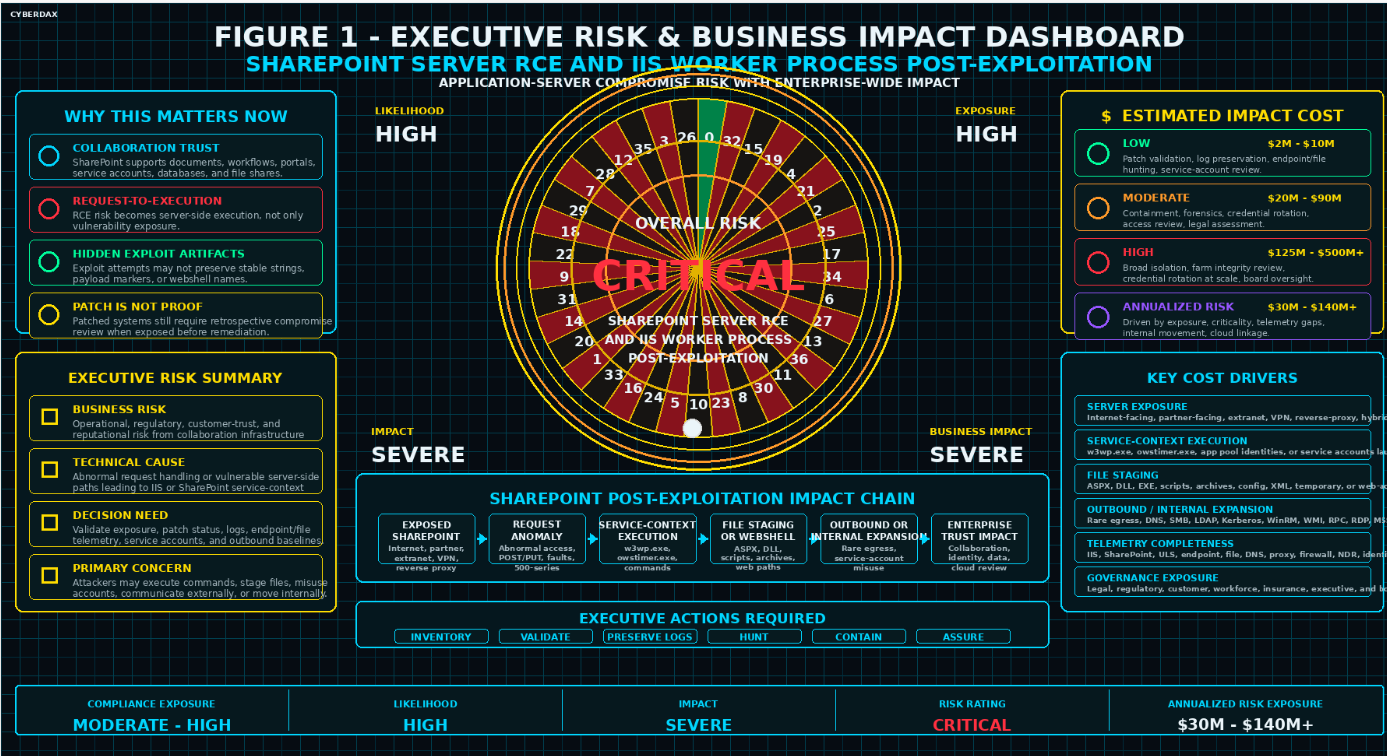
Figure 1
Compliance Exposure Indicator
Moderate to High depending on whether SharePoint compromise involved unauthorized server-side execution, collaboration content exposure, regulated-data access, credential compromise, service-account misuse, database access, file-share access, webshell-like artifacts, outbound communication, internal expansion, downstream cloud activity, customer-impact uncertainty, workforce data exposure, or incomplete forensic scoping.
Risk Register Entry
Risk Title
SharePoint Server RCE and IIS Worker Process Post-Exploitation Enterprise Infrastructure Compromise
Risk Description
Adversaries may exploit exposed or vulnerable SharePoint Server infrastructure to obtain server-side execution, launch commands from IIS or SharePoint service context, stage files in SharePoint or IIS-accessible directories, access credentials, modify application content, initiate rare outbound communication, move internally, misuse service accounts, or expand into downstream cloud-control-plane activity when identity or session lineage connects SharePoint compromise context to cloud resources.
Likelihood
High.
Impact
Severe.
Risk Rating
Critical.
Annualized Risk Exposure
Estimated $30M to $140M or higher based on SharePoint server exposure, asset criticality, patch latency, collaboration-data sensitivity, service-account privilege, endpoint visibility, file telemetry completeness, IIS and SharePoint log retention, outbound network visibility, internal movement evidence, downstream cloud linkage, regulatory obligations, containment complexity, and executive assurance requirements.
S7 — Risk Drivers
· SharePoint Server is commonly tied to enterprise collaboration, document storage, workflows, internal portals, business applications, identity-connected services, databases, file shares, and privileged administrative operations.
· SharePoint Server RCE can create direct application-server compromise risk when attackers convert exposed or authenticated access paths into server-side execution.
· IIS worker process lineage creates high-confidence risk when w3wp.exe, owstimer.exe, SharePoint service context, application-pool identities, or service accounts launch suspicious child processes.
· Suspicious child process execution can include command shells, PowerShell, Windows Script Host, MSHTA, Rundll32, Regsvr32, Certutil, Bitsadmin, Curl, Wget, archive tools, reconnaissance commands, and living-off-the-land binaries.
· Suspicious file staging in SharePoint or IIS paths can indicate webshell placement, payload staging, tool placement, archive creation, script staging, persistence preparation, or content tampering.
· Web request anomalies may not preserve full exploit bodies, serialized payloads, authentication token details, request bodies, or backend execution context in standard logs.
· Authenticated exploitation or post-authentication abuse can blend into normal SharePoint access unless user context, source device, source network, session timing, request sequence, and downstream server behavior are correlated.
· Patch status alone does not prove that exposed SharePoint servers were uncompromised before remediation.
· Absence of known webshell names, malware hashes, static IOCs, or CVE-specific request strings does not prove absence of compromise.
· Endpoint telemetry gaps can obscure short-lived processes, in-memory execution, deleted artifacts, parent-child process lineage, and command-line content.
· File telemetry gaps can obscure short-lived webshells, temporary staging files, renamed files, hidden files, permission changes, and artifacts created and deleted before collection.
· IIS, SharePoint, proxy, WAF, or load-balancer mapping gaps can prevent teams from tying suspicious requests to backend SharePoint servers.
· Network visibility gaps can obscure rare outbound destinations, direct internet egress, abnormal transfer behavior, internal expansion, and post-exploitation infrastructure contact.
· Service-account and application-pool identity baseline gaps can prevent teams from distinguishing legitimate SharePoint processing from malicious post-exploitation behavior.
· Cloud identity lineage gaps can prevent teams from determining whether AWS, Azure, or Google Cloud activity is related to SharePoint compromise context.
· Legitimate patching, backup operations, monitoring tools, search indexing, deployment workflows, SharePoint customization, vulnerability scanning, and administrative scripts can resemble malicious behavior without approved-workflow baselines.
· Over-reliance on CVE strings, public proof-of-concept artifacts, scanner names, known malicious IPs, request paths, user-agent strings, filenames, or webshell names can miss evolved exploitation and post-exploitation tradecraft.
S8 — Bottom Line for Executives
[EXP] SharePoint Server RCE and IIS Worker Process Post-Exploitation Detection Coverage should be treated as a high-priority enterprise infrastructure trust issue because SharePoint compromise can affect more than the vulnerable application endpoint. The key executive concern is whether exposed or vulnerable SharePoint systems allowed attackers to execute commands, stage files, misuse service accounts, access sensitive collaboration content, communicate externally, move internally, or pivot into downstream cloud-control-plane activity before remediation. Risk reduction depends on patch confirmation, exposed asset scoping, historical compromise review, preserved IIS and SharePoint logs, endpoint process visibility, SharePoint directory and webroot inspection, outbound communication review, service-account validation, internal expansion scoping, and validated detection coverage across endpoint, SIEM, NDR, portable-rule, and conditional cloud-correlation layers. Organizations should prioritize this report as a collaboration-platform compromise and enterprise blast-radius issue because successful exploitation can create operational disruption, credential exposure, regulatory uncertainty, customer or workforce trust loss, and board-level incident governance requirements.
S9 — Board-Level Takeaway
SharePoint Server RCE and IIS worker process post-exploitation turn a collaboration platform vulnerability into a potential enterprise infrastructure compromise risk. The board-level concern is whether attackers used SharePoint or IIS service context to execute commands, stage files, access credentials, alter web-accessible content, communicate externally, move internally, or reach downstream cloud resources tied to privileged identity lineage. Leadership should require evidence that exposed SharePoint assets were identified, patch status was validated, logs were preserved, endpoint and file telemetry were reviewed, service-account activity was investigated, outbound and internal communication were scoped, and downstream cloud-control-plane activity was assessed when identity, source, session, device, or incident-case linkage exists. This report supports governance decisions around SharePoint infrastructure risk, collaboration-data trust, privileged service-account containment, telemetry readiness, historical compromise review, credential rotation, cloud identity assurance, incident response scope, and executive oversight of enterprise application-server compromise.
S10 — Threat Overview
[EXP] SharePoint Server RCE and IIS Worker Process Post-Exploitation Detection Coverage centers on attacker abuse of exposed, vulnerable, or compromised on-premises SharePoint Server infrastructure to obtain server-side execution, stage files, misuse service context, initiate outbound communication, or expand into internal systems. The strategic risk is not limited to a single exploit string, request path, payload marker, webshell name, or CVE-specific artifact because SharePoint exploitation and post-exploitation behavior can vary by authentication context, endpoint, payload structure, staging method, tooling choice, and follow-on objective.
The threat is significant because SharePoint Server often sits at the intersection of enterprise collaboration, document storage, workflow processing, internal portals, databases, service accounts, application pools, authentication paths, and downstream business systems. If attackers convert SharePoint or IIS service context into command execution, file staging, outbound communication, or internal expansion, the organization may face business disruption, collaboration-data exposure, service-account compromise, lateral movement scoping, cloud identity review, legal assessment, regulatory review, and executive incident governance.
This report treats SharePoint RCE and IIS worker process post-exploitation as a behavior-led infrastructure compromise risk. Detection and response should focus on abnormal SharePoint request activity followed by suspicious w3wp.exe or SharePoint service-context execution, suspicious file creation in SharePoint or IIS paths, rare outbound communication, internal expansion, service-account misuse, and downstream cloud-control-plane activity only when identity or incident lineage ties the cloud activity to SharePoint compromise context.
The operational risk is highest where SharePoint servers are internet-facing, partner-facing, extranet-connected, VPN-accessible, reverse-proxy-accessible, hybrid-connected, highly privileged, poorly segmented, or linked to sensitive collaboration content, databases, file shares, administrative hosts, identity infrastructure, backup systems, or cloud-connected administrator accounts. Patch validation is necessary, but it is not sufficient when exposed systems may have been reachable before remediation or when suspicious execution, file, network, identity, or application-fault evidence exists.
S11 — Threat Classification and Type
Threat Type
· Exploitation-enabled SharePoint Server compromise.
· IIS worker process post-exploitation.
· Enterprise collaboration infrastructure compromise.
· Application-server execution and service-context abuse.
Threat Sub-Type
· SharePoint Server RCE exploitation.
· Request-to-execution behavior.
· IIS worker process child process execution.
· Webroot or application-path file staging.
· Service-account misuse and internal expansion.
· Conditional downstream cloud-control-plane correlation.
Operational Classification
· Exposure-driven application-server compromise risk requiring patch validation, asset scoping, historical compromise review, and telemetry preservation.
· Post-exploitation behavior risk involving command execution, script execution, file staging, outbound communication, persistence preparation, internal expansion, and service-account misuse.
· Behavior-led detection problem where endpoint, web, file, network, identity, SIEM, NDR, and cloud audit telemetry must be correlated before high-confidence compromise assessment.
· Infrastructure trust issue affecting SharePoint farms, IIS-hosted SharePoint servers, collaboration services, application pool identities, service accounts, databases, file shares, and downstream identity-dependent systems.
Primary Function
· Convert exposed or vulnerable SharePoint Server infrastructure into server-side execution.
· Use SharePoint or IIS service context to launch command interpreters, scripting engines, download utilities, archive tools, reconnaissance commands, or living-off-the-land binaries.
· Stage suspicious files in SharePoint webroot, IIS application, layout, upload, temporary, staging, or writable application directories.
· Establish or support post-exploitation activity through webshell-like artifacts, outbound communication, internal movement, or service-account abuse.
· Expand impact from one SharePoint server into collaboration-data exposure, database access, file-share access, identity risk, internal infrastructure exposure, or downstream cloud-control-plane review when linkage exists.
S12 — Campaign or Activity Overview

Figure 2
SharePoint Server RCE and IIS worker process post-exploitation activity model showing exposed SharePoint access, abnormal request handling, worker process execution, suspicious file staging, outbound communication, internal expansion, and downstream containment validation.
This report assesses SharePoint Server RCE and IIS worker process post-exploitation as a durable behavior class rather than a single exploit string, scanner pattern, actor campaign, webshell name, payload artifact, or IOC set. The activity pattern involves adversaries attempting to use vulnerable SharePoint application behavior, exposed SharePoint endpoints, authenticated access paths, IIS worker process context, SharePoint application pool identities, or service-account context as a starting point for server-side execution and post-exploitation activity.
· The activity is best understood as an enterprise application-server compromise threat rather than a routine vulnerability-management issue, isolated web request anomaly, or scan-only exposure finding.
· Adversaries may target internet-facing SharePoint Server deployments, partner-facing portals, extranet SharePoint sites, VPN-accessible SharePoint services, reverse-proxy-accessible SharePoint systems, hybrid-connected environments, and internally reachable high-value SharePoint servers.
· The behavior may involve abnormal SharePoint request patterns, authenticated access anomalies, HTTP 500-series responses, worker process instability, application pool recycling, suspicious child process execution, suspicious file creation, rare outbound communication, service-account authentication, or internal movement.
· The activity may remain limited to scanning, malformed requests, blocked exploit attempts, failed authentication, application faults, or request anomalies, or it may progress into command execution, script execution, webshell-like placement, payload staging, outbound communication, persistence preparation, internal expansion, or downstream cloud identity review.
· The activity becomes highest risk when affected SharePoint systems support regulated content, executive workflows, legal records, customer data, financial records, engineering content, sensitive operational procedures, database access, file-share dependencies, identity infrastructure, backup systems, or cloud-linked administrator accounts.
Actor names, CVE identifiers, exploit references, proof-of-concept details, request paths, public scanner infrastructure, known IP addresses, user agents, filenames, or webshell names may increase urgency, but they should enrich the report rather than replace local behavior-led evidence of request-to-execution behavior, suspicious file staging, outbound communication, service-account misuse, or internal expansion.
S13 — Targets and Exposure Surface
The exposure surface includes on-premises SharePoint Server infrastructure, IIS-hosted SharePoint application servers, SharePoint web applications, Business Connectivity Services components, application pools, service accounts, webroot and layout paths, upload paths, temporary directories, databases, file shares, authentication and token-validation paths, reverse proxies, VPN-accessible paths, partner-facing sites, extranet portals, hybrid identity dependencies, and the telemetry needed to determine whether activity remained an attempt or became compromise.
· Internet-facing SharePoint Server deployments, partner-facing SharePoint sites, extranet portals, reverse-proxy-accessible SharePoint services, VPN-accessible SharePoint systems, and high-value internally reachable SharePoint servers.
· On-premises Microsoft SharePoint Server systems affected by CVE-2026-58644, particularly systems exposed through internet-facing, partner-facing, extranet, reverse-proxy, VPN-accessible, or broadly reachable internal paths where deserialization of untrusted data may transition into SharePoint or IIS service-context execution.
· On-premises Microsoft SharePoint Server systems exposed to the CVE-2026-55040 authentication-bypass and CVE-2026-63520 remote-code-execution chain, where unauthenticated access may bypass SharePoint authentication and transition through the Business Connectivity Services vulnerability into arbitrary code execution under the SharePoint site service-account context.
· SharePoint Business Connectivity Services components and associated SharePoint service context relevant to CVE-2026-63520, including systems where vulnerable input handling may transition SharePoint application activity into server-side execution.
· IIS worker processes, SharePoint application pools, SharePoint timer services, SharePoint service accounts, application pool identities, web applications, site collections, workflow paths, layout paths, service endpoints, upload paths, and administrative endpoints.
· SharePoint webroot paths, IIS application paths, layout directories, upload directories, temporary directories, staging directories, writable application paths, configuration files, scripts, DLLs, ASPX files, archives, and web-accessible artifacts.
· SharePoint content databases, configuration databases, service application databases, file shares, backup repositories, search components, workflow dependencies, identity infrastructure, domain controllers, database servers, management servers, and administrative hosts.
· Endpoint process activity involving w3wp.exe, owstimer.exe, command interpreters, scripting engines, download utilities, archive tools, reconnaissance commands, living-off-the-land binaries, and administrative utilities launched from SharePoint or IIS service context.
· Outbound DNS, proxy, firewall, EDR network, NDR, and flow telemetry involving rare destinations, newly observed infrastructure, direct internet egress, suspicious cloud storage, dynamic DNS, file-sharing services, paste sites, tunneling infrastructure, abnormal ports, unusual transfer volume, or low-reputation destinations.
· Identity and authentication telemetry involving SharePoint users, administrators, service accounts, application pool identities, privileged accounts, source IPs, source devices, geographies, ASNs, authentication paths, token-validation and session activity, session patterns, and downstream authentication from SharePoint servers.
· Conditional AWS, Azure, and Google Cloud audit telemetry where identity, source, session, device, service account, project, subscription, account, organization, role, or incident-case lineage connects cloud activity to SharePoint compromise context.
· IIS logs, SharePoint application logs, ULS data, reverse proxy logs, WAF logs, load-balancer logs, endpoint telemetry, file telemetry, process telemetry, DNS logs, proxy logs, firewall logs, NDR data, identity logs, cloud audit logs, vulnerability context, asset inventory, and incident-response case context.
Environments with incomplete SharePoint asset inventory, weak IIS log mapping, limited endpoint visibility, missing command-line telemetry, incomplete file telemetry, missing SharePoint application logs, weak Business Connectivity Services inventory, weak service-account baselines, incomplete outbound destination baselines, limited east-west network visibility, inconsistent identity normalization, incomplete authentication or token-validation telemetry, or unclear ownership across SharePoint, Windows, SOC, vulnerability-management, identity, and cloud teams face elevated detection and scoping risk.
S14 — Sectors / Countries Affected
Sectors Affected
· Government and public sector organizations using SharePoint for portals, internal collaboration, records, workflows, or citizen-facing services.
· Defense industrial base and contractors using SharePoint for controlled collaboration, engineering documentation, supplier coordination, or program records.
· Financial services organizations using SharePoint for internal collaboration, regulated documents, customer-support workflows, legal records, audit evidence, or operational procedures.
· Healthcare and life sciences organizations using SharePoint for policies, research coordination, regulated documents, workforce collaboration, or patient-adjacent business processes.
· Energy, utilities, and critical infrastructure organizations using SharePoint for operational documentation, compliance workflows, vendor coordination, and internal procedures.
· Manufacturing and industrial organizations using SharePoint for engineering content, supplier collaboration, quality documentation, and operational procedures.
· Technology and software organizations using SharePoint for internal documentation, project coordination, customer-support content, and business operations.
· Education and research institutions using SharePoint for departmental collaboration, grant documentation, research administration, student services, and internal portals.
· Legal, consulting, and professional services organizations using SharePoint for client documents, matter files, project workspaces, and regulated business records.
· Retail, logistics, transportation, and hospitality organizations using SharePoint for operational documentation, workforce collaboration, vendor management, and business-continuity workflows.
· Any organization operating on-premises SharePoint Server, IIS-hosted SharePoint infrastructure, partner-facing SharePoint portals, extranet SharePoint deployments, hybrid-connected SharePoint services, or high-value internal SharePoint farms.
Countries Affected
· Global.
· Exposure is not limited to a single country or region because on-premises SharePoint Server is broadly deployed across enterprise, government, education, healthcare, financial, technology, industrial, and managed-service environments.
· Countries with large enterprise, government, defense, critical-infrastructure, financial-services, healthcare, education, or managed-service footprints may face elevated operational exposure when on-premises SharePoint infrastructure remains externally reachable or poorly segmented.
· Country-specific impact should be assessed by exposed SharePoint asset count, business criticality, patch speed, collaboration-data sensitivity, service-account privilege, telemetry maturity, identity architecture, cloud linkage, and incident-response readiness rather than geography alone.
S15 — Adversary Capability Profiling
Capability Level
High
Attackers exploiting this threat do not need advanced access to the internal enterprise environment when SharePoint Server is exposed through internet-facing, partner-facing, extranet, VPN, or reverse-proxy paths. Capability requirements increase after initial access because meaningful impact depends on converting SharePoint or IIS service context into execution, staging files, maintaining access, communicating externally, or expanding into internal systems while blending with legitimate SharePoint operations.
Technical Sophistication
Moderate to High
Initial exploitation may be operationalized through public or semi-public exploit knowledge, scanning, exposed-service targeting, authenticated access abuse, or replayable intrusion workflows. Post-exploitation sophistication varies. Lower-sophistication operators may run commands, deploy webshell-like files, stage payloads, or attempt opportunistic outbound communication. Higher-sophistication operators may avoid durable artifacts, use living-off-the-land tooling, blend with service-account behavior, delay execution, use transient staging, delete artifacts, avoid obvious webshell names, and pivot selectively toward databases, file shares, identity infrastructure, or cloud-linked identities.
Infrastructure Maturity
Moderate to High
The activity can support internet-scale scanning, exploitation attempts, payload staging, callback infrastructure, dynamic DNS usage, suspicious hosting, file-sharing services, paste-site use, tunneling, proxying, or reuse of compromised infrastructure. Infrastructure maturity should be assessed by source diversity, destination rarity, staging behavior, outbound connection patterns, reuse of compromised servers, internal expansion patterns, and downstream incident evidence.
Operational Scale
High
SharePoint Server is widely deployed across enterprise and public-sector environments, and exposed SharePoint infrastructure provides high operational value because it can connect collaboration content, service accounts, databases, file shares, workflows, identity systems, and business processes. The operational scale should be treated as broad where SharePoint assets are internet-facing, partner-facing, extranet-connected, hybrid-connected, or reachable from large internal populations.
Escalation Likelihood
High
Escalation likelihood is high when attackers obtain SharePoint or IIS service-context execution because the compromised server can become a staging point for command execution, file placement, outbound communication, lateral movement scoping, database access, file-share access, service-account misuse, or cloud-control-plane review. Escalation risk is highest when telemetry is incomplete, SharePoint servers are poorly segmented, service accounts are overprivileged, outbound egress is weakly controlled, application pool identities are not baselined, and exposed systems were closed solely on patch status without historical compromise review.
S16 — Targeting Probability Assessment
Overall Targeting Probability
High
Targeting probability is high because exposed SharePoint Server infrastructure provides immediate enterprise value after compromise and can support server-side execution, collaboration-data access, outbound communication, internal expansion, and downstream identity risk.
Targeting Drivers
· Publicly reachable or partner-facing SharePoint Server deployments.
· High-value enterprise collaboration and document repositories.
· SharePoint access to databases, file shares, service accounts, workflows, internal portals, and administrative dependencies.
· Potential to convert IIS worker process context into command execution or file staging.
· Potential to deploy webshell-like artifacts or temporary staging files in web-accessible paths.
· Potential to misuse SharePoint application pool identities or service accounts.
· Potential to reach internal systems through SMB, LDAP, Kerberos, NTLM, WinRM, WMI, RPC, RDP, MSSQL, or administrative-share activity.
· Potential to initiate rare outbound communication, payload retrieval, command-and-control-like traffic, or file-transfer activity.
· Delayed patching or incomplete patch validation across complex SharePoint farms.
· Incomplete IIS, SharePoint, endpoint, file, network, identity, or cloud telemetry.
· Difficulty distinguishing legitimate SharePoint administration, patching, backup, monitoring, indexing, workflow processing, and deployment activity from post-exploitation behavior.
· Post-remediation uncertainty when systems were exposed before patch validation or containment.
Most Likely Targets
· Internet-facing on-premises SharePoint Server deployments.
· Partner-facing or extranet SharePoint portals.
· VPN-accessible or reverse-proxy-accessible SharePoint systems.
· Hybrid-connected SharePoint environments with identity or cloud dependencies.
· SharePoint servers supporting regulated data, executive workflows, legal records, financial records, customer data, engineering content, or operational procedures.
· SharePoint servers with broad access to databases, file shares, backup systems, management servers, identity infrastructure, or administrative hosts.
· SharePoint farms with overprivileged service accounts, weak segmentation, incomplete monitoring, or broad outbound egress.
· Organizations with delayed patch validation, incomplete historical compromise review, weak IIS log retention, limited endpoint process visibility, missing file telemetry, weak outbound baselines, or inconsistent service-account baselines.
S17 — MITRE ATT&CK Chain Flow Mapping
MITRE ATT&CK chain flow showing SharePoint exposure discovery, public-facing application exploitation, IIS worker process execution, file staging, outbound communication, and internal discovery or expansion only where supported by observed or strongly inferable behavior.
Stage 1 — Exposure Discovery and Target Selection
Attackers identify exposed or reachable SharePoint Server infrastructure through internet-facing services, partner-facing portals, extranet access paths, VPN-accessible systems, reverse-proxy paths, or high-value internal application surfaces. This stage establishes the candidate target set but does not prove compromise.
Mapped Techniques
· T1595 — Active Scanning
Stage 2 — Initial Access Through SharePoint Server Exploitation
Attackers attempt to exploit exposed or vulnerable SharePoint Server functionality to obtain server-side execution or application-context access. Request anomalies, malformed requests, rare paths, or HTTP errors should remain classified as exploitation attempts unless correlated with host-side execution, file activity, identity anomalies, outbound communication, or internal expansion.
Mapped Techniques
· T1190 — Exploit Public-Facing Application
Stage 3 — IIS Worker Process or SharePoint Service-Context Execution
Successful exploitation may result in w3wp.exe, owstimer.exe, SharePoint application pool identities, or SharePoint service accounts launching command interpreters, scripting engines, download utilities, archive tools, reconnaissance commands, or living-off-the-land binaries. This is the primary transition from exploit attempt to suspected server-side compromise.
Mapped Techniques
· T1059 — Command and Scripting Interpreter
Stage 4 — File Staging or Webshell-Like Artifact Placement
Attackers may create or modify ASPX, DLL, EXE, script, archive, temporary, configuration, or staging artifacts in SharePoint webroot, IIS application, layout, upload, temporary, or writable application directories. This stage may support webshell-like access, payload staging, tool placement, persistence preparation, or later execution.
Mapped Techniques
· T1505.003 — Server Software Component: Web Shell
Stage 5 — Outbound Communication and Tool Transfer
Compromised SharePoint servers may initiate outbound DNS, HTTP, HTTPS, raw TCP, file-transfer, or script-based web requests to rare destinations, newly observed infrastructure, suspicious hosting, cloud storage, dynamic DNS, paste sites, file-sharing services, tunneling infrastructure, or low-reputation destinations. This behavior is strongest when correlated with prior SharePoint request anomalies, process execution, file staging, or service-account behavior.
Mapped Techniques
· T1071 — Application Layer Protocol
· T1105 — Ingress Tool Transfer
Stage 6 — Internal Discovery and Expansion
Attackers may use the SharePoint server as an internal foothold to enumerate the host, domain, users, groups, network, services, databases, file shares, or connected systems, and may attempt abnormal internal service access from the SharePoint server. This stage should be included only when internal communication, authentication, process, or identity telemetry supports behavior beyond normal SharePoint workflows.
Mapped Techniques
· T1087 — Account Discovery
· T1083 — File and Directory Discovery
· T1018 — Remote System Discovery
· T1021 — Remote Services
S18 — Attack Path Narrative (Signal-Aligned Execution Flow)
SharePoint Server RCE and IIS worker process post-exploitation activity model showing exposed SharePoint access, abnormal request handling, worker process execution, suspicious file staging, outbound communication, internal expansion, and containment validation.
Stage 1 — Exposure Discovery and SharePoint Target Selection
Attackers identify exposed or reachable SharePoint Server infrastructure through internet-facing services, partner-facing portals, extranet access paths, VPN-accessible systems, reverse-proxy paths, or high-value internal application surfaces. Targeting may focus on SharePoint web applications, administrative paths, layout paths, service endpoints, upload paths, workflow paths, API-style paths, or other reachable SharePoint functionality. At this stage, observed activity may include scanning, repeated endpoint access, unusual request patterns, uncommon user agents, abnormal request duration, HTTP 500-series responses, or repeated access to rare SharePoint paths.
This stage should be treated as exposure-prioritization or exploit-attempt activity unless stronger evidence shows host-side execution, file creation, outbound communication, service-account misuse, internal expansion, or downstream authentication activity.
Primary Signals
· Requests to exposed SharePoint web applications, administrative endpoints, layout paths, upload paths, workflow paths, service endpoints, or API-style paths.
· Activity from unfamiliar source infrastructure, unusual geographies, unexpected ASNs, VPN paths, reverse proxies, scanners, or unmanaged devices.
· Repeated POST or PUT activity, rare URI paths, abnormal request duration, unusual user agents, or request sequences inconsistent with normal SharePoint use.
· HTTP 500-series responses, backend faults, worker process instability, application pool recycling, or application errors near suspicious request activity.
Stage 2 — SharePoint Exploitation Attempt and Server-Side Transition
Attackers attempt to exploit exposed or vulnerable SharePoint Server functionality to obtain server-side execution or application-context access. Successful activity may produce abnormal SharePoint or IIS behavior followed by process execution, file creation, outbound communication, or service-account activity from the same server. This is the primary transition point from request anomaly to suspected compromise.
Detection confidence increases when SharePoint request telemetry, IIS logs, SharePoint application logs, endpoint process telemetry, file telemetry, and network telemetry align within a bounded time window.
Primary Signals
· SharePoint request activity followed by suspicious process creation from the same SharePoint server.
· Authenticated SharePoint access followed by abnormal server-side behavior.
· IIS worker process crashes, application pool recycling, unhandled exceptions, backend faults, or HTTP 500-series responses near suspicious access.
· Request patterns followed by file creation, command execution, outbound communication, or service-account authentication.
· Source user, source IP, device, user agent, access path, or session sequence inconsistent with normal SharePoint activity.
Stage 3 — IIS Worker Process or SharePoint Service-Context Execution
Successful exploitation may result in w3wp.exe, owstimer.exe, SharePoint application pool identities, or SharePoint service accounts launching command interpreters, scripting engines, download utilities, archive tools, reconnaissance commands, or living-off-the-land binaries. This stage is the strongest host-side indicator that SharePoint activity has moved beyond scanning or request anomaly into probable server-side execution.
The highest-value signal is not one command name by itself, but the relationship between SharePoint or IIS service context and abnormal execution that does not align with patching, backup, monitoring, indexing, workflow processing, or approved administrative automation.
Primary Signals
· w3wp.exe, owstimer.exe, or SharePoint-related service context spawning cmd.exe, powershell.exe, pwsh.exe, cscript.exe, wscript.exe, mshta.exe, rundll32.exe, regsvr32.exe, certutil.exe, bitsadmin.exe, curl.exe, wget.exe, archive tools, or reconnaissance commands.
· Encoded command execution, script-based downloads, certificate utility downloads, BITS transfers, archive creation, rapid staging, or obfuscated command lines.
· SharePoint application pool identities or service accounts launching processes inconsistent with normal SharePoint content processing, indexing, workflow execution, backup activity, monitoring, patching, or administrative maintenance.
· Short-lived process chains, rapid child-process creation, deleted artifacts, or transient execution behavior from SharePoint or IIS context.
· Execution behavior correlated with prior suspicious SharePoint request activity, application faults, file writes, or outbound communication.
Stage 4 — File Staging and Web-Accessible Artifact Placement
Attackers may create or modify files in SharePoint webroot, IIS application, layout, upload, temporary, staging, writable application, or application-adjacent directories. File activity may support webshell-like access, payload staging, script execution, archive creation, tool placement, persistence preparation, or later outbound communication. This stage materially increases confidence because suspicious file creation provides a durable artifact that can be reviewed, hashed, scoped, and correlated to process and request activity.
This stage must be evaluated against known SharePoint patching, deployment, backup, customization, indexing, migration, monitoring, and approved administrative workflows.
Primary Signals
· Newly created or modified ASPX, ASHX, ASMX, DLL, EXE, PS1, JS, VBS, BAT, CMD, ZIP, 7Z, RAR, TMP, CONFIG, XML, or similarly suspicious files in SharePoint or IIS-accessible paths.
· File writes to SharePoint webroot, layout, upload, temporary, staging, writable application, or IIS application directories from SharePoint service context.
· Webshell-like files, suspicious scripts, renamed extensions, double extensions, hidden files, short-lived files, unusual permissions, or unexpected owner changes.
· File staging followed by repeated access to a new web-accessible artifact.
· File creation or modification followed by outbound communication, archive creation, credential-access behavior, or internal authentication activity.
Stage 5 — Outbound Communication and Payload Transfer
Compromised SharePoint servers may initiate outbound DNS, HTTP, HTTPS, raw TCP, file-transfer, or script-based web requests to destinations not normally contacted by SharePoint infrastructure. Outbound communication may support payload retrieval, tool transfer, command-and-control-like activity, tunneling, staging, or attacker-controlled infrastructure contact. This stage is strongest when correlated with prior SharePoint request anomalies, process execution, file staging, application faults, or service-account behavior.
Outbound communication should not be treated as exploit confirmation by itself because SharePoint servers may legitimately contact Microsoft services, update infrastructure, monitoring platforms, backup destinations, security tooling, enterprise integrations, and proxy infrastructure.
Primary Signals
· SharePoint servers initiating outbound connections shortly after suspicious request handling, worker process execution, file staging, application instability, or service-account activity.
· DNS lookups, proxy events, firewall events, EDR network events, or NDR flows to rare destinations, newly observed domains, suspicious hosting, dynamic DNS, paste sites, file-sharing services, tunneling infrastructure, cloud storage, or low-reputation destinations.
· Direct internet egress from SharePoint servers that normally use approved proxies or controlled egress paths.
· PowerShell web requests, Certutil downloads, BITS transfers, Curl or Wget activity, unusual user agents, abnormal destination ports, large outbound transfers, beacon-like connections, or abnormal TLS patterns.
· Network activity occurring within the same time window as SharePoint-origin execution, file creation, script execution, archive creation, or internal expansion.
Stage 6 — Internal Discovery and Expansion
Attackers may use the SharePoint server as an internal foothold to enumerate hosts, users, groups, domains, file shares, databases, services, or connected systems, and may attempt access to internal infrastructure outside normal SharePoint workflows. This stage increases severity because SharePoint servers may have legitimate connectivity to databases, domain controllers, file servers, backup systems, management servers, administrative hosts, and identity infrastructure.
Internal expansion should be included only when internal communication, authentication, process, identity, or network telemetry supports behavior beyond approved SharePoint dependencies.
Primary Signals
· SharePoint servers initiating SMB, LDAP, Kerberos, NTLM, WinRM, WMI, RPC, RDP, MSSQL, administrative-share, database-server, file-server, backup-system, management-server, or domain-controller activity outside expected application workflows.
· net.exe, nltest.exe, whoami.exe, ipconfig.exe, systeminfo.exe, tasklist.exe, quser.exe, nslookup.exe, wmic.exe, PowerShell remoting, remote-service, or discovery-oriented activity from SharePoint or IIS service context.
· Authentication attempts from SharePoint servers to multiple internal systems within a short time window.
· SharePoint service accounts authenticating to systems they do not normally administer or contact.
· Internal fan-out, abnormal protocol use, sensitive destination access, or failed-then-successful authentication sequences following suspicious SharePoint execution, file staging, or outbound communication.
S19 — Attack Chain Risk Amplification Summary
The attack chain begins as a SharePoint exposure and exploitation problem but can escalate into an enterprise infrastructure compromise event when request activity produces server-side execution, file staging, outbound communication, service-account misuse, or internal expansion. The greatest amplification occurs when the affected SharePoint server supports sensitive collaboration content, regulated documents, executive workflows, legal records, financial data, customer data, databases, file shares, identity infrastructure, backup systems, or cloud-linked administrator accounts.
Risk amplification is driven by the concentration of trust in SharePoint infrastructure. SharePoint Server often connects users, documents, workflows, databases, service accounts, IIS application pools, authentication paths, file shares, and business-critical collaboration spaces. If attackers obtain execution from SharePoint or IIS service context, the compromise can shift from an application vulnerability event into a broader operational, identity, data-access, and governance problem.
Risk increases materially when attackers move beyond request anomalies into observable host-side behavior. The most important escalation signals are SharePoint request activity followed by suspicious w3wp.exe or SharePoint service-context execution, suspicious file creation in SharePoint or IIS paths, rare outbound communication, abnormal service-account authentication, internal fan-out, or access to sensitive downstream systems. These signals distinguish scanning and exploit attempts from probable compromise.
Patch validation reduces future exposure but does not close historical risk. SharePoint systems that were exposed before remediation require retrospective review because attackers may have executed commands, staged files, created web-accessible artifacts, communicated externally, abused service accounts, or attempted internal expansion before patching was completed. The absence of later exploitation attempts should not be treated as proof that earlier compromise did not occur.
The most severe risk scenario occurs when telemetry is incomplete and SharePoint ownership or dependency mapping is weak. Missing IIS logs, incomplete SharePoint application logs, limited endpoint process visibility, missing file telemetry, poor outbound network visibility, weak service-account baselines, incomplete cloud identity linkage, and inconsistent host normalization can force broader containment, longer investigation, wider credential review, and lower confidence in impact scoping. In those conditions, uncertainty itself becomes a cost and governance driver.
S20 — Tactics, Techniques, and Procedures

Figure 3
MITRE ATT&CK chain flow showing SharePoint exposure discovery, public-facing application exploitation, IIS worker process execution, file staging, outbound communication, and internal discovery or expansion only where supported by observed or strongly inferable behavior.
Exposure Targeting and Exploit Attempt Activity
· Attackers target exposed or reachable SharePoint Server infrastructure through internet-facing, partner-facing, extranet, VPN-accessible, reverse-proxy-accessible, or high-value internal access paths.
· Observable procedures may include scanning, repeated endpoint access, rare URI access, suspicious user agents, abnormal POST or PUT activity, unusual request duration, malformed requests, backend faults, or HTTP 500-series responses.
· Exposure and request anomalies should remain classified as exploit-attempt activity unless correlated with host-side execution, file activity, outbound communication, service-account misuse, or internal expansion.
Request-to-Execution Transition
· Attackers may convert SharePoint request handling into server-side execution from IIS worker process or SharePoint service context.
· Observable procedures may include w3wp.exe, owstimer.exe, SharePoint application pool identities, or SharePoint service accounts launching command shells, scripting engines, download utilities, archive tools, reconnaissance commands, or living-off-the-land binaries.
· Execution from SharePoint or IIS context is strongest when it follows suspicious request activity, authenticated access anomalies, worker process instability, application faults, or unexpected service-account behavior.
File Staging and Web-Accessible Artifact Placement
· Attackers may create or modify files in SharePoint webroot, IIS application, layout, upload, temporary, staging, writable application, or application-adjacent directories.
· Observable procedures may include ASPX, DLL, EXE, PS1, JS, VBS, BAT, CMD, archive, temporary, configuration, XML, or webshell-like artifact placement.
· File staging should be evaluated against approved patching, deployment, customization, backup, monitoring, indexing, migration, and administrative workflows.
Outbound Communication and Tool Transfer
· Attackers may use compromised SharePoint servers to retrieve tools, contact attacker-controlled infrastructure, initiate command-and-control-like traffic, or transfer staged content.
· Observable procedures may include DNS queries, HTTP or HTTPS connections, raw TCP activity, PowerShell web requests, Certutil downloads, BITS transfers, Curl or Wget activity, suspicious user agents, direct egress, rare destination ports, abnormal bytes out, or access to newly observed destinations.
· Outbound activity should be treated as highest risk when it follows SharePoint-origin execution, file staging, application instability, service-account misuse, or internal expansion.
Service-Account Misuse and Internal Expansion
· Attackers may use the SharePoint server as an internal foothold to enumerate hosts, users, groups, services, domains, file shares, databases, or connected systems.
· Observable procedures may include discovery commands, SMB, LDAP, Kerberos, NTLM, WinRM, WMI, RPC, RDP, MSSQL, administrative-share access, database-server access, file-server access, backup-system access, management-server access, or domain-controller communication outside expected workflows.
· Internal expansion should increase severity only when telemetry supports behavior beyond normal SharePoint dependencies, search crawling, workflow processing, database connectivity, backup activity, monitoring, patching, or approved administration.
Cloud-Control-Plane Review Conditions
· Attackers may create downstream cloud risk only when identity, source IP, device, session, service account, role, project, subscription, account, organization, or incident-case lineage connects cloud activity to SharePoint compromise context.
· Observable procedures may include suspicious AWS, Azure, or Google Cloud administrative activity, access-key activity, role assumption, service-principal activity, storage access, secret access, logging modification, security-control modification, or privileged resource access when linked to SharePoint-side compromise evidence.
· Cloud activity should not be treated as SharePoint exploitation evidence by itself and should remain conditional unless strong lineage exists.
Evasion and Blending Behavior
· Attackers may blend with legitimate SharePoint administration by using normal-looking access paths, delayed execution, low-volume file changes, common Windows utilities, service-account context, approved-looking source paths, or maintenance-adjacent timing.
· Attackers may avoid durable artifacts by using transient execution, in-memory activity, temporary files, deleted staging files, living-off-the-land tools, or renamed artifacts.
· Detection should remain behavior-led because exploit strings, public proof-of-concept details, request paths, user agents, source infrastructure, filenames, webshell names, and payload content can change quickly.
S20A — Adversary Tradecraft Summary
The tradecraft associated with [EXP] SharePoint Server RCE and IIS Worker Process Post-Exploitation Detection Coverage is best understood as application-server compromise and service-context abuse rather than a malware-first intrusion model. The initial access opportunity comes from exposed or vulnerable SharePoint Server infrastructure, but the durable risk comes from attacker use of IIS worker process context, SharePoint service accounts, application pool identities, writable application paths, and outbound or internal connectivity after server-side execution occurs.
The strongest tradecraft pattern is request-to-execution conversion. Suspicious SharePoint access becomes materially more significant when followed by w3wp.exe or SharePoint service-context child process execution, suspicious file creation in SharePoint or IIS-accessible paths, rare outbound communication, abnormal service-account authentication, or internal expansion. These behaviors establish the difference between scanning, suspected exploitation, probable compromise, and compromise requiring containment review.
Attackers may rely on legitimate Windows and SharePoint-adjacent behavior to reduce detection clarity. SharePoint administration, patching, backup activity, monitoring, search indexing, workflow processing, deployment operations, customization, vulnerability scanning, and service-account activity can resemble post-exploitation behavior without strong baselines. This creates an operational detection challenge because defenders must distinguish authorized SharePoint operations from attacker-driven execution, staging, outbound communication, and internal access.
The most important defensive implication is that static indicators are not sufficient. CVE strings, public exploit details, scanner names, request paths, user-agent strings, known malicious IP addresses, file names, or webshell names may support triage, but they should not define the detection model. The durable detection model must correlate SharePoint request activity, IIS behavior, endpoint process lineage, file activity, outbound communication, service-account behavior, internal communication, and conditional cloud-control-plane activity.
No single named threat actor, intrusion set, or malware family is required for this report’s detection model. Where ransomware deployment, webshell activity, malware delivery, credential theft, or other abuse is confirmed in a specific environment, it should be documented using the confirmed family, artifact, infrastructure cluster, or abuse pattern. If no identifier is confirmed, reporting should describe the activity as unidentified SharePoint post-exploitation activity, unidentified webshell-like artifact placement, or unidentified outbound infrastructure contact rather than assigning unsupported attribution.
The highest-risk tradecraft outcome is internal expansion from trusted collaboration infrastructure. In enterprise environments, one compromised SharePoint server can create downstream exposure across databases, file shares, service accounts, identity systems, backup systems, administrative hosts, and cloud-linked identities. This makes SharePoint asset inventory, IIS log retention, endpoint process visibility, file telemetry, service-account baselines, outbound network monitoring, internal communication baselines, and historical compromise review essential to reliable scoping.
S21 — Detection Strategy Overview
Detection Philosophy
Detection for SharePoint Server RCE and IIS worker process post-exploitation must prioritize behavior that follows successful or attempted server-side code execution rather than relying on exploit-string matching, CVE-specific payload signatures, or single web request indicators. The strongest detection model is built around SharePoint application context, IIS worker process lineage, abnormal child process creation, suspicious command execution, unexpected file creation, outbound communication, and post-exploitation activity originating from SharePoint or IIS service accounts.
Primary Detection Anchors
· SharePoint and IIS worker process activity involving w3wp.exe spawning command interpreters, scripting engines, LOLBins, archive utilities, download utilities, credential-access tooling, or reconnaissance commands.
· SharePoint application pool identities initiating behavior that is inconsistent with normal SharePoint content processing, indexing, workflow execution, timer jobs, or administrative maintenance.
· Web-accessible SharePoint directories receiving newly written ASPX, DLL, script, archive, executable, configuration, or temporary staging artifacts.
· SharePoint request activity followed by process execution, file creation, service instability, outbound network connections, or authentication activity from the same host.
· Repeated access to sensitive SharePoint paths, administrative endpoints, upload paths, workflow paths, layout paths, or service endpoints followed by abnormal server-side execution.
· Authenticated SharePoint activity that precedes unusual server behavior, especially when the source account, IP address, device, geography, user agent, session pattern, or access path is inconsistent with normal use.
Detection Prioritization Model
· Highest priority should be assigned to SharePoint or IIS worker process lineage that produces command execution, encoded PowerShell, script execution, binary staging, credential-access tooling, webshell-like file writes, or outbound communication.
· Medium priority should be assigned to abnormal SharePoint request sequences that correlate with application faults, HTTP 500-series errors, unusual upload behavior, suspicious user agents, rare endpoint access, or repeated attempts against sensitive paths.
· Lower priority should be assigned to standalone web request anomalies unless they correlate with host, file, process, identity, or network telemetry.
· CVE-specific detections should be treated as supporting logic only because SharePoint RCE exploitation may vary by payload, authentication context, endpoint, serialization pathway, and post-exploitation objective.
Correlation Strategy (Strict Enforcement)
· Do not alert on SharePoint request anomalies alone unless the request pattern is confirmed by high-confidence exploit artifacts or active exploitation intelligence.
· Correlate web telemetry with endpoint telemetry whenever available, especially process execution, file creation, script execution, module loads, crash events, outbound connections, and service-account activity.
· Correlate authenticated SharePoint access with abnormal server behavior when the user context, source network, authentication path, or session sequence is unusual for the environment.
· Require a bounded time window between SharePoint request activity and downstream execution behavior to reduce false positives from normal administrative activity, patching, indexing, workflow processing, and backup operations.
· Treat process execution from SharePoint or IIS worker process lineage as a stronger anchor than request path matching because successful exploitation may not preserve a stable request artifact across variants.
Telemetry Prioritization
· Endpoint process telemetry should be prioritized first because post-exploitation activity from w3wp.exe, SharePoint application pools, or related service accounts provides the clearest evidence of server-side code execution.
· File creation telemetry should be prioritized when it captures new ASPX, DLL, script, executable, archive, temporary, or web-accessible artifacts in SharePoint, IIS, webroot, temporary, or application directories.
· Web and application logs should be prioritized when they include authenticated user context, source IP, URI path, HTTP method, status code, user agent, referrer, request timing, and backend server mapping.
· Network telemetry should be prioritized when SharePoint servers initiate rare outbound connections, direct internet egress, command-and-control-like traffic, file downloads, or connections inconsistent with known Microsoft, backup, monitoring, update, proxy, or integration destinations.
· Identity telemetry should be prioritized when SharePoint access or server-origin authentication activity involves unusual accounts, service accounts, privileged accounts, newly elevated users, impossible travel, unfamiliar devices, or abnormal authentication sequences.
Detection Design Constraints
· Detection logic must not assume every SharePoint RCE attempt is unauthenticated because authenticated SharePoint RCE paths may require valid user context before server-side execution occurs.
· Detection logic must not assume that deserialization activity will expose a stable request string, payload marker, endpoint name, or serialized object artifact in standard logs.
· Detection logic must not treat all w3wp.exe child process activity as malicious without accounting for local administrative scripts, backup agents, monitoring tools, antivirus activity, SharePoint maintenance jobs, search indexing, and sanctioned automation.
· Detection logic must not classify outbound traffic from SharePoint servers as malicious solely because it is external; the destination must be rare, newly observed, suspicious, unapproved, or correlated with host execution or file activity.
· Detection logic must avoid CVE-only matching and must remain resilient across authenticated RCE, deserialization abuse, webshell deployment, staged execution, and follow-on intrusion workflows.
Baseline and Deployment Requirements
· Organizations must baseline normal SharePoint application pool identities, IIS worker process behavior, scheduled maintenance activity, patching windows, backup operations, search crawling, workflow execution, service accounts, and administrative automation.
· Organizations must identify internet-facing, partner-facing, extranet, hybrid, and internally reachable SharePoint deployments before applying alert severity.
· Organizations must map SharePoint servers to IIS logs, endpoint telemetry, EDR process data, webroot directories, application pool identities, authentication logs, proxy logs, DNS logs, firewall logs, and vulnerability-management data.
· Organizations must maintain allowlists for approved administrative tools, known script paths, sanctioned automation accounts, monitoring agents, backup agents, update services, and approved outbound destinations.
· Organizations must distinguish SharePoint Online exposure from on-premises SharePoint Server exposure because this detection model applies to server-side enterprise infrastructure where IIS, endpoint, file, and application telemetry can be collected.
Variant Resilience Requirements
· Detection should remain effective when attackers change the request path, serialized payload structure, user agent, staging directory, command interpreter, script engine, webshell name, payload extension, or outbound infrastructure.
· Detection should emphasize execution lineage, account context, file-system impact, suspicious command semantics, outbound behavior, and post-exploitation sequencing rather than fixed IOCs.
· Detection should account for attackers using valid credentials, low-privilege SharePoint accounts, compromised internal accounts, stolen cookies, VPN access, reverse proxies, or trusted source networks.
· Detection should support both quick exploit-to-command execution and slower staged operations where web access, file writes, process execution, and outbound communication occur across separate time windows.
· Detection should support ransomware, extortion, credential theft, persistence, reconnaissance, and lateral-movement follow-on behavior without requiring a ransomware payload to be present.
Operational Detection Model
· The operational model should begin with SharePoint exposure validation, move to abnormal request and authentication review, then pivot quickly into endpoint process lineage, file writes, outbound communication, service-account behavior, and post-exploitation expansion.
· SOC triage should prioritize alerts where SharePoint or IIS worker process activity directly produces command execution, suspicious file writes, encoded or downloaded payload activity, credential-access commands, outbound connections, or lateral movement.
· Vulnerability-management teams should use KEV status, patch state, exposure state, authentication requirements, asset criticality, and internet reachability to prioritize containment and remediation.
· Detection engineering teams should build correlation rules that connect SharePoint request telemetry to endpoint and network outcomes rather than isolated single-signal alerts.
· Incident response teams should treat confirmed SharePoint-origin execution as potential server compromise requiring host isolation, credential review, webroot inspection, application pool identity review, outbound traffic analysis, and downstream authentication review.
Explicit Non-Deployment Guardrails
· Do not deploy request-path-only detection as a high-severity alert without endpoint, file, network, crash, or identity corroboration.
· Do not deploy CVE-name-only detection as a substitute for behavior-based SharePoint exploitation coverage.
· Do not deploy w3wp.exe child-process detection without environment-specific allowlists for sanctioned maintenance, backup, monitoring, update, and administrative workflows.
· Do not assume that a patched SharePoint server is clean if suspicious process execution, file writes, webshell artifacts, or outbound communication occurred before remediation.
· Do not treat absence of webshell artifacts as absence of compromise because attackers may execute commands in memory, use temporary staging paths, delete artifacts, or rely on living-off-the-land tooling.
· Do not promote rules to production alerting until SharePoint asset inventory, IIS log mapping, endpoint telemetry, service-account baselines, known administrative workflows, and false-positive suppressions have been validated.
S22 — Primary Detection Signals
Primary Detection Signals
· SharePoint or IIS worker process lineage where w3wp.exe spawns cmd.exe, powershell.exe, pwsh.exe, cscript.exe, wscript.exe, mshta.exe, rundll32.exe, regsvr32.exe, certutil.exe, bitsadmin.exe, curl.exe, wget.exe, whoami.exe, net.exe, nltest.exe, ipconfig.exe, systeminfo.exe, tasklist.exe, quser.exe, ping.exe, nslookup.exe, tar.exe, 7z.exe, rar.exe, or other tools inconsistent with normal SharePoint processing.
· SharePoint application pool identities executing commands, creating processes, accessing unusual directories, writing executable content, initiating network connections, or authenticating to downstream systems outside established operational baselines.
· Newly created ASPX, DLL, EXE, PS1, JS, VBS, BAT, CMD, ZIP, 7Z, RAR, TMP, CONFIG, or similarly suspicious artifacts in SharePoint webroot, IIS application, temporary, upload, layout, or writable application directories.
· Web-accessible files created or modified shortly after abnormal SharePoint request activity, authenticated access anomalies, application faults, upload behavior, or repeated access to sensitive SharePoint paths.
· Encoded, compressed, downloaded, decoded, staged, reflected, or obfuscated command execution originating from SharePoint or IIS service context.
· SharePoint server outbound connections to rare destinations, newly observed infrastructure, direct internet egress paths, file-sharing services, paste sites, tunneling infrastructure, suspicious cloud storage, dynamic DNS, or destinations not normally contacted by SharePoint servers.
· SharePoint server activity where web telemetry, endpoint telemetry, file telemetry, network telemetry, and identity telemetry converge within a bounded time window.
Supporting Detection Signals
· Repeated HTTP POST, upload, workflow, layout, service, administrative, or API-style requests against SharePoint endpoints followed by HTTP 500-series responses, backend faults, unusual response sizes, or rapid retry behavior.
· Authenticated SharePoint access from unusual source IPs, geographies, ASNs, VPN paths, proxy paths, unmanaged devices, unfamiliar user agents, atypical access times, or accounts with no normal SharePoint administration pattern.
· SharePoint access followed by unexpected local reconnaissance, host enumeration, domain enumeration, credential access, service discovery, network discovery, or file staging activity.
· IIS logs showing rare URI paths, abnormal parameter length, unusual request methods, uncommon user agents, repeated failed attempts followed by success, or request sequences inconsistent with normal user interaction.
· Windows event logs, EDR telemetry, or application logs showing SharePoint service instability, application pool recycling, unexpected worker process crashes, unhandled exceptions, or repeated faults near suspicious requests.
· File writes to directories where SharePoint should normally read content but not receive ad hoc executable, script, webshell, archive, or staging artifacts.
· Temporary file creation, rapid file deletion, renamed file extensions, suspicious alternate extensions, hidden files, or short-lived artifacts associated with SharePoint execution context.
Exploit Attempt and Instability Signals
· Unusual SharePoint request bursts targeting administrative, layout, upload, workflow, service, or application endpoints, especially when followed by service errors, worker process instability, or endpoint execution.
· Authenticated request activity that produces abnormal backend behavior, including repeated exceptions, serialization-related errors, application faults, high CPU spikes, application pool recycling, or unusual event-log entries.
· Sequences where a source account or source IP performs SharePoint interaction immediately before suspicious process creation, file write, outbound connection, or service-account authentication from the SharePoint server.
· Multiple failed or malformed SharePoint requests followed by a successful request pattern from the same account, source IP, session, device, or user agent.
· Web requests involving suspicious content length, uncommon methods, rare endpoints, compressed content, unusual referrers, or abnormal request timing when correlated with host-side execution or file activity.
· SharePoint server instability that aligns with external, partner, VPN, reverse-proxy, or authenticated user access patterns rather than scheduled maintenance, patching, backup, indexing, or administrative operations.
Outbound Communication Signals
· SharePoint servers initiating outbound connections shortly after suspicious request handling, abnormal process creation, file staging, service instability, or web-accessible artifact creation.
· IIS or SharePoint service context initiating DNS lookups, HTTP requests, HTTPS connections, raw TCP connections, or file-transfer activity to destinations not seen in the prior baseline period.
· Direct outbound communication from SharePoint servers that normally rely on proxies, update services, management services, backup destinations, or known Microsoft endpoints.
· Outbound connections involving suspicious user agents, command-line download utilities, PowerShell web requests, certificate utility downloads, BITS transfers, cloud storage access, anonymous file-sharing services, paste services, dynamic DNS, newly registered domains, or infrastructure with low reputation.
· Large outbound transfers, repeated beacon-like connections, abnormal TLS patterns, rare destination ports, unexpected geographic destinations, or egress activity inconsistent with SharePoint’s normal business function.
· Network activity that occurs under the same time window as SharePoint-origin process execution, file creation, script execution, credential discovery, or archive creation.
Persistence and Post-Exploitation Signals (Conditional)
· Webshell-like ASPX, script, DLL, handler, configuration, or executable artifacts placed in SharePoint-accessible or IIS-served directories.
· New or modified scheduled tasks, services, startup entries, registry run keys, WMI event subscriptions, local accounts, group memberships, or administrative shares on SharePoint servers.
· SharePoint application pool identities, service accounts, or compromised user accounts performing activity inconsistent with their normal role, including domain discovery, privileged group enumeration, credential dumping attempts, or access to administrative shares.
· Creation of compressed archives, staged directories, credential files, dump files, script bundles, or temporary packaging artifacts on SharePoint servers.
· Attempts to disable logging, delete files, clear event logs, stop security services, modify web configuration, change application pool settings, or tamper with endpoint protection.
· Repeated access to the same web-accessible artifact from external or internal sources after suspicious file creation.
Lateral Movement and Expansion Signals (Conditional)
· SharePoint servers initiating SMB, WinRM, WMI, RDP, LDAP, Kerberos, NTLM, RPC, MSSQL, or remote-service activity to systems they do not normally administer or contact.
· SharePoint service accounts authenticating to domain controllers, file servers, database servers, backup systems, management servers, developer systems, or administrative hosts outside expected application workflows.
· Use of net.exe, nltest.exe, dsquery.exe, whoami.exe, ipconfig.exe, netstat.exe, quser.exe, wmic.exe, PowerShell remoting, remote service creation, or credential-validation commands from SharePoint server context.
· Authentication attempts from SharePoint servers to multiple internal systems within a short time window, especially when paired with failed logons, privileged-account use, or unusual NTLM/Kerberos patterns.
· SharePoint server access to sensitive file shares, backup repositories, database servers, identity infrastructure, or administrative systems following suspicious web, process, file, or outbound activity.
· Internal scanning, host discovery, port probing, DNS enumeration, or service discovery originating from SharePoint servers.
Signal Usage Constraints
· Do not treat SharePoint web request anomalies as sufficient compromise evidence without endpoint, file, network, crash, identity, or application-log corroboration.
· Do not treat authenticated access as benign solely because credentials were valid; authenticated SharePoint RCE paths remain relevant when paired with abnormal server behavior.
· Do not treat w3wp.exe child process creation as malicious without validating local administrative workflows, backup operations, monitoring tools, patching activity, indexing, antivirus activity, and sanctioned SharePoint automation.
· Do not treat outbound traffic from SharePoint servers as malicious unless the destination, timing, process context, volume, reputation, or correlation pattern is abnormal.
· Do not assume webshell deployment is required for successful exploitation because attackers may use transient execution, memory-resident activity, temporary files, deleted artifacts, or living-off-the-land tooling.
· Do not promote any single signal to high-severity alerting until it is correlated with at least one stronger execution, file, identity, crash, network, or post-exploitation signal.
S23 — Telemetry Requirements
Endpoint and Process Execution Telemetry
· Process creation telemetry from SharePoint and IIS servers must capture parent process, child process, command line, executable path, working directory, user context, logon session, integrity level, process hash, process start time, and host identity.
· EDR or Windows event telemetry must support lineage analysis for w3wp.exe, SharePoint application pool identities, IIS worker processes, SharePoint timer services, service-hosted processes, scripting engines, command interpreters, and living-off-the-land binaries.
· Telemetry must capture command-line arguments for PowerShell, command shell, Windows Script Host, MSHTA, Rundll32, Regsvr32, Certutil, Bitsadmin, Curl, Wget, archive utilities, reconnaissance tools, and administrative utilities.
· Endpoint telemetry must distinguish sanctioned administrative execution from SharePoint-origin execution by correlating process lineage, user context, service account, host role, command semantics, and execution timing.
· Process telemetry must preserve enough detail to determine whether execution originated from SharePoint service context, IIS worker process context, scheduled maintenance, backup tooling, monitoring agents, update services, or manual administration.
Memory and Execution Telemetry
· Memory and execution telemetry should capture suspicious script execution, reflective loading, encoded command execution, .NET assembly loading, unmanaged code execution, and in-memory payload behavior associated with SharePoint or IIS service context.
· EDR telemetry should identify suspicious module loads, unmanaged code invocation, script engine abuse, LOLBin execution, AMSI-related events, suspicious PowerShell behavior, and unusual .NET runtime activity from SharePoint-hosted processes.
· PowerShell telemetry should include Script Block Logging, Module Logging, transcription where operationally appropriate, command invocation details, encoded command content where available, and PowerShell host process lineage.
· Execution telemetry should support identification of short-lived processes, transient staging behavior, in-memory execution, rapid process chains, deleted artifacts, and command execution that does not leave stable file-system evidence.
· Memory-focused telemetry should be treated as supporting context unless it can be correlated to SharePoint process lineage, suspicious command execution, file staging, outbound communication, or identity activity.
Crash and Fault Telemetry
· Windows event logs, IIS logs, SharePoint Unified Logging Service data, application logs, and EDR telemetry should capture worker process crashes, application pool recycling, unhandled exceptions, serialization-related errors, abnormal service restarts, and backend faults.
· Crash and fault telemetry should include host identity, service name, application pool name, exception context where available, faulting process, faulting module, timestamp, request correlation fields where available, and affected SharePoint component.
· Telemetry should support correlation between abnormal SharePoint requests, authenticated access patterns, HTTP 500-series responses, service instability, worker process crashes, and post-crash execution behavior.
· Application instability should be baselined against patching, maintenance, backup, indexing, search crawling, workflow execution, service restarts, and normal operational error patterns.
· Crash and fault telemetry must not be treated as exploitation evidence by itself; it becomes meaningful when aligned with abnormal request activity, authenticated access anomalies, process execution, file writes, or outbound communication.
File and Persistence Telemetry
· File telemetry from SharePoint and IIS servers must capture file creation, modification, deletion, rename, permission changes, owner changes, hash, path, extension, signer information where available, process lineage, user context, and timestamp.
· Monitoring must cover SharePoint webroot paths, IIS application directories, writable SharePoint directories, upload paths, layout-related paths, temporary directories, staging directories, service-account-accessible directories, and administrative script locations.
· File telemetry must identify newly created or modified ASPX, DLL, EXE, PS1, JS, VBS, BAT, CMD, ZIP, 7Z, RAR, TMP, CONFIG, XML, and similarly suspicious artifacts in web-accessible or application-adjacent paths.
· Persistence telemetry must capture scheduled task creation, service creation, startup entry changes, registry run key changes, WMI event subscription changes, local user creation, group membership changes, application configuration changes, and application pool configuration changes.
· File and persistence telemetry must be correlated with SharePoint request activity, process execution, service-account behavior, administrative maintenance windows, patching activity, backup activity, and known deployment workflows before alert promotion.
Network and Outbound Communication Telemetry
· Network telemetry must capture outbound connections from SharePoint and IIS servers, including source host, source process where available, source account where available, destination IP, destination domain, destination port, protocol, timestamp, bytes transferred, TLS metadata, proxy path, DNS query, and firewall action.
· DNS, proxy, firewall, NDR, EDR network, and cloud egress telemetry should identify rare destinations, newly observed destinations, direct internet egress, suspicious hosting, dynamic DNS, anonymous file-sharing services, paste services, tunneling infrastructure, cloud storage, and destinations inconsistent with normal SharePoint activity.
· Telemetry must distinguish approved Microsoft services, update endpoints, backup infrastructure, monitoring services, enterprise integrations, proxy infrastructure, and known business destinations from unusual outbound communication.
· Outbound telemetry should support correlation between SharePoint-origin process execution, download utility usage, script-based web requests, file staging, archive creation, credential access, and external communication.
· Network telemetry must not claim exploit confirmation by itself; it must be interpreted as supporting evidence unless tied to suspicious SharePoint request activity, endpoint execution, file artifacts, identity anomalies, or post-exploitation behavior.
Web and Application Telemetry (Conditional Availability)
· IIS logs should capture timestamp, host, site name, source IP, authenticated user where available, URI stem, URI query where retained, HTTP method, status code, substatus, Win32 status, response size, user agent, referrer, server IP, and request duration.
· SharePoint application logs should capture service faults, workflow errors, application exceptions, authentication context where available, administrative actions, upload behavior, and backend component errors.
· Reverse proxy, WAF, load balancer, and web gateway telemetry should capture original client IP, forwarded headers, authenticated session context where available, user agent, request path, response code, request size, response size, TLS metadata, and routing destination.
· Web telemetry should support correlation between authenticated access, unusual request paths, repeated POST activity, upload behavior, sensitive endpoint access, application instability, backend errors, and host-side execution.
· Web and application telemetry may be unavailable, incomplete, truncated, normalized, privacy-limited, or insufficiently detailed; it should not be the only required detection source for high-confidence compromise assessment.
Telemetry Availability Requirements
· Production detection requires mapped SharePoint asset inventory, IIS log sources, endpoint telemetry, service-account context, application pool identity mapping, host role tags, known maintenance windows, proxy or firewall visibility, and baseline outbound destinations.
· Detection engineering must validate local field names, log source names, index names, sourcetypes, data models, EDR schemas, network telemetry fields, identity mappings, and retention windows before enabling alert-mode rules.
· SharePoint servers must be tagged separately from generic Windows servers so correlation logic can prioritize application-server behavior and suppress irrelevant endpoint noise.
· Baselines must include approved administrative tools, backup agents, monitoring agents, antivirus activity, update processes, deployment workflows, patching windows, search indexing, workflow execution, service restarts, and known integration traffic.
· Telemetry retention must be long enough to support delayed discovery, retroactive KEV-driven hunting, webshell review, service-account investigation, outbound destination analysis, and downstream lateral-movement review.
Telemetry Limitations and Gaps
· Standard IIS logs may not capture full exploit payloads, serialized object content, request bodies, authentication token details, or backend execution context.
· SharePoint application logs may be noisy, incomplete, or difficult to correlate without server role mapping, request tracing, ULS configuration, and administrator knowledge of normal SharePoint operations.
· Endpoint telemetry may miss short-lived processes, memory-resident execution, deleted artifacts, child process lineage, or command-line content if EDR visibility, logging policy, or sensor health is incomplete.
· Network telemetry may lack process attribution, user attribution, TLS content, original client IP, or proxy-normalized destination detail.
· Authenticated exploitation may blend into normal user activity unless identity context, source device, source network, session timing, request sequence, and downstream server behavior are correlated.
· Absence of webshell artifacts, known IOCs, crash events, or outbound traffic does not prove absence of compromise because attackers may use valid credentials, transient execution, deleted staging files, internal-only activity, or living-off-the-land tooling.
S24 — Detection Opportunities and Gaps

Figure 4
High-Value Detection Opportunities
· Detect SharePoint or IIS worker process lineage where w3wp.exe launches command interpreters, scripting engines, LOLBins, archive utilities, reconnaissance commands, download utilities, or execution patterns inconsistent with normal SharePoint operations
· Detect SharePoint application pool identities performing process execution, file writes, outbound communication, administrative enumeration, credential-access behavior, or downstream authentication outside known operational baselines
· Detect suspicious file creation or modification in SharePoint webroot, IIS application, upload, layout, temporary, staging, or writable application directories
· Detect abnormal SharePoint request activity followed by process execution, file creation, service instability, outbound communication, credential access, or lateral movement from the same server
· Detect authenticated SharePoint access patterns that appear normal at the credential layer but produce abnormal server-side behavior
· Detect rare outbound communication from SharePoint servers following suspicious request handling, command execution, file staging, archive creation, or service instability
· Detect post-exploitation behaviors from SharePoint servers, including webshell-like artifact placement, local reconnaissance, domain enumeration, archive creation, credential-access attempts, logging tampering, and lateral-movement preparation
Primary Correlation Opportunities
· Correlate IIS and SharePoint request telemetry with endpoint process telemetry to identify request-to-execution chains
· Correlate authenticated SharePoint access with service-account activity, application pool execution context, abnormal process lineage, and unusual server behavior
· Correlate SharePoint request bursts, HTTP 500-series responses, application faults, worker process crashes, or application pool recycling with suspicious execution or file activity
· Correlate newly created web-accessible artifacts with prior SharePoint request activity, upload behavior, service instability, or process execution from IIS context
· Correlate SharePoint-origin command execution with outbound DNS, proxy, firewall, EDR network, or NDR telemetry
· Correlate SharePoint server authentication to domain controllers, file servers, database servers, backup systems, management systems, or administrative hosts with prior suspicious host-side execution
· Correlate SharePoint server exposure, patch state, KEV relevance, internet reachability, and asset criticality with detection priority and SOC response urgency
Endpoint Detection Opportunities
· Monitor w3wp.exe and SharePoint-related service processes for suspicious child process creation
· Monitor PowerShell, command shell, Windows Script Host, MSHTA, Rundll32, Regsvr32, Certutil, Bitsadmin, Curl, Wget, archive utilities, and reconnaissance commands launched from SharePoint or IIS service context
· Monitor encoded command execution, script-based downloads, certificate utility downloads, BITS transfers, archive creation, rapid staging, and obfuscated command lines
· Monitor suspicious process execution by SharePoint application pool identities, service accounts, or compromised user contexts
· Monitor endpoint protection tampering, log clearing, service manipulation, application pool changes, scheduled task creation, service creation, registry persistence, and WMI persistence on SharePoint servers
· Monitor short-lived execution chains, rapid process spawning, deleted artifacts, and transient staging behavior that may indicate command execution without durable malware deployment
File and Web Artifact Detection Opportunities
· Monitor creation or modification of ASPX, DLL, EXE, PS1, JS, VBS, BAT, CMD, ZIP, 7Z, RAR, TMP, CONFIG, XML, and similarly suspicious artifacts in SharePoint or IIS-accessible directories
· Monitor new files in web-accessible paths that are created by SharePoint service accounts, IIS worker processes, unexpected users, or administrative accounts outside approved maintenance windows
· Monitor renamed extensions, double extensions, short-lived artifacts, temporary payload staging, hidden files, unusual permissions, and suspicious owner changes
· Monitor SharePoint and IIS configuration changes, handler changes, application pool changes, web configuration modifications, and unexpected executable mappings
· Monitor repeated access to newly created web-accessible files, especially when access follows suspicious request activity or originates from unfamiliar internal or external sources
· Monitor file staging that precedes outbound communication, archive creation, credential-access behavior, or downstream authentication attempts
Network and Identity Detection Opportunities
· Monitor SharePoint servers for rare outbound destinations, newly observed domains, direct internet egress, dynamic DNS, suspicious hosting, anonymous file-sharing services, paste services, tunneling infrastructure, and cloud storage destinations outside normal business use
· Monitor outbound traffic from SharePoint servers when the initiating process, timing, destination, port, protocol, user agent, or volume is inconsistent with baseline behavior
· Monitor SharePoint service accounts and application pool identities for abnormal authentication to domain controllers, file servers, database servers, backup systems, administrative hosts, and management platforms
· Monitor failed and successful authentication sequences from SharePoint servers to multiple internal systems within short time windows
· Monitor NTLM, Kerberos, SMB, WinRM, WMI, LDAP, RPC, RDP, MSSQL, and remote service activity originating from SharePoint servers outside expected application workflows
· Monitor privileged-account interaction with SharePoint servers when paired with abnormal process execution, file writes, outbound communication, or service instability
Detection Gaps
· Standard IIS logs may not capture request bodies, serialized payloads, exploit-specific object content, backend execution context, or full authentication-token detail
· SharePoint application logs may be noisy, incomplete, inconsistently configured, or difficult to correlate without application-role mapping and operational knowledge
· Authenticated exploitation may appear as valid SharePoint use unless identity, device, source network, request sequence, and downstream server behavior are correlated
· Endpoint telemetry may miss short-lived execution, command-line details, process lineage, in-memory execution, deleted artifacts, or sensor-blind activity
· Network telemetry may not provide process attribution, user attribution, decrypted payload visibility, original client IP, proxy-normalized destination detail, or reliable command-and-control confirmation
· Webshell detection may fail when attackers use memory-resident execution, transient files, renamed artifacts, deleted staging files, or living-off-the-land execution without durable payloads
· Single-signal detections may produce excessive false positives in environments with heavy SharePoint administration, complex workflows, custom solutions, backup agents, monitoring tools, and frequent maintenance activity
Engineering Gaps
· Many environments lack complete SharePoint asset inventory, server role tags, application pool identity mapping, IIS log onboarding, SharePoint ULS onboarding, EDR coverage, or proxy and firewall correlation
· Local field names, index names, sourcetypes, EDR schemas, network telemetry mappings, and identity normalization may vary significantly across SIEM and EDR deployments
· SharePoint-specific baselines may not exist for normal application pool behavior, scheduled jobs, search indexing, workflow execution, administrative scripts, patching windows, backup activity, and approved integrations
· Alert logic may fail if it assumes all SharePoint exploitation is unauthenticated, externally sourced, webshell-based, malware-based, or tied to a stable request artifact
· Detection logic may over-alert when legitimate maintenance tools, monitoring agents, backup processes, administrative scripts, or deployment workflows are not properly allowlisted
· Cloud, identity, and endpoint telemetry may not share consistent host, account, session, process, or destination identifiers without normalization and enrichment
Operational Gaps
· SOC teams may investigate SharePoint alerts as generic Windows server activity instead of treating SharePoint servers as high-value application infrastructure with downstream identity, file, database, and collaboration dependencies
· Vulnerability-management teams may close remediation work after patching without checking for pre-patch compromise, webshell artifacts, service-account misuse, file staging, outbound communication, or lateral movement
· Incident response teams may under-scope compromise when they do not review SharePoint webroots, IIS application paths, application pool identities, service accounts, authentication logs, proxy logs, and downstream server access
· Organizations may lack clear ownership across SharePoint administrators, Windows server teams, identity teams, SOC analysts, vulnerability-management teams, and incident responders
· Environments with hybrid, extranet, partner-facing, or legacy SharePoint deployments may have unclear exposure boundaries and inconsistent telemetry collection
· Retention gaps may prevent retroactive hunting after KEV updates, delayed exploitation reporting, or discovery of older suspicious SharePoint activity
Prioritized Gap Closure Actions
· Establish a complete inventory of on-premises SharePoint servers, IIS roles, application pools, internet-facing paths, partner-facing paths, hybrid connectors, service accounts, and critical business dependencies
· Onboard IIS logs, SharePoint application logs, endpoint process telemetry, file telemetry, identity telemetry, DNS telemetry, proxy telemetry, firewall telemetry, and EDR network telemetry into a common investigation workflow
· Baseline normal SharePoint application pool execution, administrative scripts, search indexing, workflow processing, backup operations, monitoring activity, patching windows, outbound destinations, and service-account authentication
· Build correlation logic that joins SharePoint request behavior with endpoint execution, file activity, crash and fault telemetry, outbound communication, and identity activity
· Validate allowlists for approved administrative tools, monitoring agents, backup agents, update services, deployment tools, known service accounts, known SharePoint integrations, and approved outbound destinations
· Conduct retroactive hunts after KEV or active exploitation updates using SharePoint request telemetry, w3wp.exe process lineage, suspicious file writes, outbound destinations, service-account activity, and lateral-movement indicators
· Treat confirmed SharePoint-origin execution as a compromise-level investigation trigger requiring host containment review, credential review, webroot inspection, outbound traffic analysis, and downstream authentication review
S25 — Ultra-Tuned Detection Engineering Rules
NDR / Network Behavioral Analytics
Rule
SharePoint Server Rare Outbound Communication After Application-Layer Anomaly
Rule Format
NDR / Network Behavioral Analytics backend-correlation pattern
Detection Purpose
Detect suspicious outbound communication from SharePoint servers that occurs shortly after abnormal SharePoint or IIS request handling, service instability, suspicious web activity, or application-layer anomaly patterns
Detection Logic
This rule identifies SharePoint servers that show abnormal web or application-layer activity followed by rare outbound communication. The detection is designed to find post-exploitation network behavior from SharePoint Server infrastructure without claiming exploit confirmation from network telemetry alone. High-confidence conditions require a SharePoint server role match, abnormal SharePoint or IIS activity, rare outbound destination behavior, and a bounded timing relationship between the application-layer anomaly and outbound communication.
Required Telemetry
NDR or network behavioral analytics telemetry with source host, destination IP, destination domain, destination port, protocol, timestamp, bytes transferred, TLS metadata where available, DNS context where available, and flow direction
· SharePoint server asset inventory or host role tags
· IIS, proxy, WAF, reverse proxy, or application-layer telemetry where available
· DNS telemetry for destination rarity and domain context
· Proxy or firewall telemetry for destination category, action, and egress path where available
· Approved destination baselines for SharePoint servers
· Known Microsoft, update, monitoring, backup, and business integration destination baselines
· Optional SIEM or EDR enrichment for process context, service-account context, file activity, or host-side execution
Engineering Implementation Instructions
Scope the source population to confirmed on-premises SharePoint Server and IIS-hosted SharePoint infrastructure
· Build a SharePoint server role inventory before enabling alert-mode logic
· Maintain approved destination baselines for Microsoft services, update infrastructure, backup infrastructure, monitoring platforms, proxy infrastructure, security tooling, enterprise integrations, and known business destinations
· Treat IIS, proxy, WAF, reverse-proxy, and application telemetry as enrichment where available
· Require destination rarity, newly observed destination status, suspicious destination category, direct egress, abnormal port usage, or abnormal transfer behavior before alert promotion
· Suppress known administrative windows, backup operations, vulnerability scanning, patching activity, search indexing, monitoring activity, and sanctioned integration traffic
· Do not claim SharePoint exploitation from network telemetry alone
· Promote to alert mode only when network behavior is correlated with application-layer anomaly, server role mapping, and environment-specific destination baselines
DRI Assessment
This rule has strong detection value when the environment has reliable SharePoint asset tagging, destination rarity logic, DNS or proxy enrichment, and application-layer anomaly telemetry. It is resilient against changes in exploit payload and webshell naming because it focuses on suspicious egress after abnormal SharePoint activity. Its main weakness is that NDR telemetry cannot confirm server-side code execution unless endpoint or SIEM enrichment is available.
DRI
8.2
TCR Assessment
Operational coverage is moderate to strong where SharePoint servers are tagged and outbound destination baselines exist. Full-telemetry coverage improves when IIS, proxy, DNS, firewall, EDR, and SIEM enrichment can correlate request anomalies with host-side execution and outbound behavior.
Operational TCR
7.6
Full-Telemetry TCR
8.7
Limitations
Cannot confirm SharePoint exploitation without endpoint, IIS, SharePoint, SIEM, or EDR corroboration
· May miss internal-only post-exploitation activity without outbound egress
· May generate false positives during patching, backup operations, monitoring activity, vulnerability scanning, or sanctioned integrations
· Requires reliable SharePoint server inventory and destination baselines
· May not identify the initiating process unless enriched by EDR, firewall, proxy, or SIEM telemetry
· Encrypted traffic may limit payload visibility
Detection Query Pattern
Use this pattern as an implementation guide for NDR and Network Behavioral Analytics platforms that support server-role baselining, destination rarity, DNS / proxy / firewall enrichment, application-layer anomaly context, and sequence logic. Endpoint and SIEM fields should be treated as enrichment where available.
LET SHAREPOINT_SERVERS =
ENV_ON_PREM_SHAREPOINT_SERVERS
OR ENV_IIS_HOSTED_SHAREPOINT_SERVERS
OR ENV_SHAREPOINT_APP_SERVER_ROLE_TAGS
LET APPROVED_SHAREPOINT_DESTINATIONS =
ENV_MICROSOFT_SERVICE_DESTINATIONS
OR ENV_SHAREPOINT_APPROVED_UPDATE_DESTINATIONS
OR ENV_SHAREPOINT_APPROVED_BACKUP_DESTINATIONS
OR ENV_SHAREPOINT_APPROVED_MONITORING_DESTINATIONS
OR ENV_SHAREPOINT_APPROVED_SECURITY_TOOL_DESTINATIONS
OR ENV_SHAREPOINT_APPROVED_INTEGRATION_DESTINATIONS
OR ENV_ENTERPRISE_PROXY_DESTINATIONS
LET sharepoint_application_anomaly =
application_or_web_events
WHERE source_host IN SHAREPOINT_SERVERS
AND (
http_status IN ("500", "502", "503")
OR application_fault = true
OR worker_process_crash = true
OR application_pool_recycle = true
OR request_path IN ENV_RARE_SHAREPOINT_PATHS
OR request_method IN ("POST", "PUT")
OR upload_activity = true
OR request_count > ENV_SHAREPOINT_REQUEST_BURST_BASELINE
OR request_duration > ENV_SHAREPOINT_REQUEST_DURATION_BASELINE
OR user_agent NOT IN ENV_SHAREPOINT_APPROVED_USER_AGENTS
OR authenticated_user NOT IN ENV_SHAREPOINT_USER_BASELINE
)
LET rare_sharepoint_outbound =
network_flow_events
WHERE source_host IN SHAREPOINT_SERVERS
AND flow_direction = "outbound"
AND (
destination_domain NOT IN APPROVED_SHAREPOINT_DESTINATIONS
OR destination_ip NOT IN APPROVED_SHAREPOINT_DESTINATIONS
OR destination_first_seen_status IN ("new", "rare")
OR destination_category IN ("dynamic_dns", "file_sharing", "paste_site", "newly_registered_domain", "unknown", "suspicious_hosting", "tunnel", "anonymizer")
OR destination_reputation IN ("low", "suspicious", "malicious", "unknown")
OR destination_port NOT IN ENV_SHAREPOINT_APPROVED_EGRESS_PORTS
OR egress_path = "direct_internet"
OR bytes_out > ENV_SHAREPOINT_SERVER_OUTBOUND_BASELINE
OR dns_query NOT IN ENV_SHAREPOINT_DNS_BASELINE
)
SEQUENCE sharepoint_application_anomaly THEN rare_sharepoint_outbound
WHERE same_source_host = true
WITHIN ENV_SHAREPOINT_ANOMALY_TO_OUTBOUND_WINDOW
OUTPUT
source_host,
source_ip,
host_role,
application_pool,
authenticated_user,
request_path,
request_method,
http_status,
application_fault,
worker_process_crash,
destination_ip,
destination_domain,
destination_port,
protocol,
destination_category,
destination_reputation,
destination_first_seen_status,
egress_path,
bytes_out,
dns_query,
time_delta
Rule
SharePoint Server Post-Exploitation Internal Expansion from Network Behavior
Rule Format
NDR / Network Behavioral Analytics backend-correlation pattern
Detection Purpose
Detect SharePoint servers initiating abnormal internal authentication, discovery, remote-service, database, file-share, or management-plane communication that may indicate post-exploitation expansion after SharePoint Server compromise
Detection Logic
This rule identifies SharePoint servers that begin communicating with internal systems in ways inconsistent with normal SharePoint application behavior. It focuses on lateral-movement and expansion signals such as SMB, LDAP, Kerberos, NTLM, WinRM, WMI, RPC, RDP, MSSQL, administrative shares, domain-controller access, file-server access, database-server access, backup-system access, and management-server access. The strongest detections require abnormal internal destination selection, abnormal protocol use, destination role sensitivity, authentication anomalies, and recent SharePoint-side application or network anomaly context.
Required Telemetry
NDR or network behavioral analytics telemetry with internal source, destination, protocol, port, timing, bytes, and session metadata
· SharePoint server asset inventory or host role tags
· Internal asset role inventory for domain controllers, file servers, database servers, backup systems, management servers, administrative hosts, and high-value infrastructure
· Authentication telemetry or identity enrichment where available
· DNS telemetry for internal destination resolution
· Approved internal communication baselines for SharePoint servers
· Optional SIEM, EDR, or Windows event enrichment for process, user, service-account, or authentication context
Engineering Implementation Instructions
Scope the source population to confirmed on-premises SharePoint Server and IIS-hosted SharePoint infrastructure
· Build approved internal communication baselines for SharePoint-to-database, SharePoint-to-domain-controller, SharePoint-to-file-share, backup, monitoring, management, and integration flows
· Require abnormal destination role, abnormal protocol use, abnormal fan-out, authentication failure and success patterns, or rare internal service access before alert promotion
· Treat domain-controller, backup-system, management-server, administrative-host, and sensitive file-server communication as higher-priority destinations
· Suppress known SharePoint database dependencies, approved service-account workflows, scheduled jobs, monitoring flows, backup flows, vulnerability scanning, and maintenance windows
· Treat internal expansion signals as post-exploitation indicators only when paired with abnormal SharePoint server behavior or rare internal movement
· Do not use this rule to claim exploit confirmation without host, web, identity, or file corroboration
DRI Assessment
This rule has strong value for detecting post-exploitation expansion when SharePoint servers are well baselined and internal asset roles are mapped. It is resilient against web exploit variation because it focuses on downstream behavior after compromise. Its main limitation is that complex SharePoint deployments may legitimately communicate with many internal systems, so asset role mapping and approved-flow baselines are mandatory.
DRI
8.0
TCR Assessment
Operational coverage is moderate where NDR has internal east-west visibility and SharePoint server baselines exist. Full-telemetry coverage improves when identity logs, Windows events, EDR telemetry, and asset criticality enrich the internal movement pattern.
Operational TCR
7.4
Full-Telemetry TCR
8.5
Limitations
May over-alert in complex SharePoint environments with broad internal integrations
· Requires internal asset role mapping and approved communication baselines
· May miss post-exploitation activity that remains local to the SharePoint server
· May miss activity tunneled through approved management paths or compromised administrative tooling
· Cannot identify the initiating process without EDR, firewall, proxy, or SIEM enrichment
· Cannot confirm exploitation without SharePoint, endpoint, file, identity, or application-layer corroboration
Detection Query Pattern
Use this pattern as an implementation guide for NDR and Network Behavioral Analytics platforms that support east-west traffic visibility, internal asset role mapping, source baselining, authentication enrichment, and sequence logic. Endpoint, Windows event, and SIEM fields should be treated as enrichment where available.
LET SHAREPOINT_SERVERS =
ENV_ON_PREM_SHAREPOINT_SERVERS
OR ENV_IIS_HOSTED_SHAREPOINT_SERVERS
OR ENV_SHAREPOINT_APP_SERVER_ROLE_TAGS
LET SENSITIVE_INTERNAL_DESTINATIONS =
ENV_DOMAIN_CONTROLLERS
OR ENV_FILE_SERVERS
OR ENV_DATABASE_SERVERS
OR ENV_BACKUP_SYSTEMS
OR ENV_MANAGEMENT_SERVERS
OR ENV_ADMINISTRATIVE_HOSTS
OR ENV_IDENTITY_INFRASTRUCTURE
OR ENV_HIGH_VALUE_INTERNAL_SERVERS
LET APPROVED_SHAREPOINT_INTERNAL_FLOWS =
ENV_SHAREPOINT_APPROVED_DATABASE_FLOWS
OR ENV_SHAREPOINT_APPROVED_DOMAIN_CONTROLLER_FLOWS
OR ENV_SHAREPOINT_APPROVED_FILE_SHARE_FLOWS
OR ENV_SHAREPOINT_APPROVED_BACKUP_FLOWS
OR ENV_SHAREPOINT_APPROVED_MONITORING_FLOWS
OR ENV_SHAREPOINT_APPROVED_MANAGEMENT_FLOWS
OR ENV_SHAREPOINT_APPROVED_INTEGRATION_FLOWS
LET prior_sharepoint_anomaly =
application_or_network_events
WHERE source_host IN SHAREPOINT_SERVERS
AND (
application_fault = true
OR worker_process_crash = true
OR rare_outbound_destination = true
OR suspicious_file_transfer = true
OR request_path IN ENV_RARE_SHAREPOINT_PATHS
OR request_count > ENV_SHAREPOINT_REQUEST_BURST_BASELINE
OR outbound_bytes > ENV_SHAREPOINT_SERVER_OUTBOUND_BASELINE
OR destination_first_seen_status IN ("new", "rare")
)
LET abnormal_internal_expansion =
network_flow_events
WHERE source_host IN SHAREPOINT_SERVERS
AND destination_host IN SENSITIVE_INTERNAL_DESTINATIONS
AND (
protocol IN ("SMB", "LDAP", "KERBEROS", "NTLM", "RPC", "RDP", "WINRM", "WMI", "MSSQL")
OR destination_port IN (88, 135, 139, 389, 445, 464, 593, 636, 1433, 3389, 5985, 5986)
OR source_destination_protocol_tuple NOT IN APPROVED_SHAREPOINT_INTERNAL_FLOWS
OR destination_role NOT IN ENV_SHAREPOINT_BASELINE_DESTINATION_ROLES
OR internal_connection_count > ENV_SHAREPOINT_INTERNAL_CONNECTION_BASELINE
OR unique_internal_destination_count > ENV_SHAREPOINT_INTERNAL_FANOUT_BASELINE
OR authentication_result_sequence IN ("multiple_failures_then_success", "unusual_success", "privileged_success")
OR service_account NOT IN ENV_SHAREPOINT_APPROVED_SERVICE_ACCOUNTS
)
SEQUENCE prior_sharepoint_anomaly THEN abnormal_internal_expansion
WHERE same_source_host = true
WITHIN ENV_SHAREPOINT_ANOMALY_TO_INTERNAL_EXPANSION_WINDOW
OUTPUT
source_host,
source_ip,
host_role,
destination_host,
destination_ip,
destination_role,
destination_port,
protocol,
service_account,
authentication_result_sequence,
internal_connection_count,
unique_internal_destination_count,
approved_flow_status,
source_destination_protocol_tuple,
prior_anomaly_type,
prior_request_path,
prior_destination_first_seen_status,
time_delta
SentinelOne
Rule
SharePoint IIS Worker Process Suspicious Child Process Execution
Rule Format
SentinelOne Deep Visibility / STAR-style endpoint detection pattern
Detection Purpose
Detect suspicious command execution, scripting, download activity, reconnaissance, or living-off-the-land behavior launched from SharePoint or IIS worker process context
Detection Logic
This rule identifies SharePoint and IIS worker process lineage where w3wp.exe, SharePoint application pool identities, or SharePoint-related service context launches command interpreters, scripting engines, download utilities, archive tools, reconnaissance commands, or living-off-the-land binaries. The detection is designed to identify server-side execution and post-exploitation behavior without relying on a specific CVE, exploit string, webshell name, or payload artifact.
Required Telemetry
SentinelOne process telemetry with endpoint name, endpoint tags, parent process, child process, command line, process path, user context, process hash, and event time
· Endpoint tags identifying on-premises SharePoint servers, IIS-hosted SharePoint servers, SharePoint application servers, and high-value collaboration infrastructure
· Process lineage visibility for w3wp.exe, SharePoint application pools, SharePoint timer services, IIS worker processes, command interpreters, scripting engines, and living-off-the-land binaries
· Command-line visibility for PowerShell, command shell, Windows Script Host, MSHTA, Rundll32, Regsvr32, Certutil, Bitsadmin, Curl, Wget, archive utilities, and reconnaissance tools
· Local allowlists for approved SharePoint maintenance scripts, backup agents, monitoring tools, update workflows, administrative automation, and sanctioned deployment activity
Engineering Implementation Instructions
Validate tenant-specific SentinelOne event types, field names, process fields, command-line fields, endpoint-tag syntax, and STAR rule compatibility before production deployment
· Scope the rule to confirmed SharePoint and IIS-hosted SharePoint servers using endpoint tags or asset-group logic
· Require SharePoint or IIS parent-process context before alert promotion
· Suppress approved SharePoint administration, backup, monitoring, patching, indexing, deployment, and maintenance workflows
· Treat encoded commands, download utilities, script interpreters, archive creation, reconnaissance commands, and LOLBin execution from w3wp.exe lineage as high-priority signals
· Do not treat all w3wp.exe child process activity as malicious without local baseline validation
· Promote to alert mode only after validating local SharePoint process baselines, allowlisted tools, service-account behavior, and command-line field availability
DRI Assessment
This rule has strong detection value because SharePoint or IIS worker process lineage producing suspicious child processes is a high-confidence post-exploitation signal. It is resilient against exploit variation because it focuses on execution behavior rather than exploit strings or CVE-specific artifacts. Its main weakness is that some environments may have legitimate SharePoint automation, administrative scripts, backup agents, or monitoring tools that create child processes from service context.
DRI
8.7
TCR Assessment
Operational coverage is strong where SentinelOne captures parent-child process lineage, command lines, endpoint tags, and process user context. Full-telemetry coverage improves when the rule is enriched with IIS logs, SharePoint application logs, identity telemetry, file telemetry, and network telemetry in the SIEM or XDR workflow.
Operational TCR
8.1
Full-Telemetry TCR
9.0
Limitations
Requires reliable endpoint tagging for SharePoint and IIS-hosted SharePoint servers
· May over-alert if approved administrative scripts, monitoring agents, backup tools, or maintenance workflows are not allowlisted
· May miss in-memory activity that does not create observable child processes
· May miss activity if command-line collection or parent-process lineage is incomplete
· Does not prove initial exploit path without IIS, SharePoint, web, identity, or application-layer corroboration
· Tenant-specific SentinelOne syntax and event names must be validated before deployment
Detection Query Pattern
Use this pattern as an implementation guide for SentinelOne Deep Visibility or STAR logic that supports process, command-line, parent-process, endpoint-tag, and user-context correlation. IIS, SharePoint, identity, and network correlation should occur in the SIEM, XDR, or downstream investigation workflow.
LET SHAREPOINT_ENDPOINTS =
EndpointTags CONTAINS ANY (
"ENV_ON_PREM_SHAREPOINT_SERVERS",
"ENV_IIS_HOSTED_SHAREPOINT_SERVERS",
"ENV_SHAREPOINT_APP_SERVERS",
"ENV_HIGH_VALUE_COLLABORATION_SERVERS"
)
LET SHAREPOINT_PARENT_CONTEXT =
ParentProcessName IN ("w3wp.exe", "owstimer.exe", "svchost.exe")
OR ParentProcessPath CONTAINS ANY (
"\\inetpub\\",
"\\Microsoft Office Servers\\",
"\\Web Server Extensions\\",
"\\SharePoint\\"
)
OR UserName IN ENV_SHAREPOINT_APP_POOL_IDENTITIES
OR UserName IN ENV_SHAREPOINT_SERVICE_ACCOUNTS
LET SUSPICIOUS_CHILD_PROCESS =
ProcessName IN (
"cmd.exe",
"powershell.exe",
"pwsh.exe",
"cscript.exe",
"wscript.exe",
"mshta.exe",
"rundll32.exe",
"regsvr32.exe",
"certutil.exe",
"bitsadmin.exe",
"curl.exe",
"wget.exe",
"whoami.exe",
"net.exe",
"nltest.exe",
"ipconfig.exe",
"systeminfo.exe",
"tasklist.exe",
"quser.exe",
"ping.exe",
"nslookup.exe",
"tar.exe",
"7z.exe",
"rar.exe"
)
OR CommandLine CONTAINS ANY (
"-enc",
"-encodedcommand",
"downloadstring",
"invoke-webrequest",
"invoke-expression",
"frombase64string",
"certutil",
"bitsadmin",
"curl",
"wget",
"iwr",
"iex",
"whoami",
"nltest",
"net group",
"net user",
"systeminfo",
"tasklist",
"quser"
)
FROM ProcessEvents
WHERE EndpointName IN SHAREPOINT_ENDPOINTS
AND SHAREPOINT_PARENT_CONTEXT = true
AND SUSPICIOUS_CHILD_PROCESS = true
AND ProcessName NOT IN ENV_SHAREPOINT_APPROVED_CHILD_PROCESSES
AND CommandLine NOT IN ENV_SHAREPOINT_APPROVED_ADMIN_COMMAND_LINES
AND UserName NOT IN ENV_SHAREPOINT_APPROVED_ADMIN_OR_SERVICE_USERS
AND EventTime NOT IN ENV_SHAREPOINT_APPROVED_MAINTENANCE_WINDOWS
OUTPUT
EndpointName,
EndpointTags,
UserName,
ParentProcessName,
ParentProcessPath,
ProcessName,
ProcessPath,
CommandLine,
ProcessHash,
EventTime
Rule
SharePoint Webroot Suspicious File Staging from Service Context
Rule Format
SentinelOne Deep Visibility / STAR-style endpoint detection pattern
Detection Purpose
Detect suspicious file creation, modification, staging, or web-accessible artifact placement in SharePoint and IIS directories from SharePoint service context
Detection Logic
This rule identifies suspicious file activity in SharePoint, IIS, webroot, upload, layout, temporary, staging, and application-adjacent directories. It focuses on newly created or modified ASPX, DLL, EXE, PS1, JS, VBS, BAT, CMD, archive, temporary, configuration, and script artifacts that may indicate webshell placement, payload staging, command execution preparation, or post-exploitation tooling. The rule does not require a known webshell name or malware sample.
Required Telemetry
SentinelOne file telemetry with endpoint name, endpoint tags, file path, file name, file extension, file hash, file size, event type, process name, parent process name, command line, user context, and event time
· Endpoint tags identifying SharePoint servers and IIS-hosted SharePoint infrastructure
· File-event visibility for SharePoint webroot paths, IIS application paths, upload paths, layout paths, temporary directories, staging directories, and writable application directories
· Process telemetry linking file activity to w3wp.exe, SharePoint service accounts, application pool identities, administrative tools, script interpreters, or suspicious child processes
· Local allowlists for approved deployment tools, patching workflows, backup agents, monitoring agents, administrative scripts, and sanctioned SharePoint customization activity
Engineering Implementation Instructions
Validate tenant-specific SentinelOne file event names, file path fields, process fields, endpoint-tag syntax, and STAR compatibility before production deployment
· Scope the rule to confirmed SharePoint and IIS-hosted SharePoint servers
· Monitor web-accessible and application-adjacent directories where executable, script, archive, or configuration artifacts should not appear unexpectedly
· Require suspicious extension, suspicious path, unexpected process context, unexpected user context, short-lived artifact behavior, or post-creation access correlation before alert promotion
· Suppress approved patching, deployment, backup, monitoring, indexing, and SharePoint customization workflows
· Treat file creation by SharePoint service context in web-accessible paths as high priority when paired with suspicious process execution or outbound communication
· Do not assume every new file in SharePoint directories is malicious without validating deployment, patching, customization, and maintenance activity
DRI Assessment
This rule has strong detection value because suspicious file creation in SharePoint or IIS-accessible paths is a durable post-exploitation indicator across webshell deployment, payload staging, and tool placement behaviors. It is resilient against specific webshell names because it focuses on file path, extension, process context, user context, and timing. Its main weakness is that legitimate SharePoint customization, patching, and deployment workflows may create similar artifacts.
DRI
8.4
TCR Assessment
Operational coverage is strong where SentinelOne captures file events, process context, endpoint tags, and user context. Full-telemetry coverage improves when file activity is correlated with IIS logs, SharePoint application logs, process lineage, outbound communication, identity telemetry, and repeated access to newly created artifacts.
Operational TCR
7.9
Full-Telemetry TCR
8.8
Limitations
May over-alert during SharePoint patching, customization, deployment, backup, monitoring, or maintenance workflows
· Requires reliable file-event visibility for SharePoint and IIS directories
· May miss memory-resident execution that does not create durable file artifacts
· May miss artifacts that are created and deleted before telemetry collection
· Does not prove initial exploit path without web, process, identity, network, or application-log corroboration
· Tenant-specific SentinelOne path fields, file-event names, and command-line fields must be validated before deployment
Detection Query Pattern
Use this pattern as an implementation guide for SentinelOne Deep Visibility or STAR logic that supports file, process, command-line, endpoint-tag, and user-context correlation. IIS access, SharePoint application, identity, and network correlation should occur in the SIEM, XDR, or downstream investigation workflow.
LET SHAREPOINT_ENDPOINTS =
EndpointTags CONTAINS ANY (
"ENV_ON_PREM_SHAREPOINT_SERVERS",
"ENV_IIS_HOSTED_SHAREPOINT_SERVERS",
"ENV_SHAREPOINT_APP_SERVERS",
"ENV_HIGH_VALUE_COLLABORATION_SERVERS"
)
LET SHAREPOINT_SENSITIVE_PATHS =
FilePath CONTAINS ANY (
"\\inetpub\\wwwroot\\",
"\\inetpub\\temp\\",
"\\Microsoft Shared\\Web Server Extensions\\",
"\\Microsoft Office Servers\\",
"\\SharePoint\\",
"\\TEMPLATE\\LAYOUTS\\",
"\\TEMPLATE\\CONTROLTEMPLATES\\",
"\\_layouts\\",
"\\_vti_bin\\",
"\\App_Data\\",
"\\Temp\\"
)
LET SUSPICIOUS_SHAREPOINT_FILE_ACTIVITY =
FileExtension IN (
".aspx",
".ashx",
".asmx",
".dll",
".exe",
".ps1",
".js",
".vbs",
".bat",
".cmd",
".zip",
".7z",
".rar",
".tmp",
".config",
".xml"
)
OR FileName MATCHES ENV_SHAREPOINT_SUSPICIOUS_FILE_NAME_PATTERNS
OR FilePath NOT IN ENV_SHAREPOINT_APPROVED_DEPLOYMENT_PATHS
OR FileSize > ENV_SHAREPOINT_FILE_SIZE_BASELINE
OR FileHash NOT IN ENV_SHAREPOINT_APPROVED_FILE_HASHES
LET SUSPICIOUS_FILE_PROCESS_CONTEXT =
ProcessName IN (
"w3wp.exe",
"cmd.exe",
"powershell.exe",
"pwsh.exe",
"cscript.exe",
"wscript.exe",
"mshta.exe",
"rundll32.exe",
"regsvr32.exe",
"certutil.exe",
"bitsadmin.exe"
)
OR ParentProcessName IN (
"w3wp.exe",
"cmd.exe",
"powershell.exe",
"pwsh.exe",
"cscript.exe",
"wscript.exe",
"mshta.exe"
)
OR UserName IN ENV_SHAREPOINT_APP_POOL_IDENTITIES
OR UserName IN ENV_SHAREPOINT_SERVICE_ACCOUNTS
FROM FileEvents OR ProcessEvents
WHERE EndpointName IN SHAREPOINT_ENDPOINTS
AND SHAREPOINT_SENSITIVE_PATHS = true
AND SUSPICIOUS_SHAREPOINT_FILE_ACTIVITY = true
AND SUSPICIOUS_FILE_PROCESS_CONTEXT = true
AND ProcessName NOT IN ENV_SHAREPOINT_APPROVED_DEPLOYMENT_OR_BACKUP_TOOLS
AND UserName NOT IN ENV_SHAREPOINT_APPROVED_DEPLOYMENT_OR_ADMIN_USERS
AND EventTime NOT IN ENV_SHAREPOINT_APPROVED_PATCHING_OR_DEPLOYMENT_WINDOWS
OUTPUT
EndpointName,
EndpointTags,
UserName,
FilePath,
FileName,
FileExtension,
FileSize,
FileHash,
EventType,
ProcessName,
ParentProcessName,
CommandLine,
EventTime
Splunk
Rule
SharePoint Request-to-Worker-Process Execution Correlation
Rule Format
Splunk SPL backend-correlation pattern
Detection Purpose
Detect SharePoint request activity followed by suspicious IIS worker process or SharePoint service-context command execution on the same SharePoint server
Detection Logic
This rule correlates abnormal SharePoint or IIS request activity with suspicious process execution from SharePoint or IIS service context. It is designed to identify request-to-execution behavior associated with SharePoint Server RCE and IIS worker process post-exploitation without relying on a specific CVE, exploit string, request payload, webshell name, or malware artifact. High-confidence detections require SharePoint server asset context, abnormal request activity, suspicious process lineage, and a bounded timing relationship between the request anomaly and host-side execution.
Required Telemetry
Splunk ingestion of IIS, SharePoint, reverse proxy, WAF, or web gateway telemetry with host, URI, method, status, user, source IP, user agent, request duration, and event time
· Splunk ingestion of Windows process telemetry, EDR process telemetry, Sysmon process creation, or endpoint data model process events
· SharePoint server asset lookup with host, server role, application pool, exposure state, and criticality where available
· Approved SharePoint request-path, user-agent, administrative, maintenance, and service-account lookups
· Approved child-process, command-line, administrative-tool, monitoring-tool, backup-tool, and deployment-tool lookups
· Optional vulnerability, KEV, patch-state, identity, DNS, proxy, and firewall enrichment for triage and prioritization
Engineering Implementation Instructions
Abstract customer-specific indexes, sourcetypes, data models, field names, and summary indexes behind macros
· Normalize host, user, source IP, URI, method, status, user agent, process name, parent process name, command line, process path, and event time before correlation
· Use SharePoint server asset lookups to scope detection to confirmed on-premises SharePoint and IIS-hosted SharePoint infrastructure
· Require suspicious process execution from SharePoint or IIS context before alert promotion
· Suppress approved SharePoint administration, patching, backup, monitoring, indexing, deployment, and maintenance workflows
· Avoid broad raw joins, unbounded subsearches, repeated mvexpand, and high-cardinality correlation over raw indexes
· Promote to alert mode only after validating local indexes, sourcetypes, CIM mapping, macros, lookups, baselines, retention, and query performance
DRI Assessment
This rule has strong detection value because it correlates application-layer SharePoint activity with endpoint execution from IIS or SharePoint service context. It is resilient against exploit variation because it does not depend on a specific payload or CVE string. Its primary weakness is that environments with incomplete IIS logging, incomplete process telemetry, inconsistent host normalization, or heavy SharePoint administrative automation may reduce confidence or increase false positives.
DRI
8.8
TCR Assessment
Operational coverage is strong when Splunk receives IIS or proxy telemetry and process telemetry for SharePoint servers. Full-telemetry coverage improves when SharePoint application logs, identity events, DNS, proxy, firewall, vulnerability context, and asset criticality enrich the request-to-execution chain.
Operational TCR
8.2
Full-Telemetry TCR
9.1
Limitations
Requires reliable host normalization across web, endpoint, and asset data
· May miss exploitation if IIS or proxy telemetry is unavailable, incomplete, or not mapped to backend SharePoint hosts
· May miss host-side execution if EDR, Sysmon, Windows event, or process telemetry is incomplete
· May over-alert without allowlists for approved maintenance, backup, monitoring, deployment, indexing, and administrative workflows
· Does not prove the initial exploit path without supporting SharePoint, identity, application, or vulnerability context
· Requires local macro, lookup, field, and performance validation before production alerting
Detection Query Pattern
Use this pattern as an implementation guide for Splunk environments that support IIS, SharePoint, reverse proxy, WAF, Windows process, EDR, Sysmon, asset-inventory, and identity correlation. Customer-specific indexes, sourcetypes, field names, summary indexes, and accelerated data sources should be abstracted behind macros and lookups.
`sharepoint_web_or_application_events`
| eval normalized_host=coalesce(dest, host, ComputerName, server_name, backend_host)
| eval normalized_user=coalesce(user, cs_username, authenticated_user, AccountName, userPrincipalName)
| eval normalized_src_ip=coalesce(src_ip, c_ip, client_ip, SourceIpAddress, x_forwarded_for)
| eval normalized_uri=coalesce(uri, uri_path, cs_uri_stem, request_path, url_path)
| eval normalized_method=coalesce(method, cs_method, http_method)
| eval normalized_status=coalesce(status, sc_status, http_status)
| eval normalized_user_agent=coalesce(user_agent, cs_user_agent, UserAgent)
| eval normalized_request_duration=coalesce(time_taken, request_duration, duration)
| eval web_time=_time
| lookup ENV_SHAREPOINT_SERVERS normalized_host OUTPUT sharepoint_server_match host_role exposure_state asset_criticality
| lookup ENV_SHAREPOINT_RARE_OR_SENSITIVE_PATHS normalized_uri OUTPUT sensitive_path_match
| lookup ENV_SHAREPOINT_APPROVED_USER_AGENTS normalized_user_agent OUTPUT approved_user_agent
| lookup ENV_SHAREPOINT_APPROVED_USERS normalized_user OUTPUT approved_sharepoint_user
| where sharepoint_server_match="true"
| where normalized_status IN ("500", "502", "503")
OR sensitive_path_match="true"
OR normalized_method IN ("POST", "PUT")
OR normalized_request_duration > ENV_SHAREPOINT_REQUEST_DURATION_BASELINE
OR approved_user_agent!="true"
OR approved_sharepoint_user!="true"
| eval event_kind="sharepoint_request_anomaly"
| eval candidate_time=web_time
| eval carry_web_time=if(event_kind="sharepoint_request_anomaly", candidate_time, null())
| eval carry_uri=if(event_kind="sharepoint_request_anomaly", normalized_uri, null())
| eval carry_method=if(event_kind="sharepoint_request_anomaly", normalized_method, null())
| eval carry_status=if(event_kind="sharepoint_request_anomaly", normalized_status, null())
| eval carry_src_ip=if(event_kind="sharepoint_request_anomaly", normalized_src_ip, null())
| eval carry_user=if(event_kind="sharepoint_request_anomaly", normalized_user, null())
| eval carry_user_agent=if(event_kind="sharepoint_request_anomaly", normalized_user_agent, null())
| fields normalized_host host_role exposure_state asset_criticality event_kind candidate_time carry_web_time carry_uri carry_method carry_status carry_src_ip carry_user carry_user_agent
| append [
`sharepoint_process_events`
| eval normalized_host=coalesce(dest, host, ComputerName, endpoint, EndpointName)
| eval normalized_user=coalesce(user, UserName, AccountName, SubjectUserName, process_user)
| eval normalized_parent_process=lower(coalesce(parent_process_name, ParentProcessName, parent_process, parent_image, ParentImage))
| eval normalized_process=lower(coalesce(process_name, ProcessName, process, process_image, Image))
| eval normalized_process_path=coalesce(process_path, ProcessPath, Image, process_image)
| eval normalized_command_line=coalesce(command_line, CommandLine, process_command_line, ProcessCommandLine)
| eval process_time=_time
| lookup ENV_SHAREPOINT_SERVERS normalized_host OUTPUT sharepoint_server_match host_role exposure_state asset_criticality
| lookup ENV_SHAREPOINT_APP_POOL_IDENTITIES normalized_user OUTPUT app_pool_identity_match
| lookup ENV_SHAREPOINT_APPROVED_CHILD_PROCESSES normalized_process OUTPUT approved_child_process
| lookup ENV_SHAREPOINT_APPROVED_ADMIN_COMMAND_LINES normalized_command_line OUTPUT approved_admin_command
| lookup ENV_SHAREPOINT_APPROVED_ADMIN_OR_SERVICE_USERS normalized_user OUTPUT approved_admin_user
| where sharepoint_server_match="true"
| where normalized_parent_process IN ("w3wp.exe", "owstimer.exe")
OR app_pool_identity_match="true"
| where normalized_process IN ("cmd.exe", "powershell.exe", "pwsh.exe", "cscript.exe", "wscript.exe", "mshta.exe", "rundll32.exe", "regsvr32.exe", "certutil.exe", "bitsadmin.exe", "curl.exe", "wget.exe", "whoami.exe", "net.exe", "nltest.exe", "ipconfig.exe", "systeminfo.exe", "tasklist.exe", "quser.exe", "ping.exe", "nslookup.exe", "tar.exe", "7z.exe", "rar.exe")
OR match(lower(normalized_command_line), "(?i)(-enc|-encodedcommand|downloadstring|invoke-webrequest|invoke-expression|frombase64string|certutil|bitsadmin|curl|wget|\\biwr\\b|\\biex\\b|whoami|nltest|net group|net user|systeminfo|tasklist|quser)")
| where approved_child_process!="true"
| where approved_admin_command!="true"
| where approved_admin_user!="true"
| eval event_kind="sharepoint_process_execution_candidate"
| eval candidate_time=process_time
| fields normalized_host host_role exposure_state asset_criticality event_kind candidate_time normalized_user normalized_parent_process normalized_process normalized_process_path normalized_command_line
]
| sort 0 normalized_host candidate_time
| filldown carry_web_time carry_uri carry_method carry_status carry_src_ip carry_user carry_user_agent by normalized_host
| where event_kind="sharepoint_process_execution_candidate"
| where isnotnull(carry_web_time)
| where candidate_time >= carry_web_time
| where candidate_time <= carry_web_time + ENV_SHAREPOINT_REQUEST_TO_EXECUTION_WINDOW_SECONDS
| table carry_web_time candidate_time normalized_host host_role exposure_state asset_criticality carry_src_ip carry_user carry_user_agent carry_uri carry_method carry_status normalized_user normalized_parent_process normalized_process normalized_process_path normalized_command_line
Rule
SharePoint Webroot File Staging and Outbound Communication Correlation
Rule Format
Splunk SPL backend-correlation pattern
Detection Purpose
Detect suspicious file creation or modification in SharePoint or IIS paths followed by outbound communication from the same SharePoint server
Detection Logic
This rule correlates suspicious file creation, file modification, staging, or web-accessible artifact placement in SharePoint and IIS paths with outbound DNS, proxy, firewall, EDR network, or NDR telemetry. It is designed to detect webshell placement, payload staging, tool staging, archive creation, or post-exploitation file activity followed by external communication. High-confidence detections require SharePoint server asset context, suspicious file activity, abnormal process or user context, rare outbound destination behavior, and a bounded timing relationship.
Required Telemetry
Splunk ingestion of Windows file telemetry, Sysmon file events, EDR file telemetry, or endpoint data model file events
· Splunk ingestion of DNS, proxy, firewall, EDR network, NDR, or network telemetry with destination, port, protocol, action, category, reputation, bytes, and event time where available
· SharePoint server asset lookup with host role, exposure state, and criticality
· Approved SharePoint file-path, deployment-path, file-hash, file-extension, process, user, maintenance-window, and destination lookups
· Optional IIS, SharePoint application, identity, vulnerability, and patch-state context for triage and prioritization
Engineering Implementation Instructions
Abstract customer-specific file, network, DNS, proxy, firewall, EDR, and NDR sources behind macros
· Normalize host, user, file path, file name, file extension, file hash, process name, command line, destination, protocol, port, and event time before correlation
· Scope detection to confirmed SharePoint and IIS-hosted SharePoint servers
· Require suspicious file activity in SharePoint or IIS paths before evaluating outbound communication as high-confidence
· Suppress approved patching, deployment, customization, backup, monitoring, indexing, and administrative workflows
· Suppress approved Microsoft, update, backup, monitoring, enterprise proxy, security-tool, and business integration destinations
· Promote to alert mode only after validating local path mappings, destination baselines, file-event schemas, network-field mappings, and query performance
DRI Assessment
This rule has strong detection value because suspicious file staging followed by outbound communication is a durable post-exploitation pattern across webshell, loader, staging, and tool-deployment workflows. It is resilient against payload-name changes because it focuses on path, extension, process context, destination rarity, and sequence. Its main weakness is that legitimate deployment, patching, backup, or customization workflows may produce file changes and network activity if baselines are incomplete.
DRI
8.6
TCR Assessment
Operational coverage is strong where Splunk receives file telemetry and network telemetry for SharePoint servers. Full-telemetry coverage improves when IIS logs, SharePoint application logs, process lineage, identity context, DNS, proxy, firewall, EDR, and asset-criticality data enrich the chain.
Operational TCR
8.0
Full-Telemetry TCR
9.0
Limitations
Requires reliable file telemetry from SharePoint and IIS paths
· Requires reliable destination baselines for SharePoint servers
· May miss memory-only execution that does not create durable file artifacts
· May miss activity where outbound communication is internal-only or uses approved egress paths
· May over-alert during patching, deployment, backup, customization, monitoring, or maintenance workflows
· Requires local macro, lookup, field, and performance validation before production alerting
Detection Query Pattern
Use this pattern as an implementation guide for Splunk environments that support file, process, DNS, proxy, firewall, EDR network, NDR, SharePoint asset, and destination-baseline correlation. Customer-specific indexes, sourcetypes, field names, summary indexes, and accelerated data sources should be abstracted behind macros and lookups.
`sharepoint_file_events`
| eval normalized_host=coalesce(dest, host, ComputerName, endpoint, EndpointName)
| eval normalized_user=coalesce(user, UserName, AccountName, SubjectUserName, process_user)
| eval normalized_file_path=coalesce(file_path, FilePath, TargetFilename, file_name, ObjectName)
| eval normalized_file_name=coalesce(file_name, FileName, TargetFilename)
| eval normalized_file_hash=coalesce(file_hash, FileHash, sha256, SHA256, md5, MD5)
| eval normalized_process=lower(coalesce(process_name, ProcessName, process, Image))
| eval normalized_parent_process=lower(coalesce(parent_process_name, ParentProcessName, parent_process, ParentImage))
| eval normalized_command_line=coalesce(command_line, CommandLine, process_command_line, ProcessCommandLine)
| eval normalized_file_extension=lower(replace(normalized_file_name, "^.*(\\.[^.]+)$", "\\1"))
| eval file_time=_time
| lookup ENV_SHAREPOINT_SERVERS normalized_host OUTPUT sharepoint_server_match host_role exposure_state asset_criticality
| lookup ENV_SHAREPOINT_SENSITIVE_PATHS normalized_file_path OUTPUT sensitive_path_match
| lookup ENV_SHAREPOINT_APPROVED_DEPLOYMENT_PATHS normalized_file_path OUTPUT approved_deployment_path
| lookup ENV_SHAREPOINT_APPROVED_FILE_HASHES normalized_file_hash OUTPUT approved_file_hash
| lookup ENV_SHAREPOINT_APPROVED_DEPLOYMENT_OR_BACKUP_TOOLS normalized_process OUTPUT approved_file_process
| lookup ENV_SHAREPOINT_APPROVED_DEPLOYMENT_OR_ADMIN_USERS normalized_user OUTPUT approved_file_user
| where sharepoint_server_match="true"
| where sensitive_path_match="true"
| where normalized_file_extension IN (".aspx", ".ashx", ".asmx", ".dll", ".exe", ".ps1", ".js", ".vbs", ".bat", ".cmd", ".zip", ".7z", ".rar", ".tmp", ".config", ".xml")
OR match(lower(normalized_file_name), ENV_SHAREPOINT_SUSPICIOUS_FILE_NAME_REGEX)
OR approved_deployment_path!="true"
OR approved_file_hash!="true"
| where approved_file_process!="true"
| where approved_file_user!="true"
| eval event_kind="sharepoint_file_staging_candidate"
| eval candidate_time=file_time
| eval carry_file_time=if(event_kind="sharepoint_file_staging_candidate", candidate_time, null())
| eval carry_file_path=if(event_kind="sharepoint_file_staging_candidate", normalized_file_path, null())
| eval carry_file_name=if(event_kind="sharepoint_file_staging_candidate", normalized_file_name, null())
| eval carry_file_hash=if(event_kind="sharepoint_file_staging_candidate", normalized_file_hash, null())
| eval carry_file_process=if(event_kind="sharepoint_file_staging_candidate", normalized_process, null())
| eval carry_file_user=if(event_kind="sharepoint_file_staging_candidate", normalized_user, null())
| fields normalized_host host_role exposure_state asset_criticality event_kind candidate_time carry_file_time carry_file_path carry_file_name carry_file_hash carry_file_process carry_file_user
| append [
`sharepoint_network_events`
| eval normalized_host=coalesce(src_host, host, ComputerName, endpoint, EndpointName)
| eval normalized_dest_ip=coalesce(dest_ip, destination_ip, DestinationIp, d_ip)
| eval normalized_dest_domain=coalesce(dest_domain, url_domain, query, dns_query, DestinationHostname)
| eval normalized_dest_port=coalesce(dest_port, destination_port, d_port)
| eval normalized_protocol=coalesce(protocol, transport, app, app_protocol)
| eval normalized_action=coalesce(action, verdict, firewall_action, proxy_action)
| eval normalized_bytes_out=coalesce(bytes_out, bytes, sent_bytes, bytes_sent)
| eval normalized_dest_category=coalesce(dest_category, category, url_category, destination_category)
| eval normalized_dest_reputation=coalesce(dest_reputation, reputation, threat_score, risk)
| eval network_time=_time
| lookup ENV_SHAREPOINT_SERVERS normalized_host OUTPUT sharepoint_server_match host_role exposure_state asset_criticality
| lookup ENV_SHAREPOINT_APPROVED_DESTINATIONS normalized_dest_domain normalized_dest_ip OUTPUT approved_destination
| lookup ENV_SHAREPOINT_DNS_BASELINE normalized_host normalized_dest_domain OUTPUT baseline_dns_match
| lookup ENV_SHAREPOINT_APPROVED_EGRESS_PORTS normalized_dest_port OUTPUT approved_egress_port
| where sharepoint_server_match="true"
| where approved_destination!="true"
OR baseline_dns_match!="true"
OR approved_egress_port!="true"
OR normalized_dest_category IN ("dynamic_dns", "file_sharing", "paste_site", "newly_registered_domain", "unknown", "suspicious_hosting", "tunnel", "anonymizer")
OR normalized_dest_reputation IN ("low", "suspicious", "malicious", "unknown")
OR normalized_bytes_out > ENV_SHAREPOINT_SERVER_OUTBOUND_BASELINE
| eval event_kind="sharepoint_outbound_candidate"
| eval candidate_time=network_time
| fields normalized_host host_role exposure_state asset_criticality event_kind candidate_time normalized_dest_ip normalized_dest_domain normalized_dest_port normalized_protocol normalized_action normalized_bytes_out normalized_dest_category normalized_dest_reputation
]
| sort 0 normalized_host candidate_time
| filldown carry_file_time carry_file_path carry_file_name carry_file_hash carry_file_process carry_file_user by normalized_host
| where event_kind="sharepoint_outbound_candidate"
| where isnotnull(carry_file_time)
| where candidate_time >= carry_file_time
| where candidate_time <= carry_file_time + ENV_SHAREPOINT_FILE_TO_OUTBOUND_WINDOW_SECONDS
| table carry_file_time candidate_time normalized_host host_role exposure_state asset_criticality carry_file_user carry_file_process carry_file_path carry_file_name carry_file_hash normalized_dest_ip normalized_dest_domain normalized_dest_port normalized_protocol normalized_action normalized_bytes_out normalized_dest_category normalized_dest_reputation
Elastic
Rule
SharePoint Request-to-Worker-Process Execution Sequence
Rule Format
Elastic EQL / KQL backend-correlation pattern
Detection Purpose
Detect abnormal SharePoint or IIS request activity followed by suspicious worker-process, service-context, or SharePoint application-pool execution on the same SharePoint server
Detection Logic
This rule correlates abnormal SharePoint or IIS web activity with suspicious process execution from SharePoint or IIS service context. It is designed to detect request-to-execution behavior associated with SharePoint Server RCE and IIS worker process post-exploitation without relying on a specific CVE, exploit string, webshell name, or payload artifact. High-confidence detections require SharePoint server role mapping, web or application anomaly context, suspicious process lineage, and a bounded timing relationship.
Required Telemetry
Elastic data streams or indices containing IIS, SharePoint, reverse proxy, WAF, load balancer, or web gateway telemetry
· Elastic Endpoint, Windows event, Sysmon, EDR, or ECS-mapped process telemetry from SharePoint servers
· ECS or locally mapped fields for host identity, host role, user, source IP, URL path, HTTP method, HTTP status, user agent, process name, parent process name, command line, process path, and event time
· Enrichment fields or value lists identifying on-premises SharePoint servers, IIS-hosted SharePoint servers, SharePoint application servers, application pool identities, approved users, approved user agents, approved child processes, and approved administrative command lines
· Exception lists for approved maintenance, backup, monitoring, indexing, patching, deployment, and administrative workflows
· Optional identity, vulnerability, KEV, DNS, proxy, firewall, and asset-criticality enrichment for triage
Engineering Implementation Instructions
Map customer-specific Elastic index names, data streams, ECS fields, local fields, transforms, enrichment policies, value lists, and exception lists before deployment
· Scope detections to confirmed SharePoint and IIS-hosted SharePoint servers through host role tags, asset enrichment, or value lists
· Use EQL sequence logic only where the required web/application and process events share a reliable host identifier
· Require suspicious SharePoint or IIS process lineage before alert promotion
· Suppress approved administrative workflows, backup tools, monitoring agents, patching activity, deployment workflows, indexing activity, and maintenance windows
· Do not treat request anomalies alone as proof of exploitation
· Promote to alert mode only after validating ECS mappings, local enriched fields, exception logic, event timing, index performance, and alert volume
DRI Assessment
This rule has strong detection value when Elastic receives both web or application telemetry and endpoint process telemetry for SharePoint servers. It is resilient against exploit variation because it correlates abnormal request handling with downstream execution behavior instead of matching CVE-specific payloads. Its main weakness is that incomplete ECS mapping, missing backend host attribution, or weak SharePoint role tagging can reduce correlation accuracy.
DRI
8.6
TCR Assessment
Operational coverage is strong where SharePoint web/application logs and endpoint process telemetry are present and mapped to consistent host identifiers. Full-telemetry coverage improves when identity, DNS, proxy, firewall, vulnerability, and asset-criticality enrichment are available.
Operational TCR
8.0
Full-Telemetry TCR
8.9
Limitations
Requires reliable host identity normalization across web, application, endpoint, and asset data
· May miss exploitation when web telemetry does not map to backend SharePoint hosts
· May miss host-side execution when endpoint or process telemetry is incomplete
· May over-alert without exception lists for approved administration, deployment, backup, monitoring, patching, indexing, and maintenance workflows
· Does not prove initial exploit path without SharePoint, IIS, identity, application, or vulnerability corroboration
· Customer-specific Elastic schema, ECS mappings, data streams, and exception lists must be validated before deployment
Detection Query Pattern
Use this pattern as an implementation guide for Elastic environments that support IIS, SharePoint, reverse proxy, WAF, endpoint process, Windows event, EDR, asset-inventory, and identity correlation. Customer-specific data streams, index names, field names, ECS mappings, transforms, enrichment policies, value lists, exception lists, and local enriched field names should be implemented locally. The field names below are neutral implementation placeholders and must be mapped to the customer’s Elastic schema.
sequence by host.id with maxspan=ENV_SHAREPOINT_REQUEST_TO_EXECUTION_WINDOW
[ any where
event.dataset : ENV_SHAREPOINT_WEB_OR_APPLICATION_DATASET_PATTERN and
host.role : ("sharepoint_server", "iis_hosted_sharepoint", "sharepoint_app_server") and
sharepoint.server.in_scope == true and
exception.sharepoint_web_activity.match != true and
(
http.response.status_code in (500, 502, 503) or
url.path in ENV_SHAREPOINT_RARE_OR_SENSITIVE_PATHS or
http.request.method in ("POST", "PUT") or
event.duration > ENV_SHAREPOINT_REQUEST_DURATION_BASELINE or
user_agent.original not in ENV_SHAREPOINT_APPROVED_USER_AGENTS or
user.name not in ENV_SHAREPOINT_APPROVED_USERS or
sharepoint.application_fault == true or
sharepoint.worker_process_crash == true or
sharepoint.application_pool_recycle == true
)
]
[ process where
event.dataset : ENV_SHAREPOINT_PROCESS_EVENT_DATASET_PATTERN and
host.role : ("sharepoint_server", "iis_hosted_sharepoint", "sharepoint_app_server") and
sharepoint.server.in_scope == true and
exception.sharepoint_process_execution.match != true and
(
process.parent.name in ("w3wp.exe", "owstimer.exe") or
user.name in ENV_SHAREPOINT_APP_POOL_IDENTITIES or
user.name in ENV_SHAREPOINT_SERVICE_ACCOUNTS
) and
(
process.name in ("cmd.exe", "powershell.exe", "pwsh.exe", "cscript.exe", "wscript.exe", "mshta.exe", "rundll32.exe", "regsvr32.exe", "certutil.exe", "bitsadmin.exe", "curl.exe", "wget.exe", "whoami.exe", "net.exe", "nltest.exe", "ipconfig.exe", "systeminfo.exe", "tasklist.exe", "quser.exe", "ping.exe", "nslookup.exe", "tar.exe", "7z.exe", "rar.exe") or
process.command_line regex~ ".*(-enc|-encodedcommand|downloadstring|invoke-webrequest|invoke-expression|frombase64string|certutil|bitsadmin|curl|wget|\\biwr\\b|\\biex\\b|whoami|nltest|net group|net user|systeminfo|tasklist|quser).*"
) and
process.name not in ENV_SHAREPOINT_APPROVED_CHILD_PROCESSES and
process.command_line not in ENV_SHAREPOINT_APPROVED_ADMIN_COMMAND_LINES and
user.name not in ENV_SHAREPOINT_APPROVED_ADMIN_OR_SERVICE_USERS
]
Rule
SharePoint Webroot File Staging Followed by Rare Outbound Communication
Rule Format
Elastic EQL / KQL backend-correlation pattern
Detection Purpose
Detect suspicious file creation or modification in SharePoint or IIS paths followed by rare outbound communication from the same SharePoint server
Detection Logic
This rule correlates suspicious file activity in SharePoint or IIS-accessible paths with rare outbound network communication from the same server. It is designed to detect webshell placement, payload staging, tool staging, archive creation, or post-exploitation file activity followed by external communication. The detection focuses on suspicious path, extension, process context, user context, destination rarity, and bounded sequence timing.
Required Telemetry
Elastic data streams or indices containing file telemetry from Elastic Endpoint, Sysmon, Windows events, EDR, or ECS-mapped file events
· Elastic data streams or indices containing DNS, proxy, firewall, EDR network, NDR, or ECS-mapped network telemetry
· ECS or locally mapped fields for host identity, file path, file name, file extension, file hash, file size, process name, parent process name, command line, user, destination IP, destination domain, destination port, protocol, destination category, destination reputation, bytes out, and event time
· Enrichment fields or value lists identifying SharePoint servers, sensitive SharePoint paths, approved deployment paths, approved file hashes, approved deployment tools, approved administrative users, approved destinations, approved egress ports, and baseline DNS destinations
· Exception lists for approved patching, deployment, customization, backup, monitoring, indexing, and maintenance windows
· Optional IIS, SharePoint application, identity, vulnerability, patch-state, and asset-criticality enrichment for triage
Engineering Implementation Instructions
Map customer-specific file, process, DNS, proxy, firewall, EDR network, NDR, ECS, and local enriched fields before deployment
· Scope detection to confirmed SharePoint and IIS-hosted SharePoint servers through host role tags, asset enrichment, or value lists
· Monitor SharePoint webroot, IIS application, layout, upload, temporary, staging, and writable application directories
· Require suspicious file path, suspicious extension, unexpected process context, unexpected user context, unapproved hash, or post-creation access pattern before treating file activity as a candidate
· Require outbound destination rarity, suspicious category, low reputation, abnormal egress port, baseline mismatch, or abnormal transfer volume before alert promotion
· Suppress approved patching, deployment, customization, backup, monitoring, indexing, maintenance, Microsoft, update, proxy, security-tool, and business integration activity
· Promote to alert mode only after validating ECS mappings, path baselines, destination baselines, exception lists, sequence timing, and query performance
DRI Assessment
This rule has strong detection value because suspicious file staging followed by rare outbound communication is a durable post-exploitation behavior across webshell placement, payload staging, tool deployment, and outbound callback workflows. It is resilient against file-name and infrastructure changes because it emphasizes path, extension, process context, destination rarity, and sequence. Its main weakness is that legitimate deployment or patching workflows may resemble the behavior when exceptions and baselines are incomplete.
DRI
8.5
TCR Assessment
Operational coverage is strong where Elastic receives file and network telemetry from SharePoint servers with reliable host correlation. Full-telemetry coverage improves when IIS logs, SharePoint application logs, process lineage, identity telemetry, DNS, proxy, firewall, vulnerability, and asset-criticality enrichment are available.
Operational TCR
7.9
Full-Telemetry TCR
8.8
Limitations
Requires reliable file telemetry from SharePoint and IIS paths
· Requires reliable network telemetry and destination baselines for SharePoint servers
· May miss memory-only execution that does not create durable file artifacts
· May miss activity where outbound communication remains internal or uses approved egress paths
· May over-alert during patching, deployment, customization, backup, monitoring, indexing, or maintenance workflows
· Customer-specific Elastic schema, ECS mappings, transforms, and exception lists must be validated before deployment
Detection Query Pattern
Use this pattern as an implementation guide for Elastic environments that support file, process, DNS, proxy, firewall, EDR network, NDR, SharePoint asset, and destination-baseline correlation. Customer-specific data streams, index names, field names, ECS mappings, transforms, enrichment policies, value lists, exception lists, and local enriched field names should be implemented locally. The field names below are neutral implementation placeholders and must be mapped to the customer’s Elastic schema.
sequence by host.id with maxspan=ENV_SHAREPOINT_FILE_TO_OUTBOUND_WINDOW
[ file where
event.dataset : ENV_SHAREPOINT_FILE_EVENT_DATASET_PATTERN and
host.role : ("sharepoint_server", "iis_hosted_sharepoint", "sharepoint_app_server") and
sharepoint.server.in_scope == true and
exception.sharepoint_file_activity.match != true and
(
file.path : ENV_SHAREPOINT_SENSITIVE_PATH_PATTERNS or
file.path in ENV_SHAREPOINT_SENSITIVE_PATHS
) and
(
file.extension in ("aspx", "ashx", "asmx", "dll", "exe", "ps1", "js", "vbs", "bat", "cmd", "zip", "7z", "rar", "tmp", "config", "xml") or
file.name regex~ ENV_SHAREPOINT_SUSPICIOUS_FILE_NAME_REGEX or
file.path not in ENV_SHAREPOINT_APPROVED_DEPLOYMENT_PATHS or
file.hash.sha256 not in ENV_SHAREPOINT_APPROVED_FILE_HASHES or
file.size > ENV_SHAREPOINT_FILE_SIZE_BASELINE
) and
(
process.name in ("w3wp.exe", "cmd.exe", "powershell.exe", "pwsh.exe", "cscript.exe", "wscript.exe", "mshta.exe", "rundll32.exe", "regsvr32.exe", "certutil.exe", "bitsadmin.exe") or
process.parent.name in ("w3wp.exe", "cmd.exe", "powershell.exe", "pwsh.exe", "cscript.exe", "wscript.exe", "mshta.exe") or
user.name in ENV_SHAREPOINT_APP_POOL_IDENTITIES or
user.name in ENV_SHAREPOINT_SERVICE_ACCOUNTS
) and
process.name not in ENV_SHAREPOINT_APPROVED_DEPLOYMENT_OR_BACKUP_TOOLS and
user.name not in ENV_SHAREPOINT_APPROVED_DEPLOYMENT_OR_ADMIN_USERS
]
[ network where
event.dataset : ENV_SHAREPOINT_NETWORK_EVENT_DATASET_PATTERN and
host.role : ("sharepoint_server", "iis_hosted_sharepoint", "sharepoint_app_server") and
sharepoint.server.in_scope == true and
exception.sharepoint_network_activity.match != true and
(
destination.domain not in ENV_SHAREPOINT_APPROVED_DESTINATIONS or
destination.ip not in ENV_SHAREPOINT_APPROVED_DESTINATIONS or
destination.port not in ENV_SHAREPOINT_APPROVED_EGRESS_PORTS or
dns.question.name not in ENV_SHAREPOINT_DNS_BASELINE or
destination.category in ("dynamic_dns", "file_sharing", "paste_site", "newly_registered_domain", "unknown", "suspicious_hosting", "tunnel", "anonymizer") or
destination.reputation in ("low", "suspicious", "malicious", "unknown") or
network.bytes > ENV_SHAREPOINT_SERVER_OUTBOUND_BASELINE
)
]
QRadar
Rule
SharePoint Request-to-Worker-Process Execution Offense Correlation
Rule Format
QRadar CRE offense-correlation pseudologic
Detection Purpose
Detect abnormal SharePoint or IIS request activity followed by suspicious process execution from SharePoint, IIS worker process, or SharePoint service-account context on the same server
Detection Logic
This rule correlates SharePoint or IIS web and application activity with suspicious Windows process, EDR, Sysmon, or endpoint execution events from the same SharePoint server. It is designed to detect request-to-execution behavior associated with SharePoint Server RCE and IIS worker process post-exploitation without relying on a specific CVE, exploit string, request payload, webshell name, or malware artifact. High-confidence detections require SharePoint server scoping, abnormal request or application activity, suspicious process lineage, approved-workflow suppression, and a bounded timing relationship between the web anomaly and host-side execution.
Required Telemetry
QRadar events from IIS, SharePoint, reverse proxy, WAF, load balancer, or web gateway telemetry
· QRadar events from Windows Security, Sysmon, EDR, or endpoint telemetry that capture process creation and command-line execution
· DSM-parsed or custom properties for host, backend host, source IP, user, URI, HTTP method, HTTP status, user agent, request duration, application fault, worker process crash, application pool recycle, process name, parent process name, command line, process path, user context, and event time
· Reference sets for SharePoint servers, IIS-hosted SharePoint servers, rare or sensitive SharePoint paths, approved SharePoint users, approved user agents, approved child processes, approved command lines, approved service accounts, approved administrative users, and active investigation suppressions
· Reference maps for SharePoint server roles, exposure state, asset criticality, approved maintenance windows, approved administrative contexts, and approved user-to-server relationships
· Optional vulnerability, KEV, patch-state, identity, DNS, proxy, and firewall enrichment for prioritization and triage
Engineering Implementation Instructions
Map all DSM fields, custom properties, reference sets, reference maps, building blocks, offense rules, and time windows to the target QRadar environment before deployment
· Build QRadar building blocks for confirmed SharePoint servers, abnormal SharePoint request activity, SharePoint service-account context, suspicious child process execution, and approved-workflow suppression
· Use CRE correlation for offense generation and reserve AQL for supporting hunts or validation unless local performance has been tested
· Require same-host or equivalent normalized backend-host lineage between the web anomaly and process execution candidate
· Suppress approved patching, backup, monitoring, indexing, deployment, maintenance, vulnerability scanning, and sanctioned administrative workflows
· Do not generate a high-severity offense from web request anomalies alone
· Promote to production only after validating DSM parsing, custom properties, reference data, event volume, offense grouping, false-positive suppressions, and SOC triage workflow
DRI Assessment
This rule has strong detection value because it correlates SharePoint web or application anomalies with suspicious server-side execution from the same host. It is resilient against exploit variation because it focuses on behavior rather than CVE-specific strings or payload artifacts. Its main weakness is that QRadar effectiveness depends heavily on DSM parsing quality, custom-property accuracy, host normalization, and reference-set maintenance.
DRI
8.5
TCR Assessment
Operational coverage is strong when QRadar receives both SharePoint web/application telemetry and endpoint process telemetry with reliable host correlation. Full-telemetry coverage improves when identity, proxy, firewall, DNS, vulnerability, patch-state, and asset-criticality context enrich the offense.
Operational TCR
7.9
Full-Telemetry TCR
8.8
Limitations
Requires reliable backend-host normalization between web telemetry and endpoint telemetry
· May miss exploitation when IIS, SharePoint, reverse proxy, or WAF events are unavailable or not mapped to the SharePoint server
· May miss host-side execution when Windows, Sysmon, EDR, or endpoint telemetry is incomplete
· May over-alert without approved-workflow reference sets for maintenance, patching, backup, monitoring, indexing, deployment, and administration
· Does not prove the initial exploit path without supporting SharePoint, IIS, identity, application, or vulnerability context
· Requires local DSM parsing, custom-property, reference-set, reference-map, building-block, and offense-rule validation before deployment
Detection Query Pattern
Use this pattern as implementation-ready QRadar correlation pseudologic and map all custom properties, reference sets, reference maps, DSM fields, building blocks, offense rules, and time windows to the target QRadar environment before deployment.
WHEN events are detected for the same normalized SharePoint server, same backend host, same destination host, same asset ID, same application pool context, or equivalent normalized host lineage
WITHIN ENV_SHAREPOINT_REQUEST_TO_EXECUTION_WINDOW
AND SharePoint_Server is contained in reference set ENV_SHAREPOINT_SERVERS
AND SharePoint_Request_Anomaly_Time occurs before SharePoint_Process_Execution_Time
AND SharePoint_Process_Execution_Time occurs within ENV_SHAREPOINT_REQUEST_TO_EXECUTION_WINDOW after SharePoint_Request_Anomaly_Time
AND (
HTTP_Status is contained in reference set ENV_SHAREPOINT_SERVER_ERROR_STATUS_CODES
OR URI_Path is contained in reference set ENV_SHAREPOINT_RARE_OR_SENSITIVE_PATHS
OR HTTP_Method is contained in reference set ENV_SHAREPOINT_HIGH_RISK_METHODS
OR Request_Duration is greater than ENV_SHAREPOINT_REQUEST_DURATION_BASELINE
OR User_Agent is not contained in reference set ENV_SHAREPOINT_APPROVED_USER_AGENTS
OR Authenticated_User is not contained in reference set ENV_SHAREPOINT_APPROVED_USERS
OR SharePoint_Application_Fault equals true
OR Worker_Process_Crash equals true
OR Application_Pool_Recycle equals true
)
AND (
Parent_Process_Name equals w3wp.exe
OR Parent_Process_Name equals owstimer.exe
OR Process_User is contained in reference set ENV_SHAREPOINT_APP_POOL_IDENTITIES
OR Process_User is contained in reference set ENV_SHAREPOINT_SERVICE_ACCOUNTS
)
AND (
Process_Name is contained in reference set ENV_SHAREPOINT_SUSPICIOUS_CHILD_PROCESSES
OR Command_Line matches any pattern in reference set ENV_SHAREPOINT_SUSPICIOUS_COMMAND_LINE_PATTERNS
OR Process_Path matches any pattern in reference set ENV_SHAREPOINT_SUSPICIOUS_PROCESS_PATH_PATTERNS
)
AND NOT (
Process_Name is contained in reference set ENV_SHAREPOINT_APPROVED_CHILD_PROCESSES
AND Command_Line matches any pattern in reference set ENV_SHAREPOINT_APPROVED_ADMIN_COMMAND_LINES
AND Process_User is contained in reference set ENV_SHAREPOINT_APPROVED_ADMIN_OR_SERVICE_USERS
AND SharePoint_Server is contained in reference map ENV_SHAREPOINT_APPROVED_ADMIN_CONTEXTS for Process_User
)
AND NOT (
SharePoint_Server is contained in reference set ENV_SHAREPOINT_PATCHING_OR_MAINTENANCE_TARGETS
AND Event_Time is contained in reference map ENV_SHAREPOINT_APPROVED_MAINTENANCE_WINDOWS for SharePoint_Server
AND Process_Name is contained in reference set ENV_SHAREPOINT_APPROVED_MAINTENANCE_PROCESSES
)
AND NOT (
SharePoint_Server is contained in reference set ENV_SHAREPOINT_BACKUP_OR_MONITORING_TARGETS
AND Process_Name is contained in reference set ENV_SHAREPOINT_APPROVED_BACKUP_OR_MONITORING_PROCESSES
AND Process_User is contained in reference set ENV_SHAREPOINT_APPROVED_BACKUP_OR_MONITORING_USERS
)
AND SharePoint_Server is not contained in reference set ENV_ACTIVE_INVESTIGATION_SUPPRESSIONS
THEN generate offense with context:
SharePoint_Server,
Host_Role,
Exposure_State,
Asset_Criticality,
SharePoint_Request_Anomaly_Time,
SharePoint_Process_Execution_Time,
Source_IP,
Authenticated_User,
User_Agent,
URI_Path,
HTTP_Method,
HTTP_Status,
Request_Duration,
SharePoint_Application_Fault,
Worker_Process_Crash,
Application_Pool_Recycle,
Process_User,
Parent_Process_Name,
Process_Name,
Process_Path,
Command_Line,
Process_Hash,
Offense_Grouping_Key,
Time_Delta
Rule
SharePoint Webroot File Staging and Rare Outbound Offense Correlation
Rule Format
QRadar CRE offense-correlation pseudologic
Detection Purpose
Detect suspicious file creation or modification in SharePoint or IIS paths followed by rare outbound communication from the same SharePoint server
Detection Logic
This rule correlates suspicious file activity in SharePoint or IIS-accessible directories with rare outbound DNS, proxy, firewall, EDR network, NDR, or flow telemetry from the same SharePoint server. It is designed to identify webshell placement, payload staging, tool staging, archive creation, or post-exploitation file activity followed by external communication. High-confidence detections require SharePoint server scoping, suspicious file path or extension, suspicious process or user context, rare destination behavior, approved-workflow suppression, and bounded timing between file activity and outbound communication.
Required Telemetry
QRadar events from Windows file telemetry, Sysmon file events, EDR file telemetry, or endpoint file-monitoring sources
· QRadar events from DNS, proxy, firewall, EDR network, NDR, NetFlow, or network telemetry
· DSM-parsed or custom properties for host, file path, file name, file extension, file hash, file size, process name, parent process name, command line, user context, destination IP, destination domain, destination port, protocol, destination category, destination reputation, bytes out, and event time
· Reference sets for SharePoint servers, sensitive SharePoint paths, suspicious file extensions, suspicious file-name patterns, approved deployment paths, approved file hashes, approved deployment users, approved deployment tools, approved destinations, approved egress ports, baseline DNS destinations, and active investigation suppressions
· Reference maps for SharePoint server roles, exposure state, asset criticality, approved deployment windows, approved source-to-destination relationships, approved DNS baselines, and approved user-to-server deployment contexts
· Optional IIS, SharePoint application, process lineage, identity, vulnerability, patch-state, and asset-criticality enrichment for triage
Engineering Implementation Instructions
Map file, network, DNS, proxy, firewall, EDR, NDR, and flow DSM fields to normalized QRadar custom properties before deployment
· Build QRadar building blocks for SharePoint server scoping, sensitive SharePoint file paths, suspicious file activity, rare outbound communication, approved deployment activity, and approved destination suppression
· Require same-host or equivalent normalized host lineage between suspicious file activity and outbound communication
· Suppress approved patching, deployment, customization, backup, monitoring, indexing, maintenance, Microsoft, update, proxy, security-tool, and business integration activity
· Use reference maps for approved source-to-destination relationships rather than comparing a destination host to a generic flow list
· Reserve AQL for supporting hunts and performance validation unless local QRadar deployment supports the required correlation at scale
· Promote to production only after validating DSM parsing, custom properties, reference data, event volume, offense grouping, false-positive suppressions, and SOC triage workflow
DRI Assessment
This rule has strong detection value because suspicious file staging followed by rare outbound communication is a durable post-exploitation behavior across webshell placement, payload staging, and tool deployment workflows. It is resilient against file-name and infrastructure changes because it emphasizes path, extension, process context, user context, destination rarity, and sequence. Its main weakness is that legitimate SharePoint deployment, patching, backup, or customization activity may resemble the behavior when reference data is incomplete.
DRI
8.4
TCR Assessment
Operational coverage is strong when QRadar receives file telemetry and network telemetry from SharePoint servers with reliable host correlation. Full-telemetry coverage improves when IIS logs, SharePoint application logs, process telemetry, identity events, DNS, proxy, firewall, vulnerability context, and asset-criticality enrichment are available.
Operational TCR
7.8
Full-Telemetry TCR
8.7
Limitations
Requires reliable file telemetry from SharePoint and IIS paths
· Requires reliable network telemetry and destination baselines for SharePoint servers
· May miss memory-only execution that does not create durable file artifacts
· May miss activity where outbound communication remains internal or uses approved egress paths
· May over-alert during patching, deployment, customization, backup, monitoring, indexing, or maintenance workflows
· Requires local DSM parsing, custom-property, reference-set, reference-map, building-block, and offense-rule validation before deployment
Detection Query Pattern
Use this pattern as implementation-ready QRadar correlation pseudologic and map all custom properties, reference sets, reference maps, DSM fields, building blocks, offense rules, and time windows to the target QRadar environment before deployment.
WHEN events are detected for the same normalized SharePoint server, same backend host, same destination host, same asset ID, or equivalent normalized host lineage
WITHIN ENV_SHAREPOINT_FILE_TO_OUTBOUND_WINDOW
AND SharePoint_Server is contained in reference set ENV_SHAREPOINT_SERVERS
AND SharePoint_File_Activity_Time occurs before SharePoint_Outbound_Communication_Time
AND SharePoint_Outbound_Communication_Time occurs within ENV_SHAREPOINT_FILE_TO_OUTBOUND_WINDOW after SharePoint_File_Activity_Time
AND (
File_Path matches any pattern in reference set ENV_SHAREPOINT_SENSITIVE_PATH_PATTERNS
OR File_Path is contained in reference set ENV_SHAREPOINT_SENSITIVE_PATHS
)
AND (
File_Extension is contained in reference set ENV_SHAREPOINT_SUSPICIOUS_FILE_EXTENSIONS
OR File_Name matches any pattern in reference set ENV_SHAREPOINT_SUSPICIOUS_FILE_NAME_PATTERNS
OR File_Path is not contained in reference set ENV_SHAREPOINT_APPROVED_DEPLOYMENT_PATHS
OR File_Hash is not contained in reference set ENV_SHAREPOINT_APPROVED_FILE_HASHES
OR File_Size is greater than ENV_SHAREPOINT_FILE_SIZE_BASELINE
)
AND (
Process_Name is contained in reference set ENV_SHAREPOINT_FILE_STAGING_PROCESSES
OR Parent_Process_Name is contained in reference set ENV_SHAREPOINT_FILE_STAGING_PARENT_PROCESSES
OR Process_User is contained in reference set ENV_SHAREPOINT_APP_POOL_IDENTITIES
OR Process_User is contained in reference set ENV_SHAREPOINT_SERVICE_ACCOUNTS
)
AND (
Destination_Domain is not contained in reference set ENV_SHAREPOINT_APPROVED_DESTINATIONS
OR Destination_IP is not contained in reference set ENV_SHAREPOINT_APPROVED_DESTINATIONS
OR Destination_Port is not contained in reference set ENV_SHAREPOINT_APPROVED_EGRESS_PORTS
OR DNS_Query is not contained in reference map ENV_SHAREPOINT_DNS_BASELINE for SharePoint_Server
OR Destination_Category is contained in reference set ENV_SHAREPOINT_SUSPICIOUS_DESTINATION_CATEGORIES
OR Destination_Reputation is contained in reference set ENV_SUSPICIOUS_OR_LOW_REPUTATION_DESTINATIONS
OR Bytes_Out is greater than ENV_SHAREPOINT_SERVER_OUTBOUND_BASELINE
OR Source_Destination_Protocol_Tuple is not contained in reference map ENV_SHAREPOINT_APPROVED_SOURCE_DESTINATION_PROTOCOL_TUPLES for SharePoint_Server
)
AND NOT (
SharePoint_Server is contained in reference set ENV_SHAREPOINT_PATCHING_OR_DEPLOYMENT_TARGETS
AND Event_Time is contained in reference map ENV_SHAREPOINT_APPROVED_PATCHING_OR_DEPLOYMENT_WINDOWS for SharePoint_Server
AND Process_Name is contained in reference set ENV_SHAREPOINT_APPROVED_DEPLOYMENT_OR_BACKUP_TOOLS
AND Process_User is contained in reference set ENV_SHAREPOINT_APPROVED_DEPLOYMENT_OR_ADMIN_USERS
)
AND NOT (
SharePoint_Server is contained in reference set ENV_SHAREPOINT_BACKUP_OR_MONITORING_TARGETS
AND Destination_Domain is contained in reference set ENV_SHAREPOINT_APPROVED_BACKUP_OR_MONITORING_DESTINATIONS
AND Process_Name is contained in reference set ENV_SHAREPOINT_APPROVED_BACKUP_OR_MONITORING_PROCESSES
AND Process_User is contained in reference set ENV_SHAREPOINT_APPROVED_BACKUP_OR_MONITORING_USERS
)
AND NOT (
SharePoint_Server is contained in reference set ENV_SHAREPOINT_APPROVED_INTEGRATION_TARGETS
AND Destination_Domain is contained in reference map ENV_SHAREPOINT_APPROVED_INTEGRATION_DESTINATIONS for SharePoint_Server
AND Source_Destination_Protocol_Tuple is contained in reference map ENV_SHAREPOINT_APPROVED_SOURCE_DESTINATION_PROTOCOL_TUPLES for SharePoint_Server
)
AND SharePoint_Server is not contained in reference set ENV_ACTIVE_INVESTIGATION_SUPPRESSIONS
THEN generate offense with context:
SharePoint_Server,
Host_Role,
Exposure_State,
Asset_Criticality,
SharePoint_File_Activity_Time,
SharePoint_Outbound_Communication_Time,
File_Path,
File_Name,
File_Extension,
File_Hash,
File_Size,
Process_User,
Parent_Process_Name,
Process_Name,
Command_Line,
Destination_IP,
Destination_Domain,
Destination_Port,
Protocol,
Destination_Category,
Destination_Reputation,
DNS_Query,
Bytes_Out,
Source_Destination_Protocol_Tuple,
Offense_Grouping_Key,
Time_Delta
SIGMA
Rule
SharePoint IIS Worker Process Suspicious Child Process Execution
Rule Format
SIGMA event-rule template
Detection Purpose
Detect suspicious command execution, scripting, download activity, reconnaissance, or living-off-the-land behavior launched from SharePoint or IIS worker process context
Detection Logic
This SIGMA template identifies endpoint events where SharePoint or IIS worker process context produces suspicious child process execution. It is designed as a portable event-rule template for detecting likely post-exploitation behavior from SharePoint servers. This rule does not provide full behavior-chain correlation by itself and must be mapped into a SIEM backend with SharePoint server scoping, approved workflow exceptions, and local field mapping.
Required Telemetry
Windows process creation telemetry, Sysmon Event ID 1, EDR process events, or equivalent endpoint process telemetry
· Parent process name, process name, command line, process path, parent process path, user context, host name, and event time
· Local enrichment fields identifying SharePoint servers, IIS-hosted SharePoint servers, SharePoint application servers, application pool identities, service accounts, approved child processes, approved administrative command lines, and approved maintenance windows
· Backend SIEM correlation for IIS, SharePoint, identity, file, network, vulnerability, and asset-priority context where available
Engineering Implementation Instructions
Treat this as a SIGMA event-rule template only
· Map all fields, enrichment fields, exception fields, product names, service names, and backend conversion logic to the target SIEM before deployment
· Scope the converted rule to confirmed SharePoint and IIS-hosted SharePoint servers using asset enrichment, host tags, or lookup-backed filtering
· Use SIEM-native correlation to connect this event rule with SharePoint request anomalies, file staging, outbound communication, identity activity, and vulnerability context
· Suppress approved SharePoint administration, patching, backup, monitoring, indexing, deployment, maintenance, and service-account automation
· Do not represent this SIGMA rule as full request-to-execution correlation without backend-specific sequence logic
· Promote to alert mode only after backend conversion, field mapping, enrichment creation, exception validation, and false-positive testing are complete
DRI Assessment
This rule has strong event-level detection value because w3wp.exe or SharePoint service context launching suspicious command interpreters, scripting engines, download utilities, archive utilities, or reconnaissance tools is a durable post-exploitation signal. It is resilient against exploit-string changes because it focuses on execution behavior. Its main weakness is that SIGMA alone cannot express the full SharePoint request-to-execution chain without backend correlation.
DRI
8.1
TCR Assessment
Operational coverage is moderate to strong when converted into a SIEM with reliable process telemetry and SharePoint asset enrichment. Full-telemetry coverage requires SIEM-native correlation with IIS logs, SharePoint application logs, file telemetry, network telemetry, identity telemetry, and exception lists.
Operational TCR
7.4
Full-Telemetry TCR
8.5
Limitations
SIGMA cannot reliably express full temporal request-to-execution correlation across web and endpoint telemetry by itself
· Requires backend field mapping and local enrichment for SharePoint server scoping
· May over-alert without approved child-process, command-line, service-account, and maintenance exceptions
· May miss in-memory activity that does not create observable child processes
· Does not prove the initial exploit path without IIS, SharePoint, identity, application, vulnerability, or network corroboration
· Backend conversion and SIEM-native correlation are required before production deployment
Detection Query Pattern
Use this as a SIGMA event-rule template. Map all fields and local enrichment fields to the target SIEM before deployment.
title: SharePoint IIS Worker Process Suspicious Child Process Execution
id: 3e0c5995-2e22-45c1-b2f9-1f6fd3fffd41
status: experimental
description: Detects suspicious command execution, scripting, download activity, reconnaissance, or living-off-the-land behavior launched from SharePoint or IIS worker process context.
references:
- Internal CyberDax detection model for SharePoint Server RCE and IIS worker process post-exploitation detection coverage
author: CyberDax
date: 2026-07-02
logsource:
product: windows
category: process_creation
detection:
scope_sharepoint_server:
cyberdax.asset.sharepoint_server: true
parent_iis_worker:
ParentImage|endswith:
- '\w3wp.exe'
- '\owstimer.exe'
parent_sharepoint_path:
ParentImage|contains:
- '\inetpub\'
- '\Microsoft Office Servers\'
- '\Web Server Extensions\'
- '\SharePoint\'
sharepoint_service_user:
cyberdax.identity.sharepoint_app_pool_identity: true
suspicious_child_process:
Image|endswith:
- '\cmd.exe'
- '\powershell.exe'
- '\pwsh.exe'
- '\cscript.exe'
- '\wscript.exe'
- '\mshta.exe'
- '\rundll32.exe'
- '\regsvr32.exe'
- '\certutil.exe'
- '\bitsadmin.exe'
- '\curl.exe'
- '\wget.exe'
- '\whoami.exe'
- '\net.exe'
- '\nltest.exe'
- '\ipconfig.exe'
- '\systeminfo.exe'
- '\tasklist.exe'
- '\quser.exe'
- '\ping.exe'
- '\nslookup.exe'
- '\tar.exe'
- '\7z.exe'
- '\rar.exe'
suspicious_command_line:
CommandLine|contains:
- '-enc'
- '-encodedcommand'
- 'downloadstring'
- 'invoke-webrequest'
- 'invoke-expression'
- 'frombase64string'
- 'certutil'
- 'bitsadmin'
- 'curl'
- 'wget'
- ' iwr '
- ' iex '
- 'whoami'
- 'nltest'
- 'net group'
- 'net user'
- 'systeminfo'
- 'tasklist'
- 'quser'
filter_approved_child_process:
cyberdax.exception.sharepoint_approved_child_process: true
filter_approved_admin_command:
cyberdax.exception.sharepoint_approved_admin_command_line: true
filter_approved_admin_user:
cyberdax.exception.sharepoint_approved_admin_or_service_user: true
filter_approved_maintenance_window:
cyberdax.exception.sharepoint_approved_maintenance_window: true
condition: scope_sharepoint_server and (1 of parent_* or sharepoint_service_user) and (suspicious_child_process or suspicious_command_line) and not 1 of filter_*
fields:
- ParentImage
- Image
- CommandLine
- Hashes
- ProcessId
- ParentProcessId
- cyberdax.asset.sharepoint_server
- cyberdax.identity.sharepoint_app_pool_identity
- event.created
falsepositives:
- Approved SharePoint maintenance script launched from service context
- Approved backup or monitoring agent activity
- Approved patching, indexing, deployment, or administrative workflow
- Approved SharePoint customization or migration tooling
level: high
Rule
SharePoint Webroot Suspicious File Staging
Rule Format
SIGMA event-rule template
Detection Purpose
Detect suspicious file creation or modification in SharePoint, IIS, webroot, layout, upload, temporary, staging, or application-adjacent directories
Detection Logic
This SIGMA template identifies suspicious file creation or modification events in SharePoint and IIS-accessible paths. It is intended to detect possible webshell placement, payload staging, tool placement, script staging, archive creation, or post-exploitation artifact deployment. This rule does not provide full file-to-outbound or request-to-file correlation by itself and must be mapped into a SIEM backend with SharePoint server scoping, approved workflow exceptions, and local field mapping.
Required Telemetry
Windows file creation telemetry, Sysmon Event ID 11, EDR file telemetry, or equivalent endpoint file-monitoring telemetry
· File path, file name, file extension, file hash, file size, process name, parent process name, command line, user context, host name, and event time
· Local enrichment fields identifying SharePoint servers, sensitive SharePoint paths, approved deployment paths, approved file hashes, approved deployment tools, approved administrative users, and approved patching or deployment windows
· Backend SIEM correlation for process lineage, IIS requests, SharePoint application logs, outbound communication, identity activity, and repeated access to newly created artifacts
Engineering Implementation Instructions
Treat this as a SIGMA event-rule template only
· Map all fields, enrichment fields, exception fields, product names, service names, and backend conversion logic to the target SIEM before deployment
· Scope the converted rule to confirmed SharePoint and IIS-hosted SharePoint servers using asset enrichment, host tags, or lookup-backed filtering
· Use SIEM-native correlation to connect this event rule with request anomalies, process execution, outbound communication, identity activity, and post-creation access behavior
· Suppress approved patching, deployment, customization, backup, monitoring, indexing, maintenance, and administrative workflows
· Do not represent this SIGMA rule as full file-to-outbound or request-to-file correlation without backend-specific sequence logic
· Promote to alert mode only after backend conversion, field mapping, enrichment creation, exception validation, and false-positive testing are complete
DRI Assessment
This rule has strong event-level detection value because suspicious file creation in SharePoint or IIS-accessible paths is a durable post-exploitation indicator across webshell placement, payload staging, and tool deployment behavior. It is resilient against specific file names because it focuses on path, extension, user context, and enrichment. Its main weakness is that SIGMA alone cannot correlate file staging with prior SharePoint request activity or subsequent outbound communication without backend-specific SIEM logic.
DRI
7.9
TCR Assessment
Operational coverage is moderate to strong when converted into a SIEM with reliable file telemetry and SharePoint asset enrichment. Full-telemetry coverage requires SIEM-native correlation with process lineage, IIS logs, SharePoint application logs, outbound communication, identity telemetry, and exception lists.
Operational TCR
7.2
Full-Telemetry TCR
8.3
Limitations
SIGMA cannot reliably express full temporal file-to-outbound or request-to-file correlation by itself
· Requires backend field mapping and local enrichment for SharePoint server scoping
· May over-alert during approved patching, deployment, customization, backup, monitoring, indexing, or maintenance workflows
· May miss memory-resident execution that does not create durable file artifacts
· May miss artifacts created and deleted before file telemetry collection
· Backend conversion and SIEM-native correlation are required before production deployment
Detection Query Pattern
Use this as a SIGMA event-rule template. Map all fields and local enrichment fields to the target SIEM before deployment.
title: SharePoint Webroot Suspicious File Staging
id: 4f3c5a65-78fd-43b5-a6f5-dbe0d89960b6
status: experimental
description: Detects suspicious file creation or modification in SharePoint, IIS, webroot, layout, upload, temporary, staging, or application-adjacent directories.
references:
- Internal CyberDax detection model for SharePoint Server RCE and IIS worker process post-exploitation detection coverage
author: CyberDax
date: 2026-07-02
logsource:
product: windows
category: file_event
detection:
scope_sharepoint_server:
cyberdax.asset.sharepoint_server: true
sharepoint_sensitive_path:
TargetFilename|contains:
- '\inetpub\wwwroot\'
- '\inetpub\temp\'
- '\Microsoft Shared\Web Server Extensions\'
- '\Microsoft Office Servers\'
- '\SharePoint\'
- '\TEMPLATE\LAYOUTS\'
- '\TEMPLATE\CONTROLTEMPLATES\'
- '\_layouts\'
- '\_vti_bin\'
- '\App_Data\'
- '\Temp\'
suspicious_file_extension:
TargetFilename|endswith:
- '.aspx'
- '.ashx'
- '.asmx'
- '.dll'
- '.exe'
- '.ps1'
- '.js'
- '.vbs'
- '.bat'
- '.cmd'
- '.zip'
- '.7z'
- '.rar'
- '.tmp'
- '.config'
- '.xml'
suspicious_process_context:
Image|endswith:
- '\w3wp.exe'
- '\cmd.exe'
- '\powershell.exe'
- '\pwsh.exe'
- '\cscript.exe'
- '\wscript.exe'
- '\mshta.exe'
- '\rundll32.exe'
- '\regsvr32.exe'
- '\certutil.exe'
- '\bitsadmin.exe'
suspicious_parent_context:
ParentImage|endswith:
- '\w3wp.exe'
- '\cmd.exe'
- '\powershell.exe'
- '\pwsh.exe'
- '\cscript.exe'
- '\wscript.exe'
- '\mshta.exe'
sharepoint_service_user:
cyberdax.identity.sharepoint_app_pool_identity: true
unapproved_deployment_path:
cyberdax.baseline.sharepoint_approved_deployment_path: false
unapproved_file_hash:
cyberdax.baseline.sharepoint_approved_file_hash: false
filter_approved_deployment_tool:
cyberdax.exception.sharepoint_approved_deployment_or_backup_tool: true
filter_approved_deployment_user:
cyberdax.exception.sharepoint_approved_deployment_or_admin_user: true
filter_approved_patching_window:
cyberdax.exception.sharepoint_approved_patching_or_deployment_window: true
filter_approved_customization:
cyberdax.exception.sharepoint_approved_customization_workflow: true
condition: scope_sharepoint_server and sharepoint_sensitive_path and (suspicious_file_extension or unapproved_deployment_path or unapproved_file_hash) and (suspicious_process_context or suspicious_parent_context or sharepoint_service_user) and not 1 of filter_*
fields:
- Image
- ParentImage
- CommandLine
- TargetFilename
- Hashes
- cyberdax.asset.sharepoint_server
- cyberdax.identity.sharepoint_app_pool_identity
- event.created
falsepositives:
- Approved SharePoint patching or cumulative update activity
- Approved SharePoint deployment, customization, or migration workflow
- Approved backup, monitoring, or indexing activity
- Approved administrator file deployment in a validated maintenance window
level: high
YARA
YARA Coverage Disposition
YARA has zero deployable rules for this EXP report.
YARA is not viable as a primary S25 detection system because the report’s detection model is behavioral, sequence-based, endpoint-driven, network-behavior driven, SIEM-correlation based, identity-context based, and downstream cloud-correlation based rather than static-file or malware-signature based.
YARA may provide limited supporting value only if a confirmed malicious artifact, webshell body, payload structure, encoded artifact, loader, dropper, script artifact, archive artifact, memory artifact, or reusable malware family is recovered and independently validated.
Final YARA Outcome
No YARA rules survive.
AWS
Rule
Conditional SharePoint-to-AWS Identity and Control-Plane Correlation
Rule Format
AWS downstream correlation pseudologic
Detection Purpose
Detect suspicious AWS control-plane, identity, access-key, storage, secrets, or security-control activity that occurs after SharePoint Server compromise indicators when identity, source, device, session, or infrastructure lineage connects the AWS activity to the SharePoint incident context
Detection Logic
This rule correlates SharePoint Server post-exploitation context with AWS activity that may indicate downstream cloud access, federated identity abuse, credential reuse, access-key misuse, or attacker expansion into AWS resources. The detection is conditional because SharePoint telemetry alone does not prove AWS compromise. High-confidence detections require a SharePoint compromise or post-exploitation context, AWS CloudTrail or security finding activity within a bounded window, identity or source lineage between the SharePoint-side context and AWS-side activity, risky AWS event types, and suppression of approved automation, CI/CD, break-glass, and security-tooling workflows.
Required Telemetry
AWS CloudTrail management events, CloudTrail data events, IAM Identity Center events, STS events, IAM events, S3 data events, Secrets Manager events, KMS events, Organizations events, Config events, GuardDuty findings, Security Hub findings, and VPC flow or proxy context where available
· Normalized SharePoint incident context derived from IIS logs, SharePoint application logs, EDR telemetry, SIEM alerts, file telemetry, network telemetry, identity telemetry, proxy telemetry, vulnerability context, and incident-response case context
· Identity context mapping SharePoint service accounts, administrator accounts, federated users, IAM Identity Center users, role ARNs, AWS account IDs, source IPs, device identifiers, session identifiers, and identity-provider attributes
· Approved-role, approved-source, approved-region, approved-account, approved-user-agent, approved-event, approved-resource, automation, CI/CD, IaC, security-tooling, and break-glass allowlists
· Sensitive AWS resource inventories for privileged IAM roles, access keys, KMS keys, secrets, S3 buckets, Organizations resources, CloudTrail trails, security controls, production workloads, and regulated data repositories
Engineering Implementation Instructions
Treat AWS coverage as conditional downstream correlation only, not as primary SharePoint exploit detection
· Build a normalized SharePoint compromise context view before enabling AWS correlation
· Map all CloudTrail fields, IAM Identity Center fields, STS fields, GuardDuty findings, Security Hub findings, AWS Config fields, identity-provider fields, source context, and local enrichment fields to the target AWS analytics or SIEM environment
· Require identity, source IP, device, session, federated identity, administrator account, role, or incident-case lineage between SharePoint-side context and AWS activity before alert promotion
· Prioritize IAM privilege escalation, access-key creation, role assumption, CloudTrail modification, GuardDuty or Security Hub suppression, S3 enumeration, S3 data access, Secrets Manager access, KMS access, Organizations administration, and suspicious region or account access
· Suppress approved automation, CI/CD, IaC, security tooling, monitoring, backup, deployment, and break-glass activity only when source, identity, event, and resource context all match the approved workflow
· Promote to alert mode only after validating identity joins, time windows, role baselines, source baselines, event baselines, resource criticality, and false-positive suppressions
DRI Assessment
This rule has moderate detection value because it detects potential cloud expansion after SharePoint compromise only when identity or source lineage connects SharePoint-side context to AWS-side activity. It is valuable for organizations where SharePoint administrators, service accounts, or compromised endpoints have federated access into AWS. Its main weakness is that AWS telemetry cannot independently prove SharePoint exploitation and may be unrelated unless strong identity, session, source, or incident-case linkage exists.
DRI
7.6
TCR Assessment
Operational coverage is conditional and depends on whether AWS activity can be linked to SharePoint-side identity, source, device, session, or incident context. Full-telemetry coverage improves when CloudTrail, GuardDuty, Security Hub, AWS Config, IAM Identity Center, identity-provider logs, proxy logs, EDR telemetry, and SIEM case context are available.
Operational TCR
6.8
Full-Telemetry TCR
8.1
Limitations
Conditional downstream correlation only; this rule does not detect SharePoint exploitation directly
· Requires reliable identity, source, session, device, role, or incident-case linkage between SharePoint context and AWS activity
· May miss AWS compromise where the attacker uses unrelated credentials, unrelated infrastructure, or delayed access outside the correlation window
· May over-alert in environments with frequent automation, CI/CD, IaC, security-tooling, or break-glass workflows
· Requires accurate sensitive-resource inventories and role/user baselines
· Requires local mapping of AWS fields, identity fields, enrichment views, and suppression logic before deployment
Detection Query Pattern
Use this pattern as implementation-ready AWS correlation pseudologic and map all CloudTrail fields, identity fields, SharePoint incident-context fields, approved-role lookups, automation allowlists, source baselines, resource baselines, and time windows to the target AWS analytics or SIEM environment before deployment. sharepoint_compromise_context represents a normalized correlation view derived from IIS logs, SharePoint application logs, EDR telemetry, SIEM alerts, file telemetry, network telemetry, proxy telemetry, identity-provider context, vulnerability context, help desk context, SOAR context, and incident-response case context. Local teams must create, map, or enrich this view before deploying the AWS correlation pattern.
FROM aws_cloudtrail_management_events,
aws_cloudtrail_data_events,
aws_guardduty_findings,
aws_securityhub_findings,
aws_config_events,
aws_organizations_events,
aws_iam_identity_center_events,
identity_context,
sharepoint_compromise_context
WHERE aws.user_identity_arn IS NOT NULL
AND sharepoint_compromise_context.event_time IS NOT NULL
AND aws.event_time BETWEEN sharepoint_compromise_context.event_time AND sharepoint_compromise_context.event_time + ENV_SHAREPOINT_TO_AWS_WINDOW
AND sharepoint_compromise_context.type IN (
"sharepoint_request_to_process_execution",
"sharepoint_worker_process_child_execution",
"sharepoint_webroot_file_staging",
"sharepoint_rare_outbound_communication",
"sharepoint_internal_expansion",
"sharepoint_service_account_anomaly",
"sharepoint_webshell_or_payload_staging",
"sharepoint_post_exploitation_case",
"sharepoint_high_confidence_edr_alert",
"sharepoint_high_confidence_siem_alert",
"sharepoint_incident_response_case"
)
AND (
sharepoint_compromise_context.normalized_user_id = aws.normalized_user_id
OR sharepoint_compromise_context.user_principal_name = aws.federated_user_principal_name
OR sharepoint_compromise_context.source_ip = aws.source_ip
OR sharepoint_compromise_context.device_id = aws.device_id
OR sharepoint_compromise_context.session_id = aws.session_id
OR sharepoint_compromise_context.federated_identity_id = aws.federated_identity_id
OR sharepoint_compromise_context.identity_provider_account = aws.identity_provider_account
OR sharepoint_compromise_context.iam_identity_center_user = aws.iam_identity_center_user
OR sharepoint_compromise_context.case_id = aws.security_case_id
)
AND (
aws.event_name IN ENV_SUSPICIOUS_AWS_FEDERATED_ACCESS_EVENTS
OR aws.event_name IN ENV_SUSPICIOUS_AWS_ADMIN_EVENTS
OR aws.event_name IN ENV_AWS_IAM_PRIVILEGE_ESCALATION_EVENTS
OR aws.event_name IN ENV_AWS_ACCESS_KEY_EVENTS
OR aws.event_name IN ENV_AWS_SECURITY_CONTROL_MODIFICATION_EVENTS
OR aws.event_name IN ENV_AWS_LOGGING_MODIFICATION_EVENTS
OR aws.event_name IN ENV_AWS_SENSITIVE_DATA_ACCESS_EVENTS
OR aws.event_name IN ENV_AWS_S3_ENUMERATION_OR_EXFILTRATION_EVENTS
OR aws.event_name IN ENV_AWS_SECRETS_OR_KMS_ACCESS_EVENTS
OR aws.event_name IN ENV_AWS_ORGANIZATIONS_ADMIN_EVENTS
OR aws.guardduty_finding_type IN ENV_RELEVANT_GUARDDUTY_FINDINGS
OR aws.securityhub_finding_type IN ENV_RELEVANT_SECURITYHUB_FINDINGS
OR aws.config_change_type IN ENV_AWS_SECURITY_RELEVANT_CONFIG_CHANGES
)
AND (
aws.source_ip NOT IN ENV_APPROVED_AWS_ADMIN_SOURCE_IPS
OR aws.user_agent NOT IN ENV_EXPECTED_AWS_USER_AGENTS_BY_ROLE
OR aws.aws_region NOT IN ENV_EXPECTED_AWS_REGIONS_BY_ROLE
OR aws.role_arn NOT IN ENV_EXPECTED_AWS_ROLES_BY_USER
OR aws.account_id NOT IN ENV_EXPECTED_AWS_ACCOUNTS_BY_USER
OR aws.access_key_id IS NEW_FOR aws.normalized_user_id WITHIN ENV_ACCESS_KEY_NOVELTY_WINDOW
OR aws.event_name IN ENV_HIGH_RISK_AWS_EVENTS_REQUIRING_REVIEW
OR aws.resource_id IN ENV_SENSITIVE_AWS_RESOURCES
OR aws.role_arn IN ENV_PRIVILEGED_AWS_ROLES
OR aws.account_id IN ENV_PRODUCTION_OR_REGULATED_AWS_ACCOUNTS
)
AND NOT (
aws.user_identity_arn IN ENV_APPROVED_AWS_AUTOMATION_IDENTITIES
AND aws.source_ip IN ENV_APPROVED_AWS_AUTOMATION_SOURCE_IPS
AND aws.event_name IN ENV_APPROVED_AWS_AUTOMATION_EVENTS
AND aws.resource_id NOT IN ENV_SENSITIVE_AWS_RESOURCES_REQUIRING_REVIEW
)
AND NOT (
aws.role_arn IN ENV_APPROVED_CICD_OR_IAC_ROLES
AND aws.source_ip IN ENV_APPROVED_CICD_OR_IAC_SOURCE_IPS
AND aws.event_name IN ENV_APPROVED_CICD_OR_IAC_EVENTS
AND aws.resource_id NOT IN ENV_SENSITIVE_AWS_RESOURCES_REQUIRING_REVIEW
)
AND NOT (
aws.user_identity_arn IN ENV_APPROVED_BREAK_GLASS_IDENTITIES
AND aws.source_ip IN ENV_APPROVED_BREAK_GLASS_SOURCE_IPS
AND aws.event_name IN ENV_APPROVED_BREAK_GLASS_EVENTS
AND aws.resource_id NOT IN ENV_SENSITIVE_AWS_RESOURCES_REQUIRING_REVIEW
)
AND NOT (
aws.user_identity_arn IN ENV_APPROVED_SECURITY_TOOLING_IDENTITIES
AND aws.source_ip IN ENV_APPROVED_SECURITY_TOOLING_SOURCE_IPS
AND aws.event_name IN ENV_APPROVED_SECURITY_TOOLING_EVENTS
AND aws.resource_id NOT IN ENV_SENSITIVE_AWS_RESOURCES_REQUIRING_REVIEW
)
AND aws.user_identity_arn NOT IN ENV_ACTIVE_INVESTIGATION_SUPPRESSIONS
GROUP BY aws.account_id,
aws.normalized_user_id,
aws.user_identity_arn,
aws.role_arn,
aws.source_ip,
aws.user_agent,
aws.aws_region,
aws.event_name,
sharepoint_compromise_context.type
EMIT alert WHEN
count_distinct(aws.event_name) >= ENV_MIN_DISTINCT_AWS_RISK_EVENTS
OR aws.event_name IN ENV_HIGH_RISK_AWS_EVENTS_REQUIRING_REVIEW
OR aws.access_key_id IS NEW_FOR aws.normalized_user_id WITHIN ENV_ACCESS_KEY_NOVELTY_WINDOW
OR aws.guardduty_finding_type IN ENV_RELEVANT_GUARDDUTY_FINDINGS
OR aws.securityhub_finding_type IN ENV_RELEVANT_SECURITYHUB_FINDINGS
OR aws.config_change_type IN ENV_AWS_SECURITY_RELEVANT_CONFIG_CHANGES
Azure
Rule
Conditional SharePoint-to-Azure Identity and Control-Plane Correlation
Rule Format
Azure downstream correlation pseudologic
Detection Purpose
Detect suspicious Azure control-plane, identity, privileged-access, Key Vault, storage, logging, security-control, or network-exposure activity that occurs after SharePoint Server compromise indicators when identity, source, device, session, service-principal, or incident-case lineage connects the Azure activity to the SharePoint incident context
Detection Logic
This rule correlates SharePoint Server post-exploitation context with Azure cloud activity that may indicate downstream identity abuse, privileged access, service-principal misuse, resource access, data access, or cloud-control modification. The detection is conditional because SharePoint telemetry alone does not prove Azure compromise. High-confidence detections require a SharePoint compromise or post-exploitation context, Azure cloud-resource or Entra activity within a bounded window, identity or source lineage between SharePoint-side context and Azure-side activity, risky Azure operation types, and suppression of approved automation, service-principal, break-glass, and security-tooling workflows.
Required Telemetry
Azure Activity Logs, Azure Resource Manager activity, Entra ID audit logs, Entra ID sign-in logs, Privileged Identity Management events, Azure Key Vault logs, Azure Storage logs, Defender for Cloud events, Sentinel administrative events, Azure Policy events, diagnostic-setting events, network security group events, and identity-provider context where available
· Normalized SharePoint incident context derived from IIS logs, SharePoint application logs, EDR telemetry, SIEM alerts, file telemetry, network telemetry, proxy telemetry, identity telemetry, vulnerability context, and incident-response case context
· Identity context mapping SharePoint service accounts, administrator accounts, Entra users, federated users, service principals, managed identities, Azure roles, tenant IDs, subscription IDs, source IPs, device identifiers, session identifiers, and correlation IDs
· Approved-role, approved-source, approved-subscription, approved-resource-group, approved-resource, approved-user-agent, approved-operation, automation, service-principal, managed-identity, security-tooling, and break-glass allowlists
· Sensitive Azure resource inventories for privileged roles, management groups, subscriptions, Key Vaults, secrets, certificates, storage accounts, Sentinel workspaces, Defender for Cloud settings, diagnostic settings, production workloads, and regulated data repositories
Engineering Implementation Instructions
Treat Azure coverage as conditional downstream correlation only, not as primary SharePoint exploit detection
· Build a normalized SharePoint compromise context view before enabling Azure correlation
· Map all Azure Activity Log fields, Entra fields, PIM fields, Key Vault fields, Storage fields, Defender for Cloud fields, Sentinel administrative fields, identity-provider fields, source context, and local enrichment fields to the target Sentinel, SIEM, data-lake, or analytics environment
· Require identity, source IP, device, session, service principal, managed identity, administrator account, correlation ID, or incident-case lineage between SharePoint-side context and Azure activity before alert promotion
· Prioritize role assignment, policy modification, service-principal credential activity, Key Vault secret access, storage access, diagnostic-setting modification, logging modification, Defender for Cloud suppression, Sentinel administration, network exposure changes, management-group changes, and subscription-level administration
· Suppress approved automation, service-principal, managed-identity, CI/CD, IaC, security tooling, monitoring, backup, deployment, and break-glass activity only when source, identity, operation, and resource context all match the approved workflow
· Promote to alert mode only after validating identity joins, time windows, source baselines, role baselines, subscription baselines, resource criticality, operation baselines, and false-positive suppressions
DRI Assessment
This rule has moderate detection value because it detects potential Azure expansion after SharePoint compromise only when identity, source, session, service-principal, device, or incident-case lineage connects SharePoint-side context to Azure-side activity. It is valuable for organizations where SharePoint administrators, service accounts, privileged endpoints, or hybrid identity infrastructure have access to Azure control-plane resources. Its main weakness is that Azure telemetry cannot independently prove SharePoint exploitation and may be unrelated unless strong lineage exists.
DRI
7.7
TCR Assessment
Operational coverage is conditional and depends on whether Azure activity can be linked to SharePoint-side identity, source, device, session, service-principal, correlation, or incident context. Full-telemetry coverage improves when Azure Activity Logs, Entra logs, PIM, Key Vault, Storage, Defender for Cloud, Sentinel, identity-provider logs, proxy logs, EDR telemetry, and SIEM case context are available.
Operational TCR
6.9
Full-Telemetry TCR
8.2
Limitations
Conditional downstream correlation only; this rule does not detect SharePoint exploitation directly
· Requires reliable identity, source, session, device, service-principal, correlation, or incident-case linkage between SharePoint context and Azure activity
· May miss Azure compromise where the attacker uses unrelated credentials, unrelated infrastructure, or delayed access outside the correlation window
· May over-alert in environments with frequent automation, CI/CD, IaC, service-principal, managed-identity, security-tooling, or break-glass workflows
· Requires accurate sensitive-resource inventories, subscription baselines, role baselines, operation baselines, and source baselines
· Requires local mapping of Azure fields, Entra fields, enrichment views, resource baselines, and suppression logic before deployment
Detection Query Pattern
Use this pattern as implementation-ready Azure cloud correlation pseudologic and map all Azure Activity Log fields, Entra fields, cloud-resource fields, SharePoint incident-context fields, approved-role lookups, automation allowlists, source baselines, resource baselines, and time windows to the target Sentinel, SIEM, data-lake, or analytics environment before deployment. sharepoint_compromise_context represents a normalized correlation view derived from IIS logs, SharePoint application logs, EDR telemetry, SIEM alerts, file telemetry, network telemetry, proxy telemetry, identity-provider context, vulnerability context, help desk context, SOAR context, and incident-response case context. azure_cloud_activity represents a normalized Azure cloud-resource activity view derived from Azure Activity Logs, Azure Resource Manager activity, Entra ID audit logs, Privileged Identity Management events, Azure Key Vault logs, Azure Storage logs, Defender for Cloud events, Sentinel administrative events, identity context, VPN context, proxy context, and endpoint context. Local teams must create, map, or enrich both views before deploying the Azure cloud correlation pattern.
FROM azure_cloud_activity,
sharepoint_compromise_context
WHERE azure_cloud_activity.user_identity IS NOT NULL
AND sharepoint_compromise_context.event_time IS NOT NULL
AND azure_cloud_activity.event_time BETWEEN sharepoint_compromise_context.event_time AND sharepoint_compromise_context.event_time + ENV_SHAREPOINT_TO_AZURE_CLOUD_WINDOW
AND sharepoint_compromise_context.type IN (
"sharepoint_request_to_process_execution",
"sharepoint_worker_process_child_execution",
"sharepoint_webroot_file_staging",
"sharepoint_rare_outbound_communication",
"sharepoint_internal_expansion",
"sharepoint_service_account_anomaly",
"sharepoint_webshell_or_payload_staging",
"sharepoint_post_exploitation_case",
"sharepoint_high_confidence_edr_alert",
"sharepoint_high_confidence_siem_alert",
"sharepoint_incident_response_case"
)
AND (
sharepoint_compromise_context.normalized_user_id = azure_cloud_activity.normalized_user_id
OR sharepoint_compromise_context.user_principal_name = azure_cloud_activity.user_principal_name
OR sharepoint_compromise_context.entra_user_id = azure_cloud_activity.entra_user_id
OR sharepoint_compromise_context.source_ip = azure_cloud_activity.source_ip
OR sharepoint_compromise_context.device_id = azure_cloud_activity.device_id
OR sharepoint_compromise_context.session_id = azure_cloud_activity.session_id
OR sharepoint_compromise_context.identity_provider_account = azure_cloud_activity.identity_provider_account
OR sharepoint_compromise_context.service_principal_id = azure_cloud_activity.service_principal_id
OR sharepoint_compromise_context.correlation_id = azure_cloud_activity.correlation_id
OR sharepoint_compromise_context.case_id = azure_cloud_activity.security_case_id
)
AND (
azure_cloud_activity.operation_name IN ENV_SUSPICIOUS_AZURE_ADMIN_OPERATIONS
OR azure_cloud_activity.operation_name IN ENV_AZURE_ROLE_OR_POLICY_CHANGE_OPERATIONS
OR azure_cloud_activity.operation_name IN ENV_AZURE_SERVICE_PRINCIPAL_CREDENTIAL_EVENTS
OR azure_cloud_activity.operation_name IN ENV_AZURE_KEY_VAULT_RISK_EVENTS
OR azure_cloud_activity.operation_name IN ENV_AZURE_STORAGE_RISK_EVENTS
OR azure_cloud_activity.operation_name IN ENV_AZURE_SECURITY_CONTROL_MODIFICATION_EVENTS
OR azure_cloud_activity.operation_name IN ENV_AZURE_LOGGING_OR_DIAGNOSTIC_MODIFICATION_EVENTS
OR azure_cloud_activity.operation_name IN ENV_AZURE_SENTINEL_ADMIN_EVENTS
OR azure_cloud_activity.operation_name IN ENV_AZURE_DEFENDER_FOR_CLOUD_SUPPRESSION_EVENTS
OR azure_cloud_activity.operation_name IN ENV_AZURE_NETWORK_EXPOSURE_CHANGE_EVENTS
OR azure_cloud_activity.operation_name IN ENV_AZURE_MANAGEMENT_GROUP_OR_SUBSCRIPTION_EVENTS
OR azure_cloud_activity.operation_name IN ENV_AZURE_PIM_PRIVILEGE_ACTIVATION_OR_ASSIGNMENT_EVENTS
OR azure_cloud_activity.operation_name IN ENV_AZURE_MANAGED_IDENTITY_OR_FEDERATED_CREDENTIAL_EVENTS
)
AND (
azure_cloud_activity.source_ip NOT IN ENV_APPROVED_AZURE_ADMIN_SOURCE_IPS
OR azure_cloud_activity.user_agent NOT IN ENV_EXPECTED_AZURE_USER_AGENTS_BY_ROLE
OR azure_cloud_activity.subscription_id NOT IN ENV_EXPECTED_SUBSCRIPTIONS_BY_USER_OR_ROLE
OR azure_cloud_activity.resource_group NOT IN ENV_EXPECTED_RESOURCE_GROUPS_BY_USER_OR_ROLE
OR azure_cloud_activity.resource_id IN ENV_SENSITIVE_AZURE_RESOURCES
OR azure_cloud_activity.operation_name IN ENV_HIGH_RISK_AZURE_EVENTS_REQUIRING_REVIEW
OR azure_cloud_activity.role_definition_id IN ENV_PRIVILEGED_AZURE_ROLES
OR azure_cloud_activity.management_group_id IN ENV_SENSITIVE_AZURE_MANAGEMENT_GROUPS
OR azure_cloud_activity.tenant_id IN ENV_PRODUCTION_OR_REGULATED_AZURE_TENANTS
)
AND NOT (
azure_cloud_activity.user_identity IN ENV_APPROVED_AZURE_AUTOMATION_IDENTITIES
AND azure_cloud_activity.source_ip IN ENV_APPROVED_AZURE_AUTOMATION_SOURCE_IPS
AND azure_cloud_activity.operation_name IN ENV_APPROVED_AZURE_AUTOMATION_OPERATIONS
AND azure_cloud_activity.resource_id NOT IN ENV_SENSITIVE_AZURE_RESOURCES_REQUIRING_REVIEW
)
AND NOT (
azure_cloud_activity.service_principal_id IN ENV_APPROVED_AZURE_SERVICE_PRINCIPALS
AND azure_cloud_activity.source_ip IN ENV_APPROVED_AZURE_SERVICE_PRINCIPAL_SOURCE_IPS
AND azure_cloud_activity.operation_name IN ENV_APPROVED_AZURE_SERVICE_PRINCIPAL_OPERATIONS
AND azure_cloud_activity.resource_id NOT IN ENV_SENSITIVE_AZURE_RESOURCES_REQUIRING_REVIEW
)
AND NOT (
azure_cloud_activity.managed_identity_id IN ENV_APPROVED_AZURE_MANAGED_IDENTITIES
AND azure_cloud_activity.operation_name IN ENV_APPROVED_AZURE_MANAGED_IDENTITY_OPERATIONS
AND azure_cloud_activity.resource_id NOT IN ENV_SENSITIVE_AZURE_RESOURCES_REQUIRING_REVIEW
)
AND NOT (
azure_cloud_activity.user_identity IN ENV_APPROVED_BREAK_GLASS_IDENTITIES
AND azure_cloud_activity.source_ip IN ENV_APPROVED_BREAK_GLASS_SOURCE_IPS
AND azure_cloud_activity.operation_name IN ENV_APPROVED_BREAK_GLASS_OPERATIONS
AND azure_cloud_activity.resource_id NOT IN ENV_SENSITIVE_AZURE_RESOURCES_REQUIRING_REVIEW
)
AND NOT (
azure_cloud_activity.user_identity IN ENV_APPROVED_SECURITY_TOOLING_IDENTITIES
AND azure_cloud_activity.source_ip IN ENV_APPROVED_SECURITY_TOOLING_SOURCE_IPS
AND azure_cloud_activity.operation_name IN ENV_APPROVED_SECURITY_TOOLING_OPERATIONS
AND azure_cloud_activity.resource_id NOT IN ENV_SENSITIVE_AZURE_RESOURCES_REQUIRING_REVIEW
)
AND azure_cloud_activity.user_identity NOT IN ENV_ACTIVE_INVESTIGATION_SUPPRESSIONS
GROUP BY azure_cloud_activity.tenant_id,
azure_cloud_activity.subscription_id,
azure_cloud_activity.normalized_user_id,
azure_cloud_activity.user_identity,
azure_cloud_activity.service_principal_id,
azure_cloud_activity.managed_identity_id,
azure_cloud_activity.source_ip,
azure_cloud_activity.user_agent,
azure_cloud_activity.operation_name,
sharepoint_compromise_context.type
EMIT alert WHEN
count_distinct(azure_cloud_activity.operation_name) >= ENV_MIN_DISTINCT_AZURE_RISK_EVENTS
OR azure_cloud_activity.operation_name IN ENV_HIGH_RISK_AZURE_EVENTS_REQUIRING_REVIEW
OR azure_cloud_activity.operation_name IN ENV_AZURE_SECURITY_CONTROL_MODIFICATION_EVENTS
OR azure_cloud_activity.operation_name IN ENV_AZURE_KEY_VAULT_RISK_EVENTS
OR azure_cloud_activity.operation_name IN ENV_AZURE_STORAGE_RISK_EVENTS
OR azure_cloud_activity.operation_name IN ENV_AZURE_LOGGING_OR_DIAGNOSTIC_MODIFICATION_EVENTS
OR azure_cloud_activity.operation_name IN ENV_AZURE_SENTINEL_ADMIN_EVENTS
OR azure_cloud_activity.operation_name IN ENV_AZURE_PIM_PRIVILEGE_ACTIVATION_OR_ASSIGNMENT_EVENTS
GCP
Rule
Conditional SharePoint-to-GCP Identity and Control-Plane Correlation
Rule Format
Google Cloud downstream correlation pseudologic
Detection Purpose
Detect suspicious Google Cloud control-plane, IAM, service-account, storage, Secret Manager, KMS, logging, security-control, or network-exposure activity that occurs after SharePoint Server compromise indicators when identity, source, device, session, service-account, workforce-identity, or incident-case lineage connects the Google Cloud activity to the SharePoint incident context
Detection Logic
This rule correlates SharePoint Server post-exploitation context with Google Cloud activity that may indicate downstream cloud access, federated identity abuse, service-account misuse, credential abuse, privileged access, data access, or cloud-control modification. The detection is conditional because SharePoint telemetry alone does not prove Google Cloud compromise. High-confidence detections require a SharePoint compromise or post-exploitation context, Google Cloud audit or security activity within a bounded window, identity or source lineage between SharePoint-side context and Google Cloud-side activity, risky Google Cloud method types, and suppression of approved automation, service-account, break-glass, and security-tooling workflows.
Required Telemetry
Google Cloud Admin Activity logs, Data Access logs, IAM logs, service-account logs, Cloud Storage logs, Secret Manager logs, Cloud KMS logs, Cloud Logging changes, Cloud Monitoring changes, Security Command Center events, Cloud Identity logs, Chronicle context, and identity-provider context where available
· Normalized SharePoint incident context derived from IIS logs, SharePoint application logs, EDR telemetry, SIEM alerts, file telemetry, network telemetry, proxy telemetry, identity telemetry, vulnerability context, and incident-response case context
· Identity context mapping SharePoint service accounts, administrator accounts, federated users, Google accounts, workforce identity federation subjects, workload identity subjects, service accounts, organization IDs, folder IDs, project IDs, source IPs, device identifiers, session identifiers, and identity-provider attributes
· Approved-role, approved-source, approved-project, approved-resource, approved-user-agent, approved-method, approved-service-account, automation, CI/CD, IaC, security-tooling, and break-glass allowlists
· Sensitive Google Cloud resource inventories for privileged IAM roles, custom roles, service accounts, service-account keys, workload identity pools, workforce identity pools, Secret Manager secrets, KMS keys, Cloud Storage buckets, organization policies, logging sinks, audit configurations, Security Command Center settings, production projects, and regulated data repositories
Engineering Implementation Instructions
Treat Google Cloud coverage as conditional downstream correlation only, not as primary SharePoint exploit detection
· Build a normalized SharePoint compromise context view before enabling Google Cloud correlation
· Map all Google Cloud audit fields, IAM fields, service-account fields, workload identity fields, workforce identity fields, Security Command Center fields, Cloud Storage fields, Secret Manager fields, KMS fields, Cloud Logging fields, identity-provider fields, source context, and local enrichment fields to the target Chronicle, SIEM, data-lake, or analytics environment
· Require identity, source IP, device, session, workforce identity, workload identity, service account, administrator account, project, organization, or incident-case lineage between SharePoint-side context and Google Cloud activity before alert promotion
· Prioritize IAM policy changes, role grants, custom role changes, service-account key creation, service-account impersonation, workload identity changes, workforce identity changes, Secret Manager access, KMS access, Cloud Storage data access, logging modification, monitoring modification, Security Command Center suppression, network exposure changes, project administration, folder administration, and organization-level administration
· Suppress approved automation, service-account, CI/CD, IaC, security tooling, monitoring, backup, deployment, and break-glass activity only when source, identity, method, and resource context all match the approved workflow
· Promote to alert mode only after validating identity joins, time windows, source baselines, role baselines, project baselines, resource criticality, method baselines, and false-positive suppressions
DRI Assessment
This rule has moderate detection value because it detects potential Google Cloud expansion after SharePoint compromise only when identity, source, session, service-account, workforce-identity, workload-identity, project, organization, or incident-case lineage connects SharePoint-side context to Google Cloud-side activity. It is valuable for organizations where SharePoint administrators, service accounts, privileged endpoints, or hybrid identity infrastructure have access to Google Cloud resources. Its main weakness is that Google Cloud telemetry cannot independently prove SharePoint exploitation and may be unrelated unless strong lineage exists.
DRI
7.6
TCR Assessment
Operational coverage is conditional and depends on whether Google Cloud activity can be linked to SharePoint-side identity, source, device, session, service-account, workforce-identity, workload-identity, project, organization, or incident context. Full-telemetry coverage improves when Google Cloud audit logs, IAM logs, Data Access logs, Security Command Center, Cloud Identity, Chronicle, identity-provider logs, proxy logs, EDR telemetry, and SIEM case context are available.
Operational TCR
6.8
Full-Telemetry TCR
8.1
Limitations
Conditional downstream correlation only; this rule does not detect SharePoint exploitation directly
· Requires reliable identity, source, session, device, service-account, workforce-identity, workload-identity, project, organization, or incident-case linkage between SharePoint context and Google Cloud activity
· May miss Google Cloud compromise where the attacker uses unrelated credentials, unrelated infrastructure, or delayed access outside the correlation window
· May over-alert in environments with frequent automation, CI/CD, IaC, service-account, security-tooling, or break-glass workflows
· Requires accurate sensitive-resource inventories, project baselines, role baselines, method baselines, and source baselines
· Requires local mapping of Google Cloud audit fields, identity fields, enrichment views, resource baselines, and suppression logic before deployment
Detection Query Pattern
Use this pattern as implementation-ready Google Cloud correlation pseudologic and map all Google Cloud audit fields, identity fields, cloud-resource fields, SharePoint incident-context fields, approved-role lookups, automation allowlists, source baselines, resource baselines, and time windows to the target Chronicle, SIEM, data-lake, or analytics environment before deployment. sharepoint_compromise_context represents a normalized correlation view derived from IIS logs, SharePoint application logs, EDR telemetry, SIEM alerts, file telemetry, network telemetry, proxy telemetry, identity-provider context, vulnerability context, help desk context, SOAR context, and incident-response case context. gcp_cloud_activity represents a normalized Google Cloud activity view derived from Google Cloud Admin Activity logs, Data Access logs, IAM logs, service-account logs, Cloud Storage logs, Secret Manager logs, Cloud KMS logs, Security Command Center events, Cloud Identity logs, Chronicle context, identity context, VPN context, proxy context, and endpoint context. Local teams must create, map, or enrich both views before deploying the Google Cloud correlation pattern.
FROM gcp_cloud_activity,
sharepoint_compromise_context
WHERE gcp_cloud_activity.principal_email IS NOT NULL
AND sharepoint_compromise_context.event_time IS NOT NULL
AND gcp_cloud_activity.event_time BETWEEN sharepoint_compromise_context.event_time AND sharepoint_compromise_context.event_time + ENV_SHAREPOINT_TO_GCP_CLOUD_WINDOW
AND sharepoint_compromise_context.type IN (
"sharepoint_request_to_process_execution",
"sharepoint_worker_process_child_execution",
"sharepoint_webroot_file_staging",
"sharepoint_rare_outbound_communication",
"sharepoint_internal_expansion",
"sharepoint_service_account_anomaly",
"sharepoint_webshell_or_payload_staging",
"sharepoint_post_exploitation_case",
"sharepoint_high_confidence_edr_alert",
"sharepoint_high_confidence_siem_alert",
"sharepoint_incident_response_case"
)
AND (
sharepoint_compromise_context.normalized_user_id = gcp_cloud_activity.normalized_user_id
OR sharepoint_compromise_context.user_principal_name = gcp_cloud_activity.user_principal_name
OR sharepoint_compromise_context.source_ip = gcp_cloud_activity.source_ip
OR sharepoint_compromise_context.device_id = gcp_cloud_activity.device_id
OR sharepoint_compromise_context.session_id = gcp_cloud_activity.session_id
OR sharepoint_compromise_context.identity_provider_account = gcp_cloud_activity.identity_provider_account
OR sharepoint_compromise_context.google_account_id = gcp_cloud_activity.google_account_id
OR sharepoint_compromise_context.workforce_identity_federation_subject = gcp_cloud_activity.workforce_identity_federation_subject
OR sharepoint_compromise_context.workload_identity_subject = gcp_cloud_activity.workload_identity_subject
OR sharepoint_compromise_context.service_account_id = gcp_cloud_activity.service_account_id
OR sharepoint_compromise_context.case_id = gcp_cloud_activity.security_case_id
)
AND (
gcp_cloud_activity.method_name IN ENV_SUSPICIOUS_GCP_ADMIN_METHODS
OR gcp_cloud_activity.method_name IN ENV_GCP_IAM_POLICY_OR_ROLE_CHANGE_METHODS
OR gcp_cloud_activity.method_name IN ENV_GCP_SERVICE_ACCOUNT_CREDENTIAL_METHODS
OR gcp_cloud_activity.method_name IN ENV_GCP_SERVICE_ACCOUNT_IMPERSONATION_METHODS
OR gcp_cloud_activity.method_name IN ENV_GCP_WORKLOAD_IDENTITY_CHANGE_METHODS
OR gcp_cloud_activity.method_name IN ENV_GCP_WORKFORCE_IDENTITY_CHANGE_METHODS
OR gcp_cloud_activity.method_name IN ENV_GCP_STORAGE_RISK_METHODS
OR gcp_cloud_activity.method_name IN ENV_GCP_SECRET_MANAGER_RISK_METHODS
OR gcp_cloud_activity.method_name IN ENV_GCP_KMS_RISK_METHODS
OR gcp_cloud_activity.method_name IN ENV_GCP_LOGGING_OR_MONITORING_MODIFICATION_METHODS
OR gcp_cloud_activity.method_name IN ENV_GCP_SECURITY_CONTROL_MODIFICATION_METHODS
OR gcp_cloud_activity.method_name IN ENV_GCP_SECURITY_COMMAND_CENTER_SUPPRESSION_METHODS
OR gcp_cloud_activity.method_name IN ENV_GCP_NETWORK_EXPOSURE_CHANGE_METHODS
OR gcp_cloud_activity.method_name IN ENV_GCP_PROJECT_OR_ORGANIZATION_ADMIN_METHODS
OR gcp_cloud_activity.method_name IN ENV_GCP_FOLDER_OR_ORGANIZATION_POLICY_METHODS
)
AND (
gcp_cloud_activity.source_ip NOT IN ENV_APPROVED_GCP_ADMIN_SOURCE_IPS
OR gcp_cloud_activity.user_agent NOT IN ENV_EXPECTED_GCP_USER_AGENTS_BY_ROLE
OR gcp_cloud_activity.project_id NOT IN ENV_EXPECTED_GCP_PROJECTS_BY_USER_OR_ROLE
OR gcp_cloud_activity.folder_id NOT IN ENV_EXPECTED_GCP_FOLDERS_BY_USER_OR_ROLE
OR gcp_cloud_activity.organization_id NOT IN ENV_EXPECTED_GCP_ORGANIZATIONS_BY_USER_OR_ROLE
OR gcp_cloud_activity.resource_name NOT IN ENV_EXPECTED_GCP_RESOURCES_BY_USER_OR_ROLE
OR gcp_cloud_activity.resource_name IN ENV_SENSITIVE_GCP_RESOURCES
OR gcp_cloud_activity.role_name IN ENV_PRIVILEGED_GCP_ROLES
OR gcp_cloud_activity.service_account_id IN ENV_SENSITIVE_GCP_SERVICE_ACCOUNTS
OR gcp_cloud_activity.method_name IN ENV_HIGH_RISK_GCP_METHODS_REQUIRING_REVIEW
)
AND NOT (
gcp_cloud_activity.principal_email IN ENV_APPROVED_GCP_AUTOMATION_IDENTITIES
AND gcp_cloud_activity.source_ip IN ENV_APPROVED_GCP_AUTOMATION_SOURCE_IPS
AND gcp_cloud_activity.method_name IN ENV_APPROVED_GCP_AUTOMATION_METHODS
AND gcp_cloud_activity.resource_name NOT IN ENV_SENSITIVE_GCP_RESOURCES_REQUIRING_REVIEW
)
AND NOT (
gcp_cloud_activity.service_account_id IN ENV_APPROVED_GCP_SERVICE_ACCOUNTS
AND gcp_cloud_activity.source_ip IN ENV_APPROVED_GCP_SERVICE_ACCOUNT_SOURCE_IPS
AND gcp_cloud_activity.method_name IN ENV_APPROVED_GCP_SERVICE_ACCOUNT_METHODS
AND gcp_cloud_activity.resource_name NOT IN ENV_SENSITIVE_GCP_RESOURCES_REQUIRING_REVIEW
)
AND NOT (
gcp_cloud_activity.principal_email IN ENV_APPROVED_CICD_OR_IAC_IDENTITIES
AND gcp_cloud_activity.source_ip IN ENV_APPROVED_CICD_OR_IAC_SOURCE_IPS
AND gcp_cloud_activity.method_name IN ENV_APPROVED_CICD_OR_IAC_METHODS
AND gcp_cloud_activity.resource_name NOT IN ENV_SENSITIVE_GCP_RESOURCES_REQUIRING_REVIEW
)
AND NOT (
gcp_cloud_activity.principal_email IN ENV_APPROVED_BREAK_GLASS_IDENTITIES
AND gcp_cloud_activity.source_ip IN ENV_APPROVED_BREAK_GLASS_SOURCE_IPS
AND gcp_cloud_activity.method_name IN ENV_APPROVED_BREAK_GLASS_METHODS
AND gcp_cloud_activity.resource_name NOT IN ENV_SENSITIVE_GCP_RESOURCES_REQUIRING_REVIEW
)
AND NOT (
gcp_cloud_activity.principal_email IN ENV_APPROVED_SECURITY_TOOLING_IDENTITIES
AND gcp_cloud_activity.source_ip IN ENV_APPROVED_SECURITY_TOOLING_SOURCE_IPS
AND gcp_cloud_activity.method_name IN ENV_APPROVED_SECURITY_TOOLING_METHODS
AND gcp_cloud_activity.resource_name NOT IN ENV_SENSITIVE_GCP_RESOURCES_REQUIRING_REVIEW
)
AND gcp_cloud_activity.principal_email NOT IN ENV_ACTIVE_INVESTIGATION_SUPPRESSIONS
GROUP BY gcp_cloud_activity.organization_id,
gcp_cloud_activity.folder_id,
gcp_cloud_activity.project_id,
gcp_cloud_activity.normalized_user_id,
gcp_cloud_activity.principal_email,
gcp_cloud_activity.service_account_id,
gcp_cloud_activity.source_ip,
gcp_cloud_activity.user_agent,
gcp_cloud_activity.method_name,
sharepoint_compromise_context.type
EMIT alert WHEN
count_distinct(gcp_cloud_activity.method_name) >= ENV_MIN_DISTINCT_GCP_RISK_METHODS
OR gcp_cloud_activity.method_name IN ENV_HIGH_RISK_GCP_METHODS_REQUIRING_REVIEW
OR gcp_cloud_activity.method_name IN ENV_GCP_SECURITY_CONTROL_MODIFICATION_METHODS
OR gcp_cloud_activity.method_name IN ENV_GCP_SECRET_MANAGER_RISK_METHODS
OR gcp_cloud_activity.method_name IN ENV_GCP_STORAGE_RISK_METHODS
OR gcp_cloud_activity.method_name IN ENV_GCP_KMS_RISK_METHODS
OR gcp_cloud_activity.method_name IN ENV_GCP_SERVICE_ACCOUNT_CREDENTIAL_METHODS
OR gcp_cloud_activity.method_name IN ENV_GCP_SERVICE_ACCOUNT_IMPERSONATION_METHODS
OR gcp_cloud_activity.method_name IN ENV_GCP_SECURITY_COMMAND_CENTER_SUPPRESSION_METHODS
S26 — Threat-to-Rule Traceability Matrix
Traceability Purpose
This section maps the primary SharePoint Server RCE and IIS worker process post-exploitation behaviors to the detection rules and platform coverage defined in S25. The objective is to show which behaviors are covered by endpoint, SIEM, network, portable-rule, and downstream cloud-correlation logic without overstating exploit confirmation from any single telemetry source.
Threat Behavior
Abnormal SharePoint or IIS request activity preceding server-side execution
Detection Coverage
· NDR / Network Behavioral Analytics: SharePoint Server Rare Outbound Communication After Application-Layer Anomaly
· Splunk: SharePoint Request-to-Worker-Process Execution Correlation
· Elastic: SharePoint Request-to-Worker-Process Execution Sequence
· QRadar: SharePoint Request-to-Worker-Process Execution Offense Correlation
Traceability Assessment
This behavior has strong SIEM and analytics coverage when SharePoint or IIS request telemetry can be correlated to endpoint process activity on the same server. Splunk, Elastic, and QRadar provide the strongest request-to-execution traceability. NDR provides supporting application-layer anomaly and outbound sequence coverage when web or proxy enrichment is available.
Threat Behavior
Suspicious child process execution from w3wp.exe, SharePoint service context, or application-pool identity
Detection Coverage
· SentinelOne: SharePoint IIS Worker Process Suspicious Child Process Execution
· Splunk: SharePoint Request-to-Worker-Process Execution Correlation
· Elastic: SharePoint Request-to-Worker-Process Execution Sequence
· QRadar: SharePoint Request-to-Worker-Process Execution Offense Correlation
· SIGMA: SharePoint IIS Worker Process Suspicious Child Process Execution
Traceability Assessment
This is one of the highest-confidence detection paths in the report. Endpoint platforms provide the strongest direct evidence of process lineage, while SIEM and SIGMA coverage extend portability and cross-source correlation. This behavior remains resilient across exploit variations because it focuses on execution from SharePoint or IIS service context rather than exploit payload strings.
Threat Behavior
Suspicious file creation, modification, or staging in SharePoint, IIS, webroot, layout, temporary, or application-adjacent paths
Detection Coverage
· SentinelOne: SharePoint Webroot Suspicious File Staging from Service Context
· Splunk: SharePoint Webroot File Staging and Outbound Communication Correlation
· Elastic: SharePoint Webroot File Staging Followed by Rare Outbound Communication
· QRadar: SharePoint Webroot File Staging and Rare Outbound Offense Correlation
· SIGMA: SharePoint Webroot Suspicious File Staging
Traceability Assessment
This behavior has strong endpoint and SIEM coverage. File telemetry provides direct artifact visibility, while Splunk, Elastic, and QRadar strengthen confidence by correlating file activity with outbound communication or broader incident context. SIGMA provides portable event-level coverage but requires backend SIEM correlation for full behavior-chain detection.
Threat Behavior
Rare outbound communication from SharePoint infrastructure after abnormal application-layer, file, or process behavior
Detection Coverage
· NDR / Network Behavioral Analytics: SharePoint Server Rare Outbound Communication After Application-Layer Anomaly
· Splunk: SharePoint Webroot File Staging and Outbound Communication Correlation
· Elastic: SharePoint Webroot File Staging Followed by Rare Outbound Communication
· QRadar: SharePoint Webroot File Staging and Rare Outbound Offense Correlation
Traceability Assessment
This behavior is well covered when network, DNS, proxy, firewall, EDR network, or NDR telemetry is available. NDR provides the strongest native network-behavior coverage. SIEM platforms provide stronger context when outbound behavior can be tied back to SharePoint file staging, request anomalies, endpoint process lineage, or known incident context.
Threat Behavior
Internal expansion from a SharePoint server toward domain controllers, file servers, database servers, backup systems, management servers, or other sensitive internal infrastructure
Detection Coverage
· NDR / Network Behavioral Analytics: SharePoint Server Post-Exploitation Internal Expansion from Network Behavior
Traceability Assessment
This behavior has focused network-behavior coverage. NDR provides the strongest visibility into east-west movement, abnormal internal destinations, unusual protocols, sensitive destination roles, and internal fan-out. SIEM correlation may improve triage when identity logs, Windows events, EDR telemetry, or asset-criticality context are available, but the primary S25 rule coverage is NDR-led.
Threat Behavior
Use of authenticated or service-account context during suspicious SharePoint post-exploitation activity
Detection Coverage
· SentinelOne: SharePoint IIS Worker Process Suspicious Child Process Execution
· SentinelOne: SharePoint Webroot Suspicious File Staging from Service Context
· Splunk: SharePoint Request-to-Worker-Process Execution Correlation
· Elastic: SharePoint Request-to-Worker-Process Execution Sequence
· QRadar: SharePoint Request-to-Worker-Process Execution Offense Correlation
· NDR / Network Behavioral Analytics: SharePoint Server Post-Exploitation Internal Expansion from Network Behavior
Traceability Assessment
This behavior is covered through service-account, application-pool, authenticated-user, and identity-context enrichment rather than through identity telemetry alone. The rule set intentionally avoids treating authenticated activity as benign when it is paired with abnormal server behavior, suspicious process lineage, file staging, outbound communication, or internal expansion.
Threat Behavior
Possible downstream AWS cloud-control-plane activity following SharePoint compromise context
Detection Coverage
· AWS: Conditional SharePoint-to-AWS Identity and Control-Plane Correlation
Traceability Assessment
This behavior has conditional downstream coverage only. AWS telemetry does not detect SharePoint exploitation directly. Coverage applies only when SharePoint compromise context can be linked to AWS activity through identity, source IP, device, session, federated identity, IAM Identity Center user, role, account, or incident-case lineage.
Threat Behavior
Possible downstream Azure control-plane or Entra-linked cloud-resource activity following SharePoint compromise context
Detection Coverage
· Azure: Conditional SharePoint-to-Azure Identity and Control-Plane Correlation
Traceability Assessment
This behavior has conditional downstream coverage only. Azure telemetry does not detect SharePoint exploitation directly. Coverage applies only when SharePoint compromise context can be linked to Azure activity through identity, source IP, device, session, service principal, managed identity, correlation ID, subscription, tenant, or incident-case lineage.
Threat Behavior
Possible downstream Google Cloud control-plane, IAM, service-account, or resource activity following SharePoint compromise context
Detection Coverage
· GCP: Conditional SharePoint-to-GCP Identity and Control-Plane Correlation
Traceability Assessment
This behavior has conditional downstream coverage only. Google Cloud telemetry does not detect SharePoint exploitation directly. Coverage applies only when SharePoint compromise context can be linked to Google Cloud activity through identity, source IP, device, session, workforce identity, workload identity, service account, project, organization, or incident-case lineage.
Threat Behavior
Static artifact detection for a confirmed SharePoint payload, webshell body, loader, or reusable malware family
Detection Coverage
· YARA: YARA Coverage Disposition
Traceability Assessment
No YARA coverage is issued because the report’s strongest detection model is behavioral and correlation-driven. YARA would become appropriate only if validated artifact content becomes available, such as a stable webshell body, loader, encoded payload, script fragment, or malware family signature.
Coverage Summary
The highest-confidence coverage areas are suspicious child process execution from SharePoint or IIS context, suspicious file staging in SharePoint or IIS paths, and SIEM correlation between SharePoint request anomalies and endpoint execution. Network coverage is strongest for rare outbound communication and internal expansion from SharePoint servers. Cloud coverage is intentionally conditional and should be treated as downstream expansion detection only when identity, source, session, device, service-account, or incident-case lineage connects cloud activity to SharePoint compromise context.
Traceability Gaps
· No single rule confirms initial exploit path without supporting SharePoint, IIS, endpoint, identity, or application telemetry
· Network telemetry alone cannot identify the initiating process without EDR, SIEM, or host enrichment
· SIGMA provides portable event-level coverage but does not provide full temporal behavior-chain correlation without backend SIEM logic
· YARA is intentionally not issued because no stable artifact corpus is available
· AWS, Azure, and GCP coverage is conditional and depends on reliable linkage between SharePoint compromise context and cloud-control-plane activity
· Environments without SharePoint asset tagging, process telemetry, file telemetry, web/application logs, or destination baselines will have reduced coverage fidelity
Traceability Conclusion
The S25 rule set provides strong behavior-led coverage for SharePoint Server RCE and IIS worker process post-exploitation detection when endpoint, SIEM, NDR, file, network, and cloud-control-plane telemetry are available. The strongest detection path is not a single exploit signature; it is the convergence of SharePoint server role context, abnormal request or application behavior, suspicious worker process execution, suspicious file staging, rare outbound communication, internal expansion, and conditional downstream cloud activity.
S27 — Behavior and Log Artifacts
Artifact Purpose
This section identifies the behavior and log artifacts most likely to support detection, triage, hunt development, and post-incident validation for SharePoint Server RCE and IIS worker process post-exploitation activity.
Primary Host Artifacts
· Suspicious child process execution from w3wp.exe, owstimer.exe, SharePoint service context, application-pool identities, or SharePoint administrative context
· Command interpreters, scripting engines, download utilities, archive tools, reconnaissance commands, and living-off-the-land binaries launched from SharePoint or IIS lineage
· Encoded PowerShell, command-shell execution, script execution, download commands, archive creation, local discovery, and system enumeration from SharePoint server context
· Process lineage showing SharePoint or IIS service processes spawning execution paths inconsistent with normal SharePoint operations
· Process execution during unusual timing windows, following request anomalies, file staging, application instability, or outbound network activity
Primary File Artifacts
· New or modified files in SharePoint, IIS, webroot, layout, upload, temporary, staging, or application-adjacent directories
· Suspicious extensions in SharePoint-accessible paths, including .aspx, .ashx, .asmx, .dll, .exe, .ps1, .js, .vbs, .bat, .cmd, .zip, .7z, .rar, .tmp, .config, and .xml
· File creation or modification by w3wp.exe, SharePoint service accounts, application-pool identities, script interpreters, command shells, or suspicious child processes
· Short-lived artifacts created and deleted within narrow windows
· Files with hashes, names, locations, or sizes inconsistent with approved SharePoint patching, deployment, customization, backup, indexing, or administrative workflows
Primary Web and Application Artifacts
· SharePoint or IIS request anomalies preceding process execution, file staging, outbound communication, or internal expansion
· HTTP server errors, application faults, worker process crashes, application pool recycles, long-running requests, unusual request paths, unusual user agents, unexpected POST or PUT activity, and abnormal authenticated access patterns
· Rare or sensitive SharePoint paths accessed before suspicious host-side behavior
· Authenticated access followed by abnormal SharePoint server behavior, especially when the authenticated user or service account is inconsistent with baseline activity
· Reverse proxy, WAF, load balancer, or web gateway records that map external or internal request context to backend SharePoint server behavior
Primary Network Artifacts
· Rare outbound communication from SharePoint servers after application-layer anomalies, file staging, suspicious process execution, or server instability
· Newly observed destination domains, newly observed destination IPs, suspicious hosting destinations, dynamic DNS destinations, paste sites, file-sharing destinations, tunneling infrastructure, anonymizer services, or unknown categories
· Direct internet egress from SharePoint servers that normally use approved proxy, monitoring, update, backup, or integration paths
· Outbound transfer volume exceeding normal SharePoint server baselines
· DNS queries, destination ports, protocols, egress paths, and destination reputations inconsistent with approved SharePoint server behavior
Primary Internal Expansion Artifacts
· SharePoint servers initiating abnormal communication to domain controllers, file servers, database servers, backup systems, management servers, administrative hosts, identity infrastructure, or high-value internal systems
· Abnormal use of SMB, LDAP, Kerberos, NTLM, RPC, RDP, WinRM, WMI, MSSQL, or administrative-share access from SharePoint infrastructure
· Internal fan-out, sensitive destination access, rare source-destination-protocol tuples, authentication failures followed by success, or unusual privileged authentication from SharePoint server context
· Internal communication inconsistent with approved SharePoint database, file-share, domain-controller, backup, monitoring, management, or integration flows
Primary Identity Artifacts
· SharePoint service accounts, application-pool identities, administrator accounts, or authenticated users associated with suspicious process execution, file staging, network activity, or internal expansion
· Valid authenticated access followed by abnormal server-side behavior
· Service-account usage outside expected hosts, maintenance windows, source IP ranges, administrative workflows, or application dependency paths
· Identity-provider, VPN, proxy, endpoint, or SIEM case context linking SharePoint-side behavior to downstream cloud-control-plane activity
Primary Cloud Artifacts
· AWS control-plane activity linked to SharePoint compromise context through identity, source IP, device, session, federated identity, IAM Identity Center user, role, account, or incident-case lineage
· Azure control-plane, Entra, PIM, Key Vault, Storage, Sentinel, Defender for Cloud, managed-identity, or service-principal activity linked to SharePoint compromise context
· Google Cloud IAM, service-account, Secret Manager, KMS, Cloud Storage, Security Command Center, workload identity, workforce identity, project, folder, or organization activity linked to SharePoint compromise context
· Cloud activity involving role changes, access-key or credential activity, secrets access, storage access, logging modification, security-control suppression, network exposure change, or privileged administration after SharePoint compromise indicators
Artifact Preservation Priorities
· Preserve endpoint process lineage, command lines, hashes, user context, parent-child relationships, file paths, file hashes, and event times from affected SharePoint servers
· Preserve IIS, SharePoint, reverse proxy, WAF, and load-balancer logs that map request activity to backend server behavior
· Preserve DNS, proxy, firewall, NDR, EDR network, and outbound flow telemetry for affected SharePoint servers
· Preserve Windows, Sysmon, EDR, identity-provider, authentication, and service-account activity associated with affected servers and users
· Preserve AWS, Azure, and Google Cloud audit logs when identity, source, session, or incident-case lineage suggests downstream cloud access
· Preserve local baselines, allowlists, maintenance windows, deployment records, patch history, backup jobs, monitoring actions, and administrative tickets for false-positive adjudication
Artifact Interpretation Guidance
Artifacts should be interpreted as behavior-chain evidence rather than isolated proof of exploitation. A single suspicious file, request anomaly, child process, outbound connection, or cloud-control-plane event may not confirm compromise by itself. Confidence increases when multiple artifacts converge around the same SharePoint server, identity, time window, process lineage, file path, destination, internal target, or incident case.
S28 — Detection Strategy and SOC Implementation Guidance

Figure 5
Implementation Objective
The SOC implementation objective is to convert the S25 rule set into layered, behavior-led detection coverage that identifies SharePoint Server RCE and IIS worker process post-exploitation activity across endpoint, SIEM, NDR, portable-rule, and downstream cloud-correlation platforms.
Deployment Sequence
Deploy S25 coverage in stages.
First, validate SharePoint server inventory, IIS-hosted SharePoint asset tags, application-pool identities, service accounts, backend host mappings, maintenance windows, administrative workflows, and approved destination baselines.
Second, enable endpoint detections for suspicious worker process child execution and SharePoint webroot file staging.
Third, enable SIEM correlation across SharePoint request anomalies, process telemetry, file telemetry, network telemetry, and identity context.
Fourth, enable NDR coverage for rare outbound communication and internal expansion from SharePoint infrastructure.
Fifth, enable SIGMA templates only after backend field mapping, enrichment, conversion, and exception handling are complete.
Sixth, enable AWS, Azure, and Google Cloud downstream correlation only after SharePoint compromise context views and identity-lineage mappings exist.
SOC Triage Guidance
Triage should begin with the SharePoint server, process lineage, and behavior chain rather than the alerting platform alone.
Analysts should determine whether the alert involves w3wp.exe, owstimer.exe, a SharePoint service account, an application-pool identity, a suspicious child process, suspicious file staging, rare outbound communication, internal expansion, or downstream cloud-control-plane activity.
Analysts should then confirm whether the behavior aligns with approved patching, deployment, monitoring, backup, indexing, customization, vulnerability scanning, or administrative workflows.
If the activity does not align with approved workflows, analysts should pivot to request logs, process telemetry, file artifacts, outbound destinations, authentication events, internal movement, and cloud audit trails within the configured correlation window.
Escalation Criteria
Escalate to incident response when suspicious SharePoint or IIS process lineage is paired with file staging, rare outbound communication, internal expansion, service-account anomaly, sensitive destination access, or downstream cloud-control-plane activity.
Escalate immediately when SharePoint server activity includes credential access indicators, suspicious archive creation, privileged internal authentication, direct internet egress to suspicious infrastructure, security-control modification, logging suppression, access-key or credential creation, Key Vault or Secret Manager access, or cloud role and policy changes.
Escalation should not require exploit-string confirmation when behavior-chain evidence is strong.
False-Positive Control
False-positive control depends on accurate baselines and scoped exceptions.
SOC and engineering teams should maintain allowlists for SharePoint patching, cumulative updates, deployment tools, backup agents, monitoring agents, search indexing, vulnerability scanning, administrative automation, approved service accounts, approved child processes, approved command lines, approved SharePoint destinations, approved internal flows, and approved cloud automation identities.
Exceptions should require complete context. A workflow should not be suppressed solely because one field matches an allowlist. Suppression should require expected identity, host, source, operation, resource, destination, timing, and workflow context.
Tiered Deployment Guidance
Tier 1 small environments should start with endpoint process lineage, SharePoint webroot file staging, and rare outbound destination alerts. Baselines may be simpler, but alert volume should be kept conservative.
Tier 2 mid-size environments should add request-to-execution SIEM correlation, file-to-outbound correlation, internal destination baselines, and service-account context.
Tier 3 enterprise environments should require asset-role tagging, segmented baselines, approved-workflow reference data, internal expansion detection, cloud identity linkage, and offense or case routing by asset criticality.
Tier 4 global environments should use region-aware, tenant-aware, subscription-aware, account-aware, project-aware, identity-aware, and business-unit-aware correlation. Large environments should use summary indexes, accelerated data models, transforms, reference sets, data lakes, or platform-native analytics to avoid high-cost raw correlation.
Operational Metrics
SOC teams should track alert volume, true-positive rate, false-positive drivers, average time from SharePoint anomaly to alert, average time to triage, average time to containment, number of alerts suppressed by approved workflow, number of alerts escalated to incident response, and number of detections enriched with endpoint, web, identity, network, and cloud telemetry.
Coverage metrics should track the percentage of SharePoint servers with endpoint telemetry, process lineage, command-line visibility, file telemetry, IIS or SharePoint logging, outbound network telemetry, DNS telemetry, proxy or firewall visibility, service-account mapping, internal destination baselines, and cloud identity linkage.
Implementation Constraints
Detection quality will be limited where SharePoint servers are not inventoried, where backend host mappings are incomplete, where endpoint telemetry lacks command lines, where IIS or SharePoint logs are missing, where file telemetry does not cover SharePoint paths, where network telemetry lacks destination context, where identity mappings are incomplete, or where cloud activity cannot be tied to SharePoint-side identity or source context.
SOC teams should treat these constraints as coverage gaps rather than rule failures.
S29 — Detection Coverage Summary
Coverage Summary
The S25 rule set provides strong behavior-led coverage for SharePoint Server RCE and IIS worker process post-exploitation activity across endpoint, SIEM, NDR, portable-rule, and conditional cloud-correlation layers. The strongest coverage areas are suspicious worker process child execution, suspicious SharePoint webroot file staging, request-to-execution correlation, file-to-outbound correlation, rare outbound communication, and internal expansion from SharePoint infrastructure.
Endpoint Coverage
Endpoint coverage is strong where SentinelOne, EDR, Windows event, or Sysmon telemetry captures process lineage, command lines, file activity, user context, hashes, and event timing. Endpoint coverage is strongest for suspicious w3wp.exe child process execution and SharePoint webroot file staging from service context.
SIEM Coverage
SIEM coverage is strong where Splunk, Elastic, QRadar, or equivalent platforms can correlate SharePoint request anomalies, endpoint process telemetry, file telemetry, network telemetry, identity context, asset inventory, and approved-workflow suppressions. SIEM coverage provides the strongest end-to-end behavior-chain visibility when logs share normalized host, user, time, process, and asset context.
NDR Coverage
NDR / Network Behavioral Analytics coverage is strong for rare outbound communication and internal expansion from SharePoint servers. NDR coverage is most valuable when it includes server-role tagging, destination rarity, DNS context, proxy or firewall enrichment, internal asset roles, source-destination-protocol baselines, and east-west traffic visibility.
Portable Rule Coverage
SIGMA coverage provides portable event-level detection for suspicious worker process child execution and SharePoint webroot file staging. SIGMA coverage is useful for broad SIEM portability, but it does not replace backend-native temporal correlation. Backend conversion, enrichment, exception handling, and SIEM-native correlation are required for full behavior-chain coverage.
Static Artifact Coverage
YARA coverage is intentionally not issued. The report does not have a confirmed stable artifact corpus, reusable webshell body, loader, encoded payload, or malware family signature that would justify a reliable YARA rule. Static artifact coverage should be revisited only if validated file-content artifacts become available.
Cloud Coverage
AWS, Azure, and Google Cloud coverage is conditional downstream correlation only. These platforms do not detect SharePoint exploitation directly. Their value is in identifying possible cloud expansion when SharePoint compromise context links to cloud-control-plane activity through identity, source IP, session, device, service account, federated identity, role, project, subscription, account, organization, or incident-case lineage.
Coverage Strengths
· Strong coverage for suspicious w3wp.exe and SharePoint service-context child process execution
· Strong coverage for suspicious SharePoint and IIS file staging
· Strong SIEM coverage for request-to-execution and file-to-outbound behavior chains
· Strong NDR coverage for rare outbound communication and internal expansion
· Strong portability through SIGMA event-rule templates
· Appropriate zero-rule handling for YARA
· Appropriate conditional downstream coverage for AWS, Azure, and Google Cloud
Coverage Gaps
· Initial exploit confirmation requires supporting SharePoint, IIS, identity, endpoint, vulnerability, or application telemetry
· Web request telemetry may not map cleanly to backend SharePoint servers in some environments
· Endpoint detections may miss memory-only execution that does not spawn observable child processes or create durable file artifacts
· File detections may miss artifacts created and deleted before telemetry collection
· Network detections may miss activity that stays local, uses approved egress paths, or blends into approved internal flows
· SIGMA cannot provide full temporal correlation without backend SIEM logic
· YARA is not applicable without validated artifact content
· Cloud detections may miss delayed or unrelated credential use outside the configured correlation window
· Environments without asset tagging, service-account mapping, destination baselines, or maintenance-window records will have higher false-positive risk
Coverage Conclusion
Detection coverage is strongest when multiple telemetry layers converge around the same SharePoint server, identity, file path, process lineage, destination, internal target, or incident case. No single telemetry source should be treated as complete proof of exploitation. The recommended detection model is layered correlation across SharePoint server role context, abnormal request behavior, endpoint process execution, file staging, network movement, identity linkage, and conditional cloud-control-plane activity.
S30 — Intelligence Maturity Assessment
Maturity Assessment Purpose
This section assesses the intelligence maturity required to operate the SharePoint Server RCE and IIS worker process post-exploitation detection strategy in production.
Current Detection Maturity
Detection maturity for this behavior family is assessed as moderate to high when organizations maintain SharePoint server inventories, endpoint telemetry, process lineage, command-line visibility, file telemetry, IIS or SharePoint logging, network telemetry, destination baselines, service-account mappings, and SIEM correlation capability.
Maturity is lower where organizations rely only on vulnerability scanning, patch status, perimeter alerting, or exploit-string matching.
Maturity Strengths
· The detection strategy is behavior-led rather than CVE-string dependent
· The strongest detections focus on durable post-exploitation behaviors
· Endpoint, SIEM, NDR, SIGMA, and cloud-control-plane layers have clearly separated roles
· Cloud coverage is properly treated as conditional downstream expansion detection
· YARA is intentionally excluded to avoid weak static signatures without a validated artifact corpus
· Rule logic supports both operational SOC triage and engineering implementation
Maturity Dependencies
· Accurate SharePoint and IIS-hosted SharePoint asset inventory
· Reliable endpoint telemetry on SharePoint servers
· Command-line and parent-child process visibility
· File telemetry for SharePoint, IIS, webroot, layout, temporary, staging, and application-adjacent paths
· IIS, SharePoint, reverse proxy, WAF, or load-balancer telemetry
· DNS, proxy, firewall, EDR network, NDR, or flow telemetry for outbound and internal movement
· Service-account, application-pool identity, administrator-account, and identity-provider mappings
· Approved workflow baselines for patching, deployment, backup, monitoring, indexing, customization, vulnerability scanning, and administration
· Cloud identity and audit-log correlation for AWS, Azure, and Google Cloud environments
Operational Maturity Indicators
A mature SOC should be able to identify whether SharePoint server behavior is associated with normal patching, deployment, backup, monitoring, indexing, customization, or administrative activity.
A mature SOC should be able to correlate a SharePoint request anomaly to host-side execution, file staging, outbound communication, internal expansion, or downstream cloud activity.
A mature SOC should be able to preserve and interpret endpoint, web, file, identity, network, and cloud-control-plane artifacts within a single incident timeline.
A mature SOC should be able to distinguish exploit confirmation, post-exploitation behavior, conditional downstream correlation, and false-positive administrative activity.
Threat Intelligence Maturity
Threat intelligence maturity is high when the organization can translate public SharePoint exploitation reporting, vendor advisories, KEV activity, exploit behavior, and incident observations into behavior-led detections without overfitting to one CVE or one payload.
Threat intelligence maturity is lower when reporting is used only for patch alerts, static indicators, vulnerability scoring, or exploit-string matching.
Detection Engineering Maturity
Detection engineering maturity is high when the organization can maintain platform-specific rules, validate telemetry dependencies, manage exception logic, tune baselines, test against benign administrative workflows, and adapt detections as exploit behavior changes.
Detection engineering maturity is lower when rules are deployed without asset scoping, service-account mapping, approved workflow suppression, destination baselines, or post-deployment review.
Response Maturity
Response maturity is high when SharePoint compromise indicators automatically trigger preservation of endpoint, web, file, identity, network, and cloud audit artifacts.
Response maturity is lower when containment begins only after a confirmed malware file, confirmed webshell name, or known exploit string is identified.
For this threat family, response escalation should be based on behavior-chain convergence rather than waiting for payload confirmation.
Maturity Gaps
· Limited visibility into backend SharePoint server mapping from proxy, WAF, or load-balancer telemetry
· Incomplete process lineage or command-line capture on SharePoint servers
· Incomplete file telemetry for SharePoint-accessible paths
· Weak service-account and application-pool identity baselines
· Missing outbound destination and internal east-west baselines
· Incomplete maintenance-window, patching, backup, monitoring, deployment, and administrative allowlists
· Limited identity lineage between SharePoint administrators, privileged endpoints, and AWS, Azure, or Google Cloud control-plane activity
· Lack of validated artifact corpus for safe YARA coverage
Maturity Improvement Priorities
· Establish and maintain authoritative SharePoint server inventory and IIS-hosted SharePoint asset tagging
· Ensure endpoint telemetry captures process lineage, command lines, file events, hashes, and user context on SharePoint servers
· Normalize IIS, SharePoint, proxy, WAF, EDR, SIEM, and NDR host identifiers
· Build approved workflow baselines for administrative, patching, deployment, monitoring, backup, customization, indexing, and vulnerability scanning activity
· Build outbound destination, internal communication, service-account, and source-destination-protocol baselines for SharePoint servers
· Create normalized SharePoint compromise context views for downstream AWS, Azure, and Google Cloud correlation
· Review rule performance after deployment and adjust suppressions only when full workflow context supports suppression
Maturity Conclusion
The recommended intelligence maturity posture is behavior-led, correlation-driven, and platform-aware. Mature organizations should not wait for a specific exploit string, webshell name, or static artifact before escalating suspicious SharePoint server behavior. The strongest maturity outcome is the ability to connect abnormal SharePoint request activity, suspicious worker process execution, file staging, rare outbound communication, internal expansion, and conditional cloud-control-plane activity into one defensible incident timeline.
S31 — Telemetry Dependencies
SharePoint Server RCE and IIS worker process post-exploitation requires telemetry that can prove whether suspicious SharePoint request activity, IIS worker process behavior, SharePoint service-context execution, file staging, outbound communication, service-account activity, internal expansion, downstream cloud-control-plane activity, or post-remediation evidence remained within approved SharePoint operations or created material enterprise infrastructure compromise risk. The central dependency is the ability to correlate SharePoint Server inventory, IIS logs, SharePoint application logs, Unified Logging Service data, reverse proxy telemetry, WAF logs, load-balancer logs, endpoint process telemetry, file telemetry, Windows event logs, EDR data, DNS logs, proxy logs, firewall logs, NDR data, identity telemetry, cloud audit logs, vulnerability context, patch validation, help desk records, incident-response records, change-control records, approved workflow baselines, and remediation evidence into one SharePoint request-to-execution and post-exploitation investigation model.
SharePoint, IIS, Reverse Proxy, and Application Telemetry
· SharePoint and IIS telemetry must capture request activity, authenticated user context where available, source IP, original client IP where available, URI path, URI query where retained, HTTP method, status code, substatus, Win32 status, response size, request duration, user agent, referrer, backend host, site name, application pool, routing destination, and timestamp.
· SharePoint application logs and Unified Logging Service data must capture application faults, workflow errors, service errors, authentication context where available, administrative actions, upload behavior, backend component errors, service restarts, application pool recycling, and abnormal SharePoint component behavior.
· Reverse proxy, WAF, load balancer, and web gateway telemetry must capture original client IP, forwarded headers, request path, response code, request size, response size, user agent, TLS metadata where available, routing destination, backend SharePoint server, proxy action, and timestamp.
· Required fields include backend host, site name, source IP, forwarded source IP, authenticated user, user agent, URI path, HTTP method, status code, substatus, request duration, application pool, SharePoint component, fault context where available, and event time.
· This telemetry is required to determine whether suspicious SharePoint access, rare paths, repeated POST or PUT activity, upload behavior, HTTP 500-series responses, backend faults, application instability, or request bursts align with downstream process execution, file staging, outbound communication, service-account activity, or internal expansion.
· These sources must be interpreted conservatively because legitimate patching, search indexing, workflow processing, backup activity, monitoring, SharePoint customization, vulnerability scanning, reverse-proxy behavior, application faults, and administrative maintenance can create overlapping signals.
Endpoint, Process, and Windows Event Telemetry
· Endpoint telemetry must capture process creation, parent process, child process, command line, executable path, working directory, user context, logon session, integrity level where available, process hash, signer where available, process start time, endpoint host, and host role.
· EDR, Windows event, or Sysmon telemetry must support lineage analysis for w3wp.exe, owstimer.exe, SharePoint application pool identities, IIS worker processes, SharePoint timer services, scripting engines, command interpreters, download utilities, archive utilities, reconnaissance commands, living-off-the-land binaries, and administrative tools.
· Windows event telemetry should capture service creation, scheduled task creation, local account changes, group membership changes, log clearing, service stop events, security control tampering, PowerShell execution, script execution, authentication events, and remote service activity from SharePoint servers.
· Required fields include host name, host role, process name, parent process name, command line, process path, process hash, user, service account, logon ID, event ID, source IP where available, destination host where available, and event time.
· This telemetry is required to determine whether SharePoint or IIS activity produced server-side execution, suspicious child processes, encoded commands, download behavior, archive staging, reconnaissance, service-account misuse, security-tool tampering, or internal expansion.
· Endpoint telemetry must be interpreted against approved SharePoint administration, patching, monitoring, backup operations, search indexing, workflow execution, deployment automation, security tooling, vulnerability scanning, and maintenance windows.
File, Webroot, Configuration, and Persistence Telemetry
· File telemetry from SharePoint and IIS servers must capture file creation, modification, deletion, rename, permission changes, owner changes, path, file name, extension, hash, signer where available, file size, process lineage, user context, and timestamp.
· Monitoring must cover SharePoint webroot paths, IIS application paths, layout paths, upload paths, temporary directories, staging directories, writable application paths, configuration directories, administrative script paths, and service-account-accessible directories.
· Telemetry must identify newly created or modified ASPX, ASHX, ASMX, DLL, EXE, PS1, JS, VBS, BAT, CMD, ZIP, 7Z, RAR, TMP, CONFIG, XML, and similarly suspicious artifacts in SharePoint, IIS, web-accessible, temporary, or application-adjacent paths.
· Persistence telemetry must capture scheduled task creation, service creation, startup entry changes, registry run key changes, WMI event subscription changes, local user creation, group membership changes, SharePoint configuration changes, IIS handler changes, web configuration changes, and application pool configuration changes.
· This telemetry is required to determine whether suspicious SharePoint activity produced durable artifacts, webshell-like placement, payload staging, archive creation, persistence preparation, configuration tampering, or repeated access to newly created web-accessible files.
· File and persistence telemetry must be interpreted against approved deployment, patching, SharePoint customization, backup operations, monitoring agents, indexing activity, migration work, and administrative maintenance.
Network, DNS, Proxy, Firewall, and NDR Telemetry
· Network telemetry must capture outbound and internal communication from SharePoint and IIS servers, including source host, source IP, source process where available, source account where available, destination IP, destination domain, destination port, protocol, action, timestamp, bytes transferred, TLS metadata where available, DNS query, proxy path, egress path, and firewall action.
· DNS, proxy, firewall, NDR, EDR network, and flow telemetry should identify rare destinations, newly observed domains, direct internet egress, suspicious hosting, dynamic DNS, anonymous file-sharing services, paste sites, tunneling infrastructure, cloud storage, abnormal ports, unusual transfer volume, and destinations inconsistent with approved SharePoint behavior.
· East-west network telemetry must capture SMB, LDAP, Kerberos, NTLM, WinRM, WMI, RPC, RDP, MSSQL, administrative-share, database-server, file-server, backup-system, management-server, domain-controller, and identity-infrastructure communication from SharePoint servers.
· Required fields include source host, source role, destination host, destination role, destination IP, destination domain, destination port, protocol, DNS query, bytes out, bytes in, connection count, action, process context where available, service account where available, and event time.
· This telemetry is required to determine whether SharePoint-origin execution or file staging led to outbound communication, payload retrieval, command-and-control-like traffic, internal discovery, sensitive destination access, or abnormal internal expansion.
· Network telemetry must not be used as the primary basis for confirming SharePoint exploitation by itself. It is strongest when tied to suspicious SharePoint request activity, endpoint execution, file artifacts, service-account behavior, identity anomalies, or post-exploitation evidence.
Identity, Service-Account, and Authentication Telemetry
· Identity telemetry must capture SharePoint user access, administrator access, service-account authentication, application pool identity activity, privileged account use, source IP, source device, authentication result, logon type, authentication protocol, destination host, group membership, privilege context, and timestamp.
· Active Directory, Entra ID where hybrid linkage exists, VPN, reverse proxy, identity provider, and Windows authentication telemetry should capture unusual authentication to SharePoint servers and unusual authentication from SharePoint servers to internal systems.
· Required fields include user, service account, account type, source host, source IP, destination host, destination role, authentication result, logon type, protocol, group membership, privilege level, session context where available, and event time.
· This telemetry is required to determine whether SharePoint application pool identities, service accounts, administrators, compromised users, or privileged identities behaved outside expected baselines before, during, or after suspected SharePoint compromise.
· Identity telemetry must be interpreted against approved SharePoint service dependencies, database access, search crawling, workflow processing, backup activity, monitoring, administrative scripts, patching, and sanctioned maintenance.
Cloud, Hybrid, and Downstream Control-Plane Telemetry
· AWS, Azure, and Google Cloud audit telemetry should capture administrative activity, identity activity, role assumption, service-account use, access-key activity, storage access, secret access, logging changes, security-control changes, privileged resource access, and API activity only when cloud activity can be linked to SharePoint compromise context.
· Hybrid identity and cloud audit telemetry must support linkage through identity, source IP, device, session, service account, role, project, subscription, account, organization, tenant, or incident-case context.
· Required fields include cloud provider, account, subscription, project, organization, user, service account, role, action, resource, source IP, user agent, device context where available, session context where available, result, and event time.
· This telemetry is required to determine whether SharePoint compromise plausibly created downstream cloud-control-plane risk through privileged identity lineage or incident-case linkage.
· Cloud activity must not be treated as SharePoint exploitation evidence by itself. It remains conditional unless strong identity, source, session, device, service-account, or incident-case lineage connects cloud activity to SharePoint-side compromise evidence.
Vulnerability, Asset Inventory, Change-Control, and Business Context
· Asset inventory must identify on-premises SharePoint servers, IIS-hosted SharePoint servers, SharePoint farms, application pools, service accounts, internet-facing paths, partner-facing paths, extranet paths, VPN-accessible paths, reverse-proxy routes, hybrid connectors, databases, file shares, backup dependencies, identity dependencies, and business owners.
· Vulnerability and patch telemetry must capture SharePoint version, patch state, exposure state, internet reachability, KEV relevance where applicable, remediation status, exception status, validation outcome, scan time, asset owner, and containment status.
· Change-control telemetry must capture patch windows, SharePoint customization, deployment actions, backup changes, application pool changes, service-account changes, IIS configuration changes, reverse-proxy changes, firewall changes, WAF changes, and emergency containment actions.
· Sensitive-data and business-context mapping must identify regulated data, legal repositories, HR records, finance records, customer records, executive files, contracts, engineering data, source-code-related content, operational procedures, high-value collaboration workspaces, database dependencies, and data owners.
· This telemetry is required to separate approved SharePoint operations from suspicious post-exploitation behavior and to scope business impact if compromise is suspected or confirmed.
· Asset, vulnerability, change-control, and business-context data must be current enough to support alert severity, incident scoping, containment decisions, legal assessment, regulatory review, and executive reporting.
Help Desk, Incident Response, Remediation, and Closure Evidence
· Help desk and incident-response records must capture user reports, administrator observations, suspicious SharePoint behavior, patch validation, server isolation, host containment, credential rotation, application pool identity review, service-account review, webroot inspection, outbound traffic review, internal movement scoping, cloud-control-plane review, and case closure evidence.
· Remediation telemetry must capture patch owner, action owner, action timestamp, affected server, affected farm, affected service account, containment action, credential reset status, service-account rotation status, webroot review status, file review status, outbound communication review status, internal expansion review status, and cloud linkage review status.
· Required fields include ticket ID, incident ID, affected host, affected service account, affected application pool, remediation owner, action timestamp, action outcome, exception status, investigation status, validation result, and business justification where available.
· This telemetry is required to determine whether containment was complete, whether SharePoint-origin activity continued after remediation, whether pre-patch compromise was reviewed, and whether closure was based on evidence rather than patch status alone.
· Remediation should not be assumed complete unless patch validation, historical compromise review, suspicious file review, service-account review, outbound communication review, internal expansion review, and downstream cloud-control-plane review where applicable are explicitly validated.
S32 — Detection Limitations
Detection of SharePoint Server RCE and IIS worker process post-exploitation is limited by whether the organization can reconstruct the relationship between SharePoint request activity, IIS behavior, authenticated access, application faults, worker process execution, suspicious file creation, outbound communication, service-account activity, internal expansion, downstream cloud-control-plane linkage, remediation actions, and approved SharePoint workflows. Environments that rely only on patch state, vulnerability scan output, web request anomalies, public CVE reporting, known webshell names, static IOCs, single outbound connections, single process events, or single identity anomalies will not have enough evidence for high-confidence compromise or impact determination.
Primary Limitations
· Missing SharePoint asset inventory may prevent identification of on-premises SharePoint servers, IIS-hosted SharePoint servers, SharePoint farms, application pools, service accounts, internet-facing paths, partner-facing paths, extranet paths, hybrid connectors, databases, file shares, backup dependencies, identity dependencies, and business owners.
· Missing IIS, SharePoint, reverse proxy, WAF, or load-balancer telemetry may prevent reliable assessment of request activity, source IP, authenticated user context, backend host, rare URI paths, upload behavior, HTTP 500-series responses, request duration, application faults, and worker process instability.
· Missing SharePoint application logs or Unified Logging Service data may prevent reliable interpretation of backend faults, workflow errors, service errors, administrative actions, component failures, and SharePoint-specific execution context.
· Missing endpoint process telemetry may prevent reliable assessment of w3wp.exe child process execution, SharePoint service-context execution, command-line behavior, scripting activity, download utility use, archive creation, reconnaissance commands, and living-off-the-land behavior.
· Missing command-line fields or incomplete parent-child process lineage may prevent determination of whether suspicious execution originated from IIS worker process context, SharePoint service context, scheduled maintenance, backup tooling, monitoring agents, update services, or manual administration.
· Missing file telemetry may prevent identification of webshell-like files, suspicious ASPX or DLL artifacts, script staging, archive staging, temporary payloads, renamed files, hidden files, deleted artifacts, permission changes, owner changes, or configuration tampering in SharePoint and IIS paths.
· Missing DNS, proxy, firewall, EDR network, or NDR telemetry may prevent reliable assessment of rare outbound destinations, direct internet egress, suspicious hosting, dynamic DNS, file-sharing services, paste sites, tunneling infrastructure, abnormal ports, unusual transfer volume, or command-and-control-like behavior.
· Missing east-west network telemetry may prevent reliable assessment of SharePoint-origin SMB, LDAP, Kerberos, NTLM, WinRM, WMI, RPC, RDP, MSSQL, administrative-share, database-server, file-server, backup-system, management-server, or domain-controller access.
· Missing identity telemetry may prevent assessment of SharePoint service-account misuse, application pool identity behavior, privileged account use, abnormal authentication from SharePoint servers, or authenticated exploitation paths.
· Missing cloud audit telemetry or weak hybrid identity linkage may prevent assessment of downstream AWS, Azure, or Google Cloud activity tied to SharePoint compromise context.
· Missing change-control records may prevent defenders from separating approved patching, deployment, backup, monitoring, customization, indexing, workflow processing, vulnerability scanning, and administrative maintenance from attacker-driven behavior.
· Short log retention may prevent reconstruction of the period between exposure, exploitation attempts, server-side execution, file staging, outbound communication, remediation, and post-remediation validation.
· Poor timestamp normalization can break sequence logic between SharePoint requests, IIS faults, endpoint execution, file activity, DNS events, proxy events, firewall flows, identity events, cloud audit events, help desk actions, and remediation records.
· Incomplete host, user, service-account, process, file path, destination, cloud identity, application pool, and incident-case normalization can prevent reliable correlation across SharePoint, Windows, EDR, SIEM, NDR, identity, and cloud platforms.
Detection Boundary
· A vulnerable SharePoint server, exposed SharePoint service, suspicious request, rare URI path, HTTP 500-series response, application fault, scanner hit, unusual user agent, public exploit report, public CVE reference, or known malicious IP address is not proof of compromise by itself.
· Patch status should not be treated as proof of historical cleanliness when suspicious process execution, file staging, webshell-like artifacts, outbound communication, service-account activity, or internal expansion may have occurred before remediation.
· SharePoint request anomalies should not be treated as successful exploitation without endpoint, file, network, crash, identity, application-log, or post-exploitation corroboration.
· Successful authenticated access should not be treated as benign solely because credentials were valid, because authenticated SharePoint exploitation and post-authentication abuse may precede abnormal server-side behavior.
· w3wp.exe child process creation should not be treated as malicious without validating approved administrative scripts, backup agents, monitoring tools, antivirus activity, SharePoint maintenance jobs, search indexing, deployment automation, and sanctioned administrative workflows.
· Suspicious file creation should not be treated as compromise unless path, extension, process context, user context, timing, access pattern, hash status, or correlation with request, process, network, or identity activity supports suspicious behavior.
· Outbound communication from SharePoint servers should not be treated as malicious solely because it is external. It becomes meaningful when destination rarity, reputation, process context, timing, volume, egress path, or correlation with SharePoint-origin behavior is abnormal.
· Internal communication from SharePoint servers should not be treated as lateral movement unless it exceeds approved SharePoint dependencies, database connectivity, search crawling, workflow processing, backup activity, monitoring, patching, or administrative workflows.
· AWS, Azure, or Google Cloud activity should not be attributed to SharePoint compromise unless identity, source, device, session, service account, role, project, subscription, account, organization, or incident-case lineage ties the activity to SharePoint-side compromise evidence.
· Detection logic must not rely on prior alert state, another rule’s output, analyst judgment after alert generation, DRI, or TCR as an input.
· High-confidence alerting should require validated multi-signal correlation across SharePoint request activity, IIS behavior, endpoint execution, file activity, outbound communication, service-account behavior, internal expansion, remediation evidence, and approved workflow context where applicable.
Operational Impact of Limitations
Detection coverage should be reduced, scoped down, converted to hunt-only logic, or withheld when required telemetry is unavailable, incomplete, delayed, sampled, inconsistently normalized, or unable to support bounded sequence correlation. Suspicious SharePoint request activity, endpoint execution, file writes, outbound communication, service-account authentication, internal expansion, or cloud activity may be analytically important but unsuitable for high-confidence alerting if the organization cannot validate SharePoint asset identity, backend host mapping, service-account context, process lineage, file path, destination baseline, internal dependency mapping, cloud linkage, remediation status, and approved business workflow evidence within locally validated correlation windows.
S33 — Defensive Control & Hardening Improvements
Defensive improvement should focus on making SharePoint Server exposure, IIS worker process behavior, SharePoint service-context execution, file staging, outbound communication, service-account behavior, internal expansion, downstream cloud-control-plane linkage, and post-remediation activity measurable, governed, and resilient under active exploitation pressure. The objective is not only to patch SharePoint, block one request pattern, remove one webshell-like file, isolate one host, or tune one alert, but to prove that SharePoint infrastructure can be scoped, monitored, contained, and separated from legitimate operations when server-side compromise is suspected.
SharePoint Exposure, Inventory, and Patch Governance
· Maintain a complete inventory of on-premises SharePoint servers, IIS-hosted SharePoint servers, SharePoint farms, application pools, service accounts, internet-facing paths, partner-facing paths, extranet paths, VPN-accessible paths, reverse-proxy routes, hybrid connectors, databases, file shares, backup dependencies, identity dependencies, business owners, and data owners.
· Govern SharePoint patch validation, exposure state, version state, internet reachability, partner-facing access, extranet access, reverse-proxy access, VPN access, service-account privilege, segmentation posture, outbound egress posture, and business criticality.
· Require auditable change-control for SharePoint patching, IIS configuration changes, application pool changes, SharePoint customization, webroot changes, reverse-proxy routing changes, WAF changes, firewall changes, service-account changes, and emergency containment actions.
· Treat exposed or high-value SharePoint systems as requiring retrospective compromise review when patching occurred after exposure, exploitation reporting, suspicious request activity, application faults, process execution, file staging, outbound communication, or service-account anomalies.
· Reduce broad or informal exceptions that allow high-value SharePoint systems to remain externally reachable, weakly segmented, overprivileged, poorly monitored, or dependent on unreviewed service-account access.
IIS, SharePoint Logging, and Application Visibility Hardening
· Enable and retain IIS logs, SharePoint application logs, Unified Logging Service data, reverse proxy logs, WAF logs, load-balancer logs, and web gateway logs for all in-scope SharePoint infrastructure.
· Preserve fields needed to map original source IP, forwarded IP, authenticated user, URI path, HTTP method, status code, request duration, user agent, backend host, application pool, routing destination, and event time.
· Improve visibility into HTTP 500-series responses, backend faults, worker process instability, application pool recycling, unhandled exceptions, upload behavior, rare paths, administrative endpoint access, workflow paths, layout paths, service endpoints, and API-style paths.
· Validate backend host mapping so suspicious request activity can be tied to the specific SharePoint server that later shows process execution, file staging, outbound communication, or internal expansion.
· Baseline normal SharePoint request behavior, patching behavior, search indexing, workflow processing, customization, upload workflows, administrative maintenance, monitoring, and vulnerability scanning.
Endpoint, Process, File, and Persistence Hardening
· Ensure EDR, Sysmon, Windows event, or equivalent endpoint telemetry captures process lineage, parent process, child process, command line, user context, service account, process path, process hash, file events, and event time on SharePoint and IIS-hosted SharePoint servers.
· Monitor w3wp.exe, owstimer.exe, SharePoint application pool identities, SharePoint service accounts, IIS worker processes, command shells, scripting engines, download utilities, archive tools, reconnaissance commands, living-off-the-land binaries, and administrative utilities.
· Monitor creation or modification of ASPX, ASHX, ASMX, DLL, EXE, PS1, JS, VBS, BAT, CMD, ZIP, 7Z, RAR, TMP, CONFIG, XML, and similarly suspicious artifacts in SharePoint webroot, IIS application, layout, upload, temporary, staging, writable application, or application-adjacent paths.
· Monitor scheduled task creation, service creation, startup entry changes, registry run key changes, WMI event subscription changes, local account changes, group membership changes, web configuration changes, handler changes, application pool changes, and endpoint protection tampering on SharePoint servers.
· Define approved process, file, and user baselines for patching, backup operations, monitoring tools, search indexing, workflow execution, SharePoint customization, deployment automation, security tooling, vulnerability scanning, and administrative maintenance.
Network, Egress, and Internal Expansion Hardening
· Enrich DNS, proxy, firewall, NDR, EDR network, and flow telemetry with SharePoint server role, source host, source process where available, source account where available, destination domain, destination IP, destination role, destination category, reputation, bytes transferred, protocol, port, egress path, and event time.
· Monitor SharePoint servers for rare outbound destinations, direct internet egress, suspicious hosting, dynamic DNS, file-sharing services, paste sites, tunneling infrastructure, cloud storage, newly observed domains, abnormal ports, unusual user agents, unusual transfer volume, and low-reputation infrastructure.
· Restrict direct internet egress from SharePoint servers where feasible and require approved proxy, firewall, update, backup, monitoring, Microsoft service, security-tool, and integration destination baselines.
· Monitor SharePoint-origin SMB, LDAP, Kerberos, NTLM, WinRM, WMI, RPC, RDP, MSSQL, administrative-share, database-server, file-server, backup-system, management-server, domain-controller, and identity-infrastructure access outside approved workflows.
· Treat outbound and internal network activity as supporting context unless correlated with SharePoint request anomalies, IIS behavior, endpoint execution, file artifacts, service-account behavior, or post-exploitation evidence.
Service-Account, Identity, and Privilege Hardening
· Maintain ownership and approved-use mapping for SharePoint service accounts, application pool identities, database users, local administrators, domain administrators, automation accounts, backup accounts, monitoring accounts, cloud-linked identities, API keys, and privileged users.
· Restrict SharePoint service-account privilege to required dependencies and validate access to databases, file shares, backup systems, management systems, domain services, administrative hosts, and cloud-linked resources.
· Monitor service accounts and application pool identities for abnormal process execution, file writes, outbound communication, interactive logon, unusual authentication, privileged group enumeration, administrative-share access, or authentication to systems outside expected workflows.
· Define rapid procedures for service-account review, credential rotation, application pool identity validation, local administrator review, domain administrator review, database credential review, API key review, cloud-role review, and federated identity review when SharePoint compromise is suspected.
· Treat unexplained SharePoint service-account activity or post-remediation authentication from SharePoint servers as containment-validation risk until proven otherwise.
Cloud, Hybrid, and Downstream Control-Plane Hardening
· Map hybrid identity dependencies, cloud-linked administrator accounts, cloud service accounts, Azure subscriptions, AWS accounts, Google Cloud projects, storage locations, secret stores, security controls, logging controls, and administrative roles that could be affected by SharePoint-linked identity compromise.
· Monitor AWS, Azure, and Google Cloud activity only as conditional downstream correlation when identity, source IP, device, session, service account, role, project, subscription, account, organization, tenant, or incident-case lineage connects cloud activity to SharePoint compromise context.
· Review cloud access-key use, role assumption, service-principal activity, storage access, secret access, logging changes, security-control changes, privileged resource access, and administrative activity when SharePoint compromise evidence suggests downstream identity exposure.
· Require cloud-control-plane review as part of SharePoint compromise response when SharePoint servers, administrators, service accounts, automation accounts, or incident evidence connect to cloud administrative capability.
· Prevent cloud alerts from asserting SharePoint compromise without strong SharePoint-side evidence and validated linkage.
Incident Response, Containment, and Post-Remediation Hardening
· Create response procedures for suspicious SharePoint request activity, worker process execution, file staging, webshell-like artifacts, outbound communication, service-account misuse, internal expansion, downstream cloud-control-plane linkage, and post-remediation activity.
· Require rapid validation of affected server, affected farm, affected site, application pool, service account, source IP, authenticated user, process lineage, file path, outbound destination, internal destination, business owner, data owner, and remediation status.
· Prepare decision paths for server isolation, SharePoint farm integrity review, webroot inspection, application directory review, credential rotation, service-account reset, application pool identity review, database access review, file-share scoping, backup validation, outbound traffic analysis, internal movement scoping, cloud identity review, legal escalation, regulatory assessment, cyber-insurance coordination, communications planning, and executive reporting.
· Treat confirmed SharePoint-origin execution as a compromise-level investigation trigger rather than a routine vulnerability-management finding.
· Require post-event validation to distinguish approved patching, backup activity, monitoring, search indexing, workflow processing, deployment automation, SharePoint customization, vulnerability scanning, and incident-response collection from attacker-driven behavior.
S34 — Defensive Control & Hardening Architecture

Figure 6
SharePoint Server RCE and IIS worker process post-exploitation defensive architecture showing exposure governance, SharePoint and IIS visibility, endpoint execution monitoring, file and webroot integrity, network egress control, service-account governance, conditional cloud linkage, SOC correlation, and executive infrastructure trust restoration.
The defensive architecture should treat SharePoint Server as governed enterprise collaboration and application-server trust infrastructure rather than an isolated vulnerable web application. The architecture must connect SharePoint inventory, exposure governance, IIS and SharePoint telemetry, endpoint process visibility, file and webroot integrity, outbound and internal network monitoring, service-account governance, conditional cloud-control-plane review, SOC correlation, incident-response containment, and executive trust restoration into one SharePoint request-to-execution and post-exploitation assurance model.
Architecture Layer One — SharePoint Exposure and Asset Governance
SharePoint exposure and asset governance establishes which SharePoint servers, IIS-hosted SharePoint systems, farms, application pools, service accounts, web applications, databases, file shares, internet-facing paths, partner-facing paths, extranet routes, VPN-accessible paths, reverse-proxy routes, hybrid connectors, and business dependencies exist. This layer captures owner, role, exposure state, patch state, business criticality, data sensitivity, service-account dependency, cloud linkage, and approved operating context.
Architecture Layer Two — SharePoint, IIS, and Application Visibility
SharePoint, IIS, and application visibility determines whether suspicious activity remained request-level noise or became compromise-relevant behavior. This layer captures IIS logs, SharePoint application logs, Unified Logging Service data, reverse proxy logs, WAF logs, load-balancer logs, authenticated user context, source IP, forwarded source IP, URI path, method, status code, request duration, application pool, backend host, application faults, worker process instability, and SharePoint component behavior.
Architecture Layer Three — Endpoint Execution and Service-Context Monitoring
Endpoint execution and service-context monitoring determines whether SharePoint or IIS activity produced server-side execution. This layer captures w3wp.exe lineage, owstimer.exe lineage, SharePoint application pool identity behavior, SharePoint service-account behavior, command interpreters, scripting engines, download utilities, archive tools, reconnaissance commands, living-off-the-land binaries, command-line arguments, process paths, process hashes, parent-child lineage, and execution timing.
Architecture Layer Four — File, Webroot, and Configuration Integrity
File, webroot, and configuration integrity determines whether attackers staged files, placed webshell-like artifacts, modified application-accessible content, or prepared persistence. This layer captures SharePoint webroot paths, IIS application paths, layout paths, upload paths, temporary directories, staging directories, writable application paths, ASPX files, DLL files, scripts, executables, archives, configuration files, file hashes, owners, permissions, rename events, deletion events, handler changes, web configuration changes, and application pool changes.
Architecture Layer Five — Network Egress and Internal Expansion Monitoring
Network egress and internal expansion monitoring determines whether SharePoint servers contacted rare external destinations or expanded toward internal systems. This layer captures DNS queries, proxy events, firewall flows, NDR events, EDR network events, outbound connections, destination rarity, destination reputation, direct egress, bytes transferred, abnormal ports, SMB, LDAP, Kerberos, NTLM, WinRM, WMI, RPC, RDP, MSSQL, database-server access, file-server access, backup-system access, management-server access, and domain-controller communication.
Architecture Layer Six — Service-Account, Identity, and Privilege Governance
Service-account, identity, and privilege governance determines whether SharePoint service accounts, application pool identities, administrators, compromised users, or privileged accounts behaved outside approved baselines. This layer captures account ownership, account purpose, privilege level, application pool mapping, database access, file-share access, backup access, administrative access, authentication source, destination host, logon type, authentication result, group membership, credential rotation status, and approved service-account workflows.
Architecture Layer Seven — Conditional Cloud and Hybrid Control-Plane Review
Conditional cloud and hybrid control-plane review determines whether SharePoint compromise created downstream AWS, Azure, or Google Cloud risk. This layer captures hybrid identity linkage, cloud administrator identities, cloud service accounts, roles, projects, subscriptions, accounts, organizations, source IPs, sessions, devices, API activity, storage access, secret access, logging changes, security-control changes, role assumption, and incident-case linkage. This layer remains conditional and should activate only when SharePoint-side evidence supports downstream review.
Architecture Layer Eight — SOC Correlation and False-Positive Control
SOC correlation joins SharePoint request activity, IIS behavior, endpoint execution, file activity, outbound communication, internal expansion, service-account authentication, vulnerability context, patch state, asset criticality, change-control records, help desk records, incident-response records, and approved workflow baselines. This layer validates whether activity is attacker-driven, user-driven, administrator-driven, patching-related, backup-related, monitoring-related, workflow-related, search-indexing-related, customization-related, vulnerability-scanning-related, or incident-response-related.
Architecture Layer Nine — Incident Response and Executive Infrastructure Trust Workflow
Incident response and executive infrastructure trust workflow connects technical validation to business decisions. This layer captures incident severity, affected SharePoint servers, affected farms, affected web applications, affected application pools, affected service accounts, affected databases, affected file shares, affected identity systems, affected cloud resources where linked, containment actions, credential rotation, service-account reset, webroot review, outbound traffic review, internal expansion review, legal review, regulatory assessment, cyber-insurance coordination, communications planning, executive reporting, board-level assurance, and validation that SharePoint infrastructure can safely resume trusted operation.
Architecture Outcome
The architecture should enable the organization to answer seven questions during a SharePoint Server RCE and IIS worker process post-exploitation incident:
· Which SharePoint server, farm, web application, application pool, service account, user, source IP, process, file path, outbound destination, internal destination, database, file share, cloud identity, business owner, or data owner was affected?
· Did the activity align with approved patching, backup operations, search indexing, workflow processing, monitoring, deployment automation, SharePoint customization, vulnerability scanning, administrator activity, or incident-response collection?
· Did suspicious SharePoint request activity transition into IIS worker process execution, SharePoint service-context execution, file staging, outbound communication, service-account misuse, internal expansion, or downstream cloud-control-plane review?
· Did the activity affect regulated content, customer data, legal repositories, HR records, finance records, executive files, engineering data, source-code-related content, operational procedures, high-value collaboration workspaces, databases, file shares, backup systems, or identity infrastructure?
· Can the organization contain affected servers, isolate SharePoint hosts, validate patch status, inspect webroots, review application directories, rotate credentials, reset service accounts, review application pool identities, scope database access, scope file-share access, review outbound traffic, validate internal movement, and review cloud activity where linkage exists without over-attributing unrelated activity to SharePoint compromise?
· Can the organization prove that SharePoint request activity, IIS behavior, endpoint execution, file activity, outbound communication, internal communication, service-account activity, and cloud activity were approved operational activity rather than suspicious follow-on behavior?
· Can leadership make defensible decisions about collaboration-platform trust, data exposure, service-account containment, business continuity, regulatory review, cyber-insurance coordination, customer or workforce communication, and enterprise infrastructure trust restoration?
S35 — Defensive Control Mapping Matrix
Preventive Controls
· Maintain complete on-premises SharePoint Server and IIS-hosted SharePoint inventory, including farms, application pools, service accounts, web applications, databases, file shares, backup dependencies, identity dependencies, reverse-proxy routes, VPN-accessible paths, partner-facing paths, extranet paths, hybrid connectors, business owners, and data owners.
· Enforce patch governance, version validation, exposure reduction, internet-facing access review, reverse-proxy control, VPN access control, WAF policy review, service-account least privilege, segmentation, outbound egress control, and approved administrative access.
· Restrict direct internet egress from SharePoint servers where feasible and require approved Microsoft, update, backup, monitoring, proxy, security-tool, and business integration destination baselines.
· Restrict SharePoint service-account privilege to required database, file-share, backup, identity, workflow, and application dependencies.
· Require change-control for SharePoint patching, IIS configuration changes, application pool changes, SharePoint customization, deployment activity, webroot changes, reverse-proxy changes, WAF changes, firewall changes, service-account changes, and emergency containment actions.
· Prioritize preventive controls for SharePoint systems supporting regulated content, executive workflows, legal repositories, finance records, HR records, customer data, engineering content, source-code-related material, operational procedures, databases, file shares, identity infrastructure, backup systems, and cloud-linked administrator accounts.
Detective Controls
· Monitor SharePoint and IIS request activity for rare paths, abnormal POST or PUT activity, suspicious user agents, unusual request duration, HTTP 500-series responses, backend faults, application pool recycling, worker process instability, and request patterns inconsistent with normal SharePoint use.
· Monitor w3wp.exe, owstimer.exe, SharePoint application pool identities, SharePoint service accounts, IIS worker processes, command interpreters, scripting engines, download utilities, archive tools, reconnaissance commands, living-off-the-land binaries, and suspicious command-line behavior.
· Monitor file creation and modification in SharePoint webroot, IIS application, layout, upload, temporary, staging, writable application, and application-adjacent directories.
· Monitor ASPX, ASHX, ASMX, DLL, EXE, PS1, JS, VBS, BAT, CMD, ZIP, 7Z, RAR, TMP, CONFIG, XML, and similarly suspicious artifacts in SharePoint and IIS-accessible paths.
· Monitor rare outbound destinations, direct internet egress, dynamic DNS, suspicious hosting, file-sharing services, paste sites, tunneling infrastructure, cloud storage, newly observed domains, abnormal destination ports, unusual byte volume, and low-reputation infrastructure from SharePoint servers.
· Monitor SharePoint-origin SMB, LDAP, Kerberos, NTLM, WinRM, WMI, RPC, RDP, MSSQL, administrative-share, database-server, file-server, backup-system, management-server, and domain-controller activity outside expected workflows.
· Monitor SharePoint service accounts and application pool identities for abnormal authentication, process execution, file writes, outbound communication, internal destination access, privileged group enumeration, or activity outside approved baselines.
· Monitor AWS, Azure, and Google Cloud activity only when identity, source IP, device, session, service account, role, project, subscription, account, organization, tenant, or incident-case lineage connects cloud activity to SharePoint compromise context.
· Require multi-signal SharePoint request-to-execution and post-exploitation correlation before high-confidence alerting or compromise determination.
Responsive Controls
· Isolate or contain affected SharePoint servers where compromise evidence supports action, while preserving forensic evidence and business-continuity considerations.
· Validate patch status, exposure state, asset ownership, server role, application pool mapping, service-account mapping, log retention, endpoint coverage, file telemetry, and outbound communication baselines.
· Review SharePoint webroots, IIS application paths, layout paths, upload paths, temporary directories, staging directories, configuration files, suspicious artifacts, modified files, and newly accessed web-accessible objects.
· Review w3wp.exe lineage, owstimer.exe lineage, SharePoint service-context execution, command-line behavior, script execution, archive creation, download utility use, reconnaissance activity, and living-off-the-land execution.
· Rotate or reset affected SharePoint service accounts, application pool identities, local administrator credentials, domain administrator credentials, database credentials, automation accounts, API keys, cloud roles, and federated identities where exposure is plausible.
· Review database access, file-share access, backup-system access, management-server access, domain-controller access, administrative-host access, and internal expansion evidence from affected SharePoint servers.
· Review outbound DNS, proxy, firewall, NDR, EDR network, and flow telemetry for rare destinations, payload retrieval, suspicious infrastructure contact, abnormal egress, and data movement indicators.
· Review AWS, Azure, and Google Cloud activity only where SharePoint-side compromise evidence and identity or incident-case linkage support downstream review.
· Perform legal and compliance review, cyber-insurance coordination, communications planning, regulatory notification analysis, customer or workforce notification assessment, executive reporting, and board-level infrastructure trust assurance where data exposure or material operational impact is suspected.
· Confirm that SharePoint request activity, endpoint execution, file activity, outbound communication, internal communication, service-account behavior, and cloud activity were approved operational activity before closing the incident.
Governance Controls
· Maintain approved inventories for SharePoint servers, IIS-hosted SharePoint systems, farms, application pools, service accounts, databases, file shares, backup dependencies, identity dependencies, reverse-proxy routes, internet-facing paths, partner-facing paths, extranet paths, hybrid connectors, cloud-linked identities, business owners, and data owners.
· Maintain approved workflows for SharePoint patching, backup operations, monitoring, search indexing, workflow processing, SharePoint customization, deployment automation, vulnerability scanning, administrative maintenance, incident-response collection, and emergency containment.
· Require change-control records for patching, SharePoint customization, webroot changes, IIS configuration changes, application pool changes, service-account changes, reverse-proxy changes, WAF changes, firewall changes, outbound egress exceptions, segmentation exceptions, audit-retention changes, and emergency control changes.
· Maintain escalation criteria for suspicious SharePoint request activity, IIS worker process execution, SharePoint service-context execution, webshell-like artifact placement, suspicious file staging, rare outbound communication, service-account misuse, internal expansion, cloud-control-plane linkage, and post-remediation activity.
· Track SharePoint Server RCE and IIS worker process post-exploitation exposure in the risk register when telemetry, patch validation, service-account governance, segmentation, outbound egress, file visibility, identity linkage, or response gaps create unresolved enterprise risk.
Control Mapping Summary
The strongest control posture combines prevention of unnecessary SharePoint exposure, detection of SharePoint request-to-execution and post-exploitation behavior, and response workflows that restore collaboration-platform trust, application-server integrity, service-account containment, downstream identity assurance, data confidentiality, and business continuity. Controls should be prioritized for SharePoint environments supporting executive workflows, finance records, legal repositories, HR records, customer data, regulated content, engineering data, source-code-related material, operational procedures, databases, file shares, identity infrastructure, backup systems, cloud-linked administrator accounts, and privileged collaboration spaces.
S36 — CyberDax Intelligence Maturity Assessment
Current Intelligence Maturity
Moderate
Maturity Rationale
SharePoint Server RCE and IIS worker process post-exploitation is a well-defined behavior class, but organization-specific maturity depends on whether suspicious SharePoint request activity, IIS behavior, application faults, worker process execution, file staging, outbound communication, service-account behavior, internal expansion, downstream cloud linkage, remediation actions, and approved SharePoint workflows can be correlated. Many environments can identify exposed SharePoint servers, patch state, web requests, endpoint alerts, or suspicious files, but fewer can prove whether suspicious SharePoint activity resulted in server-side execution, webshell-like artifact placement, service-account misuse, internal expansion, downstream cloud-control-plane risk, or business-impacting data exposure.
Strengths
· The behavior pattern is durable because it focuses on SharePoint request-to-execution and post-exploitation tradecraft rather than one CVE string, exploit path, payload marker, actor name, webshell name, source IP, user agent, file name, or static IOC.
· The core sequence is analytically clear: exposed SharePoint access, abnormal request handling, IIS or SharePoint service-context execution, file staging, outbound communication, service-account behavior, and internal expansion where supported.
· Detection opportunities are strong where IIS logs, SharePoint application logs, ULS data, endpoint process telemetry, file telemetry, Windows event logs, DNS logs, proxy logs, firewall logs, NDR data, identity telemetry, cloud audit logs, asset inventory, patch state, change-control records, help desk records, and remediation evidence can be correlated.
· Defensive controls can be mapped directly to SharePoint exposure governance, patch validation, IIS visibility, endpoint process monitoring, file and webroot integrity, outbound egress control, service-account governance, internal expansion monitoring, cloud linkage review, SOC triage, and incident-response containment.
· Blocks 2, 3, 4, and 5 remain aligned while preserving a behavior-led model and avoiding actor-only, CVE-only, IOC-only, webshell-name-only, request-path-only, or malware-only overreach.
Maturity Gaps
· SharePoint inventory may not reliably identify all on-premises SharePoint servers, IIS-hosted SharePoint systems, farms, application pools, service accounts, internet-facing paths, partner-facing paths, extranet paths, hybrid connectors, databases, file shares, backup dependencies, identity dependencies, business owners, or data owners.
· IIS, SharePoint, reverse proxy, WAF, and load-balancer telemetry may not preserve enough source IP, forwarded IP, authenticated user, backend host, URI path, method, status code, request duration, user agent, application pool, or fault context for complete reconstruction.
· SharePoint application logs and ULS data may be noisy, incomplete, inconsistently configured, or difficult to correlate without server role mapping, request tracing, and administrator knowledge of normal SharePoint operations.
· Endpoint process telemetry may not preserve enough parent process, child process, command line, user context, process path, process hash, service-account context, or event time for reliable execution lineage.
· File telemetry may not reliably capture short-lived files, deleted artifacts, renamed files, temporary staging, hidden files, permission changes, owner changes, configuration changes, or webshell-like artifacts in SharePoint and IIS paths.
· DNS, proxy, firewall, EDR network, and NDR telemetry may not reliably connect destination rarity, direct egress, suspicious infrastructure, file transfer, dynamic DNS, tunneling, abnormal ports, unusual byte volume, or command-and-control-like behavior to SharePoint-origin execution.
· East-west network visibility may not reliably capture SharePoint-origin SMB, LDAP, Kerberos, NTLM, WinRM, WMI, RPC, RDP, MSSQL, administrative-share, database-server, file-server, backup-system, management-server, or domain-controller activity.
· Identity telemetry may not reliably map service accounts, application pool identities, administrator accounts, privileged users, source hosts, destination hosts, logon types, authentication results, and approved SharePoint workflows.
· Cloud audit telemetry may not reliably connect AWS, Azure, or Google Cloud activity to SharePoint compromise context through identity, source IP, device, session, service account, role, project, subscription, account, organization, tenant, or incident-case linkage.
· Help desk, incident-response, SOAR, and remediation records may not consistently document patch validation, host isolation, service-account review, credential rotation, webroot inspection, outbound communication review, internal movement scoping, cloud linkage review, or post-remediation validation.
· Business workflow baselines for patching, backup operations, monitoring, search indexing, workflow processing, SharePoint customization, deployment automation, vulnerability scanning, administrative maintenance, and incident-response collection may be insufficient for false-positive control.
· Organizations may over-rely on patch status, public exploit reporting, scanner hits, known IOCs, known webshell names, suspicious request paths, or single endpoint alerts rather than validating the full SharePoint request-to-execution and post-exploitation sequence.
Maturity Improvement Priorities
· Normalize SharePoint inventory, IIS server roles, application pool identities, service accounts, internet-facing paths, partner-facing paths, extranet paths, hybrid connectors, databases, file shares, backup dependencies, identity dependencies, business owners, and data owners.
· Improve IIS logging, SharePoint application logging, Unified Logging Service retention, reverse proxy logging, WAF logging, load-balancer logging, backend host mapping, source IP preservation, request tracing, and application fault capture.
· Improve endpoint process logging, EDR coverage, Sysmon coverage where used, Windows event coverage, PowerShell logging, command-line capture, parent-child process lineage, service-account context, and sensor health validation on SharePoint servers.
· Improve file telemetry for SharePoint webroot paths, IIS application paths, layout paths, upload paths, temporary directories, staging directories, writable application paths, configuration files, webshell-like artifacts, permission changes, owner changes, and deleted artifacts.
· Improve DNS, proxy, firewall, NDR, EDR network, and flow telemetry correlation for rare outbound destinations, direct egress, suspicious hosting, file-sharing services, paste sites, dynamic DNS, tunneling infrastructure, abnormal ports, unusual transfer volumes, and low-reputation destinations.
· Improve east-west visibility into SharePoint-origin authentication, database access, file-share access, administrative-share access, management-server access, backup-system access, domain-controller access, and internal fan-out.
· Improve service-account governance, application pool identity mapping, privilege review, credential rotation procedures, approved workflow baselines, and abnormal authentication detection for SharePoint service context.
· Improve cloud audit linkage for AWS, Azure, and Google Cloud only where SharePoint compromise context supports downstream review.
· Improve remediation evidence capture for patch validation, host containment, service-account review, credential rotation, webroot inspection, file artifact review, outbound communication review, internal expansion review, cloud linkage review, and post-remediation activity validation.
· Add SharePoint compromise validation steps to SOC, SharePoint administration, Windows server administration, identity engineering, cloud administration, legal, compliance, privacy, cyber-insurance, communications, business-continuity, data-owner, and executive reporting workflows.
Maturity Outlook
Maturity can improve quickly if the organization prioritizes SharePoint asset inventory completeness, exposure governance, patch validation, IIS and SharePoint log retention, backend host mapping, endpoint process visibility, file telemetry, service-account baselining, outbound destination baselining, internal dependency mapping, cloud linkage review, and SOC workflows that connect SharePoint request activity to execution, file, network, identity, and remediation evidence. The highest-value improvements are SharePoint server role tagging, application pool identity mapping, w3wp.exe process-lineage visibility, SharePoint webroot monitoring, rare outbound destination baselines, internal expansion baselines, service-account review, historical compromise review, and post-remediation validation.
S37 — Strategic Defensive Improvements
Strategic improvement should reduce the likelihood that attackers can use exposed SharePoint Server infrastructure, IIS worker process context, SharePoint service accounts, writable application paths, outbound connectivity, internal trust relationships, or cloud-linked identity pathways to create enterprise infrastructure compromise uncertainty without detection, and reduce the response burden when SharePoint compromise cannot be validated quickly. The objective is measurable SharePoint request-to-execution resilience and collaboration-platform trust governance, not patch management alone.
Priority One — Establish SharePoint Infrastructure Trust as a Security Metric
· Define measurable assurance metrics for SharePoint asset inventory completeness, exposure governance, patch validation, IIS and SharePoint log retention, backend host mapping, endpoint process visibility, file and webroot telemetry, outbound egress control, service-account governance, internal dependency mapping, cloud linkage review, and post-remediation validation.
· Track resilience completeness for SharePoint environments supporting executive workflows, finance records, legal repositories, HR records, customer data, regulated content, engineering data, source-code-related content, operational procedures, databases, file shares, identity infrastructure, backup systems, and cloud-linked administrator accounts.
· Report unresolved SharePoint exposure, incomplete patch validation, weak IIS log mapping, missing endpoint telemetry, missing file telemetry, weak service-account baselines, broad outbound egress, weak segmentation, internal expansion visibility gaps, and historical compromise uncertainty as enterprise risk.
· Treat unexplained SharePoint request-to-execution activity, suspicious file staging, rare outbound communication, service-account misuse, internal expansion, or post-remediation activity affecting high-value SharePoint infrastructure as executive-relevant infrastructure trust issues.
Priority Two — Harden SharePoint Exposure, Patch, and Segmentation Governance
· Maintain live inventory of on-premises SharePoint servers, IIS-hosted SharePoint servers, farms, application pools, service accounts, databases, file shares, internet-facing paths, partner-facing paths, extranet paths, VPN-accessible paths, reverse-proxy routes, hybrid connectors, cloud-linked identities, business owners, and data owners.
· Enforce exposure reduction, patch validation, version verification, WAF review, reverse-proxy review, VPN access review, service-account least privilege, egress control, segmentation, administrative access governance, and emergency containment validation by business criticality and data sensitivity.
· Reduce broad or informal exceptions that allow high-value SharePoint systems to remain externally reachable, weakly segmented, overprivileged, poorly monitored, or dependent on unreviewed service-account access.
· Require historical compromise review when exposed SharePoint infrastructure was reachable before remediation or shows suspicious request, execution, file, network, identity, application-fault, or service-account evidence.
Priority Three — Improve SharePoint Request-to-Execution Visibility
· Centralize IIS logs, SharePoint application logs, Unified Logging Service data, reverse proxy logs, WAF logs, load-balancer logs, endpoint process telemetry, file telemetry, Windows event logs, DNS logs, proxy logs, firewall logs, NDR data, identity logs, cloud audit logs, asset inventory, patch state, change-control records, help desk records, and remediation evidence.
· Improve telemetry that links suspicious SharePoint request activity to w3wp.exe execution, owstimer.exe execution, SharePoint service-context behavior, file staging, outbound communication, service-account activity, internal expansion, and post-remediation access.
· Prioritize detection for suspicious SharePoint request activity followed by worker process execution, file staging, rare outbound communication, service-account misuse, internal fan-out, or downstream cloud-control-plane review where linkage exists.
· Validate timestamp normalization, field mapping, schema mapping, lookup accuracy, enrichment quality, exception logic, asset tagging, backend host mapping, service-account mapping, and SIEM correlation before promoting hunt logic into high-severity alerting.
· Require staged containment review for SharePoint servers with unresolved execution lineage, suspicious file artifacts, rare outbound destinations, service-account misuse, internal expansion, or post-remediation activity.
Priority Four — Strengthen File Integrity, Service-Account, and Internal Expansion Controls
· Improve SharePoint webroot, IIS application, layout, upload, temporary, staging, writable application, configuration, and application-adjacent file monitoring.
· Improve visibility into ASPX, ASHX, ASMX, DLL, EXE, PS1, JS, VBS, BAT, CMD, ZIP, 7Z, RAR, TMP, CONFIG, XML, renamed files, hidden files, double extensions, short-lived files, owner changes, permission changes, and webshell-like artifacts.
· Define rapid response paths for webroot inspection, suspicious file review, application directory review, configuration review, application pool review, service-account review, credential rotation, database access review, file-share access review, backup-system review, and internal expansion scoping.
· Require correlation between sensitive internal access and upstream SharePoint request activity, IIS behavior, endpoint execution, file staging, service-account behavior, or outbound communication before determining internal compromise confidence.
· Prioritize databases, file shares, backup systems, domain controllers, management servers, administrative hosts, identity infrastructure, and cloud-linked identities connected to high-value SharePoint systems.
Priority Five — Improve Egress, NDR, and Conditional Cloud Correlation
· Enrich DNS, proxy, firewall, NDR, EDR network, cloud audit, and egress telemetry with SharePoint server role, source host, source account, destination domain, destination IP, destination role, protocol, port, reputation, category, byte count, egress path, cloud identity, incident-case linkage, and approved business workflow.
· Monitor suspicious outbound communication after SharePoint request anomalies, worker process execution, file staging, application instability, service-account misuse, archive creation, or internal expansion.
· Restrict direct internet egress, anonymous file-sharing access, paste-site access, dynamic DNS communication, tunneling infrastructure, and unapproved cloud storage access from SharePoint servers where feasible.
· Prevent NDR, proxy, firewall, cloud, endpoint, or network-only detections from asserting SharePoint compromise, data theft, lateral movement, or cloud-control-plane abuse without SharePoint-side evidence and validated correlation.
· Activate AWS, Azure, or Google Cloud review only when identity, source IP, device, session, service account, role, project, subscription, account, organization, tenant, or incident-case lineage connects cloud activity to SharePoint compromise context.
Priority Six — Strengthen SOC, SharePoint, Identity, Cloud, Legal, and Executive Response
· Create or update playbooks for suspicious SharePoint request activity, IIS worker process execution, SharePoint service-context execution, webshell-like artifacts, file staging, outbound communication, service-account misuse, internal expansion, downstream cloud-control-plane linkage, and post-remediation access.
· Require responders to validate affected server, farm, web application, application pool, service account, source IP, authenticated user, process lineage, file path, outbound destination, internal destination, database, file share, cloud identity where linked, business owner, data owner, and remediation status.
· Require rapid decision paths for host containment, server isolation, patch validation, SharePoint farm integrity review, webroot review, application-directory review, suspicious file removal, credential rotation, service-account reset, application pool identity review, database access review, file-share scoping, backup validation, outbound traffic analysis, internal expansion review, cloud linkage review, legal and compliance escalation, cyber-insurance coordination, communications planning, affected-population analysis, and executive reporting.
· Require SharePoint compromise validation before affected servers resume unrestricted collaboration services, executive workflows, legal workflows, finance workflows, HR workflows, customer-facing collaboration, regulated-data access, database connectivity, file-share connectivity, backup connectivity, or privileged identity-dependent operations.
Strategic Outcome
The organization should be able to prove whether suspicious SharePoint activity affected server-side execution, IIS worker process behavior, file staging, webshell-like artifact placement, outbound communication, service-account behavior, internal expansion, databases, file shares, identity infrastructure, backup systems, cloud-linked identities, post-remediation access, or business-critical workflows. It should also be able to scope exposure across host, farm, web application, application pool, service account, source IP, authenticated user, process, file path, destination, database, file share, cloud identity, remediation action, change-control record, data owner, business owner, and workflow context, then restore collaboration-platform trust, application-server integrity, service-account containment, downstream identity assurance, data confidentiality, and business continuity before SharePoint compromise becomes broad enterprise disruption.
S38 — Attack Economics & Organizational Impact Model
SharePoint Server RCE and IIS worker process post-exploitation attack economics model showing how exposed collaboration infrastructure can create server-side execution risk, file-staging uncertainty, service-account exposure, internal expansion cost, conditional cloud-control-plane review, and executive infrastructure trust restoration burden.
SharePoint Server RCE and IIS worker process post-exploitation changes the economics of intrusion response by allowing adversaries to pressure a trusted enterprise collaboration and application-server platform that supports documents, workflows, internal portals, legal repositories, finance records, HR content, customer data, regulated information, engineering material, operational procedures, databases, file shares, service accounts, identity dependencies, backup systems, management servers, and cloud-linked administrative pathways. When suspicious SharePoint request activity, IIS worker process behavior, SharePoint service-context execution, file staging, outbound communication, service-account activity, internal expansion, or downstream cloud-control-plane linkage aligns inside one investigation window, the attacker can create disproportionate business uncertainty without compromising every endpoint, database, file share, identity system, or cloud resource individually.
The organization’s cost expands when responders must prove whether SharePoint activity remained normal user access, whether request anomalies became server-side execution, whether w3wp.exe or SharePoint service context launched suspicious processes, whether files were staged in web-accessible paths, whether service accounts were misused, whether outbound communication represented payload retrieval or command-and-control-like behavior, whether internal access exceeded approved SharePoint dependencies, whether downstream cloud activity is linked to SharePoint compromise context, and whether affected SharePoint services can safely resume normal business workflows.
Adversary Economic Advantage
· SharePoint compromise can reduce attacker friction because SharePoint often concentrates collaboration content, business workflows, databases, file shares, service accounts, application pools, internal connectivity, and identity-dependent access in one trusted enterprise platform.
· SharePoint Server RCE can let adversaries obtain server-side execution through application infrastructure rather than compromising every user endpoint individually.
· IIS worker process or SharePoint service-context execution can provide access to command interpreters, scripting engines, download utilities, archive tools, reconnaissance commands, and living-off-the-land binaries from a trusted server role.
· Webroot or application-path file staging can create persistence, tooling, webshell-like access, payload staging, or repeated access opportunities without requiring a traditional malware deployment model.
· Service-account context can increase attacker reach when application pool identities, SharePoint service accounts, database users, backup accounts, automation accounts, or administrative identities have broad access across internal systems.
· SharePoint activity can blend with legitimate patching, backup operations, search indexing, workflow processing, monitoring, deployment automation, SharePoint customization, vulnerability scanning, administrative maintenance, and incident-response collection.
· A single affected internet-facing, partner-facing, extranet-connected, VPN-accessible, reverse-proxy-accessible, hybrid-connected, or high-value internal SharePoint server can create disproportionate business impact if execution, file staging, service-account activity, outbound communication, or internal expansion cannot be validated quickly.
· The attacker benefits when defenders cannot quickly determine whether SharePoint request activity, IIS behavior, endpoint execution, file writes, outbound traffic, service-account authentication, internal communication, or cloud activity was legitimate business activity or adversary-driven post-exploitation behavior.
· Downstream impact can extend into server isolation, SharePoint farm integrity review, webroot inspection, application-directory review, credential rotation, service-account reset, database access review, file-share scoping, backup validation, outbound traffic analysis, internal movement scoping, conditional cloud identity review, legal assessment, regulatory review, cyber-insurance coordination, communications planning, executive reporting, and infrastructure trust restoration.
Defender Cost Expansion
· The organization must investigate both suspicious SharePoint activity and the reliability of the SharePoint, IIS, endpoint, file, network, identity, cloud, help desk, remediation, and business-workflow evidence needed to confirm or disprove impact.
· Response teams may need to reconstruct SharePoint request activity, IIS faults, authenticated access, application pool behavior, worker process execution, command-line activity, file staging, outbound communication, service-account authentication, internal access, cloud linkage, patch validation, and post-remediation behavior.
· Mitigation may require emergency patch validation, server isolation, controlled service interruption, SharePoint farm review, webroot and application-directory inspection, suspicious file removal, endpoint forensics, credential rotation, service-account reset, application pool identity review, outbound traffic review, internal expansion scoping, cloud-control-plane review where linked, legal and compliance review, cyber-insurance support, communications planning, and executive assurance.
· Internal exposure scoping may be required across affected SharePoint servers, farms, web applications, service accounts, application pools, content databases, configuration databases, file shares, backup systems, management servers, administrative hosts, domain controllers, identity infrastructure, and cloud-linked identities.
· Response cost increases when IIS logs, SharePoint application logs, Unified Logging Service data, endpoint process telemetry, file telemetry, DNS logs, proxy logs, firewall logs, NDR data, identity telemetry, cloud audit logs, change-control records, service-account ownership, patch validation, or sensitive-data mappings are incomplete.
· Business impact increases when defenders must prove whether sensitive SharePoint content was accessed, whether webshell-like artifacts were placed, whether outbound communication occurred, whether service accounts remained trustworthy, whether internal movement occurred, whether databases or file shares were touched, whether downstream cloud activity is linked, and whether collaboration workflows can safely continue.
Organizational Impact Model
SharePoint Infrastructure Impact
The organization must determine whether exposed SharePoint servers, IIS-hosted SharePoint systems, SharePoint farms, web applications, application pools, service accounts, reverse-proxy routes, VPN-accessible paths, partner-facing paths, extranet paths, hybrid connectors, databases, file shares, and business-critical collaboration dependencies were affected during the event window.
Request-to-Execution Impact
The organization must determine whether suspicious SharePoint request activity, authenticated access anomalies, rare URI paths, repeated POST or PUT activity, upload behavior, HTTP 500-series responses, backend faults, application pool recycling, or worker process instability transitioned into w3wp.exe execution, owstimer.exe execution, SharePoint service-context execution, script execution, command execution, download activity, archive creation, or reconnaissance behavior.
File and Webroot Integrity Impact
The organization must determine whether SharePoint webroot paths, IIS application paths, layout paths, upload paths, temporary directories, staging directories, writable application paths, configuration files, ASPX files, DLL files, scripts, executables, archives, temporary files, hidden files, renamed files, permissions, owners, or web-accessible artifacts were created, modified, accessed, deleted, or tampered with.
Service-Account and Identity Impact
The organization must determine whether SharePoint service accounts, application pool identities, administrators, compromised users, privileged accounts, database users, backup accounts, automation accounts, API keys, cloud-linked identities, local administrators, or domain administrators were used outside expected workflows or require credential rotation and privilege review.
Outbound Communication and Internal Expansion Impact
The organization must determine whether SharePoint servers initiated rare outbound communication, direct internet egress, suspicious DNS activity, file-sharing access, paste-site access, dynamic DNS communication, tunneling activity, abnormal transfer behavior, or command-and-control-like traffic, and whether they accessed internal databases, file shares, backup systems, management servers, administrative hosts, identity infrastructure, or domain controllers outside approved SharePoint dependencies.
Conditional Cloud-Control-Plane Impact
The organization must determine whether AWS, Azure, or Google Cloud activity requires review based on identity, source IP, device, session, service account, role, project, subscription, account, organization, tenant, or incident-case linkage to SharePoint compromise context. Cloud activity should remain conditional unless SharePoint-side evidence supports downstream control-plane review.
Containment and Infrastructure Trust Restoration Impact
The organization must restore SharePoint infrastructure trust, IIS application-server integrity, service-account confidence, file and webroot integrity, outbound communication control, internal dependency confidence, conditional cloud identity assurance, and business-workflow continuity through patch validation, server containment, SharePoint farm review, file inspection, credential rotation, service-account reset, outbound traffic review, internal expansion scoping, cloud linkage review, legal review, regulatory assessment, cyber-insurance coordination, and executive reporting.
Governance Impact
Leadership may need to treat confirmed or strongly suspected SharePoint Server RCE and IIS worker process post-exploitation as an executive-level enterprise infrastructure trust incident because affected SharePoint systems can support executive workflows, finance records, legal repositories, HR files, customer data, regulated content, engineering material, source-code-related content, operational procedures, databases, file shares, backup dependencies, identity infrastructure, cloud-linked administration, and privileged collaboration spaces.
Economic Impact Summary
SharePoint Server RCE and IIS worker process post-exploitation is economically powerful for adversaries because it can convert a trusted collaboration platform into server-side execution, file-staging, service-account, outbound communication, internal expansion, and conditional cloud-control-plane uncertainty. The organization’s financial exposure grows when it cannot quickly prove whether SharePoint activity remained contained, whether suspicious request activity became execution, whether files were staged or accessed, whether service accounts remained trustworthy, whether internal systems were touched, whether cloud activity is linked, and whether affected business workflows can safely continue.
S39 — Economic Impact & Organizational Exposure

Figure 7
SharePoint Server RCE and IIS worker process post-exploitation activity expands organizational exposure by creating uncertainty over whether suspicious SharePoint requests reached vulnerable server-side functionality; whether exploitation produced execution from IIS worker process, SharePoint service, application pool, or related server context; whether files, web-accessible artifacts, credentials, machine keys, cryptographic material, service accounts, databases, file shares, internal systems, or cloud-linked identities were accessed or affected; and whether persistence, outbound communication, internal expansion, ransomware preparation, destructive activity, cleanup, or renewed access followed.
The governing risk is not limited to one CVE, exploit string, request path, deserialization payload, authentication-bypass mechanism, Business Connectivity Services input path, webshell name, file name, process, source address, actor, campaign, ransomware family, or public indicator. The material question is whether attacker-controlled SharePoint activity produced observable request anomalies, server-side execution, suspicious file or configuration access, machine-key theft, authentication forgery, suspicious outbound communication, service-account misuse, internal expansion, or attributable downstream identity or cloud activity.
Economic exposure increases when the affected SharePoint environment supports executive collaboration, legal records, financial information, regulated data, customer content, employee information, engineering material, sensitive operational procedures, databases, file shares, identity infrastructure, backup systems, management platforms, administrative workflows, or cloud-linked privileged identities. Exposure is highest when defenders cannot correlate the initiating SharePoint activity with the resulting process, file, configuration, identity, authentication, network, internal-system, cloud, remediation, or post-remediation event.
Estimated Economic Exposure
Estimated exposure should be treated as scenario-based rather than fixed. The most defensible enterprise estimate depends on whether activity remains limited to scanning, blocked requests, malformed input, unsuccessful exploitation, or focused investigation; progresses into server-side execution, suspicious file staging, machine-key or credential exposure, webshell-like persistence, service-account misuse, constrained internal expansion, or limited downstream access; or results in broad identity compromise, forged authentication, sensitive-data exposure, ransomware enablement, destructive activity, regulatory exposure, or prolonged operational disruption.
Economic exposure grows when the organization cannot determine whether a vulnerable SharePoint system was reachable before remediation, whether exploitation occurred, whether commands executed, whether machine keys or credentials were retrieved, whether authentication material was used to preserve access, whether suspicious files were placed or removed, whether service accounts authenticated to downstream systems, and whether SharePoint, IIS, identity, credential, data, network, and downstream trust can be restored.
Low Impact Scenario
Estimated $500K–$3M
This scenario applies when rapid investigation confirms scanning, blocked requests, malformed activity, unsuccessful exploitation, or a contained event without evidence of server-side execution, suspicious file placement, machine-key or credential access, forged authentication, persistence, outbound communication, service-account misuse, internal expansion, security-control impairment, or downstream compromise.
Available evidence supports a failed, prevented, isolated, or non-impacting event. Response remains limited to emergency remediation validation, exposed-asset review, focused IIS and SharePoint log analysis, endpoint and file review, machine-key and credential verification, limited downstream hunting, short-term enhanced monitoring, and executive assurance that SharePoint and connected infrastructure were not materially affected.
Moderate Impact Scenario
Estimated $5M–$35M
This scenario applies when confirmed or strongly suspected exploitation affects one or more SharePoint servers, farms, web applications, application pools, service accounts, machine keys, webroot paths, application directories, databases, file shares, internal systems, backup relationships, or cloud-linked identities.
Evidence may include suspicious SharePoint activity followed by w3wp.exe or SharePoint service-context execution, command or script execution, webshell-like artifact placement, machine-key or credential retrieval, forged authentication, suspicious file staging, outbound communication, service-account misuse, internal discovery, constrained lateral movement, persistence, cleanup, or post-remediation access.
Response may require SharePoint service restriction, host isolation, forensic acquisition, farm-integrity review, webroot and application-directory reconstruction, machine-key rotation, credential and certificate rotation, service-account reset, authentication-session invalidation, database and file-share scoping, enterprise hunting, network reconstruction, persistence removal, downstream-system review, legal or compliance assessment, cyber-insurance coordination, executive reporting, and extended post-remediation monitoring.
High Impact Scenario
Estimated $40M–$200M+
This scenario applies when confirmed or strongly suspected SharePoint compromise becomes an enterprise-impact event involving persistent server access, widespread machine-key or credential exposure, forged authentication, broad service-account misuse, identity compromise, sensitive-data access, compromise of databases or file shares, security-control manipulation, ransomware enablement, destructive activity, customer or workforce impact, regulatory exposure, or widespread operational disruption.
The organization may need to treat affected SharePoint servers, farms, web applications, application pools, machine keys, credentials, service accounts, authentication sessions, databases, file shares, internal dependencies, cloud-linked identities, backup relationships, business records, and connected workflows as exposed or unreliable until evidence proves otherwise.
Response may require emergency suspension of SharePoint services, broad credential and trust-material rotation, enterprise-wide identity, endpoint, server, network, cloud, and application hunting, SharePoint farm rebuilding, database and file-share restoration, downstream-system containment, customer or workforce impact analysis, privacy and regulatory escalation, cyber-insurance engagement, communications response, executive and board reporting, and formal validation that collaboration services and affected business operations can safely resume.
Annualized Risk Exposure
Estimated $6M–$45M+
Estimated annualized exposure applies to materially exposed enterprise environments where SharePoint Server is internet-facing, partner-facing, extranet-connected, VPN-accessible, reverse-proxy-accessible, hybrid-connected, or otherwise reachable by untrusted or compromised identities and supports sensitive collaboration content, privileged workflows, service accounts, databases, file shares, backup systems, identity dependencies, or cloud-linked administrative access.
A realized severe event may reach $40M–$200M+ when SharePoint compromise results in persistent server access, machine-key theft, forged authentication, broad credential compromise, sensitive-data exposure, identity or cloud compromise, security-tool impairment, ransomware or destructive activity, coordinated impact across connected enterprise systems, prolonged operational disruption, regulatory reporting, customer or workforce notification, litigation, communications response, or board-level intervention.
Operational Dependency
Operational dependency is high where SharePoint supports executive collaboration, legal workflows, financial records, HR content, customer information, regulated data, engineering material, internal portals, document management, approvals, databases, file shares, identity-dependent workflows, backup operations, or other business-critical processes.
One affected SharePoint server, farm, application pool, service account, machine key, web application, database relationship, file-share dependency, authentication path, or administrative identity can create broad investigation and recovery requirements when multiple business units, customers, employees, partners, environments, or downstream systems rely on that relationship.
Dependency increases when affected SharePoint services cannot be restricted, isolated, disconnected, rebuilt, or suspended without interrupting essential collaboration, legal, finance, HR, customer, engineering, operational, or regulatory workflows.
Control Trust
Control trust is reduced when the organization cannot prove that SharePoint request processing, IIS worker processes, SharePoint services, application pools, webroot content, machine keys, configuration material, service accounts, authentication sessions, databases, file shares, network activity, cloud-linked identities, logging, and downstream-system actions remained reliable during the exposure window.
Trust is further reduced when activity occurs through an expected SharePoint service, application pool identity, approved administrator, service account, internal source, VPN path, reverse proxy, partner connection, valid authentication session, approved process, permitted destination, or normal-looking business workflow.
Patching, request blocking, WAF changes, webshell removal, file deletion, machine-key rotation, credential reset, service restart, host rebuilding, or SharePoint restoration reduces future exposure but does not independently prove that pre-remediation execution, credential access, machine-key theft, authentication forgery, persistence, sensitive-data activity, cleanup, internal expansion, or downstream compromise did not occur.
Visibility Confidence
Visibility confidence is highest when SharePoint request, IIS, Unified Logging Service, endpoint, process, file, configuration, identity, authentication, DNS, proxy, firewall, NDR, cloud, database, file-share, change-control, incident-response, and remediation evidence can be correlated through stable server, farm, web application, application pool, account, source, process, file, destination, session, resource, and timestamp mappings.
Visibility confidence is reduced when IIS logs are unavailable, SharePoint diagnostic logging is incomplete, request bodies are unavailable, application logs have rolled over, endpoint process ancestry is incomplete, file-read telemetry is absent, access to web.config or machine.config is not recorded, machine-key access cannot be reconstructed, service-account baselines are stale, authentication sessions are unmapped, outbound destinations lack baselines, internal-system logs are unavailable, or downstream systems do not retain originating SharePoint context.
S25 provides implemented behavioral detection for suspicious SharePoint request activity, IIS worker process or SharePoint service-context execution, suspicious child processes, suspicious file staging, webshell-like artifact placement, rare outbound communication, service-account misuse, internal expansion, and conditionally linked AWS, Azure, or Google Cloud activity. S25 does not independently prove that a specific deserialization payload, authentication-bypass mechanism, JWT token-validation weakness, or Business Connectivity Services exploit succeeded, that machine keys were retrieved, or that forged authentication was used when the required request, file, configuration, identity, session, or forensic evidence is unavailable.
Change-Control Confidence
Change-control confidence is high when SharePoint patching, farm configuration, web application changes, application pool activity, service-account changes, machine-key rotation, certificate changes, webroot modifications, deployments, customizations, backup actions, maintenance activity, emergency controls, and incident-response actions are recorded with validated actors, approvals, systems, timestamps, and post-change verification.
Confidence is reduced when shared administrators, compromised approved identities, undocumented customizations, unmanaged web applications, emergency changes, stale asset inventories, weak service-account governance, incomplete maintenance records, missing file histories, or absent audit evidence prevent defenders from distinguishing authorized activity from attacker-driven SharePoint or IIS activity.
Downstream Dependency
Downstream dependency is high when affected SharePoint environments have approved access to Active Directory, identity providers, databases, file shares, backup systems, management servers, administrative hosts, cloud control planes, storage platforms, security tools, virtualization platforms, SaaS applications, customer systems, workforce platforms, or other business services.
The organization must distinguish suspicious authentication, process execution, administrative access, network communication, database activity, file-share access, cloud activity, identity changes, policy changes, or resource modification from confirmed downstream compromise. Such activity becomes materially relevant when evidence ties it to an affected SharePoint server, farm, service account, application pool identity, machine key, authentication session, source, target, resource, or bounded investigation window.
Customer, Workforce, and Regulatory Exposure
Customer, workforce, partner, and regulatory exposure increases when SharePoint compromise affects customer records, employee information, legal documents, financial information, credentials, collaboration spaces, regulated records, executive communications, engineering material, incident records, vulnerability data, security findings, managed-service relationships, or connected enterprise systems.
Exposure also increases when telemetry gaps prevent timely confirmation of whether exploitation occurred, commands executed, machine keys or credentials were retrieved, forged authentication was used, suspicious files were created or removed, service accounts were abused, sensitive records were accessed, internal systems were reached, or containment was complete.
Notification and reporting decisions must be based on validated local evidence and applicable obligations rather than SharePoint presence, vulnerable-version presence, public exploitation reporting, KEV status, proof-of-concept availability, WAF alerts, source addresses, actor speculation, webshell names, filenames, hashes, or static indicators alone.
CISA KEV and Required-Action Status
CVE-2026-65660 is confirmed as actively exploited based on the Canadian Centre for Cyber Security’s September 24, 2026 Alert AL26-023. The Cyber Centre identifies CVE-2026-65660 as an Improper Control of Generation of Code, or code-injection, vulnerability affecting multiple Microsoft SharePoint Server versions that can allow an authenticated attacker to execute arbitrary code on vulnerable SharePoint servers. The Cyber Centre further states that chaining with other SharePoint vulnerabilities can permit pre-authentication remote code execution on SharePoint servers configured to allow anonymous access.
CVE-2026-65660 is CISA KEV-confirmed. On September 25, 2026, CISA added CVE-2026-65660, Microsoft SharePoint Code Injection Vulnerability, to the Known Exploited Vulnerabilities Catalog based on evidence of active exploitation. The KEV addition independently confirms the vulnerability’s exploited status and increases remediation, exposure-review, forensic-triage, and retrospective-hunting urgency. It does not independently establish compromise of a specific environment and does not change the vulnerability’s Direct Coverage classification.
CVE-2026-55040 is CISA KEV-confirmed. On August 18, 2026, CISA added CVE-2026-55040, Microsoft SharePoint Weak Authentication Vulnerability, to the Known Exploited Vulnerabilities Catalog based on evidence of active exploitation.
This supersedes the earlier exploitation-state assessment that CVE-2026-55040 had public proof-of-concept evidence but was not yet known to have been exploited. The material change is exploitation status and remediation urgency; it does not independently change the report’s detection-engineering classification.
CVE-2026-58644 is KEV-confirmed. CISA added CVE-2026-58644 to the Known Exploited Vulnerabilities Catalog based on evidence of active exploitation. Microsoft identifies CVE-2026-58644 as a SharePoint deserialization-of-untrusted-data remote-code-execution vulnerability.
CVE-2026-56164 is also KEV-confirmed and identified by CISA among actively exploited SharePoint vulnerabilities.
CVE-2026-50522 is KEV-confirmed based on evidence of active exploitation. The required federal remediation deadline associated with that addition was July 25, 2026.
KEV inclusion confirms that remediation, exposure review, and compromise assessment must be treated as urgent. It does not independently prove that a specific organization was compromised or that the report’s behavioral detection model observed every possible exploitation path.
Organizations should identify all supported and unsupported on-premises SharePoint Server deployments, determine exposure during the pre-remediation window, apply Microsoft and CISA-directed remediation or mitigation actions, validate successful update installation, and remove unsupported or unremediated systems from untrusted network access.
Public-facing SharePoint systems that cannot be remediated or effectively mitigated should be isolated or disconnected from public access until required protections are in place and validated.
Required action should not end with patch installation. Organizations must preserve and review available evidence from the period before remediation and determine whether exploitation, authentication bypass, machine-key theft, credential exposure, authentication forgery, file staging, webshell-like persistence, outbound communication, service-account misuse, internal expansion, or post-remediation access occurred.
Forensic-Triage Requirements
Forensic triage should prioritize SharePoint servers that were internet-facing, partner-facing, extranet-connected, VPN-accessible, reverse-proxy-accessible, hybrid-connected, unpatched, unsuccessfully patched, unsupported, or otherwise reachable during the exposure window.
Responders should preserve and review:
· IIS access and error logs
· SharePoint Unified Logging Service and diagnostic logs
· Windows event logs
· EDR process, file, registry, and network telemetry
· w3wp.exe and SharePoint service process ancestry
· Webroot, layout, upload, temporary, staging, configuration, and application-adjacent directories
· web.config, machine.config, and related configuration-file access
· Machine-key, certificate, cryptographic-material, and credential access
· Application pool and SharePoint service-account activity
· Authentication sessions, tokens, cookies, and anomalous post-remediation authentication
· JWT or related token-validation evidence where retained
· DNS, proxy, firewall, NDR, and outbound-connection records
· Database, file-share, domain-controller, backup-system, management-server, and administrative-host access
· Cloud and identity-control-plane activity where lineage to the affected SharePoint environment exists
· Patch, change-control, isolation, rebuilding, credential-rotation, and machine-key-rotation records
Evidence of suspicious SharePoint or IIS execution, abnormal authentication or token use, machine-key retrieval, configuration access, forged authentication, webshell-like artifacts, unexplained file changes, rare outbound communication, service-account misuse, or internal fan-out should cause the affected server to be treated as potentially compromised rather than merely vulnerable.
Where machine-key theft or cryptographic-material exposure is confirmed or cannot be reasonably excluded, responders should rotate affected machine keys and related trust material, invalidate relevant sessions or authentication artifacts, review authentication activity for forged or renewed access, and investigate activity occurring after patch installation.
Where available telemetry cannot reconstruct the pre-remediation exposure window, residual risk should remain elevated. Absence of a known webshell, public IOC, or post-patch alert should not be treated as proof that compromise did not occur.
Residual Economic Risk
Residual economic risk remains after patching, request blocking, WAF changes, file removal, webshell cleanup, machine-key rotation, credential reset, service restart, host rebuilding, network blocking, persistence removal, or incident-response closure when the pre-remediation activity window cannot be reconstructed.
Removing one suspicious artifact or applying one update does not prove that server-side execution, authentication bypass, machine-key theft, credential exposure, authentication forgery, persistent access, sensitive-data access, service-account misuse, cleanup, internal expansion, or downstream compromise did not occur before remediation.
Residual risk should remain elevated until historical SharePoint, IIS, endpoint, file, configuration, authentication, identity, network, database, file-share, cloud, change-control, incident-response, and remediation evidence has been assessed and the organization can demonstrate that SharePoint, application-server, identity, credential, data, network, and downstream trust have been restored.
Proof-of-Concept Behavioral Coverage Assessment
The OSINT-to-S25 assessment identifies SharePoint vulnerabilities involving deserialization of untrusted data, remote code execution, code injection, missing or improper authentication, weak authentication and authentication bypass, JWT token-validation failure, unsafe server-side type instantiation, privilege escalation, security bypass, webshell-like placement, machine-key or cryptographic-material exposure, and downstream post-exploitation behavior.
Direct coverage applies only when documented vulnerability behavior produces an observable condition already represented in S25, including suspicious SharePoint request activity, IIS worker process or SharePoint service-context execution, suspicious child process creation, suspicious file staging, webshell-like artifact placement, rare outbound communication, service-account misuse, internal expansion, or conditionally linked cloud activity.
Coverage with adaptation applies when S25 can identify downstream consequences but requires additional authentication, authorization, JWT or token-validation, request-body, file-read, configuration-access, machine-key, cryptographic-material, session, Business Connectivity Services, exploit-chain, or forensic telemetry to identify the initiating or material vulnerability behavior reliably.
Known exploitation, public proof-of-concept availability, and KEV status remain urgency and remediation signals. They do not independently establish detection coverage.
CVE / KEV Coverage Assessment
This report directly covers CVE-2026-65660 because the vulnerability is a Microsoft SharePoint Server code-injection vulnerability capable of allowing an authenticated attacker to execute arbitrary code on a vulnerable SharePoint server. The resulting SharePoint server-side execution and consequential IIS or SharePoint service-context behavior align directly with the report’s existing request-to-server-execution, suspicious child-process, file-staging, outbound-communication, service-account, and internal-expansion detection model.
The Canadian Centre for Cyber Security reported active exploitation of CVE-2026-65660 on September 24, 2026. The Cyber Centre also states that CVE-2026-65660 can be chained with other SharePoint vulnerabilities to achieve pre-authentication remote code execution on SharePoint servers configured to permit anonymous access. CISA subsequently added CVE-2026-65660 to the Known Exploited Vulnerabilities Catalog on September 25, 2026 based on evidence of active exploitation. Confirmed active exploitation and KEV inclusion increase remediation, exposure-review, forensic-triage, and retrospective-hunting urgency but are not themselves the basis for the Direct Coverage classification.
This report directly covers CVE-2026-58644 because the vulnerability is a Microsoft SharePoint Server deserialization-of-untrusted-data vulnerability capable of producing remote code execution over a network. The network-reachable deserialization-to-execution path aligns directly with the report’s existing SharePoint request-to-server-execution and IIS or SharePoint service-context post-exploitation model.
CISA KEV inclusion and evidence of active exploitation increase the remediation, exposure-review, and retrospective-hunting priority for CVE-2026-58644. Its Direct Coverage classification is based on behavioral alignment with the existing S21 through S25 model rather than KEV status itself.
This report directly covers CVE-2026-50522 because the vulnerability is a critical Microsoft SharePoint Server deserialization-of-untrusted-data vulnerability capable of producing remote code execution over a network.
Observed exploitation includes retrieval or theft of SharePoint machine keys, creating authentication-forgery and persistence risk that may remain after patch installation unless affected keys and associated trust material are rotated.
CISA lists CVE-2026-50522 in the Known Exploited Vulnerabilities Catalog with a required remediation deadline of July 25, 2026.
CVE-2026-63520 and CVE-2026-55040 are represented as initiating-path Coverage With Adaptation. CVE-2026-55040 provides a network-reachable SharePoint authentication-bypass path that can permit unauthorized access in an impersonated SharePoint user context. CVE-2026-63520 is a SharePoint Business Connectivity Services remote-code-execution vulnerability involving unsafe .NET type instantiation that can execute arbitrary code with the privileges of the SharePoint site's service account. When chained, CVE-2026-55040 can provide the authentication-bypass stage required to reach CVE-2026-63520 and produce unauthenticated remote code execution against a vulnerable SharePoint server.
On August 13, 2026, the NVD change history recorded CISA-ADP changing the CVE-2026-55040 SSVC exploitation assessment from none to proof-of-concept and adding public Rapid7 research and proof-of-concept references. Rapid7’s technical analysis identifies weaknesses in the SharePoint JWT token-validation pipeline and demonstrates that a remote unauthenticated attacker meeting the documented prerequisites can assume the identity of a SharePoint site user or administrator. Rapid7 also demonstrates that the authentication bypass can be chained with a vulnerability in the authenticated SharePoint attack surface to achieve unauthenticated remote code execution.
On August 18, 2026, the exploitation state materially changed. CISA added CVE-2026-55040 to the Known Exploited Vulnerabilities Catalog based on evidence of active exploitation. This supersedes the earlier not-known-exploited assessment and materially increases remediation, exposure-review, forensic-triage, and retrospective-hunting urgency.
The August 18 KEV addition does not change CVE-2026-55040 from Coverage With Adaptation to Direct Coverage. The initiating weak-authentication and JWT token-validation mechanics remain outside the existing implemented S25 logic and require additional authentication, authorization, token-validation, request, session, or forensic telemetry for reliable direct identification.
Consequential behavior remains directly covered where successful exploitation produces suspicious SharePoint requests, IIS worker process or SharePoint service-context execution, command or script execution, suspicious file staging, webshell-like activity, outbound communication, service-account misuse, internal discovery or expansion, post-remediation activity, or conditionally linked downstream cloud behavior.
CVE-2026-56164 remains Coverage With Adaptation for detection-engineering purposes because its initiating vulnerability behavior is not directly represented in S25. Its CISA KEV and active-exploitation status increases remediation urgency and retrospective compromise-assessment priority but does not independently establish Direct Coverage.
Coverage applies where exploitation or suspected exploitation produces abnormal SharePoint request activity, IIS worker process or SharePoint service-context execution, suspicious file or configuration access, machine-key or cryptographic-material exposure, forged authentication, suspicious file staging, outbound communication, service-account misuse, internal expansion, post-remediation access, or other post-exploitation behavior aligned with S21 through S25.
KEV coverage is represented for:
· CVE-2026-65660
· CVE-2026-58644
· CVE-2026-56164
· CVE-2026-55040
· CVE-2026-50522
· CVE-2026-45659
· CVE-2026-32201
· CVE-2025-53770
· CVE-2025-49704
· CVE-2025-49706
· CVE-2024-38094
· CVE-2023-24955
· CVE-2023-29357
· CVE-2020-1147
· CVE-2019-0604
CVE-2026-65660 is CISA KEV-confirmed as of September 25, 2026. Its addition to KEV changes the report’s exploitation and remediation-priority accounting but does not change its Direct Coverage classification or increase the total CVE coverage-register count because the CVE was already represented in the report.
CVE-2026-63520, CVE-2026-33825, and CVE-2025-53771 should not be counted as KEV-confirmed unless independently validated in the CISA catalog during a future reference review.
KEV status should remain a remediation and urgency signal, not detection-coverage proof. A vulnerability should only be represented as directly or adaptively covered when the affected component, exploitation mechanism, telemetry requirements, privilege model, impacted workload, and relationship to observable SharePoint or IIS behavior have been validated.
Detection Engineering Coverage Interpretation
The S25 detection content provides direct behavioral coverage where observable activity falls inside the report’s implemented detection model:
· Suspicious SharePoint request activity
· IIS worker process execution
· SharePoint service-context child process execution
· Suspicious command or script execution
· Suspicious file staging
· Webshell-like artifact placement
· Rare outbound communication
· Service-account misuse
· Internal discovery or expansion
· Conditional downstream AWS, Azure, or Google Cloud activity where identity or incident lineage exists
· Recurrence of implemented SharePoint or IIS post-exploitation behavior after remediation
The S25 detection content provides coverage with adaptation for authentication-bypass and JWT token-validation abuse, Business Connectivity Services initiating-path activity, machine-key theft, cryptographic-material extraction, forged authentication, credential extraction, ransomware deployment, malware staging, security-control tampering, downstream cloud activity, and related post-exploitation tooling when those behaviors can be correlated through SharePoint request telemetry, IIS behavior, endpoint process lineage, file or configuration telemetry, authentication telemetry, outbound communication, identity telemetry, internal-system evidence, cloud audit logs, incident-case context, and approved workflow evidence.
The S25 detection content does not treat one CVE name, KEV entry, suspicious request, w3wp.exe event, file artifact, machine-key access event, destination, identity anomaly, actor name, campaign label, ransomware name, public proof of concept, or public IOC as standalone proof of compromise.
Direct Coverage
Direct behavioral coverage applies to SharePoint Server RCE and IIS worker process post-exploitation behavior that can be detected through the report’s S21 through S25 logic without requiring a separate detection model.
CVE-2026-65660
Directly covered as SharePoint Server code injection capable of arbitrary server-side code execution. The resulting execution and consequential SharePoint or IIS service-context behavior map directly to the existing request-to-server-execution, child-process, file-staging, outbound-communication, service-account, and internal-expansion detection model. The Canadian Centre for Cyber Security reported active exploitation on September 24, 2026. CISA added CVE-2026-65660 to the Known Exploited Vulnerabilities Catalog on September 25, 2026 based on evidence of active exploitation. Confirmed exploitation and KEV inclusion increase urgency but are not the basis for the Direct Coverage classification.
CVE-2026-58644
Directly covered as network-reachable SharePoint deserialization RCE. The vulnerability’s deserialization-to-code-execution behavior maps directly to the existing SharePoint request-to-server-execution, IIS or SharePoint service-context execution, child-process, file-staging, outbound-communication, service-account, and internal-expansion detection model. CISA KEV inclusion and active exploitation increase urgency but are not the basis for the Direct Coverage classification.
CVE-2026-50522
Directly covered as SharePoint deserialization RCE with observed machine-key theft, authentication-forgery, and post-remediation persistence risk.
CVE-2026-45659
Directly covered as the current SharePoint report anchor.
CVE-2026-32201
Directly covered as prior CyberDax SharePoint exploitation lineage.
CVE-2025-53770
Directly covered.
CVE-2025-49704
Directly covered.
CVE-2024-38094
Directly covered.
CVE-2019-0604
Directly covered.
CISA MAR SharePoint Exploitation File Set
Directly covered as behavior-led artifact coverage.
Machine-Key Theft or Cryptographic Secret Extraction Behavior
Directly covered with artifact and forensic validation.
SharePoint Webshell-Like ASPX / DLL / Script Artifact Placement
Directly covered.
ToolShell Exploitation Chain
Directly covered.
spinstall0.aspx ToolShell Webshell / Implant Pattern
Directly covered.
SharePoint ToolShell Exploitation Campaign C0058
Directly covered.
Linen Typhoon / Budworm-Style SharePoint Exploitation Behavior
Directly covered.
Violet Typhoon / Sheathminer-Style SharePoint Exploitation Behavior
Directly covered.
Storm-2603-Style SharePoint Exploitation Behavior
Directly covered.
Coverage With Adaptation
Coverage with adaptation applies to related CVEs, malware, tooling, ransomware, actor activity, campaign activity, credential-exposure workflows, cloud activity, or post-exploitation behavior that shares part of the report’s SharePoint request-to-execution, file-staging, service-account, outbound-communication, internal-expansion, or conditional cloud-correlation model but requires local tuning for the affected workflow, exploit-chain role, telemetry source, identity context, payload behavior, or tooling mechanics.
CVE-2026-63520
Covered with adaptation as the Business Connectivity Services RCE stage of the CVE-2026-55040 → CVE-2026-63520 exploit chain. The unsafe .NET type-instantiation and BCS initiating mechanics require additional vulnerability-path or application telemetry for reliable direct identification, while resulting SharePoint or IIS service-context execution, child process activity, suspicious file staging, outbound communication, service-account misuse, and internal expansion remain behaviorally covered by the existing S25 model.
CVE-2026-56164
Covered with adaptation where unauthorized SharePoint access is followed by observable request anomalies, IIS or SharePoint service-context execution, suspicious file staging, outbound communication, service-account misuse, credential exposure, internal expansion, security-control tampering, or other downstream behavior aligned with the report’s detection model. The initiating vulnerability mechanism itself is not directly covered. CISA KEV and active-exploitation status increase remediation and compromise-assessment urgency but do not change the detection classification.
CVE-2026-55040
Covered with adaptation as the weak-authentication and authentication-bypass stage of the CVE-2026-55040 → CVE-2026-63520 exploit chain. The JWT token-validation and initiating authentication behavior requires authentication, token-validation, authorization, request, session, or related forensic telemetry for reliable direct identification, while downstream execution and post-exploitation behavior produced by a successful chained attack remains covered by the report’s established SharePoint/IIS behavioral detections.
On August 13, 2026, the NVD change history recorded CISA-ADP changing the CVE-2026-55040 SSVC exploitation assessment from none to proof-of-concept and adding public Rapid7 research and proof-of-concept references.
On August 18, 2026, CISA added CVE-2026-55040 to the Known Exploited Vulnerabilities Catalog based on evidence of active exploitation. This is a material exploitation-state change and increases remediation, exposure-review, forensic-triage, and retrospective-hunting priority.
The KEV addition does not change the Coverage With Adaptation classification or existing S25 implementation boundary. The initiating weak-authentication and JWT token-validation mechanics remain outside the implemented detection model, while downstream SharePoint/IIS execution and post-exploitation behavior remain behaviorally covered where the required telemetry exists.
CVE-2026-33825
Covered with adaptation as April CyberDax companion zero-day lineage.
CVE-2025-53771
Covered with adaptation.
CVE-2025-49706
Covered with adaptation.
CVE-2023-24955
Covered with adaptation.
CVE-2023-29357
Covered with adaptation.
CVE-2020-1147
Covered with adaptation.
SharpyShell-Style Webshell Reporting
Covered with adaptation.
Warlock Ransomware Deployment After SharePoint Exploitation
Covered with adaptation.
4L4MD4R / Mauri870-Based Ransomware Activity
Covered with adaptation.
Project AK47 / AK47C2 Activity Linked to SharePoint Exploitation
Covered with adaptation.
Warlock / GOLD SALEM Activity Linked to SharePoint Exploitation
Covered with adaptation.
CL-CRI-1040-Style SharePoint Exploitation Behavior
Covered with adaptation.
Non-Coverage Conditions
Non-coverage applies where related activity does not produce observable suspicious SharePoint request activity, IIS worker process behavior, SharePoint service-context execution, suspicious file or configuration access, suspicious file staging, webshell-like artifact placement, outbound communication, service-account misuse, credential exposure, machine-key exposure, forged authentication, internal expansion, downstream cloud linkage, security-control tampering, or post-remediation activity.
Non-coverage applies when activity remains limited to:
· SharePoint product, version, patch, configuration, web application, service, application pool, exploit, or proof-of-concept presence without aligned local behavior
· CVE names, KEV entries, exploit branding, campaign names, actor attribution, filenames, hashes, source addresses, destinations, user agents, request strings, webshell names, or static indicators without aligned local evidence
· Suspicious requests that were blocked, malformed, unsuccessful, or unrelated and cannot be tied to server-side execution, file access, configuration access, authentication activity, network communication, or downstream behavior
· Machine-key or credential exposure inferred only from public reporting without local file, configuration, process, authentication, identity, session, or forensic evidence
· Authentication anomalies that cannot be tied to an affected SharePoint server, machine key, credential, session, service account, source, target, or bounded investigation window
· Unrelated endpoint malware, unrelated SaaS activity, generic phishing without SharePoint follow-on behavior, unrelated Azure or cloud activity, unrelated ransomware deployment, or unrelated CVE exploitation
· Environments where required SharePoint inventory, IIS logging, endpoint telemetry, file or configuration visibility, authentication evidence, machine-key validation, process ancestry, destination baselines, internal-system logs, cloud-identity mappings, timestamp alignment, retention, or approved-workflow context is unavailable
A CVE should not be counted when it depends on an unrelated exploitation mechanism, lacks sufficient technical detail, produces no aligned SharePoint or IIS telemetry, cannot be correlated through the report’s request-to-execution or post-exploitation model, or requires detection logic outside the S21 through S25 strategy.
Current Coverage Count
Direct Coverage
18 named items
Coverage With Adaptation
15 named items
Total Named CVE, Malware / Tooling / Ransomware, Actor / Campaign, and Named Activity Patterns Directly or Adaptively Covered by This Report’s Behavioral Detection Model
33
Directly Covered CVEs
9
CVEs Covered With Adaptation
9
Total CVEs Represented
18
Known Exploited Vulnerabilities Represented in This Coverage Set
15
Directly Covered Named Malware / Tooling / Tradecraft Names or Named Tooling Patterns
5
Malware / Tooling / Ransomware Names Covered With Adaptation
4
Directly Covered APT / Actor / Campaign Activity Names or Named Activity Patterns
4
APT / Actor / Campaign Activity Names Covered With Adaptation
2
Directly Covered Behavioral Tradecraft Classes
7 core behavior classes:
· SharePoint request-to-execution activity
· IIS worker process child execution
· SharePoint service-context execution
· SharePoint or IIS file staging
· Webshell-like artifact placement
· Rare outbound communication
· Internal expansion
Machine-key theft, cryptographic-material exposure, forged authentication, service-account misuse, security-control tampering, and post-remediation activity remain directly or adaptively covered where the required local evidence exists.
Conditionally Covered Downstream Cloud Behavior Classes
3 cloud-control-plane correlation classes:
· AWS activity linked to SharePoint compromise context
· Azure activity linked to SharePoint compromise context
· Google Cloud activity linked to SharePoint compromise context
Coverage Qualification
This count is a living analytical note, not a universal SharePoint, Microsoft, IIS, Windows Server, cloud, ransomware, webshell, malware, APT, campaign, machine-key-theft, authentication-forgery, or enterprise-compromise coverage claim.
A related CVE, malware family, ransomware family, webshell, exploit chain, actor cluster, campaign report, proof of concept, advisory, or KEV entry should only be added when it shares enough observable behavior with the report’s detection model to support credible detection or detection-readiness coverage.
Direct coverage should remain limited to the report’s core SharePoint request-to-execution and post-exploitation behavior. Covered-with-adaptation items should remain counted only when their activity can be correlated through the telemetry and lineage required by the S21 through S25 strategy.
KEV status, active exploitation, and public proof-of-concept availability should be treated as urgency and remediation-prioritization signals, not as the basis for coverage by themselves.
Executive Exposure Statement
The organization’s economic exposure is highest when SharePoint Server RCE, authentication bypass, and IIS worker process post-exploitation create uncertainty over whether collaboration infrastructure, application-server integrity, webroot content, machine keys, authentication material, service-account trust, internal dependencies, outbound communication, and downstream cloud-linked identity paths remain trustworthy.
The strategic risk is not only CVE-2026-65660, CVE-2026-63520, CVE-2026-58644, CVE-2026-55040, CVE-2026-50522, another SharePoint CVE, one KEV entry, one exploit string, one webshell file, one public report, one actor name, one ransomware name, one source address, one user agent, one suspicious request, one w3wp.exe process, one machine-key access event, or one suspicious file. The material risk is that an adversary may convert trusted SharePoint infrastructure into unauthorized authenticated access, server-side execution, persistent or renewed access, authentication forgery, service-account exposure, internal expansion, sensitive-data access, ransomware enablement, legal and regulatory review, and executive uncertainty about enterprise infrastructure trust restoration.
S40 — References
The following references support the SharePoint platform scope, vulnerability descriptions, coverage classifications, KEV status and count, forensic-triage requirements, exploit-readiness assessment, active-exploitation assessment, and detection-engineering interpretation in this report.
Vendor / Platform Documentation
Microsoft Security Response Center — CVE-2026-65660
Microsoft SharePoint Server Remote Code Execution Vulnerability
hxxps://msrc[.]microsoft[.]com/update-guide/vulnerability/CVE-2026-65660
Microsoft Security Response Center — CVE-2026-63520
Microsoft SharePoint Server Remote Code Execution Vulnerability
hxxps://msrc[.]microsoft[.]com/update-guide/vulnerability/CVE-2026-63520
Microsoft Security Response Center — CVE-2026-58644
Microsoft SharePoint Remote Code Execution Vulnerability
hxxps://msrc[.]microsoft[.]com/update-guide/vulnerability/CVE-2026-58644
Microsoft Security Response Center — CVE-2026-55040
Microsoft SharePoint Server Security Feature Bypass Vulnerability
hxxps://msrc[.]microsoft[.]com/update-guide/vulnerability/CVE-2026-55040
Microsoft Security Response Center — CVE-2026-50522
Microsoft SharePoint Server Remote Code Execution Vulnerability
hxxps://msrc[.]microsoft[.]com/update-guide/vulnerability/CVE-2026-50522
Microsoft Support — Description of the Security Update for SharePoint Server Subscription Edition: July 14, 2026 — KB5002882
hxxps://support[.]microsoft[.]com/en-us/servicing/office/update/2026/5002882
Microsoft Security Response Center — CVE-2026-56164
Microsoft SharePoint Server Elevation of Privilege Vulnerability
hxxps://msrc[.]microsoft[.]com/update-guide/vulnerability/CVE-2026-56164
Microsoft Security Update Guide — CVE-2026-45659
hxxps://msrc[.]microsoft[.]com/update-guide/vulnerability/CVE-2026-45659
Microsoft Security Update Guide — CVE-2026-32201
hxxps://msrc[.]microsoft[.]com/update-guide/vulnerability/CVE-2026-32201
Microsoft Security Update Guide — CVE-2026-33825
hxxps://msrc[.]microsoft[.]com/update-guide/vulnerability/CVE-2026-33825
Microsoft Security Update Guide — CVE-2025-53770
hxxps://msrc[.]microsoft[.]com/update-guide/vulnerability/CVE-2025-53770
Microsoft Security Update Guide — CVE-2025-53771
hxxps://msrc[.]microsoft[.]com/update-guide/vulnerability/CVE-2025-53771
Microsoft Security Update Guide — CVE-2025-49704
hxxps://msrc[.]microsoft[.]com/update-guide/vulnerability/CVE-2025-49704
Microsoft Security Update Guide — CVE-2025-49706
hxxps://msrc[.]microsoft[.]com/update-guide/vulnerability/CVE-2025-49706
Microsoft Security Update Guide — CVE-2024-38094
hxxps://msrc[.]microsoft[.]com/update-guide/vulnerability/CVE-2024-38094
Microsoft Security Update Guide — CVE-2023-24955
hxxps://msrc[.]microsoft[.]com/update-guide/vulnerability/CVE-2023-24955
Microsoft Security Update Guide — CVE-2023-29357
hxxps://msrc[.]microsoft[.]com/update-guide/vulnerability/CVE-2023-29357
Microsoft Security Update Guide — CVE-2020-1147
hxxps://msrc[.]microsoft[.]com/update-guide/vulnerability/CVE-2020-1147
Microsoft Security Update Guide — CVE-2019-0604
hxxps://msrc[.]microsoft[.]com/update-guide/vulnerability/CVE-2019-0604
Microsoft Customer Guidance for SharePoint Vulnerability CVE-2025-53770
hxxps://www[.]microsoft[.]com/en-us/msrc/blog/2025/07/customer-guidance-for-sharepoint-vulnerability-cve-2025-53770
Microsoft — Disrupting Active Exploitation of On-Premises SharePoint Vulnerabilities
hxxps://www[.]microsoft[.]com/en-us/security/blog/2025/07/22/disrupting-active-exploitation-of-on-premises-sharepoint-vulnerabilities/
Microsoft — View Diagnostic Logs in SharePoint Server
hxxps://learn[.]microsoft[.]com/en-us/sharepoint/administration/view-diagnostic-logs
Microsoft — Configure Logging in IIS
hxxps://learn[.]microsoft[.]com/en-us/iis/manage/provisioning-and-managing-iis/configure-logging-in-iis
Microsoft Defender XDR Advanced Hunting Schema Tables
hxxps://learn[.]microsoft[.]com/en-us/defender-xdr/advanced-hunting-schema-tables
Vulnerability Database References
National Vulnerability Database — CVE-2026-58644
hxxps://nvd[.]nist[.]gov/vuln/detail/CVE-2026-58644
National Vulnerability Database — CVE-2026-55040
hxxps://nvd[.]nist[.]gov/vuln/detail/CVE-2026-55040
Government / CERT / KEV Sources
Canadian Centre for Cyber Security — AL26-023 — Vulnerability Impacting Microsoft SharePoint Server — CVE-2026-65660
hxxps://www[.]cyber[.]gc[.]ca/en/alerts-advisories/al26-023-vulnerability-impacting-microsoft-sharepoint-server-cve-2026-65660
CISA Known Exploited Vulnerabilities Catalog
hxxps://www[.]cisa[.]gov/known-exploited-vulnerabilities-catalog
CISA — CISA Adds Two Known Exploited Vulnerabilities to Catalog — September 25, 2026
CVE-2026-65660 — Microsoft SharePoint Code Injection Vulnerability
CVE-2026-67279 — MikroTik RouterOS Improper Enforcement of Behavioral Workflow Vulnerability
CISA — CISA Adds Four Known Exploited Vulnerabilities to Catalog — August 18, 2026
hxxps://www[.]cisa[.]gov/news-events/alerts/2026/08/18/cisa-adds-four-known-exploited-vulnerabilities-catalog
CISA — CISA Urges SharePoint Hardening After New Exploitations
hxxps://www[.]cisa[.]gov/news-events/alerts/2026/07/14/cisa-urges-sharepoint-hardening-after-new-exploitations
CISA Update — Microsoft Releases Guidance on Exploitation of SharePoint Vulnerabilities
hxxps://www[.]cisa[.]gov/news-events/alerts/2025/07/20/update-microsoft-releases-guidance-exploitation-sharepoint-vulnerabilities
CISA — Malware Analysis Report Associated with Microsoft SharePoint Vulnerabilities
hxxps://www[.]cisa[.]gov/news-events/alerts/2025/08/06/cisa-releases-malware-analysis-report-associated-microsoft-sharepoint-vulnerabilities
Threat Technique Framework
MITRE ATT&CK Enterprise Matrix / Techniques Catalog
hxxps://attack[.]mitre[.]org/
MITRE ATT&CK Campaign C0058 — SharePoint ToolShell Exploitation
hxxps://attack[.]mitre[.]org/campaigns/C0058/
Security Vendor Analysis
Rapid7 — CVE-2026-63520: Microsoft SharePoint Remote Code Execution
hxxps://www[.]rapid7[.]com/blog/post/etr-cve-2026-63520-microsoft-sharepoint-remote-code-execution-fixed/
Rapid7 — CVE-2026-55040: Microsoft SharePoint JWT Token Authentication Bypass
hxxps://www[.]rapid7[.]com/blog/post/ve-cve-2026-55040-microsoft-sharepoint-jwt-token-authentication-bypass-fixed/
BleepingComputer — Critical SharePoint RCE Flaw Exploited to Steal Machine Keys
hxxps://www[.]bleepingcomputer[.]com/news/security/critical-sharepoint-rce-flaw-exploited-to-steal-machine-keys/
SecurityWeek — Fourth SharePoint Vulnerability Exploited in Past Month’s Wave of Attacks
hxxps://www[.]securityweek[.]com/fourth-sharepoint-vulnerability-exploited-in-past-months-wave-of-attacks/
Eye Security — SharePoint Under Siege: ToolShell Exploit
hxxps://research[.]eye[.]security/sharepoint-under-siege/
Trend Micro — Warlock: From SharePoint Vulnerability Exploit to Enterprise Ransomware
hxxps://www[.]trendmicro[.]com/en_us/research/25/h/warlock-ransomware[.]html
Cohesity — SharePoint to Ransomware: ToolShell and AK47C2
hxxps://www[.]cohesity[.]com/trust/redlab/advisories/SharePoint-to-Ransomware-ToolShell-AK47C2/
Economic and Vulnerability Prioritization References
IBM Cost of a Data Breach Report 2025
hxxps://www[.]ibm[.]com/reports/data-breach
