[EXP] Chromium Browser Exploitation Through V8 Memory Corruption and Web to Endpoint Compromise

Report Type: EXP
Threat Category: Browser Exploitation / Client-Side Exploitation / Web-to-Endpoint Compromise
Assessment Date: June 10, 2026
Latest Amendment Date: October 07, 2026
Primary Impact Domain: Endpoint Integrity and Browser-to-Endpoint Trust
Secondary Impact Domains: Credential and Session Exposure; Identity and SaaS Misuse; Cloud-Session Abuse; Endpoint Protection Degradation; Business Application Trust; Legal, Compliance, and Executive Risk
Affected Asset Class: Chrome, Edge, and Chromium-family browsers; managed and unmanaged Chromium runtimes; privileged workstations; developer systems; executive endpoints; identity-administration endpoints; cloud-administration endpoints; source-code access systems; endpoint-management devices; finance, legal, and regulated-data endpoints; endpoints with sensitive SaaS access
Threat Objective Classification: Browser-originated endpoint execution, credential or session artifact access, downstream identity/SaaS/cloud misuse, and application-trust disruption through Chromium-family V8 exploitation behavior.
Published by: CyberDax LLC
Author: Edward “Tony” Dolley
Role: Founder / Principal Threat Researcher, CyberDax LLC
Publication Date: June 10, 2026
Publication Type: Cybersecurity Research Report / White Paper
BLUF
Chromium browser exploitation through V8 memory corruption and web-to-endpoint compromise creates material enterprise risk because a widely deployed browser runtime can become the entry point for endpoint execution, credential or session exposure, SaaS misuse, cloud-session abuse, and downstream business disruption. The core risk is whether adversaries can move from malicious or compromised web content into browser instability, suspicious browser-originated execution, payload staging, credential-store or session-store access, outbound communication, endpoint protection tampering, and identity-driven follow-on activity before the organization can validate endpoint integrity and contain the affected user, device, or session. Suspicious Chromium-family browser activity becomes materially significant when vulnerable or delayed Chrome, Edge, or managed Chromium exposure aligns with browser crashes, exploit-prevention events, browser-to-shell or browser-to-script execution, browser-originated file activity, credential or session artifact access, anomalous authentication, SaaS activity, cloud-session activity, persistence, or return-to-network behavior. Immediate executive action is required to validate browser exposure, endpoint telemetry continuity, browser-to-endpoint correlation, credential and session protection, SaaS and cloud-session monitoring, and the organization’s ability to distinguish routine browser activity from browser-driven compromise.
Executive Risk Translation
Chromium browser exploitation shifts the business risk from ordinary web exposure to uncertainty over whether routine browser use can be trusted as a safe path into enterprise endpoints, SaaS platforms, cloud services, privileged applications, and regulated data. If browser version state, crash telemetry, process lineage, downloaded-file execution, credential-store access, token or session activity, endpoint protection status, network egress, identity events, and SaaS audit activity cannot be tied to reliable device, user, and time-sequenced evidence, leadership may need to assume that a browser-originated event could have produced endpoint compromise or session misuse. That response can expand into emergency browser patch validation, endpoint containment, credential and session revocation, SaaS and cloud access review, privileged-user investigation, device reimaging, legal and regulatory assessment, cyber-insurance coordination, executive reporting, and business-service downtime analysis.
S3 Why This Matters Now
· Chromium-family browsers remain one of the most common enterprise pathways into business applications, cloud services, identity portals, collaboration tools, email, repositories, financial systems, regulated-data platforms, and privileged administrative workflows.
· Chrome, Edge, and managed Chromium-family exposure create enterprise-wide urgency because browser update status, vulnerable-version visibility, unmanaged browser usage, and downstream Chromium runtime exposure can vary across endpoint classes and business units.
· V8 memory corruption is difficult to observe directly in standard security telemetry, which means organizations often detect exploit-adjacent behavior through browser crashes, renderer instability, exploit-prevention events, browser-originated execution, file activity, credential-store access, or suspicious identity behavior.
· The highest-risk condition occurs when vulnerable or delayed browser exposure is followed by suspicious browser-to-shell execution, browser-to-script execution, downloaded-file execution, credential or session-store access, endpoint protection tampering, outbound communication, SaaS misuse, or cloud-session activity.
· Routine business workflows can make this activity difficult to classify because legitimate browser helpers, meeting clients, document handlers, authentication brokers, password managers, browser synchronization, extension activity, software installers, developer tools, and remote-support workflows can resemble early-stage browser-originated compromise.
· Missing browser inventory, crash telemetry, command-line logging, parent-child process telemetry, process-to-network mapping, credential-store visibility, identity-provider logs, SaaS audit logs, or cloud-session telemetry can force broader investigation because the organization cannot quickly prove whether browser activity remained benign.
· Response requires coordination across SOC, endpoint engineering, vulnerability management, desktop engineering, identity, SaaS administration, cloud security, legal, compliance, cyber insurance, business continuity, and executive leadership because the activity can affect endpoint trust, session trust, application access, and business-service continuity.
S4 Key Judgments
· Chromium browser exploitation through V8 memory corruption and web-to-endpoint compromise should be treated as a browser-to-endpoint and browser-to-identity risk, not only as a browser patch issue, crash event, suspicious download, endpoint alert, or vulnerability-management finding.
· The primary enterprise risk is reduced ability to determine whether browser-originated activity led to endpoint execution, credential or session exposure, SaaS access misuse, cloud-session misuse, persistence, or broader compromise.
· Suspicious browser instability followed by browser-originated execution, file staging, credential-store access, process-to-network behavior, endpoint protection tampering, or identity anomalies is the strongest executive risk signal.
· Isolated browser crashes, delayed browser patching, unmanaged Chromium inventory, suspicious downloads, rare-domain access, browser helper launches, or credential-store access should not be treated as confirmed exploitation without supporting browser, endpoint, file, network, credential, identity, SaaS, or follow-on evidence.
· Business exposure increases sharply when affected endpoints include privileged administrator workstations, developer systems, executive endpoints, finance systems, legal systems, identity-administration endpoints, cloud-administration endpoints, source-code access systems, helpdesk devices, or endpoints with access to sensitive SaaS or regulated data.
· Incomplete telemetry increases cost because the organization may need to reconstruct browser exposure, browser crash events, browser process lineage, downloaded-file activity, credential-store access, token or session activity, network egress, identity-provider events, SaaS activity, cloud audit records, endpoint protection status, and approved business workflows across multiple teams.
· The most damaging outcome occurs when browser-originated compromise leads to session theft, credential exposure, SaaS or cloud misuse, privileged access abuse, endpoint protection degradation, sensitive-data access, broad endpoint containment, user downtime, legal review, regulatory reporting, cyber-insurance scrutiny, or board-level concern about endpoint and identity resilience.
S5 Executive Risk Summary
Business Risk
Chromium browser exploitation through V8 memory corruption and web-to-endpoint compromise can weaken the organization’s ability to trust browser-originated access, endpoint integrity, user sessions, SaaS activity, and cloud administrative behavior. Risk increases when affected endpoints support privileged administration, source-code access, identity operations, executive functions, finance workflows, legal workflows, regulated-data access, cloud administration, endpoint management, helpdesk support, or business-critical SaaS usage. The business impact is not limited to a browser crash or a single compromised workstation; it can expand into uncertainty about whether browser-originated activity exposed credentials, reused sessions, staged payloads, tampered with endpoint controls, or enabled downstream access to enterprise applications.
Technical Cause
The risk is driven by adversary or unauthorized activity that moves from Chromium-family browser exposure into observable endpoint, file, credential, network, identity, or SaaS behavior. This may include malicious or compromised web content triggering browser instability, renderer crashes, exploit-prevention events, browser-to-shell execution, browser-to-script execution, browser-originated download execution, temporary-path staging, browser cache or profile-path activity, credential-store access, cookie or session-store access, token-cache access, endpoint protection tampering, persistence creation, outbound communication, or suspicious cloud and SaaS activity. Technical exposure becomes material when these activities align with vulnerable or delayed Chrome, Edge, or Chromium-family builds, unmanaged browser usage, high-value endpoint classes, privileged user accounts, SaaS access, cloud sessions, or incomplete telemetry.
Threat Posture
The threat posture is elevated because Chromium-family browsers are broadly deployed, frequently exposed to untrusted web content, and deeply connected to identity, SaaS, collaboration, repository, cloud, and endpoint workflows. The posture becomes critical when suspicious browser activity affects privileged or high-value endpoints, appears across multiple users or devices, follows known vulnerable or delayed browser exposure, involves credential or session artifact access, produces endpoint protection tampering, results in anomalous authentication, or creates uncertainty about whether SaaS or cloud access originated from a trusted user session.
Executive Decision Requirement
Executives must require measurable assurance that Chrome, Edge, and managed Chromium-family exposure is visible, browser patch state is governed, unmanaged Chromium usage is identified, browser crash and exploit-prevention telemetry is retained, browser-originated process lineage is monitored, downloaded-file execution is correlated, credential and session artifact access is controlled, SaaS and cloud-session activity is auditable, endpoint telemetry continuity is maintained, and response teams can rapidly distinguish legitimate browser workflows from browser-driven compromise.
S6 Executive Cost Summary
Chromium browser exploitation through V8 memory corruption and web-to-endpoint compromise creates scenario-based financial exposure when the organization must determine whether browser activity led to endpoint compromise, credential exposure, session theft, SaaS misuse, cloud-session abuse, or downstream business disruption. The cost is not driven only by browser patching or endpoint cleanup. It is driven by the work required to prove whether vulnerable or delayed browser exposure produced suspicious execution, whether browser-originated downloads or scripts executed, whether credentials, cookies, tokens, or session artifacts were accessed, whether user sessions must be revoked, whether SaaS or cloud activity was legitimate, and whether affected endpoints can safely remain in service. Financial exposure increases when investigation requires broad browser inventory review, emergency patch enforcement, endpoint containment, privileged-user analysis, token invalidation, SaaS and cloud audit review, repository and mailbox review, endpoint reimaging, identity reset, legal and compliance review, cyber-insurance coordination, user downtime analysis, and executive assurance that browser-originated access paths remain trustworthy.
Low Impact Scenario
Rapid investigation confirms a narrow browser-originated anomaly affecting one or a small number of non-critical endpoints. Activity may include a browser crash, renderer fault, exploit-prevention event, suspicious browser-launched child process, unusual download execution, credential-store access attempt, or rare outbound connection, but supporting browser, endpoint, identity, network, SaaS, and workflow evidence confirms benign activity or failed attempted abuse. No privileged endpoint is materially affected, no credential or session misuse is confirmed, no SaaS or cloud abuse occurs, no endpoint protection tampering is observed, and no business-critical workflow depends on the affected device. Response is limited to SOC triage, browser patch validation, endpoint review, user confirmation, limited containment, credential-risk review, browser workflow baselining, and short-term monitoring; estimated impact $300K – $2M.
Moderate Impact Scenario
Confirmed or strongly suspected browser-originated compromise affects multiple endpoints, privileged users, developer systems, executive users, SaaS-heavy business groups, or endpoints with sensitive application access. The organization cannot immediately prove whether browser crashes, vulnerable browser exposure, browser-to-script activity, suspicious downloads, credential-store access, cookie or token access, outbound communication, identity anomalies, or SaaS activity were legitimate or adversary-driven. Response requires expanded browser exposure review, emergency patch enforcement, endpoint containment, credential and session revocation, token invalidation, SaaS and cloud audit review, privileged-user investigation, selective endpoint reimaging, proxy and DNS review, endpoint protection validation, repository and mailbox review where applicable, legal and compliance review, cyber-insurance support, executive reporting, and hardening of browser, endpoint, identity, and SaaS monitoring. Estimated impact $3M – $14M.
High Impact Scenario
Chromium browser exploitation becomes an enterprise-impact event when suspected or confirmed browser-originated compromise affects privileged endpoints, developer systems, executive endpoints, source-code access systems, cloud-administration endpoints, identity-administration endpoints, regulated-data users, endpoint-management workflows, or business-critical SaaS access. The organization may need to assume that browser-originated activity led to credential exposure, session theft, token misuse, cloud or SaaS abuse, endpoint payload execution, endpoint protection tampering, sensitive-data access, or broader compromise until evidence proves otherwise. Response may require enterprise-wide emergency browser patch enforcement, broad endpoint containment, privileged-session revocation, identity reset, SaaS and cloud access review, repository and mailbox audit, broad endpoint reimaging, sensitive-data exposure review, legal and regulatory assessment, cyber-insurance engagement, executive and board reporting, customer-impact analysis, and formal validation that browser-originated access paths can safely resume. Estimated impact $15M – $70M+.
S6A Key Cost Drivers
· Number and criticality of affected endpoints, including privileged administrator workstations, developer systems, executive endpoints, finance systems, legal systems, identity-administration systems, cloud-administration endpoints, source-code access systems, helpdesk devices, and endpoints with access to sensitive SaaS or regulated data.
· Whether suspicious activity affects Chrome, Edge, managed Chromium-family browsers, unmanaged Chromium installations, Electron-based applications, WebView components, browser helper processes, browser extension state, browser profiles, or downstream Chromium runtimes.
· Whether the activity includes browser crashes, renderer faults, exploit-prevention events, browser-to-shell execution, browser-to-script execution, suspicious download execution, file staging, credential-store access, cookie-store access, session-store access, token-cache access, endpoint protection tampering, persistence, outbound transfer, SaaS anomalies, cloud-session activity, or identity anomalies.
· Duration and severity of browser and endpoint trust uncertainty, including delayed patch validation, telemetry gaps, unknown browser version state, process-lineage ambiguity, endpoint containment delays, session revocation delays, token invalidation delays, SaaS audit gaps, or cloud-session uncertainty.
· Ability to reconstruct the activity path across browser inventory, vulnerability-management records, endpoint process telemetry, crash telemetry, file telemetry, DNS logs, proxy logs, network telemetry, credential-store events, identity-provider logs, SaaS audit logs, cloud-session records, endpoint protection events, and approved workflow baselines.
· Scope of emergency response, including browser patch enforcement, endpoint containment, privileged-session revocation, password reset, token invalidation, SaaS review, cloud audit review, repository review, mailbox review, endpoint reimaging, legal review, and executive reporting.
· Extent of employee downtime, helpdesk surge, endpoint engineering workload, vulnerability-management surge, SOC investigation volume, identity-team workload, SaaS administration support, cloud-security review, cyber-insurance coordination, and business-continuity support.
· Completeness and reliability of browser version telemetry, browser crash telemetry, full command-line logging, parent-child process visibility, process-to-network mapping, downloaded-file metadata, credential or session artifact telemetry, endpoint protection state, identity-provider telemetry, SaaS audit telemetry, cloud-session telemetry, and timestamp normalization.
· Strength of approved baselines for browser helper workflows, meeting-client launches, document-handler launches, authentication brokers, password managers, browser synchronization, enterprise browser management, approved extensions, software installers, developer tooling, remote support, endpoint-management activity, security tooling, and incident-response collection.
· Whether telemetry gaps force broader assurance work to determine whether browser-originated behavior was caused by legitimate user activity, approved business workflows, browser updates, enterprise browser management, password-manager activity, software installation, developer workflows, remote support, or adversary-driven compromise.
· Whether browser-originated compromise affects regulated systems, customer-facing operations, privileged administration, source-code environments, identity systems, cloud consoles, executive leadership, legal review, cyber-insurance obligations, customer trust, or board-level confidence in endpoint and identity resilience.
S6B Compliance and Risk Context

Figure 1
Compliance Exposure Indicator
High
Risk Register Entry
Risk Title
Chromium Browser Exploitation and Web-to-Endpoint Compromise Exposure
Risk Description
Adversaries may exploit Chromium-family browser exposure to move from malicious or compromised web content into browser instability, browser-originated execution, file staging, credential or session artifact access, endpoint protection tampering, persistence, suspicious outbound communication, SaaS misuse, cloud-session abuse, or broader endpoint compromise. This may increase business interruption, credential and session exposure, regulated-data access risk, legal and compliance review, cyber-insurance scrutiny, privileged-access exposure, customer-impact assessment, and board-level concern around browser, endpoint, identity, and SaaS resilience.
Likelihood
High
Impact
Severe
Risk Rating
Critical
Annualized Risk Exposure
Estimated $3M – $16M+ for materially exposed enterprise environments with broad Chrome, Edge, or Chromium-family browser dependency, delayed patch enforcement, unmanaged Chromium usage, high-value user populations, incomplete browser crash telemetry, limited process-lineage visibility, weak credential or session artifact monitoring, incomplete SaaS audit coverage, incomplete cloud-session visibility, or inconsistent browser-to-endpoint correlation. Exposure may exceed $25M – $70M+ where browser-originated compromise affects privileged endpoints, developer systems, executive users, source-code access, cloud or identity administration, regulated-data workflows, SaaS environments, endpoint protection trust, customer-facing operations, legal obligations, cyber-insurance review, or board-level reporting.
S7 Risk Drivers
· Chromium-family browsers are widely deployed across enterprise endpoints and serve as a primary access path into identity portals, SaaS platforms, cloud consoles, collaboration tools, repositories, email, financial workflows, regulated-data platforms, and privileged applications.
· V8 memory corruption and browser exploitation may not produce direct security telemetry, forcing organizations to rely on browser crash context, exploit-prevention events, process lineage, file activity, credential-store access, network behavior, identity events, and SaaS audit activity.
· Delayed browser patching, unmanaged Chromium installations, unsupported browser channels, portable browser use, stale browser builds, and downstream Chromium runtimes can create exposure that is difficult to scope quickly.
· Browser-originated process execution, downloaded-file execution, browser-to-shell behavior, browser-to-script behavior, or execution from user-writable and browser-controlled paths increases concern when aligned with vulnerable browser exposure or browser instability.
· Credential-store, cookie-store, session-storage, local-storage, extension-storage, token-cache, certificate, VPN, or password-store access increases business risk when tied to suspicious browser process context or downstream identity behavior.
· Business exposure increases when affected users or endpoints have access to privileged administration, cloud platforms, identity systems, source code, executive communications, finance systems, legal systems, regulated data, or sensitive SaaS applications.
· Missing or inconsistent browser inventory, crash telemetry, command-line logging, parent-child process telemetry, file telemetry, process-to-network mapping, identity-provider logs, SaaS audit logs, cloud-session logs, or approved workflow baselines can increase investigation scope and cost.
· Legitimate browser workflows such as meeting clients, document handlers, password managers, authentication brokers, browser synchronization, enterprise browser management, software installers, developer tools, approved extensions, and remote support can increase false positives when not baselined.
· Limited ability to rapidly revoke sessions, invalidate tokens, contain endpoints, validate SaaS access, review cloud sessions, confirm endpoint protection state, or correlate browser activity to identity behavior can extend business disruption during active events.
· Suspicious identity, SaaS, cloud, repository, mailbox, endpoint-management, network, or endpoint behavior after browser-originated activity can expand the incident from browser exploit review into broader compromise validation.
S8 Bottom Line for Executives
Chromium browser exploitation through V8 memory corruption and web-to-endpoint compromise should be treated as a high-priority browser, endpoint, identity, and SaaS resilience risk because it can turn routine web access into uncertainty over endpoint integrity, session trust, credential exposure, and downstream application access. The executive question is not only whether a browser was vulnerable or whether a crash occurred; it is whether the organization can prove that browser-originated activity did not lead to endpoint execution, credential or session theft, SaaS misuse, cloud-session abuse, or business-service exposure. Response must focus on validating browser patch posture, governing unmanaged Chromium exposure, maintaining browser and endpoint telemetry continuity, correlating browser activity with identity and SaaS events, protecting credentials and sessions, and containing suspicious browser-originated behavior before it creates broad uncertainty over endpoint, session, and application trust.
S9 Board-Level Takeaway
Chromium browser exploitation through V8 memory corruption and web-to-endpoint compromise turns browser security into a board-level endpoint, identity, and application-trust issue. The risk is not simply that a browser version was vulnerable, a renderer crashed, or a suspicious download occurred; it is the possibility that browser-originated activity can cross into endpoint execution, credential or session exposure, SaaS access misuse, cloud-session abuse, and broader business disruption. Leadership should require evidence that browser exposure management, endpoint telemetry, process-lineage visibility, credential and session protections, SaaS and cloud audit coverage, endpoint containment, and approved browser workflow baselines can support rapid, defensible decisions when browser exploitation is suspected.
S10 Threat Overview
Chromium browser exploitation through V8 memory corruption and web-to-endpoint compromise describes adversary behavior in which malicious or compromised web content interacts with a Chrome, Edge, or Chromium-family browser runtime and produces observable browser instability, browser-originated endpoint execution, suspicious file activity, credential or session artifact access, outbound communication, or downstream identity, SaaS, or cloud-session misuse. The behavior is most relevant when vulnerable, stale, unmanaged, unsupported, or delayed-patch Chromium-family exposure aligns with browser crashes, renderer faults, exploit-prevention events, browser-to-shell execution, browser-to-script execution, browser-originated download execution, credential-store access, cookie or session activity, endpoint protection tampering, or anomalous post-browser application activity.
· This is not only a single-CVE, single-browser-version, single-crash, single-download, single-URL, single-payload, single-browser-process, single-vendor, or single-threat-name model.
· The core threat behavior is movement from browser exposure or browser runtime instability into endpoint execution, credential or session access, outbound communication, SaaS misuse, cloud-session abuse, or post-browser endpoint impact.
· The primary risk is reduced ability to determine whether ordinary browser activity remained benign or crossed into endpoint compromise, credential exposure, session theft, application misuse, or broader business disruption.
· Browser inventory, vulnerability-management records, browser crash telemetry, endpoint process telemetry, file activity, DNS and proxy logs, process-to-network mapping, credential-store access telemetry, identity-provider logs, SaaS audit logs, cloud-session records, endpoint protection events, and approved workflow baselines may be incomplete or difficult to reconcile during active investigation.
· The behavior can create uncertainty around browser trust, endpoint integrity, user-session validity, credential exposure, SaaS access legitimacy, cloud administrative activity, endpoint containment decisions, and return-to-network confidence.
· Current public Chromium-family exploitation activity should support the relevance of the behavior class but should not narrow the report into a single vulnerability identifier, browser advisory, exploit string, JavaScript artifact, payload hash, URL, domain, proof-of-concept repository, or malware family.
S11 Threat Classification and Type
Threat Type
Chromium browser exploitation and web-to-endpoint compromise exposure
Threat Sub-Type
Chromium-family browser runtime exploitation, V8 memory-corruption exploitation, browser crash or renderer instability, browser-originated process execution, browser-to-shell execution, browser-to-script execution, suspicious browser-originated download execution, payload staging, credential-store access, cookie-store access, session-store access, token-cache access, browser-profile access, endpoint protection tampering, persistence creation, suspicious outbound communication, SaaS misuse, cloud-session abuse, and post-browser identity activity.
Operational Classification
Browser-to-endpoint and browser-to-identity compromise pathway
Primary Function
Exploit or abuse Chromium-family browser exposure to move from malicious or compromised web content into endpoint execution, credential or session artifact access, outbound communication, identity misuse, SaaS activity, cloud-session abuse, or downstream endpoint impact, creating uncertainty around endpoint trust, session trust, application access, and business-service continuity.
S12 Campaign or Activity Overview
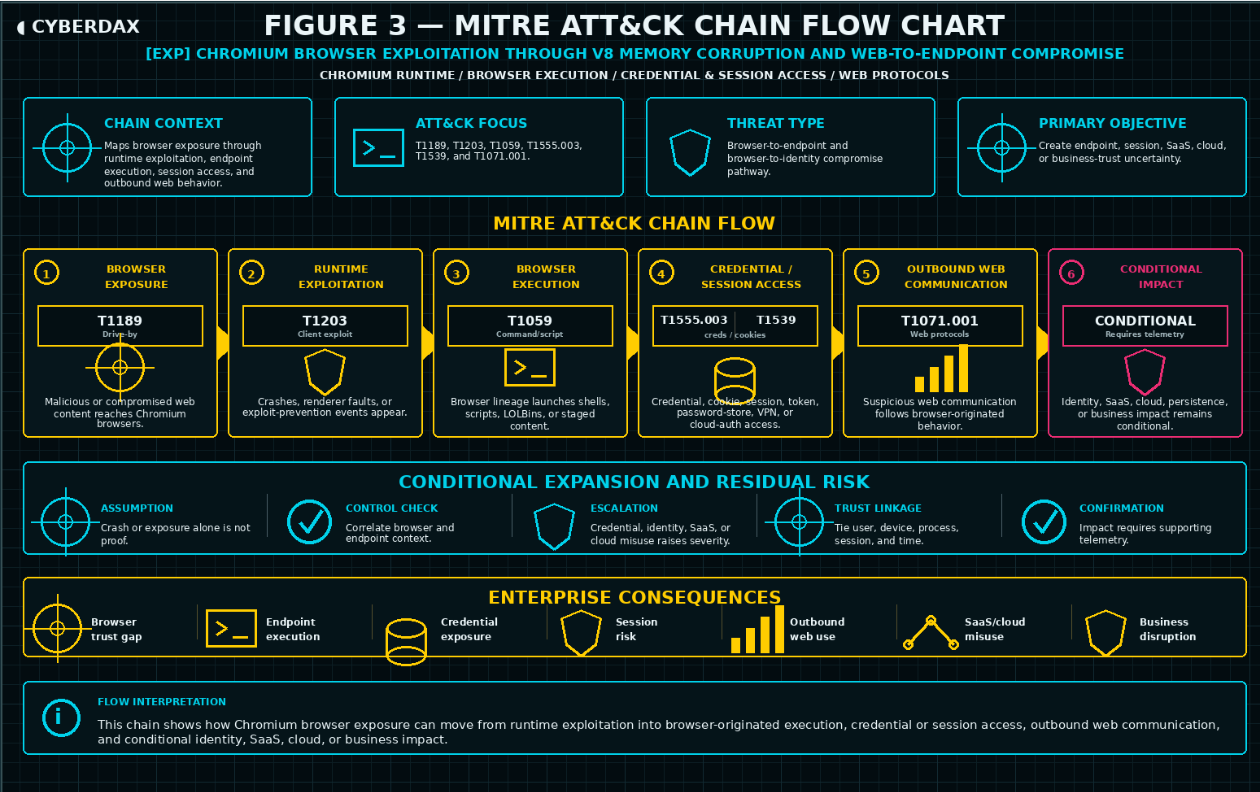
Figure 2
This report assesses Chromium browser exploitation through V8 memory corruption and web-to-endpoint compromise as a durable behavior class rather than a single campaign. The activity pattern involves adversaries attempting to use malicious or compromised web content, browser runtime exploitation, or exploit-adjacent browser instability as a starting point for endpoint execution, credential or session access, payload staging, outbound communication, SaaS misuse, cloud-session abuse, or post-browser endpoint impact.
· The activity is best understood as a browser-to-endpoint and browser-to-identity threat rather than a simple browser patch issue, crash event, suspicious download, endpoint alert, or web-filtering problem.
· Adversaries may target endpoints running Chrome, Edge, managed Chromium-family browsers, unmanaged Chromium installations, Electron-based applications, WebView components, embedded Chromium runtimes, or other Chromium-derived applications where enterprise telemetry can observe process lineage and version state.
· The behavior may involve malicious or compromised web content, suspicious redirects, malvertising exposure, file-hosting infrastructure, browser crash or renderer instability, exploit-prevention events, browser-originated child processes, browser-to-shell behavior, browser-to-script behavior, suspicious downloads, or execution from browser-controlled or user-writable paths.
· The activity may remain limited to suspicious browser instability or failed execution attempts, or it may progress into payload staging, credential-store access, cookie or session-store access, token-cache access, endpoint protection tampering, persistence, outbound transfer, anomalous authentication, SaaS misuse, cloud-session abuse, or lateral movement preparation.
· The activity becomes highest risk when suspicious browser behavior affects privileged users, developers, administrators, executives, finance users, legal users, identity administrators, cloud administrators, source-code users, regulated-data handlers, endpoint-management operators, or users with sensitive SaaS access.
· The report should remain focused on durable browser-exposure, browser-runtime, browser-originated execution, credential or session access, and post-browser impact behavior rather than one browser version, one CVE, one exploit string, one crash event, one JavaScript artifact, one download, one domain, one payload hash, one vendor alert, or one malware family.
S13 Targets and Exposure Surface
The exposure surface includes Chrome, Edge, Chromium-family browsers, downstream Chromium runtimes, browser update posture, browser crash visibility, endpoint process lineage, browser-originated file activity, credential and session stores, endpoint protection state, identity activity, SaaS applications, cloud-session activity, and enterprise workflows that depend on trusted browser access.
· Chrome, Edge, managed Chromium-family browsers, unmanaged Chromium installations, portable Chromium builds, Brave, Electron-based applications, WebView components, embedded Chromium runtimes, browser helper processes, renderer processes, utility processes, and browser extension contexts where enterprise telemetry can observe exposure and process behavior.
· Privileged administrator workstations, developer systems, executive endpoints, finance systems, legal systems, helpdesk devices, source-code access endpoints, identity-administration systems, cloud-administration endpoints, endpoint-management devices, and endpoints with access to sensitive SaaS or regulated data.
· Browser inventory, browser version state, browser channel, patch cadence, browser management policy, extension policy, update enforcement, vulnerability-management state, and unmanaged-browser discovery.
· Browser-extension trust boundaries, privileged extension messaging, webpage-to-extension communication, extension content-script permissions, cross-origin access controls, active-tab access, cross-tab interaction, document-object-model access, extension-mediated SaaS interaction, and authenticated browser sessions exposed to unauthorized data access through vulnerable or overprivileged extensions, including CVE-2026-48294 affecting the Adobe Acrobat Chrome extension and its reported ability to redirect attacker-controlled extension operations into an open WhatsApp Web session.
· Browser crash telemetry, renderer crash telemetry, exploit-prevention events, memory-protection events, abnormal browser termination, repeated browser instability, endpoint behavioral detection context, and endpoint sensor health.
· Endpoint process telemetry, command-line logging, parent-child process relationships, grandparent process relationships, process storylines, file creation, file modification, file execution, process-to-network mapping, signer context, file prevalence, execution path, and user context.
· Browser-originated downloads, cache writes, temporary-path execution, browser profile activity, AppData activity, Downloads directory activity, extension-directory writes, archive extraction, mounted-volume activity, and public-directory execution.
· Browser credential stores, cookies, session storage, local storage, extension storage, token caches, password stores, certificate material, wallet extension data, VPN artifacts, cloud authentication artifacts, and other local authentication material.
· Identity and access layers including privileged accounts, cloud administrators, identity administrators, developer accounts, SaaS administrators, helpdesk users, executive users, service accounts, break-glass accounts, and users with access to sensitive applications.
· SaaS, cloud, repository, mailbox, collaboration, storage, endpoint-management, VPN, administrative-console, and privileged application activity that may reflect downstream misuse after suspicious browser-originated behavior.
· Network, DNS, proxy, secure web gateway, firewall, VPN, and NDR / Network Behavioral Analytics sources that can support rare-destination analysis, suspicious redirect review, payload retrieval analysis, process-to-network correlation, outbound transfer review, or post-browser impact assessment.
· Environments with incomplete browser inventory, delayed patch enforcement, unmanaged Chromium usage, weak command-line telemetry, limited browser crash visibility, missing process-to-network mapping, weak credential-store monitoring, incomplete SaaS audit coverage, incomplete cloud-session visibility, or limited approved browser workflow baselines.
S14 Sectors / Countries Affected
Sectors Affected
· Technology and SaaS providers.
· Financial services and payment platforms.
· Healthcare and life sciences.
· Legal, consulting, and professional services.
· Manufacturing and industrial enterprises.
· Energy, utilities, and critical infrastructure operators.
· Retail and e-commerce.
· Telecommunications and internet service providers.
· Education and research institutions.
· Media, business-services, and high-volume digital operations.
· Government and public-sector organizations.
· Organizations with broad Chrome, Edge, or Chromium-family browser dependency, high-value SaaS access, developer endpoint exposure, privileged cloud or identity administration, regulated-data handling, distributed workforces, or incomplete browser-to-endpoint telemetry.
Countries Affected
· Global.
· Exposure is not limited to a single country or region because Chrome, Edge, Chromium-family browsers, SaaS platforms, identity providers, cloud services, and browser-dependent business workflows are broadly deployed across enterprise environments.
· Countries with large regulated industries, cloud-enabled enterprises, distributed workforces, developer-heavy organizations, financial systems, healthcare providers, public-sector networks, or critical infrastructure operators may face elevated operational exposure.
· Country-specific impact should be assessed by browser dependency, delayed patch exposure, unmanaged Chromium usage, privileged-user concentration, SaaS and cloud dependency, endpoint telemetry quality, identity telemetry quality, regulated-data exposure, and incident-response maturity rather than geography alone.
S15 Adversary Capability Profiling
Capability Level
Moderate to High
Technical Sophistication
Adversaries require enough technical capability to exploit or operationalize Chromium-family browser exposure, understand browser runtime behavior, deliver malicious or compromised web content, chain browser instability to endpoint execution, abuse browser-originated child processes, stage files through browser-controlled or user-writable paths, access credential or session artifacts, and translate endpoint activity into identity, SaaS, or cloud-session misuse. Lower-complexity activity may involve opportunistic use of public exploit activity, suspicious downloads, basic browser-to-script execution, or commodity payload staging. More capable activity may involve targeted web delivery, malvertising or compromised-site exposure, stealthier post-browser execution, session or token theft, credential-store access, endpoint protection tampering, SaaS misuse, cloud-session replay, and attempts to blend with legitimate browser helper or enterprise application workflows.
Infrastructure Maturity
Moderate
Infrastructure maturity varies by activity pattern. Lower-maturity activity may rely on compromised websites, suspicious redirects, file-hosting services, paste services, personal cloud storage, commodity payload infrastructure, or basic HTTP/S retrieval. Higher-maturity activity may use malvertising chains, compromised legitimate sites, CDN-backed delivery, staged redirect infrastructure, cloud-hosted payloads, webmail or collaboration-platform delivery paths, remote-access infrastructure, SaaS-aware session abuse, and infrastructure designed to resemble normal browser, SaaS, or cloud activity.
Operational Scale
Single-endpoint to multi-user enterprise exposure
Operational scale ranges from suspicious activity on one browser-exposed endpoint to broader enterprise impact when browser-originated compromise affects privileged users, developer systems, executive endpoints, identity administrators, cloud administrators, source-code users, regulated-data handlers, endpoint-management workflows, SaaS access, cloud sessions, or multiple endpoints across a compressed timeframe.
Escalation Likelihood
Moderate to High
Escalation likelihood is moderate to high when suspicious browser instability, browser-originated execution, credential or session-store access, token activity, process-to-network behavior, endpoint protection tampering, persistence, or anomalous identity activity affects privileged users, high-value endpoints, sensitive SaaS applications, cloud administration, source-code access, or regulated-data workflows. Escalation likelihood increases when telemetry gaps prevent rapid browser-to-endpoint-to-identity correlation or when suspicious activity appears across multiple users, endpoints, SaaS applications, or cloud sessions.
S16 Targeting Probability Assessment
Overall Targeting Probability
High
Targeting Drivers
· Chrome, Edge, and Chromium-family browsers are broadly deployed across enterprise environments and frequently sit between users and identity portals, SaaS applications, cloud consoles, collaboration tools, repositories, email, financial systems, and regulated-data platforms.
· Attackers benefit from browser exploitation because successful activity can begin through normal web browsing and then transition into endpoint execution, credential or session access, or downstream application misuse.
· V8 memory corruption and browser runtime instability may not produce direct exploit telemetry, giving adversaries an opportunity to operate before organizations can determine whether browser activity remained contained.
· Delayed browser patching, unmanaged Chromium usage, unsupported browser channels, portable browser builds, downstream Chromium runtimes, and inconsistent browser inventory increase exposure and slow scoping.
· Privileged workstations, developer systems, cloud-administration endpoints, identity-administration endpoints, executive devices, finance systems, legal systems, source-code users, and regulated-data users create high business impact when browser-originated activity is suspicious.
· Activity that resembles legitimate browser helpers, meeting clients, document handlers, authentication brokers, password managers, browser synchronization, enterprise browser management, software installation, developer workflows, or remote support can make adversary-driven activity harder to classify quickly.
· Missing command-line telemetry, incomplete parent-child process telemetry, limited browser crash visibility, weak process-to-network mapping, incomplete credential-store visibility, incomplete identity-provider telemetry, weak SaaS audit coverage, or incomplete cloud-session records increase attacker opportunity and response uncertainty.
· SaaS, cloud, identity, endpoint-management, repository, mailbox, collaboration, VPN, and privileged application dependencies can amplify cost and complexity when browser-originated activity affects multiple users, endpoints, sessions, or business services.
Most Likely Targets
· Privileged administrator workstations, developer systems, executive endpoints, finance systems, legal systems, identity-administration endpoints, cloud-administration endpoints, source-code access systems, helpdesk devices, regulated-data endpoints, and other high-value enterprise endpoints.
· Chrome, Edge, managed Chromium-family browsers, unmanaged Chromium installations, portable Chromium builds, Electron-based applications, WebView components, embedded Chromium components, browser helper processes, renderer processes, utility processes, and browser extension contexts.
· Browser credential stores, cookies, session storage, local storage, extension storage, token caches, password stores, certificate material, VPN artifacts, wallet extension data, cloud authentication artifacts, and other local authentication material.
· SaaS platforms, identity providers, cloud consoles, repositories, mailbox systems, collaboration platforms, storage platforms, endpoint-management portals, VPN services, administrative consoles, and privileged applications that can be accessed through browser-originated sessions or stolen session material.
· Endpoint security controls, endpoint process telemetry, command-line logging, process-to-network mapping, browser crash telemetry, endpoint protection state, endpoint sensor health, and telemetry pipelines needed to validate browser-originated behavior.
· Environments with broad browser dependency, delayed patch enforcement, unmanaged Chromium exposure, incomplete browser inventory, limited browser crash visibility, weak credential or session artifact monitoring, incomplete identity and SaaS logs, incomplete cloud-session visibility, or limited approved browser workflow baselines.
S17 MITRE ATT&CK Chain Flow Mapping
Stage 1: Browser-Based Exposure
The adversary uses malicious or compromised web content, suspicious redirects, malvertising, file-hosting infrastructure, compromised legitimate sites, webmail content, collaboration links, or attacker-controlled infrastructure to reach a Chrome, Edge, or Chromium-family browser during normal browsing or application use.
· T1189 Drive-by Compromise.
Stage 2: Chromium Runtime Exploitation
The adversary attempts to exploit a Chromium-family browser runtime or V8 execution context. Observable evidence may include browser crash, renderer crash, exploit-prevention event, memory-protection event, abnormal browser termination, or repeated browser instability. This stage should not be inferred from browser crash telemetry alone.
· T1203 Exploitation for Client Execution.
Stage 3: Browser-Originated Endpoint Execution
The adversary transitions from browser context into observable endpoint execution through browser-launched shells, scripting engines, LOLBins, remote-retrieval tools, installers, archive utilities, newly written executables, or execution from browser-controlled and user-writable paths.
· T1059 Command and Scripting Interpreter.
Stage 4: Browser Credential or Session Artifact Access
The adversary attempts to access browser credential stores, cookies, session storage, local storage, extension storage, token caches, password stores, certificate material, VPN artifacts, wallet extension data, cloud authentication artifacts, or other local authentication material after browser-originated execution or suspicious browser context.
· T1555.003 Credentials from Password Stores: Credentials from Web Browsers.
· T1539 Steal Web Session Cookie.
Stage 5: Post-Browser Outbound Web Communication
The adversary uses web-associated communication paths for payload interaction, suspicious outbound activity, file transfer, or external communication after browser-originated endpoint behavior. This stage should not be treated as proof of command and control, remote administration, exfiltration, or broader compromise unless supporting endpoint, network, identity, or SaaS telemetry confirms that follow-on behavior.
· T1071.001 Application Layer Protocol: Web Protocols.
S18 Attack Path Narrative (Signal-Aligned Execution Flow)
Chromium browser exploitation through V8 memory corruption and web-to-endpoint compromise begins when malicious or compromised web content reaches a Chrome, Edge, or Chromium-family browser during normal browsing or application use. The attacker’s objective is to move from browser exposure or browser runtime instability into observable endpoint execution, suspicious file activity, credential or session artifact access, and post-browser outbound web communication. The attack path is defined by browser-based exposure, Chromium runtime exploitation, browser-originated endpoint execution, browser credential or session artifact access, and post-browser outbound web communication. Downstream identity, SaaS, cloud, endpoint protection, and business-impact consequences should be treated as conditional amplification unless supporting telemetry confirms them.
Stage 1: Browser-Based Exposure
The adversary uses malicious or compromised web content, suspicious redirects, malvertising, file-hosting infrastructure, compromised legitimate sites, webmail content, collaboration links, or attacker-controlled infrastructure to reach a Chrome, Edge, or Chromium-family browser during normal browsing or application use. Browser exposure is not sufficient by itself to establish compromise because users routinely access web applications, SaaS platforms, collaboration tools, file-sharing services, content delivery networks, email links, and webmail attachments during normal business activity. This stage becomes material when exposure occurs on a vulnerable, stale, unsupported, unmanaged, or delayed-patch browser and aligns with suspicious browser instability, rare or suspicious web activity, unusual downloads, exploit-prevention events, or follow-on endpoint behavior.
Stage 2: Chromium Runtime Exploitation
The adversary attempts to exploit a Chromium-family browser runtime or V8 execution context. Observable evidence may include browser crash telemetry, renderer crash telemetry, tab crash activity, memory-protection events, exploit-prevention events, abnormal browser termination, or repeated browser instability. This stage should be evaluated carefully because legitimate browser bugs, extension instability, memory pressure, GPU issues, driver problems, browser updates, enterprise browser management, and normal application faults can produce overlapping telemetry. The activity becomes materially significant when browser instability aligns with vulnerable browser exposure, suspicious browser-originated process lineage, suspicious downloads, credential or session-store access, process-to-network behavior, endpoint protection tampering, or downstream identity activity.
Stage 3: Browser-Originated Endpoint Execution
The adversary transitions from browser context into observable endpoint execution through browser-launched shells, scripting engines, LOLBins, remote-retrieval tools, installer utilities, archive utilities, newly written executables, or execution from browser-controlled and user-writable paths. This stage changes the event from browser exposure into potential endpoint compromise. The key signal is not browser child-process creation by itself; it is browser-originated execution that aligns with suspicious command-line content, unusual process ancestry, recently written files, low-prevalence content, unsigned or unknown binaries, suspicious signer context, execution from Downloads, browser cache, AppData, temporary directories, extension paths, archive-extraction paths, mounted volumes, or other user-writable locations.
Stage 4: Browser Credential or Session Artifact Access
The adversary attempts to access browser credential stores, cookies, session storage, local storage, extension storage, token caches, password stores, certificate material, VPN artifacts, wallet extension data, cloud authentication artifacts, or other local authentication material after browser-originated execution or suspicious browser context. This stage is operationally significant because browser compromise may create risk beyond a single endpoint by exposing credentials, cookies, tokens, or session material used to access SaaS platforms, cloud services, repositories, mailboxes, collaboration platforms, storage environments, endpoint-management portals, or privileged applications. This activity should not be treated as malicious without suspicious process context, unusual user context, recently written tooling, browser-originated lineage, endpoint instability, identity anomaly, or follow-on SaaS or cloud activity.
Stage 5: Post-Browser Outbound Web Communication
The adversary uses web-associated communication paths for payload interaction, suspicious outbound activity, file transfer, or external communication after browser-originated endpoint behavior. This stage provides supporting evidence when outbound activity follows browser instability, browser-originated execution, suspicious downloads, credential or session artifact access, endpoint protection tampering, or identity anomalies. It should not be treated as proof of command and control, remote administration, exfiltration, or broader compromise unless supporting endpoint, network, identity, SaaS, or cloud telemetry confirms that follow-on behavior.
S19 Attack Chain Risk Amplification Summary
Chromium browser exploitation through V8 memory corruption and web-to-endpoint compromise amplifies risk because it targets a routine enterprise access path that connects users to endpoints, identity providers, SaaS platforms, cloud services, repositories, mailboxes, collaboration tools, and sensitive business applications. The chain becomes materially more dangerous when vulnerable or delayed Chromium-family exposure is followed by browser instability, browser-originated execution, suspicious file activity, credential or session artifact access, outbound communication, endpoint protection tampering, anomalous authentication, SaaS misuse, or cloud-session activity.
· Broad Chrome, Edge, and Chromium-family browser deployment creates high exposure because browser activity is part of normal daily business operations and frequently touches identity, SaaS, cloud, collaboration, repository, mailbox, finance, legal, and regulated-data workflows.
· Delayed patch enforcement, unmanaged Chromium usage, unsupported browser channels, portable browser builds, embedded Chromium runtimes, Electron-based applications, and incomplete browser inventory can slow scoping and increase uncertainty during active exploitation windows.
· Browser crash telemetry, renderer instability, memory-protection events, or exploit-prevention events increase risk when they align with vulnerable browser exposure, suspicious web activity, browser-originated execution, credential or session-store access, or downstream identity behavior.
· Browser-originated execution through shells, scripting engines, LOLBins, remote-retrieval tools, installers, archive utilities, newly written executables, or user-writable paths increases risk because it may mark the transition from browser runtime exposure to endpoint compromise.
· Browser-originated downloads, cache writes, temporary-path execution, extension-directory activity, archive extraction, browser-profile activity, or execution from Downloads, AppData, mounted volumes, or public directories increase concern when tied to suspicious command-line, signer, file-prevalence, or destination context.
· Credential-store, cookie-store, session-storage, local-storage, extension-storage, token-cache, certificate, VPN, wallet-extension, or password-store access becomes materially significant when tied to unusual process context, browser-originated lineage, recently written tooling, endpoint instability, or downstream identity activity.
· Suspicious authentication, token refresh, new session creation, device registration, OAuth consent, mailbox access, repository access, cloud-storage access, administrative-console activity, or sensitive SaaS use can expand the incident from endpoint review into broader session and application-trust validation.
· Endpoint protection tampering, endpoint sensor degradation, security-control weakening, persistence creation, local discovery, archive creation, outbound transfer, or lateral movement preparation increases severity only when it follows browser-originated execution or other browser-originated risk context.
· Business exposure increases when affected users or endpoints support identity administration, cloud administration, source-code access, endpoint management, executive work, finance, legal, regulated data, helpdesk operations, incident response, or business-critical SaaS workflows.
· Incomplete browser inventory, crash telemetry, command-line logging, parent-child process visibility, file telemetry, process-to-network mapping, credential-store monitoring, identity-provider logs, SaaS audit logs, cloud-session records, or approved workflow baselines can force broader validation because the organization cannot quickly prove browser-to-endpoint-to-identity lineage.
· Change-control and workflow gaps increase false-positive and response burden when meeting-client launches, document-handler workflows, authentication brokers, password managers, browser synchronization, browser updates, enterprise browser management, software installation, developer tooling, remote support, endpoint-management activity, or incident-response collection cannot be ruled in or out.
· Response burden increases because teams must validate browser version state, browser crash context, process lineage, file activity, credential and session access, outbound communication, identity activity, SaaS access, cloud activity, endpoint protection state, user role, endpoint class, and business impact.
S20 Tactics, Techniques, and Procedures

Figure 3
Browser-Based Exposure Through Malicious or Compromised Web Content
Adversaries may use malicious or compromised websites, suspicious redirects, malvertising, file-hosting infrastructure, webmail content, collaboration links, compromised legitimate sites, or attacker-controlled infrastructure to reach Chrome, Edge, or Chromium-family browsers during normal business use. This behavior becomes risk-relevant when exposure aligns with vulnerable or delayed browser state, rare or suspicious web activity, browser crash telemetry, suspicious downloads, exploit-prevention events, or follow-on endpoint behavior.
Chromium Runtime Exploitation and Browser Instability
Adversaries may exploit or attempt to exploit Chromium-family browser runtime behavior, including V8 memory-corruption conditions that may become visible through browser crashes, renderer faults, tab crashes, abnormal browser termination, memory-protection events, exploit-prevention telemetry, or repeated browser instability. This behavior should not be treated as confirmed exploitation unless it is supported by vulnerable browser exposure, suspicious process lineage, file activity, credential or session access, network behavior, identity anomalies, or endpoint follow-on activity.
Browser-Originated Shell, Script, or Utility Execution
Adversaries may transition from browser context into endpoint execution by launching command interpreters, scripting engines, LOLBins, remote-retrieval utilities, installer tools, archive utilities, remote-access tools, unknown executables, recently written files, low-prevalence binaries, or unsigned content. This behavior becomes high risk when execution occurs from browser-controlled or user-writable paths and aligns with suspicious command-line content, abnormal parent-child process lineage, browser crash context, vulnerable browser exposure, suspicious file metadata, process-to-network behavior, or downstream identity activity.
Suspicious Browser-Originated File Activity
Adversaries may stage, create, download, extract, modify, rename, or execute files through Downloads directories, browser cache locations, browser profile paths, AppData paths, temporary directories, extension directories, archive-extraction paths, mounted volumes, public directories, or recently written staging locations. This behavior should be evaluated against legitimate browser downloads, software installers, collaboration-platform files, document handlers, developer tools, and approved support workflows before being treated as malicious.
Browser Credential and Session Artifact Access
Adversaries may attempt to access browser credential stores, cookies, session storage, local storage, extension storage, token caches, password stores, certificate material, VPN artifacts, wallet extension data, cloud authentication artifacts, or other local authentication material. This behavior becomes high risk when it is performed by unexpected processes, browser-launched child processes, recently written binaries, suspicious scripts, unusual user contexts, nonstandard paths, or activity followed by identity, SaaS, cloud, repository, mailbox, or administrative-console anomalies.
Post-Browser Outbound Web Communication
Adversaries may use web-associated outbound communication after browser-originated execution, suspicious downloads, credential or session artifact access, or other browser-originated risk context. This may include payload interaction, external communication, file transfer, suspicious destination access, unusual outbound volume, rare destination access, or host-role-inconsistent web communication. This behavior should remain supporting evidence unless endpoint, identity, SaaS, cloud, or network telemetry confirms malicious follow-on activity.
Conditional SaaS, Cloud, and Identity Misuse
Adversaries may use exposed credentials, cookies, tokens, session material, or browser-originated endpoint access to perform suspicious authentication, token refresh, new session creation, device registration, OAuth consent, mailbox access, repository access, cloud-storage access, administrative-console activity, endpoint-management access, VPN access, or sensitive SaaS activity. This behavior should remain conditional unless it follows suspicious browser-originated endpoint behavior, credential or session artifact access, vulnerable browser exposure, or other browser-originated evidence within a bounded time window.
Operational Blending With Legitimate Browser Workflows
Adversaries may blend browser-originated activity into normal enterprise workflows involving meeting clients, document handlers, collaboration tools, authentication brokers, password managers, browser synchronization, approved extensions, enterprise browser management, browser updates, software installers, developer tools, remote support, endpoint-management activity, security tooling, forensic collection, or incident-response collection. This behavior is effective because legitimate business activity often involves browser-launched applications, downloaded files, cloud access, session reuse, and SaaS interaction.
Conditional Endpoint Protection Tampering or Persistence
Adversaries may attempt endpoint protection tampering, sensor degradation, security-control weakening, persistence creation, local discovery, archive creation, outbound transfer, remote administration, or lateral movement preparation after browser-originated execution. This behavior should remain conditional unless endpoint telemetry supports a direct sequence from suspicious browser activity into objective follow-on behavior.
S20A Adversary Tradecraft Summary
Chromium browser exploitation through V8 memory corruption and web-to-endpoint compromise targets the trust relationship between browser activity, endpoint integrity, user sessions, SaaS access, cloud access, and business application use. The adversary objective is to convert normal browser exposure into endpoint execution, credential or session artifact access, outbound communication, identity misuse, SaaS misuse, cloud-session abuse, or downstream endpoint impact while blending into legitimate browser and enterprise application workflows. The tradecraft is effective because routine browser activity can involve downloads, helper applications, authentication brokers, password managers, collaboration tools, SaaS platforms, cloud portals, session reuse, and user-writable execution paths.
· The core tradecraft pattern is suspicious Chromium-family exposure or browser instability followed by browser-originated execution, file activity, credential or session artifact access, outbound communication, identity anomalies, SaaS misuse, cloud-session activity, or endpoint follow-on behavior.
· The behavior is not dependent on a single CVE, browser version, exploit string, JavaScript artifact, URL, payload hash, browser crash, vendor advisory, proof-of-concept repository, malware family, or threat name.
· Adversaries may use malicious or compromised web content, suspicious redirects, malvertising exposure, file-hosting infrastructure, browser runtime instability, browser-launched scripts, browser-controlled paths, suspicious downloads, credential or session artifact access, token or cookie misuse, and post-browser web communication.
· The strongest operational risk occurs when suspicious browser-originated behavior affects privileged endpoints, developer systems, executive endpoints, source-code access systems, identity administrators, cloud administrators, finance users, legal users, regulated-data handlers, endpoint-management operators, or users with sensitive SaaS access.
· Detection requires visibility into both the browser and endpoint behavior that initiates the chain and the identity, SaaS, cloud, network, file, credential, session, endpoint-class, and workflow evidence that confirms or disproves impact.
· Response requires treating suspected browser-originated compromise as an endpoint, session, identity, and application-trust incident, not a routine browser crash, isolated patch finding, suspicious download, rare-domain event, or endpoint alert.
· The behavior remains durable because the adversary objective is to convert browser exposure into endpoint or session trust uncertainty regardless of the specific Chromium-family vulnerability, browser channel, web delivery path, endpoint security product, SaaS platform, cloud provider, payload, or infrastructure used.
S21 Detection Strategy Overview
Detection Philosophy
Detect Chromium browser exploitation through V8 memory corruption and web-to-endpoint compromise as a chained browser-exposure, runtime-instability, endpoint-execution, and post-browser impact pattern, not as a single vulnerability alert, exploit name, browser crash, patch-state finding, suspicious URL, proof-of-concept artifact, vendor advisory, or isolated browser child-process event.
The detection strategy focuses on observable attacker-driven progression from malicious or compromised web content into browser runtime instability, suspicious browser process lineage, browser-originated file activity, browser-to-shell or browser-to-script execution, endpoint payload staging, credential or session-store access, suspicious outbound communication, and downstream identity, SaaS, or cloud-session misuse.
Current public reporting on active Chromium-family V8 exploitation provides the immediate urgency anchor for this report family, but the detection model is intentionally broader than any single vulnerability. The primary enterprise focus is Chrome, Edge, and managed Chromium-family browser exposure. Downstream Chromium exposure through Brave, Electron-based applications, WebView components, embedded Chromium components, or unmanaged Chromium builds should be treated as supporting scope where enterprise telemetry and inventory can observe the affected application or runtime.
The durable objective is to identify Chromium-family exploitation behavior that can absorb future actively exploited Chromium-family V8 issues, Microsoft Edge downstream exposure, browser-to-endpoint compromise chains, browser-to-shell behavior, browser-to-script behavior, credential or session theft after browser compromise, and exploit-chain updates involving sandbox escape or endpoint payload execution.
The primary analytical unit is the behavior chain: vulnerable or recently vulnerable Chrome, Edge, or Chromium-family browser exposure, followed by suspicious browser instability or browser-originated execution behavior, followed by optional file staging, payload execution, process-to-network activity, credential or session-store access, persistence, endpoint protection evasion, outbound communication, lateral movement preparation, SaaS abuse, cloud-session misuse, or post-browser identity anomaly.
This section does not treat vulnerable browser versions, browser crashes, rare web destinations, suspicious downloads, browser child processes, credential-store access, anomalous authentication, SaaS access, or cloud-session activity as independently confirmed browser exploitation without supporting browser, endpoint, network, file, identity, inventory, or follow-on behavioral evidence.
The detection model must remain behavior-led and public-safe. It must not depend on exploit internals, memory-corruption primitives, JavaScript exploit strings, exploit-kit identifiers, browser vulnerability names, vulnerability identifiers, proof-of-concept artifacts, payload hashes, static indicators, or threat-branding terms as primary detection logic.
Primary Detection Anchors
· Chrome, Edge, or managed Chromium-family browser exposure involving vulnerable, stale, unsupported, unmanaged, or delayed-patch builds during a relevant exploitation window.
· Downstream Chromium exposure involving Brave, Electron-based applications, WebView components, embedded Chromium components, or unmanaged Chromium installations where enterprise telemetry can identify application version, process lineage, browser-like runtime behavior, or suspicious follow-on activity.
· Browser crash, renderer crash, tab crash, JavaScript engine instability, abnormal browser process termination, exploit-prevention event, memory-protection event, endpoint sensor exploit telemetry, or repeated browser fault activity associated with Chrome, Edge, Chromium, or a Chromium-derived application.
· Browser process lineage involving chrome.exe, msedge.exe, chromium.exe, chrome, msedge, chromium, browser renderer processes, browser utility processes, WebView processes, Electron applications, or browser helper processes spawning command interpreters, scripting engines, LOLBins, archive utilities, installer utilities, remote-retrieval tooling, remote-access tooling, or newly written executables.
· Browser-to-shell or browser-to-script execution involving PowerShell, CMD, WMI, Windows Script Host, MSHTA, Rundll32, Regsvr32, Certutil, Curl, Bitsadmin, Bash, Sh, Python, Node.js, JavaScript runtimes, AppleScript, osascript, or other interpreters launched directly or indirectly from browser lineage.
· Browser-originated file creation, download, extraction, modification, execution, or staging involving user-writable paths, Downloads directories, temporary directories, browser cache, browser profile paths, AppData paths, extension directories, archive-extraction paths, mounted volumes, public directories, or recently written staging locations.
· Browser-originated child processes making outbound network connections shortly after browser instability, browser download activity, suspicious file creation, interpreter execution, script execution, or process launch from a user-writable location.
· Browser or browser-launched activity accessing credential stores, browser login databases, cookies, session storage, local storage, extension storage, password stores, token caches, wallet extension data, VPN material, certificate material, cloud authentication artifacts, or other local authentication material when the access context deviates from approved browser, password-management, enterprise-management, security, backup, migration, or forensic workflows.
· Suspicious cloud, SaaS, VPN, identity-provider, repository, mailbox, collaboration, storage, administrative-console, endpoint-management, or privileged application activity following browser exploitation indicators on the same endpoint or tied user account.
· Browser-driven download, cache write, temporary-path write, or browser-profile file activity followed by execution of unsigned, unknown, newly observed, recently written, low-prevalence, compressed, script-based, or user-staged content.
· Browser exploitation indicators followed by persistence creation, endpoint protection tampering, credential access, local discovery, sensitive-file access, archive creation, outbound transfer, remote administration, or lateral movement preparation.
· Browser activity involving rare, newly observed, low-reputation, compromised, uncategorized, file-hosting, paste, personal cloud-storage, suspicious CDN, suspicious redirect, malvertising, webmail, collaboration, or attacker-controlled infrastructure when correlated with endpoint execution or post-browser impact behavior.
· Security-control, endpoint, identity, or browser posture drift from expected managed state to vulnerable browser exposure, unmanaged Chromium usage, impaired browser update posture, suspicious browser extension state, reduced endpoint visibility, or weak browser-to-endpoint correlation coverage.
Detection Prioritization Model
· Highest priority detections identify a sequenced relationship between Chrome, Edge, or Chromium-family browser exposure or browser instability and suspicious browser-originated endpoint execution, file staging, credential or session-store access, process-to-network activity, or post-browser identity misuse.
· High priority detections include browser process lineage into command interpreters, scripting engines, LOLBins, remote-retrieval tools, installer utilities, archive utilities, or unknown executables when correlated with suspicious command-line content, recently written files, user-writable execution paths, browser crash telemetry, vulnerable browser exposure, rare destination access, or downstream identity behavior.
· High priority detections include browser crash or renderer instability followed by suspicious child-process creation, downloaded file execution, script execution, process-to-network activity, credential-store access, endpoint protection tampering, persistence, or anomalous authentication from the same endpoint or user identity.
· High priority detections include browser-originated access to cookies, login databases, session storage, local storage, browser profile data, password stores, token caches, or extension data when correlated with suspicious browser runtime behavior, unusual process ancestry, recently written tooling, abnormal command execution, or downstream identity activity.
· Medium priority detections include suspicious downloads, rare web destinations, browser cache writes, extension-directory access, archive extraction, or temporary-path execution when tied to browser lineage, vulnerable browser exposure, low-prevalence files, unusual signer context, unusual parent process, suspicious outbound communication, or endpoint-class risk.
· Conditional detections include persistence, credential access, endpoint protection tampering, remote administration, outbound transfer, cloud-storage upload, lateral movement preparation, SaaS misuse, or suspicious identity activity only when browser exploitation indicators, browser-originated execution, browser instability, suspicious browser download activity, credential-store access, or vulnerable browser exposure occurs first within a bounded time window.
· Low priority monitoring includes uncorrelated browser crashes, expected browser updates, normal browser helper processes, approved browser-launched applications, legitimate password-manager activity, expected meeting-client or document-handler workflows, routine downloads, approved remote-support workflows, normal software installers, browser synchronization, user-driven browser profile migration, approved browser backup activity, approved EDR inspection, and isolated rare-domain browsing without endpoint or identity follow-on behavior.
· Low-priority conditions must not be deployed as standalone high-confidence detections.
· Detection priority is based on behavior-chain strength, same-host correlation, same-user correlation, browser exposure state, endpoint class, process lineage, command-line specificity, file-path risk, destination rarity, credential or session-access relevance, identity follow-on evidence, telemetry reliability, false-positive control, deployability, and variant resilience.
Correlation Strategy (Strict Enforcement)
Each deployable rule must independently correlate its own telemetry inputs. Detection logic must not depend on the output, alert state, score, enrichment label, triage conclusion, DRI, TCR, or conclusion of another rule.
Correlation must be based on direct observable evidence, including host identity, device identity, account identity, browser process identity, process lineage, parent process, grandparent process, command line, file path, file creation time, browser version, browser channel, browser update state, browser crash event, endpoint exploit-prevention event, network destination, DNS request, proxy event, downloaded file metadata, credential-store access event, identity event, SaaS event, cloud-session event, event time, and follow-on behavior.
Correlation windows must be explicit, bounded, and operationally deployable.
Same-host correlation is required for browser instability, browser process lineage, downloaded file execution, browser-to-shell execution, browser-to-script execution, credential-store access, persistence, endpoint protection tampering, process-to-network behavior, local discovery, archive creation, and other endpoint follow-on logic.
Same-device and same-user correlation should be used for browser exposure, browser crash telemetry, proxy activity, DNS activity, web gateway activity, identity-provider activity, SaaS activity, cloud-session activity, VPN activity, repository access, mailbox access, and administrative-console access.
Same-account correlation should be used when available, but detection logic must account for browser execution under the interactive user, service-launched browser components, WebView processes, Electron applications, delegated browser sessions, token reuse, session-cookie theft, cloud-session replay, remote browser sessions, shared endpoints, and cases where the endpoint user differs from the downstream identity event.
Process-chain correlation should be prioritized where EDR, Sysmon, Windows eventing, macOS endpoint telemetry, Linux endpoint telemetry, browser enterprise telemetry, Defender for Endpoint, SentinelOne, or equivalent sources support parent process, grandparent process, command line, signer, path, hash, file creation time, process GUID, entity graph, storyline, and process-to-network fields.
Browser exposure correlation should validate whether the endpoint was running a vulnerable, stale, unmanaged, unsupported, or delayed-patch Chrome, Edge, or Chromium-family browser during the suspicious activity window.
Crash and instability correlation should validate whether browser or renderer crash events occurred before suspicious child-process creation, downloaded file execution, process-to-network activity, credential-store access, identity anomaly, or endpoint follow-on behavior.
Network and proxy correlation should validate whether rare or suspicious web activity preceded browser-originated execution or whether browser-launched child processes contacted rare, low-reputation, first-seen, file-hosting, remote-access, or host-role-inconsistent destinations.
Credential and session correlation should validate whether local browser credential or session artifacts were accessed by an unexpected process, unexpected user context, recently written binary, suspicious script, unusual parent process, or browser-launched child process before anomalous SaaS, cloud, VPN, identity-provider, repository, mailbox, collaboration, storage, or administrative-console activity.
Credential and session correlation must also validate whether the observed access aligns with approved password managers, browser synchronization, enterprise browser management, endpoint security inspection, backup tools, user-driven profile migration, sanctioned forensic collection, incident-response tooling, or approved administrative activity.
Identity and SaaS correlation should validate whether suspicious authentication, token refresh, new session creation, device registration, OAuth consent, mailbox access, repository access, cloud-storage activity, or administrative activity follows suspicious browser activity from the same endpoint, same user, same device, or same session lineage.
Cross-platform enrichment may support triage, but it must not be required for detection unless the rule explicitly defines that dependency.
Suspicious context must be embedded in the detection logic rather than left for analysts to infer after alert generation.
Telemetry Prioritization
Endpoint process, command-line, parent-child process, file, user-context, process-to-network, browser crash, browser version, browser update-state, and endpoint exploit-prevention telemetry has the highest priority because Chromium exploitation often becomes operationally visible through browser-originated runtime behavior and follow-on endpoint activity.
Browser inventory and vulnerability-management telemetry has equal priority as an exposure and prioritization layer because suspicious browser-originated behavior is more significant when the endpoint was running a vulnerable, stale, unmanaged, unsupported, or delayed-patch browser during the relevant exploitation window.
Crash, fault, and instability telemetry is a priority source because direct V8 memory corruption may not be visible in standard logs, while browser crash, renderer crash, exploit-prevention, memory-protection, abnormal process termination, or browser instability events may provide indirect evidence of exploit attempt or exploit failure.
File and download telemetry is required to detect browser-originated payload staging, cache writes, download execution, archive extraction, temporary-path execution, extension-directory access, user-profile file activity, recently written content execution, and suspicious staging from browser-controlled or user-writable locations.
Network, DNS, proxy, secure web gateway, firewall, and NDR / Network Behavioral Analytics telemetry is supporting context. It is most useful when it preserves destination domain, URL, IP address, reputation, first-seen timing, destination rarity, downloaded file metadata, source process, source host, source user, connection time, session volume, and process-to-network mapping.
Credential, session, browser-profile, and identity telemetry is required to identify downstream impact from browser compromise. Priority sources include browser credential-store access, cookie access, login database access, session storage, local storage, extension data, token cache access, identity-provider logs, SaaS audit logs, VPN logs, cloud-session telemetry, repository logs, mailbox audit logs, collaboration logs, and administrative-console audit logs.
Credential and session telemetry must include false-positive control for approved password managers, browser synchronization, enterprise browser management, user-driven browser profile migration, EDR inspection, backup tooling, incident-response tooling, forensic collection, administrative support, and authorized browser update or migration workflows.
Endpoint protection, EDR, exploit-prevention, memory-protection, and sensor-health telemetry is required to distinguish browser exploitation behavior from routine browsing, benign crashes, approved application launches, normal browser helper activity, legitimate download workflows, approved software installation, and approved profile-management activity.
SIEM telemetry is useful when it preserves normalized browser process lineage, command line, file path, account, host, device, browser version, crash event, network destination, identity event, SaaS event, vulnerability state, endpoint class, asset criticality, and event timestamps.
NDR / Network Behavioral Analytics is conditionally useful for identifying suspicious egress, rare destination access, payload retrieval, unusual outbound transfer, remote administration, command-and-control preparation, suspicious VPN activity, and lateral movement preparation after browser exploitation indicators are established through endpoint, browser, file, inventory, or identity telemetry.
Cloud telemetry is conditionally useful when it records post-browser identity misuse, SaaS access, token refresh, mailbox access, repository access, cloud-storage activity, administrative-console activity, device registration, suspicious OAuth consent, endpoint-management activity, or security-control changes following suspicious browser-originated endpoint behavior.
Detection Design Constraints
· Do not attempt direct V8 memory-corruption detection unless concrete exploit-specific telemetry exists.
· Do not deploy rules based primarily on vulnerability identifiers, exploit names, proof-of-concept labels, JavaScript strings, browser vulnerability titles, vendor advisory text, exploit-kit names, threat names, payload hashes, suspicious URLs, static indicators, or repository artifacts.
· Do not treat a vulnerable Chrome, Edge, Chromium, Brave, Electron, WebView, or embedded Chromium build as confirmed compromise without behavioral evidence.
· Do not deploy compromise detections based only on browser version exposure, browser patch lag, unmanaged Chromium inventory, browser crash, renderer crash, tab crash, browser restart, process termination, memory fault, rare destination access, or suspicious download activity.
· Do not deploy generic browser-to-child-process logic without suspicious command line, file path, process ancestry, downloaded-file context, rare destination context, crash context, vulnerable browser context, credential-access context, identity context, or follow-on behavior.
· Do not deploy generic download execution logic without browser lineage, file-risk context, path-risk context, destination-risk context, signer-risk context, command-line context, or follow-on behavior.
· Do not deploy network-only rules for the core behavior, and do not treat NDR / Network Behavioral Analytics as direct evidence of V8 exploitation, browser sandbox escape, browser memory corruption, browser compromise, credential theft, session theft, or endpoint payload execution.
· Do not deploy a rule that treats outbound communication, remote administration, VPN activity, command-and-control-like traffic, cloud upload, or lateral movement preparation as proof of browser exploitation unless it is chained to browser exposure, browser instability, browser-originated process lineage, suspicious download activity, credential-store access, or post-browser identity evidence.
· Do not treat browser credential-store access, cookie access, session-storage access, local-storage access, token-cache access, or extension-directory access as malicious without suspicious process context, browser exploitation indicators, unusual user context, recently written tooling, identity anomaly, or follow-on behavior.
· Do not infer browser exploitation from expected password-manager activity, browser synchronization, user-driven profile migration, browser updates, enterprise browser management, backup operations, approved EDR inspection, forensic tooling, meeting-client launches, document-handler launches, legitimate helper applications, software installation workflows, approved browser extensions, endpoint-management workflows, or security tooling.
· Do not assume every V8 exploit chain includes sandbox escape, browser-to-shell execution, payload execution, credential theft, session theft, or identity misuse.
· Do not assume every browser crash during an active exploitation window is malicious.
· Do not assume every suspicious browser-launched child process is exploit-driven.
· Do not use prior alert status, another detection’s output, DRI, TCR, or post-alert analyst judgment as detection input.
· Do not deploy a rule that requires analysts to manually infer suspicious context after alert generation.
· Do not deploy a rule that cannot be implemented with available telemetry, bounded correlation, browser inventory, endpoint process visibility, file-path context, network context, identity context, environment-specific baselines, and operational allowlisting.
· Do not treat telemetry absence as proof of compromise, but do not treat it as benign when it follows browser crash, suspicious browser process lineage, browser-originated file staging, browser-to-script execution, credential-store access, endpoint telemetry gap, or suspicious post-browser identity behavior.
Baseline and Deployment Requirements
· Establish approved browser baselines for Chrome, Edge, Chromium, browser update channels, managed browser policies, extension policies, browser helper applications, browser-launched business applications, and approved browser integration workflows.
· Track downstream Chromium exposure through Brave, Electron-based applications, WebView components, embedded Chromium applications, and unmanaged Chromium builds where enterprise inventory, endpoint telemetry, or vulnerability-management telemetry can support reliable scoping.
· Establish known-good browser version and patch-state baselines by endpoint class, including workstation, server, privileged access workstation, developer endpoint, executive endpoint, field device, traveling-user system, shared system, kiosk, loaner device, repair-handled device, and high-value asset groups.
· Define expected browser process lineage by operating system and business workflow, including approved launches of meeting clients, document handlers, collaboration tools, password managers, authentication brokers, file viewers, endpoint management tools, browser helpers, enterprise extensions, and software installers.
· Define expected download and execution workflows, including approved download locations, approved software distribution paths, approved installer behavior, approved file types, approved signing authorities, approved browser extension sources, sanctioned collaboration platforms, approved cloud-storage paths, and expected archive-extraction behavior.
· Define expected credential and session-store access behavior, including approved password managers, browser synchronization, enterprise browser management, EDR inspection, backup tooling, incident-response tooling, forensic tooling, user-driven profile migration, browser update workflows, and sanctioned administrative access.
· Identify authorized security-management, browser-management, software-deployment, patch-management, endpoint-management, vulnerability-management, identity, SaaS, web-proxy, secure-web-gateway, and incident-response sources.
· Baseline expected destinations, web categories, file-hosting services, content delivery networks, SaaS platforms, collaboration systems, cloud-storage services, repository platforms, remote-access infrastructure, VPN services, and administrative portals by endpoint class, user role, business unit, host role, and network segment.
· Validate process creation logging, full command-line logging, parent-child process telemetry, process-to-network mapping, browser crash telemetry, file creation telemetry, file execution telemetry, download telemetry, browser inventory telemetry, vulnerability-management telemetry, DNS telemetry, proxy telemetry, secure-web-gateway telemetry, identity telemetry, SaaS audit telemetry, and EDR exploit-prevention telemetry before deployment.
· Normalize host identifiers, device identifiers, account identifiers, browser process identifiers, process GUIDs, file paths, downloaded file metadata, browser version fields, browser channel fields, vulnerability state, parent process fields, command-line fields, network destination fields, identity event fields, SaaS event fields, endpoint class, asset criticality, and event timestamps.
· Define approved exception handling for browser updates, enterprise browser management, software installation, password-manager workflows, meeting-client launches, document-handler launches, approved helper applications, helpdesk support, remote support, security tooling, EDR inspection, incident-response collection, developer tooling, patch deployment, software distribution, browser profile migration, backup activity, and approved maintenance windows.
· Confirm timestamp consistency across endpoint, EDR, SIEM, browser inventory, vulnerability management, DNS, proxy, secure web gateway, firewall, identity-provider, SaaS, cloud, VPN, repository, mailbox, endpoint-management, and NDR sources before enabling chained correlation logic.
· Prioritize deployment on endpoints where browser compromise would create elevated business impact, including privileged workstations, developer systems, administrator workstations, executive endpoints, finance systems, legal systems, source-code access endpoints, cloud-administrator endpoints, identity-administrator endpoints, field devices, traveling-user systems, and endpoints with access to sensitive SaaS or regulated data.
Variant Resilience Requirements
· Detection logic should account first for Chrome, Edge, and managed Chromium-family browser behavior, while preserving downstream coverage for Brave, Electron-based applications, WebView components, embedded Chromium applications, browser helper processes, browser utility processes, renderer processes, extension processes, browser update processes, and renamed or wrapped browser execution contexts where telemetry supports reliable visibility.
· Detection logic should account for browser-to-shell, browser-to-script, browser-to-installer, browser-to-archive, browser-to-LOLBins, browser-to-remote-retrieval, browser-to-payload, browser-to-network, browser-to-credential-store, browser-to-session-store, and browser-to-identity misuse behaviors.
· Detection logic should account for PowerShell, CMD, WMI, script hosts, MSHTA, Rundll32, Regsvr32, Certutil, Curl, Bitsadmin, Bash, Sh, Python, Node.js, JavaScript runtimes, AppleScript, osascript, archive utilities, installers, remote access utilities, and renamed administrative binaries.
· Detection logic should cover multiple browser exploitation outcomes, including renderer instability, browser crash, child-process creation, payload download, temporary-path execution, cache-path staging, extension-directory access, browser-profile access, credential-store access, process-to-network activity, endpoint protection evasion, persistence, outbound transfer, and identity misuse.
· Detection logic should avoid single-artifact dependency on one browser process name, one file path, one crash event, one command pattern, one vulnerability identifier, one domain, one user agent, one JavaScript string, one exploit label, one payload hash, one browser version, one extension path, one registry value, one proxy category, or one EDR event name.
· Detection logic should preserve coverage when adversaries change exploit chains but retain the same operational sequence of browser exposure, browser runtime anomaly, browser-originated execution, file staging, credential or session access, process-to-network behavior, or post-browser impact.
· Detection logic should distinguish attacker-driven browser compromise from legitimate browser helper activity by validating process ancestry, command line, signer, file path, browser version, destination context, downloaded file metadata, endpoint class, user role, approved application workflow, approved browser extension, software deployment context, and identity follow-on behavior.
· Detection logic should distinguish suspicious credential or session-store access from approved password-manager operations, browser synchronization, enterprise browser management, user-driven profile migration, EDR inspection, backup operations, forensic collection, incident-response collection, and authorized administrative workflows.
· Detection logic should preserve relevance when exploitation remains partially in memory by correlating browser crash telemetry, exploit-prevention events, file staging, child-process creation, credential-store access, identity anomalies, endpoint sensor events, and post-browser behavior.
· Detection logic should support future actively exploited Chromium-family V8 issues, Edge downstream exposure, browser sandbox escape updates, browser-to-endpoint payload execution, credential-theft variants, session-theft variants, and cloud/SaaS abuse without requiring the report to be rewritten around a single newly disclosed vulnerability.
Operational Detection Model
· Deploy chained detections first, prioritizing browser exposure or browser instability followed by browser-originated command execution, script execution, file staging, downloaded file execution, credential-store access, process-to-network behavior, or post-browser identity misuse.
· Deploy browser process lineage detections only when correlated with suspicious command line, unusual parent-child relationship, user-writable execution path, newly written content, suspicious destination, vulnerable browser exposure, crash telemetry, credential-store access, or follow-on behavior.
· Deploy browser crash and instability detections only when correlated with suspicious endpoint behavior, browser-to-child-process execution, credential-store access, rare web activity, downloaded file execution, or downstream identity anomaly.
· Deploy browser inventory and vulnerable-version detections as exposure findings or prioritization enrichments unless they are chained to suspicious runtime, endpoint, file, network, credential, or identity behavior.
· Deploy network, DNS, proxy, secure-web-gateway, and NDR / Network Behavioral Analytics detections as supporting or downstream correlation, prioritizing rare-destination access, payload retrieval, process-to-network activity, unusual outbound transfer, command-and-control preparation, remote administration, or lateral movement preparation after browser-originated endpoint evidence exists.
· Deploy credential and session-store detections only when correlated with suspicious process context, browser exploitation indicators, abnormal browser lineage, recently written tooling, vulnerable browser exposure, endpoint instability, or downstream identity behavior, and only after approved password-manager, synchronization, profile migration, security inspection, backup, forensic, and administrative workflows are accounted for.
· Deploy identity and SaaS detections only when suspicious authentication, token refresh, session creation, repository access, mailbox access, cloud-storage access, administrative-console activity, OAuth consent, device registration, or SaaS activity follows suspicious browser-originated endpoint behavior, browser credential-store access, or browser exposure evidence.
· Use lower-severity monitoring for unmanaged Chromium usage, delayed browser patching, isolated browser crashes, isolated rare-domain access, uncorrelated downloads, or expected browser helper launches that lack suspicious endpoint or identity context.
· Route alerts to SOC workflows requiring browser version validation, browser process-tree reconstruction, endpoint file review, crash telemetry review, download-source review, command-line review, process-to-network review, credential-store access review, identity-event review, SaaS audit review, extension-state review, endpoint exposure review, user-role validation, endpoint-class validation, and business-impact assessment.
· Triage should determine whether the activity was exploit-driven, user-driven, administrator-approved, browser-update-related, enterprise-browser-management-related, software-installation-related, password-manager-related, browser-synchronization-related, profile-migration-related, meeting-client-related, document-handler-related, developer-workflow-related, remote-support-related, incident-response-related, forensic-collection-related, or attacker-driven.
Detection Deployment Constraints
· Do not deploy standalone vulnerability-identifier, Chrome version, Edge version, Chromium version, browser crash, renderer crash, rare-domain, suspicious-download, URL, DNS, proxy-category, destination-reputation, or browser child-process alerts as compromise detections.
· Do not deploy browser-to-child-process detections without suspicious command-line, file, path, network, crash, exposure, credential, identity, or follow-on context.
· Do not deploy suspicious download detections unless the rule includes browser lineage, file-risk context, path-risk context, signer-risk context, destination-risk context, execution context, or follow-on behavior.
· Do not deploy browser credential-store, cookie-store, local-storage, session-storage, extension-storage, or token-cache access detections without suspicious process, endpoint, exposure, identity, or follow-on context.
· Do not deploy network-only detections as primary browser exploitation coverage.
· Do not treat NDR / Network Behavioral Analytics as proof of browser exploitation, V8 memory corruption, sandbox escape, credential theft, session theft, or endpoint payload execution.
· Do not treat vulnerable browser exposure as evidence that subsequent identity activity was caused by browser exploitation without same-host, same-device, same-user, same-session, endpoint, or browser-originated evidence.
· Do not treat post-browser identity anomalies as proof of browser exploitation unless endpoint or browser evidence supports the sequence.
· Do not treat expected browser update activity, enterprise browser management, approved extensions, browser synchronization, legitimate password-manager operations, user-driven profile migration, approved backup activity, approved EDR inspection, forensic collection, meeting-client launches, document-handler launches, software installation workflows, developer tooling, remote-support activity, or incident-response collection as malicious without contradictory evidence.
· Do not assume sandbox escape occurred unless endpoint behavior supports a transition beyond the browser sandbox.
· Do not assume payload execution occurred unless file, process, command-line, or endpoint telemetry supports execution.
· Do not assume credential theft or session theft occurred unless credential-store, session-store, token, identity, or SaaS telemetry supports that behavior.
· Do not use one product-specific field, one browser process name, one crash event, one file path, one extension path, one domain category, one command pattern, one vulnerability identifier, one user-agent string, one hash, or one threat name as the full detection basis.
· Do not use another rule’s output, prior alert state, post-alert analyst judgment, DRI, or TCR as detection input.
· Do not deploy rules that require analysts to infer the suspicious sequence after alert generation.
· Do not enable autonomous blocking mode until browser lineage, command-line, file, network, inventory, identity, exception, and workflow baselines are validated locally.
· Detection coverage must be described as reduced when required telemetry is unavailable, incomplete, delayed, inconsistently normalized, or unable to support bounded same-host, same-device, same-user, or same-session correlation.
S22 Primary Detection Signals
Primary Detection Signals
· Chrome, Edge, or managed Chromium-family browser exposure involving vulnerable, stale, unsupported, unmanaged, or delayed-patch builds during a relevant exploitation window when paired with suspicious browser runtime behavior, browser-originated execution, credential or session access, network activity, or downstream identity behavior.
· Browser crash, renderer crash, tab crash, JavaScript engine instability, abnormal browser process termination, memory-protection event, exploit-prevention event, or repeated browser fault activity followed by suspicious child-process creation, downloaded file execution, browser-to-script execution, browser-to-shell execution, credential-store access, or process-to-network behavior on the same endpoint.
· Browser process lineage involving chrome.exe, msedge.exe, chromium.exe, chrome, msedge, chromium, browser renderer processes, browser utility processes, browser helper processes, WebView processes, Electron applications, or downstream Chromium-derived applications launching command interpreters, scripting engines, LOLBins, archive utilities, installer utilities, remote-retrieval utilities, remote-access tooling, or newly written executables.
· Browser-to-shell or browser-to-script execution involving PowerShell, CMD, WMI, Windows Script Host, MSHTA, Rundll32, Regsvr32, Certutil, Curl, Bitsadmin, Bash, Sh, Python, Node.js, JavaScript runtimes, AppleScript, osascript, or other interpreters launched directly or indirectly from browser lineage.
· Microsoft Edge or Chromium-family browser extension activity involving headless browser execution, Native Messaging host registration, extension-to-native-host communication, embedded Python runtime execution, PowerShell execution, script execution, file writes, system enumeration, or host-level command execution outside approved enterprise browser-extension, password-manager, accessibility, endpoint-management, or security-tool workflows.
· Browser-originated execution from user-writable paths, temporary directories, Downloads directories, browser cache locations, browser profile paths, AppData paths, extension directories, archive-extraction paths, mounted volumes, public directories, or recently written staging locations.
· Browser-originated file creation, download, extraction, modification, rename, or execution involving unsigned, unknown, low-prevalence, newly observed, recently written, compressed, script-based, installer-like, archive-based, or user-staged content.
· Browser or browser-launched activity accessing browser login databases, cookies, session storage, local storage, extension storage, password stores, token caches, wallet extension data, VPN material, certificate material, cloud authentication artifacts, or other local authentication material outside approved password-management, browser-synchronization, enterprise-management, backup, forensic, migration, or security-inspection workflows.
· Browser-originated child processes initiating outbound network communication shortly after browser crash telemetry, browser download activity, suspicious file creation, interpreter execution, script execution, credential-store access, or execution from a user-writable location.
· Browser activity involving rare, newly observed, low-reputation, compromised, uncategorized, file-hosting, paste, personal cloud-storage, suspicious CDN, suspicious redirect, malvertising, webmail, collaboration, or attacker-controlled infrastructure when correlated with endpoint execution, suspicious download behavior, or post-browser impact behavior.
· Suspicious authentication, token refresh, new session creation, device registration, OAuth consent, mailbox access, repository access, cloud-storage access, administrative-console access, SaaS activity, or identity-provider activity following suspicious browser runtime behavior, browser-originated execution, browser credential-store access, or vulnerable browser exposure from the same endpoint or tied user account.
· Browser exploitation indicators followed by persistence creation, endpoint protection tampering, credential access, local discovery, sensitive-file access, archive creation, outbound transfer, remote administration, lateral movement preparation, or suspicious return-to-network behavior.
· Browser and endpoint posture drift from expected managed state to vulnerable browser exposure, unmanaged Chromium usage, impaired browser update posture, unauthorized browser extension state, suspicious browser-profile state, reduced endpoint telemetry, or weak browser-to-endpoint correlation coverage.
Supporting Detection Signals
· Browser version, browser channel, browser update state, managed-browser policy state, enterprise browser management status, extension policy state, and vulnerability-management exposure records showing affected or delayed Chrome, Edge, or Chromium-family builds during the activity window.
· Endpoint inventory showing unmanaged Chromium installations, user-installed browsers, stale browser channels, unsupported browser versions, portable browser use, nonstandard installation paths, or downstream Chromium runtimes where the enterprise can observe process lineage and version state.
· Process ancestry showing browser, renderer, utility, helper, WebView, Electron, document viewer, collaboration application, meeting client, webmail attachment handler, browser extension, or browser-launched application context before suspicious execution.
· Native Messaging and browser-extension context showing newly created or modified Edge extension directories, extension manifests, Native Messaging host manifests, native host registry or filesystem entries, extension identifiers, extension permissions, headless Edge launch arguments, embedded Python runtime paths, local native host scripts, scheduled-task launches, or extension-to-native-host execution paths tied to Microsoft Edge or Chromium-family browser activity.
· Browser-launched process execution from nonstandard paths, user profile paths, browser cache paths, temporary paths, Downloads directories, archive-extraction directories, mounted volumes, public directories, or recently written locations.
· Command-line indicators involving encoded commands, remote retrieval, inline script execution, hidden windows, temporary file execution, staged archive extraction, suspicious installer arguments, unsigned executable launch, script download, execution bypass, or interpreter abuse.
· File metadata showing newly written, low-prevalence, unsigned, untrusted, mismatched-extension, suspiciously named, compressed, script-based, installer-like, executable, DLL, HTA, shortcut, JavaScript, archive, or payload-like content created by or executed from browser lineage.
· Download metadata showing unusual file type, rare source domain, suspicious redirect path, low-reputation destination, newly observed infrastructure, personal file-hosting service, untrusted CDN, suspicious webmail attachment, or content inconsistent with the user’s normal browsing and business workflow.
· Process-to-network telemetry showing browser-launched child processes communicating with rare external destinations, direct IP addresses, low-reputation domains, suspicious file-hosting services, remote-access infrastructure, or host-role-inconsistent destinations.
· DNS, proxy, secure web gateway, firewall, or NDR / Network Behavioral Analytics signals showing rare destination access, first-seen destination access, suspicious redirect chains, file retrieval, payload staging, unusual upload, command-and-control-like periodicity, or remote-administration behavior after browser-originated endpoint evidence.
· Endpoint security telemetry showing exploit-prevention events, memory-protection events, abnormal process behavior, suspicious process injection, endpoint sensor alerts, endpoint protection tampering, or security-control state change after suspicious browser activity.
· Browser-profile, credential-store, local-storage, session-storage, extension-storage, token-cache, certificate-store, VPN-artifact, or password-store access by unexpected processes, browser-launched child processes, recently written binaries, suspicious scripts, unusual user contexts, or nonstandard paths.
· Identity and SaaS audit telemetry showing anomalous access following suspicious browser activity, including unusual source device, unusual user agent, impossible travel, new device registration, suspicious token refresh, abnormal OAuth consent, mailbox access, repository access, cloud-storage access, administrative-console access, or sensitive application activity.
· Asset and user context showing high-risk endpoint class, privileged workstation, developer endpoint, administrator workstation, executive endpoint, finance endpoint, legal endpoint, field device, traveling-user system, or endpoint with access to sensitive SaaS, source-code, identity, cloud, or regulated-data environments.
Exploit Attempt and Instability Signals
· Browser crash, renderer crash, tab crash, abnormal browser process termination, repeated browser restart, JavaScript engine fault, memory-protection event, exploit-prevention event, or EDR exploit telemetry occurring shortly before suspicious browser-originated execution or endpoint behavior.
· Multiple browser fault events compressed within a short time window on an endpoint running a vulnerable, stale, unmanaged, unsupported, or delayed-patch Chrome, Edge, or Chromium-family browser build.
· Browser instability followed by command interpreter launch, script execution, LOLBin usage, archive extraction, installer execution, newly written executable launch, process-to-network activity, credential-store access, or identity anomaly.
· Browser crash or renderer instability followed by file creation, file modification, file extraction, or file execution from Downloads, browser cache, user profile, AppData, Temp, public directory, archive-extraction path, or other user-writable locations.
· Endpoint exploit-prevention, memory-protection, or suspicious process behavior associated with browser processes or browser-renderer processes followed by child-process creation, downloaded file execution, credential-store access, outbound communication, or persistence behavior.
· Browser process instability followed by endpoint sensor health degradation, endpoint telemetry gap, security-control tampering, local discovery, credential access, archive creation, or suspicious return-to-network behavior.
· Repeated failed attempts to launch scripts, interpreters, installers, downloaded content, or temporary-path payloads after suspicious browser activity, followed by successful execution or outbound network communication.
· Browser crash or instability occurring after access to rare, low-reputation, newly observed, compromised, malvertising, suspicious redirect, file-hosting, or attacker-controlled web infrastructure, when endpoint or identity follow-on behavior is also present.
· Browser instability signals must be interpreted conservatively. Legitimate browser bugs, extensions, user activity, memory pressure, software updates, GPU issues, driver instability, enterprise browser management, and normal application faults can produce overlapping crash telemetry.
· Exploit attempt and instability signals become detection-relevant when paired with vulnerable browser exposure, suspicious browser-originated process lineage, suspicious file activity, credential or session-store access, process-to-network activity, endpoint protection tampering, or downstream identity behavior.
Outbound Communication Signals
· Browser-launched child processes initiating outbound HTTP, HTTPS, DNS, DoH, WebSocket, direct IP, VPN, remote-administration, or file-transfer communication shortly after suspicious browser activity.
· Outbound connections from processes launched by Chrome, Edge, Chromium, browser helper processes, renderer-adjacent processes, WebView components, Electron applications, or downstream Chromium-derived applications where the destination is rare, newly observed, low-reputation, uncategorized, suspicious, personal cloud-storage, file-hosting, paste, remote-access, or inconsistent with the endpoint role.
· Payload retrieval from browser-launched child processes, script interpreters, command interpreters, LOLBins, installer utilities, archive utilities, or remote-retrieval tools after browser crash telemetry, browser-originated file creation, suspicious download activity, or vulnerable browser exposure.
· DNS, proxy, secure web gateway, or firewall evidence of suspicious redirect chains, malvertising paths, compromised web infrastructure, attacker-controlled domains, suspicious CDN use, uncommon file-hosting services, webmail attachment retrieval, or payload staging before browser-originated endpoint execution.
· Beacon-like, scripted, periodic, or host-role-inconsistent outbound communication from a process spawned directly or indirectly by browser lineage.
· Outbound communication from a headless Microsoft Edge process, suspicious Edge extension context, Native Messaging host process, embedded Python runtime, browser-launched script interpreter, or recently written native host component when the activity follows extension installation, Native Messaging manifest creation, scheduled-task execution, browser-profile modification, or suspicious browser-originated file activity.
· Unusual upload, archive transfer, cloud-storage synchronization, external file transfer, remote-access session, or large outbound transfer after browser-originated execution, credential-store access, local discovery, sensitive-file access, or archive creation.
· Network activity from a device that recently showed browser crash telemetry, browser-originated process execution, vulnerable browser exposure, endpoint exploit-prevention events, credential-store access, or suspicious post-browser identity behavior.
· New or unusual VPN, remote administration, repository access, cloud console access, SaaS administrative activity, endpoint-management access, or privileged application access from an endpoint or user tied to suspicious browser-originated behavior.
· Network signals must remain supporting evidence unless tied to host-level browser exposure, browser instability, browser-originated execution, suspicious file activity, credential or session access, endpoint telemetry, or post-browser identity behavior.
· NDR / Network Behavioral Analytics should support downstream impact assessment, suspicious egress triage, rare-destination correlation, and return-to-network review, but it must not be treated as direct evidence of V8 exploitation, browser compromise, sandbox escape, credential theft, session theft, or endpoint payload execution.
Persistence and Post-Exploitation Signals (Conditional)
· New scheduled task creation, new service creation, service modification, registry autorun modification, startup folder modification, launch agent creation, login item creation, WMI event subscription, script-based persistence, user-profile persistence, or local administrator group change after browser exploitation indicators on the same endpoint.
· Endpoint protection tampering, security-control exclusion creation, endpoint telemetry suppression, logging reduction, firewall modification, EDR disablement, sensor health degradation, endpoint-management tampering, or security policy drift after suspicious browser-originated execution.
· Credential access behavior after browser exploitation indicators, including browser credential access, cookie access, session-storage access, local-storage access, token-cache access, LSASS access, suspicious process handle access, SAM or SECURITY hive access, certificate access, VPN artifact access, credential enumeration, or credential-access tooling.
· Local discovery, sensitive-directory access, browser profile discovery, source repository access, customer data access, regulated-data access, archive creation, staging directory creation, unusual file-copy behavior, removable-media transfer, or cloud-storage upload after browser-originated execution or credential-store access.
· Remote administration, remote-access tool execution, payload staging, additional tool retrieval, command-and-control preparation, privilege escalation attempt, or endpoint reconnaissance following browser runtime instability or browser-originated process behavior.
· Suspicious browser extension manipulation, browser-profile modification, extension-directory writes, extension policy drift, browser shortcut modification, browser launch-argument modification, or browser persistence behavior following suspicious browser activity.
· Scheduled task creation, startup behavior, browser launch-argument modification, headless Edge execution, Native Messaging host persistence, embedded Python runtime staging, local native host script placement, or recurring extension-to-native-host execution following suspicious Edge extension installation or browser-profile modification.
· Post-exploitation signals are conditional follow-on evidence. They must not be used as substitutes for detecting the initial browser exposure, browser instability, browser-originated execution, suspicious file activity, credential-store access, or post-browser identity sequence.
· Persistence and post-exploitation signals should be escalated only when they occur after browser exploitation indicators on the same host, same device, same user, or same session lineage within a bounded time window.
Lateral Movement and Expansion Signals (Conditional)
· Remote service creation, remote scheduled task creation, WMI remote execution, WinRM activity, PsExec-like behavior, SMB-based execution, remote PowerShell, remote administration, or remote file staging after browser-originated endpoint behavior.
· Authentication from a device with recent browser crash telemetry, vulnerable browser exposure, browser-originated execution, credential-store access, endpoint telemetry gap, or suspicious post-browser identity activity to multiple internal systems within a short time window.
· Use of newly obtained, recently elevated, unusual, or browser-adjacent credentials from a host where suspicious browser-originated execution, credential-store access, session-store access, token-cache access, or identity anomaly was observed.
· Administrative share access, remote file copy, payload staging, remote execution preparation, source repository access, cloud console access, identity-system access, endpoint-management platform access, privileged-access-system access, or SaaS administrative activity after browser exploitation indicators.
· Lateral movement preparation involving domain enumeration, privileged group enumeration, remote host discovery, credential validation, network share discovery, session enumeration, remote management discovery, endpoint protection discovery, security tool discovery, or cloud resource discovery after suspicious browser-originated endpoint behavior.
· Expansion activity from privileged workstations, developer systems, administrator workstations, executive endpoints, finance endpoints, legal endpoints, field systems, traveling-user systems, or endpoints with access to source-code, identity, cloud, SaaS, or regulated-data environments after browser exploitation indicators.
· Multiple endpoints showing related browser crash telemetry, suspicious browser process lineage, suspicious browser-originated downloads, rare destination access, credential-store access, identity anomalies, or post-browser endpoint behavior within a compressed timeframe.
· Lateral movement and expansion signals must be treated as conditional follow-on evidence, not as substitutes for detecting the initial browser exposure, browser instability, browser-originated execution, suspicious file activity, credential-store access, or post-browser identity sequence.
Signal Usage Constraints
· Treat current public Chromium-family V8 exploitation reporting as an urgency and exposure anchor only, not as the report thesis, standalone detection target, or proof of compromise.
· Treat future actively exploited Chromium-family V8 issues, Edge downstream exposure, sandbox escape updates, and browser-to-endpoint exploit-chain updates as report-family absorption points only when observable behavior maps to the detection model.
· Do not use vulnerability identifiers, exploit names, proof-of-concept names, JavaScript exploit strings, payload hashes, user-agent strings, static URLs, repository artifacts, browser vulnerability titles, vendor advisory text, or threat branding as primary detection signals.
· Do not treat vulnerable Chrome, Edge, Chromium, Brave, Electron, WebView, or embedded Chromium exposure as malicious without supporting browser, endpoint, file, network, credential, identity, or follow-on evidence.
· Do not treat browser crash, renderer crash, tab crash, browser restart, browser instability, or memory fault as malicious without suspicious runtime, endpoint, file, credential, network, exposure, or identity context.
· Do not treat browser-to-child-process behavior as malicious without suspicious command-line, process ancestry, file path, downloaded-file context, rare destination context, vulnerable browser context, crash context, credential-access context, identity context, or follow-on behavior.
· Do not treat browser credential-store, cookie-store, local-storage, session-storage, extension-storage, password-store, wallet-extension, certificate-store, VPN-artifact, or token-cache access as malicious without suspicious process context, unusual access context, browser exploitation indicators, recently written tooling, or downstream identity behavior.
· Do not treat approved password-manager activity, browser synchronization, enterprise browser management, user-driven profile migration, browser backup activity, EDR inspection, forensic collection, incident-response collection, browser update activity, or authorized administrative access as malicious without contradictory evidence.
· Do not treat network telemetry, rare-domain access, suspicious redirect chains, personal cloud-storage access, file-hosting access, proxy category, DNS activity, or destination reputation as primary detection signals without browser-originated endpoint or identity evidence.
· Do not treat NDR / Network Behavioral Analytics as direct evidence of V8 exploitation, browser compromise, sandbox escape, credential theft, session theft, or endpoint payload execution.
· Do not assume sandbox escape occurred unless endpoint behavior supports a transition beyond the browser sandbox.
· Do not assume payload execution occurred unless file, process, command-line, or endpoint telemetry supports execution.
· Do not assume credential theft or session theft occurred unless credential-store, session-store, token, identity, or SaaS telemetry supports that behavior.
· Do not infer malicious activity from expected browser updates, enterprise browser management, browser helper workflows, browser extension management, meeting-client launches, document-handler launches, legitimate software installers, collaboration application launches, developer tooling, remote support, approved security tooling, or incident-response workflows.
· Do not treat Native Messaging, browser extension installation, extension policy changes, headless browser execution, or browser-to-native-host communication as malicious without suspicious extension source, manifest creation, native host registration, unusual command execution, unauthorized script or Python activity, outbound communication, persistence, credential or session access, endpoint impact, or downstream identity behavior.
· Do not use the output of another detection rule, prior alert state, post-alert analyst judgment, DRI, or TCR as an input signal.
· Signals must be chained through direct observable telemetry, including host identity, device identity, account identity, browser process identity, process lineage, parent process, command line, file path, browser version, browser crash event, downloaded file metadata, network destination, credential-store access event, identity event, SaaS event, timestamp, and follow-on behavior.
· Detection confidence must be reduced when telemetry is incomplete, delayed, inconsistently normalized, unable to support same-host or same-user correlation, or unable to distinguish approved browser workflows from suspicious browser-originated behavior.
S23 Telemetry Requirements
Endpoint and Process Execution Telemetry
Endpoint and process execution telemetry is required to identify browser-originated execution, suspicious process lineage, downloaded file execution, browser-to-shell behavior, browser-to-script behavior, endpoint payload staging, credential or session-store access, persistence, endpoint protection tampering, and follow-on behavior after suspicious Chromium-family browser activity.
This telemetry is strongest when it preserves full process ancestry, command-line detail, file path, signer, hash, execution location, user context, endpoint identity, browser version context, process-to-network mapping, and event timing. It must not be assumed to provide direct visibility into V8 memory corruption, renderer exploitation, sandbox escape internals, or in-memory-only browser compromise.
Required endpoint and process telemetry includes:
· Process creation with full command-line arguments.
· Process termination where available.
· Parent-child and grandparent process relationships.
· Process path, signer, hash, reputation, and execution location.
· User context, effective user context, logon session, elevation state, integrity level, service context, remote execution context, and interactive-user context.
· Browser process identity, including chrome.exe, msedge.exe, chromium.exe, chrome, msedge, chromium, renderer processes, utility processes, browser helper processes, WebView processes, Electron application processes, and downstream Chromium-derived application processes where available.
· Process GUID, entity graph, storyline, or equivalent execution identifier where available.
· Host identity, device identity, endpoint class, endpoint role, asset criticality, and event timestamp.
· Browser-to-shell and browser-to-script process lineage involving PowerShell, CMD, WMI, Windows Script Host, MSHTA, Rundll32, Regsvr32, Certutil, Curl, Bitsadmin, Bash, Sh, Python, Node.js, JavaScript runtimes, AppleScript, osascript, archive utilities, installer utilities, remote-retrieval tools, remote-access tooling, and renamed administrative binaries.
· Microsoft Edge or Chromium-family browser extension process lineage involving headless browser execution, Native Messaging host invocation, embedded Python runtime execution, PowerShell execution, batch script execution, AutoHotkey execution, local native host script execution, or arbitrary command execution initiated directly or indirectly from browser extension context.
· Execution from user-writable paths, temporary directories, Downloads directories, browser cache locations, browser profile paths, AppData paths, extension directories, archive-extraction paths, mounted volumes, public directories, or recently written staging locations.
· Browser-launched child processes with network activity, file creation, script execution, credential-store access, endpoint protection tampering, persistence behavior, or suspicious command-line content.
· Endpoint security events showing exploit-prevention activity, memory-protection activity, suspicious process behavior, process injection, abnormal browser process behavior, endpoint sensor alerts, security-control state change, or endpoint telemetry reduction after suspicious browser activity.
· Browser-launched process activity from downstream Chromium runtimes where enterprise telemetry can reliably identify application identity, process lineage, version state, and follow-on behavior.
Endpoint and process telemetry must preserve consistent host and device identity across EDR, SIEM, browser inventory, vulnerability management, DNS, proxy, secure web gateway, identity-provider, SaaS, cloud, VPN, mailbox, repository, endpoint-management, and NDR / Network Behavioral Analytics sources.
Endpoint process telemetry is required for high-confidence detection, but it is not sufficient by itself. It must be correlated with browser exposure, browser crash or fault telemetry, file or download telemetry, network or proxy telemetry, credential or session telemetry where relevant, identity telemetry where relevant, SaaS telemetry where relevant, endpoint-class context, and approved workflow baselines before assigning high confidence.
Memory and Execution Telemetry
Memory and execution telemetry is conditionally required to identify exploit-adjacent runtime behavior, browser process instability, suspicious process injection, credential access, payload execution, endpoint protection tampering, and post-browser compromise behavior.
Memory telemetry must not be treated as a substitute for endpoint process telemetry, browser crash telemetry, file telemetry, browser inventory telemetry, network telemetry, identity context, or credential and session telemetry where credential or session-focused detections are deployed.
Required memory and execution telemetry includes:
· Endpoint exploit-prevention events associated with browser processes, renderer processes, utility processes, browser helper processes, WebView processes, Electron processes, or downstream Chromium-derived application processes.
· Memory-protection events involving browser processes, renderer processes, browser-launched child processes, or newly written binaries.
· Suspicious process injection, cross-process handle access, memory read behavior, module load anomalies, call stack context, or exploit-prevention context where available.
· Abnormal browser process behavior followed by child-process creation, downloaded file execution, script execution, interpreter execution, payload staging, credential-store access, or outbound network communication.
· Suspicious shell execution, script execution, unsigned process activity, recently written binary execution, or unauthorized administrative execution after browser crash telemetry, browser-originated download activity, vulnerable browser exposure, or browser process lineage.
· LSASS access, browser credential access, cookie access, local-storage access, session-storage access, token-cache access, certificate access, VPN artifact access, wallet extension access, credential enumeration, dump file creation, or credential-access tooling following suspicious browser-originated behavior.
· Endpoint protection tampering, logging disruption, EDR disablement, firewall modification, security-control exclusion creation, endpoint sensor degradation, telemetry suppression, or endpoint-management tampering after browser-originated execution.
· Archive creation, sensitive-file discovery, local data staging, source repository access, cloud-upload preparation, suspicious remote administration, or lateral movement preparation after suspicious browser-originated activity.
Required fields include:
· Source process.
· Target process.
· Process access rights where available.
· Call stack where available.
· Module load context where available.
· Process signer, path, hash, reputation, and execution location.
· Initiating account and effective account where available.
· Host identity, device identity, endpoint class, and timestamp.
· Prior browser exposure context where applicable.
· Prior browser crash, renderer crash, or exploit-prevention event where applicable.
· Prior browser-originated file creation, download, or execution where applicable.
· Prior suspicious browser process lineage where applicable.
· Prior credential-store, session-store, token-cache, or browser-profile access where applicable.
· Prior identity, SaaS, cloud-session, or VPN anomaly where applicable.
Credential-access detections must be chained to prior browser exposure, suspicious browser instability, browser-originated execution, suspicious browser download activity, suspicious browser process lineage, or post-browser identity behavior on the same host, same device, same user, or same session lineage within a bounded time window.
Environments without memory access telemetry should limit follow-on credential-access detection to available artifacts such as suspicious process execution, dump file creation, browser credential-store access, cookie or session-store access, token-cache access, certificate access, VPN artifact access, suspicious command-line behavior, or downstream identity and SaaS anomalies.
Crash and Fault Telemetry
Crash and fault telemetry is required because direct V8 memory corruption and renderer exploitation may not be visible in standard security logs. Browser crash, renderer crash, tab crash, JavaScript engine fault, exploit-prevention event, memory-protection event, abnormal process termination, and repeated browser instability may provide indirect evidence of exploit attempt, exploit failure, or exploit-adjacent behavior.
Required crash and fault telemetry includes:
· Browser crash events.
· Renderer crash events.
· Tab crash events.
· JavaScript engine fault events where available.
· Browser process termination events.
· Abnormal process exit codes where available.
· Browser restart or recovery events where available.
· Endpoint exploit-prevention events.
· Memory-protection events.
· EDR exploit telemetry where available.
· Operating-system application fault events.
· Browser crash dump metadata where available.
· Browser or renderer instability compressed within a short time window.
· Browser crash or fault telemetry associated with rare, low-reputation, newly observed, compromised, malvertising, suspicious redirect, file-hosting, webmail, collaboration, or attacker-controlled infrastructure where web or proxy telemetry is available.
· Browser crash or renderer instability followed by browser-originated child-process creation, downloaded file execution, script execution, interpreter execution, credential-store access, endpoint protection tampering, outbound communication, or identity anomaly.
· Endpoint telemetry gaps, endpoint sensor health degradation, or endpoint protection tampering after suspicious browser runtime behavior.
Crash and fault telemetry must be interpreted conservatively. Legitimate browser bugs, extension instability, memory pressure, GPU issues, driver instability, browser updates, enterprise browser management, operating-system faults, user activity, web application issues, and routine application crashes can produce overlapping telemetry.
Crash and fault telemetry becomes detection-relevant when paired with vulnerable browser exposure, suspicious browser-originated process lineage, suspicious file activity, credential or session-store access, process-to-network activity, endpoint exploit-prevention events, endpoint protection tampering, or downstream identity behavior.
Crash telemetry should support triage and correlation, not standalone compromise determination.
File and Persistence Telemetry
File and persistence telemetry is required to detect browser-originated download activity, payload staging, cache writes, temporary-path execution, archive extraction, browser-profile access, extension-directory access, suspicious script placement, local data staging, persistence creation, and post-browser compromise behavior.
Required file telemetry includes:
· File creation, modification, deletion, replacement, rename, execution, and metadata changes where available.
· File path, file name, file extension, file hash, file signer, file reputation, file size, creating process, modifying process, initiating account, host identity, device identity, and timestamp.
· File activity in Downloads directories, temporary directories, browser cache locations, browser profile paths, AppData paths, extension directories, archive-extraction paths, user profile directories, mounted volumes, public directories, startup locations, persistence locations, and recently written staging locations.
· Browser-originated file creation or modification before script execution, interpreter execution, installer execution, archive extraction, executable launch, child-process network activity, credential-store access, or persistence behavior.
· Unsigned, unknown, low-prevalence, newly observed, recently written, mismatched-extension, script-based, installer-like, compressed, executable, DLL, HTA, shortcut, JavaScript, archive, or payload-like content created by or executed from browser lineage.
· Browser-profile access involving login databases, cookies, local storage, session storage, extension storage, password stores, token caches, wallet extension directories, certificate material, VPN artifacts, or other local authentication material where credential or session-focused detections are deployed.
· File operations involving sensitive local data, source repositories, customer data, regulated data, cloud-synchronization directories, collaboration directories, or staged archives after suspicious browser-originated execution or credential-store access.
· Browser extension installation, extension modification, extension-directory writes, extension policy drift, browser shortcut modification, browser launch-argument modification, or browser-profile modification following suspicious browser activity.
· Chrome or Edge Native Messaging host manifest creation, modification, replacement, deletion, or registration, including manifest path, allowed extension identifier, native host executable path, command target, creating process, modifying process, initiating account, host identity, device identity, and timestamp.
Required persistence telemetry includes:
· New or modified scheduled tasks.
· New or modified services.
· Service binary path changes.
· Service recovery modifications.
· Registry autorun changes.
· Startup folder changes.
· Launch agent creation.
· Login item creation.
· WMI event subscriptions.
· Script-based persistence.
· Browser shortcut modification.
· Browser launch-argument modification.
· Browser extension persistence.
· Native Messaging host persistence, headless Edge scheduled launch behavior, extension-loaded browser startup behavior, embedded Python runtime staging, local native host script placement, or recurring browser-extension-to-native-host execution.
· User-profile persistence.
· Local administrator group changes.
· Remote access enablement or remote access tool installation.
· Endpoint protection exclusions.
· Logging, firewall, EDR, endpoint-management, browser-management, or security-control configuration changes.
Persistence telemetry becomes high-value when observed after browser exposure, browser crash telemetry, browser-originated execution, suspicious browser download activity, credential-store access, process-to-network behavior, endpoint exploit-prevention events, or suspicious post-browser identity activity on the same host or tied user account.
File and persistence telemetry should support differentiation between legitimate software downloads, enterprise browser management, approved browser extensions, password-manager workflows, browser synchronization, user-driven profile migration, endpoint-management activity, administrator maintenance, helpdesk support, developer workflows, browser updates, remote support, forensic collection, incident-response collection, and attacker staging.
Network and Outbound Communication Telemetry
Network and outbound communication telemetry is supporting telemetry for this report. It must not be the primary basis for detecting V8 exploitation, browser memory corruption, browser compromise, sandbox escape, credential theft, session theft, or endpoint payload execution.
Network telemetry should be used to identify suspicious browser-adjacent web activity, payload retrieval, process-to-network behavior, rare destination access, suspicious egress, command-and-control preparation, outbound transfer, remote administration, lateral movement preparation, cloud upload, or downstream impact after browser-originated endpoint evidence exists.
Required network and outbound communication telemetry includes:
· DNS queries.
· Outbound connections.
· Destination domain, IP address, URL, port, protocol, and reputation context where available.
· Source process and process-to-network mapping where available.
· Source host, source device, source account, connection timestamp, and first-seen destination timing.
· Proxy, secure web gateway, firewall, VPN, and NDR / Network Behavioral Analytics telemetry where available.
· Destination rarity by host, user, endpoint class, business unit, network segment, browser process, and application profile.
· Downloaded file metadata where available.
· User agent where available.
· HTTP method, content type, referrer, redirect chain, file name, and file size where available.
· Outbound file transfer, archive upload, cloud-storage synchronization, unusual file-sharing activity, remote-access activity, or large data movement after browser-originated execution or credential-store access.
· Network activity from devices with recent browser crash telemetry, vulnerable browser exposure, browser-originated process execution, endpoint exploit-prevention events, credential-store access, endpoint telemetry gaps, or suspicious identity behavior.
· Connections to rare, newly observed, low-reputation, compromised, uncategorized, file-hosting, paste, personal cloud-storage, suspicious CDN, suspicious redirect, webmail attachment, collaboration, remote-access, or host-role-inconsistent destinations.
· Beacon-like, scripted, periodic, or host-role-inconsistent communication from browser-launched child processes or recently written content.
Process-to-network correlation materially improves confidence because it links outbound communication to suspicious browser-originated execution, recently written files, credential-store access, or post-browser impact behavior.
Network telemetry should be baselined by endpoint class, host role, user role, business function, browser profile, expected SaaS usage, expected collaboration platform usage, network segment, travel pattern, remote-work pattern, and known management workflow.
NDR / Network Behavioral Analytics may support investigation after endpoint, browser, file, identity, SaaS, or inventory telemetry identifies suspicious context. NDR must not be used to claim direct detection of V8 memory corruption, browser sandbox escape, browser compromise, credential theft, session theft, or endpoint payload execution.
Web and Application Telemetry (Conditional Availability)
Web and application telemetry is conditionally useful when browser-originated endpoint activity follows suspicious web access, malicious or compromised web content, webmail attachment retrieval, collaboration-platform download, browser extension activity, enterprise browser management, cloud-storage access, identity-provider activity, SaaS activity, or administrative portal activity.
Required web and application telemetry includes:
· Browser download telemetry.
· Browser enterprise telemetry where available.
· Browser extension inventory and extension policy telemetry.
· Browser extension manifest, extension identifier, extension source, extension permissions, extension install time, extension update time, extension allowlist state, extension blocklist state, Native Messaging permission use, and extension-to-native-host relationship telemetry where available.
· Browser management policy telemetry.
· Web proxy events.
· Secure web gateway logs.
· Email security events.
· Collaboration platform download logs.
· Cloud-storage access logs.
· Webmail attachment retrieval logs.
· SaaS audit logs.
· Identity-provider audit logs.
· VPN logs.
· Repository access logs.
· Mailbox audit logs.
· Administrative-console audit logs.
· Endpoint-management portal logs.
· Application crash events.
· Application-originated child-process activity.
· User agent, source IP, device identity, session identity, application identity, browser version, file name, file hash, URL, domain, redirect chain, downloaded file metadata, and timestamp where available.
· Suspicious authentication, token refresh, new session creation, device registration, OAuth consent, mailbox access, repository access, cloud-storage access, administrative-console access, endpoint-management access, or sensitive SaaS activity following suspicious browser-originated endpoint behavior.
· Administrative or SaaS activity from unusual users, devices, locations, ASNs, applications, source IPs, user agents, roles, or time windows after suspicious browser activity.
· Web, SaaS, or cloud activity involving high-risk users, privileged users, developers, administrators, executives, finance users, legal users, source-code users, cloud administrators, identity administrators, or users with access to regulated data.
Required fields include:
· Source user, source host, source device, source IP, browser version, application identity, session identity, administrative role, target application, target resource, event type, and timestamp where available.
· URL, domain, redirect chain, downloaded file name, downloaded file hash, content type, user agent, parent application, child process, source application, destination metadata, and file source where available.
Web and application telemetry should not be used as a substitute for endpoint process telemetry, browser crash telemetry, file telemetry, browser inventory telemetry, credential or session telemetry where relevant, or identity context.
These sources provide useful context for exploit-delivery investigation, download-source review, browser extension review, enterprise browser management validation, SaaS access review, identity anomaly review, source-application validation, and role-based access validation.
Telemetry Availability Requirements
The detection model requires telemetry from multiple control layers. Organizations should not deploy high-severity detections unless at least two independent context sources are available for correlation, and they should not deploy high-confidence core detections without direct endpoint outcome visibility.
Minimum viable telemetry requires:
· Process creation with command line.
· Parent-child process relationships.
· Account context.
· Host identity and device identity.
· Endpoint class or endpoint role.
· Browser process identity.
· Browser version, browser inventory, or vulnerability-management context.
· File creation, download, or file execution telemetry.
· Event timestamps.
· Approved browser, software, and support workflow baselines.
Minimum viable telemetry supports browser-to-endpoint behavioral detection and exposure-informed hunting. It does not support high-confidence credential theft, session theft, SaaS misuse, or cloud-session misuse detections unless the relevant credential, identity, SaaS, or cloud telemetry is also available.
High-confidence deployment requires:
· Endpoint process telemetry.
· Full command-line telemetry.
· Parent-child and grandparent process telemetry.
· Process-to-network telemetry.
· Browser crash or fault telemetry.
· Browser version and patch-state telemetry.
· Browser extension inventory, extension policy, Native Messaging manifest, native host registration, headless browser command-line, and browser-to-native-host process-lineage telemetry where Edge or Chromium extension abuse is in scope.
· Vulnerability-management telemetry.
· File creation, file modification, download, and execution telemetry.
· DNS telemetry.
· Proxy or secure web gateway telemetry.
· Identity-provider telemetry.
· Endpoint exploit-prevention or memory-protection telemetry where available.
· Endpoint protection and sensor-health telemetry.
· Asset criticality and endpoint-class enrichment.
· Approved browser workflow, password-manager, browser synchronization, profile migration, backup, security inspection, software deployment, support, and incident-response baselines.
Credential or session-focused deployment additionally requires:
· Browser credential-store access telemetry where available.
· Cookie-store access telemetry where available.
· Session-storage or local-storage access telemetry where available.
· Token-cache access telemetry where available.
· Browser-profile access telemetry where available.
· Password-manager or approved credential workflow context where available.
· User-driven profile migration and browser synchronization context where available.
· Identity-provider telemetry.
· SaaS audit telemetry where the detection asserts downstream SaaS activity.
· Cloud-session telemetry where the detection asserts cloud-session misuse.
Conditional follow-on detections require:
· Persistence telemetry.
· Registry telemetry.
· Service-control telemetry.
· Scheduled task telemetry.
· Memory-access telemetry where available.
· File and archive telemetry.
· Network telemetry.
· Web telemetry.
· Application telemetry.
· Cloud-storage telemetry where applicable.
· Repository telemetry where applicable.
· Mailbox telemetry where applicable.
· VPN telemetry where applicable.
· Identity and authentication telemetry tied to the same host, same device, same user, or same session lineage within a bounded time window.
High-value correlation requires:
· Browser exposure correlated with browser crash, suspicious browser process lineage, browser-originated file activity, or post-browser identity behavior.
· Browser crash or renderer instability correlated with suspicious child-process creation, downloaded file execution, credential-store access, or process-to-network activity.
· Browser process lineage correlated with command-line content, file path, signer, file creation time, destination context, endpoint class, and approved workflow baselines.
· Browser-originated downloads correlated with file execution, file reputation, signer state, source domain, redirect chain, destination rarity, and user-writable path context.
· Credential-store or session-store access correlated with process ancestry, initiating process, user context, approved password-management workflows, browser synchronization, profile migration, security tooling, and downstream identity behavior.
· Process-to-network activity correlated with browser lineage, source process, destination reputation, first-seen timing, destination rarity, downloaded file metadata, and endpoint class.
· Identity or SaaS anomalies correlated with suspicious browser-originated endpoint behavior, browser credential-store access, vulnerable browser exposure, source device, source user, user agent, session context, and bounded event timing.
· Endpoint telemetry absence correlated with preceding browser instability, browser-originated execution, credential-store access, endpoint protection tampering, or suspicious post-browser identity behavior.
Detection logic must be degraded, scoped down, converted to hunting, converted to exposure findings, or withheld when required telemetry is unavailable, incomplete, delayed, inconsistently normalized, or unable to support bounded sequence correlation.
Telemetry validation must occur before deployment to confirm required fields are present, values are accurate, device identifiers resolve consistently, timestamps are normalized, approved workflows are known, and event timing supports sequence logic.
Telemetry Limitations and Gaps
This activity class has important visibility limitations. V8 memory corruption may occur inside browser or renderer execution contexts without producing direct security telemetry. Exploitation may remain in memory, fail without visible follow-on behavior, be contained within the browser sandbox, or become visible only through later endpoint, file, network, credential, identity, or SaaS behavior.
Primary telemetry limitations and gaps include:
· Missing command-line telemetry materially reduces the ability to distinguish legitimate browser helper activity from suspicious browser-to-shell, browser-to-script, payload staging, or interpreter abuse.
· Missing parent-child process telemetry weakens process-chain reconstruction and browser-originated execution analysis.
· Missing browser version, inventory, or vulnerability-management telemetry prevents reliable correlation between suspicious activity and vulnerable, stale, unsupported, unmanaged, or delayed-patch browser exposure.
· Missing browser crash or fault telemetry weakens detection of indirect exploit-attempt evidence.
· Missing endpoint exploit-prevention or memory-protection telemetry limits visibility into exploit-adjacent runtime behavior.
· Missing file creation, download, or execution telemetry limits detection of browser-originated payload staging, temporary-path execution, cache-path execution, archive extraction, and suspicious user-writable path activity.
· Missing browser-profile, credential-store, cookie-store, session-store, local-storage, extension-storage, token-cache, certificate-store, or VPN-artifact telemetry limits confidence in credential or session theft detection.
· Missing identity-provider telemetry weakens correlation between endpoint browser activity and suspicious authentication, token refresh, new session creation, device registration, or OAuth consent.
· Missing SaaS audit telemetry weakens detection of mailbox access, repository access, cloud-storage access, administrative-console access, collaboration activity, or sensitive application activity after suspicious browser behavior.
· Missing process-to-network mapping limits the usefulness of network telemetry as supporting evidence.
· Missing DNS, proxy, or secure web gateway telemetry weakens exploit-delivery investigation, rare-destination analysis, redirect-chain review, and suspicious download-source review.
· Missing endpoint protection and sensor-health telemetry may hide endpoint protection tampering, telemetry gaps, exploit-prevention events, or post-browser security-control degradation.
· Missing extension inventory or browser policy telemetry limits visibility into suspicious browser extension state, extension-directory activity, browser management drift, and enterprise browser policy conflicts.
· Missing Native Messaging manifest telemetry, native host registration telemetry, headless browser command-line visibility, browser-extension permission visibility, or browser-to-native-host process-lineage telemetry limits confidence in detecting malicious Edge or Chromium extension abuse that bridges from browser context into host-level execution.
· Missing asset criticality, endpoint class, or user-role context weakens prioritization for privileged workstations, developer endpoints, administrator workstations, executive endpoints, field devices, and sensitive SaaS users.
· Missing approved workflow baselines increases false positives from browser updates, enterprise browser management, meeting-client launches, document-handler workflows, password managers, browser synchronization, user-driven profile migration, backup activity, EDR inspection, forensic collection, developer tooling, software installation, remote support, and incident-response workflows.
· Poor timestamp normalization can break chained detection logic and create false assumptions about whether browser exposure, browser instability, browser-originated execution, file activity, credential access, network behavior, and identity events were related.
· Incomplete host, device, user, or session identity normalization can prevent reliable same-host, same-device, same-user, and same-session correlation across endpoint, browser, proxy, DNS, identity, SaaS, cloud, VPN, repository, mailbox, and network telemetry.
· Network-only visibility is insufficient for the core behavior and must not be used as a replacement for endpoint, browser, file, credential, inventory, identity, or SaaS telemetry.
· Browser crash telemetry alone is insufficient because legitimate browser bugs, memory pressure, GPU issues, driver instability, browser updates, enterprise management, and extensions can produce overlapping crash events.
· Vulnerable browser exposure alone is insufficient because patch lag does not prove exploitation.
· Credential-store or session-store access alone is insufficient because approved password managers, browser synchronization, enterprise browser management, user profile migration, backup, EDR inspection, forensic collection, and incident-response activity can produce overlapping artifacts.
· Activity contained entirely inside the browser sandbox may produce limited or no endpoint follow-on telemetry.
· In-memory-only exploitation may produce no file artifact.
· Encrypted traffic, CDNs, compromised legitimate sites, shared hosting, collaboration platforms, and content-delivery infrastructure may reduce the reliability of domain and URL reputation logic.
· Lack of telemetry must not be interpreted as lack of activity when the suspicious window includes browser instability, endpoint telemetry gaps, in-memory execution, sandbox-contained behavior, credential-store access, or post-browser identity anomalies.
Detection coverage must be described as reduced when any required telemetry pillar is unavailable or unreliable. Environments with incomplete telemetry should reduce detection confidence, narrow deployment scope, convert detections to hunts or exposure findings, or withhold affected detections rather than deploying generic low-confidence rules.
S24 Detection Opportunities and Gaps
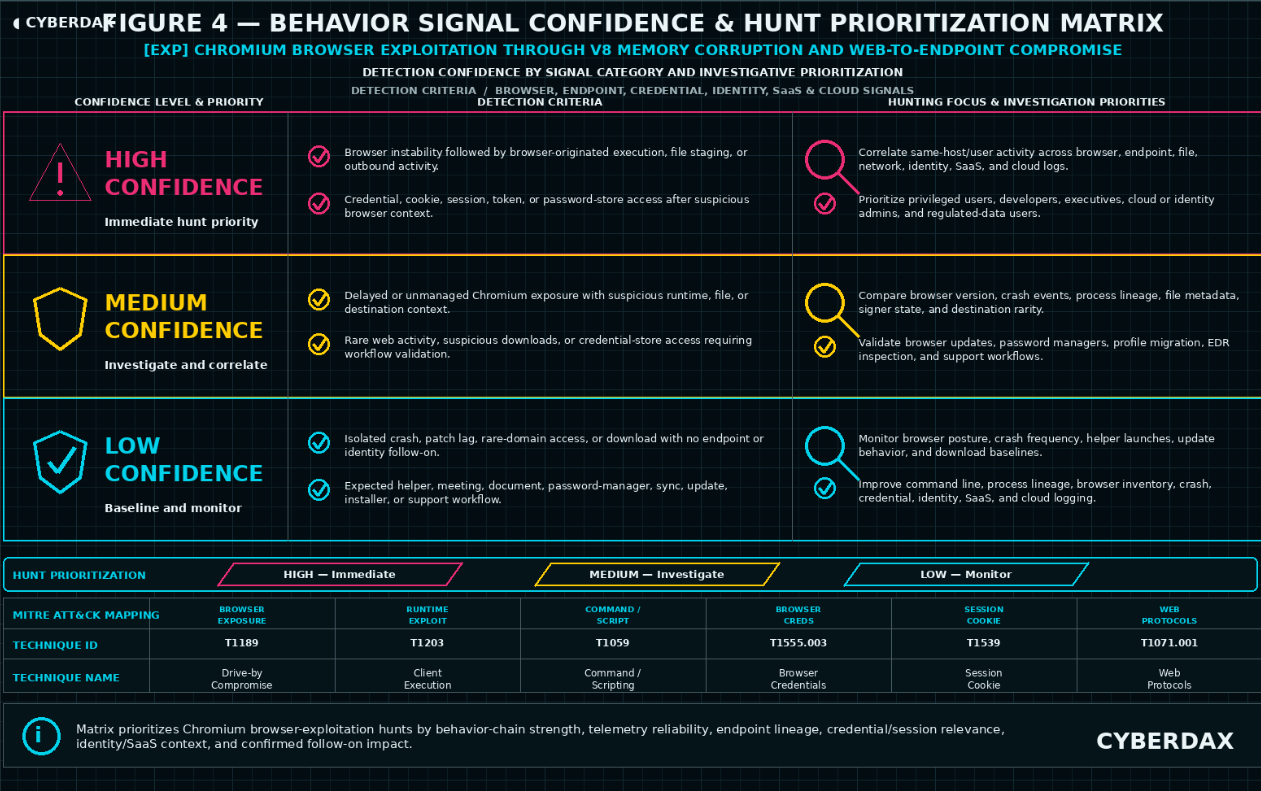
Figure 4
Detection Opportunity Overview
Chromium browser exploitation through V8 memory corruption and web-to-endpoint compromise creates the strongest detection opportunities when browser exposure, browser runtime instability, browser-originated execution, suspicious file activity, network activity, credential or session access, and downstream identity behavior can be correlated on the same host, same device, same user, or same session lineage.
The highest-value opportunities are behavior-chain detections that join vulnerable or recently vulnerable Chrome, Edge, or managed Chromium-family exposure with observable browser instability, suspicious process lineage, browser-originated file activity, credential or session-store access, process-to-network behavior, or post-browser identity misuse within bounded time windows.
Detection opportunities are strongest when endpoint process telemetry, full command-line telemetry, browser crash telemetry, browser inventory, vulnerability-management context, file and download telemetry, process-to-network mapping, DNS, proxy, secure web gateway, identity-provider telemetry, SaaS telemetry, endpoint-class context, and approved workflow baselines are available and normalized.
Detection opportunities weaken materially when browser version exposure, browser crash events, browser-originated process lineage, file execution, credential or session access, process-to-network mapping, identity context, or approved browser workflow baselines cannot be observed or correlated.
This section treats current public Chromium-family V8 exploitation reporting as the urgency and exposure anchor only. It should not become a detection keyword, standalone rule target, or report thesis. Future actively exploited Chromium-family V8 issues, Edge downstream exposure, browser sandbox escape updates, credential-theft variants, session-theft variants, and browser-to-endpoint exploit-chain updates should be absorbed through the behavior model only when observable activity maps to this detection structure.
Network telemetry, cloud telemetry, browser inventory, vulnerability-management telemetry, and static artifact context may support prioritization, triage, and exposure scoping, but they do not replace direct endpoint, browser, file, credential, identity, or SaaS evidence for high-confidence detection.
Highest-Value Detection Opportunities
· Vulnerable, stale, unsupported, unmanaged, or delayed-patch Chrome, Edge, or managed Chromium-family browser exposure followed by suspicious browser crash telemetry, browser-originated process execution, suspicious download execution, credential-store access, or downstream identity behavior.
· Browser crash, renderer crash, tab crash, JavaScript engine instability, exploit-prevention event, memory-protection event, or repeated browser fault activity followed by suspicious child-process creation, browser-to-script execution, browser-to-shell execution, downloaded file execution, credential-store access, or process-to-network behavior.
· Browser process lineage into PowerShell, CMD, WMI, Windows Script Host, MSHTA, Rundll32, Regsvr32, Certutil, Curl, Bitsadmin, Bash, Sh, Python, Node.js, JavaScript runtimes, AppleScript, osascript, archive utilities, installer utilities, remote-retrieval tooling, remote-access tooling, or newly written executables.
· Browser-originated execution from Downloads directories, browser cache locations, browser profile paths, AppData paths, temporary directories, extension directories, archive-extraction paths, mounted volumes, public directories, or other user-writable staging locations.
· Browser-originated file creation, download, modification, extraction, or execution involving unsigned, unknown, low-prevalence, newly observed, recently written, mismatched-extension, script-based, installer-like, compressed, executable, DLL, HTA, shortcut, JavaScript, archive, or payload-like content.
· Browser activity involving rare, newly observed, low-reputation, compromised, uncategorized, file-hosting, paste, personal cloud-storage, suspicious CDN, suspicious redirect, malvertising, webmail, collaboration, or attacker-controlled infrastructure when correlated with endpoint execution or post-browser impact behavior.
· Browser-launched child processes initiating outbound network communication to rare, first-seen, low-reputation, direct IP, file-hosting, remote-access, personal cloud-storage, suspicious CDN, or host-role-inconsistent destinations.
· Browser credential-store, cookie-store, session-storage, local-storage, extension-storage, token-cache, wallet-extension, certificate-store, VPN-artifact, or password-store access by unexpected processes, recently written binaries, suspicious scripts, unusual user contexts, browser-launched child processes, or nonstandard paths.
· Credential or session-store access followed by anomalous identity-provider, SaaS, repository, mailbox, cloud-storage, VPN, administrative-console, or endpoint-management activity from the same endpoint, same user, same device, or same session lineage.
· Browser-originated execution followed by persistence creation, endpoint protection tampering, local discovery, sensitive-file access, archive creation, outbound transfer, remote administration, lateral movement preparation, or suspicious return-to-network behavior.
· Suspicious post-browser identity behavior involving token refresh, new session creation, device registration, OAuth consent, mailbox access, repository access, cloud-storage access, administrative-console access, or sensitive SaaS activity after suspicious browser-originated endpoint behavior.
· Multiple endpoints showing related browser crash telemetry, suspicious browser process lineage, browser-originated downloads, rare destination access, credential-store access, post-browser identity anomalies, or endpoint follow-on behavior within a compressed timeframe.
Detection Opportunities by Activity Phase
Exposure and Posture Identification
· Identify endpoints running vulnerable, stale, unsupported, unmanaged, or delayed-patch Chrome, Edge, or managed Chromium-family browser builds.
· Identify unmanaged Chromium installations, portable browser use, user-installed browsers, stale browser channels, unsupported browser versions, and downstream Chromium runtimes where enterprise telemetry can reliably observe version state and process lineage.
· Identify endpoints where browser update policy, browser management policy, extension policy, vulnerability-management state, or software inventory does not align with expected enterprise posture.
· Identify high-risk endpoint populations where browser compromise would create elevated business impact, including privileged workstations, administrator workstations, developer systems, executive endpoints, finance endpoints, legal endpoints, field devices, traveling-user systems, source-code access endpoints, cloud-administrator endpoints, identity-administrator endpoints, and endpoints with access to sensitive SaaS or regulated data.
· Identify browser-profile, credential-store, session-store, extension-storage, token-cache, password-manager, and browser synchronization workflows that require allowlisting or baseline validation before credential or session-focused detections are deployed.
· Identify business workflows that commonly launch helper applications from browsers, including meeting clients, document handlers, collaboration tools, authentication brokers, enterprise extensions, file viewers, software installers, remote-support tools, developer tools, and approved browser integrations.
Browser Runtime and Exploit-Adjacent Activity
· Detect browser crash, renderer crash, tab crash, JavaScript engine fault, memory-protection event, exploit-prevention event, or repeated browser instability on endpoints with vulnerable or delayed browser exposure.
· Detect browser instability followed by suspicious child-process creation, browser-to-shell execution, browser-to-script execution, downloaded file execution, process-to-network activity, credential-store access, or endpoint protection tampering.
· Detect endpoint exploit-prevention or memory-protection events involving browser processes, renderer processes, utility processes, browser helper processes, WebView processes, Electron processes, or downstream Chromium-derived applications.
· Detect repeated browser crash or fault events compressed within a short window where the endpoint also shows rare web activity, suspicious download activity, or post-browser endpoint behavior.
· Detect browser crash telemetry associated with access to rare, low-reputation, newly observed, compromised, malvertising, suspicious redirect, file-hosting, webmail, collaboration, or attacker-controlled infrastructure when endpoint or identity follow-on behavior exists.
· Detect endpoint telemetry gaps, endpoint sensor health degradation, or endpoint protection tampering after suspicious browser runtime behavior.
Browser-Originated Execution and File Activity
· Detect browser process lineage into command interpreters, scripting engines, LOLBins, remote-retrieval tools, installers, archive utilities, remote-access tools, or newly written executables.
· Detect browser-to-shell and browser-to-script execution involving PowerShell, CMD, WMI, Windows Script Host, MSHTA, Rundll32, Regsvr32, Certutil, Curl, Bitsadmin, Bash, Sh, Python, Node.js, JavaScript runtimes, AppleScript, osascript, or renamed administrative binaries.
· Detect execution from Downloads directories, browser cache locations, browser profile paths, AppData paths, temporary directories, extension directories, archive-extraction paths, mounted volumes, public directories, or recently written staging locations when tied to browser lineage.
· Detect browser-originated file creation, extraction, modification, or execution involving unsigned, unknown, low-prevalence, newly observed, recently written, compressed, mismatched-extension, script-based, installer-like, executable, DLL, HTA, shortcut, JavaScript, archive, or payload-like content.
· Detect browser-launched child processes with suspicious command-line content, encoded commands, inline scripts, hidden windows, remote retrieval, execution bypass, staged archive extraction, temporary file execution, or unusual installer arguments.
· Detect suspicious browser extension installation, extension modification, extension-directory writes, browser shortcut modification, browser launch-argument modification, or browser-profile modification following suspicious browser activity.
Credential, Session, and Identity Activity
· Detect browser credential-store, cookie-store, session-storage, local-storage, extension-storage, token-cache, wallet-extension, certificate-store, VPN-artifact, or password-store access by unexpected processes, browser-launched child processes, recently written binaries, suspicious scripts, unusual user contexts, or nonstandard paths.
· Detect credential or session-store access after browser crash telemetry, browser-originated execution, suspicious browser download activity, endpoint exploit-prevention events, vulnerable browser exposure, or suspicious browser process lineage.
· Detect suspicious authentication, token refresh, new session creation, device registration, OAuth consent, mailbox access, repository access, cloud-storage access, administrative-console access, endpoint-management access, or sensitive SaaS activity following suspicious browser-originated endpoint behavior.
· Detect identity-provider, SaaS, repository, mailbox, VPN, cloud-storage, or administrative-console anomalies from the same endpoint, same user, same device, same session lineage, unusual user agent, unusual source IP, unusual ASN, impossible travel pattern, or newly observed device after suspicious browser activity.
· Detect credential or session activity that does not align with approved password-manager activity, browser synchronization, enterprise browser management, user-driven profile migration, browser backup activity, EDR inspection, forensic collection, incident-response collection, browser update activity, or authorized administrative access.
Post-Execution Impact Activity
· Detect persistence creation after browser-originated execution, including scheduled tasks, services, service binary path changes, registry autoruns, startup folder changes, launch agents, login items, WMI event subscriptions, browser extension persistence, browser shortcut modification, and user-profile persistence.
· Detect endpoint protection tampering, endpoint telemetry suppression, logging reduction, firewall modification, EDR disablement, endpoint sensor degradation, endpoint-management tampering, or security policy drift after suspicious browser-originated execution.
· Detect local discovery, browser profile discovery, sensitive-directory access, source repository access, customer data access, regulated-data access, archive creation, staging directory creation, unusual file-copy behavior, removable-media transfer, or cloud-storage upload after browser-originated execution or credential-store access.
· Detect remote administration, remote-access tool execution, payload staging, additional tool retrieval, command-and-control preparation, privilege escalation attempt, or endpoint reconnaissance following browser runtime instability or browser-originated execution.
· Detect lateral movement preparation, remote service creation, remote scheduled task creation, WMI remote execution, WinRM activity, PsExec-like behavior, SMB-based execution, remote PowerShell, administrative share access, remote file copy, or privileged system access after suspicious browser-originated endpoint behavior.
Strongest Rule Engineering Candidates
· Browser process lineage to shell, script, LOLBin, remote-retrieval utility, installer, archive utility, or newly written executable with suspicious command-line, path, signer, downloaded-file, or vulnerable-browser context.
· Browser crash or renderer instability followed by suspicious browser-originated execution, downloaded file execution, credential-store access, or process-to-network activity on the same endpoint within a bounded window.
· Browser-originated download, cache write, temporary-path write, or archive extraction followed by execution of unsigned, low-prevalence, recently written, script-based, installer-like, or payload-like content.
· Browser-launched child process initiating outbound communication to rare, first-seen, low-reputation, direct IP, file-hosting, remote-access, suspicious CDN, or host-role-inconsistent destinations.
· Browser credential-store, cookie-store, session-store, local-storage, extension-storage, token-cache, or password-store access by unexpected processes or browser-launched child processes, with approved workflow suppression and downstream identity correlation.
· Suspicious identity or SaaS activity after browser-originated execution, suspicious browser download activity, credential-store access, or browser crash telemetry from the same host, same user, same device, or same session lineage.
· Browser-originated execution followed by endpoint protection tampering, persistence creation, local discovery, sensitive-file access, archive creation, outbound transfer, or lateral movement preparation.
· Exposure-informed hunting for endpoints with vulnerable or delayed Chrome, Edge, or Chromium-family browser builds that also show suspicious browser crash, process lineage, download, credential, network, or identity behavior.
Limited or Non-Primary Detection Opportunities
NDR / Network Behavioral Analytics
· NDR / Network Behavioral Analytics is not a primary detection source for this report because the core behavior begins in browser runtime, endpoint process lineage, file activity, credential or session access, and endpoint-controlled execution paths.
· NDR cannot reliably observe V8 memory corruption, renderer exploitation, browser sandbox escape, browser credential-store access, local session-store access, local payload execution, browser profile access, endpoint process lineage, or in-memory-only browser compromise.
· NDR may support investigation if a device with prior browser exposure, browser crash telemetry, browser-originated execution, suspicious download activity, credential-store access, endpoint telemetry gap, or suspicious identity behavior later performs rare destination access, suspicious egress, payload retrieval, unusual upload, remote administration, command-and-control-like communication, VPN activity, or lateral movement preparation.
· NDR should remain downstream enrichment and impact context, not primary S25 detection coverage.
YARA
· YARA is not a primary detection source unless a stable malicious file artifact, payload, dropper, browser-delivered file, memory artifact, or reusable malware family emerges.
· YARA rules based on vulnerability identifiers, exploit names, proof-of-concept labels, JavaScript strings, browser vulnerability names, URLs, hashes, repository artifacts, or threat branding would be brittle and easy to evade.
· YARA may support malware triage, artifact enrichment, payload classification, or retrospective file review after endpoint telemetry has identified suspicious browser-originated execution or file staging.
· YARA should not be used to imply broad coverage of Chromium browser exploitation, V8 memory corruption, sandbox escape, or browser-to-endpoint compromise.
Azure
· Azure-native and Microsoft telemetry may provide conditional detection value when Entra ID, Defender for Endpoint, Intune, Microsoft Sentinel, Microsoft Defender XDR, Microsoft 365 audit logs, device compliance, browser inventory, identity, SaaS, or endpoint telemetry is available and normalized.
· Azure is strongest for correlating endpoint-confirmed browser-originated behavior with Entra ID sign-in anomalies, token refresh activity, new device registration, OAuth consent, risky user context, Intune device posture, Defender for Endpoint device events, Microsoft Sentinel correlation, and Microsoft 365 audit activity.
· Azure-native telemetry should not be used to claim direct visibility into V8 memory corruption, browser sandbox escape, renderer exploitation, local browser credential-store access, local session-store access, local payload execution, or browser profile access unless the relevant endpoint telemetry is ingested and mapped.
· Azure should receive conditional S25 coverage only where endpoint, identity, device-compliance, and SaaS telemetry can support bounded same-device, same-user, or same-session correlation.
AWS
· AWS-native telemetry is not a primary detection source unless endpoint, browser, identity, SaaS, proxy, EDR, or vulnerability-management telemetry is intentionally forwarded into AWS-hosted analytics infrastructure.
· AWS-native logs do not normally provide direct visibility into Chrome or Edge browser crashes, V8 memory corruption, browser process lineage, browser credential-store access, local payload execution, browser profile access, endpoint file activity, or local browser sandbox transitions.
· AWS may support downstream cloud-impact investigation when suspicious browser-originated behavior is followed by anomalous AWS console activity, unusual API calls, token misuse, new access key activity, cloud-storage activity, or administrative activity tied to the same user or device.
· AWS should not receive primary rules for this report without endpoint or identity evidence that connects cloud activity to suspicious browser-originated behavior.
GCP
· GCP-native telemetry is not a primary detection source unless endpoint, browser, identity, SaaS, proxy, EDR, or vulnerability-management telemetry is intentionally forwarded into GCP-hosted analytics infrastructure.
· GCP-native logs do not normally provide direct visibility into Chrome or Edge browser crashes, V8 memory corruption, browser process lineage, browser credential-store access, local payload execution, browser profile access, endpoint file activity, or local browser sandbox transitions.
· GCP may support downstream cloud-impact investigation when suspicious browser-originated behavior is followed by anomalous GCP console activity, unusual API calls, token misuse, service-account activity, cloud-storage activity, or administrative activity tied to the same user or device.
· GCP should not receive primary rules for this report without endpoint or identity evidence that connects cloud activity to suspicious browser-originated behavior.
Detection Gaps
· Missing command-line telemetry materially reduces the ability to distinguish legitimate browser helper activity from browser-to-shell, browser-to-script, payload staging, interpreter abuse, and suspicious browser-launched execution.
· Missing parent-child process telemetry weakens browser process lineage reconstruction and suspicious browser-originated execution analysis.
· Missing browser version, browser inventory, or vulnerability-management telemetry prevents reliable correlation between suspicious behavior and vulnerable, stale, unsupported, unmanaged, or delayed-patch browser exposure.
· Missing browser crash or fault telemetry weakens detection of indirect exploit-attempt evidence.
· Missing endpoint exploit-prevention or memory-protection telemetry limits visibility into exploit-adjacent runtime behavior.
· Missing file creation, download, or execution telemetry limits detection of browser-originated payload staging, cache-path execution, temporary-path execution, archive extraction, and suspicious user-writable path activity.
· Missing process-to-network mapping limits confidence in browser-launched outbound communication and payload retrieval detections.
· Missing DNS, proxy, or secure web gateway telemetry weakens exploit-delivery investigation, rare-destination analysis, redirect-chain review, and suspicious download-source review.
· Missing browser-profile, credential-store, cookie-store, session-store, local-storage, extension-storage, token-cache, certificate-store, VPN-artifact, or password-store telemetry limits confidence in credential or session theft detection.
· Missing identity-provider telemetry weakens correlation between endpoint browser activity and suspicious authentication, token refresh, new session creation, device registration, OAuth consent, or identity misuse.
· Missing SaaS audit telemetry weakens detection of mailbox access, repository access, cloud-storage access, administrative-console access, collaboration activity, endpoint-management access, or sensitive application activity after suspicious browser behavior.
· Missing endpoint protection and sensor-health telemetry may hide endpoint protection tampering, telemetry gaps, exploit-prevention events, or post-browser security-control degradation.
· Missing extension inventory or browser policy telemetry limits visibility into suspicious browser extension state, extension-directory activity, browser management drift, and enterprise browser policy conflicts.
· Missing approved workflow baselines increases false positives from browser updates, enterprise browser management, meeting-client launches, document-handler workflows, password managers, browser synchronization, user-driven profile migration, backup activity, EDR inspection, forensic collection, developer tooling, software installation, remote support, and incident-response workflows.
· Poor timestamp normalization can break chained detection logic and create false assumptions about whether browser exposure, browser instability, browser-originated execution, file activity, credential access, network behavior, and identity events were related.
· Incomplete host, device, user, or session identity normalization can prevent reliable same-host, same-device, same-user, and same-session correlation across endpoint, browser, proxy, DNS, identity, SaaS, cloud, VPN, repository, mailbox, and network telemetry.
· Network-only visibility is insufficient for the core behavior and must not be used as a replacement for endpoint, browser, file, credential, inventory, identity, or SaaS telemetry.
· Browser crash telemetry alone is insufficient because legitimate browser bugs, memory pressure, GPU issues, driver instability, browser updates, enterprise management, and extensions can produce overlapping crash events.
· Vulnerable browser exposure alone is insufficient because patch lag does not prove exploitation.
· Credential-store or session-store access alone is insufficient because approved password managers, browser synchronization, enterprise browser management, user profile migration, backup, EDR inspection, forensic collection, and incident-response activity can produce overlapping artifacts.
· Activity contained entirely inside the browser sandbox may produce limited or no endpoint follow-on telemetry.
· In-memory-only exploitation may produce no file artifact.
· Encrypted traffic, CDNs, compromised legitimate sites, shared hosting, collaboration platforms, and content-delivery infrastructure may reduce the reliability of domain and URL reputation logic.
· Lack of telemetry must not be interpreted as lack of activity when the suspicious window includes browser instability, endpoint telemetry gaps, in-memory execution, sandbox-contained behavior, credential-store access, or post-browser identity anomalies.
Detection Engineering Implications
· S25 rule engineering should prioritize rule candidates that survive telemetry availability, deployability, behavior-chain specificity, false-positive control, variant resilience, and non-circular scoring requirements.
· Candidate rules must include their own correlation logic and must not depend on other rule outputs, prior alert state, DRI, TCR, or post-alert analyst judgment.
· Candidate rules should require direct observable telemetry, bounded correlation windows, environment-specific baselines, browser version or exposure context where relevant, approved workflow definitions, and operational allowlisting.
· Candidate rules should prioritize same-host, same-device, same-user, or same-session sequence logic across browser exposure, browser instability, process lineage, file activity, credential or session access, network behavior, identity behavior, SaaS activity, and follow-on endpoint behavior.
· Candidate rules should avoid vulnerability identifiers, exploit strings, proof-of-concept artifacts, JavaScript strings, static URLs, hashes, user-agent strings, repository artifacts, browser vulnerability names, or threat branding as primary detection logic.
· Candidate rules should include false-positive controls for browser updates, enterprise browser management, approved browser extensions, password-manager activity, browser synchronization, user-driven profile migration, backup activity, EDR inspection, forensic collection, software installation, meeting-client launches, document-handler workflows, developer tooling, remote support, incident-response activity, and approved maintenance windows.
· Candidate rules based only on generic browser crash, generic browser-to-child-process behavior, generic suspicious downloads, generic rare-domain access, generic vulnerable-version exposure, generic credential-store access, network-only behavior, vulnerability terminology, or threat names should be rejected.
· Candidate rules should escalate credential or session access, identity anomalies, SaaS activity, persistence, endpoint protection tampering, sensitive-file access, archive creation, outbound transfer, remote administration, lateral movement, or suspicious authentication only when preceded by browser exposure, browser instability, browser-originated execution, suspicious file activity, or other browser-originated evidence.
· Candidate rules should produce exposure findings when telemetry coverage is insufficient for confident detection.
· S25 should proceed only with rule candidates that preserve behavior-led coverage without overstating direct V8 visibility, direct exploit confirmation, direct sandbox escape detection, direct credential theft confirmation, direct session theft confirmation, direct endpoint payload execution confirmation, or network-only detection value.
S25 Ultra-Tuned Detection Engineering Rules
NDR / Network Behavioral Analytics
Detection Viability Assessment
NDR / Network Behavioral Analytics has limited but justified downstream detection value for Chromium browser exploitation through V8 memory corruption and web-to-endpoint compromise.
NDR cannot directly observe V8 memory corruption, renderer exploitation, browser sandbox escape, local browser credential-store access, local session-store access, browser profile access, local payload execution, endpoint file activity, or endpoint process lineage. It can provide useful detection and hunting value only when endpoint, browser, identity, EDR, proxy, vulnerability-management, or SIEM telemetry establishes prior browser exposure, browser instability, suspicious browser-originated execution, suspicious download activity, credential-store access, endpoint telemetry gaps, suspicious identity behavior, or suspicious SaaS activity.
Two NDR rules are included for this report. Both rules are downstream correlation rules. Neither rule should be deployed as standalone proof of Chromium exploitation, V8 exploitation, browser compromise, sandbox escape, credential theft, session theft, or endpoint payload execution.
Rule
Browser-Context Host With Rare or Suspicious Outbound Communication
Rule Format
NDR / Network Behavioral Analytics correlation pattern using network session metadata, DNS telemetry, proxy-derived enrichment where available, endpoint-derived browser context where available, identity context where available, and asset or user context.
Detection Purpose
Detect rare, first-seen, suspicious, or host-role-inconsistent outbound communication from a host that has recent browser-originated risk context from another telemetry source.
This rule supports downstream impact detection and triage after suspected Chromium-family browser exploitation behavior. It does not detect V8 memory corruption, browser exploitation, browser compromise, sandbox escape, credential theft, session theft, or endpoint payload execution directly.
Detection Logic
Trigger when a host with recent browser-originated risk context initiates outbound communication to a destination that is rare, first-seen, low-reputation, direct-IP, suspicious CDN, file-hosting, paste, personal cloud-storage, remote-access, dynamic DNS, newly registered, uncategorized, or inconsistent with the host role.
Browser-originated risk context may include vulnerable or delayed Chrome, Edge, or managed Chromium-family exposure, browser crash telemetry, browser-originated child-process execution, browser-to-shell behavior, browser-to-script behavior, suspicious browser-originated download execution, browser credential-store access, endpoint exploit-prevention events, endpoint telemetry gaps following browser activity, suspicious identity behavior, or suspicious SaaS behavior.
The outbound communication must occur after the browser-originated risk context within a bounded time window and must be tied to the same host, same device, same user where available, or same source identity lineage.
Suppress or downgrade activity that maps to approved software update services, approved browser update infrastructure, sanctioned SaaS, known enterprise file-sharing platforms, approved remote-support tooling, approved developer repositories, approved endpoint-management platforms, approved security tooling, known CDN-heavy business applications, sanctioned collaboration platforms, known browser synchronization, or known-good business workflows.
Do not trigger on rare destination access alone. Do not trigger on destination reputation alone. Do not trigger on browser exposure alone. Do not trigger on network activity unless the host has browser-originated risk context from another telemetry source or forwarded enrichment.
Required Telemetry
· DNS query telemetry.
· Network session telemetry.
· Source host, source device, source IP, source user where available, and event timestamp.
· Destination domain, destination IP, port, protocol, connection direction, and connection timestamp.
· Destination rarity, first-seen timing, reputation, category, ASN, hosting provider, domain age where available, and geolocation context where available.
· Host role, endpoint class, asset criticality, business unit, and expected destination baseline where available.
· Endpoint-derived or SIEM-forwarded enrichment showing browser exposure, browser crash telemetry, browser-originated execution, suspicious browser download activity, credential-store access, endpoint exploit-prevention event, endpoint telemetry gap, suspicious identity behavior, or suspicious SaaS behavior.
· Approved destination, approved service, approved remote-support, approved CDN, approved update, approved cloud-storage, approved collaboration, approved repository, approved developer workflow, approved browser synchronization, approved security-tooling, and approved endpoint-management baselines.
Engineering Implementation Instructions
Map source host identifiers, source device identifiers, source user identifiers, DNS records, network sessions, destination reputation, destination rarity, endpoint class, asset criticality, and browser-originated enrichment into the NDR analytics layer or into a SIEM-backed NDR correlation workflow.
Define environment-specific allowlists for approved browser update infrastructure, Microsoft update infrastructure, Google update infrastructure, approved SaaS destinations, sanctioned CDN-heavy platforms, approved remote-support tools, approved file-sharing platforms, approved developer repositories, approved security tooling, approved endpoint-management platforms, approved browser synchronization workflows, and expected destination categories by endpoint class.
Define suspicious destination classes using locally validated rarity, first-seen timing, low prevalence, uncategorized domain status, low reputation, suspicious CDN usage, direct-IP access, dynamic DNS, newly registered domains, unusual hosting providers, file-hosting services, paste services, personal cloud-storage services, remote-access infrastructure, and host-role inconsistency.
Require browser-originated context from endpoint, browser inventory, EDR, SIEM, proxy, identity, vulnerability-management, SaaS, or forwarded enrichment before alerting. When browser-originated context is unavailable, convert this rule to a hunt, dashboard, or enrichment use case.
Use bounded correlation windows. A recommended starting window is 24 hours after browser exposure, browser crash telemetry, suspicious browser-originated execution, suspicious browser download activity, credential-store access, endpoint exploit-prevention event, endpoint telemetry gap, suspicious identity behavior, or suspicious SaaS behavior. Shorter windows should be used in high-volume environments.
Validate that source host, source device, and source user fields resolve consistently across network, DNS, proxy, endpoint, browser inventory, identity, SaaS, vulnerability-management, and SIEM sources before enabling alert mode.
Do not enable blocking or automated containment from this rule unless local validation confirms low false-positive rates, high-quality browser-originated enrichment, reliable destination categorization, and clear analyst triage procedures.
DRI Assessment
This rule has moderate durability because adversaries may change domains, infrastructure, hosting providers, protocols, and delivery paths, but the behavioral relationship between browser-originated risk context and unusual outbound communication remains useful.
The rule is resilient when it relies on destination rarity, host-role inconsistency, first-seen timing, endpoint-class context, browser-originated enrichment, SaaS or identity context, and approved-destination baselines instead of static domains, URLs, hashes, user-agent strings, exploit names, vulnerability terms, or threat branding.
The rule is weaker than endpoint-native rules because NDR cannot directly validate browser process lineage, local file execution, browser credential-store access, sandbox escape, or V8 exploitation. Its value depends on reliable upstream context and bounded correlation.
DRI
7.2
TCR Assessment
Operational TCR is moderate because many organizations collect DNS and network telemetry but may not reliably forward browser crash, browser exposure, browser-originated execution, credential-store access, SaaS context, identity context, or endpoint enrichment into NDR workflows.
Full-telemetry TCR is higher when NDR can correlate network sessions with endpoint-derived browser context, vulnerability-management exposure, identity context, SaaS context, proxy context, destination rarity, asset criticality, and expected destination baselines.
Operational TCR
6.6
Full-Telemetry TCR
8.0
Limitations
This rule does not directly detect V8 memory corruption, browser exploitation, renderer exploitation, browser sandbox escape, local payload execution, credential theft, session theft, or endpoint compromise.
Rare destination access can be benign. Common false positives include browser updates, software updates, CDN-backed SaaS, developer activity, file-sharing workflows, cloud-storage activity, browser synchronization, collaboration tooling, approved remote support, legitimate downloads, security tooling, endpoint-management activity, travel-related access, and business applications that use dynamic infrastructure.
The rule requires reliable browser-originated context or forwarded enrichment. Without that context, it should remain a hunt, dashboard, or enrichment use case rather than a high-confidence alert.
Detection Query Pattern
Use this pattern as implementation-ready pseudologic and map all fields to the target NDR, SIEM, or network analytics schema before deployment.
FROM network_sessions, dns_events, proxy_events, endpoint_context, identity_context, saas_context
WHERE source.host_id IS NOT NULL
AND browser_context.host_id = source.host_id
AND event.time BETWEEN browser_context.time AND browser_context.time + ENV_BROWSER_TO_NDR_WINDOW
AND browser_context.type IN (
"vulnerable_chromium_exposure",
"delayed_chrome_or_edge_patch",
"browser_crash_or_renderer_fault",
"browser_originated_child_process",
"browser_to_shell_or_script",
"suspicious_browser_download_execution",
"browser_credential_or_session_store_access",
"endpoint_exploit_prevention_browser_context",
"endpoint_telemetry_gap_after_browser_activity",
"post_browser_identity_anomaly",
"post_browser_saas_anomaly"
)
AND destination.category IN (
"rare_destination",
"first_seen_destination",
"low_reputation",
"newly_registered_domain",
"uncategorized",
"direct_ip",
"dynamic_dns",
"file_hosting",
"paste_service",
"personal_cloud_storage",
"remote_access",
"suspicious_cdn",
"host_role_inconsistent"
)
AND destination.domain NOT IN ENV_APPROVED_BROWSER_UPDATE_DOMAINS
AND destination.domain NOT IN ENV_APPROVED_SOFTWARE_UPDATE_DOMAINS
AND destination.domain NOT IN ENV_APPROVED_SAAS_DOMAINS
AND destination.domain NOT IN ENV_APPROVED_REMOTE_SUPPORT_DOMAINS
AND destination.domain NOT IN ENV_APPROVED_DEVELOPER_REPOSITORIES
AND destination.domain NOT IN ENV_APPROVED_SECURITY_TOOLING_DOMAINS
AND destination.domain NOT IN ENV_APPROVED_ENDPOINT_MANAGEMENT_DOMAINS
AND destination.domain NOT IN ENV_APPROVED_BROWSER_SYNC_DOMAINS
AND source.host_role NOT IN ENV_HOST_ROLES_EXPECTED_FOR_DESTINATION_CATEGORY
GROUP BY source.host_id, source.user, destination.domain, destination.ip, browser_context.type
EMIT alert WHEN count_distinct(destination.domain) >= ENV_MIN_RARE_DESTINATIONS
OR total_bytes_out >= ENV_MIN_SUSPICIOUS_EGRESS_BYTES
OR destination.first_seen_age <= ENV_FIRST_SEEN_THRESHOLD
OR destination.reputation_score <= ENV_LOW_REPUTATION_THRESHOLD
Rule
Post-Browser Suspicious Egress or Outbound Transfer After Browser-Originated Risk Context
Rule Format
NDR / Network Behavioral Analytics sequence pattern using network session volume, DNS telemetry, proxy-derived enrichment where available, source host and user context, endpoint-derived browser context where available, identity context where available, SaaS context where available, and data-transfer baselines.
Detection Purpose
Detect unusual outbound transfer, cloud upload, archive transfer, file-sharing activity, remote administration, or command-and-control-like communication after browser-originated risk context has been established through endpoint, identity, browser, EDR, vulnerability-management, proxy, SaaS, or SIEM telemetry.
This rule supports detection of downstream impact behavior after suspected Chromium-family browser compromise or browser-originated endpoint activity. It does not confirm browser exploitation by itself.
Detection Logic
Trigger when a host with recent browser-originated risk context performs unusual outbound transfer, suspicious egress, cloud upload, file-sharing activity, archive transfer, remote-access communication, beacon-like communication, scripted periodic communication, or host-role-inconsistent outbound behavior within a bounded time window.
Browser-originated risk context may include vulnerable or delayed Chrome, Edge, or managed Chromium-family exposure, browser crash telemetry, suspicious browser-originated process execution, suspicious browser-originated file execution, browser credential-store access, endpoint exploit-prevention telemetry, endpoint telemetry gap after browser activity, suspicious identity activity, or suspicious SaaS activity tied to the same host or user.
Outbound behavior must exceed local baselines by host role, endpoint class, user role, business unit, network segment, destination category, data volume, connection frequency, connection timing, destination novelty, or expected application behavior.
Suppress or downgrade expected browser synchronization, approved cloud-storage synchronization, approved collaboration uploads, approved backup tooling, approved developer artifact uploads, approved security telemetry uploads, approved endpoint-management traffic, approved remote-support workflows, known business file-transfer workflows, approved VPN activity, approved administrative activity, and approved incident-response collection.
Do not trigger on outbound volume alone. Do not trigger on cloud-storage activity alone. Do not trigger on remote-access activity alone. Do not trigger on beacon-like network patterns unless browser-originated risk context or forwarded enrichment exists.
Required Telemetry
· Network session telemetry with source host, source IP, destination IP, destination domain where available, port, protocol, bytes in, bytes out, connection count, session duration, and timestamp.
· DNS telemetry with source host, source user where available, query, response, domain rarity, and timestamp.
· Proxy or secure web gateway enrichment where available, including URL, method, category, content type, file name, file size, user agent, referrer, upload or download direction, and destination reputation.
· Data-transfer baselines by endpoint class, user role, business unit, network segment, host role, destination category, and expected application behavior.
· Endpoint-derived or SIEM-forwarded enrichment showing browser exposure, browser crash telemetry, browser-originated execution, browser-originated file activity, credential-store access, endpoint exploit-prevention event, endpoint telemetry gap, suspicious identity activity, or suspicious SaaS activity.
· Approved cloud-storage, file-sharing, backup, collaboration, developer, security telemetry, endpoint-management, remote-support, VPN, administrative workflow, browser synchronization, and incident-response collection baselines.
Engineering Implementation Instructions
Map source host, source device, source user, destination, bytes transferred, connection timing, connection frequency, destination category, destination rarity, and proxy-derived file metadata into the NDR analytics workflow.
Define outbound transfer baselines by endpoint class, user role, host role, network segment, business unit, destination category, expected application behavior, browser synchronization behavior, cloud-storage behavior, collaboration behavior, and developer workflow.
Define suspicious transfer classes using unusual bytes out, unusual upload timing, new destination category, rare destination, host-role inconsistency, archive transfer, cloud-storage upload, file-sharing upload, remote-access connection, command-and-control-like periodicity, scripted timing, or newly observed external service use.
Require browser-originated risk context from endpoint, browser inventory, EDR, SIEM, proxy, identity, vulnerability-management, SaaS, or forwarded enrichment before alerting. Without that context, convert the rule to a hunt, dashboard, or enrichment use case.
Use a bounded correlation window. A recommended starting window is 48 hours after browser-originated execution, browser crash telemetry, suspicious browser download execution, credential-store access, endpoint telemetry gap, suspicious identity behavior, or suspicious SaaS activity. High-volume environments should reduce the window or require stronger destination and transfer anomalies.
Validate known-good workflows before production alerting, especially browser synchronization, cloud-storage synchronization, collaboration uploads, backup tools, developer artifact publishing, security telemetry uploads, remote support, VPN use, endpoint management, sanctioned administrative transfers, and incident-response collection.
Do not enable automated containment solely from this rule unless local baselines show low false-positive rates and endpoint or identity telemetry confirms suspicious browser-originated context.
DRI Assessment
This rule has moderate durability because adversaries can change transfer destinations, cloud services, remote-access methods, protocols, and timing. It remains useful when focused on the sequence from browser-originated risk context to host-role-inconsistent outbound transfer or suspicious egress.
The rule is resilient when it relies on transfer baselines, endpoint-class context, destination novelty, host-role inconsistency, browser-originated enrichment, SaaS or identity context, and bounded correlation instead of static indicators or threat labels.
The rule is not as strong as endpoint or SIEM correlation rules because NDR cannot validate whether the outbound behavior came from a browser-launched process, a payload, a user-driven application, a cloud-sync client, or approved business tooling without supporting endpoint or proxy context.
DRI
7.0
TCR Assessment
Operational TCR is moderate because many environments have network volume and DNS telemetry but may lack process-to-network mapping, reliable user attribution, browser-originated enrichment, SaaS context, identity context, and well-defined transfer baselines.
Full-telemetry TCR is strong when network session telemetry, proxy metadata, process-to-network mapping, endpoint-derived browser context, identity context, SaaS context, approved workflow baselines, and destination rarity are available and normalized.
Operational TCR
6.4
Full-Telemetry TCR
8.1
Limitations
This rule does not directly detect V8 memory corruption, Chromium exploitation, browser sandbox escape, endpoint payload execution, credential theft, session theft, or local browser compromise.
Outbound transfer can be benign. Common false positives include cloud backup, browser synchronization, approved file sharing, collaboration uploads, endpoint telemetry upload, developer publishing, business reporting, remote support, VPN activity, administrative transfer, legal or finance file movement, and approved incident-response collection.
This rule requires browser-originated risk context or forwarded enrichment. Without that context, it should remain a hunt, dashboard, or enrichment control rather than a high-confidence alert.
Detection Query Pattern
Use this pattern as implementation-ready pseudologic and map all fields to the target NDR, SIEM, proxy, or network analytics schema before deployment.
FROM network_sessions, dns_events, proxy_events, endpoint_context, identity_context, saas_context, transfer_baselines
WHERE source.host_id IS NOT NULL
AND browser_context.host_id = source.host_id
AND event.time BETWEEN browser_context.time AND browser_context.time + ENV_BROWSER_TO_EGRESS_WINDOW
AND browser_context.type IN (
"browser_crash_or_renderer_fault",
"browser_originated_child_process",
"browser_to_shell_or_script",
"suspicious_browser_download_execution",
"browser_credential_or_session_store_access",
"endpoint_exploit_prevention_browser_context",
"endpoint_telemetry_gap_after_browser_activity",
"post_browser_identity_anomaly",
"post_browser_saas_anomaly"
)
AND (
network.bytes_out >= ENV_EGRESS_BYTES_THRESHOLD_BY_HOST_ROLE[source.host_role]
OR network.upload_ratio >= ENV_UPLOAD_RATIO_THRESHOLD
OR network.connection_frequency >= ENV_PERIODIC_CONNECTION_THRESHOLD
OR destination.category IN (
"personal_cloud_storage",
"file_sharing",
"paste_service",
"remote_access",
"direct_ip",
"dynamic_dns",
"newly_registered_domain",
"first_seen_destination",
"low_reputation",
"host_role_inconsistent"
)
OR proxy.file_name MATCHES ENV_ARCHIVE_OR_COLLECTION_PATTERN
OR proxy.content_type IN ENV_SUSPICIOUS_UPLOAD_CONTENT_TYPES
)
AND destination.domain NOT IN ENV_APPROVED_CLOUD_STORAGE_DOMAINS
AND destination.domain NOT IN ENV_APPROVED_COLLABORATION_DOMAINS
AND destination.domain NOT IN ENV_APPROVED_BACKUP_DOMAINS
AND destination.domain NOT IN ENV_APPROVED_DEVELOPER_UPLOAD_DOMAINS
AND destination.domain NOT IN ENV_APPROVED_SECURITY_TELEMETRY_DOMAINS
AND destination.domain NOT IN ENV_APPROVED_REMOTE_SUPPORT_DOMAINS
AND destination.domain NOT IN ENV_APPROVED_ENDPOINT_MANAGEMENT_DOMAINS
AND destination.domain NOT IN ENV_APPROVED_BROWSER_SYNC_DOMAINS
AND destination.domain NOT IN ENV_APPROVED_INCIDENT_RESPONSE_COLLECTION_DOMAINS
AND source.user NOT IN ENV_APPROVED_ADMIN_OR_SUPPORT_TRANSFER_USERS
GROUP BY source.host_id, source.user, destination.domain, destination.category, browser_context.type
EMIT alert WHEN
network.bytes_out > baseline.bytes_out_p95 * ENV_EGRESS_MULTIPLIER
OR count_distinct(destination.domain) >= ENV_MIN_NEW_TRANSFER_DESTINATIONS
OR destination.first_seen_age <= ENV_FIRST_SEEN_THRESHOLD
OR proxy.file_name MATCHES ENV_ARCHIVE_OR_COLLECTION_PATTERN
OR network.connection_frequency >= ENV_PERIODIC_CONNECTION_THRESHOLD
SentinelOne
Detection Viability Assessment
SentinelOne has strong detection viability for Chromium browser exploitation through V8 memory corruption and web-to-endpoint compromise because the behavior family becomes most visible through endpoint process lineage, browser-launched child processes, command-line behavior, file activity, process-to-network behavior, exploit-prevention telemetry, endpoint protection state, and storyline-style correlation.
SentinelOne cannot directly prove V8 memory corruption, renderer exploitation, browser sandbox escape, credential theft, session theft, or endpoint payload execution without supporting telemetry. Its strongest value is detecting the operational sequence in which Chrome, Edge, or managed Chromium-family browser activity is followed by suspicious child-process execution, suspicious file execution, credential or session artifact access, endpoint protection tampering, persistence, outbound communication, or lateral movement preparation.
Three SentinelOne rules are included for this report. Each rule must independently correlate its own telemetry inputs and must not depend on another rule’s output, prior alert state, DRI, TCR, or post-alert analyst judgment as detection input.
Rule
Browser Process Lineage to Suspicious Shell, Script, LOLBin, Remote Retrieval, or Newly Written Executable
Rule Format
SentinelOne STAR custom detection logic using Deep Visibility process telemetry, storyline context, command-line telemetry, file metadata, signer context, path context, and process-to-network context where available.
Detection Purpose
Detect suspicious browser-originated execution where Chrome, Edge, Chromium, or a managed Chromium-family process launches a shell, scripting engine, LOLBin, remote-retrieval utility, installer, archive utility, remote-access utility, or newly written executable with suspicious command-line, path, signer, file, or exposure context.
This rule targets the browser-to-endpoint transition that may follow Chromium-family exploitation. It does not directly detect V8 memory corruption, renderer exploitation, browser compromise, or browser sandbox escape.
Detection Logic
Trigger when a Chrome, Edge, Chromium, browser helper, renderer-adjacent, WebView, Electron, or managed Chromium-derived process directly or indirectly spawns a suspicious child process within a bounded process-chain window.
Suspicious child processes include PowerShell, CMD, WMI, Windows Script Host, MSHTA, Rundll32, Regsvr32, Certutil, Curl, Bitsadmin, archive utilities, installer utilities, remote-retrieval tools, remote-access tools, renamed administrative binaries, unknown executables, unsigned binaries, recently written binaries, or low-prevalence binaries.
The process chain must include suspicious context such as encoded command content, inline script execution, remote retrieval, execution bypass, hidden execution, file execution from user-writable paths, execution from browser cache, execution from Downloads, execution from AppData, execution from temporary directories, suspicious signer state, newly written file metadata, low-prevalence file metadata, vulnerable or delayed browser exposure context, browser crash context, suspicious download context, or process-to-network behavior.
Suppress or downgrade expected browser helper workflows, meeting-client launches, document-handler launches, approved browser extensions, approved password-manager workflows, approved software installers, approved browser updates, approved enterprise browser management, approved developer tooling, approved remote-support workflows, endpoint-management activity, security tooling, and incident-response collection.
Do not trigger on browser child-process creation alone. Do not trigger on browser version exposure alone. Do not trigger on browser crash alone. Do not trigger on expected browser-launched business applications unless suspicious command-line, path, signer, file, network, exposure, or follow-on context is present.
Required Telemetry
· SentinelOne process creation telemetry.
· Full command-line telemetry.
· Parent process and grandparent process telemetry.
· Storyline or process graph identifier where available.
· Process path, process name, signer, hash, reputation, prevalence, and file creation time.
· User context, endpoint identifier, host name, device identifier, and event timestamp.
· Browser process identity for Chrome, Edge, Chromium, browser helper processes, WebView processes, Electron applications, and managed Chromium-derived applications where available.
· File creation and file execution telemetry.
· Process-to-network telemetry where available.
· Browser inventory, browser version, browser update state, vulnerability-management, or SIEM-forwarded exposure context where available.
· Browser crash, renderer crash, exploit-prevention, memory-protection, or endpoint exploit telemetry where available.
· Approved browser helper, meeting-client, document-handler, password-manager, software-installer, browser-update, browser-management, developer-tooling, remote-support, endpoint-management, security-tooling, and incident-response baselines.
Engineering Implementation Instructions
Map SentinelOne Deep Visibility fields for process name, process path, command line, parent process, parent command line, grandparent process where available, user, endpoint name, endpoint identifier, storyline identifier, signer, hash, reputation, file creation time, file path, network destination, and timestamp.
Define browser process identifiers for Chrome, Edge, Chromium, browser helper processes, browser renderer-adjacent processes, WebView processes, Electron applications, and managed Chromium-derived applications used in the environment.
Define suspicious child-process sets for shells, scripting engines, LOLBins, remote-retrieval utilities, installers, archive utilities, remote-access tools, unknown executables, unsigned executables, recently written executables, and low-prevalence binaries.
Define suspicious execution contexts using command-line patterns, user-writable paths, Downloads directories, browser cache paths, browser profile paths, AppData paths, temporary directories, extension directories, archive-extraction paths, mounted volumes, public directories, suspicious signer state, low prevalence, newly written file metadata, and process-to-network behavior.
Use endpoint, SIEM, browser inventory, vulnerability-management, or EDR enrichment to add browser version, browser channel, browser update state, vulnerable browser exposure, browser crash telemetry, and exploit-prevention context where available.
Start with a process-chain correlation window of 10 minutes from browser process activity to suspicious child-process execution. Extend to 30 minutes only when supported by storyline context, downloaded-file metadata, or browser-originated file activity.
Validate known-good browser-launched workflows before production deployment, including meeting clients, document handlers, collaboration tools, file viewers, authentication brokers, password managers, browser extensions, software installers, browser updates, developer tools, remote support, endpoint management, security tooling, and incident-response collection.
Do not enable autonomous response until local baselines confirm low false-positive rates, reliable browser lineage visibility, and actionable triage procedures.
DRI Assessment
This rule has high durability because it focuses on the browser-to-endpoint transition rather than exploit strings, vulnerability identifiers, payload hashes, static URLs, user-agent values, or threat branding.
The rule remains resilient across future actively exploited Chromium-family V8 issues, Edge downstream exposure, Chromium-derived runtime exposure, and browser-to-endpoint exploit-chain variants because adversaries still need observable execution, file, command-line, or network behavior when activity transitions from browser context into endpoint execution.
The rule can be evaded if exploitation remains fully in memory, remains contained inside the browser sandbox, launches no observable child process, uses fully approved application workflows, or if endpoint telemetry lacks parent-child process visibility.
DRI
9.0
TCR Assessment
Operational TCR is strong because SentinelOne commonly provides process lineage, command-line, file, signer, hash, endpoint, user, and storyline telemetry needed to detect browser-originated execution.
Operational confidence depends on local visibility into full command lines, browser process ancestry, file creation time, signer reputation, process-to-network context, approved workflow baselines, and browser exposure enrichment.
Full-telemetry TCR is higher when SentinelOne telemetry is enriched with browser inventory, vulnerability-management context, browser crash telemetry, proxy context, identity context, SaaS context, and approved workflow allowlists.
Operational TCR
8.4
Full-Telemetry TCR
9.2
Limitations
This rule does not directly detect V8 memory corruption, browser sandbox escape, renderer exploitation, credential theft, session theft, or local browser compromise.
False positives may occur from legitimate browser helper workflows, meeting-client launches, document handlers, browser extensions, password managers, authentication brokers, software installers, browser updates, developer tooling, approved remote support, endpoint management, security tooling, and incident-response collection.
The rule requires reliable parent-child process telemetry and command-line visibility. If process lineage or command-line telemetry is incomplete, the rule should be scoped down, converted to a hunt, or paired with file, browser inventory, crash, proxy, identity, or vulnerability-management context before alert deployment.
Detection Query Pattern
Use this pattern as implementation-ready pseudologic and map all fields to the target SentinelOne tenant before deployment.
SEQUENCE SAME_ENDPOINT WITHIN ENV_BROWSER_CHILD_PROCESS_WINDOW
(
EVENT_A:
process.name IN ENV_CHROMIUM_BROWSER_PROCESS_NAMES
OR process.parent.name IN ENV_CHROMIUM_BROWSER_PROCESS_NAMES
OR process.grandparent.name IN ENV_CHROMIUM_BROWSER_PROCESS_NAMES
OR process.storyline CONTAINS ENV_CHROMIUM_BROWSER_STORYLINE_CONTEXT
FOLLOWED BY
EVENT_B:
process.name IN ENV_SUSPICIOUS_CHILD_PROCESS_NAMES
AND (
process.command_line CONTAINS_ANY ENV_SUSPICIOUS_BROWSER_CHILD_COMMAND_PATTERNS
OR process.path CONTAINS_ANY ENV_USER_WRITABLE_OR_BROWSER_CONTROLLED_PATHS
OR process.signer IN ENV_UNTRUSTED_OR_UNKNOWN_SIGNERS
OR process.hash_prevalence <= ENV_LOW_PREVALENCE_THRESHOLD
OR process.file_create_time BETWEEN EVENT_A.time AND EVENT_B.time
OR process.network.destination IN ENV_RARE_OR_SUSPICIOUS_DESTINATIONS
OR endpoint.browser_exposure_state IN ENV_VULNERABLE_OR_DELAYED_BROWSER_STATES
OR endpoint.browser_crash_context = true
OR endpoint.exploit_prevention_context = true
)
)
AND process.name NOT IN ENV_APPROVED_BROWSER_HELPER_PROCESSES
AND process.command_line NOT CONTAINS_ANY ENV_APPROVED_BROWSER_LAUNCHED_COMMAND_PATTERNS
AND process.path NOT CONTAINS_ANY ENV_APPROVED_SOFTWARE_INSTALL_PATHS
AND process.signer NOT IN ENV_APPROVED_SOFTWARE_SIGNERS
AND user.name NOT IN ENV_APPROVED_ADMIN_OR_SUPPORT_USERS
EMIT alert
Rule
Browser Instability or Exploit-Prevention Context Followed by Suspicious Browser-Originated Execution or Credential Access
Rule Format
SentinelOne STAR custom detection logic using Deep Visibility process telemetry, exploit-prevention or behavioral telemetry, browser crash or fault context where available, file telemetry, credential-access telemetry, and storyline context.
Detection Purpose
Detect suspicious endpoint behavior after browser instability, exploit-prevention, memory-protection, or browser crash context involving Chrome, Edge, Chromium, or managed Chromium-family browser processes.
This rule targets exploit-adjacent runtime behavior that may become visible through browser instability followed by suspicious child-process execution, downloaded file execution, process-to-network behavior, or credential-store access.
Detection Logic
Trigger when browser instability or exploit-prevention context is followed by suspicious browser-originated execution, downloaded file execution, credential-store access, process-to-network behavior, or endpoint protection tampering on the same endpoint within a bounded time window.
Browser instability context may include browser crash, renderer crash, tab crash, abnormal browser process termination, exploit-prevention event, memory-protection event, suspicious browser runtime behavior, or repeated browser fault activity associated with Chrome, Edge, Chromium, WebView, Electron, or managed Chromium-derived applications.
Suspicious follow-on behavior may include browser-launched shell execution, script execution, LOLBin execution, remote retrieval, installer execution, archive extraction, execution from Downloads, execution from browser cache, execution from AppData, execution from temporary directories, credential-store access, cookie-store access, session-store access, token-cache access, process-to-network behavior, or endpoint protection tampering.
Suppress or downgrade known browser bugs, approved browser updates, expected renderer crashes, GPU instability, extension instability, enterprise browser management, approved browser synchronization, approved password-manager activity, EDR inspection, security tooling, backup activity, forensic collection, incident-response collection, approved software installation, and approved support workflows.
Do not trigger on browser crash alone. Do not trigger on exploit-prevention context alone unless suspicious follow-on behavior occurs. Do not infer credential theft, session theft, payload execution, or sandbox escape unless supporting telemetry exists.
Required Telemetry
· SentinelOne process telemetry.
· Browser process identity.
· Full command-line telemetry.
· Parent-child and storyline telemetry.
· Browser crash, renderer crash, abnormal process termination, exploit-prevention, memory-protection, or behavioral detection context where available.
· File creation, file modification, file execution, file path, signer, hash, reputation, prevalence, and file creation time.
· Credential-store, cookie-store, session-store, local-storage, token-cache, browser-profile, certificate-store, VPN-artifact, or password-store access telemetry where credential or session logic is deployed.
· Process-to-network telemetry where available.
· Endpoint protection state, endpoint sensor health, and endpoint tampering telemetry where available.
· Browser version, browser inventory, browser update state, or vulnerability-management context where available.
· Approved browser crash, extension, password-manager, browser synchronization, EDR inspection, backup, forensic, incident-response, browser update, software installation, and support workflow baselines.
Engineering Implementation Instructions
Map SentinelOne fields for browser process identity, endpoint identifier, storyline identifier, process name, parent process, command line, file path, signer, hash, file creation time, process-to-network activity, behavioral detection context, exploit-prevention context, and timestamp.
Integrate or enrich with browser crash telemetry, browser inventory, vulnerability-management state, proxy context, identity context, SaaS context, or SIEM-forwarded crash and exposure context where available.
Define browser instability context using available SentinelOne behavioral telemetry, endpoint exploit-prevention events, abnormal browser process termination, renderer fault context, browser crash enrichment, or repeated browser fault events.
Define credential and session artifact paths for Chrome, Edge, Chromium, managed browser profiles, cookies, login databases, session storage, local storage, extension storage, token caches, certificate material, VPN artifacts, wallet extension data, and password stores.
Require suspicious follow-on behavior after instability context before alerting. Suitable follow-on behavior includes suspicious browser-originated execution, downloaded file execution, credential or session artifact access, suspicious process-to-network behavior, endpoint protection tampering, or execution from browser-controlled or user-writable paths.
Use a starting correlation window of 60 minutes from browser instability or exploit-prevention context to follow-on behavior. Reduce to 15 minutes for high-volume environments unless credential-store or identity follow-on evidence is available.
Validate false-positive baselines for common browser crashes, extension instability, GPU issues, browser updates, software installation, password-manager workflows, browser synchronization, EDR inspection, backup tooling, forensic collection, incident-response collection, and helpdesk support before alert deployment.
Do not enable autonomous containment unless suspicious follow-on behavior is confirmed through process, file, credential, network, or endpoint protection telemetry.
DRI Assessment
This rule has strong durability because it does not attempt to detect V8 internals and instead focuses on the sequence from browser instability or exploit-prevention context to suspicious endpoint outcome behavior.
The rule remains relevant across future V8 memory-corruption events, Edge downstream exposure, Chromium-derived runtime exposure, and sandbox-escape variants that generate observable endpoint behavior.
The rule can miss exploitation that remains in memory, produces no crash or exploit-prevention event, stays fully sandbox-contained, produces no child process, or lacks observable credential, file, network, or endpoint protection activity.
DRI
8.6
TCR Assessment
Operational TCR is strong when SentinelOne telemetry includes process lineage, behavioral detection context, exploit-prevention context, file telemetry, and process-to-network context.
Operational TCR decreases when browser crash telemetry is unavailable, exploit-prevention telemetry is sparse, browser inventory enrichment is unavailable, credential-store access telemetry is incomplete, or false-positive baselines for browser crash and password-manager workflows are weak.
Full-telemetry TCR is high when endpoint telemetry is enriched with browser crash logs, browser inventory, vulnerability-management state, credential-store access telemetry, proxy context, identity context, and SaaS context.
Operational TCR
8.1
Full-Telemetry TCR
9.0
Limitations
This rule does not prove exploitation. Browser instability may result from legitimate browser bugs, extension instability, GPU faults, memory pressure, browser updates, enterprise browser management, software conflicts, user activity, or operating-system instability.
Credential-store and session-store access may be legitimate when caused by password managers, browser synchronization, enterprise browser management, backup tools, EDR inspection, forensic tooling, incident-response tooling, profile migration, or approved administrative workflows.
Without browser instability, exploit-prevention, behavioral context, or suspicious follow-on behavior, this rule should not produce high-confidence alerts.
Detection Query Pattern
Use this pattern as implementation-ready pseudologic and map all fields to the target SentinelOne tenant before deployment.
SEQUENCE SAME_ENDPOINT WITHIN ENV_BROWSER_INSTABILITY_TO_OUTCOME_WINDOW
(
EVENT_A:
(
process.name IN ENV_CHROMIUM_BROWSER_PROCESS_NAMES
AND (
endpoint.behavior_context IN ENV_BROWSER_EXPLOIT_PREVENTION_EVENTS
OR endpoint.memory_protection_context IN ENV_BROWSER_MEMORY_PROTECTION_EVENTS
OR endpoint.browser_crash_context = true
OR endpoint.renderer_crash_context = true
OR process.termination_reason IN ENV_ABNORMAL_BROWSER_TERMINATION_REASONS
)
)
FOLLOWED BY
EVENT_B:
(
process.parent.name IN ENV_CHROMIUM_BROWSER_PROCESS_NAMES
OR process.grandparent.name IN ENV_CHROMIUM_BROWSER_PROCESS_NAMES
OR process.storyline CONTAINS ENV_CHROMIUM_BROWSER_STORYLINE_CONTEXT
)
AND (
process.name IN ENV_SUSPICIOUS_CHILD_PROCESS_NAMES
OR process.path CONTAINS_ANY ENV_USER_WRITABLE_OR_BROWSER_CONTROLLED_PATHS
OR file.path CONTAINS_ANY ENV_BROWSER_PROFILE_OR_CREDENTIAL_PATHS
OR file.path CONTAINS_ANY ENV_BROWSER_DOWNLOAD_OR_CACHE_PATHS
OR process.network.destination IN ENV_RARE_OR_SUSPICIOUS_DESTINATIONS
OR endpoint.protection_state_changed = true
OR endpoint.sensor_health_degraded = true
)
)
AND process.command_line NOT CONTAINS_ANY ENV_APPROVED_BROWSER_LAUNCHED_COMMAND_PATTERNS
AND file.path NOT CONTAINS_ANY ENV_APPROVED_PASSWORD_MANAGER_OR_SYNC_PATHS
AND process.signer NOT IN ENV_APPROVED_SECURITY_TOOLING_SIGNERS
AND user.name NOT IN ENV_APPROVED_SUPPORT_OR_IR_USERS
EMIT alert
Rule
Browser-Originated Execution Followed by Endpoint Protection Tampering, Persistence, Credential Access, or Lateral Movement Preparation
Rule Format
SentinelOne STAR custom detection logic using Deep Visibility process telemetry, file telemetry, endpoint protection-state telemetry, credential-access telemetry where available, persistence telemetry, process-to-network telemetry, and storyline context.
Detection Purpose
Detect post-browser impact behavior after suspicious browser-originated execution. This rule targets endpoint protection tampering, persistence creation, credential or session artifact access, sensitive-file discovery, archive creation, outbound transfer, remote administration, or lateral movement preparation after the browser-to-endpoint transition has occurred.
This rule supports post-exploitation detection and escalation when browser-originated endpoint behavior is followed by objective activity.
Detection Logic
Trigger when suspicious browser-originated execution is followed by endpoint protection tampering, persistence creation, credential-store access, session artifact access, sensitive-file discovery, archive creation, outbound transfer, remote administration, or lateral movement preparation on the same endpoint within a bounded time window.
Suspicious browser-originated execution may include browser process lineage into a shell, script interpreter, LOLBin, remote-retrieval tool, installer, archive utility, remote-access tool, unsigned executable, low-prevalence executable, recently written file, or executable launched from user-writable, browser cache, browser profile, Downloads, AppData, temporary, extension, archive-extraction, mounted-volume, or public paths.
Follow-on behavior may include endpoint protection exclusion creation, security-control disablement, endpoint sensor degradation, persistence creation, credential-store access, cookie-store access, session-storage access, token-cache access, browser-profile access, local discovery, sensitive-file access, archive creation, remote administration, outbound transfer, remote service behavior, remote scheduled task behavior, WMI remote execution, WinRM activity, SMB-based execution, or lateral movement preparation.
Suppress or downgrade activity that maps to approved software installation, approved endpoint-management activity, approved browser updates, approved password-manager workflows, browser synchronization, approved developer tooling, sanctioned remote support, approved backup, EDR inspection, forensic collection, incident-response collection, patch deployment, security engineering, or administrative maintenance windows.
Do not trigger on persistence, credential access, outbound communication, or remote administration alone. Do not infer browser exploitation unless browser-originated execution or browser-originated risk context precedes the follow-on behavior.
Required Telemetry
· SentinelOne process creation telemetry.
· Full command-line telemetry.
· Parent-child, grandparent, and storyline telemetry.
· File creation, file modification, file execution, signer, hash, reputation, prevalence, and file creation time.
· Endpoint protection state, policy state, exclusion creation, endpoint sensor health, endpoint security-control, or endpoint tampering telemetry where available.
· Persistence telemetry for scheduled tasks, services, registry autoruns, startup items, WMI event subscriptions, launch agents, login items, user-profile persistence, and remote-access tool installation where available.
· Credential-store, cookie-store, session-storage, local-storage, token-cache, browser-profile, certificate-store, VPN-artifact, wallet-extension, or password-store access telemetry where credential or session logic is deployed.
· Process-to-network telemetry, remote administration telemetry, and lateral movement preparation telemetry where available.
· Approved software installation, endpoint-management, browser-update, password-manager, browser synchronization, developer-tooling, remote-support, backup, EDR inspection, forensic, incident-response, patching, security-engineering, and administrative maintenance baselines.
Engineering Implementation Instructions
Map SentinelOne fields for process name, process path, command line, parent process, grandparent process where available, storyline identifier, endpoint identifier, user, signer, hash, file path, file creation time, file modification time, network destination, endpoint protection state, sensor health, and timestamp.
Define suspicious browser-originated execution using browser process ancestry, browser-controlled paths, user-writable paths, recently written files, low-prevalence binaries, suspicious command-line patterns, suspicious signer state, process-to-network behavior, browser crash context, or vulnerable browser exposure context.
Define follow-on impact behaviors using endpoint protection tampering, exclusion creation, sensor health degradation, persistence creation, credential or session artifact access, local discovery, sensitive-file access, archive creation, outbound transfer, remote administration, and lateral movement preparation.
Use a starting sequence window of 4 hours from suspicious browser-originated execution to follow-on impact behavior. Reduce to 60 minutes for endpoint protection tampering, persistence creation, or credential-store access where event volumes are high. Extend only when identity, SaaS, proxy, or endpoint storyline context supports continuity.
Validate approved workflows before alert deployment, including software installation, endpoint management, browser updates, password managers, browser synchronization, developer tooling, remote support, backup operations, EDR inspection, forensic collection, incident-response collection, patch deployment, security engineering, and administrative maintenance.
Require direct observable follow-on behavior before alerting. Do not treat endpoint telemetry absence as compromise unless it follows suspicious browser-originated execution and is accompanied by endpoint protection tampering, sensor health degradation, suspicious identity behavior, or other objective activity.
Do not enable automated containment until local testing confirms reliable browser-originated execution context, low false-positive rates, and triage readiness.
DRI Assessment
This rule has high durability because it focuses on objective behavior after browser-originated execution rather than exploit-specific artifacts or static indicators.
The rule remains useful when adversaries change initial exploit, payload, command syntax, file name, infrastructure, or toolset but still perform endpoint protection tampering, persistence, credential access, discovery, archive creation, outbound transfer, remote administration, or lateral movement preparation after browser-originated execution.
The rule can miss cases where exploitation stays sandbox-contained, remains in memory, produces no endpoint process, produces no observable follow-on behavior, or blends entirely into approved administrative workflows.
DRI
8.8
TCR Assessment
Operational TCR is strong because SentinelOne commonly provides the process lineage, file, command-line, endpoint protection, network, and behavioral telemetry needed to detect post-browser impact behavior.
Operational TCR depends on local visibility into endpoint protection state, persistence telemetry, credential-store access, file activity, process-to-network behavior, and approved workflow baselines.
Full-telemetry TCR is high when SentinelOne telemetry is enriched with browser inventory, browser crash context, vulnerability-management state, identity context, SaaS context, proxy context, and endpoint-management baselines.
Operational TCR
8.3
Full-Telemetry TCR
9.1
Limitations
This rule does not directly detect V8 memory corruption, browser sandbox escape, or initial browser exploitation.
False positives may occur during software installation, browser updates, password-manager activity, browser synchronization, endpoint management, developer workflows, backup activity, EDR inspection, forensic collection, incident-response collection, security engineering, administrative support, patching, remote support, and authorized maintenance.
This rule requires a reliable browser-originated execution or browser-originated risk context before follow-on behavior is treated as detection-relevant.
Detection Query Pattern
Use this pattern as implementation-ready pseudologic and map all fields to the target SentinelOne tenant before deployment.
SEQUENCE SAME_ENDPOINT WITHIN ENV_BROWSER_TO_IMPACT_WINDOW
(
EVENT_A:
(
process.parent.name IN ENV_CHROMIUM_BROWSER_PROCESS_NAMES
OR process.grandparent.name IN ENV_CHROMIUM_BROWSER_PROCESS_NAMES
OR process.storyline CONTAINS ENV_CHROMIUM_BROWSER_STORYLINE_CONTEXT
)
AND (
process.name IN ENV_SUSPICIOUS_CHILD_PROCESS_NAMES
OR process.command_line CONTAINS_ANY ENV_SUSPICIOUS_BROWSER_CHILD_COMMAND_PATTERNS
OR process.path CONTAINS_ANY ENV_USER_WRITABLE_OR_BROWSER_CONTROLLED_PATHS
OR process.signer IN ENV_UNTRUSTED_OR_UNKNOWN_SIGNERS
OR process.hash_prevalence <= ENV_LOW_PREVALENCE_THRESHOLD
OR endpoint.browser_exposure_state IN ENV_VULNERABLE_OR_DELAYED_BROWSER_STATES
OR endpoint.browser_crash_context = true
)
FOLLOWED BY
EVENT_B:
(
endpoint.protection_state_changed = true
OR endpoint.sensor_health_degraded = true
OR endpoint.security_exclusion_created = true
OR persistence.event_type IN ENV_PERSISTENCE_EVENT_TYPES
OR file.path CONTAINS_ANY ENV_BROWSER_PROFILE_OR_CREDENTIAL_PATHS
OR process.command_line CONTAINS_ANY ENV_CREDENTIAL_OR_DISCOVERY_COMMAND_PATTERNS
OR process.command_line CONTAINS_ANY ENV_ARCHIVE_OR_COLLECTION_COMMAND_PATTERNS
OR process.network.destination IN ENV_RARE_OR_SUSPICIOUS_DESTINATIONS
OR process.command_line CONTAINS_ANY ENV_REMOTE_ADMIN_OR_LATERAL_MOVEMENT_PATTERNS
)
)
AND process.command_line NOT CONTAINS_ANY ENV_APPROVED_ADMIN_OR_INSTALL_COMMAND_PATTERNS
AND process.path NOT CONTAINS_ANY ENV_APPROVED_SOFTWARE_INSTALL_PATHS
AND file.path NOT CONTAINS_ANY ENV_APPROVED_PASSWORD_MANAGER_OR_SYNC_PATHS
AND user.name NOT IN ENV_APPROVED_ADMIN_SUPPORT_IR_USERS
AND endpoint.management_source NOT IN ENV_APPROVED_ENDPOINT_MANAGEMENT_SOURCES
EMIT alert
Splunk
Detection Viability Assessment
Splunk has strong detection viability for Chromium browser exploitation through V8 memory corruption and web-to-endpoint compromise when endpoint, browser inventory, vulnerability-management, DNS, proxy, identity, SaaS, cloud, and EDR telemetry are normalized with consistent host, user, device, process, file, destination, session, and timestamp fields.
Splunk cannot directly prove V8 memory corruption, renderer exploitation, browser sandbox escape, credential theft, session theft, or endpoint payload execution without supporting telemetry. Its strongest value is bounded behavior-chain correlation across browser exposure, browser crash telemetry, browser-originated execution, suspicious file activity, credential or session artifact access, process-to-network behavior, identity activity, SaaS activity, and downstream cloud activity.
Three Splunk rules are included for this report. Each rule must independently correlate its own telemetry inputs and must not depend on another rule’s output, prior alert state, DRI, TCR, or post-alert analyst judgment as detection input.
Rule
Vulnerable or Delayed Chromium-Family Browser Exposure Followed by Browser Crash and Suspicious Browser-Originated Execution
Rule Format
Splunk SPL correlation search using endpoint process telemetry, browser inventory or vulnerability-management telemetry, browser crash or fault telemetry where available, EDR telemetry, and environment-specific index, sourcetype, CIM, lookup, macro, and field mappings.
Detection Purpose
Detect endpoints with vulnerable, stale, delayed-patch, unsupported, unmanaged, or high-risk Chrome, Edge, Chromium, WebView, Electron, or managed Chromium-family browser exposure followed by browser crash or fault context and suspicious browser-originated process execution.
This rule targets the exposure-to-instability-to-execution sequence that may follow Chromium-family exploitation. It does not directly detect V8 memory corruption, renderer exploitation, browser compromise, or browser sandbox escape.
Detection Logic
Trigger when a host with vulnerable or delayed Chromium-family browser exposure has browser crash, renderer crash, tab crash, abnormal browser process termination, exploit-prevention context, or repeated browser fault telemetry followed by suspicious browser-originated process execution within a bounded time window.
Suspicious browser-originated execution may include browser process lineage into PowerShell, CMD, WMI, Windows Script Host, MSHTA, Rundll32, Regsvr32, Certutil, Curl, Bitsadmin, Bash, Sh, Python, Node.js, JavaScript runtimes, AppleScript, osascript, archive utilities, installer utilities, remote-retrieval tools, remote-access tools, unsigned executables, low-prevalence executables, recently written executables, or executables launched from user-writable, browser cache, browser profile, Downloads, AppData, temporary, extension, archive-extraction, mounted-volume, or public paths.
Suppress or downgrade expected browser helper workflows, approved browser updates, meeting-client launches, document-handler launches, approved browser extensions, approved password-manager workflows, approved software installers, approved enterprise browser management, approved developer tooling, approved remote-support workflows, endpoint-management activity, security tooling, and incident-response collection.
Do not trigger on vulnerable browser exposure alone. Do not trigger on browser crash alone. Do not trigger on browser child-process creation alone. Do not trigger unless exposure, instability, and suspicious browser-originated execution are joined through same-host, same-device, or equivalent normalized entity correlation.
Required Telemetry
Splunk-ingested endpoint process telemetry.
Full command-line telemetry.
Parent process and grandparent process telemetry.
Host, device, user, process, and timestamp normalization.
Browser inventory, browser version, browser channel, browser update state, software inventory, or vulnerability-management telemetry.
Browser crash, renderer crash, tab crash, browser fault, abnormal browser termination, endpoint exploit-prevention, or EDR behavioral context where available.
File path, signer, hash, prevalence, file creation time, and execution location where available.
Approved browser helper, meeting-client, document-handler, extension, password-manager, software-installer, browser-update, browser-management, developer-tooling, remote-support, endpoint-management, security-tooling, and incident-response baselines.
Environment-specific indexes, sourcetypes, CIM mappings, field aliases, lookup tables, macro definitions, and timestamp normalization.
Engineering Implementation Instructions
Map all required fields before deployment, including host, device identifier, user, process name, process path, command line, parent process, grandparent process, file path, signer, hash, file creation time, browser name, browser version, browser channel, browser update state, vulnerability state, crash event type, event time, and endpoint class.
Define environment-specific browser process lists for Chrome, Edge, Chromium, WebView, Electron, browser helpers, and managed Chromium-derived applications.
Define vulnerable or delayed browser exposure using vulnerability-management data, software inventory, browser inventory, patch-management data, managed-browser reporting, or approved exposure lookup tables. Do not hard-code a single vulnerability identifier or product version as the only detection basis.
Define suspicious child-process and suspicious path lists using local operating-system coverage, including Windows, macOS, Linux, WebView, Electron, and managed Chromium-family contexts where telemetry supports them.
Use a starting correlation window of 24 hours from vulnerable or delayed browser exposure to crash context and 60 minutes from crash context to suspicious browser-originated execution. Reduce the crash-to-execution window in high-volume environments.
Validate browser crash and renderer fault data quality before production deployment. If crash telemetry is unavailable, convert this rule to exposure-informed hunting or require stronger endpoint execution context.
Validate known-good browser-launched workflows before enabling alert mode, including meeting clients, collaboration tools, document handlers, file viewers, authentication brokers, password managers, browser extensions, software installers, browser updates, developer tools, remote support, endpoint management, security tooling, and incident-response collection.
Treat the SPL as an implementation-ready pattern. Local teams must validate indexes, sourcetypes, CIM compliance, field names, lookup names, macro names, time boundaries, event ordering, query performance, and alert routing before production alerting.
DRI Assessment
This rule has strong durability because it focuses on the behavioral chain from browser exposure to instability to endpoint execution rather than exploit strings, vulnerability terms, payload hashes, URLs, user-agent values, or threat branding.
The rule remains resilient across future actively exploited Chromium-family V8 issues, Edge downstream exposure, managed Chromium deployments, and Chromium-derived runtime exposure because it detects the observable enterprise sequence rather than a single vulnerability.
The rule can miss cases where exploitation remains fully in memory, remains sandbox-contained, produces no crash telemetry, produces no endpoint child process, or occurs in environments without reliable browser inventory, crash telemetry, or endpoint process lineage.
DRI
8.7
TCR Assessment
Operational TCR is strong in mature Splunk environments with normalized endpoint process telemetry, browser inventory, vulnerability-management data, crash telemetry, and local allowlists.
Operational TCR decreases when browser crash telemetry is unavailable, software inventory is stale, parent-child process telemetry is incomplete, event ordering is unreliable, or browser helper workflow baselines are weak.
Full-telemetry TCR is high when endpoint, browser inventory, vulnerability-management, crash, proxy, DNS, identity, SaaS, and asset context are normalized and query performance has been tested.
Operational TCR
7.9
Full-Telemetry TCR
9.0
Limitations
This rule does not directly detect V8 memory corruption, renderer exploitation, browser sandbox escape, credential theft, session theft, or local browser compromise.
False positives may occur from browser bugs, extension instability, GPU instability, memory pressure, browser updates, legitimate browser helper workflows, meeting-client launches, document handlers, authentication brokers, password managers, software installation, developer tooling, remote support, endpoint management, security tooling, and incident-response collection.
This rule depends on consistent timestamp normalization and host identity resolution across browser exposure, crash, and endpoint process telemetry. If those sources cannot be reliably joined, the rule should be scoped down, converted to hunting, or withheld from high-confidence alerting.
Detection Query Pattern
Use this pattern as implementation-ready SPL and map all indexes, sourcetypes, fields, lookups, macros, and time windows to the target Splunk environment before deployment.
| tstats summariesonly=false earliest(_time) as exec_time values(Processes.process_name) as process_names values(Processes.process) as command_lines values(Processes.parent_process_name) as parent_process_names values(Processes.process_path) as process_paths values(Processes.user) as users from datamodel=Endpoint.Processes where Processes.process_name IN (`env_suspicious_child_process_names`) by Processes.dest Processes.user Processes.process_guid
| rename Processes.dest as dest Processes.user as user Processes.process_guid as process_guid
| lookup env_chromium_browser_context dest OUTPUT browser_name browser_version browser_channel browser_exposure_state browser_exposure_time browser_asset_scope
| lookup env_browser_crash_context dest OUTPUT browser_crash_time browser_crash_type browser_crash_count
| where browser_exposure_state IN ("vulnerable","delayed_patch","unsupported","unmanaged","high_risk")
| where isnotnull(browser_crash_time)
| where browser_crash_time >= browser_exposure_time AND browser_crash_time <= browser_exposure_time + `env_browser_exposure_to_crash_window`
| where exec_time >= browser_crash_time AND exec_time <= browser_crash_time + `env_browser_crash_to_execution_window`
| where mvfind(parent_process_names, `env_chromium_browser_process_regex`) >= 0 OR mvfind(command_lines, `env_suspicious_browser_child_command_regex`) >= 0 OR mvfind(process_paths, `env_user_writable_or_browser_controlled_path_regex`) >= 0
| lookup env_approved_browser_child_workflows process_names command_lines process_paths OUTPUT approved_workflow
| where isnull(approved_workflow)
| eval detection_context="chromium_exposure_plus_browser_crash_plus_suspicious_browser_originated_execution"
| table browser_exposure_time browser_crash_time exec_time dest user users browser_name browser_version browser_channel browser_exposure_state browser_asset_scope browser_crash_type browser_crash_count process_guid process_names parent_process_names process_paths command_lines detection_context
Rule
Browser-Originated Download, Cache, Temporary-Path, or Archive Activity Followed by Suspicious File Execution
Rule Format
Splunk SPL correlation search using endpoint file telemetry, endpoint process telemetry, browser download or proxy telemetry where available, signer and prevalence enrichment where available, and environment-specific index, sourcetype, CIM, lookup, macro, and field mappings.
Detection Purpose
Detect browser-originated file creation, download, cache write, temporary-path write, archive extraction, or browser-controlled file activity followed by execution of unsigned, low-prevalence, recently written, script-based, installer-like, or payload-like content.
This rule targets the browser-to-file-to-execution path that may follow Chromium-family exploitation, malvertising, compromised-site delivery, drive-by download behavior, or user-assisted browser compromise.
Detection Logic
Trigger when Chrome, Edge, Chromium, WebView, Electron, or managed Chromium-family browser activity creates, downloads, modifies, extracts, or stages a file in a user-writable, browser cache, browser profile, Downloads, AppData, temporary, extension, archive-extraction, mounted-volume, or public path and that file or a related extracted artifact executes within a bounded time window.
Execution becomes suspicious when the executed file is unsigned, unknown, low-prevalence, recently written, script-based, installer-like, archive-derived, payload-like, mismatched-extension, located in a user-writable path, launched by browser lineage, or followed by process-to-network behavior.
Suppress or downgrade approved software installers, browser updates, approved enterprise software deployment, approved document handlers, approved browser extensions, approved developer downloads, approved remote-support downloads, approved security tooling, approved incident-response collection, approved package managers, approved archive utilities, and known business file-transfer workflows.
Do not trigger on file download alone. Do not trigger on cache write alone. Do not trigger on execution from Downloads alone unless suspicious file, signer, prevalence, command-line, browser lineage, or process-to-network context is present.
Required Telemetry
Endpoint file creation, modification, extraction, and execution telemetry.
Endpoint process creation telemetry.
Full command-line telemetry.
Parent process and grandparent process telemetry.
File path, file name, extension, hash, signer, prevalence, file creation time, file modification time, and execution time.
Browser process identity and browser-controlled path visibility.
Browser download metadata, proxy metadata, secure web gateway metadata, or URL/file-source metadata where available.
Process-to-network telemetry where available.
Archive extraction telemetry where available.
Approved installer, software deployment, browser update, browser extension, developer download, package manager, remote support, security tooling, incident-response, archive utility, and business file-transfer baselines.
Environment-specific indexes, sourcetypes, CIM mappings, field aliases, lookup tables, macro definitions, and timestamp normalization.
Engineering Implementation Instructions
Map endpoint file and process fields before deployment, including host, device, user, parent process, grandparent process, process command line, file path, file name, file extension, hash, signer, prevalence, file creation time, file modification time, execution time, and network destination where available.
Define browser-controlled and user-writable paths for Windows, macOS, Linux, managed browser profiles, WebView applications, Electron applications, browser cache locations, browser profile locations, Downloads directories, AppData paths, temporary directories, extension directories, archive-extraction paths, mounted volumes, and public directories.
Define suspicious file characteristics using unsigned signer state, untrusted signer state, low prevalence, recently written file age, mismatched extension, script extension, installer-like extension, executable extension, archive-derived context, payload-like path, process-to-network behavior, and suspicious command-line content.
Use a starting correlation window of 30 minutes from browser-originated file creation or modification to execution. Extend to 4 hours only when archive extraction, downloaded-file metadata, browser lineage, proxy metadata, or endpoint storyline context supports continuity.
Validate known-good file and download workflows before deployment, including approved software installation, browser updates, enterprise software deployment, document handlers, browser extensions, developer tooling, package managers, remote support, security tools, incident-response collection, business file transfers, and approved archive extraction.
Treat the SPL as an implementation-ready pattern. Local teams must validate indexes, sourcetypes, CIM compliance, field names, lookup names, macro names, time boundaries, event ordering, query performance, and alert routing before production alerting.
DRI Assessment
This rule has strong durability because it detects the browser-originated file staging and execution pattern rather than relying on static file names, hashes, exploit strings, vulnerability terms, URLs, user-agent values, or threat branding.
The rule remains useful when adversaries change payload names, file extensions, archive formats, delivery infrastructure, or command syntax but still rely on browser-controlled file staging and local execution.
The rule can miss in-memory exploitation, sandbox-contained activity, payloadless browser compromise, execution through fully approved installers, or environments lacking file creation and file execution telemetry.
DRI
8.5
TCR Assessment
Operational TCR is strong in Splunk environments with normalized endpoint process telemetry, file telemetry, signer enrichment, path context, and local approved-workflow baselines.
Operational TCR decreases when file creation telemetry, signer data, prevalence enrichment, archive extraction telemetry, browser lineage, or browser download metadata is unavailable.
Full-telemetry TCR is high when endpoint, file, browser download, proxy, prevalence, signer, process-to-network, and asset context are normalized and tuned.
Operational TCR
7.8
Full-Telemetry TCR
8.9
Limitations
This rule does not prove V8 exploitation, sandbox escape, credential theft, session theft, or endpoint compromise.
False positives may occur during legitimate software installation, browser updates, document-handler workflows, developer downloads, package-manager activity, enterprise software deployment, remote support, security tooling, incident-response collection, archive extraction, and approved business file-transfer workflows.
This rule requires reliable correlation between browser-originated file activity and later execution. Without file creation or file execution telemetry, the rule should be converted to hunting or withheld from alert deployment.
Detection Query Pattern
Use this pattern as implementation-ready SPL and map all indexes, sourcetypes, fields, lookups, macros, and time windows to the target Splunk environment before deployment.
| tstats summariesonly=false earliest(_time) as file_first_time latest(_time) as file_last_time values(Files.file_name) as file_names values(Files.file_path) as file_paths values(Files.file_hash) as file_hashes values(Files.process_name) as creating_processes values(Files.user) as users from datamodel=Endpoint.Files where Files.file_path IN (`env_browser_controlled_or_user_writable_paths`) by Files.dest Files.file_hash
| rename Files.dest as dest Files.file_hash as file_hash
| lookup env_chromium_browser_file_context dest file_hash OUTPUT browser_file_context browser_process browser_source_url browser_download_time archive_context
| where browser_file_context IN ("browser_download","browser_cache_write","browser_profile_write","browser_temp_write","browser_archive_extraction","browser_controlled_file_activity")
| append [
| tstats summariesonly=false earliest(_time) as execution_time values(Processes.process_name) as executed_processes values(Processes.process) as command_lines values(Processes.parent_process_name) as parent_processes values(Processes.process_path) as execution_paths values(Processes.user) as execution_users from datamodel=Endpoint.Processes by Processes.dest Processes.process_hash
| rename Processes.dest as dest Processes.process_hash as file_hash
]
| stats earliest(browser_download_time) as browser_download_time earliest(execution_time) as execution_time values(browser_file_context) as browser_file_context values(browser_process) as browser_process values(browser_source_url) as browser_source_url values(archive_context) as archive_context values(file_names) as file_names values(file_paths) as file_paths values(executed_processes) as executed_processes values(command_lines) as command_lines values(parent_processes) as parent_processes values(execution_paths) as execution_paths values(users) as users values(execution_users) as execution_users by dest file_hash
| where isnotnull(browser_download_time) AND isnotnull(execution_time)
| where execution_time >= browser_download_time AND execution_time <= browser_download_time + `env_browser_file_to_execution_window`
| lookup env_file_reputation file_hash OUTPUT signer reputation prevalence first_seen file_type
| where signer IN ("unknown","unsigned","untrusted") OR prevalence <= `env_low_prevalence_threshold` OR file_type IN (`env_script_installer_or_executable_file_types`) OR mvfind(execution_paths, `env_user_writable_or_browser_controlled_path_regex`) >= 0 OR mvfind(command_lines, `env_suspicious_execution_command_regex`) >= 0
| lookup env_approved_browser_file_workflows file_hash executed_processes command_lines execution_paths OUTPUT approved_workflow
| where isnull(approved_workflow)
| eval detection_context="browser_originated_file_activity_followed_by_suspicious_execution"
| table browser_download_time execution_time dest file_hash users execution_users browser_process browser_source_url browser_file_context archive_context file_names file_paths execution_paths executed_processes parent_processes command_lines signer reputation prevalence file_type detection_context
Rule
Browser Credential, Cookie, Session, Token, or Profile Access Followed by Suspicious Identity, SaaS, VPN, Repository, Mailbox, Cloud-Storage, Administrative-Console, AWS, Azure, or GCP Activity
Rule Format
Splunk SPL correlation search using endpoint file or credential-access telemetry, browser profile telemetry, identity-provider telemetry, SaaS audit telemetry, VPN telemetry, repository telemetry, mailbox telemetry, cloud audit telemetry, and environment-specific index, sourcetype, CIM, lookup, macro, and field mappings.
Detection Purpose
Detect suspicious credential or session artifact access involving browser profile data followed by anomalous identity, SaaS, VPN, repository, mailbox, cloud-storage, administrative-console, AWS, Azure, or GCP activity tied to the same host, same user, same device, same source IP, or same session lineage.
This rule targets downstream credential, session, and cloud-impact behavior that may follow browser-originated compromise. It does not independently prove credential theft, session theft, cloud compromise, or browser exploitation.
Detection Logic
Trigger when browser credential-store, cookie-store, session-storage, local-storage, extension-storage, token-cache, browser-profile, certificate-store, VPN-artifact, wallet-extension, or password-store access is performed by an unexpected process, browser-launched child process, recently written binary, suspicious script, unusual user context, or nonstandard path and is followed by suspicious identity, SaaS, VPN, repository, mailbox, cloud-storage, administrative-console, AWS, Azure, or GCP activity within a bounded time window.
Suspicious downstream activity may include unusual authentication, token refresh, new session creation, risky sign-in, impossible travel, new device registration, OAuth consent, mailbox access, repository access, cloud-storage access, administrative-console access, cloud console access, privileged API calls, IAM changes, access-key creation, service-account activity, abnormal source IP, unusual ASN, unusual user agent, unusual device, or activity inconsistent with the user’s baseline.
Suppress or downgrade approved password-manager activity, browser synchronization, enterprise browser management, user-driven profile migration, backup activity, EDR inspection, forensic collection, incident-response collection, approved administrator activity, approved SaaS automation, approved cloud automation, approved developer tooling, approved VPN workflows, and sanctioned administrative sessions.
Do not trigger on browser credential-store access alone. Do not trigger on identity anomaly alone. Do not trigger on cloud activity alone. Do not infer credential theft, session theft, or browser compromise unless suspicious browser-profile access or browser-originated context precedes downstream identity, SaaS, VPN, repository, mailbox, cloud, or administrative activity.
Required Telemetry
Endpoint file access, process access, or credential-access telemetry for browser profile and credential or session artifacts.
Process creation, command-line, parent process, grandparent process, file path, signer, hash, prevalence, user, host, device, and timestamp fields.
Browser profile paths, credential-store paths, cookie-store paths, session-storage paths, local-storage paths, extension-storage paths, token-cache paths, certificate-store paths, VPN-artifact paths, wallet-extension paths, and password-store paths.
Identity-provider telemetry for sign-in, token refresh, session creation, device registration, OAuth consent, risky user, risky sign-in, source IP, user agent, ASN, application, device, and timestamp.
SaaS audit telemetry for mailbox, repository, cloud-storage, collaboration, administrative-console, endpoint-management, and sensitive application activity.
VPN telemetry, repository telemetry, mailbox telemetry, cloud-storage telemetry, AWS CloudTrail telemetry, Azure, Entra, Microsoft 365 telemetry, and GCP, Google Workspace, Google Cloud audit telemetry where deployed.
Host, user, device, source IP, session, identity, and timestamp normalization across endpoint, identity, SaaS, VPN, repository, mailbox, and cloud sources.
Approved password-manager, browser synchronization, browser-management, profile-migration, backup, EDR inspection, forensic, incident-response, administrator, SaaS automation, cloud automation, developer, VPN, and administrative workflow baselines.
Engineering Implementation Instructions
Map endpoint credential and browser-profile access fields before deployment, including host, user, device identifier, process name, process path, command line, parent process, file path, file category, signer, hash, prevalence, and timestamp.
Define browser credential and session artifact paths for Chrome, Edge, Chromium, managed browser profiles, cookies, login databases, session storage, local storage, extension storage, token caches, certificate material, VPN artifacts, wallet-extension data, and password stores.
Define suspicious accessor processes using browser-launched child-process lineage, recently written binaries, low-prevalence binaries, unsigned binaries, suspicious scripts, nonstandard paths, user-writable paths, remote-retrieval tools, archive-extraction paths, and unexpected administrative utilities.
Map downstream identity, SaaS, VPN, repository, mailbox, cloud-storage, administrative-console, AWS, Azure, and GCP activity to normalized user, source IP, device, session, application, event type, target resource, risk state, and timestamp fields.
Use a starting correlation window of 24 hours from suspicious browser credential or session artifact access to downstream identity, SaaS, VPN, repository, mailbox, cloud, or administrative activity. Reduce the window for high-volume environments or where identity session mapping is strong.
Validate approved workflows before deployment, including password managers, browser synchronization, enterprise browser management, user-driven profile migration, backup tools, EDR inspection, forensic collection, incident-response collection, SaaS automation, cloud automation, developer workflows, VPN workflows, and sanctioned administrative sessions.
Treat the SPL as an implementation-ready pattern. Local teams must validate indexes, sourcetypes, CIM compliance, cloud audit mappings, SaaS audit mappings, field names, lookup names, macro names, time boundaries, session normalization, source-IP reliability, and query performance before production alerting.
DRI Assessment
This rule has strong durability because it detects the operational sequence from suspicious browser credential or session artifact access to downstream identity, SaaS, VPN, repository, mailbox, cloud-storage, administrative-console, or cloud activity.
The rule remains resilient when adversaries change initial exploit, payload, browser vulnerability, infrastructure, or tooling but still rely on browser-stored credentials, cookies, tokens, sessions, or profile artifacts to reach business applications and cloud services.
The rule can miss cases where credential theft occurs in memory without artifact access, where cloud or SaaS telemetry is unavailable, where identity session mapping is weak, or where adversary activity blends into approved automation.
DRI
8.8
TCR Assessment
Operational TCR is moderate to strong because many Splunk environments ingest endpoint and identity logs, but fewer have reliable browser credential artifact telemetry, SaaS audit telemetry, cloud audit telemetry, and same-session correlation.
Operational TCR decreases when endpoint file access telemetry is incomplete, browser profile access is not logged, SaaS or cloud logs are unavailable, source IP attribution is noisy, user/device/session normalization is weak, or approved automation baselines are incomplete.
Full-telemetry TCR is high when endpoint, browser-profile, identity, SaaS, VPN, repository, mailbox, AWS, Azure, GCP, proxy, and device context are normalized and tested for sequence correlation.
Operational TCR
7.4
Full-Telemetry TCR
9.0
Limitations
This rule does not prove browser exploitation, credential theft, session theft, or cloud compromise by itself.
False positives may occur from password-manager activity, browser synchronization, enterprise browser management, profile migration, backup tooling, EDR inspection, forensic collection, incident-response collection, administrator activity, SaaS automation, cloud automation, developer workflows, VPN activity, and approved administrative sessions.
This rule requires reliable endpoint-to-identity, endpoint-to-SaaS, endpoint-to-cloud, user, source IP, device, and session correlation. If those mappings are unavailable, the rule should be scoped down, converted to hunting, or split into lower-confidence enrichment searches.
Detection Query Pattern
Use this pattern as implementation-ready SPL and map all indexes, sourcetypes, fields, lookups, macros, and time windows to the target Splunk environment before deployment.
| tstats summariesonly=false earliest(_time) as credential_access_time values(Files.file_path) as accessed_paths values(Files.process_name) as accessor_processes values(Files.user) as endpoint_users from datamodel=Endpoint.Files where Files.file_path IN (`env_browser_profile_credential_session_paths`) by Files.dest Files.user Files.process_guid
| rename Files.dest as dest Files.user as user Files.process_guid as process_guid
| lookup env_process_context process_guid OUTPUT parent_process grandparent_process command_line process_path signer hash prevalence file_create_time
| where parent_process IN (`env_chromium_browser_process_names`) OR grandparent_process IN (`env_chromium_browser_process_names`) OR process_path IN (`env_user_writable_or_browser_controlled_paths`) OR signer IN ("unknown","unsigned","untrusted") OR prevalence <= `env_low_prevalence_threshold` OR command_line IN (`env_suspicious_credential_or_browser_profile_command_patterns`)
| lookup env_approved_browser_profile_access user accessor_processes process_path accessed_paths OUTPUT approved_workflow
| where isnull(approved_workflow)
| append [
search `env_identity_saas_vpn_repository_mailbox_cloud_activity_search`
| eval downstream_activity_time=_time
| where event_type IN (`env_suspicious_identity_saas_vpn_repository_mailbox_cloud_event_types`)
| fields user source_ip device_id session_id app event_type target_resource risk_state user_agent asn downstream_activity_time
]
| stats earliest(credential_access_time) as credential_access_time earliest(downstream_activity_time) as downstream_activity_time values(dest) as dest values(endpoint_users) as endpoint_users values(source_ip) as source_ip values(device_id) as device_id values(session_id) as session_id values(app) as app values(event_type) as event_type values(target_resource) as target_resource values(risk_state) as risk_state values(user_agent) as user_agent values(asn) as asn values(accessed_paths) as accessed_paths values(accessor_processes) as accessor_processes values(parent_process) as parent_process values(grandparent_process) as grandparent_process values(command_line) as command_line values(process_path) as process_path values(signer) as signer values(prevalence) as prevalence by user
| where isnotnull(credential_access_time) AND isnotnull(downstream_activity_time)
| where downstream_activity_time >= credential_access_time AND downstream_activity_time <= credential_access_time + `env_browser_credential_to_downstream_activity_window`
| lookup env_approved_identity_saas_cloud_workflows user app event_type target_resource source_ip OUTPUT approved_downstream_workflow
| where isnull(approved_downstream_workflow)
| eval detection_context="browser_credential_or_session_artifact_access_followed_by_suspicious_downstream_activity"
| table credential_access_time downstream_activity_time dest user endpoint_users source_ip device_id session_id app event_type target_resource risk_state user_agent asn accessed_paths accessor_processes parent_process grandparent_process command_line process_path signer prevalence detection_context
Elastic
Detection Viability Assessment
Elastic has strong detection viability for Chromium browser exploitation through V8 memory corruption and web-to-endpoint compromise when Elastic Defend, endpoint process telemetry, file telemetry, network telemetry, browser inventory, vulnerability context, identity telemetry, and SaaS or cloud telemetry are available and normalized.
Elastic cannot directly prove V8 memory corruption, renderer exploitation, browser sandbox escape, credential theft, session theft, or endpoint payload execution without supporting telemetry. Its strongest value is sequence-based endpoint and cross-source correlation across browser process ancestry, suspicious child-process execution, browser-controlled file activity, credential or session artifact access, process-to-network behavior, endpoint protection tampering, identity anomalies, and downstream SaaS or cloud activity.
Three Elastic rules are included for this report. Each rule must independently correlate its own telemetry inputs and must not depend on another rule’s output, prior alert state, DRI, TCR, or post-alert analyst judgment as detection input.
Rule
Browser Process Ancestry Into Suspicious Shell, Script, LOLBin, Remote Retrieval, Installer, Archive, or Newly Written Executable
Rule Format
Elastic EQL sequence rule using Elastic Defend endpoint process telemetry, process ancestry fields, command-line telemetry, file metadata, signer context, path context, and process-to-network enrichment where available.
Detection Purpose
Detect suspicious browser-originated execution where Chrome, Edge, Chromium, WebView, Electron, or a managed Chromium-family process launches a shell, scripting engine, LOLBin, remote-retrieval utility, installer, archive utility, remote-access utility, or newly written executable with suspicious command-line, path, signer, file, or exposure context.
This rule targets the browser-to-endpoint transition that may follow Chromium-family exploitation. It does not directly detect V8 memory corruption, renderer exploitation, browser compromise, or browser sandbox escape.
Detection Logic
Trigger when Chrome, Edge, Chromium, browser helper, renderer-adjacent, WebView, Electron, or managed Chromium-derived process ancestry is followed by suspicious child-process execution on the same endpoint within a bounded sequence window.
Suspicious child processes include PowerShell, CMD, WMI, Windows Script Host, MSHTA, Rundll32, Regsvr32, Certutil, Curl, Bitsadmin, Bash, Sh, Python, Node.js, JavaScript runtimes, AppleScript, osascript, archive utilities, installer utilities, remote-retrieval tools, remote-access tools, renamed administrative binaries, unknown executables, unsigned binaries, recently written binaries, or low-prevalence binaries.
The process chain must include suspicious context such as encoded command content, inline script execution, remote retrieval, execution bypass, hidden execution, browser-controlled paths, user-writable paths, Downloads directories, browser cache locations, browser profile paths, AppData paths, temporary directories, extension directories, archive-extraction paths, mounted volumes, public directories, suspicious signer state, newly written file metadata, low-prevalence file metadata, vulnerable or delayed browser exposure context, browser crash context, suspicious download context, or process-to-network behavior.
Suppress or downgrade expected browser helper workflows, meeting-client launches, document-handler launches, approved browser extensions, approved password-manager workflows, approved software installers, approved browser updates, approved enterprise browser management, approved developer tooling, approved remote-support workflows, endpoint-management activity, security tooling, and incident-response collection.
Do not trigger on browser child-process creation alone. Do not trigger on browser version exposure alone. Do not trigger on browser crash alone. Do not trigger on expected browser-launched business applications unless suspicious command-line, path, signer, file, network, exposure, or follow-on context is present.
Required Telemetry
Elastic Defend endpoint process telemetry.
Process creation telemetry.
Full command-line telemetry.
Parent process, ancestor process, and process entity telemetry.
Host, device, user, process, and timestamp normalization.
Process path, process name, signer, hash, reputation, prevalence where available, executable creation time, and file metadata.
Browser process identity for Chrome, Edge, Chromium, browser helper processes, WebView processes, Electron applications, and managed Chromium-derived applications where available.
File creation and execution telemetry.
Process-to-network telemetry where available.
Browser inventory, browser version, browser update state, vulnerability-management, or enrichment context where available.
Browser crash, renderer crash, endpoint exploit-prevention, memory-protection, or EDR behavioral context where available.
Approved browser helper, meeting-client, document-handler, password-manager, software-installer, browser-update, browser-management, developer-tooling, remote-support, endpoint-management, security-tooling, and incident-response baselines.
Engineering Implementation Instructions
Map Elastic fields for host.id, host.name, user.name, process.name, process.executable, process.command_line, process.parent.name, process.parent.executable, process.Ext.ancestry where available, process.entity_id, process.parent.entity_id, process.code_signature.trusted, process.hash.sha256, file.path, file.created, event.action, event.category, event.type, network destination fields where available, and @timestamp.
Define browser process identifiers for Chrome, Edge, Chromium, browser helper processes, browser renderer-adjacent processes, WebView processes, Electron applications, and managed Chromium-derived applications used in the environment.
Define suspicious child-process sets for shells, scripting engines, LOLBins, remote-retrieval utilities, installers, archive utilities, remote-access tools, unknown executables, unsigned executables, recently written executables, and low-prevalence binaries.
Define suspicious execution contexts using command-line patterns, user-writable paths, Downloads directories, browser cache paths, browser profile paths, AppData paths, temporary directories, extension directories, archive-extraction paths, mounted volumes, public directories, suspicious signer state, low prevalence, newly written file metadata, and process-to-network behavior.
Use Elastic asset, vulnerability, browser inventory, proxy, or SIEM enrichment to add browser version, browser channel, browser update state, vulnerable browser exposure, browser crash telemetry, and exploit-prevention context where available.
Start with a sequence window of 10 minutes from browser process ancestry to suspicious child-process execution. Extend to 30 minutes only when supported by process entity continuity, downloaded-file metadata, browser-originated file activity, or endpoint storyline context.
Validate known-good browser-launched workflows before production deployment, including meeting clients, document handlers, collaboration tools, file viewers, authentication brokers, password managers, browser extensions, software installers, browser updates, developer tools, remote support, endpoint management, security tooling, and incident-response collection.
Treat the EQL as an implementation-ready pattern. Local teams must validate dataset names, field mappings, event categories, event types, ancestry field availability, runtime fields, exceptions, query performance, and alert routing before production deployment.
DRI Assessment
This rule has high durability because it focuses on the browser-to-endpoint transition rather than exploit strings, vulnerability identifiers, payload hashes, static URLs, user-agent values, or threat branding.
The rule remains resilient across future actively exploited Chromium-family V8 issues, Edge downstream exposure, managed Chromium deployments, and Chromium-derived runtime exposure because adversaries must still create observable endpoint, file, command-line, or network behavior when activity transitions from browser context into endpoint execution.
The rule can miss exploitation that remains fully in memory, remains sandbox-contained, launches no observable child process, uses fully approved application workflows, or occurs in environments without reliable process ancestry or command-line telemetry.
DRI
8.9
TCR Assessment
Operational TCR is strong because Elastic Defend commonly provides process, command-line, file, host, user, process entity, ancestry, and network telemetry needed to detect browser-originated execution.
Operational TCR decreases when process ancestry is unavailable, command-line telemetry is incomplete, browser exposure enrichment is missing, file metadata is sparse, or approved workflow baselines are weak.
Full-telemetry TCR is high when Elastic endpoint telemetry is enriched with browser inventory, vulnerability-management context, browser crash telemetry, proxy context, identity context, SaaS context, and approved workflow allowlists.
Operational TCR
8.2
Full-Telemetry TCR
9.1
Limitations
This rule does not directly detect V8 memory corruption, browser sandbox escape, renderer exploitation, credential theft, session theft, or local browser compromise.
False positives may occur from legitimate browser helper workflows, meeting-client launches, document handlers, browser extensions, password managers, authentication brokers, software installers, browser updates, developer tooling, approved remote support, endpoint management, security tooling, and incident-response collection.
The rule requires reliable process ancestry and command-line visibility. If process ancestry or command-line telemetry is incomplete, the rule should be scoped down, converted to a hunt, or paired with file, browser inventory, crash, proxy, identity, or vulnerability-management context before alert deployment.
Detection Query Pattern
Use this pattern as implementation-ready EQL and map all datasets, fields, exceptions, enrichments, and time windows to the target Elastic environment before deployment.
sequence by host.id with maxspan=10m
[process where event.category == "process"
and event.type == "start"
and (
process.name in ENV_CHROMIUM_BROWSER_PROCESS_NAMES
or process.parent.name in ENV_CHROMIUM_BROWSER_PROCESS_NAMES
or process.Ext.ancestry : ENV_CHROMIUM_BROWSER_PROCESS_NAMES
)
]
[process where event.category == "process"
and event.type == "start"
and process.name in ENV_SUSPICIOUS_CHILD_PROCESS_NAMES
and (
process.command_line : ENV_SUSPICIOUS_BROWSER_CHILD_COMMAND_PATTERNS
or process.executable : ENV_USER_WRITABLE_OR_BROWSER_CONTROLLED_PATHS
or process.code_signature.trusted == false
or file.created >= now() - ENV_RECENT_FILE_AGE
or destination.domain in ENV_RARE_OR_SUSPICIOUS_DESTINATIONS
or labels.browser_exposure_state in ENV_VULNERABLE_OR_DELAYED_BROWSER_STATES
or labels.browser_crash_context == true
or labels.exploit_prevention_context == true
)
and not process.name in ENV_APPROVED_BROWSER_HELPER_PROCESSES
and not process.command_line : ENV_APPROVED_BROWSER_LAUNCHED_COMMAND_PATTERNS
and not process.executable : ENV_APPROVED_SOFTWARE_INSTALL_PATHS
and not process.code_signature.subject_name in ENV_APPROVED_SOFTWARE_SIGNERS
and not user.name in ENV_APPROVED_ADMIN_OR_SUPPORT_USERS
]
Rule
Browser Crash or Exploit-Prevention Context Followed by Suspicious Child Process, Download Execution, Process-to-Network, or Credential Access
Rule Format
Elastic EQL sequence rule using Elastic Defend endpoint process telemetry, file telemetry, endpoint behavioral or exploit-prevention telemetry, browser crash context where available, credential or browser-profile access telemetry where available, and network telemetry where available.
Detection Purpose
Detect suspicious endpoint behavior after browser crash, browser fault, exploit-prevention, memory-protection, or suspicious browser runtime context involving Chrome, Edge, Chromium, WebView, Electron, or managed Chromium-family browser processes.
This rule targets exploit-adjacent runtime behavior that may become visible through browser instability followed by suspicious endpoint outcome behavior. It does not independently confirm exploitation.
Detection Logic
Trigger when browser crash, renderer crash, abnormal browser process termination, exploit-prevention context, memory-protection context, or repeated browser fault context is followed by suspicious browser-originated execution, downloaded file execution, credential-store access, process-to-network behavior, or endpoint protection tampering on the same endpoint within a bounded sequence window.
Suspicious follow-on behavior may include browser-launched shell execution, script execution, LOLBin execution, remote retrieval, installer execution, archive extraction, execution from Downloads, execution from browser cache, execution from AppData, execution from temporary directories, credential-store access, cookie-store access, session-store access, token-cache access, process-to-network behavior, or endpoint protection tampering.
Suppress or downgrade known browser bugs, approved browser updates, expected renderer crashes, GPU instability, extension instability, enterprise browser management, approved browser synchronization, approved password-manager activity, EDR inspection, security tooling, backup activity, forensic collection, incident-response collection, approved software installation, and approved support workflows.
Do not trigger on browser crash alone. Do not trigger on exploit-prevention context alone unless suspicious follow-on behavior occurs. Do not infer credential theft, session theft, payload execution, or sandbox escape unless supporting telemetry exists.
Required Telemetry
Elastic Defend endpoint process telemetry.
Browser process identity.
Full command-line telemetry.
Parent process, process ancestry, and process entity telemetry.
Browser crash, renderer crash, abnormal process termination, exploit-prevention, memory-protection, or behavioral detection context where available.
File creation, file modification, file execution, file path, signer, hash, reputation, prevalence, and file creation time where available.
Credential-store, cookie-store, session-store, local-storage, token-cache, browser-profile, certificate-store, VPN-artifact, or password-store access telemetry where credential or session logic is deployed.
Process-to-network telemetry where available.
Endpoint protection state, endpoint sensor health, and endpoint tampering telemetry where available.
Browser version, browser inventory, browser update state, or vulnerability-management context where available.
Approved browser crash, extension, password-manager, browser synchronization, EDR inspection, backup, forensic, incident-response, browser update, software installation, and support workflow baselines.
Engineering Implementation Instructions
Map Elastic fields for host.id, host.name, user.name, process.name, process.executable, process.command_line, process.parent.name, process.Ext.ancestry where available, process.entity_id, process.parent.entity_id, event.action, event.category, event.type, rule.name where available, file.path, file.created, network destination fields where available, and @timestamp.
Integrate or enrich with browser crash telemetry, browser inventory, vulnerability-management state, proxy context, identity context, SaaS context, or SIEM-forwarded crash and exposure context where available.
Define browser instability context using available Elastic endpoint behavioral telemetry, exploit-prevention events, abnormal browser process termination, renderer fault context, browser crash enrichment, or repeated browser fault events.
Define credential and session artifact paths for Chrome, Edge, Chromium, managed browser profiles, cookies, login databases, session storage, local storage, extension storage, token caches, certificate material, VPN artifacts, wallet extension data, and password stores.
Require suspicious follow-on behavior after instability context before alerting. Suitable follow-on behavior includes suspicious browser-originated execution, downloaded file execution, credential or session artifact access, suspicious process-to-network behavior, endpoint protection tampering, or execution from browser-controlled or user-writable paths.
Use a starting sequence window of 60 minutes from browser instability or exploit-prevention context to follow-on behavior. Reduce to 15 minutes for high-volume environments unless credential-store, identity, or SaaS follow-on evidence is available.
Validate false-positive baselines for common browser crashes, extension instability, GPU issues, browser updates, software installation, password-manager workflows, browser synchronization, EDR inspection, backup tooling, forensic collection, incident-response collection, and helpdesk support before alert deployment.
Treat the EQL as an implementation-ready pattern. Local teams must validate dataset names, field mappings, event categories, event types, enrichment availability, exceptions, query performance, and alert routing before production deployment.
DRI Assessment
This rule has strong durability because it does not attempt to detect V8 internals and instead focuses on the sequence from browser instability or exploit-prevention context to suspicious endpoint outcome behavior.
The rule remains relevant across future V8 memory-corruption events, Edge downstream exposure, Chromium-derived runtime exposure, and sandbox-escape variants that generate observable endpoint behavior.
The rule can miss exploitation that remains in memory, produces no crash or exploit-prevention event, stays sandbox-contained, produces no child process, or lacks observable credential, file, network, or endpoint protection activity.
DRI
8.5
TCR Assessment
Operational TCR is strong when Elastic endpoint telemetry includes process lineage, behavioral detection context, exploit-prevention context, file telemetry, and process-to-network context.
Operational TCR decreases when browser crash telemetry is unavailable, exploit-prevention telemetry is sparse, browser inventory enrichment is unavailable, credential-store access telemetry is incomplete, or false-positive baselines for browser crash and password-manager workflows are weak.
Full-telemetry TCR is high when endpoint telemetry is enriched with browser crash logs, browser inventory, vulnerability-management state, credential-store access telemetry, proxy context, identity context, and SaaS context.
Operational TCR
8.0
Full-Telemetry TCR
8.9
Limitations
This rule does not prove exploitation. Browser instability may result from legitimate browser bugs, extension instability, GPU faults, memory pressure, browser updates, enterprise browser management, software conflicts, user activity, or operating-system instability.
Credential-store and session-store access may be legitimate when caused by password managers, browser synchronization, enterprise browser management, backup tools, EDR inspection, forensic tooling, incident-response tooling, profile migration, or approved administrative workflows.
Without browser instability, exploit-prevention, behavioral context, or suspicious follow-on behavior, this rule should not produce high-confidence alerts.
Detection Query Pattern
Use this pattern as implementation-ready EQL and map all datasets, fields, exceptions, enrichments, and time windows to the target Elastic environment before deployment.
sequence by host.id with maxspan=60m
[any where
event.category in ("process", "malware", "intrusion_detection", "host")
and process.name in ENV_CHROMIUM_BROWSER_PROCESS_NAMES
and (
labels.browser_crash_context == true
or labels.renderer_crash_context == true
or labels.exploit_prevention_context == true
or labels.memory_protection_context == true
or event.action in ENV_BROWSER_ABNORMAL_TERMINATION_ACTIONS
)
]
[any where
(
(
event.category == "process"
and event.type == "start"
and (
process.parent.name in ENV_CHROMIUM_BROWSER_PROCESS_NAMES
or process.Ext.ancestry : ENV_CHROMIUM_BROWSER_PROCESS_NAMES
)
and (
process.name in ENV_SUSPICIOUS_CHILD_PROCESS_NAMES
or process.executable : ENV_USER_WRITABLE_OR_BROWSER_CONTROLLED_PATHS
or process.command_line : ENV_SUSPICIOUS_BROWSER_CHILD_COMMAND_PATTERNS
)
)
or (
event.category == "file"
and file.path : ENV_BROWSER_PROFILE_OR_CREDENTIAL_PATHS
and not process.name in ENV_APPROVED_PASSWORD_MANAGER_OR_SYNC_PROCESSES
)
or (
event.category == "network"
and destination.domain in ENV_RARE_OR_SUSPICIOUS_DESTINATIONS
)
or (
event.category == "configuration"
and event.action in ENV_ENDPOINT_PROTECTION_TAMPER_ACTIONS
)
)
and not process.command_line : ENV_APPROVED_BROWSER_LAUNCHED_COMMAND_PATTERNS
and not file.path : ENV_APPROVED_PASSWORD_MANAGER_OR_SYNC_PATHS
and not process.code_signature.subject_name in ENV_APPROVED_SECURITY_TOOLING_SIGNERS
and not user.name in ENV_APPROVED_SUPPORT_OR_IR_USERS
]
Rule
Browser-Originated Execution or Credential-Store Access Followed by Persistence, Tampering, Sensitive-File Access, Archive Creation, Outbound Communication, or Identity Anomaly
Rule Format
Elastic EQL sequence rule using Elastic Defend endpoint process telemetry, file telemetry, credential or browser-profile access telemetry where available, endpoint protection-state telemetry, persistence telemetry, process-to-network telemetry, and identity or SaaS telemetry where available.
Detection Purpose
Detect post-browser impact behavior after suspicious browser-originated execution or suspicious browser credential-store access. This rule targets persistence, endpoint protection tampering, sensitive-file access, archive creation, outbound communication, remote administration, lateral movement preparation, or identity anomaly after browser-originated endpoint behavior or suspicious browser-profile access has occurred.
This rule supports post-exploitation detection and escalation when browser-originated endpoint behavior is followed by objective activity.
Detection Logic
Trigger when suspicious browser-originated execution or suspicious browser credential-store access is followed by persistence creation, endpoint protection tampering, credential or session artifact access, sensitive-file access, archive creation, outbound communication, remote administration, lateral movement preparation, suspicious identity behavior, or suspicious SaaS activity within a bounded time window.
Suspicious browser-originated execution may include browser process lineage into a shell, script interpreter, LOLBin, remote-retrieval tool, installer, archive utility, remote-access tool, unsigned executable, low-prevalence executable, recently written file, or executable launched from user-writable, browser cache, browser profile, Downloads, AppData, temporary, extension, archive-extraction, mounted-volume, or public paths.
Suspicious browser credential-store access may include access to Chrome, Edge, Chromium, managed browser profiles, cookies, login databases, session storage, local storage, extension storage, token caches, certificate material, VPN artifacts, wallet-extension data, or password stores by unexpected processes, browser-launched child processes, recently written binaries, suspicious scripts, unusual user contexts, or nonstandard paths.
Follow-on behavior may include endpoint protection exclusion creation, security-control disablement, endpoint sensor degradation, scheduled task creation, service creation, registry autorun modification, WMI event subscription, local discovery, sensitive-file access, archive creation, outbound transfer, rare destination access, remote administration, remote service behavior, remote scheduled task behavior, WMI remote execution, WinRM activity, SMB-based execution, unusual authentication, new session creation, risky sign-in, new device registration, OAuth consent, mailbox access, repository access, cloud-storage access, or administrative-console activity.
Endpoint follow-on activity must correlate to the same host or same device. Identity, SaaS, and cloud follow-on activity must correlate to the same user, same device, same source IP, same session, or equivalent normalized identity lineage. If identity, SaaS, or cloud telemetry cannot be normalized to the endpoint context, that portion of the rule should be converted to a hunt or enrichment search.
Suppress or downgrade activity that maps to approved software installation, approved endpoint-management activity, approved browser updates, approved password-manager workflows, browser synchronization, approved developer tooling, sanctioned remote support, approved backup, EDR inspection, forensic collection, incident-response collection, patch deployment, security engineering, approved SaaS automation, approved cloud automation, or administrative maintenance windows.
Do not trigger on persistence, credential access, outbound communication, remote administration, identity anomaly, SaaS anomaly, or cloud activity alone. Do not infer browser exploitation unless browser-originated execution, suspicious browser credential-store access, or browser-originated risk context precedes the follow-on behavior.
Required Telemetry
Elastic Defend endpoint process telemetry.
Full command-line telemetry.
Parent process, process ancestry, process entity, host, user, and timestamp telemetry.
File creation, file modification, file execution, signer, hash, reputation, prevalence, and file creation time where available.
Endpoint protection state, policy state, exclusion creation, endpoint sensor health, endpoint security-control, or endpoint tampering telemetry where available.
Persistence telemetry for scheduled tasks, services, registry autoruns, startup items, WMI event subscriptions, launch agents, login items, user-profile persistence, and remote-access tool installation where available.
Credential-store, cookie-store, session-storage, local-storage, token-cache, browser-profile, certificate-store, VPN-artifact, wallet-extension, or password-store access telemetry where credential or session logic is deployed.
Process-to-network telemetry, remote administration telemetry, and lateral movement preparation telemetry where available.
Identity-provider, SaaS, repository, mailbox, cloud-storage, administrative-console, AWS, Azure, or GCP telemetry where downstream activity is included.
Normalized host, device, user, source IP, session, application, event type, target resource, risk state, and timestamp fields where identity, SaaS, or cloud activity is correlated.
Approved software installation, endpoint-management, browser-update, password-manager, browser synchronization, developer-tooling, remote-support, backup, EDR inspection, forensic, incident-response, patching, security-engineering, SaaS automation, cloud automation, and administrative maintenance baselines.
Engineering Implementation Instructions
Map Elastic fields for host.id, host.name, user.name, process.name, process.executable, process.command_line, process.parent.name, process.Ext.ancestry where available, process.entity_id, process.parent.entity_id, file.path, file.created, destination.domain, destination.ip, event.action, event.category, event.type, event.dataset, source.ip, session.id where available, related.user where available, and @timestamp.
Define suspicious browser-originated execution using browser process ancestry, browser-controlled paths, user-writable paths, recently written files, low-prevalence binaries, suspicious command-line patterns, suspicious signer state, process-to-network behavior, browser crash context, or vulnerable browser exposure context.
Define suspicious browser credential-store access using browser profile paths, cookie stores, login databases, session storage, local storage, extension storage, token caches, certificate material, VPN artifacts, wallet-extension data, password stores, unexpected accessor processes, suspicious scripts, recently written binaries, low-prevalence binaries, unsigned binaries, and nonstandard paths.
Define follow-on impact behaviors using endpoint protection tampering, exclusion creation, sensor health degradation, persistence creation, credential or session artifact access, local discovery, sensitive-file access, archive creation, outbound transfer, rare destination access, remote administration, lateral movement preparation, identity anomalies, SaaS anomalies, and downstream cloud activity.
Use a starting endpoint sequence window of 4 hours from suspicious browser-originated execution or suspicious browser credential-store access to endpoint follow-on impact behavior. Reduce to 60 minutes for endpoint protection tampering, persistence creation, or credential-store access where event volumes are high.
Use a separate identity, SaaS, or cloud correlation window of 24 hours only when user, device, source IP, session, or equivalent identity-lineage fields are normalized and reliable. If those fields are unavailable, keep downstream identity, SaaS, and cloud logic as hunting or enrichment.
Validate approved workflows before alert deployment, including software installation, endpoint management, browser updates, password managers, browser synchronization, developer tooling, remote support, backup operations, EDR inspection, forensic collection, incident-response collection, patch deployment, security engineering, SaaS automation, cloud automation, and administrative maintenance.
Require direct observable follow-on behavior before alerting. Do not treat endpoint telemetry absence as compromise unless it follows suspicious browser-originated execution and is accompanied by endpoint protection tampering, sensor health degradation, suspicious identity behavior, or other objective activity.
Treat the EQL as an implementation-ready pattern. Local teams must validate dataset names, field mappings, event categories, event types, enrichment availability, exception lists, sequence keys, query performance, and alert routing before production deployment.
DRI Assessment
This rule has high durability because it focuses on objective behavior after browser-originated execution or suspicious browser credential-store access rather than exploit-specific artifacts or static indicators.
The rule remains useful when adversaries change initial exploit, payload, command syntax, file name, infrastructure, or toolset but still perform persistence, endpoint protection tampering, credential access, discovery, archive creation, outbound transfer, remote administration, lateral movement preparation, identity misuse, SaaS misuse, or cloud activity after browser-originated behavior.
The rule can miss cases where exploitation stays sandbox-contained, remains in memory, produces no endpoint process, produces no observable follow-on behavior, does not touch browser credential or session artifacts, or blends entirely into approved administrative workflows.
DRI
8.7
TCR Assessment
Operational TCR is strong for endpoint follow-on behavior because Elastic commonly provides the process lineage, file, command-line, endpoint protection, network, and behavioral telemetry needed to detect post-browser impact behavior.
Operational TCR is lower for identity, SaaS, and cloud follow-on behavior unless normalized user, device, source IP, session, application, and event fields are available and mapped to endpoint context.
Full-telemetry TCR is high when Elastic telemetry is enriched with browser inventory, browser crash context, vulnerability-management state, identity context, SaaS context, proxy context, cloud context, and endpoint-management baselines.
Operational TCR
8.0
Full-Telemetry TCR
9.0
Limitations
This rule does not directly detect V8 memory corruption, browser sandbox escape, or initial browser exploitation.
False positives may occur during software installation, browser updates, password-manager activity, browser synchronization, endpoint management, developer workflows, backup activity, EDR inspection, forensic collection, incident-response collection, security engineering, administrative support, SaaS automation, cloud automation, patching, remote support, and authorized maintenance.
This rule requires reliable browser-originated execution, suspicious browser credential-store access, or browser-originated risk context before follow-on behavior is treated as detection-relevant. Identity, SaaS, and cloud follow-on logic requires reliable user, device, source IP, session, or identity-lineage normalization.
Detection Query Pattern
Use this pattern as implementation-ready EQL and map all datasets, fields, exceptions, enrichments, sequence keys, and time windows to the target Elastic environment before deployment.
sequence by user.name with maxspan=24h
[any where
(
(
event.category == "process"
and event.type == "start"
and (
process.parent.name in ENV_CHROMIUM_BROWSER_PROCESS_NAMES
or process.Ext.ancestry : ENV_CHROMIUM_BROWSER_PROCESS_NAMES
)
and (
process.name in ENV_SUSPICIOUS_CHILD_PROCESS_NAMES
or process.command_line : ENV_SUSPICIOUS_BROWSER_CHILD_COMMAND_PATTERNS
or process.executable : ENV_USER_WRITABLE_OR_BROWSER_CONTROLLED_PATHS
or process.code_signature.trusted == false
or labels.browser_exposure_state in ENV_VULNERABLE_OR_DELAYED_BROWSER_STATES
or labels.browser_crash_context == true
)
)
or (
event.category == "file"
and file.path : ENV_BROWSER_PROFILE_OR_CREDENTIAL_PATHS
and not process.name in ENV_APPROVED_PASSWORD_MANAGER_OR_SYNC_PROCESSES
and not file.path : ENV_APPROVED_PASSWORD_MANAGER_OR_SYNC_PATHS
)
)
]
[any where
(
(
host.id != null
and (
(
event.category == "configuration"
and event.action in ENV_ENDPOINT_PROTECTION_TAMPER_ACTIONS
)
or (
event.category == "process"
and process.command_line : ENV_PERSISTENCE_CREDENTIAL_DISCOVERY_ARCHIVE_OR_LATERAL_PATTERNS
)
or (
event.category == "file"
and file.path : ENV_SENSITIVE_FILE_OR_ARCHIVE_PATHS
)
or (
event.category == "network"
and destination.domain in ENV_RARE_OR_SUSPICIOUS_DESTINATIONS
)
)
)
or (
event.dataset in ENV_IDENTITY_SAAS_OR_CLOUD_DATASETS
and event.action in ENV_SUSPICIOUS_IDENTITY_SAAS_OR_CLOUD_ACTIONS
and (
source.ip in ENV_ENDPOINT_RECENT_SOURCE_IPS
or device.id in ENV_ENDPOINT_RECENT_DEVICE_IDS
or session.id in ENV_RELATED_SESSION_IDS
or related.user : user.name
)
)
)
and not process.command_line : ENV_APPROVED_ADMIN_OR_INSTALL_COMMAND_PATTERNS
and not process.executable : ENV_APPROVED_SOFTWARE_INSTALL_PATHS
and not file.path : ENV_APPROVED_PASSWORD_MANAGER_OR_SYNC_PATHS
and not user.name in ENV_APPROVED_ADMIN_SUPPORT_IR_USERS
and not labels.management_source in ENV_APPROVED_ENDPOINT_MANAGEMENT_SOURCES
]
QRadar
Detection Viability Assessment
QRadar has strong detection viability for Chromium browser exploitation through V8 memory corruption and web-to-endpoint compromise when endpoint events, EDR telemetry, browser inventory, vulnerability-management telemetry, browser crash or fault telemetry, file activity, DNS, proxy, identity, SaaS, cloud, and authentication telemetry are ingested and mapped into reliable DSMs, custom properties, reference sets, reference maps, building blocks, and offense-quality correlation logic.
QRadar cannot directly prove V8 memory corruption, renderer exploitation, browser sandbox escape, credential theft, session theft, cloud compromise, or endpoint payload execution without supporting telemetry. Its strongest value is event-correlation coverage across browser exposure, browser instability, suspicious browser-originated execution, browser-controlled file activity, credential or session artifact access, identity activity, SaaS activity, cloud activity, and follow-on endpoint behavior.
Three QRadar rules are included for this report. Each rule must independently correlate its own telemetry inputs and must not depend on another rule’s output, prior offense state, DRI, TCR, or post-offense analyst judgment as detection input.
Rule
Vulnerable or Delayed Chromium-Family Browser Exposure Followed by Suspicious Browser-Originated Execution or Browser Crash Plus Child-Process Behavior
Rule Format
QRadar correlation rule using endpoint process telemetry, browser inventory or vulnerability-management telemetry, browser crash or fault telemetry where available, EDR telemetry, custom properties, reference sets, building blocks, and same-host or same-device correlation.
Detection Purpose
Detect vulnerable, stale, delayed-patch, unsupported, unmanaged, or high-risk Chrome, Edge, Chromium, WebView, Electron, or managed Chromium-family browser exposure followed by suspicious browser-originated process execution or browser crash plus child-process behavior.
This rule targets the exposure-to-instability-to-execution sequence that may follow Chromium-family exploitation. It does not directly detect V8 memory corruption, renderer exploitation, browser compromise, or browser sandbox escape.
Detection Logic
Trigger when a host with vulnerable or delayed Chromium-family browser exposure produces suspicious browser-originated process execution or browser crash plus suspicious child-process behavior within a bounded correlation window.
Suspicious browser-originated execution may include Chrome, Edge, Chromium, WebView, Electron, browser helper, or managed Chromium-derived process ancestry into PowerShell, CMD, WMI, Windows Script Host, MSHTA, Rundll32, Regsvr32, Certutil, Curl, Bitsadmin, Bash, Sh, Python, Node.js, JavaScript runtimes, AppleScript, osascript, archive utilities, installer utilities, remote-retrieval tools, remote-access tools, renamed administrative binaries, unknown executables, unsigned executables, low-prevalence executables, recently written executables, or executables launched from user-writable, browser cache, browser profile, Downloads, AppData, temporary, extension, archive-extraction, mounted-volume, or public paths.
Suspicious crash-plus-child-process behavior may include browser crash, renderer crash, tab crash, abnormal browser process termination, exploit-prevention context, memory-protection context, or repeated browser fault telemetry followed by suspicious browser-originated child-process execution on the same host or same device.
Suppress or downgrade expected browser helper workflows, approved browser updates, meeting-client launches, document-handler launches, approved browser extensions, approved password-manager workflows, approved software installers, approved enterprise browser management, approved developer tooling, approved remote-support workflows, endpoint-management activity, security tooling, and incident-response collection.
Do not trigger on vulnerable browser exposure alone. Do not trigger on browser crash alone. Do not trigger on browser child-process creation alone. Do not trigger unless exposure, suspicious browser-originated execution, or crash-plus-child-process context is joined through same-host, same-device, or equivalent normalized entity correlation.
Required Telemetry
· QRadar-ingested endpoint process telemetry.
· Full command-line telemetry.
· Parent process and grandparent process telemetry where available.
· Host, device, user, process, and timestamp normalization.
· Browser inventory, browser version, browser channel, browser update state, software inventory, or vulnerability-management telemetry.
· Browser crash, renderer crash, tab crash, browser fault, abnormal browser termination, endpoint exploit-prevention, or EDR behavioral context where available.
· File path, signer, hash, prevalence, file creation time, and execution location where available.
· DNS, proxy, or process-to-network telemetry where available.
· Approved browser helper, meeting-client, document-handler, extension, password-manager, software-installer, browser-update, browser-management, developer-tooling, remote-support, endpoint-management, security-tooling, and incident-response baselines.
· QRadar DSM mappings, custom properties, reference sets, reference maps, building blocks, event names, event categories, log source identifiers, and timestamp normalization.
Engineering Implementation Instructions
Map required QRadar custom properties before deployment, including host name, device identifier, user name, process name, process path, command line, parent process, grandparent process where available, file path, file hash, file signer, file creation time, browser name, browser version, browser channel, browser exposure state, browser crash type, crash time, event category, log source, and event timestamp.
Create reference sets for Chromium-family browser process names, suspicious child-process names, suspicious command-line patterns, browser-controlled paths, user-writable paths, vulnerable or delayed browser exposure states, approved browser helper workflows, approved software installers, approved browser update workflows, approved browser extensions, approved password-manager processes, approved endpoint-management sources, approved remote-support workflows, approved security tooling, and approved incident-response collection activity.
Use vulnerability-management data, browser inventory, software inventory, managed-browser reporting, or approved exposure reference maps to determine vulnerable, stale, unsupported, unmanaged, delayed-patch, or high-risk browser state. Do not hard-code a single vulnerability identifier or product version as the only detection basis.
Use a starting correlation window of 24 hours from vulnerable or delayed browser exposure to browser crash or suspicious browser-originated execution. Use a shorter 60-minute window from browser crash or fault telemetry to suspicious child-process execution.
Validate browser crash and renderer fault data quality before production deployment. If crash telemetry is unavailable, require stronger browser-originated execution context or convert the rule to exposure-informed hunting.
Validate known-good browser-launched workflows before enabling offense generation, including meeting clients, document handlers, collaboration tools, file viewers, authentication brokers, password managers, browser extensions, software installers, browser updates, developer tools, remote support, endpoint management, security tooling, and incident-response collection.
Treat the QRadar logic as implementation-ready correlation guidance. Local teams must validate DSM parsing, custom-property extraction, reference-set content, building-block dependencies, offense routing, rule performance, event retention, event ordering, and offense grouping behavior before production alerting.
DRI Assessment
This rule has strong durability because it focuses on the behavioral chain from browser exposure to instability or suspicious browser-originated execution rather than exploit strings, vulnerability terms, payload hashes, URLs, user-agent values, or threat branding.
The rule remains resilient across future actively exploited Chromium-family V8 issues, Edge downstream exposure, managed Chromium deployments, and Chromium-derived runtime exposure because it detects the observable enterprise sequence rather than a single vulnerability.
The rule can miss cases where exploitation remains fully in memory, remains sandbox-contained, produces no crash telemetry, produces no endpoint child process, or occurs in environments without reliable browser inventory, crash telemetry, endpoint process lineage, or custom-property extraction.
DRI
8.5
TCR Assessment
Operational TCR is strong in mature QRadar environments with normalized endpoint telemetry, browser inventory, vulnerability-management context, crash telemetry, custom properties, and reference sets.
Operational TCR decreases when browser crash telemetry is unavailable, software inventory is stale, parent-child process telemetry is incomplete, custom properties are unreliable, building-block dependencies are inconsistent, or approved browser workflow baselines are weak.
Full-telemetry TCR is high when endpoint, browser inventory, vulnerability-management, crash, proxy, DNS, identity, SaaS, asset, and endpoint-management context are normalized and tested for offense-quality correlation.
Operational TCR
7.6
Full-Telemetry TCR
8.8
Limitations
This rule does not directly detect V8 memory corruption, renderer exploitation, browser sandbox escape, credential theft, session theft, or local browser compromise.
False positives may occur from browser bugs, extension instability, GPU instability, memory pressure, browser updates, legitimate browser helper workflows, meeting-client launches, document handlers, authentication brokers, password managers, software installation, developer tooling, remote support, endpoint management, security tooling, and incident-response collection.
This rule depends on reliable DSM parsing, custom-property extraction, timestamp normalization, and host identity resolution across browser exposure, crash, and endpoint process telemetry. If those sources cannot be reliably joined, the rule should be scoped down, converted to hunting, or withheld from high-confidence offense generation.
Detection Query Pattern
Use this pattern as implementation-ready QRadar correlation pseudologic and map all custom properties, reference sets, DSM fields, building blocks, and time windows to the target QRadar environment before deployment.
WHEN events are detected on the same source host or same device
WITHIN ENV_BROWSER_EXPOSURE_TO_EXECUTION_WINDOW
AND Browser_Exposure_State is contained in reference set ENV_VULNERABLE_OR_DELAYED_CHROMIUM_STATES
AND (
(
Parent_Process_Name is contained in reference set ENV_CHROMIUM_BROWSER_PROCESS_NAMES
OR Grandparent_Process_Name is contained in reference set ENV_CHROMIUM_BROWSER_PROCESS_NAMES
OR Process_Ancestry contains any value in reference set ENV_CHROMIUM_BROWSER_PROCESS_NAMES
)
AND Process_Name is contained in reference set ENV_SUSPICIOUS_CHILD_PROCESS_NAMES
AND (
Command_Line matches any pattern in reference set ENV_SUSPICIOUS_BROWSER_CHILD_COMMAND_PATTERNS
OR Process_Path matches any pattern in reference set ENV_USER_WRITABLE_OR_BROWSER_CONTROLLED_PATHS
OR File_Signer is contained in reference set ENV_UNTRUSTED_OR_UNKNOWN_SIGNERS
OR File_Prevalence is less than ENV_LOW_PREVALENCE_THRESHOLD
OR Destination_Domain is contained in reference set ENV_RARE_OR_SUSPICIOUS_DESTINATIONS
)
AND Process_Name is not contained in reference set ENV_APPROVED_BROWSER_HELPER_PROCESSES
AND Command_Line does not match any pattern in reference set ENV_APPROVED_BROWSER_LAUNCHED_COMMAND_PATTERNS
AND Process_Path does not match any pattern in reference set ENV_APPROVED_SOFTWARE_INSTALL_PATHS
AND User_Name is not contained in reference set ENV_APPROVED_ADMIN_OR_SUPPORT_USERS
)
OR (
Browser_Crash_Context equals true
AND Browser_Crash_Time occurs before Suspicious_Child_Process_Time
AND Suspicious_Child_Process_Time occurs within ENV_BROWSER_CRASH_TO_EXECUTION_WINDOW
AND Process_Name is contained in reference set ENV_SUSPICIOUS_CHILD_PROCESS_NAMES
AND Process_Name is not contained in reference set ENV_APPROVED_BROWSER_HELPER_PROCESSES
AND Command_Line does not match any pattern in reference set ENV_APPROVED_BROWSER_LAUNCHED_COMMAND_PATTERNS
AND Process_Path does not match any pattern in reference set ENV_APPROVED_SOFTWARE_INSTALL_PATHS
AND User_Name is not contained in reference set ENV_APPROVED_ADMIN_OR_SUPPORT_USERS
)
THEN generate offense with context:
Browser_Exposure_State,
Browser_Name,
Browser_Version,
Browser_Crash_Context,
Source_Host,
Device_ID,
User_Name,
Parent_Process_Name,
Process_Name,
Command_Line,
Process_Path,
Destination_Domain,
Event_Time
Rule
Browser-Originated Suspicious File Creation, Download, Extraction, or Execution Followed by Process-to-Network Behavior or Persistence
Rule Format
QRadar correlation rule using endpoint file telemetry, endpoint process telemetry, browser download or proxy telemetry where available, process-to-network telemetry where available, persistence telemetry where available, custom properties, reference sets, building blocks, and same-host or same-device correlation.
Detection Purpose
Detect browser-originated suspicious file creation, download, cache write, temporary-path write, archive extraction, or execution followed by process-to-network behavior or persistence creation.
This rule targets the browser-to-file-to-execution-to-impact path that may follow Chromium-family exploitation, malvertising, compromised-site delivery, drive-by download behavior, or user-assisted browser compromise.
Detection Logic
Trigger when Chrome, Edge, Chromium, WebView, Electron, or managed Chromium-family browser activity creates, downloads, modifies, extracts, stages, or executes a suspicious file in a user-writable, browser cache, browser profile, Downloads, AppData, temporary, extension, archive-extraction, mounted-volume, or public path, and the file or related process subsequently initiates outbound network activity or creates persistence on the same host or same device.
Suspicious file context may include unsigned files, untrusted signer state, unknown files, low-prevalence files, recently written files, mismatched extensions, script-based content, installer-like content, archive-derived content, executable content, payload-like paths, suspicious command-line content, or browser process lineage.
Follow-on behavior may include process-to-network activity, rare destination access, first-seen destination access, low-reputation destination access, direct-IP access, file-hosting access, suspicious CDN access, remote-access infrastructure access, scheduled task creation, service creation, registry autorun modification, WMI event subscription, startup folder modification, launch agent creation, login item creation, or user-profile persistence.
Suppress or downgrade approved software installers, browser updates, approved enterprise software deployment, approved document handlers, approved browser extensions, approved developer downloads, approved remote-support downloads, approved security tooling, approved incident-response collection, approved package managers, approved archive utilities, and known business file-transfer workflows.
Do not trigger on file download alone. Do not trigger on cache write alone. Do not trigger on execution from Downloads alone. Do not trigger on network activity alone. Do not trigger on persistence alone unless suspicious browser-originated file context precedes the follow-on behavior.
Required Telemetry
· QRadar-ingested endpoint file creation, modification, extraction, and execution telemetry.
· QRadar-ingested endpoint process telemetry.
· Full command-line telemetry.
· Parent process and grandparent process telemetry where available.
· File path, file name, extension, hash, signer, prevalence, file creation time, file modification time, execution time, and initiating process.
· Browser process identity and browser-controlled path visibility.
· Browser download metadata, proxy metadata, secure web gateway metadata, or URL/file-source metadata where available.
· Process-to-network telemetry where available.
· Persistence telemetry for scheduled tasks, services, registry autoruns, startup items, WMI event subscriptions, launch agents, login items, user-profile persistence, and remote-access tooling where available.
· Approved installer, software deployment, browser update, browser extension, developer download, package manager, remote support, security tooling, incident-response, archive utility, and business file-transfer baselines.
· QRadar DSM mappings, custom properties, reference sets, reference maps, building blocks, event names, event categories, log source identifiers, and timestamp normalization.
Engineering Implementation Instructions
Map required QRadar custom properties before deployment, including host name, device identifier, user name, process name, process path, command line, parent process, grandparent process where available, file path, file name, file extension, file hash, file signer, file prevalence, file creation time, file modification time, execution time, destination domain, destination IP, persistence event type, event category, log source, and event timestamp.
Create reference sets for Chromium-family browser process names, browser-controlled paths, user-writable paths, suspicious file extensions, suspicious command-line patterns, unsigned or untrusted signer states, suspicious destination categories, persistence event types, approved installer workflows, approved software deployment workflows, approved browser update workflows, approved browser extension workflows, approved developer workflows, approved remote-support workflows, approved security tooling, approved incident-response collection, approved package managers, and approved archive utilities.
Define suspicious file context using signer state, prevalence, file age, extension type, archive-derived context, browser-controlled path, browser-originated creation, suspicious command-line content, and process-to-network behavior.
Use a starting correlation window of 30 minutes from browser-originated file creation or modification to execution. Use a starting 60-minute window from suspicious browser-originated execution to process-to-network or persistence behavior. Extend only when archive extraction, downloaded-file metadata, browser lineage, proxy metadata, or endpoint entity context supports continuity.
Validate known-good file and download workflows before deployment, including approved software installation, browser updates, enterprise software deployment, document handlers, browser extensions, developer tooling, package managers, remote support, security tools, incident-response collection, business file transfers, and approved archive extraction.
Treat the QRadar logic as implementation-ready correlation guidance. Local teams must validate DSM parsing, custom-property extraction, reference-set content, building-block dependencies, offense routing, rule performance, event retention, event ordering, and offense grouping behavior before production alerting.
DRI Assessment
This rule has strong durability because it detects the browser-originated file staging, execution, and follow-on impact pattern rather than relying on static file names, hashes, exploit strings, vulnerability terms, URLs, user-agent values, or threat branding.
The rule remains useful when adversaries change payload names, file extensions, archive formats, delivery infrastructure, command syntax, or persistence method but still rely on browser-controlled file staging and local execution followed by network or persistence behavior.
The rule can miss in-memory exploitation, sandbox-contained activity, payloadless browser compromise, execution through fully approved installers, or environments lacking file creation, file execution, process-to-network, or persistence telemetry.
DRI
8.3
TCR Assessment
Operational TCR is strong in QRadar environments with normalized endpoint file telemetry, process telemetry, signer enrichment, destination enrichment, persistence telemetry, and custom properties.
Operational TCR decreases when file creation telemetry, signer data, prevalence enrichment, archive extraction telemetry, browser lineage, process-to-network mapping, persistence telemetry, custom-property extraction, or reference-set quality is unavailable.
Full-telemetry TCR is high when endpoint, file, browser download, proxy, prevalence, signer, process-to-network, persistence, asset, and endpoint-management context are normalized and tuned.
Operational TCR
7.5
Full-Telemetry TCR
8.7
Limitations
This rule does not prove V8 exploitation, sandbox escape, credential theft, session theft, or endpoint compromise.
False positives may occur during legitimate software installation, browser updates, document-handler workflows, developer downloads, package-manager activity, enterprise software deployment, remote support, security tooling, incident-response collection, archive extraction, and approved business file-transfer workflows.
This rule requires reliable correlation between browser-originated file activity, later execution, and process-to-network or persistence behavior. Without file creation, file execution, process-to-network, or persistence telemetry, the rule should be converted to hunting or withheld from offense generation.
Detection Query Pattern
Use this pattern as implementation-ready QRadar correlation pseudologic and map all custom properties, reference sets, DSM fields, building blocks, and time windows to the target QRadar environment before deployment.
WHEN events are detected on the same source host or same device
WITHIN ENV_BROWSER_FILE_TO_IMPACT_WINDOW
AND (
Parent_Process_Name is contained in reference set ENV_CHROMIUM_BROWSER_PROCESS_NAMES
OR Grandparent_Process_Name is contained in reference set ENV_CHROMIUM_BROWSER_PROCESS_NAMES
OR Creating_Process_Name is contained in reference set ENV_CHROMIUM_BROWSER_PROCESS_NAMES
OR File_Path matches any pattern in reference set ENV_BROWSER_CONTROLLED_OR_USER_WRITABLE_PATHS
)
AND (
File_Signer is contained in reference set ENV_UNTRUSTED_OR_UNKNOWN_SIGNERS
OR File_Prevalence is less than ENV_LOW_PREVALENCE_THRESHOLD
OR File_Extension is contained in reference set ENV_SCRIPT_INSTALLER_OR_EXECUTABLE_FILE_TYPES
OR Command_Line matches any pattern in reference set ENV_SUSPICIOUS_EXECUTION_COMMAND_PATTERNS
OR File_Created_Time occurs within ENV_RECENT_FILE_AGE
)
AND (
Destination_Domain is contained in reference set ENV_RARE_OR_SUSPICIOUS_DESTINATIONS
OR Destination_Category is contained in reference set ENV_SUSPICIOUS_DESTINATION_CATEGORIES
OR Persistence_Event_Type is contained in reference set ENV_PERSISTENCE_EVENT_TYPES
OR Process_Network_Connection equals true
)
AND File_Hash is not contained in reference set ENV_APPROVED_BROWSER_FILE_WORKFLOW_HASHES
AND Process_Name is not contained in reference set ENV_APPROVED_INSTALLER_OR_BROWSER_EXTENSION_PROCESSES
AND Command_Line does not match any pattern in reference set ENV_APPROVED_BROWSER_FILE_WORKFLOW_COMMANDS
AND User_Name is not contained in reference set ENV_APPROVED_ADMIN_OR_SUPPORT_USERS
THEN generate offense with context:
Source_Host,
Device_ID,
User_Name,
Parent_Process_Name,
Creating_Process_Name,
Process_Name,
Command_Line,
File_Path,
File_Hash,
File_Signer,
File_Prevalence,
Destination_Domain,
Persistence_Event_Type,
Event_Time
Rule
Credential or Session-Store Access Following Suspicious Browser Activity and Preceding Suspicious Identity, SaaS, VPN, Mailbox, Repository, Cloud-Storage, Administrative-Console, AWS, Azure, or GCP Activity
Rule Format
QRadar correlation rule using endpoint file or credential-access telemetry, browser profile telemetry, identity-provider telemetry, SaaS audit telemetry, VPN telemetry, repository telemetry, mailbox telemetry, cloud audit telemetry, custom properties, reference sets, building blocks, and same-user, same-device, same-source-IP, or same-session correlation.
Detection Purpose
Detect suspicious browser credential-store, cookie-store, session-store, token-cache, browser-profile, or related credential artifact access after suspicious browser activity and before suspicious identity, SaaS, VPN, mailbox, repository, cloud-storage, administrative-console, AWS, Azure, or GCP activity.
This rule targets downstream credential, session, and cloud-impact behavior that may follow browser-originated compromise. It does not independently prove browser exploitation, credential theft, session theft, or cloud compromise.
Detection Logic
Trigger when suspicious browser activity is followed by browser credential-store, cookie-store, session-store, token-cache, browser-profile, local-storage, extension-storage, certificate-store, VPN-artifact, wallet-extension, or password-store access by an unexpected process, browser-launched child process, recently written binary, suspicious script, unusual user context, or nonstandard path, and that activity is followed by suspicious identity, SaaS, VPN, mailbox, repository, cloud-storage, administrative-console, AWS, Azure, or GCP activity within a bounded correlation window.
Suspicious browser activity may include vulnerable or delayed Chromium-family exposure, browser crash telemetry, browser-originated execution, browser-originated file activity, suspicious browser download execution, endpoint exploit-prevention context, or endpoint telemetry gaps after browser activity.
Suspicious downstream activity may include unusual authentication, token refresh, new session creation, risky sign-in, impossible travel, new device registration, OAuth consent, mailbox access, repository access, cloud-storage access, administrative-console access, cloud console access, privileged API calls, IAM changes, access-key creation, service-account activity, abnormal source IP, unusual ASN, unusual user agent, unusual device, or activity inconsistent with the user’s baseline.
Endpoint browser and credential-artifact activity must correlate to the same host or same device. Identity, SaaS, VPN, mailbox, repository, and cloud activity must correlate to the same user, same device, same source IP, same session, or equivalent normalized identity lineage.
Suppress or downgrade approved password-manager activity, browser synchronization, enterprise browser management, user-driven profile migration, backup activity, EDR inspection, forensic collection, incident-response collection, approved administrator activity, approved SaaS automation, approved cloud automation, approved developer tooling, approved VPN workflows, and sanctioned administrative sessions.
Do not trigger on browser credential-store access alone. Do not trigger on identity anomaly alone. Do not trigger on cloud activity alone. Do not infer credential theft, session theft, browser exploitation, or cloud compromise unless suspicious browser activity and suspicious browser-profile access precede downstream identity, SaaS, VPN, repository, mailbox, cloud, or administrative activity.
Required Telemetry
· QRadar-ingested endpoint file access, process access, or credential-access telemetry for browser profile and credential or session artifacts.
· Process creation, command-line, parent process, grandparent process, file path, signer, hash, prevalence, user, host, device, and timestamp fields.
· Browser profile paths, credential-store paths, cookie-store paths, session-storage paths, local-storage paths, extension-storage paths, token-cache paths, certificate-store paths, VPN-artifact paths, wallet-extension paths, and password-store paths.
· Identity-provider telemetry for sign-in, token refresh, session creation, device registration, OAuth consent, risky user, risky sign-in, source IP, user agent, ASN, application, device, and timestamp.
· SaaS audit telemetry for mailbox, repository, cloud-storage, collaboration, administrative-console, endpoint-management, and sensitive application activity.
· VPN telemetry, repository telemetry, mailbox telemetry, cloud-storage telemetry, AWS CloudTrail telemetry, Azure, Entra, Microsoft 365 telemetry, and GCP, Google Workspace, Google Cloud audit telemetry where deployed.
· Host, user, device, source IP, session, identity, and timestamp normalization across endpoint, identity, SaaS, VPN, repository, mailbox, and cloud sources.
· Approved password-manager, browser synchronization, browser-management, profile-migration, backup, EDR inspection, forensic, incident-response, administrator, SaaS automation, cloud automation, developer, VPN, and administrative workflow baselines.
· QRadar DSM mappings, custom properties, reference sets, reference maps, building blocks, event names, event categories, log source identifiers, and timestamp normalization.
Engineering Implementation Instructions
Map required QRadar custom properties before deployment, including host name, device identifier, user name, source IP, session identifier where available, process name, process path, command line, parent process, file path, file category, file signer, file hash, file prevalence, browser activity type, identity event type, SaaS event type, cloud event type, target resource, risk state, user agent, ASN, event category, log source, and event timestamp.
Define browser credential and session artifact paths for Chrome, Edge, Chromium, managed browser profiles, cookies, login databases, session storage, local storage, extension storage, token caches, certificate material, VPN artifacts, wallet-extension data, and password stores.
Create reference sets for suspicious browser activity types, browser credential artifact paths, unexpected accessor processes, suspicious credential-access command patterns, user-writable paths, unsigned or untrusted signer states, low-prevalence binaries, suspicious identity event types, suspicious SaaS event types, suspicious cloud event types, suspicious VPN event types, approved password-manager workflows, approved browser synchronization workflows, approved browser-management workflows, approved profile-migration workflows, approved backup workflows, approved EDR inspection workflows, approved forensic and incident-response workflows, approved SaaS automation, approved cloud automation, and approved administrative sessions.
Use a starting correlation window of 4 hours from suspicious browser activity to suspicious browser credential or session artifact access. Use a starting 24-hour correlation window from suspicious artifact access to downstream identity, SaaS, VPN, repository, mailbox, cloud, or administrative activity. Reduce windows in high-volume environments or where session correlation is strong.
Validate identity, SaaS, and cloud normalization before production deployment. If user, device, source IP, session, or equivalent identity-lineage fields cannot be reliably correlated to endpoint context, convert downstream logic to hunting or enrichment.
Treat the QRadar logic as implementation-ready correlation guidance. Local teams must validate DSM parsing, custom-property extraction, reference-set content, building-block dependencies, offense routing, rule performance, event retention, session mapping, event ordering, and offense grouping behavior before production alerting.
DRI Assessment
This rule has strong durability because it detects the operational sequence from suspicious browser activity to browser credential or session artifact access to downstream identity, SaaS, VPN, repository, mailbox, cloud-storage, administrative-console, or cloud activity.
The rule remains resilient when adversaries change initial exploit, payload, browser vulnerability, infrastructure, or tooling but still rely on browser-stored credentials, cookies, tokens, sessions, or profile artifacts to reach business applications and cloud services.
The rule can miss cases where credential theft occurs in memory without artifact access, where cloud or SaaS telemetry is unavailable, where identity session mapping is weak, or where adversary activity blends into approved automation.
DRI
8.6
TCR Assessment
Operational TCR is moderate to strong because QRadar commonly ingests endpoint, identity, and cloud logs in mature environments, but reliable browser credential artifact telemetry, SaaS audit telemetry, cloud audit telemetry, custom properties, and same-session correlation vary significantly by deployment.
Operational TCR decreases when endpoint file access telemetry is incomplete, browser profile access is not logged, SaaS or cloud logs are unavailable, source IP attribution is noisy, user/device/session normalization is weak, custom properties are unreliable, or approved automation baselines are incomplete.
Full-telemetry TCR is high when endpoint, browser-profile, identity, SaaS, VPN, repository, mailbox, AWS, Azure, GCP, proxy, device, and session context are normalized and tested for offense-quality sequence correlation.
Operational TCR
7.2
Full-Telemetry TCR
8.8
Limitations
This rule does not prove browser exploitation, credential theft, session theft, or cloud compromise by itself.
False positives may occur from password-manager activity, browser synchronization, enterprise browser management, profile migration, backup tooling, EDR inspection, forensic collection, incident-response collection, administrator activity, SaaS automation, cloud automation, developer workflows, VPN activity, and approved administrative sessions.
This rule requires reliable endpoint-to-identity, endpoint-to-SaaS, endpoint-to-cloud, user, source IP, device, and session correlation. If those mappings are unavailable, the rule should be scoped down, converted to hunting, or split into lower-confidence enrichment searches.
Detection Query Pattern
Use this pattern as implementation-ready QRadar correlation pseudologic and map all custom properties, reference sets, DSM fields, building blocks, and time windows to the target QRadar environment before deployment.
WHEN events are detected for the same user and same source host, same device, same source IP, or same session lineage
WITHIN ENV_BROWSER_CREDENTIAL_TO_DOWNSTREAM_ACTIVITY_WINDOW
AND Suspicious_Browser_Activity_Type is contained in reference set ENV_SUSPICIOUS_BROWSER_ACTIVITY_TYPES
AND Browser_Activity_Time occurs before Browser_Credential_Access_Time
AND Browser_Credential_Access_Time occurs within ENV_BROWSER_ACTIVITY_TO_CREDENTIAL_ACCESS_WINDOW
AND (
File_Path matches any pattern in reference set ENV_BROWSER_PROFILE_OR_CREDENTIAL_PATHS
OR File_Category is contained in reference set ENV_BROWSER_CREDENTIAL_OR_SESSION_ARTIFACT_TYPES
)
AND (
Parent_Process_Name is contained in reference set ENV_CHROMIUM_BROWSER_PROCESS_NAMES
OR Grandparent_Process_Name is contained in reference set ENV_CHROMIUM_BROWSER_PROCESS_NAMES
OR Process_Path matches any pattern in reference set ENV_USER_WRITABLE_OR_BROWSER_CONTROLLED_PATHS
OR Process_Name is contained in reference set ENV_UNEXPECTED_CREDENTIAL_ACCESS_PROCESSES
OR Command_Line matches any pattern in reference set ENV_SUSPICIOUS_CREDENTIAL_OR_PROFILE_ACCESS_COMMANDS
OR File_Signer is contained in reference set ENV_UNTRUSTED_OR_UNKNOWN_SIGNERS
OR File_Prevalence is less than ENV_LOW_PREVALENCE_THRESHOLD
)
AND (
Identity_Event_Type is contained in reference set ENV_SUSPICIOUS_IDENTITY_EVENT_TYPES
OR SaaS_Event_Type is contained in reference set ENV_SUSPICIOUS_SAAS_EVENT_TYPES
OR VPN_Event_Type is contained in reference set ENV_SUSPICIOUS_VPN_EVENT_TYPES
OR Cloud_Event_Type is contained in reference set ENV_SUSPICIOUS_AWS_AZURE_GCP_EVENT_TYPES
OR Administrative_Console_Event_Type is contained in reference set ENV_SUSPICIOUS_ADMIN_CONSOLE_EVENT_TYPES
)
AND Process_Name is not contained in reference set ENV_APPROVED_PASSWORD_MANAGER_OR_SYNC_PROCESSES
AND File_Path does not match any pattern in reference set ENV_APPROVED_PASSWORD_MANAGER_OR_SYNC_PATHS
AND User_Name is not contained in reference set ENV_APPROVED_ADMIN_SUPPORT_IR_USERS
AND Automation_Identity is not contained in reference set ENV_APPROVED_SAAS_OR_CLOUD_AUTOMATION
THEN generate offense with context:
Browser_Activity_Type,
Browser_Activity_Time,
Browser_Credential_Access_Time,
Downstream_Activity_Time,
Source_Host,
Device_ID,
User_Name,
Source_IP,
Session_ID,
Process_Name,
Parent_Process_Name,
Command_Line,
File_Path,
Identity_Event_Type,
SaaS_Event_Type,
VPN_Event_Type,
Cloud_Event_Type,
Target_Resource,
Risk_State,
User_Agent,
ASN
SIGMA
Detection Viability Assessment
SIGMA has strong detection viability for Chromium browser exploitation through V8 memory corruption and web-to-endpoint compromise when the behavior can be expressed as portable endpoint, process, file, command-line, browser-profile, credential-access, persistence, network, identity, or SaaS-event logic that can be translated into local SIEM schemas.
SIGMA cannot directly prove V8 memory corruption, renderer exploitation, browser sandbox escape, credential theft, session theft, cloud compromise, or endpoint payload execution without supporting telemetry. Its strongest value is portable detection coverage for browser-originated process lineage, suspicious browser-controlled file execution, browser crash or exploit-prevention context followed by suspicious endpoint behavior, browser credential or session artifact access, and downstream identity or SaaS activity when those sources are normalized in the target SIEM.
Three SIGMA rules are included for this report. Each rule must independently correlate its own telemetry inputs after translation and must not depend on another rule’s output, prior alert state, DRI, TCR, or post-alert analyst judgment as detection input.
Rule
Chromium-Family Browser Process Lineage to Suspicious Shell, Script, LOLBin, Remote Retrieval, Installer, Archive, or Newly Written Executable
Rule Format
SIGMA rule pattern for endpoint process creation telemetry with parent process, ancestor process where available, command line, executable path, signer context, file age, hash or prevalence enrichment where available, and environment-specific approved workflow exclusions.
Detection Purpose
Detect suspicious browser-originated execution where Chrome, Edge, Chromium, WebView, Electron, browser helper, or managed Chromium-family process lineage launches a shell, scripting engine, LOLBin, remote-retrieval utility, installer, archive utility, remote-access tool, unknown executable, unsigned executable, low-prevalence executable, or recently written executable.
This rule targets the browser-to-endpoint execution transition that may follow Chromium-family exploitation. It does not directly detect V8 memory corruption, renderer exploitation, browser compromise, or browser sandbox escape.
Detection Logic
Trigger when a Chrome, Edge, Chromium, WebView, Electron, browser helper, renderer-adjacent, or managed Chromium-derived process directly or indirectly launches suspicious child execution.
Suspicious child execution may include PowerShell, CMD, WMI, Windows Script Host, MSHTA, Rundll32, Regsvr32, Certutil, Curl, Bitsadmin, Bash, Sh, Python, Node.js, JavaScript runtimes, AppleScript, osascript, archive utilities, installer utilities, remote-retrieval tools, remote-access tools, renamed administrative binaries, unknown executables, unsigned executables, low-prevalence executables, recently written executables, or binaries launched from browser-controlled or user-writable locations.
The rule must require suspicious context beyond browser child-process creation. Suspicious context may include encoded command content, inline script execution, remote retrieval, execution bypass, hidden execution, suspicious download context, browser-controlled path execution, user-writable path execution, suspicious signer state, low-prevalence file context, recently written file context, browser crash context, vulnerable or delayed browser exposure context, or process-to-network behavior.
Suppress or downgrade expected browser helper workflows, meeting-client launches, document-handler launches, approved browser extensions, approved password-manager workflows, approved software installers, approved browser updates, approved enterprise browser management, approved developer tooling, approved remote-support workflows, endpoint-management activity, security tooling, and incident-response collection.
Do not trigger on browser child-process creation alone. Do not trigger on browser version exposure alone. Do not trigger on browser crash alone. Do not trigger on expected browser-launched business applications unless suspicious command-line, path, signer, file, network, exposure, or follow-on context is present.
Required Telemetry
· Endpoint process creation telemetry.
· Full command-line telemetry.
· Parent process telemetry.
· Grandparent or ancestor process telemetry where available.
· Process path, process name, user, host, device, and timestamp fields.
· Process signer, hash, file creation time, reputation, or prevalence fields where available.
· Browser process identity for Chrome, Edge, Chromium, browser helper processes, renderer-adjacent processes, WebView processes, Electron applications, and managed Chromium-derived applications.
· File creation and execution telemetry where available.
· Process-to-network telemetry where available.
· Browser crash, endpoint exploit-prevention, memory-protection, EDR behavioral context, browser inventory, or vulnerability-management enrichment where available.
· Approved browser helper, meeting-client, document-handler, password-manager, software-installer, browser-update, browser-management, developer-tooling, remote-support, endpoint-management, security-tooling, and incident-response baselines.
Engineering Implementation Instructions
Map SIGMA fields to the target SIEM schema before deployment. Required mappings include Image, ParentImage, ParentCommandLine where available, CommandLine, OriginalFileName where available, User, Computer, EventID or event action, process path, file path, file hash, signer fields where available, file creation time where available, process-to-network enrichment where available, and timestamp.
Define Chromium-family browser process names for Windows, macOS, and Linux environments, including Chrome, Edge, Chromium, WebView, Electron applications, browser helpers, renderer-adjacent processes, managed browser processes, and downstream Chromium-derived applications where telemetry supports reliable identification.
Define suspicious child-process sets for shells, scripting engines, LOLBins, remote-retrieval utilities, installers, archive utilities, remote-access tools, unknown executables, unsigned executables, low-prevalence executables, recently written executables, and renamed administrative binaries.
Define suspicious command-line patterns for encoded command content, inline scripts, remote retrieval, execution bypass, hidden execution, staged archive extraction, temporary-path execution, suspicious installer arguments, and command execution from browser-controlled or user-writable paths.
Define approved workflow filters before deployment. Required exclusions should include approved browser helpers, meeting clients, document handlers, collaboration tools, authentication brokers, file viewers, password managers, approved browser extensions, browser updates, approved software installers, enterprise browser management, developer tooling, remote support, endpoint management, security tooling, and incident-response collection.
Translate the SIGMA rule into each SIEM with care for case sensitivity, field naming, wildcard behavior, regex support, nested process ancestry support, multiline command handling, process path normalization, and local event-source coverage.
Validate the translated rule against local endpoint data before alert deployment. If full command-line telemetry, parent process telemetry, or approved workflow baselines are unavailable, deploy as a hunt or lower-confidence correlation search rather than a high-confidence alert.
DRI Assessment
This rule has high durability because it focuses on the browser-to-endpoint execution transition rather than exploit strings, vulnerability identifiers, payload hashes, static URLs, user-agent values, or threat branding.
The rule remains resilient across future actively exploited Chromium-family V8 issues, Edge downstream exposure, managed Chromium deployments, Electron application exposure, WebView exposure, and browser-to-endpoint exploit-chain variants because adversaries must still generate observable process, command-line, file, or network behavior when activity transitions from browser context into endpoint execution.
The rule can miss exploitation that remains fully in memory, remains sandbox-contained, launches no observable child process, uses approved helper workflows, or occurs in environments without reliable parent process, command-line, file-path, signer, or file-age telemetry.
DRI
8.8
TCR Assessment
Operational TCR is strong when SIGMA is translated into SIEM environments with reliable endpoint process creation, command-line, parent process, file path, signer, and approved workflow telemetry.
Operational TCR decreases when parent process fields are missing, command-line fields are truncated, process ancestry is not retained, signer or prevalence enrichment is unavailable, browser-launched business workflows are not baselined, or the target SIEM translation loses wildcard, casing, or path-matching fidelity.
Full-telemetry TCR is high when endpoint telemetry is enriched with browser inventory, vulnerability-management context, browser crash telemetry, file telemetry, process-to-network telemetry, identity context, SaaS context, and approved workflow allowlists.
Operational TCR
8.0
Full-Telemetry TCR
8.9
Limitations
This rule does not directly detect V8 memory corruption, renderer exploitation, browser sandbox escape, credential theft, session theft, cloud compromise, or local browser compromise.
False positives may occur from legitimate browser helper workflows, meeting-client launches, document handlers, browser extensions, password managers, authentication brokers, software installers, browser updates, developer tooling, remote support, endpoint management, security tooling, and incident-response collection.
SIGMA portability does not guarantee production readiness. Each SIEM translation must be validated for field mapping, event-source availability, wildcard behavior, case sensitivity, command-line truncation, process ancestry depth, exception handling, rule performance, and alert routing.
Detection Query Pattern
Use this SIGMA pattern as portable detection logic and map all fields, process names, command patterns, path filters, enrichment fields, and exclusions to the target SIEM before deployment.
title: Chromium Family Browser Lineage To Suspicious Child Execution
id: ENV-SIGMA-CHROMIUM-BROWSER-LINEAGE-SUSPICIOUS-CHILD
status: test
description: Detects Chromium-family browser process lineage launching suspicious shell, script, LOLBin, remote retrieval, installer, archive, remote-access, or newly written executable activity with suspicious execution context.
logsource:
category: process_creation
product: windows
detection:
browser_parent:
ParentImage|endswith:
- '\chrome.exe'
- '\msedge.exe'
- '\chromium.exe'
- '\msedgewebview2.exe'
suspicious_child:
Image|endswith:
- '\powershell.exe'
- '\pwsh.exe'
- '\cmd.exe'
- '\wscript.exe'
- '\cscript.exe'
- '\mshta.exe'
- '\rundll32.exe'
- '\regsvr32.exe'
- '\certutil.exe'
- '\curl.exe'
- '\bitsadmin.exe'
- '\python.exe'
- '\node.exe'
suspicious_command:
CommandLine|contains:
- '-enc'
- '-encodedcommand'
- 'iex'
- 'invoke-expression'
- 'downloadstring'
- 'frombase64string'
- 'bypass'
- 'hidden'
- 'http://'
- 'https://'
- '\AppData\'
- '\Temp\'
- '\Downloads\'
- '\Cache\'
suspicious_path:
Image|contains:
- '\AppData\'
- '\Temp\'
- '\Downloads\'
- '\Users\Public\'
- '\ProgramData\'
filter_approved_browser_helpers:
Image|endswith:
- '\Teams.exe'
- '\Zoom.exe'
- '\AcroRd32.exe'
- '\OneDrive.exe'
filter_approved_update_or_management:
CommandLine|contains:
- 'GoogleUpdate'
- 'MicrosoftEdgeUpdate'
- 'Intune'
- 'SCCM'
- 'ConfigMgr'
condition: browser_parent and suspicious_child and (suspicious_command or suspicious_path) and not 1 of filter_approved_*
fields:
- UtcTime
- Computer
- User
- ParentImage
- Image
- CommandLine
- CurrentDirectory
- Hashes
falsepositives:
- Approved browser helper workflows
- Approved document handlers
- Approved meeting clients
- Approved browser updates
- Approved software installers
- Approved developer tooling
- Approved endpoint management
- Approved security tooling
level: high
Rule
Browser-Controlled Download, Cache, Temporary-Path, or Profile-Adjacent File Activity Followed by Suspicious Execution
Rule Format
SIGMA rule pattern for endpoint file creation and process creation telemetry with browser-controlled path context, browser parent process context, file signer or hash enrichment where available, recently written file context where available, and execution from user-writable or browser-controlled locations.
Detection Purpose
Detect suspicious browser-controlled file staging, download, cache write, temporary-path write, archive extraction, or profile-adjacent file activity followed by suspicious execution.
This rule targets the browser-to-file-to-execution transition that may follow Chromium-family exploitation, malvertising, compromised-site delivery, drive-by download behavior, or user-assisted browser compromise.
Detection Logic
Trigger when Chrome, Edge, Chromium, WebView, Electron, or managed Chromium-family browser activity creates, modifies, extracts, stages, or executes suspicious content from browser-controlled, browser-adjacent, or user-writable paths.
Suspicious file and execution context may include browser cache paths, browser profile paths, Downloads directories, AppData paths, temporary paths, extension directories, archive-extraction paths, mounted-volume paths, public paths, recently written files, unsigned files, untrusted signer state, low-prevalence files, unknown files, mismatched extensions, script-based content, installer-like content, archive-derived content, executable content, shortcut content, HTA content, JavaScript content, or suspicious command-line content.
Follow-on execution may involve shells, scripting engines, LOLBins, installer utilities, archive utilities, remote-retrieval tools, remote-access tools, unsigned binaries, newly written binaries, low-prevalence binaries, or process-to-network activity.
Suppress or downgrade approved software installers, browser updates, approved enterprise software deployment, approved document handlers, approved browser extensions, approved developer downloads, approved remote-support downloads, approved security tooling, approved incident-response collection, approved package managers, approved archive utilities, and known business file-transfer workflows.
Do not trigger on file download alone. Do not trigger on cache write alone. Do not trigger on execution from Downloads alone. Do not trigger unless browser-controlled file context and suspicious execution or file-risk context are both present.
Required Telemetry
· Endpoint file creation, file modification, file extraction, and file execution telemetry.
· Endpoint process creation telemetry.
· Full command-line telemetry.
· Parent process and grandparent process telemetry where available.
· File path, file name, extension, hash, signer, prevalence, file creation time, file modification time, execution time, and initiating process.
· Browser process identity and browser-controlled path visibility.
· Browser download metadata, proxy metadata, secure web gateway metadata, or URL/file-source metadata where available.
· Process-to-network telemetry where available.
· Approved installer, software deployment, browser update, browser extension, developer download, package manager, remote support, security tooling, incident-response, archive utility, and business file-transfer baselines.
Engineering Implementation Instructions
Map SIGMA file and process fields to the target SIEM schema before deployment. Required mappings include Image, ParentImage, CommandLine, TargetFilename, FileName where available, OriginalFileName where available, Hashes, Signature or signer fields where available, User, Computer, EventID or event action, file creation time where available, file modification time where available, process-to-network enrichment where available, and timestamp.
Define browser-controlled and user-writable paths for each operating system, including Downloads directories, browser cache paths, browser profile paths, AppData paths, temporary directories, extension directories, archive-extraction directories, mounted volumes, public directories, and user profile locations.
Define suspicious file extensions and file types, including executable, DLL, HTA, shortcut, JavaScript, script, archive, installer-like, compressed, and payload-like content.
Define suspicious execution context using recently written file metadata, browser parentage, browser-controlled paths, suspicious command-line content, unsigned or untrusted signer state, low prevalence, unknown file hash, process-to-network behavior, and environment-specific destination risk where available.
Validate known-good workflows before deployment, including approved software installation, browser updates, enterprise software deployment, document handlers, browser extensions, developer tooling, package managers, remote support, security tooling, incident-response collection, business file transfers, and approved archive extraction.
If the target SIEM cannot support sequence logic between file creation and execution, deploy the rule as a hunt or split into file-staging and execution detections that are correlated through host, user, path, hash, and timestamp fields.
DRI Assessment
This rule has strong durability because it detects browser-originated file staging and execution behavior rather than static file names, hashes, exploit strings, vulnerability terms, URLs, user-agent values, or threat branding.
The rule remains useful when adversaries change payload names, file extensions, archive formats, delivery infrastructure, command syntax, or execution method but still rely on browser-controlled or user-writable file staging followed by local execution.
The rule can miss in-memory exploitation, sandbox-contained activity, payloadless browser compromise, execution through approved installers, or environments lacking file creation, file execution, parent process, signer, prevalence, or file-age telemetry.
DRI
8.4
TCR Assessment
Operational TCR is strong when the target SIEM can translate SIGMA into endpoint file and process telemetry with reliable file path, parent process, command-line, signer, and timestamp fields.
Operational TCR decreases when file creation telemetry is unavailable, file execution telemetry is unavailable, parent process context is missing, signer or prevalence enrichment is absent, browser-controlled paths are not normalized, approved workflow baselines are incomplete, or the target SIEM cannot correlate file creation to later process execution.
Full-telemetry TCR is high when endpoint, file, browser download, proxy, prevalence, signer, process-to-network, asset, and endpoint-management context are normalized and tuned.
Operational TCR
7.8
Full-Telemetry TCR
8.8
Limitations
This rule does not prove V8 exploitation, sandbox escape, credential theft, session theft, cloud compromise, or endpoint compromise.
False positives may occur during legitimate software installation, browser updates, document-handler workflows, developer downloads, package-manager activity, enterprise software deployment, remote support, security tooling, incident-response collection, archive extraction, and approved business file-transfer workflows.
SIGMA translations may lose sequence fidelity in SIEMs that cannot join file creation and process execution reliably. In those environments, this rule should be deployed as a hunt, lower-confidence correlation search, or two-part rule set requiring analyst review.
Detection Query Pattern
Use this SIGMA pattern as portable detection logic and map all file paths, process names, field names, enrichment fields, and exclusions to the target SIEM before deployment.
title: Browser Controlled File Staging Followed By Suspicious Execution
id: ENV-SIGMA-CHROMIUM-BROWSER-CONTROLLED-FILE-EXECUTION
status: test
description: Detects execution from browser-controlled, browser-adjacent, or user-writable paths with suspicious file or command context.
logsource:
category: process_creation
product: windows
detection:
browser_or_user_writable_path:
Image|contains:
- '\Downloads\'
- '\AppData\Local\Temp\'
- '\AppData\Roaming\'
- '\AppData\Local\Google\Chrome\User Data\'
- '\AppData\Local\Microsoft\Edge\User Data\'
- '\Users\Public\'
- '\ProgramData\'
suspicious_extension_or_process:
Image|endswith:
- '.exe'
- '.dll'
- '.hta'
- '.js'
- '.jse'
- '.vbs'
- '.ps1'
- '.cmd'
- '.bat'
- '.scr'
- '.lnk'
suspicious_command:
CommandLine|contains:
- 'powershell'
- 'cmd.exe'
- 'wscript'
- 'cscript'
- 'mshta'
- 'rundll32'
- 'regsvr32'
- 'certutil'
- 'curl'
- 'bitsadmin'
- 'http://'
- 'https://'
- '-enc'
- '-encodedcommand'
- 'bypass'
browser_parent_context:
ParentImage|endswith:
- '\chrome.exe'
- '\msedge.exe'
- '\chromium.exe'
- '\msedgewebview2.exe'
filter_approved_installers:
Image|contains:
- '\Program Files\'
- '\Program Files (x86)\'
CommandLine|contains:
- 'GoogleUpdate'
- 'MicrosoftEdgeUpdate'
- 'Intune'
- 'SCCM'
- 'ConfigMgr'
filter_approved_business_workflows:
ParentImage|endswith:
- '\Teams.exe'
- '\OneDrive.exe'
- '\Zoom.exe'
- '\AcroRd32.exe'
condition: (browser_parent_context or browser_or_user_writable_path) and (suspicious_extension_or_process or suspicious_command) and not 1 of filter_approved_*
fields:
- UtcTime
- Computer
- User
- ParentImage
- Image
- CommandLine
- CurrentDirectory
- Hashes
falsepositives:
- Approved software installers
- Approved browser updates
- Approved browser extensions
- Approved developer downloads
- Approved package managers
- Approved remote support
- Approved incident-response collection
level: medium
Rule
Browser Credential, Cookie, Session, Token, Profile, or Extension Artifact Access Followed by Suspicious Identity, SaaS, VPN, Repository, Mailbox, Cloud-Storage, Administrative-Console, AWS, Azure, or GCP Activity
Rule Format
SIGMA rule pattern for endpoint file access, process creation, and identity or SaaS audit telemetry where the target SIEM can correlate same-user, same-device, same-source-IP, same-session, or equivalent normalized identity lineage across endpoint and downstream application sources.
Detection Purpose
Detect suspicious browser credential-store, cookie-store, session-store, token-cache, browser-profile, extension-storage, certificate-store, VPN-artifact, wallet-extension, or password-store access followed by suspicious identity, SaaS, VPN, repository, mailbox, cloud-storage, administrative-console, AWS, Azure, or GCP activity.
This rule targets downstream credential, session, and cloud-impact behavior that may follow browser-originated compromise. It does not independently prove browser exploitation, credential theft, session theft, or cloud compromise.
Detection Logic
Trigger when suspicious browser credential or session artifact access occurs after browser-originated risk context and before suspicious identity, SaaS, VPN, repository, mailbox, cloud-storage, administrative-console, AWS, Azure, or GCP activity within a bounded correlation window.
Suspicious artifact access may include access to Chrome, Edge, Chromium, managed browser profile directories, cookies, login databases, session storage, local storage, extension storage, token caches, certificate material, VPN artifacts, wallet-extension data, or password stores by unexpected processes, browser-launched child processes, recently written binaries, suspicious scripts, unsigned binaries, low-prevalence binaries, unusual user contexts, or nonstandard paths.
Suspicious downstream activity may include unusual authentication, token refresh, new session creation, risky sign-in, impossible travel, new device registration, OAuth consent, mailbox access, repository access, cloud-storage access, administrative-console access, cloud console access, privileged API calls, IAM changes, access-key creation, service-account activity, abnormal source IP, unusual ASN, unusual user agent, unusual device, or activity inconsistent with the user’s baseline.
Endpoint browser and credential-artifact activity must correlate to the same host or same device. Identity, SaaS, VPN, mailbox, repository, and cloud activity must correlate to the same user, same device, same source IP, same session, or equivalent normalized identity lineage.
Suppress or downgrade approved password-manager activity, browser synchronization, enterprise browser management, user-driven profile migration, backup activity, EDR inspection, forensic collection, incident-response collection, approved administrator activity, approved SaaS automation, approved cloud automation, approved developer tooling, approved VPN workflows, and sanctioned administrative sessions.
Do not trigger on browser credential-store access alone. Do not trigger on identity anomaly alone. Do not trigger on cloud activity alone. Do not infer credential theft, session theft, browser exploitation, or cloud compromise unless suspicious browser activity and suspicious browser-profile access precede downstream identity, SaaS, VPN, repository, mailbox, cloud, or administrative activity.
Required Telemetry
· Endpoint file access, process access, or credential-access telemetry for browser profile and credential or session artifacts.
· Process creation, command-line, parent process, file path, signer, hash, prevalence, user, host, device, and timestamp fields.
· Browser profile paths, credential-store paths, cookie-store paths, session-storage paths, local-storage paths, extension-storage paths, token-cache paths, certificate-store paths, VPN-artifact paths, wallet-extension paths, and password-store paths.
· Identity-provider telemetry for sign-in, token refresh, session creation, device registration, OAuth consent, risky user, risky sign-in, source IP, user agent, ASN, application, device, and timestamp.
· SaaS audit telemetry for mailbox, repository, cloud-storage, collaboration, administrative-console, endpoint-management, and sensitive application activity.
· VPN telemetry, repository telemetry, mailbox telemetry, cloud-storage telemetry, AWS CloudTrail telemetry, Azure, Entra, Microsoft 365 telemetry, GCP, Google Workspace, and Google Cloud audit telemetry where deployed.
· Host, user, device, source IP, session, identity, and timestamp normalization across endpoint, identity, SaaS, VPN, repository, mailbox, and cloud sources.
· Approved password-manager, browser synchronization, browser-management, profile-migration, backup, EDR inspection, forensic, incident-response, administrator, SaaS automation, cloud automation, developer, VPN, and administrative workflow baselines.
Engineering Implementation Instructions
Map SIGMA fields to both endpoint and downstream identity or SaaS schemas before deployment. Endpoint mappings should include Image, ParentImage, CommandLine, TargetFilename or file path, User, Computer, Hashes, signer fields where available, and timestamp. Identity and SaaS mappings should include user, source IP, device ID, session ID where available, user agent, application, target resource, action, risk state, ASN, and timestamp.
Define browser credential and session artifact paths for Chrome, Edge, Chromium, managed browser profiles, cookies, login databases, session storage, local storage, extension storage, token caches, certificate material, VPN artifacts, wallet-extension data, and password stores.
Define unexpected accessor processes, suspicious credential-access command patterns, user-writable paths, unsigned or untrusted signer states, low-prevalence binaries, suspicious identity event types, suspicious SaaS event types, suspicious cloud event types, suspicious VPN event types, and suspicious administrative-console activity.
Use a starting correlation window of 4 hours from suspicious browser activity to suspicious browser credential or session artifact access. Use a starting 24-hour correlation window from suspicious artifact access to downstream identity, SaaS, VPN, repository, mailbox, cloud, or administrative activity. Reduce windows in high-volume environments or where session correlation is strong.
If the target SIEM cannot correlate endpoint artifact access with identity, SaaS, or cloud activity using normalized user, device, source IP, session, or equivalent identity-lineage fields, convert downstream logic to hunting or enrichment and keep endpoint artifact access as a lower-confidence detection.
Validate approved workflows before deployment, including password-manager activity, browser synchronization, enterprise browser management, user-driven profile migration, backup, EDR inspection, forensic collection, incident-response collection, approved administrator activity, approved SaaS automation, approved cloud automation, developer workflows, VPN workflows, and sanctioned administrative sessions.
DRI Assessment
This rule has strong durability because it detects the operational sequence from suspicious browser activity to browser credential or session artifact access to downstream identity, SaaS, VPN, repository, mailbox, cloud-storage, administrative-console, or cloud activity.
The rule remains resilient when adversaries change initial exploit, payload, browser vulnerability, infrastructure, or tooling but still rely on browser-stored credentials, cookies, tokens, sessions, or profile artifacts to reach business applications and cloud services.
The rule can miss cases where credential theft occurs in memory without artifact access, where endpoint file-access telemetry is unavailable, where identity or SaaS telemetry is unavailable, where session mapping is weak, or where adversary activity blends into approved automation.
DRI
8.5
TCR Assessment
Operational TCR is moderate because SIGMA can express endpoint artifact access patterns, but reliable cross-source correlation with identity, SaaS, VPN, repository, mailbox, AWS, Azure, or GCP activity depends heavily on the target SIEM’s normalized schemas and sequence capabilities.
Operational TCR decreases when endpoint file access telemetry is incomplete, browser profile access is not logged, identity or SaaS logs are unavailable, source IP attribution is noisy, user/device/session normalization is weak, or approved automation baselines are incomplete.
Full-telemetry TCR is high when endpoint, browser-profile, identity, SaaS, VPN, repository, mailbox, AWS, Azure, GCP, proxy, device, and session context are normalized and tested for sequence correlation.
Operational TCR
7.1
Full-Telemetry TCR
8.7
Limitations
This rule does not prove browser exploitation, credential theft, session theft, or cloud compromise by itself.
False positives may occur from password-manager activity, browser synchronization, enterprise browser management, profile migration, backup tooling, EDR inspection, forensic collection, incident-response collection, administrator activity, SaaS automation, cloud automation, developer workflows, VPN activity, and approved administrative sessions.
SIGMA is not a native cross-source correlation engine. SIEM translation quality, endpoint file-access telemetry, identity schema normalization, cloud telemetry availability, source IP stability, session identifiers, and event timing determine whether this rule should deploy as an alert, hunt, or enrichment search.
Detection Query Pattern
Use this SIGMA pattern as portable endpoint-side detection logic and pair it with local SIEM correlation for downstream identity, SaaS, VPN, repository, mailbox, cloud-storage, administrative-console, AWS, Azure, or GCP events.
title: Suspicious Browser Credential Or Session Artifact Access
id: ENV-SIGMA-CHROMIUM-BROWSER-CREDENTIAL-SESSION-ARTIFACT-ACCESS
status: test
description: Detects suspicious access to Chromium-family browser credential, cookie, session, token, profile, extension, certificate, VPN, wallet-extension, or password-store artifacts by unexpected or suspicious processes.
logsource:
category: file_event
product: windows
detection:
browser_credential_artifacts:
TargetFilename|contains:
- '\Google\Chrome\User Data\'
- '\Microsoft\Edge\User Data\'
- '\Chromium\User Data\'
- '\Login Data'
- '\Cookies'
- '\Local Storage\'
- '\Session Storage\'
- '\Extension State\'
- '\IndexedDB\'
- '\Network\Cookies'
suspicious_process:
Image|endswith:
- '\powershell.exe'
- '\pwsh.exe'
- '\cmd.exe'
- '\wscript.exe'
- '\cscript.exe'
- '\mshta.exe'
- '\rundll32.exe'
- '\regsvr32.exe'
- '\python.exe'
- '\node.exe'
- '\7z.exe'
- '\rar.exe'
- '\curl.exe'
suspicious_path_or_command:
Image|contains:
- '\AppData\'
- '\Temp\'
- '\Downloads\'
- '\Users\Public\'
- '\ProgramData\'
CommandLine|contains:
- 'Login Data'
- 'Cookies'
- 'Local Storage'
- 'Session Storage'
- 'copy'
- 'compress'
- 'archive'
- 'zip'
- 'tar'
filter_approved_password_managers:
Image|contains:
- '1Password'
- 'Bitwarden'
- 'LastPass'
- 'KeePass'
- 'Chrome'
- 'Edge'
filter_approved_security_or_backup:
Image|contains:
- 'EDR'
- 'backup'
- 'forensic'
- 'ir_collector'
condition: browser_credential_artifacts and (suspicious_process or suspicious_path_or_command) and not 1 of filter_approved_*
fields:
- UtcTime
- Computer
- User
- Image
- CommandLine
- TargetFilename
- Hashes
falsepositives:
- Approved password-manager activity
- Browser synchronization
- Enterprise browser management
- User-driven profile migration
- EDR inspection
- Backup tooling
- Forensic collection
- Incident-response collection
level: high
YARA
Detection Viability Assessment
YARA has zero rules for this EXP report.
· YARA is not viable as a primary detection-rule system for this report because the core detection problem is behavioral, browser-runtime based, endpoint-lineage based, exposure-context based, credential/session-context based, identity-correlation based, SaaS-correlation based, and telemetry-correlation based rather than static-file or malware-signature based.
· The strongest detection logic depends on suspicious Chromium-family browser exposure, browser runtime instability, browser crash or renderer fault telemetry, browser-originated process lineage, browser-to-shell behavior, browser-to-script behavior, browser-controlled file activity, browser-originated download or cache activity, browser credential or session artifact access, process-to-network behavior, downstream identity activity, SaaS activity, cloud activity, and follow-on endpoint behavior.
· YARA is not suitable for confirming Chromium exploitation, V8 memory corruption, renderer exploitation, browser sandbox escape, browser-to-endpoint compromise, credential theft, session theft, cloud compromise, SaaS misuse, or endpoint payload execution.
· YARA rules against generic Chrome files, Edge files, Chromium files, WebView files, Electron files, browser cache files, browser profile files, browser extension files, JavaScript files, temporary files, download directories, user-profile paths, browser-controlled paths, administrative tools, scripting engines, installer files, archive files, or Windows, macOS, and Linux system directories would create high false-positive risk because legitimate browsing, browser updates, browser extension activity, enterprise browser management, software installation, developer workflows, support activity, security tooling, forensic collection, and incident-response workflows may share similar file characteristics.
· YARA rules based on public proof-of-concept artifacts, static strings, file names, command fragments, repository content, exploit branding, vulnerability labels, browser product terms, V8 terms, JavaScript engine terms, Chromium terms, Chrome terms, Edge terms, WebView terms, Electron terms, cache path strings, browser profile path strings, or extension path strings would be brittle and easy to evade through minor artifact changes.
· YARA would not provide reliable visibility into the activity sequence that matters most for this report, including browser exposure, browser runtime instability, browser-originated execution, browser-controlled file staging, browser-to-shell behavior, browser-to-script behavior, credential or session artifact access, process-to-network behavior, downstream identity misuse, SaaS activity, cloud activity, endpoint telemetry gaps, or post-browser impact behavior.
· YARA should not be used to claim detection of Chromium exploitation, V8 exploitation, renderer exploitation, browser sandbox escape, browser compromise, browser-to-endpoint compromise, credential theft, session theft, cloud compromise, SaaS misuse, or endpoint payload execution.
· YARA should not be used to infer host compromise unless a validated malicious artifact has already been recovered and independently correlated with endpoint, browser, EDR, identity, SaaS, cloud, proxy, DNS, forensic, or network evidence.
· YARA should not be used as a substitute for endpoint telemetry, browser telemetry, EDR telemetry, process telemetry, file telemetry, command-line telemetry, browser inventory, vulnerability-management telemetry, browser crash telemetry, credential or session telemetry, identity-provider telemetry, SaaS audit telemetry, cloud audit telemetry, DNS telemetry, proxy telemetry, or network telemetry.
Limited Operational Use
· YARA may be useful for controlled internal research if an incident produces a confirmed malicious artifact, staged tool, browser-delivered payload, script artifact, archive artifact, credential-theft component, memory artifact, loader, dropper, or reusable file sample.
· YARA may support retrospective lab analysis of a specific artifact after endpoint, browser, EDR, identity, SaaS, cloud, proxy, DNS, forensic, network, or incident-response evidence has already validated the artifact as suspicious.
· YARA may assist malware or tool-family classification if a stable malicious file family emerges around browser-originated compromise, credential or session theft, payload staging, post-browser endpoint activity, or related intrusion behavior.
· YARA may support targeted incident scoping across collected forensic images, quarantined files, endpoint collections, memory captures, browser cache captures, browser profile captures, staged file directories, suspicious download directories, archive-extraction paths, or recovered payload directories when the rule is built from a validated internal sample rather than public proof-of-concept content.
· YARA may support post-incident artifact triage if suspicious files, scripts, staged tools, memory-resident payloads, credential-theft components, browser-delivered payloads, or archive artifacts are recovered during a confirmed host-compromise investigation.
· YARA may support malware-family attribution or tool clustering only after an artifact has been independently confirmed as malicious through endpoint, browser, forensic, identity, SaaS, cloud, network, or incident-response evidence.
· YARA should not be used for broad production detection against generic Chrome files, Edge files, Chromium files, WebView files, Electron files, browser cache files, browser profile files, browser extension files, JavaScript files, temporary directories, download directories, administrative tooling, scripting engines, installer files, archive files, or operating-system directories.
· YARA should not be used to produce a report-ready S25 detection rule unless a validated, stable, malicious artifact family is available.
· YARA should not be used as the primary S25 detection method for this report.
Final Outcome
No YARA rules survive.
AWS
Detection Viability Assessment
AWS has conditional detection viability for Chromium browser exploitation through V8 memory corruption and web-to-endpoint compromise. AWS-native telemetry does not normally provide direct visibility into Chrome, Edge, Chromium, WebView, Electron, browser crash telemetry, browser process lineage, browser-controlled file activity, local credential or session artifact access, renderer exploitation, browser sandbox escape, or endpoint payload execution.
AWS detection value exists when suspicious browser-originated endpoint behavior, browser credential or session artifact access, identity misuse, SaaS misuse, VPN activity, or source-device context can be correlated with downstream AWS activity through CloudTrail, IAM, AWS IAM Identity Center, GuardDuty, CloudWatch, VPC Flow Logs, S3 data events, AWS Organizations, AWS Config, Security Hub, or SIEM-forwarded endpoint and identity enrichment.
One AWS rule is included for this report. This rule is a conditional downstream cloud-impact rule. It must not be deployed as standalone proof of Chromium exploitation, V8 memory corruption, browser compromise, credential theft, session theft, AWS compromise, or endpoint payload execution.
Rule
Suspicious AWS Console, IAM, Access-Key, S3, Security, or Administrative Activity Following Browser-Originated Risk Context
Rule Format
AWS CloudTrail and AWS security telemetry correlation pattern using identity, source IP, user agent, session context, device context where available, IAM activity, S3 activity, administrative API activity, GuardDuty context where available, Security Hub context where available, AWS Config context where available, and SIEM-forwarded browser-originated risk context.
Detection Purpose
Detect suspicious AWS activity that occurs after browser-originated risk context has been established through endpoint, browser, EDR, identity, SaaS, VPN, proxy, vulnerability-management, or SIEM telemetry.
This rule targets downstream AWS impact behavior that may follow browser-originated compromise, credential or session artifact access, token misuse, identity misuse, or post-browser cloud-session activity. It does not independently prove browser exploitation, credential theft, session theft, AWS compromise, or cloud compromise.
Detection Logic
Trigger when suspicious AWS activity occurs within a bounded time window after browser-originated risk context is observed for the same user, same device, same source IP, same session lineage, same federated identity, same identity-provider account, same IAM Identity Center identity, or equivalent normalized identity lineage.
Browser-originated risk context may include vulnerable or delayed Chromium-family browser exposure, browser crash telemetry, suspicious browser-originated process execution, suspicious browser-originated file activity, browser-controlled download execution, browser credential or session artifact access, endpoint exploit-prevention context, endpoint telemetry gaps following suspicious browser activity, suspicious identity activity, suspicious SaaS activity, suspicious VPN activity, or suspicious source-device context.
Suspicious AWS activity may include first-seen console access, unusual source IP, unusual ASN, unusual user agent, impossible travel, new access-key creation, access-key use from a new location, IAM policy attachment, privilege escalation behavior, role assumption inconsistent with baseline, unusual AssumeRole activity, creation of new IAM users, modification of MFA configuration, disabling or changing CloudTrail, changing security logging, security-group modification, S3 bucket policy changes, unusual S3 enumeration, unusual S3 data access, Secrets Manager access, KMS key policy changes, GuardDuty suppression, Security Hub suppression, AWS Config changes, Organizations changes, or administrative activity inconsistent with the user, role, device, account, region, or business workflow.
Suppress or downgrade approved cloud administration, approved automation, known CI/CD workflows, approved infrastructure-as-code activity, sanctioned break-glass activity, expected IAM Identity Center sessions, expected VPN egress, known developer workflows, approved security tooling, approved cloud-security operations, approved incident-response activity, approved backup activity, and approved managed-service activity.
Do not trigger on AWS activity alone. Do not trigger on unusual AWS login alone. Do not trigger on access-key creation alone. Do not trigger on S3 activity alone. Do not infer browser exploitation, credential theft, session theft, AWS compromise, or cloud compromise unless AWS activity is correlated with prior browser-originated risk context through reliable identity, device, source IP, session, federated identity, IAM Identity Center, identity-provider, or SIEM-forwarded linkage.
Required Telemetry
· AWS CloudTrail management events.
· AWS CloudTrail data events where S3, Secrets Manager, KMS, or sensitive-service access is in scope.
· IAM, IAM Identity Center, STS, AssumeRole, access-key, MFA, policy, role, and user-management events.
· AWS console sign-in telemetry where available.
· Source IP, user agent, principal ARN, account ID, session issuer, role ARN, access key ID, event name, event source, region, recipient account ID, request parameters, error code, and event timestamp.
· GuardDuty findings where available.
· Security Hub findings where available.
· AWS Config events where available.
· VPC Flow Logs where useful for source-context enrichment.
· AWS Organizations events where multi-account administrative activity is in scope.
· Identity-provider telemetry for federated access, IAM Identity Center sessions, source IP, user agent, device context, authentication context, token refresh, new session creation, and session lineage where available.
· SIEM-forwarded endpoint, browser, EDR, vulnerability-management, identity-provider, SaaS, VPN, proxy, or device-context telemetry showing browser-originated risk context.
· Approved cloud administration, automation, CI/CD, infrastructure-as-code, break-glass, IAM Identity Center, VPN, developer, security tooling, incident-response, backup, and managed-service baselines.
Engineering Implementation Instructions
Map AWS CloudTrail fields before deployment, including eventSource, eventName, userIdentity.type, userIdentity.arn, userIdentity.accountId, userIdentity.principalId, userIdentity.sessionContext.sessionIssuer.arn, sourceIPAddress, userAgent, awsRegion, recipientAccountId, requestParameters, responseElements, errorCode, eventTime, and accessKeyId where available.
Map endpoint, browser, EDR, browser inventory, browser crash, browser-originated execution, browser credential or session artifact access, identity-provider, SaaS, VPN, proxy, vulnerability-management, and source-device context into the same SIEM or cloud analytics environment where AWS events are correlated.
Create reference sets or lookup tables for approved AWS administrator users, approved roles, expected source IP ranges, expected VPN egress ranges, expected IAM Identity Center patterns, approved break-glass accounts, approved CI/CD roles, approved infrastructure-as-code roles, approved cloud-security tooling, approved incident-response roles, approved backup roles, approved managed-service activity, expected regions, expected S3 buckets, expected Secrets Manager access, expected KMS access, and expected high-risk administrative APIs.
Define suspicious AWS activity using identity novelty, source IP novelty, user-agent novelty, new access-key creation, unusual role assumption, unexpected privilege escalation, security-control modification, logging modification, sensitive data access, S3 enumeration, Secrets Manager access, KMS changes, GuardDuty or Security Hub suppression, AWS Config changes, Organizations changes, and administrative actions inconsistent with role or baseline.
Use a starting correlation window of 24 hours from browser-originated risk context to suspicious AWS activity. Reduce the window in high-volume environments or when source IP, session, device, federated identity, IAM Identity Center, or identity lineage is weak. Extend only when session continuity, identity-provider logs, VPN logs, source-device evidence, or browser-originated endpoint evidence supports continuity.
Validate that same-user, same-device, same-source-IP, same-session, same-federated-identity, IAM Identity Center identity, or equivalent identity-lineage correlation is reliable before enabling alert mode. If that linkage is unavailable, convert the AWS logic to a hunt or enrichment search.
Do not route this rule as high-confidence browser-exploitation detection unless prior browser-originated risk context is present and the AWS activity is objectively suspicious. Do not enable automated response from this rule without local validation of identity mappings, source IP stability, approved automation, event ordering, CloudTrail coverage, data-event coverage where required, and cloud-administration baselines.
DRI Assessment
This rule has moderate durability because adversaries can change AWS activity patterns, source infrastructure, access method, user agent, region, role path, and account path. It remains useful when focused on the behavioral sequence from browser-originated risk context to suspicious AWS identity, access-key, storage, security, or administrative activity.
The rule is resilient when it relies on identity lineage, device or source-IP linkage, role baseline deviation, access-key novelty, administrative action sensitivity, security-control modification, sensitive data access, approved automation baselines, and bounded correlation rather than static indicators, exploit strings, vulnerability terms, payload hashes, URLs, user-agent values, or threat branding.
The rule can miss cases where AWS activity is performed through approved automation, where endpoint-to-cloud identity correlation is unavailable, where source IP attribution is noisy, where adversary activity blends into normal administrative behavior, where CloudTrail data events are disabled, or where browser compromise does not lead to AWS activity.
DRI
7.8
TCR Assessment
Operational TCR is moderate because many organizations collect CloudTrail but may not collect the endpoint, browser, identity-provider, SaaS, VPN, proxy, device, session, and vulnerability-management context needed to connect AWS activity back to browser-originated risk.
Operational TCR decreases when CloudTrail data events are disabled, source IP attribution is unstable, IAM Identity Center context is incomplete, VPN egress obscures source identity, approved automation baselines are weak, GuardDuty or Security Hub context is unavailable, or endpoint-to-cloud user and device mappings are unreliable.
Full-telemetry TCR is strong when CloudTrail management events, CloudTrail data events, GuardDuty, Security Hub, AWS Config, IAM Identity Center, identity-provider telemetry, VPN telemetry, endpoint context, browser-originated risk context, device context, and approved cloud-administration baselines are normalized and tested for sequence correlation.
Operational TCR
6.8
Full-Telemetry TCR
8.4
Limitations
This rule does not directly detect V8 memory corruption, renderer exploitation, browser sandbox escape, browser compromise, credential theft, session theft, endpoint payload execution, AWS compromise, or cloud compromise by itself.
False positives may occur from approved cloud administration, infrastructure-as-code deployment, CI/CD activity, developer workflows, security tooling, incident-response collection, backup activity, break-glass workflows, IAM Identity Center sessions, VPN egress changes, managed-service provider activity, and scheduled cloud operations.
Cloud-only anomalies must not be attributed to Chromium-family browser exploitation without prior browser-originated endpoint, browser, identity, SaaS, VPN, proxy, device, or SIEM-forwarded risk context. If endpoint-to-cloud correlation is unavailable, this rule should remain a hunt, enrichment search, or cloud-risk investigation aid rather than a high-confidence alert.
Detection Query Pattern
Use this pattern as implementation-ready AWS correlation pseudologic and map all CloudTrail fields, identity fields, browser-originated context fields, approved-role lookups, automation allowlists, and time windows to the target AWS analytics or SIEM environment before deployment.
FROM aws_cloudtrail_management_events,
aws_cloudtrail_data_events,
aws_guardduty_findings,
aws_securityhub_findings,
aws_config_events,
identity_context,
endpoint_context,
browser_context,
vpn_context,
saas_context
WHERE aws.user_identity_arn IS NOT NULL
AND browser_context.event_time IS NOT NULL
AND aws.event_time BETWEEN browser_context.event_time AND browser_context.event_time + ENV_BROWSER_TO_AWS_WINDOW
AND browser_context.type IN (
"vulnerable_or_delayed_chromium_exposure",
"browser_crash_or_renderer_fault",
"browser_originated_process_execution",
"browser_originated_file_activity",
"suspicious_browser_download_execution",
"browser_credential_or_session_artifact_access",
"endpoint_exploit_prevention_browser_context",
"endpoint_telemetry_gap_after_browser_activity",
"post_browser_identity_anomaly",
"post_browser_saas_anomaly",
"suspicious_vpn_or_source_device_context"
)
AND (
browser_context.normalized_user_id = aws.normalized_user_id
OR browser_context.device_id = aws.device_id
OR browser_context.source_ip = aws.source_ip
OR browser_context.session_id = aws.session_id
OR browser_context.federated_identity_id = aws.federated_identity_id
OR browser_context.identity_provider_account = aws.identity_provider_account
OR browser_context.iam_identity_center_user = aws.iam_identity_center_user
)
AND (
aws.event_name IN ENV_SUSPICIOUS_AWS_ADMIN_EVENTS
OR aws.event_name IN ENV_AWS_IAM_PRIVILEGE_ESCALATION_EVENTS
OR aws.event_name IN ENV_AWS_ACCESS_KEY_EVENTS
OR aws.event_name IN ENV_AWS_SECURITY_CONTROL_MODIFICATION_EVENTS
OR aws.event_name IN ENV_AWS_LOGGING_MODIFICATION_EVENTS
OR aws.event_name IN ENV_AWS_SENSITIVE_DATA_ACCESS_EVENTS
OR aws.event_name IN ENV_AWS_S3_ENUMERATION_OR_EXFILTRATION_EVENTS
OR aws.event_name IN ENV_AWS_SECRETS_OR_KMS_ACCESS_EVENTS
OR aws.event_name IN ENV_AWS_ORGANIZATIONS_ADMIN_EVENTS
OR aws.guardduty_finding_type IN ENV_RELEVANT_GUARDDUTY_FINDINGS
OR aws.securityhub_finding_type IN ENV_RELEVANT_SECURITYHUB_FINDINGS
)
AND (
aws.source_ip NOT IN ENV_APPROVED_AWS_ADMIN_SOURCE_IPS
OR aws.user_agent NOT IN ENV_EXPECTED_AWS_USER_AGENTS_BY_ROLE
OR aws.aws_region NOT IN ENV_EXPECTED_AWS_REGIONS_BY_ROLE
OR aws.role_arn NOT IN ENV_EXPECTED_AWS_ROLES_BY_USER
OR aws.access_key_id IS NEW_FOR aws.normalized_user_id WITHIN ENV_ACCESS_KEY_NOVELTY_WINDOW
OR aws.event_name IN ENV_HIGH_RISK_AWS_EVENTS_REQUIRING_REVIEW
)
AND aws.user_identity_arn NOT IN ENV_APPROVED_AWS_AUTOMATION_IDENTITIES
AND aws.role_arn NOT IN ENV_APPROVED_CICD_OR_IAC_ROLES
AND aws.user_identity_arn NOT IN ENV_APPROVED_BREAK_GLASS_IDENTITIES
AND aws.source_ip NOT IN ENV_APPROVED_VPN_OR_ADMIN_EGRESS_RANGES
AND aws.event_name NOT IN ENV_APPROVED_SCHEDULED_CLOUD_OPERATIONS
AND aws.user_identity_arn NOT IN ENV_APPROVED_SECURITY_TOOLING_IDENTITIES
GROUP BY aws.account_id,
aws.normalized_user_id,
aws.user_identity_arn,
aws.role_arn,
aws.source_ip,
aws.user_agent,
aws.event_name,
browser_context.type
EMIT alert WHEN
count_distinct(aws.event_name) >= ENV_MIN_DISTINCT_AWS_RISK_EVENTS
OR aws.event_name IN ENV_HIGH_RISK_AWS_EVENTS_REQUIRING_REVIEW
OR aws.access_key_id IS NEW_FOR aws.normalized_user_id WITHIN ENV_ACCESS_KEY_NOVELTY_WINDOW
OR aws.guardduty_finding_type IN ENV_RELEVANT_GUARDDUTY_FINDINGS
OR aws.securityhub_finding_type IN ENV_RELEVANT_SECURITYHUB_FINDINGS
Azure
Detection Viability Assessment
Azure has conditional detection viability for Chromium browser exploitation through V8 memory corruption and web-to-endpoint compromise. Azure-native telemetry does not normally provide direct visibility into Chrome, Edge, Chromium, WebView, Electron, browser crash telemetry, browser process lineage, browser-controlled file activity, local credential or session artifact access, renderer exploitation, browser sandbox escape, or endpoint payload execution.
Azure detection value exists when suspicious browser-originated endpoint behavior, browser credential or session artifact access, identity misuse, Microsoft 365 activity, SaaS activity, VPN activity, or source-device context can be correlated with downstream Azure, Entra ID, Microsoft 365, Defender, Sentinel, or cloud-administrative activity through Azure Activity Logs, Entra ID sign-in logs, Entra audit logs, Microsoft 365 unified audit logs, Defender XDR, Microsoft Defender for Cloud, Microsoft Sentinel, Azure Key Vault logs, Storage logs, Azure Resource Manager activity, Conditional Access context, device context, or SIEM-forwarded endpoint and browser enrichment.
Two Azure rules are included for this report. These rules are conditional downstream identity, SaaS, and cloud-impact rules. They must not be deployed as standalone proof of Chromium exploitation, V8 memory corruption, browser compromise, credential theft, session theft, Azure compromise, Microsoft 365 compromise, or endpoint payload execution.
Rule
Suspicious Entra ID, Conditional Access, OAuth, Token, Device, or Microsoft 365 Activity Following Browser-Originated Risk Context
Rule Format
Azure, Entra ID, Microsoft 365, Defender XDR, and Sentinel correlation pattern using sign-in telemetry, audit telemetry, token and session context, Conditional Access context, device context where available, Microsoft 365 activity, OAuth activity, mailbox activity, collaboration activity, application activity, and SIEM-forwarded browser-originated risk context.
Detection Purpose
Detect suspicious Entra ID, Conditional Access, OAuth, token, device, Microsoft 365, mailbox, collaboration, or application activity that occurs after browser-originated risk context has been established through endpoint, browser, EDR, identity, SaaS, VPN, proxy, vulnerability-management, or SIEM telemetry.
This rule targets downstream identity and Microsoft 365 activity that may follow browser-originated compromise, credential or session artifact access, token misuse, identity misuse, or post-browser SaaS session activity. It does not independently prove browser exploitation, credential theft, session theft, Azure compromise, Microsoft 365 compromise, or cloud compromise.
Detection Logic
Trigger when suspicious Entra ID, Conditional Access, OAuth, token, device, Microsoft 365, mailbox, collaboration, or application activity occurs within a bounded time window after browser-originated risk context is observed for the same user, same device, same source IP, same session lineage, same Entra ID account, same identity-provider account, same browser session context where available, or equivalent normalized identity lineage.
Browser-originated risk context may include vulnerable or delayed Chromium-family browser exposure, browser crash telemetry, suspicious browser-originated process execution, suspicious browser-originated file activity, browser-controlled download execution, browser credential or session artifact access, endpoint exploit-prevention context, endpoint telemetry gaps following suspicious browser activity, suspicious identity activity, suspicious SaaS activity, suspicious VPN activity, or suspicious source-device context.
Suspicious Entra ID, Microsoft 365, or SaaS activity may include risky sign-in, impossible travel, unusual source IP, unusual ASN, unusual user agent, unfamiliar sign-in properties, Conditional Access failure or policy-bypass context, new device registration, device compliance change, MFA method modification, authentication method registration, token refresh anomaly, new OAuth consent, application consent grant, suspicious service principal activity, suspicious mailbox access, inbox rule creation, forwarding configuration, eDiscovery access, SharePoint or OneDrive enumeration, Teams access, sensitive file download, administrative role assignment, privileged role activation, directory role change, group membership change, application credential addition, service principal credential addition, or activity inconsistent with the user, device, application, tenant, or business workflow.
Suppress or downgrade approved administrator activity, sanctioned helpdesk activity, approved device enrollment, approved Conditional Access testing, known VPN egress, known identity-provider behavior, approved SaaS automation, approved Microsoft 365 automation, approved mailbox administration, approved eDiscovery workflows, approved application administration, approved developer workflows, approved incident-response activity, approved security tooling, approved managed-service activity, and approved break-glass activity.
Do not trigger on Entra ID activity alone. Do not trigger on Microsoft 365 activity alone. Do not trigger on OAuth activity alone. Do not trigger on a risky sign-in alone. Do not infer browser exploitation, credential theft, session theft, Azure compromise, Microsoft 365 compromise, or cloud compromise unless downstream activity is correlated with prior browser-originated risk context through reliable user, device, source IP, session, Entra ID, Conditional Access, identity-provider, or SIEM-forwarded linkage.
Required Telemetry
· Entra ID sign-in logs.
· Entra ID audit logs.
· Conditional Access evaluation context where available.
· Identity Protection risky user and risky sign-in events where available.
· Microsoft 365 unified audit logs.
· Exchange Online mailbox audit logs where mailbox access, forwarding, inbox rules, eDiscovery, or administrative mailbox activity is in scope.
· SharePoint Online and OneDrive audit logs where file access, enumeration, sharing, or download activity is in scope.
· Teams audit logs where collaboration activity is in scope.
· OAuth consent, application consent, service principal, enterprise application, app registration, and credential-addition events.
· Device registration, device compliance, Intune, or endpoint-management context where available.
· Defender XDR or Microsoft Defender for Endpoint telemetry where available.
· Microsoft Sentinel, SIEM, or data-lake correlation context where deployed.
· Source IP, user agent, user principal name, object ID, tenant ID, device ID, session ID where available, application ID, resource ID, event name, activity type, risk state, result status, correlation ID, and event timestamp.
· SIEM-forwarded endpoint, browser, EDR, vulnerability-management, identity-provider, SaaS, VPN, proxy, or device-context telemetry showing browser-originated risk context.
· Approved administrator, helpdesk, device-enrollment, Conditional Access testing, VPN, SaaS automation, Microsoft 365 automation, mailbox administration, eDiscovery, application administration, developer, incident-response, security tooling, managed-service, and break-glass baselines.
Engineering Implementation Instructions
Map Azure, Entra ID, Microsoft 365, and Defender fields before deployment, including userPrincipalName, userId, objectId, tenantId, deviceId, sessionId where available, ipAddress, userAgent, appId, resourceId, resultType, riskState, conditionalAccessStatus, authenticationRequirement, activityDisplayName, operationName, targetResources, initiatedBy, correlationId, workload, eventTime, and eventSource where available.
Map endpoint, browser, EDR, browser inventory, browser crash, browser-originated execution, browser credential or session artifact access, identity-provider, SaaS, VPN, proxy, vulnerability-management, Intune, device-compliance, and source-device context into the same SIEM, Sentinel workspace, data lake, or analytics environment where Azure and Microsoft 365 events are correlated.
Create reference sets or lookup tables for approved administrators, approved helpdesk users, approved device-enrollment workflows, approved Conditional Access testing, expected VPN egress, expected sign-in locations, expected user-agent patterns, expected applications, approved OAuth applications, approved service principals, approved automation accounts, approved Microsoft 365 administrative workflows, approved mailbox administration, approved eDiscovery workflows, approved developer workflows, approved security tooling, approved incident-response activity, approved managed-service activity, and approved break-glass accounts.
Define suspicious downstream activity using identity novelty, source IP novelty, user-agent novelty, unfamiliar sign-in properties, risky sign-in context, new device registration, MFA or authentication-method changes, OAuth or application consent novelty, service-principal credential changes, directory role changes, privileged role activation, mailbox access anomalies, forwarding changes, inbox rule creation, SharePoint or OneDrive enumeration, sensitive file access, application administration, Conditional Access anomalies, and activity inconsistent with user, device, application, tenant, or baseline.
Use a starting correlation window of 24 hours from browser-originated risk context to suspicious Entra ID, Microsoft 365, OAuth, mailbox, collaboration, or SaaS activity. Reduce the window in high-volume environments or when source IP, session, device, Conditional Access, identity-provider, or Entra ID identity lineage is weak. Extend only when session continuity, identity-provider logs, VPN logs, device evidence, or browser-originated endpoint evidence supports continuity.
Validate that same-user, same-device, same-source-IP, same-session, same-Entra ID account, Conditional Access context, identity-provider account, or equivalent identity-lineage correlation is reliable before enabling alert mode. If that linkage is unavailable, convert the Azure and Microsoft 365 logic to a hunt or enrichment search.
Do not route this rule as high-confidence browser-exploitation detection unless prior browser-originated risk context is present and the downstream identity, Microsoft 365, OAuth, or SaaS activity is objectively suspicious. Do not enable automated response from this rule without local validation of identity mappings, source IP stability, device mappings, approved automation, event ordering, audit-log coverage, and tenant-administration baselines.
DRI Assessment
This rule has moderate durability because adversaries can change identity activity patterns, source infrastructure, access method, user agent, OAuth path, mailbox behavior, SaaS path, or device context. It remains useful when focused on the behavioral sequence from browser-originated risk context to suspicious Entra ID, Conditional Access, OAuth, token, device, Microsoft 365, mailbox, collaboration, or application activity.
The rule is resilient when it relies on identity lineage, device or source-IP linkage, sign-in novelty, session context, OAuth novelty, authentication-method changes, mailbox behavior, sensitive data access, approved automation baselines, and bounded correlation rather than static indicators, exploit strings, vulnerability terms, payload hashes, URLs, user-agent values, or threat branding.
The rule can miss cases where downstream activity is performed through approved automation, endpoint-to-identity correlation is unavailable, source IP attribution is noisy, adversary activity blends into normal user behavior, audit logs are incomplete, or browser compromise does not lead to identity or Microsoft 365 activity.
DRI
7.9
TCR Assessment
Operational TCR is moderate to strong because many organizations collect Entra ID and Microsoft 365 audit telemetry, but may not collect the endpoint, browser, VPN, proxy, device, session, and vulnerability-management context needed to connect downstream activity back to browser-originated risk.
Operational TCR decreases when Microsoft 365 audit logs are incomplete, mailbox audit logs are limited, Conditional Access context is unavailable, source IP attribution is unstable, VPN egress obscures source identity, approved automation baselines are weak, Defender or endpoint context is unavailable, or endpoint-to-identity mappings are unreliable.
Full-telemetry TCR is strong when Entra ID sign-in logs, Entra audit logs, Microsoft 365 unified audit logs, mailbox audit logs, SharePoint and OneDrive audit logs, Teams logs, OAuth consent logs, Defender XDR, Intune, Conditional Access context, identity-provider telemetry, VPN telemetry, endpoint context, browser-originated risk context, device context, and approved tenant-administration baselines are normalized and tested for sequence correlation.
Operational TCR
7.2
Full-Telemetry TCR
8.6
Limitations
This rule does not directly detect V8 memory corruption, renderer exploitation, browser sandbox escape, browser compromise, credential theft, session theft, endpoint payload execution, Azure compromise, Microsoft 365 compromise, or cloud compromise by itself.
False positives may occur from approved administrator activity, helpdesk workflows, device enrollment, Conditional Access testing, VPN egress changes, approved SaaS automation, Microsoft 365 administration, mailbox administration, eDiscovery, application administration, developer workflows, security tooling, incident-response collection, managed-service activity, and break-glass workflows.
Identity-only or SaaS-only anomalies must not be attributed to Chromium-family browser exploitation without prior browser-originated endpoint, browser, identity, VPN, proxy, device, or SIEM-forwarded risk context. If endpoint-to-identity correlation is unavailable, this rule should remain a hunt, enrichment search, or identity-risk investigation aid rather than a high-confidence alert.
Detection Query Pattern
Use this pattern as implementation-ready Azure, Entra ID, and Microsoft 365 correlation pseudologic and map all identity fields, audit fields, browser-originated context fields, approved-workflow lookups, automation allowlists, and time windows to the target Sentinel, SIEM, data-lake, or analytics environment before deployment.
FROM entra_signin_logs,
entra_audit_logs,
m365_unified_audit_logs,
exchange_mailbox_audit_logs,
sharepoint_onedrive_audit_logs,
teams_audit_logs,
defender_xdr_events,
intune_device_context,
identity_context,
endpoint_context,
browser_context,
vpn_context,
proxy_context,
saas_context
WHERE azure.normalized_user_id IS NOT NULL
AND browser_context.event_time IS NOT NULL
AND azure.event_time BETWEEN browser_context.event_time AND browser_context.event_time + ENV_BROWSER_TO_AZURE_IDENTITY_WINDOW
AND browser_context.type IN (
"vulnerable_or_delayed_chromium_exposure",
"browser_crash_or_renderer_fault",
"browser_originated_process_execution",
"browser_originated_file_activity",
"suspicious_browser_download_execution",
"browser_credential_or_session_artifact_access",
"endpoint_exploit_prevention_browser_context",
"endpoint_telemetry_gap_after_browser_activity",
"post_browser_identity_anomaly",
"post_browser_saas_anomaly",
"suspicious_vpn_or_source_device_context"
)
AND (
browser_context.normalized_user_id = azure.normalized_user_id
OR browser_context.device_id = azure.device_id
OR browser_context.source_ip = azure.source_ip
OR browser_context.session_id = azure.session_id
OR browser_context.identity_provider_account = azure.identity_provider_account
OR browser_context.entra_user_id = azure.entra_user_id
OR browser_context.conditional_access_session_id = azure.conditional_access_session_id
)
AND (
azure.event_name IN ENV_SUSPICIOUS_ENTRA_SIGNIN_EVENTS
OR azure.event_name IN ENV_SUSPICIOUS_ENTRA_AUDIT_EVENTS
OR azure.event_name IN ENV_SUSPICIOUS_CONDITIONAL_ACCESS_EVENTS
OR azure.event_name IN ENV_OAUTH_OR_APPLICATION_CONSENT_EVENTS
OR azure.event_name IN ENV_AUTHENTICATION_METHOD_CHANGE_EVENTS
OR azure.event_name IN ENV_DEVICE_REGISTRATION_OR_COMPLIANCE_EVENTS
OR azure.event_name IN ENV_PRIVILEGED_ROLE_OR_DIRECTORY_EVENTS
OR azure.event_name IN ENV_M365_MAILBOX_RISK_EVENTS
OR azure.event_name IN ENV_SHAREPOINT_ONEDRIVE_RISK_EVENTS
OR azure.event_name IN ENV_TEAMS_OR_COLLABORATION_RISK_EVENTS
OR azure.risk_state IN ENV_RELEVANT_IDENTITY_RISK_STATES
)
AND (
azure.source_ip NOT IN ENV_APPROVED_IDENTITY_SOURCE_IPS
OR azure.user_agent NOT IN ENV_EXPECTED_USER_AGENTS_BY_USER_OR_APP
OR azure.app_id NOT IN ENV_EXPECTED_APPS_BY_USER
OR azure.device_id NOT IN ENV_EXPECTED_DEVICES_BY_USER
OR azure.event_name IN ENV_HIGH_RISK_IDENTITY_OR_M365_EVENTS
OR azure.conditional_access_status IN ENV_REVIEWABLE_CONDITIONAL_ACCESS_STATES
)
AND azure.normalized_user_id NOT IN ENV_APPROVED_IDENTITY_AUTOMATION_USERS
AND azure.app_id NOT IN ENV_APPROVED_OAUTH_OR_SERVICE_PRINCIPAL_APPS
AND azure.normalized_user_id NOT IN ENV_APPROVED_BREAK_GLASS_IDENTITIES
AND azure.source_ip NOT IN ENV_APPROVED_VPN_OR_ADMIN_EGRESS_RANGES
AND azure.event_name NOT IN ENV_APPROVED_SCHEDULED_TENANT_OPERATIONS
AND azure.normalized_user_id NOT IN ENV_APPROVED_SECURITY_TOOLING_IDENTITIES
GROUP BY azure.tenant_id,
azure.normalized_user_id,
azure.source_ip,
azure.user_agent,
azure.app_id,
azure.device_id,
azure.event_name,
browser_context.type
EMIT alert WHEN
count_distinct(azure.event_name) >= ENV_MIN_DISTINCT_IDENTITY_OR_M365_RISK_EVENTS
OR azure.event_name IN ENV_HIGH_RISK_IDENTITY_OR_M365_EVENTS
OR azure.risk_state IN ENV_RELEVANT_IDENTITY_RISK_STATES
OR azure.conditional_access_status IN ENV_REVIEWABLE_CONDITIONAL_ACCESS_STATES
Rule
Suspicious Azure Resource Manager, Key Vault, Storage, Security, Role, Policy, or Administrative Activity Following Browser-Originated Risk Context
Rule Format
Azure Activity Log, Azure Resource Manager, Key Vault, Storage, Defender for Cloud, Sentinel, and cloud-security telemetry correlation pattern using identity, role, source IP, user agent, device context where available, resource activity, security-control activity, administrative API activity, and SIEM-forwarded browser-originated risk context.
Detection Purpose
Detect suspicious Azure Resource Manager, Key Vault, Storage, role, policy, security, Sentinel, Defender for Cloud, or administrative activity that occurs after browser-originated risk context has been established through endpoint, browser, EDR, identity, SaaS, VPN, proxy, vulnerability-management, or SIEM telemetry.
This rule targets downstream Azure cloud-impact behavior that may follow browser-originated compromise, credential or session artifact access, token misuse, identity misuse, or post-browser cloud-session activity. It does not independently prove browser exploitation, credential theft, session theft, Azure compromise, or cloud compromise.
Detection Logic
Trigger when suspicious Azure cloud administrative or sensitive resource activity occurs within a bounded time window after browser-originated risk context is observed for the same user, same device, same source IP, same session lineage, same Entra ID account, same service principal context where relevant, same identity-provider account, or equivalent normalized identity lineage.
Browser-originated risk context may include vulnerable or delayed Chromium-family browser exposure, browser crash telemetry, suspicious browser-originated process execution, suspicious browser-originated file activity, browser-controlled download execution, browser credential or session artifact access, endpoint exploit-prevention context, endpoint telemetry gaps following suspicious browser activity, suspicious identity activity, suspicious SaaS activity, suspicious VPN activity, or suspicious source-device context.
Suspicious Azure cloud activity may include first-seen portal access, unusual source IP, unusual ASN, unusual user agent, unexpected role assignment, privileged role activation, service principal credential addition, application credential addition, Key Vault secret access, Key Vault policy change, storage account key access, storage container enumeration, blob download anomalies, security policy modification, Defender for Cloud suppression, Sentinel analytics rule modification, Sentinel watchlist modification, diagnostic setting modification, activity log export modification, network security group modification, public exposure change, resource lock removal, subscription policy change, management group change, automation account changes, or administrative activity inconsistent with the user, role, device, subscription, tenant, region, or business workflow.
Suppress or downgrade approved cloud administration, approved automation, known CI/CD workflows, approved infrastructure-as-code activity, sanctioned break-glass activity, expected VPN egress, known developer workflows, approved security tooling, approved cloud-security operations, approved incident-response activity, approved backup activity, managed-service activity, and scheduled cloud operations.
Do not trigger on Azure cloud activity alone. Do not trigger on Azure portal access alone. Do not trigger on Key Vault access alone. Do not trigger on role assignment alone. Do not infer browser exploitation, credential theft, session theft, Azure compromise, or cloud compromise unless Azure cloud activity is correlated with prior browser-originated risk context through reliable identity, device, source IP, session, Entra ID, service principal, identity-provider, or SIEM-forwarded linkage.
Required Telemetry
· Azure Activity Logs.
· Azure Resource Manager activity.
· Entra ID audit logs.
· Privileged Identity Management events where available.
· Role assignment, role activation, role eligibility, policy, and management group events.
· Azure Key Vault logs where secret, key, certificate, or access-policy activity is in scope.
· Azure Storage logs where storage account, container, blob, or access-key activity is in scope.
· Microsoft Defender for Cloud alerts and configuration events where available.
· Microsoft Sentinel analytics rule, automation rule, watchlist, connector, incident, and workspace administrative events where available.
· Diagnostic setting, activity log export, network security group, public exposure, resource lock, subscription, and management group events.
· Source IP, user agent, user principal name, object ID, tenant ID, subscription ID, resource ID, role ID, application ID, service principal ID, device ID, session ID where available, operation name, result status, correlation ID, and event timestamp.
· SIEM-forwarded endpoint, browser, EDR, vulnerability-management, identity-provider, SaaS, VPN, proxy, or device-context telemetry showing browser-originated risk context.
· Approved cloud administration, automation, CI/CD, infrastructure-as-code, break-glass, VPN, developer, security tooling, incident-response, backup, managed-service, and scheduled cloud-operation baselines.
Engineering Implementation Instructions
Map Azure cloud and administrative fields before deployment, including operationName, activityDisplayName, caller, callerIpAddress, userPrincipalName, objectId, tenantId, subscriptionId, resourceId, resourceGroup, resourceProvider, category, resultType, resultSignature, correlationId, identity, roleDefinitionId, principalId, appId, servicePrincipalId, deviceId where available, sessionId where available, eventTime, and eventSource where available.
Map endpoint, browser, EDR, browser inventory, browser crash, browser-originated execution, browser credential or session artifact access, identity-provider, SaaS, VPN, proxy, vulnerability-management, Intune, device-compliance, and source-device context into the same SIEM, Sentinel workspace, data lake, or analytics environment where Azure cloud events are correlated.
Create reference sets or lookup tables for approved cloud administrators, approved roles, expected source IP ranges, expected VPN egress ranges, approved break-glass accounts, approved CI/CD roles, approved infrastructure-as-code identities, approved service principals, approved cloud-security tooling, approved Sentinel administrators, approved Defender for Cloud administrators, approved incident-response roles, approved backup roles, approved managed-service activity, expected subscriptions, expected resource groups, expected Key Vault access, expected storage access, expected regions, and expected high-risk administrative operations.
Define suspicious Azure cloud activity using identity novelty, source IP novelty, user-agent novelty, unusual role assignment, privileged role activation, service principal credential changes, application credential changes, Key Vault access, storage key access, storage enumeration, sensitive blob access, security-control modification, diagnostic logging changes, Sentinel content changes, Defender for Cloud suppression, network exposure changes, policy changes, resource lock removal, management group changes, and administrative actions inconsistent with role or baseline.
Use a starting correlation window of 24 hours from browser-originated risk context to suspicious Azure cloud activity. Reduce the window in high-volume environments or when source IP, session, device, Entra ID, service principal, or identity lineage is weak. Extend only when session continuity, identity-provider logs, VPN logs, source-device evidence, or browser-originated endpoint evidence supports continuity.
Validate that same-user, same-device, same-source-IP, same-session, same-Entra ID account, same-service-principal context where relevant, or equivalent identity-lineage correlation is reliable before enabling alert mode. If that linkage is unavailable, convert the Azure cloud logic to a hunt or enrichment search.
Do not route this rule as high-confidence browser-exploitation detection unless prior browser-originated risk context is present and the Azure cloud activity is objectively suspicious. Do not enable automated response from this rule without local validation of identity mappings, source IP stability, approved automation, event ordering, activity-log coverage, Key Vault logging, Storage logging, Sentinel administrative telemetry, and cloud-administration baselines.
DRI Assessment
This rule has moderate durability because adversaries can change Azure cloud activity patterns, source infrastructure, access method, user agent, region, resource path, service principal path, and subscription path. It remains useful when focused on the behavioral sequence from browser-originated risk context to suspicious Azure identity, role, storage, Key Vault, security, or administrative activity.
The rule is resilient when it relies on identity lineage, device or source-IP linkage, role baseline deviation, service-principal novelty, administrative action sensitivity, security-control modification, sensitive data access, approved automation baselines, and bounded correlation rather than static indicators, exploit strings, vulnerability terms, payload hashes, URLs, user-agent values, or threat branding.
The rule can miss cases where Azure activity is performed through approved automation, where endpoint-to-cloud identity correlation is unavailable, where source IP attribution is noisy, where adversary activity blends into normal administrative behavior, where Key Vault or Storage logs are disabled, or where browser compromise does not lead to Azure cloud activity.
DRI
7.8
TCR Assessment
Operational TCR is moderate because many organizations collect Azure Activity Logs and Entra telemetry but may not collect the endpoint, browser, identity-provider, SaaS, VPN, proxy, device, session, Key Vault, Storage, Sentinel, and vulnerability-management context needed to connect Azure cloud activity back to browser-originated risk.
Operational TCR decreases when Key Vault logging is disabled, Storage logging is incomplete, Sentinel administrative telemetry is unavailable, source IP attribution is unstable, service principal context is incomplete, VPN egress obscures source identity, approved automation baselines are weak, or endpoint-to-cloud user and device mappings are unreliable.
Full-telemetry TCR is strong when Azure Activity Logs, Entra audit logs, Privileged Identity Management events, Key Vault logs, Storage logs, Defender for Cloud, Sentinel administrative logs, identity-provider telemetry, VPN telemetry, endpoint context, browser-originated risk context, device context, and approved cloud-administration baselines are normalized and tested for sequence correlation.
Operational TCR
6.9
Full-Telemetry TCR
8.4
Limitations
This rule does not directly detect V8 memory corruption, renderer exploitation, browser sandbox escape, browser compromise, credential theft, session theft, endpoint payload execution, Azure compromise, or cloud compromise by itself.
False positives may occur from approved cloud administration, infrastructure-as-code deployment, CI/CD activity, developer workflows, security tooling, incident-response collection, backup activity, break-glass workflows, VPN egress changes, managed-service provider activity, Sentinel tuning, Defender for Cloud administration, and scheduled cloud operations.
Cloud-only anomalies must not be attributed to Chromium-family browser exploitation without prior browser-originated endpoint, browser, identity, SaaS, VPN, proxy, device, or SIEM-forwarded risk context. If endpoint-to-cloud correlation is unavailable, this rule should remain a hunt, enrichment search, or cloud-risk investigation aid rather than a high-confidence alert.
Detection Query Pattern
Use this pattern as implementation-ready Azure cloud correlation pseudologic and map all Azure Activity Log fields, Entra fields, cloud-resource fields, browser-originated context fields, approved-role lookups, automation allowlists, and time windows to the target Sentinel, SIEM, data-lake, or analytics environment before deployment.
FROM azure_activity_logs,
azure_resource_manager_activity,
entra_audit_logs,
pim_events,
azure_key_vault_logs,
azure_storage_logs,
defender_for_cloud_events,
sentinel_admin_events,
identity_context,
endpoint_context,
browser_context,
vpn_context,
proxy_context,
saas_context
WHERE azure.user_identity IS NOT NULL
AND browser_context.event_time IS NOT NULL
AND azure.event_time BETWEEN browser_context.event_time AND browser_context.event_time + ENV_BROWSER_TO_AZURE_CLOUD_WINDOW
AND browser_context.type IN (
"vulnerable_or_delayed_chromium_exposure",
"browser_crash_or_renderer_fault",
"browser_originated_process_execution",
"browser_originated_file_activity",
"suspicious_browser_download_execution",
"browser_credential_or_session_artifact_access",
"endpoint_exploit_prevention_browser_context",
"endpoint_telemetry_gap_after_browser_activity",
"post_browser_identity_anomaly",
"post_browser_saas_anomaly",
"suspicious_vpn_or_source_device_context"
)
AND (
browser_context.normalized_user_id = azure.normalized_user_id
OR browser_context.device_id = azure.device_id
OR browser_context.source_ip = azure.source_ip
OR browser_context.session_id = azure.session_id
OR browser_context.identity_provider_account = azure.identity_provider_account
OR browser_context.entra_user_id = azure.entra_user_id
OR browser_context.service_principal_id = azure.service_principal_id
)
AND (
azure.operation_name IN ENV_SUSPICIOUS_AZURE_ADMIN_OPERATIONS
OR azure.operation_name IN ENV_AZURE_ROLE_OR_POLICY_CHANGE_OPERATIONS
OR azure.operation_name IN ENV_AZURE_SERVICE_PRINCIPAL_CREDENTIAL_EVENTS
OR azure.operation_name IN ENV_AZURE_KEY_VAULT_RISK_EVENTS
OR azure.operation_name IN ENV_AZURE_STORAGE_RISK_EVENTS
OR azure.operation_name IN ENV_AZURE_SECURITY_CONTROL_MODIFICATION_EVENTS
OR azure.operation_name IN ENV_AZURE_LOGGING_OR_DIAGNOSTIC_MODIFICATION_EVENTS
OR azure.operation_name IN ENV_AZURE_SENTINEL_ADMIN_EVENTS
OR azure.operation_name IN ENV_AZURE_DEFENDER_FOR_CLOUD_SUPPRESSION_EVENTS
OR azure.operation_name IN ENV_AZURE_NETWORK_EXPOSURE_CHANGE_EVENTS
OR azure.operation_name IN ENV_AZURE_MANAGEMENT_GROUP_OR_SUBSCRIPTION_EVENTS
)
AND (
azure.source_ip NOT IN ENV_APPROVED_AZURE_ADMIN_SOURCE_IPS
OR azure.user_agent NOT IN ENV_EXPECTED_AZURE_USER_AGENTS_BY_ROLE
OR azure.subscription_id NOT IN ENV_EXPECTED_SUBSCRIPTIONS_BY_USER_OR_ROLE
OR azure.resource_group NOT IN ENV_EXPECTED_RESOURCE_GROUPS_BY_USER_OR_ROLE
OR azure.operation_name IN ENV_HIGH_RISK_AZURE_EVENTS_REQUIRING_REVIEW
)
AND azure.user_identity NOT IN ENV_APPROVED_AZURE_AUTOMATION_IDENTITIES
AND azure.service_principal_id NOT IN ENV_APPROVED_AZURE_SERVICE_PRINCIPALS
AND azure.user_identity NOT IN ENV_APPROVED_BREAK_GLASS_IDENTITIES
AND azure.source_ip NOT IN ENV_APPROVED_VPN_OR_ADMIN_EGRESS_RANGES
AND azure.operation_name NOT IN ENV_APPROVED_SCHEDULED_CLOUD_OPERATIONS
AND azure.user_identity NOT IN ENV_APPROVED_SECURITY_TOOLING_IDENTITIES
GROUP BY azure.tenant_id,
azure.subscription_id,
azure.normalized_user_id,
azure.user_identity,
azure.service_principal_id,
azure.source_ip,
azure.user_agent,
azure.operation_name,
browser_context.type
EMIT alert WHEN
count_distinct(azure.operation_name) >= ENV_MIN_DISTINCT_AZURE_RISK_EVENTS
OR azure.operation_name IN ENV_HIGH_RISK_AZURE_EVENTS_REQUIRING_REVIEW
OR azure.operation_name IN ENV_AZURE_SECURITY_CONTROL_MODIFICATION_EVENTS
OR azure.operation_name IN ENV_AZURE_KEY_VAULT_RISK_EVENTS
OR azure.operation_name IN ENV_AZURE_STORAGE_RISK_EVENTS
GCP
Detection Viability Assessment
GCP has conditional detection viability for Chromium browser exploitation through V8 memory corruption and web-to-endpoint compromise. GCP-native telemetry does not normally provide direct visibility into Chrome, Edge, Chromium, WebView, Electron, browser crash telemetry, browser process lineage, browser-controlled file activity, local credential or session artifact access, renderer exploitation, browser sandbox escape, or endpoint payload execution.
GCP detection value exists when suspicious browser-originated endpoint behavior, browser credential or session artifact access, identity misuse, Google Workspace activity, SaaS activity, VPN activity, or source-device context can be correlated with downstream Google Cloud, Google Workspace, IAM, OAuth, service account, storage, logging, security, or administrative activity through Cloud Audit Logs, Admin Activity logs, Data Access logs, Google Workspace audit logs, Cloud Identity logs, IAM logs, service-account activity, Cloud Storage logs, Security Command Center, VPC Flow Logs, Chronicle, or SIEM-forwarded endpoint and identity enrichment.
Two GCP rules are included for this report. These rules are conditional downstream identity, Workspace, SaaS, and cloud-impact rules. They must not be deployed as standalone proof of Chromium exploitation, V8 memory corruption, browser compromise, credential theft, session theft, Google Workspace compromise, Google Cloud compromise, or endpoint payload execution.
Rule
Suspicious Google Workspace, Cloud Identity, OAuth, Token, Device, Mailbox, Drive, or Administrative Activity Following Browser-Originated Risk Context
Rule Format
Google Workspace, Cloud Identity, OAuth, Gmail, Drive, Admin, Security, Chronicle, and SIEM correlation pattern using login telemetry, audit telemetry, token and session context, OAuth context, device context where available, Workspace activity, mailbox activity, Drive activity, administrative activity, and SIEM-forwarded browser-originated risk context.
Detection Purpose
Detect suspicious Google Workspace, Cloud Identity, OAuth, token, device, Gmail, Drive, collaboration, or administrative activity that occurs after browser-originated risk context has been established through endpoint, browser, EDR, identity, SaaS, VPN, proxy, vulnerability-management, Chronicle, or SIEM telemetry.
This rule targets downstream identity and Google Workspace activity that may follow browser-originated compromise, credential or session artifact access, token misuse, identity misuse, or post-browser SaaS session activity. It does not independently prove browser exploitation, credential theft, session theft, Google Workspace compromise, Google Cloud compromise, or cloud compromise.
Detection Logic
Trigger when suspicious Google Workspace, Cloud Identity, OAuth, token, device, Gmail, Drive, collaboration, or administrative activity occurs within a bounded time window after browser-originated risk context is observed for the same user, same device, same source IP, same session lineage, same Google account, same identity-provider account, same browser session context where available, or equivalent normalized identity lineage.
Browser-originated risk context may include vulnerable or delayed Chromium-family browser exposure, browser crash telemetry, suspicious browser-originated process execution, suspicious browser-originated file activity, browser-controlled download execution, browser credential or session artifact access, endpoint exploit-prevention context, endpoint telemetry gaps following suspicious browser activity, suspicious identity activity, suspicious SaaS activity, suspicious VPN activity, or suspicious source-device context.
Suspicious Google Workspace or Cloud Identity activity may include unusual login, impossible travel, unusual source IP, unusual ASN, unusual user agent, suspicious login challenge activity, new device activity, device compliance change, MFA or recovery method change, password reset, OAuth app authorization, suspicious OAuth scope grant, third-party application authorization, Gmail delegation change, Gmail forwarding change, Gmail filter creation, suspicious Gmail access, Drive enumeration, Drive bulk download, Drive sharing change, sensitive file download, Google Groups membership change, admin role assignment, super administrator activity, Cloud Identity policy change, security setting modification, or activity inconsistent with the user, device, application, tenant, or business workflow.
Suppress or downgrade approved administrator activity, sanctioned helpdesk activity, approved device enrollment, known VPN egress, known identity-provider behavior, approved SaaS automation, approved Google Workspace automation, approved Gmail administration, approved eDiscovery or Vault workflows, approved application administration, approved developer workflows, approved incident-response activity, approved security tooling, approved managed-service activity, and approved break-glass activity.
Do not trigger on Google Workspace activity alone. Do not trigger on Cloud Identity activity alone. Do not trigger on OAuth activity alone. Do not trigger on a suspicious login alone. Do not infer browser exploitation, credential theft, session theft, Google Workspace compromise, Google Cloud compromise, or cloud compromise unless downstream activity is correlated with prior browser-originated risk context through reliable user, device, source IP, session, Google account, identity-provider, Chronicle, or SIEM-forwarded linkage.
Required Telemetry
· Google Workspace login audit logs.
· Google Workspace admin audit logs.
· Google Workspace OAuth token or application authorization events where available.
· Gmail audit logs where mailbox access, delegation, forwarding, filters, or administrative mailbox activity is in scope.
· Google Drive audit logs where file access, enumeration, sharing, or download activity is in scope.
· Google Groups audit logs where group membership, privilege, or access changes are in scope.
· Cloud Identity audit logs.
· Device management or endpoint verification context where available.
· Google Vault, eDiscovery, or investigation-tool logs where applicable.
· Chronicle, SIEM, or data-lake correlation context where deployed.
· Source IP, user agent, user principal, user ID, customer ID, device ID, session ID where available, application ID, OAuth client ID, scope, event name, activity type, risk state where available, result status, correlation fields where available, and event timestamp.
· SIEM-forwarded endpoint, browser, EDR, vulnerability-management, identity-provider, SaaS, VPN, proxy, or device-context telemetry showing browser-originated risk context.
· Approved administrator, helpdesk, device-enrollment, VPN, SaaS automation, Google Workspace automation, Gmail administration, Vault or eDiscovery, application administration, developer, incident-response, security tooling, managed-service, and break-glass baselines.
Engineering Implementation Instructions
Map Google Workspace, Cloud Identity, OAuth, Gmail, Drive, Groups, and administrative audit fields before deployment, including actor email, actor profile ID, customer ID, event name, event type, application name, OAuth client ID, scope, source IP, user agent where available, device ID where available, session ID where available, target resource, result status, organization unit, group name, file ID, file name, visibility, sharing state, and event timestamp.
Map endpoint, browser, EDR, browser inventory, browser crash, browser-originated execution, browser credential or session artifact access, identity-provider, SaaS, VPN, proxy, vulnerability-management, device-management, and source-device context into the same Chronicle, SIEM, data lake, or analytics environment where Google Workspace and Cloud Identity events are correlated.
Create reference sets or lookup tables for approved administrators, approved helpdesk users, approved device-enrollment workflows, expected VPN egress, expected sign-in locations, expected user-agent patterns, expected applications, approved OAuth applications, approved service accounts, approved automation accounts, approved Google Workspace administrative workflows, approved Gmail administration, approved Vault or eDiscovery workflows, approved developer workflows, approved security tooling, approved incident-response activity, approved managed-service activity, and approved break-glass accounts.
Define suspicious downstream activity using identity novelty, source IP novelty, user-agent novelty, suspicious login context, new device activity, MFA or recovery-method changes, OAuth novelty, risky OAuth scope grants, third-party application authorization, Gmail delegation, Gmail forwarding, Gmail filter creation, suspicious Gmail access, Drive enumeration, sensitive file access, sharing changes, group membership changes, administrative role assignment, super administrator activity, security setting modification, and activity inconsistent with user, device, application, tenant, or baseline.
Use a starting correlation window of 24 hours from browser-originated risk context to suspicious Google Workspace, Cloud Identity, OAuth, Gmail, Drive, collaboration, or SaaS activity. Reduce the window in high-volume environments or when source IP, session, device, Google account, identity-provider, or identity lineage is weak. Extend only when session continuity, identity-provider logs, VPN logs, device evidence, or browser-originated endpoint evidence supports continuity.
Validate that same-user, same-device, same-source-IP, same-session, same-Google-account, identity-provider account, or equivalent identity-lineage correlation is reliable before enabling alert mode. If that linkage is unavailable, convert the Google Workspace and Cloud Identity logic to a hunt or enrichment search.
Do not route this rule as high-confidence browser-exploitation detection unless prior browser-originated risk context is present and the downstream Google Workspace, OAuth, Gmail, Drive, or Cloud Identity activity is objectively suspicious. Do not enable automated response from this rule without local validation of identity mappings, source IP stability, device mappings, approved automation, event ordering, audit-log coverage, OAuth visibility, and tenant-administration baselines.
DRI Assessment
This rule has moderate durability because adversaries can change identity activity patterns, source infrastructure, access method, user agent, OAuth path, mailbox behavior, Drive behavior, SaaS path, or device context. It remains useful when focused on the behavioral sequence from browser-originated risk context to suspicious Google Workspace, Cloud Identity, OAuth, token, device, Gmail, Drive, collaboration, or administrative activity.
The rule is resilient when it relies on identity lineage, device or source-IP linkage, sign-in novelty, session context, OAuth novelty, recovery-method changes, mailbox behavior, sensitive data access, approved automation baselines, and bounded correlation rather than static indicators, exploit strings, vulnerability terms, payload hashes, URLs, user-agent values, or threat branding.
The rule can miss cases where downstream activity is performed through approved automation, endpoint-to-identity correlation is unavailable, source IP attribution is noisy, adversary activity blends into normal user behavior, audit logs are incomplete, OAuth visibility is limited, or browser compromise does not lead to Google Workspace or Cloud Identity activity.
DRI
7.8
TCR Assessment
Operational TCR is moderate because many organizations collect Google Workspace and Cloud Identity audit telemetry but may not collect the endpoint, browser, VPN, proxy, device, session, and vulnerability-management context needed to connect downstream activity back to browser-originated risk.
Operational TCR decreases when Gmail or Drive audit logs are incomplete, OAuth visibility is limited, source IP attribution is unstable, VPN egress obscures source identity, approved automation baselines are weak, endpoint context is unavailable, or endpoint-to-identity mappings are unreliable.
Full-telemetry TCR is strong when Google Workspace login logs, admin audit logs, Gmail audit logs, Drive audit logs, OAuth logs, Cloud Identity logs, device-management logs, Chronicle or SIEM context, identity-provider telemetry, VPN telemetry, endpoint context, browser-originated risk context, device context, and approved tenant-administration baselines are normalized and tested for sequence correlation.
Operational TCR
7.0
Full-Telemetry TCR
8.4
Limitations
This rule does not directly detect V8 memory corruption, renderer exploitation, browser sandbox escape, browser compromise, credential theft, session theft, endpoint payload execution, Google Workspace compromise, Google Cloud compromise, or cloud compromise by itself.
False positives may occur from approved administrator activity, helpdesk workflows, device enrollment, VPN egress changes, approved SaaS automation, Google Workspace administration, Gmail administration, Vault or eDiscovery, application administration, developer workflows, security tooling, incident-response collection, managed-service activity, and break-glass workflows.
Identity-only or SaaS-only anomalies must not be attributed to Chromium-family browser exploitation without prior browser-originated endpoint, browser, identity, VPN, proxy, device, Chronicle, or SIEM-forwarded risk context. If endpoint-to-identity correlation is unavailable, this rule should remain a hunt, enrichment search, or identity-risk investigation aid rather than a high-confidence alert.
Detection Query Pattern
Use this pattern as implementation-ready Google Workspace and Cloud Identity correlation pseudologic and map all identity fields, audit fields, browser-originated context fields, approved-workflow lookups, automation allowlists, and time windows to the target Chronicle, SIEM, data-lake, or analytics environment before deployment.
FROM google_workspace_login_logs,
google_workspace_admin_logs,
google_workspace_oauth_logs,
gmail_audit_logs,
google_drive_audit_logs,
google_groups_audit_logs,
cloud_identity_logs,
device_management_context,
identity_context,
endpoint_context,
browser_context,
vpn_context,
proxy_context,
saas_context
WHERE gcp.normalized_user_id IS NOT NULL
AND browser_context.event_time IS NOT NULL
AND gcp.event_time BETWEEN browser_context.event_time AND browser_context.event_time + ENV_BROWSER_TO_GOOGLE_WORKSPACE_WINDOW
AND browser_context.type IN (
"vulnerable_or_delayed_chromium_exposure",
"browser_crash_or_renderer_fault",
"browser_originated_process_execution",
"browser_originated_file_activity",
"suspicious_browser_download_execution",
"browser_credential_or_session_artifact_access",
"endpoint_exploit_prevention_browser_context",
"endpoint_telemetry_gap_after_browser_activity",
"post_browser_identity_anomaly",
"post_browser_saas_anomaly",
"suspicious_vpn_or_source_device_context"
)
AND (
browser_context.normalized_user_id = gcp.normalized_user_id
OR browser_context.device_id = gcp.device_id
OR browser_context.source_ip = gcp.source_ip
OR browser_context.session_id = gcp.session_id
OR browser_context.identity_provider_account = gcp.identity_provider_account
OR browser_context.google_account_id = gcp.google_account_id
)
AND (
gcp.event_name IN ENV_SUSPICIOUS_GOOGLE_LOGIN_EVENTS
OR gcp.event_name IN ENV_SUSPICIOUS_GOOGLE_ADMIN_EVENTS
OR gcp.event_name IN ENV_GOOGLE_OAUTH_OR_APP_AUTHORIZATION_EVENTS
OR gcp.event_name IN ENV_GOOGLE_AUTHENTICATION_OR_RECOVERY_CHANGE_EVENTS
OR gcp.event_name IN ENV_GOOGLE_DEVICE_REGISTRATION_OR_COMPLIANCE_EVENTS
OR gcp.event_name IN ENV_GOOGLE_GMAIL_RISK_EVENTS
OR gcp.event_name IN ENV_GOOGLE_DRIVE_RISK_EVENTS
OR gcp.event_name IN ENV_GOOGLE_GROUPS_OR_DIRECTORY_RISK_EVENTS
OR gcp.event_name IN ENV_GOOGLE_SECURITY_SETTING_EVENTS
)
AND (
gcp.source_ip NOT IN ENV_APPROVED_GOOGLE_IDENTITY_SOURCE_IPS
OR gcp.user_agent NOT IN ENV_EXPECTED_GOOGLE_USER_AGENTS_BY_USER_OR_APP
OR gcp.application_id NOT IN ENV_EXPECTED_GOOGLE_APPS_BY_USER
OR gcp.device_id NOT IN ENV_EXPECTED_GOOGLE_DEVICES_BY_USER
OR gcp.event_name IN ENV_HIGH_RISK_GOOGLE_WORKSPACE_EVENTS
OR gcp.oauth_scope IN ENV_HIGH_RISK_GOOGLE_OAUTH_SCOPES
)
AND gcp.normalized_user_id NOT IN ENV_APPROVED_GOOGLE_AUTOMATION_USERS
AND gcp.application_id NOT IN ENV_APPROVED_GOOGLE_OAUTH_OR_SERVICE_APPS
AND gcp.normalized_user_id NOT IN ENV_APPROVED_BREAK_GLASS_IDENTITIES
AND gcp.source_ip NOT IN ENV_APPROVED_VPN_OR_ADMIN_EGRESS_RANGES
AND gcp.event_name NOT IN ENV_APPROVED_SCHEDULED_TENANT_OPERATIONS
AND gcp.normalized_user_id NOT IN ENV_APPROVED_SECURITY_TOOLING_IDENTITIES
GROUP BY gcp.customer_id,
gcp.normalized_user_id,
gcp.source_ip,
gcp.user_agent,
gcp.application_id,
gcp.device_id,
gcp.event_name,
browser_context.type
EMIT alert WHEN
count_distinct(gcp.event_name) >= ENV_MIN_DISTINCT_GOOGLE_WORKSPACE_RISK_EVENTS
OR gcp.event_name IN ENV_HIGH_RISK_GOOGLE_WORKSPACE_EVENTS
OR gcp.oauth_scope IN ENV_HIGH_RISK_GOOGLE_OAUTH_SCOPES
Rule
Suspicious Google Cloud IAM, Service Account, Storage, Logging, Security, Project, or Administrative Activity Following Browser-Originated Risk Context
Rule Format
Google Cloud Audit Logs, Admin Activity logs, Data Access logs, IAM logs, service-account activity, Cloud Storage logs, Security Command Center, VPC Flow Logs, Chronicle, and cloud-security telemetry correlation pattern using identity, role, source IP, user agent, device context where available, resource activity, security-control activity, administrative API activity, and SIEM-forwarded browser-originated risk context.
Detection Purpose
Detect suspicious Google Cloud IAM, service account, Cloud Storage, logging, security, project, organization, policy, or administrative activity that occurs after browser-originated risk context has been established through endpoint, browser, EDR, identity, SaaS, VPN, proxy, vulnerability-management, Chronicle, or SIEM telemetry.
This rule targets downstream Google Cloud impact behavior that may follow browser-originated compromise, credential or session artifact access, token misuse, identity misuse, or post-browser cloud-session activity. It does not independently prove browser exploitation, credential theft, session theft, Google Cloud compromise, or cloud compromise.
Detection Logic
Trigger when suspicious Google Cloud administrative or sensitive resource activity occurs within a bounded time window after browser-originated risk context is observed for the same user, same device, same source IP, same session lineage, same Google account, same service account context where relevant, same identity-provider account, or equivalent normalized identity lineage.
Browser-originated risk context may include vulnerable or delayed Chromium-family browser exposure, browser crash telemetry, suspicious browser-originated process execution, suspicious browser-originated file activity, browser-controlled download execution, browser credential or session artifact access, endpoint exploit-prevention context, endpoint telemetry gaps following suspicious browser activity, suspicious identity activity, suspicious SaaS activity, suspicious VPN activity, or suspicious source-device context.
Suspicious Google Cloud activity may include first-seen console access, unusual source IP, unusual ASN, unusual user agent, unexpected IAM policy binding, owner or editor role assignment, service-account key creation, service-account impersonation, workload identity change, organization policy change, project creation, project deletion, billing change, logging sink modification, audit logging modification, Security Command Center suppression, firewall rule change, public exposure change, Cloud Storage IAM change, Cloud Storage bucket policy change, Cloud Storage enumeration, sensitive object access, Secret Manager access, KMS key activity, Cloud Functions or Cloud Run deployment, Compute Engine metadata access pattern, or administrative activity inconsistent with the user, role, device, project, organization, region, or business workflow.
Suppress or downgrade approved cloud administration, approved automation, known CI/CD workflows, approved infrastructure-as-code activity, sanctioned break-glass activity, expected VPN egress, known developer workflows, approved security tooling, approved cloud-security operations, approved incident-response activity, approved backup activity, managed-service activity, and scheduled cloud operations.
Do not trigger on Google Cloud activity alone. Do not trigger on Google Cloud console access alone. Do not trigger on service-account activity alone. Do not trigger on Cloud Storage access alone. Do not infer browser exploitation, credential theft, session theft, Google Cloud compromise, or cloud compromise unless Google Cloud activity is correlated with prior browser-originated risk context through reliable identity, device, source IP, session, Google account, service account, identity-provider, Chronicle, or SIEM-forwarded linkage.
Required Telemetry
· Google Cloud Admin Activity audit logs.
· Google Cloud Data Access audit logs where Cloud Storage, Secret Manager, KMS, BigQuery, or sensitive-service access is in scope.
· Google Cloud IAM policy, role, service-account, service-account key, and impersonation events.
· Cloud Storage logs where bucket, object, IAM, or data access activity is in scope.
· Secret Manager and Cloud KMS logs where secret, key, or certificate activity is in scope.
· Security Command Center findings and configuration events where available.
· Cloud Logging sink, audit logging, monitoring, alerting, and diagnostic configuration events where available.
· Organization policy, project, billing, folder, resource, and administrative events.
· VPC Flow Logs where useful for source-context enrichment.
· Source IP, user agent, principal email, principal subject, project ID, organization ID, folder ID, resource name, service name, method name, role name, service-account ID, key ID, device ID where available, session ID where available, operation name, result status, request metadata, authorization info, and event timestamp.
· SIEM-forwarded endpoint, browser, EDR, vulnerability-management, identity-provider, SaaS, VPN, proxy, or device-context telemetry showing browser-originated risk context.
· Approved cloud administration, automation, CI/CD, infrastructure-as-code, break-glass, VPN, developer, security tooling, incident-response, backup, managed-service, and scheduled cloud-operation baselines.
Engineering Implementation Instructions
Map Google Cloud audit fields before deployment, including protoPayload.methodName, protoPayload.serviceName, protoPayload.authenticationInfo.principalEmail, protoPayload.authenticationInfo.principalSubject, protoPayload.requestMetadata.callerIp, protoPayload.requestMetadata.callerSuppliedUserAgent, protoPayload.authorizationInfo, resource.labels.project_id, resource.labels.organization_id where available, resource.type, resource.name, severity, status, timestamp, insertId, and logName.
Map endpoint, browser, EDR, browser inventory, browser crash, browser-originated execution, browser credential or session artifact access, identity-provider, SaaS, VPN, proxy, vulnerability-management, device-management, and source-device context into the same Chronicle, SIEM, data lake, or analytics environment where Google Cloud events are correlated.
Create reference sets or lookup tables for approved cloud administrators, approved roles, expected source IP ranges, expected VPN egress ranges, approved break-glass accounts, approved CI/CD roles, approved infrastructure-as-code identities, approved service accounts, approved cloud-security tooling, approved Security Command Center administrators, approved incident-response roles, approved backup roles, approved managed-service activity, expected projects, expected folders, expected organizations, expected Cloud Storage access, expected Secret Manager access, expected KMS access, expected regions, and expected high-risk administrative operations.
Define suspicious Google Cloud activity using identity novelty, source IP novelty, user-agent novelty, unusual IAM binding, owner or editor role assignment, service-account key creation, service-account impersonation, workload identity changes, organization policy changes, project or billing changes, logging modification, Security Command Center suppression, firewall rule changes, public exposure changes, Cloud Storage enumeration, sensitive object access, Secret Manager access, KMS activity, compute or serverless deployment, and administrative actions inconsistent with role or baseline.
Use a starting correlation window of 24 hours from browser-originated risk context to suspicious Google Cloud activity. Reduce the window in high-volume environments or when source IP, session, device, Google account, service account, or identity lineage is weak. Extend only when session continuity, identity-provider logs, VPN logs, source-device evidence, or browser-originated endpoint evidence supports continuity.
Validate that same-user, same-device, same-source-IP, same-session, same-Google-account, same-service-account context where relevant, or equivalent identity-lineage correlation is reliable before enabling alert mode. If that linkage is unavailable, convert the Google Cloud logic to a hunt or enrichment search.
Do not route this rule as high-confidence browser-exploitation detection unless prior browser-originated risk context is present and the Google Cloud activity is objectively suspicious. Do not enable automated response from this rule without local validation of identity mappings, source IP stability, approved automation, event ordering, audit-log coverage, Data Access log coverage where required, Cloud Storage logging, Secret Manager logging, KMS logging, Security Command Center context, and cloud-administration baselines.
DRI Assessment
This rule has moderate durability because adversaries can change Google Cloud activity patterns, source infrastructure, access method, user agent, region, resource path, service-account path, project path, and organization path. It remains useful when focused on the behavioral sequence from browser-originated risk context to suspicious Google Cloud identity, IAM, service account, storage, secret, logging, security, or administrative activity.
The rule is resilient when it relies on identity lineage, device or source-IP linkage, role baseline deviation, service-account novelty, administrative action sensitivity, security-control modification, sensitive data access, approved automation baselines, and bounded correlation rather than static indicators, exploit strings, vulnerability terms, payload hashes, URLs, user-agent values, or threat branding.
The rule can miss cases where Google Cloud activity is performed through approved automation, where endpoint-to-cloud identity correlation is unavailable, where source IP attribution is noisy, where adversary activity blends into normal administrative behavior, where Data Access logs are disabled, or where browser compromise does not lead to Google Cloud activity.
DRI
7.7
TCR Assessment
Operational TCR is moderate because many organizations collect Admin Activity audit logs and Google Workspace telemetry but may not collect the endpoint, browser, identity-provider, SaaS, VPN, proxy, device, session, Data Access, Cloud Storage, Secret Manager, KMS, Security Command Center, and vulnerability-management context needed to connect Google Cloud activity back to browser-originated risk.
Operational TCR decreases when Data Access logs are disabled, Cloud Storage logging is incomplete, Secret Manager or KMS visibility is unavailable, Security Command Center context is unavailable, source IP attribution is unstable, service-account context is incomplete, VPN egress obscures source identity, approved automation baselines are weak, or endpoint-to-cloud user and device mappings are unreliable.
Full-telemetry TCR is strong when Google Cloud Admin Activity logs, Data Access logs, IAM logs, service-account logs, Cloud Storage logs, Secret Manager logs, KMS logs, Security Command Center, Cloud Identity, Google Workspace, identity-provider telemetry, VPN telemetry, endpoint context, browser-originated risk context, device context, and approved cloud-administration baselines are normalized and tested for sequence correlation.
Operational TCR
6.8
Full-Telemetry TCR
8.3
Limitations
This rule does not directly detect V8 memory corruption, renderer exploitation, browser sandbox escape, browser compromise, credential theft, session theft, endpoint payload execution, Google Cloud compromise, or cloud compromise by itself.
False positives may occur from approved cloud administration, infrastructure-as-code deployment, CI/CD activity, developer workflows, security tooling, incident-response collection, backup activity, break-glass workflows, VPN egress changes, managed-service provider activity, Security Command Center administration, and scheduled cloud operations.
Cloud-only anomalies must not be attributed to Chromium-family browser exploitation without prior browser-originated endpoint, browser, identity, SaaS, VPN, proxy, device, Chronicle, or SIEM-forwarded risk context. If endpoint-to-cloud correlation is unavailable, this rule should remain a hunt, enrichment search, or cloud-risk investigation aid rather than a high-confidence alert.
Detection Query Pattern
Use this pattern as implementation-ready Google Cloud correlation pseudologic and map all Google Cloud audit fields, identity fields, cloud-resource fields, browser-originated context fields, approved-role lookups, automation allowlists, and time windows to the target Chronicle, SIEM, data-lake, or analytics environment before deployment.
FROM gcp_admin_activity_logs,
gcp_data_access_logs,
gcp_iam_logs,
gcp_service_account_logs,
gcp_cloud_storage_logs,
gcp_secret_manager_logs,
gcp_kms_logs,
security_command_center_events,
cloud_identity_logs,
identity_context,
endpoint_context,
browser_context,
vpn_context,
proxy_context,
saas_context
WHERE gcp.principal_email IS NOT NULL
AND browser_context.event_time IS NOT NULL
AND gcp.event_time BETWEEN browser_context.event_time AND browser_context.event_time + ENV_BROWSER_TO_GCP_CLOUD_WINDOW
AND browser_context.type IN (
"vulnerable_or_delayed_chromium_exposure",
"browser_crash_or_renderer_fault",
"browser_originated_process_execution",
"browser_originated_file_activity",
"suspicious_browser_download_execution",
"browser_credential_or_session_artifact_access",
"endpoint_exploit_prevention_browser_context",
"endpoint_telemetry_gap_after_browser_activity",
"post_browser_identity_anomaly",
"post_browser_saas_anomaly",
"suspicious_vpn_or_source_device_context"
)
AND (
browser_context.normalized_user_id = gcp.normalized_user_id
OR browser_context.device_id = gcp.device_id
OR browser_context.source_ip = gcp.source_ip
OR browser_context.session_id = gcp.session_id
OR browser_context.identity_provider_account = gcp.identity_provider_account
OR browser_context.google_account_id = gcp.google_account_id
OR browser_context.service_account_id = gcp.service_account_id
)
AND (
gcp.method_name IN ENV_SUSPICIOUS_GCP_ADMIN_METHODS
OR gcp.method_name IN ENV_GCP_IAM_POLICY_OR_ROLE_CHANGE_METHODS
OR gcp.method_name IN ENV_GCP_SERVICE_ACCOUNT_CREDENTIAL_METHODS
OR gcp.method_name IN ENV_GCP_SERVICE_ACCOUNT_IMPERSONATION_METHODS
OR gcp.method_name IN ENV_GCP_STORAGE_RISK_METHODS
OR gcp.method_name IN ENV_GCP_SECRET_MANAGER_RISK_METHODS
OR gcp.method_name IN ENV_GCP_KMS_RISK_METHODS
OR gcp.method_name IN ENV_GCP_LOGGING_OR_MONITORING_MODIFICATION_METHODS
OR gcp.method_name IN ENV_GCP_SECURITY_COMMAND_CENTER_SUPPRESSION_METHODS
OR gcp.method_name IN ENV_GCP_NETWORK_EXPOSURE_CHANGE_METHODS
OR gcp.method_name IN ENV_GCP_PROJECT_OR_ORGANIZATION_ADMIN_METHODS
)
AND (
gcp.source_ip NOT IN ENV_APPROVED_GCP_ADMIN_SOURCE_IPS
OR gcp.user_agent NOT IN ENV_EXPECTED_GCP_USER_AGENTS_BY_ROLE
OR gcp.project_id NOT IN ENV_EXPECTED_GCP_PROJECTS_BY_USER_OR_ROLE
OR gcp.resource_name NOT IN ENV_EXPECTED_GCP_RESOURCES_BY_USER_OR_ROLE
OR gcp.method_name IN ENV_HIGH_RISK_GCP_METHODS_REQUIRING_REVIEW
)
AND gcp.principal_email NOT IN ENV_APPROVED_GCP_AUTOMATION_IDENTITIES
AND gcp.service_account_id NOT IN ENV_APPROVED_GCP_SERVICE_ACCOUNTS
AND gcp.principal_email NOT IN ENV_APPROVED_BREAK_GLASS_IDENTITIES
AND gcp.source_ip NOT IN ENV_APPROVED_VPN_OR_ADMIN_EGRESS_RANGES
AND gcp.method_name NOT IN ENV_APPROVED_SCHEDULED_CLOUD_OPERATIONS
AND gcp.principal_email NOT IN ENV_APPROVED_SECURITY_TOOLING_IDENTITIES
GROUP BY gcp.organization_id,
gcp.project_id,
gcp.normalized_user_id,
gcp.principal_email,
gcp.service_account_id,
gcp.source_ip,
gcp.user_agent,
gcp.method_name,
browser_context.type
EMIT alert WHEN
count_distinct(gcp.method_name) >= ENV_MIN_DISTINCT_GCP_RISK_METHODS
OR gcp.method_name IN ENV_HIGH_RISK_GCP_METHODS_REQUIRING_REVIEW
OR gcp.method_name IN ENV_GCP_SECURITY_CONTROL_MODIFICATION_METHODS
OR gcp.method_name IN ENV_GCP_SECRET_MANAGER_RISK_METHODS
OR gcp.method_name IN ENV_GCP_STORAGE_RISK_METHODS
S26 Threat-to-Rule Traceability Matrix
Traceability Purpose
This section maps the primary behavioral threat conditions in this report to the S25 detection coverage developed across NDR / Network Behavioral Analytics, SentinelOne, Splunk, Elastic, QRadar, SIGMA, YARA, AWS, Azure, and GCP.
The traceability model is behavior-led. It does not rely on vulnerability identifiers, exploit names, proof-of-concept labels, JavaScript exploit strings, static payload artifacts, URLs, hashes, user-agent values, or threat branding as the basis for coverage.
Coverage Scope
The S25 rule set provides coverage for the observable enterprise sequence associated with Chromium browser exploitation through V8 memory corruption and web-to-endpoint compromise. Coverage is strongest where endpoint, browser, process, file, network, identity, SaaS, and cloud telemetry can be joined into a bounded sequence.
Primary Coverage Areas
· Vulnerable, stale, delayed-patch, unsupported, unmanaged, or high-risk Chromium-family browser exposure.
· Browser crash, renderer fault, abnormal browser termination, memory-protection context, or exploit-prevention context.
· Browser-originated process execution.
· Browser-to-shell, browser-to-script, browser-to-LOLBin, browser-to-installer, browser-to-archive, browser-to-remote-retrieval, or browser-to-newly-written-executable behavior.
· Browser-controlled file creation, download, cache write, extraction, staging, or execution.
· Process-to-network behavior following suspicious browser-originated execution.
· Persistence creation following suspicious browser-originated file or process activity.
· Browser credential-store, cookie-store, session-store, token-cache, browser-profile, extension-storage, certificate-store, VPN-artifact, wallet-extension, or password-store access.
· Suspicious downstream identity, SaaS, VPN, mailbox, repository, cloud-storage, administrative-console, AWS, Azure, GCP, Google Workspace, Microsoft 365, Google Cloud, and cloud-administrative activity following browser-originated risk context.
Traceability Mapping
Browser Exposure and Delayed Browser Update State
This behavior is covered by rules that use browser inventory, vulnerability-management telemetry, managed-browser reporting, software inventory, asset context, and browser exposure state as risk context rather than as a standalone alert condition.
Mapped Coverage
· SentinelOne, Splunk, Elastic, and QRadar coverage where vulnerable, stale, delayed-patch, unsupported, unmanaged, or high-risk Chromium-family exposure is joined to suspicious endpoint, file, process, crash, credential, session, identity, or network behavior.
· NDR / Network Behavioral Analytics coverage where browser-originated risk context is joined to unusual outbound traffic, rare destination access, direct-IP activity, suspicious DNS behavior, or network behavior inconsistent with browser baseline.
· AWS, Azure, and GCP coverage only where downstream identity, SaaS, Workspace, Microsoft 365, cloud, or administrative activity is correlated with prior browser-originated risk context.
Coverage Qualification
· Exposure alone is not sufficient for alerting.
· Browser version, product state, or exposure state must be joined with suspicious endpoint, identity, SaaS, network, or cloud behavior.
· YARA provides no exposure-state coverage because no stable malicious artifact is present.
Browser Crash, Renderer Fault, or Exploit-Prevention Context
This behavior is covered where browser crash, renderer crash, tab crash, browser fault, abnormal termination, exploit-prevention, memory-protection, or EDR behavioral context is correlated with suspicious endpoint or downstream activity.
Mapped Coverage
· SentinelOne, Splunk, Elastic, and QRadar coverage for browser crash, renderer fault, or exploit-prevention context followed by suspicious child-process, file, network, credential, session, or identity behavior.
· SIGMA coverage where browser crash or exploit-prevention context is available as enrichment in the target SIEM.
· AWS, Azure, and GCP coverage only where browser crash or endpoint risk context is forwarded and later correlated with downstream cloud, identity, Workspace, Microsoft 365, SaaS, or administrative activity.
Coverage Qualification
· Browser crash alone is not sufficient for alerting.
· Crash telemetry must be joined with suspicious child-process, file, identity, SaaS, network, or cloud activity.
· Absence of crash telemetry does not eliminate risk because exploitation may be memory-resident, sandbox-contained, non-crashing, or telemetry-silent.
Browser-Originated Suspicious Process Execution
This behavior is a primary endpoint and SIEM detection anchor.
Mapped Coverage
· SentinelOne, Splunk, Elastic, QRadar, and SIGMA coverage for Chromium-family browser process lineage into suspicious shell, script, LOLBin, remote-retrieval, installer, archive, remote-access, newly written executable, unsigned executable, low-prevalence executable, or browser-controlled path execution.
· NDR / Network Behavioral Analytics coverage where suspicious browser-originated execution leads to unusual outbound network behavior, rare destination access, suspicious DNS behavior, process-to-network anomalies, or traffic inconsistent with browser baseline.
Coverage Qualification
· Browser child-process creation alone is not sufficient.
· The rule set requires suspicious command line, path, signer, file age, file prevalence, browser-controlled location, remote-retrieval behavior, network behavior, persistence, crash context, exposure context, or follow-on activity.
· Expected browser helpers, meeting clients, document handlers, extensions, password managers, installers, updates, developer tools, endpoint management, security tooling, and incident-response workflows require suppression or downgrade.
Browser-Controlled File Staging and Execution
This behavior is covered where browser-originated file creation, download, cache write, extraction, staging, or execution is joined with suspicious file, process, signer, prevalence, path, network, or persistence context.
Mapped Coverage
· SentinelOne, Splunk, Elastic, QRadar, and SIGMA coverage for browser-controlled file staging, suspicious download execution, cache-path execution, archive-derived execution, temporary-path execution, browser-profile-adjacent execution, and user-writable path execution.
· NDR / Network Behavioral Analytics coverage where staged execution produces suspicious outbound traffic, rare destination access, direct-IP behavior, file-hosting access, suspicious CDN access, or beacon-like network behavior.
Coverage Qualification
· File download alone is not sufficient.
· Cache write alone is not sufficient.
· Execution from Downloads alone is not sufficient.
· File activity must be joined with suspicious path, signer, prevalence, command-line, network, persistence, exposure, or browser-originated lineage context.
Process-to-Network Behavior After Suspicious Browser-Originated Activity
This behavior is covered where endpoint process activity and network telemetry can be joined by host, user, process, destination, time window, or session context.
Mapped Coverage
· NDR / Network Behavioral Analytics coverage for rare destination access, direct-IP access, suspicious CDN or file-hosting access, unusual TLS or DNS behavior, beacon-like activity, process-to-network anomalies, and network behavior following browser-originated endpoint risk.
· SentinelOne, Splunk, Elastic, and QRadar coverage where browser-originated execution or browser-controlled file activity is followed by outbound destination behavior.
· SIGMA coverage only where the target SIEM can enrich translated endpoint logic with process-to-network, destination, or proxy context.
Coverage Qualification
· Network activity alone is not sufficient.
· Destination rarity, direct-IP access, file-hosting access, suspicious destination category, process context, browser-originated lineage, or endpoint risk context must be present.
· NDR cannot independently prove browser exploitation without endpoint, browser, identity, or SIEM-forwarded context.
Persistence or Local Endpoint Impact After Browser-Originated Activity
This behavior is covered where suspicious browser-originated activity is followed by persistence creation, endpoint configuration change, service creation, scheduled task creation, autorun modification, launch agent creation, login item creation, WMI subscription, startup folder change, or user-profile persistence.
Mapped Coverage
· SentinelOne, Splunk, Elastic, and QRadar coverage for persistence or local endpoint impact following browser-originated execution, browser-controlled file activity, or suspicious browser risk context.
· SIGMA coverage where translated process and file rules can be joined with local persistence telemetry.
Coverage Qualification
· Persistence alone is not sufficient.
· Persistence must be correlated with suspicious browser-originated process, file, exposure, crash, credential, or session context.
· Approved software installation, endpoint management, developer tooling, remote support, security tooling, and incident-response workflows require suppression or downgrade.
Browser Credential, Cookie, Session, Token, Profile, or Extension Artifact Access
This behavior is the primary bridge between browser-originated endpoint risk and downstream identity, SaaS, VPN, repository, mailbox, Workspace, Microsoft 365, and cloud activity.
Mapped Coverage
· SentinelOne, Splunk, Elastic, QRadar, and SIGMA coverage for suspicious access to browser credential-store, cookie-store, session-store, token-cache, browser-profile, extension-storage, certificate-store, VPN-artifact, wallet-extension, or password-store locations by unexpected processes, browser-launched child processes, recently written binaries, suspicious scripts, unsigned binaries, low-prevalence binaries, unusual users, or nonstandard paths.
· AWS, Azure, and GCP coverage only where endpoint artifact access can be reliably joined to downstream cloud, identity, Workspace, Microsoft 365, SaaS, VPN, mailbox, repository, storage, or administrative activity.
Coverage Qualification
· Browser credential-store access alone is not sufficient.
· Identity anomaly alone is not sufficient.
· Cloud, Workspace, Microsoft 365, or SaaS activity alone is not sufficient.
· The sequence must join suspicious browser activity, suspicious browser-profile or credential/session artifact access, and downstream identity, SaaS, VPN, repository, mailbox, Workspace, Microsoft 365, or cloud behavior.
Downstream Identity, SaaS, Mailbox, Repository, and Administrative-Console Activity
This behavior is covered where suspicious browser-originated risk context can be joined with downstream identity and SaaS activity.
Mapped Coverage
· Splunk, Elastic, and QRadar coverage where suspicious browser-originated risk is followed by suspicious identity, SaaS, repository, mailbox, cloud-storage, or administrative-console behavior.
· SIGMA coverage where endpoint artifact access is translated and paired with SIEM-side identity, SaaS, mailbox, repository, or administrative-console correlation.
· Azure coverage for suspicious Entra ID, Conditional Access, OAuth, token, device, Microsoft 365, mailbox, SharePoint, OneDrive, Teams, or application activity following browser-originated risk context.
· GCP coverage for suspicious Google Workspace, Cloud Identity, OAuth, token, Gmail, Drive, Google Groups, or administrative activity following browser-originated risk context.
Coverage Qualification
· Identity-only or SaaS-only anomalies must not be attributed to browser exploitation.
· User, device, source IP, session, identity-provider account, browser session, Entra ID, Google account, or equivalent identity-lineage correlation must be reliable before alert deployment.
· Approved administration, automation, helpdesk, eDiscovery, developer, security, incident-response, and managed-service workflows require suppression or downgrade.
Downstream AWS Cloud Activity
This behavior is covered by conditional cloud-impact detection.
Mapped Coverage
· AWS coverage for suspicious console, IAM, access-key, S3, security, logging, GuardDuty, Security Hub, AWS Config, Organizations, Secrets Manager, KMS, or administrative activity following browser-originated risk context.
· QRadar, Splunk, and Elastic coverage where CloudTrail and endpoint/browser context are ingested into the same analytics environment and correlated through user, device, source IP, session, federated identity, IAM Identity Center, identity-provider, or SIEM-forwarded linkage.
Coverage Qualification
· AWS activity alone is not sufficient.
· Cloud-only anomalies must not be attributed to Chromium-family browser exploitation.
· CloudTrail management events are baseline requirements.
· CloudTrail data events are required where S3, Secrets Manager, KMS, or sensitive-service access is in scope.
Downstream Azure, Entra ID, Microsoft 365, and Azure Resource Activity
This behavior is covered by conditional identity, SaaS, and cloud-impact detection.
Mapped Coverage
· Azure coverage for suspicious Entra ID, Conditional Access, OAuth, token, device, Microsoft 365, mailbox, SharePoint, OneDrive, Teams, or application activity following browser-originated risk context.
· Azure coverage for suspicious Azure Resource Manager, Key Vault, Storage, Defender for Cloud, Sentinel, role, policy, service principal, logging, security, or administrative activity following browser-originated risk context.
· QRadar, Splunk, and Elastic coverage where Azure, Entra ID, Microsoft 365, and endpoint/browser context are normalized and correlated.
Coverage Qualification
· Azure activity alone is not sufficient.
· Entra ID activity alone is not sufficient.
· Microsoft 365 activity alone is not sufficient.
· Reliable user, device, source IP, session, Entra ID, Conditional Access, service principal, identity-provider, or SIEM-forwarded linkage must exist.
· Key Vault, Storage, Sentinel administrative telemetry, Defender for Cloud context, audit-log coverage, and event ordering determine deployment confidence.
Downstream Google Workspace, Cloud Identity, and Google Cloud Activity
This behavior is covered by conditional identity, Workspace, SaaS, and cloud-impact detection.
Mapped Coverage
· GCP coverage for suspicious Google Workspace, Cloud Identity, OAuth, token, device, Gmail, Drive, Google Groups, or administrative activity following browser-originated risk context.
· GCP coverage for suspicious Google Cloud IAM, service account, Cloud Storage, Secret Manager, KMS, logging, Security Command Center, project, organization, or administrative activity following browser-originated risk context.
· QRadar, Splunk, and Elastic coverage where Google Workspace, Google Cloud, and endpoint/browser context are normalized and correlated.
Coverage Qualification
· Google Workspace activity alone is not sufficient.
· Cloud Identity activity alone is not sufficient.
· Google Cloud activity alone is not sufficient.
· Reliable user, device, source IP, session, Google account, service account, identity-provider, Chronicle, or SIEM-forwarded linkage must exist.
· Data Access logging, Cloud Storage logging, Secret Manager logging, KMS visibility, Security Command Center context, Workspace audit coverage, and event ordering determine deployment confidence.
YARA Coverage Disposition
YARA has zero deployable rules for this EXP report.
YARA is not viable as a primary S25 detection system because the report’s detection model is behavioral, browser-runtime based, endpoint-lineage based, exposure-context based, credential/session-context based, identity-correlation based, SaaS-correlation based, cloud-correlation based, and telemetry-correlation based rather than static-file or malware-signature based.
YARA may provide limited supporting value only if a confirmed malicious artifact, browser-delivered payload, staged tool, credential-theft component, script artifact, archive artifact, loader, dropper, memory artifact, or reusable malware family is recovered and independently validated.
Final YARA Outcome
No YARA rules survive.
Coverage Gaps and Non-Coverage Conditions
The S25 rule set does not directly prove V8 memory corruption, renderer exploitation, browser sandbox escape, browser compromise, credential theft, session theft, endpoint payload execution, cloud compromise, Workspace compromise, Microsoft 365 compromise, SaaS compromise, or downstream account compromise.
Coverage Weakens Under the Following Conditions
· Browser exploitation remains fully in memory.
· Activity remains sandbox-contained.
· No browser crash or renderer fault telemetry is generated.
· No endpoint child process is created.
· Browser credential or session artifacts are accessed only in memory.
· Endpoint telemetry is unavailable, delayed, truncated, or suppressed.
· Parent-child process lineage is incomplete.
· Command-line telemetry is unavailable or truncated.
· File creation and file execution telemetry are unavailable.
· Browser inventory or vulnerability-management telemetry is stale or unavailable.
· Identity, SaaS, VPN, Workspace, Microsoft 365, and cloud telemetry cannot be joined to endpoint or browser context.
· Source IP attribution is unstable or hidden behind shared VPN egress.
· Session identifiers are unavailable.
· Approved automation baselines are incomplete.
· Cloud data-event logging is disabled or incomplete.
· Workspace, Microsoft 365, mailbox, storage, Key Vault, Secret Manager, KMS, Sentinel, Security Command Center, or audit-log coverage is incomplete.
· Adversary activity blends into approved administrative workflows.
Traceability Conclusion
The S25 detection set provides broad behavior-led coverage across the key observable stages of Chromium browser exploitation through V8 memory corruption and web-to-endpoint compromise. Coverage is strongest for browser-originated endpoint execution, browser-controlled file staging, browser credential or session artifact access, process-to-network behavior, persistence, and downstream identity, SaaS, Workspace, Microsoft 365, and cloud activity when telemetry is normalized and sequence correlation is available.
The rule set intentionally avoids static vulnerability labels, exploit strings, proof-of-concept artifacts, hashes, URLs, user-agent values, and threat branding. Detection confidence depends on correlating browser-originated risk context with suspicious endpoint, identity, SaaS, network, Workspace, Microsoft 365, and cloud behavior rather than treating any single event category as proof of compromise.
S27 Behavior & Log Artifacts
Purpose
This section identifies the primary behavior and log artifacts that support detection, investigation, triage, and validation for Chromium browser exploitation through V8 memory corruption, browser-extension abuse, Native Messaging host abuse, and web-to-endpoint compromise.
The artifacts below are behavior-led. They should not be treated as proof of Chromium exploitation, V8 memory corruption, renderer exploitation, browser sandbox escape, malicious browser-extension abuse, Native Messaging abuse, credential theft, session theft, endpoint payload execution, SaaS compromise, Workspace compromise, Microsoft 365 compromise, cloud compromise, or downstream account compromise unless they are correlated into a coherent sequence.
Primary Artifact Categories
· Browser exposure and update-state artifacts.
· Browser crash, renderer fault, abnormal termination, exploit-prevention, and memory-protection artifacts.
· Browser-originated process lineage artifacts.
· Browser-controlled file creation, download, cache, extraction, staging, and execution artifacts.
· Browser extension, Native Messaging host, native host registration, and extension-to-native-host execution artifacts.
· Process-to-network artifacts following suspicious browser-originated execution.
· Persistence and local endpoint-impact artifacts following suspicious browser-originated activity.
· Browser credential-store, cookie-store, session-store, token-cache, browser-profile, extension-storage, certificate-store, VPN-artifact, wallet-extension, and password-store access artifacts.
· Downstream identity, SaaS, Workspace, Microsoft 365, VPN, mailbox, repository, cloud-storage, administrative-console, AWS, Azure, GCP, Google Workspace, Google Cloud, and cloud-administrative artifacts.
Browser Exposure and Update-State Artifacts
Relevant Artifacts
Browser inventory, browser version, browser channel, browser update status, extension posture, managed-browser policy, extension policy state, Native Messaging policy state, software inventory, vulnerability-management state, patch delay, unsupported browser state, unmanaged browser state, and asset criticality.
Useful Log Sources
· Browser inventory systems.
· Managed browser reporting.
· Browser extension inventory.
· Browser policy and extension policy telemetry.
· Endpoint software inventory.
· Vulnerability-management platforms.
· EDR asset inventory.
· MDM / endpoint-management platforms.
· SIEM asset context.
· Patch-management platforms.
Detection Use
These artifacts provide exposure context. They should increase confidence when suspicious browser-originated behavior, suspicious extension behavior, Native Messaging host registration, or browser-to-native-host execution occurs, but they should not be used as standalone compromise signals.
Investigation Use
Investigators should determine whether the affected device was running a vulnerable, stale, delayed-patch, unsupported, unmanaged, or high-risk Chromium-family browser at the time of suspicious activity. Investigators should also determine whether the affected browser allowed unmanaged extension installation, unauthorized extension loading, Native Messaging host registration, or extension-to-native-host communication.
Non-Coverage Conditions
Exposure artifacts do not prove exploitation. A vulnerable or delayed browser state, unmanaged extension state, unauthorized extension posture, or Native Messaging availability must be correlated with suspicious browser crash, process, file, network, credential/session, identity, SaaS, Workspace, Microsoft 365, or cloud behavior before it becomes actionable as compromise-oriented detection evidence.
Browser Crash, Renderer Fault, and Exploit-Prevention Artifacts
Relevant Artifacts
Browser crash telemetry, renderer crash telemetry, tab crash telemetry, abnormal browser process termination, exploit-prevention events, memory-protection events, application fault events, crash dumps, repeated browser instability, EDR exploit-prevention context, and endpoint telemetry gaps following browser activity.
Useful Log Sources
· EDR telemetry.
· Browser crash telemetry.
· Operating-system application logs.
· Endpoint exploit-prevention events.
· Endpoint memory-protection events.
· Browser management telemetry.
· SIEM-normalized endpoint events.
· Application fault logs.
Detection Use
These artifacts support detection when they are joined with suspicious child-process execution, browser-controlled file activity, credential or session artifact access, process-to-network behavior, identity activity, SaaS activity, Workspace activity, Microsoft 365 activity, or cloud activity.
Investigation Use
Investigators should review whether browser instability occurred before suspicious process creation, file staging, credential/session artifact access, network activity, or downstream identity, SaaS, Workspace, Microsoft 365, or cloud behavior.
Non-Coverage Conditions
Browser crash or renderer fault telemetry alone does not prove exploitation. Exploitation may also occur without a crash, without a captured fault event, or without endpoint-visible exploit-prevention telemetry. Browser-extension abuse and Native Messaging host abuse may also occur without browser instability, renderer faults, or V8 exploit telemetry.
Browser-Originated Process Lineage Artifacts
Relevant Artifacts
Parent process, grandparent process, process ancestry, process command line, process path, current directory, signer, hash, file creation time, execution time, user, host, device, process integrity, process token, process-to-network relationship, headless browser command-line arguments, browser extension context, Native Messaging host invocation, embedded Python runtime execution, local native host script execution, and extension-to-native-host execution path.
Useful Log Sources
· EDR process telemetry.
· Endpoint process creation logs.
· Sysmon or equivalent endpoint telemetry.
· Windows event telemetry.
· macOS endpoint telemetry.
· Linux audit telemetry.
· SIEM-normalized endpoint telemetry.
· Process-to-network telemetry.
· Browser enterprise telemetry where available.
· Browser extension telemetry where available.
Detection Use
These artifacts support detection when Chrome, Edge, Chromium, WebView, Electron, browser helper, renderer-adjacent, browser-extension, Native Messaging host, or managed Chromium-derived processes launch suspicious shells, scripts, LOLBins, remote-retrieval utilities, installers, archive utilities, remote-access tools, renamed administrative binaries, unknown executables, unsigned executables, low-prevalence executables, embedded runtimes, recently written executables, or executables from browser-controlled or user-writable paths.
Investigation Use
Investigators should determine whether the child process is expected for the browser workflow, whether the command line contains suspicious execution content, whether the file path is browser-controlled or user-writable, whether the signer is trusted, whether the file is newly written or low prevalence, whether the process was invoked through a browser extension or Native Messaging host, and whether follow-on network or persistence behavior occurred.
Non-Coverage Conditions
Browser child-process creation alone is not sufficient. Many legitimate workflows involve browser-launched helper applications, meeting clients, document handlers, extensions, authentication brokers, password managers, software installers, update utilities, developer tools, endpoint-management agents, security tools, accessibility tools, approved Native Messaging hosts, and incident-response tooling.
Browser-Controlled File Activity Artifacts
Relevant Artifacts
File creation, file modification, file extraction, file execution, file path, file name, file extension, hash, signer, prevalence, creation time, modification time, execution time, initiating process, browser download metadata, proxy metadata, secure web gateway metadata, archive extraction context, cache-path activity, browser-profile-adjacent activity, extension-directory activity, Native Messaging manifest activity, native host script placement, embedded runtime staging, and user-writable path execution.
Useful Log Sources
· EDR file telemetry.
· Endpoint file creation logs.
· Endpoint process telemetry.
· Browser download telemetry.
· Browser extension inventory telemetry.
· Browser policy telemetry.
· Native Messaging manifest monitoring where available.
· Proxy logs.
· Secure web gateway logs.
· File reputation systems.
· Malware sandbox or detonation systems.
· SIEM-normalized endpoint and web telemetry.
Detection Use
These artifacts support detection when browser-originated file staging, extension-directory modification, Native Messaging manifest creation, native host script placement, or embedded runtime staging is joined with suspicious execution, unusual signer state, low prevalence, recently written file context, suspicious extension type, process-to-network behavior, persistence, or extension-to-native-host execution.
Investigation Use
Investigators should determine whether the file was browser-created or browser-adjacent, whether it executed shortly after creation, whether it originated from a browser-controlled or user-writable path, whether it has trusted signer context, whether it was archive-derived, whether it modified extension or Native Messaging artifacts, and whether it initiated outbound network activity or persistence.
Non-Coverage Conditions
File download alone is not sufficient. Cache write alone is not sufficient. Execution from Downloads alone is not sufficient. Extension-directory activity alone is not sufficient. Native Messaging manifest presence alone is not sufficient. The artifact must be joined with suspicious command-line, signer, prevalence, path, network, persistence, exposure, browser-originated lineage, extension context, or native host execution context.
Browser Extension, Native Messaging, and Native Host Artifacts
Relevant Artifacts
Edge or Chromium extension installation, extension modification, extension-directory writes, extension manifest changes, extension identifier, extension source, extension permissions, extension install time, extension update time, extension allowlist state, extension blocklist state, extension policy drift, Native Messaging host manifest creation, Native Messaging host manifest modification, native host registration, native host executable path, native host script path, allowed extension identifier, headless Edge launch arguments, embedded Python runtime staging, browser-to-native-host execution, and extension-to-native-host communication.
Useful Log Sources
· Browser extension inventory.
· Browser enterprise telemetry.
· Browser policy telemetry.
· Extension allowlist and blocklist policy records.
· Endpoint file telemetry.
· Endpoint process telemetry.
· Registry telemetry.
· Scheduled task telemetry.
· EDR telemetry.
· SIEM-normalized browser, endpoint, and policy telemetry.
Detection Use
These artifacts support detection when unauthorized extension activity, Native Messaging manifest creation, native host registration, headless Edge execution, embedded Python runtime execution, local native host script execution, or extension-to-native-host communication aligns with suspicious browser-originated execution, outbound communication, persistence, credential/session artifact access, endpoint-impact behavior, or downstream identity activity.
Investigation Use
Investigators should determine whether the extension is approved, whether the extension source is trusted, whether the extension permissions are expected, whether the extension is allowed by policy, whether the Native Messaging host is approved, whether the native host executable path is trusted, whether the native host was newly created or modified, whether headless Edge execution is expected, and whether the extension-to-native-host chain produced script execution, Python execution, file writes, outbound communication, or persistence.
Non-Coverage Conditions
Browser extension installation alone is not sufficient. Native Messaging host registration alone is not sufficient. Headless browser execution alone is not sufficient. Approved password managers, accessibility tools, enterprise browser integrations, endpoint-management workflows, security tools, and authorized business extensions may use overlapping extension, Native Messaging, or native host artifacts. These artifacts become actionable only when they deviate from approved policy or align with suspicious process, file, network, credential/session, persistence, endpoint-impact, or downstream identity behavior.
Process-to-Network Artifacts
Relevant Artifacts
Process name, process path, process hash, parent process, browser extension context, Native Messaging host process, embedded runtime process, destination domain, destination IP, destination port, DNS query, TLS server name, certificate context, URL category, proxy action, direct-IP connection, first-seen destination, rare destination, unusual ASN, suspicious CDN access, file-hosting access, beacon-like timing, and network session metadata.
Useful Log Sources
· NDR / Network Behavioral Analytics.
· DNS logs.
· Proxy logs.
· Secure web gateway logs.
· Firewall logs.
· EDR process-to-network telemetry.
· NetFlow or equivalent network flow telemetry.
· TLS inspection metadata where legally and operationally appropriate.
· SIEM-normalized network telemetry.
Detection Use
These artifacts support detection when suspicious browser-originated endpoint activity, extension-to-native-host execution, Native Messaging host activity, embedded runtime execution, or recently written native host components are followed by unusual outbound behavior, rare destination access, suspicious DNS behavior, direct-IP traffic, file-hosting access, suspicious CDN access, beacon-like behavior, or traffic inconsistent with browser or endpoint baseline.
Investigation Use
Investigators should determine whether outbound traffic originated from ordinary browser browsing activity, a browser-launched process, a browser extension context, a Native Messaging host process, an embedded runtime, a newly written executable, a suspicious script, a user-writable path, a browser-controlled path, or a post-browser process.
Non-Coverage Conditions
Network activity alone does not prove browser exploitation, browser-extension compromise, or Native Messaging abuse. NDR telemetry must be correlated with endpoint, browser, extension, native host, identity, SaaS, Workspace, Microsoft 365, cloud, or SIEM-forwarded context before it can support browser-originated compromise assessment.
Persistence and Endpoint-Impact Artifacts
Relevant Artifacts
Scheduled task creation, service creation, registry autorun modification, WMI event subscription, startup folder modification, launch agent creation, login item creation, user-profile persistence, browser extension persistence, Native Messaging host persistence, headless browser scheduled launch behavior, browser launch-argument modification, extension-loaded browser startup behavior, embedded runtime staging, native host script placement, recurring extension-to-native-host execution, endpoint configuration change, security-tool tampering, remote-access tool staging, and suspicious administrative execution following browser-originated activity.
Useful Log Sources
· EDR telemetry.
· Endpoint process and file telemetry.
· Windows event logs.
· Sysmon or equivalent endpoint telemetry.
· Registry telemetry.
· Scheduled task telemetry.
· macOS endpoint telemetry.
· Linux audit telemetry.
· Endpoint configuration logs.
· Browser policy telemetry.
· Security control telemetry.
· SIEM-normalized endpoint telemetry.
Detection Use
These artifacts support detection when persistence or local endpoint-impact behavior follows suspicious browser-originated execution, browser-controlled file activity, browser crash context, exposure context, extension-to-native-host execution, Native Messaging host registration, or credential/session artifact access.
Investigation Use
Investigators should determine whether persistence was created by a browser-originated process, browser extension workflow, Native Messaging host process, newly written file, suspicious script, embedded runtime, low-prevalence executable, or process tied to browser-controlled file staging.
Non-Coverage Conditions
Persistence alone is not sufficient. Persistence must be correlated with suspicious browser-originated process, file, exposure, crash, credential, session, extension, Native Messaging, or native host context.
Browser Credential, Cookie, Session, Token, Profile, and Extension Artifact Access
Relevant Artifacts
Access to browser credential stores, cookie stores, session stores, token caches, browser profiles, local storage, session storage, extension storage, certificate stores, VPN artifacts, wallet-extension data, password stores, browser login databases, authentication artifacts, extension storage artifacts, extension permission artifacts, and browser-profile artifacts accessed by unexpected browser-launched, extension-linked, native host, script, or embedded runtime processes.
Useful Log Sources
· EDR file access telemetry.
· Endpoint process telemetry.
· Endpoint credential-access telemetry.
· File monitoring telemetry.
· Browser profile access telemetry where available.
· Browser extension telemetry where available.
· Identity-provider telemetry.
· SaaS audit telemetry.
· SIEM-normalized endpoint and identity telemetry.
Detection Use
These artifacts support detection when suspicious browser credential or session artifact access occurs after browser-originated risk context, suspicious extension activity, Native Messaging host activity, or native host execution and before suspicious identity, SaaS, VPN, mailbox, repository, Workspace, Microsoft 365, or cloud activity.
Investigation Use
Investigators should determine whether artifact access was performed by an approved password manager, browser synchronization process, enterprise browser-management workflow, approved extension, approved Native Messaging host, backup process, EDR inspection, forensic tool, incident-response collector, or unexpected process.
Non-Coverage Conditions
Browser credential-store access alone is not sufficient. Extension-storage access alone is not sufficient. Identity anomaly alone is not sufficient. Downstream cloud, SaaS, Workspace, or Microsoft 365 activity alone is not sufficient. The sequence must join suspicious browser activity, suspicious artifact access, and suspicious downstream activity.
Downstream Identity and SaaS Artifacts
Relevant Artifacts
Risky sign-ins, impossible travel, unusual source IP, unusual ASN, unfamiliar sign-in properties, new device registration, MFA change, authentication-method change, token refresh anomaly, OAuth consent, application consent, mailbox access, forwarding configuration, inbox rule creation, repository access, cloud-storage access, administrative-console access, sensitive file download, and activity inconsistent with the user’s baseline.
Useful Log Sources
· Identity-provider logs.
· Entra ID sign-in and audit logs.
· Microsoft 365 unified audit logs.
· Google Workspace logs.
· Cloud Identity logs.
· SaaS audit logs.
· VPN logs.
· Mailbox audit logs.
· Repository audit logs.
· Cloud-storage audit logs.
· SIEM-normalized identity and SaaS telemetry.
Detection Use
These artifacts support detection only when correlated with prior browser-originated risk context, suspicious extension activity, Native Messaging host abuse, browser credential or session artifact access, suspicious endpoint activity, or suspicious source-device context.
Investigation Use
Investigators should determine whether downstream access aligns to the same user, device, source IP, session lineage, identity-provider account, browser session context, Entra ID account, Google account, or other reliable identity lineage.
Non-Coverage Conditions
Identity-only and SaaS-only anomalies must not be attributed to Chromium-family browser exploitation, browser-extension compromise, or Native Messaging abuse without prior browser-originated endpoint, browser, extension, native host, identity, VPN, proxy, device, or SIEM-forwarded risk context.
Downstream Cloud Artifacts
Relevant Artifacts
AWS IAM activity, AWS access-key creation, S3 data access, CloudTrail logging changes, GuardDuty or Security Hub suppression, Azure Resource Manager activity, Entra ID audit activity, Key Vault access, Storage access, Sentinel administrative changes, Defender for Cloud changes, Google Cloud IAM changes, service-account key creation, service-account impersonation, Cloud Storage access, Secret Manager access, KMS activity, logging changes, Security Command Center suppression, project or organization administration, and cloud administrative activity inconsistent with baseline.
Useful Log Sources
· AWS CloudTrail management events.
· AWS CloudTrail data events.
· AWS IAM Identity Center logs.
· GuardDuty.
· Security Hub.
· AWS Config.
· Azure Activity Logs.
· Entra ID audit logs.
· Defender for Cloud.
· Microsoft Sentinel administrative telemetry.
· Azure Key Vault logs.
· Azure Storage logs.
· Google Cloud Admin Activity logs.
· Google Cloud Data Access logs.
· Google Cloud IAM logs.
· Google Cloud service-account logs.
· Cloud Storage logs.
· Secret Manager logs.
· Cloud KMS logs.
· Security Command Center.
· Chronicle or SIEM-normalized cloud telemetry.
Detection Use
These artifacts support downstream impact detection only when prior browser-originated risk context is present and cloud activity is objectively suspicious.
Investigation Use
Investigators should determine whether the activity aligns to the same user, device, source IP, session lineage, federated identity, IAM Identity Center identity, Entra ID account, service principal, Google account, service account, identity-provider account, or equivalent normalized identity lineage.
Non-Coverage Conditions
Cloud-only anomalies must not be attributed to Chromium-family browser exploitation, browser-extension compromise, or Native Messaging abuse. If endpoint-to-cloud correlation is unavailable, cloud detections should remain hunts, enrichment searches, or cloud-risk investigation aids rather than high-confidence browser-exploitation alerts.
YARA Artifact Disposition
YARA has no deployable primary-rule artifact set for this EXP report.
YARA may become useful only if a validated malicious artifact, browser-delivered payload, staged tool, script artifact, archive artifact, credential-theft component, memory artifact, loader, dropper, native host component, malicious extension component, Native Messaging artifact, or reusable malware family is recovered and independently validated.
Final YARA Outcome
No YARA rules survive.
S28 Detection Strategy and SOC Implementation Guidanc

Figure 5
Purpose
This section provides implementation guidance for operationalizing the S25 rule set and S26 traceability model across endpoint, network, SIEM, identity, SaaS, Workspace, Microsoft 365, and cloud environments.
The detection strategy is sequence-based. It prioritizes correlated behavior over single-event alerting and avoids treating browser exposure, browser crash, cloud anomaly, identity anomaly, SaaS anomaly, Workspace anomaly, Microsoft 365 anomaly, static artifact, or network destination as proof of compromise.
Implementation Strategy
Deploy the detection model in layered stages:
· Endpoint and browser context first.
· Browser-originated process and file activity second.
· Process-to-network and persistence correlation third.
· Browser credential and session artifact access fourth.
· Identity, SaaS, Workspace, Microsoft 365, and cloud correlation fifth.
· Alert promotion only after local telemetry validation, false-positive baselining, and triage playbook alignment.
Telemetry Normalization Requirements
Implementation requires normalized entity and time correlation across endpoint, browser, network, identity, SaaS, Workspace, Microsoft 365, AWS, Azure, and GCP telemetry.
Minimum Normalization Requirements
· User identity.
· Host name.
· Device identifier.
· Source IP.
· Session identifier where available.
· Browser process identity.
· Browser exposure state.
· Parent process and child process fields.
· Command-line fields.
· File path and file signer fields.
· File creation and execution timestamps.
· Destination domain and IP.
· Identity-provider account.
· SaaS account.
· Workspace account.
· Microsoft 365 account.
· Cloud principal.
· Cloud role, service principal, or service account.
· Event timestamp.
· Event source.
· Approved workflow context.
Correlation Requirements
Rules should use bounded correlation windows that reflect the relationship between browser-originated risk and follow-on behavior.
Recommended Starting Windows
· Browser exposure to suspicious browser-originated execution within 24 hours.
· Browser crash or renderer fault to suspicious child-process behavior within 60 minutes.
· Browser-controlled file creation to suspicious execution within 30 minutes.
· Suspicious browser-originated execution to process-to-network or persistence behavior within 60 minutes.
· Suspicious browser activity to credential or session artifact access within 4 hours.
· Browser credential or session artifact access to identity, SaaS, Workspace, Microsoft 365, or cloud activity within 24 hours.
· Browser-originated risk context to AWS, Azure, or GCP activity within 24 hours.
These windows should be tightened in high-volume environments and extended only when session continuity, endpoint evidence, identity-provider logs, VPN logs, device evidence, or source-device context supports continuity.
Alert Promotion Guidance
Do not promote a hunt or correlation search into alert mode until the following conditions are met:
· Required telemetry is present and normalized.
· Required field mappings are validated.
· Entity resolution is reliable.
· Event timing and ordering are reliable.
· Approved workflow baselines are defined.
· False-positive sources are reviewed.
· High-volume expected workflows are suppressed or downgraded.
· Query performance is tested.
· Triage guidance is documented.
· Analyst review criteria are established.
· Local severity logic is calibrated.
False-Positive Control
False-positive control should use allowlists, reference sets, approved workflow baselines, known source IP ranges, expected application context, expected role context, expected device context, approved automation identities, approved security-tooling identities, and known administrative windows.
Common False-Positive Sources
· Browser updates.
· Browser helper processes.
· Meeting clients.
· Document handlers.
· Browser extensions.
· Password managers.
· Authentication brokers.
· Software installers.
· Developer tooling.
· Package managers.
· Remote support.
· Endpoint management.
· Security tooling.
· Incident-response collection.
· Backup workflows.
· Approved administration.
· Approved SaaS automation.
· Approved Workspace automation.
· Approved Microsoft 365 automation.
· Approved cloud automation.
· Infrastructure-as-code workflows.
· CI/CD workflows.
· Managed-service activity.
· Break-glass activity.
Triage Guidance
Initial triage should determine whether the suspicious activity forms a coherent sequence rather than a single-event anomaly.
Triage Questions
· Was the browser vulnerable, stale, delayed-patch, unsupported, unmanaged, or high risk at the time of activity?
· Did browser crash, renderer fault, exploit-prevention, or abnormal termination telemetry occur?
· Did the browser or browser-adjacent process launch a suspicious child process?
· Did a browser-controlled file get created, staged, extracted, or executed?
· Did the suspicious process initiate outbound network activity?
· Did persistence or endpoint configuration change occur after browser-originated activity?
· Was browser credential, cookie, session, token, profile, extension, certificate, VPN, wallet, or password-store material accessed?
· Did downstream identity, SaaS, Workspace, Microsoft 365, VPN, repository, mailbox, cloud-storage, administrative-console, AWS, Azure, or GCP activity follow?
· Can the activity be linked by user, device, source IP, session, identity-provider account, cloud principal, service principal, service account, or equivalent identity lineage?
· Is the activity explained by approved administration, automation, software installation, security tooling, incident response, developer activity, or known business workflow?
Escalation Guidance
Escalate when multiple behavior classes align in sequence, especially when suspicious browser-originated execution or file activity is followed by credential/session artifact access and downstream identity, SaaS, Workspace, Microsoft 365, or cloud activity.
Higher-Priority Escalation Conditions
· The affected user has privileged access.
· The affected device is high value.
· Browser exposure was current, stale, unmanaged, unsupported, or delayed patch.
· Suspicious process execution occurred from browser-controlled or user-writable paths.
· Credential or session artifact access occurred.
· Downstream cloud, Workspace, Microsoft 365, or SaaS activity involved privileged actions.
· Security logging, audit configuration, identity controls, cloud security controls, or administrative settings were modified.
· Source IP, user agent, device, session, or cloud role was unusual.
· Multiple systems independently show aligned behavior.
Deployment Guardrails
Do not deploy these detections as fully automated blocking or containment logic without local validation.
Do not treat a single browser crash, browser child process, file download, credential-store access, identity anomaly, SaaS anomaly, Workspace anomaly, Microsoft 365 anomaly, cloud event, or network event as proof of compromise.
Do not attribute cloud-only, identity-only, SaaS-only, Workspace-only, or Microsoft 365-only anomalies to Chromium-family browser exploitation without prior browser-originated risk context.
Do not enable high-confidence alerting until platform-specific schemas, index names, sourcetypes, DSM fields, custom properties, reference sets, field mappings, cloud identity mappings, enrichment sources, exception lists, false-positive baselines, query performance, triage readiness, and escalation criteria have been validated.
S29 Detection Coverage Summary
Coverage Summary
The S25 detection set provides broad behavior-led coverage for Chromium browser exploitation through V8 memory corruption and web-to-endpoint compromise. Coverage is strongest when endpoint, browser, file, process, network, identity, SaaS, Workspace, Microsoft 365, and cloud telemetry are normalized and correlated into a bounded sequence.
The report’s detection model intentionally avoids static vulnerability identifiers, exploit strings, proof-of-concept artifacts, hashes, URLs, user-agent values, and threat branding. It focuses on durable activity patterns that remain useful across Chromium-family browser exploitation, delayed patch exposure, browser-originated process execution, browser-controlled file staging, credential or session artifact access, and downstream identity, SaaS, Workspace, Microsoft 365, and cloud behavior.
Strong Coverage Areas
· Browser-originated suspicious process execution.
· Browser-controlled file staging and suspicious execution.
· Browser crash or renderer fault followed by suspicious endpoint behavior.
· Suspicious process-to-network behavior after browser-originated execution.
· Persistence following suspicious browser-originated activity.
· Browser credential, cookie, session, token, profile, or extension artifact access.
· Downstream identity and SaaS activity following browser-originated risk context.
· Downstream Workspace and Microsoft 365 activity following browser-originated risk context.
· Downstream AWS, Azure, and GCP activity when correlated with endpoint or browser-originated context.
Moderate Coverage Areas
· Browser exposure and delayed patch state as risk context.
· Browser crash and renderer fault telemetry where source coverage varies.
· SIGMA portability across SIEM backends.
· NDR visibility into browser-originated compromise without endpoint context.
· Cloud detection where endpoint-to-cloud identity lineage is partial.
· Identity and SaaS detection where source IP, session, or device linkage is noisy.
· Workspace and Microsoft 365 detection where audit-log coverage is incomplete.
· Cloud detection where sensitive-service logging is incomplete.
Limited Coverage Areas
· In-memory-only exploitation.
· Sandbox-contained exploitation.
· Non-crashing exploitation.
· Credential or session theft without file-system artifact access.
· Endpoint activity hidden by telemetry loss or suppression.
· Environments without parent-child process lineage.
· Environments without command-line telemetry.
· Environments without browser inventory or exposure-state telemetry.
· Environments without reliable endpoint-to-identity, endpoint-to-SaaS, endpoint-to-Workspace, endpoint-to-Microsoft 365, or endpoint-to-cloud correlation.
· Environments without CloudTrail data events, Azure Key Vault logs, Azure Storage logs, Google Cloud Data Access logs, Cloud Storage logs, Secret Manager logs, KMS logs, or equivalent sensitive-service visibility.
Non-Covered Areas
The S25 rule set does not directly prove:
· V8 memory corruption.
· Renderer exploitation.
· Browser sandbox escape.
· Browser compromise.
· Credential theft.
· Session theft.
· Endpoint payload execution.
· AWS compromise.
· Azure compromise.
· GCP compromise.
· Google Workspace compromise.
· Microsoft 365 compromise.
· SaaS compromise.
· Downstream account compromise.
These outcomes require investigation, corroborating telemetry, and incident-specific validation.
System Coverage Summary
NDR / Network Behavioral Analytics
NDR provides strong supporting coverage for suspicious outbound network behavior, rare destination access, direct-IP traffic, unusual DNS behavior, suspicious CDN or file-hosting access, and beacon-like activity following browser-originated endpoint risk.
NDR does not independently prove browser exploitation without endpoint, browser, identity, or SIEM-forwarded context.
SentinelOne
SentinelOne provides strong endpoint coverage for browser-originated suspicious process execution, browser-controlled file activity, exploit-prevention context, credential or session artifact access, and follow-on endpoint behavior where telemetry and policy configuration support the required visibility.
Splunk
Splunk provides strong correlation coverage when endpoint, browser, file, process, network, identity, SaaS, Workspace, Microsoft 365, and cloud telemetry are normalized into searchable indexes with reliable field mappings, sourcetypes, lookups, and sequence logic.
Elastic
Elastic provides strong endpoint and SIEM correlation coverage when endpoint, browser, process, file, network, identity, SaaS, Workspace, Microsoft 365, and cloud data are normalized into ECS-compatible fields with reliable event sequencing and exception handling.
QRadar
QRadar provides strong correlation coverage when DSM parsing, custom properties, reference sets, reference maps, building blocks, event ordering, and offense grouping are validated across endpoint, browser, identity, SaaS, Workspace, Microsoft 365, network, and cloud telemetry.
SIGMA
SIGMA provides portable rule logic for endpoint process, file, and credential/session artifact patterns. Its production value depends on SIEM translation quality, field mappings, sequence support, wildcard behavior, case handling, and local event-source coverage.
YARA
YARA has zero deployable rules for this EXP report because no stable malicious artifact, payload family, dropper, loader, script artifact, memory artifact, or reusable malware family is available.
AWS
AWS provides conditional downstream cloud-impact coverage when suspicious AWS activity is correlated with prior browser-originated risk context through reliable identity, device, source IP, session, federated identity, IAM Identity Center, identity-provider, or SIEM-forwarded linkage.
Azure
Azure provides conditional downstream identity, Microsoft 365, and cloud-resource coverage when Entra ID, Microsoft 365, Defender, Sentinel, Key Vault, Storage, Azure Activity Logs, and endpoint/browser context are normalized and correlated.
GCP
GCP provides conditional downstream Google Workspace, Cloud Identity, and Google Cloud coverage when Workspace audit logs, Cloud Identity logs, Google Cloud audit logs, Data Access logs, Cloud Storage logs, Secret Manager logs, KMS logs, Security Command Center context, and endpoint/browser context are normalized and correlated.
Coverage Conclusion
The detection set provides strong practical coverage for the observable enterprise behavior associated with Chromium browser exploitation and web-to-endpoint compromise. It is strongest when multiple telemetry classes align in sequence and weakest where activity remains in memory, avoids crashes, avoids child-process creation, avoids file artifacts, or cannot be correlated to downstream identity, SaaS, Workspace, Microsoft 365, or cloud activity.
S30 Intelligence Maturity Assessment
Intelligence Maturity Summary
The intelligence maturity for this report is moderate to high. The report provides a durable behavior-led model for Chromium browser exploitation through V8 memory corruption and web-to-endpoint compromise, but operational maturity depends on whether the organization can correlate browser inventory, browser version state, browser crash telemetry, endpoint process telemetry, browser-originated file activity, credential and session artifact access, endpoint protection telemetry, process-to-network mapping, identity-provider telemetry, SaaS audit records, cloud-session context, vulnerability-management evidence, browser-management policy, and approved workflow records.
The intelligence model is strongest for the browser-to-endpoint path involving vulnerable or stale Chromium-family exposure, browser crash or renderer instability, browser-originated child processes, suspicious downloads, execution from browser-controlled or user-writable paths, credential or session artifact access, and suspicious outbound web communication. The model provides conditional maturity for downstream identity, SaaS, cloud, endpoint protection, and business-impact behaviors when those signals can be tied to upstream browser-originated endpoint evidence.
Maturity Level
Moderate to High.
Maturity Rationale
The report’s maturity is supported by a behavior-led detection model that does not depend on CVE strings, advisory references, proof-of-concept names, browser version strings alone, exploit strings, JavaScript artifacts, URLs, domains, payload hashes, malware-family names, or static indicators. The model remains useful when exploit implementation, browser channel, web delivery path, payload, infrastructure, SaaS target, or downstream objective changes because the strongest detection anchors are browser exposure, browser runtime instability, browser-originated endpoint execution, credential or session artifact access, process-to-network correlation, and bounded downstream identity or SaaS activity.
The maturity level is not rated high by default because several critical data sources vary significantly by deployment model. Browser crash telemetry, renderer crash telemetry, process ancestry, command-line logging, process-to-network mapping, browser inventory, unmanaged Chromium discovery, browser profile visibility, credential-store access telemetry, SaaS audit coverage, cloud-session telemetry, identity-provider enrichment, endpoint protection state, and approved browser workflow baselines may be incomplete, delayed, inconsistently normalized, or unavailable.
The report should therefore be treated as a mature detection-engineering model that still requires customer-specific telemetry validation, field mapping, enrichment, baselining, false-positive tuning, query-performance testing, and SOC workflow integration before production alerting.
High-Maturity Indicators
· Browser inventory is centrally collected, normalized, retained, and mapped to Chrome, Edge, managed Chromium-family browsers, unmanaged Chromium installations, portable browser builds, Electron-based applications, WebView components, and embedded Chromium runtimes where feasible.
· Browser version, browser channel, browser update posture, browser management policy, extension policy, and vulnerability-management state are joined to endpoint identity, user role, and asset criticality.
· Browser crash telemetry, renderer crash telemetry, abnormal browser termination, exploit-prevention events, and memory-protection events are centrally available and correlated with endpoint process telemetry.
· Endpoint process telemetry includes full command line, parent process, grandparent process, process path, signer, hash, user context, elevation state, execution path, file creation, and process storyline.
· Browser-originated file activity is visible across Downloads, browser cache, browser profile paths, AppData, temporary directories, extension paths, archive-extraction paths, mounted volumes, and other user-writable locations.
· Process-to-network mapping identifies source process, destination, protocol, URL or domain context, connection timing, byte count, and destination rarity where available.
· Credential and session artifact access telemetry is available for browser credential stores, cookies, session storage, local storage, extension storage, token caches, certificate material, VPN artifacts, wallet extension data, and cloud authentication artifacts where technically feasible.
· Endpoint protection telemetry provides exploit-prevention, behavioral detection, sensor health, tamper, remediation, quarantine, exclusion, policy, and telemetry-forwarding context.
· Identity-provider telemetry provides sign-in, token refresh, device registration, risky sign-in, source, user role, privileged access, application access, session, and audit context.
· SaaS audit telemetry is available for mailbox, repository, collaboration, storage, endpoint-management, administrative-console, and sensitive application activity.
· Cloud telemetry is mapped to endpoint-confirmed evidence when AWS, Azure, or GCP is used for administrative access, workload hosting, identity, storage, logging, or downstream data access.
· Network telemetry supports DNS, proxy, secure web gateway, firewall, VPN, and NDR / Network Behavioral Analytics review with endpoint and process context.
· SOC teams have defined playbooks for suspicious browser instability, browser-originated execution, browser credential or session artifact access, suspicious outbound web communication, and conditional downstream SaaS or cloud misuse.
· Endpoint security, vulnerability management, desktop engineering, browser administration, identity, SaaS administration, cloud, network, legal, compliance, and incident response teams can rapidly coordinate validation and containment.
Moderate-Maturity Indicators
· Browser inventory exists but unmanaged Chromium installations, portable browser builds, Electron applications, WebView components, or embedded Chromium runtimes require manual discovery.
· Browser version and update posture are available but not consistently joined to endpoint criticality, user role, browser channel, extension policy, or vulnerability-management state.
· Browser crash telemetry exists but is not consistently correlated with endpoint process lineage, file activity, identity activity, or browser-originated network behavior.
· Endpoint telemetry is available but command-line, parent-child process lineage, signer, file-prevalence, or execution-path context requires manual interpretation.
· Browser-originated downloads and file activity can be reviewed but are not fully baselined by user role, endpoint class, browser process, or approved workflow.
· Credential or session artifact access can be investigated through endpoint telemetry but is not fully normalized across browsers, profiles, user contexts, or credential providers.
· Identity telemetry is collected but not consistently correlated with browser-originated endpoint behavior, credential-store access, SaaS activity, or cloud-session activity.
· SaaS audit logs exist for major platforms but require manual retrieval, inconsistent schema mapping, or platform-specific review.
· Cloud telemetry can support downstream scoping but does not directly participate in browser-to-endpoint detection logic.
· Network telemetry can show suspicious destination access or outbound transfer but requires manual endpoint and process context.
· SOC teams can investigate suspicious browser-originated behavior but may require manual coordination with desktop engineering, vulnerability management, identity, SaaS, cloud, network, or incident response teams.
Low-Maturity Indicators
· Browser inventory is incomplete, stale, or limited to managed Chrome and Edge only.
· Unmanaged Chromium installations, portable browser builds, Electron applications, WebView components, or embedded Chromium runtimes are not tracked.
· Browser version, browser channel, browser update posture, extension policy, and browser management state are unavailable or not tied to endpoint identity.
· Browser crash telemetry, renderer crash telemetry, exploit-prevention events, or memory-protection events are unavailable, local-only, or not retained.
· Endpoint process telemetry is unavailable, inconsistently retained, or missing command-line and parent-child process context.
· Browser-originated file activity cannot be reliably distinguished from normal user downloads, installers, collaboration-platform files, or developer workflows.
· Credential-store, cookie-store, session-storage, token-cache, certificate, VPN, or browser-profile access telemetry is unavailable or not usable during SOC triage.
· Process-to-network mapping is unavailable, making it difficult to tie outbound web communication to browser-originated execution.
· Identity-provider, SaaS, and cloud telemetry are reviewed separately from endpoint evidence.
· SOC teams rely on CVE strings, scanner output, advisory references, browser version alone, crash telemetry alone, rare domains, suspicious downloads, endpoint alerts, or static indicators rather than correlated behavior.
· Network telemetry is treated as primary confirmation of browser compromise without endpoint lineage.
· Cloud-only, SaaS-only, identity-only, or browser-crash-only anomalies are treated as compromise without upstream browser-originated endpoint evidence.
Operational Intelligence Strengths
· The model is behavior-led and resilient against exploit, payload, infrastructure, and vulnerability variation.
· The model focuses on browser exposure, browser runtime instability, browser-originated execution, credential or session artifact access, process-to-network correlation, and bounded downstream application activity.
· The model avoids dependency on CVE-string matching, scanner output, advisory names, exploit strings, proof-of-concept labels, payload hashes, URLs, domains, or malware-family naming.
· The model supports direct coverage where browser inventory, endpoint process telemetry, crash telemetry, file telemetry, credential or session access telemetry, and process-to-network mapping are available.
· The model supports conditional coverage for identity, SaaS, cloud, and endpoint protection outcomes where those signals can be tied to upstream browser-originated endpoint evidence.
· The model separates weak single signals from suspicious behavior and confirmed or strongly suspected impact.
· The model supports escalation based on correlated evidence rather than single-alert conclusions.
· The model incorporates false-positive controls for browser updates, extension behavior, meeting clients, document handlers, authentication brokers, password managers, browser synchronization, enterprise browser management, software installation, developer tooling, remote support, endpoint management, security tooling, and incident-response collection.
· The model identifies where NDR, cloud, and SaaS telemetry should support correlation rather than independently prove browser compromise.
Operational Intelligence Gaps
· Browser crash telemetry may not identify whether a V8 memory-corruption condition was successfully exploited.
· Renderer crashes, tab crashes, memory faults, browser instability, and exploit-prevention events can occur for benign reasons.
· Browser crash telemetry may not be retained centrally or correlated with endpoint process and file activity.
· Browser-originated child processes can be legitimate when tied to meeting clients, document handlers, authentication brokers, password managers, browser updates, enterprise browser management, software installation, developer tooling, or remote support.
· Unmanaged Chromium installations, portable builds, Electron applications, WebView components, and embedded Chromium runtimes may be difficult to inventory.
· Credential-store and session artifact access telemetry may be incomplete, noisy, or technically constrained.
· Browser profile activity may be difficult to interpret without user, process, and application context.
· Process-to-network mapping may be unavailable or inconsistent across endpoint, proxy, firewall, and NDR platforms.
· SaaS and cloud telemetry may show downstream access but cannot confirm browser compromise without upstream endpoint evidence.
· NDR telemetry may show outbound behavior but cannot confirm V8 exploitation, browser runtime compromise, credential access, or endpoint execution by itself.
· False positives may occur when legitimate browser workflows are not reflected in local context sources.
· Static artifact matching is not viable as a primary detection strategy unless future evidence provides stable malicious artifacts.
Maturity Improvement Priorities
· Normalize browser inventory, browser version, browser channel, browser update posture, browser management policy, extension policy, vulnerability-management state, and unmanaged Chromium discovery.
· Improve collection of browser crash telemetry, renderer crash telemetry, exploit-prevention events, memory-protection events, abnormal browser termination, and repeated browser instability.
· Normalize endpoint process, command-line, parent process, grandparent process, file, signer, hash, user context, elevation state, process-to-network, and endpoint protection telemetry.
· Improve visibility into browser-originated downloads, browser cache activity, browser profile activity, AppData execution, temporary-directory execution, extension-path activity, archive extraction, mounted-volume activity, and user-writable path execution.
· Improve visibility into browser credential stores, cookies, session storage, local storage, extension storage, token caches, password stores, certificate material, VPN artifacts, wallet extension data, and cloud authentication artifacts where technically feasible.
· Integrate identity-provider telemetry with endpoint-confirmed browser-originated evidence.
· Integrate SaaS audit logs for mailbox, repository, collaboration, storage, endpoint-management, administrative-console, and sensitive business applications.
· Treat cloud telemetry as downstream scoping and impact context unless endpoint-confirmed evidence ties cloud activity to the behavior chain.
· Enrich DNS, proxy, firewall, VPN, secure web gateway, and NDR telemetry with endpoint identity, process context, user role, endpoint class, destination rarity, approved workflow context, and recent browser-originated evidence.
· Test detections in hunt mode before alert promotion and validate false-positive handling with endpoint security, desktop engineering, vulnerability management, browser administration, identity, SaaS, cloud, network, legal, compliance, and incident response teams.
Analytical Confidence
Moderate to High.
Confidence Rationale
· Confidence is high when vulnerable or stale Chromium-family exposure aligns with browser crash telemetry, renderer instability, exploit-prevention events, browser-originated execution, suspicious file activity, credential or session artifact access, and outbound web communication.
· Confidence is high when browser-originated execution is followed by credential-store, cookie-store, session-storage, token-cache, certificate, VPN artifact, or browser-profile access from unexpected processes or recently written tooling.
· Confidence is high when suspicious browser-originated endpoint behavior aligns with anomalous identity, SaaS, cloud, repository, mailbox, endpoint-management, or administrative-console activity within a bounded time window.
· Confidence is moderate when browser crash telemetry, exploit-prevention events, suspicious downloads, or outbound network activity exist without full process lineage, file context, credential or session artifact access, or identity correlation.
· Confidence is moderate when NDR or proxy evidence supports suspicious outbound web communication after prior endpoint evidence.
· Confidence is moderate when cloud or SaaS telemetry supports downstream scoping but does not directly observe browser-originated endpoint behavior.
· Confidence is low when evidence is limited to CVE strings, scanner output, advisory references, vulnerable browser version, browser crash telemetry, rare destination access, suspicious download activity, endpoint alert state, cloud-only anomalies, SaaS-only anomalies, identity-only anomalies, or static artifact matches.
· Confidence increases when multiple independent telemetry sources align around the same endpoint, browser, user, source, timing window, process lineage, file activity, credential or session access, outbound communication, and downstream application behavior.
· Confidence decreases when the organization lacks browser inventory, browser crash telemetry, endpoint process telemetry, credential or session artifact visibility, process-to-network mapping, identity telemetry, SaaS audit logs, cloud-session records, approved workflow baselines, or change-management linkage.
Final Intelligence Assessment
The report’s intelligence maturity is strong enough to support operational detection engineering for Chromium browser exploitation through V8 memory corruption and web-to-endpoint compromise when browser, endpoint, file, credential, session, network, identity, SaaS, cloud, vulnerability-management, and workflow telemetry are available and correlated.
The report also supports conditional coverage for downstream identity, SaaS, cloud, endpoint protection, and business-impact behaviors where those signals can be tied to browser-originated endpoint evidence.
The primary maturity constraint is not detection concept quality. The primary maturity constraint is telemetry completeness, browser inventory quality, browser crash visibility, endpoint field normalization, credential and session artifact visibility, process-to-network mapping, identity and SaaS integration, cloud correlation, approved workflow baselines, and SOC workflow readiness.
The detection model should remain behavior-led and correlation-led. It should not be treated as a CVE-string, scanner-output, browser-version-only, crash-only, download-only, rare-domain-only, cloud-only, SaaS-only, identity-only, endpoint-only, or artifact-only detection model.
S31 Telemetry Dependencies
Chromium browser exploitation through V8 memory corruption and web-to-endpoint compromise requires telemetry that can prove whether suspicious browser exposure, browser instability, browser-originated execution, credential or session artifact access, outbound web communication, or downstream application activity remained limited to legitimate browser workflows or created material endpoint, session, identity, SaaS, cloud, or business risk. The central dependency is the ability to correlate browser inventory, browser version state, browser crash telemetry, endpoint process telemetry, file telemetry, credential and session artifact access, process-to-network mapping, endpoint protection telemetry, identity-provider logs, SaaS audit records, cloud-session context, network telemetry, vulnerability-management evidence, change-control evidence, and approved workflow records into one browser-to-endpoint-to-identity investigation model.
Browser Inventory, Version, Crash, and Runtime Telemetry
· Browser telemetry must capture Chrome, Edge, managed Chromium-family browsers, unmanaged Chromium installations, portable Chromium builds, Electron-based applications, WebView components, embedded Chromium runtimes, browser helper processes, renderer processes, utility processes, extension contexts, browser version, browser channel, update state, extension policy, management policy, and vulnerability-management state.
· Browser crash telemetry must capture browser crash, renderer crash, tab crash, abnormal browser termination, exploit-prevention event, memory-protection event, repeated browser instability, browser process name, browser version, crash timestamp, affected user, affected endpoint, and crash context where available.
· Required fields include host identity, device identity, browser family, browser version, browser channel, browser process, user context, endpoint class, vulnerability state, management source, crash type, event time, and related endpoint process context.
· Browser runtime telemetry is required to determine whether browser instability aligns with vulnerable exposure, suspicious web activity, browser-originated execution, suspicious file activity, credential or session artifact access, or downstream identity behavior.
· Browser crash and runtime telemetry must be interpreted conservatively because legitimate browser bugs, extension instability, memory pressure, GPU issues, driver problems, browser updates, enterprise browser management, and normal application faults can produce overlapping artifacts.
Endpoint Process, File, and Execution Telemetry
· Endpoint telemetry must capture process creation, command line, parent process, grandparent process, process path, signer, hash, user context, elevation state, integrity level, execution path, file creation, file modification, file deletion, file execution, file metadata, device identity, endpoint class, endpoint role, process storyline, and timestamp.
· File telemetry must capture browser-originated downloads, cache writes, temporary-path execution, browser profile activity, AppData execution, Downloads directory activity, extension-directory writes, archive extraction, mounted-volume activity, public-directory execution, recently written binaries, low-prevalence files, unsigned content, suspicious signer context, and file-to-process lineage.
· Required fields include host, device, user, parent process, grandparent process, process command line, process path, file path, file hash, signer, file prevalence, creation time, execution time, browser process lineage, and endpoint protection outcome where available.
· Endpoint process and file telemetry is required to distinguish ordinary browser helper behavior from suspicious browser-originated execution, payload staging, credential or session artifact access, endpoint protection tampering, or downstream activity.
Credential, Session, Browser Profile, and Token Telemetry
· Credential and session telemetry must capture access to browser credential stores, cookies, session storage, local storage, extension storage, token caches, password stores, certificate material, VPN artifacts, wallet extension data, browser profiles, cloud authentication artifacts, and other local authentication material where technically feasible.
· Required fields include host, device, user, accessing process, parent process, process path, command line, target artifact path, target artifact type, browser profile, access action, event time, file metadata, signer context, and related endpoint process lineage.
· Credential and session telemetry is required to determine whether browser-originated behavior created risk to SaaS platforms, cloud consoles, repositories, mailboxes, collaboration tools, storage platforms, endpoint-management portals, administrative consoles, or privileged applications.
· This telemetry must be interpreted conservatively because legitimate password managers, authentication brokers, browser synchronization, approved extensions, enterprise management tools, browser updates, forensic collection, incident-response tooling, and backup processes can access overlapping artifacts.
Endpoint Protection, Sensor Health, and Control-State Telemetry
· Endpoint protection telemetry must capture exploit-prevention events, behavioral detections, endpoint sensor health, telemetry forwarding, tamper events, exclusion creation, policy changes, quarantine events, remediation actions, prevention events, blocked process activity, browser exploit mitigation, script control, application control, and endpoint isolation state.
· Required fields include device, user, endpoint protection product, event type, affected process, parent process, policy source, prior value, new value, action, result, severity, event time, and related browser or endpoint process lineage.
· Endpoint protection telemetry is required to determine whether browser-originated behavior triggered security controls, whether endpoint visibility was impaired, whether controls were weakened, and whether suspicious activity continued after prevention or remediation activity.
· Endpoint protection telemetry should support investigation but should not be used as the only proof of browser exploitation or endpoint compromise.
Identity, SaaS, Cloud, and Application Telemetry
· Identity telemetry must capture sign-ins, token refresh, new sessions, device registration, OAuth consent, privileged role use, risky sign-ins, conditional access results, MFA context, source IP, source device, user agent, application, geolocation, session state, and audit activity.
· SaaS telemetry must capture mailbox access, repository access, collaboration-platform activity, storage access, endpoint-management activity, administrative-console activity, file access, file sharing, OAuth app activity, permission changes, sensitive application access, and abnormal user activity.
· Cloud telemetry must capture console access, API activity, storage access, identity activity, key access, administrative changes, workload access, audit events, source context, user agent, session context, and sensitive resource access where applicable.
· Required fields include user, role, application, source IP, source device, device compliance where available, user agent, event time, action, result, session identifier, target resource, and recent browser-originated endpoint evidence.
· Identity, SaaS, cloud, and application telemetry is required to determine whether credential or session artifact access, browser-originated execution, or suspicious outbound activity created downstream application risk.
· These telemetry sources must remain conditional unless tied to upstream browser-originated endpoint evidence.
Network, DNS, Proxy, VPN, and NDR Telemetry
· Network telemetry is supporting telemetry for this report and must capture DNS queries, outbound connections, destination domain, destination IP, URL, reputation context, process-to-network mapping, source host, source device, source account, connection timestamp, first-seen destination timing, VPN activity, proxy activity, firewall events, secure web gateway events, byte count, protocol, port, connection result, and NDR / Network Behavioral Analytics context where available.
· Required network fields include source host, source device, source account, source process where available, destination, protocol, port, URL or domain, byte count, connection result, event time, endpoint class, browser process context, and recent browser-originated endpoint evidence.
· Network telemetry is required to identify suspicious outbound web communication, external communication, payload interaction, rare destination access, host-role-inconsistent web traffic, data transfer, and post-browser network behavior.
· Network telemetry must not be used as the primary basis for confirming V8 exploitation, browser runtime compromise, credential access, endpoint execution, SaaS misuse, cloud-session abuse, or endpoint compromise by itself.
Vulnerability Management, Browser Administration, Change-Control, and Workflow Context
· Vulnerability-management telemetry must capture browser exposure, affected browser version, endpoint scope, remediation state, patch timing, exception status, risk acceptance, unmanaged browser discovery, unsupported browser channels, and delayed patch conditions.
· Browser administration telemetry must capture browser policy, extension policy, update policy, enterprise browser management state, browser channel assignment, allowed extensions, blocked extensions, synchronization policy, download policy, and management source.
· Change-control telemetry must capture approved browser updates, extension deployments, browser policy changes, software installations, meeting-client updates, document-handler workflows, password-manager updates, developer-tool installation, remote support actions, endpoint-management activity, security-tool activity, and incident-response collection.
· Required fields include change owner, approving authority, affected endpoint group, affected browser, affected policy, maintenance window, ticket identifier, operational justification, event time, and rollback status where available.
· Vulnerability-management, browser administration, change-control, and workflow context is required to separate approved operational activity from suspicious browser-originated compromise behavior.
S32 Detection Limitations
Detection of Chromium browser exploitation through V8 memory corruption and web-to-endpoint compromise is limited by whether the organization can reconstruct the relationship between browser exposure, browser runtime instability, browser-originated execution, file activity, credential or session artifact access, outbound communication, identity activity, SaaS use, cloud-session behavior, endpoint protection state, and approved browser workflows. Environments that rely only on isolated CVE exposure, browser version findings, crash telemetry, suspicious downloads, rare domains, endpoint alerts, or cloud-only anomalies will not have enough evidence for high-confidence compromise or impact determination.
Primary Limitations
· Missing browser inventory may prevent identification of unmanaged Chromium installations, portable builds, Electron applications, WebView components, or embedded Chromium runtimes.
· Missing browser version, browser channel, update posture, or browser management telemetry may prevent reliable exposure scoping.
· Missing browser crash telemetry may prevent correlation between runtime instability and follow-on endpoint behavior.
· Browser crash telemetry alone cannot confirm V8 exploitation, browser compromise, endpoint execution, credential access, or downstream misuse.
· Missing endpoint process creation, command-line, and parent-child process telemetry materially reduces the ability to distinguish benign browser workflows from suspicious browser-originated execution.
· Missing file telemetry limits visibility into browser-originated downloads, cache writes, temporary-path execution, archive extraction, extension-path activity, and execution from user-writable locations.
· Missing credential-store, cookie-store, session-storage, local-storage, extension-storage, token-cache, certificate, VPN artifact, wallet-extension, or browser-profile telemetry weakens assessment of session or credential exposure.
· Missing process-to-network mapping limits the ability to tie outbound web communication to browser-originated execution or suspicious file activity.
· Missing endpoint protection telemetry limits visibility into exploit prevention, behavioral detection, sensor health, tamper activity, remediation, policy change, and endpoint control state.
· Missing identity telemetry weakens validation of whether suspicious browser-originated activity led to anomalous authentication, token refresh, new session creation, OAuth consent, or privileged application use.
· Missing SaaS audit logs limits visibility into mailbox, repository, collaboration, storage, endpoint-management, administrative-console, and sensitive application activity.
· Missing cloud telemetry limits downstream impact assessment when affected users or endpoints have cloud-administration or cloud-data access.
· Missing vulnerability-management and browser-administration context increases false positives by making approved patching, policy changes, extension activity, and browser management harder to separate from suspicious activity.
· Missing change-control, ticketing, and approved workflow evidence increases response burden when legitimate meeting clients, document handlers, authentication brokers, password managers, browser synchronization, browser updates, software installation, developer tooling, remote support, endpoint management, security tooling, or incident-response collection cannot be ruled in or out.
· Poor timestamp normalization can break sequence logic between browser crash telemetry, browser-originated execution, file activity, credential or session access, outbound communication, identity activity, SaaS access, and cloud-session behavior.
· Incomplete host, device, user, browser, process, session, application, and asset identity normalization can prevent reliable same-host, same-user, same-browser, same-process, same-session, and same-application correlation across endpoint, identity, SaaS, cloud, network, and vulnerability-management telemetry.
Detection Boundary
· A vulnerable browser version, browser crash, renderer crash, exploit-prevention event, suspicious download, rare domain, outbound connection, browser child process, credential-store access event, identity anomaly, SaaS event, cloud event, or endpoint alert is not proof of malicious activity by itself.
· Browser crash telemetry should not be treated as successful exploitation without suspicious endpoint, file, credential, session, network, identity, SaaS, or cloud context.
· Browser-originated execution should not be treated as malicious without suspicious command line, abnormal process lineage, recently written file context, unusual signer context, rare execution path, suspicious destination, vulnerable browser exposure, or downstream behavior.
· Credential or session artifact access should not be treated as malicious without suspicious process context, browser-originated lineage, unusual user context, recently written tooling, endpoint instability, or follow-on identity, SaaS, or cloud activity.
· Network telemetry should not be used as the primary detection basis for V8 exploitation, browser runtime compromise, browser-originated execution, credential access, session theft, endpoint compromise, or SaaS and cloud misuse.
· Identity, SaaS, or cloud telemetry should not be used to attribute compromise to Chromium browser exploitation without upstream browser-originated endpoint evidence.
· Endpoint protection tampering, persistence, outbound transfer, local discovery, remote administration, lateral movement preparation, or broader post-exploitation activity should remain conditional unless tied to affected devices through timing, host, user, process, browser, file, credential, session, endpoint posture, or network lineage.
· Valid operational activity should not be treated as malicious when it aligns with approved browser updates, browser management, extension management, software installation, document handling, meeting-client launching, authentication-broker behavior, password-manager access, browser synchronization, developer tooling, remote support, endpoint management, security tooling, incident-response collection, or maintenance-window records.
· Detection logic must not rely on prior alert state, another rule’s output, analyst judgment after alert generation, DRI, or TCR as an input.
· High-confidence alerting should require validated multi-signal correlation across browser exposure, browser runtime evidence, endpoint execution, file activity, credential or session artifact access, process-to-network mapping, identity context, SaaS context, cloud context, and workflow evidence where applicable.
Operational Impact of Limitations
Detection coverage should be reduced, scoped down, converted to hunt-only logic, or withheld when required telemetry is unavailable, incomplete, delayed, sampled, inconsistently normalized, or unable to support bounded sequence correlation. Suspicious browser exposure or browser-originated behavior may be analytically important but unsuitable for high-confidence alerting if the organization cannot validate browser version state, browser crash context, process lineage, file activity, credential or session artifact access, outbound communication, identity activity, SaaS access, cloud activity, endpoint protection state, and approved workflow context within locally validated correlation windows.
S33 Defensive Control & Hardening Improvements
Defensive improvement should focus on making Chromium-family browser exposure, browser-extension behavior, Native Messaging host activity, browser-originated endpoint behavior, credential and session access, and downstream application activity measurable, governed, and resilient under active exploitation pressure. The objective is not only to harden one browser, patch one CVE, block one domain, detect one payload, or restrict one extension, but to prove that browser activity can be scoped, correlated, contained, and separated from legitimate business workflows when browser-originated compromise or extension-mediated host access is suspected.
Browser Inventory and Patch Governance
· Maintain a complete inventory of Chrome, Edge, managed Chromium-family browsers, unmanaged Chromium installations, portable browser builds, Electron-based applications, WebView components, embedded Chromium runtimes, browser helper processes, browser extensions, Native Messaging hosts, and high-risk browser-dependent applications where feasible.
· Define expected browser posture by endpoint class, including privileged workstations, developer systems, executive endpoints, finance systems, legal systems, regulated-data endpoints, helpdesk devices, source-code access systems, identity-administration endpoints, cloud-administration endpoints, and endpoint-management devices.
· Require auditable change-control for browser update deferrals, unsupported browser channels, extension exceptions, Native Messaging host exceptions, browser-policy changes, extension-policy changes, synchronization policy, download policy, enterprise browser management changes, and vulnerability-management exceptions.
· Treat unexplained vulnerable or stale browser exposure, unmanaged extension state, unauthorized extension installation, or unapproved Native Messaging host registration on high-value systems as a browser-to-endpoint risk event requiring validation.
Browser Runtime and Endpoint Execution Hardening
· Centralize browser crash telemetry, renderer crash telemetry, exploit-prevention events, memory-protection events, abnormal browser termination, headless browser execution, and repeated browser instability.
· Enable and retain endpoint process telemetry, command-line telemetry, parent-child process telemetry, grandparent process telemetry, process storyline, file telemetry, signer context, file prevalence, process-to-network mapping, browser-extension context, Native Messaging host context, and endpoint protection context.
· Restrict or monitor browser-launched shells, scripting engines, LOLBins, remote-retrieval utilities, installer tools, archive utilities, unknown executables, unsigned content, embedded runtimes, native host scripts, and execution from browser-controlled or user-writable paths.
· Restrict or monitor Microsoft Edge and Chromium-family browser extension activity that invokes Native Messaging hosts, embedded Python runtimes, PowerShell, batch scripts, AutoHotkey, local native host scripts, or other host-level execution paths outside approved enterprise workflows.
· Harden controls for Downloads, browser cache, temporary directories, AppData paths, extension directories, Native Messaging manifest locations, native host paths, archive-extraction paths, mounted volumes, public directories, and other browser-adjacent execution locations.
· Validate endpoint protection controls for exploit prevention, behavioral detection, script control, application control, browser-extension monitoring, Native Messaging host monitoring, quarantine, remediation, tamper protection, sensor health, telemetry forwarding, and endpoint isolation.
Browser Extension and Native Messaging Hardening
· Restrict browser extension installation to approved enterprise-managed extensions where business requirements permit.
· Enforce extension allowlists and blocklists for Chrome, Edge, and managed Chromium-family browsers, with stricter controls for privileged users, developers, helpdesk users, executives, finance users, legal users, identity administrators, cloud administrators, and endpoint-management operators.
· Require review and approval for extensions with broad permissions, native messaging permissions, file access permissions, credential or session access capability, browser-profile access, clipboard interaction, download control, proxy control, or script injection capability.
· Monitor new or modified extension directories, extension manifests, extension identifiers, extension permissions, extension install sources, extension update timing, extension policy drift, and extension behavior that deviates from managed policy.
· Restrict or monitor Chrome and Edge Native Messaging host registration, Native Messaging manifest creation, native host executable paths, allowed extension identifiers, registry or filesystem registration paths, and extension-to-native-host relationships.
· Treat unapproved Native Messaging host registration, headless Edge execution tied to extension loading, native host script placement, embedded Python runtime staging, or recurring extension-to-native-host execution as high-risk browser-to-host behavior requiring investigation.
· Validate approved password managers, accessibility tools, enterprise browser integrations, endpoint-management tools, security tools, and business extensions that legitimately use Native Messaging so suspicious extension-to-host activity can be separated from expected workflows.
Credential, Session, and Browser Profile Hardening
· Limit unnecessary storage of credentials, tokens, certificates, and session material in browser profiles where business requirements permit.
· Govern password managers, browser synchronization, approved extensions, authentication brokers, enterprise browser management, certificate handling, VPN artifacts, cloud authentication artifacts, extension storage, and Native Messaging-enabled extension workflows.
· Monitor suspicious access to browser credential stores, cookies, session storage, local storage, extension storage, token caches, password stores, certificate material, VPN artifacts, wallet extension data, cloud authentication artifacts, and browser-profile data by unexpected browser-launched, extension-linked, native host, script, or embedded runtime processes.
· Require rapid session revocation, token invalidation, password reset, cookie or session review, browser-profile review, extension review, Native Messaging host review, and application-access review when browser-originated credential or session artifact access is suspected.
· Prioritize privileged users, cloud administrators, identity administrators, developers, executives, finance users, legal users, regulated-data handlers, source-code users, endpoint-management operators, and users with sensitive SaaS access.
Identity, SaaS, Cloud, and Application Hardening
· Integrate identity-provider, SaaS, cloud, repository, mailbox, collaboration, storage, endpoint-management, VPN, and administrative-console audit logs into browser-originated compromise workflows.
· Require correlation between suspicious identity, SaaS, or cloud activity and upstream browser-originated endpoint evidence, browser-extension evidence, Native Messaging host evidence, or suspicious source-device context before attributing downstream activity to browser compromise.
· Monitor suspicious authentication, token refresh, new session creation, device registration, OAuth consent, mailbox access, repository access, cloud-storage access, endpoint-management access, administrative-console activity, and sensitive SaaS access after browser-originated endpoint evidence, suspicious extension behavior, or Native Messaging host activity.
· Enforce conditional access, device compliance, session controls, privileged-access restrictions, OAuth app governance, repository access review, mailbox audit review, and sensitive application monitoring for high-risk browser-originated incidents.
· Define session revocation and application-access containment procedures for suspected browser credential exposure, session exposure, extension-mediated host access, or Native Messaging-enabled endpoint compromise.
Network, Web, and Egress Hardening
· Enrich DNS, proxy, secure web gateway, firewall, VPN, and NDR / Network Behavioral Analytics telemetry with endpoint identity, user identity, process context, browser context, browser-extension context, Native Messaging host context, destination rarity, destination reputation, endpoint class, and recent browser-originated behavior.
· Monitor suspicious outbound web communication after browser instability, browser-originated execution, suspicious downloads, credential or session artifact access, endpoint protection tampering, suspicious extension activity, Native Messaging host execution, embedded runtime execution, or native host script execution.
· Apply web isolation, download controls, file detonation, content filtering, browser exploit mitigation, malicious redirect protections, extension governance, Native Messaging restrictions, and user-risk-based browsing controls where appropriate.
· Treat network telemetry as supporting context rather than standalone confirmation of V8 exploitation, browser runtime compromise, malicious extension abuse, Native Messaging abuse, credential access, or endpoint compromise.
Telemetry, Baseline, and Correlation Hardening
· Enable and retain browser inventory, browser version, browser crash, endpoint process, command-line, file, credential or session artifact, endpoint protection, identity, SaaS, cloud, network, vulnerability-management, browser administration, browser extension, Native Messaging, change-control, and approved workflow telemetry.
· Normalize host identifiers, device identifiers, browser identifiers, process identifiers, extension identifiers, Native Messaging host identifiers, user identifiers, session identifiers, application identifiers, endpoint classes, browser channels, browser versions, browser policies, extension policies, asset criticality, and timestamps.
· Baseline normal browser child processes, browser-launched applications, download behavior, browser profile access, credential-store access, extension behavior, Native Messaging host behavior, process-to-network behavior, SaaS access, cloud access, identity activity, browser updates, software installations, developer workflows, password-manager workflows, accessibility workflows, enterprise browser integrations, and remote support activity.
· Require multi-signal correlation before high-severity alerting.
· Build dashboards that show browser exposure, crash context, process lineage, extension state, Native Messaging host state, file activity, credential and session access, outbound communication, identity activity, SaaS activity, cloud activity, endpoint protection state, vulnerability state, and workflow context in one timeline.
Incident Response and Containment Hardening
· Create response procedures for suspicious browser crash telemetry, browser-originated execution, suspicious extension activity, Native Messaging host registration, extension-to-native-host execution, credential or session artifact access, suspicious outbound web communication, downstream SaaS activity, downstream cloud activity, endpoint protection tampering, and high-value user exposure.
· Require rapid validation of affected browser, browser version, endpoint, user, endpoint class, extension state, Native Messaging host state, process lineage, file activity, credential or session access, outbound communication, identity activity, SaaS access, cloud activity, endpoint protection state, and vulnerability-management context.
· Prepare decision paths for endpoint isolation, emergency browser patch enforcement, extension removal, extension policy enforcement, Native Messaging host removal, native host artifact collection, session revocation, token invalidation, password reset, OAuth app review, SaaS audit review, cloud access review, repository review, mailbox review, endpoint reimaging, legal and compliance escalation, and executive reporting.
· Treat suspected browser-originated compromise, malicious extension behavior, or Native Messaging-enabled host access as an endpoint, session, identity, and application-trust incident, not a routine browser crash, isolated patch finding, suspicious download, rare-domain event, extension-policy exception, or endpoint alert.
· Require post-event validation to distinguish approved browser workflows from suspicious identity, endpoint, network, SaaS, cloud, endpoint-management, extension, Native Messaging, or administrative activity.
S34 Defensive Control & Hardening Architecture

Figure 6
The defensive architecture should treat Chromium-family browsers as governed enterprise access infrastructure rather than ordinary desktop software. The architecture must connect browser inventory, browser patch governance, browser runtime telemetry, endpoint execution visibility, credential and session artifact control, identity and SaaS correlation, cloud-session validation, network and egress context, SOC correlation, and incident-response containment into one browser-to-endpoint-to-identity assurance model.
Architecture Layer 1: Browser Inventory and Exposure Governance
Browser inventory and exposure governance establishes which Chromium-family runtimes exist, where they are deployed, how they are managed, and whether they are vulnerable, stale, unsupported, unmanaged, or outside policy. This layer captures Chrome, Edge, managed Chromium-family browsers, unmanaged Chromium installations, portable browser builds, Electron-based applications, WebView components, embedded Chromium runtimes, browser version, browser channel, browser update state, extension policy, synchronization policy, download policy, management source, vulnerability state, endpoint class, asset criticality, and user role.
Architecture Layer 2: Browser Runtime and Endpoint Execution Visibility
Browser runtime and endpoint execution visibility determines whether browser instability remained benign or transitioned into endpoint execution. This layer captures browser crash telemetry, renderer crash telemetry, abnormal browser termination, memory-protection events, exploit-prevention events, browser-originated child processes, command line, parent process, grandparent process, file creation, file execution, signer context, file prevalence, execution path, user context, endpoint class, and endpoint protection outcome.
Architecture Layer 3: Credential, Session, and Browser Profile Protection
Credential and session protection determines whether browser-originated activity created risk to credentials, cookies, tokens, sessions, certificates, VPN artifacts, password stores, browser profiles, or cloud authentication material. This layer captures browser credential stores, cookies, session storage, local storage, extension storage, token caches, password stores, certificate material, VPN artifacts, wallet extension data, cloud authentication artifacts, browser profiles, access process, user context, and related endpoint evidence.
Architecture Layer 4: Identity, SaaS, Cloud, and Application Validation
Identity, SaaS, cloud, and application validation determines whether suspicious browser-originated endpoint behavior produced downstream access risk. This layer captures sign-ins, token refresh, new sessions, device registration, OAuth consent, privileged role use, mailbox access, repository access, collaboration activity, storage activity, cloud console activity, cloud API activity, endpoint-management access, administrative-console activity, sensitive application access, source IP, source device, user agent, session identifier, device compliance, and bounded upstream endpoint evidence.
Architecture Layer 5: Network, Web, and Egress Context
Network, web, and egress context determines whether outbound web communication supports the browser-originated compromise hypothesis. This layer captures DNS, proxy, secure web gateway, firewall, VPN, NDR / Network Behavioral Analytics, URL, domain, destination IP, destination rarity, reputation context, byte count, connection result, process-to-network mapping, source host, source account, endpoint class, and recent browser-originated endpoint behavior.
Architecture Layer 6: SOC Correlation and False-Positive Control
SOC correlation joins browser exposure, crash telemetry, endpoint process lineage, file activity, credential and session artifact access, endpoint protection state, identity activity, SaaS activity, cloud-session behavior, network context, vulnerability-management state, browser-administration context, change-control records, and approved workflow evidence. This layer validates whether activity is attacker-driven, user-driven, browser-update-related, extension-related, password-manager-related, authentication-broker-related, meeting-client-related, document-handler-related, developer-tool-related, endpoint-management-related, remote-support-related, security-tool-related, or incident-response-related.
Architecture Layer 7: Incident Response and Executive Application-Trust Workflow
Incident response and executive application-trust workflow connects technical validation to business decisions. This layer captures incident severity, affected users, affected endpoints, affected applications, privileged-access review, emergency browser patching, session revocation, token invalidation, password resets, OAuth app review, SaaS audit review, cloud access review, endpoint isolation, endpoint reimaging, legal and compliance review, cyber-insurance coordination, executive reporting, and board-level browser and application-trust assurance.
Architecture Outcome
The architecture should enable the organization to answer six questions during an incident:
· Which browser, version, channel, endpoint, user, endpoint class, process, file, credential artifact, session artifact, destination, identity event, SaaS action, cloud event, or application workflow was affected?
· Did the activity align with approved browser updates, enterprise browser management, extension behavior, meeting-client launching, document handling, authentication-broker behavior, password-manager access, browser synchronization, software installation, developer tooling, remote support, endpoint management, security tooling, or incident-response collection?
· Did browser exposure or browser instability transition into endpoint execution, suspicious file activity, credential or session artifact access, suspicious outbound web communication, endpoint protection tampering, anomalous identity activity, SaaS misuse, or cloud-session activity?
· Did the activity affect privileged endpoints, developer systems, executive endpoints, finance systems, legal systems, identity administrators, cloud administrators, source-code users, regulated-data handlers, endpoint-management operators, or sensitive SaaS users?
· Can the organization contain the endpoint, revoke sessions, invalidate tokens, reset credentials, review SaaS activity, review cloud access, and validate application trust without over-attributing cloud-only or SaaS-only anomalies to browser compromise?
· Can the organization prove that post-browser identity, endpoint, network, SaaS, cloud, endpoint-management, or administrative activity was approved operational activity rather than suspicious follow-on behavior?
S35 Defensive Control Mapping Matrix
Preventive Controls
· Maintain complete Chromium-family browser inventory, including managed browsers, unmanaged Chromium installations, portable builds, Electron applications, WebView components, embedded Chromium runtimes, browser extensions, Native Messaging hosts, and high-risk browser-dependent applications where feasible.
· Enforce browser patch, browser channel, browser update, extension, Native Messaging, synchronization, download, and enterprise browser-management governance by endpoint class and user role.
· Restrict unmanaged Chromium usage, portable browser execution, high-risk extensions, unapproved Native Messaging hosts, unsafe downloads, excessive browser synchronization, and undocumented browser policy exceptions.
· Apply application control, script control, exploit prevention, tamper protection, browser-extension governance, Native Messaging restrictions, and user-writable path restrictions to reduce browser-originated endpoint execution risk.
· Govern browser credential storage, password managers, authentication brokers, OAuth applications, session handling, token handling, certificate use, VPN artifacts, cloud authentication material, extension storage, and Native Messaging-enabled browser integrations.
· Enforce conditional access, device compliance, web isolation, secure web gateway controls, download controls, file detonation, extension allowlisting, Native Messaging host allowlisting, and user-risk-based browsing controls for high-value users and sensitive workflows.
· Prioritize preventive control coverage for privileged workstations, developer systems, executive endpoints, identity administrators, cloud administrators, source-code users, regulated-data handlers, endpoint-management operators, and sensitive SaaS users.
Detective Controls
· Monitor browser inventory drift, vulnerable browser exposure, delayed patching, unsupported browser channels, unmanaged Chromium usage, extension changes, Native Messaging host registration, browser management drift, and browser policy exceptions.
· Monitor browser crashes, renderer crashes, exploit-prevention events, memory-protection events, abnormal browser termination, headless browser execution, and repeated browser instability in correlation with endpoint process activity.
· Monitor browser-originated child processes, suspicious command lines, unusual parent or grandparent process lineage, execution from browser-controlled or user-writable paths, and suspicious browser-originated file activity.
· Monitor suspicious browser extension installation, extension-directory writes, extension manifest changes, extension permission changes, extension policy drift, Native Messaging manifest creation, native host registration, extension-to-native-host execution, embedded runtime staging, and native host script placement.
· Monitor credential-store, cookie-store, session-storage, token-cache, certificate, VPN artifact, browser-profile, extension-storage, and cloud authentication artifact access by unexpected processes, recently written tooling, extension-linked processes, native host processes, scripts, or embedded runtimes.
· Monitor suspicious outbound web communication, rare destination access, process-to-network anomalies, DNS/proxy events, secure web gateway events, VPN context, and NDR / Network Behavioral Analytics indicators after browser-originated endpoint evidence, suspicious extension behavior, or Native Messaging host activity.
· Monitor identity, SaaS, cloud, repository, mailbox, endpoint-management, and administrative-console activity that follows suspicious browser-originated execution, suspicious extension behavior, Native Messaging host activity, credential or session access, or outbound communication.
· Require multi-signal browser-to-endpoint-to-identity correlation before high-confidence alerting or compromise determination.
Responsive Controls
· Isolate affected endpoints, enforce emergency browser patching, restore browser policy, disable suspicious extensions, remove unapproved Native Messaging hosts, quarantine suspicious downloads, and remove suspicious browser-originated files.
· Validate endpoint protection state, sensor health, endpoint telemetry, browser extension state, Native Messaging host state, process lineage, file activity, credential or session artifact access, outbound communication, identity activity, SaaS activity, and cloud activity.
· Revoke sessions, invalidate tokens, reset passwords, review OAuth applications, review cookies or session material, restrict conditional access, review privileged access, and review browser-profile or extension-storage exposure when credential or session exposure is suspected.
· Review mailbox, repository, collaboration, storage, endpoint-management, administrative-console, SaaS, and cloud activity tied to affected users, endpoints, browser sessions, extensions, Native Messaging hosts, or suspicious source-device context.
· Reimage endpoints, restrict VPN or network access, perform legal and compliance review, coordinate cyber-insurance activity, and issue executive application-trust reporting when business impact or trust restoration is required.
· Confirm that downstream identity, SaaS, cloud, network, endpoint-management, extension, Native Messaging, or administrative activity was approved operational activity before closing the incident.
Governance Controls
· Maintain approved inventories for browsers, browser channels, high-value endpoints, privileged users, sensitive SaaS users, approved extensions, approved Native Messaging hosts, browser policies, password managers, authentication brokers, and enterprise browser-management workflows.
· Maintain approved workflows for browser updates, extension changes, Native Messaging host changes, browser policy changes, software installation, meeting clients, document handlers, developer tools, remote support, endpoint management, security tooling, accessibility tools, enterprise browser integrations, and incident-response collection.
· Require change-control records for browser updates, browser policy, extension management, Native Messaging host registration, software installation, endpoint protection changes, identity policy, SaaS administration, and cloud administration.
· Maintain escalation criteria for high-risk browser-originated endpoint, browser-extension, Native Messaging, credential, session, identity, SaaS, cloud, and application-trust events.
· Track Chromium browser exploitation, browser-extension abuse, Native Messaging host abuse, and web-to-endpoint compromise exposure in the risk register when telemetry, governance, or response gaps create unresolved enterprise risk.
Control Mapping Summary
The strongest control posture combines prevention of unmanaged or delayed Chromium-family exposure, governance of browser extensions and Native Messaging hosts, detection of suspicious browser-originated endpoint behavior, and response workflows that restore endpoint, session, identity, SaaS, cloud, and application trust. Controls should be prioritized for privileged administrator workstations, developer systems, executive endpoints, finance systems, legal systems, identity-administration systems, cloud-administration endpoints, source-code access systems, endpoint-management devices, regulated-data endpoints, and Windows systems that can materially affect business operations or sensitive application access.
S36 CyberDax Intelligence Maturity Assessment
Current Intelligence Maturity
Moderate
Maturity Rationale
Chromium browser exploitation through V8 memory corruption and web-to-endpoint compromise is a well-defined behavior class, but organization-specific maturity depends on whether browser exposure, browser runtime instability, browser-originated execution, credential or session artifact access, outbound web communication, identity activity, SaaS access, cloud-session behavior, endpoint protection state, and approved workflow context can be correlated. Many environments can identify vulnerable browser versions, browser crashes, suspicious downloads, or endpoint alerts, but fewer can prove whether suspicious browser-originated behavior created endpoint compromise, session exposure, SaaS misuse, cloud-session abuse, or broader application-trust risk.
Strengths
· The behavior pattern is durable because it focuses on browser-to-endpoint and browser-to-identity tradecraft rather than one CVE, browser version, exploit string, JavaScript artifact, URL, payload hash, browser crash, vendor advisory, proof-of-concept repository, malware family, or threat name.
· The core sequence is analytically clear: browser-based exposure, Chromium runtime exploitation, browser-originated endpoint execution, browser credential or session artifact access, and post-browser outbound web communication.
· Detection opportunities are strong where browser inventory, browser crash telemetry, endpoint process telemetry, file telemetry, credential and session artifact telemetry, endpoint protection telemetry, process-to-network mapping, identity telemetry, SaaS audit logs, cloud-session records, vulnerability-management context, and approved workflow records can be correlated.
· Defensive controls can be mapped directly to browser inventory governance, patch enforcement, browser runtime telemetry, endpoint execution control, credential and session protection, identity and SaaS validation, cloud-session review, network context, SOC correlation, and incident-response containment.
· Blocks 2 and 3 remain aligned while preserving a lean attack-chain model and avoiding broad post-exploitation overreach.
Maturity Gaps
· Browser inventory may not reliably capture unmanaged Chromium installations, portable browser builds, Electron applications, WebView components, or embedded Chromium runtimes.
· Browser crash telemetry may not preserve enough context to distinguish exploit-relevant instability from benign crashes, extension faults, memory pressure, GPU issues, driver problems, updates, or normal browser defects.
· Endpoint process telemetry may not preserve full command line, grandparent process, file metadata, signer context, file prevalence, or execution-path context.
· Credential and session artifact access may be difficult to observe across browser profiles, password managers, authentication brokers, enterprise extensions, cloud authentication artifacts, and token caches.
· Process-to-network mapping may be incomplete, preventing reliable correlation between browser-originated execution and outbound web communication.
· Identity, SaaS, and cloud telemetry may not be joined to endpoint-confirmed browser-originated evidence.
· Browser administration, extension governance, software installation, developer workflow, meeting-client, document-handler, password-manager, remote-support, endpoint-management, and incident-response workflows may not be documented well enough for false-positive control.
· Organizations may over-rely on vulnerable browser versions, CVE strings, scanner output, browser crashes, suspicious downloads, rare domains, endpoint alerts, identity anomalies, SaaS events, cloud events, or static indicators rather than validating the full browser-to-endpoint-to-identity sequence.
· Downstream identity, endpoint, cloud, SaaS, or administrative activity may be difficult to separate from approved business activity, incident-response activity, or routine application usage.
Maturity Improvement Priorities
· Normalize browser inventory, browser version, browser channel, browser update state, extension policy, browser management state, vulnerability-management records, and unmanaged Chromium discovery.
· Improve browser crash telemetry, renderer crash telemetry, exploit-prevention event collection, memory-protection event collection, endpoint process telemetry, command-line telemetry, parent-child process lineage, file telemetry, signer context, file prevalence, and process-to-network mapping.
· Improve visibility into browser-originated execution, browser-controlled paths, user-writable paths, browser profile access, credential stores, cookies, session storage, token caches, certificate material, VPN artifacts, wallet extension data, cloud authentication artifacts, and password stores.
· Improve identity, SaaS, cloud, repository, mailbox, collaboration, storage, endpoint-management, VPN, and administrative-console audit integration.
· Improve baselines for browser child processes, browser-launched applications, download behavior, browser profile activity, credential-store access, SaaS access, cloud access, identity activity, extension behavior, browser updates, developer workflows, remote support, endpoint management, and incident-response collection.
· Improve correlation between suspicious browser exposure and browser crash telemetry, browser-originated execution, file activity, credential or session artifact access, outbound communication, identity activity, SaaS activity, cloud activity, endpoint protection state, and approved workflow evidence.
· Add browser-originated compromise validation steps to SOC, endpoint security, vulnerability management, desktop engineering, browser administration, identity, SaaS, cloud, network, legal, compliance, business-continuity, and executive reporting workflows.
Maturity Outlook
Maturity can improve quickly if the organization prioritizes browser inventory completeness, browser patch governance, browser crash telemetry, endpoint process lineage, credential and session artifact visibility, process-to-network mapping, identity and SaaS integration, cloud-session review, network enrichment, and approved workflow baselines. The highest-value improvements are unmanaged Chromium discovery, browser crash centralization, endpoint command-line normalization, browser-originated file telemetry, credential and session access monitoring, identity and SaaS audit joins, and SOC workflows that connect browser-originated endpoint evidence to downstream session and application-trust decisions.
S37 Strategic Defensive Improvements
Strategic improvement should reduce the likelihood that attackers can use Chromium-family browser exposure to create endpoint, session, identity, SaaS, cloud, or application-trust uncertainty without detection, and reduce the response burden when browser-originated compromise cannot be validated quickly. The objective is measurable browser-to-endpoint resilience and application-trust governance, not browser patching alone.
Priority 1: Establish Browser-to-Endpoint Trust as a Security Metric
· Define measurable assurance metrics for browser inventory completeness, browser patch enforcement, browser crash visibility, endpoint process lineage, browser-originated file visibility, credential and session artifact monitoring, process-to-network mapping, identity correlation, SaaS audit integration, cloud-session review, and application-trust validation.
· Track resilience completeness for privileged workstations, developer systems, executive endpoints, finance systems, legal systems, regulated-data endpoints, identity-administration endpoints, cloud-administration endpoints, source-code access systems, helpdesk devices, endpoint-management devices, and high-value SaaS users.
· Report unresolved browser exposure, unmanaged Chromium usage, browser telemetry gaps, endpoint process gaps, credential or session visibility gaps, identity and SaaS correlation gaps, and application-trust gaps as enterprise risk.
· Treat unexplained browser-originated execution or credential/session artifact access affecting high-value users as an executive-relevant endpoint and application-trust issue.
Priority 2: Harden Chromium Inventory, Patch Governance, and Browser Policy
· Maintain live inventory of Chrome, Edge, managed Chromium-family browsers, unmanaged Chromium installations, portable browser builds, Electron-based applications, WebView components, and embedded Chromium runtimes where feasible.
· Enforce browser patch timelines by endpoint class and prioritize high-value users, privileged endpoints, developer systems, identity administrators, cloud administrators, and sensitive SaaS users.
· Restrict unsupported browser channels, unmanaged browser installations, portable browser builds, high-risk extensions, excessive synchronization, unsafe download behavior, and undocumented browser policy exceptions.
· Validate that browser administration can distinguish approved policy deployment from unmanaged exposure, delayed remediation, unsupported browser use, or attacker-relevant configuration drift.
· Reduce broad or informal browser exceptions that allow high-value endpoints to remain exposed during active exploitation windows.
Priority 3: Improve Browser Runtime, Endpoint Execution, and File Visibility
· Centralize browser crash telemetry, renderer crash telemetry, exploit-prevention events, memory-protection events, abnormal browser termination, and repeated browser instability.
· Improve telemetry that links browser runtime evidence to browser-originated process creation, command lines, parent-child process lineage, file creation, file execution, signer context, file prevalence, process-to-network mapping, and endpoint protection outcome.
· Prioritize detection for suspicious browser instability followed by browser-launched shells, scripting engines, LOLBins, remote-retrieval utilities, installer tools, archive utilities, recently written executables, low-prevalence binaries, unsigned content, or execution from browser-controlled and user-writable paths.
· Validate timestamp normalization, field mapping, schema mapping, lookup accuracy, enrichment quality, exception logic, and SIEM correlation before promoting hunt logic into high-severity alerting.
· Require staged containment review for endpoints with unresolved browser-originated execution, suspicious file activity, credential or session artifact access, or outbound communication.
Priority 4: Strengthen Credential, Session, Identity, SaaS, and Cloud Controls
· Improve visibility into browser credential stores, cookies, session storage, local storage, extension storage, token caches, password stores, certificate material, VPN artifacts, wallet extension data, cloud authentication artifacts, and browser profiles.
· Define rapid response paths for session revocation, token invalidation, password reset, OAuth app review, cookie and session review, privileged-access review, SaaS audit review, repository review, mailbox review, cloud access review, and administrative-console review.
· Require correlation between downstream identity, SaaS, or cloud activity and upstream browser-originated endpoint evidence before attributing downstream activity to browser compromise.
· Apply conditional access, device compliance, session controls, privileged-access restrictions, OAuth governance, repository access controls, mailbox audit controls, and cloud administration monitoring for high-risk browser-originated incidents.
· Prioritize users and systems with access to identity administration, cloud administration, source code, endpoint management, regulated data, finance workflows, legal workflows, executive communications, or sensitive SaaS applications.
Priority 5: Improve Network, Web, and Egress Correlation
· Enrich DNS, proxy, secure web gateway, firewall, VPN, and NDR / Network Behavioral Analytics telemetry with endpoint identity, user identity, source process, browser context, destination rarity, destination reputation, endpoint class, asset criticality, and recent browser-originated evidence.
· Monitor suspicious outbound web communication after browser instability, browser-originated execution, suspicious downloads, credential or session artifact access, or endpoint protection tampering.
· Use web isolation, download controls, malicious redirect protections, file detonation, content filtering, and user-risk-based browsing controls for high-risk users and sensitive workflows.
· Prevent network-only detections from asserting V8 exploitation, browser runtime compromise, credential access, endpoint compromise, SaaS misuse, or cloud-session abuse without endpoint-confirmed evidence.
Priority 6: Strengthen SOC, Endpoint, Browser, Identity, SaaS, Cloud, and Executive Response
· Create or update playbooks for suspicious browser crash telemetry, browser-originated execution, suspicious browser-originated file activity, credential or session artifact access, suspicious outbound web communication, downstream identity activity, SaaS misuse, cloud-session activity, endpoint protection tampering, and high-value user exposure.
· Require responders to validate browser identity, browser version, browser channel, endpoint identity, user identity, endpoint class, vulnerability state, process lineage, file activity, credential or session access, outbound communication, identity activity, SaaS activity, cloud activity, endpoint protection state, browser workflow context, and change-control evidence.
· Require rapid decision paths for endpoint isolation, emergency browser patching, session revocation, token invalidation, password reset, OAuth app review, SaaS audit review, cloud access review, repository review, mailbox review, endpoint reimaging, legal and compliance escalation, and executive reporting.
· Require browser-originated compromise validation before affected users resume privileged access, regulated-data access, source-code access, endpoint-management access, identity-administration activity, cloud-administration activity, or sensitive SaaS use.
Strategic Outcome
The organization should be able to prove whether suspicious Chromium-family browser activity affected endpoint execution, credential or session material, outbound communication, identity behavior, SaaS access, cloud sessions, or sensitive business applications. It should also be able to scope exposure across browser, endpoint, user, process, file, credential, session, destination, identity, SaaS, cloud, vulnerability-management, workflow, and business-service context, then restore endpoint, session, and application trust before browser-originated compromise becomes broad operational disruption.
S38 Attack Economics & Organizational Impact Mode

Figure 7
Chromium browser exploitation through V8 memory corruption and web-to-endpoint compromise changes the economics of intrusion response by allowing adversaries to pressure a routine enterprise access path that connects users to endpoints, identity providers, SaaS applications, cloud consoles, repositories, mailboxes, collaboration tools, storage platforms, endpoint-management portals, and sensitive business systems. When vulnerable or delayed Chromium-family exposure aligns with browser instability, browser-originated execution, suspicious file activity, credential or session artifact access, outbound web communication, endpoint protection tampering, anomalous authentication, SaaS misuse, or cloud-session activity, the attacker can create disproportionate business uncertainty without needing to compromise every downstream system individually.
The organization’s cost expands when responders must prove whether browser activity remained benign, whether browser runtime instability represented exploitation, whether endpoint execution occurred, whether credentials or sessions were exposed, whether SaaS and cloud access remained trustworthy, and whether affected users or endpoints can safely resume privileged or sensitive business activity.
Adversary Economic Advantage
· Browser exploitation can reduce attacker friction because Chrome, Edge, and Chromium-family runtimes are widely deployed and routinely used to access identity portals, SaaS platforms, cloud consoles, repositories, mailboxes, collaboration tools, and regulated-data workflows.
· V8 memory-corruption exploitation can begin through normal web content, suspicious redirects, malvertising, compromised legitimate sites, webmail content, collaboration links, or file-hosting infrastructure.
· Browser-originated activity can blend with legitimate meeting clients, document handlers, authentication brokers, password managers, browser synchronization, browser updates, enterprise browser management, software installation, developer tools, remote support, endpoint management, security tooling, or incident-response collection.
· A single affected privileged endpoint, developer system, executive device, finance system, legal system, identity-administration endpoint, cloud-administration endpoint, source-code access system, or endpoint-management device can create disproportionate business impact if credential or session trust cannot be validated.
· The attacker benefits when defenders cannot quickly determine whether browser crash telemetry, browser-originated execution, suspicious file activity, credential-store access, outbound communication, identity activity, SaaS activity, or cloud-session behavior was legitimate business activity or adversary-driven compromise.
· Downstream impact can extend into session revocation, token invalidation, password reset, SaaS review, cloud audit, endpoint isolation, emergency patch validation, endpoint reimaging, legal review, compliance review, executive reporting, and application-trust restoration.
Defender Cost Expansion
· The organization must investigate both the suspicious browser-originated activity and the reliability of the endpoint, credential, session, identity, SaaS, cloud, network, and workflow controls involved.
· Response teams may need to reconstruct browser version state, browser crash context, process lineage, command-line activity, file activity, browser profile access, credential or session artifact access, endpoint protection state, process-to-network mapping, identity activity, SaaS access, cloud-session behavior, and approved workflow evidence.
· Mitigation may require endpoint isolation, emergency browser patching, browser policy restoration, suspicious extension disablement, suspicious file removal, endpoint protection validation, session revocation, token invalidation, password reset, OAuth app review, repository review, mailbox review, SaaS audit review, cloud access review, endpoint reimaging, and executive application-trust reporting.
· Internal exposure scoping may be required across privileged workstations, developer systems, executive endpoints, finance systems, legal systems, identity-administration systems, cloud-administration endpoints, source-code access systems, endpoint-management devices, regulated-data endpoints, and users with sensitive SaaS access.
· Response cost increases when browser inventory, crash telemetry, endpoint process telemetry, command-line logging, process-to-network mapping, credential or session artifact telemetry, identity-provider logs, SaaS audit records, cloud-session records, browser-administration records, change-control evidence, or approved workflow context is incomplete.
· Business impact increases when defenders must prove whether endpoint execution occurred, whether credentials or sessions were exposed, whether downstream SaaS or cloud access was legitimate, and whether affected users can safely resume sensitive business activity.
Organizational Impact Model
Browser Exposure Impact
The organization must determine whether affected Chrome, Edge, managed Chromium-family browsers, unmanaged Chromium installations, portable browser builds, Electron applications, WebView components, or embedded Chromium runtimes were vulnerable, stale, unsupported, unmanaged, or outside policy during the event window.
Browser Runtime Impact
The organization must determine whether browser crash telemetry, renderer crash telemetry, abnormal browser termination, exploit-prevention events, memory-protection events, or repeated browser instability remained benign or aligned with suspicious browser-originated endpoint behavior.
Endpoint Execution Impact
The organization must determine whether browser-originated child processes, scripts, shells, LOLBins, installers, archive utilities, downloaded files, temporary-path execution, AppData execution, extension-path activity, or execution from user-writable locations represented legitimate browser workflow or endpoint compromise.
Credential and Session Impact
The organization must determine whether browser credential stores, cookies, session storage, local storage, extension storage, token caches, password stores, certificate material, VPN artifacts, wallet extension data, cloud authentication artifacts, or browser profiles were accessed in a way that creates session or application-trust risk.
Identity, SaaS, and Cloud Impact
The organization must determine whether suspicious authentication, token refresh, new session creation, device registration, OAuth consent, mailbox access, repository access, collaboration activity, storage access, cloud access, endpoint-management activity, administrative-console activity, or sensitive application use followed suspicious browser-originated endpoint behavior.
Network and Egress Impact
The organization must determine whether suspicious outbound web communication, rare destination access, payload interaction, file transfer, host-role-inconsistent web traffic, VPN activity, proxy activity, or NDR / Network Behavioral Analytics indicators support the browser-originated compromise hypothesis without over-attributing network-only evidence.
Recovery and Trust Restoration Impact
The organization must restore endpoint, session, identity, SaaS, cloud, and application trust through endpoint containment, emergency patch enforcement, session revocation, token invalidation, credential reset, SaaS audit review, cloud access review, repository and mailbox review, endpoint reimaging where required, workflow validation, legal review, compliance review, and executive reporting.
Governance Impact
Leadership may need to treat confirmed or strongly suspected browser-originated compromise as an executive-level application-trust incident because the affected browser pathway supports identity access, SaaS access, cloud administration, source-code access, regulated-data workflows, endpoint management, executive communications, finance operations, legal operations, and business continuity.
Economic Impact Summary
Chromium browser exploitation through V8 memory corruption and web-to-endpoint compromise is economically powerful for adversaries because it can convert normal browsing and application access into endpoint, credential, session, identity, SaaS, cloud, and business-application uncertainty. The organization’s financial exposure grows when it cannot quickly prove whether browser-originated activity remained contained, whether credentials or sessions were exposed, whether downstream access was legitimate, and whether affected users or endpoints can safely resume business use.
S39 — Economic Impact & Organizational Exposure
Chromium browser exploitation through V8 memory corruption, browser-extension abuse, Native Messaging host abuse, cross-origin extension trust-boundary compromise, and web-to-endpoint compromise creates organizational exposure by increasing uncertainty around browser trust, endpoint integrity, credential and session material, authenticated SaaS content, identity activity, cloud-session behavior, endpoint protection state, approved browser workflows, browser-extension governance, Native Messaging host governance, and application-trust restoration. Exposure rises when suspicious activity affects privileged workstations, developer systems, executive endpoints, finance systems, legal systems, identity-administration systems, cloud-administration endpoints, source-code access systems, regulated-data endpoints, endpoint-management devices, customer-support systems, or users with access to sensitive SaaS applications and authenticated browser sessions.
Estimated Economic Exposure
Estimated exposure should be treated as scenario-based rather than fixed. The most defensible enterprise estimate is tied to whether activity remains attempted or low-scope browser-originated behavior, becomes confirmed or strongly suspected browser-to-endpoint compromise affecting privileged users or sensitive workflows, includes malicious extension-mediated host or cross-tab access, exposes rendered SaaS content or authenticated application data, or expands into broad endpoint, credential, session, SaaS, cloud, regulated-data, legal, cyber-insurance, executive, or board-level response.
Low Impact Scenario
Estimated $300K to $2M.
This scenario applies when rapid investigation confirms a narrow browser exposure, browser crash, suspicious download, unauthorized extension event, extension-message anomaly, cross-tab access concern, Native Messaging host anomaly, or browser-originated endpoint anomaly affecting one or a small number of non-critical endpoints. Activity may include vulnerable Chromium-family exposure, browser crash telemetry, suspicious browser-originated child processes, unusual downloads, suspicious extension state, unexpected extension permissions, questionable webpage-to-extension messaging, Native Messaging manifest review, suspicious outbound communication, SaaS-session review, or credential-store access review, but supporting endpoint, identity, SaaS, cloud, network, vulnerability-management, browser-policy, extension-policy, and workflow telemetry confirms benign activity, failed attempted abuse, approved operational behavior, or no material downstream exposure. No privileged endpoint is materially affected, no credential or session exposure is confirmed, no material SaaS content is exposed, no cloud misuse is confirmed, and no business-critical service depends on the affected user or endpoint.
Moderate Impact Scenario
Estimated $3M to $14M.
This scenario applies when confirmed or strongly suspected browser-to-endpoint compromise, malicious extension behavior, extension-mediated cross-origin access, unauthorized cross-tab interaction, rendered SaaS data exposure, or Native Messaging-enabled host access affects multiple endpoints, privileged users, developer systems, executive endpoints, identity administrators, cloud administrators, source-code users, customer-support personnel, endpoint-management workflows, or sensitive SaaS users. The organization cannot immediately prove whether browser-originated execution occurred, whether an extension invoked host-level execution, whether attacker-controlled webpage messages reached privileged extension functionality, whether authenticated application content was exposed, whether an extension redirected operations into another browser tab, whether a Native Messaging host was approved, whether credentials or sessions were exposed, whether downstream access was legitimate, or whether affected users can safely resume business activity. Response may require expanded browser and endpoint telemetry review, emergency browser or extension patch validation, extension inventory review, extension removal, extension-permission validation, Native Messaging host review, endpoint containment, credential and session review, SaaS audit review, rendered-data exposure assessment, token invalidation, password reset, cloud-session review, mailbox and repository review, selective endpoint reimaging, legal and compliance review, cyber-insurance support, executive reporting, and follow-on hardening of browser, extension, Native Messaging, SaaS-session, and application-trust governance.
High Impact Scenario
Estimated $15M to $70M+.
This scenario applies when browser-originated compromise, malicious browser-extension activity, extension-mediated cross-application data access, Native Messaging-enabled host access, or authenticated SaaS-session exposure affects privileged endpoints, executive systems, developer environments, identity-administration systems, cloud-administration endpoints, endpoint-management devices, regulated-data workflows, source-code access systems, finance systems, legal systems, customer-support systems, or business-critical SaaS users and materially reduces endpoint, session, identity, SaaS, or cloud trust. The organization may need to assume that credentials or sessions were exposed, authenticated application content was accessed, rendered communications or customer information was disclosed, SaaS or cloud access may have been misused, endpoint execution may have occurred, extension-mediated host access may have enabled persistence or command execution, or sensitive business workflows may have been affected. The upper range applies when response requires broad endpoint containment, emergency browser and extension patch enforcement, enterprise-wide extension review, Native Messaging host removal, broad session revocation, token invalidation, password-reset campaigns, OAuth application review, SaaS and cloud audit expansion, repository and mailbox review, privileged endpoint reimaging, affected-population analysis, legal and regulatory review, cyber-insurance engagement, executive and board reporting, customer or partner notification assessment, and formal validation that endpoint, browser, session, and application trust have been restored.
Annualized Risk Exposure
Estimated $3M to $16M+ for materially exposed enterprise environments with broad Chromium-family browser dependency, privileged-user concentration, sensitive SaaS reliance, developer endpoint exposure, distributed workforces, customer-support operations, delayed browser or extension patching, unmanaged Chromium usage, incomplete browser crash telemetry, weak process-to-network mapping, limited credential or session artifact visibility, incomplete extension inventory, weak extension-permission governance, weak Native Messaging host governance, incomplete SaaS audit coverage, or incomplete identity and browser-session correlation. Exposure may exceed $25M to $70M+ where browser-originated compromise, malicious extension activity, extension-mediated cross-application access, authenticated SaaS data exposure, or Native Messaging-enabled host access affects privileged endpoints, identity administration, cloud administration, source-code systems, endpoint-management workflows, regulated-data users, executive operations, finance systems, legal systems, customer-support operations, business-critical SaaS access, legal or regulatory obligations, cyber-insurance review, or board-level reporting.
Management-Platform Dependency
Management-platform dependency is high where Chromium-family browsers, enterprise browser-management systems, extension-management platforms, endpoint-management systems, identity portals, SaaS administration interfaces, cloud consoles, source-code platforms, finance applications, legal platforms, collaboration systems, customer-support applications, browser extensions, Native Messaging hosts, authentication brokers, password managers, and browser-integrated business workflows support privileged administration, customer-facing operations, regulated-data access, remote work, user productivity, or business-critical service delivery. Dependency increases when affected browsers, extensions, Native Messaging hosts, browser profiles, authenticated tabs, session stores, extension permissions, SaaS applications, or enterprise browser integrations are required to maintain trusted operations during containment and recovery.
Control-Plane Trust
Control-plane trust is reduced when the organization cannot prove that browser patch state, extension version state, extension installation source, extension permissions, extension policy, browser-management policy, Native Messaging host registration, browser crash telemetry, endpoint process telemetry, file telemetry, credential and session artifact monitoring, endpoint protection controls, identity telemetry, SaaS audit logs, cloud-session records, process-to-network mapping, and approved workflow records remained reliable during the event. Control-plane trust is further reduced when downstream identity, SaaS, cloud, repository, mailbox, customer-support, endpoint-management, administrative-console, or regulated-data activity cannot be tied to legitimate user action, approved browser-extension behavior, approved cross-application integration, approved Native Messaging behavior, or approved business workflow.
Visibility Confidence
Visibility confidence is highest when browser inventory, browser version telemetry, browser crash telemetry, endpoint process telemetry, command-line logging, file telemetry, signer context, file prevalence, process-to-network mapping, credential and session artifact telemetry, browser-extension inventory, extension identifier, extension version, extension installation source, extension permissions, extension policy state, browser-management records, Native Messaging manifest telemetry, native-host registration telemetry, webpage and proxy telemetry, SaaS audit records, identity-provider logs, cloud-session logs, endpoint protection telemetry, vulnerability-management data, change-control records, incident-response evidence, and approved browser-workflow context can be joined reliably.
Visibility confidence is reduced where unmanaged Chromium, portable browsers, Electron applications, WebView components, embedded runtimes, browser profiles, token caches, browser extensions, extension runtime messaging, cross-tab activity, authenticated browser content, Native Messaging hosts, SaaS logs, cloud logs, or endpoint telemetry are incomplete.
Privileged Object Confidence
Privileged object confidence is high when browser profiles, session cookies, authentication tokens, extension storage, extension identifiers, extension permissions, content scripts, service workers, Native Messaging manifests, native-host registrations, password-manager data, certificate material, VPN artifacts, cloud-authentication artifacts, SaaS administrator accounts, identity-administrator accounts, browser-management accounts, endpoint-management accounts, break-glass accounts, OAuth grants, and privileged application sessions can be reviewed and tied to approved ownership, expected browser state, approved extension behavior, expected source endpoints, and change-control records.
Confidence is reduced when privileged browser or extension objects are undocumented, unmanaged, broadly permissioned, accessible from untrusted webpage contexts, changed outside approved windows, poorly monitored, or disconnected from incident-response evidence.
Connector and Credential Dependency
Connector and credential dependency is high where browser workflows rely on extensions, Native Messaging hosts, password managers, authentication brokers, enterprise browser integrations, SaaS connectors, cloud sessions, collaboration-platform integrations, document handlers, browser synchronization, OAuth applications, endpoint-management integrations, or other browser-adjacent components to deliver business functionality. These dependencies increase impact when the organization cannot quickly prove whether extension permissions, webpage-to-extension messaging, browser-session material, rendered SaaS content, native-host registrations, credentials, tokens, cookies, or application integrations remained trustworthy after suspicious browser, extension, cross-tab, or Native Messaging activity.
Downstream Service Dependency
Downstream service dependency is high when affected browsers or endpoints support identity systems, cloud consoles, endpoint-management portals, source repositories, mailboxes, collaboration platforms, messaging applications, customer-support platforms, storage systems, finance systems, legal systems, SaaS administration, production support, business applications, browser-extension workflows, password-manager workflows, enterprise browser integrations, Native Messaging-enabled workflows, or incident-response workflows. These dependencies increase the impact of even limited browser-originated or extension-mediated compromise when credentials, sessions, authenticated browser content, endpoint trust, extension state, cross-application access, or Native Messaging host trust cannot be validated quickly.
Customer, Workforce, and Regulatory Exposure
Customer, workforce, and regulatory exposure increases when suspicious browser-originated activity, malicious extension behavior, extension-mediated cross-application access, rendered SaaS data exposure, or Native Messaging-enabled host access may affect customer communications, workforce communications, regulated-data endpoints, legal systems, finance systems, customer-support devices, source-code systems, cloud administration, endpoint-management systems, collaboration platforms, messaging applications, or users with access to customer data. Exposure also increases when incomplete telemetry prevents timely confirmation of whether endpoint execution, extension-mediated host access, cross-tab content access, credential or session access, SaaS use, cloud access, repository access, mailbox access, messaging content, customer records, or sensitive application activity was legitimate, malicious, or caused by approved operational activity.
Residual Economic Risk
Residual economic risk remains after containment if the organization cannot prove that affected browsers were patched, vulnerable extensions were updated or removed, browser policies were restored, extension state was validated, extension permissions were reviewed, unauthorized extensions were removed, webpage-to-extension trust paths were assessed, Native Messaging hosts were reviewed or removed where required, endpoint execution was scoped, suspicious files were removed, credential or session material was reviewed, exposed SaaS content was identified, sessions were revoked where required, tokens were invalidated where required, passwords were reset where required, SaaS and cloud activity was audited, endpoint protection state was validated, endpoints were reimaged where required, legal and regulatory obligations were assessed, and browser, endpoint, session, and application trust were restored. Residual risk is highest where browser inventory, browser crash telemetry, endpoint process telemetry, browser-extension inventory, extension-version telemetry, extension runtime telemetry, Native Messaging manifest telemetry, credential or session visibility, identity logs, SaaS audit records, cloud-session records, process-to-network mapping, approved workflow evidence, or timestamp normalization are incomplete.
Proof-of-Concept / KEV Behavioral Coverage Assessment
This report’s behavioral detection model directly covers Chromium-family browser activity that aligns with vulnerable or stale browser exposure, V8 memory-corruption exploitation paths, crafted-HTML delivery, browser crash or renderer instability, exploit-prevention events, browser-originated endpoint execution, suspicious browser-originated file activity, credential or session artifact access, process-to-network anomalies, suspicious outbound web communication, endpoint protection tampering, anomalous authentication, SaaS misuse, cloud-session activity, and downstream application-trust impact.
The model directly covers CVE-2026-87491 because the vulnerability is a V8 out-of-bounds-write condition within the report’s primary Chromium/V8 memory-corruption behavior class. Google’s September 8, 2026 Stable Channel Update states that an exploit for CVE-2026-87491 exists in the wild. The authoritative Chrome CNA record identifies Google Chrome before 153.0.8010.36 as affected and states that a remote attacker can execute arbitrary code inside the sandbox through a crafted HTML page. Google’s stable desktop release provides Chrome 153.0.8010.36 for Linux and 153.0.8010.36/.37 for Windows and Mac. The report’s existing detection model identifies the aligned observable behavior: vulnerable Chrome or Chromium exposure, crafted HTML interaction, V8 out-of-bounds memory-write or memory-corruption behavior, browser crash or renderer instability, exploit-prevention activity, browser-originated execution, suspicious file activity, credential or session artifact access, process-to-network anomalies, outbound web communication, and downstream endpoint or application impact. No separate detection family or initiating-behavior adaptation is required. CVE-2026-87491 is confirmed as exploited in the wild and is now designated in the CISA Known Exploited Vulnerabilities Catalog. The KEV designation materially increases remediation and retrospective-investigation priority but does not change the Direct Coverage classification or require a new detection family.
The model directly covers CVE-2026-85046 because the vulnerability is a V8 type-confusion condition within the report’s primary memory-corruption behavior class. Google identifies Chrome before 152.0.7977.82 as affected and states that an exploit for CVE-2026-85046 exists in the wild. CISA added CVE-2026-85046 to the Known Exploited Vulnerabilities Catalog on September 4, 2026, with a September 18, 2026 remediation due date. The report’s detection model identifies the aligned observable behavior: vulnerable Chrome or Chromium exposure, crafted HTML interaction, V8 memory-corruption or type-confusion behavior, browser crash or renderer instability, exploit-prevention activity, browser-originated execution, suspicious file activity, credential or session artifact access, process-to-network anomalies, outbound web communication, and downstream endpoint or application impact. No separate detection family or initiating-behavior adaptation is required.
The model directly covers CVE-2026-106382 because the vulnerability is a Critical use-after-free condition in the Chrome Chromecast component within the report’s Chromium memory-corruption and browser-runtime exploitation behavior class. Google identifies Chrome before 155.0.8059.39 as affected. The report’s existing detection model identifies aligned observable behavior including vulnerable Chrome or Chromium exposure, crafted HTML interaction, browser memory-safety exploitation, browser crash or renderer instability, exploit-prevention activity, browser-originated execution, suspicious file activity, credential or session artifact access, process-to-network anomalies, outbound web communication, and downstream endpoint or application impact. No separate detection family or initiating-behavior adaptation is required.
The model directly covers CVE-2026-106197 because the vulnerability is a Critical use-after-free condition in the Chrome Browser component within the report’s Chromium memory-corruption and browser-runtime exploitation behavior class. Google identifies Chrome before 155.0.8059.39 as affected. The report’s existing detection model identifies aligned observable behavior including vulnerable Chrome or Chromium exposure, crafted HTML interaction, browser memory-safety exploitation, browser crash or renderer instability, exploit-prevention activity, browser-originated execution, suspicious file activity, credential or session artifact access, process-to-network anomalies, outbound web communication, and downstream endpoint or application impact. No separate detection family or initiating-behavior adaptation is required.
The model directly covers CVE-2026-106358 because the vulnerability is a Critical use-after-free condition in the Chrome Navigation component within the report’s Chromium memory-corruption and browser-runtime exploitation behavior class. Google identifies Chrome before 155.0.8059.39 as affected. The report’s existing detection model identifies aligned observable behavior including vulnerable Chrome or Chromium exposure, crafted HTML interaction, browser memory-safety exploitation, browser crash or renderer instability, exploit-prevention activity, browser-originated execution, suspicious file activity, credential or session artifact access, process-to-network anomalies, outbound web communication, and downstream endpoint or application impact. No separate detection family or initiating-behavior adaptation is required.
The model directly covers CVE-2026-106347 because the vulnerability is a Critical use-after-free condition in the Chrome Track component within the report’s Chromium memory-corruption and browser-runtime exploitation behavior class. Google identifies Chrome before 155.0.8059.39 as affected. The report’s existing detection model identifies aligned observable behavior including vulnerable Chrome or Chromium exposure, crafted HTML interaction, browser memory-safety exploitation, browser crash or renderer instability, exploit-prevention activity, browser-originated execution, suspicious file activity, credential or session artifact access, process-to-network anomalies, outbound web communication, and downstream endpoint or application impact. No separate detection family or initiating-behavior adaptation is required.
The model directly covers CVE-2026-11645 because the report’s detection model identifies the same core behavior class: vulnerable Chromium or V8 exposure, crafted web-content interaction, out-of-bounds read or write behavior, browser crash or renderer instability, exploit-prevention activity, browser-originated execution, suspicious file activity, credential or session artifact access, and outbound web communication.
The model directly covers CVE-2026-6363 because the report’s detection model identifies the same core behavior class: Chromium V8 type confusion or out-of-bounds memory access, browser runtime instability, browser-originated execution, suspicious file activity, credential or session artifact access, and outbound communication.
The model directly covers CVE-2026-3910 because the report’s detection model identifies the same core behavior class: crafted HTML delivery, inappropriate V8 implementation behavior, browser instability, browser-originated execution, suspicious file activity, credential or session artifact access, and outbound web communication.
The model directly covers CVE-2026-1862 because the report’s detection model identifies the same core behavior class: V8 type confusion, heap-corruption risk, browser crash telemetry, browser-originated execution, suspicious file activity, credential or session artifact access, and outbound communication.
The model directly covers CVE-2026-1220 because the report’s detection model identifies the same core behavior class: V8 race-condition behavior, crafted HTML delivery, browser instability, browser-originated execution, process-to-network activity, credential or session artifact access, and downstream application activity.
The model directly covers CVE-2026-0900 because the report’s detection model identifies the same core behavior class: V8 inappropriate-implementation behavior, object-corruption risk, browser instability, browser-originated execution, suspicious file activity, credential or session artifact access, and outbound communication.
The model directly covers CVE-2026-0899 because the report’s detection model identifies the same core behavior class: V8 out-of-bounds memory access, object-corruption risk, browser crash telemetry, suspicious browser-originated process lineage, file activity, credential or session artifact access, and outbound communication.
The model directly covers CVE-2025-13223 because the report’s detection model identifies the same core behavior class: V8 type confusion, heap-corruption risk, browser instability, exploit-prevention activity, browser-originated execution, credential or session artifact access, and outbound communication.
The model directly covers CVE-2025-10585 because the report’s detection model identifies the same core behavior class: V8 type confusion, heap-corruption risk, browser instability, exploit-prevention activity, browser-originated execution, credential or session artifact access, and outbound communication.
The model directly covers CVE-2025-8880 because the report’s detection model identifies the same core behavior class: Chromium V8 race-condition behavior, browser runtime instability, browser-originated execution, suspicious file activity, credential or session artifact access, and outbound communication.
The model directly covers CVE-2025-8010 because the report’s detection model identifies the same core behavior class: V8 type confusion, heap-corruption risk, browser crash telemetry, browser-originated execution, suspicious file activity, credential or session artifact access, and outbound communication.
The model directly covers CVE-2025-6554 because the report’s detection model identifies the same core behavior class: V8 type confusion, arbitrary read or write risk, browser instability, browser-originated execution, credential or session artifact access, and outbound communication.
The model directly covers CVE-2025-5419 because the report’s detection model identifies the same core behavior class: V8 out-of-bounds read and write behavior, heap-corruption risk, browser crash telemetry, browser-originated execution, suspicious file activity, credential or session artifact access, and outbound communication.
The model directly covers CVE-2024-12381 because the report’s detection model identifies the same core behavior class: V8 type confusion, heap-corruption risk, browser instability, browser-originated execution, suspicious file activity, credential or session artifact access, and outbound communication.
The model directly covers CVE-2024-5274 because the report’s detection model identifies the same core behavior class: V8 type confusion, heap-corruption risk, browser instability, browser-originated endpoint execution, suspicious file activity, credential or session artifact access, and outbound communication.
The model directly covers CVE-2023-2033 because the report’s detection model identifies the same core behavior class: V8 type confusion, heap-corruption risk, crafted HTML delivery, browser crash telemetry, browser-originated execution, suspicious file activity, credential or session artifact access, and outbound communication.
The model provides coverage with adaptation for CVE-2026-48294 because the vulnerability involves UXSS-class cross-origin data disclosure through the Adobe Acrobat Chrome extension rather than V8 memory corruption or a documented browser-to-endpoint execution chain. The report’s browser-extension inventory, extension-version state, extension-permission governance, webpage-to-extension trust, authenticated-session exposure, SaaS activity, browser policy, and application-trust model can support adapted coverage where observable behavior aligns with attacker-controlled extension messaging, privileged extension operations, cross-tab interaction, unauthorized access to rendered SaaS content, suspicious data transfer, or downstream session or application impact. This item should not be represented as direct coverage because the documented behavior does not require browser memory corruption, endpoint execution, malware deployment, persistence, credential theft, or Native Messaging host abuse.
The model provides coverage with adaptation for CVE-2026-3909 because the vulnerability involves Chromium Skia out-of-bounds write behavior rather than the report’s primary V8-specific exploitation path. Adapted coverage is strong where crafted HTML delivery, browser exploitation, browser-originated execution, suspicious file activity, credential or session artifact access, process-to-network activity, or outbound web communication is observable.
The model provides coverage with adaptation for CVE-2025-49713 because the vulnerability involves Microsoft Edge Chromium-based incompatible-type or type-confusion behavior and requires local tuning for affected browser, version, process lineage, telemetry fields, policy state, and Microsoft-specific exposure context.
The model provides coverage with adaptation for CVE-2025-29834 because the vulnerability involves Microsoft Edge Chromium-based out-of-bounds read behavior and requires local tuning for affected Edge version, browser process context, endpoint telemetry, browser policy, suspicious file activity, credential or session access, and outbound communication.
The report’s existing browser-profile, password-manager, credential, token, session, cloud-authentication, identity, SaaS, and downstream application-trust model provides coverage with adaptation for Pass-ta-key, Silver Pass-ta-key, and Golden Pass-ta-key behavior. Coverage applies where available endpoint, browser, process, identity, authentication, administrative, or downstream application evidence indicates suspicious access to or abuse of Google Password Manager-synchronized passkeys. The current S25 model does not directly observe every internal operation associated with device-key use, TPM-backed operations, cloud-authenticator interaction, protected-secret handling, passkey decryption, or authentication-assertion generation. These behaviors therefore require environment-specific telemetry validation and should not be represented as direct coverage.
The report is behavior-led and should not be interpreted as limited to one CVE, exploit string, browser advisory, proof-of-concept implementation, malicious URL, JavaScript artifact, extension name, extension identifier, browser version, payload hash, Native Messaging manifest, malware family, threat name, actor label, campaign label, source IP, user agent, or vendor alert.
Detection Engineering Coverage Interpretation
The S25 detection content provides direct behavioral coverage for Chromium-family V8 memory-corruption and crafted-HTML browser exploitation where observable behavior falls directly inside the report’s detection model: vulnerable browser exposure, browser crash or renderer instability, exploit-prevention activity, browser-originated endpoint execution, suspicious browser-originated file activity, credential or session artifact access, process-to-network anomalies, suspicious outbound web communication, endpoint protection state change, identity anomalies, SaaS misuse, cloud-session activity, or downstream application-trust impact.
The S25 detection content provides coverage with adaptation for related Chromium-based browser exploitation, non-V8 Chromium component exploitation, malicious browser-extension abuse, extension-mediated cross-origin or cross-tab access, Native Messaging host abuse, WebView or Electron exposure, synchronized-passkey abuse, and downstream browser-to-endpoint or browser-to-SaaS behavior when those behaviors can be correlated through existing browser, endpoint, process, credential, session, identity, SaaS, cloud, network, administrative, or incident-response evidence. Pass-ta-key coverage should remain qualified because direct visibility into the internal passkey, TPM, cloud-authenticator, protected-secret, decryption, and authentication-assertion operations described in the research is not established by the current S25 rule set.
The S25 detection content provides CVE, proof-of-concept, exploit-tooling, malware, actor, and campaign coverage only as behavior-led coverage. CVE IDs, KEV status, proof-of-concept labels, exploit nicknames, extension names, campaign names, actor names, malware names, browser versions, source IPs, domains, URLs, user agents, extension identifiers, or vendor advisory names should not be used as primary detection inputs unless they are locally approved enrichment fields supporting triage. Detection coverage remains based on observable browser exposure, browser instability, browser-originated execution, suspicious extension behavior, Native Messaging activity, credential or session access, cross-application data access, SaaS activity, identity activity, outbound communication, persistence, endpoint impact, and application-trust effects.
Direct Coverage
Direct behavioral coverage applies to Chromium and V8 memory-corruption, crafted-HTML browser exploitation, browser runtime instability, and browser-to-endpoint compromise behavior that can be detected by the report’s S21 through S25 logic without requiring a separate detection model.
· CVE-2026-106382
· CVE-2026-106197
· CVE-2026-106358
· CVE-2026-106347
· CVE-2026-87491
· CVE-2026-85046
· CVE-2026-11645
· CVE-2026-6363
· CVE-2026-3910
· CVE-2026-1862
· CVE-2026-1220
· CVE-2026-0900
· CVE-2026-0899
· CVE-2025-13223
· CVE-2025-10585
· CVE-2025-8880
· CVE-2025-8010
· CVE-2025-6554
· CVE-2025-5419
· CVE-2024-12381
· CVE-2024-5274
· CVE-2023-2033
· Future Chromium or V8 memory-corruption, type-confusion, out-of-bounds read or write, use-after-free, race-condition, inappropriate-implementation, crafted-HTML, renderer-compromise, or browser-runtime exploitation CVEs where observable behavior aligns with browser instability, browser-originated execution, suspicious file activity, credential or session artifact access, process-to-network activity, or downstream application impact.
Coverage With Adaptation
Coverage with adaptation applies to related Chromium-based browser exploitation, browser-extension abuse, cross-origin extension trust-boundary abuse, cross-tab application access, Native Messaging host abuse, WebView exposure, Electron exposure, and downstream browser-to-endpoint or browser-to-SaaS behavior that shares parts of the report’s browser-exposure, extension-governance, endpoint-execution, credential, session, identity, SaaS, cloud, network, or application-trust model but requires local tuning for affected browser, affected component, extension identifier, extension version, permission model, endpoint class, browser channel, browser policy, extension policy, Native Messaging configuration, platform, process lineage, identity context, SaaS telemetry, cloud telemetry, or vendor-specific logging.
· CVE-2026-48294
· CVE-2026-3909
· CVE-2025-49713
· CVE-2025-29834
· Future Chromium-family browser-extension, UXSS, cross-origin data-disclosure, extension-message validation, content-script trust, extension service-worker, cross-tab interaction, DOM-manipulation, authenticated-content access, or SaaS-session exposure CVEs where observable behavior aligns with suspicious extension state, privileged extension operations, unauthorized application access, data transfer, session exposure, or downstream application-trust impact.
· Future non-V8 Chromium component CVEs where observable behavior aligns with browser exploitation, browser-originated execution, suspicious file activity, credential or session artifact access, process-to-network behavior, identity activity, SaaS misuse, cloud-session activity, or application-trust impact.
· Future Chromium-family Native Messaging, WebView, Electron, embedded-runtime, browser-to-host, extension-to-host, or browser-adjacent compromise behavior where observable activity aligns with endpoint execution, credential or session access, persistence, outbound communication, identity activity, SaaS misuse, cloud-session activity, or application-trust impact.
· Future downstream Chromium-consumer vulnerabilities affecting Edge, Brave, Opera, Vivaldi, Electron applications, WebView components, or embedded Chromium runtimes where local exposure validation accounts for patch-ingestion timing, telemetry fields, browser policy, extension policy, Native Messaging configuration, process names, and endpoint-management visibility.
Named Malware / Tooling / Exploit-Framework Coverage
Named malware, tooling, browser-exploitation frameworks, proof-of-concept code, scanner modules, malicious extensions, extension-abuse chains, Native Messaging abuse frameworks, or campaign tooling should be interpreted as behavior-led coverage only. A tool name, exploit name, extension name, extension identifier, proof-of-concept repository, payload artifact, source IP, domain, URL, user agent, browser version, campaign label, malware family, or public reporting label should not be used as a detection input unless it is locally approved enrichment supporting triage. Coverage applies when observable behavior aligns with the report’s browser exploitation, browser instability, browser-originated execution, suspicious extension behavior, cross-application access, Native Messaging activity, credential or session exposure, persistence, outbound communication, identity activity, SaaS activity, cloud-session activity, endpoint impact, or application-trust model.
Direct Tooling Behavior Coverage
· Generic Chromium or V8 crafted-HTML exploit behavior producing browser crashes, renderer instability, exploit-prevention events, browser-originated execution, suspicious file activity, credential or session artifact access, process-to-network anomalies, or suspicious outbound communication.
· Generic Chromium browser exploitation that progresses from malicious or compromised web content into endpoint execution, payload staging, credential-store access, cookie or session-store access, endpoint protection tampering, persistence, identity anomalies, SaaS misuse, cloud-session misuse, or downstream application impact.
· Proof-of-concept or exploit-framework activity targeting the directly covered Chromium or V8 CVEs where observable behavior aligns with the report’s browser-to-endpoint detection model.
Tooling Behavior Requiring Adaptation
· HermeticReader browser-extension trust-boundary abuse associated with CVE-2026-48294 where observable behavior includes attacker-controlled webpage interaction, suspicious webpage-to-extension messaging, activation of privileged extension functionality, cross-tab interaction, unauthorized DOM access, access to rendered WhatsApp Web or other authenticated SaaS content, suspicious form submission, data transfer, or downstream session or application impact.
· Edgecution malicious Microsoft Edge extension and Native Messaging host abuse where observable behavior includes suspicious Edge extension activity, headless Edge execution, Native Messaging manifest creation or modification, native-host registration, extension-to-native-host communication, embedded runtime execution, script execution, credential or session artifact access, outbound communication, persistence, endpoint-impact behavior, or downstream identity, SaaS, cloud, repository, mailbox, or administrative-console activity.
· Pass-ta-key, Silver Pass-ta-key, and Golden Pass-ta-key behavior where available endpoint, browser, process, identity, authentication, administrative, or downstream application evidence aligns with suspicious abuse of Google Password Manager-synchronized passkeys. Coverage does not claim that the current S25 rules directly observe every internal device-key, TPM, cloud-authenticator, protected-secret, passkey-decryption, or authentication-assertion operation.
· Generic malicious Chromium-extension activity where observable behavior includes unauthorized extension installation, extension modification, extension-directory writes, manifest changes, unusual permissions, extension-policy drift, suspicious service-worker activity, unexpected content-script behavior, webpage-to-extension messaging, cross-tab interaction, credential or session access, SaaS-content access, outbound transfer, persistence, or endpoint impact.
· Generic Chromium Native Messaging abuse where observable behavior includes suspicious manifest creation or modification, native-host registration, unauthorized executable or script paths, extension-to-native-host communication, browser-to-host execution, embedded runtime staging, command execution, credential access, persistence, or outbound activity.
· Generic non-V8 Chromium exploitation where observable behavior includes browser crashes, renderer instability, browser-originated execution, suspicious file activity, credential or session artifact access, process-to-network behavior, identity anomalies, SaaS misuse, cloud-session activity, or downstream application impact.
· Future exploit kits, scanner modules, proof-of-concept tools, malicious extensions, extension-message abuse frameworks, Native Messaging abuse tooling, browser-to-host frameworks, or campaign-specific tooling that produces aligned browser, extension, endpoint, credential, session, identity, SaaS, cloud, network, persistence, or application-impact telemetry.
Named APT / Actor / Campaign Activity Coverage
Actor, APT, cybercrime, espionage, initial-access, malware, ransomware, browser-exploitation, and malicious-extension campaign coverage should be treated as enrichment and coverage context only. The report does not detect actor or campaign names directly. It detects the behavior those actors, affiliates, operators, exploit developers, initial-access brokers, malicious-extension operators, or intrusion sets may produce when exploiting Chromium-family browsers, V8, browser extensions, Native Messaging hosts, authenticated browser sessions, SaaS applications, or downstream endpoint and identity paths.
Direct Actor / Campaign Behavior Coverage
· No named actor, APT, ransomware group, malware family, or campaign is represented as direct coverage solely by attribution.
· Chromium or V8 exploitation campaigns are directly covered where observable behavior includes crafted web-content delivery, browser crashes, renderer instability, exploit-prevention events, browser-originated execution, suspicious file activity, credential or session artifact access, outbound communication, endpoint protection tampering, persistence, identity anomalies, SaaS misuse, cloud-session activity, or downstream application impact.
· Initial-access activity using directly covered Chromium or V8 vulnerabilities is behaviorally covered where the exploitation and follow-on activity align with the report’s S21 through S25 model.
Actor / Campaign Behavior Requiring Adaptation
· BlueMoon multi-actor browser-exploitation activity associated with Proofpoint-observed TA412 / JungleBamboo / Violet Typhoon / APT31 / TIDE CASTLE, UNK_LateNight, UNK_DoubleCheck, and UNK_QuietRacket activity, together with Volexity-observed UTA0560 and JungleBamboo activity, where observable behavior includes targeted phishing or actor-controlled web delivery, exploitation of CVE-2026-85046 and CVE-2026-87491, Windows privilege escalation through CVE-2026-85880 as part of the validated exploit chain, Chrome broker-process injection, actor-selected payload retrieval and execution, malicious Chromium-extension installation, Secure Preferences manipulation, browser surveillance, credential or session theft, keylogging, screenshots, arbitrary browser-context HTTP requests, command polling, outbound exfiltration, persistence, or actor-specific post-exploitation delivery. Proofpoint-tracked GemStone behavior includes malicious Chromium-extension installation masquerading as a Google Gemini companion, cookie and browser-storage collection, keylogging, screenshot capture, navigation monitoring, command polling, arbitrary browser-context HTTP requests, and recurring data exfiltration. Volexity independently observed UTA0560 delivering GRIMWEDGE and JungleBamboo using SUPERSTOMP to install the LONGTALE credential-stealing Chrome extension. These actor, malware, and tooling labels remain enrichment context rather than primary detection inputs.
· HermeticReader-style browser-extension exploitation operators where observable behavior includes malicious webpage delivery, extension-message abuse, privileged extension-operation redirection, unauthorized cross-tab interaction, rendered SaaS data access, suspicious form submission, data transfer, session exposure, or downstream application impact.
· Edgecution-related operators or campaigns where observable behavior includes malicious Microsoft Edge extension activity, Native Messaging host abuse, headless browser execution, embedded runtime staging, script execution, persistence, credential or session access, outbound communication, or downstream endpoint, identity, SaaS, cloud, repository, mailbox, or administrative-console activity.
· Malicious-extension campaigns where observable behavior includes unauthorized extension installation, extension modification, excessive permissions, extension-policy drift, suspicious service-worker behavior, webpage-to-extension messaging, cross-origin or cross-tab access, credential or session theft, SaaS data access, outbound transfer, persistence, or browser-to-host activity.
· Initial-access broker activity involving malicious web content, browser exploitation, compromised extensions, extension trust-boundary abuse, Native Messaging hosts, stolen browser sessions, or browser-to-endpoint execution where observable telemetry aligns with the report’s S21 through S25 model.
· State-aligned, espionage-oriented, financially motivated, cybercrime, credential-theft, surveillance, or data-exposure activity targeting Chromium-family browsers, privileged users, browser extensions, authenticated SaaS applications, collaboration platforms, messaging applications, cloud consoles, source-code platforms, finance systems, legal systems, or regulated-data workflows where observable behavior aligns with browser exploitation, extension abuse, session exposure, endpoint execution, identity misuse, SaaS misuse, or application-trust impact.
· Future actor clusters, intrusion sets, exploit operators, initial-access brokers, malicious-extension operators, browser-exploitation campaigns, credential-theft campaigns, or data-exposure campaigns using Chromium exploitation, extension-message abuse, cross-tab access, Native Messaging abuse, browser-session theft, or browser-to-host compromise where behavior-to-telemetry alignment is validated.
· Named classic APT groups should not be listed as direct coverage unless public reporting or local evidence ties the named group to Chromium or V8 exploitation, malicious browser-extension behavior, Native Messaging abuse, authenticated browser-session exposure, or aligned browser-to-endpoint activity. The correct standard is to avoid invented attribution while including sourced actor, campaign, exploit-tooling, malware, and exploitation operations tied to the same behavior class.
Active Exploitation and KEV Coverage Interpretation
Active exploitation, weaponization, proof-of-concept availability, public exploit reporting, and KEV status should be treated as urgency and remediation-prioritization signals, not as the basis for detection coverage by themselves. The report should count actively exploited, KEV, or in-the-wild items only when the observable exploitation behavior aligns with S21 through S25.
The current coverage model directly covers the Chromium and V8 browser-exploitation behavior represented by the 22 CVEs listed under Direct Coverage. Eleven vulnerabilities in the current coverage set are confirmed as CISA KEV, actively exploited, or in-the-wild items at the time of this S39 review. All eleven of those vulnerabilities are now identified as CISA KEV entries.
Google’s October 6, 2026 Stable Channel Update adds CVE-2026-106382, CVE-2026-106197, CVE-2026-106358, and CVE-2026-106347 as four Critical use-after-free vulnerabilities directly covered by the report’s existing Chromium memory-corruption and browser-runtime exploitation model. Google identifies Chrome 155.0.8059.39/.40 for Windows and Mac and 155.0.8059.39 for Linux as the corrected Stable Channel release boundary. No confirmed active exploitation or CISA Known Exploited Vulnerabilities Catalog designation was validated for any of the four CVEs at the time of this S39 review. The four vulnerabilities therefore increase the Direct Coverage CVE count from 18 to 22 and the total directly or adaptively covered CVE count from 22 to 26, while the known-exploited / actively exploited / in-the-wild count and CISA KEV-confirmed subset remain unchanged at 11.
CVE-2026-87491 is included in the known-exploited / actively exploited / in-the-wild count because Google states that an exploit exists in the wild. Google’s September 8, 2026 Stable Channel Update identifies Chrome 153.0.8010.36 for Linux and 153.0.8010.36/.37 for Windows and Mac as the stable fixed desktop release line. The authoritative Chrome CNA record identifies Chrome before 153.0.8010.36 as affected and describes an out-of-bounds write in V8 reachable through a crafted HTML page that can allow arbitrary code execution inside the sandbox. CISA subsequently added CVE-2026-87491 to the Known Exploited Vulnerabilities Catalog on September 9, 2026. It therefore remains counted once in the combined known-exploited / actively exploited / in-the-wild set and is now also included in the CISA KEV-confirmed subset. Its KEV designation does not change its Direct Coverage classification or require a new detection family.
CVE-2026-85046 is included in the known-exploited / actively exploited / in-the-wild count because Google states that an exploit exists in the wild. Google’s September 3, 2026 Stable Channel Update identifies the vulnerability as a High-severity V8 type-confusion condition affecting Chrome before 152.0.7977.82. The fixed desktop releases are 152.0.7977.82/.83 for Windows and macOS and 152.0.7977.82 for Linux. CISA added CVE-2026-85046 to the Known Exploited Vulnerabilities Catalog on September 4, 2026, with a September 18, 2026 remediation due date. CVE-2026-85046 therefore remains counted once in the combined known-exploited / actively exploited / in-the-wild set and also belongs to the CISA KEV-confirmed subset. The KEV designation does not change its Direct Coverage classification or the report’s total CVE count.
Proofpoint reports that four espionage-motivated actor clusters used the BlueMoon exploit kit in targeted activity beginning in late August and early September 2026. Proofpoint identifies TA412 as the first observed adopter and subsequently documents UNK_LateNight, UNK_DoubleCheck, and UNK_QuietRacket activity. The BlueMoon chain combines the already directly covered CVE-2026-85046 and CVE-2026-87491 with Windows CVE-2026-85880, followed by Chrome broker-process injection and operator-selected payload execution. Proofpoint additionally documents the GemStone malicious Chromium extension in TA412 activity, including Secure Preferences manipulation, browser surveillance, cookie and browser-storage collection, keylogging, screenshots, arbitrary browser-context HTTP requests, command polling, and recurring exfiltration.
Volexity independently reports exploitation of the same three-vulnerability chain by UTA0560 and JungleBamboo. Volexity observed UTA0560 delivering the GRIMWEDGE JScript backdoor and JungleBamboo deploying SUPERSTOMP to install the LONGTALE credential-stealing Chrome extension. Volexity also independently documents Secure Preferences manipulation and browser credential and session theft associated with the JungleBamboo branch.
The BlueMoon campaign context does not change the Chromium report’s CVE, KEV, Direct Coverage, Coverage With Adaptation CVE, exploit-tooling, or exploit-behavior-class counts. CVE-2026-85046 and CVE-2026-87491 remain existing Direct Coverage entries. CVE-2026-85880 remains owned by the Microsoft Defender / Windows privilege-boundary report and should not be added to the Chromium CVE register. BlueMoon is retained once as one Actor / Campaign Behavior Requiring Adaptation entry because the material delta is the validated multi-actor campaign, patch-gap exploitation context, post-exploitation branching, malicious-extension behavior, credential and session theft, persistence, and authoritative campaign-source mapping.
The current coverage model adaptively covers the browser-extension cross-origin data-disclosure behavior represented by CVE-2026-48294. This item should remain covered with adaptation because the affected component and exploitation mechanics differ from the report’s direct Chromium and V8 memory-corruption model. The observable behavior may align with malicious webpage interaction, extension-message abuse, privileged extension operations, cross-tab access, authenticated SaaS-content exposure, suspicious data transfer, or downstream application-trust impact.
No confirmed exploitation in the wild was identified for CVE-2026-48294 in the reviewed reporting. The absence of confirmed exploitation does not remove the need for extension-version validation, but it means the vulnerability should not be counted as actively exploited, in-the-wild, or KEV-confirmed in the current coverage totals.
The current coverage model adaptively covers the non-V8 Chromium behavior represented by CVE-2026-3909 and the Microsoft Edge Chromium-based behavior represented by CVE-2025-49713 and CVE-2025-29834. These items should remain covered with adaptation because the affected browser components, platforms, versions, and telemetry requirements differ from the report’s primary V8 model.
The current coverage model also adaptively covers Pass-ta-key, Silver Pass-ta-key, and Golden Pass-ta-key as one related synchronized-passkey abuse pattern. These techniques are not CVEs or KEV entries and should not be added to the CVE, KEV, actively exploited, actor, campaign, exploit-tooling, or behavior-class counts. Public reporting presents them as proof-of-concept post-compromise techniques rather than confirmed in-the-wild exploitation. Coverage depends on available endpoint, browser, process, identity, authentication, administrative, or downstream application evidence and does not establish direct visibility into every internal passkey or cloud-authenticator operation.
Non-Coverage Conditions
Non-coverage applies where related activity does not produce observable browser exposure, browser crash telemetry, renderer instability, exploit-prevention activity, browser-originated endpoint execution, suspicious browser-originated file activity, suspicious extension behavior, extension-version or policy evidence, webpage-to-extension messaging, cross-tab interaction, Native Messaging host activity, credential or session artifact access, authenticated SaaS-content access, process-to-network anomalies, suspicious outbound web communication, identity activity, SaaS activity, cloud-session activity, endpoint protection state change, persistence, or application-trust impact.
Activity limited to unrelated web application flaws, server-side vulnerabilities, generic phishing without browser exploitation or browser-to-host behavior, isolated browser-version findings without runtime or endpoint evidence, isolated extension findings without suspicious permissions, messaging, access, host, or downstream behavior, isolated Native Messaging host presence without suspicious execution or policy deviation, network-only anomalies, cloud-only anomalies, SaaS-only anomalies, identity-only anomalies, unrelated malware execution, or non-Chromium software flaws should not be represented as covered by this report.
A CVE should not be counted when it depends on an unrelated exploitation mechanism, lacks sufficient technical detail, produces no aligned browser, extension, endpoint, credential, session, network, identity, SaaS, cloud, persistence, or application-impact telemetry, cannot be correlated through the report’s S21 through S25 strategy, or would require a separate detection model.
A proof-of-concept, scanner, malicious extension, exploit framework, actor, campaign, malware family, threat label, or exploit nickname should not be counted when coverage depends only on branding, infrastructure indicators, static IOCs, source IPs, domains, URLs, hashes, extension names, extension identifiers, user agents, browser versions, vendor naming, or actor attribution rather than observable behavior aligned with the report’s detection model.
CVE-2026-48294 should not be represented as covered where the organization lacks extension inventory, extension-version visibility, extension-policy telemetry, browser-management records, proxy or web telemetry, SaaS audit evidence, incident-response evidence, or another reliable means to establish affected extension exposure and downstream application impact. The report does not claim that standard endpoint telemetry alone can observe all in-browser DOM access or rendered-data extraction.
Pass-ta-key should not be represented as covered where no endpoint, browser, process, identity, authentication, administrative, or downstream application evidence supports suspicious synchronized-passkey abuse. The current report does not claim direct visibility into all internal device-key, TPM, cloud-authenticator, protected-secret, passkey-decryption, or authentication-assertion operations described in the public research. Generic malware execution, ordinary browser synchronization, legitimate passkey use, expected device onboarding, or identity-only anomalies without aligned browser, endpoint, authentication, or downstream application context should not be represented as Pass-ta-key coverage.
Current Coverage Count
Directly Covered CVEs
22
CVEs Covered With Adaptation
4
Known Exploited / Actively Exploited / In-the-Wild Vulnerabilities Represented in This Coverage Set
11 confirmed KEV, actively exploited, or in-the-wild items at the time of this S39 review.
CISA KEV-Confirmed Subset at Time of This S39 Review
11 confirmed CISA KEV items retained in the current coverage set.
CVE-2026-87491 is included in both the known-exploited / actively exploited / in-the-wild count and the CISA KEV-confirmed subset. Google states that an exploit exists in the wild, and CISA added the vulnerability to the Known Exploited Vulnerabilities Catalog on September 9, 2026. The CVE remains one Direct Coverage entry. Its new KEV designation increases the CISA KEV-confirmed subset from 10 to 11 but does not change the report’s total CVE count or the combined known-exploited / actively exploited / in-the-wild count because CVE-2026-87491 was already represented in both the Direct Coverage register and the combined exploitation count.
CVE-2026-85046 is included in both the known-exploited / actively exploited / in-the-wild count and the CISA KEV-confirmed subset. Google states that an exploit exists in the wild, and CISA added the vulnerability to the Known Exploited Vulnerabilities Catalog on September 4, 2026, with a September 18, 2026 remediation due date. The CVE remains one Direct Coverage entry and does not independently change the report’s total CVE count beyond its existing entry.
CVE-2026-106382, CVE-2026-106197, CVE-2026-106358, and CVE-2026-106347 are each retained once as Direct Coverage entries. Together they increase the Directly Covered CVE count from 18 to 22 and the total CVE count from 22 to 26. None of the four is included in the known-exploited / actively exploited / in-the-wild count or the CISA KEV-confirmed subset because no confirmed active exploitation or CISA KEV designation was validated at the time of this S39 review. The known-exploited / actively exploited / in-the-wild count therefore remains 11 and the CISA KEV-confirmed subset remains 11.
CVE-2026-48294 is not included in the KEV or actively exploited count.
Pass-ta-key is not a CVE or KEV entry and does not change the CVE, KEV, actively exploited, actor, campaign, exploit-tooling, or behavior-class counts.
Directly Covered Proof-of-Concept / Exploit-Tooling Behavior Patterns
3
Exploit-Tooling Behavior Patterns Covered With Adaptation
6
Directly Covered Actor / Campaign Behavior Patterns
2
Actor / Campaign Behavior Patterns Covered With Adaptation
7
BlueMoon increases the Actor / Campaign Behavior Patterns Covered With Adaptation count from 6 to 7. BlueMoon is counted once despite multiple actor clusters and post-exploitation branches because the retained coverage object is the shared campaign/exploit-chain behavior and its materially distinct post-exploitation context. GemStone, GRIMWEDGE, SUPERSTOMP, LONGTALE, ShadowPad, and other actor-specific payloads do not independently increase the actor/campaign, exploit-tooling, behavior-class, CVE, or KEV counts in this report.
Directly Covered Proof-of-Concept / Exploit Behavior Classes
1 core behavior class: Chromium or V8 memory-corruption and crafted-web-content exploitation progressing into browser instability, browser-originated endpoint execution, credential or session artifact access, outbound communication, and downstream application impact.
Proof-of-Concept / KEV / Exploit Behavior Classes Covered With Adaptation
5 related behavior classes: non-V8 Chromium component exploitation, Microsoft Edge Chromium-based exploitation, malicious browser-extension and extension-message abuse, Native Messaging or browser-to-host compromise, and extension-mediated cross-origin or cross-application SaaS data exposure.
Total CVEs Directly or Adaptively Covered by This Report’s Behavioral Detection Model
26
Coverage Qualification
This count is a living analytical note, not a universal Chromium, V8, browser, browser-extension, Native Messaging, WebView, Electron, embedded-runtime, vulnerability, proof-of-concept, exploit-tooling, actor, campaign, APT, malware, SaaS, cloud, identity, or browser-to-endpoint coverage claim. A related CVE, proof-of-concept, exploit report, KEV entry, campaign report, scanner pattern, malicious-extension report, tooling report, actor report, malware report, or advisory should only be added when it shares enough observable behavior with the report’s detection model to support credible detection or detection-readiness coverage.
Direct coverage should remain limited to Chromium and V8 memory-corruption, crafted-HTML browser exploitation, browser runtime instability, browser-originated endpoint execution, credential or session artifact access, suspicious file activity, process-to-network anomalies, and suspicious outbound web communication that align directly with S21 through S25.
Covered-with-adaptation items should remain counted only when activity can be correlated through browser inventory, browser version state, browser crash telemetry, endpoint process lineage, file activity, extension inventory, extension version state, extension permissions, extension policy, Native Messaging host state, credential or session artifact access, process-to-network mapping, identity telemetry, SaaS audit records, cloud-session records, endpoint protection telemetry, browser-administration records, approved workflow context, incident-response evidence, or application-trust impact.
Pass-ta-key, Silver Pass-ta-key, and Golden Pass-ta-key are covered with adaptation as one related synchronized-passkey abuse pattern within the existing exploit-tooling coverage ledger. They do not change the current CVE, KEV, active-exploitation, exploit-tooling, behavior-class, actor, or campaign counts. Coverage is qualified by the availability of indirect endpoint, browser, process, identity, authentication, administrative, or downstream application evidence and does not claim direct observation of every internal operation described in the research.
KEV status, active exploitation status, proof-of-concept availability, exploit nicknames, public exploitation reports, scanner fingerprints, extension names, actor names, campaign labels, malware names, source IPs, domains, URLs, user agents, browser versions, and tool names should be treated as urgency, enrichment, and prioritization context only when their behavior aligns with the report’s S21 through S25 detection strategy.
A related CVE, proof-of-concept, scanner pattern, exploit report, actor cluster, campaign report, malicious-extension report, malware report, tool report, or advisory should not be counted when it depends on unrelated exploitation mechanics, lacks aligned telemetry, affects only unrelated browser or application functionality, produces no browser, extension, endpoint, credential, session, identity, SaaS, cloud, network, persistence, or application-impact behavior, or requires a separate detection model.
Executive Exposure Statement
The organization’s economic exposure is highest when Chromium-family browser exploitation, browser-extension abuse, extension-mediated cross-application access, Native Messaging host abuse, synchronized-passkey abuse, authenticated SaaS-content exposure, or web-to-endpoint compromise creates uncertainty around whether endpoints, credentials, sessions, communications, SaaS access, cloud access, and sensitive business applications remain trustworthy. The strategic risk is not only one V8 flaw, one Chrome update, one Edge ingestion delay, one browser crash, one suspicious download, one malicious webpage, one extension, one extension message, one authenticated tab, one Native Messaging manifest, one CVE, one proof-of-concept, one campaign label, or one endpoint alert; it is the possibility that attackers can convert normal browser use, extension functionality, browser-to-native-host communication, or synchronized authentication workflows into endpoint execution, credential or session exposure, cross-application data access, downstream application misuse, legal and compliance review, and executive uncertainty about whether browser, endpoint, session, and application trust have been restored.
S40 — References
Primary Reporting and Vendor Analysis
· Proofpoint Threat Research — Once in a BlueMoon: Multiple State-Aligned Threat Actors Rapidly Adopt Novel Exploit Chain Using Chrome and Windows Zero-Days — 9 September 2026 — BlueMoon exploit-kit activity observed across TA412 / JungleBamboo / Violet Typhoon / APT31 / TIDE CASTLE, UNK_LateNight, UNK_DoubleCheck, and UNK_QuietRacket; exploitation chain involving CVE-2026-85046, CVE-2026-87491, and CVE-2026-85880; Chrome broker-process injection; actor-selected payload execution; Proofpoint-tracked GemStone malicious Chromium extension; Secure Preferences manipulation; browser surveillance; cookie and browser-storage collection; keylogging; screenshots; arbitrary browser-context HTTP requests; command polling; exfiltration; ShadowPad delivery; Rust-loader activity; and additional actor-specific post-exploitation behavior — hxxps://www[.]proofpoint[.]com/us/blog/threat-insight/once-bluemoon-multiple-state-aligned-threat-actors-rapidly-adopt-novel-exploit
· Volexity — Mind the (Patch) Gap: Multiple Chinese Threat Actors Chain 0-day Exploits in Chrome & Windows — 9 September 2026 — independent observation of UTA0560 and JungleBamboo exploiting the same CVE-2026-85046, CVE-2026-87491, and CVE-2026-85880 chain; Chrome-process injection; UTA0560 GRIMWEDGE delivery; JungleBamboo SUPERSTOMP loader activity; LONGTALE credential-stealing Chrome extension; Secure Preferences manipulation; credential and session theft; persistence; and actor-specific post-exploitation behavior — hxxps://www[.]volexity[.]com/blog/2026/09/09/mind-the-patch-gap-multiple-chinese-threat-actors-chain-0-day-exploits-in-chrome-windows/
· Google Chrome Releases — Stable Channel Update for Desktop — 6 October 2026 — Chrome 155.0.8059.39/.40 for Windows and Mac and 155.0.8059.39 for Linux; 247 security fixes; Critical CVE-2026-106382 use after free in Chromecast; Critical CVE-2026-106197 use after free in Browser; Critical CVE-2026-106358 use after free in Navigation; Critical CVE-2026-106347 use after free in Track — hxxps://chromereleases[.]googleblog[.]com/2026/10/stable-channel-update-for-desktop_086471744[.]html
· Google Chrome Releases — Stable Channel Update for Desktop — 8 September 2026 — CVE-2026-87491; Chrome 153.0.8010.36 for Linux and 153.0.8010.36/.37 for Windows and Mac; Google states that an exploit for CVE-2026-87491 exists in the wild — hxxps://chromereleases[.]googleblog[.]com/2026/09/stable-channel-update-for-desktop_0808145027[.]html
· Google Chrome Releases — Stable Channel Update for Desktop — 3 September 2026 — CVE-2026-85046; High-severity V8 type confusion; stable releases 152.0.7977.82/.83 for Windows and Mac and 152.0.7977.82 for Linux; Google states that an exploit exists in the wild — hxxps://chromereleases[.]googleblog[.]com/2026/09/stable-channel-update-for-desktop_01882797386[.]html
· Palo Alto Networks Unit 42 — Pass the Passkey: A Novel Attack Surface in Passwordless Authentication — 3 August 2026 — hxxps://unit42[.]paloaltonetworks[.]com/passwordless-authentication-security-risks/
· Adobe — Acrobat brings powerful PDF workflows to WhatsApp — 22 July 2026 — hxxps://blog[.]adobe[.]com/en/publish/2026/07/22/acrobat-brings-powerful-pdf-workflows-to-whatsapp
· Adobe — Adobe Acrobat PDF Edit, Convert, Sign Tools Chrome Web Store listing — hxxps://chromewebstore[.]google[.]com/detail/adobe-acrobat-pdf-edit-co/efaidnbmnnnibpcajpcglclefindmkaj
· BleepingComputer — Adobe Chrome extension flaw let sites access private WhatsApp chats — 22 July 2026 — hxxps://www[.]bleepingcomputer[.]com/news/security/adobe-chrome-extension-flaw-let-sites-access-private-whatsapp-chats/
· The Hacker News — Adobe Acrobat Extension Flaw Let Malicious Sites Read WhatsApp Web Data — 22 July 2026 — hxxps://thehackernews[.]com/2026/07/adobe-acrobat-extension-flaw-let.html
· SecurityWeek — Flaw in Adobe Extension With 300M Installs Enabled WhatsApp Data Theft — 22 July 2026 — hxxps://www[.]securityweek[.]com/flaw-in-adobe-extension-with-300m-installs-enabled-whatsapp-data-theft/
· Zscaler ThreatLabz — Edgecution malicious Microsoft Edge extension and Native Messaging host analysis — hxxps://www[.]zscaler[.]com/blogs/security-research/payouts-king-ransomware-initial-access-broker-deploys-new-edgecution
· Google Chrome Releases — hxxps://chromereleases[.]googleblog[.]com/
· Google Online Security Blog — hxxps://security[.]googleblog[.]com/
· Google Threat Analysis Group blog — hxxps://blog[.]google/threat-analysis-group/
· Microsoft Security Blog — hxxps://www[.]microsoft[.]com/security/blog/
Threat Tracking and Activity Context
· CISA Known Exploited Vulnerabilities Catalog — CVE-2026-87491 — added 9 September 2026 — hxxps://www[.]cisa[.]gov/known-exploited-vulnerabilities-catalog
· CISA Known Exploited Vulnerabilities Catalog — CVE-2026-85046 — added 4 September 2026; remediation due 18 September 2026 — hxxps://www[.]cisa[.]gov/known-exploited-vulnerabilities-catalog
· Google Chrome Enterprise release notes — hxxps://support[.]google[.]com/chrome/a/answer/7679408
· Microsoft Edge security updates — hxxps://learn[.]microsoft[.]com/deployedge/microsoft-edge-relnotes-security
· Microsoft Defender Threat Intelligence documentation — hxxps://learn[.]microsoft[.]com/defender-xdr/microsoft-threat-intelligence
· Microsoft Defender for Endpoint device timeline documentation — hxxps://learn[.]microsoft[.]com/defender-endpoint/investigate-machines
Vulnerability Records and Advisory Sources
· NVD — CVE-2026-106382 — Critical use-after-free vulnerability in Chromecast in Google Chrome before 155.0.8059.39; crafted HTML may allow remote arbitrary code execution outside the sandbox — hxxps://nvd[.]nist[.]gov/vuln/detail/CVE-2026-106382
· NVD — CVE-2026-106197 — Critical use-after-free vulnerability in Browser in Google Chrome before 155.0.8059.39; crafted HTML may allow remote arbitrary code execution outside the sandbox — hxxps://nvd[.]nist[.]gov/vuln/detail/CVE-2026-106197
· NVD — CVE-2026-106358 — Critical use-after-free vulnerability in Navigation in Google Chrome before 155.0.8059.39; crafted HTML may allow remote arbitrary code execution outside the sandbox — hxxps://nvd[.]nist[.]gov/vuln/detail/CVE-2026-106358
· NVD — CVE-2026-106347 — Critical use-after-free vulnerability in Track in Google Chrome before 155.0.8059.39; crafted HTML may allow remote arbitrary code execution inside the sandbox — hxxps://nvd[.]nist[.]gov/vuln/detail/CVE-2026-106347
· CVE.org / Google Chrome CNA — CVE-2026-87491 — V8 out-of-bounds write affecting Google Chrome before 153.0.8010.36; crafted HTML may allow a remote attacker to execute arbitrary code inside the sandbox — hxxps://www[.]cve[.]org/CVERecord?id=CVE-2026-87491
· NVD — CVE-2026-85046 — hxxps://nvd[.]nist[.]gov/vuln/detail/CVE-2026-85046
· NVD — CVE-2026-48294 — Adobe Acrobat PDF Extension for Chrome cross-origin data-disclosure vulnerability — hxxps://nvd[.]nist[.]gov/vuln/detail/CVE-2026-48294
· NVD — CVE-2026-11645 — hxxps://nvd[.]nist[.]gov/vuln/detail/CVE-2026-11645
· NVD — CVE-2026-6363 — hxxps://nvd[.]nist[.]gov/vuln/detail/CVE-2026-6363
· NVD — CVE-2026-3910 — hxxps://nvd[.]nist[.]gov/vuln/detail/CVE-2026-3910
· NVD — CVE-2026-3909 — hxxps://nvd[.]nist[.]gov/vuln/detail/CVE-2026-3909
· NVD — CVE-2026-1862 — hxxps://nvd[.]nist[.]gov/vuln/detail/CVE-2026-1862
· NVD — CVE-2026-1220 — hxxps://nvd[.]nist[.]gov/vuln/detail/CVE-2026-1220
· NVD — CVE-2026-0900 — hxxps://nvd[.]nist[.]gov/vuln/detail/CVE-2026-0900
· NVD — CVE-2026-0899 — hxxps://nvd[.]nist[.]gov/vuln/detail/CVE-2026-0899
· NVD — CVE-2025-13223 — hxxps://nvd[.]nist[.]gov/vuln/detail/CVE-2025-13223
· NVD — CVE-2025-10585 — hxxps://nvd[.]nist[.]gov/vuln/detail/CVE-2025-10585
· NVD — CVE-2025-8880 — hxxps://nvd[.]nist[.]gov/vuln/detail/CVE-2025-8880
· NVD — CVE-2025-8010 — hxxps://nvd[.]nist[.]gov/vuln/detail/CVE-2025-8010
· NVD — CVE-2025-6554 — hxxps://nvd[.]nist[.]gov/vuln/detail/CVE-2025-6554
· NVD — CVE-2025-5419 — hxxps://nvd[.]nist[.]gov/vuln/detail/CVE-2025-5419
· NVD — CVE-2025-49713 — hxxps://nvd[.]nist[.]gov/vuln/detail/CVE-2025-49713
· NVD — CVE-2025-29834 — hxxps://nvd[.]nist[.]gov/vuln/detail/CVE-2025-29834
· NVD — CVE-2024-12381 — hxxps://nvd[.]nist[.]gov/vuln/detail/CVE-2024-12381
· NVD — CVE-2024-5274 — hxxps://nvd[.]nist[.]gov/vuln/detail/CVE-2024-5274
· NVD — CVE-2023-2033 — hxxps://nvd[.]nist[.]gov/vuln/detail/CVE-2023-2033
Platform, Telemetry, and Defensive-Control Documentation
· Google Chrome Enterprise documentation — hxxps://support[.]google[.]com/chrome/a/
· Google Chrome Enterprise extension-management documentation — hxxps://support[.]google[.]com/chrome/a/answer/187202
· Google Chrome Native Messaging documentation — hxxps://developer[.]chrome[.]com/docs/extensions/develop/concepts/native-messaging
· Microsoft Edge Enterprise documentation — hxxps://learn[.]microsoft[.]com/deployedge/
· Microsoft Edge extension-management documentation — hxxps://learn[.]microsoft[.]com/deployedge/microsoft-edge-manage-extensions
· Microsoft Defender for Endpoint documentation — hxxps://learn[.]microsoft[.]com/defender-endpoint/
· Microsoft Defender XDR advanced-hunting documentation — hxxps://learn[.]microsoft[.]com/defender-xdr/advanced-hunting-overview
· Microsoft Entra ID audit and sign-in logs documentation — hxxps://learn[.]microsoft[.]com/entra/identity/monitoring-health/
· Google Workspace audit and investigation documentation — hxxps://support[.]google[.]com/a/topic/9027054
· AWS CloudTrail documentation — hxxps://docs[.]aws[.]amazon[.]com/awscloudtrail/latest/userguide/
· Google Cloud audit logs documentation — hxxps://cloud[.]google[.]com/logging/docs/audit
Threat Technique and Exploitation Catalogs
· MITRE ATT&CK Enterprise Matrix / Techniques Catalog — hxxps://attack[.]mitre[.]org/
