[EXP] Windows Endpoint Protection-Plane and Recovery Path Abuse

Report Type: EXP
Threat Category: Windows Endpoint Protection-Plane Degradation and Recovery-Path Abuse
Assessment Date: June 9, 2026
Amendment Date: July 14, 2026
Primary Impact Domain: Endpoint Resilience and Recovery Assurance
Secondary Impact Domains: Endpoint Protection Integrity; Recovery-Key Governance; BitLocker and Windows Recovery Workflow Security; Boot, EFI, and Offline Recovery Path Control; Endpoint Telemetry Continuity; Helpdesk, Device Custody, and Return-to-Network Governance; Business Continuity and Incident Recovery Confidence
Affected Asset Class: Windows endpoints, privileged workstations, helpdesk devices, endpoint-management-supported systems, executive endpoints, regulated-data endpoints, incident-response workstations, production-support workstations, BitLocker-protected devices, and systems dependent on Windows recovery, boot, or endpoint protection controls.
Threat Objective Classification: Endpoint Control Degradation, Recovery-Path Manipulation, and Restoration Trust Erosion
Published by: CyberDax LLC
Author: Edward “Tony” Dolley
Role: Founder / Principal Threat Researcher, CyberDax LLC
Publication Date: June 09
Publication Type: Cybersecurity Research Report / White Paper
BLUF
Windows endpoint protection-plane and recovery path abuse creates material enterprise risk because the controls used to prevent, contain, restore, and reauthorize Windows systems can be degraded, bypassed, disabled, or manipulated during an endpoint-centered intrusion. The core risk is whether adversaries can interfere with endpoint security agents, manipulate recovery workflows, pressure BitLocker and recovery-key processes, alter boot or recovery paths, abuse removable-media or offline-recovery procedures, disrupt endpoint telemetry continuity, or create uncertainty around whether restored Windows systems can safely resume business use. Suspicious endpoint protection-plane and recovery-path activity becomes materially significant when abnormal control degradation, recovery-key access, boot-path change, recovery-environment use, endpoint isolation failure, restore failure, or post-recovery return-to-network behavior aligns with privileged access, unmanaged devices, administrative tooling, helpdesk actions, identity activity, telemetry loss, or business-service disruption. Immediate executive action is required to validate endpoint control integrity, recovery-path governance, recovery-key oversight, endpoint restoration controls, privileged recovery access, telemetry continuity, and the organization’s ability to distinguish legitimate recovery operations from adversary-driven control degradation or recovery-path abuse.
Executive Risk Translation
Windows endpoint protection-plane and recovery path abuse shifts the business risk from ordinary endpoint compromise to uncertainty over whether the organization can contain affected devices, restore operations, and safely resume Windows-dependent business processes. If endpoint protection status, recovery-key access, boot configuration changes, WinRE activity, removable-media use, restoration actions, isolation decisions, administrative overrides, helpdesk approvals, and post-recovery network behavior cannot be tied to reliable identity, device, custody, change-control, and endpoint telemetry, leadership may need to assume that recovery workflows or restored systems could remain exposed to adversary influence. That response can expand into emergency endpoint containment, recovery-key rotation, privileged-access review, device reimaging, endpoint-management validation, business-service downtime analysis, cyber-insurance notification, legal and executive reporting, user-impact assessment, and broader review of endpoint protection and recovery control integrity during a material incident.
S3 Why This Matters Now
· Windows endpoints remain central to enterprise access, user productivity, privileged administration, identity operations, business applications, regulated data handling, remote work, and incident recovery.
· Endpoint security platforms are often treated as the primary source of prevention, detection, isolation, response, and recovery support, which makes protection-plane degradation a direct business-risk issue rather than a narrow tool-health concern.
· Recovery paths such as BitLocker recovery, Windows Recovery Environment, boot repair, offline access, removable-media workflows, device reimaging, and return-to-network approval can become high-risk pathways when they are weakly governed or poorly logged.
· The highest-risk condition occurs when endpoint protection degradation, recovery-key access, boot-path manipulation, recovery-environment use, removable-media activity, or telemetry loss is followed by suspicious privileged activity, lateral movement, endpoint isolation failure, restore failure, reinfection, or business-service disruption.
· Ordinary IT operations can make this activity difficult to classify because legitimate agent troubleshooting, device repair, emergency restore, helpdesk support, patch rollback, failed updates, driver issues, disk repair, encryption recovery, and user-support workflows may resemble early-stage abuse.
· Missing endpoint health, recovery, BitLocker, boot, removable-media, helpdesk, identity, and change-control telemetry can force broader investigation because the organization cannot quickly prove whether protection or recovery changes were legitimate.
· Response requires coordination across SOC, endpoint engineering, IT operations, identity, helpdesk, desktop support, legal, compliance, business continuity, incident response, and executive leadership because the activity affects containment, restoration, and business resumption decisions.
S4 Key Judgments
· Windows endpoint protection-plane and recovery path abuse should be treated as an endpoint-control integrity and business-recovery risk, not only as a malware alert, EDR health issue, BitLocker event, helpdesk ticket, or device-repair workflow.
· The primary enterprise risk is reduced ability to protect, isolate, restore, and safely return Windows endpoints to business use during or after an intrusion.
· Suspicious protection degradation followed by recovery-path manipulation, recovery-key access, boot or EFI changes, removable-media use, telemetry interruption, endpoint isolation failure, privileged activity, or abnormal return-to-network behavior is the strongest executive risk signal.
· Isolated agent tamper events, protection-state changes, recovery-key retrieval, WinRE activity, boot configuration changes, removable-media access, restore attempts, or endpoint telemetry gaps should not be treated as confirmed malicious activity without supporting identity, device, process, helpdesk, custody, change-control, network, or business-impact evidence.
· Business exposure increases sharply when affected systems include privileged administrator workstations, helpdesk devices, finance systems, legal systems, executive endpoints, identity-administration endpoints, software deployment systems, OT-adjacent workstations, regulated-data endpoints, or devices used to support incident response and recovery.
· Incomplete telemetry increases cost because the organization may need to prove recovery and endpoint-control lineage through expanded review of endpoint security logs, Windows event logs, BitLocker recovery-key records, identity logs, device-management records, helpdesk tickets, change-control systems, network telemetry, removable-media events, backup and restore logs, and business-continuity records.
· The most damaging outcome occurs when endpoint protection degradation or recovery-path abuse delays containment, invalidates restoration decisions, allows endpoint reinfection, exposes recovery keys, forces broad reimaging, disrupts business services, expands legal or regulatory review, or undermines board confidence in enterprise recovery readiness.
S5 Executive Risk Summary
Business Risk
Windows endpoint protection-plane and recovery path abuse can weaken the organization’s ability to prevent intrusion spread, contain affected devices, restore user productivity, and safely resume business operations. Risk increases when affected systems support privileged administration, identity operations, endpoint management, executive functions, legal or finance workflows, regulated data access, helpdesk operations, business continuity, incident response, or production service support. The business impact is not limited to a single compromised device; it can expand into uncertainty about whether endpoint controls are functioning, whether restored devices are safe, whether recovery keys were exposed, whether endpoint isolation worked, and whether business systems can resume without reinfection or residual adversary access.
Technical Cause
The risk is driven by adversary or unauthorized activity that interferes with endpoint security controls, recovery paths, endpoint-management integrity, or Windows recovery mechanisms. This may include endpoint protection disablement, security-agent tampering, policy rollback, sensor degradation, isolation bypass, recovery-key access, BitLocker workflow abuse, WinRE or boot-path manipulation, EFI or boot configuration changes, removable-media usage, offline device access, unauthorized restore actions, endpoint re-enrollment anomalies, device-management manipulation, or abnormal post-recovery return-to-network behavior. Technical exposure becomes material when these activities align with privileged identity use, helpdesk actions, device custody gaps, telemetry loss, suspicious process execution, lateral movement, credential activity, or business-service degradation.
Threat Posture
The threat posture is elevated because endpoint protection and recovery workflows are frequently treated as the organization’s last practical line of containment and restoration. The posture becomes critical when suspicious activity affects privileged or high-value endpoints, appears across multiple devices or support workflows, aligns with identity abuse or endpoint telemetry loss, involves recovery-key exposure or boot-path manipulation, disrupts endpoint isolation, interferes with restoration, or occurs without approved helpdesk, break-glass, repair, patch rollback, encryption recovery, device reimage, or business-continuity activity.
Executive Decision Requirement
Executives must require measurable assurance that Windows endpoint protection controls are monitored, recovery paths are governed, BitLocker recovery-key access is auditable, endpoint isolation actions are validated, restore workflows are controlled, removable-media and offline recovery activity are visible, device custody is traceable, privileged recovery access is reviewed, endpoint telemetry continuity is maintained, and response teams can rapidly distinguish legitimate recovery operations from adversary-driven control degradation or recovery-path abuse.
S6 Executive Cost Summary
Windows endpoint protection-plane and recovery path abuse creates scenario-based financial exposure when the organization must determine whether endpoint security controls, recovery keys, boot paths, restore workflows, endpoint-isolation actions, or return-to-network approvals remained reliable during a suspected intrusion. The cost is not driven only by malware removal or device repair. It is driven by the work required to prove that endpoint controls were not intentionally weakened, recovery keys were not exposed or misused, restored devices were not reintroduced while still compromised, and endpoint-management or helpdesk workflows were not used to bypass normal containment. Financial exposure increases when investigation requires recovery-key revalidation, privileged-device reimaging, endpoint-management policy review, helpdesk ticket reconstruction, removable-media review, boot and recovery-path validation, user downtime analysis, legal review, cyber-insurance coordination, and executive assurance that Windows endpoints can safely resume business use.
Low Impact Scenario
Rapid investigation confirms a narrow endpoint protection-plane or recovery-path anomaly affecting one or a small number of non-critical Windows endpoints. Activity may include attempted security-agent tampering, unusual protection-state change, recovery-key retrieval, WinRE activity, boot repair, removable-media access, restore workflow irregularity, or return-to-network exception, but supporting identity, device, helpdesk, change-control, and endpoint telemetry confirms legitimate activity or failed attempted abuse. No privileged endpoint is materially affected, no recovery-key misuse is confirmed, no endpoint isolation failure occurs, no broad telemetry interruption is observed, and no business-critical service depends on the affected devices. Response is limited to SOC triage, endpoint engineering validation, helpdesk confirmation, recovery-key review, policy verification, limited containment, user-support coordination, and short-term monitoring; estimated impact $350K – $2.5M.
Moderate Impact Scenario
Confirmed or strongly suspected protection-plane or recovery-path abuse affects multiple Windows endpoints, privileged users, helpdesk-supported devices, endpoint-management workflows, recovery-key processes, or business-critical user groups. The organization cannot immediately prove whether endpoint protections were intentionally degraded, recovery keys were accessed for legitimate reasons, restored systems were clean, or return-to-network approvals were safe. Response requires expanded endpoint telemetry review, BitLocker and recovery-key audit, helpdesk and change-control reconstruction, privileged-device containment, selective reimaging, endpoint-management policy validation, recovery workflow review, boot and removable-media analysis, user downtime coordination, legal and compliance review, cyber-insurance support, executive reporting, and follow-on hardening of recovery governance. Estimated impact $4M – $18M.
High Impact Scenario
Endpoint protection-plane or recovery-path abuse becomes an enterprise-impact event when it affects privileged endpoints, executive systems, helpdesk devices, endpoint-management infrastructure, regulated-data endpoints, incident-response workstations, or production-support systems and materially reduces containment or recovery reliability. The organization may need to assume that endpoint controls were bypassed, recovery keys were exposed, boot or recovery paths were manipulated, endpoint isolation was unreliable, restored systems may be unsafe, or return-to-network approvals were abused. Response may require enterprise-wide endpoint containment, recovery-key rotation or revalidation, broad privileged-device reimaging, endpoint-management trust review, emergency helpdesk workflow restrictions, removable-media lockdown, boot and recovery-path validation, business-service downtime analysis, legal and regulatory review, cyber-insurance engagement, executive and board reporting, and formal validation that endpoint recovery controls can support safe restoration. Estimated impact $20M – $85M+.
S6A Key Cost Drivers
· Number and criticality of affected Windows endpoints, including privileged administrator workstations, helpdesk systems, endpoint-management devices, executive endpoints, finance systems, legal systems, regulated-data endpoints, incident-response devices, and production-support workstations.
· Whether suspicious activity affects endpoint protection state, security-agent health, isolation status, recovery-key access, BitLocker workflows, WinRE usage, boot configuration, EFI paths, removable-media handling, device reimaging, endpoint re-enrollment, or return-to-network approval.
· Duration and severity of endpoint control uncertainty, including sensor outage, policy rollback, protection disablement, isolation failure, telemetry interruption, restore failure, reinfection concern, user downtime, device quarantine, or delayed business recovery.
· Ability to reconstruct the activity path across endpoint security telemetry, Windows event logs, BitLocker recovery-key records, identity logs, device-management systems, helpdesk tickets, change-control records, network telemetry, removable-media events, backup and restore logs, and device-custody records.
· Scope of emergency response, including device containment, recovery-key review, endpoint policy enforcement, privileged-access review, endpoint reimaging, removable-media restrictions, return-to-network gating, endpoint-management validation, and restoration assurance.
· Extent of employee downtime, helpdesk surge, endpoint engineering workload, SOC surge activity, legal review, compliance review, cyber-insurance coordination, executive reporting, and business-continuity support.
· Completeness and reliability of endpoint control health, recovery-key access logs, endpoint isolation records, device-management events, boot and recovery telemetry, removable-media events, user identity context, support-ticket lineage, and approved change records.
· Strength of approved baselines for endpoint protection state, agent tamper events, policy changes, recovery-key retrieval, WinRE usage, boot-path changes, removable-media activity, device reimage cadence, restore workflows, and return-to-network procedures.
· Whether telemetry gaps force broader assurance work to determine whether protection degradation or recovery activity was caused by legitimate IT operations, helpdesk support, patch rollback, user device failure, encryption recovery, hardware repair, business continuity, or adversary action.
· Whether endpoint recovery uncertainty affects regulated systems, customer-facing operations, executive leadership, privileged administration, incident-response readiness, cyber-insurance obligations, legal review, or board-level recovery confidence.
S6B Compliance and Risk Context
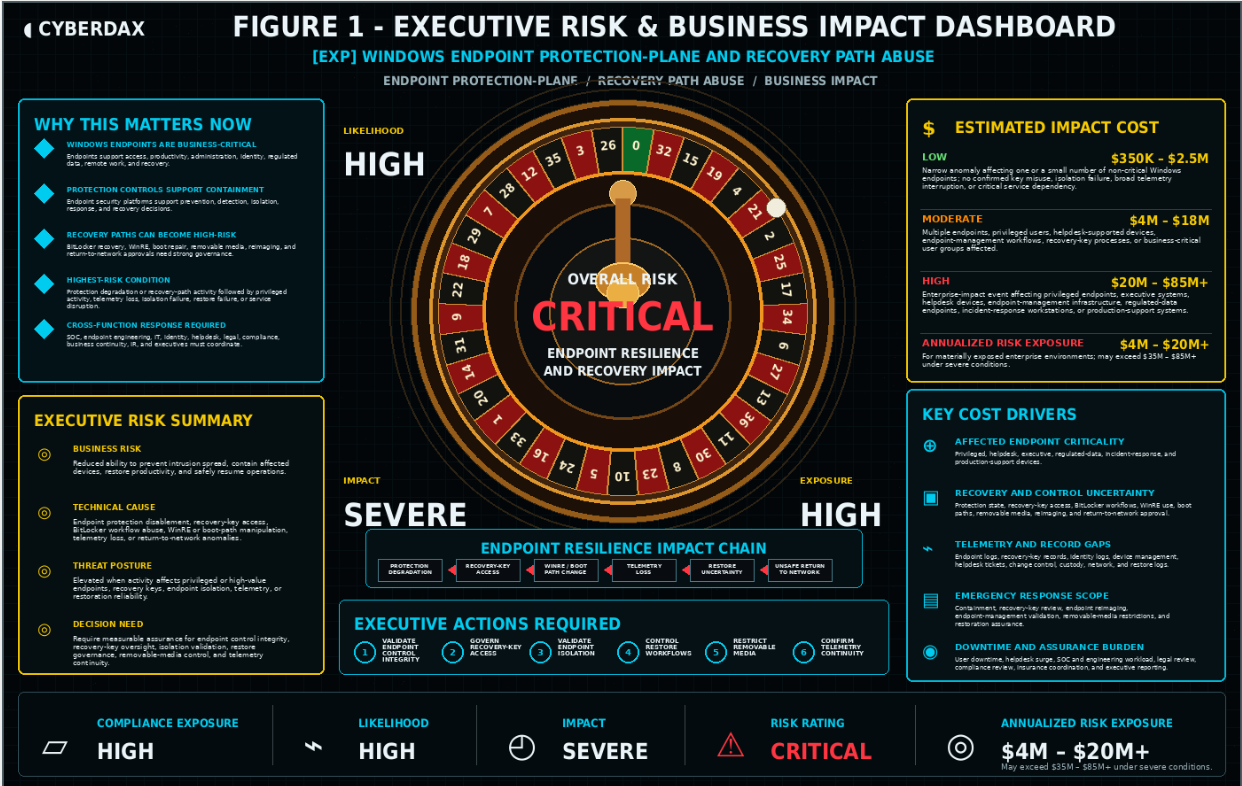
Figure 1
Compliance Exposure Indicator
High
Risk Register Entry
Risk Title
Windows Endpoint Protection-Plane and Recovery Path Abuse Exposure
Risk Description
Adversaries may degrade endpoint security controls, manipulate recovery workflows, access or misuse recovery keys, alter boot or recovery paths, abuse removable-media or offline recovery procedures, interfere with endpoint isolation, or create telemetry gaps that reduce the organization’s ability to protect, contain, restore, and safely return Windows endpoints to business use. This may increase business interruption, recovery uncertainty, legal and compliance review, cyber-insurance scrutiny, privileged-access exposure, and board-level concern around endpoint resilience and incident-recovery readiness.
Likelihood
High
Impact
Severe
Risk Rating
Critical
Annualized Risk Exposure
Estimated $4M – $20M+ for materially exposed enterprise environments with broad Windows endpoint dependency, privileged-user concentration, distributed helpdesk operations, incomplete recovery-key governance, weak endpoint isolation validation, limited recovery-path telemetry, inconsistent device-custody records, or incomplete return-to-network controls. Exposure may exceed $35M – $85M+ where protection-plane or recovery-path abuse affects privileged endpoints, endpoint-management infrastructure, regulated-data systems, executive users, incident-response devices, production-support systems, enterprise recovery confidence, legal or regulatory obligations, cyber-insurance review, or board-level reporting.
S7 Risk Drivers
· Windows endpoint protection and recovery controls are often treated as the organization’s containment and restoration foundation, which can turn control degradation into a broad enterprise-risk issue.
· Endpoint protection disablement, policy rollback, agent tampering, isolation failure, telemetry loss, or endpoint-management anomalies can reduce confidence that affected devices are protected or contained.
· Recovery-key access, BitLocker workflow anomalies, WinRE usage, boot-path manipulation, EFI changes, removable-media activity, or offline recovery actions increase concern when aligned with privileged access, device-custody gaps, or suspicious endpoint behavior.
· Business exposure increases when affected endpoints support administration, identity operations, finance, legal, executive functions, helpdesk operations, software deployment, incident response, regulated-data access, or production service support.
· Missing or inconsistent endpoint telemetry, recovery-key records, device-management logs, helpdesk tickets, device-custody records, removable-media logs, or change-control evidence can increase investigation scope and cost.
· Incomplete approval records for helpdesk recovery, encryption recovery, device repair, patch rollback, restore activity, endpoint reimage, boot repair, hardware maintenance, or business-continuity procedures can increase false positives and response burden.
· Limited ability to validate endpoint isolation, enforce recovery-key governance, restrict removable media, confirm endpoint agent health, verify endpoint-management integrity, or gate return-to-network access can extend business disruption during active events.
· Employee downtime, helpdesk surge, endpoint engineering workload, reimaging demand, legal review, compliance review, cyber-insurance coordination, and executive reporting can become material when endpoint restoration decisions are uncertain.
· Suspicious identity, network, file, process, cloud, or endpoint-management activity after recovery-path manipulation can expand the incident from endpoint recovery review into broader compromise validation, even though recovery activity alone does not prove durable adversary access.
S8 Bottom Line for Executives
Windows endpoint protection-plane and recovery path abuse should be treated as a high-priority endpoint resilience and recovery risk because it can weaken the controls the organization depends on to prevent intrusion spread, contain affected devices, restore user productivity, and resume business operations. The executive question is not only whether a specific endpoint was compromised; it is whether the organization can prove that protection controls, recovery keys, recovery workflows, endpoint isolation, boot paths, and return-to-network decisions remained reliable under incident conditions. Response must focus on validating endpoint control integrity, governing recovery-key access, hardening recovery workflows, maintaining endpoint telemetry continuity, integrating helpdesk and change-control context, and containing suspected control degradation or recovery abuse before it becomes broad restoration uncertainty or enterprise recovery failure.
S9 Board-Level Takeaway
Windows endpoint protection-plane and recovery path abuse turns endpoint security into a board-level resilience and recovery-governance issue. The risk is not simply that an endpoint agent was disabled, a recovery key was accessed, or a device required repair; it is the possibility that the systems used to protect, isolate, restore, and approve Windows endpoints for business use can be manipulated during an incident. Leadership should require evidence that endpoint protection controls, recovery-key governance, restoration workflows, endpoint isolation, boot and recovery paths, removable-media restrictions, helpdesk approvals, device-custody records, and return-to-network gates can support safe recovery when adversaries attempt to degrade or bypass endpoint controls.
S10 — Threat Overview
Windows endpoint protection-plane and recovery path abuse describes adversary behavior intended to degrade, bypass, manipulate, or create uncertainty around the controls used to protect, contain, recover, and reauthorize Windows endpoints during an intrusion or high-impact operational event. The behavior is most relevant when suspicious endpoint protection degradation, recovery-key access, BitLocker workflow activity, WinRE use, boot-path manipulation, EFI or boot configuration change, removable-media activity, offline access, endpoint isolation failure, restoration anomaly, or abnormal return-to-network behavior affects privileged workstations, helpdesk-supported devices, executive endpoints, regulated-data systems, endpoint-management workflows, or production-support systems.
· This is not only a single-malware, single-tool, single-EDR, single-BitLocker, single-helpdesk, or ordinary device-repair model.
· The core threat behavior is interference with endpoint protection controls, recovery workflows, recovery-key governance, endpoint isolation, boot and recovery paths, telemetry continuity, or restoration decisions.
· The primary risk is reduced ability to contain affected devices, restore user productivity, validate recovery actions, prevent reinfection, and safely return Windows systems to business use.
· Endpoint security telemetry, Windows event logs, BitLocker recovery-key records, device-management records, helpdesk tickets, identity logs, removable-media events, boot and recovery telemetry, backup and restore records, network telemetry, and change-control evidence may be incomplete or difficult to reconcile during active containment or recovery.
· The behavior can create uncertainty around endpoint control integrity, recovery-key exposure, device custody, endpoint isolation, restoration reliability, helpdesk workflow legitimacy, endpoint-management policy enforcement, and post-recovery network access.
· Current proof-point activity should support the relevance of the behavior class but should not narrow the report into a single product, single event ID, single registry key, single command, single endpoint platform, single support workflow, or single malware family.
S11 — Threat Classification and Type
Threat Type
Windows endpoint protection-plane degradation and recovery-path abuse exposure
Threat Sub-Type
Endpoint protection disablement, security-agent tampering, policy rollback, sensor degradation, endpoint isolation interference, host firewall or security policy weakening, Windows event logging interference, BitLocker recovery-key access, recovery workflow manipulation, WinRE abuse, boot-path manipulation, EFI or boot configuration change, removable-media use for offline access, unauthorized restore action, endpoint re-enrollment anomaly, endpoint-management manipulation, and abnormal post-recovery return-to-network behavior.
Operational Classification
Endpoint control-integrity and recovery-assurance abuse pathway
Primary Function
Degrade, bypass, manipulate, or exploit the systems and workflows used to protect, isolate, recover, and reauthorize Windows endpoints, creating uncertainty around containment decisions, restoration reliability, recovery-key exposure, endpoint-management integrity, and safe return to business operations.
S12 — Campaign or Activity Overview
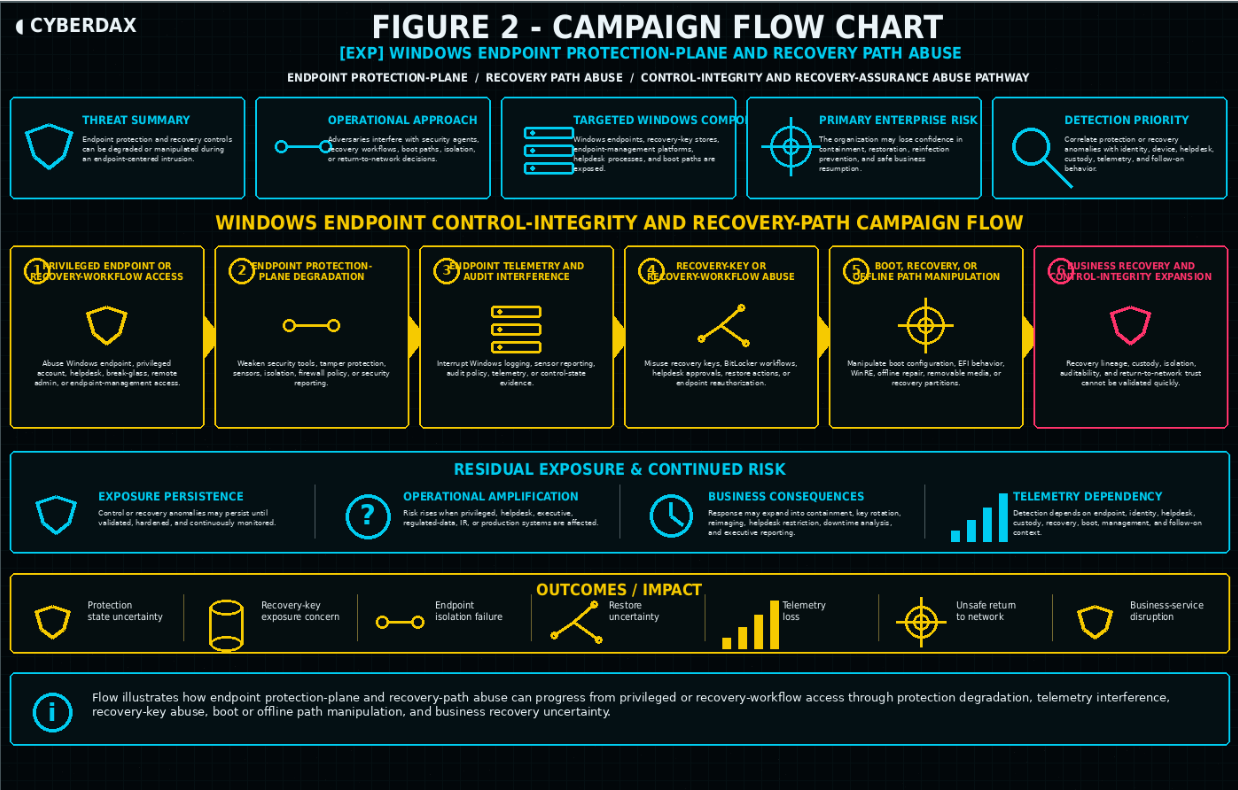
Figure 2
This report assesses Windows endpoint protection-plane and recovery path abuse as a durable behavior class rather than a single campaign. The activity pattern involves adversaries or unauthorized operators attempting to interfere with Windows endpoint protection controls, recovery mechanisms, recovery-key workflows, boot or recovery paths, removable-media handling, endpoint isolation, device restoration, or return-to-network decisions in ways that reduce containment effectiveness or recovery reliability.
· The activity is best understood as an endpoint resilience and recovery-governance threat rather than a simple malware alert, EDR health issue, helpdesk ticket, BitLocker event, or device-repair anomaly.
· Adversaries may target privileged workstations, helpdesk devices, endpoint-management systems, executive endpoints, finance or legal systems, regulated-data endpoints, incident-response workstations, production-support devices, or other Windows systems with high business or operational value.
· The behavior may involve security-agent tampering, policy rollback, sensor degradation, endpoint isolation interference, host firewall or audit-policy weakening, recovery-key retrieval, BitLocker workflow manipulation, WinRE access, boot repair misuse, EFI or boot configuration changes, removable-media usage for offline access, unauthorized restore action, device re-enrollment anomaly, or abnormal return-to-network approval.
· The activity may remain limited to suspicious control or recovery workflow changes, or it may progress into endpoint telemetry loss, containment delay, reinfection concern, privileged-access exposure, broad reimaging, endpoint-management review, user downtime, or business-service disruption.
· The activity becomes highest risk when suspicious endpoint protection or recovery behavior affects privileged users, administrators, helpdesk staff, executive users, regulated-data handlers, production-support teams, incident-response personnel, or systems used to administer identity, endpoints, software deployment, or business-critical operations.
· The report should remain focused on durable endpoint control-integrity and recovery-path abuse behavior rather than one command, one tool, one registry value, one vendor alert, one BitLocker event, one helpdesk workflow, one device state, or one malware family.
S13 — Targets and Exposure Surface
The exposure surface includes Windows endpoints, endpoint protection controls, recovery workflows, recovery-key stores, endpoint-management platforms, helpdesk processes, device-custody records, boot and recovery paths, removable-media handling, offline access procedures, and return-to-network controls that support containment and restoration decisions.
· Privileged administrator workstations, helpdesk devices, executive endpoints, finance systems, legal systems, regulated-data endpoints, incident-response workstations, production-support devices, and other high-value Windows endpoints.
· Windows endpoint security agents, endpoint detection and response controls, antivirus and tamper-protection settings, host firewall controls, endpoint isolation features, sensor health checks, policy enforcement mechanisms, and security telemetry pipelines.
· BitLocker recovery-key workflows, recovery-key retrieval records, key escrow systems, encryption recovery procedures, recovery approvals, and privileged access paths used to support device recovery.
· Windows Recovery Environment, boot repair workflows, boot configuration data, EFI paths, recovery partitions, offline repair mechanisms, removable-media boot paths, and manual recovery procedures.
· Device-management systems, endpoint re-enrollment workflows, mobile device management records, configuration profiles, endpoint compliance state, software deployment controls, and administrative policy changes.
· Helpdesk tickets, break-glass approvals, device repair records, custody transfers, user-support workflows, patch rollback records, device reimage approvals, and return-to-network decisions.
· Identity and access layers including privileged accounts, helpdesk accounts, endpoint administrators, local administrator access, break-glass accounts, service accounts, and identity logs that can connect recovery or protection actions to users or roles.
· Network and access-control layers that record endpoint isolation state, network quarantine, VPN access, NAC decisions, post-recovery network access, unusual reconnect behavior, or movement from recovered devices.
· Backup, restore, and business-continuity systems that support endpoint reimaging, user data restoration, device replacement, recovery validation, and business-process restoration.
· Environments with incomplete endpoint telemetry, weak recovery-key governance, limited boot and recovery visibility, inconsistent helpdesk records, weak device-custody tracking, unmonitored removable-media use, or incomplete change-control context.
S14 — Sectors / Countries Affected
Sectors Affected
· Technology and SaaS providers.
· Financial services and payment platforms.
· Healthcare and life sciences.
· Legal, consulting, and professional services.
· Manufacturing and industrial enterprises.
· Energy, utilities, and critical infrastructure operators.
· Retail and e-commerce.
· Telecommunications and internet service providers.
· Education and research institutions.
· Government and public-sector organizations.
· Media, business-services, and high-volume digital operations.
· Organizations with broad Windows endpoint dependency, privileged workstation exposure, distributed helpdesk operations, regulated-data handling, endpoint-management complexity, or high reliance on rapid endpoint recovery.
Countries Affected
· Global.
· Exposure is not limited to a single country or region because Windows endpoints, endpoint protection platforms, BitLocker recovery workflows, helpdesk processes, device-management systems, and endpoint recovery procedures are broadly deployed across enterprise environments.
· Countries with large regulated industries, cloud-enabled enterprises, distributed workforces, outsourced helpdesk operations, financial systems, healthcare providers, public-sector networks, or critical infrastructure operators may face elevated operational exposure.
· Country-specific impact should be assessed by Windows endpoint dependency, privileged-user concentration, recovery-key governance, endpoint-management maturity, helpdesk workflow control, telemetry quality, recovery readiness, and incident-response maturity rather than geography alone.
S15 — Adversary Capability Profiling
Capability Level
Moderate to High
Technical Sophistication
Adversaries require enough technical capability to understand endpoint security control behavior, tamper-protection boundaries, endpoint isolation workflows, recovery-key handling, BitLocker recovery processes, Windows Recovery Environment use, boot configuration, removable-media paths, endpoint-management policy behavior, helpdesk workflows, and return-to-network procedures. Lower-complexity activity may involve noisy security-agent tampering, obvious recovery-key misuse, visible policy changes, or misuse of local administrative access. More capable activity may blend recovery activity with legitimate helpdesk operations, manipulate timing around device repair or patch rollback, target privileged endpoints, create telemetry gaps, use administrative tooling, and stage actions to complicate separation from normal IT recovery.
Infrastructure Maturity
Moderate
Infrastructure maturity varies by activity pattern. Lower-maturity activity may rely on local administrative access, commodity tooling, removable media for offline access, basic script execution, or opportunistic endpoint protection disablement. Higher-maturity activity may use privileged identity access, endpoint-management systems, helpdesk workflows, remote administration channels, staged policy changes, coordinated recovery-key access, device re-enrollment manipulation, or post-recovery network behavior that appears operationally plausible.
Operational Scale
Single-device to multi-workflow enterprise exposure
Operational scale ranges from suspicious activity on one endpoint or recovery workflow to broader enterprise impact when attackers affect privileged devices, helpdesk-supported systems, executive endpoints, endpoint-management policies, recovery-key processes, device reimaging, endpoint isolation, or return-to-network approvals across multiple business units.
Escalation Likelihood
Moderate to High
Escalation likelihood is moderate to high when suspicious endpoint protection degradation or recovery-path activity affects privileged endpoints, disrupts endpoint isolation, exposes recovery keys, manipulates boot or recovery paths, creates endpoint telemetry loss, interferes with restoration, appears across multiple devices or support workflows, or aligns with suspicious identity, network, file, process, endpoint-management, or post-recovery activity. Escalation likelihood increases when telemetry gaps prevent rapid identity-to-device-to-recovery correlation or when recovery uncertainty affects business-critical users or regulated systems.
S16 — Targeting Probability Assessment
Overall Targeting Probability
High
Targeting Drivers
· Windows endpoints are broadly deployed across enterprise environments and frequently support privileged administration, identity operations, helpdesk activity, regulated data access, executive work, software deployment, incident response, and production support.
· Attackers benefit from endpoint protection-plane abuse because degrading controls can delay containment, reduce visibility, interfere with isolation, and complicate restoration without requiring immediate ransomware deployment or overt destructive action.
· Recovery workflows provide high-value opportunities when recovery-key access, WinRE activity, boot repair, removable-media handling, device reimaging, or return-to-network approvals are weakly governed or poorly logged.
· Privileged workstations, helpdesk systems, endpoint-management platforms, executive devices, finance systems, legal systems, regulated-data endpoints, and production-support devices create high business impact when control integrity or recovery reliability is uncertain.
· Activity that resembles legitimate troubleshooting, encryption recovery, patch rollback, device repair, helpdesk support, hardware replacement, emergency restore, or user-support workflows can make adversary-driven abuse harder to classify quickly.
· Missing endpoint telemetry, incomplete recovery-key audit logs, weak device-custody records, inconsistent helpdesk documentation, limited boot and recovery visibility, unmonitored removable-media use, and incomplete change-control context increase attacker opportunity and response uncertainty.
· Endpoint-management, identity, helpdesk, backup, restore, network-access, and business-continuity dependencies can amplify cost and complexity when endpoint recovery uncertainty affects multiple users, devices, workflows, or business services.
· Organizations with limited runbooks for endpoint protection degradation, recovery-key exposure, endpoint isolation failure, or post-recovery return-to-network approval may need more time to contain affected devices and validate safe restoration.
Most Likely Targets
· Privileged administrator workstations, helpdesk systems, executive endpoints, finance systems, legal systems, regulated-data endpoints, incident-response workstations, production-support devices, and other high-value Windows endpoints.
· Endpoint security controls, endpoint isolation mechanisms, tamper-protection settings, host firewall policies, endpoint telemetry pipelines, and device health enforcement.
· BitLocker recovery-key stores, recovery-key retrieval workflows, key escrow systems, encryption recovery procedures, and privileged recovery approvals.
· WinRE, boot repair workflows, boot configuration data, EFI paths, recovery partitions, removable-media boot paths, offline repair processes, and manual recovery procedures.
· Endpoint-management systems, device re-enrollment processes, compliance policies, software deployment workflows, configuration profiles, and administrative policy changes.
· Helpdesk ticketing systems, break-glass workflows, device repair processes, custody transfer records, patch rollback approvals, device reimage procedures, and return-to-network gates.
· Identity and access paths used by endpoint administrators, helpdesk staff, privileged users, service accounts, local administrators, and break-glass operators.
· Environments with broad Windows endpoint dependency, incomplete recovery-key governance, weak endpoint isolation validation, limited recovery-path telemetry, inconsistent device-custody records, unmonitored removable-media use, or limited SOC access to endpoint-management and helpdesk context.
S17 — MITRE ATT&CK Chain Flow Mapping
Stage 1: Privileged Endpoint or Recovery-Workflow Access
The adversary gains or abuses access to a Windows endpoint, privileged account, helpdesk workflow, break-glass process, remote administration path, endpoint-management channel, or support process that can influence endpoint protection state or recovery behavior.
· T1078 — Valid Accounts.
· T1021 — Remote Services. Use when access occurs through RDP, WinRM, SMB administration, endpoint-management remote access, or another remote service.
Stage 2: Endpoint Protection-Plane Degradation
The adversary attempts to weaken endpoint protection by disabling or modifying security tools, tamper protections, sensor behavior, security services, host firewall policy, endpoint isolation, or reporting paths.
· T1562.001 — Impair Defenses: Disable or Modify Tools.
· T1562.004 — Impair Defenses: Disable or Modify System Firewall. Use when host firewall policy, endpoint firewall enforcement, or local network-control policy is modified.
Stage 3: Endpoint Telemetry and Audit Interference
The adversary interferes with endpoint auditability by weakening Windows event logging, disrupting sensor reporting, interrupting security telemetry, or creating gaps that make recovery-path and protection-state lineage harder to validate.
· T1562.002 — Impair Defenses: Disable Windows Event Logging.
· T1562 — Impair Defenses. Use as the parent technique when telemetry interruption affects multiple defensive controls but does not map cleanly to a single sub-technique.
Stage 4: Recovery-Key or Recovery-Workflow Abuse
The adversary accesses, misuses, or manipulates recovery-key processes, encryption recovery workflows, helpdesk recovery approvals, break-glass recovery activity, device restoration, or endpoint reauthorization to support continued access, conceal activity, or complicate recovery decisions.
· T1078 — Valid Accounts.
· No additional ATT&CK technique unless recovery keys, escrowed secrets, support credentials, or recovery material are demonstrably exposed from insecure storage or misuseable repositories.
Stage 5: Boot, Recovery, or Offline Path Manipulation
The adversary uses or manipulates boot configuration, EFI behavior, pre-OS mechanisms, recovery-environment access, offline repair paths, removable-media boot activity, or recovery partition behavior to operate outside normal endpoint control visibility or alter device state before standard security controls are active.
· T1542 — Pre-OS Boot.
Stage 6: Conditional Encryption or Recovery Impact
This stage applies only when recovery-path abuse, BitLocker misuse, encryption workflow manipulation, or endpoint control degradation contributes to data inaccessibility, recovery obstruction, or ransomware-style operational impact. It should not be inferred from recovery-key access or BitLocker activity alone.
· T1486 — Data Encrypted for Impact.
Stage 7: Business Recovery and Control-Integrity Expansion
The organization may need to treat the event as a broader endpoint resilience and recovery-governance incident when endpoint protection state, recovery-key activity, boot or recovery-path behavior, helpdesk approvals, device custody, endpoint isolation, auditability, and return-to-network controls cannot be validated quickly. This stage represents operational impact and response expansion rather than a separate adversary technique.
· No additional ATT&CK technique; continuation of defense-evasion, recovery-impact, and business-resilience consequences.
S18 — Attack Path Narrative (Signal-Aligned Execution Flow)
Windows endpoint protection-plane and recovery path abuse begins when an adversary gains or abuses access to a Windows endpoint, privileged account, helpdesk workflow, endpoint-management channel, remote administration path, or recovery process that can influence endpoint protection state or recovery behavior. The attacker’s objective is to weaken control integrity, interrupt endpoint visibility, manipulate recovery workflows, pressure recovery-key processes, alter boot or recovery paths, interfere with endpoint isolation, or affect whether restored systems can resume business use. The attack path is defined by privileged or recovery-workflow access, endpoint protection-plane degradation, telemetry and audit interference, recovery-key or recovery-workflow abuse, boot or offline recovery-path manipulation, conditional encryption or recovery impact, and broader business recovery and control-integrity expansion.
Stage 1: Privileged Endpoint or Recovery-Workflow Access
The adversary obtains or abuses access to a Windows endpoint, privileged account, helpdesk workflow, break-glass process, remote administration path, endpoint-management channel, or support process that can influence endpoint protection state or recovery behavior. Access to an endpoint or support workflow is not sufficient by itself to establish malicious activity because legitimate helpdesk, endpoint engineering, device repair, encryption recovery, patch rollback, and business-continuity processes may use similar paths. This stage becomes material when access occurs from unusual identity context, unmanaged devices, unfamiliar source locations, abnormal time windows, unsupported administrative tooling, weak approval lineage, or activity that does not align with approved support or change-control records.
Stage 2: Endpoint Protection-Plane Degradation
The adversary attempts to weaken endpoint protection by disabling or modifying security tools, tamper protections, sensor behavior, endpoint isolation, host firewall enforcement, policy configuration, or security-service reporting. This stage changes the event from ordinary endpoint administration into potential protection-plane abuse. The key signal is not one agent health alert, policy change, service restart, or endpoint-support action by itself; it is protection degradation that aligns with suspicious identity activity, privileged access, telemetry interruption, administrative override, unmanaged tooling, device-custody gaps, or activity affecting high-value endpoints.
Stage 3: Endpoint Telemetry and Audit Interference
The adversary interferes with endpoint auditability by weakening Windows event logging, disrupting sensor reporting, interrupting security telemetry, modifying audit policy, suppressing control-state evidence, or creating gaps in device, identity, or recovery lineage. This stage is operationally significant because responders may lose the ability to prove whether control degradation, recovery-key access, restore activity, or return-to-network approval was legitimate. Confidence increases when telemetry loss aligns with protection-state changes, suspicious administrative actions, recovery workflow use, endpoint-management anomalies, or activity on privileged, executive, helpdesk, regulated-data, incident-response, or production-support systems.
Stage 4: Recovery-Key or Recovery-Workflow Abuse
The adversary accesses, misuses, or manipulates recovery-key processes, BitLocker recovery workflows, helpdesk recovery approvals, break-glass recovery activity, device restoration, endpoint reauthorization, or return-to-network procedures. This stage can support continued access, conceal unauthorized activity, delay containment, or complicate decisions about device restoration. It becomes highest risk when recovery-key retrieval, encryption recovery, device repair, reimage approval, restore workflow, or endpoint reauthorization cannot be tied to a legitimate user, support case, device-custody record, change-control entry, or approved business-continuity process.
Stage 5: Boot, Recovery, or Offline Path Manipulation
The adversary uses or manipulates boot configuration, EFI behavior, pre-OS mechanisms, recovery-environment access, offline repair paths, removable-media boot activity, or recovery partition behavior to operate outside normal endpoint control visibility or alter device state before standard security controls are active. This stage should be evaluated carefully because legitimate recovery, hardware repair, encryption recovery, patch rollback, and emergency restoration may use the same mechanisms. The activity becomes materially significant when boot or recovery-path changes align with unauthorized access, recovery-key misuse, removable-media anomalies, endpoint telemetry loss, unmanaged administrative tooling, failed containment, or abnormal post-recovery network behavior.
Stage 6: Conditional Encryption or Recovery Impact
Recovery-path abuse, BitLocker misuse, encryption workflow manipulation, endpoint control degradation, or restoration interference may contribute to data inaccessibility, recovery obstruction, reinfection concern, prolonged device outage, or ransomware-style operational impact. This stage should remain conditional and should not be inferred from recovery-key access, BitLocker activity, or endpoint repair alone. It becomes relevant only when file, volume, encryption, recovery, user-impact, business-service, incident-response, or restoration evidence supports a connection between protection-plane or recovery-path abuse and operational recovery impact.
Stage 7: Business Recovery and Control-Integrity Expansion
When endpoint protection state, recovery-key activity, boot or recovery-path behavior, helpdesk approvals, device custody, endpoint isolation, auditability, and return-to-network controls cannot be validated quickly, the organization may need to treat the event as a broader endpoint resilience and recovery-governance incident. Response can expand into endpoint containment, privileged-access review, recovery-key revalidation or rotation, device reimaging, endpoint-management policy review, helpdesk workflow restriction, removable-media lockdown, boot and recovery-path validation, business-service downtime analysis, legal review, cyber-insurance coordination, executive reporting, and longer-term telemetry improvement. Business impact increases because responders must prove both whether endpoint controls were degraded and whether restored Windows systems can safely resume business use.
S19 — Attack Chain Risk Amplification Summary
Windows endpoint protection-plane and recovery path abuse amplifies risk because it targets the systems, workflows, and trust decisions that organizations rely on to contain affected devices, recover users, and return Windows endpoints to business operations. The chain becomes materially more dangerous when suspicious endpoint protection degradation is followed by telemetry loss, recovery-key access, boot or recovery-path manipulation, endpoint isolation failure, restore uncertainty, abnormal return-to-network behavior, or inability to prove whether recovery actions were legitimate or adversary-driven.
· Privileged endpoints and support workflows create high-value pathways because they can influence endpoint protection state, recovery-key access, endpoint isolation, device repair, reimaging, and return-to-network approval.
· Endpoint protection disablement, policy rollback, agent tampering, sensor degradation, host firewall weakening, or endpoint isolation interference increases risk when it affects privileged, executive, helpdesk, regulated-data, incident-response, or production-support systems.
· Windows event logging interference, audit-policy weakening, sensor reporting interruption, or endpoint telemetry loss increases risk because responders may lose the evidence needed to validate protection state, recovery-key use, device custody, and restoration lineage.
· Recovery-key retrieval, BitLocker workflow manipulation, helpdesk recovery approval, break-glass recovery use, or endpoint reauthorization becomes materially significant when it lacks clear identity, ticketing, device-custody, change-control, or business-continuity justification.
· Boot configuration changes, EFI activity, WinRE use, offline repair paths, recovery partition activity, or removable-media boot behavior increase concern when aligned with unauthorized access, telemetry gaps, endpoint control degradation, or abnormal post-recovery network behavior.
· Endpoint isolation failure, delayed containment, device quarantine gaps, endpoint re-enrollment anomalies, or unsafe return-to-network decisions can expand the incident from device repair into enterprise recovery-risk exposure.
· Reinfection concern, prolonged device outage, broad reimaging, recovery-key revalidation, endpoint-management review, and helpdesk surge activity can turn a small endpoint event into a costly business-resumption problem.
· Business exposure increases when affected systems support identity administration, software deployment, helpdesk operations, finance, legal, executive work, regulated data, incident response, production support, or business-continuity operations.
· Incomplete endpoint telemetry, recovery-key records, device-management logs, helpdesk tickets, device-custody evidence, removable-media logs, boot telemetry, or change-control records can force broader validation because the organization cannot quickly prove recovery lineage.
· Change-control gaps increase false-positive and response burden when agent troubleshooting, device repair, encryption recovery, patch rollback, restore activity, hardware maintenance, business-continuity actions, or endpoint reimaging cannot be ruled in or out.
· Response burden increases because teams must validate identity context, endpoint protection state, recovery-key access, boot and recovery-path behavior, device custody, helpdesk approvals, endpoint isolation, restoration actions, and any conditional follow-on activity after return to network.
S20 — Tactics, Techniques, and Procedures
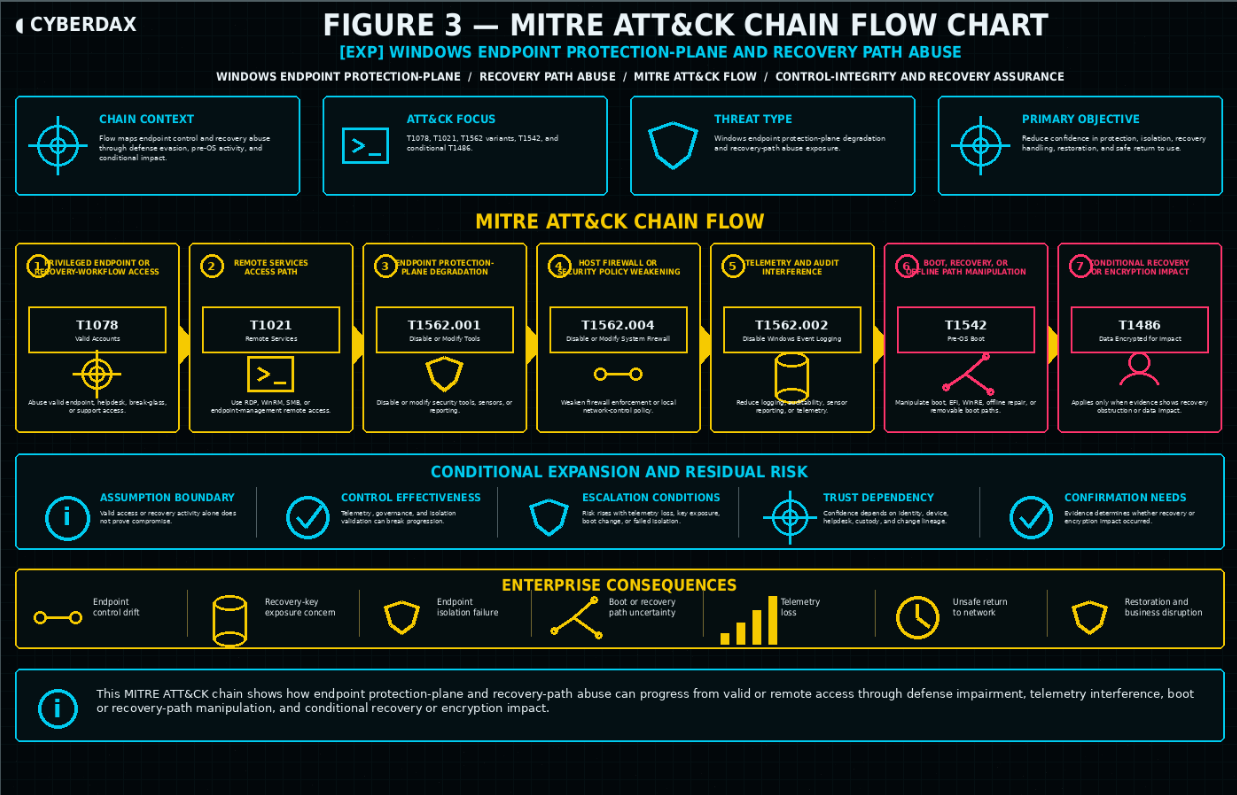
Figure 3
Privileged Endpoint or Recovery-Workflow Access
Adversaries may gain or abuse access to privileged Windows endpoints, helpdesk workflows, endpoint-management channels, break-glass processes, remote administration paths, or support procedures that can influence endpoint protection or recovery behavior. This behavior becomes risk-relevant when access occurs outside normal source, identity, device, approval, timing, ticketing, or change-control patterns.
Endpoint Protection Disablement and Tool Tampering
Adversaries may disable, modify, degrade, or bypass endpoint protection controls, including security agents, tamper-protection settings, host firewall policy, endpoint isolation features, sensor health controls, policy enforcement, or reporting mechanisms. This behavior should be evaluated against approved endpoint engineering activity, tool troubleshooting, agent upgrades, policy rollbacks, and break-glass operations before being treated as malicious.
Endpoint Telemetry and Audit Weakening
Adversaries may weaken endpoint auditability by disrupting Windows event logging, changing audit policy, interrupting sensor reporting, suppressing security telemetry, degrading device-health reporting, or creating gaps in endpoint-management and recovery lineage. This activity becomes high risk when it aligns with protection-state changes, recovery workflow activity, privileged identity use, or actions on high-value endpoints.
Recovery-Key and BitLocker Workflow Abuse
Adversaries may access, misuse, or manipulate BitLocker recovery-key workflows, key escrow processes, encryption recovery procedures, helpdesk recovery approvals, break-glass recovery actions, or device reauthorization processes. This behavior should be tied to identity, device, ticketing, custody, timing, and change-control context before being treated as adversary-driven.
Boot, EFI, WinRE, and Offline Recovery Path Manipulation
Adversaries may manipulate boot configuration, EFI behavior, Windows Recovery Environment access, offline repair paths, recovery partitions, removable-media boot activity, or manual recovery procedures to alter device state outside normal endpoint control visibility. This activity becomes materially significant when it aligns with unauthorized access, endpoint telemetry loss, recovery-key anomalies, device-custody gaps, or post-recovery network behavior.
Endpoint Isolation and Return-to-Network Abuse
Adversaries may interfere with endpoint isolation, device quarantine, endpoint re-enrollment, restore approval, network-access control, VPN reconnection, or return-to-network decisions. The highest-risk condition occurs when affected devices regain access to business services, privileged workflows, identity systems, endpoint-management platforms, or regulated-data environments before recovery integrity can be validated.
Operational Blending
Adversaries may blend endpoint protection-plane or recovery-path abuse into legitimate agent troubleshooting, device repair, encryption recovery, hardware replacement, patch rollback, emergency restore, business-continuity activity, helpdesk support, endpoint reimaging, or user-support workflows. This behavior is effective because Windows endpoint recovery routinely involves administrative overrides, recovery-key retrieval, boot repair, device custody changes, and restoration decisions.
Conditional Recovery or Encryption Impact
Adversaries may create or exploit conditions that delay recovery, obstruct restoration, contribute to data inaccessibility, increase reinfection concern, or produce ransomware-style business impact. This behavior should remain conditional unless endpoint, file, volume, encryption, recovery, incident-response, or business-impact evidence supports a connection to protection-plane or recovery-path abuse.
S20A — Adversary Tradecraft Summary
Windows endpoint protection-plane and recovery path abuse targets endpoint containment and recovery reliability rather than durable access by default. The adversary objective is to degrade or manipulate the controls and workflows that determine whether Windows endpoints can be protected, isolated, restored, and safely returned to business use. The tradecraft is effective because it can resemble normal endpoint troubleshooting, helpdesk support, encryption recovery, patch rollback, device repair, business-continuity activity, or endpoint reimaging while still creating meaningful uncertainty around control integrity and recovery decisions.
· The core tradecraft pattern is suspicious endpoint protection degradation followed by telemetry loss, recovery workflow activity, boot or recovery-path manipulation, endpoint isolation uncertainty, or abnormal return-to-network behavior.
· The behavior is not dependent on a single CVE, malware family, product, vendor alert, registry key, event ID, command, recovery workflow, support ticket, or endpoint platform.
· Adversaries may use privileged access, helpdesk workflows, endpoint-management channels, remote administration paths, security-agent tampering, policy rollback, event logging interference, recovery-key access, WinRE activity, boot repair, offline access, removable-media boot activity, or endpoint reauthorization.
· The strongest operational risk occurs when suspicious protection or recovery activity affects privileged endpoints, helpdesk devices, executive systems, regulated-data endpoints, incident-response workstations, production-support systems, identity-administration devices, or endpoint-management workflows.
· Detection requires visibility into both the endpoint protection-plane behavior that initiates the chain and the identity, helpdesk, device-custody, recovery, boot, endpoint-management, network, and business-context evidence that confirms or disproves impact.
· Response requires treating suspected endpoint protection-plane or recovery-path abuse as an endpoint resilience and recovery-governance incident, not a routine agent-health alert, isolated BitLocker event, helpdesk ticket, or device repair case.
· The behavior remains durable because the adversary objective is to convert normal endpoint administration and recovery workflows into containment uncertainty, restoration delay, recovery-key exposure concern, endpoint-management review, or unsafe return-to-network risk, regardless of the specific endpoint security platform, support process, device model, user group, or administrative tool used.
S21 Detection Strategy Overview
Detection Philosophy
Detect Windows endpoint protection-plane and recovery-path abuse as a chained control-integrity and endpoint-trust failure pattern, not as a single product alert, exploit name, vulnerability label, recovery event, vendor condition, or isolated configuration change.
The detection strategy focuses on observable attacker-driven degradation, manipulation, misuse, or bypass of Windows endpoint protection and recovery controls after suspicious privilege transition, local administrative activity, endpoint-management abuse, hands-on-keyboard execution, recovery-context access, support-workflow misuse, or physical-access-adjacent activity.
Endpoint protection-plane abuse includes attacker-driven reduction of Defender, EDR, antivirus, endpoint telemetry, update integrity, remediation behavior, sensor health, security intelligence freshness, security-control configuration, and managed protection posture.
Recovery-path abuse includes suspicious access to or manipulation of BitLocker recovery keys, recovery-key escrow, WinRE configuration, boot configuration, EFI or system partition content, removable-media staging, BitLocker protector state, endpoint recovery workflows, and return-to-network behavior after a host has entered a degraded, recovered, offline, or visibility-impaired state.
The durable detection objective is to identify the operational sequence in which an adversary, insider, unauthorized support actor, or physical-access-adjacent actor weakens endpoint protection, abuses recovery pathways, misuses recovery-key access, alters boot or recovery posture, reduces telemetry confidence, prepares credential access, enables local data exposure, or resumes activity after a recovery event or telemetry gap.
The primary analytical unit is the behavior chain: suspicious privilege, administrative, identity, support, device-management, or physical-access context, followed by endpoint protection-plane degradation or recovery-path manipulation, followed by optional recovery-key activity, BitLocker state deviation, WinRE or boot-path modification, EFI or system partition activity, removable-media staging, credential access, persistence, outbound communication, lateral movement preparation, local data access, or suspicious return-to-network behavior.
This section does not treat Defender tampering, recovery-key access, WinRE activity, boot configuration change, EFI or system partition access, BitLocker recovery, removable-media activity, endpoint recovery, or telemetry loss as independently confirmed compromise without supporting host, identity, process, device-management, recovery, helpdesk, custody, posture, or follow-on behavioral evidence.
Primary Detection Anchors
· Suspicious privilege transition followed by endpoint protection-plane degradation, recovery-path manipulation, recovery-context access, or recovery-control state change on the same host or managed device.
· Local administrative activity followed by Defender, EDR, antivirus, update-service, device-management, recovery configuration, BitLocker, WinRE, EFI, boot configuration, endpoint telemetry, endpoint compliance, or security-control posture modification.
· Endpoint protection configuration tampering involving real-time protection, behavior monitoring, cloud-delivered protection, sample submission, tamper protection, remediation behavior, exclusions, update settings, telemetry forwarding, sensor health, security intelligence freshness, or security-control policy state.
· Security intelligence update suppression, update-source manipulation, policy downgrade, service disablement, telemetry reduction, endpoint sensor degradation, or endpoint compliance drift after suspicious local administrative activity.
· BitLocker recovery-key access, recovery-key retrieval, recovery-key export, recovery-key escrow access, unusual recovery-key volume, unexpected recovery-key access timing, recovery-key rotation failure, or recovery-key handling inconsistent with approved role, ticket, device-owner, support queue, location, source device, application, or time-window context.
· WinRE enablement, disablement, relocation, image modification, recovery configuration change, recovery-environment invocation, or recovery workflow activity that does not align with approved recovery, repair, rebuild, incident-response, imaging, patching, firmware, or helpdesk workflows.
· Boot entry creation, boot entry modification, boot policy change, boot path redirection, startup repair activity, boot manager modification, bootloader modification, Secure Boot posture deviation, or recovery-option modification after suspicious privilege context, endpoint protection degradation, removable-media activity, recovery-key access, or device-management conflict.
· EFI or system partition mount, write, file creation, file modification, file deletion, file replacement, file renaming, or staging activity outside approved firmware, deployment, repair, imaging, endpoint-servicing, or operating-system maintenance workflows.
· BitLocker protector change, recovery-mode entry, unlock behavior, encryption-state change, suspension, disablement, recovery-policy deviation, recovery-key escrow drift, or encryption compliance change that conflicts with expected device posture, endpoint class, management policy, or support workflow.
· Removable-media insertion, volume mount, file staging, script execution, repair-media use, or removable-media transfer followed by recovery, boot, BitLocker, disk-management, partition-management, volume, EFI, endpoint posture, or return-to-network activity.
· Broad or suspicious exclusion creation for user-writable paths, temporary directories, archive-extraction paths, recovery staging paths, administrative shares, removable-media paths, mounted volumes, script paths, attacker tooling locations, or recovery workflow directories.
· Credential access, LSASS interaction, SAM access, browser credential access, recovery-key access, sensitive-file access, archive creation, local data staging, credential enumeration, persistence behavior, outbound transfer, or remote administration after endpoint protection-plane degradation or recovery-path anomaly on the same host.
· Suspicious return-to-network behavior after endpoint recovery, telemetry loss, extended offline interval, WinRE activity, recovery-mode transition, endpoint rebuild, BitLocker event, removable-media activity, boot anomaly, or endpoint sensor health degradation.
· Security-control and recovery-path integrity drift from expected managed posture to reduced local protection, altered recovery posture, impaired telemetry posture, weakened encryption assurance, or recovery-path state inconsistent with centralized policy.
Detection Prioritization Model
· Highest priority detections identify a sequenced relationship between suspicious privilege, administrative, identity, support, or device-management activity and endpoint protection-plane degradation, recovery-path manipulation, recovery-key misuse, BitLocker state deviation, EFI or system partition activity, or suspicious return-to-network behavior.
· High priority detections include recovery-key access, BitLocker state change, WinRE modification, boot-path manipulation, EFI or system partition modification, or endpoint recovery activity when correlated with abnormal identity context, suspicious local administrative activity, unusual parent process, recently elevated account context, unauthorized management path usage, endpoint protection degradation, device-management conflict, helpdesk mismatch, or custody concern.
· High priority detections include security intelligence or update suppression when correlated with suspicious local administrative activity, abnormal execution context, unauthorized management path usage, local update manipulation, endpoint protection-plane degradation, or abnormal account behavior.
· Medium priority detections include protection-state degradation, recovery-path drift, recovery-policy mismatch, boot configuration modification, removable-media staging, EFI or system partition access, BitLocker posture change, or endpoint compliance drift when tied to unusual administrative tooling, newly privileged accounts, non-standard execution paths, suspicious parent-child process relationships, unmanaged local policy changes, physical-access exposure, or recovery-workflow inconsistency.
· Conditional detections include credential access, persistence, outbound communication, lateral movement preparation, local data access, remote administration, or sensitive-file staging only when endpoint protection-plane degradation, recovery-path manipulation, recovery-key access, BitLocker recovery anomaly, removable-media staging, telemetry gap, or suspicious recovery-state transition occurs first on the same host within a bounded time window.
· Low priority monitoring includes uncorrelated endpoint protection drift, isolated update failure, expected service restart, routine BitLocker recovery, approved recovery-key access, approved WinRE maintenance, expected endpoint rebuild, normal firmware servicing, approved imaging activity, sanctioned helpdesk recovery, or centrally approved policy change.
· Low-priority conditions must not be deployed as standalone high-confidence detections.
· Detection priority is based on behavior-chain strength, recovery-context specificity, identity and device context, endpoint class, custody relevance, telemetry reliability, deployability, variant resilience, false-positive control, and expected operational noise.
Correlation Strategy
Each deployable rule must independently correlate its own telemetry inputs. Detection logic must not depend on the output, alert state, score, enrichment label, triage conclusion, DRI, TCR, or conclusion of another rule.
Correlation must be based on direct observable evidence, including host identity, device identity, account identity, process identity, parent process, command line, affected setting, registry path, service action, recovery event, recovery-key access event, BitLocker state, WinRE state, boot configuration artifact, EFI or system partition activity, endpoint protection-state transition, device posture state, helpdesk context, custody context, event time, and follow-on behavior.
Correlation windows must be explicit, bounded, and operationally deployable.
Same-host correlation is required for endpoint protection-plane degradation, recovery-path manipulation, recovery-key activity, BitLocker state change, EFI or system partition activity, removable-media staging, and follow-on credential access, persistence, outbound communication, local data access, or lateral movement logic.
Same-device and same-identity correlation should be used for recovery-key access, BitLocker recovery events, device-management actions, endpoint recovery workflows, endpoint compliance drift, support-workflow activity, and return-to-network behavior.
Same-account correlation should be used when available, but detection logic must account for SYSTEM-context execution, service execution, token elevation, token theft, endpoint-management execution, remote administrative execution, helpdesk workflow execution, delegated support access, break-glass workflows, and recovery actions where the initiating account may differ from the resulting local state change.
Process-chain correlation should be prioritized where EDR, Sysmon, Windows eventing, Defender for Endpoint, or equivalent telemetry supports parent process, grandparent process, signer, path, hash, command-line, removable-media path, volume context, and process-to-network fields.
Recovery-path correlation should validate whether recovery-key access, WinRE activity, boot-path change, BitLocker state change, EFI or system partition activity, removable-media activity, or endpoint recovery action aligns with approved device-management, helpdesk, incident-response, repair, imaging, firmware, rebuild, deployment, or break-glass workflows.
Helpdesk, ticketing, asset-management, and custody correlation should validate whether recovery-key access, recovery activity, boot-state change, device offline interval, physical handling, loaner assignment, repair event, shipping event, asset transfer, loss, theft, or user request explains the observed behavior.
Return-to-network correlation should evaluate whether a recently recovered, telemetry-impaired, protection-degraded, custody-concerning, or BitLocker-recovered endpoint resumes outbound communication, remote administration, internal authentication, file transfer, cloud upload, VPN activity, or lateral movement preparation inconsistent with its expected host role.
Cross-platform enrichment may support triage, but it must not be required for detection unless the rule explicitly defines that dependency.
Suspicious context must be embedded in the detection logic rather than left for analysts to infer after alert generation.
Telemetry Prioritization
Endpoint process, command-line, parent-child process, user-context, elevation-context, and service-context telemetry has the highest priority because protection-plane and recovery-path abuse often leaves observable precursor or post-recovery runtime evidence.
Endpoint protection-state telemetry has equal priority because the detection model depends on observing a transition from expected protected posture to reduced, bypassed, impaired, stale, unmanaged, or policy-conflicting protection posture.
Recovery-key and identity telemetry are priority sources because recovery-key retrieval is a high-value control-plane event when it deviates from expected role, device, ticket, support queue, location, source device, application, or time-window context.
Recovery-path telemetry is required to identify suspicious BitLocker state change, WinRE state change, boot configuration modification, EFI or system partition activity, removable-media staging, recovery workflow initiation, endpoint telemetry loss, recovery prompt, and return-to-network behavior after recovery activity.
Device-management and endpoint-security policy telemetry is required to distinguish attacker-driven local degradation or recovery-path manipulation from approved centralized policy deployment, helpdesk recovery, endpoint rebuild, troubleshooting, security engineering, repair, imaging, firmware servicing, migration, incident response, or break-glass workflows.
Windows Security logs, Windows System logs, Defender operational logs, PowerShell logs, Sysmon or equivalent process telemetry, registry telemetry, service-control telemetry, BitLocker telemetry, recovery-key access logs, Entra ID or identity-provider audit logs, Intune or MDM telemetry, device-compliance telemetry, endpoint protection-state telemetry, EDR device events, removable-media telemetry, volume-mount telemetry, endpoint availability telemetry, and endpoint sensor health telemetry are priority sources.
Helpdesk, ticketing, asset-management, lost-device, repair, loaner, shipping, asset-transfer, and device-custody records are required triage context where recovery-key, recovery-path, boot, or physical-access-adjacent activity is involved.
SIEM telemetry is useful when it preserves normalized process, command-line, account, host, device, registry, service, policy, recovery, recovery-key, BitLocker, WinRE, boot configuration, EFI or system partition, removable-media, device posture, endpoint availability, protection-state, and timestamp fields.
Network telemetry is supporting context and must not be used as the primary rule basis for core endpoint protection-plane degradation, recovery-key misuse, WinRE abuse, EFI or system partition manipulation, boot-path modification, BitLocker bypass conditions, or offline recovery-path activity.
NDR / Network Behavioral Analytics is conditionally useful for identifying suspicious egress, unusual outbound transfer, remote administration, lateral movement preparation, command-and-control preparation, suspicious VPN activity, and suspicious return-to-network behavior after endpoint protection-plane degradation, recovery-path anomaly, telemetry gap, custody concern, or recovery event.
Cloud telemetry is conditionally useful when it records endpoint-management policy changes, recovery-key access, device compliance changes, Defender for Endpoint device events, security-control configuration drift, remote administrative actions, device-risk state transitions, centralized recovery workflows, helpdesk actions, or remediation events.
Detection Design Constraints
· Do not attempt direct exploit detection unless concrete exploit-specific telemetry exists.
· Do not deploy a rule based only on exploit, tool, vendor, recovery, USB, proof-of-concept, or threat terminology.
· Do not rely on exploit-name strings, proof-of-concept filenames, USB labels, tool labels, hashes, repository artifacts, recovery-event names, CVE identifiers, or threat-name keywords as primary detection logic.
· Do not deploy generic Defender tampering logic without suspicious context.
· Do not deploy generic endpoint security-control tampering logic without suspicious context.
· Do not deploy a rule based only on a Defender, antivirus, EDR, endpoint protection, endpoint security update failure, endpoint protection service restart, or isolated service restart.
· Do not deploy generic update failure as a standalone rule.
· Do not deploy rules that alert on failed security updates unless the failure is paired with local manipulation, suspicious administrative context, unauthorized policy change, update-source manipulation, endpoint protection-plane degradation, or abnormal execution context.
· Do not deploy generic recovery-key access logic without suspicious identity, device, role, ticket, administrative, support, recovery-workflow, custody, posture, or follow-on context.
· Do not deploy a rule based only on BitLocker recovery, BitLocker suspension, WinRE activity, boot configuration change, EFI or system partition activity, removable-media insertion, endpoint rebuild, endpoint recovery workflow, endpoint offline interval, endpoint telemetry gap, or recovery workflow execution.
· Do not deploy a rule based only on a configuration change by a known management platform during an approved change window.
· Do not deploy a rule that treats generic endpoint protection-plane degradation or recovery-path drift as malicious without suspicious privilege, administrative, execution, policy, recovery, identity, support, custody, device, physical-access, or follow-on context.
· Do not deploy network-only rules for the core behavior.
· Do not treat NDR / Network Behavioral Analytics as direct evidence of Defender exploitation, recovery-key misuse, WinRE abuse, EFI manipulation, BitLocker bypass, offline access, physical-access recovery manipulation, or endpoint protection-plane degradation.
· Do not deploy a rule that treats suspicious egress, unusual outbound transfer, remote administration, VPN activity, command-and-control-like behavior, or lateral movement preparation as proof of recovery-path abuse unless it is chained to host-level protection degradation, recovery-path anomaly, telemetry gap, recovery event, custody concern, or suspicious return-to-network behavior.
· Do not make Microsoft Defender the only relevant endpoint-control class.
· Do not assume all recovery-path abuse requires removable media.
· Do not assume all suspicious recovery-path behavior occurs while the full Windows operating system is running.
· Do not infer malicious activity from expected security engineering, help desk remediation, endpoint rebuild, BitLocker recovery, WinRE maintenance, firmware servicing, operating-system repair, EDR migration, approved imaging, approved policy deployment, maintenance windows, break-glass recovery, vendor support, or incident-response workflows.
· Do not deploy a rule that requires analysts to manually infer suspicious context after alert generation.
· Do not use prior alert status, another detection’s output, DRI, TCR, or post-alert analyst judgment as detection input.
· Do not deploy a rule that cannot be implemented with available telemetry, bounded correlation, environment-specific baselines, known-good posture definitions, approved recovery workflow definitions, support-workflow context, custody context, and operational allowlisting.
· Do not treat telemetry absence as proof of compromise, but do not treat it as benign when it follows suspicious recovery-key access, endpoint protection-plane degradation, WinRE change, boot-path change, EFI or system partition activity, removable-media staging, abnormal recovery behavior, physical-custody concern, endpoint posture drift, or suspicious return-to-network behavior.
Baseline and Deployment Requirements
· Establish approved administrative baselines for endpoint-security configuration changes, endpoint recovery workflows, recovery-key handling, BitLocker operations, WinRE maintenance, boot configuration changes, EFI or system partition servicing, removable-media use, endpoint rebuild activity, repair workflows, imaging workflows, and firmware servicing.
· Establish known-good protection-plane and recovery-path posture definitions by endpoint class, including workstation, server, domain controller, privileged access workstation, developer endpoint, cloud workload, executive endpoint, field device, shared lab system, kiosk, loaner device, repair-handled device, and high-value asset groups.
· Define expected protection posture for each endpoint class, including real-time protection, behavior monitoring, cloud-delivered protection, sample submission, tamper protection, remediation behavior, exclusion policy, update cadence, update source, service state, security intelligence freshness, sensor health, endpoint compliance, and telemetry forwarding.
· Define expected recovery posture for each endpoint class, including BitLocker state, protector configuration, recovery-key escrow path, recovery-key access policy, WinRE state, boot configuration baseline, Secure Boot posture, TPM posture, PCR validation posture, external-boot policy, firmware posture, recovery workflow ownership, and expected device-management control plane.
· Identify authorized security-management and recovery-management sources, including Intune, Group Policy, SCCM, EDR consoles, patch-management platforms, MDM platforms, identity platforms, recovery-key escrow systems, helpdesk platforms, asset-management platforms, repair workflows, security engineering scripts, incident-response tooling, and break-glass administrative workflows.
· Baseline expected administrators, service accounts, recovery administrators, helpdesk users, delegated support roles, support queues, signed management binaries, policy deployment paths, maintenance windows, endpoint-management agents, sanctioned security tooling workflows, approved recovery workflows, approved imaging workflows, and approved firmware or endpoint-servicing workflows.
· Validate command-line logging, PowerShell script block logging, registry auditing, service-control logging, Defender operational logging, Windows System logging, BitLocker logging, recovery-key access logging, WinRE state visibility, boot configuration visibility, EFI or system partition visibility where available, removable-media telemetry, volume-mount telemetry, endpoint protection-state logging, endpoint availability telemetry, endpoint sensor health telemetry, and EDR process telemetry before deployment.
· Normalize host identifiers, device identifiers, account identifiers, process identifiers, parent process fields, command-line fields, registry paths, service names, BitLocker state fields, recovery-key access fields, WinRE fields, boot configuration fields, EFI or system partition fields, removable-media fields, endpoint availability fields, protection-state fields, device posture fields, policy identifiers, endpoint class, management source, support queue, asset state, custody state, and event timestamps.
· Define approved exception handling for legitimate troubleshooting, vendor support activity, failed updates, endpoint rebuilds, BitLocker recovery, recovery-key rotation, WinRE maintenance, boot repair, firmware servicing, OS repair, device imaging, repair workflows, policy rollback, security product migration, incident-response recovery, and maintenance windows.
· Confirm timestamp consistency across endpoint, SIEM, EDR, identity, BitLocker, recovery-key, device-management, helpdesk, asset-management, network, and cloud-control-plane sources before enabling chained correlation logic.
· Prioritize deployment on endpoints where physical access, travel exposure, theft, shared use, repair handling, loaner assignment, privileged access, executive ownership, or sensitive local data materially increases recovery-path abuse risk.
Variant Resilience Requirements
· Detection logic should account for PowerShell, CMD, WMI, registry utilities, service-control utilities, scheduled tasks, script hosts, BitLocker utilities, boot configuration utilities, disk-management utilities, volume-management utilities, partition-management utilities, recovery tools, endpoint-management tooling, remote administrative tooling, repair tooling, imaging tooling, and renamed administrative binaries.
· Detection logic should account for local administrator execution, token elevation, SYSTEM-context execution, service-context execution, remote administration, recovery-console activity, helpdesk workflow execution, endpoint-management abuse, delegated support misuse, removable-media staging, physical-access-adjacent activity, and abuse of legitimate management channels.
· Detection logic should cover multiple protection-plane degradation outcomes, including disabled protection, weakened cloud protection, added exclusions, impaired updates, stopped services, disabled telemetry, reduced remediation, sensor-health degradation, blocked security intelligence refresh, update-source manipulation, tamper-protection weakening, and compliance posture drift.
· Detection logic should cover multiple recovery-path abuse outcomes, including unusual recovery-key access, BitLocker protector modification, BitLocker suspension or recovery-state manipulation, WinRE enablement or disablement, recovery image modification, boot configuration modification, EFI or system partition manipulation, removable-media staging, volume mounting, recovery workflow misuse, endpoint offline interval, abnormal recovery prompt, and suspicious endpoint reintroduction after recovery activity.
· Detection logic must avoid single-artifact dependency on one process name, one registry value, one Defender setting, one service name, one BitLocker event, one WinRE event, one boot artifact, one EFI artifact, one recovery-key event, one USB label, one exploit label, one command pattern, one proof-of-concept string, one hash, or one product-specific event.
· Detection logic should preserve coverage when adversaries change tools but retain the same operational sequence of suspicious privilege activity, endpoint protection-plane degradation, recovery-path manipulation, recovery-context access, recovery-key misuse, removable-media staging, boot or EFI activity, or follow-on objective activity.
· Detection logic should distinguish attacker-driven local degradation and recovery-path abuse from centrally managed policy changes by validating execution context, parent process, signer, account, management source, support queue, recovery workflow, repair workflow, maintenance window, device owner, asset state, custody state, affected host scope, and endpoint class.
· Detection logic should preserve relevance when the activity occurs partly outside runtime telemetry by correlating precursor activity, recovery-key access, device posture drift, boot-state behavior, endpoint availability gaps, helpdesk context, custody records, and post-recovery impact behavior.
Operational Detection Model
· Deploy chained detections first, prioritizing endpoint protection-plane degradation or recovery-path manipulation after suspicious privilege transition, identity activity, support-workflow activity, device-management action, recovery-key access, removable-media staging, or physical-access-adjacent context.
· Deploy recovery-key and BitLocker detections only when correlated with suspicious identity context, abnormal administrative activity, unexpected device-management path usage, endpoint protection degradation, recovery workflow conflict, helpdesk mismatch, custody concern, posture drift, or suspicious return-to-network behavior.
· Deploy WinRE, boot-path, EFI or system partition, and removable-media detections only when correlated with suspicious process lineage, unusual administrative context, endpoint posture drift, recovery-key access, reboot behavior, telemetry gap, recovery prompt, device-health downgrade, support-workflow mismatch, or post-recovery behavior.
· Deploy update-suppression detections only when correlated with suspicious local administrative activity, abnormal execution context, unauthorized management path usage, local update manipulation, endpoint protection-plane degradation, or abnormal account behavior.
· Deploy credential-access follow-on detections only when endpoint protection-plane degradation, recovery-path manipulation, recovery-key anomaly, BitLocker anomaly, WinRE anomaly, boot-path anomaly, EFI or system partition anomaly, removable-media staging, telemetry gap, or suspicious recovery-state transition precedes credential activity on the same host within a bounded window.
· Deploy NDR / Network Behavioral Analytics detections as downstream correlation only, prioritizing suspicious egress, unusual outbound transfer, remote administration, lateral movement preparation, command-and-control preparation, suspicious VPN activity, or suspicious return-to-network behavior after a host has experienced endpoint protection-plane degradation, recovery-path anomaly, telemetry gap, BitLocker recovery event, endpoint recovery workflow, or custody concern.
· Use lower-severity monitoring for security-control integrity drift or recovery-path drift that lacks malicious context but still represents deviation from expected posture.
· Route alerts to SOC workflows requiring process-tree reconstruction, endpoint protection-state validation, recovery-state validation, BitLocker-state review, recovery-key access review, WinRE and boot-path review, EFI or system partition review, removable-media review, endpoint class validation, account review, recent administrative action review, helpdesk and ticket review, asset and custody review, update status review, management-platform validation, return-to-network review, local data-access assessment, and containment assessment.
· Triage should determine whether the activity was attacker-driven, insider-driven, administrator-approved, vendor-supported, policy-driven, recovery-driven, repair-driven, imaging-related, migration-related, incident-response-related, help-desk-driven, custody-related, or caused by expected maintenance.
S22 Primary Detection Signals
Primary Detection Signals
· Suspicious privilege transition followed by endpoint protection-plane degradation, Defender service instability, endpoint sensor degradation, recovery-path manipulation, recovery-key activity, or recovery-control state change on the same host or managed device.
· Local administrative activity followed by modification of Defender, EDR, antivirus, update-service, endpoint-management, BitLocker, WinRE, boot configuration, EFI or system partition, endpoint telemetry, endpoint compliance, or recovery-policy posture.
· Endpoint protection configuration changes that reduce real-time protection, behavior monitoring, cloud-delivered protection, sample submission, tamper protection, remediation behavior, telemetry forwarding, sensor health, security intelligence freshness, update cadence, update-source integrity, service state, or endpoint compliance posture.
· Microsoft Defender protection-plane anomalies involving local privilege context, link-following or file-access abuse patterns, Defender service instability, Defender engine or platform degradation, protection-state reduction, or endpoint security-control drift after suspicious local execution.
· BitLocker recovery-key retrieval, recovery-key export, recovery-key escrow access, repeated recovery-key access, unexpected recovery-key access timing, recovery-key access from unusual identity context, or recovery-key handling inconsistent with expected role, ticket, device-owner, support queue, location, source device, application, or time-window context.
· WinRE enablement, disablement, relocation, recovery image modification, recovery configuration change, recovery-environment invocation, or recovery workflow activity outside approved recovery, repair, rebuild, imaging, patching, firmware, helpdesk, or incident-response workflows.
· Boot entry creation, boot entry modification, boot policy change, boot path redirection, startup repair activity, boot manager modification, bootloader modification, recovery-option modification, or Secure Boot posture deviation after suspicious privilege context, endpoint protection degradation, recovery-key access, removable-media activity, or device-management conflict.
· EFI or system partition mount, write, file creation, file modification, file deletion, file replacement, file renaming, or staging activity outside approved firmware, deployment, repair, imaging, endpoint-servicing, or operating-system maintenance workflows.
· BitLocker protector change, BitLocker recovery-mode entry, unlock behavior, encryption-state change, suspension, disablement, recovery-policy deviation, recovery-key escrow drift, or encryption compliance change inconsistent with expected device posture, endpoint class, management policy, or approved support workflow.
· Removable-media insertion, volume mount, file staging, script execution, repair-media use, or removable-media transfer followed by recovery, boot, BitLocker, disk-management, partition-management, volume, EFI, endpoint posture, or return-to-network activity.
· Security-control integrity drift from expected managed posture to reduced local protection, altered recovery posture, impaired telemetry posture, weakened encryption assurance, or recovery-path state inconsistent with centralized policy.
· Endpoint telemetry loss, EDR heartbeat loss, MDM check-in gap, endpoint offline interval, device-health downgrade, recovery prompt, recovery-mode transition, or abnormal boot sequence after suspicious recovery-key access, endpoint protection-plane degradation, boot-path activity, EFI or system partition activity, or removable-media staging.
· Credential access, LSASS interaction, SAM access, browser credential access, certificate access, VPN material access, local data discovery, sensitive-file access, archive creation, removable-media transfer, outbound transfer, persistence behavior, or remote administration after endpoint protection-plane degradation or recovery-path anomaly on the same host.
· Suspicious return-to-network behavior after endpoint recovery, telemetry loss, extended offline interval, WinRE activity, recovery-mode transition, endpoint rebuild, BitLocker event, removable-media activity, boot anomaly, or endpoint sensor health degradation.
Supporting Detection Signals
· Administrative tooling used to inspect privilege, group membership, security posture, endpoint protection status, service configuration, update status, BitLocker state, WinRE state, boot configuration, recovery settings, disk layout, volume state, partition status, EFI or system partition contents, or endpoint compliance posture before protection-plane or recovery-path change.
· PowerShell, CMD, WMI, registry utilities, service-control utilities, scheduled task utilities, script hosts, BitLocker utilities, boot configuration utilities, disk-management utilities, volume-management utilities, partition-management utilities, recovery tools, endpoint-management tooling, remote administrative tooling, or renamed binaries used to modify endpoint protection or recovery posture.
· Abnormal process ancestry involving browser, Office, archive utility, script host, remote access tool, VPN client, exploitation-adjacent process, user-facing application, removable-media path, repair path, deployment script, or recently spawned administrative shell launching security-control, recovery, boot, BitLocker, or EFI-adjacent activity.
· Administrative execution from user-writable paths, temporary directories, download directories, archive-extraction paths, network shares, removable media, mounted volumes, public directories, recovery staging paths, repair directories, or recently written staging locations.
· Registry modification affecting endpoint protection configuration, tamper protection, telemetry forwarding, update source, service state, policy enforcement, exclusion settings, security intelligence behavior, recovery configuration, WinRE state, BitLocker policy, or boot behavior.
· Service Control Manager activity showing service stop, disablement, startup-type modification, restart failure, repeated restart attempts, recovery option modification, service binary path change, or service recovery manipulation affecting Defender, EDR, antivirus, telemetry, update, endpoint-management, or security sensor services.
· Defender engine, Defender platform, endpoint protection service, EDR sensor, telemetry-forwarding, or security intelligence update behavior that changes after suspicious local execution, endpoint-management conflict, or abnormal administrative context.
· Device-management or policy telemetry showing deviation from centrally approved endpoint security posture, BitLocker posture, Secure Boot posture, TPM posture, PCR validation posture, WinRE state, external-boot policy, firmware posture, or endpoint compliance baseline.
· Endpoint sensor health changes after suspicious administrative execution, including impaired telemetry flow, degraded agent state, disconnected sensor status, delayed check-in, reduced protection reporting, failure to apply expected policy, or unexpected endpoint-management state change.
· Recovery-key retrieval without matching helpdesk ticket, user request, repair record, lost-device report, stolen-device report, maintenance record, asset transfer, service-desk approval, endpoint rebuild record, or approved recovery workflow.
· Helpdesk, ticketing, asset-management, shipping, repair, loaner, custody, or lost-device records that conflict with recovery-key access, endpoint telemetry, device location, user activity, endpoint posture, or device return-to-network behavior.
· Recovery, boot, BitLocker, WinRE, EFI, or endpoint posture activity involving executive laptops, privileged workstations, field devices, shared lab systems, kiosks, loaner systems, repair-handled systems, traveling-user systems, or endpoints containing sensitive local data.
Exploit Attempt and Instability Signals
· Local process crash, service crash, Defender component fault, endpoint protection component fault, service instability, engine instability, or endpoint sensor instability immediately before privilege transition, endpoint protection-plane degradation, or recovery-path manipulation.
· Defender, EDR, antivirus, endpoint protection, update, or security-management process behavior that becomes abnormal before a protection-state change, service degradation, endpoint sensor health change, security intelligence update issue, or endpoint compliance drift.
· Unexpected child-process creation from endpoint protection, update, service-hosting, security-management, recovery, repair, deployment, or endpoint-management components.
· Suspicious privilege elevation indicators followed by local endpoint protection modification, Defender service degradation, recovery-key access, BitLocker state change, WinRE modification, boot-path change, EFI or system partition activity, or endpoint compliance drift.
· Repeated failed attempts to modify protection settings, service state, update source, registry-backed security settings, recovery configuration, BitLocker state, boot configuration, or EFI/system partition content followed by successful degradation or state change.
· Recovery-path, boot-path, BitLocker, EFI/system partition, or endpoint protection manipulation that does not map to approved patching, remediation, migration, policy rollback, repair, imaging, firmware, recovery, helpdesk, or troubleshooting workflows.
· Recovery-key access followed by endpoint noncompliance, abnormal recovery behavior, recovery-mode transition, telemetry gap, posture drift, suspicious local activity, or device-health downgrade.
· WinRE or boot-configuration changes followed by reboot, recovery prompt, BitLocker recovery event, endpoint telemetry loss, device noncompliance, endpoint protection-plane degradation, or security-control drift.
· EFI or system partition writes followed by reboot, recovery prompt, endpoint telemetry gap, BitLocker recovery event, recovery-mode transition, Secure Boot posture change, device-health downgrade, or suspicious return-to-network behavior.
· Removable-media staging followed by recovery-related administrative activity, boot-configuration modification, EFI or system partition access, BitLocker control-plane activity, endpoint posture drift, or abnormal device return-to-network behavior.
· Endpoint telemetry gaps or extended offline intervals that occur after recovery-key access, boot-configuration manipulation, EFI or system partition activity, removable-media insertion, recovery-setting changes, endpoint protection-plane degradation, or custody concern.
· Repeated recovery prompts, boot failures, restart loops, abnormal startup sequences, recovery-mode transitions, or endpoint return-to-network events with no approved servicing, firmware, repair, imaging, endpoint-management, or helpdesk explanation.
Outbound Communication Signals
· Outbound communication after endpoint protection-plane degradation, recovery-path anomaly, recovery-key access, endpoint telemetry gap, abnormal boot sequence, recovery-mode transition, or suspicious return-to-network sequence.
· Newly observed, low-reputation, rare, uncategorized, personal cloud-storage, file-sharing, remote-access, VPN, or host-role-inconsistent destinations contacted after protection-state reduction, recovery event, offline interval, or endpoint posture drift.
· Beacon-like, scripted, or unusual outbound activity after protection-state reduction, Defender service degradation, endpoint sensor degradation, recovery-path anomaly, or recovery-state transition on the same host.
· New outbound connections from processes launched from user-writable paths, temporary paths, archive-extraction directories, removable-media paths, mounted volumes, recovery staging paths, suspicious parent processes, or recently created persistence locations after endpoint protection-plane or recovery-path degradation.
· DNS lookups, web requests, cloud uploads, file-sharing activity, or outbound transfer associated with payload staging, command-and-control preparation, tool retrieval, credential exfiltration, local data exfiltration, or lateral movement preparation after endpoint protection-plane degradation or recovery-path anomaly.
· Large file transfer, archive upload, removable-media copy, cloud-storage synchronization, external data movement, or unusual file-sharing activity after recovery-key access, recovery event, endpoint telemetry gap, abnormal boot sequence, or suspicious return-to-network behavior.
· New or unusual remote administration, VPN activity, internal authentication, administrative console access, source repository access, cloud console access, endpoint-management access, or privileged system access from a device that recently showed protection-plane degradation, recovery-key activity, BitLocker anomaly, WinRE activity, EFI/system partition activity, removable-media staging, posture drift, or custody concern.
· Outbound communication from hosts that recently experienced endpoint sensor health degradation, telemetry suppression, endpoint protection policy drift, security intelligence update suppression, recovery-mode transition, BitLocker recovery event, recovery-path anomaly, or endpoint return-to-network behavior.
· Network signals must remain supporting evidence unless tied to host-level endpoint protection-plane degradation, recovery-path anomaly, suspicious execution context, recovery-key access, posture drift, telemetry gap, custody concern, or post-recovery impact behavior.
Persistence and Post-Exploitation Signals (Conditional)
· New scheduled task creation after endpoint protection-plane degradation, recovery-path anomaly, recovery event, endpoint offline interval, telemetry gap, BitLocker recovery event, or suspicious return-to-network behavior.
· New service creation, service modification, service recovery modification, service binary path change, or remote-access service enablement after endpoint protection-plane degradation or recovery-path anomaly.
· Registry autorun modification, startup folder modification, logon script modification, WMI event subscription, script-based persistence, user-profile persistence, or local administrator group change after endpoint protection-plane degradation, recovery-path anomaly, or suspicious recovery-state transition.
· Credential access behavior after endpoint protection-plane degradation or recovery-path anomaly, including LSASS access, suspicious handle access, SAM or SECURITY hive access, browser credential access, certificate access, token access, VPN artifact access, credential enumeration, or use of credential-access tooling.
· Local data discovery, sensitive-directory access, archive creation, staging directory creation, removable-media transfer, source repository access, customer data access, regulated data access, or unusual file-copy behavior after recovery-key access, recovery event, offline interval, or endpoint return-to-network sequence.
· Defense evasion follow-on behavior after endpoint protection-plane degradation or recovery-path anomaly, including log clearing, telemetry suppression, event channel modification, script block logging reduction, service recovery manipulation, endpoint sensor communication impairment, security agent policy modification, or endpoint compliance tampering.
· Endpoint-management agent modification, re-enrollment, removal, unexpected policy change, security-control exclusion, firewall modification, logging change, or device-management tampering after recovery, repair, offline interval, endpoint telemetry gap, or abnormal boot behavior.
· Persistence and post-exploitation signals are conditional follow-on evidence. They must not be used as substitutes for detecting the initial endpoint protection-plane degradation, recovery-path manipulation, recovery-key anomaly, or suspicious recovery-state transition.
Lateral Movement and Expansion Signals (Conditional)
· Remote service creation, remote scheduled task creation, WMI remote execution, SMB-based execution, WinRM activity, PsExec-like behavior, remote PowerShell, remote administration, or remote file staging after endpoint protection-plane degradation, recovery-path anomaly, recovery event, telemetry gap, or suspicious return-to-network behavior.
· Authentication from a recently degraded, recovered, posture-drifted, custody-concerning, or telemetry-impaired host to multiple internal systems within a short time window.
· Use of newly obtained, recently elevated, unusual, or recovery-adjacent credentials from a host where endpoint protection posture, recovery posture, BitLocker state, endpoint compliance, or endpoint telemetry state changed.
· Administrative share access, remote file copy, payload staging, remote execution preparation, source repository access, cloud console access, identity-system access, endpoint-management platform access, or privileged-access-system access after endpoint protection-plane degradation or recovery-path anomaly.
· Lateral movement preparation involving domain enumeration, privileged group enumeration, remote host discovery, credential validation, remote management discovery, session enumeration, network share discovery, endpoint protection discovery, or security tool discovery after endpoint protection-plane degradation or recovery-path anomaly.
· Expansion activity from devices with recent loss, theft, travel, repair, shipping, loaner assignment, asset transfer, shared use, physical-custody concern, recovery-key access, recovery event, BitLocker recovery prompt, boot anomaly, EFI/system partition activity, or endpoint return-to-network behavior.
· Multiple endpoints showing related recovery-key, BitLocker, WinRE, boot, EFI/system partition, endpoint posture, endpoint telemetry, Defender degradation, or recovery-path anomalies within a compressed timeframe.
· Expansion signals must be treated as conditional follow-on evidence, not as substitutes for detecting the initial endpoint protection-plane degradation, recovery-path anomaly, recovery-key misuse, or suspicious recovery-state transition.
Signal Usage Constraints
· Do not use exploit names, proof-of-concept names, USB labels, hashes, repository artifacts, static strings, vendor names, recovery terminology, or threat branding as primary detection signals.
· Treat the Microsoft CVEs listed in S39 as behavioral coverage examples only, not as the report thesis, standalone detection targets, detection keywords, rule names, entity tags, or proof of compromise.
· Treat Defender-centered CVEs as relevant only when observable behavior supports endpoint protection-plane degradation, Defender instability, suspicious local execution, antimalware platform interruption, protection-state drift, telemetry interruption, update or platform drift, or follow-on endpoint behavior.
· Treat BitLocker, WinRE, Boot Manager, Secure Boot, Windows Update / restore rollback, recovery-driver, and physical-access-adjacent CVEs as relevant only when observable behavior supports recovery-path abuse, recovery-key activity, BitLocker posture deviation, boot or recovery-state deviation, endpoint reauthorization risk, custody concern, telemetry gap, or return-to-network concern.
· Do not treat generic Defender tampering as deployable without suspicious privilege, administrative, execution, policy, recovery, identity, support, custody, device, or follow-on context.
· Do not treat generic endpoint security-control tampering as deployable without suspicious privilege, administrative, execution, policy, recovery, identity, support, custody, device, or follow-on context.
· Do not treat generic update failure as deployable without evidence of local manipulation, suspicious administrative activity, unauthorized policy change, abnormal execution context, update-source manipulation, endpoint protection-plane degradation, or security intelligence suppression.
· Do not treat isolated endpoint protection service restart, Defender service instability, endpoint sensor health change, endpoint offline interval, or telemetry gap as malicious without suspicious context.
· Do not treat recovery-key access, BitLocker recovery, BitLocker suspension, WinRE activity, boot configuration change, EFI or system partition activity, removable-media insertion, endpoint rebuild, endpoint offline interval, endpoint telemetry gap, or recovery workflow execution as malicious without supporting identity, device, role, ticket, administrative, support, recovery-workflow, custody, posture, or follow-on context.
· Do not treat centrally approved policy deployment, endpoint migration, vendor support activity, break-glass recovery, recovery workflow, helpdesk recovery, repair workflow, imaging workflow, firmware servicing, operating-system repair, patch remediation, or maintenance-window activity as malicious without contradictory execution, identity, device, recovery, or follow-on evidence.
· Do not use network telemetry as the primary detection basis for the core behavior.
· Do not rely on one product-specific field, one Defender setting, one registry value, one service name, one BitLocker event, one WinRE event, one boot artifact, one EFI artifact, one recovery-key event, one USB label, one command pattern, one tool label, one CVE identifier, or one threat name as the full detection basis.
· Do not use the output of another detection rule, prior alert state, post-alert analyst judgment, DRI, or TCR as an input signal.
· Do not assume all recovery-path abuse requires removable media.
· Do not assume all suspicious recovery-path behavior occurs while the full Windows operating system is running.
· Do not treat telemetry absence as proof of compromise, but do not treat it as benign when it follows suspicious recovery-key access, endpoint protection-plane degradation, boot-path change, EFI or system partition activity, removable-media staging, abnormal recovery behavior, physical-custody concern, endpoint posture drift, or suspicious return-to-network behavior.
· Signals must be chained through direct observable telemetry, including host identity, device identity, account identity, process identity, parent process, command line, affected setting, service action, registry path, policy state, recovery-key event, BitLocker state, WinRE state, boot configuration artifact, EFI or system partition activity, removable-media event, protection-state transition, endpoint posture state, endpoint availability state, timestamp, helpdesk context, custody context, and follow-on behavior.
S23 Telemetry Requirements
Endpoint and Process Execution Telemetry
Endpoint and process execution telemetry is required to identify precursor activity, endpoint protection-plane degradation, recovery-path manipulation, boot-configuration changes, EFI or system partition access, removable-media staging, endpoint posture drift, recovery-key-adjacent activity, and post-recovery behavior.
This telemetry is strongest before and after recovery-path activity. It must not be assumed to provide complete visibility into activity performed inside WinRE, during pre-boot execution, during offline disk access, or while the device is outside normal endpoint sensor coverage.
Required endpoint and process telemetry includes:
· Process creation with full command-line arguments.
· Process termination where available.
· Parent-child and grandparent process relationships.
· Process path, signer, hash, and execution location.
· User context, effective user context, logon session, elevation state, integrity level, local administrator context, service account context, and SYSTEM-context execution.
· Host identity, device identity, endpoint class, endpoint role, and event timestamp.
· Process GUID, entity graph, storyline, or equivalent execution identifier where available.
· Administrative tooling used for endpoint protection modification, including PowerShell, CMD, WMI, registry utilities, service-control utilities, scheduled task utilities, script hosts, endpoint-management tools, remote administration utilities, and renamed administrative binaries.
· Native Windows tooling associated with BitLocker, WinRE, boot configuration, recovery configuration, disk management, volume mounting, partition access, encryption-state management, and EFI or system partition interaction.
· Execution from user-writable paths, temporary directories, download directories, archive-extraction paths, network shares, administrative shares, removable-media paths, mounted volumes, repair directories, recovery staging paths, public directories, or nonstandard administrative paths.
· Remote administration sessions involving endpoint repair, recovery, disk management, boot configuration, encryption-state changes, endpoint protection changes, or device-compliance remediation.
· Endpoint agent status before and after recovery, boot, repair, firmware update, endpoint servicing, endpoint protection-plane degradation, suspicious offline intervals, or abnormal return-to-network events.
Endpoint protection-state telemetry must capture measurable transitions from expected protected posture to reduced, impaired, stale, unmanaged, or policy-conflicting protection posture. Required state-change visibility includes:
· Real-time protection state.
· Behavior monitoring state.
· Cloud-delivered protection state.
· Sample submission state.
· Tamper protection state.
· Remediation behavior.
· Exclusion policy.
· Defender engine and platform state.
· Endpoint protection policy state.
· Security intelligence freshness.
· Update cadence and update source.
· Service state.
· Telemetry forwarding state.
· Endpoint sensor health.
· Endpoint agent connected or disconnected state.
· Endpoint compliance state.
· Previous value and new value where available.
· Affected setting.
· Initiating account, initiating process, management source, host identity, device identity, and timestamp.
Registry and configuration telemetry must capture creation, modification, and deletion of keys and values associated with endpoint protection configuration, exclusions, telemetry forwarding, update settings, service configuration, tamper protection, security intelligence behavior, recovery configuration, BitLocker policy, WinRE state, boot behavior, and endpoint-management policy state.
Service-control and sensor-health telemetry must capture service stop, service start, service disablement, startup-type modification, service recovery modification, service binary path modification, repeated restart failure, restart suppression, endpoint sensor crash, endpoint sensor restart, delayed check-in, communication impairment, policy application failure, protection reporting gap, and unexpected loss of endpoint-control visibility.
Security intelligence and update telemetry must capture update cadence, update source, update channel, signature version, engine version, platform version, last successful update time, failed update attempts, update-policy changes, update-source manipulation, security intelligence age, security intelligence refresh blocking, and local evidence of update-policy or update-source manipulation.
Device-management and policy telemetry must capture policy assignment, policy removal, policy downgrade, exclusion deployment, security setting change, remediation action, endpoint migration, recovery workflow, repair workflow, imaging workflow, firmware servicing, maintenance-window activity, policy source, management source, affected endpoint, deployment scope, and timestamp.
Recovery-path telemetry must capture process and administrative activity associated with BitLocker, WinRE, boot configuration, recovery settings, disk management, volume mounting, partition access, EFI or system partition interaction, removable-media use, endpoint recovery workflows, endpoint repair workflows, endpoint rebuild activity, and suspicious return-to-network behavior.
Endpoint and process telemetry must preserve consistent host and device identity across EDR, SIEM, Windows-native logs, device-management platforms, identity telemetry, recovery-key audit logs, helpdesk records, asset records, custody records, cloud-control-plane sources, and network telemetry.
Endpoint and process telemetry is required for high-confidence detection, but it is not sufficient by itself. It must be correlated with protection-state, recovery-key, BitLocker, WinRE, boot, EFI or system partition, device-management, helpdesk, custody, posture, endpoint availability, and follow-on behavioral evidence before assigning high confidence.
Memory and Execution Telemetry
Memory and execution telemetry is conditionally required to identify follow-on credential access, runtime compromise, suspicious process injection, security-control tampering, post-recovery execution, and attacker objective activity after endpoint protection-plane degradation or recovery-path anomalies.
Memory telemetry must not be treated as a substitute for endpoint protection-state telemetry, recovery-path telemetry, recovery-key telemetry, or device-management context.
Required memory and execution telemetry includes:
· Suspicious shell execution, script execution, unsigned process activity, or unauthorized administrative execution after endpoint protection-plane degradation, recovery-path anomaly, recovery event, telemetry gap, or offline interval.
· Abnormal execution from temporary directories, removable-media paths, mounted volumes, user-writable paths, recovery-adjacent directories, repair directories, staging paths, or suspicious administrative paths.
· Process injection, suspicious process handle access, memory read behavior, module loads, and call stack context where available.
· LSASS access, credential dumping behavior, dump file creation, SAM hive access, SECURITY hive access, browser credential access, certificate access, token access, VPN artifact access, authentication material access, or credential enumeration.
· Security-control tampering, logging disruption, EDR disablement, firewall modification, device-management tampering, policy modification, or telemetry suppression after a device returns from recovery, repair, or unexplained offline state.
· Archive creation, sensitive-file discovery, local data staging, removable-media transfer, cloud-upload preparation, suspicious remote administration, or credential-access preparation after endpoint protection-plane or recovery-path anomalies.
Required fields include:
· Source process.
· Target process.
· Access rights where available.
· Call stack where available.
· Process signer, path, hash, and execution location.
· Initiating account and effective account where available.
· Host identity, device identity, endpoint class, and timestamp.
· Prior endpoint protection-plane degradation on the same host where applicable.
· Prior recovery-path anomaly on the same device where applicable.
· Prior recovery-key access, BitLocker event, WinRE event, boot-state anomaly, EFI or system partition activity, removable-media event, telemetry gap, or return-to-network event where applicable.
Credential-access detections must be chained to prior endpoint protection-plane degradation, recovery-path manipulation, recovery-key anomaly, BitLocker anomaly, WinRE anomaly, boot-path anomaly, EFI or system partition anomaly, telemetry gap, or suspicious recovery-state transition on the same host within a bounded time window.
Environments without memory access telemetry should limit follow-on credential-access detection to available artifacts such as dump file creation, suspicious process execution, SAM or SECURITY hive access, browser credential access, certificate access, token access, VPN artifact access, or known credential-access command patterns.
Crash and Fault Telemetry
Crash, fault, boot, endpoint availability, and recovery-state telemetry is required because endpoint protection-plane abuse and recovery-path abuse may produce indirect evidence rather than direct exploit telemetry.
Relevant indicators may include abnormal endpoint protection component behavior, Defender service instability, endpoint sensor instability, abnormal boot behavior, repeated recovery prompts, telemetry gaps, endpoint offline intervals, endpoint instability, device-health downgrade, recovery-mode transition, or unexpected return-to-network behavior.
Required crash and fault telemetry includes:
· Local process crash events.
· Defender component fault events.
· Endpoint protection component fault events.
· EDR sensor crash events.
· Endpoint protection service instability.
· Endpoint sensor instability.
· Unexpected child-process creation from endpoint protection, update, service-hosting, security-management, recovery, repair, deployment, or endpoint-management components.
· Boot failure events.
· Unexpected shutdown and restart events.
· Restart loops or repeated abnormal startup events.
· Repeated BitLocker recovery prompts.
· Recovery-mode transition indicators.
· WinRE invocation indicators where available.
· Endpoint telemetry gaps before or after recovery, repair, firmware update, boot-state change, endpoint protection-plane degradation, suspicious administrative activity, or recovery-key access.
· EDR heartbeat loss and restoration events.
· MDM check-in gaps, delayed compliance reporting, and sudden compliance-state changes.
· Device-health downgrades after boot, recovery, repair, firmware events, endpoint servicing, recovery-key access, or endpoint protection-plane degradation.
· Endpoint return-to-network events following recovery, repair, offline state, abnormal boot behavior, endpoint telemetry loss, BitLocker recovery event, removable-media activity, custody concern, or endpoint sensor degradation.
· Event sequence gaps after recovery-key access, boot-configuration manipulation, EFI or system partition activity, removable-media insertion, recovery-setting changes, endpoint protection-plane degradation, or endpoint posture drift.
Crash and fault telemetry must be interpreted conservatively. Legitimate patching, firmware servicing, endpoint repair, imaging, operating-system servicing, endpoint-management remediation, helpdesk recovery, Defender update issues, and device instability can produce overlapping signals.
Crash and fault telemetry becomes detection-relevant when paired with suspicious privilege transition, abnormal administrative execution, endpoint protection-state reduction, Defender service degradation, recovery-key anomaly, WinRE change, boot-path modification, EFI or system partition activity, removable-media staging, endpoint posture drift, physical-custody concern, or post-recovery impact behavior.
File and Persistence Telemetry
File and persistence telemetry is required to detect endpoint protection-plane tampering, suspicious exclusion creation, EFI or system partition manipulation, recovery-accessible staging, removable-media file activity, local data staging, archive creation, endpoint-management tampering, and post-recovery persistence.
Required file telemetry includes:
· File creation, modification, deletion, replacement, rename, execution, and metadata changes where available.
· File path, file name, file hash, file signer where available, creating process, modifying process, initiating account, host identity, device identity, and timestamp.
· File activity in user-writable paths, temporary directories, download directories, archive-extraction paths, network shares, administrative shares, removable-media paths, mounted volumes, repair directories, recovery staging paths, persistence locations, boot paths, recovery paths, EFI paths, system partition paths, WinRE paths, and system-volume paths.
· EFI or system partition mount, access, file creation, modification, deletion, replacement, renaming, and metadata changes where available.
· File creation or modification after removable-media insertion and before reboot, recovery prompt, boot-state change, endpoint telemetry loss, device-health downgrade, endpoint posture drift, or return-to-network activity.
· Archive creation, compressed collections, staging directories, unusual file bundles, or sensitive-data collections after recovery-key access, abnormal boot behavior, endpoint protection-plane degradation, offline interval, or endpoint return-to-network activity.
· Modification of recovery configuration files, boot files, system partition contents, device-management scripts, repair workflow artifacts, endpoint-servicing files, or security-control configuration files.
· File operations involving sensitive local data after abnormal recovery, offline interval, endpoint protection-plane degradation, device-health downgrade, or endpoint return-to-network sequence.
· Unsigned, unknown, unexpected, recently written, or user-staged content in boot-adjacent, recovery-adjacent, EFI, mounted-volume, removable-media, or endpoint protection configuration locations.
Required persistence telemetry includes:
· New or modified services.
· Service binary path changes.
· Service recovery modifications.
· New or modified scheduled tasks.
· Startup folder changes.
· Registry run-key changes.
· WMI event subscriptions.
· Script-based persistence.
· Logon script modification.
· User-profile persistence.
· Local administrator group changes.
· Remote access enablement or remote access tool installation.
· Security-control exclusions.
· Logging, firewall, EDR, Defender, BitLocker, WinRE, endpoint-management, or device-management configuration changes.
· Endpoint-management agent modification, re-enrollment, removal, or unexpected policy change after recovery or abnormal boot behavior.
· Suspicious script or binary placement after recovery, repair, endpoint protection-plane degradation, offline interval, endpoint telemetry gap, or abnormal boot behavior.
Persistence telemetry becomes high-value when observed after endpoint protection-plane degradation, recovery-path manipulation, recovery-key anomaly, BitLocker event, WinRE change, boot anomaly, EFI or system partition activity, removable-media staging, endpoint telemetry gap, or suspicious return-to-network behavior on the same host.
File and persistence telemetry should support differentiation between legitimate software deployment, endpoint-management activity, administrator maintenance, vendor support, helpdesk recovery, repair workflows, imaging workflows, firmware servicing, and attacker staging.
EFI or system partition visibility may be inconsistent across tools and environments. Detection logic should allow alternative supporting evidence from process, posture, recovery-key, endpoint availability, BitLocker, WinRE, boot-state, removable-media, helpdesk, asset, custody, and device-management telemetry.
Network and Outbound Communication Telemetry
Network and outbound communication telemetry is supporting telemetry for this report. It must not be the primary basis for detecting endpoint protection-plane degradation, recovery-key misuse, WinRE abuse, EFI or system partition manipulation, boot-path modification, BitLocker bypass conditions, offline recovery-path activity, or physical-access-adjacent recovery manipulation.
Network telemetry should be used to identify post-degradation impact, post-recovery data movement, suspicious return-to-network behavior, remote administration, lateral movement, command-and-control preparation, payload retrieval, credential exfiltration, local data exfiltration, or follow-on compromise.
Required network and outbound communication telemetry includes:
· DNS queries.
· Outbound connections.
· Destination domain, IP address, URL, and reputation context where available.
· Process-to-network mapping where available.
· Source process, source host, source device, source account where available, connection timestamp, and first-seen destination timing.
· Proxy, VPN, firewall, web-gateway, and NDR / Network Behavioral Analytics telemetry where available.
· Device return-to-network events after recovery, offline interval, abnormal boot behavior, repair workflow, endpoint telemetry gap, endpoint sensor degradation, endpoint protection-plane degradation, or device-health downgrade.
· Outbound file transfer, archive upload, cloud-storage synchronization, unusual file-sharing activity, large data movement, or remote administration after endpoint protection-plane degradation or recovery-path anomaly.
· Authentication and lateral movement telemetry from devices that recently showed endpoint protection-plane degradation, recovery-path anomaly, recovery-key activity, endpoint posture drift, endpoint telemetry gap, or boot-state anomaly.
· Connections to uncommon destinations, personal cloud-storage services, remote-access infrastructure, external file-transfer platforms, unusual VPN paths, or destinations inconsistent with the host role after endpoint protection-plane or recovery-path events.
· Network activity from devices recently associated with loss, theft, repair handling, travel, shipping, loaner assignment, asset transfer, shared use, or physical-custody concern.
Process-to-network correlation materially improves confidence because it links outbound communication to suspicious execution context, recently reduced protection posture, recovery-path anomaly, or suspicious return-to-network behavior.
Network telemetry should be baselined by endpoint class, host role, user role, business function, network segment, expected application behavior, travel pattern, remote-work pattern, and known management workflow.
Network and outbound communication signals must remain supporting evidence unless tied to host-level endpoint protection-plane degradation, recovery-path anomaly, suspicious execution context, recovery-key access, posture drift, telemetry gap, custody concern, or post-recovery impact behavior.
NDR / Network Behavioral Analytics may support investigation after endpoint, identity, MDM, recovery-key, helpdesk, asset, custody, or endpoint posture telemetry identifies suspicious context. NDR must not be used to claim direct detection of Defender exploitation, recovery-key misuse, WinRE activity, EFI or system partition manipulation, BitLocker bypass, offline manipulation, removable boot behavior, or physical-access recovery manipulation.
Web and Application Telemetry (Conditional Availability)
Web and application telemetry is conditionally useful when endpoint protection-plane degradation or recovery-path activity follows browser-based activity, malicious document handling, remote access tooling, application-originated process chains, endpoint-management portal activity, recovery-key access, helpdesk actions, device-compliance workflows, asset tracking, or administrative activity through web consoles, SaaS platforms, ticketing systems, identity portals, or administrative portals.
Required web and application telemetry includes:
· Browser downloads.
· Web proxy events.
· Secure web gateway logs.
· Email security events.
· Remote access logs.
· Application crash events.
· Application-originated child-process activity.
· Entra ID, identity-provider, or administrative-portal audit logs for recovery-key access and endpoint-management activity.
· Intune, MDM, device-compliance, and endpoint-security portal logs.
· Helpdesk and ticketing activity related to BitLocker recovery, boot failure, endpoint repair, lost devices, stolen devices, firmware updates, reimaging, device servicing, endpoint rebuild, endpoint recovery, or asset transfer.
· Asset-management and inventory changes for device owner, device assignment, location, shipping, repair, loaner status, custody state, disposal state, or asset-transfer state.
· Administrative console access from unusual users, source IPs, devices, locations, applications, roles, support queues, or time windows.
· Role changes, privilege elevation, service-account activity, delegated support actions, unusual application access, suspicious consent activity, or administrative-path deviations near recovery-key retrieval, endpoint posture changes, or endpoint protection-plane degradation.
· Cloud-storage, collaboration, source repository, file-sharing, or business-application access from devices that recently produced endpoint protection-plane degradation, recovery-path anomaly, recovery-key access, endpoint telemetry gap, device-health downgrade, or suspicious return-to-network behavior.
· Administrative actions against devices outside the operator’s expected support queue, geographic scope, business unit, assigned device group, device owner, asset state, management boundary, or delegated administrative scope.
Required fields include:
· Source user, source host, source device, source IP, application identity, administrative role, support queue, target device, device owner, device class, and custody state where available.
· URL, file source, downloaded file name, file hash, parent application, child process, event time, destination metadata, ticket identifier, and asset identifier where available.
Web and application telemetry should not be used as a substitute for endpoint telemetry, endpoint protection-state telemetry, recovery-key telemetry, BitLocker telemetry, WinRE telemetry, boot-state telemetry, or recovery-path evidence.
These sources provide useful context for process ancestry, staging activity, recovery-key authorization, helpdesk justification, device ownership, physical custody, administrative authorization, support-boundary validation, and role-based access validation.
Telemetry Availability Requirements
The detection model requires telemetry from multiple control layers. Organizations should not deploy high-severity detections unless at least two independent context sources are available for correlation, and they should not deploy high-confidence core detections without direct endpoint outcome visibility.
Minimum viable telemetry requires:
· Process creation with command line.
· Parent-child process relationships.
· Account context.
· Host identity and device identity.
· Endpoint class and endpoint role.
· Endpoint protection state-change visibility.
· Service-control telemetry.
· Registry or configuration telemetry.
· Event timestamps.
· Endpoint availability state.
· Management-source context.
· Recovery-key access visibility where recovery-path logic is deployed.
· BitLocker posture visibility where recovery-path logic is deployed.
· WinRE state visibility where recovery-path logic is deployed.
· Boot configuration visibility where recovery-path logic is deployed.
· Device-management or MDM posture context where recovery-path logic is deployed.
· Helpdesk, asset, or custody context where recovery-key, recovery, repair, or physical-access-adjacent activity is involved.
High-confidence deployment requires:
· Endpoint process telemetry.
· Endpoint protection-state telemetry.
· Registry telemetry.
· Service-control telemetry.
· Security intelligence and update telemetry.
· Device-management policy context.
· Endpoint sensor health telemetry.
· BitLocker telemetry.
· Recovery-key access logs.
· WinRE state telemetry.
· Boot-state telemetry.
· EFI or system partition visibility where available.
· Removable-media and volume-mount telemetry where available.
· Endpoint availability and heartbeat telemetry.
· Identity-provider or administrative audit logs.
· MDM, Intune, or endpoint-compliance telemetry.
· Helpdesk and ticketing context.
· Asset-management and custody context.
· Normalized SIEM correlation.
Conditional follow-on detections require:
· Credential-access telemetry.
· Memory-access telemetry where available.
· File telemetry.
· Persistence telemetry.
· Network telemetry.
· Web telemetry.
· Application telemetry.
· Cloud-storage telemetry where applicable.
· SaaS access telemetry where applicable.
· Identity and authentication telemetry tied to the same host, same device, same user, and bounded time window.
High-value correlation requires:
· Recovery-key access correlated with device posture, helpdesk records, identity context, administrative role, endpoint behavior, and device custody.
· Endpoint protection-plane degradation correlated with suspicious privilege transition, process lineage, affected setting, service state, registry change, policy state, and management source.
· Security intelligence update suppression correlated with suspicious local administrative activity, update-source manipulation, update-policy change, endpoint class, expected update cadence, and maintenance-window context.
· Removable-media insertion correlated with recovery, boot, BitLocker, partition, volume, EFI or system partition, endpoint posture, reboot, telemetry gap, or return-to-network events.
· Boot or recovery-configuration changes correlated with reboot, recovery prompts, telemetry loss, device-health downgrade, compliance drift, and approved workflow context.
· EFI or system partition activity correlated with process lineage, administrative context, removable-media activity, boot-state changes, endpoint-state changes, posture drift, and custody context.
· Device return-to-network behavior correlated with prior recovery, boot, posture, recovery-key, offline, helpdesk, asset, custody, endpoint protection-plane degradation, or endpoint telemetry events.
· Post-recovery file access, archive creation, data movement, persistence, credential-access behavior, remote administration, or lateral movement correlated with earlier endpoint protection-plane or recovery-path anomalies.
· Identity-risk events correlated with recovery-key access, privileged endpoint-management actions, suspicious support workflows, endpoint protection-plane degradation, or abnormal administrative execution.
· Endpoint telemetry absence correlated with preceding recovery-key access, boot manipulation, EFI or system partition activity, removable-media staging, endpoint protection-plane degradation, physical-custody concern, or endpoint posture drift.
Detection logic must be degraded, scoped down, or withheld when required telemetry is unavailable, incomplete, delayed, inconsistently normalized, or unable to support bounded sequence correlation.
Telemetry validation must occur before deployment to confirm required fields are present, field values are accurate, device identifiers resolve consistently, timestamps are normalized, and event timing supports sequence logic.
Telemetry Limitations and Gaps
This activity class has important visibility limitations. Endpoint protection-plane abuse may occur through local administrative or endpoint-management mechanisms, while recovery-path abuse may occur before the full operating system loads, inside WinRE, during offline access, during repair handling, or under physical-access-adjacent conditions where normal endpoint telemetry is incomplete.
Primary telemetry limitations and gaps include:
· Missing command-line telemetry materially reduces the ability to distinguish benign administration from suspicious endpoint protection-plane degradation, recovery-path manipulation, and administrative tooling misuse.
· Missing parent-child process telemetry weakens process-chain reconstruction and suspicious execution-origin analysis.
· Missing endpoint protection-state telemetry prevents confirmation that protection posture changed.
· Missing registry telemetry limits visibility into direct configuration manipulation, exclusion abuse, update-source modification, policy weakening, recovery configuration changes, and BitLocker policy changes.
· Missing service-control telemetry limits visibility into service stop, disablement, startup-type change, recovery modification, service binary path manipulation, restart suppression, and endpoint sensor degradation.
· Missing security intelligence and update telemetry limits detection of update suppression, security intelligence refresh blocking, update-source manipulation, and update-policy downgrade.
· Missing device-management or policy telemetry increases false positives by making centrally approved policy changes, endpoint migration, troubleshooting, vendor support, recovery workflows, repair workflows, imaging workflows, and maintenance activity harder to separate from attacker-driven local degradation.
· Missing sensor health telemetry can hide successful endpoint protection-plane degradation or make telemetry loss appear as benign data absence.
· Missing recovery-key audit telemetry prevents reliable evaluation of recovery-key access patterns, support-boundary violations, unusual access timing, role mismatch, ticket mismatch, and recovery-key misuse.
· Missing BitLocker telemetry limits visibility into protector changes, recovery-mode events, encryption-state changes, recovery-policy drift, recovery-key escrow drift, and recovery prompts.
· Missing WinRE telemetry limits visibility into recovery configuration changes, WinRE enablement, WinRE disablement, WinRE relocation, recovery image modification, and recovery-environment invocation.
· Missing boot-state and boot-configuration telemetry limits visibility into boot-path manipulation, boot policy change, boot entry modification, startup repair activity, boot instability, and recovery-option manipulation.
· Missing EFI or system partition telemetry limits direct visibility into EFI or system partition mount, access, file creation, modification, deletion, replacement, rename, and staging activity.
· Missing removable-media telemetry may hide insertion, mount activity, execution paths, file staging, offline staging, removable boot use, or physical transfer.
· Missing crash, fault, endpoint availability, and return-to-network telemetry weakens detection of indirect recovery-path evidence, failed manipulation, offline intervals, repair bypass, abnormal recovery behavior, and suspicious device reactivation.
· Missing helpdesk and ticketing telemetry weakens validation of whether recovery-key access, endpoint recovery, device repair, firmware update, reimage, lost-device report, stolen-device report, endpoint rebuild, or user support activity was approved.
· Missing asset and custody telemetry weakens interpretation of travel, repair handling, shipping, loaner assignment, asset transfer, shared use, loss, theft, device owner, endpoint class, and physical-access concern.
· Missing memory and credential-access telemetry limits confidence in follow-on credential access detection.
· Missing file and persistence telemetry limits detection of post-degradation staging, post-recovery persistence, local data access, archive creation, sensitive-file collection, and recovery-adjacent file manipulation.
· Missing process-to-network mapping limits the usefulness of outbound communication as supporting evidence.
· Missing web and application telemetry weakens process-chain reconstruction, recovery-key authorization review, helpdesk validation, administrative portal review, SaaS access review, and post-recovery impact assessment.
· Poor timestamp normalization can break chained detection logic and create false assumptions about whether privilege activity, protection degradation, recovery-key access, recovery-path anomalies, telemetry gaps, and follow-on behavior were related.
· Incomplete host or device identity normalization can prevent reliable same-host and same-device correlation across endpoint, EDR, SIEM, device-management, identity, recovery-key, helpdesk, asset, custody, cloud, and network telemetry.
· Weak account context can obscure whether activity came from an expected administrator, anomalous user, service account, SYSTEM context, delegated support role, helpdesk user, remote administrator, break-glass account, endpoint-management platform, or compromised privileged identity.
· Network-only visibility is insufficient for the core behavior and must not be used as a replacement for endpoint, protection-state, recovery-key, BitLocker, WinRE, boot, EFI, device-management, helpdesk, asset, or custody telemetry.
· Activity performed entirely inside WinRE may not be visible to standard EDR, Windows runtime logs, or network sensors.
· Pre-boot activity may produce indirect signals rather than direct process or file telemetry.
· Offline disk access may leave limited or no endpoint telemetry.
· Physical-access manipulation may require custody, asset, recovery-key, endpoint availability, return-to-network, and post-recovery evidence rather than direct runtime telemetry.
· Lack of telemetry must not be interpreted as lack of activity when the suspicious window includes offline, pre-boot, recovery-environment, endpoint recovery, repair, or physical-access conditions.
Detection coverage must be described as reduced when any required telemetry pillar is unavailable or unreliable. Environments with incomplete telemetry should reduce detection confidence, narrow deployment scope, convert detections to hunts or exposure findings, or withhold affected detections rather than deploying generic low-confidence rules.
S24 Detection Opportunities and Gaps

Figure 4
Detection Opportunity Overview
Windows Endpoint Protection-Plane and Recovery Path Abuse creates strong detection opportunities when suspicious privilege, administrative, identity, support, device-management, recovery, or physical-access-adjacent context can be correlated with measurable endpoint protection-plane degradation, recovery-path manipulation, recovery-key activity, endpoint posture drift, recovery-state anomaly, or suspicious post-recovery behavior.
The strongest opportunities are behavior-chain detections that join precursor activity, protection-state or recovery-state change, and optional follow-on objective behavior on the same host or managed device within bounded time windows.
Detection opportunities are strongest when endpoint process telemetry, endpoint protection-state telemetry, recovery-key audit logs, BitLocker telemetry, WinRE and boot-state telemetry, EFI or system partition telemetry, removable-media telemetry, registry telemetry, service-control telemetry, device-management context, helpdesk records, asset records, custody context, endpoint availability telemetry, and endpoint sensor health telemetry are available and normalized.
Detection opportunities weaken materially when endpoint protection-state transitions, recovery-key access, BitLocker posture, WinRE state, boot configuration, EFI or system partition activity, endpoint availability, helpdesk justification, asset ownership, or custody history cannot be observed or correlated.
This section treats the Microsoft CVEs listed in S39 as behavioral coverage examples only. Defender-centered issues remain evidence anchors for endpoint protection-plane risk, while BitLocker, WinRE, Boot Manager, Secure Boot, Windows Update / restore rollback, recovery-driver, and physical-access-adjacent issues remain coverage-with-adaptation examples when they produce observable recovery-path or endpoint control-trust behavior. These CVEs should not become detection keywords, single-CVE rule logic, or the report thesis.
Recovery-path activity must be treated as correlation-led because legitimate recovery, repair, imaging, firmware servicing, patch remediation, endpoint maintenance, and helpdesk workflows can produce overlapping artifacts.
Network telemetry, cloud telemetry, and static artifact telemetry may support triage and impact assessment, but they do not replace direct endpoint, recovery-key, device-management, or recovery-path evidence for the core behavior.
Highest-Value Detection Opportunities
· Suspicious privilege transition followed by endpoint protection-plane degradation on the same host.
· Local administrative activity followed by Defender, EDR, antivirus, endpoint telemetry, update-service, endpoint-management, BitLocker, WinRE, boot configuration, EFI or system partition, or recovery-policy modification.
· Endpoint protection configuration tampering after suspicious process ancestry, including browser, Office, archive utility, script host, remote access tool, exploitation-adjacent process, user-facing application, removable-media path, repair path, or recently spawned administrative shell launching security-control or recovery-adjacent activity.
· Defender service degradation, endpoint protection component instability, endpoint sensor degradation, security intelligence update suppression, update-source manipulation, or update-policy downgrade after suspicious local execution or administrative context.
· Broad or suspicious exclusion creation for user-writable paths, temporary directories, archive-extraction paths, staging directories, scripting paths, administrative shares, removable-media paths, mounted volumes, repair directories, recovery staging paths, developer tool paths, or known tool-staging locations when paired with suspicious execution context or policy conflict.
· Recovery-key retrieval that deviates from baseline by role, device owner, support queue, geography, source device, source IP, application, administrative path, business unit, endpoint group, or time window.
· Recovery-key retrieval without matching helpdesk ticket, repair record, user request, lost-device report, stolen-device report, maintenance record, endpoint rebuild record, asset transfer, or approved recovery workflow.
· Recovery-key retrieval followed by endpoint noncompliance, abnormal boot behavior, recovery-mode transition, telemetry gap, device-health downgrade, posture drift, suspicious local activity, or suspicious return-to-network behavior.
· WinRE enablement, disablement, relocation, image modification, recovery configuration change, or recovery-environment invocation outside approved repair, imaging, deployment, firmware, patching, endpoint-management, helpdesk, or incident-response workflows.
· Boot entry creation, boot entry modification, boot policy change, boot path redirection, startup repair activity, recovery-option modification, or Secure Boot posture deviation after suspicious privilege context, endpoint protection degradation, recovery-key access, removable-media activity, or device-management conflict.
· EFI or system partition mount, write, file creation, file modification, file deletion, file replacement, file renaming, or staging activity outside approved firmware, deployment, repair, imaging, endpoint-servicing, or operating-system maintenance workflows.
· Removable-media insertion followed by recovery, boot, BitLocker, disk-management, partition-management, volume-mount, EFI or system partition, endpoint posture, reboot, telemetry-gap, or return-to-network activity.
· BitLocker protector change, recovery-mode entry, unlock behavior, encryption-state change, suspension, disablement, recovery-policy deviation, recovery-key escrow drift, or encryption compliance change inconsistent with expected device posture, endpoint class, management policy, or approved support workflow.
· Endpoint sensor health degradation followed by reduced telemetry flow, delayed check-in, disconnected agent state, impaired protection reporting, failure to apply expected policy, endpoint offline interval, or suspicious return-to-network behavior.
· Security-control and recovery-path integrity drift from expected endpoint class posture to reduced protection posture, altered recovery posture, impaired telemetry posture, weakened encryption assurance, or recovery-path state inconsistent with centralized policy.
· Credential access, LSASS access, SAM or SECURITY hive access, browser credential access, certificate access, VPN material access, local data discovery, sensitive-file access, archive creation, removable-media transfer, persistence, remote administration, outbound transfer, or lateral movement preparation after endpoint protection-plane degradation or recovery-path anomaly on the same host within a bounded time window.
Detection Opportunities by Activity Phase
Exposure and Posture Identification
· Identify endpoints with weak or inconsistent Defender, EDR, antivirus, endpoint protection, endpoint sensor, update-source, security intelligence, BitLocker, Secure Boot, TPM, PCR validation, WinRE, external boot, firmware, recovery-policy, endpoint-compliance, or telemetry-forwarding posture.
· Identify endpoint populations where physical access, theft, travel, shared use, loaner assignment, repair handling, executive ownership, privileged-user assignment, field use, or sensitive local data increases recovery-path and protection-plane abuse risk.
· Identify devices where recovery-key access controls are overly broad, weakly audited, poorly tied to ticketing, inconsistent with support responsibilities, exposed to excessive administrative roles, or disconnected from asset and custody workflows.
· Identify unmanaged, partially managed, stale, noncompliant, poorly inventoried, or weakly logged Windows endpoints with sensitive local data or privileged context.
· Identify endpoint classes, device models, firmware versions, patch cohorts, support workflows, endpoint-management profiles, or business units showing abnormal recovery, boot, endpoint protection, compliance, or telemetry instability.
· Identify endpoints with repeated recovery events, recurring BitLocker prompts, recurring endpoint protection drift, repeated sensor-health issues, recurring update suppression, or repeated posture drift without clear servicing, hardware, policy, or recovery explanation.
Precursor and Staging Activity
· Detect abnormal execution of endpoint protection, recovery, boot, encryption, volume, partition, disk-management, service-control, registry, update-management, or EFI-adjacent utilities by unusual users, processes, parent processes, scripts, remote sessions, or management paths.
· Detect administrative tooling launched from user-writable paths, temporary directories, archive-extraction paths, removable-media paths, mounted volumes, repair directories, recovery staging locations, public directories, administrative shares, or nonstandard management paths.
· Detect suspicious process ancestry before endpoint protection-plane or recovery-path change, including browser, Office, archive utility, script host, remote access tool, VPN client, exploitation-adjacent process, user-facing application, or recently spawned administrative shell.
· Detect removable-media insertion followed by recovery, boot, BitLocker, disk, partition, volume, EFI, endpoint protection, endpoint posture, or return-to-network activity.
· Detect EFI or system partition mounting or file modification outside approved firmware, repair, imaging, deployment, operating-system servicing, or endpoint-management activity.
· Detect WinRE, boot, recovery-configuration, BitLocker, endpoint protection, update-source, or endpoint sensor changes shortly before reboot, recovery prompt, endpoint telemetry loss, device-health downgrade, endpoint compliance drift, or suspicious return-to-network behavior.
· Detect staging behavior involving mounted volumes, removable-media paths, temporary directories, user-writable paths, repair locations, boot-adjacent paths, recovery-adjacent paths, or endpoint protection configuration locations.
Recovery and Control-Plane Activity
· Detect recovery-key access that deviates from expected role, ticket, device owner, support queue, region, source device, application, administrative unit, business unit, endpoint group, or time window.
· Detect recovery-key access involving risky sign-in, newly elevated account, dormant account, newly assigned role, unusual application access, suspicious consent activity, unusual administrative portal access, or support-boundary mismatch.
· Detect recovery-key access followed by endpoint protection-plane degradation, endpoint posture drift, recovery-mode transition, abnormal boot behavior, endpoint telemetry gap, device-health downgrade, suspicious local activity, or suspicious return-to-network behavior.
· Detect endpoint protection-plane degradation involving service stop, service disablement, startup-type modification, service recovery modification, endpoint sensor degradation, telemetry forwarding reduction, security intelligence update suppression, update-source manipulation, update-policy downgrade, or broad exclusion deployment.
· Detect BitLocker, Secure Boot, TPM, PCR validation, WinRE, external boot, firmware, endpoint-management, or endpoint-compliance posture drift after recovery-key activity, suspicious administrative execution, removable-media activity, boot-path change, EFI or system partition activity, or endpoint protection-plane degradation.
· Detect recovery, boot, BitLocker, EFI, endpoint protection, or device-management activity involving devices outside the responsible support queue, assigned region, expected device owner, asset state, management boundary, custody state, or administrative scope.
· Detect repeated recovery prompts, boot failures, recovery-mode transitions, endpoint telemetry gaps, or endpoint return-to-network events with no approved servicing, firmware, repair, imaging, endpoint-management, security engineering, or helpdesk explanation.
Post-Recovery and Post-Degradation Impact Activity
· Detect credential access, LSASS access, SAM or SECURITY hive access, browser credential access, certificate access, token access, VPN artifact access, credential enumeration, or credential-access tooling after endpoint protection-plane degradation or recovery-path anomaly.
· Detect local file discovery, sensitive-directory access, archive creation, staging directory creation, source repository access, customer data access, regulated data access, removable-media transfer, or unusual file-copy behavior after recovery-key access, recovery event, offline interval, endpoint protection-plane degradation, or endpoint return-to-network sequence.
· Detect new or modified services, scheduled tasks, startup entries, registry autoruns, WMI event subscriptions, local administrator membership, remote-access tooling, endpoint-management changes, logging changes, firewall changes, security-control exclusions, or device-management tampering after degradation, recovery, or offline intervals.
· Detect outbound transfer, cloud-storage upload, file-sharing activity, remote administration, VPN activity, command-and-control preparation, payload retrieval, lateral movement preparation, or unusual authentication after device return-to-network.
· Detect authentication from recently recovered, degraded, posture-drifted, custody-concerning, or telemetry-impaired devices into sensitive systems, administrative consoles, identity platforms, source repositories, endpoint-management platforms, privileged-access systems, or file shares.
· Detect multiple endpoints showing related recovery-key, BitLocker, WinRE, boot, EFI or system partition, endpoint posture, endpoint telemetry, Defender degradation, update suppression, or recovery-path anomalies within a compressed timeframe.
Strongest Rule Engineering Candidates
· Endpoint protection-plane degradation following suspicious privilege transition, administrative activity, abnormal process ancestry, or unauthorized management-path usage.
· Security intelligence update suppression, update-source manipulation, update-policy downgrade, or repeated update failure associated with local update-policy or update-source manipulation after suspicious local administrative activity.
· BitLocker recovery-key access anomaly correlated with identity risk, endpoint posture drift, helpdesk mismatch, support-boundary violation, device-custody concern, or suspicious post-recovery behavior.
· Suspicious WinRE, boot, BitLocker, disk, partition, volume, or EFI-related administrative activity from unusual users, parent processes, scripts, remote sessions, temporary paths, removable-media paths, or nonstandard management paths.
· EFI or system partition access or modification followed by reboot, recovery prompt, endpoint telemetry gap, device-health downgrade, device posture drift, or suspicious return-to-network behavior.
· Removable-media staging followed by recovery, boot, BitLocker, disk, partition, volume, EFI, endpoint posture, telemetry-gap, or return-to-network activity.
· Endpoint posture drift involving BitLocker, Secure Boot, TPM, PCR validation, WinRE, external boot, firmware, endpoint-management, endpoint-compliance, or endpoint protection controls outside approved policy rollout, firmware wave, remediation workflow, repair workflow, or endpoint-management activity.
· Credential access or persistence after endpoint protection-plane degradation, recovery-path anomaly, recovery-key anomaly, BitLocker anomaly, WinRE anomaly, boot-path anomaly, EFI or system partition anomaly, or suspicious recovery-state transition on the same host within a bounded time window.
· Post-degradation or post-recovery outbound transfer, remote administration, lateral movement preparation, or suspicious return-to-network behavior when host-level endpoint or recovery evidence already exists.
· Azure / Microsoft control-plane correlation for recovery-key access, Intune / MDM posture drift, Defender for Endpoint device events, Entra ID identity context, endpoint-security policy changes, and support-boundary validation where Microsoft telemetry is integrated and normalized.
Limited or Non-Primary Detection Opportunities
NDR / Network Behavioral Analytics
· NDR / Network Behavioral Analytics is not a primary detection source for this report because the core behaviors are endpoint-local, endpoint-control-plane, recovery-environment, boot-path, physical-access-adjacent, or support-process-adjacent.
· NDR cannot reliably observe Defender exploitation, Defender protection-state reduction, WinRE activity, pre-boot execution, BitLocker unlock state, recovery-key retrieval, EFI or system partition manipulation, local disk access, removable boot behavior, or offline recovery-path abuse.
· NDR may support investigation if a device with prior endpoint degradation, recovery-key anomaly, boot anomaly, posture drift, telemetry gap, custody concern, or recovery event later performs unusual outbound transfer, remote administration, lateral movement, command-and-control preparation, suspicious VPN behavior, or suspicious return-to-network behavior.
· NDR should remain downstream enrichment and impact context, not primary S25 detection coverage.
YARA
· YARA is not a primary detection source unless a stable malicious file artifact, payload, dropper, memory artifact, or reusable tool family emerges.
· YARA rules based on exploit names, Defender issue labels, proof-of-concept files, hashes, USB labels, command strings, or public repository artifacts would be brittle and easy to evade.
· YARA may support malware triage or artifact enrichment after endpoint telemetry has already identified endpoint protection-plane degradation or recovery-path anomaly.
· YARA should not be used to imply broad coverage of this behavior class.
AWS
· AWS-native telemetry is not a primary detection source unless Windows endpoint, identity, MDM, recovery-key, helpdesk, asset, or protection-state telemetry is intentionally forwarded into AWS-hosted analytics infrastructure.
· AWS-native logs do not normally provide direct visibility into Defender state, BitLocker state, WinRE activity, EFI or system partition manipulation, recovery-key retrieval, removable boot behavior, or Windows recovery workflows.
· AWS may support downstream cloud-impact investigation, remote command context, log aggregation, or enrichment when correlated with endpoint-confirmed degradation or recovery-path evidence.
· AWS should not receive primary rules for this report without endpoint outcome telemetry.
GCP
· GCP-native telemetry is not a primary detection source unless Windows endpoint, identity, MDM, recovery-key, helpdesk, asset, or protection-state telemetry is intentionally forwarded into GCP-hosted analytics infrastructure.
· GCP-native logs do not normally provide direct visibility into Defender state, BitLocker state, WinRE activity, EFI or system partition manipulation, recovery-key retrieval, removable boot behavior, or Windows recovery workflows.
· GCP may support downstream cloud-impact investigation, log aggregation, enrichment, or cloud-side access analysis when correlated with endpoint-confirmed degradation or recovery-path evidence.
· GCP should not receive primary rules for this report without endpoint outcome telemetry.
Detection Gaps
· Missing endpoint protection-state telemetry prevents confirmation that protection posture changed.
· Missing command-line telemetry materially reduces the ability to distinguish benign administration from suspicious endpoint protection-plane degradation, recovery-path manipulation, and administrative tooling misuse.
· Missing parent-child process telemetry weakens process-chain reconstruction and suspicious execution-origin analysis.
· Missing registry and configuration telemetry limits visibility into direct configuration manipulation, exclusion abuse, update-source modification, policy weakening, recovery configuration changes, and BitLocker policy changes.
· Missing service-control telemetry limits visibility into service stop, disablement, startup-type change, recovery modification, service binary path manipulation, restart suppression, and endpoint sensor degradation.
· Missing security intelligence and update telemetry limits detection of update suppression, security intelligence refresh blocking, update-source manipulation, and update-policy downgrade.
· Missing device-management or policy telemetry increases false positives by making centrally approved policy changes, endpoint migration, troubleshooting, vendor support, recovery workflows, repair workflows, imaging workflows, and maintenance activity harder to separate from attacker-driven degradation.
· Missing recovery-key audit telemetry prevents reliable evaluation of recovery-key access patterns, support-boundary violations, unusual access timing, role mismatch, ticket mismatch, and recovery-key misuse.
· Missing BitLocker telemetry limits visibility into protector changes, recovery-mode events, encryption-state changes, recovery-policy drift, recovery-key escrow drift, and recovery prompts.
· Missing WinRE telemetry limits visibility into recovery configuration changes, WinRE enablement, WinRE disablement, WinRE relocation, recovery image modification, and recovery-environment invocation.
· Missing boot-state and boot-configuration telemetry limits visibility into boot-path manipulation, boot policy change, boot entry modification, startup repair activity, boot instability, and recovery-option manipulation.
· Missing EFI or system partition telemetry limits direct visibility into EFI or system partition mount, access, file creation, file modification, file deletion, file replacement, file rename, and staging activity.
· Missing removable-media telemetry may hide insertion, mount activity, execution paths, file staging, offline staging, removable boot use, or physical transfer.
· Missing endpoint availability, crash, fault, and return-to-network telemetry weakens detection of indirect recovery-path evidence, failed manipulation, offline intervals, repair bypass, abnormal recovery behavior, and suspicious device reactivation.
· Missing helpdesk and ticketing telemetry weakens validation of whether recovery-key access, endpoint recovery, device repair, firmware update, reimage, lost-device report, stolen-device report, endpoint rebuild, or user support activity was approved.
· Missing asset and custody telemetry weakens interpretation of travel, repair handling, shipping, loaner assignment, asset transfer, shared use, loss, theft, device owner, endpoint class, and physical-access concern.
· Missing host or device identity normalization can prevent reliable same-host and same-device correlation across endpoint, EDR, SIEM, device-management, identity, recovery-key, helpdesk, asset, custody, cloud, and network telemetry.
· Poor timestamp normalization can break chained detection logic and create false assumptions about whether privilege activity, protection degradation, recovery-key access, recovery-path anomalies, telemetry gaps, and follow-on behavior were related.
· Network-only visibility is insufficient for the core behavior and must not be used as a replacement for endpoint, protection-state, recovery-key, BitLocker, WinRE, boot, EFI, device-management, helpdesk, asset, or custody telemetry.
· Activity performed entirely inside WinRE, pre-boot, offline, or under physical-access conditions may leave limited or no runtime endpoint telemetry.
· Lack of telemetry must not be interpreted as lack of activity when the suspicious window includes offline, pre-boot, recovery-environment, endpoint recovery, repair, or physical-access conditions.
Detection Engineering Implications
· S25 rule engineering should prioritize rule candidates that survive telemetry availability, noise, deployability, variant resilience, behavioral candidate sweep review, and non-circular scoring requirements.
· Candidate rules must include their own correlation logic and must not depend on other rule outputs, prior alert state, DRI, TCR, or post-alert analyst judgment.
· Candidate rules should require direct observable telemetry, bounded correlation windows, environment-specific baselines, known-good posture definitions, approved recovery workflows, approved support workflows, and operational allowlisting.
· Candidate rules should prioritize same-host or same-device sequence logic across process execution, privilege context, protection-state transition, recovery-key access, BitLocker state, WinRE state, boot configuration, EFI or system partition activity, removable-media activity, endpoint availability, helpdesk context, custody context, and follow-on behavior.
· Candidate rules should avoid exploit-specific strings, public proof-of-concept artifacts, static hashes, USB labels, repository artifacts, Defender issue names, or CVE identifiers as primary detection logic.
· Candidate rules should include false-positive controls for endpoint servicing, repair, imaging, patching, firmware updates, helpdesk recovery, endpoint-management activity, baseline enforcement, device replacement, vendor support, break-glass workflows, and approved maintenance windows.
· Candidate rules based only on generic tampering, generic update failure, isolated update staleness, isolated service restart, endpoint sensor silence, network-only indicators, recovery-key access alone, BitLocker recovery alone, WinRE activity alone, removable-media insertion alone, EFI activity alone, or CVE terminology should be rejected.
· Candidate rules should treat telemetry absence as suspicious only when aligned with recovery-key access, boot-path changes, EFI or system partition activity, removable-media staging, endpoint protection-plane degradation, abnormal recovery behavior, physical-custody concern, endpoint posture drift, or post-recovery impact.
· Candidate rules should separate fleet-wide approved servicing activity from device-specific anomalies, especially on high-risk endpoints, privileged workstations, executive laptops, traveling-user systems, repair-handled devices, loaner devices, shared systems, and endpoints containing sensitive local data.
· Candidate rules should escalate post-degradation or post-recovery credential access, persistence, sensitive-file access, archive creation, outbound transfer, remote administration, lateral movement, or suspicious authentication only when preceded by endpoint protection-plane or recovery-path evidence.
· Candidate rules should produce exposure findings when telemetry coverage is insufficient for confident detection.
· S25 should proceed only with rule candidates that preserve behavior-led coverage without overstating direct exploit confirmation, direct recovery-path visibility, direct offline-disk visibility, direct physical-access visibility, or network-only detection value.
S25 Ultra-Tuned Detection Engineering Rules
NDR / Network Behavioral Analytics
Detection Viability Assessment
NDR / Network Behavioral Analytics has one limited downstream-correlation rule for this EXP report.
NDR is not viable as a primary detection system for Windows endpoint protection-plane degradation, Defender exploitation, recovery-key misuse, WinRE activity, BitLocker bypass conditions, EFI or system partition manipulation, offline disk access, removable boot behavior, or physical-access recovery manipulation.
The core detection problem remains host-local, endpoint-control-plane, recovery-environment, boot-path, identity-control-plane, support-process, and physical-access-adjacent. NDR cannot independently observe Defender state changes, endpoint protection-state reduction, recovery-key retrieval, BitLocker unlock state, WinRE behavior, boot-path modification, EFI or system partition manipulation, local disk access, or offline recovery-path activity.
NDR is viable only when it is used as a downstream correlation layer after another telemetry source has already established suspicious endpoint protection-plane degradation, recovery-path anomaly, recovery-key access, BitLocker anomaly, WinRE anomaly, boot anomaly, EFI or system partition activity, endpoint telemetry gap, device posture drift, custody concern, or recovery-state transition.
The validated NDR detection role is limited to identifying suspicious return-to-network behavior, unusual outbound transfer, remote administration, command-and-control preparation, VPN activity, or lateral movement preparation after host-level or control-plane evidence already indicates endpoint degradation or recovery-path concern.
This rule must not be deployed as a standalone network-only alert. It requires an environment-maintained prior-anomaly lookup or enrichment feed populated by endpoint, identity, MDM, recovery-key, helpdesk, asset, custody, or posture telemetry.
Rule
Suspicious Return-to-Network, Remote Administration, or Outbound Transfer After Endpoint Protection-Plane or Recovery-Path Anomaly
Rule Format
NDR / Network Behavioral Analytics correlation pattern using endpoint-anomaly enrichment, asset context, network session telemetry, DNS, proxy, VPN, firewall, internal authentication, remote-administration, and data-transfer metadata.
This pattern is implementation-ready only after local validation of NDR schema, device identity joins, endpoint anomaly lookup ingestion, network session fields, DNS fields, proxy fields, VPN fields, firewall fields, authentication fields, asset criticality fields, user identity fields, destination reputation fields, and approved administrative-path exceptions.
Detection Purpose
Detect suspicious network behavior from a device that recently showed endpoint protection-plane degradation, recovery-path anomaly, recovery-key access, BitLocker anomaly, WinRE anomaly, boot anomaly, EFI or system partition activity, endpoint telemetry gap, device posture drift, custody concern, or recovery-state transition.
The rule is designed to identify downstream impact or post-recovery risk, not direct exploitation or direct recovery-path abuse.
This rule supports triage of devices that return to the network after suspicious endpoint or recovery evidence and then perform unusual outbound transfer, rare-destination communication, remote administration, VPN activity, internal authentication, lateral movement preparation, or command-and-control-like behavior.
The rule should prioritize high-risk endpoints, including executive laptops, privileged workstations, field devices, traveling-user systems, loaner devices, shared systems, repair-handled devices, and devices containing sensitive local data.
Detection Logic
Identify network activity from a device that appears in a recent endpoint or recovery anomaly lookup.
The lookup should include devices with recent endpoint protection-plane degradation, Defender service degradation, endpoint sensor degradation, security intelligence update suppression, update-source manipulation, broad exclusion creation, recovery-key anomaly, BitLocker recovery anomaly, WinRE state change, boot configuration anomaly, EFI or system partition activity, removable-media staging, endpoint telemetry gap, endpoint posture drift, custody concern, or suspicious recovery-state transition.
Within a bounded post-anomaly window, identify unusual network behavior from the same device.
Relevant network behavior includes rare external destination access, first-seen destination access, low-reputation destination access, personal cloud-storage activity, external file-transfer activity, large outbound transfer, archive upload, unusual VPN activity, remote administration, internal authentication to sensitive systems, access to administrative consoles, access to endpoint-management systems, access to source repositories, lateral movement preparation, or command-and-control-like periodic communication.
Increase confidence when the device is high-risk, recently recovered, recently offline, recently telemetry-impaired, recently posture-drifted, recently repaired, recently shipped, recently transferred, recently loaned, recently reported lost or stolen, or recently associated with a recovery-key event.
Increase confidence when the destination is rare for the endpoint class, user role, business unit, device location, device owner, network segment, or expected application profile.
Increase confidence when the network behavior occurs after endpoint protection-plane degradation or recovery-path anomaly and before endpoint posture is restored, security tooling is validated, recovery-key handling is explained, helpdesk records are reconciled, or device custody is confirmed.
Reduce severity when the activity matches approved endpoint-management activity, software distribution, patch deployment, firmware servicing, backup workflow, remote support workflow, VPN baseline, cloud sync baseline, sanctioned administrative workflow, security tooling, incident-response activity, or documented recovery workflow.
Do not generate a high-confidence alert if the only evidence is network traffic without prior endpoint, identity, MDM, recovery-key, helpdesk, asset, custody, or posture context.
Required Telemetry
NDR / Network Behavioral Analytics telemetry is required for network session visibility.
Required telemetry includes:
· Network connection metadata.
· Source device identity.
· Source IP address.
· Source hostname where available.
· Source user where available.
· Destination IP address.
· Destination domain.
· Destination URL where available.
· Destination port and protocol.
· Destination reputation where available.
· First-seen destination timing.
· Destination rarity by host, user, endpoint class, business unit, and network segment.
· DNS query telemetry.
· Proxy telemetry.
· Firewall telemetry.
· VPN telemetry.
· Remote administration telemetry where available.
· Internal authentication telemetry where available.
· Data-transfer volume.
· Upload volume.
· Session duration.
· Connection frequency.
· Time of activity.
· Asset criticality.
· Endpoint class.
· Device owner.
· Device location.
· Device custody state where available.
· Approved destination and approved administrative-path lookups.
Required enrichment includes:
· Prior endpoint protection-plane degradation indicator.
· Prior Defender or endpoint sensor degradation indicator.
· Prior security intelligence update suppression or update-source manipulation indicator.
· Prior recovery-key anomaly indicator.
· Prior BitLocker anomaly indicator.
· Prior WinRE anomaly indicator.
· Prior boot configuration anomaly indicator.
· Prior EFI or system partition anomaly indicator.
· Prior removable-media staging indicator.
· Prior endpoint telemetry gap indicator.
· Prior endpoint posture drift indicator.
· Prior recovery-state transition indicator.
· Prior helpdesk mismatch indicator.
· Prior asset or custody concern indicator.
· Prior device-management or compliance anomaly indicator.
· High-risk endpoint group tag.
· Approved recovery workflow tag where available.
· Approved support workflow tag where available.
Engineering Implementation Instructions
Create or ingest a local enrichment lookup containing devices with recent endpoint protection-plane or recovery-path anomalies.
The lookup should be populated only by validated telemetry from endpoint, EDR, SIEM, identity, MDM, Intune, recovery-key audit logs, BitLocker telemetry, WinRE telemetry, boot-state telemetry, EFI or system partition telemetry, removable-media telemetry, endpoint availability telemetry, helpdesk records, asset records, custody records, or device posture telemetry.
The lookup should include device identity, host identity, user identity where available, anomaly type, anomaly time, source telemetry, confidence level, endpoint class, asset criticality, custody context, helpdesk context, and expiration time.
Use a bounded correlation window from the prior anomaly to the network behavior. Recommended starting windows are 24 hours for post-recovery return-to-network behavior, 12 hours for outbound transfer or remote administration behavior, and 4 hours for high-volume upload, rare-destination access, or lateral movement preparation. These windows must be tuned locally.
Normalize source device identifiers across NDR, DNS, proxy, VPN, firewall, endpoint, identity, MDM, helpdesk, asset, and custody sources before deployment.
Baseline expected destinations, transfer volumes, remote administration paths, VPN behavior, cloud-storage usage, endpoint-management traffic, software distribution traffic, backup traffic, administrative console access, and internal authentication patterns by endpoint class, user role, business unit, device owner, and network segment.
Prioritize high-risk endpoints, including executive laptops, privileged workstations, traveling-user systems, field devices, shared systems, loaner systems, repair-handled systems, and devices containing sensitive local data.
Add exceptions for approved endpoint-management platforms, backup systems, software deployment infrastructure, patching systems, firmware servicing workflows, remote support tools, security tooling, incident-response infrastructure, approved VPN gateways, approved cloud-storage services, and sanctioned administrative workflows.
Do not allow broad destination or protocol exceptions that suppress unusual outbound transfer, rare-destination access, remote administration, or lateral movement preparation after endpoint protection-plane or recovery-path anomalies.
Require SOC triage to validate the prior endpoint or recovery anomaly, device class, device owner, helpdesk record, custody context, endpoint posture, recovery-key context, endpoint sensor state, and whether the network activity is expected for the device.
Do not enable this rule in autonomous blocking mode. Use alerting or case-prioritization mode until local false-positive baselines, enrichment quality, and triage workflows are validated.
DRI Assessment
This rule has moderately strong reliability when the prior-anomaly lookup is populated by high-quality endpoint, identity, MDM, recovery-key, helpdesk, asset, custody, and posture telemetry.
Reliability decreases if the lookup is stale, incomplete, manually maintained, or populated by low-confidence detections.
Reliability also decreases if NDR device identity cannot be reliably joined to endpoint identity, MDM device identity, recovery-key audit identity, helpdesk records, asset records, or custody records.
The rule is not scored higher because NDR cannot directly observe the core endpoint protection-plane or recovery-path behavior. Its reliability depends on confirmed upstream anomaly context and accurate same-device correlation.
DRI
7.1 / 10
TCR Assessment
This rule provides limited-to-moderate threat coverage for the report behavior because it can identify suspicious downstream impact after endpoint protection-plane or recovery-path evidence has already been established.
Operational coverage remains limited because the rule does not directly detect endpoint protection-plane degradation, Defender exploitation, recovery-key misuse, WinRE activity, BitLocker bypass conditions, EFI or system partition manipulation, offline disk access, or physical-access recovery manipulation.
Full-telemetry coverage improves when endpoint anomaly enrichment, recovery-key context, device posture context, asset criticality, custody records, helpdesk context, and NDR traffic analytics are all available and reliably joined.
The rule is useful for impact assessment, case prioritization, suspicious return-to-network detection, and follow-on activity detection. It must not be described as primary coverage for endpoint protection-plane or recovery-path abuse.
Operational TCR
3.2 / 10
Full-Telemetry TCR
5.1 / 10
Limitations
NDR cannot directly observe Defender exploitation, Defender protection-state reduction, endpoint protection-plane degradation, recovery-key retrieval, BitLocker unlock state, WinRE execution, pre-boot activity, EFI or system partition manipulation, local disk access, removable boot behavior, offline recovery-path abuse, or physical-access manipulation.
This rule depends on prior non-network evidence. Without a reliable prior-anomaly lookup, the rule becomes a generic unusual outbound traffic, remote administration, or lateral movement detection and should not be deployed as S25 coverage for this report.
The rule may produce false positives from legitimate endpoint recovery, device rebuild, endpoint repair, software deployment, patching, firmware servicing, backup activity, remote support, VPN use, cloud synchronization, incident-response activity, security tooling, or endpoint-management workflows.
The rule may miss activity where the adversary does not generate observable network behavior after endpoint degradation or recovery-path abuse.
The rule may miss activity where the device remains offline, is physically removed, is rebuilt before reconnecting, communicates only through approved infrastructure, or uses destinations common to the environment.
The rule may miss activity when source device identity cannot be reliably resolved across NDR, endpoint, identity, MDM, recovery-key, helpdesk, asset, and custody sources.
The rule must not be used to claim direct detection of any S39-listed CVE, Defender exploitation, BitLocker bypass, WinRE shell access, EFI staging, recovery-key misuse, removable-media exploitation, offline disk access, or physical-access recovery manipulation.
Detection Query Pattern
The following implementation pattern assumes the NDR platform can join current network sessions to an environment-maintained endpoint anomaly lookup. Field names must be mapped to the local NDR, SIEM, or network analytics schema before deployment.
FROM network_sessions
WHERE event_time >= now() - ENV_NDR_LOOKBACK_WINDOW
AND source_device_id IN ENV_ENDPOINT_RECOVERY_PROTECTION_ANOMALY_LOOKUP.device_id
AND ENV_ENDPOINT_RECOVERY_PROTECTION_ANOMALY_LOOKUP.anomaly_time
BETWEEN event_time - ENV_PRIOR_ANOMALY_MAX_WINDOW
AND event_time
AND (
destination_reputation IN ("low", "malicious", "suspicious", "unknown")
OR destination_first_seen_by_device == true
OR destination_first_seen_by_environment == true
OR destination_rarity_score >= ENV_RARE_DESTINATION_THRESHOLD
OR bytes_out >= ENV_HIGH_UPLOAD_THRESHOLD
OR upload_to_download_ratio >= ENV_UPLOAD_RATIO_THRESHOLD
OR destination_category IN ENV_PERSONAL_CLOUD_OR_FILE_TRANSFER_CATEGORIES
OR protocol IN ENV_REMOTE_ADMIN_PROTOCOLS
OR destination IN ENV_REMOTE_ACCESS_INFRASTRUCTURE
OR internal_authentication_target IN ENV_SENSITIVE_INTERNAL_SYSTEMS
OR destination IN ENV_ADMIN_CONSOLES_OR_ENDPOINT_MANAGEMENT_SYSTEMS
OR connection_pattern MATCHES ENV_BEACONING_OR_SCRIPTED_PATTERN
)
AND source_device_id NOT IN ENV_APPROVED_RECOVERY_WORKFLOW_DEVICES
AND source_device_id NOT IN ENV_APPROVED_ENDPOINT_REBUILD_DEVICES
AND destination NOT IN ENV_APPROVED_MANAGEMENT_DESTINATIONS
AND destination NOT IN ENV_APPROVED_BACKUP_OR_PATCHING_DESTINATIONS
AND NOT (
source_device_id IN ENV_APPROVED_REMOTE_SUPPORT_SCOPE
AND destination IN ENV_APPROVED_REMOTE_SUPPORT_DESTINATIONS
AND event_time IN ENV_APPROVED_SUPPORT_WINDOW
)
AND NOT (
source_device_id IN ENV_APPROVED_INCIDENT_RESPONSE_SCOPE
AND destination IN ENV_APPROVED_IR_INFRASTRUCTURE
AND event_time IN ENV_APPROVED_IR_WINDOW
)
GROUP BY source_device_id, source_host, source_user, anomaly_type, destination, destination_category
EMIT
event_time,
source_device_id,
source_host,
source_user,
endpoint_class,
asset_criticality,
anomaly_type,
anomaly_time,
anomaly_source,
custody_state,
helpdesk_ticket_id,
destination,
destination_reputation,
destination_first_seen_by_device,
destination_first_seen_by_environment,
destination_rarity_score,
bytes_out,
protocol,
session_count,
connection_pattern,
triage_priority
This pattern should alert only when the prior anomaly is present, current network behavior is unusual for the device or endpoint class, and approved recovery, rebuild, support, endpoint-management, backup, patching, security tooling, and incident-response workflows do not explain the activity.
SentinelOne
Detection Viability Assessment
SentinelOne has three rules for this EXP report.
SentinelOne is viable for detecting endpoint-level precursor activity, endpoint protection-plane degradation, suspicious administrative tooling, recovery-path manipulation, boot-configuration changes, EFI or system partition access where telemetry exists, removable-media staging, endpoint sensor health changes, endpoint telemetry gaps, and post-recovery follow-on behavior on managed Windows endpoints.
SentinelOne is strongest where process ancestry, full command-line capture, file activity, volume activity, removable-media telemetry, user context, endpoint role tagging, endpoint availability events, endpoint protection-state telemetry, sensor health telemetry, and device posture enrichment are available.
SentinelOne is not a standalone source for confirming WinRE execution, pre-boot behavior, offline disk access, BitLocker unlock state, recovery-key retrieval, or physical-access manipulation when those actions occur outside the running Windows operating system.
SentinelOne detection content should be treated as high-value behavioral coverage, not direct exploit confirmation. Recovery-key, BitLocker, WinRE, boot, EFI, helpdesk, asset, custody, MDM, and identity context should be used as enrichment where available before classifying activity as confirmed compromise.
Rule
Endpoint Protection-Plane Degradation Following Suspicious Privilege or Administrative Context
Rule Format
SentinelOne STAR custom detection logic using Deep Visibility telemetry, endpoint protection-state telemetry, process ancestry, command-line capture, service-control telemetry, registry or policy telemetry, update-state telemetry, sensor-health telemetry, endpoint availability telemetry, and endpoint-role enrichment.
Detection Purpose
Detect suspicious privilege, administrative, SYSTEM, service, remote-management, or endpoint-management execution followed by measurable endpoint protection-plane degradation on the same Windows host.
This rule identifies behavior where an attacker or unauthorized administrator reduces the practical effectiveness of Defender, EDR, antivirus, endpoint telemetry, update behavior, remediation behavior, exclusions, telemetry forwarding, endpoint sensor health, security intelligence freshness, or endpoint protection policy state.
This rule supports Defender-centered protection-plane evidence anchors without becoming CVE-led. The Microsoft CVEs listed in S39 should not be used as rule keywords or standalone detection targets. Coverage depends on observable endpoint protection-plane degradation, Defender instability, update suppression, telemetry interruption, recovery-path anomaly, or follow-on behavior.
Detection Logic
Trigger when suspicious privilege or administrative context is followed by endpoint protection-plane degradation on the same managed Windows endpoint within a bounded time window.
Suspicious context includes elevated PowerShell, CMD, WMI, registry utility, service-control utility, scheduled task utility, script host, endpoint-management tooling, remote administration tooling, renamed administrative binaries, suspicious parent process ancestry, execution from suspicious paths, SYSTEM-context execution, or administrative execution inconsistent with expected management workflows.
Endpoint protection-plane degradation includes Defender service degradation, EDR or antivirus service stop, service disablement, startup-type modification, service recovery manipulation, endpoint sensor degradation, endpoint telemetry reduction, security intelligence update suppression, update-source manipulation, update-policy downgrade, broad or suspicious exclusion creation, tamper-protection weakening, protection-state reduction, endpoint security-control policy drift, or endpoint compliance degradation.
Increase confidence when suspicious execution originates from a browser, Office process, archive utility, script host, remote access tool, VPN client, exploitation-adjacent process, user-facing application, removable-media path, mounted volume, temporary directory, archive-extraction directory, public directory, administrative share, or recently written staging location.
Increase confidence when the degradation affects a high-risk endpoint, including executive laptop, privileged workstation, field device, traveling-user system, loaner device, shared system, repair-handled device, or endpoint containing sensitive local data.
Increase confidence when endpoint protection-plane degradation is followed by recovery-path anomaly, recovery-key activity, BitLocker state change, WinRE state change, boot configuration change, EFI or system partition activity, endpoint telemetry gap, credential access, persistence, outbound transfer, remote administration, lateral movement preparation, or suspicious return-to-network behavior.
Reduce severity when the activity aligns with approved endpoint-management policy, security engineering change, vendor support activity, endpoint migration, patch remediation, baseline enforcement, repair workflow, imaging workflow, firmware servicing, incident-response recovery, break-glass support, or approved maintenance window.
Do not alert on isolated update failure, isolated service restart, generic Defender tampering, generic endpoint protection tampering, generic configuration drift, or endpoint sensor silence without suspicious execution, administrative, policy, recovery, identity, support, custody, or follow-on context.
Required Telemetry
Required SentinelOne telemetry includes:
· Process creation telemetry.
· Full command-line capture.
· Process ancestry.
· Parent and grandparent process where available.
· Source process name.
· Source process path.
· Source process signer.
· Source process hash.
· Parent process name.
· Parent process path.
· User and administrative context.
· Logon session context where available.
· Elevation state.
· Integrity level.
· Endpoint identity.
· Endpoint operating system.
· Endpoint role or asset tag.
· Endpoint protection-state telemetry.
· Defender, EDR, antivirus, and endpoint sensor state telemetry where available.
· Service-control telemetry.
· Registry or configuration telemetry.
· Policy-state telemetry.
· Security intelligence update telemetry where available.
· Update-source and update-policy telemetry where available.
· Endpoint sensor health telemetry.
· Endpoint agent heartbeat or availability telemetry.
· Device posture enrichment where available.
· Timestamp.
Required enrichment includes:
· Approved administrator baseline.
· Approved management-platform baseline.
· Approved security engineering workflow.
· Approved endpoint migration workflow.
· Approved patching and maintenance windows.
· Approved endpoint repair and recovery workflows.
· Expected endpoint protection posture by endpoint class.
· High-risk endpoint group tags.
· Known-good Defender, EDR, antivirus, and endpoint sensor state.
· Approved exclusion policy.
· Approved update sources.
· Approved endpoint-management sources.
Engineering Implementation Instructions
Validate SentinelOne tenant syntax and tenant field names for process creation, command line, parent process, user, source process, target process, endpoint identity, endpoint role, service state, endpoint protection state, sensor health, policy state, registry or configuration changes, update-source changes, endpoint availability, and timestamp before deployment.
Scope the rule to managed Windows endpoints where endpoint protection-state, service-control, sensor-health, update-state, and policy-state telemetry can be collected or enriched.
Tune suspicious administrative execution logic against approved security engineering, endpoint-management, patching, software deployment, repair, imaging, helpdesk, incident-response, vendor support, and break-glass workflows.
Baseline expected endpoint protection posture by endpoint class, including workstation, server, domain controller, privileged access workstation, executive endpoint, developer endpoint, field device, loaner device, shared system, repair-handled endpoint, and high-value asset group.
Define approved endpoint protection changes, service changes, update-source changes, exclusion deployments, security intelligence update workflows, endpoint migrations, policy rollouts, repair workflows, and recovery workflows before alert-mode deployment.
Do not deploy the rule in alert mode unless endpoint protection-state changes can be tied to host identity, initiating process, initiating account where available, affected setting, timestamp, and management source where available.
Use the rule as a high-confidence detection only when suspicious execution context and direct protection-plane degradation are both present.
DRI Assessment
This rule has strong detection reliability when SentinelOne telemetry includes process ancestry, command-line capture, endpoint protection-state changes, service-control telemetry, update-state telemetry, sensor-health events, and endpoint-role enrichment.
Reliability decreases when protection-state telemetry is unavailable, service-control telemetry is incomplete, process ancestry is missing, management-platform context is unavailable, or security-control changes cannot be tied to an initiating process or account.
The rule is not scored higher because legitimate endpoint-management, security engineering, patching, repair, migration, recovery, and helpdesk workflows may overlap with the observed behavior unless local baselines and workflow allowlists are mature.
DRI
8.4 / 10
TCR Assessment
This rule provides strong threat coverage for the endpoint protection-plane portion of the report because it detects the primary sequence of suspicious administrative context followed by measurable endpoint protection degradation.
Operational coverage is strong where SentinelOne can observe endpoint protection-state transitions, service manipulation, policy drift, update-source manipulation, exclusion creation, sensor-health degradation, and process lineage on the same host.
Full-telemetry coverage improves when SentinelOne events are enriched with MDM, Intune, identity, recovery-key, BitLocker, helpdesk, asset, custody, and device posture context.
The rule does not directly confirm exploitation of any S39-listed CVE, Defender exploitation, recovery-key misuse, WinRE activity, BitLocker bypass, EFI manipulation, offline access, or physical-access recovery manipulation.
Operational TCR
7.4 / 10
Full-Telemetry TCR
8.6 / 10
Limitations
This rule does not detect initial access.
This rule does not prove exploitation of any S39-listed CVEs.
This rule does not directly observe recovery-key retrieval, WinRE execution, pre-boot behavior, BitLocker unlock state, offline disk access, EFI manipulation performed outside the running operating system, or physical-access manipulation.
The rule may produce false positives during approved endpoint security engineering, patching, endpoint migration, vendor support, repair, imaging, firmware servicing, break-glass recovery, incident-response recovery, baseline enforcement, or device-management activity.
The rule may miss degradation if the attacker uses a management channel that does not preserve initiating process context, if endpoint sensor telemetry is impaired before the state change, if protection-state telemetry is not collected, or if the endpoint is offline during the degradation.
The rule must not alert on update failure alone, service restart alone, endpoint sensor silence alone, generic Defender tampering alone, or generic policy drift alone.
Detection Query Pattern
The following SentinelOne Deep Visibility query pattern must be adapted to tenant-specific field names, event taxonomy, STAR syntax, endpoint protection-state enrichment, and local workflow allowlists before production deployment.
EndpointOS = "windows"
AND AgentComputerName IN ASSET_GROUP (
"Managed Windows Endpoints",
"Executive Laptops",
"Privileged Workstations",
"Field Devices",
"Traveling User Systems",
"Loaner Devices",
"Shared Systems",
"Repair Handled Systems",
"Sensitive Local Data Endpoints"
)
AND SEQUENCE SAME_ENDPOINT WITHIN ENV_PROTECTION_DEGRADATION_WINDOW
(
EVENT_A:
(
EventType = "Process Creation"
AND (
SrcProcName IN ANY (
"powershell.exe",
"pwsh.exe",
"cmd.exe",
"wmic.exe",
"reg.exe",
"sc.exe",
"net.exe",
"net1.exe",
"schtasks.exe",
"wscript.exe",
"cscript.exe",
"mshta.exe",
"rundll32.exe",
"psexesvc.exe",
"wmiprvse.exe"
)
OR SrcProcCmdLine CONTAINS ANY (
"Set-MpPreference",
"Add-MpPreference",
"Remove-MpPreference",
"DisableRealtimeMonitoring",
"DisableBehaviorMonitoring",
"DisableBlockAtFirstSeen",
"DisableIOAVProtection",
"DisableScriptScanning",
"ExclusionPath",
"ExclusionProcess",
"SignatureFallbackOrder",
"SignatureDefinitionUpdateFileSharesSources",
"DefinitionUpdatesChannel",
"EngineUpdatesChannel",
"PlatformUpdatesChannel",
"UpdateSource",
"DisableUpdate",
"RemoveDefinitions",
"TamperProtection",
"WinDefend",
"Sense",
"WdNisSvc",
"SecurityHealthService"
)
OR SrcProcParentName IN ANY (
"winword.exe",
"excel.exe",
"powerpnt.exe",
"outlook.exe",
"chrome.exe",
"msedge.exe",
"firefox.exe",
"7z.exe",
"winrar.exe",
"wscript.exe",
"cscript.exe",
"mshta.exe",
"powershell.exe",
"cmd.exe",
"psexesvc.exe",
"wmiprvse.exe"
)
OR SrcProcImagePath CONTAINS ANY (
"\\Users\\Public\\",
"\\AppData\\Local\\Temp\\",
"\\Downloads\\",
"\\Temp\\",
"\\ProgramData\\",
"\\Windows\\Tasks\\",
"\\Recovery\\",
"\\Repair\\"
)
OR SrcProcImagePath MATCHES ENV_REMOVABLE_OR_MOUNTED_VOLUME_PATH
)
)
FOLLOWED BY
EVENT_B:
(
EndpointProtectionStateChanged = true
OR EndpointSecurityServiceStateChanged = true
OR AgentHealthStateChanged = true
OR PolicyStateChanged = true
OR SecurityControlSettingChanged = true
OR TelemetryForwardingReduced = true
OR SecurityIntelligenceRefreshBlocked = true
OR UpdateSourceChanged = true
OR UpdatePolicyDowngraded = true
OR BroadOrSuspiciousExclusionCreated = true
OR DefenderServiceDegraded = true
OR EndpointSensorDegraded = true
)
)
AND NOT ApprovedWorkflowContext IN ANY (
"approved_endpoint_management",
"approved_security_engineering",
"approved_patch_remediation",
"approved_policy_rollout",
"approved_vendor_support",
"approved_endpoint_migration",
"approved_repair_workflow",
"approved_imaging_workflow",
"approved_firmware_servicing",
"approved_helpdesk_recovery",
"approved_incident_response_recovery",
"approved_break_glass_support",
"approved_maintenance_window"
)
EMIT
EventTime,
AgentComputerName,
EndpointName,
EndpointOS,
EndpointRole,
SrcProcName,
SrcProcCmdLine,
SrcProcImagePath,
SrcProcParentName,
SrcProcParentCmdLine,
UserName,
IntegrityLevel,
EndpointProtectionStateChanged,
EndpointSecurityServiceStateChanged,
AgentHealthStateChanged,
PolicyStateChanged,
SecurityControlSettingChanged,
UpdateSourceChanged,
UpdatePolicyDowngraded,
SecurityIntelligenceRefreshBlocked,
BroadOrSuspiciousExclusionCreated,
DefenderServiceDegraded,
EndpointSensorDegraded,
ApprovedWorkflowContext,
TriagePriority
Rule
Suspicious Recovery, Boot, BitLocker, Volume, Removable-Media, or EFI-Adjacent Administrative Activity
Rule Format
SentinelOne Deep Visibility query pattern suitable for STAR-style alerting after tenant syntax validation, Windows administrative-tool baselining, endpoint-role tagging, recovery-workflow validation, volume-event validation, removable-media field validation, endpoint-state correlation, and approved-management-channel tuning.
Detection Purpose
Detect suspicious Windows-native administrative activity associated with recovery configuration, boot configuration, BitLocker management, disk management, partition management, volume mounting, removable-media staging, and EFI or system partition interaction.
This rule identifies live-Windows precursor behavior that may support recovery-path manipulation, boot-path manipulation, EFI or system partition staging, BitLocker posture manipulation, recovery-adjacent activity, or suspicious return-to-network behavior on managed Windows endpoints.
This rule does not prove successful recovery-path abuse, BitLocker bypass, WinRE shell access, offline disk access, or physical-access manipulation without supporting recovery-key, posture, boot-state, helpdesk, asset, custody, or post-recovery evidence.
Detection Logic
Trigger when Windows-native recovery, boot, BitLocker, disk, partition, volume, removable-media, or EFI-adjacent administrative tooling executes from unusual user, parent process, script, remote session, removable-media path, mounted-volume path, temporary path, user-writable path, repair path, or nonstandard management context.
Relevant tooling includes utilities or command patterns associated with BitLocker management, WinRE configuration, boot configuration, disk management, volume mounting, partition interaction, filesystem inspection, EFI access, system partition access, recovery configuration, and removable-media staging.
Increase confidence when the activity occurs on BitLocker-protected Windows endpoints, high-risk endpoints, privileged workstations, executive laptops, field devices, traveling-user systems, shared systems, loaner devices, repair-handled systems, or endpoints with sensitive local data.
Increase confidence when activity is followed by reboot, shutdown, endpoint offline interval, endpoint telemetry gap, endpoint online restoration, recovery prompt, BitLocker recovery event, device-health downgrade, compliance drift, endpoint protection-plane degradation, or suspicious return-to-network behavior.
Increase confidence when the same endpoint also has recovery-key access anomaly, helpdesk mismatch, physical-custody concern, removable-media insertion, EFI or system partition activity, abnormal boot-state behavior, endpoint posture drift, or post-recovery file access.
Reduce severity when activity is associated with approved firmware update, vendor update, operating-system servicing, endpoint repair, imaging workflow, deployment workflow, patch remediation, endpoint-management workflow, helpdesk recovery, or incident-response recovery.
Do not classify administrative utility execution as compromise without corroborating endpoint, identity, MDM, recovery-key, helpdesk, asset, custody, boot-state, posture, or post-recovery evidence.
Required Telemetry
Required SentinelOne telemetry includes:
· Process creation telemetry.
· Full command-line capture.
· Process ancestry.
· Source process name.
· Source process path.
· Source process signer.
· Source process hash.
· Parent process name.
· Parent process path.
· User and administrative context.
· Logon session context where available.
· Endpoint identity.
· Endpoint operating system.
· Endpoint role or asset tag.
· File activity near the process event where available.
· Volume mount context where available.
· Removable-media path context where available.
· EFI or system partition file activity where available.
· Endpoint agent status and heartbeat.
· Reboot, shutdown, offline, and return-to-online telemetry where available.
· Device posture enrichment where available.
· BitLocker state enrichment where available.
· WinRE state enrichment where available.
· Boot-state enrichment where available.
· Timestamp.
Required enrichment includes:
· BitLocker-protected endpoint tag.
· High-risk endpoint group tag.
· Approved recovery workflow tag.
· Approved repair workflow tag.
· Approved imaging workflow tag.
· Approved firmware servicing tag.
· Approved endpoint-management workflow tag.
· Approved helpdesk recovery tag.
· Approved deployment workflow tag.
· Approved maintenance window tag.
· Recovery-key access context where available.
· Device custody context where available.
· Asset state where available.
Engineering Implementation Instructions
Validate SentinelOne tenant syntax and tenant field names for process event type, command line, source process, parent process, user, endpoint identity, endpoint role, file path, removable-media path, volume context, endpoint availability, endpoint posture, and timestamp before deployment.
Scope the rule to managed Windows endpoints where BitLocker posture, endpoint role, endpoint availability, removable-media telemetry, and recovery workflow context can be enriched.
Validate command-line and process-name coverage for BitLocker, WinRE, boot configuration, disk management, partition management, volume mounting, removable-media activity, and EFI or system partition activity in the target environment.
Tune path logic to identify removable-media paths, mounted volumes, user-writable directories, temporary directories, repair directories, recovery staging locations, and nonstandard administrative paths.
Add allowlists for approved endpoint-management agents, repair utilities, imaging workflows, deployment tooling, firmware servicing, patch remediation, operating-system servicing, vendor support, helpdesk recovery, and incident-response recovery.
Do not broadly allowlist native tools such as bcdedit, reagentc, manage-bde, diskpart, mountvol, fsutil, PowerShell, CMD, or WMI. These tools remain relevant when used outside approved workflows or from suspicious execution context.
Use identity, MDM, Intune, recovery-key, helpdesk, asset, custody, BitLocker, WinRE, boot-state, and endpoint posture telemetry as triage evidence before classifying the case as confirmed recovery-path abuse.
Do not enable autonomous blocking mode until local false-positive baselines, endpoint recovery workflows, firmware servicing workflows, repair workflows, removable-media workflows, and helpdesk recovery processes are validated.
DRI Assessment
This rule has strong detection reliability for live-Windows precursor activity where SentinelOne has full process ancestry, command-line capture, endpoint-role tagging, endpoint availability telemetry, volume context, and removable-media path visibility.
Reliability is lower for activity that occurs entirely inside WinRE, pre-boot, offline, through physical access, or while the SentinelOne agent is inactive.
Reliability is also lower where EFI or system partition telemetry is inconsistent, where removable-media telemetry is incomplete, or where recovery workflows are not well baselined.
The rule is not scored higher because native Windows recovery, boot, BitLocker, disk, partition, volume, removable-media, and EFI-adjacent utilities can be used legitimately during repair, imaging, firmware servicing, patching, deployment, and helpdesk recovery.
DRI
7.8 / 10
TCR Assessment
This rule provides strong coverage for live-Windows recovery-path precursor behavior and recovery-adjacent administrative tooling.
Operational coverage is moderate because SentinelOne can observe runtime process and file activity but cannot directly confirm WinRE execution, pre-boot manipulation, offline disk access, BitLocker unlock state, recovery-key misuse, or physical-access manipulation.
Full-telemetry coverage improves when SentinelOne events are enriched with recovery-key access logs, BitLocker posture, WinRE state, boot-state telemetry, MDM / Intune posture, helpdesk records, asset records, custody records, removable-media telemetry, and post-recovery behavior.
The rule should be interpreted as detection of suspicious recovery-path behavior, not confirmation of successful recovery-path abuse or BitLocker bypass.
Operational TCR
6.0 / 10
Full-Telemetry TCR
7.5 / 10
Limitations
This rule cannot confirm WinRE execution.
This rule cannot confirm pre-boot or offline manipulation.
This rule cannot confirm BitLocker bypass.
This rule cannot directly observe recovery-key retrieval unless enriched from external telemetry.
This rule may miss activity performed entirely while the SentinelOne agent is inactive, while the endpoint is offline, or outside the running Windows operating system.
This rule may produce false positives during firmware updates, operating-system servicing, endpoint repair, imaging, deployment, patch remediation, baseline enforcement, helpdesk recovery, vendor support, endpoint-management workflows, authorized removable-media workflows, and incident-response recovery.
EFI or system partition visibility may vary by operating-system configuration, SentinelOne configuration, mounted-volume behavior, and event collection settings.
Confirmation requires correlation with recovery-key access, boot-state anomalies, posture drift, removable-media activity, identity context, helpdesk records, asset custody, endpoint availability, or post-recovery impact evidence.
Detection Query Pattern
The following SentinelOne Deep Visibility query pattern must be adapted to tenant-specific field names, event taxonomy, STAR syntax, removable-media field availability, volume-event visibility, EFI path validation, endpoint-state enrichment, and local workflow allowlists before production deployment.
EndpointOS = "windows"
AND AgentComputerName IN ASSET_GROUP (
"BitLocker Protected Windows Endpoints",
"Executive Laptops",
"Privileged Workstations",
"Field Devices",
"Traveling User Systems",
"Shared Systems",
"Kiosks",
"Loaner Devices",
"Repair Handled Systems",
"Sensitive Local Data Endpoints"
)
AND EventType IN ANY (
"Process Creation",
"File Creation",
"File Modification",
"File Rename",
"File Deletion",
"Volume Mount",
"USB Device Connected",
"Removable Media Mounted"
)
AND (
SrcProcName IN ANY (
"manage-bde.exe",
"reagentc.exe",
"bcdedit.exe",
"diskpart.exe",
"mountvol.exe",
"fsutil.exe",
"powershell.exe",
"pwsh.exe",
"cmd.exe",
"wmic.exe"
)
OR SrcProcCmdLine CONTAINS ANY (
"manage-bde",
"reagentc",
"bcdedit",
"diskpart",
"mountvol",
"fsutil",
"BitLocker",
"Recovery",
"WinRE",
"setreimage",
"disable",
"enable",
"bootstatuspolicy",
"recoveryenabled",
"protectors",
"safeboot",
"assign",
"select volume",
"list volume",
"EFI",
"ESP",
"System Volume"
)
OR TgtFilePath CONTAINS ANY (
"\\EFI\\",
"\\EFI\\Microsoft\\Boot\\",
"\\Boot\\",
"\\Recovery\\",
"\\WinRE\\",
"\\System Volume Information\\"
)
OR DeviceType IN ANY (
"USB Storage",
"Removable Media",
"External Drive"
)
OR VolumeType IN ANY (
"Removable",
"External"
)
OR SrcProcCmdLine MATCHES ENV_REMOVABLE_OR_MOUNTED_VOLUME_PATH
OR TgtFilePath MATCHES ENV_REMOVABLE_OR_MOUNTED_VOLUME_PATH
)
AND (
SrcProcParentName IN ANY (
"powershell.exe",
"pwsh.exe",
"cmd.exe",
"wscript.exe",
"cscript.exe",
"mshta.exe",
"psexesvc.exe",
"wmiprvse.exe",
"explorer.exe"
)
OR SrcProcImagePath CONTAINS ANY (
"\\Users\\Public\\",
"\\AppData\\Local\\Temp\\",
"\\Downloads\\",
"\\Temp\\",
"\\ProgramData\\",
"\\Recovery\\",
"\\Repair\\"
)
OR SrcProcImagePath MATCHES ENV_REMOVABLE_OR_MOUNTED_VOLUME_PATH
OR TgtFilePath MATCHES ENV_REMOVABLE_OR_MOUNTED_VOLUME_PATH
)
AND EVENT_NEAR WITHIN ENV_RECOVERY_PATH_WINDOW (
EndpointEvent.EventType IN ANY (
"Reboot",
"Shutdown",
"Agent Heartbeat Lost",
"Agent Heartbeat Restored",
"Endpoint Offline",
"Endpoint Online",
"Device Health Downgrade",
"Compliance State Changed",
"Recovery Prompt Observed",
"BitLocker Recovery Event"
)
OR EndpointProtectionStateChanged = true
OR AgentHealthStateChanged = true
OR DevicePostureChanged = true
)
AND NOT ApprovedWorkflowContext IN ANY (
"approved_firmware_update",
"approved_vendor_update",
"approved_os_servicing",
"approved_endpoint_repair",
"approved_imaging_workflow",
"approved_deployment_workflow",
"approved_patch_remediation",
"approved_helpdesk_recovery",
"approved_endpoint_management_workflow",
"approved_incident_response_recovery",
"approved_removable_storage_user",
"approved_maintenance_window"
)
EMIT
EventTime,
AgentComputerName,
EndpointName,
EndpointRole,
UserName,
SrcProcName,
SrcProcCmdLine,
SrcProcImagePath,
SrcProcParentName,
SrcProcParentCmdLine,
TgtFilePath,
DeviceType,
VolumeType,
EventType,
EndpointAvailabilityState,
DevicePostureChanged,
AgentHealthStateChanged,
EndpointProtectionStateChanged,
ApprovedWorkflowContext,
TriagePriority
Rule
Credential Access, Persistence, Sensitive-File Activity, or Remote Administration After Protection-Plane or Recovery-Path Anomaly
Rule Format
SentinelOne STAR custom detection logic using Deep Visibility endpoint telemetry, process-access telemetry, file telemetry, persistence telemetry, endpoint protection-state enrichment, endpoint availability telemetry, and recovery-path anomaly enrichment.
Detection Purpose
Detect credential access, persistence, sensitive-file access, local data staging, archive creation, removable-media transfer, remote administration, or suspicious post-recovery activity after endpoint protection-plane degradation or recovery-path anomaly on the same managed Windows endpoint.
This rule is not a generic credential-access, persistence, or file-access rule. It requires prior endpoint protection-plane degradation, recovery-path anomaly, recovery-key anomaly, BitLocker anomaly, WinRE anomaly, boot-path anomaly, EFI or system partition anomaly, endpoint telemetry gap, or suspicious recovery-state transition before follow-on behavior becomes detection-relevant.
The rule identifies attacker objective activity that becomes materially more significant after endpoint protections or recovery controls have been weakened, bypassed, degraded, or placed into uncertain state.
Detection Logic
Trigger when direct endpoint protection-plane degradation or recovery-path anomaly occurs first, followed by credential access, persistence, sensitive-file activity, removable-media transfer, remote administration, or suspicious post-recovery activity on the same endpoint within a bounded time window.
Prior anomaly conditions include endpoint protection-state reduction, Defender service degradation, endpoint sensor degradation, endpoint telemetry reduction, security intelligence update suppression, update-source manipulation, broad exclusion creation, recovery-key anomaly, BitLocker state anomaly, WinRE state change, boot configuration anomaly, EFI or system partition activity, removable-media staging, endpoint telemetry gap, endpoint posture drift, or suspicious recovery-state transition.
Follow-on credential access includes LSASS access, suspicious handle access, credential dumping behavior, dump file creation, SAM hive access, SECURITY hive access, browser credential access, certificate access, token access, VPN artifact access, credential enumeration, or known credential-access command patterns.
Follow-on persistence includes new or modified scheduled tasks, new or modified services, service binary path changes, service recovery modification, registry autorun modification, WMI event subscription, startup folder modification, logon script modification, user-profile persistence, local administrator group change, remote access enablement, endpoint-management agent tampering, logging changes, firewall changes, or security-control exclusions.
Follow-on sensitive-file activity includes local data discovery, sensitive-directory access, archive creation, staging directory creation, removable-media copy, source repository access, customer data access, regulated data access, VPN material access, certificate file access, browser session access, or unusual file-copy behavior.
Increase confidence when the sequence affects high-risk endpoints, including executive laptops, privileged workstations, field devices, traveling-user systems, loaner devices, shared systems, repair-handled systems, or endpoints containing sensitive local data.
Increase confidence when follow-on behavior occurs after endpoint return-to-network, endpoint telemetry restoration, BitLocker recovery event, recovery prompt, endpoint offline interval, endpoint repair, device custody concern, or helpdesk mismatch.
Reduce severity when follow-on behavior aligns with approved forensic collection, backup workflow, endpoint repair, incident-response recovery, security tooling, endpoint-management activity, software deployment, administrator maintenance, helpdesk recovery, or documented user support.
Do not alert on credential access, persistence, sensitive-file activity, remote administration, or removable-media transfer as part of this rule unless a prior endpoint protection-plane or recovery-path anomaly occurred first on the same endpoint within the bounded window.
Required Telemetry
Required SentinelOne telemetry includes:
· Process creation telemetry.
· Full command-line capture.
· Process ancestry.
· Source process name.
· Source process path.
· Source process signer.
· Source process hash.
· Target process name where available.
· Target process access telemetry where available.
· Process handle access telemetry where available.
· File creation telemetry.
· File modification telemetry.
· File deletion telemetry where available.
· File rename telemetry where available.
· File execution telemetry.
· File path.
· File hash where available.
· User and administrative context.
· Logon session context where available.
· Endpoint identity.
· Endpoint operating system.
· Endpoint role or asset tag.
· Endpoint protection-state telemetry.
· Endpoint sensor health telemetry.
· Endpoint availability telemetry.
· Registry or persistence telemetry.
· Service-control telemetry.
· Scheduled task telemetry where available.
· Removable-media path context where available.
· Volume mount context where available.
· Endpoint return-to-network or heartbeat restoration telemetry where available.
· Timestamp.
Required enrichment includes:
· Prior endpoint protection-plane degradation indicator.
· Prior recovery-path anomaly indicator.
· Prior recovery-key anomaly indicator where available.
· Prior BitLocker anomaly indicator where available.
· Prior WinRE anomaly indicator where available.
· Prior boot configuration anomaly indicator where available.
· Prior EFI or system partition anomaly indicator where available.
· Prior removable-media staging indicator where available.
· Prior endpoint telemetry gap indicator.
· Prior endpoint posture drift indicator.
· Prior recovery-state transition indicator.
· High-risk endpoint group tag.
· Approved incident-response collection tag.
· Approved forensic collection tag.
· Approved backup workflow tag.
· Approved recovery workflow tag.
· Approved support workflow tag.
Engineering Implementation Instructions
Validate SentinelOne tenant syntax and tenant field names for process creation, command line, process ancestry, target process, process access, file activity, service changes, scheduled tasks, registry persistence, endpoint protection state, endpoint availability, endpoint role, removable-media path, volume context, and timestamp before deployment.
Build or ingest a local endpoint anomaly enrichment source that marks devices with recent endpoint protection-plane degradation, recovery-path anomaly, recovery-key anomaly, BitLocker anomaly, WinRE anomaly, boot anomaly, EFI or system partition activity, removable-media staging, endpoint telemetry gap, endpoint posture drift, or suspicious recovery-state transition.
Use same-endpoint sequence correlation. The prior anomaly must precede the follow-on behavior.
Recommended starting correlation windows are 240 minutes for credential access or persistence after endpoint protection-plane degradation, 24 hours for post-recovery sensitive-file activity after recovery-path anomaly, and 12 hours for remote administration or removable-media transfer after endpoint return-to-network. These windows must be tuned locally.
Baseline approved forensic collection, backup workflows, software deployment, endpoint repair, helpdesk recovery, incident-response recovery, remote support, endpoint-management activity, administrator maintenance, and approved recovery workflows to reduce false positives.
Prioritize alerting for high-risk endpoint groups, devices with sensitive local data, privileged workstations, executive laptops, repair-handled devices, traveling-user systems, and devices with recent custody concern.
Do not deploy in autonomous blocking mode until local false-positive baselines, post-recovery workflows, incident-response workflows, backup workflows, endpoint-management exceptions, and recovery workflow exceptions are validated.
DRI Assessment
This rule has strong reliability when SentinelOne can observe both the prior anomaly and the follow-on behavior on the same endpoint with reliable event ordering.
Reliability is strongest for process-visible credential access, dump creation, service creation, scheduled task creation, registry autorun modification, file staging, archive creation, remote administration, and suspicious script execution after degradation or recovery anomaly.
Reliability decreases when the prior anomaly is imported from external enrichment, when endpoint telemetry gaps interrupt sequence visibility, when the endpoint is offline during the most important window, or when recovery-path activity occurs outside the running Windows operating system.
The rule is not scored higher because credential access, persistence, sensitive-file activity, remote administration, and removable-media transfer may overlap with approved incident response, forensic collection, backup workflows, endpoint repair, helpdesk recovery, software deployment, administrator maintenance, and security tooling.
DRI
8.1 / 10
TCR Assessment
This rule provides strong coverage for follow-on attacker objective behavior after endpoint protection-plane degradation or recovery-path anomaly.
Operational coverage is moderate to strong because the rule requires prior degradation or recovery evidence before credential access, persistence, sensitive-file activity, remote administration, or removable-media transfer becomes detection-relevant.
Full-telemetry coverage improves when SentinelOne endpoint telemetry is enriched with recovery-key, BitLocker, WinRE, boot-state, EFI or system partition, removable-media, helpdesk, asset, custody, identity, MDM, and endpoint posture context.
The rule does not directly detect initial endpoint protection-plane degradation or recovery-path manipulation by itself. It detects follow-on behavior after those conditions are already observed or enriched.
Operational TCR
6.8 / 10
Full-Telemetry TCR
8.1 / 10
Limitations
This rule depends on prior endpoint protection-plane or recovery-path evidence.
Without a prior anomaly, this rule becomes a generic credential access, persistence, file access, remote administration, or removable-media detection and should not be treated as S25 coverage for this report.
This rule may miss follow-on behavior if the attacker completes credential access, file access, persistence, or data transfer while the endpoint is offline, inside WinRE, before the full operating system loads, or while SentinelOne telemetry is impaired.
This rule may miss activity where credential material is accessed through non-instrumented tools, legitimate administrative channels, or offline disk access.
This rule may produce false positives from approved incident response, forensic collection, backup workflows, endpoint repair, software deployment, remote support, helpdesk recovery, endpoint-management activity, administrator maintenance, and security tooling.
The rule must not be used to claim direct detection of any S39-listed CVE, Defender exploitation, recovery-key misuse, BitLocker bypass, WinRE shell access, EFI staging, removable-media exploitation, offline disk access, or physical-access recovery manipulation.
Detection Query Pattern
The following SentinelOne Deep Visibility sequence pattern must be adapted to tenant-specific field names, event taxonomy, STAR syntax, endpoint anomaly enrichment, process-access telemetry, file telemetry, persistence telemetry, and approved workflow allowlists before production deployment.
EndpointOS = "windows"
AND AgentComputerName IN ASSET_GROUP (
"Managed Windows Endpoints",
"Executive Laptops",
"Privileged Workstations",
"Field Devices",
"Traveling User Systems",
"Loaner Devices",
"Shared Systems",
"Repair Handled Systems",
"Sensitive Local Data Endpoints"
)
AND SEQUENCE SAME_ENDPOINT WITHIN ENV_POST_ANOMALY_OBJECTIVE_WINDOW
(
EVENT_A:
(
EndpointProtectionStateChanged = true
OR EndpointSecurityServiceStateChanged = true
OR AgentHealthStateChanged = true
OR PolicyStateChanged = true
OR SecurityControlSettingChanged = true
OR SecurityIntelligenceRefreshBlocked = true
OR UpdateSourceChanged = true
OR UpdatePolicyDowngraded = true
OR TelemetryForwardingReduced = true
OR BroadOrSuspiciousExclusionCreated = true
OR RecoveryPathAnomaly = true
OR RecoveryKeyAnomaly = true
OR BitLockerAnomaly = true
OR WinREAnomaly = true
OR BootConfigurationAnomaly = true
OR EFISystemPartitionAnomaly = true
OR RemovableMediaStagingAnomaly = true
OR EndpointTelemetryGapAnomaly = true
OR DevicePostureDrift = true
OR RecoveryStateTransitionAnomaly = true
)
FOLLOWED BY
EVENT_B:
(
TgtProcName = "lsass.exe"
OR SrcProcCmdLine CONTAINS ANY (
"comsvcs.dll",
"MiniDump",
"procdump",
"rundll32",
"lsass",
"reg save",
"\\SAM",
"\\SECURITY",
"cmdkey",
"vaultcmd",
"sekurlsa",
"logonpasswords",
"ntdsutil",
"vssadmin",
"certutil",
"mimikatz"
)
OR SrcProcCmdLine CONTAINS ANY (
"schtasks /create",
"New-ScheduledTask",
"sc create",
"New-Service",
"sc config",
"reg add",
"CurrentVersion\\Run",
"__EventFilter",
"CommandLineEventConsumer",
"ActiveScriptEventConsumer",
"Startup",
"Logon Script"
)
OR SrcProcCmdLine CONTAINS ANY (
"Compress-Archive",
"makecab",
"tar.exe",
"7z",
"rar",
"robocopy",
"browser",
"Credentials",
"Certificates",
"VPN",
"source",
"repo",
"secrets",
"tokens"
)
OR TgtFilePath CONTAINS ANY (
"\\Users\\",
"\\Desktop\\",
"\\Documents\\",
"\\Downloads\\",
"\\AppData\\Local\\Microsoft\\Credentials\\",
"\\AppData\\Roaming\\Microsoft\\Credentials\\",
"\\AppData\\Local\\Google\\Chrome\\User Data\\",
"\\AppData\\Local\\Microsoft\\Edge\\User Data\\",
"\\.ssh\\",
"\\.aws\\",
"\\.azure\\",
"\\.kube\\",
"\\VPN\\",
"\\Certificates\\",
"\\Source\\",
"\\Repos\\"
)
OR TgtFilePath MATCHES ENV_REMOVABLE_OR_MOUNTED_VOLUME_PATH
OR ServiceCreated = true
OR ScheduledTaskCreated = true
OR RegistryAutorunModified = true
OR WMIEventSubscriptionCreated = true
OR LocalAdministratorGroupChanged = true
OR RemoteAccessEnabled = true
)
)
AND NOT ApprovedWorkflowContext IN ANY (
"approved_forensic_collection",
"approved_incident_response_collection",
"approved_backup_workflow",
"approved_endpoint_repair",
"approved_helpdesk_recovery",
"approved_software_deployment",
"approved_endpoint_management",
"approved_remote_support",
"approved_administrator_maintenance",
"approved_recovery_workflow"
)
EMIT
EventTime,
AgentComputerName,
EndpointName,
EndpointRole,
UserName,
EventType,
SrcProcName,
SrcProcCmdLine,
SrcProcImagePath,
SrcProcParentName,
TgtProcName,
TgtFilePath,
EndpointProtectionStateChanged,
RecoveryPathAnomaly,
RecoveryKeyAnomaly,
BitLockerAnomaly,
WinREAnomaly,
BootConfigurationAnomaly,
EFISystemPartitionAnomaly,
EndpointTelemetryGapAnomaly,
DevicePostureDrift,
ApprovedWorkflowContext,
TriagePriority
Splunk
Detection Viability Assessment
Splunk has three rules for this EXP report.
Splunk is viable for correlation-led detection across endpoint, Windows, Defender, EDR, identity, MDM / Intune, recovery-key, BitLocker, WinRE, boot-state, EFI or system partition, removable-media, helpdesk, asset, custody, network, and cloud telemetry where those sources are onboarded, normalized, and mapped to consistent host, device, user, and time fields.
Splunk is strongest where Windows event logs, Sysmon or EDR telemetry, Defender operational logs, endpoint protection logs, recovery-key audit logs, Entra ID or identity-provider audit logs, MDM compliance telemetry, Intune telemetry, helpdesk tickets, asset records, custody records, endpoint availability events, and network return-to-online events are normalized to a consistent device and user identity model.
Splunk is not a standalone source for directly confirming WinRE execution, pre-boot manipulation, offline disk access, BitLocker unlock state, EFI staging, or physical-access compromise unless supporting endpoint, device-management, recovery-key, custody, or post-recovery telemetry is available.
Splunk rules should assign severity based on correlation strength, not on a single recovery event, boot event, update failure, service restart, endpoint availability event, recovery-key access event, network event, or posture event.
Rule
Endpoint Protection-Plane Degradation or Update Suppression After Suspicious Administrative Activity
Rule Format
Splunk SPL correlation search suitable for Enterprise Security notable-event generation after index validation, sourcetype validation, field extraction validation, host normalization, timestamp normalization, endpoint-protection telemetry validation, update telemetry validation, and environment-specific tuning.
Detection Purpose
Detect suspicious local administrative, privileged, SYSTEM, service, remote-management, or endpoint-management activity followed by measurable endpoint protection-plane degradation, update-source manipulation, security intelligence suppression, endpoint sensor degradation, telemetry reduction, or endpoint security-control posture drift on the same Windows host.
This rule combines protection-plane degradation and update-suppression logic because both behaviors weaken endpoint control integrity and require the same core SIEM correlation pattern: suspicious administrative context followed by direct endpoint protection or update-state change.
This rule supports Defender-centered protection-plane evidence anchors without becoming CVE-led. The Microsoft CVEs listed in S39 should not be used as SPL keywords, rule names, or standalone detection targets. Coverage depends on observable endpoint protection-plane degradation, Defender instability, update suppression, telemetry interruption, recovery-path anomaly, or follow-on behavior.
Detection Logic
Trigger when suspicious administrative activity is followed by endpoint protection-plane degradation or update suppression on the same normalized host within a bounded time window.
Suspicious administrative activity includes elevated shell execution, PowerShell, CMD, WMI, registry utilities, service-control utilities, scheduled task utilities, script hosts, remote administration, endpoint-management execution, renamed administrative binaries, suspicious parent process ancestry, execution from suspicious paths, or administrative execution inconsistent with approved management workflows.
Endpoint protection-plane degradation includes Defender service degradation, EDR or antivirus service stop, service disablement, startup-type change, service recovery modification, endpoint sensor degradation, telemetry forwarding reduction, protection-state reduction, tamper-protection weakening, broad or suspicious exclusion creation, endpoint security-control policy drift, or endpoint compliance degradation.
Update suppression includes security intelligence refresh blocking, update-source manipulation, update-policy downgrade, update channel manipulation, stale security intelligence after local manipulation, update failure tied to local policy change, or repeated update failure associated with local update-source or update-policy manipulation.
Increase confidence when suspicious activity originates from browser, Office, archive utility, script host, remote access tool, VPN client, exploitation-adjacent process, user-facing application, removable-media path, mounted volume, temporary directory, archive-extraction directory, public directory, administrative share, or recently written staging location.
Increase confidence when degradation is followed by recovery-path anomaly, recovery-key access, BitLocker state change, WinRE state change, boot configuration change, EFI or system partition activity, endpoint telemetry gap, credential access, persistence, outbound transfer, remote administration, lateral movement preparation, or suspicious return-to-network behavior.
Reduce severity when the activity aligns with approved endpoint-management policy, security engineering change, vendor support activity, endpoint migration, patch remediation, baseline enforcement, repair workflow, imaging workflow, firmware servicing, incident-response recovery, break-glass support, or approved maintenance window.
Do not alert on update failure alone, update staleness alone, service restart alone, endpoint sensor silence alone, generic Defender tampering alone, generic endpoint protection tampering alone, or generic policy drift alone.
Required Telemetry
Required Splunk telemetry includes:
· Windows endpoint process telemetry.
· Sysmon or EDR process telemetry.
· Full command-line telemetry.
· Parent and grandparent process telemetry where available.
· Process path, process signer, process hash, and user context.
· Windows Security logs.
· Defender operational logs.
· Endpoint protection logs.
· EDR sensor health logs.
· Service-control logs.
· Registry or configuration telemetry.
· Endpoint protection-state telemetry.
· Endpoint security-policy telemetry.
· Defender engine, platform, and security intelligence telemetry.
· Update-source and update-policy telemetry.
· Device-management or MDM telemetry where available.
· Endpoint availability telemetry.
· Host identity.
· Device identity.
· Account identity.
· Timestamp.
Required enrichment includes authorized administrator, approved service account, approved endpoint-management platform, security engineering workflow, patching window, maintenance window, endpoint repair workflow, recovery workflow, imaging workflow, firmware servicing workflow, approved exclusion policy, approved update source, expected update cadence, endpoint class, high-risk endpoint group, and device owner context where available.
Engineering Implementation Instructions
Normalize process telemetry into fields for host, device identifier, user, process name, process path, command line, parent process, parent command line, process hash, signer, process GUID where available, and timestamp.
Normalize endpoint protection-state telemetry into fields for host, device identifier, affected setting, previous value, new value, service name, service action, policy state, sensor health state, management source, initiating process where available, initiating account where available, event type, and timestamp.
Normalize update telemetry into fields for host, device identifier, update source, update policy, update component, signature version, engine version, platform version, last successful update time, update failure reason, security intelligence age, initiating process where available, initiating account where available, and timestamp.
Create and maintain Splunk lookups for authorized administrators, approved service accounts, approved endpoint-management platforms, approved maintenance windows, known security engineering scripts, vendor support tooling, endpoint migration activity, repair workflows, recovery workflows, imaging workflows, firmware servicing, patch remediation, break-glass workflows, approved update sources, and expected update cadence.
Validate same-host correlation using normalized host and device identifiers across endpoint, Windows, EDR, Defender, update, registry, service-control, and device-management sources.
Validate timestamp normalization before enabling the correlation window.
Do not deploy this rule as a single-event keyword search. It must require same-host sequence correlation between suspicious administrative activity and directly observed endpoint protection-plane degradation or update manipulation.
DRI Assessment
This rule has strong detection reliability when Splunk receives normalized endpoint execution telemetry, endpoint protection-state telemetry, service-control telemetry, update telemetry, registry telemetry, device-management context, sensor-health telemetry, and normalized timestamps.
Reliability decreases when endpoint protection-state telemetry is incomplete, update telemetry is not tied to host and initiating context, process ancestry is missing, management-platform context is unavailable, or host normalization is inconsistent across data sources.
The rule is not scored higher because legitimate endpoint-management, patching, security engineering, vendor support, repair, imaging, recovery, endpoint migration, and maintenance workflows can overlap with the observed behavior unless local baselines and allowlists are mature.
DRI
8.6 / 10
TCR Assessment
This rule provides strong threat coverage for the endpoint protection-plane portion of the report because it detects suspicious administrative context followed by measurable endpoint protection degradation or update manipulation.
Operational coverage is strong in mature Splunk environments with complete endpoint, Defender, update, registry, service-control, and device-management telemetry.
Full-telemetry coverage improves when Splunk events are enriched with MDM / Intune, identity, recovery-key, BitLocker, helpdesk, asset, custody, and device posture context.
The rule does not directly confirm exploitation of any S39-listed CVE, Defender exploitation, recovery-key misuse, WinRE activity, BitLocker bypass, EFI manipulation, offline access, or physical-access recovery manipulation.
Operational TCR
7.5 / 10
Full-Telemetry TCR
8.9 / 10
Limitations
This rule does not detect initial access.
This rule does not prove exploitation of any S39-listed CVEs.
This rule does not directly observe recovery-key retrieval, WinRE execution, pre-boot behavior, BitLocker unlock state, offline disk access, EFI manipulation performed outside the running operating system, or physical-access manipulation.
The rule may produce false positives during approved endpoint security engineering, patching, endpoint migration, vendor support, repair, imaging, firmware servicing, break-glass recovery, incident-response recovery, baseline enforcement, or device-management activity.
The rule may miss degradation if endpoint protection-state telemetry is not collected, update telemetry is not normalized, endpoint sensor telemetry is impaired before the state change, or host identity cannot be reliably joined across sources.
The rule must not alert on update failure alone, service restart alone, endpoint sensor silence alone, generic Defender tampering alone, or generic policy drift alone.
Detection Query Pattern
The following SPL pattern must be adapted to local index names, sourcetypes, field extractions, data models, lookup names, host normalization, and Enterprise Security notable-event conventions before production deployment.
| multisearch
[
search index=ENV_ENDPOINT_INDEX sourcetype IN (ENV_PROCESS_SOURCETYPES)
(process_name IN ("powershell.exe","pwsh.exe","cmd.exe","wmic.exe","reg.exe","sc.exe","schtasks.exe","wscript.exe","cscript.exe","mshta.exe","rundll32.exe","psexesvc.exe","wmiprvse.exe")
OR process IN ("powershell.exe","pwsh.exe","cmd.exe","wmic.exe","reg.exe","sc.exe","schtasks.exe","wscript.exe","cscript.exe","mshta.exe","rundll32.exe","psexesvc.exe","wmiprvse.exe")
OR command_line IN ("*Set-MpPreference*","*Add-MpPreference*","*Remove-MpPreference*","*DisableRealtimeMonitoring*","*DisableBehaviorMonitoring*","*ExclusionPath*","*ExclusionProcess*","*SignatureFallbackOrder*","*SignatureDefinitionUpdateFileSharesSources*","*DefinitionUpdatesChannel*","*EngineUpdatesChannel*","*PlatformUpdatesChannel*","*UpdateSource*","*DisableUpdate*","*RemoveDefinitions*","*TamperProtection*","*WinDefend*","*Sense*","*WdNisSvc*","*SecurityHealthService*"))
(parent_process_name IN ("winword.exe","excel.exe","powerpnt.exe","outlook.exe","chrome.exe","msedge.exe","firefox.exe","7z.exe","winrar.exe","wscript.exe","cscript.exe","mshta.exe","powershell.exe","cmd.exe","psexesvc.exe","wmiprvse.exe")
OR process_path="*\\Users\\Public\\*"
OR process_path="*\\AppData\\Local\\Temp\\*"
OR process_path="*\\Downloads\\*"
OR process_path="*\\Temp\\*"
OR process_path="*\\ProgramData\\*"
OR process_path="*\\Windows\\Tasks\\*"
OR process_path="*\\Recovery\\*"
OR process_path="*\\Repair\\*"
OR process_path="*\\ADMIN$\\*"
OR process_path="*\\C$\\*")
| eval event_role="suspicious_admin_context"
| eval entity_host=coalesce(dest, host, ComputerName, device_name, dvc)
| eval entity_user=coalesce(user, Account_Name, src_user, user_name)
| eval event_time=_time
| table entity_host entity_user event_time event_role process_name process process_path command_line parent_process_name parent_process parent_process_command_line
]
[
search index=ENV_ENDPOINT_PROTECTION_INDEX sourcetype IN (ENV_PROTECTION_STATE_SOURCETYPES)
(EndpointProtectionStateChanged=true
OR EndpointSecurityServiceStateChanged=true
OR AgentHealthStateChanged=true
OR PolicyStateChanged=true
OR SecurityControlSettingChanged=true
OR TelemetryForwardingReduced=true
OR SecurityIntelligenceRefreshBlocked=true
OR UpdateSourceChanged=true
OR UpdatePolicyDowngraded=true
OR BroadOrSuspiciousExclusionCreated=true
OR DefenderServiceDegraded=true
OR EndpointSensorDegraded=true
OR affected_setting IN ("RealtimeProtection","BehaviorMonitoring","CloudProtection","SampleSubmission","TamperProtection","ExclusionPolicy","TelemetryForwarding","SensorHealth","PolicyState","UpdateSource","UpdatePolicy","SecurityIntelligence")
OR service_name IN ("WinDefend","Sense","WdNisSvc","SecurityHealthService"))
| eval event_role="protection_or_update_degradation"
| eval entity_host=coalesce(dest, host, ComputerName, device_name, dvc)
| eval entity_user=coalesce(user, Account_Name, src_user, initiating_user)
| eval event_time=_time
| table entity_host entity_user event_time event_role affected_setting previous_value new_value service_name service_action update_source update_policy update_component management_source initiating_process initiating_account
]
| stats
earliest(eval(if(event_role="suspicious_admin_context",event_time,null()))) as first_admin_time
earliest(eval(if(event_role="protection_or_update_degradation",event_time,null()))) as first_degradation_time
values(process_name) as process_names
values(process) as processes
values(process_path) as process_paths
values(command_line) as command_lines
values(parent_process_name) as parent_process_names
values(affected_setting) as affected_settings
values(service_name) as service_names
values(service_action) as service_actions
values(update_source) as update_sources
values(update_policy) as update_policies
values(update_component) as update_components
values(management_source) as management_sources
by entity_host entity_user
| where isnotnull(first_admin_time)
AND isnotnull(first_degradation_time)
AND first_degradation_time >= first_admin_time
AND first_degradation_time <= first_admin_time + ENV_PROTECTION_DEGRADATION_WINDOW_SECONDS
| lookup ENV_APPROVED_ADMINISTRATORS user as entity_user OUTPUT user as approved_admin
| lookup ENV_APPROVED_ENDPOINT_MANAGEMENT_HOSTS entity_host OUTPUT entity_host as approved_management_host
| lookup ENV_APPROVED_MAINTENANCE_WINDOWS entity_host OUTPUT window_start window_end
| lookup ENV_APPROVED_UPDATE_SOURCES update_sources OUTPUT update_sources as approved_update_source
| where isnull(approved_admin)
OR isnull(approved_management_host)
OR isnull(approved_update_source)
| eval rule_name="Endpoint Protection-Plane Degradation or Update Suppression After Suspicious Administrative Activity"
| eval severity="high"
| table rule_name severity entity_host entity_user first_admin_time first_degradation_time process_names process_paths command_lines parent_process_names affected_settings service_names service_actions update_sources update_policies update_components management_sources
Rule
Recovery-Key, Boot-State, or Managed Posture Anomaly With Helpdesk or Custody Mismatch
Rule Format
Splunk SPL correlation search suitable for Enterprise Security notable-event generation after index validation, sourcetype validation, recovery-key audit validation, MDM / Intune posture validation, helpdesk enrichment, asset enrichment, custody enrichment, identity normalization, device-identity mapping, and environment-specific tuning.
Detection Purpose
Detect suspicious recovery-key access, BitLocker posture drift, WinRE change, boot-state anomaly, EFI or system partition activity, removable-media staging, endpoint telemetry gap, recovery prompt, or managed device posture drift when correlated with identity risk, helpdesk mismatch, support-boundary violation, asset mismatch, custody concern, or abnormal device context.
This rule identifies recovery-control and support-process abuse patterns that are not reliable as single events but become detection-relevant when recovery-key, posture, boot, identity, helpdesk, asset, and custody signals align.
This rule supports recovery-path abuse detection without treating recovery-key access, BitLocker recovery, WinRE activity, EFI activity, removable-media insertion, telemetry gap, or posture drift as standalone compromise evidence.
Detection Logic
Trigger when recovery-key access, recovery-path anomaly, or managed device posture drift occurs and at least one independent context source indicates mismatch, risk, or unexplained recovery activity.
Recovery-key anomaly includes recovery-key retrieval outside expected role, support queue, device owner, geography, source IP, source device, application, administrative path, business unit, endpoint group, or time window.
Helpdesk mismatch includes no matching ticket, invalid ticket, ticket outside expected time window, ticket for different device, ticket for different user, ticket outside support queue, missing repair record, missing lost-device record, missing stolen-device report, missing maintenance record, missing endpoint rebuild record, or missing approved recovery workflow.
Posture and recovery-path anomalies include BitLocker protector change, recovery-mode event, recovery prompt, encryption-state drift, recovery-key escrow drift, WinRE state change, boot configuration change, Secure Boot posture drift, TPM posture drift, PCR validation drift, external-boot policy drift, firmware posture drift, MDM compliance downgrade, EFI or system partition activity, removable-media staging, endpoint telemetry gap, endpoint offline interval, or suspicious return-to-network behavior.
Increase confidence when recovery-key access is followed by endpoint noncompliance, abnormal boot behavior, recovery-mode transition, telemetry gap, device-health downgrade, suspicious local activity, sensitive-file access, outbound transfer, remote administration, or suspicious return-to-network behavior.
Increase confidence when activity affects executive laptops, privileged workstations, field devices, traveling-user systems, shared systems, kiosks, loaner devices, repair-handled devices, or endpoints containing sensitive local data.
Reduce severity when recovery-key access and posture change align with approved helpdesk recovery, endpoint repair, firmware servicing, imaging, deployment, patching, endpoint-management workflow, incident-response recovery, asset transfer, or documented custody event.
Do not classify recovery-key access, BitLocker recovery, WinRE activity, posture drift, removable-media insertion, or telemetry gap as compromise without supporting identity, device, helpdesk, asset, custody, posture, boot-state, or follow-on behavioral context.
Required Telemetry
Required Splunk telemetry includes:
· Recovery-key audit logs.
· Entra ID or identity-provider audit logs.
· Administrative portal audit logs.
· MDM / Intune telemetry.
· Endpoint compliance telemetry.
· BitLocker telemetry.
· WinRE state telemetry where available.
· Boot-state telemetry.
· Boot configuration telemetry.
· EFI or system partition telemetry where available.
· Removable-media telemetry where available.
· Endpoint availability telemetry.
· EDR heartbeat or endpoint check-in telemetry.
· Windows event logs.
· Helpdesk and ticketing records.
· Asset-management records.
· Custody records.
· Lost-device and stolen-device records where available.
· Repair records where available.
· Shipping, loaner, and asset-transfer records where available.
· Device owner.
· Device class.
· Host identity.
· Device identity.
· Account identity.
· Timestamp.
Required enrichment includes approved recovery-key access role, support queue, device owner, asset state, custody state, high-risk endpoint group, approved helpdesk workflow, approved repair workflow, approved recovery workflow, approved imaging workflow, approved firmware servicing, approved endpoint-management workflow, expected BitLocker posture, and expected Secure Boot, TPM, PCR validation, WinRE, external boot, firmware, and compliance posture context.
Engineering Implementation Instructions
Normalize recovery-key audit telemetry into fields for requesting user, target device, recovery-key object, application, source IP, source device, administrative role, support queue where available, access time, and result.
Normalize identity telemetry into fields for user, role, role activation, risky sign-in, source IP, source device, application, administrative action, and timestamp.
Normalize MDM / Intune and device posture telemetry into fields for device identifier, device owner, BitLocker state, Secure Boot state, TPM state, PCR validation state, WinRE state, external-boot policy, firmware posture, endpoint-management state, compliance state, policy assignment, and timestamp.
Normalize helpdesk and asset telemetry into fields for ticket ID, ticket time, ticket owner, support queue, device identifier, device owner, repair status, lost-device status, stolen-device status, custody state, shipping state, loaner status, asset-transfer status, and timestamp.
Create and maintain lookups for expected recovery-key access roles, support queues, authorized recovery administrators, approved helpdesk workflows, approved repair workflows, approved recovery workflows, expected device owner, endpoint class, high-risk endpoints, approved custody states, and expected device posture.
Validate that recovery-key access, posture drift, boot-state activity, helpdesk records, asset records, and custody records resolve to the same normalized device identity.
Do not deploy this rule in high-severity alert mode unless recovery-key access or recovery-path activity can be joined to at least one independent context source such as identity risk, posture drift, helpdesk mismatch, support-boundary mismatch, asset mismatch, custody concern, endpoint-state anomaly, or post-recovery behavior.
DRI Assessment
This rule has strong detection reliability in Splunk environments where recovery-key, identity, MDM / Intune, helpdesk, asset, custody, endpoint availability, and device posture telemetry are normalized to consistent user and device identities.
Reliability decreases when recovery-key logs are incomplete, helpdesk data is not ingested, device identity mapping is inconsistent, posture telemetry is delayed, custody records are stale, or support-boundary logic is not maintained.
The rule is not scored higher because recovery-key access, BitLocker recovery, helpdesk recovery, device repair, firmware servicing, imaging, and endpoint-management workflows are legitimate activities that require strong local context to distinguish from misuse.
DRI
8.3 / 10
TCR Assessment
This rule provides strong coverage for the recovery-path and support-process portion of the report because it correlates recovery-key access, recovery-path signals, posture drift, helpdesk context, identity context, asset context, and custody context.
Operational coverage is strong where Microsoft identity, Intune / MDM, BitLocker, helpdesk, asset, custody, and endpoint availability telemetry are onboarded and mapped.
Full-telemetry coverage improves when Splunk also ingests endpoint process telemetry, EFI or system partition activity, removable-media telemetry, boot-state telemetry, network return-to-online events, and post-recovery file or authentication activity.
The rule does not prove successful recovery-path abuse, BitLocker bypass, WinRE execution, offline disk access, EFI manipulation, or physical-access recovery manipulation.
Operational TCR
7.8 / 10
Full-Telemetry TCR
9.0 / 10
Limitations
This rule does not prove successful recovery-path abuse.
This rule does not directly observe WinRE-only activity, pre-boot manipulation, offline disk access, BitLocker unlock state, EFI manipulation outside runtime telemetry, or physical-access activity.
The rule may miss misuse that appears fully aligned with expected support scope unless additional device, posture, timing, identity, custody, or post-recovery signals exist.
The rule may produce false positives when helpdesk recovery, repair, imaging, firmware servicing, endpoint-management remediation, incident-response recovery, asset transfer, or break-glass support is not accurately represented in local context sources.
The rule depends heavily on recovery-key audit quality, device identity mapping, helpdesk data quality, asset data quality, custody data quality, and posture telemetry freshness.
The rule must not be deployed as recovery-key-access-only logic.
Detection Query Pattern
The following SPL pattern must be adapted to local index names, sourcetypes, field extractions, recovery-key audit schema, MDM / Intune schema, helpdesk schema, asset schema, custody schema, identity model, and Enterprise Security notable-event conventions before production deployment.
| multisearch
[
search index=ENV_IDENTITY_OR_RECOVERY_KEY_INDEX sourcetype IN (ENV_RECOVERY_KEY_SOURCETYPES)
(action IN ("RecoverKeyRead","BitLockerRecoveryKeyRead","GetRecoveryKey","RecoveryKeyRetrieved")
OR operation IN ("Read BitLocker key","Read recovery key","Get BitLocker recovery key")
OR event_name IN ("BitLocker recovery key retrieved","Recovery key accessed"))
| eval event_role="recovery_key_access"
| eval entity_device=coalesce(target_device_id, device_id, DeviceId, target_resource_id, managed_device_id)
| eval entity_user=coalesce(user, actor, ActorUPN, initiated_by, src_user)
| eval event_time=_time
| table entity_device entity_user event_time event_role action operation event_name source_ip source_device application administrative_role support_queue
]
[
search index=ENV_MDM_OR_POSTURE_INDEX sourcetype IN (ENV_DEVICE_POSTURE_SOURCETYPES)
(BitLockerStateChanged=true
OR RecoveryModeObserved=true
OR RecoveryPromptObserved=true
OR WinREStateChanged=true
OR BootConfigurationChanged=true
OR SecureBootStateChanged=true
OR TPMStateChanged=true
OR PCRValidationStateChanged=true
OR ExternalBootPolicyChanged=true
OR FirmwarePostureChanged=true
OR ComplianceStateChanged=true
OR DeviceHealthDowngrade=true
OR EndpointTelemetryGap=true
OR EndpointReturnToNetwork=true
OR EFISystemPartitionActivity=true
OR RemovableMediaStaging=true)
| eval event_role="posture_or_recovery_anomaly"
| eval entity_device=coalesce(device_id, DeviceId, managed_device_id, dest, host, ComputerName)
| eval event_time=_time
| table entity_device event_time event_role BitLockerStateChanged RecoveryModeObserved RecoveryPromptObserved WinREStateChanged BootConfigurationChanged SecureBootStateChanged TPMStateChanged PCRValidationStateChanged ExternalBootPolicyChanged FirmwarePostureChanged ComplianceStateChanged DeviceHealthDowngrade EndpointTelemetryGap EndpointReturnToNetwork EFISystemPartitionActivity RemovableMediaStaging
]
[
search index=ENV_HELPDESK_ASSET_CUSTODY_INDEX sourcetype IN (ENV_HELPDESK_ASSET_CUSTODY_SOURCETYPES)
| eval event_role="support_context"
| eval entity_device=coalesce(device_id, DeviceId, asset_id, managed_device_id, hostname)
| eval event_time=_time
| table entity_device event_time event_role ticket_id ticket_status ticket_type support_queue device_owner asset_state custody_state repair_status lost_device_status stolen_device_status shipping_state loaner_status approved_recovery_workflow approved_repair_workflow approved_asset_transfer
]
| stats
earliest(eval(if(event_role="recovery_key_access",event_time,null()))) as recovery_key_time
values(eval(if(event_role="posture_or_recovery_anomaly",event_role,null()))) as recovery_or_posture_roles
earliest(eval(if(event_role="posture_or_recovery_anomaly",event_time,null()))) as posture_time
values(ticket_id) as ticket_ids
values(ticket_status) as ticket_statuses
values(ticket_type) as ticket_types
values(support_queue) as support_queues
values(device_owner) as device_owners
values(asset_state) as asset_states
values(custody_state) as custody_states
values(repair_status) as repair_statuses
values(lost_device_status) as lost_device_statuses
values(stolen_device_status) as stolen_device_statuses
values(approved_recovery_workflow) as approved_recovery_workflows
values(approved_repair_workflow) as approved_repair_workflows
values(source_ip) as source_ips
values(source_device) as source_devices
values(application) as applications
values(administrative_role) as administrative_roles
by entity_device entity_user
| lookup ENV_DEVICE_OWNER_LOOKUP entity_device OUTPUT expected_owner endpoint_class high_risk_endpoint
| lookup ENV_APPROVED_RECOVERY_KEY_ROLES entity_user OUTPUT entity_user as approved_recovery_user
| lookup ENV_SUPPORT_BOUNDARY_LOOKUP entity_user entity_device OUTPUT support_boundary_valid
| eval missing_ticket=if(isnull(ticket_ids) OR mvcount(ticket_ids)=0,1,0)
| eval support_mismatch=if(isnull(support_boundary_valid) OR support_boundary_valid!="true",1,0)
| eval posture_near_access=if(isnotnull(posture_time) AND posture_time >= recovery_key_time - ENV_RECOVERY_CONTEXT_WINDOW_SECONDS AND posture_time <= recovery_key_time + ENV_RECOVERY_CONTEXT_WINDOW_SECONDS,1,0)
| where isnotnull(recovery_key_time)
AND (
missing_ticket=1
OR support_mismatch=1
OR isnull(approved_recovery_user)
OR posture_near_access=1
OR high_risk_endpoint="true"
OR asset_states IN ("lost","stolen","repair","loaner","shipping","transfer","custody_unknown")
OR custody_states IN ("unknown","repair","shipping","loaner","lost","stolen","transferred")
)
| eval rule_name="Recovery-Key, Boot-State, or Managed Posture Anomaly With Helpdesk or Custody Mismatch"
| eval severity=case(high_risk_endpoint="true" AND (missing_ticket=1 OR support_mismatch=1 OR posture_near_access=1),"high", posture_near_access=1,"high", missing_ticket=1 OR support_mismatch=1,"medium", true(),"medium")
| table rule_name severity entity_device entity_user recovery_key_time posture_time source_ips source_devices applications administrative_roles ticket_ids ticket_statuses ticket_types support_queues device_owners expected_owner endpoint_class high_risk_endpoint asset_states custody_states repair_statuses missing_ticket support_mismatch posture_near_access
Rule
Post-Degradation or Post-Recovery Impact Sequence Across Endpoint, Identity, and Network Telemetry
Rule Format
Splunk SPL correlation search suitable for Enterprise Security notable-event generation after index validation, sourcetype validation, endpoint anomaly enrichment, credential-access telemetry validation, file telemetry validation, persistence telemetry validation, identity telemetry validation, network telemetry validation, host normalization, device identity mapping, and environment-specific tuning.
Detection Purpose
Detect credential access, persistence, sensitive-file access, archive creation, removable-media transfer, remote administration, outbound transfer, unusual authentication, lateral movement preparation, or suspicious return-to-network behavior after endpoint protection-plane degradation or recovery-path anomaly.
This rule is not a generic credential-access, persistence, network, or file-access rule. It requires prior endpoint protection-plane degradation, recovery-path anomaly, recovery-key anomaly, BitLocker anomaly, WinRE anomaly, boot-path anomaly, EFI or system partition anomaly, endpoint telemetry gap, posture drift, custody concern, or suspicious recovery-state transition before follow-on behavior becomes detection-relevant.
This rule identifies attacker objective activity that becomes materially more significant after endpoint protections or recovery controls have been weakened, bypassed, degraded, or placed into uncertain state.
Detection Logic
Trigger when a prior endpoint protection-plane or recovery-path anomaly is followed by credential access, persistence, sensitive-file activity, removable-media transfer, remote administration, unusual authentication, outbound transfer, lateral movement preparation, or suspicious return-to-network behavior on the same host or managed device within a bounded time window.
Prior anomaly conditions include endpoint protection-state reduction, Defender service degradation, endpoint sensor degradation, endpoint telemetry reduction, security intelligence update suppression, update-source manipulation, broad exclusion creation, recovery-key anomaly, BitLocker state anomaly, WinRE state change, boot configuration anomaly, EFI or system partition activity, removable-media staging, endpoint telemetry gap, endpoint posture drift, custody concern, or suspicious recovery-state transition.
Follow-on credential access includes LSASS access, suspicious process handle access, credential dumping behavior, dump file creation, SAM hive access, SECURITY hive access, browser credential access, certificate access, token access, VPN artifact access, credential enumeration, or known credential-access command patterns.
Follow-on persistence includes new or modified scheduled tasks, new or modified services, service binary path changes, service recovery modification, registry autorun modification, WMI event subscription, startup folder modification, logon script modification, user-profile persistence, local administrator group change, remote access enablement, endpoint-management agent tampering, logging changes, firewall changes, or security-control exclusions.
Follow-on sensitive-file and data-movement behavior includes local data discovery, sensitive-directory access, archive creation, staging directory creation, removable-media copy, source repository access, customer data access, regulated data access, cloud upload, file-sharing activity, outbound transfer, or unusual file-copy behavior.
Follow-on identity and network behavior includes authentication to sensitive systems, administrative console access, source repository access, endpoint-management platform access, privileged-access-system access, remote administration, lateral movement preparation, unusual VPN activity, rare destination access, or suspicious return-to-network behavior.
Increase confidence when the sequence affects high-risk endpoints, including executive laptops, privileged workstations, field devices, traveling-user systems, loaner devices, shared systems, repair-handled systems, or endpoints containing sensitive local data.
Reduce severity when follow-on behavior aligns with approved forensic collection, backup workflow, endpoint repair, incident-response recovery, security tooling, endpoint-management activity, software deployment, administrator maintenance, helpdesk recovery, or documented user support.
Do not deploy this rule as a generic credential-access, persistence, file-access, network, or authentication detector. Prior endpoint protection-plane or recovery-path evidence is required.
Required Telemetry
Required Splunk telemetry includes:
· Endpoint protection-state telemetry.
· Endpoint sensor health telemetry.
· Recovery-path anomaly telemetry.
· Recovery-key audit telemetry where available.
· BitLocker telemetry where available.
· WinRE state telemetry where available.
· Boot-state telemetry where available.
· EFI or system partition telemetry where available.
· Removable-media telemetry where available.
· Endpoint availability telemetry.
· EDR process telemetry.
· Sysmon telemetry where available.
· Windows Security logs.
· Credential-access telemetry.
· Process-access telemetry where available.
· File telemetry.
· Registry telemetry.
· Service-control telemetry.
· Scheduled task telemetry.
· WMI telemetry where available.
· Identity and authentication telemetry.
· VPN telemetry.
· Proxy telemetry.
· DNS telemetry.
· Firewall telemetry.
· Network session telemetry.
· Cloud-storage or file-sharing telemetry where applicable.
· Helpdesk and ticketing context where available.
· Asset and custody context where available.
· Host identity.
· Device identity.
· Account identity.
· Timestamp.
Required enrichment includes prior endpoint protection-plane degradation, prior recovery-path anomaly, high-risk endpoint group, approved forensic collection, approved incident-response workflow, approved backup workflow, approved software deployment, approved endpoint-management, approved remote support, approved administrator maintenance, approved recovery workflow, sensitive system, administrative console, source repository, cloud-storage category, file-transfer category, device owner, asset criticality, and custody state context.
Engineering Implementation Instructions
Normalize prior anomaly telemetry into fields for host, device identifier, anomaly type, affected setting, service action, policy state, sensor health state, update source, recovery-key context, BitLocker state, WinRE state, boot-state context, EFI or system partition activity, removable-media activity, endpoint availability state, initiating process, initiating account, and timestamp.
Normalize credential-access telemetry into fields for source process, target process, access rights where available, command line, file path, registry path, process hash, signer, account, host, device identifier, and timestamp.
Normalize persistence telemetry into fields for scheduled task name, service name, service binary path, registry autorun path, WMI event subscription, startup path, creating process, modifying process, user, host, device identifier, and timestamp.
Normalize identity and network telemetry into fields for source host, source device, source user, destination host, destination system, destination category, authentication target, network destination, upload volume, session count, protocol, VPN context, proxy context, and timestamp.
Create and maintain lookups for approved security tools, backup agents, software deployment platforms, endpoint-management activity, known administrative scripts, approved persistence mechanisms, maintenance windows, recovery workflows, forensic collection activity, incident-response activity, remote support activity, sensitive systems, administrative consoles, and high-risk endpoints.
Validate same-host or same-device bounded-time correlation before enabling production alerting.
Recommended starting windows are 240 minutes for credential access or persistence after endpoint protection-plane degradation, 24 hours for post-recovery sensitive-file activity after recovery-path anomaly, and 12 hours for remote administration, unusual authentication, outbound transfer, or return-to-network activity after recovery or telemetry-gap events. These windows must be tuned locally.
Do not deploy the rule if the prior endpoint protection-plane or recovery-path anomaly cannot be directly observed or reliably enriched before the follow-on behavior.
DRI Assessment
This rule has strong reliability when Splunk can observe both the prior anomaly and the follow-on behavior on the same host or device with reliable event ordering.
Reliability is strongest for process-visible credential access, dump creation, service creation, scheduled task creation, registry autorun modification, file staging, archive creation, remote administration, unusual authentication, and outbound transfer after degradation or recovery anomaly.
Reliability decreases when the prior anomaly is imported from low-confidence enrichment, when endpoint telemetry gaps interrupt sequence visibility, when device identity mapping is inconsistent, or when follow-on behavior occurs through approved infrastructure that is not well baselined.
The rule is not scored higher because credential access, persistence, sensitive-file activity, remote administration, outbound transfer, and authentication activity may overlap with approved incident response, forensic collection, backup workflows, endpoint repair, helpdesk recovery, software deployment, administrator maintenance, and security tooling.
DRI
8.1 / 10
TCR Assessment
This rule provides strong coverage for follow-on attacker objective behavior after endpoint protection-plane degradation or recovery-path anomaly.
Operational coverage is moderate to strong because the rule requires prior degradation or recovery evidence before credential access, persistence, file activity, identity activity, or network behavior becomes detection-relevant.
Full-telemetry coverage improves when Splunk correlates endpoint telemetry, recovery-key context, BitLocker context, WinRE state, boot-state events, EFI or system partition activity, removable-media activity, helpdesk context, asset context, custody context, identity telemetry, file telemetry, and network telemetry.
The rule does not directly detect initial endpoint protection-plane degradation or recovery-path manipulation by itself. It detects follow-on impact after those conditions are already observed or enriched.
Operational TCR
7.0 / 10
Full-Telemetry TCR
8.7 / 10
Limitations
This rule depends on prior endpoint protection-plane or recovery-path evidence.
Without a prior anomaly, this rule becomes a generic credential access, persistence, file access, authentication, network, remote administration, or removable-media detection and should not be treated as S25 coverage for this report.
This rule may miss follow-on behavior if the attacker completes credential access, file access, persistence, or data transfer while the endpoint is offline, inside WinRE, before the full operating system loads, or while telemetry is impaired.
This rule may miss activity where credential material is accessed through non-instrumented tools, legitimate administrative channels, offline disk access, or unmonitored removable-media paths.
This rule may produce false positives from approved incident response, forensic collection, backup workflows, endpoint repair, software deployment, remote support, helpdesk recovery, endpoint-management activity, administrator maintenance, and security tooling.
The rule must not be used to claim direct detection of any S39-listed CVE, Defender exploitation, recovery-key misuse, BitLocker bypass, WinRE shell access, EFI staging, removable-media exploitation, offline disk access, or physical-access recovery manipulation
Detection Query Pattern
The following SPL pattern must be adapted to local index names, sourcetypes, field extractions, endpoint anomaly enrichment, identity mapping, network telemetry, host normalization, and Enterprise Security notable-event conventions before production deployment.
| multisearch
[
search index=ENV_ENDPOINT_ANOMALY_INDEX sourcetype IN (ENV_ENDPOINT_ANOMALY_SOURCETYPES)
(EndpointProtectionStateChanged=true
OR EndpointSecurityServiceStateChanged=true
OR AgentHealthStateChanged=true
OR PolicyStateChanged=true
OR SecurityControlSettingChanged=true
OR SecurityIntelligenceRefreshBlocked=true
OR UpdateSourceChanged=true
OR UpdatePolicyDowngraded=true
OR TelemetryForwardingReduced=true
OR BroadOrSuspiciousExclusionCreated=true
OR RecoveryPathAnomaly=true
OR RecoveryKeyAnomaly=true
OR BitLockerAnomaly=true
OR WinREAnomaly=true
OR BootConfigurationAnomaly=true
OR EFISystemPartitionAnomaly=true
OR RemovableMediaStagingAnomaly=true
OR EndpointTelemetryGapAnomaly=true
OR DevicePostureDrift=true
OR RecoveryStateTransitionAnomaly=true
OR CustodyConcern=true)
| eval event_role="prior_anomaly"
| eval entity_host=coalesce(dest, host, ComputerName, device_name, dvc)
| eval entity_device=coalesce(device_id, DeviceId, managed_device_id, entity_host)
| eval event_time=_time
| table entity_host entity_device event_time event_role EndpointProtectionStateChanged RecoveryPathAnomaly RecoveryKeyAnomaly BitLockerAnomaly WinREAnomaly BootConfigurationAnomaly EFISystemPartitionAnomaly RemovableMediaStagingAnomaly EndpointTelemetryGapAnomaly DevicePostureDrift RecoveryStateTransitionAnomaly CustodyConcern anomaly_source affected_setting
]
[
search index=ENV_ENDPOINT_INDEX sourcetype IN (ENV_CREDENTIAL_FILE_PERSISTENCE_SOURCETYPES)
(process_name IN ("rundll32.exe","procdump.exe","powershell.exe","pwsh.exe","cmd.exe","reg.exe","schtasks.exe","sc.exe","wmic.exe","vssadmin.exe","certutil.exe","ntdsutil.exe","robocopy.exe","tar.exe","7z.exe","rar.exe")
OR command_line IN ("*comsvcs.dll*","*MiniDump*","*lsass*","*reg save*","*\\SAM*","*\\SECURITY*","*cmdkey*","*vaultcmd*","*sekurlsa*","*logonpasswords*","*schtasks /create*","*New-ScheduledTask*","*sc create*","*New-Service*","*CurrentVersion\\Run*","*__EventFilter*","*CommandLineEventConsumer*","*Compress-Archive*","*makecab*","*robocopy*","*Certificates*","*VPN*","*secrets*","*tokens*")
OR target_process="lsass.exe"
OR file_path IN ("*\\AppData\\Local\\Microsoft\\Credentials\\*","*\\AppData\\Roaming\\Microsoft\\Credentials\\*","*\\AppData\\Local\\Google\\Chrome\\User Data\\*","*\\AppData\\Local\\Microsoft\\Edge\\User Data\\*","*\\.ssh\\*","*\\.aws\\*","*\\.azure\\*","*\\.kube\\*","*\\VPN\\*","*\\Certificates\\*","*\\Source\\*","*\\Repos\\*")
OR ServiceCreated=true
OR ScheduledTaskCreated=true
OR RegistryAutorunModified=true
OR WMIEventSubscriptionCreated=true
OR LocalAdministratorGroupChanged=true
OR RemoteAccessEnabled=true)
| eval event_role="follow_on_endpoint_behavior"
| eval entity_host=coalesce(dest, host, ComputerName, device_name, dvc)
| eval entity_device=coalesce(device_id, DeviceId, managed_device_id, entity_host)
| eval event_time=_time
| table entity_host entity_device user event_time event_role process_name command_line parent_process_name target_process file_path ServiceCreated ScheduledTaskCreated RegistryAutorunModified WMIEventSubscriptionCreated LocalAdministratorGroupChanged RemoteAccessEnabled
]
[
search index=ENV_IDENTITY_NETWORK_INDEX sourcetype IN (ENV_IDENTITY_NETWORK_SOURCETYPES)
(authentication_target IN ENV_SENSITIVE_SYSTEMS
OR destination IN ENV_ADMIN_CONSOLES_OR_ENDPOINT_MANAGEMENT_SYSTEMS
OR destination_category IN ENV_PERSONAL_CLOUD_OR_FILE_TRANSFER_CATEGORIES
OR bytes_out >= ENV_HIGH_UPLOAD_THRESHOLD
OR protocol IN ENV_REMOTE_ADMIN_PROTOCOLS
OR destination_first_seen_by_device=true
OR destination_rarity_score >= ENV_RARE_DESTINATION_THRESHOLD
OR vpn_activity="unusual")
| eval event_role="follow_on_identity_or_network_behavior"
| eval entity_host=coalesce(src_host, src, host, ComputerName, device_name)
| eval entity_device=coalesce(src_device_id, device_id, DeviceId, managed_device_id, entity_host)
| eval event_time=_time
| table entity_host entity_device user event_time event_role authentication_target destination destination_category bytes_out protocol destination_first_seen_by_device destination_rarity_score vpn_activity
]
| stats
earliest(eval(if(event_role="prior_anomaly",event_time,null()))) as prior_anomaly_time
earliest(eval(if(event_role!="prior_anomaly",event_time,null()))) as follow_on_time
values(event_role) as event_roles
values(anomaly_source) as anomaly_sources
values(affected_setting) as affected_settings
values(process_name) as process_names
values(command_line) as command_lines
values(parent_process_name) as parent_process_names
values(target_process) as target_processes
values(file_path) as file_paths
values(authentication_target) as authentication_targets
values(destination) as destinations
values(destination_category) as destination_categories
values(bytes_out) as bytes_out_values
values(protocol) as protocols
values(user) as users
by entity_host entity_device
| where isnotnull(prior_anomaly_time)
AND isnotnull(follow_on_time)
AND follow_on_time >= prior_anomaly_time
AND follow_on_time <= prior_anomaly_time + ENV_POST_ANOMALY_OBJECTIVE_WINDOW_SECONDS
| lookup ENV_APPROVED_FORENSIC_COLLECTION entity_host OUTPUT entity_host as approved_forensic_host
| lookup ENV_APPROVED_BACKUP_WORKFLOWS entity_host OUTPUT entity_host as approved_backup_host
| lookup ENV_APPROVED_ENDPOINT_MANAGEMENT entity_host OUTPUT entity_host as approved_management_host
| lookup ENV_HIGH_RISK_ENDPOINTS entity_device OUTPUT high_risk_endpoint endpoint_class asset_criticality
| where isnull(approved_forensic_host)
AND isnull(approved_backup_host)
AND isnull(approved_management_host)
| eval rule_name="Post-Degradation or Post-Recovery Impact Sequence Across Endpoint, Identity, and Network Telemetry"
| eval severity=case(high_risk_endpoint="true","high", mvcount(authentication_targets)>0 OR mvcount(destinations)>0,"high", true(),"medium")
| table rule_name severity entity_host entity_device endpoint_class asset_criticality prior_anomaly_time follow_on_time event_roles anomaly_sources affected_settings users process_names command_lines parent_process_names target_processes file_paths authentication_targets destinations destination_categories bytes_out_values protocols
Elastic
Detection Viability Assessment
Elastic has three rules for this EXP report.
Elastic is viable for detecting endpoint-level and correlation-led behavior where Elastic Defend, Windows event logs, Sysmon telemetry, Defender telemetry, endpoint protection telemetry, registry telemetry, service telemetry, update telemetry, MDM / Intune exports, identity logs, recovery-key audit records, endpoint posture data, removable-media telemetry, volume activity, and enrichment labels are available and mapped into ECS-compatible fields.
Elastic is strongest where process ancestry, full command-line capture, file activity, registry activity, service activity, volume activity, removable-media telemetry, endpoint role tagging, user context, endpoint availability events, endpoint protection-state enrichment, device posture enrichment, and approved-workflow labels are available.
Elastic is not a standalone source for confirming WinRE execution, pre-boot manipulation, offline disk access, BitLocker unlock state, recovery-key retrieval, physical-access compromise, or successful recovery-path abuse unless supporting sources are ingested, normalized, and mapped into the detection environment.
Elastic detection content should be treated as behavior-led detection and correlation support. It should not use exploit-specific filenames, hashes, proof-of-concept strings, USB labels, public repository artifacts, exploit branding, CVE keywords, or static indicators as primary detection logic.
Elastic detections should assign severity based on correlation strength, endpoint context, and workflow validation, not on isolated command execution, isolated update failure, isolated service restart, isolated removable-media insertion, isolated posture drift, or isolated endpoint telemetry loss.
Rule
Endpoint Protection-Plane Degradation or Update Suppression After Suspicious Administrative Activity
Rule Format
Elastic EQL / KQL correlation pattern suitable for Elastic Security detection rules after ECS field validation, Elastic Defend telemetry validation, Windows event mapping, Defender telemetry mapping, endpoint protection-state enrichment, update telemetry validation, endpoint-role tagging, approved-workflow exception validation, and environment-specific tuning.
Detection Purpose
Detect suspicious local administrative, privileged, SYSTEM, service, remote-management, or endpoint-management activity followed by measurable endpoint protection-plane degradation, update-source manipulation, security intelligence suppression, endpoint sensor degradation, telemetry reduction, or endpoint security-control posture drift on the same Windows endpoint.
This rule combines protection-plane degradation and update-suppression behavior because both weaken endpoint control integrity and require the same core Elastic correlation model: suspicious administrative context followed by direct endpoint protection, service, policy, update, or sensor-state change.
This rule supports Defender-centered protection-plane evidence anchors without becoming CVE-led. The Microsoft CVEs listed in S39 should not be used as query keywords, rule names, or standalone detection targets. Coverage depends on observable endpoint protection-plane degradation, Defender instability, update suppression, telemetry interruption, recovery-path anomaly, or follow-on behavior.
Detection Logic
Trigger when suspicious administrative activity is followed by endpoint protection-plane degradation or update suppression on the same managed Windows endpoint within a bounded time window.
Suspicious administrative activity includes elevated PowerShell, CMD, WMI, registry utilities, service-control utilities, scheduled task utilities, script hosts, remote administration, endpoint-management execution, renamed administrative binaries, suspicious parent process ancestry, execution from suspicious paths, or administrative execution inconsistent with approved management workflows.
Endpoint protection-plane degradation includes Defender service degradation, EDR or antivirus service stop, service disablement, startup-type modification, service recovery manipulation, endpoint sensor degradation, telemetry forwarding reduction, protection-state reduction, tamper-protection weakening, broad or suspicious exclusion creation, endpoint security-control policy drift, or endpoint compliance degradation.
Update suppression includes security intelligence refresh blocking, update-source manipulation, update-policy downgrade, update-channel manipulation, stale security intelligence after local manipulation, update failure tied to local policy change, or repeated update failure associated with local update-source or update-policy manipulation.
Increase confidence when suspicious activity originates from a browser, Office process, archive utility, script host, remote access tool, VPN client, exploitation-adjacent process, user-facing application, removable-media path, mounted volume, temporary directory, archive-extraction directory, public directory, administrative share, or recently written staging location.
Increase confidence when degradation is followed by recovery-path anomaly, recovery-key access, BitLocker state change, WinRE state change, boot configuration change, EFI or system partition activity, removable-media staging, endpoint telemetry gap, credential access, persistence, outbound transfer, remote administration, lateral movement preparation, or suspicious return-to-network behavior.
Reduce severity when activity aligns with approved endpoint-management policy, security engineering change, vendor support activity, endpoint migration, patch remediation, baseline enforcement, repair workflow, imaging workflow, firmware servicing, incident-response recovery, break-glass support, or approved maintenance window.
Do not alert on update failure alone, update staleness alone, service restart alone, endpoint sensor silence alone, generic Defender tampering alone, generic endpoint protection tampering alone, or generic policy drift alone.
Required Telemetry
Required Elastic telemetry includes:
· Elastic Defend process telemetry.
· Windows process telemetry.
· Sysmon process telemetry where available.
· Full command-line telemetry.
· Process ancestry.
· Parent and grandparent process where available.
· Process path.
· Process hash.
· Process signer.
· User context.
· Administrative context.
· Host identity.
· Device identity.
· Endpoint role or asset tag.
· Windows Security logs.
· Defender operational logs.
· Endpoint protection logs.
· EDR sensor health logs.
· Service-control telemetry.
· Registry or configuration telemetry.
· Endpoint protection-state telemetry.
· Endpoint security-policy telemetry.
· Defender engine, platform, and security intelligence telemetry.
· Update-source and update-policy telemetry.
· Device-management or MDM telemetry where available.
· Endpoint availability telemetry.
· Timestamp.
Required enrichment includes authorized administrator, approved service account, approved endpoint-management platform, approved security engineering workflow, approved patching workflow, approved maintenance window, approved endpoint repair workflow, approved recovery workflow, approved imaging workflow, approved firmware servicing workflow, approved exclusion policy, approved update-source, expected update cadence, endpoint class, high-risk endpoint group, and device owner context where available.
Engineering Implementation Instructions
Validate ECS field mappings for host identity, device identity, user identity, process name, process executable, process command line, parent process, process hash, process signer, service name, registry path, affected setting, previous value, new value, event action, event category, event code, endpoint protection state, update source, update policy, sensor health, management source, approved workflow context, and timestamp.
Normalize endpoint protection-state telemetry into fields for host, device identifier, affected setting, previous value, new value, service name, service action, policy state, sensor health state, management source, initiating process where available, initiating account where available, event action, and timestamp.
Normalize update telemetry into fields for host, device identifier, update source, update policy, update component, signature version, engine version, platform version, last successful update time, update failure reason, security intelligence age, initiating process where available, initiating account where available, and timestamp.
Create and maintain Elastic exception lists or enrichment indices for authorized administrators, approved service accounts, approved endpoint-management platforms, approved maintenance windows, known security engineering scripts, vendor support tooling, endpoint migration activity, repair workflows, recovery workflows, imaging workflows, firmware servicing, patch remediation, break-glass workflows, approved update sources, approved exclusions, and expected update cadence.
Validate same-host or same-device sequence correlation before enabling alert mode.
Do not deploy this rule as a single-event keyword rule. It must require same-endpoint sequence correlation between suspicious administrative activity and directly observed endpoint protection-plane degradation or update manipulation.
DRI Assessment
This rule has strong detection reliability when Elastic receives normalized endpoint execution telemetry, endpoint protection-state telemetry, service-control telemetry, update telemetry, registry telemetry, device-management context, sensor-health telemetry, approved-workflow context, and normalized timestamps.
Reliability decreases when endpoint protection-state telemetry is incomplete, update telemetry is not tied to host and initiating context, process ancestry is missing, management-platform context is unavailable, approved workflow context is stale, or ECS field mapping is inconsistent across sources.
The rule is not scored higher because legitimate endpoint-management, patching, security engineering, vendor support, repair, imaging, recovery, endpoint migration, and maintenance workflows can overlap with the observed behavior unless local baselines and allowlists are mature.
DRI
8.5 / 10
TCR Assessment
This rule provides strong threat coverage for the endpoint protection-plane portion of the report because it detects suspicious administrative context followed by measurable endpoint protection degradation or update manipulation.
Operational coverage is strong in Elastic environments with complete Elastic Defend, Defender, update, registry, service-control, endpoint sensor health, and device-management telemetry.
Full-telemetry coverage improves when Elastic events are enriched with MDM / Intune, identity, recovery-key, BitLocker, helpdesk, asset, custody, and device posture context.
The rule does not directly confirm exploitation of any S39-listed CVE, Defender exploitation, recovery-key misuse, WinRE activity, BitLocker bypass, EFI manipulation, offline access, or physical-access recovery manipulation.
Operational TCR
7.4 / 10
Full-Telemetry TCR
8.7 / 10
Limitations
This rule does not detect initial access.
This rule does not prove exploitation of any S39-listed CVEs.
This rule does not directly observe recovery-key retrieval, WinRE execution, pre-boot behavior, BitLocker unlock state, offline disk access, EFI manipulation performed outside the running operating system, or physical-access manipulation.
The rule may produce false positives during approved endpoint security engineering, patching, endpoint migration, vendor support, repair, imaging, firmware servicing, break-glass recovery, incident-response recovery, baseline enforcement, or device-management activity.
The rule may miss degradation if endpoint protection-state telemetry is not collected, update telemetry is not normalized, endpoint sensor telemetry is impaired before the state change, or host identity cannot be reliably joined across sources.
The rule must not alert on update failure alone, service restart alone, endpoint sensor silence alone, generic Defender tampering alone, or generic policy drift alone.
Detection Query Pattern
The following Elastic EQL / KQL pattern must be adapted to local ECS mappings, Elastic Defend event coverage, Windows event mappings, endpoint protection-state enrichment, update telemetry enrichment, exception lists, and Elastic Security rule conventions before production deployment.
sequence by host.id with maxspan=ENV_PROTECTION_DEGRADATION_WINDOW
[process where host.os.type == "windows"
and event.category == "process"
and (
process.name in (
"powershell.exe",
"pwsh.exe",
"cmd.exe",
"wmic.exe",
"reg.exe",
"sc.exe",
"schtasks.exe",
"wscript.exe",
"cscript.exe",
"mshta.exe",
"rundll32.exe",
"psexesvc.exe",
"wmiprvse.exe"
)
or process.command_line : (
"*Set-MpPreference*",
"*Add-MpPreference*",
"*Remove-MpPreference*",
"*DisableRealtimeMonitoring*",
"*DisableBehaviorMonitoring*",
"*DisableBlockAtFirstSeen*",
"*DisableIOAVProtection*",
"*DisableScriptScanning*",
"*ExclusionPath*",
"*ExclusionProcess*",
"*SignatureFallbackOrder*",
"*SignatureDefinitionUpdateFileSharesSources*",
"*DefinitionUpdatesChannel*",
"*EngineUpdatesChannel*",
"*PlatformUpdatesChannel*",
"*UpdateSource*",
"*DisableUpdate*",
"*RemoveDefinitions*",
"*TamperProtection*",
"*WinDefend*",
"*Sense*",
"*WdNisSvc*",
"*SecurityHealthService*"
)
or process.parent.name in (
"winword.exe",
"excel.exe",
"powerpnt.exe",
"outlook.exe",
"chrome.exe",
"msedge.exe",
"firefox.exe",
"7z.exe",
"winrar.exe",
"wscript.exe",
"cscript.exe",
"mshta.exe",
"powershell.exe",
"cmd.exe",
"psexesvc.exe",
"wmiprvse.exe"
)
or process.executable : (
"*\\Users\\Public\\*",
"*\\AppData\\Local\\Temp\\*",
"*\\Downloads\\*",
"*\\Temp\\*",
"*\\ProgramData\\*",
"*\\Windows\\Tasks\\*",
"*\\Recovery\\*",
"*\\Repair\\*",
"*\\ADMIN$\\*",
"*\\C$\\*"
)
or process.executable : ENV_REMOVABLE_OR_MOUNTED_VOLUME_PATH
)
and not labels.approved_workflow in (
"approved_endpoint_management",
"approved_security_engineering",
"approved_patch_remediation",
"approved_policy_rollout",
"approved_vendor_support",
"approved_endpoint_migration",
"approved_repair_workflow",
"approved_imaging_workflow",
"approved_firmware_servicing",
"approved_helpdesk_recovery",
"approved_incident_response_recovery",
"approved_break_glass_support",
"approved_maintenance_window"
)
]
[any where host.os.type == "windows"
and (
event.action in (
"endpoint_protection_state_changed",
"endpoint_security_service_state_changed",
"agent_health_state_changed",
"policy_state_changed",
"security_control_setting_changed",
"telemetry_forwarding_reduced",
"security_intelligence_refresh_blocked",
"update_source_changed",
"update_policy_downgraded",
"broad_or_suspicious_exclusion_created",
"defender_service_degraded",
"endpoint_sensor_degraded"
)
or labels.endpoint_protection_state_changed == "true"
or labels.endpoint_security_service_state_changed == "true"
or labels.agent_health_state_changed == "true"
or labels.security_intelligence_refresh_blocked == "true"
or labels.update_source_changed == "true"
or labels.update_policy_downgraded == "true"
or labels.broad_or_suspicious_exclusion_created == "true"
or labels.defender_service_degraded == "true"
or labels.endpoint_sensor_degraded == "true"
)
]
Rule
Suspicious Recovery, Boot, BitLocker, Volume, Removable-Media, or EFI-Adjacent Activity
Rule Format
Elastic EQL / KQL sequence and correlation pattern suitable for Elastic Security detection rules after ECS field validation, Elastic Defend telemetry validation, removable-media event validation, volume-event validation, endpoint-role tagging, approved-workflow exception validation, enrichment validation, and environment-specific tuning.
Detection Purpose
Detect suspicious Windows-native administrative activity associated with recovery configuration, boot configuration, BitLocker management, disk management, partition management, volume mounting, removable-media staging, and EFI or system partition interaction.
This rule combines recovery tooling and removable-media staging because both behaviors are best detected in Elastic through endpoint sequence logic involving process execution, mounted volumes, removable-media context, suspicious paths, EFI or system partition activity, and endpoint-state changes.
This rule identifies live-Windows precursor behavior that may support recovery-path manipulation, boot-path manipulation, EFI or system partition staging, BitLocker posture manipulation, recovery-adjacent activity, or suspicious return-to-network behavior on managed Windows endpoints.
This rule does not prove successful recovery-path abuse, BitLocker bypass, WinRE shell access, offline disk access, or physical-access manipulation without supporting recovery-key, posture, boot-state, helpdesk, asset, custody, or post-recovery evidence.
Detection Logic
Trigger when Windows-native recovery, boot, BitLocker, disk, partition, volume, removable-media, or EFI-adjacent administrative tooling executes from unusual user, parent process, script, remote session, removable-media path, mounted-volume path, temporary path, user-writable path, repair path, or nonstandard management context.
Relevant tooling includes utilities or command patterns associated with BitLocker management, WinRE configuration, boot configuration, disk management, volume mounting, partition interaction, filesystem inspection, EFI access, system partition access, recovery configuration, and removable-media staging.
Increase confidence when removable-media insertion, removable-volume mount, external drive activity, file creation on removable media, or execution from removable-media paths occurs near recovery, boot, BitLocker, disk, partition, volume, or EFI-related administrative behavior.
Increase confidence when the activity occurs on BitLocker-protected Windows endpoints, high-risk endpoints, privileged workstations, executive laptops, field devices, traveling-user systems, shared systems, loaner devices, repair-handled systems, or endpoints with sensitive local data.
Increase confidence when activity is followed by reboot, shutdown, endpoint offline interval, endpoint telemetry gap, endpoint online restoration, recovery prompt, BitLocker recovery event, device-health downgrade, compliance drift, endpoint protection-plane degradation, or suspicious return-to-network behavior.
Increase confidence when the same endpoint also has recovery-key access anomaly, helpdesk mismatch, physical-custody concern, EFI or system partition activity, abnormal boot-state behavior, endpoint posture drift, or post-recovery file access.
Reduce severity when activity is associated with approved firmware update, vendor update, operating-system servicing, endpoint repair, imaging workflow, deployment workflow, patch remediation, endpoint-management workflow, approved removable-storage use, helpdesk recovery, or incident-response recovery.
Do not classify administrative utility execution, removable-media insertion, volume mount, EFI path access, or recovery-related command execution as compromise without corroborating endpoint, identity, MDM, recovery-key, helpdesk, asset, custody, boot-state, posture, or post-recovery evidence.
Required Telemetry
Required Elastic telemetry includes:
· Elastic Defend process telemetry.
· Windows process telemetry.
· Sysmon process telemetry where available.
· Full command-line telemetry.
· Process ancestry.
· Source process name.
· Source process path.
· Source process signer.
· Source process hash.
· Parent process name.
· Parent process path.
· User and administrative context.
· Host identity.
· Device identity.
· Endpoint operating system.
· Endpoint role or asset tag.
· File activity near the process event where available.
· Volume mount context where available.
· Removable-media events where available.
· Removable-media path context where available.
· EFI or system partition file activity where available.
· Endpoint agent status and heartbeat.
· Reboot, shutdown, offline, and return-to-online telemetry where available.
· Device posture enrichment where available.
· BitLocker state enrichment where available.
· WinRE state enrichment where available.
· Boot-state enrichment where available.
· Timestamp.
Required enrichment includes BitLocker-protected endpoint, high-risk endpoint group, approved recovery workflow, approved repair workflow, approved imaging workflow, approved firmware servicing, approved endpoint-management workflow, approved helpdesk recovery, approved deployment workflow, approved removable-storage user, approved maintenance window, recovery-key access, device custody, and asset state context where available.
Engineering Implementation Instructions
Validate ECS field mappings for process event type, command line, process executable, parent process, user, host identity, device identity, file path, volume path, removable-media fields, device type, volume type, event action, endpoint availability, endpoint posture, approved workflow context, and timestamp before deployment.
Validate command-line and process-name coverage for BitLocker, WinRE, boot configuration, disk management, partition management, volume mounting, removable-media activity, and EFI or system partition activity in the target environment.
Validate removable-media telemetry separately. Do not assume that USB insertion, volume mount, file path, device type, and volume type fields are consistently populated across all endpoint telemetry sources.
Tune path logic to identify removable-media paths, mounted volumes, user-writable directories, temporary directories, repair directories, recovery staging locations, and nonstandard administrative paths.
Add exceptions for approved endpoint-management agents, repair utilities, imaging workflows, deployment tooling, firmware servicing, patch remediation, operating-system servicing, vendor support, helpdesk recovery, approved removable-storage workflows, and incident-response recovery.
Do not broadly allowlist native tools such as bcdedit, reagentc, manage-bde, diskpart, mountvol, fsutil, PowerShell, CMD, or WMI. These tools remain relevant when used outside approved workflows or from suspicious execution context.
Use identity, MDM / Intune, recovery-key, helpdesk, asset, custody, BitLocker, WinRE, boot-state, endpoint posture, and endpoint availability telemetry as triage evidence before classifying the case as confirmed recovery-path abuse.
Do not enable autonomous blocking mode until local false-positive baselines, endpoint recovery workflows, firmware servicing workflows, repair workflows, removable-media workflows, and helpdesk recovery processes are validated.
DRI Assessment
This rule has strong detection reliability for live-Windows precursor activity where Elastic has full process ancestry, command-line capture, endpoint-role tagging, endpoint availability telemetry, volume context, file activity, and removable-media path visibility.
Reliability is lower for activity that occurs entirely inside WinRE, pre-boot, offline, through physical access, or while the Elastic endpoint agent is inactive.
Reliability is also lower where EFI or system partition telemetry is inconsistent, where removable-media telemetry is incomplete, where volume mapping is inconsistent, or where recovery workflows are not well baselined.
The rule is not scored higher because native Windows recovery, boot, BitLocker, disk, partition, volume, removable-media, and EFI-adjacent utilities can be used legitimately during repair, imaging, firmware servicing, patching, deployment, approved removable-storage workflows, and helpdesk recovery.
DRI
8.0 / 10
TCR Assessment
This rule provides strong coverage for live-Windows recovery-path precursor behavior, removable-media staging, and recovery-adjacent administrative tooling.
Operational coverage is moderate to strong because Elastic can observe runtime process, file, volume, removable-media, and endpoint-state behavior, but cannot directly confirm WinRE execution, pre-boot manipulation, offline disk access, BitLocker unlock state, recovery-key misuse, or physical-access manipulation.
Full-telemetry coverage improves when Elastic telemetry is enriched with recovery-key access logs, BitLocker posture, WinRE state, boot-state telemetry, MDM / Intune posture, helpdesk records, asset records, custody records, removable-media telemetry, and post-recovery behavior.
The rule should be interpreted as detection of suspicious recovery-path behavior, not confirmation of successful recovery-path abuse or BitLocker bypass.
Operational TCR
6.8 / 10
Full-Telemetry TCR
8.4 / 10
Limitations
This rule cannot confirm WinRE execution.
This rule cannot confirm pre-boot or offline manipulation.
This rule cannot confirm BitLocker bypass.
This rule cannot directly observe recovery-key retrieval unless enriched from external telemetry.
This rule may miss activity performed entirely while the Elastic endpoint agent is inactive, while the endpoint is offline, or outside the running Windows operating system.
This rule may produce false positives during firmware updates, operating-system servicing, endpoint repair, imaging, deployment, patch remediation, baseline enforcement, helpdesk recovery, vendor support, endpoint-management workflows, authorized removable-media workflows, and incident-response recovery.
EFI or system partition visibility may vary by operating-system configuration, Elastic configuration, mounted-volume behavior, ECS field mapping, and event collection settings.
Removable-media telemetry may show device insertion or mount behavior without proving boot use, file content, offline staging, or malicious intent.
Confirmation requires correlation with recovery-key access, boot-state anomalies, posture drift, removable-media activity, identity context, helpdesk records, asset custody, endpoint availability, or post-recovery impact evidence.
Detection Query Pattern
The following Elastic EQL / KQL pattern must be adapted to local ECS mappings, Elastic Defend event coverage, removable-media telemetry, volume-event visibility, endpoint-state enrichment, exception lists, and Elastic Security rule conventions before production deployment.
sequence by host.id with maxspan=ENV_RECOVERY_PATH_WINDOW
[any where host.os.type == "windows"
and (
event.action in (
"usb_device_connected",
"removable_media_mounted",
"volume_mounted",
"file_created",
"file_modified"
)
or device.type in (
"usb_storage",
"removable_media",
"external_drive"
)
or volume.type in (
"removable",
"external"
)
or file.path : ENV_REMOVABLE_MEDIA_PATH_PATTERN
or labels.removable_media_recent == "true"
)
and not labels.approved_workflow in (
"approved_imaging_media",
"approved_repair_media",
"approved_firmware_servicing",
"approved_deployment_workflow",
"approved_endpoint_management_media",
"approved_helpdesk_recovery",
"approved_removable_storage_user",
"approved_incident_response_recovery"
)
]
[process where host.os.type == "windows"
and event.category == "process"
and (
process.name in (
"manage-bde.exe",
"reagentc.exe",
"bcdedit.exe",
"diskpart.exe",
"mountvol.exe",
"fsutil.exe",
"powershell.exe",
"pwsh.exe",
"cmd.exe",
"wmic.exe"
)
or process.command_line : (
"*manage-bde*",
"*reagentc*",
"*bcdedit*",
"*diskpart*",
"*mountvol*",
"*fsutil*",
"*BitLocker*",
"*Recovery*",
"*WinRE*",
"*setreimage*",
"*disable*",
"*enable*",
"*bootstatuspolicy*",
"*recoveryenabled*",
"*protectors*",
"*safeboot*",
"*assign*",
"*select volume*",
"*list volume*",
"*EFI*",
"*ESP*",
"*System Volume*"
)
or file.path : (
"*\\EFI\\*",
"*\\EFI\\Microsoft\\Boot\\*",
"*\\Boot\\*",
"*\\Recovery\\*",
"*\\WinRE\\*",
"*\\System Volume Information\\*"
)
)
and (
process.parent.name in (
"powershell.exe",
"pwsh.exe",
"cmd.exe",
"wscript.exe",
"cscript.exe",
"mshta.exe",
"psexesvc.exe",
"wmiprvse.exe",
"explorer.exe"
)
or process.executable : (
"*\\Users\\Public\\*",
"*\\AppData\\Local\\Temp\\*",
"*\\Downloads\\*",
"*\\Temp\\*",
"*\\ProgramData\\*",
"*\\Recovery\\*",
"*\\Repair\\*"
)
or process.executable : ENV_REMOVABLE_OR_MOUNTED_VOLUME_PATH
or file.path : ENV_REMOVABLE_OR_MOUNTED_VOLUME_PATH
)
and not labels.approved_workflow in (
"approved_firmware_update",
"approved_vendor_update",
"approved_os_servicing",
"approved_endpoint_repair",
"approved_imaging_workflow",
"approved_deployment_workflow",
"approved_patch_remediation",
"approved_helpdesk_recovery",
"approved_endpoint_management_workflow",
"approved_incident_response_recovery",
"approved_removable_storage_user",
"approved_maintenance_window"
)
]
until [any where labels.approved_workflow in (
"approved_imaging_media",
"approved_repair_media",
"approved_firmware_servicing",
"approved_deployment_workflow",
"approved_endpoint_management_media",
"approved_helpdesk_recovery",
"approved_removable_storage_user",
"approved_incident_response_recovery"
)]
Rule
Post-Degradation, Post-Recovery, or Posture-Drift Impact Sequence Across Endpoint and Identity Telemetry
Rule Format
Elastic EQL / KQL correlation pattern suitable for Elastic Security detection rules after ECS field validation, endpoint anomaly enrichment, credential-access telemetry validation, file telemetry validation, persistence telemetry validation, posture-data validation, identity and device mapping, approved-workflow allowlisting, policy-rollout suppression, and environment-specific tuning.
Detection Purpose
Detect credential access, persistence, sensitive-file access, archive creation, removable-media transfer, remote administration, abnormal authentication, endpoint posture drift, abnormal boot-state behavior, or suspicious post-recovery activity after endpoint protection-plane degradation or recovery-path anomaly.
This rule is not a generic credential-access, persistence, posture-drift, file-access, or authentication rule. It requires prior endpoint protection-plane degradation, recovery-path anomaly, recovery-key anomaly, BitLocker anomaly, WinRE anomaly, boot-path anomaly, EFI or system partition anomaly, endpoint telemetry gap, custody concern, or suspicious recovery-state transition before follow-on behavior becomes detection-relevant.
This rule identifies attacker objective activity and control-plane weakening that become materially more significant after endpoint protections or recovery controls have been weakened, bypassed, degraded, or placed into uncertain state.
Detection Logic
Trigger when prior endpoint protection-plane degradation or recovery-path anomaly is followed by credential access, persistence, sensitive-file activity, removable-media transfer, remote administration, abnormal authentication, endpoint posture drift, boot-state anomaly, or suspicious post-recovery activity on the same endpoint or managed device within a bounded time window.
Prior anomaly conditions include endpoint protection-state reduction, Defender service degradation, endpoint sensor degradation, endpoint telemetry reduction, security intelligence update suppression, update-source manipulation, broad exclusion creation, recovery-key anomaly, BitLocker state anomaly, WinRE state change, boot configuration anomaly, EFI or system partition activity, removable-media staging, endpoint telemetry gap, endpoint posture drift, custody concern, or suspicious recovery-state transition.
Follow-on credential access includes LSASS access, suspicious process handle access, credential dumping behavior, dump file creation, SAM hive access, SECURITY hive access, browser credential access, certificate access, token access, VPN artifact access, credential enumeration, or known credential-access command patterns.
Follow-on persistence includes new or modified scheduled tasks, new or modified services, service binary path changes, service recovery modification, registry autorun modification, WMI event subscription, startup folder modification, logon script modification, user-profile persistence, local administrator group change, remote access enablement, endpoint-management agent tampering, logging changes, firewall changes, or security-control exclusions.
Follow-on sensitive-file and data-movement behavior includes local data discovery, sensitive-directory access, archive creation, staging directory creation, removable-media copy, source repository access, customer data access, regulated data access, cloud upload, file-sharing activity, outbound transfer, or unusual file-copy behavior.
Posture and boot-state behavior includes BitLocker posture drift, Secure Boot posture drift, TPM posture drift, PCR validation drift, WinRE state change, external-boot policy drift, firmware posture drift, management enrollment drift, compliance drift, endpoint offline interval, endpoint online restoration, repeated recovery prompt, boot failure, endpoint telemetry gap, or device-health downgrade.
Increase confidence when posture drift or follow-on activity occurs near recovery-key access, suspicious administrative execution, removable-media staging, EFI or system partition activity, abnormal boot behavior, helpdesk mismatch, custody concern, endpoint repair state, travel exposure, loaner status, or sensitive local data exposure.
Reduce severity when follow-on behavior aligns with approved forensic collection, backup workflow, endpoint repair, incident-response recovery, security tooling, endpoint-management activity, software deployment, administrator maintenance, helpdesk recovery, policy rollout, compliance remediation, firmware servicing, device replacement, or documented user support.
Do not deploy this rule as a generic credential-access, persistence, posture, file-access, or authentication detector. Prior endpoint protection-plane or recovery-path evidence is required.
Required Telemetry
Required Elastic telemetry includes:
· Endpoint protection-state telemetry.
· Endpoint sensor health telemetry.
· Recovery-path anomaly telemetry.
· Recovery-key audit telemetry where available.
· BitLocker telemetry where available.
· WinRE state telemetry where available.
· Boot-state telemetry where available.
· EFI or system partition telemetry where available.
· Removable-media telemetry where available.
· Endpoint availability telemetry.
· Elastic Defend process telemetry.
· Sysmon telemetry where available.
· Windows Security logs.
· Credential-access telemetry.
· Process-access telemetry where available.
· File telemetry.
· Registry telemetry.
· Service-control telemetry.
· Scheduled task telemetry.
· WMI telemetry where available.
· Identity and authentication telemetry.
· MDM / Intune posture telemetry where available.
· Device compliance telemetry.
· Helpdesk and ticketing context where available.
· Asset and custody context where available.
· Host identity.
· Device identity.
· Account identity.
· Timestamp.
Required enrichment includes prior endpoint protection-plane degradation, prior recovery-path anomaly, prior recovery-key anomaly, prior BitLocker anomaly, prior WinRE anomaly, prior boot configuration anomaly, prior EFI or system partition anomaly, prior removable-media staging, prior endpoint telemetry gap, prior endpoint posture drift, prior recovery-state transition, high-risk endpoint group, approved forensic collection, approved incident-response workflow, approved backup workflow, approved software deployment, approved endpoint-management, approved remote support, approved administrator maintenance, approved recovery workflow, approved policy rollout, approved compliance remediation, approved firmware servicing, approved device replacement, sensitive system, device owner, asset criticality, and custody state context.
Engineering Implementation Instructions
Normalize prior anomaly telemetry into ECS-compatible fields for host, device identifier, anomaly type, affected setting, service action, policy state, sensor health state, update source, recovery-key context, BitLocker state, WinRE state, boot-state context, EFI or system partition activity, removable-media activity, endpoint availability state, initiating process, initiating account, event action, and timestamp.
Normalize credential-access telemetry into fields for source process, target process, access rights where available, command line, file path, registry path, process hash, signer, account, host, device identifier, and timestamp.
Normalize persistence telemetry into fields for scheduled task name, service name, service binary path, registry autorun path, WMI event subscription, startup path, creating process, modifying process, user, host, device identifier, and timestamp.
Normalize posture telemetry into fields for device identifier, device owner, BitLocker state, Secure Boot state, TPM state, PCR validation state, WinRE state, external-boot policy, firmware posture, endpoint-management state, compliance state, policy assignment, remediation status, policy rollout ID, and timestamp.
Create and maintain exception lists or enrichment indices for approved security tools, backup agents, software deployment platforms, endpoint-management activity, known administrative scripts, approved persistence mechanisms, maintenance windows, recovery workflows, forensic collection activity, incident-response activity, remote support activity, firmware servicing, policy rollouts, compliance remediation, device replacement, sensitive systems, administrative consoles, and high-risk endpoints.
Validate same-host or same-device bounded-time correlation before enabling production alerting.
Recommended starting windows are 240 minutes for credential access or persistence after endpoint protection-plane degradation, 24 hours for post-recovery sensitive-file activity after recovery-path anomaly, 24 hours for posture drift after recovery-key or recovery-path activity, and 12 hours for remote administration, abnormal authentication, removable-media transfer, or return-to-network activity after recovery or telemetry-gap events. These windows must be tuned locally.
Do not deploy the rule if the prior endpoint protection-plane or recovery-path anomaly cannot be directly observed or reliably enriched before the follow-on behavior.
DRI Assessment
This rule has strong reliability when Elastic can observe both the prior anomaly and the follow-on behavior or posture drift on the same host or device with reliable event ordering.
Reliability is strongest for process-visible credential access, dump creation, service creation, scheduled task creation, registry autorun modification, file staging, archive creation, remote administration, abnormal authentication, and posture drift after degradation or recovery anomaly.
Reliability decreases when the prior anomaly is imported from low-confidence enrichment, when endpoint telemetry gaps interrupt sequence visibility, when device identity mapping is inconsistent, when posture telemetry is delayed, or when follow-on behavior occurs through approved infrastructure that is not well baselined.
The rule is not scored higher because credential access, persistence, sensitive-file activity, remote administration, posture drift, compliance remediation, policy rollout, and authentication activity may overlap with approved incident response, forensic collection, backup workflows, endpoint repair, helpdesk recovery, software deployment, administrator maintenance, endpoint-management activity, security tooling, and device remediation.
DRI
8.1 / 10
TCR Assessment
This rule provides strong coverage for follow-on attacker objective behavior, suspicious endpoint posture drift, and post-recovery impact after endpoint protection-plane degradation or recovery-path anomaly.
Operational coverage is moderate to strong because the rule requires prior degradation or recovery evidence before credential access, persistence, file activity, posture drift, identity activity, or remote administration becomes detection-relevant.
Full-telemetry coverage improves when Elastic correlates endpoint telemetry, recovery-key context, BitLocker context, WinRE state, boot-state events, EFI or system partition activity, removable-media activity, helpdesk context, asset context, custody context, identity telemetry, file telemetry, and MDM / Intune posture telemetry.
The rule does not directly detect initial endpoint protection-plane degradation or recovery-path manipulation by itself. It detects follow-on impact or suspicious posture drift after those conditions are already observed or enriched.
Operational TCR
7.0 / 10
Full-Telemetry TCR
8.6 / 10
Limitations
This rule depends on prior endpoint protection-plane or recovery-path evidence.
Without a prior anomaly, this rule becomes a generic credential access, persistence, file access, posture drift, authentication, remote administration, or removable-media detection and should not be treated as S25 coverage for this report.
This rule may miss follow-on behavior if the attacker completes credential access, file access, persistence, or data transfer while the endpoint is offline, inside WinRE, before the full operating system loads, or while telemetry is impaired.
This rule may miss activity where credential material is accessed through non-instrumented tools, legitimate administrative channels, offline disk access, or unmonitored removable-media paths.
This rule may produce false positives from approved incident response, forensic collection, backup workflows, endpoint repair, software deployment, remote support, helpdesk recovery, endpoint-management activity, administrator maintenance, security tooling, compliance remediation, policy rollout, firmware servicing, and device replacement.
Posture-only findings should remain exposure or suspicious-control-plane findings unless stronger recovery-path, protection-plane, identity, custody, endpoint, or post-recovery context exists.
The rule must not be used to claim direct detection of any S39-listed CVE, Defender exploitation, recovery-key misuse, BitLocker bypass, WinRE shell access, EFI staging, removable-media exploitation, offline disk access, or physical-access recovery manipulation.
Detection Query Pattern
The following Elastic EQL / KQL pattern must be adapted to local ECS mappings, Elastic Defend event coverage, endpoint anomaly enrichment, posture-data validation, identity mapping, device mapping, exception lists, and Elastic Security rule conventions before production deployment.
sequence by host.id with maxspan=ENV_POST_ANOMALY_OBJECTIVE_WINDOW
[any where host.os.type == "windows"
and (
event.action in (
"endpoint_protection_state_changed",
"endpoint_security_service_state_changed",
"agent_health_state_changed",
"policy_state_changed",
"security_control_setting_changed",
"security_intelligence_refresh_blocked",
"update_source_changed",
"update_policy_downgraded",
"telemetry_forwarding_reduced",
"broad_or_suspicious_exclusion_created",
"recovery_path_anomaly",
"recovery_key_anomaly",
"bitlocker_anomaly",
"winre_anomaly",
"boot_configuration_anomaly",
"efi_system_partition_anomaly",
"removable_media_staging_anomaly",
"endpoint_telemetry_gap",
"device_posture_drift",
"recovery_state_transition_anomaly",
"custody_concern"
)
or labels.endpoint_protection_state_changed == "true"
or labels.recovery_path_anomaly == "true"
or labels.recovery_key_anomaly == "true"
or labels.bitlocker_anomaly == "true"
or labels.winre_anomaly == "true"
or labels.boot_configuration_anomaly == "true"
or labels.efi_system_partition_anomaly == "true"
or labels.removable_media_staging_anomaly == "true"
or labels.endpoint_telemetry_gap == "true"
or labels.device_posture_drift == "true"
or labels.custody_concern == "true"
)
]
[any where host.os.type == "windows"
and (
process.name in (
"rundll32.exe",
"procdump.exe",
"powershell.exe",
"pwsh.exe",
"cmd.exe",
"reg.exe",
"schtasks.exe",
"sc.exe",
"wmic.exe",
"vssadmin.exe",
"certutil.exe",
"ntdsutil.exe",
"robocopy.exe",
"tar.exe",
"7z.exe",
"rar.exe"
)
or process.command_line : (
"*comsvcs.dll*",
"*MiniDump*",
"*lsass*",
"*reg save*",
"*\\SAM*",
"*\\SECURITY*",
"*cmdkey*",
"*vaultcmd*",
"*sekurlsa*",
"*logonpasswords*",
"*schtasks /create*",
"*New-ScheduledTask*",
"*sc create*",
"*New-Service*",
"*CurrentVersion\\Run*",
"*__EventFilter*",
"*CommandLineEventConsumer*",
"*Compress-Archive*",
"*makecab*",
"*robocopy*",
"*Certificates*",
"*VPN*",
"*secrets*",
"*tokens*"
)
or process.target.name == "lsass.exe"
or file.path : (
"*\\AppData\\Local\\Microsoft\\Credentials\\*",
"*\\AppData\\Roaming\\Microsoft\\Credentials\\*",
"*\\AppData\\Local\\Google\\Chrome\\User Data\\*",
"*\\AppData\\Local\\Microsoft\\Edge\\User Data\\*",
"*\\.ssh\\*",
"*\\.aws\\*",
"*\\.azure\\*",
"*\\.kube\\*",
"*\\VPN\\*",
"*\\Certificates\\*",
"*\\Source\\*",
"*\\Repos\\*"
)
or event.action in (
"service_created",
"scheduled_task_created",
"registry_autorun_modified",
"wmi_event_subscription_created",
"local_administrator_group_changed",
"remote_access_enabled",
"device_compliance_changed",
"configuration_profile_changed",
"device_health_downgrade",
"security_baseline_drift",
"bitlocker_state_changed",
"secure_boot_state_changed",
"tpm_state_changed",
"winre_state_changed",
"management_enrollment_changed",
"endpoint_offline",
"endpoint_online",
"agent_heartbeat_lost",
"agent_heartbeat_restored",
"recovery_prompt_observed",
"boot_failure"
)
or labels.posture_drift == "true"
)
and not labels.approved_workflow in (
"approved_forensic_collection",
"approved_incident_response_collection",
"approved_backup_workflow",
"approved_endpoint_repair",
"approved_helpdesk_recovery",
"approved_software_deployment",
"approved_endpoint_management",
"approved_remote_support",
"approved_administrator_maintenance",
"approved_recovery_workflow",
"approved_firmware_update",
"approved_os_servicing",
"approved_patch_remediation",
"approved_baseline_enforcement",
"approved_device_replacement",
"approved_policy_rollout",
"approved_compliance_remediation"
)
]
QRadar
Detection Viability Assessment
QRadar has three rules for this EXP report.
QRadar is viable for focused correlation-led detection where Windows endpoint telemetry, Defender telemetry, EDR telemetry, endpoint protection-state telemetry, update telemetry, registry telemetry, service-control telemetry, MDM / Intune telemetry, identity audit logs, recovery-key audit logs, helpdesk records, asset records, device-custody records, endpoint availability events, and device-posture telemetry are ingested, parsed, and normalized into reliable DSM mappings and custom properties.
QRadar is strongest where DSM mappings, custom properties, reference sets, host identity normalization, device identity normalization, user identity normalization, timestamp normalization, building blocks, event coalescing controls, and offense tuning are mature.
QRadar is not a standalone source for directly confirming WinRE execution, pre-boot manipulation, offline disk access, BitLocker unlock state, EFI staging, removable boot behavior, physical-access compromise, recovery-key misuse, or successful recovery-path abuse unless supporting telemetry is ingested and correlated.
QRadar rule coverage for this EXP report should remain focused on the strongest deployable behavior chains: endpoint protection-plane degradation after suspicious administrative activity, update suppression after suspicious local administrative activity, and recovery-key / posture / boot-state / endpoint-availability / helpdesk / custody mismatch correlation.
QRadar should not receive a primary generic credential-access, persistence, file-access, or network-follow-on rule for this report. Those longer objective sequences are better suited to Splunk, Elastic, SentinelOne, or Azure where endpoint event depth, sequence logic, and enrichment handling are more consistently deployable.
QRadar offenses should not be generated at high severity from isolated recovery-key access, isolated posture drift, isolated boot anomaly, isolated endpoint telemetry gap, isolated update failure, isolated service restart, isolated network behavior, or isolated endpoint availability loss.
Rule
Endpoint Protection-Plane Degradation After Suspicious Administrative Activity
Rule Format
QRadar CRE correlation rule supported by DSM validation, custom property extraction, reference sets, normalized host identity, normalized user identity, timestamp normalization, same-host sequence logic, building blocks, and environment-specific offense tuning.
Detection Purpose
Detect suspicious local administrative, privileged, SYSTEM, service, remote-management, or endpoint-management activity followed by measurable endpoint protection-plane degradation on the same Windows host.
This rule identifies behavior where endpoint protection, Defender, EDR, antivirus, sensor health, telemetry forwarding, policy state, remediation behavior, exclusion policy, or endpoint security-control posture is reduced after suspicious administrative context.
This rule supports Defender-centered protection-plane evidence anchors without becoming CVE-led. The Microsoft CVEs listed in S39 should not be used as QRadar rule keywords, offense names, custom-property triggers, reference-set names, or standalone detection targets. Coverage depends on observable endpoint protection-plane degradation, Defender instability, update suppression, telemetry interruption, recovery-path anomaly, or follow-on behavior.
Detection Logic
Trigger when suspicious administrative activity is followed by directly observed endpoint protection-plane degradation on the same normalized host within a bounded time window.
Suspicious administrative activity includes elevated PowerShell, CMD, WMI, registry utility, service-control utility, scheduled task utility, script host, remote administration, endpoint-management execution, renamed administrative binaries, suspicious parent process ancestry, execution from suspicious paths, SYSTEM-context execution, or administrative execution inconsistent with approved management workflows.
Endpoint protection-plane degradation includes Defender service degradation, EDR or antivirus service stop, service disablement, startup-type modification, service recovery manipulation, endpoint sensor degradation, endpoint telemetry reduction, telemetry forwarding reduction, protection-state reduction, tamper-protection weakening, broad or suspicious exclusion creation, endpoint security-control policy drift, or endpoint compliance degradation.
Increase confidence when suspicious activity originates from browser, Office process, archive utility, script host, remote access tool, VPN client, exploitation-adjacent process, user-facing application, removable-media path, mounted volume, temporary directory, archive-extraction directory, public directory, administrative share, or recently written staging location.
Increase confidence when the affected system is an executive laptop, privileged workstation, field device, traveling-user system, loaner device, shared system, repair-handled device, server, domain controller, developer endpoint, or endpoint containing sensitive local data.
Increase confidence when endpoint protection-plane degradation is followed by recovery-path anomaly, recovery-key access, BitLocker state change, WinRE state change, boot configuration change, EFI or system partition activity, endpoint telemetry gap, outbound transfer, remote administration, lateral movement preparation, or suspicious return-to-network behavior.
Reduce severity when the activity aligns with approved endpoint-management policy, security engineering change, vendor support activity, endpoint migration, patch remediation, baseline enforcement, repair workflow, imaging workflow, firmware servicing, incident-response recovery, break-glass support, or approved maintenance window.
Do not alert on isolated service restart, isolated update failure, isolated endpoint sensor silence, generic Defender tampering, generic endpoint protection tampering, generic policy drift, product-name match, or analyst inference without suspicious administrative context and direct degradation evidence.
Required Telemetry
Required QRadar telemetry includes:
· Windows process telemetry.
· Sysmon or EDR process telemetry where available.
· Full command-line telemetry.
· Parent process telemetry.
· Process path.
· Process hash where available.
· Process signer where available.
· User context.
· Administrative context.
· Host identity.
· Device identity.
· Windows Security logs.
· Defender operational logs.
· Endpoint protection logs.
· EDR sensor health logs.
· Service-control logs.
· Registry or configuration telemetry.
· Endpoint protection-state telemetry.
· Endpoint security-policy telemetry.
· Endpoint sensor health telemetry.
· Device-management or MDM telemetry where available.
· Timestamp.
Required enrichment includes authorized administrator, approved service account, approved endpoint-management platform, approved security engineering workflow, approved patching workflow, approved maintenance window, approved endpoint repair workflow, approved recovery workflow, approved imaging workflow, approved firmware servicing workflow, endpoint class, high-risk endpoint group, and device owner context where available.
Engineering Implementation Instructions
Validate QRadar DSM mappings and custom properties for process name, process path, command line, parent process name, parent command line, username, normalized host ID, normalized device ID, service name, service action, affected setting, registry path, previous value, new value, endpoint protection state, sensor health state, telemetry forwarding state, management source, initiating process, initiating account, and timestamp.
Create QRadar reference sets for approved security administrators, approved service accounts, approved endpoint-management sources, approved maintenance-window hosts, approved security engineering workflows, approved repair workflows, approved imaging workflows, approved firmware servicing workflows, approved recovery workflows, high-risk endpoint groups, and expected endpoint protection posture by endpoint class.
Implement the rule as a CRE same-host sequence. Suspicious administrative activity must precede directly observed endpoint protection-plane degradation within the correlation window.
Recommended starting correlation window is 60 minutes. Extend only when local telemetry latency, endpoint-management delay, or sensor-event delay requires a longer bounded window.
Validate that endpoint protection-state telemetry can be tied to normalized host identity, affected setting, event time, management source, initiating process where available, and initiating account where available.
Do not deploy this rule as a single-event AQL search, product-name match, service-restart offense, or generic product-tampering offense. It must require suspicious administrative context and direct degradation evidence.
Tune offense magnitude using endpoint class, user role, management source, process ancestry, affected setting, endpoint criticality, approved workflow context, and whether follow-on recovery or post-degradation activity occurs.
DRI Assessment
This rule has strong detection reliability when QRadar receives well-parsed process telemetry, endpoint protection-state telemetry, service-control telemetry, registry telemetry, sensor-health telemetry, device-management context, and normalized timestamps.
Reliability decreases when endpoint protection-state events are not parsed into reliable custom properties, when process ancestry is missing, when initiating account or management-source context is absent, when host normalization is inconsistent, or when QRadar event coalescing obscures sequence timing.
The rule is not scored higher because legitimate endpoint-management, security engineering, repair, imaging, firmware servicing, patching, endpoint migration, vendor support, incident-response recovery, and maintenance workflows may overlap with the observed behavior unless reference sets and allowlists are mature.
DRI
8.1 / 10
TCR Assessment
This rule provides strong QRadar coverage for the endpoint protection-plane portion of the report because it detects suspicious administrative context followed by measurable endpoint protection degradation.
Operational coverage is strong in mature QRadar environments where endpoint, Defender, EDR, service-control, registry, endpoint protection-state, and device-management telemetry are parsed into dependable custom properties.
Full-telemetry coverage improves when QRadar also ingests MDM / Intune, identity, recovery-key, BitLocker, helpdesk, asset, custody, and device posture context.
The rule does not directly confirm exploitation of any S39-listed CVE, Defender exploitation, recovery-key misuse, WinRE activity, BitLocker bypass, EFI manipulation, offline access, or physical-access recovery manipulation.
Operational TCR
7.1 / 10
Full-Telemetry TCR
8.4 / 10
Limitations
This rule does not detect initial access.
This rule does not prove exploitation of any S39-listed CVEs.
This rule does not directly observe recovery-key retrieval, WinRE execution, pre-boot behavior, BitLocker unlock state, offline disk access, EFI manipulation performed outside the running operating system, or physical-access manipulation.
The rule may produce false positives during approved endpoint security engineering, patching, endpoint migration, vendor support, repair, imaging, firmware servicing, break-glass recovery, incident-response recovery, baseline enforcement, or device-management activity.
The rule may miss degradation if QRadar DSM mappings are weak, endpoint protection-state telemetry is not ingested, custom properties are incomplete, host identity cannot be joined across sources, or event coalescing obscures sequence timing.
The rule must not alert on service restart alone, endpoint sensor silence alone, generic Defender tampering alone, generic policy drift alone, product-name matching alone, or analyst inference after alert generation.
Detection Query Pattern
The following QRadar CRE pattern must be adapted to local DSM names, log source types, custom properties, reference sets, normalized host identity, event coalescing behavior, and offense-tuning conventions before production deployment.
BUILDING_BLOCK ENV_QRADAR_SUSPICIOUS_ADMIN_CONTEXT
WHEN an event is detected by one or more endpoint, Windows, Sysmon, or EDR log sources
AND the event contains a normalized host identifier
AND the event contains process, user, and timestamp context
AND one or more of the following conditions is true:
- Process name is powershell.exe, pwsh.exe, cmd.exe, wmic.exe, reg.exe, sc.exe, schtasks.exe, wscript.exe, cscript.exe, mshta.exe, rundll32.exe, psexesvc.exe, or wmiprvse.exe
- Command line contains Defender, EDR, endpoint protection, service-control, registry, scheduled-task, endpoint-management, or policy-modification terms
- Parent process is an Office process, browser process, archive utility, script host, remote-administration process, PowerShell, CMD, psexesvc.exe, or wmiprvse.exe
- Process path contains user-writable, temporary, download, archive-extraction, public, ProgramData, Windows Tasks, Recovery, Repair, ADMIN$, or C$ path context
AND the user is not in ENV_APPROVED_SECURITY_ADMINS
AND the host is not in ENV_APPROVED_MAINTENANCE_WINDOW_HOSTS
AND the management source is not in ENV_APPROVED_ENDPOINT_MANAGEMENT_SOURCES
BUILDING_BLOCK ENV_QRADAR_ENDPOINT_PROTECTION_DEGRADATION
WHEN an event is detected by one or more Defender, EDR, endpoint protection, Windows, registry, service-control, or MDM log sources
AND the event contains the same normalized host identifier
AND one or more of the following conditions is true:
- Endpoint protection state changed
- Endpoint security service state changed
- Agent health state changed
- Policy state changed
- Security-control setting changed
- Sensor health state changed
- Telemetry forwarding reduced
- Broad or suspicious exclusion created
- Defender service degraded
- Endpoint sensor degraded
- Affected setting is RealtimeProtection, BehaviorMonitoring, CloudProtection, SampleSubmission, TamperProtection, ExclusionPolicy, TelemetryForwarding, SensorHealth, PolicyState, or ServiceState
- Service name is WinDefend, Sense, WdNisSvc, or SecurityHealthService
- Registry path modifies Windows Defender, endpoint protection, sensor health, policy, service, or telemetry configuration
AND the management source is not in ENV_APPROVED_ENDPOINT_MANAGEMENT_SOURCES
AND the host is not in ENV_APPROVED_MAINTENANCE_WINDOW_HOSTS
RULE ENV_QRADAR_ENDPOINT_PROTECTION_DEGRADATION_AFTER_SUSPICIOUS_ADMIN
WHEN ENV_QRADAR_SUSPICIOUS_ADMIN_CONTEXT is matched
AND ENV_QRADAR_ENDPOINT_PROTECTION_DEGRADATION is matched on the same normalized host
AND the degradation event occurs after the suspicious administrative event
AND the degradation event occurs within ENV_PROTECTION_DEGRADATION_WINDOW
THEN create an offense
SET offense_name = "Endpoint Protection-Plane Degradation After Suspicious Administrative Activity"
SET offense_magnitude based on endpoint criticality, affected setting, process ancestry, user role, management source, approved workflow context, and follow-on recovery or post-degradation behavior
DO NOT create a high-severity offense when the only evidence is service restart, endpoint sensor silence, update failure, generic product tampering, product-name matching, or approved workflow activity
Rule
Security Intelligence Update Suppression or Update-Source Manipulation After Suspicious Local Administrative Activity
Rule Format
QRadar CRE correlation rule supported by DSM validation, custom property extraction, update-telemetry validation, reference sets, normalized host identity, normalized user identity, timestamp normalization, same-host sequence logic, building blocks, and environment-specific offense tuning.
Detection Purpose
Detect suspicious local administrative activity followed by security intelligence update suppression, update-source manipulation, update-policy downgrade, update-channel manipulation, or repeated update failure associated with local update-policy or update-source manipulation.
This rule identifies a degradation path where endpoint protection may remain nominally enabled but becomes less effective because security intelligence, update source, update policy, update channel, or refresh behavior is impaired.
This rule must not operate as update-failure-only or update-staleness-only logic.
Detection Logic
Trigger when suspicious local administrative activity is followed by update-related endpoint protection degradation on the same normalized host within a bounded time window.
Suspicious local administrative activity includes elevated PowerShell, CMD, WMI, registry utility, service-control utility, scheduled task utility, script host execution, administrative tooling launched from suspicious parent process ancestry, or administrative execution from suspicious paths.
Update-related degradation includes update-source manipulation, update-policy manipulation, update-channel manipulation, local policy manipulation, security intelligence refresh blocking, security intelligence age increase after local manipulation, update component downgrade, or repeated update failure paired with local update-policy or update-source manipulation.
Increase confidence when update manipulation follows administrative execution involving Defender or endpoint protection command lines, registry modification, policy manipulation, service-control activity, endpoint-management misuse, suspicious remote administration, temporary path execution, public path execution, removable-media path execution, or mounted-volume execution.
Increase confidence when the affected host is high risk, contains sensitive local data, recently showed endpoint protection-plane degradation, recently experienced endpoint sensor degradation, recently entered recovery or repair state, or later shows credential access, persistence, outbound transfer, remote administration, lateral movement preparation, endpoint telemetry gap, or suspicious return-to-network behavior.
Reduce severity when the update event aligns with approved patching, approved endpoint-management policy, security engineering change, update-platform maintenance, endpoint migration, repair workflow, firmware servicing, vendor support, incident-response recovery, break-glass support, or approved maintenance window.
Do not alert on update failure alone, update staleness alone, stale signature age alone, routine patching delay alone, vendor service outage alone, product version lag alone, or connectivity failure alone without suspicious local manipulation or administrative context.
Required Telemetry
Required QRadar telemetry includes:
· Windows process telemetry.
· Sysmon or EDR process telemetry where available.
· Full command-line telemetry.
· Parent process telemetry.
· Process path.
· User context.
· Host identity.
· Device identity.
· Defender operational logs.
· Endpoint protection logs.
· Windows event logs.
· Registry telemetry.
· Service-control telemetry.
· Update-source telemetry.
· Update-policy telemetry.
· Update-channel telemetry where available.
· Security intelligence telemetry.
· Defender engine, platform, and security intelligence version telemetry.
· Update failure reason where available.
· Device-management or patch-management telemetry where available.
· Timestamp.
Required enrichment includes approved update source, expected update cadence, authorized administrator, approved service account, approved endpoint-management platform, approved patching workflow, approved maintenance window, approved security engineering workflow, approved vendor support workflow, endpoint class, high-risk endpoint group, and device owner context where available.
Engineering Implementation Instructions
Validate QRadar DSM mappings and custom properties for host identity, user identity, process name, process path, command line, parent process name, parent command line, registry path, update source, update policy, update channel, update component, signature version, engine version, platform version, last successful update time, update failure reason, security intelligence age, initiating process, initiating account, management source, and timestamp.
Create QRadar reference sets for approved update sources, expected patching systems, authorized administrators, approved service accounts, approved endpoint-management platforms, approved maintenance-window hosts, expected update cadence by endpoint class, approved security engineering scripts, approved vendor support tools, approved update remediation hosts, and high-risk endpoint groups.
Require evidence of update-source manipulation, update-policy manipulation, local policy manipulation, update-channel manipulation, security intelligence refresh blocking, or repeated update failure tied to local manipulation before treating update failure as detection-relevant.
Validate that update telemetry and suspicious administrative telemetry can be correlated to the same normalized host identity.
Implement the rule as a CRE same-host sequence. Suspicious administrative activity must precede update-related degradation within the correlation window.
Recommended starting correlation window is 120 minutes. Tune locally based on update telemetry latency and device-management event timing.
Do not deploy this rule as update-failure-only, update-staleness-only, stale-signature-only, product-version-lag-only, or connectivity-failure-only logic.
DRI Assessment
This rule has moderate-to-strong detection reliability when QRadar receives well-parsed endpoint process telemetry, registry telemetry, Defender telemetry, endpoint protection telemetry, update telemetry, device-management context, and normalized timestamps.
Reliability decreases when update-source, update-policy, update-channel, security intelligence age, update failure reason, initiating process, initiating account, or management source fields are not reliably extracted.
The rule is not scored higher because update behavior has significant benign operational overlap with normal patching, connectivity issues, management-platform delay, vendor update problems, maintenance windows, endpoint repair, and update-platform servicing.
DRI
7.9 / 10
TCR Assessment
This rule provides focused QRadar coverage for security intelligence suppression and update-source manipulation after suspicious local administrative activity.
Operational coverage is moderate to strong where QRadar can correlate process telemetry, registry or policy telemetry, Defender or endpoint protection logs, update telemetry, and device-management logs using dependable custom properties.
Full-telemetry coverage improves when QRadar also ingests management-source context, patching context, endpoint class, expected update cadence, endpoint protection-state telemetry, identity context, MDM / Intune posture, helpdesk records, and asset context.
The rule does not directly confirm exploitation of any S39-listed CVE, Defender exploitation, recovery-key misuse, WinRE activity, BitLocker bypass, EFI manipulation, offline access, or physical-access recovery manipulation.
Operational TCR
6.6 / 10
Full-Telemetry TCR
8.2 / 10
Limitations
This rule does not detect initial access.
This rule does not prove exploitation of any S39-listed CVEs.
This rule may produce false positives during approved patching, endpoint-management policy deployment, update-platform maintenance, vendor service disruption, endpoint migration, repair workflows, firmware servicing, security engineering changes, break-glass recovery, incident-response recovery, and maintenance windows.
This rule may miss update suppression if update-source and update-policy events are not parsed, if registry telemetry is unavailable, if update failure reasons are absent, if initiating process context is missing, or if host identity cannot be joined across update and process telemetry.
This rule must not alert on update failure alone, update staleness alone, vendor update delay alone, product version lag alone, stale signature age alone, or connectivity failure alone.
This rule must not treat update manipulation as confirmed compromise without suspicious administrative context, local manipulation evidence, policy context, endpoint outcome telemetry, or relevant follow-on behavior.
Detection Query Pattern
The following QRadar CRE pattern must be adapted to local DSM names, log source types, custom properties, update telemetry, reference sets, normalized host identity, event coalescing behavior, and offense-tuning conventions before production deployment.
BUILDING_BLOCK ENV_QRADAR_SUSPICIOUS_LOCAL_UPDATE_ADMIN_CONTEXT
WHEN an event is detected by one or more endpoint, Windows, Sysmon, EDR, registry, Defender, or endpoint protection log sources
AND the event contains a normalized host identifier
AND the event contains process, command-line, user, and timestamp context
AND one or more of the following conditions is true:
- Process name is powershell.exe, pwsh.exe, cmd.exe, wmic.exe, reg.exe, sc.exe, schtasks.exe, wscript.exe, cscript.exe, mshta.exe, or rundll32.exe
- Command line contains Set-MpPreference, Add-MpPreference, Remove-MpPreference, SignatureFallbackOrder, SignatureDefinitionUpdateFileSharesSources, DefinitionUpdatesChannel, EngineUpdatesChannel, PlatformUpdatesChannel, UpdateSource, DisableUpdate, RemoveDefinitions, or security-intelligence update manipulation terms
- Registry path modifies Windows Defender signature update, endpoint protection update, security intelligence, endpoint platform update, update-source, or policy configuration
- Parent process is an Office process, browser process, archive utility, script host, PowerShell, CMD, remote-administration process, or endpoint-management process outside approved workflow context
- Process path contains user-writable, temporary, download, public, ProgramData, Recovery, Repair, removable-media, or mounted-volume path context
AND the user is not in ENV_APPROVED_SECURITY_ADMINS
AND the host is not in ENV_APPROVED_MAINTENANCE_WINDOW_HOSTS
AND the host is not in ENV_APPROVED_UPDATE_REMEDIATION_HOSTS
BUILDING_BLOCK ENV_QRADAR_UPDATE_SUPPRESSION_OR_SOURCE_MANIPULATION
WHEN an event is detected by one or more Defender, endpoint protection, Windows, registry, EDR, update, MDM, device-management, or patch-management log sources
AND the event contains the same normalized host identifier
AND one or more of the following conditions is true:
- Security intelligence refresh blocked
- Update source changed
- Update policy downgraded
- Update channel changed
- Security intelligence age increased after local manipulation
- Repeated update failure after local manipulation
- Update source is not in ENV_APPROVED_UPDATE_SOURCES
- Update policy is disabled, fallback_only, manual_only, unsupported, or downgraded
- Update failure reason is policy_blocked, source_unreachable_after_policy_change, refresh_blocked, or local_policy_denied
AND the management source is not in ENV_APPROVED_ENDPOINT_MANAGEMENT_SOURCES
AND the host is not in ENV_APPROVED_MAINTENANCE_WINDOW_HOSTS
AND the host is not in ENV_APPROVED_UPDATE_REMEDIATION_HOSTS
RULE ENV_QRADAR_UPDATE_SUPPRESSION_AFTER_SUSPICIOUS_ADMIN
WHEN ENV_QRADAR_SUSPICIOUS_LOCAL_UPDATE_ADMIN_CONTEXT is matched
AND ENV_QRADAR_UPDATE_SUPPRESSION_OR_SOURCE_MANIPULATION is matched on the same normalized host
AND the update-related event occurs after the suspicious administrative event
AND the update-related event occurs within ENV_UPDATE_DEGRADATION_WINDOW
THEN create an offense
SET offense_name = "Security Intelligence Update Suppression or Update-Source Manipulation After Suspicious Local Administrative Activity"
SET offense_magnitude based on endpoint criticality, update field quality, affected update component, process ancestry, user role, management source, approved workflow context, and follow-on endpoint protection or recovery-path behavior
DO NOT create a high-severity offense when the only evidence is update failure, update staleness, stale signature age, product version lag, vendor update delay, connectivity failure, or approved patching activity
Rule
Recovery-Key, Boot-State, Device-Posture, Endpoint-State, or Custody-Mismatch Recovery-Path Correlation
Rule Format
QRadar CRE correlation rule supported by DSM validation, custom property extraction, recovery-key audit validation, MDM / Intune posture validation, helpdesk enrichment, asset enrichment, custody enrichment, endpoint-state telemetry, reference sets, identity normalization, device-identity mapping, and environment-specific offense tuning.
Detection Purpose
Detect suspicious recovery-key access, BitLocker posture drift, WinRE change, boot-state anomaly, EFI or system partition activity, removable-media staging, endpoint telemetry gap, recovery prompt, managed device posture drift, helpdesk mismatch, support-boundary violation, asset mismatch, custody concern, endpoint availability anomaly, or abnormal device context.
This rule identifies recovery-control, endpoint-state, and support-process abuse patterns that are not reliable as single events but become detection-relevant when recovery-key, posture, boot, identity, helpdesk, asset, custody, endpoint availability, or recovery-path signals align.
This rule supports recovery-path abuse detection without treating recovery-key access, BitLocker recovery, WinRE activity, EFI activity, removable-media insertion, telemetry gap, posture drift, endpoint offline state, endpoint return-to-network, or custody mismatch as standalone compromise evidence.
Detection Logic
Trigger when a recovery-key, recovery-path, managed posture, boot-state, endpoint-state, or endpoint availability anomaly occurs and at least one independent context source indicates mismatch, risk, or unexplained recovery activity.
Recovery-key anomaly includes recovery-key retrieval outside expected role, support queue, device owner, geography, source IP, source device, application, administrative path, business unit, endpoint group, time window, or support-boundary reference set.
Helpdesk mismatch includes no matching ticket, invalid ticket, ticket outside expected time window, ticket for different device, ticket for different user, ticket outside support queue, missing repair record, missing lost-device record, missing stolen-device report, missing maintenance record, missing endpoint rebuild record, missing device replacement record, or missing approved recovery workflow.
Posture and recovery-path anomalies include BitLocker protector change, recovery-mode event, recovery prompt, encryption-state drift, recovery-key escrow drift, WinRE state change, boot configuration change, Secure Boot posture drift, TPM posture drift, PCR validation drift, external-boot policy drift, firmware posture drift, MDM compliance downgrade, EFI or system partition activity, removable-media staging, endpoint telemetry gap, endpoint offline interval, endpoint online restoration, or suspicious return-to-network behavior.
Increase confidence when recovery-key access or posture drift is followed by endpoint noncompliance, abnormal boot behavior, recovery-mode transition, telemetry gap, device-health downgrade, suspicious local administrative activity, sensitive-file access, outbound transfer, remote administration, or suspicious return-to-network behavior.
Increase confidence when activity affects executive laptops, privileged workstations, field devices, traveling-user systems, shared systems, kiosks, loaner devices, repair-handled devices, lost devices, stolen devices, shipped devices, transferred devices, or endpoints containing sensitive local data.
Reduce severity when recovery-key access, posture change, boot-state change, removable-media activity, endpoint availability change, or endpoint telemetry gap aligns with approved helpdesk recovery, endpoint repair, firmware servicing, imaging, deployment, patching, endpoint-management workflow, incident-response recovery, asset transfer, device replacement, policy rollout, compliance remediation, or documented custody event.
Do not classify recovery-key access, BitLocker recovery, WinRE activity, posture drift, removable-media insertion, endpoint telemetry gap, endpoint offline interval, endpoint return-to-network, or boot-state anomaly as compromise without supporting identity, device, helpdesk, asset, custody, posture, boot-state, recovery-key, endpoint, or follow-on behavioral context.
Required Telemetry
Required QRadar telemetry includes:
· Recovery-key audit logs.
· Entra ID or identity-provider audit logs.
· Administrative portal audit logs.
· MDM / Intune telemetry.
· Endpoint compliance telemetry.
· BitLocker telemetry.
· WinRE state telemetry where available.
· Boot-state telemetry.
· Boot configuration telemetry.
· EFI or system partition telemetry where available.
· Removable-media telemetry where available.
· Endpoint availability telemetry.
· EDR heartbeat or endpoint check-in telemetry.
· Windows event logs.
· Helpdesk and ticketing records.
· Asset-management records.
· Custody records.
· Lost-device and stolen-device records where available.
· Repair records where available.
· Shipping, loaner, device replacement, and asset-transfer records where available.
· Device owner.
· Device class.
· Host identity.
· Device identity.
· Account identity.
· Timestamp.
Required enrichment includes approved recovery-key access role, support queue, support-boundary model, device owner, asset state, custody state, high-risk endpoint group, approved helpdesk workflow, approved repair workflow, approved recovery workflow, approved imaging workflow, approved firmware servicing workflow, approved endpoint-management workflow, approved device replacement workflow, approved policy rollout workflow, approved compliance remediation workflow, expected BitLocker posture, expected Secure Boot posture, expected TPM posture, expected PCR validation posture, expected WinRE posture, expected external boot posture, expected firmware posture, and expected compliance posture context.
Engineering Implementation Instructions
Validate QRadar DSM mappings and custom properties for recovery-key audit events, identity events, role activation events, risky sign-in events, source IP, source device, administrative application, target device, MDM / Intune posture fields, BitLocker posture, Secure Boot posture, TPM posture, PCR validation state, WinRE state, external boot policy, firmware posture, compliance state, endpoint availability, endpoint telemetry gap, helpdesk ticket fields, asset fields, custody fields, and timestamp.
Normalize recovery-key audit telemetry into fields for requesting user, target device, recovery-key object, application, source IP, source device, administrative role, support queue where available, access time, and result.
Normalize helpdesk and asset telemetry into fields for ticket ID, ticket time, ticket owner, support queue, target device, device owner, repair status, lost-device status, stolen-device status, custody state, shipping state, loaner status, device replacement status, asset-transfer status, approved workflow, and timestamp.
Create QRadar reference sets for expected recovery-key access roles, authorized recovery administrators, support queues, support-boundary mappings, device owners, high-risk endpoints, approved helpdesk workflows, approved repair workflows, approved recovery workflows, approved imaging workflows, approved firmware servicing workflows, approved device replacement workflows, approved policy rollout workflows, approved compliance remediation workflows, approved custody states, expected posture baselines, known hardware instability, approved remediation workflows, and noisy offline device classes.
Validate that recovery-key access, posture drift, boot-state activity, endpoint-state activity, helpdesk records, asset records, and custody records resolve to the same normalized device identity.
Use offense magnitude to reflect correlation strength. Higher magnitude requires at least two independent context sources, such as recovery-key access plus helpdesk mismatch, posture drift, support-boundary mismatch, risky sign-in, custody concern, abnormal boot behavior, endpoint telemetry gap, suspicious administrative execution, removable-media activity, EFI or system partition activity, or post-recovery behavior.
Do not deploy this rule as recovery-key-access-only, posture-drift-only, removable-media-only, telemetry-gap-only, endpoint-offline-only, return-to-network-only, or custody-mismatch-only logic.
DRI Assessment
This rule has strong detection reliability in QRadar environments where recovery-key logs, identity logs, MDM / Intune posture telemetry, helpdesk data, asset data, custody data, endpoint availability telemetry, and device posture telemetry are parsed into reliable custom properties and normalized to consistent users and devices.
Reliability decreases when recovery-key logs are incomplete, helpdesk data is not ingested, device identity mapping is inconsistent, posture telemetry is delayed, custody records are stale, support-boundary logic is not maintained, endpoint availability baselines are noisy, or QRadar DSM parsing is incomplete.
The rule is not scored higher because recovery-key access, BitLocker recovery, helpdesk recovery, device repair, firmware servicing, imaging, endpoint-management workflows, policy remediation, device replacement, and asset transfer are legitimate activities that require strong local context to distinguish from misuse.
DRI
8.2 / 10
TCR Assessment
This rule provides strong QRadar coverage for the recovery-path and support-process portion of the report because it correlates recovery-key access, recovery-path signals, posture drift, helpdesk context, identity context, asset context, custody context, endpoint availability, and boot-state context.
Operational coverage is strong where Microsoft identity, Intune / MDM, BitLocker, helpdesk, asset, custody, endpoint availability, and device posture telemetry are onboarded and mapped.
Full-telemetry coverage improves when QRadar also ingests endpoint process telemetry, EFI or system partition activity, removable-media telemetry, boot-state telemetry, network return-to-online events, and post-recovery file, authentication, or remote-administration activity.
The rule does not prove successful recovery-path abuse, BitLocker bypass, WinRE execution, offline disk access, EFI manipulation, removable boot use, or physical-access recovery manipulation.
Operational TCR
7.6 / 10
Full-Telemetry TCR
8.9 / 10
Limitations
This rule does not prove successful recovery-path abuse.
This rule does not directly observe WinRE-only activity, pre-boot manipulation, offline disk access, BitLocker unlock state, EFI manipulation outside runtime telemetry, removable boot behavior, or physical-access activity.
The rule may miss misuse that appears fully aligned with expected support scope unless additional device, posture, timing, identity, custody, endpoint, boot-state, or post-recovery signals exist.
The rule may produce false positives when helpdesk recovery, repair, imaging, firmware servicing, endpoint-management remediation, incident-response recovery, asset transfer, device replacement, policy rollout, compliance remediation, or break-glass support is not accurately represented in local context sources.
The rule depends heavily on QRadar DSM quality, custom property extraction, recovery-key audit quality, device identity mapping, helpdesk data quality, asset data quality, custody data quality, posture telemetry freshness, endpoint availability baselines, and reference set maintenance.
The rule must not be deployed as recovery-key-access-only, posture-drift-only, telemetry-gap-only, removable-media-only, endpoint-offline-only, return-to-network-only, or custody-mismatch-only logic.
Detection Query Pattern
The following QRadar CRE pattern must be adapted to local DSM names, log source types, custom properties, recovery-key audit schema, MDM / Intune schema, helpdesk schema, asset schema, custody schema, reference sets, identity model, device identity model, event coalescing behavior, and offense-tuning conventions before production deployment.
BUILDING_BLOCK ENV_QRADAR_RECOVERY_KEY_OR_CONTROL_PLANE_SIGNAL
WHEN an event is detected by one or more identity-provider, Entra ID, Intune, MDM, recovery-key audit, endpoint-management, device-management, BitLocker, Windows, or administrative audit log sources
AND the event contains a normalized target device identifier
AND one or more of the following conditions is true:
- BitLocker recovery key read
- Recovery key retrieved
- Device local credential read
- Recovery-key audit event
- Recovery-key access outside expected time, role, application, source device, source IP, region, business unit, support queue, or support boundary
- Risky sign-in near recovery-key activity
- Newly elevated administrative role near recovery-key activity
- Dormant account used for recovery-key activity
AND the requesting user is not fully explained by ENV_APPROVED_RECOVERY_KEY_ROLES, ENV_SUPPORT_BOUNDARY_MAP, ENV_APPROVED_RECOVERY_WORKFLOWS, and ENV_APPROVED_HELPDESK_TICKETS
BUILDING_BLOCK ENV_QRADAR_POSTURE_BOOT_OR_ENDPOINT_STATE_SIGNAL
WHEN an event is detected by one or more MDM, Intune, endpoint-compliance, Windows, EDR, BitLocker, boot-state, endpoint-availability, or endpoint-management log sources
AND the event contains the same normalized target device identifier
AND one or more of the following conditions is true:
- BitLocker state changed
- Recovery mode observed
- Recovery prompt observed
- WinRE state changed
- Boot configuration changed
- Secure Boot state changed
- TPM state changed
- PCR validation state changed
- External boot policy changed
- Firmware posture changed
- Compliance state changed
- Device health downgraded
- Endpoint telemetry gap observed
- Endpoint offline interval observed
- Endpoint return to network observed
- EFI or system partition activity observed
- Removable-media staging observed
- Suspicious recovery, boot, BitLocker, disk, partition, volume, or EFI tooling observed
AND the device is not explained by ENV_APPROVED_FIRMWARE_SERVICING, ENV_APPROVED_OS_SERVICING, ENV_APPROVED_PATCH_REMEDIATION, ENV_APPROVED_BASELINE_ENFORCEMENT, ENV_APPROVED_COMPLIANCE_REMEDIATION, ENV_APPROVED_ENDPOINT_REPAIR, ENV_APPROVED_IMAGING_WORKFLOWS, ENV_APPROVED_DEPLOYMENT_WORKFLOWS, ENV_APPROVED_DEVICE_REPLACEMENT, ENV_APPROVED_POLICY_ROLLOUT, ENV_APPROVED_HELPDESK_RECOVERY, or ENV_KNOWN_NOISY_OFFLINE_DEVICE_CLASSES
BUILDING_BLOCK ENV_QRADAR_HELPDESK_ASSET_OR_CUSTODY_MISMATCH
WHEN helpdesk, asset, custody, repair, shipping, loaner, lost-device, stolen-device, device replacement, or asset-transfer context is available for the same normalized target device
AND one or more of the following conditions is true:
- No approved helpdesk ticket is found within ENV_RECOVERY_TICKET_WINDOW
- Ticket is missing, invalid, closed before event, wrong device, wrong user, wrong queue, or unapproved
- Device custody state is lost, stolen, repair, shipping, loaner, transferred, unknown, or otherwise inconsistent
- Device owner or device group does not match the requesting user, support queue, or administrative scope
- Repair, imaging, replacement, transfer, or recovery workflow is missing or outside the expected time window
- Target device is in ENV_HIGH_RISK_BITLOCKER_ENDPOINTS or ENV_CUSTODY_CONCERN_DEVICES
RULE ENV_QRADAR_RECOVERY_PATH_CORRELATION
WHEN at least one of the following is true:
- ENV_QRADAR_RECOVERY_KEY_OR_CONTROL_PLANE_SIGNAL is matched
- ENV_QRADAR_POSTURE_BOOT_OR_ENDPOINT_STATE_SIGNAL is matched
AND at least one independent context source is also present:
- ENV_QRADAR_HELPDESK_ASSET_OR_CUSTODY_MISMATCH
- Risky sign-in near the event
- Newly elevated role near the event
- Dormant account used near the event
- Suspicious administrative execution near the event
- EFI or system partition activity near the event
- Removable-media staging near the event
- Endpoint telemetry gap near the event
- Endpoint return-to-network behavior near the event
- Post-recovery outbound, authentication, remote administration, file access, or sensitive-data activity near the event
AND all matching events occur for the same normalized target device within ENV_RECOVERY_CONTEXT_WINDOW
AND the device is not explained by approved recovery, repair, imaging, firmware, servicing, baseline, policy rollout, compliance remediation, device replacement, endpoint-management, or helpdesk workflow reference sets
THEN create an offense
SET offense_name = "Recovery-Key, Boot-State, Device-Posture, Endpoint-State, or Custody-Mismatch Recovery-Path Correlation"
SET offense_magnitude based on correlation strength, number of independent context sources, high-risk endpoint status, recovery-key presence, posture drift, helpdesk mismatch, custody concern, abnormal boot behavior, suspicious administrative execution, endpoint telemetry gap, removable-media activity, EFI or system partition activity, and post-recovery behavior
DO NOT create a high-severity offense from isolated recovery-key access, isolated posture drift, isolated endpoint offline state, isolated return-to-network activity, isolated removable-media insertion, isolated recovery prompt, isolated boot failure, or isolated custody mismatch
SIGMA
Detection Viability Assessment
SIGMA has three rules for this EXP report.
SIGMA is viable for portable Windows behavioral detection where process creation, command line, parent process, service-control, registry, file, removable-media, endpoint protection, Defender, endpoint sensor, update-state, and selected endpoint-state telemetry are mapped into a SIEM or detection platform that supports SIGMA translation, field normalization, and correlation.
SIGMA is strongest for runtime Windows behavior that can be expressed as process, registry, service, file, command-line, volume, removable-media, and endpoint-state patterns. This includes endpoint protection-plane degradation, security intelligence update manipulation, suspicious recovery tooling, BitLocker-related administrative tooling, boot configuration activity, EFI or system partition access where logged, and removable-media staging where logged.
SIGMA is weaker for recovery-key retrieval, helpdesk mismatch, asset custody, physical access, offline disk access, pre-boot activity, WinRE-only execution, BitLocker unlock state, and post-recovery support-process context unless those data sources are normalized into the target SIEM and explicitly mapped to SIGMA-compatible fields.
SIGMA rules should be treated as portable detection templates that require local field mapping, backend translation validation, correlation support, allowlist tuning, and false-positive testing before production deployment.
SIGMA should not receive a primary generic credential-access, persistence, file-access, authentication, or network-follow-on rule for this report. Those longer objective sequences are better suited to SentinelOne, Splunk, Elastic, QRadar, and Azure where endpoint event depth, identity mapping, sequence logic, and enrichment handling are more consistently deployable.
SIGMA should not be used to claim direct detection of any S39-listed CVE, Defender exploitation, recovery-key misuse, BitLocker bypass, WinRE shell access, EFI staging, removable boot use, offline disk access, or physical-access recovery manipulation.
Rule
Endpoint Protection-Plane Degradation or Update Suppression After Suspicious Administrative Activity
Rule Format
SIGMA correlation rule package using process creation, command-line, registry, service-control, endpoint protection-state, Defender, endpoint sensor, and update-state telemetry translated into the target SIEM or detection platform.
Detection Purpose
Detect suspicious administrative execution followed by endpoint protection-plane degradation, Defender or endpoint sensor weakening, suspicious exclusion creation, telemetry reduction, update-source manipulation, update-policy downgrade, or security intelligence update suppression on the same Windows endpoint.
This rule supports portable detection of protection-plane weakening without relying on CVE keywords, exploit strings, proof-of-concept artifacts, static hashes, or product-name-only matching.
This rule should be implemented as a correlation package where suspicious administrative activity and protection or update degradation occur on the same host within a bounded time window.
Detection Logic
Trigger when suspicious local administrative activity precedes measurable endpoint protection-plane degradation or update suppression on the same Windows host.
Suspicious local administrative activity includes PowerShell, CMD, WMI, registry utility, service-control utility, scheduled task utility, script host execution, remote administration tooling, endpoint-management execution, renamed administrative binaries, suspicious parent process ancestry, suspicious execution path, or administrative execution inconsistent with approved management workflows.
Protection-plane degradation includes Defender service degradation, EDR or antivirus service stop, endpoint sensor degradation, telemetry forwarding reduction, protection-state reduction, tamper-protection weakening, broad or suspicious exclusion creation, endpoint security-control policy drift, or endpoint compliance degradation.
Update suppression includes security intelligence refresh blocking, update-source manipulation, update-policy downgrade, update-channel manipulation, stale security intelligence after local manipulation, update failure tied to local policy change, or repeated update failure associated with update-source or update-policy manipulation.
Increase confidence when suspicious execution originates from browser, Office process, archive utility, script host, temporary directory, public directory, archive-extraction path, removable-media path, mounted volume, administrative share, repair path, recovery path, remote administration context, or unexpected endpoint-management context.
Increase confidence when the same endpoint later shows recovery-path anomaly, recovery-key activity, BitLocker state change, WinRE state change, boot configuration change, EFI or system partition activity, endpoint telemetry gap, credential access, persistence, outbound transfer, remote administration, lateral movement preparation, or suspicious return-to-network behavior.
Reduce severity when the behavior aligns with approved endpoint-management policy, security engineering change, vendor support, endpoint migration, patch remediation, baseline enforcement, repair workflow, imaging workflow, firmware servicing, incident-response recovery, break-glass support, or approved maintenance window.
Do not alert on update failure alone, update staleness alone, service restart alone, endpoint sensor silence alone, generic Defender tampering alone, generic endpoint protection tampering alone, policy drift alone, or product-name matching without suspicious administrative context and direct degradation evidence.
Required Telemetry
Required SIGMA telemetry includes:
· Windows process creation telemetry.
· Sysmon Event ID 1 or equivalent process creation telemetry.
· Full command-line telemetry.
· Parent process telemetry.
· Process path telemetry.
· User context.
· Host identity.
· Windows Security logs where available.
· Defender operational logs where available.
· Endpoint protection logs where available.
· EDR or endpoint sensor health logs where available.
· Service-control telemetry.
· Registry modification telemetry.
· Endpoint protection-state telemetry where available.
· Security intelligence update telemetry where available.
· Update-source and update-policy telemetry where available.
· Device-management telemetry where available.
· Timestamp.
Required enrichment includes approved administrator, approved service account, approved endpoint-management platform, approved security engineering workflow, approved patching workflow, approved maintenance window, approved endpoint repair workflow, approved recovery workflow, approved imaging workflow, approved firmware servicing workflow, approved exclusion policy, approved update source, endpoint class, high-risk endpoint group, and device owner context where available.
Engineering Implementation Instructions
Translate the SIGMA package into the target SIEM or detection platform and validate field mappings for host identity, user identity, process name, process path, command line, parent process name, registry path, service name, service action, affected setting, previous value, new value, event action, endpoint protection state, update source, update policy, endpoint sensor health, and timestamp.
Implement correlation only where the backend supports same-host sequence logic. If the backend does not support sequence logic, deploy the precursor and degradation components as lower-confidence hunting detections and require analyst correlation before alert promotion.
Create local allowlists for approved endpoint-management systems, approved security engineering scripts, approved administrators, approved service accounts, approved maintenance windows, approved update sources, approved endpoint repair workflows, approved imaging workflows, approved firmware servicing workflows, approved vendor support, approved incident-response recovery, and approved break-glass support.
Validate that translated backend syntax preserves the same-host requirement and that the degradation event occurs after the suspicious administrative event within the configured correlation window.
Recommended starting correlation window is 60 minutes for protection-plane degradation and 120 minutes for update-source or security intelligence update manipulation. These windows must be tuned locally.
Do not deploy this SIGMA package as a single-event product-tamper, service-restart, update-failure, update-staleness, stale-signature, or product-version-lag rule. It requires suspicious administrative context and direct protection or update degradation evidence.
DRI Assessment
This rule has strong detection reliability where process creation, command line, registry, service-control, Defender, endpoint protection-state, update-state, and endpoint sensor telemetry are available and mapped consistently.
Reliability decreases when SIGMA translation loses field specificity, when backend correlation is unavailable, when endpoint protection-state telemetry is not available, when update telemetry is incomplete, or when process ancestry is missing.
The rule is not scored higher because legitimate endpoint-management, patching, security engineering, vendor support, repair, imaging, recovery, endpoint migration, and maintenance workflows can overlap with the observed behavior unless local allowlists and workflow context are mature.
DRI
8.0 / 10
TCR Assessment
This rule provides strong portable coverage for endpoint protection-plane degradation and update suppression behavior when translated into a backend that supports same-host correlation.
Operational coverage is moderate to strong because SIGMA portability depends on backend field mapping, log source availability, and correlation support.
Full-telemetry coverage improves when the translated backend can join SIGMA-derived events to MDM / Intune, identity, recovery-key, BitLocker, helpdesk, asset, custody, endpoint posture, and endpoint availability context.
The rule does not directly confirm exploitation of any S39-listed CVE, Defender exploitation, recovery-key misuse, WinRE activity, BitLocker bypass, EFI manipulation, offline access, or physical-access recovery manipulation.
Operational TCR
6.8 / 10
Full-Telemetry TCR
8.1 / 10
Limitations
This rule does not detect initial access.
This rule does not prove exploitation of any S39-listed CVE.
This rule does not directly observe recovery-key retrieval, WinRE execution, pre-boot behavior, BitLocker unlock state, offline disk access, EFI manipulation performed outside the running operating system, or physical-access manipulation.
The rule may produce false positives during approved endpoint security engineering, patching, endpoint migration, vendor support, repair, imaging, firmware servicing, break-glass recovery, incident-response recovery, baseline enforcement, or device-management activity.
The rule may miss degradation if endpoint protection-state telemetry is not available, if registry or service events are not collected, if update telemetry is unavailable, if process ancestry is absent, or if the backend does not support correlation.
The rule must not alert on update failure alone, service restart alone, endpoint sensor silence alone, generic Defender tampering alone, product-name matching alone, or generic policy drift alone.
Detection Query Pattern
The following SIGMA correlation package is an implementation pattern. Field names, logsource mappings, correlation syntax, and translation behavior must be validated in the target backend before production deployment.
title: Endpoint Protection Plane Degradation Or Update Suppression After Suspicious Administrative Activity
id: ENV-SIGMA-ENDPOINT-PROTECTION-DEGRADATION-AFTER-ADMIN
status: experimental
description: Detects suspicious administrative execution followed by endpoint protection degradation, Defender weakening, endpoint sensor degradation, broad exclusion creation, telemetry reduction, or update-source manipulation on the same Windows host.
references:
- internal-threat-to-detection-package
author: CyberDax
date: 2026/06/09
tags:
- attack.defense_evasion
- attack.t1562
- attack.t1562.001
- attack.t1562.006
logsource:
product: windows
detection:
suspicious_admin_process:
Image|endswith:
- '\powershell.exe'
- '\pwsh.exe'
- '\cmd.exe'
- '\wmic.exe'
- '\reg.exe'
- '\sc.exe'
- '\schtasks.exe'
- '\wscript.exe'
- '\cscript.exe'
- '\mshta.exe'
- '\rundll32.exe'
- '\psexesvc.exe'
- '\wmiprvse.exe'
suspicious_admin_command:
CommandLine|contains:
- 'Set-MpPreference'
- 'Add-MpPreference'
- 'Remove-MpPreference'
- 'DisableRealtimeMonitoring'
- 'DisableBehaviorMonitoring'
- 'DisableBlockAtFirstSeen'
- 'DisableIOAVProtection'
- 'DisableScriptScanning'
- 'ExclusionPath'
- 'ExclusionProcess'
- 'SignatureFallbackOrder'
- 'SignatureDefinitionUpdateFileSharesSources'
- 'DefinitionUpdatesChannel'
- 'EngineUpdatesChannel'
- 'PlatformUpdatesChannel'
- 'UpdateSource'
- 'DisableUpdate'
- 'RemoveDefinitions'
- 'TamperProtection'
- 'WinDefend'
- 'Sense'
- 'WdNisSvc'
- 'SecurityHealthService'
suspicious_parent:
ParentImage|endswith:
- '\winword.exe'
- '\excel.exe'
- '\powerpnt.exe'
- '\outlook.exe'
- '\chrome.exe'
- '\msedge.exe'
- '\firefox.exe'
- '\7z.exe'
- '\winrar.exe'
- '\wscript.exe'
- '\cscript.exe'
- '\mshta.exe'
- '\powershell.exe'
- '\cmd.exe'
- '\psexesvc.exe'
- '\wmiprvse.exe'
suspicious_path:
Image|contains:
- '\Users\Public\'
- '\AppData\Local\Temp\'
- '\Downloads\'
- '\Temp\'
- '\ProgramData\'
- '\Windows\Tasks\'
- '\Recovery\'
- '\Repair\'
- '\ADMIN$\'
- '\C$\'
condition: (suspicious_admin_process or suspicious_admin_command) and (suspicious_parent or suspicious_path)
falsepositives:
- Approved endpoint-management activity
- Approved security engineering
- Approved patch remediation
- Approved repair workflow
- Approved imaging workflow
- Approved firmware servicing
- Approved incident-response recovery
- Approved maintenance window
level: medium
---
title: Endpoint Protection Or Update Degradation Event
id: ENV-SIGMA-ENDPOINT-PROTECTION-OR-UPDATE-DEGRADATION
status: experimental
description: Detects endpoint protection-state degradation, Defender service degradation, endpoint sensor weakening, broad exclusion creation, telemetry reduction, or update-source manipulation.
logsource:
product: windows
detection:
degradation_event_action:
EventAction:
- endpoint_protection_state_changed
- endpoint_security_service_state_changed
- agent_health_state_changed
- policy_state_changed
- security_control_setting_changed
- telemetry_forwarding_reduced
- security_intelligence_refresh_blocked
- update_source_changed
- update_policy_downgraded
- broad_or_suspicious_exclusion_created
- defender_service_degraded
- endpoint_sensor_degraded
affected_setting:
AffectedSetting:
- RealtimeProtection
- BehaviorMonitoring
- CloudProtection
- SampleSubmission
- TamperProtection
- ExclusionPolicy
- TelemetryForwarding
- SensorHealth
- PolicyState
- UpdateSource
- UpdatePolicy
- SecurityIntelligence
- ServiceState
affected_service:
ServiceName:
- WinDefend
- Sense
- WdNisSvc
- SecurityHealthService
defender_registry:
TargetObject|contains:
- '\Microsoft\Windows Defender\'
- '\Policies\Microsoft\Windows Defender\'
- '\Microsoft\Windows Advanced Threat Protection\'
condition: degradation_event_action or affected_setting or affected_service or defender_registry
falsepositives:
- Approved endpoint-management policy
- Approved security tooling
- Approved maintenance window
- Approved patch remediation
- Approved recovery workflow
level: medium
---
correlation:
type: temporal
rules:
- ENV-SIGMA-ENDPOINT-PROTECTION-DEGRADATION-AFTER-ADMIN
- ENV-SIGMA-ENDPOINT-PROTECTION-OR-UPDATE-DEGRADATION
group-by:
- Computer
timespan: ENV_PROTECTION_DEGRADATION_WINDOW
condition: suspicious administrative activity precedes endpoint protection or update degradation on the same host
level: high
Rule
Suspicious Recovery, Boot, BitLocker, Volume, Removable-Media, or EFI-Adjacent Activity
Rule Format
SIGMA rule package using Windows process creation, command-line, file, volume, removable-media, and endpoint-state telemetry translated into the target SIEM or detection platform.
Detection Purpose
Detect suspicious Windows-native administrative activity associated with recovery configuration, boot configuration, BitLocker management, disk management, partition management, volume mounting, removable-media staging, and EFI or system partition interaction.
This rule identifies live-Windows precursor behavior that may support recovery-path manipulation, boot-path manipulation, EFI or system partition staging, BitLocker posture manipulation, recovery-adjacent activity, or suspicious return-to-network behavior on managed Windows endpoints.
This rule does not prove successful recovery-path abuse, BitLocker bypass, WinRE shell access, offline disk access, removable boot use, or physical-access manipulation without supporting recovery-key, posture, boot-state, helpdesk, asset, custody, or post-recovery evidence.
Detection Logic
Trigger when Windows-native recovery, boot, BitLocker, disk, partition, volume, removable-media, or EFI-adjacent administrative tooling executes from unusual user, parent process, script, remote session, removable-media path, mounted-volume path, temporary path, user-writable path, repair path, or nonstandard management context.
Relevant tooling includes manage-bde, reagentc, bcdedit, diskpart, mountvol, fsutil, PowerShell, CMD, WMI, and command patterns associated with BitLocker management, WinRE configuration, boot configuration, disk management, volume mounting, partition interaction, filesystem inspection, EFI access, system partition access, recovery configuration, and removable-media staging.
Increase confidence when removable-media insertion, removable-volume mount, external drive activity, file creation on removable media, or execution from removable-media paths occurs near recovery, boot, BitLocker, disk, partition, volume, or EFI-related administrative behavior.
Increase confidence when activity is followed by reboot, shutdown, endpoint offline interval, endpoint telemetry gap, endpoint online restoration, recovery prompt, BitLocker recovery event, device-health downgrade, compliance drift, endpoint protection-plane degradation, or suspicious return-to-network behavior.
Reduce severity when activity is associated with approved firmware update, vendor update, operating-system servicing, endpoint repair, imaging workflow, deployment workflow, patch remediation, endpoint-management workflow, approved removable-storage use, helpdesk recovery, or incident-response recovery.
Do not classify administrative utility execution, removable-media insertion, volume mount, EFI path access, or recovery-related command execution as compromise without corroborating endpoint, identity, MDM, recovery-key, helpdesk, asset, custody, boot-state, posture, or post-recovery evidence.
Required Telemetry
Required SIGMA telemetry includes:
· Windows process creation telemetry.
· Sysmon Event ID 1 or equivalent process creation telemetry.
· Full command-line telemetry.
· Process ancestry.
· Source process name.
· Source process path.
· Parent process name.
· Parent process path.
· User context.
· Host identity.
· File activity telemetry where available.
· Volume mount telemetry where available.
· Removable-media telemetry where available.
· EFI or system partition file activity where available.
· Endpoint availability telemetry where available.
· Reboot and shutdown telemetry where available.
· Device posture telemetry where available.
· BitLocker telemetry where available.
· WinRE state telemetry where available.
· Boot-state telemetry where available.
· Timestamp.
Required enrichment includes BitLocker-protected endpoint, high-risk endpoint group, approved recovery workflow, approved repair workflow, approved imaging workflow, approved firmware servicing, approved endpoint-management workflow, approved helpdesk recovery, approved deployment workflow, approved removable-storage user, approved maintenance window, recovery-key access, device custody, and asset state context where available.
Engineering Implementation Instructions
Validate translated backend mappings for process name, process path, command line, parent process name, file path, target object, device type, volume type, event action, host identity, user identity, endpoint availability, approved workflow context, and timestamp.
Validate whether the backend supports removable-media and volume events. If those fields are unavailable, keep removable-media logic as enrichment or hunting context rather than high-confidence alert logic.
Tune path logic to identify removable-media paths, mounted volumes, user-writable directories, temporary directories, repair directories, recovery staging locations, and nonstandard administrative paths.
Add allowlists for approved endpoint-management agents, repair utilities, imaging workflows, deployment tooling, firmware servicing, patch remediation, operating-system servicing, vendor support, helpdesk recovery, approved removable-storage workflows, and incident-response recovery.
Do not broadly allowlist native tools such as bcdedit, reagentc, manage-bde, diskpart, mountvol, fsutil, PowerShell, CMD, or WMI. These tools remain relevant when used outside approved workflows or from suspicious execution context.
Do not enable production alerting until local false-positive baselines, endpoint recovery workflows, firmware servicing workflows, repair workflows, removable-media workflows, and helpdesk recovery processes are validated.
DRI Assessment
This rule has moderate-to-strong detection reliability for live-Windows precursor activity where process creation, command-line, file, volume, removable-media, and endpoint-state telemetry are available.
Reliability is lower where activity occurs inside WinRE, pre-boot, offline, through physical access, or while endpoint telemetry is unavailable.
Reliability is also lower where EFI or system partition telemetry is inconsistent, where removable-media telemetry is unavailable, where volume mapping is inconsistent, or where recovery workflows are not well baselined.
The rule is not scored higher because native Windows recovery, boot, BitLocker, disk, partition, volume, removable-media, and EFI-adjacent utilities can be used legitimately during repair, imaging, firmware servicing, patching, deployment, approved removable-storage workflows, and helpdesk recovery.
DRI
7.8 / 10
TCR Assessment
This rule provides moderate-to-strong portable coverage for live-Windows recovery-path precursor behavior, removable-media staging, and recovery-adjacent administrative tooling.
Operational coverage is moderate because SIGMA can express runtime process and file patterns, but coverage depends heavily on backend telemetry, removable-media logging, volume logging, and field mapping.
Full-telemetry coverage improves when SIGMA-derived detections are enriched with recovery-key access logs, BitLocker posture, WinRE state, boot-state telemetry, MDM / Intune posture, helpdesk records, asset records, custody records, removable-media telemetry, and post-recovery behavior.
The rule should be interpreted as detection of suspicious recovery-path behavior, not confirmation of successful recovery-path abuse, removable boot use, or BitLocker bypass.
Operational TCR
6.0 / 10
Full-Telemetry TCR
7.5 / 10
Limitations
This rule cannot confirm WinRE execution.
This rule cannot confirm pre-boot or offline manipulation.
This rule cannot confirm BitLocker bypass.
This rule cannot confirm removable boot use.
This rule cannot directly observe recovery-key retrieval unless enriched from external telemetry.
This rule may miss activity performed while endpoint telemetry is inactive, while the endpoint is offline, or outside the running Windows operating system.
This rule may produce false positives during firmware updates, operating-system servicing, endpoint repair, imaging, deployment, patch remediation, baseline enforcement, helpdesk recovery, vendor support, endpoint-management workflows, authorized removable-media workflows, and incident-response recovery.
Removable-media telemetry may show device insertion or mount behavior without proving boot use, file content, offline staging, or malicious intent.
Detection Query Pattern
The following SIGMA pattern must be adapted to local logsource mappings, backend field names, removable-media telemetry, volume-event visibility, endpoint-state enrichment, and exception handling before production deployment.
title: Suspicious Recovery Boot BitLocker Volume Removable Media Or EFI Adjacent Activity
id: ENV-SIGMA-RECOVERY-BOOT-BITLOCKER-EFI-ACTIVITY
status: experimental
description: Detects suspicious Windows-native recovery, boot, BitLocker, disk, partition, volume, removable-media, or EFI-adjacent administrative activity from unusual execution context.
references:
- internal-threat-to-detection-package
author: CyberDax
date: 2026/06/09
tags:
- attack.defense_evasion
- attack.t1562
- attack.t1006
logsource:
product: windows
category: process_creation
detection:
recovery_boot_tools:
Image|endswith:
- '\manage-bde.exe'
- '\reagentc.exe'
- '\bcdedit.exe'
- '\diskpart.exe'
- '\mountvol.exe'
- '\fsutil.exe'
- '\powershell.exe'
- '\pwsh.exe'
- '\cmd.exe'
- '\wmic.exe'
recovery_boot_command:
CommandLine|contains:
- 'manage-bde'
- 'reagentc'
- 'bcdedit'
- 'diskpart'
- 'mountvol'
- 'fsutil'
- 'BitLocker'
- 'Recovery'
- 'WinRE'
- 'setreimage'
- 'bootstatuspolicy'
- 'recoveryenabled'
- 'protectors'
- 'safeboot'
- 'select volume'
- 'list volume'
- 'EFI'
- 'ESP'
- 'System Volume'
suspicious_parent:
ParentImage|endswith:
- '\powershell.exe'
- '\pwsh.exe'
- '\cmd.exe'
- '\wscript.exe'
- '\cscript.exe'
- '\mshta.exe'
- '\psexesvc.exe'
- '\wmiprvse.exe'
- '\explorer.exe'
suspicious_path:
Image|contains:
- '\Users\Public\'
- '\AppData\Local\Temp\'
- '\Downloads\'
- '\Temp\'
- '\ProgramData\'
- '\Recovery\'
- '\Repair\'
suspicious_target_path:
TargetFilename|contains:
- '\EFI\'
- '\EFI\Microsoft\Boot\'
- '\Boot\'
- '\Recovery\'
- '\WinRE\'
- '\System Volume Information\'
removable_or_mounted_volume:
CommandLine|contains:
- 'removable'
- 'external'
- 'usb'
- ':\'
condition: (recovery_boot_tools or recovery_boot_command or suspicious_target_path) and (suspicious_parent or suspicious_path or removable_or_mounted_volume)
falsepositives:
- Approved firmware update
- Approved operating-system servicing
- Approved endpoint repair
- Approved imaging workflow
- Approved deployment workflow
- Approved patch remediation
- Approved helpdesk recovery
- Approved endpoint-management workflow
- Approved removable-storage user workflow
- Approved incident-response recovery
level: medium
Rule
Recovery, Boot, EFI, or Endpoint-State Anomaly Outside Approved Workflow Context
Rule Format
SIGMA correlation rule package using recovery, boot, BitLocker, EFI/system partition, removable-media, endpoint availability, and endpoint-state telemetry translated into the target SIEM or detection platform.
Detection Purpose
Detect recovery, boot, EFI/system partition, removable-media, endpoint-state, or posture-related activity that occurs outside approved repair, imaging, firmware servicing, deployment, endpoint-management, helpdesk recovery, policy rollout, compliance remediation, or device replacement workflows.
This rule is designed as a portable suspicious-control-state and recovery-path correlation package, not a generic post-exploitation, credential-access, persistence, file-access, or network-follow-on rule.
This rule identifies activity that becomes more significant when recovery / boot / EFI / removable-media behavior is paired with endpoint telemetry gaps, endpoint return-to-network behavior, recovery prompts, boot failures, posture drift, recovery-key context, custody concern, or support-workflow mismatch.
Detection Logic
Trigger when recovery, boot, EFI/system partition, removable-media, endpoint-state, or posture-related activity occurs outside approved workflow context and is paired with at least one additional recovery-path or endpoint-state context signal on the same host or device.
Primary activity includes recovery configuration change, boot configuration change, BitLocker protector change, EFI or system partition access, removable-media staging, mounted-volume activity, WinRE state change, boot failure, recovery prompt, endpoint telemetry gap, endpoint offline interval, endpoint return-to-network event, device-health downgrade, or endpoint posture drift.
Additional context includes suspicious administrative execution, removable-media activity near recovery tooling, EFI or system partition activity near reboot, endpoint telemetry gap near recovery-path activity, recovery-key access near posture drift, helpdesk mismatch, custody concern, high-risk endpoint class, or post-recovery sensitive local activity.
Increase confidence when events affect executive laptops, privileged workstations, field devices, traveling-user systems, shared systems, kiosks, loaner devices, repair-handled devices, lost devices, stolen devices, shipped devices, transferred devices, or endpoints containing sensitive local data.
Reduce severity when events align with approved firmware update, OS servicing, endpoint repair, imaging, deployment, patch remediation, baseline enforcement, endpoint-management workflow, approved removable-media workflow, helpdesk recovery, incident-response recovery, policy rollout, compliance remediation, or device replacement.
Do not alert on posture drift alone, endpoint offline alone, return-to-network alone, recovery prompt alone, boot failure alone, removable-media insertion alone, EFI path string alone, or recovery-tool execution alone unless there is additional recovery-path context and no approved workflow explanation.
Required Telemetry
Required SIGMA telemetry includes:
· Windows process creation telemetry.
· Sysmon telemetry where available.
· File telemetry where available.
· EFI or system partition file telemetry where available.
· Volume mount telemetry where available.
· Removable-media telemetry where available.
· Endpoint availability telemetry.
· Reboot and shutdown telemetry.
· Boot-state telemetry where available.
· WinRE state telemetry where available.
· BitLocker telemetry where available.
· Endpoint posture telemetry where available.
· Device compliance telemetry where available.
· Recovery-key audit telemetry where available.
· Host identity.
· Device identity.
· Account identity.
· Timestamp.
Required enrichment includes approved recovery workflow, approved repair workflow, approved imaging workflow, approved firmware servicing, approved endpoint-management workflow, approved helpdesk recovery, approved deployment workflow, approved removable-storage user, approved policy rollout, approved compliance remediation, approved device replacement, high-risk endpoint group, recovery-key context, helpdesk context, device custody context, and asset state context where available.
Engineering Implementation Instructions
Implement this rule only where the destination backend can support same-host or same-device correlation between recovery-path activity and endpoint-state or posture context.
If the backend cannot support temporal correlation, use this rule only as hunting logic or convert it into backend-native correlation content.
Validate translated backend mappings for process name, command line, parent process, file path, target object, volume path, device type, event action, endpoint availability, boot-state signal, posture signal, recovery prompt, approved workflow context, host identity, device identity, user identity, and timestamp.
Maintain exception lists for approved firmware servicing, OS servicing, endpoint repair, imaging, deployment, patch remediation, baseline enforcement, endpoint-management, removable-storage users, helpdesk recovery, incident-response recovery, policy rollout, compliance remediation, and device replacement.
Validate that high-confidence alerting requires at least two independent context sources or a clear unauthorized workflow mismatch.
Recommended starting correlation window is 24 hours for recovery-path activity paired with endpoint-state, posture, recovery-key, helpdesk, asset, or custody context. Shorter windows should be used for highly noisy environments.
Do not deploy this rule as posture-drift-only, endpoint-offline-only, return-to-network-only, recovery-prompt-only, boot-failure-only, removable-media-only, or EFI-path-only logic.
DRI Assessment
This rule has moderate reliability where the backend supports same-host or same-device correlation and receives usable endpoint-state, posture, recovery-path, removable-media, and workflow-context telemetry.
Reliability is strongest when recovery or boot-adjacent behavior is paired with endpoint telemetry gap, return-to-network behavior, recovery-key context, removable-media activity, EFI/system partition activity, abnormal boot-state evidence, helpdesk mismatch, or custody concern.
Reliability decreases when translated SIGMA content cannot express correlation, when workflow exceptions are missing, when posture telemetry is delayed, when endpoint availability baselines are noisy, or when recovery-path activity occurs outside runtime telemetry.
The rule is not scored higher because many recovery, repair, firmware, imaging, device replacement, endpoint-management, and helpdesk workflows can legitimately produce overlapping events.
DRI
7.2 / 10
TCR Assessment
This rule provides moderate portable coverage for recovery-path and endpoint-state anomaly correlation.
Operational coverage is moderate because SIGMA can express portable field patterns, but the rule depends heavily on backend correlation support and external enrichment.
Full-telemetry coverage improves when translated SIGMA detections are enriched with recovery-key access logs, BitLocker posture, WinRE state, boot-state telemetry, MDM / Intune posture, helpdesk records, asset records, custody records, removable-media telemetry, and post-recovery behavior.
The rule should be treated as suspicious-control-state detection and triage support, not direct confirmation of exploitation, BitLocker bypass, WinRE abuse, removable boot use, offline access, or physical-access compromise.
Operational TCR
5.4 / 10
Full-Telemetry TCR
7.1 / 10
Limitations
This rule depends on backend temporal correlation and enrichment.
Without same-host or same-device correlation, this rule should remain a hunting package rather than production alert logic.
This rule cannot confirm WinRE execution.
This rule cannot confirm pre-boot or offline manipulation.
This rule cannot confirm BitLocker bypass.
This rule cannot confirm removable boot use.
This rule cannot directly observe recovery-key misuse unless recovery-key telemetry is mapped into the backend.
This rule may produce false positives from firmware updates, OS servicing, endpoint repair, imaging, deployment, patch remediation, baseline enforcement, endpoint-management workflows, authorized removable-media workflows, helpdesk recovery, policy rollout, compliance remediation, device replacement, and incident-response recovery.
The rule must not be used to claim direct detection of any S39-listed CVE, Defender exploitation, recovery-key misuse, BitLocker bypass, WinRE shell access, EFI staging, removable-media exploitation, offline disk access, or physical-access recovery manipulation.
Detection Query Pattern
The following SIGMA correlation package must be adapted to local logsource mappings, backend field names, recovery-path telemetry, endpoint-state telemetry, posture-data validation, same-host or same-device correlation support, and exception handling before production deployment.
title: Recovery Boot EFI Or Endpoint State Anomaly Outside Approved Workflow Context
id: ENV-SIGMA-RECOVERY-BOOT-EFI-ENDPOINT-STATE-CORRELATION
status: experimental
description: Detects recovery, boot, EFI, removable-media, endpoint-state, or posture anomalies outside approved workflow context when paired with additional recovery-path evidence.
references:
- internal-threat-to-detection-package
author: CyberDax
date: 2026/06/09
tags:
- attack.defense_evasion
- attack.t1562
- attack.t1006
logsource:
product: windows
detection:
recovery_or_boot_activity:
EventAction:
- recovery_path_anomaly
- bitlocker_state_changed
- winre_state_changed
- boot_configuration_changed
- efi_system_partition_activity
- removable_media_staging
- recovery_prompt_observed
- boot_failure
- endpoint_telemetry_gap
- endpoint_offline
- endpoint_online
- agent_heartbeat_lost
- agent_heartbeat_restored
- device_health_downgrade
- device_posture_drift
recovery_tooling:
CommandLine|contains:
- 'manage-bde'
- 'reagentc'
- 'bcdedit'
- 'diskpart'
- 'mountvol'
- 'fsutil'
- 'BitLocker'
- 'WinRE'
- 'Recovery'
- 'EFI'
- 'ESP'
- 'System Volume'
efi_or_recovery_paths:
TargetFilename|contains:
- '\EFI\'
- '\EFI\Microsoft\Boot\'
- '\Boot\'
- '\Recovery\'
- '\WinRE\'
- '\System Volume Information\'
removable_or_volume_context:
CommandLine|contains:
- 'removable'
- 'external'
- 'usb'
- 'select volume'
- 'list volume'
- 'assign'
suspicious_context:
EventAction:
- recovery_key_anomaly
- custody_concern
- helpdesk_mismatch
- support_boundary_mismatch
- risky_signin_nearby
- suspicious_admin_execution
- post_recovery_sensitive_file_activity
CommandLine|contains:
- '\Users\'
- '\Temp\'
- '\Downloads\'
- '\AppData\Local\Temp\'
- '\Recovery\'
- '\Repair\'
approved_workflow:
EventAction:
- approved_firmware_update
- approved_os_servicing
- approved_endpoint_repair
- approved_imaging_workflow
- approved_deployment_workflow
- approved_patch_remediation
- approved_helpdesk_recovery
- approved_endpoint_management_workflow
- approved_removable_storage_user
- approved_incident_response_recovery
- approved_policy_rollout
- approved_compliance_remediation
- approved_device_replacement
condition: (recovery_or_boot_activity or recovery_tooling or efi_or_recovery_paths or removable_or_volume_context) and suspicious_context and not approved_workflow
falsepositives:
- Approved firmware update
- Approved OS servicing
- Approved endpoint repair
- Approved imaging workflow
- Approved deployment workflow
- Approved patch remediation
- Approved helpdesk recovery
- Approved endpoint-management workflow
- Approved removable-storage user workflow
- Approved policy rollout
- Approved compliance remediation
- Approved device replacement
- Approved incident-response recovery
level: medium
---
correlation:
type: temporal
rules:
- ENV-SIGMA-RECOVERY-BOOT-EFI-ENDPOINT-STATE-CORRELATION
group-by:
- Computer
timespan: ENV_RECOVERY_CONTEXT_WINDOW
condition: recovery-path, boot, EFI, removable-media, or endpoint-state anomaly is paired with independent suspicious context on the same host or device outside approved workflow context
level: high
YARA
Detection Viability Assessment
YARA has zero rules for this EXP report.
· YARA is not viable as a primary detection-rule system for this report because the core detection problem is behavioral, endpoint-control-plane based, recovery-path based, update-state based, posture-context based, and telemetry-correlation based rather than static-file or malware-signature based.
· The strongest detection logic depends on suspicious administrative execution, endpoint protection-plane degradation, Defender or endpoint sensor weakening, security intelligence update suppression, update-source manipulation, recovery-key context, BitLocker posture changes, WinRE or boot-state changes, EFI or system partition activity, removable-media context, endpoint telemetry gaps, endpoint return-to-network behavior, device posture drift, helpdesk context, asset context, custody context, and follow-on endpoint or identity activity.
· YARA is not suitable for confirming Defender exploitation, endpoint protection-plane degradation, security-control weakening, update suppression, recovery-key misuse, BitLocker bypass, WinRE execution, boot-path manipulation, EFI manipulation, removable boot use, offline disk access, endpoint posture drift, or physical-access recovery manipulation.
· YARA rules against generic Defender files, endpoint-protection files, Windows recovery files, BitLocker-related files, EFI paths, boot files, PowerShell scripts, administrative tools, temporary files, recovery directories, repair directories, removable-media paths, or Windows system directories would create high false-positive risk because legitimate patching, servicing, repair, imaging, firmware update, endpoint-management, incident-response, recovery, and support workflows may share similar file characteristics.
· YARA rules based on public proof-of-concept artifacts, static strings, file names, command fragments, repository content, exploit branding, CVE labels, Defender product terms, BitLocker terms, WinRE terms, or EFI path strings would be brittle and easy to evade through minor artifact changes.
· YARA would not provide reliable visibility into the activity sequence that matters most for this report, including suspicious administrative execution, endpoint protection-plane degradation, update suppression, recovery-key access context, boot-state change, endpoint telemetry loss, posture drift, removable-media staging, support-process mismatch, or post-recovery impact behavior.
· YARA should not be used to claim detection of any S39-listed CVE, Defender exploitation, endpoint protection-plane compromise, recovery-path abuse, recovery-key misuse, BitLocker bypass, WinRE abuse, EFI staging, removable-media abuse, offline disk access, or physical-access compromise.
· YARA should not be used to infer host compromise unless a validated malicious artifact has already been recovered and independently correlated with endpoint, identity, recovery-key, MDM / Intune, helpdesk, asset, custody, forensic, or network evidence.
· YARA should not be used as a substitute for endpoint telemetry, Defender telemetry, EDR telemetry, Windows event logs, recovery-key audit logs, BitLocker telemetry, WinRE telemetry, boot-state telemetry, MDM / Intune posture telemetry, helpdesk records, asset records, custody records, identity-provider telemetry, or network telemetry.
Limited Operational Use
· YARA may be useful for controlled internal research if an incident produces a confirmed malicious artifact, staged tool, webshell, script, payload, memory artifact, boot-adjacent artifact, EFI-adjacent artifact, or reusable file sample.
· YARA may support retrospective lab analysis of a specific artifact after endpoint, recovery-key, MDM / Intune, helpdesk, asset, custody, forensic, identity, network, or incident-response evidence has already validated the artifact as suspicious.
· YARA may assist malware or tool-family classification if a stable malicious file family emerges around endpoint protection-plane subversion, recovery-path abuse, post-recovery compromise, or related endpoint intrusion activity.
· YARA may support targeted incident scoping across collected forensic images, quarantined files, endpoint collections, memory captures, removable-media captures, EFI/system partition captures, or recovered staging directories when the rule is built from a validated internal sample rather than public proof-of-concept content.
· YARA may support post-incident artifact triage if suspicious files, scripts, staged tools, memory-resident payloads, EFI-adjacent artifacts, or removable-media payloads are recovered during a confirmed host-compromise investigation.
· YARA may support malware-family attribution or tool clustering only after an artifact has been independently confirmed as malicious through endpoint, forensic, identity, network, or incident-response evidence.
· YARA should not be used for broad production detection against generic Defender files, endpoint-protection files, Windows recovery files, BitLocker-related files, EFI paths, boot files, PowerShell scripts, temporary directories, recovery directories, repair directories, removable-media paths, administrative tooling, or Windows system directories.
· YARA should not be used to produce a report-ready S25 detection rule unless a validated, stable, malicious artifact family is available.
· YARA should not be used as the primary S25 detection method for this report.
Final Outcome
No YARA rules survive.
AWS
Detection Viability Assessment
AWS has zero report-ready primary S25 rules for this EXP report.
· AWS is not viable as a primary detection-rule system for this report because the core detection problem is Windows endpoint-control-plane based, endpoint protection-plane based, recovery-path based, BitLocker / WinRE / boot-state based, device-posture based, recovery-key-context based, helpdesk-context based, custody-context based, and endpoint telemetry-correlation based rather than AWS-native control-plane based.
· The strongest detection logic depends on Windows endpoint telemetry, Defender telemetry, EDR telemetry, endpoint protection-state telemetry, endpoint sensor health, security intelligence update telemetry, update-source and update-policy telemetry, BitLocker telemetry, WinRE state telemetry, boot-state telemetry, EFI or system partition activity, removable-media context, endpoint availability, MDM / Intune posture, recovery-key audit logs, helpdesk records, asset records, custody records, and identity-provider telemetry.
· AWS CloudTrail, GuardDuty, IAM, EC2, S3, VPC Flow Logs, Route 53 Resolver logs, CloudWatch, Systems Manager, Security Lake, OpenSearch, and related AWS-native telemetry do not directly observe Defender exploitation, endpoint protection-plane degradation, Windows recovery-path manipulation, recovery-key retrieval, BitLocker unlock state, WinRE execution, boot configuration manipulation, EFI or system partition activity, offline disk access, removable boot behavior, or physical-access recovery manipulation on managed Windows endpoints.
· AWS may contain relevant supporting evidence when the affected Windows endpoint is an AWS-hosted workload, when endpoint telemetry is forwarded into AWS-hosted logging infrastructure, when AWS Systems Manager manages the endpoint, when cloud storage is used for staging or exfiltration, when AWS-hosted data stores are accessed after prior endpoint compromise evidence, or when AWS identity / network telemetry helps contextualize downstream activity.
· AWS-native detections against generic IAM activity, EC2 instance state changes, S3 object access, VPC flows, DNS activity, CloudWatch events, Systems Manager activity, Security Lake records, OpenSearch records, or GuardDuty findings would not provide report-specific detection coverage unless they are correlated with prior endpoint protection-plane or recovery-path evidence.
· AWS should not be used to claim direct detection of any S39-listed CVE, Defender exploitation, endpoint protection-plane compromise, security intelligence update suppression, recovery-key misuse, BitLocker bypass, WinRE abuse, EFI staging, removable-media abuse, offline disk access, or physical-access compromise.
· AWS should not be used to infer Windows endpoint compromise from cloud-only anomalies unless there is supporting endpoint, identity, recovery-key, MDM / Intune, helpdesk, asset, custody, forensic, or endpoint-focused network evidence that ties the cloud activity to the endpoint protection-plane or recovery-path behavior described in this report.
· AWS should not be used as a substitute for Windows endpoint telemetry, Defender telemetry, EDR telemetry, endpoint protection-state telemetry, recovery-key audit logs, BitLocker telemetry, WinRE telemetry, boot-state telemetry, MDM / Intune posture telemetry, helpdesk records, asset records, custody records, identity-provider telemetry, or endpoint-focused network telemetry.
Limited Operational Use
· AWS may support investigation if the affected Windows endpoint is hosted on EC2 and endpoint telemetry, EDR telemetry, Windows logs, Defender telemetry, Systems Manager telemetry, or CloudWatch agent telemetry is centrally collected in AWS.
· AWS may support downstream scoping if post-degradation or post-recovery activity involves access to S3, EFS, FSx, Secrets Manager, Systems Manager, IAM roles, EC2 instance metadata, cloud-hosted repositories, cloud-hosted backups, or AWS-hosted data stores.
· AWS may support network and identity context when VPC Flow Logs, Route 53 Resolver logs, CloudTrail, GuardDuty, IAM Access Analyzer, or CloudWatch telemetry shows suspicious outbound access, unusual role use, new credential activity, unexpected storage access, or abnormal cloud API behavior after prior endpoint protection-plane or recovery-path evidence.
· AWS may support incident response if Systems Manager command history, Session Manager logs, Run Command activity, patching history, inventory state, EC2 instance-state telemetry, or CloudWatch agent telemetry helps distinguish approved administrative activity from suspicious endpoint management activity.
· AWS may support enrichment where endpoint detections are forwarded into Security Lake, CloudWatch Logs, S3, OpenSearch, or a cloud-hosted SIEM, but the detection logic remains endpoint-led rather than AWS-native.
· AWS may support hunt scoping for cloud-hosted data exposure after a validated endpoint protection-plane or recovery-path anomaly, but it should not be promoted to a primary S25 detection rule without direct endpoint-to-cloud correlation.
· AWS may support deployment-specific investigation in environments where AWS-native telemetry directly participates in the behavior chain, such as EC2-hosted Windows workloads with endpoint logs forwarded into AWS, Systems Manager-managed Windows endpoints, or cloud data access occurring immediately after validated endpoint degradation or recovery-path evidence.
· AWS should not be used for broad production alerting against generic EC2, IAM, S3, VPC, DNS, CloudWatch, Systems Manager, GuardDuty, Security Lake, or OpenSearch activity under this report unless the alert requires prior endpoint protection-plane or recovery-path context.
· AWS should not be used to produce a report-ready S25 detection rule unless AWS-native telemetry directly participates in the behavior chain for a specific deployment environment.
· AWS should not be used as the primary S25 detection method for this report.
Final Outcome
No AWS report-ready primary S25 rules survive. AWS remains supporting cloud-management, workload-administration, log-aggregation, and downstream cloud-impact context only when tied to endpoint-confirmed protection-plane or recovery-path evidence.
Azure
Detection Viability Assessment
Azure has three rules for this EXP report.
Azure is viable for this report when Microsoft Defender for Endpoint, Defender XDR, Microsoft Sentinel, Entra ID, Intune / MDM, device compliance, endpoint security policy, BitLocker recovery-key audit context, endpoint posture telemetry, Windows endpoint telemetry, and identity telemetry are integrated and normalized.
Azure is strongest where Defender for Endpoint provides endpoint process, protection-state, sensor-health, service, registry, device timeline, and alert telemetry; Intune provides endpoint security policy, compliance, encryption, recovery, and device posture telemetry; Entra ID provides identity, role, application, sign-in, and audit context; and Sentinel or Defender XDR provides cross-source correlation.
Azure is not a standalone source for directly confirming WinRE-only execution, pre-boot manipulation, offline disk access, BitLocker unlock state, EFI manipulation outside runtime telemetry, removable boot use, or physical-access recovery manipulation. Those conditions require supporting endpoint, recovery-key, device posture, helpdesk, asset, custody, forensic, or post-recovery evidence.
Azure should be treated as a primary detection system only where Microsoft endpoint, identity, device-management, and recovery-key telemetry are available. Azure cloud-only telemetry must not be used to infer endpoint compromise without endpoint-confirmed protection-plane or recovery-path evidence.
Azure detection content should not use CVE keywords, proof-of-concept strings, exploit branding, static hashes, public repository content, or product-name-only matching as primary logic.
Rule
Endpoint Protection-Plane Degradation or Update Suppression After Suspicious Administrative Activity
Rule Format
Microsoft Sentinel / Microsoft Defender XDR KQL correlation pattern using Defender for Endpoint, Windows endpoint telemetry, Defender protection-state telemetry, endpoint sensor-health telemetry, update telemetry, device-management telemetry, and Intune endpoint security policy context.
Detection Purpose
Detect suspicious administrative execution followed by measurable endpoint protection-plane degradation, Defender or endpoint sensor weakening, update-source manipulation, update-policy downgrade, security intelligence suppression, telemetry reduction, or endpoint security-control posture drift on the same Windows endpoint.
This rule supports Defender-centered protection-plane evidence anchors without becoming CVE-led. The Microsoft CVEs listed in S39 should not be used as KQL keywords, rule names, detection titles, entity tags, or standalone detection targets. Coverage depends on observable endpoint protection-plane degradation, Defender instability, update suppression, telemetry interruption, recovery-path anomaly, or follow-on behavior.
Detection Logic
Trigger when suspicious administrative activity is followed by endpoint protection-plane degradation or update suppression on the same managed Windows endpoint within a bounded time window.
Suspicious administrative activity includes elevated PowerShell, CMD, WMI, registry utilities, service-control utilities, scheduled task utilities, script hosts, remote administration, endpoint-management execution, renamed administrative binaries, suspicious parent process ancestry, execution from suspicious paths, removable-media paths, mounted volumes, administrative shares, recovery paths, repair paths, or administrative execution inconsistent with approved management workflows.
Endpoint protection-plane degradation includes Defender service degradation, endpoint sensor degradation, EDR or antivirus service stop, service disablement, startup-type modification, service recovery manipulation, telemetry forwarding reduction, protection-state reduction, tamper-protection weakening, broad or suspicious exclusion creation, endpoint security-control policy drift, endpoint compliance degradation, or Defender for Endpoint sensor-health reduction.
Update suppression includes security intelligence refresh blocking, update-source manipulation, update-policy downgrade, update-channel manipulation, stale security intelligence after local manipulation, update failure tied to local policy change, or repeated update failure associated with local update-source or update-policy manipulation.
Increase confidence when activity originates from a browser, Office process, archive utility, script host, remote access tool, VPN client, exploitation-adjacent process, user-facing application, temporary directory, archive-extraction directory, public directory, administrative share, removable-media path, mounted volume, recovery path, or repair path.
Increase confidence when degradation is followed by recovery-key access, BitLocker state change, WinRE state change, boot configuration change, EFI or system partition activity, removable-media staging, endpoint telemetry gap, device compliance downgrade, credential access, persistence, outbound transfer, remote administration, lateral movement preparation, or suspicious return-to-network behavior.
Reduce severity when the activity aligns with approved endpoint-management policy, Intune policy deployment, Defender security baseline rollout, security engineering change, vendor support activity, endpoint migration, patch remediation, baseline enforcement, repair workflow, imaging workflow, firmware servicing, incident-response recovery, break-glass support, or approved maintenance window.
Do not alert on update failure alone, update staleness alone, service restart alone, endpoint sensor silence alone, generic Defender tampering alone, generic endpoint protection tampering alone, generic policy drift alone, or product-name matching without suspicious administrative context and direct degradation evidence.
Required Telemetry
Required Azure telemetry includes:
· Microsoft Defender for Endpoint DeviceProcessEvents.
· Microsoft Defender for Endpoint DeviceEvents.
· Microsoft Defender for Endpoint DeviceRegistryEvents.
· Microsoft Defender for Endpoint DeviceFileEvents where available.
· Defender for Endpoint sensor-health telemetry.
· Defender antivirus and protection-state telemetry.
· Defender security intelligence and update telemetry.
· Windows endpoint process telemetry.
· Full command-line telemetry.
· Process ancestry.
· User context.
· Device identity.
· Host identity.
· Device group.
· Device risk context.
· Intune endpoint security policy telemetry.
· Intune device compliance telemetry.
· Intune device configuration telemetry.
· Microsoft Defender XDR alert context where available.
· Sentinel normalized endpoint telemetry where available.
· Timestamp.
Required enrichment includes approved administrator, approved service account, approved endpoint-management platform, approved Intune policy deployment, approved Defender baseline rollout, approved maintenance window, approved update source, expected update cadence, approved endpoint repair workflow, approved imaging workflow, approved firmware servicing workflow, approved recovery workflow, high-risk endpoint group, device owner, device criticality, and device compliance baseline context.
Engineering Implementation Instructions
Validate KQL field mappings for DeviceId, DeviceName, AccountName, AccountSid, InitiatingProcessFileName, InitiatingProcessCommandLine, InitiatingProcessParentFileName, FileName, FolderPath, ProcessCommandLine, ActionType, RegistryKey, RegistryValueName, PreviousValue, NewValue, ServiceName, ReportId, Timestamp, DeviceGroup, DeviceRisk, OnboardingStatus, SensorHealthState, policy source, compliance state, update source, update policy, and security intelligence state.
Normalize endpoint protection-plane events into categories for protection-state change, service-state change, sensor-health reduction, telemetry reduction, exclusion creation, policy drift, tamper-protection change, update-source manipulation, update-policy downgrade, and security intelligence suppression.
Create watchlists or enrichment tables for approved administrators, approved service accounts, approved Intune administrators, approved endpoint-management devices, approved policy deployment windows, approved maintenance windows, approved repair workflows, approved imaging workflows, approved firmware servicing, approved recovery workflows, approved update sources, high-risk endpoints, and expected device posture.
Implement the rule as same-device sequence correlation. Suspicious administrative activity must precede endpoint protection-plane degradation or update suppression within the configured time window.
Recommended starting windows are 60 minutes for protection-plane degradation and 120 minutes for update-source or security intelligence update manipulation. These windows must be tuned locally.
Do not enable alert mode until Defender for Endpoint telemetry, Intune telemetry, update telemetry, device identity joins, watchlists, and local false-positive baselines are validated.
DRI Assessment
This rule has strong detection reliability where Defender for Endpoint, Defender antivirus telemetry, Windows endpoint telemetry, Intune policy telemetry, device compliance telemetry, and Sentinel or Defender XDR correlation are available.
Reliability decreases when Defender protection-state telemetry is incomplete, update telemetry is not normalized, Intune policy context is delayed, sensor-health telemetry is impaired before the state change, device identity joins are inconsistent, or approved workflow watchlists are stale.
The rule is not scored higher because legitimate Intune policy deployment, Defender baseline rollout, patching, endpoint management, vendor support, endpoint repair, imaging, firmware servicing, incident-response recovery, and security engineering activity may overlap with the observed behavior.
DRI
8.7 / 10
TCR Assessment
This rule provides strong Azure coverage for endpoint protection-plane degradation and update suppression because Microsoft endpoint and device-management telemetry can directly observe the core control-state changes.
Operational coverage is strong where Defender for Endpoint, Intune, Defender antivirus telemetry, and Sentinel or Defender XDR correlation are deployed.
Full-telemetry coverage improves when Azure detections are enriched with Entra ID identity context, recovery-key audit context, BitLocker posture, WinRE state, boot-state telemetry, helpdesk records, asset records, custody records, endpoint availability, and post-degradation behavior.
The rule does not directly confirm exploitation of any S39-listed CVE, Defender exploitation, recovery-key misuse, WinRE activity, BitLocker bypass, EFI manipulation, offline access, removable boot use, or physical-access recovery manipulation.
Operational TCR
7.8 / 10
Full-Telemetry TCR
9.0 / 10
Limitations
This rule does not detect initial access.
This rule does not prove exploitation of any S39-listed CVEs.
This rule does not directly observe WinRE-only execution, pre-boot behavior, BitLocker unlock state, offline disk access, EFI manipulation performed outside the running operating system, removable boot use, or physical-access manipulation.
The rule may produce false positives during approved Intune policy rollout, Defender baseline deployment, patch remediation, endpoint repair, imaging, endpoint migration, firmware servicing, vendor support, break-glass recovery, incident-response recovery, security engineering activity, and approved maintenance windows.
The rule may miss activity if Defender for Endpoint telemetry is impaired before event collection, if endpoint protection-state telemetry is unavailable, if update telemetry is incomplete, if device identity joins fail, or if approved workflow context is stale.
The rule must not alert on update failure alone, service restart alone, endpoint sensor silence alone, generic Defender tampering alone, product-name matching alone, or policy drift alone.
Detection Query Pattern
The following Microsoft Sentinel / Defender XDR KQL pattern must be adapted to local table availability, Defender for Endpoint retention, Intune connector configuration, device identity joins, watchlists, and alert-tuning conventions before production deployment.
let ENV_PROTECTION_DEGRADATION_WINDOW = 60m;
let ENV_UPDATE_DEGRADATION_WINDOW = 120m;
let ApprovedAdmins = GetWatchlist("ENVAPPROVED_SECURITY_ADMINS");
let ApprovedMgmtDevices = GetWatchlist("ENVAPPROVED_ENDPOINT_MANAGEMENT_DEVICES");
let ApprovedMaintenance = GetWatchlist("ENVAPPROVED_MAINTENANCE_WINDOW_DEVICES");
let SuspiciousAdmin =
DeviceProcessEvents
| where Timestamp > ago(24h)
| where DeviceName !in (ApprovedMaintenance | project DeviceName)
| where AccountName !in (ApprovedAdmins | project AccountName)
| where FileName in~ (
"powershell.exe", "pwsh.exe", "cmd.exe", "wmic.exe", "reg.exe", "sc.exe",
"schtasks.exe", "wscript.exe", "cscript.exe", "mshta.exe", "rundll32.exe",
"psexesvc.exe", "wmiprvse.exe"
)
or ProcessCommandLine has_any (
"Set-MpPreference", "Add-MpPreference", "Remove-MpPreference",
"DisableRealtimeMonitoring", "DisableBehaviorMonitoring", "DisableBlockAtFirstSeen",
"DisableIOAVProtection", "DisableScriptScanning", "ExclusionPath", "ExclusionProcess",
"SignatureFallbackOrder", "SignatureDefinitionUpdateFileSharesSources",
"DefinitionUpdatesChannel", "EngineUpdatesChannel", "PlatformUpdatesChannel",
"UpdateSource", "DisableUpdate", "RemoveDefinitions", "TamperProtection",
"WinDefend", "Sense", "WdNisSvc", "SecurityHealthService"
)
or InitiatingProcessParentFileName in~ (
"winword.exe", "excel.exe", "powerpnt.exe", "outlook.exe", "chrome.exe",
"msedge.exe", "firefox.exe", "7z.exe", "winrar.exe", "wscript.exe",
"cscript.exe", "mshta.exe", "powershell.exe", "cmd.exe", "psexesvc.exe",
"wmiprvse.exe"
)
or FolderPath has_any (
"\\Users\\Public\\", "\\AppData\\Local\\Temp\\", "\\Downloads\\", "\\Temp\\",
"\\ProgramData\\", "\\Windows\\Tasks\\", "\\Recovery\\", "\\Repair\\",
"\\ADMIN$\\", "\\C$\\"
)
| project AdminTime=Timestamp, DeviceId, DeviceName, AccountName, FileName, ProcessCommandLine, InitiatingProcessParentFileName, FolderPath;
let ProtectionDegradation =
DeviceEvents
| where Timestamp > ago(24h)
| where ActionType in~ (
"AntivirusSignatureUpdateFailed",
"AntivirusConfigurationChanged",
"AntivirusTamperingAttempt",
"TamperingAttempt",
"SensorHealthStateChanged",
"DeviceConfigurationChange",
"SecurityPolicyChanged",
"DefenderAvStatusChanged",
"DefenderAvProtectionDisabled",
"DefenderExclusionAdded",
"EndpointSensorDegraded",
"TelemetryForwardingReduced",
"SecurityIntelligenceRefreshBlocked",
"UpdateSourceChanged",
"UpdatePolicyDowngraded"
)
or AdditionalFields has_any (
"RealtimeProtection", "BehaviorMonitoring", "CloudProtection", "SampleSubmission",
"TamperProtection", "ExclusionPolicy", "TelemetryForwarding", "SensorHealth",
"PolicyState", "UpdateSource", "UpdatePolicy", "SecurityIntelligence", "WinDefend",
"Sense", "WdNisSvc", "SecurityHealthService"
)
| where DeviceName !in (ApprovedMgmtDevices | project DeviceName)
| project DegradationTime=Timestamp, DeviceId, DeviceName, ActionType, AdditionalFields;
SuspiciousAdmin
| join kind=inner ProtectionDegradation on DeviceId
| where DegradationTime between (AdminTime .. AdminTime + iif(ActionType has_any ("Update", "Signature", "SecurityIntelligence"), ENV_UPDATE_DEGRADATION_WINDOW, ENV_PROTECTION_DEGRADATION_WINDOW))
| summarize
FirstAdminTime=min(AdminTime),
FirstDegradationTime=min(DegradationTime),
AdminProcesses=make_set(FileName, 10),
AdminCommands=make_set(ProcessCommandLine, 10),
ParentProcesses=make_set(InitiatingProcessParentFileName, 10),
DegradationActions=make_set(ActionType, 10),
DegradationFields=make_set(tostring(AdditionalFields), 10)
by DeviceId, DeviceName, AccountName
Rule
Recovery-Key, BitLocker, Device-Posture, or Helpdesk-Mismatch Recovery-Path Correlation
Rule Format
Microsoft Sentinel / Microsoft Defender XDR KQL correlation pattern using Entra ID audit logs, Intune audit logs, device compliance telemetry, BitLocker recovery-key audit context, Defender for Endpoint device telemetry, device posture telemetry, helpdesk enrichment, asset enrichment, and custody enrichment.
Detection Purpose
Detect suspicious recovery-key access, BitLocker posture drift, WinRE change, boot-state anomaly, device compliance downgrade, endpoint telemetry gap, recovery prompt, helpdesk mismatch, support-boundary violation, asset mismatch, custody concern, or abnormal device context.
This rule identifies recovery-control and support-process abuse patterns that are not reliable as single events but become detection-relevant when recovery-key, identity, device posture, endpoint availability, helpdesk, asset, custody, or recovery-path signals align.
This rule supports recovery-path abuse detection without treating recovery-key access, BitLocker recovery, WinRE activity, posture drift, endpoint telemetry gap, or custody mismatch as standalone compromise evidence.
Detection Logic
Trigger when recovery-key access, recovery-path anomaly, managed device posture drift, boot-state anomaly, endpoint availability anomaly, or endpoint compliance anomaly occurs and at least one independent context source indicates mismatch, risk, or unexplained recovery activity.
Recovery-key anomaly includes recovery-key retrieval outside expected role, support queue, device owner, geography, source IP, source device, application, administrative path, business unit, endpoint group, time window, or support-boundary reference set.
Helpdesk mismatch includes no matching ticket, invalid ticket, ticket outside expected time window, ticket for different device, ticket for different user, ticket outside support queue, missing repair record, missing lost-device record, missing stolen-device report, missing maintenance record, missing endpoint rebuild record, missing device replacement record, or missing approved recovery workflow.
Posture and recovery-path anomalies include BitLocker protector change, recovery-mode event, recovery prompt, encryption-state drift, recovery-key escrow drift, WinRE state change, boot configuration change, Secure Boot posture drift, TPM posture drift, PCR validation drift, external-boot policy drift, firmware posture drift, Intune compliance downgrade, endpoint telemetry gap, endpoint offline interval, endpoint online restoration, or suspicious return-to-network behavior.
Increase confidence when recovery-key access or posture drift is followed by endpoint noncompliance, abnormal boot behavior, recovery-mode transition, telemetry gap, device-health downgrade, suspicious local administrative activity, sensitive-file access, outbound transfer, remote administration, or suspicious return-to-network behavior.
Increase confidence when activity affects executive laptops, privileged workstations, field devices, traveling-user systems, shared systems, kiosks, loaner devices, repair-handled devices, lost devices, stolen devices, shipped devices, transferred devices, or endpoints containing sensitive local data.
Reduce severity when recovery-key access, posture change, boot-state change, endpoint availability change, or endpoint telemetry gap aligns with approved helpdesk recovery, endpoint repair, firmware servicing, imaging, deployment, patching, endpoint-management workflow, incident-response recovery, asset transfer, device replacement, policy rollout, compliance remediation, or documented custody event.
Do not classify recovery-key access, BitLocker recovery, WinRE activity, posture drift, endpoint telemetry gap, endpoint offline interval, endpoint return-to-network, or boot-state anomaly as compromise without supporting identity, device, helpdesk, asset, custody, posture, boot-state, recovery-key, endpoint, or follow-on behavioral context.
Required Telemetry
Required Azure telemetry includes:
· Entra ID audit logs.
· Entra ID sign-in logs.
· Entra ID role activation or privileged identity telemetry where available.
· Intune audit logs.
· Intune device compliance telemetry.
· Intune device configuration telemetry.
· Intune endpoint security policy telemetry.
· BitLocker recovery-key audit context.
· Device encryption state.
· Device compliance state.
· Device configuration state.
· Defender for Endpoint DeviceEvents.
· Defender for Endpoint device timeline events.
· Endpoint availability telemetry.
· Endpoint sensor health telemetry.
· Windows endpoint telemetry where available.
· Helpdesk and ticketing records where available.
· Asset-management records where available.
· Custody records where available.
· Lost-device and stolen-device records where available.
· Repair, shipping, loaner, device replacement, and asset-transfer records where available.
· Device owner.
· Device class.
· Host identity.
· Device identity.
· Account identity.
· Timestamp.
Required enrichment includes approved recovery-key access role, support queue, support-boundary model, device owner, asset state, custody state, high-risk endpoint group, approved helpdesk workflow, approved repair workflow, approved recovery workflow, approved imaging workflow, approved firmware servicing workflow, approved endpoint-management workflow, approved device replacement workflow, approved policy rollout workflow, approved compliance remediation workflow, expected BitLocker posture, expected Secure Boot posture, expected TPM posture, expected WinRE posture, expected external boot posture, expected firmware posture, and expected compliance posture context.
Engineering Implementation Instructions
Validate KQL field mappings for requesting user, target device, recovery-key object, application, source IP, source device, administrative role, support queue, access time, result, DeviceId, DeviceName, AzureADDeviceId, IntuneDeviceId, device owner, compliance state, encryption state, policy state, endpoint availability, sensor health, ticket ID, ticket owner, support queue, asset state, custody state, repair status, lost-device status, stolen-device status, and timestamp.
Normalize recovery-key audit telemetry into fields for requesting user, target device, recovery-key object, application, source IP, source device, administrative role, access time, and result.
Normalize helpdesk and asset telemetry into fields for ticket ID, ticket time, ticket owner, support queue, target device, device owner, repair status, lost-device status, stolen-device status, custody state, shipping state, loaner status, device replacement status, asset-transfer status, approved workflow, and timestamp.
Create watchlists for expected recovery-key access roles, authorized recovery administrators, support queues, support-boundary mappings, device owners, high-risk endpoints, approved helpdesk workflows, approved repair workflows, approved recovery workflows, approved imaging workflows, approved firmware servicing workflows, approved device replacement workflows, approved policy rollout workflows, approved compliance remediation workflows, approved custody states, expected posture baselines, known hardware instability, and noisy offline device classes.
Validate that recovery-key access, posture drift, boot-state activity, endpoint-state activity, helpdesk records, asset records, and custody records resolve to the same normalized device identity.
Higher-severity alerting should require at least two independent context sources, such as recovery-key access plus helpdesk mismatch, posture drift, support-boundary mismatch, risky sign-in, custody concern, abnormal boot behavior, endpoint telemetry gap, suspicious administrative execution, or post-recovery behavior.
Do not deploy this rule as recovery-key-access-only, posture-drift-only, telemetry-gap-only, endpoint-offline-only, return-to-network-only, or custody-mismatch-only logic.
DRI Assessment
This rule has strong detection reliability where Entra ID, Intune, BitLocker recovery-key audit context, device compliance telemetry, Defender for Endpoint, helpdesk, asset, and custody sources are available and joined to consistent device identity.
Reliability decreases when recovery-key audit events are incomplete, helpdesk data is not ingested, device identity mapping is inconsistent, posture telemetry is delayed, custody records are stale, support-boundary logic is not maintained, endpoint availability baselines are noisy, or watchlists are not maintained.
The rule is not scored higher because recovery-key access, BitLocker recovery, helpdesk recovery, device repair, firmware servicing, imaging, endpoint-management workflows, policy remediation, device replacement, and asset transfer are legitimate activities that require strong local context to distinguish from misuse.
DRI
8.6 / 10
TCR Assessment
This rule provides strong Azure coverage for the recovery-path and support-process portion of the report because Microsoft identity, Intune, device compliance, recovery-key context, Defender for Endpoint, and Sentinel / Defender XDR can correlate the relevant control-plane and endpoint-state signals.
Operational coverage is strong where Entra ID, Intune, Defender for Endpoint, device compliance, recovery-key audit context, and helpdesk or asset enrichment are available.
Full-telemetry coverage improves when Azure also receives boot-state telemetry, WinRE state, EFI or system partition telemetry, removable-media telemetry, endpoint availability, post-recovery file activity, authentication activity, and remote-administration activity.
The rule does not prove successful recovery-path abuse, BitLocker bypass, WinRE execution, offline disk access, EFI manipulation, removable boot use, or physical-access recovery manipulation.
Operational TCR
8.0 / 10
Full-Telemetry TCR
9.2 / 10
Limitations
This rule does not prove successful recovery-path abuse.
This rule does not directly observe WinRE-only activity, pre-boot manipulation, offline disk access, BitLocker unlock state, EFI manipulation outside runtime telemetry, removable boot behavior, or physical-access activity.
The rule may miss misuse that appears fully aligned with expected support scope unless additional device, posture, timing, identity, custody, endpoint, boot-state, or post-recovery signals exist.
The rule may produce false positives when helpdesk recovery, repair, imaging, firmware servicing, endpoint-management remediation, incident-response recovery, asset transfer, device replacement, policy rollout, compliance remediation, or break-glass support is not accurately represented in local context sources.
The rule depends heavily on recovery-key audit quality, device identity mapping, Intune telemetry freshness, helpdesk data quality, asset data quality, custody data quality, posture telemetry freshness, endpoint availability baselines, and watchlist maintenance.
The rule must not be deployed as recovery-key-access-only, posture-drift-only, telemetry-gap-only, endpoint-offline-only, return-to-network-only, or custody-mismatch-only logic.
Detection Query Pattern
The following Microsoft Sentinel / Defender XDR KQL pattern must be adapted to local Entra ID, Intune, recovery-key, helpdesk, asset, custody, and device identity schemas before production deployment.
let ENV_RECOVERY_CONTEXT_WINDOW = 24h;
let ENV_RECOVERY_TICKET_WINDOW = 48h;
let ApprovedRecoveryRoles = GetWatchlist("ENVAPPROVED_RECOVERY_KEY_ROLES");
let SupportBoundaryMap = GetWatchlist("ENVSUPPORT_BOUNDARY_MAP");
let ApprovedRecoveryDevices = GetWatchlist("ENVAPPROVED_RECOVERY_WORKFLOW_DEVICES");
let HighRiskDevices = GetWatchlist("ENVHIGH_RISK_BITLOCKER_ENDPOINTS");
let CustodyConcernDevices = GetWatchlist("ENVCUSTODY_CONCERN_DEVICES");
let RecoveryKeyAccess =
AuditLogs
| where TimeGenerated > ago(7d)
| where OperationName has_any ("BitLocker", "recovery key", "RecoveryKey", "device local credential", "read recovery")
or tostring(TargetResources) has_any ("BitLocker", "RecoveryKey", "LocalCredential")
| extend RequestingUser = tostring(InitiatedBy.user.userPrincipalName)
| extend SourceIp = tostring(InitiatedBy.user.ipAddress)
| extend TargetDeviceId = tostring(TargetResources[0].id)
| extend TargetDeviceName = tostring(TargetResources[0].displayName)
| project RecoveryKeyTime=TimeGenerated, RequestingUser, SourceIp, TargetDeviceId, TargetDeviceName, OperationName, Result;
let DevicePostureOrRecovery =
DeviceEvents
| where Timestamp > ago(7d)
| where ActionType in~ (
"BitLockerStateChanged",
"RecoveryModeObserved",
"RecoveryPromptObserved",
"WinREStateChanged",
"BootConfigurationChanged",
"SecureBootStateChanged",
"TPMStateChanged",
"PCRValidationChanged",
"ExternalBootPolicyChanged",
"FirmwarePostureChanged",
"ComplianceStateChanged",
"DeviceHealthDowngrade",
"EndpointTelemetryGap",
"EndpointOffline",
"EndpointOnline",
"AgentHeartbeatLost",
"AgentHeartbeatRestored",
"EFISystemPartitionActivity",
"RemovableMediaStaging"
)
| project PostureTime=Timestamp, DeviceId, DeviceName, ActionType, AdditionalFields;
let HelpdeskContext =
externaldata(TargetDeviceName:string, TicketId:string, TicketStatus:string, TicketOwner:string, SupportQueue:string, AssetState:string, CustodyState:string, ApprovedWorkflow:string, TicketTime:datetime)
["ENV_HELPDESK_ASSET_CUSTODY_SOURCE"]
with(format="csv");
RecoveryKeyAccess
| join kind=leftouter DevicePostureOrRecovery on $left.TargetDeviceName == $right.DeviceName
| join kind=leftouter HelpdeskContext on TargetDeviceName
| where isnull(PostureTime) or PostureTime between (RecoveryKeyTime - ENV_RECOVERY_CONTEXT_WINDOW .. RecoveryKeyTime + ENV_RECOVERY_CONTEXT_WINDOW)
| where isnull(TicketTime) or TicketTime between (RecoveryKeyTime - ENV_RECOVERY_TICKET_WINDOW .. RecoveryKeyTime + ENV_RECOVERY_TICKET_WINDOW)
| extend RecoveryRoleApproved = RequestingUser in (ApprovedRecoveryRoles | project UserPrincipalName)
| extend SupportBoundaryApproved = strcat(RequestingUser, ":", TargetDeviceName) in (SupportBoundaryMap | project BoundaryKey)
| extend ApprovedRecoveryWorkflow = TargetDeviceName in (ApprovedRecoveryDevices | project DeviceName) or ApprovedWorkflow in~ ("approved_helpdesk_recovery", "approved_repair", "approved_device_replacement", "approved_imaging", "approved_firmware_servicing")
| extend HighRiskEndpoint = TargetDeviceName in (HighRiskDevices | project DeviceName)
| extend CustodyConcern = TargetDeviceName in (CustodyConcernDevices | project DeviceName) or CustodyState in~ ("lost", "stolen", "shipping", "loaner", "repair", "unknown", "transferred")
| where
RecoveryRoleApproved == false
or SupportBoundaryApproved == false
or HighRiskEndpoint == true
or CustodyConcern == true
or isempty(TicketId)
or TicketStatus in~ ("missing", "invalid", "closed_before_event", "wrong_device", "wrong_user", "unapproved")
or ActionType in~ (
"BitLockerStateChanged", "RecoveryModeObserved", "RecoveryPromptObserved",
"WinREStateChanged", "BootConfigurationChanged", "ComplianceStateChanged",
"EndpointTelemetryGap", "EndpointOffline", "EndpointOnline", "EFISystemPartitionActivity",
"RemovableMediaStaging"
)
| where ApprovedRecoveryWorkflow == false
| summarize
FirstRecoveryKeyTime=min(RecoveryKeyTime),
FirstPostureTime=min(PostureTime),
RecoveryOperations=make_set(OperationName, 10),
PostureSignals=make_set(ActionType, 10),
SourceIps=make_set(SourceIp, 10),
TicketIds=make_set(TicketId, 10),
TicketStatuses=make_set(TicketStatus, 10),
AssetStates=make_set(AssetState, 10),
CustodyStates=make_set(CustodyState, 10)
by TargetDeviceName, TargetDeviceId, RequestingUser
Rule
Post-Degradation or Post-Recovery Objective Activity Across Defender, Identity, and Device Telemetry
Rule Format
Microsoft Sentinel / Microsoft Defender XDR KQL correlation pattern using Defender for Endpoint, Defender XDR, Entra ID, Intune / MDM, endpoint anomaly enrichment, device posture telemetry, identity telemetry, file telemetry, process telemetry, and endpoint availability telemetry.
Detection Purpose
Detect credential access, persistence, sensitive-file activity, archive creation, removable-media transfer, remote administration, abnormal authentication, device posture drift, or suspicious post-recovery activity after endpoint protection-plane degradation or recovery-path anomaly.
This rule is not a generic credential-access, persistence, file-access, identity, or posture rule. It requires prior endpoint protection-plane degradation, recovery-path anomaly, recovery-key anomaly, BitLocker anomaly, WinRE anomaly, boot-path anomaly, EFI or system partition anomaly, endpoint telemetry gap, custody concern, or suspicious recovery-state transition before follow-on behavior becomes detection-relevant.
This rule identifies attacker objective activity and control-plane weakening that become materially more significant after endpoint protections or recovery controls have been weakened, bypassed, degraded, or placed into uncertain state.
Detection Logic
Trigger when prior endpoint protection-plane degradation or recovery-path anomaly is followed by credential access, persistence, sensitive-file activity, removable-media transfer, remote administration, abnormal authentication, endpoint posture drift, boot-state anomaly, or suspicious post-recovery activity on the same endpoint or managed device within a bounded time window.
Prior anomaly conditions include endpoint protection-state reduction, Defender service degradation, endpoint sensor degradation, endpoint telemetry reduction, security intelligence update suppression, update-source manipulation, broad exclusion creation, recovery-key anomaly, BitLocker state anomaly, WinRE state change, boot configuration anomaly, EFI or system partition activity, removable-media staging, endpoint telemetry gap, endpoint posture drift, custody concern, or suspicious recovery-state transition.
Follow-on credential access includes LSASS access, suspicious process handle access, credential dumping behavior, dump file creation, SAM hive access, SECURITY hive access, browser credential access, certificate access, token access, VPN artifact access, credential enumeration, or known credential-access command patterns.
Follow-on persistence includes new or modified scheduled tasks, new or modified services, service binary path changes, service recovery modification, registry autorun modification, WMI event subscription, startup folder modification, logon script modification, user-profile persistence, local administrator group change, remote access enablement, endpoint-management agent tampering, logging changes, firewall changes, or security-control exclusions.
Follow-on sensitive-file and data-movement behavior includes local data discovery, sensitive-directory access, archive creation, staging directory creation, removable-media copy, source repository access, customer data access, regulated data access, cloud upload, file-sharing activity, outbound transfer, or unusual file-copy behavior.
Posture and boot-state behavior includes BitLocker posture drift, Secure Boot posture drift, TPM posture drift, PCR validation drift, WinRE state change, external-boot policy drift, firmware posture drift, management enrollment drift, compliance drift, endpoint offline interval, endpoint online restoration, repeated recovery prompt, boot failure, endpoint telemetry gap, or device-health downgrade.
Increase confidence when posture drift or follow-on activity occurs near recovery-key access, suspicious administrative execution, removable-media staging, EFI or system partition activity, abnormal boot behavior, helpdesk mismatch, custody concern, endpoint repair state, travel exposure, loaner status, or sensitive local data exposure.
Reduce severity when follow-on behavior aligns with approved forensic collection, backup workflow, endpoint repair, incident-response recovery, security tooling, endpoint-management activity, software deployment, administrator maintenance, helpdesk recovery, policy rollout, compliance remediation, firmware servicing, device replacement, or documented user support.
Do not deploy this rule as a generic credential-access, persistence, posture, file-access, authentication, remote-administration, removable-media, or cloud-upload detector. Prior endpoint protection-plane or recovery-path evidence is required.
Required Telemetry
Required Azure telemetry includes:
· Defender for Endpoint endpoint anomaly telemetry.
· Defender for Endpoint DeviceProcessEvents.
· Defender for Endpoint DeviceEvents.
· Defender for Endpoint DeviceFileEvents.
· Defender for Endpoint DeviceRegistryEvents.
· Defender for Endpoint DeviceNetworkEvents where available.
· Defender XDR incidents and alerts where available.
· Prior endpoint protection-state telemetry.
· Prior endpoint sensor health telemetry.
· Prior recovery-path anomaly telemetry.
· Recovery-key audit telemetry where available.
· BitLocker telemetry where available.
· WinRE state telemetry where available.
· Boot-state telemetry where available.
· EFI or system partition telemetry where available.
· Removable-media telemetry where available.
· Endpoint availability telemetry.
· Entra ID sign-in logs.
· Entra ID audit logs.
· Intune / MDM posture telemetry.
· Device compliance telemetry.
· Helpdesk and ticketing context where available.
· Asset and custody context where available.
· Host identity.
· Device identity.
· Account identity.
· Timestamp.
Required enrichment includes prior endpoint protection-plane degradation, prior recovery-path anomaly, prior recovery-key anomaly, prior BitLocker anomaly, prior WinRE anomaly, prior boot configuration anomaly, prior EFI or system partition anomaly, prior removable-media staging, prior endpoint telemetry gap, prior endpoint posture drift, prior recovery-state transition, high-risk endpoint group, approved forensic collection, approved incident-response workflow, approved backup workflow, approved software deployment, approved endpoint-management, approved remote support, approved administrator maintenance, approved recovery workflow, approved policy rollout, approved compliance remediation, approved firmware servicing, approved device replacement, sensitive system, device owner, asset criticality, and custody state context.
Engineering Implementation Instructions
Normalize prior anomaly telemetry into fields for DeviceId, DeviceName, anomaly type, affected setting, service action, policy state, sensor health state, update source, recovery-key context, BitLocker state, WinRE state, boot-state context, EFI or system partition activity, removable-media activity, endpoint availability state, initiating process, initiating account, ActionType, and Timestamp.
Normalize credential-access telemetry into fields for source process, target process, access rights where available, command line, file path, registry path, process hash, signer, account, DeviceId, DeviceName, and Timestamp.
Normalize persistence telemetry into fields for scheduled task name, service name, service binary path, registry autorun path, WMI event subscription, startup path, creating process, modifying process, account, DeviceId, DeviceName, and Timestamp.
Normalize posture telemetry into fields for device identifier, device owner, BitLocker state, Secure Boot state, TPM state, WinRE state, external-boot policy, firmware posture, endpoint-management state, compliance state, policy assignment, remediation status, policy rollout ID, and Timestamp.
Create watchlists for approved security tools, backup agents, software deployment platforms, endpoint-management activity, known administrative scripts, approved persistence mechanisms, maintenance windows, recovery workflows, forensic collection activity, incident-response activity, remote support activity, firmware servicing, policy rollouts, compliance remediation, device replacement, sensitive systems, administrative consoles, high-risk endpoints, and known support workflows.
Validate same-device bounded-time correlation before enabling production alerting.
Recommended starting windows are 240 minutes for credential access or persistence after endpoint protection-plane degradation, 24 hours for post-recovery sensitive-file activity after recovery-path anomaly, 24 hours for posture drift after recovery-key or recovery-path activity, and 12 hours for remote administration, abnormal authentication, removable-media transfer, cloud upload, or return-to-network activity after recovery or telemetry-gap events. These windows must be tuned locally.
Do not deploy the rule if prior endpoint protection-plane or recovery-path evidence cannot be directly observed or reliably enriched before follow-on behavior.
DRI Assessment
This rule has strong reliability when Defender for Endpoint, Defender XDR, Entra ID, Intune / MDM, device compliance, endpoint availability, and device identity telemetry can observe both the prior anomaly and the follow-on behavior on the same host or managed device.
Reliability is strongest for process-visible credential access, dump creation, service creation, scheduled task creation, registry autorun modification, file staging, archive creation, remote administration, abnormal authentication, and posture drift after degradation or recovery anomaly.
Reliability decreases when the prior anomaly is imported from low-confidence enrichment, when endpoint telemetry gaps interrupt sequence visibility, when device identity mapping is inconsistent, when posture telemetry is delayed, or when follow-on behavior occurs through approved infrastructure that is not well baselined.
The rule is not scored higher because credential access, persistence, sensitive-file activity, remote administration, posture drift, compliance remediation, policy rollout, authentication activity, endpoint repair, helpdesk recovery, security tooling, and incident response may overlap with approved workflows.
DRI
8.4 / 10
TCR Assessment
This rule provides strong Azure coverage for follow-on attacker objective behavior, suspicious endpoint posture drift, and post-recovery impact after endpoint protection-plane degradation or recovery-path anomaly.
Operational coverage is strong because Defender for Endpoint, Defender XDR, Entra ID, Intune, and Sentinel can correlate endpoint, identity, device-management, compliance, and recovery-related telemetry when configured.
Full-telemetry coverage improves when Azure also receives helpdesk records, asset records, custody records, recovery-key audit context, BitLocker context, WinRE state, boot-state events, EFI or system partition activity, removable-media activity, endpoint availability, and network return-to-online context.
The rule does not directly detect initial endpoint protection-plane degradation or recovery-path manipulation by itself. It detects follow-on impact or suspicious posture drift after those conditions are already observed or enriched.
Operational TCR
7.6 / 10
Full-Telemetry TCR
8.9 / 10
Limitations
This rule depends on prior endpoint protection-plane or recovery-path evidence.
Without a prior anomaly, this rule becomes a generic credential access, persistence, file access, posture drift, authentication, remote administration, removable-media, or cloud-upload detection and should not be treated as S25 coverage for this report.
This rule may miss follow-on behavior if the attacker completes credential access, file access, persistence, data transfer, or posture manipulation while the endpoint is offline, inside WinRE, before the full operating system loads, or while telemetry is impaired.
This rule may miss activity where credential material is accessed through non-instrumented tools, legitimate administrative channels, offline disk access, or unmonitored removable-media paths.
This rule may produce false positives from approved incident response, forensic collection, backup workflows, endpoint repair, software deployment, remote support, helpdesk recovery, endpoint-management activity, administrator maintenance, security tooling, compliance remediation, policy rollout, firmware servicing, and device replacement.
Posture-only findings should remain exposure or suspicious-control-plane findings unless stronger recovery-path, protection-plane, identity, custody, endpoint, or post-recovery context exists.
The rule must not be used to claim direct detection of any S39-listed CVE, Defender exploitation, recovery-key misuse, BitLocker bypass, WinRE shell access, EFI staging, removable-media exploitation, offline disk access, or physical-access recovery manipulation.
Detection Query Pattern
The following Microsoft Sentinel / Defender XDR KQL pattern must be adapted to local table availability, Defender for Endpoint retention, Entra ID integration, Intune connector configuration, device identity joins, watchlists, and alert-tuning conventions before production deployment.
let ENV_POST_ANOMALY_OBJECTIVE_WINDOW = 24h;
let ApprovedWorkflows = GetWatchlist("ENVAPPROVED_POST_ANOMALY_WORKFLOWS");
let PriorAnomaly =
DeviceEvents
| where Timestamp > ago(7d)
| where ActionType in~ (
"EndpointProtectionStateChanged",
"EndpointSecurityServiceStateChanged",
"SensorHealthStateChanged",
"PolicyStateChanged",
"SecurityControlSettingChanged",
"SecurityIntelligenceRefreshBlocked",
"UpdateSourceChanged",
"UpdatePolicyDowngraded",
"TelemetryForwardingReduced",
"BroadOrSuspiciousExclusionCreated",
"RecoveryPathAnomaly",
"RecoveryKeyAnomaly",
"BitLockerAnomaly",
"WinREAnomaly",
"BootConfigurationAnomaly",
"EFISystemPartitionAnomaly",
"RemovableMediaStagingAnomaly",
"EndpointTelemetryGap",
"DevicePostureDrift",
"RecoveryStateTransitionAnomaly",
"CustodyConcern"
)
| project AnomalyTime=Timestamp, DeviceId, DeviceName, AnomalyAction=ActionType, AnomalyFields=AdditionalFields;
let FollowOnProcess =
DeviceProcessEvents
| where Timestamp > ago(7d)
| where FileName in~ (
"rundll32.exe", "procdump.exe", "powershell.exe", "pwsh.exe", "cmd.exe",
"reg.exe", "schtasks.exe", "sc.exe", "wmic.exe", "vssadmin.exe",
"certutil.exe", "ntdsutil.exe", "robocopy.exe", "tar.exe", "7z.exe", "rar.exe"
)
or ProcessCommandLine has_any (
"comsvcs.dll", "MiniDump", "lsass", "reg save", "\\SAM", "\\SECURITY",
"cmdkey", "vaultcmd", "sekurlsa", "logonpasswords", "schtasks /create",
"New-ScheduledTask", "sc create", "New-Service", "CurrentVersion\\Run",
"__EventFilter", "CommandLineEventConsumer", "Compress-Archive", "makecab",
"robocopy", "Certificates", "VPN", "secrets", "tokens"
)
| project FollowOnTime=Timestamp, DeviceId, DeviceName, AccountName, FollowOnType="process", FileName, ProcessCommandLine, FolderPath;
let FollowOnFile =
DeviceFileEvents
| where Timestamp > ago(7d)
| where FolderPath has_any (
"\\AppData\\Local\\Microsoft\\Credentials\\",
"\\AppData\\Roaming\\Microsoft\\Credentials\\",
"\\AppData\\Local\\Google\\Chrome\\User Data\\",
"\\AppData\\Local\\Microsoft\\Edge\\User Data\\",
"\\.ssh\\", "\\.aws\\", "\\.azure\\", "\\.kube\\", "\\VPN\\",
"\\Certificates\\", "\\Source\\", "\\Repos\\"
)
| project FollowOnTime=Timestamp, DeviceId, DeviceName, AccountName=InitiatingProcessAccountName, FollowOnType="file", FileName, ProcessCommandLine=InitiatingProcessCommandLine, FolderPath;
let FollowOnDevice =
DeviceEvents
| where Timestamp > ago(7d)
| where ActionType in~ (
"ServiceCreated",
"ScheduledTaskCreated",
"RegistryAutorunModified",
"WmiEventSubscriptionCreated",
"LocalAdministratorGroupChanged",
"RemoteAccessEnabled",
"DeviceComplianceChanged",
"ConfigurationProfileChanged",
"DeviceHealthDowngrade",
"SecurityBaselineDrift",
"BitLockerStateChanged",
"SecureBootStateChanged",
"TPMStateChanged",
"WinREStateChanged",
"ManagementEnrollmentChanged",
"EndpointOffline",
"EndpointOnline",
"AgentHeartbeatLost",
"AgentHeartbeatRestored",
"RecoveryPromptObserved",
"BootFailure"
)
| project FollowOnTime=Timestamp, DeviceId, DeviceName, AccountName="", FollowOnType="device", FileName="", ProcessCommandLine="", FolderPath=tostring(AdditionalFields);
union FollowOnProcess, FollowOnFile, FollowOnDevice
| join kind=inner PriorAnomaly on DeviceId
| where FollowOnTime between (AnomalyTime .. AnomalyTime + ENV_POST_ANOMALY_OBJECTIVE_WINDOW)
| where DeviceName !in (ApprovedWorkflows | project DeviceName)
| summarize
FirstAnomalyTime=min(AnomalyTime),
FirstFollowOnTime=min(FollowOnTime),
AnomalyActions=make_set(AnomalyAction, 10),
FollowOnTypes=make_set(FollowOnType, 10),
FollowOnProcesses=make_set(FileName, 10),
FollowOnCommands=make_set(ProcessCommandLine, 10),
FollowOnPaths=make_set(FolderPath, 10)
by DeviceId, DeviceName, AccountName
GCP
Detection Viability Assessment
GCP has zero report-ready primary S25 rules for this EXP report.
· GCP is not viable as a primary detection-rule system for this report because the core detection problem is Windows endpoint-control-plane based, endpoint protection-plane based, recovery-path based, BitLocker / WinRE / boot-state based, device-posture based, recovery-key-context based, helpdesk-context based, custody-context based, and endpoint telemetry-correlation based rather than GCP-native control-plane based.
· The strongest detection logic depends on Windows endpoint telemetry, Defender telemetry, EDR telemetry, endpoint protection-state telemetry, endpoint sensor health, security intelligence update telemetry, update-source and update-policy telemetry, BitLocker telemetry, WinRE state telemetry, boot-state telemetry, EFI or system partition activity, removable-media context, endpoint availability, MDM / Intune posture, recovery-key audit logs, helpdesk records, asset records, custody records, and identity-provider telemetry.
· GCP Cloud Audit Logs, IAM, Compute Engine, Cloud Storage, VPC Flow Logs, Cloud DNS logs, Security Command Center, Cloud Logging, OS Config, Cloud Monitoring, and related GCP-native telemetry do not directly observe Defender exploitation, endpoint protection-plane degradation, Windows recovery-path manipulation, recovery-key retrieval, BitLocker unlock state, WinRE execution, boot configuration manipulation, EFI or system partition activity, offline disk access, removable boot behavior, or physical-access recovery manipulation on managed Windows endpoints.
· GCP may contain relevant supporting evidence when the affected Windows endpoint is a Compute Engine Windows workload, when endpoint telemetry is forwarded into GCP-hosted logging infrastructure, when OS Config or other workload-management services interact with the endpoint, when Cloud Storage is used for staging or exfiltration, when GCP-hosted data stores are accessed after prior endpoint compromise evidence, or when GCP identity / network telemetry helps contextualize downstream activity.
· GCP-native detections against generic IAM activity, Compute Engine instance state changes, metadata changes, service account activity, Cloud Storage object access, VPC flows, DNS activity, Cloud Logging events, OS Config activity, Cloud Monitoring alerts, or Security Command Center findings would not provide report-specific detection coverage unless they are correlated with prior endpoint protection-plane or recovery-path evidence.
· GCP should not be used to claim direct detection of any S39-listed CVE, Defender exploitation, endpoint protection-plane compromise, security intelligence update suppression, recovery-key misuse, BitLocker bypass, WinRE abuse, EFI staging, removable-media abuse, offline disk access, or physical-access compromise.
· GCP should not be used to infer Windows endpoint compromise from cloud-only anomalies unless there is supporting endpoint, identity, recovery-key, MDM / Intune, helpdesk, asset, custody, forensic, or endpoint-focused network evidence that ties the cloud activity to the endpoint protection-plane or recovery-path behavior described in this report.
· GCP should not be used as a substitute for Windows endpoint telemetry, Defender telemetry, EDR telemetry, endpoint protection-state telemetry, recovery-key audit logs, BitLocker telemetry, WinRE telemetry, boot-state telemetry, MDM / Intune posture telemetry, helpdesk records, asset records, custody records, identity-provider telemetry, or endpoint-focused network telemetry.
Limited Operational Use
· GCP may support investigation if the affected Windows endpoint is hosted on Compute Engine and endpoint telemetry, EDR telemetry, Windows logs, Defender telemetry, OS Config telemetry, or Cloud Logging agent telemetry is centrally collected in GCP.
· GCP may support downstream scoping if post-degradation or post-recovery activity involves access to Cloud Storage, Filestore, Secret Manager, Artifact Registry, Compute Engine metadata, service accounts, cloud-hosted repositories, cloud-hosted backups, or GCP-hosted data stores.
· GCP may support network and identity context when VPC Flow Logs, Cloud DNS logs, Cloud Audit Logs, IAM logs, service account activity, Security Command Center findings, or Cloud Monitoring telemetry shows suspicious outbound access, unusual service account use, new credential activity, unexpected storage access, abnormal API behavior, or cloud workload administration after prior endpoint protection-plane or recovery-path evidence.
· GCP may support incident response if OS Config activity, Compute Engine serial console activity, instance metadata changes, startup-script changes, guest policy activity, patch-management history, inventory state, or instance-state telemetry helps distinguish approved administrative activity from suspicious workload-management activity.
· GCP may support enrichment where endpoint detections are forwarded into Cloud Logging, BigQuery, Cloud Storage, Chronicle, Security Command Center, or a GCP-hosted SIEM, but the detection logic remains endpoint-led rather than GCP-native.
· GCP may support hunt scoping for cloud-hosted data exposure after a validated endpoint protection-plane or recovery-path anomaly, but it should not be promoted to a primary S25 detection rule without direct endpoint-to-cloud correlation.
· GCP may support deployment-specific investigation in environments where GCP-native telemetry directly participates in the behavior chain, such as Compute Engine Windows workloads with endpoint logs forwarded into GCP, OS Config-managed Windows endpoints, or cloud data access occurring immediately after validated endpoint degradation or recovery-path evidence.
· GCP should not be used for broad production alerting against generic Compute Engine, IAM, service account, Cloud Storage, VPC, DNS, Cloud Logging, Cloud Monitoring, OS Config, Security Command Center, or instance metadata activity under this report unless the alert requires prior endpoint protection-plane or recovery-path context.
· GCP should not be used to produce a report-ready S25 detection rule unless GCP-native telemetry directly participates in the behavior chain for a specific deployment environment.
· GCP should not be used as the primary S25 detection method for this report.
Final Outcome
No GCP report-ready primary S25 rules survive. GCP remains supporting cloud-management, workload-administration, log-aggregation, and downstream cloud-impact context only when tied to endpoint-confirmed protection-plane or recovery-path evidence.
S26 Threat-to-Rule Traceability Matrix
Traceability Purpose
This section maps the report’s behavior-led threat model to the S25 detection-rule set. The purpose is to show how Windows endpoint protection-plane degradation, security intelligence update suppression, recovery-path abuse, recovery-key misuse risk, endpoint-state drift, device-posture anomalies, and post-recovery objective behavior are covered across the selected detection systems.
The traceability model focuses on suspicious administrative execution, endpoint security-control degradation, Defender or endpoint sensor weakening, security intelligence update suppression, update-source manipulation, recovery-key context, BitLocker posture, WinRE or boot-state changes, EFI or system partition activity, removable-media context, endpoint telemetry gaps, endpoint return-to-network behavior, helpdesk mismatch, asset or custody concern, and follow-on attacker objective activity.
Traceability is not based on CVE-string matching, scanner output, advisory references, public proof-of-concept naming, product-name matching, static artifact matching, cloud-only anomaly detection, endpoint-state-only observations, or exposure-only findings.
Traceability Standard
· Direct coverage means the rule detects a primary behavior in the endpoint protection-plane degradation, recovery-path, device-posture, or post-recovery impact chain.
· Supporting coverage means the rule provides enrichment, correlation context, source validation, impact evidence, or downstream investigative value but does not independently confirm compromise.
· Non-primary coverage means the system may support investigation but should not be used as a production detection claim for the behavior.
· No single rule or system should be treated as standalone confirmation of Defender exploitation, endpoint protection-plane compromise, recovery-key misuse, BitLocker bypass, WinRE abuse, EFI manipulation, removable boot use, offline disk access, physical-access recovery manipulation, or endpoint compromise.
· Confirmation requires correlation across endpoint process activity, endpoint protection-state changes, Defender telemetry, EDR telemetry, update telemetry, recovery-key audit context, BitLocker posture, WinRE or boot-state context, endpoint availability, MDM / Intune posture, identity telemetry, helpdesk records, asset records, custody records, and follow-on endpoint, identity, network, or cloud evidence.
· Azure provides primary rule coverage where Microsoft Defender for Endpoint, Defender XDR, Entra ID, Intune / MDM, recovery-key context, device compliance, and Sentinel telemetry are integrated.
· AWS and GCP provide supporting cloud-management, workload-administration, log-aggregation, and downstream cloud-impact context only when tied to endpoint-confirmed protection-plane or recovery-path evidence.
· Cloud-only anomalies should not be used to infer Windows endpoint compromise without upstream endpoint, recovery-key, identity, MDM / Intune, helpdesk, asset, custody, forensic, or endpoint-focused network evidence.
· YARA is not production-viable for this report unless a validated malware, webshell, staged tool, script, payload, memory artifact, EFI-adjacent artifact, removable-media artifact, or reusable malicious file family emerges.
Threat Behavior
Suspicious administrative, privileged, SYSTEM, service, remote-management, endpoint-management, or script-based execution occurs before endpoint protection-plane degradation.
Direct Rule Coverage
· SentinelOne endpoint protection-plane degradation coverage.
· Splunk endpoint protection-plane degradation and update suppression coverage.
· Elastic endpoint protection-plane degradation and update suppression coverage.
· QRadar endpoint protection-plane degradation coverage.
· SIGMA endpoint protection-plane degradation and update suppression coverage.
· Azure endpoint protection-plane degradation and update suppression coverage.
Supporting Rule Coverage
· NDR / Network Behavioral Analytics return-to-network, remote administration, or outbound transfer coverage where suspicious network behavior follows prior endpoint protection-plane evidence.
· Splunk post-degradation sequence coverage where SIEM telemetry correlates endpoint degradation with credential access, persistence, sensitive-file activity, identity activity, or network activity.
· Elastic post-degradation sequence coverage where endpoint degradation is followed by objective behavior or posture drift.
· Azure post-degradation objective behavior coverage where Defender, identity, device, and Sentinel telemetry show follow-on activity after degradation.
Traceability Assessment
This behavior is strongly covered across endpoint, SIEM, portable detection, and Microsoft-cloud detection layers when process telemetry, full command-line telemetry, process ancestry, Defender telemetry, endpoint protection-state telemetry, EDR sensor-health telemetry, service-control telemetry, registry telemetry, endpoint compliance telemetry, device identity mapping, and approved workflow context are available.
Endpoint protection-plane degradation should not be treated as confirmed exploitation by itself. Confidence increases when suspicious administrative execution is followed by measurable security-control degradation, update suppression, recovery-path anomaly, endpoint telemetry gap, credential access, persistence, remote administration, outbound transfer, or suspicious return-to-network behavior.
Threat Behavior
Security intelligence update suppression, update-source manipulation, update-policy downgrade, update-channel manipulation, stale security intelligence after local manipulation, or repeated update failure tied to local update-policy or update-source manipulation.
Direct Rule Coverage
· SentinelOne endpoint protection-plane degradation coverage where update suppression is part of the protection-plane weakening sequence.
· Splunk endpoint protection-plane degradation or update suppression coverage.
· Elastic endpoint protection-plane degradation or update suppression coverage.
· QRadar security intelligence update suppression or update-source manipulation coverage.
· SIGMA endpoint protection-plane degradation or update suppression coverage.
· Azure endpoint protection-plane degradation or update suppression coverage.
Supporting Rule Coverage
· Splunk post-degradation impact coverage where update suppression is followed by credential access, persistence, file staging, remote administration, or endpoint posture drift.
· Elastic post-degradation impact coverage where update suppression is followed by objective behavior or device-state change.
· Azure post-degradation objective behavior coverage where Microsoft endpoint, Intune, identity, and Sentinel telemetry correlate update suppression with follow-on activity.
· NDR / Network Behavioral Analytics coverage where update suppression is followed by suspicious return-to-network behavior, remote administration, outbound transfer, or new communication patterns.
Traceability Assessment
Coverage is strong when update telemetry can be tied to local process activity, registry or policy manipulation, Defender telemetry, endpoint protection-state changes, device-management context, and endpoint identity.
Update failure alone is not sufficient for detection. The behavior becomes detection-relevant when update degradation follows suspicious local administrative activity or produces measurable endpoint control-state weakening.
Threat Behavior
Recovery-key access, recovery-path activity, BitLocker posture drift, WinRE state change, boot configuration change, endpoint telemetry gap, endpoint offline interval, endpoint return-to-network behavior, device compliance downgrade, or endpoint posture drift occurs outside approved support workflow context.
Direct Rule Coverage
· Splunk recovery-key, boot-state, or managed posture anomaly coverage.
· QRadar recovery-key, boot-state, device-posture, endpoint-state, or custody-mismatch recovery-path correlation coverage.
· Azure recovery-key, BitLocker, device-posture, or helpdesk-mismatch recovery-path correlation coverage.
Supporting Rule Coverage
· SentinelOne recovery, boot, BitLocker, volume, removable-media, or EFI-adjacent administrative activity coverage where endpoint runtime telemetry exists.
· Elastic recovery, boot, BitLocker, volume, removable-media, or EFI-adjacent activity coverage where endpoint telemetry is mapped into searchable fields.
· SIGMA recovery, boot, EFI, or endpoint-state anomaly coverage where backend correlation and field mapping support same-host or same-device sequencing.
· NDR / Network Behavioral Analytics return-to-network coverage where endpoint network behavior follows a prior recovery-path or endpoint-state anomaly.
Traceability Assessment
Coverage is strong where recovery-key audit context, Entra ID or identity-provider telemetry, Intune / MDM telemetry, device compliance telemetry, BitLocker telemetry, endpoint availability telemetry, helpdesk records, asset records, custody records, and device identity mapping are available.
Recovery-key access, BitLocker recovery, endpoint offline state, endpoint return-to-network behavior, posture drift, or custody mismatch should not be treated as standalone compromise evidence. Confidence increases when recovery or posture activity is paired with identity risk, helpdesk mismatch, asset mismatch, custody concern, abnormal boot-state behavior, suspicious administrative execution, endpoint telemetry gaps, or post-recovery objective behavior.
Threat Behavior
Suspicious Windows recovery, boot, BitLocker, disk, partition, volume, removable-media, or EFI-adjacent administrative activity appears from unusual execution context.
Direct Rule Coverage
· SentinelOne suspicious recovery, boot, BitLocker, volume, removable-media, or EFI-adjacent administrative activity coverage.
· Elastic suspicious recovery, boot, BitLocker, volume, removable-media, or EFI-adjacent activity coverage.
· SIGMA suspicious recovery, boot, BitLocker, volume, removable-media, or EFI-adjacent activity coverage.
Supporting Rule Coverage
· Splunk recovery-key, boot-state, or managed posture anomaly coverage where recovery or boot activity is correlated with helpdesk, custody, posture, or recovery-key context.
· QRadar recovery-path correlation coverage where recovery, boot, endpoint-state, posture, helpdesk, asset, or custody context is available.
· Azure recovery-path correlation coverage where Defender for Endpoint, Intune, Entra ID, recovery-key context, device compliance, and helpdesk or asset enrichment are integrated.
· NDR / Network Behavioral Analytics coverage where return-to-network, remote administration, outbound transfer, or new communication behavior follows prior endpoint or recovery-path evidence.
Traceability Assessment
Coverage is moderate to strong where endpoint process telemetry, command-line telemetry, parent process context, file telemetry, removable-media telemetry, volume telemetry, endpoint availability, boot-state telemetry, and approved recovery workflow context are available. Coverage is weaker where behavior occurs entirely in WinRE, pre-boot, offline, or while the endpoint sensor is inactive.
Recovery, boot, BitLocker, removable-media, or EFI-adjacent activity should be interpreted as suspicious precursor or correlation evidence. It should not be used to claim BitLocker bypass, WinRE abuse, removable boot use, offline access, EFI compromise, or physical-access manipulation without stronger supporting evidence.
Threat Behavior
Endpoint telemetry gap, sensor-health reduction, endpoint offline interval, endpoint online restoration, recovery prompt, boot failure, device-health downgrade, or suspicious return-to-network behavior occurs near protection-plane or recovery-path anomalies.
Direct Rule Coverage
· NDR / Network Behavioral Analytics suspicious return-to-network, remote administration, or outbound transfer coverage after endpoint protection-plane or recovery-path anomaly.
· Splunk recovery-key, boot-state, or managed posture anomaly coverage.
· Elastic post-degradation, post-recovery, or posture-drift impact sequence coverage.
· QRadar recovery-key, boot-state, device-posture, endpoint-state, or custody-mismatch recovery-path correlation coverage.
· Azure recovery-key, BitLocker, device-posture, or helpdesk-mismatch recovery-path correlation coverage.
· Azure post-degradation or post-recovery objective activity coverage.
Supporting Rule Coverage
· SentinelOne endpoint protection-plane degradation coverage where sensor-health reduction or telemetry degradation is part of endpoint-control weakening.
· SentinelOne recovery-path coverage where endpoint offline or return-to-online behavior appears near recovery, boot, BitLocker, removable-media, or EFI-adjacent activity.
· SIGMA recovery, boot, EFI, or endpoint-state anomaly coverage where backend correlation supports endpoint-state sequencing.
· Splunk and Elastic post-impact coverage where endpoint-state changes are followed by credential access, persistence, file activity, remote administration, or network activity.
Traceability Assessment
Endpoint telemetry gaps and return-to-network events provide important correlation value but should not be treated as standalone proof of compromise. They are strongest when paired with endpoint protection-plane degradation, update suppression, recovery-key activity, recovery-path tooling, helpdesk mismatch, custody concern, suspicious administrative execution, or post-recovery objective behavior.
Detection confidence depends on endpoint sensor-health telemetry, endpoint availability telemetry, EDR heartbeat telemetry, device posture, NDR return-to-network context, VPN, proxy, DNS, firewall, and helpdesk or asset context.
Threat Behavior
Credential access, persistence, sensitive-file access, archive creation, removable-media transfer, remote administration, abnormal authentication, cloud upload, lateral movement preparation, or data movement occurs after endpoint protection-plane degradation or recovery-path anomaly.
Direct Rule Coverage
· SentinelOne credential access, persistence, sensitive-file activity, or remote administration after protection-plane or recovery-path anomaly coverage.
· Splunk post-degradation or post-recovery impact sequence coverage.
· Elastic post-degradation, post-recovery, or posture-drift impact sequence coverage.
· Azure post-degradation or post-recovery objective activity coverage.
Supporting Rule Coverage
· NDR / Network Behavioral Analytics remote administration, outbound transfer, suspicious return-to-network, or new communication behavior coverage after prior endpoint or recovery-path evidence.
· QRadar recovery-path correlation coverage where post-recovery behavior contributes to offense context and investigation priority.
· SIGMA recovery, boot, EFI, or endpoint-state anomaly coverage where objective behavior is used as contextual evidence rather than generic follow-on coverage.
Traceability Assessment
Coverage is strong where prior endpoint protection-plane or recovery-path evidence is available before follow-on objective behavior. These rules should not operate as generic credential-access, persistence, file-access, remote-administration, authentication, removable-media, cloud-upload, or network detections.
Confidence increases when objective behavior occurs on the same device or managed endpoint within a bounded time window after protection-plane degradation, update suppression, recovery-key anomaly, BitLocker or WinRE posture change, endpoint telemetry gap, custody concern, or endpoint return-to-network behavior.
Threat Behavior
Cloud-management, workload-administration, log-aggregation, identity, storage, network, or downstream cloud-impact activity occurs after endpoint-confirmed protection-plane or recovery-path evidence.
Direct Rule Coverage
· Azure endpoint protection-plane degradation or update suppression coverage.
· Azure recovery-key, BitLocker, device-posture, or helpdesk-mismatch recovery-path correlation coverage.
· Azure post-degradation or post-recovery objective activity coverage.
Supporting Rule Coverage
· AWS supporting cloud-management, workload-administration, log-aggregation, and downstream cloud-impact context only when tied to endpoint-confirmed protection-plane or recovery-path evidence.
· GCP supporting cloud-management, workload-administration, log-aggregation, and downstream cloud-impact context only when tied to endpoint-confirmed protection-plane or recovery-path evidence.
· NDR / Network Behavioral Analytics coverage where cloud-directed outbound behavior follows prior endpoint or recovery-path evidence.
· Splunk and Elastic coverage where cloud storage, cloud identity, or cloud network events are normalized into the broader post-degradation or post-recovery timeline.
Traceability Assessment
Azure provides direct report-ready primary coverage because Microsoft endpoint, identity, recovery-key, MDM, device compliance, and Sentinel / Defender XDR telemetry can support the behavior chain. AWS and GCP do not provide report-ready primary S25 rules because their native telemetry does not directly observe Windows endpoint protection-plane degradation or recovery-path abuse.
Cloud-only anomalies should not be attributed to endpoint compromise unless upstream endpoint, recovery-key, identity, MDM / Intune, helpdesk, asset, custody, forensic, or endpoint-focused network evidence ties cloud activity to the report’s behavior chain.
Threat Behavior
YARA applicability to endpoint protection-plane degradation and recovery-path abuse.
Direct Rule Coverage
No direct production rule coverage.
Supporting Rule Coverage
· YARA may support controlled retrospective analysis only if a validated malicious artifact, staged tool, script, payload, memory artifact, EFI-adjacent artifact, removable-media artifact, or reusable file sample is recovered during an incident.
· YARA may support malware-family classification or tool clustering if a stable malicious artifact family emerges around endpoint protection-plane subversion, recovery-path abuse, post-recovery compromise, or related endpoint intrusion activity.
· YARA should not be used for broad production detection against generic Defender files, endpoint-protection files, Windows recovery files, BitLocker-related files, EFI paths, boot files, PowerShell scripts, temporary directories, recovery directories, repair directories, removable-media paths, administrative tools, or Windows system directories.
Traceability Assessment
YARA has no production rules for this report. The threat model is behavioral, endpoint-control-plane, recovery-path, posture, support-context, and telemetry-correlation based. YARA should not be used to claim detection of Defender exploitation, endpoint protection-plane compromise, update suppression, recovery-key misuse, BitLocker bypass, WinRE abuse, EFI staging, removable-media abuse, offline disk access, or physical-access compromise unless future evidence produces a stable, validated artifact suitable for artifact-specific detection.
Coverage Summary
The S25 rule set provides direct behavioral coverage for the report’s Windows endpoint protection-plane and recovery-path abuse model where telemetry is available and locally mapped.
Directly Covered Behaviors
· Suspicious administrative execution before endpoint protection-plane degradation.
· Defender or endpoint sensor weakening after suspicious administrative activity.
· Security intelligence update suppression or update-source manipulation after suspicious local activity.
· Broad or suspicious endpoint security-control exclusion creation.
· Recovery-key, BitLocker, device-posture, boot-state, endpoint-state, helpdesk, asset, and custody correlation.
· Suspicious recovery, boot, BitLocker, volume, removable-media, and EFI-adjacent administrative activity.
· Endpoint telemetry gaps and suspicious return-to-network behavior after prior endpoint or recovery-path evidence.
· Credential access, persistence, sensitive-file access, remote administration, abnormal authentication, or data movement after prior endpoint protection-plane or recovery-path anomaly.
· Azure endpoint, identity, recovery-key, Intune / MDM, device compliance, and Sentinel / Defender XDR correlation where Microsoft telemetry is integrated.
Supporting Coverage Only
· NDR / Network Behavioral Analytics detection where suspicious network behavior follows prior endpoint protection-plane or recovery-path evidence.
· SIGMA portable detection where backend translation, field mapping, and correlation support are available.
· AWS cloud-management, workload-administration, log-aggregation, and downstream cloud-impact context tied to endpoint-confirmed evidence.
· GCP cloud-management, workload-administration, log-aggregation, and downstream cloud-impact context tied to endpoint-confirmed evidence.
· YARA artifact analysis after a validated suspicious artifact is recovered.
· Cloud storage, cloud identity, or cloud network activity that follows endpoint-confirmed degradation or recovery-path evidence.
· Endpoint telemetry gaps, endpoint offline intervals, recovery prompts, boot failures, or return-to-network behavior when used only as correlation context.
Non-Covered or Non-Primary Detection Areas
· Direct exploit-payload detection where payload details are unavailable, encrypted, unstable, or not durable.
· CVE-string or advisory-text matching as a primary detection strategy.
· Public proof-of-concept artifact matching as a primary detection strategy.
· Static file matching as a primary detection strategy.
· Scanner-output-only detection.
· Defender product-name matching without behavior.
· Update-failure-only detection.
· Service-restart-only detection.
· Endpoint-sensor-silence-only detection.
· Recovery-key-access-only detection.
· Posture-drift-only detection.
· Endpoint-offline-only detection.
· Return-to-network-only detection.
· Removable-media-insertion-only detection.
· EFI-path-only detection.
· Cloud-only anomaly detection without endpoint-confirmed evidence.
· YARA production detection without a validated stable malicious artifact.
· WinRE-only execution where telemetry is unavailable.
· Pre-boot manipulation.
· Offline disk access.
· BitLocker unlock state.
· Removable boot use.
· Physical-access recovery manipulation.
Traceability Conclusion
S25 provides strong behavioral traceability for Windows endpoint protection-plane degradation, security intelligence update suppression, recovery-path anomaly correlation, endpoint-state drift, posture-context mismatch, and post-degradation or post-recovery objective behavior when endpoint, Defender, EDR, recovery-key, MDM / Intune, identity, helpdesk, asset, custody, network, and Microsoft cloud telemetry are correlated.
The strongest direct coverage comes from SentinelOne, Splunk, Elastic, QRadar, and Azure rule families. NDR / Network Behavioral Analytics provides limited but important downstream correlation coverage. SIGMA provides portable behavioral patterns with backend-dependent correlation. AWS and GCP provide supporting cloud-management and downstream cloud-impact context only when tied to endpoint-confirmed evidence. YARA does not provide viable production detection unless a future stable artifact emerges.
The rule set should be treated as production-ready only after customer-specific schema validation, field mapping, enrichment validation, exception tuning, false-positive baselining, query-performance testing, SOC triage validation, and hunt-to-alert promotion testing. It should not be treated as a CVE-string, scanner-output, exposure-only, cloud-only, endpoint-state-only, or artifact-only detection package.
S27 Behavior & Log Artifacts
Behavioral Artifact Summary
Windows endpoint protection-plane degradation and recovery-path abuse should be investigated through artifacts that show whether suspicious activity moved from administrative execution into endpoint security-control weakening, update suppression, recovery-control exposure, device-posture drift, endpoint-state uncertainty, or post-recovery impact.
The most useful artifacts are not CVE strings, scanner results, advisory references, public proof-of-concept references, product-name matches, or isolated endpoint-state observations. The most useful artifacts show sequencing across suspicious administrative execution, endpoint protection-state change, Defender or EDR degradation, update-source manipulation, recovery-key context, BitLocker posture, WinRE or boot-state activity, endpoint availability, device compliance, helpdesk records, asset records, custody records, and follow-on objective behavior.
High-value artifact review should prioritize:
· Suspicious administrative execution before endpoint protection-plane degradation.
· Defender or EDR service degradation.
· Endpoint sensor-health reduction.
· Tamper-protection weakening.
· Broad or suspicious exclusion creation.
· Security intelligence update suppression.
· Update-source or update-policy manipulation.
· Recovery-key access outside approved support context.
· BitLocker posture drift.
· WinRE or boot-state changes.
· EFI or system partition activity where runtime telemetry exists.
· Removable-media or mounted-volume activity near recovery-path behavior.
· Endpoint telemetry gaps or return-to-network behavior near protection-plane or recovery-path anomalies.
· Device compliance downgrade or endpoint posture drift.
· Helpdesk, asset, or custody mismatch near recovery activity.
· Credential access, persistence, sensitive-file access, remote administration, outbound transfer, or data movement after protection-plane or recovery-path anomalies.
Endpoint Administrative Execution Artifacts
Endpoint administrative execution artifacts show whether privileged, scripted, remote-management, endpoint-management, service, or local administrative activity occurred before endpoint security-control degradation or recovery-path activity.
Relevant artifacts include:
· PowerShell, CMD, WMI, registry utility, service-control utility, scheduled task utility, script host, remote administration, endpoint-management, or administrative shell execution.
· Administrative execution from unusual parent processes such as browsers, Office applications, archive utilities, script hosts, user-facing applications, remote access tools, VPN clients, exploitation-adjacent processes, or temporary execution paths.
· Administrative execution from suspicious paths such as user profile paths, public directories, temporary directories, archive-extraction directories, removable-media paths, mounted volumes, administrative shares, recovery paths, or repair paths.
· Renamed administrative binaries, unusual command-line arguments, encoded commands, policy-modification commands, service-control commands, registry changes, update-source changes, or endpoint security-control modification commands.
· Execution by accounts, service accounts, local administrators, temporary administrators, endpoint-management identities, or remote-support identities outside approved workflow context.
· Administrative execution followed by endpoint protection-state change, EDR degradation, update suppression, recovery-path activity, endpoint telemetry gap, or follow-on objective behavior.
Detection Value
Administrative execution artifacts provide the earliest runtime evidence that endpoint-control changes may be deliberate rather than incidental. They are strongest when correlated with process ancestry, command-line telemetry, user context, service-control telemetry, registry telemetry, endpoint-management telemetry, and approved workflow context.
Administrative execution should not be treated as malicious by itself. Detection confidence increases when suspicious administrative execution is followed by measurable endpoint protection-plane degradation, update suppression, recovery-path anomaly, device-posture drift, or post-degradation objective behavior.
Endpoint Protection-Plane Artifacts
Endpoint protection-plane artifacts show whether endpoint security controls were weakened, disabled, degraded, or placed into an uncertain state after suspicious administrative activity.
Relevant artifacts include:
· Defender service degradation, service stop, service disablement, service restart manipulation, startup-type change, service recovery change, or service-control anomalies.
· EDR or antivirus service degradation, endpoint sensor-health reduction, sensor heartbeat loss, sensor restart, sensor tamper event, or telemetry forwarding reduction.
· Tamper-protection weakening, antivirus protection-state reduction, behavioral monitoring reduction, cloud protection reduction, script scanning reduction, IOAV protection reduction, or sample submission reduction.
· Broad or suspicious exclusion creation involving paths, processes, extensions, temporary directories, user profile paths, public directories, administrative shares, recovery paths, repair paths, removable-media paths, developer directories, backup directories, or sensitive data paths.
· Endpoint security-control policy drift, baseline downgrade, device compliance downgrade, endpoint security policy removal, endpoint security policy exclusion, or device-management conflict.
· Protection-state changes near suspicious process execution, remote administration, endpoint-management activity, recovery-path activity, or post-degradation objective behavior.
· Endpoint protection alerts showing blocked, attempted, partially successful, or policy-changing activity near control-state degradation.
Detection Value
Endpoint protection-plane artifacts are high-value because they show whether endpoint defenses changed state in a way that could reduce detection, prevention, telemetry collection, or response capability. They are strongest when correlated with suspicious administrative execution, endpoint-management context, device identity, policy state, service-control events, registry events, sensor-health telemetry, and approved maintenance records.
Protection-plane artifacts should not be treated as confirmed exploitation by themselves. Approved security engineering work, endpoint repair, policy rollout, baseline enforcement, vendor support, incident response, patch remediation, imaging, and maintenance workflows can produce overlapping behavior.
Update Suppression and Update-Source Artifacts
Update suppression and update-source artifacts show whether security intelligence, engine, platform, or update behavior was manipulated or degraded after suspicious local activity.
Relevant artifacts include:
· Security intelligence update failure near local policy change.
· Repeated security intelligence update failure tied to local process, registry, policy, network, or service-control activity.
· Security intelligence refresh blocking.
· Update-source manipulation.
· Update-policy downgrade.
· Update-channel manipulation.
· Fallback source manipulation.
· Engine update or platform update policy change.
· Stale security intelligence after local administrative modification.
· Update-related registry or policy changes affecting Defender, endpoint protection, or update services.
· Update-source changes outside approved update architecture or device-management workflow.
· Update degradation followed by endpoint protection-state reduction, endpoint posture drift, credential access, persistence, or outbound transfer.
Detection Value
Update artifacts are important because update suppression may degrade future prevention, signature coverage, or detection quality without immediately disabling endpoint protection. They are strongest when correlated with local administrative execution, registry or policy modification, device-management context, endpoint protection-state changes, expected update cadence, and approved update-source baselines.
Update failure alone should not be treated as malicious. Detection confidence increases when update suppression is tied to local manipulation and followed by additional endpoint-control degradation or objective behavior.
Recovery-Key and Support-Process Artifacts
Recovery-key and support-process artifacts show whether recovery-key access, recovery workflow, helpdesk activity, asset state, or custody context aligns with expected support operations.
Relevant artifacts include:
· BitLocker recovery-key access by user, administrator, service account, application, support queue, or role.
· Recovery-key access outside expected support workflow, support queue, device owner, business unit, geography, source IP, source device, time window, or role assignment.
· Recovery-key access without matching ticket, repair record, lost-device report, stolen-device report, device replacement record, imaging workflow, recovery workflow, or documented user support event.
· Recovery-key access for a different user, different device, wrong support queue, closed ticket, stale ticket, invalid ticket, or unsupported custody state.
· Recovery-key access near endpoint offline interval, endpoint return-to-network behavior, posture drift, BitLocker state change, WinRE state change, boot-state anomaly, or endpoint telemetry gap.
· Recovery-key access affecting executive systems, privileged workstations, field devices, loaner devices, repair-handled devices, shipped devices, lost devices, stolen devices, transferred devices, or sensitive-data endpoints.
· Repeated recovery-key access, unusual recovery-key access volume, or recovery-key access by accounts with unusual role, device, source, or timing patterns.
Detection Value
Recovery-key artifacts are high-value when combined with device, identity, helpdesk, asset, custody, endpoint-state, and posture context. They can identify suspicious support-process activity that may not appear malicious in endpoint telemetry alone.
Recovery-key access should not be treated as compromise by itself. Legitimate helpdesk recovery, device repair, imaging, firmware servicing, incident response, device replacement, compliance remediation, and break-glass support may produce similar artifacts.
BitLocker, WinRE, Boot-State, and Device-Posture Artifacts
BitLocker, WinRE, boot-state, and device-posture artifacts show whether recovery or boot controls changed in a way that could expose data, weaken device trust, or indicate recovery-path manipulation.
Relevant artifacts include:
· BitLocker protector change.
· BitLocker recovery event.
· Encryption-state drift.
· Recovery-key escrow drift.
· TPM posture drift.
· Secure Boot posture drift.
· PCR validation drift.
· External-boot policy drift.
· Firmware posture drift.
· WinRE state change.
· Boot configuration change.
· Recovery prompt.
· Boot failure.
· Endpoint recovery-state transition.
· Device compliance downgrade.
· Endpoint security baseline drift.
· Endpoint-management enrollment drift.
· Endpoint availability gap or unexpected return to managed state.
· Posture change near recovery-key access, helpdesk mismatch, suspicious administrative execution, removable-media activity, EFI or system partition activity, or endpoint protection-plane degradation.
Detection Value
BitLocker, WinRE, boot-state, and posture artifacts provide strong recovery-path and device-trust context. They are strongest when correlated with recovery-key audit logs, Intune / MDM telemetry, endpoint telemetry, device compliance telemetry, asset records, custody records, helpdesk records, and endpoint availability telemetry.
These artifacts should not be treated as standalone proof of BitLocker bypass, WinRE abuse, removable boot use, offline disk access, EFI compromise, or physical-access manipulation. Detection confidence increases when posture artifacts appear outside approved recovery, repair, firmware servicing, imaging, policy rollout, or compliance remediation workflows and align with endpoint telemetry gaps, suspicious execution, or post-recovery objective behavior.
Removable-Media, Volume, and EFI-Adjacent Artifacts
Removable-media, volume, and EFI-adjacent artifacts show whether suspicious runtime activity involved removable devices, mounted volumes, recovery paths, disk utilities, partition utilities, boot-related paths, or EFI-adjacent locations.
Relevant artifacts include:
· Removable-media insertion or mounting near suspicious administrative execution.
· File creation, copying, staging, or execution from removable-media paths.
· Mounted-volume activity near recovery-path or boot-state changes.
· Disk, partition, volume, or boot-configuration utility execution.
· EFI or system partition file access where runtime telemetry is available.
· Recovery, repair, boot, or firmware path access outside approved workflows.
· Archive creation, file staging, or sensitive-file copying to removable media.
· Removable-media activity near endpoint telemetry gaps, recovery-key access, device posture drift, or suspicious return-to-network behavior.
· Removable-media activity followed by credential access, persistence, sensitive-file access, outbound transfer, or remote administration.
Detection Value
Removable-media, volume, and EFI-adjacent artifacts provide useful precursor and correlation context for recovery-path abuse. They are strongest when correlated with process telemetry, file telemetry, device-control telemetry, volume telemetry, boot-state telemetry, endpoint availability, and approved repair or imaging workflows.
These artifacts should not be treated as standalone proof of removable boot use, EFI compromise, offline disk access, or physical-access recovery manipulation. Removable-media insertion, mounted-volume activity, EFI path access, or recovery-path file activity may be legitimate during repair, imaging, firmware servicing, endpoint deployment, backup, or incident response.
Endpoint Availability and Return-to-Network Artifacts
Endpoint availability and return-to-network artifacts show whether an endpoint disappeared from telemetry, returned online, changed network behavior, or resumed activity after endpoint protection-plane or recovery-path anomalies.
Relevant artifacts include:
· Endpoint telemetry gap.
· EDR heartbeat loss.
· Endpoint sensor-health reduction.
· Endpoint offline interval.
· Endpoint online restoration.
· Endpoint return to managed state.
· Device compliance downgrade after return.
· Suspicious return-to-network behavior after recovery-path or protection-plane activity.
· New or unusual VPN, proxy, DNS, firewall, or network-session activity after endpoint return.
· Remote administration, lateral movement preparation, outbound transfer, cloud upload, or sensitive network access after endpoint return.
· Endpoint return-to-network behavior without matching repair, recovery, travel, helpdesk, device replacement, imaging, maintenance, or support context.
Detection Value
Endpoint availability artifacts help establish whether suspicious activity occurred around telemetry loss, recovery workflows, or device-state changes. They are strongest when correlated with protection-plane degradation, recovery-key access, BitLocker or boot-state changes, endpoint posture drift, helpdesk records, asset records, custody records, and post-return network behavior.
Telemetry gaps and return-to-network events should not be treated as standalone proof of compromise. Detection confidence increases when endpoint-state changes align with unexplained recovery activity, protection-plane degradation, suspicious administrative execution, or post-recovery objective behavior.
Post-Degradation and Post-Recovery Objective Artifacts
Post-degradation and post-recovery objective artifacts show whether attacker objective behavior occurred after endpoint controls or recovery state became degraded, uncertain, or suspicious.
Relevant artifacts include:
· LSASS access, process handle access, dump file creation, SAM hive access, SECURITY hive access, browser credential access, certificate access, token access, credential enumeration, VPN artifact access, or credential-dumping command patterns.
· Scheduled task creation, service creation, service binary path modification, service recovery modification, registry autorun modification, WMI event subscription, startup folder modification, logon script change, local administrator group change, remote access enablement, logging change, firewall change, or persistence-adjacent endpoint-management change.
· Sensitive-directory access, source repository access, customer data access, regulated data access, archive creation, staging directory creation, removable-media copy, cloud upload, file-sharing activity, outbound transfer, or unusual file-copy behavior.
· Abnormal authentication, new credential activity, suspicious remote administration, VPN activity, remote desktop activity, management-tool activity, or lateral movement preparation.
· Objective behavior on the same endpoint or managed device after endpoint protection-plane degradation, update suppression, recovery-key anomaly, BitLocker or WinRE posture change, endpoint telemetry gap, custody concern, or endpoint return-to-network behavior.
Detection Value
Post-degradation and post-recovery artifacts provide strong impact and objective-behavior context when they follow prior endpoint protection-plane or recovery-path evidence. They are strongest when correlated with endpoint process telemetry, file telemetry, registry telemetry, service-control telemetry, identity telemetry, network telemetry, cloud telemetry, and approved workflow context.
These artifacts should not be treated as report-specific detection if they occur without prior protection-plane or recovery-path evidence. Without sequencing, they become generic credential-access, persistence, file-access, authentication, remote-administration, removable-media, or cloud-upload observations.
Cloud and Log-Aggregation Artifacts
Cloud and log-aggregation artifacts show whether cloud platforms provided endpoint-related telemetry, workload-administration context, downstream data-access context, or cloud impact evidence after endpoint-confirmed protection-plane or recovery-path activity.
Relevant artifacts include:
· Defender for Endpoint, Defender XDR, Entra ID, Intune / MDM, Sentinel, recovery-key audit, device compliance, and endpoint security policy records in Microsoft environments.
· AWS Systems Manager, CloudTrail, CloudWatch, Security Lake, OpenSearch, EC2, IAM, S3, VPC Flow Logs, Route 53 Resolver, or GuardDuty context tied to endpoint-confirmed evidence.
· GCP Cloud Audit Logs, Compute Engine, OS Config, Cloud Logging, Chronicle, Security Command Center, IAM, service account, Cloud Storage, VPC Flow Logs, or Cloud DNS context tied to endpoint-confirmed evidence.
· Cloud storage, secret store, backup, repository, identity, or metadata access after validated endpoint degradation or recovery-path evidence.
· Cloud-hosted SIEM or log-aggregation records containing endpoint telemetry, EDR telemetry, Defender telemetry, Windows logs, or device-management telemetry.
· Cloud network, identity, or data-access activity that occurs immediately after endpoint-confirmed protection-plane or recovery-path behavior.
Detection Value
Cloud artifacts can provide strong correlation value when they contain Microsoft endpoint, identity, recovery-key, MDM, or device compliance telemetry, or when they show downstream activity after endpoint-confirmed evidence. Azure can provide primary detection value where Microsoft endpoint and device-management telemetry are integrated.
AWS and GCP artifacts should remain supporting context for this report unless deployment-specific telemetry directly participates in the endpoint behavior chain. Cloud-only anomalies should not be attributed to Windows endpoint compromise without upstream endpoint, recovery-key, identity, MDM / Intune, helpdesk, asset, custody, forensic, or endpoint-focused network evidence.
Low-Value or Non-Primary Artifacts
Low-value or non-primary artifacts may support scoping, exposure management, or triage, but they should not be treated as primary detection evidence for endpoint protection-plane degradation or recovery-path abuse.
Low-value or non-primary artifacts include:
· CVE-string matches without behavior.
· Scanner results without endpoint protection-plane, recovery-path, posture, endpoint-state, or objective-behavior evidence.
· Advisory references without environment-specific telemetry.
· Public proof-of-concept references without observed behavior.
· Defender product-name matches without control-state change.
· Update failure without local manipulation evidence.
· Service restart without suspicious administrative context.
· Endpoint sensor silence without protection-plane, recovery-path, or endpoint-state context.
· Recovery-key access without identity, helpdesk, asset, custody, posture, endpoint, or follow-on context.
· BitLocker recovery without workflow mismatch or additional telemetry.
· WinRE, boot-state, EFI, or removable-media observations without timing, actor, endpoint, workflow, or follow-on context.
· Endpoint offline or return-to-network behavior without correlated protection-plane, recovery-path, posture, support, custody, or objective-behavior evidence.
· Cloud-only anomalies without upstream endpoint-confirmed evidence.
· YARA matches against generic Defender files, Windows files, BitLocker files, EFI files, recovery files, administrative tools, public proof-of-concept artifacts, or generic scripts.
Detection Value
Low-value artifacts should be used for enrichment, prioritization, exposure review, or scoping only. They should not drive compromise-level conclusions unless paired with higher-value behavior.
Detection confidence requires correlation across administrative execution artifacts, endpoint protection-plane artifacts, update suppression artifacts, recovery-key and support-process artifacts, BitLocker and boot-state artifacts, removable-media and EFI-adjacent artifacts, endpoint availability artifacts, post-degradation objective artifacts, cloud context, and approved workflow evidence.
The report’s detection model should remain behavior-led and should not become CVE-string-led, scanner-led, update-failure-led, recovery-key-led, endpoint-state-led, cloud-only, or artifact-only.
S28 Detection Strategy and SOC Implementation Guidance
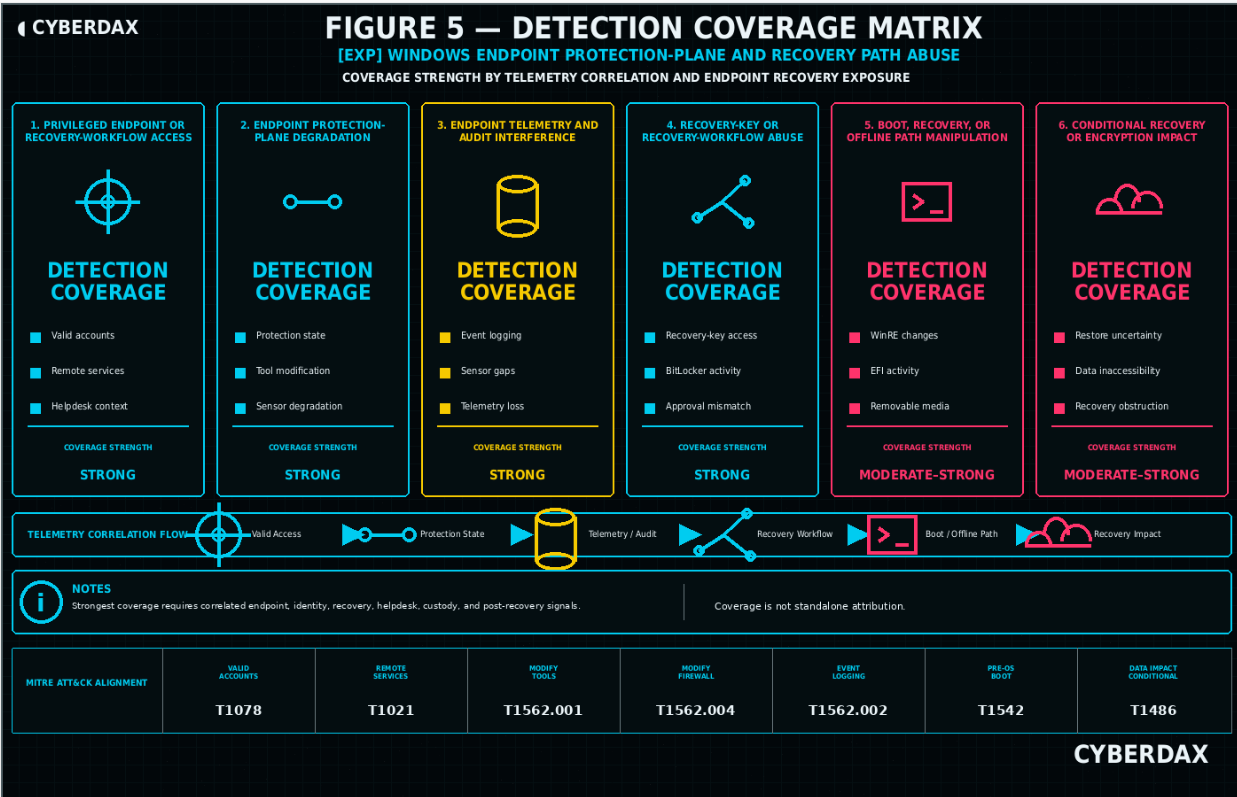
Figure 5
Implementation Objective
The implementation objective is to operationalize detection for Windows endpoint protection-plane degradation and recovery-path abuse as a correlated behavioral workflow, not as a CVE-string, scanner-output, exposure-only, product-name, endpoint-state-only, cloud-only, or artifact-only alerting package.
SOC implementation should focus on determining whether suspicious activity moved from administrative execution into endpoint protection-plane degradation, update suppression, recovery-path anomaly, recovery-key misuse risk, device-posture drift, endpoint-state uncertainty, or post-degradation objective behavior.
The implementation model should support rapid separation of three conditions:
· Vulnerable, exposed, degraded, or misconfigured endpoint environment without evidence of suspicious behavior.
· Suspicious endpoint protection-plane, update, recovery-path, or device-posture activity requiring investigation.
· Confirmed or strongly suspected endpoint compromise, recovery-control abuse, or post-recovery impact requiring escalation and containment.
Primary SOC Detection Approach
The primary SOC detection approach should use staged correlation across endpoint process telemetry, Defender telemetry, EDR telemetry, endpoint protection-state telemetry, update telemetry, registry and service-control telemetry, recovery-key audit context, BitLocker telemetry, WinRE or boot-state context, endpoint availability telemetry, MDM / Intune telemetry, identity telemetry, helpdesk records, asset records, custody records, network telemetry, and cloud context where relevant.
SOC analysts should prioritize behavior sequences over single indicators.
· Suspicious administrative execution followed by endpoint protection-state reduction.
· Suspicious administrative execution followed by security intelligence update suppression.
· Endpoint security-control degradation followed by credential access, persistence, sensitive-file access, remote administration, or outbound transfer.
· Recovery-key access followed by posture drift, endpoint telemetry gap, or helpdesk mismatch.
· BitLocker, WinRE, boot-state, EFI, or removable-media activity outside approved recovery, repair, imaging, or firmware workflows.
· Endpoint telemetry gap followed by return-to-network behavior and objective activity.
· Post-recovery endpoint activity followed by abnormal authentication, cloud access, sensitive-file access, or data movement.
SOC detection should assign lower confidence to isolated update failures, service restarts, sensor silence, recovery-key access, BitLocker recovery, endpoint offline intervals, return-to-network events, removable-media insertion, cloud-only anomalies, YARA matches, scanner output, CVE strings, advisory references, or public proof-of-concept references unless those signals are correlated with higher-value behavior.
SOC Triage Priority
SOC triage should prioritize findings based on behavior sequence, affected endpoint criticality, source legitimacy, administrative role, device posture, recovery context, helpdesk context, asset state, custody state, and follow-on impact.
Highest-priority triage should apply when suspicious activity includes one or more of the following:
· Suspicious administrative execution followed by endpoint protection-state degradation.
· Defender or EDR service degradation without approved security engineering, endpoint management, repair, or incident-response context.
· Security intelligence update suppression or update-source manipulation after suspicious local administrative activity.
· Broad or suspicious endpoint exclusion creation near suspicious process execution.
· Recovery-key access without matching helpdesk, repair, recovery, lost-device, stolen-device, imaging, or device-replacement context.
· Recovery-key access paired with endpoint telemetry gap, posture drift, or suspicious return-to-network behavior.
· BitLocker, WinRE, boot-state, EFI, or removable-media activity outside approved workflow context.
· Endpoint telemetry gap followed by remote administration, credential access, persistence, sensitive-file access, outbound transfer, or data movement.
· Post-degradation objective behavior on executive systems, privileged workstations, field devices, repair-handled devices, stolen or lost devices, or sensitive-data endpoints.
Medium-priority triage should apply to repeated suspicious administrative activity, endpoint protection-state drift, update suppression attempts, recovery-key anomalies, posture drift, telemetry gaps, or return-to-network behavior where follow-on objective behavior has not been confirmed.
Lower-priority triage should apply to isolated failed update events, isolated service restarts, isolated endpoint offline intervals, isolated recovery-key access with valid support context, isolated removable-media insertion, scanner output, exposure-only findings, or CVE-string matches without suspicious behavior.
Initial SOC Validation Steps
Initial validation should determine whether the alert reflects approved endpoint operations, suspicious activity, or confirmed impact.
SOC analysts should validate:
· Whether the affected endpoint is a managed Windows endpoint, privileged workstation, executive system, field device, shared system, repair-handled system, loaner device, or sensitive-data endpoint.
· Whether the endpoint has Defender, EDR, MDM / Intune, BitLocker, recovery-key, endpoint security policy, and endpoint availability telemetry.
· Whether suspicious administrative execution occurred before endpoint protection-plane degradation or update suppression.
· Whether endpoint protection-state change aligns with approved policy rollout, maintenance, repair, imaging, endpoint management, firmware servicing, vendor support, or incident-response activity.
· Whether update suppression reflects local manipulation rather than connectivity, proxy, vendor, device-management, or stale-device conditions.
· Whether recovery-key access aligns with helpdesk, repair, imaging, lost-device, stolen-device, device replacement, incident-response, or break-glass workflow.
· Whether BitLocker, WinRE, boot-state, EFI, removable-media, or posture activity aligns with approved recovery, repair, firmware, imaging, or deployment workflow.
· Whether endpoint telemetry gaps align with expected travel, repair, recovery, maintenance, network outage, endpoint replacement, or support workflow.
· Whether follow-on objective behavior occurred after protection-plane or recovery-path anomalies.
· Whether cloud activity is tied to endpoint-confirmed protection-plane or recovery-path evidence.
Correlation Requirements
Correlation is required before compromise-level conclusions are made.
SOC workflows should correlate:
· Endpoint process telemetry, command-line telemetry, process ancestry, user context, and parent process context.
· Defender telemetry, endpoint protection-state changes, EDR sensor-health telemetry, service-control telemetry, registry telemetry, and policy telemetry.
· Update-source, update-policy, security intelligence, engine, and platform update telemetry.
· Recovery-key audit context, requesting user, role, source IP, source device, support queue, target device, and access timing.
· BitLocker posture, WinRE state, boot-state context, EFI or system partition activity where runtime telemetry exists, and removable-media telemetry.
· Endpoint availability, EDR heartbeat, sensor health, endpoint offline and online events, and return-to-network behavior.
· MDM / Intune policy, device compliance, endpoint security policy, device owner, device group, and device criticality.
· Helpdesk tickets, asset records, custody records, repair status, lost-device status, stolen-device status, loaner state, shipping state, and device replacement records.
· Identity telemetry, authentication telemetry, administrative role use, remote administration, and risky sign-in context.
· Network telemetry, VPN, proxy, DNS, firewall, NDR, and cloud data-access telemetry where relevant.
Correlation should distinguish approved endpoint operations from suspicious behavior that cannot be explained by maintenance, policy rollout, endpoint management, repair, imaging, firmware servicing, support recovery, incident response, or documented custody state.
Escalation Criteria
Escalation should occur when suspicious endpoint behavior indicates possible security-control degradation, recovery-control misuse, device-trust weakening, or post-degradation objective activity.
Escalate to high-priority incident handling when one or more of the following conditions is present:
· Endpoint protection-state degradation follows suspicious administrative execution.
· Defender or EDR telemetry shows service degradation, protection-state reduction, tamper event, broad exclusion creation, or telemetry forwarding reduction without approved workflow context.
· Security intelligence update suppression or update-source manipulation follows suspicious local activity.
· Recovery-key access occurs outside expected support workflow and aligns with endpoint telemetry gap, posture drift, custody concern, or suspicious return-to-network behavior.
· BitLocker, WinRE, boot-state, EFI, removable-media, or volume activity occurs near endpoint protection-plane degradation or suspicious administrative execution.
· Endpoint telemetry gap is followed by credential access, persistence, sensitive-file access, remote administration, outbound transfer, or abnormal authentication.
· Cloud data access, storage access, backup access, secret access, or repository access occurs after endpoint-confirmed protection-plane or recovery-path evidence.
· The affected endpoint supports privileged administration, executive activity, regulated data, customer data, source code, cloud administration, identity administration, or business-critical operations.
Escalation should include endpoint security, identity, device-management, helpdesk, desktop engineering, cloud teams where relevant, incident response leadership, and business stakeholders when sensitive data exposure, endpoint compromise, or recovery-control abuse is plausible.
False Positive Reduction
False positive reduction should preserve detection sensitivity while accounting for legitimate endpoint operations.
Common false-positive sources include:
· Defender baseline deployment.
· Endpoint security policy rollout.
· Intune / MDM policy changes.
· Endpoint repair.
· Imaging.
· Endpoint replacement.
· Firmware servicing.
· Patch remediation.
· Vendor support.
· Helpdesk recovery.
· Break-glass support.
· Incident-response recovery.
· Forensic collection.
· Backup or restore activity.
· Security engineering testing.
· Endpoint migration.
· Device compliance remediation.
· Lost-device or stolen-device workflow.
· Loaner, shipping, transfer, or repair custody changes.
False positive reduction should rely on approved administrator lists, endpoint-management platform context, maintenance windows, endpoint security baseline records, update-source baselines, expected update cadence, helpdesk records, asset records, custody records, recovery workflows, repair workflows, imaging workflows, firmware servicing records, and incident-response records.
Broad suppression of administrators, helpdesk accounts, endpoint-management tools, repair workflows, cloud platforms, or recovery activity should be avoided because those same paths can be abused or misused.
Telemetry Readiness Requirements
SOC readiness depends on telemetry availability, retention, normalization, enrichment, and operational ownership.
Before high-severity deployment, the organization should confirm availability of:
· Endpoint process telemetry.
· Full command-line telemetry.
· Process ancestry.
· Defender telemetry.
· EDR telemetry.
· Endpoint protection-state telemetry.
· EDR sensor-health telemetry.
· Service-control telemetry.
· Registry and policy telemetry.
· Defender security intelligence and update telemetry.
· Update-source and update-policy telemetry.
· BitLocker telemetry.
· Recovery-key audit context.
· WinRE state telemetry where available.
· Boot-state telemetry where available.
· EFI or system partition runtime telemetry where available.
· Removable-media telemetry where available.
· Endpoint availability and heartbeat telemetry.
· MDM / Intune policy and compliance telemetry.
· Entra ID or identity-provider telemetry.
· Helpdesk, asset, and custody records.
· VPN, proxy, DNS, firewall, NDR, and cloud telemetry where relevant.
· Approved administrator, management, maintenance, repair, imaging, recovery, and incident-response workflow records.
Telemetry readiness should be validated before alerts are promoted from hunt mode into production alerting.
SOC Investigation Workflow
SOC investigation should follow a staged workflow.
· Confirm the affected endpoint, device owner, device class, endpoint criticality, telemetry coverage, and business role.
· Validate whether suspicious administrative execution occurred and whether it aligns with approved workflow context.
· Review Defender, EDR, endpoint protection-state, sensor-health, service-control, registry, policy, and update telemetry.
· Review update-source and update-policy history for local manipulation.
· Review recovery-key access, requesting user, source device, source IP, support queue, role, target device, and access timing.
· Review BitLocker, WinRE, boot-state, EFI-adjacent, removable-media, volume, and endpoint posture telemetry where available.
· Review endpoint availability, offline interval, return-to-network behavior, and EDR heartbeat history.
· Review helpdesk tickets, repair records, asset state, custody state, lost-device records, stolen-device records, loaner state, shipping state, and device replacement records.
· Review credential access, persistence, sensitive-file access, archive creation, cloud upload, remote administration, authentication, and outbound transfer after prior anomalies.
· Compare activity against maintenance windows, endpoint-management workflows, policy rollouts, repair workflows, imaging workflows, firmware servicing, incident-response records, and support documentation.
· Determine whether the case is misconfiguration, suspicious behavior requiring investigation, or confirmed or strongly suspected compromise requiring escalation.
Containment Guidance
Containment should be coordinated with endpoint security, desktop engineering, identity, device-management, helpdesk, cloud teams where relevant, and incident response leadership.
Potential containment actions include:
· Isolating the endpoint through approved EDR or network containment.
· Preserving endpoint, Defender, EDR, recovery-key, MDM / Intune, helpdesk, asset, custody, identity, network, and cloud evidence.
· Re-enabling or restoring endpoint protection settings.
· Restoring Defender service state, sensor state, telemetry forwarding, tamper protection, and security intelligence update configuration.
· Removing unauthorized or suspicious endpoint exclusions.
· Restoring approved endpoint security baselines and device compliance policies.
· Rotating credentials if credential access or remote administration is suspected.
· Reviewing and validating recovery-key access and support workflow legitimacy.
· Reviewing BitLocker, TPM, Secure Boot, WinRE, boot configuration, and endpoint compliance state.
· Validating device custody, repair status, lost-device or stolen-device status, and user possession.
· Reviewing cloud storage, backup, repository, secret, or data-store access after endpoint-confirmed evidence.
· Monitoring for recurrence after remediation, endpoint rebuild, recovery, policy restoration, or device return to service.
Containment actions should avoid disrupting legitimate endpoint repair, helpdesk recovery, incident response, business travel, executive support, device replacement, or business-critical workflows unless the risk justifies emergency action.
Operational Constraints
Operational constraints should be addressed before detection content is promoted to production alerting or used for executive-level compromise conclusions.
Key constraints include:
· WinRE-only execution may not be visible to normal endpoint telemetry.
· Pre-boot manipulation may not be visible to endpoint sensors.
· Offline disk access may leave limited or delayed telemetry.
· BitLocker unlock state may not be directly observable in every environment.
· EFI or system partition activity may be visible only when runtime telemetry captures it.
· Physical-access recovery manipulation may require custody, forensic, or support-process evidence.
· Endpoint telemetry may be impaired after protection-plane degradation.
· Recovery-key audit logs may vary by identity, MDM, and key-management architecture.
· Helpdesk, asset, and custody records may be incomplete or delayed.
· Approved endpoint repair, imaging, firmware servicing, policy rollout, and incident-response activity may resemble suspicious behavior.
· Cloud telemetry may show downstream access but cannot confirm endpoint compromise without upstream endpoint correlation.
· YARA is not viable for production coverage unless a stable malicious artifact emerges.
· High-severity alerting may generate false positives without local baselines and workflow context.
The SOC should treat this detection model as a correlated investigation workflow. It should not be deployed as isolated high-severity alerts from single weak signals unless the signal directly confirms unauthorized security-control change, unauthorized recovery-control activity, or validated post-degradation impact.
S29 Detection Coverage Summary
Coverage Summary
The S25 detection set provides strong behavior-led coverage for Windows endpoint protection-plane degradation and conditional coverage for recovery-path abuse where endpoint, Defender, EDR, MDM / Intune, identity, recovery-key, helpdesk, asset, custody, network, and cloud telemetry are available and locally mapped.
Coverage is strongest for activity that moves from suspicious administrative execution into endpoint security-control degradation, update suppression, recovery-path anomaly, endpoint-state drift, or post-degradation objective behavior. Coverage is conditional where the behavior depends on WinRE visibility, boot-state telemetry, EFI telemetry, removable-media telemetry, helpdesk records, asset records, custody records, or cloud context.
This coverage model should not be interpreted as CVE-string detection, scanner-output detection, exposure-only detection, product-name detection, update-failure-only detection, recovery-key-only detection, endpoint-state-only detection, cloud-only detection, or exploit-payload detection. The report’s detection value comes from durable behavioral sequencing across endpoint control-state, recovery context, device posture, support workflow, and follow-on impact.
High-Confidence Coverage Areas
· Suspicious administrative execution followed by endpoint protection-plane degradation.
· Defender or endpoint sensor weakening after suspicious administrative activity.
· Tamper-protection weakening, broad exclusion creation, or endpoint security-control policy drift after suspicious activity.
· Security intelligence update suppression or update-source manipulation after suspicious local activity.
· Recovery-key, helpdesk, asset, custody, device-owner, device-posture, and endpoint-state mismatch where Microsoft or SIEM telemetry is integrated.
· BitLocker, WinRE, boot-state, volume, removable-media, or EFI-adjacent runtime activity where endpoint telemetry is available.
· Endpoint telemetry gaps and suspicious return-to-network behavior after prior endpoint or recovery-path evidence.
· Credential access, persistence, sensitive-file access, remote administration, abnormal authentication, cloud upload, or data movement after prior endpoint protection-plane or recovery-path anomaly.
· Azure endpoint, identity, recovery-key, Intune / MDM, device compliance, and Sentinel / Defender XDR correlation where Microsoft telemetry is integrated.
Moderate-Confidence Coverage Areas
· Recovery-key activity where helpdesk, asset, custody, or support-context data is incomplete.
· BitLocker, WinRE, boot-state, EFI, or removable-media activity where runtime telemetry exists but boot or physical-access context is limited.
· Endpoint telemetry gaps where endpoint availability baselines are noisy or endpoint travel and repair context are incomplete.
· NDR return-to-network and outbound behavior where prior endpoint protection-plane or recovery-path evidence is available.
· SIGMA portable detection where backend conversion, field mapping, and correlation logic are mature.
· AWS or GCP cloud-management and downstream cloud-impact context where endpoint-confirmed evidence exists.
· Post-recovery objective behavior where prior anomaly context is imported from enrichment rather than directly observed by the same detection platform.
Low-Confidence Coverage Areas
· Update failure without local manipulation evidence.
· Service restart without suspicious administrative context.
· Endpoint sensor silence without endpoint protection-plane, recovery-path, posture, or support-process context.
· Recovery-key access without identity, helpdesk, asset, custody, posture, endpoint, or follow-on context.
· BitLocker recovery without support mismatch or additional telemetry.
· Removable-media insertion without suspicious execution, recovery-path, endpoint-state, or follow-on context.
· Cloud-only anomalies without endpoint-confirmed protection-plane or recovery-path evidence.
· YARA or artifact-only matches where no validated malicious artifact has been recovered.
· Scanner output, advisory references, CVE strings, public proof-of-concept references, or product-name matches without environment-specific behavior.
System Coverage Summary
NDR / Network Behavioral Analytics
NDR / Network Behavioral Analytics provides limited but important supporting coverage for suspicious return-to-network behavior, remote administration, outbound transfer, and new communication patterns after prior endpoint protection-plane or recovery-path evidence. Coverage is strongest when network telemetry is enriched with endpoint anomaly context, device identity, endpoint criticality, VPN, proxy, DNS, firewall, sensitive-segment tags, and approved workflow context.
NDR should not be used as primary detection for Defender degradation, update suppression, recovery-key access, BitLocker posture, WinRE activity, EFI manipulation, offline disk access, removable boot, or physical-access recovery manipulation.
SentinelOne
SentinelOne provides strong endpoint coverage for suspicious administrative execution, endpoint protection-plane degradation, EDR or antivirus weakening, suspicious recovery, boot, BitLocker, volume, removable-media, and EFI-adjacent runtime behavior, and post-degradation credential access, persistence, sensitive-file activity, or remote administration.
Coverage is strongest where SentinelOne has process, file, registry, service, command-line, device-control, endpoint sensor-health, and endpoint timeline visibility. Coverage is limited where behavior occurs entirely in WinRE, pre-boot, offline, or outside endpoint sensor visibility.
Splunk
Splunk provides strong SIEM coverage where endpoint, Defender, EDR, Windows, recovery-key, MDM / Intune, identity, helpdesk, asset, custody, network, and cloud telemetry are indexed and normalized. Coverage is strongest when Splunk can correlate suspicious administrative activity, endpoint protection-plane degradation, update suppression, recovery-key context, device posture, endpoint state, and post-degradation objective behavior.
Coverage depends on local sourcetypes, index names, field mappings, enrichment quality, retention, join quality, exception logic, and query-performance tuning.
Elastic
Elastic provides strong SIEM coverage where endpoint, Defender, EDR, Windows, recovery, posture, identity, and network telemetry are normalized into searchable event fields. Coverage is strongest when Elastic can correlate endpoint protection-plane degradation, update suppression, recovery-path activity, posture drift, endpoint-state changes, and follow-on objective behavior with asset and workflow context.
Coverage depends on ECS mapping quality, ingest pipelines, event retention, enrichment tables, backend correlation capability, exception tuning, and query-performance validation.
QRadar
QRadar provides strong SIEM coverage where endpoint protection-plane, update, recovery-key, device-posture, endpoint-state, identity, helpdesk, asset, custody, and network events are parsed into reliable custom properties and correlated with reference sets. Coverage is strongest when QRadar CRE logic uses same-host or same-device sequencing and offense magnitude tuning.
Coverage depends on DSM parsing, custom-property accuracy, reference-set maintenance, building-block design, event retention, offense workflow readiness, and local triage playbooks.
SIGMA
SIGMA provides portable behavioral detection coverage for SIEM environments that can map the required Windows endpoint, Defender, EDR, recovery, boot, removable-media, EFI-adjacent, and endpoint-state fields into a supported backend.
SIGMA should be treated as a portable detection pattern requiring conversion, backend syntax validation, local field mapping, enrichment validation, exception tuning, and performance testing before production use. SIGMA coverage is weaker where backend correlation cannot reliably express same-host sequencing or support-process context.
YARA
YARA has no production detection role for this report. The detection model is endpoint-control-plane, recovery-path, posture, support-context, and behavior-correlation driven. YARA should remain excluded unless a validated malware, webshell, staged tool, script, payload, memory artifact, EFI-adjacent artifact, removable-media artifact, or stable malicious file family emerges during incident investigation.
AWS
AWS provides supporting coverage where Windows endpoints are hosted on EC2, managed through Systems Manager, or where endpoint telemetry is forwarded into AWS-hosted logging or SIEM infrastructure. AWS may also support downstream scoping when cloud storage, secrets, backups, repositories, metadata, IAM roles, or AWS-hosted data stores are accessed after endpoint-confirmed protection-plane or recovery-path evidence.
AWS findings should not be attributed to Windows endpoint compromise without upstream endpoint protection-plane, recovery-path, identity, MDM / Intune, helpdesk, asset, custody, forensic, or endpoint-focused network correlation.
Azure
Azure provides strong primary coverage where Microsoft Defender for Endpoint, Defender XDR, Entra ID, Intune / MDM, device compliance, recovery-key context, endpoint security policy, and Sentinel telemetry are integrated. Azure is the strongest cloud-aligned platform for this report because it can directly support endpoint, identity, device-management, recovery-key, and posture correlation.
Azure findings should still not be used to claim direct visibility into WinRE-only execution, pre-boot manipulation, offline disk access, BitLocker unlock state, EFI manipulation outside runtime telemetry, removable boot use, or physical-access recovery manipulation without supporting evidence.
GCP
GCP provides supporting coverage where Windows endpoints are hosted on Compute Engine, managed through OS Config, or where endpoint telemetry is forwarded into GCP-hosted logging or SIEM infrastructure. GCP may also support downstream scoping when Cloud Storage, service accounts, secrets, backups, repositories, metadata, or GCP-hosted data stores are accessed after endpoint-confirmed protection-plane or recovery-path evidence.
GCP findings should not be attributed to Windows endpoint compromise without upstream endpoint protection-plane, recovery-path, identity, MDM / Intune, helpdesk, asset, custody, forensic, or endpoint-focused network correlation.
Coverage Dependencies
Effective coverage depends on the organization’s ability to collect, normalize, enrich, and correlate telemetry across endpoint, Defender, EDR, recovery-key, MDM / Intune, identity, helpdesk, asset, custody, network, and cloud sources.
Required dependencies include:
· Endpoint process telemetry with command line and parent process context.
· Defender and EDR telemetry for protection state, service state, exclusions, sensor health, tamper events, and telemetry forwarding state.
· Security intelligence update, update-source, update-policy, engine, and platform telemetry.
· Windows registry, service-control, scheduled task, file, volume, removable-media, and device-control telemetry.
· Recovery-key audit context with requesting user, role, source, target device, and timestamp.
· BitLocker posture, encryption state, TPM state, Secure Boot state, WinRE state, and boot-state telemetry where available.
· MDM / Intune endpoint security policy, device compliance, configuration, and device identity telemetry.
· Endpoint availability, EDR heartbeat, endpoint offline and online telemetry, and return-to-network context.
· Helpdesk, asset, custody, repair, lost-device, stolen-device, loaner, shipping, replacement, and recovery workflow records.
· Identity telemetry, administrative role context, sign-in logs, risky sign-in context, and privileged access telemetry.
· Network, VPN, proxy, DNS, firewall, NDR, and cloud telemetry where relevant.
· Approved administrator, management, maintenance, repair, imaging, firmware, recovery, incident-response, and endpoint-management workflow baselines.
Coverage Limitations
Coverage is limited when telemetry, baselines, or operational context are incomplete.
Primary limitations include:
· WinRE-only execution may not be visible to normal endpoint telemetry.
· Pre-boot manipulation may not be visible to endpoint sensors.
· Offline disk access may leave limited telemetry.
· BitLocker unlock state may not be directly observable in every environment.
· EFI or system partition activity may be visible only when runtime telemetry captures it.
· Removable boot use may require physical, forensic, or custody evidence.
· Physical-access recovery manipulation may require custody, forensic, support, or device-possession evidence.
· Endpoint telemetry may be impaired after protection-plane degradation.
· Recovery-key audit quality varies by identity, MDM, and key-management architecture.
· Helpdesk, asset, and custody records may be incomplete, delayed, or poorly normalized.
· Cloud telemetry may show downstream access but cannot confirm endpoint compromise without upstream endpoint correlation.
· YARA is not viable for production coverage unless future evidence provides a stable malicious artifact.
· Detection confidence depends on correlation; isolated weak signals should not drive compromise-level conclusions.
Coverage Conclusion
The report provides strong behavior-led coverage for Windows endpoint protection-plane degradation and conditional coverage for recovery-path abuse when endpoint, Defender, EDR, MDM / Intune, identity, recovery-key, helpdesk, asset, custody, network, and cloud telemetry are correlated.
The strongest coverage areas are suspicious administrative execution followed by endpoint security-control degradation, update suppression after local manipulation, recovery-key and posture-context mismatch, endpoint-state drift, suspicious return-to-network behavior, and post-degradation objective activity.
The detection model should be deployed as a correlated behavioral coverage package, not as a CVE-string, scanner-output, product-name, update-failure-only, recovery-key-only, endpoint-state-only, cloud-only, or artifact-only package. Production readiness requires local schema validation, field mapping, enrichment validation, exception tuning, false-positive baselining, query-performance testing, SOC triage readiness, and hunt-to-alert promotion testing.
S30 Intelligence Maturity Assessment
Intelligence Maturity Summary
The intelligence maturity for this report is moderate to high. The report provides a durable behavior-led model for Windows endpoint protection-plane degradation and recovery-path abuse, but operational maturity depends on whether the organization can correlate endpoint process telemetry, Defender telemetry, EDR telemetry, endpoint protection-state telemetry, update telemetry, recovery-key audit context, BitLocker posture, WinRE or boot-state context, MDM / Intune telemetry, device compliance, identity telemetry, helpdesk records, asset records, custody records, network telemetry, cloud context, and change-management evidence.
The intelligence model is strongest for the endpoint protection-plane path involving suspicious administrative execution, Defender or EDR degradation, endpoint security-control weakening, security intelligence update suppression, endpoint telemetry reduction, and post-degradation objective behavior. The model provides conditional maturity for recovery-path behaviors such as recovery-key misuse risk, BitLocker posture drift, WinRE or boot-state change, EFI or system partition activity, removable-media context, endpoint offline intervals, suspicious return-to-network behavior, and support-process mismatch.
Maturity Level
Moderate to High.
Maturity Rationale
The report’s maturity is supported by a behavior-led detection model that does not depend on CVE strings, scanner output, advisory references, public proof-of-concept details, payload visibility, or static artifacts. The model remains useful when exploit implementation, affected component, source infrastructure, administrative workflow, recovery path, or post-access behavior changes because the strongest detection anchors are endpoint control-state degradation, update suppression, recovery-context mismatch, endpoint-state uncertainty, device-posture drift, and follow-on objective activity.
The maturity level is not rated high by default because several critical data sources vary significantly by deployment model. Recovery-key audit context, BitLocker telemetry, WinRE telemetry, boot-state telemetry, EFI runtime telemetry, removable-media telemetry, endpoint availability telemetry, helpdesk records, asset records, custody records, MDM / Intune telemetry, cloud log aggregation, and endpoint sensor visibility may be incomplete, delayed, inconsistently normalized, or unavailable.
The report should therefore be treated as a mature detection-engineering model that still requires customer-specific telemetry validation, field mapping, enrichment, baselining, false-positive tuning, query-performance testing, and SOC workflow integration before production alerting.
High-Maturity Indicators
· Endpoint process telemetry is centrally collected, normalized, retained, and available to SOC analysts.
· Full command-line telemetry and process ancestry are available for managed Windows endpoints.
· Defender and EDR telemetry provide protection-state, service-state, sensor-health, exclusion, tamper, and telemetry-forwarding context.
· Security intelligence update, update-source, update-policy, engine, and platform telemetry are available.
· Endpoint security baselines, device compliance, endpoint security policy, and MDM / Intune state are collected and correlated.
· Recovery-key audit context identifies requesting user, role, source, target device, application, timestamp, and outcome.
· BitLocker, TPM, Secure Boot, WinRE, boot-state, and device posture data are available where technically feasible.
· Endpoint availability, EDR heartbeat, endpoint offline and online telemetry, and return-to-network behavior are baselined.
· Helpdesk, asset, custody, repair, lost-device, stolen-device, loaner, shipping, replacement, and recovery workflow records are integrated into detection workflows.
· Identity telemetry provides sign-in, audit, role, privileged access, risky sign-in, and source context.
· Network telemetry identifies suspicious return-to-network behavior, remote administration, outbound transfer, and sensitive-segment access after prior endpoint evidence.
· Azure Microsoft security telemetry is integrated where Defender for Endpoint, Defender XDR, Entra ID, Intune / MDM, recovery-key context, and Sentinel are used.
· Cloud telemetry is mapped to endpoint-confirmed evidence when AWS or GCP is used for workload hosting, log aggregation, or downstream data access.
· SOC teams have defined playbooks for endpoint protection-plane degradation, update suppression, recovery-key anomaly, endpoint telemetry gap, and post-degradation objective behavior.
· Endpoint security, desktop engineering, identity, helpdesk, device-management, cloud, and incident response teams can rapidly coordinate validation and containment.
Moderate-Maturity Indicators
· Endpoint telemetry is available but not consistently enriched with device owner, device class, criticality, or workflow context.
· Defender or EDR telemetry exists but protection-state, update-state, and sensor-health fields require manual interpretation.
· Intune / MDM telemetry is available but delayed, incomplete, or not fully integrated into SIEM detection logic.
· Recovery-key audit logs exist but require manual retrieval, schema normalization, or helpdesk correlation.
· BitLocker, WinRE, boot-state, EFI, and removable-media telemetry are available only for some endpoint classes.
· Endpoint availability and return-to-network behavior can be reviewed but are not baselined.
· Helpdesk, asset, and custody records exist but are not consistently joined to endpoint detections.
· Identity telemetry is collected but not consistently correlated with endpoint, recovery-key, or support-process activity.
· Network telemetry can show outbound transfer or remote administration but requires manual endpoint context.
· AWS or GCP telemetry can support downstream scoping but does not directly participate in endpoint detection logic.
· SOC teams can investigate suspicious endpoint behavior but may require manual coordination with desktop engineering, helpdesk, identity, cloud, or incident response teams.
Low-Maturity Indicators
· Endpoint process telemetry is unavailable, inconsistently retained, or missing command-line context.
· Defender or EDR protection-state telemetry is missing, delayed, or not normalized.
· Endpoint sensor-health and telemetry-forwarding state are not monitored.
· Update-source, update-policy, engine, platform, or security intelligence telemetry is unavailable.
· Recovery-key audit context is unavailable, incomplete, or not tied to requesting user and target device.
· BitLocker, TPM, Secure Boot, WinRE, boot-state, EFI, removable-media, or endpoint posture telemetry is unavailable.
· Endpoint availability and return-to-network behavior are not baselined.
· Helpdesk, asset, custody, repair, lost-device, stolen-device, and replacement records are not available during SOC triage.
· Approved administrator, endpoint-management, repair, imaging, recovery, firmware servicing, and incident-response workflows are not documented.
· SOC teams rely on CVE strings, scanner output, advisory references, update failures, recovery-key access, endpoint offline state, cloud-only anomalies, or artifact matches rather than correlated behavior.
· Cloud telemetry is reviewed without upstream endpoint-confirmed evidence.
· YARA or static artifact matching is treated as a primary detection strategy without validated malicious artifacts.
Operational Intelligence Strengths
· The model is behavior-led and resilient against minor exploit variation.
· The model focuses on endpoint control-state degradation, update suppression, recovery-key context, device posture, endpoint-state drift, and post-degradation objective behavior.
· The model avoids dependency on CVE-string matching, scanner output, public proof-of-concept naming, payload visibility, or static artifact matching.
· The model supports direct coverage for endpoint protection-plane degradation where endpoint, Defender, EDR, and update telemetry are available.
· The model supports conditional coverage for recovery-path abuse where recovery-key, BitLocker, WinRE, boot-state, endpoint availability, MDM / Intune, helpdesk, asset, and custody telemetry exists.
· The model separates weak single signals from suspicious behavior and confirmed or strongly suspected impact.
· The model supports escalation based on correlated evidence rather than single-alert conclusions.
· The model incorporates false-positive controls for endpoint management, repair, imaging, firmware servicing, policy rollout, helpdesk recovery, incident response, and device replacement.
· The model identifies where Azure provides primary telemetry value and where AWS, GCP, NDR, SIGMA, and YARA should remain supporting or conditional.
Operational Intelligence Gaps
· WinRE-only execution may not be visible to endpoint telemetry.
· Pre-boot manipulation may not be visible to endpoint sensors.
· Offline disk access may leave limited or delayed telemetry.
· BitLocker unlock state may not be directly observable in every environment.
· EFI or system partition runtime telemetry may be inconsistent.
· Removable boot and physical-access activity may require custody, forensic, or device-possession evidence.
· Endpoint telemetry may be impaired by the same protection-plane degradation the report seeks to detect.
· Recovery-key audit context varies by identity, MDM, and key-management configuration.
· Helpdesk, asset, and custody data may be incomplete, stale, or poorly integrated.
· Approved endpoint-management, repair, imaging, recovery, and incident-response workflows may be poorly documented.
· Cloud telemetry may show downstream access but cannot confirm endpoint compromise without upstream endpoint evidence.
· NDR telemetry may show return-to-network or outbound behavior but cannot confirm endpoint protection-plane or recovery-path activity by itself.
· YARA is not viable for production coverage unless future evidence provides a stable malicious artifact.
· False positives may occur when legitimate endpoint repair, policy rollout, firmware servicing, break-glass support, or incident-response activity is not reflected in local context sources.
Maturity Improvement Priorities
· Normalize endpoint process, command-line, parent process, service-control, registry, file, device-control, and endpoint availability telemetry.
· Validate Defender and EDR visibility for protection-state changes, service state, sensor health, tamper events, exclusions, and telemetry forwarding.
· Improve visibility into security intelligence update state, update-source configuration, update-policy changes, engine updates, and platform updates.
· Integrate Intune / MDM endpoint security policy, device compliance, configuration, and device identity telemetry into detection workflows.
· Normalize recovery-key audit context and join it to device owner, support queue, source IP, source device, helpdesk records, asset records, and custody state.
· Improve BitLocker, TPM, Secure Boot, WinRE, boot-state, removable-media, and device-posture visibility where technically feasible.
· Baseline endpoint offline intervals, endpoint return-to-network behavior, EDR heartbeat, and endpoint telemetry gaps.
· Integrate helpdesk, asset, repair, custody, lost-device, stolen-device, loaner, shipping, replacement, and recovery workflow records into triage workflows.
· Maintain approved administrator, service account, endpoint-management, repair, imaging, firmware servicing, recovery, break-glass, and incident-response workflow baselines.
· Enrich network telemetry with device identity, endpoint criticality, sensitive-segment tags, VPN context, proxy context, DNS context, and approved workflow context.
· Validate Azure Defender for Endpoint, Defender XDR, Entra ID, Intune / MDM, recovery-key, device compliance, and Sentinel integration.
· Treat AWS and GCP telemetry as supporting cloud-management, log-aggregation, and downstream cloud-impact context unless endpoint-confirmed evidence ties the cloud activity to the behavior chain.
· Test detections in hunt mode before alert promotion and validate false-positive handling with endpoint security, desktop engineering, identity, helpdesk, device-management, cloud, and incident response teams.
Analytical Confidence
Moderate to High.
Confidence Rationale
· Confidence is high when suspicious administrative execution is followed by endpoint protection-state degradation, Defender or EDR weakening, update suppression, or broad exclusion creation.
· Confidence is high when recovery-key access aligns with helpdesk mismatch, asset mismatch, custody concern, endpoint posture drift, telemetry gap, or suspicious return-to-network behavior.
· Confidence is high when post-degradation or post-recovery objective activity follows prior endpoint protection-plane or recovery-path evidence.
· Confidence is moderate when BitLocker, WinRE, boot-state, EFI, removable-media, or endpoint-state telemetry exists but lacks full physical, support, or forensic context.
· Confidence is moderate when only NDR return-to-network or outbound behavior is available after prior endpoint evidence.
· Confidence is moderate when AWS or GCP telemetry supports downstream scoping but does not directly observe endpoint behavior.
· Confidence is low when evidence is limited to CVE strings, scanner output, advisory references, update failures, service restarts, endpoint sensor silence, recovery-key access, endpoint offline state, cloud-only anomalies, or static artifact matches.
· Confidence increases when multiple independent telemetry sources align around the same endpoint, account, source, timing window, control-state change, recovery context, support workflow, and follow-on behavior.
· Confidence decreases when the organization lacks endpoint telemetry, Defender telemetry, EDR telemetry, recovery-key audit context, device posture, helpdesk records, asset records, custody records, approved workflow baselines, or change-management linkage.
Final Intelligence Assessment
The report’s intelligence maturity is strong enough to support operational detection engineering for Windows endpoint protection-plane degradation and recovery-path abuse when endpoint, Defender, EDR, recovery-key, MDM / Intune, identity, helpdesk, asset, custody, network, and cloud telemetry are available and correlated.
The report also supports conditional coverage for recovery-path and post-recovery behaviors where BitLocker, WinRE, boot-state, EFI, removable-media, endpoint availability, support-process, custody, and forensic context exists.
The primary maturity constraint is not detection concept quality. The primary maturity constraint is telemetry completeness, field normalization, recovery-key audit quality, endpoint identity joins, device-posture visibility, helpdesk and custody integration, approved workflow baselines, cloud and network correlation, and SOC workflow readiness.
The detection model should remain behavior-led and correlation-led. It should not be treated as a CVE-string, scanner-output, update-failure-only, recovery-key-only, endpoint-state-only, cloud-only, endpoint-only, or artifact-only detection model.
S31 Telemetry Dependencies
Windows endpoint protection-plane and recovery path abuse requires telemetry that can prove whether suspicious endpoint protection degradation, recovery-key activity, recovery-path manipulation, boot-state change, endpoint isolation failure, telemetry loss, or return-to-network behavior remained limited to legitimate support activity or created material containment and recovery risk. The central dependency is the ability to correlate endpoint protection-state telemetry, Windows event telemetry, process telemetry, BitLocker and recovery-key telemetry, WinRE and boot telemetry, EFI or system partition telemetry, removable-media telemetry, device-management telemetry, identity telemetry, helpdesk records, asset and custody context, endpoint availability, network telemetry, change-control evidence, and incident-response records into one endpoint resilience and recovery-governance investigation model.
Endpoint Protection-State and Process Telemetry
· Endpoint telemetry must capture process creation, command line, parent process, grandparent process, process path, signer, hash, user context, elevation state, integrity level, service context, SYSTEM-context execution, device identity, endpoint class, endpoint role, and timestamp.
· Endpoint protection-state telemetry must capture Defender, EDR, antivirus, tamper protection, real-time protection, behavior monitoring, cloud-delivered protection, sample submission, remediation behavior, exclusion policy, update source, security intelligence freshness, endpoint sensor health, telemetry forwarding, endpoint compliance, and previous-value / new-value transitions where available.
· Required fields include host identity, device identity, endpoint class, affected setting, prior value, new value, initiating account, initiating process, management source, policy source, event time, and endpoint protection outcome.
· Endpoint and protection-state telemetry is required to determine whether endpoint control degradation occurred and whether the activity was locally driven, centrally approved, helpdesk-driven, attacker-driven, or associated with suspicious administrative context.
Windows Event, Registry, Service-Control, and Configuration Telemetry
· Windows telemetry must capture Security, System, PowerShell, Defender operational, service-control, registry, audit-policy, security-policy, endpoint-management, and endpoint protection configuration events where available.
· Registry and configuration telemetry must capture creation, modification, deletion, or rollback of keys and values associated with endpoint protection configuration, exclusions, telemetry forwarding, update behavior, service state, tamper protection, audit policy, recovery configuration, BitLocker policy, WinRE state, boot behavior, and endpoint-management policy.
· Service-control telemetry must capture service stop, start, disablement, startup-type modification, service recovery modification, service binary-path change, restart failure, restart suppression, sensor crash, sensor restart, delayed check-in, and unexpected loss of endpoint-control visibility.
· Required fields include host, device, account, process, parent process, affected registry path, affected service, action, prior state, new state, timestamp, and management source where available.
· Windows event, registry, and service-control telemetry is required to distinguish ordinary endpoint maintenance from suspicious protection-plane degradation, telemetry interference, endpoint isolation impairment, or recovery-path manipulation.
BitLocker, Recovery-Key, WinRE, Boot, and EFI Telemetry
· Recovery-path telemetry must capture BitLocker state, protector changes, recovery-mode entry, unlock behavior, suspension, disablement, recovery-policy deviation, recovery-key escrow activity, recovery-key retrieval, recovery-key export, recovery-key rotation, recovery-key access volume, recovery-key access timing, WinRE enablement, WinRE disablement, WinRE relocation, recovery image modification, boot configuration changes, EFI or system partition access, removable-media boot activity, and recovery workflow events where available.
· Required fields include device identity, recovery-key target device, accessing account, administrative role, source application, source device, source IP, support queue, ticket identifier, recovery-key event type, BitLocker state, WinRE state, boot configuration artifact, EFI or system partition path, event timestamp, and device posture context.
· Boot and EFI telemetry should capture boot entry creation, boot entry modification, boot policy change, boot path redirection, startup repair activity, boot manager modification, bootloader modification, Secure Boot posture deviation, TPM posture deviation, PCR validation posture, external boot policy, EFI mount activity, EFI write activity, and system partition file changes where available.
· BitLocker, recovery-key, WinRE, boot, and EFI telemetry is required to determine whether recovery activity aligns with approved repair, imaging, firmware servicing, patch rollback, endpoint rebuild, incident response, or helpdesk workflows.
· This telemetry must be interpreted conservatively because legitimate recovery, hardware repair, firmware servicing, endpoint imaging, operating-system repair, encryption recovery, and emergency support can produce overlapping artifacts.
Device-Management, Identity, Helpdesk, Asset, and Custody Telemetry
· Device-management telemetry must capture Intune, MDM, Group Policy, SCCM, EDR console, endpoint-security policy, compliance state, device re-enrollment, policy assignment, policy removal, policy downgrade, remediation action, endpoint migration, recovery workflow, repair workflow, imaging workflow, and firmware servicing activity.
· Identity telemetry must capture privileged account use, helpdesk account use, delegated support actions, break-glass access, role changes, privilege elevation, risky sign-in, service-account activity, administrative portal access, recovery-key access, endpoint-management action, source IP, source device, application, and timestamp.
· Helpdesk and ticketing telemetry must capture BitLocker recovery requests, boot failure reports, device repair records, lost-device reports, stolen-device reports, firmware updates, reimaging approvals, device servicing, endpoint rebuilds, endpoint recovery, asset transfer, user support, approval chain, and support queue ownership.
· Asset and custody telemetry must capture device owner, endpoint class, location, shipping status, repair handling, loaner assignment, lost status, stolen status, shared-use state, travel exposure, physical-custody transfer, disposal state, asset-transfer state, and return-to-network approval.
· Required fields include user, role, device, device owner, support queue, ticket identifier, asset state, custody state, management source, administrative scope, event time, and approval context where available.
· Device-management, identity, helpdesk, asset, and custody telemetry is required to determine whether recovery-key access, endpoint protection changes, boot-path modifications, removable-media activity, or device restoration events are explainable by authorized operations.
Endpoint Availability, Crash, Fault, and Return-to-Network Telemetry
· Endpoint availability telemetry must capture endpoint heartbeat, EDR heartbeat, MDM check-in, endpoint offline interval, endpoint return-to-network event, device-health downgrade, endpoint compliance drift, delayed reporting, sensor reconnect, recovery prompt, recovery-mode transition, reboot sequence, abnormal startup, and device reactivation.
· Crash and fault telemetry must capture endpoint protection component faults, Defender component faults, EDR sensor instability, security-service instability, local process crashes, boot failures, restart loops, unexpected shutdowns, repeated BitLocker recovery prompts, and recovery-mode indicators.
· Return-to-network telemetry must capture VPN reconnection, NAC decisions, network quarantine release, endpoint isolation state, internal authentication, remote administration, file transfer, cloud upload, endpoint-management reconnection, and access to business services after recovery, telemetry loss, boot anomaly, or endpoint posture drift.
· Required fields include host, device, endpoint class, endpoint role, prior endpoint state, current endpoint state, event time, network segment, access method, user context, and associated recovery or protection-state events where available.
· Endpoint availability and return-to-network telemetry is required to determine whether a recovered, telemetry-impaired, protection-degraded, or custody-concerning device resumed activity in a way that creates business or compromise-validation risk.
File, Persistence, Memory, and Follow-On Behavior Telemetry
· File telemetry must capture file creation, modification, deletion, replacement, rename, metadata change, execution, signer, hash, creating process, modifying process, initiating account, path, device, and timestamp.
· High-value file locations include user-writable paths, temporary directories, download directories, archive-extraction paths, administrative shares, network shares, removable-media paths, mounted volumes, repair directories, recovery staging paths, boot paths, recovery paths, EFI paths, system partition paths, WinRE paths, system-volume paths, persistence locations, and endpoint protection configuration locations.
· Persistence telemetry must capture new or modified services, service binary-path changes, service recovery modification, scheduled tasks, startup-folder changes, registry autoruns, WMI event subscriptions, logon script changes, user-profile persistence, local administrator group changes, remote-access enablement, endpoint-management agent changes, and security-control exclusions.
· Memory and execution telemetry must capture suspicious shell execution, unsigned process activity, suspicious process handle access, process injection, LSASS access, SAM or SECURITY hive access, browser credential access, certificate access, token access, VPN artifact access, archive creation, local data staging, sensitive-file discovery, and post-recovery objective behavior where available.
· File, persistence, memory, and follow-on telemetry is required to identify post-degradation activity after endpoint protection-plane abuse, recovery-path anomaly, recovery-key access, telemetry gap, offline interval, or suspicious return-to-network behavior.
· Follow-on telemetry must remain conditional and should not be used as a substitute for detecting the initial endpoint protection-plane degradation, recovery-path manipulation, recovery-key anomaly, or recovery-state transition.
Network and Source-Behavior Telemetry
· Network telemetry is supporting telemetry for this report and must capture DNS queries, outbound connections, destination domain, destination IP, URL, reputation context, process-to-network mapping, source host, source device, source account, connection timestamp, first-seen destination timing, VPN activity, proxy activity, firewall events, NAC decisions, and NDR / Network Behavioral Analytics context where available.
· Required network fields include source host, source device, source account, source process where available, destination, protocol, port, connection result, byte count, event time, endpoint isolation state, endpoint posture state, and recent recovery or protection-state context.
· Network telemetry is required to identify suspicious egress, unusual outbound transfer, remote administration, lateral movement preparation, command-and-control preparation, suspicious VPN activity, and suspicious return-to-network behavior after endpoint protection-plane degradation or recovery-path anomaly.
· Network telemetry must not be used as the primary basis for detecting endpoint protection-plane degradation, recovery-key misuse, WinRE activity, boot-path manipulation, EFI or system partition activity, BitLocker bypass conditions, offline manipulation, removable boot behavior, or physical-access recovery manipulation.
Change-Control, Incident-Response, and Operational Context Telemetry
· Change-control telemetry must capture approved endpoint security changes, endpoint protection policy updates, EDR migrations, Defender configuration changes, update-source changes, BitLocker policy changes, recovery-key handling changes, WinRE maintenance, boot repair, firmware servicing, device imaging, device rebuild, operating-system repair, hardware repair, endpoint-management changes, helpdesk recovery, patch rollback, break-glass recovery, and maintenance windows.
· Incident-response telemetry must capture containment actions, endpoint isolation decisions, recovery-key rotation, recovery-key revalidation, endpoint reimaging, removable-media restrictions, return-to-network decisions, device quarantine, forensic collection, emergency policy changes, helpdesk restrictions, privileged-access review, and restoration approvals.
· Required fields include change owner, approving authority, affected device, affected policy, affected endpoint group, support ticket, implementation window, rollback status, operational justification, event time, and incident identifier where available.
· Change-control and incident-response telemetry is required to separate approved recovery and remediation from suspicious endpoint protection-plane degradation, recovery-path abuse, or unauthorized return-to-network activity.
S32 Detection Limitations
Detection of Windows endpoint protection-plane and recovery path abuse is limited by whether the organization can reconstruct the relationship between endpoint protection state, privileged access, recovery-key activity, recovery workflow behavior, boot or recovery-path changes, endpoint telemetry continuity, helpdesk authorization, device custody, return-to-network behavior, and conditional follow-on activity. Environments that rely only on isolated EDR health alerts, generic Defender tamper events, BitLocker recovery prompts, service restarts, endpoint offline intervals, or helpdesk tickets will not have enough evidence for high-confidence compromise or recovery-risk determination.
Primary Limitations
· Missing endpoint protection-state telemetry may prevent confirmation that protection posture changed.
· Missing process creation, command-line, and parent-child process telemetry materially reduces the ability to distinguish benign administration from suspicious endpoint protection-plane degradation or recovery-path manipulation.
· Missing registry and configuration telemetry limits visibility into exclusion abuse, update-source manipulation, policy weakening, recovery configuration changes, BitLocker policy changes, endpoint protection changes, and security telemetry suppression.
· Missing service-control telemetry limits visibility into service stop, disablement, startup-type change, recovery modification, service binary-path manipulation, restart suppression, and sensor degradation.
· Missing security intelligence and update telemetry limits detection of update suppression, security intelligence refresh blocking, update-source manipulation, and update-policy downgrade.
· Missing recovery-key audit telemetry prevents reliable evaluation of recovery-key access patterns, role mismatch, support-boundary violations, unusual access timing, ticket mismatch, source-device mismatch, or recovery-key misuse.
· Missing BitLocker telemetry limits visibility into protector changes, recovery-mode events, encryption-state changes, suspension, disablement, recovery-policy drift, recovery-key escrow drift, and recovery prompts.
· Missing WinRE, boot-state, and boot-configuration telemetry limits visibility into recovery configuration changes, WinRE relocation, recovery image modification, boot-path manipulation, boot policy change, boot instability, and recovery-option manipulation.
· Missing EFI or system partition telemetry limits direct visibility into EFI mount, file creation, modification, deletion, replacement, rename, and staging activity.
· Missing removable-media telemetry may hide insertion, mount activity, execution paths, file staging, offline staging, removable boot use, or physical transfer.
· Missing device-management telemetry increases false positives by making centrally approved policy changes, endpoint migration, troubleshooting, vendor support, repair workflows, imaging workflows, and maintenance activity harder to separate from attacker-driven local degradation.
· Missing helpdesk, ticketing, asset, or custody telemetry weakens validation of whether recovery-key access, endpoint recovery, device repair, firmware update, reimage, lost-device report, stolen-device report, endpoint rebuild, or user support activity was approved.
· Missing endpoint availability, heartbeat, crash, fault, and return-to-network telemetry weakens detection of indirect recovery-path evidence, offline intervals, repair bypass, abnormal recovery behavior, and suspicious device reactivation.
· Missing memory, credential-access, file, and persistence telemetry limits confidence in follow-on compromise validation after endpoint protection-plane degradation or recovery-path anomalies.
· Poor timestamp normalization can break sequence logic between privileged access, protection degradation, recovery-key access, boot-state change, telemetry loss, endpoint recovery, and follow-on behavior.
· Incomplete host, device, user, ticket, and asset identity normalization can prevent reliable same-host, same-device, same-user, same-ticket, and same-custody correlation across endpoint, identity, MDM, EDR, SIEM, recovery-key, helpdesk, asset, custody, cloud, and network telemetry.
· Activity performed inside WinRE, during pre-boot execution, during offline disk access, or under physical-access-adjacent conditions may produce limited or no standard endpoint telemetry.
Detection Boundary
· A single Defender tamper event, EDR health alert, endpoint protection service restart, update failure, endpoint offline interval, BitLocker recovery prompt, WinRE event, boot configuration change, recovery-key access event, removable-media insertion, helpdesk ticket, or device repair record is not proof of malicious activity by itself.
· Endpoint protection degradation should not be treated as malicious without suspicious privilege, administrative, execution, policy, recovery, identity, support, custody, device, or follow-on context.
· Recovery-key access should not be treated as malicious without suspicious role, device, ticket, support queue, source, time-window, administrative, custody, posture, or follow-on context.
· BitLocker recovery, BitLocker suspension, WinRE activity, boot repair, EFI or system partition activity, endpoint rebuild, device reimage, removable-media use, endpoint offline interval, or recovery workflow execution should not be treated as malicious without supporting evidence.
· Endpoint telemetry absence should not be treated as proof of compromise, but it should not be treated as benign when it follows suspicious recovery-key access, endpoint protection-plane degradation, boot-path change, EFI or system partition activity, removable-media staging, custody concern, endpoint posture drift, or suspicious return-to-network behavior.
· Network telemetry should not be used as the primary detection basis for core endpoint protection-plane degradation, recovery-key misuse, WinRE abuse, EFI manipulation, BitLocker bypass conditions, offline access, removable boot activity, or physical-access recovery manipulation.
· Credential access, persistence, outbound communication, lateral movement preparation, cloud access, or SaaS access should remain conditional unless tied to affected devices through timing, host, device, identity, process, endpoint posture, recovery-path, telemetry-gap, custody, or return-to-network lineage.
· Valid operational activity should not be treated as malicious when it aligns with approved helpdesk recovery, endpoint engineering, patch rollback, device repair, hardware replacement, firmware servicing, endpoint migration, device imaging, endpoint rebuild, break-glass recovery, incident response, vendor support, or maintenance-window records.
· Detection logic must not rely on prior alert state, another rule’s output, analyst judgment after alert generation, DRI, or TCR as an input.
· High-confidence alerting should require validated multi-signal correlation across endpoint protection-state change, recovery-path evidence, identity context, device context, support workflow, custody context, and follow-on behavior where applicable.
Operational Impact of Limitations
Detection coverage should be reduced, scoped down, converted to hunt-only logic, or withheld when required telemetry is unavailable, incomplete, delayed, sampled, inconsistently normalized, or unable to support bounded sequence correlation. Suspicious endpoint protection or recovery behavior may be analytically important but unsuitable for high-confidence alerting if the organization cannot validate protection-state change, recovery-key access, recovery-path behavior, endpoint custody, helpdesk justification, endpoint availability, return-to-network behavior, and follow-on activity within locally validated correlation windows.
S33 Defensive Control & Hardening Improvements
Defensive improvement should focus on making Windows endpoint protection and recovery workflows measurable, governed, and resilient under adversary-driven control degradation or recovery-path abuse. The objective is not only to harden one endpoint security product, BitLocker setting, helpdesk workflow, or recovery procedure, but to prove that Windows endpoints can be protected, isolated, recovered, and returned to business use without allowing adversaries to exploit protection gaps, recovery workflows, recovery-key access, boot paths, or endpoint-management trust.
Endpoint Protection-Plane Governance
· Maintain a complete inventory of Windows endpoint security controls, including Defender, EDR, antivirus, host firewall, endpoint isolation, tamper protection, telemetry forwarding, update source, security intelligence freshness, remediation behavior, sensor health, and endpoint compliance state.
· Define expected protection posture by endpoint class, including privileged access workstations, executive endpoints, helpdesk devices, finance systems, legal systems, regulated-data endpoints, developer systems, field devices, loaner systems, shared systems, repair-handled devices, and production-support workstations.
· Require auditable change-control for endpoint protection policy changes, security exclusions, update-source changes, tamper-protection changes, host firewall changes, endpoint isolation overrides, EDR migrations, endpoint sensor changes, and endpoint remediation exceptions.
· Treat unexplained endpoint protection degradation on high-value systems as an endpoint resilience event requiring validation.
Recovery-Key, BitLocker, and Recovery Workflow Hardening
· Limit BitLocker recovery-key access to approved roles, support queues, applications, workflows, and break-glass conditions.
· Require ticket, user, device, ownership, custody, location, and approval context for recovery-key retrieval and recovery workflow execution.
· Monitor recovery-key access volume, repeated retrieval, unusual timing, unusual source device, unusual application, support-boundary violations, role mismatch, device-owner mismatch, and retrieval without approved support context.
· Define approved recovery workflows for encryption recovery, boot repair, device repair, endpoint reimage, firmware servicing, patch rollback, incident response, and business-continuity actions.
· Rotate, revalidate, or escrow recovery material after suspected unauthorized access, support-workflow misuse, device custody concern, or recovery-path abuse.
Boot, WinRE, EFI, Removable-Media, and Offline Access Hardening
· Baseline WinRE state, boot configuration, Secure Boot posture, TPM posture, PCR validation posture, BitLocker protector configuration, external boot policy, EFI or system partition state, and recovery partition posture by endpoint class.
· Restrict unauthorized boot configuration changes, WinRE changes, recovery image modification, EFI or system partition access, removable-media boot behavior, and offline repair workflows.
· Control removable-media use for repair, imaging, firmware servicing, support, and recovery workflows.
· Require logging and approval for repair-media use, removable-media staging, offline recovery, boot repair, and manual recovery procedures.
· Validate endpoint posture and telemetry state before allowing devices that experienced offline recovery, boot repair, removable-media use, custody concern, or recovery-mode transition to return to business networks.
Endpoint Isolation, Return-to-Network, and Recovery Governance
· Require explicit return-to-network gates for devices that experienced endpoint protection degradation, telemetry loss, BitLocker recovery, WinRE activity, boot-state anomaly, EFI or system partition activity, endpoint reimage, custody concern, or suspicious recovery workflow activity.
· Validate endpoint protection state, endpoint sensor health, device-management state, BitLocker posture, recovery-key history, endpoint compliance, network access, and recent administrative activity before restoring normal access.
· Enforce device quarantine, NAC control, VPN restrictions, endpoint isolation, privileged-access restriction, and staged restoration for devices with unresolved recovery-path or protection-plane concerns.
· Require containment decisions to account for identity context, device class, user role, business criticality, custody state, support workflow, and recent return-to-network behavior.
· Treat unsafe endpoint reintroduction as a business recovery risk, not only an endpoint operations issue.
Device-Management, Helpdesk, Asset, and Custody Hardening
· Integrate endpoint-management, helpdesk, ticketing, asset-management, repair, shipping, loaner, lost-device, stolen-device, custody, and return-to-network records into the SOC investigation workflow.
· Restrict endpoint-management and recovery actions to approved roles, management sources, support queues, administrative units, device groups, and maintenance windows.
· Require support tickets for recovery-key retrieval, endpoint reimaging, device repair, firmware servicing, boot repair, recovery workflow execution, policy rollback, and return-to-network approval.
· Maintain custody history for high-value endpoints, including executive devices, privileged workstations, helpdesk devices, regulated-data systems, incident-response workstations, traveling-user devices, loaner systems, and repair-handled devices.
· Treat conflicts between helpdesk records, device ownership, custody state, recovery-key access, endpoint posture, and return-to-network behavior as investigation triggers.
Telemetry, Baseline, and Correlation Hardening
· Enable and retain endpoint process telemetry, command-line telemetry, parent-child process telemetry, endpoint protection-state telemetry, Windows event logs, registry telemetry, service-control telemetry, Defender operational logs, BitLocker telemetry, recovery-key access logs, WinRE and boot-state telemetry, removable-media telemetry, device-management telemetry, endpoint availability telemetry, identity logs, helpdesk records, asset records, custody records, and return-to-network events.
· Normalize host identifiers, device identifiers, account identifiers, ticket identifiers, asset identifiers, custody states, support queues, endpoint classes, policy identifiers, management sources, recovery events, and timestamps.
· Baseline normal endpoint protection state, update cadence, security intelligence freshness, recovery-key access, WinRE state, boot configuration, BitLocker posture, removable-media use, endpoint reimage cadence, device repair cadence, endpoint offline intervals, endpoint return-to-network behavior, and helpdesk recovery workflows.
· Require multi-signal correlation before high-severity alerting.
· Build dashboards that show endpoint protection state, recovery-key activity, BitLocker posture, WinRE and boot state, endpoint availability, device-management activity, helpdesk context, custody state, return-to-network behavior, and follow-on activity in one timeline.
Incident Response and Recovery Hardening
· Create response procedures for endpoint protection degradation, recovery-key exposure, BitLocker recovery anomalies, WinRE manipulation, boot-path changes, EFI or system partition activity, removable-media recovery, endpoint isolation failure, endpoint telemetry loss, endpoint reimaging, and suspicious return-to-network behavior.
· Require rapid validation of affected devices, user identity, endpoint protection state, recovery-key activity, BitLocker state, WinRE state, boot configuration, endpoint-management source, helpdesk justification, custody status, endpoint availability, and return-to-network activity.
· Prepare decision paths for endpoint isolation, device quarantine, recovery-key rotation, endpoint reimaging, removable-media lockdown, privileged-access restriction, helpdesk workflow restriction, endpoint-management review, and staged return to business use.
· Treat suspected endpoint protection-plane or recovery-path abuse as an endpoint resilience and recovery-governance incident, not a routine agent-health alert, isolated BitLocker event, helpdesk ticket, or device repair case.
· Require post-event validation to distinguish approved recovery actions from suspicious identity, endpoint, network, cloud, SaaS, endpoint-management, or administrative activity.
S34 Defensive Control & Hardening Architecture

Figure 6
The defensive architecture should treat Windows endpoint protection and recovery as governed resilience infrastructure rather than assumed endpoint operations. The architecture must connect endpoint protection governance, recovery-key control, BitLocker and recovery workflow management, boot and WinRE hardening, removable-media governance, endpoint-management policy control, helpdesk validation, custody tracking, return-to-network gating, SOC correlation, and post-recovery validation into one endpoint recovery-assurance model.
Architecture Layer 1: Endpoint Protection-Plane Inventory and Posture Governance
Endpoint protection-plane inventory establishes which controls protect each Windows endpoint class and what protected posture should look like. This layer captures Defender, EDR, antivirus, host firewall, endpoint isolation, tamper protection, telemetry forwarding, update source, security intelligence freshness, remediation behavior, sensor health, endpoint compliance, endpoint class, asset criticality, endpoint owner, and management source.
Architecture Layer 2: Recovery-Key, BitLocker, and Recovery Workflow Governance
Recovery-key and BitLocker governance determines whether recovery activity can be tied to authorized users, approved roles, ticketing, device ownership, support queues, custody context, and business justification. This layer captures recovery-key access policy, escrow location, retrieval workflow, key rotation, recovery-key audit logs, BitLocker protector state, encryption posture, recovery approvals, break-glass workflows, repair workflows, endpoint rebuilds, and support procedures.
Architecture Layer 3: Boot, WinRE, EFI, Removable-Media, and Offline Recovery Controls
Boot and offline recovery controls determine whether adversaries can alter device state outside normal endpoint visibility. This layer captures WinRE state, recovery image integrity, boot configuration, boot policy, boot manager state, EFI or system partition activity, Secure Boot posture, TPM posture, PCR validation posture, external boot policy, removable-media control, repair-media use, offline repair workflows, and recovery partition posture.
Architecture Layer 4: Endpoint-Management, Helpdesk, Asset, and Custody Validation
Endpoint-management and support validation determines whether observed protection or recovery behavior is approved operational activity. This layer captures Intune, MDM, Group Policy, SCCM, EDR console actions, endpoint-security policy, compliance state, device re-enrollment, helpdesk tickets, support queues, repair records, asset ownership, loaner status, shipping, lost-device state, stolen-device state, shared-use state, travel exposure, custody transfers, and return-to-network approvals.
Architecture Layer 5: Endpoint Availability, Isolation, and Return-to-Network Control
Endpoint availability and return-to-network control determines whether devices that were degraded, recovered, repaired, reimaged, or telemetry-impaired can safely resume access. This layer captures endpoint heartbeat, EDR heartbeat, MDM check-in, endpoint offline interval, endpoint isolation state, network quarantine, NAC decisions, VPN reconnection, device-health state, endpoint compliance, recovery-mode transition, abnormal boot behavior, endpoint reactivation, and staged restoration.
Architecture Layer 6: SOC Correlation and Conditional Follow-On Validation
SOC correlation joins endpoint protection-state changes, process telemetry, Windows events, recovery-key access, BitLocker posture, WinRE and boot evidence, device-management actions, helpdesk records, custody context, endpoint availability, return-to-network behavior, network activity, file activity, persistence, credential access, and business-impact context. This layer validates whether activity is attacker-driven, insider-driven, administrator-approved, vendor-supported, recovery-driven, repair-driven, imaging-related, incident-response-related, custody-related, or expected maintenance.
Architecture Layer 7: Recovery Governance and Executive Resilience Workflow
Recovery governance connects technical validation to business recovery decisions. This layer captures incident severity, privileged-access review, recovery-key rotation, broad reimaging decisions, endpoint-management trust review, helpdesk workflow restriction, removable-media lockdown, business-service impact, legal review, cyber-insurance coordination, executive reporting, and board-level endpoint resilience assurance.
Architecture Outcome
The architecture should enable the organization to answer six questions during an incident:
· Which endpoint, user, device class, endpoint-management source, support workflow, recovery key, BitLocker state, WinRE state, boot path, custody state, or return-to-network gate was affected?
· Did the activity align with approved helpdesk recovery, endpoint engineering, patch rollback, device repair, firmware servicing, device imaging, endpoint rebuild, business-continuity activity, vendor support, or incident-response workflow?
· Did endpoint protection controls degrade, telemetry weaken, recovery keys become exposed or misused, recovery paths change, endpoint isolation fail, or a device return to network in an unsafe state?
· Did the activity affect privileged endpoints, executive systems, helpdesk devices, regulated-data endpoints, incident-response workstations, production-support systems, or endpoint-management infrastructure?
· Can the organization contain, reimage, revalidate, or reauthorize affected Windows systems without reintroducing compromised or untrusted devices?
· Can the organization prove that post-recovery identity, endpoint, network, cloud, SaaS, endpoint-management, or administrative activity was approved operational activity rather than suspicious follow-on behavior?
S35 Defensive Control Mapping Matrix
Preventive Controls
· Windows endpoint protection inventory.
· Endpoint-class posture baseline.
· Defender and EDR policy governance.
· Endpoint tamper-protection enforcement.
· Host firewall policy governance.
· Endpoint isolation control governance.
· Security intelligence update governance.
· Endpoint telemetry forwarding governance.
· Endpoint-management source governance.
· BitLocker policy governance.
· Recovery-key access control.
· Recovery-key escrow governance.
· Recovery-key rotation procedure.
· WinRE configuration governance.
· Boot configuration governance.
· Secure Boot posture governance.
· TPM and PCR validation governance.
· External boot restriction.
· EFI and system partition access restriction.
· Removable-media control.
· Repair-media governance.
· Helpdesk recovery workflow governance.
· Break-glass recovery governance.
· Device repair workflow governance.
· Device reimage workflow governance.
· Asset and custody tracking.
· Return-to-network gate enforcement.
Detective Controls
· Endpoint protection-state monitoring.
· Defender operational monitoring.
· EDR sensor health monitoring.
· Endpoint service-control monitoring.
· Registry and configuration monitoring.
· Security intelligence freshness monitoring.
· Endpoint update-source monitoring.
· Endpoint telemetry forwarding monitoring.
· BitLocker recovery-key access monitoring.
· BitLocker posture monitoring.
· WinRE state monitoring.
· Boot configuration monitoring.
· EFI and system partition activity monitoring.
· Removable-media and volume-mount monitoring.
· Endpoint-management policy monitoring.
· Device compliance monitoring.
· Helpdesk ticket correlation.
· Asset and custody correlation.
· Endpoint availability and heartbeat monitoring.
· Endpoint isolation state monitoring.
· Return-to-network monitoring.
· Conditional credential-access monitoring.
· Conditional persistence monitoring.
· Conditional outbound communication monitoring.
· Multi-signal endpoint protection-to-recovery correlation.
Responsive Controls
· Endpoint isolation.
· Device quarantine.
· Network access control restriction.
· VPN access restriction.
· Privileged-access review.
· Recovery-key rotation.
· Recovery-key revalidation.
· BitLocker posture restoration.
· Endpoint policy restoration.
· Defender and EDR policy reapplication.
· Endpoint sensor restoration.
· Endpoint-management trust review.
· Device reimaging.
· Forensic collection.
· Removable-media lockdown.
· Helpdesk workflow restriction.
· Break-glass access review.
· Custody investigation.
· Endpoint return-to-network gating.
· Post-recovery monitoring.
· Business-service impact review.
· Legal and compliance review.
· Cyber-insurance coordination.
· Executive recovery-status reporting.
Governance Controls
· Approved endpoint-class inventory.
· Approved high-value endpoint inventory.
· Approved privileged workstation inventory.
· Approved helpdesk device inventory.
· Approved recovery-key administrator list.
· Approved support queue mapping.
· Approved recovery workflow documentation.
· Approved BitLocker policy baseline.
· Approved WinRE baseline.
· Approved boot configuration baseline.
· Approved Secure Boot and TPM posture baseline.
· Approved removable-media use cases.
· Approved endpoint-management source inventory.
· Approved endpoint security policy inventory.
· Approved helpdesk ticket requirements.
· Approved asset and custody workflow.
· Approved repair and loaner workflow.
· Approved lost-device and stolen-device workflow.
· Approved endpoint reimage workflow.
· Approved endpoint return-to-network workflow.
· Change-control records for endpoint protection, recovery-key, BitLocker, WinRE, boot, EFI, removable-media, device-management, helpdesk, repair, and recovery workflows.
· Executive reporting for high-risk endpoint resilience and recovery-governance events.
· Risk-register tracking for Windows endpoint protection-plane and recovery-path abuse exposure.
Control Mapping Summary
The strongest control posture combines prevention of uncontrolled endpoint protection degradation, detection of suspicious recovery-path and recovery-key activity, and response workflows that restore endpoint containment and recovery reliability. Controls should be prioritized for privileged administrator workstations, helpdesk systems, executive endpoints, finance systems, legal systems, regulated-data endpoints, incident-response workstations, production-support devices, endpoint-management infrastructure, and Windows systems that can materially affect business recovery.
S36 CyberDax Intelligence Maturity Assessment
Current Intelligence Maturity
Moderate
Maturity Rationale
Windows endpoint protection-plane and recovery path abuse is a well-defined behavior class, but organization-specific maturity depends on whether endpoint protection state, recovery-key activity, BitLocker posture, WinRE and boot evidence, device-management activity, helpdesk authorization, device custody, endpoint availability, return-to-network behavior, and conditional follow-on activity can be correlated. Many environments can identify agent-health events, BitLocker prompts, or helpdesk tickets, but fewer can prove whether suspicious endpoint protection degradation or recovery-path activity created containment failure, restoration uncertainty, recovery-key exposure, unsafe device reintroduction, or broader endpoint recovery risk.
Strengths
· The behavior pattern is durable because it focuses on endpoint control integrity and recovery-path abuse rather than one CVE, malware family, product, vendor alert, event ID, command, support workflow, or endpoint platform.
· The core sequence is analytically clear: privileged or recovery-workflow access, endpoint protection-plane degradation, endpoint telemetry and audit interference, recovery-key or recovery-workflow abuse, boot or offline recovery-path manipulation, conditional encryption or recovery impact, and business recovery expansion.
· Detection opportunities are strong where endpoint process telemetry, endpoint protection-state telemetry, Windows event logs, registry telemetry, service-control telemetry, BitLocker telemetry, recovery-key audit logs, WinRE and boot telemetry, device-management telemetry, helpdesk records, asset records, custody context, endpoint availability telemetry, and return-to-network telemetry can be correlated.
· Defensive controls can be mapped directly to endpoint protection governance, recovery-key governance, BitLocker and recovery workflow control, boot and WinRE hardening, removable-media control, endpoint-management validation, helpdesk approval, custody tracking, and return-to-network gates.
· Blocks 2 and 3 remain aligned while preserving an accurate ATT&CK mapping model.
Maturity Gaps
· Endpoint protection-state telemetry may not preserve previous-value / new-value transitions needed to confirm degradation.
· Recovery-key audit logs may lack source device, application, ticket, support queue, role, approval, or device-owner context.
· WinRE, boot, EFI, removable-media, and offline access activity may be inconsistently visible across endpoint tools.
· Device-management and policy telemetry may not clearly distinguish centrally approved policy changes from attacker-driven local degradation.
· Helpdesk and ticketing records may not be integrated with endpoint, identity, recovery-key, device-management, asset, or custody telemetry.
· Asset and custody records may not reliably capture loaner assignment, repair handling, shipping, travel exposure, shared use, loss, theft, device owner, or return-to-network approval.
· Endpoint availability and heartbeat telemetry may show gaps without explaining whether the device was offline, in recovery, in repair, tampered with, or outside sensor visibility.
· Network telemetry may show return-to-network or outbound communication without proving endpoint protection-plane degradation or recovery-path abuse.
· Organizations may over-rely on isolated Defender tamper events, BitLocker prompts, service restarts, USB events, recovery-key access, endpoint offline intervals, or helpdesk tickets rather than validating the full endpoint protection-to-recovery sequence.
· Post-recovery identity, endpoint, cloud, SaaS, or administrative activity may be difficult to separate from approved incident-response or recovery actions.
Maturity Improvement Priorities
· Normalize endpoint process telemetry, endpoint protection-state telemetry, Windows event logs, registry telemetry, service-control telemetry, Defender operational logs, BitLocker telemetry, recovery-key access logs, WinRE telemetry, boot-state telemetry, EFI or system partition telemetry, removable-media telemetry, device-management telemetry, identity telemetry, helpdesk records, asset records, custody records, endpoint availability, network telemetry, and change-control records.
· Improve Windows endpoint inventory, high-value endpoint classification, privileged workstation mapping, helpdesk device mapping, endpoint-management source mapping, support queue mapping, recovery-key administrator mapping, and business-criticality classification.
· Improve visibility into protection-state transitions, recovery-key retrieval, recovery-key volume, role mismatch, support-boundary violations, BitLocker posture changes, WinRE changes, boot configuration changes, EFI activity, removable-media use, endpoint isolation state, endpoint offline intervals, and return-to-network behavior.
· Improve baselines for endpoint protection state, update cadence, security intelligence freshness, endpoint sensor health, recovery-key access, BitLocker state, WinRE state, boot configuration, removable-media use, endpoint reimage cadence, helpdesk recovery activity, device repair patterns, and endpoint return-to-network behavior.
· Improve correlation between suspicious endpoint protection behavior and recovery-key, BitLocker, WinRE, boot, EFI, removable-media, endpoint-management, helpdesk, asset, custody, return-to-network, and follow-on evidence.
· Add endpoint protection-plane and recovery-path abuse validation steps to SOC, endpoint engineering, helpdesk, identity, device-management, incident-response, legal, compliance, business-continuity, and executive reporting workflows.
Maturity Outlook
Maturity can improve quickly if the organization prioritizes endpoint protection-state visibility, recovery-key governance, recovery-path telemetry, helpdesk integration, asset and custody accuracy, endpoint availability monitoring, and return-to-network gates. The highest-value improvements are recovery-key audit enrichment, endpoint-class posture baselines, BitLocker and WinRE telemetry normalization, boot and EFI visibility where available, removable-media monitoring, integrated helpdesk and custody records, and SOC workflows that connect endpoint protection-plane degradation to recovery-path activity and post-recovery behavior.
S37 Strategic Defensive Improvements
Strategic improvement should reduce the likelihood that attackers can degrade Windows endpoint controls or abuse recovery pathways without detection, and reduce the response burden when endpoint recovery integrity cannot be validated quickly. The objective is measurable endpoint resilience and recovery governance, not endpoint-product hardening alone.
Priority 1: Establish Endpoint Protection and Recovery Integrity as a Security Metric
· Define measurable assurance metrics for endpoint protection-state visibility, recovery-key governance, BitLocker posture, WinRE and boot configuration, endpoint-management policy integrity, helpdesk workflow control, device custody accuracy, endpoint isolation, return-to-network gating, and post-recovery validation.
· Track resilience completeness for privileged workstations, helpdesk systems, executive endpoints, finance systems, legal systems, regulated-data endpoints, incident-response devices, production-support systems, field devices, loaner devices, and repair-handled systems.
· Report unresolved endpoint protection, recovery-key, recovery-path, custody, and return-to-network gaps as endpoint resilience risks.
· Treat unexplained endpoint control degradation or recovery-path anomalies affecting high-value systems as executive-relevant containment and recovery issues.
Priority 2: Harden Recovery-Key, BitLocker, and Helpdesk Recovery Governance
· Restrict recovery-key access by role, support queue, application, device group, administrative scope, and approved recovery workflow.
· Require ticket, user, device, owner, asset, custody, location, business justification, and approval context for recovery-key retrieval.
· Monitor repeated recovery-key access, unusual access timing, role mismatch, source-device mismatch, support-boundary violation, source-location anomaly, retrieval without ticket, and recovery-key access followed by endpoint posture drift.
· Require recovery-key rotation or revalidation after suspected unauthorized access, helpdesk workflow misuse, device custody concern, or recovery-path abuse.
· Reduce broad or informal recovery-key handling that allows recovery workflows to bypass containment controls.
Priority 3: Strengthen Endpoint Protection-Plane and Device-Management Control
· Maintain live baselines for Defender, EDR, antivirus, host firewall, tamper protection, endpoint isolation, security intelligence updates, endpoint telemetry forwarding, endpoint compliance, and endpoint sensor health by endpoint class.
· Require change-control evidence for endpoint protection policy changes, security exclusions, update-source changes, endpoint sensor changes, device-management actions, endpoint isolation overrides, and endpoint remediation exceptions.
· Validate that endpoint-management systems can distinguish approved policy deployment from local degradation, unauthorized administrative action, support workflow misuse, or attacker-driven configuration change.
· Prioritize hardening on privileged workstations, helpdesk devices, endpoint-management infrastructure, executive endpoints, regulated-data systems, incident-response devices, and production-support systems.
Priority 4: Improve Boot, WinRE, EFI, Removable-Media, and Offline Access Control
· Baseline WinRE state, boot configuration, Secure Boot posture, TPM posture, PCR validation posture, EFI or system partition state, external boot policy, recovery partition state, and removable-media policy by endpoint class.
· Restrict unauthorized WinRE changes, boot configuration changes, EFI or system partition access, removable-media boot activity, offline repair workflows, and manual recovery procedures.
· Require approval, logging, and validation for repair-media use, removable-media staging, boot repair, firmware servicing, endpoint imaging, operating-system repair, and manual recovery activity.
· Integrate custody and asset records with recovery workflows for traveling users, loaner devices, repair-handled systems, shared endpoints, lost devices, stolen devices, and high-value endpoints.
Priority 5: Improve Telemetry Correlation and Return-to-Network Gating
· Improve telemetry that links endpoint protection-state changes, process telemetry, Windows events, recovery-key access, BitLocker posture, WinRE state, boot configuration, EFI activity, removable-media use, device-management actions, helpdesk records, asset state, custody state, endpoint availability, endpoint isolation, and return-to-network behavior.
· Baseline endpoint protection state, recovery-key access, BitLocker state, WinRE state, boot configuration, removable-media behavior, endpoint offline intervals, sensor heartbeat, MDM check-in, repair cadence, device reimage cadence, and return-to-network behavior.
· Prioritize detection for suspicious endpoint protection degradation followed by recovery-key activity, boot or recovery-path manipulation, telemetry loss, endpoint isolation failure, abnormal recovery behavior, or suspicious return-to-network behavior.
· Validate timestamp normalization, field mapping, schema mapping, lookup accuracy, enrichment quality, exception logic, and SIEM correlation before promoting hunt logic into high-severity alerting.
· Require staged return-to-network approval for devices with unresolved endpoint protection-plane, recovery-path, custody, or telemetry concerns.
Priority 6: Strengthen SOC, Endpoint Engineering, Helpdesk, Identity, and Business Recovery Response
· Create or update playbooks for endpoint protection degradation, Defender tampering, EDR sensor degradation, recovery-key exposure, BitLocker recovery anomalies, WinRE manipulation, boot-path changes, EFI or system partition activity, removable-media recovery, endpoint isolation failure, telemetry loss, endpoint reimaging, custody concern, and suspicious return-to-network behavior.
· Require responders to validate user identity, privileged access, endpoint protection state, recovery-key activity, BitLocker posture, WinRE state, boot configuration, endpoint-management source, helpdesk justification, device custody, endpoint availability, endpoint isolation, and post-recovery behavior.
· Require rapid decision paths for endpoint isolation, device quarantine, recovery-key rotation, endpoint reimaging, removable-media lockdown, privileged-access restriction, helpdesk workflow restriction, device-management review, and staged restoration.
· Require endpoint recovery integrity validation before affected devices resume privileged access, regulated-data access, endpoint-management access, identity-administration activity, business-service support, or normal network access.
Strategic Outcome
The organization should be able to prove whether suspicious endpoint protection or recovery-path behavior affected containment and recovery, detect when endpoint protection-to-recovery evidence does not reconcile, scope exposure across device, user, endpoint class, identity, recovery-key, helpdesk, asset, custody, endpoint-management, network, and business-service context, and restore endpoint resilience before adversaries convert normal recovery workflows into broad business disruption.
S38 — Attack Economics & Organizational Impact Model

Figure 7
Windows endpoint protection-plane and recovery path abuse changes the economics of intrusion response by allowing adversaries to pressure the systems used to prevent, contain, restore, and reauthorize Windows endpoints. When suspicious endpoint protection degradation, Defender or EDR impairment, recovery-key activity, BitLocker workflow manipulation, WinRE use, boot-path change, EFI or system partition activity, removable-media recovery behavior, endpoint isolation failure, telemetry loss, or abnormal return-to-network behavior affects high-value devices, the attacker can increase operational leverage without needing to compromise every downstream system individually. The organization’s cost expands when responders must prove whether endpoint controls remained reliable, whether recovery keys were exposed or misused, whether restored systems can safely resume business use, and whether recovery workflows were legitimate or adversary-driven.
Adversary Economic Advantage
· Endpoint protection-plane abuse can reduce attacker friction because Windows endpoint security controls are widely deployed and often trusted as the primary containment, detection, isolation, and recovery-support layer.
· Security-agent tampering, policy rollback, telemetry suppression, update-source manipulation, host firewall weakening, or endpoint isolation interference can create disproportionate defensive uncertainty compared with the attacker effort required to change local posture.
· Recovery-path abuse can create leverage because BitLocker recovery, WinRE activity, boot repair, removable-media workflows, offline access, endpoint reimaging, and return-to-network approvals are normal enterprise support functions.
· Activity can blend with legitimate agent troubleshooting, helpdesk support, encryption recovery, patch rollback, hardware repair, firmware servicing, endpoint migration, device imaging, incident response, or business-continuity activity.
· A single affected privileged workstation, helpdesk system, executive endpoint, regulated-data endpoint, incident-response device, production-support workstation, or endpoint-management workflow can create disproportionate business impact when recovery or containment decisions depend on that system.
· The attacker benefits when defenders cannot quickly determine whether endpoint protection degradation, recovery-key access, boot-state change, telemetry loss, endpoint isolation failure, or return-to-network behavior was legitimate operational activity or malicious control degradation.
Defender Cost Expansion
· The organization must investigate both the suspicious endpoint activity and the reliability of the protection, recovery, helpdesk, custody, and return-to-network controls involved.
· Response teams may need to reconstruct endpoint protection state, process lineage, Windows event activity, registry and service-control changes, recovery-key access, BitLocker posture, WinRE state, boot configuration, EFI or system partition activity, removable-media use, endpoint-management actions, helpdesk approvals, asset records, custody records, endpoint availability, and post-recovery behavior.
· Mitigation may require endpoint isolation, device quarantine, recovery-key rotation or revalidation, endpoint reimaging, endpoint-management policy review, Defender or EDR restoration, removable-media restriction, helpdesk workflow restriction, privileged-access review, and staged return-to-network approval.
· Internal exposure scoping may be required across privileged workstations, helpdesk devices, endpoint-management infrastructure, executive endpoints, finance systems, legal systems, regulated-data endpoints, incident-response workstations, production-support devices, and business-critical Windows endpoint populations.
· Response cost increases when endpoint protection-state telemetry, recovery-key audit records, BitLocker telemetry, WinRE visibility, boot-state telemetry, EFI or system partition visibility, removable-media logs, helpdesk records, asset records, custody records, or timestamp normalization are incomplete.
· Business impact increases when defenders must prove whether endpoint containment, endpoint restoration, recovery-key governance, device reintroduction, privileged access, regulated-data access, or business-service support remained reliable during the event window.
Organizational Impact Model
Endpoint Containment Impact
The organization must determine whether endpoint protection controls, endpoint isolation actions, host firewall policy, EDR sensor health, Defender posture, update integrity, and telemetry forwarding remained effective enough to support containment decisions.
Recovery-Key and Recovery Workflow Impact
The organization must determine whether BitLocker recovery-key retrieval, recovery-key handling, key escrow access, helpdesk recovery approval, break-glass recovery activity, device repair, endpoint reimage, or restoration workflow activity was authorized, documented, and consistent with business justification.
Boot, WinRE, EFI, and Offline Access Impact
The organization must determine whether WinRE state, boot configuration, EFI or system partition activity, removable-media boot behavior, recovery partition posture, external boot policy, or offline repair activity created a gap in endpoint control visibility or device-state integrity.
Endpoint-Management and Helpdesk Impact
The organization must determine whether endpoint-management policy changes, device re-enrollment, endpoint compliance drift, helpdesk actions, support queue activity, repair records, asset transfers, and custody records explain the observed protection or recovery behavior.
Return-to-Network Impact
The organization must determine whether a degraded, recovered, repaired, telemetry-impaired, or custody-concerning Windows endpoint resumed network, VPN, identity, SaaS, cloud, endpoint-management, regulated-data, or business-service access before recovery integrity was validated.
Recovery Impact
The organization must restore endpoint resilience through endpoint containment, recovery-key revalidation, device reimaging where required, endpoint-management policy validation, helpdesk workflow review, custody reconciliation, removable-media control, return-to-network gating, and post-recovery monitoring.
Governance Impact
Leadership may need to treat confirmed or strongly suspected endpoint protection-plane or recovery-path abuse as an executive-level resilience incident because the affected controls support intrusion containment, endpoint restoration, user productivity, privileged administration, regulated-data access, and business recovery.
Economic Impact Summary
Windows endpoint protection-plane and recovery path abuse is economically powerful for adversaries because it can convert normal endpoint administration and recovery workflows into containment uncertainty, restoration delay, recovery-key exposure concern, endpoint-management review, and unsafe return-to-network risk. The organization’s financial exposure grows when it cannot quickly prove whether endpoint controls, recovery keys, boot and recovery paths, helpdesk approvals, device custody, and restored Windows systems remained reliable during the event window.
S39 — Economic Impact & Organizational Exposure
Windows endpoint protection-plane and recovery path abuse creates organizational exposure by increasing uncertainty around endpoint containment, protection-control integrity, recovery-key governance, BitLocker recovery workflows, WinRE and boot-path state, EFI or system partition integrity, removable-media handling, endpoint-management trust, helpdesk authorization, device custody, return-to-network gates, and restored-system reliability. Exposure rises when suspicious activity affects privileged workstations, helpdesk systems, executive endpoints, finance systems, legal systems, regulated-data endpoints, incident-response workstations, production-support systems, endpoint-management infrastructure, or Windows endpoint populations that materially support business recovery.
Estimated Economic Exposure
Estimated exposure should be treated as scenario-based rather than fixed. The most defensible enterprise estimate is tied to whether the activity remains attempted or low-scope endpoint protection-plane or recovery-path abuse, becomes confirmed or strongly suspected abuse affecting multiple endpoints or privileged workflows, or expands into broad endpoint containment uncertainty, recovery-key revalidation, enterprise reimaging, unsafe device reintroduction, regulated-data exposure concern, legal review, cyber-insurance coordination, executive reporting, or board-level response.
Low Impact Scenario
Estimated $350K – $2.5M.
This scenario applies when rapid investigation confirms a narrow endpoint protection-plane or recovery-path anomaly affecting one or a small number of non-critical Windows endpoints. Activity may include attempted security-agent tampering, unusual protection-state change, recovery-key retrieval, WinRE activity, boot repair, removable-media access, restore workflow irregularity, or return-to-network exception, but supporting identity, device, helpdesk, change-control, and endpoint telemetry confirms legitimate activity or failed attempted abuse. No privileged endpoint is materially affected, no recovery-key misuse is confirmed, no endpoint isolation failure occurs, no broad telemetry interruption is observed, and no business-critical service depends on the affected devices.
Moderate Impact Scenario
Estimated $4M – $18M.
This scenario applies when confirmed or strongly suspected protection-plane or recovery-path abuse affects multiple Windows endpoints, privileged users, helpdesk-supported devices, endpoint-management workflows, recovery-key processes, or business-critical user groups. The organization cannot immediately prove whether endpoint protections were intentionally degraded, recovery keys were accessed for legitimate reasons, restored systems were clean, or return-to-network approvals were safe. Response may require expanded endpoint telemetry review, BitLocker and recovery-key audit, helpdesk and change-control reconstruction, privileged-device containment, selective reimaging, endpoint-management policy validation, recovery workflow review, boot and removable-media analysis, user downtime coordination, legal and compliance review, cyber-insurance support, executive reporting, and follow-on hardening of recovery governance.
High Impact Scenario
Estimated $20M – $85M+.
This scenario applies when endpoint protection-plane or recovery-path abuse affects privileged endpoints, executive systems, helpdesk devices, endpoint-management infrastructure, regulated-data endpoints, incident-response workstations, or production-support systems and materially reduces containment or recovery reliability. The organization may need to assume that endpoint controls were bypassed, recovery keys were exposed, boot or recovery paths were manipulated, endpoint isolation was unreliable, restored systems may be unsafe, or return-to-network approvals were abused. The upper range applies when response requires enterprise-wide endpoint containment, recovery-key rotation or revalidation, broad privileged-device reimaging, endpoint-management trust review, emergency helpdesk workflow restrictions, removable-media lockdown, boot and recovery-path validation, business-service downtime analysis, legal and regulatory review, cyber-insurance engagement, executive and board reporting, and formal validation that endpoint recovery controls can support safe restoration.
Annualized Risk Exposure
Estimated $4M – $20M+ for materially exposed enterprise environments with broad Windows endpoint dependency, privileged-user concentration, distributed helpdesk operations, incomplete recovery-key governance, weak endpoint isolation validation, limited recovery-path telemetry, inconsistent device-custody records, or incomplete return-to-network controls. Exposure may exceed $35M – $85M+ where protection-plane or recovery-path abuse affects privileged endpoints, endpoint-management infrastructure, regulated-data systems, executive users, incident-response devices, production-support systems, enterprise recovery confidence, legal or regulatory obligations, cyber-insurance review, or board-level reporting.
Operational Dependency
Operational dependency is high where Windows endpoints support identity administration, privileged access, helpdesk operations, finance workflows, legal workflows, regulated-data access, executive operations, endpoint management, incident response, production support, business continuity, remote work, and user productivity. Dependency increases when affected endpoints are required to restore business services, administer infrastructure, validate incidents, support customers, access regulated data, or maintain continuity during containment and recovery.
Control Trust
Control trust is reduced when the organization cannot prove that Defender, EDR, antivirus, host firewall, endpoint isolation, security intelligence updates, endpoint telemetry, BitLocker posture, recovery-key access, WinRE state, boot configuration, EFI or system partition integrity, endpoint-management policy, helpdesk approvals, and return-to-network gates remained reliable during the event. Control trust is further reduced when recovery activity occurs outside approved support, custody, repair, imaging, incident-response, or change-control workflows.
Visibility Confidence
Visibility confidence is highest when endpoint process telemetry, endpoint protection-state telemetry, Windows event logs, registry telemetry, service-control telemetry, Defender operational logs, BitLocker telemetry, recovery-key access logs, WinRE and boot telemetry, EFI or system partition visibility, removable-media telemetry, device-management telemetry, identity telemetry, helpdesk records, asset records, custody records, endpoint availability telemetry, network telemetry, and SIEM correlation can be joined reliably. Visibility confidence is reduced where endpoint activity occurs inside WinRE, during pre-boot execution, during offline disk access, or under physical-access-adjacent conditions where runtime telemetry may be limited.
Change-Control Confidence
Change-control confidence is high when endpoint protection changes, Defender policy changes, EDR migrations, update-source changes, BitLocker policy changes, recovery-key handling changes, WinRE maintenance, boot repair, firmware servicing, device imaging, endpoint rebuild, operating-system repair, hardware repair, helpdesk recovery, patch rollback, break-glass recovery, incident response, vendor support, and maintenance-window activity are documented and attributable. Confidence is reduced when change-control records are incomplete, delayed, inconsistent, unavailable, or disconnected from endpoint, recovery-key, helpdesk, asset, and custody telemetry.
Downstream Dependency
Downstream dependency is high when affected Windows endpoints support identity systems, endpoint-management platforms, administrative consoles, regulated-data repositories, source repositories, finance systems, legal systems, customer-support operations, production support, cloud administration, SaaS administration, business applications, and incident-response workflows. These dependencies increase the impact of even limited protection-plane or recovery-path abuse when restored endpoints are allowed to resume privileged or business-critical access before validation is complete.
Customer and Regulatory Exposure
Customer and regulatory exposure increases when suspicious endpoint protection-plane or recovery-path activity may affect regulated-data endpoints, legal systems, finance systems, customer-support devices, incident-response devices, production-support workstations, endpoint-management systems, or user populations with access to customer data. Exposure also increases when incomplete telemetry prevents timely confirmation of whether endpoint restoration, recovery-key handling, device custody, or return-to-network activity was legitimate, malicious, or caused by approved support activity.
Residual Economic Risk
Residual economic risk remains after containment if the organization cannot prove that affected endpoint protection controls were restored, recovery-key access was reviewed, recovery material was revalidated, BitLocker posture was confirmed, WinRE and boot configuration were validated, EFI or system partition activity was reviewed, removable-media exposure was scoped, endpoint-management trust was restored, helpdesk workflows were reconciled, custody records were validated, and return-to-network gates prevented unsafe device reintroduction. Residual risk is highest where endpoint protection-state telemetry, recovery-key audit records, BitLocker telemetry, WinRE telemetry, boot and EFI visibility, removable-media logs, helpdesk records, asset records, custody context, or timestamp normalization are incomplete.
Proof-of-Concept Behavioral Coverage Assessment
This report’s behavioral detection model covers Microsoft Windows endpoint activity that aligns with endpoint protection-plane degradation, Defender or endpoint-security instability, suspicious local privilege context, endpoint telemetry loss, recovery-key access, BitLocker posture deviation, WinRE or recovery workflow manipulation, boot-path or Secure Boot trust changes, EFI or system partition activity, removable-media or offline recovery behavior, endpoint isolation failure, unsafe return-to-network behavior, and post-recovery follow-on activity.
The report is behavior-led and should not be interpreted as limited to one CVE, exploit script, advisory, scanner result, vendor alert, product feature, or proof-of-concept implementation.
Detection Engineering Coverage Interpretation
The S25 detection content provides direct behavioral coverage for Microsoft Defender and endpoint protection-plane CVEs where observable behavior includes Defender instability, endpoint protection degradation, local privilege abuse tied to endpoint protection controls, antimalware platform interruption, endpoint telemetry loss, protection-state drift, update or platform drift, suspicious administrative execution, or follow-on endpoint behavior during a protection-degraded window.
The S25 detection content provides coverage with adaptation for related Microsoft Windows CVEs where observable behavior aligns to BitLocker recovery abuse, security-feature bypass affecting endpoint recovery trust, Windows Recovery Environment exposure, boot-manager or Secure Boot trust-path manipulation, Windows Update or restore rollback behavior, removable-media or physical-access-adjacent recovery paths, endpoint-management trust erosion, endpoint isolation failure, endpoint reintroduction risk, or post-recovery follow-on activity.
Direct Coverage
Direct behavioral coverage applies to vulnerabilities that share the report’s primary endpoint protection-plane and Defender-control degradation model.
· CVE-2019-1161 — Windows Defender arbitrary file deletion or elevation-of-privilege behavior where endpoint protection-plane manipulation, suspicious local privilege context, Defender state change, or follow-on endpoint activity is observable.
· CVE-2020-1163 — Windows Defender arbitrary file deletion or elevation-of-privilege behavior where Defender-controlled file handling, protection-plane drift, suspicious local activity, or post-degradation follow-on behavior is observable.
· CVE-2020-1170 — Windows Defender arbitrary file deletion or elevation-of-privilege behavior where endpoint protection-plane degradation, suspicious local privilege context, Defender state change, or follow-on endpoint behavior is observable.
· CVE-2021-1647 — Microsoft Defender remote code execution behavior where antimalware platform execution, Defender instability, endpoint protection-plane drift, process instability, telemetry interruption, or follow-on endpoint behavior is observable.
· CVE-2021-31985 — Microsoft Defender remote code execution behavior where suspicious Defender processing, endpoint protection-plane degradation, process instability, telemetry loss, or follow-on endpoint activity is observable.
· CVE-2021-34464 — Microsoft Defender remote code execution behavior where Defender processing anomalies, antimalware platform instability, endpoint protection degradation, or post-trigger objective behavior is observable.
· CVE-2021-34471 — Microsoft Windows Defender elevation-of-privilege behavior where suspicious local privilege context, Defender state change, endpoint protection-plane drift, or follow-on endpoint activity is observable.
· CVE-2021-42298 — Microsoft Defender remote code execution behavior where Defender engine instability, suspicious antimalware platform behavior, endpoint protection-plane degradation, or follow-on activity is observable.
· CVE-2022-24548 — Microsoft Defender denial-of-service behavior where antimalware platform instability, Defender service degradation, endpoint protection interruption, endpoint sensor degradation, telemetry loss, or follow-on activity during the degraded window is observable.
· CVE-2022-37971 — Microsoft Windows Defender elevation-of-privilege behavior where suspicious local privilege context, Defender state change, protection-plane drift, or post-degradation activity is observable.
· CVE-2023-23389 — Microsoft Malware Protection Engine or Defender-aligned elevation-of-privilege behavior where suspicious local privilege context, antimalware platform behavior, endpoint protection-plane drift, Defender state change, or follow-on endpoint activity is observable.
· CVE-2023-24860 — Microsoft Defender denial-of-service behavior where Defender service degradation, endpoint sensor degradation, protection-state reduction, telemetry interruption, or follow-on activity during the protection-degraded window is observable.
· CVE-2023-33156 — Microsoft Defender elevation-of-privilege behavior where local privilege abuse, Defender state change, protection-plane drift, suspicious administrative execution, or follow-on endpoint behavior is observable.
· CVE-2023-36010 — Microsoft Defender denial-of-service behavior where Defender component instability, endpoint sensor degradation, protection-state reduction, security-control interruption, telemetry loss, or follow-on activity is observable.
· CVE-2023-36422 — Microsoft Windows Defender elevation-of-privilege behavior where suspicious local privilege context, Defender state change, endpoint protection-plane drift, or follow-on endpoint activity is observable.
· CVE-2024-20671 — Microsoft Defender security-feature bypass behavior where Defender control bypass, endpoint protection-plane drift, protection-state reduction, suspicious local activity, or follow-on endpoint behavior is observable.
· CVE-2025-47161 — Microsoft Defender for Endpoint improper access-control or local elevation-of-privilege behavior where endpoint protection-plane drift, suspicious privileged local context, Defender for Endpoint control change, or follow-on endpoint activity is observable.
· CVE-2026-33825 — Microsoft Defender insufficient access-control granularity or local elevation-of-privilege behavior where authorized-user privilege abuse, endpoint protection-plane drift, Defender state change, suspicious administrative execution, or follow-on endpoint behavior is observable.
· CVE-2026-41091 — Microsoft Defender improper link resolution before file access or local elevation-of-privilege behavior where link-following or file-access abuse patterns, suspicious local privilege context, Defender state change, endpoint protection-plane drift, or follow-on endpoint behavior is observable.
· CVE-2026-45498 — Microsoft Defender Antimalware Platform denial-of-service behavior where Defender service degradation, Defender component instability, endpoint sensor degradation, protection-state reduction, security-control interruption, update or platform drift, telemetry loss, or follow-on behavior during the protection-degraded window is observable.
· CVE-2026-45584 — Microsoft Defender heap-based buffer overflow or remote code execution behavior where Defender engine instability, suspicious antimalware platform execution behavior, endpoint protection-plane degradation, telemetry interruption, process instability, suspicious inbound-triggered Defender activity, or follow-on activity tied to the affected endpoint is observable.
Coverage With Adaptation
Coverage with adaptation applies to related Microsoft Windows endpoint recovery, BitLocker, WinRE, boot trust, Secure Boot, update rollback, recovery-driver, and physical-access-adjacent vulnerabilities that align with the report’s detection model but require local tuning for affected component scope, endpoint class, recovery-key telemetry, BitLocker telemetry, WinRE telemetry, boot telemetry, EFI visibility, removable-media telemetry, endpoint-management telemetry, helpdesk records, asset records, custody records, endpoint availability, return-to-network behavior, or platform-specific logging.
· CVE-2026-50661 — Windows BitLocker Security Feature Bypass Vulnerability — Coverage applies where physical-access exploitation or attempted BitLocker bypass produces observable recovery-key activity, BitLocker posture deviation, WinRE or boot-state changes, EFI or system-partition activity, removable-media use, device-custody anomalies, endpoint telemetry interruption, suspicious return-to-network behavior, or related follow-on activity. The existing detection model does not directly observe or prove the underlying physical BitLocker bypass, offline disk access, or pre-OS activity when exploitation occurs outside monitored runtime and leaves no recoverable enterprise telemetry.
· CVE-2018-8566 — Windows BitLocker security-feature bypass behavior where BitLocker suspension, recovery-state deviation, recovery workflow manipulation, or endpoint recovery trust impact is observable.
· CVE-2022-30203 — Windows Boot Manager security-feature bypass behavior where boot-manager state, boot configuration, Secure Boot posture, recovery behavior, or endpoint return-to-network risk is observable.
· CVE-2023-21560 — Windows Boot Manager security-feature bypass behavior where boot-path change, boot-manager manipulation, Secure Boot trust-path deviation, or recovery-state anomaly is observable.
· CVE-2023-21563 — BitLocker security-feature bypass behavior where BitLocker posture deviation, recovery-mode entry, recovery-key activity, physical-access-adjacent activity, or endpoint recovery trust impact is observable.
· CVE-2023-28269 — Windows Boot Manager security-feature bypass behavior where boot configuration change, recovery behavior, Secure Boot trust deviation, or endpoint recovery-state anomaly is observable.
· CVE-2024-20666 — BitLocker security-feature bypass behavior where BitLocker protector change, recovery-mode behavior, physical recovery path, or endpoint recovery trust impact is observable.
· CVE-2024-21302 — Windows VBS or rollback-style exposure where outdated system files, reverted security state, VBS posture impact, or recovery-control trust erosion is observable.
· CVE-2024-26175 — Secure Boot security-feature bypass behavior where Secure Boot posture deviation, boot trust change, boot-path manipulation, or endpoint recovery trust impact is observable.
· CVE-2024-38058 — BitLocker security-feature bypass behavior where BitLocker state deviation, recovery-key context, removable-media or physical-access-adjacent behavior, or recovery assurance impact is observable.
· CVE-2024-38163 — Windows Update Stack elevation-of-privilege behavior where update-stack manipulation, rollback-adjacent behavior, endpoint control-state drift, or recovery trust impact is observable.
· CVE-2024-38202 — Windows Update or system restore rollback behavior where mitigations can be reversed, endpoint control trust is weakened, VBS or security-feature posture is affected, or recovery validation is required.
· CVE-2024-43491 — Windows Servicing Stack rollback behavior where previously mitigated components may be reverted, endpoint control trust is weakened, or update and recovery validation is required.
· CVE-2024-43513 — BitLocker security-feature bypass behavior where BitLocker posture deviation, recovery workflow anomaly, physical-access-adjacent behavior, or endpoint restoration risk is observable.
· CVE-2025-21210 — Windows BitLocker information-disclosure behavior where BitLocker recovery material, recovery-state information, device exposure, or recovery workflow risk is observable.
· CVE-2025-26637 — Windows BitLocker protection-mechanism failure or physical security-feature bypass behavior where physical-access-adjacent activity, BitLocker posture drift, recovery-mode behavior, or endpoint return-to-network risk is observable.
· CVE-2025-32721 — Windows Recovery Driver improper link resolution or local elevation-of-privilege behavior where recovery-driver activity, suspicious local privilege context, recovery-path manipulation, or follow-on endpoint behavior is observable.
· CVE-2025-48001 — Windows BitLocker TOCTOU or physical security-feature bypass behavior where physical-access-adjacent activity, BitLocker posture change, recovery workflow anomaly, or endpoint reauthorization risk is observable.
· CVE-2025-48003 — Windows BitLocker protection-mechanism failure or physical security-feature bypass behavior where BitLocker posture drift, recovery-state anomaly, physical recovery path, or endpoint trust impact is observable.
· CVE-2025-48804 — Windows BitLocker acceptance of extraneous untrusted data or physical security-feature bypass behavior where physical recovery path, BitLocker trust deviation, recovery workflow anomaly, or endpoint restoration risk is observable.
· CVE-2025-54911 — Windows BitLocker use-after-free or local elevation-of-privilege behavior where local privilege context, BitLocker state manipulation, recovery-path anomaly, or follow-on endpoint behavior is observable.
· CVE-2025-55330 — Windows BitLocker improper behavioral workflow enforcement or physical security-feature bypass behavior where recovery workflow abuse, physical-access-adjacent behavior, BitLocker posture drift, or return-to-network concern is observable.
· CVE-2025-55333 — Windows BitLocker incomplete comparison or physical security-feature bypass behavior where physical recovery behavior, BitLocker trust deviation, or endpoint recovery assurance impact is observable.
· CVE-2025-55338 — Windows BitLocker missing ROM-code patching ability or physical security-feature bypass behavior where physical-access-adjacent behavior, BitLocker trust-path concern, recovery workflow anomaly, or endpoint recovery validation burden is observable.
· CVE-2026-20928 — Windows Recovery Environment Agent sensitive-information handling or physical security-feature bypass behavior where WinRE activity, recovery-environment exposure, sensitive recovery material handling, custody concern, or endpoint reauthorization risk is observable.
· CVE-2026-21265 — Windows Secure Boot certificate and UEFI trust update behavior where boot-manager trust, Secure Boot posture, UEFI trust path, or recovery validation risk is observable.
· CVE-2026-26175 — Windows Boot Manager uninitialized-resource or physical security-feature bypass behavior where boot-manager state, recovery behavior, physical-access-adjacent activity, or endpoint return-to-network risk is observable.
· CVE-2026-27913 — Windows BitLocker improper input validation or local security-feature bypass behavior where BitLocker posture deviation, recovery-path manipulation, local recovery activity, or endpoint restoration trust impact is observable.
· CVE-2026-45585 — Windows YellowKey security-feature bypass behavior where Secure Boot or boot trust behavior, TPM plus PIN mitigation context, boot-state deviation, recovery-path concern, or endpoint reauthorization risk is observable.
Non-Coverage Conditions
Non-coverage applies where related activity does not produce observable Windows endpoint protection, Defender, EDR, recovery-key, BitLocker, WinRE, boot, Secure Boot, EFI, removable-media, endpoint-management, helpdesk, custody, endpoint availability, return-to-network, or follow-on artifacts.
Activity limited to unrelated software flaws, generic endpoint-only compromise without protection-plane or recovery-path behavior, unrelated cloud control-plane compromise, non-Windows infrastructure, non-endpoint exploitation, generic web activity, ordinary malware execution without endpoint control degradation, or activity requiring a separate detection model should not be represented as covered by this report.
A Microsoft CVE should not be counted when it depends on an unrelated exploitation mechanism, lacks sufficient technical detail, produces no aligned telemetry, cannot be correlated through the report’s endpoint protection-to-recovery model, or would require detection logic outside the S21-S25 strategy.
Current Coverage Count
Directly covered CVEs / proof-of-concept behavior patterns: 21
Covered with adaptation: 29
Not currently counted as separately covered: 0
Total CVE / proof-of-concept behavior patterns directly or largely covered by this report’s behavioral detection model: 50
Coverage Qualification
This count is a living analytical note, not a universal historical Microsoft CVE coverage claim. A related Microsoft CVE, exploitation report, proof-of-concept, or advisory should only be added when it shares enough observable behavior with the report’s detection model to support credible detection or detection-readiness coverage.
Direct coverage should remain limited to CVEs that share the report’s core endpoint protection-plane, Defender-control degradation, antimalware platform instability, endpoint protection interruption, or Defender-centered local privilege and remote execution behavior.
Covered-with-adaptation CVEs should remain counted only when the activity can be correlated through BitLocker posture, recovery-key access, WinRE activity, boot configuration, Secure Boot posture, EFI or system partition activity, removable-media or physical-access-adjacent behavior, endpoint-management activity, helpdesk records, asset records, custody records, endpoint availability, telemetry gaps, return-to-network behavior, or post-recovery follow-on activity.
A related Microsoft CVE or proof-of-concept should not be counted when it depends on unrelated exploitation mechanics, lacks aligned telemetry, affects only unrelated Windows functionality, or requires a separate detection model.
Executive Exposure Statement
The organization’s economic exposure is highest when Windows endpoint protection-plane or recovery-path abuse creates uncertainty around whether endpoints can be contained, restored, and safely returned to business use. The strategic risk is not only a Defender flaw, an EDR health event, a recovery-key retrieval, a BitLocker prompt, a boot-trust weakness, a recovery-driver issue, or one repaired device; it is the possibility that attackers can abuse normal endpoint protection and recovery workflows to weaken containment, delay restoration, expose recovery material, force broader reimaging, and undermine executive confidence in endpoint recovery readiness.
S40 — References
Vendor / Platform Documentation
· Microsoft Security Response Center — Security Update Guide — hxxps://portal[.]msrc[.]microsoft[.]com/en-US/security-guidance
· Microsoft Defender Antivirus documentation — hxxps://learn[.]microsoft[.]com/defender-endpoint/microsoft-defender-antivirus-windows
· Microsoft Defender for Endpoint documentation — hxxps://learn[.]microsoft[.]com/defender-endpoint/
· Microsoft BitLocker documentation — hxxps://learn[.]microsoft[.]com/windows/security/operating-system-security/data-protection/bitlocker/
· Microsoft Windows Recovery Environment documentation — hxxps://learn[.]microsoft[.]com/windows-hardware/manufacture/desktop/windows-recovery-environment--windows-re--technical-reference
· Microsoft Secure Boot documentation — hxxps://learn[.]microsoft[.]com/windows-hardware/design/device-experiences/oem-secure-boot
· Microsoft Intune device compliance documentation — hxxps://learn[.]microsoft[.]com/mem/intune/protect/device-compliance-get-started
Threat Technique Framework
· MITRE ATT&CK — Enterprise Matrix / Techniques Catalog — hxxps://attack[.]mitre[.]org/
Security Vendor Analysis
· CISA — Known Exploited Vulnerabilities Catalog — hxxps://www[.]cisa[.]gov/known-exploited-vulnerabilities-catalog
· Microsoft Security Response Center — CVE-2026-50661 Windows BitLocker Security Feature Bypass Vulnerability — hxxps://msrc[.]microsoft[.]com/update-guide/vulnerability/CVE-2026-50661
· NVD — CVE-2018-8566 — hxxps://nvd[.]nist[.]gov/vuln/detail/CVE-2018-8566
· NVD — CVE-2019-1161 — hxxps://nvd[.]nist[.]gov/vuln/detail/CVE-2019-1161
· NVD — CVE-2020-1163 — hxxps://nvd[.]nist[.]gov/vuln/detail/CVE-2020-1163
· NVD — CVE-2020-1170 — hxxps://nvd[.]nist[.]gov/vuln/detail/CVE-2020-1170
· NVD — CVE-2021-1647 — hxxps://nvd[.]nist[.]gov/vuln/detail/CVE-2021-1647
· NVD — CVE-2021-31985 — hxxps://nvd[.]nist[.]gov/vuln/detail/CVE-2021-31985
· NVD — CVE-2021-34464 — hxxps://nvd[.]nist[.]gov/vuln/detail/CVE-2021-34464
· NVD — CVE-2021-34471 — hxxps://nvd[.]nist[.]gov/vuln/detail/CVE-2021-34471
· NVD — CVE-2021-42298 — hxxps://nvd[.]nist[.]gov/vuln/detail/CVE-2021-42298
· NVD — CVE-2022-24548 — hxxps://nvd[.]nist[.]gov/vuln/detail/CVE-2022-24548
· NVD — CVE-2022-30203 — hxxps://nvd[.]nist[.]gov/vuln/detail/CVE-2022-30203
· NVD — CVE-2022-37971 — hxxps://nvd[.]nist[.]gov/vuln/detail/CVE-2022-37971
· NVD — CVE-2023-21560 — hxxps://nvd[.]nist[.]gov/vuln/detail/CVE-2023-21560
· NVD — CVE-2023-21563 — hxxps://nvd[.]nist[.]gov/vuln/detail/CVE-2023-21563
· NVD — CVE-2023-23389 — hxxps://nvd[.]nist[.]gov/vuln/detail/CVE-2023-23389
· NVD — CVE-2023-24860 — hxxps://nvd[.]nist[.]gov/vuln/detail/CVE-2023-24860
· NVD — CVE-2023-28269 — hxxps://nvd[.]nist[.]gov/vuln/detail/CVE-2023-28269
· NVD — CVE-2023-33156 — hxxps://nvd[.]nist[.]gov/vuln/detail/CVE-2023-33156
· NVD — CVE-2023-36010 — hxxps://nvd[.]nist[.]gov/vuln/detail/CVE-2023-36010
· NVD — CVE-2023-36422 — hxxps://nvd[.]nist[.]gov/vuln/detail/CVE-2023-36422
· NVD — CVE-2024-20666 — hxxps://nvd[.]nist[.]gov/vuln/detail/CVE-2024-20666
· NVD — CVE-2024-20671 — hxxps://nvd[.]nist[.]gov/vuln/detail/CVE-2024-20671
· NVD — CVE-2024-21302 — hxxps://nvd[.]nist[.]gov/vuln/detail/CVE-2024-21302
· NVD — CVE-2024-26175 — hxxps://nvd[.]nist[.]gov/vuln/detail/CVE-2024-26175
· NVD — CVE-2024-38058 — hxxps://nvd[.]nist[.]gov/vuln/detail/CVE-2024-38058
· NVD — CVE-2024-38163 — hxxps://nvd[.]nist[.]gov/vuln/detail/CVE-2024-38163
· NVD — CVE-2024-38202 — hxxps://nvd[.]nist[.]gov/vuln/detail/CVE-2024-38202
· NVD — CVE-2024-43491 — hxxps://nvd[.]nist[.]gov/vuln/detail/CVE-2024-43491
· NVD — CVE-2024-43513 — hxxps://nvd[.]nist[.]gov/vuln/detail/CVE-2024-43513
· NVD — CVE-2025-21210 — hxxps://nvd[.]nist[.]gov/vuln/detail/CVE-2025-21210
· NVD — CVE-2025-26637 — hxxps://nvd[.]nist[.]gov/vuln/detail/CVE-2025-26637
· NVD — CVE-2025-32721 — hxxps://nvd[.]nist[.]gov/vuln/detail/CVE-2025-32721
· NVD — CVE-2025-47161 — hxxps://nvd[.]nist[.]gov/vuln/detail/CVE-2025-47161
· NVD — CVE-2025-48001 — hxxps://nvd[.]nist[.]gov/vuln/detail/CVE-2025-48001
· NVD — CVE-2025-48003 — hxxps://nvd[.]nist[.]gov/vuln/detail/CVE-2025-48003
· NVD — CVE-2025-48804 — hxxps://nvd[.]nist[.]gov/vuln/detail/CVE-2025-48804
· NVD — CVE-2025-54911 — hxxps://nvd[.]nist[.]gov/vuln/detail/CVE-2025-54911
· NVD — CVE-2025-55330 — hxxps://nvd[.]nist[.]gov/vuln/detail/CVE-2025-55330
· NVD — CVE-2025-55333 — hxxps://nvd[.]nist[.]gov/vuln/detail/CVE-2025-55333
· NVD — CVE-2025-55338 — hxxps://nvd[.]nist[.]gov/vuln/detail/CVE-2025-55338
· NVD — CVE-2026-20928 — hxxps://nvd[.]nist[.]gov/vuln/detail/CVE-2026-20928
· NVD — CVE-2026-21265 — hxxps://nvd[.]nist[.]gov/vuln/detail/CVE-2026-21265
· NVD — CVE-2026-26175 — hxxps://nvd[.]nist[.]gov/vuln/detail/CVE-2026-26175
· NVD — CVE-2026-27913 — hxxps://nvd[.]nist[.]gov/vuln/detail/CVE-2026-27913
· NVD — CVE-2026-33825 — hxxps://nvd[.]nist[.]gov/vuln/detail/CVE-2026-33825
· NVD — CVE-2026-41091 — hxxps://nvd[.]nist[.]gov/vuln/detail/CVE-2026-41091
· NVD — CVE-2026-45498 — hxxps://nvd[.]nist[.]gov/vuln/detail/CVE-2026-45498
· NVD — CVE-2026-45584 — hxxps://nvd[.]nist[.]gov/vuln/detail/CVE-2026-45584
· NVD — CVE-2026-45585 — hxxps://nvd[.]nist[.]gov/vuln/detail/CVE-2026-45585
· CVE Program — CVE Records — hxxps://www[.]cve[.]org/CVERecord
Threat Tradecraft and Intrusion Patterns
· Microsoft Security Blog — hxxps://www[.]microsoft[.]com/security/blog/
· Microsoft Defender Threat Intelligence documentation — hxxps://learn[.]microsoft[.]com/defender-xdr/microsoft-threat-intelligence
· Microsoft Defender for Endpoint advanced hunting documentation — hxxps://learn[.]microsoft[.]com/defender-xdr/advanced-hunting-overview
· Microsoft Defender for Endpoint device timeline documentation — hxxps://learn[.]microsoft[.]com/defender-endpoint/investigate-machines
