[EXP] RMM Tool Abuse for Initial Access, Persistence, and Post-Compromise Control

Report Type: EXP
Threat Category: Legitimate-tool abuse / trusted remote administration misuse
Assessment Date: April 29, 2026
Amendment Date: September 08, 2026
Primary Impact Domain: Remote Administration Trust Boundary and Unauthorized Access Control
Secondary Impact Domains: Endpoint control and persistence, Identity and privileged access exposure, Service-provider and support workflow trust, Cloud-native remote management control paths, Backup and recovery assurance, Data staging, exfiltration preparation, and ransomware preparation, Governance, compliance, and third-party risk exposure
Affected Asset Class: Enterprise endpoints, servers, cloud-hosted workloads, privileged access workstations, identity infrastructure, backup systems, security tooling, executive endpoints, regulated-data systems, production-critical systems, helpdesk systems, endpoint management platforms, RMM tenants, and service-provider administration paths.
Threat Objective Classification: Unauthorized remote control, persistence, and post-compromise operational enablement through legitimate RMM, remote support, service-provider, endpoint management, or cloud-native remote command pathways.
Published by: CyberDax LLC
Author: Edward “Tony” Dolley
Role: Founder / Principal Threat Researcher, CyberDax LLC
Publication Date: April 29, 2026 Amendment Date: June 30, 2026
Publication Type: Cybersecurity Research Report / White Paper

BLUF
RMM tool abuse creates material enterprise risk by allowing adversaries to use legitimate remote administration software as an initial access, persistence, and post-compromise control channel. The risk is driven by trusted-tool misuse, where signed and commonly approved support platforms can bypass malware-centric assumptions, blend into administrative activity, and preserve attacker access after initial compromise. The threat posture is elevated because unauthorized RMM activity can support credential access, lateral movement, defense evasion, data staging, backup interference, and ransomware preparation while appearing similar to normal IT operations. Executive action is required to validate approved RMM use, restrict unauthorized remote access pathways, strengthen endpoint and identity visibility, and ensure response teams can rapidly identify RMM activity outside sanctioned administrative workflows.
Executive Risk Translation
RMM abuse shifts business risk from isolated endpoint compromise to loss of confidence in remote administration, helpdesk, service-provider, and endpoint management workflows. The primary concern is that attackers may use legitimate remote support tooling to establish interactive control, configure unattended access, move laterally, disable defenses, stage data, or prepare ransomware activity while appearing similar to approved support activity. If approved RMM use, tenant ownership, session ownership, endpoint authorization, and post-session activity cannot be validated quickly, response may expand into credential review, endpoint containment, remote access suspension, service-provider validation, and broader forensic scoping. This creates financial, operational, governance, and third-party-risk exposure beyond the first affected endpoint.
S3 — Why This Matters Now
· RMM tools are widely used for IT support, service-provider administration, break-fix operations, endpoint management, and remote troubleshooting.
· Adversaries benefit from using legitimate signed tools because trusted remote access software can reduce prevention, reputation, and static-detection effectiveness.
· RMM abuse can begin through phishing, fake support lures, compromised helpdesk workflows, exposed RMM infrastructure, unauthorized tenant enrollment, or endpoint management misuse.
· Persistent or unattended RMM access can allow attackers to preserve control after the initial access method is removed.
· RMM-launched activity can support discovery, credential access, lateral movement, file staging, security-tool tampering, backup interference, exfiltration preparation, and ransomware staging.
· Cloud-native remote management pathways such as AWS Systems Manager, Azure Run Command, and GCP VM Manager or OS Config can create RMM-equivalent control paths when used outside approved workflows.
· Detection must be behavior-led because product names, vendor domains, hashes, signer data, and official relay infrastructure cannot reliably distinguish legitimate support from attacker-controlled access.
· Organizations without approved RMM baselines, endpoint telemetry, identity context, tenant validation, and support workflow visibility face elevated risk of delayed detection and incomplete scoping.
S4 — Key Judgments
· RMM tool abuse is a legitimate-tool intrusion behavior, not a malware-only problem.
· The primary business risk is unauthorized remote control through trusted administrative pathways.
· Product presence alone is not sufficient to determine compromise because many RMM tools are legitimate, signed, and operationally necessary.
· The strongest risk signal is RMM activity outside approved workflow, especially when paired with suspicious execution context, persistence, restricted endpoint scope, tenant mismatch, outbound relay activity, or post-compromise commands.
· Unauthorized unattended access materially increases risk because it can preserve attacker control after the initial access event.
· RMM-launched post-compromise behavior is the strongest indicator that remote access has transitioned into active intrusion operations.
· Network-only RMM visibility has limited confidence without endpoint, identity, asset, tenant, and support workflow context.
· Cloud-native remote management abuse must be treated as conditional RMM-equivalent behavior where cloud audit logs show unauthorized remote command, metadata execution, or setup-to-control activity.
· YARA and file-content matching are not production-viable for generic RMM abuse unless a malicious wrapper, trojanized installer, dropper, or campaign-specific artifact is recovered.
· Executive risk reduction depends on approved RMM inventory, restricted endpoint policy, remote support governance, endpoint telemetry, identity monitoring, and rapid validation of support-session legitimacy.
S5 — Executive Risk Summary
Business Risk
RMM tool abuse can undermine confidence in the organization’s remote administration model by allowing adversaries to use legitimate support tooling for unauthorized access, persistence, command execution, lateral movement, and ransomware preparation. Risk increases when RMM activity occurs on identity systems, backup infrastructure, privileged access workstations, executive endpoints, security tooling, regulated-data systems, cloud workloads, or production-critical servers.
Technical Cause
The risk is driven by adversary use of legitimate remote support tools, unauthorized tenants, attacker-generated support sessions, unattended-access configuration, suspicious installation paths, compromised administrative workflows, or cloud-native remote command features to establish remote-control capability outside approved operations. Because these tools may be signed, vendor-hosted, encrypted, and commonly allowed, traditional malware-centric controls may not detect the activity until suspicious endpoint, identity, network, persistence, or post-compromise behavior appears.
Threat Posture
The threat posture is elevated because RMM abuse supports multiple intrusion phases, including initial access, persistence, command execution, discovery, credential access, lateral movement, defense evasion, data staging, and ransomware preparation. Adversaries can reduce visibility by using official vendor infrastructure, approved-looking binaries, renamed executables, compromised helpdesk accounts, service-provider pathways, endpoint management systems, or cloud-native administrative channels.
Executive Decision Requirement
Executives must require a current approved RMM inventory, explicit restrictions on where RMM is permitted, validation of support and service-provider workflows, centralized visibility into RMM execution and persistence, and detection coverage that distinguishes approved administration from unauthorized remote control. Response leadership should also require rapid procedures for validating tenant ownership, session ownership, endpoint authorization, command activity, and follow-on intrusion behavior.
S6 — Executive Cost Summary
RMM tool abuse creates financial exposure based on detection latency, endpoint criticality, persistence depth, credential exposure, lateral movement, service-provider involvement, cloud-native remote management misuse, and the ability to confirm whether activity was approved or attacker-controlled. Financial impact increases when unauthorized remote access affects restricted systems, creates unattended access, weakens recovery options, or forces the organization to validate trust across endpoints, identities, support workflows, cloud workloads, and third-party administration paths.
Low Impact Scenario
Suspicious RMM activity is detected early on a limited endpoint population, and investigation confirms no unauthorized unattended access, no credential access, no lateral movement, no data staging, no cloud-control misuse, no backup interference, and no ransomware-preparation behavior; estimated impact $150K to $500K.
Moderate Impact Scenario
Unauthorized RMM execution or persistence affects a limited but meaningful set of endpoints, requiring endpoint containment, support workflow validation, RMM tenant review, credential review, detection tuning, helpdesk or service-provider coordination, selective remediation, and executive incident coordination; estimated impact $750K to $5M.
High Impact Scenario
RMM abuse enables persistent remote control, credential access, lateral movement, security-tool tampering, backup interference, data staging, cloud-native remote command abuse, or ransomware preparation across high-value systems, requiring enterprise incident response, broad credential rotation, remote access suspension, service-provider validation, endpoint rebuilds, legal or regulatory review, recovery assurance, and executive incident governance; estimated impact $7.5M to $50M or higher.
S6A — Key Cost Drivers
· Number and criticality of affected endpoints, servers, cloud workloads, or restricted systems.
· Time from RMM introduction to detection and containment.
· Whether unattended access, service creation, scheduled tasks, registry autoruns, or persistent agents were created.
· Whether RMM activity occurred on identity systems, backup servers, security tooling, privileged access workstations, executive endpoints, regulated-data systems, or production-critical workloads.
· Evidence of RMM-launched discovery, credential access, lateral movement, security-tool tampering, backup interference, file staging, or ransomware preparation.
· Scope of credential review, password reset, token revocation, session invalidation, or privileged access validation.
· Ability to validate approved support workflow, support ticket, session owner, tenant association, management server, and deployment path.
· Availability of endpoint process telemetry, command-line logging, software inventory, DNS or proxy logs, identity telemetry, cloud audit logs, and RMM platform audit logs.
· Involvement of service providers, third-party support providers, downstream customer environments, or shared administrative infrastructure.
· Need to suspend, restrict, replace, or re-baseline remote administration tooling during response.
· Legal, regulatory, insurance, customer assurance, and board-level incident governance requirements.
Most Likely Scenario Justification
Moderate scenario is most likely for unauthorized RMM activity because legitimate-tool abuse often creates a meaningful validation burden even when enterprise-wide compromise is not confirmed. The estimate moves toward the lower end when telemetry confirms rapid containment, no persistence, no tenant mismatch, no credential access, no lateral movement, no backup interference, and no high-value system impact. The estimate moves toward the upper end when unattended access is configured, support workflow ownership is unclear, command-line visibility is incomplete, privileged systems are involved, service-provider access must be validated, recovery assurance is required, or post-compromise activity cannot be ruled out.
S6B — Compliance and Risk Context
Compliance Exposure Indicator
Moderate to High depending on whether RMM abuse results in unauthorized access to regulated data, privileged systems, customer environments, cloud workloads, endpoint management systems, or business-critical infrastructure.
Risk Register Entry
Risk Title
Unauthorized Remote Management Tool Abuse for Initial Access, Persistence, and Post-Compromise Control
Risk Description
Adversaries may use legitimate remote management and remote support tooling to establish unauthorized access, configure persistent unattended control, blend into approved administrative workflows, execute commands, move laterally, weaken defenses, stage data, or prepare ransomware activity.
Likelihood
High.
Impact
High.
Risk Rating
High.
Annualized Risk Exposure
Estimated $2M to $12.5M or higher based on RMM exposure, endpoint criticality, service-provider involvement, persistence depth, telemetry gaps, detection delay, credential review scope, recovery assurance requirements, and post-compromise activity.
S7 — Risk Drivers
· Broad enterprise reliance on remote support, helpdesk, service-provider, endpoint management, and break-fix tooling.
· Legitimate signed RMM binaries that may not trigger malware or reputation controls.
· User-driven RMM installation through fake support lures, phishing, browser downloads, collaboration tools, or social engineering.
· Unauthorized unattended-access configuration that preserves attacker control.
· RMM execution from suspicious parent processes or user-controlled paths.
· RMM activity on restricted systems where remote support is prohibited or tightly controlled.
· Tenant mismatch, unknown management server, unauthorized support session, or attacker-generated installer activity.
· RMM-launched discovery, credential access, lateral movement, file staging, backup interference, defense evasion, or ransomware-preparation commands.
· Limited endpoint process visibility, command-line telemetry, software inventory, DNS or proxy logs, and RMM platform audit logging.
· Incomplete approved RMM inventory, support workflow baseline, tenant ownership mapping, or service-provider governance.
· Cloud-native remote command pathways that can provide RMM-equivalent control over workloads.
· Network-only visibility that cannot reliably determine process, user, session owner, tenant, or authorization context.
· Over-reliance on product allowlists rather than behavior, endpoint role, support context, and post-session activity.
S8 — Bottom Line for Executives
RMM tool abuse should be treated as a high-priority trusted-tool control risk because attackers can use legitimate remote support software to gain access, preserve control, and conduct post-compromise activity while appearing similar to normal administration. The key executive concern is not whether RMM tools exist in the environment, but whether their use is authorized, scoped, attributable, monitored, and separated from attacker-controlled remote access. Risk reduction depends on approved RMM inventory, restricted endpoint policy, support workflow validation, endpoint and identity telemetry, cloud audit visibility, and rapid detection of persistence or high-risk commands after RMM activity. Organizations should prioritize RMM governance as both a security operations issue and a business resilience issue because unauthorized remote access can quickly escalate into credential compromise, operational disruption, ransomware preparation, or third-party exposure.
S9 — Board-Level Takeaway
RMM tool abuse turns trusted remote administration into part of the attack surface. The board-level risk is that attackers may use legitimate support tools, approved-looking binaries, service-provider pathways, or cloud-native command features to establish remote control and delay detection. Leadership should require evidence that RMM use is inventoried, restricted, monitored, attributable, and validated against approved support workflows. This report supports governance decisions around remote administration risk, service-provider oversight, endpoint visibility, identity assurance, and detection readiness for legitimate-tool intrusion behavior.
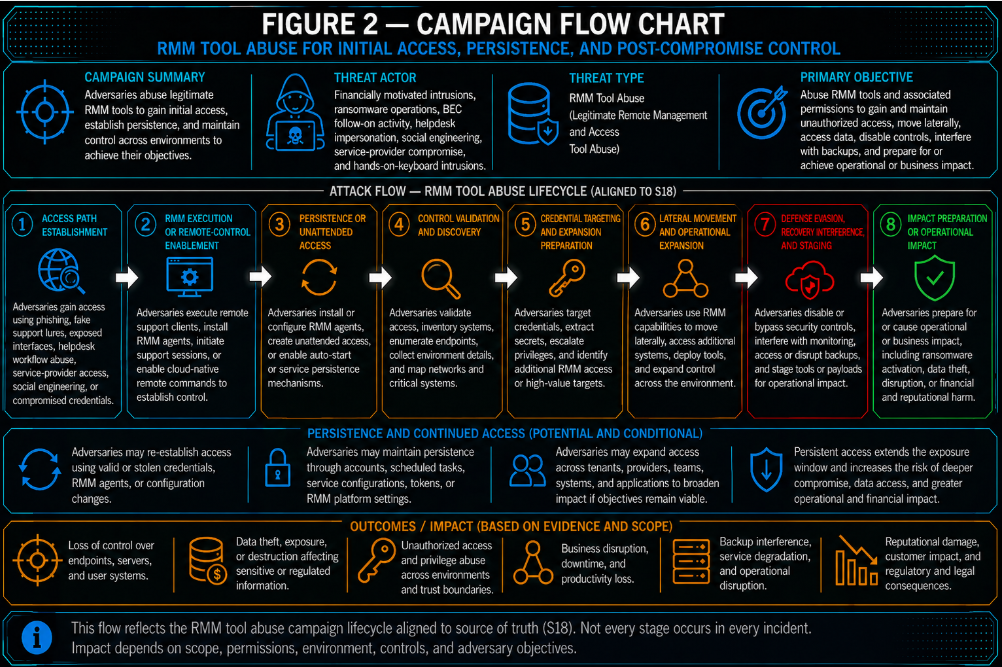
Figure 2
S10 — Threat Overview
RMM tool abuse is a legitimate-tool intrusion behavior in which adversaries use remote monitoring, remote management, remote support, or remote-control software to gain, preserve, or operate interactive access inside an organization. The core threat is not the existence of RMM software itself. The core threat is unauthorized use of remote administration capability outside approved support, helpdesk, endpoint management, service-provider, or cloud administration workflows.
Adversaries may introduce RMM tooling through phishing, fake support lures, browser downloads, collaboration-tool links, software deployment abuse, exposed RMM infrastructure, compromised helpdesk identities, service-provider pathways, or cloud-native management actions. Once established, RMM access can provide interactive control, file transfer, remote shell access, unattended access, reboot capability, persistence, or an operational foothold for follow-on intrusion activity.
This threat is difficult to manage because RMM tools are often signed, vendor-hosted, encrypted, common in enterprise environments, and permitted for legitimate administration. Traditional malware controls may not block the software, and network activity may use official relay infrastructure. Detection and response therefore depend on whether the tool, tenant, user, endpoint, source, deployment path, persistence behavior, and follow-on commands align with approved administrative intent.
RMM abuse can support multiple intrusion phases. It can provide initial access when users are convinced to install a support tool. It can provide persistence when unattended access, services, scheduled tasks, or auto-start behavior are configured. It can provide post-compromise control when adversaries use the RMM session to execute commands, access credentials, move laterally, tamper with defenses, stage files, interfere with backups, or prepare ransomware activity.
Cloud-native remote management features can create similar risk when used outside approved workflows. AWS Systems Manager, Azure Run Command, GCP VM Manager, OS Config, metadata-based execution, and similar control-plane functions can provide remote command or management capability without a traditional third-party RMM binary. These pathways should be treated as RMM-equivalent behavior only when cloud telemetry shows unauthorized remote command, setup-to-control activity, metadata execution, or management action against workloads outside approved administrative scope.
S11 — Threat Classification and Type
Threat Type
Legitimate-tool abuse and trusted administrative channel misuse.
Threat Sub-Type
Remote monitoring and management tool abuse for unauthorized access, persistence, and post-compromise control.
Operational Classification
Enterprise intrusion-enabling behavior involving approved-looking remote administration tooling, service-provider workflows, endpoint management pathways, and cloud-native remote management channels.
Primary Function
The primary function is to provide adversaries with interactive or persistent remote control while blending into normal administrative operations. This control can support initial access, durable access, command execution, credential access, lateral movement, defense evasion, data staging, backup interference, and ransomware preparation.
S12 — Campaign or Activity Overview
RMM tool abuse is not limited to a single campaign, malware family, product, or intrusion set. It is a recurring operational pattern used across financially motivated intrusions, ransomware operations, business email compromise follow-on activity, helpdesk impersonation, social engineering, service-provider compromise, and hands-on-keyboard intrusions. The shared behavior is adversary use of legitimate remote administration capability to avoid obvious malware indicators and operate through trusted tooling.
Activity commonly begins with one of several access paths. In user-driven cases, the victim may be directed to download or run a remote support client through a fake support page, phishing message, collaboration-tool link, or social engineering interaction. In administrative-abuse cases, an adversary may use compromised credentials, helpdesk accounts, endpoint management systems, or service-provider access to push or enable remote-control tooling. In infrastructure-abuse cases, exposed or misconfigured RMM infrastructure may be used to generate installers, create support sessions, modify tenants, enroll agents, or reach downstream endpoints.
After RMM capability is established, the activity may remain low-noise while the adversary validates access, confirms host context, or waits for an operational window. Higher-risk activity occurs when the RMM session is used to create unattended access, install persistent agents, launch command shells, enumerate users and systems, access credentials, transfer tools, stage data, disable security controls, interfere with backup or recovery, or prepare ransomware deployment.
The same activity pattern can appear in cloud environments without a classic RMM product. An adversary with sufficient cloud permissions may use native remote command or workload management features to execute commands, change metadata, enable management access, or stage tooling on cloud-hosted workloads. These cases should be evaluated through the same control-channel lens: whether remote administration capability was used by an approved principal, against an approved target, through an approved workflow, and without suspicious follow-on behavior.
S13 — Targets and Exposure Surface
The primary exposure surface includes endpoints, servers, cloud workloads, identity systems, service-provider administration paths, and remote support workflows where RMM activity is permitted, partially permitted, poorly governed, or difficult to distinguish from attacker-controlled access.
High-value target classes include identity infrastructure, domain controllers, backup servers, security tooling, privileged access workstations, executive endpoints, regulated-data systems, cloud management systems, virtual desktop environments, developer systems, production servers, and endpoints used by helpdesk or administrative personnel. Risk is elevated where these systems allow direct remote support, where RMM activity is not restricted by endpoint role, or where support sessions cannot be tied to an approved user, ticket, tenant, or workflow.
The exposure surface also includes authorized RMM tenants, management servers, relay infrastructure, support portals, endpoint management platforms, remote command features, service-provider workflows, and cloud-native workload management functions. These administrative paths can become intrusion channels if credentials are compromised, support workflows are impersonated, tenant associations are changed, or remote access is enabled outside approved processes.
Organizations with incomplete RMM inventories face higher exposure because they may not know which tools, tenants, endpoints, service providers, management servers, support users, or deployment paths are legitimate. Incomplete visibility into endpoint process telemetry, command-line activity, software inventory, DNS or proxy logs, identity telemetry, RMM platform audit logs, and cloud audit logs further expands the practical attack surface by making unauthorized use harder to validate.
S14 — Sectors / Countries Affected
Sectors Affected
RMM tool abuse can affect any sector that uses remote administration, helpdesk support, outsourced IT, endpoint management, cloud workloads, or service-provider access. Exposure is especially material in sectors with distributed workforces, regulated systems, high availability requirements, sensitive data, or heavy reliance on third-party administration.
The most exposed sectors include:
· Healthcare and life sciences, where endpoint disruption, regulated data exposure, and operational continuity create high impact.
· Financial services, where privileged endpoint access, customer data, fraud risk, and regulatory scrutiny increase consequence.
· Government and public sector organizations, where remote administration misuse can affect mission systems and citizen services.
· Education, where distributed endpoints, varied IT maturity, and broad remote support needs increase attack surface.
· Manufacturing and industrial organizations, where remote support access can intersect with production systems, engineering workstations, and operational continuity.
· Legal, professional services, and consulting organizations, where sensitive client data and third-party obligations increase impact.
· Technology, software, and cloud service providers, where service-provider access, customer administration, and developer systems can create downstream exposure.
· Retail, hospitality, and distributed enterprises, where remote management is often required across many locations and endpoints.
· Managed service providers and IT service providers, where compromise or misuse can affect multiple customer environments.
· Critical infrastructure operators, where remote administration pathways can intersect with sensitive operational, support, or monitoring environments.
Countries Affected
· Global.
· Exposure is not limited to a single country or region because RMM, remote support, endpoint management, service-provider administration, cloud workload management, and remote troubleshooting platforms are broadly deployed across enterprise environments.
· Countries with large enterprise technology footprints, regulated industries, distributed workforces, cloud-hosted workloads, service-provider ecosystems, or high-value public and private sector environments may face elevated operational exposure.
· Country-specific impact should be assessed by remote administration governance, approved RMM inventory maturity, service-provider oversight, endpoint telemetry quality, identity controls, cloud audit visibility, support workflow validation, and incident response readiness rather than geography alone.
S15 — Adversary Capability Profiling
Capability Level
Moderate to High.
Technical Sophistication
RMM abuse does not always require advanced malware development, but effective operational use requires knowledge of remote support workflows, endpoint behavior, identity access, helpdesk processes, and post-compromise objectives. Lower-sophistication actors may rely on fake support lures or user-driven installation. More capable actors may abuse compromised administrative accounts, service-provider access, endpoint management systems, RMM tenants, cloud-native remote command features, or exposed RMM infrastructure.
Infrastructure Maturity
Moderate to High.
Adversaries can use official vendor infrastructure, legitimate cloud relay services, attacker-controlled tenants, temporary support sessions, compromised service-provider infrastructure, or cloud-native management channels. This reduces the need for custom command-and-control infrastructure and makes malicious activity harder to distinguish from legitimate administration. Mature actors may also use tool stacking, tenant switching, infrastructure rotation, or multiple remote access methods to preserve access.
Operational Scale
Moderate to High.
RMM abuse can occur as a single-user support-lure event, a limited endpoint intrusion, a targeted high-value system compromise, or a broader enterprise or service-provider intrusion. Scale increases when the actor controls administrative credentials, endpoint management systems, RMM tenant access, service-provider accounts, or cloud management permissions. In service-provider scenarios, impact can extend across multiple customer environments.
Escalation Likelihood
High when RMM activity includes unattended-access configuration, persistence creation, high-risk command execution, credential access, lateral movement, backup interference, security-tool tampering, or data staging. Escalation likelihood is also high when activity affects identity infrastructure, backup systems, privileged access workstations, executive endpoints, cloud management systems, service-provider administration paths, or production-critical workloads.
S16 — Targeting Probability Assessment
Overall Targeting Probability
High.
RMM tool abuse has high targeting probability because remote administration tooling is common, trusted, and operationally necessary across enterprise environments. Adversaries can exploit this trust through user-driven installation, helpdesk impersonation, compromised credentials, service-provider workflows, endpoint management abuse, or cloud-native administrative channels. The behavior is attractive because it can reduce malware dependence, preserve interactive control, and blend into normal IT activity.
Targeting Drivers
· Broad use of RMM and remote support platforms across enterprise IT operations.
· Continued reliance on remote work, distributed endpoints, outsourced support, and service-provider administration.
· Trust placed in signed remote support binaries and official vendor infrastructure.
· Gaps in approved RMM inventory, tenant mapping, endpoint authorization, and support workflow validation.
· Availability of phishing, fake support, and social engineering paths that can lead users to install remote support tools.
· Potential for unattended access, persistent agents, and remote-control configuration to preserve adversary access.
· Value of using RMM as a low-friction post-compromise control channel.
· Opportunity to reach high-value systems through helpdesk, service-provider, endpoint management, or privileged support workflows.
· Ability to use cloud-native remote command features where cloud identity and workload controls are weak.
· Difficulty many organizations face in distinguishing legitimate support activity from attacker-controlled remote access.
Most Likely Targets
· User workstations exposed to phishing, fake support lures, collaboration links, or browser-based downloads.
· Helpdesk, IT support, and endpoint administration systems.
· Privileged access workstations and administrative jump hosts.
· Identity infrastructure and domain-connected systems.
· Backup servers and recovery infrastructure.
· Security tooling and monitoring infrastructure.
· Executive endpoints and high-value user systems.
· Regulated-data systems and sensitive business applications.
· Cloud-hosted workloads with remote command or metadata execution exposure.
· Virtual desktop infrastructure and remote work platforms.
· Managed service providers, IT service providers, and organizations with delegated administration across customer environments.
· Production servers where remote support is permitted or insufficiently restricted.
S17 — MITRE ATT&CK Chain Flow Mapping
Stage 1 — Access Path and RMM Introduction
The adversary establishes a path for remote administration capability through social engineering, fake support interaction, phishing, compromised support workflow, exposed RMM infrastructure, service-provider access, or endpoint management misuse. The objective is to introduce or enable a legitimate remote access tool or trusted administrative pathway that can reach the target environment.
· T1566.002 — Spearphishing Link.
· T1204.002 — Malicious File.
· T1219 — Remote Access Software.
· T1078 — Valid Accounts.
Stage 2 — Remote-Control Execution
The adversary runs or enables the RMM tool to create interactive access. Execution may occur from a user-controlled path, browser download location, temporary directory, collaboration-tool staging path, endpoint management action, or cloud workload management path. Maliciousness depends on context, authorization, tenant ownership, endpoint role, and workflow alignment rather than the binary alone.
· T1219 — Remote Access Software.
· T1059 — Command and Scripting Interpreter.
Stage 3 — Persistence and Unattended Access
The adversary converts temporary access into durable control by installing an agent, creating or modifying services, registering scheduled tasks, configuring auto-start behavior, enabling unattended access, enrolling the endpoint into an unauthorized tenant, or establishing reconnect capability. This stage increases risk because remote access can survive user logout, reboot, tool removal attempts, or the end of the initial support session.
· T1543.003 — Windows Service.
· T1053.005 — Scheduled Task.
· T1547.001 — Registry Run Keys / Startup Folder.
Stage 4 — Discovery and Credential Targeting
After remote-control capability is established, the adversary uses the session to inspect the environment, enumerate users and systems, identify privileges, discover security tools, locate backup systems, or access credential material. This stage indicates that remote access has transitioned from tool presence into active intrusion operations.
· T1087 — Account Discovery.
· T1069 — Permission Groups Discovery.
· T1003 — OS Credential Dumping.
Stage 5 — Lateral Movement and Expansion
The adversary uses information gathered through the RMM session to expand access through remote services, service creation, scheduled tasks, administrative shares, credential reuse, endpoint management systems, service-provider pathways, or cloud-native administrative channels. Expansion may remain within one organization or extend across downstream environments if service-provider access is involved.
· T1021 — Remote Services.
· T1078 — Valid Accounts.
· T1543.003 — Windows Service.
Stage 6 — Defense Evasion and Recovery Interference
The adversary uses remote-control access to weaken defenses, stop services, alter logging, create exclusions, interfere with recovery, stage archives, transfer tools, or prepare data for exfiltration. This stage materially increases business impact because it can reduce response confidence, impair recovery, and support ransomware preparation.
· T1562.001 — Impair Defenses.
· T1070.001 — Clear Windows Event Logs.
· T1490 — Inhibit System Recovery.
Stage 7 — Impact Preparation or Operational Impact
The adversary uses the remote-control channel and follow-on access to prepare ransomware deployment, support data theft, disrupt recovery, expand execution, or produce operational impact. RMM may remain the primary control channel or serve as one of several access methods used alongside scripts, remote services, cloud management features, or additional remote access tools.
· T1486 — Data Encrypted for Impact.
· T1490 — Inhibit System Recovery.
S18 — Attack Path Narrative (Signal-Aligned Execution Flow)
Attack Path Overview
RMM tool abuse progresses through a control-channel sequence rather than a malware-only execution path. The adversary objective is to introduce or enable remote administration capability, convert that capability into reliable access, and use the resulting control channel to conduct discovery, credential access, lateral movement, defense evasion, data staging, backup interference, or ransomware preparation.
The key analytical distinction is that the RMM tool may be legitimate. Risk is created when remote administration activity occurs outside approved support workflow, endpoint authorization, tenant ownership, service-provider governance, cloud workload policy, or expected administrative behavior.
Stage 1 — Access Path Establishment
The adversary establishes a path to introduce or enable remote access. This may occur through phishing, fake support interaction, browser download, collaboration-tool delivery, compromised helpdesk identity, service-provider access, endpoint management misuse, exposed RMM infrastructure, or cloud-native workload management activity.
Relevant signals include user-driven download activity, RMM-themed support lures, execution from user-controlled paths, suspicious parent processes, unexpected support-session generation, exposed RMM management activity, endpoint management actions, or cloud audit events that precede remote-control enablement.
Stage 2 — RMM Execution or Remote-Control Enablement
The adversary executes a remote support client, installs an RMM agent, initiates a support session, enables cloud-native remote command capability, or uses an existing remote administration pathway. The activity may appear benign if viewed only as product execution because the binary may be signed, vendor-hosted, and common in enterprise environments.
Relevant signals include RMM execution from downloads, temporary directories, browser cache, cloud-synced folders, archive extraction paths, or non-standard administrative locations. Additional signals include execution by ordinary users, unexpected service accounts, non-standard support identities, suspicious parent processes, unauthorized tenant association, or activity on systems where RMM is prohibited.
Stage 3 — Persistence or Unattended Access
The adversary strengthens control by creating a durable remote access path. This may include service creation, scheduled task creation, registry autorun modification, auto-start behavior, unattended-access enablement, persistent agent installation, endpoint enrollment, reconnect behavior, or cloud-native setup-to-control changes.
Relevant signals include new RMM services, scheduled tasks, startup entries, unattended-access settings, agent registration, tenant changes, instance profile changes, managed identity changes, service-account changes, metadata changes, or remote management enablement followed by remote-control activity.
Stage 4 — Control Validation and Environment Discovery
The adversary validates remote-control access and begins assessing the environment. This may include enumerating local users, domain users, groups, sessions, privileges, host role, security tools, backup systems, network shares, cloud resources, or administrative scope.
Relevant signals include RMM-launched shells, discovery commands, user and group enumeration, domain queries, privilege checks, endpoint role inspection, cloud resource enumeration, and activity that occurs shortly after RMM execution, support-session creation, or remote command enablement.
Stage 5 — Credential Targeting and Expansion Preparation
The adversary uses the control channel to identify or access credentials, determine privileged access opportunities, and prepare expansion. This may include LSASS targeting, credential tool staging, browser credential access, service-account discovery, privileged group inspection, administrative share access, or validation of reusable credentials.
Relevant signals include credential-access process activity, suspicious handle access, credential file access, use of credential dumping utilities, administrative share activity, privileged authentication after RMM activity, unusual helpdesk or service-account use, and RMM-associated commands that inspect identity or access scope.
Stage 6 — Lateral Movement and Operational Expansion
The adversary expands from the initial access point to additional systems or administrative scopes. Expansion may use remote services, service creation, scheduled tasks, endpoint management platforms, service-provider pathways, cloud-native remote command features, or credential reuse.
Relevant signals include remote service creation, scheduled tasks against remote systems, privileged logons from RMM-associated endpoints, administrative share access, new RMM installations across multiple systems, tool stacking, endpoint management pushes, cross-account or cross-project cloud activity, and repeated remote-control activity across endpoint groups or customer environments.
Stage 7 — Defense Evasion, Recovery Interference, and Staging
The adversary uses the remote-control channel to reduce visibility, weaken response, interfere with recovery, or stage data and tools. This may include stopping services, clearing logs, weakening audit policy, creating exclusions, disabling recovery options, deleting shadow copies, interfering with backup agents, staging archives, or transferring tooling.
Relevant signals include RMM-launched service-control commands, logging changes, endpoint protection exclusions, backup interference commands, recovery setting changes, archive tooling, file staging, unusual upload behavior, and activity on backup systems, security tooling, identity systems, or production-critical workloads.
Stage 8 — Impact Preparation or Operational Impact
The adversary uses established access to prepare or execute final objectives. In ransomware-oriented activity, this may include payload staging, broad execution preparation, backup disruption, recovery inhibition, data theft support, or encryption activity. In non-ransomware activity, impact may include persistent unauthorized access, data exposure, operational disruption, downstream customer risk, or continued service-provider abuse.
Relevant signals include ransomware-preparation commands, mass file activity, broad remote execution, backup disruption, high-volume data staging, exfiltration support, encryption indicators, remote access across high-value systems, and unresolved RMM tenant, session, or service-provider ownership.
S19 — Attack Chain Risk Amplification Summary
Risk Amplification Overview
RMM tool abuse amplifies risk because the adversary operates through trusted administrative channels rather than clearly malicious tooling. Each stage of the attack chain increases business exposure when the organization cannot prove whether remote administration activity was authorized, attributable, scoped, and consistent with approved support workflow.
The primary amplification factor is control ambiguity. A signed RMM binary, official vendor relay, helpdesk session, service-provider connection, or cloud-native remote command event may appear legitimate until correlated with endpoint role, tenant ownership, support ticket, identity context, persistence state, and follow-on commands.
Amplification Factor 1 — Trusted Tool Execution
Legitimate RMM tools reduce the reliability of malware-centric controls. Signed binaries, official vendor infrastructure, and common enterprise use can allow remote access activity to avoid immediate prevention or appear operationally normal.
Business risk increases when the organization relies on product presence, vendor reputation, or allowlists rather than validating authorized use, endpoint scope, tenant ownership, and session context.
Amplification Factor 2 — Support Workflow Ambiguity
RMM activity can resemble helpdesk, service-provider, break-fix, or endpoint management activity. This creates triage delay when support tickets, session ownership, tenant identifiers, management servers, deployment paths, or approved support users are not clearly documented.
Business risk increases when analysts must spend time proving whether the activity was legitimate while the adversary may retain interactive control.
Amplification Factor 3 — Persistence Through Unattended Access
Temporary remote support becomes more dangerous when converted into durable control. Services, scheduled tasks, auto-start settings, unattended access, agent enrollment, or reconnect behavior can allow access to persist after user interaction ends.
Business risk increases because the organization must validate whether the access path survived reboot, user logout, support-session closure, or initial remediation.
Amplification Factor 4 — Privileged System Exposure
RMM activity on identity systems, backup servers, security tooling, privileged access workstations, executive endpoints, regulated-data systems, cloud management systems, or production-critical workloads materially increases impact potential.
Business risk increases because these systems can support credential exposure, recovery disruption, monitoring impairment, business interruption, or broad operational compromise.
Amplification Factor 5 — Post-Compromise Command Execution
RMM-launched discovery, credential access, lateral movement, defense evasion, backup interference, file staging, or ransomware-preparation commands indicate that remote access has transitioned into active intrusion operations.
Business risk increases because the event is no longer limited to tool presence or support-session ambiguity; it becomes evidence of adversary-directed activity.
Amplification Factor 6 — Service-Provider and Downstream Exposure
RMM abuse involving service-provider access, delegated administration, shared support infrastructure, or downstream customer environments can expand impact beyond one organization.
Business risk increases because response may require service-provider validation, customer assurance, credential review, contractual review, and broader third-party-risk governance.
Amplification Factor 7 — Cloud-Native Remote Management Misuse
Cloud-native remote management features can provide RMM-equivalent control without a traditional third-party RMM binary. Unauthorized use of AWS Systems Manager, Azure Run Command, GCP VM Manager, OS Config, metadata execution, or similar features can bypass assumptions that RMM abuse must appear as endpoint software.
Business risk increases when cloud audit logs, workload telemetry, identity context, and workload tagging are insufficient to prove whether remote command activity was authorized.
Amplification Factor 8 — Recovery and Assurance Burden
When RMM abuse involves persistence, credential exposure, backup interference, security-tool tampering, or service-provider ambiguity, response expands from containment to assurance. The organization must prove that access was removed, credentials were secured, endpoints are trustworthy, backups remain viable, and support workflows are not compromised.
Business risk increases because recovery confidence becomes dependent on telemetry quality, endpoint integrity, identity assurance, cloud audit visibility, and service-provider cooperation.

Figure 3
S20 — Tactics, Techniques, and Procedures
TTP Overview
RMM tool abuse uses legitimate remote administration capability to achieve intrusion objectives while reducing reliance on malware or custom command-and-control infrastructure. The procedures below describe the operational behaviors most relevant to this report and should be interpreted through authorization, endpoint role, tenant ownership, support workflow, identity context, persistence, and follow-on activity.
Initial Access Procedures
· Use phishing, fake support pages, collaboration links, or social engineering to convince users to download and run a remote support client.
· Abuse compromised helpdesk, technician, administrative, or service-provider credentials to initiate support sessions or deploy RMM tooling.
· Exploit exposed or weakly controlled RMM infrastructure to generate installers, create sessions, modify tenants, or enroll endpoints.
· Use endpoint management, virtual desktop, or cloud workload management paths to introduce remote-control capability.
Execution Procedures
· Run signed RMM tools from downloads folders, temporary directories, user profiles, browser cache, archive extraction paths, or cloud-synced folders.
· Launch RMM tooling through browsers, email clients, collaboration tools, archive utilities, document readers, shells, script interpreters, or endpoint management agents.
· Use cloud-native remote command features to execute commands on workloads without deploying a traditional third-party RMM binary.
· Use portable support clients or temporary session tools to reduce installation artifacts.
Persistence Procedures
· Install persistent RMM agents or configure unattended access.
· Create or modify services, scheduled tasks, registry autoruns, startup entries, launch agents, or remote-control configuration artifacts.
· Enroll endpoints into unauthorized tenants, unknown management servers, or attacker-controlled support sessions.
· Configure reconnect behavior, silent access, auto-start behavior, or persistent remote shell capability.
Privilege and Identity Procedures
· Use valid accounts, compromised helpdesk identities, service-provider accounts, service accounts, managed identities, or cloud roles to legitimize remote administration activity.
· Inspect local and domain users, groups, privileges, active sessions, and administrative scope after RMM access is established.
· Use RMM-controlled access to validate credentials, identify privileged users, or access credential material.
· Expand access through credential reuse, privileged authentication, or administrative workflow abuse.
Discovery Procedures
· Enumerate local system information, domain membership, users, groups, sessions, network shares, installed tools, security products, backup systems, and cloud resources.
· Use RMM-launched shells or scripts to identify high-value systems and reachable administrative targets.
· Inspect endpoint role, user privileges, network connectivity, and security controls before lateral movement or staging.
· Identify systems where RMM use is permitted, restricted, or poorly governed.
Lateral Movement Procedures
· Use remote services, administrative shares, scheduled tasks, service creation, endpoint management platforms, or credential reuse to expand access.
· Deploy RMM or secondary remote access tools to additional hosts.
· Move through service-provider or delegated administration pathways when access spans multiple customer or business-unit environments.
· Use cloud-native remote command or workload management functions to reach cloud-hosted systems.
Defense Evasion Procedures
· Use trusted signed tools and official relay infrastructure to reduce suspicion.
· Rename binaries, use portable clients, alter file paths, or run from user-controlled locations.
· Stop services, weaken logging, create exclusions, interfere with endpoint security tooling, or reduce telemetry quality.
· Operate through approved-looking helpdesk, service-provider, endpoint management, or cloud administration workflows.
Collection and Staging Procedures
· Use RMM file transfer, remote shell, archive utilities, or cloud workload access to stage files and tools.
· Collect data from user profiles, file shares, regulated-data locations, finance systems, source repositories, or business applications.
· Prepare archives, move files, or stage data before exfiltration or ransomware deployment.
· Use RMM sessions to transfer additional utilities, scripts, or payloads.
Impact Procedures
· Interfere with backups, delete recovery artifacts, stop services, disable recovery settings, or weaken recovery options.
· Prepare ransomware deployment through broad remote execution, payload staging, or security-tool tampering.
· Use established remote-control access to support encryption, operational disruption, data theft, or continued unauthorized access.
· Maintain alternate access through tool stacking or multiple remote administration pathways.
S20A — Adversary Tradecraft Summary
Tradecraft Overview
The defining tradecraft in this report is adversary use of legitimate remote administration capability to reduce detection friction, preserve access, and operate through trusted workflows. RMM abuse is effective because it exploits the gap between software legitimacy and session legitimacy. A tool can be approved, signed, and vendor-hosted while the specific user, tenant, endpoint, session, deployment path, or command activity is unauthorized.
Key Tradecraft Characteristics
· The adversary uses trusted remote administration tooling rather than relying only on malware.
· The adversary benefits from official vendor infrastructure, signed binaries, encrypted sessions, and normal helpdesk activity patterns.
· The adversary may introduce RMM through user-driven installation, compromised support workflows, service-provider pathways, endpoint management systems, exposed RMM infrastructure, or cloud-native administrative channels.
· The adversary seeks durable control through unattended access, persistence, reconnect behavior, tenant enrollment, or management configuration changes.
· The adversary uses RMM sessions to launch post-compromise commands, inspect identity scope, move laterally, interfere with defenses, stage files, disrupt recovery, or prepare ransomware activity.
· The adversary may stack multiple remote access tools to preserve access if one pathway is removed.
· The adversary may shift between endpoint RMM, service-provider administration, endpoint management, and cloud-native remote command paths to maintain control.
Analytical Significance
The presence of an RMM tool is not enough to determine malicious activity. The decisive analytical question is whether the remote administration activity is authorized, attributable, scoped, and behaviorally consistent with approved operations. The strongest malicious indicators are unauthorized tenant association, suspicious execution context, persistence or unattended access, activity on restricted systems, RMM-launched high-risk commands, service-provider ambiguity, and remote management activity followed by credential access, lateral movement, defense evasion, backup interference, or ransomware preparation.
Defensive Interpretation
Defenders should treat RMM abuse as a control-channel and governance problem. Effective response requires validating the tool, tenant, user, endpoint, support ticket, session owner, deployment path, persistence state, source location, and follow-on activity. Where this context is missing, risk increases because analysts cannot quickly distinguish legitimate support from adversary-controlled access.
Tradecraft Assessment
RMM tool abuse is a high-value adversary tradecraft pattern because it turns trusted administration into an intrusion pathway. Its effectiveness comes from blending into normal operations, preserving access through legitimate tooling, and enabling post-compromise behavior without requiring obvious malware indicators. The most important defensive requirement is not to block all remote administration, but to prove that remote administration is authorized, monitored, bounded, attributable, and resilient against misuse.
S21 — Detection Strategy Overview
Detection Philosophy
RMM tool abuse must be detected as a behavior-driven control-channel problem rather than a static malware, product-name, vulnerability, or IOC problem. The adversary advantage comes from using legitimate, signed, trusted, built-in, and often allowlisted remote management or remote-control capability to establish interactive access, preserve persistence, bypass basic malware controls, and blend into normal administrative activity. Detection must therefore focus on unauthorized introduction or enablement, abnormal execution or session context, unexpected persistence creation, remote-control channel establishment, tool stacking, exploitation of exposed remote-access or management services, and post-compromise activity that follows establishment of remote-control or administrative capability.
The primary detection objective is to identify when remote management or remote-control capability appears or is exercised outside an approved administrative workflow. Tool names, vendor domains, file hashes, certificates, service names, protocol identifiers, process names, ports, and known infrastructure may support enrichment, but they must not be treated as the primary evidence of malicious activity. RMM platforms may be renamed, rehosted, bundled, staged through user-driven installation, deployed through official vendor infrastructure, pushed by compromised management tooling, introduced through cloud-hosted workloads, or replaced by native operating-system remote-control capability such as Apple Screen Sharing. Durable detection must use telemetry relationships: who initiated or received the session or administrative action, where the capability was enabled or executed, how access was authenticated or authorized, whether the host was expected to permit the activity, how persistence was established, whether management-platform processing resulted in unexpected file placement or privileged execution, what network path was used, and what privileged or post-compromise activity followed.
This report treats RMM and remote-control abuse as telemetry-observable intrusion behavior that may support initial access, persistence, command execution, credential access, privilege escalation, lateral movement, data staging, exfiltration, cryptomining, ransomware preparation, or other operational impact. Detection engineering must prioritize behavior that remains valid across multiple RMM products, native remote-access services, endpoint-management platforms, deployment paths, operating systems, and evasion variants.
For macOS, native Screen Sharing or Remote Management must be treated as part of the same remote-control behavior family when the capability is exposed, enabled, authenticated, or used outside approved administrative intent. Detection must distinguish legitimate Apple Screen Sharing or VNC-compatible administration from unauthorized session establishment, unexpected internet exposure, authentication anomalies, permission or service changes, and suspicious root or user-context activity that follows the remote session.
Primary Detection Anchors
· Unauthorized RMM installer execution from browsers, email clients, archive utilities, collaboration tools, script interpreters, temporary directories, downloads folders, user profile paths, removable media, or other non-administrative launch contexts.
· First-seen RMM agent, support client, remote-control binary, service, daemon, launch agent, scheduled task, startup item, enrollment artifact, native remote-control service, or unattended-access configuration on an endpoint without an approved administrative baseline.
· RMM process execution by non-administrative users, unexpected service accounts, recently compromised identities, unusual parent processes, recently created files, renamed binaries, unsigned wrapper components, abnormal working directories, or uncommon command-line parameters.
· New or modified persistence mechanisms associated with remote-control tooling, including services, scheduled tasks, registry run keys, login items, launch agents, launch daemons, management agents, remote-access configuration files, unattended-access tokens, and remote-control enablement settings.
· Unexpected enablement, configuration change, authentication, or session establishment involving native Apple Screen Sharing, Remote Management, VNC-compatible remote control, or equivalent operating-system remote-access capability on a Mac where the behavior is new, restricted, prohibited, or inconsistent with approved support workflow.
· Inbound remote-control connections, including VNC-compatible or Apple Screen Sharing traffic, from unapproved source networks or internet-facing paths to endpoints not expected to accept remote desktop sessions.
· Outbound connections to remote session brokers, vendor cloud relays, rare TLS/SNI values, newly observed RMM infrastructure, unexpected management servers, or long-lived encrypted sessions from endpoints not expected to use RMM.
· Suspicious exploitation of exposed RMM, support, or management infrastructure followed by unexpected target-originated HTTP or DNS callbacks, particularly where callback timing, destination novelty, or target-specific content indicates exploit validation.
· Suspicious management-platform API, upload, package, or archive-processing activity followed by file placement outside an expected processing boundary, modification of executable content in a privileged installation path, or loading of newly modified content by a privileged management service.
· RMM tool stacking, where more than one remote access, support, management, tunneling, remote desktop, or screen-sharing capability appears on the same endpoint, user account, subnet, or administrative scope within a compressed operational window.
· Remote-control or Screen Sharing activity followed by root or elevated execution, suspicious shell activity, payload retrieval, cryptominer execution, persistence creation, credential access, discovery, lateral movement, file staging, security-tool tampering, backup interference, exfiltration preparation, ransomware staging, or other post-compromise activity.
· Remote-control activity followed by high-impact credential or domain-control behavior, including credential-process dumping, authentication-component modification, acquisition of directory credential material, or domain-policy changes inconsistent with approved administration.
· Cloud-observable RMM deployment or remote-control enablement only where the activity intersects with cloud-hosted workloads, cloud identity, endpoint management, virtual desktop platforms, cloud-native run command features, or equivalent control-plane telemetry.
Detection Prioritization Model
Detection priority must follow the adversary’s control path rather than the RMM product name, native service name, management-platform name, or vulnerability identifier. The highest-priority detections identify unauthorized creation or exercise of remote-control or administrative capability, especially when access establishment, authentication or authorization anomalies, persistence, file-write or execution anomalies, network-session evidence, and follow-on intrusion behavior occur together. Single-signal detections may support hunting or triage, but production-priority rules should emphasize high-confidence behavioral combinations that separate malicious remote control or management-plane abuse from legitimate IT administration.
· First priority is unauthorized RMM introduction, native remote-control enablement, unauthorized remote session establishment, or unauthorized exercise of management-platform functionality on endpoints, servers, virtual desktops, cloud-hosted workloads, identity infrastructure, backup infrastructure, macOS endpoints, management servers, or other systems where no approved remote-access or administrative baseline exists.
· Second priority is RMM persistence, unattended-access configuration, Screen Sharing or Remote Management enablement, or equivalent durable remote-control configuration created through suspicious parent processes, unusual users, abnormal paths, non-standard administrative workflows, unexpected endpoint-management actions, or configuration changes inconsistent with approved policy.
· Third priority is remote-control channel establishment from or to endpoints, users, service accounts, workloads, or network locations that do not normally participate in remote management activity. For native VNC-compatible Screen Sharing, priority should increase when inbound session activity reaches a host not approved for remote-control exposure or originates from an unexpected external source.
· Fourth priority is post-compromise activity after RMM, remote-control, or management-platform compromise, including root- or SYSTEM-context execution, payload download, cryptominer execution, credential access, discovery, privilege escalation, lateral movement, exfiltration preparation, security-tool tampering, persistence creation, domain-policy modification, and ransomware staging.
· Fifth priority is tool stacking, because adversaries may deploy multiple remote access tools or combine third-party RMM with native remote desktop or screen-sharing capability to preserve access if one path is removed or blocked.
· Sixth priority is cloud-native deployment or remote execution behavior where RMM tooling is pushed to cloud workloads through cloud management planes, endpoint management platforms, virtual desktop infrastructure, or identity-backed administrative channels.
Correlation Strategy (Strict Enforcement)
Correlation may strengthen detection confidence, but it must not create cross-rule dependency or circular detection logic. A rule may correlate raw telemetry events within its own logic, but it must not depend on another detection rule firing first. Each rule must stand on direct observable evidence such as process execution, file creation or modification, module loading, service creation, scheduled task registration, launch daemon creation, login item creation, remote-control configuration change, operating-system security event, remote session event, network flow, DNS query, proxy request, authentication event, identity change, application or API activity, software inventory delta, endpoint network connection, cloud audit event, or endpoint-management action.
Correlation should connect raw signal relationships that represent adversary control progression.
· RMM installer execution followed by new service creation, agent enrollment, scheduled task registration, startup persistence, launch agent or launch daemon creation, login-item creation, or unattended-access configuration.
· Suspicious inbound exploitation activity against exposed management infrastructure followed by an unexpected target-originated HTTP or DNS callback and subsequent administrative access, session creation, command execution, file creation, or endpoint-side activity.
· Suspicious management-platform API, upload, package, or archive-processing activity followed by path or extraction anomalies, unexpected file creation or overwrite outside the intended processing location, privileged-path executable or DLL modification, or subsequent privileged service execution.
· Unexpected modification of executable content within a management-platform installation path followed by loading of that content by a SYSTEM-level or otherwise highly privileged management service and subsequent process, account, deployment, or endpoint activity.
· Native Apple Screen Sharing or Remote Management enablement or unexpected session establishment followed by privileged execution, shell activity, file retrieval, new persistence, or other endpoint behavior inconsistent with an approved support session.
· Inbound VNC-compatible or Screen Sharing session activity from an unapproved source followed by new root-context or elevated process execution on the destination Mac.
· Remote-control session establishment followed by downloaded executable or script creation and subsequent execution under root, administrator, service, or other elevated context.
· Remote-control activity followed by launch daemon, launch agent, login item, or other macOS persistence creation.
· Remote-control activity followed by cryptominer execution, high sustained outbound mining-related connectivity, suspicious payload retrieval, or other anomalous compute-oriented behavior.
· RMM binary execution followed by outbound connections to vendor relay infrastructure, remote session brokers, management servers, or rare external destinations.
· First-seen RMM software followed by credential access, discovery commands, lateral movement, administrative share access, remote service execution, or security-tool tampering.
· RMM activity followed by credential-process dumping, authentication-component modification, acquisition of directory credential material, or unexpected domain-policy modification.
· RMM activity from a non-administrative user followed by privileged authentication, group membership change, MFA modification, mailbox access, cloud-resource access, or endpoint-management action.
· RMM deployment on a cloud-hosted workload followed by cloud identity activity, storage access, snapshot activity, run-command use, cross-resource enumeration, or suspicious service-account activity.
· Endpoint-management or software-distribution activity followed by endpoint-protection exclusion creation, payload distribution, privileged file placement, or distributed execution outside an approved deployment workflow.
· Multiple RMM, remote-access, remote-desktop, tunneling, or screen-sharing capabilities appearing on the same host, user account, subnet, or administrative scope within the same intrusion window.
Correlation must not compensate for weak base telemetry. If telemetry cannot prove execution, session establishment, remote-control enablement, persistence, communication, deployment, administrative misuse, privileged file modification, module loading, or post-compromise behavior, the detection must remain a hunting opportunity rather than a production rule.
Telemetry Prioritization
Endpoint telemetry is the primary detection layer for this report. The strongest signals come from process execution, parent-child relationships, command-line arguments, file writes, module loads, service creation, launch-service changes, persistence changes, software inventory deltas, endpoint network connections, operating-system security events, and EDR behavioral context. SIEM correlation should combine these endpoint events with NDR, DNS, proxy, authentication, identity, software inventory, endpoint-management, remote-support-platform, management-application, macOS operating-system telemetry where available, and conditional cloud audit telemetry.
· Endpoint and EDR telemetry is required for high-confidence detection of RMM installation, execution, persistence, renamed binaries, suspicious parentage, unusual user context, root or elevated execution, payload activity, abnormal module loading, and post-compromise behavior.
· macOS endpoint and operating-system telemetry is required where native Apple Screen Sharing, Remote Management, launch agents, launch daemons, login items, privacy or remote-control permissions, and native remote session behavior are within detection scope.
· macOS Unified Log or equivalent normalized telemetry should be collected where available and where the proposed detection depends on authentication, session, system-service, launch-service, configuration, or application events not reliably exposed by endpoint telemetry alone.
· NDR telemetry is required as a supporting network detection layer for observing unexpected remote-control exposure, inbound and outbound remote-access sessions, VNC-compatible traffic, unusual RMM relay communications, session duration, source and destination rarity, network-segment violations, first-seen administrative paths, exploit-validation callbacks, and related egress behavior.
· DNS and proxy telemetry are required to identify unusual RMM vendor traffic, rare remote-session destinations, new outbound control paths, unexpected TLS/SNI values, first-seen management infrastructure, payload-retrieval infrastructure, exploit-verification destinations, and suspicious follow-on destinations.
· Authentication and identity telemetry are required to detect privileged access changes, unusual sign-ins, MFA manipulation, helpdesk impersonation patterns, service-account misuse, remote-access authentication anomalies, endpoint-management authorization anomalies, and identity activity after RMM, native remote-control, or management-platform access is established.
· Active Directory and policy-change telemetry should be available where domain administration is in scope so that high-impact Group Policy changes can be attributed to the responsible identity, source system, and change context.
· Software inventory and asset-management telemetry are required to distinguish approved RMM deployments and approved native remote-access configurations from unauthorized, newly introduced, or policy-violating remote management capability.
· Endpoint-management telemetry is required where RMM agents, remote-control settings, software packages, extensions, scripts, or executable content may be deployed or changed through device management platforms, including Microsoft Configuration Manager, Jamf and equivalent macOS management systems, software distribution systems, remote command features, virtual desktop tooling, or administrative automation.
· Cloud audit telemetry is conditional and should only drive rules where cloud control planes, virtual desktop platforms, workload-management features, endpoint-management tooling, or cloud-hosted systems directly observe relevant activity.
· File scanning and YARA-style telemetry are supportive and should be limited to suspicious installers, repackaged tools, fake support software, bundled droppers, malicious wrappers, exploit-delivered payloads, altered management-platform executable content, cryptominer artifacts, or organization-banned tools rather than clean signed RMM binaries or native Screen Sharing components.
Detection Design Constraints
Detection content must avoid treating legitimate RMM software, native Screen Sharing, VNC traffic, remote desktop capability, endpoint-management activity, archive processing, or privileged management services as inherently malicious. Many organizations rely on these functions for IT support, MSP operations, software deployment, break-fix administration, remote troubleshooting, endpoint management, and legitimate Mac administration. Effective detection requires separating approved administrative use from unauthorized deployment, unauthorized service exposure, suspicious session establishment, authorization anomalies, abnormal file-write or module-load behavior, abnormal persistence, unexpected control channels, and adversary follow-on behavior.
· Rules must not alert solely on the existence of a known RMM product or native remote-control capability unless the organization has explicitly banned that product or capability.
· Rules must not alert solely because Apple Screen Sharing, Remote Management, VNC-compatible traffic, TCP 5900, or another expected native remote-control or management-platform artifact is observed.
· Rules must not rely solely on vendor names, hashes, domains, certificates, process names, service names, protocol names, port numbers, API paths, DLL names, or default installation paths.
· Rules must account for renamed binaries, repackaged installers, signed tools, portable support clients, temporary support sessions, native operating-system capabilities, cloud relay infrastructure, legitimate vendor update paths, compromised administrative deployment channels, altered management packages, and substituted executable content.
· Rules must avoid broad domain, protocol, port, API-path, file-path, or module-name assumptions unless the environment has an approved RMM and remote-access inventory and clearly defined remote-support and endpoint-management policy.
· Rules must distinguish managed administrative endpoints and management servers from ordinary user workstations, servers, domain controllers, privileged access workstations, kiosks, virtual desktops, cloud-hosted workloads, executive systems, and macOS systems where native Screen Sharing is restricted or prohibited.
· Rules must support allowlisting based on approved tool, approved native remote-control service, approved tenant, approved management server, approved IT user group, approved service account, approved device group, approved source network, approved deployment method, approved software-distribution or package workflow, approved support workflow, and approved business function.
· Rules must preserve visibility into unexpected use even when the RMM vendor, management platform, or operating-system remote-control feature itself is approved for limited parts of the enterprise.
· Rules must treat MSP, helpdesk, emergency support, Mac administration, endpoint-management administration, software-distribution, and break-fix workflows as high-value baseline inputs, not blanket suppressions.
Baseline and Deployment Requirements
A deployable RMM and remote-control abuse detection strategy requires a known-good administrative baseline. Without baseline context, detections either become too noisy or too dependent on generic tool, process, or protocol lists. The baseline does not need to be perfect before hunting begins, but production alerts require enough context to distinguish legitimate administration from suspicious remote-control enablement, session establishment, or management-platform activity.
· Maintain an approved RMM inventory covering vendor, product, agent name, service name, installation path, tenant identifier, management server, expected domains, expected ports, approved installer source, approved certificate or signer where applicable, and approved deployment mechanism.
· Maintain an approved native remote-access inventory for macOS and other operating systems, including systems permitted to run Screen Sharing or Remote Management, expected source networks, expected administrator groups, remote-support workflows, management policy, and whether inbound VNC-compatible access is permitted.
· Define approved RMM users, Mac administrators, administrator roles, helpdesk identities, MSP accounts, service accounts, endpoint-management identities, and emergency-access accounts.
· Identify authorized RMM deployment and remote-control configuration paths such as endpoint-management platforms, Microsoft Configuration Manager, Jamf or equivalent macOS management, software distribution systems, golden images, device-management policies, virtual desktop images, cloud workload automation, or approved support workflows.
· Define endpoint populations where RMM, Screen Sharing, Remote Management, VNC-compatible access, or endpoint-management activity is expected, restricted, or prohibited, including workstations, servers, domain controllers, privileged access workstations, executive devices, developer systems, virtual desktops, cloud-hosted workloads, identity infrastructure, backup servers, security tooling, management servers, and Mac fleets.
· Establish first-seen software and capability baselines for remote administration tools, remote-support clients, unattended-access agents, remote desktop utilities, screen-sharing services, support wrappers, portable support executables, and native remote-control enablement.
· Maintain network baselines for expected RMM vendor relay domains, management servers, outbound ports, inbound remote-access ports, TLS/SNI patterns, administrative source networks, remote-support gateways, VNC-compatible administration paths, and endpoint populations authorized for remote-control traffic.
· Maintain change-control context for domain-level policy, endpoint-protection configuration, management-platform package or extension changes, and enterprise software-distribution activity where those administrative mechanisms can materially alter remote access, security controls, or executable deployment.
· Integrate asset criticality so unauthorized RMM, native remote-control, or management-platform activity on domain controllers, finance systems, identity infrastructure, backup servers, security tooling, executive endpoints, endpoint-management servers, cloud management systems, regulated-data systems, and other high-value systems receives elevated priority.
Variant Resilience Requirements
Detection engineering must remain effective when adversaries change the specific RMM product, remote-control service, management platform, delivery method, process name, installation path, archive or package structure, infrastructure, administrative identity, protocol implementation, or post-compromise sequence. Durable detections should identify the operational purpose of the activity rather than one fixed artifact.
· Detect unauthorized remote-control capability even when the adversary changes from one RMM platform to another or shifts between third-party RMM and native operating-system remote desktop or screen-sharing features.
· Detect suspicious installation or enablement context even when the binary or service is signed, legitimate, built into the operating system, downloaded from an official vendor source, or launched through user interaction.
· Detect management-platform exploitation through authorization anomalies, unexpected archive or package processing, file placement outside expected processing boundaries, privileged file modification, and subsequent execution rather than dependence on one vulnerability identifier, archive filename, DLL name, or traversal string.
· Detect persistence behavior even when the service name, task name, launch agent, launch daemon, login item, configuration file, enrollment artifact, or install directory differs from known defaults.
· Detect control-channel behavior through rarity, source or destination mismatch, host-role mismatch, first-seen destination or inbound source, approved-inventory mismatch, unexpected endpoint population, and policy deviation rather than static domain or port lists alone.
· Detect tool stacking even when each individual tool or native remote-access feature is legitimate or approved elsewhere in the enterprise.
· Detect post-compromise behavior after RMM, native remote-control, or management-platform activity even when the RMM agent, management service, or Screen Sharing capability itself is approved, ambiguous, already present, or built into the operating system.
· Detect exploit-enabled remote-control or administrative access through file, process, session, module-load, management-action, and follow-on behavior rather than dependence on a vulnerability identifier or exploit signature alone.
· Detect suspicious exploit-verification callbacks through request-to-callback relationships, source-system context, destination novelty, and target-specific callback content rather than dependence on one named service or domain.
· Detect credential-access and domain-control activity through process access, authentication-component changes, sensitive directory-data access, policy modification, and subsequent credential or privilege use rather than dependence on one fixed tool or artifact.
· Detect cloud-hosted workload deployment only where control-plane audit events, endpoint telemetry, or management-platform logs prove remote execution, software staging, policy change, or identity-backed administrative action.
· Preserve detections across phishing-led installation, exposed RMM server exploitation, endpoint-management exploitation, native remote-access authentication bypass, fake support lures, MSP compromise, helpdesk impersonation, software deployment abuse, virtual desktop abuse, cloud workload management abuse, and living-off-the-land administrative deployment.
Operational Detection Model
The operational model should use layered detection with endpoint and SIEM rules as the backbone, NDR as the dedicated network behavior and remote-session visibility layer, DNS and proxy telemetry as supporting evidence, management-platform and application telemetry where server-side exploitation is in scope, and cloud-native rules only where cloud telemetry directly observes relevant behavior. The SOC should triage RMM, remote-control, and management-platform alerts by determining whether the tool or native capability, user, host, source, destination, deployment or enablement path, authorization context, persistence mechanism, remote session, tenant association, file or module activity, and follow-on activity match an approved administrative baseline.
Initial alert handling should answer the following questions:
· Was the RMM tool or native remote-control capability approved for this endpoint, user, business unit, tenant, source network, and deployment method?
· Was Screen Sharing, Remote Management, VNC-compatible access, or another native remote-control capability expected and approved on the affected endpoint?
· Was the tool installed interactively by an end user, launched from a suspicious parent process, pushed through a compromised administrative channel, staged through a non-standard path, or enabled through an unexpected system or management configuration change?
· Did suspicious exploitation activity against exposed RMM or management infrastructure produce an unexpected target-originated callback, administrative session, command execution, file creation, or endpoint-side activity?
· Did management-platform API, upload, package, or archive-processing activity produce unexpected file placement, privileged-path executable modification, or subsequent execution by a privileged management service?
· Did an unexpected inbound remote-control session originate from the internet, an unapproved network, a rare source, or a source not associated with an approved support workflow?
· Did the activity create unattended access, a persistent service, scheduled task, startup item, launch agent, launch daemon, login item, remote session enrollment, remote-control permission, or management configuration artifact?
· Did the endpoint initiate new outbound connections to RMM vendor relay infrastructure, remote session brokers, management servers, rare external control destinations, payload hosts, or suspicious follow-on infrastructure?
· Did additional remote access, tunneling, remote desktop, or screen-sharing tools appear on the same host, user account, subnet, or administrative scope shortly afterward?
· Did credential-process dumping, authentication-component modification, directory credential acquisition, account modification, or unexpected domain-policy modification occur after remote-control or management-platform activity?
· Did endpoint-management or software-distribution activity create endpoint-protection exclusions, stage a payload, modify privileged executable content, or initiate remote execution outside an approved software-deployment workflow?
· Did root, SYSTEM, or elevated execution, payload download, cryptominer execution, credential access, discovery, lateral movement, privilege escalation, security-tool tampering, data staging, exfiltration preparation, backup interference, persistence creation, or ransomware preparation follow the RMM, remote-control, or management-platform activity?
· Did cloud identity, endpoint management, virtual desktop, workload management, service-account, Mac management, or device-management telemetry show related administrative misuse?
Alert severity should increase when unauthorized RMM, remote-control, or management-platform activity occurs on privileged systems, endpoint-management servers, identity infrastructure, backup infrastructure, security tooling, executive endpoints, cloud workloads, Macs exposing unexpected remote-control services, or systems with sensitive business data. Severity should also increase when remote or management-platform activity is followed by privileged file modification, unexpected module loading, SYSTEM or root execution, payload delivery, cryptomining, credential access, discovery, lateral movement, tool stacking, security-tool tampering, domain-policy modification, backup interference, persistence creation, or data staging.
Explicit Non-Deployment Guardrails
The following detection approaches should not be deployed as standalone production rules unless they are explicitly scoped to a customer-approved policy condition or combined with stronger behavioral evidence:
· Do not deploy a rule that alerts only because AnyDesk, TeamViewer, ScreenConnect, SimpleHelp, Atera, Splashtop, NinjaOne, Syncro, Zoho Assist, NetSupport, Apple Screen Sharing, VNC, Microsoft Configuration Manager, or another RMM, endpoint-management, or remote-control capability exists on a host.
· Do not deploy a rule solely because a native remote-access component, Screen Sharing service, VNC-compatible traffic, TCP 5900, or expected management-platform service or API activity is observed.
· Do not deploy a rule solely because a system communicates with public OOB interaction infrastructure; authorized testing and research may generate similar traffic, and exploit-verification confidence requires supporting target, timing, source-system, or compromise context.
· Do not deploy a rule that relies only on known malicious IP addresses, file hashes, vendor domains, certificates, process names, service names, protocol identifiers, API paths, module names, or default port numbers.
· Do not deploy a rule that assumes official vendor infrastructure, native operating-system remote-access functionality, normal VNC-compatible traffic, or legitimate endpoint-management functionality is malicious without local baseline deviation or supporting suspicious behavior.
· Do not treat an isolated application error, archive-processing failure, privileged-path file change, or module-load event as confirmed exploitation without supporting process, file, application, authorization, or follow-on evidence.
· Do not deploy a rule that treats all remote-support, Screen Sharing, Remote Management, endpoint-management, or software-distribution activity as malicious without considering approved IT, MSP, Mac administration, helpdesk, emergency support, endpoint management, or break-fix workflows.
· Do not deploy a rule that requires another detection rule to fire before it can produce an alert.
· Do not deploy cloud-native RMM detections unless cloud telemetry directly observes deployment, execution, identity misuse, endpoint-management action, workload command execution, virtual desktop activity, or service-account misuse.
· Do not deploy YARA or file-matching rules against clean signed RMM binaries, legitimate management-platform binaries, or native Apple components unless the organization has banned the tool or the rule targets suspicious packaging, exploit-delivered content, wrapper behavior, replaced executable content, fake software, malicious bundling, or policy-prohibited software.
· Do not deploy broad NDR detections based solely on a vendor domain, VNC/RFB protocol observation, TCP 5900, encrypted session duration, generic remote-control traffic, or generic management API traffic when the detection cannot distinguish legitimate administration from unauthorized control.
· Do not lower evidence requirements for smaller environments; smaller environments may reduce deployment scope, but each rule must still require observable suspicious behavior.
· Do not expose internal detection scoring methodology, rule-selection mechanics, tier mapping, wrapper logic, proprietary tuning thresholds, customer readiness models, or CyberDax implementation mechanics in public-facing detection content.
S22 — Primary Detection Signals
Primary Detection Signals
The primary detection signals for RMM tool abuse are telemetry-observable behaviors that show unauthorized remote management, remote-control, or management-platform capability being introduced, enabled, exploited, persisted, remotely accessed, or used outside an approved administrative workflow. These signals must prioritize execution context, deployment or enablement path, authentication and authorization context, file and archive-processing behavior, session context, tenant association, persistence creation, network control-channel behavior, endpoint or management-server role, and post-compromise activity over static product names or known indicators.
· First-seen RMM installer, support client, remote-control agent, service binary, daemon, launch agent, portable remote-access executable, native remote-control service, or unattended-access component on an endpoint without an approved RMM or remote-access baseline.
· RMM installer or agent execution from suspicious user-controlled locations, including downloads directories, temporary directories, desktop folders, browser cache paths, archive extraction paths, removable media, cloud-synced folders, or other non-standard administrative staging locations.
· RMM execution launched by browsers, email clients, document readers, archive utilities, collaboration tools, script interpreters, command shells, remote-command utilities, endpoint-management actions, or living-off-the-land execution paths inconsistent with approved software deployment.
· RMM agent installation, support-session initiation, native remote-control enablement, or remote-control session establishment by a non-administrative user, unexpected service account, newly active identity, suspicious helpdesk identity, MSP-linked identity, or account with no normal remote-support function.
· Unexpected Apple Screen Sharing or Remote Management activity on a Mac where the capability is not approved, has not historically been enabled, is newly exposed to an untrusted network, or cannot be associated with an approved administrative workflow.
· Inbound VNC-compatible or Screen Sharing connections from internet-facing, rare, unauthorized, or non-administrative source networks to macOS systems not expected to accept direct remote-control sessions.
· Authentication or session establishment associated with native Screen Sharing that is inconsistent with expected account, source, device, support workflow, or historical session behavior.
· Suspicious exploitation activity against exposed RMM, support, or management infrastructure followed by a first-seen or anomalous target-originated HTTP or DNS callback.
· Management-platform API, upload, extension, package, or archive-processing activity inconsistent with the initiating account, role, source, administrative workflow, or approved change activity.
· Suspicious archive-processing behavior on endpoint-management infrastructure, including path-traversal indicators, extraction outside an intended working directory, cleanup anomalies, abnormal server errors, or file creation in locations not expected for the administrative operation.
· Unexpected creation, replacement, or modification of executable or DLL content within a privileged management-platform installation path following suspicious API, upload, package, extension, or archive-processing activity.
· Loading by a privileged management service of executable or DLL content that is newly created, recently modified, signer-mismatched, hash-changed, or otherwise inconsistent with the known-good product baseline.
· Privileged management-service activity followed by SYSTEM-level process execution, shell or script activity, local-account or privileged-group modification, payload staging, endpoint-management action, or distributed execution inconsistent with approved platform operation.
· Creation of new services, scheduled tasks, startup entries, registry run keys, launch agents, launch daemons, login items, configuration files, accessibility permissions, screen-recording permissions, remote-control permissions, system-management settings, or unattended-access artifacts tied to remote management tooling.
· RMM agent enrollment into an unknown tenant, unexpected management server, unauthorized relay, attacker-controlled support session, unmanaged MSP environment, or tenant association that does not match the organization’s approved inventory.
· Endpoint network connections to first-seen RMM relay infrastructure, rare remote-session brokers, unexpected vendor cloud relays, unmanaged support domains, newly observed management servers, or long-lived encrypted remote-control sessions from endpoints not expected to use RMM.
· RMM process execution or remote-control network activity from systems where RMM should be restricted or prohibited, including domain controllers, identity infrastructure, backup servers, privileged access workstations, security tooling, executive endpoints, virtual desktop infrastructure, cloud workloads, regulated-data systems, and macOS endpoint groups where Screen Sharing is not permitted.
· Multiple RMM, remote access, remote desktop, support, tunneling, or screen-sharing tools or capabilities appearing on the same endpoint, user account, subnet, device group, cloud workload group, MSP scope, or administrative scope within a compressed operational window.
· RMM or remote-control activity followed by root or elevated execution, downloaded payload execution, cryptominer activity, discovery, credential access, privilege escalation, lateral movement, administrative share access, remote-service creation, persistence creation, file staging, exfiltration preparation, security-tool tampering, backup interference, or ransomware staging.
· RMM or remote-control activity followed by credential-process dumping, authentication-component modification, acquisition of directory credential material, or unexpected high-impact domain-policy modification.
· Endpoint-management or software-distribution activity that creates endpoint-protection exclusions, stages executable content in a privileged path, modifies trusted management-server executable content, or initiates distributed execution outside an approved deployment workflow.
· Cloud, endpoint-management, virtual-desktop, Mac-management, or service-provider control-plane activity that deploys, enables, stages, enrolls, or configures RMM or remote-control capability on cloud-hosted workloads, virtual desktops, managed endpoints, Macs, or downstream customer environments.
Supporting Detection Signals
Supporting signals provide enrichment, severity context, triage value, and hunting pivots. They should not be treated as standalone production evidence unless the organization has explicitly prohibited the relevant tool, native remote-control capability, tenant, domain, network path, or behavior.
· Known RMM product names, process names, service names, display names, signer names, installation folders, tenant identifiers, vendor certificates, support-session names, native remote-control process names, and remote-control configuration artifacts.
· Known management-platform service names, administrative API paths, extension or package functions, privileged installation locations, module names, and expected administrative source systems.
· Known RMM vendor domains, relay domains, management URLs, TLS/SNI values, websocket paths, update paths, API endpoints, download locations, installer generation paths, support-session infrastructure, and OOB interaction infrastructure.
· VNC-compatible protocol observations, TCP 5900 exposure, Screen Sharing network sessions, remote administration flows, source-network identity, connection duration, and first-seen inbound remote-control sources.
· Software inventory deltas showing newly installed remote management, remote desktop, support, screen-sharing, file-transfer, tunneling, unattended-access, or remote-command tools.
· Endpoint detection context showing suspicious reputation, low prevalence, first-seen execution, abnormal parentage, unusual command-line parameters, abnormal working directory, root, SYSTEM, or elevated context, or execution by non-standard users.
· Certificate, signer, hash, file-age, or file metadata inconsistent with approved deployment, including unexpected signer, missing signer, mismatched product metadata, suspicious version information, abnormal file description, modified icon, renamed executable, or unexpected executable-content replacement in a privileged management path.
· Configuration Manager application telemetry such as AdminService.log errors, archive-processing or cleanup failures, DirectoryNotFoundException-type conditions, and associated HTTP 500 responses when they occur in temporal proximity to suspicious upload, extension, or package activity.
· New firewall rules, proxy exceptions, local allow rules, service permissions, accessibility permissions, screen-recording permissions, remote-control permissions, browser consent grants, management configuration changes, endpoint-protection exclusions, or high-impact domain-policy changes associated with remote access or subsequent suspicious activity.
· Newly observed support-session codes, enrollment tokens, unattended-access tokens, configuration files, tenant files, remote-management policy files, agent registration artifacts, relay identifiers, installer package identifiers, extension or package identifiers, or native remote-control configuration changes.
· Authentication or operating-system security events showing unusual remote session establishment, privileged logon, helpdesk account use, service-account use, endpoint-management identity use, anomalous source geography, suspicious account activity, or access from endpoints recently associated with RMM or management-platform activity.
· Asset criticality context showing RMM, management-platform, or native remote-control activity on endpoint-management servers, domain controllers, identity infrastructure, backup servers, finance systems, executive endpoints, security tooling, cloud management systems, regulated-data systems, high-value Mac systems, or downstream customer administration systems.
· Historical baseline deviation showing that the tool, remote-control capability, management-platform action, tenant, user, host, source network, business unit, network path, administrative scope, deployment method, module load, or support workflow is new, rare, or inconsistent with approved remote-support operations.
Exploit Attempt and Instability Signals
Exploit attempt and instability signals are most relevant when adversaries target exposed RMM servers, vulnerable RMM appliances, native remote-access services, self-hosted management platforms, endpoint-management services, internet-facing support infrastructure, or service-provider administration environments. These signals should not be treated as confirmed compromise by themselves. They become stronger when linked to successful or anomalous session establishment, authentication or authorization anomalies, administrative changes, file-write behavior, privileged module loading, remote-control access, agent deployment, endpoint-side artifacts, or downstream activity.
· Unusual inbound requests or sessions targeting exposed RMM servers, support portals, management consoles, API endpoints, agent-enrollment paths, native remote-access services, installer-generation paths, file-upload paths, extension or package functions, file-download paths, or administrative login interfaces.
· Suspicious inbound exploitation attempts followed by target-originated HTTP or DNS communication to first-seen or unusual OOB interaction infrastructure, particularly where the callback occurs immediately after the exploit attempt or contains target-specific information.
· Unexpected use of authenticated or otherwise reachable endpoint-management API or upload functionality where authorization, administrative role, source, or workflow context does not match expected operations.
· Repeated or unusual extension, package, CAB, archive, chunked-upload, or equivalent server-side processing activity against endpoint-management infrastructure.
· Path-traversal indicators, extraction-path anomalies, cleanup failures, unexpected output locations, or application errors associated with server-side archive or package processing.
· Unexpected file creation or modification outside the intended archive-processing or temporary directory following suspicious management-platform upload or package activity.
· Unexpected executable or DLL modification within a privileged management-platform installation directory following suspicious API, package, extension, or archive-processing activity.
· Loading by a privileged management service of a newly created or recently modified module inconsistent with approved product servicing, update, repair, or administrative activity.
· Unexpected inbound VNC-compatible or Screen Sharing connection attempts from external networks, hosting providers, anonymization infrastructure, scanners, rare source networks, or source systems with no approved administrative relationship to the target.
· Authentication failures, unusual successful session establishment, password spraying, abnormal administrative login attempts, token misuse, session reuse, authentication-state anomalies, or access attempts against RMM or remote-control interfaces from rare geographies, hosting providers, VPN nodes, or anonymization infrastructure.
· Native remote-control session establishment that appears inconsistent with expected credential validation, approved source, user identity, historical support pattern, or administrative workflow.
· Web application errors, path-traversal attempts, malformed request patterns, command-injection indicators, unexpected file access, suspicious archive handling, abnormal API calls, unauthorized download attempts, or suspicious file-upload attempts against RMM or endpoint-management infrastructure.
· Unexpected creation, modification, or deletion of RMM administrator accounts, support users, technician accounts, roles, tenants, agent groups, session policies, deployment packages, endpoint-management extensions, unattended-access configurations, or remote-control service settings.
· RMM server, endpoint-management server, or remote-control service instability, service crashes, process faults, unexpected restarts, web server errors, database errors, agent-registration anomalies, installer-generation anomalies, archive-processing errors, management-console exceptions, API exceptions, or session-service faults occurring near suspicious access attempts.
· Sudden mass agent check-ins, re-enrollments, policy changes, remote-session creation, command execution, file transfer, installer generation, package deployment, extension activity, or software distribution from an RMM or endpoint-management platform.
· RMM server or management platform spawning abnormal child processes, shell commands, scripting engines, archive utilities, file-transfer tools, credential tools, discovery utilities, web shells, or system-administration utilities inconsistent with normal platform behavior.
· Privileged endpoint-management service activity followed by abnormal child processes, command interpreters, script engines, account-management utilities, payload execution, or outbound communication inconsistent with expected service behavior.
· Remote-control session activity on a macOS endpoint followed by unexpected root-context process creation, shell execution, payload retrieval, launch daemon or login-item creation, cryptominer execution, or suspicious outbound communication.
· New web-accessible files, unexpected installer packages, suspicious exports, unknown plugins, unauthorized scripts, altered configuration files, unexpected management-platform modules, or unknown integration artifacts on RMM management infrastructure.
· Administrative activity against RMM or endpoint-management infrastructure followed by endpoint-side agent deployment, remote-control session establishment, tenant reassignment, support-session generation, package distribution, command execution, privileged file placement, or downstream customer impact.
· Patch-level mismatch, unsupported version exposure, internet-facing management or remote-control service exposure, weak authorization, excessive administrative permissions, absent MFA where applicable, weak access control, or externally reachable administrative infrastructure with no compensating restrictions.
Outbound and Remote-Session Communication Signals
Network communication signals are essential because RMM abuse often depends on encrypted connections to vendor relays, remote-session brokers, attacker-controlled management servers, legitimate remote-support infrastructure, or direct remote desktop and screen-sharing sessions. These signals must be based on baseline deviation, source or destination mismatch, tenant mismatch, host-role mismatch, service exposure, and timing relationships rather than broad assumptions that remote-management traffic is malicious.
· First-seen outbound connections from an endpoint to RMM vendor relays, remote-session brokers, support infrastructure, management servers, cloud-hosted remote-control endpoints, or newly observed remote-administration destinations.
· First-seen or rare inbound remote-control connections to systems where direct remote administration is prohibited, tightly restricted, or normally reachable only through managed administrative paths.
· VNC-compatible or Screen Sharing session traffic involving a source network, destination Mac, administrative path, or timing pattern inconsistent with approved support operations.
· Target-originated HTTP or DNS callbacks to first-seen OOB infrastructure immediately following suspicious exploit activity against an exposed management or remote-access service.
· Suspicious network access to endpoint-management API, upload, extension, or package-processing functions from source systems or administrative paths inconsistent with approved management operations.
· Long-lived encrypted sessions, repeated beacon-like connectivity, persistent websocket activity, unusual keepalive behavior, or high-duration control sessions from endpoints not expected to use remote-management tooling.
· DNS queries, TLS/SNI values, proxy requests, NDR observations, firewall events, endpoint network telemetry, or direct remote-access flows involving RMM infrastructure from user workstations, servers, virtual desktops, cloud workloads, privileged systems, or Macs outside approved support workflows.
· Outbound RMM traffic from endpoints where no corresponding approved agent, service, software inventory record, deployment ticket, change record, endpoint-management action, or support workflow exists.
· Connections to RMM infrastructure shortly after suspicious installer execution, archive extraction, browser download, email attachment interaction, collaboration-tool download, removable-media execution, cloud-synced file execution, or script execution.
· Remote-control traffic involving privileged systems, domain controllers, identity infrastructure, backup servers, security tools, finance systems, executive endpoints, sensitive data repositories, Mac administrative systems, or cloud management systems.
· RMM traffic to tenant, relay, or management infrastructure that does not match approved organizational tenant identifiers, expected vendor paths, known MSP infrastructure, authorized management servers, or sanctioned support workflows.
· RMM or native remote-control communication followed by unusual upload or download volume, executable retrieval, archive transfer, file staging, remote-session file transfer, remote shell activity, administrative share access, lateral movement, endpoint-protection interference, backup interference, or security-tool tampering.
· Network connections to multiple RMM vendors, tunneling services, remote desktop platforms, screen-sharing services, or remote-access platforms from the same endpoint, user account, subnet, or administrative scope within a short operational window.
· Remote-control activity followed by outbound communication consistent with newly introduced payloads, cryptomining infrastructure, suspicious command-and-control, or other destination classes not associated with the approved support session.
· Cloud-hosted workload egress to RMM infrastructure after cloud control-plane remote command, startup script, extension deployment, endpoint-management action, image modification, virtual-desktop provisioning, or suspicious service-account use.
Persistence and Post-Exploitation Signals (Conditional)
Persistence and post-exploitation signals become high priority when they occur after RMM introduction, RMM server compromise, endpoint-management server compromise, native remote-control access, unauthorized support-session creation, suspicious agent enrollment, abnormal remote-management activity, privileged file modification, or unexpected management-service module loading. These signals are conditional because some may occur during legitimate administration, but they become materially stronger when tied to unauthorized RMM, remote-control, or management-platform activity.
· New service creation, service modification, service recovery configuration, scheduled-task registration, startup entry creation, registry run-key modification, launch daemon creation, launch agent creation, login-item creation, remote-control permission change, system-management setting change, or agent persistence after RMM or remote-control activity.
· RMM or native remote-control configuration changes enabling unattended access, silent access, auto-start, reconnect behavior, hidden operation, remote shell access, file transfer, clipboard synchronization, credential caching, remote reboot capability, or unattended session approval.
· Apple Screen Sharing or Remote Management activity followed by unexpected creation or modification of launch agents, launch daemons, login items, system extensions, configuration profiles, or other durable execution mechanisms.
· Remote-management activity followed by execution of discovery commands, network enumeration, domain enumeration, privilege checks, local administrator or group inspection, security-software discovery, backup discovery, or remote-session enumeration.
· RMM-linked or remote-session-associated execution followed by credential access behavior, including credential-process dumping, authentication-component modification, password-store access, browser credential access, token access, shadow-copy acquisition of directory or registry credential material, suspicious credential-tool staging, or suspicious use of administrative credentials.
· Privileged management-service activity followed by unexpected SYSTEM-level execution, command-shell or script execution, payload staging, local-account modification, group membership change, service creation, scheduled-task activity, or outbound network communication.
· Root or elevated execution occurring immediately after an unexpected Screen Sharing or remote-control session, particularly when the execution retrieves, stages, launches, or persists an unfamiliar binary or script.
· Creation of local administrator accounts, modification of privileged groups, suspicious service-account use, privilege assignment, remote-logon rights changes, account enablement, password reset, MFA reset, or helpdesk-initiated identity change after RMM or management-platform activity.
· Unexpected Default Domain Policy or other high-impact Group Policy modification following suspicious remote administration, particularly when the change overrides more restrictive security policy or materially expands attacker control.
· Security-tool tampering, EDR service interference, firewall-rule modification, logging changes, endpoint-protection exclusion creation, backup-agent disruption, recovery-setting changes, or tamper-protection events after remote-control or management-platform activity.
· File staging, archive creation, compression utility use, suspicious large file movement, payload retrieval, data collection from user profiles, finance shares, database exports, source-code repositories, file servers, or regulated-data locations following RMM or remote-control access.
· Execution of cryptocurrency-mining software or related payloads after unauthorized remote-control activity, particularly when accompanied by persistence creation, unusual resource use, or outbound connections to previously unseen infrastructure.
· RMM activity followed by ransomware preparation signals such as backup discovery, backup deletion attempts, mass file enumeration, remote execution across hosts, payload staging, encryption tooling transfer, or policy changes that weaken recovery.
· Enterprise software-distribution activity followed by broad security exclusions, privileged file placement, payload staging, or distributed execution outside an approved deployment workflow.
· Persistence artifacts appearing on systems where RMM or native remote control is prohibited, including domain controllers, privileged access workstations, backup servers, security tooling, executive endpoints, regulated-data systems, cloud management systems, identity infrastructure, and restricted macOS endpoint populations.
· Post-exploitation activity initiated by the same user, process lineage, endpoint, remote session, service account, tenant, management channel, management service, source network, or remote-control infrastructure associated with RMM deployment, management-platform compromise, or session establishment.
Lateral Movement and Expansion Signals (Conditional)
Lateral movement and expansion signals should be prioritized when RMM, remote-control, or management-platform activity precedes or coincides with administrative access expansion, remote execution, new endpoint enrollment, credential reuse, cross-system propagation, or downstream customer impact. These signals are conditional because legitimate administrators may perform similar actions, but they become high-confidence when tied to unauthorized RMM introduction, native remote-access abuse, management-server compromise, tenant mismatch, abnormal support workflows, or suspicious remote-control behavior.
· RMM deployment or execution followed by remote-service creation, administrative-share access, remote scheduled-task creation, WMI execution, PowerShell remoting, SSH access, RDP access, SMB session expansion, remote command execution, Screen Sharing access to additional systems, or software deployment to additional endpoints.
· Same user, service account, host, tenant, management server, support channel, remote-control source, or administrative identity initiating RMM or native remote-control activity on multiple endpoints outside an approved software deployment window or support workflow.
· RMM agent installation spreading across device groups, subnets, business units, server tiers, virtual desktops, cloud-hosted workloads, Mac endpoint groups, or downstream environments without matching change-control or endpoint-management records.
· Privileged authentication from an endpoint or management server recently associated with suspicious RMM, remote-control, or management-platform activity to servers, domain controllers, identity systems, backup infrastructure, security tooling, cloud management systems, or regulated-data systems.
· Remote-control session activity followed by credential reuse, new logon sessions, privilege escalation, group membership modification, administrative-role assignment, MFA changes, or service-account activity across multiple systems.
· RMM-enabled or Screen Sharing-enabled access followed by remote file copy, script staging, tool transfer, payload deployment, data collection, archive creation, or lateral execution on additional endpoints.
· Endpoint-management or software-distribution tooling used to distribute commands, scripts, security-policy changes, or executable payloads to multiple systems outside an approved administrative workflow.
· Multiple RMM or remote-control tools deployed or activated across the environment in a short window, especially when one tool or access path appears after another is blocked, removed, quarantined, disconnected, or disabled.
· Suspicious endpoint-management, Mac-management, or cloud control-plane activity used to push or enable remote access on additional systems, including virtual desktops, cloud workloads, managed servers, high-value endpoints, or service-provider managed environments.
· Cross-tenant, MSP, helpdesk, or service-provider access patterns that result in RMM deployment, support-session creation, tenant reassignment, or remote-control activity across multiple customer or business-unit environments.
· Expansion behavior that moves from user workstation, Mac endpoint, or compromised management server to server tier, identity infrastructure, backup environment, security tooling, cloud management plane, regulated-data environment, or downstream customer environment after RMM, remote-control, or management-platform access is established.
Signal Usage Constraints
RMM-related signals must be deployed with strict operational constraints to avoid high noise, overblocking, or false assumptions about legitimate administration. The purpose of these signals is to identify unauthorized remote-control capability, management-platform abuse, and post-compromise behavior, not to label all remote-support or endpoint-management activity as malicious.
· Do not use RMM product names, endpoint-management product names, native remote-control process names, service names, signer names, domains, certificates, tenant identifiers, port numbers, protocol names, API paths, DLL names, or file paths as standalone production detections unless the organization explicitly bans that tool, capability, tenant, service, network path, or artifact.
· Do not treat vendor relay infrastructure, Apple Screen Sharing, VNC-compatible traffic, TCP 5900, OOB interaction infrastructure, management-platform API activity, archive handling, or privileged service execution as malicious without local baseline deviation, unauthorized source or tenant association, suspicious execution or session context, exploit relationship, file-integrity deviation, host-role mismatch, or supporting post-compromise behavior.
· Do not suppress all activity from approved RMM tools, endpoint-management systems, or native remote-control capabilities; approved mechanisms can still be abused through compromised accounts, unauthorized tenants, misused support sessions, attacker-generated installers, malicious unattended-access configuration, authentication or authorization flaws, archive-processing weaknesses, privileged file modification, exposed services, or compromised service-provider workflows.
· Do not deploy broad detections without approved RMM inventory, native remote-access policy, authorized deployment paths, expected tenant identifiers, approved management servers, administrative user groups, endpoint populations, authorized source networks, endpoint-management authorization context, service-provider workflows, and known support processes.
· Do not use correlation to compensate for weak base evidence. Each production detection must stand on direct raw telemetry showing execution, session establishment, persistence, communication, deployment, identity misuse, file modification, module loading, endpoint-management action, service-provider misuse, cloud control-plane activity, or post-compromise behavior.
· Do not promote exploit-attempt, callback, archive-processing, application-error, port-exposure, file-modification, or remote-session signals into confirmed compromise without endpoint, operating-system, identity, network, cloud, service-provider, management-plane, file-integrity, module-load, or session evidence showing successful access, privileged execution, persistence, command execution, payload activity, tenant change, remote-session creation, or downstream behavior.
· Do not force cloud-native detections unless AWS, Azure, GCP, virtual desktop, endpoint management, identity, workload, or service-provider telemetry directly observes relevant deployment, execution, remote command, enrollment, tenant association, or administrative misuse.
· Do not deploy YARA or file-matching logic against clean signed RMM binaries, legitimate management-platform binaries, or native operating-system components as a standalone production control unless scoped to prohibited tools, suspicious bundles, malicious wrappers, exploit-delivered payloads, fake software, repackaged installers, altered deployment packages, replaced privileged executable content, or malicious post-compromise artifacts.
· Do not deploy NDR rules based solely on port 5900, generic VNC/RFB characteristics, official vendor infrastructure, OOB interaction domains, rare network connections, long session duration, or generic management API activity. NDR production detections must incorporate policy scope, source or destination anomaly, exposure state, network-segment context, service baseline, session behavior, exploit relationship, or correlated endpoint activity.
· Do not reduce evidence thresholds for smaller environments. Deployment scope may change, but the signal must still prove suspicious behavior.
· Do not expose internal CyberDax scoring methodology, rule-selection mechanics, tier mapping, proprietary wrapper logic, tuning thresholds, readiness models, or implementation mechanics in public-facing detection content.
S23 — Telemetry Requirements
Endpoint and Process Execution Telemetry
Endpoint and process execution telemetry is the primary telemetry requirement for detecting RMM, remote-control, and management-platform abuse. The strongest detections depend on proving that remote-management capability was introduced, executed, installed, enabled, persisted, remotely accessed, or used from a context inconsistent with approved administrative workflows. Endpoint telemetry must capture process lineage, user and privilege context, binary metadata, execution path, command-line activity, file and module activity, service and launch-service changes, persistence changes, software inventory movement, remote-control configuration where observable, and endpoint network activity with enough fidelity to distinguish approved support or management operations from adversary-controlled access.
· Endpoint telemetry must capture process execution events for RMM installers, support clients, remote-control agents, remote desktop utilities, tunneling tools, portable support executables, unattended-access components, native remote-control helper processes, endpoint-management services, and secondary remote-access tools deployed after initial RMM or remote-control activity.
· Process events must include timestamp, hostname, user, user SID or operating-system equivalent, privilege or execution context, process name, full image path, parent process name, parent image path, command line, working directory, process hash, signer, file creation time, original file name where applicable, and execution source where available.
· macOS endpoint telemetry should preserve effective user, root or elevated context, process executable, parent process, command line, code-signing information where available, file activity, network activity, launch-service activity, and host identity.
· Parent-child process telemetry must identify RMM execution launched from browsers, email clients, document readers, archive utilities, collaboration tools, command shells, scripting engines, living-off-the-land utilities, endpoint-management agents, remote-command utilities, privileged management services, or cloud workload-management actions.
· Endpoint telemetry must support first-seen or low-prevalence identification for RMM binaries, installers, services, support clients, renamed executables, portable remote-access tools, unsigned wrappers, attacker-staged deployment packages, unexpected management-platform executable changes, and unexpected remote-control helper or management activity.
· Endpoint telemetry must capture file creation, file modification, and file execution from downloads folders, temporary directories, user profiles, archive extraction paths, management-platform working directories, privileged installation directories, cloud-synced folders, removable media, shared folders, and non-standard administrative staging locations.
· Endpoint telemetry must capture service creation, service modification, scheduled-task registration, registry autorun modification, launch daemon creation, launch agent creation, login-item creation, startup-folder changes, agent-enrollment artifacts, unattended-access configuration, and remote-control permission or service changes where observable.
· Endpoint telemetry must identify execution by non-administrative users, unexpected service accounts, newly active identities, helpdesk accounts, MSP-linked accounts, endpoint-management identities, privileged users, SYSTEM, root, and accounts with no approved remote-support function.
· Endpoint telemetry must capture endpoint network connections where possible, including destination and source IP, destination and source port, protocol, direction, process association, DNS name, TLS/SNI value where applicable, proxy destination, connection duration, byte counts, and connection timing relative to execution, management-platform activity, or remote-session activity.
· Endpoint telemetry must support correlation between RMM, remote-control, or management-platform activity and follow-on root or SYSTEM execution, payload download, cryptominer execution, discovery, credential access, account modification, lateral movement, persistence creation, file staging, security-tool tampering, backup interference, data collection, exfiltration preparation, and ransomware staging.
· Endpoint telemetry must retain enough historical depth to determine whether the tool, capability, path, file, module, process, user, host, tenant association, management server, remote-session source, deployment method, remote-control configuration, and network destination are new, rare, prohibited, modified, or baseline-approved.
macOS Screen Sharing, Authentication, and Operating-System Telemetry
Native macOS remote-control coverage may require operating-system and session telemetry beyond ordinary executable matching. Apple Screen Sharing and Remote Management are legitimate administrative capabilities, so useful detection depends on determining whether the service was expected, whether the connection source was authorized, whether authentication or session establishment was normal, and what execution occurred after control was obtained.
· Collect macOS Unified Log or equivalent normalized security and system telemetry where available and where the proposed detection depends on authentication events, session activity, launch-service changes, system changes, account activity, remote-control service behavior, or application events not reliably available through EDR telemetry alone.
· Where such telemetry is used, preserve process, subsystem, category, composed message or equivalent event text, user, host, process identifier, timestamp, and session or correlation identifiers where provided by the telemetry source.
· Capture Screen Sharing, Remote Management, or VNC-compatible service enablement and configuration changes where the endpoint, MDM, operating system, EDR, or management platform exposes them.
· Capture remote-session establishment and termination evidence where available, including destination host, source address, source network, user or account context, session timing, authentication result, and remote-control service context.
· Preserve sufficient evidence to distinguish expected internal administrative Screen Sharing from direct internet-facing, rare-source, unapproved-network, or otherwise anomalous remote-control sessions.
· Capture system or management events associated with changes to accessibility, screen recording, remote control, Full Disk Access, login items, launch agents, launch daemons, system extensions, configuration profiles, or other permissions and persistence mechanisms relevant to remote administration where those events are exposed.
· Capture root or elevated process execution, shell activity, file creation, payload download, installer execution, launch-service changes, and network communication occurring shortly after an unexpected native remote-control session.
· Where Unified Log or equivalent operating-system telemetry does not expose reliable authentication or session detail, document the limitation explicitly and rely on combined endpoint, NDR, firewall, host-configuration, MDM, and follow-on behavioral evidence rather than inferring successful authentication or exploitation.
Memory and Execution Telemetry
Memory and execution telemetry is supportive for this report. Most RMM abuse cases involve legitimate signed or native software, so memory telemetry should not be treated as the primary detection layer. It becomes valuable when remote-control or management-platform activity is followed by credential access, in-memory tooling, injected payloads, suspicious scripting, abnormal module loading, remote shell behavior, security-tool tampering, or post-compromise execution that does not produce reliable file-based artifacts.
· EDR telemetry should capture process injection, suspicious handle or process access, credential-process access, remote thread creation where applicable, abnormal module loading, unsigned module loading, recently modified module loading, reflective loading indicators, suspicious child process creation, and abnormal process access after RMM, remote-control, or management-platform activity.
· Windows management-server telemetry should preserve module-load events with the loading process, module path, filename, hash, signer, file creation or modification time, privilege context, and load timestamp where available so that unexpected executable-content replacement can be correlated with subsequent privileged execution.
· Where Microsoft Configuration Manager is in scope, telemetry should support identification of unexpected or recently modified modules loaded by SMS_EXECUTIVE or equivalent privileged site-server services when modification follows suspicious AdminService, extension, package, CAB, archive-processing, or file-write activity.
· Memory telemetry should support detection of credential access behavior involving operating-system credential stores, browser credential stores, password managers, tokens, session material, or suspicious access to authentication material.
· Windows telemetry should capture credential-sensitive process access and dump creation, including LSASS access or dumping performed through legitimate system utilities or components when the behavior occurs outside an approved administrative workflow.
· Registry and module telemetry should capture modifications affecting LSA authentication or Security Packages and subsequent loading of new or unexpected authentication modules.
· File and execution telemetry should capture Volume Shadow Copy creation followed by access to ntds.dit, SYSTEM, SECURITY, or equivalent credential-bearing material and subsequent shadow-copy deletion.
· Execution telemetry must capture shell command execution, PowerShell activity where applicable, WMI activity, remote-service execution, command-interpreter use, encoded commands, suspicious download cradles, living-off-the-land activity, macOS shell and scripting activity, and remote-administration commands associated with RMM-enabled or management-platform-enabled access.
· PowerShell telemetry should preserve encoded-command activity and resulting security-control, download, staging, or execution behavior where available.
· EDR behavioral telemetry must identify remote shell activity, interactive command execution, file transfer, remote reboot, privilege checks, discovery commands, security-tool discovery, backup discovery, payload execution, account modification, and recovery weakening initiated after RMM deployment, remote-session establishment, or management-platform compromise.
· Execution telemetry should support triage of tool stacking, including RMM or Screen Sharing activity followed by tunneling tools, credential tools, compression utilities, remote desktop tools, remote-command utilities, miners, or additional remote-access platforms.
· Memory telemetry should not be required for every production RMM detection. Rules that depend on memory telemetry must remain scoped to credential access, in-memory execution, injection, suspicious scripting, abnormal module loading, or post-compromise behavior where endpoint telemetry can directly observe the activity.
· Memory telemetry must not be used to infer compromise solely because a legitimate RMM agent, endpoint-management service, native remote-control component, or Screen Sharing service is running.
Crash and Fault Telemetry
Crash and fault telemetry is conditional. It is most relevant when adversaries target exposed RMM servers, vulnerable RMM appliances, self-hosted management infrastructure, endpoint-management services, native remote-access services, support portals, agent-enrollment services, installer-generation workflows, archive-processing functions, management consoles, or service-provider administration systems. Crash telemetry can support exploit-attempt identification, but it must not be treated as confirmed compromise without follow-on evidence.
· RMM server, endpoint-management server, or remote-control service telemetry should capture application crashes, service restarts, process faults, web server errors, database errors, management-console exceptions, API errors, agent-enrollment errors, installer-generation failures, archive-processing failures, abnormal plugin failures, integration failures, and remote-session service faults where available.
· Where Microsoft Configuration Manager is in scope, retain relevant AdminService.log and equivalent site-server application events, including request timing, upload or extension-processing activity, archive-processing or cleanup errors, DirectoryNotFoundException-type conditions, associated HTTP 500 responses, and available initiating-user or request context.
· Host telemetry for RMM or endpoint-management servers must capture unexpected child processes from web services, management services, database services, update services, plugin services, integration services, agent-enrollment components, API components, archive-processing components, or privileged management services.
· Web and application logs must capture malformed requests, path-traversal attempts, upload anomalies, unauthorized downloads, suspicious API calls, unexpected archive handling, abnormal CAB or package processing, failed authentication bursts, authorization anomalies, abnormal session creation, and unusual installer-generation or extension activity.
· DNS, proxy, firewall, NDR, or endpoint-network telemetry should capture unexpected target-originated HTTP or DNS callbacks associated with suspicious inbound exploitation activity, including destination, timing, source system, and process or service association where available.
· Administrative audit logs must capture unexpected creation or modification of technician accounts, administrator roles, endpoint-management roles, tenants, agent groups, policy objects, deployment packages, extensions, unattended-access settings, support-session settings, and remote-control session controls.
· Crash and fault telemetry should be correlated with external or internal access attempts, authentication or authorization events, API activity, server-side file creation, privileged-path file modification, new web-accessible files, unauthorized scripts, suspicious exports, tenant changes, unexpected module loading, remote-control session establishment, and downstream endpoint-side deployment.
· Crash telemetry must remain supporting evidence unless paired with successful or anomalous session establishment, administrative change, authorization anomaly, file write, privileged-path file modification, unexpected module loading, command execution, agent deployment, tenant change, support-session creation, or endpoint-side compromise signal.
· Crash and fault telemetry is not required for organizations that do not host relevant RMM or endpoint-management infrastructure or expose relevant native remote-control services, but it is required where self-hosted RMM servers, Configuration Manager site servers, MSP platforms, service-provider administration systems, exposed support portals, or exposed remote-control services are in scope.
File and Persistence Telemetry
File and persistence telemetry is required because adversaries frequently rely on RMM installation, agent enrollment, service creation, unattended-access configuration, remote-control enablement, permission changes, payload deployment, management-platform file modification, and persistence modifications to preserve post-compromise control. This telemetry must distinguish approved software deployment, product servicing, and administration from unauthorized remote-control or management-platform activity.
· File telemetry must capture creation, modification, execution, quarantine, deletion, and reputation events for RMM installers, support clients, portable executables, remote-control agents, configuration files, tenant files, policy files, support-session artifacts, enrollment tokens, installer packages, management-platform packages or extensions, archive files, remote-control wrappers, downloaded scripts, management-platform DLLs or executables, post-exploitation payloads, and cryptominer artifacts.
· File metadata should include full path, filename, original filename where applicable, hash, signer, certificate or code-signing context, product name, file description, file version, creation time, modification time, download or upload source or provenance where available, and user or process context.
· File telemetry on endpoint-management servers should capture creation or modification of executable content within privileged product installation directories following API, upload, extension, package, CAB, or archive-processing activity.
· File telemetry should preserve enough writer-process, path, prior-hash, new-hash, signer, file-age, and subsequent loader context to distinguish unexpected privileged file replacement from legitimate product updates, servicing, repair, or administrator-approved extension activity.
· Persistence telemetry must capture service creation, service modification, service recovery changes, scheduled-task registration, registry run-key changes, startup-folder entries, launch daemons, launch agents, login items, system extensions, agent-enrollment settings, support-session persistence, remote-control configuration, and unattended-access configuration.
· Registry telemetry should capture high-impact authentication-package changes where remote-control activity is followed by persistent credential-access configuration.
· File telemetry should preserve credential-process dump files, copies of directory databases or credential-related registry hives, archive files, renamed transfer utilities and associated configuration files, and other staged artifacts when those files are created during suspicious remote administration.
· Endpoint telemetry must identify permission changes tied to remote-access tooling, including accessibility permissions, screen-recording permissions, remote-control permissions, local firewall rules, proxy exceptions, endpoint-protection exclusions, local allow rules, security prompts, privacy controls, consent grants, and configuration-profile changes where observable.
· Software and configuration inventory telemetry must capture new RMM product installations, updates, tenant changes, agent-enrollment changes, version changes, management-server changes, endpoint-management extension or component changes, support-client deployments, native remote-access enablement changes, unexpected removal, unexpected reinstallation, and replacement with a second remote-access tool.
· File and persistence telemetry must support comparison against approved RMM inventory, approved native remote-access policy, approved deployment paths, approved tenant identifiers, approved management servers, authorized signer context, approved management-platform servicing or extension workflows, approved support workflows, sanctioned endpoint populations, and known MSP or Mac administration paths.
· Telemetry must preserve artifacts even when the RMM tool is uninstalled, removed, quarantined, renamed, replaced by another tool, when native remote-control settings are later disabled, or when a modified management-platform file is subsequently restored. Historical visibility is required to detect tool stacking, transient exploitation, post-removal access preservation, and adversary attempts to reset baseline context.
· File and persistence telemetry should support elevated prioritization for activity on endpoint-management servers, domain controllers, identity infrastructure, backup servers, privileged access workstations, executive endpoints, security tooling, cloud management systems, regulated-data systems, restricted Mac endpoints, and downstream customer administration systems.
NDR and Network Communication Telemetry
NDR and network communication telemetry is required as a supporting detection layer for control-channel establishment, remote-session activity, exposure identification, network-policy deviation, management-platform access, and post-session communication. Because many RMM tools use encrypted vendor relay infrastructure and legitimate remote-support channels, and native Screen Sharing or VNC may be legitimately used in controlled environments, network telemetry must be interpreted through baseline deviation, source and destination context, tenant mismatch, host role, endpoint population, approved administrative path, and timing relative to endpoint or management-platform activity.
· NDR telemetry should capture source host, source IP, destination host, destination IP, source and destination port, protocol, directionality, connection start and end time, session duration, bytes transferred, connection frequency, network segment, flow behavior, and relevant application or protocol classification where available.
· NDR should identify first-seen or rare inbound remote-control sessions to systems not expected to accept direct remote administration.
· NDR should identify unexpected VNC-compatible or Screen Sharing traffic involving internet-facing sources, unapproved network segments, unusual administrative paths, prohibited endpoint populations, or destination Macs without a corresponding approved remote-support baseline.
· NDR, firewall, reverse-proxy, or equivalent network telemetry should preserve access to endpoint-management APIs and administrative upload or package-processing paths where available, including source system, destination server, timing, method, response status, and transfer volume.
· NDR, DNS, proxy, or firewall telemetry should identify first-seen target-originated HTTP or DNS callbacks from exposed RMM or management infrastructure immediately following suspicious inbound exploit activity.
· NDR should support behavioral identification of remote-control sessions through session characteristics, rarity, exposure state, network-segment relationship, source reputation or hosting context, and endpoint role rather than relying solely on TCP 5900 or protocol identification.
· DNS telemetry must capture query name, response, resolver, client host, user association where available, timestamp, query frequency, first-seen status, and historical prevalence for RMM-related domains, relay infrastructure, management servers, support portals, payload hosts, OOB interaction infrastructure, and suspicious follow-on infrastructure.
· Proxy telemetry must capture URL, domain, TLS/SNI value, HTTP method where available, user, source host, destination, category, request timestamp, response status, bytes sent, bytes received, user agent, referrer where available, and policy action.
· Firewall and flow telemetry must capture source and destination identity, ports, protocol, connection duration, bytes transferred, session frequency, directionality, unusual upload or download behavior, and whether the flow crossed a prohibited or unusual network boundary.
· Endpoint network telemetry should associate connections with the responsible process, user, command line, image path, signer, privilege context, and binary metadata whenever possible.
· TLS metadata should capture SNI, certificate subject, issuer, validity window, destination reputation, fingerprint information where available, destination hosting context, and first-seen timing when relevant to encrypted RMM or payload traffic.
· NDR and network telemetry must identify first-seen or rare outbound connections to RMM relays, remote-session brokers, management servers, cloud-hosted remote-control endpoints, vendor infrastructure, support infrastructure, payload infrastructure, and suspicious follow-on destinations from hosts not expected to use RMM.
· NDR and network telemetry must support detection of long-lived encrypted sessions, repeated keepalive behavior, persistent websocket activity, unusual upload or download volume, remote file transfer, inbound remote-control exposure, and control-channel behavior after RMM execution, native remote-session establishment, or management-platform compromise.
· Remote-session telemetry should preserve file-transfer evidence where available, including RDP clipboard or equivalent remote-session transfer behavior when unusual or sensitive files are moved through an established session.
· NDR should support sequence analysis where an unexpected inbound remote-control session or suspicious management-platform access is followed by new outbound connections from the affected endpoint or management server to previously unseen payload, mining, command-and-control, or remote-access infrastructure.
· Network telemetry must support comparison against approved RMM egress paths, sanctioned management servers, approved tenants, authorized Screen Sharing source networks, approved endpoint-management administrative networks, known MSP infrastructure, expected support workflows, endpoint populations authorized for remote management, and prohibited endpoint groups.
· Network telemetry alone must not be treated as sufficient for production compromise detection unless the organization has explicitly prohibited the observed service or path, the source or destination represents a confirmed policy violation, or network evidence is paired with endpoint, identity, session, software-inventory, file-integrity, module-load, RMM-platform, management-plane, or post-compromise evidence.
· Network telemetry must be retained long enough to validate whether RMM infrastructure, remote-session sources, management-platform access sources, tenant association, endpoint exposure, endpoint egress, host role, or remote-session behavior is new, rare, prohibited, or approved.
Web and Application Telemetry (Conditional Availability)
Web and application telemetry is conditionally required when the organization hosts RMM servers, support portals, management consoles, endpoint-management servers, MSP platforms, service-provider administration systems, customer support portals, or internet-facing RMM infrastructure. It is also relevant when user-driven installation occurs through phishing pages, fake support portals, malicious download pages, collaboration links, QR-code redirection, or attacker-controlled software pages.
· RMM server and application logs must capture administrator authentication, technician authentication, user creation, role modification, tenant modification, policy changes, agent-group changes, remote-session creation, support-session generation, installer generation, file transfer, command execution, and unattended-access changes.
· Where Microsoft Configuration Manager is deployed, AdminService and equivalent site-server application logs should preserve API or administrative request context, upload, extension, package or archive-processing activity, response status, processing or cleanup errors, and available initiating-user or authorization context.
· Configuration Manager AdminService.log should be retained where available because archive-processing or cleanup failures, including DirectoryNotFoundException-type conditions and associated HTTP 500 responses, can provide supporting evidence when temporally correlated with suspicious upload activity and subsequent file modification.
· Web server logs must capture source IP, user agent, request path, method, status code, referrer, session identifier where available, authentication result, file-upload activity, file-download activity, API endpoint access, administrative-console access, and abnormal request patterns.
· Application and web telemetry should support correlation between suspicious inbound exploit activity and unexpected target-originated OOB callbacks from the affected service or host.
· Application and web telemetry should also support correlation between suspicious endpoint-management API, upload, package, or archive-processing activity and subsequent local file creation, privileged-path modification, module loading, command execution, or downstream management activity when no OOB callback occurs.
· Application telemetry must capture failed and successful login attempts, MFA events, password resets, token creation, session reuse, API-token activity, technician-account changes, endpoint-management role changes, MSP tenant changes, downstream customer access, integration changes, and abnormal administrative activity.
· Email and web-security telemetry should capture RMM-themed phishing lures, fake support pages, remote-support download links, suspicious collaboration links, URL click events, QR-code redirection, user interaction with RMM installer downloads, and file-download outcomes.
· Browser and endpoint-web telemetry should capture download source, referring page, provenance or quarantine metadata where available, reputation events, downloaded filename, downloaded hash, user-interaction context, and post-download execution.
· Web and application telemetry must support correlation between suspicious inbound activity against RMM or endpoint-management infrastructure and endpoint-side deployment, remote-control session establishment, tenant reassignment, command execution, installer generation, privileged file modification, package deployment, or downstream access.
· Web and application telemetry must not be treated as mandatory for organizations that only consume SaaS-based RMM through managed endpoints, but SaaS audit logs or vendor-side administrative logs should be collected where available.
· Web and application telemetry is required for any environment where the report scope includes exposed RMM exploitation, endpoint-management server exploitation, MSP compromise, downstream customer impact, self-hosted RMM infrastructure, support-portal abuse, or RMM server-side compromise.
Telemetry Availability Requirements
Production deployment requires enough telemetry to prove execution, persistence, remote-session activity, communication, baseline deviation, and follow-on behavior without relying on assumptions. The minimum viable telemetry baseline for this report is endpoint process telemetry, file and persistence telemetry, software or configuration inventory, network visibility through NDR, DNS, proxy, or equivalent flow sources, and identity or authentication telemetry. Management-server exploitation coverage additionally requires sufficient application, file, process, and module-load visibility to establish the relevant exploit-to-execution sequence. macOS-specific production coverage additionally requires sufficient endpoint, management, operating-system, session, or network visibility to establish the relevant Screen Sharing or remote-control behavior.
· Minimum required telemetry includes endpoint process execution, parent-child relationships, command line, user and privilege context, file path, file metadata, persistence events, software inventory, network activity, and authentication events appropriate to the target operating system.
· High-confidence deployment requires endpoint network connections mapped to process context where available, EDR behavioral telemetry, software inventory deltas, approved RMM inventory, approved native remote-access policy, approved tenant identifiers, approved management servers, authorized deployment paths, authorized remote-support source networks, endpoint population baselines, and asset criticality.
· High-confidence management-platform exploit-chain coverage requires application or API telemetry, management-server file creation and modification telemetry, process and service telemetry, and module-load visibility sufficient to connect suspicious upload or archive-processing activity with privileged file modification and subsequent execution.
· macOS Screen Sharing coverage requires sufficient evidence from endpoint telemetry, operating-system events, NDR or firewall telemetry, MDM or management configuration, or a combination of these sources to distinguish approved remote administration from anomalous session establishment.
· macOS Unified Log or equivalent telemetry is required only where a proposed production rule depends on authentication, native service, session, launch-service, system-change, or configuration events not reliably available from other required telemetry sources.
· RMM platform audit logs are required where self-hosted RMM servers, MSP administration platforms, support portals, technician consoles, tenant management, installer generation, or downstream customer environments are in scope.
· Endpoint-management logs are required where RMM agents, native remote-control configuration, packages, extensions, scripts, executable content, or administrative actions may be deployed or modified through Intune, SCCM, Jamf, Workspace ONE, GPO, cloud workload automation, virtual desktop tooling, software-distribution systems, RMM-platform automation, or equivalent management channels.
· Active Directory audit telemetry is required for any rule that asserts Group Policy or Default Domain Policy modification and must provide enough context to identify the affected policy, initiating identity, source system, and change time.
· Identity telemetry is required for detecting helpdesk impersonation, suspicious privileged access, endpoint-management authorization anomalies, MFA changes, password resets, service-account misuse, technician-account misuse, cloud identity activity, and post-RMM privilege expansion.
· NDR or equivalent high-fidelity network visibility is required for production rules that depend on inbound remote-control exposure, first-seen session sources, prohibited administrative paths, unusual VNC-compatible traffic, exploit-verification callbacks, management-platform access anomalies, or network sequence relationships.
· Cloud audit telemetry is required only when AWS, Azure, GCP, virtual-desktop platforms, cloud-hosted workloads, endpoint-management integrations, service-provider administration paths, or cloud-native remote-command features are in scope.
· SIEM normalization must preserve host, user, process, file, module, service, session, network, identity, tenant, asset, endpoint-management, application, RMM-platform, service-provider, operating-system, NDR, and cloud fields needed to correlate raw telemetry without depending on other detection rules.
· Retention should support enough historical comparison to determine whether RMM tool use, native remote-control enablement, management-platform activity, remote-session source, tenant association, management server, endpoint population, user, support workflow, deployment path, privileged file modification, module loading, network destination, or administrative scope is new or baseline-approved.
· Production deployment should not proceed for a rule unless the environment collects the fields required by that rule and has a defined baseline for approved RMM, remote-control, endpoint-management, or software-distribution activity or a clearly stated policy prohibiting the observed behavior.
Telemetry Limitations and Gaps
RMM and native remote-control abuse detection has meaningful telemetry limitations because the tools and services are often legitimate, signed, built into the operating system, encrypted, cloud-relayed, and administratively approved in some parts of the environment. Management-platform exploitation may also begin through authenticated or otherwise reachable administrative functionality and transition into unauthorized file placement or privileged execution. These gaps do not make detection weak, but they require disciplined baseline management, careful rule design, and explicit treatment of incomplete visibility.
· Clean signed RMM binaries, legitimate management-platform components, and native operating-system remote-control components may not trigger malware controls, static file detections, or reputation-based alerts.
· Native Screen Sharing or VNC-compatible traffic may appear operationally legitimate unless source-network mismatch, service exposure, authentication or session anomaly, host-role mismatch, or follow-on activity is visible.
· Official vendor relay infrastructure may appear legitimate in NDR, DNS, proxy, firewall, and TLS telemetry unless tenant mismatch, endpoint mismatch, host-role mismatch, timing, or post-compromise behavior is visible.
· Public OOB interaction services may be used legitimately by security testing or research activity, so communication with one of these services cannot independently establish exploitation.
· Management-platform exploitation may not produce an OOB callback. Detection coverage must therefore also support local application, archive-processing, file-write, module-load, privileged-service, and follow-on execution evidence.
· Successful exploitation may begin with an authenticated identity or otherwise reachable administrative function, so failed-authentication or unauthenticated-access telemetry alone cannot provide complete coverage. Authorization context must be evaluated separately from authentication.
· Configuration Manager AdminService.log errors, DirectoryNotFoundException-type conditions, HTTP 500 responses, archive-processing failures, and cleanup failures can have benign causes and must remain supporting rather than standalone compromise evidence.
· File-path, module-name, or DLL-name matching alone is insufficient because legitimate product servicing, updates, repair operations, and authorized administrative workflows may modify management-platform installation content.
· Direct detection of privileged executable-content replacement is weakened where endpoint telemetry does not preserve the writer process, prior and new file metadata, signer or hash context, modification timing, and subsequent module-load relationship.
· Module-load coverage is weakened where endpoint telemetry does not expose modules loaded by privileged management services or cannot distinguish expected product modules from recently modified or unexpected content.
· Network-only visibility may not distinguish approved support traffic from unauthorized remote-control sessions because RMM tools commonly use encrypted TLS, websockets, cloud relays, or otherwise legitimate administrative protocols.
· TCP 5900 exposure or VNC-compatible protocol identification alone cannot prove exploitation or unauthorized access.
· Product-name, service-name, signer, certificate, hash, file path, API path, module name, protocol, process, and domain indicators are fragile and may produce false positives or miss renamed, repackaged, portable, built-in, modified, or newly abused tooling.
· Endpoint telemetry gaps, missing command lines, weak parent-process capture, incomplete file metadata, absent module-load telemetry, absent persistence events, missing privilege context, weak credential-process visibility, or short retention can materially reduce detection confidence.
· Active Directory policy manipulation may be difficult to attribute if Group Policy or directory-object auditing does not preserve the changed object, initiating identity, source system, and prior configuration.
· macOS endpoint sensors may not expose every Screen Sharing authentication, operating-system service, permission, or session event required for direct detection, requiring supplementation with operating-system telemetry, MDM, firewall, NDR, or other available sources.
· macOS Unified Log collection may require targeted collection, sufficient permissions, usable retention, and local validation; theoretical availability must not be treated as deployable telemetry until the required events and fields are confirmed in the customer environment.
· Lack of software inventory, configuration inventory, management-platform file baselines, or approved RMM and remote-access baseline can cause excessive noise and make it difficult to separate legitimate IT activity from unauthorized deployment, service enablement, or management-platform file modification.
· Missing tenant identifiers, management-server context, support-session IDs, installer-generation records, endpoint-management authorization context, extension or package records, SaaS audit logs, or RMM-platform audit logs can weaken detection of unauthorized RMM enrollment or management-platform abuse.
· MSP and service-provider workflows can create visibility gaps when remote access originates through third-party systems, shared support infrastructure, delegated administration, or downstream customer environments.
· Endpoint-management abuse may be missed if Intune, SCCM, Jamf, GPO, virtual-desktop, software-distribution, or equivalent management logs are not ingested and normalized with endpoint execution, file, module-load, and identity telemetry.
· Cloud detection is limited unless cloud audit logs, endpoint telemetry on cloud workloads, endpoint-management logs, identity logs, service-account logs, or virtual-desktop telemetry directly observe deployment, execution, enrollment, or administrative misuse.
· Crash and fault telemetry may indicate exploit attempts against RMM, remote-access, or endpoint-management infrastructure but cannot prove compromise without follow-on evidence.
· YARA and file-scanning telemetry are weak against clean legitimate tools and native operating-system components and should be scoped to malicious wrappers, fake software, repackaged installers, altered deployment packages, replaced privileged executable content, exploit-delivered payloads, cryptominers, or policy-prohibited tools.
· Smaller environments may have less telemetry volume and fewer baselines, but they must not lower evidence requirements; scope can be reduced, but production detections still require observable suspicious behavior.
S24 — Detection Opportunities and Gap

Figure 4
Detection Opportunities
RMM and remote-control abuse creates strong detection opportunities when the environment can observe unauthorized remote-control capability being introduced, enabled, exposed, persisted, connected, or used outside an approved administrative workflow. The highest-value opportunities are not based on the mere presence of a known RMM product, native service, protocol, process, port, management platform, or vulnerability identifier. They are based on the relationship between execution context, session and authentication or authorization context, deployment or enablement path, management-platform activity, file or module behavior, tenant association, persistence, network communication, host role, user role, software or configuration inventory, and follow-on activity.
· Detect first-seen RMM installers, support clients, remote-control agents, portable support tools, native remote-control enablement, or unattended-access components on hosts without an approved RMM or remote-access baseline.
· Detect RMM execution from suspicious parent processes such as browsers, email clients, collaboration tools, archive utilities, document readers, command shells, scripting engines, endpoint-management agents, remote-command utilities, or living-off-the-land execution paths.
· Detect RMM execution from suspicious paths such as downloads folders, temporary folders, user-profile paths, archive-extraction directories, removable media, cloud-synced folders, shared folders, or non-standard administrative staging locations.
· Detect RMM agent installation, support-session initiation, Screen Sharing or Remote Management enablement, or unattended-access enablement by non-administrative users, unusual service accounts, newly active identities, suspicious helpdesk accounts, MSP-linked identities, or accounts without approved remote-support duties.
· Detect unexpected inbound Screen Sharing or VNC-compatible remote-control sessions to Macs where direct remote administration is prohibited, rarely used, or limited to approved source networks.
· Detect anomalous native Screen Sharing session establishment when the source, destination, user context, administrative path, or historical baseline does not match approved remote-support operations.
· Detect new persistence artifacts associated with remote-access tooling, including services, scheduled tasks, registry autoruns, startup entries, launch agents, launch daemons, login items, system extensions, remote-control permissions, management configuration, and unattended-access settings.
· Detect RMM enrollment into unknown tenants, unauthorized management servers, unexpected relays, unmanaged MSP infrastructure, attacker-generated support sessions, or tenant associations that do not match approved inventory.
· Detect first-seen or rare outbound RMM traffic from hosts not expected to use remote management, especially when associated with the responsible process, user, host role, endpoint population, and timing after suspicious execution.
· Detect first-seen or rare inbound remote-control traffic through NDR when the destination host is not approved for externally reachable Screen Sharing, VNC, or equivalent remote administration.
· Detect suspicious exploitation activity against exposed RMM or management infrastructure when inbound exploit behavior is followed by an unexpected target-originated HTTP or DNS callback that indicates possible out-of-band exploit validation.
· Detect suspicious management-platform API, upload, extension, package, or archive-processing activity when it is inconsistent with the initiating identity, authorization context, administrative source, approved deployment path, or change-control workflow.
· Detect management-platform processing that produces path-traversal or extraction-boundary anomalies, unexpected file placement outside the intended processing location, or modification of executable content within a privileged installation path.
· Detect privileged management services loading executable or DLL content that is newly created, recently modified, signer-mismatched, hash-changed, or otherwise inconsistent with the known-good product baseline.
· Detect management-platform file or module modification followed by SYSTEM-level or other privileged execution, shell or script activity, local-account modification, payload staging, endpoint-management actions, or distributed execution outside an approved administrative workflow.
· Detect RMM tool stacking when multiple RMM, remote desktop, tunneling, screen-sharing, native remote-control, or support capabilities appear on the same endpoint, user account, subnet, cloud workload group, MSP scope, or administrative scope within a compressed window.
· Detect RMM or native remote-control activity followed by root or elevated execution, downloaded payload execution, cryptominer activity, discovery, credential access, privilege escalation, remote-service creation, administrative-share access, persistence creation, file staging, exfiltration preparation, backup interference, security-tool tampering, or ransomware staging.
· Detect remote-control activity followed by credential-process dumping, authentication-component modification, acquisition of directory credential material, or unexpected high-impact domain-policy modification.
· Detect RMM or Screen Sharing activity on prohibited or high-risk systems such as domain controllers, identity infrastructure, backup servers, privileged access workstations, executive endpoints, security tooling, cloud management systems, regulated-data systems, and restricted macOS endpoint populations.
· Detect exposed RMM server, endpoint-management server, or native remote-access abuse through suspicious administrative or remote-session patterns, anomalous session establishment, abnormal technician activity, authorization anomalies, tenant changes, installer generation, package or extension activity, agent check-ins, remote-session creation, command execution, policy changes, privileged file modification, or downstream endpoint activity.
· Detect endpoint-management or software-distribution activity that creates broad endpoint-protection exclusions, stages executable content, modifies privileged management-server executable content, or initiates distributed execution outside an approved deployment or change-control workflow.
· Detect cloud, Mac management, or endpoint-management-assisted RMM deployment where logs show remote-command execution, device-management actions, virtual-desktop changes, cloud workload automation, service-account misuse, startup-script activity, configuration changes, or extension-based software staging.
High-Confidence Detection Opportunities
The strongest production opportunities are those that combine multiple raw telemetry signals into a single rule without depending on another detection rule. These opportunities should be prioritized in S25 because they are behaviorally durable and less dependent on static indicators.
· Unauthorized RMM installer execution from suspicious user-controlled paths with suspicious parent-process context and no approved software-inventory baseline.
· New RMM service, scheduled task, startup entry, launch agent, launch daemon, login item, native remote-control configuration, or unattended-access configuration created by a non-standard user or deployment path.
· Unexpected Apple Screen Sharing or Remote Management session activity on a Mac where the service or source is not part of the approved remote-administration baseline, when supported by direct session, configuration, NDR, endpoint, or operating-system evidence.
· Unexpected inbound VNC-compatible or Screen Sharing session from an unapproved source followed by root or elevated process execution on the destination Mac.
· Native remote-control session establishment followed by payload download, executable or script execution, launch daemon or login-item creation, cryptominer execution, or suspicious outbound communication on the same host within a bounded operational window.
· First-seen RMM process execution followed by outbound connections to remote-session brokers, vendor relays, management servers, or tenant-mismatched infrastructure.
· Suspicious inbound exploitation against exposed RMM or management infrastructure followed by an unexpected target-originated OOB callback and subsequent administrative, session, process, file, or endpoint-side activity.
· Suspicious management-platform API, upload, extension, package, or archive-processing activity followed by unexpected file creation or overwrite outside the intended processing location and subsequent modification of executable content within a privileged installation path.
· Unexpected privileged-path executable or DLL modification on a management server followed by loading of that content by a SYSTEM-level or otherwise highly privileged management service.
· Management-platform processing or privileged module loading followed by SYSTEM-level process execution, shell or script activity, account modification, payload staging, software distribution, or downstream endpoint activity outside an approved administrative workflow.
· RMM deployment followed by credential access, discovery, lateral movement, security-tool tampering, backup interference, file staging, persistence creation, cryptomining, or ransomware preparation.
· Remote-control activity followed by credential-process dumping, authentication-component modification, directory credential acquisition, or high-impact domain-policy modification when the behavior is not part of an approved administrative workflow.
· Multiple RMM or remote-access capabilities appearing on the same endpoint or administrative scope within a short period, especially after tool removal, blocking, quarantine, failed connection attempts, or loss of another remote-control path.
· RMM or native remote-control activity on high-value infrastructure where remote support is prohibited or tightly restricted.
· Exposed RMM or endpoint-management platform activity where suspicious administrative access is followed by installer generation, package or extension processing, policy change, tenant modification, agent enrollment, privileged file modification, remote-session creation, command execution, or downstream endpoint activity.
· Endpoint-management or software-distribution activity followed by security-control weakening, privileged file placement, payload staging, or distributed execution outside an approved administrative or software-deployment workflow.
· Endpoint management, Mac management, virtual-desktop, or cloud control-plane actions that deploy or configure RMM or remote-control capability on workloads or endpoints outside approved change-control and support workflows.
Moderate Detection Opportunities
Moderate opportunities are useful for hunting, triage, correlation, or customer-specific production rules, but they require stronger baselines or additional supporting evidence before deployment as broad production detections.
· RMM vendor domain or relay traffic from a host where process association is unavailable but host role, endpoint population, tenant mismatch, or baseline deviation is visible.
· NDR-observed inbound VNC-compatible or Screen Sharing traffic to a host with incomplete endpoint or session telemetry but a strong policy baseline showing the destination should not accept remote-control connections.
· Target-originated communication with public OOB interaction infrastructure when preceding exploit context, target-specific callback data, or follow-on compromise evidence is incomplete.
· Known RMM process or service names appearing on endpoints where the organization has incomplete software inventory.
· Native Screen Sharing or Remote Management service observations without sufficient evidence to determine the responsible user, session source, or authorization context.
· Suspicious file metadata, signer mismatch, altered product description, renamed executable, missing certificate, or unexpected file modification involving management-platform executable content when writer-process, administrative-workflow, or subsequent module-load evidence is incomplete.
· Management-platform API, extension, package, upload, CAB, or archive-processing anomalies without sufficient evidence showing unauthorized file placement or subsequent privileged execution.
· Configuration Manager application errors, archive-processing or cleanup failures, DirectoryNotFoundException-type conditions, or related HTTP 500 responses where suspicious upload timing is present but subsequent file or execution evidence is incomplete.
· Unexpected management-service module loading where the module is new or recently modified but product-servicing, signer, file-writer, or change-control context is incomplete.
· Long-lived encrypted sessions, websocket behavior, or VNC-compatible session behavior consistent with remote control when endpoint process or authentication context is unavailable.
· Support-session artifacts, enrollment tokens, tenant files, configuration files, or native remote-control configuration changes without complete endpoint execution or session lineage.
· Authentication or authorization anomalies from helpdesk, MSP, technician, Mac administrator, endpoint-management administrator, or service accounts when no endpoint-side RMM, management-platform, or remote-control activity is immediately visible.
· Credential-process access, authentication-package changes, shadow-copy activity, or domain-policy modification where the responsible remote-control session, identity, or administrative context cannot be established.
· Archive creation, renamed transfer utilities, remote-session file transfer, or unusual outbound data movement following remote administration when the collected telemetry cannot establish the sensitivity of the transferred data or the responsible process.
· RMM server, endpoint-management server, or remote-control service crashes, web errors, malformed requests, authentication or authorization anomalies, archive-processing failures, session anomalies, or installer-generation anomalies without confirmed administrative change, privileged file modification, module loading, or endpoint-side activity.
· YARA or file-scanning matches against suspicious wrappers, fake support installers, repackaged tools, exploit-delivered payloads, malicious bundles, altered management-platform content, miners, or prohibited remote-access packages.
· Cloud audit events showing suspicious remote command, startup script, extension deployment, or device-management activity when endpoint execution telemetry is delayed or incomplete.
· NDR or network-flow anomalies showing rare remote-management or management-platform traffic where endpoint process, authentication, authorization, or session mapping is incomplete.
Low-Confidence or Non-Deployable Opportunities
Some RMM-related ideas may be useful as investigation pivots but should not become standalone production rules. These opportunities are fragile, noisy, or too dependent on assumptions about legitimate remote administration or endpoint-management activity.
· Alerting solely because an RMM product name, endpoint-management product name, service name, process name, signer, certificate, file path, native remote-control component, or vendor domain appears.
· Alerting solely because Apple Screen Sharing, Remote Management, VNC-compatible traffic, or TCP 5900 is present or observed.
· Alerting solely because a system communicates with public OOB interaction infrastructure without suspicious exploit timing, target context, or supporting compromise evidence.
· Alerting solely on traffic to official RMM vendor infrastructure without tenant mismatch, host-role mismatch, baseline deviation, suspicious execution context, or follow-on activity.
· Alerting solely on clean signed RMM binaries, legitimate endpoint-management components, or native operating-system remote-control components without suspicious packaging, prohibited-tool policy, suspicious deployment path, unauthorized configuration, anomalous session activity, file-integrity deviation, or post-compromise behavior.
· Alerting solely on generic remote desktop, screen-sharing, tunneling, or support-tool presence without baseline deviation or suspicious control behavior.
· Alerting solely on endpoint-management API access, extension or package upload, CAB or archive processing, management-service execution, DLL or module name, or expected installation-path activity without authorization, file-integrity, sequence, or follow-on context.
· Alerting solely on a Configuration Manager application exception, DirectoryNotFoundException-type condition, HTTP 500 response, archive-processing error, or cleanup failure without correlated suspicious administrative activity, file modification, or execution behavior.
· Alerting solely on modification of a management-platform DLL or executable without confirming the responsible writer, product-servicing state, approved change activity, signer or hash deviation, or subsequent loading or execution.
· Alerting solely on exploit-attempt, VNC connection, port-exposure, or remote-session traffic without evidence of successful or anomalous session establishment, authentication or authorization anomalies, file write, configuration change, command execution, persistence, payload activity, or downstream impact.
· Alerting solely on credential-process access, Group Policy modification, archive creation, file-transfer tooling, or endpoint-management activity without sufficient user, source, baseline, sequence, or administrative-workflow context.
· Alerting solely on crash or fault telemetry from RMM, endpoint-management, or remote-control services without suspicious access patterns, administrative changes, privileged file activity, or endpoint-side impact.
· Alerting solely on YARA matches for legitimate RMM, endpoint-management, or native remote-control components unless the tool is explicitly prohibited or the file is a suspicious wrapper, fake installer, altered package, malicious bundle, exploit payload, replaced privileged executable, or post-compromise artifact.
· Alerting solely on cloud audit activity without proof that the action deployed, staged, enabled, enrolled, or configured RMM tooling or directly supported post-compromise control.
· Alerting solely on MSP, helpdesk, endpoint-management administrator, or Mac-administrator access without tenant mismatch, authorization anomaly, abnormal workflow, suspicious account activity, unsupported geography, unauthorized endpoint scope, unusual session source, or downstream behavior.
· Alerting solely on rare network connections without process, DNS, proxy, identity, host-role, tenant, session, source-network, or timing context.
Telemetry-Driven Gaps
The main detection gaps come from missing telemetry, weak baselines, incomplete inventory, limited remote-session visibility, limited management-server file and module visibility, and limited visibility into SaaS RMM platforms, operating-system remote-control services, endpoint-management platforms, or third-party service-provider operations. These gaps should be documented explicitly because they affect rule confidence, production deployment readiness, and SOC triage quality.
· Missing endpoint command-line telemetry reduces confidence in distinguishing interactive support, script-driven installation, malicious staging, and legitimate deployment.
· Weak parent-child process telemetry reduces the ability to detect RMM execution launched from browsers, email clients, collaboration tools, archive utilities, script interpreters, living-off-the-land utilities, or endpoint-management agents.
· Incomplete software or configuration inventory weakens detection of first-seen RMM tools, native remote-control enablement, unauthorized remote-access clients, tool stacking, and post-removal reinstallation.
· Missing service creation, scheduled task, autorun, launch agent, launch daemon, login item, system change, and permission-change telemetry weakens detection of persistence and unattended access.
· Missing management-platform API, application, extension, package, or archive-processing telemetry can prevent defenders from identifying the administrative action that initiated a server-side exploit or unexpected file-write sequence.
· Missing management-server file creation and modification telemetry can prevent identification of path-traversal outcomes, extraction-boundary violations, privileged executable-content replacement, and other arbitrary file-write behavior.
· Missing writer-process, prior-hash, new-hash, signer, file-age, or change-control context can make malicious modification of management-platform executable content difficult to distinguish from legitimate product servicing or administration.
· Missing module-load telemetry can prevent defenders from proving that recently modified or unexpected executable content was subsequently loaded by a privileged management service.
· Missing process lineage and privilege context on management servers can prevent defenders from connecting privileged service execution with shell activity, account modification, payload staging, or downstream administrative actions.
· Missing Configuration Manager AdminService or equivalent management-platform application logging can obscure suspicious upload, extension, package, archive-processing, authorization, and server-error behavior.
· Missing macOS operating-system telemetry may prevent reliable attribution of Screen Sharing, authentication, session, launch-service, and system-configuration activity where those events are not exposed by endpoint telemetry.
· Missing Screen Sharing or Remote Management configuration state prevents defenders from determining whether native remote-control exposure was expected before suspicious network activity occurred.
· Missing remote-session source, authentication, user, or session identifiers can make it impossible to distinguish exploitation or unauthorized session establishment from legitimate Screen Sharing activity.
· Missing NDR, firewall, DNS, proxy, or equivalent egress telemetry can prevent defenders from associating suspicious inbound exploitation with target-originated OOB exploit-validation callbacks.
· Missing NDR, firewall, or equivalent inbound network telemetry can prevent identification of internet-facing or anomalous VNC-compatible remote-control sessions.
· Missing tenant identifiers, management-server details, support-session IDs, installer-generation records, SaaS audit logs, and RMM-platform audit logs weakens detection of unauthorized enrollment and service-provider misuse.
· DNS-only or firewall-only visibility weakens detection when encrypted RMM traffic uses official vendor relays, cloud-hosted infrastructure, shared remote-support services, or legitimate administrative protocols.
· Missing endpoint process-to-network mapping weakens confidence in associating outbound RMM or follow-on communication with the responsible binary, user, and execution context.
· Missing process-access, dump, registry, authentication-module, shadow-copy, or sensitive-file telemetry weakens detection of credential-process dumping, persistent credential capture, and acquisition of directory credential material.
· Missing Active Directory or Group Policy auditing prevents reliable attribution of unexpected domain-policy changes to the responsible identity, source system, and prior configuration.
· Missing identity telemetry weakens detection of helpdesk impersonation, technician-account misuse, endpoint-management authorization anomalies, service-account abuse, MFA manipulation, privileged-access changes, and post-RMM expansion.
· Missing endpoint-management or Mac-management logs weakens detection when RMM tooling, remote-control configuration, security-control changes, scripts, extensions, packages, or executable payloads are deployed through Intune, SCCM, Jamf, GPO, software-distribution systems, virtual-desktop tooling, cloud workload automation, or equivalent management paths.
· Missing software-distribution job history, initiating identity, target-device scope, script or command content, package or extension context, and deployment-status telemetry can obscure distributed security-control weakening or payload execution performed through legitimate management infrastructure.
· Missing remote-session file-transfer visibility can obscure archive movement, clipboard-assisted transfer, and other data movement conducted through an established administrative session.
· Missing cloud audit, workload endpoint, service-account, and virtual-desktop telemetry prevents reliable cloud-native detection of AWS, Azure, or GCP deployment paths.
· Limited retention reduces the ability to establish first-seen status, baseline deviation, file-integrity changes, module-loading relationships, tenant mismatch, remote-service enablement, tool stacking, session-source rarity, and sequence timing across initial access, persistence, control, and post-compromise activity.
· Limited access to MSP, SaaS RMM, endpoint-management, or service-provider logs can obscure cross-tenant administration, downstream customer impact, authorization misuse, unauthorized support sessions, and attacker-generated deployment packages.
Adversary Evasion and Resilience Gaps
Adversaries can evade weak RMM detections by changing tools, shifting to native remote-control services, using official vendor infrastructure, renaming binaries, relying on signed software, abusing approved accounts, exploiting authentication or authorization flaws, abusing management-platform processing, or hiding inside legitimate service-provider workflows. Detection engineering must explicitly account for these gaps so S25 rules do not become brittle.
· Adversaries may switch between RMM platforms or between third-party RMM and native Screen Sharing or remote desktop capability to avoid product-specific detections.
· Adversaries may use official vendor download links, official relay infrastructure, signed installers, legitimate support clients, and built-in operating-system remote-control services to reduce malware and reputation signals.
· Adversaries may rename binaries, alter file metadata, wrap installers, repackage tools, or deploy portable support clients to evade default process-name detections.
· Adversaries may use public OOB interaction infrastructure dynamically to validate successful exploitation, reducing the value of fixed-domain or static-indicator detection.
· Adversaries may exploit management-platform functionality without producing an OOB callback, requiring detection through authorization context, application processing, file modification, module loading, privileged execution, and downstream activity.
· Adversaries may alter archive names, package names, extension identifiers, temporary paths, traversal strings, or target executable content while preserving the underlying path-escape and privileged-file-write behavior.
· Adversaries may target different executable or module-loading relationships if the privileged management service provides another reliable path from file modification to code execution, reducing the durability of fixed DLL-name detections.
· Adversaries may exploit exposed native remote-access services and obtain remote control without introducing a new RMM binary.
· Adversaries may deploy RMM tooling or modify remote-control settings through compromised helpdesk accounts, MSP workflows, endpoint-management platforms, Mac-management platforms, virtual-desktop tooling, cloud workload automation, software-distribution systems, or service accounts.
· Adversaries may use legitimate credential-access or system utilities to dump credential-sensitive processes, stage directory credential material, or modify authentication components without introducing a distinctive credential-theft executable.
· Adversaries may modify domain policy through legitimate administrative mechanisms, causing malicious policy changes to resemble ordinary Group Policy administration when source, user, and change-history context is unavailable.
· Adversaries may enable unattended access, hidden operation, reconnect behavior, credential caching, remote shell features, Screen Sharing, Remote Management, or equivalent capabilities after gaining administrative access.
· Adversaries may remove or replace the first RMM tool after gaining access, restore modified management-platform files after execution, or disable a native remote-control service after exploitation, creating post-removal blind spots if historical telemetry is weak.
· Adversaries may deploy multiple RMM tools or combine RMM with native remote-control capability to maintain alternate access paths after one path is blocked or quarantined.
· Adversaries may blend RMM traffic into normal encrypted outbound traffic, websocket activity, cloud-relay traffic, VNC-compatible administration, or approved administrative network paths.
· Adversaries may stage or transfer data using legitimate archive, synchronization, file-transfer, package-deployment, or remote-session functionality that resembles normal administrative or user activity when sequence and data-sensitivity context is missing.
· Adversaries may use tenant mismatch, attacker-controlled support sessions, unmanaged service-provider infrastructure, excessive endpoint-management permissions, or exposed native remote-access services that appear operationally legitimate unless local authorization context is available.
· Adversaries may perform post-compromise actions through interactive remote sessions or trusted management services that produce fewer obvious malware artifacts than scripted intrusion paths.
· Adversaries may exploit exposed RMM or endpoint-management servers and use the legitimate platform to generate installers, process extensions or packages, push agents, create sessions, distribute commands, or reach downstream environments.
· Adversaries may abuse endpoint-management, software-distribution, or cloud control planes to weaken security controls, stage executable content, modify privileged files, or remotely execute payloads without direct user interaction.
Cloud Detection Opportunities and Gaps
Cloud-native detection is conditionally viable for this report, but it must be anchored to directly observable cloud, workload, identity, endpoint-management, virtual-desktop, or service-provider telemetry. Cloud rules should not be forced where the attack path is purely endpoint, management-server-local, native macOS Screen Sharing, network, or SaaS RMM driven.
· AWS opportunities exist when Systems Manager, EC2 user data, Instance Connect, startup automation, IAM activity, CloudTrail, VPC Flow Logs, EDR on EC2, or workload telemetry shows RMM staging, deployment, execution, or service-account misuse.
· Azure opportunities are stronger where Entra ID, Microsoft Defender, Intune, Azure VM Run Command, Custom Script Extension, Azure Virtual Desktop, Microsoft 365 audit logs, service principals, or cloud-hosted workloads show RMM deployment, identity misuse, security-control modification, or remote-control enablement.
· GCP opportunities exist where Compute Engine metadata startup scripts, OS Config, IAM activity, service-account use, Cloud Audit Logs, VPC Flow Logs, or workload endpoint telemetry shows RMM staging, deployment, or execution.
· Cloud detections are high value when a cloud control-plane action directly precedes RMM execution, endpoint enrollment, tenant mismatch, outbound RMM communication, or post-compromise behavior on a cloud-hosted workload.
· Cloud detections are high value when identity activity after RMM access includes suspicious sign-ins, MFA changes, privileged-role assignment, service-principal modification, mailbox access, storage access, snapshot activity, or cross-resource enumeration.
· Cloud detections are weak when they only observe generic administrative actions without evidence of RMM deployment, execution, enrollment, control-channel communication, or post-compromise behavior.
· Cloud-native detections should remain conditional for AWS and GCP unless the report scope explicitly includes cloud-hosted workloads, cloud workload automation, endpoint telemetry on cloud systems, or service-account misuse.
· Azure remains a strong conditional cloud opportunity because RMM abuse may intersect with Windows endpoints, Entra ID, Microsoft Defender, Intune, Microsoft 365, Azure Virtual Desktop, and enterprise identity telemetry.
· Cloud control-plane telemetry must be paired with workload endpoint telemetry, identity telemetry, endpoint-management logs, or network egress telemetry wherever possible.
· Native macOS Screen Sharing exploitation or management-server-local archive and file-write exploitation does not independently justify an AWS, Azure, or GCP rule. A cloud rule is warranted only when cloud or workload telemetry directly observes a relevant deployment, management, identity, or remote-control behavior.
· If cloud telemetry cannot directly prove deployment, execution, enrollment, identity misuse, or control-channel behavior, the cloud item should remain a conditional detection opportunity rather than an S25 production rule.
System-Level Viability Outlook
The system-level viability outlook should guide S25 rule development without prematurely locking final rule counts. The highest-confidence systems are those that can observe endpoint execution, persistence, process lineage, file creation and modification, module loading where required, software or configuration inventory, network communication, remote-session activity, identity activity, management-platform activity, and post-compromise behavior. Network-only, file-only, and cloud-only systems require tighter scoping.
· SentinelOne has high viability because it can observe endpoint execution, process lineage, file activity, persistence changes, endpoint network activity, behavioral context, credential-process behavior where exposed, module or library-loading behavior where available, and post-compromise activity. Management-server and macOS-specific production rules require validation of the exact SentinelOne fields, file and module visibility, persistence visibility, network visibility, and relevant session or service context available in the customer tenant.
· Splunk has high viability when it ingests endpoint, Windows management-server, macOS operating-system events where required, NDR, DNS, proxy, authentication, Active Directory, file-integrity or module-load telemetry where used, software inventory, endpoint management, software-distribution, RMM-platform, application, and cloud audit logs with usable normalization.
· Elastic has high viability where Elastic Defend, Elastic Agent, macOS operating-system security events where required, process, file, module, persistence, network, authentication, directory, and host telemetry are available through normalized Elastic Common Schema fields. Management-server rules require validated Windows file, process, and module telemetry, while macOS-specific rules must use validated endpoint and operating-system fields rather than Windows-only assumptions.
· QRadar has moderate-to-high viability where endpoint, management-platform application, macOS, identity, Active Directory, NDR, DNS, proxy, firewall, software inventory, session, file, and endpoint-management telemetry are normalized with consistent host, user, process, file, and network fields.
· Sigma has conditional high viability as a portable behavior-logic format when the target backend provides the operating-system-specific telemetry required by the rule. Existing Windows-oriented Sigma logic must not be represented as macOS coverage. Windows management-server, credential-access, and domain-policy rules require appropriate process, file, module, registry, directory, and security-event sources, while macOS rules require an appropriate macOS or normalized endpoint log source and validated backend field mappings.
· NDR has moderate-to-high viability as the dedicated network behavior layer for first-seen or anomalous remote-control sessions, prohibited administrative paths, source and destination rarity, network-segment violations, RMM relay communication, direct VNC-compatible access, exploit-validation callbacks, unusual session behavior, suspicious management-platform access, and network sequences involving payload or suspicious follow-on infrastructure. NDR should not be treated as standalone proof of management-server compromise when local file, process, module, identity, or application evidence is required to establish malicious execution.
· YARA has limited-to-moderate viability for suspicious installers, fake support software, repackaged tools, malicious wrappers, altered deployment packages, exploit-delivered payloads, malicious or unexpectedly replaced executable content, cryptominers, and prohibited software. It is weak against clean signed RMM binaries, legitimate administrative utilities, expected management-platform modules, and native operating-system remote-control components.
· AWS has conditional viability and should only receive production rules when cloud control-plane or workload telemetry directly observes RMM staging, deployment, execution, identity misuse, or control-channel behavior.
· Azure has moderate-to-high conditional viability when Entra ID, Microsoft Defender, Intune, Azure VM Run Command, Azure Virtual Desktop, Microsoft 365, or cloud-hosted workload telemetry directly observes relevant activity.
· GCP has conditional viability and should only receive production rules when Compute Engine, OS Config, IAM, service-account, cloud-audit, VPC-flow, or workload endpoint telemetry directly observes RMM staging, deployment, execution, or control behavior.
Detection Gap Disposition
Detection gaps should be handled through rule scoping, telemetry requirements, baselining, and conditional deployment rather than by weakening detection logic. A rule should not be promoted to S25 if it depends on missing fields, generic assumptions, product-name matching, port matching, protocol presence, fixed vulnerability artifacts, or another rule firing first.
· Promote opportunities to S25 only when the rule can stand on direct observable telemetry.
· Keep weak product-name, process-name, domain-only, hash-only, signer-only, module-name-only, API-path-only, application-error-only, crash-only, port-only, VNC-only, callback-only, and network-only concepts as hunting or enrichment unless tightly scoped to prohibited tools, prohibited remote-control exposure, or policy-defined conditions.
· Require approved RMM inventory, approved native remote-access policy, approved tenant identifiers, approved management servers, approved deployment paths, authorized remote-control source networks, approved endpoint-management administrative paths, and approved support workflows for production-quality baseline-driven rules.
· Require endpoint process, persistence, session, or operating-system telemetry for the strongest RMM deployment, Screen Sharing, native remote-control, and unauthorized-access detections.
· Require management-platform application or API telemetry, file creation and modification telemetry, writer-process attribution, and module-load or execution telemetry before promoting the management-platform archive-processing-to-privileged-execution sequence into a high-confidence production rule.
· Require file-integrity, signer, hash, file-age, change-control, or comparable baseline context when a production rule asserts suspicious modification of management-platform executable content.
· Require process-access, registry, file, shadow-copy, authentication, or directory telemetry before promoting credential-process, authentication-component, or directory-credential detections into production.
· Require Active Directory or Group Policy audit telemetry before promoting domain-policy modification into a production rule.
· Require macOS Unified Log or equivalent operating-system telemetry only when a proposed rule depends on authentication, native service behavior, session establishment, launch-service activity, or configuration evidence that is not directly available through the other validated telemetry sources.
· Require NDR or equivalent network telemetry when a proposed rule depends on inbound remote-control exposure, first-seen VNC-compatible sessions, source-network rarity, prohibited administrative paths, network-segment violations, exploit-validation callbacks, suspicious management-platform access, or post-session network sequences.
· Require identity and authorization telemetry for helpdesk, MSP, technician, endpoint-management administrator, service-account, privileged-access, and post-RMM expansion detections.
· Require endpoint-management or software-distribution audit telemetry when a proposed rule depends on remote security-control modification, package or extension activity, privileged file placement, payload distribution, distributed execution, or administrative deployment outside approved workflows.
· Require RMM platform, endpoint-management application, SaaS audit, or service-provider logs for exposed management-server abuse, technician-console misuse, authorization anomalies, tenant changes, installer or package generation, and downstream customer impact.
· Require cloud audit, workload endpoint, endpoint-management, virtual-desktop, or service-account telemetry before promoting AWS, Azure, or GCP opportunities into production rules.
· Preserve NDR as a behavior-led network detection layer rather than a generic signature replacement. NDR rules must be based on remote-session behavior, exposure, source and destination context, baseline deviation, protocol or application behavior, exploit-validation relationships, management-platform access patterns, or timing relationships and must not merely recreate broad Suricata-style hostname, port, or signature matches.
· Preserve YARA as narrow file-level support for suspicious packages, fake software, altered installers, wrappers, unexpectedly replaced executable content, exploit-delivered payloads, cryptominers, or prohibited tools.
· Treat unsupported opportunities as documented gaps rather than forcing low-confidence rules.
S25 — Ultra-Tuned Detection Engineering Rules
NDR / Network Behavioral Analytics
Detection Viability Assessment
NDR and Network Behavioral Analytics platforms have moderate-to-high detection viability for this report when they can identify restricted or high-value endpoint populations, observe inbound and outbound remote-control sessions, classify VNC-compatible or other remote-administration traffic where available, baseline normal administrative paths, identify first-seen or rare source and destination relationships, and correlate network behavior by source host, destination host, session, and bounded time window.
NDR provides its strongest value by identifying remote-control activity that violates expected endpoint role, network segment, source-network policy, approved RMM inventory, or established administrative baseline. It can also identify network behavior occurring immediately after an unexpected remote-control session, including payload retrieval, new external destinations, cryptomining-like connectivity, callback-like communication, tunneling-like behavior, or additional remote-access infrastructure.
NDR cannot independently determine whether a native Screen Sharing authentication bypass succeeded, whether an RMM tenant is authorized, whether a local process executed with root privileges, whether persistence was created, or whether a downloaded payload executed. Those conclusions require endpoint, operating-system, identity, management-platform, software-inventory, or incident-response evidence.
Three rules survive validation:
· Unauthorized RMM or Remote Support Control-Channel Activity From Restricted Endpoint Populations.
· Unexpected Inbound Remote-Control Session to Restricted Endpoint Population.
· Remote-Control Session Followed by Abnormal Outbound Network Activity.
Each rule is independently deployable from direct network telemetry and does not require another CyberDax rule to fire first.
Rule
Unauthorized RMM or Remote Support Control-Channel Activity From Restricted Endpoint Populations
Rule Format
NDR or Network Behavioral Analytics anomaly-detection pattern using restricted endpoint identification, approved remote-management baseline, destination rarity, RMM or remote-support infrastructure classification, connection behavior, approved administrative-path exceptions, and source-to-destination behavioral analysis.
Detection Purpose
Detect remote-management or remote-support communication from restricted or high-value endpoint populations where the source system is not expected to initiate the observed control-channel activity. The rule identifies unauthorized or policy-inconsistent remote-management communication without treating legitimate RMM vendor infrastructure as inherently malicious.
Detection Logic
· Limit detection to endpoint populations where direct RMM or remote-support communication is prohibited, tightly restricted, or expected only through defined administrative paths.
· Identify outbound connections to RMM relay infrastructure, remote-session brokers, support infrastructure, management servers, remote-control platforms, or equivalent remote-administration destinations.
· Identify destinations that are new, rare, previously unseen for the source population, or inconsistent with the endpoint’s approved RMM baseline.
· Increase confidence when the source is a domain controller, identity system, backup server, privileged access workstation, executive endpoint, security system, regulated-data system, cloud-management system, or other high-value asset.
· Increase confidence when communication uses a destination, tenant-associated path, service, network segment, or administrative route not represented in the approved remote-support baseline.
· Increase confidence when the session is long-lived, unusually interactive, persistent, callback-like, or inconsistent with normal software-update or management behavior.
· Exclude approved RMM vendors only when the specific source population is authorized to use them.
· Exclude sanctioned support jump hosts, management servers, MSP paths, helpdesk systems, endpoint-management infrastructure, and documented emergency-support workflows.
· Do not treat one connection to a known RMM domain, one TLS/SNI value, one remote-support service classification, or one rare destination as sufficient evidence without source-role or baseline deviation.
Required Telemetry
· NDR, DNS, proxy, firewall, flow, or endpoint-network telemetry.
· Source host, source IP, source network, source asset role, and asset criticality.
· Destination IP, destination domain where available, destination port, protocol, direction, duration, bytes transferred, and timestamp.
· Destination first-seen status and historical prevalence.
· RMM, remote-support, remote-control, or management-service classification where available.
· TLS/SNI, HTTP hostname, certificate, JA3 or equivalent network metadata where available and locally supported.
· Restricted endpoint population lookup.
· Approved RMM inventory.
· Approved management-server, support-jump-host, MSP, and administrative-path lookups.
· Approved endpoint-to-RMM communication baseline.
Engineering Implementation Instructions
· Build authoritative restricted and high-value endpoint groups before production deployment.
· Maintain approved RMM and remote-support inventories by endpoint population rather than applying one enterprise-wide allowlist.
· Map approved management servers, administrative source networks, support jump hosts, MSP infrastructure, and sanctioned support paths.
· Establish normal RMM destination prevalence for each endpoint population.
· Prefer destination rarity, host-role mismatch, source-policy violation, administrative-path deviation, and session behavior over static vendor-domain matching.
· Where NDR identifies application or remote-support service categories, validate classification accuracy before using those fields in production logic.
· Where TLS/SNI or hostname data is unavailable, preserve detection through destination reputation, destination rarity, service classification, network relationship, source role, port behavior, and flow characteristics.
· Treat official vendor infrastructure as enrichment rather than malicious infrastructure.
· Tune expected software-distribution, patch-management, monitoring, security, and support workflows separately.
· Validate baselines, field availability, query cost, thresholds, asset mappings, and false positives in hunt mode before alert deployment.
· Describe the result as unauthorized or policy-inconsistent remote-management communication, not confirmed endpoint compromise.
DRI Assessment
The rule remains effective when adversaries change RMM vendor, relay infrastructure, destination IP, support platform, domain pattern, source identity, or specific remote-control product because the governing behavior is unauthorized remote-management communication from a restricted endpoint population. Variant resistance decreases when attackers use infrastructure and administrative paths already approved for that endpoint population.
DRI
8.4
TCR Assessment
Operational confidence depends on accurate endpoint-role mapping, approved RMM baselines, destination prevalence, network attribution, sanctioned support-path identification, and reliable differentiation between restricted and authorized endpoint populations. Full-telemetry confidence improves when network behavior can be enriched with endpoint process activity, software inventory, tenant context, identity events, RMM-platform logs, and approved support workflow data.
Operational TCR
8.0
Full-Telemetry TCR
8.8
Limitations
· Official RMM infrastructure may support both legitimate and malicious activity.
· Shared cloud relays, CDNs, SaaS infrastructure, and changing vendor destinations can reduce destination specificity.
· TLS encryption may prevent inspection of application-layer metadata.
· Encrypted ClientHello or equivalent protocol changes may reduce TLS/SNI visibility.
· NDR may not identify the responsible local process or user.
· NDR may not expose tenant identifiers for SaaS RMM platforms.
· An approved RMM destination can still be abused through a compromised account or unauthorized support session.
· NAT, shared egress, proxies, VPNs, and network overlays may reduce source attribution.
· A policy violation does not by itself prove endpoint compromise.
· The rule cannot directly prove RMM installation, local persistence, privileged execution, credential access, or post-compromise activity.
Detection Query Pattern
Use this pattern as an implementation guide for platforms that support endpoint-role grouping, RMM destination classification, approved administrative-path baselines, destination rarity, connection-behavior analysis, asset criticality, and approved-service exceptions.
LET restricted_remote_management_activity =
network_events
WHERE source_asset IN ENV_RESTRICTED_RMM_ENDPOINTS
AND connection_direction = "outbound"
AND source_asset NOT IN ENV_APPROVED_RMM_ADMINISTRATION_SYSTEMS
AND destination NOT IN ENV_APPROVED_RMM_DESTINATIONS_FOR_SOURCE
AND (
application_category IN ENV_REMOTE_MANAGEMENT_CATEGORIES
OR destination_domain IN ENV_RMM_AND_REMOTE_SUPPORT_DOMAINS
OR destination_ip IN ENV_RMM_AND_REMOTE_SUPPORT_IPS
OR network_service IN ENV_REMOTE_CONTROL_SERVICES
)
LET behaviorally_abnormal_activity =
restricted_remote_management_activity
WHERE (
destination_first_seen IN (
"new",
"rare"
)
OR destination_prevalence <= ENV_RMM_DESTINATION_PREVALENCE_THRESHOLD
OR administrative_path_match = false
OR source_role IN ENV_HIGH_VALUE_RESTRICTED_ASSET_ROLES
OR network_behavior IN (
"interactive",
"long_lived",
"persistent",
"callback_like"
)
)
ALERT WHEN
behaviorally_abnormal_activity
OUTPUT
source_asset,
source_ip,
source_role,
asset_criticality,
destination_domain,
destination_ip,
destination_port,
application_category,
network_service,
destination_first_seen,
destination_prevalence,
network_behavior,
session_duration,
bytes_sent,
bytes_received,
administrative_path_match,
first_seen,
last_seen
Rule
Unexpected Inbound Remote-Control Session to Restricted Endpoint Population
Rule Format
NDR or Network Behavioral Analytics remote-session anomaly pattern using protected endpoint identification, inbound connection direction, VNC-compatible or remote-control service classification, approved administrative-source baselines, source rarity, exposure state, network-segment relationship, and session behavior.
Detection Purpose
Detect unexpected inbound remote-control sessions to endpoints that do not normally accept direct remote administration, including macOS systems where Apple Screen Sharing, Remote Management, or VNC-compatible access is prohibited, restricted, or permitted only from approved administrative networks.
The rule identifies anomalous remote-control access behavior without claiming that authentication was bypassed or that endpoint compromise occurred.
Detection Logic
· Limit detection to endpoint populations where direct inbound remote control is prohibited, tightly restricted, or limited to defined administrative networks.
· Identify inbound VNC-compatible, Screen Sharing, remote-desktop, or equivalent remote-control sessions where NDR can classify the protocol or service.
· Where protocol classification is unavailable, use validated destination ports, service exposure, flow behavior, source relationship, and destination role only as supporting dimensions.
· Identify sessions originating from internet-facing sources, unexpected internal segments, rare source systems, hosting providers, anonymization infrastructure, or networks without an approved administrative relationship to the target.
· Increase confidence when the destination has no historical remote-control baseline.
· Increase confidence when the remote-control service is newly exposed, first seen, or unexpected for the destination endpoint.
· Increase confidence when the destination is an executive endpoint, privileged workstation, security system, regulated-data endpoint, administrator workstation, or other high-value asset.
· Exclude approved Mac administration networks, support jump hosts, management servers, sanctioned MSP sources, documented helpdesk workflows, and emergency-support paths.
· Do not alert solely because TCP 5900, VNC, Screen Sharing, or another remote-control protocol is observed.
Required Telemetry
· NDR, firewall, flow, network-session, or endpoint-network telemetry.
· Source IP, source host where available, source network, source geography, ASN, hosting context, and source prevalence.
· Destination host, destination IP, destination asset role, destination operating system, and asset criticality.
· Connection direction.
· Destination port and protocol.
· Remote-control or application classification where supported.
· Connection start time, end time, duration, byte counts, and session frequency.
· Destination service exposure state where available.
· Historical source-to-destination relationship.
· Approved remote-administration source-network lookup.
· Endpoint population remote-control policy.
Engineering Implementation Instructions
· Build a validated inventory of endpoints permitted to accept direct remote-control sessions.
· Maintain separate baselines for macOS Screen Sharing, Remote Management, VNC-compatible administration, and other sanctioned remote-control services.
· Identify approved administrative source networks, jump hosts, management systems, MSP networks, and emergency-support paths.
· Map macOS and other endpoint populations where direct remote-control exposure is prohibited.
· Establish historical source-to-destination relationships and normal remote-control session frequency.
· Validate NDR protocol and application classification before treating VNC-compatible or other remote-control identification as reliable.
· If only port information is available, require additional policy, source, destination-role, exposure, or rarity evidence before alerting.
· Treat internet-facing exposure as a severity factor rather than automatic proof of compromise.
· Retain network session identifiers and exact source/destination timing for endpoint and operating-system investigation.
· Validate VPN, remote-worker, helpdesk, security-testing, Mac administration, and MSP workflows before production deployment.
· Validate field mappings, sessionization, NAT handling, source attribution, query performance, and false positives in hunt mode.
· Describe the result as unexpected inbound remote-control activity, not confirmed authentication bypass or endpoint compromise.
DRI Assessment
The rule remains effective when attackers change source infrastructure, scanning host, VPN provider, hosting provider, source geography, VNC client, exploitation method, or authentication-bypass implementation because detection is anchored to unauthorized remote-control access into a restricted endpoint population. Variant resistance decreases where attackers originate from approved administrative infrastructure or where network telemetry cannot distinguish remote-control sessions from generic encrypted traffic.
DRI
8.7
TCR Assessment
Operational confidence depends on accurate endpoint remote-control policy, destination-role mapping, source-network baselines, service or protocol classification, session direction, and source-to-destination history. Full-telemetry confidence improves when NDR evidence can be correlated with macOS operating-system events, endpoint telemetry, MDM configuration, identity evidence, firewall logs, and local remote-control state.
Operational TCR
8.2
Full-Telemetry TCR
9.0
Limitations
· VNC-compatible traffic may be legitimate administrative activity.
· TCP 5900 alone is insufficient evidence.
· High-performance or implementation-specific Screen Sharing behavior may use additional network characteristics that require local validation.
· VPNs, NAT, proxies, remote-access gateways, and shared administrative infrastructure may obscure the true source.
· Protocol classification may be unavailable or incomplete when traffic is encrypted or encapsulated.
· NDR may not identify the authenticated account or authentication result.
· A remote-control session does not prove exploitation.
· Approved administrative infrastructure can itself be compromised.
· Native remote-control services may already be enabled legitimately.
· The rule cannot directly prove root execution, persistence, payload execution, credential access, or local user interaction.
Detection Query Pattern
Use this pattern as an implementation guide for platforms that support protected endpoint grouping, remote-control session classification, inbound-flow analysis, source-network baselines, endpoint exposure state, source rarity, and approved administrative-source exceptions.
LET inbound_remote_control_activity =
network_session_events
WHERE destination_asset IN ENV_REMOTE_CONTROL_RESTRICTED_ENDPOINTS
AND connection_direction = "inbound"
AND source NOT IN ENV_APPROVED_REMOTE_ADMINISTRATION_SOURCES
AND (
application_category IN ENV_REMOTE_CONTROL_APPLICATIONS
OR network_service IN ENV_REMOTE_CONTROL_SERVICES
OR destination_port IN ENV_LOCALLY_VALIDATED_REMOTE_CONTROL_PORTS
)
LET anomalous_remote_control_session =
inbound_remote_control_activity
WHERE (
source_first_seen IN (
"new",
"rare"
)
OR source_network_relationship = "unapproved"
OR source_hosting_context IN ENV_HIGH_RISK_REMOTE_ACCESS_SOURCE_CLASSES
OR destination_remote_control_baseline = "unexpected"
OR destination_service_exposure IN (
"newly_exposed",
"internet_exposed",
"policy_prohibited"
)
OR destination_role IN ENV_HIGH_VALUE_REMOTE_CONTROL_RESTRICTED_ROLES
)
ALERT WHEN
anomalous_remote_control_session
OUTPUT
source,
source_ip,
source_network,
source_geography,
source_asn,
source_hosting_context,
source_first_seen,
destination_asset,
destination_ip,
destination_role,
destination_operating_system,
asset_criticality,
application_category,
network_service,
destination_port,
destination_service_exposure,
destination_remote_control_baseline,
session_duration,
bytes_sent,
bytes_received,
first_seen,
last_seen
Rule
Remote-Control Session Followed by Abnormal Outbound Network Activity
Rule Format
NDR or Network Behavioral Analytics sequence-detection pattern correlating an unexpected inbound remote-control session with subsequent rare, first-seen, payload-retrieval-like, callback-like, cryptomining-like, tunneling-like, or additional remote-access communication from the same destination host within a bounded time window.
Detection Purpose
Detect higher-confidence network behavior in which an endpoint receives an unexpected remote-control session and subsequently initiates materially abnormal outbound communication. This pattern may indicate payload retrieval, post-access command-and-control, cryptomining infrastructure access, secondary remote-access deployment, or other post-compromise activity.
The rule does not claim that the remote-control session itself caused the outbound communication or that endpoint compromise is confirmed.
Detection Logic
· Identify an inbound remote-control session that violates the endpoint’s approved source, service, exposure, or administrative-path baseline.
· Correlate subsequent outbound activity from the same destination host within a locally validated post-session window.
· Identify outbound communication to destinations that are new, rare, suspicious, malicious, direct-IP, role-inconsistent, or outside the host’s approved external dependency baseline.
· Identify payload-retrieval-like, callback-like, tunneling-like, mining-like, persistent, periodic, or otherwise anomalous network behavior where the NDR platform supports behavioral classification.
· Increase confidence when multiple new external destinations, unusual ports, or new remote-access services appear after the inbound session.
· Increase confidence when the destination host normally has little or no direct external communication.
· Increase confidence when the affected endpoint is a high-value or restricted system.
· Exclude approved software updates, security infrastructure, management services, repositories, cloud services, backup destinations, monitoring services, and sanctioned administrative workflows.
· Do not require a prior CyberDax detection alert; correlate directly from raw network-session events.
Required Telemetry
· NDR, firewall, flow, DNS, proxy, or endpoint-network telemetry.
· Reliable host attribution for both inbound and outbound sessions.
· Source and destination IP.
· Destination domain where available.
· Destination port and protocol.
· Connection direction.
· Session start and end time.
· Destination first-seen status and prevalence.
· Destination reputation and hosting context where available.
· Network behavior or application classification where available.
· Asset role and criticality.
· Approved external dependency lookup.
· Approved software-update, security, monitoring, management, and support destinations.
· Remote-control-restricted endpoint lookup.
Engineering Implementation Instructions
· Preserve stable endpoint identity across inbound and outbound telemetry before enabling sequence logic.
· Correlate on destination host identity from the inbound remote-control session and source host identity from subsequent outbound activity.
· Establish a locally validated post-session correlation window based on normal support workflows and network telemetry latency.
· Baseline approved outbound dependencies for endpoint groups targeted by the rule.
· Maintain approved destination lists for operating-system updates, software repositories, security services, cloud services, monitoring, backup, endpoint management, and remote-support infrastructure.
· Validate network-behavior classifications such as payload retrieval, callback, tunneling, mining, interactive communication, or remote-access activity before using them.
· Where behavioral classifications are unavailable, use destination rarity, direct-IP communication, destination reputation, connection duration, port deviation, destination count, and approved-dependency mismatch.
· Require the remote-control session and subsequent abnormal outbound activity to involve the same endpoint identity.
· Do not treat timing alone as causal proof.
· Retain both inbound and outbound session identifiers for endpoint investigation.
· Validate NAT, DHCP, VPN, proxy, shared-host, and asset-identity edge cases before production deployment.
· Validate sequence windows, destination thresholds, enrichment, false-positive baselines, and query performance in hunt mode.
· Describe the result as remote-control activity followed by abnormal network behavior, not confirmed payload execution, cryptomining, command and control, or compromise.
DRI Assessment
The rule is highly variant-resistant because it detects a behavioral transition from unauthorized remote-control access to abnormal post-session network activity rather than relying on a specific RMM product, vulnerability, payload, miner, destination, command-and-control family, protocol, or attacker infrastructure. Variant resistance decreases when attackers perform only local actions, use existing approved destinations, reuse established network sessions, or delay follow-on activity beyond the correlation window.
DRI
8.9
TCR Assessment
Operational confidence depends on accurate endpoint identity, reliable inbound and outbound session direction, approved remote-control policy, destination baselines, destination enrichment, and a locally validated correlation window. Full-telemetry confidence increases materially when NDR evidence can be correlated during investigation with endpoint process execution, macOS operating-system events, downloaded-file telemetry, persistence changes, software inventory, identity evidence, and asset-management context.
Operational TCR
8.5
Full-Telemetry TCR
9.2
Limitations
· Timing correlation does not prove causation.
· Legitimate support sessions may be followed by software downloads, updates, diagnostics, or security-tool communication.
· Approved cloud storage, software repositories, CDNs, and management services may also host attacker-controlled content.
· NAT, DHCP churn, proxies, VPNs, shared egress, and inconsistent asset identity can break sequence correlation.
· Local-only post-compromise activity is not visible to NDR.
· Existing or pre-established outbound sessions may not appear as new activity after remote access.
· Delayed attacker actions may occur outside the configured sequence window.
· Encrypted traffic may prevent payload or application inspection.
· Cryptomining may use common cloud infrastructure or proxy services that resemble legitimate traffic.
· The rule cannot directly prove that a payload executed, persistence was created, root privileges were obtained, or the remote session was exploit-derived.
Detection Query Pattern
Use this pattern as an implementation guide for platforms that support endpoint sessionization, inbound and outbound flow correlation, remote-control identification, destination rarity, behavioral network classification, approved-dependency baselines, aggregation, and bounded sequence analysis.
LET unexpected_remote_control_sessions =
network_session_events
WHERE destination_asset IN ENV_REMOTE_CONTROL_RESTRICTED_ENDPOINTS
AND connection_direction = "inbound"
AND source NOT IN ENV_APPROVED_REMOTE_ADMINISTRATION_SOURCES
AND (
application_category IN ENV_REMOTE_CONTROL_APPLICATIONS
OR network_service IN ENV_REMOTE_CONTROL_SERVICES
OR destination_port IN ENV_LOCALLY_VALIDATED_REMOTE_CONTROL_PORTS
)
AND (
source_first_seen IN (
"new",
"rare"
)
OR source_network_relationship = "unapproved"
OR destination_remote_control_baseline = "unexpected"
OR destination_service_exposure IN (
"newly_exposed",
"internet_exposed",
"policy_prohibited"
)
)
LET abnormal_post_session_egress =
network_session_events
WHERE connection_direction = "outbound"
AND destination NOT IN ENV_APPROVED_ENDPOINT_EXTERNAL_DEPENDENCIES
AND (
destination_first_seen IN (
"new",
"rare"
)
OR destination_reputation IN (
"suspicious",
"malicious"
)
OR direct_ip_connection = true
OR network_behavior IN (
"payload_retrieval_like",
"callback_like",
"tunneling_like",
"mining_like",
"periodic",
"interactive",
"secondary_remote_access"
)
)
ALERT WHEN
JOIN unexpected_remote_control_sessions
WITH abnormal_post_session_egress
WHERE remote_control_destination_asset = outbound_source_asset
WITHIN ENV_REMOTE_CONTROL_POST_SESSION_WINDOW
OUTPUT
asset,
asset_role,
asset_criticality,
remote_session_source,
remote_session_source_network,
remote_control_application,
remote_control_service,
remote_control_destination_port,
remote_session_start,
remote_session_end,
outbound_destination_domain,
outbound_destination_ip,
outbound_destination_port,
destination_first_seen,
destination_reputation,
network_behavior,
session_duration,
bytes_sent,
bytes_received,
first_seen,
last_seen
Rule
Suspicious Exploit Attempt Followed by Out-of-Band Validation Callback
Rule Format
Implementation-ready generic NDR / Network Behavioral Analytics sequence-detection template using locally mapped network, web, application, DNS, proxy, firewall, or equivalent telemetry.
Detection Purpose
Detect suspicious exploitation activity against exposed RMM, support, or management infrastructure followed by an unexpected target-originated HTTP or DNS callback consistent with out-of-band exploit validation.
Detection Logic
· Identify exploit-oriented inbound requests or sessions targeting internet-facing RMM, support, management, administrative, API, upload, download, or equivalent exposed service paths.
· Require locally validated exploit evidence such as command-injection indicators, deserialization anomalies, path manipulation, abnormal request structures, suspicious parameter content, or equivalent exploit classifications.
· Correlate the suspicious inbound event with a subsequent outbound HTTP or DNS event from the same target system.
· Require the outbound destination to represent public OOB interaction infrastructure, locally classified interaction infrastructure, or a first-seen or rare external destination exhibiting equivalent callback behavior.
· Increase confidence when the callback contains a target-specific, host-specific, request-specific, or otherwise unique identifier.
· Increase confidence when the callback destination is new or rare for the target system.
· Increase confidence when subsequent administrative authentication, session creation, command execution, file creation, configuration modification, agent deployment, or other endpoint-side activity is observed.
· Exclude approved penetration testing, vulnerability scanning, red-team activity, application-security testing, vendor diagnostics, and sanctioned OOB testing.
· Do not alert solely because a system communicates with public OOB interaction infrastructure.
· Do not require another CyberDax rule to fire before performing the sequence correlation.
Required Telemetry
· NDR, WAF, IDS, reverse-proxy, application, firewall, DNS, proxy, flow, or equivalent telemetry.
· Stable target host or service identity.
· Inbound source identity.
· Target system identity.
· Request timestamp.
· Exploit classification or locally validated exploit-relevant request fields.
· Outbound DNS or HTTP telemetry.
· Callback source host.
· Callback destination domain or IP.
· Callback timestamp.
· Destination prevalence or first-seen status where available.
· OOB interaction infrastructure classification or lookup where available.
· Approved security-testing infrastructure and identity baselines.
· Approved external-dependency baseline for exposed management systems.
Engineering Implementation Instructions
· Map every field and predicate in the Detection Query Pattern to telemetry actually available from the selected NDR, WAF, IDS, DNS, proxy, firewall, application, or SIEM schema.
· Remove optional predicates that cannot be directly supported by local telemetry. Do not infer or synthesize missing evidence.
· Maintain an authoritative inventory of internet-facing RMM, support, and management systems.
· Validate which local events or classifications constitute exploit-oriented inbound behavior before production deployment.
· Do not treat generic scanning or an isolated malformed request as sufficient exploit evidence.
· Maintain approved penetration-testing, vulnerability-scanning, red-team, application-security, and vendor-testing baselines.
· Maintain locally validated OOB interaction-infrastructure classification where available.
· Establish expected outbound dependencies for exposed management systems.
· Correlate inbound target identity with outbound callback source identity using stable asset attribution.
· Use a locally validated exploit-to-callback correlation window.
· Preserve complete callback-domain, URI, token, or identifier information where available.
· Treat first-seen destination status and target-specific callback content as confidence factors rather than independent proof of compromise.
· Validate NAT, load-balancer, reverse-proxy, clustered-service, container, and shared-host attribution.
· Validate false positives, sequence timing, lookup freshness, query cost, alert cardinality, and enrichment before production deployment.
DRI Assessment
The rule is highly resilient because it detects an exploit-attempt-to-callback relationship rather than one vulnerability, exploit string, OOB provider, domain, IP address, or campaign artifact. Resilience decreases when exploitation produces no externally visible callback or stable target attribution cannot be maintained across the inbound and outbound events.
DRI
8.8
TCR Assessment
Operational confidence depends on validated exploit telemetry, reliable target attribution, outbound DNS or HTTP visibility, approved security-testing baselines, and a well-tuned sequence window. Full confidence improves with application logs, authentication evidence, process telemetry, management-platform audit events, and endpoint-side activity.
Operational TCR
8.1
Full-Telemetry TCR
9.0
Limitations
· Authorized security testing may produce the same sequence.
· Public OOB services may be shared by researchers, scanners, penetration testers, and adversaries.
· Encrypted traffic may limit exploit-request inspection.
· Load balancers, NAT, reverse proxies, containers, and shared application tiers may complicate attribution.
· Successful exploitation does not always generate an OOB callback.
· A callback alone does not prove code execution or compromise.
· Custom attacker callback infrastructure may not be classified as an OOB service.
· First-seen or rare destinations are supporting evidence only.
Detection Query Pattern
Use this implementation-ready generic pattern only after replacing every ENV_ placeholder and generic field name with locally validated equivalents. Remove unsupported optional conditions rather than assuming their values.
LET exploit_attempts =
<INBOUND_SECURITY_EVENTS>
WHERE target_asset IN ENV_EXPOSED_RMM_MANAGEMENT_ASSETS
AND direction = "inbound"
AND source_identity NOT IN ENV_APPROVED_SECURITY_TESTING_SOURCES
AND exploit_evidence IN ENV_VALIDATED_EXPLOIT_EVIDENCE;
LET callback_events =
<OUTBOUND_DNS_HTTP_EVENTS>
WHERE direction = "outbound"
AND source_asset IN ENV_EXPOSED_RMM_MANAGEMENT_ASSETS
AND destination NOT IN ENV_APPROVED_EXTERNAL_DEPENDENCIES
AND (
destination IN ENV_OOB_INTERACTION_INFRASTRUCTURE
OR destination_first_seen = true
OR destination_prevalence <= ENV_RARE_DESTINATION_THRESHOLD
);
ALERT WHEN
exploit_attempts.target_asset = callback_events.source_asset
AND callback_events.timestamp >= exploit_attempts.timestamp
AND callback_events.timestamp
<= exploit_attempts.timestamp + ENV_EXPLOIT_CALLBACK_WINDOW
AND (
callback_events.destination IN ENV_OOB_INTERACTION_INFRASTRUCTURE
OR callback_events.destination_first_seen = true
OR callback_events.destination_prevalence
<= ENV_RARE_DESTINATION_THRESHOLD
);
OUTPUT
target_asset,
exploit_source,
exploit_evidence,
exploit_timestamp,
callback_destination,
callback_timestamp,
destination_first_seen,
destination_prevalence;
SentinelOne
Detection Viability Assessment
SentinelOne has high detection viability for this report. The strongest production detections are unauthorized RMM introduction, unauthorized persistence or unattended-access configuration, and high-risk post-compromise execution occurring through recognizable RMM or remote-support process lineage.
The current native macOS Screen Sharing amendment does not independently justify a fourth SentinelOne production rule. SentinelOne can provide useful endpoint follow-on visibility on supported Macs, but direct Apple Screen Sharing authentication or native remote-session establishment must not be assumed as a universally available STAR detection source. Direct native session coverage is therefore carried by NDR and other telemetry sources that can directly observe the session.
Three SentinelOne rules survive production validation.
Rule
Unauthorized RMM Execution from Suspicious Parent Process or User-Controlled Staging Context
Rule Format
SentinelOne Deep Visibility / STAR S1QL process-creation detection.
Detection Purpose
Detect known RMM, remote-support, or remote-control tooling executing through suspicious parent processes or command-line staging context inconsistent with approved software deployment and support workflows.
Detection Logic
· Identify recognizable RMM or remote-support process-name or command-line indicators.
· Require suspicious browser, email, collaboration, shell, scripting, or other non-standard administrative parent context, or command-line evidence of execution from user-controlled or temporary locations.
· Exclude approved software-distribution and endpoint-management processes only when the endpoint population and deployment workflow are authorized.
· Do not treat an approved RMM product as malicious solely because it executes.
· Increase priority for restricted, privileged, executive, regulated, security, backup, identity, or other high-value endpoint populations.
Required Telemetry
· SentinelOne Process Creation events.
· Target process name.
· Target process command line.
· Source process name.
· Endpoint identity.
· User context where available.
· Endpoint group, site, or role.
· Approved RMM inventory.
· Approved deployment and support workflow baseline.
Engineering Implementation Instructions
· Validate all RMM and remote-support process names used in the customer environment.
· Add private support agents, helper processes, and locally renamed approved components where required.
· Maintain approved software-distribution and endpoint-management process exclusions.
· Validate command-line visibility before relying on path strings contained in the process command line.
· Use endpoint groups and asset criticality for prioritization.
· Test the query in Deep Visibility before converting it to STAR.
· Validate local schemas, operators, telemetry, exceptions, query performance, false-positive baselines, SOC triage, and hunt-to-alert promotion.
DRI Assessment
The rule is resilient because it combines RMM identification with abnormal execution context rather than treating remote-management software presence alone as malicious. Resilience decreases when an adversary uses a previously installed approved agent through its normal execution path.
DRI
8.8
TCR Assessment
Operational confidence is high when process creation, source process, command line, endpoint role, and deployment context are available. Full confidence increases with software inventory, support-session data, identity telemetry, RMM tenant information, and network context.
Operational TCR
8.2
Full-Telemetry TCR
8.9
Limitations
· Recognizable RMM identifiers remain necessary.
· Renamed or private RMM clients may require customer-specific selectors.
· Legitimate emergency or vendor support can resemble suspicious introduction.
· Command-line staging-path visibility may vary.
· The rule does not determine tenant or session authorization by itself.
Detection Query Pattern
Use this S1QL pattern after validating local RMM process names and approved deployment processes.
EventType = "Process Creation" AND
(
TgtProcName Contains Anycase "anydesk" OR
TgtProcName Contains Anycase "teamviewer" OR
TgtProcName Contains Anycase "screenconnect" OR
TgtProcName Contains Anycase "connectwise" OR
TgtProcName Contains Anycase "simplehelp" OR
TgtProcName Contains Anycase "splashtop" OR
TgtProcName Contains Anycase "atera" OR
TgtProcName Contains Anycase "ninja" OR
TgtProcName Contains Anycase "syncro" OR
TgtProcName Contains Anycase "zoho" OR
TgtProcName Contains Anycase "bomgar" OR
TgtProcName Contains Anycase "beyondtrust" OR
TgtProcName Contains Anycase "logmein" OR
TgtProcName Contains Anycase "gotoassist" OR
TgtProcName Contains Anycase "ultraviewer" OR
TgtProcName Contains Anycase "netsupport" OR
TgtProcCmdLine Contains Anycase "anydesk" OR
TgtProcCmdLine Contains Anycase "teamviewer" OR
TgtProcCmdLine Contains Anycase "screenconnect" OR
TgtProcCmdLine Contains Anycase "connectwise" OR
TgtProcCmdLine Contains Anycase "simplehelp" OR
TgtProcCmdLine Contains Anycase "splashtop" OR
TgtProcCmdLine Contains Anycase "atera" OR
TgtProcCmdLine Contains Anycase "ninjaone" OR
TgtProcCmdLine Contains Anycase "syncromsp" OR
TgtProcCmdLine Contains Anycase "zohoassist" OR
TgtProcCmdLine Contains Anycase "bomgar" OR
TgtProcCmdLine Contains Anycase "beyondtrust" OR
TgtProcCmdLine Contains Anycase "logmein" OR
TgtProcCmdLine Contains Anycase "gotoassist" OR
TgtProcCmdLine Contains Anycase "ultraviewer" OR
TgtProcCmdLine Contains Anycase "netsupport"
)
AND
(
SrcProcName Contains Anycase "chrome" OR
SrcProcName Contains Anycase "msedge" OR
SrcProcName Contains Anycase "firefox" OR
SrcProcName Contains Anycase "safari" OR
SrcProcName Contains Anycase "outlook" OR
SrcProcName Contains Anycase "teams" OR
SrcProcName Contains Anycase "slack" OR
SrcProcName Contains Anycase "zoom" OR
SrcProcName Contains Anycase "powershell" OR
SrcProcName Contains Anycase "pwsh" OR
SrcProcName Contains Anycase "cmd.exe" OR
SrcProcName Contains Anycase "wscript" OR
SrcProcName Contains Anycase "cscript" OR
SrcProcName Contains Anycase "mshta" OR
SrcProcName Contains Anycase "bash" OR
SrcProcName Contains Anycase "zsh" OR
TgtProcCmdLine Contains Anycase "\Downloads\" OR
TgtProcCmdLine Contains Anycase "\Desktop\" OR
TgtProcCmdLine Contains Anycase "\AppData\Local\Temp\" OR
TgtProcCmdLine Contains Anycase "\ProgramData\Temp\" OR
TgtProcCmdLine Contains Anycase "/Downloads/" OR
TgtProcCmdLine Contains Anycase "/Desktop/" OR
TgtProcCmdLine Contains Anycase "/private/tmp/" OR
TgtProcCmdLine Contains Anycase "/var/tmp/"
)
AND NOT
(
SrcProcName Contains Anycase "ccmexec" OR
SrcProcName Contains Anycase "managementextension" OR
SrcProcName Contains Anycase "jamf" OR
SrcProcName Contains Anycase "tanium" OR
SrcProcName Contains Anycase "bigfix"
)
Rule
Unauthorized RMM Persistence or Unattended Access Configuration
Rule Format
SentinelOne Deep Visibility / STAR S1QL process-creation detection.
Detection Purpose
Detect RMM-associated service creation, scheduled execution, automatic startup, unattended-access configuration, persistent registration, reconnect behavior, or macOS launch-service activity outside approved administrative deployment workflows.
Detection Logic
· Identify recognized RMM context in the target process name or target command line.
· Detect explicit Windows service, scheduled-task, autorun, unattended-access, automatic-start, or reconnect behavior.
· Detect macOS launchctl, LaunchAgent, or LaunchDaemon command activity associated with recognized RMM context where telemetry is available.
· Require additional suspicious context before treating broad installer terminology as meaningful.
· Prioritize persistence on restricted or high-value endpoints.
Required Telemetry
· SentinelOne Process Creation events.
· Target process name.
· Target process command line.
· Source process name where available.
· Endpoint identity.
· User context.
· Approved RMM persistence baseline.
· Approved deployment workflow.
Engineering Implementation Instructions
· Validate RMM installation and persistence syntax in the customer environment.
· Maintain approved services, agents, tenants, deployment systems, endpoint populations, and support workflows.
· Validate macOS launchctl command visibility before enabling those selectors.
· Do not treat generic installer terminology as sufficient evidence.
· Test upgrades, repair operations, re-enrollment, MDM, Jamf, and emergency-support workflows.
DRI Assessment
Persistence and unattended access are stable attacker objectives across RMM products, making the rule resilient to product substitution and deployment-method variation.
DRI
8.8
TCR Assessment
Operational confidence is high when command-line and deployment-baseline information are complete. Full confidence improves with software inventory, service or launch-service context, tenant data, endpoint role, support records, and change-control telemetry.
Operational TCR
8.1
Full-Telemetry TCR
8.9
Limitations
· Approved RMM deployment commonly creates persistence.
· Product-specific persistence syntax varies.
· Some persistence operations may not expose sufficient command-line detail.
· macOS launch-service coverage requires local telemetry validation.
· The rule does not prove that a malicious remote session occurred.
Detection Query Pattern
Use this S1QL pattern after validating customer-specific persistence syntax.
EventType = "Process Creation" AND
(
TgtProcName Contains Anycase "anydesk" OR
TgtProcName Contains Anycase "teamviewer" OR
TgtProcName Contains Anycase "screenconnect" OR
TgtProcName Contains Anycase "connectwise" OR
TgtProcName Contains Anycase "simplehelp" OR
TgtProcName Contains Anycase "splashtop" OR
TgtProcName Contains Anycase "atera" OR
TgtProcName Contains Anycase "ninja" OR
TgtProcName Contains Anycase "syncro" OR
TgtProcName Contains Anycase "zoho" OR
TgtProcName Contains Anycase "bomgar" OR
TgtProcName Contains Anycase "beyondtrust" OR
TgtProcName Contains Anycase "logmein" OR
TgtProcName Contains Anycase "gotoassist" OR
TgtProcName Contains Anycase "ultraviewer" OR
TgtProcName Contains Anycase "netsupport" OR
TgtProcCmdLine Contains Anycase "anydesk" OR
TgtProcCmdLine Contains Anycase "teamviewer" OR
TgtProcCmdLine Contains Anycase "screenconnect" OR
TgtProcCmdLine Contains Anycase "connectwise" OR
TgtProcCmdLine Contains Anycase "simplehelp" OR
TgtProcCmdLine Contains Anycase "splashtop" OR
TgtProcCmdLine Contains Anycase "atera" OR
TgtProcCmdLine Contains Anycase "ninjaone" OR
TgtProcCmdLine Contains Anycase "syncromsp" OR
TgtProcCmdLine Contains Anycase "zohoassist"
)
AND
(
TgtProcCmdLine Contains Anycase "sc create" OR
TgtProcCmdLine Contains Anycase "sc config" OR
TgtProcCmdLine Contains Anycase "schtasks" OR
TgtProcCmdLine Contains Anycase "/create" OR
TgtProcCmdLine Contains Anycase "CurrentVersion\Run" OR
TgtProcCmdLine Contains Anycase "start= auto" OR
TgtProcCmdLine Contains Anycase "autostart" OR
TgtProcCmdLine Contains Anycase "unattended" OR
TgtProcCmdLine Contains Anycase "reconnect" OR
TgtProcCmdLine Contains Anycase "persist" OR
TgtProcCmdLine Contains Anycase "launchctl bootstrap" OR
TgtProcCmdLine Contains Anycase "launchctl load" OR
TgtProcCmdLine Contains Anycase "LaunchAgents" OR
TgtProcCmdLine Contains Anycase "LaunchDaemons"
)
Rule
RMM Tool Launching High-Risk Post-Compromise Activity
Rule Format
SentinelOne Deep Visibility / STAR S1QL process-lineage detection.
Detection Purpose
Detect recognized RMM or remote-support processes directly launching high-risk commands associated with credential access, directory credential acquisition, authentication-component modification, lateral movement, remote execution, defense tampering, recovery interference, security-control weakening, domain-policy modification, payload retrieval, staging, persistence, or other material post-compromise behavior.
Detection Logic
· Require a recognizable RMM or remote-support source process.
· Detect high-risk target-process command behavior.
· Include credential-process dumping and acquisition of directory or registry credential material.
· Include authentication-component modification when represented directly in process command telemetry.
· Include endpoint-protection exclusion changes.
· Include materially significant Group Policy modification.
· Include relevant Windows and macOS post-compromise command families.
· Do not alert on generic diagnostics, ordinary shell execution, ordinary PowerShell use, generic shadow-copy creation, or standard administrative utilities without high-risk command context.
· Prioritize restricted endpoints and privileged execution contexts.
Required Telemetry
· SentinelOne Process Creation events.
· Source process name.
· Target process name.
· Target process command line.
· Endpoint identity.
· User and privilege context where available.
· Storyline context where available.
· Endpoint role and criticality.
· Approved support-command baseline.
Engineering Implementation Instructions
· Maintain customer-specific RMM service, helper, agent, and support process names.
· Baseline legitimate administrative commands executed through approved RMM sessions.
· Validate SentinelOne field names and operators against the customer tenant before production deployment.
· Validate command-line visibility for credential dumping, registry modification, endpoint-protection exclusions, and Group Policy administration.
· Keep registry selectors constrained to credential-relevant hives or authentication-package modification.
· Require policy-changing context for Group Policy selectors rather than ordinary policy inspection.
· Do not require the same user because remote commands may execute under service, SYSTEM, administrator, or root context.
· Use Storyline during investigation where helper processes obscure direct parentage.
· Do not represent the rule as native Apple Screen Sharing session detection.
DRI Assessment
The rule is highly resilient because it detects attacker-like execution through a legitimate remote-control mechanism rather than remote-management software presence. Expanded credential, security-control, and domain-control selectors preserve the underlying behavior-led detection model.
DRI
9.1
TCR Assessment
Operational confidence is high with process-lineage and command-line telemetry. Full confidence increases with Storyline, endpoint role, identity, support-session, file, registry, Active Directory, and network context.
Operational TCR
8.5
Full-Telemetry TCR
9.1
Limitations
· Legitimate support may involve advanced administrative commands.
· RMM helper processes can obscure direct parentage.
· Attackers may pivot outside the original RMM lineage.
· Registry and Group Policy command execution may require additional telemetry to prove the resulting system change.
· Native Screen Sharing does not necessarily create a recognizable RMM parent process.
Detection Query Pattern
Use this S1QL pattern after validating local RMM process names and command-line availability.
EventType = "Process Creation" AND
(
SrcProcName Contains Anycase "anydesk" OR
SrcProcName Contains Anycase "teamviewer" OR
SrcProcName Contains Anycase "screenconnect" OR
SrcProcName Contains Anycase "connectwise" OR
SrcProcName Contains Anycase "simplehelp" OR
SrcProcName Contains Anycase "splashtop" OR
SrcProcName Contains Anycase "atera" OR
SrcProcName Contains Anycase "ninja" OR
SrcProcName Contains Anycase "syncro" OR
SrcProcName Contains Anycase "zoho" OR
SrcProcName Contains Anycase "bomgar" OR
SrcProcName Contains Anycase "beyondtrust" OR
SrcProcName Contains Anycase "logmein" OR
SrcProcName Contains Anycase "gotoassist" OR
SrcProcName Contains Anycase "ultraviewer" OR
SrcProcName Contains Anycase "netsupport"
)
AND
(
TgtProcCmdLine Contains Anycase "net user" OR
TgtProcCmdLine Contains Anycase "net localgroup" OR
TgtProcCmdLine Contains Anycase "nltest" OR
TgtProcCmdLine Contains Anycase "psexec" OR
TgtProcCmdLine Contains Anycase "wmic" OR
TgtProcCmdLine Contains Anycase "winrs" OR
TgtProcCmdLine Contains Anycase "vssadmin delete" OR
TgtProcCmdLine Contains Anycase "wbadmin delete" OR
TgtProcCmdLine Contains Anycase "wevtutil cl" OR
TgtProcCmdLine Contains Anycase "procdump" OR
TgtProcCmdLine Contains Anycase "comsvcs.dll" OR
TgtProcCmdLine Contains Anycase "lsass" OR
TgtProcCmdLine Contains Anycase "ntds.dit" OR
(
TgtProcCmdLine Contains Anycase "reg save" AND
TgtProcCmdLine Contains Anycase "HKLM\SYSTEM"
) OR
(
TgtProcCmdLine Contains Anycase "reg save" AND
TgtProcCmdLine Contains Anycase "HKLM\SECURITY"
) OR
(
TgtProcCmdLine Contains Anycase "reg add" AND
TgtProcCmdLine Contains Anycase "\Control\Lsa" AND
TgtProcCmdLine Contains Anycase "Security Packages"
) OR
(
TgtProcCmdLine Contains Anycase "Set-MpPreference" AND
TgtProcCmdLine Contains Anycase "ExclusionPath"
) OR
(
TgtProcCmdLine Contains Anycase "Add-MpPreference" AND
TgtProcCmdLine Contains Anycase "ExclusionPath"
) OR
(
TgtProcCmdLine Contains Anycase "Set-GPLink" AND
TgtProcCmdLine Contains Anycase "-Enforced"
) OR
(
TgtProcCmdLine Contains Anycase "Set-GPRegistryValue" AND
TgtProcCmdLine Contains Anycase "Default Domain Policy"
) OR
TgtProcCmdLine Contains Anycase "rclone" OR
TgtProcCmdLine Contains Anycase "curl http" OR
TgtProcCmdLine Contains Anycase "curl https" OR
TgtProcCmdLine Contains Anycase "wget http" OR
TgtProcCmdLine Contains Anycase "wget https" OR
TgtProcCmdLine Contains Anycase "launchctl bootstrap" OR
TgtProcCmdLine Contains Anycase "launchctl load" OR
TgtProcCmdLine Contains Anycase "osascript"
)
Rule
Unexpected DLL Creation or Modification in Privileged Management-Platform Installation Path
Rule Format
SentinelOne Deep Visibility / STAR S1QL file-activity detection.
Detection Purpose
Detect unexpected creation, modification, or rename of DLL content within a privileged Microsoft Configuration Manager or equivalent endpoint-management installation path when the activity is inconsistent with approved product servicing, upgrades, repair operations, extension deployment, package installation, or administrative maintenance.
The rule provides direct endpoint detection of the privileged executable-content modification stage associated with management-platform exploitation without requiring a specific CVE, target DLL, CAB archive, traversal string, API request, exploit signature, RMM process, or OOB callback.
Detection Logic
· Limit production deployment to Microsoft Configuration Manager site servers or equivalent endpoint-management systems through SentinelOne site, group, scope, endpoint tags, or another authoritative endpoint classification mechanism.
· Identify File Creation, File Modification, and File Rename events affecting DLL content within locally validated privileged management-platform installation paths.
· Require the target artifact to reside within a product installation directory from which a privileged management service may consume executable content.
· Do not restrict detection to adsource.dll; detect unexpected DLL modification across the locally validated privileged management-platform executable path.
· Treat a new DLL, modified DLL, replacement DLL, or DLL renamed into a privileged management-platform directory as relevant file-integrity behavior.
· Exclude locally validated Configuration Manager setup, upgrade, hotfix, servicing, repair, extension-installation, and other approved maintenance processes only when those processes and workflows are confirmed in the customer environment.
· Do not globally exclude SMS Executive or another privileged management service solely because it is legitimate.
· Increase priority when the writing or renaming process is unusual for Configuration Manager servicing, originates from a web, API, archive-processing, temporary, scripting, or other non-standard management context, or cannot be associated with an approved change.
· Increase priority when the affected DLL is newly observed, recently created, signer-mismatched, unsigned, unexpectedly hash-changed, or inconsistent with the known-good management-platform baseline where that enrichment is available.
· Increase priority when Storyline or subsequent investigation identifies loading of the changed DLL by SMS Executive or another privileged management service.
· Increase priority when the event is followed by SYSTEM-level shell or script execution, account modification, payload staging, software distribution, remote execution, security-control modification, or abnormal outbound communication.
· Do not require evidence of an OOB callback.
· Do not require a recognizable RMM product or RMM process lineage.
· Do not describe the file event alone as confirmed remote code execution or confirmed compromise.
Required Telemetry
· SentinelOne Deep Visibility file events.
· EventType.
· EndpointName or equivalent endpoint identity available through Deep Visibility and STAR scope.
· SrcProcName.
· SrcProcCmdLine where available.
· SrcProcUser or equivalent user context where available.
· TgtFilePath.
· TgtFileName where available.
· TgtFileExtension.
· File hash where exposed by the deployed telemetry.
· File signing or verification status where exposed by the deployed telemetry.
· File creation or modification timestamp.
· Endpoint site, group, tag, or equivalent asset classification.
· Authoritative Configuration Manager site-server inventory.
· Locally validated Configuration Manager installation paths.
· Approved Configuration Manager servicing, upgrade, repair, extension, package, and maintenance process baseline.
· Approved change-control context for management-platform servicing.
· Storyline context for investigation where available.
Engineering Implementation Instructions
· Create a dedicated SentinelOne endpoint group, site scope, endpoint-tag set, or equivalent authoritative scope containing Configuration Manager site servers or other endpoint-management systems to which this rule applies.
· Do not deploy the rule enterprise-wide against every Windows endpoint.
· Validate the exact Configuration Manager installation paths on systems in scope before enabling STAR.
· Replace every ENV_ path placeholder in the Detection Query Pattern with actual local path values.
· Preserve coverage across the complete locally validated privileged DLL-loading directory rather than restricting the rule to adsource.dll.
· Validate File Creation, File Modification, and File Rename event availability on the deployed SentinelOne agents.
· Validate that TgtFilePath and TgtFileExtension are populated for the required file operations.
· Validate SrcProcName and SrcProcCmdLine visibility for legitimate Configuration Manager servicing activity.
· Establish the normal processes responsible for Configuration Manager updates, hotfixes, repair operations, component servicing, extension deployment, package maintenance, and administrative changes.
· Add servicing-process exclusions only after the process and workflow have been validated locally.
· Do not exclude a process solely because it is Microsoft-signed or normally associated with Configuration Manager.
· Do not exclude an entire Configuration Manager installation directory from file monitoring.
· Use maintenance-window suppression narrowly rather than permanently suppressing the underlying file behavior.
· Validate legitimate Configuration Manager upgrades, hotfixes, console-extension changes, repairs, component servicing, and disaster-recovery activity against the rule before production promotion.
· Use hash, signer, file-age, process reputation, Storyline, and subsequent module-load behavior as investigation enrichment where available.
· During triage, determine whether the changed DLL was subsequently loaded by SMS Executive or another privileged service and whether privileged process or network activity followed.
· Test the S1QL query in Deep Visibility before converting it to STAR.
· Validate returned events against known maintenance activity.
· Validate path matching, case handling, endpoint scope, event volume, process exclusions, false-positive baselines, query performance, alert severity, SOC triage, and response actions before production deployment.
· Configure STAR initially for alerting and investigation rather than automatic process kill or endpoint isolation until legitimate Configuration Manager servicing behavior has been validated.
DRI Assessment
The rule is highly variant-resistant because it detects the durable security boundary violation created when executable DLL content is unexpectedly introduced or modified within a privileged management-platform installation path. It does not depend on CVE-2026-47301, adsource.dll, a fixed CAB archive, a particular extension name, one administrative endpoint, one path-traversal string, one file hash, or an OOB provider.
Variant resistance remains strong if an attacker changes the uploaded archive, target DLL, traversal syntax, API operation, or exploit implementation because the privileged executable-content modification remains observable. Variant resistance decreases if an attacker gains execution without modifying monitored executable content, modifies a path outside the configured management-platform scope, or disables or evades endpoint telemetry before the write occurs.
DRI
9.2
TCR Assessment
Operational confidence is high when the rule is restricted to authoritative Configuration Manager site servers, privileged product paths are accurately mapped, file-event telemetry is complete, and approved servicing processes are validated.
Full-telemetry confidence increases when SentinelOne provides writer-process lineage, command-line context, hash and signer information, Storyline relationships, subsequent process behavior, and network activity and when those events can be enriched during investigation with Configuration Manager AdminService logs, change-control records, identity context, module-load telemetry, and known-good product-file baselines.
Operational TCR
8.7
Full-Telemetry TCR
9.4
Limitations
· Legitimate Configuration Manager upgrades, hotfixes, repairs, recovery operations, extension installation, component servicing, and third-party integrations may modify DLL content inside product installation paths.
· Accurate production deployment requires authoritative identification of Configuration Manager site servers.
· Custom Configuration Manager installation paths must be mapped locally.
· File-event telemetry does not by itself prove that the modified DLL was subsequently loaded.
· A DLL modification does not independently prove remote code execution or compromise.
· Missing writer-process telemetry can reduce the ability to distinguish legitimate servicing from unexpected modification.
· Missing hash or signer telemetry reduces enrichment quality but does not prevent the core file-integrity rule from functioning.
· A legitimate servicing process may itself be abused, so process exclusions must remain narrow.
· Attackers may modify executable content outside the paths included in the production selector.
· Attackers may use a non-DLL execution path that this rule does not cover.
· The rule does not detect management-platform exploitation that produces execution without privileged file modification.
· The rule does not identify the initiating API request, authorization failure, archive-processing behavior, or vulnerability responsible for the file change.
· Module-load confirmation requires additional SentinelOne telemetry or downstream SIEM or application correlation where available.
· Automatic endpoint isolation or process termination may disrupt Configuration Manager infrastructure and should not be enabled until the rule is operationally validated.
Detection Query Pattern
EventType In (
"File Creation",
"File Modification",
"File Rename"
)
AND TgtFileExtension = "dll"
AND (
TgtFilePath Contains Anycase "<ENV_CONFIGMGR_PRIVILEGED_DLL_PATH_1>"
OR TgtFilePath Contains Anycase "<ENV_CONFIGMGR_PRIVILEGED_DLL_PATH_2>"
OR TgtFilePath Contains Anycase "<ENV_ADDITIONAL_MANAGEMENT_PLATFORM_DLL_PATH>"
)
AND SrcProcName != "<ENV_APPROVED_CONFIGMGR_SERVICING_PROCESS_1>"
AND SrcProcName != "<ENV_APPROVED_CONFIGMGR_SERVICING_PROCESS_2>"
AND SrcProcName != "<ENV_APPROVED_CONFIGMGR_SERVICING_PROCESS_3>"
Splunk
Detection Viability Assessment
Splunk has high detection viability for this report when endpoint process telemetry is normalized to the Splunk CIM Endpoint.Processes dataset or equivalent reliably mapped fields.
The strongest Splunk production detections are unauthorized RMM introduction, unauthorized RMM persistence or unattended-access configuration, and RMM activity followed by high-risk post-compromise execution.
A standalone native macOS Screen Sharing production rule is not included because direct native remote-session establishment is not guaranteed to be represented in Endpoint.Processes. A customer may ingest such events separately, but the production rule set must not assume a universal sourcetype or field model.
Three Splunk rules survive production validation.
Rule
Unauthorized RMM Execution from Suspicious Parent Process or User-Controlled Path
Rule Format
Splunk SPL using the CIM Endpoint.Processes data model and customer-specific approved-RMM lookup enrichment.
Detection Purpose
Detect recognizable RMM, remote-support, or remote-control processes executing from suspicious parent processes or user-controlled paths inconsistent with approved software deployment and support workflows.
Detection Logic
· Identify RMM indicators in normalized process name or process command line.
· Require suspicious parent process or suspicious process path.
· Use endpoint role, asset criticality, and approved deployment lookups for prioritization and exclusions.
· Do not suppress a product globally because an approved RMM tool can still be executed through an unauthorized workflow.
· Support operating systems represented reliably in the normalized Endpoint.Processes telemetry while validating platform-specific paths separately.
Required Telemetry
· CIM Endpoint.Processes-compatible process events.
· Processes.dest.
· Processes.user.
· Processes.process_name.
· Processes.process.
· Processes.process_path.
· Processes.parent_process_name.
· Approved RMM lookup.
· Approved deployment and support workflow lookup.
· Restricted endpoint or asset-role enrichment.
Engineering Implementation Instructions
· Confirm population and, where used, acceleration of Endpoint.Processes before relying on tstats.
· Validate CIM mappings for process name, process command line, process path, parent process, destination endpoint, and user.
· Maintain customer-specific RMM process and command-line indicators.
· Maintain approved endpoint-management parents, software-distribution systems, support users, endpoint groups, and installation paths as lookups or macros.
· Validate Windows and macOS path conventions separately.
· Do not use product presence alone as the alert condition.
· Review search cardinality and data-model performance before production deployment.
DRI Assessment
The rule remains resilient because it combines RMM identification with abnormal process context. It remains dependent on recognizable process or command-line indicators.
DRI
8.8
TCR Assessment
Operational confidence is high when CIM normalization and approved-workflow lookups are mature. Full confidence increases with software inventory, identity telemetry, tenant context, endpoint role, support-session information, and network enrichment.
Operational TCR
8.3
Full-Telemetry TCR
9.0
Limitations
· Incomplete CIM mappings can materially reduce coverage.
· Renamed RMM components may require additional indicators.
· Legitimate support can execute from user-controlled paths.
· Data-model and lookup quality affect production behavior.
· The rule does not determine RMM tenant authorization by itself.
Detection Query Pattern
Use this SPL pattern after validating Endpoint.Processes mappings and customer exception lookups.
| tstats summariesonly=false count min(_time) as firstTime max(_time) as lastTime
from datamodel=Endpoint.Processes
where (
Processes.process_name="*anydesk*"
OR Processes.process_name="*teamviewer*"
OR Processes.process_name="*screenconnect*"
OR Processes.process_name="*connectwise*"
OR Processes.process_name="*simplehelp*"
OR Processes.process_name="*splashtop*"
OR Processes.process_name="*atera*"
OR Processes.process_name="*ninja*"
OR Processes.process_name="*syncro*"
OR Processes.process_name="*zoho*"
OR Processes.process_name="*bomgar*"
OR Processes.process_name="*beyondtrust*"
OR Processes.process_name="*logmein*"
OR Processes.process_name="*gotoassist*"
OR Processes.process_name="*ultraviewer*"
OR Processes.process_name="*netsupport*"
OR Processes.process="*anydesk*"
OR Processes.process="*teamviewer*"
OR Processes.process="*screenconnect*"
OR Processes.process="*connectwise*"
OR Processes.process="*simplehelp*"
OR Processes.process="*splashtop*"
OR Processes.process="*ninjaone*"
OR Processes.process="*syncromsp*"
OR Processes.process="*zohoassist*"
)
by Processes.dest
Processes.user
Processes.process_name
Processes.process
Processes.process_path
Processes.parent_process_name
| rename Processes.* as *
| where
match(lower(parent_process_name),
"(chrome|msedge|firefox|safari|outlook|teams|slack|zoom|powershell|pwsh|cmd|wscript|cscript|mshta|bash|zsh)")
OR match(lower(process_path),
"(\\\\users\\\\[^\\\\]+\\\\downloads\\\\|\\\\users\\\\[^\\\\]+\\\\desktop\\\\|\\\\appdata\\\\local\\\\temp\\\\|\\\\programdata\\\\temp\\\\|/users/[^/]+/downloads/|/users/[^/]+/desktop/|/private/tmp/|/var/tmp/)")
| lookup approved_rmm_deployment
dest
process_name
parent_process_name
OUTPUT approved as approved_deployment
| where coalesce(approved_deployment,"false")!="true"
| table firstTime lastTime dest user process_name process process_path parent_process_name
Rule
Unauthorized RMM Persistence or Unattended Access Configuration
Rule Format
Splunk SPL using CIM Endpoint.Processes telemetry with customer-specific persistence and approved-deployment lookup enrichment.
Detection Purpose
Detect RMM-associated service creation, scheduled execution, automatic startup, unattended-access configuration, persistent agent registration, reconnect behavior, or macOS launch-service activity occurring outside approved administrative deployment workflows.
Detection Logic
· Identify recognized RMM context in process name or process command line.
· Require explicit persistence-oriented command behavior.
· Include Windows service, scheduled-task, autorun, auto-start, unattended-access, and reconnect patterns.
· Include macOS launchctl, LaunchAgent, and LaunchDaemon patterns where those commands are present in normalized process telemetry.
· Exclude approved RMM persistence only when tool, endpoint, user, deployment mechanism, and administrative workflow match the approved baseline.
Required Telemetry
· CIM Endpoint.Processes telemetry.
· Processes.dest.
· Processes.user.
· Processes.process_name.
· Processes.process.
· Processes.process_path.
· Processes.parent_process_name.
· Approved RMM persistence lookup.
· Approved endpoint-management and software-deployment lookup.
· Asset-role enrichment.
Engineering Implementation Instructions
· Validate process command-line collection before enabling the rule.
· Maintain approved RMM installation, repair, upgrade, re-enrollment, and persistence baselines.
· Validate macOS launchctl and launch-service command visibility in the source data.
· Do not treat generic installation words as sufficient evidence without RMM context.
· Use local lookups to suppress only fully authorized deployment combinations.
· Review high-cardinality searches and data-model performance before production.
DRI Assessment
The rule is resilient because persistent or unattended remote access remains behaviorally significant across different RMM products and deployment techniques.
DRI
8.9
TCR Assessment
Operational confidence is high with complete process telemetry and mature approved-deployment lookups. Full confidence improves with software inventory, service and launch-service telemetry, MDM, tenant information, endpoint role, and change-control data.
Operational TCR
8.2
Full-Telemetry TCR
9.0
Limitations
· Legitimate RMM deployment creates similar persistence.
· Product-specific persistence syntax varies.
· Some persistent configuration changes may not be represented in process command lines.
· macOS coverage depends on local telemetry quality.
Detection Query Pattern
Use this SPL pattern after validating local Endpoint.Processes mappings.
| tstats summariesonly=false count min(_time) as firstTime max(_time) as lastTime
from datamodel=Endpoint.Processes
where (
Processes.process_name="*anydesk*"
OR Processes.process_name="*teamviewer*"
OR Processes.process_name="*screenconnect*"
OR Processes.process_name="*connectwise*"
OR Processes.process_name="*simplehelp*"
OR Processes.process_name="*splashtop*"
OR Processes.process_name="*atera*"
OR Processes.process_name="*ninja*"
OR Processes.process_name="*syncro*"
OR Processes.process_name="*zoho*"
OR Processes.process_name="*bomgar*"
OR Processes.process_name="*beyondtrust*"
OR Processes.process_name="*logmein*"
OR Processes.process_name="*gotoassist*"
OR Processes.process_name="*ultraviewer*"
OR Processes.process_name="*netsupport*"
OR Processes.process="*anydesk*"
OR Processes.process="*teamviewer*"
OR Processes.process="*screenconnect*"
OR Processes.process="*connectwise*"
OR Processes.process="*simplehelp*"
OR Processes.process="*splashtop*"
OR Processes.process="*ninjaone*"
OR Processes.process="*syncromsp*"
OR Processes.process="*zohoassist*"
)
by Processes.dest
Processes.user
Processes.process_name
Processes.process
Processes.process_path
Processes.parent_process_name
| rename Processes.* as *
| where match(lower(process),
"(sc\\s+create|sc\\s+config|schtasks.*?/create|currentversion\\\\run|start=\\s*auto|autostart|auto-start|unattended|reconnect|persist|launchctl\\s+(bootstrap|load)|launchagents|launchdaemons)")
| lookup approved_rmm_persistence
dest
process_name
OUTPUT approved as approved_persistence
| where coalesce(approved_persistence,"false")!="true"
| table firstTime lastTime dest user process_name process process_path parent_process_name
Rule
RMM Activity Followed by High-Risk Post-Compromise Activity
Rule Format
Splunk SPL ordered-event correlation using CIM Endpoint.Processes telemetry, stable endpoint identity, and a bounded streamstats time window.
Detection Purpose
Detect recognized RMM activity followed by high-risk endpoint execution on the same endpoint within a bounded operational window, including credential-process dumping, directory credential acquisition, authentication-component modification, security-control weakening, domain-policy modification, lateral movement, recovery interference, staging, or other material post-compromise activity.
Detection Logic
· Identify individual RMM process events.
· Identify individual high-risk process events.
· Include credential-process dumping, acquisition of directory or registry credential material, authentication-component modification, endpoint-protection exclusion creation, and materially significant Group Policy modification.
· Preserve chronological event ordering before stateful correlation.
· Retain the latest preceding RMM event for each endpoint within the correlation window.
· Alert only when the current event is high risk and a preceding RMM event exists on the same endpoint.
· Do not require the same user.
· Do not treat ordinary diagnostics, generic PowerShell, generic registry activity, generic shadow-copy creation, or ordinary administration as high-risk behavior.
Required Telemetry
· CIM Endpoint.Processes-compatible telemetry.
· Stable destination endpoint identity.
· Process name.
· Process command line.
· Parent process name.
· User context.
· Event timestamp.
· Asset-role enrichment.
· Approved support-workflow lookup.
Engineering Implementation Instructions
· Validate endpoint identity consistency across contributing process sources.
· Sort chronologically by _time before applying streamstats.
· Validate the sequence window against actual support-session behavior.
· Maintain high-risk command categories as controlled detection content.
· Validate CIM process-command representation before production deployment.
· Keep registry selectors restricted to credential-sensitive hives or authentication-package modification.
· Require material policy-change context for Group Policy selectors.
· Use ticket, identity, and RMM-session information as enrichment rather than mandatory correlation keys.
· Validate event volume and stateful-search performance.
DRI Assessment
The rule is highly resilient because it detects an ordered RMM-to-post-compromise sequence instead of product presence. Expanded selectors increase credential, security-control, and domain-control coverage without changing the governing behavior.
DRI
9.2
TCR Assessment
Operational confidence is high with stable endpoint identity and complete command-line telemetry. Full confidence increases with identity, RMM session, support-ticket, asset-role, software-inventory, registry, Active Directory, file, and network enrichment.
Operational TCR
8.5
Full-Telemetry TCR
9.2
Limitations
· Legitimate support sessions may contain advanced administrative commands.
· Endpoint-level correlation can associate unrelated actions on heavily administered hosts.
· Missing command lines reduce confidence.
· Process commands may not prove the resulting registry or Group Policy state change.
· Attackers may delay execution beyond the correlation window.
· Native Screen Sharing itself is not directly identified.
Detection Query Pattern
Use this SPL pattern after validating CIM Endpoint.Processes mappings, endpoint identity, and the local sequence window. Splunk requires the stream to be time-sorted when time_window is used with streamstats; this pattern explicitly does so. (Splunk Docs)
| tstats summariesonly=false count
from datamodel=Endpoint.Processes
where (
Processes.process_name="*anydesk*"
OR Processes.process_name="*teamviewer*"
OR Processes.process_name="*screenconnect*"
OR Processes.process_name="*connectwise*"
OR Processes.process_name="*simplehelp*"
OR Processes.process_name="*splashtop*"
OR Processes.process_name="*atera*"
OR Processes.process_name="*ninja*"
OR Processes.process_name="*syncro*"
OR Processes.process_name="*zoho*"
OR Processes.process_name="*bomgar*"
OR Processes.process_name="*beyondtrust*"
OR Processes.process_name="*logmein*"
OR Processes.process_name="*gotoassist*"
OR Processes.process_name="*ultraviewer*"
OR Processes.process_name="*netsupport*"
OR Processes.process="*anydesk*"
OR Processes.process="*teamviewer*"
OR Processes.process="*screenconnect*"
OR Processes.process="*connectwise*"
OR Processes.process="*simplehelp*"
OR Processes.process="*splashtop*"
OR Processes.process="*ninjaone*"
OR Processes.process="*syncromsp*"
OR Processes.process="*zohoassist*"
OR Processes.process="*net user*"
OR Processes.process="*net localgroup*"
OR Processes.process="*nltest*"
OR Processes.process="*psexec*"
OR Processes.process="*wmic*"
OR Processes.process="*winrs*"
OR Processes.process="*vssadmin delete*"
OR Processes.process="*wbadmin delete*"
OR Processes.process="*wevtutil cl*"
OR Processes.process="*procdump*"
OR Processes.process="*comsvcs.dll*"
OR Processes.process="*lsass*"
OR Processes.process="*ntds.dit*"
OR Processes.process="*reg save*HKLM\\SYSTEM*"
OR Processes.process="*reg save*HKLM\\SECURITY*"
OR Processes.process="*reg add*Control*Lsa*Security Packages*"
OR Processes.process="*Set-MpPreference*ExclusionPath*"
OR Processes.process="*Add-MpPreference*ExclusionPath*"
OR Processes.process="*Set-GPLink*-Enforced*"
OR Processes.process="*Set-GPRegistryValue*Default Domain Policy*"
OR Processes.process="*rclone*"
OR Processes.process="*winscp*"
OR Processes.process="*curl http*"
OR Processes.process="*curl https*"
OR Processes.process="*wget http*"
OR Processes.process="*wget https*"
OR Processes.process="*launchctl bootstrap*"
OR Processes.process="*launchctl load*"
OR Processes.process="*osascript*"
)
by _time span=1s
Processes.dest
Processes.user
Processes.process_name
Processes.process
Processes.parent_process_name
| rename Processes.* as *
| eval is_rmm=if(
match(lower(process_name),
"(anydesk|teamviewer|screenconnect|connectwise|simplehelp|splashtop|atera|ninja|syncro|zoho|bomgar|beyondtrust|logmein|gotoassist|ultraviewer|netsupport)")
OR match(lower(process),
"(anydesk|teamviewer|screenconnect|connectwise|simplehelp|splashtop|atera|ninjaone|syncromsp|zohoassist|bomgar|beyondtrust|logmein|gotoassist|ultraviewer|netsupport)"),
1, 0)
| eval is_high_risk=if(
match(lower(process),
"(net user|net localgroup|nltest|psexec|wmic|winrs|vssadmin delete|wbadmin delete|wevtutil cl|procdump|comsvcs[.]dll|lsass|ntds[.]dit|reg save .*hklm\\\\system|reg save .*hklm\\\\security|reg add .*control.*lsa.*security packages|set-mppreference .*exclusionpath|add-mppreference .*exclusionpath|set-gplink .*-enforced|set-gpregistryvalue .*default domain policy|rclone|winscp|curl .*http|wget .*http|launchctl bootstrap|launchctl load|osascript)"),
1, 0)
| sort 0 _time dest
| streamstats current=f time_window=60m
latest(eval(if(is_rmm=1,_time,null()))) as prior_rmm_time
by dest
| where is_high_risk=1
AND isnotnull(prior_rmm_time)
AND (_time-prior_rmm_time)<=3600
| lookup approved_rmm_support_activity
dest
OUTPUT approved as approved_support_activity
| where coalesce(approved_support_activity,"false")!="true"
| table
_time
prior_rmm_time
dest
user
process_name
process
parent_process_name
Rule
Management-Platform Executable Modification Followed by Privileged Module Load
Rule Format
Splunk SPL multi-event correlation using locally normalized Windows file telemetry, module-load telemetry, Configuration Manager or equivalent management-server asset enrichment, approved servicing lookups, and privileged management-service baselines.
Detection Purpose
Detect unexpected creation, overwrite, replacement, or modification of executable content within a privileged endpoint-management installation path followed by loading of the same content by a privileged management service on the same server. The rule identifies the durable transition from management-platform file-write abuse to privileged code execution without requiring a specific CVE, CAB filename, DLL name, exploit string, or OOB callback.
Detection Logic
· Limit production scope to Microsoft Configuration Manager site servers or equivalent endpoint-management servers identified through authoritative asset enrichment.
· Identify creation, modification, overwrite, replacement, or rename activity involving DLL or executable content inside locally validated privileged management-platform installation paths.
· Exclude activity associated with approved upgrades, hotfixes, servicing, repair operations, extension deployment, package installation, or documented maintenance.
· Identify subsequent loading of the same artifact by SMS Executive or another locally validated SYSTEM-level or highly privileged management service.
· Correlate the file event and module-load event on the same stable host identity and normalized artifact path.
· Require the module-load event to occur after the file modification and within a locally validated bounded time window.
· Increase confidence when the modified artifact has a new or changed hash, unexpected signer, recently created file age, or writer process inconsistent with approved management-platform servicing.
· Increase confidence when subsequent SYSTEM-level process execution, shell or script activity, account modification, payload staging, software distribution, remote execution, or abnormal network activity occurs.
· Treat Configuration Manager AdminService, upload, archive-processing, application-error, or HTTP-error telemetry as optional enrichment rather than a mandatory firing condition.
· Do not require a recognizable RMM process.
· Do not require an OOB callback.
· Do not alert on the file modification alone.
· Do not alert on the privileged module load alone.
Required Telemetry
· Windows file creation and modification telemetry.
· Windows DLL, image-load, or equivalent module-load telemetry.
· Stable host identity.
· File path.
· File name.
· File extension.
· File hash where available.
· File signer or signature status where available.
· Writer process where available.
· Loading process.
· Loaded module path.
· Event timestamps.
· User and privilege context where available.
· Authoritative endpoint-management server inventory.
· Locally validated privileged management-platform path lookup.
· Privileged management-service lookup.
· Approved servicing and change-control lookup.
· Optional Configuration Manager AdminService or equivalent application telemetry.
Engineering Implementation Instructions
· Validate the actual indexes, sourcetypes, CIM mappings, or locally normalized fields that contain file-write and module-load telemetry.
· Do not assume one universal Splunk sourcetype for module-load telemetry.
· Maintain an authoritative lookup of Configuration Manager site servers and equivalent endpoint-management servers.
· Maintain a normalized lookup of locally valid privileged management-platform installation paths.
· Maintain the privileged management-service process baseline, including smsexec.exe where Configuration Manager telemetry uses that executable name.
· Normalize artifact paths to lowercase and a consistent path representation before correlation.
· Require the file and module stages to identify the same normalized artifact path.
· Maintain approved upgrade, servicing, hotfix, repair, extension, package-installation, and maintenance exclusions.
· Use hashes, signer data, and writer-process information as confidence enrichment where available.
· Retain Configuration Manager AdminService.log, upload, archive-processing, DirectoryNotFoundException-type, and HTTP 500 telemetry as optional triage context rather than production prerequisites.
· The management_server_file_events and management_server_module_load_events macros used inside multisearch must expand only to generating search terms and distributable-streaming commands. They must not contain stats, transaction, sort, dedup, join, append, or other non-streaming or transforming commands while used inside multisearch.
· If either local source macro requires non-streaming preparation, perform that preparation outside multisearch through an accelerated data model, summary, lookup, normalized source, or a differently constructed correlation search rather than embedding unsupported transforming logic inside a multisearch branch.
· Validate the correlation window against legitimate product servicing.
· Validate macro expansion, lookup configuration, indexes, sourcetypes, field mappings, telemetry completeness, exceptions, false-positive baselines, query performance, SOC triage, and hunt-to-alert promotion before production deployment.
DRI Assessment
The rule is highly resilient because it detects an unexpected privileged file-change-to-load relationship rather than a specific vulnerability, administrative endpoint, archive, traversal string, target DLL, hash, or exploit implementation.
DRI
9.3
TCR Assessment
Operational confidence is high when file and module-load telemetry provide stable host and artifact attribution. Full confidence increases with writer-process attribution, hash and signer information, application logs, management-platform administrative activity, identity telemetry, endpoint process activity, and change-control context.
Operational TCR
8.6
Full-Telemetry TCR
9.4
Limitations
· File and module-load telemetry may originate from different data sources and require path normalization.
· Legitimate Configuration Manager servicing can produce the same general file-change-to-load sequence.
· Missing module-load telemetry prevents direct confirmation of the sequence.
· Missing writer-process, signer, or hash telemetry reduces confidence but does not invalidate the core correlation.
· Approved administrative or servicing workflows may themselves be compromised.
· Delayed loading can occur outside the configured correlation window.
· Application errors such as DirectoryNotFoundException-type conditions or HTTP 500 responses are supporting evidence only.
· The rule does not independently identify which vulnerability produced the file modification.
· multisearch branch macros cannot contain transforming or non-streaming commands; local implementations requiring those commands must be restructured before production deployment.
Detection Query Pattern
| multisearch
[ search `management_server_file_events`
| eval artifact_path=lower(file_path),
artifact_name=lower(file_name),
stage="file_change",
file_change_time=_time
| where event_action IN ("create","created","modify","modified","overwrite","overwritten","replace","replaced","rename","renamed")
| where match(artifact_name,"(?i)\.(dll|exe)$")
| lookup endpoint_management_servers dest OUTPUT is_management_server
| where is_management_server="true"
| lookup privileged_management_paths artifact_path OUTPUT is_privileged_path
| where is_privileged_path="true"
| lookup approved_management_servicing
dest writer_process artifact_path
OUTPUT approved AS approved_servicing
| where coalesce(approved_servicing,"false")!="true"
]
[ search `management_server_module_load_events`
| eval artifact_path=lower(coalesce(dll_path,module_path,file_path)),
artifact_name=lower(coalesce(dll_name,module_name,file_name)),
loading_process=lower(process_name),
stage="module_load",
module_load_time=_time
| lookup endpoint_management_servers dest OUTPUT is_management_server
| where is_management_server="true"
| lookup privileged_management_services
loading_process
OUTPUT is_privileged_loader
| where is_privileged_loader="true"
| lookup privileged_management_paths
artifact_path
OUTPUT is_privileged_path
| where is_privileged_path="true"
]
| stats
min(eval(if(stage="file_change",file_change_time,null()))) AS file_change_time
min(eval(if(stage="module_load",module_load_time,null()))) AS module_load_time
values(file_hash) AS file_hash
values(file_signer) AS file_signer
values(writer_process) AS writer_process
values(loading_process) AS loading_process
BY dest artifact_path artifact_name
| where isnotnull(file_change_time)
AND isnotnull(module_load_time)
AND module_load_time >= file_change_time
AND (module_load_time-file_change_time) <= 1800
| lookup approved_management_change_windows
dest artifact_path
OUTPUT approved AS approved_change
| where coalesce(approved_change,"false")!="true"
| table
file_change_time
module_load_time
dest
artifact_path
artifact_name
file_hash
file_signer
writer_process
loading_process
Elastic
Detection Viability Assessment
Elastic has high detection viability for this report when Elastic Defend, Elastic Agent, and applicable ECS-normalized endpoint telemetry provide process, file, user, host, and network visibility.
The three existing behavioral objectives remain valid: unauthorized RMM introduction, unauthorized RMM persistence or unattended access, and RMM activity followed by high-risk post-compromise execution.
No separate native Apple Screen Sharing production rule is included because reliable remote-session establishment fields are deployment-dependent. Elastic can contribute macOS endpoint follow-on evidence where telemetry exists, while direct native session coverage remains with NDR.
Three Elastic rules survive production validation.
Rule
Unauthorized RMM Execution from Suspicious Parent Process or User-Controlled Path
Rule Format
Elastic EQL process detection rule.
Detection Purpose
Detect recognizable RMM or remote-support tooling executing from suspicious parent processes or user-controlled paths inconsistent with approved deployment workflows.
Detection Logic
· Identify recognized RMM process names or command-line indicators.
· Require suspicious parent process or suspicious executable location.
· Support Windows and macOS endpoint events where fields are populated.
· Exclude approved deployments through customer-specific exception lists.
· Do not globally suppress approved RMM products.
Required Telemetry
· event.type.
· host.id.
· host.os.type.
· process.name.
· process.command_line.
· process.executable.
· process.parent.name.
· user.name where available.
· Approved RMM inventory.
· Endpoint-role enrichment.
Engineering Implementation Instructions
· Validate Elastic Defend process telemetry for each operating system.
· Validate ECS mappings and index coverage.
· Maintain Windows and macOS suspicious-path baselines separately.
· Use exception lists for approved endpoint-management and support workflows.
· Validate query performance and false-positive baselines before alerting.
DRI Assessment
The rule remains resilient across RMM products and delivery paths because remote-management identification is combined with abnormal execution context.
DRI
8.8
TCR Assessment
Operational confidence depends on process telemetry and exception quality. Full confidence improves with software inventory, identity context, network telemetry, support-session data, and tenant information.
Operational TCR
8.2
Full-Telemetry TCR
8.9
Limitations
· Recognizable RMM identifiers remain necessary.
· Renamed RMM clients can evade selectors.
· Legitimate temporary support can resemble malicious introduction.
· The rule does not prove session authorization.
Detection Query Pattern
Use this EQL query with customer-specific exceptions.
process where
event.type in ("start", "process_started") and
(
process.name : (
"*anydesk*", "*teamviewer*", "*screenconnect*", "*connectwise*",
"*simplehelp*", "*splashtop*", "*atera*", "*ninja*", "*syncro*",
"*zoho*", "*bomgar*", "*beyondtrust*", "*logmein*", "*gotoassist*",
"*ultraviewer*", "*netsupport*"
)
or process.command_line : (
"*anydesk*", "*teamviewer*", "*screenconnect*", "*connectwise*",
"*simplehelp*", "*splashtop*", "*atera*", "*ninjaone*", "*syncromsp*",
"*zohoassist*", "*bomgar*", "*beyondtrust*", "*logmein*",
"*gotoassist*", "*ultraviewer*", "*netsupport*"
)
) and
(
process.parent.name : (
"chrome*", "msedge*", "firefox*", "safari", "outlook*",
"teams*", "slack*", "zoom*", "powershell*", "pwsh*",
"cmd*", "wscript*", "cscript*", "mshta*", "bash", "zsh", "sh"
)
or process.executable : (
"C:\\Users\\*\\Downloads\\*",
"C:\\Users\\*\\Desktop\\*",
"C:\\Users\\*\\AppData\\Local\\Temp\\*",
"C:\\ProgramData\\Temp\\*",
"/Users/*/Downloads/*",
"/Users/*/Desktop/*",
"/private/tmp/*",
"/var/tmp/*"
)
)
Rule
Unauthorized RMM Persistence or Unattended Access Configuration
Rule Format
Elastic EQL process detection rule.
Detection Purpose
Detect RMM-associated persistent installation, unattended-access configuration, automatic startup, service or scheduled execution, launch-service modification, or equivalent durable remote-control configuration outside approved deployment workflows.
Detection Logic
· Identify recognizable RMM context.
· Detect explicit Windows or macOS persistence-oriented commands.
· Require RMM association rather than persistence terminology alone.
· Prioritize restricted systems.
· Apply authorized deployment exceptions locally.
Required Telemetry
· ECS process telemetry.
· host.id.
· host.os.type.
· process.name.
· process.command_line.
· process.executable.
· process.parent.name.
· Approved persistence baseline.
Engineering Implementation Instructions
· Validate Windows and macOS process coverage separately.
· Verify macOS launchctl visibility before enabling those selectors.
· Maintain approved RMM installation, repair, update, and deployment workflows.
· Do not globally exclude approved RMM products.
· Validate field mappings, exceptions, and query performance.
DRI Assessment
Persistence and unattended access remain stable objectives across multiple RMM products and operating systems.
DRI
8.9
TCR Assessment
Operational confidence is high with complete process telemetry and approved persistence baselines. Full confidence improves with file events, software inventory, MDM, tenant information, and change-control context.
Operational TCR
8.2
Full-Telemetry TCR
9.0
Limitations
· Approved RMM deployment commonly creates persistence.
· Product-specific installation behavior varies.
· Some persistence changes may not be represented in process command lines.
· macOS persistence visibility depends on deployed telemetry.
Detection Query Pattern
Use this EQL process rule with locally validated exceptions.
process where
event.type in ("start", "process_started") and
(
process.name : (
"*anydesk*", "*teamviewer*", "*screenconnect*", "*connectwise*",
"*simplehelp*", "*splashtop*", "*atera*", "*ninja*", "*syncro*",
"*zoho*", "*bomgar*", "*beyondtrust*", "*logmein*", "*gotoassist*",
"*ultraviewer*", "*netsupport*"
)
or process.command_line : (
"*anydesk*", "*teamviewer*", "*screenconnect*", "*connectwise*",
"*simplehelp*", "*splashtop*", "*atera*", "*ninjaone*", "*syncromsp*",
"*zohoassist*", "*bomgar*", "*beyondtrust*", "*logmein*",
"*gotoassist*", "*ultraviewer*", "*netsupport*"
)
) and
process.command_line : (
"*sc create*",
"*sc config*",
"*schtasks* /create*",
"*CurrentVersion\\Run*",
"*start= auto*",
"*unattended*",
"*reconnect*",
"*launchctl bootstrap*",
"*launchctl load*",
"*LaunchAgents*",
"*LaunchDaemons*"
)
Rule
RMM Activity Followed by High-Risk Post-Compromise Activity
Rule Format
Elastic EQL sequence detection rule.
Detection Purpose
Detect recognizable RMM activity followed by high-risk endpoint execution on the same host within a bounded operational window, including credential-process dumping, directory credential acquisition, authentication-component modification, security-control weakening, domain-policy modification, lateral movement, recovery interference, staging, or other material post-compromise activity.
Detection Logic
· Stage one identifies RMM activity.
· Stage two identifies high-risk command execution.
· Stage two includes credential-process dumping, acquisition of directory or registry credential material, authentication-component modification, endpoint-protection exclusion creation, and materially significant Group Policy modification.
· Correlate directly from raw events by host.id.
· Do not require the same user.
· Include Windows and macOS high-risk command families.
· Require command context for the high-risk stage; executable name alone is not sufficient.
· Do not alert on ordinary troubleshooting, generic PowerShell, generic registry activity, generic shadow-copy creation, or standard administrative utilities alone.
Required Telemetry
· Stable host.id.
· Process events.
· Process command lines.
· Endpoint operating-system context.
· Event timestamps.
· Approved support-workflow baseline.
Engineering Implementation Instructions
· Validate host.id consistency across endpoint datasets.
· Tune the sequence window against local support-session duration.
· Maintain platform-specific high-risk command categories.
· Validate Elastic Defend process-command telemetry for credential, registry, endpoint-protection, and Group Policy behavior.
· Keep registry patterns constrained to credential-sensitive hives or authentication-package modification.
· Require material policy-changing context for Group Policy selectors.
· Do not introduce an image-only alternative into stage two unless a future executable has independently sufficient malicious meaning.
· Use identity and support-session context as enrichment.
· Test heavily administered systems before production deployment.
DRI Assessment
The rule is highly resilient because it detects a behavioral RMM-to-high-risk-execution sequence instead of RMM presence or administrative-tool presence alone.
DRI
9.2
TCR Assessment
Operational confidence is high with complete endpoint telemetry and stable host identity. Full confidence improves with support-session, identity, network, asset-role, software-inventory, registry, file, and Active Directory context.
Operational TCR
8.6
Full-Telemetry TCR
9.2
Limitations
· Legitimate support may involve advanced commands.
· Host-based correlation can associate unrelated activity.
· Missing process command lines reduce confidence.
· Process telemetry may not fully prove resulting registry or Group Policy changes.
· Delayed attacker activity may occur outside the sequence window.
· Native Apple Screen Sharing itself is not directly identified.
Detection Query Pattern
Use this EQL sequence with locally validated exceptions and timing. Elastic supports ordered sequence by correlation and wildcard matching with :; the high-risk stage below intentionally has no process-name-only alternative. (Elastic)
sequence by host.id with maxspan=60m
[process where
event.type in ("start", "process_started") and
(
process.name : (
"*anydesk*", "*teamviewer*", "*screenconnect*", "*connectwise*",
"*simplehelp*", "*splashtop*", "*atera*", "*ninja*", "*syncro*",
"*zoho*", "*bomgar*", "*beyondtrust*", "*logmein*", "*gotoassist*",
"*ultraviewer*", "*netsupport*"
)
or process.command_line : (
"*anydesk*", "*teamviewer*", "*screenconnect*", "*connectwise*",
"*simplehelp*", "*splashtop*", "*atera*", "*ninjaone*", "*syncromsp*",
"*zohoassist*", "*bomgar*", "*beyondtrust*", "*logmein*",
"*gotoassist*", "*ultraviewer*", "*netsupport*"
)
)
]
[process where
event.type in ("start", "process_started") and
process.command_line : (
"*net user*",
"*net localgroup*",
"*nltest*",
"*psexec*",
"*wmic*",
"*winrs*",
"*vssadmin delete*",
"*wbadmin delete*",
"*wevtutil cl*",
"*procdump*",
"*comsvcs.dll*",
"*lsass*",
"*ntds.dit*",
"*reg save*HKLM\\SYSTEM*",
"*reg save*HKLM\\SECURITY*",
"*reg add*\\Control\\Lsa*Security Packages*",
"*Set-MpPreference*ExclusionPath*",
"*Add-MpPreference*ExclusionPath*",
"*Set-GPLink*-Enforced*",
"*Set-GPRegistryValue*Default Domain Policy*",
"*rclone*",
"*winscp*",
"*curl http*",
"*curl https*",
"*wget http*",
"*wget https*",
"*launchctl bootstrap*",
"*launchctl load*",
"*osascript*"
)
]
Rule
Unexpected Management-Platform Executable Modification Followed by Privileged Service Load
Rule Format
Elastic EQL ordered sequence using Elastic Defend file and library-load events with host-level and artifact-level correlation, locally validated management-platform installation-path selectors, privileged service context, and servicing exceptions.
Detection Purpose
Detect DLL or executable content being unexpectedly created or modified within a privileged endpoint-management installation path and subsequently loaded by a privileged management service on the same host. The rule targets the durable management-platform file-write-to-privileged-execution sequence without depending on a specific vulnerability identifier, CAB archive, target DLL, exploit path, or OOB callback.
Detection Logic
· Stage one identifies file creation or file change involving DLL or executable content inside locally validated privileged endpoint-management installation paths.
· Stage one excludes locally validated management-platform setup, update, servicing, repair, extension, or package processes where those exclusions can be safely represented in endpoint telemetry.
· Stage two identifies loading of the same artifact by SMS Executive or another locally validated privileged management service.
· Correlate both stages on the same host.id.
· Correlate file.path in Stage 1 with dll.path in Stage 2 as the artifact join key.
· Require Stage 2 to follow Stage 1 within the configured maximum sequence window.
· Scope production deployment to Configuration Manager site servers or equivalent endpoint-management servers through rule scope, data view, endpoint grouping, or locally validated asset filtering.
· Increase confidence when file or DLL signature state, hash state, relative modification time, or writer-process context indicates deviation from the approved baseline.
· Increase confidence when the privileged service subsequently produces unusual process, account, network, service, or endpoint-management activity.
· Do not require adsource.dll.
· Do not require one default Configuration Manager installation path.
· Do not require an OOB callback.
· Do not alert on normal privileged module loading without the preceding file event.
Required Telemetry
· Elastic Defend file events.
· Elastic Defend library-load events.
· host.id.
· host.os.type.
· event.type.
· event.action.
· file.path.
· file.name.
· file.extension.
· file.hash.* where available.
· file.code_signature.* where available.
· Writer process.name and process.executable where available.
· dll.path.
· dll.name.
· dll.hash.* where available.
· dll.code_signature.* where available.
· dll.Ext.relative_file_creation_time or equivalent age context where available.
· dll.Ext.relative_file_name_modify_time or equivalent modification context where available.
· Privileged management-service process identity.
· Endpoint-management server asset scope.
· Approved servicing and maintenance exceptions.
Engineering Implementation Instructions
· Replace every ENV_ path and process placeholder before deployment.
· Populate ENV_CONFIGMGR_PRIVILEGED_PATH_GLOB_* from the actual Configuration Manager or equivalent management-platform installation paths in the customer environment.
· Do not assume C:\Program Files\Microsoft Configuration Manager\... is universal.
· Validate collection of both file and library-load events or equivalent current Elastic Defend data streams.
· Validate that host.id, file.path, and dll.path are populated consistently.
· Validate actual event.type and event.action values generated by the deployed endpoint version.
· Maintain local setup, servicing, update, repair, and extension-process exceptions.
· Do not globally suppress smsexec.exe.
· Prefer full artifact-path correlation over filename-only correlation.
· Use signature, hash, and relative file-age data as supporting confidence factors rather than mandatory universal requirements.
· Validate legitimate Configuration Manager upgrades, hotfixes, extension installation, repair, and component servicing before production deployment.
· Validate ECS mappings, endpoint policy, event volume, rule scope, path placeholders, process placeholders, exception lists, sequence timing, alert suppression, false-positive baselines, query performance, and SOC triage.
DRI Assessment
The rule is highly resilient because its governing behavior is modification of privileged executable content followed by loading of that same artifact by a privileged management service. The rule remains useful when the archive name, target module, upload method, traversal syntax, exploit implementation, or CVE changes.
DRI
9.4
TCR Assessment
Operational confidence is high when Elastic Defend provides both file and library-load telemetry with stable host and path identity. Full confidence improves with DLL age information, hashes, code-signature metadata, writer-process attribution, management-platform application telemetry, identity context, and follow-on endpoint behavior.
Operational TCR
8.8
Full-Telemetry TCR
9.5
Limitations
· File and library-load collection must both be enabled for direct sequence coverage.
· Legitimate updates and servicing can create equivalent file-change-to-load relationships.
· Local path selectors must be populated correctly.
· Missing artifact paths prevent exact Stage 1 to Stage 2 correlation.
· Missing signer or hash information reduces enrichment but does not prove maliciousness.
· An attacker may delay module loading beyond the configured sequence window.
· Management-platform executable content can be restored after execution, making historical retention important.
· The rule does not establish the originating vulnerability or API request.
Detection Query Pattern
sequence by host.id with maxspan=30m
[file where
host.os.type == "windows" and
event.type in ("creation", "change") and
file.extension : ("dll", "exe") and
file.path : (
"<ENV_CONFIGMGR_PRIVILEGED_PATH_GLOB_1>",
"<ENV_CONFIGMGR_PRIVILEGED_PATH_GLOB_2>"
) and
not process.name : (
"<ENV_APPROVED_CONFIGMGR_SERVICING_PROCESS_1>",
"<ENV_APPROVED_CONFIGMGR_SERVICING_PROCESS_2>"
)
] by file.path
[library where
host.os.type == "windows" and
event.action == "load" and
process.name : (
"smsexec.exe",
"<ENV_ADDITIONAL_PRIVILEGED_MANAGEMENT_SERVICE_PROCESS>"
) and
dll.path : (
"<ENV_CONFIGMGR_PRIVILEGED_PATH_GLOB_1>",
"<ENV_CONFIGMGR_PRIVILEGED_PATH_GLOB_2>"
)
] by dll.path
QRadar
Detection Viability Assessment
QRadar has moderate-to-high detection viability when endpoint, identity, network, software-inventory, and remote-management telemetry is normalized into stable event properties. QRadar is primarily a SIEM correlation layer for this report.
The two existing behavioral objectives remain valid: unauthorized RMM execution or persistence from suspicious context, and RMM activity followed by high-risk post-compromise behavior.
No separate native Screen Sharing production rule is included because macOS remote-session properties are customer-specific and must not be assumed.
Two QRadar rules survive production validation.
Rule
Unauthorized RMM Execution or Persistence from Suspicious Context
Rule Format
QRadar AQL event-validation search with Custom Rule Engine implementation using customer-validated custom properties and reference sets.
Detection Purpose
Detect RMM execution, installation, or persistence associated with suspicious process context, user-controlled paths, restricted endpoints, or unauthorized deployment workflows.
Detection Logic
· Identify RMM indicators in process-name, command-line, or path properties.
· Require suspicious parent process, suspicious path, explicit persistence behavior, or restricted endpoint scope.
· Use reference sets for approved RMM products, support systems, deployment mechanisms, and restricted assets.
· Do not treat RMM product presence alone as malicious.
Required Telemetry
· Endpoint process events.
· Process-name custom property.
· Process-command-line custom property.
· Process-path custom property.
· Parent-process custom property.
· Stable endpoint identity.
· User context.
· Restricted-asset reference set.
· Approved RMM and deployment reference sets.
Engineering Implementation Instructions
· Validate every custom property against actual DSM and log sources.
· Enable required properties for rule evaluation.
· Maintain reference sets for approved tools, support systems, deployment processes, and restricted assets.
· Use AQL for validation and event selection and CRE for production rule behavior.
· Validate offense generation, event volume, and false-positive baselines.
DRI Assessment
The rule is resilient because it combines RMM context with suspicious execution, persistence, or policy deviation.
DRI
8.5
TCR Assessment
Operational confidence depends heavily on DSM and property quality. Full confidence improves with software inventory, identity, network, tenant, support-workflow, and asset context.
Operational TCR
7.7
Full-Telemetry TCR
8.7
Limitations
· Property extraction varies by environment.
· Missing command lines materially reduce confidence.
· Legitimate RMM deployment can create identical persistence behavior.
· The rule does not directly detect Apple Screen Sharing session establishment.
Detection Query Pattern
Use this AQL selector after validating the customer-specific process properties.
SELECT
starttime AS event_time,
sourceip,
destinationip,
username,
"Hostname" AS hostname,
"Process Name" AS process_name,
"Process CommandLine" AS process_commandline,
"Process Path" AS process_path,
"Parent Process Name" AS parent_process_name,
QIDNAME(qid) AS event_name,
LOGSOURCENAME(logsourceid) AS log_source
FROM events
WHERE
(
LOWER("Process Name") MATCHES '.*(anydesk|teamviewer|screenconnect|connectwise|simplehelp|splashtop|atera|ninja|syncro|zoho|bomgar|beyondtrust|logmein|gotoassist|ultraviewer|netsupport).*'
OR
LOWER("Process CommandLine") MATCHES '.*(anydesk|teamviewer|screenconnect|connectwise|simplehelp|splashtop|atera|ninjaone|syncromsp|zohoassist|bomgar|beyondtrust|logmein|gotoassist|ultraviewer|netsupport).*'
)
AND
(
LOWER("Parent Process Name") MATCHES '.*(chrome|msedge|firefox|safari|outlook|teams|slack|zoom|powershell|pwsh|cmd|wscript|cscript|mshta|bash|zsh).*'
OR
LOWER("Process Path") MATCHES '.*(downloads|desktop|appdata.local.temp|programdata.temp|/private/tmp/|/var/tmp/).*'
OR
LOWER("Process CommandLine") MATCHES '.*(sc create|sc config|schtasks.*/create|currentversion.run|unattended|reconnect|launchctl bootstrap|launchctl load|launchagents|launchdaemons).*'
)
LAST 24 HOURS
Rule
RMM Activity Followed by High-Risk Post-Compromise Behavior
Rule Format
QRadar Custom Rule Engine event-sequence rule using AQL-validated building blocks.
Detection Purpose
Detect RMM activity followed by high-risk endpoint execution on the same normalized endpoint within a customer-validated operational window, including credential-process dumping, directory credential acquisition, authentication-component modification, security-control weakening, domain-policy modification, lateral movement, recovery interference, staging, or other material post-compromise behavior.
Detection Logic
· Stage one identifies RMM activity.
· Stage two identifies high-risk post-compromise command activity.
· Stage two includes credential-process dumping, acquisition of directory or registry credential material, authentication-component modification, endpoint-protection exclusion creation, and materially significant Group Policy modification.
· Require both stages on the same stable endpoint identity.
· Do not require the same username.
· Use support-session, ticket, identity, and asset-role information as enrichment.
· Prioritize credential access, lateral movement, remote execution, recovery interference, defense tampering, domain-policy modification, and staging.
· Do not classify administrative-tool process names alone as high-risk behavior.
Required Telemetry
· Stable endpoint identity.
· Event timestamp.
· Process name.
· Process command line.
· Parent process where available.
· User context.
· Asset role.
· Approved support-workflow reference sets.
Engineering Implementation Instructions
· Create independent CRE building blocks for stage one and stage two.
· Correlate using the most reliable normalized endpoint identifier.
· Treat 60 minutes as an initial engineering value and tune locally.
· Validate every referenced QRadar custom property against the customer DSM and log sources.
· Validate complete command-line extraction before enabling expanded stage-two selectors.
· Keep registry patterns limited to credential-sensitive hives or authentication-package modification.
· Require material policy-changing context for Group Policy selectors.
· Do not suppress high-risk behavior solely because a support ticket exists.
· Validate building-block volume, offense generation, routing, false positives, and SOC workflow.
DRI Assessment
The rule is highly resilient because it detects two related behavioral stages and survives changes in RMM product or execution user. Expanded stage-two coverage improves credential, security-control, and domain-control visibility without changing the underlying sequence.
DRI
9.0
TCR Assessment
Operational confidence is moderate-to-high with reliable endpoint telemetry and asset normalization. Full confidence increases with RMM-platform, identity, network, software-inventory, registry, Active Directory, and support-session context.
Operational TCR
8.0
Full-Telemetry TCR
9.0
Limitations
· Host-level correlation can associate unrelated legitimate activity.
· Weak endpoint identity can break correlation.
· Missing command-line telemetry reduces confidence.
· Process commands may not fully prove the resulting registry or Group Policy state change.
· Delayed behavior may occur outside the sequence window.
· Native Apple Screen Sharing is not directly identified.
Detection Query Pattern
Use these AQL selectors to validate the two CRE building blocks, then correlate the building blocks on the same normalized endpoint.
SELECT
starttime AS event_time,
"Hostname" AS hostname,
username,
"Process Name" AS process_name,
"Process CommandLine" AS process_commandline
FROM events
WHERE
(
LOWER("Process Name") MATCHES
'.*(anydesk|teamviewer|screenconnect|connectwise|simplehelp|splashtop|atera|ninja|syncro|zoho|bomgar|beyondtrust|logmein|gotoassist|ultraviewer|netsupport).*'
OR
LOWER("Process CommandLine") MATCHES
'.*(anydesk|teamviewer|screenconnect|connectwise|simplehelp|splashtop|atera|ninjaone|syncromsp|zohoassist|bomgar|beyondtrust|logmein|gotoassist|ultraviewer|netsupport).*'
)
LAST 60 MINUTES
SELECT
starttime AS event_time,
"Hostname" AS hostname,
username,
"Process Name" AS process_name,
"Process CommandLine" AS process_commandline
FROM events
WHERE
(
LOWER("Process CommandLine") MATCHES
'.*(net user|net localgroup|nltest|psexec|wmic|winrs|vssadmin delete|wbadmin delete|wevtutil cl|procdump|comsvcs[.]dll|lsass|ntds[.]dit|reg save .*system|reg save .*security|reg add .*control.*lsa.*security packages|set-mppreference .*exclusionpath|add-mppreference .*exclusionpath|set-gplink .*-enforced|set-gpregistryvalue .*default domain policy|rclone|winscp|curl .*http|wget .*http|launchctl bootstrap|launchctl load|osascript).*'
)
LAST 60 MINUTES RMM Tool Launching High-Risk Post-Compromise Activity
Rule
Management-Platform Privileged File Modification Followed by Service Module Load
Rule Format
IBM QRadar Custom Rule Engine sequence-correlation rule using two AQL-validated building blocks, normalized custom properties, QRadar reference sets, endpoint-management server scoping, and locally validated management-platform servicing baselines.
Detection Purpose
Detect unexpected modification of executable or DLL content within a privileged endpoint-management installation path followed by loading of that same content by a privileged management service on the same server. The rule provides behavior-led SIEM correlation for the management-platform file-write-to-privileged-execution sequence without depending on a specific CVE, archive name, target DLL, vulnerability signature, or OOB callback.
Detection Logic
· Building Block 1 identifies executable or DLL creation, modification, overwrite, replacement, or rename events on authoritative endpoint-management servers.
· Require the affected path to exist in the locally maintained privileged management executable-path reference set.
· Exclude approved management-platform servicing processes and approved change activity.
· Building Block 2 identifies loading of an executable module by a locally validated privileged management service.
· Require the loaded artifact path to exist in the same privileged management executable-path reference set.
· Configure the CRE production rule so Building Block 2 occurs after Building Block 1 on the same normalized endpoint.
· Where QRadar custom properties expose artifact identity consistently, require the loaded module path to equal the modified file path.
· Use an initial 30-minute sequence window and tune locally.
· Increase confidence when file hash, signer, writer process, module age, application telemetry, or subsequent SYSTEM-level execution indicates additional deviation.
· For Configuration Manager, include SMS Executive in the locally maintained privileged management-service reference set.
· Do not depend on another CyberDax detection rule.
· Do not treat either building block independently as confirmed exploitation.
Required Telemetry
· Windows file creation and modification events ingested into QRadar.
· Windows module-load or image-load events ingested into QRadar.
· Normalized endpoint hostname or stable endpoint identifier.
· File path custom property.
· File name custom property.
· File operation custom property.
· File hash custom property where available.
· File signer custom property where available.
· Writer process custom property where available.
· Loading process custom property.
· Loaded module path custom property.
· Event timestamp.
· Endpoint-management server reference set.
· Privileged management executable-path reference set.
· Privileged management-service process reference set.
· Approved management-servicing process reference set.
· Approved change-control context where available.
Engineering Implementation Instructions
· Validate each quoted custom property against the actual DSM and log source providing the event.
· Do not create a custom property merely to make the rule appear complete if the underlying source does not expose the required data.
· Store normalized lowercase endpoint-management server identities in the Endpoint Management Servers reference set.
· Store normalized lowercase full executable and DLL paths in the Privileged Management Executable Paths reference set.
· Store normalized lowercase privileged management-service process names in the Privileged Management Service Processes reference set.
· Store normalized lowercase approved setup, upgrade, servicing, repair, and maintenance writer-process names in the Approved Management Servicing Processes reference set.
· Use REFERENCESETCONTAINS() for AQL reference-set membership testing.
· Validate Building Block 1 and Building Block 2 independently with AQL before enabling CRE correlation.
· Configure a QRadar CRE rule that requires Building Block 2 to occur after Building Block 1 on the same normalized endpoint within an initial 30-minute window.
· Where compatible custom properties are available to the CRE, require the loaded-module path from Building Block 2 to equal the modified-file path from Building Block 1.
· If exact artifact comparison is unavailable, require stronger supporting context before production promotion rather than representing exact artifact correlation as available.
· Exclude approved servicing combinations narrowly; do not globally suppress Configuration Manager or SMS Executive.
· Validate rule-test order and begin with the narrowest stable log-source or asset scope available to reduce CRE evaluation cost.
· Validate DSM parsing, custom-property extraction, reference-set freshness, building-block event volume, CRE sequence behavior, offense generation, false-positive baselines, retention, and SOC triage.
DRI Assessment
The rule is highly resilient because the production condition is the transition from unexpected privileged executable-content modification to privileged module loading. It does not require the same archive, API method, traversal sequence, DLL name, hash, exploit string, or vulnerability identifier across future variants.
DRI
9.2
TCR Assessment
Operational confidence depends on DSM parsing, custom-property fidelity, stable asset identity, reference-set accuracy, management-server scoping, and usable module-load telemetry. Full confidence increases with exact artifact correlation, hashes, signer information, writer-process attribution, application telemetry, identity context, and subsequent endpoint activity.
Operational TCR
8.2
Full-Telemetry TCR
9.3
Limitations
· QRadar cannot correlate properties that the underlying data source does not provide or that the DSM does not extract.
· File and module-load events may originate from different log sources.
· Weak hostname or asset normalization can break sequence correlation.
· Exact path comparison requires compatible file-path and loaded-module-path custom properties.
· Legitimate Configuration Manager upgrades, hotfixes, servicing, extensions, and repairs can generate similar activity.
· Reference sets must be maintained as the environment changes.
· High-volume file or module telemetry can require careful CRE scoping and tuning.
· The rule does not identify the vulnerability that caused the original file modification.
Detection Query Pattern
SELECT
starttime AS event_time,
"Hostname" AS hostname,
username,
"File Path" AS file_path,
"File Name" AS file_name,
"File Operation" AS file_operation,
"File Hash" AS file_hash,
"File Signer" AS file_signer,
"Process Name" AS writer_process,
QIDNAME(qid) AS event_name,
LOGSOURCENAME(logsourceid) AS log_source
FROM events
WHERE
REFERENCESETCONTAINS(
'Endpoint Management Servers',
LOWER("Hostname")
)
AND REFERENCESETCONTAINS(
'Privileged Management Executable Paths',
LOWER("File Path")
)
AND LOWER("File Operation") MATCHES
'^(create|created|modify|modified|overwrite|overwritten|replace|replaced|rename|renamed)$'
AND NOT REFERENCESETCONTAINS(
'Approved Management Servicing Processes',
LOWER("Process Name")
)
LAST 30 MINUTES
SELECT
starttime AS event_time,
"Hostname" AS hostname,
username,
"Process Name" AS loading_process,
"Loaded Module Path" AS loaded_module_path,
"Loaded Module Name" AS loaded_module_name,
QIDNAME(qid) AS event_name,
LOGSOURCENAME(logsourceid) AS log_source
FROM events
WHERE
REFERENCESETCONTAINS(
'Endpoint Management Servers',
LOWER("Hostname")
)
AND REFERENCESETCONTAINS(
'Privileged Management Service Processes',
LOWER("Process Name")
)
AND REFERENCESETCONTAINS(
'Privileged Management Executable Paths',
LOWER("Loaded Module Path")
)
LAST 30 MINUTES
Sigma
Detection Viability Assessment
Sigma has high detection viability as a portable detection format for the existing Windows RMM behaviors when the target backend receives reliable Windows process-creation telemetry.
The three valid behaviors remain unauthorized RMM introduction, unauthorized RMM persistence or unattended access, and RMM-parented high-risk post-compromise execution.
No native macOS Screen Sharing rule is promoted because a generic macOS process-creation rule would not provide direct native remote-session evidence. Forcing such a rule would overstate coverage.
Three Sigma rules survive production validation.
Rule
Unauthorized RMM Execution from Suspicious Parent Process or User-Controlled Path
Rule Format
Sigma YAML Windows process-creation rule.
Detection Purpose
Detect recognizable RMM or remote-support software executing through suspicious parent processes or user-controlled paths inconsistent with approved deployment.
Detection Logic
· Identify RMM image or command-line indicators.
· Require suspicious parent process or suspicious execution path.
· Keep the rule explicitly Windows-scoped.
· Apply approved-deployment exceptions in the target backend.
Required Telemetry
· Windows process creation.
· Image.
· CommandLine.
· ParentImage.
· User where available.
· Computer.
· Approved RMM inventory through backend enrichment.
Engineering Implementation Instructions
· Validate the intended Sigma backend and processing pipeline.
· Maintain customer-specific RMM selectors.
· Apply authorized deployment exclusions through backend filters.
· Validate command-line and parent-image coverage.
· Inspect the translated query before production deployment.
DRI Assessment
The rule is resilient across multiple RMM products and user-driven delivery methods, although recognizable RMM identifiers remain required.
DRI
8.7
TCR Assessment
Operational confidence is high with complete process-creation telemetry. Full confidence improves with software inventory, endpoint role, signer, network, identity, and support-workflow context.
Operational TCR
8.0
Full-Telemetry TCR
8.8
Limitations
· Renamed or private RMM clients can evade selectors.
· Legitimate temporary support can match.
· Backend path and case handling require validation.
· The rule is Windows-specific.
Detection Query Pattern
Use this Sigma YAML and validate its converted query against the intended backend.
title: Unauthorized RMM Execution From Suspicious Parent Process Or User-Controlled Path
status: experimental
logsource:
category: process_creation
product: windows
detection:
selection_rmm_image:
Image|contains:
- '\AnyDesk'
- '\TeamViewer'
- '\ScreenConnect'
- '\ConnectWise'
- '\SimpleHelp'
- '\Splashtop'
- '\Atera'
- '\Ninja'
- '\Syncro'
- '\Zoho'
- '\Bomgar'
- '\BeyondTrust'
- '\LogMeIn'
- '\GoToAssist'
- '\UltraViewer'
- '\NetSupport'
selection_rmm_command:
CommandLine|contains:
- 'anydesk'
- 'teamviewer'
- 'screenconnect'
- 'connectwise'
- 'simplehelp'
- 'splashtop'
- 'atera'
- 'ninjaone'
- 'syncromsp'
- 'zohoassist'
- 'bomgar'
- 'beyondtrust'
- 'logmein'
- 'gotoassist'
- 'ultraviewer'
- 'netsupport'
selection_parent:
ParentImage|endswith:
- '\chrome.exe'
- '\msedge.exe'
- '\firefox.exe'
- '\iexplore.exe'
- '\outlook.exe'
- '\winword.exe'
- '\excel.exe'
- '\powerpnt.exe'
- '\acrord32.exe'
- '\teams.exe'
- '\slack.exe'
- '\zoom.exe'
- '\powershell.exe'
- '\pwsh.exe'
- '\cmd.exe'
- '\wscript.exe'
- '\cscript.exe'
- '\mshta.exe'
selection_path:
Image|contains:
- '\Downloads\'
- '\Desktop\'
- '\AppData\Local\Temp\'
- '\ProgramData\Temp\'
condition: (selection_rmm_image or selection_rmm_command) and (selection_parent or selection_path)
falsepositives:
- Approved helpdesk or emergency-support activity from user-controlled paths
level: high
Rule
Unauthorized RMM Persistence or Unattended Access Configuration
Rule Format
Sigma YAML Windows process-creation rule.
Detection Purpose
Detect recognized RMM activity associated with persistent services, scheduled execution, autorun modification, unattended access, reconnect behavior, or equivalent durable remote-control configuration outside approved deployment workflows.
Detection Logic
· Identify RMM process or command-line context.
· Require explicit persistence commands or broad installation commands paired with suspicious context.
· Preserve Windows service, scheduled-task, and autorun semantics.
· Do not alert on generic installation terminology alone.
Required Telemetry
· Windows process creation.
· Image.
· CommandLine.
· ParentImage.
· User where available.
· Computer.
· Approved deployment baseline.
Engineering Implementation Instructions
· Validate command-line capture and backend translation.
· Maintain approved RMM deployment and update workflows.
· Apply authorized deployment exclusions through backend filters.
· Do not globally suppress approved RMM products.
· Test false positives before production promotion.
DRI Assessment
The rule remains durable because persistence and unattended access remain behaviorally relevant across RMM products.
DRI
8.8
TCR Assessment
Operational confidence is high with complete command-line telemetry. Full confidence increases with service, scheduled-task, registry, software inventory, tenant, endpoint-role, and change-control telemetry.
Operational TCR
8.1
Full-Telemetry TCR
8.9
Limitations
· Approved RMM installation can create identical persistence.
· Some products configure persistence without obvious command-line indicators.
· Backend translation requires validation.
· The rule is Windows-specific.
Detection Query Pattern
Use this Sigma YAML and validate its converted query against the intended backend.
title: Unauthorized RMM Persistence Or Unattended Access Configuration
status: experimental
logsource:
category: process_creation
product: windows
detection:
selection_rmm_image:
Image|contains:
- '\AnyDesk'
- '\TeamViewer'
- '\ScreenConnect'
- '\ConnectWise'
- '\SimpleHelp'
- '\Splashtop'
- '\Atera'
- '\Ninja'
- '\Syncro'
- '\Zoho'
- '\Bomgar'
- '\BeyondTrust'
- '\LogMeIn'
- '\GoToAssist'
- '\UltraViewer'
- '\NetSupport'
selection_rmm_command:
CommandLine|contains:
- 'anydesk'
- 'teamviewer'
- 'screenconnect'
- 'connectwise'
- 'simplehelp'
- 'splashtop'
- 'atera'
- 'ninjaone'
- 'syncromsp'
- 'zohoassist'
- 'bomgar'
- 'beyondtrust'
- 'logmein'
- 'gotoassist'
- 'ultraviewer'
- 'netsupport'
selection_explicit_persistence:
CommandLine|contains:
- 'sc create'
- 'sc config'
- 'schtasks'
- '/create'
- 'CurrentVersion\Run'
- 'start= auto'
- 'autostart'
- 'auto-start'
- 'unattended'
- 'reconnect'
- 'persist'
selection_broad_install:
CommandLine|contains:
- 'install'
- 'service'
- 'agent'
- 'enroll'
- 'register'
selection_suspicious_parent:
ParentImage|endswith:
- '\chrome.exe'
- '\msedge.exe'
- '\firefox.exe'
- '\outlook.exe'
- '\teams.exe'
- '\slack.exe'
- '\powershell.exe'
- '\pwsh.exe'
- '\cmd.exe'
- '\wscript.exe'
- '\cscript.exe'
- '\mshta.exe'
selection_suspicious_path:
Image|contains:
- '\Downloads\'
- '\Desktop\'
- '\AppData\Local\Temp\'
- '\ProgramData\Temp\'
condition: >
(selection_rmm_image or selection_rmm_command)
selection_explicit_persistence
or
(selection_suspicious_parent or selection_suspicious_path)
- Approved RMM installation, repair, update, or unattended-support deployment
level: high
Rule
RMM Tool Launching High-Risk Post-Compromise Activity
Rule Format
Sigma YAML Windows process-creation lineage rule.
Detection Purpose
Detect high-risk Windows command execution directly launched by recognizable RMM or remote-support software, including credential-process dumping, directory credential acquisition, authentication-component modification, lateral movement, remote execution, recovery inhibition, defense tampering, security-control weakening, domain-policy modification, or staging.
Detection Logic
· Require an RMM-associated parent process.
· Detect credential-access, directory-credential, lateral-movement, remote-execution, recovery-inhibition, defense-tampering, endpoint-protection, domain-policy, or staging behavior.
· Require both reg save and a credential-sensitive hive for registry-hive acquisition detection.
· Require registry-add context, LSA context, and Security Packages context for authentication-package modification detection.
· Require a Defender preference-modification cmdlet plus exclusion-path context for endpoint-protection exclusion detection.
· Require enforcement or Default Domain Policy context for the newly added Group Policy behaviors.
· Do not treat shadow-copy creation alone as high-risk credential-acquisition behavior.
· Do not treat administrative executable names alone as sufficient high-risk behavior.
· Avoid generic PowerShell, reg.exe, shadow-copy, or Group Policy utility execution alone.
· Keep the portable rule explicitly Windows-scoped.
Required Telemetry
· Windows process creation.
· ParentImage.
· Image.
· CommandLine.
· User where available.
· Computer.
Engineering Implementation Instructions
· Maintain customer-specific RMM parent and helper-process names.
· Validate the intended Sigma backend and processing pipeline.
· Baseline approved high-risk administrative support operations.
· Validate command-line collection for registry, Defender preference, and Group Policy commands.
· Keep the high-risk selector limited to materially suspicious command forms.
· Do not add an image-only high-risk selector unless a future executable is independently sufficient to establish the intended behavior.
· Apply authorized-administration exclusions in the target backend.
· Inspect the translated backend query before production deployment.
· Use backend correlation only as an optional customer-specific enhancement.
DRI Assessment
The rule remains highly resilient because it identifies attacker-like activity through RMM process lineage rather than software or administrative-tool presence. The hardened selectors add credential, security-control, and domain-control coverage without reducing the precision of the existing Windows process model.
DRI
9.0
TCR Assessment
Operational confidence is high with parent-process and command-line telemetry. Full confidence increases with endpoint role, support-session, identity, registry, Active Directory, network, and software-inventory context.
Operational TCR
8.3
Full-Telemetry TCR
9.0
Limitations
· Helper or service processes can obscure direct parentage.
· Legitimate administrators may perform some high-risk actions through RMM.
· Process creation may not fully prove the semantic effect of registry, Defender, or Group Policy operations.
· Attackers may pivot outside the original RMM lineage.
· The rule is Windows-specific and does not claim native macOS Screen Sharing coverage.
Detection Query Pattern
Use this Sigma YAML and validate its converted query against the intended backend. Sigma's contains|all modifier explicitly requires all listed values rather than ORing them, which is why it is used for the multi-component command conditions below. (Sigma)
title: RMM Tool Launching High-Risk Post-Compromise Activity
status: experimental
logsource:
category: process_creation
product: windows
detection:
selection_parent:
ParentImage|contains:
- '\AnyDesk'
- '\TeamViewer'
- '\ScreenConnect'
- '\ConnectWise'
- '\SimpleHelp'
- '\Splashtop'
- '\Atera'
- '\Ninja'
- '\Syncro'
- '\Zoho'
- '\Bomgar'
- '\BeyondTrust'
- '\LogMeIn'
- '\GoToAssist'
- '\UltraViewer'
- '\NetSupport'
selection_high_risk_command:
CommandLine|contains:
- 'net user'
- 'net localgroup'
- 'nltest'
- 'dsquery'
- 'setspn'
- 'psexec'
- 'wmic'
- 'winrs'
- 'schtasks /s'
- 'vssadmin delete'
- 'wbadmin delete'
- 'bcdedit /set'
- 'reagentc /disable'
- 'wevtutil cl'
- 'auditpol /set'
- 'procdump'
- 'comsvcs.dll'
- 'lsass'
- 'ntds.dit'
- 'rclone'
- 'winscp'
selection_reg_system:
CommandLine|contains|all:
- 'reg save'
- 'HKLM\SYSTEM'
selection_reg_security:
CommandLine|contains|all:
- 'reg save'
- 'HKLM\SECURITY'
selection_lsa_security_packages:
CommandLine|contains|all:
- 'reg add'
- '\Control\Lsa'
- 'Security Packages'
selection_set_defender_exclusion:
CommandLine|contains|all:
- 'Set-MpPreference'
- 'ExclusionPath'
selection_add_defender_exclusion:
CommandLine|contains|all:
- 'Add-MpPreference'
- 'ExclusionPath'
selection_enforced_gpo_link:
CommandLine|contains|all:
- 'Set-GPLink'
- '-Enforced'
selection_default_domain_policy_change:
CommandLine|contains|all:
- 'Set-GPRegistryValue'
- 'Default Domain Policy'
condition: >
selection_parent and
selection_high_risk_command or
selection_reg_system or
selection_reg_security or
selection_lsa_security_packages or
selection_set_defender_exclusion or
selection_add_defender_exclusion or
selection_enforced_gpo_link or
selection_default_domain_policy_change
falsepositives:
- Authorized high-risk administration through a documented RMM support session
level: high
YARA
YARA Coverage Disposition
YARA has zero deployable rules for this EXP report.
YARA is not viable as a primary S25 detection system because the report’s detection model is behavior-driven and depends on execution context, process lineage, persistence behavior, remote-control activity, endpoint role, approved-tool and tenant baselines, administrative workflow validation, network correlation, identity context, and SIEM correlation rather than a stable malicious file or reusable malware signature.
The core threat in this report is abuse of legitimate RMM and remote-control capabilities. A YARA rule targeting common RMM binaries, vendor strings, installers, hashes, signatures, packers, or other legitimate product characteristics would not reliably distinguish authorized remote administration from adversary-controlled use and would introduce unacceptable false-positive and maintenance risk.
YARA may provide limited supporting value only if a confirmed malicious wrapper, trojanized RMM installer, loader, dropper, script, encoded payload, persistence component, staged archive, memory artifact, or campaign-specific file is recovered and independently validated. Any future YARA rule should target the malicious artifact itself and must not target the legitimate RMM product solely because it can be abused.
Final YARA Outcome
No YARA rules survive.
AWS
Detection Viability Assessment
AWS has moderate detection viability for this report, limited to AWS-native remote-management, remote-command, access-enablement, and control-plane behaviors. AWS should not be treated as a primary detection layer for third-party RMM binaries unless endpoint telemetry from EC2 workloads is separately collected and correlated.
The strongest AWS detection opportunities are unauthorized Systems Manager access against restricted EC2 workloads, high-risk command execution through Systems Manager, and access enablement followed by Systems Manager remote activity.
These rules remain conditional because production confidence depends on CloudTrail coverage, identity normalization, EC2 asset context, approved role and source baselines, workload classification, command visibility, and change-management context.
Three AWS rules survive production validation.
Rule
Unauthorized Systems Manager Session or Remote Command Against Restricted EC2 Workloads
Rule Format
AWS CloudTrail SQL / equivalent SIEM-normalized CloudTrail analytics.
Detection Purpose
Detect AWS Systems Manager session, remote-command, or automation activity targeting restricted or high-value workloads when the principal, assumed role, source, or target relationship deviates from approved administration.
Detection Logic
· Detect StartSession, SendCommand, or StartAutomationExecution.
· Treat the principal as approved when either the direct caller ARN or the assumed-role issuer ARN matches an approved identity baseline.
· Resolve Session Manager targets from the session target field.
· Resolve Run Command targets from both InstanceIds and Targets.
· Resolve Automation targets from locally used Parameters, Targets, TargetMaps, TargetLocations, or equivalent request structures.
· Normalize missing request fields before target evaluation.
· Identify restricted targets against locally populated authoritative restricted-resource identifiers.
· For restricted workloads, alert when the principal is unapproved or when source context is present and the source is unapproved.
· For non-restricted workloads, require an unapproved principal plus present and unapproved source context.
· Treat missing source-IP telemetry as unknown rather than as policy deviation.
· Do not globally suppress approved Systems Manager identities, documents, or source paths.
· If target context cannot be reliably resolved, retain the event for reduced-confidence hunting or enrichment rather than classifying it as non-restricted.
Required Telemetry
· AWS CloudTrail management events.
· eventTime.
· recipientAccountId.
· awsRegion.
· eventSource.
· eventName.
· userIdentity.arn.
· userIdentity.sessionContext.sessionIssuer.arn where present.
· sourceIPAddress where present.
· requestParameters.
· Systems Manager target data.
· EC2 instance inventory.
· Restricted workload inventory.
· Approved IAM user and role baselines.
· Approved administrative-source baselines.
Engineering Implementation Instructions
· Validate CloudTrail coverage across all relevant AWS accounts and Regions.
· Validate actual StartSession, SendCommand, and StartAutomationExecution request structures before production deployment.
· Normalize direct caller ARN and assumed-role issuer ARN separately.
· Build approved-principal logic as direct approved ARN OR approved issuer-role ARN.
· Do not treat an assumed-role session ARN as equivalent to its issuing IAM role ARN.
· Normalize absent request parameters before evaluation.
· Resolve Run Command InstanceIds and Targets independently.
· Validate Automation Parameters, Targets, TargetMaps, TargetLocations, and local target-parameter use.
· Populate restricted-target identifiers from authoritative EC2 inventory, AWS Config, CMDB, or equivalent asset data.
· Track source-context availability separately from source approval.
· Never treat absent source-IP telemetry as an unapproved-source finding.
· Maintain approved SSM administrator, automation, CI/CD, security-operations, cloud-operations, and break-glass baselines.
· Validate local event-store schema, target extraction, exceptions, false-positive baselines, query performance, SOC triage, and hunt-to-alert promotion.
DRI Assessment
The rule is behaviorally resilient because it detects AWS-native remote-management activity outside approved identity, source, and target relationships rather than relying on a particular third-party RMM product.
DRI
8.5
TCR Assessment
Operational confidence is moderate-to-high when CloudTrail, assumed-role context, target extraction, authoritative workload classification, and approved identity and source baselines are complete. Full confidence improves with Systems Manager session logging, endpoint telemetry, identity enrichment, and change-management context.
Operational TCR
7.8
Full-Telemetry TCR
8.8
Limitations
· Systems Manager APIs do not use one universal target structure.
· Automation can target resources through several parameter forms.
· Unresolved target identity reduces confidence and must not automatically be interpreted as non-restricted.
· Source IP can be absent or operationally non-discriminating.
· Session transcript logging requires separate configuration.
· Cross-account role activity can complicate attribution.
· The rule does not detect third-party RMM binaries.
Detection Query Pattern
Use this CloudTrail SQL pattern after replacing all environment-specific identity, source, target, and restricted-resource values and validating the local request structure.
WITH ssm_events AS (
SELECT
eventTime,
recipientAccountId,
awsRegion,
eventName,
COALESCE(
userIdentity.arn,
''
) AS user_arn,
COALESCE(
userIdentity.sessionContext.sessionIssuer.arn,
''
) AS assumed_role_arn,
COALESCE(
sourceIPAddress,
''
) AS source_ip,
COALESCE(
CAST(
),
''
) AS session_target,
COALESCE(
CAST(
),
''
) AS instance_ids,
COALESCE(
CAST(
),
''
) AS targets,
COALESCE(
CAST(
),
''
) AS automation_parameters,
COALESCE(
CAST(
),
''
) AS automation_target_maps,
COALESCE(
CAST(
),
''
) AS automation_target_locations
FROM <CLOUDTRAIL_EVENT_DATA_STORE>
WHERE eventSource = 'ssm.amazonaws.com'
AND eventName IN (
'StartSession',
'SendCommand',
'StartAutomationExecution'
)
classified AS (
SELECT
WHEN user_arn IN (
'<APPROVED_DIRECT_PRINCIPAL_1>',
'<APPROVED_DIRECT_PRINCIPAL_2>'
OR assumed_role_arn IN (
THEN TRUE
ELSE FALSE
END AS is_approved_principal,
WHEN source_ip <> ''
THEN TRUE
ELSE FALSE
END AS has_source_context,
WHEN source_ip = ''
THEN NULL
WHEN source_ip IN (
'<APPROVED_AUTOMATION_SOURCE>'
THEN TRUE
ELSE FALSE
END AS is_approved_source,
WHEN session_target <> ''
OR automation_parameters <> ''
OR automation_target_maps <> ''
OR automation_target_locations <> ''
THEN TRUE
ELSE FALSE
END AS has_resolved_target_context,
WHEN LOWER(session_target)
LIKE '%<RESTRICTED_RESOURCE_ID_1>%'
LIKE '%<RESTRICTED_RESOURCE_ID_2>%'
LIKE '%<RESTRICTED_RESOURCE_ID_1>%'
LIKE '%<RESTRICTED_RESOURCE_ID_2>%'
LIKE '%<RESTRICTED_RESOURCE_ID_1>%'
LIKE '%<RESTRICTED_RESOURCE_ID_2>%'
OR LOWER(automation_parameters)
LIKE '%<RESTRICTED_RESOURCE_ID_1>%'
OR LOWER(automation_parameters)
LIKE '%<RESTRICTED_RESOURCE_ID_2>%'
OR LOWER(automation_target_maps)
LIKE '%<RESTRICTED_RESOURCE_ID_1>%'
OR LOWER(automation_target_maps)
LIKE '%<RESTRICTED_RESOURCE_ID_2>%'
OR LOWER(automation_target_locations)
LIKE '%<RESTRICTED_RESOURCE_ID_1>%'
OR LOWER(automation_target_locations)
LIKE '%<RESTRICTED_RESOURCE_ID_2>%'
THEN TRUE
ELSE FALSE
END AS is_restricted_workload
FROM ssm_events
)
SELECT
recipientAccountId,
awsRegion,
eventName,
user_arn,
assumed_role_arn,
source_ip,
session_target,
instance_ids,
targets,
automation_parameters,
automation_target_maps,
automation_target_locations,
is_approved_principal,
has_source_context,
is_approved_source,
has_resolved_target_context,
is_restricted_workload
FROM classified
WHERE
is_restricted_workload = TRUE
AND (
is_approved_principal = FALSE
has_source_context = TRUE
AND is_approved_source = FALSE
)
(
is_restricted_workload = FALSE
AND has_resolved_target_context = TRUE
AND is_approved_principal = FALSE
AND has_source_context = TRUE
AND is_approved_source = FALSE
);
Rule
High-Risk Command Execution Through AWS Systems Manager
Rule Format
AWS CloudTrail SQL / equivalent SIEM correlation using Systems Manager command parameters, command-output telemetry, or endpoint process telemetry.
Detection Purpose
Detect high-risk operating-system commands executed through Systems Manager Run Command or Automation that are associated with discovery, credential access, lateral movement, defense tampering, recovery interference, staging, payload retrieval, or other material post-compromise behavior.
Detection Logic
· Detect SendCommand or StartAutomationExecution.
· Require observable command, script, parameter, command-output, or endpoint-execution content before claiming confirmed high-risk execution.
· Inspect Systems Manager document and parameter content.
· Identify high-risk command families.
· Increase priority for restricted workloads, unapproved principals, unexpected assumed roles, unapproved sources, or absent approved workflows.
· Do not globally suppress AWS-RunShellScript, AWS-RunPowerShellScript, or equivalent documents.
· Where command content is unavailable, retain only a reduced-confidence suspicious remote-command disposition.
Required Telemetry
· CloudTrail Systems Manager events.
· requestParameters.
· Systems Manager document name.
· Systems Manager parameters where retained.
· Command-output telemetry where configured.
· Endpoint process telemetry where integrated.
· Principal and assumed-role context.
· Source IP.
· Target workload identity.
· Approved document baseline.
· Approved command baseline.
· Restricted workload inventory.
Engineering Implementation Instructions
· Validate whether command parameters are retained in customer CloudTrail events.
· Use native nested request-parameter access appropriate to the selected CloudTrail analytics implementation.
· Validate documentName and parameters representation using real SendCommand events.
· Use Systems Manager output logging, CloudWatch, S3, or endpoint telemetry where CloudTrail does not provide adequate command visibility.
· Maintain approved command and document baselines.
· Do not claim confirmed command execution from document name alone.
· Preserve high severity for credential access, recovery inhibition, defense tampering, staging, and lateral movement behavior.
DRI Assessment
The rule is strongly behavior anchored because it detects high-risk command intent through an AWS-native remote-management channel.
DRI
8.7
TCR Assessment
Operational confidence depends materially on command-content visibility. Full confidence increases with Systems Manager output, endpoint process telemetry, asset criticality, identity, and change-management records.
Operational TCR
7.5
Full-Telemetry TCR
8.9
Limitations
· CloudTrail request parameters can be incomplete or omitted.
· Command content can be incomplete.
· Command-output logging can be disabled.
· Legitimate automation can execute commands resembling suspicious activity.
· The rule does not detect unrelated third-party RMM activity.
Detection Query Pattern
Use this CloudTrail SQL pattern only after validating that parameters contains searchable command content.
WITH command_events AS (
SELECT
eventTime,
recipientAccountId,
awsRegion,
eventName,
userIdentity.arn AS user_arn,
userIdentity.sessionContext.sessionIssuer.arn
AS assumed_role_arn,
sourceIPAddress,
CAST(
) AS document_name,
CAST(
) AS command_parameters,
CAST(
) AS instance_ids,
CAST(
) AS targets
FROM <CLOUDTRAIL_EVENT_DATA_STORE>
WHERE eventSource = 'ssm.amazonaws.com'
AND eventName IN (
'SendCommand',
'StartAutomationExecution'
)
SELECT *
WHERE
command_parameters LIKE '%net user%'
OR command_parameters LIKE '%net localgroup%'
OR command_parameters LIKE '%nltest%'
OR command_parameters LIKE '%psexec%'
OR command_parameters LIKE '%wmic%'
OR command_parameters LIKE '%winrs%'
OR command_parameters LIKE '%vssadmin delete%'
OR command_parameters LIKE '%wbadmin delete%'
OR command_parameters LIKE '%bcdedit /set%'
OR command_parameters LIKE '%reagentc /disable%'
OR command_parameters LIKE '%wevtutil cl%'
OR command_parameters LIKE '%procdump%'
OR command_parameters LIKE '%comsvcs.dll%'
OR command_parameters LIKE '%lsass%'
OR command_parameters LIKE '%ntds.dit%'
OR command_parameters LIKE '%rclone%'
OR command_parameters LIKE '%curl %'
OR command_parameters LIKE '%wget %';
Rule
Systems Manager Access Enablement Followed by Remote Control Activity
Rule Format
AWS CloudTrail two-stage correlation using IAM or EC2 access-enablement activity followed by Systems Manager remote activity.
Detection Purpose
Detect AWS control-plane changes capable of enabling Systems Manager access followed by subsequent Systems Manager session, command, or automation activity.
Detection Logic
· Stage one detects IAM policy, trust-policy, or EC2 instance-profile changes that can create or expand Systems Manager access.
· Stage two detects StartSession, SendCommand, or StartAutomationExecution.
· Require Stage 2 to occur after Stage 1 within a bounded window.
· Same-account correlation is a join boundary only.
· Require a stronger relationship such as same principal, same assumed role, same instance profile, same target workload, or same approved change workflow.
· Do not alert on access-enablement activity alone.
· Keep same-account-only implementations in hunting or pilot mode.
Required Telemetry
· CloudTrail IAM management events.
· CloudTrail EC2 instance-profile events.
· CloudTrail Systems Manager events.
· Principal identity.
· Assumed-role identity.
· Request parameters.
· Instance-profile context.
· Target-instance context where available.
· Event timestamps.
· Approved IAM and infrastructure-management baselines.
· Change-management context.
Engineering Implementation Instructions
· Implement as a two-stage raw-event correlation.
· Validate IAM operations capable of granting SSM access in the local environment.
· Validate instance-profile association changes.
· Correlate subsequent Systems Manager activity using the strongest available relationship.
· Use 24 hours as an initial correlation window and tune locally.
· Do not promote account-only correlation to production.
· Maintain approved infrastructure-as-code, SSM administration, cloud-operations, and CI/CD baselines.
DRI Assessment
The rule is resilient because it detects a setup-to-control sequence rather than isolated administrative changes.
DRI
8.4
TCR Assessment
Operational confidence depends on the ability to associate access-enablement activity with subsequent Systems Manager usage. Full confidence increases with AWS Config, identity, infrastructure-as-code, asset, and change-control telemetry.
Operational TCR
7.4
Full-Telemetry TCR
8.7
Limitations
· IAM and EC2 changes may not share a direct target identifier with later Systems Manager activity.
· Infrastructure automation can legitimately create similar sequences.
· Cross-account behavior complicates correlation.
· A 24-hour window requires local tuning.
· Same-account-only correlation is insufficient for mature production use.
Detection Query Pattern
Use these raw-event selectors as the two correlation stages and require at least one strong relationship before alerting.
SELECT
recipientAccountId,
eventSource,
eventName,
userIdentity.arn AS user_arn,
userIdentity.sessionContext.sessionIssuer.arn
AS assumed_role_arn,
sourceIPAddress,
requestParameters
FROM <CLOUDTRAIL_EVENT_DATA_STORE>
WHERE
eventSource = 'iam.amazonaws.com'
AND eventName IN (
'AttachRolePolicy',
'PutRolePolicy',
'CreatePolicyVersion',
'AttachUserPolicy',
'AttachGroupPolicy',
'UpdateAssumeRolePolicy'
)
)
(
eventSource = 'ec2.amazonaws.com'
AND eventName IN (
'AssociateIamInstanceProfile',
'ReplaceIamInstanceProfileAssociation'
)
);
recipientAccountId,
eventName,
userIdentity.arn AS user_arn,
userIdentity.sessionContext.sessionIssuer.arn
AS assumed_role_arn,
sourceIPAddress,
requestParameters
FROM <CLOUDTRAIL_EVENT_DATA_STORE>
WHERE eventSource = 'ssm.amazonaws.com'
AND eventName IN (
'StartSession',
'SendCommand',
'StartAutomationExecution'
);
Azure
Detection Viability Assessment
Azure has moderate detection viability for this report, limited to Azure-native remote-command, management-plane, access-enablement, and workload-administration behaviors.
The strongest Azure detections are unauthorized Run Command activity against restricted workloads, high-risk command execution through Run Command, and control-plane enablement followed by Run Command use.
Three Azure rules survive production validation.
Rule
Unauthorized Azure Run Command Activity Against Restricted Workloads
Rule Format
Microsoft Sentinel / Azure Monitor KQL using AzureActivity and customer-specific resource and identity enrichment.
Detection Purpose
Detect Azure VM or Azure Arc Run Command activity targeting restricted or high-value workloads when caller, source, or target context deviates from approved administration.
Detection Logic
· Detect Azure VM and Azure Arc Run Command activity.
· Determine whether the target is restricted or high-value.
· Evaluate approved caller and source baselines independently.
· Track whether caller-IP context is actually available.
· For restricted workloads, alert when the caller is unapproved or when source context is present and the source is unapproved.
· For ordinary workloads, require an unapproved caller plus present and unapproved source context.
· Treat missing caller-IP telemetry as unknown rather than as policy deviation.
· Do not globally suppress Run Command.
· Exclude approved automation only where identity, source, target, operation, and surrounding administrative context support the exclusion.
Required Telemetry
· AzureActivity.
· TimeGenerated.
· OperationNameValue.
· OperationName.
· ActivityStatusValue.
· Caller.
· CallerIpAddress where available.
· ResourceId.
· ResourceGroup.
· SubscriptionId.
· Properties_d where available.
· Resource criticality.
· Approved identities.
· Approved source baselines.
· Restricted workload inventory.
Engineering Implementation Instructions
· Validate Azure Activity coverage across relevant subscriptions and tenants.
· Validate local Run Command operation names.
· Use Properties_d where structured AzureActivity data is available.
· Maintain approved administrator, service-principal, managed-identity, automation, DevOps, security-operations, and break-glass baselines.
· Maintain restricted workload enrichment.
· Track HasSourceContext separately from IsApprovedSource.
· Never convert an empty or unavailable CallerIpAddress into an unapproved-source finding.
· Enrich with Entra, Defender, Resource Graph, endpoint telemetry, and change records.
· Validate local schemas, arrays, lookups, exceptions, false-positive baselines, query performance, SOC triage, and hunt-to-alert promotion.
DRI Assessment
The rule is behaviorally resilient because it detects Azure-native remote-command activity outside approved identity, source, and target relationships without converting absent source telemetry into suspicious evidence.
DRI
8.5
TCR Assessment
Operational confidence is moderate-to-high with complete Azure Activity, identity, source, and asset context. Full confidence improves with Entra, Resource Graph, Defender, endpoint, and change-management telemetry.
Operational TCR
7.8
Full-Telemetry TCR
8.8
Limitations
· Operation names can vary by resource type and logging pipeline.
· Azure Activity may not expose complete command content.
· Caller IP can be absent or operationally non-discriminating.
· Resource classification directly affects prioritization.
· Approved administrative use can resemble suspicious activity.
· Cross-subscription and service-principal activity can complicate attribution.
Detection Query Pattern
Use this KQL pattern after replacing the customer-specific caller, source, and restricted-resource values.
let Lookback = 24h;
let ApprovedCallers = dynamic([
"approved.cloudops@example.com",
"approved.securityops@example.com",
"approved-automation-spn"
]);
let ApprovedSourceIPs = dynamic([
"203.0.113.10",
"203.0.113.11"
]);
let RestrictedResourceIndicators = dynamic([
"domain-controller",
"identity",
"backup",
"privileged-access",
"security-tooling",
"regulated-data",
"production-critical"
]);
| where TimeGenerated >= ago(Lookback)
| where
ActivityStatusValue in~ (
"Success",
"Succeeded"
)
or isempty(ActivityStatusValue)
| where
OperationNameValue has_any (
"Microsoft.Compute/virtualMachines/runCommand/action",
"Microsoft.Compute/virtualMachines/runCommands/write",
"Microsoft.HybridCompute/machines/runcommands/write",
"Microsoft.HybridCompute/machines/runcommands/action"
)
"Run Command",
"RunCommand"
)
CallerLower = tolower(
tostring(Caller)
),
CallerIpAddress
),
tostring(ResourceId)
),
tostring(Properties_d)
)
IsApprovedCaller =
set_has_element(
ApprovedCallers,
CallerLower
HasSourceContext =
isnotempty(SourceIP),
IsApprovedSource =
isempty(SourceIP),
bool(null),
set_has_element(
IsRestrictedWorkload =
ResourceLower has_any (
RestrictedResourceIndicators
or PropertiesText has_any (
RestrictedResourceIndicators
| where
IsRestrictedWorkload
not(IsApprovedCaller)
or (
not(IsRestrictedWorkload)
and not(IsApprovedCaller)
and HasSourceContext
and IsApprovedSource == false
)
TimeGenerated,
SubscriptionId,
ResourceGroup,
ResourceId,
OperationNameValue,
OperationName,
Caller,
CallerIpAddress,
IsRestrictedWorkload,
IsApprovedCaller,
HasSourceContext,
IsApprovedSource;
Rule
High-Risk Command Execution Through Azure Run Command
Rule Format
Microsoft Sentinel / Azure Monitor KQL using Azure Run Command telemetry with validated command-content or endpoint correlation.
Detection Purpose
Detect Azure-native remote-command execution containing high-risk operating-system behavior associated with discovery, credential access, lateral movement, defense tampering, recovery interference, payload transfer, or staging.
Detection Logic
· Detect Azure VM or Azure Arc Run Command activity.
· Require observable command, script, parameter, output, guest, or endpoint content before claiming high-risk execution.
· Match high-risk command families only against a locally validated content source.
· Increase confidence for restricted targets, unapproved identities, non-standard sources, and absent approved workflows.
· Do not treat Run Command itself as evidence of malicious command execution.
· Use reduced-confidence remote-command classification where command content is unavailable.
Required Telemetry
· Azure Activity.
· Run Command operation.
· Properties_d where applicable.
· Validated command or script content source.
· VM guest or command-output telemetry where available.
· Defender for Endpoint process telemetry where integrated.
· Caller identity.
· Source address.
· Target workload identity and criticality.
· Approved command and support baselines.
Engineering Implementation Instructions
· Verify which data source exposes command content in the local environment.
· Do not assume Azure Activity always contains complete command parameters.
· Correlate with VM guest or endpoint telemetry when required.
· Maintain approved command-category baselines.
· Preserve high severity for credential access, recovery inhibition, defense tampering, lateral movement, and staging.
· Do not globally suppress PowerShell, shell, or Run Command operations.
DRI Assessment
The rule is strongly behavior anchored because it focuses on high-risk command intent through an Azure-native management path.
DRI
8.6
TCR Assessment
Operational confidence is limited where command content is absent. Full confidence increases substantially with guest, endpoint, identity, asset, and command-output telemetry.
Operational TCR
7.4
Full-Telemetry TCR
8.8
Limitations
· Azure Activity can provide incomplete command content.
· Endpoint or VM guest telemetry may be required.
· Approved automation can execute high-risk-looking commands.
· Command lists require local tuning.
· The rule does not detect third-party RMM unless endpoint telemetry is separately correlated.
Detection Query Pattern
Use this pattern only after validating that Properties_d or the substituted local field contains command or script content.
let Lookback = 24h;
let HighRiskCommandTerms = dynamic([
"net user",
"net localgroup",
"nltest",
"psexec",
"wmic",
"winrs",
"vssadmin delete",
"wbadmin delete",
"bcdedit /set",
"reagentc /disable",
"wevtutil cl",
"auditpol /set",
"procdump",
"comsvcs.dll",
"lsass",
"ntds.dit",
"rclone",
"curl ",
"wget "
]);
| where TimeGenerated >= ago(Lookback)
| where
ActivityStatusValue in~ (
"Success",
"Succeeded"
)
or isempty(ActivityStatusValue)
| where
OperationNameValue has_any (
"Microsoft.Compute/virtualMachines/runCommand/action",
"Microsoft.Compute/virtualMachines/runCommands/write",
"Microsoft.HybridCompute/machines/runcommands/write",
"Microsoft.HybridCompute/machines/runcommands/action"
)
"Run Command",
"RunCommand"
)
CommandContext =
tolower(
tostring(Properties_d)
| where
CommandContext has_any (
HighRiskCommandTerms
)
TimeGenerated,
SubscriptionId,
ResourceGroup,
ResourceId,
Caller,
CallerIpAddress,
OperationNameValue,
OperationName,
CommandContext;
Rule
Remote Command Enablement Followed by Azure Run Command Activity
Rule Format
Microsoft Sentinel KQL two-stage correlation using Azure control-plane changes followed by Run Command activity.
Detection Purpose
Detect access-enabling Azure control-plane activity followed by Azure VM or Azure Arc Run Command use against a related workload.
Detection Logic
· Stage one identifies RBAC, managed-identity, VM extension, automation, or deployment changes capable of creating or modifying remote-command access.
· Stage two identifies Run Command.
· Require Run Command after the enablement action within the correlation window.
· Same subscription is only a join boundary.
· Require the same resource family or the same caller plus same resource group.
· Do not treat same resource group alone as sufficient.
· Do not alert on enablement activity without subsequent Run Command use.
Required Telemetry
· Azure Activity.
· RBAC activity.
· Managed identity activity.
· VM and Arc extension activity.
· Automation or deployment activity.
· Run Command events.
· Caller.
· Resource identity.
· Subscription and resource group.
· Event timestamps.
· Approved infrastructure and change baselines.
Engineering Implementation Instructions
· Use a 24-hour initial correlation window.
· Normalize resource IDs and caller values.
· Prefer exact resource or resource-family correlation.
· Use same caller plus same resource group only as a secondary strong relationship.
· Do not promote subscription-only correlation to production.
· Enrich with Resource Graph, Entra, infrastructure-as-code pipeline, Defender, endpoint, and change-management context.
DRI Assessment
The rule is behaviorally strong because it detects an enablement-to-control sequence rather than isolated Azure administrative events.
DRI
8.4
TCR Assessment
Operational confidence depends on reliable resource and caller correlation. Full confidence improves with Resource Graph, Entra, infrastructure-as-code, endpoint, and change-management telemetry.
Operational TCR
7.4
Full-Telemetry TCR
8.7
Limitations
· Enablement events can target parent or supporting resources rather than the VM itself.
· Infrastructure automation can create similar sequences.
· Resource normalization requires local validation.
· A 24-hour window may need tuning.
· Subscription-only correlation is insufficient.
Detection Query Pattern
Use this KQL pattern with locally validated enablement operation names and resource normalization.
let Lookback = 24h;
let EnablementEvents =
AzureActivity
| where TimeGenerated >= ago(Lookback)
| where
ActivityStatusValue in~ (
"Success",
"Succeeded"
or isempty(ActivityStatusValue)
| where
OperationNameValue has_any (
"Microsoft.Authorization/roleAssignments/write",
"Microsoft.Authorization/roleDefinitions/write",
"Microsoft.ManagedIdentity/userAssignedIdentities/write",
"Microsoft.Compute/virtualMachines/extensions/write",
"Microsoft.HybridCompute/machines/extensions/write",
"Microsoft.Automation/automationAccounts/write",
"Microsoft.Resources/deployments/write"
| extend
EnablementTime = TimeGenerated,
EnablementCaller =
tolower(tostring(Caller)),
EnablementResourceGroup =
tolower(tostring(ResourceGroup)),
EnablementSubscription =
tostring(SubscriptionId),
EnablementResourceId =
tolower(tostring(ResourceId)),
EnablementResourceBase =
tostring(
tolower(tostring(ResourceId)),
| project
EnablementTime,
EnablementCaller,
EnablementResourceGroup,
EnablementSubscription,
EnablementResourceId,
EnablementResourceBase,
EnablementOperation =
OperationNameValue;
let RunCommandEvents =
AzureActivity
| where TimeGenerated >= ago(Lookback)
| where
ActivityStatusValue in~ (
"Success",
"Succeeded"
or isempty(ActivityStatusValue)
| where
OperationNameValue has_any (
"Microsoft.Compute/virtualMachines/runCommand/action",
"Microsoft.Compute/virtualMachines/runCommands/write",
"Microsoft.HybridCompute/machines/runcommands/write",
"Microsoft.HybridCompute/machines/runcommands/action"
or OperationName has_any (
"Run Command",
"RunCommand"
| extend
RunCommandTime = TimeGenerated,
RunCommandCaller =
tolower(tostring(Caller)),
RunCommandResourceGroup =
tolower(tostring(ResourceGroup)),
RunCommandSubscription =
tostring(SubscriptionId),
RunCommandResourceId =
tolower(tostring(ResourceId)),
RunCommandResourceBase =
tostring(
tolower(tostring(ResourceId)),
| project
RunCommandTime,
RunCommandCaller,
RunCommandResourceGroup,
RunCommandSubscription,
RunCommandResourceId,
RunCommandResourceBase,
RunCommandOperation =
OperationNameValue;
EnablementEvents
| join kind=inner
RunCommandEvents
on $left.EnablementSubscription
== $right.RunCommandSubscription
| where
RunCommandTime between (
EnablementTime ..
EnablementTime + Lookback
)
SameCaller =
EnablementCaller
== RunCommandCaller,
SameResourceGroup =
EnablementResourceGroup
== RunCommandResourceGroup,
SameResourceFamily =
EnablementResourceBase
== RunCommandResourceBase
or EnablementResourceId
== RunCommandResourceId
| where
SameResourceFamily
or (
SameCaller
and SameResourceGroup
)
EnablementTime,
RunCommandTime,
EnablementSubscription,
EnablementCaller,
RunCommandCaller,
EnablementOperation,
RunCommandOperation,
EnablementResourceId,
RunCommandResourceId,
SameCaller,
SameResourceGroup,
SameResourceFamily;
GCP
Detection Viability Assessment
GCP has moderate detection viability for this report, limited to GCP-native remote-management, OS configuration, metadata-driven execution or access, serial-console behavior, and cloud control-plane enablement.
The strongest GCP detections are unauthorized VM Manager or OS Config activity against restricted workloads, suspicious metadata changes that create execution or remote-access capability, and access enablement followed by GCP-native management activity.
Three GCP rules survive production validation.
Rule
Unauthorized VM Manager or OS Config Activity Against Restricted Compute Workloads
Rule Format
Google Cloud Audit Logs BigQuery GoogleSQL with authoritative restricted-resource and approved-administration enrichment.
Detection Purpose
Detect VM Manager, OS Config, OS policy, guest-policy, or patch-management activity against restricted Compute Engine workloads when the principal, service account, source, or administrative context deviates from approved operations.
Detection Logic
· Detect management or execution-oriented VM Manager and OS Config operations.
· Exclude generic inventory, vulnerability-report, compliance-report, and other read-only activity from the production selector.
· Identify restricted workloads from an authoritative customer-maintained resource inventory.
· Do not infer workload criticality from arbitrary request or metadata payload text.
· For restricted workloads, alert when the principal is unapproved or when source context is present and the source is unapproved.
· For non-restricted workloads, require an unapproved principal plus present and unapproved source context.
· Treat missing caller-IP telemetry as unknown rather than as policy deviation.
· Do not globally suppress VM Manager or OS Config activity.
· Exclude approved automation only when identity, source, target, operation, and administrative context support the exclusion.
Required Telemetry
· Google Cloud Audit Logs routed to BigQuery.
· Audit timestamp.
· Project ID.
· protopayload_auditlog.serviceName.
· protopayload_auditlog.methodName.
· protopayload_auditlog.authenticationInfo.principalEmail.
· protopayload_auditlog.requestMetadata.callerIp where available.
· protopayload_auditlog.resourceName.
· protopayload_auditlog.requestJson.
· protopayload_auditlog.metadataJson.
· Restricted-resource inventory keyed by project and resource identity.
· Approved administrator and service-account baseline.
· Approved administrative-source baseline.
Engineering Implementation Instructions
· Maintain restricted-resource scope in a customer-controlled lookup, table, Cloud Asset Inventory dataset, or equivalent SIEM enrichment source.
· Key restricted-resource records by project and exact resource or validated resource prefix.
· Do not determine restricted status by searching arbitrary request or metadata payload values for business-role keywords.
· Validate OS Config write and execution methods against actual customer audit events.
· Maintain approved cloud-operations, security-operations, service-account, automation, CI/CD, infrastructure-as-code, and break-glass baselines.
· Track source-context availability separately from source approval.
· Never convert missing or redacted caller-IP telemetry into an unapproved-source finding.
· Validate local BigQuery table layout, log sinks, enrichment joins, exceptions, query performance, false-positive baselines, SOC triage, and hunt-to-alert promotion.
DRI Assessment
The rule is resilient because it detects GCP-native management activity outside approved identity, source, and workload relationships while excluding low-value read-only activity and avoiding false policy deviation from absent source telemetry.
DRI
8.4
TCR Assessment
Operational confidence is moderate-to-high when audit coverage, authoritative workload classification, identity context, and approved administration baselines are complete. Full confidence improves with Cloud Asset Inventory, centralized sinks, IAM history, Security Command Center, endpoint telemetry, and change-management records.
Operational TCR
7.7
Full-Telemetry TCR
8.7
Limitations
· Some management methods may require additional audit-log configuration.
· Resource names can differ across APIs and resource types.
· Caller IP can be unavailable, redacted, or non-discriminating.
· Restricted-resource inventory must be maintained independently.
· The rule does not detect third-party RMM binaries.
Detection Query Pattern
Use this GoogleSQL pattern after replacing the restricted-resource inventory and approved-administration values.
DECLARE lookback_hours INT64 DEFAULT 24;
WITH approved_principals AS (
SELECT principal
FROM UNNEST([
'approved.cloudops@example.com',
'approved.securityops@example.com',
'approved-automation-sa@PROJECT_ID.iam.gserviceaccount.com'
]) AS principal
),
approved_source_ips AS (
SELECT source_ip
FROM UNNEST([
'203.0.113.10',
'203.0.113.11'
]) AS source_ip
),
restricted_resources AS (
SELECT *
FROM UNNEST([
STRUCT(
'<RESTRICTED_PROJECT_ID_1>' AS project_id,
'<RESTRICTED_RESOURCE_PREFIX_1>'
AS resource_prefix
),
'<RESTRICTED_PROJECT_ID_2>' AS project_id,
'<RESTRICTED_RESOURCE_PREFIX_2>'
AS resource_prefix
)
),
candidate_events AS (
SELECT
timestamp,
resource.labels.project_id
AS project_id,
protopayload_auditlog.serviceName
AS service_name,
protopayload_auditlog.methodName
AS method_name,
LOWER(
COALESCE(
protopayload_auditlog
.authenticationInfo
.principalEmail,
) AS principal_email,
COALESCE(
protopayload_auditlog
.requestMetadata
.callerIp,
''
) AS caller_ip,
LOWER(
COALESCE(
protopayload_auditlog.resourceName,
) AS resource_name,
protopayload_auditlog.requestJson
AS request_json,
protopayload_auditlog.metadataJson
AS metadata_json
FROM
`PROJECT_ID.DATASET_ID.cloudaudit_googleapis_com_*`
WHERE
timestamp >= TIMESTAMP_SUB(
CURRENT_TIMESTAMP(),
INTERVAL lookback_hours HOUR
)
AND protopayload_auditlog.serviceName =
AND REGEXP_CONTAINS(
protopayload_auditlog.methodName,
r'(ExecutePatchJob|CreateOSPolicyAssignment|UpdateOSPolicyAssignment|DeleteOSPolicyAssignment|CreateGuestPolicy|UpdateGuestPolicy|DeleteGuestPolicy|CreatePatchDeployment|UpdatePatchDeployment|DeletePatchDeployment|PausePatchDeployment|ResumePatchDeployment)$'
)
),
classified AS (
SELECT
SELECT 1
FROM restricted_resources r
WHERE
c.project_id = r.project_id
AND STARTS_WITH(
c.resource_name,
LOWER(r.resource_prefix)
) AS is_restricted_workload,
c.principal_email IN (
SELECT LOWER(principal)
FROM approved_principals
) AS is_approved_principal,
c.caller_ip <> ''
AS has_source_context,
CASE
WHEN c.caller_ip = ''
THEN NULL
WHEN c.caller_ip IN (
SELECT source_ip
FROM approved_source_ips
)
THEN TRUE
ELSE FALSE
END AS is_approved_source
FROM candidate_events c
)
SELECT *
WHERE
AND (
is_approved_principal = FALSE
OR (
has_source_context = TRUE
AND is_approved_source = FALSE
)
is_restricted_workload = FALSE
AND is_approved_principal = FALSE
AND has_source_context = TRUE
AND is_approved_source = FALSE
);
Rule
Suspicious Startup Script or Metadata-Based Execution Against Compute Engine Workloads
Rule Format
Google Cloud Audit Logs BigQuery GoogleSQL detection using authoritative restricted-resource and approved-administration enrichment.
Detection Purpose
Detect Compute Engine metadata changes that introduce or modify startup execution, SSH access, OS Login configuration, serial-console access, or related execution-capable settings outside approved administrative workflows.
Detection Logic
· Detect Compute Engine instance or project metadata modification.
· Require metadata content associated with startup scripts, Windows startup scripts, SSH keys, OS Login, serial-console enablement, or equivalent execution or access capability.
· Identify restricted targets from an authoritative resource inventory.
· Do not derive restricted-workload status from arbitrary metadata text.
· For restricted workloads, alert when the principal is unapproved or when source context is present and the source is unapproved.
· For non-restricted workloads, require an unapproved principal plus present and unapproved source context.
· Treat absent caller-IP telemetry as unknown rather than unapproved.
· Do not claim script execution solely from the metadata change.
· Do not globally suppress infrastructure-as-code or automation identities.
Required Telemetry
· Compute Engine Cloud Audit Logs.
· Audit timestamp.
· Project ID.
· Principal identity.
· Caller IP where available.
· Target resource identity.
· Request JSON.
· Metadata JSON.
· Restricted-resource inventory.
· Approved metadata-administration identities.
· Approved source baseline.
· Approved infrastructure-as-code and change workflow.
Engineering Implementation Instructions
· Maintain restricted resources independently from the metadata payload being inspected.
· Key restricted resources by project and resource identity.
· Validate local Compute Engine metadata method names.
· Maintain approved startup-script, SSH, OS Login, serial-console, infrastructure-as-code, cloud-operations, and emergency-access workflows.
· Track source-context availability independently from source approval.
· Do not interpret missing caller IP as a negative administrative-source match.
· Enrich with VM boot and endpoint telemetry where execution confirmation is needed.
· Treat metadata changes as execution or access-enablement evidence, not proof of successful execution.
DRI Assessment
The rule is strongly behavior anchored because it detects execution-capable or access-enabling metadata changes while using independent target-criticality context and explicit source-telemetry availability.
DRI
8.7
TCR Assessment
Operational confidence is moderate-to-high when request payload, identity, source, target, and restricted-resource context are available. Full confidence improves with VM boot telemetry, endpoint events, IAM history, Cloud Asset Inventory, and change-management data.
Operational TCR
7.8
Full-Telemetry TCR
8.9
Limitations
· Metadata changes do not prove script execution.
· Startup-script execution can depend on VM lifecycle and guest behavior.
· Approved automation can resemble suspicious metadata modification.
· Caller IP can be absent, redacted, or low-value for some workflows.
· Restricted-resource inventory must remain current.
Detection Query Pattern
Use this GoogleSQL pattern after replacing the restricted-resource and approved-administration values.
DECLARE lookback_hours INT64 DEFAULT 24;
WITH approved_principals AS (
SELECT principal
FROM UNNEST([
'approved.cloudops@example.com',
'approved.securityops@example.com',
'approved-iac-sa@PROJECT_ID.iam.gserviceaccount.com'
]) AS principal
),
approved_source_ips AS (
SELECT source_ip
FROM UNNEST([
'203.0.113.10',
'203.0.113.11'
]) AS source_ip
),
restricted_resources AS (
SELECT *
FROM UNNEST([
STRUCT(
'<RESTRICTED_PROJECT_ID_1>' AS project_id,
'<RESTRICTED_RESOURCE_PREFIX_1>'
AS resource_prefix
),
'<RESTRICTED_PROJECT_ID_2>' AS project_id,
'<RESTRICTED_RESOURCE_PREFIX_2>'
AS resource_prefix
)
),
high_risk_metadata_terms AS (
SELECT term
FROM UNNEST([
'startup-script',
'windows-startup-script',
'ssh-keys',
'enable-oslogin',
'serial-port-enable',
'block-project-ssh-keys'
]) AS term
),
candidate_events AS (
SELECT
timestamp,
resource.labels.project_id
AS project_id,
protopayload_auditlog.methodName
AS method_name,
LOWER(
COALESCE(
protopayload_auditlog
.authenticationInfo
.principalEmail,
) AS principal_email,
COALESCE(
protopayload_auditlog
.requestMetadata
.callerIp,
''
) AS caller_ip,
LOWER(
COALESCE(
protopayload_auditlog.resourceName,
) AS resource_name,
LOWER(
COALESCE(
protopayload_auditlog.requestJson,
) AS request_json,
LOWER(
COALESCE(
protopayload_auditlog.metadataJson,
) AS metadata_json
FROM
`PROJECT_ID.DATASET_ID.cloudaudit_googleapis_com_activity_*`
WHERE
timestamp >= TIMESTAMP_SUB(
CURRENT_TIMESTAMP(),
INTERVAL lookback_hours HOUR
)
AND protopayload_auditlog.serviceName =
AND (
protopayload_auditlog.methodName =
'v1.compute.instances.setMetadata'
OR protopayload_auditlog.methodName =
'v1.compute.projects.setCommonInstanceMetadata'
)
),
high_risk_events AS (
SELECT *
FROM candidate_events
WHERE EXISTS (
SELECT 1
FROM high_risk_metadata_terms h
WHERE
request_json LIKE CONCAT(
h.term,
)
OR metadata_json LIKE CONCAT(
h.term,
)
),
SELECT
SELECT 1
FROM restricted_resources r
e.project_id = r.project_id
AND STARTS_WITH(
e.resource_name,
LOWER(r.resource_prefix)
) AS is_restricted_workload,
e.principal_email IN (
SELECT LOWER(principal)
FROM approved_principals
) AS is_approved_principal,
e.caller_ip <> ''
AS has_source_context,
CASE
WHEN e.caller_ip = ''
THEN NULL
WHEN e.caller_ip IN (
SELECT source_ip
FROM approved_source_ips
)
THEN TRUE
ELSE FALSE
END AS is_approved_source
FROM high_risk_events e
)
SELECT *
WHERE
AND (
is_approved_principal = FALSE
OR (
has_source_context = TRUE
AND is_approved_source = FALSE
)
is_restricted_workload = FALSE
AND is_approved_principal = FALSE
AND has_source_context = TRUE
AND is_approved_source = FALSE
);
Rule
Remote Management Enablement Followed by GCP-Native Management Activity
Rule Format
Google Cloud Audit Logs BigQuery GoogleSQL two-stage correlation.
Detection Purpose
Detect IAM, service-account, metadata, OS Login, serial-console, or related access-enablement changes followed by execution-oriented GCP-native management or interactive remote-access activity against a related Compute Engine workload.
Detection Logic
· Stage one detects access-enabling IAM, service-account, metadata, SSH, OS Login, serial-console, or startup-script changes.
· Stage two detects management or execution-oriented GCP-native activity.
· Stage-two OS Config behavior is restricted to patch execution, policy assignment modification, guest-policy modification, patch-deployment modification, and equivalent write or execution behavior.
· Stage two also permits validated serial-console connection activity and subsequent execution-capable metadata modification.
· Generic OS Config inventory, compliance, vulnerability-report, get, or list activity must not qualify as Stage 2.
· Require Stage 2 to follow Stage 1 within the configured window.
· Same project is a join boundary only.
· Require the same resource or same principal as the production correlation signal.
· Do not alert on Stage 1 alone.
· Keep project-only correlation in hunting or pilot mode.
Required Telemetry
· Centralized Cloud Audit Logs.
· IAM and service-account activity.
· Compute Engine metadata activity.
· VM Manager and OS Config write or execution events.
· Serial-console connection audit events where applicable.
· Principal identity.
· Target resource identity.
· Project identity.
· Event timestamps.
· Approved identity, service-account, infrastructure-as-code, remote-management, and change baselines.
Engineering Implementation Instructions
· Use a 24-hour initial correlation window and tune locally.
· Normalize project, resource, and principal identifiers.
· Scope OS Config Stage 2 to management or execution-oriented methods only.
· Do not permit inventory, compliance, vulnerability-report, Get*, or List* methods to satisfy Stage 2.
· Prefer exact same-resource correlation where resource identity is directly comparable.
· Use same-principal correlation only when administrative-volume baselines make it sufficiently discriminating.
· Validate serial-console method names and coverage in the customer environment.
· Maintain approved infrastructure-as-code, service-account, VM Manager, OS Config, metadata, and serial-console workflows.
· Validate required audit-log coverage before production deployment.
DRI Assessment
The rule is behaviorally strong because it detects access enablement followed by meaningful management, execution, or interactive remote-access behavior rather than generic administrative reads.
DRI
8.3
TCR Assessment
Operational confidence depends on reliable identity and resource correlation and adequate VM Manager audit coverage. Full confidence improves with Cloud Asset Inventory, IAM history, service-account ownership, infrastructure-as-code telemetry, Security Command Center, endpoint telemetry, and change-management data.
Operational TCR
7.3
Full-Telemetry TCR
8.6
Limitations
· Enablement and management events can use different resource representations.
· Same-principal correlation can be noisy for highly active administrative or automation identities.
· Required audit-log coverage must exist for the selected management methods.
· Infrastructure automation can legitimately create similar sequences.
· A 24-hour window requires local tuning.
· Same-project-only matching is insufficient.
Detection Query Pattern
Use this GoogleSQL pattern after validating the locally available IAM, metadata, VM Manager, and serial-console events.
DECLARE lookback_hours INT64 DEFAULT 24;
WITH audit_events AS (
SELECT
timestamp,
resource.labels.project_id
AS project_id,
protopayload_auditlog.serviceName,
''
) AS service_name,
protopayload_auditlog.methodName,
''
) AS method_name,
COALESCE(
protopayload_auditlog
.authenticationInfo
.principalEmail,
) AS principal_email,
protopayload_auditlog
.requestMetadata
.callerIp,
''
) AS caller_ip,
COALESCE(
protopayload_auditlog.resourceName,
) AS resource_name,
COALESCE(
protopayload_auditlog.requestJson,
) AS request_json,
COALESCE(
protopayload_auditlog.metadataJson,
) AS metadata_json
FROM
`PROJECT_ID.DATASET_ID.cloudaudit_googleapis_com_*`
WHERE
timestamp >= TIMESTAMP_SUB(
CURRENT_TIMESTAMP(),
INTERVAL lookback_hours HOUR
)
),
enablement_events AS (
SELECT *
FROM audit_events
WHERE
method_name LIKE '%SetIamPolicy%'
OR method_name LIKE '%CreateServiceAccountKey%'
OR
service_name =
method_name =
'v1.compute.instances.setMetadata'
OR method_name =
'v1.compute.projects.setCommonInstanceMetadata'
)
request_json LIKE '%ssh-keys%'
OR request_json LIKE '%enable-oslogin%'
OR request_json LIKE '%serial-port-enable%'
OR request_json LIKE '%startup-script%'
OR metadata_json LIKE '%ssh-keys%'
OR metadata_json LIKE '%enable-oslogin%'
OR metadata_json LIKE '%serial-port-enable%'
OR metadata_json LIKE '%startup-script%'
)
),
management_events AS (
SELECT *
FROM audit_events
WHERE
service_name =
AND REGEXP_CONTAINS(
method_name,
r'(ExecutePatchJob|CreateOSPolicyAssignment|UpdateOSPolicyAssignment|DeleteOSPolicyAssignment|CreateGuestPolicy|UpdateGuestPolicy|DeleteGuestPolicy|CreatePatchDeployment|UpdatePatchDeployment|DeletePatchDeployment|PausePatchDeployment|ResumePatchDeployment)$'
)
OR method_name =
'google.ssh-serialport.v1.connect'
OR
service_name =
method_name =
'v1.compute.instances.setMetadata'
OR method_name =
'v1.compute.projects.setCommonInstanceMetadata'
)
request_json LIKE '%startup-script%'
OR request_json LIKE '%ssh-keys%'
OR request_json LIKE '%enable-oslogin%'
OR request_json LIKE '%serial-port-enable%'
OR metadata_json LIKE '%startup-script%'
OR metadata_json LIKE '%ssh-keys%'
OR metadata_json LIKE '%enable-oslogin%'
OR metadata_json LIKE '%serial-port-enable%'
)
)
SELECT
AS enablement_time,
m.timestamp
AS management_time,
e.project_id,
e.principal_email
AS enablement_principal,
m.principal_email
AS management_principal,
e.method_name
AS enablement_method,
m.method_name
AS management_method,
e.resource_name
AS enablement_resource,
m.resource_name
AS management_resource,
e.principal_email =
m.principal_email
AS same_principal,
e.resource_name =
m.resource_name
AS same_resource
FROM enablement_events e
JOIN management_events m
ON e.project_id = m.project_id
WHERE
e.timestamp
AND TIMESTAMP_ADD(
e.timestamp,
INTERVAL lookback_hours HOUR
)
e.resource_name <> ''
AND e.resource_name =
m.resource_name
)
e.principal_email <> ''
AND e.principal_email =
m.principal_email
)
S28 — Detection Strategy and SOC Implementation Guidance
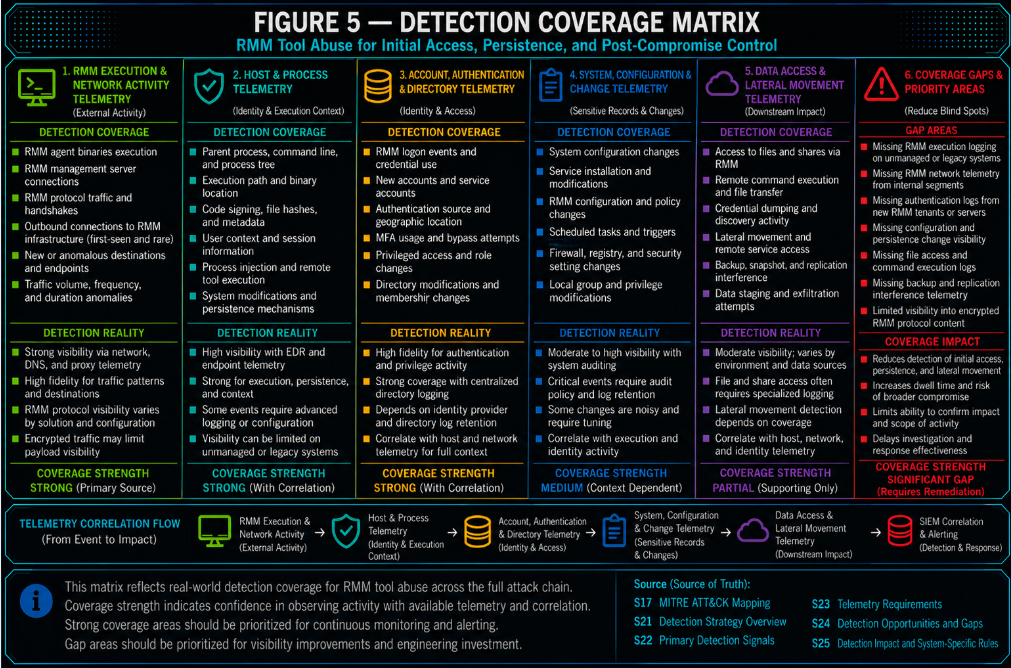
Figure 5
Detection Strategy Overview
The detection strategy for this report should prioritize behavior, context, sequence relationships, privileged-path modification, service-loading behavior, and approved-baseline deviation over product-name matching. RMM tools, native remote-management mechanisms, administrative utilities, management-platform functions, product servicing activity, and public out-of-band interaction infrastructure can all be legitimate, so production detection must distinguish approved administration, authorized security testing, expected management-platform maintenance, and normal support activity from attacker-controlled remote access or exploitation.
The SOC should treat RMM or native remote-control activity as suspicious when it is paired with unauthorized introduction, suspicious execution path, suspicious parent process, persistence behavior, restricted endpoint scope, unexpected inbound remote-control activity, outbound control-channel deviation, abnormal post-session network behavior, high-risk follow-on commands, cloud-native remote-management abuse, or meaningful deviation from approved administrative baselines.
Management-platform activity should receive higher investigative priority when administrative API, upload, extension, package, archive-processing, or equivalent management functionality is followed by unexpected DLL or executable creation, modification, overwrite, replacement, or rename within a privileged product installation path. Confidence increases materially when the changed content is subsequently loaded by SMS Executive or another SYSTEM-level or highly privileged management service, when the writer process is inconsistent with approved servicing, or when privileged execution is followed by shell, script, service-control, identity, network, or other post-compromise behavior.
Suspicious exploit-oriented inbound activity against exposed RMM, support, management, administrative, or related services should receive higher investigative priority when the same target subsequently initiates an unexpected HTTP or DNS callback to public OOB interaction infrastructure, a locally classified interaction service, or a first-seen or rare external destination. A callback or OOB destination alone must not be treated as proof of exploitation.
Management-platform exploitation does not require an OOB callback. Local file modification and privileged module loading can represent the material exploit-to-execution transition even when no external validation callback occurs.
Native macOS Screen Sharing, Remote Management, VNC-compatible access, service presence, or TCP/5900 activity must not be treated as malicious by themselves. Detection confidence should come from session directionality, source context, endpoint role, restricted-asset status, authentication or operating-system evidence where available, follow-on activity, and deviation from approved remote-administration patterns.
SOC Operating Model
· Treat unauthorized RMM execution from user-controlled paths as an initial-access or social-engineering-driven support-lure signal.
· Treat unattended-access setup, service creation, scheduled-task creation, registry autorun modification, silent installation, or other durable remote-access configuration as persistence or durable-control behavior.
· Treat unexpected inbound native remote-control activity against restricted endpoints as higher priority when combined with an unapproved, internet-originating, rare, first-seen, or otherwise unexpected source.
· Treat native macOS Screen Sharing, Remote Management, and VNC-compatible activity as behavior requiring contextual validation rather than as malicious activity based on protocol, service, or port alone.
· Treat suspicious exploit-oriented inbound activity followed by a target-originated HTTP or DNS OOB callback as a bounded exploit-validation sequence requiring investigation.
· Treat public OOB infrastructure, callback destinations, first-seen destinations, or rare destinations as supporting context rather than standalone proof of compromise.
· Treat unexpected DLL or executable creation, modification, overwrite, replacement, or rename within a privileged management-platform installation path as high-value security-boundary behavior requiring validation against approved servicing and change-control activity.
· Treat same-host and same-artifact correlation between privileged-path modification and subsequent loading by SMS Executive or another privileged management service as strong exploit-to-execution evidence.
· Treat SentinelOne management-platform file-integrity alerts as direct evidence of unexpected privileged file modification, not as independent proof that the modified module was subsequently loaded.
· Treat Configuration Manager AdminService, extension, upload, archive-processing, HTTP 500, cleanup-error, or DirectoryNotFoundException-type events as supporting application evidence rather than standalone proof of exploitation.
· Treat authenticated management API activity with missing, insufficient, inconsistent, or abused authorization controls separately from ordinary approved administration.
· Treat RMM activity followed by credential-process dumping, directory or credential-sensitive registry material acquisition, authentication-component modification, discovery, lateral movement, defense evasion, endpoint-protection weakening, high-impact Group Policy modification, backup interference, file staging, remote execution, or ransomware-preparation commands as post-compromise control-channel abuse.
· Treat remote-control activity followed by abnormal outbound communication from the same endpoint as a bounded behavioral sequence requiring investigation.
· Treat AWS Systems Manager, Azure Run Command, and GCP VM Manager, OS Config, metadata, startup-script, IAM, service-account, or related cloud-native management activity as cloud-native remote-management behavior when used outside approved administrative patterns.
· Treat YARA as conditional forensic support only, not as standing production detection for generic RMM or management-platform abuse.
Alert Triage Priorities
· Prioritize alerts involving identity systems, backup infrastructure, security tooling, privileged-access workstations, executive endpoints, regulated-data systems, production-critical servers, cloud-management systems, Configuration Manager site servers, endpoint-management infrastructure, and systems where remote-control activity is prohibited or tightly restricted.
· Prioritize alerts where RMM execution originates from browser, email, document, archive utility, collaboration tool, shell, script interpreter, or other suspicious parent process.
· Prioritize alerts involving first-seen or rare RMM infrastructure from restricted endpoint populations.
· Prioritize unexpected inbound native remote-control sessions to restricted endpoints.
· Prioritize remote-control sessions followed by abnormal outbound communication, payload retrieval, secondary control infrastructure, scanning, mining, staging, or other suspicious network activity.
· Prioritize suspicious exploit-oriented inbound activity followed by a same-target OOB callback, especially when the callback destination is new, rare, or associated with public interaction infrastructure.
· Increase exploit-to-OOB priority when the callback includes target-specific, host-specific, request-specific, or otherwise unique callback content.
· Prioritize unexpected DLL or executable modification inside a privileged Configuration Manager or equivalent management-platform directory when the activity falls outside approved servicing, upgrade, repair, extension, package, recovery, or change workflows.
· Prioritize management-platform file changes written by unexpected processes, API-related processes, archive-processing contexts, temporary-file workflows, scripting engines, web-facing components, or other processes inconsistent with established servicing behavior.
· Prioritize same-host and same-artifact sequences where recently modified management-platform executable content is subsequently loaded by SMS Executive or another privileged service.
· Prioritize management-platform file-modification events followed by SYSTEM-level shell execution, PowerShell, scripting, service control, account modification, payload staging, remote execution, security-control change, or unusual outbound network behavior.
· Increase priority when the modified artifact has a changed or unexpected hash, missing or unexpected signer, unusually recent creation or modification time, or deviation from a known-good product baseline.
· Prioritize RMM activity followed by credential-process dumping, access to ntds.dit, credential-sensitive SYSTEM or SECURITY registry-hive acquisition, LSA or Security Packages modification, endpoint-protection exclusion creation, high-impact Group Policy modification, or other high-risk command activity.
· Prioritize remote management initiated by unapproved users, unapproved roles, unapproved service accounts, unexpected automation identities, or observed but unapproved source locations.
· Treat missing source telemetry as reduced visibility, not as evidence that the source is unapproved.
· Prioritize activity with meaningful mismatch between endpoint, user, asset role, command category, deployment mechanism, source, target, servicing process, management path, and approved administrative baseline.
· Missing support, testing, servicing, or change context should increase investigative uncertainty but should not independently establish malicious activity.
Initial SOC Validation Steps
· Confirm whether the RMM tool, remote-support platform, native remote-control mechanism, cloud-native command path, management mechanism, management-platform operation, or security-testing activity is approved for the affected endpoint or workload.
· Identify the endpoint, workload, user, source, destination, process, parent process, command line, session context, target asset role, management-server role, and exploit-target identity where available.
· Determine whether the activity occurred on a restricted endpoint, high-value workload, internet-facing management system, Configuration Manager site server, or other privileged management platform.
· Determine whether the RMM product, native remote-control mechanism, source network, administrator, cloud principal, management path, product-servicing process, or security-testing source is consistent with established administrative baselines.
· Review whether the activity included persistence, unattended access, outbound relay communication, inbound remote-control activity, abnormal post-session communication, exploit-to-OOB callback behavior, management-platform privileged file modification, privileged module loading, high-risk command execution, or cloud-native access enablement.
· For management-platform file-modification alerts, identify the affected path, filename, file operation, writer process, user context, file hash, signer status, endpoint identity, approved change window, and expected product-servicing workflow where available.
· Determine whether the affected DLL or executable content was subsequently loaded by SMS Executive or another privileged management service.
· Validate whether the modified file and loaded module represent the same normalized path, filename, hash, or otherwise stable artifact identity where the telemetry supports that relationship.
· Review Configuration Manager AdminService, upload, extension, package, archive-processing, application-error, and HTTP-status telemetry where available.
· Treat AdminService.log errors, DirectoryNotFoundException-type events, or HTTP 500 responses as supporting evidence requiring correlation with the broader behavior.
· For exploit-to-OOB findings, validate the inbound exploit evidence, target attribution, callback source, destination, temporal relationship, OOB classification where available, and approved penetration-testing, vulnerability-scanning, red-team, vendor-testing, or application-security exceptions.
· For high-risk RMM activity, determine whether the behavior involved credential-process dumping, credential-sensitive registry acquisition, directory credential-material access, authentication-component modification, endpoint-protection exclusion changes, or Group Policy modification.
· For native macOS activity, validate Screen Sharing, Remote Management, authentication, operating-system, endpoint-management, firewall, VPN, or network telemetry where available.
· Determine whether the observed behavior is part of a broader sequence across endpoint, file, module-load, application, network, identity, operating-system, Active Directory, or cloud telemetry.
· Identify whether missing telemetry limits confidence before drawing conclusions about authorization, exploitation success, authentication bypass, SYSTEM execution, credential access, policy change, module loading, or successful payload execution.
Escalation Criteria
· Escalate immediately when RMM or remote-control activity occurs on identity systems, backup systems, security tooling, privileged-access workstations, executive endpoints, regulated-data systems, or production-critical workloads and the activity materially deviates from approved administration.
· Escalate immediately when unexpected inbound remote-control activity targets a restricted endpoint and is paired with an unapproved or anomalous source, follow-on privileged activity, payload execution, persistence, or abnormal outbound communication.
· Escalate immediately when suspicious exploit-oriented inbound activity against an exposed management system is followed by a target-originated OOB callback and the sequence cannot be explained by approved security testing or known application behavior.
· Escalate immediately when an exploit-to-OOB sequence is followed by authentication activity, command execution, file creation, management-platform activity, or other endpoint-side evidence consistent with post-exploitation.
· Escalate immediately when unexpected DLL or executable modification occurs within a privileged management-platform path and the activity cannot be explained by approved servicing, repair, extension, package, recovery, or change activity.
· Escalate immediately when unexpected management-platform file modification is followed by loading of the same artifact by SMS Executive or another privileged management service.
· Escalate immediately when privileged management-platform module loading is followed by SYSTEM-level shell execution, scripting, account modification, payload staging, remote execution, security-control weakening, credential access, or abnormal network activity.
· Escalate immediately when management API, upload, archive-processing, or extension activity is correlated with privileged-path executable modification and the sequence is inconsistent with expected authorization or servicing workflows.
· Do not classify an isolated management-platform file modification as confirmed code execution without supporting module-load, process, application, or other execution evidence.
· Escalate immediately when RMM activity is followed by credential-process dumping, directory credential-material access, credential-sensitive registry-hive acquisition, authentication-component modification, lateral movement, endpoint-protection weakening, Group Policy modification, backup interference, data staging, remote execution, or ransomware-preparation commands.
· Escalate immediately when remote-control activity is followed by strong same-endpoint evidence of payload retrieval, secondary control, mining, scanning, staging, or other post-access network activity.
· Escalate immediately when AWS Systems Manager, Azure Run Command, or GCP-native management activity is used by an unapproved principal against a restricted workload.
· Escalate immediately when remote-management enablement is followed by remote command or management activity and a strong correlation key exists.
· Do not escalate solely because caller IP, session ownership, support context, testing context, servicing context, or another enrichment field is missing.
· Do not classify native macOS Screen Sharing or VNC-compatible activity as confirmed malicious solely from TCP/5900, protocol identification, or service presence.
· Do not classify a callback as confirmed exploitation solely because the destination belongs to a public OOB provider.
Containment Guidance
· Validate alert confidence before disruptive containment where legitimate administration, support activity, product servicing, or authorized security testing remains plausible.
· Isolate the endpoint or workload when RMM or native remote-control activity is paired with high-risk command execution, credential access, security-control weakening, domain-policy modification, backup interference, destructive behavior, or ransomware preparation.
· For credible management-platform exploitation, restrict administrative or external access to the affected management service, preserve the affected executable content and relevant logs, and isolate the management server when file-modification-to-privileged-execution evidence supports active compromise.
· Preserve the modified DLL or executable, its hash, signer state, timestamps, writer-process information, loading-process information, and surrounding endpoint telemetry before repair or replacement where operationally feasible.
· Preserve Configuration Manager AdminService logs, application logs, extension or upload records, archive-processing evidence, HTTP status records, and administrative audit data before remediation.
· Do not automatically terminate SMS Executive or isolate a Configuration Manager site server solely because a privileged-path DLL changed; validate exploitation confidence and operational impact first.
· Where malicious modification is supported by evidence, restore affected management-platform components from trusted vendor or known-good sources only after preserving evidence.
· For credible exploit-to-OOB findings, restrict exposed service access, preserve application and network evidence, and isolate the affected management system when subsequent evidence supports successful exploitation or active compromise.
· Terminate unauthorized RMM sessions, remote-support sessions, Screen Sharing sessions, Remote Management sessions, or other remote-control connections where supported and operationally appropriate.
· Remove unauthorized unattended-access configuration, services, scheduled tasks, registry autoruns, startup mechanisms, remote-management permissions, or persistent access settings.
· Revoke or rotate credentials associated with suspicious RMM, native remote-management, management-platform, cloud-native remote-management, credential-dump, directory credential-material, or authentication-component activity where compromise is supported by evidence.
· Reverse unauthorized endpoint-protection exclusions or security-control modifications after preserving evidence and validating operational impact.
· Review and remediate unauthorized high-impact Group Policy changes through domain-administration procedures after preserving audit evidence.
· Revoke unauthorized IAM roles, service accounts, managed identities, access keys, session permissions, instance-profile changes, policy assignments, or equivalent cloud access-enablement changes.
· Preserve logs, command history, callback metadata, exploit-request evidence, session metadata, network-flow evidence, management-platform file artifacts, module-load telemetry, cloud audit logs, Active Directory audit data, operating-system artifacts, and endpoint evidence before remediation where feasible.
· Preserve evidence necessary to distinguish legitimate support, servicing, or security-testing activity from adversary-controlled use before deleting legitimate remote-support software, restoring management-platform files, or blocking testing infrastructure.
Investigation Workflow
· Start with the initial rule trigger and identify the detection anchor.
· Determine whether the activity represents unauthorized introduction, persistence, outbound control, inbound native remote-control access, abnormal post-session network behavior, exploit-to-OOB validation, privileged management-platform file modification, privileged service module loading, post-compromise command execution, or cloud-native remote-management abuse.
· Build the event timeline from RMM execution, native remote-control session establishment, exploit-oriented inbound activity, management API or upload activity, privileged file modification, or cloud-native remote-management initiation through follow-on behavior.
· For management-platform findings, establish the file operation, affected privileged path, writer process, endpoint identity, file hash or signer where available, approved servicing context, and subsequent module-load or execution behavior.
· Determine whether the modified artifact was loaded by SMS Executive or another privileged management service.
· Determine whether the modified file and loaded module can be correlated through the same path, filename, hash, or another stable artifact identifier.
· Determine whether the privileged service produced subsequent shell, script, network, account, service, payload, or security-control activity.
· Review management API, extension, package, upload, archive-processing, authorization, application-error, and HTTP-status telemetry where available.
· For exploit-to-OOB findings, establish whether the inbound exploit event and outbound callback can be attributed to the same target system and fall within the validated correlation window.
· Determine whether the callback destination is known OOB infrastructure, first-seen, rare, or otherwise inconsistent with the target's normal external dependencies.
· Determine whether approved penetration testing, vulnerability scanning, red-team activity, vendor diagnostics, or application-security testing explains the sequence.
· Correlate endpoint process events with file, module-load, DNS, proxy, raw network flow, WAF, IDS, reverse-proxy, application, firewall, VPN, identity, operating-system, EDR, Active Directory, cloud audit, asset, and administrative-context data where available.
· Review process ancestry and command-line behavior for staging, enumeration, credential access, credential-sensitive registry acquisition, directory credential-material access, authentication-component modification, endpoint-protection weakening, Group Policy changes, lateral movement, service control, backup interference, file transfer, or destructive activity.
· For native macOS remote control, determine whether session, authentication, Screen Sharing, Remote Management, device-management, or configuration evidence supports the suspected access path.
· Review same-endpoint network activity following remote-control or management-platform privileged execution for new or rare destinations, payload retrieval, secondary control, scanning, mining, or staging.
· Validate whether the activity is consistent with approved administrative, servicing, or security-testing behavior.
· Identify whether activity remained on one endpoint or expanded to other systems.
· Determine whether the RMM, native remote-control, exploit-derived, management-platform, or cloud-native management pathway was used to deploy additional tooling, modify persistence, access credentials, weaken security controls, alter domain policy, or prepare ransomware activity.
· Document unresolved telemetry gaps rather than converting missing evidence into affirmative malicious findings.
Cloud Implementation Guidance
· Deploy AWS, Azure, and GCP rules only where cloud audit logs, identity context, workload classification, approved administrative baselines, and the locally required source or resource context are available.
· Treat cloud-native rules as conditional detections, not as evidence of third-party RMM binary execution.
· Treat missing source-address telemetry as unavailable context rather than as an unapproved-source condition.
· Keep setup-to-control cloud rules in hunting or pilot mode when only same-account, same-subscription, or same-project correlation is available.
· Require stronger cloud correlation through same principal, same assumed role, same managed identity, same resource, same target workload, same instance profile, same service account, same resource family, or another validated relationship.
· Do not claim confirmed high-risk command execution where command content, command output, guest logs, endpoint telemetry, or equivalent command visibility is unavailable.
· Use reduced-confidence cloud findings for triage and enrichment when command content or target context is incomplete.
· For AWS, distinguish direct caller identity from assumed-role issuer identity.
· For Azure, track caller-IP availability separately from source approval.
· For GCP, derive restricted-workload classification from authoritative resource inventory rather than arbitrary request or metadata text.
· Treat GCP metadata modification as execution or access enablement unless supporting telemetry proves resulting guest execution.
· Exclude generic GCP OS Config inventory, compliance, vulnerability-report, get, or list activity from management-stage production evidence.
Tuning and Baseline Guidance
· Build an approved RMM inventory covering products, executables, paths, tenants, management infrastructure, support users, support hosts, and deployment mechanisms.
· Build restricted endpoint and workload inventories covering identity systems, backup systems, security tooling, privileged-access workstations, executive endpoints, regulated-data systems, cloud-management systems, Configuration Manager site servers, endpoint-management infrastructure, and production-critical workloads.
· Build approved native remote-administration baselines covering macOS Screen Sharing, Remote Management, VNC-compatible administration, approved management networks, VPN paths, administrators, and restricted endpoints.
· Build approved management-platform baselines covering site servers, installation paths, privileged executable and DLL directories, privileged management-service processes, expected hashes or signer states where practical, normal module-loading behavior, and authorized extension or package workflows.
· Build approved management-platform servicing baselines covering setup, upgrades, hotfixes, repairs, disaster recovery, extensions, package deployment, maintenance processes, change windows, and expected writer processes.
· Build approved administrative-context baselines including expected users, endpoint roles, session ownership, command categories, deployment mechanisms, management API users, product-servicing identities, and source locations.
· Build approved security-testing baselines covering penetration-testing sources, vulnerability scanners, red-team infrastructure, application-security testing, vendor diagnostics, and sanctioned OOB interaction infrastructure.
· Build cloud administrative baselines for IAM roles, assumed roles, managed identities, service accounts, source locations, approved automation identities, authoritative workload classifications, and change workflows.
· Build network baselines for approved RMM relays, broker infrastructure, expected external dependencies, first-seen or rare destinations, inbound remote-control paths, OOB interaction infrastructure, and restricted endpoint populations.
· Maintain authoritative Active Directory and Group Policy administrative baselines for high-impact policy changes.
· Review exceptions periodically to prevent approved tools, identities, roles, servicing processes, testing infrastructure, administrative systems, paths, or destinations from becoming blanket suppressions.
· Preserve high-risk command, privileged file-modification, privileged module-load, credential-access, security-control, Group Policy, and destructive-behavior detections even where the underlying RMM tool or administrative pathway is approved elsewhere in the organization.
Non-Deployment Guardrails
· Do not deploy product-name-only RMM detections as high-confidence production rules.
· Do not suppress all activity from approved RMM tools.
· Do not suppress high-risk commands solely because the RMM tool or remote-management mechanism is approved.
· Do not globally suppress Configuration Manager, SMS Executive, privileged management-platform installation paths, or management API activity.
· Do not classify every Configuration Manager DLL change as malicious without servicing, path, process, and change context.
· Do not treat adsource.dll as the only relevant management-platform executable target.
· Do not require adsource.dll for management-platform exploit detection.
· Do not classify SMS Executive module loading as malicious without evidence of suspicious or unexpected executable-content modification.
· Do not classify an unexpected management-platform DLL modification as confirmed code execution without supporting execution or module-load evidence.
· Do not classify an AdminService.log error, DirectoryNotFoundException-type condition, or HTTP 500 response as proof of exploitation.
· Do not require an OOB callback for management-platform exploitation detection.
· Do not classify a support ticket, change record, security-testing record, servicing record, or administrative workflow as proof that observed high-risk behavior is benign.
· Do not treat TCP/5900, VNC-compatible protocol identification, Screen Sharing service presence, or Remote Management service presence as malicious by itself.
· Do not infer authentication bypass, SYSTEM access, payload execution, persistence, or credential access from network telemetry alone.
· Do not treat an OOB provider, callback domain, callback destination, first-seen destination, or rare destination as proof of successful exploitation without exploit-oriented inbound evidence and stable target attribution.
· Do not treat generic shadow-copy creation as credential acquisition or recovery interference.
· Do not treat administrative executable presence alone as high-risk post-compromise behavior.
· Do not classify registry activity as credential acquisition unless the relevant credential-sensitive hive context is present.
· Do not classify generic LSA or registry activity as Security Support Provider modification without relevant authentication-component context.
· Do not classify generic PowerShell activity as endpoint-protection weakening without a modifying command and exclusion context.
· Do not classify generic Group Policy administration as malicious without materially significant policy-change context.
· Do not treat cloud-native Run Command, Systems Manager, OS Config, metadata activity, or equivalent management activity as malicious without sufficient identity, source, target, workflow, command, or sequence context.
· Do not interpret missing source telemetry as an unapproved-source match.
· Do not treat YARA product-string, signer, vendor-name, generic RMM binary, or legitimate management-platform binary matching as production coverage.
· Do not rely on same-account, same-subscription, or same-project matching alone for setup-to-control cloud detections.
· Do not require same-user correlation for RMM-launched activity unless that relationship has been validated in the customer environment.
· Do not use prior CyberDax alerts as the only source event for NDR sequence rules where the intended design requires raw-event correlation.
Operational Success Criteria
· Alerts identify unauthorized RMM introduction, remote-control activity, exploit-validation behavior, management-platform privileged file modification, privileged module-loading behavior, or cloud-native management abuse with actionable context.
· Analysts can distinguish approved administration, authorized testing, approved product servicing, unauthorized activity, suspicious activity, and confirmed malicious behavior based on available evidence.
· Alerts include endpoint, user, asset role, process, command line, source, destination, session context, administrative context, change context, and rule rationale where available.
· Management-platform alerts include affected server, file path, file operation, writer process, file identity, servicing or change context, privileged loader context, and same-artifact correlation where available.
· SentinelOne management-platform alerts clearly identify direct privileged-path file-integrity behavior without claiming module loading that has not been observed.
· Splunk, Elastic, and QRadar management-platform sequence alerts preserve same-host and same-artifact relationships where the required telemetry is available.
· NDR alerts include directionality, endpoint identity, restricted-asset status, source or destination context, first-seen or rarity information, exploit or callback context, and sequence context where applicable.
· Exploit-to-OOB alerts include the inbound exploit evidence, target identity, callback source, callback destination, timing relationship, OOB classification where available, and approved-testing context.
· Native macOS remote-control alerts distinguish observable network-session behavior from authentication, operating-system, or endpoint evidence that may not be available.
· High-risk RMM alerts identify command behavior associated with credential access, security-control weakening, authentication-component modification, Group Policy modification, or destructive activity rather than relying on administrative executable presence alone; resulting state changes should be confirmed with supporting telemetry where available.
· Cloud alerts include principal, role or service-account context, source availability, target resource, workload criticality, operation, command context where available, and correlation key.
· Missing telemetry is represented as an explicit limitation rather than transformed into suspicious evidence.
· False positives are reduced through approved-baseline validation without suppressing high-risk behavior.
· Detection content remains deployable across different maturity tiers without weakening evidence requirements.
S29 — Detection Coverage Summary
Coverage Overview
The finalized S25 rule set contains 31 production rules and provides strong behavioral coverage for RMM abuse where endpoint process telemetry, command-line visibility, file telemetry, module-load telemetry, SIEM correlation, NDR telemetry, exploit-oriented inbound telemetry, DNS or HTTP egress visibility, cloud audit logs, identity context, asset classification, management-platform servicing baselines, and approved administrative baselines are available.
Coverage is strongest for unauthorized RMM introduction, suspicious execution context, RMM-associated persistence, RMM-associated post-compromise command execution, unexpected remote-control behavior, exploit-to-OOB validation behavior, unexpected management-platform executable-content modification, privileged management-service loading of modified content, and cloud-native remote-management abuse.
Coverage also includes native macOS Screen Sharing, Remote Management, and VNC-compatible access where network telemetry can establish meaningful inbound session behavior and source or asset-policy deviation. This coverage intentionally does not treat service presence, protocol identification, or TCP/5900 alone as evidence of compromise.
Management-platform coverage now includes direct SentinelOne file-integrity detection of unexpected DLL modification within scoped privileged installation paths and deeper file-change-to-privileged-load correlation through Splunk, Elastic, and QRadar where file, module-load, stable endpoint, and artifact identity are available.
NDR coverage additionally includes suspicious exploitation of exposed RMM, support, or management infrastructure followed by a target-originated HTTP or DNS callback. This sequence remains behavioral and does not treat public OOB infrastructure, callback destinations, or rarity alone as proof of successful exploitation.
Coverage is intentionally limited for generic file-content detection and product-name-only matching because those approaches do not reliably distinguish legitimate support tooling or legitimate management-platform content from adversary-controlled abuse. Network-only detection remains contextual, but the NDR rule set provides direct behavior-led coverage where restricted-asset, directionality, rarity, destination, source, exploit, callback, or bounded sequence context is available.
Overall Coverage Assessment
· Overall detection coverage: High for endpoint, SIEM, behaviorally enriched remote-management abuse, and management-platform privileged executable modification.
· Management-platform exploit-to-execution coverage: High where file telemetry, module-load telemetry, stable endpoint identity, privileged-path baselines, and servicing context are available; moderate where only the file-modification stage is observable.
· NDR / network behavioral coverage: Moderate to high where directionality, endpoint identity, restricted-asset context, destination or source baselines, exploit-oriented inbound telemetry, callback visibility, and raw-event correlation are available.
· Native macOS remote-control coverage: Moderate to high at the network/session layer where meaningful session and policy context exists; lower where operating-system or authentication telemetry is unavailable.
· Exploit-validation coverage: Moderate to high where inbound exploit evidence can be correlated to target-originated DNS or HTTP callback behavior through stable asset attribution.
· Cloud-native coverage: Moderate to high where cloud logs, identity context, authoritative workload classification, and administrative baselines are mature.
· File-content coverage: Low for standing production detection.
· Operational confidence: Dependent on telemetry quality, command-line visibility, endpoint identity normalization, file and module-load visibility, privileged-path mapping, servicing-baseline quality, network directionality, exploit-target attribution, outbound DNS or HTTP visibility, cloud audit-log completeness, baseline quality, and asset criticality mapping.
Coverage by Threat Stage
Initial Access and RMM Introduction
· Coverage level: High.
· Covered by SentinelOne, Splunk, Elastic, QRadar, and Sigma.
· Supported by NDR when subsequent remote-support control-channel activity is observable.
· Exploit-oriented initial access against exposed management infrastructure receives direct NDR sequence coverage when followed by a target-originated OOB callback.
· Management-platform exploitation that results in privileged executable-content modification receives direct file-integrity coverage through SentinelOne Rule 4. When the modified content is subsequently loaded by a privileged management service, Splunk Rule 4, Elastic Rule 4, and QRadar Rule 3 provide direct sequence or correlation coverage where the required telemetry and stable artifact identity are available.
· Primary dependency: Endpoint process telemetry, parent process, command line, execution path, user context, approved RMM inventory, management-platform file telemetry, privileged-path mapping, module-load telemetry where sequence coverage is required, and exploit-oriented network or application telemetry where applicable.
· Residual gap: Legitimate user-driven support activity, legitimate management-platform servicing, and authorized security testing can resemble unauthorized introduction or exploitation without sufficient deployment, administrative, servicing, and testing context.
Persistence and Unattended Access
· Coverage level: High.
· Covered by SentinelOne, Splunk, Elastic, QRadar, and Sigma.
· Covered in cloud-native form by AWS, Azure, and GCP setup-to-control or metadata-based rules where applicable.
· Supported for native macOS remote-management settings when operating-system, endpoint-management, or configuration telemetry is available.
· Primary dependency: Service creation, scheduled tasks, registry or startup behavior, install context, command line, software inventory, metadata, IAM, and cloud control-plane telemetry.
· Residual gap: Approved remote-management tools commonly establish durable access, so behavioral and baseline context remains necessary.
Outbound RMM Control-Channel Activity
· Coverage level: Moderate to high with appropriate NDR context.
· Covered by NDR / Network Behavioral Analytics Rule 1.
· Primary dependency: DNS, proxy, TLS or HTTP metadata where available, network flow, restricted asset inventory, approved RMM destination inventory, first-seen or rarity context, and administrative baselines.
· Residual gap: RMM relay infrastructure can be legitimate and high-volume, so destination or protocol identity alone has limited confidence.
Unexpected Inbound Native Remote-Control Activity
· Coverage level: Moderate to high where session directionality and restricted-asset context are available.
· Covered by NDR / Network Behavioral Analytics Rule 2.
· Includes native macOS Screen Sharing, Remote Management, and VNC-compatible access where observable as remote-control session behavior.
· Primary dependency: Inbound connection direction, source identity, destination endpoint, VNC-compatible or remote-control session evidence, restricted endpoint inventory, and approved management-network context.
· Residual gap: Network telemetry cannot independently establish local authentication bypass, root execution, authorized user identity, or successful post-session execution.
Remote-Control Session Followed by Abnormal Outbound Activity
· Coverage level: Moderate to high where raw network-event correlation is mature.
· Covered by NDR / Network Behavioral Analytics Rule 3.
· Primary dependency: Same-host remote-control session timing, subsequent outbound activity, destination rarity, DNS or proxy context, restricted endpoint identity, and approved remote-administration baselines.
· Residual gap: Temporal association does not prove that the remote-control session caused the later outbound behavior.
Suspicious Exploitation Followed by OOB Validation Callback
· Coverage level: Moderate to high where exploit-oriented inbound telemetry and outbound callback visibility are both available.
· Covered by NDR / Network Behavioral Analytics Rule 4.
· Primary dependency: WAF, IDS, reverse-proxy, application, NDR, DNS, proxy, HTTP, or equivalent telemetry; stable target attribution; exploit classification; callback source and destination; correlation timing; approved testing baselines; and external-dependency context.
· Strength: Detects a durable exploit-validation relationship rather than depending on one CVE, exploit string, OOB provider, domain, or IP address.
· Residual gap: Successful exploitation may generate no callback, encrypted traffic may reduce exploit visibility, authorized security testing can produce the same sequence, and a callback alone cannot prove code execution or compromise.
Management-Platform Executable Modification and Privileged Service Loading
· Coverage level: High where endpoint file telemetry, module-load telemetry, privileged-path mapping, and approved servicing baselines are mature.
· Covered by SentinelOne Rule 4: Unexpected DLL Creation or Modification in Privileged Management-Platform Installation Path.
· Covered by Splunk Rule 4: Management-Platform Executable Modification Followed by Privileged Module Load.
· Covered by Elastic Rule 4: Unexpected Management-Platform Executable Modification Followed by Privileged Service Load.
· Covered by QRadar Rule 3: Management-Platform Privileged File Modification Followed by Service Module Load.
· SentinelOne provides direct file-integrity coverage of unexpected DLL creation, modification, or rename within scoped privileged management-platform paths.
· Splunk, Elastic, and QRadar provide deeper correlation between the privileged file modification and subsequent module loading where the necessary telemetry and artifact identity are available.
· Primary dependency: File creation and modification telemetry, target path, file identity, writer process, endpoint identity, privileged management-service identity, module-load or image-load telemetry, management-platform server inventory, privileged-path baseline, product-servicing baseline, and artifact normalization.
· Supporting telemetry: AdminService, management API, extension, upload, package, archive-processing, application-error, HTTP-status, hash, signer, identity, change-control, and subsequent process or network activity.
· Strength: Detects durable management-platform exploit-to-execution behavior without requiring CVE-2026-47301, one API method, one CAB archive, adsource.dll, one exploit string, one target path, or an OOB callback.
· Residual gap: SentinelOne file-integrity coverage does not independently prove the changed module was loaded. Splunk, Elastic, and QRadar sequence confidence decreases when module-load telemetry, stable artifact identity, or endpoint normalization is unavailable.
· Residual gap: Legitimate product servicing can generate overlapping file-modification behavior and requires explicit baselining.
Post-Compromise Command Execution
· Coverage level: High where command-line or equivalent execution telemetry is available.
· Covered by SentinelOne, Splunk, Elastic, QRadar, and Sigma.
· Expanded coverage includes credential-process dumping, credential-sensitive registry-hive acquisition, directory credential-material access, authentication-component modification, endpoint-protection exclusion changes, and materially significant Group Policy modification.
· Management-platform privileged execution can feed the same downstream post-compromise model when subsequent process telemetry is available.
· Covered by AWS and Azure when cloud-native command visibility is available.
· GCP provides coverage for execution-capable metadata changes but does not independently establish resulting guest execution.
· Primary dependency: Command-line telemetry, process lineage, endpoint identity, RMM or privileged-service context, registry and authentication telemetry where available, Active Directory or Group Policy telemetry where available, cloud command content, guest logs, endpoint telemetry, and appropriate correlation windows.
· Residual gap: Missing command-line, registry, authentication-component, Group Policy, or command-content visibility materially reduces confidence.
Credential Access and Discovery
· Coverage level: Moderate to high.
· Covered by high-risk post-compromise behavior rules.
· Includes LSASS-oriented credential-process dumping, ntds.dit access, credential-sensitive SYSTEM or SECURITY registry-hive acquisition, and LSA or Security Support Provider modification where observable.
· Primary dependency: Command line, parent process, endpoint identity, process timing, identity telemetry, registry telemetry, directory credential-material telemetry, authentication-component telemetry, and RMM or privileged-service context.
· Residual gap: Commands launched through helper processes, service context, unrelated shells, management-platform service execution, or cloud-native tooling may require additional enrichment to preserve attribution.
Lateral Movement Preparation
· Coverage level: Moderate to high.
· Covered by high-risk post-compromise behavior rules.
· Primary dependency: Remote-execution utility use, service control, scheduled-task commands, administrative tool usage, endpoint identity, and process lineage.
· Residual gap: Lateral movement can occur after the adversary leaves the original RMM or management-platform process lineage.
Defense Evasion, Domain-Control Modification, Backup Interference, and Ransomware Preparation
· Coverage level: High where endpoint or cloud command telemetry exists.
· Covered by endpoint, SIEM, Sigma, and applicable cloud-native command rules.
· Includes endpoint-protection exclusion creation and materially significant Group Policy modification where the required command or supporting audit context exists.
· Primary dependency: Command-line telemetry, process events, endpoint-protection configuration telemetry, Active Directory or Group Policy audit telemetry, service-control events, backup and recovery command usage, endpoint role, workload criticality, and command output where available.
· Residual gap: Some security-control, Group Policy, or destructive actions can be executed through legitimate administrative scripts, automation mechanisms, or privileged management services, requiring administrative and audit context.
Cloud-Native Remote Management Abuse
· Coverage level: Moderate to high where cloud telemetry is mature.
· Covered by AWS, Azure, and GCP conditional rules.
· AWS coverage includes Systems Manager Session Manager, Run Command, Automation, IAM, and instance-profile relationships.
· Azure coverage includes VM Run Command, Azure Arc Run Command, RBAC, managed identity, VM or Arc extension, automation, and deployment relationships.
· GCP coverage includes VM Manager, OS Config management, execution-capable metadata changes, startup scripts, SSH or OS Login-related metadata, serial-console activity, IAM, and service-account relationships.
· Primary dependency: Cloud audit logs, identity context, source availability, authoritative resource inventory, role or service-account baselines, command visibility, and strong correlation keys.
· Residual gap: Cloud detections do not independently cover third-party RMM binaries or management-server-local exploitation unless relevant endpoint telemetry is integrated.
File-Content Detection
· Coverage level: Low for standing production detection.
· YARA rule count: 0.
· Primary dependency: Sample-specific malicious artifact availability.
· Residual gap: Legitimate RMM binaries and legitimate management-platform binaries are not meaningfully distinguishable as malicious through generic file-content matching.
Coverage by Detection System
NDR / Network Behavioral Analytics
· Coverage level: Moderate to high where network telemetry, exploit telemetry, and asset context are mature.
· Strength: Unauthorized RMM control-channel behavior, unexpected inbound remote-control sessions, first-seen or rare remote-support infrastructure, bounded remote-control-to-abnormal-outbound sequences, and suspicious exploit-to-OOB callback sequences.
· Strength: Provides direct network-layer coverage for native macOS Screen Sharing, Remote Management, and VNC-compatible activity when meaningful session and policy context is available.
· Strength: Provides behavior-led exploit-validation coverage without depending on static OOB domains, one CVE, or one exploit string.
· Limitation: Does not independently cover management-platform file modification or privileged module loading.
· Limitation: Cannot independently establish local authentication bypass, process ancestry, payload execution, SYSTEM compromise, persistence, credential access, or authorized session ownership.
· Limitation: Port, protocol, service, OOB provider, destination identity, rarity, or callback behavior alone is insufficient for high-confidence production detection.
· Limitation: Exploit-to-OOB coverage requires reliable target attribution and visibility into both exploit-oriented inbound activity and subsequent outbound DNS or HTTP behavior.
· Final rule count: 4.
SentinelOne
· Coverage level: High for endpoint-observable execution, persistence, post-compromise behavior, and privileged management-platform file integrity.
· Strength: Endpoint process, parent-child, command, persistence, execution-context, credential-access, security-control, file-integrity, and behavioral visibility.
· Strength: High-risk RMM rule includes credential-sensitive registry acquisition, authentication-component modification, endpoint-protection exclusion changes, and materially significant Group Policy modification.
· Strength: Rule 4 provides direct native file-integrity detection of unexpected DLL creation, modification, or rename within scoped privileged management-platform paths.
· Strength: Rule 4 remains variant-resistant because it does not depend on adsource.dll, one CVE, one CAB archive, one upload method, or an OOB callback.
· Limitation: Rule 4 does not independently prove that the changed module was subsequently loaded.
· Limitation: Requires accurate RMM process coverage, management-server scoping, privileged-path mapping, approved product-servicing baselines, and validation of local SentinelOne field availability.
· Limitation: Direct native macOS Screen Sharing session establishment is not assumed to be universally observable through the rule source used.
· Limitation: Process commands may require registry, Active Directory, or endpoint-protection telemetry to prove the resulting state change.
· Final rule count: 4.
Splunk
· Coverage level: High where endpoint and supporting telemetry are normalized.
· Strength: Correlation across process, command, identity, asset, credential-access, security-control, file, module-load, and supporting administrative context.
· Strength: Ordered same-endpoint RMM-to-high-risk correlation preserves behavioral context while avoiding administrative executable presence as a standalone trigger.
· Strength: Rule 4 provides same-host and same-artifact correlation between unexpected management-platform executable modification and privileged module loading.
· Strength: Management API, application, AdminService, identity, hash, signer, and change-control data can be added as enrichment when ingested.
· Limitation: Requires field normalization, lookup quality, endpoint telemetry, file telemetry, module-load telemetry, privileged-path mapping, and approved baseline maintenance.
· Limitation: Rule 4 requires source macros used within multisearch to remain streaming-compatible.
· Limitation: The locked Splunk rules do not claim direct native macOS Screen Sharing session detection.
· Limitation: Registry, authentication-component, and Group Policy semantics may require additional telemetry beyond process commands.
· Final rule count: 4.
Elastic
· Coverage level: High where endpoint and SIEM telemetry are available.
· Strength: Endpoint process behavior, persistence logic, same-host sequence behavior, file events, library-load events, and correlation.
· Strength: High-risk sequence requires command context rather than administrative executable presence alone.
· Strength: Rule 4 provides ordered file to library correlation using host.id and the same artifact path.
· Strength: Management-platform installation paths are customer-defined rather than hard-coded to one default installation location.
· Limitation: Rule 4 requires both file and library-load telemetry for complete sequence coverage.
· Limitation: Native remote-control session establishment requires a locally appropriate dataset and is not assumed from generic process telemetry.
· Limitation: Missing command-line visibility materially reduces high-risk sequence coverage.
· Final rule count: 4.
QRadar
· Coverage level: Moderate to high where custom properties, reference sets, and endpoint telemetry are mature.
· Strength: SIEM correlation, CRE sequence logic, endpoint process normalization, credential and security-control command context, approved administrative context, file modification, and privileged module-load correlation.
· Strength: Rule 3 uses independently validated file-modification and module-load building blocks and promotes the temporal relationship through the CRE.
· Strength: Reference sets provide environment-specific management-server, path, privileged-service, and servicing-process scope.
· Limitation: Detection quality depends on custom-property extraction, endpoint-identity normalization, artifact-path consistency, module-load availability, and reference-set quality.
· Limitation: Direct native macOS remote-control session coverage requires locally normalized session data and is not assumed by the locked rules.
· Limitation: Process-command properties may not independently prove registry, authentication-component, or Group Policy state changes.
· Final rule count: 3.
Sigma
· Coverage level: High as portable Windows process-creation detection content.
· Strength: Portable detection of suspicious RMM execution, persistence, and high-risk child-process behavior.
· Strength: Multi-component command selectors require relevant credential, Security Support Provider, Defender-exclusion, or Group Policy context rather than broad utility presence.
· Limitation: Backend translation and field mapping must be validated.
· Limitation: Native macOS Screen Sharing session activity is outside the locked Windows process-creation Sigma rule set.
· Limitation: Direct parentage can be obscured by RMM helper or service processes.
· Limitation: No generic management-platform file-modification-to-module-load rule is added because portable Sigma backends do not guarantee the necessary file, library-load, and sequence semantics.
· Final rule count: 3.
YARA
· Coverage level: Low for production detection.
· Strength: Conditional forensic use for malicious wrappers, loaders, droppers, trojanized installers, malicious replacement DLLs, or campaign-specific artifacts.
· Limitation: Not suitable for generic legitimate RMM abuse or management-platform privileged-file-modification detection.
· Final rule count: 0.
AWS
· Coverage level: Moderate to high for AWS-native remote-management abuse.
· Strength: Systems Manager Session Manager, Run Command, Automation, IAM, instance-profile, identity, and setup-to-control detection.
· Limitation: Does not cover third-party RMM binaries or management-server-local Configuration Manager exploitation without endpoint telemetry.
· Limitation: High-risk command confidence depends on command-content or supporting endpoint visibility.
· Limitation: Missing source context must not be interpreted as an unapproved source.
· Limitation: Setup-to-control detection requires stronger relationships than same-account matching.
· Final rule count: 3 conditional cloud-native rules.
Azure
· Coverage level: Moderate to high for Azure-native remote-command abuse.
· Strength: Azure VM Run Command, Azure Arc Run Command, RBAC, managed identity, VM or Arc extension, automation, deployment, and setup-to-control detection.
· Limitation: Does not cover third-party RMM binaries or management-server-local Configuration Manager exploitation without endpoint telemetry.
· Limitation: High-risk command confidence depends on command-content, guest, output, or endpoint visibility.
· Limitation: Missing CallerIpAddress is unknown source context, not an unapproved source.
· Limitation: Setup-to-control detection requires stronger relationships than same-subscription matching.
· Final rule count: 3 conditional cloud-native rules.
GCP
· Coverage level: Moderate to high for GCP-native remote management and metadata-based execution or access enablement.
· Strength: VM Manager, OS Config, Compute Engine metadata, startup scripts, IAM, service accounts, serial-console behavior, and setup-to-control detection.
· Limitation: Does not cover third-party RMM binaries or management-server-local Configuration Manager exploitation without endpoint telemetry.
· Limitation: Metadata modification establishes execution or access capability but does not independently prove guest execution.
· Limitation: Missing or redacted caller IP is unavailable context rather than an unapproved-source finding.
· Limitation: Generic read-only OS Config activity is intentionally excluded from management-stage production evidence.
· Limitation: Setup-to-control detection requires stronger relationships than same-project matching.
· Final rule count: 3 conditional cloud-native rules.
Coverage Gaps
· Generic product-name RMM detection is intentionally avoided.
· Third-party RMM binaries on cloud workloads require endpoint telemetry integration.
· Management-platform exploitation that does not produce privileged file modification is outside the direct scope of the new management-platform rule family unless another S25 behavior detects the resulting activity.
· SentinelOne Rule 4 does not independently confirm that a modified management-platform DLL was loaded.
· Splunk, Elastic, and QRadar management-platform sequence coverage is reduced where module-load telemetry, stable artifact identity, or endpoint normalization is unavailable.
· Legitimate management-platform upgrades, hotfixes, repairs, extensions, package operations, disaster recovery, and servicing can overlap with the file-modification behavior and require approved baselines.
· Management API and AdminService telemetry may not be centrally ingested.
· AdminService.log errors, HTTP 500 responses, or DirectoryNotFoundException-type events cannot independently establish exploitation.
· Native macOS Screen Sharing, Remote Management, VNC-compatible service presence, or TCP/5900 activity alone cannot establish compromise.
· NDR cannot independently establish authentication bypass, SYSTEM execution, persistence, payload execution, credential access, privileged module loading, or authorized remote-session ownership.
· Exploit-to-OOB detection is limited where exploit-oriented inbound telemetry, outbound DNS or HTTP visibility, or stable target attribution is unavailable.
· Successful exploitation without an externally visible callback can evade the NDR exploit-validation rule.
· Authorized security testing can generate exploit-to-OOB behavior and requires explicit baselining.
· Missing command-line telemetry reduces confidence across endpoint rules.
· Missing registry, process-access, authentication-component, endpoint-protection, or Active Directory audit telemetry can reduce semantic confirmation of high-risk commands.
· Missing cloud command content or output reduces high-risk command confidence.
· Missing endpoint-identity normalization weakens same-endpoint correlation.
· Missing path normalization weakens management-platform same-artifact correlation.
· Missing network directionality or asset classification weakens inbound remote-control analysis.
· Missing administrative, servicing, or testing context increases triage uncertainty but must not automatically be treated as suspicious evidence.
· Missing source-address telemetry must not be interpreted as an unapproved source.
· Cloud setup-to-control rules require stronger correlation than same-account, same-subscription, or same-project matching.
· GCP metadata-based execution capability does not independently prove resulting guest execution.
· YARA is not production viable without a sample-specific malicious artifact.
Coverage Improvement Priorities
· Improve endpoint process-creation and command-line logging.
· Improve file creation, file modification, rename, hash, signer, writer-process, module-load, DLL-load, and image-load telemetry on management-platform servers.
· Normalize endpoint identity and artifact paths across EDR, SIEM, file, module-load, DNS, proxy, NDR, firewall, WAF, reverse-proxy, application, and cloud telemetry.
· Maintain authoritative Configuration Manager and management-platform server inventories.
· Maintain locally validated privileged management-platform installation-path and privileged-service baselines.
· Maintain approved product servicing, upgrade, hotfix, repair, recovery, extension, package, and maintenance baselines.
· Integrate Configuration Manager AdminService, application, extension, package, upload, archive-processing, and administrative audit telemetry where available.
· Improve credential-process access, registry, authentication-component, endpoint-protection configuration, and Active Directory or Group Policy audit visibility.
· Improve network directionality, remote-control session identification, exploit-target attribution, callback visibility, and first-seen or rarity baselines.
· Maintain approved RMM inventory, tenant identifiers, support users, support hosts, deployment paths, and remote-administration baselines.
· Maintain approved macOS Screen Sharing, Remote Management, VNC-compatible administration, management-network, and VPN-path baselines.
· Maintain approved penetration-testing, vulnerability-scanning, red-team, application-security, vendor-testing, and OOB interaction baselines.
· Maintain restricted asset and workload inventories.
· Integrate helpdesk, ticketing, change-control, RMM platform audit logs, endpoint-management telemetry, Active Directory audit logs, and administrative ownership data where available.
· Enable cloud audit logs across relevant accounts, subscriptions, projects, regions, and organizational scopes.
· Improve cloud command-content visibility through session logs, command-output logging, guest logs, or endpoint telemetry.
· Improve IAM, assumed-role, RBAC, service-account, managed-identity, and source-location baselines.
· Maintain authoritative cloud resource classification rather than inferring criticality from request payload text.
· Use strong setup-to-control correlation keys rather than broad account, subscription, or project matching.
· Preserve raw-event correlation for NDR sequences.
S30 — Intelligence Maturity Assessment
Maturity Overview
The intelligence maturity assessment evaluates how well the detection strategy converts RMM abuse, native remote-control abuse, exploitation of exposed management infrastructure, privileged management-platform file modification and service loading, cloud-native remote-management tradecraft, and post-compromise control activity into actionable, deployable, and operationally useful detection coverage.
The report demonstrates strong maturity where behavior and telemetry are observable, while operational maturity remains dependent on telemetry quality, file and module-load visibility, baseline completeness, asset classification, management-platform servicing context, exploit-target attribution, cloud audit visibility, network context, and SOC enrichment capability.
RMM abuse and management-platform exploitation are not single-indicator threats. Mature detection requires combining endpoint behavior, file integrity, module loading, network context, exploit-oriented inbound activity, callback behavior, identity context, asset criticality, native remote-control behavior, cloud audit activity, servicing context, and post-compromise activity. The strategy therefore avoids treating legitimate software, administrative utilities, privileged product files, ports, protocols, services, OOB providers, callback destinations, or cloud-administration mechanisms as malicious without supporting behavioral evidence.
The original S30 already assessed overall intelligence maturity as High with moderate-to-high operational dependency; that framework remains appropriate after the management-platform amendment.
Overall Intelligence Maturity Rating
· Intelligence maturity rating: High.
· Operational maturity dependency: Moderate to high.
· Primary maturity strength: Behavior-driven detection across endpoint, file integrity, SIEM, Sigma, NDR, exploit-validation, native remote-control, management-platform, and cloud-native systems.
· Primary maturity constraint: Telemetry, file and module-load visibility, asset, identity, privileged-path mapping, servicing-baseline quality, exploit-target attribution, and approved administrative or security-testing-baseline dependency.
· Assessment: Mature detection strategy with deployment confidence dependent on environment-specific telemetry and baseline readiness.
Threat Understanding Maturity
· Rating: High.
· The report correctly treats RMM abuse as legitimate-tool misuse rather than malware-family behavior.
· The report distinguishes product presence from unauthorized control.
· The report separates introduction, persistence, outbound control, unexpected inbound native remote-control access, post-session network behavior, exploit-to-OOB validation, management-platform privileged file modification, privileged module loading, post-compromise execution, and cloud-native remote-management abuse.
· The report recognizes that management-platform exploitation can produce a local file-write-to-privileged-load sequence without an OOB callback.
· The report distinguishes the initial management API or upload behavior from the durable endpoint behavior created when privileged executable content is unexpectedly modified.
· The report treats adsource.dll as a concrete example rather than the identity of the threat model.
· The report treats SMS Executive as Configuration Manager-specific privileged-loader context rather than a universal requirement.
· The report distinguishes SentinelOne's direct file-integrity coverage from the deeper temporal correlation performed by Splunk, Elastic, and QRadar.
· The report recognizes exploit-validation callbacks as a behavior requiring correlation with exploit-oriented inbound activity rather than treating public OOB infrastructure as inherently malicious.
· The report recognizes native macOS Screen Sharing, Remote Management, and VNC-compatible access as legitimate remote-control mechanisms that require behavioral and contextual evidence before malicious classification.
· The report avoids treating TCP/5900, VNC-compatible protocol identification, remote-management service presence, callback destination rarity, or OOB provider identity as compromise by itself.
· The report distinguishes administrative utility presence from materially high-risk command behavior.
· The report preserves YARA as conditional forensic support rather than forcing weak file-content detection.
· The report recognizes that AWS, Azure, and GCP detections are cloud-native management-path detections rather than third-party RMM or local management-platform binary detections.
Telemetry Maturity
· Rating: Moderate to high.
· Endpoint and SIEM detections are strong where process creation, command line, parent process, endpoint identity, asset-role, registry, credential-access, endpoint-protection, and Active Directory data are available.
· Management-platform detection is strongest where file creation, modification, overwrite, rename, writer-process, file path, hash, signer, module-load, image-load, privileged-service, and stable endpoint telemetry are available.
· SentinelOne provides useful direct file-integrity coverage even where later module loading cannot be correlated directly in STAR.
· Splunk, Elastic, and QRadar provide stronger execution-chain confidence when file-modification events and module-load events can be linked to the same endpoint and artifact.
· Application-level confidence improves where Configuration Manager AdminService, upload, extension, package, archive-processing, authorization, error, and HTTP-status telemetry is retained.
· Missing application telemetry does not invalidate file and module behavior where those endpoint signals remain observable.
· NDR coverage is moderate to high where raw network flow, directionality, endpoint identity, restricted-asset context, exploit-oriented inbound telemetry, outbound DNS or HTTP visibility, destination or source baselines, and sequence correlation are available.
· Exploit-to-OOB coverage is strongest where WAF, IDS, reverse-proxy, application, DNS, proxy, and asset telemetry can preserve target identity across the inbound and outbound events.
· Native macOS remote-control coverage improves where network telemetry is supplemented by operating-system, authentication, firewall, VPN, endpoint-management, or endpoint telemetry.
· Network evidence alone cannot establish local authentication bypass, SYSTEM access, payload execution, privileged module loading, persistence, credential access, or authorized session ownership.
· Cloud detection is strong where CloudTrail, Azure Activity, Google Cloud Audit Logs, authoritative resource classification, identity context, and approved baselines are available.
· Cloud-source telemetry availability is explicitly distinguished from source approval.
· YARA maturity is intentionally low for production use because generic file-content matching does not solve the primary detection problem.
Detection Engineering Maturity
· Rating: High.
· The S25 rule set contains 31 final production rules.
· The S25 rule set avoids weak product-name-only detection.
· The rule set prioritizes behavioral anchors, suspicious context, persistence behavior, remote-control directionality, exploit-to-callback relationships, privileged-path modification, privileged module loading, first-seen or rarity context, high-risk follow-on behavior, and cloud-native setup-to-control sequences.
· The new management-platform rule family adds coverage only where the detection system has a technically defensible implementation path.
· SentinelOne Rule 4 uses native Deep Visibility / STAR file-event logic rather than fabricated SIEM-style cross-event joins.
· Splunk Rule 4 correlates normalized file-modification and module-load telemetry while explicitly constraining multisearch source branches to supported streaming behavior.
· Elastic Rule 4 uses an ordered EQL file to library sequence with host and artifact-path correlation.
· QRadar Rule 3 uses AQL-validated building blocks and CRE sequence logic rather than representing the temporal relationship as fake AQL.
· The NDR rule set provides four dedicated behavior-led detections rather than relying on static protocol, port, domain, or OOB-provider matching.
· The exploit-validation rule correlates suspicious inbound exploitation with subsequent target-originated callback behavior and does not claim exploitation from callback infrastructure alone.
· The management-platform rules do not require an OOB callback.
· The management-platform rules do not require adsource.dll.
· The high-risk endpoint rules require materially relevant command context and avoid administrative executable presence as an independent high-risk trigger.
· Credential-sensitive registry acquisition is constrained to relevant hive context.
· Authentication-component modification is constrained to relevant LSA or Security Support Provider context.
· Endpoint-protection weakening requires modification plus exclusion context.
· Group Policy detection requires materially significant policy-change context.
· The rule set does not use port or protocol alone as proof of malicious remote-control activity.
· The rule set avoids forced rule counts where detection would be weak.
· Sigma is not forced into a management-platform full-chain rule when portable file and module-load correlation semantics are not guaranteed.
· YARA correctly has zero standing production rules.
· The rule set uses system-native formats and system-appropriate logic.
· The cloud rules explicitly account for missing source context rather than treating absent telemetry as suspicious evidence.
· GCP metadata changes are modeled as execution or access enablement rather than proof of successful guest execution.
· The rule set maintains appropriate boundaries between endpoint, file-integrity, SIEM, NDR, Sigma, YARA, and cloud-native systems.
Operationalization Maturity
· Rating: Moderate to high.
· Operationalization is strongest where approved RMM inventory, restricted asset inventory, exposed management-system inventory, Configuration Manager or endpoint-management server inventory, privileged-path mapping, product-servicing baselines, cloud workload inventory, identity telemetry, endpoint telemetry, NDR telemetry, application-security telemetry, and administrative or security-testing baselines are integrated.
· SOC triage is viable because the rule set produces contextual alerts rather than simple product, administrative utility, port, protocol, file-name, OOB provider, or service matches.
· Management-platform triage requires rapid validation of file operation, path, writer process, endpoint role, servicing context, module loading, file identity, change control, and subsequent process behavior.
· Splunk, Elastic, and QRadar management-platform triage benefits from same-host and same-artifact correlation.
· SentinelOne management-platform triage requires investigators to determine whether the changed DLL was subsequently loaded because the STAR rule intentionally detects the file-integrity stage directly.
· Exploit-to-OOB triage requires rapid validation of exploit evidence, target identity, callback destination, approved-testing context, and subsequent endpoint or authentication activity.
· Native macOS remote-control triage benefits from Screen Sharing, Remote Management, authentication, endpoint-management, network, VPN, and firewall context where available.
· Production deployment requires baseline maintenance and exception governance.
· Management-platform tuning requires authoritative server inventories, privileged installation paths, servicing processes, known maintenance workflows, change windows, and module-load visibility.
· NDR tuning requires restricted-asset definitions, exposed-management-system inventory, approved remote-support infrastructure, approved security-testing sources, expected external dependencies, first-seen or rarity baselines, and appropriate network directionality.
· High-risk endpoint detections benefit from registry, credential-process, Active Directory, Group Policy, and endpoint-protection telemetry to confirm command effects.
· Cloud setup-to-control detections should remain hunting or pilot mode where strong correlation keys are unavailable.
· Reduced-confidence cloud findings should be used for enrichment and investigation rather than as confirmed high-risk command execution.
· Missing source, testing, session, servicing, or module-load telemetry should lower confidence rather than automatically increase severity.
Adversary Resilience Maturity
· Rating: High.
· The strategy remains useful if attackers use legitimate signed RMM tools.
· The strategy remains useful if attackers use multiple RMM vendors.
· The strategy remains useful if attackers abuse native macOS Screen Sharing, Remote Management, or VNC-compatible access.
· The strategy remains useful when attackers abuse management APIs, extension workflows, package workflows, archive processing, path handling, or another mechanism that ultimately produces unexpected privileged executable modification.
· The management-platform detection model remains useful if attackers change the CAB archive, upload method, API endpoint, filename, target DLL, exploit string, path traversal form, or individual vulnerability identifier.
· SentinelOne Rule 4 remains useful when the specific modified DLL changes because the rule scopes the privileged management path rather than one filename.
· Splunk, Elastic, and QRadar remain useful when the target artifact changes because the correlation follows the file-change-to-load relationship rather than a static IOC.
· The strategy remains useful when attackers use cloud-native remote management instead of third-party tooling.
· The strategy remains useful when exploitation is validated through different public OOB providers, custom callback infrastructure, or dynamically generated interaction domains because the detection is based on the exploit-to-target-callback relationship rather than static infrastructure.
· The strategy remains useful when successful management-platform exploitation does not generate an OOB callback because file and module behavior provide an independent detection path.
· The strategy remains useful when RMM is launched from social-engineering, browser-download, collaboration-tool, archive, or script-based workflows.
· The strategy remains useful when the attacker changes remote-support infrastructure because several rules depend on restricted-asset context, first-seen behavior, source context, sequence relationships, or high-risk follow-on behavior rather than static indicators alone.
· The strategy remains useful across multiple credential-access and security-control techniques because the endpoint rules detect durable command behavior rather than one campaign-specific utility.
· The strategy is less resilient where command-line telemetry is missing, management-server file telemetry is unavailable, module-load visibility is unavailable, artifact paths cannot be normalized, endpoint identity cannot be normalized, exploit-target attribution is unavailable, network directionality is unavailable, callbacks are suppressed or delayed, or attackers move outside observable process, file, module, or session relationships.
Baseline and Context Maturity
· Rating: Moderate.
· Detection value depends heavily on approved RMM inventory, endpoint-role mapping, exposed management-system inventory, Configuration Manager or management-platform server inventories, cloud role baselines, source baselines, workload classification, restricted asset inventory, and approved administrative pathways.
· Management-platform detections additionally depend on accurate privileged-path mapping, privileged management-service baselines, product-servicing processes, upgrade and repair workflows, extension and package workflows, change windows, and maintenance context.
· Known-good hash and signer baselines can improve management-platform confidence but are supporting controls rather than universal prerequisites.
· Exploit-validation detections additionally depend on approved penetration-testing, vulnerability-scanning, red-team, application-security, vendor-testing, OOB-infrastructure, and expected external-dependency baselines.
· Native remote-control detections additionally depend on approved Screen Sharing, Remote Management, VNC-compatible, VPN, management-network, and administrator baselines.
· NDR detections depend on reliable restricted-asset classification, approved destination baselines, exploit-target attribution, first-seen or rarity context, and network directionality.
· High-impact Group Policy detection benefits from approved domain-administration and change-control baselines.
· Weak baseline maturity increases false positives.
· Strong baseline maturity enables the rules to distinguish approved remote administration, approved product servicing, and authorized security testing from unauthorized control or exploitation.
· Missing contextual records reduce analyst confidence but are not themselves evidence of malicious activity.
· Baseline quality remains a major driver of operational confidence after command-line, file, module-load, network, endpoint, application-security, and cloud audit-log availability.
Cloud Intelligence Maturity
· Rating: Moderate to high.
· AWS, Azure, and GCP coverage correctly focuses on cloud-native remote-management pathways.
· The report avoids treating cloud platforms as generic third-party RMM binary or local management-platform sensors.
· AWS detection distinguishes direct principals from assumed-role issuer context.
· Azure detection distinguishes source-context availability from source approval.
· GCP detection uses authoritative resource classification rather than arbitrary payload text to identify restricted workloads.
· GCP metadata modifications are correctly treated as execution or access enablement unless supporting evidence confirms guest execution.
· Cloud setup-to-control rules reject weak same-account, same-subscription, or same-project correlation as sufficient production evidence.
· Cloud command-detection maturity depends on command content, command output, guest logs, endpoint telemetry, or equivalent visibility.
· Cloud-source attribution remains lower confidence when caller IP or equivalent source context is unavailable.
Network Intelligence Maturity
· Rating: Moderate to high.
· NDR / Network Behavioral Analytics provides dedicated coverage for unauthorized RMM control channels, unexpected inbound remote-control sessions, remote-control-to-abnormal-outbound sequences, and suspicious exploit-to-OOB validation sequences.
· The network strategy uses directionality, restricted-asset status, exploit context, stable target identity, source or destination context, first-seen or rarity signals, and behavioral sequence relationships rather than protocol or infrastructure signatures alone.
· Native macOS Screen Sharing and VNC-compatible activity can be detected meaningfully at the network layer when session and policy context exists.
· Exploit-oriented inbound activity followed by a same-target outbound callback provides meaningful network-layer validation evidence when authorized testing and expected dependencies are excluded.
· Raw-event same-host and same-target sequence correlation provides additional value after remote-control or exploit activity.
· Management-platform exploitation that remains local after the initial request may produce little or no distinctive network evidence, reinforcing the need for endpoint file and module-load visibility.
· Network visibility cannot independently establish authentication outcome, exploitation success, local privileges, privileged module loading, credential access, process execution, persistence, or session authorization.
· Network maturity therefore improves significantly when NDR is enriched with endpoint, file, module-load, identity, asset, application-security, operating-system, firewall, VPN, Active Directory, and administrative-context data.
Residual Intelligence Gaps
· Limited visibility where command-line telemetry is absent.
· Limited visibility where management-server file creation, modification, rename, hash, signer, or writer-process telemetry is unavailable.
· Limited confidence where module-load or image-load telemetry is unavailable.
· Limited same-artifact correlation where file paths are inconsistently normalized.
· Limited visibility where credential-process, registry, authentication-component, endpoint-protection, or Group Policy telemetry is unavailable.
· Limited visibility where endpoint-to-network correlation is unavailable.
· Limited exploit-validation coverage where inbound exploit telemetry, outbound DNS or HTTP visibility, or stable target attribution is unavailable.
· Limited visibility for successful exploitation that produces no externally observable callback and does not produce a monitored privileged file modification.
· Limited ability to connect management API or upload activity to endpoint behavior when AdminService or management-platform application telemetry is not centralized.
· Limited confidence where legitimate Configuration Manager servicing and change workflows are not baselined.
· Limited confidence where authorized security-testing infrastructure and workflow baselines are incomplete.
· Limited confidence where remote-control session directionality or source context is unavailable.
· Limited local attribution for native macOS remote-control activity where operating-system or authentication telemetry is unavailable.
· Limited ability to prove authentication bypass, exploitation success, SYSTEM access, persistence, credential access, privileged module loading, or payload execution from network telemetry alone.
· Limited visibility where cloud command content or command output is unavailable.
· Limited visibility where administrative baselines are incomplete or undocumented.
· Limited visibility where RMM platform audit logs or management-platform application logs are not ingested.
· Limited visibility where asset criticality, endpoint role, exposed management-system inventory, management-platform inventory, workload classification, or restricted inventories are incomplete.
· Limited visibility where service-account, managed-identity, direct-principal, or assumed-role attribution is incomplete.
· Limited source confidence when caller-IP or equivalent cloud source telemetry is absent.
· Limited execution certainty for GCP metadata-based behavior without guest or endpoint confirmation.
· Limited ability to use YARA without sample-specific malicious artifacts.
Maturity Improvement Recommendations
· Improve endpoint command-line and parent-process capture.
· Improve management-server file creation, modification, rename, writer-process, hash, signer, module-load, DLL-load, and image-load visibility.
· Normalize endpoint identity and artifact paths across SIEM, EDR, file, module-load, DNS, proxy, NDR, firewall, WAF, reverse-proxy, application, and cloud telemetry.
· Maintain current Configuration Manager and endpoint-management server inventories.
· Maintain validated privileged management-platform executable paths and privileged-service baselines.
· Maintain approved management-platform setup, upgrade, hotfix, repair, recovery, extension, package, maintenance, and change-control baselines.
· Integrate Configuration Manager AdminService, management API, extension, upload, package, archive-processing, and application telemetry where available.
· Improve credential-process, registry, authentication-component, endpoint-protection configuration, and Active Directory or Group Policy audit visibility.
· Improve network directionality, remote-control session identification, exploit-target attribution, outbound callback visibility, and first-seen or rarity baselines.
· Maintain a current approved RMM inventory and approved deployment baseline.
· Maintain approved native Screen Sharing, Remote Management, VNC-compatible administration, VPN, management-network, and administrator baselines.
· Maintain approved penetration-testing, vulnerability-scanning, red-team, application-security, vendor-testing, OOB interaction, and expected external-dependency baselines.
· Maintain restricted endpoint, exposed management-system, management-platform, and cloud workload inventories.
· Integrate RMM platform audit logs, endpoint-management telemetry, Active Directory audit telemetry, firewall, VPN, and other administrative context where available.
· Enable and centralize AWS CloudTrail, Azure Activity, and Google Cloud Audit Logs across all relevant scopes.
· Improve cloud command visibility through session transcripts, command-output logging, guest telemetry, and endpoint telemetry.
· Maintain IAM, RBAC, service-account, managed-identity, assumed-role, source-location, and cloud-resource baselines.
· Maintain authoritative cloud resource classification for restricted workloads.
· Pilot setup-to-control cloud detections until strong correlation keys are validated.
· Preserve NDR raw-event sequence correlation and avoid dependence on previously generated alerts.
· Reserve YARA for sample-specific malicious wrappers, loaders, droppers, trojanized artifacts, malicious replacement DLLs, or other confirmed malicious file content.
Executive Intelligence Assessment
The report is intelligence-mature because it aligns detection to how RMM and remote-management abuse actually occurs: through legitimate remote-administration tools, approved-looking binaries, native operating-system remote-control capabilities, exploitation of exposed management systems, abuse of management APIs and package or archive workflows, unexpected modification of privileged executable content, privileged service loading, cloud-native command channels, and post-compromise use of trusted management paths.
The detection strategy is strongest when organizations can correlate endpoint process behavior, privileged file modification, module loading, exploit-oriented inbound activity, network-session and callback behavior, identity context, cloud audit logs, asset criticality, management-platform servicing context, Active Directory or security-control telemetry, and approved administrative or security-testing baselines.
It deliberately avoids equating legitimate software, administrative utilities, management-platform files, ports, protocols, services, OOB infrastructure, callback destinations, or cloud-management actions with compromise and instead requires meaningful behavioral or contextual deviation.
The primary maturity risk is not lack of detection design. It is incomplete telemetry, weak asset, administrative, servicing, or security-testing baselines, insufficient identity and source context, unstable exploit-target attribution, missing management-server file or module-load telemetry, and gaps in operational enrichment.
S31 — Telemetry Dependencies
Telemetry Dependency Overview
Effective detection and response for RMM tool abuse depend on whether the organization can connect remote administration activity to authorization, ownership, endpoint scope, identity context, support workflow, and follow-on behavior. This section defines the operational dependencies required to make the detection model reliable in production. It does not restate every telemetry requirement; it identifies which telemetry relationships must exist for the SOC to prove whether RMM activity is approved, suspicious, or attacker-controlled.
The central dependency is correlation. RMM execution alone may show tool presence, but not tenant legitimacy. Network telemetry may show relay communication, but not session ownership. Identity telemetry may show account activity, but not command behavior. Cloud telemetry may show remote command activity, but not endpoint process effects unless workload or guest telemetry is available. A reliable detection model therefore depends on layered evidence across endpoint, identity, network, cloud, RMM platform, asset, and support workflow sources.
Primary Dependency Relationships
· RMM execution must be correlated with endpoint role, user context, parent process, execution path, tenant ownership, and approved deployment path.
· RMM persistence must be correlated with approved installation workflow, endpoint authorization, service or task creation, unattended-access settings, and support or change records.
· RMM outbound communication must be correlated with process context, endpoint identity, restricted asset status, approved destination inventory, and support workflow metadata.
· RMM-launched command activity must be correlated with parent process, command line, user or service context, endpoint role, timing, and approved support purpose.
· Cloud-native remote management activity must be correlated with principal, role, source, target workload, workload tag, change record, command visibility, and approved administrative scope.
· Service-provider activity must be correlated with named account, delegated access scope, target environment, support ticket, session ownership, and customer authorization.
· Alerts must be enriched with asset criticality, restricted endpoint classification, identity risk, support context, and prior related activity before escalation decisions.
Endpoint Telemetry Dependencies
· Process creation telemetry with parent process, child process, command line, executable path, user context, integrity level, signature context, and endpoint identity.
· Service creation and service modification telemetry.
· Scheduled task creation and modification telemetry.
· Registry autorun and startup-location telemetry.
· File creation, download, extraction, installation, and execution-path telemetry.
· Software inventory showing installed RMM tools, remote support clients, agents, versions, tenants, management servers, and deployment paths where available.
· Endpoint role and asset criticality context, including identity systems, backup servers, privileged access workstations, executive endpoints, security tooling, regulated-data systems, cloud management systems, and production-critical workloads.
· Endpoint security telemetry showing tampering, exclusions, sensor degradation, disabled protections, logging changes, or abnormal remediation behavior.
Identity and Access Telemetry Dependencies
· User authentication and sign-in telemetry.
· Privileged account activity.
· Helpdesk, technician, service-provider, service-account, and administrative identity activity.
· Identity provider logs with source location, device, risk, session, and conditional access context where available.
· Privileged access management records, just-in-time access approvals, break-glass usage, and administrative role activation.
· Service-provider and delegated administration identity logs.
· Cloud role, service-account, managed identity, and assumed-role activity.
· Credential reset, token revocation, session invalidation, and privileged access review telemetry during response.
Network and Outbound Communication Telemetry Dependencies
· DNS telemetry for RMM relay, broker, support, or remote-control infrastructure.
· Proxy telemetry with URL, domain, category, user, endpoint, and request metadata.
· TLS and HTTP metadata where available.
· Network flow telemetry for outbound session timing, destination, volume, and endpoint correlation.
· Firewall and secure web gateway telemetry.
· RMM destination inventory, approved relay infrastructure, support portals, management servers, and known tenant infrastructure where available.
· Restricted endpoint network policy context for systems where RMM communication is prohibited or tightly controlled.
RMM Platform and Support Workflow Telemetry Dependencies
· RMM platform audit logs, including session creation, technician identity, tenant, target endpoint, connection time, file transfer, remote shell, script execution, policy change, and unattended-access configuration where available.
· Support ticket, helpdesk, and change-management records.
· Approved support workflow metadata, including ticket owner, endpoint owner, technician identity, support reason, command category, session approval, and expected time window.
· Approved RMM inventory, including tools, executables, tenants, management servers, support users, deployment paths, source locations, and endpoint scopes.
· Service-provider access records and delegated administration approvals.
· Exceptions and allowlists tied to tool, user, endpoint, tenant, source, and workflow rather than product name alone.
Cloud Telemetry Dependencies
· AWS CloudTrail, Systems Manager activity, IAM role activity, assumed-role issuer context, EC2 instance profile events, AWS Config, EC2 tags, Systems Manager command output logs, and session transcript logs where enabled.
· Azure Activity logs, Azure Run Command activity, Azure Arc activity, RBAC changes, managed identity activity, VM extension events, Microsoft Entra ID context, Log Analytics, and Defender telemetry where available.
· Google Cloud Audit Logs, VM Manager logs, OS Config logs, Compute Engine metadata changes, IAM policy history, service-account context, Cloud Asset Inventory, and Security Command Center telemetry where available.
· Cloud workload tags, asset criticality, account, subscription, project, folder, and organization metadata.
· Cloud command-content visibility through script parameters, command output, guest logs, endpoint telemetry, or equivalent control-plane and workload telemetry.
Correlation and Normalization Dependencies
· Stable endpoint identity across EDR, SIEM, DNS, proxy, identity, cloud, and RMM platform telemetry.
· Normalized usernames, service accounts, privileged identities, cloud principals, and service-provider accounts.
· Consistent timestamps and time-zone normalization across telemetry sources.
· Field normalization for process name, parent process, command line, executable path, host, user, source IP, destination domain, cloud resource, tenant, and support workflow identifiers.
· Asset inventory enrichment for endpoint role, restricted system classification, business owner, data sensitivity, and production criticality.
· Correlation windows that support RMM execution, persistence, outbound relay activity, post-compromise commands, and cloud setup-to-control sequences.
Telemetry Dependency Priority
· Highest priority dependencies are endpoint process telemetry, command-line visibility, approved RMM inventory, restricted asset inventory, identity context, and support workflow validation.
· High priority dependencies include DNS, proxy, network flow, software inventory, RMM platform audit logs, cloud audit logs, and service-provider access records.
· Conditional dependencies include cloud command output, Systems Manager session transcripts, Azure guest telemetry, GCP guest or OS Config telemetry, and service-provider platform logs.
· Forensic dependencies include file artifacts, recovered installers, malicious wrappers, trojanized packages, and sample-specific YARA use cases.
S32 — Detection Limitations
Detection Limitation Overview
Detection limitations for RMM tool abuse are primarily driven by the legitimate nature of the tools, the ambiguity of support workflows, and the uneven availability of endpoint, identity, network, cloud, and RMM platform telemetry. The largest risk is not that RMM activity is invisible in every environment. The largest risk is that available telemetry may show remote administration activity without enough context to prove whether it is authorized or attacker-controlled.
Detection should therefore be interpreted as a confidence-building process. Product execution, vendor relay traffic, signed binaries, cloud remote command events, or support-session creation are not sufficient alone. Higher confidence requires suspicious context, restricted endpoint scope, unauthorized tenant association, persistence, post-compromise commands, identity deviation, source deviation, or support workflow mismatch.
Tool Legitimacy Limitations
· Legitimate RMM tools are often signed, vendor-hosted, encrypted, and commonly used for approved administration.
· Product-name matching alone cannot distinguish approved support from adversary-controlled remote access.
· Hash-based detection is brittle because legitimate RMM products update frequently.
· Signer-based detection does not establish whether the session, tenant, endpoint, user, or workflow is authorized.
· Vendor relay or broker infrastructure may be used for both legitimate and malicious sessions.
Workflow and Authorization Limitations
· Support tickets may be incomplete, delayed, generic, or disconnected from actual session activity.
· Approved support workflows may not include command-level detail, session ownership, or endpoint authorization.
· Helpdesk and service-provider accounts may be shared, poorly attributed, or insufficiently governed.
· Tenant ownership may be difficult to validate if RMM inventory is incomplete.
· A support ticket alone should not suppress high-risk commands, persistence creation, or activity on restricted systems.
· Same-user correlation should not be required unless validated locally because RMM activity may execute under SYSTEM, service accounts, or technician context.
Endpoint Visibility Limitations
· Missing command-line telemetry reduces confidence in post-compromise command detection.
· Missing parent-child process telemetry weakens attribution between RMM execution and follow-on activity.
· Missing service, scheduled task, registry, or software inventory telemetry weakens persistence detection.
· Endpoint identity inconsistencies can break correlation across EDR, SIEM, DNS, proxy, and RMM platform logs.
· Sensor tampering, telemetry degradation, endpoint exclusions, or security-tool interference can reduce detection quality during the most important response window.
Network Visibility Limitations
· Network-only RMM detection cannot reliably determine process, user, tenant, support-session owner, or authorization status.
· DNS or proxy visibility may identify RMM infrastructure but not whether the session is approved.
· Official relay infrastructure may be shared across many legitimate customers.
· Encrypted sessions may limit content inspection.
· Network visibility is strongest when correlated with endpoint process context, restricted asset inventory, identity context, and support workflow metadata.
Cloud Visibility Limitations
· Cloud-native remote management detections are conditional and do not prove third-party RMM binary execution.
· Cloud control-plane logs may not include full command content, output, or guest-level process behavior.
· Same-account, same-subscription, or same-project correlation alone is insufficient for high-confidence setup-to-control detection.
· Cloud command visibility depends on service configuration, command output logging, guest telemetry, endpoint telemetry, and audit log retention.
· Stronger cloud attribution requires principal, assumed role, managed identity, service account, source, target resource, workload tag, and approved change context.
Correlation Limitations
· Correlation accuracy depends on consistent endpoint names, user identities, timestamps, source IPs, cloud resource identifiers, and tenant metadata.
· RMM-launched activity may occur under different execution contexts than the initial user session.
· Tool stacking can make it difficult to determine which remote access path drove follow-on activity.
· Delayed execution can weaken short correlation windows.
· Broad correlation windows may increase false positives if approved support and automation are not well baselined.
YARA and File-Content Limitations
· Generic YARA rules are not production viable for ordinary RMM abuse because legitimate RMM binaries are not inherently malicious.
· Product strings, signer names, installer names, and generic packed-binary traits are weak signals for this report.
· YARA is useful only when a malicious wrapper, trojanized installer, dropper, loader, or campaign-specific artifact is recovered.
· File-content detection should support incident response and forensic validation, not replace behavioral detection.
Operational Limitation Summary
· Detection confidence is highest when RMM activity is tied to suspicious execution context, unauthorized tenant association, persistence, restricted endpoint activity, high-risk commands, identity deviation, source deviation, or support workflow mismatch.
· Detection confidence is lower when only product presence, signed binary execution, relay traffic, or generic support activity is observed.
· Production deployment requires customer-specific baselines for approved RMM use, restricted assets, service-provider workflows, identity context, source locations, cloud workloads, and endpoint roles.
S33 — Defensive Control & Hardening Improvements
Control Improvement Overview
Defensive improvement for RMM tool abuse should focus on governing remote administration as a privileged control channel. The objective is not to block all remote support activity. The objective is to ensure remote administration is inventoried, authorized, attributable, monitored, bounded, and resilient against misuse.
Hardening should reduce unauthorized RMM introduction, prevent durable unattended access where not required, restrict RMM use on high-value systems, improve visibility into post-compromise activity, and ensure service-provider and cloud-native remote management pathways are governed with the same rigor as privileged access.
Remote Administration Governance Improvements
· Maintain an approved RMM and remote support inventory covering tools, tenants, management servers, executables, support users, deployment paths, source locations, and permitted endpoint groups.
· Define where RMM is allowed, restricted, or prohibited by endpoint role and business function.
· Require documented ownership for each RMM tenant, management server, support account, and service-provider pathway.
· Review RMM exceptions periodically to prevent approved tooling from becoming blanket authorization.
· Require support workflow alignment for RMM sessions, including ticket, endpoint, user, technician, purpose, source, and time window.
Endpoint Hardening Improvements
· Restrict RMM execution from user-controlled paths such as Downloads, Temp, AppData, browser cache, archive extraction paths, and cloud-synced folders where operationally feasible.
· Block unauthorized RMM installers, portable clients, and remote support tools on restricted systems.
· Require administrative approval for RMM installation, service creation, scheduled tasks, auto-start entries, and unattended-access configuration.
· Monitor and restrict persistence mechanisms associated with remote administration tools.
· Harden privileged access workstations, identity systems, backup servers, security tooling, and production-critical servers against direct remote support where not explicitly required.
Identity and Privileged Access Improvements
· Enforce multi-factor authentication for helpdesk, technician, service-provider, cloud, and privileged administrative accounts.
· Use least privilege for remote support accounts and endpoint management roles.
· Require just-in-time or time-bound access for privileged remote administration where possible.
· Separate ordinary user accounts from support, administrative, and service-provider roles.
· Monitor privileged access activation, role changes, service-account use, managed identity activity, and cloud role assumption.
· Revoke or rotate credentials when RMM activity cannot be tied to approved workflow.
RMM Platform and Support Workflow Improvements
· Enable RMM platform audit logging for session creation, technician identity, target endpoint, file transfer, remote shell, script execution, policy changes, and unattended-access configuration.
· Require session ownership and ticket linkage for remote support activity.
· Disable unattended access by default where not required.
· Restrict file transfer, remote shell, script execution, and clipboard transfer based on endpoint role and support need.
· Review tenant membership, technician accounts, downstream customer access, and service-provider delegation.
· Require alerting for new tenant enrollment, new agent installation, unknown management server association, and unattended-access changes.
Network and Egress Hardening Improvements
· Restrict outbound RMM relay, broker, or remote-support infrastructure access from systems where RMM is prohibited.
· Use DNS, proxy, firewall, and secure web gateway controls to monitor and govern approved RMM destinations.
· Require endpoint or user context for remote support network access where possible.
· Alert on RMM relay communication from identity systems, backup servers, security tooling, executive endpoints, regulated-data systems, and production-critical workloads.
· Review remote support traffic that occurs outside approved support hours, source locations, or workflows.
Cloud-Native Remote Management Improvements
· Govern AWS Systems Manager, Azure Run Command, GCP VM Manager, OS Config, metadata execution, and equivalent remote command features as privileged remote administration pathways.
· Restrict cloud-native remote command capability to approved roles, approved sources, approved workloads, and documented change workflows.
· Enable cloud audit logging across all relevant accounts, subscriptions, projects, regions, and folders.
· Enable command output logging, session transcript logging, guest telemetry, or endpoint telemetry where supported and appropriate.
· Require stronger setup-to-control correlation using principal, role, resource, workload group, service account, managed identity, or approved change workflow rather than broad account-level matching alone.
Detection and Response Improvements
· Correlate RMM execution, persistence, outbound relay activity, identity context, restricted endpoint scope, and post-compromise commands.
· Treat high-risk commands after RMM activity as escalation triggers even when the RMM tool is approved elsewhere.
· Integrate helpdesk, ticketing, change-control, RMM platform audit logs, endpoint telemetry, network telemetry, and cloud audit logs into investigation workflows.
· Build response playbooks for unauthorized RMM execution, unattended access, tenant mismatch, service-provider ambiguity, and cloud-native remote command misuse.
· Preserve logs, session records, command history, and endpoint artifacts before remediation when feasible.

Figure 6
S34 — Defensive Control & Hardening Architecture
Architecture Overview
The defensive architecture for RMM tool abuse should treat remote administration as a governed access layer that spans endpoints, identity systems, support workflows, service-provider access, network egress, cloud control planes, and SOC response. The architecture should not rely on product blocklists alone. It should combine policy, visibility, enforcement, correlation, and response readiness.
The target state is a remote administration control model where authorized RMM use is known, bounded, attributable, logged, and reviewable, while unauthorized remote access is detected through behavioral deviation, restricted asset scope, persistence attempts, suspicious execution context, and high-risk follow-on activity.
Architecture Layer 1 — Approved RMM Governance
· Maintain authoritative inventory of approved RMM tools, tenants, management servers, support users, service-provider pathways, deployment mechanisms, and permitted endpoint groups.
· Define approved, restricted, and prohibited RMM usage by endpoint role.
· Require documented ownership for RMM tenants and management servers.
· Require ticket or change linkage for support sessions and remote administration activity.
· Review exceptions, tenants, support users, and service-provider access on a scheduled basis.
Architecture Layer 2 — Endpoint Control and Execution Policy
· Restrict execution of unauthorized RMM tools and portable clients.
· Enforce application control or endpoint policy for restricted systems.
· Monitor RMM execution from user-controlled paths and suspicious parent processes.
· Restrict service creation, scheduled tasks, registry autoruns, and unattended-access configuration to approved workflows.
· Protect high-value systems from direct remote support unless explicitly authorized.
Architecture Layer 3 — Identity and Privileged Access Control
· Require strong authentication for support, technician, service-provider, and cloud administration identities.
· Separate user, helpdesk, administrator, and service-provider accounts.
· Use least privilege and time-bound access for remote administration roles.
· Monitor role activation, privilege changes, service-account use, managed identity activity, and assumed-role activity.
· Revoke or rotate credentials when remote administration legitimacy cannot be proven.
Architecture Layer 4 — Network Egress and Relay Governance
· Restrict RMM relay and remote-support infrastructure access from prohibited endpoint groups.
· Monitor DNS, proxy, TLS, HTTP, and flow telemetry for RMM infrastructure activity.
· Correlate network activity with endpoint process and support workflow context.
· Maintain approved RMM destination inventory where feasible.
· Escalate RMM network activity from identity systems, backup systems, security tooling, regulated-data systems, and production-critical workloads.
Architecture Layer 5 — Cloud Remote Management Governance
· Treat cloud-native remote command and workload management as privileged remote administration.
· Restrict AWS Systems Manager, Azure Run Command, GCP VM Manager, OS Config, metadata execution, and equivalent capabilities to approved identities and workflows.
· Require cloud audit logging, workload tagging, command visibility, and change-management linkage.
· Monitor setup-to-control sequences involving IAM, RBAC, service accounts, managed identities, instance profiles, metadata, or extension changes followed by remote command activity.
· Keep cloud setup-to-control detection in pilot or hunting mode until strong correlation keys are validated.
Architecture Layer 6 — SIEM and Detection Correlation
· Correlate endpoint process telemetry, persistence artifacts, DNS or proxy activity, identity telemetry, RMM platform logs, cloud audit logs, and support workflow data.
· Build reference data for approved RMM tools, support users, tenants, management servers, restricted assets, and approved source locations.
· Prioritize alerts where RMM activity intersects with restricted endpoints, persistence, high-risk commands, cloud remote command activity, or workflow mismatch.
· Preserve detection logic that identifies high-risk follow-on behavior even when the RMM tool is approved elsewhere.
Architecture Layer 7 — Incident Response and Recovery Assurance
· Maintain playbooks for unauthorized RMM execution, tenant mismatch, unattended-access setup, RMM-launched high-risk commands, service-provider ambiguity, and cloud-native remote command misuse.
· Preserve session logs, RMM audit records, command history, endpoint artifacts, identity logs, network records, and cloud audit logs.
· Validate removal of unauthorized agents, services, scheduled tasks, startup entries, tenants, support sessions, and cloud remote command access.
· Verify credential security, endpoint trust, backup integrity, and service-provider access after suspicious RMM activity.
· Require executive escalation when RMM abuse affects restricted systems or cannot be confidently scoped.
S35 — Defensive Control Mapping Matrix
Mapping Overview
The control mapping below connects major RMM abuse risk areas to defensive control objectives, primary implementation actions, and expected risk reduction. It is written as a matrix-style control map without relying on product-specific assumptions.
Control Area 1 — Approved RMM Inventory
Risk Addressed
Unknown or unauthorized RMM tools, tenants, support users, deployment paths, or management servers.
Primary Control Actions
· Maintain approved RMM inventory.
· Map tenants, tools, management servers, support accounts, deployment paths, and endpoint groups.
· Review inventory and exceptions regularly.
· Tie approved use to support workflows and endpoint role.
Expected Risk Reduction
Reduces ambiguity between legitimate support activity and attacker-controlled remote access.
Control Area 2 — Restricted Endpoint Policy
Risk Addressed
RMM activity on identity systems, backup servers, privileged access workstations, executive endpoints, security tooling, regulated-data systems, or production-critical workloads.
Primary Control Actions
· Define restricted endpoint populations.
· Prohibit or tightly control RMM on high-value systems.
· Alert on RMM execution, network activity, persistence, or remote command activity on restricted systems.
· Require explicit approval for exceptions.
Expected Risk Reduction
Limits remote-control exposure on systems where compromise would create high business impact.
Control Area 3 — Execution and Persistence Control
Risk Addressed
User-driven RMM installation, suspicious execution paths, persistent agents, unattended access, services, scheduled tasks, and startup mechanisms.
Primary Control Actions
· Restrict execution from user-controlled paths.
· Monitor suspicious parent processes and installation paths.
· Control service creation, scheduled tasks, registry autoruns, and unattended-access configuration.
· Require administrative approval for persistent RMM installation.
Expected Risk Reduction
Reduces unauthorized RMM introduction and prevents temporary access from becoming durable control.
Control Area 4 — Identity and Privileged Access Governance
Risk Addressed
Compromised helpdesk accounts, service-provider accounts, technician accounts, service accounts, cloud roles, and managed identities.
Primary Control Actions
· Enforce multi-factor authentication.
· Use least privilege and time-bound access.
· Separate user, support, administrative, and service-provider identities.
· Monitor role activation, privilege changes, source deviations, and unusual session behavior.
Expected Risk Reduction
Reduces adversary ability to legitimize remote administration through compromised or overprivileged accounts.
Control Area 5 — RMM Platform Audit Logging
Risk Addressed
Lack of session ownership, tenant validation, remote shell visibility, file transfer tracking, and unattended-access change history.
Primary Control Actions
· Enable RMM platform audit logging.
· Capture session owner, target endpoint, technician identity, file transfer, script execution, remote shell, policy changes, and unattended-access configuration.
· Integrate RMM logs into SIEM and case management.
· Review tenant and technician activity.
Expected Risk Reduction
Improves attribution and reduces time required to distinguish approved support from unauthorized remote control.
Control Area 6 — Network and Egress Governance
Risk Addressed
Unauthorized RMM relay, broker, or remote-support infrastructure access from prohibited systems.
Primary Control Actions
· Monitor DNS, proxy, TLS, HTTP, and flow telemetry.
· Maintain approved RMM destination context.
· Restrict RMM infrastructure access from prohibited endpoint populations.
· Correlate network activity with endpoint and support workflow data.
Expected Risk Reduction
Improves visibility into remote-control activity and limits unauthorized outbound support channels.
Control Area 7 — Cloud Remote Management Governance
Risk Addressed
Unauthorized use of cloud-native remote command, metadata execution, workload management, or setup-to-control activity.
Primary Control Actions
· Restrict AWS Systems Manager, Azure Run Command, GCP VM Manager, OS Config, metadata execution, and equivalent features.
· Enforce approved roles, approved sources, workload tagging, and change workflows.
· Enable cloud audit logs and command visibility where available.
· Correlate access enablement with subsequent remote command activity.
Expected Risk Reduction
Reduces RMM-equivalent control risk in cloud workloads and improves attribution of cloud-native remote administration.
Control Area 8 — SOC Correlation and Response
Risk Addressed
Delayed triage, false positives, incomplete scoping, and missed post-compromise behavior.
Primary Control Actions
· Correlate endpoint, identity, network, cloud, RMM platform, and support workflow telemetry.
· Prioritize high-risk commands after RMM activity.
· Use playbooks for unauthorized RMM execution, tenant mismatch, unattended access, service-provider ambiguity, and cloud remote command misuse.
· Preserve artifacts before remediation.
Expected Risk Reduction
Improves detection confidence, response speed, containment quality, and recovery assurance.
S36 — CyberDax Intelligence Maturity Assessment
CyberDax Implementation Readiness Overview
This assessment evaluates whether the organization can operationalize the intelligence and detection strategy in this report. S30 assessed intelligence maturity at the report level. S36 focuses on implementation readiness: whether governance, telemetry, detection deployment, SOC workflows, escalation paths, and improvement cycles are mature enough to convert the report’s findings into durable defensive capability.
For RMM tool abuse, CyberDax maturity is measured by the organization’s ability to prove that remote administration is authorized, attributable, bounded, monitored, and resilient against misuse. A mature program can quickly determine whether an RMM session, tenant, endpoint, user, support workflow, service-provider connection, or cloud remote command action is legitimate. An immature program may see the same activity but remain unable to decide whether it represents approved support or adversary control.
Governance Readiness
Maturity Rating
Moderate.
Governance readiness depends on whether approved RMM tools, tenants, management servers, support users, deployment paths, service-provider access, and permitted endpoint groups are documented and actively maintained. Many organizations rely on remote administration but do not maintain enough ownership, tenant, exception, or endpoint-scope data to support rapid incident decisions.
Telemetry Readiness
Maturity Rating
Moderate to High.
Telemetry readiness is strong where endpoint process telemetry, command-line capture, identity logs, RMM platform audit logs, DNS or proxy telemetry, cloud audit logs, and support workflow data are integrated. Readiness decreases when telemetry sources exist in isolation and cannot be correlated by endpoint, user, tenant, source, resource, or ticket context.
Detection Deployment Readiness
Maturity Rating
High where baselines are available; moderate where baselines are immature.
Detection deployment readiness depends on approved RMM inventory, restricted endpoint classification, service-provider mapping, cloud workload tagging, source baselines, and support workflow validation. The strongest detection content in this report is behavior-driven and deployable, but low-noise production operation requires local baselines and normalization.
SOC Workflow Readiness
Maturity Rating
Moderate to High.
SOC workflow readiness depends on whether analysts can validate tool legitimacy, tenant ownership, session ownership, endpoint authorization, support ticket context, command activity, and persistence state without lengthy manual investigation. Mature SOC workflows should include triage paths for unauthorized RMM execution, tenant mismatch, unattended access, service-provider ambiguity, RMM-launched high-risk commands, and cloud-native remote command misuse.
Escalation and Response Readiness
Maturity Rating
Moderate.
Escalation readiness depends on whether the organization has predefined thresholds for restricted endpoint activity, unattended-access configuration, high-risk command execution, credential access, service-provider exposure, cloud remote command abuse, backup interference, and unresolved ownership ambiguity. RMM incidents can escalate quickly when the organization cannot prove scope, remove access, validate credentials, or confirm recovery integrity.
Continuous Improvement Readiness
Maturity Rating
Moderate.
Continuous improvement readiness depends on whether RMM exceptions, support workflows, service-provider access, detection logic, tenant inventories, cloud permissions, and restricted endpoint classifications are reviewed after alerts and incidents. Mature programs use RMM-related incidents to improve governance data, telemetry coverage, playbooks, and support workflow controls.
Overall CyberDax Readiness Assessment
Overall CyberDax readiness is Moderate to High. The report provides a mature behavior-driven detection and hardening model, but implementation success depends on governance and operational proof. The priority is to convert remote administration from an implicitly trusted workflow into an explicitly governed control channel with defined ownership, visibility, authorization, enforcement, and response assurance.
S37 — Strategic Defensive Improvements
Strategic Improvement Overview
Strategic improvement should focus on reducing the organization’s dependence on implicit trust in remote administration tooling. RMM and cloud-native remote management should be treated as privileged access pathways that require inventory, authorization, monitoring, segmentation, and response assurance.
The strongest long-term improvement is not a single detection rule or product blocklist. The strongest improvement is a remote administration governance model that clearly defines which tools are allowed, which systems may be reached, which users may initiate sessions, which tenants are authorized, which support workflows are valid, and which activities require immediate escalation.
Strategic Improvement 1 — Establish Remote Administration Governance
· Create an enterprise-owned remote administration standard.
· Define approved RMM tools, tenants, management servers, support roles, source locations, and deployment mechanisms.
· Classify endpoint groups where RMM is approved, restricted, or prohibited.
· Require periodic review of tenants, support users, service-provider access, and exceptions.
· Treat cloud-native remote command features as part of the remote administration governance model.
Strategic Improvement 2 — Restrict RMM on High-Value Systems
· Prohibit or tightly control RMM on identity systems, backup servers, security tooling, privileged access workstations, executive endpoints, regulated-data systems, cloud management systems, and production-critical workloads.
· Require documented exception approval for remote support on restricted systems.
· Alert on RMM execution, persistence, outbound relay activity, or remote command behavior involving restricted systems.
· Use separate administrative pathways for high-value systems where feasible.
Strategic Improvement 3 — Mature Service-Provider Oversight
· Maintain service-provider access inventories.
· Require named accounts and strong authentication for service-provider access.
· Review delegated administration permissions regularly.
· Require logging and notification for service-provider remote support sessions.
· Validate downstream customer exposure where service-provider compromise or misuse is suspected.
Strategic Improvement 4 — Improve Telemetry and Correlation Readiness
· Improve endpoint command-line, parent process, service, scheduled task, registry, and software inventory telemetry.
· Integrate RMM platform audit logs into SIEM and investigation workflows.
· Normalize endpoint identity across EDR, SIEM, DNS, proxy, identity, cloud, and RMM sources.
· Integrate helpdesk, ticketing, change-control, and support workflow data.
· Improve cloud audit logging, workload tagging, command visibility, and identity context.
Strategic Improvement 5 — Strengthen RMM-Specific Detection and Response
· Maintain detection for suspicious RMM execution, unauthorized persistence, restricted endpoint activity, outbound relay behavior, post-compromise commands, tenant mismatch, and cloud-native remote command misuse.
· Use response playbooks for unauthorized RMM introduction, unattended-access configuration, service-provider ambiguity, and RMM-launched high-risk activity.
· Treat high-risk commands after RMM activity as escalation triggers.
· Preserve session logs, endpoint artifacts, identity records, network records, and cloud audit logs before remediation.
Strategic Improvement 6 — Reduce Recovery and Assurance Burden
· Define procedures for removing unauthorized RMM agents, services, scheduled tasks, startup entries, tenants, sessions, and cloud remote command access.
· Validate endpoint trust after suspicious remote administration activity.
· Confirm backup integrity and recovery readiness after RMM-associated defense evasion or backup interference.
· Require credential review, token revocation, and privileged access validation when RMM legitimacy cannot be proven.
· Conduct post-incident review of remote administration governance and service-provider controls.
Strategic Improvement 7 — Align Executive Oversight to Remote Access Risk
· Report RMM governance status as part of privileged access and third-party-risk oversight.
· Track approved RMM inventory maturity, restricted endpoint coverage, telemetry completeness, and service-provider access review status.
· Require evidence that remote support activity is attributable, bounded, logged, and tied to approved workflow.
· Escalate unresolved RMM ownership, tenant mismatch, or unauthorized persistence as business-risk issues rather than routine endpoint alerts.
Strategic Improvement Priorities
· First priority: establish approved RMM inventory, restricted endpoint policy, and support workflow validation.
· Second priority: integrate endpoint, identity, RMM platform, network, cloud, and ticketing telemetry for correlation.
· Third priority: restrict unattended access and persistence on systems where it is not required.
· Fourth priority: mature service-provider access governance and downstream exposure validation.
· Fifth priority: improve cloud-native remote management governance, logging, and setup-to-control detection.
· Sixth priority: strengthen incident response playbooks for unauthorized RMM use, tenant mismatch, persistence, and high-risk follow-on activity.
S38 — Attack Economics & Organizational Impact Model
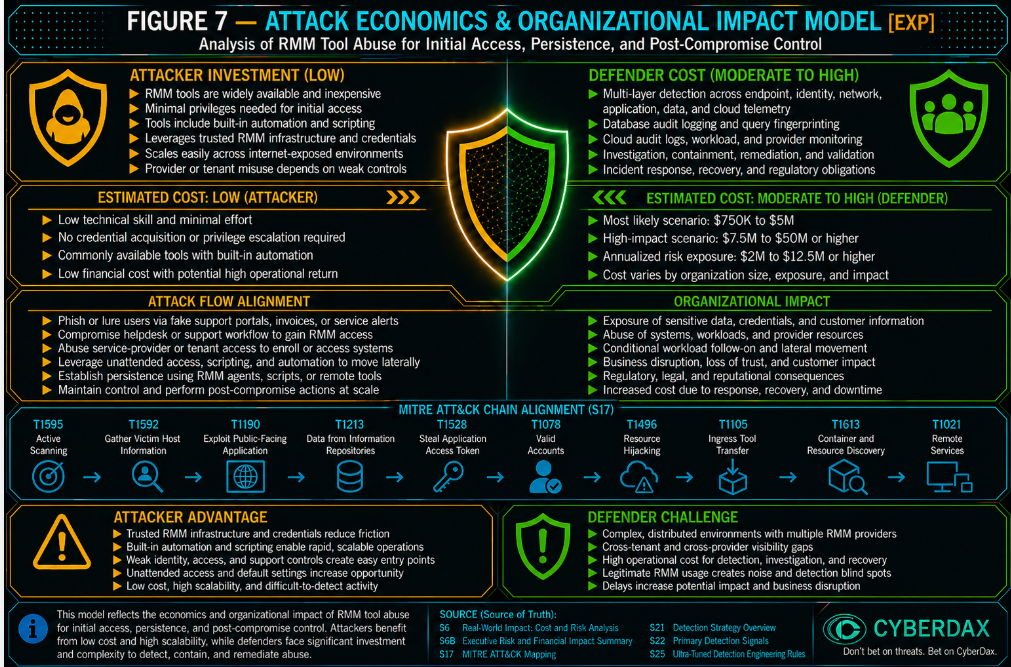
Figure 7
Economic Impact Overview
RMM tool abuse changes intrusion economics by allowing adversaries to use legitimate remote administration pathways instead of relying exclusively on malware, custom command-and-control infrastructure, or noisy exploitation chains. This lowers attacker friction while increasing defender validation burden. The organization may see signed tooling, official relay infrastructure, support-session activity, service-provider activity, or cloud-native remote command events but still need to prove whether the activity was authorized, attributable, scoped, and consistent with approved workflow.
The organizational impact is driven by ambiguity and control. When RMM activity cannot be quickly tied to an approved tool, tenant, support user, endpoint, session, ticket, source, or administrative workflow, response expands beyond endpoint containment. The organization must validate access legitimacy, determine whether unattended access was created, assess credential exposure, review service-provider involvement, inspect post-compromise commands, and confirm whether cloud-native remote management pathways were misused.
Attacker Economic Advantages
· RMM abuse reduces the need for custom malware by using legitimate remote support and administration tools.
· Signed binaries and official vendor infrastructure can reduce prevention friction.
· Existing enterprise allowlists and support workflows may make RMM activity appear operationally normal.
· Temporary support sessions can provide rapid interactive control.
· Unattended access can preserve control after the initial access method is removed.
· Service-provider pathways can expand reach beyond one endpoint or one organization.
· Cloud-native remote command features can provide RMM-equivalent control without a third-party RMM binary.
· Tool stacking allows adversaries to maintain alternate access if one remote access pathway is removed.
Defender Economic Burden
· Analysts must validate whether the tool, tenant, user, endpoint, source, and session are approved.
· Incident responders must determine whether RMM access was temporary or persistent.
· Security teams must inspect follow-on activity for discovery, credential access, lateral movement, defense evasion, data staging, backup interference, or ransomware preparation.
· Identity teams may need to review privileged accounts, service-provider accounts, service accounts, managed identities, cloud roles, tokens, and active sessions.
· Infrastructure teams may need to remove unauthorized agents, services, scheduled tasks, startup entries, cloud remote command access, or tenant associations.
· Legal, compliance, and customer assurance teams may become involved if sensitive data, customer environments, regulated systems, or service-provider access are affected.
· Recovery teams may need to validate endpoint trust, backup integrity, remote access configuration, and service-provider governance before returning systems to normal operation.
Economic Impact Model
Low Impact Scenario
Suspicious RMM activity is detected early, scoped to a limited endpoint population, and investigation confirms no unauthorized unattended access, no credential access, no lateral movement, no data staging, no cloud-control misuse, no backup interference, and no ransomware-preparation behavior. Organizational impact is primarily investigation, validation, limited containment, support workflow review, and detection tuning. Estimated impact is $150K to $500K.
Moderate Impact Scenario
Unauthorized RMM execution or persistence affects a limited but meaningful set of endpoints. Response requires endpoint containment, tenant validation, support workflow review, credential review, detection tuning, service-provider coordination, selective remediation, and executive incident coordination. Organizational impact includes operational disruption, analyst surge effort, validation of remote administration workflows, and temporary restrictions on support activity. Estimated impact is $750K to $5M.
High Impact Scenario
RMM abuse enables persistent remote control, credential access, lateral movement, security-tool tampering, backup interference, data staging, cloud-native remote command abuse, or ransomware preparation across high-value systems. Response requires enterprise incident response, broad credential rotation, remote access suspension, service-provider validation, endpoint rebuilds, legal or regulatory review, recovery assurance, and executive incident governance. Estimated impact is $7.5M to $50M or higher.
Organizational Impact Drivers
· Number and criticality of affected endpoints, servers, cloud workloads, or restricted systems.
· Whether RMM activity affected identity systems, backup servers, security tooling, privileged access workstations, executive endpoints, regulated-data systems, cloud management systems, or production-critical workloads.
· Whether unattended access, persistent agents, service creation, scheduled tasks, registry autoruns, startup entries, or reconnect behavior were created.
· Whether RMM activity launched discovery, credential access, lateral movement, defense evasion, backup interference, data staging, or ransomware-preparation commands.
· Whether service-provider access, delegated administration, downstream customer environments, or shared support infrastructure were involved.
· Whether the organization can validate tenant ownership, session ownership, support ticket, endpoint authorization, source location, and administrative purpose.
· Whether endpoint process telemetry, command-line visibility, RMM platform logs, identity telemetry, network logs, cloud audit logs, and support workflow data are available.
· Whether cloud-native remote management was used through AWS Systems Manager, Azure Run Command, GCP VM Manager, OS Config, metadata execution, or equivalent capabilities.
· Whether credential rotation, token revocation, session invalidation, endpoint rebuilds, backup validation, or customer assurance are required.
· Whether legal, regulatory, insurance, contractual, or board-level governance obligations are triggered.
Attack Economics Assessment
RMM tool abuse is economically favorable for adversaries because it exploits normal business operations and trusted administrative tooling. The attacker can gain interactive control, preserve access, and conduct post-compromise activity while reducing dependence on obvious malware indicators. The defender’s cost is amplified by the need to prove legitimacy, scope access, validate credentials, inspect persistence, review service-provider exposure, and restore confidence in remote administration controls.
S39 — Economic Impact & Organizational Exposure
RMM Tool Abuse for Initial Access, Persistence, and Post-Compromise Control expands organizational exposure by turning legitimate remote administration, support infrastructure, endpoint-management platforms, native remote-control services, cloud-native management functions, and trusted management-server execution paths into adversary-controlled channels for unauthorized access, persistence, credential theft, command execution, lateral movement, security-control impairment, domain-policy manipulation, backup disruption, privileged management-platform execution, ransomware preparation, and downstream organizational impact.
The governing risk is not limited to one RMM vendor, management platform, CVE, technician account, support session, tenant, relay, native remote-control mechanism, management API, vulnerable server, malware family, ransomware operation, campaign, or actor. The material question is whether an adversary converted trusted remote-management or management-platform capability into unauthorized enterprise action and whether defenders can reconstruct the user, endpoint, server, session, process, file, service, identity, network, tenant, command, administrative workflow, and downstream effects involved.
Microsoft Configuration Manager / CVE-2026-47301 expands this exposure model to enterprise endpoint-management infrastructure where abuse of insufficiently protected management functionality can participate in a broader chain that results in unexpected executable-content modification inside a privileged Configuration Manager path and subsequent loading by a highly privileged management service. The governing business risk is whether attacker-controlled management activity was converted into privileged or SYSTEM-level execution through a platform already trusted to administer large endpoint populations.
N-able N-central CVE-2026-86218, CVE-2026-86207, CVE-2026-86206, CVE-2026-18556, and CVE-2026-18577 expand this exposure model to self-hosted RMM control planes where pre-authentication remote code execution, authentication-control bypass, unauthorized administrative access, or subsequent administrative-account abuse can expose the N-central server, technician functions, Take Control capability, managed-endpoint access, tenant administration, command execution, account changes, and downstream customer environments.
CVE-2026-86206 and CVE-2026-86207 were addressed by N-central 2026.3 Hotfix 3, build 2026.3.1.13. N-able states that the two vulnerabilities could allow an unauthorized party to bypass authentication controls and gain full access to the N-central platform and states that it had no confirmations that either vulnerability had been exploited in production environments. Independent Huntress research reproduced a new exploit chain potentially leveraging one or both CVE-2026-86206 and CVE-2026-86207 and demonstrated that the chain could create unauthorized administrative accounts. Because Huntress could not establish which individual vulnerability performed each step of that chain, this report does not attribute administrative-account creation independently to either CVE.
CVE-2026-86218 is addressed by N-central 2026.3 Hotfix 4, build 2026.3.1.14, which supersedes Hotfix 3. N-able's active incident notice states that a newly identified third vulnerability, separate from two previously disclosed N-central vulnerabilities, was observed being exploited in the wild. N-able's Hotfix 4 material separately identifies CVE-2026-86218 as a critical pre-authentication remote-code-execution vulnerability and states that N-able had no confirmations that CVE-2026-86218 had been exploited in production environments. CISA added CVE-2026-86218 to the Known Exploited Vulnerabilities Catalog on September 8, 2026 based on evidence of active exploitation. The CISA KEV listing establishes CVE-2026-86218 as a known exploited vulnerability while preserving N-able's earlier product-specific statement as historical source context. KEV status does not independently establish exploitation in any specific local N-central environment.
ASUS Control Center Enterprise CVE-2026-75754 expands the exposure model to centralized enterprise-management infrastructure where missing authentication for a critical function, server-side request forgery, and hard-coded credentials can be chained against ASUS Control Center Enterprise 4.0.0.2 and earlier. An unauthorized remote user can obtain an encryption key through an HTTP request, cause a local service to enable SSH on port 2222, and use hard-coded credentials to obtain a root shell. Successful compromise can permit direct reading, writing, or deletion of data on the ASUS Control Center and remote control of servers, PCs, and workstations managed through the platform. Existing S25 management-platform and downstream behavior remains relevant after compromise, but reliable attribution to CVE-2026-75754 requires ASUS ACC-specific asset, request, service, SSH, session, credential, administrator, management-platform, and managed-endpoint telemetry. The report does not represent CVE-2026-75754 as a CISA KEV or as confirmed exploited in the wild.
Lightstar SmartIT Desktop Manager CVE-2026-85146, CVE-2026-85147, CVE-2026-85148, and CVE-2026-85149 expand the exposure model to endpoint-management infrastructure where hard-coded credential and cryptographic material can weaken trust in the management agent and its remote-administration channels. SmartIT Desktop Manager version 10 and earlier is affected, with remediation requiring version 11 or later. CVE-2026-85146 can expose SSH service-account credentials and passwords used by the SmartIT Agent. CVE-2026-85147 can expose a password that permits retrieval of the AES encryption key used for communication. CVE-2026-85148 can allow an unauthenticated remote attacker to use a fixed password to remotely access user hosts. CVE-2026-85149 can expose SFTP service credentials used by the SmartIT Agent and permit browsing of the user host file system. Existing S25 content can identify qualifying unauthorized management, remote-access, endpoint, credential, file, command, persistence, or downstream behavior after abuse occurs, but reliable attribution to these initiating weaknesses requires SmartIT-specific application, credential, SSH, SFTP, cryptographic, management-session, agent, host, and endpoint telemetry. The report does not represent these four CVEs as CISA KEVs or as confirmed exploited in the wild.
SimpleHelp and ConnectWise ScreenConnect vulnerabilities expand the exposure model to remote-support and MSP infrastructure where authentication bypass, server-side exploitation, credential or secret exposure, technician-session abuse, agent deployment, remote-control enablement, endpoint execution, and ransomware-related post-compromise behavior can occur through software expected to possess broad administrative reach. Current ScreenConnect tradecraft further demonstrates that malicious or modified ScreenConnect clients can abuse legitimate remote-support functionality as a downstream execution and propagation path. Huntress observed rogue ScreenConnect deployments across unrelated environments in which ScreenConnect clients repeatedly spawned Windows Script Host to execute staged VBScript files on connected endpoints, producing worm-like propagation characteristics.
ConnectWise ScreenConnect CVE-2026-84869 expands this exposure model to file-transfer and file-execution behavior inside active remote sessions. ConnectWise identifies CVE-2026-84869 as a Missing Authorization and Improper Privilege Management condition affecting the ScreenConnect client. ScreenConnect versions prior to 26.6.5 are affected. Under certain circumstances, the condition may allow files to be transferred and executed through an active remote session without authorization or Host confirmation. ConnectWise states that ScreenConnect servers are not impacted. ScreenConnect 26.6.5 strengthens client and session handling for file-transfer and file-execution actions. For organizations unable to upgrade immediately, ConnectWise identifies removal of the TransferFiles permission, previously named TransferFilesInSession, as a temporary mitigation rather than a substitute for installation of the security update.
CISA added CVE-2026-84869 to the Known Exploited Vulnerabilities Catalog on September 11, 2026 based on evidence of active exploitation. The KEV designation materially increases remediation and retrospective-investigation urgency but does not independently establish exploitation in any specific ScreenConnect environment. CVE-2026-84869 is retained as Coverage With Adaptation because existing S25 behavior can identify qualifying file execution, endpoint execution, persistence, abnormal remote-support activity, and downstream propagation after exploitation, while reliable identification of the initiating ScreenConnect condition requires product-specific session, authorization, role and permission, file-transfer, client, transferred-artifact, process, and target-endpoint telemetry.
TeamViewer CVE-2026-19743, CVE-2026-92368, CVE-2026-92369, CVE-2026-92370, and CVE-2026-92371 expand this exposure model to local privileged-service interaction, recorded-session file processing, installer rollback, remote-session permission enforcement, and cloud-session-recording workflows within TeamViewer Full Client and Host deployments. CVE-2026-19743 can permit a local authenticated low-privileged user to manipulate file paths through crafted IPC commands and perform arbitrary file writes with elevated SYSTEM or root privileges. CVE-2026-92368 can permit arbitrary code execution with the current user's privileges when a specially crafted .tvs session-recording file is opened through TeamViewer's recording playback or conversion functionality on affected Linux or macOS clients. CVE-2026-92369 can permit local privilege escalation to SYSTEM on Windows through a TOCTOU race in the installer rollback mechanism. CVE-2026-92370 can permit an attacker to bypass user-configured access-control restrictions during remote-session establishment and perform actions explicitly denied by the victim's configuration, potentially resulting in remote code execution. CVE-2026-92371 can permit privileged file operations in unintended locations on affected Linux systems through improper link resolution and a race condition in Cloud Session Recording functionality. Existing S25 RMM, endpoint-execution, file, privilege, remote-session, and downstream behavior remains relevant after exploitation, but reliable attribution to these initiating conditions requires TeamViewer-specific IPC, session-recording, installer, rollback, access-control, permission, remote-session, Cloud Session Recording, file, process, user, and operating-system telemetry. TeamViewer states that it is not aware of public disclosure or active exploitation in the wild for these five vulnerabilities.
TeamViewer CVE-2026-16444 and CVE-2026-19042 further expand this exposure model to trusted remote-support functions where exploitation may occur through file-transfer, virtual-file-clipboard, or out-of-session chat paths rather than conventional unauthorized session establishment. CVE-2026-16444 can convert an authenticated remote-session file-transfer interaction into arbitrary file placement outside the intended location and potentially subsequent code execution. CVE-2026-19042 can convert a crafted out-of-session chat URL and required user interaction into arbitrary command execution on affected Linux clients. In both cases, existing endpoint and RMM behavior remains relevant after exploitation, while reliable identification of the initiating condition depends on TeamViewer-specific telemetry and correlation.
Native macOS Screen Sharing, Remote Management, VNC-compatible services, and related historical authentication weaknesses expand the exposure model to operating-system and remote-console functionality where unauthorized interactive control may occur without introducing a traditional RMM binary. Service presence, TCP/5900, or VNC-compatible traffic alone does not establish compromise; risk becomes material when unauthorized session establishment, source-policy deviation, privileged follow-on activity, persistence, credential access, payload execution, or abnormal outbound communication is observed.
Medusa-linked exploitation of BeyondTrust Remote Support / Privileged Remote Access, Fortra GoAnywhere MFT, and Fortinet FortiClient EMS expands the report to exploit-validation behavior in which suspicious inbound exploitation is followed by target-originated OOB interaction and subsequent management, credential, execution, staging, security-control, or ransomware-preparation activity. The governing risk remains whether exploitation transitioned from an external request into trusted management-system or endpoint control.
Estimated Economic Exposure
Estimated exposure should be treated as scenario-based rather than fixed. The most defensible estimate depends on whether activity remains limited to suspicious remote-management or management-platform behavior with no demonstrated consequential state change; progresses into unauthorized sessions, persistence, privileged file modification, privileged service loading, credential access, command execution, tenant or policy modification, or limited downstream reach; or results in enterprise-wide administrative compromise, broad credential exposure, management-plane execution, recovery impairment, ransomware preparation, service-provider compromise, cloud-control misuse, or multi-customer impact.
Economic exposure grows when the organization cannot determine which remote-management path was used, who controlled the session or management action, whether activity was authorized, whether a privileged management-platform file was modified and loaded, which credentials or administrative objects were accessed, what endpoints were reached, whether policy or recovery controls changed, and whether remote-administration trust can be restored.
Low Impact Scenario
Estimated $150K-$500K
This scenario applies when suspicious RMM, native remote-control, exploit-validation, or management-platform activity is detected early and investigation confirms no unauthorized unattended access, privileged module loading, credential access, lateral movement, security-control weakening, material policy modification, destructive activity, ransomware preparation, service-provider expansion, or downstream-customer impact.
Available evidence supports a failed, prevented, contained, approved, or low-consequence event. Response remains limited to patch and configuration validation, management-server review, support-session validation, privileged-file review, exploit and callback reconstruction, tenant confirmation, focused endpoint investigation, short-term monitoring, and detection tuning.
Moderate Impact Scenario
Estimated $750K-$5M
This scenario applies when confirmed or strongly suspected activity affects one or more RMM platforms, management servers, technician identities, support sessions, native remote-control paths, cloud-native management functions, or endpoint populations and produces unauthorized remote access, persistence, agent enrollment, privileged executable modification, privileged module loading, command execution, credential access, account or tenant change, security-control modification, limited lateral movement, or constrained downstream reach.
For Microsoft Configuration Manager, moderate impact may include unexpected DLL or executable modification within a privileged product path, modification outside approved servicing activity, loading of the changed content by SMS Executive or another privileged management service, or SYSTEM-level execution that remains limited to a small management-server or endpoint population.
For N-able N-central, moderate impact may include compromise of the N-central server, unauthorized administrator or technician activity, anomalous administrative-account creation, unfamiliar Take Control sessions, unexpected managed-endpoint access, tenant changes, account changes, or command execution without evidence of broad customer or enterprise compromise. For CVE-2026-86218, CISA KEV status and confirmed active exploitation materially increase remediation and retrospective-investigation priority but do not independently establish exploitation of any local N-central server.
For ASUS Control Center Enterprise, moderate impact may include unauthorized root access to the ACC management platform, unexpected SSH enablement or sessions, management-platform file access or modification, administrator or credential misuse, and unauthorized interaction with a limited population of managed servers, PCs, or workstations.
For Lightstar SmartIT Desktop Manager, moderate impact may include exposure or misuse of SmartIT Agent SSH or SFTP credentials, retrieval of management-channel cryptographic material, unauthorized remote access to one or more managed hosts, unexpected host file-system access, or downstream endpoint activity limited to a defined population.
For TeamViewer, moderate impact may include unauthorized elevated file writes through the local IPC service, execution of code through malicious session-recording content, installer rollback abuse resulting in local privilege escalation, remote-session access-control bypass, privileged Cloud Session Recording file operations, unauthorized file placement, chat-triggered command execution, or subsequent endpoint activity limited to a defined population. For CVE-2026-92370, investigation should determine whether remote-session permission settings were bypassed and whether actions explicitly denied by the configured access policy were successfully performed.
For SimpleHelp, ScreenConnect, TeamViewer, or related remote-support platforms, moderate impact may include unauthorized technician access, session creation, malicious file placement, unauthorized file execution, user-triggered command execution, agent deployment, persistent remote access, endpoint execution, credential activity, or ransomware-related preparation limited to a defined environment. For CVE-2026-84869, moderate impact may include unauthorized file transfer or execution through an active ScreenConnect remote session across a bounded endpoint population without broader propagation or enterprise-wide compromise.
Response may require management-server restriction, endpoint containment, session termination, credential rotation, file-integrity restoration, tenant and account review, support-provider coordination, command and session reconstruction, targeted endpoint remediation, legal or contractual review, executive reporting, and extended monitoring.
High Impact Scenario
Estimated $7.5M-$50M+
This scenario applies when RMM or management-platform compromise becomes an enterprise-impact event involving persistent remote control, SYSTEM-level or root-level management-server execution, privileged technician or administrator compromise, broad credential access, material domain-policy modification, security-tool interference, lateral movement, backup disruption, widespread payload deployment, ransomware preparation, service-provider compromise, cloud-control misuse, downstream-customer access, operational disruption, or loss of confidence in enterprise remote-administration trust.
The organization may need to treat affected management servers, technician identities, tenants, deployment packages, unattended-access configurations, privileged executable paths, remote sessions, cloud roles, service-provider identities, endpoint groups, policy objects, backup systems, and downstream customer environments as exposed or unreliable until evidence demonstrates otherwise.
For Microsoft Configuration Manager, the high-impact case applies where privileged management-platform execution enables broad software deployment, endpoint command execution, credential theft, security-control manipulation, policy change, persistence, or propagation across a large managed population.
For N-able N-central, the high-impact case applies where pre-authentication RCE, authentication-control bypass, or unauthorized administrative access enables persistent control of the N-central server, privileged technician or administrator activity, broad Take Control use, command execution, credential exposure, tenant compromise, widespread endpoint access, payload deployment, security-control impairment, lateral movement, ransomware preparation, or multi-customer compromise. CVE-2026-86218's CISA KEV status establishes known exploitation but does not independently establish that a specific N-central deployment was exploited or that broad downstream impact followed.
For ASUS Control Center Enterprise, the high-impact case applies where root-level compromise of the centralized management platform enables broad remote control, modification, deletion, or administrative manipulation across managed servers, PCs, workstations, or other business-critical systems.
For SmartIT Desktop Manager, the high-impact case applies where exposed management credentials, remote-host access, or management-channel trust weaknesses enable unauthorized administrative reach across a broad managed endpoint population.
For TeamViewer, the high-impact case applies where CVE-2026-19743, CVE-2026-92368, CVE-2026-92369, CVE-2026-92370, CVE-2026-92371, or another TeamViewer weakness enables SYSTEM-level or root-level privilege, unauthorized remote-session capability, arbitrary code execution, persistent file modification, broad endpoint reach, credential access, security-control impairment, lateral movement, payload deployment, or other enterprise-wide consequences through a trusted remote-support channel.
For ScreenConnect, the high-impact case may include CVE-2026-84869-related unauthorized file transfer and execution across connected endpoints or malicious or modified-client activity that repeatedly executes attacker-controlled scripts or payloads across connected remote-support endpoints, particularly where session permissions and endpoint reach permit rapid propagation.
For MSP and service-provider platforms, the high-impact case applies where one compromised control plane, tenant, technician identity, or support path enables access to multiple customers or regulated environments.
Response may require enterprise incident response, emergency restriction of remote administration, management-server isolation or rebuild, broad credential and token rotation, trusted restoration of affected product files, endpoint rebuilds, Active Directory and Group Policy review, cloud and endpoint-management review, security-control restoration, backup and recovery validation, legal or regulatory escalation, customer notification or assurance, service-provider coordination, executive and board reporting, and formal restoration of remote-administration trust.
Annualized Risk Exposure
Estimated annualized exposure is $2M-$12.5M+ for materially exposed environments where RMM platforms, endpoint-management infrastructure, native remote-control functions, cloud-native administration, support portals, or service-provider control planes have broad reach into privileged endpoints, identity systems, backup infrastructure, production workloads, customer environments, regulated information, or security tooling.
A realized severe event may reach or exceed $7.5M-$50M+ when one management server, technician identity, tenant, unattended-access configuration, deployment package, privileged management-platform service, cloud role, service-provider pathway, exposed management credential, or compromised management-channel function provides administrative reach into multiple business units, customers, endpoint populations, or production-critical systems.
Operational Dependency
Operational dependency is high where RMM platforms, Configuration Manager, ASUS Control Center Enterprise, SmartIT Desktop Manager, remote-support tooling, endpoint-management systems, MSP administration, native Screen Sharing or Remote Management, cloud-native command functions, or technician consoles support software deployment, patching, incident response, user support, endpoint recovery, identity operations, backup administration, security operations, or production maintenance.
One affected management server, technician identity, tenant, support account, privileged executable path, deployment workflow, remote session, management credential, or cloud-management role can create broad investigation and recovery requirements when multiple endpoint groups, business units, customers, servers, or cloud workloads depend on the same control path.
Dependency increases when affected remote-administration capability cannot be disabled, restricted, rebuilt, or returned to manual operation without materially disrupting essential support, deployment, recovery, or production functions.
Control Trust
Control trust is reduced when the organization cannot prove that technician authentication, tenant administration, session ownership, RMM deployment, endpoint enrollment, native remote-control access, management API activity, product servicing, privileged file modification, module loading, command execution, cloud management, identity activity, management credentials, file-transfer activity, and downstream actions remained authorized during the exposure window.
Trust is further reduced when suspicious activity occurs through an expected RMM product, legitimate technician identity, approved management server, signed agent, native operating-system remote-control capability, normal cloud-management API, legitimate Configuration Manager service, ASUS ACC service, SmartIT Agent, ScreenConnect file-transfer function, or familiar support-provider infrastructure.
For Configuration Manager, trust is reduced when defenders cannot establish which process changed a privileged executable, whether the modification occurred during approved servicing, whether the changed artifact was subsequently loaded by SMS Executive or another privileged service, and whether resulting SYSTEM activity matched an approved administrative workflow.
For N-able N-central, trust is reduced when defenders cannot establish whether authentication activity, administrative-account creation, console access, API manipulation, Take Control sessions, tenant changes, command execution, or managed-endpoint actions originated from an authorized administrator or from unauthorized access to the management platform. CVE-2026-86218's CISA KEV status establishes known exploitation at the vulnerability level but does not replace local server, administrator, process, command, tenant, or managed-endpoint evidence required to establish compromise of a specific environment.
For ASUS Control Center Enterprise, trust is reduced when defenders cannot establish whether HTTP requests affecting management services, SSH enablement, port-2222 sessions, root authentication, management-platform file operations, administrator activity, or downstream managed-system control originated from legitimate administrative workflows.
For SmartIT Desktop Manager, trust is reduced when defenders cannot establish whether SSH or SFTP credentials, cryptographic material, management-agent connections, remote host access, or file-system activity originated from protected product workflows or from exposed hard-coded secrets.
For TeamViewer, trust is reduced when defenders cannot establish whether local IPC commands, session-recording files, installer rollback activity, remote-session permission changes, Cloud Session Recording operations, file placement, out-of-session chat URLs, user interaction, or resulting process execution originated from approved product behavior or attacker-controlled input. CVE-2026-92370 creates an additional trust problem because a legitimate remote-session workflow may proceed while configured restrictions are bypassed, making session existence alone insufficient to establish that the resulting actions were authorized.
For TeamViewer CVE-2026-16444 and CVE-2026-19042, trust is reduced when defenders cannot establish whether an observed file placement originated from an expected file-transfer or virtual-file-clipboard workflow, whether the supplied path was legitimate, whether an out-of-session chat URL was authorized or malicious, whether user interaction initiated subsequent execution, and whether resulting file or command activity matched an approved support workflow.
For ScreenConnect, trust is reduced when defenders cannot establish whether CVE-2026-84869-related file-transfer or file-execution activity, script execution, Guest-process activity, connected-endpoint propagation, or remote-support sessions were authorized and consistent with approved support activity.
Patching a server, terminating a session, removing an agent, replacing a DLL, disabling Screen Sharing, restricting file-transfer permissions, resetting a password, revoking a token, rotating exposed management credentials, reversing a policy change, or blocking one callback destination reduces future exposure but does not independently prove that prior unauthorized endpoint access, credential theft, privileged execution, persistence, lateral movement, propagation, or downstream activity did not occur.
Visibility Confidence
Visibility confidence is highest when management-platform audit logs, technician authentication, remote-session history, tenant changes, installer-generation events, agent enrollment, endpoint process telemetry, command-line logging, file creation and modification, writer-process identity, file hashes and signer state, module and image loading, persistence telemetry, Active Directory and Group Policy auditing, DNS, proxy, NDR, WAF or IDS, application logs, cloud audit logs, native remote-control events, software inventory, support records, change control, and incident-response evidence can be correlated through stable endpoint, user, tenant, session, file, service, process, identity, destination, and timestamp mappings.
For Configuration Manager, visibility confidence is highest when defenders can join management API or AdminService activity, privileged installation-path changes, writer process, file identity, servicing context, SMS Executive or equivalent module loading, SYSTEM-level process activity, and downstream management actions.
For N-able N-central, visibility confidence is highest when defenders can correlate N-central appliance and application logs, authentication and administrator activity, API activity, account and permission changes, Take Control history, tenant context, server-side process and command activity where available, managed-endpoint activity, command execution, source context, and downstream endpoint evidence. For CVE-2026-86218, CISA KEV status should be used as an exploitation-priority and retrospective-hunting signal rather than as a substitute for this local evidence.
For ASUS Control Center Enterprise CVE-2026-75754, visibility confidence is highest when defenders can correlate ACC asset and version identification, inbound HTTP request activity, management-service behavior, SSH enablement and port-2222 activity, authentication and root-session evidence, credential and administrator activity, management-platform process and file telemetry, managed-endpoint actions, and downstream network or endpoint effects.
For SmartIT Desktop Manager CVE-2026-85146, CVE-2026-85147, CVE-2026-85148, and CVE-2026-85149, visibility confidence is highest when defenders can correlate SmartIT server and Agent identity, affected version, application activity, credential-access evidence, SSH or SFTP sessions, cryptographic or communication-channel context, remote-host access, file-system activity, management-session evidence, endpoint process activity, and downstream effects.
For RMM and support platforms, confidence is highest when technician identity, tenant, management server, remote-session identifier, target endpoint, process activity, command activity, and resulting network or endpoint effects can be reconstructed.
For CVE-2026-84869 and related ScreenConnect file-transfer behavior, confidence is highest when defenders can correlate ScreenConnect server audit logs, active Remote Support or Access session context, file-transfer permission state, transferred artifact identity, ScreenConnect client identity, target endpoint, Guest-process context where available, resulting file execution, Windows Script Host or other script-interpreter execution, persistence creation, subsequent payload activity, and propagation timing.
For TeamViewer CVE-2026-19743, confidence is highest when defenders can correlate TeamViewer Full Client or Host version, local authenticated user identity, local IPC activity, TeamViewer service-daemon context, crafted file paths, resulting elevated file writes, destination paths, writer process, privilege level, and subsequent file or process activity.
For TeamViewer CVE-2026-92368, confidence is highest when defenders can correlate TeamViewer version, .tvs session-recording provenance, recording-playback or conversion activity, user interaction, TeamViewer process context, memory-fault or crash evidence where available, child-process or code-execution behavior, and downstream endpoint activity.
For TeamViewer CVE-2026-92369, confidence is highest when defenders can correlate TeamViewer installation or update activity, rollback state, temporary-directory files, backup-file replacement, file timestamps, user context, elevated installer activity, resulting file restoration, SYSTEM-level effects, and subsequent endpoint behavior.
For TeamViewer CVE-2026-92370, confidence is highest when defenders can correlate TeamViewer remote-session establishment, configured permission policy, negotiated or supplied access-control parameters, user interaction, remote peer identity, actions denied by policy, actual actions performed during the session, TeamViewer process context, resulting file or command execution, and downstream endpoint behavior.
For TeamViewer CVE-2026-92371, confidence is highest when defenders can correlate Linux TeamViewer version, Cloud Session Recording activity, pathname and link state, local authenticated user identity, file-operation timing, privileged service context, destination path, resulting privileged file operation, and downstream process or persistence behavior.
For TeamViewer CVE-2026-16444, confidence is highest when defenders can correlate authenticated session identity, file-transfer or virtual-file-clipboard activity, supplied filename or path, resulting file location, peer identity, writer context, and subsequent file execution.
For TeamViewer CVE-2026-19042, confidence is highest when out-of-session chat records, sender/contact-policy context, URL details, user interaction, TeamViewer process activity, child process lineage, command execution, and resulting endpoint behavior can be correlated.
For native macOS or VNC-compatible activity, confidence is highest when session directionality, source identity, destination endpoint, authentication or operating-system evidence, firewall or VPN context, and privileged follow-on activity are available.
Visibility confidence is reduced when file telemetry, module-load telemetry, process ancestry, command line, tenant context, session identifiers, application logs, endpoint-to-session mapping, management-credential visibility, file-transfer logging, network directionality, exploit-target attribution, callback visibility, or sufficient retention is unavailable.
S25 provides independent coverage for unauthorized RMM execution, persistence, outbound RMM control-channel activity, unexpected inbound remote-control sessions, remote-control activity followed by abnormal outbound communication, exploit-to-OOB validation, high-risk post-compromise command execution, cloud-native remote management, unexpected management-platform privileged file modification, and privileged file-modification-to-module-load sequences where telemetry supports the required correlation.
Change-Control Confidence
Change-control confidence is high when RMM deployments, technician access, tenant changes, agent enrollment, unattended-access configuration, remote-management enablement, Configuration Manager upgrades, ASUS ACC updates, SmartIT updates, N-central hotfixes, ScreenConnect upgrades and permission changes, TeamViewer upgrades, TeamViewer installer and rollback operations, hotfixes, repairs, recovery activity, extension deployment, package deployment, privileged DLL or executable replacement, cloud-management actions, Group Policy changes, security-control modifications, testing, emergency administration, and incident-response activity are recorded with validated actors, approvals, timestamps, expected systems, and post-change verification.
Confidence is reduced when shared accounts, undocumented support access, emergency administration, inherited MSP privileges, unsupported RMM versions, unmanaged tenants, weak ticket linkage, incomplete servicing records, exposed or undocumented management credentials, permissive file-transfer settings, untracked testing infrastructure, or incomplete management-platform logging prevent defenders from separating authorized administration from attacker-driven activity.
Missing support, servicing, change, testing, or session-ownership documentation lowers investigative confidence but does not independently establish malicious activity.
Downstream Dependency
Downstream dependency is high when affected RMM or management-platform infrastructure has approved reach into identity platforms, backup systems, security tooling, privileged access workstations, executive endpoints, production servers, cloud workloads, software-deployment infrastructure, regulated systems, customer environments, or other endpoint-management platforms.
The organization must distinguish suspicious management activity, endpoint enrollment, remote-session creation, command execution, software deployment, file transfer, script execution, identity use, policy modification, cloud actions, and post-compromise activity from confirmed downstream compromise. Such activity becomes materially relevant when evidence ties it to an affected technician identity, session, tenant, management server, deployment package, privileged file, management service, management credential, cloud role, or bounded investigation window.
Customer, Workforce, Partner, and Regulatory Exposure
Customer, partner, workforce, and regulatory exposure increases when RMM or management-platform compromise affects customer environments, employee endpoints, regulated-data systems, finance systems, executive devices, cloud workloads, identity infrastructure, backup platforms, security tooling, downstream MSP customers, or shared service-provider administration paths.
Exposure also increases when telemetry gaps prevent timely confirmation of whether technician sessions occurred, endpoints were accessed, privileged files were modified or loaded, credentials were acquired, management secrets were exposed, files or scripts were transferred or executed, policies changed, security controls were impaired, data was staged, cloud-management functions were used, ransomware preparation occurred, propagation occurred, or downstream customers were affected.
Notification and reporting decisions must be based on validated local evidence and applicable obligations rather than RMM presence, vulnerable-version presence, CVE designation, KEV status, public exploitation reporting, remote-control service availability, actor attribution, campaign naming, malware naming, or isolated management-platform activity alone.
Residual Economic Risk
Residual economic risk remains after patching, account disabling, session termination, tenant correction, agent removal, management-server remediation, trusted DLL restoration, remote-management restriction, credential rotation, file-transfer restriction, policy restoration, endpoint containment, or incident-response closure when the pre-remediation activity window cannot be reconstructed.
Removing one RMM agent, technician account, remote session, modified DLL, callback destination, management-server vulnerability, exposed credential, persistence mechanism, transferred script, or policy change does not prove that additional endpoint access, credential theft, privileged execution, lateral movement, downstream access, propagation, cloud-control misuse, or ransomware preparation did not occur before remediation.
For TeamViewer CVE-2026-19743, CVE-2026-92368, CVE-2026-92369, CVE-2026-92370, and CVE-2026-92371, upgrading affected TeamViewer Full Client and Host deployments to version 15.82 or the applicable supported maintenance or legacy release reduces future exposure but does not independently establish that exploitation did not occur before remediation. Retrospective review should be proportionate to the applicable vulnerability and include local IPC and elevated file-write activity for CVE-2026-19743; .tvs session-recording provenance, playback, conversion, process, and execution evidence for CVE-2026-92368; installer, rollback, temporary-file, and privileged restoration activity for CVE-2026-92369; session-establishment, configured permission, access-control, user-interaction, and performed-action evidence for CVE-2026-92370; and Cloud Session Recording, link, pathname, file-operation, and privileged-service activity for CVE-2026-92371. TeamViewer states that it is not aware of public disclosure or active exploitation in the wild for the five vulnerabilities.
For CVE-2026-86218, applying N-central 2026.3 Hotfix 4 does not independently prove that a previously vulnerable server was not exploited before remediation. Because CISA added CVE-2026-86218 to the Known Exploited Vulnerabilities Catalog on September 8, 2026 based on evidence of active exploitation, organizations that operated affected N-central versions during the exposure window should prioritize retrospective review of authentication and administrator activity, server-side process and command execution, account or permission changes, API activity, Take Control history, tenant changes, managed-endpoint access, credential activity, payload deployment, security-control changes, network activity, and downstream customer or endpoint effects where evidence is available.
For CVE-2026-84869, upgrading affected ScreenConnect installations to version 26.6.5 or later reduces future exposure but does not independently demonstrate that unauthorized file transfer or execution did not occur before remediation. Because CISA added CVE-2026-84869 to the Known Exploited Vulnerabilities Catalog on September 11, 2026 based on evidence of active exploitation, organizations that operated affected ScreenConnect versions during the exposure window should prioritize retrospective review of remote-session history, role and permission state, file-transfer events, transferred artifacts, client activity, endpoint process activity, file execution, persistence, unusual script execution, remote-support activity, and downstream endpoint effects where evidence is available.
Residual risk should remain elevated until historical management-platform, file-integrity, module-load, technician-session, endpoint, identity, command-line, persistence, Active Directory, network, cloud, service-provider, change-control, support, file-transfer, and incident-response evidence has been assessed and the organization can demonstrate that remote-administration trust has been restored.
CVE / KEV Behavioral Coverage Assessment
The expanded assessment identifies public RMM, remote-support, VNC, native remote-control, endpoint-management, and management-server vulnerabilities involving authentication bypass, access-control failure, command injection, SQL injection, credential or cryptographic weakness, session-authorization weakness, exposed management-plane compromise, exploit-validation callbacks, unauthorized remote control, privileged executable modification, privileged service loading, command execution, credential access, persistence, lateral movement, security-control impairment, recovery interference, and ransomware preparation.
Direct Coverage applies where the documented behavior produces unauthorized remote-control activity, control-channel activity, privileged management-platform file modification, privileged service loading, exploit-to-OOB behavior, command execution, persistence, credential access, unauthorized management-platform access, or another outcome already represented by current S25 rules without substantive expansion of rule logic.
Coverage With Adaptation applies where S25 can identify resulting remote-management or post-compromise behavior but reliable detection of the material initiating condition requires product-specific authentication, SQL-injection, role-permission, credential, cryptographic, machine-key, URI-handler, passive-session, file-transfer, virtual-file-clipboard, chat, user-interaction, hard-coded-secret, SSH, SFTP, SSRF, management-service, authorization, privilege-management, session, client, transferred-artifact, IPC, installer, rollback, session-recording, Cloud Session Recording, pathname, link, or other vulnerability-specific telemetry.
KEV designation, public exploitation reporting, proof-of-concept availability, ransomware association, campaign attribution, and vendor urgency increase remediation and investigation priority. They do not independently determine Direct Coverage or establish local compromise.
Detection Engineering Coverage Interpretation
The S25 detection content provides direct behavioral coverage when activity produces one or more of these implemented outcomes:
· Unauthorized or suspicious RMM execution from unapproved paths, users, tenants, management servers, or deployment contexts.
· RMM persistence through service creation, scheduled tasks, autorun changes, unattended-access configuration, or comparable durable control.
· Unauthorized RMM relay, broker, or remote-support control-channel activity from restricted endpoint populations.
· Unexpected inbound VNC-compatible, native Screen Sharing, Remote Management, or other remote-control sessions against restricted endpoints.
· Remote-control activity followed by abnormal outbound network activity from the same endpoint.
· Suspicious exploit-oriented inbound activity followed by a target-originated HTTP or DNS OOB validation callback.
· Unexpected privileged management-platform DLL or executable creation, modification, overwrite, replacement, or rename.
· Same-host and same-artifact privileged file-modification-to-module-load correlation where required telemetry is available.
· RMM- or management-platform-associated credential access, authentication-component modification, lateral movement, security-control weakening, high-impact Group Policy modification, backup interference, staging, or ransomware preparation.
· AWS, Azure, and GCP native remote-management activity where identity, target, source, workload, command, or setup-to-control relationships deviate from approved administration.
The S25 rules intentionally avoid dependence on one CVE, vendor, RMM product, process name, DLL, archive, upload endpoint, exploit string, callback provider, domain, hash, port, VNC implementation, actor, malware family, ransomware operation, or campaign.
Microsoft Configuration Manager / CVE-2026-47301 does not require a new generic S25 rule. SentinelOne Rule 4 directly covers unexpected DLL creation, modification, or rename inside locally validated privileged management-platform paths. Splunk Rule 4, Elastic Rule 4, and QRadar Rule 3 provide direct behavioral correlation when the modified artifact is subsequently loaded by a privileged management service. Reliable implementation requires management-server identification, privileged-path mapping, approved servicing baselines, writer-process telemetry, file identity, module-load visibility where applicable, and stable endpoint and artifact correlation.
The five 2025 Configuration Manager vulnerabilities and CVE-2024-43468 remain Coverage With Adaptation because their material initiating behavior involves authentication, role authorization, or SQL injection not directly implemented by the generic S25 rules. Existing S25 content can detect qualifying downstream management execution, privileged file activity, endpoint-management actions, or post-compromise behavior when those effects occur.
N-able N-central CVE-2026-86218, CVE-2026-86207, CVE-2026-86206, CVE-2026-18556, and CVE-2026-18577 are Direct Coverage because successful exploitation can produce unauthorized management-platform access, command execution, remote-management activity, session activity, endpoint access, or downstream behavior aligned with the existing S25 model.
CVE-2026-86218 does not require a new generic S25 rule because successful pre-authentication RCE on the N-central server produces command-execution and management-platform behavior already represented by current detection content. CISA added CVE-2026-86218 to the Known Exploited Vulnerabilities Catalog on September 8, 2026 based on evidence of active exploitation. The KEV designation increases remediation, retrospective-hunting, and investigation priority without changing the Direct Coverage classification or establishing local compromise.
CVE-2026-86206 and CVE-2026-86207 similarly do not require a new generic S25 rule because N-able states that the vulnerabilities can bypass authentication controls and provide full N-central platform access, while the Huntress-reproduced combined chain can result in unauthorized administrative-account creation. The report does not assign the administrative-account-creation step independently to either CVE. Product-specific logs remain necessary to attribute observed activity to the initiating vulnerability chain.
ASUS Control Center Enterprise CVE-2026-75754 is Coverage With Adaptation. Existing S25 logic can identify qualifying privileged management-platform activity, unauthorized command execution, credential misuse, remote-management activity, and downstream managed-endpoint effects after compromise, but reliable attribution to the initiating vulnerability requires ACC-specific HTTP request, SSRF, local-service, SSH enablement, port-2222, hard-coded credential, root-session, administrator, and management-platform telemetry.
Lightstar SmartIT Desktop Manager CVE-2026-85146, CVE-2026-85147, CVE-2026-85148, and CVE-2026-85149 are Coverage With Adaptation. Existing S25 logic can identify qualifying unauthorized remote access, management activity, credential use, endpoint execution, file activity, persistence, or downstream behavior when those outcomes occur, but the material initiating conditions are hard-coded credential or cryptographic weaknesses requiring SmartIT-specific source, credential, SSH, SFTP, AES-key, agent, management-session, and host telemetry.
SimpleHelp and ScreenConnect direct entries remain Direct Coverage where exploitation produces unauthorized administrative access, remote-session creation, endpoint activity, agent deployment, persistence, command execution, or other directly implemented behavior.
CVE-2026-84869 is Coverage With Adaptation. Existing S25 behavior can identify qualifying unauthorized file execution, script execution, endpoint execution, persistence, abnormal remote-support activity, and downstream propagation after exploitation, but reliable attribution to the initiating ScreenConnect Missing Authorization / Improper Privilege Management condition requires ScreenConnect-specific active-session context, role and permission state, file-transfer events, client identity, transferred-artifact identity, target-endpoint mapping, process lineage, and consequential endpoint behavior. The CVE's CISA KEV status increases remediation and retrospective-investigation urgency without changing the Coverage With Adaptation classification.
Current ScreenConnect modified-client script-execution and worm-like propagation behavior does not require a new generic S25 rule because resulting script execution, persistence, endpoint execution, abnormal remote-support activity, and downstream propagation remain observable through existing endpoint and RMM behavior. Reliable attribution to the specific modified-client pattern requires ScreenConnect audit, session, client, process, script-execution, connected-endpoint, and propagation context.
TeamViewer CVE-2026-19743 is Coverage With Adaptation because current S25 logic can identify unexpected privileged file modification, execution, persistence, or resulting RMM-associated endpoint behavior, but reliable attribution to the initiating path-traversal condition requires TeamViewer local IPC, service-daemon, authenticated-user, supplied-path, resulting elevated-write, destination, privilege, and file-to-process context.
TeamViewer CVE-2026-92368 is Coverage With Adaptation because current S25 logic can identify resulting suspicious endpoint execution or consequential post-compromise behavior, but reliable attribution to the initiating heap-based buffer overflow requires TeamViewer version, .tvs session-recording provenance, playback or conversion activity, user interaction, process and memory context, and resulting execution telemetry.
TeamViewer CVE-2026-92369 is Coverage With Adaptation because current S25 logic can identify resulting SYSTEM-level file or process activity, but reliable attribution to the TOCTOU privilege-escalation pathway requires TeamViewer installer and rollback state, temporary-directory and backup-file activity, user context, timing, elevated installer behavior, and restored-file provenance.
TeamViewer CVE-2026-92370 is Coverage With Adaptation because existing S25 content can identify qualifying unauthorized remote-session activity, file or command execution, endpoint execution, persistence, or downstream behavior after access-control bypass, but reliable identification of the initiating condition requires TeamViewer-specific configured permission state, session-establishment and access-control parameters, user interaction, remote-peer context, denied-feature state, actual actions performed, and session-to-process correlation.
TeamViewer CVE-2026-92371 is Coverage With Adaptation because current S25 logic can identify consequential privileged file activity, persistence, or endpoint behavior, but reliable attribution to the initiating Cloud Session Recording race and link-resolution weakness requires Linux TeamViewer version, CSR activity, path and link state, local authenticated-user context, file-operation timing, privileged service context, destination, and resulting file or process activity.
The five September 29, 2026 TeamViewer vulnerabilities do not require a new generic S25 rule. Their material initiating conditions are product-specific and are therefore retained as Coverage With Adaptation. TeamViewer states that it is not aware of public disclosure or active exploitation in the wild, and current authoritative evidence does not establish CISA KEV status for these five CVEs.
TeamViewer CVE-2026-16444 remains Coverage With Adaptation because current S25 logic can identify suspicious file placement, subsequent execution, and downstream endpoint behavior, but attribution to the initiating arbitrary-file-write condition requires TeamViewer session, file-transfer or virtual-file-clipboard context, supplied filename or path, write location, source peer identity, and file-to-execution correlation.
TeamViewer CVE-2026-19042 remains Coverage With Adaptation because current S25 logic can identify suspicious RMM-associated command execution and downstream behavior, but attribution to the initiating condition requires TeamViewer out-of-session chat, URL, sender/contact-policy, user-interaction, and chat-to-process lineage telemetry.
Native VNC and macOS Screen Sharing direct entries remain Direct Coverage where the vulnerability produces unauthorized remote-session behavior against a monitored endpoint. Weak password handling, challenge-response exposure, cleartext-session exposure, or related prerequisite weaknesses remain Coverage With Adaptation where S25 detects only the resulting unauthorized session.
Direct Coverage
· CVE-2026-86218 — N-able N-central pre-authentication remote code execution resulting in unauthorized management-server command execution or aligned downstream RMM activity. CISA added CVE-2026-86218 to the Known Exploited Vulnerabilities Catalog on September 8, 2026 based on evidence of active exploitation. KEV status increases remediation, retrospective-hunting, and investigation priority but does not independently establish exploitation of any local N-central server.
· CVE-2026-86207 — N-able N-central authentication-control bypass permitting unauthorized access to the N-central management platform and aligned downstream RMM activity.
· CVE-2026-86206 — N-able N-central authentication-control bypass permitting unauthorized access to the N-central management platform and aligned downstream RMM activity.
· CVE-2026-65400 — Apple macOS Screen Sharing authentication bypass resulting in unauthorized Screen Sharing or VNC-compatible access.
· CVE-2026-48558 — SimpleHelp authentication bypass resulting in unauthorized management-platform and endpoint access.
· CVE-2026-47301 — Microsoft Configuration Manager access-control abuse participating in privileged executable modification and privileged service-loading behavior.
· CVE-2026-23572 — TeamViewer access-control weakness resulting in unauthorized remote-session activity.
· CVE-2026-18577 — N-able N-central incomplete-patch successor resulting in unauthorized administrative or managed-endpoint activity.
· CVE-2026-18556 — N-able N-central authentication bypass resulting in unauthorized administrative or managed-endpoint activity.
· CVE-2026-12703 — TeamViewer unattended-access approval bypass resulting in unauthorized remote connection.
· CVE-2026-1731 — BeyondTrust Remote Support / Privileged Remote Access exploitation participating in Medusa exploit-validation or directly observable follow-on behavior.
· CVE-2025-10035 — Fortra GoAnywhere MFT exploitation participating in Medusa exploit-validation or aligned follow-on behavior.
· CVE-2024-57728 — SimpleHelp exploitation resulting in unauthorized platform, endpoint, session, or post-compromise behavior.
· CVE-2024-57727 — SimpleHelp secret or credential exposure followed by unauthorized platform or remote-session activity.
· CVE-2024-57726 — SimpleHelp exploitation resulting in unauthorized server, remote-control, or endpoint behavior.
· CVE-2024-1709 — ConnectWise ScreenConnect authentication bypass resulting in unauthorized administrative and remote-control activity.
· CVE-2024-1708 — ConnectWise ScreenConnect exploitation resulting in unauthorized server-side, session, or endpoint activity.
· CVE-2023-48788 — Fortinet FortiClient EMS exploitation participating in Medusa exploit-validation or directly aligned follow-on behavior.
· CVE-2022-36436 — VNCAuthProxy authentication bypass resulting in unauthorized VNC access.
· CVE-2022-25226 — ThinVNC authentication bypass resulting in unauthorized remote-control activity.
· CVE-2022-23242 — TeamViewer connection-password reuse resulting in unexpected remote access.
· CVE-2019-18988 — TeamViewer unattended-access credential compromise resulting in unauthorized remote login.
· CVE-2019-1895 — Cisco NFVIS VNC authentication weakness resulting in unauthorized administrative VNC-console access.
· CVE-2016-5008 — libvirt VNC authentication failure resulting in unauthorized VNC access.
· CVE-2011-0011 — qemu-kvm VNC authentication disabled, permitting unauthorized VNC access.
· CVE-2006-2369 — RealVNC authentication bypass resulting in unauthorized VNC access.
· CVE-2002-1336 — TightVNC authentication weakness resulting in unauthorized VNC access.
· CVE-2001-1422 — WinVNC authentication weakness resulting in unauthorized VNC access.
Coverage With Adaptation
· CVE-2026-19743 — TeamViewer Full Client and Host local IPC path traversal permitting an authenticated low-privileged user to perform arbitrary file writes with elevated SYSTEM or root privileges. Reliable attribution requires TeamViewer version, local authenticated-user context, IPC activity, service-daemon context, crafted path evidence, resulting elevated file writes, destination paths, privilege state, and subsequent file or process activity.
· CVE-2026-92368 — TeamViewer Full Client and Host heap-based buffer overflow in .tvs session-recording processing on Linux and macOS. A specially crafted recording opened through the playback or conversion workflow can result in arbitrary code execution with the current user's privileges. Reliable attribution requires TeamViewer version, recording-file provenance, playback or conversion activity, user interaction, process and memory evidence where available, and resulting execution telemetry.
· CVE-2026-92369 — TeamViewer Full Client and Host Windows installer rollback TOCTOU race condition permitting local privilege escalation to SYSTEM. Reliable attribution requires TeamViewer installation or update state, rollback activity, temporary-directory and backup-file evidence, user context, race timing, elevated installer behavior, and resulting privileged file or process activity.
· CVE-2026-92370 — TeamViewer Full Client, Host, and related modules remote-session access-control bypass. A remote attacker can manipulate access-control parameters during session establishment and perform actions explicitly denied by the victim's configured permission state, potentially resulting in remote code execution. Reliable attribution requires TeamViewer version, configured permission state, session-establishment telemetry, access-control parameters, user interaction, remote-peer identity, denied-feature state, actions performed during the session, and resulting endpoint behavior.
· CVE-2026-92371 — TeamViewer Full Client and Host for Linux improper link resolution in Cloud Session Recording. A local authenticated low-privileged attacker can exploit a race condition between path validation and file access to cause privileged file operations in unintended locations. Reliable attribution requires TeamViewer version, Cloud Session Recording state, local-user identity, path and link context, file-operation timing, privileged service activity, resulting file operations, and downstream process or persistence evidence.
· CVE-2026-85149 — Lightstar SmartIT Desktop Manager hard-coded SFTP credentials requiring SmartIT Agent, credential, SFTP-session, file-system, management-context, and endpoint telemetry before reliable attribution of resulting host access.
· CVE-2026-85148 — Lightstar SmartIT Desktop Manager fixed-password remote-host access requiring SmartIT credential, authentication, remote-session, agent, target-host, and endpoint telemetry before reliable attribution of resulting remote control.
· CVE-2026-85147 — Lightstar SmartIT Desktop Manager hard-coded password permitting retrieval of the communication AES key, requiring SmartIT application, credential, cryptographic, management-channel, session, and endpoint telemetry before reliable attribution of resulting management activity.
· CVE-2026-85146 — Lightstar SmartIT Desktop Manager exposure of SmartIT Agent SSH service-account credentials and passwords requiring SmartIT application, credential, SSH, agent, target-host, and endpoint telemetry before reliable attribution of resulting remote access.
· CVE-2026-84869 — ConnectWise ScreenConnect Missing Authorization / Improper Privilege Management condition affecting the ScreenConnect client and permitting files to be transferred and executed through an active remote session without authorization or Host confirmation under affected conditions. Reliable attribution requires ScreenConnect session, authorization, role and permission, file-transfer, client, transferred-artifact, endpoint, and process telemetry. ScreenConnect servers are not impacted by the condition. CISA added CVE-2026-84869 to the Known Exploited Vulnerabilities Catalog on September 11, 2026 based on evidence of active exploitation.
· CVE-2026-75754 — ASUS Control Center Enterprise missing authentication, SSRF, and hard-coded credential chain requiring ACC-specific asset, HTTP request, service, SSH, port-2222, credential, root-session, administrator, management-platform, and managed-endpoint telemetry before reliable attribution of resulting privileged control.
· CVE-2026-19042 — TeamViewer Linux out-of-session chat command injection requiring TeamViewer chat, URL, sender/contact-policy, user-interaction, and chat-to-process lineage telemetry before reliable attribution of resulting command execution.
· CVE-2026-16444 — TeamViewer authenticated-session path traversal and arbitrary file write requiring TeamViewer session, file-transfer or virtual-file-clipboard, supplied-path, resulting-write, peer-identity, and file-to-execution correlation before reliable attribution of resulting endpoint behavior.
· CVE-2026-7830 — UltraVNC cryptographic or authentication weakness requiring product-specific credential or challenge-response visibility before resulting unauthorized VNC activity.
· CVE-2026-44040 — UltraVNC predictable authentication challenge requiring vulnerability-specific visibility before resulting unauthorized VNC activity.
· CVE-2026-43665 — macOS Screen Sharing legacy VNC password disclosure requiring password-exposure telemetry before resulting remote-session activity.
· CVE-2026-3564 — ScreenConnect cryptographic or server-key exposure requiring product-specific context before resulting unauthorized management activity.
· CVE-2026-2695 — TeamViewer DEX command injection requiring DEX-specific execution and management-context mapping.
· CVE-2026-23571 — TeamViewer DEX command injection requiring DEX-specific instruction and execution mapping.
· CVE-2025-59501 — Microsoft Configuration Manager Entra-integrated authentication or identity-mapping weakness requiring token, identity, and AdminService-specific telemetry.
· CVE-2025-59213 — Microsoft Configuration Manager SQL injection requiring product-specific SQL-injection or management-server telemetry.
· CVE-2025-55320 — Microsoft Configuration Manager SQL injection requiring product-specific SQL-injection or management-server telemetry.
· CVE-2025-47179 — Microsoft Configuration Manager role or authorization weakness requiring product-specific privilege and administrative-role telemetry.
· CVE-2025-47178 — Microsoft Configuration Manager SQL injection requiring product-specific SQL-injection or management-server telemetry.
· CVE-2025-3935 — ScreenConnect machine-key or ViewState abuse requiring product-specific cryptographic and server-side exploitation visibility.
· CVE-2025-27458 — VNC challenge-response exposure requiring credential-recovery visibility before resulting unauthorized session behavior.
· CVE-2024-43468 — Microsoft Configuration Manager SQL injection and remote code execution requiring product-specific exploit or management-server telemetry; represented as a KEV.
· CVE-2024-12686 — BeyondTrust command injection requiring product-specific administrative and command-injection telemetry.
· CVE-2024-12356 — BeyondTrust command injection requiring product-specific exploit telemetry before resulting management or endpoint behavior.
· CVE-2022-36781 — ScreenConnect access-code rate-limiting weakness requiring brute-force or access-token telemetry before resulting unauthorized session behavior.
· CVE-2020-13699 — TeamViewer custom-URI credential exposure or relay requiring URI-handler and credential-relay visibility.
· CVE-2019-17662 — ThinVNC configuration disclosure requiring path-traversal or credential-disclosure visibility before resulting unauthorized access.
· CVE-2018-16550 — TeamViewer authentication weakness requiring credential-recovery or brute-force telemetry before resulting remote-session activity.
· CVE-2017-2488 — Apple Remote Desktop authentication weakness requiring product-specific authentication telemetry.
· CVE-2013-5136 — Apple Remote Desktop cleartext VNC-session exposure requiring passive-session-content visibility.
· CVE-2013-5135 — Apple Screen Sharing or Remote Desktop VNC exploitation requiring vulnerability-specific exploit telemetry before resulting endpoint behavior.
· CVE-2012-0681 — Apple Remote Desktop third-party VNC cleartext-session exposure requiring passive-session-content visibility.
· CVE-2008-3617 — macOS Screen Sharing or Remote Management VNC password weakness requiring password-control visibility before resulting unauthorized access.
Named Behavioral / Tradecraft Coverage
Directly covered named behavior and exploitation-tradecraft patterns include:
· ConnectWise ScreenConnect modified-client script-execution and worm-like propagation behavior in which rogue ScreenConnect clients repeatedly spawn Windows Script Host to execute staged VBScript files across connected endpoints. CVE-2026-84869 is represented separately in the CVE register and is not double-counted as a named behavioral entry.
· Medusa 2026 exploit-validation and RMM-associated post-compromise behavior.
· SimpleHelp exploitation delivering TaskWeaver and Djinn Stealer.
· SimpleHelp exploitation against RMM and MSP environments.
· ConnectWise ScreenConnect exploitation supporting unauthorized remote administration.
Coverage With Adaptation also extends to public malware, tooling, ransomware, actor, and campaign activity where the documented behavior produces RMM execution, remote-control activity, credential access, lateral movement, security-control weakening, staging, or other implemented S25 outcomes. Attribution itself remains outside generic detection coverage.
Non-Coverage Conditions
Non-Coverage applies where activity does not produce observable remote-management misuse, session behavior, exploit-to-callback behavior, privileged file activity, privileged module loading, command execution, persistence, credential access, policy change, cloud-management misuse, network deviation, or downstream enterprise activity.
Non-Coverage applies when activity remains limited to:
· RMM vendor, product, CVE, vulnerable-version, patch-state, actor, campaign, malware, ransomware, tenant, process, service, relay, callback provider, DLL name, CAB file, port, or proof-of-concept presence without aligned local behavior.
· Suspicious management API, AdminService, upload, package, archive, extension, file-transfer, or management-service activity that does not produce unexpected privileged executable modification or another implemented S25 behavior.
· Privileged management-platform file modification that cannot be distinguished from approved setup, upgrade, hotfix, repair, extension, package, recovery, or servicing activity.
· Privileged module loading without evidence connecting the loaded content to suspicious or unexpected modification.
· OOB communication without validated exploit-oriented inbound evidence and stable target attribution.
· Exploit activity that produces no OOB callback and no other implemented endpoint, management-platform, remote-control, cloud, or post-compromise behavior.
· Authorized penetration testing, vulnerability scanning, red-team activity, application-security testing, or vendor testing that legitimately produces exploit-validation behavior.
· Authentication bypass, credential disclosure, hard-coded credential exposure, cryptographic weakness, SQL injection, role-permission weakness, command-injection capability, SSRF capability, path traversal, arbitrary-file-write capability, malicious chat content, missing authorization, improper privilege management, TOCTOU condition, session-recording file vulnerability, improper link resolution, remote-session access-control weakness, or user-interaction prerequisite that does not produce a locally observable implemented behavior.
· TeamViewer CVE-2026-19743 inferred solely from an affected TeamViewer version, local-user presence, IPC availability, or path-traversal applicability without evidence of crafted IPC activity, elevated file writes, unexpected destination paths, or consequential file or process activity.
· TeamViewer CVE-2026-92368 inferred solely from an affected Linux or macOS TeamViewer version, possession of a .tvs file, or recording-playback capability without evidence that a malicious recording was opened and resulted in process impact or code execution.
· TeamViewer CVE-2026-92369 inferred solely from an affected Windows TeamViewer version, installation or update activity, or rollback capability without evidence of the required race condition, backup-file replacement, elevated restoration, or resulting privileged state change.
· TeamViewer CVE-2026-92370 inferred solely from an affected TeamViewer version, ordinary remote-session establishment, public advisory reporting, or unusual session behavior without sufficient permission-state, session-establishment, user-interaction, remote-peer, denied-feature, performed-action, process, or endpoint evidence establishing access-control bypass.
· TeamViewer CVE-2026-92371 inferred solely from an affected Linux TeamViewer version or Cloud Session Recording use without sufficient pathname, link-state, local-user, race, privileged file-operation, or consequential endpoint evidence.
· Native Screen Sharing, Remote Management, VNC-compatible service presence, or TCP/5900 traffic without meaningful session, source, restricted-asset, or follow-on evidence.
· SSH, SFTP, port-2222, ScreenConnect file-transfer, or management-agent activity without sufficient product, source, session, authorization, or consequential-behavior context.
· Legitimate RMM traffic or support activity consistent with approved user, tenant, source, endpoint, management server, administrative workflow, and change context.
· Administrative executable presence without qualifying command context.
· Generic PowerShell, Windows Script Host, registry, service, Group Policy, or cloud-management activity without the additional context required by the relevant S25 behavior.
· Network telemetry alone where the conclusion requires proof of local authentication bypass, successful code execution, SYSTEM or root execution, privileged module loading, credential acquisition, persistence, or authorized session ownership.
· Cloud activity where source, identity, resource, workload, operation, or correlation context is insufficient to distinguish approved administration from misuse.
· Malware, ransomware, actor, or campaign attribution inferred solely from generic RMM, VNC, management-platform, or post-compromise behavior.
· Environments where required RMM inventory, management-server inventory, privileged-path mapping, servicing baseline, tenant context, technician-session records, endpoint process telemetry, file telemetry, module-load telemetry, identity context, management-credential visibility, file-transfer logs, network directionality, exploit visibility, callback visibility, cloud audit logs, timestamp alignment, retention, or approved administrative context is unavailable.
Current Coverage Count
Direct Coverage CVEs
28
Coverage With Adaptation CVEs
38
Current CVE Coverage Register Count
66
Current KEV Count
19
The register contains 28 Direct Coverage CVEs and 38 CVEs covered with adaptation. The count represents public vulnerability behaviors individually assessed against the finalized S25 rules and retained because they materially intersect the implemented RMM, remote-control, exploit-validation, management-platform, endpoint, SIEM, NDR, or cloud-native behavior model.
The 19 represented KEVs increase remediation and retrospective-investigation urgency but do not independently determine Direct Coverage or establish local compromise.
CVE-2026-86218 is represented as a CISA Known Exploited Vulnerability following CISA's September 8, 2026 addition based on evidence of active exploitation.
CVE-2026-84869 is represented as a CISA Known Exploited Vulnerability following CISA's September 11, 2026 addition based on evidence of active exploitation.
CVE-2026-19743, CVE-2026-92368, CVE-2026-92369, CVE-2026-92370, and CVE-2026-92371 increase the Coverage With Adaptation count from 33 to 38 and the Current CVE Coverage Register Count from 61 to 66. They do not change the Direct Coverage count or Current KEV Count. TeamViewer states that it is not aware of public disclosure or active exploitation in the wild for the five vulnerabilities, and current authoritative evidence does not establish CISA KEV status for the new set.
CVE-2026-75754, CVE-2026-86206, CVE-2026-86207, CVE-2026-85146, CVE-2026-85147, CVE-2026-85148, and CVE-2026-85149 are not represented as CISA KEVs in this register.
Named behavior, tooling, malware, ransomware, actor, and campaign examples, including the ScreenConnect modified-client script-execution and worm-like propagation pattern, remain supporting behavioral coverage objects and are not added to the CVE count.
Coverage Qualification
Coverage is strongest where defenders can join remote-management or exploit activity with technician identity, session context, tenant, endpoint, management server, file activity, service loading, command execution, network activity, cloud-management activity, identity change, persistence, credential access, policy modification, or downstream state.
For CVE-2026-47301, reliable coverage requires Microsoft Configuration Manager server identification; locally validated privileged installation paths; file create, modification, overwrite, replacement, or rename telemetry; writer-process context; approved setup, upgrade, repair, extension, package, and servicing baselines; file identity; privileged service identification; and module-load or image-load telemetry where sequence coverage is required. The critical correlation is whether unexpected executable content was introduced into a privileged management-platform path and either represented a direct file-integrity violation or was subsequently loaded by SMS Executive or another privileged service.
For CVE-2025-59501, CVE-2025-59213, CVE-2025-55320, CVE-2025-47179, CVE-2025-47178, and CVE-2024-43468, reliable initiating-behavior detection requires Configuration Manager-specific authentication, AdminService, SQL, role, authorization, API, application, or management-server telemetry not contained in the generic S25 rules. Existing S25 rules remain applicable where exploitation produces unexpected privileged file activity, command execution, endpoint-management actions, persistence, credential access, or another implemented downstream behavior.
For N-able N-central CVE-2026-86218, CVE-2026-86207, and CVE-2026-86206, reliable coverage requires N-central server identification, appliance and application logs, administrator and authentication activity, API manipulation visibility, account and permission changes, server-side process and command visibility where available, management-platform activity, and downstream endpoint or administrative correlation where exploitation progresses beyond the server. N-able states that CVE-2026-86206 and CVE-2026-86207 can bypass authentication controls and provide full N-central access. Huntress demonstrated that a chain potentially leveraging one or both identifiers can result in unauthorized administrative-account creation, but the individual CVE responsible for each step is not established.
CVE-2026-86218 is a CISA Known Exploited Vulnerability as of September 8, 2026 based on evidence of active exploitation. The KEV designation does not eliminate the need for local behavioral evidence or product-specific telemetry to establish exploitation of a specific N-central server. Version and hotfix state support exposure assessment and remediation but are not substitutes for behavioral evidence.
CVE-2026-18556 and CVE-2026-18577 continue to rely on administrator and technician authentication, Take Control history, tenant and account changes, managed-endpoint activity, command execution, support-session context, and endpoint correlation.
For ASUS Control Center Enterprise CVE-2026-75754, reliable initiating-path attribution requires ASUS ACC asset and version identification, HTTP request and application visibility, management-service activity, SSH enablement and port-2222 telemetry, credential and administrator context, root-session evidence, management-platform process and file telemetry, and downstream managed-system activity. Existing S25 rules remain applicable where compromise produces privileged management-platform execution, credential misuse, command execution, endpoint-management actions, persistence, or other implemented downstream behavior.
For Lightstar SmartIT Desktop Manager CVE-2026-85146, CVE-2026-85147, CVE-2026-85148, and CVE-2026-85149, reliable initiating-path attribution requires SmartIT server and Agent identification, affected-version validation, application activity, SSH and SFTP credential context, management-channel or AES-key context where applicable, remote-host authentication and session evidence, file-system activity, management-session telemetry, and endpoint correlation. Existing S25 rules remain applicable where abuse produces unauthorized remote-management activity, endpoint execution, persistence, credential use, file activity, or other implemented downstream behavior.
For SimpleHelp and ScreenConnect direct entries, reliable coverage requires management-server or support-platform activity, technician or session context, remote-control behavior, agent deployment, endpoint execution, persistence, identity activity, and downstream endpoint evidence where available.
For CVE-2026-84869, reliable attribution requires ScreenConnect server audit logs, active Remote Support or Access session context, file-transfer permission state, client identity, transferred artifact identity where available, target-endpoint mapping, resulting file execution, process lineage, session timestamps, persistence evidence, and downstream payload or propagation correlation. Existing S25 behavior remains applicable to resulting unauthorized file execution, script execution, persistence, endpoint activity, abnormal network behavior, and consequential post-compromise actions. ScreenConnect 26.6.5 or later addresses the vulnerability. ConnectWise identifies TransferFiles, previously named TransferFilesInSession, as the relevant permission to remove as a temporary mitigation when immediate upgrade is not possible.
For the separate ScreenConnect modified-client propagation behavior, reliable attribution requires ScreenConnect server audit logs, remote-support session context, client identity, target-endpoint mapping, script-interpreter execution, session timestamps, persistence evidence, and downstream payload or propagation correlation.
For TeamViewer CVE-2026-19743, reliable initiating-path attribution requires affected Full Client or Host version, operating-system context, local authenticated-user identity, crafted IPC activity, TeamViewer service-daemon context, supplied file paths, elevated file-write evidence, destination-path validation, privilege state, and any subsequent file execution, persistence, or endpoint behavior.
For TeamViewer CVE-2026-92368, reliable initiating-path attribution requires affected Linux or macOS TeamViewer version, .tvs session-recording provenance, evidence that the recording was opened through playback or conversion functionality, user interaction, TeamViewer process context, crash or memory evidence where available, child-process or code-execution evidence, and downstream endpoint activity.
For TeamViewer CVE-2026-92369, reliable initiating-path attribution requires affected Windows TeamViewer version, installation or update state, rollback activity, temporary-directory and backup-file evidence, replacement timing, user context, elevated installer behavior, resulting restored-file provenance, SYSTEM-level state change, and downstream process or persistence evidence.
For TeamViewer CVE-2026-92370, reliable initiating-path attribution requires affected TeamViewer version, remote-session establishment records, configured access-control and permission state, user interaction, remote-peer identity, session negotiation or access-control parameters, evidence that a restricted feature was denied by policy, evidence that the restricted action was nevertheless performed, and resulting endpoint process, file, command, or network activity.
For TeamViewer CVE-2026-92371, reliable initiating-path attribution requires affected Linux TeamViewer version, Cloud Session Recording activity, local authenticated-user context, path and link state, timing between validation and file access, privileged TeamViewer service activity, destination-path evidence, resulting privileged file operation, and subsequent file, process, or persistence behavior.
For TeamViewer CVE-2026-16444, reliable initiating-path attribution requires authenticated TeamViewer session context, file-transfer or virtual-file-clipboard telemetry, supplied filename or path, resulting write location, source peer or session identity, endpoint file telemetry, and file-to-execution correlation. Existing S25 content remains applicable where the condition produces suspicious file placement, command execution, persistence, payload activity, or other qualifying downstream endpoint behavior.
For TeamViewer CVE-2026-19042, reliable initiating-path attribution requires TeamViewer out-of-session chat records, sender and contact-policy context, URL details, evidence of required user interaction, TeamViewer process context, child-process or command lineage, and resulting endpoint activity. Existing S25 content remains applicable where exploitation produces suspicious RMM-associated command execution or qualifying downstream behavior.
For native macOS Screen Sharing and VNC-compatible vulnerabilities, reliable coverage requires sufficient network, endpoint, operating-system, authentication, firewall, VPN, MDM, or session telemetry to establish unauthorized remote-control behavior rather than merely service presence or port exposure.
For Medusa exploit-validation coverage, reliable detection requires exploit-oriented inbound telemetry, stable target attribution, outbound DNS or HTTP visibility, callback destination and timing, approved-testing exclusions, and downstream endpoint, identity, or management-system evidence where available.
For cloud-native remote management, reliable coverage requires AWS, Azure, or GCP audit telemetry; principal or role identity; resource classification; source context where available; command or operation context; and sufficiently strong setup-to-control correlation. Missing source telemetry must not be treated as evidence of an unapproved source.
Coverage is weaker where management-server file telemetry is absent, module loading is unavailable, artifact paths cannot be normalized, technician-session attribution is incomplete, command lines are missing, management credential or file-transfer visibility is unavailable, cloud command content is unavailable, remote-control directionality is unknown, exploit-target attribution is unstable, or retention is insufficient to reconstruct activity before and after the initial remote-management event.
The report does not claim universal RMM exploitation detection, universal Configuration Manager exploitation detection, universal ASUS ACC exploitation detection, universal SmartIT exploitation detection, universal CVE-2026-86218 exploitation detection, universal CVE-2026-84869 exploitation detection, universal TeamViewer CVE-2026-19743, CVE-2026-92368, CVE-2026-92369, CVE-2026-92370, or CVE-2026-92371 exploitation detection, universal ScreenConnect file-transfer abuse detection, universal VNC exploitation detection, universal authentication-bypass detection, universal SQL-injection detection, universal command-injection detection, universal remote-control detection, universal malware or ransomware detection, or standalone CVE, actor, campaign, endpoint-compromise, customer-impact, or ransomware attribution.
Detection confidence depends on telemetry completeness, asset validation, RMM and management-server inventories, privileged-path mapping, servicing baselines, technician and session attribution, endpoint process and command visibility, file and module-load telemetry, identity and tenant mapping, management-credential visibility, file-transfer logging, network directionality, exploit-target attribution, callback visibility, cloud audit coverage, approved-workflow mapping, timestamp alignment, retention, query validation, performance testing, false-positive testing, and SOC triage readiness.
Executive Exposure Statement
The organization's economic exposure is highest when remote-management activity creates uncertainty over whether trusted technician identities, RMM control planes, management servers, endpoint-management systems, native remote-control services, cloud-management functions, privileged executable paths, endpoint sessions, security controls, recovery systems, customer environments, and business-critical workloads remained under authorized control.
Microsoft Configuration Manager / CVE-2026-47301 reinforces this risk because a trusted endpoint-management platform can become a privileged execution path when attacker-controlled management activity results in unexpected modification of executable content within a privileged installation path and subsequent service loading. The risk becomes material when defenders cannot prove whether the changed file was legitimate servicing activity, whether it was loaded by SMS Executive or another privileged service, what SYSTEM-level behavior followed, and whether managed endpoints were subsequently affected.
N-able N-central CVE-2026-86206 and CVE-2026-86207 reinforce the same trust problem because authentication-control bypass can provide unauthorized access to a management platform already trusted to control downstream endpoints. Huntress's reproduced combined chain additionally demonstrates that one or both vulnerabilities can participate in a path to unauthorized administrative-account creation, without establishing which individual CVE performs each step.
CVE-2026-86218 further demonstrates that the N-central management server itself can become a pre-authentication remote-code-execution surface before downstream RMM activity is observed. CISA's September 8, 2026 KEV addition establishes CVE-2026-86218 as a known exploited vulnerability. The strategic question remains whether an affected N-central server experienced attributable unauthorized command execution, administrator or account changes, Take Control activity, managed-endpoint access, credential activity, security-control impairment, payload deployment, or broader downstream compromise during the exposure window.
ASUS Control Center Enterprise CVE-2026-75754 reinforces this risk because a centralized management platform can become a root-level execution and remote-control pathway when an attacker chains missing authentication, SSRF, exposed cryptographic material, service activation, and hard-coded credentials. The strategic issue is whether defenders can establish the relationship between the initiating request, SSH activation, root access, management-platform activity, and actions against managed servers, PCs, or workstations.
Lightstar SmartIT Desktop Manager CVE-2026-85146, CVE-2026-85147, CVE-2026-85148, and CVE-2026-85149 reinforce the same trust problem because management-agent credentials and communication secrets can become remote-access pathways into systems expected to be administered through a trusted endpoint-management platform.
TeamViewer CVE-2026-19743, CVE-2026-92368, CVE-2026-92369, CVE-2026-92370, and CVE-2026-92371 reinforce the same trust problem because legitimate TeamViewer local services, session-recording workflows, installer behavior, remote-session permission handling, and Cloud Session Recording functionality can become paths to elevated file writes, arbitrary code execution, SYSTEM-level privilege escalation, unauthorized remote-session actions, or privileged file operations. The strategic issue is not merely whether an affected TeamViewer version was installed, but whether defenders can reconstruct the user, session, IPC command, recording file, installer state, permission configuration, remote peer, file operation, privilege transition, process execution, and downstream endpoint behavior involved. TeamViewer states that it is not aware of public disclosure or active exploitation in the wild for the five vulnerabilities.
TeamViewer CVE-2026-16444 and CVE-2026-19042 reinforce the same trust problem because malicious activity may originate inside legitimate support workflows through authenticated file-transfer, virtual-file-clipboard, or chat functionality. The strategic issue is not merely whether an affected client version was present, but whether defenders can establish the relationship between the TeamViewer interaction, resulting file placement or command execution, user or peer context, and subsequent endpoint behavior.
CVE-2026-84869 reinforces the ScreenConnect trust problem because a legitimate active remote-support session can become a path for unauthorized file transfer and execution without Host confirmation under affected conditions. The strategic issue is whether defenders can establish which ScreenConnect user, role, session, client, endpoint, permission state, transferred artifact, and resulting process activity participated in the event. Its September 11, 2026 CISA KEV designation establishes known exploitation and materially increases retrospective-investigation urgency without proving compromise of any specific environment.
Current ScreenConnect modified-client behavior separately reinforces the same trust problem because a legitimate remote-support channel can be associated with repeated attacker-controlled script execution across connected endpoints. The strategic issue is whether defenders can establish which ScreenConnect client, server, session, script execution, and connected endpoint participated in the propagation path.
N-able N-central, ASUS Control Center Enterprise, SmartIT Desktop Manager, SimpleHelp, ScreenConnect, TeamViewer, BeyondTrust, GoAnywhere, FortiClient EMS, native Screen Sharing, VNC-compatible access, and cloud-native management reinforce the same trust problem through different administrative pathways. Each pathway can become materially dangerous when expected remote-management capability is converted into unauthorized access, persistence, command execution, credential theft, policy manipulation, security-control impairment, propagation, or downstream control.
The strategic risk is not only that one vulnerable RMM product, management server, remote-control service, technician account, CVE, exploit chain, exposed management credential, file-transfer mechanism, or support session exists. The material risk is that an adversary may convert one trusted administrative pathway into broad enterprise control before defenders can distinguish legitimate support and management activity from attacker-driven behavior.
S40 — References
The following references support the public vulnerability descriptions, coverage classifications, KEV assessment, management-platform behavior, and detection-engineering interpretation in this report.
September 29 TeamViewer Multiple-Vulnerability Source
· TeamViewer — TV-2026-1010 — Security Update for Multiple Vulnerabilities in TeamViewer Clients and Related Services — September 29, 2026 — CVE-2026-19743, CVE-2026-92368, CVE-2026-92369, CVE-2026-92370, CVE-2026-92371 — hxxps://www[.]teamviewer[.]com/en-us/resources/trust-center/security-bulletins/tv-2026-1010/
September 11 CVE-2026-84869 CISA KEV Reconciliation Sources
· CISA — CISA Adds Three Known Exploited Vulnerabilities to Catalog — September 11, 2026 — CVE-2026-84869 — hxxps://www[.]cisa[.]gov/news-events/alerts/2026/09/11/cisa-adds-three-known-exploited-vulnerabilities-catalog
· CISA — Known Exploited Vulnerabilities Catalog — CVE-2026-84869 — hxxps://www[.]cisa[.]gov/known-exploited-vulnerabilities-catalog
· ConnectWise — ScreenConnect 26.6.5 Security Patch — September 8, 2026 — CVE-2026-84869 — hxxps://www[.]connectwise[.]com/company/trust/security-bulletins/2026-09-08-screenconnect-bulletin
· ConnectWise — ScreenConnect Remote Access: Guest File Transfer Advisory — updated September 9, 2026 — hxxps://www[.]connectwise[.]com/company/trust/advisories
September 8 CVE-2026-86218 CISA KEV Reconciliation Sources
· CISA — CISA Adds Four Known Exploited Vulnerabilities to Catalog — September 8, 2026 — CVE-2026-86218 — hxxps://www[.]cisa[.]gov/news-events/alerts/2026/09/08/cisa-adds-four-known-exploited-vulnerabilities-catalog
· CISA — Known Exploited Vulnerabilities Catalog — CVE-2026-86218 — hxxps://www[.]cisa[.]gov/known-exploited-vulnerabilities-catalog
Vulnerability Records
· NVD — CVE-2026-86218 — hxxps://nvd[.]nist[.]gov/vuln/detail/CVE-2026-86218
· NVD — CVE-2026-86207 — hxxps://nvd[.]nist[.]gov/vuln/detail/CVE-2026-86207
· NVD — CVE-2026-86206 — hxxps://nvd[.]nist[.]gov/vuln/detail/CVE-2026-86206
· NVD — CVE-2026-85149 — hxxps://nvd[.]nist[.]gov/vuln/detail/CVE-2026-85149
· NVD — CVE-2026-85148 — hxxps://nvd[.]nist[.]gov/vuln/detail/CVE-2026-85148
· NVD — CVE-2026-85147 — hxxps://nvd[.]nist[.]gov/vuln/detail/CVE-2026-85147
· NVD — CVE-2026-85146 — hxxps://nvd[.]nist[.]gov/vuln/detail/CVE-2026-85146
· CVE Program — CVE-2026-84869 — hxxps://www[.]cve[.]org/CVERecord?id=CVE-2026-84869
· NVD — CVE-2026-84869 — hxxps://nvd[.]nist[.]gov/vuln/detail/CVE-2026-84869
· NVD — CVE-2026-75754 — hxxps://nvd[.]nist[.]gov/vuln/detail/CVE-2026-75754
· NVD — CVE-2026-65400 — hxxps://nvd[.]nist[.]gov/vuln/detail/CVE-2026-65400
· NVD — CVE-2026-48558 — hxxps://nvd[.]nist[.]gov/vuln/detail/CVE-2026-48558
· NVD — CVE-2026-47301 — hxxps://nvd[.]nist[.]gov/vuln/detail/CVE-2026-47301
· NVD — CVE-2026-23572 — hxxps://nvd[.]nist[.]gov/vuln/detail/CVE-2026-23572
· NVD — CVE-2026-19042 — hxxps://nvd[.]nist[.]gov/vuln/detail/CVE-2026-19042
· NVD — CVE-2026-18577 — hxxps://nvd[.]nist[.]gov/vuln/detail/CVE-2026-18577
· NVD — CVE-2026-18556 — hxxps://nvd[.]nist[.]gov/vuln/detail/CVE-2026-18556
· NVD — CVE-2026-16444 — hxxps://nvd[.]nist[.]gov/vuln/detail/CVE-2026-16444
· NVD — CVE-2026-12703 — hxxps://nvd[.]nist[.]gov/vuln/detail/CVE-2026-12703
· NVD — CVE-2026-1731 — hxxps://nvd[.]nist[.]gov/vuln/detail/CVE-2026-1731
· NVD — CVE-2026-7830 — hxxps://nvd[.]nist[.]gov/vuln/detail/CVE-2026-7830
· NVD — CVE-2026-44040 — hxxps://nvd[.]nist[.]gov/vuln/detail/CVE-2026-44040
· NVD — CVE-2026-43665 — hxxps://nvd[.]nist[.]gov/vuln/detail/CVE-2026-43665
· NVD — CVE-2026-3564 — hxxps://nvd[.]nist[.]gov/vuln/detail/CVE-2026-3564
· NVD — CVE-2026-2695 — hxxps://nvd[.]nist[.]gov/vuln/detail/CVE-2026-2695
· NVD — CVE-2026-23571 — hxxps://nvd[.]nist[.]gov/vuln/detail/CVE-2026-23571
· NVD — CVE-2025-59501 — hxxps://nvd[.]nist[.]gov/vuln/detail/CVE-2025-59501
· NVD — CVE-2025-59213 — hxxps://nvd[.]nist[.]gov/vuln/detail/CVE-2025-59213
· NVD — CVE-2025-55320 — hxxps://nvd[.]nist[.]gov/vuln/detail/CVE-2025-55320
· NVD — CVE-2025-47179 — hxxps://nvd[.]nist[.]gov/vuln/detail/CVE-2025-47179
· NVD — CVE-2025-47178 — hxxps://nvd[.]nist[.]gov/vuln/detail/CVE-2025-47178
· NVD — CVE-2025-10035 — hxxps://nvd[.]nist[.]gov/vuln/detail/CVE-2025-10035
· NVD — CVE-2025-3935 — hxxps://nvd[.]nist[.]gov/vuln/detail/CVE-2025-3935
· NVD — CVE-2025-27458 — hxxps://nvd[.]nist[.]gov/vuln/detail/CVE-2025-27458
· NVD — CVE-2024-43468 — hxxps://nvd[.]nist[.]gov/vuln/detail/CVE-2024-43468
· NVD — CVE-2024-12686 — hxxps://nvd[.]nist[.]gov/vuln/detail/CVE-2024-12686
· NVD — CVE-2024-12356 — hxxps://nvd[.]nist[.]gov/vuln/detail/CVE-2024-12356
· NVD — CVE-2024-57728 — hxxps://nvd[.]nist[.]gov/vuln/detail/CVE-2024-57728
· NVD — CVE-2024-57727 — hxxps://nvd[.]nist[.]gov/vuln/detail/CVE-2024-57727
· NVD — CVE-2024-57726 — hxxps://nvd[.]nist[.]gov/vuln/detail/CVE-2024-57726
· NVD — CVE-2024-1709 — hxxps://nvd[.]nist[.]gov/vuln/detail/CVE-2024-1709
· NVD — CVE-2024-1708 — hxxps://nvd[.]nist[.]gov/vuln/detail/CVE-2024-1708
· NVD — CVE-2023-48788 — hxxps://nvd[.]nist[.]gov/vuln/detail/CVE-2023-48788
· NVD — CVE-2022-36781 — hxxps://nvd[.]nist[.]gov/vuln/detail/CVE-2022-36781
· NVD — CVE-2022-36436 — hxxps://nvd[.]nist[.]gov/vuln/detail/CVE-2022-36436
· NVD — CVE-2022-25226 — hxxps://nvd[.]nist[.]gov/vuln/detail/CVE-2022-25226
· NVD — CVE-2022-23242 — hxxps://nvd[.]nist[.]gov/vuln/detail/CVE-2022-23242
· NVD — CVE-2020-13699 — hxxps://nvd[.]nist[.]gov/vuln/detail/CVE-2020-13699
· NVD — CVE-2019-18988 — hxxps://nvd[.]nist[.]gov/vuln/detail/CVE-2019-18988
· NVD — CVE-2019-17662 — hxxps://nvd[.]nist[.]gov/vuln/detail/CVE-2019-17662
· NVD — CVE-2019-1895 — hxxps://nvd[.]nist[.]gov/vuln/detail/CVE-2019-1895
· NVD — CVE-2018-16550 — hxxps://nvd[.]nist[.]gov/vuln/detail/CVE-2018-16550
· NVD — CVE-2017-2488 — hxxps://nvd[.]nist[.]gov/vuln/detail/CVE-2017-2488
· NVD — CVE-2016-5008 — hxxps://nvd[.]nist[.]gov/vuln/detail/CVE-2016-5008
· NVD — CVE-2013-5136 — hxxps://nvd[.]nist[.]gov/vuln/detail/CVE-2013-5136
· NVD — CVE-2013-5135 — hxxps://nvd[.]nist[.]gov/vuln/detail/CVE-2013-5135
· NVD — CVE-2012-0681 — hxxps://nvd[.]nist[.]gov/vuln/detail/CVE-2012-0681
· NVD — CVE-2011-0011 — hxxps://nvd[.]nist[.]gov/vuln/detail/CVE-2011-0011
· NVD — CVE-2008-3617 — hxxps://nvd[.]nist[.]gov/vuln/detail/CVE-2008-3617
· NVD — CVE-2006-2369 — hxxps://nvd[.]nist[.]gov/vuln/detail/CVE-2006-2369
· NVD — CVE-2002-1336 — hxxps://nvd[.]nist[.]gov/vuln/detail/CVE-2002-1336
· NVD — CVE-2001-1422 — hxxps://nvd[.]nist[.]gov/vuln/detail/CVE-2001-1422
Known Exploited Vulnerabilities
· CISA — CISA Adds Three Known Exploited Vulnerabilities to Catalog — September 11, 2026 — CVE-2026-84869 — hxxps://www[.]cisa[.]gov/news-events/alerts/2026/09/11/cisa-adds-three-known-exploited-vulnerabilities-catalog
· CISA — CISA Adds Four Known Exploited Vulnerabilities to Catalog — September 8, 2026 — CVE-2026-86218 — hxxps://www[.]cisa[.]gov/news-events/alerts/2026/09/08/cisa-adds-four-known-exploited-vulnerabilities-catalog
· CISA — Known Exploited Vulnerabilities Catalog — hxxps://www[.]cisa[.]gov/known-exploited-vulnerabilities-catalog
Security Vendor / Platform Research
· ConnectWise — ScreenConnect 26.6.5 Security Patch — CVE-2026-84869 — hxxps://www[.]connectwise[.]com/company/trust/security-bulletins/2026-09-08-screenconnect-bulletin
· ConnectWise — ScreenConnect Remote Access: Guest File Transfer Advisory — hxxps://www[.]connectwise[.]com/company/trust/advisories
· ASUS — Security Update for ASUS Control Center — hxxps://www[.]asus[.]com/security-advisory/?id=3101
· N-able Status — N-central 2026.3 Hotfix 4 - CVE-2026-86218 — hxxps://status[.]n-able[.]com/2026/09/06/n-central-2026-3-hotfix-4-cve-2026-86218/
· N-able Documentation — 2026.3 HF4 Release Notes — hxxps://documentation[.]n-able[.]com/N-central/Release_Notes/GA/Content/N-central_2026.3_HF4_Release_Notes[.]htm
· N-able Uptime — URGENT: N-CENTRAL IMMEDIATE HOTFIX REQUIRED — hxxps://uptime[.]n-able[.]com/event/201448/
· N-able Status — N-central 2026.3 Hotfix 3 - CVE-2026-86206 and CVE-2026-86207 — hxxps://status[.]n-able[.]com/2026/09/05/n-central-2026-3-hotfix-3-cve-2026-86206-and-cve-2026-86207/
· N-able Documentation — 2026.3 HF3 Release Notes — hxxps://documentation[.]n-able[.]com/N-central/Release_Notes/GA/Content/N-central_2026.3_HF3_Release_Notes[.]htm
· Huntress — Critical N-able N-central Vulnerability and Active Exploitation — hxxps://www[.]huntress[.]com/blog/n-able-vulnerability-exploitation
· TWCERT/CC — Lightstar | SmartIT Desktop Manager - 4 Vulnerabilities — hxxps://www[.]twcert[.]org[.]tw/en/cp-139-11177-13ca3-2[.]html
· ConnectWise — Security Advisories — hxxps://www[.]connectwise[.]com/company/trust/advisories
· Huntress — Rogue ScreenConnect Installations Across Unrelated Hosts Suggest Worm-Like Activity — hxxps://www[.]huntress[.]com/blog/rogue-screenconnect-installations
· TeamViewer — TV-2026-1008 — Security Bulletin for CVE-2026-16444 — hxxps://www[.]teamviewer[.]com/en/resources/trust-center/security-bulletins/tv-2026-1008/
· TeamViewer — TV-2026-1009 — Security Bulletin for CVE-2026-19042 — hxxps://www[.]teamviewer[.]com/en/resources/trust-center/security-bulletins/tv-2026-1009/
· CSO / Computerworld — It took $58 to break Microsoft's SCCM, but a patch made it harder — hxxps://www[.]computerworld[.]com/article/4209164/it-took-58-to-break-microsofts-sccm-but-a-patch-made-it-harder-2[.]html
· SpecterOps — SCCM Hierarchy Takeover via Entra Integration...Because of the Implication — hxxps://specterops[.]io/blog/2025/11/19/sccm-hierarchy-takeover-via-entra-integrationbecause-of-the-implication/
· SpecterOps — MSSQL and SCCM Elevation of Privilege Vulnerabilities — hxxps://specterops[.]io/blog/2026/01/15/mssql-and-sccm-elevation-of-privilege-vulnerabilities/
· N-able — N-central Security Update, August 10, 2026 — hxxps://www[.]n-able[.]com/blog/n-central-security-update-august-10-2026
· N-able — N-central 2026.3 Hotfix 2 Release Notes — Additional Mitigation for CVE-2026-18577 — hxxps://documentation[.]n-able[.]com/N-central/Release_Notes/GA/Content/N-central_2026.3_HF2_Release_Notes[.]htm
· SimpleHelp — Security Vulnerability affecting SimpleHelp 5.5.15 and earlier and 6.0 pre-release versions — hxxps://simple-help[.]com/security/simplehelp-security-update-2026-05
· Horizon3.ai — CVE-2026-48558: SimpleHelp Authentication Bypass IOCs — hxxps://horizon3[.]ai/attack-research/disclosures/cve-2026-48558-simplehelp-authentication-bypass-iocs/
· SimpleHelp — Security Vulnerabilities: CVE-2024-57726, CVE-2024-57727, and CVE-2024-57728 — hxxps://guides[.]simple-help[.]com/kb---security-vulnerabilities-01-2025
· ConnectWise — ScreenConnect 23.9.8 Security Fix: CVE-2024-1708 and CVE-2024-1709 — hxxps://www[.]connectwise[.]com/company/trust/security-bulletins/connectwise-screenconnect-23.9.8
· Apple Support — About the security content of macOS Tahoe 26.6.1 — hxxps://support[.]apple[.]com/en-us/148170
· Apple Support — About the security content of macOS Sequoia 15.7.9 — hxxps://support[.]apple[.]com/en-us/148171
· Apple Support — About the security content of macOS Sonoma 14.8.9 — hxxps://support[.]apple[.]com/en-us/148172
· Apple Support — Turn Mac screen sharing on or off — hxxps://support[.]apple[.]com/guide/mac-help/turn-screen-sharing-on-or-off-mh11848/mac
· Apple Support — Use MDM to enable Remote Management in macOS — hxxps://support[.]apple[.]com/en-us/102024
· Apple Remote Desktop User Guide — Enable Remote Management — hxxps://support[.]apple[.]com/guide/remote-desktop/apd8b1c65bd/mac
· FBI, CISA, and HHS — AA25-071A #StopRansomware: Medusa Ransomware, updated August 18, 2026 — hxxps://www[.]ic3[.]gov/CSA/2026/260818[.]pdf
· CISA, NSA, and MS-ISAC — Protecting Against Malicious Use of Remote Monitoring and Management Software — hxxps://www[.]cisa[.]gov/news-events/cybersecurity-advisories/aa23-025a
· CISA — Ransomware Actors Exploit Unpatched SimpleHelp Remote Monitoring and Management to Compromise Utility Billing Software Provider — hxxps://www[.]cisa[.]gov/news-events/cybersecurity-advisories/aa25-163a
· Microsoft Security Blog — Threat actors misusing Quick Assist in social engineering attacks leading to ransomware — hxxps://www[.]microsoft[.]com/en-us/security/blog/2024/05/15/threat-actors-misusing-quick-assist-in-social-engineering-attacks-leading-to-ransomware/
· Sophos — DragonForce actors target SimpleHelp vulnerabilities to attack MSP customers — hxxps://www[.]sophos[.]com/en-us/blog/dragonforce-actors-target-simplehelp-vulnerabilities-to-attack-msp-customers
· Red Canary — Storm-1811 exploits RMM tools to drop Black Basta ransomware — hxxps://redcanary[.]com/blog/threat-intelligence/storm-1811-black-basta/
Cloud / Remote-Management Documentation
· AWS Documentation — AWS Systems Manager Session Manager — hxxps://docs[.]aws[.]amazon[.]com/systems-manager/latest/userguide/session-manager[.]html
· AWS Documentation — AWS Systems Manager Run Command — hxxps://docs[.]aws[.]amazon[.]com/systems-manager/latest/userguide/run-command[.]html
· Microsoft Learn — Run scripts in a Windows or Linux VM in Azure with Run Command — hxxps://learn[.]microsoft[.]com/en-us/azure/virtual-machines/run-command-overview
· Google Cloud Documentation — VM Manager — hxxps://cloud[.]google[.]com/compute/vm-manager/docs
· Google Cloud Documentation — OS Config and OS policies — hxxps://cloud[.]google[.]com/compute/vm-manager/docs/os-policies
Threat Tradecraft and Intrusion Patterns
· MITRE ATT&CK Framework — Enterprise Matrix — hxxps://attack[.]mitre[.]org/
