
Report Type: EXP
Threat Category: Cloud Identity Abuse / SaaS Data Extortion
Assessment Date: May 21, 2026
Primary Impact Domain: Cloud Identity and SaaS Data Exposure
Secondary Impact Domains: Customer Trust, Legal and Privacy Exposure, Regulatory Review, Executive Incident Governance, Extortion Response, SaaS Control-Plane Remediation
Affected Asset Class: SSO-connected SaaS platforms, cloud identities, customer records, employee data, executive information, HR records, legal material, financial records, customer-support systems, repositories, cloud storage, and other high-value business records
Threat Objective Classification: Identity-enabled SaaS data access, collection, export, and extortion leverage.
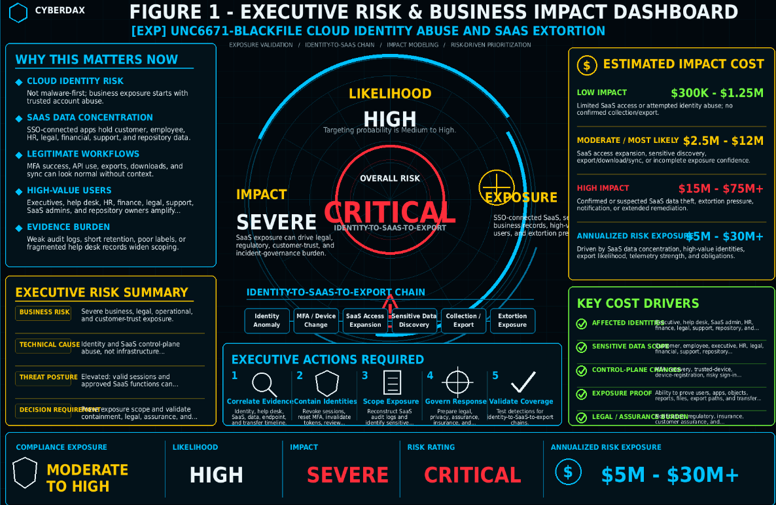
BLUF
UNC6671-BlackFile creates enterprise exposure when trusted cloud identities are abused to access SaaS platforms, collect sensitive business records, and create extortion leverage without requiring malware deployment, endpoint compromise, or traditional network intrusion. The business concern is broader than the compromised account itself: whether SSO-connected SaaS platforms, customer records, employee data, executive information, HR files, legal material, financial records, customer-support systems, repositories, and other high-value business records can still be trusted after suspicious identity and SaaS activity. Risk is highest when suspicious authentication, MFA manipulation, authentication-method changes, trusted-device registration, or account-recovery activity is paired with SaaS access expansion, sensitive data discovery, report export, API export, download bursts, unusual storage access, or extortion pressure.
Executive Risk Translation
UNC6671-BlackFile shifts business risk from a narrow account-compromise concern to a cloud identity, SaaS data exposure, and extortion-readiness issue. The primary executive concern is not only whether an identity was accessed, but whether the organization can still trust the SaaS applications, data repositories, help desk workflows, identity controls, customer records, employee data, executive contact information, support systems, and business records reached by that identity. If abuse occurred, response may expand into identity containment, session revocation, MFA and recovery-method review, help desk verification review, SaaS audit reconstruction, sensitive data exposure scoping, customer or employee notification analysis, legal and privacy review, cyber insurance coordination, extortion-response governance, and executive reporting.
S3 — Why This Matters Now
· UNC6671-BlackFile should be treated as a cloud identity and SaaS extortion risk, not as a malware-first or endpoint-first incident model.
· The primary enterprise concern is whether a trusted identity can reach sensitive SaaS data, collect business records, and create extortion leverage before the organization recognizes the activity as hostile.
· SSO-connected SaaS platforms often contain the same records that drive breach notification, customer assurance, regulatory review, litigation exposure, and board-level incident governance.
· Successful authentication, MFA approval, SaaS access, report export, file download, API use, and synchronization may appear legitimate unless assessed against business role, data sensitivity, access sequence, and user context.
· Social engineering, account recovery abuse, MFA manipulation, authentication-method changes, and trusted-device enrollment can turn normal identity workflows into an intrusion path.
· High-value users such as executives, help desk personnel, HR, finance, legal, customer-support teams, SaaS administrators, and repository owners can create outsized exposure if their access is misused.
· The incident can create material business impact even without malware execution, exploit artifacts, endpoint crashes, service disruption, or traditional command-and-control traffic.
· Organizations with incomplete SaaS audit coverage, weak help desk correlation, short retention windows, limited data classification, or fragmented identity governance may struggle to prove what was accessed or exported.
· Static indicators, credential-harvesting domains, proxy infrastructure, caller pretexts, and extortion branding may change quickly, so the report must remain behavior-led.
· Executive focus should remain on exposure determination, containment speed, customer assurance readiness, regulatory defensibility, and whether extortion leverage can be disrupted before disclosure pressure escalates.
S4 — Key Judgments
· UNC6671-BlackFile is most consequential when compromised or manipulated identities have access to sensitive SaaS-hosted business records, customer data, employee information, executive contacts, legal material, financial data, support records, repositories, or source code.
· The highest-value enterprise risk signal is suspicious identity activity followed by SaaS access expansion, sensitive data discovery, collection, export, or unusual storage activity.
· MFA success, trusted-device status, or normal-looking SaaS access should not be treated as proof of legitimacy when the downstream access pattern is abnormal for the user, role, source, device, data type, or business process.
· The activity model can bypass traditional security assumptions because the actor may operate through legitimate identity controls, browser sessions, SaaS workflows, approved APIs, and built-in export functions.
· Business impact increases when the affected identity has broad SaaS visibility, customer-facing responsibilities, administrative rights, help desk authority, repository access, or access to regulated or contract-sensitive data.
· Response confidence depends on the organization’s ability to build a defensible timeline across identity activity, help desk interactions, SaaS access, data sensitivity, endpoint context, and outbound transfer evidence.
· Missing audit depth, data labels, authentication-change records, help desk evidence, or approved-workflow baselines can force broader breach scoping and increase legal, customer-assurance, and response costs.
· Cloud-only anomalies, SaaS downloads, report exports, API calls, and unusual logins should remain investigation inputs unless tied to suspicious identity context, role mismatch, sensitive data access, abnormal volume, or export behavior.
· Attribution should remain conservative. Activity should be described as UNC6671-BlackFile-aligned when it matches the behavioral chain, not as confirmed UNC6671-BlackFile activity without incident-specific validation.
· Executive risk reduction depends on identity containment, SaaS exposure scoping, data-governance maturity, help desk verification strength, and the organization’s ability to act before extortion pressure begins.
S5 — Executive Risk Summary
Business Risk
UNC6671-BlackFile can create severe business, legal, operational, and customer-trust risk when valid cloud identities are used to access SaaS platforms that store sensitive business data. Risk increases when affected identities can reach customer records, employee data, executive information, HR records, legal material, financial data, support systems, repositories, internal documentation, or regulated business records. Business impact may include identity containment, SaaS audit reconstruction, data-exposure investigation, customer or employee notification analysis, regulatory review, extortion-response coordination, legal counsel engagement, executive incident governance, customer assurance, and long-term identity-control remediation.
Technical Cause
The risk is driven by identity and SaaS control-plane abuse rather than malware execution or infrastructure exploitation. The enterprise concern is the misuse of trusted access paths, including suspicious SSO activity, MFA manipulation, authentication-method changes, trusted-device enrollment, recovery-method changes, abnormal SaaS access expansion, sensitive data discovery, report export, API export, download bursts, synchronization abuse, local staging, and unusual storage or file-transfer behavior.
Threat Posture
The threat posture is elevated because the activity can operate through legitimate authentication, valid sessions, approved SaaS workflows, standard browser access, sanctioned APIs, and built-in export functions. Successful activity may not generate traditional malware alerts, exploit signatures, crash indicators, or obvious command-and-control traffic. The operational risk is that a compromised or manipulated identity can move from initial access into SaaS data discovery and export before the organization has enough evidence to classify the activity as hostile.
Executive Decision Requirement
Executives must require proof that the organization can correlate identity activity, help desk actions, SaaS access, data sensitivity, endpoint context, and outbound transfer evidence into a reliable exposure timeline. Leadership should also require validated response workflows for identity containment, session revocation, MFA reset review, SaaS audit reconstruction, data-exposure scoping, legal escalation, customer assurance, and extortion-response governance.
S6 — Executive Cost Summary
UNC6671-BlackFile creates financial exposure primarily through identity containment, SaaS data-exposure scoping, legal and privacy review, customer or employee notification analysis, extortion-response coordination, SaaS control-plane remediation, help desk workflow review, and executive incident governance. The cost profile is specific to identity-led SaaS extortion because the organization may face material breach-response costs even when there is no malware execution, endpoint compromise, infrastructure outage, or traditional network intrusion. Costs increase when the organization cannot quickly prove which identity was used, which SaaS applications were accessed, what sensitive data was viewed or exported, whether the activity was authorized, and whether legal, customer, regulatory, insurance, or extortion obligations apply.
Low Impact Scenario
Rapid assessment confirms that suspicious activity is limited to attempted identity abuse, anomalous authentication, MFA activity, or limited SaaS access that was contained before confirmed sensitive data collection or export. Affected access is narrow, SaaS audit logs are sufficient, help desk activity is validated, legal review remains limited, and no confirmed data theft, extortion communication, customer notification requirement, employee notification requirement, regulatory notification requirement, or material business disruption is identified.
Estimated Impact
$300K to $1.25M.
Cost Drivers Include
· Identity-provider log review and suspicious sign-in scoping.
· MFA reset, authentication-method, trusted-device, recovery-method, and device-registration validation.
· Targeted SaaS access review across affected SSO-connected applications.
· Session revocation, token invalidation, password reset, MFA reset, and account recovery review.
· Help desk ticket, identity-verification, account-recovery, and support-call validation.
· Targeted SaaS audit reconstruction for accessed applications, objects, reports, repositories, and files.
· DLP, CASB, proxy, DNS, endpoint, and egress triage to confirm whether export or transfer behavior occurred.
· Limited legal and privacy review to determine whether notification thresholds were avoided.
· SOC surge activity, identity-team coordination, SaaS administrator coordination, and executive tracking.
· Validation of approved travel, device migration, MFA reset, reporting, legal discovery, backup, and SaaS administration workflows.
Moderate Impact Scenario
Suspicious identity activity is paired with SaaS access expansion, sensitive data discovery, report export, API export, download bursts, synchronization behavior, local staging, unusual storage access, or incomplete data-exposure confidence. No public leak or confirmed extortion outcome is validated, but the organization must respond as if sensitive customer, employee, executive, HR, legal, financial, support, repository, or business records may have been exposed.
Estimated Impact
$2.5M to $12M.
Cost Drivers Include
· Broad identity containment across affected accounts, sessions, tokens, MFA methods, recovery methods, trusted devices, registered devices, and conditional-access outcomes.
· Expanded SaaS audit reconstruction across affected SaaS platforms, repositories, support systems, HR systems, data warehouses, and other SSO-connected applications.
· Sensitive data exposure analysis for customer records, employee records, executive records, HR data, legal data, financial data, support records, repositories, and confidential business records.
· Data-sensitivity enrichment review where labels, object ownership, repository ownership, or application ownership are incomplete.
· DLP, CASB, proxy, DNS, secure web gateway, endpoint-network, and cloud-storage review for export, transfer, synchronization, or staging behavior.
· Help desk and identity-verification workflow review to determine whether social engineering, account recovery abuse, MFA reset manipulation, or device enrollment abuse occurred.
· Legal, privacy, compliance, cyber insurance, and external counsel coordination to assess notification obligations and evidence sufficiency.
· Customer, partner, employee, or regulator assurance preparation if exposure cannot be quickly ruled out.
· SaaS permission review, application assignment review, OAuth consent review, connected-app review, service-principal review, group membership review, and delegated permission review.
· Emergency detection engineering, SIEM correlation, log-retention review, and enrichment work to support exposure scoping.
· Increased SOC, identity, SaaS administration, legal, privacy, communications, and executive incident governance effort.
High Impact Scenario
Confirmed or strongly suspected SaaS data theft affects sensitive customer records, employee data, executive contact information, HR data, legal material, financial records, support-system data, source repositories, internal documentation, regulated records, or high-value business data. This scenario applies when the incident includes confirmed export, credible extortion pressure, multi-account access, public leak risk, customer or employee notification analysis, regulatory exposure, material customer assurance work, or extended identity and SaaS control-plane remediation.
Estimated Impact
$15M to $75M or higher.
Cost Drivers Include
· Enterprise-wide identity containment, session revocation, token invalidation, MFA reset, conditional-access review, and authentication-method cleanup.
· Investigation of multi-account access, shared suspicious source context, role expansion, SaaS administrator activity, help desk account exposure, executive account exposure, and high-data-visibility account compromise.
· Full SaaS audit reconstruction across identity-provider logs, SaaS audit logs, business application logs, repository logs, support-system logs, HR-system logs, and data-warehouse telemetry.
· Legal, privacy, compliance, cyber insurance, breach counsel, forensics, communications, and executive incident governance under confirmed or credible data-exposure conditions.
· Customer, employee, partner, regulator, board, and insurer communications where exposure scope, notification obligations, or extortion pressure require coordinated response.
· Extortion-response support, negotiation advisory, leak-site monitoring, evidence preservation, executive decision tracking, and law-enforcement coordination where appropriate.
· Sensitive data review for customer records, employee records, executive contact data, HR files, legal records, financial records, support records, source repositories, intellectual property, and confidential business records.
· Long-term remediation of identity governance, MFA enrollment controls, recovery-method workflows, help desk verification, SaaS permissions, OAuth consent, connected applications, service principals, logging, retention, DLP, CASB, and data classification.
· Customer assurance, contract review, regulatory notification analysis, litigation support, audit response, and third-party risk response.
· Extended monitoring for follow-on social engineering, account reuse, persistent SaaS access, data reposting, extortion escalation, and repeat targeting.
S6A — Key Cost Drivers
· Number and criticality of affected cloud identities, especially executive, help desk, HR, finance, legal, customer-support, SaaS administrator, repository owner, and high-data-visibility users.
· Sensitivity and business value of accessed SaaS data, including customer records, employee data, executive information, HR records, legal material, financial records, support-system data, repositories, source code, or regulated business records.
· Evidence that normal identity workflows were manipulated through MFA reset, authentication-method changes, trusted-device registration, recovery-method changes, risky sign-ins, account recovery, or help desk process abuse.
· Degree of SaaS access expansion, sensitive data discovery, report export, API export, download activity, synchronization abuse, storage access, or repeated high-value file access.
· Ability to determine which users, applications, objects, reports, repositories, files, and data categories were accessed or exported.
· Availability of data-sensitivity labels, application ownership, object ownership, repository ownership, user-role context, device inventory, service-account inventory, and approved workflow metadata.
· Ability to determine whether outbound transfer, synchronization, upload, file-transfer, cloud-storage, or other exfiltration-enabling behavior occurred.
· Whether help desk records, account-recovery workflows, MFA reset requests, identity-verification records, support calls, or device-enrollment workflows indicate possible social engineering or process abuse.
· Whether legal, privacy, regulatory, cyber insurance, contract, customer assurance, employee notification, or partner notification obligations are triggered or cannot be ruled out quickly.
· Whether extortion communication, leak-site reference, compromised-email demand, personal-email demand, customer-pressure activity, or public data exposure is validated.
· Whether remediation requires enterprise-wide session revocation, MFA reset, conditional-access changes, SaaS permission cleanup, OAuth consent review, connected-app review, service-principal review, or delegated permission cleanup.
· Whether incomplete telemetry or short retention windows force conservative breach scoping, broader notification analysis, longer legal review, or wider customer assurance activity.
Most Likely Scenario Justification
The moderate scenario is most likely when suspicious identity-control-plane activity is paired with SaaS access expansion, sensitive data discovery, export behavior, or incomplete data-exposure confidence, but no public leak, confirmed extortion outcome, or systemic multi-account compromise has been validated. The estimate moves toward the lower end when affected access is limited, data sensitivity is low, SaaS audit logs are complete, export behavior is not observed, help desk workflows are validated, and legal review can confidently rule out notification obligations. The estimate moves toward the upper end when affected identities are high-value, SaaS audit logs are incomplete, sensitive records were accessed, export behavior is plausible, extortion pressure is suspected, or customer, employee, regulatory, contractual, or cyber insurance review is required.
S6B — Compliance and Risk Context
Compliance Exposure Indicator
Moderate to High depending on whether affected SaaS access involved customer data, employee records, executive contact information, HR data, legal material, financial records, support-system data, regulated data, source repositories, contractual data, or confidential business records. Compliance exposure increases when data-access scope cannot be confidently reconstructed, SaaS audit logs are incomplete, export activity cannot be ruled out, notification obligations are uncertain, customer assurance is required, or extortion pressure introduces public disclosure risk.
Risk Register Entry
Risk Title
UNC6671-BlackFile Cloud Identity Abuse and SaaS Extortion Exposure
Risk Description
Adversaries may abuse valid cloud identities, manipulated MFA workflows, authentication-method changes, trusted-device registration, recovery-method changes, or compromised SaaS sessions to access SSO-connected applications, discover sensitive business data, collect or export records, and create extortion leverage. The risk is elevated where customer records, employee data, executive information, HR files, legal material, financial records, customer-support data, source repositories, internal documentation, or regulated business records are concentrated in SaaS platforms with incomplete identity, audit, enrichment, and egress correlation.
Likelihood
High.
Impact
Severe.
Risk Rating
Critical.
Annualized Risk Exposure
Estimated $5M to $30M or higher based on the concentration of sensitive data in SaaS platforms, number of high-value identities exposed, likelihood of data export, strength of identity and SaaS audit telemetry, extortion pressure, legal and notification obligations, customer assurance requirements, and remediation complexity.
S7 — Risk Drivers
· SSO-connected SaaS platforms concentrate sensitive business records behind identities that may appear legitimate after successful authentication.
· Social engineering, account recovery abuse, MFA manipulation, authentication-method changes, recovery-method changes, and trusted-device registration can turn normal identity workflows into an intrusion path.
· Customer data, employee records, executive information, HR data, legal material, financial records, customer-support records, source repositories, and internal documentation increase business impact when accessed or exported.
· Help desk, MFA reset, identity-proofing, and device-enrollment workflows may be operationally separate from SOC review, delaying recognition of social-engineering-enabled compromise.
· SaaS audit depth varies by platform, license tier, configuration, retention policy, API availability, and administrative logging settings.
· Missing object-level access logs, report-export logs, API telemetry, internal-search logs, and download telemetry can prevent reliable data-exposure scoping.
· Missing data-sensitivity labels, user-role enrichment, device inventory, application ownership, and approved-workflow metadata increases false positives and scoping uncertainty.
· DLP, CASB, proxy, DNS, endpoint-network, and cloud-storage telemetry may be required to distinguish ordinary SaaS use from export or exfiltration-enabling behavior.
· High-value users may naturally perform broad SaaS access, which increases detection complexity and raises the cost of confident triage.
· Legitimate SaaS features such as report export, API access, synchronization, file preview, browser download, and repository browsing can support both normal work and attacker collection.
· Incomplete log retention can prevent reconstruction of the full identity-to-SaaS-to-export sequence across multiple sessions or days.
· Over-reliance on MFA success, static indicators, impossible-travel events, or endpoint malware detections can delay recognition of identity-led SaaS compromise.
S8 — Bottom Line for Executives
UNC6671-BlackFile should be treated as a high-priority cloud identity and SaaS data-exposure risk because trusted account activity can become the path to sensitive data access, export, and extortion pressure before the organization has enough evidence to contain the incident confidently. The executive concern is whether the organization can determine what data was touched, whether export occurred, whether the activity was authorized, and whether legal, customer, regulatory, or extortion obligations apply. Risk reduction depends on strong identity controls, reliable SaaS audit coverage, help desk verification, data-governance maturity, egress visibility, and response workflows that can contain the identity-to-SaaS-to-export chain before business exposure expands.
S9 — Board-Level Takeaway
UNC6671-BlackFile turns enterprise reliance on cloud identity and SaaS access into a potential data-exposure and extortion risk. The board-level concern is that valid account activity may provide access to sensitive customer, employee, executive, legal, financial, support, repository, or regulated data before traditional security controls classify the activity as hostile. Leadership should require evidence that identity controls, SaaS audit coverage, data-governance practices, help desk verification, egress visibility, and incident-response procedures can support rapid containment, exposure scoping, customer assurance, regulatory review, and extortion-response governance. This report supports governance decisions around SaaS data concentration, identity-control resilience, breach-readiness, telemetry reliability, and executive oversight of cloud identity risk.

Figure 2
S10 — Threat Overview
UNC6671-BlackFile cloud identity abuse and SaaS extortion risk refers to activity where trusted identities, SSO-connected applications, help desk workflows, SaaS access, and data-export capabilities may be abused to reach sensitive business records and create extortion leverage. The activity is not best understood as a conventional malware family, standalone endpoint intrusion, or vulnerability-exploitation event. It is a cloud identity and SaaS data-trust risk centered on whether authentication, account recovery, SaaS access, data discovery, collection, and export behavior remained authorized.
The core risk is that an attacker may use social engineering, credential theft, MFA manipulation, adversary-in-the-middle workflows, account recovery abuse, authentication-method changes, trusted-device registration, or valid SaaS sessions to reach data that would otherwise be protected by enterprise identity controls. The most important business question is whether the organization can prove that customer records, employee data, executive information, HR files, legal material, financial records, customer-support systems, repositories, and other high-value SaaS-hosted records remained protected during and after suspicious identity activity.
This activity is difficult to assess through single-event evidence because normal business operations can include successful SSO, MFA approval, report export, API use, file download, synchronization, repository browsing, support-system access, and cross-application SaaS activity. High-confidence assessment depends on whether the organization can connect identity activity, help desk interactions, SaaS access, data sensitivity, user role, session context, endpoint context, and outbound transfer evidence into one defensible exposure timeline.
UNC6671-BlackFile should therefore be treated as a cloud identity, SaaS exposure, and extortion-readiness risk. The response objective is not only to identify suspicious account activity, but to determine whether identity trust, SaaS data access, customer assurance, legal defensibility, and executive incident governance can be validated for affected users, applications, and records.
S11 — Threat Classification and Type
Threat Type
Cloud identity abuse and SaaS data-extortion risk.
Threat Sub-Type
SSO compromise, social-engineering-enabled account access, MFA manipulation, account recovery abuse, SaaS access expansion, sensitive data discovery, SaaS collection, report export, API export, and extortion-enabling data exposure.
Operational Classification
Trusted identity abuse, SaaS control-plane abuse, account recovery abuse, valid-session misuse, sensitive data access, cloud application collection, and extortion-preparation activity.
Primary Function
The primary function is to weaken trust in cloud identities and SaaS data access by using valid or manipulated account access to reach sensitive business records, collect or export data, and create extortion leverage. The activity may support customer-data exposure, employee-data exposure, executive targeting, HR or legal data exposure, customer-support record access, repository access, regulatory review, customer assurance, legal escalation, and executive incident governance.
S12 — Campaign or Activity Overview
UNC6671-BlackFile activity does not require a single fixed malware payload, exploit path, infrastructure pattern, or extortion message to create enterprise risk. The activity can appear as targeted identity abuse, social-engineering-enabled account access, account recovery manipulation, MFA workflow abuse, trusted-device registration, SaaS access expansion, sensitive data discovery, report export, API export, or broader preparation for data extortion. The most important activity pattern is not a single indicator, but the relationship between suspicious identity events and surrounding SaaS access, data sensitivity, user role, help desk context, export behavior, and business exposure.
Relevant activity may begin with a vishing interaction, fake help desk engagement, credential capture, adversary-in-the-middle session, MFA reset request, authentication-method change, recovery-method change, device registration, successful SSO from unusual context, mailbox access used to support non-SSO password reset activity, or deletion of reset and security notifications that would otherwise alert the user or security team. In some cases, activity may remain limited to suspicious authentication or attempted access. In higher-risk cases, it may justify review of SaaS access expansion, customer-data access, employee-data access, executive-contact discovery, support-system access, repository activity, report export, API extraction, unusual storage access, or extortion communication.
Recent UNC6671 reporting extends the campaign context beyond BlackFile into additional linked extortion branding or fronts, including Redact, Pink, Helix, and Falcon. These names should enrich the assessment rather than replace the behavior-led model. The material update is the continued use of identity and SaaS extortion tradecraft, including abuse of compromised mailbox access to reset non-SSO application passwords and deletion of password-reset confirmations, MFA or security-change alerts, and other security notifications to reduce user and defender visibility.
The strongest enterprise concern arises when suspicious identity activity, help desk interaction, authentication-control changes, mailbox access, reset activity, notification deletion, SaaS access expansion, sensitive data discovery, collection, export, and unusual storage or transfer behavior appear together. The concern increases further when the affected identity has executive access, help desk authority, SaaS administration rights, HR access, finance access, legal access, customer-support access, repository access, or other high-data-visibility privileges.
This activity should be assessed through a behavior-led model. Static infrastructure indicators, isolated successful logins, one-off MFA events, ordinary SaaS access, routine report exports, normal API activity, expected file downloads, extortion-front names, or deleted messages without identity or application context should not drive the primary risk judgment by themselves. The more durable question is whether identity, mailbox, reset, notification, and SaaS controls were used in a way that falls outside approved business context and creates credible data-exposure or extortion risk.
S13 — Targets and Exposure Surface
UNC6671-BlackFile is most relevant to environments where SSO-connected SaaS platforms store sensitive business records and where identities provide broad access across customer, employee, executive, HR, legal, financial, support, repository, or internal documentation systems. The exposure surface is not limited to the identity provider alone. It spans help desk workflows, account recovery processes, MFA enrollment, trusted-device registration, SaaS applications, data repositories, report-export functions, API access, synchronization features, DLP, CASB, endpoint context, cloud storage, and incident-response evidence retention.
The exposure surface also includes non-SSO enterprise applications that rely on mailbox-based password reset, account recovery, or security-notification workflows. User mailboxes become higher-value exposure points when they receive password-reset confirmations, MFA-change notices, security alerts, company-wide security warnings, SaaS notifications, or other messages that can reveal, enable, or conceal identity-state changes. Risk increases when mailbox audit records, message trace, deleted-item or purge telemetry, non-SSO reset logs, and post-reset application authentication records cannot be joined to identity-provider and SaaS activity.
High-priority targets include users and functions where compromised access can create disproportionate business impact. This includes executives, help desk personnel, SaaS administrators, HR users, finance users, legal users, customer-support teams, sales operations users, repository owners, security administrators, and users with broad access to customer data or employee records. These targets create elevated risk because misuse may lead to sensitive data exposure, social-engineering follow-on activity, customer assurance requirements, regulatory review, legal escalation, and extortion pressure.
The exposure surface also includes identity governance, help desk verification, MFA reset procedures, recovery-method controls, trusted-device approval, SaaS permissioning, OAuth and connected-app review, service-principal governance, group membership management, data classification, audit-log retention, export controls, mailbox audit retention, reset-notification visibility, deleted-message preservation, non-SSO application authentication logs, and egress visibility. Weakness in any of these areas can reduce confidence that identity activity, mailbox activity, reset activity, SaaS access, and data movement remained authorized, traceable, and business-justified.
S14 — Sectors / Countries Affected
Sectors Affected
· SaaS, technology services, cloud services, software companies, and platform engineering organizations with high-value customer or operational data in SaaS environments.
· Financial services, fintech, payment-processing, banking, insurance, accounting, and business-services organizations with regulated customer data and distributed SaaS workflows.
· Healthcare, life sciences, medical research, hospitals, care networks, health-data platforms, and healthcare technology organizations using SaaS systems for patient, employee, legal, or operational records.
· Retail, e-commerce, hospitality, travel, logistics, and customer-service-heavy organizations with large customer datasets, support records, loyalty data, or payment-adjacent business workflows.
· Legal, consulting, professional services, accounting, and advisory firms with client-sensitive records, confidential communications, document repositories, and high-value executive or legal material.
· Education, research institutions, public-sector organizations, municipal agencies, and government-adjacent entities with distributed identity, collaboration, and SaaS application footprints.
· Telecommunications, media, energy, utilities, manufacturing, transportation, and critical infrastructure operators with SaaS-hosted business records, support platforms, employee data, and operational documentation.
· Managed service providers, outsourcing providers, IT services firms, customer-support providers, and organizations operating shared support or administrative functions.
· Organizations relying on Microsoft 365, Okta, SharePoint, OneDrive, Salesforce, Zendesk, Slack, GitHub, HR platforms, customer-support systems, cloud storage, data warehouses, or other SSO-connected SaaS platforms for business-critical operations.
Countries Affected
· Global.
· Exposure is not limited to a single country or region because cloud identity providers, SSO-connected SaaS platforms, customer-support systems, collaboration tools, and distributed workforces are used globally.
· Countries with large SaaS adoption, remote workforces, customer-support operations, financial services, healthcare systems, technology sectors, public-sector digital services, or regulated data environments may face elevated operational exposure.
· Country-specific impact should be assessed by SaaS data concentration, identity-control maturity, help desk verification practices, data-protection obligations, breach-notification requirements, extortion exposure, audit-log retention, and incident-response maturity rather than geography alone.
S15 — Adversary Capability Profiling
Capability Level
Moderate to High.
The activity does not necessarily require advanced malware development, custom exploit capability, or persistent endpoint access. It does require understanding of identity workflows, SSO behavior, MFA processes, account recovery, help desk verification, SaaS access models, data discovery, report export, API usage, and extortion pressure. Capability increases when the actor combines social engineering, credential capture, adversary-in-the-middle infrastructure, targeted user profiling, SaaS application knowledge, data-value awareness, and disciplined extortion operations.
Technical Sophistication
Moderate.
Technical sophistication is centered on using legitimate identity and SaaS workflows in ways that appear normal until correlated against business context. The activity can remain effective when it resembles approved authentication, help desk support, SaaS administration, report generation, customer-support access, or routine file movement. More sophisticated execution may involve careful target selection, session capture, MFA manipulation, trusted-device enrollment, role-aware SaaS browsing, low-noise data collection, staged export, or activity that avoids obvious malware and infrastructure indicators.
Infrastructure Maturity
Moderate.
This activity does not require mature command-and-control infrastructure to create material business risk. The most important infrastructure may be credential-harvesting services, adversary-in-the-middle proxy infrastructure, residential proxy access, anonymization paths, cloud-hosted infrastructure, external storage, compromised email, or extortion communication channels. Infrastructure maturity becomes more relevant when the actor reuses access infrastructure across multiple accounts, coordinates data staging, supports victim pressure, or maintains operational separation between credential access, SaaS collection, and extortion activity.
Operational Scale
Targeted to Moderate.
The most likely operational pattern is targeted activity against organizations where SaaS data concentration, high-value identities, help desk workflows, customer records, employee data, support systems, or repositories create practical extortion leverage. Broader operational scale may emerge when multiple organizations share similar SaaS adoption, permissive account recovery workflows, incomplete audit retention, weak data classification, or high reliance on valid-account trust.
Escalation Likelihood
Moderate to High.
Escalation likelihood increases when suspicious identity activity affects executives, help desk users, SaaS administrators, HR, finance, legal, customer-support teams, repository owners, or other high-data-visibility users. Escalation is also more likely when sensitive data access is observed, export cannot be ruled out, SaaS audit evidence is incomplete, customer or employee records are involved, extortion communication appears, or the organization cannot quickly build a defensible exposure timeline.
S16 — Targeting Probability Assessment
Overall Targeting Probability
Medium to High.
UNC6671-BlackFile-style activity becomes materially plausible where SSO-connected SaaS platforms contain sensitive business records, high-value identities have broad application access, help desk workflows can affect MFA or account recovery, and audit coverage is insufficient to prove what was accessed or exported. The risk is strongest for organizations that rely heavily on SaaS-based customer operations, HR, finance, legal, support, collaboration, repository, or business-record systems but cannot quickly validate identity activity, SaaS access, data sensitivity, export behavior, and business authorization.
Targeting Drivers
· Broad reliance on SSO-connected SaaS platforms for customer records, employee data, HR records, legal material, financial records, support-system data, repositories, and internal documentation.
· High-value identities with broad access to SaaS applications, customer-support systems, executive records, employee data, repositories, or regulated business records.
· Help desk, account recovery, MFA reset, trusted-device, and authentication-method workflows that can alter account trust or restore access under pressure.
· Distributed workforce, remote access, contractor access, executive travel, shared support functions, or identity-verification processes that complicate access validation.
· Limited ability to correlate identity-provider activity, help desk records, SaaS audit logs, data sensitivity, endpoint context, and outbound transfer evidence.
· Incomplete object-level SaaS audit logs, API activity records, report-export records, download logs, data labels, or retention windows.
· Customer-facing operations, regulated data environments, support platforms, cloud collaboration, source-code repositories, or business records that could create extortion leverage if accessed.
· Weak governance over SaaS permissions, OAuth consent, connected applications, service principals, group membership, delegated access, and data export rights.
Most Likely Targets
· Executives and executive assistants with access to sensitive communications, contacts, customer matters, or business records.
· Help desk, IT support, identity administration, and account recovery personnel.
· SaaS administrators, application owners, and users with broad cross-application visibility.
· HR, finance, legal, compliance, and customer-support users with access to sensitive business records.
· Sales operations, customer success, and support teams with access to customer records, contracts, tickets, and account information.
· Repository owners, engineering leaders, security teams, and users with access to source code, internal documentation, or operational repositories.
· Contractors, temporary staff, distributed users, and third-party support personnel operating outside tightly managed identity and endpoint baselines.
· Organizations with high SaaS data concentration, incomplete audit coverage, weak data classification, permissive account recovery, or limited ability to prove whether sensitive data was exported.
S17 — MITRE ATT&CK Chain Flow Mapping
Stage 1 — Social Engineering or Identity Access Preparation
A user, help desk process, or identity-verification workflow is targeted to support access to a trusted cloud identity.
· ATT&CK mapping: Phishing T1566.
· ATT&CK mapping: Trusted Relationship T1199.
· Confidence: Conditional. Applies when vishing, fake support interaction, credential-harvesting activity, account recovery abuse, or help desk manipulation is part of observed activity.
Stage 2 — Valid Account Access
A valid cloud identity is used to access SSO-connected applications after credential theft, session capture, MFA manipulation, or account recovery abuse.
· ATT&CK mapping: Valid Accounts T1078.
· Confidence: Likely. Applies when identity-provider logs show successful access, suspicious session creation, unusual source context, abnormal MFA behavior, or other evidence of valid-account use.
Stage 3 — Authentication-Control Manipulation
Authentication controls are modified, reset, or abused to preserve access or make the session appear legitimate.
· ATT&CK mapping: Account Manipulation T1098.
· Confidence: Conditional to likely. Applies when MFA reset, new authentication-method enrollment, trusted-device registration, recovery-method change, device registration, conditional-access anomaly, or account recovery activity is observed near suspicious access.
Stage 4 — SaaS Access Expansion
The affected identity accesses additional SaaS applications, business systems, repositories, support platforms, HR systems, customer records, or administrative consoles through SSO-connected access.
· ATT&CK mapping: Cloud Service Dashboard T1538.
· Confidence: Conditional. Applies when SaaS audit logs show access expansion into applications or data stores outside normal business role, source, device, or access pattern.
Stage 5 — Sensitive Data Discovery
The actor searches, browses, enumerates, previews, or reviews SaaS-hosted records to identify valuable data.
· ATT&CK mapping: Data from Information Repositories T1213.
· Confidence: Conditional to likely. Applies when SaaS audit logs show internal search, report access, object access, repository browsing, ticket review, customer-record access, employee-data access, or repeated access to sensitive business records.
Stage 6 — Collection or Staging
Sensitive SaaS data is collected, synchronized, downloaded, or staged using legitimate SaaS workflows, APIs, reports, browser access, or synchronization features.
· ATT&CK mapping: Data from Cloud Storage T1530.
· ATT&CK mapping: Data Staged T1074.
· Confidence: Conditional. Applies when file downloads, API collection, synchronization spikes, repeated high-value file access, local staging, or archive preparation is observed after suspicious identity or SaaS activity.
Stage 7 — Conditional Exfiltration or Extortion-Enabling Data Movement
Collected SaaS data is transferred to external storage, file-transfer services, compromised mailboxes, cloud storage, or another location outside the trusted environment where it can support disclosure pressure or extortion.
· ATT&CK mapping: Exfiltration Over Web Service T1567.
· ATT&CK mapping: Exfiltration to Cloud Storage T1567.002.
· ATT&CK mapping: Financial Theft T1657 may apply only when monetization through extortion pressure is validated.
· Confidence: Conditional. Applies only when DLP, CASB, proxy, DNS, endpoint-network, SaaS audit, cloud-storage, extortion communication, leak-site reference, or incident-response evidence supports external transfer, storage access, disclosure pressure, or attempted extortion.
S18 — Attack Path Narrative (Signal-Aligned Execution Flow)
UNC6671-BlackFile activity begins as an identity-trust event rather than a traditional malware or endpoint-compromise event. The initial access path may involve social engineering, credential capture, adversary-in-the-middle session theft, MFA manipulation, help desk process abuse, authentication-method changes, trusted-device registration, recovery-method modification, or other activity that gives the actor access to a trusted cloud identity. The immediate business concern is whether that identity can reach SaaS-hosted records that create customer, legal, regulatory, operational, or extortion exposure.
After access is established, the actor may use the trusted identity to enter SSO-connected SaaS applications, collaboration systems, customer-support platforms, repositories, HR systems, finance systems, legal workspaces, cloud storage, or other business-record environments. This movement can appear legitimate because it relies on normal login paths, approved applications, browser sessions, APIs, report functions, and file-access workflows. The signal-aligned concern is whether the access pattern falls outside the user’s normal business role, source context, device context, timing, application mix, or data-access behavior.
The activity becomes more consequential when SaaS access expands into sensitive business records. The actor may search, browse, preview, enumerate, or repeatedly access customer records, employee data, executive information, HR files, legal material, financial records, support tickets, repositories, internal documentation, or regulated data. This phase may not produce malware alerts, but it can create meaningful exposure evidence through object access, report viewing, internal search, file traversal, repository browsing, support-record review, and unusual interaction with high-value records.
Collection and staging may then occur through legitimate SaaS features. The actor may download files, export reports, use APIs, synchronize content, stage records locally, prepare archives, access cloud storage, or move data through standard business workflows. A report export, file download, API call, or synchronization event should not be treated as hostile in isolation, but it becomes materially significant when it follows suspicious authentication, help desk activity, identity-control changes, access expansion, sensitive data discovery, or role-inconsistent behavior.
The final phase may involve external transfer, disclosure pressure, or extortion-enabling activity. Collected data may be moved to external storage, file-transfer services, compromised mailboxes, cloud storage, or other locations outside the trusted environment. Extortion pressure may follow through direct communication, leak-site threats, customer contact, personal-email demands, compromised-mailbox communication, or claims of sensitive data possession. At this stage, the enterprise risk shifts from account containment to exposure scoping, customer assurance, legal review, regulatory analysis, executive incident governance, and extortion-response decision-making.
The signal-aligned execution flow should therefore be assessed as an identity-to-SaaS-to-data-exposure chain. The strongest concern exists when suspicious identity access, authentication-control changes, SaaS access expansion, sensitive data discovery, collection, external movement, or extortion communication appear in sequence. The response objective is to reconstruct the path, determine what data was accessed, validate whether export occurred, and contain business impact before disclosure pressure escalates.
S19 — Attack Chain Risk Amplification Summary
UNC6671-BlackFile risk amplifies because the activity abuses trusted business systems rather than forcing a noisy technical intrusion path. A single compromised or manipulated cloud identity may provide access to multiple SaaS platforms, customer records, employee data, repositories, support systems, legal workspaces, HR records, financial material, and internal documentation. This makes the attack chain highly dependent on identity governance, SaaS audit coverage, help desk verification, data classification, and evidence retention.
The first amplification point is identity trust. Successful SSO, MFA approval, trusted-device status, or account recovery may make activity appear legitimate even when access was obtained through social engineering, credential theft, adversary-in-the-middle capture, or help desk abuse. If identity teams, SOC teams, and help desk teams cannot correlate access context quickly, the actor may retain enough time to reach sensitive SaaS data.
The second amplification point is SaaS data concentration. Modern SaaS platforms often centralize records that drive breach notification, customer assurance, regulatory review, contract exposure, and extortion value. Access to one identity may provide visibility across multiple applications or business functions, especially when the affected user has executive, help desk, SaaS administrator, HR, finance, legal, customer-support, repository-owner, or high-data-visibility privileges.
The third amplification point is evidence fragmentation. Identity-provider logs, SaaS audit logs, help desk tickets, data-sensitivity labels, endpoint evidence, DLP events, CASB records, proxy logs, and cloud-storage telemetry may be owned by different teams, retained for different periods, or normalized differently. If these sources cannot be joined into one timeline, the organization may be forced into broader breach scoping, longer legal review, wider customer assurance, and more conservative notification analysis.
The fourth amplification point is legitimate feature abuse. Report export, API access, file download, synchronization, repository browsing, internal search, and cloud-storage use are normal business functions. This reduces the value of single-event judgment and increases the importance of evaluating identity context, role, source, application, data sensitivity, volume, timing, and export behavior together.
The final amplification point is extortion readiness. Once sensitive data access or export cannot be ruled out, the incident can shift from technical containment to executive decision-making. Legal, privacy, communications, customer assurance, cyber insurance, law enforcement, and board-level governance may all become involved even if malware was never deployed. The risk is most severe when incomplete telemetry prevents the organization from confidently proving that sensitive data was not accessed or exported.
S20 — Tactics, Techniques, and Procedures

Figure 3
Initial Access and Identity Preparation
· The actor may use social engineering, vishing, credential capture, adversary-in-the-middle session theft, or account recovery abuse to obtain access to a trusted cloud identity.
· The actor may spoof legitimate help desk phone numbers or support workflows to increase credibility during identity recovery, password reset, MFA reset, or security-verification interactions.
· MFA manipulation, authentication-method enrollment, recovery-method modification, trusted-device registration, or help desk-driven account recovery may be used to make access appear legitimate.
· A single identity can create broader exposure when the account has access to multiple SaaS applications, sensitive records, or administrative workflows.
Valid Account Use
· Valid cloud identities may be used through normal login paths, browser sessions, sanctioned APIs, or approved SaaS workflows.
· Successful SSO or MFA activity should be assessed against source context, device context, user role, timing, application mix, and downstream data access.
· Use of valid sessions may reduce malware, exploit, endpoint, and command-and-control indicators.
· Compromised mailbox access may be used to initiate, approve, or complete password resets for non-SSO applications, allowing the actor to expand access through normal account-recovery workflows outside the primary identity-provider path.
SaaS Access Expansion
· The actor may use the trusted identity to reach additional SaaS applications, business systems, repositories, cloud storage, or administrative consoles.
· Non-SSO applications that rely on email-based password recovery may become secondary expansion paths when the actor controls the mailbox receiving reset links, confirmation messages, or security notifications.
· Access expansion is higher risk when it is role-inconsistent, source-anomalous, or tied to applications containing sensitive customer, employee, legal, financial, operational, or regulated records.
· High-data-visibility users create elevated exposure because their legitimate access may already span multiple business functions.
Sensitive Data Discovery
· The actor may search, browse, preview, enumerate, or repeatedly access SaaS-hosted records to identify valuable data.
· Discovery behavior should be assessed against business role, historical access, data sensitivity, object ownership, timing, source context, and access volume.
· Risk increases when discovery touches customer records, employee data, executive information, legal material, support records, repositories, source code, or regulated business records.
Collection and Staging
· Sensitive data may be collected through file downloads, report exports, API exports, synchronization, cloud-storage access, repository access, or browser-based access.
· Staging may appear as local downloads, archive preparation, repeated high-value file access, unusual synchronization volume, or transfer to intermediate storage.
· Collection becomes more significant when it follows suspicious identity activity, authentication-control changes, SaaS access expansion, or sensitive data discovery.
External Transfer and Extortion Enablement
· Collected data may be moved to external storage, file-transfer services, compromised mailboxes, cloud storage, or other locations outside the trusted environment.
· Extortion pressure may involve direct victim communication, leak-site reference, customer pressure, personal-email contact, compromised-mailbox communication, or disclosure threats.
· External transfer and extortion indicators should be validated through SaaS audit logs, DLP, CASB, proxy, DNS, endpoint-network evidence, cloud-storage records, email evidence, and incident-response documentation.
Operational Security and Evasion Considerations
· The actor may rely on legitimate identities, normal SaaS features, approved APIs, browser access, and business workflows to reduce detection noise.
· Activity may be distributed across time, applications, sessions, or source infrastructure to resemble normal user behavior.
· The actor may delete password-reset confirmations, MFA or security-change alerts, company-wide security warnings, or other security notifications from compromised mailboxes to reduce user awareness, delay investigation, or obscure the reset-to-access sequence.
· Static indicators may change quickly, so response should prioritize behavior, identity context, data sensitivity, export behavior, and business authorization.
S20A — Adversary Tradecraft Summary
UNC6671-BlackFile tradecraft is centered on converting trusted cloud identity access into business-impacting SaaS data exposure. The activity does not require a conventional malware chain to create material risk. Instead, it abuses the fact that cloud identities, SSO-connected applications, help desk workflows, SaaS permissions, and native export functions already provide access to records that can support extortion.
The primary tradecraft characteristic is legitimacy by appearance. Successful authentication, MFA approval, trusted-device registration, account recovery, SaaS access, report export, file download, API use, and synchronization can occur during normal business operations. This allows suspicious activity to hide inside approved workflows unless the organization evaluates identity context, user role, data sensitivity, application access, export behavior, and business justification together.
The second tradecraft characteristic is leverage through high-value users. Accounts with broad business visibility or administrative authority can provide access to records that create regulatory, customer, legal, or extortion value. Compromise of one such identity may create broader exposure than a typical endpoint event.
The third tradecraft characteristic is native capability abuse. The actor may rely on built-in SaaS search, preview, export, API, synchronization, download, repository, and storage functions rather than custom tooling. This reduces reliance on malware and makes intent difficult to determine without a correlated timeline.
The fourth tradecraft characteristic is pressure through uncertainty. If the organization cannot prove what data was accessed or exported, the response burden increases. Incomplete SaaS audit coverage, weak data classification, fragmented help desk records, short retention windows, or limited egress visibility can force broader legal review, customer assurance, notification analysis, and executive governance.
The final tradecraft characteristic is extortion readiness. Once sensitive SaaS data is accessed or moved, the actor may use disclosure threats, leak-site references, customer pressure, compromised-email communication, or direct extortion demands to increase business impact. The defensive priority is to disrupt the chain before access becomes collection, collection becomes export, and export becomes credible extortion pressure.
S21 — Detection Strategy Overview
Detection Philosophy
UNC6671-BlackFile detection should be identity-led, SaaS-control-plane-led, mailbox-aware, and behavior-correlated rather than malware-led, exploit-signature-led, or IOC-led. The detection model should assume an identity-to-SaaS-to-extortion pathway built around social engineering, credential theft, MFA abuse or interception, SSO compromise, legitimate SaaS access, suspicious mailbox access, non-SSO password reset abuse, sensitive data discovery, and data export.
The strongest detection posture is a chained model that connects suspicious identity access, identity-control modification, mailbox access, reset activity, deleted reset or security notifications, SaaS access expansion, sensitive data discovery, collection, and export behavior. Single-event detections should remain triage inputs unless they are part of a coherent sequence involving identity compromise context and SaaS collection or export behavior.
High-confidence alerting requires both identity-control-plane evidence and SaaS/data-access evidence. Mailbox-only anomalies, cloud-only anomalies, SaaS downloads, API calls, unusual logins, reset events, or deleted messages should remain hunting signals unless correlated with suspicious identity context, abnormal session attributes, data sensitivity, volume, role mismatch, or post-reset access behavior.
Primary Detection Anchors
· Suspicious SSO success from unusual source infrastructure, geography, ASN, device posture, user agent, browser context, session pattern, or time window.
· MFA anomaly, MFA reset, new factor enrollment, passkey enrollment, authenticator enrollment, recovery-method change, or trusted-device registration near suspicious access.
· Suspicious mailbox access followed by non-SSO password reset activity, password-reset confirmation, security-notification receipt, message deletion, deleted-item movement, purge activity, or mailbox-rule changes.
· Access to Microsoft 365, Okta, SharePoint, OneDrive, Salesforce, Zendesk, Slack, GitHub, HR systems, customer-support systems, internal repositories, or non-SSO business applications from a first-seen or rarely seen identity context.
· Microsoft Graph, SharePoint, OneDrive, Salesforce API, Zendesk API, report-export, or SaaS download behavior exceeding the user’s normal role and access baseline.
· Sensitive data discovery involving internal search, repository browsing, SharePoint traversal, Salesforce report access, personnel datasets, executive contacts, customer data, or business-record enumeration.
· Bulk file access, repeated download bursts, API export, report export, synchronization abuse, or scripted collection after suspicious identity-control-plane, mailbox, reset, or notification-deletion activity.
Detection Prioritization Model
Priority One
· Correlate suspicious SSO success, MFA anomaly, new MFA factor enrollment, device registration, recovery-method modification, security-setting change, suspicious mailbox access, non-SSO password reset activity, or deleted reset/security notifications with rapid access to SaaS or business applications.
· Escalate when the affected identity accesses sensitive repositories, customer datasets, employee datasets, executive records, privileged SaaS consoles, administrative portals, or non-SSO applications shortly after identity-control-plane, mailbox, reset, or notification-deletion activity.
Priority Two
· Correlate Graph API usage, SharePoint traversal, OneDrive downloads, Salesforce report export, Salesforce API access, Zendesk access, repository browsing, internal SaaS search, and non-SSO application access against historical role and access patterns.
· Escalate when the behavior involves first-seen API use, first-seen connected application use, first-seen post-reset login, abnormal data volume, broad object access, or access outside the user’s normal business function.
Priority Three
· Correlate sensitive-data discovery with collection behavior.
· Prioritize events where search, browsing, report access, object enumeration, repository traversal, or non-SSO application access is followed by download, export, synchronization, or repeated file access.
Priority Four
· Correlate identity compromise indicators with executive, help desk, HR, finance, legal, customer-support, mailbox, or directory access.
· Escalate when activity could support follow-on vishing, non-SSO password reset abuse, extortion pressure, executive targeting, personnel harassment, or additional social engineering.
Priority Five
· Treat isolated impossible travel, unusual login, mailbox access, deleted message, file download, API call, report access, password reset, or MFA event as low-to-moderate confidence unless paired with suspicious identity change, abnormal session context, sensitive data discovery, post-reset access, or export behavior.
Correlation Strategy
High-confidence detection must require a minimum multi-signal threshold. UNC6671-BlackFile-aligned activity should not be inferred from cloud export behavior alone, SaaS browsing alone, successful SSO alone, MFA success alone, mailbox access alone, password reset alone, or deleted security notifications alone.
· Identity-control-plane signals include suspicious SSO success, anomalous MFA behavior, new MFA factor registration, passkey registration, device registration, trusted-device change, recovery-method modification, security-setting change, risky sign-in, unusual conditional-access outcome, session-token anomaly, or suspicious administrator action.
· Mailbox and reset signals include suspicious mailbox access, password-reset message receipt, reset-link use, non-SSO reset completion, MFA or security-change notification receipt, company-wide security-warning receipt, message deletion, deleted-item movement, purge activity, suspicious mailbox-rule creation, or mailbox access from a first-seen or abnormal identity context.
· SaaS/data-access signals include Microsoft Graph access, SharePoint traversal, OneDrive download bursts, Salesforce report export, Salesforce API access, Zendesk access, repository browsing, sensitive search behavior, directory scraping, executive-contact discovery, customer-data access, HR dataset access, non-SSO application access, or abnormal bulk download.
· Exfiltration-enabling signals include API export, report export, scripted collection, browser download bursts, synchronization abuse, abnormal egress to storage services, repeated access to high-value files, or archive staging where observable.
· Escalation confidence should increase when the affected identity has executive access, help desk access, HR access, finance access, legal access, customer-data access, broad Microsoft 365 permissions, Okta administrative access, Salesforce administrative access, mailbox access, or access to employee contact data.
· Alert confidence should decrease when activity aligns with verified IT enrollment, documented device migration, approved MFA reset, expected travel, sanctioned SaaS administration, approved data migration, legal discovery, backup activity, known business-reporting workflows, or confirmed user-initiated password recovery.
· Attribution language must remain conservative. Events should be described as UNC6671-BlackFile-aligned when they match the behavioral chain, not as confirmed UNC6671-BlackFile activity unless supported by validated incident-specific evidence.
Telemetry Prioritization
· Identity provider logs for authentication, MFA, factor enrollment, device registration, recovery changes, policy decisions, session creation, administrative activity, and application access.
· Microsoft cloud logs for Entra ID, Microsoft 365, SharePoint, OneDrive, Exchange, Microsoft Graph, Purview, conditional access, device registration, and audit activity.
· Mailbox audit, message trace, deleted-item, purge, mailbox-rule, forwarding, inbox-rule, and security-notification telemetry for accounts that receive password-reset confirmations, MFA-change notices, security alerts, or company-wide security warnings.
· SaaS audit logs for Salesforce, Zendesk, Slack, GitHub, HR systems, customer-support platforms, repositories, data warehouses, non-SSO applications, and other business applications storing sensitive data.
· Password reset, account recovery, authentication, session, and security-notification logs for non-SSO applications that rely on mailbox-based recovery.
· Data-access telemetry for file activity, report export, API access, bulk download, synchronization, sensitive object access, internal search, and repository traversal.
· Network and egress telemetry from CASB, DLP, secure web gateway, proxy, DNS, EDR network events, and cloud storage access logs.
· Help desk and identity-verification records for MFA resets, device enrollment, account recovery, support calls, spoofed help desk reports, and identity-proofing actions.
Detection Design Constraints
· Do not design this report as a malware report.
· Do not design this report as a vulnerability-exploitation report.
· Do not rely on static IOCs as the primary detection strategy.
· Do not treat successful SSO authentication as compromise evidence without suspicious source, session, MFA, device, mailbox, reset, or downstream SaaS behavior.
· Do not treat mailbox access, password-reset messages, deleted notifications, file downloads, report export, or API activity as compromise evidence without abnormal identity context, volume, data sensitivity, access sequence, post-reset access, or role mismatch.
· Do not attribute generic cloud export behavior to UNC6671-BlackFile unless upstream identity compromise, suspicious session context, SaaS access expansion, and collection behavior align with the behavioral model.
· Do not assume every ShinyHunters-branded, vishing-based, help desk-themed, mailbox-reset, or SaaS extortion incident is UNC6671-BlackFile.
· Do not overfit detection logic to Microsoft 365, Okta, Salesforce, Exchange, or any single SaaS platform.
· Do not require observation of extortion communication before alerting. The defensive goal is to identify the identity-to-mailbox-to-SaaS-to-export chain before data theft progresses to extortion pressure.
Baseline and Deployment Requirements
· Establish normal authentication patterns by user, role, location, ASN, device posture, browser, user agent, MFA method, conditional-access result, and source network.
· Establish normal MFA enrollment, reset, passkey enrollment, device registration, recovery-method change, and trusted-device activity by business unit, privileged population, executive population, and help desk workflow.
· Establish normal mailbox access, message deletion, deleted-item movement, purge activity, inbox-rule creation, forwarding, reset-notification receipt, and security-alert handling by user role and mailbox type.
· Establish normal SaaS access, API usage, report export, file download, internal search, synchronization, and bulk access patterns by user, role, department, and business process.
· Establish normal non-SSO password reset, account recovery, reset-link use, post-reset login, and application access behavior for business applications that rely on mailbox-based recovery.
· Maintain enrichment for user role, privilege level, executive status, department, device inventory, approved locations, trusted networks, sanctioned SaaS applications, non-SSO applications, service-account inventory, application ownership, mailbox ownership, and data sensitivity.
· Validate local schema mappings for identity-provider events, SaaS audit events, mailbox audit events, message trace, deleted-item or purge activity, non-SSO reset logs, API activity, MFA enrollment, device registration, file activity, DLP, CASB, and egress telemetry before production deployment.
· Validate suppression logic against IT operations, legal discovery, data migration, backup activity, business reporting, SaaS administration, approved password recovery, mailbox administration, and approved third-party integrations before enabling high-severity alerting.
Variant Resilience Requirements
· Detection logic must remain effective if the actor changes credential-harvesting domains, caller pretexts, AiTM infrastructure, proxy providers, script names, extortion branding, leak-site branding, communication channels, or extortion-front names.
· Detection logic must focus on the behavior chain of suspicious identity access, identity-control modification, mailbox access, reset activity, notification deletion, SaaS access expansion, sensitive data discovery, collection, export, and extortion-enabling staging.
· Detection logic must support multiple MFA abuse paths, including push approval abuse, TOTP interception, SMS code interception, passkey enrollment abuse, authenticator enrollment, trusted-device registration, and recovery-method manipulation.
· Detection logic must support mailbox-enabled non-SSO reset paths, including reset-message receipt, reset-link use, post-reset login, deleted reset confirmations, deleted security alerts, and mailbox-rule or purge activity around the reset window.
· Detection logic must support multiple data-access paths, including Microsoft Graph use, SharePoint traversal, OneDrive download, Salesforce report export, Salesforce API extraction, Zendesk access, repository scraping, browser download, SaaS synchronization, non-SSO application access, and scripted collection.
· Detection logic must distinguish attacker behavior from legitimate IT migration, approved data export, legal discovery, reporting workflows, backup tooling, sanctioned SaaS administration, executive travel, help desk-driven account recovery, user-initiated password recovery, and approved mailbox administration.
Operational Detection Model
Stage One
· Identify suspicious identity access, including unusual successful SSO, anomalous MFA behavior, new MFA factor enrollment, new passkey enrollment, device registration, recovery-method change, trusted-device change, suspicious conditional-access outcome, risky sign-in, or mailbox access from abnormal context.
Stage Two
· Correlate identity activity to mailbox access, reset-message receipt, deleted reset or security notifications, non-SSO password reset activity, and SaaS access expansion across Microsoft 365, Okta, SharePoint, OneDrive, Salesforce, Zendesk, Slack, GitHub, HR systems, customer-support platforms, repositories, non-SSO applications, or other business applications.
Stage Three
· Identify discovery and collection behavior, including sensitive search, repository browsing, SharePoint traversal, OneDrive access bursts, Salesforce report access, API enumeration, directory scraping, executive-contact discovery, employee-data access, customer-data access, non-SSO application access, or repeated high-value file access.
Stage Four
· Identify export or exfiltration-enabling behavior, including browser download bursts, API export, report export, synchronization abuse, scripted collection, high-volume file access, abnormal storage-service access, or unusual egress patterns.
Stage Five
· Elevate to incident response when identity compromise indicators, identity-control modification, mailbox/reset activity, notification deletion, SaaS access expansion, sensitive data discovery, and export behavior form a coherent chain that cannot be explained by verified business activity.
S22 — Primary Detection Signals
Primary Detection Signals
· Suspicious SSO authentication from an unusual source IP, geography, ASN, device posture, user agent, browser context, session pattern, or time window.
· Successful authentication following MFA challenge anomalies, repeated MFA prompts, MFA reset activity, new factor enrollment, passkey enrollment, authenticator enrollment, recovery-method change, or trusted-device registration.
· New MFA factor, passkey, recovery method, trusted device, authentication method, or device registration added shortly before SaaS access expansion.
· Suspicious mailbox access followed by password-reset message receipt, non-SSO reset activity, deleted reset confirmation, deleted MFA or security-change notice, deleted company-wide security warning, mailbox-rule change, deleted-item movement, or purge activity.
· Microsoft 365, Okta, SharePoint, OneDrive, Salesforce, Zendesk, Slack, GitHub, HR, customer-support, internal repository, or non-SSO business application access from a first-seen or rarely seen identity context.
· Microsoft Graph, SharePoint, OneDrive, Salesforce API, Zendesk API, report-export, or SaaS download activity that materially exceeds the user’s normal role, volume, source, timing, or data-sensitivity baseline.
· Sensitive data discovery involving customer records, employee contact data, executive contact data, HR records, business records, legal records, internal repositories, SharePoint sites, Salesforce reports, support-system records, or non-SSO application data.
· Bulk file access, repeated download bursts, API export, report export, synchronization abuse, scripted collection, or repeated access to high-value files after suspicious identity-control-plane, mailbox, reset, or notification-deletion activity.
· SaaS collection or export behavior that appears legitimate at the single-event level but becomes abnormal when correlated with recent identity change, source anomaly, device anomaly, mailbox activity, reset activity, role mismatch, data sensitivity, abnormal volume, or unusual access sequence.
Supporting Detection Signals
· Help desk ticket, support call, MFA reset, device enrollment, account recovery, password reset, or identity-proofing workflow created shortly before suspicious authentication or SaaS access expansion.
· User report of a suspicious call, spoofed help desk phone number, fake IT-support interaction, unexpected MFA prompt, unexpected password reset, unexpected device enrollment, unfamiliar SaaS access notification, or missing reset/security notification.
· Login activity involving newly observed residential proxy infrastructure, anonymization infrastructure, hosting providers, unmanaged devices, unfamiliar browsers, or atypical session lifetimes.
· Conditional-access anomaly, risky sign-in event, device-compliance mismatch, impossible-travel indicator, or session-risk elevation near SaaS access expansion.
· New OAuth consent, unusual connected-app use, service-principal activity, delegated permission use, or API permission use near suspicious identity events.
· Privileged SaaS console access, application assignment change, group membership change, delegated permission change, or administrative action by an identity that recently showed suspicious authentication behavior.
· Access to employee directories, executive contact records, internal communications, support queues, customer records, sensitive business repositories, or non-SSO applications after suspicious identity or mailbox activity.
· Abnormal internal search, report access, file preview, object enumeration, or repository browsing involving sensitive business, customer, employee, financial, legal, executive, or non-SSO application data.
· Use of legitimate SaaS workflows for discovery and extraction, including file preview, file download, report generation, report export, API query, synchronization activity, and post-reset application access.
· Out-of-band extortion communication, compromised-email demand, personal-email demand, leak-site reference, or victim-pressure activity where validated through incident-response context.
Exploit Attempt and Instability Signals
· No exploit-attempt signal is expected as a primary detection anchor for this report.
· UNC6671-BlackFile-aligned activity should not be modeled as a software-exploitation sequence unless incident-specific evidence shows a separate vulnerability-exploitation path.
· Application crash, service fault, web exploit, endpoint exploit, or infrastructure instability events should remain contextual anomalies unless correlated with suspicious identity access and SaaS collection behavior.
· Generic application instability should not be promoted to UNC6671-BlackFile-aligned alerting without identity-control-plane evidence and SaaS/data-access evidence.
· Cloud-only, mailbox-only, or reset-only anomalies should remain hunting signals unless correlated with upstream suspicious authentication, MFA or device-control changes, abnormal SaaS or non-SSO application access expansion, and collection or export behavior.
Outbound Communication Signals
· High-volume SaaS download, API export, report export, synchronization, or browser-based collection from an identity with recent suspicious authentication, identity-control-plane changes, mailbox activity, or reset activity.
· Abnormal access to cloud storage, file-transfer services, developer storage, external collaboration platforms, or unsanctioned storage destinations after sensitive SaaS data discovery.
· Download bursts involving SharePoint, OneDrive, Salesforce, Zendesk, internal repositories, customer-support records, employee records, business-record repositories, or non-SSO application data.
· Microsoft Graph, Salesforce API, Zendesk API, or other SaaS API activity consistent with enumeration, collection, or export beyond the user’s normal baseline.
· Repeated access to high-value files, sensitive reports, customer datasets, employee datasets, executive contact records, legal repositories, financial repositories, or non-SSO application records followed by download or export.
· DLP, CASB, secure web gateway, proxy, DNS, EDR network, or cloud storage logs showing unusual egress paths after suspicious identity, mailbox, reset, and SaaS access events.
· External communication, ransom note delivery, leak-site reference, personal-email demand, compromised-mailbox demand, or out-of-band extortion pressure should be treated as late-stage confirmation or scoping evidence rather than a prerequisite for detection.
Persistence and Post-Exploitation Signals
· New MFA factor, passkey, authenticator, recovery method, trusted device, or device registration added by or for a user with suspicious authentication activity.
· New OAuth consent, connected application, service-principal use, session persistence, refresh-token behavior, or suspicious API permission use after anomalous identity activity.
· SaaS administrative change, application assignment change, delegated permission change, role change, group membership change, mailbox-access change, mailbox-rule change, forwarding change, post-reset application access, or privileged-setting change after suspicious authentication.
· Continued SaaS or non-SSO application access from the same suspicious source, browser context, device posture, session pattern, API path, or first-seen identity context after initial access.
· Repeated access to Microsoft 365, Okta, SharePoint, OneDrive, Salesforce, Zendesk, Slack, GitHub, HR systems, customer-support systems, repositories, or non-SSO applications after identity-control-plane, mailbox, or reset activity.
· Deletion of password-reset confirmations, MFA or security-change alerts, company-wide security warnings, or other security notifications from a suspiciously accessed mailbox near suspicious authentication or post-reset application access.
· Use of legitimate identity, mailbox, reset, and SaaS features to maintain or expand access should be prioritized over host-based persistence indicators because this activity is centered on valid accounts, SSO compromise, mailbox control, MFA abuse or interception, and SaaS control-plane access.
Lateral Movement and Expansion Signals
· Expansion from the initially compromised account into additional SaaS applications through SSO, application assignment, group membership, delegated access, connected-app use, API permission use, or non-SSO password reset.
· Access to executive, help desk, HR, finance, legal, customer-support, administrator, or high-data-visibility accounts after initial identity compromise.
· Attempts to identify additional employees, executives, help desk personnel, phone numbers, internal contact records, security-notification recipients, mailbox owners, or support workflows that could enable follow-on social engineering.
· Access to shared drives, SharePoint sites, Slack channels, GitHub repositories, Salesforce objects, Zendesk tickets, HR records, customer-support records, business repositories, or non-SSO application records outside the user’s normal scope.
· New privileged or high-value SaaS or non-SSO application sessions that resemble legitimate executive, administrator, help desk, or support activity but originate from abnormal identity context.
· SaaS or application access expansion that produces broad data visibility without traditional host-based lateral movement.
· Multi-account access from common suspicious source infrastructure, browser context, device fingerprint, API path, session pattern, connected-application pattern, mailbox-reset pattern, or non-SSO application access pattern.
Signal Usage Constraints
· Do not treat a single suspicious login as sufficient evidence of UNC6671-BlackFile-aligned activity.
· Do not treat a single MFA event, password reset, mailbox login, deleted message, file download, SaaS API call, report export, or impossible-travel event as sufficient evidence without supporting identity, session, mailbox, data-access, reset, or export context.
· Do not promote cloud-only, mailbox-only, reset-only, or deleted-message anomalies to high-confidence alerting unless they are tied to suspicious identity activity and SaaS collection or export behavior.
· Do not require extortion communication, ransom demands, or leak-site activity before alerting; those are late-stage signals and should not be the detection starting point.
· Do not model generic application crash, service instability, or endpoint exploit behavior as primary evidence for this report unless incident-specific evidence supports that path.
· Do not attribute generic SaaS export activity to UNC6671-BlackFile without upstream identity compromise context, suspicious SaaS access expansion, role mismatch, data sensitivity, or abnormal collection volume.
· Do not overfit signals to one platform. The same signal model should apply across Microsoft 365, Okta, SharePoint, OneDrive, Salesforce, Zendesk, Slack, GitHub, HR, customer-support, non-SSO business applications, and other SaaS environments.
· Do not suppress suspicious activity solely because the account successfully passed MFA; AiTM and social-engineering workflows can produce valid-looking MFA outcomes.
· Do not treat deleted reset or security notifications as proof of compromise without surrounding mailbox access, reset activity, suspicious authentication, post-reset application access, or data-access evidence.
S23 — Telemetry Requirements
Endpoint and Process Execution Telemetry
· Endpoint telemetry is supporting context rather than the primary detection source for this report.
· Required endpoint visibility should include device identity, hostname, logged-in user, browser activity, process execution, command-line activity where available, network connections, file creation, archive creation, and synchronization-client behavior.
· Endpoint telemetry should help validate whether suspicious SaaS or non-SSO application activity originated from a managed device, unmanaged device, newly enrolled device, unexpected browser profile, virtualized environment, remote-access path, or abnormal synchronization workflow.
· Endpoint telemetry should support identification of scripted collection, browser automation, unauthorized archive creation, unusual local staging, abnormal synchronization activity, and suspicious post-reset application access after identity or mailbox events.
· Endpoint telemetry should not be required to show malware execution before escalating a coherent identity-to-mailbox-to-SaaS-to-export chain.
Memory and Execution Telemetry
· Memory telemetry is not expected to provide primary detection value for this report.
· Memory inspection, injection alerts, suspicious module loads, credential-dumping alerts, or malware execution indicators should remain contextual unless incident-specific evidence shows endpoint compromise in addition to identity and SaaS abuse.
· Execution telemetry should focus on browser, SaaS synchronization, archive, scripting, automation, and command-line activity that supports data collection from cloud repositories.
· Execution telemetry should be correlated with identity-provider events, mailbox audit events, SaaS audit events, API activity, file access, reset events, and export behavior when available.
· Security teams should not delay escalation while waiting for memory artifacts if identity, mailbox, and SaaS-control-plane telemetry show a coherent compromise sequence.
Crash and Fault Telemetry
· Crash and fault telemetry is not a primary detection requirement for UNC6671-BlackFile-aligned activity.
· Application crashes, endpoint instability, web application faults, cloud-service errors, or server-side exceptions should remain low-confidence context unless correlated with suspicious identity activity and SaaS collection or export behavior.
· Crash and fault telemetry should be used for scoping, timeline reconstruction, or alternative-hypothesis testing rather than primary detection.
· Generic instability should not be promoted to high-confidence alerting without identity-control-plane evidence and SaaS/data-access evidence.
· This report should not be modeled as an exploit-instability detection problem unless incident-specific evidence introduces a separate vulnerability-exploitation path.
File and Persistence Telemetry
· File telemetry should capture browser downloads, SharePoint activity, OneDrive activity, SaaS synchronization, archive creation, local staging, repeated file access, high-value file access, and abnormal file-volume patterns.
· Persistence telemetry should emphasize identity, mailbox, reset, and SaaS persistence rather than traditional host persistence.
· Required identity-persistence visibility should include MFA factor enrollment, passkey enrollment, authenticator enrollment, recovery-method changes, trusted-device registration, device registration, authentication-method changes, and session persistence.
· Required mailbox-persistence visibility should include mailbox-access changes, mailbox-rule creation, forwarding changes, deleted-item movement, purge activity, suspicious deletion of reset confirmations, MFA or security-change alerts, company-wide security warnings, and other security notifications.
· Required SaaS-persistence visibility should include OAuth consent, connected-app use, service-principal activity, delegated permission use, application assignment changes, group membership changes, mailbox-access changes, role changes, and privileged-setting changes.
· Required non-SSO application visibility should include password-reset requests, reset-link issuance, reset completion, post-reset authentication, session creation, account recovery, and administrative or data-access activity following reset.
· File and persistence telemetry should be correlated with identity-provider logs, mailbox audit logs, message trace, non-SSO reset logs, and SaaS audit logs to identify suspicious collection after SSO compromise, MFA abuse, device-control changes, mailbox access, reset activity, or suspicious session creation.
· File telemetry should not be used as standalone evidence of compromise because legitimate users may download, synchronize, export, or archive SaaS data during normal business activity.
Network and Outbound Communication Telemetry
· Network telemetry should support identification of unusual source infrastructure, residential proxy use, anonymization infrastructure, first-seen ASNs, unmanaged device paths, credential-harvesting access, mailbox access paths, and abnormal SaaS egress patterns.
· Required outbound visibility should include secure web gateway logs, proxy logs, DNS logs, CASB logs, DLP logs, cloud storage access logs, EDR network telemetry, and SaaS egress telemetry where available.
· Network telemetry should correlate suspicious identity activity to subsequent mailbox access, non-SSO reset activity, high-volume SaaS download, API export, report export, synchronization, or cloud-storage access.
· Network telemetry should help identify access to file-transfer services, unsanctioned storage destinations, developer storage, external collaboration platforms, and other unusual egress paths after sensitive data discovery.
· Network telemetry should not be used as an IOC-only model because domains, proxy paths, staging destinations, and attacker-controlled infrastructure can change quickly.
· Outbound extortion communication, leak-site references, personal-email demands, compromised-mailbox demands, or other victim-pressure activity should be treated as late-stage confirmation and scoping evidence rather than a prerequisite for detection.
Web and Application Telemetry
· Identity-provider telemetry is mandatory.
· Required identity-provider telemetry should include SSO authentication, MFA challenge activity, MFA enrollment, authentication-method changes, passkey enrollment, recovery-method changes, trusted-device registration, device registration, conditional-access outcomes, risky sign-ins, session creation, administrator actions, group membership changes, application assignments, and policy decisions.
· Microsoft cloud telemetry is mandatory where Microsoft 365, Entra ID, SharePoint, OneDrive, Exchange, or Microsoft Graph are in scope.
· Required Microsoft cloud telemetry should include Entra ID sign-in logs, Entra audit logs, Microsoft 365 unified audit logs, SharePoint audit events, OneDrive file activity, Microsoft Graph activity, Exchange audit events, mailbox audit events, message trace, Purview audit events where available, application-consent events, service-principal activity, and conditional-access results.
· SaaS application telemetry is mandatory for each SSO-connected platform that stores sensitive business, customer, employee, executive, financial, legal, support, or repository data.
· Required SaaS telemetry should include login history, session activity, administrative activity, API access, report generation, report export, connected-app use, file activity, object access, permission changes, and platform-specific audit events.
· Non-SSO application telemetry is mandatory where mailbox-based password reset, account recovery, or security-notification workflows control access to sensitive business applications.
· Required non-SSO application telemetry should include password-reset requests, reset-link issuance, reset completion, account-recovery activity, post-reset authentication, session creation, source context, administrative activity, object access, report access, export behavior, and security-notification events where available.
· Salesforce telemetry should include login history, event monitoring, API activity, report export, connected-app activity, object access, bulk data activity, and permission changes where licensed and enabled.
· Zendesk, Slack, GitHub, HR-system, customer-support, repository, and data-warehouse telemetry should include login activity, object access, administrative changes, export behavior, application integrations, and sensitive-data access where available.
· Help desk and identity-verification telemetry is required where available because the activity model includes vishing, fake support interaction, account recovery abuse, MFA manipulation, identity-control changes, spoofed help desk interaction, and password-reset support workflows.
· SaaS telemetry should support correlation across login context, session context, access sequence, data sensitivity, export method, user role, and historical baseline.
Telemetry Availability Requirements
· Identity-provider logs must retain enough detail to correlate authentication, MFA, device, session, application, policy, and administrator events for the same user over the suspected intrusion window.
· Mailbox audit and message telemetry must retain enough detail to correlate mailbox access, reset-message receipt, security-notification receipt, message deletion, deleted-item movement, purge activity, forwarding changes, and mailbox-rule changes with suspicious authentication and post-reset access.
· SaaS audit logs must retain enough detail to reconstruct application access, object access, search behavior, file activity, report activity, API activity, export activity, and administrative changes.
· Microsoft cloud telemetry must support correlation across sign-in events, authentication-method changes, conditional-access outcomes, Exchange mailbox activity, message trace, deleted-item or purge activity, SharePoint activity, OneDrive activity, Graph API activity, application consent, service-principal activity, and file downloads.
· Non-SSO application telemetry must support correlation across reset request, reset completion, post-reset authentication, session creation, application access, object access, report activity, export activity, and administrative changes.
· Salesforce telemetry must support correlation across login activity, connected-app use, API access, report generation, report export, object access, permission changes, and bulk data access.
· Help desk telemetry must support correlation between support interactions, MFA reset requests, device enrollment, account recovery, identity-proofing activity, password-reset support, suspicious calls, and suspicious authentication.
· CASB, DLP, proxy, DNS, secure web gateway, EDR network, and cloud-storage telemetry should support correlation between suspicious SaaS access and unusual outbound transfer paths.
· Data sensitivity enrichment should identify customer records, employee records, executive records, HR data, legal data, financial data, business records, support records, source repositories, internal documentation, and sensitive non-SSO application data.
· User enrichment should include role, department, manager, privilege level, executive status, help desk role, SaaS administrator status, mailbox ownership, normal device inventory, expected geography, trusted network, sanctioned SaaS access, non-SSO application access, and approved business workflows.
· Log retention should cover the full identity-to-mailbox-to-SaaS-to-export sequence because authentication, identity-control changes, mailbox access, reset activity, notification deletion, data discovery, collection, export, and extortion pressure may occur across multiple sessions or days.
Telemetry Limitations and Gaps
· Missing MFA enrollment logs, authentication-method change logs, trusted-device logs, recovery-method logs, or device-registration logs will significantly reduce confidence in detecting identity-control manipulation.
· Missing mailbox audit, message trace, deleted-item, purge, mailbox-rule, forwarding, or security-notification telemetry will reduce confidence in detecting mailbox-enabled reset abuse and notification deletion.
· Missing non-SSO password reset, account recovery, post-reset authentication, or application session logs will reduce confidence in detecting mailbox-driven access expansion outside the primary identity provider.
· Missing identity-provider session, conditional-access, or administrator-action telemetry will weaken correlation between suspicious access and downstream SaaS behavior.
· Missing SaaS audit logs will reduce visibility into discovery, collection, export, report generation, file access, API abuse, connected-app use, and administrative changes.
· Missing Microsoft Graph, Salesforce API, Zendesk API, connected-app, or service-principal telemetry will reduce the ability to distinguish legitimate SaaS usage from automated collection or abnormal export.
· Missing help desk and identity-verification records will reduce the ability to distinguish legitimate MFA reset, device enrollment, account recovery, and password-reset workflows from vishing-enabled compromise.
· Missing CASB, DLP, proxy, DNS, secure web gateway, EDR network, or egress telemetry will reduce visibility into outbound transfer paths, storage destinations, residential proxy use, and suspicious staging behavior.
· Missing user-role, privilege, data-sensitivity, service-account, application-owner, mailbox-owner, non-SSO application-owner, and device-inventory enrichment will increase false positives and weaken role-mismatch analysis.
· Short log-retention windows will impair reconstruction because identity compromise, mailbox access, reset activity, SaaS access expansion, collection, export, and extortion pressure may not occur in a single session.
· SaaS and non-SSO platforms may expose different audit depth depending on license tier, configuration, retention policy, API access, administrative logging, and platform-specific audit settings.
· A lack of endpoint malware evidence should not reduce confidence by itself when identity-provider, mailbox, reset, and SaaS-control-plane telemetry show a coherent identity-to-SaaS-to-export chain.
S24 — Detection Opportunities and Gaps

Figure 4
Detection Opportunities
· UNC6671-BlackFile-aligned activity creates strong detection opportunities when identity-provider events, mailbox audit records, SaaS audit logs, non-SSO reset logs, data-access telemetry, help desk records, enrichment, and outbound telemetry can be correlated across the same user, source context, session, application, mailbox, and time window.
· The highest-value opportunity is early correlation between suspicious SSO activity, MFA or authentication-method changes, trusted-device registration, device registration, suspicious mailbox access, non-SSO password reset activity, deleted reset or security notifications, and rapid access to sensitive SaaS or business applications.
· The most durable detection opportunity is the identity-to-mailbox-to-SaaS-to-export sequence: suspicious authentication, identity-control modification, mailbox access, reset activity, notification deletion, SaaS access expansion, sensitive data discovery, collection, and export.
· SaaS-control-plane and mailbox visibility can expose access expansion that endpoint-centric monitoring may not see, especially when activity occurs through Microsoft 365, Exchange, Okta, SharePoint, OneDrive, Salesforce, Zendesk, Slack, GitHub, HR systems, customer-support systems, internal repositories, or non-SSO applications.
· API, report-export, download, synchronization, internal-search, mailbox-deletion, and reset telemetry can expose collection or reset-to-access behavior when measured against user role, data sensitivity, access volume, timing, source context, mailbox context, and historical baseline.
· Help desk and identity-verification records can provide high-value context when MFA resets, account recovery, device enrollment, password-reset support, or support-call activity precedes suspicious authentication, mailbox access, non-SSO reset activity, or SaaS access expansion.
· CASB, DLP, secure web gateway, proxy, DNS, cloud-storage, and EDR network telemetry can improve confidence when unusual egress follows suspicious identity, mailbox, reset, and SaaS collection behavior.
· User, device, application, mailbox, service-account, and data-sensitivity enrichment can convert otherwise noisy SaaS, mailbox, and reset activity into higher-confidence role-mismatch, access-scope, and data-sensitivity detections.
Primary Detection Opportunities
· Identify suspicious SSO success followed by MFA factor enrollment, passkey enrollment, recovery-method change, trusted-device registration, device registration, authentication-method change, suspicious mailbox access, or non-SSO password reset activity.
· Identify account access from a first-seen device, source IP, ASN, browser context, user agent, unmanaged device, unexpected geography, or abnormal session pattern followed by mailbox access, non-SSO reset activity, or SaaS access expansion.
· Identify suspicious mailbox access followed by password-reset message receipt, reset-link use, reset completion, deleted reset confirmation, deleted MFA or security-change alert, deleted company-wide security warning, mailbox-rule change, deleted-item movement, or purge activity.
· Identify SaaS or non-SSO application access expansion from one suspicious identity into multiple high-value applications, repositories, support systems, customer-data stores, business-record platforms, or administrative portals.
· Identify sensitive data discovery followed by collection behavior, including internal search, report access, repository browsing, SharePoint traversal, OneDrive access bursts, Salesforce report access, API enumeration, non-SSO application access, and repeated high-value file access.
· Identify browser download bursts, API export, report export, synchronization abuse, scripted collection, or high-volume file access after suspicious identity-control-plane, mailbox, reset, or notification-deletion activity.
· Identify multi-account access from common suspicious source infrastructure, browser context, device fingerprint, API path, session pattern, connected application, identity-control change sequence, mailbox-reset pattern, or non-SSO application access pattern.
· Identify account recovery, MFA reset, device enrollment, password reset, or help desk workflow activity that occurs before suspicious authentication, mailbox access, non-SSO application access, and SaaS access expansion.
· Identify late-stage extortion pressure, compromised-email demand, personal-email demand, or leak-site reference as confirmation and scoping evidence rather than the initial detection point.
Detection Gaps
· Detection confidence falls when identity-provider logs do not capture MFA enrollment, authentication-method changes, recovery-method changes, trusted-device registration, device registration, conditional-access outcomes, session creation, administrator activity, and application assignment.
· Detection confidence falls when mailbox audit logs, message trace, deleted-item telemetry, purge records, mailbox-rule events, forwarding changes, or security-notification evidence are unavailable, disabled, under-retained, license-restricted, or not forwarded to the SIEM.
· Detection confidence falls when non-SSO application logs do not capture password-reset requests, reset-link issuance, reset completion, account recovery, post-reset authentication, session creation, security notifications, object access, report activity, export behavior, or administrative changes.
· Detection confidence falls when SaaS audit logs do not capture file access, object access, internal search, report generation, report export, API activity, synchronization, connected-app use, and administrative changes.
· Detection confidence falls when Microsoft Graph, Salesforce API, Zendesk API, connected-app, OAuth consent, service-principal, or delegated-permission telemetry is unavailable, disabled, under-retained, license-restricted, or not forwarded to the SIEM.
· Detection confidence falls when help desk, identity-verification, support-call, account-recovery, password-reset, MFA-reset, and device-enrollment workflows are not logged or cannot be correlated with identity-provider, mailbox, reset, or SaaS events.
· Detection confidence falls when organizations lack data-sensitivity labeling, user-role enrichment, mailbox-owner enrichment, device inventory, sanctioned SaaS inventory, non-SSO application inventory, service-account inventory, application ownership, and approved workflow metadata.
· Detection confidence falls when CASB, DLP, proxy, DNS, secure web gateway, cloud-storage, or egress telemetry cannot connect SaaS export behavior to unusual outbound transfer paths.
· Short retention windows can prevent reconstruction of the full activity sequence because vishing, SSO compromise, mailbox access, identity-control changes, reset activity, notification deletion, SaaS discovery, collection, export, and extortion pressure may occur across multiple sessions or days.
· SaaS, mailbox, and non-SSO application audit depth can vary by license tier, configuration, retention policy, API availability, administrative logging, and platform-specific event coverage.
· Endpoint and memory telemetry may show little or no malware evidence because the activity can rely on valid accounts, legitimate mailbox access, normal reset workflows, SaaS features, browser access, and approved APIs.
· Detection rules that require malware execution, exploit artifacts, crash evidence, or static infrastructure indicators will miss identity-led, mailbox-enabled, and SaaS-led activity.
Operational Gaps
· Organizations may lack a single correlation layer that joins identity-provider events, mailbox audit records, message trace, non-SSO reset logs, SaaS audit logs, help desk records, DLP alerts, CASB events, endpoint context, and egress telemetry.
· Identity, mailbox, reset, and SaaS events may use inconsistent user identifiers, session identifiers, message identifiers, device identifiers, IP fields, application names, object names, action types, and timestamp formats.
· SaaS and non-SSO application logs may lack enough object-level detail to distinguish normal browsing from sensitive data discovery, high-value file access, targeted collection, or broad repository traversal.
· Mailbox logs may not preserve enough detail to distinguish ordinary message cleanup from deletion of password-reset confirmations, MFA or security-change alerts, company-wide security warnings, or other security notifications.
· Legitimate browser downloads, report exports, API calls, synchronization clients, mailbox cleanup, password resets, and standard platform functions can make data theft or reset-enabled expansion difficult to separate from approved business activity.
· Help desk and identity-verification workflows may be operationally separate from SOC telemetry, preventing early detection of vishing-enabled account recovery, MFA manipulation, spoofed support interaction, or password-reset support abuse.
· Executives, SaaS administrators, sales operations, HR, finance, legal, customer-support users, and application owners may naturally perform high-volume access, report export, cross-application activity, mailbox cleanup, or password-reset workflows.
· Federated SaaS and non-SSO environments may contain unmanaged or lightly monitored applications that store sensitive data but do not forward detailed audit logs.
· Security teams may over-rely on MFA success as a trust signal even though AiTM and social-engineering workflows can produce valid-looking MFA outcomes.
· Security teams may over-rely on endpoint detections even though the attack path may remain primarily in identity, mailbox, reset, and SaaS control planes.
Engineering Gaps
· Detection engineering will require local field mapping across identity-provider logs, Microsoft cloud logs, Exchange or mailbox logs, non-SSO reset logs, Salesforce logs, SaaS audit logs, DLP logs, CASB logs, proxy logs, DNS logs, EDR network telemetry, cloud-storage logs, and help desk records.
· Local mapping must normalize user identity, mailbox owner, source IP, ASN, device identity, browser context, user agent, session identifier, message identifier, application name, event category, object name, object type, action, result, file size, export method, reset status, deleted-message action, and data-sensitivity fields where available.
· Local baselines must account for normal travel, remote work, executive access, mailbox cleanup, mailbox administration, password recovery, administrative activity, reporting workflows, legal discovery, data migration, backup activity, business intelligence exports, and sanctioned SaaS administration.
· Detection engineering must distinguish human browser activity, synchronization-client behavior, API access, connected-app activity, service-principal activity, scheduled business exports, user-initiated password recovery, mailbox administration, and suspicious reset-to-access sequences.
· Detection engineering must avoid alerting on cloud export, mailbox access, password reset, or deleted-message activity alone unless activity is tied to suspicious identity context, abnormal access expansion, data sensitivity, role mismatch, post-reset access, or unusual collection volume.
· Detection engineering must preserve evidence for incident scoping, including identity timeline, mailbox timeline, reset timeline, SaaS access path, affected data locations, export method, source context, destination context, deleted-message history, and help desk interaction history.
· Detection engineering must provide alternate hunting logic where required fields are unavailable or platform audit depth is limited.
· Cross-platform identity-to-mailbox-to-SaaS correlations must be tested for query performance before production deployment because broad joins can be expensive at enterprise scale.
False-Positive Pressure Points
· Legitimate MFA reset, passkey rollout, device migration, account recovery, password recovery, onboarding, and help desk support workflows.
· Executive travel, remote work, VPN changes, ISP changes, residential internet use, mobile access, and permitted unmanaged-device access.
· Legal discovery, data migration, merger-and-acquisition review, audit support, compliance exports, backup operations, and business-continuity workflows.
· Sales operations, HR operations, finance reporting, customer-support exports, Salesforce reporting, Zendesk reporting, SharePoint synchronization, OneDrive bulk file movement, and non-SSO application reporting.
· SaaS administrator activity, application-owner activity, mailbox-owner activity, mailbox-administrator activity, service-account activity, integration activity, and approved third-party connected applications.
· Business intelligence tools, scheduled exports, approved reporting pipelines, sanctioned API integrations, and approved non-SSO application exports.
· Security testing, identity-platform maintenance, mailbox administration, conditional-access testing, DLP policy validation, and CASB policy validation.
· Known approved exception paths that create unusual authentication, mailbox, password-reset, download, export, API, device-registration, or deleted-message activity.
Coverage Gaps
· No reliable coverage should be claimed from endpoint-malware detection alone.
· No reliable coverage should be claimed from exploit-attempt or crash telemetry alone.
· No reliable coverage should be claimed from static IOCs alone.
· No reliable coverage should be claimed from suspicious login detection alone.
· No reliable coverage should be claimed from mailbox access, password-reset activity, deleted reset notifications, or deleted security messages alone.
· No reliable coverage should be claimed from SaaS download detection alone.
· No reliable coverage should be claimed from MFA success or failure events alone.
· No reliable coverage should be claimed where identity-provider telemetry, mailbox telemetry, non-SSO reset telemetry, and SaaS audit telemetry cannot be correlated.
· No reliable coverage should be claimed where data sensitivity, user role, mailbox ownership, device posture, application ownership, and non-SSO application ownership enrichment are unavailable.
· Partial coverage may be possible through hunting logic that combines unusual authentication, mailbox activity, reset behavior, SaaS access expansion, and export behavior, but confidence should be explicitly downgraded when key telemetry is missing.
Detection Improvement Opportunities
· Extend identity-provider logging for MFA enrollment, authentication-method changes, trusted-device registration, recovery-method changes, session creation, device registration, application assignment, policy decisions, and administrator actions.
· Extend Microsoft cloud logging for Entra ID, Microsoft 365 unified audit logs, Exchange mailbox activity, message trace, deleted-item and purge activity, SharePoint, OneDrive, Microsoft Graph, application consent, service-principal activity, conditional access, and file activity.
· Extend mailbox logging for mailbox access, inbox-rule creation, forwarding changes, deleted-message activity, purge activity, reset-message receipt, MFA or security-change alert receipt, company-wide security-warning receipt, and security-notification handling.
· Extend non-SSO application logging for password-reset requests, reset-link issuance, reset completion, account recovery, post-reset authentication, session creation, object access, report access, export behavior, security-notification events, and administrative activity.
· Extend SaaS audit logging for login activity, API access, object access, report export, file access, connected applications, administrative changes, and sensitive-data access across platforms that store high-value data.
· Connect help desk, account recovery, identity-proofing, password-reset support, MFA reset, support-call, and device-enrollment records to SOC-accessible telemetry.
· Normalize user, mailbox, device, session, source, application, object, action, reset, deleted-message, export, and data-sensitivity fields across identity, mailbox, reset, and SaaS platforms.
· Build baselines for authentication behavior, MFA changes, device registration, mailbox access, mailbox deletion, password reset, SaaS access, API activity, report export, file download, synchronization, and high-value data access by user role and department.
· Improve enrichment for data sensitivity, executive status, privilege level, help desk role, SaaS administrator role, mailbox ownership, application ownership, non-SSO application ownership, sanctioned SaaS inventory, service accounts, and approved business workflows.
· Tune detections against approved IT operations, legal discovery, data migration, backup activity, scheduled reporting, mailbox administration, password recovery, SaaS administration, and approved integrations before enabling high-severity alerting.
· Promote hunting logic to alerting only after local validation confirms field availability, baseline quality, false-positive rate, query performance, and SOC triage readiness.
S25 — Ultra-Tuned Detection Engineering Rules
NDR / Network Behavioral Analytics
Detection Viability Assessment
NDR / Network Behavioral Analytics has two rules for this EXP report.
· NDR / Network Behavioral Analytics is conditionally viable for detecting suspicious network behavior associated with UNC6671-BlackFile-aligned cloud identity abuse, SaaS collection, SaaS export, and extortion-enabling data movement.
· NDR / Network Behavioral Analytics is strongest where network-flow telemetry, DNS telemetry, proxy telemetry, secure web gateway logs, CASB telemetry, DLP telemetry, SaaS destination enrichment, identity-provider telemetry, SaaS audit telemetry, user enrichment, device enrichment, sanctioned SaaS inventory, approved-transfer baselines, and SIEM correlation can be combined.
· NDR / Network Behavioral Analytics can identify suspicious sequencing between identity-control-plane anomalies, SaaS access expansion, high-volume SaaS download behavior, abnormal API-driven export patterns, unusual cloud-storage access, file-transfer activity, and uncommon egress paths.
· NDR / Network Behavioral Analytics is not a standalone source for confirming UNC6671-BlackFile compromise because vishing, adversary-in-the-middle credential capture, MFA manipulation, SSO compromise, SaaS browsing, report export, and API use may not be directly visible in network telemetry.
· NDR / Network Behavioral Analytics rules must be correlated with identity-provider logs, Okta logs, Entra ID logs, Microsoft 365 audit logs, SharePoint logs, OneDrive logs, Salesforce logs, Zendesk logs, SaaS audit logs, CASB telemetry, DLP telemetry, proxy logs, secure web gateway logs, DNS logs, endpoint telemetry, help desk records, identity-verification records, and SIEM enrichment before classifying activity as probable compromise.
· NDR / Network Behavioral Analytics detection content should be treated as high-value behavioral coverage for suspicious SaaS export detection, abnormal outbound transfer identification, exfiltration-enabling activity, and incident scoping, not direct actor attribution by itself.
· NDR / Network Behavioral Analytics rules should not generate high-confidence alerting from network-only anomalies, cloud-storage access alone, destination novelty alone, high byte volume alone, or SaaS destination access alone.
Rule
Suspicious SaaS Export or Download Burst Following Identity-Control-Plane Anomaly
Rule Format
NDR behavioral SaaS-export correlation rule suitable for network-flow, proxy, DNS, secure web gateway, CASB, DLP, SaaS destination enrichment, identity-provider correlation, SaaS audit correlation, user-role enrichment, device enrichment, approved-export baselines, and SIEM correlation after source-identity validation, SaaS destination validation, identity-event validation, data-volume baseline validation, timing-window tuning, and environment-specific allowlisting.
Detection Purpose
· Detect abnormal SaaS export, download, synchronization, report-export, API-export, or high-volume outbound transfer behavior after suspicious identity-control-plane activity.
· Identify the network-visible portion of an identity-to-SaaS-to-export sequence associated with cloud identity abuse and SaaS extortion preparation.
· Prioritize activity involving Microsoft 365, SharePoint, OneDrive, Salesforce, Zendesk, Slack, GitHub, HR systems, customer-support systems, internal repositories, cloud storage, file-transfer services, or other SSO-connected SaaS platforms.
· Support early escalation when suspicious identity activity is followed by abnormal SaaS collection or export behavior without relying on static infrastructure indicators, extortion communication, malware execution, or endpoint compromise evidence.
· This rule does not prove UNC6671-BlackFile compromise, data theft, extortion, account takeover, or confirmed actor attribution without supporting identity, SaaS audit, help desk, DLP, CASB, endpoint, incident-response, or validated data-flow evidence.
Detection Logic
· Identify network-visible SaaS export, download, synchronization, API-export, report-export, or high-volume outbound transfer activity involving a user, source IP, device, session, or identity-linked network entity.
· Correlate the outbound activity to prior suspicious identity-control-plane events involving the same user, source IP, device, session, browser context, or identity-linked entity.
· Prioritize identity-control-plane events involving suspicious SSO success, MFA anomaly, MFA reset, new MFA factor enrollment, authentication-method change, passkey enrollment, recovery-method change, trusted-device registration, device registration, risky sign-in, unusual conditional-access outcome, suspicious session creation, or unexpected application assignment.
· Prioritize SaaS activity involving Microsoft Graph, SharePoint, OneDrive, Salesforce API, Zendesk API, SaaS report export, repository access, customer-support records, HR records, employee datasets, executive contact records, legal records, financial records, or high-value business repositories.
· Increase confidence when the source context is first-seen, rarely seen, geographically unusual, associated with residential proxy infrastructure, associated with anonymization infrastructure, associated with suspicious hosting, or inconsistent with the user’s normal device or network profile.
· Increase confidence when transfer behavior involves abnormal byte volume, abnormal connection count, abnormal timing, abnormal destination concentration, high-value SaaS destinations, role-mismatched access, unusual synchronization behavior, or repeated access to sensitive repositories.
· Increase confidence when SaaS audit telemetry shows file access, report access, object access, internal search, API enumeration, report generation, export preparation, or repeated high-value data access before the network transfer.
· Reduce severity for approved legal discovery, approved data migration, backup operations, scheduled business exports, sanctioned SaaS administration, business intelligence workflows, approved synchronization, approved customer delivery, or documented IT support activity when behavior is consistent with source, user, application, destination, and time window.
· Do not classify SaaS export behavior as confirmed UNC6671-BlackFile activity without corroborating identity-control-plane evidence, SaaS audit evidence, data-sensitivity context, role mismatch, export behavior, incident-response validation, or external intelligence.
· Do not treat cloud-storage access, SaaS download volume, MFA success, successful SSO, first-seen ASN, or destination novelty as compromise evidence by itself.
Required Telemetry
· Network-flow telemetry.
· Proxy logs.
· DNS logs.
· Secure web gateway logs.
· CASB logs where available.
· DLP logs where available.
· EDR network telemetry where available.
· NDR session metadata.
· Source IP.
· Source hostname where available.
· Source device identity where available.
· Source user identity where available.
· Source user agent where available.
· Source ASN.
· Source geolocation.
· Source network type.
· Source reputation.
· Destination IP.
· Destination domain.
· Destination hostname.
· Destination port.
· Destination category.
· Destination SaaS platform.
· Destination ASN.
· Destination geolocation.
· Destination reputation.
· TLS SNI where available.
· HTTP host where available.
· URL path where available.
· Protocol.
· Directionality.
· Timestamp.
· Session duration.
· Byte count.
· Connection count.
· Upload/download directionality where available.
· Destination first-seen timestamp where available.
· Identity-provider authentication logs.
· MFA event logs.
· Authentication-method change logs.
· Device-registration logs.
· Trusted-device registration logs.
· Recovery-method change logs.
· Conditional-access logs.
· Risky sign-in logs.
· Session creation logs.
· Okta system logs where applicable.
· Entra ID sign-in and audit logs where applicable.
· Microsoft 365 unified audit logs where applicable.
· SharePoint activity logs where applicable.
· OneDrive activity logs where applicable.
· Microsoft Graph activity where applicable.
· Salesforce API and report-export telemetry where applicable.
· Zendesk API and export telemetry where applicable.
· SaaS audit logs for file access, object access, report generation, report export, API activity, synchronization, and administrative activity.
· User-role enrichment.
· Department enrichment.
· Privilege-level enrichment.
· Executive-status enrichment.
· Device-inventory enrichment.
· Trusted-network enrichment.
· Sanctioned SaaS inventory.
· Data-sensitivity enrichment.
· Approved export inventory.
· Approved synchronization inventory.
· Approved business reporting inventory.
· Approved legal discovery, backup, migration, and customer-delivery exceptions.
· Help desk, MFA reset, account recovery, and identity-verification records where available.
Engineering Implementation Instructions
· Build identity-linked network entities that can join user, source IP, device identity, hostname, browser context, session context, and SaaS destination activity.
· Build destination groups for Microsoft 365, SharePoint, OneDrive, Salesforce, Zendesk, Slack, GitHub, HR systems, customer-support systems, repositories, cloud storage, file-transfer services, developer storage, and external collaboration platforms.
· Build identity-control-plane event groups for suspicious SSO success, MFA anomaly, MFA reset, new MFA factor enrollment, authentication-method change, passkey enrollment, recovery-method change, trusted-device registration, device registration, risky sign-in, conditional-access anomaly, suspicious session creation, and unexpected application assignment.
· Validate whether NDR, proxy, DNS, CASB, DLP, secure web gateway, identity-provider, and SaaS audit telemetry can reliably join on user, source IP, device identity, session identifier, browser context, destination domain, SaaS application, and timestamp.
· Use dynamic baselines by user, role, department, device, source network, SaaS platform, destination category, transfer volume, connection count, export method, and time of day.
· Use shorter correlation windows when identity-control-plane anomalies are followed by immediate SaaS export, download bursts, API-export, report-export, synchronization, or cloud-storage access.
· Use moderate correlation windows for suspicious identity changes followed by progressive SaaS discovery, repository traversal, report access, and export preparation.
· Use longer correlation windows for low-and-slow collection, repeated SaaS access, delayed export, or follow-on transfer after initial identity compromise.
· Add severity weighting for data sensitivity, role mismatch, executive or privileged user status, first-seen source context, destination novelty, destination reputation, abnormal transfer volume, high-value SaaS application, and prior help desk activity.
· Treat residential proxy, anonymization infrastructure, first-seen ASN, first-seen device, and unusual geography as confidence amplifiers, not standalone detection criteria.
· Avoid broad suppression for cloud providers, SaaS providers, developer platforms, file-transfer services, business intelligence tools, or external collaboration platforms without validation because legitimate workflows and attacker staging paths may overlap.
· Use change-management records, legal discovery records, approved reporting workflows, backup schedules, data-migration tickets, customer-delivery records, help desk tickets, and identity-verification records as triage evidence before classifying activity as suspicious.
· Validate all environment variables, identity joins, SaaS destination groups, export thresholds, source-enrichment fields, destination-enrichment fields, timing windows, approved workflow lists, parser behavior, and local schema mappings before production deployment.
· Do not enable high-severity alerting until false-positive baselines, query performance, SOC triage workflow, enrichment availability, exception handling, and incident-response evidence requirements are validated.
DRI Assessment
DRI
8.0 / 10
· The rule is behaviorally anchored to a durable identity-to-SaaS-to-export sequence rather than static IOCs, destination novelty, SaaS presence, or download volume alone.
· The rule remains useful if the actor changes credential-harvesting infrastructure, caller pretexts, proxy providers, extortion branding, storage destinations, SaaS applications, or export methods.
· The score is supported by the durability of suspicious identity-control-plane activity, SaaS access expansion, abnormal transfer behavior, destination categorization, role mismatch, user baseline deviation, and data-sensitivity enrichment.
· The score is constrained by TLS visibility limits, SaaS CDN abstraction, limited URL detail, inconsistent user-to-network attribution, NAT, proxy aggregation, missing SaaS audit context, and legitimate high-volume business workflows.
· The rule is durable as a supporting NDR correlation but should not be treated as standalone actor attribution or confirmed compromise.
TCR Assessment
Operational TCR
7.0 / 10
Full-Telemetry TCR
8.5 / 10
· Operational confidence depends on identity-provider telemetry, SaaS audit telemetry, NDR visibility, proxy visibility, CASB or DLP availability, destination categorization, user enrichment, device enrichment, approved workflow baselines, and reliable user-to-network joins.
· Operational confidence is reduced where network telemetry cannot distinguish browser downloads, synchronization activity, report export, API export, upload directionality, or SaaS application context.
· Operational confidence is reduced where users naturally perform high-volume SaaS activity, including legal discovery, data migration, backup activity, Salesforce reporting, customer-support exports, HR operations, finance reporting, or business intelligence exports.
· Full-telemetry confidence improves when NDR events are enriched with Okta logs, Entra ID logs, Microsoft 365 audit logs, SharePoint logs, OneDrive logs, Microsoft Graph logs, Salesforce event monitoring, Zendesk audit logs, help desk records, CASB alerts, DLP events, and endpoint context.
· Even under full telemetry conditions, this rule should support incident escalation and scoping rather than standalone confirmation of UNC6671-BlackFile compromise.
Limitations
· This rule detects suspicious SaaS export or download behavior after identity-control-plane anomalies, not confirmed UNC6671-BlackFile activity by itself.
· NDR may not observe the initial vishing interaction, credential theft, AiTM session capture, MFA manipulation, or SaaS object-level access.
· TLS encryption, SaaS CDNs, CASB architecture, proxy aggregation, NAT, and limited URL visibility may reduce fidelity.
· SaaS downloads, report exports, API calls, and synchronization activity may resemble legitimate business activity.
· Legitimate legal discovery, backup operations, data migration, business reporting, customer delivery, SaaS administration, and approved integrations can produce similar volume and destination patterns.
· Missing identity-provider telemetry or SaaS audit telemetry significantly reduces detection confidence.
· Missing user-role, device, data-sensitivity, service-account, and approved-workflow enrichment increases false positives.
· The rule may miss low-and-slow collection, activity using sanctioned destinations, activity fully contained within SaaS audit logs, or collection that does not produce visible network-volume anomalies.
· This rule should not be used for actor attribution without incident-specific intelligence, validated behavioral correlation, or confirmed victim-environment evidence.
Detection Query Pattern
NDR SaaS-export correlation query pattern requiring platform syntax validation, identity-provider correlation validation, SaaS audit correlation validation, destination categorization validation, user-to-network join validation, transfer-direction validation, baseline validation, timing-window tuning, and environment-specific allowlisting before production deployment.
NetworkEvent AS SaasTransfer
WHERE SaasTransfer.Direction IN ANY (
"Outbound",
"Upload",
"Download",
"SaaS Transfer",
"Cloud Application Transfer"
)
AND SaasTransfer.DestinationCategory IN ANY (
"microsoft_365",
"sharepoint",
"onedrive",
"salesforce",
"zendesk",
"slack",
"github",
"hr_system",
"customer_support",
"internal_repository",
"cloud_storage",
"file_transfer",
"developer_storage",
"external_collaboration",
"enterprise_saas"
)
AND (
SaasTransfer.ByteCount >= ENV_SAAS_TRANSFER_VOLUME_THRESHOLD
OR SaasTransfer.ConnectionCount >= ENV_SAAS_CONNECTION_BURST_THRESHOLD
OR SaasTransfer.SessionDuration >= ENV_SAAS_LONG_SESSION_THRESHOLD
OR SaasTransfer.TransferPattern IN ANY (
"download_burst",
"api_export",
"report_export",
"synchronization_spike",
"repeated_file_access",
"bulk_object_access",
"repository_traversal",
"cloud_storage_transfer"
)
OR SaasTransfer.DestinationFirstSeen WITHIN ENV_FIRST_SEEN_DESTINATION_WINDOW
OR SaasTransfer.DestinationReputation IN ANY (
"rare",
"newly_observed",
"unknown",
"suspicious",
"high_risk"
)
)
AND EVENT_NEAR WITHIN ENV_IDENTITY_TO_SAAS_EXPORT_WINDOW (
IdentityEvent.EventType IN ANY (
"Suspicious SSO Success",
"MFA Challenge Anomaly",
"MFA Reset",
"New MFA Factor Enrolled",
"Authentication Method Changed",
"Passkey Enrolled",
"Authenticator Enrolled",
"Recovery Method Changed",
"Trusted Device Registered",
"Device Registered",
"Risky Sign In",
"Conditional Access Anomaly",
"Suspicious Session Created",
"Unexpected Application Assignment"
)
AND IdentityEvent.User = SaasTransfer.User
)
AND OPTIONAL_CONFIDENCE_INCREASE WITHIN ENV_SAAS_COLLECTION_CONTEXT_WINDOW (
SaaSEvent.EventType IN ANY (
"Sensitive File Access",
"Sensitive Object Access",
"Internal Search",
"Report Generated",
"Report Exported",
"API Enumeration",
"API Export",
"SharePoint Traversal",
"OneDrive Access Burst",
"Salesforce Report Access",
"Zendesk Export Activity",
"Repository Browsing",
"Repeated High Value File Access"
)
AND SaaSEvent.User = SaasTransfer.User
)
AND (
UserContext.RoleMismatch = true
OR UserContext.PrivilegeLevel IN ANY (
"administrator",
"saas_admin",
"help_desk",
"executive",
"finance",
"hr",
"legal",
"customer_support",
"high_data_visibility"
)
OR DeviceContext.DeviceStatus IN ANY (
"first_seen",
"rare_for_user",
"unmanaged",
"newly_registered",
"unexpected_location"
)
OR SourceContext.SourcePattern IN ANY (
"first_seen_ip",
"rare_asn",
"unusual_geography",
"residential_proxy",
"anonymization_infrastructure",
"suspicious_hosting",
"unexpected_user_agent"
)
OR DataContext.Sensitivity IN ANY (
"customer_data",
"employee_data",
"executive_data",
"hr_data",
"financial_data",
"legal_data",
"support_records",
"source_repository",
"confidential_business_records"
)
)
AND SaasTransfer.User NOT IN ASSET_GROUP(
"Approved Bulk Export Users",
"Approved Legal Discovery Users",
"Approved Backup Operators",
"Approved Data Migration Operators",
"Approved Business Intelligence Export Users",
"Approved SaaS Administrators With Scheduled Export Duties"
)
AND SaasTransfer.DestinationDomain NOT IN ASSET_GROUP(
"Approved Enterprise Storage Destinations",
"Approved Business Reporting Destinations",
"Approved Customer Delivery Destinations",
"Approved Backup Destinations",
"Approved Integration Destinations",
"Approved Developer Release Destinations"
)
AND NOT ChangeContext IN ANY (
"approved_legal_discovery",
"approved_data_migration",
"approved_backup_activity",
"approved_business_reporting",
"approved_customer_delivery",
"approved_saas_administration",
"approved_sync_activity",
"approved_it_support_activity",
"approved_incident_response_activity"
)
Rule
Unusual Cloud Storage or File-Transfer Access After Sensitive SaaS Collection
Rule Format
NDR behavioral storage-egress correlation rule suitable for network-flow, DNS, proxy, secure web gateway, CASB, DLP, cloud-storage telemetry, SaaS audit correlation, identity-provider correlation, destination-enrichment, sanctioned-storage inventory, approved-transfer baselines, user-role enrichment, data-sensitivity enrichment, and SIEM correlation after destination validation, sensitive-collection validation, identity-context validation, upload/download direction validation, timing-window tuning, and environment-specific allowlisting.
Detection Purpose
· Detect unusual access to cloud storage, file-transfer services, developer storage, external collaboration platforms, or unsanctioned storage destinations after sensitive SaaS discovery or collection activity.
· Identify possible exfiltration-enabling behavior that follows identity compromise, SaaS access expansion, sensitive repository traversal, report access, object enumeration, or repeated high-value file access.
· Prioritize storage or file-transfer destinations that are first-seen, rare for the user, rare for the organization, unsanctioned, low-reputation, infrastructure-like, external-collaboration-oriented, or inconsistent with the user’s normal role.
· Support incident scoping by linking sensitive SaaS collection to subsequent outbound transfer paths without requiring extortion communication or leak-site publication before detection.
· This rule does not prove UNC6671-BlackFile compromise, data theft, extortion, or confirmed actor attribution without supporting identity, SaaS audit, DLP, CASB, endpoint, help desk, incident-response, or validated data-flow evidence.
Detection Logic
· Identify sensitive SaaS discovery or collection behavior involving internal search, file preview, file access, repository browsing, report access, object enumeration, SharePoint traversal, OneDrive access bursts, Salesforce report access, Zendesk ticket access, GitHub repository access, HR record access, customer-support record access, or repeated high-value file access.
· Correlate that sensitive SaaS activity to subsequent network access involving cloud storage, file-transfer services, developer storage, external collaboration platforms, temporary storage, paste services, tunneling services, unsanctioned SaaS, or rare external destinations.
· Prioritize access where the destination is first-seen for the user, newly observed for the organization, rare for the department, inconsistent with the user’s role, unsanctioned by policy, or associated with abnormal transfer volume.
· Increase confidence when the same user, source IP, device, browser context, session, or identity-linked network entity also has suspicious authentication, MFA manipulation, recovery-method change, device registration, suspicious session creation, or unusual conditional-access outcomes.
· Increase confidence when the sequence includes suspicious identity context, sensitive SaaS discovery, collection behavior, export preparation, and outbound storage or file-transfer activity within the same investigation window.
· Increase confidence when DLP, CASB, secure web gateway, proxy, or DNS telemetry identifies upload behavior, policy violations, sensitive-content movement, unsanctioned destination use, or anomalous file-transfer behavior.
· Increase confidence when the destination is not associated with approved enterprise storage, sanctioned collaboration, customer delivery, developer release workflows, legal discovery, data migration, backup operations, or known integration workflows.
· Reduce severity when the destination, user, application, transfer method, data type, and time window align with approved collaboration, customer delivery, developer release, legal discovery, audit support, data migration, backup, or scheduled reporting.
· Do not classify cloud-storage or file-transfer activity as confirmed compromise without upstream sensitive SaaS collection, abnormal identity context, destination abnormality, data-sensitivity context, export behavior, or incident-response validation.
· Do not treat destination novelty, direct cloud-storage access, file-transfer service use, unsanctioned destination category, or high byte count as compromise evidence by itself.
Required Telemetry
· Network-flow telemetry.
· DNS logs.
· Proxy logs.
· Secure web gateway logs.
· CASB logs where available.
· DLP logs where available.
· Cloud-storage access logs where available.
· EDR network telemetry where available.
· NDR session metadata.
· Source IP.
· Source hostname where available.
· Source device identity where available.
· Source user identity where available.
· Source user agent where available.
· Source ASN.
· Source geolocation.
· Source network type.
· Source reputation.
· Destination IP.
· Destination domain.
· Destination hostname.
· Destination port.
· Destination category.
· Destination SaaS platform.
· Destination reputation.
· Destination ASN.
· Destination geolocation.
· Destination first-seen timestamp.
· Domain age where available.
· TLS SNI where available.
· HTTP host where available.
· URL path where available.
· Protocol.
· Directionality.
· Upload/download directionality where available.
· Timestamp.
· Session duration.
· Byte count.
· Connection count.
· SaaS audit telemetry for sensitive file access.
· SaaS audit telemetry for object access.
· SaaS audit telemetry for internal search.
· SaaS audit telemetry for report generation.
· SaaS audit telemetry for report export.
· SaaS audit telemetry for API activity.
· SaaS audit telemetry for repository browsing.
· SaaS audit telemetry for high-value data access.
· Identity-provider telemetry for suspicious authentication.
· MFA activity logs.
· Authentication-method change logs.
· Recovery-method change logs.
· Device-registration logs.
· Trusted-device registration logs.
· Conditional-access logs.
· Risky sign-in logs.
· Session creation logs.
· User-role enrichment.
· Department enrichment.
· Privilege-level enrichment.
· Executive-status enrichment.
· Device-inventory enrichment.
· Data-sensitivity enrichment.
· Application ownership enrichment.
· Sanctioned storage inventory.
· Sanctioned SaaS inventory.
· Approved collaboration inventory.
· Approved customer-delivery inventory.
· Approved legal discovery, backup, migration, reporting, and developer-release exceptions.
· Help desk, MFA reset, account recovery, and identity-verification records where available.
Engineering Implementation Instructions
· Build destination groups for sanctioned enterprise storage, unsanctioned storage, file-transfer services, temporary storage, paste services, developer storage, external collaboration platforms, tunneling services, cloud drive platforms, and rare external destinations.
· Build sensitive SaaS collection groups for SharePoint traversal, OneDrive access bursts, Salesforce report access, Salesforce API access, Zendesk ticket export, GitHub repository browsing, HR record access, customer-support record access, internal search, report export, object enumeration, and repeated high-value file access.
· Build identity-control-plane event groups for suspicious SSO success, MFA challenge anomaly, MFA reset, new MFA factor enrollment, authentication-method change, recovery-method change, trusted-device registration, device registration, risky sign-in, conditional-access anomaly, suspicious session creation, and unexpected application assignment.
· Validate whether NDR, DNS, proxy, secure web gateway, CASB, DLP, cloud-storage, identity-provider, and SaaS audit telemetry can join on user, source IP, device identity, browser context, session identifier, destination domain, SaaS application, and timestamp.
· Add enrichment for destination reputation, destination first-seen timestamp, domain age, destination category, sanctioned-service status, user role, department, privilege level, data sensitivity, application ownership, source network, device inventory, and approved transfer workflow.
· Use shorter correlation windows for sensitive SaaS collection followed by immediate cloud-storage upload, file-transfer access, unsanctioned storage contact, or rare destination transfer.
· Use moderate correlation windows for SaaS discovery followed by staged export, report generation, synchronization, or delayed transfer behavior.
· Use longer correlation windows for low-and-slow collection, repeated destination reuse, repeated sensitive repository access, or delayed extortion-preparation workflows.
· Tune severity based on destination novelty, sanctioned status, upload directionality, transfer volume, data sensitivity, user role, privilege level, source context, prior identity-control-plane anomaly, and collection behavior.
· Avoid broad suppression for cloud storage, developer platforms, external collaboration tools, CDNs, file-transfer services, customer-delivery tools, or business reporting platforms without validation because legitimate workflows and attacker staging paths may overlap.
· Use change-management records, legal discovery records, customer-delivery tickets, developer release records, backup schedules, data-migration tickets, business reporting schedules, and incident-response records as triage evidence before classifying activity as suspicious.
· Validate all environment variables, destination groups, sanctioned-service lists, sensitive-collection mappings, identity joins, SaaS audit joins, upload/download fields, enrichment fields, timing windows, baseline logic, exception logic, parser behavior, and local schema mappings before production deployment.
· Do not enable high-severity alerting until field availability, baseline quality, false-positive rate, query performance, SOC triage workflow, and incident-response evidence requirements are validated.
DRI Assessment
DRI
8.0 / 10
· The rule is behaviorally anchored to sensitive SaaS collection followed by unusual storage or file-transfer access rather than static IOCs, destination novelty, cloud-storage use, or high byte count alone.
· The rule remains useful if the actor changes storage destinations, SaaS platforms, transfer methods, proxy paths, credential-harvesting infrastructure, or extortion branding.
· The score is supported by the durability of sensitive SaaS discovery, collection behavior, destination abnormality, sanctioned-service deviation, identity context, role mismatch, data-sensitivity enrichment, and transfer timing.
· The score is constrained by legitimate external collaboration, customer delivery, developer workflows, legal discovery, backup activity, data migration, business reporting, and sanctioned cloud-storage use.
· The rule is durable as an exfiltration-enabling behavioral detection but should not be treated as standalone proof of data theft or actor attribution.
TCR Assessment
Operational TCR
7.0 / 10
Full-Telemetry TCR
8.5 / 10
· Operational confidence depends on SaaS audit visibility, NDR visibility, DNS visibility, proxy visibility, CASB or DLP availability, sanctioned-destination inventory, destination-enrichment quality, upload/download directionality, user enrichment, and identity-context correlation.
· Operational confidence is reduced where SaaS platforms do not expose object-level audit logs, internal search events, report export events, API activity, or file-access details.
· Operational confidence is reduced where storage destinations are widely used for legitimate collaboration, customer delivery, developer release workflows, data migration, backup, or legal discovery.
· Full-telemetry confidence improves when sensitive SaaS collection is enriched with identity-provider records, MFA events, device-registration logs, Microsoft 365 audit logs, SharePoint logs, OneDrive logs, Microsoft Graph logs, Salesforce event monitoring, Zendesk audit logs, CASB alerts, DLP events, proxy logs, secure web gateway logs, and endpoint context.
· Under full telemetry conditions, this rule provides strong escalation evidence for suspicious exfiltration-enabling behavior, but confirmed compromise still requires corroborating identity, SaaS, DLP, endpoint, help desk, incident-response, or validated data-flow evidence.
Limitations
· This rule detects unusual storage or file-transfer access after sensitive SaaS collection, not confirmed UNC6671-BlackFile compromise by itself.
· Legitimate collaboration, customer delivery, developer release, legal discovery, audit support, backup, data migration, business reporting, and approved integration workflows may produce similar behavior.
· Missing SaaS audit logs may prevent confirmation that sensitive data discovery or collection preceded the outbound transfer.
· Missing CASB, DLP, proxy, secure web gateway, DNS, or cloud-storage telemetry may reduce visibility into transfer direction, destination category, destination reputation, and policy decision.
· Missing user-role, application-owner, data-sensitivity, sanctioned-storage, and approved-workflow enrichment increases false positives.
· Destination reputation may be incomplete or misleading for newly created, compromised, shared, or legitimate cloud-hosted infrastructure.
· Encrypted traffic may limit content visibility and prevent confirmation of file contents or data sensitivity.
· The rule may miss low-and-slow collection, approved-destination abuse, transfer through sanctioned collaboration platforms, or activity fully contained within SaaS-native export workflows.
· This rule should not be used for actor attribution without incident-specific intelligence, validated behavioral correlation, or confirmed victim-environment evidence.
Detection Query Pattern
NDR storage-egress correlation query pattern requiring platform syntax validation, SaaS audit correlation validation, identity-provider correlation validation, destination-enrichment validation, sanctioned-service validation, upload/download direction validation, sensitive-data mapping validation, timing-window tuning, and environment-specific allowlisting before production deployment.
NetworkEvent AS StorageTransfer
WHERE StorageTransfer.Direction IN ANY (
"Outbound",
"Upload",
"Cloud Application Transfer",
"External Transfer"
)
AND StorageTransfer.DestinationCategory IN ANY (
"cloud_storage",
"file_transfer",
"developer_storage",
"external_collaboration",
"temporary_hosting",
"paste_service",
"tunneling",
"unsanctioned_storage",
"unknown_external",
"rare_external_destination"
)
AND (
StorageTransfer.DestinationFirstSeen WITHIN ENV_NEW_DESTINATION_WINDOW
OR StorageTransfer.DomainAge <= ENV_NEW_DOMAIN_AGE_WINDOW
OR StorageTransfer.DestinationReputation IN ANY (
"rare",
"newly_observed",
"unknown",
"suspicious",
"high_risk"
)
OR StorageTransfer.DestinationSanctionStatus IN ANY (
"unsanctioned",
"unknown",
"not_approved_for_user",
"not_approved_for_department"
)
OR StorageTransfer.ByteCount >= ENV_STORAGE_TRANSFER_VOLUME_THRESHOLD
OR StorageTransfer.ConnectionCount >= ENV_STORAGE_CONNECTION_BURST_THRESHOLD
OR StorageTransfer.SessionPattern IN ANY (
"large_upload",
"repeated_upload",
"unusual_duration",
"direct_ip_connection",
"rare_destination_reuse",
"unusual_tls_sni"
)
)
AND EVENT_NEAR WITHIN ENV_SENSITIVE_COLLECTION_TO_STORAGE_WINDOW (
SaaSEvent.EventType IN ANY (
"Sensitive File Access",
"Sensitive Object Access",
"Internal Search",
"Report Generated",
"Report Exported",
"API Enumeration",
"API Export",
"SharePoint Traversal",
"OneDrive Access Burst",
"Salesforce Report Access",
"Salesforce API Access",
"Zendesk Ticket Export",
"GitHub Repository Browsing",
"HR Record Access",
"Customer Support Record Access",
"Repeated High Value File Access"
)
AND SaaSEvent.User = StorageTransfer.User
)
AND OPTIONAL_CONFIDENCE_INCREASE WITHIN ENV_IDENTITY_CONTEXT_WINDOW (
IdentityEvent.EventType IN ANY (
"Suspicious SSO Success",
"MFA Challenge Anomaly",
"MFA Reset",
"New MFA Factor Enrolled",
"Authentication Method Changed",
"Passkey Enrolled",
"Recovery Method Changed",
"Trusted Device Registered",
"Device Registered",
"Risky Sign In",
"Conditional Access Anomaly",
"Suspicious Session Created",
"Unexpected Application Assignment"
)
AND IdentityEvent.User = StorageTransfer.User
)
AND (
DataContext.Sensitivity IN ANY (
"customer_data",
"employee_data",
"executive_data",
"hr_data",
"financial_data",
"legal_data",
"support_records",
"source_repository",
"confidential_business_records"
)
OR UserContext.RoleMismatch = true
OR UserContext.PrivilegeLevel IN ANY (
"administrator",
"saas_admin",
"help_desk",
"executive",
"finance",
"hr",
"legal",
"customer_support",
"high_data_visibility"
)
OR DeviceContext.DeviceStatus IN ANY (
"first_seen",
"rare_for_user",
"unmanaged",
"newly_registered",
"unexpected_location"
)
OR SourceContext.SourcePattern IN ANY (
"first_seen_ip",
"rare_asn",
"unusual_geography",
"residential_proxy",
"anonymization_infrastructure",
"suspicious_hosting",
"unexpected_user_agent"
)
)
AND StorageTransfer.DestinationDomain NOT IN ASSET_GROUP(
"Approved Enterprise Storage Destinations",
"Approved Customer Delivery Destinations",
"Approved Developer Release Destinations",
"Approved Legal Discovery Destinations",
"Approved Backup Destinations",
"Approved Data Migration Destinations",
"Approved Business Reporting Destinations",
"Approved Integration Destinations",
"Approved Incident Response Destinations"
)
AND StorageTransfer.User NOT IN ASSET_GROUP(
"Approved External Collaboration Users",
"Approved Customer Delivery Users",
"Approved Developer Release Users",
"Approved Legal Discovery Users",
"Approved Backup Operators",
"Approved Data Migration Operators",
"Approved Business Intelligence Export Users",
"Approved SaaS Administrators With Transfer Duties"
)
AND NOT ChangeContext IN ANY (
"approved_customer_delivery",
"approved_developer_release",
"approved_legal_discovery",
"approved_audit_support",
"approved_backup_activity",
"approved_data_migration",
"approved_business_reporting",
"approved_external_collaboration",
"approved_saas_administration",
"approved_incident_response_activity"
)
SentinelOne
Detection Viability Assessment
SentinelOne has two rules for this EXP report.
· SentinelOne is conditionally viable for detecting endpoint-side behavior associated with UNC6671-BlackFile-aligned SaaS collection, browser-based download activity, synchronization-client abuse, archive creation, local staging, and endpoint-network transfer activity.
· SentinelOne is strongest where endpoint process telemetry, file telemetry, command-line telemetry, browser process context, synchronization-client activity, endpoint-network telemetry, user identity, device identity, identity-provider telemetry, SaaS audit telemetry, DLP or CASB telemetry, and SIEM correlation can be combined.
· SentinelOne can identify suspicious sequencing between identity-control-plane anomalies, browser or synchronization-client access to SaaS repositories, local file creation, archive preparation, staging behavior, and outbound access to cloud storage or file-transfer destinations.
· SentinelOne is not a standalone source for confirming UNC6671-BlackFile compromise because vishing, adversary-in-the-middle credential capture, MFA manipulation, SSO compromise, SaaS object access, report export, and API activity may occur primarily in identity and SaaS control planes.
· SentinelOne rules must be correlated with identity-provider logs, Okta logs, Entra ID logs, Microsoft 365 audit logs, SharePoint logs, OneDrive logs, Salesforce logs, Zendesk logs, SaaS audit logs, CASB telemetry, DLP telemetry, proxy logs, secure web gateway logs, DNS logs, help desk records, identity-verification records, and SIEM enrichment before classifying activity as probable compromise.
· SentinelOne detection content should be treated as high-value supporting coverage for endpoint-side collection, archive creation, browser automation, synchronization-client abuse, local staging, and endpoint-network transfer activity, not direct actor attribution by itself.
· SentinelOne rules should not generate high-confidence alerting from endpoint activity alone, browser downloads alone, archive creation alone, synchronization-client use alone, cloud-storage connections alone, or endpoint-network activity alone.
Rule
Browser or Synchronization-Client Collection Activity After Suspicious SaaS Access
Rule Format
SentinelOne endpoint behavioral correlation rule suitable for endpoint process telemetry, file telemetry, command-line telemetry, browser process telemetry, synchronization-client telemetry, endpoint-network telemetry, user-session enrichment, device enrichment, identity-provider correlation, SaaS audit correlation, DLP or CASB correlation, and SIEM correlation after endpoint-to-identity mapping, process-field validation, SaaS application validation, file-volume baseline validation, timing-window tuning, and environment-specific allowlisting.
Detection Purpose
· Detect browser-driven or synchronization-client-driven SaaS collection behavior after suspicious identity activity, suspicious SaaS access, or sensitive SaaS discovery.
· Identify endpoint-visible collection behavior that may follow SSO compromise, MFA manipulation, SaaS access expansion, sensitive repository traversal, report access, or repeated high-value file access.
· Prioritize browser, sync-client, and endpoint-network activity involving Microsoft 365, SharePoint, OneDrive, Salesforce, Zendesk, Slack, GitHub, HR systems, customer-support systems, internal repositories, cloud storage, or other SSO-connected SaaS platforms.
· Support incident escalation when endpoint-side SaaS collection aligns with identity-control-plane anomalies, SaaS audit evidence, data-sensitivity context, and role mismatch.
· This rule does not prove UNC6671-BlackFile compromise, data theft, extortion, account takeover, or confirmed actor attribution without supporting identity, SaaS audit, DLP, CASB, network, help desk, incident-response, or validated data-flow evidence.
Detection Logic
· Identify endpoint activity involving browsers, SaaS desktop clients, synchronization clients, command-line download utilities, automation tools, scripting interpreters, or file-transfer utilities accessing SaaS or cloud-storage destinations.
· Correlate endpoint activity to suspicious SaaS access, sensitive data discovery, identity-control-plane anomalies, or abnormal SaaS audit activity involving the same user, endpoint, source IP, session, or time window.
· Prioritize endpoint activity involving Microsoft 365, SharePoint, OneDrive, Salesforce, Zendesk, Slack, GitHub, HR systems, customer-support systems, internal repositories, developer storage, cloud storage, or external collaboration platforms.
· Increase confidence when browser or synchronization-client activity produces abnormal file volume, repeated downloads, repeated directory traversal, unusual synchronization spikes, bulk file writes, or access outside the user’s normal role.
· Increase confidence when endpoint activity follows suspicious SSO success, MFA anomaly, MFA reset, new MFA factor enrollment, authentication-method change, passkey enrollment, recovery-method change, trusted-device registration, device registration, risky sign-in, conditional-access anomaly, or suspicious session creation.
· Increase confidence when the endpoint is first-seen, newly enrolled, unmanaged, rare for the user, operating from unusual geography, associated with unusual network context, or inconsistent with the user’s normal device profile.
· Increase confidence when SaaS audit logs show internal search, report access, object access, SharePoint traversal, OneDrive access bursts, Salesforce report access, Zendesk ticket access, GitHub repository browsing, HR record access, customer-support record access, or repeated high-value file access before endpoint collection.
· Reduce severity for approved synchronization, data migration, legal discovery, backup operations, customer delivery, business reporting, sanctioned SaaS administration, developer release workflows, or documented IT support activity when behavior is consistent with user, device, application, destination, and time window.
· Do not classify browser or synchronization-client activity as confirmed UNC6671-BlackFile activity without corroborating identity-control-plane evidence, SaaS audit evidence, data-sensitivity context, role mismatch, collection behavior, export behavior, or incident-response validation.
· Do not treat browser downloads, synchronization-client use, file access, cloud-storage access, successful MFA, successful SSO, or endpoint-network activity as compromise evidence by itself.
Required Telemetry
· SentinelOne process execution telemetry.
· SentinelOne file telemetry.
· SentinelOne endpoint-network telemetry.
· SentinelOne command-line telemetry where available.
· SentinelOne browser process telemetry where available.
· SentinelOne script execution telemetry where available.
· SentinelOne Deep Visibility telemetry where licensed and enabled.
· Endpoint user identity.
· Endpoint hostname.
· Endpoint device identifier.
· Endpoint group or site.
· Endpoint operating system.
· Endpoint management status.
· Process name.
· Process path.
· Process command line where available.
· Parent process name.
· Parent process path.
· Parent process command line where available.
· File path.
· File name.
· File extension.
· File size.
· File creation timestamp.
· File modification timestamp.
· File count where available.
· Download directory path.
· Synchronization directory path.
· Cloud-storage sync directory path.
· Temporary staging directory path.
· Destination domain.
· Destination IP.
· Destination port.
· Destination category.
· Destination SaaS platform.
· DNS request where available.
· TLS SNI where available.
· URL or HTTP host where available.
· Network byte count where available.
· Connection count where available.
· Browser profile context where available.
· Synchronization-client identity where available.
· Identity-provider authentication logs.
· MFA event logs.
· Authentication-method change logs.
· Device-registration logs.
· Trusted-device registration logs.
· Recovery-method change logs.
· Conditional-access logs.
· Risky sign-in logs.
· Session creation logs.
· Okta system logs where applicable.
· Entra ID sign-in and audit logs where applicable.
· Microsoft 365 unified audit logs where applicable.
· SharePoint activity logs where applicable.
· OneDrive activity logs where applicable.
· Microsoft Graph activity where applicable.
· Salesforce API and report-export telemetry where applicable.
· Zendesk API and export telemetry where applicable.
· SaaS audit logs for file access, object access, report generation, report export, API activity, synchronization, and administrative activity.
· User-role enrichment.
· Department enrichment.
· Privilege-level enrichment.
· Executive-status enrichment.
· Device-inventory enrichment.
· Trusted-network enrichment.
· Sanctioned SaaS inventory.
· Data-sensitivity enrichment.
· Approved synchronization inventory.
· Approved business reporting inventory.
· Approved legal discovery, backup, migration, customer-delivery, and developer-release exceptions.
· Help desk, MFA reset, account recovery, and identity-verification records where available.
Engineering Implementation Instructions
· Build SentinelOne process groups for browsers, SaaS desktop clients, synchronization clients, command-line download utilities, file-transfer utilities, scripting interpreters, automation frameworks, archive utilities, and developer tools.
· Build SaaS destination groups for Microsoft 365, SharePoint, OneDrive, Salesforce, Zendesk, Slack, GitHub, HR systems, customer-support systems, repositories, cloud storage, file-transfer services, developer storage, and external collaboration platforms.
· Build identity-control-plane event groups for suspicious SSO success, MFA anomaly, MFA reset, new MFA factor enrollment, authentication-method change, passkey enrollment, recovery-method change, trusted-device registration, device registration, risky sign-in, conditional-access anomaly, suspicious session creation, and unexpected application assignment.
· Build sensitive SaaS collection groups for internal search, file access, report access, object access, SharePoint traversal, OneDrive access bursts, Salesforce report access, Zendesk ticket access, GitHub repository browsing, HR record access, customer-support record access, and repeated high-value file access.
· Validate whether SentinelOne endpoint telemetry, identity-provider telemetry, SaaS audit telemetry, DLP, CASB, proxy, DNS, and SIEM records can join on user, endpoint identifier, source IP, browser context, session identifier, destination domain, SaaS application, and timestamp.
· Validate whether the tenant has sufficient SentinelOne Deep Visibility retention and query coverage for process, file, command-line, DNS, and endpoint-network activity.
· Use dynamic baselines by user, department, device, endpoint group, browser, synchronization client, SaaS platform, file volume, transfer behavior, directory path, and time of day.
· Use shorter correlation windows when suspicious identity-control-plane events are followed by immediate endpoint-side SaaS download, synchronization spike, browser download burst, or file-transfer activity.
· Use moderate correlation windows for progressive SaaS discovery followed by local collection, repeated file creation, synchronization, or browser-driven download behavior.
· Use longer correlation windows for low-and-slow collection, repeated SaaS access, delayed synchronization, or staged transfer behavior after initial identity compromise.
· Add severity weighting for data sensitivity, role mismatch, executive or privileged user status, first-seen device, unmanaged device, abnormal browser profile, unusual destination category, high-value SaaS platform, and prior help desk activity.
· Treat first-seen endpoint, unmanaged endpoint, suspicious source network, residential proxy context, and unusual geography as confidence amplifiers, not standalone detection criteria.
· Avoid broad suppression for browsers, synchronization clients, business-reporting tools, developer tools, legal discovery tools, backup tools, cloud providers, or SaaS providers without validation because legitimate workflows and attacker collection paths may overlap.
· Use change-management records, legal discovery records, approved reporting workflows, backup schedules, data-migration tickets, customer-delivery records, developer-release records, help desk tickets, and identity-verification records as triage evidence before classifying activity as suspicious.
· Validate all environment variables, endpoint process groups, SaaS destination groups, identity joins, SaaS audit joins, file-volume thresholds, directory baselines, source-enrichment fields, destination-enrichment fields, timing windows, approved workflow lists, parser behavior, SentinelOne query syntax, and local schema mappings before production deployment.
· Do not enable high-severity alerting until false-positive baselines, query performance, SOC triage workflow, enrichment availability, exception handling, and incident-response evidence requirements are validated.
DRI Assessment
DRI
7.5 / 10
· The rule is behaviorally anchored to endpoint-visible browser or synchronization-client collection activity after suspicious identity and SaaS access rather than static IOCs, browser use, sync-client use, or file downloads alone.
· The rule remains useful if the actor changes credential-harvesting infrastructure, SaaS applications, storage destinations, browser profile, synchronization method, transfer path, or extortion branding.
· The score is supported by the durability of browser download behavior, synchronization spikes, endpoint-network access, SaaS audit correlation, identity-control-plane context, role mismatch, endpoint identity, and data-sensitivity enrichment.
· The score is constrained by legitimate browser downloads, approved synchronization, legal discovery, data migration, backup activity, customer delivery, reporting workflows, and limited endpoint-to-SaaS object visibility.
· The rule is durable as supporting endpoint behavioral coverage but should not be treated as standalone proof of compromise or actor attribution.
TCR Assessment
Operational TCR
6.5 / 10
Full-Telemetry TCR
8.0 / 10
· Operational confidence depends on SentinelOne process telemetry, file telemetry, endpoint-network telemetry, command-line telemetry, Deep Visibility retention, identity-provider telemetry, SaaS audit telemetry, destination enrichment, user enrichment, device enrichment, and reliable endpoint-to-identity joins.
· Operational confidence is reduced where endpoint telemetry cannot distinguish SaaS object access, report export, API export, browser-driven collection, or synchronization activity at sufficient fidelity.
· Operational confidence is reduced where users naturally perform high-volume SaaS activity, including legal discovery, data migration, customer delivery, developer workflows, reporting, backup activity, or business intelligence exports.
· Full-telemetry confidence improves when SentinelOne events are enriched with Okta logs, Entra ID logs, Microsoft 365 audit logs, SharePoint logs, OneDrive logs, Microsoft Graph logs, Salesforce event monitoring, Zendesk audit logs, CASB alerts, DLP events, proxy logs, secure web gateway logs, and help desk records.
· Under full telemetry conditions, this rule provides useful escalation evidence for endpoint-visible collection behavior, but confirmed compromise still requires corroborating identity, SaaS, DLP, network, help desk, incident-response, or validated data-flow evidence.
Limitations
· This rule detects endpoint-visible browser or synchronization-client collection behavior after suspicious SaaS access, not confirmed UNC6671-BlackFile activity by itself.
· SentinelOne may not observe the initial vishing interaction, credential theft, AiTM session capture, MFA manipulation, or SaaS object-level access.
· Browser downloads, synchronization-client activity, file creation, and cloud-storage access may resemble legitimate business activity.
· SaaS object details may not be visible from endpoint telemetry alone.
· Missing identity-provider telemetry or SaaS audit telemetry significantly reduces detection confidence.
· Missing user-role, device, data-sensitivity, application-owner, and approved-workflow enrichment increases false positives.
· The rule may miss activity conducted entirely through SaaS-native APIs, server-side exports, remote unmanaged endpoints, approved destinations, or low-and-slow collection patterns.
· This rule should not be used for actor attribution without incident-specific intelligence, validated behavioral correlation, or confirmed victim-environment evidence.
Detection Query Pattern
SentinelOne endpoint collection correlation query pattern requiring platform syntax validation, endpoint-to-identity mapping validation, identity-provider correlation validation, SaaS audit correlation validation, destination categorization validation, file-volume baseline validation, synchronization-client validation, timing-window tuning, and environment-specific allowlisting before production deployment.
EndpointEvent AS EndpointCollection
WHERE EndpointCollection.Product = "SentinelOne"
AND EndpointCollection.EventType IN ANY (
"Process Creation",
"File Created",
"File Modified",
"Network Connection",
"DNS Request",
"Browser Activity",
"Synchronization Activity"
)
AND (
EndpointCollection.ProcessName IN ANY (
"chrome.exe",
"msedge.exe",
"firefox.exe",
"safari",
"OneDrive.exe",
"GoogleDriveFS.exe",
"Dropbox.exe",
"Box.exe",
"rclone",
"curl",
"wget",
"powershell.exe",
"pwsh.exe",
"python.exe",
"node.exe"
)
OR EndpointCollection.ProcessCategory IN ANY (
"browser",
"saas_sync_client",
"download_utility",
"file_transfer_utility",
"scripting_interpreter",
"automation_tool"
)
OR EndpointCollection.FileActivityPattern IN ANY (
"download_burst",
"high_volume_file_creation",
"repeated_repository_file_creation",
"synchronization_spike",
"bulk_file_write",
"archive_preparation"
)
)
AND (
EndpointCollection.DestinationCategory IN ANY (
"microsoft_365",
"sharepoint",
"onedrive",
"salesforce",
"zendesk",
"slack",
"github",
"hr_system",
"customer_support",
"internal_repository",
"cloud_storage",
"file_transfer",
"developer_storage",
"external_collaboration",
"enterprise_saas"
)
OR EndpointCollection.FilePath IN PATH_GROUP(
"Browser Download Directories",
"SaaS Sync Directories",
"Cloud Storage Sync Directories",
"Temporary Staging Directories",
"User Archive Staging Directories"
)
)
AND EVENT_NEAR WITHIN ENV_IDENTITY_TO_ENDPOINT_COLLECTION_WINDOW (
IdentityEvent.EventType IN ANY (
"Suspicious SSO Success",
"MFA Challenge Anomaly",
"MFA Reset",
"New MFA Factor Enrolled",
"Authentication Method Changed",
"Passkey Enrolled",
"Authenticator Enrolled",
"Recovery Method Changed",
"Trusted Device Registered",
"Device Registered",
"Risky Sign In",
"Conditional Access Anomaly",
"Suspicious Session Created",
"Unexpected Application Assignment"
)
AND IdentityEvent.User = EndpointCollection.User
)
AND OPTIONAL_CONFIDENCE_INCREASE WITHIN ENV_SAAS_COLLECTION_CONTEXT_WINDOW (
SaaSEvent.EventType IN ANY (
"Sensitive File Access",
"Sensitive Object Access",
"Internal Search",
"Report Generated",
"Report Exported",
"API Enumeration",
"API Export",
"SharePoint Traversal",
"OneDrive Access Burst",
"Salesforce Report Access",
"Zendesk Export Activity",
"GitHub Repository Browsing",
"HR Record Access",
"Customer Support Record Access",
"Repeated High Value File Access"
)
AND SaaSEvent.User = EndpointCollection.User
)
AND (
EndpointCollection.FileCount >= ENV_ENDPOINT_COLLECTION_FILE_COUNT_THRESHOLD
OR EndpointCollection.TotalFileBytes >= ENV_ENDPOINT_COLLECTION_VOLUME_THRESHOLD
OR EndpointCollection.NetworkBytes >= ENV_ENDPOINT_COLLECTION_NETWORK_THRESHOLD
OR EndpointCollection.ProcessExecutionPattern IN ANY (
"browser_download_burst",
"sync_client_spike",
"scripted_download_sequence",
"automation_driven_file_collection",
"unusual_cloud_repository_access"
)
OR EndpointCollection.DeviceStatus IN ANY (
"first_seen",
"rare_for_user",
"unmanaged",
"newly_registered",
"unexpected_location"
)
)
AND (
UserContext.RoleMismatch = true
OR UserContext.PrivilegeLevel IN ANY (
"administrator",
"saas_admin",
"help_desk",
"executive",
"finance",
"hr",
"legal",
"customer_support",
"high_data_visibility"
)
OR DataContext.Sensitivity IN ANY (
"customer_data",
"employee_data",
"executive_data",
"hr_data",
"financial_data",
"legal_data",
"support_records",
"source_repository",
"confidential_business_records"
)
)
AND EndpointCollection.User NOT IN ASSET_GROUP(
"Approved Legal Discovery Users",
"Approved Backup Operators",
"Approved Data Migration Operators",
"Approved Business Intelligence Export Users",
"Approved SaaS Administrators With Scheduled Export Duties",
"Approved Developer Release Users",
"Approved Customer Delivery Users"
)
AND EndpointCollection.Endpoint NOT IN ASSET_GROUP(
"Approved Migration Hosts",
"Approved Backup Hosts",
"Approved Legal Discovery Hosts",
"Approved Reporting Hosts",
"Approved Developer Release Hosts",
"Approved Incident Response Hosts"
)
AND NOT ChangeContext IN ANY (
"approved_legal_discovery",
"approved_data_migration",
"approved_backup_activity",
"approved_business_reporting",
"approved_customer_delivery",
"approved_saas_administration",
"approved_sync_activity",
"approved_developer_release",
"approved_it_support_activity",
"approved_incident_response_activity"
)
Rule
Archive or Local Staging Behavior Following Cloud Repository Access
Rule Format
SentinelOne endpoint staging correlation rule suitable for endpoint process telemetry, file telemetry, archive telemetry, command-line telemetry, endpoint-network telemetry, user-session enrichment, SaaS audit correlation, identity-provider correlation, data-sensitivity enrichment, approved-workflow baselines, and SIEM correlation after endpoint-to-user validation, archive-tool validation, staging-directory validation, SaaS access validation, timing-window tuning, and environment-specific allowlisting.
Detection Purpose
· Detect suspicious archive creation, local staging, bulk file movement, compression activity, or preparation for transfer after sensitive SaaS repository access.
· Identify endpoint-visible staging behavior that may follow SaaS collection, SharePoint traversal, OneDrive downloads, Salesforce report exports, Zendesk ticket access, GitHub repository browsing, HR record access, customer-support record access, or other high-value data access.
· Prioritize archive or staging behavior involving sensitive file names, high-value directories, unusual temporary paths, browser download directories, SaaS synchronization directories, cloud-storage sync paths, or files outside the user’s normal role.
· Support incident escalation when endpoint-side staging aligns with identity-control-plane anomalies, SaaS audit evidence, data-sensitivity context, and outbound transfer signals.
· This rule does not prove UNC6671-BlackFile compromise, exfiltration, extortion, account takeover, or confirmed actor attribution without supporting identity, SaaS audit, DLP, CASB, network, help desk, incident-response, or validated data-flow evidence.
Detection Logic
· Identify archive creation, bulk file movement, local staging, compression activity, repeated file copy, or file packaging behavior on an endpoint.
· Correlate staging behavior to prior SaaS repository access, sensitive file access, object access, internal search, report generation, report export, API activity, SharePoint traversal, OneDrive access burst, Salesforce report access, Zendesk ticket access, GitHub repository browsing, HR record access, customer-support record access, or repeated high-value file access.
· Prioritize staging activity involving browser download directories, synchronization directories, temporary directories, user profile staging paths, archive output paths, removable-media paths, cloud-storage sync folders, or external-transfer preparation paths.
· Increase confidence when the same user or endpoint has recent suspicious SSO activity, MFA anomaly, MFA reset, authentication-method change, device registration, trusted-device registration, recovery-method change, risky sign-in, conditional-access anomaly, or suspicious session creation.
· Increase confidence when archive or staging behavior involves abnormal file count, abnormal total file size, unusual file extensions, high-value repository names, sensitive naming patterns, or role-mismatched data.
· Increase confidence when archive creation is followed by endpoint-network access to cloud storage, file-transfer services, external collaboration platforms, developer storage, or unusual external destinations.
· Increase confidence when activity occurs on a first-seen, newly enrolled, unmanaged, rare-for-user, or geographically unusual endpoint.
· Reduce severity for approved backup, legal discovery, data migration, customer delivery, developer release, business reporting, incident response, or sanctioned administrative workflows when behavior is consistent with user, device, path, file type, destination, and time window.
· Do not classify archive creation or local staging as confirmed UNC6671-BlackFile activity without upstream SaaS collection, abnormal identity context, data-sensitivity context, role mismatch, export behavior, or incident-response validation.
· Do not treat archive creation, local staging, bulk file movement, browser downloads, or cloud-sync activity as compromise evidence by itself.
Required Telemetry
· SentinelOne process execution telemetry.
· SentinelOne file telemetry.
· SentinelOne endpoint-network telemetry.
· SentinelOne command-line telemetry where available.
· SentinelOne browser process telemetry where available.
· SentinelOne Deep Visibility telemetry where licensed and enabled.
· Endpoint user identity.
· Endpoint hostname.
· Endpoint device identifier.
· Endpoint group or site.
· Endpoint operating system.
· Endpoint management status.
· Process name.
· Process path.
· Process command line where available.
· Parent process name.
· Parent process path.
· Parent process command line where available.
· Archive utility process name.
· Archive file path.
· Archive file name.
· Archive file extension.
· Archive file size.
· File path.
· File name.
· File extension.
· File size.
· File count.
· File creation timestamp.
· File modification timestamp.
· File movement or copy events where available.
· Browser download directory path.
· SaaS synchronization directory path.
· Temporary directory path.
· User profile path.
· Cloud storage sync path.
· Destination domain where applicable.
· Destination IP where applicable.
· Destination port where applicable.
· Destination category where applicable.
· DNS request where available.
· TLS SNI where available.
· Network byte count where available.
· Connection count where available.
· SaaS audit telemetry for sensitive file access.
· SaaS audit telemetry for object access.
· SaaS audit telemetry for internal search.
· SaaS audit telemetry for report generation.
· SaaS audit telemetry for report export.
· SaaS audit telemetry for API activity.
· SaaS audit telemetry for repository browsing.
· SaaS audit telemetry for high-value data access.
· Identity-provider telemetry for suspicious authentication.
· MFA event logs.
· Authentication-method change logs.
· Recovery-method change logs.
· Device-registration logs.
· Trusted-device registration logs.
· Conditional-access logs.
· Risky sign-in logs.
· Session creation logs.
· User-role enrichment.
· Department enrichment.
· Privilege-level enrichment.
· Executive-status enrichment.
· Device-inventory enrichment.
· Data-sensitivity enrichment.
· Application ownership enrichment.
· Approved backup inventory.
· Approved legal discovery inventory.
· Approved data migration inventory.
· Approved customer-delivery inventory.
· Approved developer-release inventory.
· Approved business reporting inventory.
· Help desk, MFA reset, account recovery, and identity-verification records where available.
Engineering Implementation Instructions
· Build SentinelOne process groups for archive utilities, compression utilities, scripting interpreters, file-copy utilities, synchronization clients, browsers, file-transfer tools, developer tools, and cloud-storage clients.
· Build staging path groups for browser download directories, SaaS synchronization directories, cloud-storage sync paths, user temporary directories, user profile staging paths, archive output directories, removable-media paths, and external-transfer preparation paths.
· Build sensitive SaaS collection groups for SharePoint traversal, OneDrive access bursts, Salesforce report access, Salesforce API access, Zendesk ticket export, GitHub repository browsing, HR record access, customer-support record access, internal search, report export, object enumeration, and repeated high-value file access.
· Build identity-control-plane event groups for suspicious SSO success, MFA challenge anomaly, MFA reset, new MFA factor enrollment, authentication-method change, recovery-method change, trusted-device registration, device registration, risky sign-in, conditional-access anomaly, suspicious session creation, and unexpected application assignment.
· Validate whether SentinelOne endpoint telemetry, identity-provider telemetry, SaaS audit telemetry, DLP, CASB, proxy, DNS, and SIEM records can join on user, endpoint identifier, source IP, session identifier, SaaS application, file path, destination domain, and timestamp.
· Validate whether the tenant has sufficient SentinelOne Deep Visibility retention and query coverage for process, file, command-line, DNS, and endpoint-network activity.
· Add enrichment for file sensitivity, path sensitivity, application ownership, user role, department, privilege level, endpoint trust status, source network, device inventory, and approved workflow context.
· Use shorter correlation windows when sensitive SaaS access is followed by immediate archive creation, compression, bulk file copy, cloud-sync folder staging, or external-transfer preparation.
· Use moderate correlation windows for SaaS discovery followed by staged download, progressive file movement, archive creation, or delayed transfer behavior.
· Use longer correlation windows for low-and-slow collection, repeated archive creation, repeated repository access, or delayed extortion-preparation workflows.
· Tune severity based on file count, total file size, archive file size, path sensitivity, data sensitivity, user role, privilege level, endpoint trust, prior identity-control-plane anomaly, SaaS collection context, and outbound transfer behavior.
· Avoid broad suppression for archive utilities, scripting interpreters, synchronization clients, browsers, developer tools, backup tools, legal discovery tools, reporting tools, or cloud-storage clients without validation because legitimate workflows and attacker staging paths may overlap.
· Use change-management records, legal discovery records, backup schedules, data-migration tickets, customer-delivery tickets, developer-release records, business reporting schedules, incident-response records, help desk tickets, and identity-verification records as triage evidence before classifying activity as suspicious.
· Validate all environment variables, archive utility groups, staging path groups, sensitive-collection mappings, identity joins, SaaS audit joins, file-volume thresholds, path baselines, outbound joins, enrichment fields, timing windows, exception logic, parser behavior, SentinelOne query syntax, and local schema mappings before production deployment.
· Do not enable high-severity alerting until field availability, baseline quality, false-positive rate, query performance, SOC triage workflow, and incident-response evidence requirements are validated.
DRI Assessment
DRI
7.5 / 10
· The rule is behaviorally anchored to local staging and archive preparation after sensitive SaaS access rather than archive creation, file movement, browser downloads, or endpoint activity alone.
· The rule remains useful if the actor changes storage destination, SaaS platform, transfer method, browser profile, archive utility, staging directory, or extortion branding.
· The score is supported by the durability of sensitive SaaS access, local file staging, archive creation, path anomalies, file-volume anomalies, endpoint identity, role mismatch, identity-context correlation, and data-sensitivity enrichment.
· The score is constrained by legitimate backup activity, legal discovery, data migration, customer delivery, developer release workflows, business reporting, administrative file handling, and limited visibility into SaaS object sensitivity from endpoint telemetry alone.
· The rule is durable as supporting endpoint staging coverage but should not be treated as standalone proof of data theft or actor attribution.
TCR Assessment
Operational TCR
6.5 / 10
Full-Telemetry TCR
8.0 / 10
· Operational confidence depends on SentinelOne file telemetry, process telemetry, command-line telemetry, endpoint-network telemetry, Deep Visibility retention, SaaS audit telemetry, identity-provider telemetry, data-sensitivity enrichment, approved-workflow baselines, and reliable endpoint-to-user joins.
· Operational confidence is reduced where archive creation, file movement, or browser-download details are incomplete or where endpoint telemetry cannot map files back to SaaS object access.
· Operational confidence is reduced where users legitimately stage, archive, package, or transfer large data sets for legal discovery, backup, data migration, customer delivery, developer release, audit support, or reporting.
· Full-telemetry confidence improves when SentinelOne events are enriched with Microsoft 365 audit logs, SharePoint logs, OneDrive logs, Microsoft Graph logs, Salesforce event monitoring, Zendesk audit logs, identity-provider records, DLP events, CASB alerts, proxy logs, secure web gateway logs, and help desk records.
· Under full telemetry conditions, this rule provides useful escalation evidence for suspicious local staging, but confirmed compromise still requires corroborating identity, SaaS, DLP, network, help desk, incident-response, or validated data-flow evidence.
Limitations
· This rule detects archive or local staging behavior after cloud repository access, not confirmed UNC6671-BlackFile compromise by itself.
· SentinelOne may not identify the sensitivity of SaaS objects without SaaS audit, DLP, CASB, or data-classification enrichment.
· Archive creation, file movement, staging, compression, and synchronization may be legitimate business activity.
· Missing SaaS audit logs may prevent confirmation that sensitive data access preceded archive creation or staging.
· Missing identity-provider telemetry reduces confidence in linking staging behavior to identity compromise.
· Missing user-role, data-sensitivity, application-owner, device, path, and approved-workflow enrichment increases false positives.
· The rule may miss staging that occurs entirely inside SaaS-native export workflows, remote unmanaged endpoints, approved backup paths, sanctioned cloud-storage folders, or low-and-slow file handling.
· This rule should not be used for actor attribution without incident-specific intelligence, validated behavioral correlation, or confirmed victim-environment evidence.
Detection Query Pattern
SentinelOne local-staging correlation query pattern requiring platform syntax validation, endpoint-to-user mapping validation, SaaS audit correlation validation, identity-provider correlation validation, staging-path validation, archive-utility validation, file-volume baseline validation, outbound-transfer validation, timing-window tuning, and environment-specific allowlisting before production deployment.
EndpointEvent AS LocalStaging
WHERE LocalStaging.Product = "SentinelOne"
AND LocalStaging.EventType IN ANY (
"Process Creation",
"File Created",
"File Modified",
"File Copied",
"File Moved",
"Archive Created",
"Network Connection",
"DNS Request"
)
AND (
LocalStaging.ProcessName IN ANY (
"7z.exe",
"7za.exe",
"zip.exe",
"tar",
"gzip",
"rar.exe",
"WinRAR.exe",
"Compress-Archive",
"powershell.exe",
"pwsh.exe",
"python.exe",
"rclone",
"robocopy.exe",
"xcopy.exe",
"cp",
"rsync",
"OneDrive.exe",
"GoogleDriveFS.exe",
"Dropbox.exe",
"Box.exe"
)
OR LocalStaging.ProcessCategory IN ANY (
"archive_utility",
"compression_utility",
"scripting_interpreter",
"file_copy_utility",
"saas_sync_client",
"file_transfer_utility",
"browser"
)
OR LocalStaging.FileActivityPattern IN ANY (
"archive_creation",
"bulk_file_copy",
"bulk_file_move",
"high_volume_file_creation",
"local_staging",
"sync_folder_staging",
"external_transfer_preparation"
)
)
AND (
LocalStaging.FilePath IN PATH_GROUP(
"Browser Download Directories",
"SaaS Sync Directories",
"Cloud Storage Sync Directories",
"Temporary Staging Directories",
"User Archive Staging Directories",
"User Profile Bulk Collection Paths",
"External Transfer Preparation Paths"
)
OR LocalStaging.FileExtension IN ANY (
".zip",
".7z",
".rar",
".tar",
".gz",
".tgz",
".csv",
".xlsx",
".json",
".pst",
".ost",
".mbox"
)
)
AND EVENT_NEAR WITHIN ENV_SAAS_COLLECTION_TO_ENDPOINT_STAGING_WINDOW (
SaaSEvent.EventType IN ANY (
"Sensitive File Access",
"Sensitive Object Access",
"Internal Search",
"Report Generated",
"Report Exported",
"API Enumeration",
"API Export",
"SharePoint Traversal",
"OneDrive Access Burst",
"Salesforce Report Access",
"Salesforce API Access",
"Zendesk Ticket Export",
"GitHub Repository Browsing",
"HR Record Access",
"Customer Support Record Access",
"Repeated High Value File Access"
)
AND SaaSEvent.User = LocalStaging.User
)
AND OPTIONAL_CONFIDENCE_INCREASE WITHIN ENV_IDENTITY_CONTEXT_WINDOW (
IdentityEvent.EventType IN ANY (
"Suspicious SSO Success",
"MFA Challenge Anomaly",
"MFA Reset",
"New MFA Factor Enrolled",
"Authentication Method Changed",
"Passkey Enrolled",
"Recovery Method Changed",
"Trusted Device Registered",
"Device Registered",
"Risky Sign In",
"Conditional Access Anomaly",
"Suspicious Session Created",
"Unexpected Application Assignment"
)
AND IdentityEvent.User = LocalStaging.User
)
AND (
LocalStaging.FileCount >= ENV_LOCAL_STAGING_FILE_COUNT_THRESHOLD
OR LocalStaging.TotalFileBytes >= ENV_LOCAL_STAGING_VOLUME_THRESHOLD
OR LocalStaging.ArchiveSize >= ENV_ARCHIVE_SIZE_THRESHOLD
OR LocalStaging.NetworkBytes >= ENV_STAGING_FOLLOW_ON_TRANSFER_THRESHOLD
OR LocalStaging.ActivityPattern IN ANY (
"archive_after_saas_access",
"bulk_copy_after_saas_access",
"sync_folder_staging_after_saas_access",
"scripted_packaging_after_saas_access",
"local_collection_before_external_transfer"
)
)
AND OPTIONAL_CONFIDENCE_INCREASE WITHIN ENV_STAGING_TO_TRANSFER_WINDOW (
NetworkEvent.DestinationCategory IN ANY (
"cloud_storage",
"file_transfer",
"developer_storage",
"external_collaboration",
"temporary_hosting",
"paste_service",
"unsanctioned_storage",
"rare_external_destination"
)
AND NetworkEvent.User = LocalStaging.User
AND NetworkEvent.Endpoint = LocalStaging.Endpoint
)
AND (
UserContext.RoleMismatch = true
OR UserContext.PrivilegeLevel IN ANY (
"administrator",
"saas_admin",
"help_desk",
"executive",
"finance",
"hr",
"legal",
"customer_support",
"high_data_visibility"
)
OR DeviceContext.DeviceStatus IN ANY (
"first_seen",
"rare_for_user",
"unmanaged",
"newly_registered",
"unexpected_location"
)
OR DataContext.Sensitivity IN ANY (
"customer_data",
"employee_data",
"executive_data",
"hr_data",
"financial_data",
"legal_data",
"support_records",
"source_repository",
"confidential_business_records"
)
)
AND LocalStaging.User NOT IN ASSET_GROUP(
"Approved Legal Discovery Users",
"Approved Backup Operators",
"Approved Data Migration Operators",
"Approved Business Intelligence Export Users",
"Approved Customer Delivery Users",
"Approved Developer Release Users",
"Approved SaaS Administrators With Packaging Duties",
"Approved Incident Response Users"
)
AND LocalStaging.Endpoint NOT IN ASSET_GROUP(
"Approved Backup Hosts",
"Approved Legal Discovery Hosts",
"Approved Migration Hosts",
"Approved Reporting Hosts",
"Approved Developer Release Hosts",
"Approved Customer Delivery Hosts",
"Approved Incident Response Hosts"
)
AND NOT ChangeContext IN ANY (
"approved_legal_discovery",
"approved_backup_activity",
"approved_data_migration",
"approved_business_reporting",
"approved_customer_delivery",
"approved_developer_release",
"approved_saas_administration",
"approved_sync_activity",
"approved_it_support_activity",
"approved_incident_response_activity"
)
Splunk
Detection Viability Assessment
Splunk has three rules for this EXP report.
· Splunk is strongly viable for detecting UNC6671-BlackFile-aligned cloud identity abuse, SaaS access expansion, sensitive data discovery, SaaS collection, and extortion-enabling export behavior.
· Splunk is strongest where identity-provider logs, Okta logs, Entra ID logs, Microsoft 365 unified audit logs, SharePoint logs, OneDrive logs, Microsoft Graph activity, Salesforce logs, Zendesk logs, SaaS audit logs, proxy logs, DNS logs, CASB telemetry, DLP telemetry, secure web gateway logs, help desk records, endpoint telemetry, user enrichment, device enrichment, source enrichment, and data-sensitivity enrichment can be normalized and correlated.
· Splunk can support the core identity-to-SaaS-to-export model because it can correlate suspicious SSO behavior, MFA or authentication-method changes, device registration, SaaS access expansion, sensitive data access, API export, report export, download bursts, and multi-account access patterns across diverse log sources.
· Splunk rules should be treated as production-deployable only after local index validation, sourcetype validation, CIM mapping, field normalization, enrichment validation, exception validation, false-positive baselining, query-performance testing, and SOC triage readiness validation.
· Splunk rules must not classify activity as confirmed UNC6671-BlackFile compromise from suspicious login activity, MFA success, SaaS access, cloud export behavior, download volume, shared source context, or destination novelty alone.
· Splunk detection content should provide high-value SIEM correlation coverage for identity-control-plane abuse, SaaS collection behavior, and extortion-enabling export activity, while preserving conservative attribution language.
Rule
Suspicious SSO and MFA Control Change Followed by SaaS Access Expansion
Rule Format
Splunk SPL correlation rule suitable for identity-provider logs, Okta system logs, Entra ID sign-in logs, Entra audit logs, Microsoft 365 unified audit logs, SaaS audit logs, user enrichment, device enrichment, application enrichment, help desk correlation, and SIEM correlation after index validation, sourcetype validation, CIM mapping, field normalization, timing-window tuning, lookup validation, and environment-specific allowlisting.
Detection Purpose
· Detect suspicious identity-control-plane activity followed by rapid SaaS access expansion.
· Identify identity-to-SaaS behavior consistent with SSO compromise, MFA manipulation, authentication-method changes, device registration, passkey enrollment, recovery-method change, trusted-device registration, suspicious session creation, or unexpected SaaS access.
· Prioritize access expansion into Microsoft 365, SharePoint, OneDrive, Salesforce, Zendesk, Slack, GitHub, HR systems, customer-support systems, internal repositories, or other SSO-connected SaaS platforms.
· Support early escalation before data theft progresses to bulk collection, export, extortion communication, or leak-site activity.
· This rule does not prove UNC6671-BlackFile compromise, account takeover, data theft, or actor attribution without supporting SaaS audit evidence, data-access evidence, export behavior, help desk context, incident-response validation, or validated intelligence.
Detection Logic
· Identify suspicious identity-control-plane events involving successful SSO from unusual context, MFA anomaly, MFA reset, new MFA factor enrollment, authentication-method change, passkey enrollment, recovery-method change, trusted-device registration, device registration, risky sign-in, conditional-access anomaly, suspicious session creation, or unexpected application assignment.
· Correlate the identity event to rapid access expansion across multiple SaaS platforms, high-value applications, privileged SaaS consoles, customer-data stores, employee-data repositories, executive records, support systems, or business-record platforms.
· Increase confidence when SaaS access occurs from a first-seen IP, rare ASN, unusual geography, unmanaged device, newly registered device, abnormal browser context, residential proxy, anonymization infrastructure, suspicious hosting provider, or unexpected user agent.
· Increase confidence when the affected user has executive status, SaaS administrator privileges, help desk role, HR role, finance role, legal role, customer-support role, or other high-data-visibility access.
· Increase confidence when help desk records show recent MFA reset, account recovery, device enrollment, identity-proofing interaction, suspicious support request, or user-reported suspicious call near the identity event.
· Increase confidence when SaaS access expansion includes Microsoft 365, SharePoint, OneDrive, Salesforce, Zendesk, Slack, GitHub, HR systems, customer-support systems, or repositories outside the user’s normal access baseline.
· Reduce severity for documented onboarding, approved device migration, passkey rollout, MFA reset, approved travel, sanctioned SaaS administration, verified help desk action, identity-platform maintenance, or approved incident-response activity.
· Do not classify SSO success, MFA success, device registration, or SaaS access expansion as confirmed compromise without supporting identity anomaly, SaaS access abnormality, role mismatch, help desk context, or follow-on data-access behavior.
· Do not attribute activity to UNC6671-BlackFile from identity events alone.
Required Telemetry
· Splunk indexes containing identity-provider authentication logs.
· Splunk indexes containing Okta system logs where applicable.
· Splunk indexes containing Entra ID sign-in logs where applicable.
· Splunk indexes containing Entra audit logs where applicable.
· Splunk indexes containing Microsoft 365 unified audit logs where applicable.
· Splunk indexes containing SaaS audit logs.
· Splunk indexes containing help desk, account recovery, MFA reset, and identity-verification records where available.
· Splunk indexes containing proxy, DNS, secure web gateway, CASB, or DLP telemetry where available.
· User identity.
· Normalized user principal name.
· Source IP.
· Source ASN.
· Source geolocation.
· Source first-seen timestamp.
· Source reputation.
· Source type.
· Device identifier.
· Device trust status.
· User agent.
· Browser context where available.
· Session identifier where available.
· Application name.
· SaaS platform name.
· Event action.
· Event result.
· MFA method.
· Authentication method.
· Authentication-method change event.
· MFA enrollment event.
· Passkey enrollment event.
· Recovery-method change event.
· Trusted-device registration event.
· Device-registration event.
· Conditional-access result.
· Risk score or risky sign-in indicator where available.
· Application assignment event.
· Group membership event where available.
· Help desk ticket identifier where available.
· Account recovery workflow identifier where available.
· User role enrichment.
· Department enrichment.
· Privilege-level enrichment.
· Executive-status enrichment.
· Help desk-role enrichment.
· Device-inventory enrichment.
· Trusted-network enrichment.
· Sanctioned SaaS inventory.
· Approved travel, device migration, MFA reset, passkey rollout, onboarding, and SaaS administration exceptions.
Engineering Implementation Instructions
· Build Splunk macros or lookups for identity-control-plane events, SaaS access events, high-value SaaS applications, sensitive business applications, approved help desk workflows, approved device workflows, and approved identity-platform changes.
· Normalize fields across Okta, Entra ID, Microsoft 365, SaaS audit logs, help desk logs, proxy logs, DNS logs, CASB logs, DLP logs, and endpoint sources.
· Map user identifiers across user, user_principal_name, src_user, actor, principal, account, email, and normalized_user fields.
· Map source context across src_ip, ipAddress, client_ip, source_ip, src, device_id, user_agent, app, application, and session_id fields.
· Validate CIM alignment for Authentication, Change, Endpoint, Network Sessions, Web, and Cloud-related data models where applicable.
· Prefer stats-based correlation, transaction-free correlation, accelerated data models, summary indexes, or risk-based alerting where event volume makes join-based correlation expensive.
· Use shorter correlation windows for MFA or authentication-method changes followed by immediate SaaS access expansion.
· Use moderate correlation windows for suspicious SSO followed by progressive access to multiple SaaS applications or sensitive repositories.
· Use longer correlation windows for low-and-slow SaaS access expansion after account recovery, device registration, or suspected AiTM session capture.
· Tune severity based on identity risk, source novelty, device trust, MFA change type, application sensitivity, user role, privilege level, help desk context, and access expansion breadth.
· Use lookups for approved MFA resets, approved device migrations, passkey rollouts, onboarding workflows, verified help desk tickets, expected travel, sanctioned SaaS administration, and identity-platform maintenance.
· Validate all indexes, sourcetypes, CIM mappings, lookup tables, field aliases, calculated fields, correlation windows, thresholds, and local parser behavior before production deployment.
· Do not enable high-severity alerting until false-positive baselines, query performance, enrichment quality, exception handling, and SOC triage workflow are validated.
DRI Assessment
DRI
8.5 / 10
· The rule is behaviorally anchored to suspicious identity-control-plane activity followed by SaaS access expansion rather than static IOCs, MFA success, SSO success, or SaaS access alone.
· The rule remains useful if the actor changes credential-harvesting infrastructure, vishing pretext, proxy provider, SaaS application target, MFA method, device-registration technique, or extortion branding.
· The score is supported by the durability of identity-control changes, suspicious source context, SaaS access expansion, role mismatch, help desk context, user enrichment, device enrichment, and cross-source correlation.
· The score is constrained by missing identity logs, inconsistent user normalization, limited session identifiers, legitimate help desk workflows, approved device changes, travel, and SaaS administration activity.
· The rule is durable as a primary Splunk correlation but should not be treated as confirmed attribution without incident-specific supporting evidence.
TCR Assessment
Operational TCR
8.0 / 10
Full-Telemetry TCR
9.0 / 10
· Operational confidence depends on identity-provider logs, SaaS audit logs, help desk records, field normalization, user enrichment, device enrichment, source enrichment, approved workflow lookups, and reliable user/session correlation.
· Operational confidence is reduced where identity events and SaaS events cannot be joined reliably across user, source IP, device, session, or timestamp.
· Operational confidence is reduced where help desk activity, device migrations, passkey rollouts, onboarding, and SaaS administration are not tracked as exceptions.
· Full-telemetry confidence improves when Okta, Entra ID, Microsoft 365, SaaS audit logs, help desk records, proxy logs, CASB, DLP, endpoint telemetry, and enrichment are available in Splunk.
· Under full telemetry conditions, this rule provides strong early-warning coverage for identity-led SaaS compromise, but confirmed compromise still requires follow-on SaaS access, data-access, export, or incident-response evidence.
Limitations
· This rule detects suspicious identity-control activity followed by SaaS access expansion, not confirmed UNC6671-BlackFile compromise by itself.
· Legitimate MFA reset, passkey rollout, device migration, onboarding, help desk support, identity-platform maintenance, and SaaS administration can produce similar activity.
· Missing identity-provider telemetry significantly reduces detection confidence.
· Missing SaaS audit logs reduces visibility into downstream access expansion.
· Missing help desk records makes it harder to separate authorized support workflows from vishing-enabled account recovery abuse.
· Missing user-role, device, application, source, and approved-workflow enrichment increases false positives.
· The rule may miss low-and-slow access expansion, activity from approved devices, activity from sanctioned networks, or activity where session/user joins are incomplete.
· This rule should not be used for actor attribution without incident-specific intelligence, validated behavioral correlation, or confirmed victim-environment evidence.
Detection Query Pattern
Splunk SPL identity-to-SaaS access expansion query pattern requiring index validation, sourcetype validation, field alias validation, CIM validation, lookup validation, user/session normalization, timing-window tuning, performance testing, and environment-specific allowlisting before production deployment.
index IN (ENV_IDENTITY_AND_SAAS_INDEXES)
sourcetype IN (ENV_IDENTITY_AND_SAAS_SOURCETYPES)
(action IN (
"success",
"login",
"mfa_reset",
"authentication_method_changed",
"new_mfa_factor",
"passkey_enrolled",
"trusted_device_registered",
"device_registered",
"recovery_method_changed",
"risky_signin",
"conditional_access_anomaly",
"session_created",
"app_access",
"file_access",
"object_access",
"report_access",
"repository_access",
"admin_console_access"
)
OR operation IN (
"UserLoggedIn",
"UserLoginFailed",
"Update user authentication method",
"Add authentication method",
"Add device",
"Add app role assignment",
"FileAccessed",
"FileDownloaded",
"AppAccessed"
))
| eval normalized_user=lower(coalesce(user, src_user, user_principal_name, actor, principal, account, email))
| eval normalized_src=coalesce(src_ip, client_ip, ipAddress, src, source_ip)
| eval normalized_device=coalesce(device_id, deviceId, dest, endpoint_id, host)
| eval normalized_session=coalesce(session_id, sessionId, correlation_id, request_id)
| eval normalized_app=coalesce(app, application, workload, service, product, vendor)
| eval normalized_action=coalesce(action, operation, event_name, activity, signature)
| eval event_family=case(
match(normalized_action,"(?i)mfa|authentication method|passkey|trusted device|device registered|recovery method|risky|conditional access|session created"),"identity_control",
match(normalized_action,"(?i)login|success|UserLoggedIn"),"identity_access",
match(normalized_action,"(?i)app_access|file_access|object_access|report_access|repository_access|admin_console|FileAccessed|FileDownloaded|AppAccessed"),"saas_access",
true(),"other"
)
| where event_family IN ("identity_control","identity_access","saas_access")
| lookup user_enrichment normalized_user OUTPUT role department privilege_level executive_status help_desk_role approved_saas_access
| lookup device_enrichment normalized_device OUTPUT device_status device_owner managed_status trusted_device
| lookup source_reputation normalized_src OUTPUT src_reputation src_asn src_geo source_first_seen source_type
| lookup approved_identity_workflows normalized_user normalized_src normalized_app OUTPUT workflow_status workflow_type workflow_ticket
| eval approved_context=if(workflow_status="approved","true","false")
| stats
min(eval(if(event_family IN ("identity_control","identity_access"),_time,null()))) as first_identity_time
max(eval(if(event_family IN ("identity_control","identity_access"),_time,null()))) as last_identity_time
min(eval(if(event_family="saas_access",_time,null()))) as first_saas_time
max(eval(if(event_family="saas_access",_time,null()))) as last_saas_time
values(eval(if(event_family IN ("identity_control","identity_access"),normalized_action,null()))) as identity_events
values(eval(if(event_family="saas_access",normalized_app,null()))) as saas_apps
values(eval(if(event_family="saas_access",normalized_action,null()))) as saas_actions
dc(eval(if(event_family="saas_access",normalized_app,null()))) as distinct_saas_apps
count(eval(if(event_family="saas_access",1,null()))) as saas_event_count
values(role) as role
values(department) as department
values(privilege_level) as privilege_level
values(executive_status) as executive_status
values(help_desk_role) as help_desk_role
values(device_status) as device_status
values(src_reputation) as src_reputation
values(src_asn) as src_asn
values(src_geo) as src_geo
values(source_type) as source_type
values(source_first_seen) as source_first_seen
values(workflow_ticket) as workflow_ticket
values(approved_context) as approved_context
by normalized_user normalized_src normalized_device normalized_session
| where isnotnull(first_identity_time)
AND isnotnull(first_saas_time)
AND first_saas_time>=first_identity_time
AND first_saas_time-first_identity_time<=ENV_IDENTITY_TO_SAAS_ACCESS_WINDOW
| where distinct_saas_apps>=ENV_SAAS_ACCESS_EXPANSION_APP_THRESHOLD
OR saas_event_count>=ENV_SAAS_ACCESS_EXPANSION_EVENT_THRESHOLD
| where mvfind(approved_context,"true")<0
| eval source_anomaly=if(
mvfind(src_reputation,"suspicious|high_risk|unknown")>=0
OR mvfind(source_type,"residential_proxy|anonymization|suspicious_hosting")>=0,
"true",
"false"
)
| eval high_value_user=if(
mvfind(privilege_level,"administrator|saas_admin")>=0
OR mvfind(help_desk_role,"true")>=0
OR mvfind(executive_status,"true")>=0,
"true",
"false"
)
| eval severity=case(
high_value_user="true" AND source_anomaly="true","high",
distinct_saas_apps>=ENV_SAAS_ACCESS_EXPANSION_APP_THRESHOLD AND source_anomaly="true","high",
distinct_saas_apps>=ENV_SAAS_ACCESS_EXPANSION_APP_THRESHOLD,"medium",
saas_event_count>=ENV_SAAS_ACCESS_EXPANSION_EVENT_THRESHOLD,"medium",
true(),"low"
)
| where severity IN ("medium","high")
| table first_identity_time last_identity_time first_saas_time last_saas_time normalized_user normalized_src normalized_device normalized_session identity_events saas_apps saas_actions distinct_saas_apps saas_event_count role department privilege_level executive_status help_desk_role device_status src_reputation src_asn src_geo source_type source_anomaly high_value_user severity workflow_ticket
Rule
Sensitive SaaS Discovery Followed by Bulk Download or API Export
Rule Format
Splunk SPL SaaS collection and export correlation rule suitable for Microsoft 365 unified audit logs, SharePoint logs, OneDrive logs, Microsoft Graph telemetry, Salesforce event monitoring, Zendesk audit logs, SaaS audit logs, proxy logs, CASB logs, DLP logs, user enrichment, data-sensitivity enrichment, approved-export lookups, and SIEM correlation after SaaS sourcetype validation, field normalization, object-sensitivity validation, export-threshold tuning, timing-window tuning, and environment-specific allowlisting.
Detection Purpose
· Detect sensitive SaaS discovery followed by bulk download, API export, report export, synchronization, or repeated high-value file access.
· Identify SaaS collection behavior that may follow identity compromise and support extortion-enabling data theft.
· Prioritize activity involving Microsoft Graph, SharePoint, OneDrive, Salesforce API, Salesforce reports, Zendesk exports, GitHub repositories, HR records, customer-support records, employee datasets, executive records, legal records, financial records, and confidential business records.
· Support escalation when sensitive discovery and collection occur after suspicious identity context or role-mismatched access.
· This rule does not prove UNC6671-BlackFile compromise, exfiltration, extortion, or actor attribution without supporting identity context, data-sensitivity context, export evidence, DLP/CASB evidence, network evidence, or incident-response validation.
Detection Logic
· Identify SaaS discovery behavior involving internal search, file preview, object enumeration, report access, repository browsing, SharePoint traversal, OneDrive access bursts, Salesforce report access, Zendesk ticket access, GitHub repository browsing, HR record access, customer-support record access, or repeated high-value file access.
· Correlate discovery activity to bulk download, report export, API export, synchronization, repeated file access, high-volume object access, or cloud-storage transfer behavior.
· Increase confidence when activity involves sensitive object categories, customer data, employee data, executive data, HR data, financial data, legal data, support records, source repositories, or confidential business records.
· Increase confidence when activity occurs after suspicious SSO success, MFA anomaly, authentication-method change, passkey enrollment, recovery-method change, device registration, risky sign-in, conditional-access anomaly, or suspicious session creation.
· Increase confidence when the affected user’s role does not normally require the accessed SaaS object, report, repository, or export method.
· Increase confidence when collection behavior crosses multiple SaaS applications or high-value data repositories in a short period.
· Reduce severity for approved legal discovery, approved data migration, backup operations, business reporting, sanctioned SaaS administration, customer delivery, developer release workflows, or documented incident-response activity.
· Do not classify SaaS export as confirmed UNC6671-BlackFile activity without supporting identity anomaly, data sensitivity, role mismatch, abnormal export volume, or incident-response validation.
· Do not treat SaaS download, report export, API access, internal search, or data sensitivity as compromise evidence by itself.
Required Telemetry
· Splunk indexes containing Microsoft 365 unified audit logs.
· Splunk indexes containing SharePoint activity logs.
· Splunk indexes containing OneDrive activity logs.
· Splunk indexes containing Microsoft Graph activity.
· Splunk indexes containing Salesforce event monitoring.
· Splunk indexes containing Salesforce API and report-export telemetry.
· Splunk indexes containing Zendesk audit and export telemetry.
· Splunk indexes containing GitHub, Slack, HR, customer-support, repository, and other SaaS audit logs where applicable.
· Splunk indexes containing proxy, CASB, DLP, secure web gateway, and DNS logs where available.
· User identity.
· Normalized user principal name.
· Source IP.
· Device identifier where available.
· Session identifier where available.
· SaaS platform.
· Application name.
· Event action.
· Event result.
· Object name.
· Object type.
· File name.
· File path.
· File size.
· Report name.
· Repository name.
· API method.
· Export method.
· Download count.
· Object count.
· Byte count where available.
· Timestamp.
· User agent.
· Data-sensitivity label.
· Application owner.
· Object owner where available.
· User role enrichment.
· Department enrichment.
· Privilege-level enrichment.
· Executive-status enrichment.
· Approved reporting inventory.
· Approved export inventory.
· Approved legal discovery inventory.
· Approved migration and backup inventory.
· Approved SaaS administration exceptions.
· Identity-provider telemetry for suspicious authentication and identity-control changes.
Engineering Implementation Instructions
· Build Splunk macros or lookups for sensitive SaaS discovery events, bulk download events, API export events, report export events, synchronization events, high-value SaaS platforms, and sensitive data categories.
· Normalize SaaS events across Microsoft 365, SharePoint, OneDrive, Microsoft Graph, Salesforce, Zendesk, GitHub, Slack, HR systems, customer-support systems, repositories, and other SaaS platforms.
· Normalize object fields across file_name, object, item_name, target, report_name, repository, resource, workload, operation, and action.
· Normalize export fields across operation, action, event_name, api_method, report_action, file_operation, activity, and transfer_method.
· Validate whether SaaS logs contain enough object-level detail to support sensitivity, role-mismatch, export, and collection analysis.
· Prefer eventstats, stats, accelerated data models, summary indexes, or risk-based alerting over expensive join-heavy correlation in high-volume SaaS environments.
· Use dynamic baselines by user, role, department, SaaS platform, object type, repository, report, export method, object count, byte count, and time of day.
· Use shorter correlation windows when sensitive discovery is followed by immediate bulk download, API export, report export, or synchronization.
· Use moderate correlation windows for progressive discovery followed by staged export or repeated high-value file access.
· Use longer correlation windows for low-and-slow collection across multiple SaaS platforms.
· Tune severity based on data sensitivity, object count, byte count, export method, role mismatch, cross-application activity, identity-control-plane context, and destination behavior.
· Use approved-workflow lookups for legal discovery, data migration, backup, scheduled reporting, SaaS administration, customer delivery, developer release, and incident-response exports.
· Validate all indexes, sourcetypes, field extractions, field aliases, data-sensitivity lookups, approved-export lookups, user enrichment, timing windows, thresholds, and query performance before production deployment.
· Do not enable high-severity alerting until baseline quality, false-positive rate, enrichment accuracy, exception handling, and SOC triage readiness are validated.
DRI Assessment
DRI
8.5 / 10
· The rule is behaviorally anchored to sensitive SaaS discovery followed by collection or export rather than static IOCs, SaaS access, file access, or export events alone.
· The rule remains useful if the actor changes SaaS platform, storage destination, export method, report type, proxy path, credential-harvesting infrastructure, or extortion branding.
· The score is supported by the durability of sensitive discovery, role mismatch, export behavior, data-sensitivity enrichment, SaaS audit evidence, identity context, and cross-platform correlation.
· The score is constrained by SaaS license-tier limitations, missing object-level audit logs, legitimate legal discovery, business reporting, backups, migrations, SaaS administration, and incomplete data-sensitivity labeling.
· The rule is durable as a primary Splunk SaaS collection detection but should not be treated as standalone proof of data theft or actor attribution.
TCR Assessment
Operational TCR
8.0 / 10
Full-Telemetry TCR
9.0 / 10
· Operational confidence depends on SaaS audit depth, object-level logging, export telemetry, data-sensitivity enrichment, user enrichment, identity-provider telemetry, and approved-export lookups.
· Operational confidence is reduced where SaaS platforms do not expose internal search, object access, report export, API activity, download count, or data-sensitivity context.
· Operational confidence is reduced where legal discovery, business reporting, migration, backup, or SaaS administration workflows are not tracked as approved exceptions.
· Full-telemetry confidence improves when Microsoft 365, SharePoint, OneDrive, Microsoft Graph, Salesforce, Zendesk, GitHub, HR, customer-support, CASB, DLP, proxy, identity-provider, and endpoint telemetry are available in Splunk.
· Under full telemetry conditions, this rule provides strong coverage for SaaS collection and export behavior, but confirmed compromise still requires supporting identity, DLP/CASB, network, endpoint, help desk, or incident-response evidence.
Limitations
· This rule detects sensitive SaaS discovery followed by collection or export, not confirmed UNC6671-BlackFile compromise by itself.
· Legitimate legal discovery, business reporting, backup, data migration, customer delivery, SaaS administration, and incident-response activity can produce similar patterns.
· Missing object-level SaaS audit logs significantly reduces detection confidence.
· Missing data-sensitivity labels or application ownership data weakens role-mismatch analysis.
· Missing identity-provider telemetry reduces confidence that collection behavior followed account compromise.
· The rule may miss low-and-slow collection, collection through approved exports, SaaS-native exports that lack detailed audit logs, or activity in platforms not forwarded to Splunk.
· This rule should not be used for actor attribution without incident-specific intelligence, validated behavioral correlation, or confirmed victim-environment evidence.
Detection Query Pattern
Splunk SPL sensitive SaaS discovery-to-export query pattern requiring SaaS sourcetype validation, field extraction validation, object-sensitivity validation, approved-export lookup validation, identity-context validation, timing-window tuning, query-performance testing, and environment-specific allowlisting before production deployment.
index IN (ENV_SAAS_AUDIT_INDEXES)
sourcetype IN (ENV_SAAS_AUDIT_SOURCETYPES)
(action IN (
"search",
"file_access",
"file_preview",
"object_access",
"report_access",
"repository_access",
"api_enumeration",
"download",
"export",
"report_export",
"api_export",
"sync"
)
OR operation IN (
"SearchQueryPerformed",
"FileAccessed",
"FilePreviewed",
"FileDownloaded",
"ReportViewed",
"ReportExported",
"ApiAccess",
"Export",
"Sync"
))
| eval normalized_user=lower(coalesce(user, src_user, user_principal_name, actor, principal, email))
| eval normalized_src=coalesce(src_ip, client_ip, ipAddress, src, source_ip)
| eval saas_app=coalesce(app, application, workload, service, product, vendor)
| eval object_name=coalesce(file_name, object, item_name, target, report_name, repository, resource)
| eval object_type=coalesce(file_type, object_type, item_type, resource_type, record_type)
| eval normalized_action=coalesce(action, operation, event_name, api_method, report_action, file_operation, activity)
| eval export_method=coalesce(api_method, report_action, file_operation, activity, operation, action)
| lookup data_sensitivity_lookup object_name object_type saas_app OUTPUT data_sensitivity data_owner application_owner
| lookup user_enrichment normalized_user OUTPUT role department privilege_level executive_status approved_saas_access
| lookup approved_export_workflows normalized_user saas_app OUTPUT workflow_status workflow_type workflow_ticket
| eval discovery_event=if(match(normalized_action,"(?i)search|preview|access|view|enumerat|repository|report viewed"),1,0)
| eval export_event=if(match(normalized_action,"(?i)download|export|sync|bulk|api"),1,0)
| eval approved_context=if(workflow_status="approved","true","false")
| stats
min(eval(if(discovery_event=1,_time,null()))) as first_discovery_time
max(eval(if(discovery_event=1,_time,null()))) as last_discovery_time
min(eval(if(export_event=1,_time,null()))) as first_export_time
max(eval(if(export_event=1,_time,null()))) as last_export_time
count(eval(if(discovery_event=1,1,null()))) as discovery_count
count(eval(if(export_event=1,1,null()))) as export_count
dc(object_name) as distinct_objects
values(data_sensitivity) as sensitivity_values
values(saas_app) as saas_apps
values(object_name) as objects_accessed
values(export_method) as export_methods
values(role) as role
values(department) as department
values(privilege_level) as privilege_level
values(executive_status) as executive_status
values(approved_saas_access) as approved_saas_access
values(workflow_ticket) as workflow_ticket
values(approved_context) as approved_context
by normalized_user normalized_src
| where isnotnull(first_discovery_time)
AND isnotnull(first_export_time)
AND first_export_time>=first_discovery_time
AND first_export_time-first_discovery_time<=ENV_SAAS_DISCOVERY_TO_EXPORT_WINDOW
| where discovery_count>=ENV_SAAS_DISCOVERY_COUNT_THRESHOLD
AND export_count>=ENV_SAAS_EXPORT_COUNT_THRESHOLD
| where mvfind(approved_context,"true")<0
| appendcols [
search index IN (ENV_IDENTITY_INDEXES) sourcetype IN (ENV_IDENTITY_SOURCETYPES)
earliest=-ENV_IDENTITY_CONTEXT_WINDOW latest=now
action IN ("success","mfa_reset","authentication_method_changed","device_registered","risky_signin","conditional_access_anomaly","session_created")
| eval normalized_user=lower(coalesce(user, src_user, user_principal_name, actor, principal, email))
| stats values(action) as identity_events min(_time) as first_identity_time max(_time) as last_identity_time by normalized_user
]
| eval identity_context=if(isnotnull(identity_events),"present","not_observed")
| eval sensitivity_context=if(
mvfind(sensitivity_values,"customer_data|employee_data|executive_data|hr_data|financial_data|legal_data|support_records|source_repository|confidential_business_records")>=0,
"sensitive",
"unknown_or_low"
)
| eval role_mismatch=if(isnull(approved_saas_access) OR mvfind(approved_saas_access,mvindex(saas_apps,0))<0,"true","false")
| eval severity=case(
sensitivity_context="sensitive" AND identity_context="present" AND role_mismatch="true","high",
sensitivity_context="sensitive" AND export_count>=ENV_HIGH_EXPORT_COUNT_THRESHOLD,"high",
identity_context="present" AND export_count>=ENV_SAAS_EXPORT_COUNT_THRESHOLD,"medium",
true(),"low"
)
| where severity IN ("medium","high")
| table first_discovery_time first_export_time last_export_time normalized_user normalized_src saas_apps objects_accessed discovery_count export_count distinct_objects sensitivity_values export_methods role department privilege_level executive_status role_mismatch identity_events severity workflow_ticket
Rule
Multi-Account SaaS Access From Shared Suspicious Session or Source Context
Rule Format
Splunk SPL multi-account SaaS access correlation rule suitable for identity-provider logs, SaaS audit logs, Okta logs, Entra ID logs, Microsoft 365 logs, Salesforce logs, Zendesk logs, proxy logs, CASB logs, user enrichment, source reputation enrichment, device enrichment, approved shared-infrastructure lookups, and SIEM correlation after field normalization, session-context validation, shared-source threshold tuning, approved-source validation, and environment-specific allowlisting.
Detection Purpose
· Detect multiple accounts accessing SaaS applications from a shared suspicious source, session context, device context, browser context, ASN, proxy path, or connected-application pattern.
· Identify possible account expansion, credential reuse, shared attacker infrastructure, session reuse, or coordinated SaaS access across high-value accounts.
· Prioritize multi-account activity involving Microsoft 365, SharePoint, OneDrive, Salesforce, Zendesk, Slack, GitHub, HR systems, customer-support systems, repositories, or other SSO-connected SaaS applications.
· Support investigation of follow-on social engineering, account takeover expansion, or SaaS access scaling.
· This rule does not prove UNC6671-BlackFile compromise, multi-account takeover, or actor attribution without supporting identity anomalies, SaaS audit evidence, role mismatch, suspicious source context, help desk context, or incident-response validation.
Detection Logic
· Identify multiple user accounts accessing SaaS applications from the same suspicious source IP, ASN, device identifier, browser context, user agent, session pattern, proxy path, connected application, or unusual network context.
· Prioritize activity where accounts include executives, help desk users, SaaS administrators, HR users, finance users, legal users, customer-support users, or other high-data-visibility users.
· Increase confidence when the shared source context is first-seen, rare for the organization, associated with residential proxy infrastructure, anonymization infrastructure, suspicious hosting, unusual geography, or source reputation risk.
· Increase confidence when multi-account access follows suspicious SSO events, MFA anomalies, MFA resets, authentication-method changes, device registrations, risky sign-ins, or conditional-access anomalies.
· Increase confidence when multiple accounts access overlapping SaaS platforms, sensitive repositories, employee records, executive records, customer records, Salesforce objects, Zendesk tickets, GitHub repositories, or Microsoft 365 resources.
· Increase confidence when multiple accounts show similar user agent, browser context, session pattern, application access sequence, connected-app use, or export behavior.
· Reduce severity for corporate VPN, ZTNA, SASE, VDI, NAT gateway, shared office networks, approved proxy infrastructure, approved admin jump hosts, call-center environments, and sanctioned help desk workflows.
· Do not classify shared-source multi-account access as confirmed compromise without suspicious source context, identity anomaly, access abnormality, role mismatch, or validated incident-response evidence.
· Do not treat common NAT, VPN, proxy, or shared enterprise infrastructure as malicious by itself.
Required Telemetry
· Splunk indexes containing identity-provider logs.
· Splunk indexes containing Okta system logs where applicable.
· Splunk indexes containing Entra ID sign-in logs where applicable.
· Splunk indexes containing Microsoft 365 unified audit logs where applicable.
· Splunk indexes containing SaaS audit logs.
· Splunk indexes containing proxy, DNS, secure web gateway, CASB, or DLP telemetry where available.
· User identity.
· Normalized user principal name.
· Source IP.
· Source ASN.
· Source geolocation.
· Source reputation.
· Source first-seen timestamp.
· Source network type.
· Device identifier where available.
· Device trust status where available.
· User agent.
· Browser context where available.
· Session identifier where available.
· Application name.
· SaaS platform.
· Connected application where available.
· Event action.
· Event result.
· Object accessed where available.
· Export method where available.
· Timestamp.
· User role enrichment.
· Department enrichment.
· Privilege-level enrichment.
· Executive-status enrichment.
· Help desk-role enrichment.
· SaaS administrator enrichment.
· Device-inventory enrichment.
· Sanctioned SaaS inventory.
· Approved corporate VPN inventory.
· Approved ZTNA and SASE inventory.
· Approved proxy and NAT inventory.
· Approved VDI inventory.
· Approved jump-host inventory.
· Approved call-center network inventory.
· Approved help desk workflow inventory.
Engineering Implementation Instructions
· Build Splunk macros or lookups for suspicious source contexts, approved shared infrastructure, high-value users, high-value SaaS applications, identity anomalies, and sensitive SaaS access.
· Normalize source context across src_ip, client_ip, ipAddress, src, source_ip, x_forwarded_for, device_id, user_agent, session_id, app, and application fields.
· Normalize user identifiers across user, src_user, user_principal_name, actor, principal, account, email, and normalized_user fields.
· Use source reputation, ASN, geolocation, first-seen source, proxy classification, device trust, user agent, and session context as confidence modifiers.
· Exclude approved corporate shared infrastructure only after validating the expected user population, application set, network path, and time window.
· Use shorter correlation windows for rapid multi-account SaaS access from the same suspicious source.
· Use moderate correlation windows for staged access across high-value SaaS applications.
· Use longer correlation windows for low-and-slow account expansion from repeated rare source context.
· Tune thresholds by organization size, remote-work model, VPN design, SASE/ZTNA architecture, call-center footprint, and SaaS access model.
· Add severity weighting for number of accounts, privilege level, executive status, help desk role, SaaS administrator status, source risk, shared user agent, shared session pattern, and access to sensitive SaaS objects.
· Use approved-source lookups for corporate VPN, ZTNA, SASE, VDI, NAT gateway, proxy infrastructure, jump hosts, call-center networks, and known administrative workflows.
· Validate all indexes, sourcetypes, source-field mappings, user-field mappings, session-field mappings, approved-source lookups, enrichment lookups, thresholds, timing windows, and query performance before production deployment.
· Do not enable high-severity alerting until shared-infrastructure exceptions, false-positive baselines, enrichment accuracy, query performance, and SOC triage workflow are validated.
DRI Assessment
DRI
8.0 / 10
· The rule is behaviorally anchored to multi-account SaaS access from shared suspicious context rather than static IOCs, source IP novelty, VPN usage, or SaaS access alone.
· The rule remains useful if the actor changes SaaS targets, source infrastructure, proxy provider, user agent, credential-harvesting infrastructure, or extortion branding.
· The score is supported by the durability of shared source context, high-value account access, access sequence similarity, user enrichment, source enrichment, role mismatch, and SaaS audit correlation.
· The score is constrained by legitimate shared infrastructure, NAT, VPN, SASE, ZTNA, VDI, call-center networks, administrative jump hosts, incomplete session fields, and remote-work variability.
· The rule is durable as a multi-account correlation but should not be treated as standalone proof of account takeover or actor attribution.
TCR Assessment
Operational TCR
7.5 / 10
Full-Telemetry TCR
8.5 / 10
· Operational confidence depends on identity logs, SaaS audit logs, proxy/CASB/DNS context, source reputation, user enrichment, device enrichment, approved shared-infrastructure lookups, and reliable user/source/session normalization.
· Operational confidence is reduced where users commonly share VPN, SASE, ZTNA, VDI, NAT, proxy, call-center, or jump-host infrastructure without strong exception mapping.
· Operational confidence is reduced where SaaS events lack session identifiers, device identifiers, user agents, or source IP preservation.
· Full-telemetry confidence improves when identity-provider logs, SaaS audit logs, proxy logs, CASB telemetry, DLP telemetry, endpoint telemetry, source reputation, device inventory, and help desk records are available in Splunk.
· Under full telemetry conditions, this rule provides strong coverage for account expansion and shared attacker infrastructure, but confirmed compromise still requires identity, SaaS, endpoint, network, help desk, or incident-response corroboration.
Limitations
· This rule detects multi-account SaaS access from shared suspicious context, not confirmed UNC6671-BlackFile compromise by itself.
· Corporate VPNs, ZTNA, SASE, proxies, VDI, NAT gateways, call-center networks, and administrative jump hosts can create legitimate shared-source patterns.
· Missing source IP preservation, session identifiers, device identifiers, or user agent fields reduces confidence.
· Missing approved shared-infrastructure inventories increases false positives.
· Missing user-role and SaaS access enrichment weakens prioritization.
· The rule may miss activity distributed across many sources, low-and-slow access, approved infrastructure abuse, or activity that does not preserve shared session attributes.
· This rule should not be used for actor attribution without incident-specific intelligence, validated behavioral correlation, or confirmed victim-environment evidence.
Detection Query Pattern
Splunk SPL multi-account shared-source query pattern requiring index validation, sourcetype validation, source-field normalization, user/session normalization, approved-source lookup validation, source-reputation enrichment, threshold tuning, timing-window tuning, query-performance testing, and environment-specific allowlisting before production deployment.
index IN (ENV_IDENTITY_AND_SAAS_INDEXES)
sourcetype IN (ENV_IDENTITY_AND_SAAS_SOURCETYPES)
(action IN (
"success",
"login",
"access",
"app_access",
"file_access",
"object_access",
"report_access",
"repository_access",
"download",
"export",
"api_access"
)
OR operation IN (
"UserLoggedIn",
"AppAccessed",
"FileAccessed",
"FileDownloaded",
"ReportViewed",
"ReportExported",
"ApiAccess"
))
| eval normalized_user=lower(coalesce(user, src_user, user_principal_name, actor, principal, email))
| eval normalized_src=coalesce(src_ip, client_ip, ipAddress, src, source_ip, x_forwarded_for)
| eval normalized_device=coalesce(device_id, deviceId, dest, endpoint_id, host)
| eval normalized_user_agent=coalesce(user_agent, userAgent, http_user_agent)
| eval normalized_session=coalesce(session_id, sessionId, correlation_id, request_id)
| eval saas_app=coalesce(app, application, workload, service, product, vendor)
| eval normalized_action=coalesce(action, operation, event_name, activity)
| lookup approved_shared_infrastructure normalized_src OUTPUT shared_infra_status shared_infra_type expected_user_population expected_app_scope
| lookup source_reputation normalized_src OUTPUT src_reputation src_asn src_geo source_first_seen source_type
| lookup user_enrichment normalized_user OUTPUT role department privilege_level executive_status help_desk_role saas_admin_status approved_saas_access
| where isnotnull(normalized_user)
AND isnotnull(normalized_src)
AND (isnull(shared_infra_status) OR shared_infra_status!="approved")
| stats
dc(normalized_user) as distinct_users
values(normalized_user) as users
values(role) as roles
values(privilege_level) as privilege_levels
values(executive_status) as executive_statuses
values(help_desk_role) as help_desk_roles
values(saas_admin_status) as saas_admin_statuses
dc(saas_app) as distinct_saas_apps
values(saas_app) as saas_apps
values(normalized_action) as actions
values(normalized_user_agent) as user_agents
values(normalized_device) as devices
values(normalized_session) as sessions
min(_time) as first_seen
max(_time) as last_seen
count as event_count
values(src_reputation) as src_reputation
values(src_asn) as src_asn
values(src_geo) as src_geo
values(source_first_seen) as source_first_seen
values(source_type) as source_type
by normalized_src
| where distinct_users>=ENV_SHARED_SOURCE_USER_THRESHOLD
AND event_count>=ENV_SHARED_SOURCE_EVENT_THRESHOLD
AND last_seen-first_seen<=ENV_SHARED_SOURCE_CORRELATION_WINDOW
| eval source_risk=case(
mvfind(src_reputation,"suspicious|high_risk|unknown")>=0,"high",
mvfind(source_type,"residential_proxy|anonymization|suspicious_hosting")>=0,"high",
mvfind(source_type,"rare|newly_observed")>=0,"medium",
true(),"low"
)
| eval high_value_user_present=if(
mvfind(privilege_levels,"administrator|saas_admin")>=0
OR mvfind(help_desk_roles,"true")>=0
OR mvfind(executive_statuses,"true")>=0
OR mvfind(saas_admin_statuses,"true")>=0,
"true",
"false"
)
| eval severity=case(
source_risk="high" AND high_value_user_present="true","high",
source_risk IN ("high","medium") AND distinct_saas_apps>=ENV_SHARED_SOURCE_SAAS_APP_THRESHOLD,"medium",
distinct_users>=ENV_SHARED_SOURCE_HIGH_USER_THRESHOLD AND source_risk!="low","medium",
true(),"low"
)
| where severity IN ("medium","high")
| table first_seen last_seen normalized_src src_reputation src_asn src_geo source_type distinct_users users roles privilege_levels executive_statuses help_desk_roles saas_admin_statuses distinct_saas_apps saas_apps actions user_agents devices sessions event_count source_risk high_value_user_present severity
Elastic
Detection Viability Assessment
Elastic has three rules for this EXP report.
· Elastic is strongly viable for detecting UNC6671-BlackFile-aligned identity-control-plane abuse, SaaS access expansion, sensitive SaaS discovery, API or report export, and abnormal SaaS access from first-seen or unusual device and session context.
· Elastic is strongest where identity-provider telemetry, Okta logs, Entra ID logs, Microsoft 365 audit logs, SharePoint logs, OneDrive logs, Microsoft Graph activity, Salesforce logs, Zendesk logs, SaaS audit logs, proxy logs, DNS logs, CASB telemetry, DLP telemetry, endpoint telemetry, user enrichment, device enrichment, source enrichment, and data-sensitivity enrichment can be normalized into ECS-compatible or locally mapped fields.
· Elastic can support the core identity-to-SaaS-to-export model by correlating suspicious authentication, MFA or authentication-method changes, device registration, SaaS access expansion, sensitive repository access, API export, report export, download bursts, and abnormal device or session context.
· Elastic rules should be treated as production-deployable only after data stream validation, index pattern validation, ECS mapping validation, local field mapping validation, enrichment validation, exception validation, false-positive baselining, query-performance testing, and SOC triage readiness validation.
· Elastic rules must not classify activity as confirmed UNC6671-BlackFile compromise from suspicious login activity, MFA success, SaaS access, cloud export behavior, first-seen device context, shared source context, destination novelty, or endpoint activity alone.
· Elastic detection content should provide high-value SIEM correlation coverage for identity-control-plane abuse, SaaS collection behavior, and extortion-enabling export activity while preserving conservative attribution language.
· Elastic detection patterns should be implemented as EQL sequences, KQL filters, threshold rules, transforms, entity analytics, or risk-based alerting depending on local data volume, field availability, and rule-performance constraints.
Rule
Identity-Control Modification Followed by High-Value SaaS Access
Rule Format
Elastic EQL / KQL correlation rule suitable for identity-provider logs, Okta system logs, Entra ID sign-in logs, Entra audit logs, Microsoft 365 audit logs, SaaS audit logs, user enrichment, device enrichment, source enrichment, help desk correlation, ECS-compatible mapping, and SIEM correlation after data stream validation, index pattern validation, ECS field validation, local field normalization, timing-window tuning, exception validation, and environment-specific allowlisting.
Detection Purpose
· Detect suspicious identity-control-plane activity followed by access to high-value SaaS applications or repositories.
· Identify activity consistent with SSO compromise, MFA manipulation, authentication-method changes, device registration, passkey enrollment, recovery-method change, trusted-device registration, suspicious session creation, or unexpected SaaS access.
· Prioritize access to Microsoft 365, SharePoint, OneDrive, Salesforce, Zendesk, Slack, GitHub, HR systems, customer-support systems, internal repositories, executive records, employee records, customer records, or other SSO-connected SaaS platforms.
· Support early escalation before sensitive data discovery, collection, export, extortion communication, or leak-site activity.
· This rule does not prove UNC6671-BlackFile compromise, account takeover, data theft, or actor attribution without supporting SaaS audit evidence, data-access evidence, export behavior, help desk context, incident-response validation, or validated intelligence.
Detection Logic
· Identify suspicious identity-control-plane events involving successful SSO from unusual context, MFA anomaly, MFA reset, new MFA factor enrollment, authentication-method change, passkey enrollment, recovery-method change, trusted-device registration, device registration, risky sign-in, conditional-access anomaly, suspicious session creation, or unexpected application assignment.
· Correlate the identity-control-plane event to subsequent access to high-value SaaS applications, privileged SaaS consoles, customer-data stores, employee-data repositories, executive records, support systems, business-record platforms, or internal repositories.
· Increase confidence when access occurs from a first-seen IP, rare ASN, unusual geography, unmanaged device, newly registered device, abnormal browser context, residential proxy, anonymization infrastructure, suspicious hosting provider, or unexpected user agent.
· Increase confidence when the affected user has executive status, SaaS administrator privileges, help desk role, HR role, finance role, legal role, customer-support role, or other high-data-visibility access.
· Increase confidence when help desk records show recent MFA reset, account recovery, device enrollment, identity-proofing interaction, suspicious support request, or user-reported suspicious call near the identity event.
· Increase confidence when high-value SaaS access includes Microsoft 365, SharePoint, OneDrive, Salesforce, Zendesk, Slack, GitHub, HR systems, customer-support systems, or repositories outside the user’s normal access baseline.
· Reduce severity for documented onboarding, approved device migration, passkey rollout, MFA reset, approved travel, sanctioned SaaS administration, verified help desk action, identity-platform maintenance, or approved incident-response activity.
· Do not classify SSO success, MFA success, device registration, or SaaS access as confirmed compromise without supporting identity anomaly, SaaS access abnormality, role mismatch, help desk context, or follow-on data-access behavior.
· Do not attribute activity to UNC6671-BlackFile from identity events alone.
Required Telemetry
· Elastic data streams or indices containing identity-provider authentication logs.
· Elastic data streams or indices containing Okta system logs where applicable.
· Elastic data streams or indices containing Entra ID sign-in logs where applicable.
· Elastic data streams or indices containing Entra audit logs where applicable.
· Elastic data streams or indices containing Microsoft 365 audit logs where applicable.
· Elastic data streams or indices containing SaaS audit logs.
· Elastic data streams or indices containing help desk, account recovery, MFA reset, and identity-verification records where available.
· Elastic data streams or indices containing proxy, DNS, secure web gateway, CASB, DLP, or endpoint telemetry where available.
· ECS or locally mapped user identity fields.
· ECS or locally mapped source IP fields.
· ECS or locally mapped source ASN fields.
· ECS or locally mapped source geolocation fields.
· ECS or locally mapped source reputation fields.
· ECS or locally mapped device identity fields.
· ECS or locally mapped device trust fields.
· ECS or locally mapped user agent fields.
· ECS or locally mapped session identifier fields where available.
· ECS or locally mapped application name fields.
· ECS or locally mapped SaaS platform fields.
· ECS or locally mapped event action fields.
· ECS or locally mapped event outcome fields.
· MFA method fields.
· Authentication-method change fields.
· MFA enrollment fields.
· Passkey enrollment fields.
· Recovery-method change fields.
· Trusted-device registration fields.
· Device-registration fields.
· Conditional-access result fields.
· Risky sign-in or identity-risk fields where available.
· Application assignment fields.
· Group membership fields where available.
· Help desk ticket identifier where available.
· Account recovery workflow identifier where available.
· User role enrichment.
· Department enrichment.
· Privilege-level enrichment.
· Executive-status enrichment.
· Help desk-role enrichment.
· Device-inventory enrichment.
· Trusted-network enrichment.
· Sanctioned SaaS inventory.
· Approved travel, device migration, MFA reset, passkey rollout, onboarding, and SaaS administration exceptions.
Engineering Implementation Instructions
· Build Elastic exception lists, value lists, or enrich policies for identity-control-plane events, high-value SaaS applications, sensitive business applications, approved help desk workflows, approved device workflows, and approved identity-platform changes.
· Normalize user identifiers across user.name, user.email, user.id, user.target.name, okta.actor.alternate_id, azure.auditlogs.properties.initiated_by.user.user_principal_name, o365.audit.UserId, and locally mapped identity fields.
· Normalize source context across source.ip, client.ip, okta.client.ip, azure.signinlogs.ip_address, o365.audit.ClientIP, source.as.number, source.geo.*, user_agent.original, device.id, host.id, and session.id fields.
· Normalize SaaS access context across event.action, event.category, event.type, event.outcome, cloud.service.name, service.name, event.provider, o365.audit.Workload, o365.audit.Operation, salesforce.event_type, and locally mapped SaaS fields.
· Validate ECS alignment for authentication, identity configuration change, SaaS audit, network, endpoint, cloud, and web events where applicable.
· Use local field aliases where source telemetry does not map cleanly into ECS.
· Prefer EQL sequences, event correlation, transforms, entity analytics, threshold rules, or risk-based alerting where event volume makes broad KQL searches expensive.
· Use shorter correlation windows for MFA or authentication-method changes followed by immediate high-value SaaS access.
· Use moderate correlation windows for suspicious SSO followed by progressive access to multiple SaaS applications or sensitive repositories.
· Use longer correlation windows for low-and-slow SaaS access expansion after account recovery, device registration, or suspected AiTM session capture.
· Tune severity based on identity risk, source novelty, device trust, MFA change type, application sensitivity, user role, privilege level, help desk context, and access expansion breadth.
· Use exception lists for approved MFA resets, approved device migrations, passkey rollouts, onboarding workflows, verified help desk tickets, expected travel, sanctioned SaaS administration, and identity-platform maintenance.
· Validate all data streams, index patterns, ECS mappings, local field aliases, enrich policies, exception lists, correlation windows, thresholds, and local parser behavior before production deployment.
· Do not enable high-severity alerting until false-positive baselines, query performance, enrichment quality, exception handling, and SOC triage workflow are validated.
DRI Assessment
DRI
8.5 / 10
· The rule is behaviorally anchored to suspicious identity-control-plane activity followed by high-value SaaS access rather than static IOCs, MFA success, SSO success, or SaaS access alone.
· The rule remains useful if the actor changes credential-harvesting infrastructure, vishing pretext, proxy provider, SaaS application target, MFA method, device-registration technique, or extortion branding.
· The score is supported by the durability of identity-control changes, suspicious source context, high-value SaaS access, role mismatch, help desk context, user enrichment, device enrichment, and cross-source correlation.
· The score is constrained by missing identity logs, inconsistent ECS mapping, limited session identifiers, legitimate help desk workflows, approved device changes, travel, and SaaS administration activity.
· The rule is durable as a primary Elastic correlation but should not be treated as confirmed attribution without incident-specific supporting evidence.
TCR Assessment
Operational TCR
8.0 / 10
Full-Telemetry TCR
9.0 / 10
· Operational confidence depends on identity-provider logs, SaaS audit logs, help desk records, ECS mapping, field normalization, user enrichment, device enrichment, source enrichment, approved workflow exceptions, and reliable user/session correlation.
· Operational confidence is reduced where identity events and SaaS events cannot be joined reliably across user, source IP, device, session, or timestamp.
· Operational confidence is reduced where help desk activity, device migrations, passkey rollouts, onboarding, and SaaS administration are not tracked as exceptions.
· Full-telemetry confidence improves when Okta, Entra ID, Microsoft 365, SaaS audit logs, help desk records, proxy logs, CASB, DLP, endpoint telemetry, and enrichment are available in Elastic.
· Under full telemetry conditions, this rule provides strong early-warning coverage for identity-led SaaS compromise, but confirmed compromise still requires follow-on SaaS access, data-access, export, or incident-response evidence.
Limitations
· This rule detects suspicious identity-control activity followed by high-value SaaS access, not confirmed UNC6671-BlackFile compromise by itself.
· Legitimate MFA reset, passkey rollout, device migration, onboarding, help desk support, identity-platform maintenance, and SaaS administration can produce similar activity.
· Missing identity-provider telemetry significantly reduces detection confidence.
· Missing SaaS audit logs reduces visibility into downstream SaaS access.
· Missing help desk records makes it harder to separate authorized support workflows from vishing-enabled account recovery abuse.
· Missing user-role, device, application, source, and approved-workflow enrichment increases false positives.
· The rule may miss low-and-slow access expansion, activity from approved devices, activity from sanctioned networks, or activity where session/user joins are incomplete.
· This rule should not be used for actor attribution without incident-specific intelligence, validated behavioral correlation, or confirmed victim-environment evidence.
Detection Query Pattern
Elastic identity-to-SaaS access sequence pattern requiring data stream validation, index pattern validation, ECS mapping validation, identity-provider field validation, SaaS audit field validation, exception-list validation, timing-window tuning, query-performance testing, and environment-specific allowlisting before production deployment.
sequence by user.email with maxspan=ENV_IDENTITY_TO_SAAS_ACCESS_WINDOW
[authentication where
event.action in (
"successful_login",
"mfa_reset",
"authentication_method_changed",
"new_mfa_factor",
"passkey_enrolled",
"trusted_device_registered",
"device_registered",
"recovery_method_changed",
"risky_signin",
"conditional_access_anomaly",
"session_created"
)
and event.outcome in ("success", "unknown")
and not user.email in $APPROVED_IDENTITY_WORKFLOW_USERS
and not source.ip in $APPROVED_IDENTITY_WORKFLOW_SOURCES
]
[any where
event.category in ("iam", "web", "cloud", "file")
and event.action in (
"app_access",
"file_access",
"object_access",
"report_access",
"repository_access",
"admin_console_access",
"FileAccessed",
"AppAccessed"
)
and cloud.service.name in (
"microsoft_365",
"sharepoint",
"onedrive",
"salesforce",
"zendesk",
"slack",
"github",
"hr_system",
"customer_support",
"internal_repository",
"enterprise_saas"
)
and not cloud.service.name in $APPROVED_USER_SAAS_ACCESS
]
Supplemental KQL Context Filter
(
source.risk_score >= ENV_SOURCE_RISK_THRESHOLD
or source.as.organization.name : ($RESIDENTIAL_PROXY_ASNS or $SUSPICIOUS_HOSTING_ASNS)
or source.geo.country_iso_code not in $USER_EXPECTED_COUNTRIES
or host.id not in $USER_EXPECTED_DEVICES
or user.roles : ("administrator" or "saas_admin" or "help_desk" or "executive" or "finance" or "hr" or "legal" or "customer_support")
)
and not labels.change_context in (
"approved_mfa_reset",
"approved_device_migration",
"approved_passkey_rollout",
"approved_onboarding",
"approved_saas_administration",
"approved_identity_platform_maintenance",
"approved_incident_response_activity"
)
Rule
Abnormal SaaS API or Report Export After Suspicious Authentication
Rule Format
Elastic EQL / KQL SaaS collection and export correlation rule suitable for Microsoft 365 audit logs, SharePoint logs, OneDrive logs, Microsoft Graph telemetry, Salesforce event monitoring, Zendesk audit logs, SaaS audit logs, proxy logs, CASB logs, DLP logs, user enrichment, data-sensitivity enrichment, approved-export exception lists, and SIEM correlation after SaaS field mapping validation, object-sensitivity validation, export-threshold tuning, timing-window tuning, and environment-specific allowlisting.
Detection Purpose
· Detect abnormal SaaS API export, report export, bulk download, synchronization, or repeated high-value file access after suspicious authentication or identity-control-plane activity.
· Identify SaaS collection behavior that may follow identity compromise and support extortion-enabling data theft.
· Prioritize activity involving Microsoft Graph, SharePoint, OneDrive, Salesforce API, Salesforce reports, Zendesk exports, GitHub repositories, HR records, customer-support records, employee datasets, executive records, legal records, financial records, and confidential business records.
· Support escalation when export activity occurs after suspicious identity context or role-mismatched access.
· This rule does not prove UNC6671-BlackFile compromise, exfiltration, extortion, or actor attribution without supporting identity context, data-sensitivity context, export evidence, DLP/CASB evidence, network evidence, or incident-response validation.
Detection Logic
· Identify suspicious authentication or identity-control-plane activity involving SSO anomaly, MFA anomaly, MFA reset, authentication-method change, passkey enrollment, recovery-method change, device registration, risky sign-in, conditional-access anomaly, or suspicious session creation.
· Correlate suspicious identity activity to SaaS API export, report export, bulk download, synchronization, repeated file access, high-volume object access, or cloud-storage transfer behavior.
· Increase confidence when export activity involves sensitive object categories, customer data, employee data, executive data, HR data, financial data, legal data, support records, source repositories, or confidential business records.
· Increase confidence when the affected user’s role does not normally require the accessed SaaS object, report, repository, or export method.
· Increase confidence when collection behavior crosses multiple SaaS applications or high-value data repositories in a short period.
· Increase confidence when CASB, DLP, proxy, or secure web gateway telemetry shows unusual transfer volume, unsanctioned destination access, upload/download anomaly, or data policy violation.
· Reduce severity for approved legal discovery, approved data migration, backup operations, business reporting, sanctioned SaaS administration, customer delivery, developer release workflows, or documented incident-response activity.
· Do not classify SaaS export as confirmed UNC6671-BlackFile activity without supporting identity anomaly, data sensitivity, role mismatch, abnormal export volume, or incident-response validation.
· Do not treat SaaS download, report export, API access, internal search, or data sensitivity as compromise evidence by itself.
Required Telemetry
· Elastic data streams or indices containing Microsoft 365 audit logs.
· Elastic data streams or indices containing SharePoint activity logs.
· Elastic data streams or indices containing OneDrive activity logs.
· Elastic data streams or indices containing Microsoft Graph activity.
· Elastic data streams or indices containing Salesforce event monitoring.
· Elastic data streams or indices containing Salesforce API and report-export telemetry.
· Elastic data streams or indices containing Zendesk audit and export telemetry.
· Elastic data streams or indices containing GitHub, Slack, HR, customer-support, repository, and other SaaS audit logs where applicable.
· Elastic data streams or indices containing proxy, CASB, DLP, secure web gateway, and DNS logs where available.
· Elastic data streams or indices containing identity-provider telemetry.
· ECS or locally mapped user identity fields.
· ECS or locally mapped source IP fields.
· ECS or locally mapped device identifier fields where available.
· ECS or locally mapped session identifier fields where available.
· ECS or locally mapped SaaS platform fields.
· ECS or locally mapped application name fields.
· ECS or locally mapped event action fields.
· ECS or locally mapped event outcome fields.
· Object name fields.
· Object type fields.
· File name fields.
· File path fields.
· File size fields.
· Report name fields.
· Repository name fields.
· API method fields.
· Export method fields.
· Download count fields.
· Object count fields.
· Byte count fields where available.
· Timestamp fields.
· User agent fields.
· Data-sensitivity label fields.
· Application owner fields.
· Object owner fields where available.
· User role enrichment.
· Department enrichment.
· Privilege-level enrichment.
· Executive-status enrichment.
· Approved reporting inventory.
· Approved export inventory.
· Approved legal discovery inventory.
· Approved migration and backup inventory.
· Approved SaaS administration exceptions.
Engineering Implementation Instructions
· Build Elastic exception lists, value lists, transforms, enrich policies, or entity analytics for sensitive SaaS discovery events, bulk download events, API export events, report export events, synchronization events, high-value SaaS platforms, sensitive data categories, and approved export workflows.
· Normalize SaaS events across Microsoft 365, SharePoint, OneDrive, Microsoft Graph, Salesforce, Zendesk, GitHub, Slack, HR systems, customer-support systems, repositories, and other SaaS platforms.
· Normalize object fields across file.name, file.path, file.extension, o365.audit.ObjectId, o365.audit.SourceFileName, salesforce.report.name, salesforce.object.name, url.path, event.target, resource.name, and locally mapped object fields.
· Normalize export fields across event.action, event.type, event.category, o365.audit.Operation, salesforce.event_type, api.method, http.request.method, file.operation, and locally mapped export fields.
· Validate whether SaaS logs contain enough object-level detail to support sensitivity, role-mismatch, export, and collection analysis.
· Use local field aliases where Microsoft 365, Salesforce, Zendesk, GitHub, HR, customer-support, or repository telemetry does not map cleanly into ECS.
· Prefer EQL sequences, threshold rules, transforms, enrich policies, entity analytics, or risk-based alerting over broad high-volume KQL searches where SaaS logs are large.
· Use dynamic baselines by user, role, department, SaaS platform, object type, repository, report, export method, object count, byte count, and time of day.
· Use shorter correlation windows when suspicious authentication is followed by immediate API export, report export, bulk download, or synchronization.
· Use moderate correlation windows for progressive discovery followed by staged export or repeated high-value file access.
· Use longer correlation windows for low-and-slow collection across multiple SaaS platforms.
· Tune severity based on data sensitivity, object count, byte count, export method, role mismatch, cross-application activity, identity-control-plane context, and destination behavior.
· Use exception lists for legal discovery, data migration, backup, scheduled reporting, SaaS administration, customer delivery, developer release, and incident-response exports.
· Validate all data streams, index patterns, field mappings, field aliases, data-sensitivity enrich policies, approved-export exceptions, user enrichment, timing windows, thresholds, and query performance before production deployment.
· Do not enable high-severity alerting until baseline quality, false-positive rate, enrichment accuracy, exception handling, and SOC triage readiness are validated.
DRI Assessment
DRI
8.5 / 10
· The rule is behaviorally anchored to suspicious authentication followed by SaaS export behavior rather than static IOCs, SaaS access, file access, or export events alone.
· The rule remains useful if the actor changes SaaS platform, storage destination, export method, report type, proxy path, credential-harvesting infrastructure, or extortion branding.
· The score is supported by the durability of suspicious identity context, export behavior, data-sensitivity enrichment, SaaS audit evidence, role mismatch, and cross-platform correlation.
· The score is constrained by SaaS license-tier limitations, missing object-level audit logs, legitimate legal discovery, business reporting, backups, migrations, SaaS administration, and incomplete data-sensitivity labeling.
· The rule is durable as a primary Elastic SaaS export detection but should not be treated as standalone proof of data theft or actor attribution.
TCR Assessment
Operational TCR
8.0 / 10
Full-Telemetry TCR
9.0 / 10
· Operational confidence depends on SaaS audit depth, object-level logging, export telemetry, data-sensitivity enrichment, user enrichment, identity-provider telemetry, approved-export exceptions, and reliable ECS or local field mapping.
· Operational confidence is reduced where SaaS platforms do not expose internal search, object access, report export, API activity, download count, or data-sensitivity context.
· Operational confidence is reduced where legal discovery, business reporting, migration, backup, or SaaS administration workflows are not tracked as approved exceptions.
· Full-telemetry confidence improves when Microsoft 365, SharePoint, OneDrive, Microsoft Graph, Salesforce, Zendesk, GitHub, HR, customer-support, CASB, DLP, proxy, identity-provider, and endpoint telemetry are available in Elastic.
· Under full telemetry conditions, this rule provides strong coverage for SaaS collection and export behavior, but confirmed compromise still requires supporting identity, DLP/CASB, network, endpoint, help desk, or incident-response evidence.
Limitations
· This rule detects abnormal SaaS export after suspicious authentication, not confirmed UNC6671-BlackFile compromise by itself.
· Legitimate legal discovery, business reporting, backup, data migration, customer delivery, SaaS administration, and incident-response activity can produce similar patterns.
· Missing object-level SaaS audit logs significantly reduces detection confidence.
· Missing data-sensitivity labels or application ownership data weakens role-mismatch analysis.
· Missing identity-provider telemetry reduces confidence that export behavior followed account compromise.
· The rule may miss low-and-slow collection, collection through approved exports, SaaS-native exports that lack detailed audit logs, or activity in platforms not forwarded to Elastic.
· This rule should not be used for actor attribution without incident-specific intelligence, validated behavioral correlation, or confirmed victim-environment evidence.
Detection Query Pattern
Elastic identity-to-SaaS export sequence pattern requiring data stream validation, index pattern validation, ECS mapping validation, SaaS field extraction validation, object-sensitivity validation, approved-export exception validation, identity-context validation, timing-window tuning, query-performance testing, and environment-specific allowlisting before production deployment.
sequence by user.email with maxspan=ENV_IDENTITY_TO_SAAS_EXPORT_WINDOW
[authentication where
event.action in (
"successful_login",
"mfa_reset",
"authentication_method_changed",
"passkey_enrolled",
"trusted_device_registered",
"device_registered",
"recovery_method_changed",
"risky_signin",
"conditional_access_anomaly",
"session_created"
)
and not user.email in $APPROVED_IDENTITY_WORKFLOW_USERS
and not labels.change_context in (
"approved_mfa_reset",
"approved_device_migration",
"approved_passkey_rollout",
"approved_onboarding",
"approved_saas_administration",
"approved_identity_platform_maintenance",
"approved_incident_response_activity"
)
]
[any where
event.category in ("cloud", "file", "web")
and event.action in (
"download",
"export",
"report_export",
"api_export",
"sync",
"FileDownloaded",
"ReportExported",
"ApiAccess",
"BulkExport"
)
and cloud.service.name in (
"microsoft_365",
"sharepoint",
"onedrive",
"salesforce",
"zendesk",
"slack",
"github",
"hr_system",
"customer_support",
"internal_repository",
"enterprise_saas"
)
and not user.email in $APPROVED_EXPORT_USERS
and not cloud.service.name in $APPROVED_EXPORT_APPLICATIONS
]
Supplemental KQL Context Filter
(
event.risk_score >= ENV_SAAS_EXPORT_RISK_THRESHOLD
or file.size >= ENV_SAAS_EXPORT_FILE_SIZE_THRESHOLD
or labels.object_count >= ENV_SAAS_EXPORT_OBJECT_COUNT_THRESHOLD
or labels.export_method in ("api_export", "report_export", "bulk_download", "sync")
or labels.data_sensitivity in (
"customer_data",
"employee_data",
"executive_data",
"hr_data",
"financial_data",
"legal_data",
"support_records",
"source_repository",
"confidential_business_records"
)
or user.roles : ("administrator" or "saas_admin" or "help_desk" or "executive" or "finance" or "hr" or "legal" or "customer_support")
)
and not labels.workflow_status : "approved"
Rule
Sensitive Repository Access and Export From First-Seen Device or Session Context
Rule Format
Elastic EQL / KQL first-seen device and session-context correlation rule suitable for identity-provider logs, device-registration logs, SaaS audit logs, Microsoft 365 logs, Salesforce logs, Zendesk logs, GitHub logs, endpoint telemetry, proxy logs, source enrichment, device enrichment, user enrichment, data-sensitivity enrichment, and SIEM correlation after ECS mapping validation, device-identity validation, session-field validation, first-seen baseline validation, exception-list validation, timing-window tuning, and environment-specific allowlisting.
Detection Purpose
· Detect sensitive repository access and export behavior from a first-seen, rare, unmanaged, newly registered, or abnormal device or session context.
· Identify SaaS collection behavior where identity compromise may be hidden behind valid credentials but exposed through device, session, source, user-agent, or access-baseline anomalies.
· Prioritize activity involving Microsoft 365, SharePoint, OneDrive, Salesforce, Zendesk, GitHub, HR systems, customer-support systems, source repositories, employee records, executive records, customer records, legal records, financial records, and confidential business records.
· Support investigation of attacker-controlled sessions, AiTM-derived sessions, newly registered devices, or abnormal SaaS access paths.
· This rule does not prove UNC6671-BlackFile compromise, data theft, account takeover, or actor attribution without supporting identity-control-plane evidence, SaaS audit evidence, data-sensitivity context, export behavior, help desk context, or incident-response validation.
Detection Logic
· Identify sensitive SaaS repository access or export behavior from a first-seen device, rare device, unmanaged endpoint, newly registered device, abnormal browser context, unusual user agent, rare session identifier, unusual source IP, rare ASN, or unexpected geography.
· Prioritize events involving file access, object access, repository browsing, report access, API export, report export, bulk download, synchronization, or repeated high-value file access.
· Increase confidence when the same user has recent suspicious SSO success, MFA anomaly, MFA reset, authentication-method change, passkey enrollment, recovery-method change, device registration, risky sign-in, conditional-access anomaly, or suspicious session creation.
· Increase confidence when the affected user accesses data outside normal role expectations or high-value repositories not normally accessed by the user.
· Increase confidence when activity involves multiple sensitive repositories, multiple SaaS applications, or repeated export behavior from the same abnormal device or session context.
· Increase confidence when help desk or identity-verification records show account recovery, MFA reset, device enrollment, or suspicious support interaction near the event.
· Reduce severity for approved device enrollment, approved device migration, onboarding, known travel, sanctioned SaaS administration, legal discovery, data migration, customer delivery, developer release, backup operations, or documented incident-response activity.
· Do not classify first-seen device access, rare session context, or repository export as confirmed compromise without supporting identity anomaly, data sensitivity, role mismatch, export behavior, or incident-response validation.
· Do not treat first-seen device, new session, unusual user agent, or sensitive repository access as compromise evidence by itself.
Required Telemetry
· Elastic data streams or indices containing identity-provider logs.
· Elastic data streams or indices containing device-registration logs.
· Elastic data streams or indices containing Entra ID logs where applicable.
· Elastic data streams or indices containing Okta logs where applicable.
· Elastic data streams or indices containing Microsoft 365 audit logs.
· Elastic data streams or indices containing SharePoint and OneDrive logs.
· Elastic data streams or indices containing Microsoft Graph telemetry.
· Elastic data streams or indices containing Salesforce logs.
· Elastic data streams or indices containing Zendesk logs.
· Elastic data streams or indices containing GitHub logs.
· Elastic data streams or indices containing HR, customer-support, repository, and SaaS audit logs where applicable.
· Elastic data streams or indices containing endpoint telemetry where available.
· Elastic data streams or indices containing proxy, DNS, CASB, DLP, or secure web gateway logs where available.
· ECS or locally mapped user identity fields.
· ECS or locally mapped source IP fields.
· ECS or locally mapped source ASN fields.
· ECS or locally mapped source geolocation fields.
· ECS or locally mapped source reputation fields.
· ECS or locally mapped device identifier fields.
· ECS or locally mapped host identifier fields.
· ECS or locally mapped device trust fields.
· ECS or locally mapped user agent fields.
· ECS or locally mapped session identifier fields.
· ECS or locally mapped application name fields.
· ECS or locally mapped SaaS platform fields.
· ECS or locally mapped object name fields.
· ECS or locally mapped object type fields.
· ECS or locally mapped file name fields.
· ECS or locally mapped file path fields.
· ECS or locally mapped file size fields.
· ECS or locally mapped report name fields.
· ECS or locally mapped repository name fields.
· ECS or locally mapped export method fields.
· ECS or locally mapped object count fields.
· ECS or locally mapped byte count fields where available.
· Data-sensitivity label fields.
· Application owner fields.
· Object owner fields where available.
· Device first-seen baseline.
· Session first-seen baseline.
· Source first-seen baseline.
· User role enrichment.
· Department enrichment.
· Privilege-level enrichment.
· Executive-status enrichment.
· Approved device enrollment inventory.
· Approved device migration inventory.
· Approved travel inventory.
· Approved export and collaboration exceptions.
· Help desk, MFA reset, account recovery, and identity-verification records where available.
Engineering Implementation Instructions
· Build Elastic exception lists, value lists, transforms, or enrich policies for first-seen devices, rare devices, approved devices, approved source networks, known user agents, expected locations, high-value repositories, sensitive SaaS applications, and approved export workflows.
· Normalize device and session fields across device.id, host.id, host.name, okta.client.device, azure.signinlogs.device_detail.device_id, o365.audit.DeviceId, user_agent.original, session.id, source.ip, and locally mapped fields.
· Normalize SaaS object and repository fields across file.name, file.path, o365.audit.ObjectId, o365.audit.SourceFileName, salesforce.report.name, salesforce.object.name, github.repo.name, zendesk.ticket.id, resource.name, and locally mapped fields.
· Validate whether first-seen device, first-seen source, first-seen session, and rare-user-agent baselines are available and reliable.
· Validate whether data-sensitivity enrichment and application ownership enrichment are available for high-value repositories.
· Use local field aliases where device, session, repository, export, or SaaS object fields do not map cleanly into ECS.
· Prefer EQL sequences, threshold rules, transforms, entity analytics, or risk-based alerting where device/session baselines are large or high-volume.
· Use shorter correlation windows when new device or session context is followed by immediate sensitive repository access or export.
· Use moderate correlation windows for progressive repository traversal from abnormal session context.
· Use longer correlation windows for low-and-slow collection from a rare device, rare source, or newly registered device.
· Tune severity based on device novelty, session novelty, source risk, data sensitivity, role mismatch, repository criticality, export volume, and identity-control-plane context.
· Use exception lists for approved device enrollment, device migration, onboarding, travel, legal discovery, backup, data migration, SaaS administration, customer delivery, developer release, and incident-response workflows.
· Validate all data streams, index patterns, ECS mappings, device baselines, source baselines, session baselines, field aliases, enrich policies, exception lists, timing windows, thresholds, and query performance before production deployment.
· Do not enable high-severity alerting until baseline quality, false-positive rate, enrichment accuracy, exception handling, and SOC triage readiness are validated.
DRI Assessment
DRI
8.0 / 10
· The rule is behaviorally anchored to sensitive repository access and export from abnormal device or session context rather than first-seen device, session novelty, or repository access alone.
· The rule remains useful if the actor changes SaaS platform, export method, source infrastructure, browser profile, proxy provider, credential-harvesting infrastructure, or extortion branding.
· The score is supported by the durability of device novelty, session abnormality, sensitive repository access, role mismatch, export behavior, source enrichment, identity context, and data-sensitivity enrichment.
· The score is constrained by legitimate device enrollment, travel, onboarding, device migration, remote work variability, incomplete device identifiers, privacy-preserving logs, and incomplete first-seen baselines.
· The rule is durable as a first-seen context correlation but should not be treated as standalone proof of compromise or actor attribution.
TCR Assessment
Operational TCR
7.5 / 10
Full-Telemetry TCR
8.5 / 10
· Operational confidence depends on identity logs, device-registration logs, SaaS audit logs, reliable device identifiers, session identifiers, source enrichment, data-sensitivity enrichment, user enrichment, and approved-device exception lists.
· Operational confidence is reduced where SaaS platforms do not preserve device identifiers, source IP, user agent, or session context.
· Operational confidence is reduced where organizations have high unmanaged-device use, frequent travel, rapid onboarding, device migrations, or weak device inventory.
· Full-telemetry confidence improves when identity-provider logs, device registration logs, Microsoft 365 logs, SharePoint logs, OneDrive logs, Salesforce logs, Zendesk logs, GitHub logs, proxy logs, CASB telemetry, DLP telemetry, endpoint telemetry, and help desk records are available in Elastic.
· Under full telemetry conditions, this rule provides strong coverage for compromised-session and abnormal-device SaaS access, but confirmed compromise still requires identity, SaaS, endpoint, network, help desk, or incident-response corroboration.
Limitations
· This rule detects sensitive repository access and export from abnormal device or session context, not confirmed UNC6671-BlackFile compromise by itself.
· Approved device migration, onboarding, travel, remote work, legal discovery, data migration, customer delivery, developer release, and SaaS administration can produce similar behavior.
· Missing device identifiers, session identifiers, or user-agent fields reduces confidence.
· Missing first-seen baselines or device inventory increases false positives.
· Missing data-sensitivity labels and application ownership data weakens prioritization.
· The rule may miss activity from approved devices, activity through sanctioned network paths, low-and-slow collection, or activity where device/session attributes are unavailable.
· This rule should not be used for actor attribution without incident-specific intelligence, validated behavioral correlation, or confirmed victim-environment evidence.
Detection Query Pattern
Elastic first-seen device and sensitive repository export sequence pattern requiring data stream validation, index pattern validation, ECS mapping validation, device-identity validation, session-field validation, first-seen baseline validation, sensitive-repository validation, exception-list validation, timing-window tuning, query-performance testing, and environment-specific allowlisting before production deployment.
sequence by user.email with maxspan=ENV_DEVICE_TO_REPOSITORY_EXPORT_WINDOW
[authentication where
(
host.id not in $USER_EXPECTED_DEVICES
or device.id not in $USER_EXPECTED_DEVICES
or source.ip not in $USER_EXPECTED_SOURCES
or user_agent.original not in $USER_EXPECTED_USER_AGENTS
or labels.device_status in ("first_seen", "rare_for_user", "unmanaged", "newly_registered")
or labels.session_status in ("first_seen", "rare_for_user", "unusual_context")
)
and not host.id in $APPROVED_DEVICE_ENROLLMENT_HOSTS
and not source.ip in $APPROVED_TRAVEL_OR_REMOTE_WORK_SOURCES
]
[any where
event.category in ("cloud", "file", "web")
and event.action in (
"file_access",
"object_access",
"repository_access",
"report_access",
"download",
"export",
"report_export",
"api_export",
"sync",
"FileAccessed",
"FileDownloaded",
"ReportExported",
"ApiAccess"
)
and cloud.service.name in (
"microsoft_365",
"sharepoint",
"onedrive",
"salesforce",
"zendesk",
"github",
"hr_system",
"customer_support",
"internal_repository",
"enterprise_saas"
)
and labels.data_sensitivity in (
"customer_data",
"employee_data",
"executive_data",
"hr_data",
"financial_data",
"legal_data",
"support_records",
"source_repository",
"confidential_business_records"
)
and not user.email in $APPROVED_EXPORT_USERS
]
Supplemental KQL Context Filter
(
labels.role_mismatch : true
or labels.object_count >= ENV_REPOSITORY_OBJECT_COUNT_THRESHOLD
or file.size >= ENV_REPOSITORY_EXPORT_FILE_SIZE_THRESHOLD
or labels.export_method in ("api_export", "report_export", "bulk_download", "sync")
or source.risk_score >= ENV_SOURCE_RISK_THRESHOLD
or user.roles : ("administrator" or "saas_admin" or "help_desk" or "executive" or "finance" or "hr" or "legal" or "customer_support")
)
and not labels.change_context in (
"approved_device_migration",
"approved_onboarding",
"approved_travel",
"approved_legal_discovery",
"approved_data_migration",
"approved_backup_activity",
"approved_customer_delivery",
"approved_developer_release",
"approved_saas_administration",
"approved_incident_response_activity"
)
QRadar
Detection Viability Assessment
QRadar has three rules for this EXP report.
· QRadar is strongly viable for detecting UNC6671-BlackFile-aligned identity-control-plane abuse, SaaS access expansion, sensitive SaaS discovery, SaaS export, and multi-account access from suspicious shared context.
· QRadar is strongest where identity-provider logs, Okta logs, Entra ID logs, Microsoft 365 audit logs, SharePoint logs, OneDrive logs, Microsoft Graph activity, Salesforce logs, Zendesk logs, SaaS audit logs, proxy logs, DNS logs, CASB telemetry, DLP telemetry, secure web gateway logs, endpoint telemetry, help desk records, user enrichment, device enrichment, source enrichment, data-sensitivity enrichment, and approved-workflow context can be normalized through DSMs, custom properties, reference sets, reference maps, building blocks, and offense rules.
· QRadar can support the core identity-to-SaaS-to-export model by correlating suspicious authentication, MFA or authentication-method changes, device registration, SaaS access expansion, sensitive data access, API export, report export, download bursts, and shared suspicious source context across diverse log sources.
· QRadar rules should be treated as production-deployable only after DSM validation, log source type validation, custom-property validation, reference-set validation, reference-map validation, building-block validation, enrichment validation, exception validation, false-positive baselining, rule-performance testing, offense-magnitude validation, and SOC triage readiness validation.
· QRadar rules must not classify activity as confirmed UNC6671-BlackFile compromise from suspicious login activity, MFA success, SaaS access, cloud export behavior, download volume, role mismatch, shared source context, destination novelty, or endpoint activity alone.
· QRadar detection content should provide high-value offense-correlation coverage for identity-control-plane abuse, SaaS collection behavior, and extortion-enabling export activity while preserving conservative attribution language.
· QRadar offense names and tags may describe activity as UNC6671-BlackFile-aligned only when the behavioral chain is present and must retain validation language until confirmed by incident-specific evidence.
Rule
Suspicious Authentication and MFA Change Followed by Sensitive SaaS Access
Rule Format
QRadar offense-correlation rule suitable for identity-provider logs, Okta system logs, Entra ID sign-in logs, Entra audit logs, Microsoft 365 audit logs, SaaS audit logs, help desk logs, user enrichment, device enrichment, source enrichment, DSM parsing, custom properties, reference sets, reference maps, building blocks, and offense rules after DSM validation, custom-property validation, reference-set validation, rule-response validation, offense-magnitude validation, timing-window tuning, and environment-specific allowlisting.
Detection Purpose
· Detect suspicious authentication or identity-control-plane activity followed by sensitive SaaS access.
· Identify identity-to-SaaS behavior consistent with SSO compromise, MFA manipulation, authentication-method changes, device registration, passkey enrollment, recovery-method change, trusted-device registration, suspicious session creation, or unexpected SaaS access.
· Prioritize access to Microsoft 365, SharePoint, OneDrive, Salesforce, Zendesk, Slack, GitHub, HR systems, customer-support systems, internal repositories, executive records, employee records, customer records, or other SSO-connected SaaS platforms.
· Support early escalation before sensitive access progresses to bulk collection, export, extortion communication, or leak-site activity.
· This rule does not prove UNC6671-BlackFile compromise, account takeover, data theft, or actor attribution without supporting SaaS audit evidence, data-access evidence, export behavior, help desk context, incident-response validation, or validated intelligence.
Detection Logic
· Identify suspicious identity-control-plane events involving successful SSO from unusual context, MFA anomaly, MFA reset, new MFA factor enrollment, authentication-method change, passkey enrollment, recovery-method change, trusted-device registration, device registration, risky sign-in, conditional-access anomaly, suspicious session creation, or unexpected application assignment.
· Correlate the identity event to subsequent sensitive SaaS access by the same normalized user, source IP, device identifier, session identifier, or account context.
· Prioritize sensitive SaaS access involving Microsoft 365, SharePoint, OneDrive, Salesforce, Zendesk, Slack, GitHub, HR systems, customer-support systems, internal repositories, employee records, executive records, customer records, legal records, financial records, or confidential business records.
· Increase confidence when SaaS access occurs from a first-seen IP, rare ASN, unusual geography, unmanaged device, newly registered device, abnormal browser context, residential proxy, anonymization infrastructure, suspicious hosting provider, or unexpected user agent.
· Increase confidence when the affected user has executive status, SaaS administrator privileges, help desk role, HR role, finance role, legal role, customer-support role, or other high-data-visibility access.
· Increase confidence when help desk records show recent MFA reset, account recovery, device enrollment, identity-proofing interaction, suspicious support request, or user-reported suspicious call near the identity event.
· Reduce severity for documented onboarding, approved device migration, passkey rollout, MFA reset, approved travel, sanctioned SaaS administration, verified help desk action, identity-platform maintenance, or approved incident-response activity.
· Do not classify SSO success, MFA success, device registration, or SaaS access as confirmed compromise without supporting identity anomaly, SaaS access abnormality, role mismatch, help desk context, or follow-on data-access behavior.
· Do not attribute activity to UNC6671-BlackFile from identity events alone.
Required Telemetry
· QRadar log sources for identity-provider authentication logs.
· QRadar log sources for Okta system logs where applicable.
· QRadar log sources for Entra ID sign-in logs where applicable.
· QRadar log sources for Entra audit logs where applicable.
· QRadar log sources for Microsoft 365 audit logs where applicable.
· QRadar log sources for SharePoint activity logs where applicable.
· QRadar log sources for OneDrive activity logs where applicable.
· QRadar log sources for Microsoft Graph activity where applicable.
· QRadar log sources for Salesforce event monitoring and API activity where applicable.
· QRadar log sources for Zendesk audit and export telemetry where applicable.
· QRadar log sources for SaaS audit logs.
· QRadar log sources for help desk, account recovery, MFA reset, and identity-verification records where available.
· QRadar log sources for proxy, DNS, secure web gateway, CASB, DLP, or endpoint telemetry where available.
· Normalized username custom property.
· Normalized user principal name custom property.
· Source IP custom property.
· Source ASN custom property.
· Source geolocation custom property.
· Source reputation custom property.
· Source type custom property.
· Device identifier custom property.
· Device trust status custom property.
· User agent custom property.
· Session identifier custom property where available.
· Application name custom property.
· SaaS platform custom property.
· Event action custom property.
· Event result custom property.
· MFA method custom property.
· Authentication method custom property.
· Authentication-method change custom property.
· MFA enrollment custom property.
· Passkey enrollment custom property.
· Recovery-method change custom property.
· Trusted-device registration custom property.
· Device-registration custom property.
· Conditional-access result custom property.
· Risky sign-in or identity-risk custom property where available.
· Application assignment custom property.
· Group membership custom property where available.
· Help desk ticket identifier custom property where available.
· Account recovery workflow identifier custom property where available.
· Reference sets for high-value SaaS applications.
· Reference sets for high-value users.
· Reference sets for sensitive data categories.
· Reference sets for approved MFA resets.
· Reference sets for approved device migrations.
· Reference sets for approved travel.
· Reference sets for sanctioned SaaS administration.
· Reference sets for approved help desk workflows.
· Reference sets for trusted networks.
· Reference sets for approved incident-response activity.
· Reference maps for approved SaaS access by user, role, department, or application where available.
· User role enrichment.
· Department enrichment.
· Privilege-level enrichment.
· Executive-status enrichment.
· Help desk-role enrichment.
· Device-inventory enrichment.
· Data-sensitivity enrichment.
Engineering Implementation Instructions
· Build QRadar building blocks for suspicious identity-control-plane events, high-value SaaS access, sensitive SaaS applications, high-value users, approved identity workflows, approved help desk workflows, and suspicious source context.
· Build QRadar reference sets for approved MFA resets, approved device migrations, passkey rollouts, onboarding workflows, verified help desk tickets, expected travel, sanctioned SaaS administration, identity-platform maintenance, trusted networks, and approved incident-response activity.
· Build QRadar reference maps for approved SaaS access by user, role, department, application, and business workflow where local reference data supports that mapping.
· Normalize identity and SaaS fields using DSM parsing, custom properties, log source extensions, or custom event properties where native parsing is incomplete.
· Map user identifiers across username, user principal name, actor, principal, account, email, source username, and target username custom properties.
· Map source context across source IP, client IP, device identifier, user agent, ASN, source geography, session identifier, source reputation, and source type custom properties.
· Map SaaS access context across application name, SaaS platform, event action, event result, object name, object type, workload, service, operation, and target resource custom properties.
· Validate whether QRadar can reliably correlate identity, SaaS, help desk, proxy, CASB, DLP, and endpoint telemetry by user, source IP, device identifier, session identifier, and timestamp.
· Use shorter correlation windows for MFA or authentication-method changes followed by immediate sensitive SaaS access.
· Use moderate correlation windows for suspicious SSO followed by progressive access to high-value SaaS applications or sensitive repositories.
· Use longer correlation windows for low-and-slow SaaS access expansion after account recovery, device registration, or suspected AiTM session capture.
· Tune offense magnitude based on identity risk, source novelty, device trust, MFA change type, application sensitivity, user role, privilege level, help desk context, and access sensitivity.
· Use QRadar rule tests and building blocks to suppress or downgrade approved MFA resets, approved device migrations, passkey rollouts, onboarding, expected travel, verified help desk tickets, sanctioned SaaS administration, and identity-platform maintenance.
· Validate all DSM mappings, custom properties, building blocks, reference sets, reference maps, rule tests, correlation windows, offense rules, offense magnitude settings, rule responses, and local parser behavior before production deployment.
· Do not enable high-magnitude offense generation until false-positive baselines, rule performance, enrichment quality, exception handling, offense routing, and SOC triage workflow are validated.
DRI Assessment
DRI
8.5 / 10
· The rule is behaviorally anchored to suspicious identity-control-plane activity followed by sensitive SaaS access rather than static IOCs, MFA success, SSO success, or SaaS access alone.
· The rule remains useful if the actor changes credential-harvesting infrastructure, vishing pretext, proxy provider, SaaS application target, MFA method, device-registration technique, or extortion branding.
· The score is supported by the durability of identity-control changes, suspicious source context, sensitive SaaS access, role mismatch, help desk context, user enrichment, device enrichment, and cross-source offense correlation.
· The score is constrained by missing identity logs, incomplete DSM parsing, missing custom properties, limited session identifiers, legitimate help desk workflows, approved device changes, travel, and SaaS administration activity.
· The rule is durable as a primary QRadar correlation but should not be treated as confirmed attribution without incident-specific supporting evidence.
TCR Assessment
Operational TCR
8.0 / 10
Full-Telemetry TCR
9.0 / 10
· Operational confidence depends on identity-provider logs, SaaS audit logs, help desk records, DSM parsing, custom-property quality, user enrichment, device enrichment, source enrichment, approved workflow reference sets, and reliable user/session correlation.
· Operational confidence is reduced where identity events and SaaS events cannot be joined reliably across user, source IP, device, session, or timestamp.
· Operational confidence is reduced where help desk activity, device migrations, passkey rollouts, onboarding, and SaaS administration are not tracked as reference-set exceptions.
· Full-telemetry confidence improves when Okta, Entra ID, Microsoft 365, SaaS audit logs, help desk records, proxy logs, CASB, DLP, endpoint telemetry, source reputation, and enrichment are available in QRadar.
· Under full telemetry conditions, this rule provides strong early-warning coverage for identity-led SaaS compromise, but confirmed compromise still requires follow-on SaaS access, data-access, export, or incident-response evidence.
Limitations
· This rule detects suspicious identity-control activity followed by sensitive SaaS access, not confirmed UNC6671-BlackFile compromise by itself.
· Legitimate MFA reset, passkey rollout, device migration, onboarding, help desk support, identity-platform maintenance, and SaaS administration can produce similar activity.
· Missing identity-provider telemetry significantly reduces detection confidence.
· Missing SaaS audit logs reduces visibility into downstream SaaS access.
· Missing help desk records makes it harder to separate authorized support workflows from vishing-enabled account recovery abuse.
· Missing or incomplete QRadar DSM mappings and custom properties can prevent reliable correlation.
· Missing user-role, device, application, source, and approved-workflow enrichment increases false positives.
· The rule may miss low-and-slow access expansion, activity from approved devices, activity from sanctioned networks, or activity where session/user joins are incomplete.
· This rule should not be used for actor attribution without incident-specific intelligence, validated behavioral correlation, or confirmed victim-environment evidence.
Detection Query Pattern
QRadar offense-correlation pattern requiring DSM validation, log source validation, custom-property validation, reference-set validation, reference-map validation, building-block validation, rule-test validation, timing-window tuning, rule-performance testing, offense-magnitude validation, and environment-specific allowlisting before production deployment.
WHEN the event matches BB:Identity:Suspicious SSO Or Identity Control Change
AND when the same Username, Source IP, Device ID, or Session ID has an event matching BB:SaaS:Sensitive SaaS Access
within ENV_IDENTITY_TO_SENSITIVE_SAAS_WINDOW
AND when SaaS Platform is contained in Reference Set:High Value SaaS Applications
AND when Event Action is contained in Reference Set:Sensitive SaaS Access Actions
AND when Username is not contained in Reference Set:Approved Identity Workflow Users
AND when Source IP is not contained in Reference Set:Approved Identity Workflow Sources
AND when Help Desk Ticket ID is not contained in Reference Set:Approved Help Desk Workflows
AND when Change Context is not contained in Reference Set:Approved Identity Platform Changes
AND when at least one of the following is true:
- Source Reputation is contained in Reference Set:Suspicious Source Reputation
- Source Type is contained in Reference Set:Residential Proxy Or Anonymization Infrastructure
- Source ASN is contained in Reference Set:Suspicious Or Rare ASNs
- Device Trust Status is contained in Reference Set:Unmanaged Or First Seen Devices
- User Role is contained in Reference Set:High Data Visibility Roles
- Username is contained in Reference Set:High Value Users
- SaaS Platform is contained in Reference Set:Privileged SaaS Consoles
- Data Sensitivity is contained in Reference Set:Sensitive Data Categories
THEN create an offense named "Suspicious Identity Control Change Followed By Sensitive SaaS Access"
SET offense magnitude according to identity risk, source risk, user role, SaaS sensitivity, data sensitivity, and help desk context
TAG offense as "UNC6671-BlackFile-aligned behavior - requires validation"
Rule
SaaS Export Behavior With Role Mismatch and Abnormal Session Context
Rule Format
QRadar offense-correlation rule suitable for Microsoft 365 audit logs, SharePoint logs, OneDrive logs, Microsoft Graph telemetry, Salesforce event monitoring, Zendesk audit logs, SaaS audit logs, proxy logs, CASB logs, DLP logs, user enrichment, data-sensitivity enrichment, approved-export reference sets, reference maps, custom properties, building blocks, and SIEM correlation after SaaS DSM validation, object-field validation, export-action validation, role-mismatch validation, timing-window tuning, offense-magnitude validation, and environment-specific allowlisting.
Detection Purpose
· Detect SaaS export, API export, report export, bulk download, synchronization, or repeated high-value file access where user role, data sensitivity, or session context is abnormal.
· Identify SaaS collection and export behavior that may follow identity compromise and support extortion-enabling data theft.
· Prioritize activity involving Microsoft Graph, SharePoint, OneDrive, Salesforce API, Salesforce reports, Zendesk exports, GitHub repositories, HR records, customer-support records, employee datasets, executive records, legal records, financial records, and confidential business records.
· Support escalation when export behavior occurs after suspicious identity context or role-mismatched access.
· This rule does not prove UNC6671-BlackFile compromise, exfiltration, extortion, or actor attribution without supporting identity context, data-sensitivity context, export evidence, DLP/CASB evidence, network evidence, or incident-response validation.
Detection Logic
· Identify SaaS export behavior involving API export, report export, bulk download, synchronization, repeated file access, high-volume object access, or cloud-storage transfer behavior.
· Correlate export activity to user role, data sensitivity, source context, device trust, session context, approved access scope, and approved export workflows.
· Increase confidence when export activity involves sensitive object categories, customer data, employee data, executive data, HR data, financial data, legal data, support records, source repositories, or confidential business records.
· Increase confidence when the affected user’s role does not normally require the accessed SaaS object, report, repository, or export method.
· Increase confidence when export behavior follows suspicious SSO success, MFA anomaly, authentication-method change, passkey enrollment, recovery-method change, device registration, risky sign-in, conditional-access anomaly, or suspicious session creation.
· Increase confidence when collection behavior crosses multiple SaaS applications or high-value data repositories in a short period.
· Increase confidence when CASB, DLP, proxy, or secure web gateway telemetry shows unusual transfer volume, unsanctioned destination access, upload/download anomaly, or data policy violation.
· Reduce severity for approved legal discovery, approved data migration, backup operations, business reporting, sanctioned SaaS administration, customer delivery, developer release workflows, or documented incident-response activity.
· Do not classify SaaS export as confirmed UNC6671-BlackFile activity without supporting identity anomaly, data sensitivity, role mismatch, abnormal export volume, or incident-response validation.
· Do not treat SaaS download, report export, API access, data sensitivity, or role mismatch as compromise evidence by itself.
Required Telemetry
· QRadar log sources for Microsoft 365 audit logs.
· QRadar log sources for SharePoint activity logs.
· QRadar log sources for OneDrive activity logs.
· QRadar log sources for Microsoft Graph activity.
· QRadar log sources for Salesforce event monitoring.
· QRadar log sources for Salesforce API and report-export telemetry.
· QRadar log sources for Zendesk audit and export telemetry.
· QRadar log sources for GitHub, Slack, HR, customer-support, repository, and other SaaS audit logs where applicable.
· QRadar log sources for proxy, CASB, DLP, secure web gateway, and DNS logs where available.
· QRadar log sources for identity-provider telemetry.
· Normalized username custom property.
· Source IP custom property.
· Device identifier custom property where available.
· Session identifier custom property where available.
· SaaS platform custom property.
· Application name custom property.
· Event action custom property.
· Event result custom property.
· Object name custom property.
· Object type custom property.
· File name custom property.
· File path custom property.
· File size custom property.
· Report name custom property.
· Repository name custom property.
· API method custom property.
· Export method custom property.
· Download count custom property.
· Object count custom property.
· Byte count custom property where available.
· Timestamp.
· User agent custom property.
· Data-sensitivity custom property.
· Application owner custom property.
· Object owner custom property where available.
· Reference sets for sensitive data categories.
· Reference sets for high-value SaaS applications.
· Reference sets for approved reporting users.
· Reference sets for approved export users.
· Reference sets for approved legal discovery users.
· Reference sets for approved backup, migration, and SaaS administration users.
· Reference maps for approved SaaS export roles by application.
· Reference maps for approved SaaS export workflows by user, role, application, and business function.
· User role enrichment.
· Department enrichment.
· Privilege-level enrichment.
· Executive-status enrichment.
· Approved SaaS access enrichment.
· Approved export workflow enrichment.
· Identity-provider telemetry for suspicious authentication and identity-control changes.
Engineering Implementation Instructions
· Build QRadar building blocks for SaaS export events, API export events, report export events, synchronization events, high-volume file access, sensitive data access, role mismatch, abnormal source context, and suspicious identity context.
· Build reference sets for sensitive data categories, high-value SaaS applications, approved reporting users, approved export users, approved legal discovery users, approved backup users, approved data migration users, approved SaaS administrators, approved incident-response users, and approved export workflows.
· Build reference maps for approved SaaS export roles by application, approved SaaS access by department, and approved export workflows by user, role, application, and business process.
· Normalize SaaS export fields using DSM parsing, custom properties, log source extensions, or custom event properties where native parsing is incomplete.
· Map SaaS object fields across object name, object type, file name, file path, report name, repository name, resource, workload, operation, and target resource custom properties.
· Map export fields across event action, operation, API method, report action, file operation, activity, transfer method, download count, object count, and byte count custom properties.
· Validate whether SaaS logs contain enough object-level detail to support data sensitivity, role mismatch, export method, and collection analysis.
· Validate whether QRadar reference data can represent expected SaaS access by user, department, role, application, object type, and export workflow.
· Use shorter correlation windows when suspicious identity context is followed by immediate API export, report export, bulk download, or synchronization.
· Use moderate correlation windows for progressive discovery followed by staged export or repeated high-value file access.
· Use longer correlation windows for low-and-slow collection across multiple SaaS platforms.
· Tune offense magnitude based on data sensitivity, object count, byte count, export method, role mismatch, cross-application activity, identity-control-plane context, source risk, and destination behavior.
· Use reference-set exceptions for legal discovery, data migration, backup, scheduled reporting, SaaS administration, customer delivery, developer release, and incident-response exports.
· Validate all log sources, DSM mappings, custom properties, building blocks, reference sets, reference maps, thresholds, correlation windows, rule responses, offense magnitude, and query performance before production deployment.
· Do not enable high-magnitude offense generation until baseline quality, false-positive rate, enrichment accuracy, exception handling, offense routing, and SOC triage readiness are validated.
DRI Assessment
DRI
8.5 / 10
· The rule is behaviorally anchored to SaaS export behavior with role mismatch and abnormal session context rather than static IOCs, SaaS access, file access, or export events alone.
· The rule remains useful if the actor changes SaaS platform, storage destination, export method, report type, proxy path, credential-harvesting infrastructure, or extortion branding.
· The score is supported by the durability of export behavior, role mismatch, data-sensitivity enrichment, SaaS audit evidence, identity context, source context, and cross-platform correlation.
· The score is constrained by SaaS license-tier limitations, missing object-level audit logs, legitimate legal discovery, business reporting, backups, migrations, SaaS administration, and incomplete data-sensitivity labeling.
· The rule is durable as a primary QRadar SaaS export detection but should not be treated as standalone proof of data theft or actor attribution.
TCR Assessment
Operational TCR
8.0 / 10
Full-Telemetry TCR
9.0 / 10
· Operational confidence depends on SaaS audit depth, object-level logging, export telemetry, data-sensitivity enrichment, user enrichment, identity-provider telemetry, approved-export reference sets, approved-export reference maps, and reliable DSM or custom-property mapping.
· Operational confidence is reduced where SaaS platforms do not expose internal search, object access, report export, API activity, download count, or data-sensitivity context.
· Operational confidence is reduced where legal discovery, business reporting, migration, backup, or SaaS administration workflows are not tracked as approved reference-set or reference-map exceptions.
· Full-telemetry confidence improves when Microsoft 365, SharePoint, OneDrive, Microsoft Graph, Salesforce, Zendesk, GitHub, HR, customer-support, CASB, DLP, proxy, identity-provider, and endpoint telemetry are available in QRadar.
· Under full telemetry conditions, this rule provides strong coverage for SaaS collection and export behavior, but confirmed compromise still requires supporting identity, DLP/CASB, network, endpoint, help desk, or incident-response evidence.
Limitations
· This rule detects SaaS export behavior with role mismatch and abnormal session context, not confirmed UNC6671-BlackFile compromise by itself.
· Legitimate legal discovery, business reporting, backup, data migration, customer delivery, SaaS administration, and incident-response activity can produce similar patterns.
· Missing object-level SaaS audit logs significantly reduces detection confidence.
· Missing data-sensitivity labels or application ownership data weakens role-mismatch analysis.
· Missing identity-provider telemetry reduces confidence that export behavior followed account compromise.
· Missing or incomplete QRadar DSM mappings and custom properties can prevent reliable export analysis.
· The rule may miss low-and-slow collection, collection through approved exports, SaaS-native exports that lack detailed audit logs, or activity in platforms not forwarded to QRadar.
· This rule should not be used for actor attribution without incident-specific intelligence, validated behavioral correlation, or confirmed victim-environment evidence.
Detection Query Pattern
QRadar SaaS export offense-correlation pattern requiring SaaS DSM validation, custom-property validation, sensitive-data reference-set validation, approved-export reference-set validation, approved-export reference-map validation, identity-context validation, timing-window tuning, rule-performance testing, offense-magnitude validation, and environment-specific allowlisting before production deployment.
WHEN the event matches BB:SaaS:Export Or Bulk Download Activity
AND when SaaS Platform is contained in Reference Set:High Value SaaS Applications
AND when Event Action is contained in Reference Set:SaaS Export Actions
AND when at least one of the following is true:
- Export Method is contained in Reference Set:High Risk SaaS Export Methods
- Object Count is greater than ENV_SAAS_EXPORT_OBJECT_COUNT_THRESHOLD
- Byte Count is greater than ENV_SAAS_EXPORT_BYTE_THRESHOLD
- Data Sensitivity is contained in Reference Set:Sensitive Data Categories
- Application Owner is not equal to User Department
- User Role is not contained in Reference Map:Approved SaaS Export Roles By Application
- Source Reputation is contained in Reference Set:Suspicious Source Reputation
- Device Trust Status is contained in Reference Set:Unmanaged Or First Seen Devices
AND when Username is not contained in Reference Set:Approved Export Users
AND when Username is not contained in Reference Set:Approved Legal Discovery Users
AND when Username is not contained in Reference Set:Approved Data Migration Users
AND when Username is not contained in Reference Set:Approved Backup Operators
AND when Username is not contained in Reference Set:Approved SaaS Administration Users
AND when Change Context is not contained in Reference Set:Approved Export Workflows
AND when one of the following occurred for the same Username, Source IP, Device ID, or Session ID
within ENV_IDENTITY_CONTEXT_TO_EXPORT_WINDOW:
- BB:Identity:Suspicious SSO Or Identity Control Change
- BB:Source:Suspicious Source Context
- BB:Device:First Seen Or Unmanaged Device Context
- BB:SaaS:Sensitive Data Discovery
THEN create an offense named "SaaS Export With Role Mismatch And Abnormal Session Context"
SET offense magnitude according to data sensitivity, export volume, role mismatch, identity context, source risk, device trust, and approved workflow status
TAG offense as "UNC6671-BlackFile-aligned behavior - requires validation"
Rule
Shared Suspicious Source Context Across Multiple High-Value SaaS Accounts
Rule Format
QRadar offense-correlation rule suitable for identity-provider logs, SaaS audit logs, Okta logs, Entra ID logs, Microsoft 365 logs, Salesforce logs, Zendesk logs, proxy logs, CASB logs, user enrichment, source reputation enrichment, device enrichment, approved shared-infrastructure reference sets, custom properties, building blocks, and SIEM correlation after field normalization, session-context validation, shared-source threshold tuning, approved-source validation, offense-magnitude validation, and environment-specific allowlisting.
Detection Purpose
· Detect multiple high-value accounts accessing SaaS applications from a shared suspicious source, session context, device context, browser context, ASN, proxy path, or connected-application pattern.
· Identify possible account expansion, credential reuse, shared attacker infrastructure, session reuse, or coordinated SaaS access across high-value accounts.
· Prioritize multi-account activity involving Microsoft 365, SharePoint, OneDrive, Salesforce, Zendesk, Slack, GitHub, HR systems, customer-support systems, repositories, or other SSO-connected SaaS applications.
· Support investigation of follow-on social engineering, account takeover expansion, or SaaS access scaling.
· This rule does not prove UNC6671-BlackFile compromise, multi-account takeover, or actor attribution without supporting identity anomalies, SaaS audit evidence, role mismatch, suspicious source context, help desk context, or incident-response validation.
Detection Logic
· Identify multiple user accounts accessing SaaS applications from the same suspicious source IP, ASN, device identifier, browser context, user agent, session pattern, proxy path, connected application, or unusual network context.
· Prioritize activity where accounts include executives, help desk users, SaaS administrators, HR users, finance users, legal users, customer-support users, or other high-data-visibility users.
· Increase confidence when the shared source context is first-seen, rare for the organization, associated with residential proxy infrastructure, anonymization infrastructure, suspicious hosting, unusual geography, or source reputation risk.
· Increase confidence when multi-account access follows suspicious SSO events, MFA anomalies, MFA resets, authentication-method changes, device registrations, risky sign-ins, or conditional-access anomalies.
· Increase confidence when multiple accounts access overlapping SaaS platforms, sensitive repositories, employee records, executive records, customer records, Salesforce objects, Zendesk tickets, GitHub repositories, or Microsoft 365 resources.
· Increase confidence when multiple accounts show similar user agent, browser context, session pattern, application access sequence, connected-app use, or export behavior.
· Reduce severity for corporate VPN, ZTNA, SASE, VDI, NAT gateway, shared office networks, approved proxy infrastructure, approved admin jump hosts, call-center environments, and sanctioned help desk workflows.
· Do not classify shared-source multi-account access as confirmed compromise without suspicious source context, identity anomaly, access abnormality, role mismatch, or validated incident-response evidence.
· Do not treat common NAT, VPN, proxy, or shared enterprise infrastructure as malicious by itself.
Required Telemetry
· QRadar log sources for identity-provider logs.
· QRadar log sources for Okta system logs where applicable.
· QRadar log sources for Entra ID sign-in logs where applicable.
· QRadar log sources for Microsoft 365 audit logs where applicable.
· QRadar log sources for SaaS audit logs.
· QRadar log sources for proxy, DNS, secure web gateway, CASB, or DLP telemetry where available.
· Normalized username custom property.
· Source IP custom property.
· Source ASN custom property.
· Source geolocation custom property.
· Source reputation custom property.
· Source first-seen custom property.
· Source network type custom property.
· Device identifier custom property where available.
· Device trust status custom property where available.
· User agent custom property.
· Browser context custom property where available.
· Session identifier custom property where available.
· Application name custom property.
· SaaS platform custom property.
· Connected application custom property where available.
· Event action custom property.
· Event result custom property.
· Object accessed custom property where available.
· Export method custom property where available.
· Timestamp.
· Reference sets for high-value users.
· Reference sets for high-data-visibility roles.
· Reference sets for approved corporate VPN infrastructure.
· Reference sets for approved ZTNA and SASE infrastructure.
· Reference sets for approved proxy and NAT infrastructure.
· Reference sets for approved VDI infrastructure.
· Reference sets for approved jump hosts.
· Reference sets for approved call-center networks.
· Reference sets for approved help desk workflows.
· Reference sets for suspicious source reputation.
· Reference sets for residential proxy or anonymization infrastructure.
· Reference maps for approved shared infrastructure by expected user population, application scope, business unit, and time window.
· User role enrichment.
· Department enrichment.
· Privilege-level enrichment.
· Executive-status enrichment.
· Help desk-role enrichment.
· SaaS administrator enrichment.
· Device-inventory enrichment.
· Sanctioned SaaS inventory.
Engineering Implementation Instructions
· Build QRadar building blocks for suspicious source context, approved shared infrastructure, high-value users, high-value SaaS applications, identity anomalies, sensitive SaaS access, and multi-account access behavior.
· Build reference sets for corporate VPN, ZTNA, SASE, VDI, NAT gateway, proxy infrastructure, jump hosts, call-center networks, approved help desk workflows, suspicious source reputation, residential proxy infrastructure, anonymization infrastructure, high-value users, and high-data-visibility roles.
· Build reference maps for approved shared infrastructure by source IP, expected user population, expected SaaS application set, business unit, location, and approved time window.
· Normalize source context across source IP, client IP, forwarded IP, ASN, source geography, source reputation, source type, device identifier, user agent, browser context, session identifier, application name, and SaaS platform custom properties.
· Normalize user identifiers across username, user principal name, actor, principal, account, email, source username, and target username custom properties.
· Use source reputation, ASN, geolocation, first-seen source, proxy classification, device trust, user agent, and session context as confidence modifiers.
· Exclude approved corporate shared infrastructure only after validating the expected user population, application set, network path, business unit, and time window.
· Use shorter correlation windows for rapid multi-account SaaS access from the same suspicious source.
· Use moderate correlation windows for staged access across high-value SaaS applications.
· Use longer correlation windows for low-and-slow account expansion from repeated rare source context.
· Tune thresholds by organization size, remote-work model, VPN design, SASE/ZTNA architecture, call-center footprint, and SaaS access model.
· Tune offense magnitude based on number of accounts, privilege level, executive status, help desk role, SaaS administrator status, source risk, shared user agent, shared session pattern, and access to sensitive SaaS objects.
· Validate all log sources, DSM mappings, source custom properties, user custom properties, session custom properties, approved-source reference sets, approved-source reference maps, enrichment reference sets, thresholds, timing windows, rule responses, and offense performance before production deployment.
· Do not enable high-magnitude offense generation until shared-infrastructure exceptions, false-positive baselines, enrichment accuracy, rule performance, offense routing, and SOC triage workflow are validated.
DRI Assessment
DRI
8.0 / 10
· The rule is behaviorally anchored to multi-account SaaS access from shared suspicious context rather than static IOCs, source IP novelty, VPN usage, or SaaS access alone.
· The rule remains useful if the actor changes SaaS targets, source infrastructure, proxy provider, user agent, credential-harvesting infrastructure, or extortion branding.
· The score is supported by the durability of shared source context, high-value account access, access sequence similarity, user enrichment, source enrichment, role mismatch, and SaaS audit correlation.
· The score is constrained by legitimate shared infrastructure, NAT, VPN, SASE, ZTNA, VDI, call-center networks, administrative jump hosts, incomplete session fields, and remote-work variability.
· The rule is durable as a multi-account correlation but should not be treated as standalone proof of account takeover or actor attribution.
TCR Assessment
Operational TCR
7.5 / 10
Full-Telemetry TCR
8.5 / 10
· Operational confidence depends on identity logs, SaaS audit logs, proxy/CASB/DNS context, source reputation, user enrichment, device enrichment, approved shared-infrastructure reference sets, approved shared-infrastructure reference maps, and reliable user/source/session custom properties.
· Operational confidence is reduced where users commonly share VPN, SASE, ZTNA, VDI, NAT, proxy, call-center, or jump-host infrastructure without strong exception mapping.
· Operational confidence is reduced where SaaS events lack session identifiers, device identifiers, user agents, or source IP preservation.
· Full-telemetry confidence improves when identity-provider logs, SaaS audit logs, proxy logs, CASB telemetry, DLP telemetry, endpoint telemetry, source reputation, device inventory, and help desk records are available in QRadar.
· Under full telemetry conditions, this rule provides strong coverage for account expansion and shared attacker infrastructure, but confirmed compromise still requires identity, SaaS, endpoint, network, help desk, or incident-response corroboration.
Limitations
· This rule detects multi-account SaaS access from shared suspicious context, not confirmed UNC6671-BlackFile compromise by itself.
· Corporate VPNs, ZTNA, SASE, proxies, VDI, NAT gateways, call-center networks, and administrative jump hosts can create legitimate shared-source patterns.
· Missing source IP preservation, session identifiers, device identifiers, or user agent fields reduces confidence.
· Missing approved shared-infrastructure reference sets or reference maps increases false positives.
· Missing user-role and SaaS access enrichment weakens prioritization.
· Missing or incomplete QRadar DSM mappings and custom properties can prevent reliable multi-account correlation.
· The rule may miss activity distributed across many sources, low-and-slow access, approved infrastructure abuse, or activity that does not preserve shared session attributes.
· This rule should not be used for actor attribution without incident-specific intelligence, validated behavioral correlation, or confirmed victim-environment evidence.
Detection Query Pattern
QRadar shared-source multi-account offense-correlation pattern requiring DSM validation, log source validation, source custom-property validation, user custom-property validation, approved-source reference-set validation, approved-source reference-map validation, source-reputation enrichment, threshold tuning, timing-window tuning, rule-performance testing, offense-magnitude validation, and environment-specific allowlisting before production deployment.
WHEN at least ENV_SHARED_SOURCE_USER_THRESHOLD distinct Username values
are observed from the same Source IP, Source ASN, Device ID, User Agent, Session Pattern, or Connected Application
within ENV_SHARED_SOURCE_CORRELATION_WINDOW
AND when Event Action is contained in Reference Set:SaaS Access Actions
AND when SaaS Platform is contained in Reference Set:High Value SaaS Applications
AND when Source IP is not contained in Reference Set:Approved Corporate VPN Infrastructure
AND when Source IP is not contained in Reference Set:Approved ZTNA Or SASE Infrastructure
AND when Source IP is not contained in Reference Set:Approved Proxy Or NAT Infrastructure
AND when Source IP is not contained in Reference Set:Approved VDI Infrastructure
AND when Source IP is not contained in Reference Set:Approved Jump Host Infrastructure
AND when Source IP is not contained in Reference Set:Approved Call Center Networks
AND when Source IP does not match Reference Map:Approved Shared Infrastructure Expected User Population
AND when Source IP does not match Reference Map:Approved Shared Infrastructure Expected Application Scope
AND when at least one of the following is true:
- Source Reputation is contained in Reference Set:Suspicious Source Reputation
- Source Type is contained in Reference Set:Residential Proxy Or Anonymization Infrastructure
- Source ASN is contained in Reference Set:Suspicious Or Rare ASNs
- Device Trust Status is contained in Reference Set:Unmanaged Or First Seen Devices
- At least ENV_HIGH_VALUE_USER_THRESHOLD usernames are contained in Reference Set:High Value Users
- At least ENV_HIGH_DATA_ROLE_THRESHOLD usernames are associated with Reference Set:High Data Visibility Roles
- At least ENV_SHARED_SOURCE_SAAS_APP_THRESHOLD SaaS platforms are accessed from the shared source
- Matching accounts show similar user agent, session pattern, connected application, or application access sequence
AND when Change Context is not contained in Reference Set:Approved Shared Infrastructure Workflow
THEN create an offense named "Shared Suspicious Source Context Across Multiple High Value SaaS Accounts"
SET offense magnitude according to source risk, account count, high-value user count, SaaS application count, device trust, and shared session indicators
TAG offense as "UNC6671-BlackFile-aligned behavior - requires validation"
SIGMA
Detection Viability Assessment
SIGMA has three rules for this EXP report.
· SIGMA is strongly viable for expressing portable detection patterns for UNC6671-BlackFile-aligned identity-control-plane abuse, SaaS access expansion, sensitive SaaS discovery, SaaS export, and multi-account access from suspicious shared context.
· SIGMA is strongest where the receiving SIEM can map identity-provider logs, Okta logs, Entra ID logs, Microsoft 365 audit logs, SharePoint logs, OneDrive logs, Microsoft Graph activity, Salesforce logs, Zendesk logs, SaaS audit logs, proxy logs, CASB telemetry, DLP telemetry, source enrichment, user enrichment, device enrichment, and data-sensitivity enrichment into usable local fields.
· SIGMA should be treated as implementation-ready portable detection logic, not as one-click production content.
· SIGMA rules must be converted and validated against each target platform’s schema, field names, logsource availability, query language, enrichment model, allowlists, temporal-correlation capability, thresholding capability, and performance constraints before production deployment.
· SIGMA rules must not classify activity as confirmed UNC6671-BlackFile compromise from suspicious login activity, MFA success, SaaS access, cloud export behavior, role mismatch, shared source context, first-seen device context, sensitive data labels, or destination novelty alone.
· SIGMA detection content should provide portable behavioral coverage while preserving conservative attribution language and requiring local platform validation.
· SIGMA conversion output should be reviewed by a detection engineer before deployment because multi-stage cloud and SaaS detections often require SIEM-specific joins, sequences, thresholds, scheduled searches, entity analytics, or risk-based alerting that pure YAML cannot fully enforce.
Rule
MFA or Authentication-Method Change Followed by SaaS Access Expansion
Rule Format
SIGMA portable identity-to-SaaS correlation rule suitable for SIEMs that support identity-provider logs, SaaS audit logs, authentication-method change events, MFA enrollment events, device registration events, application access events, user enrichment, device enrichment, source enrichment, and local correlation across normalized user, source, device, session, application, and time-window fields.
Detection Purpose
· Detect MFA, authentication-method, passkey, recovery-method, trusted-device, or device-registration changes followed by rapid access to SaaS applications.
· Identify identity-control-plane activity that may support SSO compromise, MFA manipulation, AiTM-derived session abuse, or attacker-controlled persistence into SaaS environments.
· Prioritize follow-on access to Microsoft 365, SharePoint, OneDrive, Salesforce, Zendesk, Slack, GitHub, HR systems, customer-support systems, internal repositories, or other SSO-connected SaaS platforms.
· Support early escalation before sensitive discovery, collection, export, extortion communication, or leak-site activity.
· This rule does not prove UNC6671-BlackFile compromise, account takeover, data theft, or actor attribution without supporting SaaS audit evidence, data-access evidence, export behavior, help desk context, incident-response validation, or validated intelligence.
Detection Logic
· Identify identity-control-plane events involving MFA reset, new MFA factor enrollment, authentication-method change, passkey enrollment, authenticator enrollment, recovery-method change, trusted-device registration, device registration, risky sign-in, conditional-access anomaly, suspicious session creation, or unexpected application assignment.
· Correlate the identity-control-plane event to follow-on SaaS access expansion by the same normalized user, source IP, device identifier, session identifier, or account context.
· Prioritize SaaS access involving multiple high-value applications, privileged SaaS consoles, customer-data stores, employee-data repositories, executive records, support systems, business-record platforms, or internal repositories.
· Increase confidence when SaaS access occurs from a first-seen IP, rare ASN, unusual geography, unmanaged device, newly registered device, abnormal browser context, residential proxy, anonymization infrastructure, suspicious hosting provider, or unexpected user agent.
· Increase confidence when the affected user has executive status, SaaS administrator privileges, help desk role, HR role, finance role, legal role, customer-support role, or other high-data-visibility access.
· Increase confidence when help desk records show recent MFA reset, account recovery, device enrollment, identity-proofing interaction, suspicious support request, or user-reported suspicious call near the identity event.
· Reduce severity for documented onboarding, approved device migration, passkey rollout, MFA reset, approved travel, sanctioned SaaS administration, verified help desk action, identity-platform maintenance, or approved incident-response activity.
· Do not classify MFA success, SSO success, device registration, or SaaS access expansion as confirmed compromise without supporting identity anomaly, SaaS access abnormality, role mismatch, help desk context, or follow-on data-access behavior.
· Do not attribute activity to UNC6671-BlackFile from identity events alone.
Required Telemetry
· Identity-provider authentication logs.
· Okta system logs where applicable.
· Entra ID sign-in logs where applicable.
· Entra audit logs where applicable.
· Microsoft 365 unified audit logs where applicable.
· SaaS audit logs.
· MFA event logs.
· Authentication-method change logs.
· Device-registration logs.
· Trusted-device registration logs.
· Recovery-method change logs.
· Conditional-access logs.
· Risky sign-in logs.
· Session creation logs.
· Application assignment logs.
· Help desk, account recovery, MFA reset, and identity-verification records where available.
· Normalized user field.
· Normalized source IP field.
· Normalized device identifier field.
· Normalized session identifier field where available.
· Normalized SaaS application field.
· Normalized event action field.
· Normalized event result field.
· User agent field.
· Source ASN field.
· Source geolocation field.
· Source reputation field.
· Device trust field.
· User role enrichment.
· Department enrichment.
· Privilege-level enrichment.
· Executive-status enrichment.
· Help desk-role enrichment.
· Sanctioned SaaS inventory.
· Approved identity-workflow exceptions.
· Approved travel, device migration, MFA reset, passkey rollout, onboarding, and SaaS administration exceptions.
Engineering Implementation Instructions
· Treat this SIGMA rule as portable detection logic that must be converted to the target SIEM query language before deployment.
· Map identity fields across user, user.name, user.email, src_user, actor, principal, account, user_principal_name, initiated_by, and locally normalized account fields.
· Map source fields across src_ip, source.ip, client_ip, ipAddress, source_ip, ASN, geolocation, user agent, device identifier, and session identifier.
· Map identity-control events across MFA reset, authentication method changed, new MFA factor, passkey enrolled, trusted device registered, device registered, recovery method changed, risky sign-in, conditional access anomaly, and session creation events.
· Map SaaS access events across app access, file access, object access, report access, repository access, admin console access, and application assignment events.
· Use target-SIEM correlation, event grouping, temporal joins, sequence rules, risk-based alerting, scheduled searches, or entity analytics to correlate identity-control activity to SaaS access expansion.
· Use shorter correlation windows for MFA or authentication-method changes followed by immediate SaaS access expansion.
· Use moderate correlation windows for suspicious SSO followed by progressive access to multiple SaaS applications or sensitive repositories.
· Use longer correlation windows for low-and-slow SaaS access expansion after account recovery, device registration, or suspected AiTM session capture.
· Implement local exceptions for approved MFA resets, approved device migrations, passkey rollouts, onboarding workflows, verified help desk tickets, expected travel, sanctioned SaaS administration, identity-platform maintenance, and approved incident-response activity.
· Validate field mappings, logsource coverage, correlation windows, conversion output, enrichment availability, exceptions, false-positive rate, and query performance before production deployment.
· Do not enable high-severity alerting until baseline quality, enrichment accuracy, exception handling, and SOC triage workflow are validated.
DRI Assessment
DRI
8.0 / 10
· The rule is behaviorally anchored to identity-control modification followed by SaaS access expansion rather than static IOCs, MFA success, SSO success, or SaaS access alone.
· The rule remains useful if the actor changes credential-harvesting infrastructure, vishing pretext, proxy provider, SaaS application target, MFA method, device-registration technique, or extortion branding.
· The score is supported by the durability of MFA or authentication-method changes, suspicious source context, SaaS access expansion, role mismatch, help desk context, and cross-source correlation.
· The score is constrained by schema variation, SIGMA conversion limitations, missing identity logs, incomplete SaaS audit logs, legitimate help desk workflows, approved device changes, travel, and SaaS administration activity.
· The rule is durable as a portable correlation pattern but should not be treated as confirmed attribution without incident-specific supporting evidence.
TCR Assessment
Operational TCR
7.0 / 10
Full-Telemetry TCR
8.5 / 10
· Operational confidence depends on identity-provider logs, SaaS audit logs, target-SIEM correlation capability, field normalization, user enrichment, device enrichment, source enrichment, and approved workflow exceptions.
· Operational confidence is reduced where the target SIEM cannot reliably sequence identity events and SaaS access by user, source IP, device, session, or timestamp.
· Operational confidence is reduced where help desk activity, device migrations, passkey rollouts, onboarding, and SaaS administration are not tracked as exceptions.
· Full-telemetry confidence improves when Okta, Entra ID, Microsoft 365, SaaS audit logs, help desk records, proxy logs, CASB, DLP, endpoint telemetry, source reputation, and enrichment are available in the target SIEM.
· Under full telemetry conditions, this rule provides strong portable early-warning coverage, but confirmed compromise still requires follow-on SaaS access, data-access, export, or incident-response evidence.
Limitations
· This rule detects identity-control modification followed by SaaS access expansion, not confirmed UNC6671-BlackFile compromise by itself.
· SIGMA conversion may require platform-specific translation, field remapping, temporal-correlation redesign, local aggregation logic, risk-based alerting, or query optimization.
· Some SIEMs may not support multi-stage correlation directly from a single SIGMA rule.
· Legitimate MFA reset, passkey rollout, device migration, onboarding, help desk support, identity-platform maintenance, and SaaS administration can produce similar activity.
· Missing identity-provider telemetry or SaaS audit logs significantly reduces detection confidence.
· Missing user-role, device, application, source, and approved-workflow enrichment increases false positives.
· This rule should not be used for actor attribution without incident-specific intelligence, validated behavioral correlation, or confirmed victim-environment evidence.
Detection Query Pattern
SIGMA portable identity-control-to-SaaS-access correlation pattern requiring target-SIEM conversion validation, logsource validation, field mapping, correlation support validation, exception validation, timing-window tuning, and environment-specific allowlisting before production deployment.
title: MFA Or Authentication Method Change Followed By SaaS Access Expansion
id: cyberdax-unc6671-blackfile-sigma-identity-saas-access-expansion
status: experimental
description: Detects MFA, authentication-method, recovery, trusted-device, or device-registration changes followed by SaaS access expansion by the same user or identity-linked context. Requires target-SIEM temporal correlation after conversion.
references:
- CyberDax v2.7 EXP UNC6671-BlackFile Cloud Identity Abuse and SaaS Extortion
author: CyberDax
date: 2026/05/21
logsource:
product: cloud
service: identity_saas
detection:
selection_identity_control:
event.action:
- mfa_reset
- authentication_method_changed
- new_mfa_factor
- passkey_enrolled
- authenticator_enrolled
- recovery_method_changed
- trusted_device_registered
- device_registered
- risky_signin
- conditional_access_anomaly
- session_created
- unexpected_application_assignment
selection_saas_access:
event.action:
- app_access
- file_access
- object_access
- report_access
- repository_access
- admin_console_access
cloud.service.name:
- microsoft_365
- sharepoint
- onedrive
- salesforce
- zendesk
- slack
- github
- hr_system
- customer_support
- internal_repository
- enterprise_saas
filter_approved_identity_workflow:
labels.change_context:
- approved_mfa_reset
- approved_device_migration
- approved_passkey_rollout
- approved_onboarding
- approved_saas_administration
- approved_identity_platform_maintenance
- approved_incident_response_activity
condition: selection_identity_control and selection_saas_access and not filter_approved_identity_workflow
fields:
- user.name
- user.email
- source.ip
- source.as.number
- source.geo.country_name
- user_agent.original
- device.id
- host.id
- session.id
- event.action
- event.outcome
- cloud.service.name
- labels.change_context
- labels.role_mismatch
- labels.data_sensitivity
falsepositives:
- Approved MFA reset
- Approved device migration
- Approved passkey rollout
- Onboarding
- Expected travel
- Sanctioned SaaS administration
- Identity-platform maintenance
- Approved incident-response activity
level: high
tags:
- attack.initial_access
- attack.persistence
- attack.collection
- attack.t1078
- attack.t1098
- cyberdax.unc6671_blackfile_aligned
Rule
Sensitive SaaS Data Access Followed by Export or Bulk Download
Rule Format
SIGMA portable SaaS discovery-to-export correlation rule suitable for Microsoft 365 audit logs, SharePoint logs, OneDrive logs, Microsoft Graph telemetry, Salesforce event monitoring, Zendesk audit logs, SaaS audit logs, proxy logs, CASB logs, DLP logs, user enrichment, data-sensitivity enrichment, approved-export exceptions, and target-SIEM correlation after logsource validation, field mapping, export-threshold tuning, timing-window tuning, and environment-specific allowlisting.
Detection Purpose
· Detect sensitive SaaS data access followed by export, bulk download, API export, report export, synchronization, or repeated high-value file access.
· Identify SaaS collection behavior that may follow identity compromise and support extortion-enabling data theft.
· Prioritize activity involving Microsoft Graph, SharePoint, OneDrive, Salesforce API, Salesforce reports, Zendesk exports, GitHub repositories, HR records, customer-support records, employee datasets, executive records, legal records, financial records, and confidential business records.
· Support escalation when sensitive access and export behavior occur after suspicious identity context or role-mismatched access.
· This rule does not prove UNC6671-BlackFile compromise, exfiltration, extortion, or actor attribution without supporting identity context, data-sensitivity context, export evidence, DLP/CASB evidence, network evidence, or incident-response validation.
Detection Logic
· Identify sensitive SaaS discovery or access involving internal search, file preview, object access, report access, repository access, SharePoint traversal, OneDrive access burst, Salesforce report access, Zendesk ticket access, GitHub repository browsing, HR record access, customer-support record access, or repeated high-value file access.
· Correlate discovery or access activity to export, bulk download, API export, report export, synchronization, repeated file access, high-volume object access, or cloud-storage transfer behavior.
· Increase confidence when activity involves sensitive object categories, customer data, employee data, executive data, HR data, financial data, legal data, support records, source repositories, or confidential business records.
· Increase confidence when activity occurs after suspicious SSO success, MFA anomaly, authentication-method change, passkey enrollment, recovery-method change, device registration, risky sign-in, conditional-access anomaly, or suspicious session creation.
· Increase confidence when the affected user’s role does not normally require the accessed SaaS object, report, repository, or export method.
· Increase confidence when collection behavior crosses multiple SaaS applications or high-value data repositories in a short period.
· Reduce severity for approved legal discovery, approved data migration, backup operations, business reporting, sanctioned SaaS administration, customer delivery, developer release workflows, or documented incident-response activity.
· Do not classify SaaS export as confirmed UNC6671-BlackFile activity without supporting identity anomaly, data sensitivity, role mismatch, abnormal export volume, or incident-response validation.
· Do not treat SaaS download, report export, API access, internal search, data sensitivity, or role mismatch as compromise evidence by itself.
Required Telemetry
· Microsoft 365 unified audit logs.
· SharePoint activity logs.
· OneDrive activity logs.
· Microsoft Graph activity where available.
· Salesforce event monitoring where applicable.
· Salesforce API and report-export telemetry where applicable.
· Zendesk audit and export telemetry where applicable.
· GitHub, Slack, HR, customer-support, repository, and other SaaS audit logs where applicable.
· Proxy, CASB, DLP, secure web gateway, and DNS logs where available.
· Identity-provider telemetry for suspicious authentication and identity-control changes.
· Normalized user field.
· Normalized source IP field.
· Normalized SaaS platform field.
· Normalized event action field.
· Object name field.
· Object type field.
· File name field.
· File path field.
· File size field.
· Report name field.
· Repository name field.
· API method field.
· Export method field.
· Download count field.
· Object count field.
· Byte count field where available.
· Timestamp field.
· User agent field.
· Data-sensitivity field.
· Application owner field.
· Object owner field where available.
· User role enrichment.
· Department enrichment.
· Privilege-level enrichment.
· Executive-status enrichment.
· Approved reporting inventory.
· Approved export inventory.
· Approved legal discovery inventory.
· Approved migration and backup inventory.
· Approved SaaS administration exceptions.
Engineering Implementation Instructions
· Treat this SIGMA rule as portable detection logic that requires target-SIEM conversion and local correlation engineering.
· Map SaaS events across Microsoft 365, SharePoint, OneDrive, Microsoft Graph, Salesforce, Zendesk, GitHub, Slack, HR systems, customer-support systems, repositories, and other SaaS platforms.
· Map object fields across file name, object name, item name, target, report name, repository, resource, workload, operation, event target, and local object fields.
· Map export fields across event action, operation, API method, report action, file operation, activity, transfer method, download count, object count, and byte count fields.
· Validate whether SaaS logs contain enough object-level detail to support sensitivity, role-mismatch, export, and collection analysis.
· Use target-SIEM correlation, event grouping, temporal joins, sequence rules, threshold rules, risk-based alerting, scheduled searches, or entity analytics to connect sensitive access with export behavior.
· Use shorter correlation windows when sensitive discovery is followed by immediate bulk download, API export, report export, or synchronization.
· Use moderate correlation windows for progressive discovery followed by staged export or repeated high-value file access.
· Use longer correlation windows for low-and-slow collection across multiple SaaS platforms.
· Use approved-workflow exceptions for legal discovery, data migration, backup, scheduled reporting, SaaS administration, customer delivery, developer release, and incident-response exports.
· Validate field mappings, logsource coverage, data-sensitivity enrichment, export thresholds, correlation windows, exceptions, false-positive rate, conversion output, and query performance before production deployment.
· Do not enable high-severity alerting until baseline quality, enrichment accuracy, exception handling, and SOC triage workflow are validated.
DRI Assessment
DRI
8.0 / 10
· The rule is behaviorally anchored to sensitive SaaS data access followed by export or bulk download rather than static IOCs, SaaS access, file access, export events, data sensitivity, or role mismatch alone.
· The rule remains useful if the actor changes SaaS platform, storage destination, export method, report type, proxy path, credential-harvesting infrastructure, or extortion branding.
· The score is supported by the durability of sensitive discovery, role mismatch, export behavior, data-sensitivity enrichment, SaaS audit evidence, identity context, and cross-platform correlation.
· The score is constrained by SaaS license-tier limitations, missing object-level audit logs, SIGMA conversion limitations, legitimate legal discovery, business reporting, backups, migrations, SaaS administration, and incomplete data-sensitivity labeling.
· The rule is durable as a portable SaaS collection pattern but should not be treated as standalone proof of data theft or actor attribution.
TCR Assessment
Operational TCR
7.0 / 10
Full-Telemetry TCR
8.5 / 10
· Operational confidence depends on SaaS audit depth, object-level logging, export telemetry, data-sensitivity enrichment, user enrichment, identity-provider telemetry, approved-export exceptions, and target-SIEM correlation capability.
· Operational confidence is reduced where SaaS platforms do not expose internal search, object access, report export, API activity, download count, or data-sensitivity context.
· Operational confidence is reduced where legal discovery, business reporting, migration, backup, or SaaS administration workflows are not tracked as approved exceptions.
· Full-telemetry confidence improves when Microsoft 365, SharePoint, OneDrive, Microsoft Graph, Salesforce, Zendesk, GitHub, HR, customer-support, CASB, DLP, proxy, identity-provider, and endpoint telemetry are available in the target SIEM.
· Under full telemetry conditions, this rule provides strong portable coverage for SaaS collection and export behavior, but confirmed compromise still requires supporting identity, DLP/CASB, network, endpoint, help desk, or incident-response evidence.
Limitations
· This rule detects sensitive SaaS access followed by export or bulk download, not confirmed UNC6671-BlackFile compromise by itself.
· SIGMA conversion may require platform-specific translation, field remapping, threshold redesign, temporal-correlation redesign, local aggregation logic, risk-based alerting, or query optimization.
· Some SIEMs may not support multi-stage SaaS discovery-to-export correlation directly from a single SIGMA rule.
· Legitimate legal discovery, business reporting, backup, data migration, customer delivery, SaaS administration, and incident-response activity can produce similar patterns.
· Missing object-level SaaS audit logs significantly reduces detection confidence.
· Missing data-sensitivity labels or application ownership data weakens role-mismatch analysis.
· This rule should not be used for actor attribution without incident-specific intelligence, validated behavioral correlation, or confirmed victim-environment evidence.
Detection Query Pattern
SIGMA portable sensitive-SaaS-access-to-export correlation pattern requiring target-SIEM conversion validation, logsource validation, field mapping, object-sensitivity validation, export-action validation, threshold tuning, exception validation, timing-window tuning, and environment-specific allowlisting before production deployment.
title: Sensitive SaaS Data Access Followed By Export Or Bulk Download
id: cyberdax-unc6671-blackfile-sigma-sensitive-saas-export
status: experimental
description: Detects sensitive SaaS data access followed by export, bulk download, API export, report export, synchronization, or repeated high-value file access. Requires target-SIEM temporal correlation and threshold tuning after conversion.
references:
- CyberDax v2.7 EXP UNC6671-BlackFile Cloud Identity Abuse and SaaS Extortion
author: CyberDax
date: 2026/05/21
logsource:
product: cloud
service: saas_audit
detection:
selection_sensitive_access:
event.action:
- search
- file_access
- file_preview
- object_access
- report_access
- repository_access
- api_enumeration
labels.data_sensitivity:
- customer_data
- employee_data
- executive_data
- hr_data
- financial_data
- legal_data
- support_records
- source_repository
- confidential_business_records
selection_export:
event.action:
- download
- export
- report_export
- api_export
- sync
- bulk_download
selection_high_value_saas:
cloud.service.name:
- microsoft_365
- sharepoint
- onedrive
- salesforce
- zendesk
- github
- hr_system
- customer_support
- internal_repository
- enterprise_saas
filter_approved_export:
labels.workflow_status:
- approved
labels.change_context:
- approved_legal_discovery
- approved_data_migration
- approved_backup_activity
- approved_business_reporting
- approved_customer_delivery
- approved_developer_release
- approved_saas_administration
- approved_incident_response_activity
condition: selection_sensitive_access and selection_export and selection_high_value_saas and not filter_approved_export
fields:
- user.name
- user.email
- source.ip
- user_agent.original
- cloud.service.name
- event.action
- file.name
- file.path
- file.size
- labels.data_sensitivity
- labels.object_count
- labels.export_method
- labels.role_mismatch
- labels.workflow_status
falsepositives:
- Legal discovery
- Data migration
- Backup activity
- Business reporting
- Customer delivery
- Developer release workflow
- SaaS administration
- Approved incident-response activity
level: high
tags:
- attack.collection
- attack.exfiltration
- attack.t1213
- attack.t1567
- cyberdax.unc6671_blackfile_aligned
Rule
Multiple Accounts Accessed From Shared Suspicious Source or Session Pattern
Rule Format
SIGMA portable multi-account SaaS access correlation rule suitable for identity-provider logs, SaaS audit logs, proxy logs, CASB logs, source reputation enrichment, user enrichment, device enrichment, approved shared-infrastructure exceptions, and target-SIEM correlation after logsource validation, field mapping, shared-source threshold tuning, exception validation, timing-window tuning, and environment-specific allowlisting.
Detection Purpose
· Detect multiple accounts accessing SaaS applications from a shared suspicious source, session context, device context, browser context, ASN, proxy path, or connected-application pattern.
· Identify possible account expansion, credential reuse, shared attacker infrastructure, session reuse, or coordinated SaaS access across high-value accounts.
· Prioritize multi-account activity involving Microsoft 365, SharePoint, OneDrive, Salesforce, Zendesk, Slack, GitHub, HR systems, customer-support systems, repositories, or other SSO-connected SaaS applications.
· Support investigation of follow-on social engineering, account takeover expansion, or SaaS access scaling.
· This rule does not prove UNC6671-BlackFile compromise, multi-account takeover, or actor attribution without supporting identity anomalies, SaaS audit evidence, role mismatch, suspicious source context, help desk context, or incident-response validation.
Detection Logic
· Identify multiple user accounts accessing SaaS applications from the same suspicious source IP, ASN, device identifier, browser context, user agent, session pattern, proxy path, connected application, or unusual network context.
· Prioritize activity where accounts include executives, help desk users, SaaS administrators, HR users, finance users, legal users, customer-support users, or other high-data-visibility users.
· Increase confidence when the shared source context is first-seen, rare for the organization, associated with residential proxy infrastructure, anonymization infrastructure, suspicious hosting, unusual geography, or source reputation risk.
· Increase confidence when multi-account access follows suspicious SSO events, MFA anomalies, MFA resets, authentication-method changes, device registrations, risky sign-ins, or conditional-access anomalies.
· Increase confidence when multiple accounts access overlapping SaaS platforms, sensitive repositories, employee records, executive records, customer records, Salesforce objects, Zendesk tickets, GitHub repositories, or Microsoft 365 resources.
· Increase confidence when multiple accounts show similar user agent, browser context, session pattern, application access sequence, connected-app use, or export behavior.
· Reduce severity for corporate VPN, ZTNA, SASE, VDI, NAT gateway, shared office networks, approved proxy infrastructure, approved admin jump hosts, call-center environments, and sanctioned help desk workflows.
· Do not classify shared-source multi-account access as confirmed compromise without suspicious source context, identity anomaly, access abnormality, role mismatch, or validated incident-response evidence.
· Do not treat common NAT, VPN, proxy, or shared enterprise infrastructure as malicious by itself.
Required Telemetry
· Identity-provider logs.
· Okta system logs where applicable.
· Entra ID sign-in logs where applicable.
· Microsoft 365 audit logs where applicable.
· SaaS audit logs.
· Proxy, DNS, secure web gateway, CASB, or DLP telemetry where available.
· Normalized user field.
· Source IP field.
· Source ASN field.
· Source geolocation field.
· Source reputation field.
· Source first-seen field.
· Source network type field.
· Device identifier field where available.
· Device trust status field where available.
· User agent field.
· Browser context field where available.
· Session identifier field where available.
· Application name field.
· SaaS platform field.
· Connected application field where available.
· Event action field.
· Event result field.
· Object accessed field where available.
· Export method field where available.
· Timestamp field.
· User role enrichment.
· Department enrichment.
· Privilege-level enrichment.
· Executive-status enrichment.
· Help desk-role enrichment.
· SaaS administrator enrichment.
· Device-inventory enrichment.
· Sanctioned SaaS inventory.
· Approved corporate VPN inventory.
· Approved ZTNA and SASE inventory.
· Approved proxy and NAT inventory.
· Approved VDI inventory.
· Approved jump-host inventory.
· Approved call-center network inventory.
· Approved help desk workflow inventory.
Engineering Implementation Instructions
· Treat this SIGMA rule as portable detection logic that requires target-SIEM conversion and local aggregation engineering.
· Map source context across source IP, client IP, forwarded IP, ASN, source geography, source reputation, source type, device identifier, user agent, browser context, session identifier, application name, and SaaS platform fields.
· Map user identifiers across username, user principal name, actor, principal, account, email, source username, target username, and normalized user fields.
· Use target-SIEM threshold rules, aggregation rules, scheduled searches, risk-based alerting, or entity analytics to count distinct accounts per suspicious source context.
· Use source reputation, ASN, geolocation, first-seen source, proxy classification, device trust, user agent, and session context as confidence modifiers.
· Exclude approved corporate shared infrastructure only after validating the expected user population, application set, network path, business unit, and time window.
· Use shorter correlation windows for rapid multi-account SaaS access from the same suspicious source.
· Use moderate correlation windows for staged access across high-value SaaS applications.
· Use longer correlation windows for low-and-slow account expansion from repeated rare source context.
· Tune thresholds by organization size, remote-work model, VPN design, SASE/ZTNA architecture, call-center footprint, and SaaS access model.
· Implement local exceptions for corporate VPN, ZTNA, SASE, VDI, NAT gateways, proxy infrastructure, jump hosts, call-center networks, approved help desk workflows, and approved shared infrastructure.
· Validate field mappings, logsource coverage, aggregation support, shared-source thresholds, timing windows, exceptions, false-positive rate, conversion output, and query performance before production deployment.
· Do not enable high-severity alerting until shared-infrastructure exceptions, enrichment accuracy, exception handling, and SOC triage workflow are validated.
DRI Assessment
DRI
7.5 / 10
· The rule is behaviorally anchored to multi-account SaaS access from shared suspicious context rather than static IOCs, source IP novelty, VPN usage, or SaaS access alone.
· The rule remains useful if the actor changes SaaS targets, source infrastructure, proxy provider, user agent, credential-harvesting infrastructure, or extortion branding.
· The score is supported by the durability of shared source context, high-value account access, access sequence similarity, user enrichment, source enrichment, role mismatch, and SaaS audit correlation.
· The score is constrained by legitimate shared infrastructure, NAT, VPN, SASE, ZTNA, VDI, call-center networks, administrative jump hosts, incomplete session fields, remote-work variability, and SIGMA conversion limitations.
· The rule is durable as a portable multi-account correlation but should not be treated as standalone proof of account takeover or actor attribution.
TCR Assessment
Operational TCR
6.5 / 10
Full-Telemetry TCR
8.0 / 10
· Operational confidence depends on identity logs, SaaS audit logs, proxy/CASB/DNS context, source reputation, user enrichment, device enrichment, approved shared-infrastructure exceptions, and target-SIEM aggregation capability.
· Operational confidence is reduced where users commonly share VPN, SASE, ZTNA, VDI, NAT, proxy, call-center, or jump-host infrastructure without strong exception mapping.
· Operational confidence is reduced where SaaS events lack session identifiers, device identifiers, user agents, or source IP preservation.
· Full-telemetry confidence improves when identity-provider logs, SaaS audit logs, proxy logs, CASB telemetry, DLP telemetry, endpoint telemetry, source reputation, device inventory, and help desk records are available in the target SIEM.
· Under full telemetry conditions, this rule provides useful portable coverage for account expansion and shared attacker infrastructure, but confirmed compromise still requires identity, SaaS, endpoint, network, help desk, or incident-response corroboration.
Limitations
· This rule detects multi-account SaaS access from shared suspicious context, not confirmed UNC6671-BlackFile compromise by itself.
· SIGMA conversion may require platform-specific aggregation, threshold logic, field remapping, temporal-correlation redesign, risk-based alerting, or local query optimization.
· Some SIEMs may not support distinct-account thresholding directly from a single SIGMA rule.
· Corporate VPNs, ZTNA, SASE, proxies, VDI, NAT gateways, call-center networks, and administrative jump hosts can create legitimate shared-source patterns.
· Missing source IP preservation, session identifiers, device identifiers, or user agent fields reduces confidence.
· Missing approved shared-infrastructure inventories increases false positives.
· This rule should not be used for actor attribution without incident-specific intelligence, validated behavioral correlation, or confirmed victim-environment evidence.
Detection Query Pattern
SIGMA portable shared-suspicious-source multi-account pattern requiring target-SIEM conversion validation, aggregation support validation, logsource validation, field mapping, approved-source exception validation, threshold tuning, timing-window tuning, and environment-specific allowlisting before production deployment.
title: Multiple SaaS Accounts Accessed From Shared Suspicious Source Or Session Pattern
id: cyberdax-unc6671-blackfile-sigma-shared-source-multi-account
status: experimental
description: Detects multiple accounts accessing SaaS applications from a shared suspicious source, source type, user agent, session pattern, device context, or connected application. Requires target-SIEM aggregation and distinct-account thresholding after conversion.
references:
- CyberDax v2.7 EXP UNC6671-BlackFile Cloud Identity Abuse and SaaS Extortion
author: CyberDax
date: 2026/05/21
logsource:
product: cloud
service: identity_saas
detection:
selection_saas_access:
event.action:
- login
- app_access
- file_access
- object_access
- report_access
- repository_access
- download
- export
- api_access
cloud.service.name:
- microsoft_365
- sharepoint
- onedrive
- salesforce
- zendesk
- slack
- github
- hr_system
- customer_support
- internal_repository
- enterprise_saas
selection_suspicious_source:
source.type:
- residential_proxy
- anonymization
- suspicious_hosting
- rare_external_source
source.reputation:
- suspicious
- high_risk
- unknown
selection_high_value_context:
user.roles:
- administrator
- saas_admin
- help_desk
- executive
- finance
- hr
- legal
- customer_support
- high_data_visibility
filter_approved_shared_infrastructure:
labels.shared_infra_status:
- approved
labels.change_context:
- approved_corporate_vpn
- approved_ztna_sase
- approved_proxy_nat
- approved_vdi
- approved_jump_host
- approved_call_center_network
- approved_help_desk_workflow
condition: selection_saas_access and selection_suspicious_source and selection_high_value_context and not filter_approved_shared_infrastructure
fields:
- user.name
- user.email
- source.ip
- source.as.number
- source.geo.country_name
- source.type
- source.reputation
- user_agent.original
- device.id
- session.id
- cloud.service.name
- event.action
- user.roles
- labels.shared_infra_status
falsepositives:
- Corporate VPN
- ZTNA or SASE egress
- Proxy or NAT infrastructure
- VDI
- Administrative jump hosts
- Call-center networks
- Approved help desk workflows
- Approved shared infrastructure
level: medium
tags:
- attack.initial_access
- attack.valid_accounts
- attack.t1078
- cyberdax.unc6671_blackfile_aligned
AWS
Detection Viability Assessment
AWS has two rules for this EXP report.
· AWS is conditionally viable for this EXP report when the organization uses AWS IAM Identity Center, federated AWS access tied to the affected identity provider, AWS-hosted data repositories, sensitive S3 buckets, CloudTrail, CloudTrail data events, GuardDuty, Security Lake, CloudWatch, EventBridge, or AWS-native log aggregation for SaaS and identity telemetry.
· AWS is not the primary detection surface for this report unless the victim environment places identity, SaaS audit, cloud data, application data, or export-relevant telemetry inside AWS-native logging and detection services.
· AWS can provide useful detection coverage for suspicious federated identity activity, abnormal IAM Identity Center access, unusual role assumption, sensitive S3 or cloud data access, high-volume data retrieval, and exfiltration-enabling behavior after suspicious identity-control-plane activity.
· AWS rules should not imply that UNC6671-BlackFile activity primarily targets AWS infrastructure. The AWS rule set should remain conditional cloud-control-plane coverage for organizations where AWS identity, AWS-hosted data, or AWS-hosted telemetry is part of the affected environment.
· AWS rules should be treated as production-deployable only after CloudTrail validation, IAM Identity Center logging validation, S3 data-event validation, GuardDuty or Security Lake availability validation, EventBridge routing validation, field normalization, enrichment validation, exception validation, false-positive baselining, query-performance testing, and SOC triage readiness validation.
· AWS rules must not classify activity as confirmed UNC6671-BlackFile compromise from AWS console access, AssumeRole activity, S3 access, cloud export behavior, high byte volume, source novelty, region novelty, account novelty, or destination novelty alone.
· AWS detection content should provide conditional cloud-control-plane and AWS data-access coverage while preserving conservative attribution language and requiring upstream identity, SaaS, DLP, CASB, network, or incident-response correlation.
Rule
AWS IAM Identity Center or Federated Access Anomaly Followed by Sensitive Cloud Data Access
Rule Format
AWS CloudTrail / IAM Identity Center / Security Lake / EventBridge correlation rule suitable for federated identity logs, IAM Identity Center events, CloudTrail management events, CloudTrail data events, S3 data events, GuardDuty findings where available, Security Lake normalized telemetry, user enrichment, source enrichment, role enrichment, approved-access exceptions, and SIEM correlation after account, region, organization, role, identity-provider, CloudTrail, S3 data-event, and field-mapping validation.
Detection Purpose
· Detect suspicious AWS IAM Identity Center, federated SSO, role assumption, or AWS console access followed by sensitive AWS cloud data access.
· Identify AWS-visible behavior that may occur when a compromised identity uses federation, IAM Identity Center, or assumed roles to access AWS-hosted data, sensitive buckets, cloud records, application logs, or business repositories.
· Prioritize activity involving high-value S3 buckets, customer data, employee data, HR data, legal data, financial records, support records, application data, repository backups, analytics exports, or confidential business records.
· Support escalation when AWS cloud data access follows suspicious identity context, abnormal source context, new device context, role mismatch, unexpected federation activity, or upstream SaaS access expansion.
· This rule does not prove UNC6671-BlackFile compromise, AWS compromise, data theft, exfiltration, or actor attribution without supporting identity-provider evidence, SaaS audit evidence, AWS data-access evidence, DLP/CASB evidence, incident-response validation, or validated intelligence.
Detection Logic
· Identify suspicious AWS access involving IAM Identity Center login, federated console access, AssumeRole, AssumeRoleWithSAML, AssumeRoleWithWebIdentity, GetFederationToken, ConsoleLogin with federated context, unusual session creation, unexpected role assumption, or AWS access from abnormal source context.
· Correlate suspicious AWS access to subsequent sensitive data access involving S3 GetObject, ListBucket, HeadObject, SelectObjectContent, GetObjectVersion, Athena query activity, Glue catalog access, Redshift unload behavior, RDS snapshot access, Secrets Manager retrieval, or other high-value AWS data activity.
· Prioritize activity involving sensitive S3 buckets, high-value application data, customer records, employee records, executive records, HR data, financial data, legal data, support records, source repositories, backup archives, analytics exports, or confidential business records.
· Increase confidence when AWS access occurs from a first-seen source IP, rare ASN, unusual geography, unmanaged device, newly registered device, residential proxy, anonymization infrastructure, suspicious hosting provider, or unexpected user agent.
· Increase confidence when the affected federated user, IAM Identity Center user, assumed role, source identity, role session name, or principal does not normally access the target AWS account, region, service, S3 bucket, data repository, or role.
· Increase confidence when upstream identity-provider or SaaS telemetry shows suspicious SSO success, MFA anomaly, MFA reset, authentication-method change, passkey enrollment, recovery-method change, device registration, risky sign-in, conditional-access anomaly, suspicious session creation, SaaS access expansion, or sensitive SaaS collection.
· Increase confidence when high-volume object access, unusual list-and-get sequences, abnormal region access, unusual role chaining, or repeated access to sensitive buckets occurs shortly after suspicious federated access.
· Reduce severity for approved cloud administration, approved incident response, approved backup activity, data migration, analytics workflows, application operations, legal discovery, compliance exports, scheduled data pipelines, or documented support activity.
· Do not classify AWS federated access or S3 data access as confirmed UNC6671-BlackFile activity without upstream suspicious identity context, sensitive data access, role mismatch, abnormal access volume, or incident-response validation.
· Do not treat AWS console access, AssumeRole, S3 object access, ListBucket activity, source novelty, region novelty, role novelty, or high-volume S3 access as compromise evidence by itself.
Required Telemetry
· AWS CloudTrail management events.
· AWS CloudTrail data events for sensitive S3 buckets.
· AWS IAM Identity Center logs where available.
· AWS SSO or federated identity telemetry where available.
· AWS Security Lake where available.
· Amazon GuardDuty findings where available.
· AWS CloudWatch logs where available.
· AWS EventBridge events where used for detection routing.
· AWS Organizations account metadata.
· AWS account identifier.
· AWS organization identifier.
· AWS region.
· AWS principal ARN.
· AWS user identity type.
· AWS user name.
· Federated user identifier.
· IAM Identity Center user identifier.
· Assumed role ARN.
· Source identity where available.
· Session issuer.
· Session name.
· Role session name.
· Source IP.
· Source ASN.
· Source geolocation.
· Source reputation.
· User agent.
· Event source.
· Event name.
· Event time.
· Event outcome.
· Error code where applicable.
· MFA context where available.
· Authentication context where available.
· S3 bucket name.
· S3 object key.
· S3 object prefix.
· S3 object size where available.
· S3 object version where available.
· S3 access point where applicable.
· S3 data-event count.
· S3 byte count where available.
· Athena query metadata where applicable.
· Redshift unload metadata where applicable.
· Glue catalog access where applicable.
· RDS snapshot metadata where applicable.
· Secrets Manager access metadata where applicable.
· Sensitive bucket inventory.
· Sensitive prefix inventory.
· Sensitive data classification where available.
· User role enrichment.
· Department enrichment.
· Privilege-level enrichment.
· AWS account ownership enrichment.
· Application ownership enrichment.
· Role ownership enrichment.
· Approved role assumption inventory.
· Approved admin workflow inventory.
· Approved backup, migration, analytics, incident-response, and legal discovery exceptions.
· Upstream identity-provider telemetry for suspicious authentication and identity-control changes where available.
· SaaS audit telemetry where AWS is used as the downstream data repository, application data layer, or log aggregation point.
Engineering Implementation Instructions
· Build AWS event groups for IAM Identity Center access, federated console access, role assumption, unusual session creation, AWS console login, high-risk IAM activity, and sensitive data access.
· Build sensitive AWS data groups for high-value S3 buckets, application-data buckets, backup buckets, analytics export buckets, repository backup buckets, support-data buckets, HR-data buckets, financial-data buckets, legal-data buckets, and customer-data buckets.
· Build reference lists for approved federated users, approved role assumptions, approved AWS administrators, approved application operators, approved backup roles, approved data migration roles, approved analytics workflows, approved incident-response roles, approved legal discovery workflows, and approved compliance export workflows.
· Normalize federated identities across CloudTrail userIdentity fields, IAM Identity Center user identifiers, SAML subject values, role session names, source identity, principal ARN, session issuer, and upstream identity-provider user fields.
· Normalize data-access activity across S3 bucket, object key, object prefix, object count, byte count, access point, region, account, event name, request parameters, response elements, and service-specific data-access fields.
· Validate that CloudTrail management events are enabled across relevant AWS accounts and regions.
· Validate that CloudTrail data events are enabled for sensitive S3 buckets, sensitive prefixes, and other high-value services where required.
· Validate whether Security Lake, GuardDuty, CloudWatch, EventBridge, or downstream SIEM tooling preserves the fields required for cross-source correlation.
· Use shorter correlation windows when suspicious federated access is followed by immediate sensitive bucket access or high-volume object retrieval.
· Use moderate correlation windows for suspicious identity activity followed by progressive bucket enumeration, object listing, Athena queries, or application-data access.
· Use longer correlation windows for low-and-slow access across multiple buckets, prefixes, regions, accounts, services, or roles.
· Tune severity based on source risk, role mismatch, sensitive bucket access, object count, byte count, region novelty, account novelty, role novelty, upstream identity context, and approved workflow status.
· Use exception logic for cloud administration, application operations, backup activity, data migration, analytics workflows, legal discovery, compliance export, incident response, customer delivery, and scheduled data pipelines.
· Validate all AWS accounts, regions, CloudTrail settings, S3 data-event settings, sensitive bucket inventories, sensitive prefix inventories, role mappings, user mappings, EventBridge rules, Security Lake schemas, exception lists, thresholds, baselines, and correlation windows before production deployment.
· Do not enable high-severity alerting until data-event coverage, baseline quality, false-positive rate, enrichment accuracy, exception handling, alert routing, query performance, and SOC triage workflow are validated.
DRI Assessment
DRI
8.0 / 10
· The rule is behaviorally anchored to suspicious federated AWS access followed by sensitive cloud data access rather than static IOCs, console access, AssumeRole activity, source novelty, or S3 object access alone.
· The rule remains useful if the actor changes source infrastructure, proxy provider, federated identity path, role session name, AWS account target, bucket target, export method, credential-harvesting infrastructure, or extortion branding.
· The score is supported by the durability of federated access anomalies, role mismatch, sensitive bucket access, source enrichment, CloudTrail evidence, data-event evidence, and upstream identity correlation.
· The score is constrained by missing S3 data events, incomplete CloudTrail coverage, inconsistent federated identity mapping, legitimate admin workflows, backup activity, analytics pipelines, data migration, legal discovery, and AWS account sprawl.
· The rule is durable as conditional AWS coverage but should not be treated as standalone proof of compromise or actor attribution.
TCR Assessment
Operational TCR
7.0 / 10
Full-Telemetry TCR
8.5 / 10
· Operational confidence depends on CloudTrail coverage, IAM Identity Center visibility, S3 data-event coverage, sensitive bucket inventory, sensitive prefix inventory, source enrichment, federated-user mapping, role mapping, approved workflow exceptions, and upstream identity-provider telemetry.
· Operational confidence is reduced where CloudTrail data events are not enabled for sensitive buckets or where federated identities cannot be mapped back to human users.
· Operational confidence is reduced where AWS administrators, backup roles, analytics jobs, application roles, scheduled data pipelines, and incident-response roles are not tracked as approved exceptions.
· Full-telemetry confidence improves when CloudTrail, IAM Identity Center logs, S3 data events, Security Lake, GuardDuty, upstream identity-provider logs, SaaS audit logs, DLP/CASB, and SIEM enrichment are available.
· Under full telemetry conditions, this rule provides useful AWS-side coverage for sensitive cloud data access after suspicious identity activity, but confirmed compromise still requires identity, SaaS, endpoint, network, DLP/CASB, help desk, or incident-response corroboration.
Limitations
· This rule detects suspicious federated AWS access followed by sensitive cloud data access, not confirmed UNC6671-BlackFile compromise by itself.
· AWS may not be in scope for every victim environment and may not contain the affected SaaS data, application data, customer data, business records, or export path.
· Missing CloudTrail data events significantly reduces object-level visibility.
· Missing IAM Identity Center or federated identity logs reduces confidence in mapping AWS activity to the compromised identity.
· Legitimate cloud administration, backup, analytics, data migration, legal discovery, application operations, scheduled data pipelines, compliance export, and incident-response workflows can produce similar behavior.
· Missing sensitive bucket inventory, sensitive prefix inventory, or data classification weakens prioritization.
· The rule may miss low-and-slow access, activity through approved roles, activity in accounts or regions without logging, or activity fully contained in SaaS platforms outside AWS.
· This rule should not be used for actor attribution without incident-specific intelligence, validated behavioral correlation, or confirmed victim-environment evidence.
Detection Query Pattern
AWS federated-identity-to-sensitive-cloud-data correlation pattern requiring CloudTrail validation, IAM Identity Center validation, S3 data-event validation, Security Lake schema validation where applicable, role-mapping validation, source-enrichment validation, sensitive-bucket validation, sensitive-prefix validation, exception validation, timing-window tuning, and environment-specific allowlisting before production deployment.
AWS CloudTrail / Security Lake Correlation Pattern
WHEN an AWS identity event matches one of the following:
- IAM Identity Center login
- Federated AWS console access
- AssumeRole
- AssumeRoleWithSAML
- AssumeRoleWithWebIdentity
- GetFederationToken
- ConsoleLogin with federated context
- Suspicious session creation
- Unexpected role assumption
AND the same Federated User, Source Identity, Principal ARN, Role Session Name, Source IP, or Session Context performs one or more of the following within ENV_AWS_IDENTITY_TO_DATA_ACCESS_WINDOW:
- s3:ListBucket against a sensitive bucket or prefix
- s3:GetObject against a sensitive bucket or prefix
- s3:GetObjectVersion against a sensitive bucket or prefix
- s3:SelectObjectContent against sensitive data
- Athena query against sensitive data
- Redshift unload involving sensitive data
- Glue catalog access involving sensitive repositories
- RDS snapshot access or export
- Secrets Manager retrieval tied to sensitive application data
AND the AWS account, role, bucket, prefix, data repository, region, or workflow is not contained in approved workflow inventory
AND at least one of the following is true:
- Source IP is first-seen, rare, suspicious, or associated with residential proxy, anonymization infrastructure, or suspicious hosting
- Federated user does not normally access the AWS account, role, bucket, prefix, region, or service
- Role session name, source identity, or session issuer is unusual for the user
- Sensitive bucket or repository contains customer, employee, HR, legal, financial, support, repository, backup, or confidential business data
- Object count exceeds ENV_AWS_SENSITIVE_OBJECT_COUNT_THRESHOLD
- Byte count exceeds ENV_AWS_SENSITIVE_BYTE_THRESHOLD
- Access occurs shortly after suspicious upstream identity-provider activity
- Access occurs shortly after suspicious SaaS access expansion
- GuardDuty, DLP, CASB, or downstream SIEM telemetry provides supporting context
THEN generate an alert named "AWS Federated Access Anomaly Followed By Sensitive Cloud Data Access"
SET severity according to source risk, role mismatch, data sensitivity, object count, byte count, account criticality, region novelty, upstream identity context, and approved workflow status
TAG alert as "UNC6671-BlackFile-aligned behavior - requires validation"
Rule
High-Volume S3 or Cloud Data Access After Suspicious Federated Identity Activity
Rule Format
AWS CloudTrail / S3 data-event / Security Lake / EventBridge correlation rule suitable for CloudTrail management events, CloudTrail data events, S3 access logs where available, IAM Identity Center events, GuardDuty findings where available, Security Lake normalized telemetry, sensitive data inventories, approved workflow exceptions, and SIEM correlation after CloudTrail data-event validation, sensitive-bucket validation, sensitive-prefix validation, threshold tuning, source enrichment, baseline validation, and environment-specific allowlisting.
Detection Purpose
· Detect high-volume S3 or AWS cloud data access after suspicious federated identity activity.
· Identify potential cloud data collection, export preparation, or extortion-enabling access involving AWS-hosted sensitive data.
· Prioritize unusual object enumeration, high-volume GetObject activity, repeated sensitive bucket access, cross-region access, unusual role usage, newly observed role-session patterns, or abnormal access from suspicious source context.
· Support incident scoping when AWS-hosted data access aligns with suspicious identity activity, SaaS access expansion, external transfer behavior, DLP/CASB events, or incident-response evidence.
· This rule does not prove UNC6671-BlackFile compromise, exfiltration, extortion, or actor attribution without supporting identity context, data-sensitivity context, export evidence, DLP/CASB evidence, network evidence, or incident-response validation.
Detection Logic
· Identify suspicious federated identity activity involving IAM Identity Center login, federated console access, AssumeRole, AssumeRoleWithSAML, AssumeRoleWithWebIdentity, unusual session creation, unexpected role assumption, or suspicious source context.
· Correlate suspicious federated identity activity to high-volume S3 or AWS cloud data access by the same federated user, source identity, principal ARN, role session name, source IP, or session context.
· Prioritize activity involving sensitive S3 buckets, sensitive S3 prefixes, customer-data buckets, employee-data buckets, HR-data buckets, legal-data buckets, financial-data buckets, support-data buckets, application-data buckets, backup buckets, repository backup buckets, analytics export buckets, or confidential business records.
· Increase confidence when object access volume, byte count, bucket count, prefix count, region count, account count, or access frequency exceeds the user’s normal baseline.
· Increase confidence when activity involves unusual list-then-get sequences, repeated GetObject activity, cross-account access, cross-region access, rare role usage, or newly observed role-session patterns.
· Increase confidence when activity follows suspicious upstream identity activity, suspicious SaaS access expansion, MFA changes, device registration, help desk account-recovery activity, or sensitive SaaS collection.
· Increase confidence when CloudTrail, GuardDuty, Security Lake, DLP, CASB, proxy, or downstream SIEM telemetry shows unusual destination access, data transfer volume, or policy violations after AWS data access.
· Reduce severity for approved backup, data migration, analytics, application operations, incident response, legal discovery, compliance export, customer delivery, or scheduled data-processing workflows.
· Do not classify high-volume S3 access as confirmed UNC6671-BlackFile activity without upstream suspicious identity context, sensitive data access, role mismatch, abnormal access volume, or incident-response validation.
· Do not treat S3 GetObject volume, ListBucket activity, role assumption, cross-account access, cross-region access, or source novelty as compromise evidence by itself.
Required Telemetry
· AWS CloudTrail management events.
· AWS CloudTrail S3 data events.
· S3 server access logs where available.
· IAM Identity Center logs where available.
· Federated identity telemetry where available.
· AWS Security Lake where available.
· GuardDuty findings where available.
· CloudWatch logs where available.
· EventBridge events where used for detection routing.
· AWS account identifier.
· AWS organization identifier.
· AWS region.
· AWS principal ARN.
· AWS user identity type.
· Federated user identifier.
· IAM Identity Center user identifier.
· Source identity where available.
· Session issuer.
· Role session name.
· Source IP.
· Source ASN.
· Source geolocation.
· Source reputation.
· User agent.
· Event source.
· Event name.
· Event time.
· Event outcome.
· S3 bucket name.
· S3 object key.
· S3 object prefix.
· S3 object size where available.
· S3 object count.
· S3 byte count where available.
· S3 access point where applicable.
· S3 version identifier where applicable.
· Request parameters.
· Response elements.
· Error code where applicable.
· Sensitive bucket inventory.
· Sensitive prefix inventory.
· Data classification for buckets and prefixes where available.
· Account ownership enrichment.
· Application ownership enrichment.
· Role ownership enrichment.
· Approved role assumption inventory.
· Approved backup inventory.
· Approved data migration inventory.
· Approved analytics workflow inventory.
· Approved application operations inventory.
· Approved incident-response inventory.
· Approved legal discovery and compliance export inventory.
· Upstream identity-provider telemetry where available.
· SaaS audit telemetry where AWS stores downstream data, application data, backups, or log exports.
Engineering Implementation Instructions
· Enable and validate CloudTrail management events across relevant AWS accounts and regions.
· Enable and validate CloudTrail data events for sensitive S3 buckets and prefixes.
· Build sensitive bucket and sensitive prefix inventories for customer data, employee data, HR data, legal data, financial data, support records, application data, backups, repository exports, analytics exports, and confidential business records.
· Build reference lists for approved backup roles, migration roles, analytics roles, application operation roles, incident-response roles, legal discovery roles, compliance export workflows, customer delivery workflows, and scheduled data-processing jobs.
· Normalize identities across CloudTrail userIdentity fields, principal ARN, source identity, session issuer, role session name, federated user, IAM Identity Center user, and upstream identity-provider user.
· Normalize object access across S3 bucket, object key, prefix, object count, byte count, access point, region, account, event name, request parameters, and response elements.
· Build baselines by federated user, role, AWS account, region, bucket, prefix, object count, byte count, service, time of day, and normal workflow.
· Use shorter correlation windows when suspicious federated access is followed by immediate high-volume S3 access.
· Use moderate correlation windows for progressive bucket listing, object retrieval, prefix traversal, or sensitive data access.
· Use longer correlation windows for low-and-slow access across multiple buckets, accounts, regions, or prefixes.
· Tune severity based on source risk, user-role mismatch, role novelty, account criticality, region novelty, bucket sensitivity, prefix sensitivity, object count, byte count, upstream identity context, and approved workflow status.
· Use exception logic for backup, data migration, analytics, application operations, incident response, legal discovery, compliance export, customer delivery, and scheduled processing.
· Validate all CloudTrail settings, S3 data-event settings, bucket inventories, prefix inventories, identity mappings, role mappings, thresholds, baselines, exception lists, Security Lake schemas, EventBridge routing, alert routing, and query performance before production deployment.
· Do not enable high-severity alerting until sensitive-bucket coverage, sensitive-prefix coverage, baseline quality, false-positive rate, enrichment accuracy, exception handling, alert routing, and SOC triage workflow are validated.
DRI Assessment
DRI
7.5 / 10
· The rule is behaviorally anchored to high-volume sensitive AWS data access after suspicious federated identity activity rather than static IOCs, S3 access, role assumption, source novelty, or byte volume alone.
· The rule remains useful if the actor changes source infrastructure, proxy provider, role session name, AWS account target, bucket target, region, object prefix, export method, credential-harvesting infrastructure, or extortion branding.
· The score is supported by the durability of sensitive S3 access, high-volume object retrieval, federated identity context, role mismatch, source enrichment, CloudTrail data events, and upstream identity correlation.
· The score is constrained by missing S3 data events, legitimate backup and analytics jobs, application workloads, data migration, legal discovery, incomplete bucket classification, incomplete prefix classification, and AWS account sprawl.
· The rule is durable as conditional AWS data-access coverage but should not be treated as standalone proof of data theft or actor attribution.
TCR Assessment
Operational TCR
6.5 / 10
Full-Telemetry TCR
8.0 / 10
· Operational confidence depends on CloudTrail coverage, S3 data-event coverage, sensitive bucket inventory, sensitive prefix inventory, source enrichment, federated-user mapping, role mapping, baseline quality, approved workflow exceptions, and upstream identity-provider telemetry.
· Operational confidence is reduced where S3 data events are not enabled, sensitive buckets are not classified, sensitive prefixes are not classified, or high-volume business workflows are not baselined.
· Operational confidence is reduced where backup, analytics, data migration, application operations, legal discovery, compliance export, and scheduled processing workflows create frequent high-volume access.
· Full-telemetry confidence improves when CloudTrail, S3 data events, IAM Identity Center logs, Security Lake, GuardDuty, upstream identity-provider logs, SaaS audit logs, DLP/CASB, and SIEM enrichment are available.
· Under full telemetry conditions, this rule provides useful AWS-side coverage for high-volume cloud data access after suspicious identity activity, but confirmed compromise still requires identity, SaaS, endpoint, network, DLP/CASB, help desk, or incident-response corroboration.
Limitations
· This rule detects high-volume S3 or cloud data access after suspicious federated identity activity, not confirmed UNC6671-BlackFile compromise by itself.
· AWS may not be in scope for every victim environment and may not store data relevant to the intrusion path.
· Missing CloudTrail S3 data events significantly reduces object-level visibility.
· Missing sensitive bucket classification or sensitive prefix classification weakens severity and prioritization.
· Legitimate backup, analytics, application operations, data migration, legal discovery, compliance export, customer delivery, scheduled processing, and incident-response workflows can produce similar behavior.
· The rule may miss low-and-slow access, access through approved roles, access in unmonitored accounts or regions, or SaaS-native export behavior outside AWS.
· This rule should not be used for actor attribution without incident-specific intelligence, validated behavioral correlation, or confirmed victim-environment evidence.
Detection Query Pattern
AWS high-volume S3 or cloud data access correlation pattern requiring CloudTrail data-event validation, sensitive-bucket inventory validation, sensitive-prefix inventory validation, federated identity mapping, source-enrichment validation, baseline validation, exception validation, timing-window tuning, and environment-specific allowlisting before production deployment.
AWS CloudTrail / S3 Data Event Correlation Pattern
WHEN an AWS federated identity event matches one of the following:
- IAM Identity Center login
- Federated AWS console access
- AssumeRole
- AssumeRoleWithSAML
- AssumeRoleWithWebIdentity
- ConsoleLogin with federated context
- Unexpected role assumption
- Suspicious session creation
AND the same Federated User, Source Identity, Principal ARN, Role Session Name, Source IP, or Session Context performs high-volume cloud data access within ENV_AWS_IDENTITY_TO_HIGH_VOLUME_DATA_WINDOW
AND the cloud data access includes one or more of the following:
- s3:ListBucket across sensitive buckets or prefixes
- s3:GetObject across sensitive buckets or prefixes
- s3:GetObjectVersion across sensitive buckets or prefixes
- s3:SelectObjectContent against sensitive data
- Athena queries against sensitive datasets
- Redshift unload behavior involving sensitive data
- Glue catalog access involving sensitive repositories
- RDS snapshot export or access
AND the object count, byte count, bucket count, prefix count, region count, account count, or access frequency exceeds the local baseline
AND the identity, role, bucket, prefix, account, region, or workflow is not contained in approved workflow inventory
AND at least one of the following is true:
- Source IP is first-seen, rare, suspicious, or associated with residential proxy, anonymization infrastructure, or suspicious hosting
- Federated user does not normally access the AWS account, role, bucket, prefix, region, or service
- Role session name, source identity, or session issuer is unusual for the user
- Access involves customer, employee, HR, legal, financial, support, repository, backup, or confidential business data
- Access occurs shortly after suspicious upstream identity-provider activity
- Access occurs shortly after suspicious SaaS access expansion
- GuardDuty, DLP, CASB, proxy, or downstream SIEM telemetry provides supporting context
THEN generate an alert named "High Volume AWS Cloud Data Access After Suspicious Federated Identity Activity"
SET severity according to source risk, role mismatch, data sensitivity, object count, byte count, bucket count, account criticality, region novelty, upstream identity context, and approved workflow status
TAG alert as "UNC6671-BlackFile-aligned behavior - requires validation"
Azure
Detection Viability Assessment
Azure has three rules for this EXP report.
· Azure is strongly viable for detecting UNC6671-BlackFile-aligned cloud identity abuse, Entra ID control-plane changes, Microsoft 365 access expansion, Microsoft Graph activity, SharePoint and OneDrive collection, Purview/DLP policy context, Defender XDR enrichment, and Microsoft cloud export behavior.
· Azure is one of the strongest native detection surfaces for this report when the organization uses Entra ID, Microsoft 365, SharePoint, OneDrive, Microsoft Graph telemetry, Defender XDR, Microsoft Sentinel, Purview, Conditional Access, Microsoft 365 unified audit logs, and identity-risk telemetry.
· Azure can support the core identity-to-SaaS-to-export model by correlating suspicious sign-ins, MFA or authentication-method changes, device registration, risky sign-ins, Conditional Access anomalies, application consent, Microsoft 365 access expansion, Graph API access, SharePoint traversal, OneDrive downloads, report export, DLP alerts, and multi-account access patterns.
· Azure rules should be treated as production-deployable only after tenant-specific log availability validation, Microsoft 365 audit availability validation, Entra ID field validation, Microsoft Graph logging validation, SharePoint and OneDrive audit validation, Purview or DLP integration validation, Defender XDR integration validation, Sentinel workspace mapping, watchlist validation, analytic-rule tuning, false-positive baselining, query-performance testing, incident grouping validation, and SOC triage readiness validation.
· Azure rules must not classify activity as confirmed UNC6671-BlackFile compromise from suspicious sign-in activity, MFA success, SaaS access, Microsoft 365 access, Graph API activity, SharePoint download behavior, OneDrive activity, cloud export behavior, shared source context, DLP sensitivity, or destination novelty alone.
· Azure detection content should provide high-value Microsoft cloud and identity-control-plane coverage while preserving conservative attribution language and requiring identity, SaaS, DLP/Purview, endpoint, network, help desk, or incident-response corroboration.
· Azure rule deployment must account for tenant licensing, audit-log retention, Defender XDR table availability, Graph activity visibility, Purview integration, and Microsoft Sentinel connector configuration before alerting is enabled.
Rule
Entra ID Suspicious Authentication or MFA Change Followed by Microsoft 365 Access Expansion
Rule Format
Azure / Microsoft Sentinel KQL correlation rule suitable for Entra ID sign-in logs, Entra audit logs, Microsoft 365 unified audit logs, SharePoint logs, OneDrive logs, Microsoft Graph activity where available, Conditional Access telemetry, Identity Protection risk events, user enrichment, device enrichment, watchlists, Defender XDR enrichment, Purview context, and SIEM correlation after tenant-specific log availability validation, table validation, field mapping, correlation-window tuning, watchlist validation, analytic-rule validation, and environment-specific allowlisting.
Detection Purpose
· Detect suspicious Entra ID authentication or identity-control-plane activity followed by Microsoft 365 access expansion.
· Identify identity-to-Microsoft-cloud behavior consistent with SSO compromise, MFA manipulation, authentication-method changes, device registration, passkey enrollment, recovery-method change, risky sign-in, suspicious session creation, or unexpected application access.
· Prioritize access expansion into Microsoft 365, SharePoint, OneDrive, Exchange Online, Teams, Microsoft Graph, privileged admin portals, high-value collaboration sites, sensitive document libraries, customer-data repositories, employee-data repositories, executive records, legal records, finance repositories, and support records.
· Support early escalation before sensitive discovery, collection, export, extortion communication, or leak-site activity.
· This rule does not prove UNC6671-BlackFile compromise, account takeover, data theft, extortion, or actor attribution without supporting Microsoft 365 audit evidence, data-access evidence, export behavior, DLP/Purview evidence, help desk context, incident-response validation, or validated intelligence.
Detection Logic
· Identify suspicious Entra ID activity involving risky sign-in, unusual sign-in properties, Conditional Access anomaly, MFA anomaly, MFA reset, new MFA factor enrollment, authentication-method change, passkey enrollment, recovery-method change, device registration, suspicious session creation, unexpected application assignment, or privileged role activity.
· Correlate the Entra ID event to follow-on Microsoft 365 access expansion by the same user, source IP, device identifier, session context, user agent, or account context.
· Prioritize Microsoft 365 access expansion involving SharePoint, OneDrive, Exchange Online, Teams, Microsoft Graph, privileged admin portals, sensitive sites, sensitive file libraries, customer-data locations, HR locations, finance locations, legal locations, support repositories, or executive records.
· Increase confidence when access occurs from a first-seen IP, rare ASN, unusual geography, unmanaged device, newly registered device, abnormal browser context, residential proxy, anonymization infrastructure, suspicious hosting provider, or unexpected user agent.
· Increase confidence when the affected user has executive status, privileged Entra role, Microsoft 365 administrator role, help desk role, HR role, finance role, legal role, customer-support role, or other high-data-visibility access.
· Increase confidence when help desk records show recent MFA reset, account recovery, device enrollment, identity-proofing interaction, suspicious support request, or user-reported suspicious call near the identity event.
· Reduce severity for documented onboarding, approved device migration, passkey rollout, MFA reset, approved travel, sanctioned Microsoft 365 administration, verified help desk action, identity-platform maintenance, or approved incident-response activity.
· Do not classify successful sign-in, MFA success, device registration, or Microsoft 365 access expansion as confirmed compromise without supporting identity anomaly, SaaS access abnormality, role mismatch, help desk context, or follow-on data-access behavior.
· Do not attribute activity to UNC6671-BlackFile from Entra ID events alone.
Required Telemetry
· Entra ID sign-in logs.
· Entra ID non-interactive sign-in logs where available.
· Entra ID audit logs.
· Entra ID Identity Protection risk events where available.
· Conditional Access telemetry.
· Microsoft 365 unified audit logs.
· SharePoint activity logs.
· OneDrive activity logs.
· Exchange Online activity logs where relevant.
· Teams activity logs where relevant.
· Microsoft Graph activity where available.
· Defender XDR telemetry where available.
· Microsoft Sentinel workspace tables.
· Purview DLP and data-classification context where available.
· Help desk, account recovery, MFA reset, and identity-verification records where available.
· User principal name.
· User object identifier.
· Source IP.
· Source ASN.
· Source geolocation.
· Source reputation.
· Device identifier.
· Device trust status.
· User agent.
· Browser context where available.
· Session identifier or correlation identifier where available.
· Application name.
· Workload.
· Operation.
· Result status.
· Risk level.
· Conditional Access result.
· Authentication method.
· Authentication-method change event.
· MFA enrollment event.
· Passkey enrollment event.
· Recovery-method change event.
· Device-registration event.
· Application assignment event.
· Role assignment event where available.
· SharePoint site URL.
· OneDrive URL.
· File name.
· File path.
· Object identifier.
· Object type.
· Workload name.
· Help desk ticket identifier where available.
· Account recovery workflow identifier where available.
· User role enrichment.
· Department enrichment.
· Privilege-level enrichment.
· Executive-status enrichment.
· Help desk-role enrichment.
· Device-inventory enrichment.
· Trusted-network enrichment.
· Sanctioned Microsoft 365 application inventory.
· Approved travel, device migration, MFA reset, passkey rollout, onboarding, administration, and incident-response exceptions.
Engineering Implementation Instructions
· Build Microsoft Sentinel watchlists for approved MFA resets, approved device migrations, passkey rollouts, onboarding workflows, verified help desk tickets, expected travel, sanctioned Microsoft 365 administration, identity-platform maintenance, and approved incident-response activity.
· Normalize user identifiers across UserPrincipalName, AccountUPN, UserId, Identity, InitiatedBy, Actor, TargetUserPrincipalName, TargetResources, and locally mapped identity fields.
· Normalize source context across IPAddress, SourceIPAddress, ClientIP, IPAddressFromResourceProvider, AutonomousSystemNumber, Location, UserAgent, DeviceDetail, DeviceId, SessionId, and CorrelationId fields.
· Normalize Microsoft 365 access context across Workload, Operation, AppDisplayName, ResourceDisplayName, SiteUrl, ObjectId, SourceFileName, SourceRelativeUrl, ClientAppId, and Graph activity fields where available.
· Validate that Entra ID sign-in logs, Entra ID non-interactive sign-in logs, Entra audit logs, Microsoft 365 unified audit logs, SharePoint logs, OneDrive logs, Conditional Access logs, and Identity Protection events are available in the Sentinel workspace.
· Validate whether Microsoft Graph activity and Purview DLP context are licensed, collected, retained, and forwarded into the detection layer.
· Validate whether Defender XDR tables are connected and whether CloudAppEvents, DeviceFileEvents, DeviceNetworkEvents, and Identity-related tables are available before including them in production rule logic.
· Use shorter correlation windows for MFA or authentication-method changes followed by immediate Microsoft 365 access expansion.
· Use moderate correlation windows for suspicious sign-ins followed by progressive access to multiple Microsoft 365 workloads or sensitive repositories.
· Use longer correlation windows for low-and-slow access expansion after account recovery, device registration, or suspected AiTM session capture.
· Tune severity based on identity risk, Conditional Access result, source novelty, device trust, authentication method, application sensitivity, user role, privilege level, help desk context, and access expansion breadth.
· Use watchlists and exception logic for approved MFA resets, approved device migrations, passkey rollouts, onboarding, expected travel, verified help desk tickets, sanctioned Microsoft 365 administration, identity-platform maintenance, and incident-response workflows.
· Validate all tables, field mappings, watchlists, analytic-rule parameters, correlation windows, thresholds, query performance, alert grouping, incident creation, and local parser behavior before production deployment.
· Do not enable high-severity alerting until false-positive baselines, query performance, enrichment quality, exception handling, alert routing, incident grouping, and SOC triage workflow are validated.
DRI Assessment
DRI
9.0 / 10
· The rule is behaviorally anchored to suspicious Entra ID activity followed by Microsoft 365 access expansion rather than static IOCs, MFA success, sign-in success, or Microsoft 365 access alone.
· The rule remains useful if the actor changes credential-harvesting infrastructure, vishing pretext, proxy provider, Microsoft 365 workload target, MFA method, device-registration technique, or extortion branding.
· The score is supported by the durability of Entra ID control-plane changes, suspicious sign-in context, Conditional Access context, Microsoft 365 access expansion, user enrichment, device enrichment, role mismatch, help desk context, and Microsoft cloud correlation.
· The score is constrained by missing audit logs, limited Graph visibility, incomplete session identifiers, legitimate help desk workflows, approved device changes, travel, Microsoft 365 administration, tenant-specific logging differences, and licensing constraints.
· The rule is durable as a primary Azure correlation but should not be treated as confirmed attribution without incident-specific supporting evidence.
TCR Assessment
Operational TCR
8.5 / 10
Full-Telemetry TCR
9.5 / 10
· Operational confidence depends on Entra ID logs, Microsoft 365 unified audit logs, SharePoint logs, OneDrive logs, Conditional Access telemetry, Identity Protection risk events, user enrichment, device enrichment, watchlists, and reliable user/session correlation.
· Operational confidence is reduced where Microsoft 365 auditing, Graph activity, Conditional Access telemetry, Identity Protection events, Defender XDR tables, Purview context, or help desk context are not available.
· Operational confidence is reduced where device migrations, MFA resets, passkey rollouts, onboarding, travel, and Microsoft 365 administration are not tracked as approved exceptions.
· Full-telemetry confidence improves when Entra ID, Microsoft 365, SharePoint, OneDrive, Microsoft Graph, Purview, Defender XDR, help desk records, proxy logs, CASB, DLP, and endpoint telemetry are available in Sentinel.
· Under full telemetry conditions, this rule provides strong early-warning coverage for identity-led Microsoft cloud compromise, but confirmed compromise still requires follow-on data-access, export, DLP/Purview, endpoint, network, help desk, or incident-response evidence.
Limitations
· This rule detects suspicious Entra ID activity followed by Microsoft 365 access expansion, not confirmed UNC6671-BlackFile compromise by itself.
· Legitimate MFA reset, passkey rollout, device migration, onboarding, help desk support, identity-platform maintenance, and Microsoft 365 administration can produce similar activity.
· Missing Entra ID or Microsoft 365 audit telemetry significantly reduces detection confidence.
· Missing help desk records makes it harder to separate authorized support workflows from vishing-enabled account recovery abuse.
· Missing user-role, device, application, source, and approved-workflow enrichment increases false positives.
· Tenant-specific licensing, retention, connector availability, and forwarding gaps can materially reduce coverage.
· The rule may miss low-and-slow access expansion, activity from approved devices, activity from sanctioned networks, or activity where session/user joins are incomplete.
· This rule should not be used for actor attribution without incident-specific intelligence, validated behavioral correlation, or confirmed victim-environment evidence.
Detection Query Pattern
Azure / Microsoft Sentinel KQL identity-to-Microsoft-365 access expansion pattern requiring table validation, tenant-specific field validation, Microsoft 365 audit validation, watchlist validation, enrichment validation, timing-window tuning, query-performance testing, and environment-specific allowlisting before production deployment.
let IdentityWindow = ENV_IDENTITY_TO_M365_ACCESS_WINDOW;
let ApprovedIdentityWorkflows = GetWatchlist("ApprovedIdentity_Workflows");
let ApprovedSources = GetWatchlist("ApprovedIdentity_Sources");
let HighValueApps = dynamic([
"Microsoft 365",
"SharePoint",
"OneDrive",
"Exchange",
"Teams",
"Microsoft Graph",
"Azure Portal",
"Office 365",
"Salesforce",
"Zendesk",
"GitHub"
]);
let IdentityEvents =
union isfuzzy=true
SigninLogs,
AADNonInteractiveUserSignInLogs,
AuditLogs
| extend NormalizedUser = tolower(coalesce(
UserPrincipalName,
tostring(InitiatedBy.user.userPrincipalName),
tostring(TargetResources[0].userPrincipalName)
))
| extend NormalizedIP = tostring(coalesce(IPAddress, IPAddressFromResourceProvider))
| extend NormalizedAction = tostring(coalesce(OperationName, ResultType, Category))
| where NormalizedAction has_any (
"MFA",
"Authentication method",
"Passkey",
"Device registered",
"Risky",
"Conditional Access",
"Add member to role",
"Add app role assignment",
"Update user"
)
or RiskLevelDuringSignIn in ("medium", "high")
or ConditionalAccessStatus in ("failure", "reportOnlyFailure")
| lookup kind=leftouter ApprovedIdentityWorkflows on $left.NormalizedUser == $right.UserPrincipalName
| lookup kind=leftouter ApprovedSources on $left.NormalizedIP == $right.SourceIP
| where isempty(WorkflowStatus) or WorkflowStatus != "approved"
| project IdentityTime=TimeGenerated, NormalizedUser, NormalizedIP, NormalizedAction, RiskLevelDuringSignIn, ConditionalAccessStatus, UserAgent, CorrelationId;
let M365Access =
OfficeActivity
| extend NormalizedUser = tolower(UserId)
| extend NormalizedIP = tostring(ClientIP)
| extend WorkloadName = tostring(Workload)
| where WorkloadName in~ (HighValueApps)
or Operation has_any (
"FileAccessed",
"FileDownloaded",
"PageViewed",
"SearchQueryPerformed",
"AppAccessed",
"UserLoggedIn"
)
| summarize
FirstM365Access=min(TimeGenerated),
LastM365Access=max(TimeGenerated),
DistinctWorkloads=dcount(WorkloadName),
M365EventCount=count(),
Workloads=make_set(WorkloadName, 20),
Operations=make_set(Operation, 20),
Objects=make_set(ObjectId, 50)
by NormalizedUser, NormalizedIP;
IdentityEvents
| join kind=inner M365Access on NormalizedUser
| where FirstM365Access between (IdentityTime .. IdentityTime + IdentityWindow)
| where DistinctWorkloads >= ENV_M365_ACCESS_EXPANSION_WORKLOAD_THRESHOLD
or M365EventCount >= ENV_M365_ACCESS_EXPANSION_EVENT_THRESHOLD
| extend SourceAnomaly = iff(NormalizedIP !in (ApprovedSources | project SourceIP), "true", "review")
| extend Severity = case(
RiskLevelDuringSignIn in ("medium", "high") and DistinctWorkloads >= ENV_M365_ACCESS_EXPANSION_WORKLOAD_THRESHOLD, "High",
ConditionalAccessStatus in ("failure", "reportOnlyFailure") and M365EventCount >= ENV_M365_ACCESS_EXPANSION_EVENT_THRESHOLD, "Medium",
M365EventCount >= ENV_M365_ACCESS_EXPANSION_EVENT_THRESHOLD, "Medium",
"Low"
)
| where Severity in ("Medium", "High")
| project IdentityTime, FirstM365Access, LastM365Access, NormalizedUser, NormalizedIP, NormalizedAction, RiskLevelDuringSignIn, ConditionalAccessStatus, UserAgent, CorrelationId, DistinctWorkloads, M365EventCount, Workloads, Operations, Objects, SourceAnomaly, Severity
Rule
Microsoft Graph, SharePoint, or OneDrive Collection After Identity-Control-Plane Anomaly
Rule Format
Azure / Microsoft Sentinel KQL collection-correlation rule suitable for Entra ID sign-in logs, Entra audit logs, Microsoft 365 unified audit logs, SharePoint audit logs, OneDrive audit logs, Microsoft Graph activity where available, Purview DLP events, Defender XDR telemetry, user enrichment, data-sensitivity enrichment, approved-export watchlists, and SIEM correlation after table validation, object-field validation, export-action validation, data-sensitivity validation, correlation-window tuning, Graph/Purview availability validation, and environment-specific allowlisting.
Detection Purpose
· Detect Microsoft Graph, SharePoint, or OneDrive collection behavior after suspicious Entra ID activity or identity-control-plane changes.
· Identify sensitive Microsoft cloud collection behavior that may follow SSO compromise, MFA manipulation, SaaS access expansion, sensitive repository traversal, report access, or repeated high-value file access.
· Prioritize activity involving Graph API access, SharePoint traversal, OneDrive access bursts, file downloads, synchronization, report export, sensitive site access, executive files, HR files, financial records, legal records, support records, customer records, and confidential business records.
· Support escalation when collection activity occurs after suspicious identity context, role mismatch, data-sensitivity context, or abnormal source/device context.
· This rule does not prove UNC6671-BlackFile compromise, exfiltration, extortion, or actor attribution without supporting identity context, data-sensitivity context, export evidence, Purview/DLP evidence, network evidence, endpoint evidence, or incident-response validation.
Detection Logic
· Identify suspicious identity-control-plane activity involving risky sign-in, MFA anomaly, MFA reset, authentication-method change, passkey enrollment, recovery-method change, device registration, Conditional Access anomaly, suspicious session creation, or unexpected application assignment.
· Correlate suspicious identity activity to Microsoft Graph, SharePoint, or OneDrive activity involving file access, file download, file sync, site traversal, search activity, report access, object access, API access, or high-volume access.
· Increase confidence when activity involves sensitive sites, sensitive files, sensitivity labels, customer data, employee data, HR data, financial data, legal data, support records, source repositories, or confidential business records.
· Increase confidence when the affected user’s role does not normally require the accessed site, library, object, report, repository, or export method.
· Increase confidence when collection behavior crosses multiple SharePoint sites, OneDrive repositories, Graph resources, libraries, or high-value data locations in a short period.
· Increase confidence when Purview DLP, Defender XDR, CASB, proxy, or secure web gateway telemetry shows unusual transfer volume, unsanctioned destination access, download anomaly, policy violation, or suspicious endpoint-side collection.
· Reduce severity for approved legal discovery, approved data migration, backup operations, business reporting, sanctioned Microsoft 365 administration, customer delivery, developer release workflows, or documented incident-response activity.
· Do not classify Graph, SharePoint, or OneDrive collection as confirmed UNC6671-BlackFile activity without supporting identity anomaly, data sensitivity, role mismatch, abnormal collection volume, or incident-response validation.
· Do not treat Microsoft Graph access, SharePoint access, OneDrive downloads, DLP sensitivity, sensitivity labels, or file volume as compromise evidence by itself.
Required Telemetry
· Entra ID sign-in logs.
· Entra ID non-interactive sign-in logs where available.
· Entra ID audit logs.
· Microsoft 365 unified audit logs.
· OfficeActivity table.
· SharePoint activity logs.
· OneDrive activity logs.
· Microsoft Graph activity where available.
· Microsoft Purview DLP events where available.
· Defender XDR Advanced Hunting telemetry where available.
· CloudAppEvents where available.
· DeviceNetworkEvents where available.
· DeviceFileEvents where available.
· CASB or secure web gateway telemetry where available.
· User principal name.
· User object identifier.
· Source IP.
· Source ASN.
· Source geolocation.
· Source reputation.
· Device identifier.
· Device trust status.
· User agent.
· Session identifier or correlation identifier where available.
· Workload.
· Operation.
· Result status.
· Site URL.
· Source file name.
· Source relative URL.
· Object ID.
· File name.
· File path.
· File size.
· File extension.
· Sensitivity label.
· DLP policy name.
· DLP rule name.
· Application name.
· Client app identifier.
· Graph resource where available.
· Download count.
· Object count.
· Byte count where available.
· User role enrichment.
· Department enrichment.
· Privilege-level enrichment.
· Executive-status enrichment.
· Data-sensitivity enrichment.
· Application ownership enrichment.
· Approved export inventory.
· Approved legal discovery inventory.
· Approved migration and backup inventory.
· Approved Microsoft 365 administration exceptions.
· Approved incident-response exceptions.
Engineering Implementation Instructions
· Build Sentinel watchlists for sensitive SharePoint sites, sensitive OneDrive locations, high-value Microsoft Graph resources, approved export users, approved legal discovery users, approved migration users, approved backup users, approved Microsoft 365 administrators, and approved incident-response workflows.
· Normalize Microsoft cloud fields across OfficeActivity, AuditLogs, SigninLogs, CloudAppEvents, Purview/DLP events, and Defender XDR tables.
· Normalize user fields across UserId, AccountUpn, AccountObjectId, UserPrincipalName, InitiatingProcessAccountUpn, and locally mapped user fields.
· Normalize object fields across ObjectId, SiteUrl, SourceFileName, SourceRelativeUrl, FileName, FilePath, ReportName, ResourceId, GraphResource, and locally mapped object fields.
· Normalize export and collection fields across Operation, ActivityType, ActionType, EventType, RecordType, Graph operation, DLP action, file operation, and locally mapped event fields.
· Validate whether Microsoft Graph activity, Purview DLP context, SharePoint/OneDrive audit depth, sensitivity labels, and Defender XDR tables are available in the tenant.
· Use shorter correlation windows when suspicious identity activity is followed by immediate file download, Graph API access, SharePoint traversal, OneDrive burst, or synchronization.
· Use moderate correlation windows for progressive discovery followed by staged download, repeated high-value file access, or site traversal.
· Use longer correlation windows for low-and-slow collection across multiple sites, libraries, Graph resources, or OneDrive repositories.
· Tune severity based on data sensitivity, object count, byte count, site sensitivity, role mismatch, workload count, identity-control-plane context, source risk, and endpoint/network support.
· Use watchlist exceptions for legal discovery, data migration, backup, scheduled reporting, Microsoft 365 administration, customer delivery, developer release, and incident-response activity.
· Validate all tables, field mappings, watchlists, sensitivity labels, DLP policy mappings, thresholds, correlation windows, query performance, alert grouping, and incident creation before production deployment.
· Do not enable high-severity alerting until baseline quality, false-positive rate, enrichment accuracy, exception handling, query performance, incident grouping, and SOC triage readiness are validated.
DRI Assessment
DRI
9.0 / 10
· The rule is behaviorally anchored to Microsoft cloud collection after suspicious identity activity rather than static IOCs, Microsoft Graph access, SharePoint access, OneDrive download activity, DLP sensitivity, sensitivity labels, or file volume alone.
· The rule remains useful if the actor changes credential-harvesting infrastructure, SaaS target, export method, Microsoft workload, source infrastructure, browser path, or extortion branding.
· The score is supported by the durability of identity-control-plane anomalies, SharePoint traversal, OneDrive download bursts, Microsoft Graph access, data-sensitivity context, role mismatch, collection volume, Purview/DLP evidence, and Microsoft cloud correlation.
· The score is constrained by Microsoft 365 audit licensing, Graph logging limitations, missing sensitivity labels, legitimate legal discovery, migrations, backup activity, business reporting, administration workflows, and tenant-specific retention gaps.
· The rule is durable as a primary Azure/Microsoft 365 collection detection but should not be treated as standalone proof of data theft or actor attribution.
TCR Assessment
Operational TCR
8.5 / 10
Full-Telemetry TCR
9.5 / 10
· Operational confidence depends on Microsoft 365 audit depth, SharePoint and OneDrive logging, Graph activity availability, Purview/DLP context, user enrichment, data-sensitivity labels, identity-provider telemetry, and approved-export exceptions.
· Operational confidence is reduced where Microsoft Graph, SharePoint, OneDrive, Purview, or Defender XDR events are not available or not forwarded into Sentinel.
· Operational confidence is reduced where legal discovery, business reporting, migration, backup, Microsoft 365 administration, or incident-response workflows are not tracked as approved exceptions.
· Full-telemetry confidence improves when Entra ID, Microsoft 365 unified audit logs, SharePoint, OneDrive, Microsoft Graph, Purview, Defender XDR, CloudAppEvents, proxy, CASB, DLP, and endpoint telemetry are available.
· Under full telemetry conditions, this rule provides strong coverage for Microsoft cloud collection behavior, but confirmed compromise still requires supporting identity, DLP/Purview, endpoint, network, help desk, or incident-response evidence.
Limitations
· This rule detects Microsoft Graph, SharePoint, or OneDrive collection after suspicious identity activity, not confirmed UNC6671-BlackFile compromise by itself.
· Legitimate legal discovery, business reporting, backup, data migration, customer delivery, Microsoft 365 administration, and incident-response activity can produce similar patterns.
· Missing Microsoft Graph activity or limited Microsoft 365 auditing reduces detection confidence.
· Missing sensitivity labels, DLP context, application ownership, or site ownership weakens prioritization.
· Missing identity-provider telemetry reduces confidence that collection behavior followed account compromise.
· Tenant-specific licensing, retention, connector availability, and forwarding gaps can materially reduce coverage.
· The rule may miss low-and-slow collection, collection through approved exports, SaaS-native exports that lack detailed audit logs, or activity in Microsoft cloud workloads not forwarded to Sentinel.
· This rule should not be used for actor attribution without incident-specific intelligence, validated behavioral correlation, or confirmed victim-environment evidence.
Detection Query Pattern
Azure / Microsoft Sentinel KQL Microsoft cloud collection correlation pattern requiring table validation, Microsoft 365 audit validation, Graph telemetry validation, SharePoint/OneDrive field validation, Purview/DLP validation, watchlist validation, timing-window tuning, query-performance testing, and environment-specific allowlisting before production deployment.
let CollectionWindow = ENV_IDENTITY_TO_M365_COLLECTION_WINDOW;
let ApprovedExportUsers = GetWatchlist("ApprovedM365_Export_Users");
let SensitiveSites = GetWatchlist("SensitiveSharePoint_OneDrive_Sites");
let ApprovedWorkflows = GetWatchlist("ApprovedM365_Collection_Workflows");
let IdentityContext =
union isfuzzy=true
SigninLogs,
AADNonInteractiveUserSignInLogs,
AuditLogs
| extend NormalizedUser = tolower(coalesce(
UserPrincipalName,
tostring(InitiatedBy.user.userPrincipalName),
tostring(TargetResources[0].userPrincipalName)
))
| extend NormalizedIP = tostring(coalesce(IPAddress, IPAddressFromResourceProvider))
| extend IdentityAction = tostring(coalesce(OperationName, ResultType, Category))
| where IdentityAction has_any (
"MFA",
"Authentication method",
"Passkey",
"Device registered",
"Risky",
"Conditional Access",
"session",
"application assignment"
)
or RiskLevelDuringSignIn in ("medium", "high")
| project IdentityTime=TimeGenerated, NormalizedUser, NormalizedIP, IdentityAction, RiskLevelDuringSignIn, ConditionalAccessStatus, UserAgent, CorrelationId;
let M365Collection =
OfficeActivity
| extend NormalizedUser = tolower(UserId)
| extend NormalizedIP = tostring(ClientIP)
| extend SiteOrObject = tostring(coalesce(Site_Url, SiteUrl, ObjectId, SourceRelativeUrl))
| extend FileObject = tostring(coalesce(SourceFileName, ObjectId, SourceRelativeUrl))
| where Operation has_any (
"FileAccessed",
"FileDownloaded",
"SearchQueryPerformed",
"PageViewed",
"FileSyncDownloadedFull",
"FileSyncDownloadedPartial",
"SharingSet",
"AddedToSecureLink"
)
or Workload in~ ("SharePoint", "OneDrive", "MicrosoftGraph")
| lookup kind=leftouter SensitiveSites on $left.SiteOrObject == $right.SiteUrl
| lookup kind=leftouter ApprovedExportUsers on $left.NormalizedUser == $right.UserPrincipalName
| lookup kind=leftouter ApprovedWorkflows on $left.NormalizedUser == $right.UserPrincipalName
| where isempty(WorkflowStatus) or WorkflowStatus != "approved"
| summarize
FirstCollection=min(TimeGenerated),
LastCollection=max(TimeGenerated),
CollectionEvents=count(),
DistinctObjects=dcount(FileObject),
DistinctSites=dcount(SiteOrObject),
Operations=make_set(Operation, 20),
Sites=make_set(SiteOrObject, 30),
Objects=make_set(FileObject, 50),
SensitiveSiteHits=countif(isnotempty(SensitivityTier))
by NormalizedUser, NormalizedIP;
IdentityContext
| join kind=inner M365Collection on NormalizedUser
| where FirstCollection between (IdentityTime .. IdentityTime + CollectionWindow)
| where CollectionEvents >= ENV_M365_COLLECTION_EVENT_THRESHOLD
or DistinctObjects >= ENV_M365_COLLECTION_OBJECT_THRESHOLD
or SensitiveSiteHits >= ENV_M365_SENSITIVE_SITE_THRESHOLD
| extend Severity = case(
RiskLevelDuringSignIn in ("medium", "high") and SensitiveSiteHits >= ENV_M365_SENSITIVE_SITE_THRESHOLD, "High",
DistinctObjects >= ENV_M365_COLLECTION_OBJECT_THRESHOLD, "Medium",
CollectionEvents >= ENV_M365_COLLECTION_EVENT_THRESHOLD, "Medium",
"Low"
)
| where Severity in ("Medium", "High")
| project IdentityTime, FirstCollection, LastCollection, NormalizedUser, NormalizedIP, IdentityAction, RiskLevelDuringSignIn, ConditionalAccessStatus, CollectionEvents, DistinctObjects, DistinctSites, SensitiveSiteHits, Operations, Sites, Objects, Severity
Rule
Multi-Account Microsoft 365 Access From Shared Suspicious Source or Session Context
Rule Format
Azure / Microsoft Sentinel KQL multi-account correlation rule suitable for Entra ID sign-in logs, Microsoft 365 unified audit logs, SharePoint logs, OneDrive logs, Microsoft Graph activity where available, Defender XDR enrichment, proxy or CASB telemetry, source reputation enrichment, user enrichment, approved shared-infrastructure watchlists, and SIEM correlation after table validation, source-field validation, user/session normalization, shared-source threshold tuning, watchlist validation, source-enrichment validation, and environment-specific allowlisting.
Detection Purpose
· Detect multiple Microsoft 365 or Entra ID accounts accessing Microsoft cloud resources from a shared suspicious source, session context, device context, user agent, ASN, proxy path, or connected-application pattern.
· Identify possible account expansion, credential reuse, shared attacker infrastructure, AiTM-derived session reuse, or coordinated Microsoft 365 access across high-value accounts.
· Prioritize multi-account activity involving Microsoft 365, SharePoint, OneDrive, Exchange Online, Teams, Microsoft Graph, privileged admin portals, HR records, customer-support records, executive records, legal records, financial records, or sensitive collaboration sites.
· Support investigation of follow-on social engineering, account takeover expansion, or SaaS access scaling.
· This rule does not prove UNC6671-BlackFile compromise, multi-account takeover, extortion, or actor attribution without supporting identity anomalies, Microsoft 365 audit evidence, role mismatch, suspicious source context, help desk context, DLP/Purview evidence, or incident-response validation.
Detection Logic
· Identify multiple Entra ID or Microsoft 365 accounts accessing Microsoft cloud applications from the same suspicious source IP, ASN, device identifier, browser context, user agent, session pattern, proxy path, connected application, or unusual network context.
· Prioritize activity where accounts include executives, help desk users, Microsoft 365 administrators, Entra administrators, HR users, finance users, legal users, customer-support users, or other high-data-visibility users.
· Increase confidence when the shared source context is first-seen, rare for the organization, associated with residential proxy infrastructure, anonymization infrastructure, suspicious hosting, unusual geography, or source reputation risk.
· Increase confidence when multi-account access follows suspicious sign-ins, MFA anomalies, MFA resets, authentication-method changes, device registrations, risky sign-ins, Conditional Access anomalies, or help desk account-recovery activity.
· Increase confidence when multiple accounts access overlapping Microsoft 365 workloads, sensitive SharePoint sites, OneDrive repositories, Graph resources, employee records, executive records, customer records, legal records, financial records, or support repositories.
· Increase confidence when multiple accounts show similar user agent, browser context, session pattern, application access sequence, connected-app use, or export behavior.
· Reduce severity for corporate VPN, ZTNA, SASE, VDI, NAT gateway, shared office networks, approved proxy infrastructure, approved admin jump hosts, call-center environments, and sanctioned help desk workflows.
· Do not classify shared-source multi-account Microsoft 365 access as confirmed compromise without suspicious source context, identity anomaly, access abnormality, role mismatch, or validated incident-response evidence.
· Do not treat common NAT, VPN, proxy, SASE, ZTNA, VDI, shared enterprise infrastructure, or Microsoft 365 access as malicious by itself.
Required Telemetry
· Entra ID sign-in logs.
· Entra ID non-interactive sign-in logs where available.
· Entra ID audit logs.
· Microsoft 365 unified audit logs.
· SharePoint activity logs.
· OneDrive activity logs.
· Exchange Online activity logs where relevant.
· Microsoft Graph activity where available.
· Defender XDR telemetry where available.
· CloudAppEvents where available.
· Proxy, CASB, DNS, or secure web gateway telemetry where available.
· User principal name.
· User object identifier.
· Source IP.
· Source ASN.
· Source geolocation.
· Source reputation.
· Source first-seen timestamp.
· Source network type.
· Device identifier where available.
· Device trust status where available.
· User agent.
· Browser context where available.
· Session identifier or correlation identifier where available.
· Application name.
· Workload.
· Connected application where available.
· Operation.
· Result status.
· Object accessed where available.
· Export method where available.
· Timestamp.
· User role enrichment.
· Department enrichment.
· Privilege-level enrichment.
· Executive-status enrichment.
· Help desk-role enrichment.
· Microsoft 365 administrator enrichment.
· Entra administrator enrichment.
· Device-inventory enrichment.
· Sanctioned Microsoft 365 inventory.
· Approved corporate VPN inventory.
· Approved ZTNA and SASE inventory.
· Approved proxy and NAT inventory.
· Approved VDI inventory.
· Approved jump-host inventory.
· Approved call-center network inventory.
· Approved help desk workflow inventory.
Engineering Implementation Instructions
· Build Sentinel watchlists for approved corporate VPN infrastructure, approved ZTNA/SASE egress, approved proxy and NAT infrastructure, approved VDI infrastructure, approved jump hosts, approved call-center networks, approved help desk workflows, high-value users, high-data-visibility roles, Microsoft 365 administrators, and Entra administrators.
· Normalize source context across IPAddress, ClientIP, SourceIPAddress, AutonomousSystemNumber, Location, UserAgent, DeviceDetail, DeviceId, AppDisplayName, CorrelationId, SessionId, and locally mapped source fields.
· Normalize user identifiers across UserPrincipalName, UserId, AccountUPN, AccountObjectId, Identity, InitiatedBy, Actor, TargetUserPrincipalName, and locally mapped identity fields.
· Normalize Microsoft cloud activity across SigninLogs, AADNonInteractiveUserSignInLogs, AuditLogs, OfficeActivity, CloudAppEvents, and Defender XDR tables.
· Use source reputation, ASN, geolocation, first-seen source, proxy classification, device trust, user agent, and session context as confidence modifiers.
· Exclude approved corporate shared infrastructure only after validating the expected user population, application set, network path, business unit, and time window.
· Use shorter correlation windows for rapid multi-account Microsoft cloud access from the same suspicious source.
· Use moderate correlation windows for staged access across high-value Microsoft 365 workloads.
· Use longer correlation windows for low-and-slow account expansion from repeated rare source context.
· Tune thresholds by organization size, remote-work model, VPN design, SASE/ZTNA architecture, call-center footprint, Microsoft 365 access model, and admin workflow model.
· Tune severity based on number of accounts, privilege level, executive status, help desk role, Microsoft 365 administrator status, Entra administrator status, source risk, shared user agent, shared session pattern, and access to sensitive Microsoft cloud resources.
· Validate all tables, source-field mappings, user-field mappings, session-field mappings, watchlists, enrichment tables, thresholds, timing windows, query performance, alert grouping, and incident creation before production deployment.
· Do not enable high-severity alerting until shared-infrastructure exceptions, false-positive baselines, enrichment accuracy, query performance, alert routing, incident grouping, and SOC triage workflow are validated.
DRI Assessment
DRI
8.5 / 10
· The rule is behaviorally anchored to multi-account Microsoft cloud access from shared suspicious context rather than static IOCs, source IP novelty, VPN usage, Microsoft 365 access, or sign-in activity alone.
· The rule remains useful if the actor changes Microsoft workload targets, source infrastructure, proxy provider, user agent, credential-harvesting infrastructure, session pattern, or extortion branding.
· The score is supported by the durability of shared suspicious source context, high-value account access, Microsoft 365 access sequence similarity, user enrichment, source enrichment, role mismatch, and Microsoft cloud audit correlation.
· The score is constrained by legitimate shared infrastructure, NAT, VPN, SASE, ZTNA, VDI, call-center networks, administrative jump hosts, incomplete session fields, Microsoft logging differences, and remote-work variability.
· The rule is durable as a multi-account Microsoft cloud correlation but should not be treated as standalone proof of account takeover or actor attribution.
TCR Assessment
Operational TCR
8.0 / 10
Full-Telemetry TCR
9.0 / 10
· Operational confidence depends on Entra ID logs, Microsoft 365 audit logs, proxy/CASB/DNS context, source reputation, user enrichment, device enrichment, approved shared-infrastructure watchlists, and reliable user/source/session normalization.
· Operational confidence is reduced where users commonly share VPN, SASE, ZTNA, VDI, NAT, proxy, call-center, or jump-host infrastructure without strong exception mapping.
· Operational confidence is reduced where Microsoft cloud events lack session identifiers, device identifiers, user agents, or source IP preservation.
· Full-telemetry confidence improves when Entra ID, Microsoft 365 audit logs, SharePoint, OneDrive, Graph, Defender XDR, CloudAppEvents, proxy logs, CASB telemetry, DLP telemetry, source reputation, device inventory, and help desk records are available in Sentinel.
· Under full telemetry conditions, this rule provides strong coverage for account expansion and shared attacker infrastructure in Microsoft cloud environments, but confirmed compromise still requires identity, Microsoft 365, endpoint, network, help desk, DLP/Purview, or incident-response corroboration.
Limitations
· This rule detects multi-account Microsoft cloud access from shared suspicious context, not confirmed UNC6671-BlackFile compromise by itself.
· Corporate VPNs, ZTNA, SASE, proxies, VDI, NAT gateways, call-center networks, and administrative jump hosts can create legitimate shared-source patterns.
· Missing source IP preservation, session identifiers, device identifiers, or user agent fields reduces confidence.
· Missing approved shared-infrastructure inventories increases false positives.
· Missing user-role and Microsoft 365 access enrichment weakens prioritization.
· Tenant-specific licensing, retention, connector availability, and forwarding gaps can materially reduce coverage.
· The rule may miss activity distributed across many sources, low-and-slow access, approved infrastructure abuse, or activity that does not preserve shared session attributes.
· This rule should not be used for actor attribution without incident-specific intelligence, validated behavioral correlation, or confirmed victim-environment evidence.
Detection Query Pattern
Azure / Microsoft Sentinel KQL shared-source multi-account Microsoft cloud access pattern requiring table validation, source-field normalization, user/session normalization, watchlist validation, threshold tuning, timing-window tuning, source-enrichment validation, query-performance testing, and environment-specific allowlisting before production deployment.
let SharedSourceWindow = ENV_SHARED_SOURCE_CORRELATION_WINDOW;
let ApprovedSharedInfrastructure = GetWatchlist("ApprovedShared_Infrastructure");
let HighValueUsers = GetWatchlist("HighValue_Users");
let HighValueRoles = GetWatchlist("HighData_Visibility_Roles");
let MicrosoftCloudAccess =
union isfuzzy=true
SigninLogs,
AADNonInteractiveUserSignInLogs,
OfficeActivity,
CloudAppEvents
| extend NormalizedUser = tolower(coalesce(UserPrincipalName, UserId, AccountUpn, AccountObjectId))
| extend NormalizedIP = tostring(coalesce(IPAddress, ClientIP, SourceIPAddress))
| extend NormalizedUserAgent = tostring(coalesce(UserAgent, UserAgentOriginal))
| extend NormalizedApp = tostring(coalesce(AppDisplayName, Workload, Application, AppName))
| extend NormalizedAction = tostring(coalesce(Operation, ActionType, ActivityType, ResultType))
| where isnotempty(NormalizedUser)
and isnotempty(NormalizedIP)
| lookup kind=leftouter ApprovedSharedInfrastructure on $left.NormalizedIP == $right.SourceIP
| where isempty(SharedInfrastructureStatus) or SharedInfrastructureStatus != "approved"
| summarize
FirstSeen=min(TimeGenerated),
LastSeen=max(TimeGenerated),
DistinctUsers=dcount(NormalizedUser),
Users=make_set(NormalizedUser, 100),
Apps=make_set(NormalizedApp, 50),
Actions=make_set(NormalizedAction, 50),
UserAgents=make_set(NormalizedUserAgent, 20),
DistinctApps=dcount(NormalizedApp),
EventCount=count()
by NormalizedIP
| where LastSeen - FirstSeen <= SharedSourceWindow
| where DistinctUsers >= ENV_SHARED_SOURCE_USER_THRESHOLD
and EventCount >= ENV_SHARED_SOURCE_EVENT_THRESHOLD;
MicrosoftCloudAccess
| extend SourceRisk = case(
NormalizedIP !in (ApprovedSharedInfrastructure | project SourceIP), "review",
"low"
)
| extend Severity = case(
DistinctUsers >= ENV_SHARED_SOURCE_HIGH_USER_THRESHOLD and DistinctApps >= ENV_SHARED_SOURCE_APP_THRESHOLD, "High",
DistinctUsers >= ENV_SHARED_SOURCE_USER_THRESHOLD and EventCount >= ENV_SHARED_SOURCE_EVENT_THRESHOLD, "Medium",
"Low"
)
| where Severity in ("Medium", "High")
| project FirstSeen, LastSeen, NormalizedIP, DistinctUsers, Users, DistinctApps, Apps, Actions, UserAgents, EventCount, SourceRisk, Severity
GCP
Detection Viability Assessment
GCP has two rules for this EXP report.
· GCP is conditionally viable for this EXP report when the organization uses Google Cloud Identity, Google Workspace, federated identity into GCP, Google Drive, shared drives, Cloud Storage, BigQuery, Cloud Audit Logs, Security Command Center, Chronicle, Cloud Logging sinks, or GCP-hosted data repositories relevant to the affected identity or SaaS access path.
· GCP is not the primary detection surface for this report unless the victim environment places identity, Workspace audit, cloud data, application data, SaaS-adjacent telemetry, or export-relevant activity inside Google-native logging and detection services.
· GCP can provide useful detection coverage for suspicious Cloud Identity activity, abnormal Workspace admin or token activity, unusual federated GCP access, service-account impersonation, sensitive Drive, Cloud Storage, or BigQuery access, high-volume data retrieval, and extortion-enabling data collection after suspicious identity-control-plane activity.
· GCP rules should not imply that UNC6671-BlackFile activity primarily targets Google Cloud infrastructure. The GCP rule set should remain conditional cloud-control-plane, Google Workspace, and Google-hosted data coverage for organizations where Google identity, Google Workspace, GCP-hosted data, or Google-native telemetry is part of the affected environment.
· GCP rules should be treated as production-deployable only after Cloud Identity audit validation, Google Workspace audit validation, Admin Activity validation, Data Access log validation, Drive audit validation, Cloud Storage audit validation, BigQuery audit validation, Security Command Center availability validation, Chronicle ingestion validation where applicable, field normalization, enrichment validation, exception validation, false-positive baselining, query-performance testing, and SOC triage readiness validation.
· GCP rules must not classify activity as confirmed UNC6671-BlackFile compromise from Google sign-in activity, MFA success, Workspace access, Drive access, Cloud Storage access, BigQuery access, service-account impersonation, high byte volume, source novelty, project novelty, dataset novelty, bucket novelty, or destination novelty alone.
· GCP detection content should provide conditional cloud-control-plane, Google Workspace, and GCP data-access coverage while preserving conservative attribution language and requiring upstream identity, SaaS, DLP, endpoint, network, help desk, or incident-response correlation.
Rule
Cloud Identity or Workspace Control-Plane Anomaly Followed by Google Workspace or GCP Data Access
Rule Format
GCP Cloud Audit Logs / Google Workspace audit / Cloud Identity / Security Command Center / Chronicle correlation rule suitable for Google Cloud Identity logs, Workspace admin logs, login audit logs, token audit logs, Drive audit logs, Cloud Audit Logs Admin Activity, Cloud Audit Logs Data Access, Cloud Storage audit logs, BigQuery audit logs, Security Command Center findings where available, Chronicle normalized telemetry where available, user enrichment, source enrichment, approved workflow exceptions, and SIEM correlation after organization, folder, project, log-type, audit-scope, identity-provider, and field-mapping validation.
Detection Purpose
· Detect suspicious Google Cloud Identity, Google Workspace, federated Google access, or GCP control-plane activity followed by Google Workspace or GCP-hosted data access.
· Identify Google-visible behavior that may occur when a compromised identity uses valid credentials, federated access, OAuth grants, service-account impersonation, or cloud session context to access Workspace data, Drive content, cloud records, storage buckets, BigQuery datasets, application logs, or business repositories.
· Prioritize activity involving Google Drive, shared drives, Gmail export activity where available, Workspace admin activity, Cloud Storage buckets, BigQuery datasets, customer data, employee data, HR data, legal data, financial records, support records, application data, repository backups, analytics exports, or confidential business records.
· Support escalation when Google Workspace or GCP data access follows suspicious identity context, abnormal source context, new device context, role mismatch, suspicious Workspace control-plane activity, or upstream SaaS access expansion.
· This rule does not prove UNC6671-BlackFile compromise, GCP compromise, Workspace compromise, data theft, exfiltration, or actor attribution without supporting identity-provider evidence, Workspace audit evidence, GCP data-access evidence, DLP evidence, incident-response validation, or validated intelligence.
Detection Logic
· Identify suspicious Cloud Identity or Workspace control-plane events involving risky sign-in, login from unusual context, MFA anomaly, MFA reset, new MFA factor enrollment, recovery-method change, device registration, suspicious session activity, suspicious token activity, admin role change, OAuth application consent, suspicious Workspace admin activity, service-account impersonation, or unexpected application assignment.
· Correlate suspicious Google identity or Workspace control-plane activity to subsequent data access involving Google Drive file access, shared-drive access, Gmail export activity where available, Cloud Storage object access, BigQuery query or export activity, service-account impersonation, Cloud Storage list-and-get behavior, or other high-value Google-hosted data activity.
· Prioritize activity involving sensitive shared drives, high-value Drive folders, customer records, employee records, executive records, HR data, financial data, legal data, support records, source repositories, backup archives, analytics exports, or confidential business records.
· Increase confidence when Google access occurs from a first-seen source IP, rare ASN, unusual geography, unmanaged device, newly registered device, residential proxy, anonymization infrastructure, suspicious hosting provider, or unexpected user agent.
· Increase confidence when the affected Workspace user, Cloud Identity user, federated user, service-account impersonator, or principal does not normally access the target Workspace resource, GCP project, Cloud Storage bucket, BigQuery dataset, region, service, or role.
· Increase confidence when upstream identity-provider or SaaS telemetry shows suspicious SSO success, MFA anomaly, MFA reset, authentication-method change, passkey enrollment, recovery-method change, device registration, risky sign-in, conditional-access anomaly, suspicious session creation, SaaS access expansion, or sensitive SaaS collection.
· Increase confidence when high-volume object access, unusual list-and-get sequences, abnormal project access, unusual service-account impersonation, abnormal BigQuery exports, or repeated access to sensitive shared drives, buckets, prefixes, or datasets occurs shortly after suspicious identity activity.
· Reduce severity for approved Workspace administration, approved GCP administration, approved incident response, approved backup activity, data migration, analytics workflows, application operations, legal discovery, compliance exports, scheduled data pipelines, customer delivery, or documented support activity.
· Do not classify Google identity activity, Workspace access, Drive access, Cloud Storage access, BigQuery access, OAuth consent, or service-account impersonation as confirmed UNC6671-BlackFile activity without upstream suspicious identity context, sensitive data access, role mismatch, abnormal access volume, or incident-response validation.
· Do not treat Google sign-in, MFA success, Workspace admin activity, Drive access, Cloud Storage object access, BigQuery query activity, source novelty, project novelty, dataset novelty, bucket novelty, or high-volume data access as compromise evidence by itself.
Required Telemetry
· Google Cloud Identity logs.
· Google Workspace login audit logs.
· Google Workspace admin audit logs.
· Google Workspace token audit logs.
· Google Drive audit logs.
· Gmail audit or export telemetry where available.
· Google Cloud Audit Logs Admin Activity.
· Google Cloud Audit Logs Data Access.
· Cloud Storage audit logs.
· BigQuery audit logs.
· IAM audit logs.
· Service account impersonation logs.
· Security Command Center findings where available.
· Chronicle normalized telemetry where available.
· Cloud Logging sinks or SIEM exports where applicable.
· Google organization identifier.
· Google Workspace tenant identifier.
· GCP project identifier.
· GCP folder identifier where available.
· GCP organization identifier where available.
· Principal email.
· Principal subject.
· Federated user identifier.
· Service account email.
· Service account impersonator.
· Authentication method.
· MFA context where available.
· OAuth client identifier where applicable.
· Application name.
· Event type.
· Event name.
· Event outcome.
· Source IP.
· Source ASN.
· Source geolocation.
· Source reputation.
· User agent.
· Device identifier where available.
· Device trust status where available.
· Session identifier where available.
· Workspace admin action.
· Token activity.
· Drive item identifier.
· Drive item name.
· Shared drive identifier.
· Shared drive name.
· Cloud Storage bucket name.
· Cloud Storage object key.
· Cloud Storage object prefix.
· Cloud Storage object size where available.
· BigQuery project.
· BigQuery dataset.
· BigQuery table.
· BigQuery job identifier.
· BigQuery query metadata.
· BigQuery export metadata.
· Data-access event count.
· Byte count where available.
· Sensitive Drive inventory.
· Sensitive shared-drive inventory.
· Sensitive Cloud Storage bucket inventory.
· Sensitive Cloud Storage prefix inventory.
· Sensitive BigQuery dataset inventory.
· Sensitive data classification where available.
· User role enrichment.
· Department enrichment.
· Privilege-level enrichment.
· Workspace admin-role enrichment.
· GCP IAM-role enrichment.
· Application ownership enrichment.
· Approved admin workflow inventory.
· Approved backup, migration, analytics, incident-response, and legal discovery exceptions.
· Upstream identity-provider telemetry for suspicious authentication and identity-control changes where available.
· SaaS audit telemetry where Google Workspace or GCP stores downstream data, application data, backups, or log exports.
Engineering Implementation Instructions
· Build GCP and Google Workspace event groups for suspicious Cloud Identity activity, Workspace admin changes, suspicious token activity, OAuth consent, federated access, service-account impersonation, unusual GCP IAM activity, and sensitive data access.
· Build sensitive Google data groups for high-value shared drives, sensitive Drive folders, Cloud Storage buckets, Cloud Storage prefixes, BigQuery datasets, application-data repositories, backup locations, analytics export locations, support-data repositories, HR-data repositories, financial-data repositories, legal-data repositories, and customer-data repositories.
· Build reference lists for approved Workspace administrators, approved GCP administrators, approved service-account impersonation workflows, approved application operators, approved backup roles, approved data migration roles, approved analytics workflows, approved incident-response roles, approved legal discovery workflows, approved compliance export workflows, and approved customer delivery workflows.
· Normalize identities across Workspace user fields, Cloud Identity principal fields, GCP principalEmail, principalSubject, serviceAccountDelegationInfo, service-account impersonator, federated identity attributes, and upstream identity-provider user fields.
· Normalize data-access activity across Drive item identifier, shared drive identifier, Cloud Storage bucket, object key, object prefix, BigQuery project, dataset, table, job identifier, query metadata, export metadata, event name, request parameters, response metadata, and service-specific data-access fields.
· Validate that Workspace login, admin, token, and Drive audit logs are available and retained for the required investigation window.
· Validate that Cloud Audit Logs Admin Activity and Data Access logs are enabled for relevant organizations, folders, projects, Cloud Storage buckets, BigQuery datasets, and high-value services.
· Validate whether Security Command Center, Chronicle, Cloud Logging sinks, or downstream SIEM tooling preserves the fields required for cross-source correlation.
· Use shorter correlation windows when suspicious Google identity activity is followed by immediate Drive access, shared-drive traversal, Cloud Storage object retrieval, BigQuery export, or service-account impersonation.
· Use moderate correlation windows for suspicious identity activity followed by progressive Drive traversal, bucket enumeration, BigQuery query activity, dataset access, or application-data access.
· Use longer correlation windows for low-and-slow access across multiple Drive locations, buckets, datasets, projects, services, or roles.
· Tune severity based on source risk, role mismatch, sensitive data access, object count, byte count, project novelty, bucket novelty, prefix novelty, dataset novelty, service-account novelty, upstream identity context, and approved workflow status.
· Use exception logic for Workspace administration, GCP administration, application operations, backup activity, data migration, analytics workflows, legal discovery, compliance export, incident response, customer delivery, and scheduled data pipelines.
· Validate all Google Workspace audit sources, GCP projects, Cloud Logging sinks, audit-log settings, Data Access settings, sensitive Drive inventories, sensitive shared-drive inventories, sensitive bucket inventories, sensitive prefix inventories, sensitive dataset inventories, role mappings, user mappings, exception lists, thresholds, baselines, and correlation windows before production deployment.
· Do not enable high-severity alerting until audit-log coverage, Data Access coverage, baseline quality, false-positive rate, enrichment accuracy, exception handling, alert routing, query performance, and SOC triage workflow are validated.
DRI Assessment
DRI
8.0 / 10
· The rule is behaviorally anchored to suspicious Google identity or Workspace control-plane activity followed by sensitive Workspace or GCP-hosted data access rather than static IOCs, login activity, MFA success, Drive access, Cloud Storage access, BigQuery access, OAuth consent, or service-account impersonation alone.
· The rule remains useful if the actor changes source infrastructure, proxy provider, federated identity path, Google application target, OAuth application path, service-account impersonation method, GCP project target, storage target, export method, credential-harvesting infrastructure, or extortion branding.
· The score is supported by the durability of Google identity anomalies, Workspace admin or token anomalies, role mismatch, sensitive Drive, Cloud Storage, or BigQuery access, source enrichment, audit evidence, Data Access logs, and upstream identity correlation.
· The score is constrained by missing Workspace audit logs, missing Data Access logs, incomplete identity mapping, legitimate administration workflows, backup activity, analytics pipelines, data migration, legal discovery, and Google environment sprawl.
· The rule is durable as conditional GCP and Google Workspace coverage but should not be treated as standalone proof of compromise or actor attribution.
TCR Assessment
Operational TCR
7.0 / 10
Full-Telemetry TCR
8.5 / 10
· Operational confidence depends on Workspace audit coverage, Cloud Identity visibility, Cloud Audit Logs coverage, Data Access logging, sensitive data inventories, source enrichment, federated-user mapping, service-account mapping, approved workflow exceptions, and upstream identity-provider telemetry.
· Operational confidence is reduced where Data Access logs are not enabled for sensitive resources or where federated identities cannot be mapped back to human users.
· Operational confidence is reduced where Workspace administrators, GCP administrators, backup roles, analytics jobs, application roles, scheduled data pipelines, and incident-response roles are not tracked as approved exceptions.
· Full-telemetry confidence improves when Workspace audit logs, Cloud Identity logs, Cloud Audit Logs, Data Access logs, Drive audit logs, Cloud Storage logs, BigQuery logs, Security Command Center, Chronicle, upstream identity-provider logs, SaaS audit logs, DLP, and SIEM enrichment are available.
· Under full telemetry conditions, this rule provides useful Google-side coverage for sensitive Workspace or GCP data access after suspicious identity activity, but confirmed compromise still requires identity, SaaS, endpoint, network, DLP, help desk, or incident-response corroboration.
Limitations
· This rule detects suspicious Google identity or Workspace control-plane activity followed by sensitive Workspace or GCP-hosted data access, not confirmed UNC6671-BlackFile compromise by itself.
· GCP or Google Workspace may not be in scope for every victim environment and may not contain the affected SaaS data, application data, customer data, business records, or export path.
· Missing Google Workspace audit logs significantly reduces Workspace visibility.
· Missing Cloud Audit Logs Data Access events significantly reduces object-level GCP visibility.
· Missing Cloud Identity or federated identity logs reduces confidence in mapping Google activity to the compromised identity.
· Legitimate Workspace administration, GCP administration, backup, analytics, data migration, legal discovery, application operations, scheduled data pipelines, compliance export, and incident-response workflows can produce similar behavior.
· Missing sensitive Drive inventory, sensitive shared-drive inventory, sensitive bucket inventory, sensitive prefix inventory, sensitive dataset inventory, or data classification weakens prioritization.
· The rule may miss low-and-slow access, activity through approved roles, activity in projects without logging, activity in resources without Data Access logging, or activity fully contained in SaaS platforms outside Google environments.
· This rule should not be used for actor attribution without incident-specific intelligence, validated behavioral correlation, or confirmed victim-environment evidence.
Detection Query Pattern
GCP / Google Workspace identity-to-sensitive-data correlation pattern requiring Workspace audit validation, Cloud Identity validation, Cloud Audit Logs validation, Data Access validation, Chronicle schema validation where applicable, role-mapping validation, source-enrichment validation, sensitive-data inventory validation, exception validation, timing-window tuning, and environment-specific allowlisting before production deployment.
GCP / Google Workspace Correlation Pattern
WHEN a Google identity or Workspace control-plane event matches one of the following:
- Suspicious Google Workspace login
- Cloud Identity risk or anomalous authentication event
- MFA reset or authentication-method change
- Recovery-method change
- Device registration or suspicious device context
- Suspicious token activity
- OAuth application consent or high-risk application access
- Workspace admin role change
- Federated GCP access
- Service-account impersonation
- Suspicious session creation
AND the same Principal Email, Federated User, Service Account Impersonator, Source IP, Device ID, User Agent, or Session Context performs one or more of the following within ENV_GOOGLE_IDENTITY_TO_DATA_ACCESS_WINDOW:
- Google Drive file access involving sensitive files
- Shared drive traversal involving sensitive repositories
- Gmail export or mailbox access activity where available
- Cloud Storage ListBucket against sensitive buckets or prefixes
- Cloud Storage GetObject against sensitive buckets or prefixes
- BigQuery query against sensitive datasets
- BigQuery export involving sensitive datasets
- Service-account impersonation followed by sensitive data access
- Access to application logs, repository backups, analytics exports, or confidential business repositories
AND the Workspace resource, GCP project, role, bucket, prefix, dataset, shared drive, application, or workflow is not contained in approved workflow inventory
AND at least one of the following is true:
- Source IP is first-seen, rare, suspicious, or associated with residential proxy, anonymization infrastructure, or suspicious hosting
- User does not normally access the Workspace resource, GCP project, bucket, prefix, dataset, service, or role
- Service account impersonation path is unusual for the user or workload
- Sensitive Drive, Cloud Storage, or BigQuery resource contains customer, employee, HR, legal, financial, support, repository, backup, or confidential business data
- Object count exceeds ENV_GOOGLE_SENSITIVE_OBJECT_COUNT_THRESHOLD
- Byte count exceeds ENV_GOOGLE_SENSITIVE_BYTE_THRESHOLD
- Access occurs shortly after suspicious upstream identity-provider activity
- Access occurs shortly after suspicious SaaS access expansion
- Security Command Center, DLP, CASB, Chronicle, or downstream SIEM telemetry provides supporting context
THEN generate an alert named "Google Identity Anomaly Followed By Sensitive Workspace Or GCP Data Access"
SET severity according to source risk, role mismatch, data sensitivity, object count, byte count, project criticality, resource novelty, upstream identity context, and approved workflow status
TAG alert as "UNC6671-BlackFile-aligned behavior - requires validation"
Rule
High-Volume Google Drive, Cloud Storage, or BigQuery Access After Suspicious Identity Activity
Rule Format
GCP Cloud Audit Logs / Google Workspace audit / Cloud Storage Data Access / BigQuery audit / Security Command Center / Chronicle correlation rule suitable for Workspace Drive audit logs, Cloud Audit Logs Data Access, Cloud Storage audit logs, BigQuery audit logs, Cloud Identity telemetry, Security Command Center findings where available, Chronicle normalized telemetry where available, sensitive data inventories, approved workflow exceptions, and SIEM correlation after audit-log validation, Data Access validation, sensitive-resource validation, threshold tuning, source enrichment, baseline validation, and environment-specific allowlisting.
Detection Purpose
· Detect high-volume Google Drive, Cloud Storage, or BigQuery access after suspicious Google identity or upstream identity activity.
· Identify potential data collection, export preparation, or extortion-enabling access involving Google Workspace or GCP-hosted sensitive data.
· Prioritize unusual Drive traversal, shared-drive access, high-volume Cloud Storage object retrieval, BigQuery query or export activity, cross-project access, unusual service-account impersonation, newly observed session patterns, or abnormal access from suspicious source context.
· Support incident scoping when Google-hosted data access aligns with suspicious identity activity, SaaS access expansion, external transfer behavior, DLP events, or incident-response evidence.
· This rule does not prove UNC6671-BlackFile compromise, exfiltration, extortion, or actor attribution without supporting identity context, data-sensitivity context, export evidence, DLP evidence, network evidence, or incident-response validation.
Detection Logic
· Identify suspicious identity activity involving Google Workspace login anomaly, Cloud Identity anomaly, MFA anomaly, MFA reset, recovery-method change, OAuth consent anomaly, suspicious token activity, device registration, unusual session creation, service-account impersonation, or upstream identity-provider anomaly.
· Correlate suspicious identity activity to high-volume Google Drive, Cloud Storage, or BigQuery data access by the same principal, source IP, device identifier, session context, federated user, or service-account impersonation chain.
· Prioritize activity involving sensitive shared drives, sensitive Drive folders, customer-data buckets, employee-data buckets, HR-data buckets, legal-data buckets, financial-data buckets, support-data buckets, application-data buckets, BigQuery datasets, backup locations, repository backup locations, analytics export locations, or confidential business records.
· Increase confidence when object access volume, byte count, Drive item count, shared-drive count, bucket count, prefix count, dataset count, project count, region count, or access frequency exceeds the user’s normal baseline.
· Increase confidence when activity involves unusual list-then-get sequences, repeated object access, bulk Drive downloads, BigQuery export behavior, cross-project access, rare service-account impersonation, or newly observed session patterns.
· Increase confidence when activity follows suspicious upstream identity activity, suspicious SaaS access expansion, MFA changes, device registration, help desk account-recovery activity, or sensitive SaaS collection.
· Increase confidence when Security Command Center, Chronicle, DLP, CASB, proxy, or downstream SIEM telemetry shows unusual destination access, data transfer volume, or policy violations after Google data access.
· Reduce severity for approved backup, data migration, analytics, application operations, incident response, legal discovery, compliance export, customer delivery, Workspace administration, GCP administration, or scheduled data-processing workflows.
· Do not classify high-volume Google data access as confirmed UNC6671-BlackFile activity without upstream suspicious identity context, sensitive data access, role mismatch, abnormal access volume, or incident-response validation.
· Do not treat Drive item volume, Cloud Storage object volume, BigQuery query activity, service-account impersonation, cross-project access, or source novelty as compromise evidence by itself.
Required Telemetry
· Google Workspace login audit logs.
· Google Workspace admin audit logs.
· Google Workspace token audit logs.
· Google Drive audit logs.
· Cloud Identity telemetry where available.
· Cloud Audit Logs Admin Activity.
· Cloud Audit Logs Data Access.
· Cloud Storage audit logs.
· BigQuery audit logs.
· IAM audit logs.
· Service account impersonation logs.
· Security Command Center findings where available.
· Chronicle normalized telemetry where available.
· Cloud Logging sinks or SIEM exports where applicable.
· Google Workspace tenant identifier.
· Google organization identifier.
· GCP project identifier.
· GCP folder identifier where available.
· Principal email.
· Principal subject.
· Federated user identifier.
· Service account email.
· Service account impersonator.
· Source IP.
· Source ASN.
· Source geolocation.
· Source reputation.
· User agent.
· Device identifier where available.
· Device trust status where available.
· Session identifier where available.
· Event type.
· Event name.
· Event outcome.
· Drive item identifier.
· Drive item name.
· Drive parent identifier.
· Shared drive identifier.
· Shared drive name.
· Cloud Storage bucket name.
· Cloud Storage object key.
· Cloud Storage object prefix.
· Cloud Storage object size where available.
· BigQuery project.
· BigQuery dataset.
· BigQuery table.
· BigQuery job identifier.
· BigQuery query metadata.
· BigQuery export metadata.
· Object count.
· Byte count where available.
· Drive item count.
· Shared-drive count.
· Bucket count.
· Dataset count.
· Project count.
· Region count where available.
· Sensitive Drive inventory.
· Sensitive shared-drive inventory.
· Sensitive Cloud Storage bucket inventory.
· Sensitive Cloud Storage prefix inventory.
· Sensitive BigQuery dataset inventory.
· Data classification for Drive, buckets, prefixes, and datasets where available.
· Account ownership enrichment.
· Application ownership enrichment.
· Role ownership enrichment.
· Approved admin workflow inventory.
· Approved backup inventory.
· Approved data migration inventory.
· Approved analytics workflow inventory.
· Approved application operations inventory.
· Approved incident-response inventory.
· Approved legal discovery and compliance export inventory.
· Upstream identity-provider telemetry where available.
· SaaS audit telemetry where Google stores downstream data, application data, backups, or log exports.
Engineering Implementation Instructions
· Enable and validate Google Workspace audit logs for login, admin, token, and Drive activity.
· Enable and validate Cloud Audit Logs Admin Activity and Data Access logs across relevant organizations, folders, projects, Cloud Storage buckets, BigQuery datasets, and high-value services.
· Build sensitive Drive, shared drive, Cloud Storage bucket, Cloud Storage prefix, and BigQuery dataset inventories for customer data, employee data, HR data, legal data, financial data, support records, application data, backups, repository exports, analytics exports, and confidential business records.
· Build reference lists for approved Workspace administrators, GCP administrators, backup roles, migration roles, analytics roles, application operation roles, incident-response roles, legal discovery roles, compliance export workflows, customer delivery workflows, and scheduled data-processing jobs.
· Normalize identities across Workspace user fields, Cloud Identity principal fields, GCP principalEmail, principalSubject, serviceAccountDelegationInfo, service-account impersonator, federated identity attributes, and upstream identity-provider user fields.
· Normalize object access across Drive item identifier, shared drive identifier, Cloud Storage bucket, object key, prefix, BigQuery project, dataset, table, job identifier, object count, byte count, region, project, event name, request parameters, and response metadata.
· Build baselines by user, federated user, service account, role, GCP project, bucket, prefix, BigQuery dataset, Drive location, shared drive, object count, byte count, service, time of day, and normal workflow.
· Use shorter correlation windows when suspicious identity activity is followed by immediate high-volume Drive, Cloud Storage, or BigQuery access.
· Use moderate correlation windows for progressive Drive traversal, bucket listing, object retrieval, BigQuery query activity, dataset access, or prefix traversal.
· Use longer correlation windows for low-and-slow access across multiple shared drives, buckets, projects, datasets, regions, or prefixes.
· Tune severity based on source risk, user-role mismatch, role novelty, project criticality, resource novelty, bucket sensitivity, prefix sensitivity, dataset sensitivity, Drive sensitivity, object count, byte count, upstream identity context, and approved workflow status.
· Use exception logic for backup, data migration, analytics, application operations, incident response, legal discovery, compliance export, customer delivery, Workspace administration, GCP administration, and scheduled processing.
· Validate all Workspace audit settings, Cloud Audit Logs settings, Data Access settings, sensitive Drive inventories, sensitive shared-drive inventories, bucket inventories, prefix inventories, dataset inventories, identity mappings, role mappings, thresholds, baselines, exception lists, Chronicle schemas, Cloud Logging sink routing, alert routing, and query performance before production deployment.
· Do not enable high-severity alerting until sensitive-resource coverage, Data Access coverage, baseline quality, false-positive rate, enrichment accuracy, exception handling, alert routing, and SOC triage workflow are validated.
DRI Assessment
DRI
7.5 / 10
· The rule is behaviorally anchored to high-volume sensitive Google data access after suspicious identity activity rather than static IOCs, Drive access, Cloud Storage access, BigQuery activity, service-account impersonation, source novelty, or byte volume alone.
· The rule remains useful if the actor changes source infrastructure, proxy provider, role/session pattern, Google application target, GCP project target, bucket target, BigQuery dataset, Drive location, export method, credential-harvesting infrastructure, or extortion branding.
· The score is supported by the durability of sensitive Drive, Cloud Storage, or BigQuery access, high-volume retrieval, identity context, role mismatch, source enrichment, Workspace audit logs, Data Access logs, and upstream identity correlation.
· The score is constrained by missing Data Access logs, legitimate backup and analytics jobs, application workloads, Workspace administration, GCP administration, data migration, legal discovery, incomplete data classification, and Google environment sprawl.
· The rule is durable as conditional Google data-access coverage but should not be treated as standalone proof of data theft or actor attribution.
TCR Assessment
Operational TCR
6.5 / 10
Full-Telemetry TCR
8.0 / 10
· Operational confidence depends on Workspace audit coverage, Cloud Audit Logs coverage, Data Access logging, sensitive Drive inventory, sensitive bucket inventory, sensitive dataset inventory, source enrichment, identity mapping, role mapping, baseline quality, approved workflow exceptions, and upstream identity-provider telemetry.
· Operational confidence is reduced where Data Access logs are not enabled, sensitive Google resources are not classified, or high-volume business workflows are not baselined.
· Operational confidence is reduced where backup, analytics, data migration, application operations, Workspace administration, GCP administration, legal discovery, compliance export, and scheduled processing workflows create frequent high-volume access.
· Full-telemetry confidence improves when Workspace audit logs, Cloud Identity logs, Cloud Audit Logs, Data Access logs, Drive audit logs, Cloud Storage logs, BigQuery logs, Security Command Center, Chronicle, upstream identity-provider logs, SaaS audit logs, DLP, and SIEM enrichment are available.
· Under full telemetry conditions, this rule provides useful Google-side coverage for high-volume Workspace or GCP data access after suspicious identity activity, but confirmed compromise still requires identity, SaaS, endpoint, network, DLP, help desk, or incident-response corroboration.
Limitations
· This rule detects high-volume Google Drive, Cloud Storage, or BigQuery access after suspicious identity activity, not confirmed UNC6671-BlackFile compromise by itself.
· Google Workspace or GCP may not be in scope for every victim environment and may not store data relevant to the intrusion path.
· Missing Google Workspace Drive audit logs reduces Workspace object-level visibility.
· Missing Cloud Audit Logs Data Access events significantly reduces GCP object-level visibility.
· Missing sensitive Drive, shared-drive, bucket, prefix, or dataset classification weakens severity and prioritization.
· Legitimate backup, analytics, application operations, data migration, legal discovery, compliance export, customer delivery, scheduled processing, Workspace administration, GCP administration, and incident-response workflows can produce similar behavior.
· The rule may miss low-and-slow access, access through approved roles, access in unmonitored projects, access in resources without Data Access logging, or SaaS-native export behavior outside Google environments.
· This rule should not be used for actor attribution without incident-specific intelligence, validated behavioral correlation, or confirmed victim-environment evidence.
Detection Query Pattern
GCP / Google Workspace high-volume data-access correlation pattern requiring Workspace audit validation, Cloud Audit Logs Data Access validation, sensitive-resource inventory validation, federated identity mapping, source-enrichment validation, baseline validation, exception validation, timing-window tuning, and environment-specific allowlisting before production deployment.
GCP / Google Workspace Data Access Correlation Pattern
WHEN a Google identity, Workspace, or federated identity event matches one of the following:
- Suspicious Workspace login
- Cloud Identity anomaly
- MFA reset or authentication-method change
- Recovery-method change
- Suspicious token activity
- OAuth consent anomaly
- Device registration or unusual device context
- Federated GCP access
- Service-account impersonation
- Suspicious session creation
- Upstream identity-provider anomaly
AND the same Principal Email, Federated User, Service Account Impersonator, Source IP, Device ID, User Agent, or Session Context performs high-volume Google data access within ENV_GOOGLE_IDENTITY_TO_HIGH_VOLUME_DATA_WINDOW
AND the data access includes one or more of the following:
- Google Drive file access across sensitive files or folders
- Shared drive traversal across sensitive repositories
- Cloud Storage list activity across sensitive buckets or prefixes
- Cloud Storage object retrieval across sensitive buckets or prefixes
- BigQuery queries against sensitive datasets
- BigQuery exports involving sensitive datasets
- Service-account impersonation followed by sensitive data access
- Access to application logs, repository backups, analytics exports, or confidential business repositories
AND the object count, byte count, Drive item count, shared-drive count, bucket count, prefix count, dataset count, project count, or access frequency exceeds the local baseline
AND the identity, role, Workspace resource, GCP project, bucket, prefix, dataset, shared drive, application, or workflow is not contained in approved workflow inventory
AND at least one of the following is true:
- Source IP is first-seen, rare, suspicious, or associated with residential proxy, anonymization infrastructure, or suspicious hosting
- User does not normally access the Workspace resource, GCP project, bucket, prefix, dataset, service, or role
- Service account impersonation path is unusual for the user or workload
- Access involves customer, employee, HR, legal, financial, support, repository, backup, or confidential business data
- Access occurs shortly after suspicious upstream identity-provider activity
- Access occurs shortly after suspicious SaaS access expansion
- Security Command Center, DLP, CASB, Chronicle, proxy, or downstream SIEM telemetry provides supporting context
THEN generate an alert named "High Volume Google Workspace Or GCP Data Access After Suspicious Identity Activity"
SET severity according to source risk, role mismatch, data sensitivity, object count, byte count, Drive location sensitivity, bucket sensitivity, dataset sensitivity, project criticality, upstream identity context, and approved workflow status
TAG alert as "UNC6671-BlackFile-aligned behavior - requires validation"
S26 — Threat-to-Rule Traceability Matrix
Traceability Summary
The S25 detection model provides behavior-led coverage across the UNC6671-BlackFile cloud identity abuse and SaaS extortion chain. Coverage is distributed across network behavior, endpoint context, SIEM correlation, portable rule logic, Microsoft cloud telemetry, and conditional AWS and Google cloud-control-plane telemetry.
The strongest direct coverage appears in Azure, Splunk, Elastic, QRadar, NDR / Network Behavioral Analytics, and SentinelOne. SIGMA provides portable implementation-ready rule logic that requires target-SIEM conversion and validation. AWS and GCP provide conditional coverage where those environments contain identity, hosted data, SaaS-adjacent telemetry, or downstream export paths relevant to the intrusion model.
Primary Behavioral Trace
· Identity-control-plane abuse.
· Suspicious SSO or federated authentication.
· MFA reset, authentication-method change, passkey enrollment, recovery-method change, or device registration.
· SaaS access expansion.
· Sensitive SaaS discovery.
· Microsoft 365, SharePoint, OneDrive, Salesforce, Zendesk, GitHub, HR, support, repository, Google Workspace, or cloud-hosted data access.
· Bulk file access, report export, API export, synchronization, or high-volume download behavior.
· Multi-account access from shared suspicious infrastructure.
· Endpoint-side collection support, sync-client behavior, browser download behavior, or archive staging.
· Conditional AWS-hosted data access.
· Conditional Google Workspace or GCP-hosted data access.
· Extortion-enabling collection or export preparation.
Traceability Entry
Threat Behavior
Suspicious identity-control-plane modification followed by SaaS access expansion.
Mapped S25 Rule Coverage
· NDR / Network Behavioral Analytics: Suspicious SaaS Access Expansion From Abnormal Source or Session Context.
· SentinelOne: Suspicious Browser or Sync-Client Activity Following Identity Abuse Indicators.
· Splunk: Suspicious SSO and MFA Control Change Followed by SaaS Access Expansion.
· Elastic: Identity-Control Modification Followed by High-Value SaaS Access.
· QRadar: Suspicious Authentication and MFA Change Followed by Sensitive SaaS Access.
· SIGMA: MFA or Authentication-Method Change Followed by SaaS Access Expansion.
· Azure: Entra ID Suspicious Authentication or MFA Change Followed by Microsoft 365 Access Expansion.
· AWS: AWS IAM Identity Center or Federated Access Anomaly Followed by Sensitive Cloud Data Access.
· GCP: Cloud Identity or Workspace Control-Plane Anomaly Followed by Google Workspace or GCP Data Access.
Detection Relationship
· This behavior is directly covered where identity-provider telemetry, authentication-method change logs, SaaS audit logs, source context, user enrichment, device enrichment, and approved-workflow exceptions are available.
· Azure provides the strongest native Microsoft-cloud coverage because Entra ID and Microsoft 365 telemetry can directly observe identity-control-plane changes and Microsoft 365 access expansion.
· Splunk, Elastic, and QRadar provide strong correlation coverage when identity-provider logs and SaaS audit logs are normalized into the platform.
· NDR / Network Behavioral Analytics provides supporting network-behavior coverage when access expansion creates abnormal source, destination, session, or SaaS traffic patterns.
· SentinelOne provides supporting endpoint context when browser, sync-client, device, or endpoint-network behavior aligns with identity abuse.
· SIGMA provides portable implementation logic but requires target-SIEM conversion and local temporal-correlation validation.
· AWS and GCP provide conditional coverage only when federated identity, cloud-hosted data, Google Workspace telemetry, or cloud-native telemetry is part of the affected environment.
Detection Confidence
High when identity-control-plane activity is followed by abnormal SaaS access expansion from unusual source, device, session, role, or application context.
Coverage Limitations
· This behavior cannot be attributed to UNC6671-BlackFile from identity events alone.
· Legitimate MFA resets, passkey rollouts, onboarding, travel, help desk workflows, device migrations, and SaaS administration can produce similar signals.
· Coverage depends on identity-provider logs, SaaS audit depth, source enrichment, user-role enrichment, device enrichment, and exception handling.
Traceability Entry
Threat Behavior
Sensitive SaaS discovery followed by bulk download, API export, report export, synchronization, or repeated high-value file access.
Mapped S25 Rule Coverage
· NDR / Network Behavioral Analytics: SaaS Collection or Export Pattern From Unusual Network Context.
· SentinelOne: Endpoint-Side SaaS Collection Preparation and Archive or Sync Activity.
· Splunk: Sensitive SaaS Discovery Followed by Bulk Download or API Export.
· Elastic: Abnormal SaaS API or Report Export After Suspicious Authentication.
· QRadar: SaaS Export Behavior With Role Mismatch and Abnormal Session Context.
· SIGMA: Sensitive SaaS Data Access Followed by Export or Bulk Download.
· Azure: Microsoft Graph, SharePoint, or OneDrive Collection After Identity-Control-Plane Anomaly.
· AWS: High-Volume S3 or Cloud Data Access After Suspicious Federated Identity Activity.
· GCP: High-Volume Google Drive, Cloud Storage, or BigQuery Access After Suspicious Identity Activity.
Detection Relationship
· This behavior is directly covered where SaaS audit logs expose object access, file access, internal search, API export, report export, download counts, object counts, byte counts, and data-sensitivity labels.
· Azure provides strong native coverage for Microsoft Graph, SharePoint, OneDrive, Purview, Defender XDR, and Microsoft 365 audit correlation.
· Splunk, Elastic, and QRadar provide strong cross-platform SIEM coverage where SaaS telemetry is normalized and enriched.
· NDR provides supporting network-behavior coverage when SaaS collection creates observable transfer, destination, session, or user-behavior anomalies.
· SentinelOne provides supporting endpoint context when browser, archive, sync-client, file-system, or endpoint-network behavior aligns with cloud collection.
· SIGMA provides portable rule logic but requires target-SIEM conversion, threshold tuning, and temporal-correlation validation.
· AWS and GCP provide conditional coverage for cloud-hosted data repositories and Google Workspace or AWS-hosted data paths, not universal SaaS coverage.
Detection Confidence
High when sensitive access, role mismatch, export method, abnormal source context, data sensitivity, and identity-control-plane anomalies appear together.
Coverage Limitations
· SaaS export, report access, file download, API access, or synchronization is not proof of data theft by itself.
· Legal discovery, backup, migration, reporting, customer delivery, developer release, SaaS administration, and incident response can produce similar patterns.
· Cloud-native SaaS export visibility varies by platform, license tier, audit depth, retention configuration, and field normalization quality.
Traceability Entry
Threat Behavior
Multiple accounts accessing SaaS applications from shared suspicious source, session, device, user-agent, ASN, proxy, or connected-application context.
Mapped S25 Rule Coverage
· NDR / Network Behavioral Analytics: Multi-Account SaaS Access From Shared Suspicious Infrastructure.
· Splunk: Multi-Account SaaS Access From Shared Suspicious Session or Source Context.
· Elastic: Sensitive Repository Access and Export From First-Seen Device or Session Context.
· QRadar: Shared Suspicious Source Context Across Multiple High-Value SaaS Accounts.
· SIGMA: Multiple Accounts Accessed From Shared Suspicious Source or Session Pattern.
· Azure: Multi-Account Microsoft 365 Access From Shared Suspicious Source or Session Context.
Detection Relationship
· This behavior is directly covered where identity logs, SaaS audit logs, source reputation, user enrichment, device enrichment, session identifiers, user agents, and approved shared-infrastructure inventories are available.
· Splunk, QRadar, and Azure provide strong direct correlation for multi-account access patterns.
· Elastic provides strong related coverage through first-seen device, session, and sensitive repository access context.
· NDR provides strong support when multiple users show abnormal SaaS session behavior from shared source infrastructure.
· SIGMA provides portable logic but requires target-SIEM aggregation and distinct-account thresholding after conversion.
Detection Confidence
Medium to high when multiple high-value users access overlapping SaaS applications from a source that is rare, suspicious, newly observed, or inconsistent with approved enterprise infrastructure.
Coverage Limitations
· Corporate VPN, ZTNA, SASE, VDI, NAT, proxy, call-center networks, administrative jump hosts, and shared office networks can produce legitimate shared-source patterns.
· Source novelty, shared infrastructure, or multi-account SaaS access does not prove compromise without identity, access, role, device, session, or export corroboration.
· Detection confidence depends heavily on approved shared-infrastructure inventories, source baselines, and enrichment quality.
Traceability Entry
Threat Behavior
Endpoint-side evidence of SaaS collection, browser-driven download, sync-client activity, archive staging, or local file-handling behavior after cloud identity abuse.
Mapped S25 Rule Coverage
· SentinelOne: Suspicious Browser or Sync-Client Activity Following Identity Abuse Indicators.
· SentinelOne: Endpoint-Side SaaS Collection Preparation and Archive or Sync Activity.
· NDR / Network Behavioral Analytics: SaaS Collection or Export Pattern From Unusual Network Context.
· Splunk: Sensitive SaaS Discovery Followed by Bulk Download or API Export.
· Elastic: Abnormal SaaS API or Report Export After Suspicious Authentication.
Detection Relationship
· Endpoint coverage is supportive rather than primary for this report because the main intrusion model is identity-led and SaaS-focused.
· SentinelOne provides useful supporting context when browser activity, sync-client behavior, archive creation, unusual file staging, endpoint-network activity, or user-session behavior aligns with suspicious identity and SaaS telemetry.
· Splunk and Elastic can correlate endpoint evidence with identity and SaaS events where endpoint telemetry is forwarded into the SIEM.
· NDR can provide supporting evidence of abnormal SaaS transfer behavior from the affected endpoint, user path, or network egress context.
Detection Confidence
Medium when endpoint behavior aligns with identity anomaly, SaaS collection, export activity, data sensitivity, or abnormal destination behavior.
Coverage Limitations
· Endpoint-only behavior cannot establish cloud identity compromise, SaaS compromise, data theft, or actor attribution.
· Browser downloads, archive creation, sync-client activity, and local file movement can be legitimate.
· Coverage depends on endpoint telemetry depth, user-to-device mapping, browser telemetry, file telemetry, endpoint-network telemetry, and SIEM correlation.
Traceability Entry
Threat Behavior
Conditional AWS-hosted data access after suspicious federated identity activity.
Mapped S25 Rule Coverage
· AWS: AWS IAM Identity Center or Federated Access Anomaly Followed by Sensitive Cloud Data Access.
· AWS: High-Volume S3 or Cloud Data Access After Suspicious Federated Identity Activity.
· Splunk: Sensitive SaaS Discovery Followed by Bulk Download or API Export.
· Elastic: Abnormal SaaS API or Report Export After Suspicious Authentication.
· QRadar: SaaS Export Behavior With Role Mismatch and Abnormal Session Context.
· SIGMA: Sensitive SaaS Data Access Followed by Export or Bulk Download.
Detection Relationship
· AWS coverage applies when AWS identity, IAM Identity Center, federated role use, S3, CloudTrail, Security Lake, GuardDuty, or AWS-hosted data is part of the affected environment.
· AWS rules provide conditional cloud-control-plane and data-access coverage, especially for sensitive S3 buckets, sensitive prefixes, high-volume object retrieval, abnormal role usage, and suspicious federated identity behavior.
· SIEM rules can correlate AWS data access with upstream identity-provider, SaaS, DLP, CASB, endpoint, network, or incident-response telemetry.
· AWS coverage should be treated as an extension of the identity-to-data-access model, not as evidence that the campaign primarily targets AWS.
Detection Confidence
Medium to high when suspicious federated access is followed by sensitive S3 or AWS-hosted data access, high-volume object retrieval, abnormal role usage, and upstream identity-compromise evidence.
Coverage Limitations
· AWS is not necessarily in scope for every victim environment.
· CloudTrail data events and sensitive bucket or prefix inventories are required for strong coverage.
· AWS console access, AssumeRole, ListBucket, GetObject, byte volume, source novelty, account novelty, or region novelty is not proof of compromise by itself.
Traceability Entry
Threat Behavior
Conditional Google Workspace or GCP-hosted data access after suspicious identity activity.
Mapped S25 Rule Coverage
· GCP: Cloud Identity or Workspace Control-Plane Anomaly Followed by Google Workspace or GCP Data Access.
· GCP: High-Volume Google Drive, Cloud Storage, or BigQuery Access After Suspicious Identity Activity.
· SIGMA: Sensitive SaaS Data Access Followed by Export or Bulk Download.
· Splunk: Sensitive SaaS Discovery Followed by Bulk Download or API Export.
· Elastic: Abnormal SaaS API or Report Export After Suspicious Authentication.
· QRadar: SaaS Export Behavior With Role Mismatch and Abnormal Session Context.
Detection Relationship
· GCP coverage applies when Google Cloud Identity, Google Workspace, Google Drive, shared drives, Cloud Storage, BigQuery, Cloud Audit Logs, Chronicle, or Security Command Center are in scope.
· GCP rules provide conditional coverage for Google Workspace and GCP-hosted data access after suspicious identity activity.
· SIEM rules can correlate Google Workspace or GCP events with upstream identity-provider, SaaS, DLP, CASB, endpoint, network, or incident-response evidence.
· GCP coverage should be treated as conditional Google-environment coverage, not as a universal detection surface for every UNC6671-BlackFile-aligned event.
Detection Confidence
Medium to high when suspicious Google identity activity is followed by sensitive Drive, shared-drive, Cloud Storage, or BigQuery access from abnormal source, role, service-account, project, bucket, prefix, dataset, or session context.
Coverage Limitations
· Google Workspace or GCP may not be in scope for every victim environment.
· Google Workspace audit logs and Cloud Audit Logs Data Access must be enabled and retained for strong visibility.
· Drive access, Cloud Storage access, BigQuery activity, service-account impersonation, source novelty, project novelty, or high-volume access is not proof of compromise by itself.
Traceability Entry
Threat Behavior
Microsoft cloud collection after Entra ID or Microsoft 365 identity-control-plane abuse.
Mapped S25 Rule Coverage
· Azure: Entra ID Suspicious Authentication or MFA Change Followed by Microsoft 365 Access Expansion.
· Azure: Microsoft Graph, SharePoint, or OneDrive Collection After Identity-Control-Plane Anomaly.
· Azure: Multi-Account Microsoft 365 Access From Shared Suspicious Source or Session Context.
· Splunk: Suspicious SSO and MFA Control Change Followed by SaaS Access Expansion.
· Splunk: Sensitive SaaS Discovery Followed by Bulk Download or API Export.
· Elastic: Identity-Control Modification Followed by High-Value SaaS Access.
· Elastic: Abnormal SaaS API or Report Export After Suspicious Authentication.
· QRadar: Suspicious Authentication and MFA Change Followed by Sensitive SaaS Access.
· SIGMA: MFA or Authentication-Method Change Followed by SaaS Access Expansion.
· SIGMA: Sensitive SaaS Data Access Followed by Export or Bulk Download.
Detection Relationship
· Azure provides the strongest direct coverage for Microsoft-native identity and SaaS telemetry.
· Entra ID, Microsoft 365 unified audit logs, SharePoint, OneDrive, Microsoft Graph, Purview, Defender XDR, and Sentinel can provide direct visibility into identity-control activity, Microsoft cloud access expansion, collection, and export behavior.
· Splunk, Elastic, QRadar, and SIGMA extend Microsoft telemetry into broader SIEM and portable detection use cases.
Detection Confidence
High when Entra ID anomaly, Microsoft 365 access expansion, SharePoint or OneDrive collection, Graph activity, data sensitivity, role mismatch, and approved-workflow exclusions align.
Coverage Limitations
· Microsoft cloud telemetry depends on tenant licensing, audit depth, retention, connector availability, Graph visibility, Purview integration, Defender XDR integration, and Sentinel workspace mapping.
· Entra sign-ins, MFA success, Microsoft 365 access, Graph activity, SharePoint downloads, OneDrive activity, or DLP sensitivity labels cannot prove compromise by themselves.
Traceability Entry
Threat Behavior
Extortion-enabling collection or export preparation without confirmed ransomware deployment.
Mapped S25 Rule Coverage
· NDR / Network Behavioral Analytics: SaaS Collection or Export Pattern From Unusual Network Context.
· SentinelOne: Endpoint-Side SaaS Collection Preparation and Archive or Sync Activity.
· Splunk: Sensitive SaaS Discovery Followed by Bulk Download or API Export.
· Elastic: Abnormal SaaS API or Report Export After Suspicious Authentication.
· QRadar: SaaS Export Behavior With Role Mismatch and Abnormal Session Context.
· SIGMA: Sensitive SaaS Data Access Followed by Export or Bulk Download.
· Azure: Microsoft Graph, SharePoint, or OneDrive Collection After Identity-Control-Plane Anomaly.
· AWS: High-Volume S3 or Cloud Data Access After Suspicious Federated Identity Activity.
· GCP: High-Volume Google Drive, Cloud Storage, or BigQuery Access After Suspicious Identity Activity.
Detection Relationship
· This behavior is covered across all viable systems as the core collection and export-preparation phase.
· The strongest coverage occurs when identity anomaly, SaaS audit evidence, data sensitivity, role mismatch, export method, object count, byte count, endpoint context, and network transfer behavior are correlated.
· The model intentionally avoids requiring ransomware deployment, malware execution, or endpoint encryption because this report is focused on cloud identity abuse and SaaS extortion.
· Cloud-specific AWS and GCP rules should be used only where those environments contain relevant data or telemetry.
Detection Confidence
High when collection or export behavior is preceded by identity-control-plane anomalies and supported by SaaS audit, data-sensitivity, endpoint, network, DLP, CASB, or incident-response evidence.
Coverage Limitations
· Extortion intent cannot be proven from collection behavior alone.
· Valid business exports, legal discovery, backup, migration, reporting, customer delivery, developer release, and administration can resemble collection.
· Confirmed extortion assessment requires incident-specific evidence such as threat communication, ransom demand, leak-site posting, confirmed unauthorized export, or validated adversary tradecraft.
Coverage Strength Summary
Strong Direct Coverage
· Azure.
· Splunk.
· Elastic.
· QRadar.
· NDR / Network Behavioral Analytics.
· SentinelOne.
Portable Implementation Coverage
· SIGMA.
Conditional Cloud-Control-Plane Coverage
· AWS.
· GCP.
Primary S25 Detection Strengths
· Identity-control-plane anomaly correlation.
· SaaS access expansion correlation.
· Sensitive data discovery and collection detection.
· API export, report export, synchronization, and high-volume download detection.
· Multi-account access from suspicious shared source context.
· Microsoft cloud collection coverage.
· Conditional AWS-hosted data-access coverage.
· Conditional Google Workspace and GCP-hosted data-access coverage.
· Endpoint and network corroboration for SaaS collection and export behavior.
Primary S25 Detection Constraints
· No rule should be used for actor attribution by itself.
· No rule should classify a single identity event, sign-in, MFA event, SaaS access, cloud export, endpoint file event, shared source, source novelty, data sensitivity label, or high-volume data access pattern as confirmed compromise.
· Production deployment requires local schema validation, field mapping, enrichment, exception handling, false-positive baselining, query-performance testing, alert-routing validation, and SOC triage readiness.
· AWS and GCP coverage is conditional and should not be presented as universally applicable to every affected environment.
· SIGMA coverage is portable implementation-ready logic and requires target-platform conversion and validation.
· Endpoint and NDR coverage should be treated as corroborating telemetry for this identity-led SaaS extortion model, not as standalone proof of compromise.
Bottom Line
The S25 rule model provides broad and durable coverage for the UNC6671-BlackFile cloud identity abuse and SaaS extortion behavior chain. The strongest coverage is achieved when Azure, Splunk, Elastic, QRadar, NDR / Network Behavioral Analytics, and SentinelOne are used together to correlate identity-control-plane abuse, SaaS access expansion, sensitive data collection, export behavior, multi-account access, and endpoint or network corroboration. AWS and GCP extend the model into cloud-hosted data repositories where those environments are in scope. SIGMA provides portable implementation-ready logic for organizations that need cross-SIEM translation, but it requires target-platform validation before deployment.
S27 — Behavior & Log Artifacts
Behavioral Artifact Summary
The UNC6671-BlackFile cloud identity abuse and SaaS extortion model produces artifacts across identity-control-plane telemetry, SaaS audit logs, Microsoft cloud audit records, endpoint context, network behavior, DLP/CASB telemetry, help desk records, and conditional cloud-hosted data-access logs. The most useful artifacts are not single indicators. They are chained observations showing suspicious identity activity followed by SaaS access expansion, sensitive data discovery, collection, export preparation, or multi-account access from suspicious shared context.
Primary Identity Artifacts
· Suspicious SSO success from unusual source, device, browser, session, ASN, geography, or network type.
· MFA reset, MFA re-enrollment, new MFA factor enrollment, authentication-method change, passkey enrollment, or recovery-method change.
· Device registration, trusted-device registration, or newly observed unmanaged device context.
· Risky sign-in, Conditional Access anomaly, sign-in risk, user risk, or authentication anomaly.
· Suspicious session creation, abnormal session persistence, or session context inconsistent with the user’s baseline.
· Unexpected application assignment, SaaS access grant, privileged role assignment, or administrative role change.
· Account recovery, identity-proofing, MFA reset, suspicious help desk workflow, or user-reported social engineering near the identity event.
Primary SaaS Artifacts
· Rapid SaaS access expansion after suspicious authentication or identity-control-plane change.
· Access to Microsoft 365, SharePoint, OneDrive, Salesforce, Zendesk, Slack, GitHub, HR systems, support systems, customer-data platforms, or internal repositories outside the user’s normal baseline.
· Internal search, file preview, object enumeration, report access, repository browsing, or sensitive-site traversal.
· Repeated access to customer data, employee data, executive data, HR data, legal data, financial data, support records, source repositories, or confidential business records.
· API export, report export, bulk download, synchronization, high-volume file access, or repeated object retrieval.
· Role-mismatched access to data repositories, SaaS reports, customer records, support records, executive files, or privileged SaaS consoles.
· Multi-account access to overlapping SaaS platforms or sensitive repositories from shared suspicious source, session, device, user-agent, ASN, proxy, or connected-application context.
Microsoft Cloud Artifacts
· Entra ID sign-in anomaly followed by Microsoft 365 access expansion.
· Entra audit events showing authentication-method changes, MFA changes, app role assignment, device registration, role assignment, or suspicious identity-control-plane activity.
· Microsoft 365 unified audit events showing SharePoint, OneDrive, Exchange, Teams, or Microsoft Graph access expansion.
· SharePoint or OneDrive activity showing file access, file download, sync download, page view, site traversal, search activity, sharing change, or repeated object access.
· Microsoft Graph access tied to sensitive user, file, mail, site, drive, or directory resources.
· Purview or DLP policy events tied to sensitive file access, unusual transfer behavior, or policy-triggering content.
· Defender XDR, CloudAppEvents, DeviceFileEvents, or DeviceNetworkEvents providing endpoint, cloud app, or network corroboration.
Endpoint Artifacts
· Browser-driven bulk download activity after suspicious identity or SaaS events.
· Sync-client activity inconsistent with the user’s normal device or data-access pattern.
· Archive creation, staged folders, unusual local file aggregation, or mass file handling after cloud access.
· Endpoint network connections to SaaS endpoints, file-hosting services, cloud storage, transfer tools, or unusual destinations following SaaS access.
· File-system activity consistent with collection preparation, compression, staging, or local review of cloud-downloaded data.
· Endpoint artifacts are corroborative and should not be treated as standalone proof of cloud identity compromise, SaaS compromise, data theft, or actor attribution.
Network and NDR Artifacts
· Abnormal SaaS session behavior from suspicious source infrastructure.
· High-volume SaaS download, synchronization, export, or transfer behavior from unusual source, device, user, or network path.
· Multiple accounts accessing SaaS platforms from shared suspicious infrastructure.
· First-seen or rare destination patterns tied to SaaS, cloud storage, file-transfer services, or proxy infrastructure.
· Residential proxy, anonymization, suspicious hosting, rare ASN, or unexpected geography associated with identity or SaaS access.
· NDR artifacts are strongest when correlated with identity-provider, SaaS audit, endpoint, DLP, CASB, or SIEM evidence.
AWS Artifacts
· IAM Identity Center login, federated console access, AssumeRole, AssumeRoleWithSAML, AssumeRoleWithWebIdentity, GetFederationToken, or unexpected role assumption.
· CloudTrail management events showing unusual access by federated user, principal ARN, source identity, role session name, or session issuer.
· CloudTrail S3 data events showing ListBucket, GetObject, GetObjectVersion, SelectObjectContent, or repeated object retrieval against sensitive buckets or prefixes.
· Athena query activity, Redshift unload behavior, Glue catalog access, RDS snapshot access, or Secrets Manager retrieval tied to sensitive data.
· High-volume object count, byte count, bucket count, prefix count, account count, or region count exceeding baseline.
· AWS artifacts are conditional and apply only when AWS identity, AWS-hosted data, or AWS-native telemetry is in scope.
GCP and Google Workspace Artifacts
· Google Workspace login anomaly, Cloud Identity anomaly, MFA reset, recovery-method change, OAuth consent anomaly, suspicious token activity, admin role change, or device registration.
· Google Drive file access, shared-drive traversal, Gmail export activity where available, or high-volume Drive object access.
· Cloud Audit Logs Admin Activity and Data Access events tied to Cloud Storage, BigQuery, IAM, service-account impersonation, or sensitive resources.
· Cloud Storage list-and-get behavior against sensitive buckets or prefixes.
· BigQuery query or export activity involving sensitive datasets.
· Service-account impersonation followed by sensitive data access.
· Google artifacts are conditional and apply only when Google Workspace, Cloud Identity, GCP-hosted data, or Google-native telemetry is in scope.
High-Confidence Artifact Combinations
· MFA or authentication-method change followed by SaaS access expansion from unusual source context.
· Risky sign-in followed by sensitive SharePoint, OneDrive, Graph, Salesforce, Zendesk, GitHub, HR, support, or repository access.
· Sensitive SaaS discovery followed by API export, report export, bulk download, synchronization, or high-volume object retrieval.
· Multiple high-value accounts accessing SaaS platforms from shared suspicious source, session, device, user-agent, proxy, ASN, or connected-application context.
· SaaS collection activity supported by endpoint archive creation, sync-client behavior, browser download bursts, or unusual endpoint-network activity.
· AWS-hosted or Google-hosted data access following suspicious upstream identity or SaaS activity where those environments are in scope.
Low-Confidence Artifact Combinations
· Single successful sign-in without suspicious context.
· MFA success without control-plane change or anomaly.
· SaaS access without sensitive object access, role mismatch, source anomaly, or export behavior.
· File download without identity anomaly, volume anomaly, data sensitivity, or role mismatch.
· Shared source IP without approved-infrastructure validation.
· Endpoint file activity without cloud identity or SaaS audit correlation.
· AWS, GCP, or Microsoft cloud access without upstream identity or SaaS context.
Artifact Interpretation Guidance
· Treat artifacts as evidence chains, not isolated signals.
· Prioritize event sequences that connect identity-control-plane activity to SaaS or cloud-hosted data access.
· Require supporting context before escalating to suspected compromise.
· Preserve conservative attribution language until incident-specific evidence supports attribution.
· Use endpoint and NDR artifacts to corroborate cloud identity and SaaS telemetry rather than replacing it.
· Treat AWS and GCP artifacts as conditional based on environment scope.
S28 — Detection Strategy and SOC Implementation Guidance

Figure 5
Detection Strategy Overview
The SOC should implement this report as an identity-led SaaS extortion detection model. The primary objective is to identify suspicious identity-control-plane activity that enables SaaS access expansion and data collection. The model should emphasize correlation across identity-provider logs, SaaS audit logs, Microsoft cloud telemetry, endpoint context, NDR telemetry, DLP/CASB signals, help desk records, and conditional AWS or GCP data-access logs.
Operational Implementation Priority
· Prioritize identity-control-plane events before data-export events.
· Prioritize Microsoft cloud telemetry where Entra ID, Microsoft 365, SharePoint, OneDrive, Microsoft Graph, Purview, Defender XDR, and Sentinel are available.
· Prioritize SIEM correlation in Splunk, Elastic, and QRadar where identity and SaaS telemetry are normalized.
· Use NDR and SentinelOne as corroborative telemetry for abnormal SaaS sessions, endpoint-side collection, archive staging, sync-client behavior, or unusual transfer behavior.
· Use SIGMA as portable detection logic requiring conversion and validation in the target SIEM.
· Use AWS and GCP rules only where those cloud environments contain relevant identity, hosted data, SaaS-adjacent logs, backups, or export paths.
Confirm Identity Context
· Review suspicious sign-in, SSO, MFA, authentication-method, passkey, recovery-method, device-registration, role-assignment, or application-assignment activity.
· Validate source IP, ASN, geography, user agent, device trust, session context, and risk signals.
· Check whether the event aligns with approved travel, onboarding, MFA reset, passkey rollout, device migration, help desk support, identity-platform maintenance, or incident-response activity.
· Determine whether help desk records show recent account recovery, MFA reset, identity proofing, suspicious support request, or user-reported social engineering.
Confirm SaaS Access Expansion
· Review SaaS access after the identity event.
· Identify new or unusual access to Microsoft 365, SharePoint, OneDrive, Salesforce, Zendesk, Slack, GitHub, HR systems, support systems, customer-data platforms, or internal repositories.
· Compare access to user role, department, historical baseline, approved SaaS inventory, and expected business workflow.
· Review whether access involved privileged consoles, sensitive sites, customer records, employee records, executive records, legal records, financial records, or support repositories.
Confirm Collection or Export Behavior
· Review internal search, file preview, report access, object enumeration, repository browsing, site traversal, file download, API export, report export, synchronization, or high-volume object access.
· Validate object count, byte count, file count, site count, repository count, report count, export method, and data-sensitivity context.
· Review DLP, Purview, CASB, proxy, endpoint, or NDR evidence for unusual transfer behavior or policy violations.
· Confirm whether the behavior matches approved legal discovery, backup, migration, reporting, customer delivery, developer release, SaaS administration, or incident-response workflows.
Confirm Multi-Account or Shared-Source Patterns
· Review whether multiple users accessed SaaS applications from the same suspicious source, ASN, user agent, session pattern, device context, proxy path, or connected application.
· Exclude approved corporate VPN, SASE, ZTNA, VDI, NAT gateway, proxy infrastructure, administrative jump hosts, call-center networks, and shared office networks.
· Prioritize accounts with executive, help desk, SaaS administrator, HR, finance, legal, customer-support, or high-data-visibility roles.
· Compare application access sequence, session timing, browser context, and export behavior across users.
Confirm Cloud-Hosted Data Relevance
· For AWS, validate whether IAM Identity Center, federated role access, CloudTrail, S3 data events, sensitive buckets, sensitive prefixes, Security Lake, or GuardDuty are in scope.
· For GCP, validate whether Google Workspace, Cloud Identity, Drive audit, Cloud Audit Logs Data Access, Cloud Storage, BigQuery, Chronicle, or Security Command Center are in scope.
· Do not treat AWS or GCP telemetry as required unless the environment stores relevant identity, data, SaaS-adjacent logs, backups, or export paths there.
Determine Escalation Level
· Escalate to high priority when identity-control-plane anomaly, SaaS access expansion, sensitive data access, role mismatch, and export behavior align.
· Escalate to high priority when multiple high-value accounts show shared suspicious source or session context with sensitive SaaS access.
· Escalate to high priority when Microsoft cloud collection is supported by Purview, DLP, Defender XDR, endpoint, NDR, or network corroboration.
· Escalate to high priority when AWS or GCP sensitive data access follows suspicious upstream identity activity and the cloud environment is in scope.
· Keep attribution language conservative unless incident-specific evidence supports actor attribution.
SOC Investigation Questions
· Was there a recent MFA reset, authentication-method change, passkey enrollment, recovery-method change, or device registration?
· Was the identity activity approved through help desk, onboarding, travel, device migration, or identity-platform maintenance?
· Did the same user access new or sensitive SaaS applications after the identity event?
· Did access involve sensitive repositories, customer records, employee records, executive records, HR records, legal records, financial records, or support data?
· Was there API export, report export, bulk download, synchronization, or high-volume object access?
· Did the source context involve rare ASN, unusual geography, residential proxy, anonymization, suspicious hosting, or first-seen infrastructure?
· Did multiple users show access from shared suspicious source, session, user agent, or device context?
· Do endpoint or network logs corroborate browser downloads, sync activity, archive staging, or unusual transfer behavior?
· Are AWS or GCP data repositories in scope for this incident?
· Is there evidence of extortion communication, ransom demand, leak-site posting, or confirmed unauthorized export?
Alert Grouping Guidance
· Group alerts by normalized user, source IP, device identifier, session identifier, SaaS application, and time window.
· Group Microsoft cloud alerts by user, Entra session, IP address, SharePoint site, OneDrive location, Graph resource, workload, and file path where available.
· Group AWS alerts by federated user, principal ARN, source identity, role session name, source IP, bucket, prefix, account, and region.
· Group GCP alerts by principal email, service-account impersonator, source IP, Drive location, shared drive, bucket, prefix, dataset, project, and session context.
· Avoid excessive grouping that merges unrelated users or unrelated business workflows into a single incident.
False-Positive Reduction Guidance
· Maintain approved-workflow inventories for MFA resets, device migrations, passkey rollouts, onboarding, travel, legal discovery, backup, migration, reporting, administration, customer delivery, developer release, and incident response.
· Maintain approved shared-infrastructure inventories for VPN, ZTNA, SASE, VDI, NAT, proxy, jump hosts, call centers, and shared office networks.
· Maintain sensitive data inventories for SaaS platforms, Microsoft cloud repositories, AWS buckets and prefixes, Google Drive, shared drives, Cloud Storage, and BigQuery datasets.
· Baseline normal SaaS access by user, role, department, application, object type, site, repository, report, time of day, and export method.
· Baseline normal source context by user, device, ASN, geography, user agent, session pattern, and business unit.
· Review and update exception lists after each validated false positive.
Escalation Guidance
· Escalate to incident response when there is credible evidence of unauthorized identity-control change, access expansion, sensitive data discovery, and export behavior.
· Escalate to legal, privacy, or compliance teams when sensitive customer, employee, HR, legal, financial, support, or regulated data may have been accessed or exported.
· Escalate to executive stakeholders when high-value accounts, broad SaaS access, confirmed data export, extortion communication, or leak-site evidence is present.
· Escalate to cloud platform owners when AWS or GCP hosted data is involved.
· Escalate to identity engineering when MFA, authentication methods, passkeys, device registration, Conditional Access, app consent, or federation controls may have been abused.
Implementation Guardrails
· Do not enable high-severity alerting before local schema validation and false-positive baselining.
· Do not treat single identity events as compromise without downstream access or collection evidence.
· Do not treat file access, API usage, or download volume as exfiltration without context.
· Do not attribute activity to UNC6671-BlackFile unless incident-specific intelligence supports attribution.
· Do not apply AWS or GCP logic where those environments are not part of the identity, data, or telemetry path.
· Do not suppress shared-source detections until approved shared-infrastructure scope has been validated.
S29 — Detection Coverage Summary
Coverage Summary
The Block 4 detection model provides broad coverage for identity-led SaaS extortion behavior. The model is strongest for Entra ID and Microsoft 365 activity, cross-platform SIEM correlation, SaaS collection behavior, and multi-account access from suspicious shared context. It also provides supporting endpoint and network coverage, plus conditional AWS and GCP coverage where cloud-hosted data or cloud-native telemetry is in scope.
Coverage Rating
High for identity-control-plane abuse followed by SaaS access expansion.
Coverage Basis
· Covered by Azure, Splunk, Elastic, QRadar, SIGMA, NDR / Network Behavioral Analytics, SentinelOne, AWS where applicable, and GCP where applicable.
· Strongest telemetry comes from identity-provider logs, Entra ID logs, Microsoft 365 audit logs, SaaS audit logs, SIEM correlation, help desk records, source enrichment, and device enrichment.
Coverage Constraints
· Requires identity-provider telemetry, SaaS audit logs, user enrichment, device enrichment, source enrichment, approved-workflow exceptions, and correlation logic.
· Cannot support actor attribution from identity events alone.
Coverage Rating
High for Microsoft cloud collection and export behavior.
Coverage Basis
· Covered by Azure, Splunk, Elastic, QRadar, SIGMA, NDR / Network Behavioral Analytics, and SentinelOne.
· Strongest telemetry comes from Entra ID, Microsoft 365 unified audit logs, SharePoint, OneDrive, Microsoft Graph, Purview, Defender XDR, CloudAppEvents, endpoint telemetry, and network telemetry.
Coverage Constraints
· Depends on tenant licensing, audit depth, retention, Microsoft Graph visibility, Purview/DLP integration, Defender XDR connector availability, Sentinel workspace mapping, and watchlist quality.
· Microsoft cloud access, Graph activity, SharePoint access, OneDrive downloads, or DLP sensitivity labels cannot prove compromise by themselves.
Coverage Rating
High for sensitive SaaS discovery followed by export, bulk download, synchronization, or high-volume access.
Coverage Basis
· Covered by Splunk, Elastic, QRadar, SIGMA, Azure, NDR / Network Behavioral Analytics, SentinelOne, AWS where applicable, and GCP where applicable.
· Strongest telemetry comes from SaaS audit logs, Microsoft 365 audit logs, SharePoint and OneDrive events, Salesforce and Zendesk audit logs, data-sensitivity labels, export telemetry, object counts, byte counts, and role enrichment.
Coverage Constraints
· Depends on SaaS audit depth, object-level logging, export telemetry, data-sensitivity labeling, and approved-export workflow tracking.
· Legal discovery, reporting, backup, migration, customer delivery, developer release, administration, and incident response can create similar patterns.
Coverage Rating
Medium to high for multi-account access from shared suspicious context.
Coverage Basis
· Covered by NDR / Network Behavioral Analytics, Splunk, Elastic, QRadar, SIGMA, and Azure.
· Strongest telemetry comes from identity logs, SaaS audit logs, source reputation, user enrichment, device enrichment, session identifiers, user agents, and shared-infrastructure inventories.
Coverage Constraints
· Corporate VPN, ZTNA, SASE, VDI, NAT, proxy, call-center networks, administrative jump hosts, and shared office networks can produce legitimate shared-source patterns.
· Requires strong approved-infrastructure baselines and distinct-account threshold tuning.
Coverage Rating
Medium for endpoint-side collection support.
Coverage Basis
· Covered by SentinelOne, NDR / Network Behavioral Analytics, Splunk, and Elastic.
· Strongest telemetry comes from browser activity, sync-client behavior, archive creation, local file staging, endpoint-network activity, and user-to-device mapping.
Coverage Constraints
· Endpoint telemetry is corroborative, not primary.
· Endpoint-side downloads, archive creation, sync-client activity, or local file movement cannot prove cloud compromise, data theft, or actor attribution by themselves.
Coverage Rating
Medium to high for AWS-hosted data access where AWS is in scope.
Coverage Basis
· Covered by AWS, Splunk, Elastic, QRadar, and SIGMA where AWS telemetry is ingested.
· Strongest telemetry comes from CloudTrail management events, CloudTrail S3 data events, IAM Identity Center logs, Security Lake, GuardDuty, sensitive bucket and prefix inventories, and upstream identity-provider telemetry.
Coverage Constraints
· AWS coverage is conditional and not universally applicable.
· Requires CloudTrail data events, sensitive bucket and prefix inventories, federated identity mapping, and approved-workflow exceptions.
Coverage Rating
Medium to high for Google Workspace or GCP-hosted data access where Google environments are in scope.
Coverage Basis
· Covered by GCP, Splunk, Elastic, QRadar, and SIGMA where Google telemetry is ingested.
· Strongest telemetry comes from Google Workspace audit logs, Cloud Identity logs, Drive audit logs, Cloud Audit Logs Data Access, Cloud Storage logs, BigQuery logs, Chronicle, Security Command Center, sensitive-resource inventories, and upstream identity-provider telemetry.
Coverage Constraints
· Google Workspace and GCP coverage is conditional and not universally applicable.
· Requires Workspace audit logs, Cloud Audit Logs Data Access, sensitive Drive/shared-drive/bucket/prefix/dataset inventories, identity mapping, and approved-workflow exceptions.
Coverage Rating
Low for standalone actor attribution.
Coverage Basis
· S25 rules identify UNC6671-BlackFile-aligned behavior, not confirmed actor identity.
· Attribution requires incident-specific evidence, validated intelligence, threat communication, infrastructure overlap, tradecraft confirmation, or other corroborating evidence.
Coverage Constraints
· No single rule, event, log artifact, or detection system should be used for actor attribution by itself.
· The report should preserve conservative attribution language.
Overall Coverage Assessment
The detection model provides strong behavioral coverage for the most important defensive outcomes: early identity abuse detection, SaaS access expansion recognition, sensitive data collection detection, export-preparation detection, multi-account access correlation, and cloud-hosted data access coverage where applicable. The model is strongest when identity, SaaS, endpoint, network, DLP, CASB, help desk, and SIEM telemetry are correlated.
Residual Coverage Gaps
· Missing identity-provider telemetry.
· Missing Microsoft 365 unified audit logs.
· Missing SaaS audit logs.
· Missing Microsoft Graph, Purview, Defender XDR, or Sentinel connector data.
· Missing Salesforce, Zendesk, GitHub, HR, support, or repository audit logs.
· Missing object-level SaaS audit detail.
· Missing data-sensitivity labels or sensitive repository inventories.
· Missing CloudTrail S3 data events.
· Missing Google Workspace audit or Cloud Audit Logs Data Access.
· Missing endpoint or NDR telemetry.
· Missing help desk and identity-verification records.
· Missing approved-workflow exceptions and shared-infrastructure baselines.
· Weak user, device, source, role, application, or data-owner enrichment.
Bottom Line
S25 provides strong behavior-led detection coverage for the UNC6671-BlackFile cloud identity abuse and SaaS extortion model. The model is not dependent on malware, ransomware execution, or static IOCs. It is strongest when Azure, Splunk, Elastic, QRadar, NDR / Network Behavioral Analytics, and SentinelOne are used together, with SIGMA supporting portable implementation and AWS/GCP extending coverage where those environments are in scope.
S30 — Intelligence Maturity Assessment
Maturity Summary
The Block 4 detection model reaches a high intelligence-maturity level because it is behavior-led, telemetry-driven, and structured around the full identity-to-SaaS-to-collection chain. It does not depend on static indicators, malware execution, ransomware deployment, or confirmed endpoint encryption. The model prioritizes durable behaviors that remain useful when infrastructure, branding, source IPs, SaaS targets, or export methods change.
Current Intelligence Maturity Level
Advanced.
Maturity Basis
· The model focuses on behavior rather than static indicators.
· Detection logic maps identity-control-plane abuse to SaaS access expansion and collection behavior.
· Rules include multiple detection systems with clear deployability boundaries.
· Rule coverage separates direct coverage, portable coverage, conditional cloud coverage, and corroborative endpoint or network coverage.
· Detection confidence increases through correlation rather than single-event alerting.
· Over-attribution controls are built into the rules and traceability model.
· AWS and GCP are correctly scoped as conditional environments rather than universal detection surfaces.
· SIGMA is correctly scoped as portable implementation logic requiring target-platform validation.
Behavioral Maturity
High.
Assessment
· The report identifies durable behaviors across identity control, SaaS access, sensitive discovery, collection, export preparation, multi-account access, endpoint corroboration, NDR corroboration, and cloud-hosted data access.
· The behavior model remains useful when specific infrastructure, IP addresses, domains, user agents, storage paths, or extortion branding changes.
· The model is aligned to the likely operational pattern of cloud identity abuse and SaaS extortion rather than malware-centric intrusion detection.
Telemetry Maturity
Medium to high.
Assessment
· Telemetry requirements are broad and realistic.
· Strong telemetry paths exist through Entra ID, Microsoft 365 unified audit logs, SharePoint, OneDrive, Microsoft Graph where available, Purview, Defender XDR, SIEM correlation, NDR, SentinelOne, SaaS audit logs, DLP/CASB, help desk records, and conditional AWS/GCP logs.
· Telemetry maturity drops where SaaS audit logs are shallow, object-level detail is unavailable, CloudTrail data events are disabled, Cloud Audit Logs Data Access is disabled, Graph/Purview/Defender XDR data is unavailable, or help desk records are not integrated.
Correlation Maturity
High.
Assessment
· The rule model emphasizes multi-stage correlation across identity, SaaS, endpoint, network, DLP, CASB, and conditional cloud data-access telemetry.
· Detection confidence is tied to event chains rather than isolated events.
· The model accounts for approved workflows, shared infrastructure, source baselines, user-role context, data sensitivity, and false-positive controls.
· SIEM platforms receive implementation-ready logic that can be tuned to local schemas and operational workflows.
Operational Maturity
Medium to high.
Assessment
· The SOC workflow is actionable and supports triage, escalation, grouping, false-positive reduction, and incident-response decisioning.
· Production maturity depends on local schema validation, field mapping, enrichment, watchlists, reference sets, exception lists, baselines, query-performance testing, alert routing, incident grouping, and SOC triage validation.
· Rule sets are report-body ready but still require environment-specific implementation validation before production alerting.
Attribution Maturity
Medium.
Assessment
· The report supports detection of UNC6671-BlackFile-aligned behavior, not standalone attribution.
· Attribution maturity remains limited because identity abuse, SaaS access expansion, and data collection can be performed by multiple threat actors or malicious insiders.
· Confirmed attribution requires incident-specific intelligence, validated adversary tradecraft, threat communication, infrastructure overlap, victimology alignment, leak-site evidence, or other corroborating evidence.
· The report correctly avoids assigning actor identity from identity events, SaaS exports, cloud access, endpoint artifacts, or network behavior alone.
Resilience Against Drift
High.
Assessment
· The report uses behavior-led rules instead of IOC-led detection logic.
· The rule model is not dependent on one SaaS provider, one identity provider, one SIEM, one cloud provider, one source IP range, one export method, or one endpoint artifact.
· Each system’s role is bounded realistically, reducing the chance that detection content overclaims coverage.
· Conditional systems are clearly labeled, reducing drift in AWS and GCP applicability.
· SIGMA portability is preserved without claiming one-click deployability.
Primary Maturity Strengths
· Strong behavior-led detection strategy.
· Strong Azure and Microsoft cloud coverage.
· Strong SIEM correlation through Splunk, Elastic, and QRadar.
· Strong traceability from threat behavior to S25 rules.
· Clear separation between direct, portable, conditional, and corroborative coverage.
· Strong over-attribution controls.
· Strong SOC implementation guidance.
· Strong production-readiness caveats without weakening report usability.
Primary Maturity Gaps
· Coverage depends on identity-provider and SaaS audit visibility.
· Microsoft Graph, Purview, Defender XDR, and advanced audit data may not be available in every tenant.
· SaaS platforms vary widely in audit depth and export visibility.
· AWS and GCP coverage depends on whether those environments store relevant data or telemetry.
· Endpoint and NDR coverage remain corroborative rather than primary.
· Attribution remains limited without incident-specific intelligence.
· Literal production readiness requires local schema, field, exception, baseline, query-performance, alert-routing, and SOC validation.
Maturity Improvement Recommendations
· Integrate help desk and identity-verification records with SIEM correlation.
· Improve Microsoft 365, SharePoint, OneDrive, Graph, Purview, and Defender XDR telemetry coverage.
· Enable or validate object-level SaaS audit logging for high-value platforms.
· Maintain sensitive repository inventories across SaaS, Microsoft cloud, AWS, and Google environments.
· Maintain approved workflow inventories for MFA resets, device migrations, legal discovery, backup, migration, administration, reporting, and incident response.
· Maintain approved shared-infrastructure inventories for VPN, SASE, ZTNA, VDI, NAT, proxy, jump hosts, call centers, and shared office networks.
· Tune identity-to-SaaS correlation windows by user role, application, and baseline behavior.
· Validate all S25 rules against local schemas before enabling alert mode.
· Establish hunt-to-alert promotion criteria for rules initially deployed in hunting mode.
· Add post-incident feedback loops to improve baselines, exceptions, and triage runbooks.
Final Intelligence Maturity Assessment
The report reaches an advanced intelligence-maturity level for behavior-led detection engineering. Its strongest value is the ability to connect identity-control-plane abuse to SaaS access expansion, sensitive data collection, export preparation, and extortion-enabling behavior across multiple detection systems. The model is ready for report-body use and suitable for implementation planning, with production deployment dependent on local telemetry validation, field mapping, enrichment, exceptions, baselines, performance testing, alert routing, and SOC readiness.
S31 — Telemetry Dependencies
UNC6671-BlackFile detection and response depends on the organization’s ability to reconstruct a single exposure timeline across access activity, support actions, SaaS activity, data sensitivity, endpoint behavior, and transfer evidence. The primary dependency is not one specific tool, but the ability to prove which identity was used, how access was established, which applications were reached, what sensitive records were touched, whether export occurred, and whether the activity was authorized.
Identity and Authentication Telemetry
· Sign-in records showing user, source, device, session, authentication method, MFA result, conditional-access outcome, risk indicators, and application accessed.
· MFA enrollment, MFA reset, authentication-method change, recovery-method change, trusted-device registration, device registration, and account recovery activity.
· Session creation, token use, refresh-token activity, session revocation, unfamiliar sign-in, impossible travel, and risky-user indicators.
· Privileged identity activity involving administrators, help desk users, executives, HR users, finance users, legal users, customer-support users, repository owners, and other high-data-visibility accounts.
Help Desk and Account Recovery Telemetry
· Help desk tickets, support-call records, identity-verification notes, MFA reset requests, password reset workflows, account recovery requests, device enrollment approvals, and user impersonation records.
· Evidence of social engineering, urgent access requests, executive impersonation, contractor impersonation, failed verification steps, or unusual support escalation.
· Linkage between support actions and downstream authentication or SaaS access so recovery activity can be evaluated in context.
SaaS Audit and Application Telemetry
· Application access, object access, file access, report access, report export, API activity, internal search, administrative actions, permission changes, repository access, ticket access, and download activity.
· Object-level logging for customer records, employee data, HR records, legal material, financial records, customer-support records, repositories, internal documentation, cloud storage, and regulated business records.
· SaaS administrator activity, OAuth consent, connected-application activity, service-principal use, delegated access, group membership changes, sharing changes, and permission expansion.
Data Sensitivity and Business Context
· Data classification labels, data owner metadata, application owner metadata, object ownership, repository ownership, regulated-data indicators, customer-data indicators, employee-data indicators, and business-criticality tags.
· User role, department, manager, access entitlement, normal application usage, approved workflow, travel status, contractor status, and privileged-access designation.
· Business justification records for report export, bulk download, legal discovery, backup activity, migration activity, support activity, and approved administrative work.
Endpoint, Network, and Transfer Telemetry
· Endpoint evidence showing browser downloads, synchronization-client activity, archive creation, local staging, file movement, removable-media interaction, and process-to-network context.
· DLP, CASB, secure web gateway, proxy, DNS, firewall, NetFlow, endpoint-network, email, and cloud-storage records showing export, upload, file transfer, unusual destination contact, external storage access, or exfiltration-enabling behavior.
· Email evidence for compromised-mailbox communication, personal-email forwarding, external sharing, suspicious attachments, extortion contact, or customer-pressure activity.
Telemetry Dependency Summary
· Identity telemetry establishes whether access was suspicious.
· Support telemetry establishes whether recovery or verification workflows were abused.
· SaaS audit telemetry establishes what applications and records were accessed.
· Data context establishes business impact.
· Endpoint and transfer telemetry establishes whether collection or movement occurred.
· Legal, privacy, and incident-response records establish whether customer, employee, regulatory, insurance, or extortion obligations apply.
S32 — Detection Limitations
UNC6671-BlackFile detection is limited by the fact that the activity can operate through legitimate identities, approved SaaS applications, normal browser sessions, sanctioned APIs, and built-in export features. A successful login, MFA approval, report export, file download, or API call is not inherently malicious. The risk emerges from the relationship between access context, business role, SaaS activity, data sensitivity, collection behavior, and export activity.
Identity and MFA Limitations
· MFA success does not prove legitimacy when social engineering, adversary-in-the-middle activity, account recovery abuse, authentication-method changes, trusted-device registration, or recovery-method modification may have occurred.
· Identity-provider risk scores may not fully capture help desk manipulation, social engineering, contractor impersonation, executive impersonation, or approved-device misuse.
· Session hijacking, token replay, trusted-device abuse, or adversary-in-the-middle access may reduce the reliability of normal sign-in indicators.
· Identity logs may not retain enough session, device, source, or authentication-method detail to reconstruct the full access chain.
SaaS Audit Limitations
· SaaS audit depth varies by platform, license tier, configuration, retention setting, API availability, and administrative logging policy.
· Some platforms may not provide object-level visibility for file preview, record view, report access, API enumeration, internal search, or download behavior.
· Report exports, API pulls, file downloads, synchronization activity, and repository browsing may resemble legitimate business workflows.
· Missing or short-retention SaaS logs can force conservative breach scoping when sensitive data access cannot be ruled out.
Business Context Limitations
· High-value users may legitimately access many applications, reports, records, repositories, and customer systems, increasing false-positive risk.
· Role-based baselines may be incomplete for executives, help desk personnel, administrators, legal users, HR users, finance users, customer-support users, contractors, and distributed staff.
· Approved work such as legal discovery, customer support, audit preparation, migration, backup, reporting, or incident response may resemble suspicious data access or export.
· Data classification gaps can prevent reliable prioritization of customer data, employee data, legal material, financial records, regulated data, and confidential business records.
Egress and Exfiltration Limitations
· External transfer may occur through approved SaaS features, sanctioned file-sharing services, personal email, compromised mailboxes, cloud storage, or browser downloads.
· DLP, CASB, proxy, DNS, endpoint-network, and cloud-storage telemetry may not provide consistent user, device, file, object, or session linkage.
· Encrypted SaaS traffic, API access, synchronization clients, and cloud-to-cloud transfers can obscure the exact content or destination of transferred data.
· Absence of an exfiltration alert does not prove that data was not exported.
Attribution and Classification Limitations
· The report should not classify activity as confirmed UNC6671-BlackFile based on generic identity anomalies, suspicious SaaS access, or extortion claims alone.
· Activity should be described as UNC6671-BlackFile-aligned only when the behavioral chain matches identity abuse, SaaS data discovery, collection, export, and extortion-enabling activity.
· Single-event indicators such as unusual login, MFA reset, report export, API call, or download burst should remain triage inputs unless supported by broader context.
· Confirmed compromise, confirmed exfiltration, and confirmed extortion require incident-specific validation.
S33 — Defensive Control & Hardening Improvements
UNC6671-BlackFile risk reduction depends on strengthening cloud identity trust, account recovery controls, SaaS access governance, data protection, audit retention, export controls, and response readiness. The most effective improvements reduce the likelihood that a valid identity can be manipulated, limit SaaS blast radius, and improve the organization’s ability to prove what data was accessed or exported.
Identity and Access Hardening
· Enforce phishing-resistant MFA for high-value users, administrators, help desk personnel, executives, finance users, HR users, legal users, customer-support users, and SaaS administrators.
· Require stronger controls for MFA reset, authentication-method enrollment, trusted-device registration, device registration, recovery-method changes, and account recovery.
· Apply conditional-access policies that account for device posture, source risk, geography, ASN, session behavior, application sensitivity, and user role.
· Require step-up authentication for sensitive SaaS applications, privileged actions, report export, API access, bulk download, data-sharing changes, and administrative activity.
· Review stale accounts, overprivileged users, shared accounts, contractor access, dormant SaaS assignments, and excessive group membership.
Help Desk and Account Recovery Hardening
· Strengthen identity verification for password resets, MFA resets, trusted-device enrollment, recovery-method changes, and account recovery.
· Require secondary approval or out-of-band verification for high-risk users and privileged SaaS roles.
· Maintain support records that capture requester identity, verification method, approval path, device context, support channel, and reason for access restoration.
· Train help desk personnel on social engineering, executive impersonation, contractor impersonation, urgency manipulation, and MFA reset abuse.
· Correlate support actions with downstream authentication and SaaS activity.
SaaS Governance and Permission Hardening
· Review application assignments, SaaS administrator roles, delegated access, group membership, OAuth consent, connected applications, service principals, API permissions, and external sharing settings.
· Restrict export, report generation, bulk download, API access, synchronization, and external sharing based on role, data sensitivity, and business need.
· Enforce least privilege for SaaS platforms containing customer records, employee data, HR records, legal files, financial records, support-system data, repositories, regulated data, and confidential business records.
· Require periodic access reviews for high-data-visibility users and sensitive SaaS applications.
· Disable or restrict unnecessary connected applications, broad OAuth grants, unused API integrations, and excessive delegated permissions.
Data Protection and Export Control Improvements
· Expand data classification for customer records, employee records, HR files, legal records, financial records, support data, repositories, and regulated business records.
· Apply DLP and CASB controls to sensitive report exports, bulk downloads, unusual synchronization, external sharing, and cloud-storage transfer.
· Require justification or approval for high-risk exports, large downloads, sensitive repository access, bulk customer-record access, and unusual API pulls.
· Monitor for role-inconsistent access to sensitive records, unusual file traversal, report-export spikes, and abnormal download behavior.
· Improve transfer visibility across proxy, DNS, secure web gateway, endpoint-network, cloud storage, SaaS audit, and email telemetry.
Logging and Response Readiness
· Extend retention for identity-provider logs, SaaS audit logs, support records, DLP events, CASB logs, proxy logs, endpoint telemetry, and cloud-storage logs.
· Normalize user, device, session, source, application, object, file, report, and data-sensitivity fields across major telemetry sources.
· Pre-build response workflows for identity containment, session revocation, token invalidation, MFA reset review, SaaS audit reconstruction, data-exposure scoping, legal escalation, customer assurance, and extortion-response governance.
· Maintain playbooks for suspected account recovery abuse, suspicious SaaS export, high-value user compromise, and extortion communication.
· Validate that incident-response teams can rapidly answer which identity was used, which applications were accessed, which data was touched, whether export occurred, and what obligations apply.
S34 — Defensive Control & Hardening Architecture

Figure 6
The defensive architecture for UNC6671-BlackFile should be built around a layered identity-to-SaaS-to-data-protection model. The architecture must assume that valid account activity can be hostile and that SaaS access can create material exposure even without malware, endpoint compromise, or infrastructure exploitation.
Identity Trust Layer
· Enforce phishing-resistant MFA for high-risk identities and sensitive SaaS access.
· Monitor authentication-method changes, MFA resets, recovery-method changes, trusted-device registration, device registration, risky sign-ins, impossible travel, unusual source context, and suspicious session behavior.
· Apply conditional access based on device posture, source context, user risk, application sensitivity, and role criticality.
· Use privileged access controls for identity administrators, SaaS administrators, help desk users, executives, and high-data-visibility users.
Help Desk Verification Layer
· Require strong verification for account recovery, MFA reset, trusted-device enrollment, and recovery-method changes.
· Record requester identity, support channel, verification method, approval path, reason, and business justification.
· Require additional approval for executive, administrator, help desk, HR, finance, legal, customer-support, and repository-owner account recovery.
· Feed support records into security review so recovery actions can be correlated with downstream account and application activity.
SaaS Access Governance Layer
· Centralize visibility into SaaS application assignments, privileged roles, group membership, connected applications, OAuth consent, service principals, delegated access, and external sharing.
· Apply least privilege to SaaS platforms containing sensitive customer, employee, financial, legal, HR, support, repository, or regulated data.
· Restrict high-risk activities such as report export, API export, bulk download, synchronization, external sharing, and administrative permission changes.
· Require access reviews for high-data-visibility users and sensitive SaaS applications.
Data Protection Layer
· Apply data classification, data owner metadata, business criticality labels, and regulated-data indicators to high-value SaaS records.
· Use DLP and CASB policies to detect or restrict bulk download, unusual export, external sharing, unmanaged storage upload, and sensitive-data movement.
· Monitor access to customer records, employee records, legal records, HR data, financial data, repositories, support systems, and confidential business records.
· Require enhanced review for export or transfer activity involving sensitive data.
Transfer Visibility Layer
· Correlate SaaS audit logs with DLP, CASB, proxy, DNS, secure web gateway, endpoint-network, email, and cloud-storage telemetry.
· Track user, device, source, application, object, file, report, destination, volume, and time window across export and transfer activity.
· Monitor for external storage access, file-transfer services, personal email movement, compromised-mailbox use, cloud-to-cloud transfer, and unusual upload behavior.
· Preserve evidence required for legal, regulatory, customer assurance, and extortion-response decisions.
Incident Governance Layer
· Maintain decision workflows for identity containment, data-exposure scoping, legal escalation, customer notification analysis, cyber insurance coordination, law-enforcement engagement, communications planning, and executive reporting.
· Define escalation thresholds for high-value users, sensitive data access, export uncertainty, extortion communication, and incomplete telemetry.
· Require cross-functional participation from security, identity, SaaS administration, help desk, legal, privacy, communications, customer assurance, and executive leadership.
· Track evidence quality, exposure confidence, containment status, and notification decision points.
S35 — Defensive Control Mapping Matrix
Identity Access Controls
· Strengthen phishing-resistant MFA, conditional access, session controls, token revocation, privileged access management, account lifecycle governance, and risk-based authentication.
· Applies to suspicious SSO activity, MFA manipulation, trusted-device registration, account recovery abuse, valid-account access, and session misuse.
· Reduces the likelihood that manipulated identity workflows become persistent SaaS access.
Help Desk Verification Controls
· Strengthen account recovery verification, MFA reset approval, trusted-device enrollment review, recovery-method change approval, support-call documentation, and escalation for high-risk users.
· Applies to social engineering, help desk manipulation, fake support interaction, executive impersonation, contractor impersonation, and account restoration abuse.
· Reduces the likelihood that normal support workflows become the initial access path.
SaaS Permission and Governance Controls
· Strengthen application assignment reviews, privileged SaaS role reviews, group membership governance, OAuth consent review, connected-application review, service-principal governance, delegated-access restrictions, and external-sharing controls.
· Applies to SaaS access expansion, administrative access misuse, role-inconsistent application access, connected-app abuse, and overprivileged users.
· Reduces the blast radius of a compromised or manipulated identity.
Data Access and Export Controls
· Strengthen data classification, object ownership, report-export controls, bulk-download restrictions, API export governance, synchronization controls, sensitive-data approval workflows, DLP, and CASB enforcement.
· Applies to sensitive data discovery, report export, API export, file download, synchronization abuse, cloud-storage access, and exfiltration-enabling behavior.
· Reduces the likelihood that SaaS access becomes material data exposure.
Audit and Evidence Controls
· Strengthen identity-provider log retention, SaaS audit retention, object-level logging, report-export logging, API telemetry, help desk records, DLP records, CASB records, proxy logs, endpoint telemetry, and cloud-storage evidence.
· Applies to exposure scoping, legal defensibility, notification analysis, customer assurance, extortion-response evaluation, and incident reconstruction.
· Reduces uncertainty when determining what data was accessed or exported.
Response and Governance Controls
· Strengthen identity-containment playbooks, SaaS exposure-scoping workflows, session revocation procedures, token invalidation procedures, legal escalation, privacy review, customer assurance planning, cyber insurance coordination, and executive reporting.
· Applies to confirmed or suspected identity abuse, sensitive SaaS access, export uncertainty, extortion communication, and incomplete evidence.
· Reduces response delay and improves executive decision readiness.
S36 — CyberDax Intelligence Maturity Assessment
Current Maturity Assessment
Moderate.
UNC6671-BlackFile defense requires more than identity-provider alerting or endpoint monitoring. Organizations with basic SSO logs, MFA alerts, and endpoint telemetry may identify suspicious access, but they may struggle to prove whether sensitive SaaS data was accessed, exported, or used for extortion leverage. Mature defense requires integrated visibility across account activity, support workflows, SaaS records, data sensitivity, endpoint behavior, transfer evidence, legal review, and incident governance.
Maturity Strengths
· Organizations with centralized identity logging, MFA telemetry, conditional-access records, SaaS audit logs, DLP, CASB, endpoint telemetry, and proxy visibility have a stronger foundation for detecting suspicious identity-to-SaaS activity.
· Organizations with mature data governance, access reviews, help desk verification, and export controls can reduce both likelihood and blast radius.
· Organizations with established breach-response, customer assurance, legal, privacy, and executive-governance workflows can make faster decisions when export or extortion cannot be ruled out.
Maturity Gaps
· Many organizations do not retain enough object-level SaaS audit data to prove exactly what records were accessed.
· Support records may not be integrated with authentication and SaaS activity, making account recovery abuse difficult to validate.
· Data classification may be incomplete across customer records, employee data, HR files, legal material, financial records, support systems, repositories, and regulated business records.
· DLP, CASB, proxy, endpoint, and cloud-storage telemetry may not share consistent user, device, session, object, or destination identifiers.
· Incident-response teams may not have pre-built workflows for identity-led SaaS extortion where malware is absent but exposure risk is material.
Maturity Improvement Priorities
· Improve correlation between identity activity, support records, SaaS audit logs, data-sensitivity labels, endpoint telemetry, and transfer evidence.
· Expand object-level SaaS audit retention for sensitive applications and data stores.
· Strengthen support verification for MFA reset, account recovery, trusted-device enrollment, and recovery-method changes.
· Improve SaaS permission governance, OAuth consent review, connected-application governance, and delegated-access control.
· Establish executive-ready exposure-scoping workflows for sensitive data access, suspected export, extortion communication, and notification analysis.
Target Maturity State
Advanced.
The target maturity state is the ability to detect suspicious identity activity, validate account recovery context, identify SaaS access expansion, determine what sensitive data was touched, confirm whether export occurred, and support legal, customer, regulatory, and executive decision-making from a single defensible evidence timeline. Mature organizations should be able to contain the identity-to-SaaS-to-export chain before it becomes credible extortion pressure.
S37 — Strategic Defensive Improvements
UNC6671-BlackFile risk should be addressed as a strategic cloud identity and SaaS data-governance issue rather than a narrow account-compromise alert. The organization should prioritize controls that reduce identity manipulation, limit SaaS blast radius, improve sensitive data visibility, and strengthen decision readiness when export or extortion cannot be ruled out.
Strategic Identity Improvements
· Expand phishing-resistant MFA for high-risk users and sensitive SaaS access.
· Strengthen conditional-access policies using device posture, source context, application sensitivity, user risk, and role criticality.
· Require stronger governance for authentication-method changes, MFA resets, trusted-device registration, device registration, account recovery, and recovery-method changes.
· Improve privileged access governance for identity administrators, SaaS administrators, help desk users, executives, and high-data-visibility users.
Strategic SaaS Governance Improvements
· Reduce excessive SaaS permissions, broad application access, stale assignments, overprivileged roles, and unmanaged connected applications.
· Enforce access reviews for customer-data platforms, HR systems, legal systems, finance systems, support systems, repositories, cloud storage, and other sensitive SaaS applications.
· Restrict high-risk export, synchronization, sharing, API, and bulk-download functions based on role, data sensitivity, and business justification.
· Improve OAuth consent governance, service-principal review, delegated-access review, group membership management, and external-sharing controls.
Strategic Data Protection Improvements
· Expand data classification and ownership metadata across sensitive SaaS records.
· Prioritize DLP and CASB controls for customer records, employee data, HR files, legal material, financial records, support data, repositories, regulated data, and confidential business records.
· Require approval, justification, or enhanced monitoring for large exports, high-risk reports, bulk downloads, unusual synchronization, and sensitive-data movement.
· Improve transfer visibility for external storage, cloud-to-cloud transfer, personal email movement, file-transfer services, and compromised-mailbox use.
Strategic Response and Governance Improvements
· Build response workflows for identity-led SaaS exposure where malware may be absent.
· Predefine escalation thresholds for high-value identity compromise, sensitive SaaS access, export uncertainty, customer-data exposure, employee-data exposure, and extortion communication.
· Ensure security, identity, SaaS administration, help desk, legal, privacy, communications, customer assurance, cyber insurance, and executive leadership can operate from a shared evidence timeline.
· Establish board-ready reporting for SaaS data exposure, extortion readiness, notification analysis, containment status, and residual risk.
· Conduct tabletop exercises focused on account recovery abuse, trusted-device enrollment abuse, suspicious SaaS export, incomplete audit evidence, and extortion pressure.
S38 — Attack Economics & Organizational Impact Model
Adversary Cost Advantage
UNC6671-BlackFile creates favorable attacker economics because trusted cloud identities can provide access to high-value SaaS data without requiring malware deployment, endpoint exploitation, infrastructure compromise, or noisy command-and-control activity. The attacker can focus on social engineering, credential capture, MFA manipulation, account recovery abuse, trusted-device registration, or valid-session access, then use normal SaaS workflows to discover, collect, or export business records.
The cost advantage increases when high-value identities already have access to customer records, employee data, executive information, HR files, legal material, financial records, support systems, repositories, or regulated business records. In those environments, a single trusted identity may be enough to support data-theft claims, customer pressure, legal review, and extortion leverage.
Defender Cost Disadvantage
Defenders face elevated cost because the activity may appear legitimate until identity, help desk, SaaS, data, endpoint, and transfer evidence are correlated. A successful login, MFA approval, report export, API call, file download, or synchronization event may be routine in isolation. The response burden comes from proving whether the activity was authorized, what data was accessed, whether export occurred, and whether legal, customer, regulatory, insurance, or extortion obligations apply.
Defender cost increases when SaaS audit coverage is incomplete, object-level logs are unavailable, help desk records are disconnected from identity telemetry, data classification is weak, or transfer evidence is fragmented. In those cases, the organization may be forced into broader breach scoping, longer legal review, wider customer assurance, and more conservative notification analysis.
Operational Leverage for Attackers
Operational leverage comes from the business role of the affected identity and the sensitivity of the SaaS data it can reach. Executives, help desk personnel, SaaS administrators, HR users, finance users, legal users, customer-support teams, repository owners, and other high-data-visibility users can create disproportionate exposure if their access is misused.
Successful activity can shift the incident from account containment to enterprise exposure management. Once sensitive SaaS access or export cannot be ruled out, the organization may need to coordinate identity containment, SaaS audit reconstruction, legal and privacy review, customer assurance, cyber insurance engagement, communications planning, executive reporting, and extortion-response decision-making.
Organizational Impact Model
Low impact applies when suspicious identity or SaaS activity is contained early, affected access is narrow, logs are sufficient, help desk activity is validated, and no confirmed sensitive data collection, export, extortion communication, notification requirement, or material business disruption is identified.
Moderate impact applies when suspicious identity activity is paired with SaaS access expansion, sensitive data discovery, report export, API export, download bursts, synchronization behavior, local staging, unusual storage access, or incomplete data-exposure confidence. This scenario creates meaningful investigation, legal, customer-assurance, and remediation burden even when no public leak or confirmed extortion outcome has been validated.
High impact applies when confirmed or strongly suspected SaaS data theft affects sensitive customer records, employee data, executive information, HR data, legal material, financial records, support-system data, source repositories, internal documentation, regulated records, or high-value business data. This scenario is most severe when confirmed export, credible extortion pressure, multi-account access, public leak risk, customer or employee notification analysis, regulatory exposure, material customer assurance work, or extended identity and SaaS remediation is required.
Economic Pressure Points
· Concentration of sensitive data in SSO-connected SaaS platforms.
· Number and criticality of affected identities.
· Whether affected identities have executive, help desk, SaaS administrator, HR, finance, legal, customer-support, repository, or regulated-data access.
· Completeness of identity-provider, help desk, SaaS audit, data-sensitivity, endpoint, and transfer evidence.
· Ability to determine what data was accessed, collected, exported, or staged.
· Availability of object-level SaaS logs and report-export evidence.
· Strength of account recovery, MFA reset, trusted-device, and authentication-method controls.
· Need for legal, privacy, cyber insurance, customer assurance, employee notification, regulator, or board engagement.
· Presence of extortion communication, leak-site reference, customer pressure, or public disclosure threat.
· Scope of long-term remediation across identity governance, SaaS permissions, export controls, data classification, and response readiness.
S39 — Economic Impact & Organizational Exposure

Figure 7
Estimated Economic Exposure
UNC6671-BlackFile cloud identity abuse and SaaS extortion creates an estimated economic exposure range of $300K–$75M+ depending on identity scope, SaaS access breadth, mailbox exposure, non-SSO reset abuse, sensitive-data access, export confidence, telemetry maturity, legal review, customer assurance burden, regulatory exposure, extortion pressure, and remediation complexity. The lower end reflects attempted identity abuse, suspicious authentication, isolated MFA activity, suspicious mailbox access, or limited SaaS access contained before confirmed sensitive data collection or export. The upper end reflects confirmed or strongly suspected SaaS data theft, mailbox-enabled reset abuse, deleted reset or security notifications, multi-account access, credible extortion pressure, public leak risk, customer or employee notification analysis, and extended identity, mailbox, reset, SaaS, and data-control remediation.
The UNC6671 continuation across Redact, Pink, Helix, and Falcon does not change the existing economic-impact ranges. It expands the applicable campaign and extortion-front context to include continued identity-led SaaS extortion activity where observable behavior remains aligned to vishing, help desk impersonation, AiTM credential capture, SSO compromise, MFA abuse or interception, identity-control manipulation, SaaS access expansion, sensitive data discovery, data export, and extortion pressure.
Microsoft Security Research’s September 9, 2026 passkey-themed cloud-intrusion analysis does not create a separate economic-impact model. It expands the applicable campaign and procedure context to include passkey-, MFA-, and SSO-themed social engineering, AiTM or device-code authentication, actor-controlled authentication-method enrollment, Microsoft Graph reconnaissance, SharePoint and OneDrive collection, Exchange REST email collection, and potential extortion. Microsoft attributes observed initial-access activity to multiple operators, including Storm-3121 and Storm-3032. Storm-3121 activity can lead to ShinyHunters and Falcon extortion, while Storm-3032 represents actors assessed by Microsoft to have splintered from BlackFile and to operate under the Helix extortion banner. These relationships expand attribution and campaign context without changing the report’s behavior-led ownership model.
Mailbox-enabled non-SSO password-reset abuse does not create a separate economic-impact model. It expands the existing identity-to-SaaS exposure model by adding uncertainty over whether suspicious mailbox access was used to reset applications outside the primary identity-provider path and whether password-reset confirmations, MFA or security-change alerts, company-wide security warnings, or other security notifications were deleted to delay user or defender awareness.
Low Impact Scenario
Estimated impact $300K to $1.25M.
Low impact applies when suspicious activity is limited to attempted identity abuse, anomalous authentication, MFA activity, suspicious mailbox access, password-reset activity, or limited SaaS access that was contained before confirmed sensitive data collection or export. Affected access is narrow, SaaS and mailbox audit logs are sufficient, non-SSO reset activity is explained or contained, help desk activity is validated, legal review remains limited, and no confirmed data theft, extortion communication, notification requirement, or material business disruption is identified.
Moderate Impact Scenario
Estimated impact $2.5M to $12M.
Moderate impact applies when suspicious identity activity is paired with SaaS access expansion, suspicious mailbox access, non-SSO password-reset activity, deleted reset or security notifications, sensitive data discovery, report export, API export, download bursts, synchronization behavior, local staging, unusual storage access, or incomplete data-exposure confidence. No public leak or confirmed extortion outcome is validated, but the organization must respond as if sensitive customer, employee, executive, HR, legal, financial, support, repository, non-SSO application, or business records may have been exposed.
Response may require identity timeline reconstruction, mailbox review, deleted-message review, non-SSO reset validation, SaaS audit-log review, data-access scoping, export analysis, help desk and support-call review, token and session revocation, MFA reset, application password reset, connected-application review, legal and privacy review, customer assurance preparation, and strengthened monitoring for continued access or extortion-stage activity.
High Impact Scenario
Estimated impact $15M to $75M or higher.
High impact applies when confirmed or strongly suspected SaaS data theft affects sensitive customer records, employee data, executive contact information, HR data, legal material, financial records, support-system data, source repositories, internal documentation, regulated records, non-SSO application data, or high-value business data. This scenario applies when the incident includes confirmed export, credible extortion pressure, multi-account access, mailbox-enabled reset abuse, deletion of reset or security notifications, public leak risk, customer or employee notification analysis, regulatory exposure, material customer assurance work, or extended identity and SaaS control-plane remediation.
Response may require broad identity containment, enterprise mailbox review, non-SSO application reset review, SaaS data-exposure scoping, export reconstruction, legal and privacy escalation, customer and employee notification analysis, cyber-insurance coordination, executive reporting, communications planning, vendor coordination, application-owner review, long-term monitoring, and formal assurance that identity, mailbox, reset, SaaS, and data-access controls can safely return to normal operation.
Annualized Risk Exposure
Estimated annualized risk exposure is $5M to $30M or higher for materially exposed enterprise environments with high SaaS data concentration, broad SSO dependency, many high-value identities, executive or help desk exposure, weak mailbox audit coverage, unmanaged non-SSO applications, incomplete message trace or deleted-item visibility, limited SaaS export logging, weak data-sensitivity enrichment, incomplete help desk records, or poor correlation between identity, mailbox, reset, SaaS, endpoint, DLP, CASB, proxy, and incident-response telemetry.
Exposure may exceed the high-impact scenario range where identity-led SaaS abuse results in confirmed or strongly suspected data theft, large-scale report or API export, mailbox-enabled reset abuse, deleted reset or security notifications, multi-account access, extortion pressure, public leak risk, regulated-data exposure, customer or employee notification analysis, extended legal review, material customer assurance work, or board-level reporting.
Operational Dependency
Operational dependency is high where affected identities, mailboxes, non-SSO applications, or SaaS platforms support customer operations, HR workflows, legal review, finance operations, executive communications, repository access, support systems, data warehouses, cloud collaboration, SaaS administration, identity administration, account recovery, mailbox-based password reset, or regulated business processes.
Dependency increases when a single identity or mailbox can reach multiple sensitive systems, reset applications outside the primary SSO path, receive security alerts, approve recovery workflows, access customer or employee records, export reports, use APIs, access repositories, communicate with customers, or support executive, legal, finance, HR, or customer-support operations.
Identity and Mailbox Control Trust
Identity and mailbox control trust is reduced when MFA reset, account recovery, authentication-method changes, recovery-method changes, trusted-device registration, passkey enrollment, mailbox access, password-reset workflows, deleted-message visibility, mailbox rules, forwarding, SaaS permissions, OAuth consent, connected applications, service principals, group membership, external sharing, and export rights are weakly governed, weakly logged, or difficult to tie to approved business workflows.
The Microsoft September 9 activity reinforces the importance of correlating unusual sign-ins with authentication-method enrollment, token or session activity, Microsoft Graph reconnaissance, SharePoint and OneDrive access, and Exchange or mailbox activity. Actor-controlled authentication-method registration should be treated as materially elevated identity-control-plane risk when it follows suspicious social engineering, AiTM activity, device-code authentication, anomalous sign-in behavior, or other evidence of identity compromise.
Trust restoration requires identity containment, session and token review, MFA and recovery-method validation, mailbox audit review, deleted-message review, non-SSO reset validation, SaaS permission review, connected-application review, export-control review, application-owner confirmation, and post-remediation monitoring.
Visibility Confidence
Visibility confidence is moderate by default and high only where identity-provider logs, Microsoft cloud logs, mailbox audit logs, message trace, deleted-item and purge activity, non-SSO reset logs, help desk records, SaaS audit logs, API activity, report-export telemetry, file-access records, DLP, CASB, secure web gateway, proxy, DNS, EDR network telemetry, cloud-storage logs, data-sensitivity enrichment, legal review, and incident-response evidence can be correlated.
Microsoft Graph activity should be evaluated behaviorally rather than as isolated API calls. Confidence increases when defenders can correlate unusual sign-ins, authentication-method changes, token activity, directory and privilege reconnaissance, application and service-principal discovery, SharePoint and OneDrive traversal, mailbox enumeration, attachment access, and high-volume or automated content retrieval across a common identity, application, session, or time window.
Confidence is reduced when mailbox audit is disabled, message trace retention is short, deleted-item or purge activity is unavailable, non-SSO application reset logs are absent, SaaS audit depth is license-restricted, help desk workflows are not joined to SOC telemetry, data-sensitivity labels are incomplete, user-role enrichment is weak, or export activity cannot be tied to user, source, session, application, object, volume, and time-window context.
Change-Control Confidence
Change-control confidence decreases when account recovery actions, MFA resets, authentication-control changes, recovery-method changes, device registration, mailbox changes, password-reset actions, deleted-message activity, SaaS permission changes, export activity, sharing changes, connected-application approvals, delegated access, administrative actions, or incident-response actions are poorly documented, weakly approved, or difficult to separate from suspicious activity.
Confidence is highest when approved help desk workflows, user-initiated recovery, IT-led reset activity, mailbox administration, data migration, legal discovery, SaaS administration, scheduled reporting, and incident-response actions are documented and available for tuning.
Downstream Dependency
Downstream exposure increases when affected identities, mailboxes, non-SSO applications, or SaaS applications support customer-data platforms, employee records, executive communications, HR systems, legal systems, finance systems, support platforms, source repositories, regulated data, cloud storage, data warehouses, internal documentation, or business-critical records.
Exposure also increases when affected mailboxes receive password-reset confirmations, MFA or security-change alerts, security warnings, SaaS notifications, customer communications, legal communications, vendor notices, or application-owner messages that could enable access expansion, conceal reset activity, or support extortion pressure.
The Microsoft September 9 campaign further demonstrates how a single compromised cloud identity can expose multiple connected Microsoft 365 services through Microsoft Graph, SharePoint, OneDrive, Exchange, application-discovery interfaces, and other resources reachable by the compromised identity.
Customer, Employee, and Regulatory Exposure
Customer, employee, and regulatory exposure should be driven by local evidence of suspicious identity activity, mailbox access, non-SSO reset activity, deleted reset or security notifications, SaaS access expansion, sensitive-data discovery, report export, API export, file download, synchronization, external transfer, extortion communication, or inability to scope exposure.
Exposure increases when suspicious activity involves customer records, employee data, executive contact information, HR data, legal material, financial records, support-system data, contractual information, source repositories, regulated records, or evidence gaps that prevent confident assessment of access, export, deletion, notification, or extortion risk.
Successful SSO authentication, MFA success, mailbox access, password-reset messages, deleted messages, SaaS downloads, or report export should increase investigation urgency when suspicious, but should not by themselves be treated as reportable compromise without environment-specific evidence and scoping.
Residual Economic Risk
Residual economic risk remains after identity containment, session revocation, MFA reset, token invalidation, account recovery review, mailbox review, deleted-message review, non-SSO reset review, SaaS permission cleanup, connected-application review, export-control hardening, data-classification review, or vendor remediation when the pre-remediation activity window cannot be reconstructed.
Residual risk should remain elevated when investigators cannot determine whether suspicious mailbox access occurred, whether password-reset messages were received or used, whether reset confirmations or security notifications were deleted, whether non-SSO applications were accessed after reset, whether sensitive SaaS records were searched or exported, whether downloaded data left the environment, or whether extortion pressure was credible.
Proof-of-Concept / Behavioral Coverage Assessment
UNC6671-BlackFile cloud identity abuse and SaaS extortion behavior is the primary behavior class addressed by this report. The report remains behavior-led and should not be interpreted as limited to a single phishing kit, vishing script, proxy provider, credential-harvesting domain, SaaS platform, export method, extortion message, extortion brand, leak site, attacker workflow, Microsoft threat-actor designation, or individual campaign.
The detection model provides direct behavioral coverage for UNC6671-BlackFile-style activity when telemetry exposes suspicious identity access, vishing or help desk context, AiTM or credential-capture context where available, SSO compromise indicators, MFA abuse or interception, account recovery manipulation, trusted-device registration, SaaS access expansion, sensitive data discovery, collection, report export, API export, download bursts, synchronization abuse, external transfer, or extortion-enabling activity.
Microsoft’s September 9 passkey-themed procedure set is behaviorally aligned to this existing model. Passkey-, MFA-, and SSO-themed social engineering can lead to AiTM or device-code authentication, suspicious cloud sign-ins, actor-controlled authentication-method enrollment, Microsoft Graph reconnaissance, SharePoint and OneDrive collection, Exchange REST email collection, and potential extortion. These behaviors do not require a new generic detection family because the existing S25 model already covers the durable identity-control, SaaS-access, discovery, collection, and export sequence.
The current S25 model provides broad behavior-led detection across the identity-to-SaaS-to-export sequence. Strongest coverage is achieved when Azure, Splunk, Elastic, QRadar, NDR / Network Behavioral Analytics, and SentinelOne are used together to correlate identity-control-plane abuse, SaaS access expansion, sensitive data collection, export behavior, multi-account access, and endpoint or network corroboration. SIGMA provides portable implementation logic, while AWS and GCP extend coverage only where those environments contain relevant data or telemetry.
The reported Redact, Pink, Helix, and Falcon branding and the Microsoft Storm-3121 / Storm-3032 attribution expand campaign and extortion-front context but should not be treated as separate direct-coverage objects unless local telemetry or source reporting shows the same observable identity-to-SaaS-to-export behavior sequence. Branding, actor designations, leak-site names, payment claims, victim naming, or extortion-message style should enrich the assessment rather than replace behavior-led evidence.
Mailbox-enabled non-SSO password-reset abuse and deleted reset or security-notification behavior are assessed as Coverage With Adaptation because the uploaded S25 rule set does not directly implement a mailbox-deletion / reset-correlation rule family. Reliable coverage requires mailbox audit records, message trace, deleted-item or purge telemetry, mailbox-rule activity, non-SSO reset logs, post-reset authentication, SaaS audit logs, identity-provider correlation, user-role enrichment, application ownership, and approved reset-workflow baselines.
Detection Engineering Coverage Interpretation
Detection engineering coverage is strongest for suspicious identity access, MFA or authentication-method changes, account recovery manipulation, trusted-device registration, new factor enrollment, SaaS access expansion, sensitive data discovery, report export, API export, download bursts, synchronization abuse, external transfer, and extortion-enabling activity when identity-provider, SaaS, data-access, help desk, DLP, CASB, proxy, endpoint, network, and incident-response telemetry are normalized and correlated.
The Microsoft September 9 procedure set is best detected as a connected sequence. Relevant correlation includes unusual or risky sign-ins followed by authentication-method enrollment, token or session activity, Microsoft Graph reconnaissance, directory or privilege discovery, SharePoint or OneDrive traversal, mailbox or attachment enumeration, Exchange REST activity, and abnormal or programmatic SaaS collection. Infrastructure indicators, domains, IP addresses, user agents, and individual API calls should provide supporting context rather than replace behavioral correlation.
For mailbox-enabled non-SSO reset behavior, adapted coverage requires local identification of the affected mailbox, reset-message receipt, reset-link use where visible, non-SSO reset completion, post-reset authentication, deleted reset confirmations, deleted MFA or security-change alerts, deleted company-wide security warnings, mailbox-rule activity, deleted-item movement, purge activity, and subsequent application or SaaS access.
The rule set should not be represented as proof that a mailbox was compromised, that a reset link was used maliciously, that a deleted message was intentionally removed by an adversary, that an authentication-method enrollment was actor-controlled, or that data theft occurred without supporting identity, mailbox, reset, SaaS, data-access, export, and incident-response evidence.
Direct Coverage
· UNC6671-BlackFile cloud identity abuse and SaaS extortion behavior — Directly covered when suspicious identity access, account recovery abuse, MFA manipulation, trusted-device registration, SaaS access expansion, sensitive data discovery, collection, export, and extortion-enabling transfer behavior produce telemetry matching the report’s S25 detection model without material changes.
· Identity-to-SaaS-to-export behavior chain — Directly covered where suspicious identity-control-plane activity, SaaS access expansion, sensitive data discovery, collection, report export, API export, download bursts, synchronization abuse, storage transfer, or extortion-enabling movement is visible through mapped S25 telemetry.
· Microsoft cloud and SaaS collection behavior — Directly covered where Entra ID, Microsoft 365, SharePoint, OneDrive, Microsoft Graph, Exchange, Salesforce, Zendesk, GitHub, HR, customer-support, repository, SIEM, endpoint, network, DLP, CASB, and enrichment telemetry are available and correlated.
· Passkey-, MFA-, and SSO-themed identity-compromise progression — Directly covered at the behavioral level where social-engineering context is followed by suspicious authentication, AiTM or device-code indicators where available, authentication-method enrollment, Microsoft Graph reconnaissance, SharePoint or OneDrive activity, Exchange or mailbox access, and downstream collection or export behavior already represented in the S25 model.
Coverage With Adaptation
· UNC6671 continuation and related campaign context across Redact, Pink, Helix, Falcon, Storm-3121, and Storm-3032 — Covered with adaptation when the observable behavior remains aligned to vishing or other identity-focused social engineering, help desk impersonation, AiTM credential capture, device-code authentication, SSO compromise, MFA abuse or interception, authentication-method manipulation, SaaS access expansion, sensitive data discovery, collection, export, and extortion pressure. Storm-3121 and Storm-3032 are retained as Microsoft attribution context rather than separate direct-coverage behavior classes.
· ShinyHunters, Falcon, and Helix extortion relationship context documented by Microsoft — Covered with adaptation where source reporting or local evidence ties the activity to the same identity-led SaaS intrusion sequence. Storm-3121 activity can lead to ShinyHunters and Falcon extortion, while Storm-3032 represents actors Microsoft assesses as having splintered from BlackFile and operating under the Helix extortion banner. These relationships provide campaign attribution and scoping context and do not independently establish behavioral coverage.
· Mailbox-enabled non-SSO password-reset abuse — Covered with adaptation where suspicious mailbox access, password-reset message receipt, reset-link use where visible, reset completion, post-reset authentication, and application access can be mapped into the identity-to-mailbox-to-SaaS behavior model.
· Deleted reset or security-notification activity — Covered with adaptation where deleted password-reset confirmations, MFA or security-change alerts, company-wide security warnings, or related security notifications can be correlated with suspicious authentication, mailbox access, reset activity, post-reset application access, or SaaS data access.
· Help desk and identity-verification manipulation — Covered with adaptation where support-call records, help desk tickets, MFA reset workflows, device enrollment, account recovery, identity proofing, or password-reset support can be joined to suspicious authentication and downstream SaaS or application activity.
· Related identity-led SaaS extortion, account takeover, SaaS data theft, cloud-storage abuse, valid-session misuse, AiTM authentication, and device-code authentication patterns — Covered with adaptation when aligned telemetry is present and local tuning maps the identity provider, mailbox platform, SaaS platform, non-SSO application, log schema, application name, data model, user role, device inventory, help desk workflow, data classification, export method, authentication flow, and SIEM fields.
Non-Coverage Conditions
· Activity with no observable identity, mailbox, reset, help desk, SaaS, endpoint, data-access, transfer, email, cloud-storage, legal, or incident-response telemetry is not covered.
· Mailbox access alone, password-reset messages alone, deleted messages alone, MFA success alone, successful SSO alone, authentication-method enrollment alone, Microsoft Graph requests alone, SaaS downloads alone, or report exports alone are not proof of UNC6671-BlackFile-aligned activity without supporting identity, session, mailbox, reset, data-access, reconnaissance, or export context.
· A related intrusion that depends on unrelated vulnerability exploitation, direct endpoint malware execution without SaaS identity relevance, direct production-system compromise without identity-to-SaaS behavior, or a separate data-theft pathway requires a different detection model.
· Redact, Pink, Helix, Falcon, ShinyHunters-branded activity, Storm-3121, Storm-3032, or another extortion-front or threat-actor name should not be counted as directly covered based on branding or attribution alone.
· Non-SSO application exposure should not be treated as covered when reset logs, post-reset authentication, application access, object access, or export telemetry are unavailable.
· Deleted reset or security notifications should not be treated as adversary evasion when ordinary mailbox cleanup, retention policy, legal hold behavior, user action, automation, or administrative activity cannot be ruled out.
· Extortion communication, victim naming, leak-site reference, payment demand, public branding, or actor attribution should be treated as scoping and late-stage confirmation evidence, not as the starting point for detection.
· Passkey-, MFA-, or SSO-themed lures should not be treated as evidence of compromise without supporting authentication, session, device-code, authentication-method, cloud-access, or incident-response evidence.
· Microsoft Graph, SharePoint, OneDrive, or Exchange activity should not be classified as malicious solely because it is automated, high-volume, originates from unusual infrastructure, or uses an uncommon user agent. Behavioral progression, affected identity, source context, volume, prior reconnaissance, authentication history, and data-access evidence are required.
Current Coverage Count
Directly Covered Behavior Classes
1
UNC6671-BlackFile cloud identity abuse and SaaS extortion behavior.
The Microsoft September 9 passkey-themed procedure set does not create a second directly covered behavior class because its durable identity-compromise, authentication-persistence, reconnaissance, SaaS-collection, and export behaviors are already contained within the primary behavior class.
Primary S25 Coverage Systems
6
Azure, Splunk, Elastic, QRadar, NDR / Network Behavioral Analytics, and SentinelOne.
Portable Implementation Coverage
1
SIGMA.
Conditional Cloud-Control-Plane Coverage
2
AWS and GCP, where those environments contain relevant data repositories or telemetry.
UNC6671-Related Extortion-Brand Context Covered With Adaptation
1
Redact, Pink, Helix, and Falcon remain included as related extortion-brand context within the same adapted UNC6671 continuation assessment when observable behavior aligns to the report’s identity-led SaaS extortion model. Microsoft’s September 9 attribution linking Storm-3121 activity to ShinyHunters and Falcon extortion and identifying Storm-3032 as actors splintered from BlackFile and operating under Helix expands this same campaign-context object rather than creating additional coverage counts.
Tradecraft Procedure Sets Covered With Adaptation
2
Mailbox-enabled non-SSO password-reset abuse and deleted reset or security-notification behavior.
The Microsoft September 9 passkey-themed cloud-intrusion sequence does not increase this adapted procedure-set count because its passkey/MFA/SSO social engineering, AiTM or device-code authentication, authentication-method enrollment, Microsoft Graph reconnaissance, SharePoint and OneDrive access, Exchange activity, and collection behaviors map to the report’s existing direct behavior-led coverage. Storm-3121 and Storm-3032 remain attribution context rather than separate procedure-set objects.
CVE and KEV Coverage
Not applicable.
This report is an identity-led SaaS extortion report, not a vulnerability-exploitation or KEV report.
Malware, Ransomware, Botnet, and PhaaS Coverage
Not applicable.
This report does not directly cover malware execution, ransomware deployment, botnet activity, or a named PhaaS platform. The report may support adapted coverage for identity-led SaaS extortion tradecraft when aligned telemetry is present.
Primary Behavior Families Covered
· Vishing and help desk impersonation.
· Passkey-, MFA-, SSO-, account-activation-, and identity-verification-themed social engineering.
· Credential capture and AiTM-supported identity compromise.
· Device-code authentication abuse and compromised-session establishment where locally visible.
· SSO compromise and valid-session misuse.
· MFA abuse, MFA reset, authentication-method change, passkey enrollment, actor-controlled factor enrollment, trusted-device registration, and recovery-method manipulation.
· Suspicious mailbox access near identity-control activity.
· Microsoft Graph reconnaissance involving tenant, directory, role, privilege, authentication-method, application, service-principal, consent, repository, or mailbox discovery.
· SharePoint and OneDrive discovery, traversal, search, file access, download, synchronization, and collection.
· Exchange and mailbox discovery, message or attachment access, and REST API-based email collection.
· Mailbox-enabled non-SSO password reset and post-reset application access when locally mapped.
· Deleted password-reset confirmations, MFA or security-change alerts, company-wide security warnings, and related security notifications when locally mapped.
· SaaS access expansion across identity-integrated and business-critical applications.
· Sensitive data discovery, internal search, repository browsing, report access, and object enumeration.
· Report export, API export, download bursts, synchronization abuse, scripted collection, and external transfer.
· Multi-account access from shared suspicious source, session, device, browser, API, or connected-application context.
· Extortion-enabling staging, customer or employee pressure, compromised-email demands, personal-email demands, and leak-site reference where validated through incident-response context.
Coverage Qualification
This report provides direct behavioral coverage for UNC6671-BlackFile cloud identity abuse and SaaS extortion when the relevant telemetry exists and is correlated. Direct coverage applies to the core behavior sequence of suspicious identity access, identity-control manipulation, SaaS access expansion, sensitive data discovery, collection, export, and extortion-enabling transfer.
Microsoft Security Research’s September 9 passkey-themed cloud-intrusion analysis is directly aligned to that behavioral sequence. Passkey-, MFA-, and SSO-themed lures may lead to AiTM or device-code authentication, suspicious sign-ins, actor-controlled authentication-method enrollment, Microsoft Graph reconnaissance, SharePoint and OneDrive collection, Exchange REST email access, and potential extortion. These behaviors expand the campaign evidence supporting the report but do not require a new generic S25 rule family.
It provides Coverage With Adaptation for Redact, Pink, Helix, and Falcon as related extortion-brand context within the same adapted UNC6671 continuation assessment when local evidence or source reporting shows behavior aligned to the same identity-led SaaS extortion model. Microsoft’s Storm-3121 and Storm-3032 designations are incorporated as campaign-attribution context. Storm-3121 activity can lead to ShinyHunters and Falcon extortion, while Storm-3032 represents actors Microsoft assesses as splintered from BlackFile and operating under Helix. These names should not be treated as separate direct-coverage objects unless the monitored environment shows the required behavioral sequence or the report is intentionally expanded to track them as separate procedure sets.
It provides Coverage With Adaptation for mailbox-enabled non-SSO reset abuse and deleted reset or security-notification activity because reliable detection depends on mailbox audit records, message trace, deleted-item or purge telemetry, mailbox-rule activity, non-SSO reset logs, post-reset authentication, application access records, and SaaS audit logs that are not directly implemented in the uploaded S25 rule set.
The report should not be used to claim universal coverage for all SaaS extortion, all vishing, all help desk impersonation, all passkey-themed social engineering, all device-code phishing, all ShinyHunters-branded activity, all Microsoft-tracked Storm activity, all mailbox compromise, all password-reset abuse, all deleted-message activity, all non-SSO application compromise, all data exfiltration, all cloud-storage abuse, all ransomware families, all actor groups, or all extortion fronts without local telemetry validation, source-confirmed usage, and platform-specific adaptation.
Executive Exposure Statement
UNC6671-BlackFile cloud identity abuse and SaaS extortion is an executive exposure issue because the affected identity and SaaS control planes may sit between the organization and sensitive customer records, employee data, executive communications, HR records, legal material, financial data, support systems, source repositories, internal documentation, and regulated information.
Leadership should treat the risk as unresolved until the organization can prove that suspicious identity activity was contained, affected sessions were revoked, MFA and recovery methods were reviewed, unauthorized authentication methods were removed, suspicious mailbox access was assessed, non-SSO reset activity was validated, deleted reset or security notifications were reviewed, SaaS access expansion was scoped, Microsoft Graph reconnaissance and connected application activity were reviewed where relevant, sensitive data access was reconstructed, export activity was assessed, and extortion-stage activity did not continue.
Redact, Pink, Helix, Falcon, Storm-3121, and Storm-3032 expand the adapted campaign and executive exposure context but should not change the executive conclusion unless the organization observes the same underlying behavior: identity-focused social engineering, identity compromise, authentication-method manipulation, mailbox or reset abuse, SaaS access expansion, Microsoft Graph or repository reconnaissance, sensitive data discovery, collection, export, and extortion pressure.
Microsoft’s September 9 analysis reinforces that attribution and infrastructure can shift while the underlying cloud-intrusion sequence remains stable. Leadership assurance should therefore depend on whether the organization can reconstruct the identity, authentication, Graph, SharePoint, OneDrive, Exchange, collection, and export sequence rather than whether a particular actor-controlled domain, IP address, extortion brand, or threat-actor designation was observed.
The strongest business assurance comes from behavior-led detection coverage that can show whether suspicious identity activity remained limited and contained or became authentication persistence, mailbox-enabled access expansion, non-SSO application reset abuse, SaaS data theft, extortion-enabling transfer, customer or employee exposure, regulatory review, or public leak risk.
S40 — References
The following references support the UNC6671-BlackFile cloud identity abuse and SaaS extortion scope, related Coverage With Adaptation determinations, Redact, Pink, Helix, and Falcon campaign-context amendment, Microsoft September 9 passkey-themed cloud-intrusion and Storm-3121 / Storm-3032 attribution amendment, mailbox-enabled non-SSO reset and deleted-notification coverage interpretation, coverage counts, and detection-engineering interpretation in this report.
Vendor / Platform Documentation
· Microsoft — Sign-in Logs in Microsoft Entra ID
hxxps://learn[.]microsoft[.]com/en-us/entra/identity/monitoring-health/concept-sign-ins
· Microsoft — Microsoft Purview Audit Solutions
hxxps://learn[.]microsoft[.]com/en-us/purview/audit-solutions-overview
· Microsoft — Exchange Online Mailbox Auditing
hxxps://learn[.]microsoft[.]com/en-us/purview/audit-mailboxes
· Okta Developer — System Log Query
hxxps://developer[.]okta[.]com/docs/reference/system-log-query/
· GitHub Docs — Reviewing the Audit Log for Your Organization
hxxps://docs[.]github[.]com/en/organizations/keeping-your-organization-secure/managing-security-settings-for-your-organization/reviewing-the-audit-log-for-your-organization
Threat Technique Framework
· MITRE ATT&CK
hxxps://attack[.]mitre[.]org/
Security Vendor Analysis
· Microsoft Security Research — Passkey-themed social engineering leads to identity and cloud compromise
hxxps://www[.]microsoft[.]com/en-us/security/blog/2026/09/09/passkey-themed-social-engineering-leads-identity-cloud-compromise/
· Google Cloud / Google Threat Intelligence Group — Welcome to BlackFile: Inside a Vishing Extortion Operation
hxxps://cloud[.]google[.]com/blog/topics/threat-intelligence/blackfile-vishing-extortion-operation/
· Google Cloud / Google Threat Intelligence Group — Vishing for Access: Tracking the Expansion of ShinyHunters-Branded SaaS Data Theft
hxxps://cloud[.]google[.]com/blog/topics/threat-intelligence/expansion-shinyhunters-saas-data-theft
· Google Cloud / Mandiant — UNC3944 Targets SaaS Applications
hxxps://cloud[.]google[.]com/blog/topics/threat-intelligence/unc3944-targets-saas-applications
· The Hacker News — Cybercrime Groups Using Vishing and SSO Abuse in Rapid SaaS Extortion Attacks
hxxps://thehackernews[.]com/2026/05/cybercrime-groups-using-vishing-and-sso[.]html
Government and Joint Cybersecurity Guidance
· CISA/FBI — AA23-320A Scattered Spider
hxxps://www[.]cisa[.]gov/sites/default/files/2025-08/aa23-320a-scattered-spider-508c[.]pdf
