
Report Type: MAL
Threat Category: Remote Access Trojan / Runtime-Abuse Malware / Intrusion-Enablement Tool
Assessment Date: May 29, 2026
Amendment Date: September 01, 2026
Primary Impact Domain: Endpoint Runtime Abuse and Remote Access Exposure
Secondary Impact Domains: Identity, SaaS, Cloud, Credential and Session Exposure, Developer Platforms, Sensitive Data, Operational Continuity
Affected Asset Class: User Endpoints, Developer Workstations, Privileged-User Workstations, Helpdesk Systems, Finance Endpoints, Legal Endpoints, Executive Endpoints, Identity-Administrator Workstations, Cloud-Administrator Workstations, SaaS-Connected Endpoints
Threat Objective Classification: Remote Access, Command Execution, Credential and Browser-Session Exposure, Payload Staging, Persistence, Downstream Identity/SaaS/Cloud Intrusion Enablement
S2 — BLUF
Deno RAT Remote Access and Downstream Intrusion Exposure creates business risk by enabling deceptive software delivery, trusted-platform abuse, compromised endpoints, and established footholds to progress into persistent remote access, credential exposure, command-and-control, tunneling, proxying, additional-payload execution, defense evasion, and downstream identity, SaaS, cloud, financial-system, or internal-network compromise. The report now encompasses multiple related malware and toolsets, including Deno RAT, DinDoor-style runtime abuse, SynkLoader, E4del, PINHOLE, TWINLOOT, Mirage Kitten tooling, MedusaHVNC, SectopRAT, FakeAgent, GoCaracal / Dark Caracal, and BREEZE COMET tooling, reflecting an expanded enterprise exposure model beyond Deno-specific execution alone. Leadership should ensure that remote-access malware, persistent C2, credential exposure, tunneling, and downstream compromise are treated as enterprise trust and business-continuity risks rather than isolated endpoint-malware events.
Executive Risk Translation
Successful activity can leave the organization unable to determine whether affected endpoints, privileged identities, browser sessions, credentials, developer platforms, SaaS services, cloud resources, financial systems, or internal networks remained trustworthy before containment. Business impact can therefore extend beyond malware removal into credential and session revocation, endpoint rebuilding, enterprise hunting, downstream-system investigation, sensitive-data assessment, operational disruption, financial exposure, regulatory review, and executive or board assurance. Risk ownership should span security operations, identity, endpoint, cloud, network, application, financial-system, incident-response, and business-resilience functions, with priority placed on restoring trust across affected endpoints and every connected resource reachable through the compromised access path.
S3 — Why This Matters Now
· Deno RAT and DinDoor-style activity has been observed using fake software, fake plugins, GitHub repositories, SourceForge project pages, compromised video-channel promotion, MSI installers, PowerShell launchers, and trusted-looking software themes.
· The activity abuses Deno, a legitimate JavaScript and TypeScript runtime, which creates detection risk in environments that do not baseline developer runtimes or monitor unexpected runtime installation.
· Fake AI-tool, audio-plugin, creative-software, cracked-software, and developer-tool themes increase user-execution risk because employees may trust recognizable software names or community-hosted project pages.
· MSI-based delivery, copied-command execution, remote script retrieval, broad runtime permissions, and user-writable execution paths can allow the activity to blend into ordinary installer, scripting, or developer-tool workflows.
· Operational impact can extend beyond the initial endpoint into browser sessions, saved credentials, wallet extensions, SaaS access, cloud access, privileged-user workstations, developer systems, and downstream payload deployment.
· Detection requires staged correlation across browser download telemetry, endpoint process telemetry, command-line telemetry, file and persistence telemetry, DNS, proxy, NDR, identity, SaaS, cloud, and SIEM data.
· Organizations with weak software-installation controls, unmanaged developer runtimes, limited command-line capture, poor file-access visibility, or weak endpoint-to-identity correlation may struggle to determine whether activity remained a suspicious installation event or became remote access and broader intrusion exposure.
S4 — Key Judgments
· Deno RAT activity should be treated as a remote-access and intrusion-enablement risk rather than a simple static-malware indicator.
· Deno presence alone should not be treated as compromise evidence because Deno is a legitimate runtime.
· Risk increases when Deno installation or execution follows fake software delivery, suspicious MSI execution, copied-command activity, GitHub or SourceForge download activity, PowerShell staging, or browser download execution.
· Business impact increases when Deno execution is followed by persistence, C2-like communication, browser-profile access, wallet-extension access, credential-store interaction, clipboard or screenshot behavior, file collection, process control, or additional payload delivery.
· Endpoint compromise should not be assumed from a GitHub visit, SourceForge visit, software download, or Deno process alone.
· Confidence increases only when suspicious delivery and Deno runtime activity are linked to abnormal command-line behavior, user-writable execution paths, suspicious parent-child process relationships, persistence, sensitive-data access, outbound C2-like traffic, or downstream identity and SaaS activity.
· Cloud, SaaS, identity, and developer-platform anomalies should be treated as downstream investigative leads unless they are temporally and behaviorally linked to endpoint execution, credential access, browser-session theft, session reuse, or incident-response evidence.
· The organization’s defensive priority should be to reduce unauthorized software execution, validate Deno runtime visibility, baseline approved developer workflows, and strengthen endpoint, network, identity, SaaS, and cloud correlation.
S5 — Executive Risk Summary
Business Risk
Deno RAT activity can expose the organization to unauthorized remote access, credential theft, browser-session exposure, wallet data exposure, sensitive-file access, payload staging, proxy behavior, lateral-movement preparation, SaaS misuse, cloud misuse, and business disruption. A contained endpoint event may remain low impact if detected quickly, but delayed containment can expand the incident into identity compromise, privileged access misuse, data exposure, customer-impact review, legal response, and extended recovery.
Technical Cause
The technical risk centers on attacker abuse of trusted-looking software distribution and the legitimate Deno runtime to execute attacker-controlled JavaScript or TypeScript outside approved workflows. The risk increases when Deno is installed or executed from user-writable directories, launched by installers or browser-driven processes, run with broad permissions, used for remote script retrieval, associated with suspicious child processes, followed by persistence, or connected to rare, newly observed, low-reputation, repository-hosted, free-hosting, dynamic-DNS, or C2-like infrastructure.
Threat Posture
The threat posture is elevated for organizations that allow unmanaged software installation, broadly permit GitHub or SourceForge downloads, lack approved developer-runtime baselines, have incomplete command-line telemetry, have weak browser-profile and credential-store visibility, or cannot correlate endpoint execution with identity, SaaS, and cloud activity. The activity is opportunistic in delivery but strategically significant because it can target users who are likely to trust AI tools, plugins, creative applications, cracked software, developer utilities, or community-hosted project pages.
Executive Decision Requirement
Executives should prioritize unauthorized software-installation controls, Deno and developer-runtime baselining, endpoint command-line and process-lineage coverage, browser and credential exposure response, egress monitoring, identity session revocation readiness, and SaaS or cloud audit validation. The decision requirement is whether the organization can distinguish approved runtime use from runtime abuse quickly enough to prevent a suspicious installer from becoming remote access, account misuse, data exposure, or broader intrusion activity.
S6 — Executive Cost Summary
Low Impact Scenario
Suspicious Deno installation, fake software delivery, MSI execution, copied-command activity, or Deno runtime execution is detected early, but no confirmed persistence, credential theft, browser-session theft, wallet theft, SaaS abuse, cloud abuse, lateral movement, data exposure, or additional payload deployment is validated.
Estimated Impact
$35,000 to $125,000.
Cost Drivers Include
· Endpoint isolation, triage, malware removal, and reimaging or recovery for one or a small number of affected systems.
· Review of installer, browser download, GitHub, SourceForge, DNS, proxy, EDR, and SIEM telemetry.
· Deno runtime inventory validation and approved developer-workflow comparison.
· Targeted credential reset, MFA review, and session revocation for affected users.
· Browser profile, wallet-extension, credential-store, clipboard, screenshot, and sensitive-file exposure review where telemetry exists.
· Limited SOC hunting for related MSI installers, scripts, Deno command lines, suspicious parent processes, and outbound destinations.
· Short-duration incident-response coordination and executive reporting.
Moderate Impact Scenario
Deno RAT execution is validated on one or more endpoints, with persistence, C2-like communication, browser-profile access, wallet-extension access, credential-store interaction, suspicious child-process activity, or additional payload retrieval, but broad SaaS compromise, cloud compromise, ransomware deployment, material data exposure, or enterprise-wide lateral movement is not confirmed.
Estimated Impact
$175,000 to $750,000.
Cost Drivers Include
· Multi-endpoint containment, forensic triage, malware scoping, eradication, and recovery.
· Expanded review of Deno runtime installation, remote script retrieval, MSI execution, PowerShell staging, persistence artifacts, and suspicious child-process chains.
· Credential reset, token revocation, session invalidation, MFA review, and privileged-account monitoring for affected users.
· Browser-cookie, wallet-extension, password-store, local-storage, file-collection, and archive-creation exposure assessment.
· Proxy, DNS, NDR, firewall, TLS, and web telemetry review for C2-like communication, staged payload retrieval, proxy behavior, or exfiltration preparation.
· SaaS, cloud, mailbox, drive, identity-provider, and developer-platform audit review where affected users have access.
· Legal, privacy, customer-impact, cyber-insurance, and communications review if credential, session, wallet, or sensitive-data exposure cannot be ruled out.
· Temporary disruption to affected users, developer workflows, helpdesk workflows, privileged access, or endpoint recovery operations.
High Impact Scenario
Deno RAT activity enables sustained remote access, credential replay, privileged-account use, browser-session abuse, SaaS or cloud access, material data exposure, lateral movement, additional payload deployment, proxying, ransomware-stage intrusion activity, or extended operational disruption.
Estimated Impact
$850,000 to $3,500,000.
Cost Drivers Include
· Full incident-response investigation across endpoint, identity, SaaS, cloud, network, developer-platform, and business-application telemetry.
· Enterprise credential reset, session revocation, token invalidation, privileged-access review, and conditional-access hardening.
· Endpoint containment, forensic imaging, malware eradication, rebuilds, and validation across affected users or business units.
· Investigation of browser-session theft, saved-password exposure, wallet exposure, cloud-console access, mailbox access, drive access, SaaS administrative activity, and developer-platform misuse.
· Lateral-movement scoping, payload containment, persistence eradication, internal network review, and recovery sequencing.
· Legal, privacy, regulatory, cyber-insurance, outside counsel, digital forensics, and crisis-communications support if sensitive data, customer data, regulated information, or third-party environments may be affected.
· Business interruption from endpoint isolation, identity lockdown, SaaS access restrictions, cloud containment, developer-system recovery, and user productivity loss.
· Residual monitoring for reinfection, credential replay, session reuse, cloud abuse, SaaS abuse, additional payload deployment, proxy behavior, or follow-on intrusion activity.
S6A — Key Cost Drivers
· Number of affected endpoints and whether affected devices belong to ordinary users, developers, privileged users, executives, helpdesk operators, finance users, legal users, identity administrators, or cloud administrators.
· Whether Deno execution was limited to suspicious runtime activity or progressed into persistence, C2-like communication, sensitive-data access, browser-profile access, wallet-extension access, credential-store interaction, proxy behavior, or additional payload delivery.
· Whether the initial delivery path involved fake AI tools, plugins, creative software, cracked software, developer utilities, GitHub, SourceForge, compromised video-channel lures, MSI installers, PowerShell launchers, or copied commands.
· Availability of endpoint process telemetry, command-line telemetry, parent-child process relationships, file access telemetry, persistence telemetry, browser-profile telemetry, and EDR behavioral telemetry.
· Ability to distinguish approved Deno developer activity from suspicious Deno runtime abuse.
· Scope of credential, token, browser-session, password-store, wallet, local-storage, cookie, and user-file exposure.
· Whether affected credentials or sessions are linked to SaaS, cloud, mailbox, drive, identity-provider, developer-platform, source-code, finance, customer-data, or administrative environments.
· Ability to reconstruct the exposure timeline across browser download, endpoint, DNS, proxy, NDR, firewall, identity, SaaS, cloud, and SIEM telemetry.
· Required legal, privacy, cyber-insurance, customer, regulatory, partner, or executive communications.
· Duration of business disruption caused by endpoint containment, identity lockdown, cloud or SaaS access restrictions, developer-system recovery, and user productivity loss.
Most Likely Scenario Justification
The most likely scenario is moderate impact for organizations with unmanaged software installation, broad repository access, limited developer-runtime baselining, or incomplete endpoint-to-identity correlation because the highest-cost investigation work begins when Deno execution must be scoped against browser data access, credential exposure, persistence, outbound communication, and downstream account activity. Cost may remain low if the event is limited to blocked fake software delivery, suspicious installer execution, or isolated Deno runtime activity with no sensitive-data access or C2-like behavior. Cost moves higher if Deno RAT activity is confirmed across multiple endpoints, privileged users are affected, credentials or browser sessions are exposed, SaaS or cloud access must be reviewed, or additional payload delivery and lateral-movement preparation require broader containment.
S6B — Compliance and Risk Context
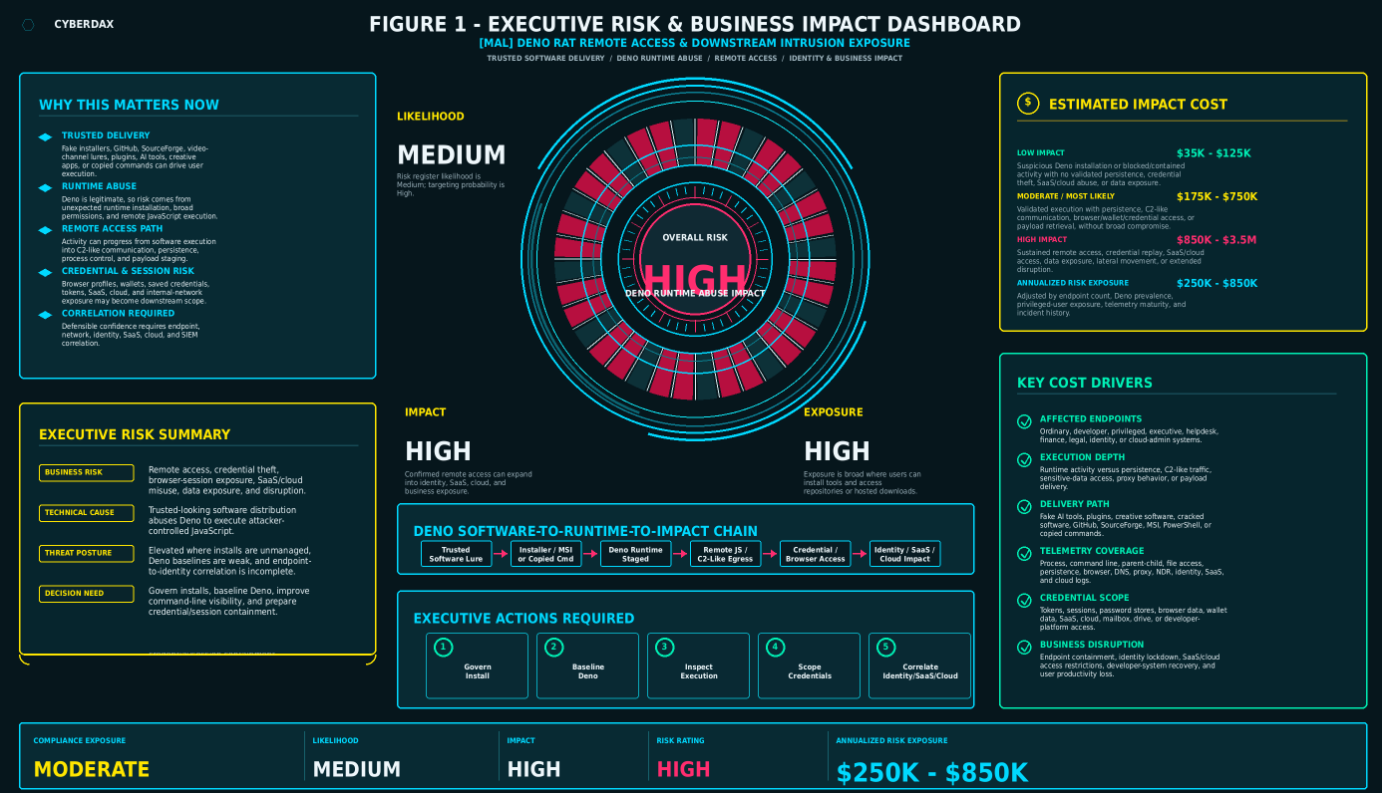
Figure 1
Compliance Exposure Indicator
Moderate.
Compliance exposure depends on whether Deno RAT activity exposed employee credentials, customer data, regulated data, browser sessions, SaaS content, cloud resources, source code, wallet data, mailbox contents, drive files, or privileged administrative access. Exposure increases when sensitive-data access, credential theft, token theft, account misuse, customer-impact thresholds, regulated-data access, or downstream SaaS and cloud activity are validated.
Risk Register Entry
Risk Title
Deno RAT Runtime Abuse and Downstream Intrusion Exposure Risk
Risk Description
Trusted-looking software delivery, fake installers, copied commands, GitHub or SourceForge downloads, compromised video-channel lures, or software impersonation may lead users to execute attacker-controlled Deno runtime activity. This can create remote access, persistence, credential exposure, browser-session theft, wallet exposure, sensitive-file access, C2-like communication, additional payload delivery, and downstream risk to identity, SaaS, cloud, developer platforms, customer data, and operational continuity.
Likelihood
Medium
Impact
High.
Risk Rating
High.
Annualized Risk Exposure
Estimated annualized risk exposure is $250,000 to $850,000 for organizations with broad software-download permissions, unmanaged developer runtime use, meaningful SaaS or cloud dependency, privileged user exposure, and moderate telemetry coverage. This estimate should be locally adjusted based on endpoint count, Deno and developer-tool prevalence, privileged-user exposure, software-installation controls, SaaS and cloud dependency, telemetry maturity, historical malware frequency, and confirmed incident history.
S7 — Risk Drivers
· User execution of fake software, fake AI tools, fake plugins, creative software, cracked applications, developer utilities, MSI installers, PowerShell launchers, or copied commands.
· Broad user access to GitHub, SourceForge, package-hosting platforms, free-hosting providers, object storage, and trusted-looking project pages.
· Legitimate Deno runtime use that is not inventoried, approved, baselined, or monitored.
· Deno execution from Downloads, Temp, AppData, ProgramData, Users\Public, browser cache, archive extraction paths, hidden profile paths, recently created folders, /tmp, /var/tmp, /Users, /home, or other user-writable locations.
· Deno execution with broad permissions, remote URLs, remote JavaScript retrieval, suspicious imports, no-check behavior, direct-IP retrieval, or repository-hosted payload retrieval.
· Suspicious parentage involving msiexec.exe, powershell.exe, pwsh.exe, cmd.exe, explorer.exe, browser processes, archive tools, package managers, script interpreters, installer processes, or unknown parent processes.
· Persistence through Run keys, scheduled tasks, startup-folder artifacts, shortcut manipulation, service-like relaunch behavior, launch agents, launch daemons, cron jobs, systemd services, or recurring execution.
· Browser-profile access, wallet-extension access, credential-store interaction, clipboard access, screenshot behavior, file enumeration, archive creation, process control, or additional payload delivery after Deno execution.
· Outbound communication to rare, newly observed, low-reputation, repository-hosted, free-hosting, dynamic-DNS, direct-IP, object-storage, or C2-like infrastructure.
· Weak endpoint command-line telemetry, missing parent-child process visibility, limited file-read telemetry, incomplete browser-profile monitoring, poor DNS or proxy retention, and weak NDR visibility.
· Weak endpoint-to-identity correlation for downstream SaaS, cloud, mailbox, drive, identity-provider, developer-platform, or privileged-account anomalies.
· Limited incident-response readiness for endpoint isolation, credential reset, session revocation, SaaS and cloud audit review, and user-exposure scoping.
S8 — Bottom Line for Executives
Deno RAT Remote Access and Downstream Intrusion Exposure should be managed as a software-trust, runtime-abuse, and downstream identity-exposure risk, not only as a malware detection problem. Business risk increases when fake software delivery or copied-command execution leads to Deno-based remote access, browser or wallet exposure, credential theft, persistence, and account misuse. Executive action should focus on software-installation control, developer-runtime governance, endpoint and network visibility, credential and session containment, and the ability to determine whether activity remained a suspicious endpoint event or progressed into broader identity, SaaS, cloud, data, or operational risk.
S9 — Board-Level Takeaway
A legitimate runtime can become an attacker-controlled remote-access channel when users are steered toward trusted-looking software pages, fake installers, or copied commands. The board-level concern is whether the organization can prove that software installation is governed, that approved developer-runtime use is distinguishable from abuse, and that endpoint, identity, SaaS, cloud, and network activity can be correlated quickly when suspicious runtime execution occurs. The recommended posture is to strengthen software-download controls, validate Deno runtime visibility, improve credential and session response, and preserve the telemetry needed to separate attempted delivery from confirmed remote access and downstream compromise.
S10 — Malware Overview
Deno RAT is a remote-access and backdoor activity cluster that abuses the legitimate Deno JavaScript and TypeScript runtime to execute attacker-controlled code after trusted-looking software delivery. The activity is associated with fake installers, malicious MSI packages, PowerShell launchers, copied-command execution, GitHub-hosted downloads, SourceForge-hosted downloads, compromised video-channel promotion, and software impersonation themes.
Known aliases and related identifiers include DinDoor and Deno RAT. Related public reporting may describe Deno-runtime abuse, JavaScript backdoor behavior, or loader-adjacent delivery activity, but operator attribution should remain conservative unless incident-specific evidence supports a stronger conclusion.
The malware’s primary operational role is remote access and downstream intrusion enablement. The activity may support remote script execution, command-and-control communication, payload retrieval, remote command execution, browser data access, wallet data access, credential exposure, proxy behavior, persistence, and additional payload deployment.
The delivery model is important because the malware is not dependent on a single exploit path, one static binary, or one infrastructure indicator. The durable risk model is the conversion of trusted-looking software interaction into runtime execution and remote-access behavior. Detection and response should therefore prioritize suspicious delivery context, unexpected Deno installation or execution, broad runtime permissions, suspicious command-line arguments, user-writable execution paths, C2-like communication, persistence, sensitive-data access, and downstream identity, SaaS, cloud, or internal-network activity.
S11 — Malware Classification and Type
Threat Type
Malware.
Threat Sub-Type
Remote access Trojan, JavaScript backdoor, Deno-runtime abuse malware, downloader, and intrusion-enablement tool.
Operational Classification
Deno RAT functions as a multi-stage intrusion component that can support remote access, command execution, payload staging, persistence, credential and browser-data exposure, wallet exposure, proxy behavior, and downstream identity, SaaS, cloud, or internal-network investigation risk.
Primary Function
The malware’s principal function is to convert user-driven software execution into attacker-controlled runtime execution and remote access. Its business impact comes from what the runtime enables after execution, including command-and-control behavior, sensitive-data access, credential or browser-session exposure, additional payload delivery, persistence, and possible expansion into identity, SaaS, cloud, developer, or internal-network environments.
S12 — Campaign or Activity Overview

Figure 2
Deno RAT activity is currently best understood as trusted-looking software delivery followed by legitimate-runtime abuse. Reported activity includes fake installers, fake plugins, GitHub repositories, SourceForge project pages, compromised video-channel promotion, MSI installers, PowerShell launchers, copied commands, and software impersonation themes involving AI tools, plugins, creative applications, developer utilities, and cracked software.
The activity pattern is opportunistic in delivery but operationally meaningful because it targets users who may trust recognizable software names, community project pages, video demonstrations, installer packages, or copied command instructions. Once executed, the activity can install or stage the Deno runtime, retrieve or execute JavaScript, communicate with command-and-control infrastructure, run remote commands, access sensitive browser or wallet data, and support additional payload delivery.
Infrastructure patterns may include repository-hosted downloads, SourceForge-hosted files, GitHub-hosted projects, compromised video-channel links, staging infrastructure, HTTP or WebSocket command-and-control, direct-IP communication, dynamic-DNS destinations, free-hosting infrastructure, object-storage retrieval, and low-reputation or newly observed destinations.
Known or suspected operator relationships should remain qualified. This report should not treat a single Deno RAT event as confirmed nation-state, ransomware, botnet, or loader-operator activity unless incident-specific evidence supports that assessment. The defensible campaign framing is Deno-runtime abuse through trusted-looking software delivery and downstream remote-access exposure.
S13 — Targets and Exposure Surface
The primary exposure surface is users and endpoints that interact with trusted-looking software pages, sponsored search results, public AI-generated artifacts, GitHub repositories, SourceForge projects, fake installers, plugin downloads, AI-tool installers, creative-software packages, cracked applications, developer utilities, copied command instructions, or browser-accessible applications capable of supporting covert command-and-control activity. Exposure is higher where users can install software, run MSI packages, execute PowerShell commands, follow search-advertisement download paths, access public user-generated content on trusted platforms, use developer runtimes without approval or monitoring, or interact with browser-based content that can initiate, relay, or conceal remote-access communications.
The FakeAgent campaign expands this exposure surface to users who search for legitimate AI applications and are redirected through sponsored search results, trusted public-content platforms, or attacker-controlled download infrastructure. SectopRAT expands the endpoint exposure surface to systems that execute trojanized installers, .NET payloads, concealed loaders, or software packages that preserve expected application functionality while installing remote-access malware in the background.
msaRAT expands the exposure surface to endpoints whose browser activity can be used to establish or support covert command-and-control communications. This includes environments with insufficient correlation to the initiating page, installer, script, extension, runtime, or endpoint process. The browser-mediated model can reduce the visibility of conventional malware communications when traffic appears to originate from an expected browser process or blends with otherwise legitimate web activity.
MedusaHVNC expands the exposure surface to Windows endpoints where a separate hidden desktop can be used to open legitimate browsers, access existing browser profiles, cookies, and authenticated session state, interact with locally accessible applications, capture clipboard content, and conduct remote activity outside the user’s visible desktop. This model increases exposure where legitimate browser processes and the victim’s normal device and network context are implicitly trusted, alternate-desktop activity is not monitored, and browser-session access cannot be correlated with script-host execution, loader activity, persistence, command-and-control communications, or unexplained outbound data transfer.
Dolphin X expands the exposure surface to users and endpoints exposed to remote-access malware with credential-theft, host-reconnaissance, and victim-profiling functionality. Its advertised profiling capability may allow operators to evaluate host characteristics, user information, installed software, credentials, browser data, or other accessible information before selecting follow-on actions. Available research does not independently validate the full capabilities of a live implant, but the reported functionality remains relevant to environments where compromised endpoints provide access to sensitive identities, applications, data, or downstream systems.
NightLedger expands the exposure surface to Windows endpoints where DLL search-order hijacking, unexpected module loading, and trusted-process execution are not sufficiently monitored. The malware masquerades as SspiCli.dll and uses execution involving AppVShNotify.exe, with delayed module-loading activity forming part of the observed process lineage. Once active, NightLedger can support process execution and termination, file transfer and manipulation, directory enumeration, host and network discovery, drive and process enumeration, screenshot collection, additional DLL loading, and collection of operationally useful files including C:\Windows\debug\NetSetup.log.
BridgeHead and ArcBridge expand the exposure surface to compromised systems that can be used for WebSocket-based tunneling and victim-host relay activity. BridgeHead can operate as an operator-controlled SOCKS5 relay and negotiate corporate proxy authentication through Negotiate or NTLM using the current user’s Windows single sign-on context. This increases exposure where WebSocket communications, proxy-authentication activity, SOCKS relay behavior, and traffic originating from trusted internal endpoints are not correlated with process lineage, user identity, destinations, and expected business activity.
The Mirage Kitten activity, also associated with the names UNC1549, Smoke Sandstorm, and Nimbus Manticore, increases relevance to government, aviation, telecommunications, financial, aerospace, defense, and other strategically important organizations across the Middle East, Africa, and Pakistan. The underlying exposure is not limited to those sectors and applies wherever compromised Windows endpoints can support persistent remote access, proxy traversal, covert tunneling, or downstream intrusion activity.
Most exposed environments include ordinary user endpoints, developer workstations, creative or engineering systems, privileged-user workstations, helpdesk systems, finance endpoints, legal endpoints, executive endpoints, identity-administrator workstations, cloud-administrator workstations, and systems with access to SaaS platforms, source code, credentials, customer data, operational data, cryptocurrency wallets, browser profiles, authenticated browser sessions, clipboard data, administrative consoles, internal services, corporate proxies, or trusted network paths.
Targeting should be described as broad and opportunistic unless incident-specific evidence supports a narrower victimology. The software themes make the activity relevant to organizations with users who download AI tools, plugins, media-production tools, software cracks, developer utilities, community-hosted software, or applications promoted through search advertising. Browser-mediated command-and-control, hidden-desktop activity, DLL search-order hijacking, WebSocket tunneling, and proxy-authenticated relay activity also increase relevance to organizations that permit unrestricted browser access, public web applications, script-host execution, alternate Windows desktops, outbound WebSocket communications, or encrypted traffic without sufficient process and destination correlation.
The downstream risk becomes more significant when affected users have privileged identity access, SaaS administrative access, cloud-console access, developer-platform access, source-code access, financial-system access, legal-data access, customer-data access, browser-stored credentials, active session tokens, cryptocurrency-wallet access, corporate proxy access, internal network reachability, or access to sensitive internal applications. Risk also increases when victim profiling, browser-session access, hidden-desktop interaction, clipboard access, host and network discovery, proxy-authenticated tunneling, or victim-host relay activity can be used to identify high-value users, privileged systems, accessible credentials, authenticated applications, internal services, or suitable paths for follow-on intrusion activity.
Exposure increases under the following conditions:
· Broad user permission to download and install software
· Reliance on sponsored search results or public user-generated content to locate software downloads
· Unrestricted or weakly monitored access to GitHub, SourceForge, package-hosting platforms, public AI-artifact platforms, free-hosting providers, redirect services, object-storage services, browser-based applications, WebSocket services, and attacker-controlled web infrastructure
· Limited validation of software origin, publisher identity, digital signatures, download domains, installer provenance, browser extensions, web-application legitimacy, DLL provenance, or module-loading behavior
· Limited application control for MSI installers, .NET executables, PowerShell launchers, copied commands, JScript or other script-host launchers, concealed loaders, browser-launched processes, side-loaded DLLs, and software launched from user-writable paths
· Unmanaged Deno, Node.js, JavaScript, TypeScript, .NET, AutoIt, Windows Script Host, or other developer-runtime and scripting use
· Weak endpoint command-line telemetry, process lineage, file telemetry, module-load telemetry, browser-profile telemetry, browser-child-process visibility, script-host visibility, alternate-desktop visibility, process-injection visibility, or persistence monitoring
· Inability to identify suspicious SspiCli.dll placement, AppVShNotify.exe execution, delayed module loading, or trusted processes loading modules from unexpected locations
· Inability to detect unauthorized or anomalous creation and use of separate Windows desktops or browser instances operating outside the user’s visible session
· Weak monitoring for access to browser credential stores, browser cookies, active session material, cryptocurrency-wallet files, clipboard contents, user-profile data, reconnaissance data, NetSetup.log, or sensitive application and network configuration
· Weak DNS, proxy, NDR, firewall, TLS, WebSocket, SOCKS, browser-network, or destination-reputation visibility
· Inability to distinguish legitimate browser, WebSocket, proxy, or internal endpoint traffic from command-and-control, hidden-desktop activity, tunneling, SOCKS5 relay behavior, payload transfer, tasking, or unexplained data transfer
· Inability to correlate Negotiate or NTLM proxy authentication with the initiating process, current-user SSO context, WebSocket destination, and subsequent relayed traffic
· Inability to associate outbound encrypted communications or unexplained data transfer with the initiating browser page, installer, loader, script, extension, runtime, hidden desktop, side-loaded DLL, tunneling process, or endpoint process
· Incomplete identity, SaaS, cloud, mailbox, drive, developer-platform, proxy, and internal-service audit coverage
· Poor endpoint-to-account correlation after suspected credential, browser-session, token, wallet, clipboard, proxy-authentication, or application-data exposure
· Limited visibility into host profiling, system discovery, installed-software enumeration, user discovery, security-tool discovery, drive enumeration, process enumeration, network discovery, or other reconnaissance performed before follow-on activity
· Sandboxing or automated-analysis controls that do not account for per-target username checks, delayed execution, or behavior restricted to selected identities or network conditions
· Trust decisions based primarily on recognizable software branding, legitimate hosting platforms, public artifacts, expected browser behavior, legitimate browser processes, authenticated proxy traffic, preserved application functionality, or traffic originating from an internal endpoint
S14 — Sectors / Countries Affected
Sectors Affected
Observed and likely exposed sectors include organizations whose users commonly download software, developer tools, plugins, AI utilities, media-production tools, cracked applications, or community-hosted packages. The exposure is not limited to one sector because the delivery model is software-themed and user-execution-driven.
Most likely exposed sectors include:
· Technology and software development.
· Media, entertainment, music production, and creative services.
· Professional services.
· Education and research.
· Financial services.
· Healthcare and life sciences.
· Legal services.
· Retail and e-commerce.
· Manufacturing.
· Government-adjacent and regulated infrastructure environments where users or administrators interact with external tooling.
Sector exposure should be treated as broad unless incident-specific evidence shows that a campaign targeted a narrower victim group. Risk is highest where users combine broad software-download permissions with privileged access, source-code access, SaaS access, cloud access, or customer-data access.
Countries Affected
Global.
Geographic exposure should be treated as global because the reported delivery model uses widely accessible software-hosting, project-hosting, video, and download platforms rather than a geographically restricted exploitation path. Unless incident-specific evidence limits activity to a particular country, language group, hosting region, customer base, or affected population, any organization with exposed users, permissive software-download behavior, and weak runtime visibility may be affected.
S15 — Adversary Capability Profiling
Capability Level
Moderate to High.
Technical Sophistication
The activity demonstrates moderate to high technical sophistication because it combines trusted-looking software delivery, legitimate runtime abuse, MSI or script-based staging, remote JavaScript execution, command-and-control communication, and downstream remote-access behavior. The use of Deno is notable because it can reduce the reliability of controls that focus primarily on traditional scripting engines, common malware binaries, or static indicators.
Sophistication is not based on a single advanced exploit. It comes from the operational blending of social engineering, trusted-looking hosting, user-driven execution, runtime installation, remote script execution, broad permissions, possible persistence, C2-like traffic, and follow-on sensitive-data access.
Infrastructure Maturity
Infrastructure maturity is moderate. Reported activity uses legitimate or trusted-looking delivery surfaces such as GitHub, SourceForge, compromised video-channel promotion, and installer packages, while also relying on staging and command-and-control infrastructure that can rotate. Infrastructure should be treated as volatile because repository names, project pages, MSI filenames, script names, hashes, domains, IP addresses, and C2 endpoints can change without altering the core behavior.
Operational Scale
Operational scale is broad and opportunistic. The delivery model can reach users across multiple sectors because it impersonates common tools and uses widely accessible public platforms. Scale increases when attackers use recognizable software themes, compromised video-channel promotion, popular project-hosting platforms, or downloadable installers that appear legitimate to users.
Escalation Likelihood
Escalation likelihood is moderate to high when Deno RAT execution is confirmed and telemetry shows persistence, C2-like communication, browser-profile access, wallet-extension access, credential-store interaction, sensitive-file access, suspicious child-process spawning, proxy behavior, or additional payload delivery. Escalation is lower when the activity is limited to blocked downloads, suspicious repository visits, or isolated runtime presence without supporting execution and follow-on behavior.
S16 — Targeting Probability Assessment
Overall Targeting Probability
High.
Targeting Drivers
Targeting probability is high because the delivery themes are broadly relevant, the platforms are widely accessible, and the execution model depends on user trust in recognizable software names, project-hosting platforms, installer packages, plugins, and copied instructions. The activity does not require the victim organization to run a specific vulnerable server application. Instead, it depends on user interaction, endpoint execution, permissive software installation, unmanaged runtime use, and insufficient endpoint-to-identity correlation.
Targeting probability increases for organizations with developers, creative users, AI-tool users, media-production users, administrators, privileged users, or employees who routinely download external tools. It also increases where GitHub, SourceForge, package-hosting platforms, free-hosting providers, and object-storage services are broadly permitted without strong download, execution, and reputation controls.
Most Likely Targets
· Developer workstations.
· User endpoints with broad software-installation permissions.
· Creative, engineering, media-production, and plugin-heavy workflows.
· Users searching for AI tools, developer utilities, plugins, cracked software, or productivity tools.
· Privileged-user workstations.
· Helpdesk and IT administration systems.
· Finance, legal, and executive endpoints.
· Identity-administrator and cloud-administrator workstations.
· Systems with access to SaaS applications, mailboxes, cloud consoles, source-code repositories, password stores, customer data, or sensitive operational data.
· Organizations with weak application control, weak browser-download controls, limited EDR visibility, limited Deno or developer-runtime baselining, and weak identity-to-endpoint correlation.
S17 — MITRE ATT&CK Chain Flow Mapping

Figure 3
Stage 1 — Trusted-Looking Software or Repository Exposure
Suspicious activity may begin when a user interacts with fake software pages, GitHub repositories, SourceForge project pages, compromised video-channel links, fake AI tools, plugin downloads, creative-software packages, developer utilities, cracked software, or copied command instructions.
· ATT&CK mapping: Drive-by Compromise T1189.
· Confidence: Conditional. Exposure to a repository, video link, project page, or software download page should not be treated as compromise by itself unless linked to download, execution, payload staging, or endpoint follow-on behavior.
Stage 2 — User-Driven Installer, MSI, or Copied-Command Execution
Endpoint-side activity may occur when a user runs a fake installer, MSI package, PowerShell launcher, command shell, copied command, archive extraction flow, or script-based installer tied to the trusted-looking software lure.
· ATT&CK mapping: User Execution T1204.
· Confidence: High when browser-adjacent execution, MSI launch, PowerShell execution, copied-command activity, or installer execution is temporally linked to suspicious software delivery or payload retrieval.
Stage 3 — Deno Runtime Installation or Binary Staging
The activity may install, stage, or execute the legitimate Deno runtime from a user-writable path, temporary directory, browser download folder, installer-created folder, hidden profile path, recently created directory, or other location inconsistent with approved developer workflows.
· ATT&CK mapping: Command and Scripting Interpreter: JavaScript T1059.007.
· Confidence: High when Deno installation or execution follows suspicious delivery, MSI execution, PowerShell staging, copied-command activity, or repository-hosted download behavior. Confidence is lower when Deno is present on an approved developer system without suspicious parentage, pathing, command-line behavior, or follow-on activity.
Stage 4 — Remote JavaScript Retrieval and Runtime Execution
Deno may retrieve or execute remote JavaScript, staged scripts, external imports, direct-IP hosted code, object-storage-hosted content, repository-hosted payloads, or attacker-controlled runtime logic using broad permissions or suspicious command-line arguments.
· ATT&CK mapping: Ingress Tool Transfer T1105; Command and Scripting Interpreter: JavaScript T1059.007.
· Confidence: High when remote script retrieval or external code execution is linked to Deno execution, broad runtime permissions, suspicious parent processes, unusual destination context, or staged payload behavior.
Stage 5 — Persistence or Relaunch Behavior
Post-execution activity may include Run-key modification, scheduled-task creation, startup-folder modification, shortcut manipulation, service-like relaunch behavior, launch-agent creation, launch-daemon creation, cron modification, systemd service creation, or recurring execution tied to Deno or related scripts.
· ATT&CK mapping: Scheduled Task/Job T1053.
· Confidence: Conditional. Persistence should be treated as Deno RAT-related only when temporally and behaviorally linked to suspicious Deno execution, remote script retrieval, fake installer activity, or incident-response evidence.
Stage 6 — Command-and-Control or Remote Access Session
Deno RAT activity may establish outbound HTTP, HTTPS, WebSocket, DNS-adjacent, direct-IP, dynamic-DNS, free-hosting, object-storage, repository-linked, or low-reputation command-and-control communication. Network behavior may include repeated callbacks, long-lived sessions, abnormal WebSocket activity, staged payload retrieval, proxy behavior, or remote command capability.
· ATT&CK mapping: Application Layer Protocol T1071.
· Confidence: High when suspicious outbound communication follows Deno runtime execution, remote script retrieval, persistence, or sensitive-data access. Confidence is lower when network evidence is limited to ordinary repository access, generic HTTPS traffic, or destination novelty without endpoint correlation.
Stage 7 — Browser, Wallet, Credential, or Sensitive-Data Access
Deno or related child processes may access browser profiles, cookies, saved passwords, local storage, session storage, credential stores, wallet-extension directories, clipboard data, screenshots, user files, archives, or other sensitive local data.
· ATT&CK mapping: Credentials from Password Stores T1555.
· Confidence: Conditional. Credential, browser, wallet, or sensitive-data access should be validated with endpoint file-access telemetry, EDR behavior, process lineage, identity activity, SaaS activity, cloud activity, or incident-response evidence before being attributed to Deno RAT.
Stage 8 — Additional Payload Delivery, Process Control, or Downstream Account Activity
If execution persists or credentials, browser sessions, or tokens are exposed, downstream activity may include additional payload retrieval, command-shell execution, process control, abnormal sign-ins, session reuse, suspicious MFA events, new device registration, privileged-role use, mailbox access, cloud-console access, SaaS administrative activity, developer-platform access, or internal network expansion.
· ATT&CK mapping: Ingress Tool Transfer T1105; Command and Scripting Interpreter T1059; Valid Accounts T1078.
· Confidence: Conditional. Downstream activity should not be attributed to Deno RAT unless upstream software delivery, Deno execution, credential or browser-session exposure, endpoint telemetry, identity telemetry, SaaS telemetry, cloud telemetry, or incident-response evidence supports the linkage.
S18 — Attack Path Narrative
Deno RAT activity begins with trusted-looking software exposure rather than a single fixed exploit path. A user may encounter fake software pages, GitHub repositories, SourceForge project pages, compromised video-channel links, fake AI tools, plugin downloads, creative-software packages, developer utilities, cracked software, or copied command instructions. This stage matters because the delivery surface may appear legitimate enough to lower user suspicion and bypass controls that focus only on known malicious domains, known malware hashes, or obviously suspicious attachments.
The execution trigger occurs when the user runs a fake installer, MSI package, PowerShell launcher, command shell, copied command, archive extraction flow, or script-based installer. The activity becomes more suspicious when execution originates from a browser download folder, temporary directory, user profile path, archive extraction location, or other user-writable path. The execution chain is especially concerning when the parent process is a browser, explorer process, msiexec.exe, powershell.exe, cmd.exe, archive utility, package manager, script interpreter, or unknown launcher.
After execution, the activity may install, stage, or invoke the legitimate Deno runtime. Deno is not malicious by itself, so the defensive signal depends on context. Risk increases when Deno appears on a non-developer endpoint, executes from an unusual path, uses broad runtime permissions, retrieves remote JavaScript, references external imports, launches from installer-driven parentage, or operates outside approved developer, automation, testing, or security workflows.
Payload staging may occur when Deno retrieves or executes remote JavaScript, staged scripts, external imports, repository-hosted payloads, direct-IP hosted code, object-storage-hosted content, or attacker-controlled runtime logic. This stage converts user-driven software execution into attacker-controlled runtime execution. It also creates a durable detection opportunity because remote script retrieval, broad Deno permissions, suspicious parent-child process relationships, and rare destination access are more resilient indicators than hashes, filenames, repository names, or static infrastructure.
Persistence may occur through Run-key modification, scheduled-task creation, startup-folder modification, shortcut manipulation, service-like relaunch behavior, launch-agent creation, launch-daemon creation, cron modification, systemd service creation, or recurring execution tied to Deno or related scripts. Persistence should not be assumed from Deno execution alone. It should be validated through endpoint telemetry, process lineage, file creation, registry modification, scheduled-task events, startup artifacts, service telemetry, launch-agent telemetry, or incident-response evidence.
Command-and-control behavior may appear as outbound HTTP, HTTPS, WebSocket, DNS-adjacent activity, direct-IP communication, dynamic-DNS use, free-hosting access, object-storage retrieval, repository-linked infrastructure, or low-reputation destination contact. Network behavior may include repeated callbacks, long-lived sessions, abnormal WebSocket activity, staged payload retrieval, proxy behavior, or remote command capability. C2 confidence is strongest when suspicious outbound behavior follows Deno execution, remote script retrieval, persistence, or sensitive-data access.
Credential, browser, wallet, and sensitive-data exposure may occur when Deno or related child processes access browser profiles, cookies, saved passwords, local storage, session storage, credential stores, wallet-extension directories, clipboard data, screenshots, user files, archive content, or other sensitive local data. This stage is operationally significant because exposed browser sessions or credentials can move the incident beyond the original endpoint into identity, SaaS, cloud, mailbox, drive, developer-platform, or internal-network exposure.
Downstream activity may include additional payload retrieval, command-shell execution, process control, abnormal sign-ins, session reuse, suspicious MFA events, new device registration, privileged-role use, mailbox access, cloud-console access, SaaS administrative activity, developer-platform access, or internal network expansion. These downstream events should be treated as linked to Deno RAT only when upstream software delivery, Deno execution, credential or browser-session exposure, endpoint telemetry, identity telemetry, SaaS telemetry, cloud telemetry, or incident-response evidence supports the relationship.
Defensive inflection points occur at multiple stages:
· Blocking or warning on suspicious fake software pages, GitHub or SourceForge downloads, compromised video-channel links, and untrusted project pages.
· Preventing unauthorized MSI execution, PowerShell launchers, copied-command execution, and script-based installers.
· Detecting unexpected Deno installation or execution outside approved developer workflows.
· Correlating Deno execution with remote JavaScript retrieval, broad runtime permissions, unusual paths, suspicious parent processes, or rare destinations.
· Identifying persistence creation or recurring relaunch behavior after Deno execution.
· Detecting C2-like egress, long-lived sessions, abnormal WebSocket behavior, repeated callbacks, or suspicious staged payload retrieval.
· Monitoring browser-profile, wallet-extension, credential-store, clipboard, screenshot, file-collection, and archive-creation behavior after Deno execution.
· Correlating downstream identity, SaaS, cloud, mailbox, drive, developer-platform, or internal-network anomalies with the affected endpoint and user.
S19 — Attack Chain Risk Amplification Summary
Deno RAT risk increases as the activity progresses from trusted-looking software exposure into runtime execution, remote access, credential exposure, and downstream account activity. The first stage may appear as ordinary user interaction with a software page, repository, video link, installer, plugin, or copied command. The business risk increases when that interaction produces endpoint execution, because the organization must determine whether the event remained a suspicious download or became an active remote-access foothold.
Risk amplifies when the legitimate Deno runtime is installed or executed outside expected workflows. This creates ambiguity for defenders because Deno may be legitimate on developer, automation, testing, security, or build systems. If the organization lacks approved runtime baselines, command-line telemetry, process lineage, file telemetry, and software inventory, the SOC may not be able to distinguish approved developer activity from suspicious runtime abuse.
The chain becomes more dangerous when Deno retrieves remote JavaScript, executes external code, uses broad permissions, or communicates with unusual infrastructure. At this point, the activity is no longer limited to software installation. It becomes a remote execution and command-and-control problem that may support operator interaction, staged payload retrieval, proxy behavior, or additional malware delivery.
Persistence increases incident scope because it allows the activity to survive restart, user logoff, basic cleanup, or delayed operator action. Scheduled tasks, Run keys, startup artifacts, launch agents, cron entries, systemd services, service-like relaunch behavior, or recurring execution can force defenders to perform deeper endpoint scoping and recovery rather than treating the incident as a single execution event.
Credential, browser, wallet, or sensitive-data access significantly increases business impact. Browser cookies, saved passwords, local storage, session storage, wallet-extension data, credential stores, clipboard contents, screenshots, user files, and archived content can create exposure beyond the affected endpoint. This can trigger identity response, session revocation, SaaS review, cloud audit review, legal review, privacy review, customer-impact analysis, or cyber-insurance notification depending on the data and accounts involved.
Downstream account activity increases the likelihood that the incident will expand into broader enterprise investigation. Abnormal sign-ins, session reuse, suspicious MFA events, new device registration, privileged-role use, mailbox access, cloud-console access, SaaS administrative activity, developer-platform access, or internal network expansion can require cross-functional response across endpoint, identity, cloud, SaaS, legal, compliance, and executive stakeholders.
Delayed detection increases business impact because each stage expands the evidence required to prove containment. A quickly blocked download may require limited review. Confirmed Deno execution requires endpoint scoping. Deno execution with C2-like behavior requires network and persistence review. Deno execution with browser or credential access requires identity, SaaS, and cloud review. Downstream account activity may require broad containment, session revocation, privilege review, mailbox and drive investigation, customer-impact assessment, and extended monitoring.
The overall risk amplification path is:
· Trusted-looking software exposure creates user trust.
· User execution creates endpoint foothold risk.
· Deno runtime abuse creates detection ambiguity.
· Remote JavaScript retrieval creates attacker-controlled execution.
· Persistence creates re-entry and delayed-response risk.
· C2-like behavior creates remote-access and operator-control risk.
· Browser, wallet, credential, or sensitive-data access creates identity and data exposure.
· Downstream identity, SaaS, cloud, developer-platform, or internal-network activity creates enterprise incident scope.
S20 — Tactics, Techniques, and Procedures
Delivery
Deno RAT activity uses trusted-looking software delivery rather than relying on a single exploit path. Delivery may involve fake software pages, fake plugins, GitHub repositories, SourceForge project pages, compromised video-channel promotion, fake AI tools, creative-software packages, developer utilities, cracked software, or copied command instructions. The delivery tactic is designed to make malicious activity appear like ordinary software discovery, download, or installation.
Execution
Execution may occur through fake installers, MSI packages, PowerShell launchers, command-shell activity, copied commands, archive extraction flows, script-based installers, or package-style workflows. Execution becomes more suspicious when it originates from Downloads, Temp, AppData, ProgramData, Users\Public, browser cache, archive extraction paths, hidden profile locations, recently created folders, /tmp, /var/tmp, /Users, /home, or other user-writable locations.
Runtime Abuse
The activity abuses the legitimate Deno runtime to execute attacker-controlled JavaScript or TypeScript. Deno may be installed, staged, or executed from locations inconsistent with approved development workflows. Runtime-abuse indicators include broad permissions, remote URLs, external imports, no-check behavior, unusual flags, user-writable path execution, suspicious parent processes, and activity from endpoints where Deno is not expected.
Payload Staging
Payload staging may involve remote JavaScript retrieval, repository-hosted scripts, object-storage-hosted content, direct-IP retrieval, staged payload access, free-hosting infrastructure, dynamic-DNS destinations, or low-reputation infrastructure. Staging should be evaluated through the relationship between delivery context, Deno execution, command-line behavior, destination reputation, and follow-on endpoint activity.
Persistence
Persistence may involve scheduled tasks, Run keys, startup-folder artifacts, shortcut manipulation, service-like relaunch behavior, launch agents, launch daemons, cron jobs, systemd services, autostart entries, or recurring execution. Persistence should be attributed to Deno RAT only when connected to suspicious Deno execution, fake installer activity, remote script retrieval, or incident-response evidence.
Evasion
Evasion relies on the use of a legitimate runtime, trusted-looking delivery infrastructure, user-driven execution, script-based staging, infrastructure rotation, and artifact volatility. Operators can change repository names, domains, URLs, script names, MSI names, hashes, payload paths, and C2 infrastructure without changing the core runtime-abuse behavior. Detection should therefore emphasize behavior chains rather than fixed IOCs.
Command and Control
Command-and-control behavior may use HTTP, HTTPS, WebSocket, DNS-adjacent activity, direct-IP destinations, dynamic-DNS infrastructure, free-hosting services, object storage, repository-linked infrastructure, or low-reputation destinations. Relevant network patterns include repeated callbacks, long-lived sessions, abnormal WebSocket behavior, staged payload retrieval, proxy behavior, and remote command capability.
Credential or Data Access
Credential or data access may include browser-profile access, cookie access, saved-password access, local-storage access, session-storage access, credential-store interaction, wallet-extension access, clipboard behavior, screenshot behavior, file enumeration, user-file access, archive creation, or sensitive-directory traversal. This behavior should be validated through endpoint telemetry, file-access telemetry, EDR behavior, process lineage, identity telemetry, SaaS telemetry, cloud telemetry, or incident-response evidence.
Movement or Propagation
Lateral movement or propagation should not be assumed from Deno RAT execution alone. It becomes relevant when the affected endpoint or user is linked to credential replay, remote service access, SMB, RDP, WinRM, WMI, SSH, PsExec-like activity, administrative share access, internal scanning, domain-controller access, identity-provider access, developer-platform access, or other internal expansion behavior.
Impact Behavior
Impact behavior is not assumed by default. Impact becomes relevant when the activity supports account takeover, data exposure, cloud or SaaS misuse, material business disruption, additional payload deployment, ransomware-stage activity, destructive activity, or customer-impact conditions. Impact claims should remain evidence-led and should not be inferred from Deno execution or C2-like behavior alone.
S20A — Adversary Tradecraft Summary
The tradecraft is moderately mature because it combines social engineering, trusted-looking hosting, legitimate-runtime abuse, installer or script-based execution, remote JavaScript execution, and command-and-control behavior. The activity does not require a highly novel exploit to create significant risk. Its effectiveness comes from blending into common user and developer workflows while using Deno as a dual-use execution framework.
Detection resistance is strongest where organizations lack developer-runtime inventory, command-line telemetry, parent-child process visibility, file-access telemetry, browser-profile monitoring, DNS or proxy enrichment, and endpoint-to-identity correlation. The activity can evade weak controls by changing hashes, filenames, repository names, script paths, domains, IP addresses, and staging locations while preserving the same operational chain.
Operational repeatability is high because the delivery model can be reused across software themes, hosting platforms, installer types, and user groups. Fake AI tools, plugins, creative software, developer utilities, and cracked software can all serve as plausible lures. The same runtime-abuse model can be adapted to new repositories, new installers, new scripts, new domains, or new C2 infrastructure.
The likely objective is remote access and downstream intrusion enablement. Deno RAT activity should be treated as an enabling capability that may support credential exposure, browser-session exposure, wallet theft, file collection, proxy behavior, additional payload delivery, identity misuse, SaaS access, cloud access, internal expansion, or later-stage intrusion activity.
The defensive implication is that organizations should not rely on Deno presence, repository access, hashes, domains, filenames, or isolated network events as standalone indicators. The strongest defensive approach is staged correlation across delivery, execution, runtime behavior, remote script retrieval, persistence, C2-like traffic, sensitive-data access, and downstream identity, SaaS, cloud, or internal-network activity.
S21 — Detection Strategy Overview
Detection Strategy Overview
The detection strategy for Deno RAT activity must be behavior-led, runtime-abuse-aware, and focused on the operational sequence that turns trusted-looking software distribution into remote access and downstream intrusion exposure. Deno is a legitimate JavaScript and TypeScript runtime, so the presence of Deno alone is not a reliable malware indicator. The durable detection model is the combination of suspicious delivery context, unexpected Deno installation or execution, abnormal script retrieval, broad runtime permissions, persistence activity, command-and-control behavior, remote command execution, browser or wallet data access, credential exposure, and post-execution intrusion activity.
Detection Philosophy
· Treat Deno as a dual-use runtime, not as malware by itself.
· Prioritize suspicious execution chains involving fake installers, MSI execution, copied terminal commands, PowerShell launchers, GitHub-hosted downloads, SourceForge-hosted downloads, compromised video-channel lures, or trusted-looking software project pages.
· Correlate Deno installation or execution with unusual user context, unexpected host role, non-developer endpoints, suspicious parent processes, remote script retrieval, persistence creation, or follow-on intrusion behavior.
· Focus on Deno execution patterns that involve broad permissions, remote JavaScript retrieval, script execution from user-writable paths, suspicious command-line arguments, abnormal child-process spawning, or outbound communication inconsistent with the host baseline.
· Treat Deno RAT and DinDoor-style activity as an intrusion-enablement path that can support remote access, arbitrary command execution, data theft, credential exposure, browser and wallet theft, persistence, and downstream payload deployment.
· Use reported hashes, domains, repository names, filenames, paths, URLs, and infrastructure only as enrichment, scoping, confidence support, retrospective hunting inputs, and case expansion.
· Do not require static IOCs for alert viability because repositories, download locations, hosted payloads, script names, C2 domains, payload hashes, and staging infrastructure can rotate.
· Do not infer Deno RAT execution from Deno presence alone without supporting endpoint, process, network, file, persistence, identity, delivery, or user-execution evidence.
Primary Detection Model
The primary detection model should correlate suspicious software-delivery or script-execution activity with unexpected Deno runtime installation or execution and subsequent remote-access behavior. A high-value case should begin with one or more initial-access or staging indicators, such as MSI execution from a user-writable directory, PowerShell execution from an installer context, GitHub or SourceForge download activity, copied terminal-command execution, or package-manager activity inconsistent with normal software-management behavior. The case becomes stronger when Deno is then used to execute remote JavaScript, retrieve staged code, run with broad permissions, create persistence, establish C2-like communication, launch child processes, or access browser, wallet, credential, clipboard, screenshot, file, or process-control functions.
Behavioral Detection Priorities
· MSI, PowerShell, script, or installer execution from user-controlled paths, temporary directories, browser download folders, archive extraction paths, copied terminal commands, or untrusted software-project pages.
· Runtime installation or Deno binary staging on endpoints where Deno is not expected for development, automation, testing, build, or approved administrative activity.
· Deno execution from user-writable directories, temporary paths, hidden profile locations, installer-created staging paths, or recently created directories.
· Deno execution with broad permissions, remote URLs, external script retrieval, suspicious imports, abnormal child-process relationships, or command lines inconsistent with approved development workflows.
· Deno-originated or host-originated outbound communication to rare, newly observed, low-reputation, repository-hosted, free-hosting, dynamic-DNS, suspicious staging, or C2-like infrastructure.
· Deno execution followed by Run-key modification, scheduled-task creation, startup-folder modification, shortcut manipulation, service-like relaunch behavior, or other persistence indicators.
· Deno execution followed by browser-profile access, wallet-extension access, credential-store interaction, clipboard access, screenshot behavior, file enumeration, file collection, process control, or arbitrary command execution.
· Deno activity followed by additional payload delivery, remote shell behavior, proxying, lateral-movement preparation, credential replay, or downstream SaaS, cloud, or identity-control-plane anomalies when supported by credential, session, or endpoint-to-account correlation.
Correlation Requirements
Detection should rely on correlated event chains rather than isolated indicators. A strong Deno RAT detection should require multiple supporting signals within a defensible time window, such as suspicious installer execution, unexpected Deno installation or execution, remote JavaScript retrieval, outbound C2-like communication, persistence creation, sensitive-data access, or follow-on host behavior consistent with remote access. Single weak events, such as the presence of deno.exe or one outbound connection from a developer workstation, should remain low-confidence unless combined with suspicious parentage, command-line arguments, persistence, sensitive-data access, abnormal network behavior, or downstream identity activity.
Recommended Correlation Sequence
· Initial lure or software-delivery activity involving fake software, compromised video-channel promotion, GitHub, SourceForge, suspicious MSI files, copied commands, or untrusted software packages.
· Script, MSI, or installer execution from a user-controlled location, temporary directory, browser download path, or archive extraction path.
· Deno runtime installation, Deno binary staging, or Deno execution that does not align with the endpoint’s normal role.
· Deno execution with suspicious command-line patterns, broad permissions, remote script retrieval, external imports, or interpreter-like behavior.
· Outbound HTTP, HTTPS, DNS, proxy, or C2-like communication to destinations that are unusual for the host, user, business unit, or environment.
· Persistence creation, recurring relaunch behavior, scheduled execution, Run-key modification, startup-folder modification, or service-like behavior.
· Browser, wallet, credential, clipboard, screenshot, file-collection, or process-control behavior following Deno execution.
· Additional payload delivery, remote shell behavior, proxying, lateral-movement preparation, credential replay, or downstream SaaS, cloud, or identity-control-plane anomalies when supported by credential, session, or endpoint-to-account correlation.
Endpoint Detection Strategy
Endpoint telemetry should prioritize process lineage, command-line content, file creation, runtime installation, persistence modification, sensitive-file access, child-process spawning, and suspicious user-context shifts. Deno RAT activity is most defensible when detection correlates Deno execution with suspicious parentage, unexpected installation, remote code retrieval, abnormal runtime permissions, or follow-on intrusion behavior. Endpoint detections should distinguish legitimate developer use from suspicious activity by considering host role, user role, expected development paths, approved package sources, normal build tooling, and baseline Deno usage.
Network Detection Strategy
Network detection should focus on outbound communication patterns consistent with remote access, C2, staged code retrieval, proxying, or exfiltration. Deno RAT detection should not depend on a single domain or IP address. Stronger network detections should correlate unusual host egress with suspicious software-delivery activity, newly installed runtime behavior, rare domains, abnormal WebSocket or HTTP patterns, long-lived sessions, repeated beacon-like traffic, low-reputation infrastructure, or network activity from endpoints that do not normally perform development or runtime-update activity.
Identity Detection Strategy
Identity telemetry should be used to identify whether suspected Deno RAT execution is followed by account misuse, credential replay, abnormal sign-ins, session creation from unfamiliar devices, impossible travel, suspicious MFA events, new device registration, password-reset activity, privileged-role use, or administrative access outside normal patterns. Identity events should not be used to claim Deno RAT compromise by themselves. They should be treated as downstream correlation signals when they appear after suspicious runtime execution, credential-access behavior, browser data access, or remote-control activity.
Cloud and SaaS Detection Strategy
Cloud and SaaS telemetry should be included when the intrusion sequence shows credential theft, browser-session theft, cloud-storage access, SaaS data access, administrative-console access, suspicious API activity, or account misuse after suspected Deno RAT execution. Deno RAT activity should not be attributed to cloud or SaaS compromise unless endpoint, network, or identity evidence connects the endpoint intrusion to the cloud or SaaS event. Cloud and SaaS detections should focus on downstream anomalous access, suspicious token use, abnormal data export, mailbox or drive access, privilege changes, and audit-log tampering where supported by telemetry.
IOC Handling
IOCs should support detection but must not govern it. Reported repositories, domains, URLs, hashes, filenames, MSI names, scripts, user-agent patterns, and infrastructure indicators should be used for enrichment, retrospective hunting, scoping, confidence support, and incident expansion. They should not be mandatory detection conditions because operators can rotate hosting, repository names, script paths, domains, payload hashes, and staging locations without changing the core intrusion behavior. IOC-only alerts should remain lower-confidence unless supported by process, file, network, persistence, identity, delivery, or user-execution evidence.
False-Positive Control
False-positive control should account for legitimate Deno usage in developer, security, automation, testing, CI/CD, and engineering environments. Suppression should not be based only on Deno being approved somewhere in the enterprise. Suppression should require expected host role, expected user role, expected path, expected parent process, expected repository, expected package source, expected command-line pattern, expected outbound destination, and absence of suspicious follow-on activity. Developer endpoints should still alert when Deno is installed or executed from unusual paths, launched by installer or browser-driven processes, used to retrieve remote scripts unexpectedly, or followed by credential, browser, persistence, proxy, or remote-control behavior.
Escalation Criteria
Escalate suspected Deno RAT activity when Deno execution is linked to suspicious software-delivery activity, abnormal runtime installation, remote JavaScript retrieval, persistence creation, C2-like egress, sensitive-data access, credential-store interaction, browser-profile access, wallet-extension access, clipboard access, screenshot behavior, arbitrary command execution, proxying, additional payload delivery, or downstream identity misuse. Escalation should increase further when the affected endpoint belongs to a privileged user, developer, administrator, finance user, legal user, executive, helpdesk operator, cloud administrator, identity administrator, or user with access to sensitive customer, operational, source-code, identity, SaaS, or cloud data.
Detection Confidence
Detection confidence is strongest when endpoint, process, file, persistence, delivery, and network telemetry are available and correlated with suspicious software-delivery context. Confidence is moderate when Deno runtime abuse and suspicious network behavior are visible but the original delivery path is unclear. Confidence is weaker when detection depends only on domains, hashes, filenames, repository names, or isolated Deno execution. Confidence increases when Deno activity is followed by remote-control behavior, browser or wallet data access, credential-related events, persistence artifacts, additional payload delivery, or downstream identity, cloud, and SaaS anomalies.
Detection Outcome
The intended detection outcome is early identification of Deno runtime abuse before remote access becomes broader intrusion exposure. The highest-value SOC outcome is not simply identifying Deno RAT as a malware family, but interrupting the operational chain that can move from trusted-looking software installation to remote control, credential theft, session abuse, data exposure, proxying, lateral movement, and downstream payload deployment.
S22 — Primary Detection Signals
Primary Detection Signals
Primary detection for Deno RAT activity should focus on behavior chains that show suspicious delivery, unexpected runtime execution, remote script retrieval, command-and-control behavior, persistence, sensitive-data access, and downstream intrusion activity. The strongest signals are correlated endpoint, process, file, persistence, network, identity, cloud, and SaaS events that show Deno being used as an execution framework for remote access rather than as a legitimate developer runtime. Reported IOCs, repositories, hashes, filenames, domains, paths, and URLs should support scoping and enrichment, but they should not replace behavioral detection logic.
Suspicious Software Delivery Signals
· Fake installer, plugin, or software-package execution from a browser download directory, temporary path, archive extraction path, user profile path, or other user-controlled location.
· MSI execution tied to trusted-looking software lures, fake GitHub repositories, SourceForge downloads, copied command instructions, or compromised video-channel promotion.
· PowerShell, cmd.exe, msiexec.exe, curl, certutil, bitsadmin, wscript, cscript, rundll32, or regsvr32 activity shortly after suspicious software download or installer execution.
· Download or execution activity involving software impersonation themes, including fake AI tools, productivity tools, audio plugins, creative software, developer utilities, cracked software, or installer bundles.
· User-driven execution followed by runtime installation, script retrieval, staged payload execution, or outbound communication to rare or newly observed infrastructure.
Runtime Installation and Staging Signals
· Deno installation or Deno binary staging on endpoints where Deno usage is not expected for development, automation, testing, build, security, or approved administrative activity.
· Deno runtime retrieval through package-manager, scripted installation, direct download, installer-driven staging, or user-writable binary placement.
· Deno binaries created or executed from temporary directories, browser download directories, hidden profile paths, installer-created folders, recently created directories, or unusual user-writable locations.
· Deno runtime installation followed quickly by remote script execution, outbound C2-like communication, persistence modification, child-process spawning, or sensitive-data access.
· Deno execution under a user, host, parent process, path, repository, or business unit that does not normally use Deno.
Suspicious Deno Execution Signals
· Deno execution with remote URLs, external JavaScript retrieval, broad permissions, suspicious imports, or script execution inconsistent with approved development workflows.
· Deno command lines that reference external infrastructure, staged scripts, encoded content, no-check behavior, eval-like execution, unusual permissions, or interpreter-like execution patterns.
· Deno launched by msiexec.exe, powershell.exe, cmd.exe, explorer.exe, browser processes, archive utilities, script interpreters, installer processes, or unknown parent processes.
· Deno spawning PowerShell, cmd.exe, conhost.exe, msiexec.exe, rundll32.exe, reg.exe, schtasks.exe, wmic.exe, certutil.exe, curl.exe, browser processes, archive tools, or additional interpreters.
· Deno execution shortly followed by abnormal file reads, browser-profile access, wallet-extension access, clipboard interaction, screenshot behavior, process control, or network communication.
Persistence Signals
· Run-key creation, modification, or suspicious value updates after Deno installation, Deno execution, MSI execution, PowerShell staging, or fake installer activity.
· Scheduled-task creation or modification tied to Deno, staged scripts, user-writable paths, suspicious installers, or relaunch behavior.
· Startup-folder file creation, shortcut manipulation, script drop, or binary staging intended to relaunch Deno or related payload components.
· Service-like relaunch behavior, recurring execution, process respawn, or repeated script retrieval after user logon or system restart.
· Persistence artifacts created by processes associated with fake installers, script launchers, package-manager activity, or Deno execution.
Command-and-Control and Network Signals
· Deno-originated or host-originated outbound HTTP, HTTPS, DNS, proxy, or WebSocket communication to rare, newly observed, low-reputation, repository-hosted, free-hosting, dynamic-DNS, suspicious staging, or C2-like infrastructure.
· Long-lived outbound sessions, repeated beacon-like requests, regularized callbacks, unusual User-Agent behavior, repeated script pulls, or suspicious token exchange following Deno execution.
· Outbound connections from endpoints that do not normally perform development, runtime-update, automation, or package-retrieval activity.
· Network activity shortly after fake installer execution, runtime installation, suspicious PowerShell execution, remote script retrieval, or persistence creation.
· External communication patterns consistent with remote access, staged payload retrieval, proxy behavior, exfiltration preparation, or interactive control.
Credential, Browser, and Wallet Access Signals
· Deno or related processes accessing browser profile directories, credential stores, cookies, saved passwords, session artifacts, wallet-extension directories, local storage, or browser databases.
· Deno execution followed by suspicious reads from Chrome, Edge, Firefox, Brave, Opera, Chromium-based profile paths, or cryptocurrency wallet-extension paths.
· Clipboard reads or writes, screenshot capture, file enumeration, document collection, or sensitive directory traversal following Deno execution.
· Credential access behavior followed by abnormal sign-ins, session reuse, suspicious MFA events, impossible travel, new device registration, or privilege use.
· Browser or wallet access activity occurring shortly after fake installer execution, Deno staging, remote script retrieval, persistence creation, or C2-like communication.
Remote Access and Process-Control Signals
· Deno execution followed by arbitrary command execution, shell launch, process enumeration, process termination, additional payload delivery, proxying, or remote-control-like behavior.
· Deno or related processes launching Windows administration tools, scripting engines, browser processes, compression utilities, credential tools, or network utilities outside expected user workflows.
· Suspicious process-control behavior involving start, stop, kill, enumerate, or relaunch actions after Deno execution.
· Remote shell behavior, staged command execution, or command output collection associated with Deno, DinDoor-style backdoor activity, or related launcher processes.
· Process activity that indicates Deno is functioning as an intrusion component rather than a normal development runtime.
Lateral Movement and Downstream Intrusion Signals
· Deno activity followed by credential replay, remote service access, administrative share access, remote PowerShell, RDP, SMB, WMI, PsExec-like behavior, or other lateral-movement preparation.
· Suspicious authentication from the affected endpoint, affected user, or newly exposed session after Deno execution or browser credential access.
· Downstream SaaS, cloud, or identity-control-plane anomalies when supported by credential, session, endpoint, or network correlation.
· Additional payload delivery, loader execution, proxy setup, reconnaissance, internal scanning, or staged intrusion behavior after initial Deno runtime abuse.
· Escalation from endpoint execution into identity, SaaS, cloud, or internal network activity that increases business impact and incident scope.
Supporting Artifact Signals
· Reported hashes, filenames, MSI names, repository names, domains, URLs, IP addresses, hosted scripts, paths, and payload indicators associated with Deno RAT, DinDoor, or related Deno-runtime abuse reporting.
· Deno binary paths, staged script paths, installer-created folders, temporary file artifacts, downloaded payloads, command-line fragments, and persistence keys observed during investigation.
· User-agent strings, URL paths, repository metadata, hosting-provider artifacts, download timestamps, and DNS records that help scope related activity.
· File, registry, process, and network artifacts that help connect suspicious software delivery to Deno runtime abuse and follow-on remote-access behavior.
· Artifact indicators used for retrospective hunting, scoping, enrichment, timeline reconstruction, and confidence support rather than standalone compromise determination.
Weak Signal Handling
Weak single indicators should not be used as standalone alert logic unless they are unusually high-confidence, stable, and supported by local environment context. Deno presence alone, a single Deno process, one outbound connection, one repository visit, one file hash, or one suspicious filename should not be treated as sufficient evidence of Deno RAT activity. Weak indicators should be elevated only when correlated with suspicious delivery, unexpected runtime installation, remote script retrieval, persistence, C2-like communication, credential access, browser or wallet access, process-control behavior, or downstream identity and cloud activity.
Signal Confidence
Detection confidence is highest when endpoint telemetry shows suspicious delivery and Deno execution, network telemetry shows unusual outbound behavior, persistence telemetry shows relaunch capability, and identity or SaaS telemetry shows downstream account activity after suspected credential or session exposure. Confidence is moderate when only runtime execution and network behavior are visible. Confidence is low when detection depends only on reported IOCs, repository names, filenames, domains, or isolated Deno execution without supporting behavior.
S23 — Telemetry Requirements
Telemetry Requirements
Deno RAT detection requires telemetry that can connect suspicious software delivery, unexpected runtime installation or execution, remote script retrieval, command-and-control behavior, persistence, sensitive-data access, and downstream intrusion activity. The required telemetry model should prioritize endpoint, process, file, persistence, network, identity, cloud, SaaS, and SIEM correlation data. Static IOCs may improve scoping and enrichment, but they are not sufficient to detect Deno RAT activity without behavioral telemetry.
Mandatory Endpoint Telemetry
Endpoint telemetry is mandatory because Deno RAT activity is primarily visible through execution lineage, runtime installation, script execution, persistence modification, and host-level follow-on behavior.
· Process creation events with parent process, child process, command line, user, host, timestamp, executable path, signer, hash, and working directory.
· Script and interpreter execution telemetry for PowerShell, cmd.exe, msiexec.exe, wscript, cscript, rundll32, regsvr32, curl, certutil, bitsadmin, browser processes, package managers, and Deno.
· Deno runtime installation or staging events, including binary creation, binary execution, package-manager activity, direct download, user-writable staging, and installer-created paths.
· File creation, file modification, file deletion, and file read telemetry for temporary directories, browser download paths, user profile directories, startup paths, script locations, installer directories, browser profile paths, wallet-extension paths, and credential-related storage locations.
· Persistence telemetry for Run keys, scheduled tasks, startup-folder artifacts, shortcut manipulation, service-like relaunch behavior, script-based relaunch, and recurring execution patterns.
· Child-process spawning telemetry showing Deno or related installer processes launching shells, interpreters, administrative tools, browser processes, archive utilities, or additional payload components.
· Endpoint user-context telemetry showing whether execution occurred under a developer, administrator, privileged user, helpdesk operator, cloud administrator, identity administrator, finance user, executive, or ordinary workstation user.
· EDR behavioral telemetry for suspicious command execution, credential access, browser-profile access, clipboard interaction, screenshot behavior, process control, remote shell behavior, proxy behavior, and payload staging.
Mandatory Network Telemetry
Network telemetry is mandatory because Deno RAT activity can rely on remote script retrieval, staged payload downloads, C2-like communication, proxying, and downstream remote access.
· DNS telemetry showing queried domains, query timestamps, requesting host, requesting user where available, response records, domain rarity, newly observed domains, dynamic-DNS usage, and suspicious hosting patterns.
· Proxy telemetry showing URL, domain, path, method, status code, bytes sent, bytes received, user-agent, referrer where available, requesting host, requesting user, and destination reputation.
· Firewall and egress telemetry showing destination IP, destination port, protocol, session duration, byte counts, connection frequency, and unusual outbound patterns.
· TLS metadata where available, including SNI, certificate subject, certificate issuer, certificate age, JA3 or JA4-style fingerprints where available, and unusual encrypted-session patterns.
· WebSocket or long-lived HTTP session telemetry where available, especially when associated with endpoints that do not normally perform development, runtime-update, automation, or package-retrieval activity.
· Network session telemetry that can identify repeated callbacks, staged script retrieval, repository-hosted downloads, rare infrastructure access, free-hosting usage, proxy behavior, or exfiltration preparation.
· NDR telemetry that can correlate unusual egress, rare destination access, beacon-like timing, lateral-movement preparation, internal scanning, and remote-access behavior after suspicious endpoint execution.
Mandatory Identity Telemetry
Identity telemetry is mandatory for detecting downstream misuse after credential, browser-session, or account exposure. Identity events should be correlated with suspected Deno RAT endpoint behavior rather than used as standalone proof of malware execution.
· Authentication logs showing source device, source IP, user, timestamp, application, geolocation, ASN, user agent, device identity, session identifier, and sign-in result.
· MFA telemetry showing push events, fatigue patterns, denied prompts, new authenticator registration, changed MFA methods, or suspicious successful MFA after endpoint compromise indicators.
· Conditional-access telemetry showing policy failures, unusual access decisions, trusted-device changes, and risky sign-in outcomes.
· Privileged-account telemetry showing administrative sign-ins, role activation, privileged group changes, new delegated permissions, new access grants, or high-risk account activity.
· Password reset, recovery, account lockout, credential change, session revocation, and device registration telemetry.
· Identity-provider audit events that can show session abuse, token misuse, suspicious application access, or abnormal account behavior after suspected Deno RAT execution.
· Correlation keys linking endpoint user, identity account, device ID, hostname, source IP, session ID, and user principal name.
Mandatory SIEM Correlation Telemetry
SIEM telemetry is mandatory because Deno RAT detection requires multi-source correlation. The SIEM must support event normalization, shared entity mapping, and time-window correlation across endpoint, network, identity, cloud, SaaS, and delivery telemetry.
· Normalized process, file, network, DNS, proxy, identity, cloud, and SaaS fields.
· Entity mapping for user, host, device ID, source IP, destination IP, domain, process name, parent process, command line, file path, hash, account, session, and application.
· Time synchronization across endpoint, network, identity, cloud, SaaS, and web telemetry.
· Retention long enough to reconstruct software delivery, runtime installation, script retrieval, persistence, credential exposure, downstream account activity, and follow-on intrusion events.
· Enrichment for domain age, domain reputation, destination rarity, file reputation, signer reputation, geolocation, ASN, user role, host role, asset criticality, privilege level, and approved software inventory.
· Baseline data for expected Deno usage, expected developer endpoints, approved runtime locations, allowed repositories, normal package-manager behavior, and normal outbound destinations.
· Alert-linking capability to connect suspicious installer execution, Deno execution, network communication, persistence, credential access, and identity anomalies into one case.
Helpful Email and Web Telemetry
Email and web telemetry are helpful when the Deno RAT delivery chain involves phishing, fake software pages, malicious downloads, compromised video-channel lures, copied commands, or user-driven installer retrieval.
· Secure web gateway events showing visits to GitHub, SourceForge, suspicious project pages, fake software pages, paste sites, free-hosting services, short links, or download pages.
· Browser download telemetry showing downloaded file names, source URLs, file paths, hashes, timestamps, users, and hosts.
· Email security telemetry showing suspicious links, attachments, sender metadata, URL rewriting, attachment detonation, and user click activity where email delivery is involved.
· User interaction telemetry where available, including clicked links, downloaded installers, copied commands, and browser-to-shell execution paths.
· Web reputation and category telemetry for newly observed domains, free-hosting infrastructure, repository-hosted payloads, and suspicious software distribution pages.
Helpful Cloud Telemetry
Cloud telemetry is helpful when suspected Deno RAT activity is followed by credential use, session abuse, cloud-console access, storage access, workload access, privilege changes, or cloud-control-plane activity. Cloud telemetry should not be used to claim Deno RAT compromise unless endpoint, identity, network, or session evidence supports the connection.
· Cloud authentication and audit logs showing source IP, device context, user, role, API action, resource, region, user agent, and result.
· Cloud storage access events showing unusual object access, bulk download, new sharing, permission change, or data movement after suspected credential exposure.
· Cloud IAM events showing role assumption, access-key creation, access-key use, policy modification, group membership changes, privilege escalation, or suspicious administrative actions.
· Cloud workload telemetry showing suspicious script execution, unexpected outbound traffic, payload staging, or use of compromised credentials against workloads.
· Cloud logging and monitoring events showing audit-log changes, logging disablement, suspicious configuration changes, or attempts to reduce visibility.
· Correlation keys linking endpoint users, identity accounts, cloud accounts, source IPs, session IDs, device IDs, and affected resources.
Helpful SaaS Telemetry
SaaS telemetry is helpful when suspected Deno RAT activity is followed by mailbox access, drive access, document access, chat access, administrative-console access, session abuse, suspicious data export, or third-party application activity.
· SaaS audit logs showing user, application, source IP, device context, user agent, session, action, resource, timestamp, and result.
· Mailbox telemetry showing new inbox rules, mailbox delegation, suspicious forwarding, message access, attachment access, mailbox export, or unusual mailbox search behavior.
· Cloud-drive telemetry showing unusual file access, bulk download, external sharing, permission changes, data export, or sensitive document access.
· Collaboration-platform telemetry showing suspicious file sharing, unusual app access, message export, or abnormal administrative actions.
· OAuth and application-consent telemetry showing new consent grants, high-risk scopes, suspicious third-party apps, or abnormal API access after suspected endpoint compromise.
· SaaS administrative telemetry showing privilege changes, audit-log access, policy modification, account changes, or suspicious data-access patterns.
Helpful Vulnerability, Asset, and Software Inventory Telemetry
Asset and software inventory telemetry is helpful for separating legitimate Deno usage from suspicious runtime abuse.
· Asset inventory showing host role, owner, business unit, operating system, criticality, endpoint type, server role, and expected software profile.
· Software inventory showing approved Deno installations, approved package managers, approved developer tools, approved installation paths, approved repositories, and known developer workstations.
· Vulnerability and configuration telemetry showing unmanaged endpoints, weak application control, missing EDR coverage, weak browser controls, local administrator exposure, and weak software-installation governance.
· Privilege and access inventory showing privileged users, developers, administrators, cloud administrators, identity administrators, and users with access to sensitive systems or data.
· Approved exception lists for known developer workflows, build agents, testing systems, automation systems, and security research workstations.
Memory and Advanced Execution Telemetry
Memory and advanced execution telemetry are helpful where available but should not be required for baseline detection.
· Memory telemetry that can identify in-memory script execution, suspicious runtime behavior, injected content, or abnormal process activity.
· EDR advanced behavior events for credential access, browser data access, screenshot capture, clipboard access, process control, remote shell activity, and suspicious interpreter behavior.
· Command output capture or shell-session telemetry where available for suspicious Deno-launched command execution.
· Sensor telemetry that can detect packed payloads, dynamically generated scripts, obfuscated JavaScript, or runtime-loaded code where supported.
· Incident-response artifact collection for staged scripts, Deno command history, downloaded payloads, persistence artifacts, browser artifacts, wallet artifacts, and related execution traces.
Telemetry Gaps That Reduce Detection Confidence
Detection confidence decreases when telemetry cannot connect suspicious delivery, Deno runtime abuse, network behavior, persistence, sensitive-data access, and downstream account activity.
· Missing command-line telemetry reduces confidence in Deno runtime-abuse detection.
· Missing parent-child process telemetry reduces confidence in execution-chain reconstruction.
· Missing file telemetry reduces confidence in runtime staging, script retrieval, browser data access, wallet access, and persistence analysis.
· Missing DNS, proxy, firewall, or NDR telemetry reduces confidence in C2, staged retrieval, proxying, and exfiltration analysis.
· Missing identity telemetry reduces confidence in credential replay, session abuse, privileged access, and downstream account misuse detection.
· Missing cloud and SaaS telemetry reduces confidence in downstream data-access, administrative-action, and control-plane exposure assessment.
· Missing asset and software inventory reduces the ability to distinguish legitimate Deno usage from suspicious Deno runtime abuse.
· Missing retention limits the ability to reconstruct delivery, execution, persistence, remote access, credential exposure, and downstream intrusion scope.
Minimum Viable Telemetry Standard
The minimum viable telemetry standard for Deno RAT detection is endpoint process telemetry with command lines, parent-child relationships, file and persistence telemetry, DNS or proxy visibility, and identity authentication logs. Without this baseline, detection will rely too heavily on static IOCs, isolated network events, or incomplete endpoint observations. Stronger coverage requires EDR behavior telemetry, NDR or proxy correlation, identity-provider audit logs, SaaS audit logs, cloud audit logs where relevant, asset inventory, approved software inventory, and SIEM normalization across all major entity types.
S24 — Detection Opportunities and Gaps
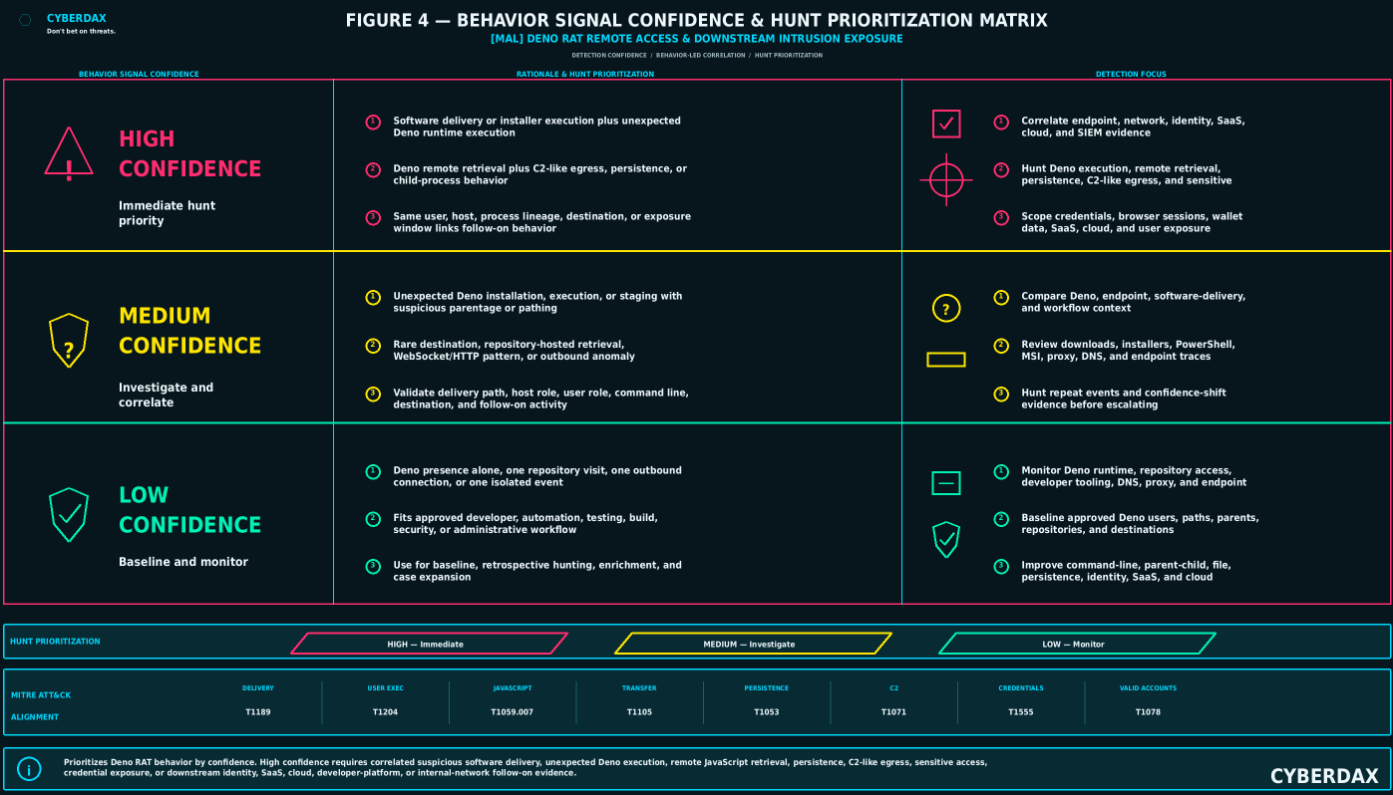
Figure 4
Detection Opportunities and Gaps
Deno RAT activity creates strong detection opportunities when endpoint, process, file, persistence, network, identity, and SIEM telemetry can be correlated across the full intrusion sequence. The strongest opportunities appear where suspicious software delivery, unexpected Deno execution, remote script retrieval, persistence, C2-like communication, sensitive-data access, and downstream account activity occur together. Detection becomes weaker when telemetry is limited to static IOCs, isolated Deno execution, single network events, or incomplete endpoint visibility.
Strong Detection Opportunities
· Suspicious installer, MSI, PowerShell, or copied-command execution followed by Deno runtime installation or Deno binary staging.
· Deno execution from user-writable paths, temporary directories, browser download folders, hidden profile locations, installer-created folders, or recently created directories.
· Deno execution with remote script retrieval, broad runtime permissions, suspicious command-line arguments, abnormal imports, or external JavaScript execution.
· Deno launched by fake installer activity, msiexec.exe, PowerShell, cmd.exe, browser processes, archive utilities, script interpreters, or unknown parent processes.
· Deno spawning shells, administrative tools, script interpreters, browser processes, archive tools, network utilities, or additional payload components.
· Deno execution followed by Run-key modification, scheduled-task creation, startup-folder modification, shortcut manipulation, recurring relaunch behavior, or service-like persistence.
· Deno-originated or host-originated outbound communication to rare, newly observed, low-reputation, repository-hosted, free-hosting, dynamic-DNS, suspicious staging, or C2-like infrastructure.
· Deno execution followed by browser-profile access, wallet-extension access, credential-store interaction, clipboard access, screenshot behavior, file enumeration, file collection, process control, or arbitrary command execution.
· Deno activity followed by credential replay, abnormal sign-ins, suspicious MFA activity, privileged account use, SaaS access, cloud access, or identity-control-plane anomalies when supported by endpoint, session, credential, or network correlation.
Conditional Detection Opportunities
· Deno runtime installation on developer endpoints where Deno may be legitimate but the parent process, installation path, command line, destination, or follow-on behavior is abnormal.
· GitHub or SourceForge download activity where the source is trusted-looking but the downloaded content, execution chain, or user behavior is suspicious.
· PowerShell or command-shell activity that may be administrative in isolation but becomes suspicious when tied to fake installers, Deno staging, remote script retrieval, or persistence modification.
· WebSocket, HTTP, HTTPS, DNS, or proxy traffic that may appear normal unless correlated with Deno execution, rare infrastructure, long-lived sessions, beacon-like timing, or staged script retrieval.
· Browser-profile, wallet, clipboard, screenshot, or file-access behavior that requires endpoint context to distinguish malicious collection from legitimate user or application activity.
· Identity, SaaS, or cloud anomalies that require endpoint-to-account correlation before they can be linked to suspected Deno RAT exposure.
· Repository-hosted payload retrieval that requires reputation, rarity, host role, user role, and execution-chain context before alerting at high confidence.
· Additional payload delivery or proxy activity that requires process, network, and host timeline correlation to distinguish malware behavior from legitimate tooling.
Weak Detection Areas
· Deno presence alone is weak because Deno is a legitimate JavaScript and TypeScript runtime.
· A single Deno execution event is weak without suspicious parentage, command-line behavior, remote script retrieval, persistence, network communication, or follow-on intrusion activity.
· A single GitHub, SourceForge, or repository access event is weak without download, execution, staging, or payload behavior.
· A single domain, URL, hash, filename, path, repository name, or hosted payload indicator is weak because infrastructure and artifacts can rotate.
· Network activity without endpoint process context is weak when encrypted traffic, legitimate hosting platforms, content delivery networks, or repository services are involved.
· Identity anomalies without endpoint or session linkage are weak for Deno RAT attribution, although they may still require investigation as account-risk events.
· Cloud or SaaS events without credential, endpoint, session, or network correlation should not be attributed to Deno RAT activity.
· Browser, wallet, clipboard, screenshot, and file-access artifacts are weak when endpoint telemetry cannot identify the responsible process or execution sequence.
IOC-Only Limitations
IOCs are useful for scoping, enrichment, retrospective hunting, and confidence support, but they should not be treated as the governing detection model. Deno RAT operators can rotate domains, repositories, URLs, file names, payload hashes, script names, hosting accounts, and staging infrastructure without changing the core execution and remote-access behavior. IOC-only detections are most useful for rapid triage and historical searches, but they create fragile coverage when used as primary alert logic.
Artifact Volatility
Artifact-level evidence is expected to change across Deno RAT campaigns and related runtime-abuse activity. Repository names, hosted scripts, MSI names, installer paths, Deno script names, payload hashes, domains, and C2 infrastructure may differ between incidents. Detection should therefore emphasize runtime abuse, suspicious execution lineage, remote script retrieval, persistence, sensitive-data access, C2-like behavior, and downstream identity or SaaS activity rather than fixed file names or infrastructure indicators.
Endpoint Visibility Gaps
Endpoint visibility gaps significantly reduce detection confidence because the Deno RAT model depends on process lineage, command-line arguments, file staging, persistence modification, and sensitive-data access. Missing parent-child process telemetry, incomplete command-line capture, limited file telemetry, weak persistence monitoring, or lack of EDR behavioral events can prevent the SOC from connecting fake installer activity to Deno runtime abuse and downstream intrusion behavior.
Network Visibility Gaps
Network visibility gaps reduce confidence in detecting remote script retrieval, C2-like behavior, proxying, staged payload delivery, and exfiltration preparation. Encrypted traffic, limited DNS retention, missing proxy logs, lack of SNI or certificate metadata, absent NDR telemetry, and poor destination-reputation enrichment can make Deno RAT traffic appear as ordinary HTTPS activity to hosting, repository, or content-delivery infrastructure.
Identity, Cloud, and SaaS Visibility Gaps
Identity, cloud, and SaaS visibility gaps reduce the ability to detect downstream exposure after credential theft, browser-session theft, or remote access. Missing authentication logs, weak MFA telemetry, incomplete device context, absent SaaS audit logs, limited cloud-control-plane logging, poor session visibility, and missing endpoint-to-account mapping can prevent defenders from determining whether Deno RAT activity expanded into account misuse, data access, privilege abuse, or control-plane exposure.
Evasion Concerns
Deno RAT activity may evade static controls by using a legitimate runtime, trusted-looking download platforms, user-driven execution, script-based staging, encrypted communications, infrastructure rotation, and artifact changes. Detection must account for the possibility that operators will alter repository names, URLs, script names, domains, hashes, command lines, and hosting locations. The most resilient detection opportunities are those tied to suspicious runtime behavior, execution lineage, persistence, sensitive-data access, and correlated downstream account activity.
False-Positive Risk Areas
False-positive risk is highest in developer, engineering, automation, testing, CI/CD, security research, and administrative environments where Deno, package managers, remote scripts, GitHub access, and command-line tooling may be legitimate. False positives can be reduced by using approved software inventory, expected host role, user role, repository allowlists, known development paths, approved package sources, baseline Deno usage, expected outbound destinations, and absence of suspicious follow-on activity. Suppression should remain narrow and should not exempt all Deno activity on developer systems.
Detection Gap Severity
Detection gap severity is moderate to high when organizations lack endpoint command-line telemetry, parent-child process visibility, file telemetry, persistence monitoring, DNS or proxy logging, identity telemetry, and SIEM correlation. The gap becomes high when Deno use is common but unmanaged, developer workstations are weakly monitored, repository access is broadly permitted, software installation is loosely governed, or identity and SaaS telemetry cannot be tied back to endpoint activity. The gap becomes lower when EDR, NDR, DNS, proxy, identity, cloud, SaaS, software inventory, and SIEM telemetry are normalized and correlated around host, user, session, process, and destination entities.
Detection Engineering Opportunity
The best detection-engineering opportunity is a staged correlation model that begins with suspicious software delivery or installer execution, adds unexpected Deno installation or execution, confirms remote script retrieval or abnormal runtime behavior, and escalates when persistence, C2-like communication, sensitive-data access, process control, credential exposure, or downstream account misuse appears. This model is more resilient than IOC matching because it targets the operational function of Deno RAT activity rather than the disposable artifacts around it.
S25 — Ultra-Tuned Detection Engineering Rules
NDR / Network Behavioral Analytics
Detection Viability Assessment
NDR / Network Behavioral Analytics has three rules for this MAL report.
· NDR / Network Behavioral Analytics is viable because Deno RAT activity can produce durable network-observable behavior through remote script retrieval, staged payload access, suspicious egress, C2-like communication, long-lived sessions, WebSocket or HTTP control behavior, proxy behavior, and post-execution network expansion.
· NDR / Network Behavioral Analytics is strongest when DNS telemetry, proxy telemetry, secure web gateway telemetry, firewall egress logs, TLS metadata, WebSocket visibility, destination enrichment, endpoint execution context, identity context, approved developer-runtime baselines, and SIEM correlation can be combined.
· NDR / Network Behavioral Analytics should not be used as a standalone source for confirming Deno RAT execution, credential theft, browser theft, wallet theft, data theft, cloud compromise, SaaS compromise, lateral movement, ransomware deployment, or actor attribution.
· NDR / Network Behavioral Analytics detections must remain correlation-dependent and should require endpoint, proxy, DNS, identity, EDR, web, or SIEM evidence before classifying activity as probable Deno RAT-related intrusion behavior.
· NDR / Network Behavioral Analytics rules should not generate high-confidence alerting from GitHub access alone, SourceForge access alone, Deno-related infrastructure access alone, destination novelty alone, long-lived HTTPS alone, WebSocket activity alone, DNS rarity alone, direct IP access alone, repository access alone, package-manager traffic alone, or cloud/SaaS access alone.
Rule
Suspicious Runtime-Linked Remote Script Retrieval and C2-Like Egress
Rule Format
NDR behavioral correlation rule suitable for DNS telemetry, proxy telemetry, secure web gateway logs, firewall egress logs, TLS metadata, WebSocket visibility, destination enrichment, endpoint execution enrichment, approved developer-runtime baselines, and SIEM correlation.
Detection Purpose
Detect endpoints that show suspicious outbound behavior consistent with remote script retrieval, staged payload access, or C2-like egress after suspected fake software delivery, unexpected Deno runtime installation, Deno execution, or script-execution activity.
Detection Logic
· Identify outbound HTTP, HTTPS, DNS, proxy, TLS, or WebSocket activity to rare, newly observed, low-reputation, repository-hosted, free-hosting, dynamic-DNS, suspicious staging, direct-IP, object-storage, or C2-like infrastructure.
· Prioritize repeated script retrieval, staged payload access, long-lived sessions, repeated callbacks, abnormal WebSocket behavior, beacon-like timing, unusual user-agent patterns, low-prevalence URL paths, or destination use that is new for the host.
· Prioritize traffic from hosts, users, departments, or asset groups that do not normally perform developer-runtime updates, Deno execution, package retrieval, repository downloads, JavaScript runtime activity, or automation workflows.
· Correlate suspicious egress with recent suspicious installer execution, fake software download behavior, Deno runtime staging, Deno execution, remote script execution, PowerShell staging, MSI execution, or endpoint activity associated with user-driven software lures.
· Increase confidence when the same host later contacts additional payload locations, suspicious APIs, proxy endpoints, free-hosting infrastructure, newly observed domains, or infrastructure with low environmental prevalence.
· Do not trigger solely on GitHub, SourceForge, package repositories, Deno-related infrastructure, free-hosting providers, or content-delivery infrastructure. Require suspicious sequence, rare destination context, anomalous host role, endpoint correlation, suspicious destination behavior, or SIEM correlation.
Required Telemetry
· DNS logs with requesting host, queried domain, response data, timestamp, domain rarity, domain age, and reputation enrichment.
· Proxy or secure web gateway logs with URL, domain, path, method, status, user-agent, user, host, bytes sent, bytes received, referrer where available, and destination reputation.
· Firewall or egress telemetry with source host, destination IP, destination port, protocol, session duration, connection count, byte counts, and directionality.
· TLS metadata where available, including SNI, certificate metadata, JA3 or JA4-style fingerprints, certificate age, and session duration.
· WebSocket session visibility where available.
· NDR behavioral telemetry for beaconing, rare destinations, unusual egress, long-lived sessions, repository-hosted payload retrieval, direct-IP access, and suspicious outbound patterns.
· Endpoint, EDR, proxy, web, or SIEM context showing suspicious installer execution, Deno runtime activity, remote script retrieval, user-driven software download behavior, persistence, sensitive-data access, or abnormal child-process activity.
· Asset inventory identifying developer workstations, approved automation hosts, approved package-management systems, approved Deno users, privileged workstations, and high-risk user endpoints.
Engineering Implementation Instructions
· Build asset groups for approved developer workstations, approved Deno users, approved build systems, approved automation hosts, approved package-management systems, privileged workstations, administrative workstations, and ordinary user endpoints.
· Build destination groups for known approved repositories, approved package mirrors, sanctioned developer infrastructure, approved Deno download locations, approved automation destinations, and approved security tooling infrastructure.
· Build suspicious destination groups for newly observed domains, newly registered domains, low-prevalence domains, direct-IP destinations, dynamic-DNS infrastructure, free-hosting providers, suspicious object storage, rare ASNs, suspicious hosting providers, unknown reputation destinations, and repository-hosted payload paths not seen in baseline workflows.
· Build suspicious network-behavior groups for repeated script retrieval, remote JavaScript retrieval, staged payload retrieval, long-lived HTTPS sessions, abnormal WebSocket sessions, beacon-like callbacks, unusual user-agent strings, unusual URL paths, repeated callback timing, low-volume recurrent traffic, and uncommon destination reuse.
· Build endpoint-correlation groups for suspected fake installer execution, MSI execution, PowerShell staging, Deno runtime installation, Deno execution, remote script retrieval, user-writable execution paths, persistence creation, browser-profile access, wallet access, credential-store access, clipboard access, screenshot behavior, or additional payload execution.
· Use shorter correlation windows when remote script retrieval or suspicious egress occurs immediately after Deno execution, fake installer execution, PowerShell staging, or MSI execution.
· Use moderate correlation windows when Deno installation or script staging is followed by delayed outbound communication, repeated callback behavior, additional payload retrieval, or persistence.
· Use longer correlation windows for low-and-slow callbacks, delayed operator interaction, delayed proxy behavior, or delayed post-execution network expansion.
· Add severity weighting for non-developer host role, privileged user context, first-seen Deno activity, first-seen destination, domain age, low reputation, suspicious hosting provider, unusual URL path, WebSocket behavior, repeated callbacks, and endpoint execution correlation.
· Suppress known approved developer systems only when host role, user role, destination, path, timing, parent process, and activity pattern match approved usage.
· Do not enable high-severity alerting until DNS fields, proxy fields, TLS metadata, WebSocket visibility, destination enrichment, approved developer baselines, endpoint joins, timing windows, exception logic, false-positive rates, query performance, and SOC triage workflow are validated.
DRI Assessment
DRI
8.0 / 10
TCR Assessment
Operational TCR
7.5 / 10
Full-Telemetry TCR
8.5 / 10
Limitations
This rule cannot prove Deno RAT execution without endpoint, EDR, or SIEM correlation. Encrypted traffic, legitimate repository usage, developer workflows, content-delivery infrastructure, package retrieval, Deno development activity, browser activity, and runtime-update behavior can create noise. Detection quality depends on DNS visibility, proxy fields, firewall metadata, TLS metadata, WebSocket visibility, destination-reputation enrichment, host-role baselining, and endpoint correlation. The rule must not be used to infer credential theft, data theft, lateral movement, cloud compromise, SaaS compromise, ransomware deployment, or actor attribution without supporting evidence.
Detection Query Pattern
NDR Deno runtime-linked remote script retrieval and C2-like egress query pattern requiring platform syntax validation, Deno execution enrichment validation, destination enrichment validation, developer baseline validation, timing-window tuning, and environment-specific allowlisting before production deployment.
NetworkEvent AS DenoRuntimeEgress
WHERE DenoRuntimeEgress.Direction IN ANY (
"OUTBOUND",
"CLIENT_TO_EXTERNAL",
"DNS_QUERY",
"WEB_REQUEST",
"PROXY_REQUEST",
"TLS_SESSION",
"WEBSOCKET_SESSION"
)
AND DenoRuntimeEgress.SourceAsset IN ASSET_GROUP (
"Managed User Endpoints",
"Privileged Workstations",
"Developer Workstations",
"Administrative Workstations",
"High-Risk User Endpoints",
"Endpoints With Recent Runtime Installation",
"Endpoints With Recent Suspicious Software Download",
"Endpoints With Recent Deno Execution"
)
AND (
DenoRuntimeEgress.DestinationContext IN ANY (
"newly_observed_destination",
"newly_registered_domain",
"rare_domain",
"rare_asn",
"suspicious_hosting",
"free_hosting_provider",
"dynamic_dns_destination",
"direct_ip_destination",
"low_reputation_destination",
"unknown_reputation_destination",
"repository_hosted_payload_path",
"object_storage_payload_path",
"destination_not_in_approved_developer_baseline"
)
OR DenoRuntimeEgress.NetworkPattern IN ANY (
"remote_script_retrieval",
"staged_payload_retrieval",
"repeated_script_pull",
"long_lived_https_session",
"abnormal_websocket_session",
"beacon_like_callback",
"repeated_low_volume_connection",
"unusual_user_agent",
"rare_url_path",
"new_destination_after_runtime_execution"
)
)
AND EVENT_NEAR WITHIN ENV_DENO_RUNTIME_TO_EGRESS_WINDOW (
EndpointEvent AS DenoRuntimeContext
WHERE DenoRuntimeContext.EventType IN ANY (
"Deno Runtime Installed",
"Deno Binary Created",
"Deno Process Executed",
"Remote Script Executed By Deno",
"Suspicious Runtime Execution",
"MSI Execution From User Writable Path",
"PowerShell Staging",
"Fake Software Installer Executed",
"Browser Download Followed By Execution"
)
AND DenoRuntimeContext.Asset IN SAME_ASSET(DenoRuntimeEgress.SourceAsset)
)
AND OPTIONAL_CONFIDENCE_INCREASE WITHIN ENV_DENO_POST_EXECUTION_WINDOW (
EndpointEvent AS DenoPostExecutionContext
WHERE DenoPostExecutionContext.EventType IN ANY (
"Persistence Created",
"Scheduled Task Created",
"Run Key Modified",
"Startup Folder Modified",
"Browser Profile Access",
"Wallet Extension Access",
"Credential Store Access",
"Clipboard Access",
"Screenshot Behavior",
"Additional Payload Executed",
"Suspicious Child Process Created"
)
AND DenoPostExecutionContext.Asset IN SAME_ASSET(DenoRuntimeEgress.SourceAsset)
)
AND OPTIONAL_CONFIDENCE_INCREASE WITHIN ENV_DESTINATION_RISK_WINDOW (
ThreatIntelOrEnrichmentEvent AS DestinationRiskContext
WHERE DestinationRiskContext.Destination IN SAME_DESTINATION(DenoRuntimeEgress.Destination)
AND DestinationRiskContext.Context IN ANY (
"domain_first_seen_recently",
"low_environment_prevalence",
"new_in_environment",
"low_reputation",
"rare_hosting_provider",
"suspicious_asn",
"repository_path_not_seen_in_baseline",
"dynamic_dns",
"free_hosting",
"direct_ip"
)
)
AND DenoRuntimeEgress.SourceAsset NOT IN ASSET_GROUP (
"Approved Deno Developer Systems",
"Approved Build Systems",
"Approved Automation Hosts",
"Approved Security Research Systems",
"Approved Package Management Servers",
"Approved Incident Response Systems"
)
AND DenoRuntimeEgress.DestinationDomain NOT IN ASSET_GROUP (
"Approved Deno Download Sources",
"Approved Developer Repositories",
"Approved Package Mirrors",
"Approved Build Infrastructure",
"Approved Automation Destinations",
"Approved Security Tooling Destinations"
)
AND NOT ChangeContext IN ANY (
"approved_developer_runtime_installation",
"approved_package_manager_activity",
"approved_build_pipeline_activity",
"approved_security_testing",
"approved_software_deployment",
"approved_incident_response_activity",
"approved_deno_project_work"
)
Rule
Possible Remote Access Session or Proxy Behavior After Deno Runtime Abuse
Rule Format
NDR behavioral session analytics rule suitable for network-flow telemetry, DNS telemetry, proxy telemetry, secure web gateway logs, TLS metadata, WebSocket visibility, session recurrence analytics, endpoint execution enrichment, identity enrichment, and SIEM correlation.
Detection Purpose
Detect network-session behavior consistent with remote access, proxying, relay activity, or interactive control after suspected Deno runtime abuse, fake software execution, or remote script retrieval.
Detection Logic
· Identify long-lived outbound sessions, repeated callback intervals, abnormal WebSocket sessions, high-frequency small requests, bidirectional traffic patterns, unusual TLS sessions, or recurrent low-volume connections inconsistent with normal browsing.
· Prioritize outbound connections to rare, newly observed, suspicious, free-hosting, dynamic-DNS, direct-IP, repository-linked, object-storage, or low-reputation destinations.
· Correlate suspicious session behavior with recent fake installer execution, unexpected Deno installation, Deno execution, remote script retrieval, persistence creation, or suspicious software-download behavior.
· Prioritize unusual egress from non-developer workstations, privileged-user endpoints, helpdesk systems, finance systems, legal systems, executive systems, administrative workstations, identity-administration systems, or cloud-administration systems.
· Increase confidence when session behavior is followed by additional payload retrieval, proxy behavior, relay behavior, internal scanning, authentication-adjacent network activity, or downstream identity anomalies.
· Do not treat long-lived HTTPS, WebSocket sessions, proxy behavior, or remote-access-like traffic as malicious by itself. Require anomalous destination context, suspicious endpoint sequence, abnormal host role, unusual timing, follow-on intrusion indicators, or SIEM case context.
Required Telemetry
· NDR session telemetry with source host, destination, protocol, port, timing, duration, byte counts, packet counts, directionality, session recurrence, and traffic symmetry.
· Proxy or secure web gateway telemetry with URL, domain, path, method, user-agent, response code, bytes transferred, and destination reputation.
· DNS telemetry with queried domain, requesting host, response, domain rarity, domain age, and first-seen context.
· Firewall telemetry with outbound connection metadata, destination port, connection duration, recurrence, and byte counts.
· TLS metadata where available, including SNI, certificate subject, certificate issuer, certificate age, certificate reputation, and fingerprinting data.
· WebSocket or long-lived HTTP session visibility where available.
· Endpoint or SIEM context showing suspicious Deno runtime activity, fake installer execution, remote script retrieval, persistence, child-process activity, or sensitive-data access.
· Asset and identity context identifying high-risk endpoints, privileged users, developer systems, cloud administrators, identity administrators, and approved remote-support activity.
Engineering Implementation Instructions
· Build host-role baselines for normal long-lived HTTPS, WebSocket, repository, developer-tool, remote-support, cloud-development, administrative, and automation traffic.
· Build approved remote-access and proxy groups for sanctioned remote support, sanctioned VPN, sanctioned tunneling, approved developer tunnels, approved cloud-development environments, approved browser collaboration tools, and enterprise proxy services.
· Build suspicious session groups for abnormal WebSocket behavior, long-lived sessions to rare destinations, repeated low-volume callbacks, high-frequency small requests, unusual bidirectional flow, direct-IP sessions, dynamic-DNS sessions, rare TLS SNI, unusual user-agent strings, or session recurrence after runtime execution.
· Build endpoint seed groups for suspected Deno execution, Deno remote script retrieval, Deno staging, fake installer execution, MSI execution, PowerShell staging, suspicious browser download execution, persistence creation, or browser/wallet/credential access.
· Increase severity when the affected endpoint belongs to a privileged user, developer, administrator, helpdesk operator, cloud administrator, identity administrator, finance user, legal user, executive, or user with access to sensitive systems or data.
· Suppress known approved remote-support tools, developer tunnels, automation systems, cloud development platforms, and sanctioned proxy services only when source host, user, destination, timing, and session pattern match approved usage.
· Require endpoint, identity, or SIEM correlation before treating the session as suspected Deno RAT remote access.
· Use destination reputation, domain age, first-seen-in-environment, ASN, hosting-provider category, SNI rarity, user-agent rarity, and host-role deviation as enrichment.
· Do not enable high-severity alerting until approved remote-access baselines, WebSocket visibility, session recurrence logic, endpoint joins, destination enrichment, exception handling, false-positive rates, query performance, and SOC triage workflow are validated.
DRI Assessment
DRI
8.0 / 10
TCR Assessment
Operational TCR
7.0 / 10
Full-Telemetry TCR
8.5 / 10
Limitations
This rule may generate false positives from legitimate remote-support tools, developer tunneling, browser-based collaboration tools, cloud-development environments, package managers, automation platforms, sanctioned proxy services, and approved administrative tooling. It cannot identify Deno RAT by itself without endpoint or SIEM evidence. It must not be used to infer data theft, credential theft, lateral movement, cloud compromise, SaaS compromise, ransomware deployment, or actor attribution without supporting identity, endpoint, cloud, SaaS, file-access, or incident-response evidence.
Detection Query Pattern
NDR remote access or proxy behavior after Deno runtime abuse query pattern requiring platform syntax validation, session telemetry validation, WebSocket visibility validation, approved remote-access baseline validation, endpoint-correlation validation, timing-window tuning, and environment-specific allowlisting before production deployment.
NetworkSession AS DenoRemoteAccessCandidate
WHERE DenoRemoteAccessCandidate.Direction IN ANY (
"OUTBOUND",
"CLIENT_TO_EXTERNAL",
"CLIENT_TO_SERVER",
"TLS_SESSION",
"WEBSOCKET_SESSION",
"PROXY_SESSION"
)
AND DenoRemoteAccessCandidate.SourceAsset IN ASSET_GROUP (
"Managed User Endpoints",
"Privileged Workstations",
"Administrative Workstations",
"Developer Workstations",
"Finance User Endpoints",
"Legal User Endpoints",
"Executive Endpoints",
"Helpdesk Systems",
"Cloud Administrator Workstations",
"Identity Administrator Workstations",
"Endpoints With Recent Deno Runtime Activity"
)
AND (
DenoRemoteAccessCandidate.SessionPattern IN ANY (
"long_lived_session",
"repeated_callback_interval",
"abnormal_websocket_session",
"high_frequency_small_requests",
"bidirectional_low_volume_traffic",
"unusual_tls_session",
"recurrent_low_volume_connection",
"rare_sni",
"unusual_user_agent",
"session_recurrence_after_runtime_execution"
)
OR DenoRemoteAccessCandidate.DestinationContext IN ANY (
"newly_observed_destination",
"rare_domain",
"newly_registered_domain",
"suspicious_hosting",
"free_hosting_provider",
"dynamic_dns_destination",
"direct_ip_destination",
"repository_linked_destination",
"object_storage_destination",
"low_reputation_destination",
"destination_not_in_remote_support_baseline"
)
)
AND EVENT_NEAR WITHIN ENV_DENO_RUNTIME_TO_SESSION_WINDOW (
EndpointEvent AS DenoRuntimeSeed
WHERE DenoRuntimeSeed.EventType IN ANY (
"Deno Process Executed",
"Deno Runtime Installed",
"Deno Binary Staged",
"Remote Script Executed By Deno",
"Fake Software Installer Executed",
"MSI Execution From User Writable Path",
"PowerShell Staging",
"Suspicious Browser Download Executed",
"Persistence Created"
)
AND DenoRuntimeSeed.Asset IN SAME_ASSET(DenoRemoteAccessCandidate.SourceAsset)
)
AND OPTIONAL_CONFIDENCE_INCREASE WITHIN ENV_REMOTE_ACCESS_FOLLOWON_WINDOW (
NetworkEvent AS RemoteAccessFollowOn
WHERE RemoteAccessFollowOn.SourceAsset IN SAME_ASSET(DenoRemoteAccessCandidate.SourceAsset)
AND RemoteAccessFollowOn.ActivityPattern IN ANY (
"additional_payload_retrieval",
"proxy_endpoint_contact",
"relay_behavior",
"internal_scanning",
"administrative_port_access",
"authentication_adjacent_network_activity",
"identity_provider_access_after_runtime_execution",
"cloud_or_saas_access_after_runtime_execution"
)
)
AND OPTIONAL_CONFIDENCE_INCREASE WITHIN ENV_ENDPOINT_POST_EXECUTION_WINDOW (
EndpointEvent AS EndpointRemoteAccessContext
WHERE EndpointRemoteAccessContext.Asset IN SAME_ASSET(DenoRemoteAccessCandidate.SourceAsset)
AND EndpointRemoteAccessContext.EventType IN ANY (
"Suspicious Child Process Created",
"Command Shell Launched",
"PowerShell Launched",
"Process Enumeration",
"Process Termination",
"Credential Store Access",
"Browser Profile Access",
"Wallet Extension Access",
"Clipboard Access",
"Screenshot Behavior",
"Additional Payload Executed"
)
)
AND DenoRemoteAccessCandidate.DestinationDomain NOT IN ASSET_GROUP (
"Approved Remote Support Destinations",
"Approved Enterprise Proxy Destinations",
"Approved VPN Destinations",
"Approved Developer Tunnel Destinations",
"Approved Cloud Development Destinations",
"Approved Browser Collaboration Destinations",
"Approved Automation Destinations"
)
AND DenoRemoteAccessCandidate.SourceAsset NOT IN ASSET_GROUP (
"Approved Remote Support Systems",
"Approved Developer Tunnel Hosts",
"Approved Automation Hosts",
"Approved Security Testing Systems",
"Approved Incident Response Systems"
)
AND NOT ChangeContext IN ANY (
"approved_remote_support_session",
"approved_developer_tunnel",
"approved_cloud_development_session",
"approved_administrative_session",
"approved_security_testing",
"approved_incident_response_activity",
"approved_automation_activity"
)
Rule
Suspicious Post-Execution Network Expansion After Deno Runtime Abuse
Rule Format
NDR multi-stage intrusion correlation rule suitable for internal network telemetry, DNS telemetry, proxy telemetry, firewall telemetry, identity-adjacent network telemetry, cloud and SaaS network context, endpoint seed-event enrichment, asset criticality, and SIEM correlation.
Detection Purpose
Detect downstream network behavior that may occur after Deno RAT execution, including additional payload retrieval, internal reconnaissance, proxy activity, lateral-movement preparation, credential-replay support, cloud or SaaS access, or exfiltration preparation.
Detection Logic
· Identify hosts associated with suspected Deno runtime abuse that begin showing network expansion behavior within a defined post-execution window.
· Prioritize outbound access to multiple rare destinations, staged payload locations, paste services, free-hosting services, repository-hosted assets, suspicious APIs, direct-IP destinations, object storage, or proxy endpoints.
· Prioritize internal network scanning, unusual SMB, RDP, WinRM, SSH, LDAP, Kerberos, RPC, administrative-port activity, file-share access, domain-controller access, or identity-infrastructure access from endpoints that do not normally perform those actions.
· Prioritize DNS or proxy activity consistent with additional tool retrieval, payload staging, command-output transfer, data staging, exfiltration preparation, proxy setup, or relay behavior.
· Increase confidence when network expansion follows suspicious installer execution, Deno runtime execution, remote script retrieval, persistence creation, sensitive-data access, browser-profile access, wallet access, credential-store interaction, screenshot behavior, or remote-control behavior.
· Treat cloud and SaaS network access as downstream exposure only when supported by credential, session, endpoint, identity, or network correlation.
· Do not treat internal scanning, repository access, cloud access, SaaS access, or administrative-port activity as Deno RAT activity without endpoint, identity, or SIEM correlation.
Required Telemetry
· NDR internal network telemetry showing source host, destination host, destination port, protocol, timing, connection count, lateral-movement patterns, and session directionality.
· Firewall telemetry for internal and external connection metadata.
· DNS and proxy telemetry for additional payload retrieval, suspicious domains, repository access, paste services, free-hosting infrastructure, object storage, suspicious APIs, and external staging.
· Authentication-adjacent network telemetry involving domain controllers, identity providers, SaaS endpoints, cloud endpoints, administrative services, file shares, and privileged management paths.
· Endpoint or SIEM context showing suspected Deno runtime abuse, persistence, credential access, browser data access, sensitive-data access, or remote-control behavior.
· Asset criticality and host-role metadata to distinguish expected administrative scanning from suspicious expansion.
· Identity, cloud, and SaaS context where available to support downstream exposure assessment.
Engineering Implementation Instructions
· Require a seed event from endpoint, SIEM, proxy, or web telemetry indicating suspicious delivery, Deno runtime abuse, remote script execution, or Deno-linked suspicious egress before evaluating downstream network expansion at elevated severity.
· Build internal network baselines for administrative hosts, vulnerability scanners, EDR systems, IT management platforms, developer systems, automation platforms, backup systems, identity systems, and cloud administration systems.
· Build suspicious expansion groups for new internal destination access, administrative-port activity, domain-controller access, identity-provider access, SaaS endpoint access, cloud endpoint access, file-share access, internal scanning, payload retrieval, proxy endpoint contact, paste service use, and object-storage access.
· Increase severity when the suspected host contacts domain controllers, identity infrastructure, cloud endpoints, SaaS endpoints, administrative services, backup infrastructure, file shares, developer platforms, source-code systems, or sensitive internal systems.
· Treat cloud and SaaS access as downstream exposure only when supported by credential, session, endpoint, identity, or network correlation.
· Use suppression only for known scanners, management systems, backup tools, developer systems, automation platforms, and approved administrative hosts with expected timing, user context, source asset, and destination patterns.
· Prioritize cases where network expansion follows Deno execution, persistence, browser or wallet access, credential-store interaction, screenshot behavior, arbitrary command execution, proxy behavior, or additional payload delivery.
· Route high-confidence cases to incident response for endpoint isolation, credential reset, session revocation, cloud and SaaS audit review, lateral-movement scoping, payload containment, and user exposure review.
· Do not enable high-severity alerting until internal network baselines, administrative-host baselines, scanner baselines, endpoint seed correlation, identity joins, cloud/SaaS context, exception handling, false-positive rates, query performance, and SOC triage workflow are validated.
DRI Assessment
DRI
8.5 / 10
TCR Assessment
Operational TCR
7.0 / 10
Full-Telemetry TCR
8.5 / 10
Limitations
This rule depends heavily on sequence correlation. Internal scanning, administrative access, repository access, cloud access, SaaS access, file-share access, and remote-access-like traffic may be legitimate in some environments. The rule cannot prove that Deno RAT caused downstream activity unless endpoint, identity, or SIEM evidence supports the relationship. It must not infer ransomware deployment, data theft, destructive activity, cloud compromise, SaaS compromise, or actor attribution without additional evidence.
Detection Query Pattern
NDR post-execution network expansion after Deno runtime abuse query pattern requiring platform syntax validation, endpoint seed-event validation, internal telemetry validation, identity-adjacent network validation, cloud and SaaS context validation, administrative baseline validation, timing-window tuning, and environment-specific allowlisting before production deployment.
NetworkEvent AS DenoPostExecutionExpansion
WHERE DenoPostExecutionExpansion.SourceAsset IN ASSET_GROUP (
"Managed User Endpoints",
"Privileged Workstations",
"Administrative Workstations",
"Developer Workstations",
"High-Risk User Endpoints",
"Endpoints With Recent Deno Runtime Activity",
"Endpoints With Recent Suspicious Runtime Egress",
"Endpoints With Recent Sensitive Data Access"
)
AND DenoPostExecutionExpansion.Direction IN ANY (
"INTERNAL",
"OUTBOUND",
"CLIENT_TO_SERVER",
"CLIENT_TO_INTERNAL",
"CLIENT_TO_EXTERNAL",
"DNS_QUERY",
"PROXY_REQUEST",
"CLOUD_APPLICATION_TRANSFER"
)
AND (
DenoPostExecutionExpansion.ActivityPattern IN ANY (
"internal_scanning",
"new_internal_destination_access",
"administrative_port_activity",
"smb_access_anomaly",
"rdp_access_anomaly",
"winrm_access_anomaly",
"ssh_access_anomaly",
"ldap_access_anomaly",
"kerberos_access_anomaly",
"rpc_access_anomaly",
"file_share_access_anomaly",
"domain_controller_access_anomaly",
"identity_infrastructure_access_anomaly",
"backup_infrastructure_access_anomaly",
"developer_platform_access_anomaly"
)
OR DenoPostExecutionExpansion.ExternalPattern IN ANY (
"additional_payload_retrieval",
"paste_service_access",
"free_hosting_access",
"repository_hosted_asset_retrieval",
"object_storage_access",
"suspicious_api_access",
"direct_ip_destination",
"proxy_endpoint_contact",
"data_staging_pattern",
"command_output_transfer_pattern",
"exfiltration_preparation_pattern"
)
OR DenoPostExecutionExpansion.CloudOrSaaSPattern IN ANY (
"cloud_console_access_after_endpoint_compromise",
"suspicious_cloud_api_access",
"suspicious_saas_access",
"identity_provider_access_after_runtime_execution",
"mail_or_drive_access_after_runtime_execution",
"admin_console_access_after_runtime_execution"
)
)
AND EVENT_NEAR WITHIN ENV_DENO_EXECUTION_TO_EXPANSION_WINDOW (
EndpointEvent AS DenoExecutionSeed
WHERE DenoExecutionSeed.Asset IN SAME_ASSET(DenoPostExecutionExpansion.SourceAsset)
AND DenoExecutionSeed.EventType IN ANY (
"Deno Process Executed",
"Deno Runtime Installed",
"Remote Script Executed By Deno",
"Suspicious Runtime Execution",
"Fake Software Installer Executed",
"PowerShell Staging",
"Persistence Created",
"Browser Profile Access",
"Wallet Extension Access",
"Credential Store Access",
"Clipboard Access",
"Screenshot Behavior",
"Additional Payload Executed"
)
)
AND OPTIONAL_CONFIDENCE_INCREASE WITHIN ENV_IDENTITY_CONTEXT_WINDOW (
IdentityEvent AS IdentityRiskContext
WHERE IdentityRiskContext.UserOrDevice IN SAME_USER_OR_DEVICE(DenoPostExecutionExpansion.SourceAsset)
AND IdentityRiskContext.EventType IN ANY (
"Abnormal Sign In",
"Credential Replay Suspected",
"Suspicious MFA Event",
"New Device Registration",
"Privileged Role Use",
"Impossible Travel",
"Session Reuse",
"Password Reset After Endpoint Compromise"
)
)
AND OPTIONAL_CONFIDENCE_INCREASE WITHIN ENV_CLOUD_SAAS_CONTEXT_WINDOW (
CloudOrSaaSEvent AS DownstreamAccountContext
WHERE DownstreamAccountContext.UserOrDevice IN SAME_USER_OR_DEVICE(DenoPostExecutionExpansion.SourceAsset)
AND DownstreamAccountContext.EventType IN ANY (
"Unusual SaaS Data Access",
"Unusual Cloud Storage Access",
"Cloud Console Access From New Source",
"SaaS Admin Activity From New Source",
"Suspicious API Access",
"Bulk Download",
"Privilege Change",
"Audit Log Access Or Change"
)
)
AND DenoPostExecutionExpansion.SourceAsset NOT IN ASSET_GROUP (
"Approved Vulnerability Scanners",
"Approved IT Management Systems",
"Approved Backup Systems",
"Approved Administrative Jump Hosts",
"Approved Developer Automation Systems",
"Approved Cloud Administration Systems",
"Approved Security Testing Systems",
"Approved Incident Response Systems"
)
AND DenoPostExecutionExpansion.DestinationAsset NOT IN ASSET_GROUP (
"Approved Routine Administrative Destinations",
"Approved Backup Destinations",
"Approved Scanner Targets",
"Approved Developer Infrastructure",
"Approved Automation Destinations"
)
AND NOT ChangeContext IN ANY (
"approved_vulnerability_scan",
"approved_it_administration",
"approved_backup_operation",
"approved_developer_operation",
"approved_cloud_administration",
"approved_security_testing",
"approved_incident_response_activity",
"approved_change_window"
)
SentinelOne
Detection Viability Assessment
SentinelOne has three rules for this MAL report.
· SentinelOne is viable because Deno RAT activity is strongly endpoint-observable through suspicious software execution, Deno runtime staging, Deno process execution, remote script retrieval, broad runtime behavior, child-process spawning, persistence modification, browser-profile access, wallet access, credential-store interaction, clipboard access where available, screenshot behavior where available, arbitrary command execution, additional payload execution, and outbound follow-on behavior.
· SentinelOne is strongest when Deep Visibility telemetry, process telemetry, command-line telemetry, parent-child process relationships, Storyline context, file telemetry, persistence telemetry, browser process context, PowerShell telemetry, Deno process telemetry, script execution telemetry, network telemetry, DNS enrichment, proxy enrichment, and SIEM correlation can be combined.
· SentinelOne can identify endpoint-side Deno RAT behavior even when the original lure, fake GitHub or SourceForge page, compromised video-channel promotion, web download, or package-hosting context is observed through proxy, DNS, browser, secure web gateway, NDR, or SIEM telemetry rather than directly inside SentinelOne.
· SentinelOne is not a standalone source for confirming operator attribution, credential theft, data theft, cloud compromise, SaaS compromise, ransomware deployment, or downstream lateral movement unless the required supporting endpoint, network, identity, cloud, SaaS, or incident-response evidence is present.
· SentinelOne rules should not generate high-confidence alerting from Deno presence alone, PowerShell execution alone, browser activity alone, package-manager activity alone, GitHub access alone, SourceForge access alone, file download activity alone, child-process creation alone, or outbound connection activity alone without suspicious sequence, host-role deviation, command-line context, follow-on behavior, or external correlation.
Rule
Suspicious Deno Runtime Execution After Fake Software Delivery
Rule Format
SentinelOne endpoint behavioral correlation rule suitable for Deep Visibility telemetry, process telemetry, command-line telemetry, browser process ancestry, parent-child process relationships, Deno process context, file telemetry, browser-download context, DNS enrichment, proxy enrichment, secure web gateway enrichment, Storyline context, and SIEM correlation.
Detection Purpose
Detect suspicious Deno runtime execution that occurs after fake software delivery, user-driven installer execution, MSI execution, PowerShell staging, copied command execution, suspicious browser download activity, or repository-hosted payload retrieval.
Detection Logic
· Identify Deno runtime installation, Deno binary staging, or Deno process execution on endpoints where Deno is not expected for development, automation, testing, build activity, security research, or approved administrative workflows.
· Prioritize Deno execution from user-writable paths, temporary directories, browser download folders, hidden profile locations, recently created directories, installer-created staging folders, or paths inconsistent with approved developer runtime usage.
· Prioritize Deno execution launched by msiexec.exe, powershell.exe, pwsh.exe, cmd.exe, explorer.exe, browser processes, archive utilities, script interpreters, installer processes, package managers, or unknown parent processes.
· Prioritize Deno command lines involving remote URLs, remote JavaScript retrieval, broad runtime permissions, suspicious imports, no-check behavior, external script execution, direct-IP retrieval, unusual flags, or execution patterns inconsistent with approved development workflows.
· Correlate suspicious Deno execution with recent fake software download behavior, GitHub or SourceForge download activity, copied terminal-command execution, suspicious MSI execution, PowerShell staging, package-manager activity, or browser download followed by execution.
· Increase confidence when Deno execution is followed by outbound communication, child-process spawning, persistence modification, browser-profile access, wallet access, credential-store interaction, clipboard access where available, screenshot behavior where available, or additional payload execution.
· Do not trigger solely on deno.exe presence, approved Deno development activity, approved Deno installation, approved package-manager activity, approved repository access, or approved build activity without suspicious parentage, pathing, command-line behavior, host-role mismatch, or follow-on behavior.
Required Telemetry
· SentinelOne Deep Visibility process telemetry.
· Process creation events.
· Command-line telemetry.
· Parent process and grandparent process.
· Process path.
· Process hash.
· Process signer and certificate metadata.
· User identity.
· Device identity.
· Working directory.
· Process start time.
· Process ancestry.
· SentinelOne Storyline context.
· Deno process telemetry.
· Browser process telemetry.
· Browser download telemetry where available.
· PowerShell telemetry.
· Command-shell telemetry.
· MSI execution telemetry.
· Package-manager telemetry where available.
· File creation and modification telemetry.
· Network connection telemetry.
· DNS enrichment where available.
· Proxy enrichment where available.
· Secure web gateway enrichment where available.
· Approved Deno developer baseline.
· Approved package-manager baseline.
· Approved software-deployment baseline.
· Approved developer workstation inventory.
· SIEM correlation context where available.
Engineering Implementation Instructions
· Build Deno runtime process groups covering deno.exe, deno, locally renamed Deno binaries where discoverable, Deno installation paths, Deno staging paths, approved Deno runtime locations, and locally approved Deno package-management workflows.
· Build suspicious parent-process groups covering msiexec.exe, powershell.exe, pwsh.exe, cmd.exe, explorer.exe, chrome.exe, msedge.exe, firefox.exe, brave.exe, browser helper processes, archive utilities, script interpreters, installer processes, package managers, and unknown or unsigned parent processes.
· Build suspicious path groups covering Downloads, Temp, AppData, ProgramData, Users\Public, browser cache, recently created directories, hidden profile locations, archive extraction paths, installer-created folders, /tmp, /var/tmp, /Users, /home, and other user-writable locations.
· Build suspicious Deno command-line groups for remote URLs, remote JavaScript retrieval, broad permissions, external imports, no-check behavior, script execution from user-writable paths, unusual flags, direct IP retrieval, suspicious object storage retrieval, repository-hosted payload retrieval, and rare destination access.
· Build fake software delivery enrichment groups using proxy, DNS, browser, secure web gateway, NDR, or SIEM telemetry showing fake software download behavior, GitHub or SourceForge download activity, suspicious installer retrieval, copied command execution, payload staging, or trusted-looking software lure activity.
· Use short correlation windows when suspicious installer execution, MSI execution, browser download execution, package-manager activity, or PowerShell staging is followed immediately by Deno installation or Deno process execution.
· Use moderate correlation windows when fake software download activity is followed by delayed Deno staging, Deno execution, or remote script retrieval.
· Use longer correlation windows for delayed execution from Downloads, AppData, Temp, ProgramData, Public, browser cache, /tmp, /var/tmp, /Users, /home, or other user-writable paths after initial software delivery.
· Add severity weighting for non-developer host role, first-seen Deno execution, suspicious parent process, user-writable path, remote script retrieval, broad Deno permissions, unsigned or unusual Deno binary path, privileged user context, and outbound follow-on.
· Build allowlists for approved Deno developers, approved build systems, approved security research systems, approved automation systems, approved package-manager activity, approved software deployment, and approved incident-response workflows.
· Do not enable high-severity alerting until Deno process identification, command-line parsing, parent-child process mapping, approved developer baselines, Storyline joins, external enrichment, timing windows, exception logic, false-positive rate, query performance, and SOC triage workflow are validated.
DRI Assessment
DRI
8.5 / 10
TCR Assessment
Operational TCR
7.5 / 10
Full-Telemetry TCR
9.0 / 10
Limitations
This rule detects suspicious Deno runtime execution and staging behavior, not confirmed Deno RAT compromise by itself. Legitimate developer, automation, testing, build, security research, and administrative workflows may use Deno, remote scripts, package retrieval, or repository access. The rule may miss renamed Deno binaries, delayed execution outside the correlation window, runtime execution from approved-looking paths, or activity that does not preserve command-line context. It must not be used to infer credential theft, data theft, cloud compromise, SaaS compromise, lateral movement, ransomware deployment, or actor attribution without supporting evidence.
Detection Query Pattern
SentinelOne Deep Visibility query pattern for suspicious Deno runtime execution after fake software delivery requiring tenant syntax validation, endpoint field validation, Deno process validation, command-line parsing validation, delivery-context enrichment validation, approved developer baseline validation, timing-window validation, and environment-specific tuning before production deployment.
SentinelOneEndpointEvent AS SuspiciousDenoExecution
WHERE SuspiciousDenoExecution.EndpointOS IN ANY (
"windows",
"macos",
"linux"
)
AND SuspiciousDenoExecution.EventType IN ANY (
"Process Creation",
"Process Execution",
"Storyline Process Event",
"Behavioral Indicator"
)
AND (
SuspiciousDenoExecution.TgtProcName IN ANY (
"deno.exe",
"deno"
)
OR SuspiciousDenoExecution.TgtProcPath CONTAINS ANY (
"\deno",
"/deno/",
".deno",
"/.deno/",
"\Deno",
"/Deno/"
)
OR SuspiciousDenoExecution.TgtProcCmdLine CONTAINS ANY (
"deno run",
"deno eval",
"deno install",
"deno task",
"deno compile"
)
)
AND (
SuspiciousDenoExecution.SrcProcName IN ANY (
"msiexec.exe",
"powershell.exe",
"pwsh.exe",
"cmd.exe",
"explorer.exe",
"chrome.exe",
"msedge.exe",
"firefox.exe",
"brave.exe",
"opera.exe",
"7z.exe",
"rar.exe",
"tar.exe",
"wscript.exe",
"cscript.exe",
"mshta.exe",
"curl.exe",
"wget.exe"
)
OR SuspiciousDenoExecution.TgtProcPath CONTAINS ANY (
"\Downloads",
"\AppData",
"\Temp",
"\ProgramData",
"\Users\Public",
"/tmp/",
"/var/tmp/",
"/home/",
"/Users/"
)
OR SuspiciousDenoExecution.TgtProcCmdLine CONTAINS ANY (
"http://",
"https://",
"://",
"--allow-all",
"--allow-run",
"--allow-read",
"--allow-write",
"--allow-net",
"--allow-env",
"--allow-ffi",
"--allow-sys",
"--no-check",
"--unstable",
"eval",
"import(",
"fetch("
)
)
AND EVENT_NEAR WITHIN ENV_FAKE_SOFTWARE_TO_DENO_WINDOW (
WebOrNetworkEvent AS SoftwareDeliveryContext
WHERE SoftwareDeliveryContext.UserOrDevice IN SAME_USER_OR_DEVICE(
SuspiciousDenoExecution.UserOrDevice
)
AND SoftwareDeliveryContext.EventType IN ANY (
"Suspicious Software Download",
"GitHub Download From Rare Repository",
"SourceForge Download From Rare Project",
"Fake Installer Download",
"Browser Download Followed By Execution",
"Copied Command Execution Context",
"Package Manager Install After Suspicious Download",
"Payload Staging Contact",
"Repository Hosted Payload Retrieval"
)
)
AND OPTIONAL_CONFIDENCE_INCREASE WITHIN ENV_DENO_POST_EXECUTION_WINDOW (
SentinelOneEndpointEvent AS DenoFollowOn
WHERE DenoFollowOn.StorylineId IN SAME_STORYLINE(
SuspiciousDenoExecution.StorylineId
)
AND DenoFollowOn.EventType IN ANY (
"Network Connection",
"File Created",
"Registry Modified",
"Scheduled Task Created",
"Browser Profile Access",
"Credential Store Access",
"Clipboard Access",
"Screenshot Behavior",
"Child Process Created",
"Behavioral Threat Indicator"
)
)
AND SuspiciousDenoExecution.AgentComputerName NOT IN ASSET_GROUP (
"Approved Deno Developer Systems",
"Approved Build Systems",
"Approved Automation Hosts",
"Approved Security Research Systems",
"Approved Package Management Systems",
"Approved Incident Response Systems"
)
AND NOT SuspiciousDenoExecution.TgtProcCmdLine CONTAINS ANY (
"approved_deno_project",
"approved_build_task",
"approved_security_test",
"approved_automation_workflow",
"approved_developer_runtime_installation"
)
Rule
Deno Runtime Followed by Browser, Wallet, Credential, or Collection Behavior
Rule Format
SentinelOne endpoint behavioral collection and sensitive-access correlation rule suitable for Deep Visibility telemetry, process telemetry, file telemetry, browser-profile telemetry, credential-store telemetry, wallet-extension path monitoring, clipboard telemetry where available, screenshot behavior telemetry where available, Storyline context, network telemetry, identity enrichment, and SIEM correlation.
Detection Purpose
Detect suspected Deno RAT endpoint behavior where Deno execution is followed by sensitive-data access, browser-profile access, wallet-extension access, credential-store interaction, clipboard activity where available, screenshot behavior where available, process control, file collection, or additional command execution.
Detection Logic
· Identify Deno execution followed by access to browser profile directories, cookies, saved passwords, local storage, session artifacts, wallet-extension paths, credential stores, clipboard interfaces where visible, screenshot behavior where visible, user document locations, or other sensitive-data locations.
· Prioritize access patterns where Deno or a Deno-launched child process reads files from Chrome, Edge, Firefox, Brave, Opera, Chromium-based profile paths, cryptocurrency wallet-extension directories, password stores, local databases, or user data paths.
· Prioritize Deno execution followed by process enumeration, process termination, shell launch, PowerShell launch, command execution, file enumeration, archive creation, or outbound network communication.
· Increase confidence when sensitive-data access occurs after fake software delivery, unexpected Deno installation, remote script retrieval, suspicious Deno command-line behavior, persistence creation, or outbound C2-like communication.
· Increase confidence when Deno-sensitive access behavior is followed by abnormal sign-ins, credential replay, SaaS access, cloud access, identity-control-plane anomalies, or SIEM case context.
· Do not classify browser-profile access, wallet access, credential-store interaction, clipboard activity, screenshot behavior, or file access as Deno RAT activity without Deno execution, suspicious process lineage, sensitive-access sequence, or supporting context.
Required Telemetry
· SentinelOne Deep Visibility process telemetry.
· Deno process telemetry.
· Parent-child process telemetry.
· Command-line telemetry.
· File read telemetry where available.
· File creation and modification telemetry.
· Browser profile access telemetry where available.
· Credential-store access telemetry where available.
· Wallet-extension path access telemetry where available.
· Clipboard telemetry where available.
· Screenshot behavior telemetry where available.
· Process enumeration and process termination telemetry where available.
· Shell and interpreter launch telemetry.
· Archive creation telemetry where available.
· Network connection telemetry.
· SentinelOne Storyline context.
· User identity.
· Device identity.
· File path.
· Process path.
· Process hash.
· Process signer metadata.
· DNS and proxy enrichment where available.
· Identity, cloud, and SaaS correlation context where available.
· Approved browser management, password manager, security tool, backup tool, and developer workflow baselines.
Engineering Implementation Instructions
· Build sensitive path groups for browser profiles, cookies, saved-password databases, local storage, session storage, login data, wallet-extension directories, password stores, user document paths, screenshots, clipboard-adjacent artifacts, and locally observed sensitive-data locations.
· Build Deno process and Deno child-process groups covering deno.exe, deno, locally staged Deno binaries, Deno-launched PowerShell, command shell, browser processes, archive utilities, file utilities, and additional interpreters.
· Build collection behavior groups for browser-profile reads, wallet-path reads, credential-store access, clipboard activity where visible, screenshot behavior where visible, file enumeration, archive creation, process enumeration, process termination, and shell launch.
· Build outbound follow-on groups for network connections, rare destination access, low-reputation destination access, direct-IP connections, dynamic-DNS connections, WebSocket sessions, repeated callbacks, and staged payload retrieval after sensitive-data access.
· Use short correlation windows when Deno execution is followed immediately by browser, wallet, credential, clipboard, screenshot, file-collection, or process-control behavior.
· Use moderate correlation windows when suspicious Deno execution is followed by delayed sensitive-data access, archive creation, outbound communication, or additional command execution.
· Use longer correlation windows for delayed credential replay, downstream identity anomalies, SaaS access, or cloud access after suspected sensitive-data access.
· Add severity weighting for non-developer host role, privileged user context, first-seen Deno activity, remote script retrieval, broad Deno permissions, wallet access, credential-store access, browser-cookie access, screenshot behavior, archive creation, and outbound follow-on.
· Suppress approved password managers, browser management tools, backup tools, EDR processes, browser synchronization tools, developer testing, and incident-response activity only when process lineage, path, signer, user, host, and timing match approved workflows.
· Do not enable high-severity alerting until file-access visibility, sensitive-path mappings, Deno process joins, Storyline continuity, exception logic, identity joins, cloud/SaaS correlation, false-positive rates, query performance, and SOC triage workflow are validated.
DRI Assessment
DRI
8.5 / 10
TCR Assessment
Operational TCR
7.0 / 10
Full-Telemetry TCR
9.0 / 10
Limitations
This rule depends on endpoint visibility into file access, sensitive-path access, process lineage, and behavioral telemetry. Some environments may not collect file-read telemetry, clipboard telemetry, screenshot telemetry, or detailed browser-profile access events. Legitimate browser tools, password managers, backup tools, EDR products, browser synchronization tools, developer testing, and incident-response workflows may access similar paths. The rule should not infer successful credential theft, wallet theft, data theft, cloud compromise, SaaS compromise, or account takeover unless supporting identity, cloud, SaaS, network, or incident-response evidence is present.
Detection Query Pattern
SentinelOne Deep Visibility query pattern for Deno runtime followed by sensitive access or collection behavior requiring tenant syntax validation, sensitive-path mapping validation, Deno process validation, Storyline validation, exception tuning, identity-correlation validation, and environment-specific tuning before production deployment.
SentinelOneEndpointEvent AS DenoSensitiveAccess
WHERE DenoSensitiveAccess.EndpointOS IN ANY (
"windows",
"macos",
"linux"
)
AND DenoSensitiveAccess.EventType IN ANY (
"File Read",
"File Opened",
"File Created",
"Process Creation",
"Behavioral Indicator",
"Storyline Process Event",
"Registry Access",
"Credential Access Indicator",
"Clipboard Access",
"Screenshot Behavior"
)
AND EVENT_NEAR WITHIN ENV_DENO_TO_SENSITIVE_ACCESS_WINDOW (
SentinelOneEndpointEvent AS DenoExecutionContext
WHERE DenoExecutionContext.EventType IN ANY (
"Process Creation",
"Process Execution",
"Storyline Process Event"
)
AND (
DenoExecutionContext.TgtProcName IN ANY (
"deno.exe",
"deno"
)
OR DenoExecutionContext.TgtProcCmdLine CONTAINS ANY (
"deno run",
"deno eval",
"deno task",
"--allow-read",
"--allow-net",
"--allow-run",
"--allow-all"
)
)
AND DenoExecutionContext.Asset IN SAME_ASSET(DenoSensitiveAccess.Asset)
)
AND (
DenoSensitiveAccess.TgtFilePath CONTAINS ANY (
"\AppData\Local\Google\Chrome\User Data",
"\AppData\Local\Microsoft\Edge\User Data",
"\AppData\Roaming\Mozilla\Firefox\Profiles",
"\AppData\Local\BraveSoftware\Brave-Browser\User Data",
"\AppData\Roaming\Opera Software",
"/Library/Application Support/Google/Chrome/",
"/Library/Application Support/Microsoft Edge/",
"/Library/Application Support/BraveSoftware/",
"/Library/Application Support/Firefox/Profiles/",
"/home/",
"/.config/google-chrome/",
"/.config/chromium/",
"/.mozilla/firefox/",
"Login Data",
"Cookies",
"Local Storage",
"Session Storage",
"Web Data",
"Network\Cookies",
"IndexedDB",
"Local Extension Settings",
"Extensions",
"wallet",
"MetaMask",
"Exodus",
"Phantom",
"Ronin",
"Coinbase"
)
OR DenoSensitiveAccess.ActivityPattern IN ANY (
"browser_profile_access",
"credential_store_access",
"wallet_extension_access",
"clipboard_access",
"screenshot_behavior",
"file_enumeration",
"archive_creation",
"process_enumeration",
"process_termination",
"sensitive_file_collection"
)
OR DenoSensitiveAccess.TgtProcName IN ANY (
"powershell.exe",
"pwsh.exe",
"cmd.exe",
"conhost.exe",
"tar.exe",
"7z.exe",
"rar.exe",
"zip.exe",
"curl.exe",
"wget.exe"
)
)
AND OPTIONAL_CONFIDENCE_INCREASE WITHIN ENV_DENO_NETWORK_FOLLOWON_WINDOW (
SentinelOneEndpointEvent AS DenoCollectionFollowOn
WHERE DenoCollectionFollowOn.StorylineId IN SAME_STORYLINE(
DenoExecutionContext.StorylineId
)
AND DenoCollectionFollowOn.EventType IN ANY (
"Network Connection",
"DNS Request",
"File Created",
"Archive Created",
"Additional Payload Executed",
"Behavioral Threat Indicator"
)
)
AND OPTIONAL_CONFIDENCE_INCREASE WITHIN ENV_DOWNSTREAM_IDENTITY_WINDOW (
IdentityEvent AS DownstreamIdentityContext
WHERE DownstreamIdentityContext.UserOrDevice IN SAME_USER_OR_DEVICE(
DenoSensitiveAccess.UserOrDevice
)
AND DownstreamIdentityContext.EventType IN ANY (
"Abnormal Sign In",
"Credential Replay Suspected",
"Suspicious MFA Event",
"New Device Registration",
"Session Reuse",
"Privileged Role Use"
)
)
AND DenoSensitiveAccess.AgentComputerName NOT IN ASSET_GROUP (
"Approved Browser Management Systems",
"Approved Password Management Systems",
"Approved Backup Systems",
"Approved Developer Test Systems",
"Approved Security Research Systems",
"Approved Incident Response Systems"
)
AND NOT ChangeContext IN ANY (
"approved_browser_migration",
"approved_password_manager_operation",
"approved_backup_operation",
"approved_security_testing",
"approved_incident_response_activity",
"approved_developer_test"
)
Rule
Deno Runtime Persistence and Command Execution Chain
Rule Format
SentinelOne endpoint behavioral persistence and command-execution correlation rule suitable for Deep Visibility telemetry, process telemetry, command-line telemetry, file telemetry, registry telemetry, scheduled-task telemetry, startup-folder telemetry, service telemetry, child-process telemetry, Storyline context, network telemetry, and SIEM correlation.
Detection Purpose
Detect Deno runtime activity followed by persistence creation, recurring relaunch behavior, child-process spawning, shell execution, process control, additional payload execution, or remote command execution consistent with Deno RAT behavior.
Detection Logic
· Identify Deno execution followed by Run-key modification, scheduled-task creation, startup-folder modification, shortcut manipulation, service-like relaunch behavior, launch-agent or launch-daemon creation, script-based relaunch, or recurring execution.
· Prioritize Deno-launched child processes involving PowerShell, cmd.exe, conhost.exe, msiexec.exe, rundll32.exe, regsvr32.exe, schtasks.exe, reg.exe, wmic.exe, curl.exe, wget.exe, archive utilities, browser processes, shell interpreters, or additional scripting runtimes.
· Prioritize persistence artifacts created from user-writable paths, temporary directories, AppData, ProgramData, Public, browser cache, Downloads, hidden profile locations, /tmp, /var/tmp, /Users, /home, or recently created directories.
· Increase confidence when persistence or command execution follows fake software delivery, unexpected Deno runtime installation, remote script retrieval, broad Deno permissions, C2-like communication, browser-profile access, wallet access, credential-store access, or sensitive-data access.
· Increase confidence when persistence is followed by recurring outbound communication, additional payload retrieval, remote shell behavior, proxy behavior, identity anomalies, or SIEM case context.
· Do not classify scheduled tasks, Run-key changes, service changes, shell launches, command execution, launch agents, or startup artifacts as Deno RAT behavior without Deno execution, suspicious lineage, persistence sequence, user-writable pathing, or supporting context.
Required Telemetry
· SentinelOne Deep Visibility process telemetry.
· Process creation and termination telemetry.
· Command-line telemetry.
· Parent process and grandparent process.
· Deno process telemetry.
· Child-process telemetry.
· Registry modification telemetry.
· Scheduled-task creation telemetry.
· Startup-folder modification telemetry.
· Shortcut creation or modification telemetry where available.
· Service creation or modification telemetry where available.
· Launch agent, launch daemon, systemd, cron, or autostart telemetry where available.
· File creation and modification telemetry.
· File path and working directory.
· Process hash and signer metadata.
· User identity.
· Device identity.
· SentinelOne Storyline context.
· Network connection telemetry.
· DNS and proxy enrichment where available.
· Approved persistence, software deployment, administration, developer, and security testing baselines.
Engineering Implementation Instructions
· Build persistence groups for Run keys, scheduled tasks, startup-folder writes, shortcut manipulation, service creation, script-based relaunch, recurring execution, launch agents, launch daemons, systemd services, cron jobs, autostart entries, login items, and locally relevant autostart mechanisms.
· Build Deno and Deno child-process groups covering deno.exe, deno, Deno-launched PowerShell, command shell, conhost, msiexec, rundll32, regsvr32, schtasks, reg, wmic, curl, wget, archive utilities, browser processes, shell interpreters, and locally observed interpreter chains.
· Build suspicious path groups covering AppData, Temp, ProgramData, Public, Downloads, browser cache, hidden profile directories, recently created folders, installer-created staging directories, /tmp, /var/tmp, /Users, /home, and user-controlled script locations.
· Build suspicious command-execution groups for remote retrieval, script execution, command chaining, encoded commands, direct IP access, uncommon utilities, user-writable path execution, archive extraction, process control, and additional payload execution.
· Use short correlation windows when Deno execution is followed immediately by persistence creation, shell launch, command execution, or child-process spawning.
· Use moderate correlation windows when Deno execution is followed by delayed scheduled task creation, Run-key modification, startup-folder modification, service-like relaunch, launch-agent creation, or additional payload execution.
· Use longer correlation windows for recurring execution, delayed relaunch, delayed outbound callbacks, or delayed post-execution operator activity.
· Add severity weighting for non-developer host role, privileged user context, suspicious parent process, user-writable path, remote script retrieval, broad Deno permissions, persistence creation, suspicious child process, and outbound follow-on.
· Suppress approved software deployment, administrator scripts, endpoint management tooling, developer automation, build workflows, security testing, and incident-response actions only when signer, path, user, host, command line, parent process, and timing match approved baselines.
· Do not enable high-severity alerting until registry visibility, scheduled-task visibility, startup-folder visibility, service telemetry, launch-agent visibility, child-process telemetry, Deno process mapping, Storyline continuity, exception logic, false-positive rates, query performance, and SOC triage workflow are validated.
DRI Assessment
DRI
8.0 / 10
TCR Assessment
Operational TCR
7.5 / 10
Full-Telemetry TCR
8.5 / 10
Limitations
This rule detects Deno-linked persistence and command-execution sequences, not confirmed remote operator control by itself. Legitimate software deployment, endpoint management, administrator scripts, developer automation, build tasks, test harnesses, security tooling, and incident-response workflows may create persistence or child-process activity. The rule may miss fileless persistence, renamed binaries, delayed execution outside correlation windows, or persistence mechanisms not covered by local telemetry. It must not infer credential theft, data theft, lateral movement, cloud compromise, SaaS compromise, ransomware deployment, or actor attribution without supporting evidence.
Detection Query Pattern
SentinelOne Deep Visibility query pattern for Deno runtime persistence and command execution requiring tenant syntax validation, persistence telemetry validation, command-line parsing validation, Deno process validation, Storyline correlation validation, approved administration baseline validation, timing-window validation, and environment-specific tuning before production deployment.
SentinelOneEndpointEvent AS DenoPersistenceChain
WHERE DenoPersistenceChain.EndpointOS IN ANY (
"windows",
"macos",
"linux"
)
AND DenoPersistenceChain.EventType IN ANY (
"Registry Modified",
"Scheduled Task Created",
"Startup Folder Modified",
"Service Created",
"File Created",
"Process Creation",
"Process Execution",
"Storyline Process Event",
"Behavioral Indicator",
"Persistence Indicator"
)
AND EVENT_NEAR WITHIN ENV_DENO_TO_PERSISTENCE_WINDOW (
SentinelOneEndpointEvent AS DenoPersistenceSeed
WHERE DenoPersistenceSeed.EventType IN ANY (
"Process Creation",
"Process Execution",
"Storyline Process Event"
)
AND (
DenoPersistenceSeed.TgtProcName IN ANY (
"deno.exe",
"deno"
)
OR DenoPersistenceSeed.TgtProcCmdLine CONTAINS ANY (
"deno run",
"deno eval",
"deno task",
"--allow-run",
"--allow-write",
"--allow-read",
"--allow-net",
"--allow-all"
)
)
AND DenoPersistenceSeed.Asset IN SAME_ASSET(DenoPersistenceChain.Asset)
)
AND (
DenoPersistenceChain.RegistryPath CONTAINS ANY (
"\Software\Microsoft\Windows\CurrentVersion\Run",
"\Software\Microsoft\Windows\CurrentVersion\RunOnce",
"\Software\Microsoft\Windows\CurrentVersion\Policies\Explorer\Run"
)
OR DenoPersistenceChain.TaskName IS NOT NULL
OR DenoPersistenceChain.TgtFilePath CONTAINS ANY (
"\Start Menu\Programs\Startup",
"\AppData\Roaming\Microsoft\Windows\Start Menu\Programs\Startup",
"\AppData",
"\Temp",
"\ProgramData",
"\Users\Public",
"/Library/LaunchAgents/",
"/Library/LaunchDaemons/",
"~/Library/LaunchAgents/",
"~/.config/autostart/",
"/etc/systemd/",
"/tmp/",
"/var/tmp/"
)
OR DenoPersistenceChain.TgtProcName IN ANY (
"powershell.exe",
"pwsh.exe",
"cmd.exe",
"conhost.exe",
"msiexec.exe",
"rundll32.exe",
"regsvr32.exe",
"schtasks.exe",
"reg.exe",
"wmic.exe",
"curl.exe",
"wget.exe",
"tar.exe",
"7z.exe",
"rar.exe",
"bash",
"sh",
"python",
"node"
)
OR DenoPersistenceChain.ActivityPattern IN ANY (
"persistence_created",
"recurring_execution",
"service_like_relaunch",
"script_based_relaunch",
"suspicious_child_process",
"remote_command_execution",
"additional_payload_execution",
"process_control_behavior"
)
)
AND OPTIONAL_CONFIDENCE_INCREASE WITHIN ENV_DENO_COMMAND_FOLLOWON_WINDOW (
SentinelOneEndpointEvent AS DenoCommandFollowOn
WHERE DenoCommandFollowOn.StorylineId IN SAME_STORYLINE(
DenoPersistenceSeed.StorylineId
)
AND DenoCommandFollowOn.EventType IN ANY (
"Network Connection",
"DNS Request",
"Additional Payload Executed",
"Credential Store Access",
"Browser Profile Access",
"Wallet Extension Access",
"Behavioral Threat Indicator"
)
)
AND OPTIONAL_CONFIDENCE_INCREASE WITHIN ENV_DELIVERY_CONTEXT_WINDOW (
WebOrNetworkEvent AS DeliveryContext
WHERE DeliveryContext.UserOrDevice IN SAME_USER_OR_DEVICE(
DenoPersistenceChain.UserOrDevice
)
AND DeliveryContext.EventType IN ANY (
"Suspicious Software Download",
"Fake Installer Download",
"GitHub Download From Rare Repository",
"SourceForge Download From Rare Project",
"Browser Download Followed By Execution",
"Payload Staging Contact"
)
)
AND DenoPersistenceChain.AgentComputerName NOT IN ASSET_GROUP (
"Approved Software Deployment Systems",
"Approved Administrator Workstations",
"Approved Developer Workstations",
"Approved Build Systems",
"Approved Security Testing Systems",
"Approved Incident Response Systems"
)
AND NOT ChangeContext IN ANY (
"approved_software_deployment",
"approved_administrative_script",
"approved_developer_automation",
"approved_build_task",
"approved_security_testing",
"approved_incident_response_activity"
)
Splunk
Detection Viability Assessment
Splunk has three rules for this MAL report.
· Splunk is viable because Deno RAT activity requires multi-source correlation across endpoint, process, file, persistence, network, DNS, proxy, identity, cloud, SaaS, asset, software-inventory, and enrichment telemetry.
· Splunk is strongest when endpoint execution telemetry, command-line telemetry, file telemetry, persistence telemetry, DNS telemetry, proxy telemetry, identity logs, cloud logs, SaaS logs, asset inventory, software inventory, user-role enrichment, and destination enrichment are normalized into searchable indexes.
· Splunk can correlate fake software delivery, unexpected Deno runtime execution, remote script retrieval, persistence, C2-like communication, browser or wallet access, credential-store interaction, and downstream account activity into a single behavior chain.
· Splunk should not be used to infer Deno RAT compromise from Deno execution alone, GitHub access alone, SourceForge access alone, destination rarity alone, browser-profile access alone, identity anomalies alone, cloud access alone, or SaaS access alone.
· Splunk rules must require behavior-chain evidence and must remain public-safe, telemetry-realistic, and correlation-dependent.
Rule
Suspicious Deno Runtime Execution After Trusted-Looking Software Delivery
Rule Format
Splunk SPL behavioral correlation rule suitable for endpoint process telemetry, command-line telemetry, browser download telemetry, DNS logs, proxy logs, secure web gateway logs, software inventory, asset-role enrichment, destination enrichment, and SIEM correlation.
Detection Purpose
Detect suspicious Deno runtime installation or execution that occurs after fake software delivery, repository-hosted download activity, suspicious installer execution, PowerShell staging, copied-command execution, package-manager activity, or user-driven software-download behavior.
Detection Logic
· Identify Deno runtime execution, Deno binary staging, or Deno command-line activity on endpoints where Deno is not expected.
· Prioritize Deno execution from user-writable paths, temporary directories, browser download folders, archive extraction paths, hidden profile locations, recently created folders, or installer-created staging paths.
· Prioritize Deno execution launched by msiexec.exe, powershell.exe, pwsh.exe, cmd.exe, explorer.exe, browser processes, archive utilities, package managers, script interpreters, installer processes, or unknown parent processes.
· Prioritize Deno command lines involving remote URLs, remote JavaScript retrieval, broad permissions, suspicious imports, no-check behavior, direct-IP retrieval, object-storage retrieval, repository-hosted payload retrieval, or unusual runtime flags.
· Correlate suspicious Deno execution with recent GitHub or SourceForge download activity, fake software download behavior, suspicious MSI execution, PowerShell staging, copied-command execution, package-manager activity, browser download followed by execution, or payload-staging contact.
· Increase confidence when Deno execution is followed by outbound communication, persistence modification, browser-profile access, wallet access, credential-store interaction, suspicious child-process creation, or additional payload execution.
· Do not trigger solely on deno.exe presence, approved Deno development activity, approved package-manager usage, approved build activity, or ordinary repository access.
Required Telemetry
· Endpoint process telemetry with process name, parent process, command line, user, host, process path, process hash, signer, timestamp, and working directory.
· Endpoint file telemetry with file path, file creation time, hash, signer, and user context.
· Browser download telemetry where available.
· PowerShell and command-shell telemetry.
· MSI execution telemetry.
· Package-manager telemetry where available.
· DNS telemetry.
· Proxy or secure web gateway telemetry.
· Network connection telemetry.
· Asset inventory with host role, user role, criticality, and approved developer status.
· Software inventory showing approved Deno installations and approved developer tooling.
· Destination enrichment for domain age, domain reputation, environmental prevalence, ASN, hosting category, and first-seen timestamp.
· SIEM correlation fields for host, user, device ID, source IP, process GUID where available, session ID where available, and timestamp.
Engineering Implementation Instructions
· Normalize endpoint telemetry into consistent fields for process name, parent process, command line, process path, user, host, process hash, signer, file path, and event time.
· Normalize web and network telemetry into consistent fields for domain, URL, path, destination IP, user, host, source IP, user-agent, bytes, reputation, and first-seen context.
· Build lookup tables for approved Deno developer systems, approved Deno users, approved build systems, approved automation hosts, approved package-management systems, approved Deno paths, approved repositories, and approved developer destinations.
· Build suspicious path groups for Downloads, Temp, AppData, ProgramData, Users\Public, browser cache, archive extraction paths, /tmp, /var/tmp, /Users, /home, and other user-writable directories.
· Build suspicious command-line groups for broad Deno permissions, remote URLs, remote JavaScript retrieval, no-check execution, external imports, direct-IP retrieval, object-storage retrieval, and repository-hosted payload retrieval.
· Build delivery-context groups for GitHub rare repository downloads, SourceForge rare project downloads, fake installer downloads, suspicious MSI execution, copied-command activity, package-manager activity after suspicious download, browser download followed by execution, and payload-staging contact.
· Map placeholder values such as “Suspicious Software Download,” “Fake Installer Download,” “Browser Download Followed By Execution,” and “Package Manager Install After Suspicious Download” to local sourcetypes, risk events, EDR event names, proxy categories, web gateway detections, or data-model fields before deployment.
· Implement the correlation using join, stats, transaction, append, saved searches, or Splunk Enterprise Security correlation-search logic depending on local data volume, acceleration, index design, and performance requirements.
· Use short correlation windows for delivery-to-Deno execution.
· Use moderate correlation windows for delayed Deno staging or delayed remote script retrieval.
· Use longer correlation windows for delayed execution from user-writable paths after suspicious software delivery.
· Add severity weighting for first-seen Deno execution, non-developer host role, privileged user context, suspicious parent process, user-writable path, broad Deno permissions, remote script retrieval, rare destination access, and follow-on behavior.
· Suppress only when host role, user role, path, parent process, repository, command line, destination, and timing match approved developer, build, automation, package-management, or incident-response workflows.
· Do not enable alert mode until indexes, sourcetypes, CIM mappings, field extractions, lookups, correlation windows, false-positive rates, query performance, and SOC triage workflows are validated.
DRI Assessment
DRI
8.5 / 10
TCR Assessment
Operational TCR
7.5 / 10
Full-Telemetry TCR
9.0 / 10
Limitations
This rule detects suspicious Deno runtime execution after suspicious delivery context, not confirmed Deno RAT compromise by itself. Legitimate developer, build, automation, security research, testing, and administrative workflows may use Deno, package managers, remote repositories, or remote scripts. The rule may miss renamed binaries, missing command-line telemetry, incomplete parent-child process telemetry, delayed execution outside the correlation window, or Deno execution from approved-looking paths. It must not infer credential theft, data theft, cloud compromise, SaaS compromise, lateral movement, ransomware deployment, or actor attribution without supporting evidence.
Detection Query Pattern
Splunk SPL query pattern for suspicious Deno runtime execution after trusted-looking software delivery requiring index validation, sourcetype validation, CIM mapping validation, endpoint field validation, proxy field validation, lookup validation, placeholder event mapping, timing-window validation, and environment-specific allowlisting before production deployment.
The placeholder event names in this pattern, including “Suspicious Software Download,” “Fake Installer Download,” “Browser Download Followed By Execution,” “Package Manager Install After Suspicious Download,” and “Payload Staging Contact,” must be mapped to locally available sourcetypes, EDR detections, proxy fields, web gateway categories, risk events, or normalized SIEM fields. The sample uses join for readability, but production implementation may use stats, transaction, append, accelerated data models, notable-event correlation, or Splunk Enterprise Security correlation-search logic depending on local scale and performance requirements.
| tstats summariesonly=false allow_old_summaries=true count min(_time) as firstTime max(_time) as lastTime
from datamodel=Endpoint.Processes
where (
Processes.process_name IN ("deno.exe","deno")
OR Processes.process="deno run"
OR Processes.process="deno eval"
OR Processes.process="deno install"
OR Processes.process="deno task"
OR Processes.process="deno compile"
)
by Processes.dest Processes.user Processes.process_name Processes.parent_process_name Processes.process Processes.process_path Processes.process_guid
| rename Processes.* as
| eval deno_path_suspicious=if(match(process_path,"(?i)(\\Downloads\\|\\AppData\\|\\Temp\\|\\ProgramData\\|\\Users\\Public\\|/tmp/|/var/tmp/|/Users/|/home/)"),1,0)
| eval deno_cmd_suspicious=if(match(process,"(?i)(https?://|://|--allow-all|--allow-run|--allow-read|--allow-write|--allow-net|--allow-env|--allow-ffi|--allow-sys|--no-check|--unstable|import\(|fetch\()"),1,0)
| eval deno_parent_suspicious=if(parent_process_name IN ("msiexec.exe","powershell.exe","pwsh.exe","cmd.exe","explorer.exe","chrome.exe","msedge.exe","firefox.exe","brave.exe","opera.exe","7z.exe","rar.exe","tar.exe","wscript.exe","cscript.exe","mshta.exe","curl.exe","wget.exe"),1,0)
| lookup approved_deno_systems dest OUTPUT dest as approved_deno_dest
| lookup approved_deno_users user OUTPUT user as approved_deno_user
| where isnull(approved_deno_dest) AND isnull(approved_deno_user)
| join type=left dest user [
search (index=web OR index=proxy OR index=dns OR index=edr) earliest=-24h
(event_type IN ("Suspicious Software Download","Fake Installer Download","Browser Download Followed By Execution","Package Manager Install After Suspicious Download","Payload Staging Contact")
OR url="github.com" OR url="sourceforge.net" OR domain="github.com" OR domain="sourceforge.net")
| eval delivery_context=case(
match(url,"(?i)github|sourceforge"),"repository_download_context",
event_type="Fake Installer Download","fake_installer_context",
event_type="Browser Download Followed By Execution","browser_download_execution_context",
event_type="Package Manager Install After Suspicious Download","package_manager_after_download_context",
event_type="Payload Staging Contact","payload_staging_context",
true(),"software_delivery_context"
)
| stats min(_time) as delivery_first max(_time) as delivery_last values(delivery_context) as delivery_context by dest user
]
| eval delivery_to_deno_window=if(isnotnull(delivery_last) AND firstTime>=delivery_first AND firstTime<=relative_time(delivery_last,"+6h"),1,0)
| join type=left dest user [
| tstats summariesonly=false allow_old_summaries=true count as followon_count
from datamodel=Endpoint.Processes
where (
Processes.process_name IN ("powershell.exe","pwsh.exe","cmd.exe","conhost.exe","schtasks.exe","reg.exe","rundll32.exe","regsvr32.exe","curl.exe","wget.exe","msiexec.exe")
OR Processes.process="Scheduled Task"
OR Processes.process="RunOnce"
OR Processes.process="CurrentVersion\\Run"
)
by Processes.dest Processes.user
| rename Processes. as *
]
| eval risk_score=0
| eval risk_score=risk_score+if(deno_path_suspicious=1,20,0)
| eval risk_score=risk_score+if(deno_cmd_suspicious=1,25,0)
| eval risk_score=risk_score+if(deno_parent_suspicious=1,20,0)
| eval risk_score=risk_score+if(delivery_to_deno_window=1,25,0)
| eval risk_score=risk_score+if(followon_count>0,15,0)
| where risk_score>=50
| table firstTime lastTime dest user process_name parent_process_name process process_path delivery_context risk_score
Rule
Deno Runtime Followed by Browser, Wallet, Credential, or Collection Behavior
Rule Format
Splunk SPL behavioral correlation rule suitable for endpoint process telemetry, file telemetry, sensitive-path telemetry, registry telemetry where relevant, network telemetry, identity telemetry, cloud and SaaS telemetry where relevant, asset enrichment, and SIEM correlation.
Detection Purpose
Detect suspected Deno RAT activity where Deno execution is followed by browser-profile access, wallet-extension access, credential-store interaction, clipboard behavior where visible, screenshot behavior where visible, file collection, archive creation, process control, or downstream account-risk activity.
Detection Logic
· Identify Deno execution followed by access to browser profile directories, cookies, saved passwords, local storage, session storage, wallet-extension directories, credential stores, user document paths, screenshot artifacts, clipboard-adjacent artifacts, or other sensitive locations.
· Prioritize access to Chrome, Edge, Firefox, Brave, Opera, Chromium-based profile paths, wallet-extension paths, password stores, local databases, and session artifacts.
· Prioritize Deno or Deno-launched child processes that perform file enumeration, archive creation, process enumeration, process termination, shell launch, outbound network activity, or additional payload execution.
· Correlate sensitive access with recent suspicious Deno execution, fake software delivery, remote script retrieval, broad Deno permissions, persistence creation, or C2-like egress.
· Increase confidence when sensitive-access behavior is followed by abnormal sign-ins, credential replay, suspicious MFA activity, SaaS access, cloud access, or identity-control-plane anomalies.
· Do not classify browser, wallet, credential, clipboard, screenshot, or file-access behavior as Deno RAT activity without Deno execution, suspicious process lineage, sensitive-access sequence, or supporting endpoint and identity context.
Required Telemetry
· Endpoint process telemetry.
· Endpoint file telemetry.
· File read telemetry where available.
· File creation and modification telemetry.
· Browser profile path telemetry where available.
· Wallet-extension path telemetry where available.
· Credential-store access telemetry where available.
· Clipboard and screenshot telemetry where available.
· Archive creation telemetry where available.
· Network telemetry.
· DNS and proxy telemetry.
· Identity telemetry for abnormal sign-ins, MFA events, session reuse, device registration, and privileged-role activity.
· Cloud and SaaS telemetry where relevant.
· Asset and user-role enrichment.
· Approved browser management, password manager, backup, EDR, developer, and incident-response baselines.
Engineering Implementation Instructions
· Normalize file, process, network, identity, cloud, and SaaS telemetry with consistent host, user, process, path, destination, and timestamp fields.
· Build sensitive path lookups for browser profiles, cookies, login data, local storage, session storage, wallet-extension directories, password stores, user document paths, and local databases.
· Build Deno execution lookups using process name, process path, command line, and approved runtime locations.
· Build collection behavior groups for browser-profile reads, wallet-path access, credential-store access, file enumeration, archive creation, process enumeration, process termination, shell launch, and outbound follow-on.
· Build identity follow-on groups for abnormal sign-ins, suspicious MFA, credential replay, session reuse, new device registration, privileged-role use, and impossible travel.
· Map placeholder values such as “Credential Access Indicator,” “Clipboard Access,” “Screenshot Behavior,” “Unusual SaaS Data Access,” and “Unusual Cloud Storage Access” to local EDR fields, file telemetry, behavior analytics, cloud audit fields, SaaS audit fields, or risk events before deployment.
· Implement the correlation using join, stats, transaction, append, accelerated data models, notable events, or Splunk Enterprise Security correlation searches depending on telemetry scale, index design, and performance requirements.
· Use short correlation windows for Deno-to-sensitive-path access.
· Use moderate correlation windows for Deno-to-archive creation or Deno-to-outbound follow-on.
· Use longer correlation windows for delayed identity, cloud, or SaaS anomalies after suspected sensitive-data access.
· Add severity weighting for non-developer host role, privileged user context, broad Deno permissions, browser-cookie access, wallet access, credential-store access, archive creation, outbound follow-on, and downstream identity anomalies.
· Suppress approved password managers, browser management tools, backup tools, EDR processes, browser synchronization tools, developer testing, and incident-response activity only when process lineage, path, signer, user, host, and timing match approved workflows.
· Do not enable alert mode until file-read visibility, sensitive-path mappings, endpoint fields, identity joins, cloud/SaaS joins, false-positive rates, query performance, and SOC triage workflow are validated.
DRI Assessment
DRI
8.5 / 10
TCR Assessment
Operational TCR
7.0 / 10
Full-Telemetry TCR
9.0 / 10
Limitations
This rule depends on file-access visibility, sensitive-path telemetry, process lineage, and correlation quality. Some environments may not collect file-read telemetry, clipboard telemetry, screenshot telemetry, wallet path access, or detailed browser-profile access. Legitimate password managers, browser management tools, backup tools, EDR products, browser synchronization tools, developer testing, and incident-response workflows may produce similar telemetry. The rule should not infer successful credential theft, wallet theft, data theft, cloud compromise, SaaS compromise, or account takeover without supporting identity, cloud, SaaS, network, or incident-response evidence.
Detection Query Pattern
Splunk SPL query pattern for Deno runtime followed by browser, wallet, credential, or collection behavior requiring endpoint file telemetry validation, sensitive-path lookup validation, CIM mapping validation, identity join validation, placeholder event mapping, timing-window validation, and environment-specific allowlisting before production deployment.
The placeholder event names in this pattern, including “Credential Access Indicator,” “Clipboard Access,” “Screenshot Behavior,” “Abnormal Sign In,” “Credential Replay Suspected,” “Unusual SaaS Data Access,” and “Unusual Cloud Storage Access,” must be mapped to local EDR events, endpoint fields, file telemetry, identity-provider fields, cloud audit events, SaaS audit events, behavior analytics, or risk events. The sample uses join for readability, but production implementation may use stats, transaction, append, accelerated data models, notable-event correlation, or Splunk Enterprise Security correlation-search logic depending on local scale and performance requirements.
| tstats summariesonly=false allow_old_summaries=true min(_time) as deno_first max(_time) as deno_last
from datamodel=Endpoint.Processes
where (
Processes.process_name IN ("deno.exe","deno")
OR Processes.process="deno run"
OR Processes.process="deno eval"
OR Processes.process="--allow-read"
OR Processes.process="--allow-all"
)
by Processes.dest Processes.user Processes.process_guid Processes.process Processes.process_path
| rename Processes.* as *
| lookup approved_deno_systems dest OUTPUT dest as approved_deno_dest
| where isnull(approved_deno_dest)
| join type=inner dest user [
search (index=endpoint OR index=edr) earliest=-24h
(event_type IN ("File Read","File Opened","File Created","Archive Created","Credential Access Indicator","Clipboard Access","Screenshot Behavior")
OR file_path="\AppData\Local\Google\Chrome\User Data\"
OR file_path="\AppData\Local\Microsoft\Edge\User Data\"
OR file_path="\AppData\Roaming\Mozilla\Firefox\Profiles\"
OR file_path="\AppData\Local\BraveSoftware\Brave-Browser\User Data\"
OR file_path="\AppData\Roaming\Opera Software\"
OR file_path="/Library/Application Support/Google/Chrome/"
OR file_path="/Library/Application Support/Microsoft Edge/"
OR file_path="/.config/google-chrome/"
OR file_path="/.config/chromium/"
OR file_path="/.mozilla/firefox/"
OR file_path="Login Data"
OR file_path="Cookies"
OR file_path="Local Storage"
OR file_path="Session Storage"
OR file_path="Web Data"
OR file_path="Local Extension Settings"
OR file_path="Extensions"
OR file_path="wallet"
OR file_path="MetaMask"
OR file_path="Exodus"
OR file_path="Phantom"
OR file_path="Ronin"
OR file_path="Coinbase")
| eval sensitive_access=case(
match(file_path,"(?i)(Chrome|Edge|Firefox|Brave|Opera|Cookies|Login Data|Local Storage|Session Storage|Web Data)"),"browser_profile_access",
match(file_path,"(?i)(wallet|MetaMask|Exodus|Phantom|Ronin|Coinbase|Local Extension Settings|Extensions)"),"wallet_or_extension_access",
event_type="Credential Access Indicator","credential_access_indicator",
event_type="Clipboard Access","clipboard_access",
event_type="Screenshot Behavior","screenshot_behavior",
event_type="Archive Created","archive_creation",
true(),"sensitive_file_access"
)
| stats min(_time) as sensitive_first max(_time) as sensitive_last values(file_path) as sensitive_paths values(sensitive_access) as sensitive_access by dest user
]
| eval deno_to_sensitive_window=if(sensitive_first>=deno_first AND sensitive_first<=relative_time(deno_last,"+4h"),1,0)
| join type=left dest user [
search (index=identity OR index=cloud OR index=saas) earliest=-48h
event_type IN ("Abnormal Sign In","Credential Replay Suspected","Suspicious MFA Event","New Device Registration","Session Reuse","Privileged Role Use","Unusual SaaS Data Access","Unusual Cloud Storage Access")
| stats min(_time) as identity_first values(event_type) as downstream_identity_context by dest user
]
| eval downstream_window=if(isnotnull(identity_first) AND identity_first>=sensitive_first AND identity_first<=relative_time(sensitive_last,"+24h"),1,0)
| lookup approved_sensitive_access_tools dest user OUTPUT user as approved_sensitive_user
| eval risk_score=0
| eval risk_score=risk_score+if(deno_to_sensitive_window=1,35,0)
| eval risk_score=risk_score+if(mvfind(sensitive_access,"browser_profile_access")>=0,20,0)
| eval risk_score=risk_score+if(mvfind(sensitive_access,"wallet_or_extension_access")>=0,25,0)
| eval risk_score=risk_score+if(mvfind(sensitive_access,"credential_access_indicator")>=0,25,0)
| eval risk_score=risk_score+if(mvfind(sensitive_access,"archive_creation")>=0,15,0)
| eval risk_score=risk_score+if(downstream_window=1,20,0)
| where deno_to_sensitive_window=1 AND risk_score>=50 AND isnull(approved_sensitive_user)
| table deno_first deno_last sensitive_first sensitive_last dest user process process_path sensitive_access sensitive_paths downstream_identity_context risk_score
Rule
Deno Runtime Persistence and Command Execution Chain
Rule Format
Splunk SPL behavioral persistence and command-execution correlation rule suitable for endpoint process telemetry, command-line telemetry, file telemetry, registry telemetry, scheduled-task telemetry, startup-folder telemetry, service telemetry, launch-agent telemetry where available, network telemetry, asset enrichment, and SIEM correlation.
Detection Purpose
Detect Deno runtime activity followed by persistence creation, recurring relaunch behavior, suspicious child-process spawning, shell execution, process control, additional payload execution, or remote command execution consistent with Deno RAT behavior.
Detection Logic
· Identify Deno execution followed by Run-key modification, scheduled-task creation, startup-folder modification, shortcut manipulation, service-like relaunch behavior, launch-agent creation, launch-daemon creation, systemd service creation, cron modification, script-based relaunch, or recurring execution.
· Prioritize Deno-launched child processes involving PowerShell, cmd.exe, conhost.exe, msiexec.exe, rundll32.exe, regsvr32.exe, schtasks.exe, reg.exe, wmic.exe, curl.exe, wget.exe, archive utilities, browser processes, shell interpreters, or additional scripting runtimes.
· Prioritize persistence artifacts created from user-writable paths, temporary directories, AppData, ProgramData, Public, browser cache, Downloads, hidden profile locations, /tmp, /var/tmp, /Users, /home, or recently created directories.
· Increase confidence when persistence or command execution follows fake software delivery, unexpected Deno runtime installation, remote script retrieval, broad Deno permissions, C2-like communication, browser-profile access, wallet access, credential-store access, or sensitive-data access.
· Increase confidence when persistence is followed by recurring outbound communication, additional payload retrieval, remote shell behavior, proxy behavior, identity anomalies, or SIEM case context.
· Do not classify scheduled tasks, Run-key changes, service changes, shell launches, command execution, launch agents, startup artifacts, or recurring execution as Deno RAT behavior without Deno execution, suspicious lineage, persistence sequence, user-writable pathing, or supporting context.
Required Telemetry
· Endpoint process telemetry.
· Command-line telemetry.
· Parent process and grandparent process.
· Endpoint file telemetry.
· Registry modification telemetry.
· Scheduled-task telemetry.
· Startup-folder telemetry.
· Service creation telemetry.
· Launch agent, launch daemon, cron, systemd, or autostart telemetry where available.
· Network connection telemetry.
· DNS and proxy telemetry.
· Asset and software inventory.
· Approved administration, software deployment, developer, build, automation, and incident-response baselines.
· SIEM correlation fields for host, user, process, process GUID where available, file path, registry path, task name, service name, destination, and timestamp.
Engineering Implementation Instructions
· Normalize process, registry, file, scheduled-task, service, launch-agent, cron, systemd, and network telemetry into consistent Splunk fields.
· Build Deno execution groups for deno.exe, deno, Deno process paths, and Deno command-line patterns.
· Build persistence groups for Run keys, scheduled tasks, startup-folder writes, service creation, shortcut manipulation, launch agents, launch daemons, cron jobs, systemd services, autostart entries, login items, and recurring execution.
· Build child-process groups for PowerShell, command shell, conhost, msiexec, rundll32, regsvr32, schtasks, reg, wmic, curl, wget, archive utilities, browsers, shell interpreters, and locally observed scripting runtimes.
· Build suspicious path groups for AppData, Temp, ProgramData, Public, Downloads, browser cache, hidden profile directories, /tmp, /var/tmp, /Users, /home, installer-created staging paths, and recently created folders.
· Map placeholder values such as “Registry Modified,” “Scheduled Task Created,” “Startup Folder Modified,” “Service Created,” “Persistence Indicator,” and “Network Connection” to local Windows Event Logs, Sysmon events, EDR fields, Linux audit events, macOS endpoint telemetry, or normalized data-model fields before deployment.
· Implement the correlation using join, stats, transaction, append, accelerated data models, notable events, or Splunk Enterprise Security correlation searches depending on telemetry scale, index design, and performance requirements.
· Use short correlation windows when Deno execution is followed by immediate persistence creation, shell launch, command execution, or child-process spawning.
· Use moderate correlation windows for delayed scheduled-task creation, Run-key modification, startup-folder modification, service-like relaunch, launch-agent creation, or additional payload execution.
· Use longer correlation windows for recurring execution, delayed relaunch, delayed outbound callbacks, or delayed operator activity.
· Add severity weighting for suspicious parent process, broad Deno permissions, user-writable path, persistence creation, suspicious child process, additional payload execution, outbound follow-on, non-developer host role, and privileged user context.
· Suppress approved software deployment, administration, developer automation, build tasks, security testing, endpoint management, and incident-response activity only when signer, path, user, host, command line, parent process, destination, and change window match approved baselines.
· Do not enable alert mode until sourcetypes, indexes, field extractions, CIM mappings, lookup tables, persistence event coverage, false-positive rates, query performance, and SOC triage workflows are validated.
DRI Assessment
DRI
8.0 / 10
TCR Assessment
Operational TCR
7.5 / 10
Full-Telemetry TCR
8.5 / 10
Limitations
This rule detects Deno-linked persistence and command-execution behavior, not confirmed remote operator control by itself. Legitimate software deployment, endpoint management, administrator scripts, developer automation, build tasks, test harnesses, security tooling, and incident-response workflows may create persistence or child-process activity. The rule may miss fileless persistence, renamed binaries, delayed execution outside the correlation window, or persistence mechanisms not represented in available telemetry. It must not infer credential theft, data theft, lateral movement, cloud compromise, SaaS compromise, ransomware deployment, or actor attribution without supporting evidence.
Detection Query Pattern
Splunk SPL query pattern for Deno runtime persistence and command execution requiring index validation, sourcetype validation, CIM mapping validation, persistence telemetry validation, endpoint field validation, placeholder event mapping, lookup validation, timing-window validation, and environment-specific allowlisting before production deployment.
The placeholder event names in this pattern, including “Registry Modified,” “Scheduled Task Created,” “Startup Folder Modified,” “Service Created,” “Persistence Indicator,” “File Created,” “Process Creation,” “Network Connection,” “DNS Request,” and “Proxy Request,” must be mapped to local Windows Event Logs, Sysmon events, EDR telemetry, Linux audit events, macOS endpoint telemetry, network telemetry, proxy fields, DNS logs, risk events, or normalized SIEM fields. The sample uses join for readability, but production implementation may use stats, transaction, append, accelerated data models, notable-event correlation, or Splunk Enterprise Security correlation-search logic depending on local scale and performance requirements.
| tstats summariesonly=false allow_old_summaries=true min(_time) as deno_first max(_time) as deno_last
from datamodel=Endpoint.Processes
where (
Processes.process_name IN ("deno.exe","deno")
OR Processes.process="deno run"
OR Processes.process="deno eval"
OR Processes.process="--allow-run"
OR Processes.process="--allow-write"
OR Processes.process="--allow-net"
OR Processes.process="--allow-all"
)
by Processes.dest Processes.user Processes.process_guid Processes.process Processes.process_path Processes.parent_process_name
| rename Processes.* as *
| lookup approved_deno_systems dest OUTPUT dest as approved_deno_dest
| where isnull(approved_deno_dest)
| join type=left dest user [
search (index=endpoint OR index=edr OR index=wineventlog) earliest=-24h
(event_type IN ("Registry Modified","Scheduled Task Created","Startup Folder Modified","Service Created","Persistence Indicator","File Created","Process Creation")
OR registry_path="\Software\Microsoft\Windows\CurrentVersion\Run"
OR registry_path="\Software\Microsoft\Windows\CurrentVersion\RunOnce"
OR file_path="\Start Menu\Programs\Startup\"
OR file_path="/Library/LaunchAgents/"
OR file_path="/Library/LaunchDaemons/"
OR file_path="/.config/autostart/"
OR file_path="/etc/systemd/"
OR process_name IN ("powershell.exe","pwsh.exe","cmd.exe","conhost.exe","msiexec.exe","rundll32.exe","regsvr32.exe","schtasks.exe","reg.exe","wmic.exe","curl.exe","wget.exe","bash","sh","python","node"))
| eval persistence_or_command=case(
like(registry_path,"%CurrentVersion\Run%"),"run_key_modified",
event_type="Scheduled Task Created","scheduled_task_created",
event_type="Service Created","service_created",
match(file_path,"(?i)(Startup|LaunchAgents|LaunchDaemons|autostart|systemd)"),"startup_or_launch_persistence",
process_name IN ("powershell.exe","pwsh.exe","cmd.exe","bash","sh"),"shell_execution",
process_name IN ("curl.exe","wget.exe","rundll32.exe","regsvr32.exe","schtasks.exe","reg.exe","wmic.exe"),"admin_or_lolbin_execution",
true(),"persistence_or_command_behavior"
)
| stats min(_time) as persistence_first max(_time) as persistence_last values(persistence_or_command) as persistence_or_command values(process_name) as followon_process values(registry_path) as registry_path values(file_path) as file_path by dest user
]
| eval deno_to_persistence_window=if(isnotnull(persistence_first) AND persistence_first>=deno_first AND persistence_first<=relative_time(deno_last,"+6h"),1,0)
| join type=left dest user [
search (index=network OR index=dns OR index=proxy) earliest=-24h
(dest_reputation IN ("rare","newly_observed","unknown","suspicious","high_risk")
OR event_type IN ("Network Connection","DNS Request","Proxy Request")
OR url="http")
| stats count as outbound_followon_count values(dest) as outbound_destinations by dest user
]
| lookup approved_admin_activity dest user OUTPUT user as approved_admin_user
| lookup approved_software_deployment dest OUTPUT dest as approved_deploy_dest
| eval risk_score=0
| eval risk_score=risk_score+if(deno_to_persistence_window=1,35,0)
| eval risk_score=risk_score+if(mvfind(persistence_or_command,"run_key_modified")>=0,20,0)
| eval risk_score=risk_score+if(mvfind(persistence_or_command,"scheduled_task_created")>=0,20,0)
| eval risk_score=risk_score+if(mvfind(persistence_or_command,"service_created")>=0,20,0)
| eval risk_score=risk_score+if(mvfind(persistence_or_command,"shell_execution")>=0,15,0)
| eval risk_score=risk_score+if(mvfind(persistence_or_command,"admin_or_lolbin_execution")>=0,15,0)
| eval risk_score=risk_score+if(outbound_followon_count>0,15,0)
| where deno_to_persistence_window=1 AND risk_score>=45 AND isnull(approved_admin_user) AND isnull(approved_deploy_dest)
| table deno_first deno_last persistence_first persistence_last dest user process parent_process_name process_path persistence_or_command followon_process registry_path file_path outbound_destinations risk_score
Elastic
Detection Viability Assessment
Elastic has three rules for this MAL report.
· Elastic is viable because Deno RAT activity can be detected through endpoint execution telemetry, process lineage, command-line content, file and persistence telemetry, Elastic Defend behavioral events, DNS and network events, identity correlation, cloud and SaaS logs where available, and entity-risk enrichment.
· Elastic is strongest when Elastic Defend endpoint telemetry, ECS-normalized process events, file events, registry events, persistence events, DNS logs, proxy or network logs, identity logs, cloud logs, SaaS logs, host metadata, user metadata, threat intelligence enrichment, approved software inventory, and asset-role context are available.
· Elastic can correlate fake software delivery, unexpected Deno runtime execution, remote script retrieval, persistence, C2-like communication, browser or wallet access, credential-store interaction, and downstream account activity into a single behavior-led case.
· Elastic should not infer Deno RAT compromise from Deno presence alone, GitHub access alone, SourceForge access alone, rare-domain access alone, browser-profile access alone, identity anomalies alone, cloud access alone, or SaaS access alone.
· Elastic rules must remain behavior-led, ECS-mappable, public-safe, correlation-dependent, and locally validated before alert-mode deployment.
Rule
Suspicious Deno Runtime Execution After Trusted-Looking Software Delivery
Rule Format
Elastic EQL / KQL behavioral correlation rule suitable for Elastic Defend endpoint telemetry, ECS process fields, file telemetry, DNS telemetry, proxy or network telemetry, host-role enrichment, user-role enrichment, software inventory, and detection-rule exceptions.
Detection Purpose
Detect suspicious Deno runtime installation or execution after fake software delivery, repository-hosted download activity, suspicious installer execution, PowerShell staging, copied-command execution, package-manager activity, or user-driven software-download behavior.
Detection Logic
· Identify Deno runtime execution, Deno binary staging, or Deno command-line activity on endpoints where Deno is not expected.
· Prioritize Deno execution from user-writable paths, temporary directories, browser download folders, archive extraction paths, hidden profile locations, recently created folders, or installer-created staging paths.
· Prioritize Deno execution launched by msiexec.exe, powershell.exe, pwsh.exe, cmd.exe, explorer.exe, browser processes, archive utilities, package managers, script interpreters, installer processes, or unknown parent processes.
· Prioritize Deno command lines involving remote URLs, remote JavaScript retrieval, broad permissions, suspicious imports, no-check behavior, direct-IP retrieval, object-storage retrieval, repository-hosted payload retrieval, or unusual runtime flags.
· Correlate suspicious Deno execution with recent GitHub or SourceForge download activity, fake software download behavior, suspicious MSI execution, PowerShell staging, copied-command execution, package-manager activity, browser download followed by execution, or payload-staging contact.
· Increase confidence when Deno execution is followed by outbound communication, persistence modification, browser-profile access, wallet access, credential-store interaction, suspicious child-process creation, or additional payload execution.
· Do not alert solely on deno.exe presence, approved Deno development activity, approved package-manager usage, approved build activity, approved repository access, or ordinary developer workflow activity.
Required Telemetry
· Elastic Defend process events.
· ECS process fields including process.name, process.command_line, process.executable, process.parent.name, process.parent.command_line, process.entity_id, process.parent.entity_id, host.name, user.name, event.action, event.type, event.category, and @timestamp.
· File events including file.path, file.name, file.hash, file.extension, file.created, file.Ext.original.path, and file.Ext.header_bytes where available.
· Browser download telemetry where available.
· PowerShell and command-shell telemetry.
· MSI execution telemetry.
· Package-manager telemetry where available.
· DNS events with domain, resolved IP, host, user, and timestamp fields.
· Proxy, network, or HTTP telemetry with URL, domain, path, destination IP, destination port, user-agent, bytes, and reputation where available.
· Host metadata identifying developer systems, build systems, automation hosts, approved Deno users, privileged workstations, and high-risk endpoints.
· Software inventory showing approved Deno installations and approved developer tooling.
· Destination enrichment for domain age, reputation, first-seen timestamp, ASN, hosting provider, and environmental prevalence.
Engineering Implementation Instructions
· Normalize Elastic Defend, DNS, proxy, network, identity, cloud, and SaaS telemetry into ECS-aligned fields before deployment.
· Build Elastic value lists or exception lists for approved Deno developer systems, approved Deno users, approved build systems, approved automation hosts, approved package-management systems, approved Deno paths, approved repositories, and approved developer destinations.
· Build suspicious path groups for Downloads, Temp, AppData, ProgramData, Users\Public, browser cache, archive extraction paths, /tmp, /var/tmp, /Users, /home, and other user-writable directories.
· Build suspicious command-line groups for broad Deno permissions, remote URLs, remote JavaScript retrieval, no-check execution, external imports, direct-IP retrieval, object-storage retrieval, and repository-hosted payload retrieval.
· Build delivery-context groups for GitHub rare repository downloads, SourceForge rare project downloads, fake installer downloads, suspicious MSI execution, copied-command activity, package-manager activity after suspicious download, browser download followed by execution, and payload-staging contact.
· Map placeholder delivery-context values to locally available Elastic indices, ECS fields, Elastic Defend events, proxy logs, web gateway fields, custom ingest pipeline labels, detection alerts, or risk events before deployment.
· Implement the correlation using EQL sequences, KQL filters, threshold rules, building-block rules, event correlation, entity-risk scoring, or Elastic Security detection-rule exceptions depending on local telemetry volume and performance requirements.
· Use short correlation windows for delivery-to-Deno execution.
· Use moderate correlation windows for delayed Deno staging or delayed remote script retrieval.
· Use longer correlation windows for delayed execution from user-writable paths after suspicious software delivery.
· Add severity weighting for first-seen Deno execution, non-developer host role, privileged user context, suspicious parent process, user-writable path, broad Deno permissions, remote script retrieval, rare destination access, and follow-on behavior.
· Suppress only when host role, user role, path, parent process, repository, command line, destination, and timing match approved developer, build, automation, package-management, or incident-response workflows.
· Do not enable alert mode until Elastic index patterns, ECS mappings, Elastic Defend field coverage, event.action values, event.type values, EQL sequence behavior, exception lists, entity joins, correlation windows, false-positive rates, rule performance, and SOC triage workflows are validated.
DRI Assessment
DRI
8.5 / 10
TCR Assessment
Operational TCR
7.5 / 10
Full-Telemetry TCR
9.0 / 10
Limitations
This rule detects suspicious Deno runtime execution after suspicious delivery context, not confirmed Deno RAT compromise by itself. Legitimate developer, build, automation, security research, testing, and administrative workflows may use Deno, package managers, remote repositories, or remote scripts. The rule may miss renamed binaries, missing command-line telemetry, incomplete process lineage, delayed execution outside the correlation window, Deno execution from approved-looking paths, or delivery context that is only visible in non-Elastic telemetry. It must not infer credential theft, data theft, cloud compromise, SaaS compromise, lateral movement, ransomware deployment, or actor attribution without supporting evidence.
Detection Query Pattern
Elastic EQL / KQL query pattern for suspicious Deno runtime execution after trusted-looking software delivery requiring Elastic index validation, ECS mapping validation, endpoint field validation, delivery-context mapping, exception-list validation, timing-window validation, and environment-specific tuning before production deployment.
The placeholder event labels in this pattern, including suspicious_software_download, fake_installer_download, browser_download_followed_by_execution, package_manager_install_after_suspicious_download, and payload_staging_contact, must be mapped to local Elastic Defend events, proxy fields, web gateway categories, normalized ECS fields, custom ingest pipeline labels, detection alerts, or risk events. The sample uses EQL sequence logic for readability, but production implementation may use KQL, threshold rules, building-block rules, entity-risk scoring, event correlation, or Elastic Security detection-rule exceptions depending on local scale and performance requirements.
sequence by host.id, user.name with maxspan=6h
[ any where
event.category in ("network", "web", "file", "process") and
(
event.action in (
"suspicious_software_download",
"fake_installer_download",
"browser_download_followed_by_execution",
"package_manager_install_after_suspicious_download",
"payload_staging_contact"
)
or url.domain in ("github.com", "sourceforge.net")
or url.full : ("github.com", "sourceforge.net")
)
]
[ process where
event.category == "process" and
event.type in ("start", "process_started") and
(
process.name in ("deno.exe", "deno")
or process.command_line : (
"deno run",
"deno eval",
"deno install",
"deno task",
"deno compile"
)
) and
(
process.parent.name in (
"msiexec.exe",
"powershell.exe",
"pwsh.exe",
"cmd.exe",
"explorer.exe",
"chrome.exe",
"msedge.exe",
"firefox.exe",
"brave.exe",
"opera.exe",
"7z.exe",
"rar.exe",
"tar.exe",
"wscript.exe",
"cscript.exe",
"mshta.exe",
"curl.exe",
"wget.exe"
)
or process.executable : (
"\Downloads\",
"\AppData\",
"\Temp\",
"\ProgramData\",
"\Users\Public\",
"/tmp/",
"/var/tmp/",
"/Users/",
"/home/"
)
or process.command_line : (
"http://",
"https://",
"://",
"--allow-all",
"--allow-run",
"--allow-read",
"--allow-write",
"--allow-net",
"--allow-env",
"--allow-ffi",
"--allow-sys",
"--no-check",
"--unstable",
"import(",
"fetch("
)
)
and not host.name in $approved_deno_systems
and not user.name in $approved_deno_users
]
[ any where
event.category in ("process", "file", "network", "registry") and
(
process.name in (
"powershell.exe",
"pwsh.exe",
"cmd.exe",
"conhost.exe",
"schtasks.exe",
"reg.exe",
"rundll32.exe",
"regsvr32.exe",
"curl.exe",
"wget.exe",
"msiexec.exe"
)
or process.command_line : (
"Scheduled Task",
"RunOnce",
"CurrentVersion\Run"
)
or event.action in (
"network_connection_attempted",
"file_create_event",
"registry_value_set",
"scheduled_task_created",
"child_process_created"
)
)
]
Rule
Deno Runtime Followed by Browser, Wallet, Credential, or Collection Behavior
Rule Format
Elastic EQL / KQL behavioral correlation rule suitable for Elastic Defend process telemetry, file telemetry, sensitive-path telemetry, registry telemetry where relevant, network telemetry, identity telemetry, cloud and SaaS telemetry where relevant, host enrichment, user enrichment, and detection-rule exceptions.
Detection Purpose
Detect suspected Deno RAT activity where Deno execution is followed by browser-profile access, wallet-extension access, credential-store interaction, clipboard behavior where visible, screenshot behavior where visible, file collection, archive creation, process control, or downstream account-risk activity.
Detection Logic
· Identify Deno execution followed by access to browser profile directories, cookies, saved passwords, local storage, session storage, wallet-extension directories, credential stores, user document paths, screenshot artifacts, clipboard-adjacent artifacts, or other sensitive locations.
· Prioritize access to Chrome, Edge, Firefox, Brave, Opera, Chromium-based profile paths, wallet-extension paths, password stores, local databases, and session artifacts.
· Prioritize Deno or Deno-launched child processes that perform file enumeration, archive creation, process enumeration, process termination, shell launch, outbound network activity, or additional payload execution.
· Correlate sensitive access with recent suspicious Deno execution, fake software delivery, remote script retrieval, broad Deno permissions, persistence creation, or C2-like egress.
· Increase confidence when sensitive-access behavior is followed by abnormal sign-ins, credential replay, suspicious MFA activity, SaaS access, cloud access, or identity-control-plane anomalies.
· Do not classify browser, wallet, credential, clipboard, screenshot, or file-access behavior as Deno RAT activity without Deno execution, suspicious process lineage, sensitive-access sequence, or supporting endpoint and identity context.
Required Telemetry
· Elastic Defend process telemetry.
· Elastic Defend file telemetry.
· File read telemetry where available.
· File creation and modification telemetry.
· Browser profile path telemetry where available.
· Wallet-extension path access telemetry where available.
· Credential-store access telemetry where available.
· Clipboard and screenshot telemetry where available.
· Archive creation telemetry where available.
· Network telemetry.
· DNS and proxy telemetry.
· Identity telemetry for abnormal sign-ins, MFA events, session reuse, device registration, and privileged-role activity.
· Cloud and SaaS telemetry where relevant.
· Host and user enrichment.
· Approved browser management, password manager, backup, EDR, developer, and incident-response baselines.
Engineering Implementation Instructions
· Normalize file, process, network, identity, cloud, and SaaS telemetry to ECS fields with consistent host, user, process, file path, destination, event.action, event.category, event.type, and timestamp values.
· Build sensitive path value lists for browser profiles, cookies, login data, local storage, session storage, wallet-extension directories, password stores, user document paths, and local databases.
· Build Deno execution value lists using process name, process path, command line, and approved runtime locations.
· Build collection behavior groups for browser-profile reads, wallet-path access, credential-store access, file enumeration, archive creation, process enumeration, process termination, shell launch, and outbound follow-on.
· Build identity follow-on groups for abnormal sign-ins, suspicious MFA, credential replay, session reuse, new device registration, privileged-role use, and impossible travel.
· Map placeholder values such as credential_access_indicator, clipboard_access, screenshot_behavior, unusual_saas_data_access, and unusual_cloud_storage_access to local Elastic Defend events, file telemetry, behavior analytics, cloud audit fields, SaaS audit fields, or risk events before deployment.
· Implement the correlation using EQL sequences, KQL filters, threshold rules, building-block rules, event correlation, entity-risk scoring, or Elastic Security detection-rule exceptions depending on telemetry scale, index design, and performance requirements.
· Use short correlation windows for Deno-to-sensitive-path access.
· Use moderate correlation windows for Deno-to-archive creation or Deno-to-outbound follow-on.
· Use longer correlation windows for delayed identity, cloud, or SaaS anomalies after suspected sensitive-data access.
· Add severity weighting for non-developer host role, privileged user context, broad Deno permissions, browser-cookie access, wallet access, credential-store access, archive creation, outbound follow-on, and downstream identity anomalies.
· Suppress approved password managers, browser management tools, backup tools, EDR processes, browser synchronization tools, developer testing, and incident-response activity only when process lineage, path, signer, user, host, and timing match approved workflows.
· Do not enable alert mode until file-read visibility, sensitive-path mappings, ECS fields, identity joins, cloud/SaaS joins, exception lists, false-positive rates, rule performance, and SOC triage workflow are validated.
DRI Assessment
DRI
8.5 / 10
TCR Assessment
Operational TCR
7.0 / 10
Full-Telemetry TCR
9.0 / 10
Limitations
This rule depends on file-access visibility, sensitive-path telemetry, process lineage, and correlation quality. Some environments may not collect file-read telemetry, clipboard telemetry, screenshot telemetry, wallet path access, or detailed browser-profile access. Legitimate password managers, browser management tools, backup tools, EDR products, browser synchronization tools, developer testing, and incident-response workflows may produce similar telemetry. The rule should not infer successful credential theft, wallet theft, data theft, cloud compromise, SaaS compromise, or account takeover without supporting identity, cloud, SaaS, network, or incident-response evidence.
Detection Query Pattern
Elastic EQL / KQL query pattern for Deno runtime followed by browser, wallet, credential, or collection behavior requiring Elastic index validation, ECS mapping validation, sensitive-path mapping, endpoint file telemetry validation, identity join validation, placeholder event mapping, timing-window validation, and environment-specific allowlisting before production deployment.
The placeholder event labels in this pattern, including credential_access_indicator, clipboard_access, screenshot_behavior, abnormal_sign_in, credential_replay_suspected, unusual_saas_data_access, and unusual_cloud_storage_access, must be mapped to local Elastic Defend events, endpoint fields, file telemetry, identity-provider fields, cloud audit events, SaaS audit events, behavior analytics, or risk events. The sample uses EQL sequence logic for readability, but production implementation may use KQL, threshold rules, building-block rules, entity-risk scoring, event correlation, or Elastic Security detection-rule exceptions depending on local scale and performance requirements.
sequence by host.id, user.name with maxspan=4h
[ process where
event.category == "process" and
event.type in ("start", "process_started") and
(
process.name in ("deno.exe", "deno")
or process.command_line : (
"deno run",
"deno eval",
"deno task",
"--allow-read",
"--allow-net",
"--allow-run",
"--allow-all"
)
)
and not host.name in $approved_deno_systems
]
[ any where
event.category in ("file", "process", "registry") and
(
file.path : (
"\AppData\Local\Google\Chrome\User Data\",
"\AppData\Local\Microsoft\Edge\User Data\",
"\AppData\Roaming\Mozilla\Firefox\Profiles\",
"\AppData\Local\BraveSoftware\Brave-Browser\User Data\",
"\AppData\Roaming\Opera Software\",
"/Library/Application Support/Google/Chrome/",
"/Library/Application Support/Microsoft Edge/",
"/.config/google-chrome/",
"/.config/chromium/",
"/.mozilla/firefox/",
"Login Data",
"Cookies",
"Local Storage",
"Session Storage",
"Web Data",
"Local Extension Settings",
"Extensions",
"wallet",
"MetaMask",
"Exodus",
"Phantom",
"Ronin",
"Coinbase"
)
or event.action in (
"credential_access_indicator",
"clipboard_access",
"screenshot_behavior",
"archive_creation",
"file_enumeration",
"process_enumeration",
"process_termination",
"sensitive_file_collection"
)
or process.name in (
"powershell.exe",
"pwsh.exe",
"cmd.exe",
"conhost.exe",
"tar.exe",
"7z.exe",
"rar.exe",
"zip.exe",
"curl.exe",
"wget.exe"
)
)
and not host.name in $approved_sensitive_access_systems
]
[ any where
event.category in ("network", "authentication", "iam", "cloud", "saas") and
(
event.action in (
"network_connection_attempted",
"dns_request",
"abnormal_sign_in",
"credential_replay_suspected",
"suspicious_mfa_event",
"new_device_registration",
"session_reuse",
"privileged_role_use",
"unusual_saas_data_access",
"unusual_cloud_storage_access"
)
or destination.domain != null
)
]
Rule
Deno Runtime Persistence and Command Execution Chain
Rule Format
Elastic EQL / KQL behavioral persistence and command-execution correlation rule suitable for Elastic Defend process telemetry, command-line telemetry, file telemetry, registry telemetry, scheduled-task telemetry, startup-folder telemetry, service telemetry, launch-agent telemetry where available, network telemetry, host enrichment, user enrichment, and detection-rule exceptions.
Detection Purpose
Detect Deno runtime activity followed by persistence creation, recurring relaunch behavior, suspicious child-process spawning, shell execution, process control, additional payload execution, or remote command execution consistent with Deno RAT behavior.
Detection Logic
· Identify Deno execution followed by Run-key modification, scheduled-task creation, startup-folder modification, shortcut manipulation, service-like relaunch behavior, launch-agent creation, launch-daemon creation, systemd service creation, cron modification, script-based relaunch, or recurring execution.
· Prioritize Deno-launched child processes involving PowerShell, cmd.exe, conhost.exe, msiexec.exe, rundll32.exe, regsvr32.exe, schtasks.exe, reg.exe, wmic.exe, curl.exe, wget.exe, archive utilities, browser processes, shell interpreters, or additional scripting runtimes.
· Prioritize persistence artifacts created from user-writable paths, temporary directories, AppData, ProgramData, Public, browser cache, Downloads, hidden profile locations, /tmp, /var/tmp, /Users, /home, or recently created directories.
· Increase confidence when persistence or command execution follows fake software delivery, unexpected Deno runtime installation, remote script retrieval, broad Deno permissions, C2-like communication, browser-profile access, wallet access, credential-store access, or sensitive-data access.
· Increase confidence when persistence is followed by recurring outbound communication, additional payload retrieval, remote shell behavior, proxy behavior, identity anomalies, or SIEM case context.
· Do not classify scheduled tasks, Run-key changes, service changes, shell launches, command execution, launch agents, startup artifacts, or recurring execution as Deno RAT behavior without Deno execution, suspicious lineage, persistence sequence, user-writable pathing, or supporting context.
Required Telemetry
· Elastic Defend process telemetry.
· Command-line telemetry.
· Parent process and entity identifiers.
· File telemetry.
· Registry modification telemetry.
· Scheduled-task telemetry.
· Startup-folder telemetry.
· Service creation telemetry.
· Launch agent, launch daemon, cron, systemd, or autostart telemetry where available.
· Network connection telemetry.
· DNS and proxy telemetry.
· Asset and software inventory.
· Approved administration, software deployment, developer, build, automation, and incident-response baselines.
· ECS fields for host, user, process, process.entity_id, process.parent.entity_id, file.path, registry.path, service.name, destination, event.action, event.type, event.category, and timestamp.
Engineering Implementation Instructions
· Normalize process, registry, file, scheduled-task, service, launch-agent, cron, systemd, and network telemetry into ECS-aligned Elastic fields.
· Build Deno execution value lists for deno.exe, deno, Deno process paths, and Deno command-line patterns.
· Build persistence value lists for Run keys, scheduled tasks, startup-folder writes, service creation, shortcut manipulation, launch agents, launch daemons, cron jobs, systemd services, autostart entries, login items, and recurring execution.
· Build child-process groups for PowerShell, command shell, conhost, msiexec, rundll32, regsvr32, schtasks, reg, wmic, curl, wget, archive utilities, browsers, shell interpreters, and locally observed scripting runtimes.
· Build suspicious path groups for AppData, Temp, ProgramData, Public, Downloads, browser cache, hidden profile directories, /tmp, /var/tmp, /Users, /home, installer-created staging paths, and recently created folders.
· Map placeholder values such as registry_modified, scheduled_task_created, startup_folder_modified, service_created, persistence_indicator, and network_connection_attempted to local Elastic Defend events, Windows Event Logs, Sysmon events, Linux audit events, macOS endpoint telemetry, or normalized ECS fields before deployment.
· Implement the correlation using EQL sequences, KQL filters, threshold rules, building-block rules, event correlation, entity-risk scoring, or Elastic Security detection-rule exceptions depending on telemetry scale, index design, and performance requirements.
· Use short correlation windows when Deno execution is followed by immediate persistence creation, shell launch, command execution, or child-process spawning.
· Use moderate correlation windows for delayed scheduled-task creation, Run-key modification, startup-folder modification, service-like relaunch, launch-agent creation, or additional payload execution.
· Use longer correlation windows for recurring execution, delayed relaunch, delayed outbound callbacks, or delayed operator activity.
· Add severity weighting for suspicious parent process, broad Deno permissions, user-writable path, persistence creation, suspicious child process, additional payload execution, outbound follow-on, non-developer host role, and privileged user context.
· Suppress approved software deployment, administration, developer automation, build tasks, security testing, endpoint management, and incident-response activity only when signer, path, user, host, command line, parent process, destination, and change window match approved baselines.
· Do not enable alert mode until Elastic indices, ECS mappings, field coverage, event.action values, exception lists, persistence event coverage, false-positive rates, rule performance, and SOC triage workflows are validated.
DRI Assessment
DRI
8.0 / 10
TCR Assessment
Operational TCR
7.5 / 10
Full-Telemetry TCR
8.5 / 10
Limitations
This rule detects Deno-linked persistence and command-execution behavior, not confirmed remote operator control by itself. Legitimate software deployment, endpoint management, administrator scripts, developer automation, build tasks, test harnesses, security tooling, and incident-response workflows may create persistence or child-process activity. The rule may miss fileless persistence, renamed binaries, delayed execution outside the correlation window, or persistence mechanisms not represented in available telemetry. It must not infer credential theft, data theft, lateral movement, cloud compromise, SaaS compromise, ransomware deployment, or actor attribution without supporting evidence.
Detection Query Pattern
Elastic EQL / KQL query pattern for Deno runtime persistence and command execution requiring Elastic index validation, ECS mapping validation, persistence telemetry validation, endpoint field validation, placeholder event mapping, exception-list validation, timing-window validation, and environment-specific allowlisting before production deployment.
The placeholder event labels in this pattern, including registry_modified, scheduled_task_created, startup_folder_modified, service_created, persistence_indicator, file_created, process_started, network_connection_attempted, dns_request, and proxy_request, must be mapped to local Elastic Defend events, Windows Event Logs, Sysmon events, Linux audit events, macOS endpoint telemetry, network telemetry, proxy fields, DNS logs, risk events, or normalized ECS fields. The sample uses EQL sequence logic for readability, but production implementation may use KQL, threshold rules, building-block rules, entity-risk scoring, event correlation, or Elastic Security detection-rule exceptions depending on local scale and performance requirements.
sequence by host.id, user.name with maxspan=6h
[ process where
event.category == "process" and
event.type in ("start", "process_started") and
(
process.name in ("deno.exe", "deno")
or process.command_line : (
"deno run",
"deno eval",
"--allow-run",
"--allow-write",
"--allow-net",
"--allow-all"
)
)
and not host.name in $approved_deno_systems
]
[ any where
event.category in ("process", "file", "registry", "configuration") and
(
registry.path : (
"\Software\Microsoft\Windows\CurrentVersion\Run",
"\Software\Microsoft\Windows\CurrentVersion\RunOnce"
)
or file.path : (
"\Start Menu\Programs\Startup\",
"/Library/LaunchAgents/",
"/Library/LaunchDaemons/",
"/.config/autostart/",
"/etc/systemd/"
)
or process.name in (
"powershell.exe",
"pwsh.exe",
"cmd.exe",
"conhost.exe",
"msiexec.exe",
"rundll32.exe",
"regsvr32.exe",
"schtasks.exe",
"reg.exe",
"wmic.exe",
"curl.exe",
"wget.exe",
"bash",
"sh",
"python",
"node"
)
or event.action in (
"registry_modified",
"scheduled_task_created",
"startup_folder_modified",
"service_created",
"persistence_indicator",
"file_created",
"process_started",
"remote_command_execution",
"additional_payload_execution"
)
)
and not host.name in $approved_admin_activity_systems
]
[ any where
event.category in ("network", "dns") and
(
event.action in (
"network_connection_attempted",
"dns_request",
"proxy_request"
)
or destination.domain != null
or destination.ip != null
)
]
QRadar
Detection Viability Assessment
QRadar has three rules for this MAL report.
· QRadar is viable because Deno RAT activity can be detected through normalized endpoint events, process execution telemetry, command-line telemetry, file and persistence events, DNS events, proxy events, firewall events, identity events, cloud and SaaS events where available, asset context, reference sets, building blocks, and offense correlation.
· QRadar is strongest when endpoint, EDR, DNS, proxy, firewall, web gateway, identity-provider, cloud, SaaS, and asset telemetry are parsed into reliable DSM mappings, custom event properties, reference sets, building blocks, and normalized event categories.
· QRadar can correlate suspicious software delivery, unexpected Deno runtime execution, remote script retrieval, persistence, C2-like communication, browser or wallet access, credential-store interaction, and downstream account activity into one offense.
· QRadar should not infer Deno RAT compromise from Deno execution alone, GitHub access alone, SourceForge access alone, destination rarity alone, browser-profile access alone, identity anomalies alone, cloud access alone, or SaaS access alone.
· QRadar rules must remain behavior-led, reference-set-driven, custom-property-dependent, correlation-dependent, and locally validated before alert-mode deployment.
Rule
Suspicious Deno Runtime Execution After Trusted-Looking Software Delivery
Rule Format
QRadar CRE correlation rule with supporting AQL hunt pattern suitable for endpoint process events, command-line custom properties, proxy logs, DNS logs, web gateway logs, asset context, user context, reference sets, building blocks, and offense correlation.
Detection Purpose
Detect suspicious Deno runtime installation or execution after fake software delivery, repository-hosted download activity, suspicious installer execution, PowerShell staging, copied-command execution, package-manager activity, or user-driven software-download behavior.
Detection Logic
· Identify Deno runtime execution, Deno binary staging, or Deno command-line activity on endpoints where Deno is not expected.
· Prioritize Deno execution from user-writable paths, temporary directories, browser download folders, archive extraction paths, hidden profile locations, recently created folders, or installer-created staging paths.
· Prioritize Deno execution launched by msiexec.exe, powershell.exe, pwsh.exe, cmd.exe, explorer.exe, browser processes, archive utilities, package managers, script interpreters, installer processes, or unknown parent processes.
· Prioritize Deno command lines involving remote URLs, remote JavaScript retrieval, broad permissions, suspicious imports, no-check behavior, direct-IP retrieval, object-storage retrieval, repository-hosted payload retrieval, or unusual runtime flags.
· Correlate suspicious Deno execution with recent GitHub or SourceForge download activity, fake software download behavior, suspicious MSI execution, PowerShell staging, copied-command execution, package-manager activity, browser download followed by execution, or payload-staging contact.
· Increase confidence when Deno execution is followed by outbound communication, persistence modification, browser-profile access, wallet access, credential-store interaction, suspicious child-process creation, or additional payload execution.
· Do not trigger solely on deno.exe presence, approved Deno development activity, approved package-manager usage, approved build activity, approved repository access, or ordinary developer workflow activity.
Required Telemetry
· Endpoint or EDR process events.
· Process name custom property.
· Process path custom property.
· Command-line custom property.
· Parent process custom property.
· User identity.
· Source host.
· Source IP.
· Device ID where available.
· Event time.
· Browser download events where available.
· PowerShell and command-shell events.
· MSI execution events.
· Package-manager events where available.
· DNS events.
· Proxy or secure web gateway events.
· Firewall or network connection events.
· Asset profile data identifying developer systems, build systems, automation hosts, approved Deno users, privileged workstations, and high-risk endpoints.
· Reference sets for approved Deno systems, approved Deno users, approved developer repositories, approved package-management systems, approved software-deployment systems, approved automation hosts, and approved incident-response systems.
· Destination enrichment for domain age, destination reputation, ASN, hosting category, environmental prevalence, and first-seen timestamp where available.
Engineering Implementation Instructions
· Build custom event properties for process name, parent process, command line, process path, file path, registry path, task name, service name, URL, domain, destination IP, user-agent, event action, and normalized activity label.
· Build reference sets for approved Deno systems, approved Deno users, approved build systems, approved automation hosts, approved package-management systems, approved developer repositories, approved Deno paths, approved software-deployment systems, and approved incident-response systems.
· Build building blocks for suspicious Deno command lines, suspicious Deno paths, suspicious Deno parent processes, suspicious software delivery events, repository-hosted payload retrieval, fake installer download activity, package-manager activity after suspicious download, and payload-staging contacts.
· Build suspicious path groups for Downloads, Temp, AppData, ProgramData, Users\Public, browser cache, archive extraction paths, /tmp, /var/tmp, /Users, /home, and other user-writable directories.
· Build suspicious command-line groups for broad Deno permissions, remote URLs, remote JavaScript retrieval, no-check execution, external imports, direct-IP retrieval, object-storage retrieval, and repository-hosted payload retrieval.
· Map placeholder event labels such as “Suspicious Software Download,” “Fake Installer Download,” “Browser Download Followed By Execution,” “Package Manager Install After Suspicious Download,” and “Payload Staging Contact” to local QRadar log sources, DSM-parsed fields, custom event properties, building blocks, reference-set matches, or offense rules before deployment.
· Implement production correlation through QRadar CRE rule tests, building blocks, reference sets, saved searches, offense rules, and QRadar Use Case Manager content.
· Use AQL as a supporting hunting, validation, and tuning pattern rather than the primary deployable correlation mechanism.
· Use short correlation windows for delivery-to-Deno execution.
· Use moderate correlation windows for delayed Deno staging or delayed remote script retrieval.
· Use longer correlation windows for delayed execution from user-writable paths after suspicious software delivery.
· Add severity weighting for first-seen Deno execution, non-developer host role, privileged user context, suspicious parent process, user-writable path, broad Deno permissions, remote script retrieval, rare destination access, and follow-on behavior.
· Suppress only when host role, user role, path, parent process, repository, command line, destination, and timing match approved developer, build, automation, package-management, software-deployment, or incident-response workflows.
· Do not enable alert mode until QRadar log sources, DSM parsing, custom event properties, reference sets, building blocks, AQL field names, offense routing, correlation windows, false-positive rates, rule performance, and SOC triage workflows are validated.
DRI Assessment
DRI
8.5 / 10
TCR Assessment
Operational TCR
7.5 / 10
Full-Telemetry TCR
9.0 / 10
Limitations
This rule detects suspicious Deno runtime execution after suspicious delivery context, not confirmed Deno RAT compromise by itself. Legitimate developer, build, automation, security research, testing, and administrative workflows may use Deno, package managers, remote repositories, or remote scripts. The rule may miss renamed binaries, missing command-line telemetry, incomplete parent-child process telemetry, delayed execution outside the correlation window, Deno execution from approved-looking paths, or delivery context that is only visible in non-QRadar telemetry. It must not infer credential theft, data theft, cloud compromise, SaaS compromise, lateral movement, ransomware deployment, or actor attribution without supporting evidence.
Detection Query Pattern
QRadar CRE rule pattern with supporting property-placeholder pseudo-AQL for hunting and validation. Production deployment should use CRE rule tests, building blocks, reference sets, event properties, offense chaining, saved searches, and QRadar Use Case Manager logic. AQL is included only to show the intended property relationships and hunting logic.
Required CRE / building-block sequence
Building block 1
Suspicious software delivery or repository-hosted payload retrieval from the same source IP, username, or asset.
Building block 2
Deno process execution, Deno command-line activity, or Deno binary staging on the same source IP, username, or asset within the configured delivery-to-execution window.
Building block 3
Suspicious parent process, user-writable path, broad Deno permission, remote URL execution, remote JavaScript retrieval, or approved-baseline mismatch.
Optional confidence increase
Follow-on network connection, persistence event, child-process creation, browser-profile access, wallet access, credential-store access, or payload-staging contact.
Offense-generation condition
Generate an offense only when the Deno execution building block is correlated with delivery context or suspicious execution context and the asset or user is not in approved Deno reference sets.
Property-placeholder mapping requirement
The following property names are placeholders and must be mapped to local QRadar custom event properties or normalized properties before use: hostname, process_name, parent_process_name, process_command_line, process_path, event_action, url, and domain.
Supporting property-placeholder pseudo-AQL hunt pattern
SELECT
sourceip,
username,
hostname,
MIN(starttime) AS first_seen,
MAX(starttime) AS last_seen,
"process_name",
"parent_process_name",
"process_command_line",
"process_path",
"event_action"
FROM events
WHERE
(
LOWER("process_name") IN ('deno.exe','deno')
OR LOWER("process_command_line") LIKE '%deno run%'
OR LOWER("process_command_line") LIKE '%deno eval%'
OR LOWER("process_command_line") LIKE '%deno install%'
OR LOWER("process_command_line") LIKE '%deno task%'
OR LOWER("process_command_line") LIKE '%deno compile%'
)
AND
(
LOWER("parent_process_name") IN (
'msiexec.exe',
'powershell.exe',
'pwsh.exe',
'cmd.exe',
'explorer.exe',
'chrome.exe',
'msedge.exe',
'firefox.exe',
'brave.exe',
'opera.exe',
'7z.exe',
'rar.exe',
'tar.exe',
'wscript.exe',
'cscript.exe',
'mshta.exe',
'curl.exe',
'wget.exe'
)
OR LOWER("process_path") LIKE '%\downloads\%'
OR LOWER("process_path") LIKE '%\appdata\%'
OR LOWER("process_path") LIKE '%\temp\%'
OR LOWER("process_path") LIKE '%\programdata\%'
OR LOWER("process_path") LIKE '%\users\public\%'
OR LOWER("process_path") LIKE '%/tmp/%'
OR LOWER("process_path") LIKE '%/var/tmp/%'
OR LOWER("process_path") LIKE '%/users/%'
OR LOWER("process_path") LIKE '%/home/%'
OR LOWER("process_command_line") LIKE '%http://%'
OR LOWER("process_command_line") LIKE '%https://%'
OR LOWER("process_command_line") LIKE '%--allow-all%'
OR LOWER("process_command_line") LIKE '%--allow-run%'
OR LOWER("process_command_line") LIKE '%--allow-read%'
OR LOWER("process_command_line") LIKE '%--allow-write%'
OR LOWER("process_command_line") LIKE '%--allow-net%'
OR LOWER("process_command_line") LIKE '%--allow-env%'
OR LOWER("process_command_line") LIKE '%--allow-ffi%'
OR LOWER("process_command_line") LIKE '%--allow-sys%'
OR LOWER("process_command_line") LIKE '%--no-check%'
OR LOWER("process_command_line") LIKE '%import(%'
OR LOWER("process_command_line") LIKE '%fetch(%'
)
AND NOT REFERENCESETCONTAINS('Approved Deno Systems', hostname)
AND NOT REFERENCESETCONTAINS('Approved Deno Users', username)
GROUP BY
sourceip,
username,
hostname,
"process_name",
"parent_process_name",
"process_command_line",
"process_path",
"event_action"
Rule
Deno Runtime Followed by Browser, Wallet, Credential, or Collection Behavior
Rule Format
QRadar CRE correlation rule with supporting AQL hunt pattern suitable for endpoint process events, file events, sensitive-path custom properties, identity events, cloud and SaaS events where available, reference sets, building blocks, and offense correlation.
Detection Purpose
Detect suspected Deno RAT activity where Deno execution is followed by browser-profile access, wallet-extension access, credential-store interaction, clipboard behavior where visible, screenshot behavior where visible, file collection, archive creation, process control, or downstream account-risk activity.
Detection Logic
· Identify Deno execution followed by access to browser profile directories, cookies, saved passwords, local storage, session storage, wallet-extension directories, credential stores, user document paths, screenshot artifacts, clipboard-adjacent artifacts, or other sensitive locations.
· Prioritize access to Chrome, Edge, Firefox, Brave, Opera, Chromium-based profile paths, wallet-extension paths, password stores, local databases, and session artifacts.
· Prioritize Deno or Deno-launched child processes that perform file enumeration, archive creation, process enumeration, process termination, shell launch, outbound network activity, or additional payload execution.
· Correlate sensitive access with recent suspicious Deno execution, fake software delivery, remote script retrieval, broad Deno permissions, persistence creation, or C2-like egress.
· Increase confidence when sensitive-access behavior is followed by abnormal sign-ins, credential replay, suspicious MFA activity, SaaS access, cloud access, or identity-control-plane anomalies.
· Do not classify browser, wallet, credential, clipboard, screenshot, or file-access behavior as Deno RAT activity without Deno execution, suspicious process lineage, sensitive-access sequence, or supporting endpoint and identity context.
Required Telemetry
· Endpoint or EDR process events.
· Endpoint or EDR file events.
· File read telemetry where available.
· File creation and modification events.
· Browser profile path telemetry where available.
· Wallet-extension path telemetry where available.
· Credential-store access telemetry where available.
· Clipboard and screenshot telemetry where available.
· Archive creation telemetry where available.
· Network connection events.
· DNS and proxy events.
· Identity telemetry for abnormal sign-ins, MFA events, session reuse, device registration, and privileged-role activity.
· Cloud and SaaS telemetry where relevant.
· Reference sets for approved browser management systems, approved password managers, approved backup systems, approved EDR processes, approved developer systems, approved security testing systems, and approved incident-response systems.
· Asset and user-role enrichment.
Engineering Implementation Instructions
· Build QRadar custom event properties for process name, parent process, command line, process path, file path, event action, username, source host, source IP, destination, URL, domain, and normalized behavior label.
· Build sensitive path reference sets or building blocks for browser profiles, cookies, login data, local storage, session storage, wallet-extension directories, password stores, user document paths, and local databases.
· Build Deno execution building blocks using process name, process path, command line, approved runtime locations, and approved developer baselines.
· Build collection behavior building blocks for browser-profile reads, wallet-path access, credential-store access, file enumeration, archive creation, process enumeration, process termination, shell launch, and outbound follow-on.
· Build identity follow-on building blocks for abnormal sign-ins, suspicious MFA, credential replay, session reuse, new device registration, privileged-role use, impossible travel, unusual SaaS data access, and unusual cloud storage access.
· Map placeholder values such as “Credential Access Indicator,” “Clipboard Access,” “Screenshot Behavior,” “Unusual SaaS Data Access,” and “Unusual Cloud Storage Access” to local QRadar DSM categories, custom event properties, identity-provider events, cloud audit events, SaaS audit events, building blocks, reference sets, or offense rules before deployment.
· Implement production correlation through QRadar CRE rule tests, building blocks, reference sets, saved searches, offense rules, and QRadar Use Case Manager content.
· Use AQL as a supporting hunting, validation, and tuning pattern rather than the primary deployable correlation mechanism.
· Use short correlation windows for Deno-to-sensitive-path access.
· Use moderate correlation windows for Deno-to-archive creation or Deno-to-outbound follow-on.
· Use longer correlation windows for delayed identity, cloud, or SaaS anomalies after suspected sensitive-data access.
· Add severity weighting for non-developer host role, privileged user context, broad Deno permissions, browser-cookie access, wallet access, credential-store access, archive creation, outbound follow-on, and downstream identity anomalies.
· Suppress approved password managers, browser management tools, backup tools, EDR processes, browser synchronization tools, developer testing, security testing, and incident-response activity only when process lineage, path, signer, user, host, and timing match approved workflows.
· Do not enable alert mode until file-read visibility, sensitive-path mappings, custom event properties, reference sets, identity joins, cloud/SaaS joins, false-positive rates, rule performance, and SOC triage workflow are validated.
DRI Assessment
DRI
8.5 / 10
TCR Assessment
Operational TCR
7.0 / 10
Full-Telemetry TCR
9.0 / 10
Limitations
This rule depends on file-access visibility, sensitive-path telemetry, process lineage, and QRadar parsing quality. Some environments may not collect file-read telemetry, clipboard telemetry, screenshot telemetry, wallet path access, or detailed browser-profile access. Legitimate password managers, browser management tools, backup tools, EDR products, browser synchronization tools, developer testing, security testing, and incident-response workflows may produce similar telemetry. The rule should not infer successful credential theft, wallet theft, data theft, cloud compromise, SaaS compromise, or account takeover without supporting identity, cloud, SaaS, network, or incident-response evidence.
Detection Query Pattern
QRadar CRE rule pattern with supporting property-placeholder pseudo-AQL for hunting and validation. Production deployment should use CRE rule tests, building blocks, reference sets, event properties, offense chaining, saved searches, and QRadar Use Case Manager logic. AQL is included only to show the intended property relationships and hunting logic.
Required CRE / building-block sequence
Building block 1
Deno process execution, Deno command-line activity, or Deno runtime staging on the same source IP, username, or asset.
Building block 2
Browser-profile access, wallet-path access, credential-store access, sensitive file access, archive creation, clipboard activity, screenshot behavior, or file-collection behavior on the same source IP, username, or asset within the configured Deno-to-sensitive-access window.
Optional confidence increase
Outbound network connection, rare destination access, abnormal sign-in, suspicious MFA event, session reuse, privileged-role use, unusual SaaS data access, or unusual cloud storage access.
Offense-generation condition
Generate an offense only when Deno execution is correlated with sensitive-access behavior and the asset or user is not in approved sensitive-access reference sets.
Property-placeholder mapping requirement
The following property names are placeholders and must be mapped to local QRadar custom event properties or normalized properties before use: hostname, process_name, process_command_line, file_path, and event_action.
Supporting property-placeholder pseudo-AQL hunt pattern
SELECT
sourceip,
username,
hostname,
MIN(starttime) AS first_seen,
MAX(starttime) AS last_seen,
"process_name",
"process_command_line",
"file_path",
"event_action"
FROM events
WHERE
(
"event_action" IN (
'File Read',
'File Opened',
'File Created',
'Archive Created',
'Credential Access Indicator',
'Clipboard Access',
'Screenshot Behavior'
)
OR LOWER("file_path") LIKE '%\appdata\local\google\chrome\user data\%'
OR LOWER("file_path") LIKE '%\appdata\local\microsoft\edge\user data\%'
OR LOWER("file_path") LIKE '%\appdata\roaming\mozilla\firefox\profiles\%'
OR LOWER("file_path") LIKE '%\appdata\local\bravesoftware\brave-browser\user data\%'
OR LOWER("file_path") LIKE '%\appdata\roaming\opera software\%'
OR LOWER("file_path") LIKE '%/library/application support/google/chrome/%'
OR LOWER("file_path") LIKE '%/library/application support/microsoft edge/%'
OR LOWER("file_path") LIKE '%/.config/google-chrome/%'
OR LOWER("file_path") LIKE '%/.config/chromium/%'
OR LOWER("file_path") LIKE '%/.mozilla/firefox/%'
OR LOWER("file_path") LIKE '%login data%'
OR LOWER("file_path") LIKE '%cookies%'
OR LOWER("file_path") LIKE '%local storage%'
OR LOWER("file_path") LIKE '%session storage%'
OR LOWER("file_path") LIKE '%web data%'
OR LOWER("file_path") LIKE '%local extension settings%'
OR LOWER("file_path") LIKE '%extensions%'
OR LOWER("file_path") LIKE '%wallet%'
OR LOWER("file_path") LIKE '%metamask%'
OR LOWER("file_path") LIKE '%exodus%'
OR LOWER("file_path") LIKE '%phantom%'
OR LOWER("file_path") LIKE '%ronin%'
OR LOWER("file_path") LIKE '%coinbase%'
)
AND NOT REFERENCESETCONTAINS('Approved Sensitive Access Systems', hostname)
GROUP BY
sourceip,
username,
hostname,
"process_name",
"process_command_line",
"file_path",
"event_action"
Rule
Deno Runtime Persistence and Command Execution Chain
Rule Format
QRadar CRE correlation rule with supporting AQL hunt pattern suitable for endpoint process events, registry events, scheduled-task events, startup-folder events, service events, launch-agent events where available, network events, reference sets, building blocks, and offense correlation.
Detection Purpose
Detect Deno runtime activity followed by persistence creation, recurring relaunch behavior, suspicious child-process spawning, shell execution, process control, additional payload execution, or remote command execution consistent with Deno RAT behavior.
Detection Logic
· Identify Deno execution followed by Run-key modification, scheduled-task creation, startup-folder modification, shortcut manipulation, service-like relaunch behavior, launch-agent creation, launch-daemon creation, systemd service creation, cron modification, script-based relaunch, or recurring execution.
· Prioritize Deno-launched child processes involving PowerShell, cmd.exe, conhost.exe, msiexec.exe, rundll32.exe, regsvr32.exe, schtasks.exe, reg.exe, wmic.exe, curl.exe, wget.exe, archive utilities, browser processes, shell interpreters, or additional scripting runtimes.
· Prioritize persistence artifacts created from user-writable paths, temporary directories, AppData, ProgramData, Public, browser cache, Downloads, hidden profile locations, /tmp, /var/tmp, /Users, /home, or recently created directories.
· Increase confidence when persistence or command execution follows fake software delivery, unexpected Deno runtime installation, remote script retrieval, broad Deno permissions, C2-like communication, browser-profile access, wallet access, credential-store access, or sensitive-data access.
· Increase confidence when persistence is followed by recurring outbound communication, additional payload retrieval, remote shell behavior, proxy behavior, identity anomalies, or SIEM case context.
· Do not classify scheduled tasks, Run-key changes, service changes, shell launches, command execution, launch agents, startup artifacts, or recurring execution as Deno RAT behavior without Deno execution, suspicious lineage, persistence sequence, user-writable pathing, or supporting context.
Required Telemetry
· Endpoint or EDR process events.
· Command-line telemetry.
· Parent process telemetry.
· Endpoint file events.
· Registry modification events.
· Scheduled-task events.
· Startup-folder events.
· Service creation events.
· Launch agent, launch daemon, cron, systemd, or autostart telemetry where available.
· Network connection events.
· DNS and proxy events.
· Asset and software inventory.
· Reference sets for approved administration, software deployment, developer, build, automation, security testing, and incident-response systems.
· Custom event properties for host, user, process, parent process, command line, process path, file path, registry path, task name, service name, destination, event action, and timestamp.
Engineering Implementation Instructions
· Build QRadar custom event properties for process name, parent process, command line, process path, file path, registry path, task name, service name, event action, username, source host, source IP, destination, and normalized behavior label.
· Build Deno execution building blocks for deno.exe, deno, Deno process paths, and Deno command-line patterns.
· Build persistence building blocks for Run keys, scheduled tasks, startup-folder writes, service creation, shortcut manipulation, launch agents, launch daemons, cron jobs, systemd services, autostart entries, login items, and recurring execution.
· Build child-process building blocks for PowerShell, command shell, conhost, msiexec, rundll32, regsvr32, schtasks, reg, wmic, curl, wget, archive utilities, browsers, shell interpreters, and locally observed scripting runtimes.
· Build suspicious path building blocks for AppData, Temp, ProgramData, Public, Downloads, browser cache, hidden profile directories, /tmp, /var/tmp, /Users, /home, installer-created staging paths, and recently created folders.
· Map placeholder event values such as “Registry Modified,” “Scheduled Task Created,” “Startup Folder Modified,” “Service Created,” “Persistence Indicator,” and “Network Connection” to local QRadar DSM categories, Windows Event Logs, Sysmon events, EDR fields, Linux audit events, macOS endpoint telemetry, custom event properties, or building blocks before deployment.
· Implement production correlation through QRadar CRE rule tests, building blocks, reference sets, saved searches, offense rules, and QRadar Use Case Manager content.
· Use AQL as a supporting hunting, validation, and tuning pattern rather than the primary deployable correlation mechanism.
· Use short correlation windows when Deno execution is followed by immediate persistence creation, shell launch, command execution, or child-process spawning.
· Use moderate correlation windows for delayed scheduled-task creation, Run-key modification, startup-folder modification, service-like relaunch, launch-agent creation, or additional payload execution.
· Use longer correlation windows for recurring execution, delayed relaunch, delayed outbound callbacks, or delayed operator activity.
· Add severity weighting for suspicious parent process, broad Deno permissions, user-writable path, persistence creation, suspicious child process, additional payload execution, outbound follow-on, non-developer host role, and privileged user context.
· Suppress approved software deployment, administration, developer automation, build tasks, security testing, endpoint management, and incident-response activity only when signer, path, user, host, command line, parent process, destination, and change window match approved baselines.
· Do not enable alert mode until QRadar log sources, DSM parsing, custom event properties, reference sets, building blocks, persistence event coverage, false-positive rates, rule performance, and SOC triage workflows are validated.
DRI Assessment
DRI
8.0 / 10
TCR Assessment
Operational TCR
7.5 / 10
Full-Telemetry TCR
8.5 / 10
Limitations
This rule detects Deno-linked persistence and command-execution behavior, not confirmed remote operator control by itself. Legitimate software deployment, endpoint management, administrator scripts, developer automation, build tasks, test harnesses, security tooling, and incident-response workflows may create persistence or child-process activity. The rule may miss fileless persistence, renamed binaries, delayed execution outside the correlation window, or persistence mechanisms not represented in available telemetry. It must not infer credential theft, data theft, lateral movement, cloud compromise, SaaS compromise, ransomware deployment, or actor attribution without supporting evidence.
Detection Query Pattern
QRadar CRE rule pattern with supporting property-placeholder pseudo-AQL for hunting and validation. Production deployment should use CRE rule tests, building blocks, reference sets, event properties, offense chaining, saved searches, and QRadar Use Case Manager logic. AQL is included only to show the intended property relationships and hunting logic.
Required CRE / building-block sequence
Building block 1
Deno process execution, Deno command-line activity, or Deno runtime staging on the same source IP, username, or asset.
Building block 2
Persistence creation, scheduled task creation, Run-key modification, startup-folder change, service creation, launch-agent creation, shell execution, command execution, child-process activity, or additional payload execution on the same source IP, username, or asset within the configured Deno-to-persistence window.
Optional confidence increase
Outbound network connection, recurring callback, additional payload retrieval, browser-profile access, wallet access, credential-store access, identity anomaly, or SIEM case context.
Offense-generation condition
Generate an offense only when Deno execution is correlated with persistence or command-execution behavior and the asset or user is not in approved administration, software-deployment, developer, security-testing, or incident-response reference sets.
Property-placeholder mapping requirement
The following property names are placeholders and must be mapped to local QRadar custom event properties or normalized properties before use: hostname, process_name, parent_process_name, process_command_line, process_path, file_path, registry_path, task_name, service_name, and event_action.
Supporting property-placeholder pseudo-AQL hunt pattern
SELECT
sourceip,
username,
hostname,
MIN(starttime) AS first_seen,
MAX(starttime) AS last_seen,
"process_name",
"parent_process_name",
"process_command_line",
"process_path",
"file_path",
"registry_path",
"task_name",
"service_name",
"event_action"
FROM events
WHERE
(
"event_action" IN (
'Registry Modified',
'Scheduled Task Created',
'Startup Folder Modified',
'Service Created',
'Persistence Indicator',
'File Created',
'Process Creation'
)
OR LOWER("registry_path") LIKE '%\software\microsoft\windows\currentversion\run%'
OR LOWER("registry_path") LIKE '%\software\microsoft\windows\currentversion\runonce%'
OR LOWER("file_path") LIKE '%\start menu\programs\startup\%'
OR LOWER("file_path") LIKE '%/library/launchagents/%'
OR LOWER("file_path") LIKE '%/library/launchdaemons/%'
OR LOWER("file_path") LIKE '%/.config/autostart/%'
OR LOWER("file_path") LIKE '%/etc/systemd/%'
OR LOWER("process_name") IN (
'powershell.exe',
'pwsh.exe',
'cmd.exe',
'conhost.exe',
'msiexec.exe',
'rundll32.exe',
'regsvr32.exe',
'schtasks.exe',
'reg.exe',
'wmic.exe',
'curl.exe',
'wget.exe',
'bash',
'sh',
'python',
'node'
)
)
AND NOT REFERENCESETCONTAINS('Approved Administration Systems', hostname)
AND NOT REFERENCESETCONTAINS('Approved Software Deployment Systems', hostname)
GROUP BY
sourceip,
username,
hostname,
"process_name",
"parent_process_name",
"process_command_line",
"process_path",
"file_path",
"registry_path",
"task_name",
"service_name",
"event_action"
SIGMA
Detection Viability Assessment
SIGMA has three rules for this MAL report.
· SIGMA is viable because Deno RAT activity can be represented as portable backend-convertible detection logic across process creation telemetry, file telemetry with process context, registry or persistence telemetry, scheduled-task telemetry, service telemetry, and EDR-normalized endpoint telemetry.
· SIGMA is strongest when the destination backend provides process name, process path, parent process, command line, file path, registry path, user, host, event time, process GUID, and process lineage.
· SIGMA is appropriate for portable implementation patterns that can be converted into Splunk, Elastic, SentinelOne-backed SIEM, QRadar-backed SIEM, Microsoft Sentinel, Chronicle, or other supported backends after field mapping.
· SIGMA is not a full replacement for backend-native correlation logic. Multi-event delivery-to-execution, Deno-to-sensitive-access, and Deno-to-persistence sequences require backend correlation, SIEM risk rules, EDR storyline logic, or event chaining after conversion.
· SIGMA should not infer Deno RAT compromise from Deno execution alone, GitHub access alone, SourceForge access alone, browser-profile access alone, file access alone, persistence activity alone, or identity anomalies alone.
· SIGMA rules must remain behavior-led, portable, field-mapping-dependent, and locally validated before alert-mode deployment.
Rule
Suspicious Deno Runtime Execution Requiring Delivery-Context Correlation
Rule Format
SIGMA process-creation rule suitable for backend conversion when process name, process path, parent process, command line, user, host, and event time are available.
Detection Purpose
Detect suspicious Deno runtime execution or Deno command-line activity from unusual paths, suspicious parent processes, broad Deno permissions, or remote script execution patterns that should be correlated with delivery-context telemetry in the destination backend.
Detection Logic
· Identify Deno runtime execution through process image or command-line patterns.
· Prioritize Deno execution from user-writable paths, temporary directories, browser download folders, archive extraction paths, hidden profile locations, recently created folders, or installer-created staging paths.
· Prioritize Deno execution launched by installer processes, browsers, shells, PowerShell, archive utilities, curl, wget, script interpreters, or unknown parent processes.
· Prioritize Deno command lines involving remote URLs, remote JavaScript retrieval, broad permissions, no-check behavior, direct-IP retrieval, object-storage retrieval, repository-hosted payload retrieval, or unusual runtime flags.
· Correlate the converted rule with local delivery-context detections such as fake software download activity, GitHub or SourceForge retrieval, suspicious MSI execution, copied-command execution, package-manager activity after suspicious download, browser download followed by execution, or payload-staging contact.
· Do not trigger solely on approved Deno development activity, approved package-manager usage, approved build activity, approved repository access, or ordinary developer workflow activity.
Required Telemetry
· Endpoint process creation telemetry.
· Process image.
· Process path.
· Command line.
· Parent process image.
· Parent process command line where available.
· User identity.
· Host identity.
· Event time.
· Process GUID or entity ID where available.
· Delivery-context telemetry for backend correlation where available.
· Approved Deno developer baseline.
· Approved build-system baseline.
· Approved automation-host baseline.
· Approved package-management baseline.
· Approved software-deployment baseline.
· Approved incident-response baseline.
Engineering Implementation Instructions
· Convert the SIGMA rule into the destination SIEM or EDR query language before deployment.
· Validate that Image, CommandLine, ParentImage, ParentCommandLine, User, Computer, and timestamp fields map correctly in the destination backend.
· Build backend-specific allowlists for approved Deno systems, approved Deno users, approved build systems, approved automation hosts, approved package-management systems, approved software-deployment systems, and approved incident-response systems.
· Correlate this converted rule with local delivery-context detections when the destination backend supports event chaining.
· Use this rule as executable detection code for suspicious Deno execution, not as a complete delivery-to-compromise sequence by itself.
· Do not enable alert mode until backend conversion output, field mappings, allowlists, false-positive rates, query performance, and SOC triage workflows are validated.
DRI Assessment
DRI
8.0 / 10
TCR Assessment
Operational TCR
7.0 / 10
Full-Telemetry TCR
8.5 / 10
Limitations
This rule detects suspicious Deno runtime execution patterns, not confirmed Deno RAT compromise by itself. Legitimate developer, build, automation, security research, testing, package-management, and administrative workflows may use Deno, remote scripts, repository retrieval, or broad runtime permissions. The rule may miss renamed Deno binaries, missing command-line telemetry, incomplete parent-process telemetry, delayed execution outside backend correlation windows, or Deno execution from approved-looking paths. It must not infer credential theft, data theft, cloud compromise, SaaS compromise, lateral movement, ransomware deployment, or actor attribution without supporting evidence.
Detection Query Pattern
SIGMA rule for suspicious Deno runtime execution requiring delivery-context correlation.
SIGMA field-mapping requirement
The following fields must be mapped to local backend fields before deployment: Image, CommandLine, ParentImage, ParentCommandLine, User, Computer, and event time.
Backend correlation requirement
Delivery-context correlation should be implemented in the destination SIEM or EDR backend when event chaining is available.
SIGMA Rule
title: Suspicious Deno Runtime Execution Requiring Delivery Context Correlation
id: 8b1bb9f6-6e8d-45c6-8b7c-9c34ddfb5e51
status: experimental
description: Detects suspicious Deno runtime execution from unusual paths, suspicious parents, broad runtime permissions, or remote script retrieval patterns requiring backend correlation with delivery context.
references:
· internal_detection_model_deno_rat_remote_access_and_downstream_intrusion_exposure
author: CyberDax
date: 2026/05/29
logsource:
category: process_creation
detection:
selection_deno_image:
Image|endswith:
o '\deno.exe'
o '/deno'
selection_deno_command:
CommandLine|contains:
o 'deno run'
o 'deno eval'
o 'deno install'
o 'deno task'
o 'deno compile'
selection_suspicious_parent:
ParentImage|endswith:
o '\msiexec.exe'
o '\powershell.exe'
o '\pwsh.exe'
o '\cmd.exe'
o '\explorer.exe'
o '\chrome.exe'
o '\msedge.exe'
o '\firefox.exe'
o '\brave.exe'
o '\opera.exe'
o '\7z.exe'
o '\rar.exe'
o '\tar.exe'
o '\wscript.exe'
o '\cscript.exe'
o '\mshta.exe'
o '\curl.exe'
o '\wget.exe'
o '/bash'
o '/sh'
o '/curl'
o '/wget'
selection_suspicious_path:
Image|contains:
o '\Downloads'
o '\AppData'
o '\Temp'
o '\ProgramData'
o '\Users\Public'
o '/tmp/'
o '/var/tmp/'
o '/Users/'
o '/home/'
selection_suspicious_command:
CommandLine|contains:
o 'http://'
o 'https://'
o '://'
o '--allow-all'
o '--allow-run'
o '--allow-read'
o '--allow-write'
o '--allow-net'
o '--allow-env'
o '--allow-ffi'
o '--allow-sys'
o '--no-check'
o '--unstable'
o 'import('
o 'fetch('
filter_approved_deno:
CommandLine|contains:
o 'approved_deno_project'
o 'approved_build_task'
o 'approved_security_test'
o 'approved_automation_workflow'
o 'approved_developer_runtime_installation'
condition: (selection_deno_image or selection_deno_command) and (selection_suspicious_parent or selection_suspicious_path or selection_suspicious_command) and not filter_approved_deno
fields:
· UtcTime
· Computer
· User
· Image
· ParentImage
· CommandLine
· ParentCommandLine
· ProcessGuid
falsepositives:
· Approved Deno development activity
· Approved build automation
· Approved package-management workflows
· Approved security testing
· Approved incident-response activity
level: medium
Rule
Deno Runtime Sensitive Browser Wallet or Collection File Access
Rule Format
SIGMA file-event rule suitable for endpoint file telemetry enriched with process context, or for EDR and SIEM backends that can correlate file events with process execution.
Detection Purpose
Detect Deno or Deno-launched file access to sensitive browser, wallet, credential, archive, or collection paths when file telemetry includes process context or backend file-to-process correlation is available.
Detection Logic
· Identify file access or file creation involving browser-profile paths, cookies, saved-password databases, local storage, session storage, wallet-extension directories, credential stores, user data paths, archive files, or collection-oriented file names.
· Require Deno process context, Deno process lineage, or backend correlation to Deno execution before using this rule as a Deno RAT detection.
· Prioritize file access where the acting process is Deno or where the destination backend correlates the file event to Deno execution.
· Increase confidence when the converted rule correlates with suspicious Deno execution, fake software delivery, broad Deno permissions, persistence creation, C2-like egress, or downstream identity anomalies.
· Do not classify browser, wallet, credential, clipboard, screenshot, archive, or file-access behavior as Deno RAT activity without Deno execution, process context, file-to-process correlation, or supporting endpoint and identity context.
Required Telemetry
· Endpoint file telemetry enriched with process context.
· File path.
· Process image associated with the file event.
· Command line associated with the file event where available.
· User identity.
· Host identity.
· Event time.
· Process GUID or entity ID where available.
· Backend file-to-process correlation where process context is not present on the file event.
· Browser profile path telemetry where available.
· Wallet-extension path telemetry where available.
· Credential-store access telemetry where available.
· Archive creation telemetry where available.
· Approved browser management baseline.
· Approved password manager baseline.
· Approved backup baseline.
· Approved EDR baseline.
· Approved developer baseline.
· Approved security-testing baseline.
· Approved incident-response baseline.
Engineering Implementation Instructions
· Convert the SIGMA rule into the destination backend before deployment.
· Validate that file events contain process context such as Image, CommandLine, User, Computer, event time, and process identifier.
· If file events do not contain process context, implement backend correlation between file events and Deno process events before promoting this rule to alert mode.
· Build sensitive path lists for browser profiles, cookies, login data, local storage, session storage, wallet-extension directories, password stores, user document paths, local databases, archive files, and collection-oriented filenames.
· Suppress approved password managers, browser management tools, backup tools, EDR processes, browser synchronization tools, developer testing, security testing, and incident-response activity only when process, path, signer, user, host, and timing match approved workflows.
· Do not enable alert mode until file-event coverage, process-context enrichment, backend file-to-process correlation, field mapping, allowlists, false-positive rates, query performance, and SOC triage workflow are validated.
DRI Assessment
DRI
8.0 / 10
TCR Assessment
Operational TCR
6.5 / 10
Full-Telemetry TCR
8.5 / 10
Limitations
This rule depends on file telemetry that either includes process context or can be correlated to process telemetry in the destination backend. Some environments may not collect file-read telemetry, clipboard telemetry, screenshot telemetry, wallet path access, detailed browser-profile access, or file-event process context. Legitimate browser tools, password managers, backup tools, EDR products, browser synchronization tools, developer testing, security testing, and incident-response workflows may produce similar telemetry. The rule should not infer successful credential theft, wallet theft, data theft, cloud compromise, SaaS compromise, or account takeover without supporting identity, cloud, SaaS, network, or incident-response evidence.
Detection Query Pattern
SIGMA rule for Deno-linked sensitive browser, wallet, credential, or collection file access.
SIGMA field-mapping requirement
The following fields must be mapped to local backend fields before deployment: Image, CommandLine, TargetFilename, User, Computer, and event time.
Backend correlation requirement
This rule requires file events enriched with process context or destination-backend correlation between file events and Deno process execution.
SIGMA Rule
title: Deno Runtime Sensitive Browser Wallet Or Collection File Access
id: 0f90d5fb-8a8f-4d46-90c4-1f1e3f1a4a42
status: experimental
description: Detects sensitive browser, wallet, credential, archive, or collection-oriented file access associated with Deno process context or backend-correlated Deno execution.
references:
· internal_detection_model_deno_rat_remote_access_and_downstream_intrusion_exposure
author: CyberDax
date: 2026/05/29
logsource:
category: file_event
detection:
selection_deno_actor:
Image|endswith:
o '\deno.exe'
o '/deno'
selection_deno_command:
CommandLine|contains:
o 'deno run'
o 'deno eval'
o '--allow-read'
o '--allow-all'
selection_browser_paths:
TargetFilename|contains:
o '\AppData\Local\Google\Chrome\User Data'
o '\AppData\Local\Microsoft\Edge\User Data'
o '\AppData\Roaming\Mozilla\Firefox\Profiles'
o '\AppData\Local\BraveSoftware\Brave-Browser\User Data'
o '\AppData\Roaming\Opera Software'
o '/Library/Application Support/Google/Chrome/'
o '/Library/Application Support/Microsoft Edge/'
o '/.config/google-chrome/'
o '/.config/chromium/'
o '/.mozilla/firefox/'
o 'Login Data'
o 'Cookies'
o 'Local Storage'
o 'Session Storage'
o 'Web Data'
selection_wallet_paths:
TargetFilename|contains:
o 'Local Extension Settings'
o 'Extensions'
o 'wallet'
o 'MetaMask'
o 'Exodus'
o 'Phantom'
o 'Ronin'
o 'Coinbase'
selection_collection_paths:
TargetFilename|contains:
o '.zip'
o '.7z'
o '.rar'
o '.tar'
o 'cookies'
o 'login'
o 'wallet'
o 'credentials'
filter_approved_sensitive_access:
Image|contains:
o 'approved_password_manager'
o 'approved_backup_tool'
o 'approved_browser_management'
o 'approved_edr'
o 'approved_incident_response'
condition: (selection_deno_actor or selection_deno_command) and (selection_browser_paths or selection_wallet_paths or selection_collection_paths) and not filter_approved_sensitive_access
fields:
· UtcTime
· Computer
· User
· Image
· CommandLine
· TargetFilename
· ProcessGuid
falsepositives:
· Approved password manager operation
· Approved browser management
· Approved backup operation
· Approved EDR activity
· Approved developer testing
· Approved security testing
· Approved incident-response activity
level: medium
Rule
Deno Runtime Persistence and Command Execution Chain
Rule Format
SIGMA process-creation rule suitable for detecting Deno execution directly performing persistence or Deno-launched child processes performing persistence, shell execution, command execution, or additional payload execution.
Detection Purpose
Detect Deno runtime activity or Deno-launched process activity associated with persistence creation, recurring relaunch behavior, suspicious child-process spawning, shell execution, process control, additional payload execution, or remote command execution.
Detection Logic
· Identify direct Deno execution with persistence-oriented command lines.
· Identify Deno-launched child processes associated with PowerShell, command shells, system utilities, scheduled tasks, registry modification, service manipulation, script execution, curl, wget, archive tools, or additional scripting runtimes.
· Prioritize persistence artifacts involving Run keys, RunOnce keys, scheduled tasks, startup folders, services, launch agents, launch daemons, systemd, cron, script-based relaunch, or recurring execution.
· Prioritize command execution from user-writable paths, temporary directories, AppData, ProgramData, Public, browser cache, Downloads, hidden profile locations, /tmp, /var/tmp, /Users, /home, or recently created directories.
· Correlate with suspicious Deno execution, fake software delivery, remote script retrieval, broad Deno permissions, C2-like communication, browser-profile access, wallet access, credential-store access, or sensitive-data access when backend correlation is available.
· Do not classify scheduled tasks, Run-key changes, service changes, shell launches, command execution, launch agents, startup artifacts, or recurring execution as Deno RAT behavior without Deno execution, Deno process lineage, suspicious pathing, or supporting context.
Required Telemetry
· Endpoint process creation telemetry.
· Process image.
· Parent process image.
· Command line.
· Parent process command line where available.
· User identity.
· Host identity.
· Event time.
· Process GUID or entity ID where available.
· Registry events where available.
· Scheduled-task events where available.
· Startup-folder events where available.
· Service creation events where available.
· Launch agent, launch daemon, cron, systemd, or autostart telemetry where available.
· Approved administration baseline.
· Approved software-deployment baseline.
· Approved developer baseline.
· Approved build baseline.
· Approved automation baseline.
· Approved security-testing baseline.
· Approved incident-response baseline.
Engineering Implementation Instructions
· Convert the SIGMA rule into the destination SIEM or EDR query language before deployment.
· Validate that Image, ParentImage, CommandLine, ParentCommandLine, User, Computer, and event time map correctly in the destination backend.
· Build backend-specific allowlists for approved software deployment, administration, developer automation, build tasks, endpoint management, security testing, and incident response.
· Use backend correlation to join this rule with delivery-context, Deno execution, sensitive-access, network, identity, cloud, or SaaS events when available.
· Use this SIGMA rule as executable portable detection code for Deno-linked persistence or command execution, not as a standalone remote-access confirmation.
· Do not enable alert mode until log sources, field mappings, rule conversion output, backend query syntax, allowlists, false-positive rates, query performance, and SOC triage workflows are validated.
DRI Assessment
DRI
8.0 / 10
TCR Assessment
Operational TCR
7.0 / 10
Full-Telemetry TCR
8.5 / 10
Limitations
This rule detects Deno-linked persistence and command-execution behavior, not confirmed remote operator control by itself. Legitimate software deployment, endpoint management, administrator scripts, developer automation, build tasks, test harnesses, security tooling, and incident-response workflows may create similar process activity. The rule may miss fileless persistence, renamed binaries, delayed execution outside backend correlation windows, or persistence mechanisms not represented in available telemetry. It must not infer credential theft, data theft, lateral movement, cloud compromise, SaaS compromise, ransomware deployment, or actor attribution without supporting evidence.
Detection Query Pattern
SIGMA rule for Deno-linked persistence and command execution.
SIGMA field-mapping requirement
The following fields must be mapped to local backend fields before deployment: Image, CommandLine, ParentImage, ParentCommandLine, User, Computer, and event time.
Backend correlation requirement
This rule detects Deno direct execution or Deno-launched process behavior associated with persistence and command execution. Backend correlation is required to connect this activity with delivery context, network activity, identity anomalies, cloud activity, SaaS activity, or confirmed intrusion scope.
SIGMA Rule
title: Deno Runtime Persistence And Command Execution Chain
id: d2e73c53-0a74-4c2c-8ed1-7f0e96f6fbb1
status: experimental
description: Detects Deno direct execution or Deno-launched process behavior associated with persistence, command execution, or suspicious relaunch mechanisms.
references:
· internal_detection_model_deno_rat_remote_access_and_downstream_intrusion_exposure
author: CyberDax
date: 2026/05/29
logsource:
category: process_creation
detection:
selection_deno_direct:
Image|endswith:
o '\deno.exe'
o '/deno'
selection_deno_child:
ParentImage|endswith:
o '\deno.exe'
o '/deno'
selection_persistence_child_process:
Image|endswith:
o '\powershell.exe'
o '\pwsh.exe'
o '\cmd.exe'
o '\conhost.exe'
o '\msiexec.exe'
o '\rundll32.exe'
o '\regsvr32.exe'
o '\schtasks.exe'
o '\reg.exe'
o '\wmic.exe'
o '\curl.exe'
o '\wget.exe'
o '/bash'
o '/sh'
o '/python'
o '/node'
o '/curl'
o '/wget'
selection_persistence_command:
CommandLine|contains:
o 'CurrentVersion\Run'
o 'RunOnce'
o 'schtasks'
o 'Startup'
o 'LaunchAgents'
o 'LaunchDaemons'
o 'systemd'
o 'cron'
o 'service'
o '--allow-run'
o '--allow-write'
selection_suspicious_path:
CommandLine|contains:
o '\AppData'
o '\Temp'
o '\ProgramData'
o '\Users\Public'
o '\Downloads'
o '/tmp/'
o '/var/tmp/'
o '/Users/'
o '/home/'
filter_approved_admin:
CommandLine|contains:
o 'approved_software_deployment'
o 'approved_administrative_script'
o 'approved_developer_automation'
o 'approved_build_task'
o 'approved_security_testing'
o 'approved_incident_response'
condition: ((selection_deno_direct and (selection_persistence_command or selection_suspicious_path)) or (selection_deno_child and (selection_persistence_child_process or selection_persistence_command or selection_suspicious_path))) and not filter_approved_admin
fields:
· UtcTime
· Computer
· User
· Image
· ParentImage
· CommandLine
· ParentCommandLine
· ProcessGuid
falsepositives:
· Approved software deployment
· Approved endpoint management
· Approved administrator scripts
· Approved developer automation
· Approved build tasks
· Approved security testing
· Approved incident-response activity
level: medium
YARA
Detection Viability Assessment
YARA has zero primary rules for this MAL report.
· YARA is not recommended for primary S25 detection because the governing detection model is behavior-led, not artifact-led.
· The report’s strongest detection coverage comes from suspicious Deno runtime execution, unexpected Deno binary staging, broad Deno permission usage, remote script retrieval, fake software delivery context, repository-hosted payload retrieval, browser or wallet access, credential-store interaction, persistence creation, command execution, outbound communication, downstream identity activity, and cloud or SaaS correlation where applicable.
· YARA does not observe Deno process ancestry, command-line execution, runtime permission usage, remote URL execution, delivery-to-execution timing, browser download context, package-manager activity, proxy context, DNS timing, C2-like egress behavior, persistence timing, child-process creation, credential-store access timing, identity activity, SaaS activity, cloud activity, or user-to-device correlation.
· YARA can support optional investigative hunting if responders recover a stable artifact during incident response, such as a Deno RAT payload, compiled binary, loader, dropper, script body, archive, shortcut, staged JavaScript file, configuration artifact, memory artifact, or reusable file-content pattern.
· Including a primary YARA rule would create unnecessary artifact dependency and would be weaker than the accepted behavior-led rule sets for NDR / Network Behavioral Analytics, SentinelOne, Splunk, Elastic, QRadar, and SIGMA.
· YARA should remain a conditional investigative control rather than a primary detection system unless stable artifact evidence becomes available from the affected environment.
· YARA should not be used to infer successful Deno RAT execution, remote access, credential theft, wallet theft, token theft, persistence, downstream identity compromise, cloud compromise, SaaS compromise, lateral movement, ransomware deployment, or actor attribution without supporting endpoint, identity, cloud, SaaS, network, file, memory, or incident-response evidence.
Final Disposition
No primary YARA rule is included.
AWS
Detection Viability Assessment
AWS has three rules for this MAL report.
· AWS is viable because Deno RAT activity can create downstream cloud exposure through stolen credentials, browser-token theft, session reuse, access-key abuse, unusual console sign-ins, anomalous API activity, IAM persistence, cloud storage access, secrets access, and suspicious infrastructure staging.
· AWS is strongest when CloudTrail management events, CloudTrail data events, IAM Identity Center logs where available, GuardDuty findings, VPC Flow Logs, Route 53 Resolver logs, S3 data events, CloudWatch Logs, EKS audit logs where applicable, AWS Config, IAM Access Analyzer, and identity enrichment are available.
· AWS detection should focus on downstream cloud-control-plane behavior that follows suspicious endpoint activity, credential-store access, browser-profile access, token access, identity anomalies, or SIEM case context.
· AWS should not infer Deno RAT compromise from AWS activity alone.
· AWS rules must require suspicious AWS behavior plus upstream endpoint, identity, proxy, EDR, SIEM, GuardDuty, or incident-response context before attributing activity to Deno RAT exposure.
· AWS detections must remain correlation-dependent, identity-aware, account-aware, and scoped to post-compromise cloud exposure rather than standalone malware detection.
Rule
Suspicious AWS Console or API Access Following Deno-Linked Endpoint Exposure
Rule Format
AWS CloudTrail / CloudWatch Logs Insights / SIEM correlation rule suitable for CloudTrail management events, IAM Identity Center logs where available, identity-provider logs, GuardDuty findings, endpoint context, proxy context, and SIEM case correlation.
Detection Purpose
Detect suspicious AWS console or API activity that occurs after Deno-linked endpoint exposure, browser-profile access, wallet or credential-store access, token access, or suspected credential theft behavior.
Detection Logic
· Identify AWS console sign-ins, API activity, or session activity from users, access keys, roles, devices, networks, geographies, user agents, or ASNs that are unusual for the account.
· Prioritize activity involving root, administrator users, privileged IAM users, privileged roles, security tooling roles, production roles, CI/CD roles, deployment roles, and high-value service accounts.
· Prioritize unusual ConsoleLogin, AssumeRole, GetSessionToken, GetCallerIdentity, ListBuckets, ListUsers, ListRoles, ListAccessKeys, ListAttachedUserPolicies, ListAttachedRolePolicies, DescribeInstances, DescribeSecurityGroups, DescribeClusters, ListSecrets, and DescribeParameters activity.
· Correlate suspicious AWS access with upstream Deno-linked endpoint behavior, browser-profile access, credential-store access, token access, proxy evidence, identity anomalies, EDR alerts, GuardDuty findings, or SIEM incident context.
· Increase confidence when cloud activity occurs from a new source IP, unfamiliar ASN, VPN, proxy, VPS provider, unusual user agent, impossible travel condition, newly observed access key, new session pattern, or uncommon region.
· Do not attribute AWS access activity to Deno RAT exposure without upstream endpoint, identity, proxy, EDR, GuardDuty, SIEM, or incident-response evidence.
Required Telemetry
· CloudTrail management events.
· CloudTrail console sign-in events.
· IAM Identity Center logs where available.
· Identity-provider logs for MFA, session, sign-in, device, and conditional-access context.
· GuardDuty findings where available.
· VPC Flow Logs where relevant.
· Route 53 Resolver logs where relevant.
· Endpoint or SIEM context for Deno-linked activity.
· Proxy or secure web gateway context where available.
· Asset and user enrichment.
· Privileged-user inventory.
· Privileged-role inventory.
· Approved access locations.
· Approved VPN, proxy, automation, and CI/CD baselines.
· Known administrative user-agent baselines.
· Access-key inventory and owner mapping.
· Account and organizational-unit inventory.
Engineering Implementation Instructions
· Normalize CloudTrail fields for event name, event source, event time, user identity, principal ID, access key ID, source IP, user agent, account ID, region, recipient account ID, request parameters, response elements, and error code.
· Build reference lists for privileged users, privileged roles, production roles, CI/CD roles, deployment roles, security tooling roles, approved automation principals, approved access locations, approved VPN egress, known administrative user agents, and high-risk accounts.
· Build upstream exposure context from endpoint alerts, Deno process activity, browser-profile access, credential-store access, token access, proxy logs, EDR detections, identity-provider alerts, and SIEM case tags.
· Use short correlation windows for AWS access immediately following suspected credential, token, browser-profile, or credential-store access.
· Use moderate correlation windows for delayed session reuse or delayed API discovery after endpoint exposure.
· Use longer correlation windows for access-key abuse where credential exposure timing is uncertain.
· Suppress approved automation only when principal, access key, source IP, user agent, region, API pattern, account, resource, and change window match expected baselines.
· Do not enable alert mode until CloudTrail coverage, identity mappings, access-key ownership, user-agent baselines, source-IP enrichment, upstream endpoint joins, false-positive rates, query performance, and SOC triage workflows are validated.
DRI Assessment
DRI
8.0 / 10
TCR Assessment
Operational TCR
7.0 / 10
Full-Telemetry TCR
8.5 / 10
Limitations
This rule detects suspicious AWS access following Deno-linked exposure context, not confirmed Deno RAT compromise by itself. Cloud-only anomalies may result from legitimate travel, VPN changes, administrative work, automation, incident response, CI/CD activity, third-party integrations, federated identity changes, or newly deployed tools. The rule must not attribute AWS activity to Deno RAT exposure without supporting endpoint, identity, proxy, EDR, GuardDuty, SIEM, or incident-response evidence.
Detection Query Pattern
AWS CloudWatch Logs Insights query pattern for suspicious AWS console or API activity requiring CloudTrail log-group validation, field validation, identity mapping, baseline validation, upstream exposure correlation, and environment-specific tuning before production deployment.
Cloud correlation requirement
AWS activity must be correlated with upstream endpoint, identity, proxy, EDR, GuardDuty, SIEM case, or incident-response context before being attributed to Deno RAT exposure.
CloudWatch Logs Insights query pattern
fields @timestamp, eventSource, eventName, userIdentity.type, userIdentity.arn, userIdentity.accountId, userIdentity.accessKeyId, sourceIPAddress, userAgent, awsRegion, errorCode
| filter eventSource = "signin.amazonaws.com"
or eventSource = "sts.amazonaws.com"
or eventSource = "iam.amazonaws.com"
or eventSource = "s3.amazonaws.com"
or eventSource = "ec2.amazonaws.com"
or eventSource = "eks.amazonaws.com"
or eventSource = "lambda.amazonaws.com"
or eventSource = "secretsmanager.amazonaws.com"
or eventSource = "ssm.amazonaws.com"
| filter eventName = "ConsoleLogin"
or eventName = "AssumeRole"
or eventName = "GetSessionToken"
or eventName = "GetCallerIdentity"
or eventName = "ListBuckets"
or eventName = "ListUsers"
or eventName = "ListRoles"
or eventName = "ListAccessKeys"
or eventName = "ListAttachedUserPolicies"
or eventName = "ListAttachedRolePolicies"
or eventName = "DescribeInstances"
or eventName = "DescribeSecurityGroups"
or eventName = "DescribeClusters"
or eventName = "ListSecrets"
or eventName = "DescribeParameters"
| filter ispresent(sourceIPAddress)
| filter sourceIPAddress != "approved_vpn_egress_ip"
and sourceIPAddress != "approved_corporate_nat_ip"
and sourceIPAddress != "approved_automation_ip"
| filter userAgent not like /approved_automation_user_agent/
| stats count(*) as event_count,
count_distinct(eventName) as distinct_api_count,
count_distinct(awsRegion) as distinct_region_count,
min(@timestamp) as first_seen,
max(@timestamp) as last_seen
by userIdentity.arn, userIdentity.accessKeyId, sourceIPAddress, userAgent
| filter event_count >= 3 or distinct_api_count >= 3 or distinct_region_count >= 2
| sort last_seen desc
Rule
AWS IAM Persistence or Privilege Escalation After Suspected Credential Exposure
Rule Format
AWS CloudTrail / CloudWatch Logs Insights / EventBridge detection pattern suitable for IAM, STS, Organizations, account-level security events, GuardDuty findings, AWS Config, IAM Access Analyzer, and SIEM correlation.
Detection Purpose
Detect AWS IAM persistence, privilege escalation, access-key creation, policy manipulation, role trust modification, MFA weakening, password-profile creation, or stealth-oriented identity changes following suspected Deno-linked credential or token exposure.
Detection Logic
· Identify IAM changes that create persistence, expand privilege, weaken controls, or enable unauthorized access.
· Prioritize CreateAccessKey, CreateUser, CreateLoginProfile, AttachUserPolicy, AttachRolePolicy, PutUserPolicy, PutRolePolicy, UpdateAssumeRolePolicy, CreatePolicyVersion, SetDefaultPolicyVersion, AddUserToGroup, CreateRole, PassRole, UpdateLoginProfile, DeactivateMFADevice, DeleteVirtualMFADevice, and DeleteAccountPasswordPolicy.
· Prioritize changes involving privileged policies, administrator policies, production roles, CI/CD roles, deployment roles, security tooling roles, break-glass identities, and cross-account trust.
· Correlate IAM changes with suspicious AWS access, unusual source IPs, unusual user agents, newly observed access keys, upstream endpoint exposure, Deno-linked credential access, browser-profile access, identity anomalies, GuardDuty findings, or SIEM case context.
· Increase confidence when IAM changes occur shortly after discovery activity such as GetCallerIdentity, ListUsers, ListRoles, ListPolicies, ListAccessKeys, ListGroups, or ListAttachedRolePolicies.
· Do not classify IAM change activity as Deno RAT exposure without upstream endpoint, identity, proxy, EDR, GuardDuty, SIEM, or incident-response context.
Required Telemetry
· CloudTrail management events.
· IAM event logging.
· STS event logging.
· AWS Organizations events where relevant.
· Identity-provider logs.
· GuardDuty findings where available.
· AWS Config change history.
· IAM Access Analyzer findings where available.
· Upstream endpoint or SIEM exposure context.
· Privileged-user inventory.
· Privileged-role inventory.
· Approved IAM administration baseline.
· Approved CI/CD and automation baseline.
· Approved emergency-access baseline.
· Access-key ownership and age mapping.
· Account and organizational-unit inventory.
Engineering Implementation Instructions
· Normalize IAM and STS events across accounts and regions.
· Build reference lists for approved IAM administrators, break-glass accounts, automation roles, CI/CD roles, security tooling roles, deployment roles, trusted cross-account roles, and approved identity-management services.
· Build high-risk IAM action groups for access-key creation, inline policy creation, managed policy attachment, trust-policy modification, MFA weakening, password profile creation, default policy version changes, role creation, and cross-account access expansion.
· Build upstream exposure context from Deno-linked endpoint activity, credential-store access, browser-profile access, token access, identity anomalies, proxy logs, EDR alerts, GuardDuty findings, and SIEM incident tags.
· Require either suspicious IAM activity plus unusual access context or suspicious IAM activity plus upstream exposure context before promotion to alert mode.
· Suppress approved IAM work only when principal, role, ticket, change window, source IP, user agent, account, and target resource match expected administrative workflows.
· Do not enable alert mode until CloudTrail coverage, IAM field mappings, account inventory, identity enrichment, access-key ownership, automation baselines, exception handling, false-positive rates, query performance, and SOC triage workflows are validated.
DRI Assessment
DRI
8.5 / 10
TCR Assessment
Operational TCR
7.5 / 10
Full-Telemetry TCR
9.0 / 10
Limitations
This rule detects AWS IAM persistence or privilege escalation patterns following suspected exposure context, not confirmed Deno RAT compromise by itself. Legitimate administrators, CI/CD systems, deployment workflows, break-glass processes, cloud security tools, identity-management tools, and incident-response activity can create similar IAM events. The rule must not infer credential theft, token theft, cloud compromise, persistence, lateral movement, ransomware deployment, or actor attribution without supporting endpoint, identity, cloud, network, GuardDuty, SIEM, or incident-response evidence.
Detection Query Pattern
AWS CloudWatch Logs Insights query pattern for IAM persistence or privilege escalation requiring CloudTrail validation, field validation, identity enrichment, baseline validation, upstream exposure correlation, and environment-specific tuning before production deployment.
Cloud correlation requirement
IAM events should be correlated with suspicious access context or upstream endpoint and identity exposure before attribution to Deno RAT exposure.
CloudWatch Logs Insights query pattern
fields @timestamp, eventSource, eventName, userIdentity.type, userIdentity.arn, userIdentity.accountId, userIdentity.accessKeyId, sourceIPAddress, userAgent, awsRegion, requestParameters, errorCode
| filter eventSource = "iam.amazonaws.com"
or eventSource = "sts.amazonaws.com"
or eventSource = "organizations.amazonaws.com"
| filter eventName = "CreateAccessKey"
or eventName = "CreateUser"
or eventName = "CreateLoginProfile"
or eventName = "AttachUserPolicy"
or eventName = "AttachRolePolicy"
or eventName = "PutUserPolicy"
or eventName = "PutRolePolicy"
or eventName = "UpdateAssumeRolePolicy"
or eventName = "CreatePolicyVersion"
or eventName = "SetDefaultPolicyVersion"
or eventName = "AddUserToGroup"
or eventName = "CreateRole"
or eventName = "PassRole"
or eventName = "UpdateLoginProfile"
or eventName = "DeactivateMFADevice"
or eventName = "DeleteVirtualMFADevice"
or eventName = "DeleteAccountPasswordPolicy"
| filter userIdentity.arn not like /approved_iam_admin_role/
| filter userIdentity.arn not like /approved_cicd_role/
| filter sourceIPAddress != "approved_vpn_egress_ip"
and sourceIPAddress != "approved_cloud_admin_ip"
and sourceIPAddress != "approved_automation_ip"
| stats count(*) as event_count,
count_distinct(eventName) as distinct_iam_actions,
values(eventName) as iam_actions,
values(requestParameters) as request_parameters,
min(@timestamp) as first_seen,
max(@timestamp) as last_seen
by userIdentity.arn, userIdentity.accessKeyId, sourceIPAddress, userAgent, awsRegion
| filter event_count >= 1
| sort last_seen desc
Rule
AWS Data Access or Exfiltration-Staging Activity After Deno-Linked Credential Exposure
Rule Format
AWS CloudTrail data-event / CloudWatch Logs Insights / SIEM correlation rule suitable for S3 data events, Secrets Manager events, SSM Parameter Store events, ECR events, CloudWatch Logs events, KMS events, EC2 snapshot events, GuardDuty findings, VPC Flow Logs, and endpoint or identity correlation.
Detection Purpose
Detect suspicious AWS data access, secrets access, storage enumeration, log access, image access, snapshot manipulation, or exfiltration-staging activity following suspected Deno-linked credential or token exposure.
Detection Logic
· Identify unusual access to S3 objects, secrets, parameters, container images, logs, snapshots, KMS-protected resources, or sensitive cloud resources.
· Prioritize GetObject, ListBucket, GetSecretValue, DescribeSecret, GetParameter, GetParameters, GetParametersByPath, BatchGetImage, GetDownloadUrlForLayer, StartQuery, GetQueryResults, CreateSnapshot, ModifySnapshotAttribute, CopySnapshot, and Decrypt.
· Prioritize activity from unusual principals, newly observed access keys, unfamiliar source IPs, unusual user agents, unusual regions, non-standard automation contexts, or high-risk accounts.
· Correlate data access with upstream endpoint exposure, Deno-linked browser-profile access, credential-store access, token access, suspicious AWS sign-in, IAM persistence, GuardDuty findings, or SIEM case context.
· Increase confidence when data access is followed by public exposure changes, snapshot sharing, cross-account access, large object reads, unusual bucket enumeration, repeated secret retrieval, KMS decrypt activity, or VPC egress anomalies.
· Do not classify AWS data access as Deno RAT exposure without endpoint, identity, SIEM, proxy, EDR, GuardDuty, or incident-response support.
Required Telemetry
· CloudTrail management events.
· CloudTrail data events for sensitive S3 buckets where enabled.
· Secrets Manager CloudTrail events.
· SSM Parameter Store events.
· ECR CloudTrail events where relevant.
· CloudWatch Logs events where relevant.
· EC2 snapshot events where relevant.
· KMS events where relevant.
· GuardDuty findings where available.
· VPC Flow Logs where relevant.
· S3 server access logs or S3 object-level logging where available.
· Identity-provider logs.
· Endpoint or SIEM context for Deno-linked exposure.
· Data-classification tags.
· Sensitive bucket inventory.
· Sensitive secret inventory.
· Sensitive parameter inventory.
· Sensitive log group inventory.
· Approved automation and backup baselines.
· Account and organizational-unit inventory.
Engineering Implementation Instructions
· Enable or validate CloudTrail data events for sensitive S3 buckets where feasible.
· Normalize CloudTrail fields for event source, event name, principal, access key, source IP, user agent, account, region, request parameters, resource name, bucket name, object key, and error code.
· Build sensitive resource lists for high-value buckets, secrets, parameter paths, snapshots, image repositories, log groups, and KMS keys.
· Build approved access baselines for backup systems, deployment systems, CI/CD systems, scanning systems, security tools, analytics workloads, and data-processing jobs.
· Require data-access anomalies plus suspicious identity context or upstream endpoint exposure before attributing to Deno RAT exposure.
· Suppress approved access only when principal, source IP, user agent, resource, account, region, timing, and job context match expected workflows.
· Do not enable alert mode until CloudTrail data-event coverage, sensitive-resource tagging, identity enrichment, access-key ownership, baseline exceptions, correlation joins, false-positive rates, query performance, and SOC triage workflows are validated.
DRI Assessment
DRI
8.0 / 10
TCR Assessment
Operational TCR
7.0 / 10
Full-Telemetry TCR
8.5 / 10
Limitations
This rule detects suspicious AWS data access or exfiltration-staging behavior following suspected exposure context, not confirmed Deno RAT compromise or confirmed exfiltration by itself. Legitimate backup jobs, analytics workloads, CI/CD pipelines, deployment tools, security tools, incident-response activity, data-processing jobs, administrative workflows, and service integrations may access sensitive resources. The rule must not infer data theft, credential theft, cloud compromise, SaaS compromise, ransomware deployment, or actor attribution without supporting endpoint, identity, network, cloud, GuardDuty, SIEM, or incident-response evidence.
Detection Query Pattern
AWS CloudWatch Logs Insights query pattern for suspicious data access or exfiltration-staging activity requiring CloudTrail data-event validation, sensitive-resource tagging, identity enrichment, baseline validation, upstream exposure correlation, and environment-specific tuning before production deployment.
Cloud correlation requirement
Data access events should be correlated with suspicious identity, endpoint, proxy, EDR, GuardDuty, SIEM, or incident-response context before attribution to Deno RAT exposure.
CloudWatch Logs Insights query pattern
fields @timestamp, eventSource, eventName, userIdentity.type, userIdentity.arn, userIdentity.accountId, userIdentity.accessKeyId, sourceIPAddress, userAgent, awsRegion, requestParameters, resources, errorCode
| filter eventSource = "s3.amazonaws.com"
or eventSource = "secretsmanager.amazonaws.com"
or eventSource = "ssm.amazonaws.com"
or eventSource = "ecr.amazonaws.com"
or eventSource = "logs.amazonaws.com"
or eventSource = "ec2.amazonaws.com"
or eventSource = "kms.amazonaws.com"
| filter eventName = "GetObject"
or eventName = "ListBucket"
or eventName = "GetSecretValue"
or eventName = "DescribeSecret"
or eventName = "GetParameter"
or eventName = "GetParameters"
or eventName = "GetParametersByPath"
or eventName = "BatchGetImage"
or eventName = "GetDownloadUrlForLayer"
or eventName = "StartQuery"
or eventName = "GetQueryResults"
or eventName = "CreateSnapshot"
or eventName = "ModifySnapshotAttribute"
or eventName = "CopySnapshot"
or eventName = "Decrypt"
| filter userIdentity.arn not like /approved_backup_role/
| filter userIdentity.arn not like /approved_cicd_role/
| filter userIdentity.arn not like /approved_security_tool_role/
| filter sourceIPAddress != "approved_vpc_endpoint"
and sourceIPAddress != "approved_nat_gateway"
and sourceIPAddress != "approved_backup_ip"
and sourceIPAddress != "approved_scanner_ip"
| stats count(*) as event_count,
count_distinct(eventName) as distinct_data_actions,
values(eventName) as data_actions,
values(requestParameters) as request_parameters,
min(@timestamp) as first_seen,
max(@timestamp) as last_seen
by userIdentity.arn, userIdentity.accessKeyId, sourceIPAddress, userAgent, awsRegion
| filter event_count >= 5 or distinct_data_actions >= 3
| sort last_seen desc
Azure
Detection Viability Assessment
Azure has three rules for this MAL report.
· Azure is viable because Deno RAT activity can create downstream cloud exposure through stolen credentials, browser-token theft, session reuse, OAuth abuse, suspicious sign-ins, privileged role activity, service principal abuse, Key Vault access, storage access, and suspicious resource manipulation.
· Azure is strongest when Microsoft Entra ID sign-in logs, Microsoft Entra ID audit logs, Azure Activity logs, Defender for Cloud alerts, Defender for Endpoint context, Key Vault diagnostic logs, Storage diagnostic logs, Azure Monitor logs, Conditional Access context, and identity enrichment are available.
· Azure detection should focus on downstream identity and cloud-control-plane behavior that follows suspicious endpoint activity, credential-store access, browser-profile access, token access, identity anomalies, or SIEM case context.
· Azure should not infer Deno RAT compromise from Azure activity alone.
· Azure rules must require suspicious Azure behavior plus upstream endpoint, identity, proxy, EDR, Defender, SIEM, or incident-response context before attributing activity to Deno RAT exposure.
· Azure detections must remain correlation-dependent, identity-aware, tenant-aware, and scoped to post-compromise cloud exposure rather than standalone malware detection.
Rule
Suspicious Azure Sign-In Activity Following Deno-Linked Endpoint Exposure
Rule Format
Microsoft Sentinel / KQL correlation rule suitable for Microsoft Entra ID sign-in logs, Defender alerts, endpoint context, proxy context, and SIEM case correlation.
Detection Purpose
Detect suspicious Azure sign-in, token, or session activity that occurs after Deno-linked endpoint exposure, browser-profile access, wallet or credential-store access, token access, or suspected credential theft behavior.
Detection Logic
· Identify Azure sign-ins, token activity, or session activity from users, devices, networks, geographies, user agents, applications, or autonomous system numbers that are unusual for the tenant.
· Prioritize activity involving privileged users, administrator roles, cloud administrators, security administrators, identity administrators, application administrators, service principals, workload identities, break-glass accounts, and high-value users.
· Prioritize suspicious sign-ins involving unfamiliar IPs, impossible travel, unfamiliar devices, anonymous proxy, TOR, unfamiliar locations, legacy authentication, MFA interruption or failure patterns where available, risky sign-ins, token anomalies, or session anomalies.
· Correlate suspicious Azure activity with upstream Deno-linked endpoint behavior, browser-profile access, credential-store access, token access, proxy evidence, identity anomalies, Defender alerts, or SIEM incident context.
· Increase confidence when cloud activity occurs from a newly observed source IP, unfamiliar ASN, VPN, proxy, VPS provider, unusual user agent, impossible travel condition, newly observed device, new application, new session pattern, or uncommon location.
· Do not attribute Azure activity to Deno RAT exposure without upstream endpoint, identity, proxy, EDR, Defender, SIEM, or incident-response evidence.
Required Telemetry
· Microsoft Entra ID sign-in logs.
· Microsoft Entra ID audit logs.
· Conditional Access logs and policy results.
· Defender for Cloud alerts where available.
· Defender for Endpoint alerts and device context where available.
· Defender for Identity alerts where available.
· Proxy or secure web gateway context where available.
· Endpoint or SIEM context for Deno-linked activity.
· Identity-provider logs for MFA, session, sign-in, device, and conditional-access context.
· Privileged-user inventory.
· Privileged-role inventory.
· Approved access locations.
· Approved VPN, proxy, automation, and CI/CD baselines.
· Known administrative user-agent baselines.
· Application and service-principal inventory.
· Tenant, subscription, and management-group inventory.
Engineering Implementation Instructions
· Normalize Entra ID and Azure fields for time, user principal name, user ID, app ID, app display name, IP address, user agent, device ID, location, autonomous system number, risk state, conditional-access status, result type, operation name, resource, subscription, and tenant ID.
· Build watchlists for privileged users, privileged roles, security roles, cloud-admin roles, approved automation principals, approved applications, approved access locations, approved VPN egress, known administrative user agents, and high-risk tenants or subscriptions.
· Build upstream exposure context from endpoint alerts, Deno process activity, browser-profile access, credential-store access, token access, proxy logs, Defender detections, identity-provider alerts, and SIEM case tags.
· Use short correlation windows for Azure access immediately following suspected credential, token, browser-profile, or credential-store access.
· Use moderate correlation windows for delayed session reuse or delayed cloud discovery after endpoint exposure.
· Use longer correlation windows for token replay, refresh-token abuse, or application abuse where exposure timing is uncertain.
· Suppress approved automation only when principal, application, source IP, user agent, location, operation pattern, subscription, resource, and change window match expected baselines.
· Do not enable alert mode until log coverage, identity mappings, application ownership, user-agent baselines, source-IP enrichment, upstream endpoint joins, false-positive rates, query performance, and SOC triage workflows are validated.
DRI Assessment
DRI
8.0 / 10
TCR Assessment
Operational TCR
7.0 / 10
Full-Telemetry TCR
8.5 / 10
Limitations
This rule detects suspicious Azure access following Deno-linked exposure context, not confirmed Deno RAT compromise by itself. Cloud-only anomalies may result from legitimate travel, VPN changes, administrative work, automation, incident response, CI/CD activity, third-party integrations, federated identity changes, newly deployed tools, or device enrollment changes. The rule must not attribute Azure activity to Deno RAT exposure without supporting endpoint, identity, proxy, EDR, Defender, SIEM, or incident-response evidence.
Detection Query Pattern
Microsoft Sentinel KQL query pattern for suspicious Azure sign-in activity requiring log-source validation, field validation, identity mapping, baseline validation, upstream exposure correlation, and environment-specific tuning before production deployment.
Cloud Correlation Requirement
Azure activity must be correlated with upstream endpoint, identity, proxy, EDR, Defender, SIEM case, or incident-response context before being attributed to Deno RAT exposure.
Microsoft Sentinel KQL Query Pattern
let ApprovedIPs = dynamic(["approved_vpn_egress_ip", "approved_corporate_nat_ip", "approved_automation_ip"]);
let ApprovedUserAgents = dynamic(["approved_automation_user_agent"]);
let SuspiciousSigninActivity =
SigninLogs
| where TimeGenerated > ago(24h)
| where ResultType == 0
| where IPAddress !in (ApprovedIPs)
| where UserAgent !in (ApprovedUserAgents)
| where (
RiskState in ("atRisk", "confirmedCompromised")
or RiskLevelAggregated in ("medium", "high")
or ConditionalAccessStatus in ("failure", "notApplied")
or ClientAppUsed has_any ("Other clients", "IMAP", "POP", "SMTP")
or isempty(DeviceDetail.deviceId)
)
| summarize
EventCount = count(),
DistinctApps = dcount(AppDisplayName),
DistinctLocations = dcount(tostring(LocationDetails)),
DistinctIPs = dcount(IPAddress),
FirstSeen = min(TimeGenerated),
LastSeen = max(TimeGenerated)
by UserPrincipalName, AppDisplayName, IPAddress, UserAgent, AutonomousSystemNumber
| where EventCount >= 3 or DistinctApps >= 3 or DistinctLocations >= 2 or DistinctIPs >= 2;
SuspiciousSigninActivity
| sort by LastSeen desc
Rule
Azure Privileged Role, Application, or Service Principal Persistence After Suspected Credential Exposure
Rule Format
Microsoft Sentinel / KQL detection pattern suitable for Microsoft Entra ID audit logs, Azure Activity logs, application and service principal events, role-management events, Defender alerts, and SIEM correlation.
Detection Purpose
Detect Azure privileged role changes, application persistence, service principal abuse, app credential creation, consent abuse, ownership changes, Conditional Access weakening, MFA changes, or control-plane privilege escalation following suspected Deno-linked credential or token exposure.
Detection Logic
· Identify identity and application changes that create persistence, expand privilege, weaken controls, or enable unauthorized access.
· Prioritize role assignment, role eligibility activation, privileged role addition, application credential creation, service principal credential creation, federated credential creation, owner addition, app consent, permission grant, Conditional Access weakening, MFA method changes, and security setting changes.
· Prioritize changes involving Global Administrator, Privileged Role Administrator, Cloud Application Administrator, Application Administrator, Security Administrator, Exchange Administrator, SharePoint Administrator, Intune Administrator, subscription Owner, subscription Contributor, and workload identity privileges.
· Correlate privileged changes with suspicious Azure access, unusual source IPs, unusual user agents, newly observed devices, upstream endpoint exposure, Deno-linked credential access, browser-profile access, identity anomalies, Defender alerts, or SIEM case context.
· Increase confidence when privileged changes occur shortly after discovery activity, user enumeration, group enumeration, application enumeration, role enumeration, or Azure control-plane exploration.
· Do not classify privileged role, application, or service-principal changes as Deno RAT exposure without upstream endpoint, identity, proxy, EDR, Defender, SIEM, or incident-response context.
Required Telemetry
· Microsoft Entra ID audit logs.
· Microsoft Entra ID sign-in logs.
· Azure Activity logs.
· Privileged Identity Management logs where available.
· Application and service principal audit events.
· Conditional Access policy change logs.
· MFA method change logs.
· Defender for Cloud alerts where available.
· Defender for Endpoint alerts and device context where available.
· Upstream endpoint or SIEM exposure context.
· Privileged-user inventory.
· Privileged-role inventory.
· Application and service-principal ownership mapping.
· Approved IAM administration baseline.
· Approved CI/CD and automation baseline.
· Approved emergency-access baseline.
· Tenant, subscription, and management-group inventory.
Engineering Implementation Instructions
· Normalize Entra ID audit and Azure Activity fields for time, operation name, result, initiated-by user, initiated-by app, target resource, target ID, modified properties, role name, app ID, service principal ID, IP address, user agent, tenant ID, subscription ID, and correlation ID.
· Build watchlists for approved identity administrators, break-glass accounts, automation principals, CI/CD identities, security tooling identities, deployment identities, trusted applications, and approved service principals.
· Build high-risk action groups for privileged role assignment, app credential creation, service principal credential creation, federated credential creation, consent grant, ownership addition, Conditional Access weakening, MFA method modification, and subscription-level role assignment.
· Build upstream exposure context from Deno-linked endpoint activity, credential-store access, browser-profile access, token access, identity anomalies, proxy logs, Defender alerts, and SIEM incident tags.
· Require either suspicious privileged change plus unusual access context or suspicious privileged change plus upstream exposure context before promotion to alert mode.
· Suppress approved identity and cloud administration only when principal, application, ticket, change window, source IP, user agent, tenant, subscription, and target resource match expected workflows.
· Do not enable alert mode until audit coverage, activity-log coverage, PIM coverage, identity mappings, app ownership, automation baselines, exception handling, false-positive rates, query performance, and SOC triage workflows are validated.
DRI Assessment
DRI
8.5 / 10
TCR Assessment
Operational TCR
7.5 / 10
Full-Telemetry TCR
9.0 / 10
Limitations
This rule detects Azure privileged role, application, or service-principal persistence patterns following suspected exposure context, not confirmed Deno RAT compromise by itself. Legitimate administrators, CI/CD systems, deployment workflows, break-glass processes, cloud security tools, identity-management tools, application owners, and incident-response activity can create similar events. The rule must not infer credential theft, token theft, cloud compromise, persistence, lateral movement, ransomware deployment, or actor attribution without supporting endpoint, identity, cloud, network, Defender, SIEM, or incident-response evidence.
Detection Query Pattern
Microsoft Sentinel KQL query pattern for Azure privileged role, application, or service-principal persistence requiring log-source validation, field validation, identity enrichment, baseline validation, upstream exposure correlation, and environment-specific tuning before production deployment.
Cloud Correlation Requirement
Privileged identity, application, and service-principal events should be correlated with suspicious access context or upstream endpoint and identity exposure before attribution to Deno RAT exposure.
Microsoft Sentinel KQL Query Pattern
let ApprovedAdmins = dynamic(["approved_identity_admin", "approved_cloud_admin", "approved_break_glass_account"]);
let ApprovedApps = dynamic(["approved_cicd_app", "approved_security_tool_app", "approved_identity_management_app"]);
let HighRiskAuditActivity =
AuditLogs
| where TimeGenerated > ago(24h)
| where OperationName has_any (
"Add member to role",
"Add eligible member to role",
"Add app role assignment",
"Add service principal credentials",
"Add application credentials",
"Add owner to application",
"Consent to application",
"Update application",
"Update service principal",
"Update conditional access policy",
"Delete conditional access policy",
"Update user",
"Change user password",
"Register security information"
)
| extend InitiatingUser = tostring(InitiatedBy.user.userPrincipalName)
| extend InitiatingApp = tostring(InitiatedBy.app.displayName)
| extend TargetResource = tostring(TargetResources[0].displayName)
| where InitiatingUser !in (ApprovedAdmins)
| where InitiatingApp !in (ApprovedApps)
| summarize
EventCount = count(),
DistinctOperations = dcount(OperationName),
Operations = make_set(OperationName, 20),
Targets = make_set(TargetResource, 20),
FirstSeen = min(TimeGenerated),
LastSeen = max(TimeGenerated)
by InitiatingUser, InitiatingApp, Result
| where EventCount >= 1;
HighRiskAuditActivity
| sort by LastSeen desc
Rule
Azure Data Access or Secret Exposure Activity After Deno-Linked Credential Exposure
Rule Format
Microsoft Sentinel / KQL detection pattern suitable for Azure Activity logs, Key Vault diagnostic logs, Storage diagnostic logs, Defender alerts, and SIEM correlation.
Detection Purpose
Detect suspicious Azure data access, Key Vault secret access, storage enumeration, blob access, snapshot access, log access, SAS token creation, or exfiltration-staging activity following suspected Deno-linked credential or token exposure.
Detection Logic
· Identify unusual access to Key Vault secrets, keys, certificates, storage accounts, blobs, containers, snapshots, logs, managed identities, SAS tokens, or sensitive cloud resources.
· Prioritize Key Vault SecretGet, KeyGet, CertificateGet, SecretList, KeyList, Storage ListBlobs, GetBlob, GetBlobProperties, ListContainers, storage-account key access, SAS token creation, and suspicious diagnostic or export activity.
· Prioritize activity from unusual principals, newly observed applications, unfamiliar source IPs, unusual user agents, unusual regions, non-standard automation contexts, or high-risk subscriptions.
· Correlate data access with upstream endpoint exposure, Deno-linked browser-profile access, credential-store access, token access, suspicious Azure sign-in, privileged role persistence, Defender alerts, or SIEM case context.
· Increase confidence when data access is followed by public exposure changes, cross-tenant access, repeated secret retrieval, storage enumeration, SAS token creation, unusual download volume, or network egress anomalies.
· Do not classify Azure data access as Deno RAT exposure without endpoint, identity, SIEM, proxy, EDR, Defender, or incident-response support.
Required Telemetry
· Azure Activity logs.
· Key Vault diagnostic logs.
· Storage diagnostic logs.
· Microsoft Entra ID sign-in logs.
· Microsoft Entra ID audit logs.
· Defender for Cloud alerts where available.
· Defender for Endpoint context where available.
· Storage account logging where enabled.
· Key Vault access logs where enabled.
· Identity-provider logs.
· Endpoint or SIEM context for Deno-linked exposure.
· Data-classification tags.
· Sensitive storage account inventory.
· Sensitive Key Vault inventory.
· Sensitive subscription inventory.
· Approved automation and backup baselines.
· Tenant, subscription, and management-group inventory.
Engineering Implementation Instructions
· Enable or validate Key Vault diagnostic logs and Storage diagnostic logs for sensitive resources where feasible.
· Normalize logs for operation name, caller identity, application, source IP, user agent, tenant, subscription, resource group, resource name, request URI, result type, and event time.
· Build sensitive resource lists for high-value vaults, secrets, keys, certificates, storage accounts, containers, blob paths, log workspaces, and managed identities.
· Build approved access baselines for backup systems, deployment systems, CI/CD systems, scanning systems, security tools, analytics workloads, and data-processing jobs.
· Require data-access anomalies plus suspicious identity context or upstream endpoint exposure before attributing to Deno RAT exposure.
· Suppress approved access only when principal, application, source IP, user agent, resource, tenant, subscription, timing, and job context match expected workflows.
· Do not enable alert mode until diagnostic-log coverage, sensitive-resource tagging, identity enrichment, application ownership, baseline exceptions, correlation joins, false-positive rates, query performance, and SOC triage workflows are validated.
DRI Assessment
DRI
8.0 / 10
TCR Assessment
Operational TCR
7.0 / 10
Full-Telemetry TCR
8.5 / 10
Limitations
This rule detects suspicious Azure data access or exfiltration-staging behavior following suspected exposure context, not confirmed Deno RAT compromise or confirmed exfiltration by itself. Legitimate backup jobs, analytics workloads, CI/CD pipelines, deployment tools, security tools, incident-response activity, data-processing jobs, administrative workflows, and service integrations may access sensitive resources. The rule must not infer data theft, credential theft, cloud compromise, SaaS compromise, ransomware deployment, or actor attribution without supporting endpoint, identity, network, cloud, Defender, SIEM, or incident-response evidence.
Detection Query Pattern
Microsoft Sentinel KQL query pattern for suspicious Azure data access or secret exposure activity requiring diagnostic-log validation, sensitive-resource tagging, identity enrichment, baseline validation, upstream exposure correlation, and environment-specific tuning before production deployment.
Cloud Correlation Requirement
Data access events should be correlated with suspicious identity, endpoint, proxy, EDR, Defender, SIEM, or incident-response context before attribution to Deno RAT exposure.
Microsoft Sentinel KQL Query Pattern
let ApprovedPrincipals = dynamic(["approved_backup_principal", "approved_cicd_principal", "approved_security_tool_principal"]);
let ApprovedIPs = dynamic(["approved_vnet_egress_ip", "approved_nat_gateway_ip", "approved_backup_ip", "approved_scanner_ip"]);
let AzureDataAccessActivity =
union isfuzzy=true AzureDiagnostics, AzureActivity
| where TimeGenerated > ago(24h)
| extend OperationNormalized = coalesce(
tostring(OperationName),
tostring(OperationNameValue),
tostring(operationName_s),
tostring(Category)
)
| extend CallerNormalized = coalesce(
tostring(Caller),
tostring(Caller_s),
tostring(identity_claim_http_schemas_xmlsoap_org_ws_2005_05_identity_claims_upn_s),
tostring(UserId),
tostring(Identity)
)
| extend SourceIPNormalized = coalesce(
tostring(CallerIpAddress),
tostring(clientIpAddress_s),
tostring(IPAddress),
tostring(SourceIpAddress)
)
| extend ResourceNormalized = coalesce(
tostring(Resource),
tostring(ResourceId),
tostring(ResourceProvider),
tostring(_ResourceId)
)
| where OperationNormalized has_any (
"SecretGet",
"SecretList",
"KeyGet",
"KeyList",
"CertificateGet",
"CertificateList",
"ListBlobs",
"GetBlob",
"GetBlobProperties",
"ListContainers",
"List Storage Account Keys",
"Regenerate Storage Account Keys",
"Create or Update Storage Account",
"Microsoft.Storage/storageAccounts/listKeys/action",
"Microsoft.KeyVault/vaults/secrets/read",
"Microsoft.KeyVault/vaults/keys/read"
)
| where CallerNormalized !in (ApprovedPrincipals)
| where SourceIPNormalized !in (ApprovedIPs)
| summarize
EventCount = count(),
DistinctOperations = dcount(OperationNormalized),
Operations = make_set(OperationNormalized, 20),
Resources = make_set(ResourceNormalized, 20),
FirstSeen = min(TimeGenerated),
LastSeen = max(TimeGenerated)
by CallerNormalized, SourceIPNormalized, ResourceNormalized
| where EventCount >= 5 or DistinctOperations >= 3;
AzureDataAccessActivity
| sort by LastSeen desc
GCP
Detection Viability Assessment
GCP has three rules for this MAL report.
· GCP is viable because Deno RAT activity can create downstream cloud exposure through stolen credentials, browser-token theft, session reuse, OAuth abuse, service-account abuse, unusual console activity, anomalous API activity, IAM persistence, Secret Manager access, Cloud Storage access, and suspicious resource manipulation.
· GCP is strongest when Cloud Audit Logs, Admin Activity logs, Data Access logs where enabled, IAM audit logs, Security Command Center findings, VPC Flow Logs, Cloud DNS logs, Cloud Logging, Cloud Asset Inventory, Secret Manager audit logs, Cloud Storage audit logs, and identity enrichment are available.
· GCP detection should focus on downstream identity and cloud-control-plane behavior that follows suspicious endpoint activity, credential-store access, browser-profile access, token access, identity anomalies, or SIEM case context.
· GCP should not infer Deno RAT compromise from GCP activity alone.
· GCP rules must require suspicious GCP behavior plus upstream endpoint, identity, proxy, EDR, SIEM, Security Command Center, or incident-response context before attributing activity to Deno RAT exposure.
· GCP detections must remain correlation-dependent, identity-aware, project-aware, and scoped to post-compromise cloud exposure rather than standalone malware detection.
Rule
Suspicious GCP Console or API Activity Following Deno-Linked Endpoint Exposure
Rule Format
Google Cloud Logging / Log Analytics / SIEM correlation rule suitable for Cloud Audit Logs, Admin Activity logs, Data Access logs where available, identity-provider logs, Security Command Center findings, endpoint context, proxy context, and SIEM case correlation.
Detection Purpose
Detect suspicious GCP console or API activity that occurs after Deno-linked endpoint exposure, browser-profile access, wallet or credential-store access, token access, or suspected credential theft behavior.
Detection Logic
· Identify GCP console activity, API activity, service-account activity, or session activity from users, service accounts, devices, networks, geographies, user agents, or autonomous system numbers that are unusual for the organization.
· Prioritize activity involving organization administrators, folder administrators, project owners, IAM administrators, security administrators, service-account administrators, workload identity administrators, privileged service accounts, CI/CD service accounts, deployment identities, and high-value users.
· Prioritize unusual discovery or access activity involving IAM policy reads, project enumeration, service enumeration, Compute Engine enumeration, firewall enumeration, GKE cluster enumeration, Cloud Storage bucket enumeration, Secret Manager enumeration, and broad resource discovery.
· Correlate suspicious GCP access with upstream Deno-linked endpoint behavior, browser-profile access, credential-store access, token access, proxy evidence, identity anomalies, EDR alerts, Security Command Center findings, or SIEM incident context.
· Increase confidence when cloud activity occurs from a new source IP, unfamiliar ASN, VPN, proxy, VPS provider, unusual user agent, impossible travel condition, newly observed principal, newly observed service account, new session pattern, or uncommon region.
· Do not attribute GCP activity to Deno RAT exposure without upstream endpoint, identity, proxy, EDR, Security Command Center, SIEM, or incident-response evidence.
Required Telemetry
· Cloud Audit Logs.
· Admin Activity logs.
· Data Access logs where enabled.
· IAM audit logs.
· Identity-provider logs for MFA, session, sign-in, device, and conditional-access context.
· Security Command Center findings where available.
· VPC Flow Logs where relevant.
· Cloud DNS logs where relevant.
· Endpoint or SIEM context for Deno-linked activity.
· Proxy or secure web gateway context where available.
· Asset and user enrichment.
· Privileged-user inventory.
· Privileged-service-account inventory.
· Approved access locations.
· Approved VPN, proxy, automation, and CI/CD baselines.
· Known administrative user-agent baselines.
· Service-account ownership mapping.
· Organization, folder, and project inventory.
Engineering Implementation Instructions
· Normalize GCP audit fields for timestamp, method name, service name, principal email, service account, project ID, resource name, caller IP, user agent, authentication info, authorization info, request metadata, request parameters, response fields, and status code.
· Build reference lists for privileged users, privileged service accounts, project owners, organization administrators, folder administrators, IAM administrators, security administrators, deployment identities, approved automation principals, approved access locations, approved VPN egress, known administrative user agents, and high-risk projects.
· Build upstream exposure context from endpoint alerts, Deno process activity, browser-profile access, credential-store access, token access, proxy logs, EDR detections, identity-provider alerts, and SIEM case tags.
· Use short correlation windows for GCP access immediately following suspected credential, token, browser-profile, or credential-store access.
· Use moderate correlation windows for delayed session reuse or delayed API discovery after endpoint exposure.
· Use longer correlation windows for service-account key abuse, refresh-token abuse, or OAuth abuse where exposure timing is uncertain.
· Suppress approved automation only when principal, service account, source IP, user agent, region, API pattern, project, resource, and change window match expected baselines.
· Do not enable alert mode until Cloud Audit Log coverage, Data Access log coverage, identity mappings, service-account ownership, user-agent baselines, source-IP enrichment, upstream endpoint joins, false-positive rates, query performance, and SOC triage workflows are validated.
DRI Assessment
DRI
8.0 / 10
TCR Assessment
Operational TCR
7.0 / 10
Full-Telemetry TCR
8.5 / 10
Limitations
This rule detects suspicious GCP access following Deno-linked exposure context, not confirmed Deno RAT compromise by itself. Cloud-only anomalies may result from legitimate travel, VPN changes, administrative work, automation, incident response, CI/CD activity, third-party integrations, federated identity changes, newly deployed tools, service-account rotation, or project onboarding. The rule must not attribute GCP activity to Deno RAT exposure without supporting endpoint, identity, proxy, EDR, Security Command Center, SIEM, or incident-response evidence.
Detection Query Pattern
Google Cloud Logging query pattern for suspicious GCP console or API activity requiring audit-log validation, field validation, identity mapping, baseline validation, upstream exposure correlation, and environment-specific tuning before production deployment.
Cloud Correlation Requirement
GCP activity must be correlated with upstream endpoint, identity, proxy, EDR, Security Command Center, SIEM case, or incident-response context before being attributed to Deno RAT exposure.
Google Cloud Logging Query Pattern
resource.type="audited_resource"
(
protoPayload.serviceName="iam.googleapis.com"
OR protoPayload.serviceName="cloudresourcemanager.googleapis.com"
OR protoPayload.serviceName="serviceusage.googleapis.com"
OR protoPayload.serviceName="compute.googleapis.com"
OR protoPayload.serviceName="container.googleapis.com"
OR protoPayload.serviceName="storage.googleapis.com"
OR protoPayload.serviceName="secretmanager.googleapis.com"
)
(
protoPayload.methodName:"GetIamPolicy"
OR protoPayload.methodName:"projects.get"
OR protoPayload.methodName:"projects.list"
OR protoPayload.methodName:"services.list"
OR protoPayload.methodName:"instances.list"
OR protoPayload.methodName:"firewalls.list"
OR protoPayload.methodName:"clusters.list"
OR protoPayload.methodName:"buckets.list"
OR protoPayload.methodName:"secrets.list"
)
NOT protoPayload.authenticationInfo.principalEmail=~"approved_automation_principal"
NOT protoPayload.authenticationInfo.principalEmail=~"approved_ci_cd_principal"
NOT protoPayload.requestMetadata.callerIp="approved_vpn_egress_ip"
NOT protoPayload.requestMetadata.callerIp="approved_corporate_nat_ip"
NOT protoPayload.requestMetadata.callerIp="approved_automation_ip"
NOT protoPayload.requestMetadata.callerSuppliedUserAgent=~"approved_automation_user_agent"
Rule
GCP IAM Persistence or Privilege Escalation After Suspected Credential Exposure
Rule Format
Google Cloud Logging / Log Analytics / SIEM correlation rule suitable for Cloud Audit Logs, IAM audit logs, Admin Activity logs, service-account events, organization-policy events, Security Command Center findings, and SIEM correlation.
Detection Purpose
Detect GCP IAM persistence, privilege escalation, service-account abuse, service-account key creation, policy manipulation, workload identity changes, organization-policy weakening, or stealth-oriented identity changes following suspected Deno-linked credential or token exposure.
Detection Logic
· Identify IAM changes that create persistence, expand privilege, weaken controls, or enable unauthorized access.
· Prioritize IAM policy modification, service-account creation, service-account key creation, service-account key upload, service-account impersonation enablement, role binding changes, custom-role creation, custom-role update, workload identity provider changes, organization-policy weakening, and privileged group membership changes where available.
· Prioritize changes involving Owner, Editor, IAM Admin, Organization Admin, Project IAM Admin, Service Account Admin, Service Account Token Creator, Security Admin, Kubernetes Engine Admin, Cloud Run Admin, Cloud Functions Admin, Storage Admin, Secret Manager Admin, and compute administration privileges.
· Correlate IAM changes with suspicious GCP access, unusual source IPs, unusual user agents, newly observed principals, newly observed service accounts, upstream endpoint exposure, Deno-linked credential access, browser-profile access, identity anomalies, Security Command Center findings, or SIEM case context.
· Increase confidence when IAM changes occur shortly after discovery activity such as project enumeration, service enumeration, IAM policy reads, service-account listing, role listing, secret listing, bucket listing, or compute enumeration.
· Do not classify IAM change activity as Deno RAT exposure without upstream endpoint, identity, proxy, EDR, Security Command Center, SIEM, or incident-response context.
Required Telemetry
· Cloud Audit Logs.
· Admin Activity logs.
· IAM audit logs.
· Data Access logs where relevant.
· Service-account audit events.
· Organization Policy audit events.
· Cloud Identity or Google Workspace audit logs where available.
· Security Command Center findings where available.
· Upstream endpoint or SIEM exposure context.
· Privileged-user inventory.
· Privileged-service-account inventory.
· Approved IAM administration baseline.
· Approved CI/CD and automation baseline.
· Approved emergency-access baseline.
· Service-account ownership and key-age mapping.
· Organization, folder, and project inventory.
Engineering Implementation Instructions
· Normalize IAM and service-account events across organizations, folders, and projects.
· Build reference lists for approved IAM administrators, break-glass accounts, automation service accounts, CI/CD service accounts, security tooling service accounts, deployment service accounts, trusted workload identities, and approved identity-management services.
· Build high-risk IAM action groups for policy binding changes, service-account creation, service-account key creation, service-account key upload, service-account impersonation changes, custom-role creation, workload identity changes, organization-policy weakening, and privileged group membership changes where available.
· Build upstream exposure context from Deno-linked endpoint activity, credential-store access, browser-profile access, token access, identity anomalies, proxy logs, EDR alerts, Security Command Center findings, and SIEM incident tags.
· Require either suspicious IAM activity plus unusual access context or suspicious IAM activity plus upstream exposure context before promotion to alert mode.
· Suppress approved IAM work only when principal, service account, ticket, change window, source IP, user agent, project, folder, organization, and target resource match expected administrative workflows.
· Do not enable alert mode until audit-log coverage, IAM field mappings, project inventory, identity enrichment, service-account ownership, automation baselines, exception handling, false-positive rates, query performance, and SOC triage workflows are validated.
DRI Assessment
DRI
8.5 / 10
TCR Assessment
Operational TCR
7.5 / 10
Full-Telemetry TCR
9.0 / 10
Limitations
This rule detects GCP IAM persistence or privilege escalation patterns following suspected exposure context, not confirmed Deno RAT compromise by itself. Legitimate administrators, CI/CD systems, deployment workflows, break-glass processes, cloud security tools, identity-management tools, application owners, and incident-response activity can create similar IAM events. The rule must not infer credential theft, token theft, cloud compromise, persistence, lateral movement, ransomware deployment, or actor attribution without supporting endpoint, identity, cloud, network, Security Command Center, SIEM, or incident-response evidence.
Detection Query Pattern
Google Cloud Logging query pattern for GCP IAM persistence or privilege escalation requiring audit-log validation, field validation, identity enrichment, baseline validation, upstream exposure correlation, and environment-specific tuning before production deployment.
Cloud Correlation Requirement
IAM events should be correlated with suspicious access context or upstream endpoint and identity exposure before attribution to Deno RAT exposure.
Google Cloud Logging Query Pattern
resource.type="audited_resource"
(
protoPayload.serviceName="iam.googleapis.com"
OR protoPayload.serviceName="cloudresourcemanager.googleapis.com"
OR protoPayload.serviceName="orgpolicy.googleapis.com"
OR protoPayload.serviceName="iamcredentials.googleapis.com"
)
(
protoPayload.methodName:"SetIamPolicy"
OR protoPayload.methodName:"CreateServiceAccount"
OR protoPayload.methodName:"CreateServiceAccountKey"
OR protoPayload.methodName:"UploadServiceAccountKey"
OR protoPayload.methodName:"CreateRole"
OR protoPayload.methodName:"UpdateRole"
OR protoPayload.methodName:"SetOrgPolicy"
OR protoPayload.methodName:"workloadIdentityPools"
OR protoPayload.methodName:"workloadIdentityPoolProviders"
OR protoPayload.methodName:"GenerateAccessToken"
OR protoPayload.methodName:"SignJwt"
OR protoPayload.methodName:"SignBlob"
)
NOT protoPayload.authenticationInfo.principalEmail=~"approved_iam_admin"
NOT protoPayload.authenticationInfo.principalEmail=~"approved_ci_cd_principal"
NOT protoPayload.authenticationInfo.principalEmail=~"approved_security_tool_principal"
NOT protoPayload.requestMetadata.callerIp="approved_vpn_egress_ip"
NOT protoPayload.requestMetadata.callerIp="approved_cloud_admin_ip"
NOT protoPayload.requestMetadata.callerIp="approved_automation_ip"
Rule
GCP Data Access or Exfiltration-Staging Activity After Deno-Linked Credential Exposure
Rule Format
Google Cloud Logging / Log Analytics / SIEM correlation rule suitable for Cloud Audit Logs, Data Access logs, Cloud Storage audit logs, Secret Manager audit logs, Cloud KMS audit logs, BigQuery audit logs, Artifact Registry logs, Security Command Center findings, VPC Flow Logs, and endpoint or identity correlation.
Detection Purpose
Detect suspicious GCP data access, Secret Manager access, Cloud Storage enumeration, object access, BigQuery access, Cloud KMS decrypt activity, Artifact Registry access, snapshot manipulation, or exfiltration-staging activity following suspected Deno-linked credential or token exposure.
Detection Logic
· Identify unusual access to Cloud Storage objects, buckets, secrets, KMS keys, BigQuery datasets, BigQuery tables, Artifact Registry repositories, snapshots, logs, or sensitive cloud resources.
· Prioritize Cloud Storage object reads, bucket listing, Secret Manager secret version access, KMS decrypt activity, BigQuery table reads, dataset enumeration, Artifact Registry image pulls, snapshot creation, snapshot sharing, and export behavior.
· Prioritize activity from unusual principals, newly observed service accounts, unfamiliar source IPs, unusual user agents, unusual regions, non-standard automation contexts, or high-risk projects.
· Correlate data access with upstream endpoint exposure, Deno-linked browser-profile access, credential-store access, token access, suspicious GCP access, IAM persistence, Security Command Center findings, or SIEM case context.
· Increase confidence when data access is followed by public exposure changes, cross-project access, repeated secret retrieval, bucket enumeration, large object reads, KMS decrypt activity, snapshot sharing, or VPC egress anomalies.
· Do not classify GCP data access as Deno RAT exposure without endpoint, identity, SIEM, proxy, EDR, Security Command Center, or incident-response support.
Required Telemetry
· Cloud Audit Logs.
· Data Access logs for sensitive services where enabled.
· Cloud Storage audit logs.
· Secret Manager audit logs.
· Cloud KMS audit logs.
· BigQuery audit logs where relevant.
· Artifact Registry audit logs where relevant.
· Compute Engine snapshot audit events where relevant.
· Security Command Center findings where available.
· VPC Flow Logs where relevant.
· Cloud DNS logs where relevant.
· Identity-provider logs.
· Endpoint or SIEM context for Deno-linked exposure.
· Data-classification tags.
· Sensitive bucket inventory.
· Sensitive secret inventory.
· Sensitive KMS key inventory.
· Sensitive BigQuery dataset inventory.
· Approved automation and backup baselines.
· Organization, folder, and project inventory.
Engineering Implementation Instructions
· Enable or validate Data Access logs for sensitive Cloud Storage buckets, Secret Manager secrets, KMS keys, BigQuery datasets, Artifact Registry repositories, and high-value projects where feasible.
· Normalize audit fields for service name, method name, principal, service account, caller IP, user agent, project, resource name, request parameters, response fields, status, and event time.
· Build sensitive resource lists for high-value buckets, secrets, KMS keys, datasets, tables, snapshots, repositories, log sinks, and projects.
· Build approved access baselines for backup systems, deployment systems, CI/CD systems, scanning systems, security tools, analytics workloads, and data-processing jobs.
· Require data-access anomalies plus suspicious identity context or upstream endpoint exposure before attributing to Deno RAT exposure.
· Suppress approved access only when principal, service account, source IP, user agent, resource, project, timing, and job context match expected workflows.
· Do not enable alert mode until Data Access log coverage, sensitive-resource tagging, identity enrichment, service-account ownership, baseline exceptions, correlation joins, false-positive rates, query performance, and SOC triage workflows are validated.
DRI Assessment
DRI
8.0 / 10
TCR Assessment
Operational TCR
7.0 / 10
Full-Telemetry TCR
8.5 / 10
Limitations
This rule detects suspicious GCP data access or exfiltration-staging behavior following suspected exposure context, not confirmed Deno RAT compromise or confirmed exfiltration by itself. Legitimate backup jobs, analytics workloads, CI/CD pipelines, deployment tools, security tools, incident-response activity, data-processing jobs, administrative workflows, and service integrations may access sensitive resources. The rule must not infer data theft, credential theft, cloud compromise, SaaS compromise, ransomware deployment, or actor attribution without supporting endpoint, identity, network, cloud, Security Command Center, SIEM, or incident-response evidence.
Detection Query Pattern
Google Cloud Logging query pattern for suspicious GCP data access or exfiltration-staging activity requiring Data Access log validation, sensitive-resource tagging, identity enrichment, baseline validation, upstream exposure correlation, and environment-specific tuning before production deployment.
Cloud Correlation Requirement
Data access events should be correlated with suspicious identity, endpoint, proxy, EDR, Security Command Center, SIEM, or incident-response context before attribution to Deno RAT exposure.
Google Cloud Logging Query Pattern
resource.type="audited_resource"
(
protoPayload.serviceName="storage.googleapis.com"
OR protoPayload.serviceName="secretmanager.googleapis.com"
OR protoPayload.serviceName="cloudkms.googleapis.com"
OR protoPayload.serviceName="bigquery.googleapis.com"
OR protoPayload.serviceName="artifactregistry.googleapis.com"
OR protoPayload.serviceName="compute.googleapis.com"
)
(
protoPayload.methodName:"storage.objects.get"
OR protoPayload.methodName:"storage.buckets.list"
OR protoPayload.methodName:"secretmanager.versions.access"
OR protoPayload.methodName:"AccessSecretVersion"
OR protoPayload.methodName:"cloudkms.cryptoKeyVersions.useToDecrypt"
OR protoPayload.methodName:"Decrypt"
OR protoPayload.methodName:"bigquery.tables.getData"
OR protoPayload.methodName:"bigquery.datasets.get"
OR protoPayload.methodName:"artifactregistry.repositories.downloadArtifacts"
OR protoPayload.methodName:"compute.snapshots.insert"
OR protoPayload.methodName:"compute.snapshots.setIamPolicy"
)
NOT protoPayload.authenticationInfo.principalEmail=~"approved_backup_principal"
NOT protoPayload.authenticationInfo.principalEmail=~"approved_ci_cd_principal"
NOT protoPayload.authenticationInfo.principalEmail=~"approved_security_tool_principal"
NOT protoPayload.requestMetadata.callerIp="approved_vpc_egress_ip"
NOT protoPayload.requestMetadata.callerIp="approved_nat_ip"
NOT protoPayload.requestMetadata.callerIp="approved_backup_ip"
NOT protoPayload.requestMetadata.callerIp="approved_scanner_ip"
S26 — Threat-to-Rule Traceability Matrix
Traceability Overview
This section maps the Deno RAT behavioral detection model to the validated S25 rule sets. The traceability model is behavior-led, telemetry-dependent, and correlation-dependent. It identifies which systems provide direct endpoint or network coverage, which systems provide SIEM or backend-convertible implementation coverage, which systems provide downstream cloud-exposure coverage, and which systems remain conditional rather than primary.
Primary Threat Behavior
Deno runtime staging or execution from an unexpected endpoint context.
Mapped Detection Coverage
· NDR / Network Behavioral Analytics provides supporting network visibility into suspicious delivery, staging, and egress patterns where DNS, proxy, HTTP, TLS, destination reputation, destination rarity, and behavioral network telemetry are available.
· SentinelOne provides direct endpoint visibility into Deno process execution, suspicious parent-child process chains, runtime permissions, suspicious paths, persistence, and sensitive file access where telemetry is available.
· Splunk provides correlation across endpoint, proxy, DNS, identity, persistence, and downstream exposure telemetry.
· Elastic provides endpoint and SIEM correlation across process, file, registry, network, and identity-adjacent signals.
· QRadar provides CRE-based correlation using building blocks, reference sets, custom properties, offense chaining, and supporting hunt logic.
· SIGMA provides backend-convertible endpoint detection patterns for suspicious Deno execution after backend-specific field mapping and correlation.
· AWS, Azure, and GCP do not detect Deno runtime execution directly. They provide downstream cloud-exposure coverage only when cloud activity is correlated with upstream endpoint, identity, proxy, EDR, SIEM, or incident-response context.
· YARA has no primary coverage unless a stable Deno RAT artifact is recovered.
Traceability Assessment
Direct endpoint detection coverage is strong where Deno process execution, command-line telemetry, parent process telemetry, and path context are available. Network-only coverage is supportive but not sufficient by itself. Cloud-only coverage is downstream and must not be used to infer Deno RAT compromise without upstream correlation.
Primary Threat Behavior
Fake software delivery, trusted-looking download, repository-hosted payload retrieval, or user-driven execution path.
Mapped Detection Coverage
· NDR / Network Behavioral Analytics provides direct or near-direct coverage for suspicious download behavior, repository-hosted payload retrieval, rare destination access, redirect chains, unusual staging destinations, and C2-like egress after delivery.
· SentinelOne provides endpoint-side coverage for browser download followed by Deno execution, installer-to-runtime execution, PowerShell staging, archive extraction, and suspicious parent process lineage.
· Splunk provides cross-source correlation between proxy, DNS, endpoint, package-manager, installer, and process telemetry.
· Elastic provides process and file-event correlation for download-to-execution chains where Elastic Defend, endpoint logs, or SIEM-normalized telemetry are available.
· QRadar provides CRE correlation through suspicious software-delivery building blocks, Deno execution building blocks, parent-process building blocks, and reference-set exclusions.
· SIGMA provides portable process-creation detection for suspicious Deno execution requiring backend correlation with delivery-context telemetry.
· AWS, Azure, and GCP are not primary systems for delivery detection. They become relevant only if exposed credentials, tokens, browser sessions, or cloud identities are abused after endpoint exposure.
· YARA remains conditional and does not provide primary delivery-chain coverage without a stable file artifact.
Traceability Assessment
The strongest coverage comes from endpoint and SIEM correlation. NDR supports delivery and egress visibility. Cloud systems should only be used after exposure correlation, not as evidence of the initial delivery chain.
Primary Threat Behavior
Deno command-line execution with broad runtime permissions, remote script retrieval, no-check behavior, or unusual runtime flags.
Mapped Detection Coverage
· SentinelOne provides direct coverage through process execution, command-line inspection, parent process lineage, and runtime behavior.
· Splunk provides direct correlation where command-line telemetry, process telemetry, endpoint logs, and enrichment are available.
· Elastic provides direct detection through process command-line fields, endpoint process events, and EQL or SIEM correlation.
· QRadar provides direct implementation patterns through custom event properties, suspicious command-line building blocks, CRE correlation, and reference sets.
· SIGMA provides backend-convertible process creation logic for Deno runtime execution, broad permission flags, remote URLs, suspicious parent processes, suspicious paths, and backend delivery-context correlation.
· NDR / Network Behavioral Analytics can support remote retrieval and egress confirmation but cannot reliably observe local Deno permission flags without endpoint enrichment.
· AWS, Azure, and GCP do not observe local Deno command-line behavior and provide no direct coverage for this behavior.
· YARA does not observe command-line behavior and has no primary coverage.
Traceability Assessment
This behavior is best covered by endpoint, SIEM, QRadar, and SIGMA-based process telemetry. NDR contributes only to remote retrieval and egress context. Cloud systems do not apply unless downstream identity, token, or cloud-control-plane activity follows endpoint exposure.
Primary Threat Behavior
Browser-profile, wallet-path, credential-store, local storage, cookie, session, or collection-oriented file access following Deno execution.
Mapped Detection Coverage
· SentinelOne provides direct endpoint coverage where file access, process lineage, sensitive-path telemetry, and behavioral detections are available.
· Splunk provides correlation across Deno execution, file access, browser-profile paths, wallet paths, archive creation, identity anomalies, and downstream cloud activity.
· Elastic provides strong endpoint and SIEM correlation where file telemetry, process lineage, and Elastic Defend visibility are present.
· QRadar provides CRE-based correlation when file access events, sensitive-path custom properties, Deno execution building blocks, and reference sets are available.
· SIGMA provides backend-convertible file-event logic only when file telemetry includes process context or the destination backend can correlate file events with Deno process execution.
· NDR / Network Behavioral Analytics can support this behavior indirectly through follow-on egress, suspicious upload, rare destination access, or C2-like traffic, but it cannot directly observe local browser-profile or wallet-path access.
· AWS, Azure, and GCP provide downstream cloud-exposure coverage only if credential, token, browser-session, identity, or service-account abuse appears after endpoint exposure.
· YARA has no primary coverage unless a stable collection script, staged payload, archive artifact, memory artifact, or reusable file-content pattern is recovered.
Traceability Assessment
Endpoint telemetry is the primary coverage source. SIEM correlation becomes critical when sensitive access must be connected to identity, cloud, or SaaS follow-on. Cloud detections are downstream indicators and must not be used as standalone proof of Deno RAT compromise.
Primary Threat Behavior
Persistence creation, recurring relaunch, service-like execution, scheduled-task activity, launch-agent creation, cron or systemd persistence, or Deno-launched command execution.
Mapped Detection Coverage
· SentinelOne provides direct coverage through persistence behavior, process lineage, child-process creation, file and registry activity, and behavioral detections.
· Splunk provides correlation across process, registry, scheduled-task, service, file, launch-agent, cron, systemd, network, and identity telemetry.
· Elastic provides strong endpoint correlation across process, registry, file, service, scheduled-task, and persistence events.
· QRadar provides CRE-based correlation through Deno execution building blocks, persistence building blocks, suspicious child-process building blocks, reference sets, and offense chaining.
· SIGMA provides backend-convertible process-creation logic for Deno direct execution and Deno-launched child-process behavior associated with persistence or command execution.
· NDR / Network Behavioral Analytics can support persistence detection only indirectly through recurring callbacks, beaconing, new egress patterns, or repeated staging behavior.
· AWS, Azure, and GCP do not detect endpoint persistence directly. They become relevant only if persistence leads to downstream cloud identity or control-plane activity.
· YARA has no primary coverage unless a stable persistence artifact, script, shortcut, loader, dropper, or memory artifact is recovered.
Traceability Assessment
Endpoint and SIEM systems provide the strongest coverage. Network detections provide recurring-egress support. Cloud detections are not primary for endpoint persistence and must remain downstream-exposure controls.
Primary Threat Behavior
Outbound communication, C2-like egress, rare destination access, repository-hosted payload retrieval, direct-IP access, object-storage retrieval, or staging contact.
Mapped Detection Coverage
· NDR / Network Behavioral Analytics provides direct coverage for unusual egress, beacon-like behavior, rare destination access, DNS anomalies, suspicious HTTP or TLS patterns, repository-hosted staging, and object-storage retrieval patterns.
· Splunk provides correlation across DNS, proxy, firewall, endpoint, EDR, and cloud telemetry.
· Elastic provides endpoint-network and SIEM correlation where process-to-network telemetry, proxy logs, DNS logs, and firewall logs are available.
· QRadar provides CRE correlation through DNS, proxy, firewall, endpoint, destination-enrichment, reference-set, and offense logic.
· SentinelOne provides endpoint process-to-network context where EDR network telemetry is available.
· SIGMA provides limited direct coverage because portable SIGMA rules are stronger for process and file telemetry than multi-source network correlation.
· AWS, Azure, and GCP may provide downstream detection if cloud resources, credentials, tokens, service accounts, or control-plane access are abused after egress, but they do not identify Deno RAT C2 by themselves.
· YARA has no network visibility and no primary coverage.
Traceability Assessment
NDR and SIEM correlation provide the strongest coverage for egress and staging. Endpoint telemetry is needed to tie network behavior back to Deno process lineage. Cloud systems remain downstream-only.
Primary Threat Behavior
Downstream AWS access, IAM persistence, secrets access, storage access, data access, or exfiltration-staging after suspected endpoint credential or token exposure.
Mapped Detection Coverage
· AWS provides direct downstream cloud-exposure coverage through CloudTrail management events, data events, IAM activity, STS activity, S3 access, Secrets Manager access, SSM Parameter Store access, KMS events, GuardDuty findings, and VPC Flow Logs where available.
· Splunk provides cross-domain correlation between endpoint exposure, identity alerts, proxy logs, AWS logs, and incident context.
· Elastic provides correlation when AWS logs, endpoint telemetry, and identity context are normalized into the platform.
· QRadar provides offense correlation when CloudTrail, identity, endpoint, and upstream exposure context are mapped into custom properties and building blocks.
· SentinelOne contributes upstream endpoint and credential-access context but does not replace AWS control-plane telemetry.
· NDR / Network Behavioral Analytics may provide egress context or access-path context but does not replace CloudTrail.
· SIGMA does not provide primary AWS control-plane coverage in this S25 model.
· YARA has no primary AWS coverage.
Traceability Assessment
AWS coverage is downstream and attribution-gated. AWS activity must be correlated with upstream endpoint, identity, proxy, EDR, GuardDuty, SIEM, or incident-response evidence before being attributed to Deno RAT exposure.
Primary Threat Behavior
Downstream Azure sign-in, privileged role change, application or service-principal persistence, Key Vault access, storage access, or secret exposure after suspected endpoint credential or token exposure.
Mapped Detection Coverage
· Azure provides direct downstream cloud-exposure coverage through Microsoft Entra ID sign-in logs, audit logs, Azure Activity logs, Key Vault diagnostic logs, Storage diagnostic logs, Defender alerts, and Sentinel correlation.
· Splunk provides cross-domain correlation between endpoint exposure, identity alerts, proxy logs, Azure logs, and incident context.
· Elastic provides correlation where Azure logs, endpoint telemetry, and identity context are normalized into the platform.
· QRadar provides offense correlation where Azure logs, identity context, endpoint context, and upstream exposure signals are mapped into custom properties and building blocks.
· SentinelOne contributes upstream endpoint and credential-access context but does not replace Microsoft Entra ID, Azure Activity, or Key Vault telemetry.
· NDR / Network Behavioral Analytics may provide network egress context but does not replace Azure identity and control-plane logs.
· SIGMA does not provide primary Azure control-plane coverage in this S25 model.
· YARA has no primary Azure coverage.
Traceability Assessment
Azure coverage is downstream and attribution-gated. Azure activity must be correlated with upstream endpoint, identity, proxy, EDR, Defender, SIEM, or incident-response evidence before being attributed to Deno RAT exposure.
Primary Threat Behavior
Downstream GCP console or API activity, IAM persistence, service-account abuse, Secret Manager access, Cloud Storage access, BigQuery access, KMS decrypt activity, or exfiltration-staging after suspected endpoint credential or token exposure.
Mapped Detection Coverage
· GCP provides direct downstream cloud-exposure coverage through Cloud Audit Logs, Admin Activity logs, Data Access logs, IAM audit logs, Security Command Center findings, Secret Manager audit logs, Cloud Storage audit logs, KMS audit logs, BigQuery audit logs, VPC Flow Logs, and Cloud DNS logs where available.
· Splunk provides cross-domain correlation between endpoint exposure, identity alerts, proxy logs, GCP logs, and incident context.
· Elastic provides correlation where GCP logs, endpoint telemetry, and identity context are normalized into the platform.
· QRadar provides offense correlation where GCP logs, identity context, endpoint context, and upstream exposure signals are mapped into custom properties and building blocks.
· SentinelOne contributes upstream endpoint and credential-access context but does not replace GCP audit and control-plane telemetry.
· NDR / Network Behavioral Analytics may provide network egress context but does not replace GCP audit logs.
· SIGMA does not provide primary GCP control-plane coverage in this S25 model.
· YARA has no primary GCP coverage.
Traceability Assessment
GCP coverage is downstream and attribution-gated. GCP activity must be correlated with upstream endpoint, identity, proxy, EDR, Security Command Center, SIEM, or incident-response evidence before being attributed to Deno RAT exposure.
Primary Threat Behavior
Stable artifact recovery during incident response, such as a Deno RAT payload, compiled binary, loader, dropper, script body, archive, shortcut, configuration artifact, memory artifact, or reusable file-content pattern.
Mapped Detection Coverage
· YARA provides conditional investigative coverage only if a stable artifact is recovered and validated.
· SentinelOne, Splunk, Elastic, QRadar, and SIEM workflows may use recovered artifacts for enrichment, retrospective hunting, quarantine review, or file-content investigation.
· NDR / Network Behavioral Analytics does not provide artifact scanning but may correlate recovered artifacts with delivery and egress context.
· AWS, Azure, and GCP do not provide primary artifact scanning coverage for endpoint payloads.
Traceability Assessment
YARA remains conditional and is not a primary S25 rule set for this report. No primary YARA rule is included because the report is behavior-led and no stable artifact evidence is available.
Overall Coverage Assessment
The Deno RAT detection model is strongest across endpoint, SIEM, QRadar, SIGMA, and NDR systems where process execution, command-line telemetry, sensitive file access, persistence, network egress, DNS, proxy, and identity context can be correlated.
Cloud coverage across AWS, Azure, and GCP is valuable for downstream exposure, but it is not primary malware detection. Cloud detections must remain attribution-gated and should not classify activity as Deno RAT exposure without upstream endpoint, identity, proxy, EDR, SIEM, GuardDuty, Defender, Security Command Center, or incident-response evidence.
YARA remains a conditional investigative control and should only become viable if stable artifact evidence emerges.
Coverage Gaps
· Environments without command-line telemetry may miss suspicious Deno runtime flags and remote script retrieval.
· Environments without parent-child process telemetry may miss Deno execution lineage.
· Environments without file-access telemetry may miss browser-profile, wallet-path, credential-store, or collection-oriented access.
· Environments without DNS, proxy, firewall, or NDR telemetry may miss delivery, staging, and C2-like egress context.
· Environments without identity-provider logs may miss downstream credential or token abuse.
· Environments without CloudTrail data events, Azure diagnostic logs, or GCP Data Access logs may miss sensitive cloud data access.
· Environments without service-account, application, or access-key ownership mapping may struggle to distinguish legitimate automation from abuse.
· Environments without endpoint-to-cloud correlation may over- or under-attribute downstream cloud activity.
· Environments without recovered artifacts should not attempt to force YARA coverage.
Implementation Priority
Priority 1
Deploy and validate endpoint and SIEM correlation for Deno process execution, suspicious runtime flags, unusual paths, suspicious parent processes, persistence, and sensitive file access.
Priority 2
Deploy and validate NDR, proxy, DNS, and firewall correlation for delivery, staging, rare destination access, and C2-like egress.
Priority 3
Deploy and validate AWS, Azure, and GCP downstream-exposure detections with strict upstream-correlation requirements.
Priority 4
Keep YARA as a conditional investigative control pending stable artifact recovery.
S27 — Behavior & Log Artifacts
Behavior & Log Artifacts
Deno RAT activity should be investigated through behavior chains and log artifacts that connect suspicious delivery, unexpected Deno runtime execution, remote script retrieval, persistence, command execution, sensitive-data access, and downstream intrusion exposure. These artifacts support detection, triage, investigation, scoping, and incident reconstruction. They should not be treated as standalone proof of compromise without supporting context.
Endpoint Process Artifacts
· Deno runtime execution on endpoints where Deno is not expected for development, automation, testing, build, security research, or approved administrative activity.
· Deno execution from user-writable paths, temporary directories, browser download folders, archive extraction paths, hidden profile locations, recently created directories, installer-created folders, AppData, ProgramData, Users\Public, /tmp, /var/tmp, /Users, or /home paths.
· Deno launched by msiexec.exe, powershell.exe, pwsh.exe, cmd.exe, explorer.exe, browser processes, archive utilities, package managers, script interpreters, installer processes, or unknown parent processes.
· Deno command lines containing remote URLs, external JavaScript retrieval, broad runtime permissions, no-check behavior, external imports, direct-IP retrieval, object-storage retrieval, repository-hosted payload retrieval, or unusual runtime flags.
· Deno-launched child processes involving PowerShell, cmd.exe, conhost.exe, msiexec.exe, rundll32.exe, regsvr32.exe, schtasks.exe, reg.exe, wmic.exe, curl.exe, wget.exe, archive tools, browser processes, shell interpreters, or additional scripting runtimes.
· Suspicious parent-child process sequences where fake installer execution, MSI execution, copied-command execution, browser download execution, package-manager activity, or PowerShell staging precedes Deno runtime execution.
· Process execution patterns showing Deno functioning as a remote-access or intrusion-enablement component rather than as normal development tooling.
File and Runtime Artifacts
· Deno binary creation, Deno binary staging, Deno runtime installation, or Deno execution from unexpected paths.
· File creation or modification in Downloads, Temp, AppData, ProgramData, Users\Public, browser cache, archive extraction paths, hidden profile directories, /tmp, /var/tmp, /Users, /home, or other user-controlled locations.
· Remote script files, staged JavaScript or TypeScript files, installer-created folders, temporary payloads, package-manager artifacts, copied-command artifacts, or runtime-created files linked to Deno execution.
· Archive creation, archive extraction, file enumeration, file collection, or staged output files occurring after Deno execution.
· Staged payloads, downloaded scripts, configuration artifacts, shortcut files, or locally written components that appear after fake software delivery or Deno runtime execution.
· Files or paths connected to browser profile access, wallet-extension access, credential-store access, local storage access, session storage access, cookies, saved-password databases, or collection-oriented activity.
Persistence Artifacts
· Run-key creation, Run-key modification, RunOnce modification, or suspicious registry value changes following Deno execution, fake installer activity, MSI execution, or PowerShell staging.
· Scheduled-task creation, scheduled-task modification, or recurring execution linked to Deno, staged scripts, user-writable paths, suspicious installers, or relaunch behavior.
· Startup-folder file creation, shortcut manipulation, script placement, or binary staging intended to relaunch Deno or related payload components.
· Service creation, service modification, service-like relaunch behavior, recurring execution, process respawn, or repeated script retrieval after logon or restart.
· Launch agent, launch daemon, cron, systemd, autostart, login item, or script-based relaunch artifacts where macOS or Linux telemetry is available.
· Persistence artifacts created by processes linked to fake installers, script launchers, package-manager activity, Deno execution, or Deno-launched child processes.
Network and Egress Artifacts
· Deno-originated or host-originated outbound HTTP, HTTPS, DNS, proxy, TLS, or WebSocket activity after Deno execution.
· Network connections to rare, newly observed, low-reputation, repository-hosted, free-hosting, dynamic-DNS, direct-IP, object-storage, suspicious staging, or C2-like infrastructure.
· Repeated script retrieval, staged payload retrieval, long-lived sessions, WebSocket behavior, repeated callbacks, low-volume recurring connections, abnormal user-agent patterns, or uncommon URL paths after runtime execution.
· Outbound communication from endpoints that do not normally perform development, package retrieval, runtime-update, automation, or repository activity.
· Additional payload retrieval, proxy endpoint contact, relay behavior, cloud or SaaS access, or identity-provider access after Deno execution or sensitive-data access.
· Internal network expansion involving administrative ports, file shares, domain controllers, identity infrastructure, developer platforms, backup systems, or cloud administration paths after suspected Deno runtime abuse.
Identity Artifacts
· Abnormal sign-ins after suspected Deno execution, browser-profile access, credential-store access, wallet access, or sensitive-data access.
· Suspicious MFA activity, MFA fatigue indicators, MFA method changes, new authenticator registration, denied MFA prompts, or suspicious successful MFA after endpoint compromise indicators.
· New device registration, session reuse, credential replay, impossible travel, unfamiliar source IP, unfamiliar ASN, new user agent, or unusual application access following endpoint exposure.
· Privileged role activation, privileged group membership changes, new delegated permissions, new access grants, password resets, session revocations, account recovery activity, or abnormal administrative access.
· Identity events tied to the same user, host, device ID, source IP, session, or account involved in suspected Deno runtime abuse.
Cloud and SaaS Artifacts
· AWS ConsoleLogin, AssumeRole, GetSessionToken, GetCallerIdentity, IAM discovery, access-key activity, role changes, policy changes, Secrets Manager access, S3 access, KMS use, SSM Parameter Store access, or suspicious data access after endpoint exposure.
· Azure sign-in anomalies, Entra ID audit events, privileged role changes, application or service-principal changes, app credential creation, consent activity, Key Vault access, Storage access, SAS token activity, or suspicious control-plane activity after endpoint exposure.
· GCP console or API activity, IAM changes, service-account key creation, service-account impersonation, Secret Manager access, Cloud Storage access, BigQuery access, KMS decrypt activity, or suspicious project activity after endpoint exposure.
· SaaS mailbox access, mailbox rule changes, drive access, external sharing, bulk download, administrative-console access, OAuth consent activity, application access, or audit-log activity after suspected credential or session exposure.
· Cloud and SaaS artifacts should be treated as downstream exposure indicators and should not be attributed to Deno RAT activity without endpoint, identity, proxy, EDR, SIEM, GuardDuty, Defender, Security Command Center, or incident-response support.
Supporting IOC and Enrichment Artifacts
· Reported hashes, filenames, MSI names, script names, repository names, domains, URLs, hosted paths, IP addresses, user-agent strings, and infrastructure indicators associated with Deno RAT, DinDoor-style activity, or related Deno runtime abuse.
· Deno binary paths, staged script paths, installer-created folders, temporary file artifacts, downloaded payloads, command-line fragments, persistence keys, and suspicious network destinations observed during investigation.
· Domain age, destination rarity, environmental prevalence, ASN, hosting provider, reputation, first-seen timestamp, certificate metadata, and URL path context.
· IOC artifacts should support scoping, enrichment, retrospective hunting, timeline reconstruction, and confidence support. They should not govern primary detection logic.
Artifact Handling Guidance
· Prioritize artifacts that connect delivery, runtime execution, network activity, persistence, sensitive-data access, and downstream identity or cloud behavior.
· Treat isolated Deno presence, isolated repository access, isolated domain contact, isolated cloud activity, or isolated file artifacts as weak signals unless correlated with stronger behavior.
· Preserve endpoint, network, identity, cloud, and SaaS evidence with timestamps, user context, host context, process lineage, destination context, and resource context.
· Use artifacts to reconstruct the intrusion sequence rather than merely identifying a malware family name.
· Do not infer credential theft, data theft, wallet theft, cloud compromise, SaaS compromise, lateral movement, ransomware deployment, or actor attribution from artifacts alone.
S28 — Detection Strategy and SOC Implementation Guidance
Detection Strategy and SOC Implementation Guidance
SOC implementation should use a staged correlation model that begins with suspicious software delivery or script execution, adds unexpected Deno runtime installation or execution, and escalates when remote script retrieval, C2-like communication, persistence, sensitive-data access, command execution, or downstream account activity appears. The operational goal is to detect Deno runtime abuse early enough to interrupt remote access and downstream intrusion exposure.
SOC Triage Objectives
· Determine whether Deno activity is expected for the host, user, business unit, developer workflow, automation workflow, build process, security workflow, or administrative workflow.
· Determine whether Deno execution followed suspicious delivery, fake installer activity, MSI execution, copied-command execution, browser download execution, package-manager activity, GitHub activity, SourceForge activity, or PowerShell staging.
· Determine whether Deno executed with broad permissions, remote URLs, remote script retrieval, no-check behavior, external imports, direct-IP retrieval, object-storage retrieval, repository-hosted payload retrieval, or unusual runtime flags.
· Determine whether Deno or a Deno-launched process created persistence, launched child processes, accessed browser profiles, accessed wallet paths, interacted with credential stores, created archives, staged files, or initiated suspicious outbound communication.
· Determine whether identity, SaaS, AWS, Azure, or GCP activity occurred after suspected endpoint exposure and whether that activity can be correlated to the affected user, host, source IP, session, token, service account, or cloud identity.
· Determine whether the event represents approved Deno usage, suspicious runtime abuse, probable remote-access behavior, or downstream intrusion exposure.
Initial Triage Workflow
· Review host role, user role, software inventory, approved developer status, approved Deno usage, approved package-management activity, approved build activity, and approved automation context.
· Review process lineage from the initial user action or installer through Deno execution and follow-on child processes.
· Review Deno command-line arguments for remote URLs, broad permissions, no-check behavior, remote script retrieval, external imports, unusual flags, direct-IP retrieval, object-storage retrieval, or repository-hosted payload retrieval.
· Review file and path context for Downloads, Temp, AppData, ProgramData, Users\Public, browser cache, archive extraction paths, hidden profile directories, /tmp, /var/tmp, /Users, /home, or other user-controlled locations.
· Review network context for rare destinations, newly observed domains, low-reputation infrastructure, repository-hosted payload paths, direct-IP access, free-hosting infrastructure, object-storage access, long-lived sessions, WebSocket behavior, repeated callbacks, or suspicious user-agent patterns.
· Review persistence context for Run keys, scheduled tasks, startup-folder writes, service creation, launch agents, launch daemons, cron, systemd, shortcuts, recurring execution, or relaunch behavior.
· Review sensitive-access context for browser profiles, cookies, saved passwords, local storage, session storage, wallet extensions, credential stores, clipboard behavior, screenshots, file enumeration, archive creation, or sensitive directories.
· Review downstream identity, SaaS, and cloud context only after endpoint or identity exposure indicators are established.
Severity Handling
· Treat isolated Deno execution on an approved developer workstation as low severity unless suspicious parentage, suspicious pathing, suspicious command-line behavior, unusual network activity, persistence, or sensitive-data access is present.
· Treat Deno execution from user-writable paths with suspicious parentage or remote script retrieval as medium to high severity depending on host role and follow-on activity.
· Treat Deno execution followed by persistence, credential-store access, browser-profile access, wallet access, command execution, or C2-like egress as high severity.
· Treat Deno execution followed by downstream privileged identity activity, SaaS access, cloud control-plane activity, cloud data access, or service-account abuse as high severity when upstream correlation is present.
· Treat activity involving privileged users, developers with source-code access, helpdesk users, finance users, legal users, executives, cloud administrators, identity administrators, or users with sensitive data access as higher severity.
· Do not raise severity solely because GitHub, SourceForge, cloud services, SaaS services, or Deno-related infrastructure appears in telemetry.
Correlation Window Guidance
· Use short windows when suspicious delivery, MSI execution, browser download execution, package-manager activity, copied-command execution, or PowerShell staging is immediately followed by Deno installation or execution.
· Use short windows when Deno execution is immediately followed by remote script retrieval, child-process creation, persistence creation, browser-profile access, wallet access, credential-store access, archive creation, or outbound communication.
· Use moderate windows when Deno staging or suspicious software delivery is followed by delayed execution, delayed remote script retrieval, delayed persistence, delayed C2-like egress, or delayed sensitive-data access.
· Use longer windows when credential replay, token reuse, SaaS access, AWS activity, Azure activity, GCP activity, or service-account abuse occurs after suspected endpoint exposure.
· Tune all windows to local retention, endpoint latency, identity-log latency, cloud-log latency, user behavior, and SOC workflow constraints.
False-Positive Management
· Build allowlists for approved Deno developer systems, approved Deno users, approved build systems, approved automation hosts, approved package-management systems, approved software-deployment systems, approved security research systems, and approved incident-response systems.
· Suppress only when host role, user role, path, parent process, command line, repository, destination, source IP, user agent, signer, process lineage, and timing match approved workflows.
· Do not suppress all Deno activity on developer systems.
· Continue alerting when approved systems show unusual Deno paths, unexpected parent processes, remote script retrieval inconsistent with approved workflows, broad permissions, suspicious egress, persistence, browser-profile access, wallet access, credential-store access, or downstream identity anomalies.
· Review and update allowlists after false-positive analysis, approved workflow validation, and change-management confirmation.
· Avoid permanent broad suppressions based only on Deno being present somewhere in the enterprise.
Investigation Actions
· Preserve process trees, command lines, process hashes, file paths, working directories, parent processes, child processes, and Storyline or process entity IDs where available.
· Capture Deno binary path, Deno command history where available, staged scripts, downloaded payloads, temporary files, persistence artifacts, browser artifacts, wallet artifacts, archive artifacts, and related execution traces.
· Review DNS, proxy, firewall, TLS, WebSocket, and NDR telemetry for delivery, staging, C2-like communication, payload retrieval, proxy behavior, or exfiltration preparation.
· Review identity telemetry for abnormal sign-ins, suspicious MFA activity, session reuse, new device registration, privileged role use, credential replay, and impossible travel.
· Review AWS, Azure, GCP, and SaaS telemetry for downstream access only after endpoint or identity exposure context is established.
· Scope related activity across the same user, host, source IP, destination, repository, script path, hash, process lineage, cloud account, SaaS account, and session identifiers.
· Isolate affected endpoints, revoke sessions, rotate exposed credentials, review cloud access, review SaaS access, and contain persistence when evidence supports escalation.
Hunt-to-Alert Promotion Criteria
· Promote hunt logic to alert mode only after local field mappings, index names, sourcetypes, event IDs, telemetry coverage, query syntax, enrichment sources, allowlists, false-positive rates, and SOC triage workflows are validated.
· Promote Deno execution rules when suspicious parentage, suspicious pathing, broad permissions, remote retrieval, or delivery-context correlation can be reliably captured.
· Promote sensitive-access rules when file telemetry, process context, sensitive path mappings, and false-positive controls are reliable.
· Promote persistence rules when registry, scheduled-task, startup-folder, service, launch-agent, cron, systemd, or autostart telemetry is reliable.
· Promote network rules when DNS, proxy, firewall, TLS, WebSocket, destination rarity, domain age, reputation, and endpoint correlation are reliable.
· Promote cloud rules only when upstream endpoint, identity, proxy, EDR, SIEM, GuardDuty, Defender, Security Command Center, or incident-response context can be joined reliably.
· Do not promote YARA rules unless stable artifact evidence is recovered and validated.
SOC Escalation Criteria
· Escalate when Deno execution is tied to suspicious software delivery, fake installer activity, MSI execution, copied-command execution, PowerShell staging, browser download execution, or repository-hosted payload retrieval.
· Escalate when Deno execution includes remote URLs, broad runtime permissions, suspicious imports, no-check behavior, or unusual command-line flags.
· Escalate when Deno execution is followed by persistence, child-process spawning, browser-profile access, wallet access, credential-store access, clipboard behavior, screenshot behavior, archive creation, additional payload execution, or C2-like egress.
· Escalate when the affected user or host has privileged access, cloud access, identity administration access, source-code access, financial access, legal data access, executive access, or sensitive customer data access.
· Escalate when downstream identity, SaaS, AWS, Azure, or GCP activity appears after endpoint exposure and can be correlated to the affected user, device, source IP, session, token, service account, or credential.
· Escalate to incident response when remote-access behavior, persistence, credential exposure, sensitive-data access, lateral-movement preparation, cloud access, SaaS access, or exfiltration-staging behavior is supported by multiple telemetry sources.
S29 — Detection Coverage Summary
Detection Coverage Summary
The Deno RAT detection model provides strong behavior-led coverage when endpoint, network, SIEM, identity, cloud, and SaaS telemetry can be correlated. The strongest coverage comes from unexpected Deno runtime execution, suspicious runtime command-line behavior, suspicious parent-child process lineage, remote script retrieval, persistence, browser or wallet access, credential-store interaction, C2-like egress, and downstream identity or cloud activity tied to the affected endpoint or user.
Direct Coverage Areas
· Suspicious Deno runtime installation or execution on endpoints where Deno is not expected.
· Deno execution from user-writable paths, temporary directories, browser download folders, archive extraction paths, hidden profile directories, installer-created folders, or recently created locations.
· Deno execution launched by fake installers, MSI execution, browser processes, PowerShell, command shells, archive utilities, package managers, script interpreters, or unknown parent processes.
· Deno command lines involving broad runtime permissions, remote URLs, remote script retrieval, external imports, no-check behavior, direct-IP retrieval, object-storage retrieval, repository-hosted payload retrieval, or unusual runtime flags.
· Deno-launched child processes associated with command execution, shell execution, administrative tooling, script execution, archive creation, process control, or additional payload execution.
· Persistence activity following Deno execution, including Run keys, scheduled tasks, startup folders, services, shortcuts, launch agents, launch daemons, cron, systemd, autostart entries, or recurring relaunch behavior.
· Browser-profile access, wallet-extension access, credential-store interaction, file collection, archive creation, clipboard activity where available, screenshot behavior where available, and sensitive path access following Deno execution.
· Network egress, staged payload retrieval, rare destination access, repository-hosted retrieval, suspicious object-storage access, direct-IP access, long-lived sessions, WebSocket behavior, or beacon-like callbacks after Deno execution.
Correlated Coverage Areas
· Suspicious software delivery followed by Deno installation, Deno staging, or Deno execution.
· Fake installer, MSI, PowerShell, copied-command, package-manager, GitHub, SourceForge, or browser-download activity followed by runtime abuse.
· Deno execution followed by C2-like communication, persistence, sensitive-data access, command execution, additional payload delivery, or remote-access-like behavior.
· Deno-sensitive access behavior followed by abnormal sign-ins, suspicious MFA events, credential replay, session reuse, SaaS access, cloud access, or identity-control-plane anomalies.
· Endpoint Deno activity correlated with NDR, proxy, DNS, firewall, TLS, WebSocket, destination reputation, domain rarity, and egress behavior.
· Endpoint Deno activity correlated with AWS, Azure, or GCP downstream cloud-control-plane, identity, secrets, storage, or data-access activity.
· Endpoint Deno activity correlated with SaaS mailbox, drive, document, collaboration, OAuth, application-consent, or administrative activity.
Downstream Cloud Coverage
· AWS coverage applies to suspicious console activity, API activity, IAM persistence, privilege escalation, access-key activity, Secrets Manager access, SSM Parameter Store access, S3 access, KMS use, and exfiltration-staging behavior after suspected endpoint credential or token exposure.
· Azure coverage applies to suspicious sign-ins, privileged role changes, application persistence, service-principal abuse, app credential creation, consent activity, Key Vault access, Storage access, SAS token activity, and cloud-control-plane activity after suspected endpoint credential or token exposure.
· GCP coverage applies to suspicious console or API activity, IAM persistence, service-account abuse, service-account key creation, Secret Manager access, Cloud Storage access, BigQuery access, KMS decrypt activity, and exfiltration-staging behavior after suspected endpoint credential or token exposure.
· Cloud coverage must remain attribution-gated and should not classify AWS, Azure, or GCP activity as Deno RAT exposure without upstream endpoint, identity, proxy, EDR, SIEM, GuardDuty, Defender, Security Command Center, or incident-response support.
Conditional Coverage Areas
· YARA coverage is conditional and applies only if a stable artifact is recovered, such as a Deno RAT payload, compiled binary, loader, dropper, script body, archive, shortcut, configuration artifact, memory artifact, or reusable file-content pattern.
· SIGMA coverage is portable and backend-convertible, but it depends on local backend field mappings, process telemetry, file telemetry, process context, and correlation capability.
· QRadar coverage depends on custom event properties, normalized properties, building blocks, reference sets, CRE rule tests, offense chaining, and local event mapping.
· NDR coverage is strong for network behavior but requires endpoint, identity, proxy, EDR, or SIEM context before identifying activity as Deno RAT-related.
· Cloud coverage depends on cloud log availability, identity mapping, source-IP enrichment, user-agent baselines, privileged inventory, service-account ownership, and upstream endpoint correlation.
Coverage Limitations
· Deno presence alone is not sufficient for detection or attribution.
· A single Deno execution event is not sufficient without suspicious parentage, command-line behavior, pathing, network activity, persistence, sensitive-data access, or delivery context.
· A single repository visit, domain, URL, hash, filename, path, or IP address is not sufficient because infrastructure and artifacts can rotate.
· Network-only detections may miss local Deno behavior, process lineage, runtime permissions, sensitive-data access, and persistence.
· Endpoint-only detections may miss delivery infrastructure, remote staging, C2-like egress, downstream identity activity, cloud exposure, and SaaS exposure.
· Cloud-only detections may indicate account risk but must not be attributed to Deno RAT exposure without upstream evidence.
· File-access detections depend on local EDR or endpoint telemetry quality and may not be available in all environments.
· YARA is not primary for this report because the governing model is behavior-led and no stable artifact evidence is available.
Coverage Confidence
Coverage confidence is high when endpoint telemetry shows suspicious Deno execution, command-line behavior, process lineage, file access, persistence, and child-process activity, and when network telemetry confirms suspicious egress or staged retrieval.
Coverage confidence is moderate when Deno runtime abuse and network activity are visible but the original delivery path or downstream activity is unclear.
Coverage confidence is lower when detection depends only on static IOCs, isolated Deno execution, isolated repository access, isolated cloud events, or incomplete endpoint telemetry.
Coverage confidence increases when Deno activity is followed by remote-control behavior, persistence, browser or wallet access, credential-store interaction, additional payload execution, downstream identity anomalies, SaaS activity, or cloud control-plane activity.
Overall Coverage Position
The report provides strong behavior-led detection coverage for Deno runtime abuse and downstream intrusion exposure. The most durable coverage comes from correlating endpoint execution, process lineage, command-line behavior, sensitive-data access, persistence, network egress, and downstream account activity. Cloud detections extend coverage into AWS, Azure, and GCP but remain downstream and attribution-gated. YARA remains conditional and should not be forced without stable artifact evidence.
S30 — Intelligence Maturity Assessment

Figure 5
Intelligence Maturity Assessment
The Deno RAT detection model reflects a mature behavior-led detection approach because it does not depend on static IOCs, single hashes, single repositories, single domains, or one-off filenames. The model focuses on the operational behaviors that make Deno runtime abuse useful to an attacker: trusted-looking software delivery, unexpected runtime installation, remote script execution, broad permissions, persistence, command execution, C2-like egress, sensitive-data access, and downstream account exposure.
Current Maturity Level
High.
Maturity Rationale
· The detection model is behavior-led and resilient to artifact rotation.
· The model treats Deno as a legitimate dual-use runtime rather than as malware by itself.
· The model separates weak indicators from correlated behavior chains.
· The model accounts for developer, automation, build, security, and administrative false positives.
· The model covers endpoint, network, SIEM, identity, cloud, SaaS, and conditional artifact-detection domains.
· The model includes downstream AWS, Azure, and GCP exposure while preserving strict attribution guardrails.
· The model avoids claiming credential theft, data theft, cloud compromise, SaaS compromise, ransomware deployment, lateral movement, or actor attribution without supporting evidence.
· The model supports zero-day and variant coverage because it targets runtime abuse, execution lineage, persistence, sensitive-data access, network behavior, and downstream exposure rather than disposable infrastructure.
Operational Maturity Strengths
· Strong endpoint detection coverage where process command lines, parent-child lineage, file telemetry, persistence telemetry, and EDR behavior events are available.
· Strong SIEM correlation potential across endpoint, proxy, DNS, identity, cloud, SaaS, and asset telemetry.
· Strong NDR contribution for delivery, staging, rare destination access, C2-like egress, WebSocket behavior, beaconing, proxy activity, and post-execution network expansion.
· Strong cloud-exposure model for AWS, Azure, and GCP when downstream activity follows suspected credential, token, browser-session, or endpoint exposure.
· Strong false-positive control through approved Deno users, approved Deno systems, developer baselines, software inventory, host roles, user roles, path context, parent-process context, and approved destinations.
· Strong SOC usability because the model maps behavior to triage actions, escalation criteria, and hunt-to-alert promotion criteria.
· Strong amendment flexibility because future Deno RAT variants, DinDoor-style activity, delivery shifts, repository changes, hosting changes, and payload changes can be mapped back to the same behavioral model.
Maturity Constraints
· Detection maturity depends on endpoint command-line telemetry.
· Detection maturity depends on parent-child process telemetry.
· Detection maturity depends on file-access telemetry for browser, wallet, credential, and collection behavior.
· Detection maturity depends on DNS, proxy, firewall, TLS, WebSocket, or NDR telemetry for staging, C2-like egress, and network expansion.
· Detection maturity depends on identity telemetry for downstream account misuse.
· Detection maturity depends on AWS, Azure, GCP, and SaaS logging for downstream cloud and SaaS exposure.
· Detection maturity depends on asset inventory and software inventory to distinguish approved Deno use from suspicious runtime abuse.
· Detection maturity depends on local field mapping, enrichment, exception handling, false-positive testing, and SOC triage readiness.
· YARA maturity remains conditional because no stable artifact is available in the governing detection model.
Telemetry Maturity Requirements
· Endpoint process telemetry with command lines, parent process, child process, process path, user, host, signer, hash, working directory, and timestamp.
· File telemetry for runtime staging, suspicious paths, browser profiles, wallet paths, credential stores, archive creation, persistence artifacts, and collection activity.
· Persistence telemetry for Run keys, scheduled tasks, startup folders, services, launch agents, launch daemons, cron, systemd, shortcuts, and recurring execution.
· Network telemetry for DNS, proxy, firewall, TLS, WebSocket, destination rarity, domain age, destination reputation, first-seen context, and session behavior.
· Identity telemetry for sign-ins, MFA events, session activity, device registration, privileged role use, application access, and account changes.
· Cloud telemetry for AWS, Azure, and GCP control-plane activity, data access, secrets access, storage access, IAM changes, service-account activity, and security findings.
· SaaS telemetry for mailbox access, drive access, document access, sharing, OAuth consent, application access, administrative activity, and data export.
· SIEM normalization for user, host, device ID, source IP, destination, process, command line, file path, account, session, application, cloud principal, and timestamp.
Detection Engineering Maturity
The detection engineering maturity is high when the organization can correlate suspicious software delivery, unexpected Deno execution, remote script retrieval, broad permissions, persistence, sensitive-data access, network egress, and downstream identity or cloud activity into one case.
The maturity is moderate when endpoint and network telemetry are available but identity, SaaS, or cloud correlation is incomplete.
The maturity is low when detection depends primarily on static IOCs, isolated Deno execution, isolated repository access, isolated network events, or cloud-only anomalies.
Intelligence Use Guidance
· Use IOCs as enrichment, retrospective hunting inputs, scoping pivots, and confidence support.
· Use behavior chains as the primary detection model.
· Use cloud and SaaS signals as downstream exposure evidence only after endpoint or identity correlation is established.
· Use YARA only if stable artifact evidence is recovered.
· Use S25 rules as implementation-ready detection patterns that require local schema validation before production alerting.
· Use S26 traceability to explain how each behavior maps to validated detection systems.
· Use S27 artifacts to support investigation, scoping, timeline reconstruction, and evidence preservation.
· Use S28 guidance to convert detection logic into SOC workflow.
· Use S29 coverage summary to communicate strengths, limitations, and telemetry dependencies.
Maturity Improvement Priorities
· Improve endpoint command-line and parent-child process coverage.
· Improve file-access visibility for browser profiles, wallet paths, credential stores, persistence paths, and collection behavior.
· Improve DNS, proxy, firewall, TLS, WebSocket, and NDR correlation.
· Improve identity-provider logging, MFA telemetry, session visibility, and device correlation.
· Improve AWS, Azure, GCP, and SaaS audit-log coverage for downstream exposure.
· Improve asset inventory, approved Deno inventory, software inventory, host-role mapping, user-role mapping, and privileged-access mapping.
· Improve SIEM entity mapping across endpoint, identity, network, cloud, and SaaS telemetry.
· Improve allowlist governance so legitimate Deno usage is narrowly suppressed without hiding suspicious runtime abuse.
· Improve hunt-to-alert promotion by validating field mappings, queries, joins, timing windows, false positives, query performance, and SOC triage readiness.
· Improve incident-response artifact collection for staged scripts, runtime artifacts, persistence artifacts, browser artifacts, wallet artifacts, memory artifacts, and recovered payloads.
Final Intelligence Assessment
The Deno RAT detection model is mature, behavior-led, and suitable for CyberDax v2.7 reporting. It provides durable coverage against Deno RAT variants and related runtime-abuse activity because it focuses on operational behaviors rather than static artifacts. The model is strongest when endpoint, network, SIEM, identity, cloud, and SaaS telemetry are correlated. It remains accurate and defensible because it separates direct endpoint and network coverage from downstream cloud exposure, keeps YARA conditional, and avoids unsupported attribution or compromise claims.
S31 — Telemetry Dependencies
Telemetry Dependency Overview
Effective defense against Deno RAT Remote Access and Downstream Intrusion Exposure depends on the ability to connect trusted-looking software delivery, endpoint execution, Deno runtime activity, remote script retrieval, persistence, command-and-control behavior, sensitive-data access, and downstream identity, SaaS, cloud, or internal-network activity. The highest-value defensive posture is not based on one alert source. It requires correlated telemetry across endpoint, network, identity, cloud, SaaS, software inventory, web, and SIEM systems.
Deno is a legitimate runtime, so telemetry must support context-based discrimination between approved developer activity and suspicious runtime abuse. The core dependency is the ability to determine whether Deno execution is expected for the host and user, whether it followed suspicious software delivery, whether it retrieved remote code, whether it created persistence, whether it communicated with unusual infrastructure, whether it accessed sensitive data, and whether the affected user or endpoint later showed downstream account or network activity.
Endpoint Telemetry Dependencies
Endpoint telemetry is the primary dependency because Deno RAT activity is most visible through process lineage, command-line behavior, runtime installation, file activity, persistence creation, child-process spawning, and sensitive-data access.
Required endpoint dependencies include:
· Process creation telemetry with parent process, child process, command line, executable path, working directory, user, host, timestamp, hash, signer, and process ancestry.
· Deno process visibility covering deno.exe, deno, locally staged Deno binaries, renamed Deno binaries where discoverable, and Deno command-line patterns.
· Browser process and download telemetry showing source URL, file path, filename, hash, download time, user, host, and execution relationship.
· MSI execution, PowerShell execution, command-shell execution, package-manager execution, archive utility execution, script-host execution, and installer execution telemetry.
· File creation, file modification, file read, and file deletion telemetry for user-writable paths, temporary paths, browser download paths, installer-created directories, browser profile paths, wallet-extension paths, credential-store paths, and startup locations.
· Persistence telemetry for Run keys, scheduled tasks, startup-folder artifacts, shortcut manipulation, service creation, launch agents, launch daemons, cron jobs, systemd services, and recurring execution.
· EDR behavioral telemetry for credential access, browser-profile access, wallet access, clipboard activity, screenshot behavior, process control, arbitrary command execution, additional payload execution, remote shell activity, and proxy behavior.
Network Telemetry Dependencies
Network telemetry is required to identify remote script retrieval, staged payload access, command-and-control behavior, proxy behavior, and downstream expansion. Network events should be correlated with endpoint execution instead of used as standalone proof of Deno RAT activity.
Required network dependencies include:
· DNS telemetry with queried domain, response, requesting host, requesting user where available, timestamp, domain age, domain rarity, domain reputation, and first-seen context.
· Proxy and secure web gateway telemetry with URL, domain, path, method, status code, user-agent, referrer where available, bytes sent, bytes received, user, host, and destination reputation.
· Firewall and egress telemetry with source host, destination IP, destination port, protocol, session duration, connection count, byte counts, and directionality.
· TLS metadata where available, including SNI, certificate subject, certificate issuer, certificate age, certificate reputation, and JA3 or JA4-style fingerprints.
· WebSocket or long-lived HTTP session visibility where available.
· NDR telemetry for rare destinations, beacon-like timing, repeated callbacks, long-lived sessions, unusual egress, staged payload retrieval, direct-IP access, dynamic-DNS access, free-hosting usage, object-storage access, proxy behavior, and internal network expansion.
Identity Telemetry Dependencies
Identity telemetry is required to determine whether Deno RAT activity expanded into account misuse, credential replay, session abuse, privileged access, or downstream SaaS and cloud exposure. Identity anomalies should not be attributed to Deno RAT unless endpoint, session, network, or incident-response evidence supports the linkage.
Required identity dependencies include:
· Authentication logs showing user, source IP, device, timestamp, application, geolocation, ASN, user agent, sign-in result, and session context.
· MFA telemetry showing push prompts, denied prompts, fatigue patterns, new authenticator registration, changed MFA methods, and suspicious successful MFA events.
· Conditional-access logs showing policy decisions, risky sign-ins, trusted-device changes, unfamiliar device context, and unusual access outcomes.
· Privileged-account telemetry showing role activation, administrative sign-ins, group membership changes, delegated permission changes, new access grants, and high-risk administrative activity.
· Password reset, credential change, account recovery, session revocation, device registration, account lockout, and token-related telemetry.
· Correlation keys linking endpoint user, device ID, hostname, source IP, identity account, session ID, and user principal name.
Cloud Telemetry Dependencies
Cloud telemetry is required when suspected Deno RAT activity may have exposed credentials, browser sessions, cloud-console access, storage access, IAM privileges, cloud workloads, or control-plane activity. Cloud telemetry should be treated as downstream correlation unless endpoint and identity evidence supports attribution to Deno RAT.
Required cloud dependencies include:
· Cloud authentication logs showing source IP, device context, user, role, API action, resource, region, user agent, timestamp, and result.
· Cloud IAM telemetry showing role assumption, access-key creation, access-key use, policy modification, group membership changes, privilege escalation, and suspicious administrative activity.
· Cloud storage telemetry showing unusual object access, bulk download, new sharing, permission changes, data movement, or suspicious access after suspected credential exposure.
· Cloud workload telemetry showing suspicious script execution, unexpected outbound traffic, payload staging, credential use, or control-plane interaction.
· Cloud logging and monitoring events showing audit-log changes, logging disablement, suspicious configuration changes, or visibility-reduction behavior.
· Correlation keys linking endpoint users, identity accounts, cloud accounts, source IPs, session IDs, device IDs, and affected cloud resources.
SaaS Telemetry Dependencies
SaaS telemetry is required when suspected Deno RAT activity may have exposed browser sessions, credentials, files, mailboxes, collaboration platforms, administrative consoles, or third-party application access.
Required SaaS dependencies include:
· SaaS audit logs showing user, application, source IP, device context, user agent, session, action, resource, timestamp, and result.
· Mailbox telemetry showing new inbox rules, mailbox delegation, suspicious forwarding, mailbox search, message access, attachment access, or mailbox export.
· Cloud-drive telemetry showing unusual file access, bulk download, external sharing, permission changes, data export, or sensitive document access.
· Collaboration-platform telemetry showing suspicious file sharing, unusual application access, message export, or abnormal administrative actions.
· OAuth and application-consent telemetry showing new consent grants, high-risk scopes, suspicious third-party applications, or abnormal API access after suspected endpoint compromise.
· SaaS administrative telemetry showing privilege changes, audit-log access, policy modification, account changes, and suspicious data-access patterns.
Asset and Software Inventory Dependencies
Asset and software inventory are required to distinguish legitimate Deno use from suspicious Deno runtime abuse.
Required inventory dependencies include:
· Asset inventory showing host role, owner, business unit, operating system, endpoint type, criticality, and expected software profile.
· Software inventory showing approved Deno installations, approved package managers, approved developer tools, approved installation paths, approved repositories, and known developer workstations.
· Approved exception lists for developer workflows, build systems, automation systems, security research systems, testing systems, and incident-response systems.
· Privilege and access inventory showing developers, administrators, cloud administrators, identity administrators, helpdesk users, finance users, executives, legal users, and users with access to sensitive systems or data.
· Configuration telemetry showing unmanaged endpoints, weak application control, missing EDR coverage, weak browser controls, local administrator exposure, and weak software-installation governance.
SIEM Correlation Dependencies
SIEM correlation is required because Deno RAT detection depends on multiple weak and moderate signals becoming high-confidence when sequenced together.
Required SIEM dependencies include:
· Normalized process, file, DNS, proxy, firewall, NDR, identity, cloud, SaaS, asset, and software inventory fields.
· Shared entity mapping for user, host, device ID, source IP, destination IP, process name, parent process, command line, file path, hash, account, session, application, and cloud or SaaS resource.
· Time synchronization across endpoint, network, identity, cloud, SaaS, and web telemetry.
· Retention long enough to reconstruct delivery, execution, runtime staging, remote script retrieval, persistence, credential exposure, downstream account activity, and follow-on intrusion behavior.
· Enrichment for domain age, destination rarity, file reputation, signer reputation, geolocation, ASN, user role, host role, asset criticality, privilege level, approved software inventory, and approved developer workflows.
· Case-linking capability that can group suspicious installer execution, Deno execution, network communication, persistence, sensitive-data access, and downstream identity anomalies into a single investigation.
S32 — Detection Limitations
Detection Limitation Overview
Deno RAT detection is limited by the fact that Deno is a legitimate JavaScript and TypeScript runtime. Deno presence, Deno installation, Deno execution, repository access, GitHub access, SourceForge access, or outbound HTTPS activity should not be treated as compromise by itself. The detection model depends on correlated behavior and local context.
The primary limitation is not that Deno RAT is invisible. The primary limitation is that weakly instrumented environments may not be able to distinguish approved runtime activity from suspicious runtime abuse. Detection confidence drops sharply when command-line telemetry, parent-child process visibility, file telemetry, persistence telemetry, DNS and proxy visibility, identity logs, software inventory, and SIEM correlation are incomplete.
Deno Legitimacy Limitation
Deno is a legitimate runtime used for development, automation, testing, scripting, build activity, and security research. This creates ambiguity in environments where developer tooling is common or unmanaged.
Detection limitations include:
· Deno presence alone is not compromise evidence.
· Deno execution alone is not Deno RAT evidence.
· Deno installation on a developer workstation may be legitimate.
· Remote JavaScript retrieval may be legitimate in approved development workflows.
· Broad runtime permissions may be legitimate in approved testing or automation workflows.
· GitHub, SourceForge, package-hosting, and object-storage access may be normal for developers.
· Suppression cannot safely exempt all Deno activity on developer systems because suspicious Deno abuse can occur on developer endpoints.
Delivery Visibility Limitation
The initial delivery path may be difficult to reconstruct if the organization lacks browser, web, proxy, secure web gateway, email, or user-interaction telemetry.
Detection limitations include:
· A fake software page may not be visible if web telemetry is missing.
· A compromised video-channel lure may not be visible in endpoint telemetry.
· GitHub or SourceForge access may appear normal without download and execution context.
· Copied-command execution may be difficult to prove without shell telemetry, clipboard telemetry, browser-to-shell correlation, or command history.
· Software impersonation themes may be difficult to validate if filenames, URLs, and repository names have rotated.
· Initial delivery evidence may expire quickly if web, DNS, proxy, or browser telemetry retention is short.
Endpoint Visibility Limitation
Endpoint visibility gaps can prevent detection of the most important sequence elements: process lineage, command-line behavior, runtime staging, persistence, sensitive-data access, and child-process behavior.
Detection limitations include:
· Missing command-line telemetry reduces confidence in Deno runtime-abuse detection.
· Missing parent-child process telemetry reduces confidence in execution-chain reconstruction.
· Missing file-read telemetry reduces confidence in browser-profile, wallet-extension, credential-store, and sensitive-file access analysis.
· Missing persistence telemetry reduces confidence in scheduled-task, Run-key, startup-folder, service, launch-agent, cron, or systemd detection.
· Missing process ancestry can hide browser-to-installer-to-Deno or installer-to-PowerShell-to-Deno chains.
· Missing EDR behavioral telemetry can prevent detection of clipboard access, screenshot behavior, process control, archive creation, and collection behavior.
· Renamed Deno binaries or copied Deno runtime components may reduce process-name-based coverage.
Network Visibility Limitation
Network visibility gaps can make command-and-control behavior look like ordinary HTTPS, repository, object-storage, or content-delivery traffic.
Detection limitations include:
· Encrypted traffic may obscure command-and-control content.
· Missing DNS telemetry reduces visibility into domain rarity, dynamic-DNS use, and suspicious lookup patterns.
· Missing proxy telemetry reduces visibility into URLs, user agents, paths, methods, response codes, and bytes transferred.
· Missing TLS metadata reduces visibility into SNI, certificate age, certificate issuer, and session characteristics.
· Missing WebSocket visibility can reduce detection of long-lived remote-access or control channels.
· Legitimate GitHub, SourceForge, object-storage, package-hosting, and developer traffic can create noise.
· Network events without endpoint process context are often insufficient for attribution.
Identity, Cloud, and SaaS Attribution Limitation
Downstream identity, cloud, and SaaS events are important investigative leads, but they should not be attributed to Deno RAT without upstream linkage.
Detection limitations include:
· Abnormal sign-ins may be unrelated to Deno RAT unless endpoint, session, credential, or timing evidence supports correlation.
· SaaS activity may be legitimate unless tied to exposed credentials, session reuse, or affected endpoint context.
· Cloud-console access may be legitimate administrative activity unless source, user, device, timing, and endpoint evidence support escalation.
· Browser-session theft may be difficult to prove without endpoint file-access telemetry, identity telemetry, and session evidence.
· Token misuse may be difficult to confirm if session identifiers, device IDs, and source IPs are not retained.
· Cloud and SaaS control-plane events should remain downstream correlation signals unless incident-response evidence supports attribution.
IOC Limitation
IOC-only detection is fragile for this report because the delivery model and infrastructure can change without changing the underlying behavior.
Detection limitations include:
· Repository names can rotate.
· SourceForge project names can rotate.
· GitHub accounts and repositories can be replaced.
· MSI names and hashes can change.
· Script names and script paths can change.
· Domains, IP addresses, object-storage locations, and C2 endpoints can rotate.
· Reported indicators may support scoping and enrichment but should not govern the detection model.
· IOC-only alerts should remain lower confidence unless supported by endpoint, process, network, persistence, identity, or delivery evidence.
False-Positive Limitation
False positives are most likely in environments with legitimate developer tooling, security research, automation, package management, testing, and build activity.
False-positive risk increases where:
· Deno is used by developers but not inventoried.
· Developers run remote scripts from repositories.
· Build systems retrieve external packages or scripts.
· Security teams use Deno, JavaScript, or TypeScript tooling for testing.
· Package managers, automation tools, and remote scripts are common.
· GitHub and SourceForge access is broadly permitted.
· Endpoint command lines and parent processes are not captured.
· Approved developer workflows are not documented.
False-Negative Limitation
False negatives may occur when attackers alter artifacts, delay execution, use approved-looking paths, rename binaries, avoid persistence, use common hosting providers, or perform low-volume activity.
False-negative risk increases where:
· Deno is renamed or staged under benign-looking filenames.
· Execution occurs outside correlation windows.
· Deno is placed in an approved-looking directory.
· Remote script retrieval uses legitimate hosting or common infrastructure.
· C2 behavior blends into ordinary HTTPS traffic.
· Sensitive-data access occurs through a child process not clearly linked to Deno.
· Persistence is avoided or replaced by user-driven relaunch.
· Downstream identity or SaaS activity occurs after endpoint logs expire.
· Deno is already present in the environment and baseline usage is unmanaged.
S33 — Defensive Control & Hardening Improvements
Defensive Control Overview
Defensive improvements should reduce the likelihood that trusted-looking software delivery becomes runtime execution, remote access, credential exposure, and downstream intrusion activity. The best control strategy is layered: restrict unsafe software installation, govern developer runtime use, harden endpoint execution, monitor suspicious runtime behavior, improve egress visibility, protect credentials and sessions, and strengthen endpoint-to-identity-to-cloud correlation.
Software Installation Governance
Organizations should reduce user-driven execution risk by controlling how software is downloaded, installed, and approved.
Recommended improvements include:
· Require approved software distribution channels for standard user applications.
· Restrict unmanaged MSI execution from Downloads, Temp, AppData, ProgramData, Users\Public, browser cache, archive extraction paths, /tmp, /var/tmp, /Users, /home, and other user-writable locations.
· Block or warn on suspicious installer execution from browser download paths and archive extraction locations.
· Require administrative approval or application-control policy for new runtime installation on non-developer endpoints.
· Review and restrict software installation rights for ordinary users, privileged users, helpdesk users, finance users, legal users, executives, identity administrators, and cloud administrators.
· Monitor fake software themes, plugin downloads, AI-tool installers, cracked software, and developer utility downloads.
· Establish a process for validating newly requested developer tools before enterprise use.
Developer Runtime Governance
Deno should be governed as a legitimate dual-use runtime rather than broadly blocked or ignored.
Recommended improvements include:
· Maintain an approved Deno usage inventory.
· Define approved Deno users, developer workstations, build systems, automation hosts, security research systems, and testing systems.
· Define approved Deno installation paths and expected package sources.
· Establish approved Deno command-line patterns where feasible.
· Baseline normal Deno execution by host, user, path, parent process, command line, repository, and destination.
· Alert on Deno execution from non-developer endpoints or unexpected user-writable paths.
· Alert on Deno execution launched by browsers, msiexec.exe, PowerShell, command shell, archive utilities, installer processes, or unknown parents.
· Avoid broad Deno allowlists that suppress suspicious runtime abuse on developer endpoints.
Application Control and Execution Hardening
Application control should reduce the chance that a fake installer or copied command can stage Deno and attacker-controlled scripts.
Recommended improvements include:
· Enforce application control for MSI execution, script execution, unsigned binaries, and user-writable path execution.
· Restrict PowerShell, cmd.exe, wscript, cscript, mshta, rundll32, regsvr32, curl, certutil, bitsadmin, and other living-off-the-land tooling where practical.
· Require signed or approved installers for common user software.
· Block execution from archive extraction paths when not required.
· Restrict execution from browser cache, Downloads, Temp, AppData, ProgramData, Users\Public, and similar paths for high-risk users.
· Monitor and restrict script execution that retrieves remote content.
· Harden local administrator access and remove unnecessary installation rights.
Browser and Web Control Improvements
Browser and web controls should reduce exposure to fake software delivery, compromised video-channel links, untrusted project pages, and suspicious downloads.
Recommended improvements include:
· Use secure web gateway policies to warn or block newly observed domains, low-reputation domains, suspicious hosting, dynamic-DNS infrastructure, direct-IP downloads, and untrusted object-storage downloads.
· Apply stronger controls around executable downloads from GitHub, SourceForge, free-hosting platforms, paste sites, and unknown project pages.
· Monitor browser downloads followed by execution.
· Capture source URL, downloaded filename, path, hash, user, host, and execution relationship where possible.
· Block or warn on cracked software, fake plugins, fake AI tools, and suspicious installer bundles.
· Use browser isolation or stricter download controls for privileged users and administrators.
· Train users to avoid copied-command instructions from untrusted software pages and video descriptions.
Endpoint Hardening
Endpoint hardening should reduce persistence, collection, and process-control opportunities after runtime execution.
Recommended improvements include:
· Enable EDR prevention and behavioral detection for suspicious Deno, PowerShell, MSI, and command-shell activity.
· Monitor browser-profile, wallet-extension, credential-store, clipboard, screenshot, archive-creation, and sensitive-file access behavior.
· Block or alert on unauthorized persistence through Run keys, scheduled tasks, startup folders, shortcut manipulation, services, launch agents, launch daemons, cron jobs, and systemd services.
· Harden credential stores and browser password storage where feasible.
· Limit use of browser-saved passwords for business accounts.
· Protect wallet extensions and cryptocurrency-related browser data where relevant.
· Enable tamper protection and prevent users from disabling endpoint controls.
· Use privileged-access workstations for identity, cloud, and SaaS administration.
Network and Egress Control Improvements
Network controls should reduce remote script retrieval, staged payload access, command-and-control traffic, proxy behavior, and downstream expansion.
Recommended improvements include:
· Monitor outbound traffic to rare, newly observed, low-reputation, dynamic-DNS, direct-IP, free-hosting, object-storage, repository-hosted, and suspicious staging infrastructure.
· Enforce egress filtering for endpoints that do not require broad external access.
· Restrict direct-IP outbound connections where practical.
· Monitor abnormal WebSocket behavior, long-lived sessions, repeated callbacks, staged payload retrieval, and unusual user-agent patterns.
· Establish approved developer repository, package mirror, object-storage, and automation destination baselines.
· Correlate endpoint process context with network egress.
· Require stronger review for outbound behavior from privileged-user workstations, helpdesk systems, identity-administrator workstations, cloud-administrator workstations, finance endpoints, legal endpoints, and executive endpoints.
Identity and Session Hardening
Identity hardening should reduce the impact of credential exposure, browser-session theft, and downstream account misuse.
Recommended improvements include:
· Enforce phishing-resistant MFA for privileged users and high-risk users where feasible.
· Require conditional access based on device health, device compliance, location, risk, and user role.
· Use session revocation playbooks when Deno RAT activity is suspected.
· Monitor abnormal sign-ins, session reuse, suspicious MFA events, new device registration, impossible travel, privileged-role use, and unusual application access after endpoint compromise.
· Review and harden token lifetime, session persistence, and browser session controls.
· Limit privileged access from ordinary user endpoints.
· Separate administrative accounts from daily-use accounts.
· Apply just-in-time privilege activation for administrative roles.
Cloud and SaaS Hardening
Cloud and SaaS hardening should reduce the impact of exposed credentials or browser sessions.
Recommended improvements include:
· Enable comprehensive audit logging for cloud and SaaS platforms.
· Monitor cloud-console access, SaaS administrative activity, mailbox access, drive access, file sharing, bulk download, and suspicious API activity after endpoint compromise.
· Restrict privileged cloud and SaaS administration to managed and compliant devices.
· Monitor OAuth consent grants, high-risk scopes, suspicious third-party applications, and abnormal API access.
· Harden mailbox forwarding, inbox rule creation, delegation, and export controls.
· Monitor cloud IAM changes, access-key creation, role assumption, policy changes, and suspicious administrative actions.
· Preserve logs long enough to reconstruct downstream activity after suspected credential or session exposure.
Incident Response Improvements
Incident response should be prepared to scope Deno RAT as both endpoint malware and downstream intrusion exposure.
Recommended improvements include:
· Create a Deno runtime-abuse investigation playbook.
· Include steps for endpoint isolation, process-tree review, Deno command-line review, file-path review, persistence review, browser-profile review, wallet-extension review, credential-store review, network review, and downstream identity review.
· Add session revocation, credential reset, token invalidation, MFA review, SaaS audit review, and cloud audit review to escalation workflows.
· Preserve browser artifacts, downloaded files, Deno binaries, staged scripts, command history, persistence artifacts, network indicators, and identity logs.
· Define escalation thresholds for privileged users, developers, administrators, finance users, legal users, executives, helpdesk users, cloud administrators, and identity administrators.
· Validate containment by checking persistence, repeated callbacks, additional payloads, credential reuse, SaaS access, cloud access, and internal network expansion.
S34 — Defensive Control & Hardening Architecture

Figure 6
Architecture Overview
The recommended defensive architecture should treat Deno RAT as a runtime-abuse and downstream intrusion-exposure problem. The architecture should prevent suspicious software execution where possible, detect suspicious Deno activity early, correlate endpoint and network behavior, validate credential and session exposure, and contain downstream identity, SaaS, cloud, and internal-network risk.
The architecture should be organized around five defensive layers: delivery control, endpoint execution control, runtime-abuse detection, network and identity correlation, and downstream containment.
Layer 1 — Delivery and Download Control
The first layer reduces exposure to fake software pages, project-hosting abuse, compromised video-channel lures, suspicious installers, and copied commands.
Core controls include:
· Secure web gateway.
· Browser download telemetry.
· DNS filtering.
· URL reputation.
· File reputation.
· Download detonation where available.
· Email security where email delivery is involved.
· User interaction telemetry where available.
· Repository and package-hosting monitoring.
· Policy controls for GitHub, SourceForge, free-hosting platforms, paste services, object storage, and suspicious project pages.
Expected outcome:
Reduce user exposure to fake software delivery and preserve enough evidence to link a suspicious page, download, copied command, or installer to later endpoint execution.
Layer 2 — Endpoint Execution Control
The second layer reduces the chance that a fake installer, MSI package, PowerShell launcher, archive extraction flow, or copied command can stage Deno and attacker-controlled scripts.
Core controls include:
· EDR prevention.
· Application control.
· Script control.
· PowerShell hardening.
· MSI execution restrictions.
· User-writable path execution restrictions.
· Local administrator control.
· Endpoint tamper protection.
· Browser-to-shell execution monitoring.
· Process-lineage telemetry.
Expected outcome:
Prevent or detect suspicious execution before it becomes runtime staging, remote script retrieval, persistence, or remote access.
Layer 3 — Deno Runtime Governance and Abuse Detection
The third layer distinguishes approved Deno usage from suspicious runtime abuse.
Core controls include:
· Approved Deno inventory.
· Approved developer workstation inventory.
· Approved Deno installation paths.
· Approved repository and package-source baselines.
· Deno command-line monitoring.
· Parent-child process correlation.
· User-writable path detection.
· Remote JavaScript retrieval detection.
· Broad permission flag detection.
· Deno child-process monitoring.
· Runtime execution from non-developer endpoints.
Expected outcome:
Identify unexpected Deno execution and elevate cases where Deno is linked to suspicious delivery, remote script retrieval, broad permissions, suspicious parentage, persistence, outbound C2-like traffic, or sensitive-data access.
Layer 4 — Network, Identity, Cloud, and SaaS Correlation
The fourth layer determines whether Deno runtime abuse has become remote access, credential exposure, account misuse, cloud access, SaaS access, or internal network expansion.
Core controls include:
· DNS telemetry.
· Proxy telemetry.
· NDR analytics.
· Firewall egress logs.
· TLS metadata.
· WebSocket visibility where available.
· Identity-provider audit logs.
· MFA logs.
· Conditional-access logs.
· Cloud audit logs.
· SaaS audit logs.
· Mailbox, drive, and collaboration-platform telemetry.
· SIEM entity correlation.
Expected outcome:
Correlate suspicious endpoint execution with remote script retrieval, C2-like egress, persistence, sensitive-data access, abnormal sign-ins, SaaS access, cloud access, developer-platform access, or internal network activity.
Layer 5 — Containment, Recovery, and Exposure Validation
The fifth layer validates scope, removes persistence, contains credentials and sessions, and confirms whether downstream activity occurred.
Core controls include:
· Endpoint isolation.
· Process-tree review.
· File and persistence artifact collection.
· Deno runtime and staged script review.
· Credential reset.
· Session revocation.
· Token invalidation.
· MFA review.
· SaaS audit review.
· Cloud audit review.
· Mailbox and drive review.
· Developer-platform review.
· Internal network expansion review.
· Post-containment monitoring.
Expected outcome:
Confirm whether the event remained an endpoint runtime-abuse incident or expanded into credential exposure, account misuse, SaaS activity, cloud activity, internal network movement, additional payload deployment, or data exposure.
Recommended Defensive Architecture Flow
The recommended architecture flow is:
· Detect or block suspicious software delivery.
· Capture download and user-interaction evidence.
· Detect suspicious installer, MSI, PowerShell, command-shell, or copied-command execution.
· Detect unexpected Deno installation or execution.
· Correlate Deno execution with remote JavaScript retrieval, broad permissions, suspicious parentage, user-writable paths, or rare destinations.
· Escalate when persistence, C2-like communication, child-process spawning, sensitive-data access, or process-control behavior appears.
· Correlate the affected host and user with identity, SaaS, cloud, mailbox, drive, developer-platform, and internal network telemetry.
· Contain the endpoint, reset credentials, revoke sessions, invalidate tokens, remove persistence, and validate downstream exposure.
· Monitor for repeated callbacks, credential replay, session reuse, SaaS access, cloud access, additional payload delivery, proxy behavior, and internal expansion.
S35 — Defensive Control Mapping Matrix
Control Mapping Overview
The following mapping translates Deno RAT attack-chain behavior into defensive control priorities. This is a control mapping matrix in narrative form to preserve report formatting and avoid table formatting issues.
Trusted-Looking Software or Repository Exposure
Primary Defensive Controls
· Secure web gateway.
· DNS filtering.
· URL reputation.
· Browser download monitoring.
· Repository and package-hosting monitoring.
· User awareness for fake software and copied-command lures.
Defensive Purpose
Reduce exposure to fake software pages, GitHub and SourceForge abuse, compromised video-channel links, fake AI tools, fake plugins, cracked software, and suspicious project pages.
Validation Signals
· Suspicious download blocked or warned.
· Source URL captured.
· Download path captured.
· User and host captured.
· Download followed by execution detected.
· Repository or hosting path flagged as rare, newly observed, or suspicious.
User-Driven Installer, MSI, or Copied-Command Execution
Primary Defensive Controls
· EDR prevention.
· Application control.
· MSI execution restriction.
· Script control.
· PowerShell hardening.
· User-writable path execution control.
Defensive Purpose
Prevent or detect fake installers, MSI packages, PowerShell launchers, command-shell execution, archive extraction execution, and copied-command workflows.
Validation Signals
· MSI execution from suspicious path detected.
· Browser download followed by execution detected.
· PowerShell or command shell launched from installer or browser context.
· Execution blocked from Downloads, Temp, AppData, ProgramData, Users\Public, /tmp, /var/tmp, /Users, /home, or archive extraction paths.
Deno Runtime Installation or Binary Staging
Primary Defensive Controls
· Approved Deno inventory.
· Software inventory.
· EDR telemetry.
· Application control.
· Runtime governance.
· Developer workstation baselining.
Defensive Purpose
Distinguish approved Deno use from suspicious runtime staging or unexpected Deno installation.
Validation Signals
· Deno installation detected on non-developer endpoint.
· Deno binary staged in user-writable path.
· Deno process launched by suspicious parent process.
· Deno execution occurs outside approved path, user, host role, repository, or workflow.
Remote JavaScript Retrieval and Runtime Execution
Primary Defensive Controls
· EDR command-line monitoring.
· Proxy telemetry.
· DNS telemetry.
· NDR analytics.
· Destination reputation.
· Deno command-line detection.
· SIEM correlation.
Defensive Purpose
Detect Deno being used to retrieve or execute attacker-controlled JavaScript or remote code.
Validation Signals
· Deno command line includes remote URL, broad permissions, external imports, no-check behavior, or suspicious flags.
· Deno retrieves script content from rare or suspicious destination.
· Remote script retrieval follows suspicious delivery or installer execution.
· Destination is newly observed, low reputation, direct IP, dynamic DNS, free hosting, object storage, or repository-hosted payload path.
Persistence or Relaunch Behavior
Primary Defensive Controls
· EDR persistence monitoring.
· Registry monitoring.
· Scheduled-task monitoring.
· Startup-folder monitoring.
· Service monitoring.
· Launch-agent, launch-daemon, cron, and systemd monitoring.
Defensive Purpose
Detect and remove persistence that allows Deno RAT activity to survive reboot, logoff, or basic cleanup.
Validation Signals
· Run key created or modified after Deno execution.
· Scheduled task created after Deno execution.
· Startup artifact created after installer or Deno activity.
· Launch agent, launch daemon, cron job, or systemd service created after suspicious runtime activity.
· Recurring relaunch behavior observed.
Command-and-Control or Remote Access Session
Primary Defensive Controls
· NDR analytics.
· DNS monitoring.
· Proxy monitoring.
· Firewall egress monitoring.
· TLS metadata.
· WebSocket visibility.
· Destination rarity and reputation enrichment.
Defensive Purpose
Detect remote access, repeated callbacks, long-lived sessions, abnormal WebSocket activity, staged payload retrieval, proxy behavior, or operator control.
Validation Signals
· Deno execution followed by outbound C2-like traffic.
· Repeated callbacks or long-lived sessions appear after runtime execution.
· WebSocket or HTTPS behavior is unusual for the host role.
· Destination is rare, low reputation, newly observed, direct IP, dynamic DNS, free hosting, object storage, or outside approved developer baseline.
Browser, Wallet, Credential, or Sensitive-Data Access
Primary Defensive Controls
· EDR sensitive-file monitoring.
· Browser-profile access monitoring.
· Credential-store monitoring.
· Wallet-extension path monitoring.
· Clipboard and screenshot telemetry where available.
· Identity correlation.
· SaaS and cloud audit correlation.
Defensive Purpose
Detect whether Deno or related processes accessed browser profiles, wallet extensions, credentials, cookies, sessions, local storage, screenshots, clipboard data, or user files.
Validation Signals
· Deno or child process accesses browser profile paths.
· Deno or child process accesses wallet-extension paths.
· Deno activity is followed by credential-store interaction.
· Sensitive-file access is followed by outbound communication.
· Endpoint exposure is followed by abnormal identity, SaaS, cloud, or mailbox activity.
Additional Payload Delivery, Process Control, or Downstream Account Activity
Primary Defensive Controls
· EDR process-control monitoring.
· NDR expansion analytics.
· Identity monitoring.
· SaaS audit logging.
· Cloud audit logging.
· Developer-platform logging.
· Incident-response containment workflow.
Defensive Purpose
Detect whether the incident expanded into additional malware delivery, remote command execution, abnormal sign-ins, cloud access, SaaS access, developer-platform access, mailbox access, or internal network activity.
Validation Signals
· Deno activity followed by additional payload retrieval.
· Deno or child process launches shells, administrative tools, archive utilities, or network utilities.
· Abnormal sign-ins occur after suspected browser or credential access.
· SaaS, cloud, mailbox, drive, or developer-platform activity appears after endpoint exposure.
· Internal network expansion follows confirmed runtime abuse.
S36 — CyberDax Intelligence Maturity Assessment
Intelligence Maturity Overview
The intelligence maturity for Deno RAT Remote Access and Downstream Intrusion Exposure is moderate to high. The activity has enough behavioral clarity to support durable detection engineering, but attribution, infrastructure, filenames, hashes, repository names, domains, and campaign-specific artifacts remain volatile. The strongest intelligence value comes from the runtime-abuse model rather than static indicators.
This report is mature enough to support defensive action because the operational sequence is clear: trusted-looking software delivery, user-driven execution, Deno runtime staging, remote JavaScript retrieval, command-and-control behavior, persistence, sensitive-data access, and downstream exposure. However, the intelligence should remain conservative when describing operator identity, confirmed victim scope, confirmed data theft, cloud compromise, SaaS compromise, lateral movement, ransomware deployment, or specific campaign ownership.
Source Maturity
Source maturity is moderate.
The activity is supported by public reporting on Deno RAT, DinDoor-style behavior, fake software delivery, malicious installers, Deno runtime abuse, command-and-control behavior, browser or wallet data exposure, and downstream intrusion potential. Source maturity is not high enough to justify broad actor attribution across every event. The report should continue to frame operator relationships as qualified unless incident-specific evidence supports stronger attribution.
Behavioral Maturity
Behavioral maturity is high.
The core behavior is durable and detection-relevant. Trusted-looking software delivery, user-driven installer execution, suspicious Deno runtime activity, remote JavaScript retrieval, broad permissions, persistence, C2-like communication, sensitive-data access, and downstream account activity are strong behavioral anchors. These behaviors are more stable than filenames, hashes, repositories, domains, and infrastructure.
Detection Maturity
Detection maturity is high when endpoint, network, identity, SaaS, cloud, asset, software inventory, and SIEM telemetry are available.
Detection maturity is lower in environments that lack command-line capture, process lineage, file-read telemetry, persistence telemetry, DNS and proxy visibility, Deno software inventory, developer-runtime baselines, identity logs, SaaS audit logs, cloud audit logs, and endpoint-to-account correlation.
Attribution Maturity
Attribution maturity is low to moderate.
Deno RAT and DinDoor-style activity may appear in public reporting alongside adjacent delivery, loader, botnet, or actor references, but this report should not treat operator attribution as confirmed for every event. Attribution should remain secondary to behavior-led detection and response. Defensive decisions do not require actor certainty because the runtime-abuse and remote-access behavior is sufficient to justify control improvements and detection engineering.
IOC Maturity
IOC maturity is low to moderate.
Indicators such as hashes, MSI names, repository names, domains, URLs, IP addresses, hosted scripts, and C2 endpoints are useful for scoping, enrichment, and retrospective hunting. They are not durable enough to govern detection because they can rotate quickly. IOC maturity is strongest when indicators are used to support a behavior-led case rather than define the case.
Telemetry Maturity Requirement
Telemetry maturity requirement is high.
Organizations need correlated telemetry across endpoint, process, file, persistence, DNS, proxy, NDR, identity, cloud, SaaS, software inventory, asset inventory, and SIEM systems. Without this telemetry, the organization may detect isolated events but fail to prove whether the incident remained a suspicious endpoint event or expanded into remote access, credential exposure, account misuse, SaaS access, cloud access, or internal-network activity.
Operational Maturity Requirement
Operational maturity requirement is moderate to high.
Defending against Deno RAT requires coordinated endpoint response, identity response, session revocation, credential reset, SaaS review, cloud review, persistence eradication, user exposure scoping, and post-containment monitoring. Organizations without integrated SOC, endpoint, identity, cloud, SaaS, and incident-response workflows may struggle to contain downstream exposure quickly.
Overall Maturity Rating
Moderate to High.
The report is mature enough for behavior-led detection engineering, security-control hardening, and SOC playbook development. The primary maturity constraint is not the behavior model; it is the customer environment’s ability to collect, normalize, correlate, and act on the required telemetry.
S37 — Strategic Defensive Improvements
Strategic Improvement Overview
Strategic defense should focus on reducing exposure to trusted-looking software delivery, unmanaged runtime execution, credential and browser-session exposure, and downstream account misuse. The highest-value improvements are those that make runtime abuse harder to execute, easier to detect, and faster to contain.
The strategic goal is to prevent a fake installer or copied command from becoming remote access, credential theft, SaaS access, cloud access, developer-platform exposure, internal-network expansion, or later-stage intrusion activity.
Strategic Priority 1 — Govern Software Installation
Organizations should reduce unmanaged software installation and user-driven execution risk.
Recommended actions include:
· Centralize approved software distribution.
· Restrict user installation rights.
· Apply stricter controls for MSI execution.
· Block or warn on execution from Downloads, Temp, AppData, ProgramData, Users\Public, browser cache, archive extraction paths, and equivalent macOS or Linux user-writable paths.
· Review privileged-user and administrator software-installation permissions.
· Monitor fake software, fake AI tools, plugin downloads, cracked software, and developer utility downloads.
· Require review before introducing new developer runtimes or package-management workflows.
Strategic Priority 2 — Govern Deno and Developer Runtimes
Organizations should treat Deno as a dual-use runtime requiring inventory, baselining, and monitoring.
Recommended actions include:
· Inventory Deno usage across endpoints, developer systems, build systems, automation systems, and security research systems.
· Define approved Deno installation paths, users, host roles, command patterns, repositories, and destinations.
· Alert on Deno execution outside approved workflows.
· Alert on Deno launched by browsers, installers, PowerShell, command shell, archive utilities, package managers, or unknown parent processes.
· Alert on Deno execution with remote URLs, broad permissions, suspicious imports, external script retrieval, no-check behavior, or direct-IP retrieval.
· Avoid broad allowlists that suppress suspicious runtime activity on developer endpoints.
Strategic Priority 3 — Strengthen Endpoint Behavioral Detection
Organizations should improve endpoint visibility for runtime abuse, persistence, command execution, sensitive-data access, and process control.
Recommended actions include:
· Validate EDR coverage for all managed endpoints.
· Enable command-line capture and parent-child process telemetry.
· Enable file and persistence telemetry where possible.
· Monitor browser-profile, wallet-extension, credential-store, clipboard, screenshot, archive-creation, and sensitive-file access behavior.
· Monitor Deno child processes, PowerShell launch, command-shell launch, process enumeration, process termination, archive utilities, and network utilities.
· Create endpoint playbooks for Deno runtime-abuse investigation.
· Validate that EDR events can be joined to proxy, DNS, identity, cloud, SaaS, and SIEM events.
Strategic Priority 4 — Improve Network and Egress Monitoring
Organizations should improve egress visibility and reduce uncontrolled access to suspicious staging and C2 infrastructure.
Recommended actions include:
· Monitor rare, newly observed, low-reputation, dynamic-DNS, direct-IP, free-hosting, object-storage, repository-hosted, and suspicious staging destinations.
· Monitor long-lived sessions, abnormal WebSocket behavior, repeated callbacks, staged payload retrieval, unusual user agents, and low-prevalence URL paths.
· Apply stricter egress controls for ordinary endpoints and privileged workstations.
· Baseline approved developer destinations, repositories, package mirrors, automation destinations, and cloud development destinations.
· Correlate network events with Deno process telemetry, software-download telemetry, persistence telemetry, and sensitive-data access telemetry.
· Retain DNS, proxy, firewall, TLS, and NDR data long enough to support delayed investigation.
Strategic Priority 5 — Harden Identity, Sessions, and Privileged Access
Organizations should assume that Deno RAT activity may expose credentials, browser sessions, or tokens when sensitive-data access is observed.
Recommended actions include:
· Enforce phishing-resistant MFA for privileged and high-risk users where feasible.
· Require compliant devices for privileged cloud, SaaS, and identity administration.
· Separate administrative accounts from daily-use accounts.
· Implement just-in-time privileged access where possible.
· Monitor suspicious MFA events, session reuse, new device registration, abnormal sign-ins, impossible travel, privileged-role use, and suspicious application access.
· Use session revocation and token invalidation during suspected Deno RAT incidents.
· Review browser session controls and reduce reliance on browser-saved credentials for sensitive access.
Strategic Priority 6 — Expand SaaS and Cloud Audit Coverage
Organizations should improve visibility into downstream exposure after credential or browser-session compromise.
Recommended actions include:
· Enable and retain SaaS audit logs for mailbox, drive, collaboration, administrative, OAuth, and data-access events.
· Monitor mailbox forwarding, inbox rules, delegation, mailbox export, suspicious search, and attachment access.
· Monitor cloud IAM changes, role assumption, access-key creation, access-key use, policy changes, storage access, and logging changes.
· Monitor OAuth consent grants, high-risk scopes, and suspicious third-party applications.
· Correlate SaaS and cloud activity with endpoint, identity, device, source IP, session, and user context.
· Treat SaaS and cloud anomalies as downstream investigative leads unless endpoint and identity evidence supports attribution.
Strategic Priority 7 — Build a Deno RAT Response Playbook
Organizations should create a response playbook specific to Deno runtime abuse and downstream intrusion exposure.
Recommended playbook actions include:
· Identify suspicious delivery source, downloaded file, installer, command, repository, or project page.
· Isolate affected endpoint when Deno execution, C2-like communication, persistence, sensitive-data access, or remote-control behavior is confirmed.
· Preserve Deno binaries, staged scripts, installer files, command lines, process trees, persistence artifacts, downloaded payloads, browser artifacts, wallet artifacts, and network indicators.
· Review browser profiles, credential stores, wallet extensions, clipboard activity, screenshots, file collection, archive creation, and sensitive directory access.
· Reset credentials and revoke sessions for affected users when credential or browser-session exposure cannot be ruled out.
· Review SaaS, cloud, mailbox, drive, developer-platform, and identity activity for affected users.
· Validate that persistence is removed and callbacks stop.
· Monitor for credential replay, session reuse, additional payloads, proxy behavior, cloud access, SaaS access, and internal expansion.
Strategic Priority 8 — Improve User and Developer Awareness
Organizations should target awareness toward fake software and copied-command risks rather than generic phishing alone.
Recommended actions include:
· Train users to distrust cracked software, fake AI tools, plugin installers, and unverified software pages.
· Train developers to validate repositories, installers, package sources, and copied commands.
· Warn against running copied commands from video descriptions, project pages, social posts, or unverified documentation.
· Provide a clear path for requesting new tools and developer runtimes.
· Communicate that legitimate platforms such as GitHub and SourceForge can host malicious projects or payloads.
· Reinforce reporting paths for suspicious installers, unexpected command prompts, browser-to-terminal instructions, and unusual software behavior.
Strategic Priority 9 — Validate SOC Readiness
Organizations should validate that the SOC can detect, triage, and contain Deno RAT behavior.
Recommended actions include:
· Test detections for suspicious Deno installation and execution.
· Test detections for Deno remote JavaScript retrieval and broad permission usage.
· Test detections for Deno execution from user-writable paths.
· Test detections for Deno launched by browsers, installers, PowerShell, command shell, package managers, or archive utilities.
· Test detections for Deno followed by persistence, C2-like communication, browser-profile access, credential-store access, wallet access, or child-process spawning.
· Test endpoint-to-identity correlation for downstream account misuse.
· Test cloud and SaaS review workflows after suspected credential or browser-session exposure.
· Validate false-positive handling for legitimate Deno developers, build systems, automation systems, and security research systems.
Strategic Defensive End State
The target defensive end state is an environment where suspicious software delivery is controlled, Deno usage is inventoried, runtime abuse is detectable, network egress is correlated with endpoint execution, credential and session exposure can be scoped quickly, and downstream SaaS, cloud, identity, developer-platform, and internal-network activity can be validated during incident response.
The organization should be able to determine whether Deno RAT activity was blocked at delivery, contained at execution, limited to endpoint runtime abuse, expanded into remote access, or progressed into broader identity, SaaS, cloud, data, or internal-network exposure.
S38 — Attack Economics & Organizational Impact Model
Attack Economics Overview
Deno RAT Remote Access and Downstream Intrusion Exposure creates attacker value by converting trusted-looking software delivery into runtime abuse, remote access, credential exposure, and downstream account or infrastructure access. The activity does not require a highly novel exploit chain to create business risk. Its economic advantage comes from abusing user trust, legitimate hosting platforms, familiar software themes, installer workflows, copied commands, and a legitimate JavaScript and TypeScript runtime.
The attacker cost structure is favorable because fake software pages, project-hosting platforms, compromised video-channel lures, MSI installers, PowerShell launchers, staged scripts, and rotating infrastructure can be reused across multiple campaigns. The defender cost structure is higher because organizations must investigate endpoint execution, runtime staging, remote script retrieval, persistence, command-and-control behavior, browser and wallet exposure, credential access, SaaS activity, cloud activity, and downstream identity or internal-network anomalies.
Attacker Cost Advantages
· Fake software pages and project-hosting lures can be reused across software themes.
· GitHub, SourceForge, video platforms, free-hosting services, object storage, and public repositories can reduce attacker infrastructure cost.
· Deno runtime abuse allows attacker-controlled JavaScript or TypeScript execution to blend with legitimate developer and automation activity.
· MSI installers, PowerShell launchers, copied commands, and browser-driven execution paths can reduce the need for exploit development.
· Repository names, installer filenames, script paths, domains, IP addresses, and payload hashes can rotate without changing the underlying behavior.
· Social-engineering themes such as fake AI tools, fake plugins, creative software, cracked software, and developer utilities can target broad user populations.
· Remote-access capability can create downstream monetization options through credential exposure, account takeover, data exposure, payload deployment, proxy behavior, or access resale.
Defender Cost Disadvantages
· Deno is legitimate, so defenders cannot treat runtime presence as compromise evidence.
· Detection requires correlation across endpoint, process, file, network, identity, cloud, SaaS, asset, software inventory, and SIEM telemetry.
· Fake software delivery may be difficult to reconstruct if browser, proxy, secure web gateway, DNS, or user-interaction telemetry is incomplete.
· Credential and browser-session exposure can force identity, SaaS, cloud, mailbox, drive, and developer-platform review even when endpoint scope appears limited.
· Legitimate developer activity can create false positives if Deno usage is not inventoried and baselined.
· Artifact volatility weakens detection that relies on filenames, hashes, repository names, domains, IP addresses, URLs, or hosted script names.
· Downstream identity, SaaS, and cloud anomalies require careful attribution and cannot be assumed from endpoint execution alone.
Organizational Cost Model
The organizational cost model depends on whether the activity is blocked at delivery, contained at endpoint execution, or allowed to progress into remote access, credential exposure, and downstream account activity.
Low Impact Model
A low impact case occurs when suspicious software delivery, MSI execution, copied-command activity, or unexpected Deno execution is detected early and no confirmed persistence, credential theft, browser-session theft, wallet theft, SaaS abuse, cloud abuse, lateral movement, data exposure, or additional payload deployment is validated.
Estimated organizational exposure remains limited because investigation focuses on endpoint triage, telemetry review, Deno runtime validation, targeted credential reset, session revocation, and limited hunting.
Moderate Impact Model
A moderate impact case occurs when Deno RAT execution is validated on one or more endpoints and activity includes persistence, C2-like communication, browser-profile access, wallet-extension access, credential-store interaction, suspicious child-process behavior, or additional payload retrieval, but broad SaaS compromise, cloud compromise, ransomware deployment, material data exposure, or enterprise-wide lateral movement is not confirmed.
Estimated organizational exposure increases because the investigation expands across endpoint containment, malware scoping, identity review, session revocation, browser and wallet exposure review, proxy and DNS analysis, SaaS and cloud audit review, legal review, and cyber-insurance or communications review where exposure cannot be ruled out.
High Impact Model
A high impact case occurs when Deno RAT activity enables sustained remote access, credential replay, privileged-account use, browser-session abuse, SaaS or cloud access, material data exposure, lateral movement, additional payload deployment, proxying, ransomware-stage intrusion activity, or extended operational disruption.
Estimated organizational exposure becomes materially higher because the organization must conduct full incident response across endpoint, identity, SaaS, cloud, network, developer platforms, mailbox and drive systems, privileged access, legal, privacy, communications, cyber-insurance, and business-continuity functions.
Impact Amplification Factors
· Affected endpoint belongs to a privileged user, developer, identity administrator, cloud administrator, finance user, legal user, executive, helpdesk operator, or user with sensitive system access.
· Deno execution occurs on a non-developer endpoint or from a user-writable path.
· Deno retrieves remote scripts, runs with broad permissions, or communicates with rare or low-reputation infrastructure.
· Persistence is created after Deno execution.
· Browser-profile, wallet-extension, credential-store, clipboard, screenshot, file-collection, or archive-creation behavior is observed.
· Identity logs show abnormal sign-ins, suspicious MFA activity, new device registration, session reuse, or privileged-role use after endpoint activity.
· SaaS, cloud, mailbox, drive, developer-platform, or source-code access occurs after suspected credential or browser-session exposure.
· Telemetry gaps prevent the organization from proving whether the activity stopped at the endpoint or expanded downstream.
· Incident-response teams must conduct broad credential resets, session revocation, SaaS review, cloud review, customer-impact review, or legal review.
Defensive Return on Investment
The strongest defensive return comes from controls that reduce both attacker success and investigation cost.
High-value investments include:
· Software-installation governance.
· Deno and developer-runtime inventory.
· Application control for user-writable paths.
· MSI and script-execution restrictions.
· Browser download and source URL capture.
· Endpoint command-line and parent-child process telemetry.
· File and persistence telemetry.
· DNS, proxy, TLS, WebSocket, firewall, and NDR visibility.
· Identity, SaaS, and cloud audit logging.
· Endpoint-to-account correlation.
· Session revocation and token invalidation playbooks.
· SOC playbooks for runtime abuse and downstream exposure validation.
Strategic Economic Assessment
The attacker’s economic advantage is strongest in organizations with permissive software-download behavior, unmanaged developer runtimes, incomplete endpoint telemetry, weak egress monitoring, limited identity visibility, and poor endpoint-to-account correlation. The defender’s economic advantage improves when the organization can block suspicious delivery, detect unexpected runtime execution, correlate Deno behavior with remote script retrieval and C2-like traffic, validate credential exposure, and contain downstream account activity quickly.
S39 — Economic Impact & Organizational Exposure

Figure 7
Deno RAT activity expands organizational exposure by creating uncertainty over whether deceptive software delivery progressed into Deno runtime staging, remote JavaScript execution, persistent remote access, browser-profile access, credential-store interaction, cryptocurrency-wallet exposure, surveillance, additional-payload delivery, proxy activity, identity misuse, SaaS access, cloud access, or internal-network expansion.
The governing risk is not limited to one malware family, runtime, installer, repository, download source, filename, hash, domain, IP address, hosted script, process, destination, actor, or campaign. The material question is whether attacker-controlled software delivery or an already compromised endpoint produced observable endpoint execution, unauthorized remote access, sensitive-data collection, persistent command-and-control communication, additional-payload activity, tunneling or proxy activity, or attributable downstream identity, SaaS, cloud, financial-system, or internal-network effects.
Economic exposure increases when affected endpoints belong to developers, administrators, helpdesk personnel, finance users, legal users, executives, identity administrators, SaaS administrators, cloud administrators, or personnel with access to sensitive business information, source code, customer data, financial systems, privileged applications, cloud resources, or enterprise-management functions.
The CaptiveCrunch / Storm-2945, CL-CRI-1171 / OfferLoader, FakeAgent, SectopRAT, MedusaHVNC, Mirage Kitten, TWINLOOT, E4del, PINHOLE, SynkLoader, GoCaracal, BREEZE COMET, and ted backdoor / CurlRAT amendments do not change the previously identified economic-impact determination. They expand the applicable delivery, execution, remote-access, persistence, command-and-control, credential-access, tunneling, proxy, defense-evasion, and downstream-intrusion paths while remaining governed by the existing behavior-led risk model.
Estimated Economic Exposure
Estimated exposure should be treated as scenario-based rather than fixed. The most defensible enterprise estimate depends on whether activity remains limited to blocked delivery, prevented execution, unsuccessful runtime staging, or focused investigation; progresses into persistent remote access, browser or credential exposure, wallet access, surveillance, additional-payload retrieval, or constrained downstream account activity; or results in broad identity compromise, SaaS or cloud misuse, sensitive-data exposure, lateral movement, ransomware enablement, financial theft, customer or workforce impact, or prolonged operational disruption.
Economic exposure grows when the organization cannot determine which users downloaded or executed the represented software, whether Deno or another malware runtime was staged, whether browser profiles or credential stores were accessed, whether remote control was established, whether additional payloads were delivered, whether sessions or tokens were exposed, and whether endpoint, identity, SaaS, cloud, data, and network trust can be restored.
Low Impact Scenario
Estimated $35K–$125K
This scenario applies when rapid investigation confirms blocked, prevented, unsuccessful, contained, or non-impacting delivery or execution without evidence of persistence, command-and-control communication, browser-session exposure, credential theft, cryptocurrency-wallet access, remote control, additional-payload delivery, SaaS misuse, cloud misuse, lateral movement, or material data exposure.
Available evidence supports a failed, prevented, contained, approved, or non-impacting event. Response remains limited to endpoint validation, download and installer review, focused process and network investigation, selective credential reset, session revocation, malware removal, limited downstream hunting, short-term enhanced monitoring, and executive assurance that endpoint and account integrity were not materially affected.
Moderate Impact Scenario
Estimated $175K–$750K
This scenario applies when confirmed or strongly suspected Deno RAT, DinDoor-style runtime abuse, FakeAgent delivery, SectopRAT execution, GoCaracal execution, BREEZE COMET tooling, SynkLoader activity, CL-CRI-1171 / OfferLoader activity, or comparable remote-access malware affects one or more endpoints and includes persistence, command-and-control communication, remote script or payload retrieval, browser-profile access, credential-store interaction, wallet exposure, surveillance, process manipulation, hidden-desktop capability, tunneling, proxying, or additional-payload activity, but broad downstream compromise is not confirmed.
Evidence may include deceptive software delivery followed by suspicious installer execution, Deno or other payload staging, persistence creation, unexpected outbound communication, browser or credential access, process injection, remote-control behavior, reverse SOCKS5 or other tunnel activity, additional-payload retrieval, suspicious SaaS or cloud authentication, WinRM-based internal expansion, suspicious access toward identity infrastructure, or constrained downstream account activity.
Response may require expanded endpoint scoping, malware and persistence analysis, credential reset, token invalidation, session revocation, MFA review, browser and wallet exposure assessment, Active Directory and identity-infrastructure review, SaaS and cloud audit review, network reconstruction, legal or privacy assessment, cyber-insurance coordination, executive reporting, and extended post-remediation monitoring.
High Impact Scenario
Estimated $850K–$3.5M
This scenario applies when confirmed or strongly suspected activity becomes an enterprise-impact event involving sustained remote access, broad credential exposure, privileged-user compromise, browser-session control, SaaS or cloud access, material data exposure, lateral movement, additional-payload delivery, proxying, ransomware-stage intrusion activity, cryptocurrency theft, financial-account misuse, identity-infrastructure compromise, customer or workforce impact, or operational disruption.
The organization may need to treat affected endpoints, identities, browser sessions, credentials, tokens, SaaS accounts, cloud accounts, developer platforms, source-code systems, financial accounts, domain controllers, certificate authorities, and connected enterprise resources as exposed or unreliable until evidence proves otherwise.
Response may require multi-system incident response, broad credential and token rotation, enterprise identity, SaaS, cloud, endpoint, and network hunting, endpoint rebuilding, privileged-access review, Active Directory and certificate-service investigation, downstream-system investigation, sensitive-data exposure analysis, legal and regulatory escalation, cyber-insurance engagement, crisis communications, executive or board reporting, and formal validation that affected business operations can safely resume.
Annualized Risk Exposure
Estimated annualized exposure is $250K–$850K for materially exposed environments where users can install external software, developer runtimes are unmanaged, browser-based downloads are broadly permitted, privileged users are exposed to deceptive software delivery, external collaboration and remote-support workflows are weakly controlled, and meaningful SaaS, cloud, identity, or developer-platform dependencies exist.
A realized severe event may reach $850K–$3.5M when remote-access activity results in broad credential compromise, browser-session theft, privileged-account misuse, sensitive-data exposure, SaaS or cloud access, additional-payload delivery, identity-infrastructure access, ransomware enablement, financial theft, internal expansion, prolonged operational disruption, legal escalation, customer or workforce notification, communications response, or executive intervention.
CaptiveCrunch / Storm-2945, CL-CRI-1171 / OfferLoader, FakeAgent, SectopRAT, MedusaHVNC, Mirage Kitten, TWINLOOT, E4del, PINHOLE, SynkLoader, GoCaracal, BREEZE COMET, and ted backdoor / CurlRAT activity do not change the existing annualized range. They increase the number of delivery, execution, persistence, remote-access, command-and-control, tunneling, proxy, and downstream-intrusion paths capable of producing the already identified economic outcomes.
Management-Platform Dependency
Management-platform dependency is moderate to high where affected users and endpoints have access to software repositories, developer platforms, package managers, identity services, SaaS administration, cloud consoles, endpoint-management systems, source-code platforms, financial applications, security tooling, Active Directory administration, certificate services, or other business-critical services.
One affected privileged endpoint, developer workstation, administrative identity, browser profile, saved credential, active token, SaaS session, cloud session, remote-support session, or software-distribution workflow can create broad investigation and recovery requirements when multiple business units, customers, employees, environments, or downstream systems rely on that relationship.
Dependency increases when affected accounts, endpoints, SaaS sessions, cloud access, remote-support workflows, identity infrastructure, or developer workflows cannot be restricted, isolated, revoked, rebuilt, or disconnected without interrupting essential operations.
Control-Plane Trust
Control-plane trust is reduced when the organization cannot prove that software-delivery controls, endpoint protections, browser sessions, saved credentials, access tokens, SaaS identities, cloud identities, administrative roles, remote-support sessions, Active Directory relationships, certificate services, logging, and downstream actions remained reliable during the exposure window.
Trust is further reduced when activity occurs through an expected software name, approved browser, legitimate hosting platform, sponsored-search result, Microsoft Teams conversation, Quick Assist session, approved user, developer workstation, administrative endpoint, existing SaaS session, permitted cloud identity, authorized network route, legitimate VPN software, or trusted but compromised website.
Application blocking, malware removal, endpoint rebuilding, credential rotation, session revocation, token invalidation, network blocking, remote-support termination, or persistence cleanup reduces future exposure but does not independently prove that pre-remediation remote access, credential collection, browser-session theft, payload delivery, identity misuse, SaaS activity, cloud activity, network tunneling, WinRM movement, identity-infrastructure access, or internal expansion did not occur.
Visibility Confidence
Visibility confidence is highest when browser-download, endpoint process, command-line, parent-child, file, persistence, .NET assembly, process-injection, remote-support, Microsoft Teams, WMI, ADSI, Active Directory, WinRM, DNS, proxy, firewall, NDR, identity, SaaS, cloud, asset, software-inventory, incident-response, and remediation evidence can be correlated through stable user, endpoint, process, file, destination, account, session, resource, and timestamp mappings.
Visibility confidence is reduced when download sources are unavailable, redirect chains are incomplete, Teams external-sender or tenant context is unavailable, remote-support session history is missing, command lines are missing, process ancestry is truncated, browser-profile access is not monitored, .NET assembly or process-injection telemetry is unavailable, alternate-desktop activity is not visible, outbound communication lacks process attribution, WinRM source or destination context is incomplete, identity-infrastructure assets are not classified, SaaS or cloud identities are unmapped, or downstream systems do not retain originating endpoint or account context.
CL-CRI-1171 / OfferLoader further reduces confidence where defenders cannot distinguish legitimate software downloads from trojanized OfferLoader installers; reconstruct YouTube, SEO-poisoning, redirect, and PPI-gating activity; attribute rotating loader domains to the initiating process; preserve Inno Setup installer provenance and child-process lineage; determine which rotational payload bundle was delivered; or correlate OfferLoader execution with Insomnia RAT, ARKTunnel, Docro Hijacker, GCleaner, Socks5Systemz, or other subsequent payload behavior.
SynkLoader further reduces confidence where defenders cannot correlate Microsoft Teams external-collaboration activity or IT/helpdesk impersonation with Teams screen-control or Quick Assist sessions; distinguish approved remote support from attacker-directed control; preserve PowerShell and msiexec ancestry; determine MSI provenance; identify portable Node.js execution from user-writable locations; attribute randomized HTTPS polling to the staged implant; retain WMI, ADSI, and Active Directory reconnaissance context; reconstruct rundll32 follow-on execution; or identify WinRM movement from the affected endpoint toward domain controllers, certificate authorities, or other high-value systems.
TWINLOOT further reduces confidence where defenders cannot attribute headless Edge or Python activity to Microsoft-service destinations, distinguish expected Teams TURN/WebRTC traffic from implant-driven sessions, monitor user-profile file changes, or identify offline mandatory-profile hive construction that does not produce ordinary live-registry modification telemetry.
E4del and PINHOLE further reduce confidence where defenders cannot correlate shortcut or PowerShell execution with anomalous FTP activity, retain or inspect FTP banner responses, attribute Electron or Node.js execution to modified application content, distinguish expected Pinterest, SurveyMonkey, or Cloudflare activity from PINHOLE C2-resolution or communication behavior, monitor NTFS alternate data streams, or observe family-specific injection and memory-evasion behavior.
GoCaracal further reduces confidence where defenders cannot attribute Ethereum JSON-RPC activity to the initiating process, retain request context, identify eth_getStorageAt activity associated with a suspicious process, retain queried smart-contract context, or correlate a contract-derived value with subsequent command-and-control communication.
BREEZE COMET further reduces confidence where defenders cannot attribute WebSocket and reverse SOCKS5 activity to the initiating process, distinguish approved VPN deployment from attacker-configured persistent access, retain DNS telemetry needed to identify covert DNS-tunnel behavior, monitor Registry startup changes and Windows service modification, identify suspicious HTTPS listener behavior, or reconstruct firewall changes and event-log clearing associated with persistence and defense evasion.
The ted backdoor / CurlRAT activity further reduces confidence where defenders cannot establish HAProxy package and build provenance, retain HAProxy configuration, filter, module, process, request, response, cookie, or injected-content evidence, monitor Linux package and file integrity, identify replacement or modification of trusted service binaries, retain Linux audit and authentication telemetry, attribute SSH credential collection or command execution, identify timestomping, or detect selective log filtering.
S25 provides implemented behavioral detection for suspicious software delivery and execution, Deno runtime staging, remote JavaScript retrieval, persistence, command-and-control-like communication, browser and wallet access, credential-store interaction, child-process spawning, additional-payload activity, remote-control and network-expansion behavior, and correlated downstream identity, SaaS, cloud, or internal-network behavior.
S25 does not independently identify every FakeAgent redirect, SectopRAT loader, hidden-desktop implementation, process-injection method, Mirage Kitten WebSocket implementation, TWINLOOT Microsoft-service C2 path, Teams TURN/WebRTC transport, headless Edge transport, reverse SOCKS5 implementation, offline mandatory-profile persistence technique, E4del FTP-banner delivery resolver or Electron/Node.js execution chain, PINHOLE public-service C2-resolution, alternate-data-stream, process-injection, or memory-evasion technique, GoCaracal Ethereum smart-contract-backed fallback C2-resolution mechanism, BREEZE COMET family-specific WebSocket tunneling, VPN persistence, DNS-tunnel, Registry, service, firewall, or covert HTTPS-listener implementation, the full SynkLoader-specific Teams/Quick Assist-to-portable-Node.js-to-WinRM initiating sequence, CL-CRI-1171 / OfferLoader-specific YouTube or SEO funnel, PPI gating, loader bytecode, rotational infrastructure, payload-bundle selection, Insomnia RAT runtime, ARKTunnel steganographic or WebSocket behavior, Docro Hijacker browser modification, or ted backdoor / CurlRAT-specific HAProxy filter abuse, Linux service-binary trojanization, SSH keylogging, process replacement, timestomping, or selective log filtering.
Privileged Object Confidence
Privileged object confidence is highest when defenders can identify the affected endpoint, user, browser profile, saved credential, token, SaaS session, cloud session, administrative role, remote-support session, developer-platform entitlement, source-code access, financial access, wallet data, domain-controller relationship, certificate-authority relationship, and downstream privileged resource.
Confidence is reduced when affected users hold broad administrative permissions, browser sessions remain active, credentials or tokens cannot be invalidated completely, shared accounts are used, privileged access is undocumented, browser-profile exposure cannot be reconstructed, remote-support activity cannot be attributed, or hidden remote interaction may have occurred without attributable user activity.
The presence of a privileged user, administrative endpoint, cloud account, SaaS account, wallet, developer platform, domain controller, certificate authority, or remote-support capability does not independently establish compromise. Privileged-object exposure becomes material when local evidence ties the object to affected endpoint activity, credential access, browser-session exposure, remote control, suspicious authentication, WinRM movement, directory reconnaissance, or downstream administrative action.
Connector and Credential Dependency
Connector and credential dependency is high because Deno RAT, CL-CRI-1171 / OfferLoader-delivered payloads, SectopRAT, SynkLoader, GoCaracal, BREEZE COMET tooling, ted backdoor / CurlRAT activity, and related activity may expose saved credentials, browser sessions, access tokens, cryptocurrency-wallet data, cloud credentials, SaaS sessions, source-code access, mailbox access, developer-platform credentials, API credentials, directory credentials, administrative credentials, certificate-related access, session cookies, SSH-related credentials, and other reusable authentication material.
SynkLoader increases this dependency where IT/helpdesk impersonation and remote-support access expose a user session capable of launching PowerShell, installing attacker-controlled software, interrogating Active Directory, enumerating accounts and servers, and moving through WinRM toward systems with privileged identity or certificate-service roles.
TWINLOOT extends this exposure through fake-lock-screen credential harvesting and through command-and-control infrastructure hosted in attacker-controlled Microsoft cloud resources. Victim-tenant identity or Microsoft 365 auditing therefore may not independently expose the primary malicious cloud-side activity, increasing dependence on endpoint, process, network, and downstream credential-use correlation.
BREEZE COMET extends this dependency into development, cloud, and privileged internal environments through credential and secret discovery, including CI/CD credentials, API keys, cloud access tokens, mTLS material, and administrative certificate material. Presence or access to such material does not independently establish successful misuse and must be correlated with attributable downstream activity.
The organization must distinguish credential or session presence from confirmed misuse. Material downstream exposure exists when suspicious authentication, administrative activity, cloud access, SaaS access, mailbox activity, drive access, developer-platform activity, financial activity, directory-service activity, certificate-service activity, or internal-system access can be tied to an affected endpoint, browser profile, credential, token, session, source, resource, or bounded investigation window.
Endpoint containment alone may be insufficient when credential access, browser-session exposure, remote browser control, hidden-desktop activity, remote-support activity, token theft, proxying, tunneling, WinRM movement, or downstream account activity cannot be excluded.
Downstream Device Dependency
Downstream device dependency is moderate to high when affected identities or endpoints can access other workstations, servers, developer systems, administrative hosts, domain controllers, certificate authorities, cloud workloads, SaaS services, shared applications, internal resources, or managed customer environments.
The organization must distinguish suspicious authentication, remote-service use, new process execution, additional-payload activity, proxy behavior, WinRM communication, network communication, or resource access from confirmed downstream compromise. Such activity becomes materially relevant when evidence ties it to an affected endpoint, identity, credential, browser session, token, process, source, destination, or bounded investigation window.
SynkLoader’s Microsoft-observed September 2026 variant reinforces downstream-device dependency because attacker-controlled remote sessions can progress from Teams or Quick Assist into PowerShell and msiexec execution, Node.js-based implant activity, Active Directory reconnaissance, and WinRM access toward high-value identity infrastructure.
SectopRAT’s remote-control, process-injection, hidden-desktop, surveillance, and additional-payload capabilities, TWINLOOT’s reverse SOCKS5 pivoting and arbitrary command-execution capability, GoCaracal’s remote shell, hidden remote-interaction, payload execution, and SOCKS5 proxying, BREEZE COMET’s tunneling, redundant backdoors, persistent VPN access, command execution, and additional-payload capability, CL-CRI-1171 / OfferLoader’s rotational malware-delivery capability, and ted backdoor / CurlRAT’s command execution, persistence, credential collection, process replacement, and additional-access capability reinforce the existing downstream-device exposure but do not change the previously identified dependency level.
Customer, Workforce, and Regulatory Exposure
Customer, workforce, partner, and regulatory exposure increases when remote-access activity affects customer records, employee information, credentials, mailbox contents, drive files, source code, financial information, regulated data, SaaS platforms, cloud resources, privileged administrative consoles, Active Directory, certificate services, managed-service relationships, or connected enterprise systems.
Exposure also increases when telemetry gaps prevent timely confirmation of whether deceptive delivery or an existing foothold progressed into malware execution, browser or credential access occurred, remote control was established, additional payloads were delivered, directory or identity infrastructure was accessed, SaaS or cloud accounts were accessed, sensitive information was collected, or containment was complete.
Notification and reporting decisions must be based on validated local evidence and applicable obligations rather than malware-family presence, represented software brand, sponsored-search activity, Microsoft Teams contact, public-platform hosting, campaign naming, source addresses, domains, filenames, hashes, or static indicators alone.
Residual Economic Risk
Residual economic risk remains after malware removal, endpoint rebuilding, credential rotation, session revocation, token invalidation, network blocking, persistence cleanup, remote-support termination, or incident-response closure when the pre-remediation activity window cannot be reconstructed.
Removing one payload, deleting one scheduled task, blocking one destination, terminating one Quick Assist or Teams session, or rebuilding one endpoint does not prove that credential access, browser-session theft, wallet exposure, hidden remote interaction, additional-payload delivery, directory reconnaissance, WinRM expansion, SaaS access, cloud access, internal expansion, or evidence suppression did not occur before remediation.
For CL-CRI-1171 / OfferLoader activity, removal of the initial trojanized installer or one delivered payload does not establish complete containment because the same PPI infrastructure can deliver unrelated and rotating payload bundles. Investigation should determine the originating software lure, OfferLoader execution chain, contacted rotational infrastructure, all payloads launched or staged on the endpoint, subsequent persistence, browser modification, tunneling, remote-access, proxy, credential, or downstream behavior, and whether later payload activity continued after the loader itself was removed.
For SynkLoader-associated Microsoft September 2026 activity, containment should not be considered complete solely because the staged MSI, Node.js runtime, JavaScript implant, or observed remote-support session has been removed. Investigation should determine whether WMI or ADSI reconnaissance occurred, Active Directory objects were enumerated, rundll32 executed follow-on payloads, WinRM connections reached domain-joined systems, or domain controllers, certificate authorities, or other identity infrastructure were accessed during the exposure window.
For GoCaracal, blocking one observed command-and-control destination may also be insufficient where the malware is configured to retrieve replacement C2 addressing through its Ethereum smart-contract fallback mechanism.
For BREEZE COMET, removal of one payload, tunnel, VPN component, or backdoor does not establish complete containment where redundant access mechanisms may have been deployed. Investigation should account for COBALTSPIN tunneling, LIGHTPAINT-associated VPN access, MILDFROST fallback communication, KICKPLATE persistence and payload control, BOATBEAM covert HTTPS access, XWORM or other payloads, modified firewall state, and cleared event logs where supported by local evidence.
For ted backdoor / CurlRAT activity, removal of one payload or restoration of one service binary does not establish complete containment where the ted backdoor, CurlRAT, an associated stager, SSH keylogger, or other trojanized Linux service binaries may have provided additional access. Investigation should determine whether session cookies or credentials were collected, commands were executed, data was exfiltrated, service binaries were replaced, timestamps were altered, logs were selectively filtered, or additional persistence remained during the exposure window.
Residual risk should remain elevated until historical endpoint, browser, remote-support, identity, SaaS, cloud, network, downstream-system, incident-response, and remediation evidence has been assessed and the organization can demonstrate that endpoint, identity, credential, session, data, network, directory-service, certificate-service, and downstream trust have been restored.
Proof-of-Concept / KEV Behavioral Coverage Assessment
The OSINT-to-S25 assessment identifies Deno RAT and DinDoor-style runtime abuse as directly represented by the current behavioral model. CaptiveCrunch / Storm-2945 CornFlake and ChocoShell activity, CL-CRI-1171 / OfferLoader, SynkLoader, E4del, PINHOLE, TWINLOOT, the consolidated Mirage Kitten NightLedger, BridgeHead, and ArcBridge activity, MedusaHVNC, SectopRAT, FakeAgent, GoCaracal, the consolidated BREEZE COMET malware and tooling set, and the consolidated ted backdoor / CurlRAT Linux campaign are assessed as Coverage With Adaptation because they share higher-order delivery, execution, remote-access, sensitive-information, persistence, command-and-control, additional-payload, tunneling, proxy, or downstream-intrusion behaviors while also introducing campaign- or tool-specific activity not fully represented by the current S25 logic.
Direct coverage applies when documented activity produces an observable condition already implemented in S25, including suspicious software delivery, user-driven installer or copied-command execution, Deno runtime staging, remote JavaScript retrieval, broad runtime permissions, persistence, command-and-control-like communication, browser-profile access, wallet-extension access, credential-store interaction, child-process spawning, additional-payload delivery, or correlated downstream identity, SaaS, cloud, or internal-network behavior.
Coverage With Adaptation applies when S25 can identify shared delivery, execution, persistence, remote-access, sensitive-data, command-and-control, tunneling, or downstream consequences but requires additional browser, redirect, installer, remote-support, Teams external-collaboration, Quick Assist, shortcut, FTP-banner, Electron, Node.js, DLL-sideloading, .NET assembly, process-injection, WMI, ADSI, Active Directory, WinRM, alternate-desktop, WebSocket, trusted-cloud-service, public-service C2-resolution, headless-browser, TURN/WebRTC, reverse-proxy, reverse-SOCKS5, alternate-data-stream, profile-hive, Ethereum JSON-RPC, smart-contract C2-resolution, VPN, DNS-tunnel, Registry, service, firewall, listener, HAProxy, Linux service-binary, SSH, log-integrity, family-specific persistence, memory-evasion, encrypted-protocol, PPI-gating, rotational-domain, trojanized Inno Setup, payload-bundle, browser-hijacking, or steganographic-payload telemetry to identify the material behavior reliably.
CaptiveCrunch / Storm-2945, CL-CRI-1171 / OfferLoader, SynkLoader, E4del, PINHOLE, TWINLOOT, Mirage Kitten activity, MedusaHVNC, SectopRAT, FakeAgent, GoCaracal, BREEZE COMET malware and tooling, and the ted backdoor / CurlRAT campaign are malware-family, campaign, or toolset additions rather than vulnerabilities added to the CISA Known Exploited Vulnerabilities Catalog. KEV status therefore does not apply to these coverage entries. The initial-access mechanism and any associated CVE for the ted backdoor / CurlRAT activity remain unconfirmed and are not treated as validated coverage-register facts.
Detection Engineering Coverage Interpretation
The S25 detection content provides direct behavioral coverage when activity produces one or more of these implemented outcomes:
· Suspicious software delivery followed by user-driven installer execution or copied-command execution.
· Deno runtime staging or Deno execution from suspicious or user-writable locations.
· Remote JavaScript retrieval or execution with broad runtime permissions.
· Persistence associated with the observed delivery or execution chain.
· Command-and-control-like communication associated with the affected process or endpoint.
· Browser-profile, wallet-extension, or credential-store access by an unexpected process.
· Child-process spawning or additional-payload activity associated with the malware chain.
· Correlated downstream identity, SaaS, cloud, or internal-network activity.
· Recurrence of an implemented delivery, execution, persistence, network, sensitive-data, or downstream behavior after remediation when durable lineage is preserved.
The S25 rules intentionally avoid dependence on one malware family, campaign, software brand, installer, repository, runtime, filename, hash, process name, destination, actor, or static indicator. S25 also does not treat one download, Teams message, Quick Assist session, installer event, Deno process, Node.js process, browser-file access, FTP connection, public-service request, Ethereum JSON-RPC request, DNS request, WebSocket session, VPN process, WinRM connection, or network connection as proof of compromise.
CL-CRI-1171 / OfferLoader, SynkLoader, E4del, PINHOLE, TWINLOOT, Mirage Kitten activity, MedusaHVNC, SectopRAT, FakeAgent, GoCaracal, BREEZE COMET, and ted backdoor / CurlRAT activity require adaptation where the material behavior depends on Teams helpdesk impersonation, Teams external-collaboration context, Teams screen-control or Quick Assist remote interaction, Azure-hosted fraudulent MSI delivery, PowerShell and msiexec staging, retrieval and execution of the legitimate portable Node.js runtime, obfuscated JavaScript execution, randomized HTTPS C2, WMI or ADSI reconnaissance, Active Directory enumeration, rundll32 follow-on execution, WinRM movement toward identity infrastructure, memory-resident multi-runtime execution, shortcut execution, FTP-banner dead-drop resolution, Electron or Node.js application abuse, public-service C2 resolution, alternate-data-stream storage, process injection, memory-evasion behavior, sponsored-search activity, public user-generated content, redirect chains, unofficial software installation, DLL sideloading, .NET payload execution, hidden-desktop control, legitimate-browser use outside the visible user desktop, authenticated-session access, WebSocket tunneling, attacker-controlled SharePoint or Graph resources, Teams TURN/WebRTC transport, headless Edge command-and-control transport, reverse SOCKS5 or reverse-proxy tunneling, fake-lock-screen credential harvesting, offline NTUSER.MAN mandatory-profile persistence, Ethereum smart-contract-backed fallback C2 resolution, persistent VPN deployment, covert DNS tunneling, Registry or service persistence, conditional HTTPS backdoor activation, HAProxy-native traffic inspection, session-cookie collection, malicious script injection, trojanized Linux service binaries, SSH keylogging, timestomping, selective log filtering, family-specific persistence, anti-analysis activity, or encrypted command-and-control communication not represented explicitly in the current rule logic.
CL-CRI-1171 / OfferLoader additionally requires adaptation where the material behavior depends on YouTube or SEO-poisoning funnels, PPI gating, trojanized Inno Setup installers, rotational two-word infrastructure, loader bytecode, payload-bundle rotation, Insomnia RAT's Node.js and Python execution, ARKTunnel's bitmap-steganography and WebSocket tunneling, Docro Hijacker's browser-modification behavior, or later GCleaner and Socks5Systemz delivery not represented explicitly in the current rule logic.
Direct Coverage
Direct coverage applies where documented activity can produce suspicious software delivery, Deno runtime execution, remote JavaScript retrieval, persistence, command-and-control-like communication, sensitive browser or credential access, child-process spawning, additional-payload delivery, or attributable downstream account activity already represented by an existing S25 rule without substantive changes to the governing logic.
· Deno RAT — Direct coverage for deceptive software delivery, installer or copied-command execution, Deno runtime staging, remote JavaScript retrieval, broad runtime permissions, persistence, command-and-control-like communication, browser-profile access, wallet-extension access, credential-store interaction, child-process spawning, additional-payload delivery, and correlated downstream activity.
· DinDoor-style Deno runtime abuse — Direct coverage where activity produces the implemented Deno staging, remote-script execution, persistence, network, sensitive-data, process, or downstream behaviors represented by the current S25 model.
· Fake software delivery — Direct coverage where deceptive or trusted-looking software delivery produces the implemented installer, runtime, persistence, network, sensitive-data, or downstream behavior.
· Installer-driven Deno staging — Direct coverage where installer execution produces observable Deno runtime installation, staging, execution, or related persistence and network behavior.
· Remote JavaScript retrieval — Direct coverage where Deno or a related execution chain retrieves or executes remote JavaScript through behavior represented by the current S25 model.
· Deno-based remote access — Direct coverage where Deno execution produces persistence, command-and-control-like communication, sensitive-data access, child-process spawning, or additional-payload delivery.
· Downstream intrusion exposure — Direct coverage where endpoint activity can be correlated with attributable downstream identity, SaaS, cloud, or internal-network activity represented by the current S25 model.
The existing Direct Coverage determination remains unchanged.
Coverage With Adaptation
Coverage With Adaptation applies where existing S25 rules may identify shared delivery, execution, persistence, command-and-control, sensitive-data, remote-access, tunneling, proxy, or downstream consequences, but reliable identification of the initiating or family-specific behavior requires substantive expansion of telemetry or rule logic.
· CaptiveCrunch / Storm-2945 CornFlake and ChocoShell activity — Coverage With Adaptation for the consolidated CaptiveCrunch operation documented by Microsoft Threat Intelligence. Storm-2945, assessed by Microsoft as an operational sub-cluster of Midnight Blizzard, manipulates network traffic associated with captive-portal environments to redirect users through actor-controlled infrastructure and support malware delivery, credential theft, adversary-in-the-middle activity, and device-code phishing. Microsoft observed renewed CaptiveCrunch activity beginning September 29, 2026 and identified a Rust variant of CornFlake in the renewed activity. CornFlake provides persistent remote-access and infostealer capability, including system and security-product profiling, browser credential and session theft, file collection, surveillance, and remote command execution. ChocoShell provides in-memory PowerShell-based credential and token theft, including browser cookies and passwords, Microsoft 365 SSO material, Entra-related tokens, and Wi-Fi credentials. Existing S25 logic can identify portions of the execution, persistence, command-and-control, browser and credential access, remote-access, additional-payload, and downstream sequence, but reliable CaptiveCrunch-specific identification requires captive-portal and network-redirection context, family-specific endpoint and process telemetry, persistence evidence, browser and token-store access visibility, and correlated downstream authentication or resource-access evidence not explicitly implemented in the current S25 set. CaptiveCrunch naming, Storm-2945 or Midnight Blizzard attribution, CornFlake or ChocoShell presence, one captive-portal interaction, one redirect, one static indicator, or one family-specific alert does not independently establish successful credential theft, token replay, lateral movement, data exposure, or downstream enterprise compromise.
· CL-CRI-1171 / OfferLoader PPI activity — Coverage With Adaptation for the consolidated pay-per-install operation documented by Palo Alto Networks Unit 42. The represented activity uses YouTube gaming channels and SEO-poisoning funnels to route victims toward trojanized software downloads and a custom loader that Unit 42 identifies as OfferLoader. Unit 42 reports more than 10,000 distinct loader samples and more than 200 rotational hostnames associated with the infrastructure, with payloads varying by infection rather than remaining fixed. Observed April 2026 infections delivered Insomnia RAT, ARKTunnel, and Docro Hijacker, while a later June infection delivered GCleaner and Socks5Systemz. Insomnia RAT uses Node.js and Python components for cross-platform remote access; ARKTunnel provides WebSocket tunneling and extracts embedded content from bitmap images using steganography; and Docro Hijacker modifies Chrome/browser behavior. Existing S25 logic can identify portions of the deceptive-delivery, installer-execution, runtime-execution, command-and-control, browser-impact, tunneling, remote-access, proxy, payload, and downstream sequence, but reliable CL-CRI-1171 / OfferLoader identification requires download-source and redirect provenance, YouTube or SEO-funnel context, PPI-gating evidence, Inno Setup installer and child-process lineage, rotating-domain and process-to-network attribution, loader-specific file or memory evidence, and identification of the actual payload bundle delivered to the endpoint. CL-CRI-1171 naming, OfferLoader presence, one trojanized installer, one rotating domain, one YouTube or search-engine lure, or one delivered malware family does not independently establish credential theft, browser compromise, tunneling, persistent remote access, lateral movement, data exposure, or downstream enterprise compromise.
· BREEZE COMET malware and tooling — Coverage With Adaptation for the consolidated BREEZE COMET toolset documented by Google Threat Intelligence Group. The represented activity includes XWORM delivery through compromised trusted websites; REALBREEZE LDAP brute-force and reconnaissance; COBALTSPIN reverse SOCKS5 proxying over WebSocket to maintain access across segmented networks; LIGHTPAINT Java-based backdoor activity that deploys and configures legitimate VPN software for persistent access, modifies Windows Defender Firewall rules, and clears VPN-related event logs; MILDFROST passive Java JAR backdoor activity using covert DNS tunneling and fallback command-and-control; KICKPLATE Nim-based backdoor behavior involving command execution, SOCKS5 tunneler control, Registry startup changes, Windows service modification, scheduled-task or startup-folder persistence, and additional-payload support; and BOATBEAM Golang backdoor activity that presents a fake IIS HTTPS service on TCP 443 and activates its command-and-control functionality only after receiving the expected session cookie. Existing S25 logic can identify portions of the execution, persistence, command-and-control, network, tunneling, proxy, payload, defense-evasion, and downstream sequence, but reliable tool-specific identification requires process-attributed WebSocket and SOCKS5 visibility, VPN installation and configuration context, DNS request and response telemetry, Java and JVM process context, Registry and Windows service telemetry, firewall-rule change auditing, scheduled-task and startup persistence visibility, HTTPS listener and process attribution, and family-specific file or memory evidence not explicitly implemented in the current S25 set. GTIG publishes YARA detections for REALBREEZE, COBALTSPIN, BOATBEAM, and MILDFROST, which may support artifact-led hunting or incident response but do not convert the campaign to Direct Coverage under the current behavior-led S25 model. Tool presence, a YARA hit, DNS request, WebSocket connection, VPN process, firewall change, service modification, SOCKS5 tunnel, HTTPS listener, or static malware indicator does not independently establish credential theft, lateral movement, financial-system compromise, data exposure, fraudulent transactions, or downstream compromise.
· SynkLoader — Coverage With Adaptation for Microsoft Teams helpdesk or IT-support impersonation and multiple documented intrusion variants. Existing reporting includes Azure-hosted fraudulent "PowerShell Cleaner" MSI delivery, modular memory-resident execution using Python, PowerShell, C#, and C++, scheduled-task persistence, fake Windows lock-screen credential harvesting, reverse-proxy tunneling, interactive PowerShell shell access, and VNC-style desktop control. Microsoft's September 2, 2026 Security Research analysis adds a directly observed human-operated variant in which attackers use Microsoft Teams external collaboration to impersonate IT or helpdesk personnel, obtain interactive control through Teams screen control or Quick Assist, use PowerShell to retrieve an attacker-controlled MSI, execute the package silently through msiexec, and use the installed loader or implant workflow to retrieve the legitimate portable Node.js runtime from the official Node.js distribution when required for execution. The resulting Node.js-backed JavaScript implant operates from a user-writable LocalAppData path, uses randomized HTTPS polling for command-and-control, performs WMI, ADSI, and Active Directory reconnaissance, captures screenshots, executes follow-on DLL payloads through rundll32, and uses WinRM over TCP 5985 toward domain-joined systems including domain controllers and certificate authorities. Microsoft Defender detections published with the campaign include SynkLoader detections, providing authoritative linkage between the observed campaign and the existing SynkLoader coverage object. Existing S25 logic can identify portions of the deceptive-delivery, installer-execution, runtime-execution, persistence, credential-access, command-and-control, reconnaissance, tunneling, remote-access, internal-expansion, and downstream sequence, but reliable SynkLoader-specific and variant-specific identification requires Teams external-tenant, sender, conversation, and session context; Teams screen-control or Quick Assist session provenance; PowerShell and msiexec ancestry; download-source and MSI provenance; Node.js retrieval provenance, path, parent-child, and execution context; JavaScript implant and HTTPS C2 correlation; WMI, ADSI, and Active Directory query context; rundll32 lineage; WinRM source and destination context; identity-infrastructure asset classification; family-specific credential-harvesting visibility; reverse-proxy attribution; and remote-interaction telemetry not implemented explicitly in the current S25 set. SynkLoader presence, a Defender family detection, or any individual Teams interaction, Quick Assist session, Azure-hosted download, MSI execution, PowerShell event, Node.js process, scheduled task, proxy connection, credential prompt, rundll32 execution, WinRM connection, or remote-control event does not independently establish successful credential theft, credential misuse, lateral movement, domain-controller compromise, certificate-authority compromise, data exposure, or downstream enterprise compromise.
· E4del — Coverage With Adaptation for ZIP/LNK-based delivery in which an FTP server banner acts as a dead-drop resolver for the next-stage command; PowerShell-driven staging; execution through a legitimate signed Discord Electron executable with modified application content; Node.js-based RAT execution; anti-analysis behavior; hidden command-shell interaction; screenshot collection; WebSocket-based desktop streaming; additional-payload retrieval and execution; and related remote-access behavior. Existing S25 logic can identify portions of the delivery, execution, command-and-control, surveillance, payload, remote-access, and downstream sequence, but reliable E4del-specific identification requires shortcut and PowerShell lineage, outbound FTP process attribution, FTP-banner inspection or retention, Electron and Node.js execution context, application-content integrity visibility, WebSocket-session attribution, and family-specific execution telemetry not implemented explicitly in the current S25 set. The FTP-banner technique is part of the delivery and resolution chain rather than E4del's primary ongoing RAT command-and-control channel. A signed Discord executable, FTP connection, Electron or Node.js execution, or WebSocket session does not independently establish E4del execution or downstream compromise.
· PINHOLE — Coverage With Adaptation for ZIP/LNK-based delivery in which an FTP server banner acts as a dead-drop resolver for the next-stage command; multi-stage native Windows execution; command-and-control address resolution through Pinterest pins and SurveyMonkey survey content; subsequent communication through Cloudflare infrastructure; NTFS alternate-data-stream configuration storage associated with desktop.ini; process injection; memory-evasion behavior; command execution; file operations; screenshot collection; process management; and browser-credential-access capability. Existing S25 logic can identify portions of the delivery, execution, process, potential credential-access, command-and-control, remote-access, and downstream sequence, but reliable PINHOLE-specific identification requires shortcut and PowerShell lineage, FTP-banner visibility, alternate-data-stream monitoring, process-injection and memory telemetry, public-service request context, process-attributed Pinterest and SurveyMonkey access, Cloudflare-mediated network attribution, and family-specific loader or execution telemetry not implemented explicitly in the current S25 set. The FTP-banner technique is part of the delivery and resolution chain; Pinterest and SurveyMonkey are used to resolve command-and-control infrastructure rather than independently establishing malicious command execution. PINHOLE presence or browser-credential capability does not independently establish successful credential collection, credential misuse, data exposure, or downstream compromise.
· TWINLOOT — Coverage With Adaptation for Python/PyArmor implant execution, attacker-controlled SharePoint Online and Microsoft Graph dead-drop command-and-control, headless Microsoft Edge transport, Microsoft Teams TURN/WebRTC DataChannel interactive access, reverse SOCKS5 pivoting, arbitrary command execution, fake Windows lock-screen credential harvesting, and offline NTUSER.MAN mandatory-profile persistence using RegLoadAppKeyW and offreg.dll. Existing S25 logic can identify portions of the execution, persistence, command-and-control, credential-access, tunneling, remote-access, and downstream sequence, but reliable TWINLOOT-specific identification requires Python/process lineage, headless Edge process and network attribution, external or attacker-tenant Microsoft-service context, SharePoint/Graph polling, Teams TURN/WebRTC flow visibility, reverse-proxy telemetry, and profile-file or offline-hive telemetry not implemented explicitly in the current S25 set. The offline mandatory-profile technique may operate without administrative elevation and without ordinary live-registry modification events during hive construction. TWINLOOT presence or trusted Microsoft-service communication does not independently establish credential misuse, lateral movement, data exposure, or downstream compromise.
· Mirage Kitten NightLedger, BridgeHead, and ArcBridge activity — Coverage With Adaptation for NightLedger Windows backdoor execution, reconnaissance, command execution, file operations, process discovery, screenshot collection, and WebSocket-based covert tunneling through BridgeHead and ArcBridge. Targeted phishing and fake-recruitment infrastructure are campaign context rather than separately implemented S25 behavior. Existing S25 logic can identify portions of the execution, remote-access, command-and-control, process, file, surveillance, tunneling, and downstream sequence, but reliable campaign- or tool-specific identification requires Windows process, persistence, module-load, file-path, WebSocket-session, process-attribution, and destination telemetry not implemented explicitly in the current S25 set. Tool presence or tunnel establishment does not independently establish credential theft, file exfiltration, lateral movement, or downstream compromise.
· MedusaHVNC — Coverage With Adaptation for hidden Windows desktop creation, legitimate-browser use outside the visible user desktop, existing browser-profile, cookie, and authenticated-session access, remote interaction, command-and-control communication, and potential downstream account misuse. Existing S25 logic can identify portions of the persistence, browser-access, command-and-control, sensitive-data, and downstream sequence, but reliable family-specific detection requires alternate-desktop, browser-session, remote-interaction, and MedusaHVNC-specific execution telemetry not implemented in the current S25 set.
· SectopRAT — Coverage With Adaptation for .NET remote-access execution, packed or obfuscated assemblies, browser and cryptocurrency-wallet collection, system profiling, process injection, hidden-desktop control, surveillance, anti-analysis behavior, encrypted command-and-control communication, and additional-payload capability. Existing S25 logic can identify portions of the remote-access, sensitive-data, persistence, network, payload, and downstream sequence, but reliable family-specific detection requires .NET assembly, process-injection, alternate-desktop, loader, anti-analysis, and protocol telemetry not implemented in the current S25 set.
· FakeAgent — Coverage With Adaptation for sponsored-search abuse, malicious public content hosted through a legitimate platform, attacker-controlled redirects, fraudulent Claude Desktop installation, DLL sideloading, persistence, security-control exclusions, SectopRAT delivery, and downstream organizational exposure. Existing S25 logic can identify portions of the deceptive-installer, persistence, command-and-control, sensitive-data, and downstream sequence, but reliable detection requires browser, redirect, download-source, installer-lineage, DLL-sideloading, and family-specific telemetry not implemented in the current S25 set.
· GoCaracal / Dark Caracal activity — Coverage With Adaptation for modular Go-based remote-access malware supporting encrypted command-and-control, host and security-product profiling, remote shell, file retrieval and execution, shellcode loading and process injection, additional-payload delivery, file and directory management, browser-cookie and browser-login database collection, keylogging, WebRTC remote desktop, hidden browser or VNC-style interaction, SOCKS5 proxying, registry-hive manipulation, concealed NTUSER.MAN persistence associated with a Run-key workflow, and optional Ethereum smart-contract-backed fallback C2 resolution. Existing S25 logic can identify portions of the execution, persistence, command-and-control, credential-access, browser-access, payload, remote-access, proxy, and downstream sequence, but reliable GoCaracal-specific identification requires family-specific execution context, remote-interaction visibility, browser-database access telemetry, process-injection visibility, SOCKS5 attribution, persistence context, and process-attributed Ethereum JSON-RPC request visibility. Configured builds can query public Ethereum JSON-RPC infrastructure using eth_getStorageAt, retrieve an operator-controlled smart-contract value, update the in-memory C2 address, and retry communication after repeated primary-C2 failure. Ethereum access, JSON-RPC use, eth_getStorageAt, a smart-contract address, or a subsequent destination change does not independently establish GoCaracal execution or downstream compromise without aligned endpoint, process, request, network, or intrusion context.
· ted backdoor / CurlRAT Linux campaign — Coverage With Adaptation for the consolidated Linux activity documented by Rapid7. The represented activity includes a trojanized HAProxy 2.8.12 build referred to as the ted backdoor that uses HAProxy-native filtering and scheduling functionality to inspect decrypted HTTP traffic, collect session cookies, selectively inject malicious scripts, execute commands, and exfiltrate data while normal load-balancing behavior continues; CurlRAT and an associated stager; an SSH keylogger; and trojanized crond, agetty, atd, sshd, and polkitd service binaries supporting command execution, persistence, credential collection, surveillance, process replacement, timestomping, selective log filtering, and continued unauthorized access. Existing S25 logic can identify portions of the service and process execution, file and process change, persistence, credential or sensitive-data access, command execution, proxy or long-lived-session behavior, abnormal outbound communication, additional-payload activity, defense evasion, and downstream sequence, but reliable campaign-specific identification requires HAProxy package and build provenance, HAProxy configuration, filter, module, process, request, response, cookie, and injected-content evidence, Linux package and file-integrity telemetry, service-binary baselines, process lineage, Linux audit, authentication and SSH telemetry, command and PTY evidence, timestamp and log-integrity monitoring, DNS and connection attribution, and family-specific file or memory evidence not explicitly implemented in the current S25 set. Rapid7 assesses DPRK alignment with medium confidence. The observed initial-access mechanism and any associated CVE remain unconfirmed and are not treated as validated coverage-register facts. HAProxy presence, one modified service binary, an SSH event, suspicious cookie access, command execution, log modification, or a static malware indicator does not independently establish credential misuse, data exposure, lateral movement, or downstream enterprise compromise.
These entries remain under adaptation because the material behavior may occur without Deno runtime installation, Deno script execution, broad Deno permissions, DinDoor artifacts, or another directly implemented Deno-specific condition.
Non-Coverage Conditions
Non-coverage applies where activity does not produce observable suspicious software delivery, Deno runtime activity, persistence, command-and-control-like communication, browser or credential access, child-process spawning, additional-payload delivery, attributable downstream account activity, or another implemented S25 behavior.
Non-coverage applies when activity remains limited to:
· CL-CRI-1171 or OfferLoader naming, YouTube-channel exposure, SEO-poisoned search results, trojanized-software availability, PPI-gating infrastructure, rotational two-word domains, public hashes or indicators, or the presence of Insomnia RAT, ARKTunnel, Docro Hijacker, GCleaner, or Socks5Systemz reporting without sufficient local download, installer, process, file, network, browser, tunnel, persistence, payload, or downstream evidence.
· Malware-family, campaign, software-brand, installer, runtime, repository, public-platform, sponsored-search, remote-support, or proof-of-concept presence without aligned local behavior.
· Filenames, hashes, domains, URLs, IP addresses, advertising infrastructure, redirect infrastructure, smart-contract addresses, process names, task names, actor attribution, YARA matches, Defender family labels, or static indicators without aligned local evidence.
· Microsoft Teams external messages, IT/helpdesk impersonation, Teams screen-control activity, or Quick Assist sessions without sufficient conversation, tenant, user, session, endpoint, process, or incident context to distinguish malicious activity from legitimate support workflows.
· Redirect or download activity visible only inside unavailable encrypted browser sessions without secure-web-gateway, DNS, proxy, browser, or endpoint correlation.
· Suspicious downloads or installer executions that were blocked, unsuccessful, approved, unrelated, or cannot be tied to payload execution, persistence, network communication, sensitive-data access, or downstream activity.
· Node.js retrieval or execution, PowerShell activity, msiexec activity, WMI or ADSI queries, Active Directory enumeration, rundll32 execution, or WinRM communication without sufficient ancestry, endpoint, user, process, destination, identity-infrastructure, or bounded-investigation context to distinguish malicious activity from legitimate administration.
· .NET assembly execution, DLL loading, process injection, alternate-desktop creation, or anti-analysis behavior without required endpoint telemetry.
· Browser-profile, credential-store, wallet-extension, clipboard, screenshot, or sensitive-file access without file-read, actor, process, path, or endpoint evidence.
· Remote-control or hidden-desktop activity without alternate-desktop, process, session, screen, remote-support, or forensic visibility.
· E4del-associated FTP communication, Discord or Electron execution, Node.js activity, application-content modification, WebSocket communication, screenshot activity, or additional-payload behavior without sufficient process, file, network, execution, or contextual evidence to distinguish malicious activity from legitimate software behavior.
· PINHOLE-associated FTP communication, desktop.ini alternate-data-stream activity, Pinterest or SurveyMonkey access, Cloudflare communication, process-injection indicators, memory-protection changes, browser access, or file activity without sufficient endpoint, process, network, file, injection, memory, or contextual evidence to distinguish malicious activity from legitimate enterprise behavior.
· TWINLOOT-associated Python execution, headless Edge activity, SharePoint or Graph communication, Teams TURN/WebRTC traffic, reverse SOCKS5 activity, NTUSER.MAN creation, or offline-hive API use without sufficient process, endpoint, file, network, profile, or contextual evidence to distinguish malicious activity from legitimate enterprise behavior.
· GoCaracal-associated Go execution, browser-database access, WebRTC traffic, hidden-browser or VNC-style interaction, SOCKS5 activity, NTUSER.MAN activity, Ethereum JSON-RPC communication, eth_getStorageAt requests, smart-contract access, or destination changes without sufficient process, endpoint, request, file, network, persistence, or contextual evidence to distinguish malicious activity from legitimate enterprise behavior.
· BREEZE COMET-associated XWORM, REALBREEZE, COBALTSPIN, LIGHTPAINT, MILDFROST, KICKPLATE, BOATBEAM, Java, Rust, Nim, Go, VPN, WebSocket, SOCKS5, DNS, HTTPS-listener, Registry, service, scheduled-task, startup-folder, firewall-rule, event-log, or YARA activity without sufficient process, endpoint, file, network, persistence, identity, or contextual evidence to distinguish malicious activity from legitimate or unrelated enterprise behavior.
· ted backdoor / CurlRAT-associated HAProxy activity, HTTP request or response handling, cookie access, Curl activity, SSH activity, crond, agetty, atd, sshd, polkitd, service-binary changes, timestamp changes, log filtering, or outbound communication without sufficient package, build, process, file, request, authentication, audit, network, or bounded-investigation context to distinguish malicious activity from legitimate or unrelated Linux service behavior.
· Command-and-control activity that cannot be associated with the initiating process, endpoint, installed application, identity, or bounded investigation window.
· SaaS, cloud, identity, mailbox, drive, developer-platform, financial, directory-service, certificate-service, or internal-network anomalies that cannot be tied to an affected endpoint, credential, session, token, source, resource, or bounded investigation window.
· Activity performed through a compromised identity that remains listed as approved unless other evidence exposes the misuse.
· Credential theft, sensitive-data exposure, ransomware, destructive activity, financial theft, fraudulent transaction activity, domain-controller compromise, certificate-authority compromise, or downstream compromise inferred solely from one S25 event.
· Unrelated malware that does not use Deno and does not produce delivery, execution, remote-access, sensitive-data, persistence, network, payload, proxy, or downstream behavior comparable to the current model.
· Environments where required browser, endpoint, command-line, process-ancestry, file, persistence, .NET, process-injection, remote-support, Teams, WMI, ADSI, Active Directory, WinRM, FTP, DNS, proxy, firewall, VPN, network, request, identity, SaaS, cloud, software-inventory, Linux audit, package-integrity, service, SSH, timestamp, retention, or approved-workflow context is unavailable.
Current Coverage Count
The current coverage disposition is:
Direct Behavioral Coverage
8 core behavioral stages
Coverage With Adaptation Additions
13
· CaptiveCrunch / Storm-2945 CornFlake and ChocoShell activity
· CL-CRI-1171 / OfferLoader PPI activity
· BREEZE COMET malware and tooling
· SynkLoader
· E4del
· PINHOLE
· TWINLOOT
· Mirage Kitten NightLedger, BridgeHead, and ArcBridge activity
· MedusaHVNC
· SectopRAT
· FakeAgent
· GoCaracal / Dark Caracal activity
· ted backdoor / CurlRAT Linux campaign
Current Related Activity Coverage Count
20
· Deno RAT
· DinDoor-style Deno runtime abuse
· Fake software delivery
· Installer-driven Deno staging
· Remote JavaScript retrieval
· Deno-based remote access
· Downstream intrusion exposure
· CaptiveCrunch / Storm-2945 CornFlake and ChocoShell activity
· CL-CRI-1171 / OfferLoader PPI activity
· BREEZE COMET malware and tooling
· SynkLoader
· E4del
· PINHOLE
· TWINLOOT
· Mirage Kitten NightLedger, BridgeHead, and ArcBridge activity
· MedusaHVNC
· SectopRAT
· FakeAgent
· GoCaracal / Dark Caracal activity
· ted backdoor / CurlRAT Linux campaign
CaptiveCrunch / Storm-2945 is counted as one Coverage With Adaptation activity pattern because the captive-portal and network-traffic manipulation, CornFlake delivery and remote-access/infostealer behavior, ChocoShell credential and token theft, device-code and adversary-in-the-middle activity, and related operator infrastructure are components of the same Microsoft-tracked CaptiveCrunch campaign model. CornFlake, the Rust CornFlake variant, ChocoShell, FruitStone, and individual infrastructure or persistence artifacts are supporting campaign or tooling context and are not counted as separate CyberDax additions. The addition increases Coverage With Adaptation additions from 12 to 13 and Current Related Activity Coverage Count from 19 to 20. It adds no CVE or CISA KEV object.
CL-CRI-1171 / OfferLoader is counted as one Coverage With Adaptation activity pattern because the YouTube and SEO-poisoning funnels, OfferLoader delivery mechanism, rotational infrastructure, and observed payload bundles are components of the same Unit 42-tracked pay-per-install operation. Insomnia RAT, ARKTunnel, Docro Hijacker, GCleaner, and Socks5Systemz are supporting delivered payload context within this consolidated activity object and are not counted as separate CyberDax additions in this amendment.
BREEZE COMET is counted as one Coverage With Adaptation activity pattern because XWORM use and the custom REALBREEZE, COBALTSPIN, LIGHTPAINT, MILDFROST, KICKPLATE, and BOATBEAM tooling are components of the same documented intrusion and malware-toolset model. Those individual tools are not counted as separate coverage additions. XWORM remains supporting commodity-malware context rather than a separate CyberDax addition because the current evidence does not establish a distinct XWORM-specific behavioral delta requiring independent production.
SynkLoader remains counted as one Coverage With Adaptation activity pattern. The original Microsoft Teams helpdesk-impersonation and fraudulent "PowerShell Cleaner" MSI activity and Microsoft's September 2, 2026 Teams/IT-support/Quick Assist-to-Node.js-to-WinRM campaign represent variants of the same existing SynkLoader malware and intrusion object rather than separate coverage additions. The combined object now encompasses Microsoft Teams external-collaboration impersonation, Teams screen control or Quick Assist, attacker-controlled MSI delivery, PowerShell and msiexec staging, retrieval and execution of the legitimate portable Node.js runtime, obfuscated JavaScript implant execution, scheduled-task persistence, fake Windows lock-screen credential harvesting, randomized HTTPS command-and-control, reverse-proxy tunneling, interactive shell and remote-control capability, WMI/ADSI and Active Directory reconnaissance, screenshot collection, rundll32 follow-on execution, and WinRM movement toward high-value domain-joined systems. This amendment does not change the Coverage With Adaptation count or the Current Related Activity Coverage Count.
E4del and PINHOLE are counted as two separate Coverage With Adaptation activity patterns because they are distinct RAT families with separate execution and command-and-control architectures despite sharing the documented FTP-banner dead-drop delivery technique.
TWINLOOT is counted as one Coverage With Adaptation activity pattern because its Python implant execution, trusted Microsoft-service command-and-control, headless Edge transport, Teams TURN/WebRTC access, reverse SOCKS5 capability, credential harvesting, and offline mandatory-profile persistence are components of the same documented malware framework and campaign model.
NightLedger, BridgeHead, and ArcBridge are counted as one consolidated Mirage Kitten activity pattern because they are components of the same documented toolset and campaign model.
GoCaracal / Dark Caracal is counted as one Coverage With Adaptation activity pattern because its lightweight and extended profiles, remote-access capabilities, credential and browser collection, hidden interaction, proxying, persistence, and Ethereum smart-contract-backed fallback C2-resolution behavior are components of the same documented malware framework and intrusion activity. Bandook remains supporting campaign or tooling context and is not counted as a separate coverage addition absent a separate validated behavioral delta.
The ted backdoor / CurlRAT activity is counted as one Coverage With Adaptation activity pattern because the ted HAProxy backdoor, CurlRAT, associated stager, SSH keylogger, and trojanized crond, agetty, atd, sshd, and polkitd binaries are components of the same Rapid7-observed Linux intrusion and malware-toolkit model. Those individual components are not counted as separate CyberDax additions. Rapid7's medium-confidence DPRK alignment remains attribution context rather than a separate activity count, and the unconfirmed initial-access mechanism or any unconfirmed associated CVE is excluded from the coverage register.
Coverage Qualification
Coverage is strongest where suspicious software delivery or compromised-endpoint activity can be correlated with installer or copied-command execution, remote-support activity, Deno runtime staging, portable runtime or script execution, remote-script retrieval, persistence, command-and-control-like communication, browser or credential access, child-process spawning, additional-payload delivery, tunneling, proxying, directory reconnaissance, WinRM movement, or attributable downstream identity, SaaS, cloud, financial-system, identity-infrastructure, or internal-network activity.
Coverage is weaker for encrypted redirect chains, browser-only activity, family-specific loaders, CL-CRI-1171 or OfferLoader activity without download-source, Inno Setup, process-lineage, rotational-domain, payload-bundle, and downstream context, Teams or Quick Assist activity without user/session context, Node.js retrieval or execution without path and ancestry visibility, WMI or ADSI activity without initiating-process and account context, Active Directory enumeration without affected-endpoint attribution, WinRM without source/destination and asset-role context, FTP-banner dead-drop resolution without banner retention or process attribution, Electron or Node.js application abuse without execution and application-integrity visibility, DLL sideloading without module telemetry, .NET execution without assembly visibility, process injection without endpoint telemetry, hidden-desktop activity without alternate-desktop visibility, trusted Microsoft-service C2 without process attribution or tenant context, public-service C2 resolution without process and request context, Teams TURN/WebRTC traffic without endpoint and session context, alternate-data-stream activity without file telemetry, memory-evasion behavior without process or memory telemetry, offline profile-hive persistence without file or module telemetry, Ethereum smart-contract C2 resolution without process and request attribution, reverse SOCKS5 or WebSocket activity without process attribution, DNS tunneling without DNS and process context, VPN deployment without application and configuration context, service or Registry changes without persistence context, covert HTTPS listeners without process attribution, HAProxy activity without package and process context, Linux service-binary changes without file-integrity evidence, SSH activity without authentication and process context, compromised approved users, existing-process execution, approved-destination communication, unmapped SaaS or cloud identities, short-lived activity, evidence deletion, and environments with incomplete browser, endpoint, process, remote-support, network, identity, SaaS, cloud, or forensic telemetry.
The report does not claim universal malware detection, universal pay-per-install or commodity-loader detection, universal remote-access-Trojan detection, universal Deno-abuse detection, universal browser or credential-theft detection, universal process-injection detection, universal hidden-desktop detection, universal Microsoft Teams or Quick Assist abuse detection, universal Node.js abuse detection, universal WMI/ADSI reconnaissance detection, universal WinRM lateral-movement detection, universal command-and-control detection, universal trusted-cloud-service C2 detection, universal public-service C2-resolution detection, universal Ethereum or blockchain-backed C2 detection, universal FTP-banner dead-drop detection, universal Electron or Node.js abuse detection, universal reverse-SOCKS5 detection, universal DNS-tunnel detection, universal VPN-abuse detection, universal covert-listener detection, universal cloud or SaaS detection, universal offline profile-hive persistence detection, universal HAProxy compromise detection, universal Linux service-binary trojanization detection, or standalone family, actor, campaign, ransomware, financial-theft, fraudulent-transaction, or impact attribution.
Detection confidence depends on telemetry completeness, asset validation, approved-software inventories, browser-download visibility, Teams external-collaboration and remote-support visibility, command-line capture, process ancestry, Deno inventory, Electron and Node.js execution context, .NET assembly visibility, process-injection telemetry, persistence monitoring, profile-file and module visibility, browser and wallet-access telemetry, WMI and ADSI visibility, Active Directory auditing, WinRM telemetry, identity-infrastructure asset classification, FTP connection and banner visibility, DNS telemetry, VPN and firewall auditing, destination baselines, process-to-network attribution, trusted or public-service request context, Linux package and file-integrity monitoring, HAProxy and service-binary provenance, Linux audit and SSH visibility, identity and session linkage, SaaS and cloud audit coverage, timestamp alignment, retention, query validation, performance testing, false-positive testing, and SOC triage readiness.
Executive Exposure Statement
The organization's economic exposure is highest when deceptive software delivery, social-engineered remote-support access, or an already compromised endpoint creates uncertainty over whether endpoint execution, persistent remote access, browser sessions, credentials, tokens, wallet data, identities, SaaS resources, cloud resources, developer platforms, identity infrastructure, sensitive information, downstream devices, financial systems, and business operations remained intact.
The strategic risk is not only that CaptiveCrunch, CornFlake, ChocoShell, Deno RAT, CL-CRI-1171 / OfferLoader, E4del, PINHOLE, TWINLOOT, Mirage Kitten tooling, MedusaHVNC, SectopRAT, FakeAgent, SynkLoader, GoCaracal, XWORM, REALBREEZE, COBALTSPIN, LIGHTPAINT, MILDFROST, KICKPLATE, BOATBEAM, BREEZE COMET, ted backdoor, CurlRAT, or associated trojanized Linux service binaries exist. The material risk is that an adversary may convert one trusted-looking software interaction, Microsoft Teams conversation, remote-support session, or compromised endpoint into concealed malware execution, persistent remote access, browser-session exposure, additional-payload delivery, credential theft, trusted-service or public-service command-and-control, resilient C2 resolution, network tunneling, network pivoting, Active Directory reconnaissance, identity-infrastructure access, identity misuse, SaaS or cloud access, internal expansion, ransomware enablement, financial theft, customer or workforce impact, or broader organizational compromise before containment.
The existing Direct Coverage determination remains unchanged. CaptiveCrunch / Storm-2945 CornFlake and ChocoShell activity, CL-CRI-1171 / OfferLoader PPI activity, BREEZE COMET malware and tooling, SynkLoader, E4del, PINHOLE, TWINLOOT, the consolidated Mirage Kitten NightLedger, BridgeHead, and ArcBridge activity, MedusaHVNC, SectopRAT, FakeAgent, GoCaracal / Dark Caracal, and the consolidated ted backdoor / CurlRAT Linux campaign are Coverage With Adaptation. Current coverage includes 13 Coverage With Adaptation additions and 20 related activity patterns.
S40 — References
The following references support the Deno RAT and DinDoor activity scope; CaptiveCrunch / Storm-2945 CornFlake and ChocoShell activity; CL-CRI-1171 / OfferLoader PPI activity; BREEZE COMET malware and tooling; SynkLoader, including Microsoft's September 2, 2026 IT-support impersonation and remote-session intrusion variant; E4del; PINHOLE; TWINLOOT; consolidated Mirage Kitten NightLedger, BridgeHead, and ArcBridge; MedusaHVNC; SectopRAT; FakeAgent; GoCaracal / Dark Caracal activity; the consolidated ted backdoor / CurlRAT Linux campaign; the coverage classifications; the updated related activity count; and the detection-engineering interpretation in this report.
Vendor / Platform Documentation
· Deno Documentation — Runtime, permissions, and command usage reference — hxxps://docs[.]deno[.]com/
Threat Technique Framework
· MITRE ATT&CK — Enterprise Matrix — hxxps://attack[.]mitre[.]org/
Security Vendor Analysis
· Microsoft Threat Intelligence — CaptiveCrunch: Midnight Blizzard targets travelers worldwide for malware delivery and credential theft — July 31, 2026, updated October 5, 2026 — hxxps://www[.]microsoft[.]com/en-us/security/blog/2026/07/31/captivecrunch-midnight-blizzard-targets-travelers-worldwide-for-malware-delivery-and-credential-theft/
· Palo Alto Networks Unit 42 — Untracked Nightmares: The Threats Hiding Behind Commodity Infrastructure — September 9, 2026 — hxxps://unit42[.]paloaltonetworks[.]com/ppi-network-malware-campaign-analysis/
· Rapid7 Labs — DPRK APTs: Ted backdoor and curlRAT target South Korean media and automotive sectors — September 4, 2026 — hxxps://www[.]rapid7[.]com/blog/post/tr-dprk-apts-ted-backdoor-curlrat-target-south-korean-media-automotive-sectors/
· Microsoft Security Research — Impersonating IT support: how threat actors turn a remote session into enterprise-wide access — September 2, 2026 — hxxps://www[.]microsoft[.]com/en-us/security/blog/2026/09/02/impersonating-it-support-threat-actors-turn-remote-session-into-enterprise-wide-access/
· Google Threat Intelligence Group — Financially Motivated Threat Actor BREEZE COMET Targets Brazil — September 1, 2026 — hxxps://cloud[.]google[.]com/blog/topics/threat-intelligence/financially-motivated-threat-actor-breeze-comet-targets-brazil
· Arctic Wolf Labs — Dark Caracal Reloaded: New Malware, Same Hunting Grounds — August 26, 2026 — hxxps://arcticwolf[.]com/resources/blog/dark-caracal-reloaded-new-malware-same-hunting-grounds/
· Expel — SynkLoader: When You Throw in Everything but the Kitchen Sink — hxxps://expel[.]com/blog/synkloader-when-you-throw-in-everything-but-the-kitchen-sink/
· BleepingComputer — New SynkLoader Malware Pushed in Microsoft Teams Phishing Campaign — hxxps://www[.]bleepingcomputer[.]com/news/security/new-synkloader-malware-pushed-in-microsoft-teams-phishing-campaign/
· BleepingComputer — Hackers Abuse FTP Server Banners to Deliver New Windows Malware — hxxps://www[.]bleepingcomputer[.]com/news/security/hackers-abuse-ftp-server-banners-to-deliver-new-windows-malware/
· Ontinue Cyber Defense Center — Living Off the Cloud: A Python Implant Hiding Its Entire C2 Inside Microsoft 365 & Azure — hxxps://www[.]ontinue[.]com/resource/python-implant-hiding-its-entire-c2-inside-microsoft-365-azure/
· Kaspersky Securelist — Mirage Kitten's New Malware Set: NightLedger Backdoor and Two Tunneling Tools — hxxps://securelist[.]com/mirage-kitten-new-tools/120811/
· Hunt.io — DinDoor Backdoor: Deno Runtime Abuse and 20 Active C2 Servers — hxxps://hunt[.]io/blog/dindoor-deno-runtime-backdoor-msi-analysis
· Malwarebytes / SecurityBoulevard — Fake Software on GitHub and SourceForge Distribute Deno RAT — hxxps://securityboulevard[.]com/2026/05/fake-software-on-github-and-sourceforge-distribute-deno-rat/
· Help Net Security — Fake ChatGPT and Claude Installers on GitHub Are Dropping Deno RAT Malware — hxxps://www[.]helpnetsecurity[.]com/2026/05/27/deno-rat-malware-fake-chatgpt-claude-installers/
· Huntress — Inside FakeAgent: How a Claude Desktop Malvertising Campaign Hit 29 Organizations with SectopRAT — hxxps://www[.]huntress[.]com/blog/fakeagent-claude-desktop-malvertising-ends-in-dotnet-rat
· Malwarebytes — SecTopRAT Bundled in Chrome Installer Distributed via Google Ads — hxxps://www[.]malwarebytes[.]com/blog/threat-intel/2025/02/sectoprat-bundled-in-chrome-installer-distributed-via-google-ads
· G DATA CyberDefense — SectopRAT: New Version Adds Encrypted Communication — hxxps://blog[.]gdatasoftware[.]com/2021/02/36633-new-version-adds-encrypted-communication
· Malpedia — SectopRAT / ArechClient2 Malware-Family Reference — hxxps://malpedia[.]caad[.]fkie[.]fraunhofer[.]de/details/win[.]arechclient2
· BlackFog — MedusaHVNC: A Hidden Desktop That Steals Live Windows Sessions — hxxps://www[.]blackfog[.]com/medusahvnc-a-hidden-desktop/
Threat Tradecraft and Intrusion Patterns
Microsoft Threat Intelligence's CaptiveCrunch reporting, updated October 5, 2026, states that Storm-2945, assessed by Microsoft as an operational sub-cluster of Midnight Blizzard, resumed CaptiveCrunch activity on September 29, 2026. The activity uses manipulated network traffic associated with captive-portal environments to support malware delivery, credential theft, adversary-in-the-middle activity, and device-code phishing. Microsoft also identified a Rust variant of CornFlake during the renewed activity.
CornFlake provides persistent remote-access and infostealer functionality, including host and security-product profiling, browser credential and session theft, file collection, surveillance, and remote command execution. ChocoShell provides in-memory PowerShell-based credential and token theft, including browser cookies and stored passwords, Microsoft 365 SSO material, Entra-related tokens, and Wi-Fi credentials. These behaviors remain governed by the report's existing execution, persistence, command-and-control, browser and credential-access, remote-access, additional-payload, identity, SaaS, cloud, and downstream-intrusion behavior families.
Palo Alto Networks Unit 42's September 9, 2026 reporting documents CL-CRI-1171 as a sustained pay-per-install operation that has operated for at least two years. The activity uses at least two victim-acquisition funnels: YouTube gaming channels and SEO poisoning. Unit 42 identified at least eleven YouTube channels with large follower counts and more than 10,000 distinct OfferLoader samples. The loader infrastructure uses more than 200 observed rotational hostnames and can deliver different payload combinations to different infections.
OfferLoader is the shared delivery mechanism across the Unit 42-observed intrusions and is represented here as part of one consolidated CL-CRI-1171 activity object rather than as a separate CyberDax malware-family count. Observed April 2026 infections delivered Insomnia RAT, ARKTunnel, and Docro Hijacker. A later June 2026 infection delivered GCleaner and Socks5Systemz, demonstrating that the downstream payload set is rotational rather than fixed. Unit 42 describes Insomnia RAT as a cross-platform backdoor using Node.js and a Python agent, ARKTunnel as a WebSocket tunneling RAT that extracts embedded content from bitmap images using steganography, and Docro Hijacker as a Chrome backdoor/browser-hijacking payload. The specific delivered malware family, loader sample, domain, lure, or public indicator does not independently establish the full downstream impact of a local infection.
The CL-CRI-1171 / OfferLoader activity remains governed by the report's existing deceptive-delivery, installer-execution, runtime-execution, persistence, command-and-control, browser-impact, remote-access, tunneling, proxy, additional-payload, and downstream-intrusion behavior families. Reliable local assessment requires correlation of the initiating software download and installer with OfferLoader execution, contacted infrastructure, child-process and payload lineage, browser or tunnel behavior, persistence, network activity, and subsequent identity, SaaS, cloud, or internal-network effects. The activity adds one Coverage With Adaptation object and no CVE or CISA KEV object.
Rapid7's September 4, 2026 reporting documents a previously undocumented Linux toolkit observed at two South Korean automotive and media organizations. The represented activity includes a trojanized HAProxy 2.8.12 build referred to as the ted backdoor. The malicious HAProxy build uses native HAProxy filtering and scheduling functionality to inspect decrypted HTTP traffic while normal load-balancing functionality continues, collect session cookies, selectively inject malicious scripts into traffic, execute commands, and exfiltrate data.
The same Rapid7-observed activity includes CurlRAT, an associated stager, an SSH keylogger, and trojanized Linux service binaries including crond, agetty, atd, sshd, and polkitd. The combined toolkit supports command execution, persistence, credential collection, surveillance, process replacement, timestomping, selective log filtering, additional access, and data exfiltration. Rapid7 assesses DPRK alignment with medium confidence. That attribution remains qualified, and the observed initial-access mechanism and any associated CVE remain unconfirmed and are not represented as validated facts in the coverage register.
The ted backdoor / CurlRAT activity remains governed by the existing service/process execution, persistence, credential and sensitive-data access, command execution, proxy and long-lived-session, abnormal-egress, additional-payload, process-control, defense-evasion, and downstream-state behavior families. HAProxy presence, a modified service binary, session-cookie access, SSH activity, command execution, timestomping, log modification, or a family-specific artifact does not independently establish successful credential misuse, data exposure, lateral movement, or downstream compromise without aligned package, file, process, authentication, network, session, and investigation context.
BREEZE COMET reporting includes compromised trusted websites used for malware staging and command-and-control; XWORM delivery; REALBREEZE LDAP brute-force and reconnaissance; CI/CD, API-key, cloud-token, mTLS, and administrative-certificate discovery; use of compromised service accounts for RDP and SMB activity; COBALTSPIN reverse SOCKS5 proxying over WebSocket to traverse segmented networks; malicious Kubernetes pods for persistence and cloud-secret theft; LIGHTPAINT Java-based backdoor activity that installs and persists legitimate VPN software, modifies Windows Defender Firewall rules, and clears VPN-related event logs; MILDFROST Java JAR backdoor activity using covert DNS tunneling and fallback command-and-control; KICKPLATE Nim-based command execution, SOCKS5 tunneler control, Registry startup modification, Windows service modification, scheduled-task and startup-folder persistence, and auxiliary-payload delivery; BOATBEAM Golang backdoor activity masquerading as an IIS HTTPS service and conditionally activating C2 through a specific session cookie; Windows Defender real-time-monitoring impairment; and subsequent evidence clearing. GTIG also provides artifact-oriented YARA rules for REALBREEZE, COBALTSPIN, BOATBEAM, and MILDFROST. Those YARA artifacts support hunting and incident response but do not replace the report's behavior-led S25 detection model.
GoCaracal / Dark Caracal reporting includes a June 2026 targeted intrusion against a Venezuelan communications organization; modular Go-based lightweight and extended malware profiles; encrypted command-and-control; host and security-product profiling; remote shell; file retrieval and execution; shellcode loading and process injection; additional-payload delivery; file and directory management; browser-cookie and browser-login database collection; keylogging; WebRTC remote desktop; hidden VNC-style and hidden-browser interaction; SOCKS5 proxying; registry-hive manipulation; and concealed NTUSER.MAN persistence associated with a Run-key workflow. Arctic Wolf also documented an optional Ethereum smart-contract fallback in which configured builds can query public Ethereum JSON-RPC infrastructure using eth_getStorageAt, retrieve an operator-controlled contract value, update the in-memory command-and-control address, and retry communications. GoCaracal presence, Ethereum communication, JSON-RPC use, smart-contract access, browser-data access, proxy capability, or remote-control functionality does not independently establish credential misuse, lateral movement, data exposure, or downstream compromise.
SynkLoader reporting now includes two complementary documented activity sets. Earlier reporting includes Microsoft Teams helpdesk impersonation; delivery of a fraudulent "PowerShell Cleaner" MSI through Microsoft Azure-hosted infrastructure; modular memory-resident execution involving Python, PowerShell, C#, and C++; scheduled-task persistence; fake Windows lock-screen credential harvesting; reverse-proxy tunneling; interactive PowerShell shell access; and VNC-style desktop control.
Microsoft Security Research's September 2, 2026 analysis documents an additional human-operated IT-support impersonation variant in which threat actors use Microsoft Teams external collaboration to contact users while posing as IT or helpdesk personnel, convince victims to grant interactive control through Teams screen control or Quick Assist, use PowerShell to retrieve an attacker-controlled MSI, and execute the MSI silently through msiexec. The resulting loader or implant workflow retrieves the legitimate portable Node.js runtime from the official Node.js distribution when required and uses it to execute an obfuscated JavaScript implant from a user-writable LocalAppData path. The campaign then maintains randomized HTTPS command-and-control, performs WMI, ADSI, Active Directory, account, server, and environment reconnaissance, captures screenshots, executes follow-on DLLs through rundll32, and uses WinRM over TCP 5985 toward domain-joined systems including domain controllers and certificate authorities. Microsoft Defender detections published with the campaign include SynkLoader detections, supporting treatment of the newly documented variant as authoritative enrichment of the existing SynkLoader coverage object rather than a separate CyberDax activity count.
These SynkLoader behaviors remain governed by the existing deceptive-delivery, installer-execution, runtime-execution, persistence, credential-access, command-and-control, tunneling, remote-access, internal-expansion, and downstream-intrusion model. SynkLoader presence, a Defender family detection, Microsoft Teams contact, Teams screen-control activity, Quick Assist use, Azure-hosted delivery, MSI execution, PowerShell, Node.js retrieval or execution, WMI or ADSI queries, Active Directory enumeration, rundll32 execution, WinRM communication, fake-lock-screen presentation, tunnel capability, or remote-control functionality does not independently establish successful credential theft, credential misuse, lateral movement, domain-controller compromise, certificate-authority compromise, data exposure, or downstream compromise.
E4del reporting includes ZIP/LNK-based delivery; FTP server banners used as dead-drop resolvers for next-stage commands; PowerShell-driven staging; execution through a legitimate signed Discord Electron executable with modified application content; Node.js-based RAT functionality; anti-analysis behavior; hidden command-shell interaction; screenshot collection; WebSocket-based desktop streaming; additional-payload retrieval and execution; and related remote-access behavior. The FTP-banner technique belongs to the delivery and resolution chain rather than E4del's primary ongoing RAT command-and-control architecture. FTP communication, signed Discord execution, Electron or Node.js activity, or WebSocket traffic does not independently establish E4del execution or downstream compromise.
PINHOLE reporting includes ZIP/LNK-based delivery; FTP server banners used as dead-drop resolvers for next-stage commands; multi-stage native Windows execution; command-and-control address retrieval through Pinterest pins and SurveyMonkey survey content; subsequent communication through Cloudflare infrastructure; configuration storage in NTFS alternate data streams associated with desktop.ini; process injection; memory-evasion behavior; file operations; command execution; process management; screenshot collection; and browser-credential-access capability. The FTP-banner technique belongs to the delivery chain, while Pinterest and SurveyMonkey provide external resolution points for command-and-control infrastructure. PINHOLE presence, public-service communication, browser-credential capability, or process-injection activity does not independently establish successful credential theft, data exposure, lateral movement, or downstream compromise.
TWINLOOT reporting includes Python/PyArmor implant execution; attacker-controlled SharePoint Online and Microsoft Graph dead-drop tasking; headless Microsoft Edge transport; Microsoft Teams TURN/WebRTC DataChannel interactive access; reverse SOCKS5 pivoting; arbitrary command execution; fake Windows lock-screen credential harvesting; and offline NTUSER.MAN mandatory-profile persistence using RegLoadAppKeyW and offreg.dll. The offline mandatory-profile technique can operate without administrative privileges and without ordinary live-registry modification events during hive construction. TWINLOOT presence, trusted Microsoft-service communication, tunnel establishment, or profile-hive activity does not independently establish credential misuse, lateral movement, data exposure, or downstream compromise.
Mirage Kitten reporting includes targeted phishing and fake-recruitment infrastructure as campaign context; NightLedger Windows backdoor activity involving reconnaissance, command execution, file operations, process discovery, screenshot collection, and related remote-access functions; and WebSocket-based covert tunneling through BridgeHead and ArcBridge. Tool presence or tunnel establishment does not independently establish credential theft, file exfiltration, lateral movement, or downstream compromise.
MedusaHVNC reporting includes hidden Windows desktop creation, legitimate-browser use outside the visible user desktop, existing browser-profile, cookie, and authenticated-session access, remote interaction, command-and-control communication, and potential downstream account misuse.
SectopRAT reporting includes deceptive-installer delivery, .NET payload execution, packed or obfuscated assemblies, process injection, hidden-desktop remote control, browser and cryptocurrency-wallet data access, system profiling, surveillance, anti-analysis behavior, encrypted command-and-control communication, and additional-payload capability.
FakeAgent campaign reporting includes sponsored-search abuse, malicious public Claude Artifact content, trusted-brand impersonation, attacker-controlled redirect infrastructure, fraudulent Claude Desktop installation, DLL sideloading, scheduled-task persistence, security-control exclusions, SectopRAT delivery, and downstream organizational exposure.
Deno RAT and DinDoor-style runtime-abuse reporting includes trusted-looking software delivery, fake-installer activity, GitHub and SourceForge distribution, compromised video-channel promotion, Deno runtime abuse, remote JavaScript execution, command-and-control-like behavior, browser or wallet exposure, credential-access risk, additional-payload delivery, and downstream intrusion exposure.
Reference Usage Note
The Microsoft Threat Intelligence CaptiveCrunch analysis, including the October 5, 2026 update, is the governing source for the CaptiveCrunch / Storm-2945 amendment. Microsoft identifies Storm-2945 as an operational sub-cluster of Midnight Blizzard and reports renewed CaptiveCrunch activity beginning September 29, 2026, including renewed infostealer delivery and a Rust variant of CornFlake.
CaptiveCrunch / Storm-2945 is represented once under Coverage With Adaptation. CornFlake, its Rust variant, ChocoShell, FruitStone, and related campaign infrastructure remain supporting malware, tooling, and campaign context within that consolidated activity object and are not counted as separate CyberDax additions. The amendment changes Coverage With Adaptation additions from 12 to 13 and Current Related Activity Coverage Count from 19 to 20. Direct Behavioral Coverage remains 8 core behavioral stages.
The CaptiveCrunch amendment adds no CVE and no CISA Known Exploited Vulnerabilities object. CaptiveCrunch naming, Storm-2945 or Midnight Blizzard attribution, CornFlake or ChocoShell presence, captive-portal exposure, public infrastructure, Microsoft Defender detections, hashes, domains, IP addresses, or other static indicators do not independently establish the downstream effects represented by the report.
The Palo Alto Networks Unit 42 September 9, 2026 analysis is the governing source for the CL-CRI-1171 / OfferLoader amendment. Unit 42 identifies CL-CRI-1171 as a pay-per-install operation using YouTube and SEO-poisoning funnels and a shared custom loader, OfferLoader, to deliver rotating and unrelated malware payload bundles.
Unit 42 reports more than 10,000 distinct OfferLoader samples and more than 200 rotational hostnames associated with the operation. The observed payload set is not fixed. April 2026 infections delivered Insomnia RAT, ARKTunnel, and Docro Hijacker, while a June 2026 infection delivered GCleaner and Socks5Systemz.
The CL-CRI-1171 / OfferLoader activity is represented once under Coverage With Adaptation. Insomnia RAT, ARKTunnel, Docro Hijacker, GCleaner, and Socks5Systemz remain supporting payload context within that consolidated PPI activity object and are not counted as five separate CyberDax additions.
The CL-CRI-1171 / OfferLoader amendment adds no CVE and no CISA Known Exploited Vulnerabilities object. CL-CRI-1171 naming, OfferLoader presence, public loader hashes, rotational domains, YouTube-channel association, SEO-poisoned search results, trojanized software availability, or one downstream malware-family detection does not independently establish the material downstream effects represented by the report.
Reliable local assessment requires correlation between the initiating download or installer, OfferLoader execution, contacted infrastructure, child-process and payload lineage, actual delivered malware, persistence, browser or credential interaction, tunneling or proxy behavior, command-and-control, remote-access activity, and subsequent identity, SaaS, cloud, or internal-network effects.
