ANGLE Integer Overflow in Google Chrome Enables Potential Browser Memory Corruption Through Malicious Web Content (CVE-2026-3536)


BLUF
CVE-2026-3536 creates an enterprise endpoint compromise risk because a remote attacker can trigger memory corruption in Google Chrome through malicious web content delivered via a crafted HTML page.
The vulnerability is an integer overflow in ANGLE, Chrome’s graphics translation layer responsible for processing WebGL and GPU-accelerated rendering operations across multiple operating systems.
When exploited, the flaw may result in out-of-bounds memory access within the Chrome renderer process, a class of vulnerability that has historically enabled browser exploitation chains capable of achieving arbitrary code execution.
Organizations should immediately verify Chrome deployment versions across enterprise endpoints, update affected systems to Chrome 145.0.7632.159 or later, and monitor for abnormal browser crash telemetry or exploit delivery through malicious websites.
S1A – Executive Risk Translation
For organizations operating large endpoint fleets, CVE-2026-3536 introduces a credible risk that malicious webpages could trigger browser memory corruption vulnerabilities capable of enabling endpoint compromise when chained with additional browser exploits.
S2 – Key Judgments
· CVE-2026-3536 represents a critical browser memory-safety vulnerability affecting Google Chrome.
· The vulnerability resides in ANGLE (Almost Native Graphics Layer Engine), a graphics abstraction layer used by Chrome to translate WebGL instructions to platform-specific graphics APIs.
· Exploitation can be triggered through malicious HTML content containing crafted graphics instructions.
· Successful exploitation may cause out-of-bounds memory access inside the Chrome renderer process.
· Browser memory corruption vulnerabilities are frequently weaponized in exploit kits, phishing campaigns, and watering-hole attacks targeting enterprise endpoints.
· Rapid enterprise browser patch deployment is the most effective mitigation.
S3 – Risk Drivers
The operational impact of CVE-2026-3536 depends primarily on endpoint exposure to untrusted web content.
Key risk drivers include:
· Enterprise reliance on Chrome browsers
· Exposure to phishing campaigns and malicious advertising infrastructure
· Watering-hole attacks targeting high-value users
· Browser exploit kit ecosystems
· Delayed enterprise browser patch deployment
S4 – Executive Risk Summary
The vulnerability introduces a client-side endpoint compromise risk through malicious webpages targeting Chrome rendering components.
Threat Classification
Client-Side Memory Corruption Vulnerability
Primary Risk
Endpoint compromise through browser exploitation.
S5 – Executive Cost Summary
This cost analysis was developed by the CyberDax team using expert judgment and assisted analytical tools to support clarity and consistency.
For organizations affected by CVE-2026-3536, the primary financial exposure arises from endpoint compromise investigations, credential theft response, and enterprise-wide browser patching operations triggered by malicious web content exploiting the Chrome ANGLE memory corruption vulnerability.
· Low-end total cost: $75,000 – $220,000
(limited endpoint investigation with no confirmed compromise)
· Typical expected range: $220,000 – $850,000
(multiple endpoints investigated following suspected browser exploitation)
· Upper-bound realistic scenarios: $850,000 – $2.8M
(confirmed exploitation with credential theft and widespread endpoint rebuilds)
Key Cost Drivers
· Number of enterprise endpoints requiring forensic review or rebuild
· Credential exposure requiring organization-wide password resets
· Incident response consulting and digital forensics engagement costs
· Productivity loss during endpoint remediation and browser patch rollout
· Security monitoring expansion following exploitation attempts
· Legal and compliance review if data exposure is suspected
S6 – Bottom Line for Executives
For most organizations, CVE-2026-3536 becomes operationally significant if attackers weaponize the vulnerability in phishing campaigns, malicious advertising infrastructure, or watering-hole attacks targeting enterprise users.
Financial exposure typically arises from endpoint compromise investigations, credential theft containment, and enterprise-wide browser patching operations.
Management priorities should focus on:
· Verifying enterprise Chrome deployment versions
· Deploying browser patches across all endpoints
· Monitoring for exploit delivery through malicious webpages
· Strengthening endpoint telemetry and crash monitoring
S7 – Board-Level Takeaway
CVE-2026-3536 should be viewed as an enterprise endpoint security risk associated with browser exploitation.
Board oversight should prioritize:
· Governance of enterprise patch management programs
· Monitoring for malicious web content delivery
· Endpoint security monitoring maturity
S7A – Executive Decision Trigger
Executive escalation should occur if investigation confirms:
· Active exploitation targeting enterprise users
· Endpoint compromise linked to browser exploitation
· Weaponization of the vulnerability in exploit kits or malicious advertising infrastructure

S8 – Priority Level and Response Window
Priority Level
High Endpoint Security Risk
SOC Action Level
Immediate monitoring and patch verification
Response Window
· Exposure assessment within 24 hours
· Enterprise browser patch validation within 72 hours
· Endpoint monitoring review within 7 days
S9 – Why This Matters Now
· Chrome is the most widely deployed enterprise browser globally.
· Browser memory corruption vulnerabilities are historically weaponized rapidly.
· Exploit kits historically incorporate newly disclosed Chrome vulnerabilities within days or weeks of disclosure.
· Malicious advertising networks and phishing infrastructure commonly deliver browser exploit payloads.
S10 – What we don’t yet know
· Whether exploit code for CVE-2026-3536 has been weaponized in exploit kits.
· Whether active campaigns are targeting this vulnerability.
· Whether attackers are chaining this flaw with additional sandbox escape vulnerabilities.
S11 – Exploit Conditions Snapshot
Component
ANGLE Graphics Translation Layer
Vendor
Google Chrome / Chromium
Affected Versions
Chrome prior to 145.0.7632.159
Vulnerability Class
Integer Overflow
CWE
CWE-190 – Integer Overflow or Wraparound
Impact
Out-of-bounds memory access
Trigger Mechanism
Crafted HTML page containing malicious WebGL or GPU rendering instructions.
S12 – Realistic Exploit Scenario
1. An attacker hosts a malicious webpage containing specially crafted WebGL or GPU-accelerated rendering instructions.
2. A target user visits the page through phishing, malicious advertising, or a compromised legitimate website.
3. Chrome processes the malicious graphics instructions through the ANGLE graphics translation layer.
4. An integer overflow condition occurs during graphics processing, causing incorrect buffer size calculations.
5. The renderer process performs out-of-bounds memory access, allowing memory corruption within the browser process.
6. Attackers may combine the vulnerability with additional exploitation techniques to achieve arbitrary code execution or browser sandbox escape.
S13 – Today’s Hunt Focus (3 signals)
Signal 1 — Chrome Renderer Crash Telemetry
· Signal: Chrome renderer crashes associated with WebGL processing
· Telemetry: Endpoint crash logs, browser diagnostics
· Why it matters: Memory corruption exploitation attempts often trigger crash patterns during testing or exploitation
Signal 2 — Suspicious WebGL Activity
· Signal: Abnormal WebGL execution behavior on endpoints
· Telemetry: Endpoint monitoring tools, browser telemetry
· Why it matters: Crafted WebGL instructions may be used to trigger the vulnerability
Signal 3 — Malicious HTML Delivery
· Signal: Phishing pages or malicious advertising serving exploit content
· Telemetry: Proxy logs, DNS telemetry, secure web gateway logs
· Why it matters: Exploitation requires delivery of malicious web content
S14 – Sectors
· Government
· Financial services
· Technology companies
· Healthcare organizations
· Enterprises operating large endpoint fleets
S14A – Countries
· Global
o Exposure due to widespread deployment of Google Chrome across enterprise and consumer environments.
S15 – Vulnerability Lifecycle Timeline
· March 2026
o CVE-2026-3536 publicly disclosed.
· March 2026
Google releases Chrome 145.0.7632.159 addressing the vulnerability.
· March 2026 – Present
o Security researchers begin analyzing exploitability and potential exploit chain usage.
· Current Status
o No confirmed widespread exploitation campaigns publicly reported at the time of reporting.
S16 – CVSS and CWE and KEV and Nessus and EPSS
S16A – CVE-2026-3536
Vendor
· Google / Chromium Project
Affected Platform
· Google Chrome Browser
Vulnerability Type
· Integer Overflow
Impact Scope
· Out-of-bounds memory access within the browser rendering process.
CVSS v3.1
· Severity: 8.8 (High)
· Memory Safety Classification: Critical
· Chromium Security Rating: Critical
Vector
· AV:N / AC:L / PR:N / UI:R / S:U / C:H / I:H / A:H
CWE
· CWE-190 – Integer Overflow or Wraparound
CISA KEV
· Not listed at this time
Nessus Plugin Coverage
· 300938
· 300937
EPSS
· Score not available at the time of reporting
S17 – Exploit Status
Public exploit code
· Not known at this time
Weaponization maturity
· Early disclosure stage
Observed campaigns
· No confirmed active exploitation campaigns reported at the time of writing
S18 – Confidence & Assessment Statement
Analytic Confidence Level
Moderate confidence in exploitability and operational risk.
Technical Validation
· Vulnerability confirmed through Chromium security advisory.
· The vulnerability affects the ANGLE graphics processing layer used by Chrome.
Operational Assessment
· Exploitation requires delivery of malicious HTML payload to the victim browser.
· Attackers typically chain browser memory corruption vulnerabilities with additional exploits.
Threat Landscape Assessment
· Chrome vulnerabilities historically attract rapid attention from exploit developers.
· Browser exploit kits frequently incorporate recently disclosed vulnerabilities.
Operational Implication
· Enterprises should prioritize browser patching and endpoint telemetry monitoring.
S19 – Threat Actor Opportunity
· Exploit kit operators seeking scalable browser exploitation
· Malvertising infrastructure operators distributing exploit payloads
· Credential harvesting campaigns targeting enterprise identities
· Initial access brokers leveraging browser compromise to gain footholds
S20 – MITRE ATT&CK Chain Flow Mapping

Initial Access
· T1189 – Drive-by Compromise
Execution
· T1203 – Exploitation for Client Execution
Persistence
· Not applicable at this time
Privilege Escalation
· T1068 – Exploitation for Privilege Escalation (possible when chained)
S21 – Stage-Based TTPs
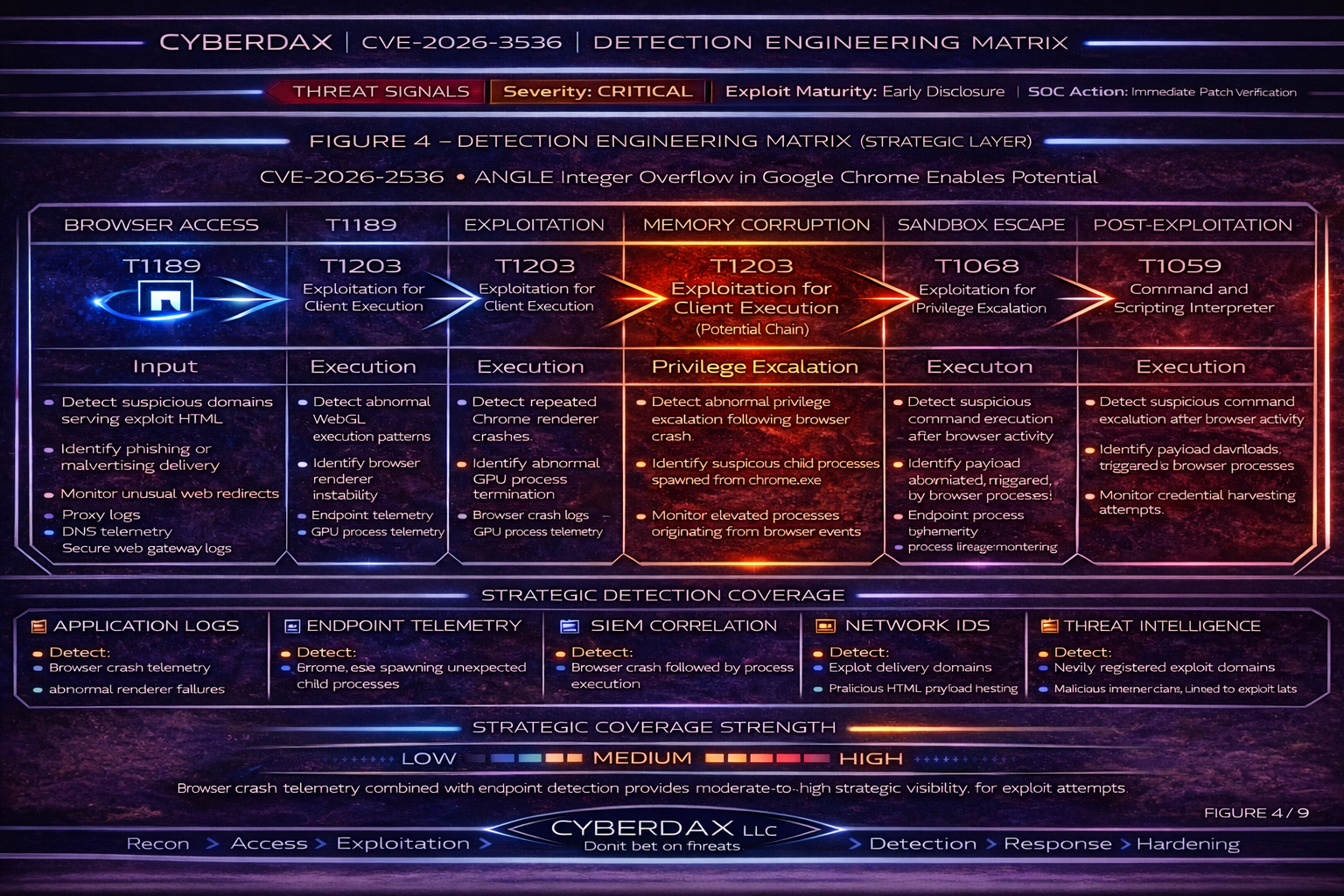
T1189 – Drive-by Compromise
Attackers deliver malicious web content through compromised websites, phishing pages, or malicious advertisements.
Operational Objective
Deliver exploit code to vulnerable browsers.
Artifacts
· Malicious HTML pages
· Exploit kit landing pages
· Malicious advertising scripts
Detection Relevance
· Monitor proxy and DNS telemetry for suspicious domains serving exploit payloads.
T1203 – Exploitation for Client Execution
The browser processes crafted WebGL instructions designed to trigger the integer overflow vulnerability.
Operational Objective
Trigger memory corruption within the browser rendering process.
Artifacts
· WebGL execution events
· Abnormal browser rendering behavior
Detection Relevance
· Endpoint telemetry detecting abnormal browser behavior or crashes.
T1068 – Exploitation for Privilege Escalation
Attackers may combine the vulnerability with additional browser sandbox escape vulnerabilities.
Operational Objective
Achieve code execution outside the browser sandbox.
Artifacts
· Exploit chain activity
· Suspicious process behavior following browser crashes
Detection Relevance
· Monitor endpoint telemetry for suspicious processes spawned by browser applications.
S22 – Malware and SHA256
Associated malware family
· Not known at this time
Exploit payload SHA256
· Not known at this time
S23 – Behavior and Log Artifacts
· Chrome renderer crash events
· Abnormal WebGL execution activity
· Suspicious browser process behavior
· Phishing pages delivering malicious HTML content
S24 – IOC Confidence and Hunt Prioritization (numeric scores)

Scoring Model
· Signal Fidelity (0–40)
· Exploit Correlation (0–40)
· Operational Impact (0–20)
Maximum Score: 100
Immediate Priority
· Chrome renderer crash associated with suspicious web activity — 92
· Exploit delivery through phishing domain — 90
High Priority
· Abnormal WebGL execution telemetry — 85
· Suspicious browser process behavior — 83
Elevated Monitoring
· Suspicious advertising network traffic — 72
S25 – Detection Signals Layer
Primary Signals
· Abnormal browser crashes
· Suspicious WebGL activity
Secondary Signals
· Phishing domain hosting malicious HTML
· Exploit kit landing page detection
S26 – Detection Coverage Matrix (Strategic Detection Layer)

Endpoint Telemetry
· Detect abnormal browser crashes and process behavior.
Network Telemetry
· Detect exploit delivery infrastructure.
SIEM Correlation
· Correlate phishing domain access with browser crash telemetry.
Proxy Logs
· Detect malicious HTML delivery.
Coverage Interpretation
· Combining endpoint telemetry with network telemetry significantly improves detection confidence.
Residual Detection Risk
· Exploit attempts may appear similar to benign browser crashes.
SOC Priority
· Monitor abnormal browser crashes associated with suspicious web activity.
S27 – Detection Engineering Matrix (Operational Rule Layer)

Detection Goal
Detect potential exploitation of CVE-2026-3536 by correlating malicious web delivery, vulnerable Chrome versions, browser crash telemetry, and post-browser anomaly activity.
Detection Strategy
Network Layer
· Identify suspicious domains delivering exploit content.
· Detect newly observed or reputation-poor domains serving HTML to endpoints.
Endpoint Layer
· Detect Chrome renderer crashes or abnormal browser termination.
· Detect suspicious child processes spawned from Chrome.
Exposure Layer
· Identify endpoints running Chrome versions earlier than 145.0.7632.159 / 160.
Correlation Layer
· Correlate suspicious browsing activity with crash telemetry and follow-on endpoint behavior.
High Confidence Exploit Pattern
1. Endpoint running vulnerable Chrome version
2. Suspicious domain or phishing site visited
3. Chrome renderer crash or abnormal termination
4. Optional follow-on suspicious process activity
This sequence should be treated as probable browser exploitation activity.
S28 – SOC Investigation Pivot Fields
Primary Pivot Fields
· host – affected endpoint
· user – user session tied to browsing activity
· browser_version – Chrome version running on endpoint
· url – page visited before crash
· domain – exploit delivery infrastructure
· process_name – chrome.exe renderer or GPU process
· crash_signature – exception or crash identifier
Secondary Pivot Fields
· parent_process / child_process
· dns_query
· user_agent
· device_group
· file_hash (download artifacts)
Operational Investigation Guidance
1. Confirm Chrome version on affected endpoint.
2. Identify domain or URL visited prior to crash.
3. Pivot across endpoints for similar crash signatures.
4. Check for suspicious child processes after browser instability.
5. Validate endpoint patch compliance.
S29 – Ultra-Tuned Detection Engineering Rules
Suricata
Rule Name
CyberDax Suspicious Browser Exploit Delivery From Reputation-Poor HTML Source
Detection Intent
Detect suspicious HTML delivery from domains or infrastructure likely to support browser exploit activity.
Purpose
Provide early network-layer visibility into exploit-page delivery targeting Chrome endpoints.
Tuning Explanation
· This is a supporting delivery signal, not a standalone exploitation verdict.
· Restrict to domains that are newly observed, low reputation, threat-intel matched, or recently registered.
· Correlate with endpoint crash telemetry and vulnerable-version exposure before escalation.
· Do not treat generic canvas or WebGL content alone as malicious.
System-Ready Rule
alert http $EXTERNAL_NET any -> $HOME_NET any (
msg:"CYBERDAX Suspicious Browser Exploit Delivery From Reputation-Poor Source";
flow:established,to_client;
http.header;
content:"Content-Type|3A| text/html"; nocase;
flowbits:set,cyberdax_suspicious_html;
classtype:web-application-attack;
sid:3536601;
rev:1;
)
Operational Guidance
· Escalate only when paired with suspicious domain intelligence or endpoint anomalies.
· Increase priority if the same source domain serves multiple endpoints.
Rule Name
CyberDax Repeated Suspicious HTML Delivery To Multiple Endpoints
Detection Intent
Detect suspicious HTML delivery patterns affecting multiple enterprise users.
Purpose
Identify possible exploit kit, malvertising, or watering-hole infrastructure.
Tuning Explanation
· Best used through SIEM aggregation of Suricata alerts.
· Promote when multiple internal hosts receive suspicious HTML from the same domain or IP in a short window.
System-Ready Rule
alert http $EXTERNAL_NET any -> $HOME_NET any (
msg:"CYBERDAX Repeated Suspicious HTML Delivery To Multiple Endpoints";
flow:established,to_client;
http.header;
content:"Content-Type|3A| text/html"; nocase;
file_data;
content:"<script"; nocase;
classtype:web-application-attack;
sid:3536602;
rev:1;
)
SentinelOne (Deep Visibility)
Rule Name
CyberDax Chrome Crash Cluster on Vulnerable Endpoint
Detection Intent
Detect repeated abnormal Chrome termination on endpoints likely still vulnerable to CVE-2026-3536.
Purpose
Identify likely exploit-triggered instability rather than isolated benign browser crashes.
Tuning Explanation
· A single crash is low-confidence.
· Treat repeat crash behavior within a short window as materially more suspicious.
· Enrich with software inventory to prioritize endpoints running Chrome earlier than the fixed versions.
· Escalate if preceded by suspicious or newly observed domain access.
System-Ready Query
(
EventType = "Process Exit"
AND ProcessName = "chrome.exe"
AND ExitCode != 0
)
OR
(
EventType = "Crash"
AND ProcessName = "chrome.exe"
)
Operational Guidance
• Medium confidence if repeated on one host.
• High confidence if the same crash pattern occurs on multiple vulnerable hosts.
Rule Name
CyberDax Chrome Suspicious Child Process Following Browser Instability
Detection Intent
Detect post-browser activity that may indicate successful client-side exploitation.
Purpose
Identify likely post-exploitation behavior originating from Chrome.
Tuning Explanation
· Chrome should rarely spawn shells, script hosts, or LOLBins in normal enterprise use.
· Treat as a high-confidence compromise indicator when it follows crash telemetry or suspicious browsing.
System-Ready Query
EventType = "Process Creation"
AND ParentProcessName = "chrome.exe"
AND (
ProcessName = "powershell.exe"
OR ProcessName = "cmd.exe"
OR ProcessName = "wscript.exe"
OR ProcessName = "cscript.exe"
OR ProcessName = "mshta.exe"
OR ProcessName = "rundll32.exe"
OR ProcessName = "regsvr32.exe"
)
Operational Guidance
· Escalate to critical if observed on a vulnerable endpoint after suspicious domain access.
· Review child process command line, network connections, and any dropped files.
Rule Name
CyberDax Vulnerable Chrome Version Exposure
Detection Intent
Identify endpoints still running vulnerable Chrome versions.
Purpose
Support risk-based hunting and patch prioritization.
Tuning Explanation
· This is an exposure rule, not an exploitation rule.
· Use to enrich crash, browsing, and post-exploitation detections.
System-Ready Query
EventType = "Agent Inventory"
AND ApplicationName CONTAINS "Google Chrome"
AND (
ApplicationVersion < "145.0.7632.159"
)
Splunk
Rule Name
CyberDax Chrome Crash Cluster With Signature Grouping
Detection Intent
Detect repeated Chrome instability grouped by crash signature or exception pattern.
Purpose
Differentiate widespread exploit-like crash behavior from isolated browser instability.
Tuning Explanation
• Use crash signature, exception code, or Windows Error Reporting bucket when available.
• Promote incidents affecting multiple hosts with the same signature.
• Highest priority when vulnerable versions are present.
SPL
index=endpoint_logs process_name="chrome.exe" (event_type="crash" OR exit_code!="0")
| bin _time span=10m
| stats count dc(host) as host_count values(host) as hosts by crash_signature _time
| where count >= 3 OR host_count >= 2
| eval severity=if(host_count>=2,"high","medium")
| eval rule_name="CyberDax Chrome Crash Cluster With Signature Grouping"
Rule Name
CyberDax Suspicious Domain Access Followed by Chrome Crash
Detection Intent
Correlate suspicious browsing activity with subsequent Chrome instability.
Purpose
Identify likely exploit-page delivery followed by browser crash behavior.
Tuning Explanation
· Requires web/proxy telemetry and endpoint crash or abnormal-exit telemetry.
· Prioritize domains that are low reputation, newly observed, or threat-intel matched.
· Raise severity when multiple endpoints show the same pattern.
SPL
(
search index=web_logs sourcetype IN ("proxy","web","dns")
user_agent="*Chrome*"
| eval event_type="web_access"
| table _time host user url domain user_agent
)
OR
(
search index=endpoint_logs process_name="chrome.exe" (event_type="crash" OR exit_code!="0")
| eval event_type="chrome_crash"
| table _time host user crash_signature exit_code
)
| sort 0 _time
| transaction host maxspan=5m
| search event_type="web_access" event_type="chrome_crash"
| stats count values(url) as url values(domain) as domain values(crash_signature) as crash_signature by host user
| eval severity="high"
| eval rule_name="CyberDax Suspicious Domain Access Followed by Chrome Crash"
Rule Name
CyberDax Vulnerable Chrome Version Exposure
Detection Intent
Identify vulnerable Chrome endpoints for enrichment and prioritization.
SPL
index=asset_inventory sourcetype IN ("edr:software","browser_inventory")
product_name="Google Chrome"
| eval vulnerable=if(version < "145.0.7632.159",1,0)
| search vulnerable=1
| eval severity="high"
| eval rule_name="CyberDax Vulnerable Chrome Version Exposure"
| table host user version severity rule_name
Rule Name
CyberDax Multi-Host Domain-to-Crash Cluster
Detection Intent
Identify the same suspicious domain leading to Chrome crash behavior on multiple endpoints.
Purpose
Detect likely exploit infrastructure affecting more than one user.
Tuning Explanation
• This is one of the strongest enterprise-level exploit signals.
• Useful for exploit kit, malvertising, or watering-hole activity.
SPL
(
search index=web_logs user_agent="*Chrome*"
| table _time host domain url
)
OR
(
search index=endpoint_logs process_name="chrome.exe" (event_type="crash" OR exit_code!="0")
| table _time host crash_signature
)
| sort 0 _time
| transaction host maxspan=5m
| search domain=* crash_signature=*
| stats dc(host) as host_count values(host) as hosts values(crash_signature) as crash_signature by domain
| where host_count >= 2
| eval severity="critical"
| eval rule_name="CyberDax Multi-Host Domain-to-Crash Cluster"
Elastic (KQL / EQL)
Rule Name
CyberDax Suspicious Domain Access Followed by Chrome Crash on Vulnerable Endpoint
Detection Intent
Detect potential exploitation attempts by correlating suspicious browsing activity with Chrome instability on vulnerable endpoints.
Purpose
Identify likely exploit delivery through malicious webpages targeting the Chrome ANGLE vulnerability.
Tuning Explanation
This rule requires two behavioral signals: suspicious browsing activity and Chrome instability.
The rule becomes significantly stronger when the endpoint is confirmed to be running an affected Chrome version.
· Use domain reputation telemetry where available.
· Escalate severity when the same domain causes crash telemetry on multiple endpoints.
EQL Query
sequence by host.name with maxspan=5m
[network where process.name == "chrome.exe"
and url.domain != null
and (threat.indicator.matched.atomic != null
or url.domain_length < 5
or dns.question.name != null)]
[process where process.name == "chrome.exe"
and (event.type == "end" or event.type == "crash")]
Operational Guidance
· Investigate domains visited immediately before Chrome instability.
· Pivot across hosts for the same domain or crash signature.
· Confirm Chrome version on affected endpoints.
Rule Name
CyberDax Chrome Crash Cluster Detection
Detection Intent
Detect repeated Chrome crashes on a single endpoint within a short time window.
Purpose
Differentiate normal browser instability from repeated crash behavior consistent with exploit attempts.
Tuning Explanation
Chrome occasionally crashes during normal use; repeat crash behavior is required to raise severity.
Escalate when the endpoint is running a vulnerable Chrome version.
Promote to high severity if multiple hosts show the same crash signature.
KQL Query
process.name : "chrome.exe" and
(event.type : "end" or event.type : "crash")
Operational Guidance
Investigate when:
· Three or more crashes occur within ten minutes
· The endpoint is running a vulnerable Chrome version
· The crash follows suspicious domain access
Rule Name
CyberDax Chrome Spawning Suspicious Child Process
Detection Intent
Detect post-exploitation behavior originating from Chrome.
Purpose
Identify potential command execution following successful browser exploitation.
Tuning Explanation
Chrome normally should not spawn shell interpreters or script hosts.
This rule therefore acts as a high-confidence compromise indicator.
KQL Query
process.parent.name : "chrome.exe" and

process.name : ("powershell.exe",

                "cmd.exe",

                "wscript.exe",

                "cscript.exe",

                "mshta.exe",

                "rundll32.exe",

                "regsvr32.exe")
Operational Guidance
Treat this detection as high severity, especially when combined with:
· Recent Chrome crash telemetry
· Suspicious domain access
· Vulnerable Chrome versions
Rule Name
CyberDax Vulnerable Chrome Version Exposure
Detection Intent
Identify endpoints still running Chrome versions vulnerable to CVE-2026-3536.
Purpose
Support risk-based hunting and patch prioritization.
Tuning Explanation
This is an exposure analytic, not an exploitation analytic.
Use it to enrich other alerts and prioritize systems for patching.
KQL Query
software.name : "Google Chrome" and
software.version < "145.0.7632.159"
Operational Guidance
Endpoints identified by this rule should be:
· Prioritized for patching
· Monitored for crash telemetry
· Included in targeted threat hunting
Rule Name
CyberDax Chrome Crash Signature Cluster Across Multiple Endpoints
Detection Intent
Detect repeated Chrome instability sharing the same crash signature or exception pattern across multiple hosts.
Purpose
Identify likely exploit attempts affecting more than one endpoint through the same malicious content or exploit infrastructure.
Tuning Explanation
Strongest when crash telemetry includes crash signature, exception code, faulting module, or WER bucket ID.
· Promote severity when the same crash signature appears on two or more hosts.
· Further promote if the crash occurs after access to the same domain or URL path.
· Particularly useful for exploit kits, watering-hole attacks, and malvertising campaigns.
KQL Query
process.name : "chrome.exe" and

(event.type : "crash" or event.type : "end") and

error.code : *
Operational Guidance
Cluster operationally by:
· error.code
· crash_signature
· host.name
· url.domain
Sigma
Rule Name
Chrome Spawns Suspicious Child Process
Detection Intent
Detect likely post-exploitation activity originating from Chrome.
Purpose
Portable high-confidence rule for successful client-side exploitation behavior.
SIEM/System-Ready Rule
title: Chrome Spawns Suspicious Child Process

id: 9f3b6c6b-cve-2026-3536-chrome-childproc

status: experimental

logsource:

  category: process_creation

detection:

  selection:

    ParentImage|endswith: '\chrome.exe'

    Image|endswith:

      - '\powershell.exe'

      - '\cmd.exe'

      - '\wscript.exe'

      - '\cscript.exe'

      - '\mshta.exe'

      - '\rundll32.exe'

      - '\regsvr32.exe'

  condition: selection

level: high

tags:

  - attack.t1203
Rule Name
Repeated Chrome Crash Events on Same Host
Detection Intent
Provide a portable low-to-medium confidence signal for repeated abnormal Chrome terminations.
Purpose
Support crash clustering where dedicated crash telemetry is limited.
System-Ready Rule
title: Repeated Chrome Crash Events on Same Host

id: 0f4d2e2d-cve-2026-3536-chrome-crash

status: experimental

logsource:

  category: process_termination

detection:

  selection:

    Image|endswith: '\chrome.exe'

  condition: selection

level: medium

tags:

  - attack.t1203
Tuning Explanation
· Treat as supportive telemetry only unless paired with suspicious browsing or version exposure.
YARA
Rule Name
CyberDax Browser Exploit Research Artifact – ANGLE / WebGL Focus
Detection Intent
Retrospectively identify suspicious research or exploit artifacts related to browser graphics exploitation.
Purpose
Support hunting in malware repositories, analyst sandboxes, exploit bundles, or seized payload sets.
Tuning Explanation
· Not suitable as primary operational control.
· Use only for retrospective hunting or exploit triage.
· Can false-positive on benign graphics demos without additional context.
System-Ready Rule
rule CYBERDAX_CVE_2026_3536_Angle_WebGL_Hunt

{

meta:

  description = "Hunt for suspicious browser exploit artifacts with ANGLE/WebGL emphasis"

  author = "CyberDax"

  version = "1"


strings:

  $s1 = "WebGLRenderingContext"

  $s2 = "OffscreenCanvas"

  $s3 = "ANGLE"

  $s4 = "gl.draw"

  $s5 = "gpu"

  $s6 = "canvas"


condition:

  3 of ($s*)

}
S29A – Confidence Tiers for Analysts
Supportive / Low-Confidence Telemetry
· Suspicious HTML delivery from reputation-poor domains
· Single Chrome crash on a vulnerable endpoint
· Web-heavy graphics content alone
High-Confidence Exploit Correlation
· Vulnerable Chrome version
· Suspicious domain access
· Repeated Chrome crash or matching crash signature
· Multiple hosts affected by same domain
Post-Compromise Indicators
· Chrome spawning suspicious child processes
· Crash sequence followed by download, credential access, or LOLBin activity
S29B – SOC Investigation Playbook
Purpose
Provide a structured investigation workflow for SOC analysts responding to alerts associated with potential exploitation of CVE-2026-3536, a Chrome ANGLE integer overflow vulnerability that can be triggered by malicious web content.
This playbook guides analysts through validating exploit attempts, identifying malicious infrastructure, and determining whether endpoint compromise occurred.
Phase 1 – Alert Validation
Objective: Determine whether the alert reflects a legitimate security event or benign browser instability.
• Identify the detection source
· Determine which rule or telemetry generated the alert
· Confirm whether the signal originated from network monitoring, endpoint telemetry, exploit correlation analytics, or post-exploitation detection
• Confirm Chrome version on the affected endpoint
· Determine whether the system is running Chrome earlier than 145.0.7632.159 / 160
· Prioritize investigation if the endpoint is confirmed vulnerable
• Identify the associated user session
· Determine the user account tied to the browsing activity
· Identify whether the user account has privileged access or administrative roles
Phase 2 – Suspicious Web Activity Investigation
Objective: Determine whether the alert was triggered by malicious or suspicious web infrastructure.
• Identify the domain and URL visited before the event
· Review proxy, DNS, or secure web gateway telemetry
· Determine whether the domain is newly registered or reputation-poor
• Pivot across enterprise web activity
· Identify whether additional endpoints accessed the same domain or URL path
· Determine whether multiple users were exposed to the same content
• Analyze webpage characteristics
· Identify large or heavily scripted HTML responses
· Identify abnormal rendering behavior associated with graphics processing or WebGL activity
Phase 3 – Browser Crash and Instability Analysis
Objective: Determine whether browser instability patterns indicate possible exploit execution.
• Validate crash telemetry
· Confirm abnormal Chrome termination events or renderer crashes
• Identify crash clustering behavior
· Determine whether multiple crash events occurred within a short time window
· Identify crash signatures, exception codes, or faulting modules where available
• Pivot across enterprise crash telemetry
· Identify whether multiple endpoints exhibit identical crash signatures
· Determine whether crashes correlate with visits to the same domain or URL path
Phase 4 – Exploit Infrastructure Assessment
Objective: Determine whether the event is associated with malicious infrastructure.
• Evaluate domain and hosting infrastructure
· Determine domain registration age and reputation score
· Identify hosting providers or associated infrastructure
• Consult threat intelligence sources
· Determine whether the infrastructure has previously been associated with exploit delivery, phishing campaigns, or malicious advertising networks
• Assess enterprise exposure scope
· Determine how many users or departments accessed the suspicious infrastructure
Phase 5 – Endpoint Compromise Assessment
Objective: Determine whether exploitation progressed beyond browser instability.
• Analyze process activity following browser crashes
· Identify suspicious child processes spawned by chrome.exe
· Review command-line arguments and parent-child process relationships
• Review file and network activity
· Identify downloaded payloads or executable files
· Review outbound network connections from the affected endpoint
• Evaluate credential exposure risk
· Review authentication telemetry for suspicious login activity
· Identify browser credential access attempts or token misuse
Phase 6 – Containment and Remediation
Objective: Prevent further exploitation and restore endpoint security.
• Patch vulnerable browsers immediately
· Upgrade Chrome to 145.0.7632.159 / 160 or later
• Block malicious infrastructure
· Apply DNS or proxy filtering rules for identified domains and IP addresses
• Isolate compromised endpoints
· Use EDR containment capabilities if suspicious execution behavior is observed
• Initiate forensic review when compromise indicators are present
· Preserve endpoint telemetry and browser artifacts for investigation
SOC Escalation Criteria
Escalate incident severity when one or more of the following conditions occur:
• Multiple endpoints exhibit identical Chrome crash signatures
• Suspicious domain access precedes repeated browser instability
• Affected endpoints remain vulnerable to the CVE
• Chrome launches suspicious system utilities or scripting engines
Expected Investigation Outcomes
SOC analysis should classify the event into one of the following categories:
• Benign browser instability
• Suspicious web activity without confirmed exploit execution
• Probable exploit delivery attempt
• Confirmed endpoint compromise
Each classification should be documented and used to guide remediation actions, detection tuning, and threat intelligence updates.
S29C – SOC Hunt Pivot and Analyst Quick Reference
Purpose
Provide SOC analysts with immediate investigation pivots and telemetry fields to accelerate triage when detections associated with CVE-2026-3536 occur. This quick-reference section helps analysts rapidly identify related activity, additional impacted endpoints, and potential exploit infrastructure.
Primary Investigation Pivot Fields
These fields should be used first when investigating alerts or conducting threat hunts.
• host.name / hostname
· Identify additional activity originating from the same endpoint
• user / account name
· Determine whether the user accessed other suspicious domains
• url.domain / dns.question.name
· Identify additional endpoints contacting the same infrastructure
• url.full / uri_path
· Identify specific exploit delivery paths
• browser_version / software.version
· Confirm vulnerable Chrome versions
• process.name
· Identify browser process behavior and crash events
Secondary Investigation Pivot Fields
These fields support deeper investigation and campaign identification.
• crash_signature / exception_code
· Identify repeated browser crash patterns
• parent_process / child_process
· Detect suspicious execution chains originating from Chrome
• file_hash / downloaded_file
· Identify payload downloads or exploit artifacts
• destination_ip / infrastructure IP
· Identify additional domains hosted on the same infrastructure
• device_group / asset group
· Identify targeted departments or privileged users
Enterprise Hunting Queries
SOC teams should perform targeted hunts when exploit activity is suspected.
Recommended hunts include:
• Endpoints running Chrome versions earlier than 145.0.7632.159 / 160
• Multiple endpoints accessing the same suspicious domain
• Chrome crash events occurring within minutes of visiting the same URL
• Chrome spawning unexpected system utilities or scripting engines
Rapid Triage Workflow
When alerts associated with this CVE occur, analysts should quickly answer the following questions:
1. Is the endpoint running a vulnerable Chrome version?
2. Did the endpoint access suspicious or newly registered infrastructure?
3. Did the browser experience repeated crash events?
4. Are multiple endpoints showing the same crash signature?
5. Did Chrome spawn suspicious processes after the crash event?
If three or more conditions are met, treat the event as a probable exploitation attempt.
Indicators of Exploit Campaign Activity
The following patterns suggest coordinated exploitation rather than isolated browser instability.
• Multiple endpoints visiting the same suspicious domain
• Identical Chrome crash signatures across hosts
• Repeated browser crashes shortly after webpage access
• Suspicious child processes launched by Chrome
These patterns should be escalated immediately to incident response teams.
S30 – SIEM Correlation Logic (High Confidence Detection)
Rule Name
Chrome Exploit Activity Correlation
Detection Intent
Detect probable exploitation activity against vulnerable Chrome endpoints.
Correlation Logic
1. Endpoint running vulnerable Chrome version
2. Access to suspicious or newly observed webpage
3. Chrome crash or abnormal renderer termination within 5 minutes
4. Optional severity uplift if:
· same crash signature appears on multiple hosts
· suspicious child process follows
· domain has threat-intel match
S31 – SOC Response Level
Critical Severity – Potential Endpoint Compromise
· Chrome spawning suspicious child processes following browser instability
· Browser crash events followed by command execution behavior
· Suspicious payload downloads or outbound connections detected
· Multiple endpoints exhibiting identical exploit behavior
SOC Actions
· Immediately isolate affected endpoints
· Initiate incident response procedures
· Preserve endpoint telemetry and forensic artifacts
· Block malicious infrastructure across the enterprise
High Severity – Probable Exploit Attempt
· Multiple Chrome crash events occurring within a short time window
· Suspicious domain access immediately preceding browser instability
· Identical crash signatures appearing across endpoints
· Endpoint confirmed running vulnerable Chrome version
SOC Actions
· Escalate investigation to senior SOC analyst or incident response team
· Block malicious domains at DNS and proxy layers
· Initiate enterprise threat hunting for related activity
· Validate Chrome patch compliance across endpoints
Medium Severity – Suspicious Web Activity
· Endpoint running vulnerable Chrome version
· Suspicious or newly registered domain accessed
· Single browser crash event following webpage access
SOC Actions
· Investigate domain reputation and registration history
· Pivot across enterprise logs for additional affected endpoints
· Confirm Chrome patch status
Low Severity – Informational Telemetry
· Single Chrome crash event without suspicious browsing activity
· Endpoint running patched Chrome version
· No suspicious domain activity identified
· No suspicious execution behavior detected
SOC actions
· Record telemetry for monitoring
· Verify Chrome patch status
· Continue monitoring for additional signals
S32 – False Positive Analysis and Detection Limitations
Common benign causes of Chrome instability
· GPU driver incompatibility
· Browser extension conflicts
· Corrupted browser profile data
· WebGL-intensive websites
· Internal browser testing environments
Indicators suggesting likely false positives
· Single isolated Chrome crash event
· No suspicious domain access preceding crash telemetry
· Crash signatures differ across endpoints
· Endpoint running patched Chrome version
Detection limitations
· Browser exploits often appear as behavioral anomalies rather than signatures
· Crash telemetry visibility varies across EDR platforms
· Legitimate websites may unknowingly host malicious scripts
S33 – SOC Deployment Notes
Required telemetry sources
· Web proxy or secure web gateway logs
· DNS resolution telemetry
· Endpoint process monitoring
o Browser crash telemetry
o Process creation events
· Software inventory or asset management data
Recommended integration points
· Endpoint detection and response platforms
· SIEM correlation systems
· DNS filtering platforms
· Threat intelligence feeds
Operational deployment priorities
· Monitor endpoints running vulnerable Chrome versions
· Detect crash clustering patterns across endpoints
· Integrate domain reputation analysis into SOC workflows
S34 – Delivery Methods
Phishing Campaigns
· Malicious email links directing users to exploit pages
· Targeted spear-phishing campaigns
Malvertising Infrastructure
· Malicious advertisements embedded within legitimate websites
· Compromised advertising platforms distributing exploit content
Compromised Websites (Watering-Hole Attacks)
· Watering-hole attacks targeting specific organizations
· Exploit scripts injected into legitimate web platforms
Exploit Kits
· Automated exploit frameworks distributing browser exploits through malicious webpages
S35 – 7-Day Response Plan
Day 1
· Identify endpoints running vulnerable Chrome versions
Day 2
· Deploy Chrome security updates enterprise-wide
Day 3
· Review DNS and proxy logs for suspicious domains
Day 4
· Analyze Chrome crash telemetry across enterprise endpoints
Day 5
· Deploy detection engineering rules in SIEM
Day 6
· Conduct targeted threat hunting for exploit activity
Day 7
· Validate patch compliance and document remediation results
S36 – Defensive Control and Hardening Architecture

Layer 1 – Patch governance
· Rapid deployment of Chrome security updates
· Automated browser update management
Layer 2 – Web filtering
· Block suspicious domains and exploit infrastructure
· Enforce safe browsing controls
Layer 3 – DNS security
· Detect newly registered domains
· Block malicious DNS infrastructure
Layer 4 – Endpoint Detection & Response
· Monitor browser process behavior
· Detect suspicious child processes
Layer 5 – Network monitoring
· Inspect HTTP traffic for suspicious exploit delivery
Layer 6 – Security awareness
· Train users to identify phishing and malicious links
S37 – Estimated Probability of Recurrence (12-Month Horizon)
Estimated probability
· 55–65 percent likelihood of similar browser exploitation activity affecting enterprise Chrome deployments within the next 12 months.
This estimate is based on:
· High historical frequency of Chrome memory-safety vulnerabilities
· Rapid exploit development cycles observed in browser exploitation
· Chrome’s dominant global market share
· Strong attacker incentives to target client-side attack surfaces
S38 – Post-Incident Insights and Recommendations

Key security insights
· Browser vulnerabilities remain a significant enterprise attack vector
· Exploit attempts frequently appear as browser instability prior to compromise
· Multi-signal correlation significantly improves detection accuracy
Recommended improvements
· Maintain aggressive browser patch deployment cycles
· Improve visibility into browser crash telemetry
· Integrate domain reputation analysis into SOC workflows
· Conduct periodic threat hunting for browser exploit activity
S39 – Attack Economics & Organizational Impact Model
Browser exploitation vulnerabilities create a favorable economic model for attackers because a single exploit development effort can be reused across thousands of targets through automated delivery infrastructure such as exploit kits, malicious advertising networks, and phishing campaigns.
In contrast, organizations incur disproportionate operational costs when responding to even suspected browser exploitation activity. Investigations require endpoint forensics, credential exposure analysis, and enterprise patch validation across large device fleets.
This imbalance means that relatively low attacker investment can trigger significant defensive costs for organizations, particularly when vulnerabilities affect widely deployed software such as Chrome.
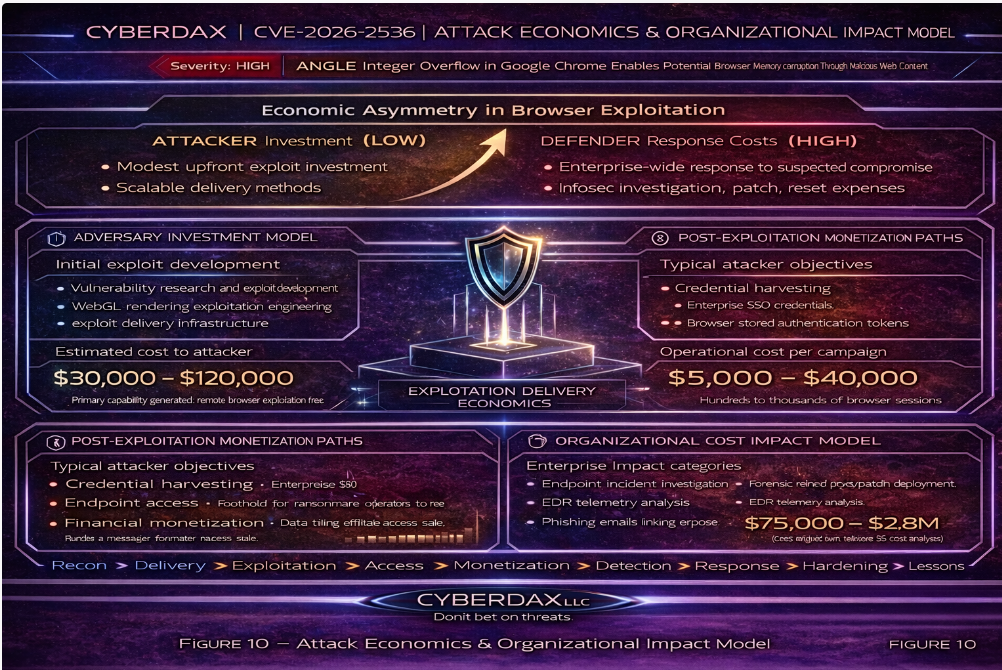
Figure 10 illustrates the economic lifecycle of a browser exploitation campaign, showing the relationship between attacker development investment, scalable exploit delivery infrastructure, potential monetization pathways, and the defensive response costs incurred by organizations.
Organizations that reduce patch latency, maintain strong endpoint telemetry, and rapidly identify exploit infrastructure significantly decrease the return on investment for attackers.
S40 – References
National Vulnerability Database – CVE-2026-3536
· hxxps://nvd[.]nist[.]gov/vuln/detail/CVE-2026-3536
Chromium Security Advisory – Chrome Release Notes
· hxxps://chromereleases[.]googleblog[.]com
MITRE CVE Program Record
· hxxps://cve[.]mitre[.]org/cgi-bin/cvename[.]cgi?name=CVE-2026-3536
