CVE-2026-2441 Chrome Use-After-Free Zero-Day Actively Exploited

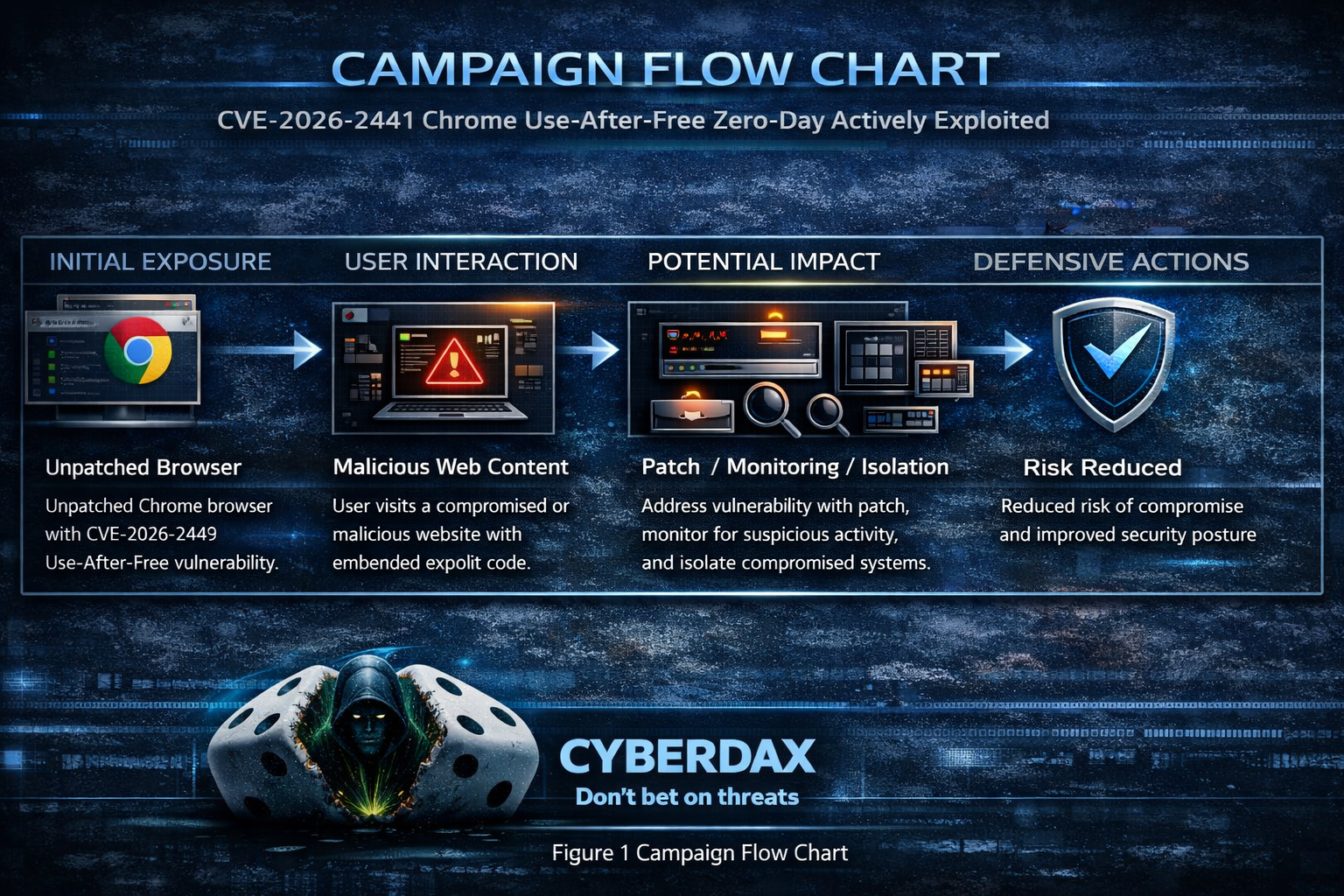
Figure 1 Campaign Flow Chart
BLUF
Google shipped an emergency Chrome stable update after confirming in-the-wild exploitation of CVE-2026-2441, a High-severity use-after-free in CSS. Exploitation is triggered via a crafted HTML page and may enable arbitrary code execution inside Chrome’s sandbox, making it a High-priority patching event for all orgs running Chrome on desktop.
Executive Cost Summary
This cost analysis was developed by the CyberDax team using expert judgment and assisted analytical tools to support clarity and consistency.
“For organizations affected by active exploitation of the Chrome zero-day vulnerability CVE-2026-2441, costs are driven primarily by emergency patching, endpoint investigation, and short-term business disruption tied to browser-based compromise risk.”
· Low-end total cost: $250K – $750K
o Rapid patch deployment, limited endpoint investigation, no confirmed payload execution
· Typical expected range: $1.5M – $4.5M
o Enterprise-wide emergency response, targeted forensics, short operational slowdown
· Upper-bound realistic scenarios: $6M – $15M
o Broader compromise requiring rebuilds, legal review, extended monitoring period
Key Cost Drivers
Number of endpoints requiring out-of-band browser patching and validation
Scope of forensic review for potential post-exploit activity ($200K–$1M+)
Business disruption from emergency downtime or restricted browsing access
External incident response and specialized memory exploitation expertise
Legal/compliance exposure if exploitation leads to data access or theft
Bottom line for executives
An actively exploited Chrome zero-day is rarely a “free patch.” Even in contained scenarios, mid-to-large enterprises should expect six- to seven-figure response costs, with escalation into eight figures if exploitation leads to broader compromise, legal exposure, or extended operational disruption.
Potential affected sectors
All sectors using Chrome on managed/unmanaged endpoints; elevated risk for:
· Government, critical infrastructure, finance, healthcare, defense/telecom (High-value browsing targets). (No sector targeting was publicly specified; this is a defensive exposure view.)
Potential impacted countries
· Global
Date of first reported activity
· Feb 11, 2026
Date of last reported activity update
· Feb 16, 2026
Why This Matters to Defenders
· Browser zero-days are High-leverage initial access vectors (drive-by/watering hole/malvertising) and can quickly turn into endpoint compromise when chained with follow-on payload delivery.
· Vendor explicitly confirms active exploitation, so patch urgency is Higher than typical “High severity” Chrome fixes.
Associated APT groups
· Not publicly attributed (no actor disclosure in vendor post or mainstream reporting).
Associated Criminal Organizations
· Not publicly attributed.
Tools used in campaign
· Crafted HTML exploit content targeting Chrome CSS component.
· Any post-exploitation tooling/payloads: not publicly disclosed.
Exposure Assessment Tool
Primary
· Tenable / Nessus plugins mapped to CVE-2026-2441 (see Nessus IDs below).
Operational
· Endpoint/browser inventory to locate versions below Chrome 145.0.7632.75/76 (Win/Mac) (and Linux channel noted by Google).
IOCs
HIGH Confidence Indicators (80–100)
· Unpatched Google Chrome versions that are explicitly vulnerable to CVE-2026-2441
o Confidence High 95
o Windows and macOS: versions earlier than 145.0.7632.75/76
o Linux versions earlier than 144.0.7559.75
o This is the strongest exposure signal because the vulnerability is confirmed exploited in the wild.
· User visited a suspicious or unexpected webpage shortly before a Google Chrome crash involving the rendering process
· Confidence: High 85
· The vulnerability is triggered via a crafted HTML page and affects Cascading Style Sheets handling, making “browse → crash” correlation meaningful.
Clustered Google Chrome renderer crashes on the same endpoint within a short time window (minutes to hours)
· Confidence: High 80
· Failed exploit attempts against memory corruption bugs commonly create repeated instability before a reliable compromise path is achieved.
MEDIUM Confidence Indicators (50–79)
Crash artifacts that point to memory corruption in the Chrome renderer while processing page layout or style
· Confidence: Medium 75
· Examples to look for (wording varies by platform/log source): use-after-free, heap-use-after-free, invalid free, EXC_BAD_ACCESS, access violation, segmentation fault, or similar memory errors tied to Chrome’s content processes.
· Not unique to this CVE, but meaningful when paired with vulnerable version + suspicious browse event.
A “drive-by” browsing pattern: no download/installer prompts, but immediate Chrome instability or unexpected child processes spawned shortly after
· Confidence Medium 65
· The CVE description indicates code execution inside the sandbox, which can still be used for follow-on activity depending on attacker chaining.
New or modified browser configuration shortly after the suspected event
· Confidence Medium 55
· Examples: unexpected proxy settings, newly installed extensions, altered startup pages/search provider.
· These are common outcomes in browser compromise scenarios but not specific to this CVE.
LOW Confidence Indicators (20–49)
Network indicators without published attacker infrastructure
· Confidence Low 40
· Because Google has not released domains, Internet Protocol addresses, or file hashes associated with exploitation, most network indicators will be circumstantial (for example: newly registered domains visited right before the crash, unusual redirect chains, or short-lived hosting).
Single, isolated Chrome crash with no other corroborating telemetry
· Confidence Low 30
· Crashes happen for benign reasons; without correlation to a suspicious page + vulnerable version + follow-on signs, this is weak.
Applicable MITRE ATT&CK “attack chain” chart (defender mapping)
· Post-exploitation stages are unknown from public reporting; chart covers the most likely chain from a browser zero-day landing through execution.
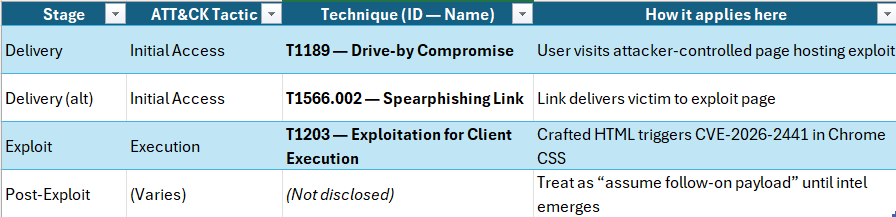
Figure 2 MITRE ATT&CK “attack chain” chart
TTPs
Stage 1 Delivery / Lure
· T1189 Drive-by Compromise
o Watering hole/malvertising/redirect chain leads to exploit page.
· T1566.002 Spearphishing Link
o User receives a link that opens exploit content.
Stage 2 Exploit / Execution
· T1203 Exploitation for Client Execution
o Crafted HTML triggers CVE-2026-2441 (CSS use-after-free) to execute code inside Chrome sandbox.
Stage 3 Payload / Actions on Objectives
· Unknown: no public indicators of persistence/C2/credential theft tooling.
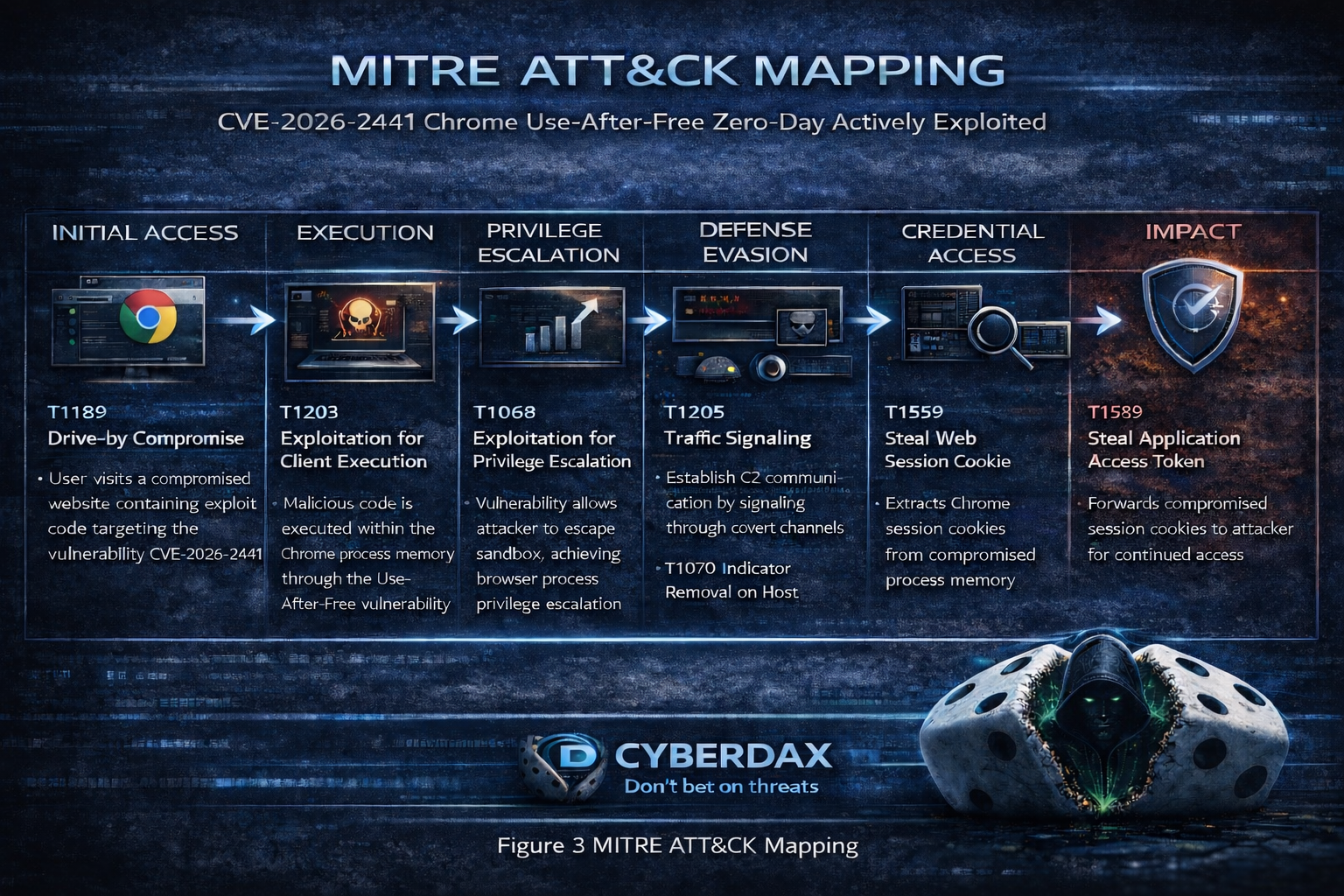
Figure 3 TTP MITRE ATT&CK Chain flow chart
CVE-2026-2441
Use after free in CSS
CVSS:3.1
· (8.8) AV:N/AC:L/PR:N/UI:R/S:U/C:H/I:H/A:H
Nessus ID
· 299026
· 299027
· 299032
· 299033
· 299052
· 299131
· 299142
Is this on the KEV list?
· No
Patching / mitigation data
Patch release date
· February 13, 2026
URL link to patch information
· hxxps://chromereleases.googleblog.com/2026/02/stable-channel-update-for-desktop_13.html
What is the exploitability?
· Remote / network-reachable
o Triggered by crafted HTML; requires user interaction (opening/visiting content).
Has there been observed exploitation?
· Yes
What is the exposure risk?
· High for orgs with:
o unmanaged browsers, slow patch SLAs, High browsing exposure roles
o weak web filtering / limited EDR visibility on browser process trees
· Risk is amplified because exploitation is confirmed and the browser is a universal endpoint surface.
Recommended action
· Patch immediately to Chrome stable versions called out by Google (Win/Mac updated to 145.0.7632.75/76; Linux channel noted separately).
· Enforce browser auto-update + block outdated versions via enterprise policy.
· Add temporary EDR/network hunts (below) for Chrome-spawned scripting/LOLBins.
· Consider hardened browsing
· Isolation for High-risk users for 7–14 days (until more IOCs/actor context emerges).
Malware names / family / SHA256 / decoding key
There has been no malware associated with CVE-2026-2441 at this time
Verdict
· Confirmed exploited browser zero-day with a vendor-shipped fix → treat as emergency patch and run short-term hunts for browser-spawned payload execution until better IOCs are published.
Primary objectives
This has not been publicly stated, however typical objectives from browser zero-days include:
· Initial access followed by payload delivery (infostealers, RATs)
· Espionage staging
· Ransomware pre-positioning. (Assessment; not attribution.)
Threat actor context
· No actor information has been disclosed at this time
Behavior analysis (what to watch)
· User opens web content → exploit triggers in Chrome renderer/sandbox → potential follow-on download/execute via LOLBins or dropped binaries.
· Expect attacker to blend in with normal browsing (legitimate-looking sites/redirect chains).
Expected User-Agent patterns
· Likely normal Chrome UA strings (no unique UA reported publicly).
Payload examples
Examples are typical post-browser-exploit patterns; not confirmed for this case.)
(generic placeholders until published)
· chrome.exe launches powershell.exe with download cradle
· chrome.exe launches cmd.exe /c invoking mshta or rundll32 for staging
Log artifacts (practical)
· EDR: Chrome spawning script engines/LOLBins; unsigned binaries executed shortly after browser activity.
· Proxy/DNS: bursty redirect chains, newly registered domains, rare domains accessed by a single user cohort.
· Windows: Sysmon Event ID 1 (process create) linking parent chrome.exe to suspicious child.
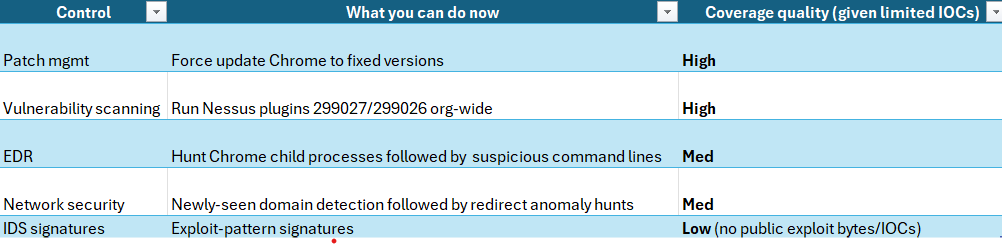
Figure 4 Detection Coverage Matrix
Suggested rules / potential hunts
Suricata
Tune heavily; use as a hunting aid, not a High-fidelity alert.
· Suspicious browser-to-LOLBIN staging (generic)
Set flowbit when vulnerable Chrome is observed (request)
alert http $HOME_NET any -> $EXTERNAL_NET any (
msg:"CVE-2026-2441 Correlation Step 1 - Vulnerable Chrome User-Agent observed";
flow:established,to_server;
http.user_agent;
pcre:"/Chrome\/(14[0-4]\.|145\.0\.7632\.(?:[0-6]\d|7[0-4]))/R";
flowbits:set,cve_2026_2441.vuln_chrome_seen;
flowbits:noalert;
classtype:policy-violation;
sid:2026244101;
rev:1;
)
· Alert only when a vulnerable client receives a web page response that contains suspicious HTML content and embedded Cascading Style Sheets styling, which could indicate possible exploit delivery.
alert http $EXTERNAL_NET any -> $HOME_NET any (
msg:"CVE-2026-2441 POSSIBLE EXPLOIT DELIVERY - Vulnerable Chrome received suspicious inline CSS HTML (Ultra-Strict)";
flow:established,to_client;
flowbits:isset,cve_2026_2441.vuln_chrome_seen;
http.response_header;
content:"Content-Type|3a|"; nocase;
content:"text/html"; nocase;
http.response_body;
content:"<html"; nocase;
content:"<style"; nocase;
pcre:"/(?:@property\s+--|:has\(|contain:\s*layout|will-change\s*:|filter\s*:|clip-path\s*:|mask-image\s*:|calc\(|var\(--)/i";
threshold:type both, track by_src, count 1, seconds 3600;
classtype:attempted-user;
sid:2026244102;
rev:1;
)
SentinelOne
Windows
CVE-2026-2441 – CRITICAL Chrome Zero-Day Exploitation Chain (Windows)
Purpose
· Detect Highly probable successful exploitation of Chrome CVE-2026-2441 where Chrome spawns a shell and immediately stages execution or network activity.
Tuning Explanation
· Chrome almost never spawns these binaries directly.
· Requires two-stage behavior: shell spawn + outbound connection or payload drop.
· Designed for critical-only escalation.
Rule (Correlation Query)
(
EventType = "Process Creation"
AND ProcessName = "chrome.exe"
)
FOLLOWED BY
(
EventType = "Process Creation"
AND ParentProcessName = "chrome.exe"
AND ProcessName IN (
"powershell.exe",
"cmd.exe",
"mshta.exe",
"rundll32.exe",
"regsvr32.exe"
)
)
FOLLOWED BY
(
EventType IN ("Network Connect","File Creation")
AND (
DestinationPort IN (4444,1337,8080,53)
OR FileExtension IN ("exe","dll","ps1")
)
)
WITHIN 3m
Linux
CVE-2026-2441 – CRITICAL Chrome Exploitation + Payload Staging (Linux)
Purpose
· Detect probable exploitation where Chrome spawns a shell and immediately downloads or executes a secondary payload.
Tuning Explanation
· Chrome should not launch bash/sh directly.
· Requires suspicious shell spawn plus download utility execution.
· Extremely low noise outside compromise.
Rule
(
EventType = "Process Creation"
AND ProcessName = "chrome"
)
FOLLOWED BY
(
EventType = "Process Creation"
AND ParentProcessName = "chrome"
AND ProcessName IN ("bash","sh","zsh")
)
FOLLOWED BY
(
EventType = "Process Creation"
AND ProcessName IN ("curl","wget","nc")
)
WITHIN 2m
macOS
CVE-2026-2441 – CRITICAL Chrome Zero-Day Exploit Behavior (macOS)
Purpose
· Detect Highly suspicious Chrome exploitation where Chrome spawns Apple scripting or shell execution followed by payload staging.
Tuning Explanation
· Chrome should never directly launch osascript or bash in normal browsing.
· Requires secondary action: file drop or outbound connection.
· Best suited for executive/High-risk user monitoring.
Rule
(
EventType = "Process Creation"
AND ProcessName = "Google Chrome"
)
FOLLOWED BY
(
EventType = "Process Creation"
AND ParentProcessName = "Google Chrome"
AND ProcessName IN (
"osascript",
"bash",
"zsh"
)
)
FOLLOWED BY
(
EventType IN ("File Creation","Network Connect")
AND (
FilePath CONTAINS "/tmp/"
OR FileExtension IN ("dmg","pkg","sh")
OR DestinationPort IN (4444,8080,53)
)
)
WITHIN 3m
Recommended Alert Handling
If any of these fire, treat as:
· Immediate isolation candidate
· Capture full Storyline
· Pull Chrome crash dumps + browsing history around timestamp
· Validate Chrome patch level
Splunk
Chrome followed by suspicious child processes
(index=edr OR index=sysmon)
(EventCode=1 OR sourcetype=Sysmon:ProcessCreate)
ParentImage="*\\chrome.exe"
(Image="*\\powershell.exe" OR Image="*\\cmd.exe" OR Image="*\\wscript.exe" OR Image="*\\cscript.exe" OR Image="*\\mshta.exe" OR Image="*\\rundll32.exe" OR Image="*\\regsvr32.exe")
| stats count min(_time) as firstSeen max(_time) as lastSeen values(CommandLine) as cmdlines by Computer, User, ParentImage, Image
| sort – count
Sigma
(High-signal post-exploit indicator)
title: Chrome Spawning Suspicious Child Process (Potential Browser Exploit Follow-on)
id: 1c3d2d8e-2441-4b22-9c3f-000000000001
status: experimental
logsource:
category: process_creation
product: windows
detection:
parent:
ParentImage|endswith: '\chrome.exe'
child:
Image|endswith:
- '\powershell.exe'
- '\cmd.exe'
- '\wscript.exe'
- '\cscript.exe'
- '\mshta.exe'
- '\rundll32.exe'
- '\regsvr32.exe'
condition: parent and child
level: High
fields:
- UtcTime
- Computer
- User
- ParentImage
- Image
- CommandLine
falsepositives:
- Enterprise browser automation tools
- Some admin utilities launched via web portals
YARA
· Currently a YARA is not possible to create without a payload sample or exploit artifact bytes
o This data has not been released at this time.
Delivery methods
· Drive-by compromise (watering hole / malvertising / redirect chain) is the most plausible for browser zero-days.
· Phishing links may also be used, but no theme was publicly reported.
Steps to consider over the next seven days
1. Day 0–1: Patch all endpoints; confirm Chrome versions match vendor fixed builds.
2. Day 0–2: Run Nessus coverage for CVE-2026-2441; remediate any stragglers.
3. Day 1–3: Enable/raise severity on Chrome→LOLBIN detections; triage hits with URL/proxy context.
4. Day 2–5: Hunt rare/new domains + suspicious redirect chains correlated with endpoint process anomalies.
5. Day 5–7: Re-check KEV updates; if added, enforce accelerated remediation SLAs org-wide.
References
NVD
· hxxps://nvd.nist.gov/vuln/detail/CVE-2026-2441
Chrome Release
· hxxps[://]chromereleases[.]googleblog[.]com/2026/02/stable-channel-update-for-desktop_13[.]html
Bleeping Computer
· hxxps[://]www[.]bleepingcomputer[.]com/news/security/google-patches-first-chrome-zero-day-exploited-in-attacks-this-year/
Security Week
· hxxps[://]www[.]securityweek[.]com/google-patches-first-actively-exploited-chrome-zero-day-of-2026/
Tenable
· hxxps[://]www[.]tenable[.]com/cve/CVE-2026-2441/plugins
GitHub User Content
· hxxps[://]raw[.]githubusercontent[.]com/cisagov/kev-data/main/known_exploited_vulnerabilities[.]json
